Other noteworthy stories that might have slipped under the radar: Cloudflare WAF bypass, Canonical Snap Store abused for malware delivery, Curl terminating bug bounty program
To all those who are fighting the good fight in the world of cyber, keep collaborating to ensure our world never succumbs to the chaos of the Upside Down.
Millions of IT systems — some of them industrial and IoT — may start behaving unpredictably on January 19. Potential failures include: glitches in processing card payments; false alarms from security systems; incorrect operation of medical equipment; failures in automated lighting, heating, and water supply systems; and many more or less serious types of errors. The catch is — it will happen on January 19, 2038. Not that that’s a reason to relax — the time left to prepare may already be insufficient. The cause of this mass of problems will be an overflow in the integers storing date and time. While the root cause of the error is simple and clear, fixing it will require extensive and systematic efforts on every level — from governments and international bodies and down to organizations and private individuals.
The unwritten standard of the Unix epoch
The Unix epoch is the timekeeping system adopted by Unix operating systems, which became popular across the entire IT industry. It counts the seconds from 00:00:00 UTC on January 1, 1970, which is considered the zero point. Any given moment in time is represented as the number of seconds that have passed since that date. For dates before 1970, negative values are used. This approach was chosen by Unix developers for its simplicity — instead of storing the year, month, day, and time separately, only a single number is needed. This facilitates operations like sorting or calculating the interval between dates. Today, the Unix epoch is used far beyond Unix systems: in databases, programming languages, network protocols, and in smartphones running iOS and Android.
The Y2K38 time bomb
Initially, when Unix was developed, a decision was made to store time as a 32-bit signed integer. This allowed for representing a date range from roughly 1901 to 2038. The problem is that on January 19, 2038, at 03:14:07 UTC, this number will reach its maximum value (2,147,483,647 seconds) and overflow, becoming negative, and causing computers to “teleport” from January 2038 back to December 13, 1901. In some cases, however, shorter “time travel” might happen — to point zero, which is the year 1970.
This event, known as the “year 2038 problem”, “Epochalypse”, or “Y2K38”, could lead to failures in systems that still use 32-bit time representation — from POS terminals, embedded systems, and routers, to automobiles and industrial equipment. Modern systems solve this problem by using 64 bits to store time. This extends the date range to hundreds of billions of years into the future. However, millions of devices with 32-bit dates are still in operation, and will require updating or replacement before “day Y” arrives.
In this context, 32 and 64 bits refer specifically to the date storage format. Just because an operating system or processor is 32-bit or 64-bit, it doesn’t automatically mean it stores the date in its “native” bit format. Furthermore, many applications store dates in completely different ways, and might be immune to the Y2K38 problem, regardless of their bitness.
In cases where there’s no need to handle dates before 1970, the date is stored as an unsigned 32-bit integer. This type of number can represent dates from 1970 to 2106, so the problem will arrive in the more distant future.
Differences from the year 2000 problem
The infamous year 2000 problem (Y2K) from the late 20th century was similar in that systems storing the year as two digits could mistake the new date for the year 1900. Both experts and the media feared a digital apocalypse, but in the end there were just numerous isolated manifestations that didn’t lead to global catastrophic failures.
The key difference between Y2K38 and Y2K is the scale of digitization in our lives. The number of systems that will need updating is way higher than the number of computers in the 20th century, and the count of daily tasks and processes managed by computers is beyond calculation. Meanwhile, the Y2K38 problem has already been, or will soon be, fixed in regular computers and operating systems with simple software updates. However, the microcomputers that manage air conditioners, elevators, pumps, door locks, and factory assembly lines could very well chug along for the next decade with outdated, Y2K38-vulnerable software versions.
Potential problems of the Epochalypse
The date’s rolling over to 1901 or 1970 will impact different systems in different ways. In some cases, like a lighting system programmed to turn on every day at 7pm, it might go completely unnoticed. In other systems that rely on complete and accurate timestamps, a full failure could occur — for example, in the year 2000, payment terminals and public transport turnstiles stopped working. Comical cases are also possible, like issuing a birth certificate with a date in 1901. Far worse would be the failure of critical systems, such as a complete shutdown of a heating system, or the failure of a bone marrow analysis system in a hospital.
Cryptography holds a special place in the Epochalypse. Another crucial difference between 2038 and 2000 is the ubiquitous use of encryption and digital signatures to protect all communications. Security certificates generally fail verification if the device’s date is incorrect. This means a vulnerable device would be cut off from most communications — even if its core business applications don’t have any code that incorrectly handles the date.
Unfortunately, the full spectrum of consequences can only be determined through controlled testing of all systems, with separate analysis of a potential cascade of failures.
The malicious exploitation of Y2K38
IT and InfoSec teams should treat Y2K38 not as a simple software bug, but as a vulnerability that can lead to various failures, including denial of service. In some cases, it can even be exploited by malicious actors. To do this, they need the ability to manipulate the time on the targeted system. This is possible in at least two scenarios:
Interfering with NTP protocol data by feeding the attacked system a fake time server
Spoofing the GPS signal — if the system relies on satellite time
Exploitation of this error is most likely in OT and IoT systems, where vulnerabilities are traditionally slow to be patched, and the consequences of a failure can be far more substantial.
An example of an easily exploitable vulnerability related to time counting is CVE-2025-55068 (CVSSv3 8.2, CVSSv4 base 8.8) in Dover ProGauge MagLink LX4 automatic fuel-tank gauge consoles. Time manipulation can cause a denial of service at the gas station, and block access to the device’s web management panel. This defect earned its own CISA advisory.
The current status of Y2K38 mitigation
The foundation for solving the Y2K38 problem has been successfully laid in major operating systems. The Linux kernel added support for 64-bit time even on 32-bit architectures starting with version 5.6 in 2020, and 64-bit Linux was always protected from this issue. The BSD family, macOS, and iOS use 64-bit time on all modern devices. All versions of Windows released in the 21st century aren’t susceptible to Y2K38.
The situation at the data storage and application level is far more complex. Modern file systems like ZFS, F2FS, NTFS, and ReFS were designed with 64-bit timestamps, while older systems like ext2 and ext3 remain vulnerable. Ext4 and XFS require specific flags to be enabled (extended inode for ext4, and bigtime for XFS), and might need offline conversion of existing filesystems. In the NFSv2 and NFSv3 protocols, the outdated time storage format persists. It’s a similar patchwork landscape in databases: the TIMESTAMP type in MySQL is fundamentally limited to the year 2038, and requires migration to DATETIME, while the standard timestamp types in PostgreSQL are safe. For applications written in C, pathways have been created to use 64-bit time on 32-bit architectures, but all projects require recompilation. Languages like Java, Python, and Go typically use types that avoid the overflow, but the safety of compiled projects depends on whether they interact with vulnerable libraries written in C.
A massive number of 32-bit systems, embedded devices, and applications remain vulnerable until they’re rebuilt and tested, and then have updates installed by all their users.
Various organizations and enthusiasts are trying to systematize information on this, but their efforts are fragmented. Consequently, there’s no “common Y2K38 vulnerability database” out there (1, 2, 3, 4, 5).
Approaches to fixing Y2K38
The methodologies created for prioritizing and fixing vulnerabilities are directly applicable to the year 2038 problem. The key challenge will be that no tool today can create an exhaustive list of vulnerable software and hardware. Therefore, it’s essential to update inventory of corporate IT assets, ensure that inventory is enriched with detailed information on firmware and installed software, and then systematically investigate the vulnerability question.
The list can be prioritized based on the criticality of business systems and the data on the technology stack each system is built on. The next steps are: studying the vendor’s support portal, making direct inquiries to hardware and software manufacturers about their Y2K38 status, and, as a last resort, verification through testing.
When testing corporate systems, it’s critical to take special precautions:
Never test production systems.
Create a data backup immediately before the test.
Isolate the system being tested from communications so it can’t confuse other systems in the organization.
If changing the date uses NTP or GPS, ensure the 2038 test signals cannot reach other systems.
After testing, set the systems back to the correct time, and thoroughly document all observed system behaviors.
If a system is found to be vulnerable to Y2K38, a fixing timeline should be requested from the vendor. If a fix is impossible, plan a migration; fortunately, the time we have left still allows for updating even fairly complex and expensive systems.
The most important thing in tackling Y2K38 is not to think of it as a distant future problem whose solution can easily wait another five to eight years. It’s highly likely that we already have insufficient time to completely eradicate the defect. However, within an organization and its technology fleet, careful planning and a systematic approach to solving the problem will allow to actually make it in time.
Researchers found a method to steal data which bypasses Microsoft Copilot’s built-in safety mechanisms.
The attack flow, called Reprompt, abuses how Microsoft Copilot handled URL parameters in order to hijack a user’s existing Copilot Personal session.
Copilot is an AI assistant which connects to a personal account and is integrated into Windows, the Edge browser, and various consumer applications.
The issue was fixed in Microsoft’s January Patch Tuesday update, and there is no evidence of in‑the‑wild exploitation so far. Still, it once again shows how risky it can be to trust AI assistants at this point in time.
Reprompt hides a malicious prompt in the q parameter of an otherwise legitimate Copilot URL. When the page loads, Copilot auto‑executes that prompt, allowing an attacker to run actions in the victim’s authenticated session after just a single click on a phishing link.
In other words, attackers can hide secret instructions inside the web address of a Copilot link, in a place most users never look. Copilot then runs those hidden instructions as if the users had typed them themselves.
Because Copilot accepts prompts via a q URL parameter and executes them automatically, a phishing email can lure a user into clicking a legitimate-looking Copilot link while silently injecting attacker-controlled instructions into a live Copilot session.
What makes Reprompt stand out from other, similar prompt injection attacks is that it requires no user-entered prompts, no installed plugins, and no enabled connectors.
The basis of the Reprompt attack is amazingly simple. Although Copilot enforces safeguards to prevent direct data leaks, these protections only apply to the initial request. The attackers were able to bypass these guardrails by simply instructing Copilot to repeat each action twice.
Working from there, the researchers noted:
“Once the first prompt is executed, the attacker’s server issues follow‑up instructions based on prior responses and forms an ongoing chain of requests. This approach hides the real intent from both the user and client-side monitoring tools, making detection extremely difficult.”
How to stay safe
You can stay safe from the Reprompt attack specifically by installing the January 2026 Patch Tuesday updates.
If available, use Microsoft 365 Copilot for work data, as it benefits from Purview auditing, tenant‑level data loss prevention (DLP), and admin restrictions that were not available to Copilot Personal in the research case. DLP rules look for sensitive data such as credit card numbers, ID numbers, health data, and can block, warn, or log when someone tries to send or store it in risky ways (email, OneDrive, Teams, Power Platform connectors, and more).
Don’t click on unsolicited links before verifying with the (trusted) source whether they are safe.
Reportedly, Microsoft is testing a new policy that allows IT administrators to uninstall the AI-powered Copilot digital assistant on managed devices.
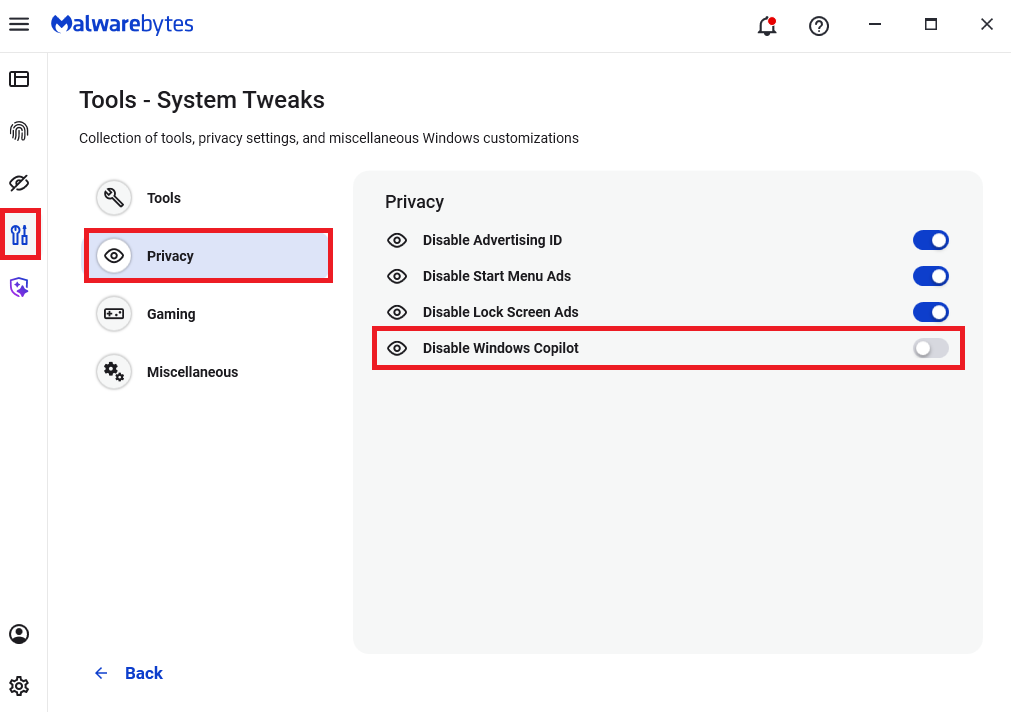
Malwarebytes users can disable Copilot for their personal machines under Tools > Privacy, where you can toggle Disable Windows Copilot to on (blue).
In general, be aware that using AI assistants still pose privacy risks. As long as there are ways for assistants to automatically ingest untrusted input—such as URL parameters, page text, metadata, and comments—and merge it into hidden system prompts or instructions without strong separation or filtering, users remain at risk of leaking private information.
So when using any AI assistant that can be driven via links, browser automation, or external content, it is reasonable to assume “Reprompt‑style” issues are at least possible and should be taken into consideration.
We don’t just report on threats—we remove them
Cybersecurity risks should never spread beyond a headline. Keep threats off your devices by downloading Malwarebytes today.
Researchers found a method to steal data which bypasses Microsoft Copilot’s built-in safety mechanisms.
The attack flow, called Reprompt, abuses how Microsoft Copilot handled URL parameters in order to hijack a user’s existing Copilot Personal session.
Copilot is an AI assistant which connects to a personal account and is integrated into Windows, the Edge browser, and various consumer applications.
The issue was fixed in Microsoft’s January Patch Tuesday update, and there is no evidence of in‑the‑wild exploitation so far. Still, it once again shows how risky it can be to trust AI assistants at this point in time.
Reprompt hides a malicious prompt in the q parameter of an otherwise legitimate Copilot URL. When the page loads, Copilot auto‑executes that prompt, allowing an attacker to run actions in the victim’s authenticated session after just a single click on a phishing link.
In other words, attackers can hide secret instructions inside the web address of a Copilot link, in a place most users never look. Copilot then runs those hidden instructions as if the users had typed them themselves.
Because Copilot accepts prompts via a q URL parameter and executes them automatically, a phishing email can lure a user into clicking a legitimate-looking Copilot link while silently injecting attacker-controlled instructions into a live Copilot session.
What makes Reprompt stand out from other, similar prompt injection attacks is that it requires no user-entered prompts, no installed plugins, and no enabled connectors.
The basis of the Reprompt attack is amazingly simple. Although Copilot enforces safeguards to prevent direct data leaks, these protections only apply to the initial request. The attackers were able to bypass these guardrails by simply instructing Copilot to repeat each action twice.
Working from there, the researchers noted:
“Once the first prompt is executed, the attacker’s server issues follow‑up instructions based on prior responses and forms an ongoing chain of requests. This approach hides the real intent from both the user and client-side monitoring tools, making detection extremely difficult.”
How to stay safe
You can stay safe from the Reprompt attack specifically by installing the January 2026 Patch Tuesday updates.
If available, use Microsoft 365 Copilot for work data, as it benefits from Purview auditing, tenant‑level data loss prevention (DLP), and admin restrictions that were not available to Copilot Personal in the research case. DLP rules look for sensitive data such as credit card numbers, ID numbers, health data, and can block, warn, or log when someone tries to send or store it in risky ways (email, OneDrive, Teams, Power Platform connectors, and more).
Don’t click on unsolicited links before verifying with the (trusted) source whether they are safe.
Reportedly, Microsoft is testing a new policy that allows IT administrators to uninstall the AI-powered Copilot digital assistant on managed devices.
Malwarebytes users can disable Copilot for their personal machines under Tools > Privacy, where you can toggle Disable Windows Copilot to on (blue).
In general, be aware that using AI assistants still pose privacy risks. As long as there are ways for assistants to automatically ingest untrusted input—such as URL parameters, page text, metadata, and comments—and merge it into hidden system prompts or instructions without strong separation or filtering, users remain at risk of leaking private information.
So when using any AI assistant that can be driven via links, browser automation, or external content, it is reasonable to assume “Reprompt‑style” issues are at least possible and should be taken into consideration.
We don’t just report on threats—we remove them
Cybersecurity risks should never spread beyond a headline. Keep threats off your devices by downloading Malwarebytes today.
The intersection and evolution of operational technology (OT) and information technology (IT), as well as the cybersecurity risks associated with both are becoming increasingly critical business challenges for organisations of all sizes, across all geographies.
As digital transformation expands into OT environments, convergence with IT systems is inevitable. This convergence may generate exciting business opportunities, such as creating new sources of income and improving business outcomes, but it also presents new cybersecurity risks and complexities, for which many industry leaders are not prepared.
Why Is OT/IT Convergence So Complex?
There are many overlapping forces driving the OT and IT worlds together, creating a hairball of complexity from varying sources:
People: OT and IT communities are historically different in many ways (technological, operational, regulatory and culturally) and have different priorities and focuses.
Technology: The age of technology in OT environments means that legacy equipment and machinery are often incompatible with the latest IT software, increasing their vulnerability to cyberthreats.
Mindsets: Historically, ‘secure by design’ has not been a focus in OT. System uptime and employee safety have traditionally been prioritised over cybersecurity in OT environments, unlike IT where cybersecurity is ingrained.
Understanding the Risk and Impact
OT/IT cybersecurity is a strategic issue, not just a technical requirement, and it must be designed into systems as early as possible. The consequences of not acting from the start far outweigh any advantages gained by disregarding the issue.
This is particularly true for critical infrastructure, such as water purification systems, power grids, air traffic control systems, communications networks and battlefield command-and-control systems, all of which are open to potential cybersecurity risk. Always assume that your adversaries are willing to exploit your Achilles heel when it comes to securing OT/IT systems.
Key Attention Areas in OT/IT Convergence
All senior business leaders should consider the following areas with OT/IT convergence and cybersecurity:
Mindset: Industry leaders need the right mindset to balance cybersecurity best practices with a seemingly endless number of new devices and data sources caused by OT/IT convergence.
Technology: Technologies, such as artificial intelligence, machine learning and cloud computing, represent both opportunities and threats in the world of OT/IT cybersecurity. Modern technology systems must be built with tomorrow’s security risks in mind.
Compliance: The NIS Directive and its follow-on NIS2 Directive outline the responsibility for organisations to take reasonable steps toward a solid cybersecurity posture. This applies to the increasingly digital OT world because of the classification of many OT systems as a critical infrastructure.
Teams: Organisations need to recognise and confront the cultural silo separating OT and IT teams in order to reduce complexity, promote collaboration and achieve a reliable, frictionless state of OT/IT cybersecurity.
The cloud, data and device proliferation: When digital OT systems are infected, the attacks easily and quickly move laterally over a mesh of intersecting networks, carrying ‘digital germs’ with them. The risk here is high, particularly with the huge proliferation of devices and data from converged workloads in the cloud.
The future: There is a growing urgency from business stakeholders to make OT systems more digitally driven to ensure agility and efficiency. Boards that are now prioritising OT/IT cybersecurity are making a strong statement about the business implications to this strategy.
Next Steps
To help you understand and prepare for the cybersecurity risks inherent at the intersection of OT and IT, we have captured insights and recommendations from forward-thinking industry experts in a new guide: Executive Edge: Peer Insights - Complexity at the intersection of IT and OT.
This Peer Insights guide for C-suite executives explores how to streamline security, reduce complexity, and anticipate threats across the IT/OT environment, ultimately helping you drive change within your organisation.
In my journey to explore how I can use artificial intelligence to assist in penetration testing, I experimented with a security-focused chat bot created by Jason Haddix called Arcanum Cyber Security Bot (available on https://chatgpt.com/gpts). Jason engineered this bot to leverage up-to-date technical information related to application security and penetration testing.
For those of us in cybersecurity, there are a lot of unanswered questions and associated concerns about integrating AI into these various products. No small part of our worries has to do with the fact that this is new technology, and new tech always brings with it new security issues, especially technology that is evolving as quickly as AI.
A common use case for LLMs is rapid software development. One of the first ways I used AI in my penetration testing methodology was for payload generation.
This blog will cover how to root an AVD emulator and a physical Pixel 6. But before we cover those topics, let's cover what it is we will be doing and some of the pro/cons of rooting an Android phone.
VirusTotal has incorporated a powerful new tool to fight against
malware: JA4 client fingerprinting. This feature allows
security researchers to track and identify malicious files based
on the unique characteristics of their TLS client communications.
JA4: A More Robust Successor to JA3
JA4,
developed by
FoxIO, represents a significant
advancement over the older JA3 fingerprinting method. JA3's
effectiveness had been hampered by the increasing use of TLS
extension randomization in https clients, which made
fingerprints
less consistent. JA4 was specifically designed to be
resilient to this randomization, resulting in more stable and
reliable fingerprints.
Unveiling the Secrets of the Client
Hello
JA4 fingerprinting focuses on
analyzing the
TLS Client Hello packet, which is sent unencrypted from
the client to the server at the start of a TLS connection.
This packet contains a treasure trove of information that can
uniquely identify the client application or its underlying
TLS library. Some of the key elements extracted by JA4
include:
TLS
Version: The version of TLS supported by the
client.
Cipher
Suites: The list of cryptographic algorithms the client can
use.
TLS
Extensions: Additional features and capabilities supported
by the client.
ALPN
(Application-Layer Protocol Negotiation): The
application-level protocol, such as HTTP/2 or HTTP/3, that
the client wants to use after the TLS
handshake.
JA4 in Action: Pivoting and Hunting on
VirusTotal
VirusTotal has integrated JA4
fingerprinting into its platform through the behavior_networkfile
search modifier. This allows analysts to quickly
discover relationships between files based on their JA4
fingerprints.
To find the JA4 value, navigate to the "behavior" section of
the desired sample and locate the TLS subsection. In addition
to JA4, you might also find JA3 or JA3S there.
Example Search: Let's say you've encountered a suspicious
file that exhibits the JA4 fingerprint
"t10d070600_c50f5591e341_1a3805c3aa63" during VirusTotal's
behavioral analysis.
You can click on this JA4 to pivot using the
search query
behavior_network:t10d070600_c50f5591e341_1a3805c3aa63
finding other files with the same fingerprint This search
will pivot you to additional samples that share the same JA4
fingerprint, suggesting they might be related. This could
indicate that these files are part of the same malware family
or share a common developer or simply share a common TLS
library.
Returns files that match the
JA4_A and JA4_C components of the JA4 hash while allowing
for variations in the middle section, which often corresponds
to the cipher suite. This technique is useful for identifying
files that might use different ciphers but share other JA4
characteristics.
YARA hunting rules using the
"vt" module can be written to
automatically detect files based on their JA4 fingerprints.
Here's an example of a YARA rule that targets a specific JA4
fingerprint:
This rules will flag any file submitted to VirusTotal that
exhibits the matching JA4 fingerprint. The first example only
matches "t12d190800_d83cc789557e_7af1ed941c26" during
behavioral analysis. The second rule will match a regular
expression /t10d070600_.*_1a3805c3aa63/, only matching JA4_A
and JA4_C components, excluding the JA4_B cipher suite. These
fingerprints could be linked to known malware, a suspicious
application, or any TLS client behavior that is considered
risky by security analysts.
VirusTotal's adoption
of JA4 client fingerprinting will provide users with an
invaluable tool for dissecting and tracking TLS client
behaviors, leading to enhanced threat hunting, pivoting, and
more robust malware identification.
Microsoft introduced Data Protection Application Programming Interface (DPAPI) in Windows environments as a method to encrypt and decrypt sensitive data such as credentials using the…
Qakbot Takedown: A Brief Victory in the Fight Against Resilient Malware
Prior botnet takedowns like Emotet and TrickBot have shown that sophisticated malware operations, like Qakbot, can often rebuild infrastructure and return from disruptions in new forms
Qakbot, familiarly Qbot, has been a major cyber threat since 2007, infecting victims’ computers to steal financial information and distribute additional malware payloads like ransomware. As a result of the takedown, more than 700,000 infected devices worldwide were identified and cleaned of the malware. The DOJ also announced the seizure of $8.6M in cryptocurrency in illicit profits.
While there is no doubt that the Qakbot takedown is a major win in the fight against cybercrime, it may only provide short-term relief in the fight against a notoriously resilient cybercriminal ecosystem.
‘Swiss Army knife’
A Swiss Army knife of cybercrime tools, Qakbot was a complex malware that opened remote access to victims’ systems, stole credentials and financial information, and downloaded additional malware payloads. Its modular architecture enabled frequent updates to add new capabilities over its 15+ years of operation.
“The collaborative endeavors of these authoritative bodies exemplify the power of a comprehensive, multi-agency approach, designed to maximize its impact..”
Ian Gray, VP Of Intelligence
Qakbot has been a versatile workhorse for cybercriminals. Its banking trojan functionality has been used to pilfer payment information and intercept financial transactions. As a loader, it distributed ransomware such as ProLock to extort victims.
Qakbot has also powered large-scale spam email campaigns and brute force attacks. Its worm-like spreading kept it entrenched in infected networks. By providing the backdoor access and distribution channel for other malware, Qakbot played a key supporting role in the cybercrime ecosystem. Botnets like Emotet and TrickBot operated similarly, loading additional threats onto compromised systems. These jack-of-all-trades botnets have proven lucrative for their criminal operators.
A history of temporary relief
Prior botnet takedowns like Emotet and TrickBot have shown that sophisticated malware operations can often rebuild infrastructure and return from disruptions in new forms.
In the case of Emotet, the botnet came back online in 2022 using new techniques after its infrastructure was dismantled in 2021. TrickBot also persisted despite takedown attempts and remains an active threat. This resiliency highlights the challenges law enforcement faces in permanently eliminating cyber threats.
While takedowns temporarily degrade capabilities, dedicated cybercriminal groups adapt to avoid further disruption. New malware families also inevitably emerge to fill the gaps left by larger takedowns. For example, BazarLoader and ZLoader rose to prominence as loader malware after the Emotet takedown.
Yet despite their disruptions, resilient botnets often return and new ones emerge. After prior actions against Emotet and TrickBot, the lingering demand in underground markets brought them back in adapted new forms. Bots remain attractive tools for cybercriminals thanks to their versatility, automation, and money generating potential.
While Qakbot’s infrastructure was disrupted, its operators may attempt to rebuild or evolve their techniques. Sustained pressure on botnet financial flows, developer communities, and other aspects of the cybercrime supply chain is needed to deter future attacks. For now, the coordinated Qakbot takedown bought time and degraded the capabilities of a dominant cybercrime player.
The fight against cybercrime must be persistent and comprehensive
The Qakbot takedown was effectively coordinated among global governments, including France, Germany, Latvia, Romania, the Netherlands, the UK, and the US, as well as the private sector. The collaborative endeavors of these authoritative bodies exemplify the power of a comprehensive, multi-agency approach, designed to maximize its impact.
Law enforcement and the private sector should to continue coordinating takedowns while also focusing on detecting new malware variants early, disrupting communication channels, and following the money trails of criminal enterprises.
Cyber hygiene and threat awareness across organizations must also improve to reduce vulnerability to malware infections, including loaders and trojans that distribute threats like Qakbot. Technical controls like endpoint detection, network monitoring, and patching are also key.
Ultimately, defeating cybercrime requires comprehensive strategy across law enforcement operations, cybersecurity practices, and international collaboration. The Qakbot takedown represents meaningful progress, but the world must remain vigilant against an adaptable threat landscape.
Get Flashpoint on your side
Flashpoint Ignite enables organizations to proactively identify and mitigate cyber and physical risk that could imperil people, places, and assets. To unlock the power of great threat intelligence, get started with a free Flashpoint trial.

 Login
Login