❌

Normal view

Weak keys in eMudhra CA certificates: the risks and how to respond | Kaspersky official blog

28 October 2026 at 17:41

Certificates both protect TLS connections and digitally sign applications, and forged ones turn up in real-world attacks from time to time. We’ve seen forged or stolen certificates abused by the DarkHotel APT and the Flame malware, and in 2011 we saw attack attempts after the certificate authority Comodo was compromised. Pulling off this trick usually takes serious expertise. But attacking eMudhra certificates in 2026 doesn’t take much effort at all. An attacker just has to guess a number from 1 to 255. Private keys for intermediate certificate authorities are normally gigantic numbers. But in this case, eight of them were the following: 4, 56, 66, 115, 155, 156, 230, and 237. They could be guessed using the public keys (available in public certificates) in under a second. As a result, a hypothetical attacker could issue certificates for anything by signing them with one of the compromised private keys.

Six of these keys were meant for issuing TLS certificates, and the other two were for code signing. All eight intermediate certificate authorities (CAs) were also cross-signed by the Sectigo CA. This means clients with different trust chains could trust a forged certificate.

The major browsers have already blocked the dangerous certificate chains. But IT and security teams still need to assess and remediate the risk in many other systems across their organizations. Scripts for scheduled data-processing, corporate NGFWs, monitoring servers, applications with built-in certificate stores, and devices that don’t get regular updates may accept forged certificates and be vulnerable to man-in-the-middle (MitM) attacks. The keys needed for this are already built into publicly available interception tools.

Timeline of the eMudhra certificate authority incident

The problematic keys came from a batch of 24 intermediate CAs that eMudhra created on April 30, 2025. Instead of cryptographically random values for a 384-bit elliptic curve, eight of the keys turned out to be small numbers. According to eMudhra’s own description, a β€œkey wrap/unwrap step” during key generation created a second, weak set of keys. Because keys are created and stored in a dedicated device called a hardware security module (HSM), a weak key is hard to notice on its own. It’s still unclear what error caused the keys to be generated twice and the weak set to be used; the investigation is ongoing.

In May 2025, the Sectigo CA signed all eight intermediate certificates. Then, on October 17, 2026, an independent researcher notified the security teams at Mozilla, Google, and Apple, as well as the CA itself, that the keys were recoverable. On October 20, Mozilla publicly disclosed the incident. This means that for almost a year and a half the keys could have been recovered and certificates forged.

On October 22, eMudhra announced that it was exiting the global SSL/TLS certificate business.

What an attacker can do

Using the vulnerable intermediate CAs, an attacker can sign a forged certificate for someone else’s domain. Clients that still trust that chain and have no other safeguards will take the forgery for the real server.

A certificate alone isn’t enough to intercept HTTPS traffic. The attacker also needs a way to tamper with the victim’s traffic or redirect the connection. That’s possible, for example, in a compromised office network, on a Wi-Fi access point the attacker controls, or by interfering with routing and DNS. And all of this does happen in the wild, as the DarkHotel attacks, among others, have shown.

There’s one more danger: two of the keys can be used for code signing. In theory, that would let an attacker deliver malware that appears to come from a trusted vendor and doesn’t trigger scary OS warnings during installation.

Was it exploited?

Experts from various companies who analyzed the after-effects of the incident haven’t found any malicious attacks that used these certificates. eMudhra and CERT-In have also reported finding no abuse. The Chrome team found no certificates from the six CAs in public Certificate Transparency logs.

This means that systems where browsers check certificates through Certificate Transparency (CT) were most likely not attacked. But many devices and applications β€” especially servers and IoT devices, don’t check CT at all, so we can’t say anything about them. Today, malicious actors no longer need to write their own hacking tools to pull off an attack like this. Version 12.3 of mitmproxy β€” a popular tool among security researchers β€” already has built-in support for compromised keys.

Where the risk has been eliminated, and where that isn’t guaranteed

Major platforms quickly revoked the compromised certificates. As early as October 17, Chrome did so through CRLSets, and Firefox β€” through OneCRL. On October 18, eMudhra itself revoked the certificates, citing β€œCA Compromise”. Apple took action on October 19, and the Sectigo CA also revoked the cross-signed copies. Microsoft revoked the certificates on October 20. Depending on the settings of a specific application and OS, revocation may have taken effect even without an application update, since blocklists are often updated separately.

At the same time, a more radical measure is under way: withdrawing trust from the root CA. Chrome has announced the planned removal of β€œemSign ECC Root CA – G3” from the browser. Certificates issued under the β€œemSign Root CA – G1” root, and the root itself, aren’t affected. According to eMudhra’s estimate, about 30Β 000 certificates will need to be migrated.

But certificate revocation only works where the client can find out about the revocation to then be able to actually act upon it. Many applications check the signature, server name, and certificate validity period, but don’t retrieve or update blocklists. Here are the typical cases:

Outdated and LTS systems. LTS (long-term support) status alone doesn’t mean a system is vulnerable. By definition, a system with this status receives support. But old containers, frozen OS images, and systems that are no longer updated can keep trusting revoked CAs for a long time. It all depends on updates to ca-certificates and TLS libraries, and the settings of the specific application.

Automated systems and servers. On emudhra.we-have-a-problem.com β€” a site created by enthusiasts where you can check any client software for misplaced trust β€” curl and Zabbix dominate the list of the most vulnerable systems. For HTTP checks, Zabbix usually uses libcurl and the certificate store configured for it. Similar behavior is also documented in the built-in curl in macOS. At the OS level and in Safari, the certificate is revoked, but curl reads a plain /etc/ssl/cert.pem file, and that’s precisely where the fix has to be made. This is a good example: even when system-level trust and revocation mechanisms work, individual applications β€” including ones that ship with the OS by default β€” can remain vulnerable.

Python, Ruby, Go, Java, and containers. An application may use its own set of root CAs, which isn’t updated along with the OS. Endor Labs found more than 25 popular packages that contain the affected root.

Slack, GitHub Desktop, and other apps built on the Electron framework. These apps ship with their own Electron/Chromium, so updating a separately installed Chrome doesn’t update Slack. The certificate revocations are already in the new Electron version, but now every developer has to rebuild and distribute their app, and every user has to install the update. That said, not every Electron app is necessarily vulnerable. The outcome depends on the version, how the app updates its blocklists, and which network stack it uses.

Mobile browsers and IoT devices. Mobile Chrome, Firefox, and Safari get certificate revocation data as quickly as their desktop counterparts do. With the stock browsers from smartphone makers, this isn’t the case. In a published test, Samsung Browser 31.0.0.64 accepted all six test chains from emSign while rejecting the ones from Sectigo. For HarmonyOS 6 and 7, researchers found the affected CAs in Huawei’s published list of root CAs, and those CAs can’t be revoked manually.

For unsupported devices, home appliances, and old firmware, a certificate store update may never be released. In those cases, the problem could linger for years.

Impact on TLS inspection in a corporate network

When an NGFW or web gateway inspects encrypted traffic, it maintains two connections: one with the client and the other with the external server. The client receives a certificate signed by the corporate CA, while the gateway itself verifies the authenticity of the external server.

If the gateway accepts a forged eMudhra certificate, even an updated browser on an employee’s computer won’t see the dangerous chain. Instead, it will receive the familiar corporate certificate. In this scenario, the security tool itself hides the problem from the client. That said, carrying out such an attack would also require intercepting traffic.

To fix the validation policy and certificate lists on the inspection device itself, follow the vendor’s instructionsΒ β€” if the vendor has published any, that is.

At Cisco, the status of the issue is documented in detail for all products. Most of them are still listed as β€œunder investigation”, but mitigation measures are recommended for vulnerable devices.

Sophos and Check Point promise device software updates and, in the meantime, advise removing the certificates manually. Neither company has published a security advisory, but employees of each posted recommendations on its support forum.

For Fortinet devices, instructions for checking and removing emSign certificates can be found here. Palo Alto offered only general advice instead of specifics for its own products.

Of course, a properly configured gateway can indeed temporarily protect outdated client devices that trust the dangerous certificates.

To check specific devices, services, containers, and virtual machines, you can use a dedicated website. One possible scenario for proactively hunting for threats that exploit or have previously exploited weak keys is described here.


Compromised TLS Certificates

23 October 2026 at 13:04

The Indian CA eMudhra Limited has eight TLS certificates with laughably weak private keys:

The compromised eMudhra keys were defective at a level that’s challenging the imagination of many of the engineers studying the incident. A normal size for a NIST P-384 elliptic curve cryptography private key contains roughly 384 bits of entropy, a size allowing almost 2384, or a number with 116 digits, different possibilities. The private key sizes of the compromised keys ranged from 3 to 8 bits. Astonishingly, the private keys were 4, 56, 66, 115, 155, 156, 230, 237.

β€œThat is extremely in the β€˜this should not be possible’ category,” Valdorda said. β€œMaybe some horribly dangerous key generation interface has a β€˜size’ parameter and they set it to 1 by mistake???”

Ben Cartwright-Cox, director of BGP.tools, said: β€œMy guess is that it’s example code that accidentally leaked to production, but hard to know. But it’s bonkers that no one noticed.”

At this early stage, the most immediate threat appears to be for those using VPNs, especially in countries with governments likely to maliciously intercept traffic. There are likely many other cases for concern. End users largely have no recourse other than to hold off using many non-browser forms of TLS communication until they receive assurances updates are in place.

The whole certificate regime has long been a mess:

The incident is the latest to expose a fatal flaw in the TLS regimen. It’s only as strong as its weakest link, which in this case was eMudhra. Fortunately, transparency logs account for much of that failure, but this measure requires parties to actively monitor massive feeds and works only after unauthorized certificates have been issued. eMudhra representatives weren’t immediately available to answer questions.

One caveat: exploiting compromised certificates requires an active adversary-in-the-middle attack, meaning the attacker must act as a proxy between two TLS parties and receive encrypted traffic, decrypt it, reencrypt it, and send it to the other party. Such capabilities, in some cases, are usually limited to only the most well-resourced attackers. People with control of a local networkΒ­at a coffee shop, university, or other organizationΒ­face much less of a challenge.

Cleanup of this is going to be another messβ€”and it’s right on top of the PHP vulnerabilities.

Some more information.

EMudhra Intermediate CA Certificates Compromised

22 October 2026 at 19:15

Eight compromised eMudhra intermediate CA private keys risk unauthorized TLS signing and MitM interception. Read our analysis and containment guide.

The post EMudhra Intermediate CA Certificates Compromised appeared first on Unit 42.

Automating post-quantum cryptography readiness using AWS Config

14 May 2026 at 18:18

Migrating your TLS endpoints to Post-quantum cryptography (PQC) starts with understanding your current TLS endpoint inventory and posture. This post introduces the PQC Readiness Scanner β€” an automated tool that inventories your Application Load Balancer (ALB), Network Load Balancer (NLB), and Amazon API Gateway endpoints and continuously monitors their TLS configurations for PQC readiness. The scanner classifies each endpoint into a three-tier framework that helps prioritize and plan PQC migration.

As quantum computing advances, you need to migrate to quantum-resistant cryptography to protect your data long-term. The PQC Readiness Scanner helps you identify which endpoints to migrate first and tracks your progress across accounts. For web traffic, PQC key exchange algorithms are negotiated only within TLS 1.3. This means quantum-resistant connections require endpoints that support TLS 1.3 and PQC key exchange.

Under the AWS Shared Responsibility Model, AWS secures the infrastructure and enables PQC support across its services. Customers are responsible for configuring their resources to use PQC-capable TLS policies. For AWS-terminated TLS connectionsβ€”such as those on Application Load Balancer (ALB), Network Load Balancer (NLB), Amazon API Gateway, and Amazon CloudFrontβ€”customers choose the security policy (an AWS-managed configuration defining supported TLS protocol versions and cipher suites for a listener) that determines TLS version and cipher suite, key exchange, and authentication algorithm support.

The automated PQC Readiness Scanner for AWS-terminated TLS endpoints is built using AWS Config conformance packs. A conformance pack is a collection of AWS Config rules and remediation actions that can be deployed as a single entity in an account and a Region or across an organization in AWS Organizations.

Solution overview

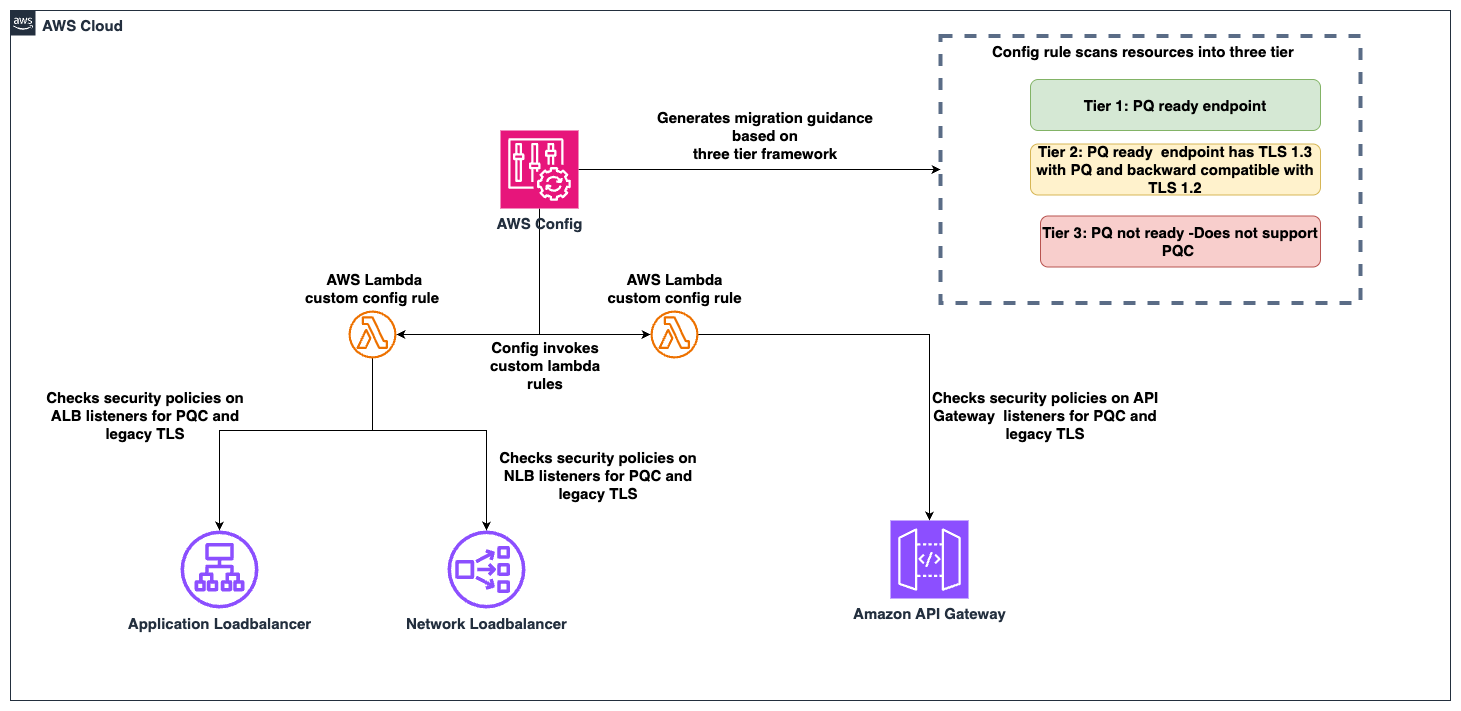
The PQC Readiness Scanner deploys AWS Config rules using a conformance pack to evaluate the security policy on each endpoint. Based on the evaluation, each resource is classified into a three-tier readiness framework that prioritizes migration actions needed to achieve PQ-ready TLS.

The PQC Readiness Scanner performs two checks per resource:

  1. Does the endpoint use a PQ-ready security policy?
  2. Does the endpoint support legacy TLS 1.0 or 1.1?

Each check returns COMPLIANT or NON_COMPLIANT status with specific policy recommendations.

PQC requires endpoints to support TLS 1.3 and use PQC key exchange algorithms. The three-tier framework helps you interpret findings and prioritize fixes. The goal is to have TLS 1.3 with PQC key exchange enabled on the endpoints. However, achieving this requires maintaining backward compatibility with clients.

Tier

Readiness level

TLS protocols

PQC status

Migration priority

Tier 1

PQ-ready (strongest posture)

TLS 1.3 only with PQC key exchange

PQ-ready

None

Tier 2

PQ-ready (backward compatible)

TLS 1.2 and 1.3 with PQC key exchange

PQ-ready

Low

Tier 3

Not PQ-ready

No PQC key exchange

Not PQ-ready

High

How to prioritize your migrations

  • Tier 1 represents the strongest security using only TLS 1.3 with PQC key exchange. These resources already meet the target state.
  • Tier 2 represents a backward-compatible PQ-ready configuration. Endpoints support both TLS 1.2 and TLS 1.3, with PQC key exchange negotiated on TLS 1.3 connections. Migration priority is low because these resources already provide quantum-resistant protection for clients that support TLS 1.3, while maintaining TLS 1.2 compatibility for legacy clients. Migrate to Tier 1 when client-side analysis confirms that the connecting clients support TLS 1.3 with PQC key exchange.
  • Tier 3 covers resources that aren’t PQ-ready. This includes endpoints without TLS 1.3 support, endpoints with TLS 1.3 but without PQC key exchange policies. These resources require immediate attention.

Assessment scope

The scanner evaluates the following AWS edge services that terminate TLS connections on behalf of your applications.

  • Edge services:
    • Application Load Balancer (ALB), Network Load Balancer (NLB) listeners with HTTPS, TLS, and TCP SSL protocols are evaluated.
    • API Gateway REST APIs are evaluated for AWS Regional and private endpoints along with API Gateway HTTP APIs (v2) and WebSocket APIs (v2).
  • Excluded edge services:
    • CloudFront distributions are excluded from the PQC readiness scope because TLS 1.3 with hybrid post-quantum key exchange is automatically enabled across existing CloudFront TLS security policies for viewer-to-edge connections. No customer action is required for inbound (viewer-facing) PQC on CloudFront.
  • Recommended approach for Classic load balancer:
    • For Classic Load Balancers, AWS recommends migrating to ALB or NLB. Classic Load Balancers don’t support TLS 1.3 or PQC key exchange and can’t be made PQ-ready.

How the solution works

AWS Config enables continuous monitoring and evaluation. Conformance packs enable organization-wide deployment. AWS Lambda is a serverless compute service that runs code to perform security policy evaluation based on the AWS Config rules. AWS Serverless Application Model (AWS SAM) is an open source framework used for deploying the AWS Lambda functions.

Figure 1: PQC readiness solution architecture

Figure 1: PQC readiness solution architecture

The PQC Readiness Scanner conformance pack implements four custom AWS Config rules powered by two Lambda functions:

Rule

What it checks

Non-compliant result

ELB PQ-ready

Load balancer listeners use security policies that support TLS 1.3 with PQC key exchange algorithms

Policy doesn’t include PQC support, the resource is marked with a recommended upgrade policy

ELB legacy TLS

Load balancer listeners allow TLS 1.0 or 1.1 connections

Legacy protocols are configured, the resource is flagged.

API Gateway PQ-ready

API Gateway endpoints use security policies that support TLS 1.3 with PQC key exchange algorithms

Policy doesn’t include PQC support, the resource is marked with a recommended upgrade policy

API Gateway legacy TLS

API Gateway endpoints allow TLS 1.0 or 1.1

Legacy protocols are configured, the resource is flagged.

Prerequisites

Before deploying the solution, you need:

  • AWS Command Line Interface (AWS CLI) configured with appropriate permissions
    aws configure
    aws sts get-caller-identity  # Verify

  • Python 3.12 installed. The Lambda runtime requires this version.
    python3 --version  # Should show 3.12.x

  • AWS SAM CLI installed (Installation Guide)
    pip install aws-sam-cli
    
    # Verify
    sam --version

  • AWS Config enabled in your target AWS Region.
    • Configure it to record (This step is not needed if your accounts are recording all resources by default)
      • AWS::ElasticLoadBalancingV2::LoadBalancer
      • AWS::ApiGateway::RestApi
      • AWS::ApiGatewayV2::Api resource types.
    • Enable via AWS Config Console β†’ Recorder β†’ Recording Strategy β†’ Select specific resource types (Follow the steps in manual setup for AWS Config recording strategy for specific resource types)

Steps to deploy the PQC Readiness Scanner

Deploy the PQC Readiness Config Scanner in three phases. Complete deployment commands and configuration details are available in the GitHub repository. The Lambda functions must be deployed first because the conformance pack references their ARNs as parameters. See the GitHub repository for details.

Deploy to single account:

  1. Clone and Build:
    git clone https://github.com/aws-samples/sample-PQC-Readiness-using-AWS-Config.git
    
    cd sample-PQC-Readiness-using-AWS-Config/installation
    
    sam build

  2. Deploy to One or More Regions:
    # Make script executable (first time only)
    chmod +x deploy-per-regions.sh
    
    # Deploy to a single region
    ./deploy-per-regions.sh us-east-1
    
    # Deploy to multiple regions
    ./deploy-per-regions.sh us-east-1 us-west-2 eu-west-1

    Type y and continue if you have enabled AWS Config recording for these resources or its by default recording all resources.

    Figure 2: Type y and continue if you have enabled AWS Config recording for these resources or its by default recording all resources.

  3. The script automatically:
    • Deploys Lambda functions via SAM
    • Deploys conformance pack (creates Config rules)
    • Verifies deployment success
    • Provides clear status messages

The deployment creates two Lambda functions that perform PQ-ready and legacy TLS checks. It provisions IAM roles with least-privilege permissions for ELB, ALB, NLB, and API Gateway describe operations. Lambda permissions allow AWS Config to invoke the functions.

Example screen-print of how a successful deployment looks like.

Figure 3: Example screen-print of what a successful deployment looks like.

Multi-account deployment (Organizations):

For organization-wide deployment across multiple AWS accounts, use CloudFormation StackSets to deploy Lambda functions to each account.

Important Constraint: AWS Config CUSTOM_LAMBDA rules require the Lambda function to exist in the same account as the Config rule. You cannot use a centralized Lambda in one account to evaluate resources in other accounts.

Prerequisite: Shared S3 Bucket

Before packaging, create an S3 bucket accessible by each target account in your organization. This bucket will host the Lambda deployment artifacts that CloudFormation StackSets pulls into each member account.

# Create the shared S3 bucket (run from management/central account)
aws s3 mb s3://<your-org-shared-bucket> --region us-east-1

Grant read access to the target accounts using one of the following options:

aws s3api put-bucket-policy \
  --bucket <your-org-shared-bucket> \
  --policy '{
    "Statement": [
      {
        "Sid": "BucketOwnerFullAccess",
        "Effect": "Allow",
        "Principal": {
          "AWS": "arn:aws:iam::<bucket-owner-account-id>:root"
        },
        "Action": "s3:*",
        "Resource": [
          "arn:aws:s3:::<your-org-shared-bucket>",
          "arn:aws:s3:::<your-org-shared-bucket>/*"
        ]
      },
      {
        "Sid": "CrossAccountReadAccess",
        "Effect": "Allow",
        "Principal": {
          "AWS": [
            "arn:aws:iam::<account-id-1>:root",
            "arn:aws:iam::<account-id-2>:root"
          ]
        },
        "Action": ["s3:GetObject", "s3:ListBucket"],
        "Resource": [
          "arn:aws:s3:::<your-org-shared-bucket>",
          "arn:aws:s3:::<your-org-shared-bucket>/*"
        ]
      }
    ]
  }'

Replace <account IDs> with the AWS account IDs where StackSets will deploy the Lambda functions.

Note: The bucket must be in the same region as the StackSet deployment regions. For multi-region deployments, create one bucket per region and run sam package separately for each.

Step 1: Build and Upload Lambda Packages to S3

Run the packaging script from the installation/ directory:

cd installation

# Make script executable (first time only)
chmod +x deploy-stacksets.sh

# Build, package, upload to S3, and generate resolved template
./deploy-stacksets.sh <your-org-shared-bucket>

This script automatically:

  • Builds Lambda functions using SAM
  • Creates ZIP packages
  • Uploads ZIPs to the shared S3 bucket
  • Generates packaged-template.yaml with S3 values baked in (no parameters needed at deploy time)
Sample script output of successful upload of the lambda packages to S3 bucket

Figure 4: Sample script output of successful upload of the lambda packages to S3 bucket

Step 2: Deploy Lambda Functions via StackSets

Run the following from the management account (or delegated admin account):

# Create StackSet (--region sets the StackSet "home region" where it is managed)
aws cloudformation create-stack-set \
  --stack-set-name pqc-readiness-lambda-functions \
  --template-body file://packaged-template.yaml \
  --capabilities CAPABILITY_IAM \
  --permission-model SERVICE_MANAGED \
  --auto-deployment Enabled=true,RetainStacksOnAccountRemoval=false \
  --region us-east-1

# Deploy stack instances to member accounts
# --regions = target regions where Lambda functions are deployed in member accounts
# --region  = must match the StackSet home region above
aws cloudformation create-stack-instances \
  --stack-set-name pqc-readiness-lambda-functions \
  --deployment-targets OrganizationalUnitIds=ou-xxxx-xxxxxxxx \
  --regions us-east-1 \
  --region us-east-1

Important β€” StackSet home region vs deployment regions:

  • --region (on each CLI command) = the StackSet home region where the StackSet resource lives. Subsequent operations (describe, update, delete) must specify this same region.
  • --regions (on create-stack-instances) = the deployment target region(s) where stack instances are created in member accounts.
  • These are independent values. Specify --region explicitly to avoid accidental deployment to your CLI’s default region.

Note: SERVICE_MANAGED StackSets must be created from the management or delegated admin account. The management account itself is excluded from stack instance deployments β€” use deploy-per-regions.sh separately if you need the scanner in the management account.

Step 3: Deploy Organization Conformance Pack

aws configservice put-organization-conformance-pack \
  --organization-conformance-pack-name pqc-legacy-tls-compliance \
  --template-body file://conformance-packs/pqc-legacy-tls-conformance-pack.yaml

This creates Config rules in each member account that reference their local Lambda functions.

    Migration guidance and prioritization

    The three-tier system provides PQC migration priorities:

    High priority – Tier 3 (not PQ-ready):

    • Target: Resources without PQC support. This includes endpoints not using PQ-ready security policies, endpoints that still allow TLS 1.0 or 1.1.
    • Action: Upgrade to a PQ-ready policy containing PQ in its name, such as those ending with -PQ-2025-09 (see Elastic Load Balancing security policies documentation for the full list).
    • Important: Before upgrading to a PQ-ready policy, audit your client TLS versions. PQ-ready policies require TLS 1.3 support; legacy clients that only support TLS 1.2 or earlier will fail to negotiate a connection. Start with a Tier 2 backward-compatible policy (which supports both TLS 1.2 and 1.3 with PQC), monitor connection logs for TLS negotiation failures, and only move to a Tier 1 TLS 1.3-only policy after confirming that your clients support TLS 1.3 with PQC key exchange.
    • Risk: Endpoints don’t support post-quantum cryptography for data in transit. Legacy TLS protocols are vulnerable to current cryptographic attacks.

    Low priority – Tier 2 (PQ-ready, backward compatible):

    • Target: Resources using TLS 1.3 + PQ-ready policies that also support TLS 1.2 for backward compatibility.
    • Action: Consider TLS 1.3-only policies when client compatibility analysis confirms connecting clients support TLS 1.3.
    • Risk: Minimal. These resources already support PQ-TLS with TLS 1.3 connections. TLS 1.2 and earlier fallback maintains backward compatibility, which might indicate some clients aren’t negotiating in PQ-TLS. Remediation is to monitor logs, identify the volume of these connections and clients and plan migration for these clients to use TLS 1.3 with PQ-TLS.

    No action – Tier 1 (PQ-ready, optimal):

    • Target: Resources using TLS 1.3 only with PQC key exchange: These resources meet the target state. No migration needed.

    Viewing the results

    In each member account, navigate to AWS Config Console in the deployed region.

    Conformance Pack View

    Go to AWS Config β†’ Conformance packs and look for:

    OrgConformsPack-pqc-legacy-tls-compliance-

    Note: Organization conformance packs are prefixed with OrgConformsPack- and have a random suffix appended (e.g., OrgConformsPack-pqc-legacy-tls-compliance-gyv22je0).

    PQC Conformance Pack Compliance Score is the percentage of the number of compliant rule-resource

    Figure 5: PQC Conformance Pack Compliance Score is the percentage of the number of compliant rule-resource

    Click the conformance pack to see an overall compliance summary across all 4 rules.

    Individual Rules View

    Go to AWS Config β†’ Rules and find 4 rules with prefix pqc-:

    • pqc-elb-pqc-compliance-conformance-pack-
    • pqc-elb-legacy-tls-conformance-pack-
    • pqc-apigateway-pqc-compliance-conformance-pack-
    • pqc-apigateway-legacy-tls-conformance-pack-

    Click any rule to view:

    • Compliant vs non-compliant resource counts
    • Detailed annotations for each resource
    • Resource ARNs and current security policy configurations
    Visibility into Config rules status inside the conformance pack

    Figure 6: Visibility into Config rules status inside the conformance pack

    Sample image of the config rule findings and annotation describing the migeration guidance based on 3-tier classification.

    Figure 7: Sample image of the config rule findings and annotation describing the migration guidance based on 3-tier classification.

    Conclusion

    After deploying the PQC Readiness Scanner, you gain visibility into TLS posture across AWS edge services, which reduces manual configuration reviews. The tier system provides specific upgrade recommendations so teams can understand next steps without cryptographic expertise. The scanner automatically detects configuration changes to help new deployments maintain readiness standards. Built-in AWS Config reporting supports audit requirements and demonstrates measurable progress toward PQC readiness.

    Deploy the PQC Readiness Scanner and review your results with PQC Readiness Scanner. Start migration with high priority Tier 3 resources and monitor progress across your accounts using AWS Config aggregators.

    Additional resources

    If you have feedback about this post, submit comments in the Comments section below. If you have questions about this post, start a new thread on AWS Config re:Post or contact AWS Support.

    Pravin Nair

    Pravin Nair

    Pravin is a Senior Security Solutions Architect specializing in data protection and privacy at AWS. He partners with customers to architect secure, scalable cloud solutions that address complex security challenges across encryption, infrastructure protection, and privacy engineering. His expertise spans encryption at rest and in transit, infrastructure security, privacy-based architectures, and emerging security domains including generative AI security and post-quantum cryptography.

    Unveiling Hidden Connections: JA4 Client Fingerprinting on VirusTotal

    18 October 2024 at 11:48
    VirusTotal has incorporated a powerful new tool to fight against malware: JA4 client fingerprinting. This feature allows security researchers to track and identify malicious files based on the unique characteristics of their TLS client communications.

    JA4: A More Robust Successor to JA3

    JA4, developed by FoxIO, represents a significant advancement over the older JA3 fingerprinting method. JA3's effectiveness had been hampered by the increasing use of TLS extension randomization in https clients, which made fingerprints less consistent. JA4 was specifically designed to be resilient to this randomization, resulting in more stable and reliable fingerprints.

    Unveiling the Secrets of the Client Hello

    JA4 fingerprinting focuses on analyzing the TLS Client Hello packet, which is sent unencrypted from the client to the server at the start of a TLS connection. This packet contains a treasure trove of information that can uniquely identify the client application or its underlying TLS library. Some of the key elements extracted by JA4 include:
    • TLS Version: The version of TLS supported by the client.
    • Cipher Suites: The list of cryptographic algorithms the client can use.
    • TLS Extensions: Additional features and capabilities supported by the client.
    • ALPN (Application-Layer Protocol Negotiation): The application-level protocol, such as HTTP/2 or HTTP/3, that the client wants to use after the TLS handshake.

    JA4 in Action: Pivoting and Hunting on VirusTotal

    VirusTotal has integrated JA4 fingerprinting into its platform through the behavior_network file search modifier.Β This allows analysts to quickly discover relationships between files based on their JA4 fingerprints.

    To find the JA4 value, navigate to the "behavior" section of the desired sample and locate the TLS subsection. In addition to JA4, you might also find JA3 or JA3S there.

    Example Search: Let's say you've encountered a suspicious file that exhibits the JA4 fingerprint "t10d070600_c50f5591e341_1a3805c3aa63" during VirusTotal's behavioral analysis.

    You can click on this JA4 to pivot using the search query behavior_network:t10d070600_c50f5591e341_1a3805c3aa63 finding other files with the same fingerprint This search will pivot you to additional samples that share the same JA4 fingerprint, suggesting they might be related. This could indicate that these files are part of the same malware family or share a common developer or simply share a common TLS library.

    Wildcard Searches

    To broaden your search, you can use wildcards within the JA4 hash. For instance, the search: behaviour_network:t13d190900_*_97f8aa674fd9

    Returns files that match the JA4_A and JA4_C components of the JA4 hash while allowing for variations in the middle section, which often corresponds to the cipher suite. This technique is useful for identifying files that might use different ciphers but share other JA4 characteristics.

    YARA Hunting Rules: Automating JA4-Based Detection

    YARA hunting rules using the "vt" module can be written to automatically detect files based on their JA4 fingerprints. Here's an example of a YARA rule that targets a specific JA4 fingerprint:


    This rules will flag any file submitted to VirusTotal that exhibits the matching JA4 fingerprint. The first example only matches "t12d190800_d83cc789557e_7af1ed941c26" during behavioral analysis. The second rule will match a regular expression /t10d070600_.*_1a3805c3aa63/, only matching JA4_A and JA4_C components, excluding the JA4_B cipher suite. These fingerprints could be linked to known malware, a suspicious application, or any TLS client behavior that is considered risky by security analysts.


    JA4: Elevating Threat Hunting on VirusTotal

    VirusTotal's adoption of JA4 client fingerprinting will provide users with an invaluable tool for dissecting and tracking TLS client behaviors, leading to enhanced threat hunting, pivoting, and more robust malware identification.

    Happy Hunting.

    Testing TLS and CertificatesΒ 

    By: BHIS
    25 January 2024 at 17:00

    Pentest reports sometimes include bad information under a heading like, β€œWeak TLS Configuration” or β€œInsecure SSL Certificates.” This article will explain how TLS is supposed to work, common ways it […]

    The post Testing TLS and CertificatesΒ  appeared first on Black Hills Information Security, Inc..

    Finding: Server Supports Weak Transport Layer Security (SSL/TLS)

    David Fletcher// The following blog post is meant to expand upon the findings commonly identified in BHIS reports. Β The β€œServer Supports Weak Transport Layer Security (SSL/TLS)” is almost universal across […]

    The post Finding: Server Supports Weak Transport Layer Security (SSL/TLS) appeared first on Black Hills Information Security, Inc..

    ❌