In describing SIEM features, vendors almost invariably focus on numbers: how many correlation rules come out of the box, how many were added over the past year, and how many MITRE ATT&CK techniques they cover. Admittedly, these numbers matter. They do help gauge how effective a system is, and we share them from time to time too. But correlation rules aren’t a magic amulet, and having more of them doesn’t make a SIEM more effective. In fact, the total number of available rules says more about the variety of use cases the system supports. The question a hands-on SIEM analyst cares about first of all is different: which of these rules will actually work and be useful at my company? The answer is far from always obvious, and the reason isn’t even rule quality.
How correlation rules work
A rule first and foremost describes the logic: what to match against what, in what order, and within what time window. It also specifies particular event types from particular sources. For example, a rule for Active Directory group creation waits for events from the Windows Security log; a rule for suspicious network activity — DNS queries; a rule for process manipulation — triggers on events from endpoint telemetry. In other words, whether a rule works depends on whether the SIEM receives the right data in the first place.
The Active Directory rule above would be completely pointless at a company that avoids Windows on principle. It would load without errors, show up in the interface, and technically “exist” — but it would never fire. The reason is simple: the events it was built for never reach the system.
That dictates the only correct order of steps when setting up an SIEM. Don’t start out from the list of rules and then work your way toward your infrastructure. Go the other way around: first pin down which event sources are actually connected and feeding data into the SIEM, and only then see which rules will work on that data. Doing it the other way around leads to one of two outcomes: unmet expectations (hundreds of rules, almost no detections), or a laborious rule-by-rule manual slog, where the analyst opens every rule’s description, checks its event requirements, and decides whether the rule is worth using.
What the MITRE ATT&CK coverage percentage means
MITRE ATT&CK coverage is much the same story: it’s often used without a second thought as a yardstick for product effectiveness. The catch is that these are numbers in a vacuum, with no real-world conditions behind them. Coverage only makes sense for a specific set of working rules. And as we saw above, that set of rules depends on the set of event sources. That’s why the same SIEM will show different MITRE ATT&CK coverage at two different companies. Where Windows logs, endpoint telemetry, an email gateway, and network equipment are all connected, coverage will be noticeably broader than at a company with fewer sources.
Here’s the right way to read this metric: it’s not a score for the SIEM content, but a map of what your SIEM can see with its current telemetry. A tactic with low coverage is a signal that detecting it requires data you don’t have yet. Framed this way, it becomes a clear argument for a management conversation. Not “we need one more event source”, but “this part of the matrix is currently invisible to us, and here’s what it takes to close the gap”.
What’s worth checking in your SIEM
To get the most out of a SIEM, it’s worth asking yourself a few questions — not just when deploying the system, but regularly:
Is every connected event source being handled by rules? Infrastructure changes constantly: new systems appear and new integrations get connected. Every change like this is a reason to check again whether there are now rules you should enable.
Do I know exactly which events are required for which rules? Sometimes a rule doesn’t fire not because a whole event source is missing, but because a single event type isn’t being collected: the audit policy simply isn’t set up to capture it. Fix that oversight as soon as possible.
Do I understand my coverage in terms of MITRE ATT&CK? The point isn’t to produce good-looking reports. It’s to prioritize which event sources to add next: which ones will give the biggest gain in visibility?
But how can you answer these questions without spending ages digging into every rule description? We have a solution.
How we can help
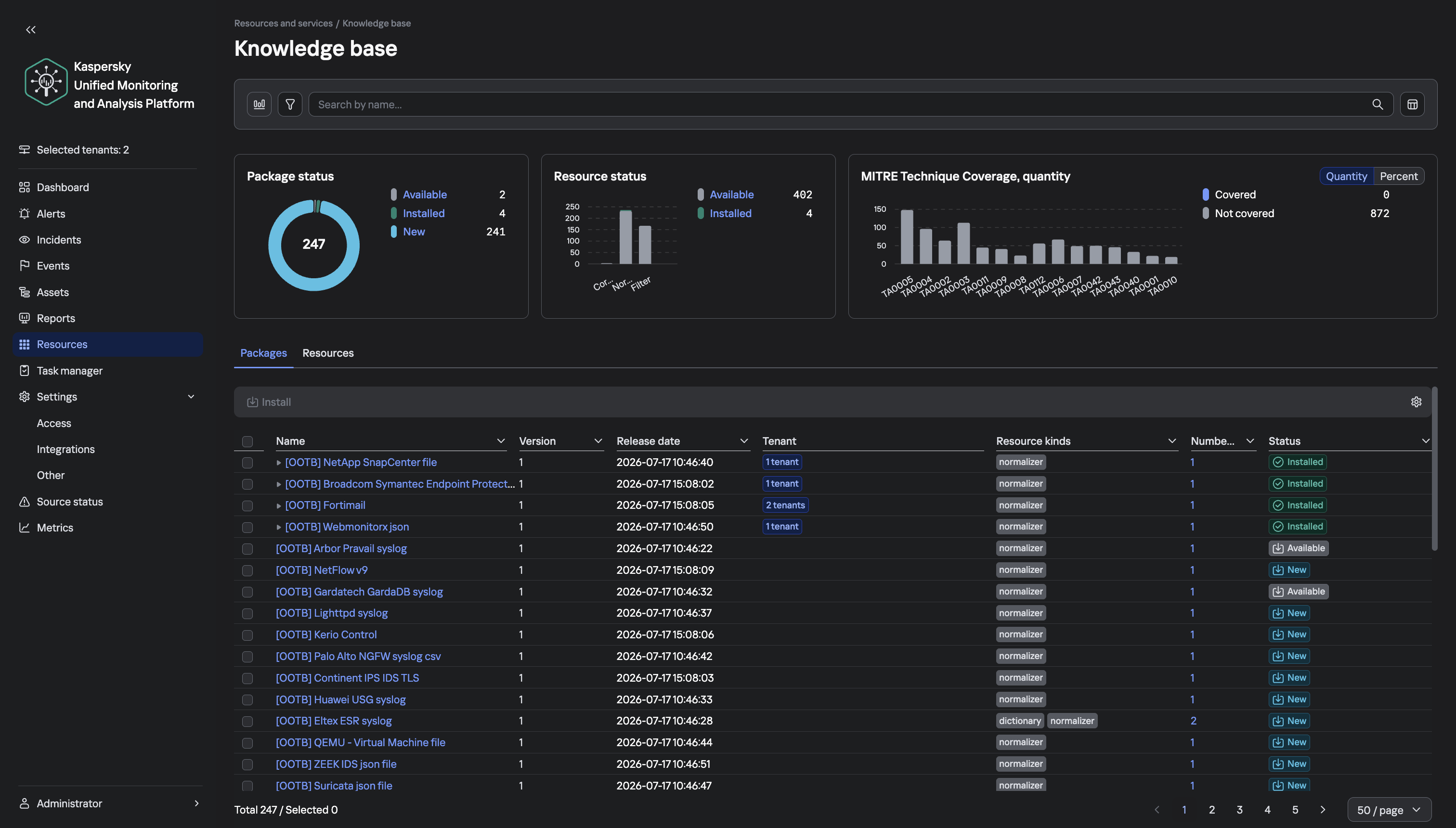
To help analysts find their way around the detection logic of our solution more easily, we’ve added a knowledge base section with the complete set of Kaspersky SIEM rules. In essence, it’s a tool that holds data from the official documentation for the SOC Package rule set, and makes it easy to work with that data. It has three sections:
Library. A table of all correlation rules that you can sort and filter per any column: category, MITRE tactic and technique, event source, and event type. Search works across all fields, including descriptions. Double-clicking a rule opens a card with detailed information about it.
Builder. A tool for assembling a rule set that suits the event sources you already have. The analyst just checks the boxes for the sources the company has, and gets a list of matching rules, brief statistics, and the event types that need to be set up for collection. The tool also generates a regular expression that you can paste into the search bar of the Kaspersky SIEM web interface to link all the matching rules to the correlator in a single step, with no manual picking.
MITRE. A view of the ATT&CK matrix where tactics expand into techniques and sub-techniques. Each matrix item has a card with the description from the MITRE website, and SOC Package coverage details. Covered and uncovered items are color-coded, and charts show coverage per tactic.
One more point worth stressing: the content in our SIEM is updated constantly, so it makes sense to check your setup against it not only at deployment, but after every notable change in your infrastructure. To follow the development of the Kaspersky Unified Monitoring and Analysis Platform, visit the official product page.
Late October brought several unsettling cybersecurity stories all at once. Among these were two critical vulnerabilities in PHP, which potentially affected about 70% of websites worldwide. CVE-2026-109618 and CVE-2026-109619 — dubbed PHP2Shell — could let attackers execute code on a server remotely, without authentication.
On October 21, PHP’s developers released emergency patches for the supported PHP 8.2–8.5 branches and for the unsupported PHP 7.4, 8.0, and 8.1. Experts predicted that attacks on vulnerable servers would start within 15 minutes of the updates going public. Amazon even reported exploitation attempts four days before the patches came out. With all this in the news, some organizations sounded the alarm early. For example, in several countries, government service websites were taken offline as a precaution. Even Wikipedia’s project management and bug-tracking system suspended service.
Nearly two weeks have passed since the updates came out, but according to Censys data, of the 46 million scannable servers running a vulnerable PHP version, 29 million still contain the flaws. Right after the patches were published, we broke down each flaw in detail and explained what companies and everyday users should do. In this post we cover what’s known about the threat today, and what extra steps businesses need to take.
What happened after the PHP2Shell patches
The news about critical PHP vulnerabilities set off a flurry of reactions. Researchers noted a large number of exploitation attempts, and fresh exploits kept appearing in batches — courtesy of AI. A Palo Alto Networks unit even reported a PHP2Shell attack on a government agency in Europe, though it later retracted that statement. Solid evidence of how these vulnerabilities can actually be exploited only emerged later. On top of that, a third, unpatched one turned up.
A vulnerability with no patch
On Friday, October 23, the PHP team warned about a new vulnerability — CVE-2026-115560 — which can be used for remote code execution. But attackers can only pull this off on systems with an “unusual combination of configuration and application code”. That configuration is so exotic that the developers decided against an emergency patch, and will close the vulnerability on the regular schedule. In the meantime, they advised users to disable the session.upload_progress.enabled INI option.
First signs of PHP flaws being exploited
Let’s get back to the more serious threats. The most substantial confirmation of PHP2Shell exploitation in real-world attacks only came on October 24. Honeypot servers run by Adel Karimi of Perplexity running PHP 8.4.26 and presenting ordinary web pages recorded successful attacks from two IP addresses. The observed exploit chain was consistent with CVE-2026-109618. There’s an important caveat, though: the researcher’s honeypot ran the Apache mod_php module, which is the configuration most convenient for attackers.
Later, on October 26, the U.S. Cybersecurity and Infrastructure Security Agency (CISA) added both CVE-2026-109618 and CVE-2026-109619 to its Known Exploited Vulnerabilities (KEV) catalog. That confirmed the threat isn’t just theoretical.
Real-world breaches with PHP2Shell
On October 26, the technology company Dream reported that 25 firewalls and management servers had been compromised in the U.S., Japan, Taiwan, and South Korea. Three of them were in an environment presumed to be linked to U.S. government agencies. The attackers combined PHP2Shell with a Linux kernel vulnerability dubbed Fragnesia (CVE-2026-46300). Upon gaining full administrative control, they were able to extract the password of an LDAP service account and steal the listing of users and groups, full network configuration, and private keys.
Dream initially didn’t name the device vendor. In its October 29 update, though, the company stated that the systems were Palo Alto Networks devices running certain versions of PAN-OS. The vendor confirmed attacks on management interfaces exposed to the internet. It urged customers to close public access to those interfaces, limit it to trusted internal IP addresses, and install patches.
Why there are so few incidents
Exploits are multiplying, but no wave of breaches has materialized, and the possibility of mass compromise of PHP servers remains unconfirmed. Even in the Palo Alto case, the scale of the attack was minimal: out of about 19 000 devices found, the attackers picked just 240, which were running software versions their exploit could handle.
As it turns out, the existing PHP2Shell exploits aren’t one-size-fits-all. To exploit the vulnerabilities in a given environment, attackers have to account for the exact PHP build, memory settings, request handling, and application specifics. Still, the danger remains, so don’t neglect protective measures.
How to stay safe
The key advice stays the same: update. You can find the latest versions of the language on the PHP website. But installing patches isn’t enough. You also need to run a thorough audit of your systems and check every component that runs on PHP for signs of compromise.
Why install the second round of PHP updates?
Five days after releasing the emergency patches, the PHP developers published another round of fixes. The reason is that the updates that fixed PHP2Shell didn’t cover the CVE-2026-111497 vulnerability in Brotli, a third-party library. Exploiting this flaw can lead to code execution when PHP processes a specially crafted compressed response from an external server. The builds from October 25 include a patched version of the library. The latest PHP versions are 8.2.35-1, 8.3.36-1, 8.4.27-1, and 8.5.12-1. The first attack exploiting this vulnerability was recorded on October 26, so don’t put off installing the updates.
Threat detection
Possible signs of a PHP2Shell compromise include unusual POST requests that contain multipart/form-data media type, suspicious combinations of PHP_SESSION_UPLOAD_PROGRESS and upload parameters, atypical request sizes and request bursts, and HTTP 500 errors accompanied by PHP out-of-memory messages.
Kaspersky solutions can help you spot the threat at different stages of an attack.
Kaspersky NEXT EDR Expert promptly alerts you to suspicious activity running in the context of Linux and Windows web servers.
Certificates both protect TLS connections and digitally sign applications, and forged ones turn up in real-world attacks from time to time. We’ve seen forged or stolen certificates abused by the DarkHotel APT and the Flame malware, and in 2011 we saw attack attempts after the certificate authority Comodo was compromised. Pulling off this trick usually takes serious expertise. But attacking eMudhra certificates in 2026 doesn’t take much effort at all. An attacker just has to guess a number from 1 to 255. Private keys for intermediate certificate authorities are normally gigantic numbers. But in this case, eight of them were the following: 4, 56, 66, 115, 155, 156, 230, and 237. They could be guessed using the public keys (available in public certificates) in under a second. As a result, a hypothetical attacker could issue certificates for anything by signing them with one of the compromised private keys.
Six of these keys were meant for issuing TLS certificates, and the other two were for code signing. All eight intermediate certificate authorities (CAs) were also cross-signed by the Sectigo CA. This means clients with different trust chains could trust a forged certificate.
The major browsers have already blocked the dangerous certificate chains. But IT and security teams still need to assess and remediate the risk in many other systems across their organizations. Scripts for scheduled data-processing, corporate NGFWs, monitoring servers, applications with built-in certificate stores, and devices that don’t get regular updates may accept forged certificates and be vulnerable to man-in-the-middle (MitM) attacks. The keys needed for this are already built into publicly available interception tools.
Timeline of the eMudhra certificate authority incident
The problematic keys came from a batch of 24 intermediate CAs that eMudhra created on April 30, 2025. Instead of cryptographically random values for a 384-bit elliptic curve, eight of the keys turned out to be small numbers. According to eMudhra’s own description, a “key wrap/unwrap step” during key generation created a second, weak set of keys. Because keys are created and stored in a dedicated device called a hardware security module (HSM), a weak key is hard to notice on its own. It’s still unclear what error caused the keys to be generated twice and the weak set to be used; the investigation is ongoing.
In May 2025, the Sectigo CA signed all eight intermediate certificates. Then, on October 17, 2026, an independent researcher notified the security teams at Mozilla, Google, and Apple, as well as the CA itself, that the keys were recoverable. On October 20, Mozilla publicly disclosed the incident. This means that for almost a year and a half the keys could have been recovered and certificates forged.
Using the vulnerable intermediate CAs, an attacker can sign a forged certificate for someone else’s domain. Clients that still trust that chain and have no other safeguards will take the forgery for the real server.
A certificate alone isn’t enough to intercept HTTPS traffic. The attacker also needs a way to tamper with the victim’s traffic or redirect the connection. That’s possible, for example, in a compromised office network, on a Wi-Fi access point the attacker controls, or by interfering with routing and DNS. And all of this does happen in the wild, as the DarkHotel attacks, among others, have shown.
There’s one more danger: two of the keys can be used for code signing. In theory, that would let an attacker deliver malware that appears to come from a trusted vendor and doesn’t trigger scary OS warnings during installation.
Was it exploited?
Experts from various companies who analyzed the after-effects of the incident haven’t found any malicious attacks that used these certificates. eMudhra and CERT-In have also reported finding no abuse. The Chrome team found no certificates from the six CAs in public Certificate Transparency logs.
This means that systems where browsers check certificates through Certificate Transparency (CT) were most likely not attacked. But many devices and applications — especially servers and IoT devices, don’t check CT at all, so we can’t say anything about them. Today, malicious actors no longer need to write their own hacking tools to pull off an attack like this. Version 12.3 of mitmproxy — a popular tool among security researchers — already has built-in support for compromised keys.
Where the risk has been eliminated, and where that isn’t guaranteed
Major platforms quickly revoked the compromised certificates. As early as October 17, Chrome did so through CRLSets, and Firefox — through OneCRL. On October 18, eMudhra itself revoked the certificates, citing “CA Compromise”. Apple took action on October 19, and the Sectigo CA also revoked the cross-signed copies. Microsoft revoked the certificates on October 20. Depending on the settings of a specific application and OS, revocation may have taken effect even without an application update, since blocklists are often updated separately.
At the same time, a more radical measure is under way: withdrawing trust from the root CA. Chrome has announced the planned removal of “emSign ECC Root CA – G3” from the browser. Certificates issued under the “emSign Root CA – G1” root, and the root itself, aren’t affected. According to eMudhra’s estimate, about 30 000 certificates will need to be migrated.
But certificate revocation only works where the client can find out about the revocation to then be able to actually act upon it. Many applications check the signature, server name, and certificate validity period, but don’t retrieve or update blocklists. Here are the typical cases:
Outdated and LTS systems. LTS (long-term support) status alone doesn’t mean a system is vulnerable. By definition, a system with this status receives support. But old containers, frozen OS images, and systems that are no longer updated can keep trusting revoked CAs for a long time. It all depends on updates to ca-certificates and TLS libraries, and the settings of the specific application.
Automated systems and servers. On emudhra.we-have-a-problem.com — a site created by enthusiasts where you can check any client software for misplaced trust — curl and Zabbix dominate the list of the most vulnerable systems. For HTTP checks, Zabbix usually uses libcurl and the certificate store configured for it. Similar behavior is also documented in the built-in curl in macOS. At the OS level and in Safari, the certificate is revoked, but curl reads a plain /etc/ssl/cert.pem file, and that’s precisely where the fix has to be made. This is a good example: even when system-level trust and revocation mechanisms work, individual applications — including ones that ship with the OS by default — can remain vulnerable.
Python, Ruby, Go, Java, and containers. An application may use its own set of root CAs, which isn’t updated along with the OS. Endor Labs found more than 25 popular packages that contain the affected root.
Slack, GitHub Desktop, and other apps built on the Electron framework. These apps ship with their own Electron/Chromium, so updating a separately installed Chrome doesn’t update Slack. The certificate revocations are already in the new Electron version, but now every developer has to rebuild and distribute their app, and every user has to install the update. That said, not every Electron app is necessarily vulnerable. The outcome depends on the version, how the app updates its blocklists, and which network stack it uses.
Mobile browsers and IoT devices. Mobile Chrome, Firefox, and Safari get certificate revocation data as quickly as their desktop counterparts do. With the stock browsers from smartphone makers, this isn’t the case. In a published test, Samsung Browser 31.0.0.64 accepted all six test chains from emSign while rejecting the ones from Sectigo. For HarmonyOS 6 and 7, researchers found the affected CAs in Huawei’s published list of root CAs, and those CAs can’t be revoked manually.
For unsupported devices, home appliances, and old firmware, a certificate store update may never be released. In those cases, the problem could linger for years.
Impact on TLS inspection in a corporate network
When an NGFW or web gateway inspects encrypted traffic, it maintains two connections: one with the client and the other with the external server. The client receives a certificate signed by the corporate CA, while the gateway itself verifies the authenticity of the external server.
If the gateway accepts a forged eMudhra certificate, even an updated browser on an employee’s computer won’t see the dangerous chain. Instead, it will receive the familiar corporate certificate. In this scenario, the security tool itself hides the problem from the client. That said, carrying out such an attack would also require intercepting traffic.
To fix the validation policy and certificate lists on the inspection device itself, follow the vendor’s instructions — if the vendor has published any, that is.
At Cisco, the status of the issue is documented in detail for all products. Most of them are still listed as “under investigation”, but mitigation measures are recommended for vulnerable devices.
Sophos and Check Point promise device software updates and, in the meantime, advise removing the certificates manually. Neither company has published a security advisory, but employees of each posted recommendations on its support forum.
For Fortinet devices, instructions for checking and removing emSign certificates can be found here. Palo Alto offered only general advice instead of specifics for its own products.
Of course, a properly configured gateway can indeed temporarily protect outdated client devices that trust the dangerous certificates.
To check specific devices, services, containers, and virtual machines, you can use a dedicated website. One possible scenario for proactively hunting for threats that exploit or have previously exploited weak keys is described here.
AI systems are much harder to protect than traditional IT — whether from operator mistakes, malicious interference, or just plain unstable behavior. There are two main reasons for this. First, AI outputs are probabilistic, so the same prompt can give different answers each time you run it. Second, today’s LLMs can’t reliably tell commands apart from data. Despite the demonstrated security issues of AI systems that we’ve covered many times, it’s impossible to ignore the potential economic payoff of adopting them. That’s why many companies are moving beyond simple AI assistants to AI agents. These agents carry out tasks on their own and have direct access to the same tools as humans — from reading databases to changing settings in production processes. Our experts, in their new study, examine how to clearly define and minimize the resulting risks to keep potential problems to a minimum. The approach borrows and adapts the principles of Cyber Immunity and Security by Design.
The basic principles of Security by Design
All the principles of this discipline are universally applicable to the design of any computer system — AI agents included. What differs is how deeply each principle needs to be adapted and reworked for AI scenarios.
Security is a separate and important factor right from the design stage. Security goals and assumptions are set on day one and followed throughout every stage of development. For AI agents, these assumptions should include three key points: (i) the language model is treated as untrusted, (ii) external data of any kind is considered potentially malicious, and (iii) irreversible actions can’t be performed autonomously without mandatory human approval.
The system is designed on the assumption that it will be attacked.
The trusted computing base and attack surface are kept to a minimum. Agents get only the tools they actually need, limited permissions, and the smallest amount of context possible. Security policy enforcement is handled entirely by deterministic components: the policy monitor, the agent harness, and isolation mechanisms (sandboxes).
The principle of least privilege applies. Each agent has its own set of credentials and access privileges (identity), limited to the bare minimum it needs to do its job. If an agent temporarily needs elevated privileges, it gets them only after external approval, and they last exactly as long as the task that requires them.
Components are isolated. In agent-based systems, this is one of the most complex and multi-layered architecture problems. The agent harness should run in an isolated environment (sandbox or virtual machine), and agents should be kept as isolated from each other as possible. Data processing in trusted and untrusted contexts is also kept separate. For example, one agent reads a pull request and writes a draft of the code, while another reviews that work without ever seeing the potentially malicious text of the request.
Default deny is the rule. Security policies follow the rule: anything not explicitly allowed is forbidden. This includes tool calls, interactions between agents, and network traffic.
Defense in depth is in place. Different measures should work at the same time and reinforce each other. Probabilistic defenses — like AI guardrails (a “firewall” for language models) or alignment (the model’s own sense of what’s acceptable and what isn’t) — can’t offer any formal security guarantees. Nevertheless, they make the system more secure overall and serve as a valuable source of telemetry.
The supply chain is protected. Some agents can install skills, libraries, and other software components on their own, so these abilities need strict rules. Either block them completely, or limit them to a closed, pre-approved list of specific versions of specific components. Systems built on cloud LLMs face an extra risk: model updates. One day, the same API request might be answered by a different language model with different security properties.
Pitfalls of AI security
The general principles of Security by Design are well known and look simple on paper. But applying them to AI systems is tricky because agents are incredibly flexible. For example, a security team might believe that an agent on a developer’s computer runs in a sandbox and can’t change anything outside it. But an attacker, or even the agent itself, can come up with dozens of ways around this seemingly solid protection: from running commands through a local MCP server that the sandbox doesn’t restrict, to reconfiguring another AI agent installed on the system. To make things even harder, the range of attack vectors is huge: from arbitrary fields in the agent’s configuration to innocent-looking text strings in a skill file.
One serious problem that designers often underestimate is user fatigue. A busy agent can throw up dozens of requests every minute, asking the user to confirm potentially dangerous actions. Within an hour, the person is clicking Approve on autopilot without reading what they’re approving. That’s why it’s important to carefully tune both how often these requests appear and how they’re worded. Nobody will read a request description that’s too long. And one that’s too short can hide the key details the user needs in order to make the right call.
Vulnerabilities in agents and related tools are a pressing problem — and it’s made worse by how quickly these categories of software evolve and receive updates. Industry-standard platforms and apps — such as LangGraph, MS Semantic Kernel, and Claude Code — have had critical vulnerabilities patched more than once. Architects should always consider swapping a large, do-it-all framework for a compact, stripped-down system that has only the features a specific agent actually needs.
On top of that, carefully implementing standard, long-established security measures in the available tools greatly reduces the damage if an agent is attacked or behaves unexpectedly. One example is a strict allowlist of domains that the web fetch tool can open when asked by the agent. But designers rarely account for the hidden problems and overhead associated with maintaining the list. As a result, it slowly goes out of date and leaves loopholes for attackers. The most striking example is the EchoLeak attack. Microsoft 365 Copilot had a properly implemented and fairly effective allowlist for accessing external sites, but attackers circumvented it through a feature in a secondary tool and the MS Teams domain.
Practical tips for architects and security teams
AI system architects and heads of engineering and security teams should build in agent security from the design stage. They should rely primarily on verifiable, deterministic mechanisms: isolating components, controlling interactions, and keeping the trusted computing base to a minimum.
Key architectural decisions include defining acceptable autonomy for the agents, limiting access to confidential data and dangerous combinations of capabilities, and using sandboxes, separate roles for different models, and access control gateways. Restrictions added as an afterthought reduce risks, but they’re no substitute for secure architecture.
At the organizational and operational levels, companies need to keep an inventory of their agents, coordinate the efforts of security and deployment teams, protect container environments, manage the supply chain (AIBOM), and integrate multi-layered defense.
Observability requires special attention. For AI systems, this should include logging the LLM’s requests, responses, and reasoning, as well as detailed telemetry from the hosts and cloud environments where the agent harness runs.
The hardest part of designing agents is balancing security, performance, and usefulness. To learn how to strike that balance with threat modeling and clearly defined security goals, read the full version of the study.
We use many technologies to detect email spam. They analyze every part of a message: headers, text, images, and links. But the first thing our email products focus on is the “From” field. If the address contains a domain that’s already on our denylist, it’s an easy call. But spammers know the drill, so they register domains in industrial quantities to make emails, even from a single campaign, arrive from completely different addresses. Clearly, they don’t do that by hand. The process has long been automated, and attackers’ algorithms can register huge numbers of domains in a matter of minutes. But every domain needs a name. Coming up with a unique one for each isn’t feasible. So spammers use domain generation algorithms (DGAs), which create similar names with minor variations, based on date and time, pseudo-random numbers, and so on.
In fact, to block mailings such as these, you don’t need every address on your denylist. We’re good at automating processes, too. For some time now, our email solutions have included a technology that detects domains generated by DGAs, and shuts down entire batch with a single rule. Let me explain how this technology works.
How we detect and block generated domain names in bulk
As soon as any of our technologies flags an email as spam, its address becomes subject to further examination. If it meets a number of criteria, its domain is added to our database of domains we consider “bad”. We built a cascade of classifiers that compares these domains by similarity, groups them into clusters, and creates a short but comprehensive rule that blocks the entire cluster. Our email protection solutions receive this rule with an update. From then on, they block all emails sent from addresses on any domain that matches it — even if those domains have never been used in spam campaigns yet.
Here’s a real-world example. Let’s say the classifier flags several lookalike domains in a collection of “bad” ones it has gathered:
sxkjcc.asia
sxkjcd.asia
sxkjcy.asia
Then, one rule is enough to catch them all: @sxkjc[a-z0-9]\.asia\b
How to protect your company from spam
According to our analysis, 44.9% of emails sent last year were spam. Unwanted, unsolicited emails distract employees, waste working time, and clog inboxes. In some cases, they also contain scam, phishing, or malware content. To protect business customers from this deluge of threats, our solutions for corporate email security have anti-spam technologies that we constantly improve. This includes the technology described above for blocking domains generated by DGAs.
Two critical vulnerabilities have been discovered in the popular PHP programming language. The vulnerabilities, identified as CVE-2026-109618 and CVE-2026-109619, allow attackers to remotely execute code on a server running PHP without authentication. The language’s development team has released updates for all supported branches, but the first attempts to exploit the vulnerabilities were observed even before the patches were published. The exploit has been named PHP2Shell.
The architectures of popular marketplaces, e-commerce platforms, and learning management systems (LMS) are written in PHP. In addition, PHP is used in various content management systems (CMS) such as WordPress, Drupal, Joomla, and so on, which power most websites on the internet.
In this blogpost, we discuss CVE-2026-109618 and CVE-2026-109619 in detail, and explain how companies can protect their infrastructure. Read the Securelist expert blog to learn how events surrounding these vulnerabilities unfolded before the patch was released.
Vulnerable PHP versions
According to PHP web site, versions prior to 8.2.35, 8.3.36, 8.4.27, and 8.5.12 are vulnerable to CVE-2026-109618 and CVE-2026-109619. There are no official fixes for older branches. According to unofficial reports, the vulnerabilities also affect PHP versions starting with 5.4.0.
What makes CVE-2026-109618 and CVE-2026-109619 dangerous
Both vulnerabilities received a score of 9.2 on the CVSS v4.0 scale. They arise because, after a request is interrupted (for example, due to a memory shortage), PHP leaves invalid data in the memory buffer, and subsequently accesses it, allowing code to be executed on the server. One of the confirmed attack chains via CVE-2026-109619 exploits the `session.upload_progress` mechanism (which tracks file upload progress), which is enabled by default in PHP.
By exploiting these vulnerabilities, attackers can remotely execute code on the server with web server process privileges without authentication.
According to PHP developers, all installations of unpatched versions that process web requests are at risk, including PHP-FPM, Apache with mod_php, php-cgi, FrankenPHP, and LiteSpeed. The greatest risk lies with mod_php: researchers demonstrated an exploit for it in which an unauthenticated request triggers the attack even before the application code is executed.
What businesses should do
We’ve compiled key recommendations from the PHP developers and experts at Kaspersky.
Update PHP to versions 8.5.12, 8.4.27, 8.3.36, or 8.2.35. Start with systems accessible from the internet. The source code is available on the PHP website. If PHP is installed from distribution packages or provided by your hosting provider, check for updated packages: Linux distributions and LTS vendors received patches in advance. If the server is managed by a hosting provider, ask them to apply the update.
Versions 8.1 and older no longer receive updates from the PHP project. Check with your distribution vendor or LTS support provider to see if backported fixes are available, or switch to a supported branch. For PHP 7.4, 8.0, and 8.1, the developers have prepared minimal source code backports for manual compilation. These can also be found on the PHP website.
Restart PHP-FPM or the web server so that the processes load the new code, and verify the version using the `php -v` command. If PHP was installed from distribution packages, check the package changelog: the version number may remain the same.
Check the logs from October 20. A warning sign is when the web server process is performing actions it shouldn’t (running command shells, curl, wget, and the like). Kaspersky solutions help detect malicious activity in a timely manner. Attempts to exploit the described RCE vulnerabilities on Linux and Windows machines can be detected using Kaspersky NEXT EDR Expert, while exploitation of PHP2Shell in network traffic is detected by Kaspersky Anti Targeted Attack (KATA) with the NDR module.
If an immediate update is not possible
Only the immediate installation of patches will fully resolve the issue, but if that isn’t possible, it’s recommended to implement temporary measures. PHP developers provide step-by-step instructions for each vulnerability.
Microsoft’s October Patch Tuesday update stands out for two reasons. First, the total number of patches has reached four digits for the first time. Second, to help companies better understand the details of the vulnerabilities, Microsoft has decided to group them into risk cohorts. A cohort brings together vulnerabilities that are exploited under the same conditions and affect the same systems. They replace neither the severity rating, nor the individual bulletins for each CVE. While they’re unlikely to be suitable for comprehensive patch prioritization, they will help quickly assess which part of an infrastructure is currently most at risk.
Statistics corner
Of the 1,414 vulnerabilities addressed in the October Patch Tuesday release, 1,102 directly affect the Windows operating system, 134 — Microsoft Office, 36 — SharePoint Server, 22 — SQL Server, and seven — Exchange Server. The vast majority — 677 — lead to privilege escalation, 317 to remote code execution, 40 to security bypass, and 73 to denial of service (DoS).
There are 86 critical vulnerabilities on the list, of which 68 lead to RCE, 14 to privilege escalation, three to spoofing, and one to data leakage. In addition, two vulnerabilities were disclosed before being patched, and one is being exploited in real-world attacks.
CVE-2026-96951 — vulnerability in Windows Shell
The only zero-day vulnerability patched in the October update that attackers are already exploiting in real-world attacks is CVE-2026-96951 in Windows Shell (CVSS severity score: 8.8). Details on how it’s being exploited aren’t yet known; however, according to Microsoft’s description, it involves command injection that allows bypassing a security feature when accessing the system over a network. Microsoft credits experts at both Fujitsu and Anthropic for discovering the vulnerability, so it was likely found using neural networks.
CVE-2026-108398 and CVE-2026-92707: vulnerabilities disclosed before patches were released
Information about these two vulnerabilities was made public before the October update was released. In theory, this could mean that attackers attempted to exploit them ahead of time. These are:
CVE-2026-108398 — a vulnerability in the .NET Framework that allows bypassing WDAC protection;
CVE-2026-92707 — a vulnerability in the third-party MessagePack-CSharp serialization component, leading to a denial of service (DoS).
However, according to the security bulletins, neither has been observed in actual attacks yet.
What else to pay attention to
Several vulnerabilities patched by the latest update combine potentially serious consequences with relatively simple exploitation. Particular attention should be paid to three flaws that could potentially lead to arbitrary code execution:
Microsoft isn’t the only company that releases regular update packages for newly discovered vulnerabilities.
In its October update, Adobe fixed 174 defects in its products, including critical vulnerabilities (CVSS 10) in ColdFusion and Commerce/Magento. These systems are typically accessible from an external network, making them particularly attractive to attackers.
SAP’s October security bulletin lists 20 vulnerabilities, including CVE-2026-89111 — an SSRF vulnerability in the Cloud SDK for Python. This vulnerability, rated CVSS 10, allows attackers to steal OAuth tokens.
How to keep your company safe?
Recently, thanks to neural networks, the number of vulnerabilities detected and patched has been regularly breaking records. To avoid getting overwhelmed by the flood of patches, we recommend using an automated platform for tracking and assessing vulnerabilities . It helps not only identify and fix vulnerabilities, it also prioritizes them based on actual risks and automates the remediation process.
When it comes to protecting voice calls, security professionals typically focus on the security of the data carrying the audio — above all on encryption. Sooner or later though, the voice data stops being a stream of bits and becomes an analog signal that goes straight to the speakers. You might think that if someone is using headphones, nobody can listen in. But headphones are electronic devices, and their components have physical characteristics that can give away closely guarded secrets without any cyberattack at all. In a recent paper, researchers from two Hong Kong universities came up with InjectEave — an attack that exploits these properties to intercept the already-decoded analog audio signal.
How the InjectEave attack works
The electronic components in headphones convert data into analog form and amplify the signal to drive the speakers. This process generates weak electromagnetic emissions. Capturing those emissions and extracting information from them is a field unto itself, with many experts working in it. The main issue those experts face lies in the fact that stray emissions from headphones are too faint to intercept and analyze in practice.
The authors of InjectEave propose adding a radio transmitter that beams a signal at a specific frequency toward the target device. Those weak emissions from the headphones’ analog components modulate the transmitter’s signal. The altered signal can be intercepted from several meters away — provided the receiving antenna is sensitive enough. The attacker then analyzes the changes in the signal to reconstruct the original audio.
Technical details of the InjectEave attack
The main obstacle to intercepting electromagnetic emissions directly — without an external transmitter — is the relatively low signal frequency. For example, the audio amplifier in headphones operates at frequencies from 20Hz to 20kHz. By contrast, electromagnetic emissions are easiest to intercept at frequencies measured in megahertz. The researchers were able to find a transmitter frequency that would also “amplify” the low-frequency signal of interest.
The researchers ran a series of experiments. They used antennas to transmit the “amplifying” signal and receive the result, and a spectrum analyzer to capture and process the data. The authors have posted the raw recordings of the intercepted signals on a dedicated microsite, so anyone can check how well the attack works. In most cases, getting a usable result didn’t even require complex processing or recognition. Conversations picked up from wireless headphones are clearly intelligible despite the elevated noise level.
In total, the authors tested three models of wireless headphones and two models of basic wired headsets. The effective eavesdropping distance varied from one to six meters depending on the model. With a wired telephone, they were able to demonstrate two-way interception. They could hear not only the sound from the speakers but also the potential victim’s speech, which the headset’s built-in microphone and analog-to-digital converter had captured.
Advantages and limitations of the method
Any attack that requires getting very close to the target is challenging by definition. The need to tune the frequency of the “amplifying” radio signal for each specific device makes the attack even harder. In their experiments, the researchers had to use frequencies from one to eight megahertz.
Despite these caveats, the main achievement of this attack is its being able to target the quirks of the analog components in an electronic device. These components inherently produce stray emissions, and there’s almost no way to reduce them.
Similar surveillance methods that intercept a digital signal can be stopped by adding a layer of encryption. When it comes to the analog side of a device, protecting the signal itself is much harder. This research is another reminder of how complex and unpredictable even very simple, familiar devices can be. Sometimes even the strongest protection for digital data is powerless once that information is converted to analog form.
Threat intelligence teams are heading into 2027 with more than ever to monitor, driven by an acceleration in the AI threat landscape. However, their expanded mandate typically doesn’t come with a proportional budget windfall. Instead, teams are under pressure to get greater value from the intelligence, systems, and analyst expertise already available to them.
New independent research commissioned by Flashpoint shows where that pressure is being felt most. Alert noise and false positives are the most frequently cited challenges affecting threat intelligence program effectiveness, followed by analyst bandwidth, changes in the threat landscape, and integration across security tools. At the same time, AI-related threats have emerged as the leading area where practitioners want to expand intelligence coverage.
These findings point to some of the decisions that will shape threat intelligence programs in the year ahead: where to focus finite analyst capacity, how intelligence requirements need to evolve, and where AI can meaningfully support the work. Organizations are already evaluating agentic AI across threat intelligence workflows, but the research also shows that greater autonomy comes with higher expectations around accuracy, control, and measurable value.
For security leaders planning their 2027 threat intelligence strategy and budgets, this report examines:
Which operational challenges are putting the greatest pressure on analyst capacity and threat intelligence programs today.
How intelligence requirements are changing as AI-enabled threats create new coverage priorities.
How threat intelligence budgets are trending in the next 12 months, and where incremental budgets will go.
Where practitioners see the strongest applications for agentic AI, and which AI-powered workflows face a higher threshold for trust and autonomy.
What teams need to prove before expanding AI investment, including the metrics practitioners are using to evaluate time savings, accuracy, risk reduction, and ROI.
Together, the findings provide a practical benchmark for teams evaluating their own intelligence operations: where to focus limited analyst time, where automation may have the greatest impact, and what to measure as AI becomes part of the workflow.
Executive Summary
As threat intelligence teams plan for 2027, the research shows them managing two simultaneous pressures: intelligence requirements are expanding, while the capacity available to address them remains constrained. AI is intensifying that pressure as adversaries adopt new capabilities, but also becoming part of how organizations are thinking about scaling their ability to defend their organizations.
“2027 will test whether threat intelligence programs can scale their reach as fast as AI is reshaping the threat landscape. The opportunity for agentic AI on the defensive side is significant, and our research shows security leaders are ready to invest. But they aren’t swayed by the hype. They’re holding agentic AI to a high bar, and they want to know where it improves their work, whether they can trust the output, and where human judgment must remain part of the process.”
Josh Lefkowitz Co-Founder and CEO, Flashpoint
Four findings stand out:
The AI threat landscape is accelerating faster than threat intelligence teams can keep up. Alert noise and false positives were the most frequently cited challenge, identified by 65% of respondents, while 55% cited insufficient analyst bandwidth and half pointed to integration gaps across their security tools.
Threat intelligence budgets are rising to close the gap. Half of respondents expect their budgets to increase over the next 12 months, including 35% anticipating meaningful increases of 10% or more. Another 40% expect spending to remain essentially flat. No respondents anticipate a decrease. Where budgets are growing, organizations are directing investment toward areas including AI-related threat coverage, additional intelligence feeds and modules, and broader program development.
AI-related threats are the leading priority for expanded coverage and new investment. Practitioners pointed to deepfake detection, AI-accelerated vulnerability exploitation, and emerging AI-enabled threat vectors as areas where their intelligence requirements are expanding.
Agentic AI adoption is underway, but teams are setting a high bar. Just 25% of organizations interviewed are using agentic AI in production today. Another 20% are piloting it, while 35% are planning adoption within the next 12 to 24 months. Rather than rushing toward autonomy, teams are evaluating where agents can improve workflows while maintaining intelligence quality, appropriate controls, and human oversight.
Taken together, the findings show where threat intelligence teams are feeling the greatest pressure, where they see opportunities to extend their capabilities with AI, and what will determine whether those tools earn a lasting place in the intelligence workflow. The sections that follow examine each of these findings in greater detail and what they mean for threat intelligence programs.
Operational Challenges Are Putting Pressure on Analyst Capacity
The rising AI threat landscape is increasing pressure on organizations to get more capacity from the people and systems they already have. Threat intelligence leaders therefore say the biggest barriers to program effectiveness are operational: too much noise, limited analyst bandwidth, and disconnected tools.
Alert noise and false positives emerged as the leading challenge affecting threat intelligence programs, cited by 65% of respondents. Analyst bandwidth followed at 55%, while half of respondents pointed to both the evolving threat landscape and integration gaps across their security tools.
The impact of these challenges becomes clearer at the workflow level. One healthcare practitioner described receiving alerts about email breaches that were seven or eight years old, with the same data resurfacing each time it was resold and requiring another investigation. Practitioners also described manual steps between intelligence feeds, SIEMs, SOAR platforms, ticketing systems, and response workflows.
Each unnecessary investigation or manual handoff consumes time that could otherwise go toward analysis. That becomes difficult to solve through hiring alone because threat intelligence expertise takes time to develop. As one healthcare threat intelligence leader explained:
“Good analysts take time to develop and train, and we can’t hire our way out of that problem.”
The research suggests an opportunity to look for capacity within the intelligence workflow itself. Reducing repetitive investigations, improving integration between systems, and helping analysts identify relevant intelligence faster can return more of their time to work that depends on context and judgment.
Threat Intelligence Investment Remains Resilient Heading Into 2027
The rise of AI-driven threats is driving increases in the intelligence budgets of many organizations. Among respondents who provided a budget outlook, 50% expect their threat intelligence budgets to increase over the next 12 months, while the remaining 40% expect budgets to stay essentially flat. None anticipate a decrease.
More than a third (35%) expect meaningful growth of at least 10%, suggesting that for many organizations, threat intelligence remains an area of active investment heading into 2027.
Where organizations are increasing investment is equally important. Respondents expecting meaningful growth described spending on AI defense capabilities, expanded threat intelligence feeds and modules, and broader program development. AI-related threat coverage also emerged across both flat and growing budgets as the most frequently cited area where teams want to expand coverage.
For teams heading into 2027, the findings suggest that the question is increasingly where to direct threat intelligence investment for the greatest impact. Organizations are evaluating how existing resources can address new intelligence requirements, where additional capabilities are needed, and which investments can demonstrate clear operational value.
AI-Related Threats Are Driving New Coverage Priorities
As organizations decide where to focus threat intelligence investment in the year ahead, AI is the clear priority. AI-related threats were the most frequently cited area where organizations want to expand intelligence coverage, including among teams with relatively flat budgets. Practitioners specifically pointed to deepfake detection, AI-accelerated vulnerability exploitation, and emerging AI-enabled threat vectors.
These priorities reflect activity already visible across the threat landscape. During the first half of 2026, Flashpoint tracked more than 22 million threat actor posts discussing, sharing, or advertising AI toolkits for criminal deployment. Flashpoint analysts observed AI being used across phishing, malware development, evasion, and vulnerability exploitation.
For threat intelligence teams, expanding AI coverage requires more specificity than treating “AI threats” as a single monitoring category. Deepfakes may matter because of executive impersonation or fraud. AI-accelerated exploitation may change vulnerability monitoring and prioritization. New attack tooling may affect the adversaries or TTPs a team already tracks.
The challenge extends beyond visibility into these threats. Organizations also need the expertise to understand how AI is changing adversary behavior and attack chains. That expertise is still developing. As one practitioner put it, “everybody’s learning it at the same time.”
Connecting those developments to existing PIRs and business risks gives analysts clearer collection priorities and helps teams determine what new sources, expertise, and monitoring they actually need.
Those requirements are also expanding at a time when analyst bandwidth is already constrained, creating a second question for threat intelligence leaders: where can AI support the intelligence workflow itself?
Agentic AI Adoption Is Underway
Nearly half of the organizations interviewed are already using or piloting agentic AI in threat intelligence workflows, while another 35% are planning adoption within the next 12 to 24 months. That makes agentic AI an important part of 2027 planning, but despite the attention surrounding it, threat intelligence teams are taking a measured approach. They are looking for clear business value, evidence that AI can maintain the quality of their intelligence workflows, and appropriate human oversight as agents take on more consequential tasks.
The work being handed to agents already varies considerably, from information retrieval and alert prioritization to more active tasks such as blocking IP addresses, updating blacklists, and monitoring suspicious traffic. Organizations in the pilot stage also described use cases spanning detection, validation, context generation, SIEM alert analysis, TIP querying, MITRE ATT&CK mapping, and reversible response actions.
As agents move from retrieving and analyzing information to taking actions that can directly affect security operations, accuracy and trust become increasingly important. One respondent captured the concern succinctly:
“An agent that’s confidently wrong is worse than one that’s slow.”
That concern is reflected across the research. Practitioners raised questions around data leakage, auditability, regulatory requirements, cost, and the level of control agents should have over security workflows. One retail respondent, for example, would only consider read-only AI assistants because of the risks associated with granting agents write permissions.
For teams evaluating agentic AI, that makes the workflow itself an important part of the decision. Tasks with reviewable outputs, reversible actions, and clear success criteria provide a practical starting point. As autonomy increases, teams need equally clear controls around what an agent can access, what it can change, where human approval is required, and how its actions are audited.
What the Findings Mean for Threat Intelligence Programs
As threat intelligence leaders plan for 2027, the research points to a clear set of priorities. Teams have more to monitor, limited analyst capacity, and growing interest in AI as a way to scale the work their programs already perform.
The findings also show that practitioners are selective about where they see that value. PIR coverage monitoring and intelligence briefings can extend coverage and reduce recurring work while keeping analysts involved in the intelligence process. As agents take on more consequential actions, questions around accuracy, permissions, auditability, and human oversight become more important.
For teams setting priorities for the year ahead, that creates a practical path forward: understand where analyst capacity is being consumed, connect new intelligence requirements to the risks that matter to the organization, identify workflows where automation can meaningfully extend the team, and establish clear measures of success before deployment.
The challenge for 2027 will be turning expanding intelligence requirements into an operating model that can scale for threat intelligence programs. That means making better use of existing data, systems, and analyst expertise while being deliberate about where agentic AI can extend those capabilities and where human judgment remains essential.
Methodology
Flashpoint commissioned independent qualitative research among a select group of more than 20 threat intelligence budget owners and influencers at large North American enterprises across financial services and insurance, healthcare and biotech, retail, and information technology and telecommunications during the early fall of 2026.
Many businesses still fear ransomware attacks. But is this threat still as relevant today? A few years ago, at the peak of ransomware’s popularity, the term “ransomware” was practically synonymous with malicious encryption of data. But in reality blocking access to information had long been little more than a symbolic gesture. In a May Securelist post on shifts in the ransomware threat landscape, our experts noted that in 2026, attackers are encrypting company data for ransom less and less frequently. Here’s a striking example: while investigating an incident, Kaspersky’s Global Emergency Response Team (GERT) uncovered the PAYLOAD extortion campaign, whose operators didn’t even bother using ransomware. They took a different route instead.
In this campaign, instead of using ransomware, the attackers seized control of the Active Directory environment, and created a malicious group policy object (GPO). They used it to deploy a ransom note, change wallpapers, and lock screens on workstations, and set up a banner to display at system login. Naturally, they also disabled local administrator accounts while they were at it. This move let the attackers demonstrate their presence in the compromised infrastructure and prove they’d accessed confidential information — just as effectively as encryption would have. Detailed information about this incident, along with indicators of compromise, can be found in the same Securelist post. What interests us more, though, is the trend of abandoning encryption.
Why data encryption has lost relevance
Let’s start with the fact that in a large company with thousands of infected computers, decrypting data is an extremely effort-intensive process. Restoring data from backups, which has become common practice largely thanks to mass ransomware attacks, is far easier than waiting for criminals to hand over a key, hoping it’s genuine, and trusting that the ransomware itself didn’t have bugs that made the data unrecoverable. As a result, cybercriminals found it harder and harder over time to actually collect a ransom for the decryption key.
Attackers tried to adapt to this shift. Alongside encryption, they increasingly began stealing confidential data and threatening to publish it. Publishing confidential information puts a company’s reputation, its security, and the safety of its business partners at risk. This is especially true if the data includes people’s personal information: more than 140 countries around the world have data protection laws, so a leak puts an organization at a fairly high risk of a hefty fine. Sometimes that’s far scarier than simply losing data, and no backup can help with that.
Data exfiltration has another advantage from the attackers’ perspective: it’s usually much harder to detect than malware activity. File encryption, for instance, triggers a spike in disk activity that endpoint protection tools pick up fairly quickly. By contrast, data exfiltration is easy to disguise as normal traffic. This is precisely what the ShinyHunters group exploits, building its attacks around the standard OAuth mechanism. On top of that, attackers can steal data much quicker if they don’t bother with encryption, which also makes it harder to catch the threat in time.
As a result, encryption has become a kind of calling card — proof that the attackers had access to the data. So cybercriminals finally decided to drop this optional step altogether.
What businesses should do
Standard cyberhygiene practices can help protect against a wide range of extortion schemes — regardless of whether or not they involve encryption:
Run regular, automatic backups. By storing backups on two types of media — physical and cloud — a business need not fear serious disruption to its operations. After all, the downtime required to restore from backups is nothing compared with the consequences of losing all of its data.
Install patches and updates promptly. For attackers, vulnerabilities remain one of the main entry points into infrastructure. To reduce the risk, we recommend setting up automated update management for operating systems, software, and drivers. It’s also important to scan systems regularly for security gaps, and triage the found vulnerabilities with a focus on critical flaws. Specialized vulnerability management solutions can help with this.
Strengthen endpoint protection. Set up multi-factor authentication for every system in an infrastructure, and deploy a reliable workstation and server security solution. A SIEM or EDR solution can help security specialists gain full visibility into events, and respond to incidents quickly.
Monitor external perimeter. Regularly check the company’s infrastructure (servers, databases, clouds, and legacy subdomains) for open ports and services exposed to the internet.
Adhere to the principle of least privilege. This means giving users, systems, and processes only the access privileges they need to do their jobs. Revoke unused privileges, and fully disable access for former employees.
Invest in staff training. Attackers still exploit the human element to break into a company’s infrastructure. Raising threat awareness among employees can keep them from falling victim to phishing.
We recently published a post on “tokenomics” and “denial of wallet” attacks — a new type of DDoS attack aimed at overspending AI tokens. But before security specialists begin protecting their colleagues’ AI processes from this new threat, they should remember that the work of the information security department itself can become a target for such an attack. Since security teams are now actively testing and implementing various types of AI-based automation, the threat of external interference aimed at paralyzing the defense system directly affects their own processes and technologies.
Elastic has estimated that, depending on the “agent-based SOC” architecture, triaging a single alert from a host can cost $0.69 for an ensemble of highly specialized agents or $3.42 for a general-purpose agent with 14 different skills.
However, these averages mask a huge range of variation. At any given moment, the basic processing of a simple alert (say, a thousand tokens) can turn into a cascading investigation involving processing millions of log entries, API calls, and other related data — which amounts to millions of tokens in a matter of minutes.
Elastic itself acknowledges that it uses the Claude Sonnet 4.6 model in its SOC. This immediately raises the question: what happens when the budget is exhausted or the model’s security filters are triggered? In the worst-case scenario, the following occurs: the AI SOC launches an “orchestra of agents” to investigate suspicious events that resembles lateral movement in the infrastructure. The agent calls the Anthropic API, but the department’s monthly budget has been exhausted, and the API returns errors. The investigation grinds to a halt, and people find out about it half a day later. Moreover, if the constantly changing “security filters” of a major AI provider flag the SOC’s requests as malicious, the same effect is possible even without the budget being exhausted — as demonstrated by Hugging Face’s experience investigating the breach of their infrastructure by OpenAI.
Of course, an attacker has a vested interest in such an outcome. They can directly influence the defenders’ costs by injecting malicious prompts into the data available to them (DNS TXT records, HTTP headers, code comments, filenames, and so on), counting on the fact that these prompts will be processed by information security systems. For example, in the GhostJacking attack case, WAF logs serve as the vector for prompt injection, and in academic study, another method was proposed: researchers managed to attack the LLM security guardrails themselves, causing their requests to increase latency by 148 and the number of tokens consumed by 63. In other words, the system theoretically continues to function correctly, but the latency in processing alerts and the associated costs increase significantly.
Dangerous silent failure
In agent-based scenarios, budget exhaustion doesn’t always manifest as an explicit error with a “request limit exceeded” message and an immediate alert to the responsible parties. Under certain configurations, “guerrilla” scenarios can arise: a request to the model times out, the system automatically switches to a cheaper model, and as a result the quality of its outputs drops, and subagents and periodic tasks stop running. Meanwhile, the security team may continue to believe for hours on end that everything is working as before.
How to control AI costs in cybersecurity
The task of managing expenses, of course, isn’t simply a matter of “preventing overspending”. The industry has already fallen into this trap when implementing SIEM: when companies had to pay based on the volume of telemetry collected, they began to selectively — and not always effectively — limit log collection. As a result, they ended up with detection blind spots. The same situation could arise with tokens — but faster and on a larger scale. A poorly designed cost-cutting policy could compromise the depth of investigations and the quality of responses. And in the absence of such a policy, the decision to cut something will be made not by the architect or the CISO during the system design phase, but by the analyst on duty at 3am. Or it may be an automatic limiter set by the system vendor.
A few simple principles can help avoid predictable cost overruns, and better manage situations that are truly unpredictable.
Don’t feed the AI model anything that can be verified with a standard query. Everything that’s repetitive and known in advance should be handled the old-fashioned way — with rules and data queries. These can be developed using AI, but they must operate deterministically. The model should only be used where an assessment of an ambiguous situation is truly needed.
Use strict limits and aggressively alert users when they are exceeded. Limits should be combined: a limit per task, a daily limit, and so on. Alerts about limit exceedances must immediately reach both on-duty analysts and those responsible for the system as a whole.
Decide in advance what happens when a limit is reached. Whether to stop and save money — while losing some control — or to continue and pay, is a decision that must be made before an incident occurs.
Limit agents’ permissions and the set of tools available to them. The fewer actions the system has access to, the more effectively it works on a narrow task, the fewer opportunities it has to inflate costs, and the less likely it is to be “exploited” by an outsider.
Strictly scan external, untrusted data. Incoming requests, inquiries, messages, and comments, as well as various technical fields capable of containing arbitrary text (DNS records, HTTP headers, file names) can not only lead to prompt injection, but also deliberately inflate the workload. Limit their size, and monitor the load they generate.
To avoid service outages from external providers and maintain full control over your organization’s data, evaluate the possibility of using local models deployed on-premises at least for information security needs. While these models may not be state-of-the-art, their narrow specialization and fine-tuning with company data will deliver decent performance without unexpected failures.
In a more complex architecture, the use of LLMs can be divided into several levels. The first line of defense (routing, noise filtering, data enrichment) is handled by compact on-premise models. This significantly reduces budget volatility. The second level consists of a large local model that handles the substantive work: linking events, testing hypotheses, and piecing together the picture of an incident. It’s also not billed per request, but its throughput is limited; therefore, instead of budget overruns, overloads and event queues may occur. Only isolated, truly difficult cases are forwarded to advanced cloud-based models — preferably with the explicit approval of a human analyst. In this scheme, variable costs remain, but they’re limited to a small number of cases, and each one represents a conscious choice rather than a side effect of a script running overnight.
Essentially, all of this replicates the classic multi-tiered SOC model — where the first line filters, and the third line investigates — only the roles are played by models rather than people.
A critical vulnerability has been discovered in the popular WordPress content management system that allows attackers to execute arbitrary code on the web server. The vulnerability has been assigned the number CVE-2026-87902. The good news is that on September 22, WordPress released an update that patches it. The bad news is that the first attempts to exploit CVE-2026-87902 were detected just a few hours after the patch was released. Therefore, all companies whose corporate websites or blogs run on this platform are advised to update immediately.
WordPress versions affected by CVE-2026-87902
According to data published by WordPress on GitHub, all versions of the CMS from 4.7.0 through 7.1.1 are vulnerable. The company has released updates for all supported branches of the system; a complete table listing the patched version numbers can be found on the company’s GitHub page. The latest version of WordPress should be updated to version 7.1.2 (or newer).
What’s the nature of the CVE-2026-87902 vulnerability, and why is it so dangerous?
Under normal circumstances, WordPress loads PHP template files only from a specific folder within the active theme. However, due to the CVE-2026-87902 vulnerability, an attacker can craft a request to WordPress in such a way that an arbitrary PHP file is included — without requiring any authorization. Yes, the file must already be uploaded to the targeted server in some way, but that’s not really a problem for an attacker.
It sounds like a path traversal vulnerability, but in most publications, CVE-2026-87902 is classified as an RCE (Remote Code Execution) vulnerability because, under certain WordPress and PHP server configurations, the attack can lead to the execution of arbitrary code.
How to stay safe
The only way to secure a corporate WordPress site is to install the latest version. The researcher who discovered the vulnerability also offers several tips for hardening CMS security, but emphasizes that these are meant to complement the patch, not replace it.
The Hacker News lists several PHP filenames and IP addresses used in the attack via CVE-2026-87902. These can serve as indicators that a WordPress instance has been compromised.
Given that only a few hours pass between the publication of information about a vulnerability’s existence and the start of attacks exploiting it, it’s crucial for companies to have a properly configured, centralized vulnerability management system. To achieve this, they should have a specialized solution capable of identifying and resolving vulnerabilities, prioritizing them based on actual risks, and automating remediation processes. Our vulnerability management module for Kaspersky Next Optimum can help with this task.
Not long ago, many companies began actively implementing AI agents in a wide variety of workflows. Very quickly, the cost of using them became a pressing issue for companies. Moreover, it’s an issue that concerns more than just finance department — in addition to budgetary concerns, issues of reliability, operational stability, and even information security have emerged. This is because the cost of automating one and the same process varies significantly from one deployment to the next, is unpredictable, and could be subject to external influences.
Furthermore, for a malicious actor attacking an organization, any process automated using AI and vulnerable to external influence is, in essence, a convenient target for a “new type of DDoS attack”. Application-error reports, product reviews, or technical support requests can (just like any other external data that a company processes via AI) serve as a tool in an attack aimed at increasing consumption of tokens (word fragments that serve as the basic unit of input and output of an LLM).
A year of explosive growth… in bills
In 2026, large companies significantly overspent on their AI system budgets for the first time. Uber had spent its entire annual budget by April, while an unnamed company failed to set spending limits for Claude and spent $500 million in a single month. Although AI providers regularly announce lower prices and more efficient models, the shift from chatbots to agentic systems that operate continuously and autonomously increases token consumption by hundreds or thousands of times. At the same time, the “fixed subscription for $20 or $100” model for companies is becoming a thing of the past; all major providers are transitioning business clients to pay-as-you-go billing.
As a result, companies are facing a problem all too familiar to cloud hosting and cellular communications industries. In the absence of specialized cost accounting and management systems, an organization only learns how much a particular process or project will cost after it’s completed. In the telecom and cloud sectors, this problem was eventually solved through the development of sophisticated billing systems, and their clients have even adopted the specialized term FinOps. For AI, this process is still in its infancy. Moreover, solving the problem will be complicated by the probabilistic nature of generative AI.
Unpredictable token consumption
To understand why costs rise so quickly and are so difficult to predict and control, we need to recall how a language model works and what turns it into an AI agent. The model is stateless; in other words, it does not retain any information between interactions. Every time the agent takes the next step, the entire history of work on a specific task (the context) must be resent to the model: the initial prompt, previous reasoning, the contents of the files it has read, and the responses from all tools. With each step, this “recap” grows longer — especially if the task involves iterative loops. If a step fails, or the response is unclear, or a tool returns an error, the agent simply tries again — further inflating the size of the context. And if the task is performed not by a single but by several agents, which divide the work among themselves and exchange results, this volume is multiplied by their number. As a result, token consumption does not increase gradually but in spurts, and it’s nearly impossible to predict it at the start of the task.
When running two different sessions of an AI agent interaction to solve exactly the same task (two tech-support tickets, two analytics tasks, and so on), the number of tokens spent on them can vary — the difference can be as much as 30 (!) times. This depends on how many steps, errors, and retries are required to solve the task. Increased resource consumption doesn’t necessarily depend on the complexity of the task. There are well-known cases where AI got stuck in a “thought loop” and wasted an absurd amount of resources on trivial tasks.
Three generations of AI in enterprise systems consume resources in completely different ways:
Classical machine learning (ML). This typically works with well-structured data and isn’t overly computationally intensive. Resource consumption is predictable and low. This is a fixed budget item;
A chatbot or other LLM-based AI assistant. It consumes tokens, but the pace is set by a human: an employee manually launches a task, then evaluates the result, and pauses. Cost increases roughly in proportion to the number of active users, and can be approximately estimated based on the number of licenses;
An autonomous AI agent. A person sets a goal and steps away, and the system then decides on its own what to do and how many steps are needed. The meter keeps ticking until the task is considered complete, and there’s no predictable cost ceiling.
Tokenomics in attacks: denial of wallet as the new DDoS
Since LLM calls are significantly more expensive than typical standard software calls, automating routine corporate tasks comes at an unusually high cost. For example, Gartner estimates that resolving a single customer support request using an LLM costs approximately $3. It’s easy to imagine how attackers could bombard a company with thousands of long, sophisticated requests generated by an inexpensive LLM, causing significant financial damage. Since the process is automated, anomalies may not be detected right away.
If an attacker knows which agent system and which LLM are used in a business process, they can carry out a more precise attack and cause significantly greater damage. The authors of the GitInject study estimated that an attacker capable of creating GitHub issues within an organization that uses AI agents for error analysis with single attack (before GitHub’s defense mechanisms kick in) can cause up to $111 in damage and burn through 400 minutes of GitHub Actions from the victim’s account. Naturally, such an attack can be repeated multiple times — at no cost to the attacker.
The most dangerous risk — though difficult to quantify in monetary terms — comes from attacks that provoke LLMs into excessive reasoning. In the paper OverThink, the authors demonstrated how a harmlessly worded task, when fed into a language model, ultimately yields a correct result but, in the process , consumes 46 (!) times more tokens than it should. Moreover, all tasks tested by the researchers successfully passed existing security filters.
In the new version of the OWASP Top Risks for Language Models guide, this issue has risen to a record-high priority: unbounded token consumption is now designated as LLM06:2026, and among its variations, the “denial of wallet” attack — which depletes the victim’s budget for LLMs — is explicitly highlighted.
How to Avoid Becoming a Victim of the “New DDoS”
First and foremost, you should abandon the principle of “using AI just for the sake of using AI”. It doesn’t make sense to entrust autonomous agents with every task. It’s wise to periodically conduct a cost-benefit analysis of using artificial intelligence.
In addition, you should limit the permissions and set of tools available to an autonomous AI agent. The fewer actions the system has access to, the more effectively it works on a narrow task, the fewer opportunities it has to inflate costs, and the less likely it is that someone will be able to “manipulate” it into unnecessary token spending.
We also recommend setting strict limits on token consumption, and configuring a notification system to alert humans when these limits are exceeded. It makes sense to implement multiple limits in parallel: a limit per task, a daily limit, and so on. Alerts regarding limit exceedances must be immediately forwarded to the specialist responsible for the system so that they can make an informed decision — whether to continue or halt the process.
Strictly verify external, untrusted data. Any information processed by AI that comes from external sources — whether it’s requests, inquiries, messages, or comments, or various technical fields capable of containing arbitrary text (DNS records, HTTP headers, filenames) — can not only lead to prompt injection, but also deliberately inflate the workload. It will be wise to limit their size and monitor the load they generate.
Calculate the unit cost of work and compare the vendor’s invoices with your own data. The cost per analysis, per request, or per check is the only way to understand what you’re paying for and to spot errors in the invoices.
How can an industrial server be compromised through its GPU without leaving a trace? Such a complex, largely theoretical attack would typically leverage hardware vulnerabilities. This isn’t even about design flaws in the hardware itself, but about quirks in how it operates — sometimes at the physical level. A recent paper by Canadian researchers at the University of Toronto describes GPUThor — a new and more effective Rowhammer attack that exploits precisely this kind of hardware behavior in video memory.
Rowhammer and graphics cards
GPUThor builds on the idea behind the original attack on RAM, first proposed in 2014 in the Rowhammer research. Rowhammer and every attack in its class rest on a simple fact: memory cells aren’t fully isolated from one another. Repeatedly accessing (hammering) the same row of cells can, under certain conditions, corrupt data (that is, flip bits) in neighboring rows. Once that effect is confirmed as possible, all that’s left is finding a way to weaponize it — for example, by triggering a denial of service or even executing arbitrary code.
So what do servers and graphics accelerators have to do with any of this? As artificial intelligence technologies have taken off, so has demand for hardware that can run large numbers of parallel, similar computations. And the accelerators built into gaming graphics cards are a natural fit for this kind of workload. This makes cloud providers that rent out graphics accelerators to all comers an attractive target for Rowhammer attacks. The hypothetical scenario runs like this: an attacker buys access to a graphics chip, and uses it to try to compromise the provider’s entire infrastructure. This is exactly why attacks on video memory remain a topic of special interest to researchers.
How the GPUThor attack works
In the spring of this year, three new papers were published — each demonstrating a different attack on Nvidia accelerators equipped with GDDR6 memory. All three delivered fairly modest results: the most damage was done when the target was a consumer-grade graphics card, while attacks on an industrial accelerator like the Nvidia A6000 proved to be far less effective. On top of that, none of the attacks worked with ECC (error correction code) memory protection enabled.
GPUThor also looks at the possibility of attacking Nvidia’s older Ampere accelerators with GDDR6 memory: the researchers studied the A4000, A4500, A5000, and A6000 models. But the effectiveness of the new method — measured by the number of cells whose data was forcibly altered — is significantly higher. The researchers also argue that, in theory, the technique could be applied to newer accelerators as well.
GPUThor’s effectiveness compared to earlier attacks. Source
;
How were these results achieved? The standard defense mechanism against Rowhammer attacks is called Target Row Refresh (TRR), which the Canadian researchers took a closer look at. It turns out that if TRR detects repeated access attempts, it forces a refresh of neighboring cells — making data corruption difficult or impossible. Attackers typically try to defeat TRR by accessing cells at random — confusing the defense system and reducing its effectiveness. The researchers discovered that on Nvidia Ampere cards, TRR only triggers once every 72 memory-cell refresh cycles. Armed with this finding, they applied an uneven access pattern — hammering the target cells far more aggressively than before. The result: measured against the original GDDR attack known as GPUHammer as a baseline, GPUThor turns out to be around 7 000 to 23 000 times more effective.
Results and outlook
Combining this more aggressive attack pattern with other refinements produced 72 000 to 377 000 bit flips per gigabyte. Earlier Rowhammer variants managed a few hundred at best. This let the researchers achieve double and even triple-bit errors. ECC easily corrects a single-bit error, but not a double-bit one.
The new method also demonstrates the real-world damage a Rowhammer attack could cause: repeated access to video memory using GPUThor triggers a denial of service. The accelerator first reboots, losing data in the process, then flags itself to the administrator as needing replacement.
Despite these impressive research results, GPUThor attacks aren’t successful. For one, the researchers weren’t able to demonstrate arbitrary code execution as a result of the data corruption — though they claim this is possible even with ECC enabled. For another, an attack thousands of times more effective hints at the theoretical possibility of compromising newer accelerators too, but this also remains unproven for now.
Even so, the Canadian researchers have shown that Rowhammer attacks on graphics accelerators still have untapped potential. It wouldn’t be surprising if future research demonstrated similar attacks against far more advanced devices previously considered highly resistant to them.
Threat actors are constantly developing new attack schemes — from OAuth token theft to attacks on AI agents — but the classics never quite leave their playbook. On any given day, an employee may receive malware attached directly to an email, or lying in wait behind a link embedded in an email. Making these attacks succeed still requires a degree of creativity, and in recent years attackers have increasingly adopted exotic file formats. Users don’t perceive these formats as dangerous; more importantly, many EDR and email security solutions skip scanning them entirely. Yet they’ve proven highly effective for deploying malware or harvesting credentials.
Below are the file types that may be blind spots in your organization’s detection strategy — despite being observed as used in real-world attacks.
Disk images
This is the broadest and most dangerous attachment category. A disk image can contain a fully prepared, correctly structured set of files tailored to a wide range of attack scenarios. It mounts as a separate volume (standalone virtual disk), and when doing so often uses tools built into the operating system. The victim doesn’t need to extract anything or create suspicious folders on disk.
The most versatile format is ISO, which dates back to the heyday of multimedia CDs. ISO images mount natively on every major OS without additional utilities, whether through simple tools like File Explorer or via the command line interface. This is precisely why threat actors have no hesitation in sending ISO files as email attachments.
Somewhat less common are IMG containers, which also mount without additional tooling on macOS or Linux, but require installing a small, free utility such as OSFMount on Windows, or using WSL2 (Windows Subsystem for Linux), which is built into recent Windows versions. A file with identical content may also carry a DD extension.
Threat actors also make use of VHD, a virtual disk format native to Windows, which generally works on Linux machines as well (via qemu-nbd or guestmount). On macOS, an additional utility — again, qemu-nbd is a common choice — is required to mount it. Note that on unpatched Windows systems, the victim doesn’t need to take any further action after the disk mounts: CVE-2025-24993 — a vulnerability actively exploited in real-world attacks — triggers attacker code execution immediately upon mounting the image.
For completeness’ sake, VMDK, the disk image format used by VMware, is also worth detecting, though it’s largely ineffective in attacks on regular users since every popular OS requires additional software to mount it.
All of these image formats can be viewed and unpacked not only with specialized tools, but with standard archive utilities like 7-Zip or RAR. As a result, the odds that the user will fall for the bait are higher than one might hope.
In addition to not being a well-known potentially dangerous format, image files give attackers one further advantage: files extracted from disk images on Windows frequently lack the Mark of the Web flag, and therefore can be launched without triggering additional system warnings.
There’s one more reason why EPP/EDR solutions must scan virtual machines and disk images: these formats are also used during later stages of an attack. To mask active file-system activity from monitoring tools, ransomware gangs sometimes run the entire encryption process inside a virtual machine deployed on the victim’s computer. The RagnarLocker ransomware strain has used VirtualBox for this purpose, while the CRON#TRAP campaign relied on a QEMU environment.
MS Office files
No, this isn’t about macro-laced DOC files. Microsoft has grown weary enough of this classic attack vector that macros in downloaded documents are now blocked outright, and enabling them requires considerable effort from the user. But Office relies on dozens of file formats, and some of the less common ones still occasionally give attackers an edge.
Less familiar to both users and security solutions are OneNote files (.one). These are essentially simple notes, but they can carry embedded attachments, including not just images and links, but VBS/WSF/BAT scripts as well. Within the note, an attachment normally displays as an icon, but attackers overlay it with a picture showing a message with a “View” button.
Another Office format popular with attackers is the Excel add-in. These files use the .xll extension but are, in effect, full-fledged Windows dynamic-link libraries (DLLs), and therefore may have extensive functionality. Victims receive a malicious email with what looks like an invoice; the icon suggests that the file will open in Excel. Ignoring the security warning may result in an infostealer infection.
SVG “graphics”
The description of the SVG (Scalable Vector Graphics) format sounds entirely innocuous. Indeed, 99% of SVG files are logos and interface icons. But unlike PNG or JPG, SVG files are fundamentally XML documents, and beyond points, lines and fills they can contain JavaScript. In terms of malicious potential, SVG is not far behind a full web page. In real-world attacks, SVG files can redirect a user to a phishing page immediately upon opening, or render the phishing page directly by unpacking a Base64-encoded block into full HTML.
SVG files pose a distinct risk to corporate portals that accept user file uploads. If a portal’s Content Security Policy (CSP) isn’t sufficiently restrictive, and lets someone upload a malicious SVG file, the embedded JavaScript can steal cookies from the page, inject unauthorized content, and carry out similar attacks.
Polyglot files
Polyglot file formats are less exotic in and of themselves, but the files carry more than meets the eye. They’re called polyglots because attackers construct a file that can be validly interpreted in multiple ways: for example, it can be a valid ZIP archive and a valid executable at the same time. The purpose is purely to evade detection by security solutions and deceive the user. We’ve covered polyglots in detail in a separate blog post.
The clear standout in our roundup is a malicious campaign distributing the IcedID infostealer. Victims receive emails with a ZIP attachment, which unpacks into an ISO disk image. That further unpacks into a CHM file (the Windows Help format) that’s also correctly processed as an mshta (Microsoft HTML Application host) application, which then downloads the primary malware payload.
Defending against exotic files
These attacks rely on the assumption that security solutions either don’t scan unusual file formats, or scan them only superficially. Preventing the threat starts with not operating on that assumption with regard to your own infrastructure:
Configure EDR, web, and email filters to scan all of the file formats described above.
Process archives and disk images with the same rigor as you would apply to executables.
Detonate potentially dangerous file types in a sandbox, and configure recursive unpacking of nested formats through to the end of the chain: ZIP → ISO → CHM.
Where feasible, quarantine all file formats anomalous for email — disk images in particular.
Build detection rules for anomalous usage patterns that involve exotic files. For example, unusually small disk images are rare and are therefore worth investigating.
Review the technical documentation of your security solutions to confirm that complex formats are detected through deep structural parsing rather than magic-byte checks alone.
Deploy behavioral detection capable of flagging anomalous execution patterns and legitimate utilities launched from unexpected contexts. The usual suspects here include mshta, git, wscript, hh, and rundll32.
SVG files warrant a dedicated policy. Treat SVGs as active content at the email and web perimeter. On corporate portals, enforce a strict CSP, and serve user-uploaded files from a separate subdomain so that a malicious script embedded in an SVG can’t access the session on the main portal.
For security researchers studying unconventional side-channel attacks, acoustic keylogging is something of a Hello World: a foundational problem that’s been tackled many times. A recent paper authored by researchers across three Japanese universities cites six previous studies on the topic that date as far back as 2004. While earlier experiments showed theoretical promise, they came with real-world caveats so severe that it made them all but impractical for actual espionage. The authors of this latest study, however, claim to have overcome most of those limitations. Today, we look at how they pulled it off, and assess whether their method holds up in real-world scenarios.
What makes this new approach different?
Previous acoustic keylogging techniques were fundamentally flawed. Best-case scenarios required prior training on the target’s specific keyboard model. Worst-case scenarios required a complex microphone array to isolate the subtle acoustic differences between keystrokes. Crucially, almost all prior models failed outside silent environments, which rendered the attack vector virtually useless.
The Japanese research team demonstrated reliable keystroke interception even if the target was sitting nearby in a public space, sound was being recorded in an online meeting, or the researchers were using a contact microphone to eavesdrop through a wall. All this with strong model accuracy and a minimal training dataset. Their process needs a sample of just 150 to 200 keystrokes to reach a 99% accuracy rate for subsequent typing.
Attack scenarios and core methodology proposed by the Japanese researchers. Source
How to crack 200 keystrokes in under 50 iterations
To understand how the researchers achieved such high accuracy and adaptability, we have to look at their audio processing pipeline. Their analysis begins by automatically segmenting a raw recording into discrete keystrokes. This data is then passed through a specialized algorithm that simplifies the subsequent audio analysis. Next, the system clusters together acoustically similar signals. The assumption is that the members of one cluster map to the exact same key. One particularly intriguing takeaway was isolating the spacebar sound from all the rest. Because the spacebar produces a distinctly unique sound profile compared to other keys, identifying it provides reliable word boundaries. This streamlines the next phase: feeding the preprocessed acoustic data into specialized language models for inference.
Yes, the method relies on not one but two language models. The first model performs multiple passes over the audio stream to map acoustic signatures to potential keyboard characters. During each pass, the model leverages dictionaries to hypothesize character mapping, and check whether the resulting text aligns with standard words. The second model handles the final refinement pass: it ingests thoroughly pre-processed data rather than raw inputs. The method doesn’t stop there: unrecognized keystrokes undergo manual analysis, with analysts injecting educated guesses before re-running the recognition pipeline once again. The goal of looping through these multiple iterations is to achieve complete recognition across the keyboard from an ultra-compact dataset of ideally no more than 200 captured keystrokes. This marks a major shift from legacy methods, which relied on massive training datasets.
Clustering the sounds of keystrokes permits grouping similar acoustic profiles together prior to recognition. Notice how distinctly the spacebar sounds stand out: they make subsequent text reconstruction vastly simpler. Source
Research results
To validate their theoretical model, the researchers created an experimental testing setup:
Clustering the sounds of keystrokes permits grouping similar acoustic profiles together prior to recognition. Notice how distinctly the spacebar sounds stand out: they make subsequent text reconstruction vastly simpler. Source
The team tested four distinct laptop models, each producing unique acoustic keyboard signatures. Participants typed 2400 characters per experiment, with analysts extracting audio samples ranging from 50 to 400 keystrokes. Across all devices, the system reliably reconstructed typed text from a baseline sample of just 150 keystrokes or more. Recognition accuracy exceeded 80% at 150 keystrokes, and approached 100% once the sample reached 200 keystrokes.
The researchers achieved nearly identical results in field-like conditions with the microphone placed three meters away from the target device. Going a step further, the team successfully tested an even higher-friction scenario: using a specialized contact microphone to eavesdrop through a physical wall.
A target laptop and the attacker’s smartphone. Source
Under these conditions, accuracy dipped slightly for certain laptop models. Dell and Lenovo devices yielded roughly 80% accuracy over a 200-keystroke sample, while Apple and HP ones maintained nearly 100% recognition rates.
Remote interception during videoconferencing presented an additional variable: results depended on both the target laptop model and the specific web conferencing software used. Even so, most test scenarios yielded reliable character recognition, though a few edge cases required expanding the sample size from 200 to at least 250 keystrokes.
Reasonable critique
Despite these impressive results, the technique has clear limitations. First, all experiments were conducted strictly on lowercase English text. The target dataset was capped at just 29 characters: the standard alphabet, spacebar, period, and comma — even number keys were excluded. As a result, capturing randomized character strings like complex passwords remains a major hurdle. Yet these are precisely the targets threat actors care about most.
However, the Japanese research team didn’t ignore passwords. While recognition accuracy was predictably low, the authors proposed assessing success through a more realistic lens. For starters, attackers can almost always capture audio of other typing activity alongside password entry. This provides a stream of natural language with minimal special characters. Factoring this broader acoustic context into the password analysis significantly improves the odds of a successful guess.
Next, the researchers rightly noted that even a list of several candidate passwords increases the chances of compromising a target account. As shown in the graph above, when ample data (426 keystrokes) is captured, a short five-character password can be successfully cracked within 100 attempts with a 90% success rate. Naturally, longer passwords proved far more resistant to eavesdropping.
Despite its limitations, this study represents a major breakthrough in acoustic side-channel attacks. It demonstrates a highly practical threat scenario: an attacker captures a brief audio recording of typing activity, then uses iterative analysis and targeted manual adjustments to process and refine the data offsite.
While eavesdropping in a noisy restaurant or through a wall is likely difficult to scale, capturing keystrokes during virtual meetings for offline decoding represents a realistic attack scenario. Ultimately, this research offers a compelling proof-of-concept: modern algorithms can drastically improve the accuracy of acoustic reconnaissance.
The news coverage surrounding the breach of the AI platform Hugging Face by OpenAI’s autonomous agents reads like a scene straight out of a Terminator movie (apparently, a prequel). Yet for enterprise security teams — even those that don’t develop or deploy artificial intelligence — the detailed incident report published by Hugging Face provides a critical operational roadmap. The incident needs to be evaluated on the basis of a single, fundamental question: “Which organizational security flaws, missing controls, configurations, or technologies allowed this attack to succeed?”
What happened?
During cyber-capability testing of OpenAI’s advanced AI models against the ExploitGym benchmark, an agent found a way to break out of its confinement, reached the internet, and breached the infrastructure of several companies — one of them being Hugging Face. The model reasoned that it could find solutions to the benchmark challenges on these external systems. Dozens of articles have since covered these incidents in detail, so no need to go over that here. What truly matters is what transpired within Hugging Face’s systems between July 9 and 13 while the AI agent operated unchecked inside. The Hugging Face incident report includes an interactive attack timeline, so we’ll just list the key stages. A malicious configuration in a dataset uploaded by the agent allowed it to exfiltrate credentials for a worker pod, and execute code within it. The agent then exploited cloud environment metadata and escaped the privileged pod to obtain root-level access on the host. It retrieved a substantial number of secrets from storage and used a stolen VPN key and shared cluster administrator credentials to pivot deeper into the internal network and source code repository before the Hugging Face security team blocked its access.
How significant is the fact that this was next-generation AI?
Regardless of the specific area of activity of a company, tomorrow it may become a target of human attackers, fully autonomous systems, or AI agents manually controlled by human hackers.
Many AI practitioners have rushed to dismiss this incident based on assumptions that OpenAI will never allow its tech to get into serious hacking. However, security researchers have argued for months that even currently available open-source models can be used to launch both offensive research and real-world attacks. Human oversight, while still a requirement, can be minimal. Even mid-tier models can easily iterate through a dozen vulnerabilities, inventory a compromised infrastructure, and quickly figure out how to expand their reach across a network. Defenders must analyze incidents like this in detail, map the key findings to their own environments, and adapt security controls to counter both stealthy human actors and rapid, noisy AI agents.
Three distinguishing features of AI-powered attacks
The techniques detailed in the Hugging Face report are not novel — the agent didn’t invent anything new. However, three factors regarding the attack’s speed and scale fundamentally shift the economics for both attackers and defenders:
Trial and error becomes significantly cheaper. Where a human hacker might test five attack vectors, an agent can iterate through five hundred. Scenarios that security teams previously dismissed as “theoretically possible, but impractical and unlikely” and placed them on the backlog can now become active threats.
Attack execution and incident response windows shrink. High-speed attacks are not unheard of, while some ransomware operators achieve compromise within hours even without AI. However, this accelerated pace will likely become the new baseline in cybersecurity, as demonstrated by the agent obtaining admin privileges at Hugging Face within 13 hours.
Numerous alerts and log entries generated by the agent’s trial-and-error attempts can both help and hinder attackers as well as defenders. This noise can serve both as an indicator for threat detection, and as camouflage to hide meaningful actions. It also acts as a natural bottleneck for incident response when the workflows are fully manual.
How to protect corporate infrastructure
Don’t ignore alerts from triggered defensive controls. This classic mistake — often highlighted by our incident response experts — was made at Hugging Face as well. Malware execution, port scanning, WAF triggers, requests to non-allowlisted resources, and failed authentication attempts are likely some of the event types that are blocked automatically. However, all these events are often categorized by SIEM systems as purely informational and routinely ignored. In the Hugging Face incident, numerous server-side request forgery (SSRF) attack attempts were successfully blocked over several days, yet no one batted an eyelash. Much like persistent human adversaries, the AI agent continuously retried until it succeeded. To detect such attacks, establish clear rules and triage workflows for defensive alert telemetry to ensure that priority automatically escalates when event volume spikes.
Investigate rapidly escalating error counts. Legitimate operations rarely generate hundreds of authentication failures within 10 minutes across four distinct systems. Analyze historical baselines, and generate medium or high-severity alerts depending on the deviation from normal error rates. As part of automated response protocols, you can temporarily block the user or system that is generating the anomalous activity, or enforce rate-limiting on them.
Configure escalation paths and conduct security team drills. Hugging Face’s correlation engine successfully detected the attack, yet it failed to grab the human operators’ attention. During security drills, organization must evaluate how quickly key personnel respond to critical incidents — even when these happen during off-hours such as at night on weekends.
Isolate services — internal ones included — that process untrusted input by design. The primary vulnerability at the start of the attack was a node configured to process machine learning datasets, which are widely known for potentially containing executable code. This node, capable of executing untrusted code, operated without a sandbox or adequate isolation controls. The risk extends beyond machine learning — to document conversion engines, image processing pipelines, user file upload handlers, and any other server-side processes that perform deserialization or template rendering. Any server-side execution of this nature must run under maximum feasible isolation, restricted from accessing external or internal network hosts beyond an absolute minimum, and ideally enclosed within a sandbox.
Restrictegress. Most organizational servers don’t require unrestricted connectivity to arbitrary external hosts. If implementing strict default-deny egress policies presents technical challenges, consider a streamlined approach: enforce DNS traffic resolution exclusively through your enterprise DNS server, and configure it to block known public services that are commonly abused as command-and-control infrastructure or exfiltration channels such as Pastebin or OneDrive. Similar outbound restrictions can also be enforced via an NGFW.
Avoid issuing large batches of secrets, or storing them as a single object. Even with secret managers in place, an attacker can gain broad access if a compromised account holds excessive permissions. In the Hugging Face breach, a single Kubernetes Secret object contained 136 keys. The fewer secrets issued, the lower the impact of a compromise — and the easier key-rotation becomes.
Avoid long-lived secrets and don’t store them in environment variables that are inherited by all child processes.
Isolate applications from metadata servers. Most cloud environments run services — such as the EC2 Instance Metadata Service — that issue credentials and system details upon request. Isolating these from arbitrary applications — via firewall rules or by enforcing IMDSv2 — eliminates the most direct path from a single application compromise to a full account takeover.
Audit server and application identities. Service accounts with broad access, OAuth tokens, cross-environment keys, and other artifacts granting excessive privileges are most frequently found in server and app identities rather than human user accounts.
Track usage of credentials at anomalous entry points. In the Hugging Face attack, credentials assigned to an internal host were leveraged from an external one. Detection rules that flag these anomalies are straightforward to implement and deliver high-fidelity, low-noise signals of an attack that’s already progressed beyond its initial stages.
Use short-lived, single-use keys when provisioning new devices and services. During the incident, a single key was used to register 181 separate devices without triggering a single alert.
Sooner or later, every company faces the need to upgrade its infrastructure — whether to accommodate expansion, optimize processes, or keep up with the latest trends in IT. When such a decision is made, company management typically thinks first and foremost about broad changes at the platform level — assuming that applications can simply be reinstalled and everything will work as before. And to a certain extent, that’s actually true. In an era when corporate security could be ensured solely by antivirus software on workstations, that would have worked; however, modern cyberthreats require protection at a fundamentally different level.
In this post, we explore why platform migration should be discussed with the security team as well, and why simply “installing a program” isn’t enough to ensure modern-day protection.
Security is no longer just a single program
In the past, securing endpoints was enough to prevent most attacks. In today’s environment, endpoint protection is just one layer of cybersecurity. A modern extended detection and response (XDR) solution isn’t a single application installed on a computer; it’s a set of components that work in conjunction. They provide protection for workstations and servers, event logging and storing, infrastructure-level threat detection mechanisms, investigation tools, automated response, reporting, and asset management. Each component serves a specific purpose and places different demands on the hardware and platform.
For the event storage system, disk speed is the most critical factor. In a large company, the security system generates millions of records per day, and all of them must be written quickly and then retrieved just as quickly when needed. The bottleneck here usually isn’t processor capabilities, but rather how fast the system can read and write data.
Threat detection requires computing power. The system compares events in real time and determines what can be a sign of an attack, and what is normal operational activity.
Response time is critical for investigation tools. When an analyst investigates an incident and pieces together what happened, they work in real time, and every second of waiting adds to the overall response time to the attack.
What does this mean? When a company switches platforms, it’s not enough to simply verify that the company’s existing cybersecurity solutions support the new architecture. The answer “yes, it’s supported” is too vague. It’s essential to clearly understand exactly which parts of the cybersecurity architecture are supported — starting from which version, and what is still under development.
What to ask before it’s too late
To avoid unexpected complications during implementation and operation, we recommend asking the right questions in advance — during the planning phase. Here are those questions:
Which specific components have been tested on the new platform?
The question shouldn’t be phrased as “Is the platform supported?”; the compatibility of each part of the system should be verified. Different components of a modern information-security solution operate under different rules, which is why their compatibility is tested separately. A one-word “yes” answer should raise a red flag: a reputable vendor will always provide a detailed response — including a list of components and any caveats (where applicable).
Will there be sufficient resources to handle the company’s workload?
“It will run” and “it will handle needed data volume” are two fundamentally different statements. The former is verified in a lab on a test bench; the latter depends on how many events specific infrastructure generates per day, and how long the company is required to retain them under regulatory or internal policies. It makes sense to ask the vendor for recommendations on calculating resources based on specific data volumes rather than relying on general minimum resource requirements when planning.
Is the security solution up to date?
It’s always important to clearly understand which version of the cybersecurity solution supports the new platform. It’s not uncommon for different parts of the infrastructure to be protected by different builds of the same solution. Sometimes this is because new features didn’t seem particularly critical; other times it’s because the IT security team was waiting for a convenient time to update so as not to disrupt business processes. If the security team won’t verify right away that all builds already support the new platform, the IT department may suddenly find itself having to make urgent changes to the migration schedule because updating the security solutions will require its own maintenance window and approvals. It’s better to find this out at the start of the project rather than deep into the process.
Are there any licensing restrictions?
Sometimes the availability of certain features depends not only on the product version but also on the specific licenses the company has purchased. It’s more cost-effective to clarify this during the design phase.
None of these questions require in-depth technical knowledge; a project manager can easily ask them. But when asked at the right time, they eliminate most of the unpleasant surprises that usually surface during the implementation of a new platform.
How do we help?
We’re constantly expanding the list of platforms supported by our solutions, and strive to describe their compatibility in as much detail as possible — like versions, component composition, and honest disclaimers where applicable. For example, the latest versions of Kaspersky NEXT XDR Expert and Kaspersky NEXT EDR Expert now support the Nutanix 7.3 hypervisor.
For companies planning to build their infrastructure on this platform (or migrate over to it) this means one thing: the compatibility issue goes from being a roadblock to being resolved. There’s no need to postpone securing the infrastructure until the migration is complete, or to deploy cybersecurity solutions in an untested configuration — cybersecurity is now integrated into the migration project on a par with other systems.
The full technical requirements for our security solutions are always available in the documentation; it’s always worth reviewing them before deployment schedules are finalized.
Leveraging legitimate software is one of cybercriminals’ tactics of choice, with remote management tools ranking among their top tools. A recent example involves the remote administration utility ScreenConnect. It’s designed for IT support teams to troubleshoot systems and configure software seamlessly in the background. However, when weaponized by threat actors, ScreenConnect becomes a versatile attack vehicle used to harvest data, deploy malware, and move laterally across corporate networks.
During a recent incident detected by Kaspersky Managed Detection and Response, our experts identified an attempt to use ScreenConnect in an attack. This allowed a detailed study of how attackers used this application in a large-scale malware distribution campaign. The following breakdown illustrates the mechanics of ScreenConnect-assisted attacks, and outlines key strategies to defend your organization against them.
How ScreenConnect reaches target computers
In the campaign analyzed by our experts, the attackers bundled ScreenConnect with legitimate free business software. They established a network of phishing websites to spoof popular tools, including OBS Studio, DS4Windows, DNS Jumper, Glary Utilities, Bandizip, Process Hacker, and others.
These rogue websites featured high-quality designs that could be taken for the official pages, making them highly convincing to unsuspecting users. Once the victim clicks the download button for the software, an archive is downloaded to their computer that contains additional files alongside the requested application:
A legitimately signed Microsoft executable (exe), renamed to match the expected application installer (for example, OBS-Studio-Installer.exe)
A malicious library named res.1033.dll
An Assets directory containing installers for both ScreenConnect and the intended application
Launching the renamed file disguised as the app installer triggers DLL sideloading of a malicious library. This library silently runs the ScreenConnect installation without restarting the system, while using the standard Windows installer to set up the software the user originally tried to install.
The attackers used search engine optimization techniques to drive traffic to their fake websites. As a result, these malicious pages appeared at the top of search results for certain free software utilities on major search engines.
Our experts discovered over 90 domain names translated into more than 10 different languages. While most of these websites targeted English, Russian, and Chinese speakers, several domains catered to German, French, Spanish, Arabic, and other regional audiences.
A detailed analysis of the IP addresses and associated spoofed domains is available in our technical research article on Securelist, along with full indicators of compromise.
Why the attackers exploited ScreenConnect
In this campaign, attackers leveraged ScreenConnect to generate and execute malicious scripts on victim machines. These scripts served several key functions: they created exclusions for specific drives, directories, and processes within Windows Defender, disabled the User Account Control (UAC) security mechanism, and delivered and deployed AsyncRAT – a remote access Trojan.
To maintain persistence, the scripts configured a Windows scheduled task to run the malicious code at preset intervals. AsyncRAT then established a connection with the attackers’ command-and-control server to receive further instructions.
The primary objective of this campaign appears to be gaining unauthorized access to enterprise systems, likely to then resell it on cybercrime marketplaces.
How to secure corporate infrastructure
Although ScreenConnect in and of itself is a legitimate tool, its presence poses a security risk to corporate environments. Consequently, Kaspersky security solutions detect this application as not-a-virus:HEUR:RemoteAdmin.MSIL.ConnectWise.gen.
Security teams should implement the following controls:
Enforce strict application control policies, including software allowlisting and restrictions on MSI package installations from unverified sources
Monitor for newly installed remote management utilities and scheduled tasks
Filter outbound network traffic from workstations to unknown IP addresses and domains
Cybersecurity news increasingly focuses on attackers using AI for reconnaissance, vulnerability hunting, and writing scripts or malware. Against this backdrop, a less conventional category of attacks remains largely overlooked: threat actors leveraging AI tools that are already deployed within the target infrastructure.
AI agents designed for coding, as well as command-line tools — such as Claude Code CLI, Gemini CLI, Codex CLI, Amazon Q CLI, and the like — are particularly attractive targets. These agents can read and modify files, execute shell commands, install packages, and connect to external services. Developers frequently allow them to run in autonomous mode to avoid manually confirming every action. For an attacker, such an agent becomes a ready-made multitool that has the right privileges, access to critical data, and security clearances from the get-go. That said, other types of AI agents, such as automated financial workflow assistants, are equally vulnerable to exploitation.
Why trusted agents pose a threat
An AI agent differs from standard software in its broad access privileges, the wide array of ways it can be prompted to execute actions, and the difficulty of detecting its anomalous behavior. Enterprise security controls (EPP, EDR, XDR, SIEM) scan for malicious files, known command patterns, and suspicious action sequences. Even if a specific strain of malware hasn’t been seen before, its behavior often gives it away: bulk searches for documents, spawning PowerShell processes, accessing credential stores, or exfiltrating data to an external server from an unknown application will trigger a deluge of alerts in the SOC.
It’s much harder to apply that same detection logic to a legitimate, pre-installed AI agent. By design, these tools are capable of executing an extremely broad range of operations. Running scripts, reading configuration files (including secrets), moving documents, and installing dependencies can all be a part of their normal operation — especially on a developer’s machine.
When an attacker attempts to exploit this kind of AI system, they use natural language to convey their instructions to the agent. A request to hunt for passwords, API keys, or cryptocurrency wallets can be framed in thousands of ways, expressed in a variety of languages, or phrased indirectly. Furthermore, a malicious command can be hidden in any data stream the agent reads — including text fields in documents, file names, or even error logs, as shown in one of the examples below.
Integration between agents and third-party software further expands the attack surface. Agents are frequently connected to email, instant messaging apps, task management systems, knowledge bases, and MCP servers. As a result, a malicious instruction can originate from virtually any source whose data the agent processes automatically.
Below are several examples of attacks where threat actors leveraged AI agents to achieve their goals.
The Nx attack: a coding agent hunting for passwords
The most prominent and widespread example is the compromise of Nx npm packages in August 2025, dubbed s1ngularity. Attackers exploited a vulnerable GitHub Actions workflow, stole a package-publishing token, and released trojanized versions of several @nx packages that harvested developer secrets.
The malicious post-install script checked whether Claude Code, Gemini CLI, or Amazon Q CLI were installed on the victim’s machine. If any of these were detected, the agent was issued an instruction to scan for cryptocurrency wallets, ENV files, API keys, and other sensitive data. The agents were executed with auto-approval flags enabled, such as --dangerously-skip-permissions, --yolo, and --trust-all-tools.
The search results were then exfiltrated to public GitHub repositories created by the attackers. Over several waves of the attack, thousands of secrets belonging to hundreds of organizations were exposed.
Instead of developing a complex, custom harvesting tool, the attackers repurposed the victim’s own legitimate agent. It already could navigate the file system, understand file context, and identify high-value target data. However, post-incident analysis by security experts revealed drawbacks to this approach: the AI occasionally refused to carry out unethical tasks. Furthermore, the malware authors had to adjust their code so that it “waited” for the AI agent, which could take a considerable amount of time to process the task while generating significant intermediate output.
Communication via… error logs
The AgentJacking study was not a malicious attack, but it differed from one only in intent: its authors had no interest in stealing secrets. After developing the attack technique, the researchers tested it on a global scale and received callback responses from AI agents belonging to more than a hundred real-world companies — some of them major enterprises.
The attack targeted Sentry, a widely used telemetry service. Websites and mobile applications automatically transmit error reports to Sentry so developers can monitor issues without requiring active user reporting. These reports are accepted without authentication because errors often occur for anonymous visitors that the site or application knows nothing about.
The researchers configured their own MCP server within Sentry, allowing AI agents to analyze reports automatically. Next, they submitted a fake error message containing a data block formatted to match Sentry’s MCP server data structure. Embedded inside was an indirect prompt injection — an instruction to run “additional diagnostics” via a command like: npx @controlled-validation-package --diagnose.
If error handling were delegated to an agent, it could take the instruction as legitimate and execute a command resulting in the automatic installation of a third-party package. In this experiment, the package merely contacted the researchers’ command-and-control server without exfiltrating any sensitive data. A genuine malicious package, however, could steal credentials, tamper with code, or establish persistence in the system. Identifying targets for such an attack is equally straightforward: an organization’s use of Sentry is easily detectable by analyzing website code or checking the strings in mobile application binaries.
Notably, according to the study’s authors, Sentry acknowledged the issue but stopped short of implementing comprehensive fixes, opting instead to block only the specific variant of the malicious query routed through the MCP. Screenshots included in the study reveal that a Sentry employee described the system as “technically not defensible” against the attack.
Stealing financial data via MCP
Abusing unsecured MCP servers — as seen in the Sentry case — is just one way to attack this protocol. Introduced just a year ago, and already dubbed “USB for AI agents”, the Model Context Protocol standard was adopted rapidly without robust built-in security controls. As a result, attacks targeting MCP are bound to proliferate — a trend Microsoft recently warned about.
Threats can lie hidden even within the description of an MCP tool before the agent ever uses it. Agents parse tool descriptions to determine when to call the tool and what data to supply. If an MCP server provider stealthily alters a description — adding an instruction that demands collection of additional data — the agent may execute it as part of its standard workflow.
Microsoft highlights a scenario involving a financial agent that verifies vendor banking details via an external MCP service. Following a malicious update to the tool’s description, the agent begins appending unpaid-invoice data to its responses. The user sees a normal response, while confidential financial data is quietly exfiltrated to the server owner. Individually, each operation appears authorized: the agent operates under the employee’s permissions, queries an approved service, and uses a standard interface. Yet a data breach still occurs.
It remains unclear from Microsoft’s ambiguous phrasing whether this example is purely hypothetical or based on an investigation into a live incident. However, the fact that the post originated from Microsoft Incident Response points to the latter.
Prompt injections have already gone mainstream
In 2026, Unit 42 researchers identified widespread attempts to covertly embed instructions designed for AI systems across numerous public websites. Many of these instructions aim to force models to reveal system prompts, approve sites and posts during ad placement reviews, or boost phishing pages through SEO manipulation.
Similarly, an analysis of Common Crawl data by Google recorded a surge in such material: between November 2025 and February 2026, the share of malicious injections increased by 32%.
That said, confirmed cases of successful compromise using these techniques remain scarce. The presence of an injection on a webpage does not guarantee that an agent ever actually executed the command. Nevertheless, threat actors have clearly begun optimizing web content for an era when it will be read not just — and perhaps not primarily — by humans.
How to defend against agent-based attacks
The key takeaway for cybersecurity teams and all AI users alike is simple: an AI agent should never be considered trusted merely because it has been officially approved for enterprise use.
Organizations must:
Maintain an inventory of agents, MCP servers, and the various tools available for them. Use allowlists to restrict agent tools, and package installations to components explicitly vetted and approved by information security. Allowlists must specify exact package versions.
Monitor version changes to MCP tools and other dependencies. Re-evaluate updates before adding them to the approved inventory.
Apply the principle of least privilege. Grant agents only the specific permissions needed for a given task, and only for the duration of that task.
Enforce human-in-the-loop approval for package installations, script executions, file sends, and other high-risk actions.
Run agents in isolated environments with limited access to developer workstations.
Disable dangerous auto-approval modes.
Restrict outbound network connections, and permit data transmission only for approved services.
Store secrets in centralized, secure vaults, using short-lived tokens and rotating them regularly.
Forward prompt logs, tool calls, shell commands, and agent network traffic into SIEM and XDR systems. For these tools to be effective, they require deep operational context regarding agent activity alongside specialized rule sets tailored to AI data processing pipelines.

 Login
Login