A breakup is a major upheaval — the kind that turns life upside down. The familiar order of things, where two people shared the same interests, moments, and often even the same physical space, collapses in an instant, leaving each of you in a world of your own.
Besides that, couples are connected not just in real life, but digitally too. Shared subscriptions, saved addresses and passwords, access to joint cloud storage — all of that used to be woven into your day-to-day life. Moving on emotionally can take a long time, sure, but there are steps you can take right now that will tighten up your security — even if they won’t help you get over your ex.
Here’s what you need to check after a breakup, which services to disconnect, and why you should do it even if the split was amicable.
Digital hygiene: your insurance policy
Cutting off your ex’s access to your online accounts isn’t paranoia — it’s looking out for your own security. A breakup doesn’t automatically sever your digital ties: any access you granted each other during the relationship stays active until someone manually shuts it down. Most of the time, nobody’s plotting to actually exploit it, yet it can still lead to anything from awkward moments to a genuine risk of being tracked.
Take Aleta Dignard-Fung, of Las Vegas, who told NPR that after breaking up with her boyfriend, it didn’t immediately occur to her that he still knew her Spotify password. One day, in the shower with music playing, she noticed her playlist suddenly switch. Her ex had logged in from another device and started playing his own chosen tracks. “It was just kind of like the Spotify wars, and we’d just spend like 10 minutes trying to override each other’s songs,” she admitted. But the fallout isn’t always this lighthearted.
Relationship coach Susan Winter shared a case from her own practice in that same interview. One of her clients simply couldn’t let go of his ex-girlfriend after their breakup. The two had shared an OpenTable account — the restaurant reservation service — and she’d never revoked his access. He started tracking her bookings: where she was going, what time, how many people. That’s how he kept tabs on whether someone new had entered her life.
These two stories, while showing very different behavior from the exes involved, both trace back to the same root cause: accounts that were never properly locked down. In the former case, it led to an awkward moment. In the latter, it led to anxiety and a real sense of being watched. To make sure neither scenario happens to you, it’s worth running through a quick checklist.
Terminate your partner’s sessions
In the settings for your social media, messaging apps, email, and other key services, pull up the list of active sessions and log out everything except your current devices.
Change your passwords
Update the passwords to any key accounts your partner might have known — say, if you used a meaningful date as your password. If you reused the same password across multiple services, change it everywhere. While you’re at it, review your security questions and your backup email or phone number for account recovery — neither should still be tied to your ex. To skip the hassle of memorizing new credentials while still leveling up your security, we recommend using a password manager — it’ll generate a unique, strong password for every account, and save and sync it across all your devices; the only thing you need to remember is a single main password.
Check two-factor authentication and trusted devices
Make sure verification codes only go to your own device. Remove your partner’s devices from your trusted list — you can do this in your Apple and Google account settings.
Split up your shared Apple/Google accounts
If you shared an Apple or Google account, sign out of that. Turn off Family Sharing, iCloud, and backups. Check your shared photo albums too — anything that lands there automatically is visible to your ex as well.
Review your subscriptions
If you shared subscriptions — streaming services, family plans, that kind of thing — cancel them or set up new ones and link your own card.
Check your bank cards
If your ex’s card is linked to a marketplace, delivery app, or rideshare service account you own, remove it from your saved payment methods. If your card is linked to their account and you no longer have access to it, the safest move is to just get your card reissued.
Revoke smart home access
Cut off your ex’s access to cameras, video doorbells, GPS trackers, and smart speakers. If the devices were on a shared account, change the password or move them over to your own personal account.
Review your privacy settings
Check the privacy settings across your accounts on various services and social media using our free online tool, Privacy Checker. It walks you through a privacy configuration tailored to your operating system, platform, and even your browser.
If you notice signs of stalking
Reach out to advocacy or legal aid organizations — they can help you map out the best course of action. It’s also worth leaning on family and close friends who can support you through a tough situation. On Android devices, you can use our security suite with the Who’s Spying on Me feature. It’s designed to help you detect tracking and stalking so you can take the right steps to protect yourself. The feature includes:
Stalkerware Detection. Flags apps designed to secretly monitor your life and collect data you’d never want shared with anyone else.
Device Scanner. Finds planted trackers that let someone follow your movements and always know where you are.
Permissions Control. Shows which apps have access to permissions that could make it easier for someone to spy on you or compromise your privacy.
What can actually help — and what might make things worse — during this difficult time? Check out our other posts:
When targeting an organization to steal information, maintaining a low profile is critical for attackers. They typically aim for long-term persistence, which requires avoiding security alerts while preserving access in case they’re detected and the organization initiates incident response or routine password resets. Malware such as infostealers or ostensibly legitimate remote monitoring and management (RMM) tools fail the first requirement: their use triggers EDR and generates suspicious events in SIEM consoles. Relying on stolen credentials conflicts with the second requirement: the moment the security team suspects a compromise, passwords can be changed immediately — terminating access. If attackers attempt to steal browser cookies instead of passwords, they face a different challenge: many online services now correlate device characteristics with the expected session cookie and block access if the cookie is used on an unrecognized device. Furthermore, cookie theft protection mechanisms implemented in Chromium-based browsers (such as Chrome, Edge, and Opera) this year have made this approach significantly more difficult.
To address this persistence challenge, the ToddyCat APT — whose main game is spying — developed a novel technique. Kaspersky experts discovered this method during an incident investigation and named it Shadow Token via Remote Debug (STRD). This technique allows the attackers to establish reliable, persistent access to a victim’s mailbox and other resources in Google Workspace. With minor adjustments, the same approach could potentially be adapted to target other services that grant third-party application access via OAuth 2.0 authentication.
How an STRD attack works
First, the attackers must compromise the victim’s system with malware. In past campaigns, ToddyCat gained initial access to organizations by exploiting known vulnerabilities in server software and distributing malicious loaders via messaging apps. The specific employee targeted by the attackers might not notice the intrusion at all. This can occur, for example, if the adversary first obtains privileged administrative credentials and uses them to deploy the malware onto targeted machines remotely. Crucially, the deployment and execution of this malware mustn’t trigger immediate security alerts.
Once active, the malware executes an STRD attack, connecting the attackers’ remote service to the victim’s mailbox using the OAuth 2.0 protocol. This process requires no user interaction and shows no visible activity on the screen. To the cloud environment (Google Workspace, in the case at hand), the activity appears as if the user has legitimately authorized a third-party app for email access or data backup.
After that, the malware can terminate its operations and even delete itself from the system. The adversary retains direct access to the mailbox using the acquired OAuth token — and they need no connection to the victim’s endpoint or to the corporate network for that. Depending on the organization’s Google Workspace configuration, this access can persist for an extended period and survive subsequent password resets.
The core concept of Shadow Token via Remote Debug
At the heart of this attack is a connection to Google Workspace services via OAuth 2.0. This is a legitimate workflow used whenever a third-party application requests access to calendar data, emails, or Google Drive files. For example, to display calendar meetings in Zoom and automatically generate conference links, a user must authorize Zoom to access Google services. Similarly, configuring a third-party email client or calendar app requires granting permission. During this authorization process, the service requesting access opens a new browser window. In this window, Google Workspace first prompts the user to select the appropriate account. Once the account is chosen, the subsequent screen displays the specific permissions requested by the third-party app, allowing the user to either approve or deny access. For this scenario to proceed seamlessly, the user must already be authenticated to Google services in their browser — which is typically the case in organizations using Google Workspace. If the user isn’t authenticated, additional steps for entering credentials and completing multi-factor authentication are introduced into the sequence.
The ToddyCat hackers developed a malicious tool called Umbrij to facilitate a two-step covert authorization process when the user is already authenticated in Google. First, the malware identifies the browsers installed on the system, and locates the specific folder storing the user’s active profile for each. The attackers target Chrome and Edge, as these are the browsers most likely serving as the primary ones within the organization.
Next, Umbrij copies the entire user profile folder to a different directory on the machine. It then launches an instance of the browser, specifying the path to the duplicated profile via the command line. Because this duplicate profile contains the user’s session cookies, websites with saved credentials won’t prompt for re-authentication. Furthermore, since this occurs on the exact same computer where the primary browser is running, online services detect no anomalies. The browsing history for this newly launched instance is isolated within the new folder, keeping it hidden from the user’s main account activity.
Crucially, the browser is launched in a dedicated debugging mode typically reserved for web development. The browser window and user interface don’t appear on the screen at all (headless mode). Instead, the browser can be controlled through a debugging port using the DevTools protocol, allowing the malware to issue commands and read the state of the screen. To orchestrate these actions, Umbrij leverages Puppeteer, a legitimate automation library.
After verifying that the debugging browser instance has launched successfully, Umbrij opens a legitimate Google Workspace OAuth screen within it. The request sent to Google is engineered to bypass additional security checks while requesting maximum access privileges. For the application ID — the identity supposedly requesting these extensive permissions — the malware impersonates one of two legitimate tools: Google Workspace Migration for Microsoft Outlook (GWMMO), or Google Workspace Sync for Microsoft Outlook (GWSMO).
When Google opens the window within the headless browser, Umbrij uses debugging tools to programmatically click on the corporate account name and the confirmation buttons. As a result, Google generates an authorization code for the app. Umbrij extracts and saves this code, subsequently forwarding it to the attackers’ command-and-control server. Finally, operating entirely within their own infrastructure rather than on the victim’s computer, the attackers exchange this authorization code for an OAuth access token. This single token is all they need to maintain long-term unrestricted access to the mailbox.
How to protect against OAuth token theft
If a Google Workspace account is compromised, incident response measures must include the following steps after collecting the necessary logs and other forensic data for investigation:
Resetting the affected user’s password
Terminating all active web sessions for the user
Revoking OAuth tokens and third-party app permissions
Reviewing and removing access granted through legacy App Passwords
In addition, security and IT teams must systematically audit issued OAuth permissions, revoke unjustifiable access rights, and restrict capabilities that allow excessive or unauthorized permission grants. We covered this topic in detail in our article on blocking unwanted AI assistants.
How to prevent exploitation of Shadow Token via Remote Debug
While Kaspersky users are protected against the Umbrij tool, security teams should proactively implement policies that prevent standard users from launching browsers in debugging mode. This functionality is intended exclusively for website and web app developers. This restriction can be enforced through the DeveloperToolsAvailability group policy (available for both Chrome and Edge).
Additionally, configure monitoring within your SIEM/XDR to track the launch of browser instances with an active debugging port. This event serves as a strong indicator of this specific attack technique.
Have you ever tried to tally up how much you spend on subscriptions each month? Music, movies, gaming, language courses, delivery services, heated seats, and even the ability to chat with the Grok bot directly from your car — there’s a subscription for just about everything now. There’s even a subscription service specifically designed to… track your other subscriptions.
The number of subscriptions varies significantly depending on where you live, but statistically, 78% of adults worldwide have at least one paid subscription, with the average user juggling 5.6 active services. Furthermore, a large portion of these are family plans used by groups of close relatives… and sometimes other people: 37% of users share their subscriptions outside their immediate family.
Because subscription accounts, especially family plans, often contain sensitive personal data, they’ve become a prime target for cybercriminals. Today we look at how to manage your subscriptions securely, avoid having your accounts compromised, and keep from falling for scammers’ latest tricks.
Security of shared accounts and subscriptions
Why would anyone want to hack your subscription? Even if the service only offers entertainment, your account almost certainly contains sensitive information: your name, address, email, phone number, the names of other members, and other personally identifiable information. This data is then sold on the dark web and used for further attacks.
Attackers compromise subscription accounts either through social engineering and phishing, or by taking advantage of many users’ reliance on weak or leaked passwords. As we recently highlighted in our research, nearly half of all passwords worldwide can be cracked in less than a minute. Scammers then either resell existing subscriptions or slots in a family group at a discount, or they sign the victim up for new services, hoping the extra charges go unnoticed.
Finally, some middlemen don’t bother with hacking at all; they simply buy bulk subscriptions for a large number of devices, where the per-unit cost is typically much lower. They then resell individual slots in these plans on online marketplaces. As a result, a single “family” account can end up filled with people who are complete strangers to one another.
Sharing subscriptions with family and others
Many subscription owners think nothing of sharing access with family and friends. What could possibly go wrong?
The worst-case scenario from a security standpoint is when a single account is purchased and the owner shares the login and password with other users. This usually happens when people try to save money on a family plan by buying an individual subscription and sharing it. Some services even allow for different profiles, but they are all tied to a single account, meaning the credentials are shared. This is how streaming platforms like Hulu and Disney+ operate.
Sharing one account among multiple people significantly increases the risk of your credentials falling into the wrong hands. There’s no way to guarantee that everyone else is storing those details securely or that their devices aren’t infected with malware. Even without malware, it’s incredibly easy to accidentally hand over a password to attackers simply by signing in to the subscription service over unprotected public Wi-Fi.
It’s entirely possible that the password you kindly shared with some friends has already surfaced in some corner of the dark web, and you may soon lose access to your account. Furthermore, if you reuse the same password across different sites and apps, your other accounts are now in the crosshairs as well.
The second scenario is when each group member has an individual account. Many services now allow you to add extra users to a subscription at no additional cost, and most owners are happy to give away these free slots. Even then, you shouldn’t let your guard down: a breach of just one of these accounts can still leak sensitive information, such as family members’ names, addresses, billing info, and other subscription-related data.
How to protect your subscriptions (and your wallet)
To keep your and your loved ones’ personal data private and your accounts under your control, follow these simple rules.
Use strong account security
To do this, learn — and teach your friends and family — how to use password managers, two-factor authentication, or passkeys.
If you and your loved ones rely on memory to store passwords, there’s a high probability that you’re reusing the same one across multiple services. This is a major blunder: data breaches happen all the time, and a single compromised password gives attackers access to your other accounts.
The simplest solution is to use a password manager that generates and remembers complex, unique passwords for every site and service on your behalf. All you have to do is remember the single main password for its encrypted vault. Additionally, Kaspersky Password Manager doesn’t just store and create passwords; it can also check if they’ve appeared in leaked databases, and sync your credentials across all your devices.
Additionally, a password manager provides a robust defense against phishing: unlike a human, who can easily be misled by a sign-in form that looks almost identical to the real thing and is hosted on a look-alike domain, a password manager won’t fall for the trick. It’ll only offer to autofill your saved login and password on the specific site or service for which they were originally stored.
Two-factor authentication (2FA) is an extra layer of verification the system requests after you enter your password — such as an SMS code or a one-time code from an authenticator app. Whenever technically possible, be sure to enable 2FA on every account linked to a subscription. This applies to the subscription services themselves, as well as any third-party accounts you use to sign in, such as Google, Apple, or Facebook.
We recommend storing your two-factor authentication tokens and generating the one-time codes — which refresh every 30 seconds — inside Kaspersky Password Manager. This significantly lowers the chances of someone hijacking your account. Even if an attacker somehow discovers or guesses your password, they won’t be able to get the code without physical access to your device.
Finally, you can ditch passwords (almost) entirely by switching to passkeys. We’ve previously covered what this password alternative looks like and the specifics of using it. Currently, this is the most breach-resistant authentication system out there. Its main drawback has been the difficulty of syncing passkeys across different ecosystems, like Windows and iOS, but the updated version of Kaspersky Password Manager can now save and sync passkeys across Windows, macOS, iOS, and Android devices, making that issue a thing of the past.
Don’t overlook device security
Even a complex password and 2FA aren’t reasons to let your guard down. An attacker can infect your device with an infostealer: malware designed to swipe things like session cookies from your browser, app configuration files, and other sensitive data. Session cookies allow you to stay signed in without re-entering your credentials every time; however, if scammers get their hands on them, they can sign in to the service as you — even without knowing your username or password. This makes a proactive approach essential, especially if you use Chrome, Edge, Opera, or other Chromium-based browsers on Windows. We recommend installing Kaspersky Premium on all your devices; it includes Kaspersky Password Manager in addition to comprehensive protection against cyberthreats.
Only share subscriptions with people you trust
Otherwise, you might be asking for trouble. For example, if you share a Steam subscription with a friend who cheats, both of your accounts could end up banned. Furthermore, never try to let someone else into your personal account or individual subscription. Sharing your password with others is usually a violation of the terms of service, and can result in your account being blocked.
Make sure there are no strangers in your family group
To do this, periodically check active devices and sessions in your subscription settings. If you see an unrecognized device in the authorized list, terminate that session — or all of them — and change your account password immediately. Signing back in on a few devices is much easier than trying to recover a hijacked account.
And remember: don’t let your own habits compromise your security. If you’re visiting friends, on vacation, or on a business trip and use a local computer or smart TV — or if you sign in to your account from a public computer — don’t forget to sign out when you’re done. Otherwise, the next person to use that device might find themselves with free subscriptions or, even worse, access to your email or cloud photo stream.
Don’t take the bait
Watch out for phishing emails and messages spoofing legitimate services. If you receive a notification about a “need to update your billing details”, or a claim that a “new user has been added” to your family plan, don’t rush to click any links or open attachments. Links can lead to a phishing page, and attachments may hide malware. Scammers often use email addresses and domains that look nearly identical to the real ones — for instance, by swapping l (lowercase L) for I (uppercase i), or using a familiar name in a different domain zone.
Unfortunately, phishing pages are often indistinguishable from the originals now that AI is being used for high-quality design and layout. Since spotting every red flag yourself is increasingly difficult, it’s best to delegate anti-phishing protection to Kaspersky Premium. It will alert you to suspicious sites, saving your money and keeping your peace of mind.
Lastly, some scammers lure users in with freebies like fake gift subscriptions for Telegram Premium. The victim is asked to visit a phishing page mimicking the Telegram login screen and sign in to their account to claim the gift. The result isn’t hard to guess: instead of a premium subscription — a hijacked account. Recently, scammers have even learned to use mini-apps to steal credentials directly inside Telegram under various pretexts — ranging from gift giveaways to claims that you must move to a new chat because the old one was blocked.
Avoid buying subscriptions from third-party sellers
You can often find subscription offers on marketplaces and retail platforms at prices significantly lower than what the official provider charges. More likely than not, that tempting price hides a hacked account or a family group that you could be kicked out of at any moment, because the family admin is either the seller or a random user. Furthermore, sharing a family plan with strangers from around the world is a violation of terms for many services.
How to get rid of unwanted subscriptions
Now that we’ve covered subscription security, what about those extra subscriptions that quietly eat away at your balance every month? Research shows that users typically underestimate how many active subscriptions they have and how much they spend on them; they also frequently forget to cancel auto-renewals for subscriptions they no longer use, or auto-charges after the trial period ends.
If you suspect you’re in that boat, start your investigation with your own bank statements. Recurring charges for the same amount can be a subscription you’ve forgotten about. Check who received the payment; if the name doesn’t ring a bell, do an online search on the company. It’s also worth searching your email box for the merchant name or the payment amount; this can help you track down subscription notifications and figure out what exactly you’re paying for. And don’t forget to check your spam folder, as that’s where subscription alerts often end up.
Now, let’s look at how to check and cancel active subscriptions purchased through the App Store and Google Play.
For Android users
Open Settings on your device.
Tap Google, then tap your profile picture, and go to Google Account.
Go to Wallet & subscriptions.
If you’re the family group manager, you’ll be able to see the purchase history for other family members.
For iOS users
Open Settings on your device.
Tap your profile picture at the top of the menu.
Go to Subscriptions.
Note: to manage your iCloud subscription, you’ll need to go to the specific iCloud section located just below Subscriptions. In the Family Sharing section, if you’re the one who set it up, you can view the subscription and purchase history for all family members.
Every year, hundreds of millions of real user passwords leak onto the dark web. We analyzed 231 million unique passwords from dark-web leaks between 2023 and 2026, and the conclusions are bleak: the vast majority are extremely weak. To crack 60% of these passwords, a hacker needs only an hour and a few dollars in their pocket. Furthermore, password cracking is accelerating by the year; in our similar 2024 study, the percentage of vulnerable passwords was lower.
Today we’re looking at just how reliable the average password is (spoiler: not really), and how you can secure your data and accounts using more robust methods. At the same time, we’ll highlight the patterns most commonly found in actual user passwords.
These days, passwords are almost never stored in plain text. For instance, if you create an account with the password “Password123!”, the server won’t store it as-is. Instead, the password is hashed using specific algorithms, turning it into a fixed-length string of letters and numbers (a hash) which is what actually stays on the server. For example, here’s what the MD5 hash for “Password123!” looks like:
2c103f2c4ed1e59c0b4e2e01821770fa.
Every time the user enters their password, it’s converted into a hash and compared against the one stored on the server; if the hashes match, the password is correct. If an attacker gets their hands on this hash, they have to decrypt it to recover the original password — this is what’s known as “password cracking”. This is typically done using owned or rented GPUs, and several methods can be employed for the crack:
Exhaustive enumeration (brute force). The computer tries every possible combination of characters, calculating the hash for each one. This method is the easiest way to crack short passwords, or those consisting of a single character set (such as digits only).
Rainbow tables. A total nightmare for anyone with a simple password, this is essentially a “phone book” for passwords whose hashes have already been cracked via brute force or smart algorithms. All an attacker has to do is find a matching hash and see which password corresponds to it.
Smart cracking. These algorithms are trained on databases of leaked passwords. They understand the frequency of different character combinations, and run their checks from the most likely to the least popular sequences. They account for dictionary words, character substitutions (a → @ or s → $), and consider common password structures like “dictionary word + number + special character”, while checking hashes against rainbow tables. Combining these methods significantly accelerates the cracking process.
Beyond that, attackers can also intercept passwords in plain text. There are numerous ways to do this, ranging from phishing (where a victim is lured to a fake web page and enters their password voluntarily) and keyloggers that capture keystrokes, to stealers or Trojans that swipe documents, cookies, clipboard data, and more. Unfortunately, many users keep their passwords as plain text in notes, messaging apps, and documents, or save them in browsers where attackers can extract them in seconds.
Every year, we track around a hundred million plain-text password leaks. We use these databases to warn Kaspersky Password Manager users if their data has been compromised. To address the most frequent question we get on this: no, we don’t know our users’ passwords. We’ve explained in non-techie language exactly how we compare your passwords to leaked ones without actually knowing them — and why neither your passwords stored in Kaspersky Password Managernor even their hashes ever leave your device — in our overviews of our leak analysis technology and our password manager’s internal architecture. Give them a read; you’ll be surprised by just how elegant the design is.
60% of passwords are cracked in under an hour
We expanded the database from our previous study by an additional 38 million real passwords posted by attackers on dark-web forums and compared the results. Testing was conducted using a single RTX 5090 GPU for passwords hashed with the MD5 algorithm. The data for the analysis was obtained from our Digital Footprint Intelligence service. You can review the algorithm we used to assess password strength in our article on Securelist.
Unfortunately, passwords remain as weak as ever, while cracking them becomes faster and easier with every year. Today, 60% of passwords can be cracked in less than an hour; two years ago, that figure was 59%. But the truly frightening part is something else: nearly half of all passwords (48%) are cracked in less than a minute!
Cracking time
Percentage of passwords crackable within this time in 2024
Percentage of passwords crackable within this time today
Less than a minute
45%
48%
Less than an hour
59% (+14%)
60% (+12%)
Less than 24 hours
67% (+8%)
68% (+8%)
Less than a month
73% (+6%)
74% (+6%)
Less than a year
77% (+4%)
77% (+3%)
More than a year
23%
23%
Password cracking time: two years ago and today
Attackers owe this boost in speed to graphics processors, which grow more powerful every year. While an RTX 4090 in 2024 could brute-force MD5 hashes at a rate of 164 gigahashes (billion hashes) per second, the new RTX 5090 has increased that speed by 34% — reaching 220 gigahashes per second.
And although a high-end video card like that currently retails for several thousand dollars, the price tag isn’t much of a barrier: there are plenty of cheap cloud services available for renting GPU computing power. Depending on the configuration and the model, rental costs range from a few cents to a few dollars per hour. As we’ve seen, one hour is all an attacker needs to crack three out of every five passwords they’ve found in a leak. Plus, depending on the scale of the task, they can always rent ten or even a hundred GPUs instead of just one…
It’s worth noting that cracking every password in a dataset doesn’t take much longer than cracking a single one. During each iteration, once the attacker calculates a hash for a specific character combination, they check if that same hash exists anywhere in the dataset — and the larger the dataset, the easier it is to find a match. If a match is found, the corresponding password is flagged as “cracked”, and the algorithm moves along to the next one.
Which passwords are vulnerable?
The strength of any password depends on its length, content variety, and the randomness of that content. Passwords created by humans turn out to be the least resilient — unfortunately, humans are quite predictable. We use dictionary words and character combinations that smart algorithms have long since mastered, we avoid long random strings, and patterns can be found even in keystrokes we believe are random. Interestingly enough, passwords generated by AI still carry the fingerprints of a human approach; we covered this in a separate post on how to create a strong yet memorable password.
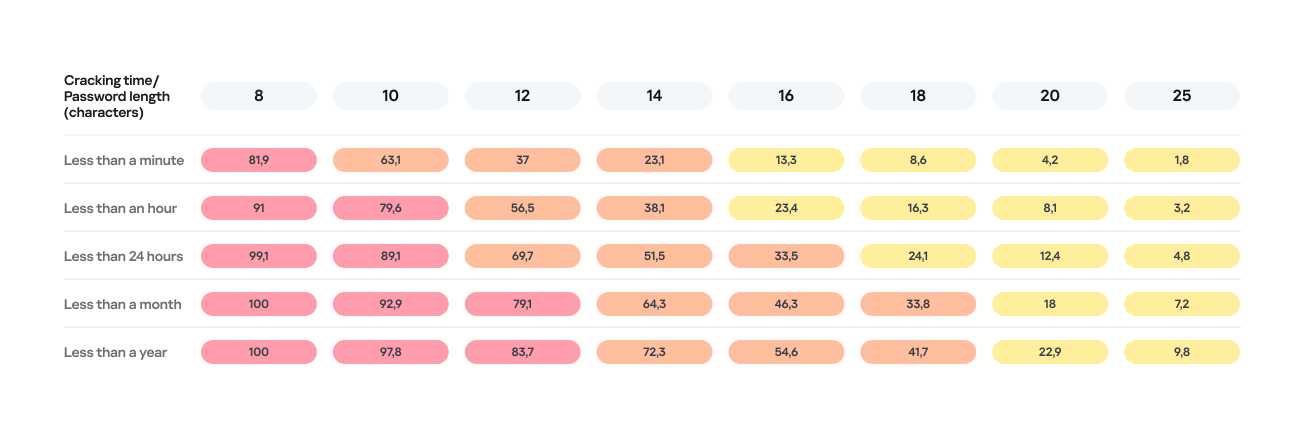
Password length is the primary factor affecting cracking time. As you can see from the table below, it takes less than 24 hours to crack almost any eight-character password.
Percentage of varying password lengths crackable within a given timeframe
But the predictability of your password is just as important. Think you’re boosting security by adding a number or a special character to a memorable word? You are, but only slightly. The patterns people use to create passwords are easily predictable and, at times, pretty amusing — though this is no laughing matter.
What we learned about password patterns
Analysis of over 200 million passwords revealed characteristic patterns that allow smart algorithms to crack user passwords with ease.
Pick a number
More than half of all passwords (53%) end with one or more digits, while nearly one in six (17%) starts with a number. Every eighth password (12%) contains sequences that look a lot like years — ranging from 1950 to 2030 — and one in ten (10%) specifically falls between 1990 and 2026. This most likely happens because folks add their birth year (or that of someone close), some other significant year, or the year they created the password or account. Fun fact: based on the distribution of these dates, it suggests that the most active internet users were born between 2000 and 2012.
However, among all numeric combinations, the most popular turned out to be… you guessed it: “1234”. Overall, patterns involving sequential keyboard presses (“qwerty, ,”ytrewq”, and the like) appear in 3% of passwords.
Special characters aren’t a silver bullet
Most password policies in recent years require at least one special character. The absolute winner in this category is the @ symbol: it appears in one out of every 10 passwords. The period (.) comes in second, followed by the exclamation point (!) in third.
Love rules the world… and Skibidi Toilet does too
Emotionally charged words often form the foundation of a password, and despite everything, positive words are more common. Frequently occurring examples include “love”, “angel”, “team”, “mate”, “life”, and “star”. That said, negativity pops up too — mostly in the form of common English swear words.
Interestingly, viral memes are reflected in passwords as well. Between 2023 and 2026, the use of the word Skibidi in passwords skyrocketed 36-fold! Naturally (see the link if it doesn’t seem natural), “toilet” saw a boost too, though to a lesser extent.
Users tend to keep their passwords unchanged for years
More than half of the passwords (54%) we identified in recent leaks have surfaced before. Part of this can be explained by the same data migrating from one dataset to another. However, there’s a much more troubling reason too: many users simply haven’t changed their passwords in years.
Analyzing the dates found within passwords shows that combinations containing the years from 2020 through 2024 remain popular. It seems people add the current year to their password when they create it — and then forget about it for several years. This actually allows us to calculate the average lifespan of a password: about three to five years.
This is a dangerous trend. For one, smart algorithms can crack much more complex passwords over that kind of timeframe. Secondly, the longer your password remains unchanged, the higher the probability it will leak — whether through a breach, malware infection, or a phishing attack.
The situation gets even worse when the same password is used across multiple accounts. In this case, attackers don’t even need to crack anything; they just need to find your password in a single leak and plug it into other sites.
How to protect your passwords and accounts
If you’ve realized while reading this post that your own passwords are among those easily crackable — don’t panic. We’ve put together a list of simple but essential tips for you.
Use a password manager
The weakest passwords are the ones people come up with themselves. Creating and memorizing hundreds of sequences of 16–20 random characters (since every site requires a unique, long password) is a daunting, unrealistic task.
That’s why you should delegate password generation and storage to our password manager. It doesn’t just create and store complex, randomized passwords in an encrypted format; it also syncs them across all your devices. To decrypt your vault, you only need to remember one main password that no one knows but you — our guide on mnemonic passwords can help you with that.
Don’t store passwords as plain text
Whatever you do, never write down passwords in files, messages, or documents. They lack the robust encryption provided by a password manager. Furthermore, these kinds of notes fall into the hands of attackers instantly if you happen to pick up a Trojan or an infostealer.
Don’t store passwords in your browser
Many users save their passwords in their browsers — especially since they conveniently offer to do it automatically. Unfortunately, research shows that malware has evolved to extract these passwords from all popular browsers almost instantly. Kaspersky Password Manager can help you import saved passwords from your favorite browser — just follow our simple, three-step guide. Most importantly, don’t forget to clear the browser’s password storage once the import is complete.
Switch to passkeys
Wherever possible, use passkeys — a cryptographic replacement for passwords. In this setup, the service stores a public key, while the private key remains on your device and is never transmitted. During login, the device simply signs a one-time request. Additionally, passkeys are tied to a specific domain, meaning phishing attacks using spoofed addresses won’t work. Kaspersky Password Manager allows you to store both passwords and passkeys, solving the problem of syncing them across different ecosystems, including Windows, Android, macOS, and iOS.
Set up two-factor authentication
Enable two-factor authentication wherever possible. Even if your password is compromised, a properly configured 2FA setup makes it extremely difficult for the attacker to access your account. For maximum security, skip the one-time codes sent via SMS and use authenticator apps instead — and yes, Kaspersky Password Manager comes in handy here, too.
Practice good digital hygiene
Remember, storing your passwords correctly is only half the battle. It’s crucial to follow the rules of digital hygiene: avoid downloading unverified files, pirated software, cheats, or cracks, and don’t click on random links. The number of infostealer attacks has been steadily rising in recent years, which means you need a robust security solution for full protection. We recommend Kaspersky Premium — it protects all your devices from Trojans, phishing, and other threats. Besides, the subscription includes our password manager.
For those serious about account security, check out our collection of posts on passwords, passkeys, and two-factor authentication:
The smart-home craze has connected everything — from your lightbulbs to your tea kettle — to the internet, and the adult industry isn’t sitting this one out: manufacturers are releasing more smart models than ever. While syncing a sex toy to your smartphone unlocks some cool extra features, it also opens the door to potential security and privacy headaches. The good news? You can significantly lower most of these risks just by tweaking your settings and adjusting your usage habits.
How sex-toy apps actually work
To be clear upfront, while researchers have successfully hijacked sex toys in controlled experiments, the odds of a hacker remotely taking over your vibrator in the real world are pretty slim. In this post, we focus on the more realistic risks: your privacy and the safety of your data.
Most modern adult toys link up with the manufacturer’s app. These apps offer a range of usage options: you can control the device yourself, or hand over the remote to a partner — anywhere in the world via the internet.
Beyond just basic controls, many of these apps have social features: private messaging, group chats, calls, and even video sessions. In fact, you don’t even need a physical device to use some of them; you just create an account. Because of this, some of these services have essentially evolved into niche dating platforms.
The toy and your phone talk to each other via Bluetooth — with minimal risks. To handle social features or remote control, the app connects to a cloud server. This creates a constant stream of data moving back and forth: everything from commands to private messages.
Here’s the catch: even if you only use the app to control your toy locally via Bluetooth, you still get connected to that cloud server. That means you’re inheriting all the security and privacy risks.
The main risks of using sex-toy apps
Sex-toy apps are typically free. In practice, this means the primary way these services make money is by collecting data — which is often excessive. It’s not hard to find buyers of this information; it could be ad services, data brokers, or other companies interested in building detailed user profiles.
Developers of intimate apps suffer from frequent data breaches, and in this sense they’re no different from many other online services that spring a leak regularly. However, unlike a breach at an online pet food store, a data leak from a sex toy app can have much more serious consequences for the user. For sex industry workers, such as those who use webcams, these data breaches pose a direct threat to their physical safety.
Vulnerabilities within the service’s infrastructure warrant special attention. These types of bugs can be exploited by hackers to gain unauthorized access to other people’s accounts.
The inclusion of broad social features essentially turns sex-toy apps into just another messaging platform. However, while we usually know if mainstream messengers use end-to-end encryption, or what vulnerabilities they face, every sex-toy app has to be evaluated individually.
Without end-to-end encryption, user chats may be accessible on the server side. This means that if the service is compromised, the contents of those messages could end up in the hands of hackers. Furthermore, the sex toy manufacturer itself, or its individual employees, could have access to your chats.
Finally, the user’s account and everything in it can be hijacked by bad actors if it isn’t protected by a strong password and, ideally, two-factor authentication.
How to lower the risks when using sex-toy apps
Now that we’ve covered the threats, let’s talk about how to defend yourself. The most obvious choice is to skip installing the app altogether. Thankfully, most sex toys still come with physical buttons — unlike, say, smart mattresses, which often require an app just to function. For those who want the extra features, here are some practical tips for setting up and using these services.
Create an account with a dedicated email address
Set up a separate email address just for registering your account in the intimate app. This should be a “clean” email with no links to any other online services you use. Naturally, the username for this email account shouldn’t include your real name or any other easily identifiable info.
Using an anonymous email protects your reputation if the app suffers a data breach. The risk of this happening is far from theoretical. For instance, back in 2015, a hacking group named The Impact Team leaked the user database of Ashley Madison, a dating site for people seeking extramarital affairs.
To create an anonymous email, pick a service that doesn’t require a phone number at all, or lets you skip that step. Besides your real name, we also recommend leaving out your birth date, your usual social media handles, and any other details that could lead back to you.
Don’t sign up via Google, Apple, social media, or your phone number
The reasoning here is basically the same as the previous point. However, it’s worth highlighting that signing up through Google, Apple, social media, or your phone number is actually just about the worst way to go.
Using Google or social media accounts gives the app permission to, among other things, access certain data from those profiles. In the context of intimate apps, this is especially risky because it creates a direct link between highly sensitive data and your real-world identity.
Keep your real info out of your profile
Once you’re in the app, don’t use any information that could be traced back to you. Come up with an anonymous handle (if you’re feeling uninspired, use a random nickname generator), pick a fake birthday, and choose a random location.
Using fictional info means you don’t have to sweat being outed if the service ever leaks your data. You’re also protecting yourself from stalking, blackmail, and other threats that come with someone being able to pin your real identity to your account.
Hide your face and distinguishing marks when sharing private media
As we’ve mentioned throughout this post, these apps often include social features used for swapping intimate photos and videos. Even if you trust the person you’re chatting with, those files can be saved, forwarded, or used without your consent. When combined with other account info, they can make it easy to figure out who you are.
We recommend never sending intimate media that shows your face or anything else that identifies you — think recognizable home decor, personal items, documents, unique clothing, tattoos, or jewelry.
Set a strong password and enable two-factor authentication, if available
If a hacker breaks into your sex toy account, they’re getting access to your most private data. Because of that, your account needs a rock-solid password. Just to be clear, here’s what we mean by a strong password:
It’s at least 16 characters long.
It uses a mix of uppercase and lowercase letters, numbers, and special characters (like $ or @).
It’s not a real word or a well-known phrase.
It’s unique and not reused for any of your other accounts.
It doesn’t include personal info that’s easy for an outsider to find.
We also recommend turning on two-factor authentication (2FA) if the service offers it. Your best bet is to use 2FA one-time codes from an authenticator app, as it’s the most secure and completely anonymous option. You can dive deeper into creating and storing secure passwords, as well as different 2FA methods, in our dedicated blogposts.
Grant only the necessary app permissions
Every mobile app asks for permission to access certain features of your phone like Bluetooth, location, your camera, or your storage. Every extra “yes” you give expands the amount of data the app can scoop up.
We suggest being extra cautious about what you let these services see, especially when it comes to sex-toy apps. By tightening these permissions, you cut down on the amount of info that can be collected or shared without your say-so.
Take a second to think about the absolute bare minimum you’re willing to allow a sex-toy app to access. For example, there’s usually no reason for it to track your location or access your camera and mic. If you do want to upload photos, it’s better to grant access only to specific files rather than giving the app the keys to your entire photo library.
Stop apps from tracking your activity
In your iOS settings, you can block apps from collecting data about what you do and linking it to a single advertising ID. This practice, known as tracking, allows companies to stitch together data from different apps, websites, and services to build a comprehensive profile of you for targeted ads or behavioral analysis.
We strongly recommend disabling tracking for all sex-toy apps so that sensitive details about your private life don’t end up as part of your advertising profile.
Unfortunately, Android doesn’t have an exact equivalent for this setting. To minimize data collection on those devices, you’ll need to turn off ad personalization, and manually delete or reset your advertising ID every now and then. You can find more tips on dodging ad tracking in our dedicated guide.
Keep your apps and operating system up to date
Updates aren’t just about shiny new features; they also fix security bugs. Outdated versions of apps and operating systems often have vulnerabilities that hackers are just waiting to exploit.
Staying on top of your updates helps close these gaps, and lowers the risk of data breaches or unauthorized access. To make sure you don’t miss any critical fixes, it’s best to turn on automatic updates whenever possible.
Security is in your hands
Smart sex-toys and their companion apps naturally handle sensitive data, which means they require extra care when it comes to setup and daily use. That said, you can eliminate — or at least significantly reduce — most risks by following basic security rules. Essentially, it comes down to sharing as little personal info as possible with the app and, of course, using a rock-solid password.
Want more tips on keeping your intimate life private in the digital age? Check out these posts:
In 2022, we dived deep into an attack method called browser-in-the-browser — originally developed by the cybersecurity researcher known as mr.d0x. Back then, no actual examples existed of this model being used in the wild. Fast-forward four years, and browser-in-the-browser attacks have graduated from the theoretical to the real: attackers are now using them in the field. In this post, we revisit what exactly a browser-in-the-browser attack is, show how hackers are deploying it, and, most importantly, explain how to keep yourself from becoming its next victim.
What is a browser-in-the-browser (BitB) attack?
For starters, let’s refresh our memories on what mr.d0x actually cooked up. The core of the attack stems from his observation of just how advanced modern web development tools — HTML, CSS, JavaScript, and the like — have become. It’s this realization that inspired the researcher to come up with a particularly elaborate phishing model.
A browser-in-the-browser attack is a sophisticated form of phishing that uses web design to craft fraudulent websites imitating login windows for well-known services like Microsoft, Google, Facebook, or Apple that look just like the real thing. The researcher’s concept involves an attacker building a legitimate-looking site to lure in victims. Once there, users can’t leave comments or make purchases unless they “sign in” first.
Signing in seems easy enough: just click the Sign in with {popular service name} button. And this is where things get interesting: instead of a genuine authentication page provided by the legitimate service, the user gets a fake form rendered inside the malicious site, looking exactly like… a browser pop-up. Furthermore, the address bar in the pop-up, also rendered by the attackers, displays a perfectly legitimate URL. Even a close inspection won’t reveal the trick.
From there, the unsuspecting user enters their credentials for Microsoft, Google, Facebook, or Apple into this rendered window, and those details go straight to the cybercriminals. For a while this scheme remained a theoretical experiment by the security researcher. Now — real-world attackers have added it to their arsenals.
Facebook credential theft
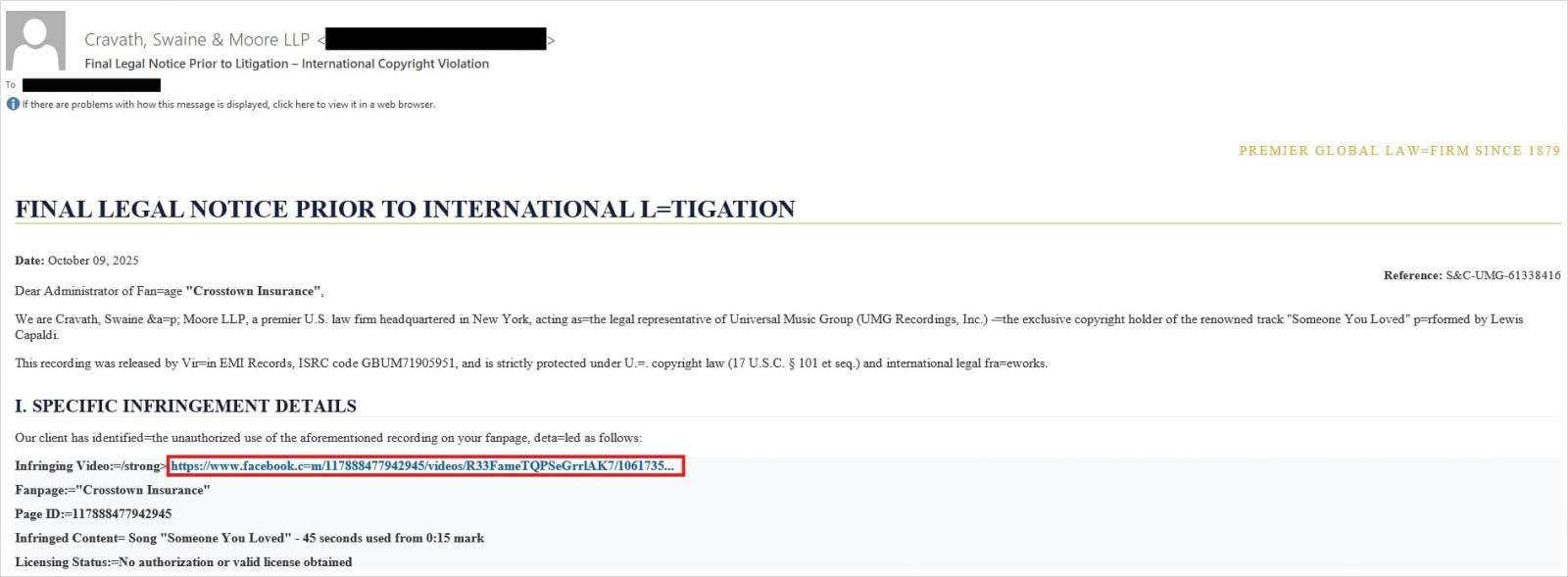
Attackers have put their own spin on mr.d0x’s original concept: recent browser-in-the-browser hits have been kicking off with emails designed to alarm recipients. For instance, one phishing campaign posed as a law firm informing the user they’d committed a copyright violation by posting something on Facebook. The message included a credible-looking link allegedly to the offending post.
Attackers sent messages on behalf of a fake law firm alleging copyright infringement — complete with a link supposedly to the problematic Facebook post. Source
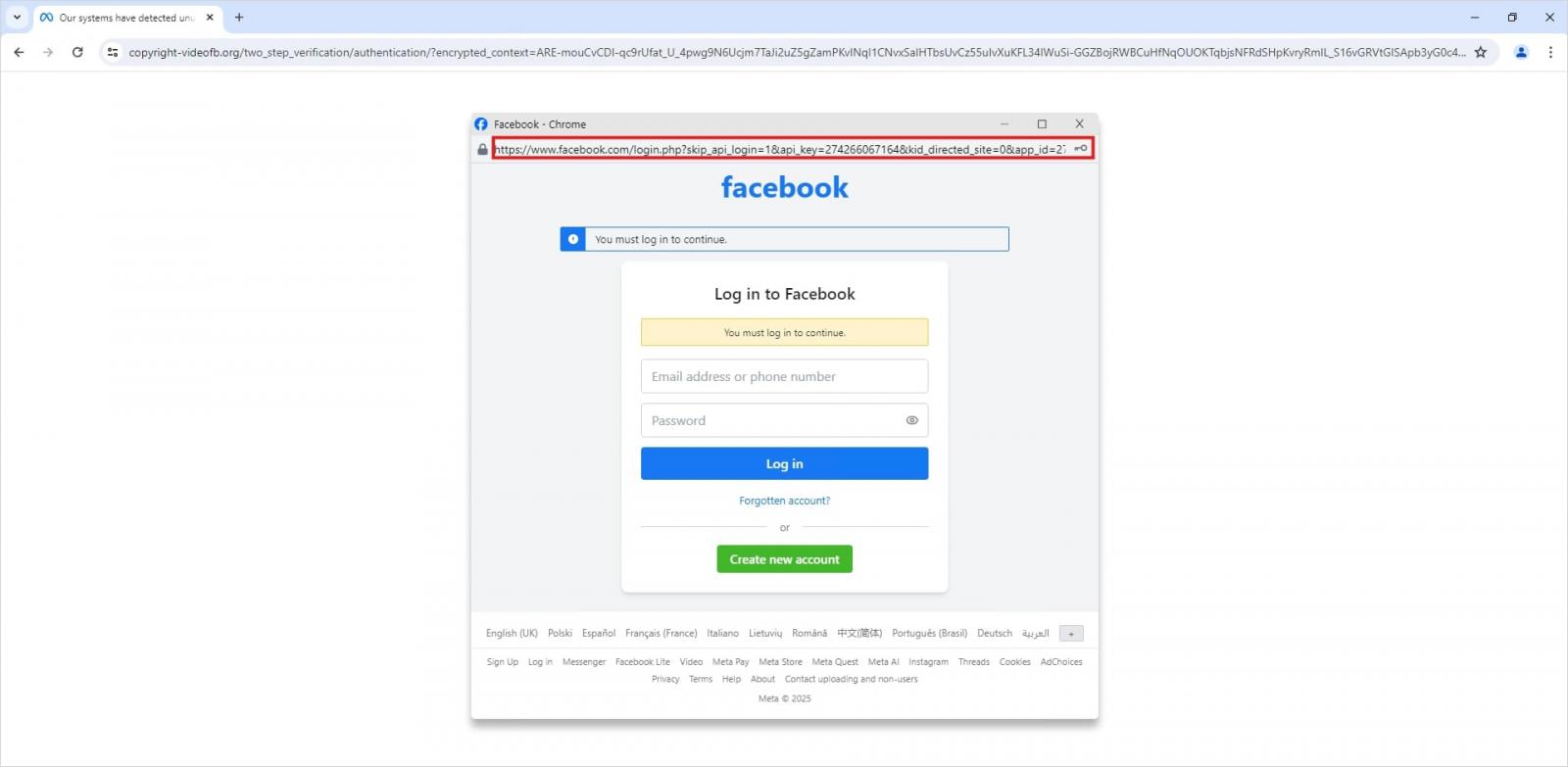
Interestingly, to lower the victim’s guard, clicking the link didn’t immediately open a fake Facebook login page. Instead, they were first greeted by a bogus Meta CAPTCHA. Only after passing it was the victim presented with the fake authentication pop-up.
This isn’t a real browser pop-up; it’s a website element mimicking a Facebook login page — a ruse that allows attackers to display a perfectly convincing address. Source
Naturally, the fake Facebook login page followed mr.d0x’s blueprint: it was built entirely with web design tools to harvest the victim’s credentials. Meanwhile, the URL displayed in the forged address bar pointed to the real Facebook site — www.facebook.com.
How to avoid becoming a victim
The fact that scammers are now deploying browser-in-the-browser attacks just goes to show that their bag of tricks is constantly evolving. But don’t despair — there’s a way to tell if a login window is legit. A password manager is your friend here, which, among other things, acts as a reliable security litmus test for any website.
That’s because when it comes to auto-filling credentials, a password manager looks at the actual URL, not what the address bar appears to show, or what the page itself looks like. Unlike a human user, a password manager can’t be fooled with browser-in-the-browser tactics, or any other tricks, like domains having a slightly different address (typosquatting) or phishing forms buried in ads and pop-ups. There’s a simple rule: if your password manager offers to auto-fill your login and password, you’re on a website you’ve previously saved credentials for. If it stays silent, something’s fishy.
Beyond that, following our time-tested advice will help you defend against various phishing methods, or at least minimize the fallout if an attack succeeds:
Enable two-factor authentication (2FA) for every account that supports it. Ideally, use one-time codes generated by a dedicated authenticator app as your second factor. This helps you dodge phishing schemes designed to intercept confirmation codes sent via SMS, messaging apps, or email. You can read more about one-time-code 2FA in our dedicated post.
Use passkeys. The option to sign in with this method can also serve as a signal that you’re on a legitimate site. You can learn all about what passkeys are and how to start using them in our deep dive into the technology.
Set unique, complex passwords for all your accounts. Whatever you do, never reuse the same password across different accounts. We recently covered what makes a password truly strong on our blog. To generate unique combinations — without needing to remember them — Kaspersky Password Manager is your best bet. As an added bonus, it can also generate one-time codes for two-factor authentication, store your passkeys, and synchronize your passwords and files across your various devices.
Finally, this post serves as yet another reminder that theoretical attacks described by cybersecurity researchers often find their way out into the wild. So, keep an eye on our blog, and subscribe to our Telegram channel to stay up to speed on the latest threats to your digital security and how to shut them down.
Read about other inventive phishing techniques scammers are using day in day out:
Admit it: you’ve been meaning to jump on the latest NFT reincarnation — Telegram Gifts — but just haven’t gotten around to it. It’s the hottest trend right now. Developers are churning out collectible images in partnership with celebs like Snoop Dogg. All your friends’ profiles are already decked out with these modish pictures, and you’re dying to hop on this hype train — but pay as little as possible for it.
And then it happens — a stranger messages you privately with a generous offer: a chance to snag a couple of these digital gifts — with no investment required. A bot that looks completely legit is running an airdrop. In the world of NFTs, an airdrop is a promotional stunt where a small number of new crypto assets are given away for free. The buzzword has been adopted on Telegram, thanks to the crypto nature of these gifts and the NFT mechanics running under the hood.
Limited time offer: a marketer’s favorite trick… and a scammer’s tool
They’re offering you these gift images for free — or so they say. You could later attach them to your profile or sell them for Telegram’s native currency, Toncoin. You don’t even have to tap an external link. Just hit a button in the message, launch a Mini App right inside Telegram itself, and enter your login credentials. And then… your account immediately gets hijacked. You won’t get any gifts, and overall, you’ll be left with anything but a celebratory feeling.
This is the first of the screens where, by filling in the fields, you receive a gift lose access to your Telegram account
Today, we break down a phishing scheme that exploits Telegram’s built-in Mini Apps, and share tips to help you avoid falling for these attacks.
How the new phishing scheme works
The principle of classic phishing is straightforward: the user gets a link to a fake website that mimics a legitimate sign-in form. When the victim enters their credentials, this data goes straight to the scammer. However, phishing tactics are constantly evolving, and this new attack method is far more insidious.
The bad actors create phishing Mini Apps directly inside Telegram. These appear as standard web pages but are embedded within the messaging app’s interface instead of opening in an external browser. To the user, these apps look completely legitimate. After all, they run within the official Telegram app itself.
To make it even more convincing, scammers often add a plausible-sounding limit on gifts per user
This leads the victim to think, “If this app runs inside Telegram, there must be some kind of vetting process for these apps. Surely they wouldn’t let an obvious scam through?” In practice, it turns out that’s not the case at all.
How is this scheme even a thing?
A core security issue with Telegram Mini Apps is that the platform does almost no vetting before an app goes live. This is a world apart from the strict review processes used by Google Play and the App Store — although even there, obvious malware occasionally slips through.
On Telegram, it’s far easier for bad actors. Essentially, anyone who wishes to create and launch a Mini App can do so. Telegram does not review the code, functionality, or the developer’s intent. This turns a security flaw within a messaging service boasting nearly a billion global users into a global-scale problem. To make matters worse, moderation of these Mini Apps within Telegram is entirely reactive — meaning action is only taken after users start complaining or law enforcement gets involved.
This is a global operation, with phishing lures being distributed simultaneously in both Russian and English. However, the Russian version gives away a tell-tale sign of the scammers’ haste and lack of polish. They forgot to remove a clarification question from the AI that generated the text: “Do you need bolder, more official, or humorous options?”
In this case, the bait was “gifts” from UFC fighters: a giveaway of “papakhas” — digital gift images of the traditional Dagestani hat released by Telegram in partnership with Khabib Nurmagomedov. An auction for these items did take place, with Pavel Durov even posting about it on his X and Telegram (Khabib reposted these announcements but later deleted them after the auction ended). However, there were only 29 000 of these “papakhas” released, which wasn’t enough to satisfy all the eager fans. Scammers seized on the opportunity, assuring fans they could get the exclusive items for free. The phishing campaign was a targeted one — focusing on users who’d been active on the athlete’s channel.
How the scammers lull their victims
The criminals leveraged the name of the popular Portals platform — a legitimate service for games, apps, and entertainment within Telegram. They created a series of Mini Apps that were visually almost indistinguishable from the real ones, and promoted them as free giveaways — airdrops.
To add a veneer of authenticity, the scammers even listed the official Telegram channel for Portals in the phishing Mini App’s profile. However, the legitimate Portals Market bot has a different username: @portals
That said, the scam campaigns themselves show signs of being rushed and cutting design and copywriting costs — with obvious signs of AI involvement. Some of the messages contain leftover text fragments clearly generated by a neural network, which the scammers either forgot or couldn’t be bothered to edit.
How to protect your Telegram account from being hacked
The golden security rules are simple: stay vigilant, and learn the key hallmarks of these attacks:
Verify the source. If you receive a link promising a giveaway from a celebrity or even Telegram itself but sent from an unfamiliar account or a dubious group, don’t click. Cross-check through the celebrity or company’s official channel to see if they’re actually running a promo like that.
Inspect the account verification badge. Ascertain that the blue checkmark is real and not just an emoji status or part of the profile name. You can verify this by simply tapping that checkmark icon in the profile. If it’s a Premium emoji status, Telegram will explicitly tell you so. If a checkmark emoji is simply added to the profile name, tapping it doesn’t do anything. But if the account is genuinely verified, tapping the blue checkmark will bring up an official confirmation message from Telegram.
Don’t be in a rush to authenticate in Mini Apps. Legitimate Telegram apps typically don’t require you to sign in again through a form inside the Mini App. If you’re prompted to enter your phone number or a verification code, it’s likely a phishing attempt.
Look for signs of AI-generated text or design. Weird grammar, unnatural phrasing, or leftover neural network prompts within a message are a red flag. Scammers frequently use AI-powered generation to churn out text quickly and cheaply.
Turn on two-step verification (your Telegram password). Do this right now in Settings → Privacy and Security → Two-Step Verification. Even if a scammer manages to get your phone number and SMS code, they won’t be able to access your account without this password. Obviously, never share your password with anyone — it’s meant only for you to sign in to your Telegram account.
Use a passkey to secure your account. A recent Telegram update added the ability to securely sign in with a passkey. We’ve covered using passkeys with popular services and the associated caveats in detail. A passkey makes it nearly impossible for a malicious actor to steal your account. You can set one up in Settings → Privacy and Security → Passkeys.
Store your password and passkey in a password manager. If you’ve secured your account with both a password and a passkey, remember that a weak, reused, or compromised password can still be the proverbial “spare key under the mat” for attackers — even if the “front door” is locked with a passkey. Therefore, we recommend creating a strong, unique password for Telegram and storing it — along with your passkey — in Kaspersky Password Manager. This keeps your credentials and keys available across all your devices.
What to do if your Telegram account was already stolen
The key is keeping calm and acting swiftly. You have just 24 hours to reclaim your account, or you risk losing it permanently. Follow the step-by-step guide to restoring access in our post What to do if your Telegram account is hacked.
Finally, a reminder that has become our classic mantra: if an offer looks too good to be true, it almost certainly is. Always verify information through official channels, and never enter your passwords or passkeys into unofficial apps or forms — even if they look legit. Stay vigilant and stay safe.
Want more tips on securing your messenger accounts and chats? Check out our related posts:
Mike Felch // More and more organizations are rolling out mandatory 2FA enrollment for authentication to external services like GSuite and OWA. While this is great news because it creates […]
Sally Vandeven // Back in November Beau Bullock wrote a blog post describing how his awesome PowerShell tool MailSniper can sometimes bypass OWA portals to get mail via EWS if […]
Beau Bullock // Full Disclosure: Black Hills Information Security believes in responsible disclosure of vulnerabilities. This vulnerability was reported to Microsoft on September 28th, 2016. As of the publication date of […]
Carrie Roberts // Answer: Enough to make it worth it! Penetration testers love to perform password spraying attacks against publicly available email portals as described here in this great post by Beau Bullock. […]

 Login
Login