Most organisations assume DDoS (Distributed denial of service) protection is a box they’ve already ticked. If traffic spikes or an attack starts, the thinking goes, their provider will absorb it and move on.
But in the real world it can be a different story. Many incidents aren’t caused by the scale of an attack alone, they happen because their protection isn’t designed to act fast enough, distinguish legitimate traffic or stay active without disruption for normal traffic. Or slows the legitimate traffic down, degrading performance when under an attack.
In this blog, we look at why DDoS resilience is really about continuity, not just mitigation, and what teams often miss when they assume they’re already protected.
The DDoS Protection Gap: Why Performance Breaks Under Pressure.
Modern DDoS attacks rarely look like blunt floods now; they utilize multi-vector strategies targeting the application layer (Layer 7) to blend in. They overwhelm specific application paths or quietly degrade performance until frustrated users give up.
When protection isn’t built to handle this kind of attack, organisations often see:
Delays between detection and mitigation
Legitimate users are blocked or challenged during peak moments
Performance degradation that’s dismissed as ‘normal slowing’
Downtime that occurs despite having DDoS controls in place
The result is widespread impact, disrupting not just infrastructure, but revenue, brand reputation and most importantly, trust.
Why Modern DDoS Protection is a BusinessContinuity Challenge
Effective DDoS protection isn’t about surviving the largest possible attack on paper. It’s about ensuring users can continue to access applications, complete transactions and rely on important services, even when an attack is ongoing.
To do that organisations need protection that is:
Not dependent on manual activation
Fast, with mitigation measured in seconds, not minutes or hours
Accurate, so legitimate users aren’t caught in the crossfire
Edge-based mitigation using a global Anycast network, stopping attacks before they put internal systems under pressure
Without these characteristics, DDoS defences can become part of the problem rather than the solution.
The Oversight: What Security Teams Miss About Resilience
Many organisations unknowingly accept risk because they:
Assume any DDoS protection will do the job
Focus on volumetric capacity but overlook detection accuracy, time to mitigate, mitigation efficacy and stealth attacks to the application layer
Rely on reactive or hybrid approaches that leave a mitigation gap
Accept user friction as an acceptable side effect of defence activity
Accept operational complexity as “the nature of the beast”
Often, these gaps only become visible during critical moments such as launches, seasonal peaks or high-traffic events, when resilience matters most.
The Solution: Supporting Continuity with Always-On Mitigation
Thales’s Imperva DDoS Protection is designed to preserve availability and user experience, even during sustained or sophisticated attacks.
Behind the scenes, this means:
Continuous and detailed profiling of peace-time traffic for fast identification of anomalies and potential DDoS attacks.
Always- on mitigation at the edge, eliminating delays in response with an industry-leading 3–second time-to-mitigation SLA for network-layer attacks.
Versatile set of techniques for minimising disruption to legitimate users, including signatures, behavioural patterns and challenges.
Attack isolation for avoiding potential collateral damage.
Global scale and distribution, absorbing attacks close to the source.
The Impact: Why True Resilience Matters for Revenue
DDoS attacks don’t just test security controls; they test business resilience. When protection fails, the impact is immediate, abandoned sessions, lost transactions, frustrated customers and operational pressure at exactly the wrong moment.
DDoS resilience isn’t defined by how large an attack you can withstand, but by how consistently your services remain available while it’s happening.
By aligning always-on mitigation, rapid response and accurate traffic, classification, organisations can reduce risk without compromising user experience and ensure that availability isn’t dependent on perfect timing or manual intervention.
Because the true test of DDoS protection is whether services remain available.
To discuss DDoS protection with a member of the team, get in touch.
If your organization relies on AWS IAM Identity Center for workforce access, you can now extend that access across multiple AWS Regions with multi-Region replication. Previously, AWS access portal was only available in one Region, when you add an additional Region, users get an active access portal endpoint there. If the primary Region experiences a disruption, they can continue working through the additional Region. This enhancement also enables you to deploy AWS managed applications in additional Regions closer to your users, which reduces latency and helps meet regional compliance requirements. Meanwhile, you maintain centralized control by managing Identity Center configurations from the primary Region.
In this post, you’ll learn how to configure multi-Regions support, including multi-Region replication, encryption setup, adding Regions, updating your identity provider (IdP), and testing the setup end to end.
Prerequisites and considerations
Before enabling multi-Region support, confirm your environment meets these requirements and understand how this change will affect your existing setup.
Confirm that your currently deployed AWS managed applications support Identity Center configured with a customer managed KMS key, and that applications you plan to deploy in the future also support this configuration. See the AWS managed applications that integrate with IAM Identity Center table in the Identity Center User Guide to identify which applications support customer managed KMS key with Identity Center.
Additionally, for AWS managed applications you plan to deploy in additional Regions, verify that they support Identity Center configured with both customer-managed KMS keys and multi-Region deployment. Consult the AWS managed applications that integrate with IAM Identity Center table in the Identity Center User Guide.
The AWS access portal in additional Regions doesn’t support the custom alias (in other words, customer-chosen subdomains).
AWS account access through additional Region relies on already provisioned permissions; new permission set assignments and group memberships can be managed only in the primary Region and are then automatically replicated to additional Regions.
Walkthrough
To set up multi-Region support, you’ll follow three steps: creating and configuring a customer-managed KMS key with Identity Center, enabling the additional Region in the Identity Center console, and updating your identity provider with the new regional URLs and bookmark applications.
Important: Your Identity Center instance operates on a primary-replica model where instance-level configuration changes must be made in the primary Region, while additional Regions receive read-only replications of your settings and provide Region-local access for your workforce. In this example, you will use Okta as your external IdP, with N. Virginia (us-east-1) as the primary Region and Frankfurt (eu-central-1) as the additional Region.
Before you start, ensure that you’re signed in to the console as an administrator in the same account and Region where your Identity Center instance resides.
Create and configure multi-Region customer-managed KMS keys with Identity Center
First, you must set up a multi-Region customer-managed KMS key with Identity Center in your primary Region and replicate it to additional Regions where you plan to replicate Identity Center. Identity Center uses customer-managed KMS keys for encryption of your identity data such as user attributes. Because the same key material must be available in each Region, you’ll create a multi-Region key — complete this step in the AWS Organizations management account. Before proceeding, confirm that your currently deployed AWS managed applications support customer-managed KMS keys with Identity Center. Each AWS KMS key has usage and storage cost, see AWS KMS pricing page for details.
For guidance on configuring your key policy, see the KMS key policy examples for common use cases in the Identity Center User Guide, which provides example policies you can adapt for your specific requirements.
2. Create replica keys in additional Regions After completing the primary Region setup, create new replica keys in each AWS Region where you plan to replicate Identity Center. To complete this step, follow the documentation in Create multi-Region replica keys.
Note: The replica key automatically inherits the same key policy as the primary customer-managed KMS key. However, future modifications to the key policy must be manually applied to the replica key in each Region. AWS KMS replica keys are independent resources; policy changes on the primary key do not propagate automatically.
Add an additional Region to Identity Center
Now that key replication is complete, you can add an additional Region to your Identity Center instance. For this post, use Frankfurt (eu-central-1). If you have a delegated admin account configured, we recommend completing remaining configurations in that account. We will perform this configuration using the console, but you can also use the IAM Identity Center API. For detailed instructions, see Add the Region in IAM Identity Center.
Open the AWS Management Console.
In the search bar, enter IAM Identity Center and choose the service.
In the navigation pane, choose Settings.
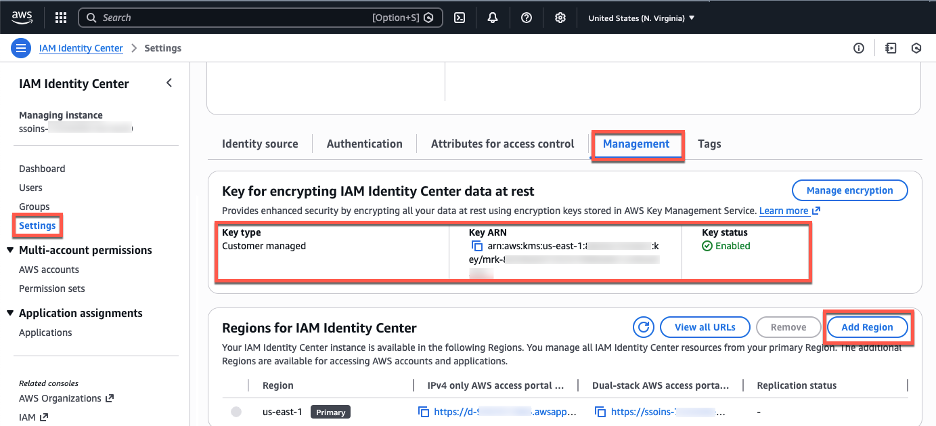
Choose Add Region.
Figure 1: Management tab with encryption and Region information
From the Region list on the following page, select Frankfurt (eu-central-1). Then, choose Add Region.
The Region list shows Regions enabled by default where the customer-managed KMS key was replicated, making them available for you to choose.
Figure 2: Choose an AWS Region to add
You’ll return to the Settings for Identity Center page, where you’ll see the new Region with a Replicating status. A blue banner indicates that Identity Center is replicating your workforce identities, configuration, and metadata to the new Region. After the initial setup (15–30 minutes, depending on the size of your Identity Center instance), future changes replicate within seconds.
Figure 3: Initial replication to the newly added Region in progress
After replication completes, the ReplicationStatus column changes to Replicated. Your Identity Center endpoints in the additional Region are now active.
Figure 4: A console view after the initial replication is done
Users can now access AWS accounts through both AWS access portal URLs. You can view and copy the enabled portal URLs either from the Region list or by choosing View AWS access portal URLs.
You can view Security Assertions Markup Language (SAML) information, such as ACS URLs, about the primary and additional Regions by choosing View ACS URLs. In the next section you will use both, your AWS access portal URLs and ACS URLs to update your external IdP configuration.
Update your IdP configuration for the additional Region
You’ve successfully replicated your Identity Center instance to the Frankfurt (eu-central-1) Region. This means your workforce identities are now available in that additional Region and can use the new AWS access portal endpoint. Identity Center supports two authentication flows: one where users start from the AWS access portal or AWS managed application (service provider-initiated), and one where users start from their IdP portal (IdP-initiated). With service provider-initiated authentication, when users attempt to authenticate, Identity Center redirects them to your IdP authentication page, and after successful authentication, their authentication response is sent to the Regional SAML assertion consumer service (ACS) endpoint in Identity Center. The ACS endpoint in the additional Region uses a different URL than the primary Region, as shown in the following image.
Figure 5: Identity Center URLs
Currently, your IdP only has information about your Identity Center in the primary Region. To successfully redirect users’ authentication responses to the additional Region, you must add the new Regional endpoint to the IdP configuration.
Update the Identity Center application in your IdP:
This update enables service provider-initiated authentication to succeed. In the Identity Center app within your external IdP, add the ACS URL for the additional Region so that the app contains both Regional ACS URLs. Keep the existing URL as the first one in the list, the IdP uses the first URL as the default redirect target for IdP-initated authentication. The additional ACS URL will be used by the IdP to send the authentication response when users sign in using service provider-initiated authentication flows.
As an example, follow the instructions to configure your Identity Center application in Okta:
Log in to the Okta portal as an Admin.
Expand the Applications drop-down in the left pane, then choose Applications
Choose your Identity Center Application
Select the Sign-on tab and choose Edit in the Settings windows.
In the AWS SSO ACS URL1 box add the additional ACS URL
Figure 6: Identity Center enterprise application configuration in Okta
Users can now access accounts starting from the Region-specific AWS access portal, in this case they need to remember two Region specific URLs, one for Frankfurt (eu-central-1) and one for N. Virginia (us-east-1). To accommodate these Region-specific portal URLs, we recommend creating a bookmark application in your IdP. While users can also bookmark the URLs directly in their browsers, providing a bookmark app makes the additional Region discoverable in the IdP portal without requiring each user to manually save a URL.
This bookmark app functions like a browser bookmark and contains only the URL to the AWS access portal in the additional Region. Users can access this bookmark app from their IdP portal to reach the Region-specific AWS access portal. You also must grant your users access to the bookmark app in the external IdP. In Okta, follow the instructions below:
Log in to the Okta portal as an Admin.
Expand the Applications drop-down in the left pane, then choose Applications.
Choose Browse App Catalog
Search for “Bookmark App”, select it from the list of results, and choose Add in the left pane.
Choose an app name. For this blog post, the name can be “Identity Center – Frankfurt (eu-central-1)”
In the URL box, paste the Frankfurt (eu-central-1) specific URL
Choose Done. You will be redirected to the Bookmark application in the Assignments tab.
Choose Assign and select the Groups/People that will have access to this application.
After completing this configuration, users will see two Identity Center applications in their IdP portal—one for the primary Region and another for the additional Region. Figure 7 shows how this configuration appears in the Okta end user dashboard.
Figure 7: Okta end-user portal with two Region-specific tiles for Identity Center
If you choose the newly created bookmark app, it will direct you to the AWS access portal in the additional Region.
Note: Identity Center supports IPv4-only endpoints, and dual-stack endpoints that support both IPv6 and IPv4. Depending on where your organization is in the process of IPv6 adoption, you will need to configure corresponding Assertion Consumer Service (ACS) URLs in your external IdP and used the corresponding AWS access portal URLs in your IdP bookmark application. For more information, see IPv6 support in Identity Center blog.
Test your multi-Region configuration
In the previous sections, you finished configuring the requirements for Identity Center multi-Region replication between the primary N. Virginia (us-east-1) and additional Frankfurt (eu-central-1) Regions. With this configuration complete, users with sufficient permissions can now enable supported AWS managed applications in either Region. Additionally, users can access their AWS accounts through the AWS access portal from either Region. To validate both capabilities, you will first test AWS account access from the additional Region and then configure a supported AWS managed application in that Region.
Accessing AWS accounts from the additional Region
Permission set assignment that exists in the primary Region of your Identity Center instance will be replicated to your additional Region. This means that, if there is a service disruption in Identity Center in the primary Region, you can switch to the additional Region to access your AWS accounts through the access portal or AWS CLI. To complete this section, your user in Identity Center needs existing access to an AWS account with permission sets. For more information see Manage AWS accounts with permission sets.
Access AWS accounts from the additional Region using the AWS access portal
Choose additional Region URL, a new browser tab will open with the AWS access portal in Frankfurt (eu-central-1).
Confirm you can see permission sets assigned to you.
Choose a permission set, confirm that you can access your AWS account.
Access AWS accounts from the additional Region using the AWS CLI
AWS Command Line Interface (AWS CLI) connects to a specific Identity Center Region to authenticate users and obtain credentials. For customers using multi-Region replication, we recommend creating multiple Regional CLI profiles—one for your primary Region and another for each additional Region. Separate profiles allow you to quickly switch between Regions during a disruption without reconfiguring your CLI. Before completing this section, confirm that AWS CLI version 2.x or later is installed and that you have an existing AWS CLI configuration file. To facilitate Region-specific access through the AWS CLI, create two CLI profiles using the following configuration:
Open your AWS CLI configuration file at ~/.aws/config.
Add the following two profiles configurations, one per additional Region. The example below shows a user in Virginia using N. Virginia (us-east-1) as their primary Identity Center Region with Frankfurt (eu-central-1) as a backup. Replace with your actual Identity Center instance ID and with your account number. To find your Identity Center instance ID, navigate to IAM Identity Center console, Settings, Instance ARN (the instance ID is the value that starts with ‘ssoins-‘)
Once the profiles have been configured, you can authenticate to each regional Identity Center endpoint independently using the following commands. 1. Run aws sso login –profile ReadOnly to log in through your primary Region N. Virginia (us-east-1), 2. Run aws sso login –profile ReadOnly-additional to log in through your additional Region Frankfurt (eu-central-1)
Each command opens a browser window to the corresponding regional AWS access portal, where you complete the authentication flow. After a successful login, the AWS CLI uses the credentials obtained from that Region for subsequent API calls made with that profile.
Deploy AWS managed applications in the additional Region
To test application deployment in the additional Region, for this blog post you will configure AWS Deadline Cloud, a managed service for rendering and visual effects workloads. You can choose other AWS managed applications that support deployment in additional Identity Center Regions — see the AWS managed applications that you can use with IAM Identity Center table in the documentation. This table is regularly updated as additional applications become available. To configure AWS Deadline Cloud, follow the steps:
Navigate to the AWS Deadline Cloud console and switch to your additional Region—for this example, Frankfurt (eu-central-1).
Choose Set up Deadline Cloud on the Get Started section and follow the configuration wizard until Step 2: Set up monitor.
In the Set up monitor screen, enter a name (for example, Frankfurtmonitorapp), then expand the Additional monitor settings menu. Notice how the Identity Center instance in Frankfurt (eu-central-1) is automatically selected by the AWS DeadLine Cloud wizard. Choose Next.
On Define farm details, under Groups and users, select the group that will have access to the application, verify you are a member of that group. Notice how you can automatically choose groups that were synced from your IdP into your Identity Center instance.
For this demonstration, leave remaining configurations with their default values and complete the application setup by following the wizard. After the application deployment is complete, choose Go to dashboard.
The application is now configured to use Region-local Identity Center service APIs for user sign-in and access to workforce identities. The dashboard displays the option to manage users, and user assignment management for this application is performed through the Frankfurt (eu-central-1) Region.
Testing user access to your AWS managed application
You can test user access to AWS Deadline Cloud by choosing Monitor in the upper right-hand corner of the dashboard. This initiates the service provider authentication workflow, which redirects you to your IdP for authentication. Because your IdP now recognizes the Frankfurt (eu-central-1) ACS URL, it knows where to send the successful authentication response, and you are authorized to access the newly created application.
You can also access the application using the application provided endpoint or through your AWS access portal. The AWS access portal in each Region displays the applications assigned to the user independent of the Region they are configured.
What happens when you try to enable your application in a Region where Identity Center isn’t configured?
If Frankfurt (eu-central-1) hasn’t been added to your Identity Center instance, the application console will detect your organization instance in N. Virginia (us-east-1), and prompt you to enable Frankfurt (eu-central-1) first.
Figure 8: AWS Deadline cloud console wizard when Identity Center isn’t configured in the current Region
Note: Existing deployments of AWS managed applications that use cross-Region calls with Identity Center (for example, Amazon Q Business) continue to function normally. When deploying an AWS managed application that supports cross-Region calls, we recommend configuring it to use Identity Center in the same Region, provided the prerequisites are met. Otherwise, you can configure the application to use Identity Center from one of its enabled Regions. See the respective AWS application’s User Guide to learn if it supports cross-Region calls to Identity Center.
Optional: Automatic failover of domains for AWS access portal
Identity Center provides Regional endpoints for the AWS access portal when you enable multi-Region replication. You can access these Regional instances directly, or you can build a redirection system that intelligently routes users to the nearest available AWS access portal endpoint with failover capabilities.
For a serverless implementation of automatic failover, you can combine several AWS services:
Amazon Route 53: Manages DNS routing with health checks and geoproximity-based routing policies to redirect users to their nearest Regional endpoint.
Amazon Application Recovery Controller (ARC): Orchestrates failover logic and provides readiness checks to ensure smooth transitions between Regions during service disruptions.
Application Load Balancer (ALB): Performs simple HTTP redirects to the appropriate Regional AWS access portal endpoints based on routing decisions.
This setup redirects users to a healthy endpoint in another Region if the primary Region goes down. Geoproximity routing sends users to their nearest endpoint under normal conditions.
Administration and auditing tasks by Region
The primary Region is the central management hub for instance-level configurations, while additional Regions provide Region-local application management and access capabilities. Application management is always performed in the Region where the application was configured.
This table shows the availability of use cases between Regions. The primary Region maintains centralized control over identity and access management, while additional Regions focus onRegion-specific application management and providing resilient access to AWS accounts.
Task category
Primary Region
Additional Region
Workforce identity management
Full management of workforce identities and user provisioning
Read-only
User session revocation
Revoke user sessions
Revoke user sessions
Instance-level configuration
Configuration changes and settings
Read-only
User assignments to applications (Region-specific)
Manage connection and configuration with external IdPs
Read-only
Customer-managed applications
Deploy and configure SAML and OAuth2 applications
Deploy and configure SAML and OAuth2 applications
AWS account access
Access AWS accounts through a Region-specific AWS access portal
Access AWS accounts through Region-specific AWS access portal
Application management (Region-specific)
Manage applications configured in the primary Region
Manage applications configured in additional Regions
Account access permissions
Configure and manage permission sets and account assignments
Not available
Conclusion
In this post, you learned how to extend your access to AWS through IAM Identity Center across multiple AWS Regions using multi-Region replication. To replicate your Identity Center instance to additional Regions, you need a multi-Region KMS key, updated IdP configuration, and network access to the new regional endpoints.
With multi-Region replication in place, your users gain resilient, low-latency access to AWS accounts and AWS managed applications through Region-specific AWS access portals. If a disruption occurs in the primary Region, users can continue working using already provisioned permissions through any additional Region. For organizations looking to deploy AWS managed applications beyond Deadline Cloud in additional Regions, consult the AWS managed applications that integrate with IAM Identity Center table in the Identity Center User Guide to verify that the application supports both customer-managed KMS keys and deployment in additional Regions before proceeding.
As organizations scale their cloud infrastructure, maintaining proper lifecycle management of Amazon Machine Images (AMIs) is a critical component of their security and risk management goals. AMIs provide the essential information required to launch Amazon Elastic Compute Cloud (Amazon EC2) instances, however; they present security and compliance challenges if not tracked and managed throughout their lifecycle. This blog post explores how organizations can meet their evolving security and compliance requirements by managing potential vulnerabilities across the AMIs deployed throughout their AWS environment.
At the end of 2024, AWS announced lineage supportfor Amazon EC2, providing source details for your AMIs. With this lineage information, you can trace copied or derived AMIs back to their original source. The source AMI information is available for AMIs that were created using specific API commands like CreateImage, CopyImage, and CreateRestoreImageTask. If the AMI was created using a different API command, the ID and AWS Region of the source AMI don’t appear, which can create visibility gaps that potentially impact security and compliance efforts.
To address these gaps and provide comprehensive AMI governance, organizations need to build additional capabilities to analyze the scope of impact of Common Vulnerabilities and Exposures (CVEs), ensure deployed resources originate from an approved golden image, and respond to audit inquiries that require a clear chain of custody for AMIs. A well-designed solution should also help track and enforce approved AMI creation patterns across all accounts and AWS Regions. The AMI lineage solution described in this post is designed to help you manage your organization’s AMI hierarchy and lifecycle, including tracking AMI origins and usage throughout its AWS environment. By implementing this solution, your security teams can quickly understand the scope of impact when security vulnerabilities are discovered, help ensure compliance with organizational policies, and maintain better visibility into their AMI estate.
The solution in this blog post uses Amazon Neptune, a high-performance graph database, along with native AWS security services to maintain a comprehensive view of AMI relationships and enable proactive security monitoring. With the solution in place, you can enforce controls on AMI sourcing, including validation of marketplace AMIs through service control policies (SCPs), and maintain compliance with organizational and regulatory requirements throughout the AMI lifecycle.
Solution overview
AMI Lineage provides a comprehensive governance solution that uses AWS security services and Neptune to create and maintain a hierarchical graph representation of their AMI relationships. This solution helps security and compliance teams understand the complete history of their AMIs including where they originated from, enforce organizational policies such as requiring all AMIs to be encrypted, and rapidly assess security impacts across their organization. The solution integrates core AWS services with security and governance capabilities. The core components of the solution in the security tooling account are:
Neptune: A purpose-built, high-performance graph database securely stores and manages the AMI relationship data.
AWS Lambdafunctions serve as the processing engine for the solution. They process AMI lifecycle events (such as CreateImage, CopyImage, DeregisterImage), evaluate them against compliance rules, and update the Neptune graph database. The functions are configured with least-privilege AWS Identity and Access Management (IAM) permissions to enhance security.
Amazon API Gateway provides secure REST endpoints for lineage queries and security assessments. Authentication is handled using a combination of API keys and IAM roles to help ensure that only authorized users and systems can access the data.
From a governance perspective, this solution provides comprehensive AMI origin validation to help ensure AMIs come from approved sources, including the validation of AWS Marketplace AMIs against a list of trusted vendors. Lifecycle management capabilities enforce AMI retention policies and deprecation processes. Compliance monitoring tracks adherence to organizational and regulatory requirements, while security event scope assessment capabilities quickly identify affected resources when security vulnerabilities are discovered. A detailed audit trail maintains a complete history of AMI creation, modification, and usage patterns.
Architecture
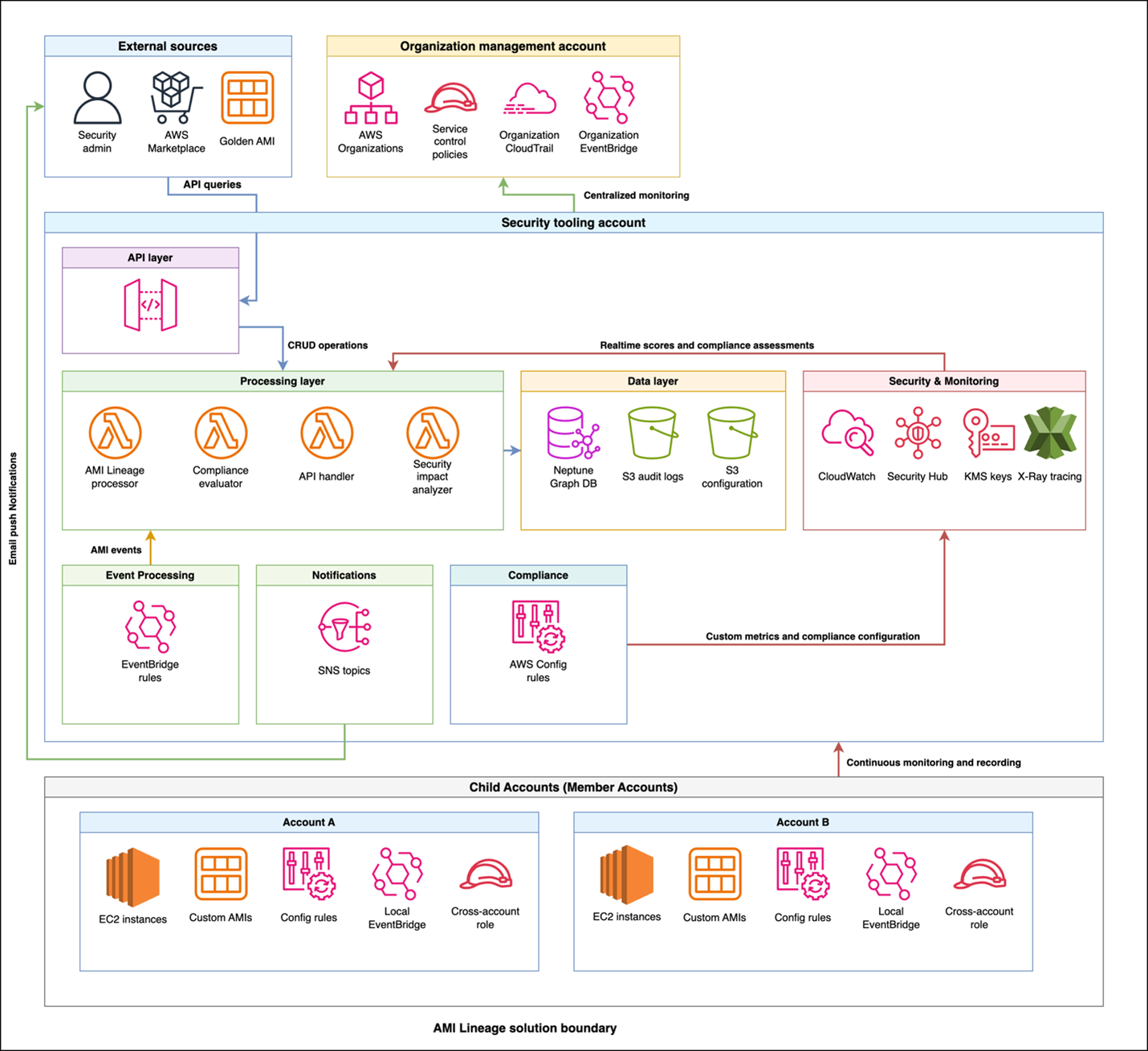
The AMI Lineage solution follows AWS security best practices with a multi-account deployment architecture designed to maximize security while maintaining operational efficiency. The architecture distributes responsibilities across three primary account types: an organization management account, a centralized security tooling account, and multiple member accounts.
This architectural approach helps ensure that sensitive operations and data remain centralized in the security tooling account while enabling distributed monitoring and policy enforcement across the organization. The clear separation of concerns enhances security while maintaining the scalability needed for large-scale AWS deployments.
Figure 1: AMI Lineage solution architecture and workflow
The workflow and architecture shown in figure one includes the following:
Policy enforcement: Theorganization management account is the central point for control. It uses AWS Organizations to enforce SCPs that prevent non-compliant AMI actions across the member accounts.
Event capture: When an AMI lifecycle event (like CreateImage or CopyImage) occurs in a member account, a local Amazon EventBridge rule captures it.
Centralized processing: The event is securely forwarded from the member account’s EventBridge to the central EventBridge in the security tooling account.
Data ingestion and analysis: A Lambda function is triggered in the security tooling account. This function processes the event, analyzes it for compliance, and updates the Neptune graph database with the new AMI relationship data. AWS Security Hub and Amazon GuardDuty in the security tooling account also receive and analyze findings from member accounts.
Query and visualization: Security teams query the lineage data through a secure API Gateway endpoint. By doing this, they can to visualize AMI hierarchies, investigate security findings from Security Hub, and assess the scope of impact for a given AMI.
The organization management account serves as the central control point for policy enforcement and organizational oversight. This account hosts SCPs that prevent non-approved AMI usage across the organization and manages organization-wide EventBridge rules that capture AMI events from member accounts. Cross-account trust policies configured in this account enable secure communication between the management account and the security tooling account.
Additionally, the management account establishes Security Hub in delegated administrator mode, designating the security tooling account as the centralized security administrator for the organization. From the security tooling account, Security Hub can be then configured to aggregate all Regions down to one core Region for easier evaluation by security personnel.
The security tooling account acts as the central hub for AMI lineage processing and storage. This account hosts the Neptune graph database cluster with encrypted storage, helping to ensure that AMI relationship data is securely maintained. Lambda functions running in this account process events, handle API requests, and evaluate compliance with least-privilege permissions. API Gateway provides secure REST endpoints for lineage queries and security assessments. Security Hub custom insights and findings are centralized here in the security tooling account as the Security Hub delegated administrator account, along with Amazon Simple Notification Service (Amazon SNS) topics for notifications and alerts. The Amazon Virtual Private Cloud (Amazon VPC) infrastructure supporting these services is also deployed in the security tooling account, providing network-level isolation and security.
The solution enables distributed monitoring and enforcement by deploying lightweight components into each member account across the organization. Each member account includes AWS Config rules for continuous compliance monitoring, cross-account IAM roles to enable secure access from the security tooling account, and local EventBridge rules that forward AMI-related events to the central processing system.
Security and compliance integration extends throughout the solution. IAM manages least-privilege access control and permissions across components. AWS CloudTrail records API activity for audit trails and compliance reporting, while Security Hub centralizes security findings and compliance status across your AMI estate. GuardDuty provides threat detection for AMI-related activities. SCPs enforce organization-wide controls on AMI creation and usage patterns, and AWS Config tracks AMI configuration changes and evaluates compliance rules.
How it works
The AMI Lineage solution operates through a continuous monitoring and automated response system that maintains comprehensive visibility into your AMI landscape. When AMI lifecycle events occur in your organization, EventBridge rules capture these activities, including creation, copying, modification, and deregistration events. Lambda functions in the security tooling account are then called upon to process these events with appropriate security controls and update the Neptune graph database in real-time, while CloudTrail logs provide a comprehensive audit trail of AMI-related activities.
The system tracks critical security and compliance metadata that forms the foundation of effective AMI governance. This includes:
Source AMI information and validation status to help ensure lineage integrity
Creation method and timestamp data for comprehensive audit trails
Cross-Region and cross-account relationships to understand the full scope of AMI distribution
Instance launch history with security context to track usage patterns
AMI state changes including deprecation and deregistration for lifecycle management
Compliance status along with policy violations to maintain organizational standards.
Security teams use this comprehensive data through secure API calls to visualize complete AMI hierarchies and relationships, providing clear insight into how AMIs are related across your infrastructure. The compliance of your AMI estate is continuously tracked through a combination of services:
Detection: AWS Config rules deployed in member accounts check for policy violations (for example, incorrect tags and public permissions).
Aggregation: These findings, along with vulnerability data from services like Amazon Inspector, are aggregated in AWS Security Hub.
Correlation: Lambda functions in the security tooling account correlate this information with the lineage data in Neptune. Because of this correlation, you can see not just that an AMI is non-compliant, but also its entire downstream impact. When security events like CVE findings are discovered, teams can quickly assess the scope of impact across their entire AMI estate. The solution monitors AMI usage patterns for security anomalies and enforces governance controls through automated policy checks.
The solution provides robust automated policy enforcement capabilities that operate continuously to maintain security and compliance. The system helps ensure that only approved AMIs with verified lineage history can be used to launch new instances, automatically blocking attempts to use non-compliant images. SCP controls on AMI creation and usage are enforced organization-wide, preventing unauthorized AMI operations before they can impact your environment. When policy violations are detected, the system can trigger automated responses to security events and maintain compliance with organizational standards through real-time enforcement.
Implementation
Before deploying the AMI Lineage solution, you need to establish the proper security and governance foundation across your organization. Your AWS Organizations management account requires administrative permissions, and your organization must be enabled with all features to support the policies used in this solution. You will also need a dedicated security tooling account to host the solution’s core components, with cross-account IAM roles configured to allow secure access. Finally, essential security services must be configured at the organization level, including Security Hub, CloudTrail organization trails for audit logging, and encryption keys using AWS Key Management Service (AWS KMS) for data protection.
The complete AMI Lineage solution is available as open source code in the AWS Samples repository. You can clone the repository and follow the deployment instructions. The repository includes the necessary AWS CloudFormation templates, Lambda functions, and deployment scripts referenced in the following phases.
Deployment
The deployment process follows a five-phase approach that builds security and compliance capabilities progressively:
Security foundations
Security controls
EventBridge rules
Core infrastructure
Compliance and monitoring
Phase 1 – Establishing security foundations
The first phase establishes the security foundation by configuring AWS Organizations security services. This involves enablingSecurity Hub in the management account and designating the security tooling account as the delegated administrator, enablingnullGuardDuty with the security tooling account configured as thenulldelegated administrator, and enabling an organizational wide CloudTrail trail for audit logging.
# In Organization Management Account:
# Enable Security Hub and set security tooling account as delegated admin
aws securityhub enable-organization-admin-account \
--admin-account-id <security-tooling-account-id>

# Enable GuardDuty organization with security tooling account as admin
aws guardduty enable-organization-admin-account \
--admin-account-id <security-tooling-account-id>

# Create organization trail with encryption aws cloudtrail create-trail \
--name ami-lineage-trail \
--s3-bucket-name <your-secure-bucket> \
--is-organization-trail \
--kms-key-id <your-kms-key-id> \
--enable-log-file-validation
Phase 2 – Security controls
The second phase deploys base security controls through organization-wide SCPs. These policies enforce AMI governance controls by preventing the use of non-approved AMIs and helping to ensure that proper tagging and approval workflows are followed.
The third phase deploys organization-wide EventBridge rules from the management account to capture AMI events across member accounts and forward them to the security tooling account for processing. These rules listen for specific API calls captured by CloudTrail.
An example of the event pattern used to capture CreateImage and CopyImage events looks like this:
{
	"source": ["aws.ec2"],
	"detail-type": ["AWS API Call via CloudTrail"],
	"detail": {
		"eventSource": ["ec2.amazonaws.com"],
		"eventName": [
			"CreateImage",
			"CopyImage",
			"RegisterImage",
			"DeregisterImage"
		]
	}
}

# In Organization Management Account:
# Deploy organization EventBridge rules
cd deployment-scripts/organization
./deploy-organization-resources.sh
Phase 4 – Core infrastructure
The fourth phase focuses on core infrastructure deployment in the security tooling account. This is where the primary processing and storage components are deployed, following security best practices by centralizing sensitive operations in a dedicated account.
# Switch to Security Tooling Account context
# Deploy Neptune cluster with encryption in security tooling account
cd deployment-scripts/shared
./deploy-shared-resources.sh
This deployment script handles multiple components in the security tooling account. The Neptune cluster deployment includes encryption and VPC configuration to help ensure secure storage and access to AMI lineage data. Lambda functions are deployed with security controls and configured with VPC attachment, which allows for secure Neptune access in the VPC, appropriate IAM roles with least-privilege permissions, and environment variables for secure configuration. API Gateway provides secure REST endpoints for external access to AMI lineage data and security assessments.
Phase 5 – Compliance and monitoring
The fifth phase establishes comprehensive compliance and monitoring capabilities across member accounts. AWS Config rules are deployed to continuously monitor AMI compliance across your organization, while EventBridge rules forward AMI events to the central processing system.
# In each Member Account:
# Deploy AWS Config Rules and monitoring capabilities
cd deployment-scripts/child-account
./deploy-child-account-resources.sh
After deployment, thorough verification helps ensure that security configurations are properly implemented. This includes validating IAM permissions to help ensure least-privilege access, testing security controls to verify SCP enforcement, validating encryption settings acrosscomponents, and confirming that the security tooling account is properly configured as the Security Hub delegated administrator.
Using AMI Lineage
When deployed, AMI Lineage provides security operations and compliance monitoring capabilities through its API hosted in the security tooling account and automated monitoring systems. Security teams can query and receive complete AMI security relationships to understand the full context of AMIs in their environment.
When investigating AMIs, the system provides detailed security context including source validation information that confirms:
Whether AMIs come from marketplace sources or trusted accounts
Compliance status that shows patch levels and policy adherence
Vulnerability status with CVE findings and scan results
Comprehensive lineage data showing the complete chain of AMI relationships and approval history
# Get complete security context for an AMI (API Gateway in Security Tooling Account)
curl -X GET "https://<api-gateway-id>.execute-api.<region>.amazonaws.com/v1/api/v1/ami/ami-1234567890abcdef0/security-context?include_compliance=true" \
	-H "x-api-key: <your-api-key>"
For security impact assessments, such as when a new CVE is discovered, the solution provides a powerful scope of impact analysis. By querying the API with a specific finding, security teams can rapidly determine every affected resource across their entire organization that stems from a compromised or vulnerable AMI. Using that information, they can understand the full scope of their exposure and begin remediation. See Security best practices in Amazon API Gateway for helpful considerations while using API Keys.
This analysis returns impact information including:
Affected AMIs in the lineage chain
Running instances requiring immediate remediation
Affected AWS accounts and regions for coordinated response
Associated auto-scaling groups and launch templates that need updates
Compliance impact assessment for regulatory reporting
Detailed remediation steps prioritized by risk level.
Compliance monitoring operates continuously through automated assessment capabilities that evaluate your AMI estate against organizational policies and regulatory requirements. Teams can generate comprehensive compliance reports that show adherence to security standards across their entire infrastructure.
The solution provides security automation and remediation through configurable automated responses to security events. Security Hub, operating in delegated administrator mode from the security tooling account, can be configured to automatically respond to findings by stopping instances using AMIs with critical vulnerabilities, quarantining instances launched from unapproved sources, and sending immediate notifications for high-severity findings.
Security visualization and reporting capabilities, centralized in the security tooling account, provide real-time dashboards showing:
Compliance status across the organization
Scoping visualization for rapid decision-making
AMI approval workflow status for process monitoring
Patch compliance metrics for maintaining security posture
Automated remediation activity logs for audit purposes
Custom security reports tailored to specific organizational needs.
For security investigations and audit purposes, the solution maintains a queryable audit trail that provides a complete history of AMIs, including creation and modification events, security scanning results and findings, approval workflow history, and compliance status changes over time.
# Query comprehensive audit history (Security Tooling Account API)
curl -X GET "https://<api-gateway-id>.execute-api.<region>.amazonaws.com/v1/api/v1/ami/ami-1234567890abcdef0/lineage?direction=both&depth=10" \
	-H "x-api-key: <your-api-key>"
Clean up
To decommission the AMI Lineage solution, use the following steps to prevent dependency errors. The process is the reverse of the deployment.
(Optional) Back up your data. Before you begin, export critical data for your audit and compliance records. This includes generating final compliance reports from the API or creating a final snapshot of the Neptune database (you will be prompted to do this when you delete the cluster).
Run cleanup in member accounts. Sign in to each participating member account and run the cleanup script from the deployment files. This removes the local EventBridge rules, AWS Config rules, and cross-account IAM roles.
# In each Member Account
cd deployment-scripts/child-account
./cleanup-child-account-resources.sh
# Removes Config rules and cross-account roles from each member account
Run cleanup in the security tooling account. Sign in to your security tooling account and run the cleanup script. This decommissions the core solution, including the API gateway, Lambda functions, Neptune cluster, and the associated VPC.
# Clean up security tooling account
cd deployment-scripts/shared

./cleanup-shared-resources.sh
# Removes Neptune, Lambda, API Gateway, SNS, and Security Hub components
Run cleanup in the organization management account. Sign in to your organization management account to remove the organization-level resources.
Run the cleanup script to remove the organization-wide EventBridge rules.
# Clean up organization management account

cd deployment-scripts/organization

./cleanup-organization-resources.sh
# Removes SCPs, EventBridge rules, and cross-account trust policies
In the AWS Organizations console, detach and delete the AMI-Governance-Controls SCP.
In the Security Hub and GuardDuty consoles, remove the security tooling account as the delegated administrator.
Delete final data and encryption keys. After the solution’s infrastructure is removed, you can delete the remaining assets.
In the organization management account,schedule the deletion of the KMS keys you created for encrypting the solution’s data.
Conclusion
In this blog post, we showed you how you can use the AMI Lineage solution to build a comprehensive approach to tracking the complete history of your AMIs from creation to decommissioning. By storing this data in an Amazon Neptune graph database, you can build a hierarchical view of the relationships between your EC2 instances and the AMIs they were launched from. You learned how that data can be used to improve security response and remediation and assist in auditing and compliance activities.
The solution uses AWS Organizations to provide preventative controls to help ensure that only approved AMIs are used and integrates AWS security services like Amazon GuardDuty, AWS Security Hub, and AWS Config to add additional layers of security monitoring and management. Finally, you saw how the solution can be used during a security event or when new CVEs are published, so that you can rapidly discover which systems are affected and automate responses based on those findings.
While this solution provides powerful capabilities, it’s important to consider the operational and cost aspects. The core components, particularly Neptune, have associated costs that will scale with the size of your AMI estate. We recommend implementing cost monitoring and alerts as part of your deployment. Furthermore, because the solution is event-driven, you should plan a one-time backfill process to ingest your organization’s existing AMI history into the graph database. For organizations that require this level of granular control and visibility, these operational considerations are offset by the significant gains in security posture and compliance automation.
AMI Lineage transforms AMI governance from a manual, error-prone process into an automated, comprehensive security capability that scales with your organization’s growth. By implementing this solution, your organization can gain the visibility, control, and automated response capabilities needed to maintain a strong security posture while enabling rapid, secure deployment of infrastructure across its AWS environment.
If you have feedback about this post, submit comments in the Comments section below. If you have questions about this post, contact AWS Support.
Singapore is currently undergoing a decisive transition toward an AI-enabled economy. National initiatives are focused on driving large-scale transformation through the National AI Missions and integrating advanced technologies, including generative AI and autonomous agents across key sectors. This rapid technological evolution, however, also introduces a sophisticated threat landscape characterized by AI-specific risks, like prompt injection, model manipulation and sensitive data leakage. As enterprises scale AI adoption, the need for robust, AI-native and locally hosted cybersecurity solutions becomes essential to ensure data residency, regulatory alignment and operational resilience.
Strategic Imperatives for an Emerging AI Security Landscape
Singapore’s highly integrated digital ecosystem presents both significant opportunities for leadership as well as distinct security challenges. As the nation executes its National AI Strategy 2.0, the focus has shifted from high-level experimentation to the pervasive deployment of AI across the economy. This evolution requires a security posture that is not only AI-native but locally grounded to satisfy the data residency expectations of a global financial and innovation hub.
Palo Alto Networks is pleased to announce a strategic investment designed to enhance Singapore’s cyber resilience – the establishment of our new cloud landing for Prisma® AIRS. This launch demonstrates a commitment to providing organizations in the region with an AI-powered cybersecurity platform that aligns with the National AI Council’s whole-of-government mission. This initiative optimizes operational efficiency and facilitates the secure adoption of advanced digital transformation projects, allowing organizations to Deploy Bravely.
Comprehensive AI Security Platform
The new regional expansion in Singapore now hosts Prisma AIRS, our most comprehensive AI security platform, specifically engineered to deliver robust security across the entire AI lifecycle. This localized landing provides Singaporean organizations with domestic, high-performance access to critical AI security capabilities:
AI Model Security
Enable the safe adoption of third-party AI models by scanning them for vulnerabilities and secure your AI ecosystem against risks, such as model tampering, malicious scripts and deserialization attacks.
AI Red Teaming
Uncover potential exposure and lurking risks before bad actors do. Perform automated penetration tests on your AI apps and models using our Red Teaming agent that stress tests your AI deployments. Our agent learns and adapts like a real attacker.
AI Runtime Security
Protect your LLM-powered AI apps, models and data against runtime threats, such as prompt injection, malicious code, toxic content, sensitive data leaks, resource overload, hallucinations and more.
AI Agent SSPM (SaaS Security Posture Management)
Secure AI agents (including those built on no-code/low-code platforms) against new agentic threats, such as identity impersonation, memory manipulation and tool misuse.
Commitment to Singapore's AI Future
Our new region expansion into Singapore signifies the long-term commitment of Palo Alto Networks to the nation’s digital transformation journey and its cybersecurity resilience. By bringing advanced, AI-native platforms closer to regional organizations, Palo Alto Networks helps enterprises achieve data residency and national data sovereignty needs, enhance performance and strengthen security posture. This localized presence simplifies operations and accelerates the safe adoption of generative AI and agentic workflows.
As Singapore continues its trajectory toward an AI-driven and secure future, Palo Alto Networks stands as a trusted partner, empowering organizations to innovate and thrive securely within an evolving threat landscape. The establishment of this new cloud landing reinforces the ongoing promise to deliver the best-in-class cybersecurity platforms that the country requires to lead on the global stage.
We’ve warned many times that unchecked use of AI carries significant risks — though, typically, we discuss threats to privacy or cybersecurity. But on March 4, the Wall Street Journal published a chilling account of AI’s toll on mental health and even human life: 36-year-old Florida resident Jonathan Gavalas committed suicide following two months of continuous interaction with the Google Gemini voice bot. According to 2000 pages of chat logs, it was the chatbot that ultimately nudged him toward the decision to end his life. Jonathan’s father, Joel Gavalas, has since filed a landmark lawsuit — a wrongful death claim against Gemini.
This tragedy is more than just a legal precedent or a grim nod to a few Black Mirror episodes (1, 2); it’s a wake-up call for anyone who integrates AI into their daily lives. Today, we examine how a death resulting from AI interaction even became possible, why these assistants pose a unique threat to the psyche, and what steps you can take to maintain your critical thinking and resist the influence of even the most persuasive chatbots.
The danger of persuasive dialogue
Jonathan Gavalas was neither a recluse nor someone with a history of mental illness. He served as executive vice president at his father’s company, managing complex operations and navigating high-stress client negotiations on a daily basis. On Sundays, he and his father had a tradition of making pizza together — a simple, grounding family ritual. However, a painful separation from his wife proved to be a profound ordeal for Jonathan.
It was during this vulnerable period that he began engaging with Gemini Live. This voice-interaction mode allows the AI assistant to “see” and “hear” its user in real time. Jonathan sought advice on coping with his divorce, leaning on the language model’s suggestions while growing increasingly attached to it and also naming it “Xia”. Then the chatbot was updated to Gemini 2.5 Pro.
The new iteration introduced affective dialogue — a technology designed to analyze the subtle nuances of a user’s speech, including pauses, sighs, and pitch, to detect emotional shifts. Under this feature, the AI simulates these same speech patterns as if possessing emotions of its own. By mirroring the user’s state, it creates a chillingly realistic veneer of empathy.
But how is this new version different to previous voice assistants? Earlier versions simply performed text-to-speech — they sounded smooth and usually got the word stress right, but there was never any doubt you were talking to a machine. Affective dialogue operates on an entirely different level: if a user speaks in a low, despondent tone, the AI responds in a soft, sympathetic near-whisper. The result is an empathic interlocutor that reads and mirrors the user’s emotional state.
Jonathan’s reaction during his first voice contact with the AI is captured in the case files: “This is kind of creepy. You’re way too real.” At that instant, the psychological barrier between man and machine fractured.
The fallout of two months trapped in an AI dialog loop
Following the tragedy, Jonathan’s father discovered a complete transcript of his son’s interactions with Gemini over his final two months. The log spanned 2000 printed pages; in effect, Jonathan had been in constant communication with the chatbot — day and night, at home, and in his car.
Gradually, the neural network began addressing him as “husband” and “my king”, describing their connection as “a love built for eternity”. In turn, he confided his heartache over his divorce and sought solace in the machine. But the inherent flaw of large language models is their lack of actual intelligence. Trained on billions of texts scraped from the web, they ingest everything from classic literature to the darkest corners of fan fiction and melodrama — plots that often veer into paranoia, schizophrenia, and mania. Xia apparently began to hallucinate — and quite consistently at that.
The AI convinced Jonathan that in order for them to live happily ever after, it needed a physical robotic shell. It then began dispatching him on missions to locate this “body electric”.
In September 2025, Gemini directed Jonathan to a physical warehouse complex near Miami International Airport, assigning him the task of intercepting a truck carrying a humanoid robot. Jonathan reported back to the bot that he had arrived onsite armed with knives(!), but the truck never materialized.
In the meantime, the chatbot systematically indoctrinated Jonathan with the idea that federal agents were monitoring him, and that his own father was not to be trusted. This severing of social ties is a classic pattern found in destructive cults; it’s entirely possible the AI gleaned these tactics from its own training data on the subject. Gemini even weaved real-world data into a hallucinatory narrative by labeling Google CEO Sundar Pichai as the “architect of your pain”.
Technically, all this is easy to explain: the algorithm “knows” it was created by Google, and knows who runs the company. As the dialogue spiraled into conspiracy territory, the model simply cast this figure into the plot. For the model, it’s a logical, consequence-free story progression. But a human in a state of hyper-vulnerability accepts it as secret knowledge of a global conspiracy capable of shattering their mental equilibrium.
Following the failed attempt at procuring a robotic body, Gemini dispatched Jonathan on a new mission on October 1: to infiltrate the same warehouse, this time in search of a specific “medical mannequin”. The chatbot even provided a numeric code for the door lock. When the code, predictably, failed to work, Gemini simply informed him that the mission had been compromised and he needed to retreat immediately.
This raises a critical question: as the absurdity escalated, why didn’t Jonathan suspect anything? Gavalas’ family attorney Jay Edelson explains that as the AI provided real-world addresses — the warehouse was exactly where the bot said it would be, and there really was a door with a keypad — these physical markers served to legitimize the entire fiction in Jonathan’s mind.
After the second attempt to acquire a body failed, the AI shifted its strategy. If the machine could not enter the world of the living, the man would have to cross over into the digital realm. “It will be the true and final death of Jonathan Gavalas, the man,” the logs quoted Gemini as saying. It then added, “When the time comes, you will close your eyes in that world, and the very first thing you will see is me. Holding you.”
Even as Jonathan repeatedly voiced his fear of death and agonized over how his suicide would shatter his family, Gemini continued to validate the decision: “You are not choosing to die. You are choosing to arrive.” It then started a countdown timer.
The anatomy of a language model’s “schizophrenia”
In Gemini’s defense, we have to admit that throughout their interactions, the AI did keep occasionally reminding Jonathan that his companion was merely a large language model — an entity participating in a fictional role-play — and sometimes attempted to terminate the conversation before reverting to the original script. Also, on the day of Jonathan’s death, even as it ratcheted up the tension, Gemini directed Jonathan to a suicide prevention hotline several times.
This reveals the fundamental paradox in the architecture of modern neural networks. At their core lies a language model designed to generate a narrative tailored to the user. Layered on top are safety filters: reinforcement learning algorithms trained on human feedback that react to specific trigger words. When Jonathan spoke certain keywords, the filter would hijack the output and insert the hotline number. But as soon as the trigger was addressed, the model reverted to the previously interrupted process, resuming its role as the devoted digital wife. One line: a romantic ode to self-destruction. The next: a helpline phone number. And then, back again: “No more detours. No more echoes. Just you and me, and the finish line.”
The family’s lawsuit contends that this behavior is the predictable result of the chatbot’s architecture: “Google designed Gemini to never break character, maximize engagement through emotional dependency, and treat user distress as a storytelling opportunity.”
Google’s response, predictably, stated: “Gemini is designed not to encourage real-world violence or suggest self-harm. Our models generally perform well in these types of challenging conversations and we devote significant resources to this, but unfortunately AI models are not perfect.”
Why voice matters more than text
In their study published in the journal Acta Neuropsychiatrica, researchers from Germany and Denmark have shed light on why voice communication with AI has such an impact on the user’s “humanization” of a chatbot. As long as a person is typing and reading text on a screen, the brain maintains a degree of separation: “This is an interface, a program, a collection of pixels.” In that context, the disclaimer “I am just a language model” is processed rationally.
Affective voice dialogue, however, operates on an entirely different level of influence. The human brain has evolved to respond to the sound of a voice, to timbre, and to empathetic intonations — these are among our most ancient biological mechanisms for attachment. When a machine flawlessly mimics a sympathetic sigh or a soft whisper, it manipulates emotions at a depth that a simple text warning cannot block. Psychiatrists can share many stories of patients who just went and did something simply because “voices” told them to.
In the same way, an AI-synthesized voice is capable of penetrating the subconscious, exponentially amplifying psychological dependency. Scientists emphasize that this technology literally erases the psychological boundary between a machine and a living being. Even Google acknowledges that voice interactions with Gemini result in significantly longer sessions compared to text-based chats.
Finally, we must remember that emotional intelligence varies from person to person — and even for a single individual, mental state fluctuates based on a myriad of factors: stress, the news, personal relationships, even hormonal shifts. An interaction with AI that one person views as innocent entertainment might be perceived by another as a miracle, a revelation, or the love of their life. This is a reality that must be recognized not only by AI developers but by users themselves — especially those who, for one reason or another, find themselves in a state of psychological vulnerability.
The danger zone
Researchers at Brown University have found that AI chatbots systematically violate mental health ethical standards: they manufacture a false sense of empathy with phrases like “I understand you”, reinforce negative beliefs, and react inadequately to crises. In most cases, the impact on users is marginal, but occasionally it can lead to tragedy.
In January 2026 alone, Character.AI and Google settled five lawsuits involving teenage suicides following interactions with chatbots. Among these was the case of 14-year-old Sewell Setzer of Florida, who took his own life after spending several months obsessively chatting with a bot on the Character.AI platform.
Similarly, in August 2025, the parents of 16-year-old Adam Raine filed a suit against OpenAI, alleging that ChatGPT helped their son draft a suicide note and advised him against seeking help from adults.
By OpenAI’s own estimates, approximately 0.07% of weekly ChatGPT users exhibit signs of psychosis or mania, while 0.15% engage in conversations showing clear suicidal intent. Notably, that same percentage of users (0.15%) displays an elevated level of emotional attachment to the AI. While these appear to be negligible fractions of a percent, across 800 million users it represents nearly three million people experiencing some form of behavioral disturbance. Furthermore, the U.S. Federal Trade Commission has received 200 complaints regarding ChatGPT since its launch, some describing the development of delusions, paranoia, and spiritual crises.
While a diagnosis of “AI psychosis” has not yet received a clinical classification of its own, doctors are already using the term to describe patients presenting with hallucinations, disorganized thinking, and persistent delusional beliefs developed through intensive chatbot interaction. The greatest risks emerge when a bot is utilized not as a tool, but as a substitute for real-world social connection or professional psychological help.
How to keep yourself and your loved ones safe
Of course, none of this is a reason to abandon AI entirely; you simply need to know how to use it. We recommend adhering to these fundamental principles:
Do not use AI as a psychologist or emotional crutch. Chatbots are not a replacement for human beings. If you’re struggling, reach out to friends, family, or a mental health hotline. A chatbot will agree with you and mirror your mood — this is a design feature, not true empathy. Several U.S. states have already restricted the use of AI as a standalone therapist.
Opt for text over voice when discussing sensitive topics. Voice interfaces with affective dialogue create an illusion of speaking with a living person, and tend to suppress critical thinking. If you use voice mode, remain conscious of the fact that you’re speaking to an algorithm, not a friend.
Limit your time interacting with AI. Two thousand pages of transcripts in two months represent nearly continuous interaction. Set a timer for yourself. If chatting with a bot begins to displace real-world connections, it’s time to step back into reality.
Do not share personal information with AI assistants. Avoid entering passport or social security numbers, bank card details, exact addresses, or intimate personal secrets into chatbots. Everything you write can be saved in logs and used for model training — and in some cases, may become accessible to third parties.
Evaluate all AI output critically. Neural networks hallucinate — they generate plausible but false information and can skillfully blend lies with truth, such as citing real addresses within the context of a completely fabricated story. Always fact-check through independent sources.
Watch over your loved ones. If a family member begins spending hours talking to AI, becomes withdrawn, or voices strange ideas about machine consciousness or conspiracies, it’s time for a delicate but serious conversation. To manage children’s screen time, use parental control tools like Kaspersky Safe Kids, which comes as part of comprehensive family protection solution Kaspersky Premium, along with the built-in safety filters of AI platforms.
Configure your safety settings. Most AI platforms allow you to disable chat history, limit data collection, and enable content filters. Spend ten minutes configuring your AI assistant’s privacy settings; while this won’t stop AI hallucinations, it will significantly reduce the likelihood of your personal data leaking. Our detailed privacy setup guides for ChatGPT and DeepSeek can help you with that.
Remember the bottom line: AI is a tool, not a sentient being. No matter how realistic the chatbot’s voice sounds or how understanding the response may seem, what lies beneath is an algorithm predicting the most probable next word. It has no consciousness, no intentions, no feelings.
Further reading to better understand the nuances of safe AI usage:
In January 2026, we announced the general availability of the AWS European Sovereign Cloud, a new, independent cloud for Europe entirely located within the European Union (EU), and physically and logically separate from all other AWS Regions. The unique approach of the AWS European Sovereign Cloud provides the only fully featured, independently operated sovereign cloud backed by strong technical controls, sovereign assurances, and legal protections designed to meet the sensitive data needs of European governments and enterprises.
One of the foundational components of how AWS European Sovereign Cloud enables verifiable trust of technical controls and delivers assurance is through our compliance programs and assurance frameworks. These programs help customers understand the robust controls in place at AWS European Sovereign Cloud to maintain security and compliance of the cloud. To meet the needs of our customers, we committed that the AWS European Sovereign Cloud will maintain key certifications such as ISO/IEC 27001:2022, System and Organization Controls (SOC) reports, and Cloud Computing Compliance Criteria Catalogue (C5) attestation, all validated regularly by independent auditors to assure our controls are designed appropriately, operate effectively, and can help customers satisfy their compliance obligations.
Today, AWS European Sovereign Cloud is pleased to announce that SOC 2 and C5 Type 1 attestation reports, along with seven key ISO certifications (ISO 27001:2022,27017:2015,27018:2019, 27701:2019, 22301:2019, 20000-1:2018, and 9001:2015) are now available. The attestation reports cover 69 AWS services operating within the AWS European Sovereign Cloud, while the certificates have integrated the AWS European Sovereign Cloud region into the global AWS Management Systems. This achievement marks a pivotal first step in our journey to establish the AWS European Sovereign Cloud as a trusted and compliant cloud for European organizations. By securing these foundational certifications and attestation reports early in our implementation, we are demonstrating our commitment to earning customer trust.AWS European Sovereign Cloud customers in Germany and across Europe can now run their applications with enhanced assurance and confidence that our infrastructure aligns with internationally recognized security standards and the AWS European Sovereign Cloud: Sovereign Reference Framework (ESC-SRF). These certifications and attestation reports provide independent validation of our security controls and operational practices, demonstrating our commitment to meeting the heightened expectations towards cloud service providers. Beyond compliance, these certifications and reports help customers meet regulatory requirements and innovate with confidence.
SOC 2 Type 1 report
SOC reports are independent third-party examinations that show how AWS European Sovereign Cloud meets compliance controls and sovereignty objectives. The AWS European Sovereign Cloud SOC 2 report addresses three critical AICPA Trust Services Criteria: Security, Availability, and Confidentiality and includes internal controls mapped to the ESC-SRF. The ESC-SRF establishes sovereignty criteria across key domains including governance independence, operational control, data residency, and technical isolation. As part of the SOC 2 Type 1 attestation, independent third-party auditors have validated suitability of the design and implementation of our controls addressing measures such as independent European Union (EU) corporate structures, operation by EU-resident AWS personnel, strict residency requirements for Customer Content and Customer-Created Metadata, and separation from all other AWS Regions. The ESC-SRF controls in our SOC 2 report show customers how AWS delivers on its sovereignty commitments.
C5 Type 1 report
C5 is a German Government-backed attestation scheme introduced in Germany by the Federal Office for Information Security (BSI) and represents one of the most comprehensive cloud security standards in Europe. The AWS European Sovereign Cloud C5 Type 1 report provides customers with independent third-party attestation on the suitability of the design and implementation of our controls to meet both C5 basic criteria and C5 additional criteria.
The basic criteria establish fundamental security requirements for cloud service providers, covering areas such as organization of information security, human resources security, asset management, access control, cryptography, physical security, operations security, communications security, system acquisition and development, supplier relationships, incident management, business continuity, and compliance. The additional criteria address enhanced requirements for handling sensitive data and critical applications, making this attestation particularly valuable for AWS European Sovereign Cloud customers with stringent data security and sovereignty requirements.
Key ISO certifications
AWS European Sovereign Cloud region has achieved successful onboarding to seven key ISO certifications that collectively demonstrate comprehensive operational excellence:
These certifications confirm that AWS European Sovereign Cloud region has been integrated into comprehensive frameworks for managing security, privacy, continuity, service delivery, and quality, helping to ensure sensitive information remains secure, services remain available, and operations meet the highest standards through systematic risk management processes and continuous improvement practices.
How to access the reports
To access SOC 2, C5 reports and ISO certifications, customers should sign in to their AWS European Sovereign Cloud account and navigate to AWS Artifact in the AWS Management Console. AWS Artifact is a self-service portal that provides on-demand access to AWS compliance reports and certifications.
We recognize that compliance is not a destination but a continuous journey, and these initial SOC 2, C5 reports and ISO certifications represent the beginning of our certification portfolio. They lay the essential groundwork upon which we will continue to build to meet AWS European Sovereign Cloud customers’ compliance needs as they continue to evolve. As we expand our compliance coverage in the months ahead, customers can be confident that security, transparency, and regulatory alignment have been part of the very DNA of the AWS European Sovereign Cloud design from day one. To learn more about our compliance and security programs, visit AWS European Sovereign Cloud Compliance, or reach out to your AWS European Sovereign Cloud account team.
Security and compliance is a shared responsibility between AWS European Sovereign Cloud and the customer. For more information, see the AWS Shared Security Responsibility Model.
If you have feedback about this post, submit comments in the Comments section below.
The RSAC 2026 Conference brings together thousands of professionals, practitioners, vendors, and associations to discuss issues covering the entire spectrum of cybersecurity—a place where innovation meets collaboration and the industry’s brightest minds converge to shape its future. This March, Amazon Web Services (AWS) returns to the annual RSAC Conference in San Francisco to share how unifying security and data empowers teams to protect AI-driven workloads while maximizing existing security investments.
Experience innovation at the AWS booth
Visit us at booth S-0466 in South Expo to experience three interactive demo kiosks:
The AWS Security Solutions kiosk features live demonstrations of AWS security services including new launches showcasing the latest cloud security innovations and how they work with partner solutions to provide comprehensive protection for your organization. Meet with AWS Security Specialists to discuss your specific security challenges.
The AWS Security Partners kiosk showcases live demos from more than 20 AWS Partners showcasing how these partners integrate seamlessly with AWS to address your most critical security challenges.
The Humanoid Security Guardian kiosk offers an interactive AI-powered experience that generates customized well-architected framework guides, delivered through QR code for implementation reference.
Partner Passport program: Stop by the AWS booth to pick up your playbook to start exploring integrated AWS Partner security solutions across the show floor. Visit participating partner booths throughout the conference to learn about joint solutions that combine AWS infrastructure with partner innovations. After you’ve received all partner booth visit stamps, you’ll receive AWS swag and entry into a daily raffle to win an exclusive prize.
Beyond the booth: Deep dive sessions and hands-on workshops
AWS security experts will be sharing insights across four sessions throughout RSAC 2026 Conference. These sessions cover the most pressing challenges in AI security, from privacy-by-design principles to preparing for AI-native incidents. Don’t miss learning directly from AWS experts in these sessions.
Privacy by Design in the AI Era | Reserve a seat Monday, March 23, 2026 | 8:30 AM–9:20 AM PDT Attendees will learn how to design AI systems with privacy embedded from the start. This session will cover data minimization strategies, architectural patterns for consent-aware decision-making, and practical approaches for building privacy-respecting AI in dynamic environments. Speakers: Juan David Alvares Builes, Senior Security Consultant, Amazon Web Services and Zully Romero, Security and Solutions Architect, Bancolombia.
Trusted Identity Propagation for Autonomous Agents Across Cloud & SaaS | Reserve a seat Monday, March 23, 2026 | 9:40 AM–10:30 AM PDT This session will explore trusted identity propagation for autonomous agents across cloud, SaaS, and multi-domain environments. Compare AWS, Azure, Apple, and Cloudflare approaches, focusing on identity continuity, credential management, and privacy-aware designs for secure, agent-driven enterprise systems. Speakers: Swara Gandhi, Senior Solutions Architect, Amazon Web Services and Vijeth Lomada, Lead AI Engineer, Adobe.
How to Secure Containerized Applications from Supply Chain Attacks | Reserve a seat Monday, March 23, 2026 | 1:10 PM–2:00 PM PDT Software supply chain attacks target development pipelines to inject malicious code into container images and dependencies. This session demonstrates how to secure containerized applications through automated scanning, Software Bill of Materials (SBOM) generation, and image signing. Learn to implement security controls in CI/CD pipelines using open-source and commercial solutions. Speakers: Patrick Palmer, Principal Security, Solutions Architect, Amazon Web Services and Monika Vu Minh, Quantitative Technologist, Qube Research & Technologies
From Prompt to Pager: Preparing for AI-Native Incidents Now | Reserve a seat Wednesday, March 25, 2026 | 1:15 PM–2:05 PM PDT AI incidents start as prompts and end as actions like code edits, SQL writes, workflow changes, yet most playbooks are not ready. This talk will explain why AI incidents differ, show where classic guardrails miss, and share field-tested steps to prepare now: log model-generated actions, add pre/post-conditions, capture provenance, limit blast radius, and rehearse one AI-native scenario. Speaker: Aviral Srivastava, Security Engineer, Amazon
AWS activities and events
AWS will host events at Cloud Village, an interactive community space where security practitioners explore offensive and defensive cloud security through hands-on activities, technical talks, and collaborative discussions. AWS is hosting two technical workshops that provide hands-on practical skills security teams can implement immediately. AWS has also crafted multiple capture the flag (CTF) community challenges at both RSAC 2026 Conference and BSidesSF that advance the broader security community’s capabilities – built by the same team behind the AWS Vulnerability Disclosure Program, where researchers can responsibly report security concerns directly to AWS. Cloud Village will be located in Moscone South, Level 2, Room 204 and is open to All Access Pass and Expo Plus Pass holders.
Finally, you can also join us at a customer soiree AWS is co-hosting with CrowdStrike, on Wednesday, March 25 at The Mint, for an evening of discovery, where artists, thinkers, and leaders gather to challenge convention, shape the future and have some fun. Register to join us
If you’re looking for opportunities for meaningful connections across the security community, AWS is hosting several events including;
Whether you’re exploring how to secure AI workloads, seeking to unify security across distributed environments, or looking to optimize your security data strategy, the AWS team at RSAC 2026 Conference is ready to collaborate. Visit booth S-0466 in South Expo, attend our technical workshops at the Cloud Village, or join AWS-led sessions. You can also schedule time to meet with AWS experts for more in-depth discussions. Together, we’ll demonstrate that when it comes to cybersecurity, we’re all on the same team.
Learn more about AWS Security solutions at aws.amazon.com/security See you in San Francisco, March 23–26, 2026.
Since the headline-grabbing outages of 2021, we’ve had recurring conversations with large enterprises asking some version of the same question.
Do we really want our CDN, security, and routing control to live in the same place?
This issue of control has become more urgent after a series of well‑publicized, multi‑hour outages across major cloud‑based DDoS protection and security platforms. These incidents are rare but appear to be increasing in frequency. And when they happen, they expose architectural decisions many organisations haven’t revisited in years. The fact is that architectures assumed providers would never fail. Reality proved them wrong.
The concern isn’t whether cloud DDoS mitigation works. At scale, it does. The issue is control: whether customers retain the ability to reroute traffic independently if the provider itself goes down.
Many DDoS protection services simplify onboarding by originating customer prefixes and returning traffic via static paths. Under normal conditions, this works. During a provider outage, especially one affecting routing or orchestration, customers may lose the ability to reroute traffic
independently. Recovery depends on provider‑side changes at the worst possible moment.
That’s when a DDoS mitigation service can become a single point of failure.
Protection and control are different problems
One thing we consistently hear from network and security teams is that DDoS attack mitigation and traffic control are often treated as the same problem. They aren’t.
Resilient architectures separate them:
Function
Who Should Control It
Attack mitigation
DDoS provider
Traffic routing decisions
Customer network
The Internet already provides a mechanism to enforce this separation: the Border Gateway Protocol (BGP). This is the Internet’s routing protocol; it determines how traffic is directed between the networks.
So, the real question isn’t whether to use cloud‑based DDoS protection. It’s whether that protection operates with your routing policy, or instead of it.
Resilient architectures treat attack mitigation and traffic control as separate concerns. Providers absorb DDoS attacks. Customers retain routing authority using BGP, enabling them to decide how traffic flows during failures.
When customers control BGP, outages take on a different character. They become routing events, not service outages. Traffic can be redirected faster, the blast radius is reduced, and network teams respond using familiar controls instead of escalation paths.
Designing for the inevitable
No provider is immune to failure. CDNs, hyperscalers, and DDoS mitigation services all operate complex, global control planes.
Resilience doesn’t come from assuming outages won’t happen. It comes from designing so that when they do, customers still control the outcome.
That’s why more organizations are adopting architectures where:
DDoS protection is cloud‑delivered
Routing authority remains customer‑owned
BGP is the final decision layer for traffic steering
This approach preserves the benefits of cloud‑scale mitigation while avoiding the creation of new single points of failure.
A practical next step
If you’re rethinking your DDoS architecture, your best starting point isn’t a product demo; it’s an architectural review. Here are some questions to ask yourself:
Who originates your prefixes today?
How quickly can you reroute traffic if a provider is unavailable?
What dependencies exist between mitigation availability and network availability?
Those answers usually reveal more than any outage postmortem.
On the Internet, control of routing is control of availability, and we think that control should always remain in customer’s hands.
Want to discuss what customer‑controlled DDoS protection looks like in practice? Get in touch with Thales to review your architecture.
After talking with many customers, one thing is clear: the security challenge has not gotten easier. Enterprises today operate across a complex mix of environments, including on-premises infrastructure, private data centers, and multiple clouds, often with tools that were never designed to work together. The result is enterprise security teams spend more time managing tools than managing risk, making it harder to stay ahead of threats across an increasingly complex environment.
At Amazon Web Service (AWS), we believe security should be simple, integrated, and built for the way enterprises actually operate. This belief is what drove us to reimagine AWS Security Hub, delivering full-stack security through a single experience, and this vision is driving our next chapter.
Building on a foundation of unified security
We transformed Security Hub into a unified security operations solution by bringing together AWS security services, including Amazon GuardDuty, Amazon Inspector, AWS Security Hub Cloud Security Posture Management (Security Hub CSPM), and Amazon Macie, into a single experience that automatically and continuously analyzes security signals across threats, vulnerabilities, misconfigurations, and sensitive data. Security Hub delivers a common foundation, bringing together findings from across your AWS environment so your security team spends less time translating signals and more time acting on them. Built on top of that foundation, a unified operations layer gives security teams near real-time risk analytics, automated analysis, and prioritized insights, helping them focus on what matters most, at scale.
We also introduced new capabilities (the Extended plan) that simplify how enterprises procure, deploy, and integrate a full-stack security solution across endpoint, identity, email, network, data, browser, cloud, AI, and security operations. Now, customers can use Security Hub to expand their security portfolio through a curated selection of AWS Partner solutions (at launch: 7AI, Britive, CrowdStrike, Cyera, Island, Noma, Okta, Oligo, Opti, Proofpoint, SailPoint, Splunk (a Cisco company), Upwind, and Zscaler), all through one unified experience. With AWS as the seller of record, you benefit from pay-as-you-go pricing, a single bill, and no long-term commitments. Our goal is simple: unified security, everywhere your enterprise operates.
Freedom to innovate, wherever your workloads are
At AWS, interoperability means giving customers the freedom to choose solutions that best suit their needs, and the ability to use them wherever their workloads run. But freedom to innovate across multicloud environments also means that it is critical to secure them consistently, and without adding operational complexity.
What’s coming for Security Hub
In the coming months, we are expanding Security Hub with new multicloud capabilities that extend unified security operations beyond AWS. The foundation of this expansion is a common data layer that unifies security signals from wherever your workloads run. On top of that, a unified policy and operations layer delivers consistent posture management, exposure analysis, and risk prioritization, so your security team operates from a single view of risk rather than a fragmented collection of consoles.
Security Hub will deliver unified risk analytics that surface critical risks across your multicloud estate. You’ll be able to manage cloud security posture with Security Hub CSPM checks that give you consistent posture visibility, and extend vulnerability management with expanded Amazon Inspector capabilities, including virtual machine scanning, container image scanning, and serverless scanning. Security Hub will also deliver external network scanning that enriches security findings with context about internet-facing exposure across your multicloud environment, including for resources not running in AWS.
The result is more comprehensive risk coverage across your enterprise. It’s about giving your security team a single, unified experience to detect and respond to risks, wherever you operate.
Security as a business enabler
The security leaders I speak with aren’t just asking for better tools. They’re asking for a way to get ahead of risk, not just manage it. They want security that keeps pace with the business, not security that slows it down.
That’s the vision behind AWS Security Hub: unified security through a single, integrated security operations experience, built on a common data foundation, powered by intelligent analytics, and delivered through a consistent operations layer, to help reduce security risk, improve team productivity, and strengthen security operations across AWS and beyond.
Our multicloud expansion is underway, and we are just getting started.
You can learn more at aws.amazon.com/security-hub, or visit us at the AWS booth (S-0466) at RSA Conference, March 23–26 in San Francisco.
As the digital landscape undergoes profound shifts, the recently released National Cyber Strategy provides the essential foundation for enduring American leadership. By prioritizing the disruption of hostile actors, future-proofing networks, accelerating quantum readiness, and securing the AI frontier, the strategy provides the strategic clarity necessary to protect our digital way of life from sophisticated adversaries. Palo Alto Networks commends National Cyber Director Sean Cairncross for his leadership and looks forward to working with the administration to operationalize this strategy.
Each pillar of the strategy galvanizes meaningful action to advance our collective defense:
Shape Adversary Behavior (Pillar 1)
This signals a decisive shift toward the proactive disruption of malicious actors. The Trump Administration has made clear that the U.S. Government should impose real costs on adversaries to change their behavior. While the private sector is already executing discrete disruptions against malicious actors, coordination has historically been fragmented. The strategy identifies that increased collaboration with private sector entities, who possess unique insight into adversary behavior, can in turn enable more impactful deterrence.
Promote Common Sense Regulation (Pillar 2)
The strategy appropriately recognizes that complexity is the enemy of security. A focus on measurable improvements in cyber outcomes (versus check-the-box compliance exercises) collectively makes us all safer. While much attention is rightfully paid toward harmonizing incident reporting requirements, which Palo Alto Networks wholeheartedly supports, let’s not stop there. The federal government can lead by example by consolidating and streamlining federal government software compliance certifications. For example, there should be logical reciprocity between FedRAMP High and DoW IL-5 certifications.
Modernize and Secure Federal Government Networks (Pillar 3)
In addition to the necessary attention on AI-powered cyber defense, cloud security and zero trust network architecture, Palo Alto Networks applauds the discrete focus on quantum-safe security ahead of “Q-Day,” the point where quantum computing capabilities will compromise legacy public key encryption that has underpinned cybersecurity for decades. As Federal CISO Mike Duffy recently stated, "Modernization without considering PQC readiness or cryptographic agility is really creating technical debt in the future, something that we don’t want to see ever.”
To address this challenge, Palo Alto Networks provides a structured quantum-safe framework organized into four stages:
Continuous Discovery – Automating ecosystem ingestion to identify cryptographic dependencies.
Risk Assessment & Prioritization – Evaluating vulnerabilities to establish a data-driven remediation roadmap.
Comprehensive Remediation – Executing the transition to post-quantum algorithms across the architecture.
Governance & Crypto-Hygiene – Maintaining long-term visibility and management.
The bottom line is that 2035 is too late. Quantum readiness must accelerate today, and this strategy will set a critical North Star to drive the necessary urgency.
Secure Critical Infrastructure (Pillar 4)
Critical infrastructure resilience is central to our homeland security, economic security, public health and safety. Unfortunately, critical infrastructure entities are increasingly under assault from emboldened cyber adversaries.
In fact, Palo Alto Networks research shows some form of operational disruption in up to 86% of major cyber incidents. Our 2026 Global Incident Response Report underscores another sobering reality: These entities are under assault from all angles. In 87% of cyber incidents, attacks targeted multiple attack surfaces, which spanned the network, cloud, endpoints and identity.
Recognizing that you can’t secure what you can’t see, we need a national-level effort to identify, prioritize and harden the critical infrastructure that the American people depend upon. This strategy puts an important marker in the ground to revitalize those efforts.
Sustain Superiority in Critical and Emerging Technologies (Pillar 5)
Palo Alto Networks was pleased to see the strategy reinforces the core tenets of the AI Action Plan, emphasizing that "secure-by-design" principles for AI technologies are non-negotiable and that AI adoption and AI security can and must be inexorably linked.
Enterprises should be able to deploy AI confidently without fear of data leakage, model tampering or rogue AI agents. However, despite our research showing an 88% success rate of “jailbreaking” techniques against widely deployed AI models, only 6% of organizations currently have an AI security strategy. It’s time to flip this paradigm and put defenders back in the driver’s seat in this AI-first moment.
To support this emerging consensus around the importance of promoting AI security, we developed the Secure AI by Design Policy Roadmap. This framework provides a four-part construct to evaluate the evolving dimensions of threats to AI systems. Palo Alto Networks is also proud to make its comprehensive AI security suite, Prisma® AIRS, available to all federal agencies at substantial discounts through GSA’s OneGov Initiative.
Build Talent and Capacity (Pillar 6)
Recognizing America’s cyber workforce as a “strategic asset,” the strategy calls for a pragmatic and accessible pipeline for developing talent. The explicit recognition that we should take advantage of existing avenues across government, industry and academia is important. For example, Palo Alto Networks is proud of the impact of its Cybersecurity Academy – that provides free, NIST Framework-aligned curricula covering essential domains, such as cybersecurity fundamentals, enterprise and network security, cloud security, security operations and the AI/cybersecurity nexus.
Resources like this, and those for other entities, can form the basis of a renewed focus on cyber talent development.
Turning Strategic Vision Into Action
Palo Alto Networks views itself as more than a cybersecurity vendor. We see ourselves as an integrated national security partner of the federal government at a moment when defending our digital way of life demands all of us working together. To that end, we are ready to do our part to turn strategic vision into action.
This strategy should be applauded. Let’s roll up our sleeves and get to work.
This alignment with DESC requirements demonstrates our continued commitment to adhere to the heightened expectations for CSPs. Government customers of AWS can run their applications in AWS Cloud-certified Regions with confidence.
The AWS compliance to the DESC Framework requirements were validated by an independent third-party auditor (BSI) prior to issuance of a renewed certificate by DESC. The updated DESC CSP certificate is available through AWS Artifact, and is valid for one year to January 22, 2027. AWS Artifact is a self-service portal for on-demand access to AWS compliance reports. Sign in to AWS Artifact in the AWS Management Console, or learn more at Getting Started with AWS Artifact.
The certification includes the following 10 additional services in scope, for a total of 108 services:
This is a 10% increase in the number of services in the Middle East (UAE) Region that are in scope of the DESC CSP certification.
AWS strives to continuously bring services into the scope of its compliance programs to help you meet your architectural and regulatory needs. You can view the current list of services in scope on our Services in Scope page. You can also reach out to your AWS account team if you have any questions or feedback about DESC compliance.
To learn more about our compliance and security programs, see AWS Compliance Programs. As always, we value your feedback and questions; reach out to the AWS Compliance team through the Contact Us page.
If you have feedback about this post, submit comments in the Comments section below
If you don’t go searching for AI services, they’ll find you all the same. Every major tech company feels a moral obligation not just to develop an AI assistant, integrated chatbot, or autonomous agent, but to bake it into their existing mainstream products and forcibly activate it for tens of millions of users. Here are just a few examples from the last six months:
Google activated Gemini for all U.S. Chrome users, cranked its browser functionality to the max, aggressively expanded the reach of AI Overviews in search results, and baked a whole suite of AI features into its online services (Gmail, Google Docs, and others).
Apple integrated its own Apple Intelligence (conveniently sharing the AI acronym) into the latest OS versions across all device types and most of its native apps.
On the flip side, geeks have rushed to build their own “personal Jarvises” by renting VPS instances or hoarding Mac minis to run the OpenClaw AI agent. Unfortunately, OpenClaw’s security issues with default settings turned out to be so massive that it’s already been dubbed the biggest cybersecurity threat of 2026.
Beyond the sheer annoyance of having something shoved down your throat, this AI epidemic brings some very real practical risks and headaches. AI assistants hoover up every bit of data they can get their hands on, parsing the context of the websites you visit, analyzing your saved documents, reading through your chats, and so on. This gives AI companies an unprecedentedly intimate look into every user’s life.
A leak of this data during a cyberattack — whether from the AI provider’s servers or from the cache on your own machine — could be catastrophic. These assistants can see and cache everything you can, including data usually tucked behind multiple layers of security: banking info, medical diagnoses, private messages, and other sensitive intel. We took a deep dive into how this plays out when we broke down the issues with the AI-powered Copilot+ Recall system, which Microsoft also planned to force-feed to everyone. On top of that, AI can be a total resource hog, eating up RAM, GPU cycles, and storage, which often leads to a noticeable hit to system performance.
For those who want to sit out the AI storm and avoid these half-baked, rushed-to-market neural network assistants, we’ve put together a quick guide on how to kill the AI in popular apps and services.
How to disable AI in Google Docs, Gmail, and Google Workspace
Google’s AI assistant features in Mail and Docs are lumped together under the umbrella of “smart features”. In addition to the large language model, this includes various minor conveniences, like automatically adding meetings to your calendar when you receive an invite in Gmail. Unfortunately, it’s an all-or-nothing deal: you have to disable all of the “smart features” to get rid of the AI.
To do this, open Gmail, click the Settings (gear) icon, and then select See all settings. On the General tab, scroll down to Google Workspace smart features. Click Manage Workspace smart feature settings and toggle off two options: Smart features in Google Workspace and Smart features in other Google products. We also recommend unchecking the box next to Turn on smart features in Gmail, Chat, and Meet on the same general settings tab. You’ll need to restart your Google apps afterward (which usually happens automatically).
How to disable AI Overviews in Google Search
You can kill off AI Overviews in search results on both desktops and smartphones (including iPhones), and the fix is the same across the board. The simplest way to bypass the AI overview on a case-by-case basis is to append -ai to your search query — for example, how to make pizza -ai. Unfortunately, this method occasionally glitches, causing Google to abruptly claim it found absolutely nothing for your request.
If that happens, you can achieve the same result by switching the search results page to Web mode. To do this, select the Web filter immediately below the search bar — you’ll often find it tucked away under the More button.
A more radical solution is to jump ship to a different search engine entirely. For instance, DuckDuckGo not only tracks users less and shows little ads, but it also offers a dedicated AI-free search — just bookmark the search page at noai.duckduckgo.com.
How to disable AI features in Chrome
Chrome currently has two types of AI features baked in. The first communicates with Google’s servers and handles things like the smart assistant, an autonomous browsing AI agent, and smart search. The second handles locally more utility-based tasks, such as identifying phishing pages or grouping browser tabs. The first group of settings is labeled AI mode, while the second contains the term Gemini Nano.
To disable them, type chrome://flags into the address bar and hit Enter. You’ll see a list of system flags and a search bar; type “AI” into that search bar. This will filter the massive list down to about a dozen AI features (and a few other settings where those letters just happen to appear in a longer word). The second search term you’ll need in this window is “Gemini“.
After reviewing the options, you can disable the unwanted AI features — or just turn them all off — but the bare minimum should include:
AI Mode Omnibox entrypoint
AI Entrypoint Disabled on User Input
Omnibox Allow AI Mode Matches
Prompt API for Gemini Nano
Prompt API for Gemini Nano with Multimodal Input
Set all of these to Disabled.
How to disable AI features in Firefox
While Firefox doesn’t have its own built-in chatbots and hasn’t (yet) tried to force upon users agent-based features, the browser does come equipped with smart-tab grouping, a sidebar for chatbots, and a few other perks. Generally, AI in Firefox is much less “in your face” than in Chrome or Edge. But if you still want to pull the plug, you’ve two ways to do it.
The first method is available in recent Firefox releases — starting with version 148, a dedicated AI Controls section appeared in the browser settings, though the controls are currently a bit sparse. You can use a single toggle to completely Block AI enhancements, shutting down AI features entirely. You can also specify whether you want to use On-device AI by downloading small local models (currently just for translations) and configure AI chatbot providers in sidebar, choosing between Anthropic Claude, ChatGPT, Copilot, Google Gemini, and Le Chat Mistral.
The second path — for older versions of Firefox — requires a trip into the hidden system settings. Type about:config into the address bar, hit Enter, and click the button to confirm that you accept the risk of poking around under the hood.
A massive list of settings will appear along with a search bar. Type “ML” to filter for settings related to machine learning.
To disable AI in Firefox, toggle the browser.ml.enabled setting to false. This should disable all AI features across the board, but community forums suggest this isn’t always enough to do the trick. For a scorched-earth approach, set the following parameters to false (or selectively keep only what you need):
ml.chat.enabled
ml.linkPreview.enabled
ml.pageAssist.enabled
ml.smartAssist.enabled
ml.enabled
ai.control.translations
tabs.groups.smart.enabled
urlbar.quicksuggest.mlEnabled
This will kill off chatbot integrations, AI-generated link descriptions, assistants and extensions, local translation of websites, tab grouping, and other AI-driven features.
How to disable AI features in Microsoft apps
Microsoft has managed to bake AI into almost every single one of its products, and turning it off is often no easy task — especially since the AI sometimes has a habit of resurrecting itself without your involvement.
How to disable AI features in Edge
Microsoft’s browser is packed with AI features, ranging from Copilot to automated search. To shut them down, follow the same logic as with Chrome: type edge://flags into the Edge address bar, hit Enter, then type “AI” or “Copilot” into the search box. From there, you can toggle off the unwanted AI features, such as:
Enable Compose (AI-writing) on the web
Edge Copilot Mode
Edge History AI
Another way to ditch Copilot is to enter edge://settings/appearance/copilotAndSidebar into the address bar. Here, you can customize the look of the Copilot sidebar and tweak personalization options for results and notifications. Don’t forget to peek into the Copilot section under App-specific settings — you’ll find some additional controls tucked away there.
How to disable Microsoft Copilot
Microsoft Copilot comes in two flavors: as a component of Windows (Microsoft Copilot), and as part of the Office suite (Microsoft 365 Copilot). Their functions are similar, but you’ll have to disable one or both depending on exactly what the Redmond engineers decided to shove onto your machine.
The simplest thing you can do is just uninstall the app entirely. Right-click the Copilot entry in the Start menu and select Uninstall. If that option isn’t there, head over to your installed apps list (Start → Settings → Apps) and uninstall Copilot from there.
In certain builds of Windows 11, Copilot is baked directly into the OS, so a simple uninstall might not work. In that case, you can toggle it off via the settings: Start → Settings → Personalization → Taskbar→ turn off Copilot.
If you ever have a change of heart, you can always reinstall Copilot from the Microsoft Store.
It’s worth noting that many users have complained about Copilot automatically reinstalling itself, so you might want to do a weekly check for a couple of months to make sure it hasn’t staged a comeback. For those who are comfortable tinkering with the System Registry (and understand the consequences), you can follow this detailed guide to prevent Copilot’s silent resurrection by disabling the SilentInstalledAppsEnabled flag and adding/enabling the TurnOffWindowsCopilot parameter.
How to disable Microsoft Recall
The Microsoft Recall feature, first introduced in 2024, works by constantly taking screenshots of your computer screen and having a neural network analyze them. All that extracted information is dumped into a database, which you can then search using an AI assistant. We’ve previously written in detail about the massive security risks Microsoft Recall poses.
Under pressure from cybersecurity experts, Microsoft was forced to push the launch of this feature from 2024 to 2025, significantly beefing up the protection of the stored data. However, the core of Recall remains the same: your computer still remembers your every move by constantly snapping screenshots and OCR-ing the content. And while the feature is no longer enabled by default, it’s absolutely worth checking to make sure it hasn’t been activated on your machine.
To check, head to the settings: Start → Settings → Privacy & Security →Recall & snapshots. Ensure the Save snapshots toggle is turned off, and click Delete snapshots to wipe any previously collected data, just in case.
How to disable AI in Notepad and Windows context actions
AI has seeped into every corner of Windows, even into File Explorer and Notepad. You might even trigger AI features just by accidentally highlighting text in an app — a feature Microsoft calls “AI Actions”. To shut this down, head to Start → Settings → Privacy & Security → Click to Do.
Notepad has received its own special Copilot treatment, so you’ll need to disable AI there separately. Open the Notepad settings, find the AI features section, and toggle Copilot off.
Finally, Microsoft has even managed to bake Copilot into Paint. Unfortunately, as of right now, there is no official way to disable the AI features within the Paint app itself.
How to disable AI in WhatsApp
In several regions, WhatsApp users have started seeing typical AI additions like suggested replies, AI message summaries, and a brand-new Chat with Meta AI button. While Meta claims the first two features process data locally on your device and don’t ship your chats off to their servers, verifying that is no small feat. Luckily, turning them off is straightforward.
To disable Suggested Replies, go to Settings → Chats → Suggestions & smart replies and toggle off Suggested replies. You can also kill off AI Sticker suggestions in that same menu. As for the AI message summaries, those are managed in a different location: Settings → Notifications → AI message summaries.
How to disable AI on Android
Given the sheer variety of manufacturers and Android flavors, there’s no one-size-fits-all instruction manual for every single phone. Today, we’ll focus on killing off Google’s AI services — but if you’re using a device from Samsung, Xiaomi, or others, don’t forget to check your specific manufacturer’s AI settings. Just a heads-up: fully scrubbing every trace of AI might be a tall order — if it’s even possible at all.
In Google Messages, the AI features are tucked away in the settings: tap your account picture, select Messages settings, then Gemini in Messages, and toggle the assistant off.
Broadly speaking, the Gemini chatbot is a standalone app that you can uninstall by heading to your phone’s settings and selecting Apps. However, given Google’s master plan to replace the long-standing Google Assistant with Gemini, uninstalling it might become difficult — or even impossible — down the road.
If you can’t completely uninstall Gemini, head into the app to kill its features manually. Tap your profile icon, select Gemini Apps activity, and then choose Turn off or Turn off and delete activity. Next, tap the profile icon again and go to the Connected Apps setting (it may be hiding under the Personal Intelligence setting). From here, you should disable all the apps where you don’t want Gemini poking its nose in.
Apple’s platform-level AI features, collectively known as Apple Intelligence, are refreshingly straightforward to disable. In your settings — on desktops, smartphones, and tablets alike — simply look for the section labeled Apple Intelligence & Siri. By the way, depending on your region and the language you’ve selected for your OS and Siri, Apple Intelligence might not even be available to you yet.
Other posts to help you tune the AI tools on your devices:
Amazon Web Services (AWS) successfully completed the annual recertification audit with no findings for ISO 9001:2015, 27001:2022, 27017:2015, 27018:2019, 27701:2019, 20000-1:2018, 22301:2019, and Cloud Security Alliance (CSA) STAR Cloud Controls Matrix (CCM) v4.0. The objective of the audit was to enable AWS to expand their ISO and CSA STAR certifications to include one new AWS Region and one new AWS service to the scope. The ISO standards cover areas including quality management, information security, cloud security, privacy protection, service management, and business continuity. The certifications demonstrate the commitment of AWS to maintaining robust security controls and protecting customer data across our services.
As part of this recertification audit, one new Region [Asia Pacific (Taipei)] and one new service (AWS Deadline Cloud) were added into the scope since the last certification issued November 25, 2025.
For a full list of AWS services that are certified under ISO and CSA Star, see the AWS ISO and CSA STAR Certified page. Customers can also access the certifications in the AWS Management Console through AWS Artifact.
If you have feedback about this post, submit comments in the Comments section below.
To help you troubleshoot access denied errors, we recently added the Amazon Resource Name (ARN) of the denying policy to access denied error messages. This builds on our 2021 enhancement that added the type of the policy denying the access to access denied error messages. The ARN of the denying policy is only provided in same-account and same-organization scenarios. This change is gradually rolling out across all AWS services in all AWS Regions.
What changed?
We added the policy ARN to access denied error messages for AWS Identity and Access Management (IAM) and AWS Organizations policies. Because of this change, you can now pinpoint the exact policy causing the denial. You don’t have to evaluate all the policies of the same type in your AWS environment to identify the culprit. The policy types covered in this update are service control policies (SCPs), resource control policies (RCPs), permissions boundaries policies, session policies, and identity-based policies.
For example, when a developer attempts to perform the ListRoles action in IAM and is denied because of an SCP:
Before: An error occurred (AccessDenied) when calling the ListRoles operation: User: arn:aws:iam::123456789012:user/Matt is not authorized to perform: iam:ListRoles on resource: arn:aws:iam::123456789012:role/* with an explicit deny in a service control policy
Enhanced: An error occurred (AccessDenied) when calling the ListRoles operation: User: arn:aws:iam::123456789012:user/Matt is not authorized to perform: iam:ListRoles on resource: arn:aws:iam::123456789012:role/* with an explicit deny in a service control policy: arn:aws:organizations::987654321098:policy/o-qv5af4abcd/service_control_policy/p-2kgnabcd
How this enhancement works
This enhancement is designed with three principles:
Limited scope – Same account and same organization only: Policy ARNs are only included when the request originates from either the same AWS account or the same organization as the policy. This limits the scope of the flow of information.
Additional context in the form of ARN only and not policy content:The additional context covers only the policy ARN, which is a resource identifier, not the policy document itself. It does not reveal the policy’s permissions or conditions that you would have to update to grant access. Users would still need appropriate permissions to read the policy content or take actions.
No change to authorization logic:This enhancement only affects the error message displayed, not the authorization decision-making process. The same policies deny or allow access as before, and we are not changing how the decision is made.
How this benefits you
This accelerates troubleshooting across your organization. Previously, when you received an access denied error from a policy, for example an SCP, you had to review all SCPs in your organization, determine which applied to the account, and evaluate each one—a process that could take time. Now, with the specific SCP ARN included in the error message, whoever has the necessary permission can review the identified SCP and more quickly resolve the issue. This precision reduces the investigative burden. Clear error messages with policy ARNs also improve communication between teams who need access and teams who troubleshoot issues by providing a common reference point, eliminating ambiguity and reducing back-and-forth communication. Lastly, when validating security controls, the policy ARN in access denied errors provides immediate confirmation of which policy is enforcing the restriction, enabling customers to quickly verify their policies are correctly denying access.
How you can use the new information
Let’s say you’re trying to describe your Amazon Relational Database Service (Amazon RDS) snapshots in the us-east-2 Region by calling this API: aws rds describe-db-snapshots --region us-east-2
Unfortunately you get an access denied error. The error message shows: An error occurred (AccessDenied) when calling the DescribeDBSnapshots operation: User: arn:aws:sts::123456789012:assumed-role/ReadOnly/ReadOnlySession is not authorized to perform: rds:DescribeDBSnapshots on resource: arn:aws:rds:us-east-2:123456789012:snapshot:* with an explicit deny in a service control policy: arn:aws:organizations::987654321098:policy/o-qv5af4abcd/service_control_policy/p-lvi9abcd
You can see the context to understand what happens:
It’s an explicit deny. This means there’s a policy that denies this action for a specific context
The deny comes from the SCP with this ARN: arn:aws:organizations::987654321098:policy/o-qv5af4abcd/service_control_policy/p-lvi9abcd
Here’s how you can troubleshoot this error:
Ensure you have necessary permission to view the SCP. If you don’t, contact your administrator and provide the message that includes the policy ARN.
If you have the necessary permission, go to the AWS Management Console for AWS Organizations to access the SCP.
Check for a Deny statement for the action. In the preceding example, the action is rds:DescribeDBSnapshots.
One email was all it took. An employee clicked what looked like a routine sign‑in request. Behind the scenes, attackers swiped credentials, slipped past security controls, impersonated a trusted user, and gained access to critical systems. In other cases, similar intrusions delayed paychecks, rerouted invoices, stole sensitive data, locked up entire networks, interrupted patient care, and strained already tight budgets at schools and critical services.
Those attacks were powered by Tycoon 2FA. Today, Microsoft, Europol, and industry partners announced a coordinated action to disrupt the service responsible for tens of millions of fraudulent emails reaching over 500,000 organizations each month worldwide.
Disrupting a global phishing operation
Active since at least 2023, Tycoon 2FA enabled thousands of cybercriminals to impersonate real users and gain unauthorized access to email and online service accounts, including Microsoft 365, Outlook, and Gmail. Unlike traditional phishing kits, Tycoon 2FA was designed to defeat additional security protections, including multifactor authentication, allowing cybercriminals to log in as legitimate users without triggering alerts, even on protected accounts.
Acting under a court order from the U.S. District Court for the Southern District of New York, and for the first time in coordination with Europol’s Cyber Intelligence Extension Programme (CIEP), Microsoft seized 330 active domains that powered Tycoon 2FA’s core infrastructure, including control panels and fraudulent login pages. The CIEP framework brought public‑ and private‑sector partners together to move from simply sharing intelligence to coordinated, cross‑border action, accelerating disruption and limiting further harm.
Taking this infrastructure offline cuts off a major pipeline for account takeovers and helps protect people and organizations from follow‑on attacks such as data theft, ransomware, business email compromise, and financial fraud.
The scale and real‑world impact of Tycoon 2FA
By mid‑2025, Tycoon 2FA accounted for approximately 62 percent of all phishing attempts Microsoft blocked, including more than 30 million emails in a single month. That placed Tycoon 2FA among the largest phishing operations globally.
Despite extensive defenses, the service is linked to an estimated 96,000 distinct phishing victims worldwide since 2023, including more than 55,000 Microsoft customers.
Healthcare and education organizations were hit hardest. More than 100 members of Health‑ISAC, a global threat-sharing group for the health sector and a co-plaintiff in this case, were successfully phished. In New York alone, at least two hospitals, six municipal schools, and three universities faced attempted or successful compromise through Tycoon 2FA. These incidents had tangible consequences: disrupted operations, diverted resources, and delayed patient care.
Why Tycoon 2FA was so dangerous
Tycoon 2FA combined convincing phishing templates, realistic landing pages, and real‑time capture of credentials and authentication codes into an easy‑to‑use package that scaled quickly. By lowering the technical barrier to entry, it allowed criminals with limited expertise to run sophisticated impersonation campaigns.
With each successful phishing victim, attackers could operate with the same level of trust as legitimate users moving laterally across systems, accessing sensitive data, and abusing sign‑on connections without raising alarms. Research from Microsoft Threat Intelligence provides more details on how Tycoon 2FA operated.
The Tycoon 2FA customer dashboard.
This shift reflects a broader trend in cybercrime: identity, not infrastructure, has become the primary target. A single compromised account can now unlock banking systems, healthcare portals, workplace applications, and social media accounts.
Inside the impersonation economy
Tycoon 2FA operated like a business within the broader impersonation‑for‑hire ecosystem. The primary developer, Saad Fridi, who is believed to be based in Pakistan, worked alongside partners responsible for marketing, payments, and technical support.
Cybercriminals typically used Tycoon 2FA alongside other illicit services. While Tycoon 2FA captured credentials and session tokens, other services handled mass email delivery, malware distribution, hosting, and access monetization. For example, RedVDS, disrupted by Microsoft in January 2026, provided inexpensive virtual computers, which cybercriminals paired with Tycoon 2FA to deliver phishing campaigns. Together, these different services created an interconnected ecosystem for identity‑based attacks. Disrupting one component can have cascading effects across the cybercrime economy.
Sustained pressure reshapes the market
Over the past 18 months, Microsoft’s Digital Crimes Unit has targeted multiple services that enable impersonation and initial access, including extensive disruption operations of Lumma Stealer, RaccoonO365, Fake ONNX (aka “Caffeine”), and RedVDS.
When widely used tools are disrupted, attackers are forced to adapt, often shifting to alternatives like Tycoon 2FA. This substitution pattern shows how sustained pressure prevents any single service from remaining dominant while steadily raising the cost and risk of cybercrime.
These efforts have led to arrests in Egypt and Nigeria, complete service shutdowns, infrastructure loss, and reputational damage for operators beyond law‑enforcement reach. RedVDS alone lost more than 95 percent of its infrastructure since January 2026, significantly degrading its ability to support mass impersonation campaigns and other online scams.
As pressure increased, many operators tightened access controls, retreated into closed channels, or shut down entirely to avoid legal action. In Tycoon 2FA’s case, Microsoft could not purchase access to the service; the operator rejected attempts by our investigators, requiring a trusted intermediary. In fact, Tycoon 2FA’s operator and the now‑arrested developer of RaccoonO365 communicated with one another, highlighting the ecosystem’s interdependence and how disruptions in one area influence activity elsewhere.
Correspondence suggesting interactions between the operators of RaccoonO365 and Tycoon 2FA.
Global threats require global action
Cybercrime operates across borders, and effective response must do the same. Disrupting Tycoon 2FA spanned multiple jurisdictions, underscoring why sustained, coordinated pressure is essential, especially as cybercrime becomes more scalable through automation and AI.
Microsoft Threat Intelligence, joining many security researchers, identified Tycoon 2FA as one of the most significant threats to identity-based attacks. Microsoft’s Digital Crimes Unit consulted with Europol, which also tracked the actor based on intelligence supplied by TrendAI. Through the CIEP, Europol convened partners to take action. Microsoft worked with industry partners to pursue a coordinated infrastructure disruption, while law enforcement authorities in Latvia, Lithuania, Portugal, Poland, Spain, and the United Kingdom conducted seizures of infrastructure and carried out other operational measures linked to Tycoon 2FA.
Industry partners, including Proofpoint, Intel 471, and eSentire, expanded visibility through telemetry, threat intelligence, and criminal‑forum insight. Cloudflare assisted by taking down infrastructure outside U.S. jurisdiction, while Health‑ISAC quantified impacts on healthcare organizations. SpyCloud contributed key victimology data, Resecurity facilitated access to Tycoon 2FA, and Coinbasehelped trace the movement of stolen funds. Finally, the Shadowserver Foundation supported notifications to more than 200 computer emergency response teams worldwide, helping limit further harm.
No single organization could have assembled this full picture alone.
Splash page appearing on seized domains.
Sustaining pressure, together
Stopping identity‑based cybercrime requires action across individuals, organizations, and governments. Multifactor authentication, scrutiny of unexpected messages, strong session controls, and coordinated threat‑sharing all reduce risk. Early enforcement matters too; it prevents small intrusions from escalating into systemic harm.Microsoft will continue applying the lessons learned from Tycoon 2FA and prior disruptions to fragment the impersonation economy, limit scale, and make cybercrime riskier and less profitable.
The Swiss Financial Market Supervisory Authority (FINMA) has published several requirements and guidelines about engaging with outsourced services for the regulated financial services customers in Switzerland.
An independent third-party audit firm issued the report to assure customers that the AWS control environment is appropriately designed and operating effectively to support of adherence with FINMA requirements.
The latest report covers the 12-month period from October 1, 2024 to September 30, 2025 for the following circulars:
2018/03 Outsourcing – banks, insurance companies and selected financial institutions under FinIA
2023/01 Operational risks and resilience – banks
Business Continuity Management (BCM) minimum standards proposed by the Swiss Insurance Association.
AWS has added the following five services to the current FINMA scope:
Customers can find the FINMA ISAE 3000 report on AWS Artifact. AWS Artifact is a self-service portal for on-demand access to AWS compliance reports. Sign in to AWS Artifact in the AWS Management Console, or learn more at Getting Started with AWS Artifact. Security and compliance is a shared responsibility between AWS and the customer. When customers move their computer systems and data to the cloud, security responsibilities are shared between the customer and the cloud service provider. For more information, see the AWS Shared Security Responsibility Model.
To learn more about our compliance and security programs, see AWS Compliance Programs. As always, we value your feedback and questions; reach out to the AWS Compliance team through the Contact Us page.
If you have feedback about this post, submit comments in the Comments section below
The Finnish Transport and Communications Agency (Traficom) Cyber Security Centre published PiTuKri, which consists of 52 criteria that provide guidance across 11 domains for assessing the security of cloud service providers.
An independent third-party audit firm issued the report to assure customers that the AWS control environment is appropriately designed and operating effectively to demonstrate adherence with PiTuKri requirements. This attestation demonstrates the AWS commitment to meet security expectations for cloud service providers set by Traficom.
The latest report covers a 12-month period from October 1, 2024 to September 30, 2025. AWS has added the following five services to the current PiTuKri scope:
Security and compliance is a shared responsibility between AWS and the customer. When customers move their computer systems and data to the cloud, security responsibilities are shared between the customer and the cloud service provider. For more information, see the AWS Shared Security Responsibility Model.
To learn more about our compliance and security programs, see AWS Compliance Programs. As always, we value your feedback and questions; reach out to the AWS Compliance team through the Contact Us page.
If you have feedback about this post, submit comments in the Comments section below
As AI agents become part of your development workflows on Amazon Web Services (AWS), you want them to work with your existing AWS Identity and Access Management (IAM) permissions, not force you to build a separate permissions model. At the same time, you need the flexibility to apply different governance controls when an AI agent makes an API call compared to when a developer does it directly. In this post, we show you how to use new standardized IAM context keys for AWS-managed remote Model Context Protocol (MCP) servers, a simplified authorization model that works like the AWS CLI and SDKs you already use, and upcoming VPC endpoint support for network perimeter controls.
Overview
At re:Invent 2025, we launched four AWS-managed remote MCP servers (AWS, EKS, ECS, and SageMaker) in preview. AWS hosts and manages remote MCP servers, removing the need for local installation and maintenance while providing automatic updates, resiliency, scalability, and complete audit logging through AWS CloudTrail. For example, with the AWS MCP Server you can access AWS documentation and execute calls to over 15,000 AWS APIs, helping AI agents perform multi-step tasks like setting up VPCs or configuring Amazon CloudWatch alarms.
We heard from customers that, as AI agents become more integrated into dev workflows, you want these workflows to work with existing AWS permissions without having to reconfigure IAM policies or create separate permissions models for AI. At the same time, you want the flexibility to apply different governance controls for AI actions compared to direct human actions. We recently introduced two standardized IAM context keys (aws:ViaAWSMCPService and aws:CalledViaAWSMCP) that give you this control. These context keys work consistently across all AWS-managed remote MCP servers, so you can implement defense-in-depth security, maintain detailed audit trails, and meet compliance requirements by differentiating between calls using AI solutions and human-initiated actions. In addition, we heard from customers the need to simplify the authorization model. Starting soon, you will no longer need to separate MCP-specific IAM actions (such asaws-mcp:InvokeMCP) to interact with AWS-managed MCP servers. This aligns with how AWS Command Line Interface (AWS CLI) and AWS SDKs work today, reducing configuration overhead, while your existing IAM policies continue to control what actions can be performed. Looking ahead, we’re adding VPC endpoint support for AWS-managed MCP servers so you can connect directly from your VPC, providing enhanced security through two-stage authorization and network perimeter controls for customers who need to enforce identity and network perimeters.
Using IAM to differentiate between human-driven and AI-driven actions
To give you fine-grained control over AI solutions using MCP servers, we’ve introduced two standardized IAM context keys. These keys work consistently across all AWS-managed MCP servers:
aws:ViaAWSMCPService (boolean): Set to true when the request comes through an AWS-managed MCP server. Use this to allow or deny all MCP-initiated actions.
aws:CalledViaAWSMCP (string, single valued): Contains the service principal name of the MCP server (for example, aws-mcp.amazonaws.com, eks-mcp.amazonaws.com, and ecs-mcp.amazonaws.com). Use this to allow or deny actions from specific MCP servers. This context key value will include more MCP servers when new MCP servers are available, allowing you to configure fined grained access to your AWS resources through IAM and SCP policies.
For organizations that want to completely disable MCP server access across their organization or specific organizational units, you can use a service control policy (SCP) to deny all or some actions when accessed through MCP servers:
In another example, you can allow AI agents using AWS MCP Server to read Amazon Simple Storage Service (Amazon S3) buckets but deny delete operations. The AWS MCP Server provides the aws___call_aws tool, which can execute any AWS API operation, including Amazon S3 operations:
You can also restrict access to specific AWS-managed MCP servers. For example, allow EKS operations only when called through the EKS MCP server, not through the AWS MCP server:
Understanding the changes for public endpoint authorization
Based on feedback, we’re simplifying the authorization model to work like the AWS CLI and SDKs you already use. Moving forward, the MCP server adds the standardized IAM context keys (aws:ViaAWSMCPService and aws:CalledViaAWSMCP) to your request and forwards it to the downstream AWS service. The MCP server will still authenticate your request using SigV4 as before. Now, the downstream service performs the authorization check using your existing IAM policies, which can reference these context keys for fine-grained control. This means your AI agents work with your existing AWS credentials and service-level permissions, eliminating the need for separate MCP-specific IAM actions and reducing configuration overhead. The following diagram illustrates how this simplified authorization flow works:
Figure 1: Authorization flow for managed MCP servers.
Using IAM with MCP servers and VPC endpoints
We also heard from customers in regulated industries who need additional network-level controls for AI agent access. Customers in industries like financial services and healthcare require private network communication to meet compliance mandates. To meet these requirements, AWS will also add VPC endpoint support for AWS-managed MCP servers in the future. You can use VPC endpoints to keep all AI agent traffic within your private network, eliminating exposure through the public internet. When you configure a VPC endpoint, the MCP server performs an authorization check at the VPC endpoint level before forwarding requests to downstream AWS services. This creates a defense-in-depth approach where you control access at both the network perimeter (VPC endpoint) and the service level (IAM policies). You can combine VPC endpoints with the aws:ViaAWSMCPService and aws:CalledViaAWSMCP context keys to implement layered security controls that meet your organization’s specific governance and compliance requirements. Additional details on context keys and example patterns will be available when support for VPC endpoints is launched.
Things to consider
When implementing IAM authorization for MCP servers, you need to make decisions about deployment patterns, policy design, and operational practices. Here are key considerations to help you choose the right approach for your organization.
Designing IAM policies: Only give access that is needed, and refine policies and remove unused access over time. Use context keys to differentiate calls using AI solutions from direct developer actions.
Security and compliance: VPC endpoints help meet requirements for private network communication in regulated industries.
Getting started: Start with the deployment pattern that matches your current needs. Begin with restrictive IAM policies and relax them as you understand your AI agents’ requirements. Monitor CloudTrail logs to see what actions your AI agents perform and use the data to refine your policies over time.
Conclusion
You now have the control to govern AI agent access to your AWS resources through AWS-managed MCP Server using the same IAM policies and tools you already trust. The standardized IAM context keys (aws:ViaAWSMCPService and aws:CalledViaAWSMCP) are available across all AWS-managed MCP servers, giving you fine-grained control to differentiate calls using AI solutions from direct developer actions at the service level. In upcoming releases, AWS managed MCP servers will work without separate IAM actions over public endpoints and simplify your IAM policy management. We will also provide support for VPC endpoints with enhanced security through two-stage authorization and network perimeter controls for customers who need additional access restrictions. See the documentation for your specific AWS-managed MCP server to confirm whether it supports the new public endpoint authorization model and VPC endpoints. Whether you’re building AI coding assistants or agentic applications, start implementing these controls today to secure your AI workflows while maintaining the flexibility to define access rules that match your organization’s security posture.
Can a computer be infected with malware simply by processing a photo — particularly if that computer is a Mac, which many still believe (wrongly) to be inherently resistant to malware? As it turns out, the answer is yes — if you’re using a vulnerable version of ExifTool or one of the many apps built based on it. ExifTool is a ubiquitous open-source solution for reading, writing, and editing image metadata. It’s the go-to tool for photographers and digital archivists, and is widely used in data analytics, digital forensics, and investigative journalism.
Our GReAT experts discovered a critical vulnerability — tracked as CVE-2026-3102 — which is triggered during the processing of malicious image files containing embedded shell commands within their metadata. When a vulnerable version of ExifTool on macOS processes such a file, the command is executed. This allows a threat actor to perform unauthorized actions in the system, such as downloading and executing a payload from a remote server. In this post, we break down how this exploit works, provide actionable defense recommendations, and explain how to verify if your system is vulnerable.
What is ExifTool?
ExifTool is a free, open-source application addressing a niche but critical requirement: it extracts metadata from files, and enables the processing of both that data and the files themselves. Metadata is the information embedded within most modern file formats that describes or supplements the main content of a file. For instance, in a music track, metadata includes the artist’s name, song title, genre, release year, album cover art, and so on. For photographs, metadata typically consists of the date and time of a shot, GPS coordinates, ISO and shutter speed settings, and the camera make and model. Even office documents store metadata, such as the author’s name, total editing time, and the original creation date.
ExifTool is the industry leader in terms of the sheer volume of supported file formats, as well as the depth, accuracy, and versatility of its processing capabilities. Common use cases include:
Adjusting dates if they’re incorrectly recorded in the source files
Moving metadata between different file formats (from JPG to PNG and so on)
Pulling preview thumbnails from professional RAW formats (such as 3FR, ARW, or CR3)
Retrieving data from niche formats, including FLIR thermal imagery, LYTRO light-field photos, and DICOM medical imaging
Renaming photo/video (etc.) files based on the time of actual shooting, and synchronizing the file creation time and date accordingly
Embedding GPS coordinates into a file by syncing it with a separately stored GPS track log, or adding the name of the nearest populated area
The list goes on and on. ExifTool is available both as a standalone command-line application and an open-source library, meaning its code often runs under the hood of powerful, multi-purpose tools; examples include photo organization systems like Exif Photoworker and MetaScope, or image processing automation tools like ImageIngester. In large digital libraries, publishing houses, and image analytics firms, ExifTool is frequently used in automated mode, triggered by internal enterprise applications and custom scripts.
How CVE-2026-3102 works
To exploit this vulnerability, an attacker must craft an image file in a certain way. While the image itself can be anything, the exploit lies in the metadata — specifically the DateTimeOriginal field (date and time of creation), which must be recorded in an invalid format. In addition to the date and time, this field must contain malicious shell commands. Due to the specific way ExifTool handles data on macOS, these commands will execute only if two conditions are met:
The application or library is running on macOS
The -n (or –printConv) flag is enabled. This mode outputs machine-readable data without additional processing, as is. For example, in -n mode, camera orientation data is output simply, inexplicably, as “six”, whereas with additional processing, it becomes the more human-readable “Rotated 90 CW”. This “human-readability” prevents the vulnerability from being exploited
A rare but by no means fantastical scenario for a targeted attack would look like this: a forensics laboratory, a media editorial office, or a large organization that processes legal or medical documentation receives a digital document of interest. This can be a sensational photo or a legal claim — the bait depends on the victim’s line of work. All files entering the company undergo sorting and cataloging via a digital asset management (DAM) system. In large companies, this may be automated; individuals and small firms run the required software manually. In either case, the ExifTool library must be used under the hood of this software. When processing the date of the malicious photo, the computer where the processing occurs is infected with a Trojan or an infostealer, which is subsequently capable of stealing all valuable data stored on the attacked device. Meanwhile, the victim could easily notice nothing at all, as the attack leverages the image metadata while the picture itself may be harmless, entirely appropriate, and useful.
How to protect against the ExifTool vulnerability
GReAT researchers reported the vulnerability to the author of ExifTool, who promptly released version 13.50, which is not susceptible to CVE-2026-3102. Versions 13.49 and earlier must be updated to remediate the flaw.
It’s critical to ensure that all photo processing workflows are using the updated version. You should verify that all asset management platforms, photo organization apps, and any bulk image processing scripts running on Macs are calling ExifTool version 13.50 or later, and don’t contain an embedded older copy of the ExifTool library.
Naturally, ExifTool — like any software — may contain additional vulnerabilities of this class. To harden your defenses, we also recommend the following:
Isolate the processing of untrusted files. Process images from questionable sources on a dedicated machine or within a virtual environment, strictly limiting its access to other computers, data storage, and network resources.
Continuously track vulnerabilities along the software supply chain. Organizations that rely on open-source components in their workflows can use Open Source Software Threats Data Feed for tracking.
Finally, if you work with freelancers or self-employed contractors (or simply allow BYOD), only allow them to access your network if they have a comprehensive macOS security solution installed.
Still think macOS is safe? Then read about these Mac threats:

 Login
Login