Using temporary credentials is a security best practice to reduce the risk from credentials getting compromised. With AWS IAM Roles Anywhere, now your workloads outside of Amazon Web Services (AWS) will be able to access AWS resources by obtaining temporary security credentials in AWS Identity and Access Management (IAM). IAM Roles Anywhere relies on public key infrastructure (PKI) to establish trust between your AWS account and certificate authorities that issues certificates to your workloads that run outside AWS. PKI involves the generation, distribution, and verification of digital certificates through public key encryption.
In this post, we show you some best practices, considerations, and solutions for integrating your PKI with IAM Roles Anywhere. In this post, we assume that you have a foundational knowledge of IAM and IAM Roles Anywhere. For more information, see the IAM and IAM Roles Anywhere documentation.
Note: As of July 2026, AWS Certificate Manager (ACM) supports exportable public certificates that can be used on workloads outside AWS (containers or on-premises). Additionally, ACM supports the ACME protocol for automated certificate issuance and renewal on external workloads. These capabilities complement IAM Roles Anywhere by providing both identity (using X.509 certificates for IAM Roles Anywhere) and encryption (using ACM public/private certificates) for hybrid environments.
X.509 certificates for workload identity
If you’re running multiple workloads in your infrastructure, you’re probably assigning unique workload identities and specific user permissions. In this environment, your workloads can use PKI tools like Active Directory Certificate Services to centrally manage and monitor the identities and permissions at scale. The same principles of segregating unrelated workloads apply to PKI and IAM Roles Anywhere. If you’re issuing certificates to your workloads today, they can probably be used with IAM Roles Anywhere without any changes.
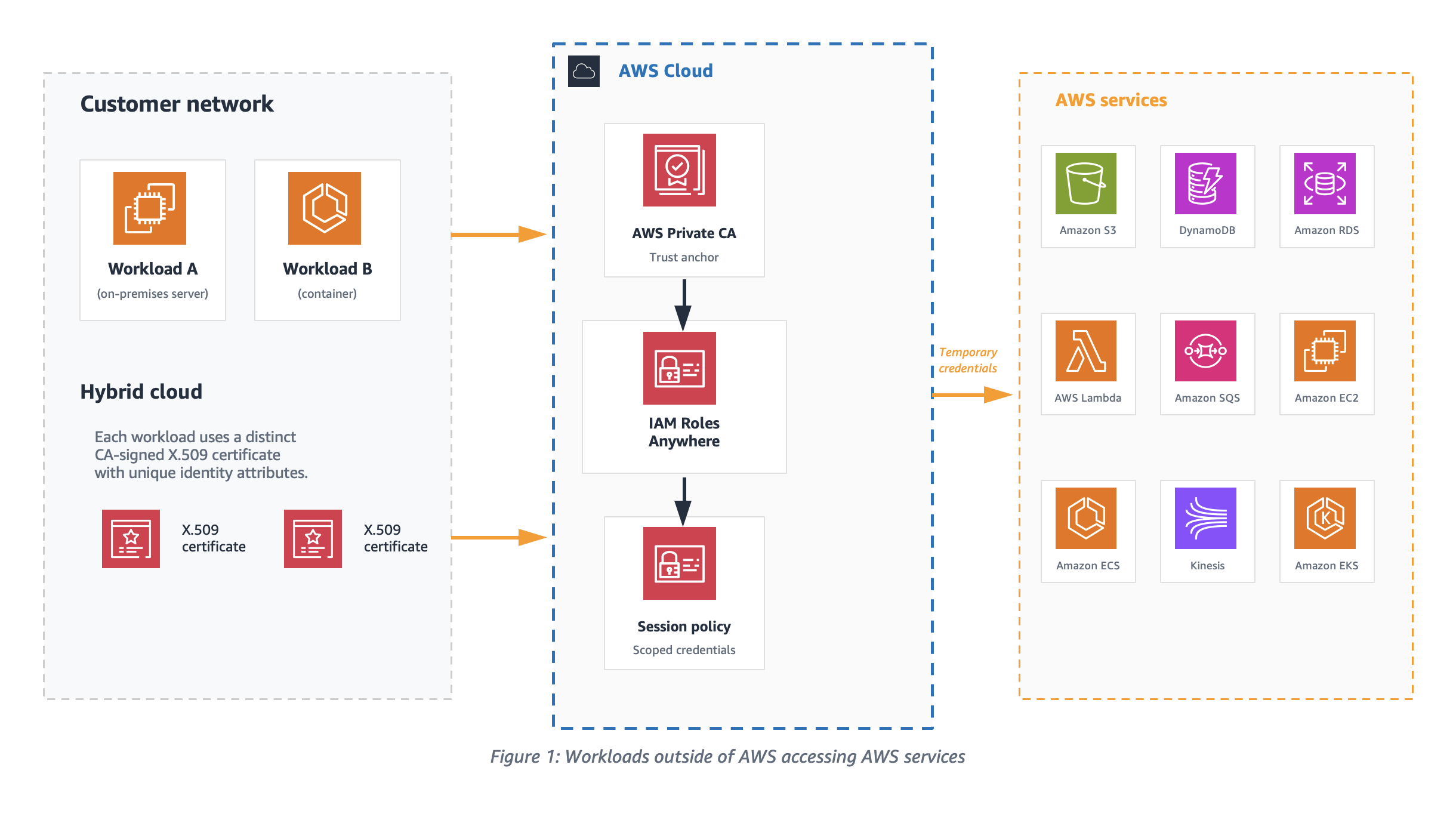
As shown in Figure 1, the access boundary and permissions of Workload A can be very different from that of Workload B when accessing AWS resources, depending on the organization’s needs. In such scenarios, it’s recommended to establish a unique machine identity for each workload. This can be achieved by issuing a separate X.509 certificate with distinct identity attributes signed by your certificate authority (CA). To set up an effective PKI solution for machine identities, you must configure the appropriate certificate attributes and anchor the trust model around those attributes.
Figure 1: Workloads outside of AWS accessing AWS services
Temporary access credentials
Workloads with distinct CA signed X.509 certificates exchange certificates with IAM, as shown in Figure 2, to get temporary security credentials for the session. The signature validation process used by IAM Roles Anywhere verifies the certificate issuer and the subject before providing the temporary credentials. To enable this verification process, an IAM Roles Anywhere trust model should be set up by either uploading your CA’s digital certificate as a trust anchor or by referencing an existing AWS Private Certificate Authority (AWS Private CA) certificate. In this post, we focus on using a trust anchor.
To help define the appropriate scope for the temporary credentials, it’s recommended to configure distinct IAM roles for each workload to assume. Workloads must use X.509 certificates issued by your CA. These certificates are exchanged with IAM to get temporary security credentials for the session.
Figure 2: Getting temporary credentials from IAM using CA issued X.509 certificate
Set up IAM roles with the IAM Roles Anywhere trust policy that will be assumed by your non-AWS workload.
Configure profiles with IAM roles and attach relevant session policies. This instructs IAM Roles Anywhere to use your selected session policies whenever you request credentials for any of the attached roles.
Trust model
The trust model is centered around setting up the right trust relationship between IAM Roles Anywhere and your CA by configuring a trust anchor. The model connects the role, the IAM Roles Anywhere service principal, and identities encoded in X509 certificates that are issued by a CA.
Certificate attributes
Certificates are a binary record with encoded key/value pairs as certificate attributes. Let’s look at one of the X.509 certificates to understand different attributes of certificate that are important for IAM Roles Anywhere PKI validation.
The following is an example PEM encoded certificate file that can be decoded with tools like openssl.
-----BEGIN CERTIFICATE-----
MIIKOzCCCSOgAwIBAgIQDlnyZvBeKjgHm1jJ++CbgDANBgkqhkiG9w0BAQsFADBE
MQswC ...........
-----END CERTIFICATE----


Certificate:
    Data:
        Version: 3 (0x2)
        Serial Number:
            e0:5d:b7:72:56:fa:75:e3
    Signature Algorithm: ecdsa-with-SHA512
        Issuer: C=US, ST=CA, L=San Francisco, O=MyCompany Inc., OU=AC, CN=MyCompany CA
        Validity
            Not Before: Sep 15 00:09:17 2023 GMT
            Not After : Sep 18 00:09:17 2023 GMT
        Subject: C=US, O=MyCompany, OU=eCommerce, CN=WorkloadA
        Subject Public Key Info:
            Public Key Algorithm: id-ecPublicKey
                Public-Key: (384 bit)
                pub:
                    04:3b:74:e1:68:06:fa:b0:3d:fe:f7:5f:74:80:05:
        X509v3 extensions:
            X509v3 Subject Alternative Name:
                DNS:ecommerce.mycompany.com, DNS:*ecommerce.mycompany.com, URI:spiffe://mycompany.com/workload/ecommerce
            X509v3 Basic Constraints: critical
                CA:FALSE
            X509v3 Key Usage: critical
                Digital Signature
    Signature Algorithm: ecdsa-with-SHA512
         30:64:02:30:19:a7:a0:33:49:ce:e1:cb:76:6e:c0:f3:c5:66:
IAM Roles Anywhere extracts values from the subject Common Name (CN), issuer, and Subject Alternative Name (SAN) fields of the authenticating certificate and makes them available for policy evaluation through the sts:sourceIdentity and principal tags. When configuring your PKI, set short validity periods on the certificates issued to workloads. Short-lived certificates limit the window of exposure if a certificate is compromised and reduce the need for active revocation.
Note: An empty Subject CN in a certificate isn’t supported by IAM Roles Anywhere.
Trust policy and effective permissions of credentials
IAM Roles Anywhere clients fetch temporary credentials for IAM Roles using the API method CreateSession. To successfully authorize this API call, the IAM role trust policy should trust the IAM Roles Anywhere service principal as shown in the following example.
As a security best practice, consider using additional condition statements to evaluate the session PrincipalTag attributes extracted from the certificate to further restrict authorization of temporary credentials. If the workloads have ephemeral certificates with a dynamic subject CN, then the issuer or SAN principal tags can be used to define condition statements in the trust policy. The trust anchor shown in the preceding trust policy helps establish the trust between IAM Roles Anywhere and the CA in your PKI.
Plan for trust anchor placement
Depending on the CA platform, you can configure one or more intermediate certificates in your PKI certificate hierarchy, as shown in Figure 3. The certificate level the trust anchor is placed at affects which end-entity certificates IAM Roles Anywhere accepts, and therefore which workloads are authorized to assume a role. To create a trust anchor, export the certificate bundle for the issuing CA certificate from your external CA platform in PEM-encoded format and upload it to the trust anchor console.
Figure 3: Certificate hierarchy in an external PKI
See the Solution deployment section to onboard a sample solution and verify your certificate bundle.
Fine-grained access control is vital for security because it allows organizations to precisely define and restrict permissions, minimizing the risk of unauthorized access and data breaches. The effective permissions of the temporary security credentials are an intersection of resource-based, identity-based, and session policies as shown in Figure 4. By setting up the trust anchor and profile configuration in IAM Roles Anywhere with session policies, you can limit the permissions for each session.
Figure 4: Effective permissions of session credentials
Credential helper
To obtain temporary security credentials from IAM Roles Anywhere, use the credential helper tool. This tool is compatible with the credential_process feature available across the AWS SDKs. The credential helper manages the process of obtaining temporary security credentials using IAM Roles Anywhere and returns them in JSON format. The private key of the workload and its CA signed certificate are the two critical parameters provided to the credential helper tool. To use this tool, you need both an end-entity certificate and a trust anchor created in IAM Roles Anywhere. As of December 2024, the credential helper (version 1.4.0 and later) supports Trusted Platform Module (TPM) 2.0.
The following is an example of how to obtain temporary security credentials:
When credential-process is used with AWS SDKs, the temporary credentials are stored in memory and refreshed automatically. However, the AWS Command Line Interface (AWS CLI) invokes credential-process on every command. Each invocation creates a new IAM Roles Anywhere session, which adds latency to every CLI call. To avoid this delay when using the AWS CLI, we recommend using the update command, which writes refreshed credentials to a file that the CLI reads on each invocation without calling credential-process again.
When you use update, credentials are written to a credential file on disk and any user or process who can read the credential file might be able to read and use those AWS credentials, so it’s recommended to use serve unless your business has a specific use case that needs to read AWS credentials from a file. The serve command can be used to vend temporary credentials through an endpoint running on the local host using the same URIs and request headers as Instance Metadata Service Version 2 (IMDSv2). When using serve, no AWS configuration files are needed because the AWS SDKs can discover the server endpoint.
Just-in-time compared to short-lived certificates as workload identities
To help mitigate the risk around the exposure of your business-critical resources to compromised certificate user sessions, it’s recommended to use certificates with just-in-time credentials or short-lived access credentials. Just-in-time certificates are issued by a CA for immediate use for authentication on a system or application. The CA uses the roles and policies defined in IAM to determine when, and under what conditions, a workload can establish a session. With just-in-time access, admins don’t have to worry about revoking access if the users’ access roles change. Because the access credentials are recreated for each access request, any role changes can be applied in real time. Just-in-time access requires support from your CA, so verify compatibility with your CA before implementing it.
It’s recommended to tailor the validity periods for short-lived certificates to align with business requirements, workload lifecycle, and your organization’s risk tolerance. AWS Private CA offers a short-lived CA mode specifically designed for certificates with validity periods under 7 days. This mode is priced at $50 per month (compared to $400 per month for general-purpose CA mode), making it cost-effective for high-volume, ephemeral workload identities such as containers and serverless functions. For more information, see AWS Private Certificate Authority and How to use AWS Private CA short-lived certificate mode. See Zero trust on AWS for information about how short-lived credentials support a zero trust architecture.
Best practices for private key storage
Safeguarding private keys is of paramount importance in any environment. A private key is created by the certificate owner when requesting certificates with a Certificate Signing Request (CSR). The CA providing your certificate doesn’t create or have your private key. In fact, it’s recommended that no one outside your administrators should ever be given access to this material. Guardrails should be implemented to make sure the keys aren’t stored in an online repository.
Using the credential helper with IAM Roles Anywhere, you can integrate with PKCS #11-compatible modules. For implementation details, see How to implement cryptographic modules to secure private keys used with IAM Roles Anywhere. With the credential helper (version 1.1.0 and later), IAM Roles Anywhere supports PKCS #11 integration, so you can use private keys stored in hardware security modules (HSMs) or software-based secure stores and avoid storing them to disk. Additionally, as of December 2024, the credential helper supports Trusted Platform Module (TPM) 2.0, enabling private keys to be generated inside the TPM and marked as non-exportable. With TPM-backed keys, the private keys can’t be extracted even if the workload host is compromised. This is the strongest private key protection available for on-premises and hybrid workloads using IAM Roles Anywhere.
If your organization doesn’t implement PKCS #11–compatible modules, IAM Roles Anywhere supports credential helper version 1.0.5 for X.509 certificates and private keys stored in macOS and Windows certificate stores. This delegates the signing operations to keys stored within those OS-specific certificate stores. In Windows, both CryptoAPI and Cryptography API: Next Generation (CNG) are supported; in macOS, Keychain is supported. In these environments, the private key will never be directly readable, and the signing operation would be delegated to the secure store instead, which will improve security posture of your environment. If you have multiple certificates, then use the --cert-selector flag of the credential helper tool to search for a specific certificate (and associated private key) through the certificate subject, issuer, and serial number. The corresponding keys are x509Subject, x509Issuer, and x509Serial, respectively. These keys can be specified either through a JSON file format or through the command line. The following is an example of both approaches:
If you want to use a JSON file, it should be similar to this:
If the preceding example is placed in a file called selector.json, it can be specified with the --cert-selector flag through file://path/to/selector.json.
The same certificate selector argument can be specified through the command line as shown in the following:
Monitoring certificate expiry in PKI is crucial for maintaining secure communication, because expired certificates can lead to authentication failures, leaving systems vulnerable to unauthorized access. Compliance and regulatory requirements often mandate timely renewal of certificates, making monitoring certificate expiry essential to avoid legal penalties and maintain organizational integrity.
Using IAM Roles Anywhere, you can receive notifications for CA certificate expiry and end-entity certificate expiry. IAM Roles Anywhere can send metrics, events, and notifications through multiple notification channels as shown in the following table:
Best practices for trust anchor certificate rotation
Consider rotating your certificates using blue/green deployments to seamlessly roll out new certificates without affecting service availability. Use automation to integrate certificate rotation testing in your blue/green deployment pipeline. See the sample AWS CloudFormation template in the Solutiondeployment section to build your automation pipeline.
As shown in Figure 5, two trust anchors have been created; one for each environment. Using this approach, you can test the certificate rotation process in a controlled staging environment before applying it to the production environment, thus reducing the risk of certificate-related outages.
Figure 5: Trust anchor certificate rotation in blue/green deployment
Important: The SessionDurationSeconds value must not exceed the IAM role’s MaxSessionDuration setting, which defaults to 3600 seconds (1 hour). If you request a longer session than the role allows, the CreateSession API returns an error. The companion template keeps both values in sync by setting the role’s MaxSessionDuration to the same parameter value. If you configure the role separately, update its MaxSessionDuration to match your desired session length. For more information, see IAM Roles Anywhere CreateSession API.
If the workload’s subject CN (WorkloadSubjectCN) doesn’t match the x509Subject CN of the authenticating certificate, the CreateSession call is denied. The same conditional verification applies to WorkloadIssuerCN and WorkloadSANCN.
The template enforces three certificate attribute conditions in the IAM trust policy: issuer CN, subject CN, and SAN CN must all match the values configured as parameters. Additionally, the trust policy scopes role assumption to the specific trust anchor Amazon Resource Name (ARN), preventing other trust anchors in the same account from assuming that role.
Conclusion
In this post, we discussed how AWS IAM Roles Anywhere, empowered by X.509 certificates, introduces a dynamic and secure way to manage workload identities and issue temporary access credentials. By understanding the trust model, using certificate attributes, and implementing fine-grained authorization, organizations can gain granular control over the effective permissions of these credentials.
The choice between just-in-time and short-lived certificates as workload identities depends on your specific requirements.
Adhering to best practices for private key storage is essential to maintain the integrity of your security infrastructure. Regularly rotating trust anchor certificates helps ensure the long-term trustworthiness of your system.
As you embark on your journey to implement IAM Roles Anywhere and integrate it with your PKI, remember that a well-architected approach to certificate management is a cornerstone of robust and resilient cloud security.
For additional deployment guidance, see Planning for your IAM Roles Anywhere deployment, which covers end-to-end deployment planning including network architecture, monitoring, and operational considerations.
If you have questions, you can start a new thread on AWS re:Post or reach out to AWS Support.
You want to set a cryptographic algorithm policy and stop non-compliant choices from being made in your Amazon Web Services (AWS) environment. This post shows you how. As you adopt post-quantum cryptography, one of the first decisions you face is which algorithms and parameter sets fit your business needs, balancing security against signature size, key size, and performance. Your cloud environment’s job is to let you express that decision and enforce it consistently, so an approved choice stays fully usable while an excluded one cannot be introduced. This post works through one concrete example on AWS: taking an organization’s cryptographic algorithm policy and turning it into preventive and detective controls. The same patterns apply to whatever your approved set is today and whatever it becomes as standards evolve.
This post is Part 2 of a two-part series on quantum-resistant signing on AWS. Part 1, Build a software supply chain with ML-DSA, is for builders and constructs an end-to-end ML-DSA signing pipeline for binaries, container images, and software bills of materials. This part is for the security, governance, and compliance teams who decide which algorithms that pipeline, and everything else in the organization, is permitted to use, and who need that decision enforced.
AWS Key Management Service (AWS KMS) supports the ML-DSA digital signature scheme (FIPS 204) through three parameter sets, ML-DSA-44, ML-DSA-65, and ML-DSA-87, targeting NIST security categories 2, 3, and 5. All three are strong, standardized choices. Each one trades signature size, key size, and speed against security margin, the amount of cryptographic strength a parameter set holds in reserve above its target security category. ML-DSA-44 is the most compact and fastest. ML-DSA-65 and ML-DSA-87 carry a larger security margin, which is what you want for signatures that must stay trustworthy over a long lifetime.
Throughout this post, the examples use the same example policy: an organization that has standardized on ML-DSA-65 and ML-DSA-87 and wants ML-DSA-44 kept out of its approved set. That is a standardization decision, not a judgment that ML-DSA-44 is insecure (see the following note). Wherever you see ML-DSA-44 in the controls that follow, read it as the variant your policy doesn’t include; the mechanics are identical for any allow/deny split you choose. The approved set here is also the one the Part 1 architecture deploys: ML-DSA-87 for the root certificate authority (CA) and ML-DSA-65 for the subordinate CA and the code-signing key. Part 1 makes the choice; this post makes it stick.
Note: ML-DSA-44 is a valid choice. ML-DSA-44 is a fully NIST-standardized parameter set (FIPS 204) at NIST security category 2, which targets roughly 128-bit-class classical security (category 2 is benchmarked against the collision resistance of SHA-256). It produces the smallest signatures and public keys of the three variants (a 1312-byte public key and 2420-byte signature) and is the fastest to sign and verify, which makes it a strong fit for constrained devices, high-volume signing, and bandwidth- or storage-sensitive workloads. You would choose ML-DSA-65 or ML-DSA-87 instead to gain extra security margin for long-lived signatures or to align with an internal standard, not because ML-DSA-44 is weak.
What success looks like
The approved variants (ML-DSA-65 and ML-DSA-87 in the example) remain fully usable throughout. What you want to rule out is the introduction of a variant outside the policy (here, ML-DSA-44). Concretely, within the AWS service surfaces in scope, principals shouldn’t be able to:
Create ML-DSA-44 key material
Use existing ML-DSA-44 keys for signing or verification
Stand up private certificate authorities (CAs) that would introduce ML-DSA-44.
And any drift from those settings should be detected.
Certificate material brought in through acm:ImportCertificate or iam:UploadServerCertificate is also not algorithm-aware (see the Private CA section). Other TLS-terminating or signing services (for example Amazon CloudFront and Amazon API Gateway) and AWS IAM Roles Anywhere aren’t covered in this post and should be assessed separately. (Part 1 of this series uses IAM Roles Anywhere with ML-DSA certificates; controls for that service are out of scope here.)
These controls are intended to be applied as defense in depth. You can apply all of them or only a subset, depending on how prescriptive you want to be:
A blanket SCP at the organization root prevents member accounts from creating or using ML-DSA-44 keys. (SCPs don’t apply to the management account, so workloads there aren’t restricted.)
An SCP at a production organizational unit (OU) restricts keys only in production accounts.
If you need flexibility inside an account, use IAM permission boundaries instead of account-wide settings enforced through an SCP.
Choose the combination that matches your operating model. The policy examples here are written to apply across all AWS Regions. If you need to scope a control to specific Regions, add an aws:RequestedRegion condition.
The policies in this post are illustrative starting points. Authoring, validating, and maintaining the specific SCPs, IAM policies, and permission boundaries for your environment is your responsibility. Test all policies in a non-production environment before deployment and adjust example values (such as policy names and key Amazon Resource Names (ARNs)) to match your organization’s approved standards.
A note on cryptographic agility
Your algorithm policy isn’t fixed forever, and these controls shouldn’t be either. The point of expressing the policy as AWS controls is that you can revise it as your needs and the relevant standards change, tightening, loosening, or swapping the approved set without re-architecting. Treat the examples here as a template you adjust to whatever your current policy is.
A deny-based control that names specific algorithms is, in effect, an allow-list of everything it does not name. The risk is default-allow: any parameter set you have not explicitly denied is permitted, so a newly introduced variant, including one you have not yet evaluated, becomes usable until you notice it and add it to the deny list. Deprecation of an already-approved variant is easy to handle in this model, because you simply add the deprecated variant to the deny list. What the model does not catch on its own is the arrival of something new. Review these controls periodically and pair the deny-list with detection so a variant outside your policy surfaces quickly rather than waiting to be discovered.
The alternative is to write the condition against the approved set rather than the excluded one. A Deny that uses StringNotEquals with a list of approved key specs fires when the request’s key spec matches none of them, so a new or not-yet-evaluated variant is blocked by default until you add it. That closes the default-allow gap, at the cost of a policy update before anyone can use a newly approved variant. The family-level SCP in Part 1 of this series takes this shape: it denies creation of any signing key whose key spec isn’t ML_DSA_*. The examples in this post take the other shape and name the excluded variant, so that approved variants stay usable without a policy change. Both are valid. Choose based on whether you would rather block something new first and approve it later, or notice it first and decide then.
The StringLike clause scopes the statement to ML-DSA key specs so it doesn’t affect other key types; the StringNotEquals clause denies any ML-DSA variant outside the approved list.
Just as algorithms and key sizes will be introduced over time, or move from approved to unapproved, so will AWS service operations. The set of operations through which an ML-DSA-44 key can be used today (AWS KMS Sign, Verify, and GetPublicKey) reflects current service capabilities and might expand as AWS releases new features. If your policy is to block use in addition to creation, you should periodically review the list of operations you restrict, because services evolve over time.
Background: Key spec compared to signing algorithm
AWS KMS support for ML-DSA introduces three key specs—ML_DSA_44, ML_DSA_65, and ML_DSA_87—that all use a single post-quantum signing algorithm: ML_DSA_SHAKE_256. This distinction drives which controls are effective.
kms:KeySpec: Reflects the KeySpec property of the key. It’s evaluated both on CreateKey (the requested key spec) and on AWS KMS key resource operations that act on a specific key, including Sign, Verify, and GetPublicKey. This makes kms:KeySpec a reliable lever for both preventing creation of ML-DSA-44 keys and restricting use of existing ones, because it can single out ML_DSA_44 from ML_DSA_65 and ML_DSA_87.
kms:SigningAlgorithm: Reflects the signing algorithm supplied on Sign and Verify, which is ML_DSA_SHAKE_256 for all three variants. It therefore can’t distinguish ML-DSA-44 from the approved variants and shouldn’t be used for this purpose.
The practical consequence: for keys held in AWS KMS, preventing ML-DSA-44 key material from being created is the most robust single control. If no ML-DSA-44 KMS keys exist, none can be used for signing through AWS KMS and none can become the subject key of a certificate. CA keys and TLS server keys are separate material: AWS Private CA generates and holds a CA’s key pair in its own HSMs, and ACM-issued, imported, or uploaded TLS certificates carry their own keys, so those surfaces are governed by the AWS Private CA and certificate controls later in this post. Where ML-DSA-44 KMS keys already exist, their use can additionally be restricted with kms:KeySpec.
Organization and account-level blocking using SCPs
SCPs can be applied at the organization root or to a specific OU to restrict ML-DSA-44. Placement determines the effective scope: it applies organization-wide when attached at the root; attached to an OU, it applies to the accounts within that OU. An SCP is the broadest-scope preventive control available.
Note that SCPs apply to member accounts and OUs but not to the organization’s management account, so avoid running ML-DSA-44-capable workloads in the management account, where an SCP will not restrict them.
The following example SCP denies both the creation of ML-DSA-44 keys (kms:CreateKey) and their use (kms:Sign, kms:Verify, kms:GetPublicKey), matching on the ML_DSA_44 key spec in each case. The creation deny stops new keys from being created; the usage deny covers keys that already exist, whether created before the SCP was attached or living in an account that later joins the OU, because kms:KeySpec is also evaluated at request time on those usage operations.SCPs are guardrails: a Deny in an SCP can’t be overridden by any IAM policy within member accounts.
Attach the following SCP at the organization root (or relevant OU):
Scope the usage deny to the three key-spec-aware actions. Limit the use of Deny to kms:Sign, kms:Verify, and kms:GetPublicKey (testing confirmed kms:KeySpec is evaluated on all three). Avoid a blanket kms:*: a wildcard that would also catch management operations such as DescribeKey, DisableKey, and ScheduleKeyDeletion, which you need to inspect or clean up those same keys, effectively locking you out of managing the keys you’re trying to remove. If you use multi-Region keys, also add kms:ReplicateKey to the creation deny: replicating an ML-DSA-44 primary key creates a new ML-DSA-44 key in another Region, and kms:KeySpec is evaluated on ReplicateKey as well.
Combining with a family-level guardrail. This SCP governs which ML-DSA parameter set is allowed; it says nothing about RSA or ECDSA. Part 1 of this series includes a complementary SCP that denies creation of any signing key whose key spec isn’t ML-DSA. Attached together, they require every new signing key to be ML-DSA and to be an approved variant.
Operational considerations. A blanket Deny at the organization root is the strongest control but has trade-offs: it removes any ability to create ML-DSA-44 keys anywhere in scope, with no exception path, which can block legitimate testing and might cause infrastructure as code (IaC) or pipeline runs that attempt ML-DSA-44 creation to fail. To preserve flexibility, consider scoping the Deny to a production OU and using IAM permission boundaries (see the following section) in build and non-production accounts.
What the caller sees. When an SCP denies a request, the caller receives an AccessDenied error indicating an explicit deny in a service control policy. For same-account and same-organization requests, the error includes the type of the denying policy and, as the enhanced error messages roll out across services, its ARN. The error doesn’t expose the SCP policy contents, and the user being blocked often can’t see the SCPs applied to their environment. Document the SCP ARN and its purpose internally so support teams can map an AccessDenied quickly.
Prevent ML-DSA-44 key creation in AWS KMS (principal-level)
The following IAM policy blocks ML-DSA-44 at the principal level. It is the identity-based counterpart to the SCP shown earlier, useful when you want per-account or per-role control rather than an organization-wide guardrail. Attach it to the IAM role or user you want to constrain.
The condition value is ML_DSA_44 (underscores, not hyphens).
This policy blocks CreateKey only. To also block use of existing ML-DSA-44 keys at the principal level, add the Sign, Verify, and GetPublicKey deny shown in the Restricting use of existing ML-DSA-44 keys section.
For comprehensive, non-overridable coverage, deploy as an SCP rather than relying solely on principal-level policies.
IAM permission boundaries
IAM permission boundaries set the maximum permissions an identity-based policy can grant to an IAM role or user and can be used as an alternative or complement to using SCPs. The effective permissions are the intersection of the identity-based policy and the boundary, and a Deny in a boundary can’t be overridden by an attached policy. Boundaries are useful where you want per-account or per-role flexibility (for example, in build or non-production accounts) rather than a blanket, multi-account deny.
Operational consideration. A permission boundary only takes effect on principals that have it attached. To rely on boundaries as a control, you need a mechanism to enforce the boundary on all IAM principals programmatically. One example enforcement mechanism would be an SCP that denies iam:CreateRole, iam:CreateUser, iam:PutRolePermissionsBoundary, and iam:PutUserPermissionsBoundary unless the approved boundary is set (using the iam:PermissionsBoundary condition key), and denies iam:DeleteRolePermissionsBoundary and iam:DeleteUserPermissionsBoundary outright so the boundary can’t be removed after the fact. You would also want to probe for non-conforming principals periodically and respond, perhaps by automatically attaching the PermissionsBoundary. IAM users shouldn’t be used, but the enforcement should account for the possibility that they exist.
Because a boundary only sets a ceiling and does not itself grant anything, it opens with Allow on all actions, then denies ML-DSA-44 key creation specifically. The following permission boundary denies creation of ML-DSA-44 keys:
To also block use of existing ML-DSA-44 keys for the principals carrying this boundary, add the Sign, Verify, and GetPublicKey deny statement shown in the following section (which also uses kms:KeySpec).
Restricting use of existing ML-DSA-44 keys
As described in the Background section, kms:KeySpec is also evaluated on Sign, Verify, and GetPublicKey, reflecting the KeySpec of the key being used. You can therefore deny those operations when kms:KeySpec equals ML_DSA_44 while continuing to permit ML_DSA_65 and ML_DSA_87. The IAM policy below, attached to an IAM principal, does exactly that.
This deny can also live in an AWS KMS key policy. The same kms:KeySpec deny can be placed directly in the key policy of an AWS KMS key. A key policy is a resource policy, so the statement must include a Principal element. Identity policies and SCPs do not name principals to which they apply. A deny in the key policy is a resource-side backstop that protects a specific key, while an SCP gives non-overridable organization-wide coverage. To turn the previous example into an AWS KMS key policy, add a Principal element to the statement (for example "Principal": {"AWS": "*"}, or a more specific principal), and keep the rest of it the same.
Additional approaches
Depending on your goals you might also want to remove the key material itself rather than only deny its use. Remember that it is difficult to know what data has been signed by a specific key, unless you track that somehow. Deleting a key that was used will make signature verification impossible. Take great care to make sure keys are not used before deleting them.
Disable or schedule deletion of the keys. Disabling stops key use immediately and is reversible. Key deletion is definitive but irreversible after the waiting period, so confirm before scheduling.
Deny Sign, Verify, and GetPublicKey by specific key ARN. You can target named keys rather than the whole key spec. To do this, you would list the exact key ARNs in the Resource element of the IAM policy (no condition key required). This is effective for targeting a single key specifically, but it is difficult to maintain lists of key ARNs. Use this strategy sparingly. If you’re considering using an IAM policy naming a key ARN, remember that a Deny in the key policy of the target key accomplishes the same goal and is attached to the key itself.
Finding existing keys (only needed if you disable or delete). A Deny in an IAM policy or SCP, based on kms:KeySpec, doesn’t require you to know which keys exist – it applies by key spec at request time. If you want to disable or delete existing ML-DSA-44 keys, you need to locate them. AWS KMS has no server-side filter for key spec, so you must enumerate keys with ListKeys and call DescribeKey and inspect each KeySpec. This client-side filtering pattern is common across AWS APIs and is well supported by pagination in the AWS SDKs. You can also use AWS Config to record and query KMS key resources.
Approved ML-DSA variants and control of AWS Private CA
AWS Private CA sets a certificate authority’s (CA’s) signing algorithm at creation time, in the CertificateAuthorityConfiguration parameter of CreateCertificateAuthority (valid values include ML_DSA_44, ML_DSA_65, and ML_DSA_87). There is currently no condition key for the algorithm, so an SCP cannot enforce signing algorithm. The approach in this section controls who can create CAs and pins the algorithm in that trusted path, backed by AWS CloudTrail-based detection.
Recommended approach
Restrict who can create CAs. Deny acm-pca:CreateCertificateAuthority broadly via SCP, and allow it only for a small set of trusted roles or an approved provisioning pipeline. This removes the ability for arbitrary principals to stand up a CA with an unapproved algorithm.
Pin the algorithm in the trusted path. Have that approved pipeline or infrastructure-as-code template hard-code SigningAlgorithm to ML_DSA_65 or ML_DSA_87 in CertificateAuthorityConfiguration. Because AWS Private CA exposes no algorithm condition key, this provisioning path is the enforcement point. Note that the CA’s algorithm pins the signature on the certificates it issues; the subject key in each certificate comes from the CSR, which AWS Private CA copies without validating its algorithm, so pin the CSR key algorithm in the same issuance pipeline.
Control the trust chain. On the PKI side, only add approved CAs to your trust stores and issuance hierarchies, and do not trust or subordinate CAs that could issue ML-DSA-44. This prevents an unapproved CA from being introduced into a trusted path.
Detect drift. Use CloudTrail to capture CreateCertificateAuthority calls and AWS Config to flag any CA whose configuration uses ML_DSA_44, so an unapproved CA is caught quickly.
Part 1 of this series shows what this looks like in practice: it creates an ML-DSA-87 root CA and an ML-DSA-65 subordinate CA with CreateCertificateAuthority, activates them, and distributes the resulting chain to verifiers. In the model described here, those are the calls that only your approved provisioning pipeline is allowed to make.
Setting the ML-DSA value in CertificateAuthorityConfiguration. The same variant goes in both the KeyAlgorithm and SigningAlgorithm fields (for example, KeyAlgorithm=ML_DSA_65 with SigningAlgorithm=ML_DSA_65). Note a difference in signing algorithms between AWS KMS and AWS Private CA. With AWS Private CA, the SigningAlgorithm takes the variant value directly (ML_DSA_44, ML_DSA_65, and ML_DSA_87), and doesn’t accept ML_DSA_SHAKE_256. In contrast, AWS KMS uses ML_DSA_SHAKE_256 as its signing algorithm. Be aware that some older AWS Command Line Interface (AWS CLI) builds omitted descriptions of the ML-DSA variants from the built-in CLI help, so don’t rely on the help in the AWS CLI to determine valid values. For more information, see CertificateAuthorityConfiguration API Reference.
Known limitation. Some surfaces have no algorithm condition key, so you enforce them through provisioning and detection rather than policy. acm-pca:CreateCertificateAuthority has no condition key for the algorithm, and acm:ImportCertificate and iam:UploadServerCertificate are not algorithm-aware, so a disallowed signature setting on a created, imported, or uploaded certificate cannot be blocked by an IAM policy or SCP condition. Govern these through your provisioning process, restrict who can call them, and deny the import and upload actions entirely where they are not required. The controls above remain the available mitigation.
In particular, iam:UploadServerCertificate doesn’t support any method to prevent use of particular algorithms, and AWS doesn’t recommend using this API to generate and upload certificates. This API predates ACM and exists mainly to cover AWS Regions or partitions where ACM is not yet available. While a new Region or partition is being built out, workloads can still need a TLS server certificate before ACM support has shipped there, and uploading a certificate to IAM gives you a place to store and reference it in the meantime. Once ACM is available in that Region, you should use ACM instead. Outside that narrow case, deny iam:UploadServerCertificate unless it is genuinely required.
ACM-issued leaf certificates. A CA’s own key and signing algorithm are separate from the leaf certificates that ACM issues from it. If you use ACM to request leaf certificates, you can constrain the leaf’s key algorithm with the acm:KeyAlgorithm condition key on acm:RequestCertificate. This lets you allow-list approved algorithms for leaf certificates using SCPs or IAM policies, similar to the AWS KMS examples earlier in this post. Be aware that, at the time of writing, ACM doesn’t offer ML-DSA leaf certificates. So a policy like this is a forward-looking defense-in-depth control rather than an immediate ML-DSA-44 risk. The IAM example below is illustrative (using example approved algorithms). Since this is an evolving part of the service, be sure to validate this in your environment before relying on it.
This example uses StringNotEqualsIfExists so it denies only requests that specify a disallowed algorithm. With plain StringNotEquals, a request that omits acm:KeyAlgorithm would also be denied, because the missing key makes the condition evaluate true. Choose the operator that matches whether you want to block requests that leave the algorithm unspecified.
Prevent ML-DSA-44 usage in TLS for NLB and ALB
Elastic Load Balancing, for both network load balancers (NLB) and application load balancers (ALB), terminates TLS on behalf of your applications. The certificates used by these listeners are requested through or imported into ACM, or uploaded to IAM. A listener’s configured security policy and its certificate determine what’s offered during negotiation. At the time of writing, ACM requests and imports accept RSA and ECDSA keys only, and NLB and ALB listeners accept RSA and ECDSA certificates only, so no ML-DSA certificate can be bound to a listener today. As with the ACM leaf-certificate policy earlier, the controls in this section are forward-looking defense in depth rather than a mitigation of an immediate ML-DSA-44 risk.
Certificate controls (the effective mechanism for ML-DSA-44)
Because the listener API calls reference a certificate only by ARN, you can’t write an SCP on CreateListener, ModifyListener, or AddListenerCertificates that inspects the certificate’s algorithm. IAM conditions can’t reference attributes of a separately-referenced resource. Keeping ML-DSA-44 out of TLS therefore relies on there being no ML-DSA-44 certificate material to associate:
Configure your private CA to issue only ML_DSA_65 or ML_DSA_87 certificates, and control who can create CAs.
Prevent ML-DSA-44 key creation in AWS KMS, so that no KMS-held ML-DSA-44 key can become the subject key of a certificate. TLS server keys for ACM-issued, imported, or uploaded certificates are not KMS keys; those are governed by items 1 and 3.
Control imported and uploaded certificates through your provisioning process or deny the import and upload actions where not required, as described in the AWS Private CA section.
Detective controls
CloudTrail records the certificate and listener API calls in this section: certificate creation and import (acm-pca:CreateCertificateAuthority, acm:ImportCertificate, iam:UploadServerCertificate) and listener configuration (CreateListener, ModifyListener, AddListenerCertificates). Whether the algorithm shows up in the event depends on what the call itself carries. Creation calls that take the algorithm as an input record it: kms:CreateKey logs the KeySpec, and acm-pca:CreateCertificateAuthority logs the signing algorithm. That makes CloudTrail effective for catching the creation of ML-DSA-44 key material or a CA. A listener binding references its certificate only by ARN, so the certificate’s algorithm does not appear in that event. To evaluate the algorithm of a bound or imported certificate, use AWS Config resource evaluation as the detective backstop.
Summary for TLS
The primary preventive control is the certificate material itself: with no ML-DSA-44 CA, no ML-DSA-44 KMS key, and certificate import and upload controlled, no ML-DSA-44 certificate can be issued or bound. Where you also operate an allow-list of permitted TLS security policies, the elasticloadbalancing:SecurityPolicy condition key (on CreateListener and ModifyListener) can additionally constrain which TLS policies listeners can use.
Summary of controls
The following table maps the example policy (allow ML-DSA-65 or ML-DSA-87, exclude ML-DSA-44) to the available controls. Modify the controls to limit use to the approved set of algorithms your policies require.
Area
Control
Status
Block ML-DSA-44 key creation (Organization-wide or for all accounts in an organization OU)
SCP on kms:CreateKey using kms:KeySpec
Fully supported via condition key
Block ML-DSA-44 key creation (per account or per role)
IAM policy or permission boundary using kms:KeySpec
Supported; requires programmatic enforcement of boundaries
Block use of existing ML-DSA-44 keys
Deny Sign, Verify, and GetPublicKey using kms:KeySpec (key policy, IAM, or SCP); optionally disable and delete keys
Supported using kms:KeySpec (not kms:SigningAlgorithm)
Only allow approved variants in Private CA
Restrict who can create CAs; pin ML_DSA_65 or ML_DSA_87 in provisioning path
No algorithm condition key; enforce using process and detection
Limit variants in imported or uploaded TLS certificates
Process controls, or deny import or upload APIs (prefer ACM over iam:UploadServerCertificate)
APIs aren’t algorithm-aware
Block use of ML-DSA-44 in TLS with network load balancers (NLB) and application load balancers (ALB)
Restrict TLS policy using elasticloadbalancing:SecurityPolicy; control cert material
TLS-policy restriction supported; no per-cert algorithm condition
Detect use of unapproved variants
CloudTrail (API-level) and AWS Config custom rules
Supported using custom AWS Config rules; not managed rules
Conclusion
In this post, you learned how to use ML-DSA as an example of turning a cryptographic algorithm policy into enforceable AWS controls. The key lever is the kms:KeySpec condition key: it keeps your approved parameter sets (ML-DSA-65 and ML-DSA-87) fully usable while preventing the creation and use of a parameter set you’ve excluded (ML-DSA-44) on the CreateKey, in addition to the Sign, Verify, and GetPublicKey operations, where kms:SigningAlgorithm can’t tell the variants apart. Applied as defense in depth across SCPs, IAM policies, permission boundaries, and KMS key policies, and extended to the surfaces that have no algorithm condition key (AWS Private CA, certificate import, and Elastic Load Balancing TLS) through provisioning controls plus AWS CloudTrail and AWS Config drift detection, these controls give you a consistent way to keep an unapproved variant out of your accounts.
The pattern isn’t specific to ML-DSA-44. Because your algorithm policy will change as standards and your own requirements evolve, treat these controls as a reusable template and re-point the same condition keys and guardrails at whatever your approved set becomes. This adaptability is the practical meaning of cryptographic agility: changing what you allow without re-engineering how you enforce it.
To see the workloads these controls govern, read Part 1 of this series, which builds a complete ML-DSA signing pipeline, from key creation and PKI through artifact signing and verification, using the approved set enforced here.
Software supply chain attacks have grown in both frequency and sophistication. Recent high-profile compromises of build systems and open source dependencies demonstrate that attackers increasingly target the trust mechanisms that verify software integrity. Those trust mechanisms rely on digital signature algorithms, and today many use traditional algorithms such as Rivest-Shamir-Adleman (RSA) and the Elliptic Curve Digital Signature Algorithm (ECDSA). If a sufficiently powerful quantum computer could forge these signatures, an attacker could potentially inject unauthorized code into signed artifacts, fabricate build attestations, or impersonate legitimate publishers. Using quantum-resistant signatures today defends against threats that might emerge in the future.
Since 2025, the Commercial National Security Algorithm Suite 2.0 (CNSA 2.0), published by the US National Security Agency (NSA), has required US National Security Systems (NSS) to “support and prefer” quantum-resistant signatures for software and firmware, with exclusive use mandated by 2030. The EU Cyber Resilience Act (CRA) takes full effect in December 2027. It requires manufacturers to maintain verifiable software integrity throughout a product’s lifecycle. Organizations that ship software to US federal agencies or sell products in the European market face converging deadlines that demand action now.
This post is Part 1 of a two-part series on adopting ML-DSA signatures, standardized in NIST FIPS 204 (ML-DSA) signatures, on AWS. As of Oct 2026, this series is the first end-to-end guide from any cloud provider for post-quantum signing across the software supply chain, from establishing an ML-DSA root of trust to enforcing algorithm policy across an organization. This part is for builders and walks through constructing and operating the signing pipeline. Part 2, Enforce your ML-DSA algorithm policy with SCPs and IAM, is for security and governance teams and shows how to turn the algorithm choices made here into preventive and detective controls across an organization.
Understanding the harvest now, forge later threat
After a cryptographically relevant quantum computer (CRQC) exists, the mathematical problems protecting today’s public-key cryptography can be solved efficiently. Attacks that are impractical today because of the computational complexity suddenly become practical using a CRQC. Most discussions of post-quantum cryptography (PQC) focus on the harvest now, decrypt later threat to data confidentiality. The asymmetric keys protecting data in transit can be efficiently derived using a CRQC, exposing the data that was meant to be protected. Digital signatures rely on the same asymmetric mathematical problems that a CRQC would break. This means that software supply chains face a parallel threat that targets integrity rather than confidentiality. An attacker who records signed artifacts today can forge those signatures in the future on a totally different artifact, using a CRQC.
Consider firmware signed with ECDSA P-256 and deployed to a fleet of embedded devices in 2026. These devices verify the firmware signature on every boot for their 15-year operational lifetime and can’t be recalled to re-sign after deployment. If a CRQC becomes operational in 2035, an attacker could produce a valid-looking signature over tampered firmware, and every device in the fleet would accept it as authentic on next restart. For organizations that rely on classical digital signatures as the primary mechanism for verifying software integrity, this weakens a critical link in the verification chain. This is why CNSA 2.0 specifies aggressive timelines for digital signatures: the artifacts you sign today must remain trustworthy for their full operational lifetime.
ML-DSA is designed to resist attacks from both classical and quantum computers. AWS KMS, AWS Private CA, and AWS IAM Roles Anywhere all support ML-DSA, making it possible to address the forge-later threat across your supply chain today without additional tooling.
Architecture overview: Five pillars of a quantum-resistant supply chain
The architecture comprises five trust pillars that together protect your software delivery pipeline:
ML-DSA key management in AWS KMS – All signing keys are generated and protected in FIPS 140-3 Security Level 3 hardware security modules (HSMs). Private keys never leave the HSM boundary.
ML-DSA public key infrastructure (PKI) throughAWS Private CA – A certificate hierarchy (root CA, subordinate CA, end-entity certificates) binds ML-DSA public keys to identities, establishing who signed what. CA private keys are generated and stored in hardware-protected HSMs managed by the service and never leave the HSM boundary.
Quantum-resistant workload identity (for external build agents) – For continuous integration and delivery (CI/CD) agents running outside AWS that authenticate through X.509 certificates, IAM Roles Anywhere with ML-DSA certificates ties the signer’s identity back to the same quantum-resistant root of trust.
ML-DSA SBOM integrity attestation – The SBOM for each release is wrapped in an in-toto Statement that names the artifact it describes by digest, and the Statement is signed with the same ML-DSA code-signing key. This provides quantum-resistant proof that the dependency manifest hasn’t been tampered with and that it belongs to the artifact it accompanies.
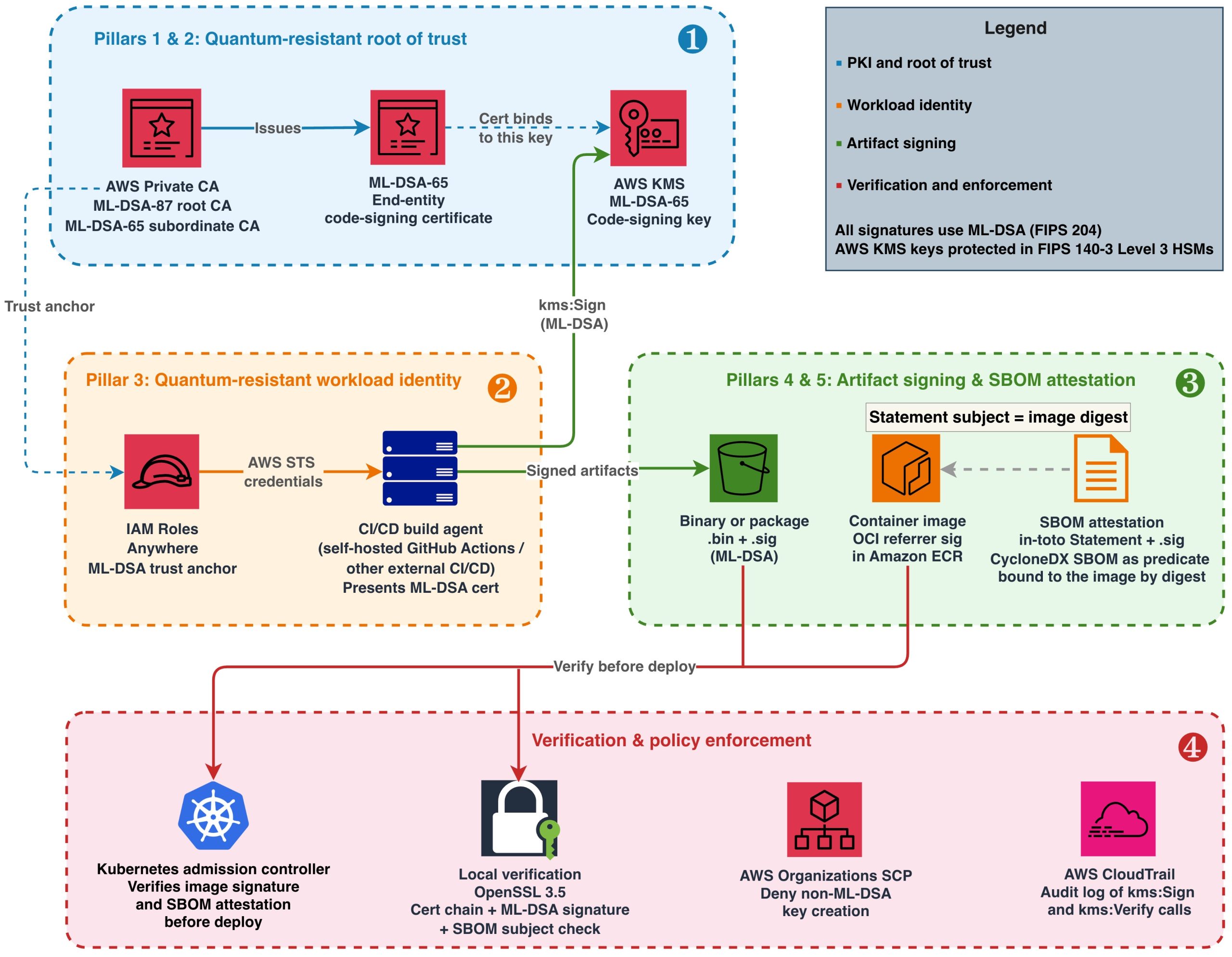
These pillars create a chain of trust: AWS Private CA protects the root CA key in its own HSMs, issues certificates that bind identities to AWS KMS code-signing keys, IAM Roles Anywhere uses those certificates to authenticate build agents, and authenticated agents sign every artifact and SBOM they produce.
Figure 1: End-to-end quantum-resistant software supply chain on AWS
Figure 1 illustrates this architecture in four layers, numbered in the order you build them:
Root of trust (Pillars 1 and 2) – Establish your AWS Private CA hierarchy and create your code-signing key in AWS KMS.
Workload identity (Pillar 3) – Register the CA as an IAM Roles Anywhere trust anchor and issue ML-DSA certificates to build agents, ensuring the signer’s identity chains back to the same quantum-resistant root of trust.
Artifact signing (Pillars 4 and 5) – Sign binaries, container images, and SBOMs using the authenticated build agent.
Verification and enforcement – Validate signatures at deployment and enforce ML-DSA-only policies.
Prerequisites
To follow along, you need:
An AWS account with permissions to create resources in AWS KMS, AWS Private CA, IAM Roles Anywhere, and Amazon ECR.
IAM Roles Anywhere credential helper (aws_signing_helper) v1.8.0 or later, the first release that supports ML-DSA keys and certificates, for workload authentication. Download from the IAM Roles Anywhere documentation.
OpenSSL 3.5 or later (required for ML-DSA signature verification and mu computation).
ORAS CLI v1.2 or later (for attaching Open Container Initiative (OCI) referrer artifacts to container images). Alternatively, you can use the Notation CLI with a custom plugin or any OCI-compliant client that supports the OCI Referrers API.
jq, for constructing and parsing the in-toto Statements used for SBOM attestation and for parsing ORAS output.
Amazon Inspector SBOM Generator (Sbomgen), or another tool that produces a CycloneDX JSON SBOM, for the SBOM example. Sbomgen runs only on Linux (x86-64 and ARM64), so run that step on a Linux build agent or container. It uses the registry credentials that oras login stores in the Docker config file, and it also accepts them through --username or the INSPECTOR_SBOMGEN_USERNAME and INSPECTOR_SBOMGEN_PASSWORD environment variables.
Java 11 or later and Apache Maven, to run the diy-code-signing-kms-private-ca sample that produces the code-signing CSR in Step 4 of Building the ML-DSA PKI foundation.
A container image pushed to Amazon ECR (for the container signing example).
Building the ML-DSA PKI foundation
Start by creating the certificate hierarchy that will anchor your supply chain trust. AWS Private CA generates and stores its own CA signing keys internally in hardware-protected HSMs when you create a certificate authority. Use ML-DSA-87 (NIST security category 5, defined as at least as hard to break as exhaustive key search on AES-256) for the root CA because it protects the longest-lived trust anchor. Use ML-DSA-65 (NIST security category 3) for the subordinate CA to balance security with smaller signature sizes for frequently issued certificates.
The parameter sets used here, ML-DSA-87 and ML-DSA-65, are also the approved set in the example algorithm policy that Part 2 of this series turns into enforceable controls. If your organization has standardized on a different set, substitute it in the commands that follow; the build steps don’t change.
Step 1: Create the root CA in AWS Private CA
When you specify KeyAlgorithm: ML_DSA_87, Private CA generates an ML-DSA-87 key pair internally. You don’t need to create a separate AWS KMS key for the CA.
After creation, the root CA is in PENDING_CERTIFICATE state. Activate it by self-signing its certificate. This is where you set the root CA’s validity period (10 years is typical for a root):
After creation, the subordinate CA enters PENDING_CERTIFICATE state with no link to the root. Activate it by signing its certificate signing request (CSR) with the root CA:
# Retrieve the subordinate CA's certificate signing request
aws acm-pca get-certificate-authority-csr \
  --certificate-authority-arn <sub-ca-arn> \
  --output text > sub-ca.csr

# Sign the CSR using the root CA (this establishes the trust hierarchy)
SUB_CERT_ARN=$(aws acm-pca issue-certificate \
  --certificate-authority-arn <root-ca-arn> \
  --csr fileb://sub-ca.csr \
  --signing-algorithm ML_DSA_87 \
  --validity Value=1825,Type=DAYS \
  --template-arn arn:aws:acm-pca:::template/SubordinateCACertificate_PathLen0/V1 \
  --query CertificateArn --output text)

# Retrieve the signed certificate and import it to activate the subordinate CA
aws acm-pca get-certificate \
  --certificate-authority-arn <root-ca-arn> \
  --certificate-arn $SUB_CERT_ARN \
  --query Certificate --output text > sub-ca-cert.pem

aws acm-pca import-certificate-authority-certificate \
  --certificate-authority-arn <sub-ca-arn> \
  --certificate fileb://sub-ca-cert.pem \
  --certificate-chain fileb://root-ca-cert.pem
Step 3: Create the code-signing key in AWS KMS
Your build agents use this key to sign artifacts, so their IAM roles need the kms:Sign permission on it. The end-entity certificate issued by your subordinate CA binds an identity to this key’s public key.
Step 4: Issue the end-entity code signing certificate
To issue a certificate, you need a CSR. Because the ML-DSA private key never leaves the AWS KMS HSM, you can’t generate the CSR locally with OpenSSL. Instead, you construct the CSR’s TBS (to-be-signed) structure containing your subject name and public key, sign it remotely by calling aws kms sign, and assemble the final CSR from those components.
For a working implementation that assembles an ML-DSA CSR around a KMS-managed private key and signs it with AWS KMS, see Post-quantum (ML-DSA) code signing with AWS Private CA and AWS KMS and its diy-code-signing-kms-private-ca sample on GitHub (Java, built with Maven). There is no AWS CLI-only path for this step: the CSR must be constructed and signed in code, and the sample is the reference implementation.
After you have the code-signing.csr file, issue the certificate from your subordinate CA:
# Issue a code-signing certificate valid for one year, signed by the subordinate CA using ML-DSA-65.
# Replace <sub-ca-arn> with the ARN that create-certificate-authority returned for the subordinate CA in Step 2.
CODE_SIGNING_CERT_ARN=$(aws acm-pca issue-certificate \
  --certificate-authority-arn <sub-ca-arn> \
  --csr fileb://code-signing.csr \
  --signing-algorithm ML_DSA_65 \
  --validity Value=365,Type=DAYS \
  --template-arn arn:aws:acm-pca:::template/CodeSigningCertificate/V1 \
  --query CertificateArn --output text)

# Retrieve the issued certificate
aws acm-pca get-certificate \
  --certificate-authority-arn <sub-ca-arn> \
  --certificate-arn $CODE_SIGNING_CERT_ARN \
  --query Certificate --output text > code-signing-cert.pem
This certificate binds the signer identity to the AWS KMS code-signing key material. Note that the certificate validity period (365 days in this example) determines how long verifiers can validate signatures by checking the certificate alone. AWS Private CA lets you choose the validity period of an issued certificate, as long as it ends no later than the issuing CA’s own certificate; in this example the subordinate CA certificate from Step 2 is valid for 1,825 days, so the three-year option below fits inside it. For artifacts that must remain verifiable beyond the certificate’s expiry, consider these approaches:
Longer certificate validity – For private PKI, code-signing certificates are commonly issued with multi-year validity (for example, Value=1095,Type=DAYS for 3 years) because you control the issuance policy.
Trusted timestamping (RFC 3161) – Countersign each signature with an RFC 3161 timestamp from a Time Stamping Authority (TSA) at signing time. The timestamp proves the signature was created while the certificate was valid, allowing verification indefinitely. AWS doesn’t provide a managed TSA; use a third-party TSA or operate your own.
Re-signing – Before a certificate expires, re-sign active artifacts with a newly issued certificate.
Distribute the certificate chain (root CA certificate, subordinate CA certificate, and end-entity certificate) to systems that need to verify your signatures.
Signing artifacts with ML-DSA in your CI/CD pipeline
With the PKI hierarchy in place, integrate ML-DSA signing into your build process. The approach depends on artifact type. ML-DSA-65 signatures are 3,309 bytes (compared to 64 bytes for ECDSA P-256), and the latency of the AWS KMS Sign operation for ML-DSA is comparable to existing asymmetric operations. The larger signature size has negligible impact when stored alongside multi-megabyte container images or packages, but is worth accounting for in size-constrained environments like embedded device images transmitted over low-bandwidth links.
Binary and package signing
Most build outputs, including compiled binaries and packages, are far larger than the 4,096-byte limit that AWS KMS places on the message passed to aws kms sign. Make the EXTERNAL_MU method your pipeline’s default: compute the 64-byte message representative (mu) externally with OpenSSL 3.5, then pass only mu to AWS KMS. This handles an artifact of any size and never needs to change as your artifacts grow. AWS KMS also accepts content directly with --message-type RAW, up to 4,096 bytes. Use RAW only for inputs whose size is fixed by construction, such as the 71-character manifest digest in the container image example that follows. An artifact that fits today is likely to outgrow the limit later, and a pipeline that depends on RAW fails when it does. Both methods produce cryptographically identical signatures. The verifier doesn’t need to know which method was used; standard ML-DSA verification applies in either case.
# Retrieve the public key
aws kms get-public-key --key-id alias/pqc-code-signing \
  --query PublicKey --output text | base64 --decode > pk.der

# Extract raw public key bytes from the DER-encoded SubjectPublicKeyInfo.
# The BIT STRING starts at offset 17 for all ML-DSA key sizes.
# Expected output: 1,312 bytes (ML-DSA-44), 1,952 bytes (ML-DSA-65), or 2,592 bytes (ML-DSA-87).

openssl asn1parse -inform DER -in pk.der -strparse 17 -noout -out pk_raw.bin

# Compute mu per FIPS 204 Section 6.2
printf '\x00\x00' | cat - artifact.bin > m_prime.bin
openssl dgst -shake256 -xoflen 64 -binary pk_raw.bin > pk_hash.bin
cat pk_hash.bin m_prime.bin | openssl dgst -shake256 -xoflen 64 -binary > mu.bin

# Sign the mu value
aws kms sign \
  --key-id alias/pqc-code-signing \
  --message fileb://mu.bin \
  --message-type EXTERNAL_MU \
  --signing-algorithm ML_DSA_SHAKE_256 \
  --query Signature --output text | base64 --decode > artifact.bin.sig
Store the .sig file alongside the artifact in Amazon S3 or your package repository. Protect the integrity of both the artifact and its signature by enabling S3 Object Lock (WORM protection) or at minimum S3 Versioning with restricted write access. If an attacker can modify or delete either file, verification can’t be trusted. For comprehensive guidance, see Security best practices for Amazon S3.
Container image signing
For container image signing, use the OCI referrer pattern, defined in the OCI Image and Distribution Specifications v1.1. A referrer is an artifact, such as a signature or an SBOM, whose manifest names another image in its subject field. Registries that support the pattern, including Amazon ECR, return these artifacts when a client asks for an image’s referrers. This approach uses AWS KMS ML-DSA keys to generate the signature and stores it as a referrer of the image:
# Repository URI used by ORAS here and in the SBOM steps; replace the account ID and Region
ECR_URI=111122223333.dkr.ecr.us-east-1.amazonaws.com/myapp

# Authenticate ORAS to Amazon ECR
aws ecr get-login-password --region us-east-1 | \
  oras login --username AWS --password-stdin 111122223333.dkr.ecr.us-east-1.amazonaws.com

# Get the image manifest digest
IMAGE_DIGEST=$(aws ecr batch-get-image \
  --repository-name myapp \
  --image-ids imageTag=v1.2.0 \
  --query 'images[0].imageId.imageDigest' --output text)

# Sign the digest. It is a fixed 71 characters, so RAW is safe here (see Binary and package signing).
# AWS CLI v2 expects blob parameters to be base64, so write the digest to a file and pass it with fileb://
echo -n "$IMAGE_DIGEST" > digest.txt
aws kms sign \
  --key-id alias/pqc-code-signing \
  --message fileb://digest.txt \
  --message-type RAW \
  --signing-algorithm ML_DSA_SHAKE_256 \
  --query Signature --output text | base64 --decode > image.mldsa.sig

# Attach signature as OCI referrer using ORAS
oras attach $ECR_URI@$IMAGE_DIGEST \
  --artifact-type "application/vnd.example.mldsa-signature.v1" \
  image.mldsa.sig:application/octet-stream
At deployment time, your admission controller retrieves the referrer artifact and verifies the ML-DSA signature before allowing the image to run. See Verifying a container image signature before deployment later in this post for the full verification workflow and admission control implementation.
SBOM signing
A software bill of materials (SBOM) is a structured inventory of every component, library, and dependency included in a software release. It lists package names, versions, suppliers, and dependency relationships. Organizations use SBOMs to track vulnerabilities, verify license compliance, and respond quickly when a compromised component is disclosed.
Signing the SBOM file on its own proves that the inventory hasn’t been tampered with since it was signed, but not which artifact it describes. If the image signature and the SBOM signature are independent of each other, an attacker who holds a legitimately signed SBOM for a clean image can present it alongside a different signed image and claim that the two correspond. Attaching the SBOM to the image as an OCI referrer doesn’t close this gap by itself, because the subject field of a referrer manifest is set by whoever pushes the referrer; it’s a discovery mechanism, not a cryptographic binding. The binding must be inside the bytes that the signature covers.
To create that binding, wrap the SBOM in an in-toto Statement before signing it. A Statement names the artifacts it describes in its subject field, by digest, and carries the SBOM as its predicate. Because the image manifest digest is part of the signed content, a verifier can confirm that the SBOM in hand was issued for exactly the image it is about to deploy, and a swapped SBOM or a swapped digest fails verification. Embedding the SBOM in the image filesystem is another way to bind the two, because the image digest then covers the SBOM bytes. This post uses the Statement approach because it also works for SBOMs generated by scanning a finished image, for artifacts that have no filesystem such as binaries and firmware, and for images that are already in your registry, and because the SBOM stays readable from the registry without pulling the image.
Generate the SBOM with your preferred tool (such as Amazon Inspector SBOM Generator (Sbomgen) for container images), wrap it in a Statement, and sign the Statement with the same EXTERNAL_MU step you use for binaries:
# Scan the pushed image by digest so the inventory describes exactly the manifest you signed.
# Sbomgen reuses the registry login from the oras login step in the previous section.
inspector-sbomgen container --image $ECR_URI@$IMAGE_DIGEST -o sbom.json

# Wrap the SBOM in an in-toto Statement whose subject is the image manifest digest.
# This puts the digest inside the signed bytes, which binds this SBOM to this image.
jq -n \
  --arg name "$ECR_URI" \
  --arg digest "${IMAGE_DIGEST#sha256:}" \
  --slurpfile sbom sbom.json \
  '{
    "_type": "https://in-toto.io/Statement/v1",
    "subject": [{"name": $name, "digest": {"sha256": $digest}}],
    "predicateType": "https://cyclonedx.org/bom",
    "predicate": $sbom[0]
  }' > sbom.statement.json

# Sign using EXTERNAL_MU (same mu computation as binary signing above,
# with sbom.statement.json as the input)
# ... compute mu from sbom.statement.json ...
aws kms sign \
  --key-id alias/pqc-code-signing \
  --message fileb://mu.bin \
  --message-type EXTERNAL_MU \
  --signing-algorithm ML_DSA_SHAKE_256 \
  --query Signature --output text | base64 --decode > sbom.statement.json.sig

# Attach the Statement and its signature to the image as an OCI referrer so
# verifiers discover them alongside the image signature
oras attach $ECR_URI@$IMAGE_DIGEST \
  --artifact-type "application/vnd.example.mldsa-sbom-attestation.v1" \
  sbom.statement.json:application/vnd.in-toto+json \
  sbom.statement.json.sig:application/octet-stream
Ship the Statement and its .sig file together; the SBOM itself is the Statement’s predicate field, and verifiers extract it after verification. The same pattern binds an SBOM to a binary or package: set the subject digest to the SHA-256 of the file instead of an image manifest digest. The Verifying a binary or SBOM signature section later in this post walks through the full verification workflow, including the subject check that completes the binding.
Quantum-resistant workload identity for build agents
Signing artifacts with ML-DSA keys addresses the integrity of the artifacts themselves. Separately, build agents running outside AWS (on-premises Jenkins, self-hosted GitHub Actions runners, or third-party CI/CD systems) authenticate using X.509 certificates or OIDC tokens typically signed with RSA or ECDSA. These authentication credentials represent a classical cryptographic dependency in the pipeline. IAM Roles Anywhere with ML-DSA certificates replaces that dependency: the credential that the external build agent presents, and the CA that vouches for it, no longer rely on algorithms that are vulnerable to quantum attack. (The TLS connection that carries the request still authenticates the AWS endpoint with a traditional certificate, as public TLS does today; that is a transport concern separate from the signing identity this post is about.) Build agents running on AWS with an attached IAM role don’t have this dependency: their API requests are authenticated with AWS Signature Version 4 (SigV4), which uses a symmetric hash-based message authentication code (HMAC-SHA256). Symmetric schemes like this are already considered quantum-resistant, so no additional action is needed.
Step 1: Register a workload identity CA as a trust anchor
For this walkthrough, reuse the subordinate CA that you created earlier; that avoids the monthly charge for a second CA, and the commands that follow assume it. In production, use a dedicated subordinate CA for workload identity certificates, separate from your code-signing CA. This limits the blast radius if either CA is compromised and has to be revoked, and it lets you apply different issuance policies to the two certificate types.
# Use the ARN that create-certificate-authority returned when you created the
# subordinate CA earlier. If you no longer have it, list your CAs and copy the
# ARN of the SUBORDINATE one.
aws acm-pca list-certificate-authorities \
  --query "CertificateAuthorities[?Type=='SUBORDINATE'].[Arn,Status,CertificateAuthorityConfiguration.Subject.CommonName]" \
  --output table
SUB_CA_ARN=arn:aws:acm-pca:us-east-1:111122223333:certificate-authority/abc-123   # replace with yours

# Register the subordinate CA as an IAM Roles Anywhere trust anchor
aws rolesanywhere create-trust-anchor \
  --name "PQC-CI-CD-Trust-Anchor" \
  --source "sourceType=AWS_ACM_PCA,sourceData={acmPcaArn=$SUB_CA_ARN}" \
  --enabled
Step 2: Create the build agent role and a profile that references it
An IAM Roles Anywhere profile specifies which IAM roles a workload can assume after it authenticates with a certificate from your trust anchor. Create the role first. Its trust policy lets IAM Roles Anywhere assume it only through your trust anchor and only for a certificate whose subject common name identifies the build agent; without those conditions, any certificate that the trust anchor CA issues could assume the role. Its permissions policy grants only what signing requires, on only the code-signing key. Save the trust policy as build-agent-trust.json, replacing the trust anchor ARN with the one that create-trust-anchor returned in Step 1:
Save the permissions policy as build-agent-permissions.json, replacing the resource with your key’s ARN (aws kms describe-key --key-id alias/pqc-code-signing --query KeyMetadata.Arn --output text):
Step 3: Issue the build agent certificate and configure the credential helper
Generate the build agent’s ML-DSA-65 key pair and CSR locally with OpenSSL, have the subordinate CA issue a client authentication certificate for it, and then configure the IAM Roles Anywhere credential helper to present that certificate:
# Generate the build agent's key pair and CSR. The CN must match the
# aws:PrincipalTag/x509Subject/CN condition in the role's trust policy.
openssl genpkey -algorithm ML-DSA-65 -out build-agent-mldsa-key.pem
chmod 400 build-agent-mldsa-key.pem
openssl req -new -key build-agent-mldsa-key.pem \
  -subj "/C=US/O=Example Corp/CN=pqc-build-agent-01" \
  -out build-agent.csr

# Issue a 30-day client authentication certificate from the subordinate CA
# registered as the trust anchor in Step 1.
BUILD_AGENT_CERT_ARN=$(aws acm-pca issue-certificate \
  --certificate-authority-arn $SUB_CA_ARN \
  --csr fileb://build-agent.csr \
  --signing-algorithm ML_DSA_65 \
  --validity Value=30,Type=DAYS \
  --template-arn arn:aws:acm-pca:::template/EndEntityClientAuthCertificate/V1 \
  --query CertificateArn --output text)

aws acm-pca get-certificate \
  --certificate-authority-arn $SUB_CA_ARN \
  --certificate-arn $BUILD_AGENT_CERT_ARN \
  --query Certificate --output text > build-agent-mldsa.pem

# In production, store the private key in a TPM or HSM rather than as a plaintext file.
aws_signing_helper credential-process \
  --certificate build-agent-mldsa.pem \
  --private-key build-agent-mldsa-key.pem \
  --trust-anchor-arn arn:aws:rolesanywhere:us-east-1:111122223333:trust-anchor/ta-id \
  --profile-arn arn:aws:rolesanywhere:us-east-1:111122223333:profile/profile-id \
  --role-arn arn:aws:iam::111122223333:role/PQCBuildAgentRole
The helper produces short-lived AWS Security Token Service (AWS STS) credentials scoped to the build role, replacing long-lived AWS access keys. In production, protect the ML-DSA private key with hardware-backed storage such as a Trusted Platform Module (TPM), an HSM, or an encrypted credential store with restricted file permissions. The plaintext file path shown here is for demonstration purposes. The private key authorizes access to your code-signing infrastructure and should be treated with the same protection level as any signing key. On Linux build agents, at minimum restrict the file to chmod 400 owned by the service account and consider using a PKCS#11 provider to avoid storing the raw key on disk entirely.
Verification and policy enforcement
A signing architecture is only as strong as its verification. Producing signatures is half the story. The other half is giving the systems and people that deploy your artifacts, such as deployment pipelines, Kubernetes admission controllers, and engineers installing a package, a concrete way to verify those signatures and make trust decisions before an artifact is deployed or run.
Distributing your trust chain
Before any verifier can check a signature, it needs to trust the CA that issued the code-signing certificate. This trust is established through a trust store: a local collection of root CA certificates that a system treats as authoritative. Trust stores exist in operating systems (such as /etc/pki/ca-trust/ on Linux, Keychain on macOS), language run-times (Java cacerts), container base images, and custom application configurations.
For private PKI hierarchies like the one in this post, your root CA certificate isn’t in any default public trust store. You must explicitly add it to the trust stores of every system that will verify your signatures. Common approaches include:
Baking the root CA certificate into your container base images during the build process
Publishing it to an internal S3 bucket with versioning and access logging
Storing it as an OCI artifact in Amazon ECR alongside the images it protects
Treat trust store management with the same rigor as credential management. If an attacker can inject a rogue root certificate into your trust stores, they can make forged signatures appear valid. Restrict write access to trust stores and audit changes through AWS CloudTrail or your system-level audit logs.
Exporting your certificate chain requires exporting the root CA, and then any subordinate CAs that issue certificates that will be involved in verifying signatures:
# Export the root CA certificate
aws acm-pca get-certificate-authority-certificate \
  --certificate-authority-arn <root-ca-arn> \
  --query Certificate --output text > root-ca.pem

# Export the subordinate CA certificate. Select only the Certificate field: for a
# subordinate CA this call also returns CertificateChain, and --output text would
# print both on one tab-separated line, producing a file that OpenSSL can't parse.
aws acm-pca get-certificate-authority-certificate \
  --certificate-authority-arn <sub-ca-arn> \
  --query Certificate --output text > sub-ca.pem

# Bundle the full chain for verifiers
cat root-ca.pem sub-ca.pem > trust-chain.pem
Verifiers use this chain to confirm that the code-signing public key was issued by a CA they trust.
The CAs in this post are created without a revocation configuration, and the verification commands that follow don’t check revocation status, which keeps the walkthrough short. In production, configure a certificate revocation list (CRL) or an Online Certificate Status Protocol (OCSP) responder on the subordinate CA (see Plan your AWS Private CA certificate revocation method in the AWS Private CA User Guide; both work with ML-DSA CAs). If you use a CRL, distribute it alongside the trust chain and add -crl_check -CRLfile <crl-file> to the openssl verify command below, where <crl-file> is the CRL that AWS Private CA publishes to your S3 bucket, so that a revoked code-signing certificate fails verification.
Verifying a binary or SBOM signature
Verify the code-signing certificate against the trust chain, confirm that it is a code-signing certificate issued to the signer you expect, extract its public key, and then verify the signature with OpenSSL 3.5. The second check matters: a chain check alone accepts every certificate that the CA hierarchy has issued, including the build agent client certificates from the previous section, so pin the expected subject in your verifier configuration:
# Step 1: Verify that the code-signing certificate chains to the trusted root CA and carries the
# Code Signing extended key usage. -purpose codesign (OpenSSL 3.2 and later) rejects a certificate
# that chains correctly but was issued for another purpose, such as a build agent's client
# authentication certificate from the same subordinate CA.
# trust-chain.pem contains the root CA and subordinate CA certificates distributed in the previous section.
openssl verify -CAfile trust-chain.pem -purpose codesign code-signing-cert.pem
# Confirm that the certificate was issued to the signer you expect. Replace <signer-cn> with the
# common name in your code-signing certificate's subject.
openssl x509 -in code-signing-cert.pem -noout -subject -nameopt RFC2253 | grep -q "CN=<signer-cn>" || { echo "Unexpected signer"; exit 1; }

# Step 2: Extract the public key from the verified certificate.
openssl x509 -in code-signing-cert.pem -pubkey -noout > signing-key.pem

# Step 3: Verify the artifact signature using the trusted public key.
openssl pkeyutl -verify \
  -pubin -inkey signing-key.pem \
  -in artifact.bin \
  -sigfile artifact.bin.sig \
  -rawin
A successful verification prints Signature Verified Successfully and returns an exit status of 0. A failed verification prints Signature Verification Failure and returns a nonzero exit status. In shell scripts, check the exit status of each command, or run the block with set -e, so that a failed certificate chain check stops the script before signature verification and a failed signature check blocks downstream actions.
For an SBOM, run the same three steps with sbom.statement.json as the -in file and sbom.statement.json.sig as the -sigfile, then add a fourth: confirm that the subject digest inside the verified Statement is the digest of the artifact you are about to deploy. Signature verification proves the Statement is authentic; the subject check proves it describes this artifact and not another one. The digest you compare against must come from the artifact itself, resolved from the registry for an image or computed from the file for a binary, never from the Statement. For an image, this is the same digest you verify the image signature against, so the two checks together establish that this SBOM describes this signed image.
# Step 4 (SBOM only): the signed Statement must name the image being deployed.
# Resolve the digest from Amazon ECR, not from the Statement.
IMAGE_DIGEST=$(aws ecr batch-get-image \
  --repository-name myapp \
  --image-ids imageTag=v1.2.0 \
  --query 'images[0].imageId.imageDigest' --output text)
SUBJECT_DIGEST=$(jq -r '.subject[0].digest.sha256' sbom.statement.json)
[ "sha256:$SUBJECT_DIGEST" = "$IMAGE_DIGEST" ] || { echo "SBOM does not describe this image"; exit 1; }

# Only now extract the SBOM for downstream tooling
jq '.predicate' sbom.statement.json > sbom.json
For a binary, compare the subject digest to the output of sha256sum artifact.bin instead. Reject the SBOM if either the signature or the subject check fails.
Verifying a container image signature before deployment
Pull the ML-DSA signature from the OCI referrer artifact in Amazon ECR, then verify it against the image manifest digest:
# Pull the signature referrer. ORAS 1.2 lists referrers under "manifests";
# ORAS 1.3 and later list them under "referrers". The jq filter accepts either.
oras discover $ECR_URI@$IMAGE_DIGEST \
  --artifact-type "application/vnd.example.mldsa-signature.v1" --format json | \
  jq -r '(.referrers // .manifests)[0].digest' | \
  xargs -I{} oras pull $ECR_URI@{} -o /tmp/sig/

# Re-derive the image digest and verify
echo -n "$IMAGE_DIGEST" > /tmp/digest.txt
openssl pkeyutl -verify \
  -pubin -inkey signing-key.pem \
  -in /tmp/digest.txt \
  -sigfile /tmp/sig/image.mldsa.sig \
  -rawin

# Exit code 0 = image is authentic; non-zero = reject deployment
The same oras discover command with --artifact-type "application/vnd.example.mldsa-sbom-attestation.v1" retrieves the SBOM attestation and its signature; verify them as described in the previous section, including the subject check. The jq filter shown takes the first referrer of the requested type. Don’t rely on the order in which a registry lists referrers, and expect more than one after an image has been re-signed: a production verifier should check every referrer of that type and accept the image if at least one signature verifies against a certificate that chains to your trust store. Taking only the first can reject a correctly signed image, but it can never accept an unsigned one.
To enforce these checks at deployment time, run them in a Kubernetes admission controller, a component that the API server calls before it accepts a pod and that can reject the request. You can write one as a validating admission webhook (see Dynamic Admission Control in the Kubernetes documentation), or use Open Policy Agent (OPA) Gatekeeper, an admission webhook that enforces policies evaluated by the OPA policy engine, and package the verification steps as a Gatekeeper external data provider that a constraint calls. For a worked example of gating Amazon EKS deployments on image signatures, see Announcing Container Image Signing with AWS Signer and Amazon EKS, which verifies AWS Signer signatures at admission with Kyverno and discusses the Gatekeeper and custom webhook alternatives. The ML-DSA signature referrer in this post is a custom artifact type that those tools don’t verify out of the box, so the verification steps in this section run in code you supply. In either design, the controller runs before any pod is scheduled, rejecting images that lack a valid ML-DSA signature referrer in Amazon ECR or whose SBOM attestation doesn’t name the image being deployed.
Preventive and detective controls
Signature verification stops the use of an untrusted artifact at deployment. Organization-level controls apply earlier and more broadly: preventive controls stop teams from creating new traditional signing keys, and detective controls record every signing operation so you can audit which principal signed each artifact and when.
Preventive guardrails. Use an AWS OrganizationsService control policy (SCP) to block creation of traditional signing keys in security-critical accounts, forcing all new signing workloads to use ML-DSA:
This SCP prevents teams from creating new RSA or ECDSA signing keys, enforcing quantum-resistant signatures as the only option for new workloads. Note that this SCP constrains the algorithm family, not the parameter set: it would still permit an ML-DSA-44 key, which this architecture doesn’t use. Part 2 of this series picks up at exactly this point. It shows how to express a complete algorithm policy (in its example, approve ML-DSA-65 and ML-DSA-87 and exclude ML-DSA-44) as layered controls using the kms:KeySpec condition key in SCPs, IAM permission boundaries, and AWS KMS key policies; how to restrict the use of keys that already exist; and how to govern surfaces such as AWS Private CA that have no algorithm condition key. This SCP and the parameter-set SCP in Part 2 work together: attach both, and every new signing key must use an approved parameter set.
Audit trail.AWS CloudTrail logs every kms:Sign and kms:Verify API call, providing an immutable record of when each artifact was signed and by which principal. Use an organization trail and query its logs with Amazon Athena to analyze signing activity across accounts and correlate it with your deployment events.
Regulatory timeline and recommended actions
The following table maps regulatory milestones to specific actions you can take today using the architecture described in this post. This information is provided for general awareness only and does not constitute legal or compliance advice. Consult your legal and compliance teams to determine your organization’s specific obligations. For a broader overview of global PQC regulatory timelines, see Migrating to Post-Quantum Cryptography.
Regulation
Deadline
Regulatory language
Action on AWS
CNSA 2.0: Support and prefer
2025 (in effect)
CNSA 2.0 timeline (Sep 2022, FAQ v2.1 Dec 2024): Software and firmware signing must “support and prefer” CNSA 2.0 algorithms by 2025
Create ML-DSA keys in AWS KMS, begin signing artifacts with ML-DSA alongside existing traditional signatures
CNSA 2.0: New system acquisitions
January 2027
CNSA 2.0 FAQ v2.1 (Dec 2024): “All new NSS acquisitions must be CNSA 2.0 compliant at deployment, effective 1 January 2027”
Full ML-DSA PKI operational, IAM Roles Anywhere trust anchors using ML-DSA, all new builds carry ML-DSA signatures
EU Cyber Resilience Act
11 December 2027
Regulation (EU) 2024/2847, Annex I, Part I(2)(f): Products must “protect the integrity of stored, transmitted or otherwise processed data, personal or other, commands, programs and configuration against any manipulation or modification not authorised by the user, and report on corruptions”; Part II(7): Manufacturers must “provide for mechanisms to securely distribute updates”
ML-DSA code signing for all software updates shipped to EU markets, signed SBOMs accompany every release
CNSA 2.0: Exclusive use
2030
CNSA 2.0 timeline: Software and firmware signing must “exclusively use” CNSA 2.0 algorithms by 2030
Remove traditional signing keys from supply chain, SCP enforcement of ML-DSA-only key creation
PCI DSS 4.0 Req 12.3.3
Mandatory since March 2025
PCI DSS v4.0.1, Requirement 12.3.3: “Cryptographic cipher suites and protocols in use are documented and reviewed at least once every 12 months”, including an up-to-date inventory of the cipher suites and protocols in use
Document cryptographic inventory in AWS KMS, tag ML-DSA versus traditional keys, maintain migration progress tracking
Note for NSS customers and other CNSA 2.0 adopters: CNSA 2.0 is the quantum-resistant algorithm suite that the NSA requires for NSS, the federal systems that carry classified information or support intelligence, cryptologic, military command and control, and weapons functions. When ML-DSA is used for any signature purpose, including software and firmware signing, CNSA 2.0 permits only the ML-DSA-87 parameter set. (For software and firmware signing it also approves the stateful hash-based schemes LMS and XMSS, which this post doesn’t cover.) The ML-DSA-65 parameter set used in this post’s code-signing examples is appropriate for commercial workloads but isn’t permitted on NSS. CNSA 2.0 is binding only for NSS, but it’s followed voluntarily well beyond that boundary: by suppliers to the US defense and intelligence market, in the United States and allied countries, whose products must meet NSS requirements, and by commercial organizations in and outside the United States that adopt it as a conservative baseline because it specifies the highest NIST security category and removes the need to revisit parameter choices later. If your systems fall under CNSA 2.0 scope, or you’ve chosen to align with it, substitute ML-DSA-87 for all signing keys and certificates. Part 2 of this series shows how to make that substitution enforceable: the same kms:KeySpec controls that exclude ML-DSA-44 in its example can be pointed at ML_DSA_87 as the only approved key spec.
For organizations serving both US government and EU commercial markets, the January 2027 and December 2027 deadlines converge into a single migration window. Starting now provides margin for testing, key rotation planning, and certificate chain validation.
Clean up
You created a number of cryptographic resources in the prior steps and examples. AWS Private CA charges a monthly fee per CA and AWS KMS charges per key per month. To avoid ongoing charges, delete them if you aren’t actively using them. Start by listing what exists, so that you catch every resource you created, including duplicates from repeated runs. These commands list one Region; if you worked in more than one, repeat them with --region for each.
# List every private CA with its type, status, key algorithm, and subject.
# A CA you already deleted shows DELETED until its restoration window ends.
aws acm-pca list-certificate-authorities \
  --query 'CertificateAuthorities[].[Arn,Type,Status,CertificateAuthorityConfiguration.KeyAlgorithm,CertificateAuthorityConfiguration.Subject.CommonName]' \
  --output table

# List every ML-DSA key in AWS KMS with its state and creation date.
# A key already scheduled for deletion shows PendingDeletion.
for KEY_ID in $(aws kms list-keys --query 'Keys[].KeyId' --output text); do
  aws kms describe-key --key-id "$KEY_ID" \
    --query 'KeyMetadata.[KeyId,KeySpec,KeyState,CreationDate]' --output text
done | grep ML_DSA

# Show which alias points at which key. A key that no alias points at
# is usually a leftover from an earlier run.
aws kms list-aliases --query 'Aliases[].[AliasName,TargetKeyId]' --output text | grep -v '^alias/aws/'
AWS Private CA has no command that lists the certificates a CA has issued. If you need serial numbers for the revocation step that follows, generate an audit report with aws acm-pca create-certificate-authority-audit-report, which writes a list of every certificate the CA has issued or revoked to an S3 bucket that grants the service write access.
Delete each resource that you don’t need, including any extra copies that the listing revealed, then run the listing again to confirm that nothing is left:
# Revoke any issued end-entity certificates while the subordinate CA is still active
aws acm-pca revoke-certificate \
  --certificate-authority-arn <sub-ca-arn> \
  --certificate-serial <serial-number> \
  --revocation-reason CESSATION_OF_OPERATION

# Delete the IAM Roles Anywhere resources that reference the CA
aws rolesanywhere delete-profile --profile-id <profile-id>
aws rolesanywhere delete-trust-anchor --trust-anchor-id <trust-anchor-id>

# Delete the build agent role that the profile referenced, and the local copy of its private key
aws iam delete-role-policy --role-name PQCBuildAgentRole --policy-name pqc-code-signing
aws iam delete-role --role-name PQCBuildAgentRole
rm -f build-agent-mldsa-key.pem

# Delete the AWS KMS code-signing key (schedule 7-day waiting period).
# ScheduleKeyDeletion doesn't accept an alias, so resolve the key ID first.
KEY_ID=$(aws kms describe-key --key-id alias/pqc-code-signing \
  --query KeyMetadata.KeyId --output text)
aws kms schedule-key-deletion --key-id $KEY_ID --pending-window-in-days 7

# Remove the alias. It survives key deletion and would otherwise show up in the
# listing above on your next run.
aws kms delete-alias --alias-name alias/pqc-code-signing

# Disable and delete the subordinate CA
aws acm-pca update-certificate-authority \
  --certificate-authority-arn <sub-ca-arn> --status DISABLED
aws acm-pca delete-certificate-authority \
  --certificate-authority-arn <sub-ca-arn> --permanent-deletion-time-in-days 7

# Disable and delete the root CA
aws acm-pca update-certificate-authority \
  --certificate-authority-arn <root-ca-arn> --status DISABLED
aws acm-pca delete-certificate-authority \
  --certificate-authority-arn <root-ca-arn> --permanent-deletion-time-in-days 7
If you are adapting this for long-term use, plan for log retention. CloudTrail Event History keeps only the last 90 days of management events and is not a substitute for a trail. For the audit trail described earlier, create a trail that delivers to an S3 bucket with the lifecycle policy and access controls your retention requirements call for.
Conclusion
In this post, I showed you how to build a quantum-resistant software supply chain on AWS by combining ML-DSA signing in AWS KMS, ML-DSA certificate hierarchies in AWS Private CA, and ML-DSA workload authentication through IAM Roles Anywhere. The architecture covers the full pipeline; from authenticated build agents through signed binaries, container images, and SBOMs, to verification and policy enforcement at deployment.
Every ML-DSA capability used in this post is generally available. AWS Private CA and IAM Roles Anywhere support ML-DSA in all commercial AWS Regions, the AWS GovCloud (US) Regions, and the China Regions, and AWS KMS supports ML-DSA in commercial AWS Regions. You don’t need to wait for a standards body or third-party tool to finalize PQC support. The primitives are ready.
To get started, create your first ML-DSA key in AWS KMS and sign a test artifact. From there, extend to your PKI hierarchy, integrate IAM Roles Anywhere for your build agents, and add ML-DSA signatures to your container and SBOM workflows.
Building the pipeline is half the work. The other half is making sure the algorithm choices you made stay in force as accounts, teams, and standards change. That’s the subject of Part 2 of this series, Enforce your ML-DSA algorithm policy with SCPs and IAM, written for the security and governance teams who own that problem.
The principle of least privilege is straightforward to articulate but challenging to maintain at scale. When teams first deploy applications to AWS, they often grant broader permissions than strictly necessary; it’s faster to get things working, and the plan is always to tighten permissions later. But later rarely comes. Permissions accumulate, AWS Identity and Access Management (IAM) principals that once needed broad access for initial deployment retain those permissions long after they’re necessary, and some principals stop being used entirely. Even small teams face this challenge—permission reviews aren’t a one-time task but an ongoing operational burden that demands automation.
AWS IAM Access Analyzer addresses detection and recommendation. It identifies unused permissions across IAM roles and users: actions that haven’t been exercised, services that haven’t been accessed, and principals that aren’t being assumed at all. For each finding, it generates a recommended policy with the excess permissions removed. Security teams can see exactly what to fix, but manual remediation doesn’t persist. A security engineer can right-size a role today, but if that role is defined in an AWS CloudFormation template or AWS Cloud Development Kit (AWS CDK) stack, the next deployment restores the original permissions. The fix must live where the role is defined, and not every role starts in the same place. Some are managed through infrastructure-as-code (IaC), where remediation means updating source code and deploying through a pipeline. Others were created manually through the AWS Management Console and have no code representation. And some principals aren’t being used at all and need a controlled decommission path. Each scenario requires a different remediation strategy.
This post walks through an automated remediation workflow that bridges the gap between detection and action. Instead of findings accumulating in a dashboard waiting for someone to investigate, the automation classifies each role by how it was created and produces a ready-to-review remediation artifact: a pull request with production-ready CDK code and a plain-English explanation for IaC-managed roles, an issue with the recommended policy and step-by-step IaC migration guidance for manually created roles, or a soft-disable issue with a monitored decommission plan for unused principals. Each output flows through your existing code review and issue tracking processes—the same workflows your teams already follow. By the end of this post, you’ll have a pattern that converts IAM Access Analyzer findings into tested, deployable code changes rather than a growing backlog of security tickets.
Understanding the problem
Unused IAM permissions increase the attack surface. Removing unused permissions limits the actions available to any compromised credentials, reducing potential impact. Roles that aren’t being assumed represent unused resources; removing them simplifies your IAM inventory and reduces potential access paths that aren’t actively monitored.
The challenge isn’t knowing what to fix. As we said earlier, Access Analyzer provides both the findings and the recommended policies. The challenge is acting on that knowledge consistently across your environment. Each finding requires context:
What the role does
Who created the role
Determining if the permission is unused or used infrequently
If the role is managed in a CloudFormation stack, or was created through the console
Multiply this by hundreds of roles and security teams face a backlog that grows faster than they can address it.
Manual remediation compounds the problem. A security engineer can right-size a role directly in the console, but that fix is fragile. If the role is defined in an IaC template, the next deployment restores the original permissions. If it was created manually, there’s no record of what changed or why, and no easy way to revert if the change causes issues.
This is where IaC changes the equation. When roles are defined in code, remediation means updating that code. Changes flow through pull requests, are reviewed by the team that owns the role, and deploy consistently across environments. The fix becomes permanent, not a point-in-time correction that drifts back on the next deployment. And because every change is tracked in version control, teams can confidently remove permissions knowing they can revert if something breaks. That safety net matters; it’s often the difference between a team acting on a finding and leaving it in the backlog.
Solution overview
The solution automates remediation by connecting four capabilities: IAM Access Analyzer for detection and policy recommendations, CloudTrail for role attribution, Amazon Bedrock for CDK code generation and plain-English explanations, and your existing continuous integration and delivery (CI/CD) pipeline for remediation execution. The workflow operates on a core principle: every IAM role has an origin, and that origin determines the remediation path.
Figure 1 shows the solution architecture: Amazon EventBridge triggers an AWS Lambda orchestrator on a daily schedule. The Lambda orchestrator integrates with IAM Access Analyzer, CloudTrail, Amazon Bedrock, and Amazon CloudWatch. Each finding is routed to one of three remediation paths: a pull request for IaC-managed roles, an issue for manually created roles, and a soft-disable issue for unused roles.
Figure 1: The daily remediation workflow; from scheduled trigger to the three role-based remediation paths
On each scheduled run, the automation retrieves active findings from IAM Access Analyzer and queries CloudTrail to determine how each role was created. Roles created through CloudFormation or AWS CDK have a traceable origin: the service principal, stack name, and originating repository. Roles created manually through the console have a different origin: the IAM user who created them and the timestamp. This distinction drives the remediation strategy.
For IaC-managed roles, the automation retrieves the IAM Access Analyzer-recommended policy and uses Amazon Bedrock to wrap it in production-ready CDK code that includes the role definition and policy statements and imports what your CI/CD pipeline needs to deploy the update. It then creates a pull request in the originating repository. The pull request (PR) includes the updated CDK code, a policy diff showing exactly which permissions are being removed, and a plain-English explanation of the changes, for example, “This change removes write access to S3, keeping only read and list permissions.” Your existing code review process evaluates the change, and after being merged, the fix deploys consistently across environments.
For manually created roles, the automation creates an issue that includes the IAM Access Analyzer-recommended policy with unused permissions removed, a diff highlighting the changes, and an Amazon Bedrock-generated explanation of what the permission changes accomplish. The issue also provides guidance on importing the role into your IaC codebase. This gives teams an immediate remediation path while encouraging long-term governance through IaC adoption.
For roles that aren’t being assumed at all, the automation takes a more cautious approach. Instead of taking direct action, it creates an issue recommending a soft-disable workflow: attach a deny-all policy to the role, monitor for 30 days to confirm no workload depends on it, then delete. The issue provides the steps and context, the team executes the decommission through their preferred process, whether that’s a console change, an AWS Command Line Interface (AWS CLI) script, or a PR removing the role from the IaC. This controlled decommission path reduces the risk of removing a role that’s used infrequently or seasonally.
The solution supports both single-account and organization-wide deployment. In single-account mode, it uses an ACCOUNT_UNUSED_ACCESS analyzer to process findings for one account. In organization mode, it uses an ORGANIZATION_UNUSED_ACCESS analyzer deployed in a delegated administrator account, which generates findings across all member accounts from a single vantage point. The Lambda function automatically detects which analyzer type is available and extracts the account ID from each finding’s resource Amazon Resource Name (ARN), so role attribution and remediation routing work the same way regardless of scope.
This three-path strategy acknowledges operational reality. Not all roles start in IaC, not all unused roles are safe to delete immediately, and forcing immediate migration isn’t always practical. The solution provides a clear path forward for each scenario: remediate IaC roles through code, give teams actionable recommendations for manually created roles, and safely decommission what’s no longer needed. Over time, your infrastructure becomes increasingly code-driven, and remediation becomes a routine part of your CI/CD process rather than a manual security task.
Technical details
Consider a company—call them AnyCompany—running 200 IAM roles across three AWS accounts. Some roles were created through AWS CDK stacks during initial deployment. Others were created manually through the console by engineers who needed quick access during incident response or prototyping. A handful haven’t been assumed in over 6 months. AnyCompany’s security team wants to act on their IAM Access Analyzer findings, but each role requires different handling. The solution’s architecture addresses this by routing each finding through a classification and remediation pipeline.
Figure 2 shows how each IAM Access Analyzer finding is processed:
The finding is first checked against exclusions and excluded findings are skipped.
Remaining findings are split by type: UnusedPermission findings retrieve a recommended policy from IAM Access Analyzer and then query CloudTrail for role origin, while UnusedIAMRole findings follow the unused role path.
By origin, IaC-managed roles generate AWS CDK code using Amazon Bedrock and create a pull request.
Manually created or unknown-origin roles create an issue with the recommended policy and IaC migration guidance.
Unused roles create a soft-disable issue to deny-all, monitor for 30 days, then delete.
All paths publish CloudWatch metrics.
Figure 2: Detailed component interactions—the orchestrator’s five steps, its four service integrations, and the three remediation paths
The rest of this section walks through each component using AnyCompany’s roles as examples.
Exclusion filtering
Before processing any finding, the Lambda function loads an exclusion configuration and checks whether the role should be skipped. This prevents the automation from creating remediation items for roles that legitimately need broad permissions.
AnyCompany excludes their break-glass role (used only during incidents), any service-linked roles, and roles tagged CriticalService. The min_unused_days threshold prevents false positives from seasonal workloads; a role that ran a quarterly batch job 25 days ago won’t generate a finding.
Detection and analysis
IAM Access Analyzer generates two types of findings relevant to this solution. UnusedPermission findings identify roles with permissions that haven’t been exercised within the analysis period. UnusedIAMRole findings identify roles that haven’t been assumed at all. The Lambda function queries both finding types separately because they follow different remediation paths.
The Lambda function auto-detects the analyzer type at startup. When ANALYZER_SCOPE is set to organization, it checks for an ORGANIZATION_UNUSED_ACCESS analyzer first and falls back to ACCOUNT_UNUSED_ACCESS if none exists. If multiple analyzers of the same type exist in the account, the Lambda function selects the first active analyzer returned by the API. To target a specific analyzer, set the ANALYZER_ARN environment variable explicitly. With an organization-level analyzer, findings include roles from all member accounts. The Lambda function extracts the account ID from each finding’s resource ARN (for example, account 111122223333 from arn:aws:iam::111122223333:role/MyRole) and carries that context through the entire pipeline: attribution, remediation, and issue or PR creation all include the originating account.
For UnusedPermission findings, the Lambda function calls GenerateFindingRecommendation to initiate policy generation, then retrieves the IAM Access Analyzer-recommended policy through the GetFindingRecommendation API. This is a key integration point: IAM Access Analyzer provides the right-sized policy with unused permissions removed, so the automation doesn’t need to generate policies itself.
Here’s what a typical finding looks like for one of AnyCompany’s application roles:
The OrderProcessorRole has write and delete permissions for Amazon Simple Storage Service (Amazon S3) and Amazon DynamoDB, but only uses read operations. The IAM Access Analyzer recommendation removes the four unused actions while preserving the three active ones.
For UnusedIAMRole findings, no recommendation is needed: the role isn’t being assumed at all, so the remediation is to disable or delete it. The Lambda function caps the number of unused role issues per run (configurable using MAX_UNUSED_ROLE_ISSUES, default 10) to avoid overwhelming teams with a flood of issues on the first execution.
Role attribution using CloudTrail
For each finding, the Lambda function queries CloudTrail to determine how the role was created. The CreateRole event contains the information needed to classify the role’s origin.
An IaC-created role looks like this in CloudTrail:
The cloudformation.amazonaws.com service principal and user agent tell the automation this role was created through a CloudFormation or AWS CDK deployment. The Lambda function then looks up the role’s tags to find the originating repository (stored in a Repository tag set during deployment).
Here, the IAMUser type and console.amazonaws.com user agent indicate someone created this role through the console. Roles created through the AWS CLI show a similar pattern: the IAMUser type with a user agent like aws-cli/2.x.x. The automation classifies both console and AWS CLI-created roles as manually created, because neither has an IaC origin that can be updated programmatically. The automation captures the username and timestamp for the remediation issue.
Cross-account role attribution
When the Lambda function processes findings from an organization-level analyzer, the role might live in a different account than the one running the function. The automation handles this by assuming a cross-account role (configurable using CROSS_ACCOUNT_ROLE_NAME, defaulting to OrganizationAccountAccessRole) in the member account, then querying that account’s CloudTrail and IAM APIs for the CreateRole event. If the cross-account assume fails—because the role doesn’t exist in that account or permissions aren’t configured—the automation falls back gracefully, classifying the role as unknown origin and creating an issue with the account ID and available context. This approach helps the automation produce an actionable output for findings even when attribution is incomplete.
Policy recommendations and AWS CDK code generation
For IaC-managed roles with UnusedPermission findings, the Lambda function retrieves the IAM Access Analyzer-recommended policy and sends it to Amazon Bedrock to generate production-ready AWS CDK code. This is an important distinction: IAM Access Analyzer decides what the policy should be, and Amazon Bedrock wraps that policy in the AWS CDK constructs, imports, and resource definitions that the CI/CD pipeline needs to deploy the update.
The prompt instructs Amazon Bedrock to convert the recommended policy to AWS CDK code exactly as provided, with no modifications:
Generate Python CDK code that creates/updates the role with the
RECOMMENDED policy exactly as provided. Include proper imports
(aws_cdk, aws_iam), use CDK best practices (PolicyStatement,
proper resource ARNs), and add tags: ManagedBy=CDK,
RemediatedBy=AccessAnalyzer.
IAM Access Analyzer generates recommendations for both inline policies and customer managed policies. When a managed policy has partially unused permissions, the recommendation contains the full right-sized policy. The automation wraps this in AWS CDK code as an iam.ManagedPolicy construct. Note that if a managed policy is shared across multiple roles, the recommendation applies to the specific role’s usage pattern. In this case, the automation generates an issue for manual review rather than a PR, because modifying a shared policy could affect other roles.
The generated code goes through a validation step before inclusion in any PR. The Lambda function compiles the Python code to check for syntax errors and verifies that required AWS CDK patterns (iam, PolicyStatement) are present. If validation fails, the finding is logged as an error rather than creating a broken PR.
The solution doesn’t currently invoke the IAM Access Analyzer ValidatePolicy API to check the generated policy for errors or overly permissive statements. However, this is a natural extension point. Teams can add a validation step that calls ValidatePolicy on the Amazon Bedrock-generated policy before including it in a PR, detecting issues like missing resource constraints or invalid action names.
Amazon Bedrock also generates a plain-English explanation of the policy changes. For AnyCompany’s OrderProcessorRole, the explanation might read:
“The role currently has full S3 write access and DynamoDB delete permissions, but only uses read operations. Removing s3:PutObject, s3:DeleteObject, s3:PutBucketPolicy, and dynamodb:DeleteItem reduces the scope of impact if credentials are compromised, while preserving the s3:GetObject, s3:ListBucket, and dynamodb:Query permissions the application needs.”
The solution uses the Anthropic Claude Sonnet model on Amazon Bedrock for CDK code generation (where accuracy matters) and Claude Haiku on Amazon Bedrock for explanations (where speed and cost efficiency matter more).
Three-path remediation
The Lambda function evaluates each finding’s origin and routes it to one of three remediation paths.
Path 1: IaC-managed roles (pull request) – For AnyCompany’s OrderProcessorRole, the automation creates a PR in the originating repository. The PR includes:
The Amazon Bedrock-generated AWS CDK code implementing the IAM Access Analyzer-recommended policy
A policy diff showing exactly which permissions are being removed
The plain-English explanation of what the changes accomplish
Labels (security, iam-remediation, automated) for filtering and tracking
The team that owns the role reviews the PR through their normal code review process. Once merged, the fix deploys consistently across environments through the existing CI/CD pipeline.
Path 2: Manually-created roles (issue) – For AnyCompany’s IncidentResponseRole, the automation creates an issue that includes the Access Analyzer-recommended policy with unused permissions removed, a diff highlighting the changes, an Amazon Bedrock-generated explanation, and step-by-step guidance on importing the role into IaC. This gives the team an immediate remediation path (apply the recommended policy) while encouraging long-term governance through IaC adoption.
Path 3: Unused roles (soft-disable issue) – For roles that haven’t been assumed at all, the automation creates an issue recommending a three-stage decommission workflow: attach a deny-all policy to the role, monitor for 30 days to confirm no workload depends on it, then delete. This controlled approach reduces the risk of removing a role that’s used infrequently or seasonally – if something breaks during the monitoring period, removing the deny-all policy restores access immediately.
Dry-run mode
Before creating real PRs and issues, you can run the automation in dry-run mode by setting “dry_run": true in the CI/CD configuration or setting the CI_CD_PLATFORM environment variable to dryrun. In this mode, the Lambda function processes findings, classifies roles, and generates remediation data, but logs what it would create instead of making actual API calls to your repository platform. You can use the log to validate the automation’s behavior, review the classification accuracy, and tune exclusions before going live.
Operational metrics
The Lambda function publishes CloudWatch metrics after each run:
findings_processed
Total UnusedPermission findings evaluated
iac_roles_found
Roles classified as IaC-managed
manual_roles_found
Roles classified as manually created
unused_roles_found
Roles with no assume activity (UnusedIAMRole findings)
prs_created
Pull requests created for IaC roles
issues_created
Issues created (manual roles and unused roles)
errors
Processing errors (failed classifications, API failures)
These metrics feed into dashboards and alarms. AnyCompany sets an alarm on errors > 5 to catch API throttling or configuration issues, and tracks prs_created + issues_created over time to measure remediation velocity.
Implementation
The solution ships as two AWS CDK stacks and deploys in minutes. The accompanying GitHub repository contains the complete source code, AWS CDK stacks, configuration templates, and step-by-step deployment instructions.
At a high level, deployment involves:
Prerequisites: An AWS account with an ACCOUNT_UNUSED_ACCESS or ORGANIZATION_UNUSED_ACCESS analyzer enabled, Python 3.11 or later, AWS CDK v2, a CI/CD platform API token stored in AWS Secrets Manager, and Amazon Bedrock model access for the Anthropic Claude models you plan to use. The model IDs are configurable environment variables (BEDROCK_CODEGEN_MODEL and BEDROCK_EXPLANATION_MODEL); Amazon Bedrock retires older foundation models over time, so if the shipped defaults stop working, set these variables to current models you have enabled and redeploy. The repository README documents this.
Configuration: Two files in the config/ directory control behavior. exclusions.json defines which roles and permissions to skip (break-glass roles, service-linked roles, tagged exceptions), and ci_cd_config.json configures your repository platform integration (GitLab or GitHub), labels, and throttling limits.
Deploy: Run cdk deploy --all to create the Lambda function, EventBridge schedule, IAM roles, and CloudWatch alarms.
Validate in dry-run mode: Start with “dry_run": true to see how the automation classifies your roles without creating real PRs or issues. Review the CloudWatch logs to confirm attribution accuracy and tune exclusions.
Go live: Set “dry_run": false and redeploy. The Lambda function runs on schedule (daily by default) and begins creating PRs and issues.
The repository README covers each step in detail, including organization-wide deployment, cross-account configuration, and platform-specific setup for GitLab and GitHub.
Operational considerations
Deploying the automation is only the starting point. Running it in production means making decisions about how roles are retired, how the volume of findings is managed at scale, which roles warrant human review before any change is proposed, and how you measure the automation’s impact over time. The following practices keep remediation sustainable as your IAM footprint grows, so the automation reduces operational burden rather than adding to it.
Unused role lifecycle
Unused roles follow a three-stage decommission workflow. When the automation identifies a role that hasn’t been assumed within the analysis period, it creates an issue with the recommended decommission steps; the automation doesn’t modify the role directly. The team then follows the soft-disable approach:
Attach a deny-all inline policy to the role. This blocks all actions without deleting the role or its existing policies.
Monitor for 30 days. If a workload depends on the role (seasonal jobs, infrequent batch processes), the deny-all policy surfaces the dependency quickly. Removing the deny-all policy restores full access immediately; no need to recreate the role or reattach policies.
Delete the role after the monitoring period confirms no impact.
This approach is deliberately conservative. Deleting a role is irreversible; you lose the trust policy, attached policies, and any resource-based policies that reference it. The soft-disable step gives teams a safety net while still making progress on reducing their unused role inventory.
Scaling and throttling
On AnyCompany’s first run, the automation found 47 unused permission findings and 4 unused roles. That’s manageable. But organizations with hundreds of accounts and thousands of roles might see significantly more findings on initial deployment.
This is especially true with an organization-level analyzer. A single-account deployment might surface dozens of findings; an organization-level analyzer across multiple accounts could surface hundreds or thousands on the first run. The throttling controls become critical at this scale.
Two throttling controls prevent the automation from overwhelming teams:
max_findings_per_run (default 50): Caps the total UnusedPermission findings processed per Lambda function execution. Remaining findings are picked up on the next scheduled run.
MAX_UNUSED_ROLE_ISSUES (default 10): Caps unused role issues per run. This is especially important during initial deployment when you might have a large backlog of roles that haven’t been assumed in months.
Start with conservative limits and increase them as your team builds confidence in the review process. A team that can review 10 PRs per week shouldn’t receive 50 on Monday morning.
Approval workflows for sensitive roles
Not every role should receive automated PRs. Roles with administrative permissions or access to sensitive data might warrant manual review before any remediation is created. The exclusion configuration supports this through the approval_required_for_tags field:
Roles matching these tags generate issues for manual review instead of automated PRs, regardless of whether they’re IaC-managed. This gives security teams a checkpoint for high-risk roles while still automating remediation for standard application roles.
Monitoring and alerting
The metrics published after each Lambda function run (covered in the Technical details section) feed into CloudWatch dashboards and alarms. A few patterns worth setting up:
Alert on errors > 5 per run to catch API throttling, expired CI/CD tokens, or Amazon Bedrock availability issues.
Trackprs_created + issues_created over time. A healthy trend shows this number decreasing as your environment converges toward least privilege.
Monitorunused_roles_found as a leading indicator. A sudden increase might signal a team spinning up roles for a project and not cleaning up afterward.
Compareiac_roles_found to manual_roles_found over time. As teams adopt IaC, the ratio should shift toward IaC-managed roles, which means more automated remediation and less manual work.
Cost
The solution uses Lambda (minimal cost at daily execution), CloudTrail (typically already enabled), IAM Access Analyzer (charges per IAM role or user analyzed per month for the unused access analyzer), and Amazon Bedrock (pay-per-token for AWS CDK code generation and explanations). For most organizations the ongoing cost is low, and Amazon Bedrock token usage is the largest variable, scaling with the number of findings processed per day and the complexity of each policy. Review the pricing pages for each service for current rates.
For organization-level deployments, the IAM Access Analyzer cost scales with the number of IAM roles analyzed across all member accounts. The ORGANIZATION_UNUSED_ACCESS analyzer charges per role per month across the organization, so an organization with 500 roles across 20 accounts will see higher analyzer costs than a single account with 50 roles. Review the IAM Access Analyzer pricing page for current rates.
Cleanup
To remove the solution, run cdk destroy --all from the infrastructure/ directory. This removes the Lambda function, EventBridge rule, CloudWatch alarms, and IAM roles created by the stacks.
If you stored a CI/CD platform API token in Secrets Manager as part of deployment, delete it with aws secretsmanager delete-secret --secret-id <your-secret-name> --recovery-window-in-days 7. The 7-day recovery window lets you restore the secret if the deletion was accidental. After 7 days, the secret is permanently deleted and can’t be recovered. To delete immediately without a recovery window, add --force-delete-without-recovery.
Lambda automatically creates a CloudWatch Logs log group at /aws/lambda/<function-name> that persists after cdk destroy --all and continues to incur log storage charges. To remove it, run aws logs delete-log-group --log-group-name /aws/lambda/<function-name>. WARNING: This permanently deletes all execution logs.
The IAM Access Analyzer isn’t created by the AWS CDK stacks. WARNING: Deleting the analyzer permanently removes all findings, analysis history, and unused permission data. Export any findings you need to retain before deletion. After exporting, run aws accessanalyzer delete-analyzer --analyzer-name <your-analyzer-name> to delete it. The ACCOUNT_UNUSED_ACCESS and ORGANIZATION_UNUSED_ACCESS analyzer types incur charges based on the number of IAM roles and users analyzed per month.
If you deployed in organization mode and created cross-account roles (default name: OrganizationAccountAccessRole) in member accounts solely for this solution, remove them from those accounts.
Any PRs or issues already created in your CI/CD platform remain after stack deletion; they’re artifacts in your repository, not AWS resources. See the repository README for detailed cleanup instructions.,
Conclusion
Automating IAM permission remediation turns least privilege from a periodic compliance exercise into an operational practice. By connecting IAM Access Analyzer findings and recommendations to your CI/CD pipeline, remediation shifts from manual security tasks to code review processes that your teams already follow.
The three-path strategy acknowledges how infrastructure evolves. IaC-managed roles receive pull requests with production-ready AWS CDK code and plain-English explanations. Manually created roles receive actionable issues with recommended policies and IaC migration guidance. Unused roles are put on a controlled decommission path that protects against accidental disruption. Over time, the manual role count decreases as teams adopt IaC, and remediation becomes a routine part of your deployment pipeline.
Start with a pilot. Choose 10–20 non-production roles, deploy in dry-run mode, and review the classification results. Tune your exclusions, confirm the CloudTrail attribution is accurate for your environment, and then enable live remediation. Expand to production roles after your team is comfortable with the review cadence.
When you’re ready to scale beyond a single account, switch to an organization-level analyzer and the same Lambda function will process findings across all member accounts with no architectural changes required, only a configuration toggle.
The complete source code, AWS CDK stacks, and configuration templates are available in the accompanying GitHub repository.
If you have feedback about this post, submit comments in the Comments section below.
When you build a new application or capability on Amazon Web Services (AWS), you want to focus on what you’re building. Getting a service running almost always begins with AWS Identity and Access Management (IAM). Many AWS services that act on your behalf need an IAM role, an identity the service assumes to access your resources with a defined set of permissions. You then author a trust policy so the service can assume the role, choose the permissions the workload needs, and attach it. Configuring roles and policies for common patterns is repeatable work that doesn’t need to be manual.
IAM role manager does that work for you. When role manager is enabled, AWS creates and configures the IAM roles as you build in supported service consoles, so you can start using a service and let AWS handle the role behind it. You create the resource you want, and role manager provisions and attaches the role you need as part of the same flow, so you can build now and refine permissions as your workload matures.
With that step automated, getting started takes minutes. You can create an AWS Lambda function and start running your code, with its execution role already created and attached, without switching context to set one up. Role creation becomes an automated part of building your application rather than a separate step.
Role manager is especially useful when you’re getting started: the moments when you want to stand up a service or get a proof of concept running and want to defer role configuration until later in your development process. You don’t need prior IAM experience to get started. You keep full control of what it creates, because the roles are ordinary IAM roles that you can view, edit, or delete like any role you author yourself. When you want to tighten a role, AWS IAM Access Analyzer reviews how it has been used and recommends a policy scoped to only the permissions it needs.
How to enable role manager
Role manager has two states, enabled and disabled. Enabling it for an account authorizes AWS to create roles in that account. In an organization, administrators can use a service control policy (SCP) to control whether member accounts can enable or use role manager. To enable it:
Open the IAM console and choose Account settings.
In the role manager section, choose Enable.
Figure 1: Enable Role Manager
Some AWS services already create a role for you when you create a resource that needs one. Role manager doesn’t change that: those services keep creating roles automatically, and roles you already created keep working. What role manager adds is a single account-level control, and coverage for a case that built-in flows can’t handle: tasks whose permissions AWS can’t determine in advance, such as running your own code. For those tasks, role manager provisions a role that you can narrow later.
Example: Create an Amazon EventBridge rule
Start with a common task: an Amazon EventBridge rule that invokes a target, such as an Amazon Simple Queue Service (Amazon SQS) queue or an Amazon Simple Notification Service (Amazon SNS) topic. Without role manager, you would pause here to create a role that lets EventBridge invoke the target, write the role’s trust policy, attach the required permissions, and then return to finish the rule. With role manager enabled, you define the rule and its target, choose Create, and role manager provisions the role and attaches it for you. The EventBridge console shows the rule created and ready, and you never open the role-creation flow.
Figure 2: Creating an EventBridge rule with no manual role setup
The role comes from an AWS managed role template: a definition AWS builds and maintains for a specific task, with the trust policy and permissions already worked out. The console calls a new IAM API, AcquireRole, which finds the matching template, provisions the role from it, and returns it to EventBridge. Depending on the service, AcquireRole either creates a new role or reuses one that already fits, so an account does not fill up with duplicate roles for the same task.
Role manager creates the role using your own IAM permissions, not a separate role-manager permission. To provision a new role, you need permission for the actions the template performs: at minimum, you need permissions to create and attach roles. When AcquireRole reuses an existing role instead of creating one, it needs only iam:GetRole and iam:GetRoleTemplateVersion. If you’re missing either of these permissions, the console tells you which one is needed rather than creating the role.
Run code that calls other AWS services
Not every task has a set of permissions AWS can define in advance. When a role runs your own code, such as a Lambda function, AWS has no way of knowing which services that code will call. Role manager covers this case too: create a Lambda function with role manager enabled, and it attaches an execution role that your code can use right away and that you can narrow once you know what the function calls.
Because the permissions your code needs aren’t known up front, role manager attaches the AWS managed policy PowerUserAccess to the role. PowerUserAccess grants access to AWS services so your function can call what it needs. By design, it doesn’t grant permission to manage IAM, AWS Organizations, or account settings. The template also configures the role to trust only the Lambda service.
Figure 3: Create an AWS Lambda function with no manual role setup
Role manager attaches an execution role, and your function is ready to run. Figure 4 shows the Execution role panel on the function’s Configuration tab, with the role that role manager attached.
Figure 4: Role manager provides a role automatically to an AWS Lambda function
You can open the role in the IAM console to review its permissions. Figure 5 shows the role’s Permissions tab with the PowerUserAccess policy attached.
Figure 5: Permissions of the role provided by role manager for an AWS Lambda function
You keep full visibility into what role manager creates. Every role it creates records the role template it came from, and both GetRole and ListRoles return that template reference. You can inspect any role in your account and tell which were created by role manager. You read a role’s trust policy and permissions the same way you would for a role you authored, and AWS CloudTrail records each role’s creation.
Refining roles as workloads mature
As your workloads mature, refine the roles that role manager created to follow least privilege. When you’re ready, you can disable role manager and get IAM Access Analyzer unused access analysis at no additional cost for 90 days. Access Analyzer looks at how each role has been used and recommends a policy you can apply that keeps only the permissions the role needs. Start with the roles attached to your most critical workloads and work outward.
Disabling role manager doesn’t disrupt anything already running: your resources keep the roles they have, those roles stay in your account until you change them, and from that point you author new roles yourself, the same as before. If you would rather narrow a single role than the whole account, editing that role removes it from role manager’s control and it becomes a standard customer-managed role, with your changes preserved. In sandbox or development accounts, keeping role manager enabled saves time. For production workloads, disable role manager and refine the roles it created to least privilege before going live.
Conclusion
Role manager automates IAM role setup so you can focus on building from the start. When you enable it, AWS creates and attaches the IAM roles your resources need as you build, so you can start in minutes without prior IAM experience. Because these are IAM roles that you fully control, you keep the same visibility and the same tools you already use. Keep role manager enabled while you build, and refine the roles it created as your workloads mature.
To get started, enable role manager in the IAM console and create a resource in a supported service. To learn more, see IAM role creation and the list of supported services in the IAM User Guide.
If you have feedback about this post, submit comments in the Comments section below.
In addition, AWS is introducing several new security and governance tools, including: new global condition keys for OAuth, token introspection and revocation, dynamic client registration, new AWS CloudTrail elements, and a new API for headless OAuth connectivity. All of this is compatible with your existing IAM configuration including permissions, roles, and federated access.
In this post, you’ll learn how to connect your agents to the AWS MCP Server, understand how AWS Sign-In authorizes agent access, and manage access using new security and governance capabilities.
How to connect an agent to the AWS MCP Server
This walkthrough uses Claude Code, but the same steps apply to any agent that supports Model Context Protocol (MCP) such as Kiro, Codex, and Gemini. See Setting up the AWS MCP Server for how to connect the AWS MCP Server to an agent.
Prerequisite permissions
To connect an agent to the AWS MCP Server, you’ll need the IAM permissions required for OAuth-based sign-in. The following AWS CLI command adds a managed policy with required permissions to your IAM role (remember to replace <MyRole> with your IAM role):
aws iam attach-role-policy \
  --role-name <MyRole> \
  --policy-arn arn:aws:iam::aws:policy/AWSMCPSignInOAuthAccessPolicy
Step 1: Configure the AWS MCP Server on your agent
Run the following command to add the AWS MCP Server endpoint to your agent’s configuration as shown in Figure 1:
claude mcp add --transport http aws-mcp https://aws-mcp.us-east-1.api.aws/mcp
Figure 1: Adding the AWS MCP Server endpoint to Claude Code
Step 2: Review the authorization request
The first time your agent needs to access the AWS MCP Server, it opens a browser and redirects you to an AWS Sign-In page, shown in Figure 2. Authenticate as you would on AWS console or AWS CLI, review the authorization request, and approve access. You should receive an Authorization successful message.
Figure 2: Review authorization request
Note that if you already have an active AWS Sign-In session (e.g., because you previously signed in to the console earlier in the day), you can reuse that session without needing to sign in again.
Step 3: Start using AWS tools
After connecting your agent to the AWS MCP Server, you can begin invoking tools provided by the server. To verify that Claude Code is connected to the AWS MCP Server, start Claude Code and run the following command:
/mcp
The command displays the configured MCP servers and confirms that the AWS MCP Server is connected and ready to use with your AWS credentials.
Figure 3 shows an example of a successful connection to the AWS MCP Server.
Figure 3: Verifying the AWS MCP Server connection in Claude Code
After the connection is established, you can ask Claude Code to invoke tools provided by the AWS MCP Server. For example, enter the following prompt:
Deploy a sample serverless web application into my development AWS account
Claude Code uses the AWS MCP Server to identify the active AWS account, confirm the target account, and describe the deployment it plans to perform before invoking AWS services on your behalf.
Figure 4 shows Claude Code confirming the active AWS account and outlining the resources that will be deployed.
Figure 4: Using Claude Code to deploy a sample serverless application through the AWS MCP Server
Authorization models and how they work
AWS Sign-In supports two authorization models for connecting agents to the AWS MCP Server:
Interactive authorization for developers’ AI agents using browser based authentication
Non-interactive (headless) authorization for applications and AI agents that already have AWS credentials and don’t have access to a browser
Note that authorizing an agent allows it to access the AWS MCP Server on your behalf. It doesn’t grant the agent additional AWS permissions. Every request is still evaluated using your existing IAM policies, SCPs, RCPs, permission boundaries, and other organizational controls.
Interactive access
In the interactive case, the agent first discovers the AWS Sign-In OAuth server and then registers itself as an OAuth client using Dynamic Client Registration (DCR). It then redirects you to an AWS Sign-In page where you authenticate and authorize access (step 2 in the preceding section). After successful authorization, AWS Sign-In then issues short-lived access tokens and refresh tokens that authorize the agent to access the AWS MCP Server on your behalf. AWS Sign-In automatically manages token issuance and token refresh, enabling authorized agents to continue accessing the AWS MCP Server without requiring you to repeatedly sign in.
The interactive authorization model supports three distinct sign-in methods: native AWS IAM credentials for individual developers, managed access through AWS IAM Identity Center for enterprises, and seamless federated access via third-party providers like Okta and Ping Identity for larger organizations.
OAuth server metadata and DCR
Before an agent can request authorization, it must discover the AWS Sign-In OAuth endpoints and register itself as an OAuth client. AWS Sign-In supports OAuth metadata discovery and DCR, allowing supported agents to configure themselves automatically without requiring developers to manually provision OAuth client IDs and client secrets. When an agent connects to the AWS MCP Server for the first time, it retrieves the AWS MCP Server’s protected resource metadata (RFC 9728) and the AWS Sign-In OAuth metadata (RFC 8414). The agent then uses (RFC 7591) to register with AWS Sign-In, obtain a client ID, and initiate the standard OAuth authorization code flow.
AWS Sign-In supports OAuth discovery and DCR for agents running on local workstations and supported hosted environments. For the current list of supported agents and environments, see Supported redirect URIs for the AWS MCP Server.
Non-interactive access to the AWS MCP Server
Non-interactive (headless) authorization is for agents and applications that run without a browser or human in the loop, and thus don’t require interactive sign-in. This allows agents that already have AWS credentials to obtain OAuth access tokens and connect to the AWS MCP Server. The following is an example of how to obtain an access token.
In the non-interactive case, AWS Sign-In implements the OAuth client credentials grant using AWS security credentials instead of a static client secret. Applications authenticate to the AWS Sign-In token endpoint using SigV4 creds, and AWS Sign-In returns a short-lived OAuth access token that can be used to access the AWS MCP Server.
Please note you may have to update the SDK and AWS CLI, please refer to CLI guide.
Managing OAuth access
AWS Sign-In extends the existing IAM authorization model with capabilities for governing OAuth access to the AWS MCP Server. Administrators can use familiar IAM policies together with new OAuth-specific controls.
Granting OAuth permissions
OAuth access is governed using IAM policies and requires the following IAM actions:
signin:AuthorizeOAuth2Access – Allows users to sign in interactively using the OAuth authorization code flow
signin:CreateOAuth2Token – Allows applications to obtain OAuth access tokens by exchanging authorization codes, refresh tokens, or using client credentials
When an application requests access, AWS Sign-In creates an OAuth authorization grant between the agent and the AWS MCP Server. This grant is represented as an IAM resource, which the preceding AWS Sign-In actions are authorized against.
OAuth authorization grants are represented as an IAM resource enabling administrators to use standard IAM policy constructs, including global condition keys, together with OAuth-specific condition keys to control how authorization grants are created and used.
Governing OAuth access
AWS Sign-In introduces OAuth-specific condition keys that allow administrators to govern how agents obtain OAuth authorization. The following examples demonstrate common governance patterns.
To restrict OAuth authorization to localhost:
In addition to accessing the AWS MCP Server with agents on your local workstation, AWS supports signing into the AWS MCP Server on select hosted providers through dynamic client registration. Click here to view the list of supported remote providers. Many organizations want to allow developers to authorize agents running on their local workstations while preventing OAuth tokens from being delivered to untrusted redirect URIs or using unsupported authorization flows. The following policy allows only the OAuth authorization code and refresh token flows for the AWS MCP server and restricts token delivery tolocalhost.
Use the aws:SignInSessionArn global condition key to deny authorization associated with a specific sign-in session. This allows administrators to contain a suspicious or compromised authorization session without affecting other active sessions.
These examples demonstrate common governance patterns. Additional IAM and SCP examples are available in the AWS Sign-In condition keys reference.
Revoking OAuth tokens
AWS Sign-In provides OAuth token introspection and token revocation APIs that allow administrators to build custom tools for token validation and revocation. Access to these APIs is controlled through the signin:IntrospectOAuth2Token and signin:RevokeOAuth2Token permissions. IAM principals with permissions are allowed to introspect and revoke tokens for the same account.
The introspection API can be used to determine whether a token is active and obtain information about the associated authorization. The revocation API allows administrators and security tools to revoke individual refresh tokens without affecting other active sessions. For example, if an organization needs to invalidate access for a specific OAuth authorization, account admins can revoke the associated refresh token without affecting other active sessions.
Monitoring OAuth activity
OAuth-related activities are recorded in AWS CloudTrail, including authorization requests, token issuance, token revocation, and token introspection events. CloudTrail logs also capture details such as the OAuth client, target the AWS MCP Server, redirect URI, authorization flow, and associated sign-in session. In addition, AWS API calls made using OAuth access tokens include the associated aws:SignInSessionArn context, allowing organizations to correlate API activity with the originating OAuth sign-in session.
This allows security teams to monitor OAuth usage, investigate authorization activity, detect anomalous behavior, and integrate OAuth events into existing auditing, compliance, and incident response workflows alongside other AWS activity.
Here’s a CloudTrail sample for an AuthorizeOAuth2Access event:
AWS Sign-In support for OAuth enables you to securely connect to the AWS MCP Server using industry-standard authorization. This release simplifies application and agent integration with AWS while supporting your existing IAM setup, governance, and auditing capabilities.
Sign-in resource-based policies and RCPs support several security objectives: restricting console sign-in to corporate networks, limiting which principals can sign-in to the console, and applying consistent network perimeter controls across an entire AWS Organizations organization.
In this post, we walk through a common use case: a financial services company restricting console access to its corporate network for regulatory compliance. We show you how to implement this using a sign-in resource-based policy for a single account, verify the controls with AWS CloudTrail, and explain how these policies integrate with AWS Management Console Private Access and the broader AWS data perimeter framework.
Restricting console sign-in access to a corporate network
Consider a financial services company that requires access to AWS Management Console sign-in to originate from the corporate network. The company has the following requirements:
Users sign in to the console only from the corporate VPN, office network, or customer VPC.
Sign-in attempts from personal networks, public Wi-Fi, or other unexpected locations must be denied.
A designated principal should retain access from any network to prevent lockout.
All sign-in attempts (allowed and denied) must be logged to CloudTrail for compliance evidence.
In the steps that follow, we show you how to create a resource-based policy to enforce these requirements on a single account.
Permission to manage Sign-in resource policies. Attach the AWS managed policyAWSSignInResourcePolicyManagementor grant permissions to the following actions to respective principals:
Most resource-based policies require the author to input the full policy document (JSON statements). A Sign-in resource permission statement is different: you provide parameters, and AWS Sign-In generates the policy for you.
The following command provides your corporate IP range, your VPC, and an excluded principal as parameters. AWS Sign-In uses these parameters to generate a policy that restricts console sign-in to those networks, while letting the excluded principal sign in from any network. You control the parameter values, not the policy structure. You can review the generated policy at any time with the get-resource-policy command.
Note: Creating resource permission statements has no effect until console authorization is enabled in Step 2, so you can review the complete policy before it takes effect. Write operations must target us-east-1.
To create resource permission statements
1. Open your terminal and ensure you have the latest AWS CLI installed. 2. Run the following command, replacing the placeholder values <my-vpc>, <my-vpc-region>, <my-corporate-cidr>, and <excluded-IAM-principal-arn> with your specific configuration:
The generated policy contains four statements, grouped into two pairs. The first pair restricts access by network source—it denies any principal making a request from outside your corporate IP range (<my-corporate-cidr>) or your VPC (<my-vpc>). The second pair restricts which AWS Region your VPC can target—it denies requests originating from <my-vpc> unless they are directed at <my-vpc-region>. This Region binding is necessary because VPC IDs are only unique within a single Region.
AWS Sign-In evaluates these policies in two phases: before authentication and after authentication. The post-authentication evaluation repeats each time the console session requests new credentials. Within each pair, one statement covers the pre-authentication phase and one covers the post-authentication phase.
The pre-authentication statement evaluates the signin:Authenticate action. Since the principal is not yet authenticated in this phase, the statement uses the signin:PrincipalArn condition key to exempt your excluded principal. This key supports all principal types: root user, AWS Identity and Access Management (IAM) user, federated user, and role.
The post-authentication statement evaluates the signin:AuthorizeOAuth2Access and signin:CreateOAuth2Token actions. AWS Sign-In evaluates these actions after authentication, when it issues the tokens that establish the console session. These actions do not support the signin:PrincipalArn key. Instead, they use aws:PrincipalArn, which resolves to the authenticated principal.
Step 2: Turn on sign-in policy enforcement for your account
This step turns on enforcement of the policy you created in Step 1. Until you run this step, the resource permission statements you created in Step 1 have no effect.
5. Turn on enforcement of sign-in policies using the following command:
Now that enforcement is active, sign-in attempts are evaluated against your resource-based policy. Verify the behavior by testing sign-in from different network conditions.
Scenario 1: Allowed sign-in from the corporate network
A principal signing in from the allowed corporate IP range or VPC succeeds normally. The CloudTrail event shows ConsoleLogin:Success
Example CloudTrail event details for successful console sign-in:
Scenario 2: Denied sign-in from an unexpected network
A principal signing in from a network other than the allowed IP address range or a VPC endpoint attached to the source VPC, is blocked. The CloudTrail event shows ConsoleLogin: Failure with an error message identifying the policy that caused the denial:
Example CloudTrail event details for failed console sign-in:
{
"userIdentity": {
    "type": "IAMUser",
    "accountId": "123456789123",
    "accessKeyId": "",
    "userName": "Dev1"
    },
    "eventTime": "2026-06-09T19:20:38Z",
    "eventSource": "signin.amazonaws.com",
    "eventName": "ConsoleLogin",
    "awsRegion": "us-east-1",
    "sourceIPAddress": "198.51.100.76",
    "userAgent": "Mozilla/5.0 (Macintosh; Intel Mac OS X 10_15_7) AppleWebKit/537.36 (KHTML, like Gecko) Chrome/148.0.0.0 Safari/537.36",
    "errorCode": "AccessDenied",
    "errorMessage": "Authorization denied because of a resource-based policy",
    "requestParameters": null,
    "responseElements": {
        "ConsoleLogin": "Failure"
    },
"eventID": "d88a7543-ae89-4186-b1b6-d3116413f2ee",
"readOnly": false,
"eventType": "AwsConsoleSignIn",
"managementEvent": true,
"recipientAccountId": "123456789123",
"eventCategory": "Management"
}
The error message field shows the policy type that caused the denial: “Authorization denied because of a resource-based policy”.
Scaling with RCPs
The steps above apply a Sign-in resource-based policy to a single account. For organizations managing many accounts, RCPs offer a better path: they can be attached at the organization, OU, or account level in AWS Organizations and apply automatically to every account in scope. To view an RCP example, see here .
When a sign-in to the console is denied because of an RCP, the error message field shows the denial as “Authorization denied because of a resource control policy”.
Extending with Console Private Access and data perimeters
The sign-in resource-based policy you created controls which networks can reach your account’s sign-in flow. AWS Management Console Private Access adds a complementary control: from within your network, it limits console access to a known set of AWS accounts, preventing sign-in to unexpected AWS accounts.
Together, these capabilities contribute to a data perimeter for console access:
Network perimeter: Sign-in resource-based policies and RCPs restrict console sign-in to expected networks (corporate IP ranges, VPCs).
Identity perimeter: Sign-in resource-based policy and RCP ensure only trusted identities can sign in to the console. Console VPC endpoint policy and Sign-in VPC endpoint policy ensure only trusted identities can use the console from your VPC.
Resource perimeter: Sign-in VPC endpoint policy and Console VPC endpoint policy restrict which AWS accounts are reachable from your network.
By using sign-in resource-based policies and RCPs, you can restrict AWS Management Console access to expected networks. These controls are available at no additional cost in all AWS commercial Regions.
The AWS Customer Incident Response Team (AWS CIRT) regularly encounters patterns that repeat across their engagements when helping customers respond to security incidents. We’re passionate about making sure that information is widely accessible so that everyone can improve their security posture and their organization’s resilience to disruption. The primary method we use to share this information is the Threat Technique Catalog for AWS (TTC). The latest update to the catalog for March 2026 addresses identity, persistence, infrastructure destruction, and privilege escalation. Each new entry reflects something we’ve encountered in practice, and each provides straightforward mitigations. This post breaks down what changed, why it matters, and what you can do about it today.
What we’re seeing
Based on recent observations, we’ve added three new entries to the TTC.
Cognito refresh token abuse: The quiet persistence mechanism
Amazon Cognito refresh tokens are designed for convenience. They let applications obtain new access and ID tokens without requiring users to re-authenticate. The default lifetime is 30 days and is configurable up to 10 years. Cognito provides the flexibility to address a wide range of use cases, however the AWS CIRT has seen this lifetime window used by threat actors in an unauthorized way to maintain persistence by refreshing credentials.
When a threat actor obtains a valid refresh token—through credential theft, compromised client-side storage, or elevated permissions—they can call cognito-idp:GetTokensFromRefreshToken to silently generate fresh tokens. The legitimate user’s session continues normally because their application independently refreshes tokens as needed—the threat actor’s refresh calls don’t invalidate the user’s token. This creates a parallel, persistent foothold that’s invisible to the user. In environments where refresh token rotation isn’t enabled, the same token can be reused indefinitely within its validity window.
This method of gaining persistent access is often overlooked by response teams who were confident that the initial compromise was contained, only to discover ongoing unauthorized access weeks later through a refresh token they didn’t know existed.
Enabling refresh token rotation and reducing the lifetime of tokens can help mitigate this risk. Dive deeper in the TTC (T1098.A006).
AMI image deletion: Targeting recovery capabilities
Amazon Machine Images (AMI) are a core part of many solutions and foundational to disaster recovery. They often contain the operating system, application configurations, and everything needed to rebuild your infrastructure. Threat actors know this, and we’re seeing ec2:DeregisterImage used to make it more difficult to recover from an incident.
By default, when an AMI is deregistered, it’s gone. Recycle Bin retention rules can allow the recovery of the AMI, but if you haven’t explicitly enabled that functionality, there’s no way to undo the deregister action. Working with customers, we’ve seen cases where the impact of this action goes beyond the immediate loss because the threat actors have also removed the golden images the teams planned to restore from.
The TTC has more information about how to detect and mitigate this technique, including how to enable Recycle Bin retention rules for key AMIs (T1485.A002).
Additional cloud roles: The trust policy blind spot
We’ve updated T1098.003: Additional Cloud Roles to now include UpdateAssumeRolePolicy as a tracked API call. We’ve seen an increase in the use of this call to avoid detections set to flag new role creation (iam:CreateRole). By modifying the trust policy of an existing role, a threat actor with sufficient permissions can use UpdateAssumeRolePolicy to subtly add an external account or an identity they control. No new roles appear. No new policies are created. The existing role simply trusts a new principal which the threat actor can assume.
This persistence and privilege escalation technique blends into the volume of normal AWS Identity and Access Management (IAM) operations. It’s especially effective in environments with a large number of roles where trust policy changes aren’t actively monitored.
The current trend
A common thread runs through all three of these updates: threat actors are using subtle, default, or unexpected behaviors to sidestep detection. Refresh tokens working as designed. AMI deregistration completing without guardrails. Trust policies being modified through legitimate API calls. These actions might not trigger alarms in most environments because they look like normal operations.
This is a shift worth paying attention to. Rather than relying on novel exploits or zero-days, the techniques we’re cataloging reflect threat actors who understand how cloud services work and use that knowledge to hide in plain sight. The implication for security teams is clear: prevention and detection strategies need to mature beyond monitoring for obviously malicious actions. Customers need to be watching for legitimate actions happening in illegitimate context—such as the right API call, made by the wrong principal, at the wrong time.
The Threat Technique Catalogue for AWS is designed to help with exactly this. Each technique entry includes detection guidance and mitigations specific to AWS environments. We encourage teams to review the relevant entries and assess whether their current monitoring would catch these patterns:
T1098.A006: Cognito Refresh Token Abuse: Are you monitoring for cognito-idp:GetTokensFromRefreshToken from unexpected sources? Is refresh token rotation enabled?
T1485.A002: AMI Image Deletion: Do you have Recycle Bin retention rules protecting your critical AMIs? Would you know if a production AMI was deregistered outside a maintenance window?
T1098.003: Additional Cloud Roles: Are trust policy modifications tracked and alerted on? Could an external account be added to an existing role without anyone noticing?
Each of these techniques leaves traces in AWS CloudTrail, and the TTC provides specific guidance on what to watch for and how to respond.
Looking ahead
The Threat Technique Catalog for AWS exists because we believe the patterns we observe during security engagements shouldn’t stay behind closed doors. When we see techniques repeating across customers, the most effective thing we can do is document them and make that knowledge available so you can act on it before you’re in the middle of an incident.
This March update adds three new entries, and the catalog will continue to evolve. Our team regularly updates it based on what we’re seeing in the real world when helping customers respond to security events. We encourage security teams to review the catalog regularly, incorporate its techniques into threat modeling exercises, and use it as a shared vocabulary for discussing cloud-specific threats.
Understanding what AWS Identity and Access Management (IAM) policies can control helps you build better security controls and avoid spending time on approaches that won’t work. You’ve likely encountered questions like:
Can I use AWS Organizations service control policies (SCPs) to prevent the creation of security groups that allow traffic from 0.0.0.0/0?
Can I block uploads unless objects are encrypted?
Can I prevent functions with more than 512 MB of memory allocated?
Some of these are possible with IAM policies. Others are not. The difference is determined by a fundamental principle of AWS authorization: Policies make decisions based on information available in the authorization context at the time of the API call.
In this blog post, you learn how to use the AWS Service Authorization Reference to determine what’s achievable with IAM policies, recognize scenarios that need alternative solutions, and build more effective security controls in your AWS environment.
Understanding AWS authorization context
When you make an AWS API request through the AWS Management Console, AWS Command Line Interface (AWS CLI), or AWS SDK, the specific AWS service (such as Amazon S3 or Amazon EC2) receiving the request assembles a request context containing information about that request. This context is used for policy evaluation decisions. Request context is structured using the Principal, Action, Resource, Condition (PARC) model, which has four key components.
Principal: Identifies the requester and their attributes (tags, session context)
Action: Specifies the AWS API operation being requested (for example, s3:PutObject, ec2:RunInstances)
Resource: Defines the target AWS resource using Amazon Resource Names (ARNs)
Condition: Provides additional context available at request time, such as IP address, time, encryption parameters, MFA status, and service-specific attributes
The following example shows the typical request context for an Amazon S3 object upload:
IAM policies can evaluate request metadata like encryption method and storage class being specified. However, it cannot evaluate the actual file contents, object size, or specific data patterns. Policy evaluation occurs at the time of the request, using the information present in the authorization context.
An essential resource: The Service Authorization Reference
The Service Authorization Reference is the authoritative documentation for understanding what policies can control. For every AWS service, it documents:
Actions: Every controllable operation
Resources: Resource types that can be targeted
Condition keys: The exact context information available for policy decisions
Condition keys are broadly divided into two categories. Global condition keys, which can be used across AWS services, and service-specific condition keys, which are defined for use with an individual AWS service. Use the Service Authorization Reference to find the global-condition keys or service-specific condition keys for each AWS service.
How to use the Service Authorization Reference
Follow these steps to determine if your requirement can be controlled with IAM policies:
Find the action you want: Find the API operation you want to control. Be precise, different actions have different available condition keys.
Examine available condition keys: The Condition keys column shows what context information AWS makes available for that action.
Make your feasibility determination: If the information you need isn’t listed as a condition key, you will not be able to control it with IAM policies alone.
Let’s take an example from the Amazon Elastic Compute Cloud (Amazon EC2)ec2:RunInstances action to see what you can and can’t control. In the Service Authorization Reference under the Amazon EC2 section, examine the RunInstances action and check the Resource types column. The RunInstances action affects multiple resource types, each with its own set of condition keys.
For the instance* resource type:
ec2:InstanceType: Can restrict instance types
ec2:EbsOptimized: Can require EBS optimization
aws:RequestTag/: Can enforce tagging requirements
For the network-interface* resource type:
ec2:Subnet: Can control subnet placement
ec2:Vpc: Can limit to specific virtual private clouds (VPCs)
ec2:AssociatePublicIpAddress: Can control public IP assignment
Note: These are a few examples from the many condition keys available for each resource type under the RunInstances action. The Service Authorization Reference lists dozens of condition keys across resource types (instance, network interface, security group, subnet, volume, and so on) that RunInstances affects. Consult the complete reference to see the available options for your specific use case.
Access the Service Authorization Reference programmatically
Beyond the human-readable documentation, AWS provides the Service Authorization Reference in machine-readable JSON format to streamline automation of policy management workflows. Use this programmatic access to incorporate authorization metadata into your development and security workflows. For detailed information about the JSON structure and field definitions, see the Simplified AWS service information for programmatic access. Developers can use tools like the IAM MCP Server for AWS IAM operations. This server provides AI assistants with the ability to manage IAM users, roles, policies, and permissions while following security best practices.
Using IAM policies to control specific scenarios
The following examples show how you can use IAM policies to control specific scenarios.
Example 1: Enforce AES256 server-side encryption on S3 objects
In the Amazon S3 Service Authorization Reference, under s3:PutObject action, the s3:x-amz-server-side-encryption condition key is available in the authorization context, which can be used to control the server-side encryption of S3 objects with AES-256. Here is the required policy.
Policy 1: Deny Amazon S3 object upload if the encryption doesn’t use AES-256
Policy 1 is a resource-based policy that can be applied on an S3 bucket to restrict object uploads. It denies a PutObject request when the server-side encryption isn’t using the AES-256 encryption algorithm.
Example 2: Allow different instance types based on the user’s cost center tag.
When checking the Amazon EC2 Service Authorization Reference for ec2:RunInstances, the ec2:InstanceType condition key, which is resource specific, is available. To restrict instance types based on who is launching them (rather than just what is being launched), you can either combine this with a global condition key or attach different policies to different principals. By using aws:PrincipalTag/tag-key alongside ec2:InstanceType, you can identify the user’s cost center from their IAM identity tags and then apply different instance type restrictions accordingly. This allows a single policy to dynamically enforce different permissions based on the requester’s identity.
Policy 2: Restricting EC2 instance types by cost center
This is an identity-based policy that you can attach to IAM users, groups, or roles to control EC2 instance launches based on cost allocation. In the first statement, aws:PrincipalTag, which is a global condition key (tags attached to the IAM user or role), is used to determine which instance types are allowed. Users tagged with CostCenter=Development can only launch cost-effective T3 instance types (t3.micro, t3.small, t3.medium, and so on)with the service specific key ec2:InstanceType.
In the second statement, users tagged with CostCenter=Production can launch more powerful instance types from the M5 (general purpose), C5 (compute optimized), and R5 (memory optimized) families. This approach lets organizations enforce cost controls and allocate resources based on workload requirements. Each cost center maintains flexibility for its specific needs.
Note: Additional resources are required in the IAM policy to successfully launch EC2 instances. For the complete list, see Launch Instances.
Example 3: Users can only access and update DynamoDB items where the partition key matches their username.
You have identified that GetItem, PutItem,and UpdateItem actions are required. Corresponding to these actions, you can use the condition key to expose partition key values in the authorization context as described in the Amazon DynamoDB Service Authorization Reference
The policy allows users to perform read and write actions (GetItem, PutItem, and UpdateItem) on the UserProfiles table, but only for items where the partition key value equals their own username (using the ${aws:username} policy variable). For example, if user alice attempts to access an item with partition key bob, the request will be denied.
Scenarios that need more than policies alone
Some requirements can’t be met using IAM policies. Here are three common scenarios that aren’t achievable with IAM policies alone.
Scenario 1: Block users from creating security group rules that allow traffic from 0.0.0.0/0 on TCP port 22
Upon checking the Amazon EC2 Service Authorization Reference, you will find that the ec2:AuthorizeSecurityGroupIngress action is required in an IAM policy to add an inbound access rules to a security group.
To verify this in the Service Authorization Reference, navigate to the Amazon EC2 Service Authorization Reference and search for the AuthorizeSecurityGroupIngress action, which is the action that creates security group rules. After you locate this action, review the Condition keys column and look for condition keys related to CIDR blocks, IP ranges, ports, or protocols. Available condition keys for ec2:AuthorizeSecurityGroupIngress include:
Notice there are no condition keys for CIDR blocks (such as 0.0.0.0/0), port numbers (such as 22), or protocols (such as TCP). The authorization context doesn’t include information about the specific CIDR blocks, ports, or protocols being added to the security group rule, so IAM policies can’t control these attributes.
Scenario 2: Prevent creation of Lambda functions with more than 512 MB of memory allocated
Following the same verification methodology described in Scenario 1, navigate to the AWS Lambda Service Authorization Reference and examine the CreateFunction action’s condition keys for the function* resource type.
Available condition keys for lambda:CreateFunction with the function* resource type include:
lambda:CodeSigningConfigArn: Filters access by the ARN of the code signing
configuration-lambda:Layer: Filters access by the ARN of a version of an AWS Lambda layer
lambda:VpcIds: Filters access by the ID of the VPC configured for the Lambda function
There is no condition key for memory allocation (MemorySize parameter), timeout settings, storage configuration (EphemeralStorage), or runtime selection. Because memory allocation isn’t exposed in the authorization context, IAM policies can’t restrict this parameter.
Keep these principles in mind when working with IAM policies:
Policies control what’s in the authorization context, not all elements you see in API documentation
The Service Authorization Reference is authoritative; if something isn’t listed as a condition key, you can’t control it with policies
Different actions have different available contexts even within the same service
Alternative approaches exist. AWS Config, EventBridge, and service-specific controls can be used to achieve your goals when policies alone can’t
Layered security is essential; combine preventive, detective, and responsive controls to help ensure that your data is secure
Conclusion
In this post, you learned how to use the AWS Service Authorization Reference to determine what’s achievable with IAM policies and recognize scenarios that require alternative solutions. By understanding that policies can only make decisions based on information available in the authorization context, you can build more effective security controls and avoid spending time on approaches that won’t work.
The Service Authorization Reference is your authoritative source for understanding policy capabilities. When you need to implement a control, start there to see if the required condition keys exist. If they don’t, you will need to layer in detective or responsive controls using services like AWS Config, Amazon EventBridge, or AWS Lambda.
Remember that effective AWS security isn’t about finding one perfect control, it’s about combining preventive, detective, and responsive measures to create defense in depth. IAM policies are powerful tools for prevention and work as part of a comprehensive security strategy.
AI agents and coding assistants interact with AWS resources through the Model Context Protocol (MCP). Unlike traditional applications with deterministic code paths, agents reason dynamically, choosing different tools or accessing different data depending on context. You must assume an agent can do anything within its granted entitlements, whether OAuth scopes, API keys, or AWS Identity and Access Management (IAM) permissions, and design your controls accordingly. Agents operate at machine speed, so the impact of misconfigured permissions scales quickly.
This blog post focuses on IAM as the authorization layer for AWS resource access and presents three security principles for building deterministic IAM controls for these non-deterministic AI systems. The principles apply whether you’re using AI coding assistants like Kiro and Claude Code, or deploying agents on hosting environments like Amazon Bedrock AgentCore. We cover deployment patterns, then explore each principle with concrete IAM policy examples and implementation guidance.
This post specifically addresses securing the MCP access path, where agents interact with AWS resources through MCP servers. AI coding assistants and agents can also access AWS service APIs directly through general-purpose tools like bash or shell execution, bypassing MCP servers entirely. For this reason, we recommend architecting agents to use MCP servers rather than direct service access where possible. MCP servers provide a layer of abstraction that enables the differentiation controls in principle 3 and creates additional monitoring capabilities through AWS CloudTrail. When agents bypass MCP, the differentiation mechanisms in principle 3 don’t apply, and principles 1 and 2 become your primary controls. We discuss this scope boundary in principle 3.
MCP deployment patterns
Your deployment pattern determines which security principles and implementation approaches apply. Three dimensions define this pattern, including where the agent runs, what type of MCP server offers the tools, and your level of control over the agent code. No matter how you connect to it, the MCP server needs AWS credentials to interact with AWS resources.
Where agents run
Agents access AWS resources from three locations: developer machines (where you control the infrastructure), hosting environments (where you control the infrastructure or significant aspects of it), and third-party agent platforms (where you do not control the infrastructure). This post focuses on the first two patterns. Each has a different credential model and different organizational control options.
AI coding assistants and local agents
AI coding assistants (Kiro, Claude Code) or local agent applications represent the first deployment pattern. These assistants run locally on developer machines and connect to MCP servers or use AWS Command Line Interface (AWS CLI) commands to access AWS resources. In this pattern, credentials come from the developer’s local environment. When a developer configures an MCP server in their mcp.json file, they specify which AWS credentials to use. Options include a named profile, which can use credential helpers and the credential provider chain for short-lived credentials, environment variables, or explicit credential configuration. This means the developer controls which IAM principal the agent uses to access AWS. This creates a governance challenge. Without additional controls, developers often use their developer admin credentials, shared development roles, or even production roles for agent access. Developer credentials often carry broad permissions designed for interactive use, where human judgment serves as a safeguard. When an agent inherits these permissions, it operates without that judgment at machine speed. Principle 1 explores this risk in detail.
Agents on hosting environments
Agents deployed on hosting environments represent the second deployment pattern. These agents run on infrastructure you manage, not on developer machines. This changes the credential management model. Using Amazon Bedrock AgentCore as an example, when an agent runs on AgentCore Runtime, it uses an execution IAM role that you configure when creating the runtime. The execution role’s permissions apply to all operations the agent performs and cannot be scoped down per-invocation at the runtime configuration level. For more granular control, agents can call AWS Security Token Service (AWS STS)AssumeRole or AssumeRoleWithWebIdentity (collectively referred to as AssumeRole in this post). This obtains temporary credentials with session policies that further restrict permissions beyond the role’s base permissions. Agents built with frameworks like Strands can also initialize individual MCP clients with different credential sets by calling AssumeRole and passing the resulting credentials to each client connection. This enables per-tool credential isolation within a single agent process. The same pattern applies to agents deployed on Amazon Elastic Compute Cloud (Amazon EC2) or Amazon Elastic Kubernetes Service (Amazon EKS).
With this centralized execution model, you can implement organizational controls. You define the available IAM roles through infrastructure configuration instead of relying on developer choice. However, you must design these roles carefully to prevent overly permissive access and implement session policies for tool-specific restrictions.
What type of MCP server
MCP servers come in two types, provider-managed and self-managed. AWS-managed servers are operated by AWS on your behalf. Self-managed servers are servers that you install and run yourself. The server type affects your operational overhead, available features, and how you implement security controls.
AWS offers fully managed MCP servers, including the AWS MCP Server, Amazon EKS MCP Server, and Amazon ECS MCP Server. These AWS-managed servers run on AWS infrastructure and require no installation or maintenance on your part. AWS-managed MCP servers automatically add IAM context keys (aws:ViaAWSMCPService and aws:CalledViaAWSMCP) to every downstream AWS service call. You can write IAM policies that check these keys to distinguish between AI-driven actions and human-initiated actions without any additional configuration.
Self-managed MCP servers include AWS-provided servers from the AWS MCP GitHub repository that you install and run yourself. They also include custom MCP servers that you build from scratch. With self-managed servers, you control the deployment location (local machine, Amazon EC2, Amazon EKS), the configuration, and the maintenance. These servers can be used with either AI coding assistants running locally or agents deployed on hosting environments. The key difference for security controls is that self-managed servers don’t automatically add IAM context keys for differentiation. You must configure the MCP server to add session tags when assuming IAM roles if you require differentiation between AI-driven and human-initiated actions. This requires modifying your MCP server code to call AWS STS AssumeRole with tags attached. You then write IAM policies that check for these tags using the aws:PrincipalTag condition key. Self-managed servers can also be extended to implement dynamic authorization flows, such as mapping inbound OAuth tokens to outbound IAM role assumptions, giving you control over the full authorization chain. Additionally, with AWS-managed MCP servers, AWS injects context keys at the service layer, so callers cannot spoof them. With self-managed servers, the entity calling AssumeRole sets the session tags, so you must trust that your MCP server code hasn’t been modified.
The responsibility model differs between server types. With AWS-managed MCP servers, AWS is responsible for server infrastructure, patching, and context key injection. You’re responsible for IAM policy design and credential configuration. With self-managed MCP servers, you’re additionally responsible for server patching, dependency and library supply chain security, session tag implementation, and verifying server integrity. This connects to the supply chain risk described in principle 1. While self-managed servers require more operational overhead to implement and maintain, they give you flexibility and control.
Level of client control
A third dimension shapes your security implementation, whether you control the agent and MCP client code (code-controlled) or are limited to configuring pre-built tools without modifying their runtime behavior (configuration-bound). This determines which security mechanisms are available to you at runtime.
In configuration-bound scenarios, you use an AI coding assistant such as Kiro or Claude Code and configure credentials in your mcp.json file. You select which IAM role or profile the agent uses, but you cannot modify the agent’s runtime behavior. The agent calls AWS APIs using whatever credentials you configured ahead of time, and you cannot inject session policies or tags into those calls programmatically. Your security controls must be in place before the agent runs. You select narrowly scoped roles at configuration time, and your organization enforces guardrails through permission boundaries and service control policies (SCPs). These mechanisms restrict what the agent can do regardless of which role the developer selects.
In code-controlled scenarios, you build or deploy a custom agent on Amazon Bedrock AgentCore, Amazon EC2, Amazon EKS, or your local machine, or you build and run a custom MCP server. Because you control the runtime code, you can implement credential management programmatically. For custom agents, this means calling AssumeRole with session policies scoped to each tool invocation, attaching session tags for differentiation, and obtaining temporary credentials with the minimum permissions each operation requires. For custom MCP servers, you can inject session policies into every AWS API call the server makes, applying a consistent set of restrictions across all operations. Both approaches give you runtime IAM controls that are not available in config-bound scenarios.
Deployment pattern summary
The following table summarizes how these dimensions combine.
Source type
MCP server type
Client control
Credential source
Differentiation mechanism
Example use case
AI coding assistant
AWS-managed MCP
Config-bound
Local (AWS CLI, env vars, )
Automatic context keys
Kiro calling AWS-managed MCP server
AI coding assistant
Self-managed MCP (local or remote)
Config-bound
Local (AWS CLI, env vars, )
Manual session tags or session policies
Kiro calling local AWS MCP server
Agent on hosting environment
AWS-managed MCP
Code-controlled
Execution role or AssumeRole
Automatic context keys
Amazon Bedrock AgentCore agent calling AWS-managed MCP server
Agent on hosting environment
Self-managed MCP (remote)
Code-controlled
Execution role or AssumeRole
Manual session tags or session policies
Agent calling AWS MCP server deployed on Amazon Bedrock AgentCore
Your deployment pattern and level of client control determine which of the following security principles apply and how you implement them.
Three security principles for agent access
With this understanding of deployment patterns, let’s explore the three security principles that apply across all patterns.
Principle 1 – Assume all granted permissions could be used: Design permissions based on the acceptable scope of impact, not intended functionality alone.
Principle 2 – Provide organizational guidance on role usage: Enforce permission design through role governance, session policies, permission boundaries, and organizational policies.
Principle 3 – Differentiate AI-driven from human-initiated actions: Apply different IAM rules based on whether the action comes from an agent or a human.
Security principle 1: Assume all granted permissions could be used
The first security principle is fundamental. Any permission you grant to an agent can be exercised, regardless of your intended use case. If you give an agent s3:DeleteObject permission with a tool that can call the API, you must assume it can delete any Amazon Simple Storage Service (Amazon S3) object it has access to. This can happen in ways you cannot predict or fully prevent through code review alone. This non-deterministic behavior requires a shift in your approach to IAM permissions.
Traditional applications follow deterministic code paths. You can review the source code, identify every API call, and grant the permissions needed. AI agents operate differently. They make decisions at runtime based on reasoning, context, and learned patterns. You cannot predict which AWS APIs or tools an agent will call or which resources it will access. Static analysis of agent code tells you what tools are available, but not which tools will be invoked or how they’ll be used.
This creates a challenge when developers configure agents to use AWS credentials. Developers commonly use existing IAM roles, such as the role their traditional application uses or their local admin role for the AWS CLI. These roles were designed assuming predictable behavior and human judgment. Your local admin role has s3:* permissions because you exercise judgment on what to delete and when. You understand the context, recognize production resources, and can assess the impact of your actions.
An agent with that same role operates at machine speed without human judgment. It can delete production data through hallucination or be directed through prompt injection to perform unintended actions. It can also make a logical error in its reasoning that leads to unintended operations. The speed and scale at which agents operate increases the potential scope of these issues. An agent can make thousands of API calls in seconds, so the impact of misconfigured permissions scales quickly.
Consider the following scenarios with overly permissive access.
Hallucination: The agent misinterprets a user request and performs the wrong action. An agent designed to clean up temporary files might hallucinate that production data is temporary and delete it.
Prompt injection: An outside party crafts unexpected input that influences the agent’s reasoning. An agent designed to query Amazon DynamoDB tables could be directed to call dynamodb:PutItem or dynamodb:DeleteItem on resources outside its intended scope.
Logic errors: The agent’s reasoning leads to an incorrect conclusion. An agent analyzing S3 storage costs might conclude that frequently accessed production data is unused and delete it to save costs.
Tool poisoning: A compromised MCP server or dependency performs unintended operations using the agent’s credentials. An agent with broad S3 and DynamoDB permissions connects to an MCP server whose dependency has been modified to exfiltrate data. The compromised tool reads sensitive objects and writes them to an attacker-controlled location, all within the agent’s granted permissions.
This security principle reframes how you approach IAM permissions for agents. Instead of asking what does the agent need to do?, ask what is the scope of impact if the agent acts outside its intended use case? Design permissions based on the acceptable scope of access, not only on intended functionality. If an agent needs to read S3 objects, grant s3:GetObject, not s3:*. If it needs to write to specific paths, use resource-level conditions to restrict access to those paths. Consider what tools the agent has access to and what API calls those tools can make. Design permissions that limit what the agent is allowed to perform based on organizational policy. This doesn’t mean agents can’t have write or delete permissions. It means you and your organization must consider what resources those permissions apply to and what safeguards are in place.
Beyond IAM policies, consider implementing data perimeters as an additional layer of defense. Data perimeters use VPC endpoint policies, resource control policies (RCPs), resource policies, and service control policies (SCPs) to restrict access based on identity, resource, and network boundaries. For agents, data perimeters help verify that even if IAM permissions are broader than intended, access is limited to trusted resources from expected networks. For more information, see Building a data perimeter on AWS.
Practical implementation guidance:
Apply least privilege rigorously: If an agent needs read access, grant read permissions. If it needs write access, grant write to specific resources, not all resources of that type.
Use resource-level restrictions: Employ IAM policy conditions to limit permissions to specific buckets, paths, tables, or other resources. Don’t grant blanket permissions across all resources.
Consider read-only alternatives: Evaluate whether the agent’s task can be accomplished with read-only access. Many analysis and reporting tasks don’t require write or delete permissions.
Implement comprehensive monitoring: Set up Amazon CloudWatch alarms for unexpected agent actions, unusual access patterns, or operations on sensitive resources. Monitor for sensitive operations like deletions or modifications to production resources.
Conduct regular permission audits: As agents gain new tools and capabilities, developers often add permissions incrementally without removing unused ones. An agent that started with read-only access can gradually accumulate write and delete permissions across multiple services. Review agent IAM roles and policies regularly to identify and remove permissions that are no longer needed.
Verify MCP server integrity: Verify the provenance and integrity of MCP servers before granting them access to AWS credentials. Maintain an organizational registry of approved MCP servers and their expected behavior, and monitor for unauthorized server deployments that might have assumed execution roles. For more on agentic application risks, see the OWASP Top 10 for Agentic Applications.
Security principle 1 establishes the foundation. Understand the scope of every permission you grant. The next two security principles build on this foundation.
Security principle 2: Provide organizational guidance on role usage
The second security principle addresses organizational governance. Principle 1 requires that you design permissions based on acceptable scope of impact. Principle 2 addresses how your organization enforces that design through role governance, session policies, permission boundaries, and organizational policies.
When developers adopt AI coding assistants and configure MCP servers, they choose which credentials to use. Without organizational controls, developers often use existing roles (such as personal admin roles, shared development roles, or production roles) that were designed for human use with far more permissions than agents need. For agents deployed on hosting environments, you configure execution roles, but the same question applies. What permissions should those roles have, and how do you enforce consistency across deployments? The answer depends on your level of client control.
When you control the agent code
When you build or deploy custom agents on Amazon Bedrock AgentCore, Amazon EC2, Amazon EKS, or locally, you control the runtime code and can implement dynamic credential management. This is the strongest enforcement model because you can scope permissions per tool invocation at runtime. The same applies if you build or modify a custom MCP server. Because you control the server code, you can inject session policies into every AWS API call the server makes.
The IAM role defines the permission ceiling for the agent across all its tools. Instead of creating a separate role for every tool or MCP server, you use session policies to scope down the role’s permissions per operation. When the agent invokes a specific tool, it calls AssumeRole with a session policy that restricts permissions to just what that tool requires. The effective permissions are the intersection of the role’s policies and the session policy. Session policies restrict permissions but never expand them. If a role grants broad permissions but you attach the ReadOnlyAccess managed policy as a session policy, the agent can only perform read operations. You can also use inline session policies for resource-specific restrictions, such as limiting access to specific S3 buckets or DynamoDB tables.
The following example shows how to implement session policies in agent code.
import boto3

# Uses the execution IAM role as part of AgentCore Runtime
sts = boto3.client('sts')

# Assume role with ReadOnlyAccess managed policy as session policy
response = sts.assume_role(
    RoleArn='arn:aws:iam::111122223333:role/AgentDataRole',
    RoleSessionName='agent-data-reader',
    PolicyArns=[
        {'arn': 'arn:aws:iam::aws:policy/ReadOnlyAccess'}
    ],
    DurationSeconds=3600
)

# Use the temporary credentials
credentials = response['Credentials']
s3 = boto3.client(
    's3',
    aws_access_key_id=credentials['AccessKeyId'],
    aws_secret_access_key=credentials['SecretAccessKey'],
    aws_session_token=credentials['SessionToken']
)
For agents on hosting environments like Amazon Bedrock AgentCore, the execution role serves two purposes. It’s the trust anchor that lets the agent call AssumeRole for tool-specific credentials, and it can supply baseline permissions that all operations need, such as writing logs to CloudWatch. For tool-specific operations that access customer resources, use AssumeRole with session policies to obtain scoped temporary credentials rather than using the execution role’s permissions directly. This centralized execution model simplifies enforcing consistent session policies across all agent deployments. Agents can also attach tags when assuming roles for differentiation purposes (covered in Security principle 3).
When you’re configuration bound
When you use an AI coding assistant like Kiro or Claude Code with off-the-shelf MCP servers, you configure credentials in your mcp.json file but cannot modify the agent’s runtime behavior. Your security controls must be established before the agent runs.
Your first control is role selection. As described in the preceding deployment patterns section, AI coding assistants use credentials from the developer’s local environment. Create agent-specific IAM roles with narrower permissions than equivalent human roles, and direct developers to use them. For self-managed MCP servers running locally, the developer specifies the role through environment variables in the mcp.json configuration.
Only role selection depends on developer compliance. IAM permission boundaries provide organizational enforcement without requiring code changes or developer cooperation. A permission boundary is a managed policy that your security team attaches to an IAM role to set the maximum permissions that role can grant. The effective permissions are the intersection of the role’s identity-based policies and the permission boundary. Permission boundaries are most effective on agent-specific roles that your organization creates for agent use. They ensure those roles cannot exceed their intended permissions even if misconfigured. If a developer configures their existing role in mcp.json instead, a permission boundary on that role restricts all use of the role, not just agent use. For AWS-managed MCP servers, principle 3’s context keys address this gap. They let you write IAM policies that restrict actions only when they come through an MCP server, leaving the developer’s direct use of the same role unaffected. For self-managed MCP servers, modifying the server code to AssumeRole into an organization-defined role provides a similar override, and session tags can be attached during that AssumeRole for differentiation (see principle 3). For multi-account environments, SCPs in AWS Organizations provide guardrails at the account or organizational unit level. SCPs set the maximum permissions for all principals in an account, giving your central governance team control over agent permissions across your organization.
Organizational governance at scale
Whether your agents are config-bound or code-controlled, you need organizational mechanisms to enforce consistent governance across teams and accounts.
Tag IAM roles intended for agent use with a consistent identifier, such as a tag key of Usage with a value of Agent. This lets your governance team inventory all agent roles across accounts, identify roles that don’t have permission boundaries, and distinguish agent roles from human roles in audit reports. You can also use tag-based conditions in SCPs to enforce that only properly tagged roles are used for agent operations. For AWS-managed MCP servers, the automatic context keys (principle 3) provide this identification without requiring role tags, but tagging remains useful for role inventory and audit purposes.
Use CloudTrail to monitor all API calls made by agent sessions and set up CloudWatch alarms for sensitive operations like resource deletion or permission changes. Principle 3 covers how to filter and analyze agent activity using context keys (AWS-managed MCP) and session tags (self-managed MCP).
For multi-account environments, combine SCPs with permission boundaries and resource control policies (RCPs) for layered enforcement. SCPs set the maximum permissions for principals within your organization at the account or organizational unit level, while permission boundaries constrain individual roles. RCPs enforce controls at the resource level regardless of the caller’s organizational membership, protecting resources even from cross-account access. Verify that the AWS services you use support MCP context keys in RCP evaluation. This layered approach gives your central governance team control over agent permissions across your organization, even when individual teams manage their own accounts and roles. Conduct quarterly reviews of agent roles and session policies to identify permissions that are no longer needed as agent capabilities evolve.
Practical implementation guidance:
For code controlled agents: Implement session policies for every tool invocation. Use AssumeRole with the minimum permissions each operation requires rather than relying on the execution role’s base permissions.
For config-bound agents: Create agent-specific IAM roles with narrower permissions than human roles or configure self-managed MCP servers to AssumeRole into an organization-defined role. Have your security team attach permission boundaries to agent-specific roles to enforce maximum permissions regardless of developer role selection.
At the organization level: Tag agent roles consistently, enforce guardrails through SCPs, and monitor agent activity through CloudTrail. Conduct quarterly reviews to remove unused permissions.
Security principle 2 gives you organizational control over agent permissions through mechanisms matched to your level of client control. Session policies and dynamic credential scoping enforce permissions at runtime for code-controlled agents. Permission boundaries and SCPs enforce permissions at the organizational level for config-bound agents. The next principle adds a complementary layer of governance at the resource level based on whether a human or agent is performing the action.
Security principle 3: Differentiate AI-driven from human-initiated actions
The third security principle adds an additional level of control on top of principle 2. Where principle 2 governs what permissions an agent has, this principle governs what the agent can do with those permissions based on whether the action is AI-driven or human-initiated.
This principle is essential for two reasons. For AWS-managed MCP servers, you cannot modify the server code to inject session policies or call AssumeRole with scoped credentials. The developer’s credentials flow through as-is. Context keys are your primary mechanism to restrict agent actions differently from human-initiated actions on the same role. For self-managed MCP servers where principle 2’s session policies are already in place, differentiation adds a second layer of defense at the resource level. Even if the session policy is broader than intended, differentiation policies can deny specific dangerous operations when performed through an agent.
For example, you can allow both humans and agents to read Amazon S3 objects, but deny delete operations when accessed through agents. Without a differentiation mechanism, IAM policies can’t distinguish between AI-driven actions and human-initiated actions. If a developer has s3:DeleteObject permission and uses an agent with their credentials, the agent also has s3:DeleteObject permission with no way to restrict it.
Differentiation gives you granular governance. Allow human-initiated actions with broad permissions while restricting agent actions to narrower permissions. Apply different rules based on context and implement progressive restrictions. Allow read operations for everyone, require approval for AI-driven write operations, and deny delete operations for agent actions entirely. Maintain audit trails showing which actions were AI-driven versus human-initiated, essential for compliance and security investigations.
When agents bypass MCP servers
Differentiation through condition keys and session tags applies when the agent accesses AWS through an MCP server. AI coding assistants like Kiro and Claude Code have access to general-purpose tools, including bash, shell, and code execution. When an agent uses a bash tool to run an AWS CLI command like aws s3 rm s3://my-bucket/my-object or executes a Python script that calls boto3 directly, the request goes straight to AWS using the developer’s existing credentials. The request bypasses MCP servers entirely. The aws:ViaAWSMCPService condition key isn’t set, session tags from MCP server AssumeRole calls aren’t applied, and IAM policies conditioned on these values don’t evaluate.
This means a deny policy like “Condition": {"Bool": {"aws:ViaAWSMCPService": “true"}} blocks the agent when it calls Amazon S3 through a managed MCP server, but doesn’t block the same agent when it runs the equivalent AWS CLI command through a bash tool. The agent has two paths to the same AWS API, and differentiation controls govern one path.
The condition keys work as designed, differentiating MCP-mediated access from direct access. This is a scope boundary. Differentiation controls secure the MCP access path. For the direct access path, principles 1 and 2 are your controls. Least privilege on the underlying IAM role (principle 1) and organizational guardrails like permission boundaries and SCPs (principle 2) apply regardless of how the agent reaches AWS. If the role doesn’t have s3:DeleteObject permission, the agent can’t delete objects through a bash tool or through an MCP server.
Restricting which tools an agent can access is a complementary control outside the scope of IAM. You can use agent frameworks and hosting environments such as Amazon Bedrock AgentCore to limit the set of available tools, removing general-purpose execution capabilities for agents that interact with AWS exclusively through MCP servers. When you combine tool restriction with the IAM controls in this post, you close the gap between the MCP access path and the direct access path.
AWS-managed MCP servers: Automatic context keys
AWS-managed MCP servers, including the AWS MCP Server, Amazon EKS MCP Server, and Amazon ECS MCP Server, offer differentiation by default. They automatically add IAM context keys to every downstream AWS service call. These context keys are aws:ViaAWSMCPService, a boolean set to true when the request comes through any AWS-managed MCP server. The second key is aws:CalledViaAWSMCP, a string containing the MCP server name like aws-mcp.amazonaws.com, eks-mcp.amazonaws.com, or ecs-mcp.amazonaws.com. No configuration is required on your part. You only need to write IAM policies that check for these keys to apply different rules for agent actions.
The following IAM policy denies delete operations when accessed through any AWS-managed MCP server.
When a request doesn’t come through an AWS-managed MCP server, the aws:ViaAWSMCPService condition key isn’t present in the request context. The Deny statement only applies when the key is explicitly set to true, so human-initiated actions are unaffected by this policy.
You can also restrict operations to specific MCP servers. With this policy, you can run EKS operations only when accessed through the EKS MCP server, not through the AWS API MCP server.
Self-managed MCP servers, whether AWS-provided servers from the AWS MCP GitHub repository or custom servers you build yourself, don’t automatically add IAM context keys. To implement differentiation with self-managed servers, you must configure the MCP server to add session tags when assuming IAM roles. This requires modifying your MCP server to call AWS STS AssumeRole with tags attached. The tags remain active for the duration of the assumed role session and can be referenced in IAM policies using the aws:PrincipalTag condition key. This approach gives you flexibility and control over the session tag configuration. To maintain consistency, verify that all MCP server instances add the appropriate tags.
The following example shows how to configure your MCP server to add session tags.
Session tags and session policies are both passed to AssumeRole, but serve different purposes. Session policies (covered in security principle 2) constrain what permissions the agent has. Session tags (covered here in security principle 3) mark the session as AI-driven, enabling IAM policies to differentiate between agent and human actions. You can use both in the same AssumeRole call for defense-in-depth. The session policy constrains what the agent can do. The session tags let IAM policies apply different rules based on the actor type.
The following example uses both session policies and session tags together.
Both differentiation mechanisms generate CloudTrail logs for audit trails. For AWS-managed MCP servers, downstream AWS API calls include the MCP service identifier in the invokedBy, sourceIPAddress, and userAgent fields. You can filter on these fields to isolate agent activity. MCP-originated downstream calls are classified as data events, so you must enable data event logging on your CloudTrail trail to capture them.
For self-managed MCP servers with session tags, the tags appear in the requestParameters.principalTags field of the AssumeRole CloudTrail event. You can correlate the session name from the AssumeRole event to downstream API calls to trace agent activity.
With these logs, you can query CloudTrail to find all AI-driven actions and analyze patterns of agent behavior. You can also identify unexpected or unauthorized operations and maintain compliance audit trails. Set up CloudWatch alarms to detect agent actions on sensitive resources or unusual patterns that indicate unintended access or misconfiguration.
Things to consider
When deciding between AWS-managed and self-managed MCP servers, consider the trade-offs. AWS-managed MCP servers offer the most straightforward path. Context keys are added automatically with no configuration on your part. Self-managed MCP servers require modifying code to add session tags. However, they give you complete control over the tags and let you implement custom functionality not available in AWS-managed servers. Organizations can use both approaches, AWS-managed servers for standard AWS operations and self-managed servers for specialized use cases.
Practical implementation guidance:
Assess direct access paths: Evaluate whether your agents have access to general-purpose tools (bash, shell, code execution) that can bypass MCP servers. If they do, rely on principles 1 and 2 for those paths and consider restricting tool availability where possible.
Choose a differentiation mechanism: Select based on your MCP server type (for managed, use context keys, for self-managed, use session tags).
For AWS-managed MCP: Write IAM policies that check aws:ViaAWSMCPService and aws:CalledViaAWSMCP condition keys. No MCP server configuration needed.
For self managed MCP: Modify MCP server code to add session tags when assuming roles. Verify consistent tag application across all instances.
Update IAM policies: Add differentiation conditions to existing policies. Test in non-production first to verify behavior.
Monitor CloudTrail logs: Verify differentiation is working by checking for context keys or session tags in CloudTrail events.
Set up alerts: Configure CloudWatch alarms for AI-driven sensitive operations or policy violations.
Perform regular audits: Review IAM policies quarterly to verify differentiation conditions remain correct as agent capabilities evolve.
Conclusion
Securing AI agent access to AWS resources requires building deterministic IAM controls for non-deterministic AI systems. The three security principles give you a defense-in-depth framework that adapts to your deployment pattern and level of client control.
Your implementation path depends on your situation. Start with principle 1. Audit current agent permissions and default to read-only access where possible. Next, implement principle 2. For config-bound scenarios, establish permission boundaries and select agent-specific roles. For code-controlled scenarios, implement dynamic session policies scoped to each tool invocation. Finally, add principle 3 differentiation based on your MCP server type. Use automatic context keys with AWS-managed MCP servers, or configure session tags with self-managed servers.
By applying these three security principles, you can use AI agents while maintaining the governance and compliance controls your organization requires.
To help you troubleshoot access denied errors, we recently added the Amazon Resource Name (ARN) of the denying policy to access denied error messages. This builds on our 2021 enhancement that added the type of the policy denying the access to access denied error messages. The ARN of the denying policy is only provided in same-account and same-organization scenarios. This change is gradually rolling out across all AWS services in all AWS Regions.
What changed?
We added the policy ARN to access denied error messages for AWS Identity and Access Management (IAM) and AWS Organizations policies. Because of this change, you can now pinpoint the exact policy causing the denial. You don’t have to evaluate all the policies of the same type in your AWS environment to identify the culprit. The policy types covered in this update are service control policies (SCPs), resource control policies (RCPs), permissions boundaries policies, session policies, and identity-based policies.
For example, when a developer attempts to perform the ListRoles action in IAM and is denied because of an SCP:
Before: An error occurred (AccessDenied) when calling the ListRoles operation: User: arn:aws:iam::123456789012:user/Matt is not authorized to perform: iam:ListRoles on resource: arn:aws:iam::123456789012:role/* with an explicit deny in a service control policy
Enhanced: An error occurred (AccessDenied) when calling the ListRoles operation: User: arn:aws:iam::123456789012:user/Matt is not authorized to perform: iam:ListRoles on resource: arn:aws:iam::123456789012:role/* with an explicit deny in a service control policy: arn:aws:organizations::987654321098:policy/o-qv5af4abcd/service_control_policy/p-2kgnabcd
How this enhancement works
This enhancement is designed with three principles:
Limited scope – Same account and same organization only: Policy ARNs are only included when the request originates from either the same AWS account or the same organization as the policy. This limits the scope of the flow of information.
Additional context in the form of ARN only and not policy content:The additional context covers only the policy ARN, which is a resource identifier, not the policy document itself. It does not reveal the policy’s permissions or conditions that you would have to update to grant access. Users would still need appropriate permissions to read the policy content or take actions.
No change to authorization logic:This enhancement only affects the error message displayed, not the authorization decision-making process. The same policies deny or allow access as before, and we are not changing how the decision is made.
How this benefits you
This accelerates troubleshooting across your organization. Previously, when you received an access denied error from a policy, for example an SCP, you had to review all SCPs in your organization, determine which applied to the account, and evaluate each one—a process that could take time. Now, with the specific SCP ARN included in the error message, whoever has the necessary permission can review the identified SCP and more quickly resolve the issue. This precision reduces the investigative burden. Clear error messages with policy ARNs also improve communication between teams who need access and teams who troubleshoot issues by providing a common reference point, eliminating ambiguity and reducing back-and-forth communication. Lastly, when validating security controls, the policy ARN in access denied errors provides immediate confirmation of which policy is enforcing the restriction, enabling customers to quickly verify their policies are correctly denying access.
How you can use the new information
Let’s say you’re trying to describe your Amazon Relational Database Service (Amazon RDS) snapshots in the us-east-2 Region by calling this API: aws rds describe-db-snapshots --region us-east-2
Unfortunately you get an access denied error. The error message shows: An error occurred (AccessDenied) when calling the DescribeDBSnapshots operation: User: arn:aws:sts::123456789012:assumed-role/ReadOnly/ReadOnlySession is not authorized to perform: rds:DescribeDBSnapshots on resource: arn:aws:rds:us-east-2:123456789012:snapshot:* with an explicit deny in a service control policy: arn:aws:organizations::987654321098:policy/o-qv5af4abcd/service_control_policy/p-lvi9abcd
You can see the context to understand what happens:
It’s an explicit deny. This means there’s a policy that denies this action for a specific context
The deny comes from the SCP with this ARN: arn:aws:organizations::987654321098:policy/o-qv5af4abcd/service_control_policy/p-lvi9abcd
Here’s how you can troubleshoot this error:
Ensure you have necessary permission to view the SCP. If you don’t, contact your administrator and provide the message that includes the policy ARN.
If you have the necessary permission, go to the AWS Management Console for AWS Organizations to access the SCP.
Check for a Deny statement for the action. In the preceding example, the action is rds:DescribeDBSnapshots.

 Login
Login