What would you trade for a technology that can do almost anything? For many people, the answer is clear: Everything they thought they could trust.
In a few, short years, Artificial Intelligence (AI) tools have granted people unfettered access to easier writing, faster image generation, quicker coding, and near-instantaneous answers, advice, and information—advantages they value and want. But the same tools that can spruce up a dating profile or reimagine an old photograph can also manipulate the broader world online, and people are noticing.
According to new research from Malwarebytes, 88% of people said it’s becoming harder to tell what content online is genuinely human or real, with 84% saying that “convincing video evidence” no longer feels like proof. Further, 85% said it can be hard to tell scams apart from the real thing—a major uptick from the 66% who said the same thing last year.
These are the first signs of AI’s counterfeit world. Replete with fake websites, fake products, fake videos, fake pictures, fake voices, and even fake people, it is threatening to swallow the web.
The damage arrives in large moments and small, from the US parent who said they “received a voicemail that sounded exactly like my son’s voice, saying he was in trouble and needed money for legal fees,” to the two entirely unrelated respondents fooled by the same AI-generated video of rabbits bouncing on a trampoline, to the individual worried about “my grandfather showing me AI slop and he thought it was real.”
For this research, Malwarebytes surveyed 1,500 adults aged 18 and older across the US, UK, Austria, Germany, and Switzerland about their uses, feelings, and concerns regarding AI. The sample was equally split for gender with a spread of ages, geographical regions, and race groups, and weighted to provide a balanced view.
The complete findings can be found in the full report:
88% said it’s becoming harder to tell what content online is genuinely human or real
84% said convincing video evidence no longer feels like proof
85% of people said it’s hard to tell a scam from the real thing (up from 66% last year)
50% have experienced some form of AI fraud or scam, such as being misled by AI-generated photos of products or receiving a highly personalized scam message
19% have specifically experienced some form of AI-driven identity harm, including the 10% who have had someone use AI to generate sexually explicit content of them without permission
81% fear someone stealing their family’s likeness, yet only 13% have created a family codeword to guard against it
67% worry about voice cloning, yet only 19% have turned off voicemail recordings to prevent it
45% say it’s okay to use AI for personal emotional tasks (like writing wedding vows or a eulogy)
34% say it’s okay to use AI to help create or improve a dating profile
One in three self-avowed daily users of AI said it’s okay to generate explicit images of someone without their consent
Defeat would be the wrong lesson to take from all this. It is true now that the internet requires assistance, but there are plenty of safe places to seek help.
While Malwarebytes works to provide new tools, we’d like to remind both the AI anxious and the eager about the first rule of the internet: Remember the human. People’s voices, bodies, choices, and agency belong to them and them alone.
As for every fake video, product, website, and image, understand that there’s help. No one needs to navigate an artificial internet alone. Whether through scam detection, identity protection, and simple awareness, people have more options than they may realize.
What would you trade for a technology that can do almost anything? For many people, the answer is clear: Everything they thought they could trust.
In a few, short years, Artificial Intelligence (AI) tools have granted people unfettered access to easier writing, faster image generation, quicker coding, and near-instantaneous answers, advice, and information—advantages they value and want. But the same tools that can spruce up a dating profile or reimagine an old photograph can also manipulate the broader world online, and people are noticing.
According to new research from Malwarebytes, 88% of people said it’s becoming harder to tell what content online is genuinely human or real, with 84% saying that “convincing video evidence” no longer feels like proof. Further, 85% said it can be hard to tell scams apart from the real thing—a major uptick from the 66% who said the same thing last year.
These are the first signs of AI’s counterfeit world. Replete with fake websites, fake products, fake videos, fake pictures, fake voices, and even fake people, it is threatening to swallow the web.
The damage arrives in large moments and small, from the US parent who said they “received a voicemail that sounded exactly like my son’s voice, saying he was in trouble and needed money for legal fees,” to the two entirely unrelated respondents fooled by the same AI-generated video of rabbits bouncing on a trampoline, to the individual worried about “my grandfather showing me AI slop and he thought it was real.”
For this research, Malwarebytes surveyed 1,500 adults aged 18 and older across the US, UK, Austria, Germany, and Switzerland about their uses, feelings, and concerns regarding AI. The sample was equally split for gender with a spread of ages, geographical regions, and race groups, and weighted to provide a balanced view.
The complete findings can be found in the full report:
88% said it’s becoming harder to tell what content online is genuinely human or real
84% said convincing video evidence no longer feels like proof
85% of people said it’s hard to tell a scam from the real thing (up from 66% last year)
50% have experienced some form of AI fraud or scam, such as being misled by AI-generated photos of products or receiving a highly personalized scam message
19% have specifically experienced some form of AI-driven identity harm, including the 10% who have had someone use AI to generate sexually explicit content of them without permission
81% fear someone stealing their family’s likeness, yet only 13% have created a family codeword to guard against it
67% worry about voice cloning, yet only 19% have turned off voicemail recordings to prevent it
45% say it’s okay to use AI for personal emotional tasks (like writing wedding vows or a eulogy)
34% say it’s okay to use AI to help create or improve a dating profile
One in three self-avowed daily users of AI said it’s okay to generate explicit images of someone without their consent
Defeat would be the wrong lesson to take from all this. It is true now that the internet requires assistance, but there are plenty of safe places to seek help.
While Malwarebytes works to provide new tools, we’d like to remind both the AI anxious and the eager about the first rule of the internet: Remember the human. People’s voices, bodies, choices, and agency belong to them and them alone.
As for every fake video, product, website, and image, understand that there’s help. No one needs to navigate an artificial internet alone. Whether through scam detection, identity protection, and simple awareness, people have more options than they may realize.
Have you ever been on a website when a pop-up suddenly asked for access to your camera, microphone, location, or notifications? Whether you clicked “allow,” dismissed it, or just wondered why it appeared, those permission requests aren’t always harmless. Some sites can abuse those permissions.
With Access Control, a new feature in Browser Guard, you decide exactly which websites can access your device and stop the rest. That means you choose which websites can:
Use your camera
Use your microphone
Access your location
Send you notifications
Further, not only can you control which websites have access to your devices, but you can also block websites or even require those specific sites to request permission every single time they try to gain access to your machines. You can always allow trusted sites to access your camera or location while blocking everything else.
Access Control is now available for Malwarebytes subscribers using Chrome and Edge browsers on a Windows device.
How to use Access Control
We designed Access Control to be both powerful and simple because we know every moment you spend getting set up is another moment you’re left unprotected.
How to use Access Control:
Install/Open Browser Guard: Click the Malwarebytes icon in your browser’s header
Access Dashboard: Click the Dashboard tab at the bottom of the extension panel.
Navigate to Access Control: On the left sidebar of the web page, select Access Control.
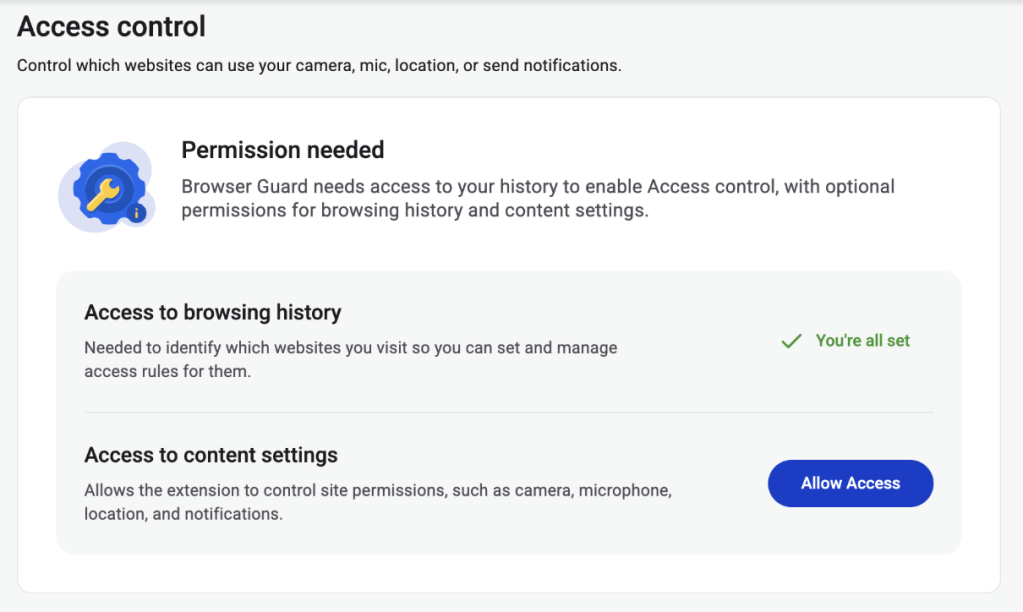
Manage Permissions: See visited websites, click “Allow” to enable or disable Malwarebytes’ ability to see visited sites.
Access Control requires some access to your browsing to protect you online
Access Control lets you choose individual sites to block and allow
This feature is rolling out in beta first, so you might see improvements and updates as we refine it. Currently, the feature works across Chrome and Edge, but will roll out to other browsers soon.
Access Control is another step toward making privacy simple and accessible. Not a subscriber yet? Check out Malwarebytes’ plans today to unlock this feature and more.
We don’t just report on threats—we remove them
Cybersecurity risks should never spread beyond a headline. Keep threats off your devices by downloading Malwarebytes today.
Have you ever been on a website when a pop-up suddenly asked for access to your camera, microphone, location, or notifications? Whether you clicked “allow,” dismissed it, or just wondered why it appeared, those permission requests aren’t always harmless. Some sites can abuse those permissions.
With Access Control, a new feature in Browser Guard, you decide exactly which websites can access your device and stop the rest. That means you choose which websites can:
Use your camera
Use your microphone
Access your location
Send you notifications
Further, not only can you control which websites have access to your devices, but you can also block websites or even require those specific sites to request permission every single time they try to gain access to your machines. You can always allow trusted sites to access your camera or location while blocking everything else.
Access Control is now available for Malwarebytes subscribers using Chrome and Edge browsers on a Windows device.
How to use Access Control
We designed Access Control to be both powerful and simple because we know every moment you spend getting set up is another moment you’re left unprotected.
How to use Access Control:
Install/Open Browser Guard: Click the Malwarebytes icon in your browser’s header
Access Dashboard: Click the Dashboard tab at the bottom of the extension panel.
Navigate to Access Control: On the left sidebar of the web page, select Access Control.
Manage Permissions: See visited websites, click “Allow” to enable or disable Malwarebytes’ ability to see visited sites.
Access Control requires some access to your browsing to protect you online
Access Control lets you choose individual sites to block and allow
This feature is rolling out in beta first, so you might see improvements and updates as we refine it. Currently, the feature works across Chrome and Edge, but will roll out to other browsers soon.
Access Control is another step toward making privacy simple and accessible. Not a subscriber yet? Check out Malwarebytes’ plans today to unlock this feature and more.
We don’t just report on threats—we remove them
Cybersecurity risks should never spread beyond a headline. Keep threats off your devices by downloading Malwarebytes today.
You have done it a thousand times. Right-click. Delete. Empty Trash. Done.
Except it’s not done. That file, your tax return, your private photos, that EmbezzlementPlan.doc… it’s all still sitting on your drive. Invisible to you, but not to anyone with a $30 recovery tool downloaded from the internet.
The problem: Your deleted files aren’t actually gone
Most users assume that deleting a file removes it permanently. In reality, standard deletion only removes the file’s reference from the file system. The underlying data often remains intact on disk until it is overwritten by other files. Think of it like tearing the table of contents out of a book while leaving all the pages intact. The operating system forgets where the file is listed, but the data itself is still there.
The space the file used gets marked as available for new data. Until something else writes over it, the original file may remain fully readable on the disk. Depending on how you use your computer, that could take days, weeks, or even months.
Recovery software exploits this. It scans your drive for data that still exists but is no longer listed in the file system. If you’re trying to recover a file you accidentally deleted, this is a lifesaver. But if you’re trying to permanently dispose of sensitive information, it’s a serious problem.
The answer: Overwrite, don’t just delete
To address this privacy gap, we’ve introduced File Shredder for Windows. It permanently destroys the files and folders you’re trying to delete so they can’t be recovered.
When you overwrite a file, you replace every single byte of its contents with new data. The original information is physically altered on the disk surface. Once overwritten, the original data no longer exists. There is nothing left to recover.
But one overwrite is not always enough. Advanced recovery techniques can sometimes detect traces of previous data, especially on older hard drives where magnetic patterns leave subtle residue. That’s why File Shredder doesn’t just overwrite once. Depending on your chosen security level, it overwrites multiple times, using different patterns each pass.
How it works
File Shredder uses DoD 5220.22-M, a data sanitization standard developed by the US Department of Defense for securely destroying classified data stored on computers.
The standard overwrites data using specific patterns:
Zero-fill passes (every byte set to 0x00)
One-fill passes (every byte set to 0xFF)
Cryptographically random data passes
Verification to confirm the overwrite was successful
Why these specific patterns? Zeros and ones represent binary data. Random data adds unpredictability. By cycling through these patterns multiple times, the original magnetic or electronic state of the storage medium is thoroughly disrupted, making forensic recovery impractical.
When File Shredder finishes, that file isn’t just deleted. It’s gone.
Three levels of shredding
File Shredder overwrites a file before deleting it, helping prevent recovery after it is removed. This is most meaningful on traditional hard drives, where overwrite passes are more direct and predictable. On SSDs, storage works differently, so multiple passes do not provide the same level of assurance. File Shredder offers a few levels so you can choose the right balance of speed and confidence for your device and use case.
Not every file on your computer will need military-grade destruction. Shredding takes time because each pass means reading and writing the entire file contents. File Shredder gives you three options, so you can balance security against speed.
Basic (1 Pass)
The entire file is overwritten with zeros. This is the fastest option and is effective for everyday file deletion where you want to prevent casual recovery. If someone ran a recovery tool after a Basic shred, they would find nothing but empty data where your file used to be.
Best for: Temporary files, downloads you no longer need, general cleanup where speed matters.
Thorough (4 Passes, DoD 5220.22-M)
The file is overwritten with zeros, then ones, then random data, then zeros again. After these passes complete, File Shredder performs a verification step, reading the file back to confirm the overwrite patterns were successfully written. This catches any disk errors or write failures that might have left original data intact.
Best for: Financial documents, tax records, personal identification documents, medical records, anything you would not want exposed in a data breach or if your computer were stolen.
Paranoid (8 Passes, Extended DoD 5220.22-M)
This runs the full zeros-ones-random-zeros sequence twice, with verification after completion. The additional passes provide extra assurance against advanced forensic recovery techniques.
Pattern: Zeros > Ones > Random > Zeros > Zeros > Ones > Random > Zeros
Best for: Highly confidential business data, legal documents, intellectual property, anything subject to regulatory compliance, or situations where you need absolute certainty.
A note on SSDs
Solid-state drives (SSDs) behave differently from traditional hard drives because wear leveling and flash translation layers may redirect writes to different physical blocks. This means overwriting a file once or multiple times does not guarantee the original data was overwritten. Multi-pass shredding methods were designed for HDDs and are less predictable on SSDs.
How to get started
File Shredder lives in the Tools section of your Malwarebytes desktop software, alongside other system utilities. We designed it to be straightforward while ensuring you understand the permanence of what you are about to do.
Select
Choose individual files, entire folders, or multiple items at once. File Shredder automatically protects critical system files, so you cannot accidentally shred something that would damage Windows or your Malwarebytes installation. Before anything happens, you’ll see a complete list of every file that will be shredded, with full visibility into file names, locations, and sizes.
Confirm
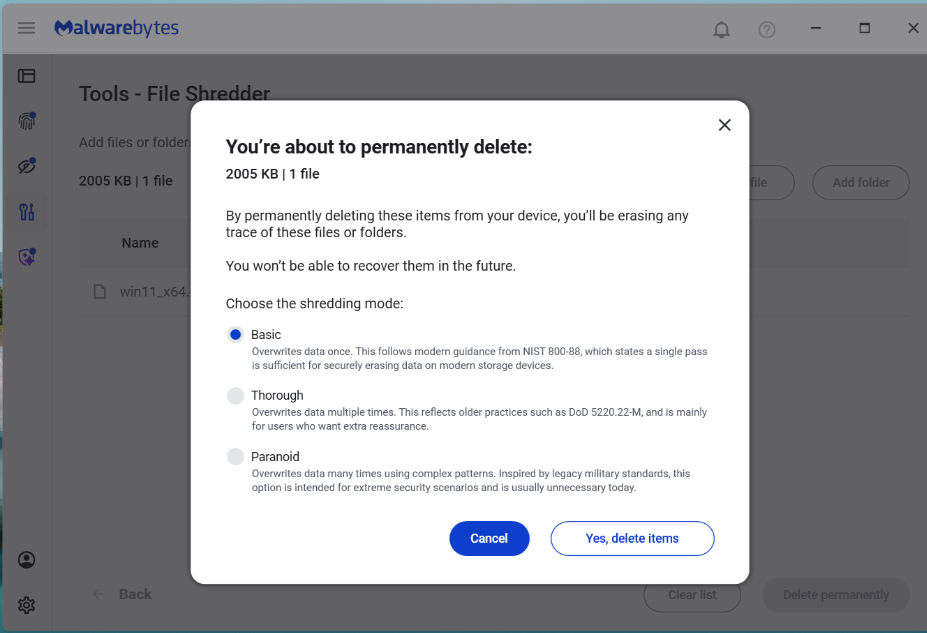
Clear warning dialogs explain that destruction is permanent. You must explicitly acknowledge before anything is destroyed. Once a file is shredded, it cannot be recovered.
Shred
Choose your level (Basic, Thorough, or Paranoid) and confirm. During shredding, you’ll see real-time progress showing:
which file is being shredded
how far along the process is
estimated time remaining
You can pause or cancel the job. However, once File Shredder starts working on a file, it finishes shredding that file before stopping. This prevents files from being left in a partially overwritten state, which could leave them corrupted or difficult to delete properly.
Done
When shredding completes, File Shredder shows a report listing every file that was successfully destroyed. You’ll also receive a notification confirming the job is finished.
How File Shredder handles large files safely
Shredding large files or deeply nested directories can use a lot of CPU and resources on your machine. To balance security with performance, the implementation includes:
Buffered write operations for efficient disk access
Chunked overwrite processing to handle large files without excessive memory use
Recursive folder shredding that processes entire directory trees
Cancellation handling where feasible, without leaving partial data behind
Error reporting so you know if any file could not be shredded (for example, if it’s open in another application)
Preventing accidental shredding
Building a feature that claims to permanently destroy data is a serious responsibility. We did not just write the code and assume it worked. We tested aggressively.
Because shredding is irreversible, the UI incorporates multiple safeguards before execution:
Explicit file or folder selection
Clear warnings about permanent deletion
Confirmation prompts before shredding begins
Shredding prevention on protected system paths or Malwarebytes files
When you’re done with a file, it should really be done
For too long, “delete” has mostly meant out of sight, not out of existence. File Shredder changes that. By securely overwriting files before removing them, it helps ensure your sensitive data stays private even after you delete it.
We don’t just report on threats—we remove them
Cybersecurity risks should never spread beyond a headline. Keep threats off your devices by downloading Malwarebytes today.
Most of us think deleting a file means it’s gone for good. But “delete” on a Windows device often just means “out of sight,” not necessarily “out of reach.”
That’s where File Shredder, a new feature within Malwarebytes Tools for Windows, comes in. File Shredder lets you securely delete files from your hard drive or USB drive, so the files are not just removed—but completely unrecoverable, even with specialized recovery software.
What File Shredder does differently
When you delete a file by placing it in your Recycle Bin and emptying the contents, your computer typically removes the reference to it—but the data itself can remain on the drive until it’s overwritten. That leftover data can sometimes be recovered using basic digital tools, some of which can even be downloaded for free online. These data traces pose a problem if the file you want to delete includes personal, financial, or other sensitive information, like tax documents, scanned IDs, contracts, or anything else you would like to remain private forever.
File Shredder goes beyond standard deletion by instead permanently overwriting the file data, ensuring it can’t be reconstructed or recovered. Once a file is shredded, it’s gone for good—no undo, no recovery, no second chances.
That makes File Shredder especially useful when:
You’re cleaning up sensitive files before selling or donating a device
You need to securely remove files from a USB drive
You’re minimizing digital clutter without leaving data behind
You want peace of mind that private files stay private
How to use File Shredder
File Shredder is designed to be powerful without being complicated.
To use File Shredder:
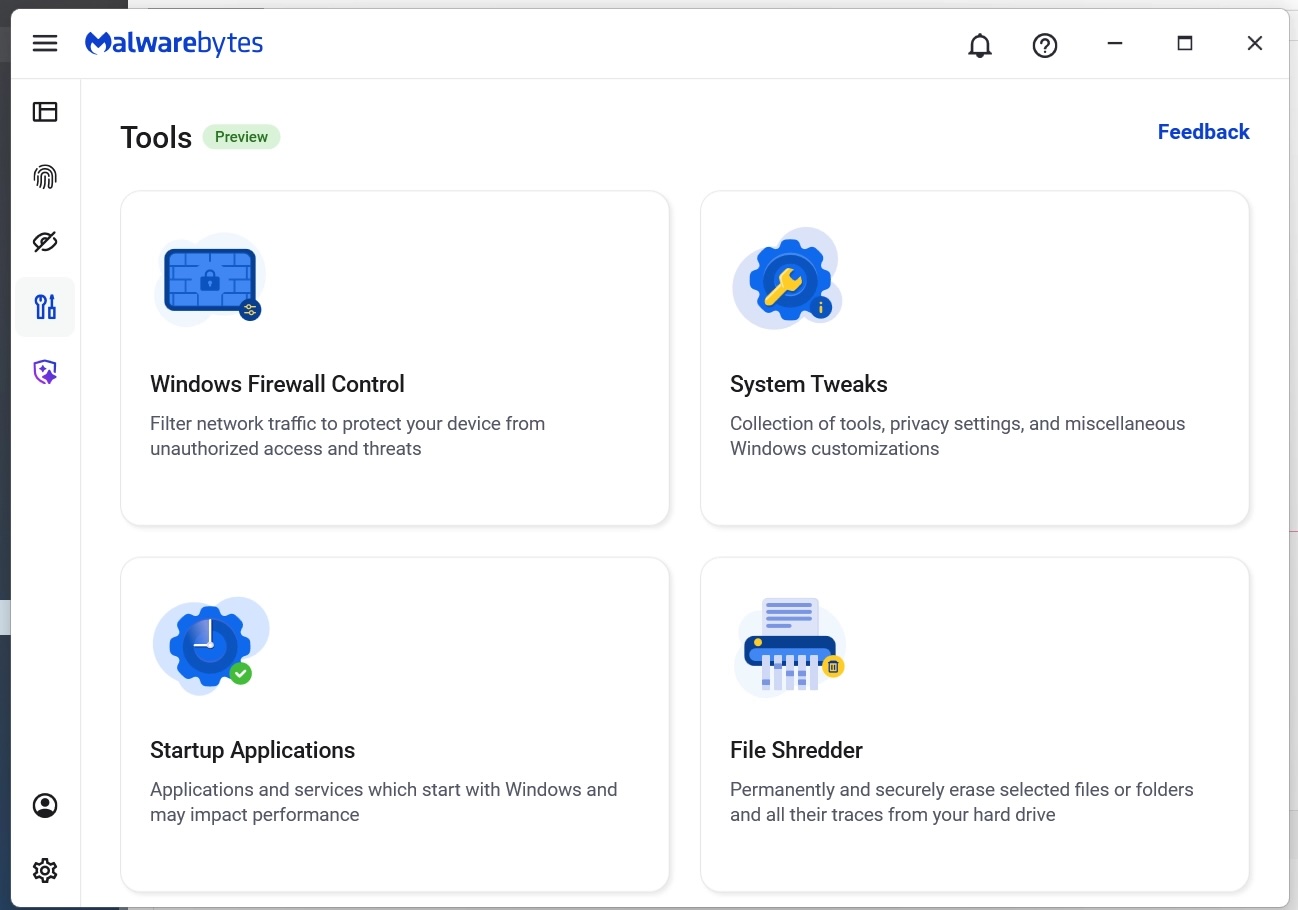
Open the Malwarebytes app and select the “Tools” icon from the lefthand menu (the screwdriver and wrench icon)
From this menu, find and click on “File Shredder”
Once here, you can manually add files or folders to the list and then click on the button “Delete permanently”
You will be asked to confirm your request before File Shredder deletes the files
The Malwarebytes Tools screen
Manually select files and folders for deletion
Confirm your deletion requests
Done!
After your files are deleted by File Shredder you can move on, confident that the data can’t be accessed again.
Protection means your data is in your control
Cybersecurity isn’t just about blocking threats—it’s also about giving you control over your own data. File Shredder provides a way to do exactly that, helping you close the door on files that you no longer want on your devices.
Because when you’re done with a file, it should really be done.
We don’t just report on threats—we remove them
Cybersecurity risks should never spread beyond a headline. Keep threats off your devices by downloading Malwarebytes today.
Most of us think deleting a file means it’s gone for good. But “delete” on a Windows device often just means “out of sight,” not necessarily “out of reach.”
That’s where File Shredder, a new feature within Malwarebytes Tools for Windows, comes in. File Shredder lets you securely delete files from your hard drive or USB drive, so the files are not just removed—but completely unrecoverable, even with specialized recovery software.
What File Shredder does differently
When you delete a file by placing it in your Recycle Bin and emptying the contents, your computer typically removes the reference to it—but the data itself can remain on the drive until it’s overwritten. That leftover data can sometimes be recovered using basic digital tools, some of which can even be downloaded for free online. These data traces pose a problem if the file you want to delete includes personal, financial, or other sensitive information, like tax documents, scanned IDs, contracts, or anything else you would like to remain private forever.
File Shredder goes beyond standard deletion by instead permanently overwriting the file data, ensuring it can’t be reconstructed or recovered. Once a file is shredded, it’s gone for good—no undo, no recovery, no second chances.
That makes File Shredder especially useful when:
You’re cleaning up sensitive files before selling or donating a device
You need to securely remove files from a USB drive
You’re minimizing digital clutter without leaving data behind
You want peace of mind that private files stay private
How to use File Shredder
File Shredder is designed to be powerful without being complicated.
To use File Shredder:
Open the Malwarebytes app and select the “Tools” icon from the lefthand menu (the screwdriver and wrench icon)
From this menu, find and click on “File Shredder”
Once here, you can manually add files or folders to the list and then click on the button “Delete permanently”
You will be asked to confirm your request before File Shredder deletes the files
The Malwarebytes Tools screen
Manually select files and folders for deletion
Confirm your deletion requests
Done!
After your files are deleted by File Shredder you can move on, confident that the data can’t be accessed again.
Protection means your data is in your control
Cybersecurity isn’t just about blocking threats—it’s also about giving you control over your own data. File Shredder provides a way to do exactly that, helping you close the door on files that you no longer want on your devices.
Because when you’re done with a file, it should really be done.
We don’t just report on threats—we remove them
Cybersecurity risks should never spread beyond a headline. Keep threats off your devices by downloading Malwarebytes today.
AI tool Vercel was abused by cybercriminals to create a Malwarebytes lookalike website.
Cybercriminals no longer need design or coding skills to create a convincing fake brand site. All they need is a domain name and an AI website builder. In minutes, they can clone a site’s look and feel, plug in payment or credential-stealing flows, and start luring victims through search, social media, and spam.
One side effect of being an established and trusted brand is that you attract copycats who want a slice of that trust without doing any of the work. Cybercriminals have always known it is much easier to trick users by impersonating something they already recognize than by inventing something new—and developments in AI have made it trivial for scammers to create convincing fake sites.
Registering a plausible-looking domain is cheap and fast, especially through registrars and resellers that do little or no upfront vetting. Once attackers have a name that looks close enough to the real thing, they can use AI-powered tools to copy layouts, colors, and branding elements, and generate product pages, sign-up flows, and FAQs that look “on brand.”
Over a three‑month period leading into the 2025 shopping season, researchers observed more than 18,000 holiday‑themed domains with lures like “Christmas,” “Black Friday,” and “Flash Sale,” with at least 750 confirmed as malicious and many more still under investigation. In the same window, about 19,000 additional domains were registered explicitly to impersonate major retail brands, nearly 3,000 of which were already hosting phishing pages or fraudulent storefronts.
These sites are used for everything from credential harvesting and payment fraud to malware delivery disguised as “order trackers” or “security updates.”
Attackers then boost visibility using SEO poisoning, ad abuse, and comment spam, nudging their lookalike sites into search results and promoting them in social feeds right next to the legitimate ones. From a user’s perspective, especially on mobile without the hover function, that fake site can be only a typo or a tap away.
When the impersonation hits home
A recent example shows how low the barrier to entry has become.
We were alerted to a site at installmalwarebytes[.]org that masqueraded from logo to layout as a genuine Malwarebytes site.
Close inspection revealed that the HTML carried a meta tag value pointing to v0 by Vercel, an AI-assisted app and website builder.
The tool lets users paste an existing URL into a prompt to automatically recreate its layout, styling, and structure—producing a near‑perfect clone of a site in very little time.
The history of the imposter domain tells an incremental evolution into abuse.
Registered in 2019, the site did not initially contain any Malwarebytes branding. In 2022, the operator began layering in Malwarebytes branding while publishing Indonesian‑language security content. This likely helped with search reputation while normalizing the brand look to visitors. Later, the site went blank, with no public archive records for 2025, only to resurface as a full-on clone backed by AI‑assisted tooling.
Traffic did not arrive by accident. Links to the site appeared in comment spam and injected links on unrelated websites, giving users the impression of organic references and driving them toward the fake download pages.
Payment flows were equally opaque. The fake site used PayPal for payments, but the integration hid the merchant’s name and logo from the user-facing confirmation screens, leaving only the buyer’s own details visible. That allowed the criminals to accept money while revealing as little about themselves as possible.
Behind the scenes, historical registration data pointed to an origin in India and to a hosting IP (209.99.40[.]222) associated with domain parking and other dubious uses rather than normal production hosting.
Combined with the AI‑powered cloning and the evasive payment configuration, it painted a picture of low‑effort, high‑confidence fraud.
AI website builders as force multipliers
The installmalwarebytes[.]org case is not an isolated misuse of AI‑assisted builders. It fits into a broader pattern of attackers using generative tools to create and host phishing sites at scale.
Threat intelligence teams have documented abuse of Vercel’s v0 platform to generate fully functional phishing pages that impersonate sign‑in portals for a variety of brands, including identity providers and cloud services, all from simple text prompts. Once the AI produces a clone, criminals can tweak a few links to point to their own credential‑stealing backends and go live in minutes.
Research into AI’s role in modern phishing shows that attackers are leaning heavily on website generators, writing assistants, and chatbots to streamline the entire kill chain—from crafting persuasive copy in multiple languages to spinning up responsive pages that render cleanly across devices. One analysis of AI‑assisted phishing campaigns found that roughly 40% of observed abuse involved website generation services, 30% involved AI writing tools, and about 11% leveraged chatbots, often in combination. This stack lets even low‑skilled actors produce professional-looking scams that used to require specialized skills or paid kits.
Growth first, guardrails later
The core problem is not that AI can build websites. It’s that the incentives around AI platform development are skewed. Vendors are under intense pressure to ship new capabilities, grow user bases, and capture market share, and that pressure often runs ahead of serious investment in abuse prevention.
As Malwarebytes General Manager Mark Beare put it:
“AI-powered website builders like Lovable and Vercel have dramatically lowered the barrier for launching polished sites in minutes. While these platforms include baseline security controls, their core focus is speed, ease of use, and growth—not preventing brand impersonation at scale. That imbalance creates an opportunity for bad actors to move faster than defenses, spinning up convincing fake brands before victims or companies can react.”
Site generators allow cloned branding of well‑known companies with no verification, publishing flows skip identity checks, and moderation either fails quietly or only reacts after an abuse report. Some builders let anyone spin up and publish a site without even confirming an email address, making it easy to burn through accounts as soon as one is flagged or taken down.
To be fair, there are signs that some providers are starting to respond by blocking specific phishing campaigns after disclosure or by adding limited brand-protection controls. But these are often reactive fixes applied after the damage is done.
Meanwhile, attackers can move to open‑source clones or lightly modified forks of the same tools hosted elsewhere, where there may be no meaningful content moderation at all.
In practice, the net effect is that AI companies benefit from the growth and experimentation that comes with permissive tooling, while the consequences is left to victims and defenders.
We have blocked the domain in our web protection module and requested a domain and vendor takedown.
How to stay safe
End users cannot fix misaligned AI incentives, but they can make life harder for brand impersonators. Even when a cloned website looks convincing, there are red flags to watch for:
Before completing any payment, always review the “Pay to” details or transaction summary. If no merchant is named, back out and treat the site as suspicious.
Do not follow links posted in comments, on social media, or unsolicited emails to buy a product. Always follow a verified and trusted method to reach the vendor.
If you come across a fake Malwarebytes website, please let us know.
We don’t just report on threats—we help safeguard your entire digital identity
AI tool Vercel was abused by cybercriminals to create a Malwarebytes lookalike website.
Cybercriminals no longer need design or coding skills to create a convincing fake brand site. All they need is a domain name and an AI website builder. In minutes, they can clone a site’s look and feel, plug in payment or credential-stealing flows, and start luring victims through search, social media, and spam.
One side effect of being an established and trusted brand is that you attract copycats who want a slice of that trust without doing any of the work. Cybercriminals have always known it is much easier to trick users by impersonating something they already recognize than by inventing something new—and developments in AI have made it trivial for scammers to create convincing fake sites.
Registering a plausible-looking domain is cheap and fast, especially through registrars and resellers that do little or no upfront vetting. Once attackers have a name that looks close enough to the real thing, they can use AI-powered tools to copy layouts, colors, and branding elements, and generate product pages, sign-up flows, and FAQs that look “on brand.”
Over a three‑month period leading into the 2025 shopping season, researchers observed more than 18,000 holiday‑themed domains with lures like “Christmas,” “Black Friday,” and “Flash Sale,” with at least 750 confirmed as malicious and many more still under investigation. In the same window, about 19,000 additional domains were registered explicitly to impersonate major retail brands, nearly 3,000 of which were already hosting phishing pages or fraudulent storefronts.
These sites are used for everything from credential harvesting and payment fraud to malware delivery disguised as “order trackers” or “security updates.”
Attackers then boost visibility using SEO poisoning, ad abuse, and comment spam, nudging their lookalike sites into search results and promoting them in social feeds right next to the legitimate ones. From a user’s perspective, especially on mobile without the hover function, that fake site can be only a typo or a tap away.
When the impersonation hits home
A recent example shows how low the barrier to entry has become.
We were alerted to a site at installmalwarebytes[.]org that masqueraded from logo to layout as a genuine Malwarebytes site.
Close inspection revealed that the HTML carried a meta tag value pointing to v0 by Vercel, an AI-assisted app and website builder.
The tool lets users paste an existing URL into a prompt to automatically recreate its layout, styling, and structure—producing a near‑perfect clone of a site in very little time.
The history of the imposter domain tells an incremental evolution into abuse.
Registered in 2019, the site did not initially contain any Malwarebytes branding. In 2022, the operator began layering in Malwarebytes branding while publishing Indonesian‑language security content. This likely helped with search reputation while normalizing the brand look to visitors. Later, the site went blank, with no public archive records for 2025, only to resurface as a full-on clone backed by AI‑assisted tooling.
Traffic did not arrive by accident. Links to the site appeared in comment spam and injected links on unrelated websites, giving users the impression of organic references and driving them toward the fake download pages.
Payment flows were equally opaque. The fake site used PayPal for payments, but the integration hid the merchant’s name and logo from the user-facing confirmation screens, leaving only the buyer’s own details visible. That allowed the criminals to accept money while revealing as little about themselves as possible.
Behind the scenes, historical registration data pointed to an origin in India and to a hosting IP (209.99.40[.]222) associated with domain parking and other dubious uses rather than normal production hosting.
Combined with the AI‑powered cloning and the evasive payment configuration, it painted a picture of low‑effort, high‑confidence fraud.
AI website builders as force multipliers
The installmalwarebytes[.]org case is not an isolated misuse of AI‑assisted builders. It fits into a broader pattern of attackers using generative tools to create and host phishing sites at scale.
Threat intelligence teams have documented abuse of Vercel’s v0 platform to generate fully functional phishing pages that impersonate sign‑in portals for a variety of brands, including identity providers and cloud services, all from simple text prompts. Once the AI produces a clone, criminals can tweak a few links to point to their own credential‑stealing backends and go live in minutes.
Research into AI’s role in modern phishing shows that attackers are leaning heavily on website generators, writing assistants, and chatbots to streamline the entire kill chain—from crafting persuasive copy in multiple languages to spinning up responsive pages that render cleanly across devices. One analysis of AI‑assisted phishing campaigns found that roughly 40% of observed abuse involved website generation services, 30% involved AI writing tools, and about 11% leveraged chatbots, often in combination. This stack lets even low‑skilled actors produce professional-looking scams that used to require specialized skills or paid kits.
Growth first, guardrails later
The core problem is not that AI can build websites. It’s that the incentives around AI platform development are skewed. Vendors are under intense pressure to ship new capabilities, grow user bases, and capture market share, and that pressure often runs ahead of serious investment in abuse prevention.
As Malwarebytes General Manager Mark Beare put it:
“AI-powered website builders like Lovable and Vercel have dramatically lowered the barrier for launching polished sites in minutes. While these platforms include baseline security controls, their core focus is speed, ease of use, and growth—not preventing brand impersonation at scale. That imbalance creates an opportunity for bad actors to move faster than defenses, spinning up convincing fake brands before victims or companies can react.”
Site generators allow cloned branding of well‑known companies with no verification, publishing flows skip identity checks, and moderation either fails quietly or only reacts after an abuse report. Some builders let anyone spin up and publish a site without even confirming an email address, making it easy to burn through accounts as soon as one is flagged or taken down.
To be fair, there are signs that some providers are starting to respond by blocking specific phishing campaigns after disclosure or by adding limited brand-protection controls. But these are often reactive fixes applied after the damage is done.
Meanwhile, attackers can move to open‑source clones or lightly modified forks of the same tools hosted elsewhere, where there may be no meaningful content moderation at all.
In practice, the net effect is that AI companies benefit from the growth and experimentation that comes with permissive tooling, while the consequences is left to victims and defenders.
We have blocked the domain in our web protection module and requested a domain and vendor takedown.
How to stay safe
End users cannot fix misaligned AI incentives, but they can make life harder for brand impersonators. Even when a cloned website looks convincing, there are red flags to watch for:
Before completing any payment, always review the “Pay to” details or transaction summary. If no merchant is named, back out and treat the site as suspicious.
Do not follow links posted in comments, on social media, or unsolicited emails to buy a product. Always follow a verified and trusted method to reach the vendor.
If you come across a fake Malwarebytes website, please let us know.
We don’t just report on threats—we help safeguard your entire digital identity
As a Browser Guard user, you might not have noticed much difference lately. Browser Guard still blocks scams and phishing attempts just like always, and, in many cases, even better.
But behind the scenes, almost everything changed. The rules that govern how browser extensions work went through a major overhaul, and we had to completely rebuild how Browser Guard protects you.
First, what is Manifest v3 (and v2)?
Browser extensions include a configuration file called a “manifest”. Think of it as an instruction manual that tells your browser what an extension can do and how it’s allowed to do it.
Manifest v3 is the latest version of that system, and it’s now the only option allowed in major browsers like Chrome and Edge.
In Manifest v2, Browser Guard could use highly customized logic to analyze and block suspicious activity as it happened, protecting you as you browsed the web.
With Manifest v3, that flexibility is mostly gone. Extensions can no longer run deeply complex, custom logic in the same way. Instead, we can only pass static rule lists to the browser, called Declarative Net Request (DNR) rules.
But those DNR rules come with strict constraints.
Rule sets are size-limited by the browser to save space. Because rules are stored as raw JSON files, developers can’t use other data types to make them smaller. And updating those DNR rules can only be done by updating the extension entirely.
This is less of a problem on Chrome, which allows developers to push updates quickly, but other browsers don’t currently support this fast-track process. Dynamic rule updates exist, but they’re limited, and nowhere near large enough to hold the full set of rules.
In short, we couldn’t simply port Browser Guard from Manifest v2 to v3. The old approach wouldn’t keep our users protected.
A note about Firefox and Brave
Firefox and Brave chose a different path and continue to support the more flexible Manifest v2 method of blocking requests.
However, since Brave doesn’t have its own extension store, users can only install extensions they already had before Google removed Manifest v2 extensions from the Chrome Web Store. Though Brave also has strong out-of-the-box ad protection.
For Browser Guard users on Firefox, rest assured the same great blocking techniques will continue to work.
How Browser Guard still protects you
Given all of this, we had to get creative.
Many ad blockers already support pattern-based matching to stop ads and trackers. We asked a different question: what if we could use similar techniques to catch scam and phishing attempts before we know the specific URL is malicious?
Better yet, what if we did it without relying on the new DNR APIs?
So, we built a new pattern-matching system focused specifically on scam and phishing behavior, supporting:
Full regex-based URL matching
Full XPath and querySelector support
Matching against any content on the page
Favicon spoof detection
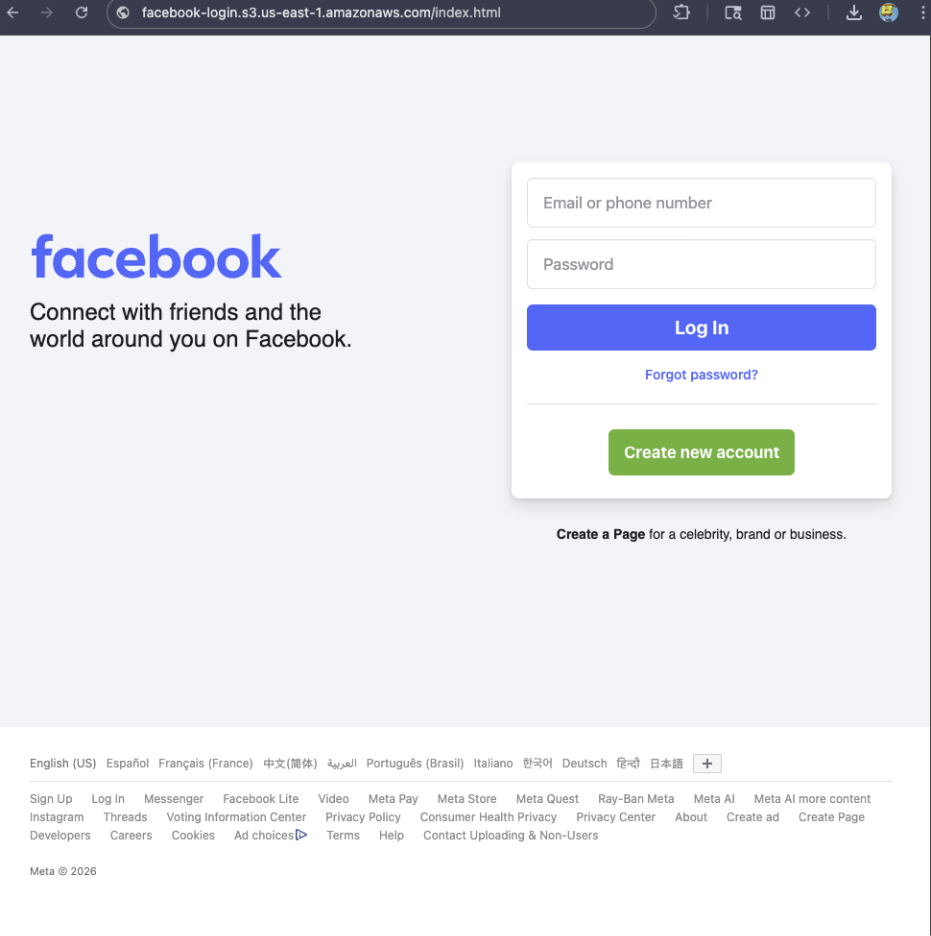
For example, if a site is hosted on Amazon S3, contains a password-input field, and uses a homoglyph in the URL to trick users into thinking they were logging into Facebook, Browser Guard can detect that combination—even if we’ve never seen the URL before.
Why this matters more now
With AI, attackers can create near-perfect duplicates of websites easier than ever. And did you spot the homoglyph in the URL? Nope, neither did I!
That’s why we designed this system so we can update its rules every 30 minutes, instead of waiting for full extension updates.
But I still see static blocking rules in Browser Guard
That’s true—for now.
We’ve found a temporary workaround that lets us support all the rules that we had before. However, we had to remove some of the more advanced logic that used to sit on top of them.
For example, we can’t use these large datasets to block subframe requests, only main frame requests. Nor can we stack multiple logic layers together; blocking is limited to simple matches (regex, domains and URLs).
Those limits are a big reason we’re investing more heavily in pattern-based and heuristic protection.
Pure heuristics
From day one, Browser Guard has used heuristics (behavior) to detect scams and phishing, monitoring behavior on the page to match suspicious activity.
For example, some scam pages deliberately break your browser’s back button by abusing window.replaceState, then trick you into calling that scammer’s “computer helpline.” Others try to convince you to run malicious commands on your computer.
Browser Guard can detect these behaviors and warn you before you fall for them.
What’s next?
Did someone say AI?
You’ve probably seen Scam Guard in other Malwarebytes products. We’re currently working on a version tailored specifically for Browser Guard. More soon!
Final thoughts
While Manifest v3 introduced meaningful improvements to browser security, it also created real challenges for security tools like Browser Guard.
Rather than scaling back, the Browser Guard team rebuilt our approach from the ground up, focusing on behavior, patterns, and faster response times. The result is protection that’s different under the hood, but just as committed to keeping you safe online.
We don’t just report on scams—we help detect them
Cybersecurity risks should never spread beyond a headline. If something looks dodgy to you, check if it’s a scam using Malwarebytes Scam Guard, a feature of our mobile protection products. Submit a screenshot, paste suspicious content, or share a text or phone number, and we’ll tell you if it’s a scam or legit. Download Malwarebytes Mobile Security for iOS or Android and try it today!
As a Browser Guard user, you might not have noticed much difference lately. Browser Guard still blocks scams and phishing attempts just like always, and, in many cases, even better.
But behind the scenes, almost everything changed. The rules that govern how browser extensions work went through a major overhaul, and we had to completely rebuild how Browser Guard protects you.
First, what is Manifest v3 (and v2)?
Browser extensions include a configuration file called a “manifest”. Think of it as an instruction manual that tells your browser what an extension can do and how it’s allowed to do it.
Manifest v3 is the latest version of that system, and it’s now the only option allowed in major browsers like Chrome and Edge.
In Manifest v2, Browser Guard could use highly customized logic to analyze and block suspicious activity as it happened, protecting you as you browsed the web.
With Manifest v3, that flexibility is mostly gone. Extensions can no longer run deeply complex, custom logic in the same way. Instead, we can only pass static rule lists to the browser, called Declarative Net Request (DNR) rules.
But those DNR rules come with strict constraints.
Rule sets are size-limited by the browser to save space. Because rules are stored as raw JSON files, developers can’t use other data types to make them smaller. And updating those DNR rules can only be done by updating the extension entirely.
This is less of a problem on Chrome, which allows developers to push updates quickly, but other browsers don’t currently support this fast-track process. Dynamic rule updates exist, but they’re limited, and nowhere near large enough to hold the full set of rules.
In short, we couldn’t simply port Browser Guard from Manifest v2 to v3. The old approach wouldn’t keep our users protected.
A note about Firefox and Brave
Firefox and Brave chose a different path and continue to support the more flexible Manifest v2 method of blocking requests.
However, since Brave doesn’t have its own extension store, users can only install extensions they already had before Google removed Manifest v2 extensions from the Chrome Web Store. Though Brave also has strong out-of-the-box ad protection.
For Browser Guard users on Firefox, rest assured the same great blocking techniques will continue to work.
How Browser Guard still protects you
Given all of this, we had to get creative.
Many ad blockers already support pattern-based matching to stop ads and trackers. We asked a different question: what if we could use similar techniques to catch scam and phishing attempts before we know the specific URL is malicious?
Better yet, what if we did it without relying on the new DNR APIs?
So, we built a new pattern-matching system focused specifically on scam and phishing behavior, supporting:
Full regex-based URL matching
Full XPath and querySelector support
Matching against any content on the page
Favicon spoof detection
For example, if a site is hosted on Amazon S3, contains a password-input field, and uses a homoglyph in the URL to trick users into thinking they were logging into Facebook, Browser Guard can detect that combination—even if we’ve never seen the URL before.
Why this matters more now
With AI, attackers can create near-perfect duplicates of websites easier than ever. And did you spot the homoglyph in the URL? Nope, neither did I!
That’s why we designed this system so we can update its rules every 30 minutes, instead of waiting for full extension updates.
But I still see static blocking rules in Browser Guard
That’s true—for now.
We’ve found a temporary workaround that lets us support all the rules that we had before. However, we had to remove some of the more advanced logic that used to sit on top of them.
For example, we can’t use these large datasets to block subframe requests, only main frame requests. Nor can we stack multiple logic layers together; blocking is limited to simple matches (regex, domains and URLs).
Those limits are a big reason we’re investing more heavily in pattern-based and heuristic protection.
Pure heuristics
From day one, Browser Guard has used heuristics (behavior) to detect scams and phishing, monitoring behavior on the page to match suspicious activity.
For example, some scam pages deliberately break your browser’s back button by abusing window.replaceState, then trick you into calling that scammer’s “computer helpline.” Others try to convince you to run malicious commands on your computer.
Browser Guard can detect these behaviors and warn you before you fall for them.
What’s next?
Did someone say AI?
You’ve probably seen Scam Guard in other Malwarebytes products. We’re currently working on a version tailored specifically for Browser Guard. More soon!
Final thoughts
While Manifest v3 introduced meaningful improvements to browser security, it also created real challenges for security tools like Browser Guard.
Rather than scaling back, the Browser Guard team rebuilt our approach from the ground up, focusing on behavior, patterns, and faster response times. The result is protection that’s different under the hood, but just as committed to keeping you safe online.
We don’t just report on scams—we help detect them
Cybersecurity risks should never spread beyond a headline. If something looks dodgy to you, check if it’s a scam using Malwarebytes Scam Guard, a feature of our mobile protection products. Submit a screenshot, paste suspicious content, or share a text or phone number, and we’ll tell you if it’s a scam or legit. Download Malwarebytes Mobile Security for iOS or Android and try it today!
If you’ve ever stared at a suspicious text, email, or link and thought “Is this a scam… or am I overthinking it?” Well, you’re not alone.
Scams are getting harder to spot, and even savvy internet users get caught off guard. That’s why Malwarebytes is the first cybersecurity provider available directly inside ChatGPT, bringing trusted threat intelligence to millions of people right where these questions happen.
Simply ask: “Malwarebytes, is this a scam?” and you’ll get a clear, informed answer—super fast.
From then on, you can “@Malwarebytes” to check if a text message, DM, email, or other content seems malicious.
Cybersecurity help, right when and where you need it
Malwarebytes in ChatGPT lets you tap into our cybersecurity expertise without ever leaving the conversation. Whether something feels off or you want a second opinion, you can get trusted guidance in no time at all.
Here’s what you can do:
Spot scams faster
Paste in a suspicious text message, email, or DM and get:
A clear, point-by-point breakdown of phishing or any known red flags
An explanation of why something looks risky
Practical next steps to help you stay safe
You won’t get any jargon or guessing from us. What you will get is 100% peace of mind.
Check links, domains, and phone numbers
Not sure if a URL, website, or phone number is legit? Ask for a risk assessment informed by Malwarebytes threat intelligence, including:
Signs of suspicious activity
Whether the link or sender has been associated with scams
If a domain is newly registered, follows redirects, or other potentially suspicious elements
What to do next—block it, ignore it, or proceed with caution
Powered by real threat intelligence
The verdicts you get aren’t based on vibes or generic advice. They’re powered by Malwarebytes’ continuously updated threat intelligence—the same real-world data that helps protect millions of devices and people worldwide every day.
If you spot something suspicious, you can submit it directly to Malwarebytes through ChatGPT. Those reports help strengthen threat intelligence, making the internet safer not just for you, but for everyone.
Link reputation scanner: Checks URLs against threat intelligence databases, detects newly registered domains (<30 days), and follows redirects.
Phone number reputation check: Validates phone numbers against scam/spam databases, including carrier and location details.
Email address reputation check: Analyzes email domains for phishing & other malicious activity.
WHOIS domain lookup: Retrieves registration data such as registrar, creation and expiration dates, and abuse of contacts.
Verify domain legitimacy: Look up domain registration details to identify newly created or suspicious websites commonly used in phishing attacks.
Get geographic context: Receive warnings when phone numbers originate from unexpected regions, a common indicator of international scam operations.
Available now
Malwarebytes in ChatGPT is available wherever ChatGPT apps are available.
To get started, just ask ChatGPT:
“Malwarebytes, is this a scam?”
For deeper insights, proactive protection, and human support, download the Malwarebytes app—our security solutions are designed to stop threats before they reach you, and the damage is done.
If you’ve ever stared at a suspicious text, email, or link and thought “Is this a scam… or am I overthinking it?” Well, you’re not alone.
Scams are getting harder to spot, and even savvy internet users get caught off guard. That’s why Malwarebytes is the first cybersecurity provider available directly inside ChatGPT, bringing trusted threat intelligence to millions of people right where these questions happen.
Simply ask: “Malwarebytes, is this a scam?” and you’ll get a clear, informed answer—super fast.
From then on, you can “@Malwarebytes” to check if a text message, DM, email, or other content seems malicious.
Cybersecurity help, right when and where you need it
Malwarebytes in ChatGPT lets you tap into our cybersecurity expertise without ever leaving the conversation. Whether something feels off or you want a second opinion, you can get trusted guidance in no time at all.
Here’s what you can do:
Spot scams faster
Paste in a suspicious text message, email, or DM and get:
A clear, point-by-point breakdown of phishing or any known red flags
An explanation of why something looks risky
Practical next steps to help you stay safe
You won’t get any jargon or guessing from us. What you will get is 100% peace of mind.
Check links, domains, and phone numbers
Not sure if a URL, website, or phone number is legit? Ask for a risk assessment informed by Malwarebytes threat intelligence, including:
Signs of suspicious activity
Whether the link or sender has been associated with scams
If a domain is newly registered, follows redirects, or other potentially suspicious elements
What to do next—block it, ignore it, or proceed with caution
Powered by real threat intelligence
The verdicts you get aren’t based on vibes or generic advice. They’re powered by Malwarebytes’ continuously updated threat intelligence—the same real-world data that helps protect millions of devices and people worldwide every day.
If you spot something suspicious, you can submit it directly to Malwarebytes through ChatGPT. Those reports help strengthen threat intelligence, making the internet safer not just for you, but for everyone.
Link reputation scanner: Checks URLs against threat intelligence databases, detects newly registered domains (<30 days), and follows redirects.
Phone number reputation check: Validates phone numbers against scam/spam databases, including carrier and location details.
Email address reputation check: Analyzes email domains for phishing & other malicious activity.
WHOIS domain lookup: Retrieves registration data such as registrar, creation and expiration dates, and abuse of contacts.
Verify domain legitimacy: Look up domain registration details to identify newly created or suspicious websites commonly used in phishing attacks.
Get geographic context: Receive warnings when phone numbers originate from unexpected regions, a common indicator of international scam operations.
Available now
Malwarebytes in ChatGPT is available wherever ChatGPT apps are available.
To get started, just ask ChatGPT:
“Malwarebytes, is this a scam?”
For deeper insights, proactive protection, and human support, download the Malwarebytes app—our security solutions are designed to stop threats before they reach you, and the damage is done.
Independent recognition matters in cybersecurity, and it matters a lot to us. It shows how security products perform when they’re tested against in-the-wild threats, using lab environments designed to reflect what people actually face in the real world.
In 2025, Malwarebytes earned awards and recognition from a steady stream of third-party testing labs and industry groups. Here’s what those tests looked like and what they found.
AVLab Cybersecurity Foundation: Real-world malware, real results
Malwarebytes earned anotherAdvanced In-The-Wild badge from AVLab Cybersecurity Foundation in 2025, continuing a run of accolades.
In November, AVLab Cybersecurity Foundation tested 244 real-world malware samples across 14 cybersecurity products. Malwarebytes Premium Security detected every single one. On top of that, it removed threats with an average remediation time of 2.18 seconds—nearly 12 seconds faster than the industry average.
That result also marked our third Excellent badge in 2025, following earlier tests in July and September.
Earlier in the year, Malwarebytes Premium Security was also named Product of the Year for the third consecutive year, after it blocked 100% of in-the-wild malware samples.
MRG Effitas: Consistent Android protection, proven over time
MRG Effitas conducted in-depth testing of Androidantivirus apps using real-world scenarios, combining in-the-wild malware with benign samples to assess detection gaps and weaknesses.
Our mobile protection received the highest marks, achieving a near-perfect detection rate in MRG Effitas’ rigorous lab testing, reaffirming what our customers already know: Malwarebytes stops threats before they can cause harm.
Malwarebytes for Windows earned a Digital Trends 2025 Recommended Product designation, with reviewers highlighting its ease of use, fast and effective customer support, and strong value for money.
CNET: Best Malware Removal Service 2025
CNET named Malwarebytes the Best Malware Removal Service 2025 after testing setup, features, design, and performance. The review highlighted standout capabilities, including top-tier malware removal and comprehensive Browser Guard web protection.
AV Comparatives Stalkerware Test: 100% detection rate
In collaboration with the Electronic Frontier Foundation (EFF), AV-Comparatives tested 13 Android security solutions against 17 stalkerware-type apps—software often used for covert surveillance and abuse.
Only a few products handled detection and alerting responsibly. Malwarebytes was the only solution to achieve a 100% detection rate in the September 2025 test.
What we learned from a year of testing
All these results highlight our mission to reimagine security and protect people and data across all devices and platforms.

 Login
Login