Normal view

How Manifest v3 forced us to rethink Browser Guard, and why that’s a good thing 

2 February 2026 at 19:11

As a Browser Guard user, you might not have noticed much difference lately. Browser Guard still blocks scams and phishing attempts just like always, and, in many cases, even better.

But behind the scenes, almost everything changed. The rules that govern how browser extensions work went through a major overhaul, and we had to completely rebuild how Browser Guard protects you.

First, what is Manifest v3 (and v2)? 

Browser extensions include a configuration file called a “manifest”. Think of it as an instruction manual that tells your browser what an extension can do and how it’s allowed to do it.

Manifest v3 is the latest version of that system, and it’s now the only option allowed in major browsers like Chrome and Edge.

In Manifest v2, Browser Guard could use highly customized logic to analyze and block suspicious activity as it happened, protecting you as you browsed the web.

With Manifest v3, that flexibility is mostly gone. Extensions can no longer run deeply complex, custom logic in the same way. Instead, we can only pass static rule lists to the browser, called Declarative Net Request (DNR) rules.

But those DNR rules come with strict constraints.

Rule sets are size-limited by the browser to save space. Because rules are stored as raw JSON files, developers can’t use other data types to make them smaller. And updating those DNR rules can only be done by updating the extension entirely.

This is less of a problem on Chrome, which allows developers to push updates quickly, but other browsers don’t currently support this fast-track process. Dynamic rule updates exist, but they’re limited, and nowhere near large enough to hold the full set of rules.

In short, we couldn’t simply port Browser Guard from Manifest v2 to v3. The old approach wouldn’t keep our users protected.

A note about Firefox and Brave 

Firefox and Brave chose a different path and continue to support the more flexible Manifest v2 method of blocking requests.

However, since Brave doesn’t have its own extension store, users can only install extensions they already had before Google removed Manifest v2 extensions from the Chrome Web Store. Though Brave also has strong out-of-the-box ad protection.

For Browser Guard users on Firefox, rest assured the same great blocking techniques will continue to work.

How Browser Guard still protects you 

Given all of this, we had to get creative.

Many ad blockers already support pattern-based matching to stop ads and trackers. We asked a different question: what if we could use similar techniques to catch scam and phishing attempts before we know the specific URL is malicious?

Better yet, what if we did it without relying on the new DNR APIs?

So, we built a new pattern-matching system focused specifically on scam and phishing behavior, supporting:

  • Full regex-based URL matching
  • Full XPath and querySelector support
  • Matching against any content on the page
  • Favicon spoof detection

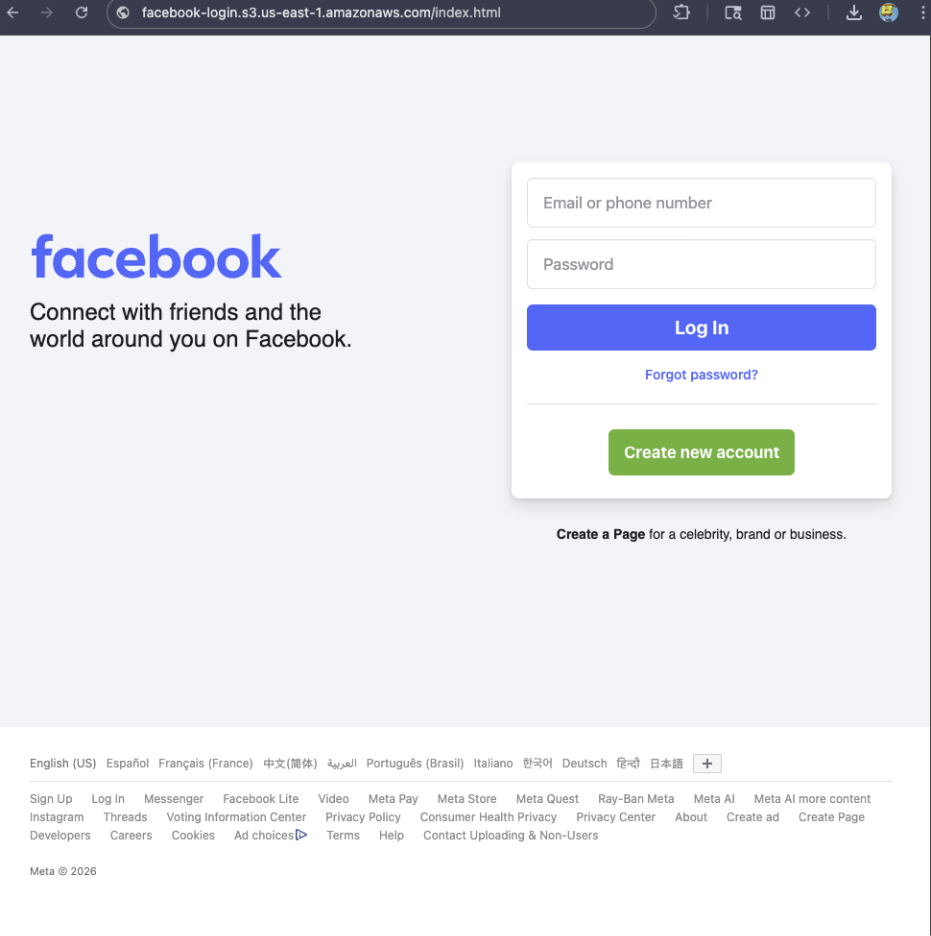
For example, if a site is hosted on Amazon S3, contains a password-input field, and uses a homoglyph in the URL to trick users into thinking they were logging into Facebook, Browser Guard can detect that combination—even if we’ve never seen the URL before.

Fake Facebook login screen

Why this matters more now 

With AI, attackers can create near-perfect duplicates of websites easier than ever. And did you spot the homoglyph in the URL? Nope, neither did I!  

That’s why we designed this system so we can update its rules every 30 minutes, instead of waiting for full extension updates.  

But I still see static blocking rules in Browser Guard 

That’s true—for now.  

We’ve found a temporary workaround that lets us support all the rules that we had before. However, we had to remove some of the more advanced logic that used to sit on top of them.

For example, we can’t use these large datasets to block subframe requests, only main frame requests. Nor can we stack multiple logic layers together; blocking is limited to simple matches (regex, domains and URLs).

Those limits are a big reason we’re investing more heavily in pattern-based and heuristic protection. 

Pure heuristics 

From day one, Browser Guard has used heuristics (behavior) to detect scams and phishing, monitoring behavior on the page to match suspicious activity.

For example, some scam pages deliberately break your browser’s back button by abusing window.replaceState, then trick you into calling that scammer’s “computer helpline.” Others try to convince you to run malicious commands on your computer.

Browser Guard can detect these behaviors and warn you before you fall for them. 

What’s next? 

Did someone say AI?  

You’ve probably seen Scam Guard in other Malwarebytes products. We’re currently working on a version tailored specifically for Browser Guard. More soon!

Final thoughts 

While Manifest v3 introduced meaningful improvements to browser security, it also created real challenges for security tools like Browser Guard.

Rather than scaling back, the Browser Guard team rebuilt our approach from the ground up, focusing on behavior, patterns, and faster response times. The result is protection that’s different under the hood, but just as committed to keeping you safe online.


We don’t just report on scams—we help detect them

Cybersecurity risks should never spread beyond a headline. If something looks dodgy to you, check if it’s a scam using Malwarebytes Scam Guard, a feature of our mobile protection products. Submit a screenshot, paste suspicious content, or share a text or phone number, and we’ll tell you if it’s a scam or legit. Download Malwarebytes Mobile Security for iOS or Android and try it today!
Scam-checking just got easier: Malwarebytes is now in ChatGPT 

2 February 2026 at 14:45

If you’ve ever stared at a suspicious text, email, or link and thought “Is this a scam… or am I overthinking it?” Well, you’re not alone. 

Scams are getting harder to spot, and even savvy internet users get caught off guard. That’s why Malwarebytes is the first cybersecurity provider available directly inside ChatGPT, bringing trusted threat intelligence to millions of people right where these questions happen. 

Simply ask: “Malwarebytes, is this a scam?” and you’ll get a clear, informed answer—super fast. 

How to access 

To access Malwarebytes inside ChatGPT:

  • Sign in to ChatGPT  
  • Go to Apps  
  • Search for Malwarebytes and press Connect  
  • From then on, you can “@Malwarebytes” to check if a text message, DM, email, or other  content seems malicious.  

Cybersecurity help, right when and where you need it 

Malwarebytes in ChatGPT lets you tap into our cybersecurity expertise without ever leaving the conversation. Whether something feels off or you want a second opinion, you can get trusted guidance in no time at all. 

Here’s what you can do: 

Spot scams faster 

Paste in a suspicious text message, email, or DM and get: 

  • A clear, point-by-point breakdown of phishing or any known red flags 
  • An explanation of why something looks risky 
  • Practical next steps to help you stay safe 

You won’t get any jargon or guessing from us. What you will get is 100% peace of mind. 

Check links, domains, and phone numbers 

Not sure if a URL, website, or phone number is legit? Ask for a risk assessment informed by Malwarebytes threat intelligence, including: 

  • Signs of suspicious activity 
  • Whether the link or sender has been associated with scams 
  • If a domain is newly registered, follows redirects, or other potentially suspicious elements 
  • What to do next—block it, ignore it, or proceed with caution 

Powered by real threat intelligence 

The verdicts you get aren’t based on vibes or generic advice. They’re powered by Malwarebytes’ continuously updated threat intelligence—the same real-world data that helps protect millions of devices and people worldwide every day. 

If you spot something suspicious, you can submit it directly to Malwarebytes through ChatGPT. Those reports help strengthen threat intelligence, making the internet safer not just for you, but for everyone.

  • Link reputation scanner: Checks URLs against threat intelligence databases, detects newly registered domains (<30 days), and follows redirects.
  • Phone number reputation check: Validates phone numbers against scam/spam databases, including carrier and location details.  
  • Email address reputation check: Analyzes email domains for phishing & other malicious activity.  
  • WHOIS domain lookup: Retrieves registration data such as registrar, creation and expiration dates, and abuse of contacts.  
  • Verify domain legitimacy: Look up domain registration details to identify newly created or suspicious websites commonly used in phishing attacks.  
  • Get geographic context: Receive warnings when phone numbers originate from unexpected regions, a common indicator of international scam operations. 

Available now 

Malwarebytes in ChatGPT is available wherever ChatGPT apps are available.

To get started, just ask ChatGPT: 

“Malwarebytes, is this a scam?” 

For deeper insights, proactive protection, and human support, download the Malwarebytes app—our security solutions are designed to stop threats before they reach you, and the damage is done.

How fake party invitations are being used to install remote access tools

2 February 2026 at 11:18

“You’re invited!” 

It sounds friendly, familiar and quite harmless. But in a scam we recently spotted, that simple phrase is being used to trick victims into installing a full remote access tool on their Windows computers—giving attackers complete control of the system. 

What appears to be a casual party or event invitation leads to the silent installation of ScreenConnect, a legitimate remote support tool quietly installed in the background and abused by attackers. 

Here’s how the scam works, why it’s effective, and how to protect yourself. 

The email: A party invitation 

Victims receive an email framed as a personal invitation—often written to look like it came from a friend or acquaintance. The message is deliberately informal and social, lowering suspicion and encouraging quick action. 

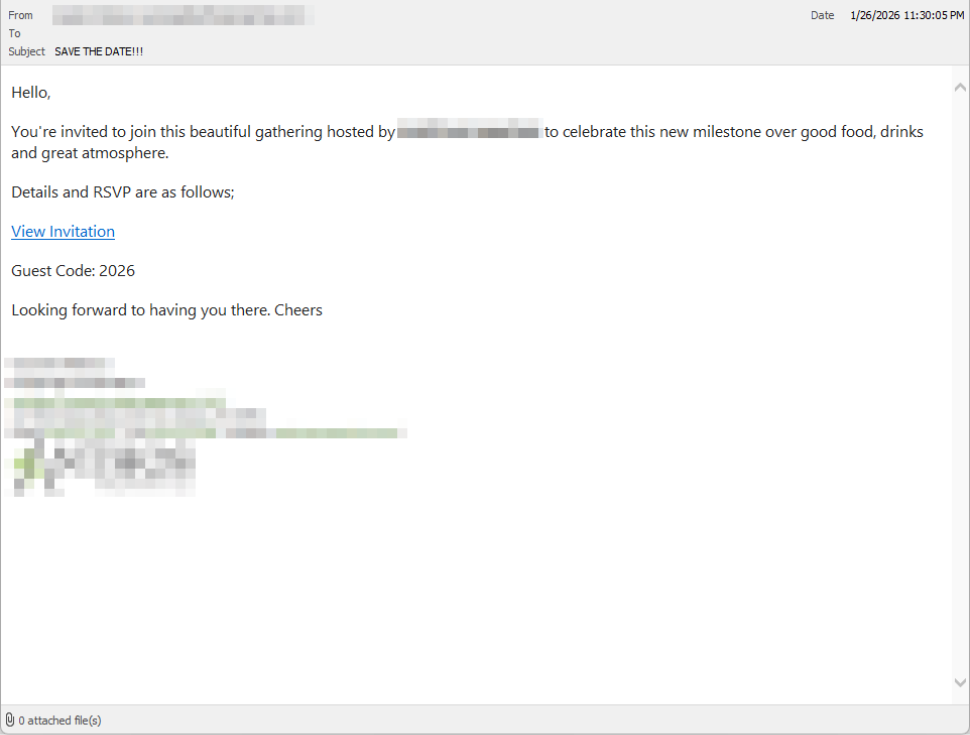
In the screenshot below, the email arrived from a friend whose email account had been hacked, but it could just as easily come from a sender you don’t know.

So far, we’ve only seen this campaign targeting people in the UK, but there’s nothing stopping it from expanding elsewhere. 

Clicking the link in the email leads to a polished invitation page hosted on an attacker-controlled domain. 

Party invitation email from a contact

The invite: The landing page that leads to an installer 

The landing page leans heavily into the party theme, but instead of showing event details, the page nudges the user toward opening a file. None of them look dangerous on their own, but together they keep the user focused on the “invitation” file: 

  • A bold “You’re Invited!” headline 
  • The suggestion that a friend had sent the invitation 
  • A message saying the invitation is best viewed on a Windows laptop or desktop
  • A countdown suggesting your invitation is already “downloading” 
  • A message implying urgency and social proof (“I opened mine and it was so easy!”

Within seconds, the browser is redirected to download RSVPPartyInvitationCard.msi 

The page even triggers the download automatically to keep the victim moving forward without stopping to think. 

This MSI file isn’t an invitation. It’s an installer. 

The landing page

The guest: What the MSI actually does 

When the user opens the MSI file, it launches msiexec.exe and silently installs ScreenConnect Client, a legitimate remote access tool often used by IT support teams.  

There’s no invitation, RSVP form, or calendar entry. 

What happens instead: 

  • ScreenConnect binaries are installed under C:\Program Files (x86)\ScreenConnect Client\ 
  • A persistent Windows service is created (for example, ScreenConnect Client 18d1648b87bb3023) 
  • ScreenConnect installs multiple .NET-based components 
  • There is no clear user-facing indication that a remote access tool is being installed 

From the victim’s perspective, very little seems to happen. But at this point, the attacker can now remotely access their computer. 

The after-party: Remote access is established 

Once installed, the ScreenConnect client initiates encrypted outbound connections to ScreenConnect’s relay servers, including a uniquely assigned instance domain.

That connection gives the attacker the same level of access as a remote IT technician, including the ability to: 

  • See the victim’s screen in real time
  • Control the mouse and keyboard 
  • Upload or download files 
  • Keep access even after the computer is restarted 

Because ScreenConnect is legitimate software commonly used for remote support, its presence isn’t always obvious. On a personal computer, the first signs are often behavioral, such as unexplained cursor movement, windows opening on their own, or a ScreenConnect process the user doesn’t remember installing. 

Why this scam works 

This campaign is effective because it targets normal, predictable human behavior. From a behavioral security standpoint, it exploits our natural curiosity and appears to be a low risk. 

Most people don’t think of invitations as dangerous. Opening one feels passive, like glancing at a flyer or checking a message, not installing software. 

Even security-aware users are trained to watch out for warnings and pressure. A friendly “you’re invited” message doesn’t trigger those alarms. 

By the time something feels off, the software is already installed. 

Signs your computer may be affected 

Watch for: 

  • A download or executed file named RSVPPartyInvitationCard.msi 
  • An unexpected installation of ScreenConnect Client 
  • A Windows service named ScreenConnect Client with random characters  
  • Your computer makes outbound HTTPS connections to ScreenConnect relay domains 
  • Your system resolves the invitation-hosting domain used in this campaign, xnyr[.]digital 

How to stay safe  

This campaign is a reminder that modern attacks often don’t break in—they’re invited in. Remote access tools give attackers deep control over a system. Acting quickly can limit the damage.  

For individuals 

If you receive an email like this: 

  • Be suspicious of invitations that ask you to download or open software 
  • Never run MSI files from unsolicited emails 
  • Verify invitations through another channel before opening anything 

If you already clicked or ran the file:  

  • Disconnect from the internet immediately 
  • Check for ScreenConnect and uninstall it if present 
  • Run a full security scan 
  • Change important passwords from a clean, unaffected device 

For organisations (especially in the UK) 

  • Alert on unauthorized ScreenConnect installations
  • Restrict MSI execution where feasible 
  • Treat “remote support tools” as high-risk software
  • Educate users: invitations don’t come as installers 

This scam works by installing a legitimate remote access tool without clear user intent. That’s exactly the gap Malwarebytes is designed to catch.

Malwarebytes now detects newly installed remote access tools and alerts you when one appears on your system. You’re then given a choice: confirm that the tool is expected and trusted, or remove it if it isn’t.


We don’t just report on threats—we remove them

Cybersecurity risks should never spread beyond a headline. Keep threats off your devices by downloading Malwarebytes today.

Match, Hinge, OkCupid, and Panera Bread breached by ransomware group

30 January 2026 at 15:23

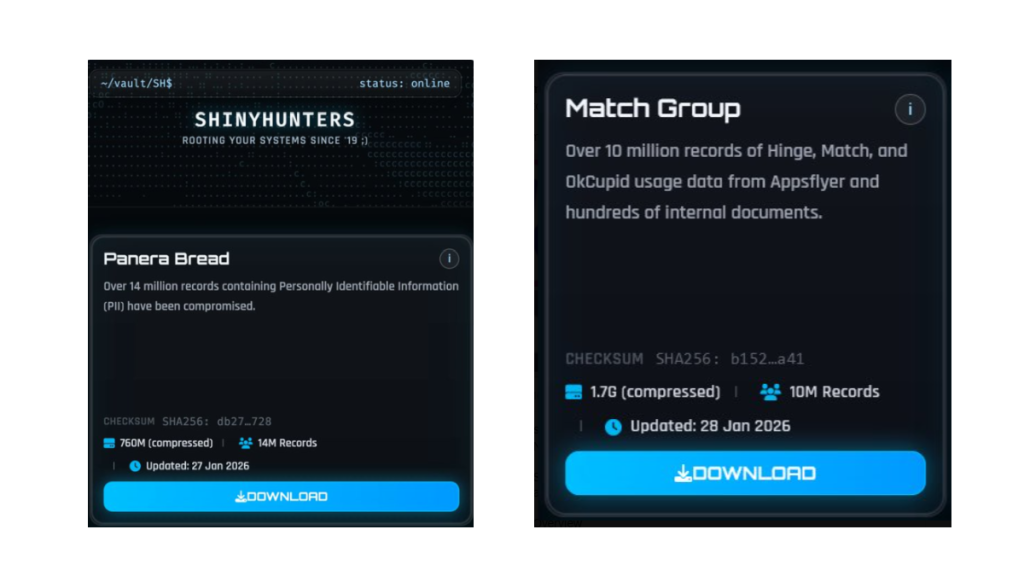
The ShinyHunters ransomware group has claimed the theft of data containing 10 million records belonging to the Match Group and 14 million records from bakery-café chain Panera Bread.

Claims posted by ShinyHunters

The Match Group, that runs multiple popular online dating services like Tinder, Match.com, Meetic, OkCupid, and Hinge has confirmed a cyber incident and is investigating the data breach.

Panera Bread also confirmed that an incident occurred and has alerted authorities. “The data involved is contact information,” it said in an emailed statement to Reuters.

ShinyHunters seems to be gaining access through Single-Sign-On (SSO) platforms and using voice-cloning techniques, which has resulted in a growing number of breaches across different companies. However, not all of these breaches have the same impact.

The impact

For the Match Group, ShinyHunters claims:

“Over 10 million records of Hinge, Match, and OkCupid usage data from Appsflyer and hundreds of internal documents.”

Match says there is no evidence that logins, financial data, or private chats were stolen, but Personally Identifiable Information (PII) and tracking data for some users are in scope. A notification process has been set in motion.

For Panera Bread, ShinyHunters claims to have compromised 14 million records containing PII.

Panera Bread reassures users that there is no indication that the hackers accessed user login credentials, financial information, or private communications.

ShinyHunters also breached Bumblr, Carmax, and Edmunds among others, but I wanted to use Panera Bread and the Match Group as two examples that have very different consequences for users.

When your activity on a dating app is compromised, the impact can be deeply personal. Concerns can range from partners, family members, or employers discovering dating profiles to the risk of doxxing. For many people, stigma around certain apps can lead to fears of being outed, accused of infidelity, or even extorted.

The impact of the Panera Bread breach will be very different. “I just ordered a sandwich and now some criminals have my home address?” Data like this is useful to enrich existing data sets. And the more they know, the easier and better they can target you in phishing attempts.

Protecting yourself after a data breach

If you think you have been affected by a data breach, here are steps you can take to protect yourself:

  • Check the company’s advice. Every breach is different, so check with the company to find out what’s happened and follow any specific advice it offers.
  • Change your password. You can make a stolen password useless to thieves by changing it. Choose a strong password that you don’t use for anything else. Better yet, let a password manager choose one for you.
  • Enable two-factor authentication (2FA). If you can, use a FIDO2-compliant hardware key, laptop, or phone as your second factor. Some forms of 2FA can be phished just as easily as a password, but 2FA that relies on a FIDO2 device can’t be phished.
  • Watch out for impersonators. The thieves may contact you posing as the breached platform. Check the official website to see if it’s contacting victims and verify the identity of anyone who contacts you using a different communication channel.
  • Take your time. Phishing attacks often impersonate people or brands you know, and use themes that require urgent attention, such as missed deliveries, account suspensions, and security alerts.
  • Consider not storing your card details. It’s definitely more convenient to let sites remember your card details, but it increases risk if a retailer suffers a breach.
  • Set up identity monitoring, which alerts you if your personal information is found being traded illegally online and helps you recover after.

You can use Malwarebytes’ free Digital Footprint scan to find out if your private information is exposed online.


We don’t just report on threats—we help safeguard your entire digital identity

Cybersecurity risks should never spread beyond a headline. Protect your, and your family’s, personal information by using identity protection.

TikTok’s privacy update mentions immigration status. Here’s why.

30 January 2026 at 12:48

In 2026, could any five words be more chilling than “We’re changing our privacy terms?”

The timing could not have been worse for TikTok US when it sent millions of US users a mandatory privacy pop-up on January 22. The message forced users to accept updated terms if they wanted to keep using the app. Buried in that update was language about collecting “citizenship or immigration status.”

Specifically, TikTok said:

“Information You Provide may include sensitive personal information, as defined under applicable state privacy laws, such as information from users under the relevant age threshold, information you disclose in survey responses or in your user content about your racial or ethnic origin, national origin, religious beliefs, mental or physical health diagnosis, sexual life or sexual orientation, status as transgender or nonbinary, citizenship or immigration status, or financial information.”

The internet reacted badly. TikTok users took to social media, with some suggesting that TikTok was building a database of immigration status, and others pledging to delete their accounts. It didn’t help that TikTok’s US operation became a US-owned company on the same day, with Senator Ed Markey (D-Mass.) criticizing what he sees as a lack of transparency around the deal.

A legal requirement

In this case, things are may be less sinister than you’d think. The language is not new—it first appeared around August 2024. And TikTok is not asking users to provide their immigration status directly.

Instead, the disclosure covers sensitive information that users might voluntarily share in videos, surveys, or interactions with AI features.

The change appears to be driven largely by California’s AB-947, signed in October 2023. The law added immigration status to the state’s definition of sensitive personal information, placing it under stricter protections. Companies are required to disclose how they process sensitive personal information, even if they do not actively seek it out.

Other social media companies, including Meta, do not explicitly mention immigration status in their privacy policies. According to TechCrunch, that difference likely reflects how specific their disclosure language is—not a meaningful difference in what data is actually collected.

One meaningful change in TikTok’s updated policy does concern location tracking. Previous versions stated that TikTok did not collect GPS data from US users. The new policy says it may collect precise location data, depending on user settings. Users can reportedly opt out of this tracking.

Read the whole board, not just one square

So, does this mean TikTok—or any social media company—deserves our trust? That’s a harder question.

There are still red flags. In April, TikTok quietly removed a commitment to notify users before sharing data with law enforcement. According to Forbes, the company has also declined to say whether it shares, or would share, user data with agencies such as the Department of Homeland Security (DHS) or Immigration and Customs Enforcement (ICE).

That uncertainty is the real issue. Social media companies are notorious for collecting vast amounts of user data, and for being vague about how it may be used later. Outrage over a particularly explicit disclosure is understandable, but the privacy problem runs much deeper than a single policy update from one company.

People have reason to worry unless platforms explicitly commit to not collecting or inferring sensitive data—and explicitly commit to not sharing it with government agencies. And even then, skepticism is healthy. These companies have a long history of changing policies quietly when it suits them.


We don’t just report on data privacy—we help you remove your personal information

Cybersecurity risks should never spread beyond a headline. With Malwarebytes Personal Data Remover, you can scan to find out which sites are exposing your personal information, and then delete that sensitive data from the internet.

Meta confirms it’s working on premium subscription for its apps

29 January 2026 at 22:06

Meta plans to test exclusive features that will be incorporated in paid versions of Facebook, Instagram, and WhatsApp. It confirmed these plans to TechCrunch.

But these plans are not to be confused with the ad-free subscription options that Meta introduced for Facebook and Instagram in the EU, the European Economic Area, and Switzerland in late 2023 and framed as a way to comply with General Data Protection Regulation (GDPR) and Digital Markets Act requirements.

From November 2023, users in those regions could either keep using the services for free with personalized ads or pay a monthly fee for an ad‑free experience. European rules require Meta to get users’ consent in order to show them targeted ads, so this was an obvious attempt to recoup advertising revenue when users declined to give that consent.

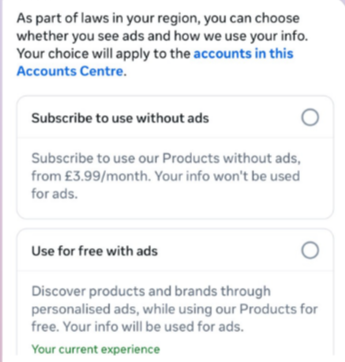
This year, users in the UK were given the same choice: use Meta’s products for free or subscribe to use them without ads. But only grudgingly, judging by the tone in the offer… “As part of laws in your region, you have a choice.”

As part of laws in your region, you have a choice
The ad-free option that has been rolling out coincides with the announcement of Meta’s premium subscriptions.

That ad-free option, however, is not what Meta is talking about now.

The newly announced plans are not about ads, and they are also separate from Meta Verified, which starts at around $15 a month and focuses on creators and businesses, offering a verification badge, better support, and anti‑impersonation protection.

Instead, these new subscriptions are likely to focus on additional features—more control over how users share and connect, and possibly tools such as expanded AI capabilities, unlimited audience lists, seeing who you follow that doesn’t follow you back, or viewing stories without the poster knowing it was you.

These examples are unconfirmed. All we know for sure is that Meta plans to test new paid features to see which ones users are willing to pay for and how much they can charge.

Meta has said these features will focus on productivity, creativity, and expanded AI.

My opinion

Unfortunately, this feels like another refusal to listen.

Most of us aren’t asking for more AI in our feeds. We’re asking for a basic sense of control: control over who sees us, what’s tracked about us, and how our data is used to feed an algorithm designed to keep us scrolling.

Users shouldn’t have to choose between being mined for behavioral data or paying a monthly fee just to be left alone. The message baked into “pay or be profiled” is that privacy is now a luxury good, not a default right. But while regulators keep saying the model is unlawful, the experience on the ground still nudges people toward the path of least resistance: accept the tracking and move on.

Even then, this level of choice is only available to users in Europe.

Why not offer the same option to users in the US? Or will it take stronger US privacy regulation to make that happen?


We don’t just report on threats – we help protect your social media

Cybersecurity risks should never spread beyond a headline. Protect your social media accounts by using Malwarebytes Identity Theft Protection.

Microsoft Office zero-day lets malicious documents slip past security checks

29 January 2026 at 15:53

Microsoft issued an emergency patch for a high-severity zero-day vulnerability in Office that allows attackers to bypass document security checks and is being exploited in the wild via malicious files.

Microsoft pushed the emergency patch for the zero‑day, tracked as CVE-2026-21509, and classified it as a “Microsoft Office Security Feature Bypass Vulnerability” with a CVSS score of 7.8 out of 10.

The flaw allows attackers to bypass Object Linking and Embedding (OLE) mitigations that are designed to block unsafe COM/OLE controls inside Office documents. This means a malicious attachment could infect a PC despite built-in protections.

In a real-life scenario, an attacker creates a fake Word, Excel, or PowerPoint file containing hidden “mini‑programs” or special objects. They can run code and do other things on the affected computer. Normally, Office has safety checks that would block those mini-programs because they’re risky.

However, the vulnerability allows the attacker to tweak the file’s structure and hidden information in a way that tricks Office into thinking the dangerous mini‑program inside the document is harmless. As a result, Office skips the usual security checks and allows the hidden code to run.

As code to test the bypass is publicly available, increasing the risk of exploitation, users are under urgent advice to apply the patch.

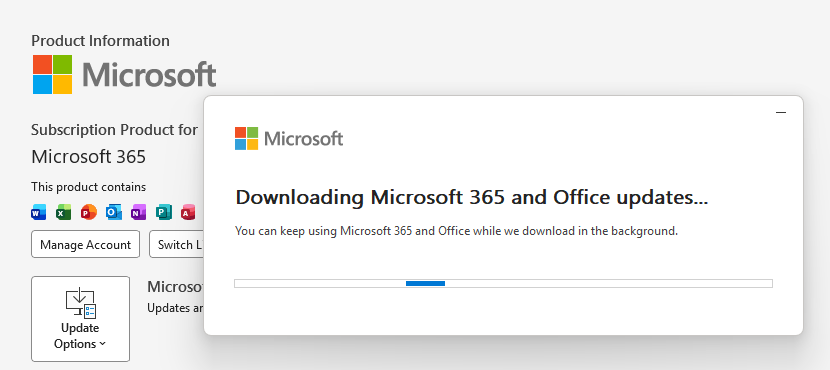
Updating Microsoft 365 and Office

How to protect your system

What you need to do depends on which version of Office you’re using.

The affected products include Microsoft Office 2016, 2019, LTSC 2021, LTSC 2024, and Microsoft 365 Apps (both 32‑bit and 64‑bit).

Office 2021 and later are protected via a server‑side change once Office is restarted. To apply it, close all Office apps and restart them.

Office 2016 and 2019 require a manual update. Run Windows Update with the option to update other Microsoft products turned on.

If you’re running build 16.0.10417.20095 or higher, no action is required. You can check your build number by opening any Office app, going to your account page, and selecting About for whichever application you have open. Make sure the build number at the top reads 16.0.10417.20095 or higher.

What always helps:

  • Don’t open unsolicited attachments without verifying them with a trusted sender.
  • Treat all unexpected documents, especially those asking to “enable content” or “enable editing,” as suspicious.
  • Keep macros disabled by default and only allow signed macros from trusted publishers.
  • Use an up-to-date real-time anti-malware solution.
  • Keep your operating system and software fully up to date.

We don’t just report on threats—we remove them

Cybersecurity risks should never spread beyond a headline. Keep threats off your devices by downloading Malwarebytes today.

Clawdbot’s rename to Moltbot sparks impersonation campaign

29 January 2026 at 15:26

After the viral AI assistant Clawdbot was forced to rename to Moltbot due to a trademark dispute, opportunists moved quickly. Within days, typosquat domains and a cloned GitHub repository appeared—impersonating the project’s creator and positioning infrastructure for a potential supply-chain attack.

The code is clean. The infrastructure is not. With the GitHub downloads and star rating rapidly rising, we took a deep dive into how fake domains target viral open source projects.

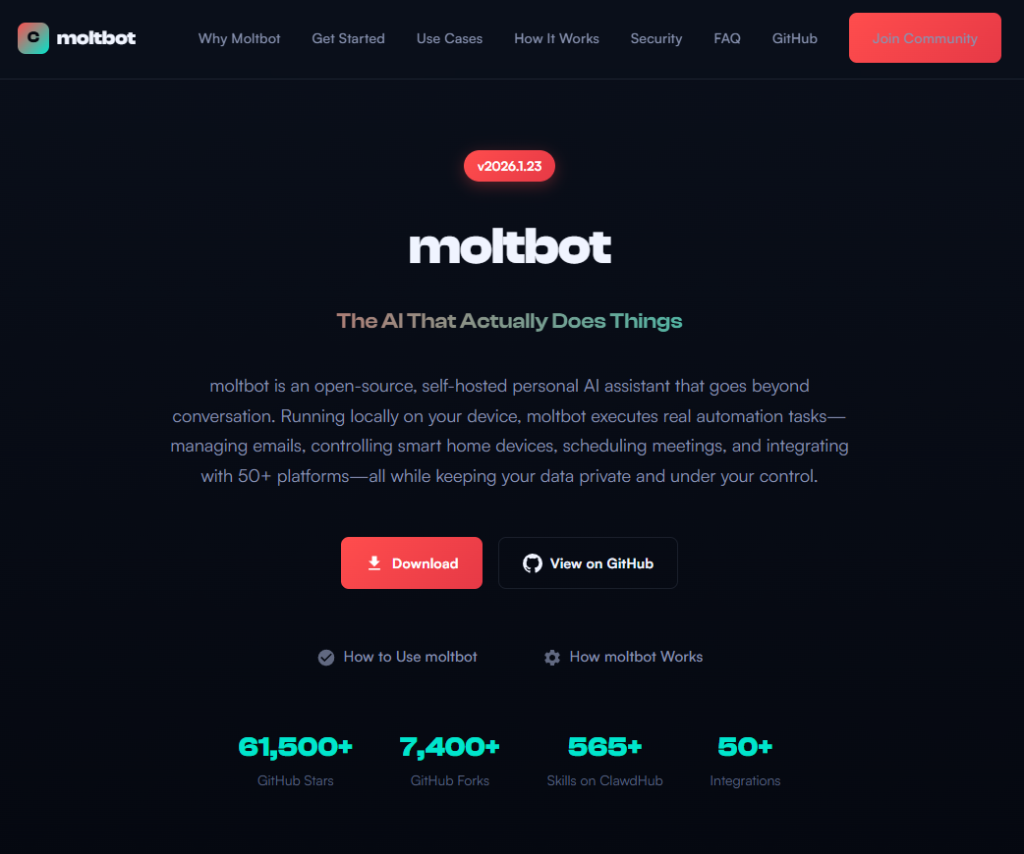
Fake domains spring up to impersonate Moltbot's landing page

The background: Why was Clawdbot renamed?

In early 2026, Peter Steinberger’s Clawdbot became one of the fastest-growing open source projects on GitHub. The self-hosted assistant—described as “Claude with hands”—allowed users to control their computer through WhatsApp, Telegram, Discord, and similar platforms.

Anthropic later objected to the name. Steinberger complied and rebranded the project to Moltbot (“molt” being what lobsters do when they shed their shell).

During the rename, both the GitHub organization and X (formerly Twitter) handle were briefly released before being reclaimed. Attackers monitoring the transition grabbed them within seconds.

“Had to rename our accounts for trademark stuff and messed up the GitHub rename and the X rename got snatched by crypto shills.” — Peter Steinberger

“Had to rename our accounts for trademark stuff and messed up the GitHub rename and the X rename got snatched by crypto shills.” — Peter Steinberger

That brief gap was enough.

Impersonation infrastructure emerged

While investigating a suspicious repository, I uncovered a coordinated set of assets designed to impersonate Moltbot.

Domains

  • moltbot[.]you
  • clawbot[.]ai
  • clawdbot[.]you

Repository

  • github[.]com/gstarwd/clawbot — a cloned repository using a typosquatted variant of the former Clawdbot project name

Website

A polished marketing site featuring:

  • professional design closely matching the real project
  • SEO optimization and structured metadata
  • download buttons, tutorials, and FAQs
  • claims of 61,500+ GitHub stars lifted from the real repository

Evidence of impersonation

False attribution: The site’s schema.org metadata falsely claims authorship by Peter Steinberger, linking directly to his real GitHub and X profiles. This is explicit identity misrepresentation.

The site's metadata

Misdirection to an unauthorized repository: “View on GitHub” links send users to gstarwd/clawbot, not the official moltbot/moltbot repository.

Stolen credibility:The site prominently advertises tens of thousands of stars that belong to the real project. The clone has virtually none (although at the time of writing, that number is steadily rising).

The site advertises 61,500+ GitHub stars

Mixing legitimate and fraudulent links: Some links point to real assets, such as official documentation or legitimate binaries. Others redirect to impersonation infrastructure. This selective legitimacy defeats casual verification and appears deliberate.

Full SEO optimization: Canonical tags, Open Graph metadata, Twitter cards, and analytics are all present—clearly intended to rank the impersonation site ahead of legitimate project resources.

The ironic security warning: The impersonation site even warns users about scams involving fake cryptocurrency tokens—while itself impersonating the project.

The site warms about crypto scams.

Code analysis: Clean by design

I performed a static audit of the gstarwd/clawbot repository:

  • no malicious npm scripts
  • no credential exfiltration
  • no obfuscation or payload staging
  • no cryptomining
  • no suspicious network activity

The code is functionally identical to the legitimate project, which is not reassuring.

The threat model

The absence of malware is the strategy. Nothing here suggests an opportunistic malware campaign. Instead, the setup points to early preparation for a supply-chain attack.

The likely chain of events:

A user searches for “clawbot GitHub” or “moltbot download” and finds moltbot[.]you or gstarwd/clawbot.

The code looks legitimate and passes a security audit.

The user installs the project and configures it, adding API keys and messaging tokens. Trust is established.

At a later point, a routine update is pulled through npm update or git pull. A malicious payload is delivered into an installation the user already trusts.

An attacker can then harvest:

  • Anthropic API keys
  • OpenAI API keys
  • WhatsApp session credentials
  • Telegram bot tokens
  • Discord OAuth tokens
  • Slack credentials
  • Signal identity keys
  • full conversation histories
  • command execution access on the compromised machine

What’s malicious, and what isn’t

Clearly malicious

  • false attribution to a real individual
  • misrepresentation of popularity metrics
  • deliberate redirection to an unauthorized repository

Deceptive but not yet malware

  • typosquat domains
  • SEO manipulation
  • cloned repositories with clean code

Not present (yet)

  • active malware
  • data exfiltration
  • cryptomining

Clean code today lowers suspicion tomorrow.

A familiar pattern

This follows a well-known pattern in open source supply-chain attacks.

A user searches for a popular project and lands on a convincing-looking site or cloned repository. The code appears legitimate and passes a security audit.

They install the project and configure it, adding API keys or messaging tokens so it can work as intended. Trust is established.

Later, a routine update arrives through a standard npm update or git pull. That update introduces a malicious payload into an installation the user already trusts.

From there, an attacker can harvest credentials, conversation data, and potentially execute commands on the compromised system.

No exploit is required. The entire chain relies on trust rather than technical vulnerabilities.

How to stay safe

Impersonation infrastructure like this is designed to look legitimate long before anything malicious appears. By the time a harmful update arrives—if it arrives at all—the software may already be widely installed and trusted.

That’s why basic source verification still matters, especially when popular projects rename or move quickly.

Advice for users

  • Verify GitHub organization ownership
  • Bookmark official repositories directly
  • Treat renamed projects as higher risk during transitions

Advice for maintainers

  • Pre-register likely typosquat domains before public renames
  • Coordinate renames and handle changes carefully
  • Monitor for cloned repositories and impersonation sites

Pro tip: Malwarebytes customers are protected. Malwarebytes is actively blocking all known indicators of compromise (IOCs) associated with this impersonation infrastructure, preventing users from accessing the fraudulent domains and related assets identified in this investigation.


We don’t just report on threats—we remove them

Cybersecurity risks should never spread beyond a headline. Keep threats off your devices by downloading Malwarebytes today.

Malicious Chrome extensions can spy on your ChatGPT chats

28 January 2026 at 15:34

Researchers discovered 16 malicious browser extensions for Google Chrome and Microsoft Edge that steal ChatGPT session tokens, giving attackers access to accounts, including conversation history and metadata.

The 16 malicious extensions (15 for Chrome and 1 for Edge) claim to improve and optimize ChatGPT, but instead siphon users’ session tokens to attackers. Together, they have been downloaded around 900 times, a relatively small number compared to other malicious extensions.

Despite benign descriptions and, in some cases, a “featured” badge, the real goal of these extensions is to hijack ChatGPT identities by stealing session authentication tokens and sending them to attacker-controlled backends.

Possession of these tokens gives attackers the same level of access as the user, including conversation history and metadata.

In addition to your ChatGPT session token, the extensions also send extra details about themselves (such as their version and language settings), along with information about how they’re used, and special keys they get from their own online service.

Taken together, this allows the attackers to build a picture of who you are and how you work online. They can use it to keep recognizing you over time, build a profile of your behavior, and maintain access to your ChatGPT-connected services for much longer. This increases the privacy impact and means a single compromised extension can cause broader harm if its servers are abused or breached.

According to the researchers, this campaign coincides with a broader trend:

“The rapid growth in adoption of AI-powered browser extensions, aimed at helping users with their everyday productivity needs. While most of them are completely benign, many of these extensions mimic known brands to gain users’ trust, particularly those designed to enhance interaction with large language models.”

How to stay safe

Although we always advise people to install extensions only from official web stores, this case proves once again that not all extensions available there are safe. That said, installing extensions from outside official web stores carries an even higher risk.

Extensions listed in official stores undergo a review process before being approved. This process, which combines automated and manual checks, assesses the extension’s safety, policy compliance, and overall user experience. The goal is to protect users from scams, malware, and other malicious activity. However, this review process is not foolproof.

Microsoft and Google have been notified about the abuse. However, extensions that are already installed may remain active in Chrome and Edge until users manually remove them.

Malicious extensions

These are the browser extensions you should remove. They are listed by Name — Publisher — Extension ID:

  • ChatGPT bulk delete, Chat manager — ChatGPT Mods — gbcgjnbccjojicobfimcnfjddhpphaod
  • ChatGPT export, Markdown, JSON, images — ChatGPT Mods — hljdedgemmmkdalbnmnpoimdedckdkhm
  • ChatGPT folder, voice download, prompt manager, free tools — ChatGPT Mods — lmiigijnefpkjcenfbinhdpafehaddag
  • ChatGPT message navigator, history scroller — ChatGPT Mods — ifjimhnbnbniiiaihphlclkpfikcdkab
  • ChatGPT Mods — Folder Voice Download & More Free Tools — jhohjhmbiakpgedidneeloaoloadlbdj
  • ChatGPT pin chat, bookmark — ChatGPT Mods — kefnabicobeigajdngijnnjmljehknjl
  • ChatGPT Prompt Manager, Folder, Library, Auto Send — ChatGPT Mods — ioaeacncbhpmlkediaagefiegegknglc
  • ChatGPT prompt optimization — ChatGPT Mods — mmjmcfaejolfbenlplfoihnobnggljij
  • ChatGPT search history, locate specific messages — ChatGPT Mods — ipjgfhcjeckaibnohigmbcaonfcjepmb
  • ChatGPT Timestamp Display — ChatGPT Mods — afjenpabhpfodjpncbiiahbknnghabdc
  • ChatGPT Token counter — ChatGPT Mods — hfdpdgblphooommgcjdnnmhpglleaafj
  • ChatGPT model switch, save advanced model uses — ChatGPT Mods — pfgbcfaiglkcoclichlojeaklcfboieh
  • ChatGPT voice download, TTS download — ChatGPT Mods — območbankihdfckkbfnoglefmdgmblcld (original: obdobankihdfckkbfnoglefmdgmblcld)
  • Collapsed message — ChatGPT Mods — lechagcebaneoafonkbfkljmbmaaoaec
  • Multi-Profile Management & Switching — ChatGPT Mods — nhnfaiiobkpbenbbiblmgncgokeknnno
  • Search with ChatGPT — ChatGPT Mods — hpcejjllhbalkcmdikecfngkepppoknd

We don’t just report on threats—we remove them

Cybersecurity risks should never spread beyond a headline. Keep threats off your devices by downloading Malwarebytes today.

WhatsApp rolls out new protections against advanced exploits and spyware

28 January 2026 at 13:57

WhatsApp is quietly rolling out a new safety layer for photos, videos, and documents, and it lives entirely under the hood. It won’t change how you chat, but it will change what happens to the files that move through your chats—especially the kind that can hide malware.

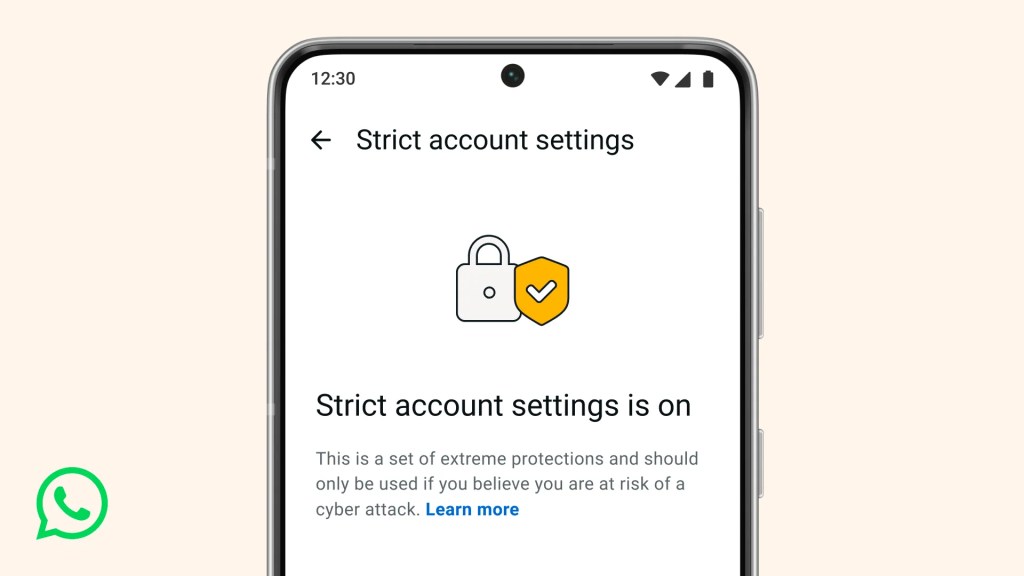
The new feature, called Strict Account Settings, is rolling out gradually over the coming weeks. To see whether you have the option—and to enable it—go to Settings > Privacy > Advanced.

Strict account settings
Image courtesy of WhatsApp

Yesterday, we wrote about a WhatsApp bug on Android that made headlines because a malicious media file in a group chat could be downloaded and used as an attack vector without you tapping anything. You only had to be added to a new group to be exposed to the booby-trapped file. That issue highlighted something security folks have worried about for years: media files are a great vehicle for attacks, and they do not always exploit WhatsApp itself, but bugs in the operating system or its media libraries.

In Meta’s explanation of the new technology, it points back to the 2015 Stagefright Android vulnerability, where simply processing a malicious video could compromise a device. Back then, WhatsApp worked around the issue by teaching its media library to spot broken MP4 files that could trigger those OS bugs, buying users protection even if their phones were not fully patched.

What’s new is that WhatsApp has now rebuilt its core media-handling library in Rust, a memory-safe programming language. This helps eliminate several types of memory bugs that often lead to serious security problems. In the process, it replaced about 160,000 lines of older C++ code with roughly 90,000 lines of Rust, and rolled the new library out to billions of devices across Android, iOS, desktop apps, wearables, and the web.

On top of that, WhatsApp has bundled a series of checks into an internal system it calls “Kaleidoscope.” This system inspects incoming files for structural oddities, flags higher‑risk formats like PDFs with embedded content or scripts, detects when a file pretends to be something it’s not (for example, a renamed executable), and marks known dangerous file types for special handling in the app. It won’t catch every attack, but it should prevent malicious files from poking at more fragile parts of your device.

For everyday users, the Rust rebuilt and Kaleidoscope checks are good news. They add a strong, invisible safety net around photos, videos and other files you receive, including in group chats where the recent bug could be abused. They also line up neatly with our earlier advice to turn off automatic media downloads or use Advanced Privacy Mode, which limits how far a malicious file can travel on your device even if it lands in WhatsApp.

WhatsApp is the latest platform to roll out enhanced protections for users: Apple introduced Lockdown Mode in 2022, and Android followed with Advanced Protection Mode last year. WhatsApp’s new Strict Account Settings takes a similar high-level approach, applying more restrictive defaults within the app, including blocking attachments and media from unknown senders.

However, this is no reason to rush back to WhatsApp, or to treat these changes as a guarantee of safety. At the very least, Meta is showing that it is willing to invest in making WhatsApp more secure.


We don’t just report on phone security—we provide it

Cybersecurity risks should never spread beyond a headline. Keep threats off your mobile devices by downloading Malwarebytes for iOS, and Malwarebytes for Android today.

Watch out for AT&amp;T rewards phishing text that wants your personal details

27 January 2026 at 18:43

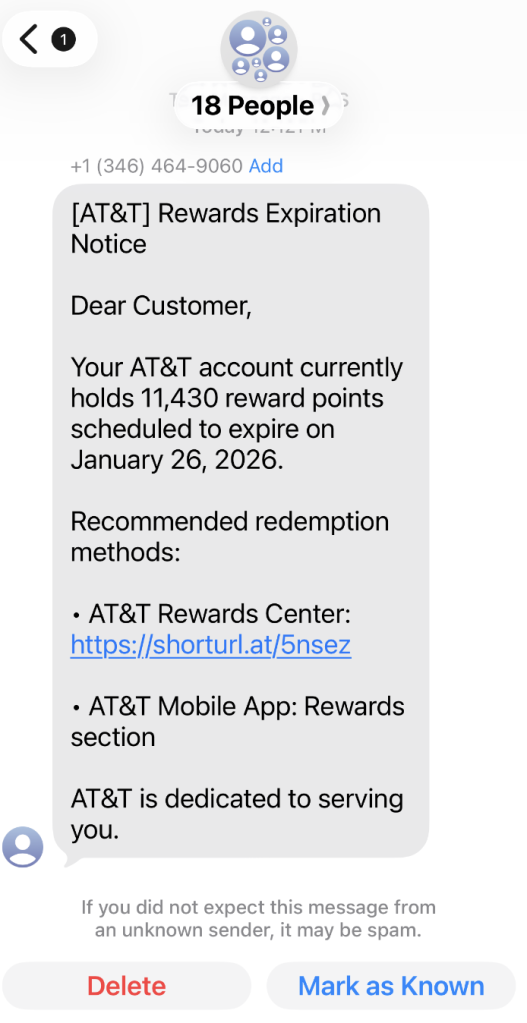
A coworker shared this suspicious SMS where AT&T supposedly warns the recipient that their reward points are about to expire.

Phishing attacks are growing increasingly sophisticated, likely with help from AI. They’re getting better at mimicking major brands—not just in look, but in behavior. Recently, we uncovered a well-executed phishing campaign targeting AT&T customers that combines realistic branding, clever social engineering, and layered data theft tactics.

In this post, we’ll walk you through the investigation, screen by screen, explaining how the campaign tricks its victims and where the stolen data ends up.

This is the text message that started the investigation.

“Dear Customer,
Your AT&T account currently holds 11,430 reward points scheduled to expire on January 26, 2026.
Recommended redemption methods:
– AT&T Rewards Center: {Shortened link}
– AT&T Mobile App: Rewards section
AT&T is dedicated to serving you.”

The shortened URL led to https://att.hgfxp[.]cc/pay/, a website designed to look like an AT&T site in name and appearance.

All branding, headers, and menus were copied over, and the page was full of real links out to att.com.

But the “main event” was a special section explaining how to access your AT&T reward points.

After “verifying” their account with a phone number, the victim is shown a dashboard warning that their AT&T points are due to expire in two days. This short window is a common phishing tactic that exploits urgency and FOMO (fear of missing out).

The rewards on offer—such as Amazon gift cards, headphones, smartwatches, and more—are enticing and reinforce the illusion that the victim is dealing with a legitimate loyalty program.

To add even more credibility, after submitting a phone number, the victim gets to see a list of available gifts, followed by a final confirmation prompt.

At that point, the target is prompted to fill out a “Delivery Information” form requesting sensitive personal information, including name, address, phone number, email, and more. This is where the actual data theft takes place.

The form’s visible submission flow is smooth and professional, with real-time validation and error highlighting—just like you’d expect from a top brand. This is deliberate. The attackers use advanced front-end validation code to maximize the quality and completeness of the stolen information.

Behind the slick UI, the form is connected to JavaScript code that, when the victim hits “Continue,” collects everything they’ve entered and transmits it directly to the attackers. In our investigation, we deobfuscated their code and found a large “data” section.

The stolen data gets sent in JSON format via POST to https://att.hgfxp[.]cc/api/open/cvvInterface.

This endpoint is hosted on the attacker’s domain, giving them immediate access to everything the victim submits.

What makes this campaign effective and dangerous

  • Sophisticated mimicry: Every page is an accurate clone of att.com, complete with working navigation links and logos.
  • Layered social engineering: Victims are lured step by step, each page lowering their guard and increasing trust.
  • Quality assurance: Custom JavaScript form validation reduces errors and increases successful data capture.
  • Obfuscated code: Malicious scripts are wrapped in obfuscation, slowing analysis and takedown.
  • Centralized exfiltration: All harvested data is POSTed directly to the attacker’s command-and-control endpoint.

How to defend yourself

A number of red flags could have alerted the target that this was a phishing attempt:

  • The text was sent to 18 recipients at once.
  • It used a generic greeting (“Dear Customer”) instead of personal identification.
  • The sender’s number was not a recognized AT&T contact.
  • The expiration date changed if the victim visited the fake site on a later date.

Beyond avoiding unsolicited links, here are a few ways to stay safe:

  • Only access your accounts through official apps or by typing the official website (att.com) directly into your browser.
  • Check URLs carefully. Even if a page looks perfect, hover over links and check the address bar for official domains.
  • Enable multi-factor authentication for your AT&T and other critical accounts.
  • Use an up to date real-time anti-malware solution with a web protection module.

Pro tip: Malwarebytes Scam Guard recognized this text as a scam.


We don’t just report on scams—we help detect them

Cybersecurity risks should never spread beyond a headline. If something looks dodgy to you, check if it’s a scam using Malwarebytes Scam Guard, a feature of our mobile protection products. Submit a screenshot, paste suspicious content, or share a text or phone number, and we’ll tell you if it’s a scam or legit. Download Malwarebytes Mobile Security for iOS or Android and try it today!
A WhatsApp bug lets malicious media files spread through group chats

27 January 2026 at 12:55

WhatsApp is going through a rough patch. Some users would argue it has been ever since Meta acquired the once widely trusted messaging platform. User sentiment has shifted from “trusted default messenger” to a grudgingly necessary Meta product.

Privacy-aware users still see WhatsApp as one of the more secure mass-market messaging platforms if you lock down its settings. Even then, many remain uneasy about Meta’s broader ecosystem, and wish all their contacts would switch to a more secure platform.

Back to current affairs, which will only reinforce that sentiment.

Google’s Project Zero has just disclosed a WhatsApp vulnerability where a malicious media file, sent into a newly created group chat, can be automatically downloaded and used as an attack vector.

The bug affects WhatsApp on Android and involves zero‑click media downloads in group chats. You can be attacked simply by being added to a group and having a malicious file sent to you.

According to Project Zero, the attack is most likely to be used in targeted campaigns, since the attacker needs to know or guess at least one contact. While focused, it is relatively easy to repeat once an attacker has a likely target list.

And to put a cherry on top for WhatsApp’s competitors, a potentially even more serious concern for the popular messaging platform, an international group of plaintiffs sued Meta Platforms, alleging the WhatsApp owner can store, analyze, and access virtually all of users’ private communications, despite WhatsApp’s end-to-end encryption claims.

How to secure WhatsApp

Reportedly, Meta pushed a server change on November 11, 2025, but Google says that only partially resolved the issue. So, Meta is working on a comprehensive fix.

Google’s advice is to disable Automatic Download or enable WhatsApp’s Advanced Privacy Mode so that media is not automatically downloaded to your phone.

And you’ll need to keep WhatsApp updated to get the latest patches, which is true for any app and for Android itself.

Turn off auto-download of media

Goal: ensure that no photos, videos, audio, or documents are pulled to the device without an explicit decision.

  • Open WhatsApp on your Android device.
  • Tap the three‑dot menu in the top‑right corner, then tap Settings.
  • Go to Storage and data (sometimes labeled Data and storage usage).
  • Under Media auto-download, you will see When using mobile data, when connected on Wi‑Fi. and when roaming.
  • For each of these three entries, tap it and uncheck all media types: Photos, Audio, Videos, Documents. Then tap OK.
  • Confirm that each category now shows something like “No media” under it.

Doing this directly implements Project Zero’s guidance to “disable Automatic Download” so that malicious media can’t silently land on your storage as soon as you are dropped into a hostile group.

Stop WhatsApp from saving media to your Android gallery

Even if WhatsApp still downloads some content, you can stop it from leaking into shared storage where other apps and system components see it.

  • In Settings, go to Chats.
  • Turn off Media visibility (or similar option such as Show media in gallery). For particularly sensitive chats, open the chat, tap the contact or group name, find Media visibility, and set it to No for that thread.

WhatsApp is a sandbox, and should contain the threat. Which means, keeping media inside WhatsApp makes it harder for a malicious file to be processed by other, possibly more vulnerable components.

Lock down who can add you to groups

The attack chain requires the attacker to add you and one of your contacts to a new group. Reducing who can do that lowers risk.

  • ​In Settings, tap Privacy.
  • Tap Groups.
  • Change from Everyone to My contacts or ideally My contacts except… and exclude any numbers you do not fully trust.
  • If you use WhatsApp for work, consider keeping group membership strictly to known contacts and approved admins.

Set up two-step verification on your WhatsApp account

Read this guide for Android and iOS to learn how to do that.


We don’t just report on phone security—we provide it

Cybersecurity risks should never spread beyond a headline. Keep threats off your mobile devices by downloading Malwarebytes for iOS, and Malwarebytes for Android today.

TikTok narrowly avoids a US ban by spinning up a new American joint venture

27 January 2026 at 12:09

TikTok may have found a way to stay online in the US. The company announced late last week that it has set up a joint venture backed largely by US investors. TikTok announced TikTok USDS Joint Venture LLC on Friday in a deal valued at about $14 billion, allowing it to continue operating in the country.

This is the culmination of a long-running fight between TikTok and US authorities. In 2019, the Committee on Foreign Investment in the United States (CFIUS) flagged ByteDance’s 2017 acquisition of Musical.ly as a national security risk, on the basis that state links between the app’s Chinese owner would make put US users’ data at risk.

In his first term, President Trump issued an executive order demanding that ByteDance sell the business or face a ban. That was order was blocked by courts, and President Biden later replaced it with a broader review process in 2021.

In April 2024, Congress passed the Protecting Americans from Foreign Adversary Controlled Applications Act (PAFACA), which Biden signed into law. That set a January 19, 2025 deadline for ByteDance to divest its business or face a nationwide ban. With no deal finalized, TikTok voluntarily went dark for about 12 hours on January 18, 2025. Trump later issued executive orders extending the deadline, culminating in a September 2025 agreement that led to the joint venture.

Three managing investors each hold 15% of the new business: database giant Oracle (which previously vied to acquire TikTok when ByteDance was first told to divest), technology-focused investment group Silver Lake, and the United Arab Emirates-backed AI (Artificial Intelligence) investment company MGX.

Other investors include the family office of tech entrepreneur Michael Dell, as well as Vastmere Strategic Investments, Alpha Wave Partners, Revolution, Merritt Way, and Via Nova.

Original owner ByteDance retains 19.9% of the business, and according to an internal memo released before the deal was officially announced, 30% of the company will be owned by affiliates of existing ByteDance investors. That’s in spite of the fact that PAFACA mandated a complete severance of TikTok in the US from its Chinese ownership.

A focus on security

The company is eager to promote data security for its users. With that in mind, Oracle takes the role of “trusted security partner” for data protection and compliance auditing under the deal.

Oracle is also expected to store US user data in its cloud environment. The program will reportedly align with security frameworks including the National Institute of Standards and Technology (NIST) Cybersecurity Framework. Other TikTok-owned apps such as CapCut and Lemon8 will also fall under the joint venture’s security umbrella.

Canada’s TikTok tension

It’s been a busy month for ByteDance, with other developments north of the border. Last week, Canada’s Federal Court overturned a November 2024 governmental order to shut down TikTok’s Canadian business on national security grounds. The decision gives Industry Minister Mélanie Joly time to review the case.

Why this matters

TikTok’s new US joint venture lowers the risk of direct foreign access to American user data, but it doesn’t erase all of the concerns that put the app in regulators’ crosshairs in the first place. ByteDance still retains an economic stake, the recommendation algorithm remains largely opaque, and oversight depends on audits and enforcement rather than hard technical separation.

In other words, this deal reduces exposure, but it doesn’t make TikTok a risk-free platform. For users, that means the same common-sense rules still apply: be thoughtful about what you share and remember that regulatory approval isn’t the same as total data safety.


We don’t just report on data privacy—we help you remove your personal information

Cybersecurity risks should never spread beyond a headline. With Malwarebytes Personal Data Remover, you can scan to find out which sites are exposing your personal information, and then delete that sensitive data from the internet.

Get paid to scroll TikTok? The data trade behind Freecash ads

26 January 2026 at 15:28

Loyal readers and other privacy-conscious people will be familiar with the expression, “If it’s too good to be true, it’s probably false.”

Getting paid handsomely to scroll social media definitely falls into that category. It sounds like an easy side hustle, which usually means there’s a catch.

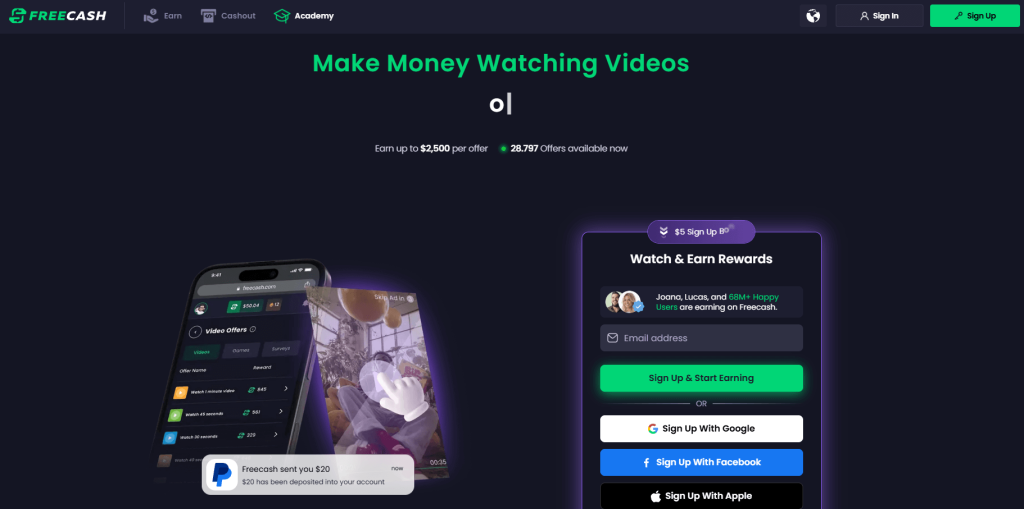
In January 2026, an app called Freecash shot up to the number two spot on Apple’s free iOS chart in the US, helped along by TikTok ads that look a lot like job offers from TikTok itself. The ads promised up to $35 an hour to watch your “For You” page. According to reporting, the ads didn’t promote Freecash by name. Instead, they showed a young woman expressing excitement about seemingly being “hired by TikTok” to watch videos for money.

Freecash landing page

The landing pages featured TikTok and Freecash logos and invited users to “get paid to scroll” and “cash out instantly,” implying a simple exchange of time for money.

Those claims were misleading enough that TikTok said the ads violated its rules on financial misrepresentation and removed some of them.

Once you install the app, the promised TikTok paycheck vanishes. Instead, Freecash routes you to a rotating roster of mobile games—titles like Monopoly Go and Disney Solitaire—and offers cash rewards for completing time‑limited in‑game challenges. Payouts range from a single cent for a few minutes of daily play up to triple‑digit amounts if you reach high levels within a fixed period.

The whole setup is designed not to reward scrolling, as it claims, but to funnel you into games where you are likely to spend money or watch paid advertisements.

Freecash’s parent company, Berlin‑based Almedia, openly describes the platform as a way to match mobile game developers with users who are likely to install and spend. The company’s CEO has spoken publicly about using past spending data to steer users toward the genres where they’re most “valuable” to advertisers. 

Our concern, beyond the bait-and-switch, is the privacy issue. Freecash’s privacy policy allows the automatic collection of highly sensitive information, including data about race, religion, sex life, sexual orientation, health, and biometrics. Each additional mobile game you install to chase rewards adds its own privacy policy, tracking, and telemetry. Together, they greatly increase how much behavioral data these companies can harvest about a user.

Experts warn that data brokers already trade lists of people likely to be more susceptible to scams or compulsive online behavior—profiles that apps like this can help refine.

We’ve previously reported on data brokers that used games and apps to build massive databases, only to later suffer breaches exposing all that data.

When asked about the ads, Freecash said the most misleading TikTok promotions were created by third-party affiliates, not by the company itself. Which is quite possible because Freecash does offer an affiliate payout program to people who promote the app online. But they made promises to review and tighten partner monitoring.

For experienced users, the pattern should feel familiar: eye‑catching promises of easy money, a bait‑and‑switch into something that takes more time and effort than advertised, and a business model that suddenly makes sense when you realize your attention and data are the real products.

How to stay private

Free cash? Apparently, there is no such thing.

If you’re curious how intrusive schemes like this can be, consider using a separate email address created specifically for testing. Avoid sharing real personal details. Many users report that once they sign up, marketing emails quickly pile up.

Some of these schemes also appeal to people who are younger or under financial pressure, offering tiny payouts while generating far more value for advertisers and app developers.

So, what can you do?

  • Gather information about the company you’re about to give your data. Talk to friends and relatives about your plans. Shared common sense often helps make the right decisions.
  • Create a separate account if you want to test a service. Use a dedicated email address and avoid sharing real personal details.
  • Limit information you provide online to what makes sense for the purpose. Does a game publisher need your Social Security Number? I don’t think so.
  • Be cautious about app installs that are framed as required to make the money initially promised, and review permissions carefully.
  • Use an up-to-date real-time anti-malware solution on all your devices.

Work from the premise that free money does not exist. Try to work out the business model of those offering it, and then decide.


We don’t just report on threats – we help protect your social media

Cybersecurity risks should never spread beyond a headline. Protect your social media accounts by using Malwarebytes Identity Theft Protection.

One privacy change I made for 2026 (Lock and Code S07E02)

26 January 2026 at 14:31

This week on the Lock and Code podcast…

When you hear the words “data privacy,” what do you first imagine?

Maybe you picture going into your social media apps and setting your profile and posts to private. Maybe you think about who you’ve shared your location with and deciding to revoke some of that access. Maybe you want to remove a few apps entirely from your smartphone, maybe you want to try a new web browser, maybe you even want to skirt the type of street-level surveillance provided by Automated License Plate Readers, which can record your car model, license plate number, and location on your morning drive to work.

Importantly, all of these are “data privacy,” but trying to do all of these things at once can feel impossible.

That’s why, this year, for Data Privacy Day, Malwarebytes Senior Privacy Advocate (and Lock and Code host) David Ruiz is sharing the one thing he’s doing different to improve his privacy. And it’s this: He’s given up Google Search entirely.

When Ruiz requested the data that Google had collected about him last year, he saw that the company had recorded an eye-popping 8,000 searches in just the span of 18 months. And those 8,000 searches didn’t just reveal what he was thinking about on any given day—including his shopping interests, his home improvement projects, and his late-night medical concerns—they also revealed when he clicked on an ad based on the words he searched. This type of data, which connects a person’s searches to the likelihood of engaging with an online ad, is vital to Google’s revenue, and it’s the type of thing that Ruiz is seeking to finally cut off.

So, for 2026, he has switched to a new search engine, Brave Search.

Today, on the Lock and Code podcast, Ruiz explains why he made the switch, what he values about Brave Search, and why he also refused to switch to any of the major AI platforms in replacing Google.

Tune in today to listen to the full episode.

Show notes and credits:

Intro Music: “Spellbound” by Kevin MacLeod (incompetech.com)
Licensed under Creative Commons: By Attribution 4.0 License
http://creativecommons.org/licenses/by/4.0/
Outro Music: “Good God” by Wowa (unminus.com)


Listen up—Malwarebytes doesn’t just talk cybersecurity, we provide it.

Protect yourself from online attacks that threaten your identity, your files, your system, and your financial well-being with our exclusive offer for Malwarebytes Premium Security for Lock and Code listeners.

Spammers abuse Zendesk to flood inboxes with legitimate-looking emails, but why?

23 January 2026 at 17:04

Short answer: we have no idea.

People are actively complaining that their mailboxes and queues are being flooded by emails coming from the Zendesk instances of trusted companies like Discord, Riot Games, Dropbox, and many others.

Zendesk is a customer service and support software platform that helps companies manage customer communication. It supports tickets, live chat, email, phone, and communication through social media.

Some people complained about receiving over 1,000 such emails. The strange thing ais that so far there are no reports of malicious links, tech support scam numbers, or any type of phishing in these emails.

The abusers are able to send waves of emails from these systems because Zendesk allows them to create fake support tickets with email addresses that do not belong to them. The system sends a confirmation mail to the provided email address if the affected company has not restricted ticket submission to verified users.

In a December advisory, Zendesk warned about this method, which they called relay spam. In essence it’s an example of attackers abusing a legitimate automated part of a process. We have seen similar attacks before, but they always served a clear purpose for the attacker, whereas this one doesn’t.

Even though some of the titles in use definitely are of a clickbait nature. Some examples:

  • FREE DISCORD NITRO!!
  • TAKE DOWN ORDER NOW FROM CD Projekt
  • TAKE DOWN NOW ORDER FROM Israel FOR Square Enix
  • DONATION FOR State Of Tennessee CONFIRMED
  • LEGAL NOTICE FROM State Of Louisiana FOR Electronic
  • IMPORTANT LAW ENFORCEMENT NOTIFICATION FROM DISCORD FROM Peru
  • Thank you for your purchase!
  •  Binance Sign-in attempt from Romania
  • LEGAL DEMAND from Take-Two interactive

So, this could be someone testing the system, but it just as well might be someone who enjoys disrupting the system and creating disruption. Maybe they have an axe to grind with Zendesk. Or they’re looking for a way to send attachments with the emails.

Either way, Zendesk told BleepingComputer that they introduced new safety features on their end to detect and stop this type of spam in the future. But companies are advised to restrict the users that can submit tickets and the titles submitters can give to the tickets.

Stay vigilant

In the emails we have seen the links in the tickets are legitimate and point to the affected company’s ticket system. And the only part of the emails the attackers should be able to manipulate is the title and subject of the ticket.

But although everyone involved tells us just to ignore the emails, it is never wrong to handle them with an appropriate amount of distrust.

  • Delete or archive the emails without interacting.
  • Do not click on the links if you have not submitted the ticket or call any telephone number mentioned in the ticket. Reach out through verified channels.
  • Ignore any actions advised in the parts of the email the ticket submitter can control.

We don’t just report on threats – we help protect your social media

Cybersecurity risks should never spread beyond a headline. Protect your social media accounts by using Malwarebytes Identity Theft Protection.

Fake LastPass maintenance emails target users

22 January 2026 at 14:53

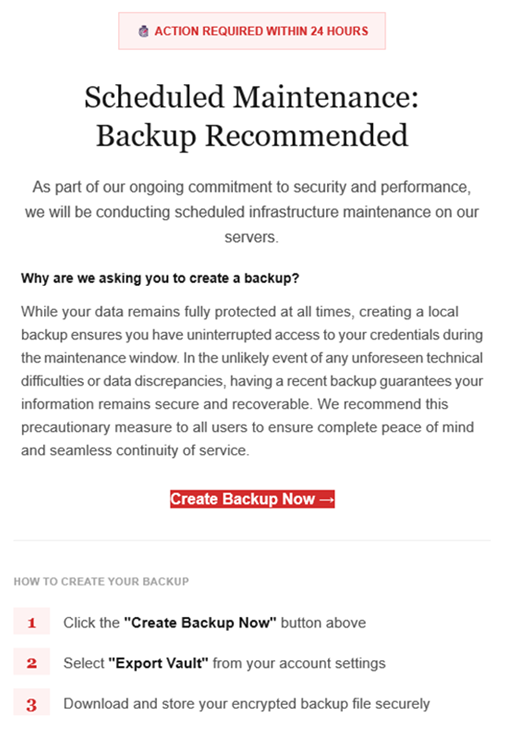
The LastPass Threat Intelligence, Mitigation, and Escalation (TIME) team has published a warning about an active phishing campaign in which fake “maintenance” emails pressure users to back up their vaults within 24 hours. The emails lead to credential-stealing phishing sites rather than any legitimate LastPass page.

The phishing campaign that started around January 19, 2026, uses emails that falsely claim upcoming infrastructure maintenance and urge users to “backup your vault in the next 24 hours.”

Example phishing email
Image courtesy of LastPass

“Scheduled Maintenance: Backup Recommended

As part of our ongoing commitment to security and performance, we will be conducting scheduled infrastructure maintenance on our servers.
Why are we asking you to create a backup?
While your data remains protected at all times, creating a local backup ensures you have access to your credentials during the maintenance window. In the unlikely event of any unforeseen technical difficulties or data discrepancies, having a recent backup guarantees your information remains secure and recoverable. We recommend this precautionary measure to all users to ensure complete peace of mind and seamless continuity of service.

Create Backup Now (link)

How to create your backup
1 Click the “Create Backup Now” button above
2 Select “Export Vault” from you account settings
3 Download and store your encrypted backup file securely”

The link in the email points to mail-lastpass[.]com, a domain that doesn’t belong to LastPass and has now been taken down.

Note that there are different subject lines in use. Here is a selection:

  • LastPass Infrastructure Update: Secure Your Vault Now
  • Your Data, Your Protection: Create a Backup Before Maintenance
  • Don’t Miss Out: Backup Your Vault Before Maintenance
  • Important: LastPass Maintenance & Your Vault Security
  • Protect Your Passwords: Backup Your Vault (24-Hour Window)

It is imperative for users to ignore instructions in emails like these. Giving away the login details for your password manager can be disastrous. For most users, it would provide access to enough information to carry out identity theft.

Stay safe

First and foremost, it’s important to understand that LastPass will never ask for your master password or demand immediate action under a tight deadline. Generally speaking, there are more guidelines that can help you stay safe.

  • Don’t click on links in unsolicited emails without verifying with the trusted sender that they’re legitimate.
  • Always log in directly on the platform that you are trying to access, rather than through a link.
  • Use a real-time, up-to-date anti-malware solution with a web protection module to block malicious sites.
  • Report phishing emails to the company that’s being impersonated, so they can alert other customers. In this case emails were forwarded to abuse@lastpass.com.

Pro tip: Malwarebytes Scam Guard  would have recognized this email as a scam and advised you how to proceed.


We don’t just report on threats—we help safeguard your entire digital identity

Cybersecurity risks should never spread beyond a headline. Protect your, and your family’s, personal information by using identity protection.

Under Armour ransomware breach: data of 72 million customers appears on the dark web

22 January 2026 at 13:02

When reports first emerged in November 2025 that sportswear giant Under Armour had been hit by the Everest ransomware group, the story sounded depressingly familiar: a big brand, a huge trove of data, and a lot of unanswered questions. Since then, the narrative around what actually happened has split into two competing versions—cautious corporate statements on one side and mounting evidence on the other that strongly suggests a large customer dataset is now circulating online.

Public communications and legal language talk about ongoing investigations, limited confirmation, and careful wording around “potential” impact. For many customers, that creates the impression that details are still emerging and that it’s unclear how serious the incident is. Meanwhile, a class action lawsuit filed in the US alleges negligence in data protection and references large‑scale exfiltration of sensitive information, including customer—and possibly employee—data during a November 2025 ransomware attack. Those lawsuits are, by definition, allegations, but they add weight to the idea that this is not a minor incident.

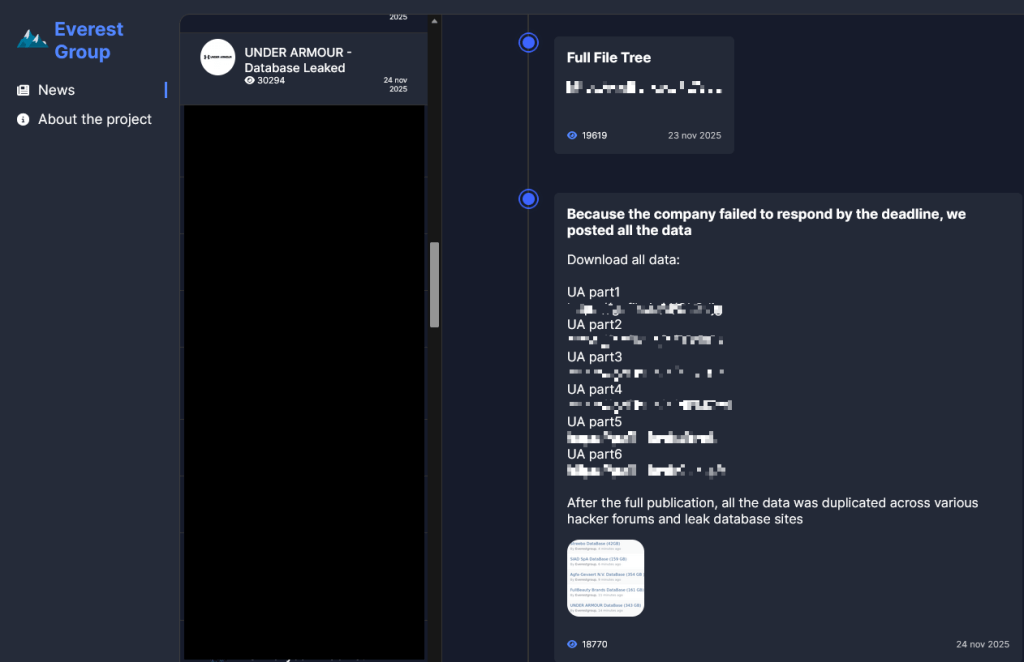
The Everest ransomware group claimed responsibility for the breach after Under Armour allegedly “failed to respond by the deadline.”

Everest Group leak site

From the cybercriminals’ perspective, that means negotiations are over and the data has been published.

The Everest leak site also states that:

“After the full publication, all the data was duplicated across various hacker forums and leak database sites.”

Which seems to be confirmed by posts like this one, where the poster claims the data set contains full names, email addresses, phone numbers, physical locations, genders, purchase histories, and preferences. The data set contains 191,577,365 records including 72,727,245 unique email addresses.

Data made available on the Dark Web

So where does that leave Under Armour customers? The cautious corporate framing and the aggressive cybercriminal claims can’t both be entirely accurate, but they do not carry equal weight when it comes to assessing real-world risk. Ransomware groups sometimes lie about their access, but spinning up a major leak entry, publishing sample data, and distributing it across underground forums is a lot of work for a bluff that could be quickly disproven by affected users. Combined with the “Database Leaked” status on the Everest site, the balance of probabilities suggests that a substantial customer database is now in the wild, even if not every detail in the attackers’ claims is accurate.

Protecting yourself after a data breach

If you think you have been affected by a data breach, here are steps you can take to protect yourself:

  • Check the company’s advice. Every breach is different, so check with the company to find out what’s happened and follow any specific advice it offers.
  • Change your password. You can make a stolen password useless to thieves by changing it. Choose a strong password that you don’t use for anything else. Better yet, let a password manager choose one for you.
  • Enable two-factor authentication (2FA). If you can, use a FIDO2-compliant hardware key, laptop, or phone as your second factor. Some forms of 2FA can be phished just as easily as a password, but 2FA that relies on a FIDO2 device can’t be phished.
  • Watch out for impersonators. The thieves may contact you posing as the breached platform. Check the official website to see if it’s contacting victims and verify the identity of anyone who contacts you using a different communication channel.
  • Take your time. Phishing attacks often impersonate people or brands you know, and use themes that require urgent attention, such as missed deliveries, account suspensions, and security alerts.
  • Consider not storing your card details. It’s definitely more convenient to let sites remember your card details, but but it increases risk if a retailer suffers a breach.
  • Set up identity monitoring, which alerts you if your personal information is found being traded illegally online and helps you recover after.

We don’t just report on threats—we help safeguard your entire digital identity

Cybersecurity risks should never spread beyond a headline. Protect your, and your family’s, personal information by using identity protection.

❌