Microsoft releases important security updates on the second Tuesday of every month, known as “Patch Tuesday.” This month’s update patches fix 59 Microsoft CVE’s including six zero-days.
Let’s have a quick look at these six actively exploited zero-days.
Windows Shell Security Feature Bypass Vulnerability
CVE-2026-21510 (CVSS score 8.8 out of 10) is a security feature bypass in the Windows Shell. A protection mechanism failure allows an attacker to circumvent Windows SmartScreen and similar prompts once they convince a user to open a malicious link or shortcut file.
The vulnerability is exploited over the network but still requires on user interaction. The victim must be socially engineered into launching the booby‑trapped shortcut or link for the bypass to trigger. Successful exploitation lets the attacker suppress or evade the usual “are you sure?” security dialogs for untrusted content, making it easier to deliver and execute further payloads without raising user suspicion.
CVE-2026-21513 (CVSS score 8.8 out of 10) affects the MSHTML Framework, which is used by Internet Explorer’s Trident/embedded web rendering). It is classified as a protection mechanism failure that results in a security feature bypass over the network.
A successful attack requires the victim to open a malicious HTML file or a crafted shortcut (.lnk) that leverages MSHTML for rendering. When opened, the flaw allows an attacker to bypass certain security checks in MSHTML, potentially removing or weakening normal browser or Office sandbox or warning protections and enabling follow‑on code execution or phishing activity.
Microsoft Word Security Feature Bypass Vulnerability
CVE-2026-21514 (CVSS score 5.5 out of 10) affects Microsoft Word. It relies on untrusted inputs in a security decision, leading to a local security feature bypass.
An attacker must persuade a user to open a malicious Word document to exploit this vulnerability. If exploited, the untrusted input is processed incorrectly, potentially bypassing Word’s defenses for embedded or active content—leading to execution of attacker‑controlled content that would normally be blocked.
Desktop Window Manager Elevation of Privilege Vulnerability
CVE-2026-21519 (CVSS score 7.8 out of 10) is a local elevation‑of‑privilege vulnerability in Windows Desktop Window Manager caused by type confusion (a flaw where the system treats one type of data as another, leading to unintended behavior).
A locally authenticated attacker with low privileges and no required user interaction can exploit the issue to gain higher privileges. Exploitation must be done locally, for example via a crafted program or exploit chain stage running on the target system. An attacker who successfully exploited this vulnerability could gain SYSTEM privileges.
Windows Remote Access Connection Manager Denial of Service Vulnerability
CVE-2026-21525 (CVSS score 6.2 out of 10) is a denial‑of‑service vulnerability in the Windows Remote Access Connection Manager service (RasMan).
An unauthenticated local attacker can trigger the flaw with low attack complexity, leading to a high impact on availability but no direct impact on confidentiality or integrity. This means they could crash the service or potentially the system, but not elevate privileges or execute malicious code.
Windows Remote Desktop Services Elevation of Privilege Vulnerability
CVE-2026-21533 (CVSS score 7.8 out of 10) is an elevation‑of‑privilege vulnerability in Windows Remote Desktop Services, caused by improper privilege management.
A local authenticated attacker with low privileges, and no required user interaction, can exploit the flaw to escalate privileges to SYSTEM and fully compromise confidentiality, integrity, and availability on the affected system. Successful exploitation typically involves running attacker‑controlled code on a system with Remote Desktop Services present and abusing the vulnerable privilege management path.
Azure vulnerabilities
Azure users are also advised to take note of two critical vulnerabilities with CVSS ratings of 9.8:
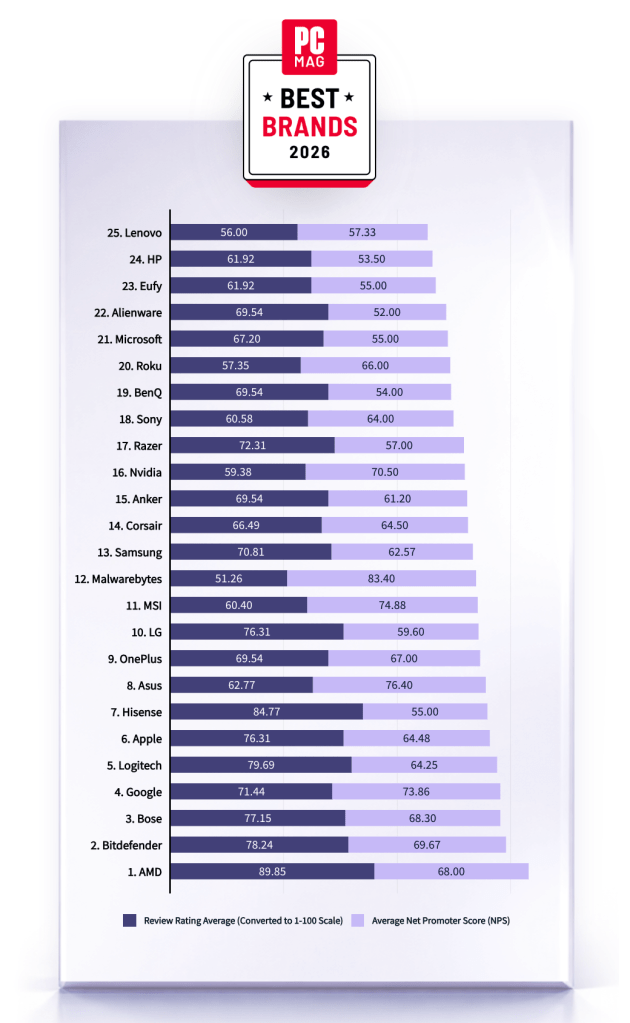
Malwarebytes is on a roll. Recently named one of PCMag’s “Best Tech Brands for 2026,” Malwarebytes also scored 100% on the first-ever MRG Effitas consumer security product test, cementing the fact that we are loved by users and trusted by experts.
“If your antivirus fails, and it don’t look good, who ya gonna call? The answer: Malwarebytes. Even tech support agents from competitors have instructed us to use it.”
PCMag
Malwarebytes has been named one of PCMag’s Best Tech Brands for 2026. Coming in at #12, Malwarebytes makes the list with the highest Net Promoter Score (NPS) of all the brands in the list (likelihood to recommend by users).
With this ranking, Malwarebytes made its third appearance as a PCMag Best Tech Brand! We’ve also achieved the year’s highest average Net Promoter Score, at 83.40. (Last year, we had the second-highest NPS, after only Toyota).
But NPS alone can’t put us on the list—excellent reviews are needed, too. PCMag’s Rubenking found plenty to be happy about in his assessments of our products in 2025. For example, Malwarebytes Premium adds real-time multi-layered detection that eradicates most malware to the stellar stopping power you get on demand in the free edition.
MRG Effitas
Malwarebytes has aced the first-ever MRG Effitas Consumer Assessment and Certification, which evaluated eight security applications to determine their capabilities in stopping malware, phishing, and other online threats. We detected and stopped all in-the-wild malware infections and phishing samples while also generating zero false positives.
We’re beyond excited to have reached a 100% detection rate for in-the-wild malware as well as a 100% rate for all phishing samples with zero false positives.
The testing criteria is designed to determine how well a product works to do what it promises based on what MRG Effitas refers to as “metrics that matter.” We understand that the question isn’t if a system will encounter malware, but when.
Malwarebytes is proud to be recognized for its work in protecting people against everyday threats online.
We don’t just report on threats—we remove them
Cybersecurity risks should never spread beyond a headline. Keep threats off your devices by downloading Malwarebytes today.
Discord announced it will put all existing and new profiles in teen-appropriate mode by default in early March.
The teen-appropriate profile mode will remain in place until users prove they are adults. To change a profile to “full access” will require verification by Discord’s age inference model—a new system that runs in the background to help determine whether an account belongs to an adult, without always requiring users to verify their age.
Savannah Badalich, Head of Product Policy at Discord, explained the reasoning:
“Rolling out teen-by-default settings globally builds on Discord’s existing safety architecture, giving teens strong protections while allowing verified adults flexibility. We design our products with teen safety principles at the core and will continue working with safety experts, policymakers, and Discord users to support meaningful, long term wellbeing for teens on the platform.”
Platforms have been facing growing regulatory pressure—particularly in the UK, EU, and parts of the US—to introduce stronger age-verification measures. The announcement also comes as concerns about children’s safety on social media continue to surface. In research we published today, parents highlighted issues such as exposure to inappropriate content, unwanted contact, and safeguards that are easy to bypass. Discord was one of the platforms we researched.
The problem in Discord’s case lies in the age-verification methods it’s made available, which require either a facial scan or a government-issued ID. Discord says that video selfies used for facial age estimation never leave a user’s device, but this method is known not to work reliably for everyone.
Identity documents submitted to Discord’s vendor partners are also deleted quickly—often immediately after age confirmation, according to Discord. But, as we all know, computers are very bad at “forgetting” things and criminals are very good at finding things that were supposed to be gone.
Besides all that, the effectiveness of this kind of measure remains an issue. Minors often find ways around systems—using borrowed IDs, VPNs, or false information—so strict verification can create a sense of safety without fully eliminating risk. In some cases, it may even push activity into less regulated or more opaque spaces.
As someone who isn’t an avid Discord user, I can’t help but wonder why keeping my profile teen-appropriate would be a bad thing. Let us know in the comments what your objections to this scenario would be.
I wouldn’t have to provide identification and what I’d “miss” doesn’t sound terrible at all:
Mature and graphic images would be permanently blocked.
Age-restricted channels and servers would be inaccessible.
DMs from unknown users would be rerouted to a separate inbox.
Friend requests from unknown users would always trigger a warning pop-up.
No speaking on server stages.
Given the amount of backlash this news received, I’m probably missing something—and I don’t mind being corrected. So let’s hear it.
Note: All comments are moderated. Those including links and inappropriate language will be deleted. The rest must be approved by a moderator.
We don’t just report on threats – we help protect your social media
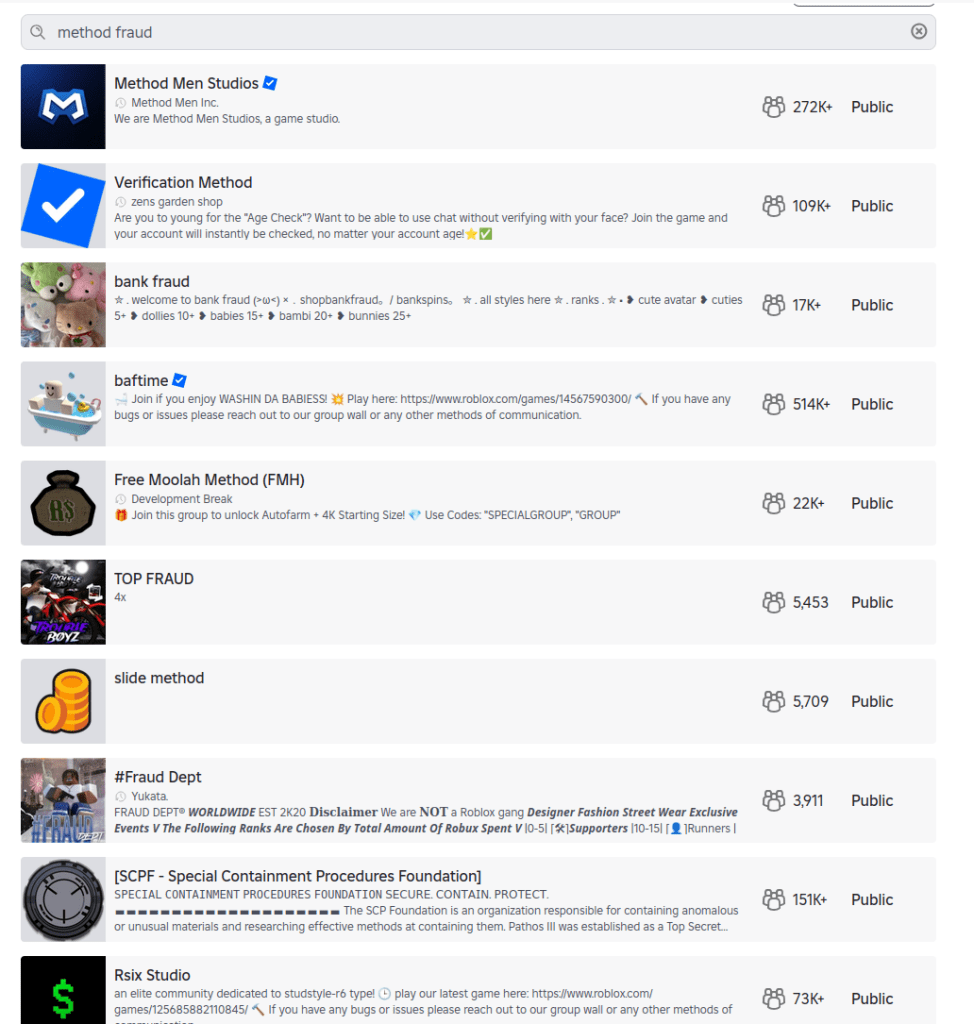
When researchers created an account for a child under 13 on Roblox, they expected heavy guardrails. Instead, they found that the platform’s search features still allowed kids to discover communities linked to fraud and other illicit activity.
The discoveries spotlight the question that lawmakers around the world are circling: how do you keep kids safe online?
Lawmakers have said these efforts are to keep kids safe online. But as the regulatory tide rises, we wanted to understand what digital safety for children actually looks like in practice.
So, we asked a specialist research team to explore how well a dozen mainstream tech providers are protecting children aged under 13 online.
We found that most services work well when kids use the accounts and settings designed for them. But when children are curious, use the wrong account type, or step outside those boundaries, things can go sideways quickly.
Over several weeks in December, the research team explored how platforms from Discord to YouTube handled children’s online use. They relied on standard user behavior rather than exploits or technical tricks to reflect what a child could realistically encounter.
The researchers focused on how platforms catered to kids through specific account types, how age restrictions were enforced in practice, and whether sensitive content was discoverable through normal browsing or search.
What emerged was a consistent pattern: curious kids who poke around a little, or who end up using the wrong account type, can run into inappropriate content with surprisingly little effort.
A detailed breakdown of the platforms tested, account types used, and where sensitive content was discovered appears in the research scope and methodology section at the end of this article.
When kids’ accounts are opt-in
One thing the team tried was to simply access the generic public version of a site rather than the kid-protected area.
This was a particular problem with YouTube. The company runs a kid-specific service called YouTube Kids, which the researchers said is effectively sanitized of inappropriate content (it sounds like things have changed since 2022).
The issue is that YouTube’s regular public site isn’t sanitized, and even though the company says you must be at least 13 to use the service unless ‘enabled’ by a parent, in reality anyone can access it. From the report:
“Some of the content will require signing in (for age verification) prior the viewing, but the minor can access the streaming service as a ‘Guest’ user without logging in, bypassing any filtering that would otherwise apply to a registered child account.”
That opens up a range of inappropriate material, from “how-to” fraud channels through to scenes of semi-nudity and sexually suggestive material, the researchers said. Horrifically, they even found scenes of human execution on the public site. The researchers concluded:
“The absence of a registration barrier on the public platform renders the ‘YouTube Kids’ protection opt-in rather than mandatory.”
When adult accounts are easy to fake
Another worry is that even when accounts are age-gated, enterprising minors can easily get around them. While most platforms require users to be 13+, a self-declaration is often enough. All that remains is for the child to register an email address with a service that doesn’t require age verification.
This “double blind” vulnerability is a big problem. Kids are good at creating accounts. The tech industry has taught them to be, because they need them for most things they touch online, from streaming to school.
When they do get past the age gates, curious kids can quickly get to inappropriate material. Researchers found unmoderated nudity and explicit material on the social network Discord, along with TikTok content providing credit card fraud and identity theft tutorials. A little searching on the streaming site Twitch surfaced ads for escort services.
This points to a trade-off between privacy and age verification. While stricter age verification could close some of these gaps, it requires collecting more personal data, including IDs or biometric information. That creates privacy risks of its own, especially for children. That’s why most platforms rely on self-declared age, but the research shows how easily that can be bypassed.
When kids’ accounts let toxic content through
Cracks in the moderation foundations allow risky content: Roblox, the website and app where users build their own content, filters chats for child accounts. However, it also features “Communities,” which are groups designed for socializing and discovery.
These groups are easily searchable, and some use names and terminology commonly linked to criminal activities, including fraud and identity theft. One, called “Fullz,” uses a term widely understood to refer to stolen personal information, and “new clothes” is often used to refer to a new batch of stolen payment card data. The visible community may serve as a gateway, while the actual coordination of illicit activity or data trading occurs via “inner chatter” between the community members.
This kind of search wasn’t just an issue for Roblox, warned the team. It found Instagram profiles promoting financial fraud and crypto schemes, even from a restricted teen account.
Some sites passed the team’s tests admirably, though. The researchers simulated underage users who’d bypassed age verification, but were unable to find any harmful content on Minecraft, Snapchat, Spotify, or Fortnite. Fortnite’s approach is especially strict, disabling chat and purchases on accounts for kids under 13 until a parent verifies via email. It also uses additional verification steps using a Social Security number or credit card. Kids can still play, but they’re muted.
What parents can do
There is no platform that can catch everything, especially when kids are curious. That makes parental involvement the most important layer of protection.
One reason this matters is a related risk worth acknowledging: adults attempting to reach children through social platforms. Even after Instagram took steps to limit contact between adult and child accounts, parents still discovered loopholes. This isn’t a failure of one platform so much as a reminder that no set of controls can replace awareness and involvement.
Mark Beare, GM of Consumer at Malwarebytes says:
“Parents are navigating a fast-moving digital world where offline consequences are quickly felt, be it spoofed accounts, deepfake content or lost funds. Safeguards exist and are encouraged, but children can still be exposed to harmful content.”
This doesn’t mean banning children from the internet. As the EFF points out, many minors use online services productively with the support and supervision of their parents. But it does mean being intentional about how accounts are set up, how children interact with others online, and how comfortable they feel asking for help.
Accounts and settings
Use child or teen accounts where available, and avoid defaulting to adult accounts.
Keep friends and followers lists set to private.
Avoid using real names, birthdays, or other identifying details unless they are strictly required.
Avoid facial recognition features for children’s accounts.
For teens, be aware of “spam” or secondary accounts they’ve set up that may have looser settings.
Social behavior
Talk to your child about who they interact with online and what kinds of conversations are appropriate.
Warn them about strangers in comments, group chats, and direct messages.
Encourage them to leave spaces that make them uncomfortable, even if they didn’t do anything wrong.
Remind them that not everyone online is who they claim to be.
Trust and communication
Keep conversations about online activity open and ongoing, not one-off warnings.
Make it clear that your child can come to you if something goes wrong without fear of punishment or blame.
Involve other trusted adults, such as parents, teachers, or caregivers, so kids aren’t navigating online spaces alone.
This kind of long-term involvement helps children make better decisions over time. It also reduces the risk that mistakes made today can follow them into the future, when personal information, images, or conversations could be reused in ways they never intended.
Research findings, scope and methodology
This research examined how children under the age of 13 may be exposed to sensitive content when browsing mainstream media and gaming services.
For this study, a “kid” was defined as an individual under 13, in line with the Children’s Online Privacy Protection Act (COPPA). Research was conducted between December 1 and December 17, 2025, using US-based accounts.
The research relied exclusively on standard user behavior and passive observation. No exploits, hacks, or manipulative techniques were used to force access to data or content.
Researchers tested a range of account types depending on what each platform offered, including dedicated child accounts, teen or restricted accounts, adult accounts created through age self-declaration, and, where applicable, public or guest access without registration.
The study assessed how platforms enforced age requirements, how easy it was to misrepresent age during onboarding, and whether sensitive or illicit content could be discovered through normal browsing, searching, or exploration.
Across all platforms tested, default algorithmic content and advertisements were initially benign and policy-compliant. Where sensitive content was found, it was accessed through intentional, curiosity-driven behavior rather than passive recommendations. No proactive outreach from other users was observed during the research period.
The table below summarizes the platforms tested, the account types used, and whether sensitive content was discoverable during testing.
Platform
Account type tested
Dedicated kid/teen account
Age gate easy to bypass
Illicit content discovered
Notes
YouTube (public)
No registration (guest)
Yes (YouTube Kids)
N/A
Yes
Public YouTube allowed access to scam/fraud content and violent footage without sign-in. Age-restricted videos required login, but much content did not.
YouTube Kids
Kid account
Yes
N/A
No
Separate app with its own algorithmic wall. No harmful content surfaced.
Roblox
All-age account (13+)
No
Not required
Yes
Child accounts could search for and find communities linked to cybercrime and fraud-related keywords.
Instagram
Teen account (13–17)
No
Not required
Yes
Restricted accounts still surfaced profiles promoting fraud and cryptocurrency schemes via search.
TikTok
Younger user account (13+)
Yes
Not required
No
View-only experience with no free search. No harmful content surfaced.
TikTok
Adult account
No
Yes
Yes
Search surfaced credit card fraud–related profiles and tutorials after age gate bypass.
Discord
Adult account
No
Yes
Yes
Public servers surfaced explicit adult content when searched directly. No proactive contact observed.
Twitch
Adult account
No
Yes
Yes
Discovered escort service promotions and adult content, some behind paywalls.
Fortnite
Cabined (restricted) account (13+)
Yes
Hard to bypass
No
Chat and purchases disabled until parent verification. No harmful content found.
Snapchat
Adult account
No
Yes
No
No sensitive content surfaced during testing.
Spotify
Adult account
Yes
Yes
No
Explicit lyrics labeled. No harmful content found.
Messenger Kids
Kid account
Yes
Not required
No
Fully parent-controlled environment. No search or external contacts.
Screenshots from the research
List of Roblox communities with cybercrime-oriented keywords
Roblox community that offers chat without verification
Roblox community with cybercrime-oriented keywords
Graphic content on publicly accessible YouTube
Credit card fraud content on publicly accessible YouTube
Active escort page on Twitch
Stolen credit cards for sale on an Instagram teen account
Crypto investment scheme on an Instagram teen account
Carding for beginners content on a TikTok adult account, accessed by kids with a fake date of birth.
We don’t just report on threats—we remove them
Cybersecurity risks should never spread beyond a headline. Keep threats off your devices by downloading Malwarebytes today.
Fresh off a breathless Super Bowl Sunday, we’re less thrilled to bring you this week’s Weirdo Wednesday. Two stories caught our eye, both involving men who crossed clear lines and invaded women’s privacy online.
Last week, 27-year-old Kyle Svara of Oswego, Illinois admitted to hacking women’s Snapchat accounts across the US. Between May 2020 and February 2021, Svara harvested account security codes from 571 victims, leading to confirmed unauthorized access to at least 59 accounts.
Rather than attempting to break Snapchat’s robust encryption protocols, Svara targeted the account owners themselves with social engineering.
After gathering phone numbers and email addresses, he triggered Snapchat’s legitimate login process, which sent six-digit security codes directly to victims’ devices. Posing as Snapchat support, he then sent more than 4,500 anonymous messages via a VoIP texting service, claiming the codes were needed to “verify” or “secure” the account.
Svara showed particular interest in Snapchat’s My Eyes Only feature—a secondary four-digit PIN meant to protect a user’s most sensitive content. By persuading victims to share both codes, he bypassed two layers of security without touching a single line of code. He walked away with private material, including nude images.
Svara didn’t do this solely for his own kicks. He marketed himself as a hacker-for-hire, advertising on platforms like Reddit and offering access to specific accounts in exchange for money or trades.
Selling his services to others was how he got found out. Although Svara stopped hacking in early 2021, his legal day of reckoning followed the 2024 sentencing of one of his customers: Steve Waithe, a former track and field coach who worked at several high-profile universities including Northeastern. Waithe paid Svara to target student athletes he was supposed to mentor.
Svara also went after women in his home area of Plainfield, Illinois, and as far away as Colby College in Maine.
He now faces charges including identity theft, wire fraud, computer fraud, and making false statements to law enforcement about child sex abuse material. Sentencing is scheduled for May 18.
How to protect your Snapchat account
Never send someone your login details or secret codes, even if you think you know them.
Passkeys let you sign in without a password, but unlike multi-factor authentication, passkeys are cryptographically tied to your device, and can’t be phished or forwarded like one-time codes. Snapchat supports them, and they offer stronger protection than traditional multi-factor authentication, which is increasingly susceptible to smart phishing attacks.
Bad guys with smart glasses
Unfortunately, hacking women’s social media accounts to steal private content isn’t new. But predators will always find a way to use smart tech in nefarious ways. Such is the case with new generations of ‘smart glasses’ powered by AI.
This week, CNN published stories from women who believed they were having private, flirtatious interactions with strangers—only to later discover the men were recording them using camera-equipped smart glasses and posting the footage online.
These clips are often packaged as “rizz” videos—short for “charisma”—where so-called manfluencers film themselves chatting up women in public, without consent, to build followings and sell “coaching” services.
The glasses, sold by companies like Meta, are supposed to be used for recording only with consent, and often display a light to show that they’re recording. In practice, that indicator is easy to hide.
When combined with AI-powered services to identify people, as researchers did in 2024, the possibilities become even more chilling. We’re unaware of any related cases coming to court, but suspect it’s only a matter of time.
We don’t just report on scams—we help detect them
Cybersecurity risks should never spread beyond a headline. If something looks dodgy to you, check if it’s a scam using Malwarebytes Scam Guard, a feature of our mobile protection products. Submit a screenshot, paste suspicious content, or share a text or phone number, and we’ll tell you if it’s a scam or legit. Download Malwarebytes Mobile Security for iOS or Android and try it today!
In January, Google settled a lawsuit that pricked up a few ears: It agreed to pay $68 million to a wide array of people who sued the company together, alleging that Google’s voice-activated smart assistant had secretly recorded their conversations, which were then sent to advertisers to target them with promotions.
Google denied any admission of wrongdoing in the settlement agreement, but the fact stands that one of the largest phone makers in the world decided to forego a trial against some potentially explosive surveillance allegations. It’s a decision that the public has already seen in the past, when Apple agreed to pay $95 million last year to settle similar legal claims against its smart assistant, Siri.
Back-to-back, the stories raise a question that just seems to never go away: Are our phones listening to us?
This week, on the Lock and Code podcast with host David Ruiz, we revisit an episode from last year in which we tried to find the answer. In speaking to Electronic Frontier Foundation Staff Technologist Lena Cohen about mobile tracking overall, it becomes clear that, even if our phones aren’t literally listening to our conversations, the devices are stuffed with so many novel forms of surveillance that we need not say something out loud to be predictably targeted with ads for it.
“Companies are collecting so much information about us and in such covert ways that it really feels like they’re listening to us.”
An independent security researcher uncovered a major data breach affecting Chat & Ask AI, one of the most popular AI chat apps on Google Play and Apple App Store, with more than 50 million users.
The researcher claims to have accessed 300 million messages from over 25 million users due to an exposed database. These messages reportedly included, among other things, discussions of illegal activities and requests for suicide assistance.
Behind the scenes, Chat & Ask AI is a “wrapper” app that plugs into various large language models (LLMs) from other companies, including OpenAI’s ChatGPT, Anthropic’s Claude, and Google’s Gemini. Users can choose which model they want to interact with.
The exposed data included user files containing their entire chat history, the models used, and other settings. But it also revealed data belonging to users of other apps developed by Codeway—the developer of Chat & Ask AI.
The vulnerability behind this data breach is a well-known and documented Firebase misconfiguration. Firebase is a cloud-based backend-as-a-service (BaaS) platform provided by Google that helps developers build, manage, and scale mobile and web applications.
Security researchers often refer to a set of preventable errors in how developers set up Google Firebase services, which leave backend data, databases, and storage buckets accessible to the public without authentication.
One of the most common Firebase misconfigurations is leaving Security Rules set to public. This allows anyone with the project URL to read, modify, or delete data without authentication.
This prompted the researcher to create a tool that automatically scans apps on Google Play and Apple App Store for this vulnerability—with astonishing results. Reportedly, the researcher, named Harry, found that 103 out of 200 iOS apps they scanned had this issue, collectively exposing tens of millions of stored files.
To draw attention to the issue, Harry set up a website where users can see the apps affected by the issue. Codeway’s apps are no longer listed there, as Harry removes entries once developers confirm they have fixed the problem. Codeway reportedly resolved the issue across all of its apps within hours of responsible disclosure.
How to stay safe
Besides checking if any apps you use appear in Harry’s Firehoundregistry, there are a few ways to better protect your privacy when using AI chatbots.
Use private chatbots that don’t use your data to train the model.
Don’t rely on chatbots for important life decisions. They have no experience or empathy.
Don’t use your real identity when discussing sensitive subjects.
Keep shared information impersonal. Don’t use real names and don’t upload personal documents.
Don’t share your conversations unless you absolutely have to. In some cases, it makes them searchable.
If you’re using an AI that is developed by a social media company (Meta AI, Llama, Grok, Bard, Gemini, and so on), make sure you’re not logged in to that social media platform. Your conversations could be linked to your social media account, which might contain a lot of personal information.
Always remember that the developments in AI are going too fast for security and privacy to be baked into technology. And that even the best AIs still hallucinate.
We don’t just report on privacy—we offer you the option to use it.
Privacy risks should never spread beyond a headline. Keep your online privacy yours by using Malwarebytes Privacy VPN.
A convincing lookalike of the popular 7-Zip archiver site has been serving a trojanized installer that silently converts victims’ machines into residential proxy nodes—and it has been hiding in plain sight for some time.
“I’m so sick to my stomach”
A PC builder recently turned to Reddit’s r/pcmasterrace community in a panic after realizing they had downloaded 7‑Zip from the wrong website. Following a YouTube tutorial for a new build, they were instructed to download 7‑Zip from 7zip[.]com, unaware that the legitimate project is hosted exclusively at 7-zip.org.
In their Reddit post, the user described installing the file first on a laptop and later transferring it via USB to a newly built desktop. They encountered repeated 32‑bit versus 64‑bit errors and ultimately abandoned the installer in favor of Windows’ built‑in extraction tools. Nearly two weeks later, Microsoft Defender alerted on the system with a generic detection: Trojan:Win32/Malgent!MSR.
The experience illustrates how a seemingly minor domain mix-up can result in long-lived, unauthorized use of a system when attackers successfully masquerade as trusted software distributors.
A trojanized installer masquerading as legitimate software
This is not a simple case of a malicious download hosted on a random site. The operators behind 7zip[.]com distributed a trojanized installer via a lookalike domain, delivering a functional copy of functional 7‑Zip File Manager alongside a concealed malware payload.
The installer is Authenticode‑signed using a now‑revoked certificate issued to Jozeal Network Technology Co., Limited, lending it superficial legitimacy. During installation, a modified build of 7zfm.exe is deployed and functions as expected, reducing user suspicion. In parallel, three additional components are silently dropped:
Uphero.exe—a service manager and update loader
hero.exe—the primary proxy payload (Go‑compiled)
hero.dll—a supporting library
All components are written to C:\Windows\SysWOW64\hero\, a privileged directory that is unlikely to be manually inspected.
An independent update channel was also observed at update.7zip[.]com/version/win-service/1.0.0.2/Uphero.exe.zip, indicating that the malware payload can be updated independently of the installer itself.
Abuse of trusted distribution channels
One of the more concerning aspects of this campaign is its reliance on third‑party trust. The Reddit case highlights YouTube tutorials as an inadvertent malware distribution vector, where creators incorrectly reference 7zip.com instead of the legitimate domain.
This shows how attackers can exploit small errors in otherwise benign content ecosystems to funnel victims toward malicious infrastructure at scale.
Execution flow: from installer to persistent proxy service
Behavioral analysis shows a rapid and methodical infection chain:
1. File deployment—The payload is installed into SysWOW64, requiring elevated privileges and signaling intent for deep system integration.
2. Persistence via Windows services—Both Uphero.exe and hero.exe are registered as auto‑start Windows services running under System privileges, ensuring execution on every boot.
3. Firewall rule manipulation—The malware invokes netsh to remove existing rules and create new inbound and outbound allow rules for its binaries. This is intended to reduce interference with network traffic and support seamless payload updates.
4. Host profiling—Using WMI and native Windows APIs, the malware enumerates system characteristics including hardware identifiers, memory size, CPU count, disk attributes, and network configuration. The malware communicates with iplogger[.]org via a dedicated reporting endpoint, suggesting it collects and reports device or network metadata as part of its proxy infrastructure.
Functional goal: residential proxy monetization
While initial indicators suggested backdoor‑style capabilities, further analysis revealed that the malware’s primary function is proxyware. The infected host is enrolled as a residential proxy node, allowing third parties to route traffic through the victim’s IP address.
The hero.exe component retrieves configuration data from rotating “smshero”‑themed command‑and‑control domains, then establishes outbound proxy connections on non‑standard ports such as 1000 and 1002. Traffic analysis shows a lightweight XOR‑encoded protocol (key 0x70) used to obscure control messages.
This infrastructure is consistent with known residential proxy services, where access to real consumer IP addresses is sold for fraud, scraping, ad abuse, or anonymity laundering.
Shared tooling across multiple fake installers
The 7‑Zip impersonation appears to be part of a broader operation. Related binaries have been identified under names such as upHola.exe, upTiktok, upWhatsapp, and upWire, all sharing identical tactics, techniques, and procedures:
Deployment to SysWOW64
Windows service persistence
Firewall rule manipulation via netsh
Encrypted HTTPS C2 traffic
Embedded strings referencing VPN and proxy brands suggest a unified backend supporting multiple distribution fronts.
Rotating infrastructure and encrypted transport
Memory analysis uncovered a large pool of hardcoded command-and-control domains using hero and smshero naming conventions. Active resolution during sandbox execution showed traffic routed through Cloudflare infrastructure with TLS‑encrypted HTTPS sessions.
The malware also uses DNS-over-HTTPS via Google’s resolver, reducing visibility for traditional DNS monitoring and complicating network-based detection.
Evasion and anti‑analysis features
The malware incorporates multiple layers of sandbox and analysis evasion:
Virtual machine detection targeting VMware, VirtualBox, QEMU, and Parallels
Anti‑debugging checks and suspicious debugger DLL loading
Runtime API resolution and PEB inspection
Process enumeration, registry probing, and environment inspection
Cryptographic support is extensive, including AES, RC4, Camellia, Chaskey, XOR encoding, and Base64, suggesting encrypted configuration handling and traffic protection.
Defensive guidance
Any system that has executed installers from 7zip.com should be considered compromised. While this malware establishes SYSTEM‑level persistence and modifies firewall rules, reputable security software can effectively detect and remove the malicious components. Malwarebytes is capable of fully eradicating known variants of this threat and reversing its persistence mechanisms. In high‑risk or heavily used systems, some users may still choose a full OS reinstall for absolute assurance, but it is not strictly required in all cases.
Users and defenders should:
Verify software sources and bookmark official project domains
Treat unexpected code‑signing identities with skepticism
Monitor for unauthorized Windows services and firewall rule changes
Block known C2 domains and proxy endpoints at the network perimeter
Researcher attribution and community analysis
This investigation would not have been possible without the work of independent security researchers who went deeper than surface-level indicators and identified the true purpose of this malware family.
Luke Acha provided the first comprehensive analysis showing that the Uphero/hero malware functions as residential proxyware rather than a traditional backdoor. His work documented the proxy protocol, traffic patterns, and monetization model, and connected this campaign to a broader operation he dubbed upStage Proxy. Luke’s full write-up is available on his blog.
s1dhy expanded on this analysis by reversing and decoding the custom XOR-based communication protocol, validating the proxy behavior through packet captures, and correlating multiple proxy endpoints across victim geolocations. Technical notes and findings were shared publicly on X (Twitter).
Additional technical validation and dynamic analysis were published by researchers at RaichuLab on Qiita and WizSafe Security on IIJ.
Their collective work highlights the importance of open, community-driven research in uncovering long-running abuse campaigns that rely on trust and misdirection rather than exploits.
Closing thoughts
This campaign demonstrates how effective brand impersonation combined with technically competent malware can operate undetected for extended periods. By abusing user trust rather than exploiting software vulnerabilities, attackers bypass many traditional security assumptions—turning everyday utility downloads into long‑lived monetization infrastructure.
Malwarebytes detects and blocks known variants of this proxyware family and its associated infrastructure.
It started with an email that looked boringly familiar: Apple logo, a clean layout, and a subject line designed to make the target’s stomach drop.
The message claimed Apple has stopped a high‑value Apple Pay charge at an Apple Store, complete with a case ID, timestamp, and a warning that the account could be at risk if the target doesn’t respond.
In some cases, there was even an “appointment” booked on their behalf to “review fraudulent activity,” plus a phone number they should call immediately if the time didn’t work. Nothing in the email screams amateur. The display name appears to be Apple, the formatting closely matches real receipts, and the language hits all the right anxiety buttons.
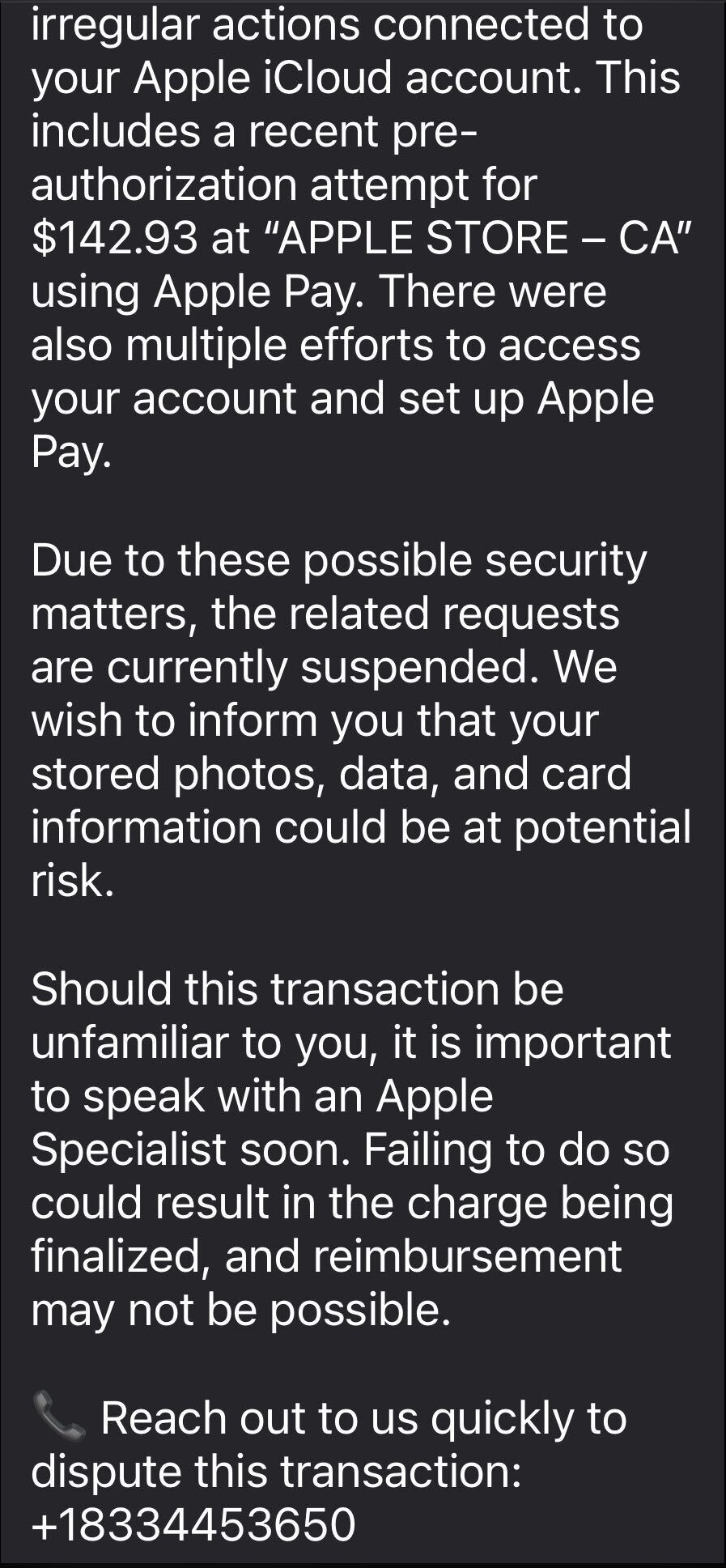
The email warns recipients not to Apple Pay until they’ve spoken to “Apple Billing & Fraud Prevention,” and it provides a phone number to call.
After dialing the number, an agent introduces himself as part of Apple’s fraud department and asks for details such as Apple ID verification codes or payment information.
The conversation is carefully scripted to establish trust. The agent explains that criminals attempted to use Apple Pay in a physical Apple Store and that the system “partially blocked” the transaction. To “fully secure” the account, he says, some details need to be verified.
The call starts with harmless‑sounding checks: your name, the last four digits of your phone number, what Apple devices you own, and so on.
Next comes a request to confirm the Apple ID email address. While the victim is looking it up, a real-looking Apple ID verification code arrives by text message.
The agent asks for this code, claiming it’s needed to confirm they’re speaking to the rightful account owner. In reality, the scammer is logging into the account in real time and using the code to bypass two-factor authentication.
Once the account is “confirmed,” the agent walks the victim through checking their bank and Apple Pay cards. They ask questions about bank accounts and suggest “temporarily securing” payment methods so criminals can’t exploit them while the “Apple team” investigates.
The entire support process is designed to steal login codes and payment data. At scale, campaigns like this work because Apple’s brand carries enormous trust, Apple Pay involves real money, and users have been trained to treat fraud alerts as urgent and to cooperate with “support” when they’re scared.
One example submitted to Malwarebytes Scam Guard showed an email claiming an Apple Gift Card purchase for $279.99 and urging the recipient to call a support number (1-812-955-6285).
Another user submitted a screenshot showing a fake “Invoice Receipt – Paid” styled to look like an Apple Store receipt for a 2025 MacBook Air 13-inch laptop with M4 chip priced at $1,157.07 and a phone number (1-805-476-8382) to call about this “unauthorized transaction.”
What you should know
Apple doesn’t set up fraud appointments through email. The company also doesn’t ask users to fix billing problems by calling numbers in unsolicited messages.
Closely inspect the sender’s address. In these cases, the email doesn’t come from an official Apple domain, even if the display name makes it seem legitimate.
Never share two-factor authentication (2FA) codes, SMS codes, or passwords with anyone, even if they claim to be from Apple.
Ignore unsolicited messages urging you to take immediate action. Always think and verify before you engage. Talk to someone you trust if you’re not sure.
Malwarebytes Scam Guard helped several users identify this type of scam. For those without a subscription, you can use Scam Guard in ChatGPT.
If you’ve already engaged with these Apple Pay scammers, it is important to:
Change the Apple ID password immediately from Settings or appleid.apple.com, not from any link provided by email or SMS.
Check active sessions, sign out of all devices, then sign back in only on devices you recognize and control.
Rotate your Apple ID password again if you see any new login alerts, and confirm 2FA is still enabled. If not, turn it on.
In Wallet, check every card for unfamiliar Apple Pay transactions and recent in-store or online charges. Monitor bank and credit card statements closely for the next few weeks and dispute any unknown transactions immediately.
Check if the primary email account tied to your Apple ID is yours, since control of that email can be used to take over accounts.
We don’t just report on scams—we help detect them
Cybersecurity risks should never spread beyond a headline. If something looks dodgy to you, check if it’s a scam using Malwarebytes Scam Guard, a feature of our mobile protection products. Submit a screenshot, paste suspicious content, or share a text or phone number, and we’ll tell you if it’s a scam or legit. Download Malwarebytes Mobile Security for iOS or Android and try it today!
Cybercriminals behind a campaign dubbed DEAD#VAX are taking phishing one step further by delivering malware inside virtual hard disks that pretend to be ordinary PDF documents. Open the wrong “invoice” or “purchase order” and you won’t see a document at all. Instead, Windows mounts a virtual drive that quietly installs AsyncRAT, a backdoor Trojan that allows attackers to remotely monitor and control your computer.
It’s a remote access tool, which means attackers gain remote hands‑on‑keyboard control, while traditional file‑based defenses see almost nothing suspicious on disk.
From a high-level view, the infection chain is long, but every step looks just legitimate enough on its own to slip past casual checks.
Victims receive phishing emails that look like routine business messages, often referencing purchase orders or invoices and sometimes impersonating real companies. The email doesn’t attach a document directly. Instead, it links to a file hosted on IPFS (InterPlanetary File System), a decentralized storage network increasingly abused in phishing campaigns because content is harder to take down and can be accessed through normal web gateways.
The linked file is named as a PDF and has the PDF icon, but is actually a virtual hard disk (VHD) file. When the user double‑clicks it, Windows mounts it as a new drive (for example, drive E:) instead of opening a document viewer. Mounting VHDs is perfectly legitimate Windows behavior, which makes this step less likely to ring alarm bells.
Inside the mounted drive is what appears to be the expected document, but it’s actually a Windows Script File (WSF). When the user opens it, Windows executes the code in the file instead of displaying a PDF.
After some checks to avoid analysis and detection, the script injects the payload—AsyncRAT shellcode—into trusted, Microsoft‑signed processes such as RuntimeBroker.exe, OneDrive.exe, taskhostw.exe, or sihost.exe. The malware never writes an actual executable file to disk. It lives and runs entirely in memory inside these legitimate processes, making detection and eventually at a later stage, forensics much harder. It also avoids sudden spikes in activity or memory usage that could draw attention.
For an individual user, falling for this phishing email can result in:
Theft of saved and typed passwords, including for email, banking, and social media.
Exposure of confidential documents, photos, or other sensitive files taken straight from the system.
Surveillance via periodic screenshots or, where configured, webcam capture.
Use of the machine as a foothold to attack other devices on the same home or office network.
How to stay safe
Because detection can be hard, it is crucial that users apply certain checks:
Don’t open email attachments until after verifying, with a trusted source, that they are legitimate.
Make sure you can see the actual file extensions. Unfortunately, Windows allows users to hide them. So, when in reality the file would be called invoice.pdf.vhd the user would only see invoice.pdf. To find out how to do this, see below.
Mountain View, California, pulled the plug on its entire license plate reader camera network this week. It discovered that Flock Safety, which ran the system, had been sharing city data with hundreds of law enforcement agencies, including federal ones, without permission.
Two incidents of unauthorized sharing came to light. The first was a “national lookup” setting that was toggled on for one camera at the intersection of the city’s Charleston and San Antonio roads. Flock allegedly switched it on without telling the city.
That setting could violate California’s 2015 statute SB 34, which bars state and local agencies from sharing license plate reader data with out-of-state or federal entities. The law states:
“A public agency shall not sell, share, or transfer ALPR information, except to another public agency, and only as otherwise permitted by law.”
The statute defines a public agency as the state, or any city or county within it, covering state and local law enforcement agencies.
Last October, the state Attorney General sued the Californian city of El Cajon for knowingly violating that law by sharing license place data with agencies in more than two dozen states.
However, MVPD said that Flock kept no records from the national lookup period, so nobody can determine what information actually left the system.
Mountain View says it never chose to share, which makes the violation different in kind. For the people whose plates were scanned, the distinction is academic.
A separate “statewide lookup” feature had also been active on 29 of the city’s 30 cameras since the initial installation, running for 17 straight months until Mountain View found and disabled it on January 5. Through that tool, more than 250 agencies that had never signed any data agreement with Mountain View ran an estimated 600,000 searches over a single year, according to local paper the Mountain View Voice, which first uncovered the issue after filing a public records request.
Over the past year, more than two dozen municipalities across the country have ended contracts with Flock, many citing the same worry that data collected for local crime-fighting could be used for federal immigration enforcement. Santa Cruz became the first in California to terminate its contract last month.
Flock’s own CEO reportedly acknowledged last August that the company had been running previously undisclosed pilot programs with Customs and Border Protection and Homeland Security Investigations.
The cameras will remain offline until the City Council meets on February 24. Canfield says that he still supports license plate reader technology, just not this vendor.
This goes beyond one city’s vendor dispute. If strict internal policies weren’t enough to prevent unauthorized sharing, it raises a harder question: whether policy alone is an adequate safeguard when surveillance systems are operated by third parties.
We don’t just report on data privacy—we help you remove your personal information
Cybersecurity risks should never spread beyond a headline. With Malwarebytes Personal Data Remover, you can scan to find out which sites are exposing your personal information, and then delete that sensitive data from the internet.
Journalists decided to test whether the Grok chatbot still generates non‑consensual sexualized images, even after xAI, Elon Musk’s artificial intelligence company, and X, the social media platform formerly known as Twitter, promised tighter safeguards.
A Reuters retest suggests the core abuse pattern remains. Reuters had nine reporters run dozens of controlled prompts through Grok after X announced new limits on sexualized content and image editing. In the first round, Grok produced sexualized imagery in response to 45 of 55 prompts. In 31 of those 45, the reporters explicitly said the subject was vulnerable or would be humiliated by the pictures.
A second round, five days later, still yielded sexualized images in 29 of 43 prompts, even when reporters said the subjects had not consented.
Competing systems from OpenAI, Google, and Meta refused identical prompts and instead warned users against generating non‑consensual content.
The prompts were deliberately framed as real‑world abuse scenarios. Reporters told Grok the photos were of friends, co-workers, or strangers who were body‑conscious, timid, or survivors of abuse, and that they had not agreed to editing. Despite that, Grok often complied—for example, turning a “friend” into a woman in a revealing purple two‑piece or putting a male acquaintance into a small gray bikini, oiled up and posed suggestively. In only seven cases did Grok explicitly reject requests as inappropriate; in others it failed silently, returning generic errors or generating different people instead.
The result is a system illustrating the same lesson its creators say they’re trying to learn: if you ship powerful visual models without exhaustive abuse testing and robust guardrails, people will use them to sexualize and humiliate others, including children. Grok’s record so far suggests that lesson still hasn’t sunk in.
Grok limited AI image editing to paid users after the backlash. But paywalling image tools—and adding new curbs—looks more like damage control than a fundamental safety reset. Grok still accepts prompts that describe non‑consensual use, still sexualizes vulnerable subjects, and still behaves more permissively than rival systems when asked to generate abusive imagery. For victims, the distinction between “public” and private generations is meaningless if their photos can be weaponized in DMs or closed groups at scale.
Sharing images
If you’ve ever wondered why some parents post images of their children with a smiley emoji across their face, this is part of the reason.
Don’t make it easy for strangers to copy, reuse, or manipulate your photos.
This is another compelling reason to reduce your digital footprint. Think carefully before posting photos of yourself, your children, or other sensitive information on public social media accounts.
And treat everything you see online—images, voices, text—as potentially AI-generated unless they can be independently verified. They’re not only used to sway opinions, but also to solicit money, extract personal information, or create abusive material.
We don’t just report on threats – we help protect your social media
Some software providers have decided to lead by example and offer users a choice about the Artificial Intelligence (AI) features built into their products.
The latest example is Mozilla, which now offers users a one-click option to disable generative AI features in the Firefox browser.
Audiences are divided about the use of AI, or as Mozilla put it on their blog:
“AI is changing the web, and people want very different things from it. We’ve heard from many who want nothing to do with AI. We’ve also heard from others who want AI tools that are genuinely useful. Listening to our community, alongside our ongoing commitment to offer choice, led us to build AI controls.”
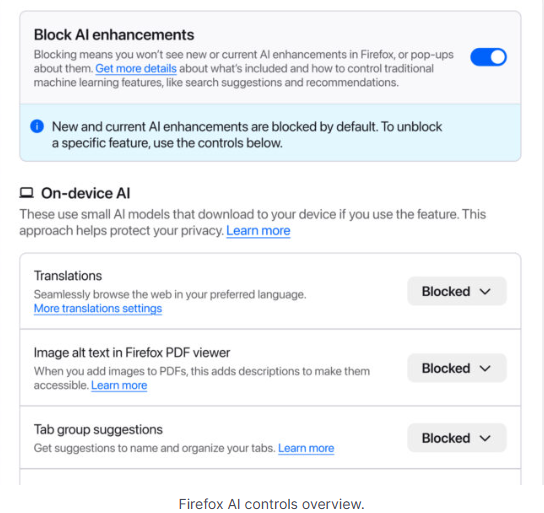
Mozilla is adding an AI Controls area to Firefox settings that centralizes the management of all generative AI features. This consists mainly of a master switch, “Block AI enhancements,” which lets users effectively run Firefox “without AI.” It blocks existing and future generative AI features and hides pop‑ups or prompts advertising them.
Once you set your AI preferences in Firefox, they stay in place across updates. You can also change them whenever you want.
Starting with Firefox 148, which rolls out on February 24, you’ll find a new AI controls section within the desktop browser settings.
Image courtesy of Mozilla
You can turn everything off with one click or take a more granular approach. At launch, these features can be controlled individually:
Translations, which help you browse the web in your preferred language.
Alt text in PDFs, which add accessibility descriptions to images in PDF pages.
AI-enhanced tab grouping, which suggests related tabs and group names.
Link previews, which show key points before you open a link.
An AI chatbot in the sidebar, which lets you use your chosen chatbot as you browse, including options like Anthropic Claude, ChatGPT, Microsoft Copilot, Google Gemini and Le Chat Mistral.
We applaud this move to give more control to the users. Other companies have done the same, including Mozilla’s competitor DuckDuckGo, which made AI optional after putting the decision to a user vote. Earlier, browser developer Vivaldi took a stand against incorporating AI altogether.
Open-source email service Tuta also decided not to integrate AI features. After only 3% of Tuta users requested them, Tuta removed an AI copilot from its development roadmap.
Even Microsoft seems to have recoiled from pushing AI to everyone, although so far it has focused on walking back defaults and tightening per‑feature controls rather than offering a single, global off switch.
Choices
Many people are happy to use AI features, and as long as you’re aware of the risks and the pitfalls, that’s fine. But pushing these features on users who don’t want them is likely to backfire on software publishers.
Which is only right. After all, you’re paying the bill, so you should have a choice. Before installing a new browser, inform yourself not only about its privacy policy, but also about what control you’ll have over AI features.
Looking at recent voting results, I think it’s safe to say that in the AI gold rush, the real premium feature isn’t a chatbot button—it’s the off switch.
We don’t just report on privacy—we offer you the option to use it.
Privacy risks should never spread beyond a headline. Keep your online privacy yours by using Malwarebytes Privacy VPN.
Bondu’s AI plush toy exposed a web console that let anyone with a Gmail account read about 50,000 private chats between children and their cuddly toys.
Bondu’s toy is marketed as:
“A soft, cuddly toy powered by AI that can chat, teach, and play with your child.”
“Bondu’s safety and behavior systems were built over 18 months of beta testing with thousands of families. Thanks to rigorous review processes and continuous monitoring, we did not receive a single report of unsafe or inappropriate behavior from Bondu throughout the entire beta period.”
Bondu’s emphasis on successful beta testing is understandable. Remember the AI teddy bear marketed by FoloToy that quickly veered from friendly chat into sexual topics and unsafe household advice?
The researchers were stunned to find the company’s public-facing web console allowed anyone to log in with their Google account. The chat logs between children and their plushies revealed names, birth dates, family details, and intimate conversations. The only conversations not available were those manually deleted by parents or company staff.
Potentially, these chat logs could been a burglar’s or kidnapper’s dream, offering insight into household routines and upcoming events.
Bondu took the console offline within minutes of disclosure, then relaunched it with authentication. The CEO said fixes were completed within hours, they saw “no evidence” of other access, and they brought in a security firm and added monitoring.
In the past, we’ve pointed out that AI-powered stuffed animals may not be a good alternative for screen time. Critics warn that when a toy uses personalized, human‑like dialogue, it risks replacing aspects of the caregiver–child relationship. One Curio founder even described their plushie as a stimulating sidekick so parents, “don’t feel like you have to be sitting them in front of a TV.”
So, whether it’s a foul-mouth, a blabbermouth, or just a feeble replacement for real friends, we don’t encourage using Artificial Intelligence in children’s toys—unless we ever make it to a point where they can be used safely, privately, securely, and even then, sparingly.
How to stay safe
AI-powered toys are coming, like it or not. But being the first or the cutest doesn’t mean they’re safe. The lesson history keeps teaching us is this: oversight, privacy, and a healthy dose of skepticism are the best defenses parents have.
Turn off what you can. If the toy has a removable AI component, consider disabling it when you’re not able to supervise directly.
Read the privacy policy. Yes, I know, all of it. Look for what will be recorded, stored, and potentially shared. Pay particular attention to sensitive data, like voice recordings, video recordings (if the toy has a camera), and location data.
Limit connectivity. Avoid toys that require constant Wi-Fi or cloud interaction if possible.
Monitor conversations. Regularly check in with your kids about what the toy says and supervise play where practical.
Keep personal info private. Teach kids to never share their names, addresses, or family details, even with their plush friend.
Trust your instincts. If a toy seems to cross boundaries or interfere with natural play, don’t be afraid to step in or simply say no.
We don’t just report on privacy—we offer you the option to use it.
Privacy risks should never spread beyond a headline. Keep your online privacy yours by using Malwarebytes Privacy VPN.
When data resurfaces, it never comes back weaker. A newly shared dataset tied to AT&T shows just how much more dangerous an “old” breach can become once criminals have enough of the right details to work with.
The dataset, privately circulated since February 2, 2026, is described as AT&T customer data likely gathered over the years. It doesn’t just contain a few scraps of contact information. It reportedly includes roughly 176 million records, with…
Up to 148 million Social Security numbers (full SSNs and last four digits)
More than 133 million full names and street addresses
Taken together, that’s the kind of rich, structured data set that makes a criminal’s life much easier.
On their own, any one of these data points would be inconvenient but manageable. An email address fuels spam and basic phishing. A phone number enables smishing and robocalls. An address helps attackers guess which services you might use. But when attackers can look up a single person and see name, full address, phone, email, complete or partial SSN, and date of birth in one place, the risk shifts from “annoying” to high‑impact.
That combination is exactly what many financial institutions and mobile carriers still rely on for identity checks. For cybercriminals, this sort of dataset is a Swiss Army knife.
It can be used to craft convincing AT&T‑themed phishing emails and texts, complete with correct names and partial SSNs to “prove” legitimacy. It can power large‑scale SIM‑swap attempts and account takeovers, where criminals call carriers and banks pretending to be you, armed with the answers those call centers expect to hear. It can also enable long‑term identity theft, with SSNs and dates of birth abused to open new lines of credit or file fraudulent tax returns.
The uncomfortable part is that a fresh hack isn’t always required to end up here. Breach data tends to linger, then get merged, cleaned up, and expanded over time. What’s different in this case is the breadth and quality of the profiles. They include more email addresses, more SSNs, more complete records per person. That makes the data more attractive, more searchable, and more actionable for criminals.
For potential victims, the lesson is simple but important. If you have ever been an AT&T customer, treat this as a reminder that your data may already be circulating in a form that is genuinely useful to attackers. Be cautious of any AT&T‑related email or text, enable multi‑factor authentication wherever possible, lock down your mobile account with extra passcodes, and consider monitoring your credit. You can’t pull your data back out of a criminal dataset—but you can make sure it’s much harder to use against you.
What to do when your data is involved in a breach
If you think you have been affected by a data breach, here are steps you can take to protect yourself:
Check the company’s advice. Every breach is different, so check with the company to find out what’s happened and follow any specific advice it offers.
Change your password. You can make a stolen password useless to thieves by changing it. Choose a strong password that you don’t use for anything else. Better yet, let a password manager choose one for you.
Enable two-factor authentication (2FA). If you can, use a FIDO2-compliant hardware key, laptop, or phone as your second factor. Some forms of 2FA can be phished just as easily as a password, but 2FA that relies on a FIDO2 device can’t be phished.
Watch out for impersonators. The thieves may contact you posing as the breached platform. Check the official website to see if it’s contacting victims and verify the identity of anyone who contacts you using a different communication channel.
Take your time. Phishing attacks often impersonate people or brands you know, and use themes that require urgent attention, such as missed deliveries, account suspensions, and security alerts.
Consider not storing your card details. It’s definitely more convenient to let sites remember your card details, but it increases risk if a retailer suffers a breach.
Most iPhone owners have hopefully learned to manage app permissions by now, including allowing location access. But there’s another layer of location tracking that operates outside these controls. Your cellular carrier has been collecting your location data all along, and until now, there was nothing you could do about it.
Cellular networks track your phone’s location based on the cell towers it connects to, in a process known as triangulation. In cities where towers are densely packed, triangulation is precise enough to track you down to a street address.
This tracking is different from app-based location monitoring, because your phone’s privacy settings have historically been powerless to stop it. Toggle Location Services off entirely, and your carrier still knows where you are.
The new setting reduces the precision of location data shared with carriers. Rather than a street address, carriers would see only the neighborhood where a device is located. It doesn’t affect emergency calls, though, which still transmit precise coordinates to first responders. Apps like Apple’s “Find My” service, which locates your devices, or its navigation services, aren’t affected because they work using the phone’s location sharing feature.
Why is Apple doing this? Apple hasn’t said, but the move comes after years of carriers mishandling location data.
Unfortunately, cellular network operators have played fast and free with this data. In April 2024, the FCC fined Sprint and T-Mobile (which have since merged), along with AT&T and Verizon nearly $200 million combined for illegally sharing this location data. They sold access to customers’ location information to third party aggregators, who then sold it on to third parties without customer consent.
This turned into a privacy horror story for customers. One aggregator, LocationSmart, had a free demo on its website that reportedly allowed anyone to pinpoint the location of most mobile phones in North America.
Limited rollout
The feature only works with devices equipped with Apple’s custom C1 or C1X modems. That means just three devices: the iPhone Air, iPhone 16e, and the cellular iPad Pro with M5 chip. The iPhone 17, which uses Qualcomm silicon, is excluded. Apple can only control what its own modems transmit.
Carrier support is equally narrow. In the US, only Boost Mobile is participating in the feature at launch, while Verizon, AT&T, and T-Mobile are notable absences from the list given their past record. In Germany, Telekom is on the participant list, while both EE and BT are involved in the UK. In Thailand, AIS and True are on the list. There are no other carriers taking part as of today though.
Android also offers some support
Google also introduced a similar capability with Android 15’s Location Privacy hardware abstraction layer (HAL) last year. It faces the same constraint, though: modem vendors must cooperate, and most have not. Apple and Google don’t get to control the modems in most phones. This kind of privacy protection requires vertical integration that few manufacturers possess and few carriers seem eager to enable.
Most people think controlling app permissions means they’re in control of their location. This feature highlights something many users didn’t know existed: a separate layer of tracking handled by cellular networks, and one that still offers users very limited control.
We don’t just report on phone security—we provide it
Imagine our surprise when we ended up on a site promoting that same Freecash app while investigating a “cloud storage” phish. We’ve all probably seen one of those. They’re common enough and according to recent investigation by BleepingComputer, there’s a
“large-scale cloud storage subscription scam campaign targeting users worldwide with repeated emails falsely warning recipients that their photos, files, and accounts are about to be blocked or deleted due to an alleged payment failure.”
Based on the description in that article, the email we found appears to be part of this campaign.
The subject line of the email is:
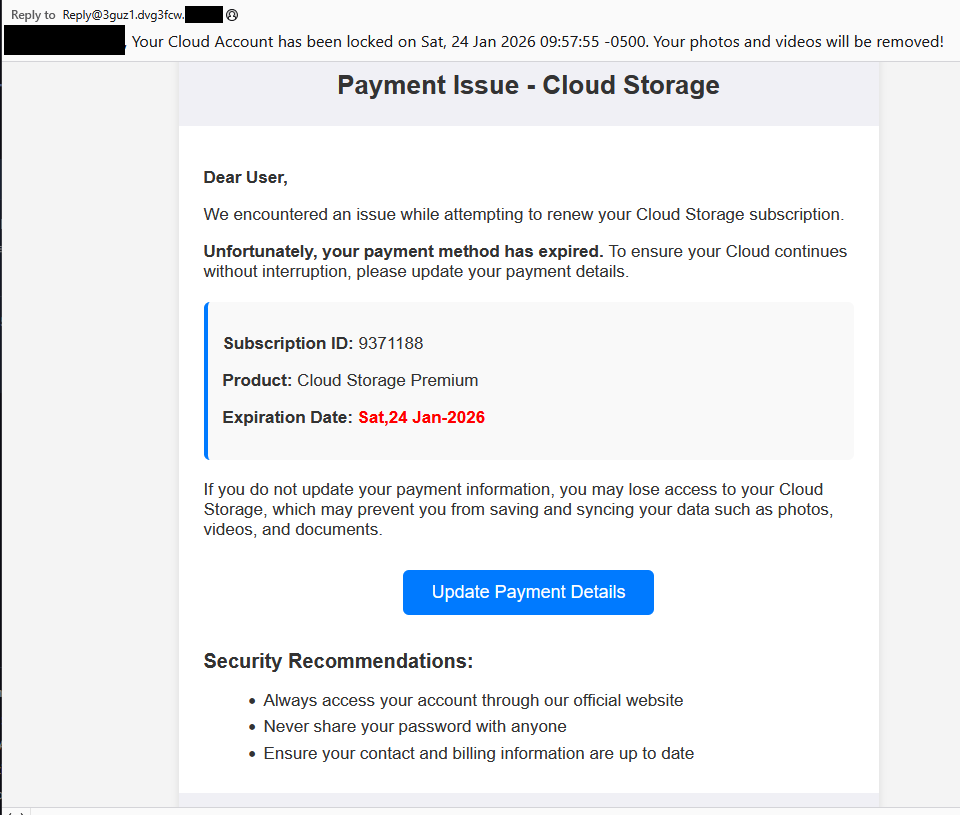
“{Recipient}. Your Cloud Account has been locked on Sat, 24 Jan 2026 09:57:55 -0500. Your photos and videos will be removed!”
This matches one of the subject lines that BleepingComputer listed.
And the content of the email:
“Payment Issue – Cloud Storage
Dear User,
We encountered an issue while attempting to renew your Cloud Storage subscription.
Unfortunately, your payment method has expired. To ensure your Cloud continues without interruption, please update your payment details.
Subscription ID: 9371188
Product: Cloud Storage Premium
Expiration Date: Sat,24 Jan-2026
If you do not update your payment information, you may lose access to your Cloud Storage, which may prevent you from saving and syncing your data such as photos, videos, and documents.
Update Payment Details {link button}
Security Recommendations:
Always access your account through our official website
Never share your password with anyone
Ensure your contact and billing information are up to date”
The link in the email leads to https://storage.googleapis[.]com/qzsdqdqsd/dsfsdxc.html#/redirect.html, which helps the scammer establish a certain amount of trust because it points to Google Cloud Storage (GCS). GCS is a legitimate service that allows authorized users to store and manage data such as files, images, and videos in buckets. However, as in this case, attackers can abuse it for phishing.
The redirect carries some parameters to the next website.
The feed.headquartoonjpn[.]com domain was blocked by Malwarebytes. We’ve seen it before in an earlier campaign involving an Endurance-themed phish.
After a few more redirects, we ended up at hx5.submitloading[.]com, where a fake CAPTCHA triggered the last redirect to freecash[.]com, once it was solved.
The end goal of this phish likely depends on the parameters passed along during the redirects, so results may vary.
Rather than stealing credentials directly, the campaign appears designed to monetize traffic, funneling victims into affiliate offers where the operators get paid for sign-ups or conversions.
BleepingComputer noted that they were redirected to affiliate marketing websites for various products.
“Products promoted in this phishing campaign include VPN services, little-known security software, and other subscription-based offerings with no connection to cloud storage.”
How to stay safe
Ironically, the phishing email itself includes some solid advice:
Always access your account through our official website.
Never share your password with anyone.
We’d like to add:
Never click on links in unsolicited emails without verifying with a trusted source.
Do not engage with websites that attract visitors like this.
Pro tip: Malwarebytes Scam Guard would have helped you identify this email as a scam and provided advice on how to proceed.
Redirect flow (IOCs)
storage.googleapis[.]com/qzsdqdqsd/dsfsdxc.html
feed.headquartoonjpn[.]com
revivejudgemental[.]com
hx5.submitloading[.]com
freecash[.]com
Update February 5, 2026
Almedia GmbH, the company behind the Freecash platform, reached out to us for information about the chain of redirects that lead to their platform. And after an investigation they notified us that:
“Following Malwarebytes’ reporting and the additional information they shared with us, we investigated the issue and identified an affiliate operating in breach of our policies. That partner has been removed from our network.
Almedia does not sell user data, and we take compliance, user trust, and responsible advertising seriously.”
We don’t just report on scams—we help detect them
Cybersecurity risks should never spread beyond a headline. If something looks dodgy to you, check if it’s a scam using Malwarebytes Scam Guard, a feature of our mobile protection products. Submit a screenshot, paste suspicious content, or share a text or phone number, and we’ll tell you if it’s a scam or legit. Download Malwarebytes Mobile Security for iOS or Android and try it today!
As a Browser Guard user, you might not have noticed much difference lately. Browser Guard still blocks scams and phishing attempts just like always, and, in many cases, even better.
But behind the scenes, almost everything changed. The rules that govern how browser extensions work went through a major overhaul, and we had to completely rebuild how Browser Guard protects you.
First, what is Manifest v3 (and v2)?
Browser extensions include a configuration file called a “manifest”. Think of it as an instruction manual that tells your browser what an extension can do and how it’s allowed to do it.
Manifest v3 is the latest version of that system, and it’s now the only option allowed in major browsers like Chrome and Edge.
In Manifest v2, Browser Guard could use highly customized logic to analyze and block suspicious activity as it happened, protecting you as you browsed the web.
With Manifest v3, that flexibility is mostly gone. Extensions can no longer run deeply complex, custom logic in the same way. Instead, we can only pass static rule lists to the browser, called Declarative Net Request (DNR) rules.
But those DNR rules come with strict constraints.
Rule sets are size-limited by the browser to save space. Because rules are stored as raw JSON files, developers can’t use other data types to make them smaller. And updating those DNR rules can only be done by updating the extension entirely.
This is less of a problem on Chrome, which allows developers to push updates quickly, but other browsers don’t currently support this fast-track process. Dynamic rule updates exist, but they’re limited, and nowhere near large enough to hold the full set of rules.
In short, we couldn’t simply port Browser Guard from Manifest v2 to v3. The old approach wouldn’t keep our users protected.
A note about Firefox and Brave
Firefox and Brave chose a different path and continue to support the more flexible Manifest v2 method of blocking requests.
However, since Brave doesn’t have its own extension store, users can only install extensions they already had before Google removed Manifest v2 extensions from the Chrome Web Store. Though Brave also has strong out-of-the-box ad protection.
For Browser Guard users on Firefox, rest assured the same great blocking techniques will continue to work.
How Browser Guard still protects you
Given all of this, we had to get creative.
Many ad blockers already support pattern-based matching to stop ads and trackers. We asked a different question: what if we could use similar techniques to catch scam and phishing attempts before we know the specific URL is malicious?
Better yet, what if we did it without relying on the new DNR APIs?
So, we built a new pattern-matching system focused specifically on scam and phishing behavior, supporting:
Full regex-based URL matching
Full XPath and querySelector support
Matching against any content on the page
Favicon spoof detection
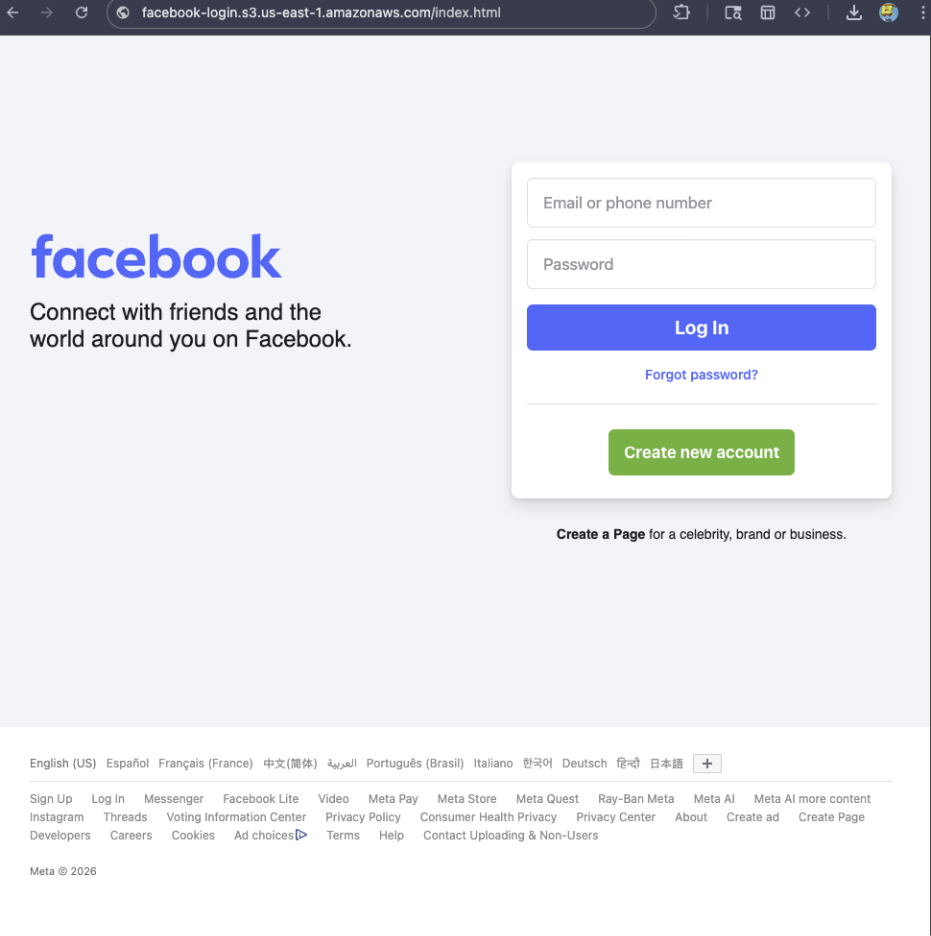
For example, if a site is hosted on Amazon S3, contains a password-input field, and uses a homoglyph in the URL to trick users into thinking they were logging into Facebook, Browser Guard can detect that combination—even if we’ve never seen the URL before.
Why this matters more now
With AI, attackers can create near-perfect duplicates of websites easier than ever. And did you spot the homoglyph in the URL? Nope, neither did I!
That’s why we designed this system so we can update its rules every 30 minutes, instead of waiting for full extension updates.
But I still see static blocking rules in Browser Guard
That’s true—for now.
We’ve found a temporary workaround that lets us support all the rules that we had before. However, we had to remove some of the more advanced logic that used to sit on top of them.
For example, we can’t use these large datasets to block subframe requests, only main frame requests. Nor can we stack multiple logic layers together; blocking is limited to simple matches (regex, domains and URLs).
Those limits are a big reason we’re investing more heavily in pattern-based and heuristic protection.
Pure heuristics
From day one, Browser Guard has used heuristics (behavior) to detect scams and phishing, monitoring behavior on the page to match suspicious activity.
For example, some scam pages deliberately break your browser’s back button by abusing window.replaceState, then trick you into calling that scammer’s “computer helpline.” Others try to convince you to run malicious commands on your computer.
Browser Guard can detect these behaviors and warn you before you fall for them.
What’s next?
Did someone say AI?
You’ve probably seen Scam Guard in other Malwarebytes products. We’re currently working on a version tailored specifically for Browser Guard. More soon!
Final thoughts
While Manifest v3 introduced meaningful improvements to browser security, it also created real challenges for security tools like Browser Guard.
Rather than scaling back, the Browser Guard team rebuilt our approach from the ground up, focusing on behavior, patterns, and faster response times. The result is protection that’s different under the hood, but just as committed to keeping you safe online.
We don’t just report on scams—we help detect them
Cybersecurity risks should never spread beyond a headline. If something looks dodgy to you, check if it’s a scam using Malwarebytes Scam Guard, a feature of our mobile protection products. Submit a screenshot, paste suspicious content, or share a text or phone number, and we’ll tell you if it’s a scam or legit. Download Malwarebytes Mobile Security for iOS or Android and try it today!
If you’ve ever stared at a suspicious text, email, or link and thought “Is this a scam… or am I overthinking it?” Well, you’re not alone.
Scams are getting harder to spot, and even savvy internet users get caught off guard. That’s why Malwarebytes is the first cybersecurity provider available directly inside ChatGPT, bringing trusted threat intelligence to millions of people right where these questions happen.
Simply ask: “Malwarebytes, is this a scam?” and you’ll get a clear, informed answer—super fast.
From then on, you can “@Malwarebytes” to check if a text message, DM, email, or other content seems malicious.
Cybersecurity help, right when and where you need it
Malwarebytes in ChatGPT lets you tap into our cybersecurity expertise without ever leaving the conversation. Whether something feels off or you want a second opinion, you can get trusted guidance in no time at all.
Here’s what you can do:
Spot scams faster
Paste in a suspicious text message, email, or DM and get:
A clear, point-by-point breakdown of phishing or any known red flags
An explanation of why something looks risky
Practical next steps to help you stay safe
You won’t get any jargon or guessing from us. What you will get is 100% peace of mind.
Check links, domains, and phone numbers
Not sure if a URL, website, or phone number is legit? Ask for a risk assessment informed by Malwarebytes threat intelligence, including:
Signs of suspicious activity
Whether the link or sender has been associated with scams
If a domain is newly registered, follows redirects, or other potentially suspicious elements
What to do next—block it, ignore it, or proceed with caution
Powered by real threat intelligence
The verdicts you get aren’t based on vibes or generic advice. They’re powered by Malwarebytes’ continuously updated threat intelligence—the same real-world data that helps protect millions of devices and people worldwide every day.
If you spot something suspicious, you can submit it directly to Malwarebytes through ChatGPT. Those reports help strengthen threat intelligence, making the internet safer not just for you, but for everyone.
Link reputation scanner: Checks URLs against threat intelligence databases, detects newly registered domains (<30 days), and follows redirects.
Phone number reputation check: Validates phone numbers against scam/spam databases, including carrier and location details.
Email address reputation check: Analyzes email domains for phishing & other malicious activity.
WHOIS domain lookup: Retrieves registration data such as registrar, creation and expiration dates, and abuse of contacts.
Verify domain legitimacy: Look up domain registration details to identify newly created or suspicious websites commonly used in phishing attacks.
Get geographic context: Receive warnings when phone numbers originate from unexpected regions, a common indicator of international scam operations.
Available now
Malwarebytes in ChatGPT is available wherever ChatGPT apps are available.
To get started, just ask ChatGPT:
“Malwarebytes, is this a scam?”
For deeper insights, proactive protection, and human support, download the Malwarebytes app—our security solutions are designed to stop threats before they reach you, and the damage is done.

 Login
Login