Normal view

FBI Seizes NetNut Proxy Platform, Popa Botnet

2 July 2026 at 21:27

The Federal Bureau of Investigation (FBI) said today it worked with industry partners to seize hundreds of domains associated with NetNut, a sprawling residential proxy service operated by the publicly-traded Israeli company Alarum Technologies [NASDAQ: ALAR]. The action comes roughly two weeks after KrebsOnSecurity published findings from multiple security firms connecting NetNut to the Popa botnet, a collection of at least two million devices that have been compromised by malicious software with little or no consent from victims.

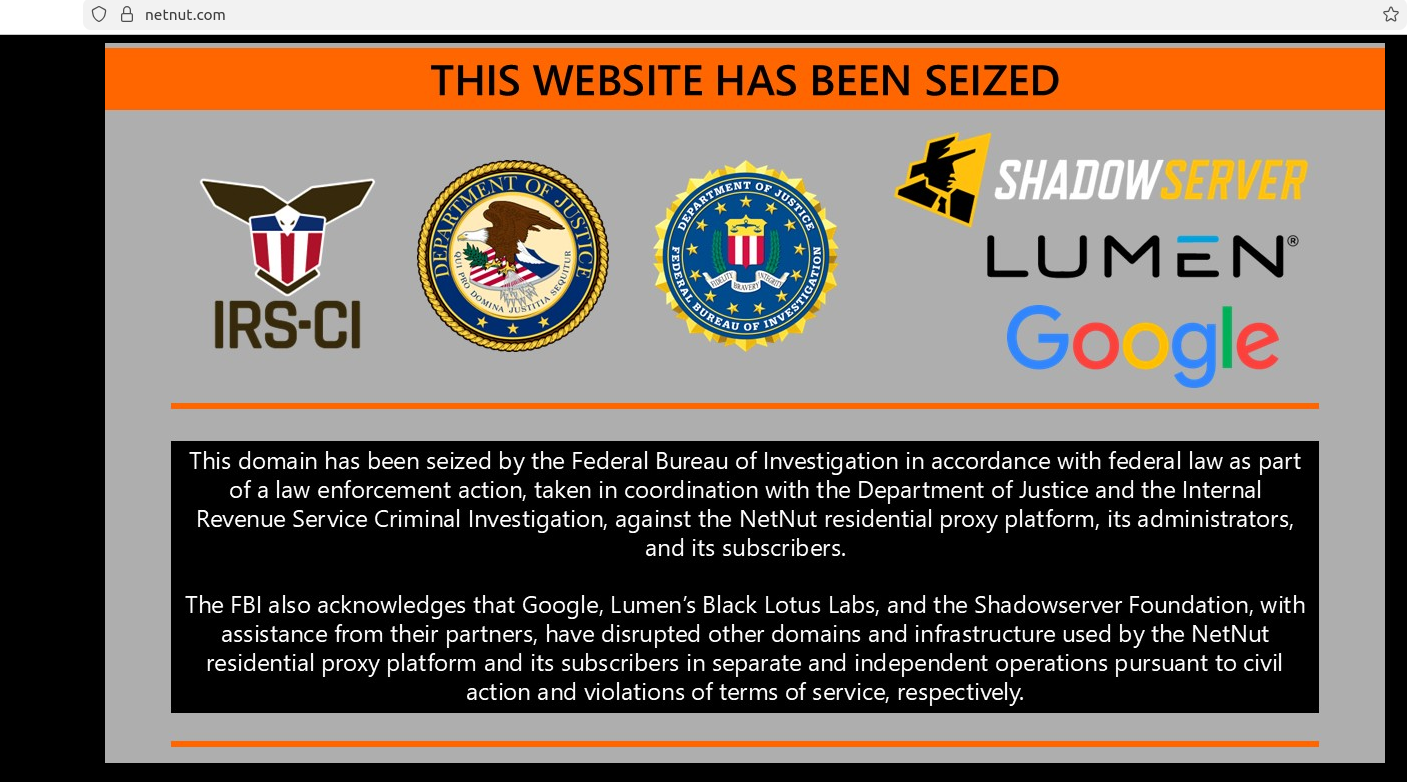
The NetNut homepage today was replaced by this seizure banner from the FBI.

On June 19, three different security firms issued similar findings: That NetNut is a residential proxy network which populates a botnet called Popa, and distributes software for devices commonly found in homes, such as smart TVs and streaming boxes. NetNut’s software turns those systems into always-on residential proxy nodes that are rented to others, who predominantly use them to relay abusive and intrusive Internet traffic, such as mass content scraping, advertising fraud, and account takeover activity.

Earlier today, NetNut’s homepage was replaced with a seizure notice from the FBI and the Internal Revenue Service Criminal Investigation division. The seizure notice thanked Google, Lumen, Shadowserver and other industry partners for their help in dismantling hundreds of domains tied to the Popa botnet, which experts say has long been synonymous with NetNut’s residential proxy infrastructure.

In a blog post published today, the Google Threat Intelligence Group (GTIG) said NetNut’s proxy network is widely resold and white-labeled by a number of third-party proxy providers, and that its services are heavily sought out by cybercriminals seeking to obfuscate the source of their malicious traffic. The GTIG said that in a single week during June 2026, they observed 316 distinct clusters of threat actors using suspected NetNut exit nodes, including cybercriminal and espionage groups.

“These bad actors can use NetNut to mask their origin IP address when accessing victim environments, accessing their own infrastructure, and conducting password spray attacks,” Google’s GTIG wrote. “Furthermore, when a consumer device becomes an exit node, unauthorized network traffic passes through it. This means bad actors can access other private devices on the same home network, effectively exposing them to Internet threats.”

Google said it disabled Google accounts and services used by NetNut for malware command and control, and that it shared technical intelligence on NetNut’s software development kits (SDKs) and backend infrastructure with platform providers, law enforcement and research firms. The company also disabled apps known to bundle NetNut’s various SDKs.

Omer Weiss, legal counsel for NetNut parent Alarum Technologies, said the company was aware of the FBI seizure and cooperating with investigators.

“Alarum takes this matter seriously and will fully cooperate with law enforcement to ensure any misuse of its infrastructure is thoroughly investigated and those responsible are held to account,” Weiss said in a written statement.

Benjamin Brundage is founder of the proxy tracking service Synthient, one of the companies that published evidence last month linking the Popa botnet to NetNut and Alarum Technologies. Brundage said the domain seizures appear to have disrupted both the Popa botnet and the NetNut proxy network that rides on top of it.

Brundage said NetNut’s apparent demise is likely to be a great disadvantage for the cybercrime community, which was already reeling from legal actions by Google earlier this year that seized infrastructure for NetNut’s biggest competitor — IPIDEA.

“I think this takedown is going to have a big impact, because NetNut gained significant popularity after the IPIDEA takedown,” he said. “Also NetNut has been incredibly common among resellers, and they were on par with IPIDEA in terms of their daily traffic, quality, size, price per gigabyte, all of it.”

NetNut’s infrastructure, in a nutshell. Image: Black Lotus Labs, Lumen.

The NetNut and Popa botnet takedown may have another added benefit, Brundage said: Lessening the impact of large distributed denial-of-service botnets that have been built on the backs of poorly configured residential proxy services. In January, Synthient revealed how cybercriminals had built the world’s largest DDoS botnet (Kimwolf) by tunneling through IPIDEA proxy connections into the local networks of TV box owners, and infecting other Android-based devices behind the victim’s firewall.

While many of the bigger proxy providers took steps to block this activity, resellers of the major proxy networks have been far slower to respond to the threat, Brundage said.

“In terms of all these TV box devices getting compromised from the proxy network, it will have an impact on the DDoS botnets out there,” he said.

For its part, Google reckons today’s actions have caused “significant degradation to NetNut’s proxy network and its business operations, reducing the available pool of devices for the proxy operator by millions.” But the company warns that proxy networks can rebuild themselves by effectively reselling other proxy services, as IPIDEA has done over the past few months.

“Google has high confidence that many popular residential proxy brands are in fact whitelabeling the NetNut botnet,” the GTIG report concludes. “While we expect this disruption to have a larger ripple effect across the residential proxy ecosystem, observations after the disruption of IPIDEA proved that individual networks can appear resilient. What we have observed is that when faced with the degradation of their own botnet, proxy operators begin buying capacity from their competitors, effectively becoming a reseller. We recognize that creating a lasting disruption in this fluid ecosystem means we must scale our efforts to target the infrastructure of several interconnected providers.”

As KrebsOnSecurity has warned repeatedly, most of the no-name TV streaming boxes for sale on the major e-commerce websites either come pre-installed with residential proxy software, or require the installation of proxy SDKs in order to use the device for its stated purpose (streaming pirated movies, sporting events and TV shows). Google’s advice here is sound: When it comes to TV boxes, stick to name brands from reputable manufacturers, and then be sparing and judicious with any apps you choose to install.

The sketchy TV boxes that are being commandeered by the Popa botnet and other threats all come with or require the user to install unofficial Android operating systems that do not operate within the confines of Google’s Official Play Protect store. Google says consumers can confirm whether or not a device is built with the official Android TV OS and Play Protect certification by following these instructions.

Even people without TV streaming boxes can find their smart TVs enrolled in residential proxy networks, just by installing one of thousands of apps available for download on Samsung and LG smart TVs. In a report released last month, the proxy tracking company Spur found 42 percent of apps available for download via the webOS operating system on LG smart TVs include SDKs that turn one’s television into an always-on residential proxy node. More than a quarter of the apps made for Samsung’s Tizen operating system had similar residential proxy components, Spur found.

Image: Spur.us.

Update, 4:24 p.m. ET: Included a statement shared post-publication from an attorney representing NetNut parent Alarum Technologies.

Update, July 8, 2:34 p.m. ET: The website for Alarum Technologies — alarum[.]io — now also features a seizure notice from the FBI. The company’s stock has taken a beating since the FBI action, and is currently trading at $2.62 a share, a roughly 67 percent decline over the past week.

Google can be liable for false AI Overviews, court rules

11 June 2026 at 18:09

A German court has ruled that Google can be held directly responsible for defamatory claims produced by its AI Overviews. Basically, the court said that telling people they should double-check AI search results is not enough to deny liability for what those results say.

This kind of warning may not be enough.
This kind of warning may not be enough

The Munich Regional Court issued a preliminary injunction against Google after two German publishers discovered that AI Overviews falsely portrayed them as involved in scams and “dubious business practices,” even though the linked articles did not support those claims.

The decision could echo far beyond Germany. The court effectively found that Google can be held directly liable for defamatory content generated by its AI Overviews. The court cut through the usual “it’s just AI, don’t trust it too much” messaging and made one thing clear: If you build a system that confidently smears people or companies, you may be responsible for what it says, even when the content was “hallucinated” by AI.

AI Overviews are not harmless suggestions. In this case, the court treated them as Google’s own statements, with all the legal baggage that comes with that.

When the publishers sent a cease-and-desist letter, Google did not promptly stop similar claims from appearing. That detail turned out to be crucial in the ruling. The court noted that, unlike traditional search results, which simply list third-party content, AI Overviews generate “independent, new, and substantive statements.”

And since only Google can adjust the models and the logic that create those statements, only Google can reliably stop the system from repeating the same or similar falsehoods. In this case, the court found that Google can be held responsible.

For years, search engines have enjoyed broad protection under the logic that some harmful content is unavoidable when indexing the open web at scale. Showing a search result does not mean endorsing it. The search engine is a channel, not a publisher.

That changes when an AI Overview summarizes, rephrases, and sometimes invents facts, then publishes them at the top of search results.

AI Overviews are an extra feature, not essential to how search works. However, the appeal of AI summaries is their fast, confident answers, which is exactly what makes them dangerous. When those answers are wrong, many users may not click through to check the sources.

The ruling is preliminary and may be appealed, but the signal is clear: AI search output is not magic dust that makes liability disappear. Disclaimers about possible mistakes may not be enough when a system is deployed at scale, creates new content, and is designed to be trusted.

By the numbers

Google AI Overviews are powered by Gemini, Google’s AI model. Like other AI systems, it can produce confident answers that are wrong or poorly supported.

Pew Research studied browsing data from hundreds of users and found that when an AI Overview appears on a Google results page, clicks to traditional search results drop from around 15% to about 8%. 

A New York Times analysis of AI Overviews found that they were accurate roughly nine out of ten times. But with Google processing more than five trillion searches a year, even a small error rate could mean millions of wrong answers.

And those mistakes are not always due to bad sources. Even when Google links to a page with the correct information, its AI can still produce a false answer. More than half of the accurate responses were classified as “ungrounded,” meaning the websites cited by the AI Overview did not fully support the information it provided.

The main lesson here is to double-check AI search responses. Don’t trust an answer just because it’s presented confidently and includes links.

Users can be steered toward real threats, or away from effective protections, simply because an AI system sounded convincing on a search page.

If you find false or defamatory AI summaries about yourself or your company, document them thoroughly. Take screenshots, save the search terms, file correction requests, and keep records of the platform’s response. Or the lack of one.


Scammers don’t need to hack you. They just need you to click once. 

Malwarebytes Identity Theft Protection catches suspicious activity before it becomes a problem.

Patch Tuesday, May 2026 Edition

12 May 2026 at 23:46

Artificial intelligence platforms may be just as susceptible to social engineering as human beings, but they are proving remarkably good at finding security vulnerabilities in human-made computer code. That reality is on full display this month with some of the more widely-used software makers — including Apple, Google, Microsoft, Mozilla and Oracle — fixing near record volumes of security bugs, and/or quickening the tempo of their patch releases.

As it does on the second Tuesday of every month, Microsoft today released software updates to address at least 118 security vulnerabilities in its various Windows operating systems and other products. Remarkably, this is the first Patch Tuesday in nearly two years that Microsoft is not shipping any fixes to deal with emergency zero-day flaws that are already being exploited. Nor have any of the flaws fixed today been previously disclosed (potentially giving attackers a heads up in how to exploit the weakness).

Sixteen of the vulnerabilities earned Microsoft’s most-dire “critical” label, meaning malware or miscreants could abuse these bugs to seize remote control over a vulnerable Windows device with little or no help from the user. Rapid7 has done much of the heavy lifting in identifying some of the more concerning critical weaknesses this month, including:

  • CVE-2026-41089: A critical stack-based buffer overflow in Windows Netlogon that offers an attacker SYSTEM privileges on the domain controller. No privileges or user interaction are required, and attack complexity is low. Patches are available for all versions of Windows Server from 2012 onwards.
  • CVE-2026-41096: A critical RCE in the Windows DNS client implementation worthy of attention despite Microsoft assessing exploitation as less likely.
  • CVE-2026-41103: A critical elevation of privilege vulnerability that allows an unauthorized attacker to impersonate an existing user by presenting forged credentials, thus bypassing Entra ID. Microsoft expects that exploitation is more likely.

May’s Patch Tuesday is a welcome respite from April, which saw Microsoft fix a near-record 167 security flaws. Microsoft was among a few dozen tech giants given access to a “Project Glasswing,” a much-hyped AI capability developed by Anthropic that appears quite effective at unearthing security vulnerabilities in code.

Apple, another early participant in Project Glasswing, typically fixes an average of 20 vulnerabilities each time it ships a security update for iOS devices, said Chris Goettl, vice president of product management at Ivanti. On May 11, Apple shipped updates to address at least 52 vulnerabilities and backported the changes all the way to iPhone 6s and iOS 15.

Last month, Mozilla released Firefox 150, which resolved a whopping 271 vulnerabilities that were reportedly discovered during the Glasswing evaluation.

“Since Firefox 150.0.0 released, they have been on a more aggressive weekly cadence for security updates including the release of Firefox 150.0.3 on May Patch Tuesday resolving between three to five CVEs in each release,” Goettl said.

The software giant Oracle likewise recently increased its patch pace in response to their work with Glasswing. In its most recent quarterly patch update, Oracle addressed at least 450 flaws, including more than 300 fixes for remotely exploitable, unauthenticated flaws. But at the end of April, Oracle announced it was switching to a monthly update cycle for critical security issues.

On May 8, Google started rolling out updates to its Chrome browser that fixed an astonishing 127 security flaws (up from just 30 the previous month). Chrome automagically downloads available security updates, but installing them requires fully restarting the browser.

If you encounter any weirdness applying the updates from Microsoft or any other vendor mentioned here, feel free to sound off in the comments below. Meantime, if you haven’t backed up your data and/or drive lately, doing that before updating is generally sound advice. For a more granular look at the Microsoft updates released today, checkout this inventory by the SANS Internet Storm Center.

Google Chrome’s silent 4GB AI download problem [updated]

6 May 2026 at 18:17

Google Chrome has been quietly downloading a 4GB AI model onto users’ devices without asking first.

Security researcher Alexander Hanff, aka ThatPrivacyGuy, reports that Chrome has been silently installing Gemini Nano, Google’s on-device AI model, as a file called weights.bin stored in the OptGuideOnDeviceModel directory within users’ Chrome profiles. This 4GB download happens automatically when Chrome determines your device meets the hardware requirements. It does not ask for consent, and sends no notification—not even one of those annoying cookie banners you’ve learned to dismiss without reading.

The Gemini Nano model powers features like “Help me write” text composition assistance, on-device scam detection, and a Summarizer API that websites can call directly. These features are enabled by default in some recent Chrome versions. And here’s the kicker: if you discover the file and delete it, Chrome simply downloads it again.

Why this matters

Let’s start with the obvious problem: a 4GB download isn’t trivial for everyone. If you’re lucky enough to have unlimited fiber internet, you might not notice. But for users on metered connections, mobile hotspots, or in developing countries where data is expensive, Google just cost them real money without permission. For rural users or those with bandwidth caps, this kind of silent transfer can blow through monthly limits in minutes.

Hanff focuses on the environmental angle. He calculated that if this model were pushed to just 1 billion Chrome users (roughly 30% of Chrome’s user base), the distribution alone would consume 240 gigawatt-hours of energy and generate 60,000 tons of CO2 equivalent. That’s not including actually using the model, just the downloads.

But to us, the most troubling aspect is the broader pattern this represents. Just a few weeks ago, we reported another unsolicited AI invasion on our personal computers discovered by Hanff. He documented how Anthropic’s Claude Desktop app, which silently installed browser integration files across multiple Chromium browsers, including five browsers he didn’t even have installed. The integration would reinstall itself if removed, and it also happened without any meaningful user disclosure.

Hanff argues that both cases likely violate EU privacy law, specifically the ePrivacy Directive’s rules about storing data on user devices and the GDPR’s requirements around transparency and lawful processing. While these claims haven’t been tested in court, they highlight a fundamental tension: can companies just install whatever they want on your computer as long as they say it’s a feature of an app you installed?

Google might argue that having an AI on your device provides better privacy than cloud-based alternatives. Which is generally true, but it does not apply here, since Chrome’s most prominent AI feature—the “AI Mode” pill in the address bar—doesn’t even use the local model. According to Hanff’s analysis, it routes queries to Google’s cloud servers anyway. 

All in all, users see a 4GB local AI model and reasonably assume their data stays private, when in reality, the most visible AI feature sends everything to Google’s servers.

Tech companies need to stop treating silent deployment as acceptable practice. We see no valid excuse for this. Your device is yours. The storage is yours. The bandwidth is yours. And the electricity bill is yours.

What happened to asking for permission? And when I remove it, I want it gone permanently—not automatic reinstallation.

When are the tech giants going to learn that we don’t want to be left discovering after the fact that our devices have become deployment targets for features we never asked for.

Update May 12, 2026 with do it yourself instructions

How to check if the AI model is on your computer (Windows)

  1. Open File Explorer
  2. At the top of the File Explorer window, click the address bar and paste:

%LOCALAPPDATA%\Google\Chrome\User Data

  1. Press Enter
  2. Look for a folder named:

OptGuideOnDeviceModel

  1. If you see it, Chrome has likely downloaded the AI model
Properties of the OptGuideOnDeviceModel folder
Properties of the folder

How to check on a Mac

  1. Open Finder
  2. In the menu bar at the top of the screen, click Go > Go to Folder
  3. Paste:

~/Library/Application Support/Google/Chrome/

  1. Look for a folder named:

OptGuideOnDeviceModel

Now, remember, this isn’t malware, and its presence doesn’t mean your computer is infected.

Turn off Chrome AI features

This part is relatively easy. You may find online instructions telling you to edit the Windows registry or use Chrome policies, but for most people the simplest and safest approach is to disable the features directly in Chrome.

We don’t recommend manually editing the registry unless you fully understand what you’re doing. Incorrect changes can cause system problems.

Instead, try this first:

  1. Open Chrome
  2. You can copy and paste this directly into Chrome’s address bar and press Enter:

chrome://settings/ai

  1. On the page that opens, you can turn off features such as:
    • “Help me write”
    • AI summaries
    • On-device AI features

 The exact options may vary depending on your Chrome version and region.

  1. Then restart Chrome to make sure the changes take effect.

This may stop Chrome from downloading or using the AI model, although some users report the files can return after browser updates.

There is probably no need to delete the files unless you specifically need the storage space.

If chrome://settings/ai does not work, the feature may not yet be available in your region, you may be using a managed work or school account, or your version of Chrome may not support these settings yet.

Do you need to delete the OptGuideOnDeviceModel folder?

You can, but there is probably no need to.

If you disable Chrome’s AI features, the downloaded model should no longer be actively used for those features. Leaving the files in place may also prevent Chrome from downloading them again at a later point.


Browse like no one’s watching. 

Malwarebytes Privacy VPN encrypts your connection and never logs what you do, so the next story you read doesn’t have to feel personal. Try it free → 

Attackers abuse OAuth’s built-in redirects to launch phishing and malware attacks

4 March 2026 at 13:53

Attackers are abusing normal OAuth error redirects to send users from a legitimate Microsoft or Google login URL to phishing or malware pages, without ever completing a successful sign‑in or stealing tokens from the OAuth flow itself.

That calls for a bit more explanation.

OAuth (Open Authorization) is an open-standard protocol for delegated authorization. It allows users to grant websites or applications access to their data on another service (for example, Google or Facebook) without sharing their password. 

OAuth redirection is the process where an authorization server sends a user’s browser back to an application (client) with an authorization code or token after user authentication.

Researchers found that phishers use silent OAuth authentication flows and intentionally invalid scopes to redirect victims to attacker-controlled infrastructure without stealing tokens.

So, what does this attack look like from a target’s perspective?

From the user’s perspective, the attack chain looks roughly like this:

The email

An email arrives with a plausible business lure. For example, you receive an email about something routine but urgent: document sharing or review, a Social Security or financial notice, an HR or employee report, a Teams meeting invite, or a password reset.​

The email body contains a link such as “View document” or “Review report,” or a PDF attachment that includes a link instead.​

The link

You click the link after seeing that it appears to be a normal Microsoft or Google login. The visible URL (what you see when you hover over it) looks convincing, starting with a trusted domain like https://login.microsoftonline.com/  or https://accounts.google.com/.

There is no obvious sign that the parameters (prompt=none, odd or empty scope, encoded state) are abnormal.​

Silent OAuth

The crafted URL attempts a silent OAuth authorization (prompt=none) and uses parameters that are guaranteed to fail (for example, an invalid or missing scope).​

The identity provider evaluates your session and conditional access, determines the request cannot succeed silently, and returns an OAuth error, such as interaction_required, access_denied, or consent_required.​

The redirect

By design, the OAuth server then redirects your browser, including the error parameters and state, to the app’s registered redirect URI, which in these cases is the attacker’s domain.​

To the user, this is just a quick flash of a Microsoft or Google URL followed by another page. It’s unlikely anyone would notice the errors in the query string.

Landing page

The target gets redirected to a page that looks like a legitimate login or business site. This could very well be a clone of a trusted brand’s site.

From here, there are two possible malicious scenarios:

Phishing / Attacker in the Middle (AitM) variant

A normal login page or a verification prompt, sometimes with CAPTCHAs or interstitials to look more trustworthy and bypass some controls.​

The email address may already be filled in because the attackers passed it through the state parameter.

When the user enters credentials and multi-factor authentication (MFA), the attacker‑in‑the‑middle toolkit intercepts them, including session cookies, while passing them along so the experience feels legitimate.​

Malware delivery variant

Immediately (or after a brief intermediate page), the browser hits a download path and automatically downloads a file.​

The context of the page matches the lure (“Download the secure document,” “Meeting resources,” and so on), making it seem reasonable to open the file.​

The target might notice the initial file open or some system slowdown, but otherwise the compromise is practically invisible.​

Potential impact

By harvesting credentials or planting a backdoor, the attacker now has a foothold on the system. From there, they may carry out hands-on-keyboard activity, move laterally, steal data, or stage ransomware, depending on their goals.

The harvested credentials and tokens can be used to access email, cloud apps, or other resources without the need to keep malware on the device.​

How to stay safe

Since the attacker does not need your token from this flow (only the redirect into their own infrastructure), the OAuth request itself may look less suspicious. Be vigilant and follow our advice:

  • If you rely on hovering over links, be extra cautious when you see very long URLs with oauth2, authorize, and lots of encoded text, especially if they come from outside your organization.
  • Even if the start of the URL looks legitimate, verify with a trusted sender before clicking the link.
  • If something urgent arrives by email and immediately forces you through a strange login or starts a download you did not expect, assume it is malicious until proven otherwise.
  • If you are redirected somewhere unfamiliar, stop and close the tab.
  • Be very wary of files that download immediately after clicking a link in an email, especially from /download/ paths.
  • If a site says you must “run” or “enable” something to view a secure document, close it and double-check which site you’re currently on. It might be up to something.
  • Keep your OS, browser, and your favorite security tools up to date. They can block many known phishing kits and malware downloads automatically.

Pro tip: use Malwarebytes Scam Guard to help you determine whether the email you received is a scam or not.


We don’t just report on scams—we help detect them

Cybersecurity risks should never spread beyond a headline. If something looks dodgy to you, check if it’s a scam using Malwarebytes Scam Guard. Submit a screenshot, paste suspicious content, or share a link, text or phone number, and we’ll tell you if it’s a scam or legit. Available with Malwarebytes Premium Security for all your devices, and in the Malwarebytes app for iOS and Android.

Is your phone listening to you? (re-air) (Lock and Code S07E03)

9 February 2026 at 19:49

This week on the Lock and Code podcast…

In January, Google settled a lawsuit that pricked up a few ears: It agreed to pay $68 million to a wide array of people who sued the company together, alleging that Google’s voice-activated smart assistant had secretly recorded their conversations, which were then sent to advertisers to target them with promotions.

Google denied any admission of wrongdoing in the settlement agreement, but the fact stands that one of the largest phone makers in the world decided to forego a trial against some potentially explosive surveillance allegations. It’s a decision that the public has already seen in the past, when Apple agreed to pay $95 million last year to settle similar legal claims against its smart assistant, Siri.

Back-to-back, the stories raise a question that just seems to never go away: Are our phones listening to us?

This week, on the Lock and Code podcast with host David Ruiz, we revisit an episode from last year in which we tried to find the answer. In speaking to Electronic Frontier Foundation Staff Technologist Lena Cohen about mobile tracking overall, it becomes clear that, even if our phones aren’t literally listening to our conversations, the devices are stuffed with so many novel forms of surveillance that we need not say something out loud to be predictably targeted with ads for it.

“Companies are collecting so much information about us and in such covert ways that it really feels like they’re listening to us.”

Tune in today to listen to the full conversation.

Show notes and credits:

Intro Music: “Spellbound” by Kevin MacLeod (incompetech.com)
Licensed under Creative Commons: By Attribution 4.0 License
http://creativecommons.org/licenses/by/4.0/
Outro Music: “Good God” by Wowa (unminus.com)


Listen up—Malwarebytes doesn’t just talk cybersecurity, we provide it.

Protect yourself from online attacks that threaten your identity, your files, your system, and your financial well-being with our exclusive offer for Malwarebytes Premium for Lock and Code listeners.

A WhatsApp bug lets malicious media files spread through group chats

27 January 2026 at 12:55

WhatsApp is going through a rough patch. Some users would argue it has been ever since Meta acquired the once widely trusted messaging platform. User sentiment has shifted from “trusted default messenger” to a grudgingly necessary Meta product.

Privacy-aware users still see WhatsApp as one of the more secure mass-market messaging platforms if you lock down its settings. Even then, many remain uneasy about Meta’s broader ecosystem, and wish all their contacts would switch to a more secure platform.

Back to current affairs, which will only reinforce that sentiment.

Google’s Project Zero has just disclosed a WhatsApp vulnerability where a malicious media file, sent into a newly created group chat, can be automatically downloaded and used as an attack vector.

The bug affects WhatsApp on Android and involves zero‑click media downloads in group chats. You can be attacked simply by being added to a group and having a malicious file sent to you.

According to Project Zero, the attack is most likely to be used in targeted campaigns, since the attacker needs to know or guess at least one contact. While focused, it is relatively easy to repeat once an attacker has a likely target list.

And to put a cherry on top for WhatsApp’s competitors, a potentially even more serious concern for the popular messaging platform, an international group of plaintiffs sued Meta Platforms, alleging the WhatsApp owner can store, analyze, and access virtually all of users’ private communications, despite WhatsApp’s end-to-end encryption claims.

How to secure WhatsApp

Reportedly, Meta pushed a server change on November 11, 2025, but Google says that only partially resolved the issue. So, Meta is working on a comprehensive fix.

Google’s advice is to disable Automatic Download or enable WhatsApp’s Advanced Privacy Mode so that media is not automatically downloaded to your phone.

And you’ll need to keep WhatsApp updated to get the latest patches, which is true for any app and for Android itself.

Turn off auto-download of media

Goal: ensure that no photos, videos, audio, or documents are pulled to the device without an explicit decision.

  • Open WhatsApp on your Android device.
  • Tap the three‑dot menu in the top‑right corner, then tap Settings.
  • Go to Storage and data (sometimes labeled Data and storage usage).
  • Under Media auto-download, you will see When using mobile data, when connected on Wi‑Fi. and when roaming.
  • For each of these three entries, tap it and uncheck all media types: Photos, Audio, Videos, Documents. Then tap OK.
  • Confirm that each category now shows something like “No media” under it.

Doing this directly implements Project Zero’s guidance to “disable Automatic Download” so that malicious media can’t silently land on your storage as soon as you are dropped into a hostile group.

Stop WhatsApp from saving media to your Android gallery

Even if WhatsApp still downloads some content, you can stop it from leaking into shared storage where other apps and system components see it.

  • In Settings, go to Chats.
  • Turn off Media visibility (or similar option such as Show media in gallery). For particularly sensitive chats, open the chat, tap the contact or group name, find Media visibility, and set it to No for that thread.

WhatsApp is a sandbox, and should contain the threat. Which means, keeping media inside WhatsApp makes it harder for a malicious file to be processed by other, possibly more vulnerable components.

Lock down who can add you to groups

The attack chain requires the attacker to add you and one of your contacts to a new group. Reducing who can do that lowers risk.

  • ​In Settings, tap Privacy.
  • Tap Groups.
  • Change from Everyone to My contacts or ideally My contacts except… and exclude any numbers you do not fully trust.
  • If you use WhatsApp for work, consider keeping group membership strictly to known contacts and approved admins.

Set up two-step verification on your WhatsApp account

Read this guide for Android and iOS to learn how to do that.


We don’t just report on phone security—we provide it

Cybersecurity risks should never spread beyond a headline. Keep threats off your mobile devices by downloading Malwarebytes for iOS, and Malwarebytes for Android today.

One privacy change I made for 2026 (Lock and Code S07E02)

26 January 2026 at 14:31

This week on the Lock and Code podcast…

When you hear the words “data privacy,” what do you first imagine?

Maybe you picture going into your social media apps and setting your profile and posts to private. Maybe you think about who you’ve shared your location with and deciding to revoke some of that access. Maybe you want to remove a few apps entirely from your smartphone, maybe you want to try a new web browser, maybe you even want to skirt the type of street-level surveillance provided by Automated License Plate Readers, which can record your car model, license plate number, and location on your morning drive to work.

Importantly, all of these are “data privacy,” but trying to do all of these things at once can feel impossible.

That’s why, this year, for Data Privacy Day, Malwarebytes Senior Privacy Advocate (and Lock and Code host) David Ruiz is sharing the one thing he’s doing different to improve his privacy. And it’s this: He’s given up Google Search entirely.

When Ruiz requested the data that Google had collected about him last year, he saw that the company had recorded an eye-popping 8,000 searches in just the span of 18 months. And those 8,000 searches didn’t just reveal what he was thinking about on any given day—including his shopping interests, his home improvement projects, and his late-night medical concerns—they also revealed when he clicked on an ad based on the words he searched. This type of data, which connects a person’s searches to the likelihood of engaging with an online ad, is vital to Google’s revenue, and it’s the type of thing that Ruiz is seeking to finally cut off.

So, for 2026, he has switched to a new search engine, Brave Search.

Today, on the Lock and Code podcast, Ruiz explains why he made the switch, what he values about Brave Search, and why he also refused to switch to any of the major AI platforms in replacing Google.

Tune in today to listen to the full episode.

Show notes and credits:

Intro Music: “Spellbound” by Kevin MacLeod (incompetech.com)
Licensed under Creative Commons: By Attribution 4.0 License
http://creativecommons.org/licenses/by/4.0/
Outro Music: “Good God” by Wowa (unminus.com)


Listen up—Malwarebytes doesn’t just talk cybersecurity, we provide it.

Protect yourself from online attacks that threaten your identity, your files, your system, and your financial well-being with our exclusive offer for Malwarebytes Premium Security for Lock and Code listeners.

Could ChatGPT Convince You to Buy Something?

20 January 2026 at 13:08

Eighteen months ago, it was plausible that artificial intelligence might take a different path than social media. Back then, AI’s development hadn’t consolidated under a small number of big tech firms. Nor had it capitalized on consumer attention, surveilling users and delivering ads.

Unfortunately, the AI industry is now taking a page from the social media playbook and has set its sights on monetizing consumer attention. When OpenAI launched its ChatGPT Search feature in late 2024 and its browser, ChatGPT Atlas, in October 2025, it kicked off a race to capture online behavioral data to power advertising. It’s part of a yearslong turnabout by OpenAI, whose CEO Sam Altman once called the combination of ads and AI “unsettling” and now promises that ads can be deployed in AI apps while preserving trust. The rampant speculation among OpenAI users who believe they see paid placements in ChatGPT responses suggests they are not convinced.

In 2024, AI search company Perplexity started experimenting with ads in its offerings. A few months after that, Microsoft introduced ads to its Copilot AI. Google’s AI Mode for search now increasingly features ads, as does Amazon’s Rufus chatbot. OpenAI announced on Jan. 16, 2026, that it will soon begin testing ads in the unpaid version of ChatGPT.

As a security expert and data scientist, we see these examples as harbingers of a future where AI companies profit from manipulating their users’ behavior for the benefit of their advertisers and investors. It’s also a reminder that time to steer the direction of AI development away from private exploitation and toward public benefit is quickly running out.

The functionality of ChatGPT Search and its Atlas browser is not really new. Meta, commercial AI competitor Perplexity and even ChatGPT itself have had similar AI search features for years, and both Google and Microsoft beat OpenAI to the punch by integrating AI with their browsers. But OpenAI’s business positioning signals a shift.

We believe the ChatGPT Search and Atlas announcements are worrisome because there is really only one way to make money on search: the advertising model pioneered ruthlessly by Google.

Advertising model

Ruled a monopolist in U.S. federal court, Google has earned more than US$1.6 trillion in advertising revenue since 2001. You may think of Google as a web search company, or a streaming video company (YouTube), or an email company (Gmail), or a mobile phone company (Android, Pixel), or maybe even an AI company (Gemini). But those products are ancillary to Google’s bottom line. The advertising segment typically accounts for 80% to 90% of its total revenue. Everything else is there to collect users’ data and direct users’ attention to its advertising revenue stream.

After two decades in this monopoly position, Google’s search product is much more tuned to the company’s needs than those of its users. When Google Search first arrived decades ago, it was revelatory in its ability to instantly find useful information across the still-nascent web. In 2025, its search result pages are dominated by low-quality and often AI-generated content, spam sites that exist solely to drive traffic to Amazon sales—a tactic known as affiliate marketing—and paid ad placements, which at times are indistinguishable from organic results.

Plenty of advertisers and observers seem to think AI-powered advertising is the future of the ad business.

Highly persuasive

Paid advertising in AI search, and AI models generally, could look very different from traditional web search. It has the potential to influence your thinking, spending patterns and even personal beliefs in much more subtle ways. Because AI can engage in active dialogue, addressing your specific questions, concerns and ideas rather than just filtering static content, its potential for influence is much greater. It’s like the difference between reading a textbook and having a conversation with its author.

Imagine you’re conversing with your AI agent about an upcoming vacation. Did it recommend a particular airline or hotel chain because they really are best for you, or does the company get a kickback for every mention? If you ask about a political issue, does the model bias its answer based on which political party has paid the company a fee, or based on the bias of the model’s corporate owners?

There is mounting evidence that AI models are at least as effective as people at persuading users to do things. A December 2023 meta-analysis of 121 randomized trials reported that AI models are as good as humans at shifting people’s perceptions, attitudes and behaviors. A more recent meta-analysis of eight studies similarly concluded there was “no significant overall difference in persuasive performance between (large language models) and humans.”

This influence may go well beyond shaping what products you buy or who you vote for. As with the field of search engine optimization, the incentive for humans to perform for AI models might shape the way people write and communicate with each other. How we express ourselves online is likely to be increasingly directed to win the attention of AIs and earn placement in the responses they return to users.

A different way forward

Much of this is discouraging, but there is much that can be done to change it.

First, it’s important to recognize that today’s AI is fundamentally untrustworthy, for the same reasons that search engines and social media platforms are.

The problem is not the technology itself; fast ways to find information and communicate with friends and family can be wonderful capabilities. The problem is the priorities of the corporations who own these platforms and for whose benefit they are operated. Recognize that you don’t have control over what data is fed to the AI, who it is shared with and how it is used. It’s important to keep that in mind when you connect devices and services to AI platforms, ask them questions, or consider buying or doing the things they suggest.

There is also a lot that people can demand of governments to restrain harmful corporate uses of AI. In the U.S., Congress could enshrine consumers’ rights to control their own personal data, as the EU already has. It could also create a data protection enforcement agency, as essentially every other developed nation has.

Governments worldwide could invest in Public AI—models built by public agencies offered universally for public benefit and transparently under public oversight. They could also restrict how corporations can collude to exploit people using AI, for example by barring advertisements for dangerous products such as cigarettes and requiring disclosure of paid endorsements.

Every technology company seeks to differentiate itself from competitors, particularly in an era when yesterday’s groundbreaking AI quickly becomes a commodity that will run on any kid’s phone. One differentiator is in building a trustworthy service. It remains to be seen whether companies such as OpenAI and Anthropic can sustain profitable businesses on the back of subscription AI services like the premium editions of ChatGPT, Plus and Pro, and Claude Pro. If they are going to continue convincing consumers and businesses to pay for these premium services, they will need to build trust.

That will require making real commitments to consumers on transparency, privacy, reliability and security that are followed through consistently and verifiably.

And while no one knows what the future business models for AI will be, we can be certain that consumers do not want to be exploited by AI, secretly or otherwise.

This essay was written with Nathan E. Sanders, and originally appeared in The Conversation.

Google will pay $8.25m to settle child data-tracking allegations

20 January 2026 at 12:40

Google has settled yet another class-action lawsuit accusing it of collecting children’s data and using it to target them with advertising. The tech giant will pay $8.25 million to address allegations that it tracked data on apps specifically designated for kids.

AdMob’s mobile data collection

This settlement stems from accusations that apps provided under Google’s “Designed for Families” programme, which was meant to help parents find safe apps, tracked children. Under the terms of this programme, developers were supposed to self-certify COPPA compliance and use advertising SDKs that disabled behavioural tracking. However, some did not, instead using software embedded in the apps that was created by a Google-owned mobile advertising company called AdMob.

When kids used these apps, which included games, AdMob collected data from these apps, according to the class action lawsuit. This included IP addresses, device identifiers, usage data, and the child’s location to within five meters, transmitting it to Google without parental consent. The AdMob software could then use that information to display targeted ads to users.

This kind of activity is exactly what the Children’s Online Privacy Protection Act (COPPA) was created to stop. The law requires operators of child-directed services to obtain verifiable parental consent before collecting personal information from children under 13. That includes cookies and other identifiers, which are the core tools advertisers use to track and target people.

The families filing the lawsuit alleged that Google knew this was going on:

“Google and AdMob knew at the time that their actions were resulting in the exfiltration data from millions of children under thirteen but engaged in this illicit conduct to earn billions of dollars in advertising revenue.”

Security researchers had alerted Google to the issue in 2018, according to the filing.

YouTube settlement approved

What’s most disappointing is that these privacy issues keep happening. This news arrives at the same time that a judge approved a settlement on another child privacy case involving Google’s use of children’s data on YouTube. This case dates back to October 2019, the same year that Google and YouTube paid a whopping $170m fine for violating COPPA.

Families in this class action suit alleged that YouTube used cookies and persistent identifiers on child-directed channels, collecting data including IP addresses, geolocation data, and device serial numbers. This is the same thing that it does for adults across the web, but COPPA protects kids under 13 from such activities, as do some state laws.

According to the complaint, YouTube collected this information between 2013 and 2020 and used it for behavioural advertising. This form of advertising infers people’s interests from their identifiers, and it is more lucrative than contextual advertising, which focuses only on a channel’s content.

The case said that various channel owners opted into behavioural advertising, prompting Google to collect this personal information. No parental consent was obtained, the plaintiffs alleged. Channel owners named in the suit included Cartoon Network, Hasbro, Mattel, and DreamWorks Animation.

Under the YouTube settlement (which was agreed in August and recently approved by a judge), families can file claims through YouTubePrivacySettlement.com, although the deadline is this Wednesday. Eligible families are likely to get $20–$30 after attorneys’ fees and administration costs, if 1–2% of eligible families submit claims.

COPPA is evolving

Last year, the FTC amended its COPPA Rule to introduce mandatory opt-in consent for targeted advertising to children, separate from general data-collection consent.

The amendments expand the definition of personal information to include biometric data and government-issued ID information. It also lets the FTC use a site operator’s marketing materials to determine whether a site targets children.

Site owners must also now tell parents who they’ll share information with, and the amendments stop operators from keeping children’s personal information forever. If these all sounds like measures that should have been included to protect children online from the get-go, we agree with you. In any case, companies have until this April to comply with the new rules.

Will the COPPA rules make a difference? It’s difficult to say, given the stream of privacy cases involving Google LLC (which owns YouTube and AdMob, among others). When viewed against Alphabet’s overall earnings, an $8.25m penalty risks being seen as a routine business expense rather than a meaningful deterrent.


We don’t just report on data privacy—we help you remove your personal information

Cybersecurity risks should never spread beyond a headline. With Malwarebytes Personal Data Remover, you can scan to find out which sites are exposing your personal information, and then delete that sensitive data from the internet.

Most Parked Domains Now Serving Malicious Content

16 December 2025 at 15:14

Direct navigation — the act of visiting a website by manually typing a domain name in a web browser — has never been riskier: A new study finds the vast majority of “parked” domains — mostly expired or dormant domain names, or common misspellings of popular websites — are now configured to redirect visitors to sites that foist scams and malware.

A lookalike domain to the FBI Internet Crime Complaint Center website, returned a non-threatening parking page (left) whereas a mobile user was instantly directed to deceptive content in October 2025 (right). Image: Infoblox.

When Internet users try to visit expired domain names or accidentally navigate to a lookalike “typosquatting” domain, they are typically brought to a placeholder page at a domain parking company that tries to monetize the wayward traffic by displaying links to a number of third-party websites that have paid to have their links shown.

A decade ago, ending up at one of these parked domains came with a relatively small chance of being redirected to a malicious destination: In 2014, researchers found (PDF) that parked domains redirected users to malicious sites less than five percent of the time — regardless of whether the visitor clicked on any links at the parked page.

But in a series of experiments over the past few months, researchers at the security firm Infoblox say they discovered the situation is now reversed, and that malicious content is by far the norm now for parked websites.

“In large scale experiments, we found that over 90% of the time, visitors to a parked domain would be directed to illegal content, scams, scareware and anti-virus software subscriptions, or malware, as the ‘click’ was sold from the parking company to advertisers, who often resold that traffic to yet another party,” Infoblox researchers wrote in a paper published today.

Infoblox found parked websites are benign if the visitor arrives at the site using a virtual private network (VPN), or else via a non-residential Internet address. For example, Scotiabank.com customers who accidentally mistype the domain as scotaibank[.]com will see a normal parking page if they’re using a VPN, but will be redirected to a site that tries to foist scams, malware or other unwanted content if coming from a residential IP address. Again, this redirect happens just by visiting the misspelled domain with a mobile device or desktop computer that is using a residential IP address.

According to Infoblox, the person or entity that owns scotaibank[.]com has a portfolio of nearly 3,000 lookalike domains, including gmai[.]com, which demonstrably has been configured with its own mail server for accepting incoming email messages. Meaning, if you send an email to a Gmail user and accidentally omit the “l” from “gmail.com,” that missive doesn’t just disappear into the ether or produce a bounce reply: It goes straight to these scammers. The report notices this domain also has been leveraged in multiple recent business email compromise campaigns, using a lure indicating a failed payment with trojan malware attached.

Infoblox found this particular domain holder (betrayed by a common DNS server — torresdns[.]com) has set up typosquatting domains targeting dozens of top Internet destinations, including Craigslist, YouTube, Google, Wikipedia, Netflix, TripAdvisor, Yahoo, eBay, and Microsoft. A defanged list of these typosquatting domains is available here (the dots in the listed domains have been replaced with commas).

David Brunsdon, a threat researcher at Infoblox, said the parked pages send visitors through a chain of redirects, all while profiling the visitor’s system using IP geolocation, device fingerprinting, and cookies to determine where to redirect domain visitors.

“It was often a chain of redirects — one or two domains outside the parking company — before threat arrives,” Brunsdon said. “Each time in the handoff the device is profiled again and again, before being passed off to a malicious domain or else a decoy page like Amazon.com or Alibaba.com if they decide it’s not worth targeting.”

Brunsdon said domain parking services claim the search results they return on parked pages are designed to be relevant to their parked domains, but that almost none of this displayed content was related to the lookalike domain names they tested.

Samples of redirection paths when visiting scotaibank dot com. Each branch includes a series of domains observed, including the color-coded landing page. Image: Infoblox.

Infoblox said a different threat actor who owns domaincntrol[.]com — a domain that differs from GoDaddy’s name servers by a single character — has long taken advantage of typos in DNS configurations to drive users to malicious websites. In recent months, however, Infoblox discovered the malicious redirect only happens when the query for the misconfigured domain comes from a visitor who is using Cloudflare’s DNS resolvers (1.1.1.1), and that all other visitors will get a page that refuses to load.

The researchers found that even variations on well-known government domains are being targeted by malicious ad networks.

“When one of our researchers tried to report a crime to the FBI’s Internet Crime Complaint Center (IC3), they accidentally visited ic3[.]org instead of ic3[.]gov,” the report notes. “Their phone was quickly redirected to a false ‘Drive Subscription Expired’ page. They were lucky to receive a scam; based on what we’ve learnt, they could just as easily receive an information stealer or trojan malware.”

The Infoblox report emphasizes that the malicious activity they tracked is not attributed to any known party, noting that the domain parking or advertising platforms named in the study were not implicated in the malvertising they documented.

However, the report concludes that while the parking companies claim to only work with top advertisers, the traffic to these domains was frequently sold to affiliate networks, who often resold the traffic to the point where the final advertiser had no business relationship with the parking companies.

Infoblox also pointed out that recent policy changes by Google may have inadvertently increased the risk to users from direct search abuse. Brunsdon said Google Adsense previously defaulted to allowing their ads to be placed on parked pages, but that in early 2025 Google implemented a default setting that had their customers opt-out by default on presenting ads on parked domains — requiring the person running the ad to voluntarily go into their settings and turn on parking as a location.

❌