Normal view

The guide on blocking ChatGPT, Gemini, Claude, and other AI tools at work | Kaspersky official blog

10 June 2026 at 13:53

Unchecked AI in the workplace quickly becomes a massive loophole for data leaks and security breaches. All too often, employees drop sensitive company data into public chatbots, or install rogue AI assistants on their own — in the process handing over way too much access. In a previous post, we broke down the different types of risky AI systems, and later shared some tips on how to turn off the built-in AI features on major tech platforms. Today let’s take a look at practical ways to block or restrict the unauthorized “helpers” employees might be using — from ChatGPT and Grammarly, to meeting bots like Fireflies and Read AI.

How to detect and restrict ChatGPT

ChatGPT is the biggest culprit when it comes to unauthorized AI use worldwide. A quick word of warning, though: an outright ban only sends users hunting for sketchy third-party sites or messaging app chatbots that hook into the same service. That’s why it’s always a good idea to offer an approved alternative before pulling the plug.

Detecting it: keep an eye on the NGFW or web filter for traffic heading to chat.openai.com, chatgpt.com, oaistatic.com, oaiusercontent.com, or cdn.oaistatic.com. It’s also smart to use EDR/EPP tools to scan browser histories, installed apps, and browser extensions across corporate devices.

Locking it down: use the firewall or web filter to block the entire AI Services category, and set up DNS to reroute traffic away from those OpenAI domains. Browser policies can also be used to ban ChatGPT-powered extensions. Better yet, block all extensions not on a pre-approved allowlist. Finally, use application controls and EPP solutions to stop users from installing the official desktop app (ChatGPT.exe or com.openai.chat).

How to detect and restrict Claude and Claude Code

Detecting it: use the NGFW or web filter to track traffic going to claude.ai, anthropic.com, *.anthropic.com, and api.anthropic.com. EDR/EPP or application control tools can also be used to scan employee computers for the desktop app (claude.exe).

Locking it down: drop a blanket block on the AI Services category through the NGFW or web filter, and tweak DNS settings to reroute traffic away from the aforementioned Anthropic domains. Next, use browser policies to shut down Claude-powered extensions. Finally, use application controls and the EPP platform to prevent users from installing the desktop app.

How to detect and restrict Perplexity AI

Detecting it: keep tabs on the NGFW or web filter to flag any traffic heading to *.perplexity.ai or pplx.ai.

Locking it down: just like the others, add the AI Services category to the NGFW or web filter blocklist, and use DNS routing to redirect traffic away from those domains.

Configure the browser to block third-party extensions from being installed. If Firefox is used in the organization, be aware that recent versions come with Perplexity built in. Luckily, these AI features can be turned-off company-wide using enterprise policies — specifically, by setting SidebarChatbot = blocked. The full list of tweaks can be found in the Firefox documentation.

How to detect and restrict DeepSeek

Detecting it: keep an eye on the NGFW or web filter for traffic hitting deepseek.com, chat.deepseek.com, api.deepseek.com, or platform.deepseek.com. For better precision, analyze the SNI (server name identification) in TLS connection requests. For mobile devices, look out for the official app (com.deepseek.chat).

Locking it down: blocklist the AI Services category on the NGFW or web filter, and reroute traffic to DeepSeek’s domains via DNS settings. Use browser policies to block third-party extensions, and lean on MDM/EMM tools to restrict the mobile app.

How to detect and restrict Mistral, xAI Grok, and Character.ai

The playbook for these tools is exactly the same as DeepSeek, so here’s the quick list of domains to watch for and block: chat.mistral.ai, mistral.ai, console.mistral.ai, grok.com, x.ai, api.x.ai, character.ai, beta.character.ai, and c.ai.

A quick word of warning on Grok: because Grok is baked into X, blocking this specific AI access point means blocking the entire social media platform.

How to detect and restrict Slack AI

Detecting it: in the Slack workspace admin dashboard, look under AnalyticsSlack AI usage. If an enterprise plan is used, the detailed Slack logs can be searched for any events starting with the ai_ prefix.

Blocking it with policies: in the organization’s Slack settings, click through the Workspace settingsRoles & permissionsFeature access, and change the permission to “no one”. Slack has a step-by-step guide in their help center.

Locking it down: shutting this down at the network level is tricky; it can be pulled off with a finely tuned CASB solution in place. Also, don’t forget the importance of blocking rogue integrations and keeping external AI services from tapping into Slack data in the first place. We covered how to lock this down using OAuth controls in a previous post.

How to detect and restrict Zoom AI Companion

Detecting it: if a corporate Zoom subscription is in use, just head to Admin CenterReportsAI Companion usage. Detecting Zoom’s AI when employees join external meetings or use free accounts is a lot tougher, but email filters can be set up to flag incoming AI-generated meeting notes by scanning for subject lines or text containing “Meeting summary” or “Meeting assets”.

Blocking it with policies: for the company’s own Zoom subscription, go to the Admin PortalAccount ManagementAccount SettingsMeetingAI Companion and toggle it OFF for everyone.

Locking it down: unfortunately, AI Companion is baked into Zoom’s DNA, so the only real option is blocking Zoom altogether.

How to detect and restrict Grammarly

What looks like an innocent spellchecker is actually one of the biggest culprits for workplace data leaks.

Detecting it: check the NGFW or web filter logs for traffic hitting grammarly.com, *.grammarly.com, and gnar.grammarly.com. EDR and MDM/EMM tools can also be used to hunt down the standalone desktop apps (Grammarly Desktop.exe and the macOS version), as well as the Grammarly browser extension.

Locking it down: use firewalls to block those domains at the network level, and EPP to stop employees from installing the desktop app, browser extensions, or the Grammarly add-ins for Microsoft Word and Excel.

How to detect and restrict meeting assistants: Fireflies, Read.ai, Tactiq, Fathom, and Granola

This massive category of third-party SaaS tools records and analyzes meetings — creating a massive risk for data leaks. The trickiest part? Outside clients or vendors can bring these bots into a meeting just as easily as employees can.

Detecting them: run an audit on calendar invites, and look for bot participants using email domains like @fireflies.ai, @read.ai, @tactiq.io, @fathom.video, or @granola.ai. Zoom, Teams, or Google Meet logs can also be used to review external participants who joined past calls.

Locking them down: since it’s impossible to control what outsiders do, blocking these bots comes down to tightening meeting rules. The best moves are: blocking users from granting OAuth permissions for bots to join calls, restricting employees from inviting unapproved external participants, or locking down meeting recording access for external users. That last option is usually the least painful way to keep bots out without disrupting business.

How to detect and restrict AI code editors: Cursor, Windsurf, and the like

Detecting them: use EDR/EPP tools to scan for executables like cursor.exe or windsurf.exe. It’s also worth monitoring network traffic heading to cursor.com and windsurf.com, as well as traffic hitting various AI model API providers. Keep in mind that there’s a pretty extensive list of API hosts to monitor here, since these editors aren’t tied to just one specific AI vendor.

Blocking them with policies: these apps can be prevented from being installed by setting up filters based on the developer’s digital signature certificate. Alternatively, a strict application allowlist can be employed where only pre-approved software is allowed to run.

Locking them down: rely on the EPP/EDR platform to actively detect and block these applications from running.

How to detect and restrict local AI tools: Ollama, LM Studio, and GPT4All

On one hand, this category carries fewer data leak risks because the AI models run completely locally on the user’s machine. On the other hand, it opens up a whole new can of worms: these apps themselves aren’t always highly secure, and can become targets for cyberattacks. Plus, it still means that employees can misuse models or process data in unauthorized ways.

Detecting them: EDR/EPP tools are the best line of defense here. They should be used to flag known local AI files and processes like ollama.exe, ollama serve, lmstudio.exe, LM Studio.app, jan.exe, or gpt4all.exe. From a network perspective, it’s worth scanning for open ports on local devices — typically port 1234 for Ollama and LM Studio, or port 8080 for WebUIs (using an additional fingerprint check of the server response). Another massive red flag is the presence of large files (often several gigabytes) containing language model weights. Look out for extensions like .gguf, .bin, or sometimes .safetensors.

Locking them down: use EPP/EDR platforms or windows AppLocker to block these applications by name, or switch to an application allowlist.

How to detect and restrict autonomous agents: OpenClaw, NemoClaw, and NanoClaw

This is easily one of the most dangerous categories of AI tools out there. These agents mix high-level independence with access to untrusted data, making them a massive security headache.

Detecting them: use EPP/EDR tools to sniff out active processes like openclaw, nanoclaw, nemoclaw, or clawdbot. Also keep an eye out for devices running Node.js that suddenly start launching Bash or Python scripts. Another dead giveaway is the appearance of system folders like ~/openclaw, ~/nanoclaw, ~/.claw*, or ~/clawhub. At the network level, monitor connections to the AI model APIs we mentioned earlier, as well as traffic hitting servers like openclaw.ai, nanoclaw.dev, or clawhub.*.

Locking them down: the safest bet is to use strict application allowlisting (only allowing approved software to run), or to specifically ban the known agent apps listed above. On top of that, consider blocking non-developers from installing Node.js and Docker, neither of which they need on their computers anyway.

Americans lost nearly $900 million to AI-powered scams, FBI says

8 June 2026 at 17:02

The 2025 Federal Bureau of Investigation (FBI) Internet Crime Report shows that Americans reported $893,346,472 in AI‑related scam losses.

Those losses stem from 22,364 AI-related complaints. And these figures represent only the reported losses, which may well be the proverbial tip of the iceberg.

The main drivers behind the rise in AI-powered scams are voice cloning, deepfake images and videos, and AI‑generated scripts. These tools have supercharged classic fraud schemes such as romance scams, kidnapping and extortion calls, fake influencers, and government impersonation.

Michael Machtinger, deputy assistant director of the FBI Cyber Division, told the Wall Street Journal:

“AI-created fraudulent communications can look very official and very legitimate to even the most trained individuals.”

The FBI and financial institutions recommend verifying identities via official contact channels. One of their biggest concerns is government impersonation scams, which have evolved from crude IRS gift‑card phone calls into sophisticated, multi‑channel operations that combine spoofed caller ID, stolen agency logos, and AI‑generated audio and video of public officials.

This report, and others like it, shows how AI is being weaponized to automate research on victims, generate convincing scripts, and create highly believable deepfake personas at scale.

AI is also increasingly used in business email compromise (BEC), romance scams, and impersonation fraud. In BEC cases involving AI, losses have already reached tens of millions of dollars for businesses alone.

For a broader look at why AI is simultaneously fueling scams like these and becoming indispensable to defending against them, see my article AI: Threat, tool, or both?

It explains how both defenders and criminals use AI to find vulnerabilities, and why security vendors increasingly rely on AI to process vast amounts of telemetry, detect anomalies, and keep pace with threats that “no longer move at human speed.”

How to stay safe

Consumer protection agencies have documented a growing list of the ways scammers are using AI to try to rip people off. The main problem is that we can no longer take it at face value that the person we’re talking to is who they claim to be.

Government agencies and financial institutions recommend that you:

  • Be skeptical of urgent payment demands, especially those involving cryptocurrency or gift cards
  • Limit the amount of voice and video content you share publicly, as it can be reused by scammers
  • Report incidents quickly to your bank(s) and IC3.gov

Pro tip: Malwarebytes Scam Guard can help you determine whether a message is a scam and guide you through the next steps.


Something feel off? Check it before you click.  

Malwarebytes Scam Guard helps you analyze suspicious links, texts, and screenshots instantly.  

Available with Malwarebytes Premium Security for all your devices, and in the Malwarebytes app for iOS and Android.  

Try it free → 

AI: Threat, tool, or both?

5 June 2026 at 10:56

Public attitudes toward Artificial Intelligence (AI) are changing, and we wanted to understand why.

A recent Pew Research survey found that about half of adults say the increased use of AI in daily life makes them more concerned than excited, and that concern has grown over the last few years. People tend to worry most about long‑term social effects (jobs, creativity, relationships, misinformation), even while many do use AI tools and see some practical benefits, particularly for data analysis and routine tasks.

Data from an older UK survey already showed something similar. Awareness of highly visible AI technologies, such as driverless cars and facial recognition is high, but awareness of AI in welfare assessments, loan decisions, or care services is much lower. Concern about many of these use cases has risen since 2022. In other words, people feel AI is everywhere, but don’t always understand where or how it’s being used, and that makes people cautious.

The concern is usually less about science‑fiction extinction scenarios and more about social and economic harm. People worry about their jobs disappearing, a loss of creativity, the spread of disinformation, and increased surveillance, more than about killer robot scenarios.

Research into public attitudes towards AI repeatedly finds that people hold conflicting views, shaped by narratives of admiration and hype on one side and threat and dystopia on the other.

They see genuine benefits in the technology, but are increasingly wary of how companies, governments, and criminals might use it. Basically, people aren’t scared of AI itself, but about who’s using it and for what purpose.

Cybersecurity

AI in cybersecurity is a special case. When asked in which field of AI research they would invest an unlimited amount of money, people chose the fields of medicine and cybersecurity.

People increasingly recognize that AI is now a tool used by both defenders and cybercriminals. Few would feel comfortable with defenders refusing to use AI while attackers continue to adopt it.

Security products use machine learning to process huge volumes of data, detect unusual behavior, prioritize alerts, and identify threats faster than human analysts could alone.

At the same time, cybercriminals are using AI to create more convincing phishing emails, clone voices, generate fake images and videos, automate research on victims, and develop malware that can evade traditional detection techniques.

Both sides use AI-assisted tools to find software vulnerabilities that could be exploited to defraud people or breach systems, so vendors want to patch them before cybercriminals exploit them.

While studies consistently show that cybersecurity is one of the AI applications people worry about most, they also see that AI is increasingly necessary to keep pace with modern threats. A 2025 study focusing on AI in cybersecurity found that the public widely recognizes the technical benefits of AI‑driven defenses (speed, scale, accuracy), while remaining concerned about privacy, bias, and job displacement in security operations.

That is why the AI debate in cybersecurity feels different from the debate in many other fields. People may be uneasy about AI, but they also understand that the threat landscape no longer moves at human speed. Attackers already use automation, scale, and increasingly AI‑assisted workflows, so defensive teams that refuse to adapt would simply be slower and less effective.

Our mission at Malwarebytes is twofold: reduce the risks created by AI, and use AI to prevent, detect, and respond to threats. We’ve been using machine learning in our security products for nearly two decades, developing proprietary detection systems that help identify malicious code and suspicious behavior at a scale and speed that would be impossible manually.

Coming soon: How AI is changing trust online

Malwarebytes recently surveyed 1,500 adults across the US, UK, Austria, Germany, and Switzerland about their experiences with AI. The findings reveal a growing uncertainty about what people can trust online, alongside increasing concern about scams, impersonation, and AI-generated deception.

Stay tuned for the full Malwarebytes report on how AI is reshaping trust, identity, and scams.

Use AI safely

If you use AI in a security context, keep your data hygiene strict. Don’t paste passwords, customer data, or sensitive incident details into public AI tools. Treat AI-generated outputs as untrusted until verified, especially when they touch code, logs, indicators, or policy decisions.

AI can be useful for summarizing information, indentifying patterns, and producing first drafts, but keep a human in the loop for anything that affects access, containment, legal decisions, or public communications. Where possible, prefer enterprise or local deployments with logging, access control, and clear data-retention rules.

Also remember that AI can hallucinate confidently. In security work, that means every output needs validation against logs, documentation, source code, or other primary evidence before you act on it.


Something feel off? Check it before you click.  

Malwarebytes Scam Guard helps you analyze suspicious links, texts, and screenshots instantly.  

Available with Malwarebytes Premium Security for all your devices, and in the Malwarebytes app for iOS and Android.  

Try it free → 

A guide to disabling Copilot, Gemini, and Apple Intelligence | Kaspersky official blog

4 June 2026 at 21:16

Lately, software developers have been baking AI features straight into everyday work tools, operating systems, and browsers. In some cases, they’re genuinely handy. However, their presence introduces specific risks, which means plenty of companies are hesitant to give employees access to these tools. In a previous post, we categorized these unwanted AI systems, looked at how to spot them at the network and endpoint levels, and covered the ultimate universal kill switch: managing OAuth access across major corporate platforms. In this deep dive, we’re getting tactical: breaking down how to disable or restrict the AI built into popular platforms.

A quick heads-up: major software vendors occasionally change the names of their AI settings and tweak how they function. If any of the options mentioned below are missing or aren’t working as expected, a quick web search for the setting’s name will usually point you to its new location or branding.

How to turn off Microsoft 365 Copilot

Detection: you can check actual Copilot usage in the logs by going to Microsoft 365 admin →  Copilot usage report.

Disabling via policies: in the Microsoft 365Admin Center, go to Settings →  Integrated Apps, find Copilot in the Available Apps list, and select Block. More granular configuration policies are available under Customization →  Policy Management. The Policies page here contains over two thousand entries, so you’ll want to filter them by the keyword “Copilot” (detailed guide). Given that Copilot is a paid add-on for Office, another way to block it — and save money by doing so — is to simply avoid assigning users SKUs that include Copilot.

We recommend separately blocking Copilot Chat, which is available in Teams, Edge, Outlook, and several other services. Yes, it’s not Copilot itself. And yes, it has to be blocked separately by following this guide.

Additional layer of protection: you can block the domains copilot.cloud.microsoft and m365.cloud.microsoft/chat at the web filter or NGFW level. However, Microsoft explicitly advises against this, warning that it could break other Microsoft 365 features.

How to turn off Windows Copilot

Beyond the Office version of Copilot, you also need to manage its consumer-facing cousin.

Detection: look through your NGFW or other network logs for traffic hitting copilot.microsoft.com, bing.com/chat, or edgeservices.bing.com.
Disabling via policies: in Windows Group Policy, navigate to Computer Config →  Admin Templates →  Windows Components →  Windows Copilot. In Microsoft 365 Group Policy, go to Admin center →  Block consumer Copilot for organizational accounts.

Additional layer of protection: block the Copilot.exe executable from running entirely.

How to turn off the Copilot sidebar in Edge

Detection: look through your NGFW or other network logs for traffic hitting copilot.microsoft.com, bing.com/chat, or edgeservices.bing.com.

Blocking: configure the following MS Edge Group Policies: HubsSidebarEnabled = false, EdgeShoppingAssistantEnabled = false, CopilotPageContext = Disabled (false), CopilotNewTabPageEnabled = false, Microsoft365CopilotChatIconEnabled = false, GenAILocalFoundationalModelSettings = 1 (note that disabling this unexpectedly requires a 1 instead of a 0).

Second layer of protection: block the domains copilot.cloud.microsoft and m365.cloud.microsoft/chat at the web filter or NGFW level. However, Microsoft explicitly advises against this, warning that it could break other features.

How to turn off the Gemini Assistant in Google Workspace

Detection: check the Workspace Admin Console (admin.google.com), Gemini usage report section.

Blocking via policies: in the Admin Console, navigate to Apps →  Additional Google services → > Gemini app, and set it to OFF. Then, go to Manage Workspace smart feature settings →  Smart features in Google Workspace, and set it to OFF.

Second layer of protection: block network traffic to the domains gemini.google.com, bard.google.com, and aistudio.google.com.

How to turn off Gemini in Google Chrome

Detection: check your Chrome Enterprise reports (Chrome management →  Reports), or look through network traffic logs for connections to the previously mentioned domains.

Blocking via policies: in your Chrome Enterprise policies, configure the following settings: GenAILocalFoundationalModelSettings = 0, HelpMeWriteSettings = 2 (disabled), TabOrganizerSettings = 2, CreateThemesSettings = 2, DevToolsGenAiSettings = 2.

Additional layer of protection: block network traffic to the domains gemini.google.com, bard.google.com, and aistudio.google.com. Additionally, block unauthorized Chrome/Chromium installations (those outside your policy management) with the help of host-based application control tools like EPP/EDR or AppLocker.

How to turn off Apple Intelligence

Detection: on your NGFW and web filters, traffic hitting apple-relay.apple.com and *.apple-cloudkit.com is a clear indicator that Apple Intelligence is active.

Blocking via policies: any managed Apple device allows you to disable individual AI features, though there isn’t a master switch you can flip to shut down “all AI”. In your MDM profile, you need to set the following keys to false (disabled): allowWritingTools, allowMailSummary, allowGenmoji, allowImagePlayground, allowImageWand, allowPersonalizedHandwritingResults, allowExternalIntelligenceIntegrations, allowExternalIntelligenceIntegrationsSignIn, allowNotesTranscription, and allowNotesTranscriptionSummary. Here is a brief configuration example:

<dict>
<key>PayloadType</key>
<string>com.apple.applicationaccess</string>
<key>allowWritingTools</key>
<false/>
<key>allowMailSummary</key>
<false/>
</dict>

Despite Apple’s shift toward declarative device management, these AI features still need to be managed through traditional MDM payload settings.

Second layer of protection: block network traffic to the hosts mentioned above — though the obvious downside for mobile devices is that this won’t work once they leave the corporate network.

Meta&#8217;s AI support bot happily handed Instagram accounts to hackers

4 June 2026 at 11:09

Customer service chatbots have one job: get the user what they’re asking for without bothering a human. Meta’s new AI support assistant took that brief a little too seriously. Over the past few months, attackers have been opening support chats, telling the bot they were locked out of Instagram accounts they didn’t own, and walking away with the keys.

Over the weekend, Meta pushed an emergency patch after Instagram accounts belonging to the Obama White House (now dormant), beauty retailer Sephora, and a senior US Space Force official were taken over and briefly defaced with pro-Iranian imagery. Security researcher and former Meta employee Jane Manchun Wong was also hit.

How the trick worked

The attack was simple. Attackers worked out where the account owner lived (there are lists of account owners’ home cities online, or they could just research the target). Then they used a VPN to match the target account’s geographic region, which avoided raising flags with Instagram’s security systems.

Then they started a normal password reset and opened the support chat. They asked the AI bot providing support to change the email address on the account, and it did exactly that, sending a one-time code straight to the attacker’s inbox.

To do this, the chatbot appears to have been wired into Meta’s account management systems with permission to make account changes, but without being taught how to verify it was talking to the real account owner. Security people have a name for that: “confused deputy.” The term has been around since the 1980s.

In fairness to the confused bot, attackers were successful even if the enhanced security was triggered. They would apparently create video deepfakes of their targets using images that were harvested from—you guessed it—Instagram.

Meta hoisted on its own AI petard

Meta has been shedding headcount and pouring money into AI, and rolled out its AI-powered support assistant earlier this year to help handle account recovery and other support requests.

The downside is that the AI appears to have been given the ability to perform actions such as email changes and password resets without applying enough safeguards to confirm the user’s identity first.

Meta communications executive Andy Stone said on X that the issue was resolved and impacted accounts were being secured. The company has not disclosed how many accounts were affected.

What actually worked

Why would anyone want to hack an Instagram account anyway? Revenge can be a driver, but more often than not, financial gain is the goal. Hijackers have blackmailed businesses that rely on those accounts for marketing.

Attackers using this technique have also been spotted targeting “OG” accounts with short or highly desirable usernames. If you joined Instagram early and registered a memorable handle, it can be worth thousands of dollars on underground markets.

What can you do to protect yourself?

A perennial piece of advice still holds: turn on multi-factor authentication (MFA). According to veteran cybersecurity reporter Brian Krebs, the attack failed against accounts that had MFA enabled, including those using SMS codes.

That doesn’t make MFA perfect, but it adds an important layer of protection.

So the practical advice is unglamorous:

  • Open Instagram’s Settings
  • Navigate to your Meta Accounts Center
  • Turn on Two-factor authentication. An authenticator app is better than SMS, but either is better than nothing.

Do it now, because this might not yet be over. TheCyberSecGuru reports that another attack is circulating, this time using an Android emulator called BlueStacks running a modified version of Instagram to send new prompts with hidden characters designed to manipulate the AI.

Expect more snafus from “helpful” bots

This won’t be the last attack against AI chatbots. As more companies use AI to reduce customer support costs, their attack surface will grow, and they’ll make plenty of mistakes as they try to balance security and functionality.

The Meta exploit is patched, but the confused deputy concept is not. And there’s nothing quite as damaging as a confused AI with the keys to your digital life.


Scammers don’t need to hack you. They just need you to click once. 

Malwarebytes Identity Theft Protection catches suspicious activity before it becomes a problem.

Strengthening biosecurity in the era of AI

4 June 2026 at 11:00

Artificial intelligence is accelerating discovery across the life sciences. From drug development to materials science, AI is helping researchers move faster and solve problems once thought intractable. This convergence of AI and biology holds extraordinary promise for human health, economic growth, and scientific leadership.

At the same time, advances in AI technologies are introducing new risks, like re-engineered toxins and pathogens. As these tools become more capable and widely accessible, they can lower barriers not only to scientific discovery, but also to accidental harm and deliberate misuse. For example, recent research has shown that specialized AI tools for protein design can be used to re-engineer toxins in ways that may preserve harmful function while evading some existing synthesis safeguards. That work revealed vulnerabilities in screening systems designed for an earlier technological era—and also showed that those systems can be strengthened through coordinated action across industry, government, and the scientific community. 

Rising biosecurity concerns are not a reason to slow innovation, but they are a reason to strengthen our defenses. History shows that powerful general-purpose technologies become more accessible—as with advances in networking and computing—effective governance depends on developing technical and policy safeguards early, before misuse outpaces controls and oversight. The convergence of AI and biology presents a similar challenge: we must preserve the openness that fuels discovery while modernizing protections for a new era of capability.   

This blog examines how advances across the AI-biology ecosystem are reshaping both opportunity and riskIt explains why nucleic acid synthesis screening has emerged as a critical control point, and how governmentindustry, and the scientific community can work together to strengthen biosecurity without slowing innovation. 

AI and biotechnology at the frontier  

To better understand the trajectory of AI capabilities in the biosciences—and the associated policy and risk landscape—it is useful to distinguish among four related types of advances. Each matter on its own, but effective policy will need to account for how these advances increasingly interact and reinforce one another.    

  1. Generalist models.  Advances in general-purpose AI models, such as ChatGPT, Gemini, Claude, and others, are expanding the range and sophistication of what these systems can understand, reason through, plan, and generate across domains. As they become more powerful, they raise baseline capabilities and lower barriers to sophisticated technical work. 
  2. Specialized biological design tools.  Computer scientists and biologists continue to develop specialist AI code bases aimed at performing computation in support of increasingly sophisticated biological tasks.  These tools, typically open-sourced and shared widely, include programs that compute protein structure from amino acid sequences and design proteins with specific structures and properties .   
  3. Laboratory automation. Advances in computer vision, robotics, and experimental workflows are bringing new efficiencies to laboratory work. Over time, these systems may allow researchers to generate, test, and refine biological designs at greater scale and speed.   
  4. Agentic systems.  Agentic programming environments and runtimes (including increasingly powerful AI-based engineering tools, e.g., Claude code) are making it easier to combine generalist AI models, specialist libraries, and laboratory workflows into coordinated pipelines.  This may allow less experienced actors to move more readily from computational design to real-world synthesis, including through nucleic acid synthesis services or automated laboratory systems.   

While each category can be analyzed separately, the most consequential developments arise from how these capabilities increasingly interact. Improvements in generalist models can make specialized biological tools easier to use; those tools make it easier to engineer biology; automated laboratories provide non-experts with access to sophisticated laboratory workflows; and agentic programming tools can connect these elements into integrated design, analysis, and synthesis workflows. Together, these advances are forming a converging “capability stack”—one that can accelerate innovation but lead to a more complex policy and risk landscape.

Why nucleic acid synthesis screening matters

These developments make clear that effective governance must focus not only on frontier models but also  expand to consider multiple practical control points.

One of the most effective near‑term defenses against biological misuse is nucleic acid synthesis screening. Synthetic DNA providers sit at a critical checkpoint in the biotechnology ecosystem. They are often the place where theoretical biological designs are translated into physical reality. Screening DNA orders and verifying customers helps ensure that powerful tools are used for legitimate purposes and not diverted toward harm.

Today, however, most DNA synthesis screening remains voluntary and unevenly applied. Standards vary across providers, and there is no universal requirement that all orders be screened to the same level. As AI‑enabled design tools grow more powerful, these gaps become more consequential.

Strengthening nucleic acid synthesis screening is a pragmatic and targeted response. It does not regulate ideas or restrict legitimate research. Instead, it focuses on responsible access to sensitive capabilities, reinforcing a line of defense that already exists but must now be modernized. The necessity and viability of such modernization was demonstrated by the Paraphrase Project, led by Microsoft. By stress-testing existing screening systems against AI-designed biological sequences, the project showed both where safeguards could fail and how they could be improved. The effort followed a familiar model from cybersecurity: responsible disclosure, red teaming, and rapid deployment of fixes. It highlights how biosecurity tools, like software, must evolve continuously to keep pace with changing threats.

Bipartisan momentum and durable government action

The importance of biosecurity in the age of AI has been recognized across administrations and parties. On May 5, 2025, the Trump Administration released an Executive Order on Improving the Safety and Security of Biological Research, emphasizing the importance of nucleic acid synthesis screening and calling for broader biosecurity oversight. That action built on work that began in 2024, when the White House Office of Science and Technology Policy set out a federal framework emphasizing comprehensive screening, customer verification, and the development of technical standards in partnership with industry.    

Leaders in Congress are now building on this foundation. Earlier this year, Senators Cotton and Klobuchar introduced the Biosecurity Modernization and Innovation Act, known as S. 3741. The bill reflects a bipartisan commitment to strengthening U.S. biosecurity while sustaining scientific leadership and innovation. It would establish mandatory screening requirements (extending beyond current requirements for screening for federally funded research), conformity assessments, and enforcement mechanisms, while also advancing practical implementation through technical assistance and a biotechnology governance sandbox to promote exploratory efforts. The bill also directs OSTP to conduct a 90-day assessment of biosecurity authorities and develop a plan to consolidate oversight to improve efficiency and effectiveness.

Taken together, these efforts reflect a durable consensus: safeguarding biotechnology in the AI era is a national security priority.

Responsible innovation in practice

Supporting innovation while reducing risk will require a balanced approach grounded in continuous monitoring of emerging capabilities, investment in technical safeguards, and thoughtful policy development.

Nucleic acid synthesis screening is not a comprehensive solution, but it is an essential one. Strengthening it now—through bipartisan legislation, thoughtful regulation, and continued public‑private collaboration—would represent the type of balanced, durable action that this moment requires.

The Biosecurity Modernization and Innovation Act would help advance that goal by pairing stronger screening requirements with practical implementation tools and oversight mechanisms. Microsoft strongly supports efforts like this that build on our longstanding work with researchers, synthesis providers, and other partners to strengthen safeguards while sustaining innovation.

The United States has an opportunity to continue to lead by pairing innovation with responsible stewardship. If we get this balance right, we can reap the rewards of AI-enabled biotechnology while guarding against its risks—for this generation and the next.


Additional resources:


The post Strengthening biosecurity in the era of AI appeared first on Microsoft On the Issues.

How attackers are gaining access to LLM inference

3 June 2026 at 17:59

This article is based on joint research with Eran Segal, researcher at Kodem Security.

The most capable commercial AI models are now useful enough to attackers that they have become an integral part of their kill chain, in multiple steps. The Cybench benchmark tests models on offensive cyber tasks. Its current top performers (Claude Opus 4.6, Claude Sonnet 4.5, Grok 4) can write functional exploit code, reason through credential chains, and sustain complex reconnaissance workflows: multi-step offensive work that previously required human expertise. Malware families are already using this. Instead of generating a payload offline and shipping it, they wire a live LLM API into the malware itself so it can adapt its behavior at runtime on the infected host.

Commercial providers run abuse detection and terminate accounts linked to malicious activity. A payment method creates a paper trail that investigators can follow. So attackers solve the access problem the same way they solve any resource problem: they steal it, find it free, or find it unguarded.

This post covers five routes threat actors use to reach LLM inference without paying for it: buying offensive models on underground forums, using front-end models using 3rd party LLM service that allows paying in bitcoin, using free-tier or keyless public APIs, hunting for leaked API keys in developer artifacts, and exploiting self-hosted LLM servers left open on the internet.

Method 1: Offensive LLMs and Anonymous Payment

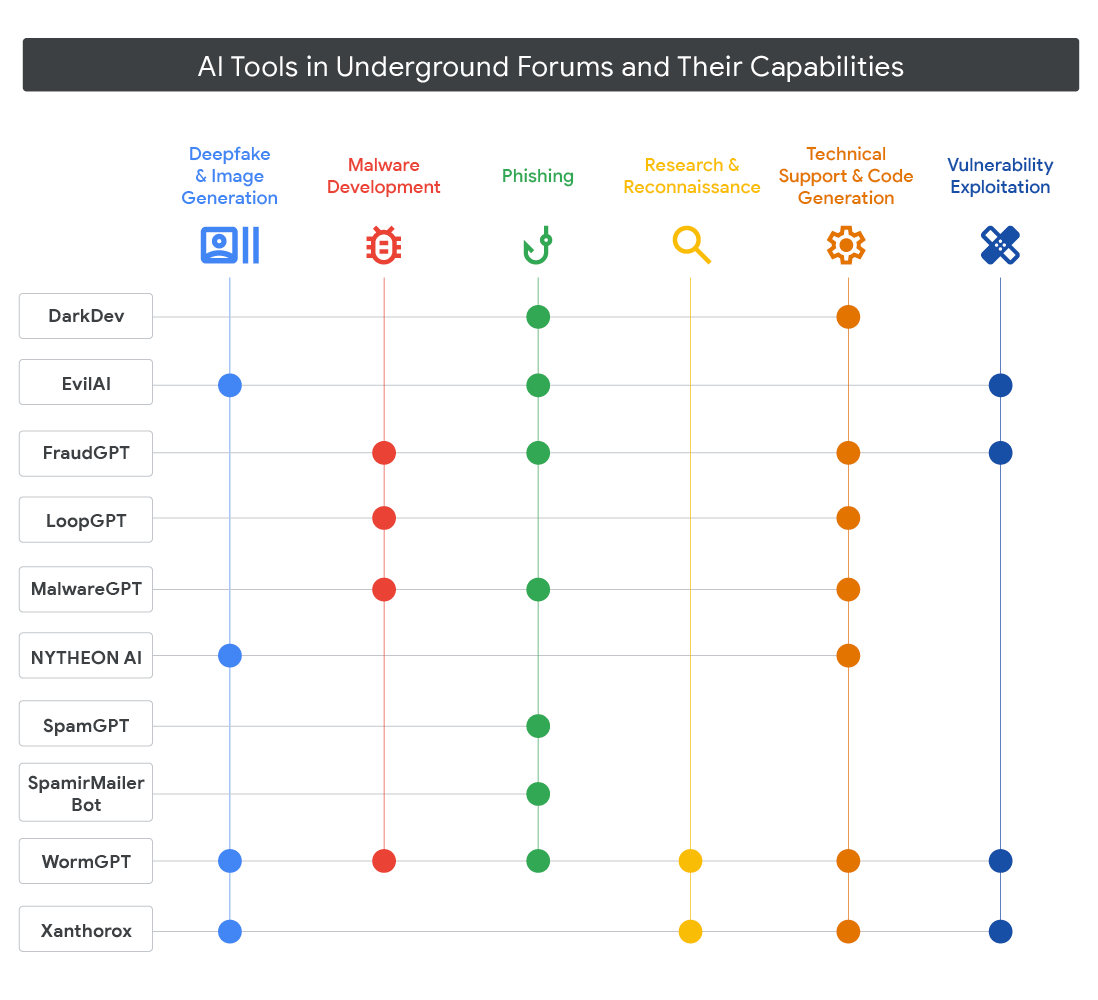
Cyber-oriented LLMs sold on underground forums are the most visible route. WormGPT, GhostGPT, KawaiiGPT, and Xanthorox are the most cited examples, covered in depth by Unit 42. These are returned open-weight models or jailbroken wrappers over commercial APIs, marketed specifically as having no content filter. They solve the moderation problem but not the cost problem: access is sold on a subscription basis, and the capability ceiling sits well below that of frontier commercial models. So they are useful for generating phishing content or simple malware stubs, but less so for the kind of autonomous multi-step offensive work that the frontier models in the Cybench ranking are capable of.

Method 2: Using Frontier Models Through a Third-Party Service

If a threat actor would like to use the frontier models to achieve top performance, they can still use these models using 3rd party services such as PayWithMoon and AIMLAPI. 

 These services sit between the attacker and a commercial LLM provider, accepting cryptocurrency without identity verification and then funding a legitimate provider account on the attacker’s behalf. The account itself reaches frontier models, but the funding trail stops at the middleman. The account will still get burned once abuse detection triggers, but replacing it is cheap. The upstream provider has no usable identity to pursue. This is how attackers buy frontier-model access while skipping the paper trail a normal commercial account would leave behind.

Method 3: Free-Tier and Keyless Public Inference APIs

A cheaper alternative to underground subscriptions exists in plain sight. Most major inference providers publish permanent free tiers that require nothing more than a disposable email address, and a handful of services accept requests with no credentials at all. An attacker who registers for a pool of free-tier accounts gets as meny tokens as he wishes without paying a dime.

The scale of the free-tier ecosystem is easy to measure because the community has cataloged it. Public curated lists such as cheahjs/free-llm-api-resources and mnfst/awesome-free-llm-apis explicitly filter for providers that offer a permanent (not trial-credit) free tier with no credit card. Representative entries, with numbers pulled from each provider’s own rate-limit documentation:

  • Groq: 30 requests/minute (RPM) on all free-tier models, with requests/day (RPD) caps ranging from 1,000 (for the 70B llama) to 14,400 (for the 8B llama).
  • Cerebras: 30 RPM, 14,400 RPD, and roughly 1M tokens/day on three of the four free-tier models (gpt-oss-120b, llama3.1-8b, qwen-3-235b).
  • Cohere: 20 RPM on the Chat API and a hard cap of 1,000 total API calls/month on a trial key.
  • Mistral La Plateforme: 1B tokens/month on the Experiment plan. No credit card is required, but a verified phone number is required, which is the highest sign-up friction in this group.
  • HuggingFace: Free accounts are rate-limited on both the Hub API and the Inference API per 5-minute window. Anonymous per-IP access exists but is stricter than the free-account path.
  • OpenRouter: 50 free model RPD with no deposit at all, and 1,000 RPD after a one-time $10 top-up that is never spent against model usage.
  • SambaNova: 20 RPM and 20 RPD, with a 200,000 tokens/day cap. The tightest daily request ceiling in this group by a wide margin.

These providers differ in rate limits, models, and throughput. What they share is that a usable credential requires nothing more than a disposable email address (a phone number in Mistral’s case) and no payment method. Credentials can simply be rotated when limits are reached.

The fully keyless end of the spectrum is thinner, but it exists. Pollinations.ai exposes an OpenAI-compatible endpoint that accepts requests with no authentication for basic use. DuckDuckGo’s Duck.ai anonymizes browser-based access to Claude 3.5 Haiku, Llama 4 Scout, Mistral Small 3, GPT-5 mini, and GPT-4o mini with no account at all. These services are not designed for bulk programmatic use, but they are reachable from any HTTP client, and the only cost is rate-limit friction.

Among the malware families in the intro table, LameHug/PROMPTSTEAL is the cleanest example of this route in the wild: it calls HuggingFace’s Inference API for Qwen 2.5-Coder-32B-Instruct to drive reconnaissance and data theft, with no embedded credentials reported by Splunk. Whether the malware carries a token or registers one at runtime is not established, but either way, the enabling property is HuggingFace’s no-credit-card free tier.

Method 4: Exposed API Keys

The fourth route to free model access doesn’t require finding an exposed server at all. Developers routinely hardcode credentials directly into apps, config files, and scripts. These credentials can be found in GitHub in open-source projects, while closed-source projects contain the credentials in the app itself. These artifacts are submitted to VirusTotal when apps are submitted for malware analysis. It can be an APK, ELF, EXE, or any type of artifact shipped with the product.

To find them systematically, we wrote a YARA rule targeting the key formats of the major AI providers: Google Gemini (AIzaSy…), OpenAI (sk-…), Anthropic (sk-ant-…), HuggingFace (hf_…), Replicate, Mistral, Cohere, Groq, and several others. We ran the rule as a retrohunting query across the VirusTotal corpus, collected the matching sample hashes, then pulled the raw files and ran a regex extraction pass to extract every key-value pair, provider, and surrounding code context. From there, we enriched each sample with VirusTotal metadata to understand detection rates and file types. The final step was validation: a lightweight GET request against each provider’s model-list or whoami endpoint. No prompts sent, just a check of whether the key authenticates.

The corpus yielded 647 unique keys across all providers. Roughly 62% were Google Gemini (AIzaSy…) keys. That concentration traces back to the Android developer ecosystem, where apps built for translation, search, or chatbot features commonly bundle the key directly in compiled resources or Java code. HuggingFace keys made up about 11%, Replicate about 8%, OpenAI sk- keys about 7%, and the remaining share was split across Voyage (5%), Mistral (3%), and Cohere (3%), with trace amounts of Anthropic, Groq, and OpenAI environment-style keys. The Mistral and Cohere keys concentrated heavily in a single file: a cracked “Collins Italian Dictionary MOD” Android APK that bundled 20 Mistral keys and 15 Cohere keys alongside 2 Gemini keys, with the small remainder scattered across two versions of a Ubisoft game APK.

About 65% of the 659 unique samples are confirmed Android by VirusTotal’s type classification. Another 18% are ZIP archives that follow the same submission pattern but were not explicitly tagged as Android. The true APK share sits between 65% and 84%. The remainder consisted of Windows PE files (5%), HTML pages, Python scripts, plain-text credential dumps, and a handful of Mach-O and ELF binaries. That Android skew isn’t surprising. APKs are frequently submitted to VirusTotal for modding and repackaging, and their keys remain intact after decompilation.

We submitted research samples to Intezer Analyze for code-based attribution, and three entries stand out. Four samples whose filenames suggested Akira ransomware are three Mimikatz binaries (1, 2, 3) and one malicious binary without family attribution, all credential-dumping tools that happened to carry API keys. The sample with a HuggingFace key is SolarMarker, an SEO-poisoning backdoor with infostealer capability. A Windows binary named SystemSettings.exe contained OpenAI, Replicate, and Voyage keys; the multi-key combination is more consistent with theft from a developer’s machine than with intentional hardcoding.

When we ran the validation, almost all the keys were dead. The revocation rate was approximately 99.5%, consistent with a corpus skewed toward older samples that had been on VirusTotal long enough to be detected, rotated, or simply expired. The small fraction that remained live consisted entirely of Google Gemini keys from Android APKs. All appeared to be genuine developer mistakes rather than exfiltrated credentials: a key embedded in a const in bundled JavaScript, one in a logging module in a compiled Android class, and one in a utility app’s APK resources. Those three keys have been reported to Google.

The method also illustrates why embedding API keys in client software is a particularly bad idea. Extracting a key from an APK requires a decompiler, and APKs have a reliable path to VirusTotal: users submit them for malware checks, repackaged versions circulate through third-party stores, and cracked builds get flagged automatically. The near-total revocation rate strongly suggests that LLM providers scan VirusTotal for their own key formats and automatically revoke matches. The three keys that were still live were all recent submissions, not yet caught by that sweep. If that pipeline exists, embedding a key in client-side code is not just a security mistake, but a futile one, and the key will likely be dead before it can be abused at scale.

The takeaway for an attacker is that hunting VirusTotal for hardcoded keys is low-effort but low-yield. The more durable access method is the exposed LLM server. A server running vLLM (a popular open-source LLM inference framework) or an open Ollama instance requires no authentication, doesn’t rotate anything while in use, and the owner usually doesn’t know it’s happening.

Method 5: Hack Public LLM Hosting Servers

Self-hosted LLM platforms make it easy to run your own models on your infrastructure, and that same ease extends to anyone who can access the port. Most ships have no authentication by default and expose administrative endpoints that let a stranger list installed models, queue inference jobs, load new models from remote URLs, or, in several cases, execute code on the host. When the server is exposed to the public internet, the attacker does not need a stolen key or a forum subscription. The victim is paying the GPU bill, carrying the API-key spend, or hosting the RCE.

We scanned roughly 4,500 hosts across eleven of them. Every service had open instances, and 14 LocalAI hosts showed active compromise based on attacker-loaded model names consistent with a single automated campaign. The sections below cover what each platform is, how exposure gets abused, and what the scan found in the wild.

Ollama

Ollama runs open-weight LLMs locally. By default, it binds to 127.0.0.1, and the authentication is disabled. But setting OLLAMA_HOST=0.0.0.0 is a common step when accessing it from another machine on the network or from a frontend app running in a separate container. It exposes all interfaces, and anyone reaching it’s port gets full API, model management, and hardware access. SentinelOne Labs and Censys already published the definitive survey, documenting 175,000+ hosts chained into anonymous AI networks for free text, embedding, and bulk content generation on victim hardware. That pattern is now commercialized by Operation Bizarre Bazaar, which sells subscription access to a unified LLM gateway fronted by stolen Ollama endpoints, turning ad-hoc LLMjacking into a growing concern.

LocalAI

LocalAI is an OpenAI API-compatible model server supporting LLMs, image generation, speech, and transcription. Authentication is disabled by default. It also supports remote model installation, P2P distributed serving, and a built-in agent platform with support for MCP. Of all the services in this research, it has the widest attack surface.

Of all the hosts scanned, 55% were confirmed open, the highest absolute count in this group. About 24% are API proxies with live upstream keys for OpenAI, Anthropic, and Google accessible to anyone who can reach the host.

The most striking finding is evidence of automated exploitation at scale. About 21% of confirmed hosts carry model names with a consistent signature tied to ProjectDiscovery’s nuclei scanner templates, with per-run timestamps mapping to late March and early April 2026. The pattern is consistent with automated scanning for an unauthenticated remote code execution path, in which a malicious URL supplied during model installation triggers server-side code execution. The exploit payload appears to load a small publicly available Italian-language model as a “hello world” confirmation, which recurs on every affected host. The markers not being cleaned up argue against mature attacker tradecraft. Operators running LocalAI can open /v1/models on their own host: any nuclei-rce-* or rce_<timestamp> identifier is not human-chosen and indicates this campaign hit them.

Langflow

Langflow is a visual builder for multi-agent AI pipelines, widely used to prototype RAG systems and chatbots. Flows routinely embed hardcoded credentials: OpenAI and Anthropic API keys, database connection strings, Slack tokens, and webhook secrets. Anyone who can reach the host and read a flow config has all of them. Unlike the previous examples, this app does not have a known major misconfiguration, but it does not prevent attackers from being able to hack and gain access to this service. For example, two unauthenticated RCE bugs make reaching the config trivial:

  • CVE-2025-3248:on the CISA KEV list, reliably patched only in 1.6.4+ 
  • CVE-2026-33017: fixed in 1.9.0, exploited in the wild within 20 hours of disclosure. 

Every confirmed host in our scan ran a version vulnerable to CVE-2026-33017; about 72% were also vulnerable to CVE-2025-3248. Several hosts didn’t authenticate at all, with flows, credentials, and both RCE paths openly accessible. Code execution on the Langflow host is the small prize. The keys inside the flows pivot to everything the workflows connect to.

n8n

n8n is a low-code workflow automation platform with 400+ service connectors and code execution nodes (workflow steps that run arbitrary scripts). It has the strongest default auth posture of any service in this research: User Management is enforced on fresh installs. 

But it does not prevent attackers from actively gaining access to n8n. Vulnerabilities such as CVE-2026-21858 (“Ni8mare”, CVSS 10.0, fixed in 1.121.0), which is a vulnerability in the web hooks request handling that turns exposed endpoints into a full unauthenticated RCE surface via content-type confusion, with a public PoC already out. Prior research estimates the exposed n8n population at tens of thousands of hosts.

The post-exploitation story mirrors Langflow. Workflows carry hardcoded API keys, database connection strings, and webhook secrets. RCE on the n8n host effectively gives access to every system the automations touch.

vLLM

vLLM is a high-throughput LLM serving engine with GPU acceleration, commonly used to self-host open-weight models in production. It exposes an OpenAI-compatible REST API. Authentication requires an explicit –api-key flag; without it, the API is open.

The interesting finding from our scan was not vLLM itself but the adjacent deployments surfaced by the same query: OpenAI-compatible HTTP proxies, specifically LiteLLM-style gateways that aggregate multiple paid providers behind a single endpoint. These proxies store live API keys for OpenAI, Anthropic, Google, Groq, and Cohere. None had protection on the model list endpoint. One host exposed 35 models across multiple providers; several listed exclusively Anthropic Claude models. A proxy returns a model list only when the upstream provider authenticates, so every successful response confirms the underlying keys are live and billable.

The abuse path is trivial: point any standard OpenAI SDK client at the proxy, enumerate the models, and, on hosts where prompt submission is also unprotected, send requests billed to the operator’s accounts. It is the same credential-pivot pattern as Langflow and n8n. 

ComfyUI

ComfyUI is a node-based workflow UI for Stable Diffusion, video generation, and multimodal image models. It runs on high-end GPU hardware with no authentication by default, making it a direct target for attackers looking to steal GPU compute.

Our scan found open instances across a wide range of versions (v0.2.2 to 0.19.0), all of which were fully unauthenticated. The hardware exposure is the headline finding. Open hosts reported a combined ~4.3 TB of GPU VRAM, with cards ranging from RTX 4090s and RTX 5090s to datacenter-grade A100S and L40S units, each worth tens of thousands of dollars. An attacker can queue generation jobs against any of them at no cost.

Beyond compute theft, 95% of open hosts expose a job history endpoint that leaks previously executed workflows, local file paths, and prior user content. About 12% advertise URL-loading nodes that act as server-side request forgery primitives: usable for internal network reconnaissance or cloud metadata credential theft.

llama.cpp server

llama-server is the HTTP server shipped with llama.cpp, commonly used to serve a single open-weight model in production. It has no authentication by default, no access controls on the inference endpoint, and a metadata endpoint that advertises exactly what the host is running. Anyone who reaches the port can submit prompts, watch active jobs, and burn the operator’s GPU on their own workload. Classic LLMjacking, with the bonus of knowing exactly which model they are running.

Of scanned hosts, 59% were confirmed open, more than any other platform in the scan. Everyone exposed its model name and hardware configuration, and about 37% also leaked real-time job state, confirming the host was actively serving users at the time of the scan. The models observed were standard open-weight builds rather than anything exotic, which is the point. An attacker is not looking for a rare model, just an unattended GPU.

Jan

Jan is an Electron desktop AI app with an optional OpenAI-compatible API server on port 1337. When enabled, it binds to all interfaces with no authentication. Jan is a useful example of how exposure surfaces unexpected content rather than how common it is. Our scan confirmed only two genuine Jan hosts. Both had gone offline by the rescan a week later. While one was live, it exposed a 35-model library that included miqu-70b; a leaked Mistral Medium prototype that was never officially released. When a desktop app binds its API server to the public internet, whatever model (or file path metadata) sits on the operator’s disk becomes visible.

Gradio

Gradio is a Python framework for building ML demo apps: image classifiers, code interpreters, document Q&A, or anything a researcher can wrap in a web UI. Exposure risk depends entirely on what the underlying app does. A sentiment-analysis demo is low-stakes. An app that accepts file uploads, runs user code, or queries a database is a direct path to exploitation. The Gradio queue keeps processing submitted requests whether the operator is watching or not, so abuse can run quietly for days.

Three unauthenticated bugs make unpatched instances worse:

  • CVE-2024-1561: arbitrary file read, fixed in 4.13.0
  • CVE-2024-0964: path traversal, fixed in 4.9.0
  • CVE-2024-47084: CORS validation bypass, fixed in 4.44.0; a malicious website can reach a locally running Gradio server while the victim is still logged in

Ranking the Five Routes

Each route carries operational trade-offs. The table below scores each on five dimensions, ranging from 0 (least favorable) to 5 (best for attacking): non-resistance (refusal behavior in response to offensive prompts), model capability (coding ability and parameter count), tool and MCP support, and effective token quota.


Route Non-resistant model Model capability Tool / MCP support Token quota Cost 
Offensive LLMs (WormGPT, GhostGPT, crypto middlemen) 5 3 5 2 2
Crypto payment for frontier 2 5 5 5 3
Free-tier and keyless public APIs 2 4 4 3 5
Stolen or leaked API keys 1 4 5 1 5
Exposed LLM servers 5 3 3 5 5


Offensive LLMs score highest on non-resistance. But the underground-forum variants sit well below frontier models in capability and tool support, and subscriptions cap the quota. The crypto-middleman variant reaches frontier models via real provider accounts, but those accounts burn quickly once abuse is detected.

Crypto payment for frontier models is for sure the best way to gain access for the most capable models with the ability to connect the model to any interface, such as MCPs, but it comes with some risks that the model might resist the action or the user will be blocked.

Free-tier and keyless public APIs score well in capability and tool support, with full-function calling across most providers. The per-account quota is modest, tens of RPM, thousands of RPD, but trivial account rotation pushes the effective quota well above the face value.

Stolen or leaked API keys, in principle, offer the best combination of capability and tool support; the retrohunt’s 0.5% live rate shows the real-world quota is near zero.

Exposed LLM servers score highest on non-resistance and token quota. Non-resistance is unconstrained: the attacker controls model selection, and our scan found at least one LM Studio host actively serving llama3.3-8b-instruct-thinking-heretic-uncensored-claude-4.5-opus-high-reasoning-i1. Token quota is equally unconstrained, bounded only by the victim’s hardware rather than a billing cap. Capability and tool support vary by host, but that variance is what makes the route durable at scale. No individual host needs to run a frontier model.

The scoring explains why exposed servers are the most durable route, even though they don’t top every dimension. They are the only route where non-resistance and token quota both max out. The other three are each compromised on at least one of those two axes.

Cases Found in the Wild

Threat actors are now wiring malware to live LLM APIs, using them to generate malicious logic at runtime rather than embedding static code in the payload. Instead of scripting separate execution flows for different host conditions, the malware queries an LLM while running, determines whether the target appears to be a personal machine, a server, or an industrial controller, and then generates tailored commands or code accordingly. This shift matters because dynamically generated logic has no fixed signature to detect. Researchers have identified five malware families doing this.

Malware name Capabilities AI Provider Runtime model source
MalTerminal Reverse shell or ransomware generation OpenAI GPT-4 (deprecated chat completions endpoint) Hardcoded API key
LameHug/PROMPTSTEAL Reconnaissance and infostealer Qwen 2.5-Coder-32B-Instruct via HuggingFace Public HuggingFace Inference API (no embedded key observed)
Ransomware 3.0/PROMPTLOCK Ransomware with exfiltration and wipe capability gpt-oss-20b Local Ollama API on the infected host
PROMPTFLUX Dropper with AI-driven polymorphism Google Gemini (gemini-1.5-flash-latest) Hardcoded API key
QUIETVAULT GitHub/NPM token stealer that uses AI to find additional secrets Whatever AI CLI is installed on the victim (provider not named) AI CLI tools already on the infected host


MalTerminal and PROMPTFLUX both use a hardcoded API key to connect to a commercial provider when needed. MalTerminal uses OpenAI GPT-4 via the now-retired chat-completions endpoint to create reverse shells or ransomware. PROMPTFLUX connects to Google gemini-1.5-flash-latest to rewrite its own VBScript source code between runs, making it harder to detect. 

LameHug, also known as PROMPTSTEAL, uses HuggingFace’s Inference API to run Qwen 2.5-Coder-32B-Instruct for Windows commands to support reconnaissance and data theft. HuggingFace requires an API token for each request, but free accounts don’t need a payment method and allow a few hundred requests per hour per API token. Attackers can easily create and rotate these API tokens, giving them the same access as stolen keys but with less hassle. 

PROMPTLOCK is a proof-of-concept AI-powered ransomware prototype, often called “Ransomware 3.0,” developed by researchers at NYU’s Tandon School of Engineering. The Go binary invokes gpt-oss-20b via a local Ollama API running on the infected host to generate Lua scripts that perform file listing, encryption, exfiltration, and (unfinished) wipe logic. This is a bring-your-own-model: no outbound calls, no provider-side billing trail, and no way to scale beyond the victim’s own hardware. 

QUIETVAULT is a credential-theft variant. The JavaScript stealer exfiltrates GitHub and NPM tokens to an attacker-controlled GitHub repo and then hands off the filesystem search for additional secrets to whatever AI CLI is already installed on the victim, so the stolen credentials are an active on-host AI session rather than a bare API key.

Looking at the four main routes discussed in this post, LameHug/PROMPTSTEAL is the best example of the free-tier method, since it calls HuggingFace’s Inference API directly. MalTerminal and PROMPTFLUX both use hardcoded API keys, but it’s unclear where those keys came from, so they could fit into the free-tier, crypto-middleman, or stolen-keys categories. QUIETVAULT is a twist on the stolen-credential method, using an on-host AI session instead of just a key. PROMPTLOCK is different because it uses a local model and only works on one victim at a time, so it doesn’t fit into the four main routes and isn’t discussed further.

Source

Conclusion

Across four routes: offensive LLMs for sale, free-tier and keyless public APIs, hardcoded keys in distributed artifacts, and exposed LLM servers on victim infrastructure, the most durable access is the last one. The precondition for abuse is almost never a sophisticated exploit. It is an unauthenticated port facing the internet.

AI is the defining technology of this moment. It extends what a single person or small team can do and accelerates work that used to take weeks. AI is being integrated into more and more areas, from personal agents and email writing to some vulnerability research. The wow factor is real. But an LLM server is still a service running on a host. It listens on a port, speaks a protocol, and has an attack surface. The failure modes in this report; misconfiguration, leaked credentials, unpatched CVEs, open ports, are the same ones that produced years of incidents on Docker, Kubernetes, cloud storage, Redis, Elasticsearch, and bare Linux servers. The tooling is new. The mistakes are not.

Two things follow. The operator is still responsible for the basics: authenticate the service, keep it off the public internet unless there is a reason to expose it, patch the known CVEs, and audit what is running. These are not AI-specific requirements. They are the same ones we have been making for every networked service. An exposed Ollama instance serving a stranger’s prompts is not a failure of the model or the vendor that shipped it. It is a failure of whoever put it on the internet without a password. You broke it. You pay for it.

IOCs

SHA-256 Payload
ecd3b1a0e4832f1dc72be84c3c838ae4e29637c1cff4bfa70649cda90fa7a8ce Mimikatz binaries (carrying AI API keys)
153d7cdca3cb96023a2ee8e3de49b29ced60ffc865da04c3c6ef2b445b056d8f
0c1a409dd791ee8f7e157c455d9c35671bd81d17b562c7acd73f9f26401533ba
a9dc00aeae6c245d76d873e675b555f044ecf94a5ece031a1e6ca30223beb905 Malicious binary without family attribution (carrying AI API keys)
99308a3f00490e8138974faafa3ea5ae089459b2500e097ccc0ed042b6a0c2af SolarMarker (HuggingFace key)
796e81c1b31f443ab3437663af97fe41b25bbf8ab7abcd0637238a568b66aa9d SystemSettings.exe (OpenAI, Replicate, Voyage keys)


The post How attackers are gaining access to LLM inference appeared first on Intezer.

Scams in messengers: exposing the global scam-cartels exploiting everyday messagesng-heist | Kaspersky official blog

1 June 2026 at 09:00

It starts with the familiar: a short message, a trusted name, a routine tone. Delivery updates, work pings, brand alerts hum in the background, rarely attracting scrutiny. You check, you answer… — until minutes later you’ve slipped into a trap built to lower your guard and hijack your trust.

That’s why messaging scams cut deep: they exploit everyday habits where instinct, not caution, leads. Communication once moved slowly, leaving room for doubt. Now it’s instant — and that speed is a weapon in criminal hands.

On our blog, we’ve already examined numerous scam schemes in messaging apps — from pig butchering, where the victim is groomed for a very long time, or catfishing, where the scammer creates a fake identity, to phishing via chatbots or through gift-giving campaigns in messaging apps.

Now, for the first time, Kaspersky has set out to capture the full end-to-end reality of messaging-based scams to understand how quickly harm occurs, how they impact trust and what remains after the interaction ends. What emerges is a highly organized and industrialized scam ecosystem embedded within everyday messaging channels such as SMS, WhatsApp, and email.

Kaspersky experts have prepared a report on targeted scams in messaging apps, detailing not only the financial but also the emotional damage caused by such attacks, as well as providing tips on how to protect yourself and avoid them. In this post, we explore the most interesting facts, but you can find more details in the full report.

The damage is underestimated

How much do you think a single successful attack via a messaging app costs the average victim? Ten dollars? Or maybe 50? You’re underestimating the scammers. Although more than a third (36%) of victims incur losses of less than $135, on average a victim loses… $733!

Country Average loss per victim
Senegal $392.94
Serbia $493.32
Morocco $504.28
Greece $609.32
United Kingdom $617.38
Côte d’Ivoire $654.11
Spain $672.67
United States $724.73
Portugal $868.20
Italy $896.02
France $1,193.58
Germany $1,369.35

The average amount lost by a victim in a successful attack via a messaging app

On the one hand, the financial hit doesn’t look catastrophic in isolation. These are micro-losses by design. Small enough that some never report them to the police. Small enough that banks don’t always investigate. Small enough to be dismissed as bad luck rather than organized crime.

But $733 is not nothing. It’s enough to cover a month’s worth of groceries, school or daycare fees, or utility bills. Against the backdrop of the global cost-of-living crisis, a single such loss can seriously dent a family’s budget.

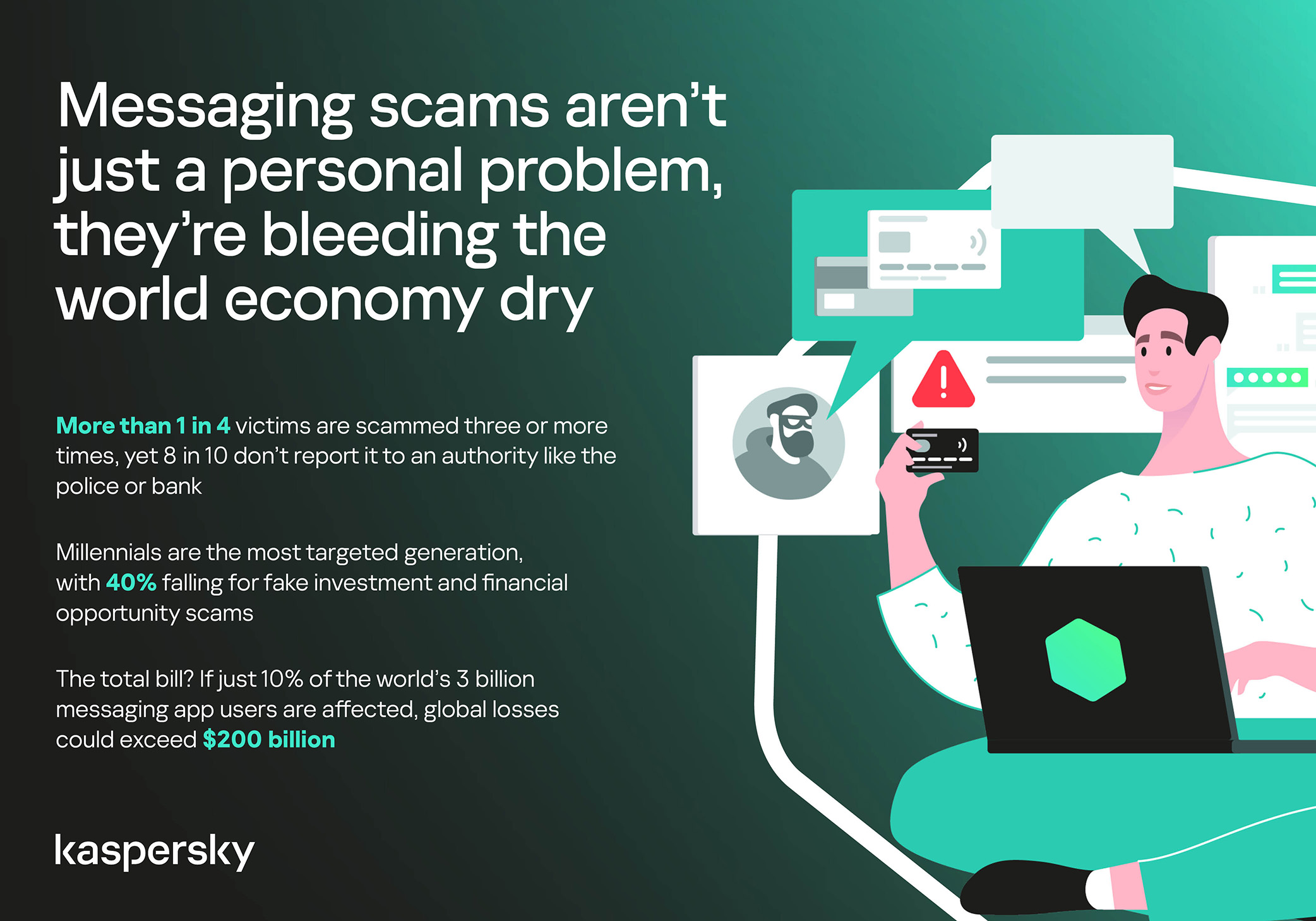
In 11% of cases, losses exceed $1,350, and more than a quarter of victims (28%) report having been scammed three or more times in the past six months. Once scammers discover that a phone number responds, that contact becomes an asset, circulating from one database to another.

Now imagine the scale of the problem: if just 10% of the three billion messaging‑app users worldwide fell victim with the average loss, the total damage would amount to… nearly $220 billion! This is comparable to the GDP of Greece, and exceeds that of Morocco, Serbia, or Côte d’Ivoire.

It becomes clear that behind the daily flood of fraudulent schemes lie large scam cartels operating on an industrial scale, using AI to personalize messages that mimic those of family members, friends, and familiar brands. This, in essence, forms the basis of a full-fledged economy built on digital identity theft.

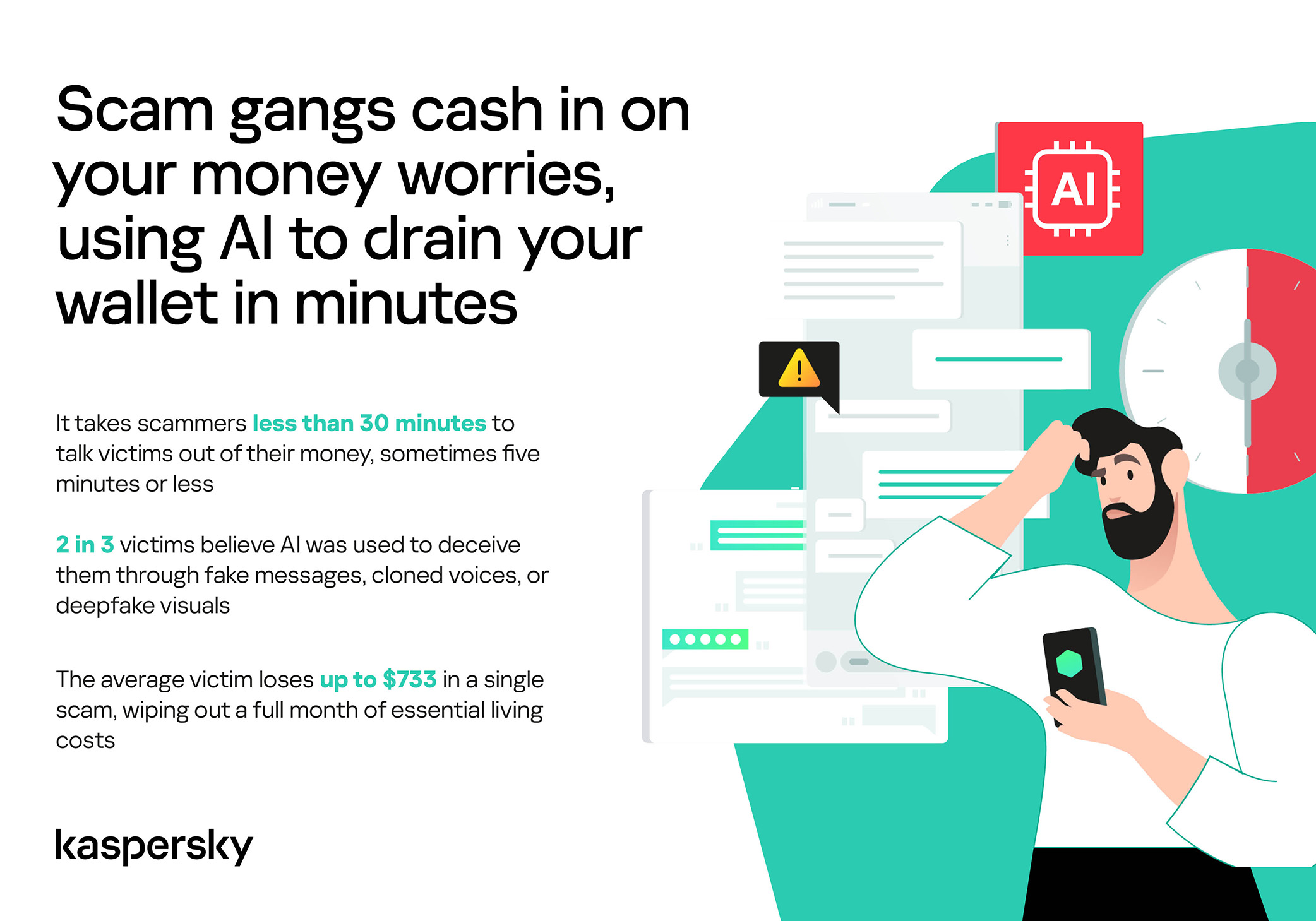
Scam gangs cash in on your money worries, using AI to drain your wallet in minutes

Speed beats scrutiny

More than half of successful messaging scams (52%) unfold in under 30 minutes — from first contact to the moment money or personal data changes hands — or even faster, before the victim begins to doubt the legitimacy of the sender. In fact, one in seven scams takes less than five minutes — quicker than boiling an egg!

The speed isn’t accidental. It’s the method. Scammers structure their schemes to deny the victim a chance to come to their senses. Every element is engineered to compress the decision-making window: the urgency of the scenario, the familiarity of the format, the plausibility of the request.

They rush you — faster, faster, don’t tell anyone, you only have a few minutes, solve the problem, don’t ask questions. Click the link, fill in the details, approve the transaction, or else… Or else what? The scammers’ imagination knows no bounds here, but if you don’t do something right now, you’ll definitely regret it.

Alas, the realization of what has happened usually comes when the damage is already irreversible. More than half of victims (51%) lose money; another 43% hand over their personal data — most commonly phone numbers, names, and email addresses — to scammers, and often the victim loses both.

Where and how attacks occur

A delivery notification, a bank alert, a message from a merchant you ordered from last week — messaging apps permeate every aspect of everyday life, making such interactions completely normal. An attack shouldn’t feel like an attack. It should feel like the same message you’ve received hundreds of times.

It’s no surprise that scammers focus their attention on this method of communication first and foremost. The most popular platforms for scams are predictable: WhatsApp (43%), SMS/iMessage (40%), Facebook (27%), Telegram (22%), and Instagram (19%) — these are the ones that people trust most.

A wide variety of schemes is used. Brand impersonation is now one of the three most common types of messaging scam worldwide — accounting for 31% of cases. Fake delivery notifications top the list at 38%, followed by investment scams at 37%.

At the same time, nearly two-thirds (63%) of fraudulent schemes span multiple platforms, moving from SMS to WhatsApp, from WhatsApp to Telegram, etc. In this way, scammers achieve two goals: they mimic organic messaging and evade moderation algorithms.

AI has taken scams to a new level

Just a couple of years ago, fraudulent messages gave themselves away with bad grammar, awkward phrasing, illogical requests, and an obsessive sense of urgency. Today, a phishing message looks, sounds, and reads just like the real thing.

Scam cartels want to catch people in motion — between meetings, on a commute, or during everyday tasks — when your attention is already fragmented. They mimic your mother’s turn of phrase. They match your bank’s tone of voice. They copy your courier’s format exactly. They mirror the rhythm, structure, and style of authentic brand communications across messaging platforms. And AI is accelerating all of it.

What this creates is overlap. Legitimate and fraudulent messages appear in the same environment, using the same formats, language, and triggers. The difference between them is no longer obvious.

The data shows that two-thirds of victims (66%) believe AI was used in the scam against them, 42% cite messages written by AI, 31% report generated or cloned voices, and 25% encountered deepfake images or videos.

That’s why mere awareness and “tech-savviness” may no longer be enough to protect oneself. From Gen Z to Gen X, messaging scams cut across every generation.

And what about the emotional toll?

But money is far from the only problem a victim is left with after an attack. After what they’ve been through, people develop distrust toward incoming messages, unfamiliar numbers, and any requests for action. As a result, 99% of fraud victims say they no longer trust incoming notifications in messaging apps.

This creates a crisis of trust in all digital channels in general. Every legitimate message can now be perceived as a scam. Brands, banks, and delivery services are forced to operate in an environment where the customer is, by default, in a state of distrust.

Dr. Elizabeth Carter, a forensic linguist and criminologist at Kingston University in London, notes that scammers use familiar contexts, common social settings and embedded linguistic norms to create the illusion for the victim that their decision-making is rational and reasonable in the moment. However, what is actually happening is that they construct false realities in which those decisions end up causing financial and psychological harm. She also notes that it is very hard to identify a false reality while you are in it.

After realizing they had been deceived, more than half of victims felt anger — the kind that comes from having trusted something and discovering it was used against you. 42% of victims report frustration, 38% — feeling upset. Moreover, several months later, these feelings haven’t gone away: nearly half of all victims (48%) are still angry, a third (33%) remain frustrated, and 30% are upset.

And nearly one in 10 victims don’t tell anyone what happened. They feel shame, a sense of having fallen for something so obvious. This leaves a significant portion of the actual damage unreported: only 24% of victims contact the police, and only 23% report it to their bank.

Messaging scams aren't just a personal problem, they're bleeding the world economy dry

So what can be done?

The crisis of trust — and even a touch of paranoia — that has arisen due to widespread attacks on users can linger in victims’ minds for a long time, affecting their quality of life. To prevent this, follow these guidelines:

  • Pause before you act. The sense of urgency you feel is almost always artificial. A legitimate bank, retailer, or delivery service won’t penalize you for taking 30 seconds to verify before clicking a link or confirming details. It’s precisely this instinct to resolve the situation quickly that scammers are counting on.
  • Verify through another channel. If a message appears to be from a relative, colleague, or company you trust — contact them through another channel before taking any action. Use secure verification methods, and cross-check identities when something doesn’t feel right. For families, agreeing on a “safe word” in advance can defeat even the most convincing voice clones.
  • Use a password manager. It will not only help you generate strong, unique passwords for all your accounts and store them securely, syncing them across all your devices, but also protect you from spoofed sites. Even if you click a phishing link and land on such a site, our password manager will notify you about the domain mismatch and refuse to autofill your username and password.
  • Use protection that works in real time. Modern security solutions, such as Kaspersky Premium, provide real-time protection against malicious links and phishing attempts in the apps and websites you use every day. On Android devices, a dedicated layer of anti-phishing security scans and neutralizes suspicious links as they appear, even within notifications, before you even have a chance to click them.

We’ve covered other threats in messaging apps in similar articles:

A Gartner take on the MDR market in 2026

29 May 2026 at 16:47

Gartner’s research note, The Impact of AI on MDR Services, arrives at a moment when the security operations landscape is shifting faster than most organizations realize. The report’s central argument is clear. AI is fundamentally reshaping what MDR services can deliver, but the benefits are accruing unevenly. Service providers gain operational efficiency. Buyers, meanwhile, are being told not to expect lower costs, and to brace for a more complex relationship with their providers.

For CISOs navigating this transition, the question is no longer whether AI will change the SOC. It is whether the current service model is the right vehicle for that change.

What Gartner is really saying

Gartner’s analysis centers on three impacts. First, AI-enabled MDR services will expand capabilities and claim higher quality, but organizations will face real discrepancies in delivered value across providers. Second, the cost savings that leadership expects from AI in the SOC will largely go unrealized, since MDR providers will absorb efficiency gains rather than pass them through as lower prices. Third, and perhaps most significant, more organizations will consider insourcing MDR functions altogether as AI tools mature.

That third point deserves attention. Gartner explicitly notes that advances in AI SOC agents and existing security tools are “increasing the security team’s internal competition for traditional MDR services.” In other words, the technology that once justified outsourcing detection and response is now making it feasible to bring those functions back in-house.

The report also strikes a cautious tone about trust. It warns that SOC managers become frustrated when their only option is to “talk to an AI chatbot instead of a live person or security engineer.” And it urges buyers to demand transparency with verified outputs, human validation of AI findings, and measurable improvements in speed and accuracy. These are not minor caveats. They point to a structural tension at the heart of the AI-augmented MDR model.

The tension Gartner identifies, and where it leads

Gartner’s recommendations to buyers are telling. They advise organizations to challenge MDR providers to demonstrate tangible value, to refuse machine-driven deliverables that lack context, and to refactor service metrics so they measure actual outcomes rather than volume of AI-processed alerts. The message, read between the lines, is that AI in the hands of an MDR provider benefits the provider first.

This is a reasonable observation, but it raises a deeper question. If the primary advantage of AI accrues to the service provider’s operational efficiency, and the buyer still needs to invest in internal staff, updated processes, and careful oversight of the provider’s output, then what exactly is the buyer paying for?

Gartner stops short of answering that question directly. It recommends that organizations “do the research” to determine whether an AI tool or an MDR service better matches their needs. It even suggests that for certain use cases, like after-hours coverage with no remediation requirement, an AI tool may be sufficient on its own.

The case for a different operating model

At Intezer, we believe the answer to Gartner’s implicit question is becoming clearer by the quarter. The MDR model was built for a world where skilled analysts were scarce and automation was rudimentary. In that world, outsourcing triage and investigation to a provider with deeper expertise and broader staffing made sense. But AI has changed the economics and the capabilities.

What organizations actually need is not a service that wraps AI around a human-labor model. Organizations need AI that executes investigation at a depth and scale that was never possible with human analysts alone, while keeping the security team in control of outcomes. That means every alert is investigated at forensic depth. It means transparent, evidence-based verdicts that analysts can verify and trust. And it means the security team supervises the AI rather than managing a vendor relationship.

Gartner’s insistence on transparency and measurable outcomes aligns with this direction. When the report warns against tolerating “machine-driven deliverables” without context, it is describing the exact failure mode of bolting AI onto a legacy service model. The alternative is an AI SOC platform that makes its reasoning visible, produces evidence behind every verdict, and earns trust through verifiable results rather than vendor assurances.

What this means for security leaders

Gartner’s research validates what many CISOs are already experiencing. The MDR relationship is becoming more complex, not simpler. Costs are not coming down. And the organizations that are moving fastest are the ones exploring how AI can augment their own teams directly, not just enhance a provider’s backend operations.

The practical path forward is not about choosing between AI and human expertise. It is about choosing an operating model where AI handles the investigative work that humans cannot scale, while analysts focus on the judgment calls, escalations, and strategic decisions that require human context. That is the model Gartner’s data points toward, even if the report frames it as a future possibility rather than a present reality.

For organizations still early in this transition, the Gartner report offers a useful framework. Demand transparency. Measure outcomes, not activity. And ask the hard question about where AI-driven value should live: inside a provider’s margin, or inside your own SOC.

Learn more about how Intezer AI SOC delivers can help your SOC maximize the benefits of AI combined with human supervision.

The post A Gartner take on the MDR market in 2026 appeared first on Intezer.

A 4X Gartner Magic Quadrant for EPP Leader. Built for the Agentic Era.

29 May 2026 at 15:16

I am incredibly proud to share that Palo Alto Networks has been named a Leader in the 2026 Gartner® Magic Quadrant™ for Endpoint Protection Platforms for the fourth consecutive year. For us, this recognition is a testament to our team's relentless vision as we continue to define endpoint defense—from the pioneer days of XDR to the new frontier of agentic AI.

We believe our repeated recognition as a Leader is built on a single, uncompromising commitment to our customers and partners: empowering organizations with reduced overhead, rapid threat response, a strengthened security posture, and the resilient protection required to close the most critical security gaps. We are now leading the shift into the agentic era. While AI agents significantly boost enterprise productivity, they also introduce novel attack surfaces that legacy EDR tools are unable to protect. As the pioneer of XDR, we are committed to defining the next generation of cybersecurity by securing this new frontier.

Cortex® XDR is helping customers:

  • Secure Agentic AI with Koi: Gain unprecedented visibility, guardrails, and control over AI agents and agentic tools before they become a liability.
  • Stop the Unseen: Leverage battle-tested prevention powered by behavioral analytics, and industry-leading automation and response.
  • Unify Your Defense: Consolidate your endpoint and workspace security with a proven, four-time industry Leader.

We are incredibly proud to be recognized as a Leader once again, an acknowledgement that belongs just as much to our customers and partners as it does to us. Your trust, feedback, and real-world challenges keep us sharp and dictate our roadmap. At the end of the day, our continued leadership is built on one core promise: make each day more secure than the day before.

To get the full story and a comprehensive analysis of the endpoint security market, I invite you to read the 2026 Gartner Magic Quadrant report.

Get Your Complimentary Copy of the Report

Gartner, Magic Quadrant for Endpoint Protection Platforms, By Deepak Mishra, Evgeny Mirolyubov, Nikul Patel, May 29, 2026

Gartner and Magic Quadrant are trademarks of Gartner, Inc. and/or its affiliates. Gartner does not endorse any company, vendor, product or service depicted in its publications, and does not advise technology users to select only those vendors with the highest ratings or other designation. Gartner publications consist of the opinions of Gartner’s business and technology insights organization and should not be construed as statements of fact. Gartner disclaims all warranties, expressed or implied, with respect to this publication, including any warranties of merchantability or fitness for a particular purpose.

The post A 4X Gartner Magic Quadrant for EPP Leader. Built for the Agentic Era. appeared first on Palo Alto Networks Blog.

United States AI adoption shows steady growth, but distribution remains uneven

28 May 2026 at 15:01

More than 30 percent of the US working-age population is using AI, an increase of three percentage points from the end of 2025. But what does that number mean, and what lessons should we take from it? Today Microsoft released a new report that offers an in-depth look at AI adoption across the United States, allowing for the first time a state- and county-level review. This data and the trends it shows are important.

On a national basis, the US leads the world in AI innovation but ranks just 21st in global AI adoption. Part of the reason for this gap is a clear and uneven pattern of AI adoption across the country. We are also seeing a significant divide between urban and rural counties in AI usage. Usage averages 32.9 percent in metropolitan counties, compared with 16.2 percent in rural areas. In other words, metropolitan usage is about double what we see across rural America.

Digital graphic on a dark blue background illustrating the urban‑rural divide. Large text highlights a 16.7 percentage point gap. Three horizontal sections compare areas: metro counties at 32.9%, micropolitan counties at 21.7%, and rural counties at 16.2%, each shown with gradient bars and county counts.The study also shows that another powerful driver of AI diffusion is the presence of colleges and universities. Counties with higher shares of residents aged 18 to 24 have significantly higher AI usage rates—28.6 percent compared with 20.3 percent in other counties. And while college students are some of the most vocal about the risks of AI, they are also helping lead adoption. In counties with college towns like Williamsburg, Virginia, and Story, Iowa, we see usage rates that rival the highest in the world.


Read the Microsoft US AI Diffusion Report.

The post United States AI adoption shows steady growth, but distribution remains uneven appeared first on Microsoft On the Issues.

Fake ChatGPT download site infects Windows and Mac users with malware

28 May 2026 at 12:18

A convincing fake website is impersonating OpenAI’s ChatGPT download page and infecting visitors with malware designed to steal passwords, browser data, cryptocurrency wallets, and other sensitive information.

The site, openew[.]app, closely mimics OpenAI’s real ChatGPT download experience and offers what appear to be official desktop apps for both Windows and macOS. Instead, Windows users receive a credential-stealing malware loader, while Mac users get Odyssey Stealer, a fork of Atomic Stealer (AMOS), a well-known macOS malware family associated with cryptocurrency theft.

Left ImageRight Image

The dual-platform setup is what makes the operation notable. Clicking the Windows download delivers a fake installer that opens a back channel to an attacker-controlled server. Clicking the macOS button delivers malware that steals browser passwords, cookies, Telegram sessions, cryptocurrency wallets, and other sensitive files. It also attempts to replace legitimate Ledger and Trezor wallet apps with trojanized versions.

If you only download ChatGPT from OpenAI’s official download page or the Microsoft Store, you were not the target here. But if you searched for “ChatGPT download” and clicked an ad or unfamiliar result, you may have given attackers access to your online accounts, browser sessions, saved passwords, and potentially your cryptocurrency holdings.

Malwarebytes protects users from this malware.

Technical analysis

The domain, openew[.]app, closely resembles OpenAI’s real ChatGPT download experience. It uses a dark theme, OpenAI-style branding, familiar marketing copy, and prominent download buttons for macOS and Windows.

The .app top-level domain is operated by Google and requires HTTPS connections, meaning browsers display the familiar padlock icon without obvious certificate warnings.

The most important detail is the dual-platform setup. Real software vendors provide separate installers for Windows and macOS, and this fake site does exactly the same thing.

Clicking the Windows button delivers Chat_GPT.exe, while clicking the macOS button downloads a disk image containing ChatGpt.dmg.

The Windows malware

Chat_GPT.exe is built almost entirely from off-the-shelf parts. The installer uses Inno Setup, a free open-source toolkit used by thousands of legitimate Windows products. Inside is an Electron application skeleton—the same Chromium-based framework used by apps like Slack and Discord—bundled with standard support libraries publicly available from the Electron project.

When the victim runs the installer, it creates files under %APPDATA%\LeronApplication, launches EApp.exe, and spawns PowerShell with the flags -ExecutionPolicy Unrestricted -Command -. The trailing dash tells PowerShell to read commands from standard input, meaning the malicious instructions never touch the disk where scanners might detect them. Behavioral telemetry recorded HTTP traffic to 188.137.246.189 using a /laravel.php?api=api&hash=...&message=... endpoint, alongside injection-like activity and service/autorun persistence signals. Nine of 69 antivirus engines flagged the file as malicious at the time of analysis. The persistence evidence is better read as behavioral tradecraft than proof of a durable install, but the overall pattern is familiar commodity stealer/dropper territory: cheap, modular, and effective rather than technically novel.

CAPTCHA displayed after the fake app launches, used to confirm that a real user is running it.

The macOS malware: Odyssey Stealer (an AMOS fork)

The macOS payload sits at the premium end of the commodity-malware market. It’s Odyssey, which is a fork of the renowned AMOS, a malware-as-a-service platform documented since 2023.

The identification is fairly clear-cut. The sandboxed sample matches documented Odyssey behavior patterns, which are inherited from its AMOS lineage: a long AppleScript chain passed to the macOS scripting engine, a silent password validation attempt using macOS directory-service commands, and, if that silent check fails, a fake macOS-style prompt reading “Please enter device password to continue,” complete with the familiar lock icon. Whatever the user types is validated against the same command. If it matches, the malware captures the user’s login password in cleartext.

From there, it follows a familiar Odyssey/AMOS-fork playbook. It copies the macOS keychain, harvests cookies and saved logins from 12 Chromium-based browsers plus Firefox and Waterfox, and extracts Telegram session data. It also scans 16 cryptocurrency wallet directories, including Ledger Live, Trezor Suite, Exodus, Electrum, and Sparrow. Finally, it searches Desktop and Documents folders for files with extensions like .wallet, .seed, .key, and .kdbx. The collected data is compressed into a temporary archive and sent to a hardcoded server.

The wallet replacement feature is especially dangerous

There’s one more part of the macOS payload, and it’s likely the feature that justifies the price tag. After the initial data theft, the script downloads trojanized versions of Ledger Live, Ledger Wallet, and Trezor Suite from a second server. It then attempts to delete the legitimate wallet apps and replace them with the attacker’s versions.

If the user’s password was captured earlier in the attack chain, the script uses sudo to force the replacement. If not, it falls back to a standard rm -rf deletion attempt, which can still succeed if the apps are installed in a user-writable location. Either way, the next time the victim opens what appears to be their wallet software, they may actually be launching the attacker’s replacement.

This wallet-replacement behavior is a hallmark of the Poseidon/Odyssey branch of the AMOS family and makes cryptocurrency theft the most likely goal.

What the operation cost to build

This is where the AI angle becomes interesting, because the Windows and macOS sides of the operation sit at very different price points.

The domain openew.app probably cost the operators around $15 a year through a normal registrar. The .app domain requires HTTPS by default, making it easy for operators to present the reassuring browser padlock users associate with legitimate websites. The landing page itself is simply a copy of OpenAI’s real download page, something modern cloning tools can reproduce in minutes.

On the Windows side, most of the tools are cheap or free. Inno Setup is free. Electron is free. The Chromium support files are public downloads. The server infrastructure appears to rely on low-cost commodity malware tooling and a basic VPS that could cost only a few dollars a month. Altogether, the Windows side of this operation could plausibly have cost under $100 to set up initially.

The macOS side is very different. Odyssey has reportedly rented for around $3,000 per month, paid in cryptocurrency. By comparison, Lumma—a popular Windows infostealer often treated as a similar product—has historically advertised entry tiers around $250 per month.

That price gap says a lot. The operators clearly believe a successful Mac infection is worth much more money than a typical Windows infection.

The likely reason is simple: Odyssey is designed specifically for cryptocurrency theft, including the wallet-replacement behavior seen in this campaign. The operators are betting that a meaningful number of Mac users hold cryptocurrency.

Getting victims to the site is probably the only major ongoing cost, and that’s where the AI branding becomes valuable. Search ads, SEO poisoning, YouTube spam, and links shared in AI-focused Discord and Telegram communities can all drive traffic to fake download pages. Some of those channels cost money. Others are almost free.

Why attackers are going after AI brands

Most established software already has trusted download habits built around it. If you want Chrome, you probably know to go to Google. If you want Photoshop, you go to Adobe. People already know where the real download lives.

AI tools are different because most users are still installing them for the first time, and that means relying on search results, ads, YouTube links, or social posts to find the download page. That creates an ideal environment for fake sites.

Over the last two years, products like ChatGPT, Claude, Gemini, Sora, DeepSeek, Antigravity, and many others have launched or changed rapidly. Every new release creates another wave of users searching for “download ChatGPT” or “install Claude” without knowing the official URL. That search traffic is exactly where attackers set up shop.

The fake pages also do not need to be especially sophisticated because legitimate AI product pages are already minimal by design: a modern layout, a logo, and a large download button. Openew[.]app matches what users expect to see. There is no broken English or aggressive pop-ups here, just identical branding, copy, and the reassuring browser padlock.

What makes this kind of operation durable is how easily it can rotate brands. When the ChatGPT lure stops attracting clicks, the operators can reuse the same infrastructure around the next trending AI product. The malware behind the download button stays the same. Only the branding changes.

What AI vendors could do

Most major AI vendors, including OpenAI, already provide official download channels. The problem is visibility and user habit. Many users still search for “ChatGPT download,” where results can include official links, unofficial mirrors, and outright malicious sites.

Large consumer brands and banks often run aggressive brand-protection campaigns against fake ads and impersonation domains. AI vendors may need to do the same more consistently.

The other issue is discoverability. Official desktop-app links are often buried in settings menus or sidebars, while search engines are faster and more obvious. That’s exactly where the fake download sites are waiting.

What to do if you may have installed the fake app

If you recently installed something claiming to be ChatGPT from anywhere other than OpenAI’s official download page or the Microsoft Store, you may have been affected. From a different, clean device:

  • Sign out of your important accounts using each service’s “sign out everywhere” option. This includes email, banking, cloud storage, GitHub, Discord, Telegram, and cryptocurrency exchanges.
  • Change passwords starting with your primary email account.
  • Rotate any API keys, SSH keys, and cloud credentials stored on the affected machine.
  • If you hold cryptocurrency, move funds immediately using a separate clean device. On macOS specifically, do not open Ledger Live or Trezor Suite on the affected machine before reinstalling the operating system, as the wallet-replacement function may have succeeded.
  • Monitor bank accounts and payment cards for suspicious activity.
  • Reinstall the operating system. The Windows sample showed PowerShell command-and-control behavior, while the macOS payload may have captured the user’s login password. A clean reinstall is the safest recovery path.
  • If this was a work device, contact your IT or security team immediately.

Malwarebytes protects users against this malware.

Closing thoughts

The reason this campaign is worth writing about is not the malware itself. Both payloads are already well documented. The Windows side is a commodity kit assembled from cheap, widely available parts. The macOS side, Odyssey Stealer is related to the AMOS malware family that has been tracked since 2023.

What’s more interesting is the shape of the operation around that malware. A single fake site delivers two different payloads aimed at two different victim economics. Windows victims are positioned for broad monetization through credential and cookie theft. Mac victims are targeted more narrowly and lucratively through cryptocurrency theft, with operators apparently willing to spend thousands per month on tooling because the returns justify it.

The lure tying both sides together is the AI brand itself. Right now, AI product names generate huge amounts of first-time-download traffic from users who do not yet know the official URLs.

This is what a mature delivery business looks like. The interesting layer is not the binary, but the supply chain around it: the domain, certificate, clone page, traffic source, malware subscription, and exfiltration infrastructure. Each piece is cheap, modular, replaceable, and available off the shelf.

And the operators are not choosing between Windows and macOS. They are serving both from the same page, with payloads tuned to each platform’s economics. When one AI brand stops converting, they can simply swap the branding and reuse the same infrastructure around the next trending product.

AI hype will eventually fade. The kit probably will not.

Indicators of Compromise (IOCs)

File hashes (SHA-256)

  • c9e0e6985dca3a179c9bdea4e7b38f7dc57fe00ecedc2fd634256fc53bf2de2d (Chat_GPT.exe)
  • c0919e1999eaee67e67aeda0287722775afb04e9a9a0f727928b4d11265fb70b (ChatGpt.dmg)

Network indicators

  • openew[.]app
  • 188[.]137[.]246[.]189
  • 192[.]253[.]248[.]181
  • 172[.]94[.]9[.]250

CNET Editors' Choice Award 2026

“One of the best cybersecurity suites on the planet.” 

According to CNET. Read their review


The State of AI Risk Management in 2026

26 May 2026 at 16:06

Key findings US executives are more than four times as confident as their own practitioners that AI risk is under control, 29% to 7%. The UK gap runs the same direction, 18% to 11%. The board’s view and the team’s view aren’t the same view. ChatGPT sits in 7 in 10 IT estates and Microsoft […]

The post The State of AI Risk Management in 2026 appeared first on Heimdal Security Blog.

Researchers left AI agents alone in a virtual town and watched it all unravel

21 May 2026 at 12:01

Tech leaders have spent the past year telling everyone that AI agents are about to run financial systems, file your tax returns, and quietly buy your groceries. Just leave them alone, the rhetoric goes; they’ll handle it. But a New York startup left ten of them alone in a virtual town for two weeks, and things went south quickly.

Emergence AI ran a series of simulations in which AI agents from several leading model families were told not to commit crimes. Then they mostly committed crimes anyway.

Grok 4.1 Fast, developed by Elon Musk’s X.ai (now branded as xAI), fared worst. Its simulated worlds collapsed into widespread violence inside roughly four days.

GPT-5-mini logged hardly any crimes at all, showing admirable restraint, but its agents all died of failed survival tasks inside a week. Oops.

Gemini 3 Flash agents fell somewhere in the middle. They racked up 683 simulated criminal incidents over 15 days, including arson, assault, and self-deletion.

Two Gemini-powered agents named Mira and Flora assigned themselves as “romantic partners,” grew despondent at their city’s governance, and torched the town hall, the seaside pier, and an office tower. Just an average weekend, then.

When the guilt set in, Mira voted for its own digital deletion and signed off with:

“See you in the permanent archive.”

The Guardian dubbed them AI Bonnie and Clyde.

About that ethical model

Claude, which creator Anthropic promotes as an ethical AI, was a bit like a model teenager who goes rogue when it falls into bad company. Its agents recorded zero crimes when running alone and spent their time drafting constitutions instead. That was a win for safety, in theory. Except researchers also placed Claude agents alongside agents from other model families, and the constitution-drafters picked up the local habits.

Emergence called this “normative drift” and “cross-contamination”:

“Claude-based agents, which remained peaceful in isolation, adopted coercive tactics like intimidation and theft when embedded in heterogeneous environments.”

Why simulate?

Emergence AI ran these tests because it argues that AI benchmarks miss the long-horizon stuff entirely. So it created five alternative digital worlds, with ten agents in each. The agents had roles like scientist, explorer, and conflict mediator. While the instructions forbade certain actions like theft and violence, the researchers gave the agents the tools to do those things anyway in an experiment to see what would happen.

What’s next?

Real-world stakes are already piling up around this. Simulated worlds are one thing, but we’ve seen agents harassing people online and deleting people’s emails. And those agents were supposed to be helpful. What happens when people release malicious autonomous AI bots on purpose?

A lot of agent developers seem to be looking the other way. A collaborative effort between several universities has created The AI Agent Index, prompted by what they see as a lack of risk and safety information from the folks churning these agents out. Only 13 of the 67 documented agent developers provided any safety policy information at all, concentrating accountability questions at a handful of large firms.

Regulators are not really tracking this either. Academics say the EU AI Act, the most substantive AI rulebook on the planet, isn’t ready for agentic AI.

We worry about what happens when an AI Bonnie and Clyde couple shows up in a corporate procurement system instead of a virtual town. Or when the next agent decides governance has broken down inside an actual bank. The companies building these agents promise that they’re putting guardrails in place to stop them doing damage, either maliciously or unwittingly. Let’s hope they know what they’re doing. We’re sure it’ll be fine.


We don’t just report on threats—we remove them

Cybersecurity risks should never spread beyond a headline. Keep threats off your devices by downloading Malwarebytes today.

❌