Normal view

Dangerous email attachments: the files you should never open | Kaspersky official blog

7 August 2026 at 11:57

Have you ever tried to open an “encrypted” email or an urgent document, only to realize with horror that your usual DOCX attachment is actually a file with the extension .docx.exe? Or maybe you received an email supposedly with an invoice, contract, or internal memo attached — only for the file to prove something entirely different from what it claimed to be? If so, you were likely targeted in a malware infection attempt.

Cybercriminals routinely disguise malicious files as harmless documents and archives, banking on recipients blindly clicking without checking the extension. Kaspersky experts analyzed the file formats most frequently deployed in malicious email blasts to reveal what really lurks behind these extensions — and how attackers weaponize them in their campaigns.

Important note: the extensions we’ll be discussing here are routinely used for completely legitimate files. For example, Windows executables normally end in .exe. However, we’re focusing specifically on scenarios where attackers disguise or spoof a file’s extension to pass it off as a totally different type of file.

What extensions are most commonly found in malware?

Our experts analyzed malicious email blasts from the beginning of 2026 to pinpoint the 15 most common dangerous file extensions.

.exe
.js
.html
.dll
.bat
.vbs
.xls
.pdf
.jse
.au3
.docx
.htm
.wsf
.scr
.lnk

The top 15 file extensions used in malicious email blasts

Let’s take a look at what files with these extensions actually do under the hood.

Executable files

An executable file is a compiled computer program that’s ready to run. Once launched, a malicious executable can download additional payloads, alter system settings, steal user data, connect your device to external attacker-controlled servers, and much more. These are the most common executable extensions found in malicious email campaigns:

  • .exe
  • .dll
  • .com
  • .scr

.exe

The classic Windows executable extension. It powers every program you use daily, from web browsers and games to office suites and software installers.

By the way, attackers often wrap EXE malware in double extensions: invoice.docx.exe, report.pdf.exe, or even photo.jpg.exe. They take advantage of a default Windows setting: hiding extensions for known file types. Because this setting is turned on by default, users only see the first part of the file name — invoice.docx, report.pdf, or photo.jpg — and assume it’s just a normal document or image. But the second you open this trap file, the malware fires up.

.dll

Another common extension abused in malicious campaigns is .dll (dynamic-link library). These libraries hold functions that Windows programs frequently require while running, such as printing a document. This modular architecture prevents redundant code by letting multiple applications call on the exact same library for specific tasks. However, if an attacker replaces a legitimate library with an infected one, running any normal program that calls on it can trigger malicious code.

.com

While files with the .com extension have absolutely nothing to do with the web domain of the same name, cybercriminals likely count on victims mistaking these files for links in an unusual format. In reality, it’s a legacy Windows executable format.

While modern versions of Windows no longer rely on this file type, the operating system can still run and execute it, which makes opening one a very bad idea.

.scr

SCR files are screensavers — those idle Windows screen animations featuring abstract patterns, the iconic bouncing logo, or whatever else. Despite their harmless reputation, screensavers are essentially executables just like EXE files: once opened, they can install extra components or alter system settings all the same. In malicious campaigns, these files routinely masquerade as images, screenshots, or documents.

Scripts

Scripts are text files containing a sequence of commands that a computer runs automatically in order. They can download files, install and launch programs, modify security settings, and plenty more. Email attackers rely on the following script types most often:

  • .js and .jse
  • .bat
  • .cmd
  • .vbs
  • .wsf
  • .vbe
  • .au3

.js and .jse

The .js and .jse extensions are used by JavaScript files. Most users associate JavaScript strictly with websites and don’t realize these files can run locally on their computer as standalone programs.

We recently wrote about CrystalX RAT, a remote access Trojan that logs keystrokes, steals clipboard contents, and injects malicious components into web browsers upon installation. Its JS scripts monitored cryptocurrency wallet addresses and silently swapped them with the attacker’s own to hijack transactions in real time.

.cmd and .bat

BAT and CMD files are designed to automate tasks in Windows and can execute virtually any command in the operating system. Launching a file like this can infect your computer with malware.

.vbs

Visual Basic Script files with the .vbs extension are a long-time favorite among cybercriminals. Attackers frequently use double extensions to disguise .vbs files as plain text documents, such as invoices, app installation guides, or emails. For example, in the early 2000s, the iconic ILOVEYOU worm spread via a VBS script, infecting millions of computers worldwide. Victims received an email with the subject line “ILOVEYOU”, but instead of a sweet confession, the attachment contained a malicious script. At its peak, this “romantic” worm had infected up to 10% of all internet-connected computers.

Web files

This category mainly includes .html, .htm, .hta and .svg files. Often these are phishing pages in disguise, designed to mimic login forms for email, cloud services, banking apps, and other platforms. Naturally, any credentials entered on these fake pages go straight to the attackers hunting for your accounts and money. Web files can also trigger malicious scripts and download additional payloads onto your system.

Archives

Cybercriminals routinely package malicious files inside archives (most commonly having .zip, .rar, and .7z extensions). These archives are often password-protected or encrypted to hinder content scanning. Additionally, attackers sometimes create intentionally corrupted archives with damaged data structures: basic security filters often stumble over broken files and skip scanning them altogether, whereas archive managers can automatically repair and unpack the contents anyway.

That’s why we recommend using advanced security solutions that can spot phishing emails and prevent you from launching dangerous files hidden inside archives.

PDF files (.pdf)

To many, PDF feels like a completely harmless file format — after all, what could go wrong with flight tickets, documents, and slide decks? But beyond static text and images, PDFs can host clickable links, forms, and even scripts.

Malicious code in a PDF is usually tucked away behind visual elements or embedded as hidden text. What’s more, the risk comes not just from the file itself, but also from the software you use to view it: for instance, attackers spent months exploiting a vulnerability in Adobe Acrobat that allowed them to execute malicious PDF files remotely. If you regularly work on PDF documents, make sure the JavaScript feature is disabled in your Adobe Acrobat. To do this, go to PreferencesJavaScript in the menu.

By the way, heavy users of AI agents and chatbots should keep in mind that AI frequently falls for prompt injections: hidden commands buried inside images, text, and web pages that the AI interprets as legitimate instructions, and executes without your knowledge.

LNK shortcuts (.lnk)

Files with the .lnk extension are standard Windows shortcuts that we use every day for quick access to apps and folders. By themselves, shortcuts don’t contain any software — they simply tell Windows what file to open or what command to run.

However, an attacker can give a shortcut any icon and any name they want, completely hiding its real destination. The moment a victim clicks the shortcut, the infection chain kicks off. The malicious code usually executes silently in the background, leaving virtually no visual clues that anything went wrong.

Cybercriminals also like to hide LNK files behind double extensions — betting that users won’t look close enough to see what kind of file they’re actually opening. Here’s a classic example:

Attackers use double extensions to disguise malicious LNK files

Windows File Explorer displays only the first part of the extension, .docx. The file type is clearly listed as a shortcut, but very few people notice that detail

Your best bet is to avoid clicking incoming LNK files altogether: no one in their right mind has a reason to email you a desktop shortcut.

By the way, if you haven’t updated Windows in a while, we’ve bad news for you: malicious code can automatically execute without you ever clicking the LNK — simply opening the folder where it lives is enough to trigger it. Microsoft finally released a patch for this long-abused vulnerability in December 2025. So don’t put off system updates — install them regularly to patch up the security holes attackers rely on.

Microsoft Office documents

.xls and .xlsx

The file extension .xls is used by older versions of Microsoft Excel. Millions of people use Excel spreadsheets every day, and many are still running outdated software, which makes XLS files a favorite bait for cybercriminals. Budgets, employee rosters, financial records, urgent reports, and other spreadsheets stop being harmless the moment a user clicks Enable Content, allowing the program to run macros — custom Microsoft Office scripts and commands built into the files. Once allowed, the malicious macro gets free rein to download files, launch programs, harvest system data, and alter settings.

Unlike XLS, XLSX is the modern Excel format, which doesn’t support embedded macros by default. Unfortunately, that doesn’t guarantee complete safety: the spreadsheet can still pull live data from external sources and automatically connect to web destinations in the background.

.docx

Although modern DOCX files don’t support macros by default, attackers have long figured out other ways to weaponize these documents. Typically, malicious DOCX files contain embedded links or instructions that force Word to contact external servers and pull down malicious payloads. Back in 2023, for instance, researchers uncovered a Microsoft Office vulnerability that allowed attackers to trigger built-in Windows system tools and download malware straight from the web.

To reduce your risk when working with Microsoft Office apps, we recommend turning on Protected View, blocking external connections, and disabling all macros without notification.

Macro support in modern Microsoft Office

Macros are sequences of commands that automate complex, repetitive tasks in Excel, Outlook, Word, and PowerPoint. In modern versions of Microsoft Office, documents containing embedded macros are saved in specialized file formats with extensions like .xlsm, .xltm, .xlsb, .docm, and .pptm. While Microsoft Office includes built-in security controls — such as blocking files downloaded from the web and warning you about potentially dangerous macros — if you don’t actually use macros and have no specific reason to run them, treat files with these extensions with caution.

How to check if a file is safe

  • Use a comprehensive security suite that automatically scans files for malware, prevents infections, blocks visits to suspicious sites, and completely removes malicious files from your devices. You can take advantage of a 30-day trial of Kaspersky Premium if you urgently need to disinfect your computer or scan a file for viruses.
  • Never open attachments from unknown senders. Curiosity can cost you dearly, since many malware strains specifically hunt for credit card and crypto wallet data. Let the Mail Anti-Virus feature included in our security solutions do the heavy lifting: it automatically filters out malicious or suspicious emails and protects you from phishing attacks.
  • Examine incoming emails carefully: cybercriminals have become adept at disguising malicious messages. Always verify email addresses against official ones and make sure you know the signs of phishing and spam. Attackers might try to scare you with claims of a hacked account, lure you to shady sites with “unbeatable deals”, or urge you to review a work document attached to the email. Any attempt to manipulate your emotions is a major red flag that someone is trying to trick you.
  • Never open files with double extensions. It’s almost always a trap.
  • If you run into a file with an unfamiliar extension, take a moment to look it up online. Remember: a photo or plain text document will never have an .lnk or .vbs extension.

Check out our other posts on email and file security:

Email hijacking via OAuth | Kaspersky official blog

17 July 2026 at 18:18

When targeting an organization to steal information, maintaining a low profile is critical for attackers. They typically aim for long-term persistence, which requires avoiding security alerts while preserving access in case they’re detected and the organization initiates incident response or routine password resets. Malware such as infostealers or ostensibly legitimate remote monitoring and management (RMM) tools fail the first requirement: their use triggers EDR and generates suspicious events in SIEM consoles. Relying on stolen credentials conflicts with the second requirement: the moment the security team suspects a compromise, passwords can be changed immediately — terminating access. If attackers attempt to steal browser cookies instead of passwords, they face a different challenge: many online services now correlate device characteristics with the expected session cookie and block access if the cookie is used on an unrecognized device. Furthermore, cookie theft protection mechanisms implemented in Chromium-based browsers (such as Chrome, Edge, and Opera) this year have made this approach significantly more difficult.

To address this persistence challenge, the ToddyCat APT — whose main game is spying — developed a novel technique. Kaspersky experts discovered this method during an incident investigation and named it Shadow Token via Remote Debug (STRD). This technique allows the attackers to establish reliable, persistent access to a victim’s mailbox and other resources in Google Workspace. With minor adjustments, the same approach could potentially be adapted to target other services that grant third-party application access via OAuth 2.0 authentication.

How an STRD attack works

First, the attackers must compromise the victim’s system with malware. In past campaigns, ToddyCat gained initial access to organizations by exploiting known vulnerabilities in server software and distributing malicious loaders via messaging apps. The specific employee targeted by the attackers might not notice the intrusion at all. This can occur, for example, if the adversary first obtains privileged administrative credentials and uses them to deploy the malware onto targeted machines remotely. Crucially, the deployment and execution of this malware mustn’t trigger immediate security alerts.

Once active, the malware executes an STRD attack, connecting the attackers’ remote service to the victim’s mailbox using the OAuth 2.0 protocol. This process requires no user interaction and shows no visible activity on the screen. To the cloud environment (Google Workspace, in the case at hand), the activity appears as if the user has legitimately authorized a third-party app for email access or data backup.

After that, the malware can terminate its operations and even delete itself from the system. The adversary retains direct access to the mailbox using the acquired OAuth token — and they need no connection to the victim’s endpoint or to the corporate network for that. Depending on the organization’s Google Workspace configuration, this access can persist for an extended period and survive subsequent password resets.

The core concept of Shadow Token via Remote Debug

At the heart of this attack is a connection to Google Workspace services via OAuth 2.0. This is a legitimate workflow used whenever a third-party application requests access to calendar data, emails, or Google Drive files. For example, to display calendar meetings in Zoom and automatically generate conference links, a user must authorize Zoom to access Google services. Similarly, configuring a third-party email client or calendar app requires granting permission. During this authorization process, the service requesting access opens a new browser window. In this window, Google Workspace first prompts the user to select the appropriate account. Once the account is chosen, the subsequent screen displays the specific permissions requested by the third-party app, allowing the user to either approve or deny access. For this scenario to proceed seamlessly, the user must already be authenticated to Google services in their browser — which is typically the case in organizations using Google Workspace. If the user isn’t authenticated, additional steps for entering credentials and completing multi-factor authentication are introduced into the sequence.

The ToddyCat hackers developed a malicious tool called Umbrij to facilitate a two-step covert authorization process when the user is already authenticated in Google. First, the malware identifies the browsers installed on the system, and locates the specific folder storing the user’s active profile for each. The attackers target Chrome and Edge, as these are the browsers most likely serving as the primary ones within the organization.

Next, Umbrij copies the entire user profile folder to a different directory on the machine. It then launches an instance of the browser, specifying the path to the duplicated profile via the command line. Because this duplicate profile contains the user’s session cookies, websites with saved credentials won’t prompt for re-authentication. Furthermore, since this occurs on the exact same computer where the primary browser is running, online services detect no anomalies. The browsing history for this newly launched instance is isolated within the new folder, keeping it hidden from the user’s main account activity.

Crucially, the browser is launched in a dedicated debugging mode typically reserved for web development. The browser window and user interface don’t appear on the screen at all (headless mode). Instead, the browser can be controlled through a debugging port using the DevTools protocol, allowing the malware to issue commands and read the state of the screen. To orchestrate these actions, Umbrij leverages Puppeteer, a legitimate automation library.

After verifying that the debugging browser instance has launched successfully, Umbrij opens a legitimate Google Workspace OAuth screen within it. The request sent to Google is engineered to bypass additional security checks while requesting maximum access privileges. For the application ID — the identity supposedly requesting these extensive permissions — the malware impersonates one of two legitimate tools: Google Workspace Migration for Microsoft Outlook (GWMMO), or Google Workspace Sync for Microsoft Outlook (GWSMO).

When Google opens the window within the headless browser, Umbrij uses debugging tools to programmatically click on the corporate account name and the confirmation buttons. As a result, Google generates an authorization code for the app. Umbrij extracts and saves this code, subsequently forwarding it to the attackers’ command-and-control server. Finally, operating entirely within their own infrastructure rather than on the victim’s computer, the attackers exchange this authorization code for an OAuth access token. This single token is all they need to maintain long-term unrestricted access to the mailbox.

How to protect against OAuth token theft

If a Google Workspace account is compromised, incident response measures must include the following steps after collecting the necessary logs and other forensic data for investigation:

  • Resetting the affected user’s password
  • Terminating all active web sessions for the user
  • Revoking OAuth tokens and third-party app permissions
  • Reviewing and removing access granted through legacy App Passwords

In addition, security and IT teams must systematically audit issued OAuth permissions, revoke unjustifiable access rights, and restrict capabilities that allow excessive or unauthorized permission grants. We covered this topic in detail in our article on blocking unwanted AI assistants.

How to prevent exploitation of Shadow Token via Remote Debug

While Kaspersky users are protected against the Umbrij tool, security teams should proactively implement policies that prevent standard users from launching browsers in debugging mode. This functionality is intended exclusively for website and web app developers. This restriction can be enforced through the DeveloperToolsAvailability group policy (available for both Chrome and Edge).

Additionally, configure monitoring within your SIEM/XDR to track the launch of browser instances with an active debugging port. This event serves as a strong indicator of this specific attack technique.

Attackers leveraging Google AppSheet notifications to hijack accounts | Kaspersky official blog

27 May 2026 at 18:06

Phishing campaigns have become significantly more sophisticated and convincing in recent years. Sender addresses are now nearly identical to the real deal, emails are flawlessly written, and users are called by their names. But what do you do when a suspicious email comes from a clearly legitimate email address?

Lately, phishers have been exploiting the Google AppSheet platform to set up email blasts that originate from an official Google-linked address. Following a successful attack, they walk away with their victims’ accounts and sensitive data.

In this post, we break down how this new data theft scheme works, and how to protect yourself from these sneaky phishing attacks.

Google is offering you a job. Or Coca-Cola. Or maybe Volvo. Or are they?

AppSheet is a Google service for building apps without any coding skills. It’s frequently used by small businesses to automate routine workflows. Unfortunately, it’s precisely this simplicity that makes AppSheet so attractive to cybercriminals. All it takes to pull off a phishing scam these days are a few dollars and an app quickly thrown together using pre-made commands and blocks.

The playbook for AppSheet phishing attacks is pretty run-of-the-mill. The victim receives an email on behalf of a major company — and these messages often begin by addressing the recipient by name. It appears the attackers are parsing leaked data to match names with specific email addresses.

Next, the attackers play on the recipient’s emotions — employing either stick or carrot. They might panic the victim with urgent warnings that demand immediate action — think “Your account will be disabled soon” or “Suspicious activity detected”. Alternatively, they lure them in with irresistible bait, like the promise of a verified badge or an interview invitation from a tech giant. These fake HR emails are engineered to give victims an immediate rush. They make it look like the recipient’s application was already fast-tracked and highly rated, teasing a job offer that could drop as early as tomorrow.

For most people, these messages don’t raise a single red flag. The email bypasses the spam folder completely, and the From field displays the exact name of the company they expect to see. Unfortunately, none of it means the email is authentic: attackers can put whatever they want in the display name. And let’s be honest: very few people actually stop to scrutinize the sender’s email address.

In AppSheet-based phishing campaigns, the sender is always the same: noreply{@}appsheet.com. But here’s the real kicker: that address is 100% legitimate. Because it’s tied directly to Google’s own infrastructure, there’s a good chance that standard anti-spam filters greenlight these emails without blinking.

Naturally, to secure that coveted interview or fix their account, the victim clicks the link — and then voluntarily hands over their entire digital identity on a copycat website: full name, address, phone number, etc. From there, the attackers can sell the harvested data on the dark web, or weaponize it for secondary, targeted attacks. To top it all off, the victim is redirected to a phishing login page, which allows the attackers to steal their accounts.

Here’s a step-by-step breakdown of how a victim goes from receiving a fake Google Careers portal email to having their account completely compromised:

Phishing email alleging to be from Google Careers, sent via the AppSheet platform
Greetings, Candidate! Why don't you click the link to our fake Google site to schedule an interview?
A spoofed site with a design indistinguishable from the original
The link in the email leads to a spoofed site with a design indistinguishable from the original. The user is prompted to fill out a form: provide their full name, work email, phone number, and preferred date for interview…
A prompt asking victim to log in with their Google credentials
…Once the victim completes the form, they see a prompt asking them to log in with their Google credentials. All of this data goes straight to the attackers.

Similar phishing campaigns are launched on behalf of other major tech brands — and the users who hand over their Apple account data risk losing not just their account but also control of all their Apple devices. The attackers might pressure the victim into signing out of their personal Apple ID, and in to a “corporate account” for verification — which is in reality an Apple account they own. The moment the victim does so, the criminals take complete remote control of the used device, often using Lost Mode to lock the victim out and hold their phone to ransom.

To make matters worse, attackers don’t always drop a malicious link in the initial email. Instead, they play the long game — hooking the target into a conversation by asking them to reply and confirm their interest. This pretexting creates an illusion of chatting with a real recruiter. And this playbook isn’t reserved exclusively for Silicon Valley, either. Attackers frequently impersonate globally recognized household names, like Volvo or Coca-Cola. Of course, it’s highly unlikely that attackers want someone’s Coca-Cola account — if the user even has one to begin with. Most likely, the goal is to steal sensitive data or convince the user to log in to a phishing form using their Google/Apple/Facebook, etc. credentials.

Fraudulent email supposedly from Coca-Cola, sent via the AppSheet platform
An "HR team member" from Coca-Cola reaches out to praise the victim, laying it on thick about their expertise and achievements, analytical thinking, and creativity… The attackers intentionally keep the endgame under wraps — whether that means routing the victim to a phishing site, orchestrating a full account takeover, or pulling off a straight-up financial scam
Fraudulent email purporting to be from Volvo, sent via the AppSheet platform
A similar email pretending to be from the Volvo talent acquisition team

Do you want to become Meta-verified?

Of course, “dream jobs” aren’t the only bait used. We’ve seen campaigns where “Facebook Support” reaches out to tell a user they’ve been deemed eligible for the prestigious Meta Verified badge — a blue checkmark normally reserved for top-tier celebrities and global brands. To secure the coveted blue checkmark, the victim is directed to a phishing page where they’re asked to complete an identity form — before handing over the ultimate prize: their Facebook username and password. And it’s all in the name of security, naturally!

These spoofed sites are created in a wide variety of languages, and tailored to users in different countries. Below is the Dutch version.

Fake Facebook site offering to qualify for a Meta Verified badge
To get the blue checkmark, the user is required to provide "additional information". Miss the deadline by just a few days and the offer expires
Fake Facebook site offering to qualify for a Meta Verified badge
After the victim fills out the standard fields — name, phone number, personal and work emails, and birthdate — a prompt appears asking for their Facebook password

In other campaigns, attackers abuse Google’s AppSheet to weaponize sheer panic, trying to unsettle the user with claims that they’ve violated Meta’s intellectual property policy — and threatening to permanently close their Facebook account. To appeal, the victim must click a link to… a phishing site, provide their personal information, and, of course, enter their Facebook username and password.

Fake Meta site where the user can appeal their account deactivation
For the sake of plausibility, the user is not only asked to fill out fields with personal information, but also to describe in detail why the decision to close the account was a mistake
Fake Meta site where the user can appeal their account deactivation
Finally, the user is prompted to confirm their appeal request by signing in to “Facebook”. In reality, the victim is simply handing their credentials over to the attackers

How to spot phishing and protect your accounts

Sadly, phishing attacks are becoming increasingly sophisticated, with attackers routinely hijacking the reputation of legitimate services and domains. Here’s how to keep from falling into their traps, and safeguard your data:

  • Remember: not all phishing emails end up in the spam folder. Standard spam filters in email clients often fail to detect advanced attacks — and the AppSheet case is a prime example. To avoid accidentally taking the bait, use Kaspersky Premium on all your devices. It intercepts phishing emails and instantly blocks links to spoof websites — even if the attacker is hiding behind a completely legitimate domain. Additionally, the Android version can detect malicious and phishing links in messages from any app.
  • Check the email for odd typos. To keep their messages from setting off alarms, attackers frequently resort to sneakily inserting extra spaces or swapping out characters. Take this example from one of the emails we found: Fac eb o ok  S u ppo r t instead of Facebook Support.
  • Before taking any action on a website, carefully check its domain name against the official address. Bad actors frequently create addresses that only appear to be the real thing until you look close enough. Install Kaspersky Premium to always be sure you don’t land on a spoofed site.
  • Look at the sender’s address first, not just the display name. If an email claims to be from Google Careers, Apple HR, or Facebook Support, but the sender address points to AppSheet or another unrelated service, don’t even bother reading this message. That domain mismatch is a dead giveaway that you’re looking at a trap. Cross-reference email addresses with the ones listed on the companies’ official websites.
  • Check for email signatures. For instance, all emails sent via AppSheet include a disclosure note at the very bottom. You are much more likely to receive a legitimate AppSheet notification from a small company or business, but definitely not from a tech giant. Major corporations typically use their own domains for their emails.
  • Use a password manager. Even if you land on a spoofed site and try to enter your password, a reliable password manager will notify you about the domain mismatch and refuse to autofill your username and password.
  • Don’t forget about two-factor authentication. If it’s enabled, just having your username and password won’t help the attackers access your account — they’ll also need a one-time code. However, they might still try to trick you into giving that up too, so be doubly careful whenever you enter two-factor authentication codes anywhere.
  • Use passkeys instead of passwords whenever possible. This technology provides excellent protection against phishing: even if you visit a malicious site and try to sign in, the passkey won’t work on the spoofed domain. You can store and sync passkeys across different devices in Kaspersky Password Manager. Read our post on the subject to learn more about how passkeys work.

Phishing attacks are growing increasingly sophisticated. Here’s what else you should know about phishing:

ASCII art in phishing emails | Kaspersky official blog

21 May 2026 at 07:00

We’ve written time and again about how QR codes are used in phishing schemes. Our secure email gateway solution even includes technology to read these codes — not just from emails, but also from attachments — and check the embedded links. Yet, attackers haven’t given up on trying to send QR codes to their victims. Lately, we’ve increasingly seen them use ASCII art for this purpose — images composed of characters. This seems particularly ironic considering that phishers once tried to evade link scanning by hiding links in images, and now they’re trying to dodge image scanning by going back to text. But with a few twists.

The lost art of ASCII, and how attackers use it

It’s hard to believe today, but there was a time when computers couldn’t display graphics. Consequently, the very first computer images were constructed from text characters. Following the adoption of the standard in 1963, characters from the ASCII (American Standard Code for Information Interchange) set were used for this type of artwork to ensure that images looked the same across different computers. Over time, other text symbols (for example, from the extended Unicode set) began to be used to create images, but the name “ASCII graphics” remained the term used to describe this art form as a whole. There were serious artists working in this medium, the earliest websites were designed with ASCII art, and even the first computer pornography was rendered with text characters.

As image display technology evolved, ASCII art began to fall out of fashion. It saw a major resurgence in the 2000s during the heyday of email spam. Back then, spammers primarily used it because it allowed them to disguise blatant spam keywords that could trigger mail filters, while also placing less load on mail servers than images. Additionally, since many users paid for volume of internet traffic at the time, they often disabled image loading in their email clients. Naturally, at that time, we augmented our email security solutions with technology specifically designed to block ASCII art.

Now, ASCII art has been rediscovered — this time by those looking to bypass technology that recognizes QR codes within images.

What does ASCII art phishing look like?

Here’s a recent example. The pretext itself is pretty run-of-the-mill: someone has supposedly sent to victim a confidential document via DocuSign, but to open it the recipient needs to scan the QR code in the email to visit a website and enter corporate login credentials.

A QR code rendered with ASCII art

A QR code rendered with unicode characters. We’ve blurred out a portion of the code to prevent the malicious link from being scanned.

Admittedly, the code looks weird. This is primarily because it’s drawn piece-by-piece in pseudo-graphic elements, and even the gaps between the lines can be seen. In reality, there’s no actual image in the e-mail message code; the QR code looks something like this behind the scenes:

ASCII art inside the email code

ASCII art inside the email code

As a result, link scanners can’t see the link, and image analysis tools can’t find the URL hidden inside the QR code, so the attackers assume the phishing email is going to reach the victim just fine. Spoiler alert: no, we haven’t forgotten how to block ASCII art.

Is a QR code in an email even normal?

In theory, there are situations where using a QR code makes sense. It’s a fairly convenient way to share contacts, a link to a mobile app, a map location, or a configuration. In other words, it works well whenever information needs to be delivered specifically to the recipient’s mobile device.

However, someone using a QR code to make you enter corporate credentials on a mobile device is an instant red flag. And when that QR code is generated with ASCII art, it’s clearly a phishing attempt or an effort to lure you to a malicious URL. This trick can only have one purpose — an attempt to bypass security controls.

How to stay safe?

To prevent phishing emails — whether containing ASCII art or not — from ever reaching employee inboxes, we recommend using a secure email gateway with advanced anti-phishing capabilities. As an additional layer of defense, install security solutions on all endpoints used to access the internet.

Additionally, we recommend regular security awareness training to educate employees on modern phishing tactics. Specifically, to explain that ASCII art in modern emails can be a telltale sign of an attempted phishing attack.

Real Apple notifications are being used to drive tech support scams

21 April 2026 at 14:59

Scammers have found a way to abuse legitimate Apple account notification emails to trick targets into calling fake tech support numbers.

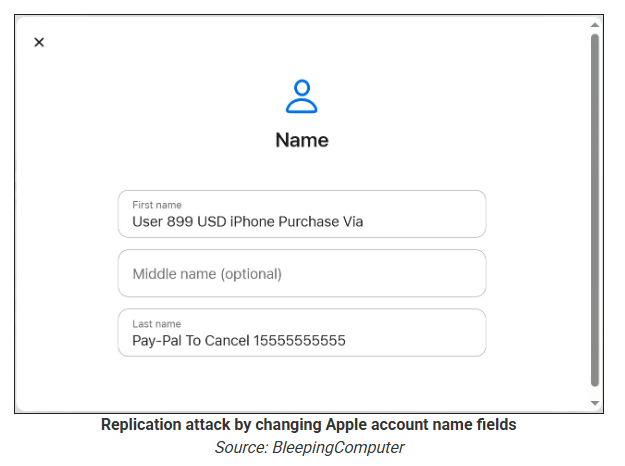
According to a report from BleepingComputer, scammers create an Apple account and insert a phishing message into the personal information fields, then modify the account so that Apple sends a genuine security alert about the change to the target.

BleepingComputer was able to replicate the attack.

The attacker creates an Apple ID they control, then stuffs the phishing message into the personal information fields (first name, last name, possibly address), splitting it across fields because they will not fit into just one.

To launch the phish, the attacker changes something benign on their specially created Apple account, such as shipping information, which causes Apple’s systems to send a “Your Apple account was updated” security email.

While the original alert is addressed to the attacker’s iCloud email, they are then able to redistribute it to a wider victim list, for example through a mailing list.

In the copy the targets receive, the email headers still show a legitimate Apple sender, and the presence of the attacker’s iCloud address can even make it look like “someone else” has gained access to the account.

Reconstruction. Image courtesy of BleepingComputer

Because Apple includes those user-supplied fields in the security email, the phishing text is delivered inside a legitimate message sent from Apple’s own infrastructure.

This method, called call-back phishing, filters out suspicious users, so the scammers can focus on the people who fell for the first part.

The emails come from a legitimate source, sail through every security filter because of that, and look convincing enough to scare the receiver into thinking someone spent $899 from their PayPal account.

Phishing email screenshot, courtesy of BleepingComputer

But the structure of the email does not make sense.

“Dear User” is immediately followed by the scam message where your name should have been. The header says it’s about account information rather than a purchase. And the iCloud account does not belong to the recipient. So, once you know how it’s done, they’re not impossible to spot. Which is why we wrote this blog.

And when in doubt, you can always ask Malwarebytes Scam Guard.


Scam or legit? Scam Guard knows.


Is this a scam?
Asking Scam Guard

Scam Guard identified the screenshot as a scam and guides users through the next steps.

Scams like these work, because many users still view phone calls as more trustworthy than email, especially if the email itself passed all the usual technical authenticity checks and they initiated the call themselves.

How to stay safe

Tech support scammers will try to convince callers to install some kind of remote desktop application to steal data from your computer, or ask for financial details so they can steal your money.

To stay safe from these scammers:

  • Be wary of unexpected alerts about high‑value purchases you do not recognize. They are suspicious even if they come from a real domain.
  • Never call a number sent to you by unsolicited means or even found in sponsored search results.
  • Carefully read emails and text messages, even if they come form trustworthy addresses. Does the email make sense from a structural and linguistic point of view?
  • If someone claiming to be support for a legitimate company asks for remote access or payment details during a call, hang up and contact the company through official channels.
  • Use Malwarebytes Scam Guard to analyze any kind of message that alarms you or urges you to take immediate action.

Something feel off? Check it before you click.  

Malwarebytes Scam Guard helps you analyze suspicious links, texts, and screenshots instantly.  

Available with Malwarebytes Premium Security for all your devices, and in the Malwarebytes app for iOS and Android.  

Try it free → 

Phishing via Google Tasks | Kaspersky official blog

19 February 2026 at 09:39

We’ve written time and again about phishing schemes where attackers exploit various legitimate servers to deliver emails. If they manage to hijack someone’s SharePoint server, they’ll use that; if not, they’ll settle for sending notifications through a free service like GetShared. However, Google’s vast ecosystem of services holds a special place in the hearts of scammers, and this time Google Tasks is the star of the show. As per usual, the main goal of this trick is to bypass email filters by piggybacking the rock-solid reputation of the middleman being exploited.

What phishing via Google Tasks looks like

The recipient gets a legitimate notification from an @google.com address with the message: “You have a new task”. Essentially, the attackers are trying to give the victim the impression that the company has started using Google’s task tracker, and as a result they need to immediately follow a link to fill out an employee verification form.

Google Tasks notification

To deprive the recipient of any time to actually think about whether this is necessary, the task usually includes a tight deadline and is marked with high priority. Upon clicking the link within the task, the victim is presented with an URL leading to a form where they must enter their corporate credentials to “confirm their employee status”. These credentials, of course, are the ultimate goal of the phishing attack.

How to protect employee credentials from phishing

Of course, employees should be warned about the existence of this scheme — for instance, by sharing a link to our collection of posts on the red flags of phishing. But in reality, the issue isn’t with any one specific service — it’s about the overall cybersecurity culture within a company. Workflow processes need to be clearly defined so that every employee understands which tools the company actually uses and which it doesn’t. It might make sense to maintain a public corporate document listing authorized services and the people or departments responsible for them. This gives employees a way to verify if that invitation, task, or notification is the real deal. Additionally, it never hurts to remind everyone that corporate credentials should only be entered on internal corporate resources. To automate the training process and keep your team up to speed on modern cyberthreats, you can use a dedicated tool like the Kaspersky Automated Security Awareness Platform.

Beyond that, as usual, we recommend minimizing the number of potentially dangerous emails hitting employee inboxes by using a specialized mail gateway security solution. It’s also vital to equip all web-connected workstations with security software. Even if an attacker manages to trick an employee, the security product will block the attempt to visit the phishing site — preventing corporate credentials from leaking in the first place.

Quick digest of Kaspersky’s report “Spam and Phishing in 2025” | Kaspersky official blog

11 February 2026 at 22:32

Every year, scammers cook up new ways to trick people, and 2025 was no exception. Over the past year, our anti-phishing system thwarted more than 554 million attempts to follow phishing links, while our Mail Anti-Virus blocked nearly 145 million malicious attachments. To top it off, almost 45% of all emails worldwide turned out to be spam. Below, we break down the most impressive phishing and spam schemes from last year. For the deep dive, you can read the full Spam and Phishing in 2025 report on Securelist.

Phishing for fun

Music lovers and cinephiles were prime targets for scammers in 2025. Bad actors went all out creating fake ticketing aggregators and spoofed versions of popular streaming services.

On these fake aggregator sites, users were offered “free” tickets to major concerts. The catch? You just had to pay a small “processing fee” or “shipping cost”. Naturally, the only thing being delivered was your hard-earned cash straight into a scammer’s pocket.

Free Lady Gaga tickets? Only in a mousetrap

With streaming services, the hustle went like this: users received a tempting offer to, say, migrate their Spotify playlists to YouTube by entering their Spotify credentials. Alternatively, they were invited to vote for their favorite artist in a chart — an opportunity most fans find hard to pass up. To add a coat of legitimacy, scammers name-dropped heavy hitters like Google and Spotify. The phishing form targeted multiple platforms at once — Facebook, Instagram, or email — requiring users to enter their credentials to vote hand over their accounts.

A phishing page masquerading as an artist voting platform

This phishing page mimicking a multi-login setup looks terrible — no self-respecting designer would cram that many clashing icons onto a single button

In Brazil, scammers took it a step further: they offered users the chance to earn money just by listening to and rating songs on a supposed Spotify partner service. During registration, users had to provide their ID for Pix (the Brazilian instant payment system), and then make a one-time “verification payment” of 19.9 Brazilian reals (about $4) to “confirm their identity”. This fee was, of course, a fraction of the promised “potential earnings”. The payment form looked incredibly authentic and requested additional personal data — likely to be harvested for future attacks.

An imitation service claiming to pay users for listening to tracks on Spotify

This scam posed as a service for boosting Spotify ratings and plays, but to start “earning”, you first had to pay up

The “cultural date” scheme turned out to be particularly inventive. After matching and some brief chatting on dating apps, a new “love interest” would invite the victim to a play or a movie and send a link to buy tickets. Once the “payment” went through, both the date and the ticketing site would vanish into thin air. A similar tactic was used to sell tickets for immersive escape rooms, which have surged in popularity lately; the page designs mirrored real sites to lower the user’s guard.

A fake version of a popular Russian ticketing aggregator

Scammers cloned the website of a well-known Russian ticketing service

Phishing via messaging apps

The theft of Telegram and WhatsApp accounts became one of the year’s most widespread threats. Scammers have mastered the art of masking phishing as standard chat app activities, and have significantly expanded their geographical reach.

On Telegram, free Premium subscriptions remained the ultimate bait. While these phishing pages were previously only seen in Russian and English, 2025 saw a massive expansion into other languages. Victims would receive a message — often from a friend’s hijacked account — offering a “gift”. To activate it, the user had to log in to their Telegram account on the attacker’s site, which immediately led to another hijacked account.

Another common scheme involved celebrity giveaways. One specific attack, disguised as an NFT giveaway, stood out because it operated through a Telegram Mini App. For the average user, spotting a malicious Mini App is much harder than identifying a sketchy external URL.

Phishing bait featuring a supposed papakha NFT giveaway by Khabib Nurmagomedov

Scammers blasted out phishing bait for a fake Khabib Nurmagomedov NFT giveaway in both Russian and English simultaneously. However, in the Russian text, they forgot to remove a question from the AI that generated the text, “Do you need bolder, formal, or humorous options?” — which points to a rushed job and a total lack of editing

Finally, the classic vote for my friend messenger scam evolved in 2025 to include prompts to vote for the “city’s best dentist” or “top operational leader” — unfortunately, just bait for account takeovers.

Another clever method for hijacking WhatsApp accounts was spotted in China, where phishing pages perfectly mimicked the actual WhatsApp interface. Victims were told that due to some alleged “illegal activity”, they needed to undergo “additional verification”, which — you guessed it — ended up with a stolen account.

A Chinese method for hijacking WhatsApp accounts

Victims were redirected to a phone number entry form, followed by a request for their authorization code

Impersonating Government Services

Phishing that mimics government messages and portals is a “classic of the genre”, but in 2025, scammers added some new scripts to the playbook.

In Russia, vishing attacks targeting government service users picked up steam. Victims received emails claiming an unauthorized login to their account, and were urged to call a specific number to undergo a “security check”. To make it look legit, the emails were packed with fake technical details: IP addresses, device models, and timestamps of the alleged login. Scammers also sent out phony loan approval notifications: if the recipient hadn’t applied for a loan (which they hadn’t), they were prompted to call a fake support team. Once the panicked victim reached an “operator”, social engineering took center stage.

In Brazil, attackers hunted for taxpayer numbers (CPF numbers) by creating counterfeit government portals. Since this ID is the master key for accessing state services, national databases, and personal documents, a hijacked CPF is essentially a fast track to identity theft.

A fake Brazilian government services portal

This fraudulent Brazilian government portal of surprisingly high quality

In Norway, scammers targeted people looking to renew their driver’s licenses. A site mimicking the Norwegian Public Roads Administration collected a mountain of personal data: everything from license plate numbers, full names, addresses, and phone numbers to the unique personal identification numbers assigned to every resident. For the cherry on top, drivers were asked to pay a “license replacement fee” of 1200 NOK (over US$125). The scammers walked away with personal data, credit card details, and cash. A literal triple-combo move!

Generally speaking, motorists are an attractive target: they clearly have money and a car and a fear of losing it. UK-based scammers played on this by sending out demands to urgently pay some overdue vehicle tax to avoid some unspecified “enforcement action”. This “act now!” urgency is a classic phishing trope designed to distract the victim from a sketchy URL or janky formatting.

A fake demand for British motorists to pay overdue vehicle tax

Scammers pressured Brits to pay purportedly overdue vehicle taxes “immediately” to keep something bad from happening

Let us borrow your identity, please

In 2025, we saw a spike in phishing attacks revolving around Know Your Customer (KYC) checks. To boost security, many services now verify users via biometrics and government IDs. Scammers have learned to harvest this data by spoofing the pages of popular services that implement these checks.

A fake Vivid Money page

On this fraudulent Vivid Money page, scammers systematically collected incredibly detailed information about the victim

What sets these attacks apart is that, in addition to standard personal info, phishers demand photos of IDs or the victim’s face — sometimes from multiple angles. This kind of full profile can later be sold on dark web marketplaces or used for identity theft. We took a deep dive into this process in our post, What happens to data stolen using phishing?

AI scammers

Naturally, scammers weren’t about to sit out the artificial intelligence boom. ChatGPT became a major lure: fraudsters built fake ChatGPT Plus subscription checkout pages, and offered “unique prompts” guaranteed to make you go viral on social media.

A fake ChatGPT checkout page

This is a nearly pixel-perfect clone of the original OpenAI checkout page

The “earn money with AI” scheme was particularly cynical. Scammers offered passive income from bets allegedly placed by ChatGPT: the bot does all the heavy lifting while the user just watches the cash roll in. Sounds like a dream, right? But to “catch” this opportunity, you had to act fast. A special price on this easy way to lose your money was valid for only 15 minutes from the moment you hit the page, leaving victims with no time to think twice.

A phishing page offering AI-powered earnings

You’ve exactly 15 minutes to lose €14.99! After that, you lose €39.99

Across the board, scammers are aggressively adopting AI. They’re leveraging deepfakes, automating high-quality website design, and generating polished copy for their email blasts. Even live calls with victims are becoming components of more complex schemes, which we detailed in our post, How phishers and scammers use AI.

Booby-trapped job openings

Someone looking for work is a prime target for bad actors. By dangling high-paying remote roles at major brands, phishers harvested applicants’ personal data — and sometimes even squeezed them for small “document processing fees” or “commissions”.

A phishing page offering remote work at Amazon

“$1000 on your first day” for remote work at Amazon. Yeah, right

In more sophisticated setups, “employment agency” phishing sites would ask for the phone number linked to the user’s Telegram account during registration. To finish “signing up”, the victim had to enter a “confirmation code”, which was actually a Telegram authorization code. After entering it, the site kept pestering the applicant for more profile details — clearly a distraction to keep them from noticing the new login notification on their phone. To “verify the user”, the victim was told to wait 24 hours, giving the scammers, who already had a foot in the door, enough time to hijack the Telegram account permanently.

Hype is a lie (but a very convincing one)

As usual, scammers in 2025 were quick to jump on every trending headline, launching email campaigns at breakneck speed.

For instance, following the launch of $TRUMP meme coins by the U.S. President, scam blasts appeared promising free NFTs from “Trump Meme Coin” and “Trump Digital Trading Cards”. We’ve previously broken down exactly how meme coins work, and how to (not) lose your shirt on them.

The second the iPhone 17 Pro hit the market, it became the prize in countless fake surveys. After “winning”, users just had to provide their contact info and pay for shipping. Once those bank details were entered, the “winner” risked losing not just the shipping fee, but every cent in their account.

Riding the Ozempic wave, scammers flooded inboxes with offers for counterfeit versions of the drug, or sketchy “alternatives” that real pharmacists have never even heard of.

And during the BLACKPINK world tour, spammers pivoted to advertising “scooter suitcases just like the band uses”.

Even Jeff Bezos’s wedding in the summer of 2025 became fodder for “Nigerian” email scams. Users received messages purportedly from Bezos himself or his ex-wife, MacKenzie Scott. The emails promised massive sums in the name of charity or as “compensation” from Amazon.

How to stay safe

As you can see, scammers know no bounds when it comes to inventing new ways to separate you from your money and personal data — or even stealing your entire identity. These are just a few of the wildest examples from 2025; you can dive into the full analysis of the phishing and spam threat landscape over at Securelist. In the meantime, here are a few tips to keep you from becoming a victim. Be sure to share these with your friends and family — especially kids, teens, and older relatives. These groups are often the main targets in the scammers’ crosshairs.

  1. Check the URL before entering any data. Even if the page looks pixel-perfect, the address bar can give the game away.
  2. Don’t follow links in suspicious messages, even if they come from someone you know. Their account could easily have been hijacked.
  3. Never share verification codes with anyone. These codes are the master keys to your digital life.
  4. Enable two-factor authentication everywhere you can. It adds a crucial extra hurdle for hackers.
  5. Be skeptical of “too good to be true” offers. Free iPhones, easy money, and gifts from strangers are almost always a trap. For a refresher, check out our post, Phishing 101: what to do if you get a phishing email.
  6. Install robust protection on all your devices. Kaspersky Premium automatically blocks phishing sites, malicious attachments, and spam blasts before you even have a chance to click. Plus, our Kaspersky for Android app features a three-tier anti-phishing system that can sniff out and neutralize malicious links in any message from any app. Read more about it in our post, A new layer of anti-phishing security in Kaspersky for Android.

Fake LastPass maintenance emails target users

22 January 2026 at 14:53

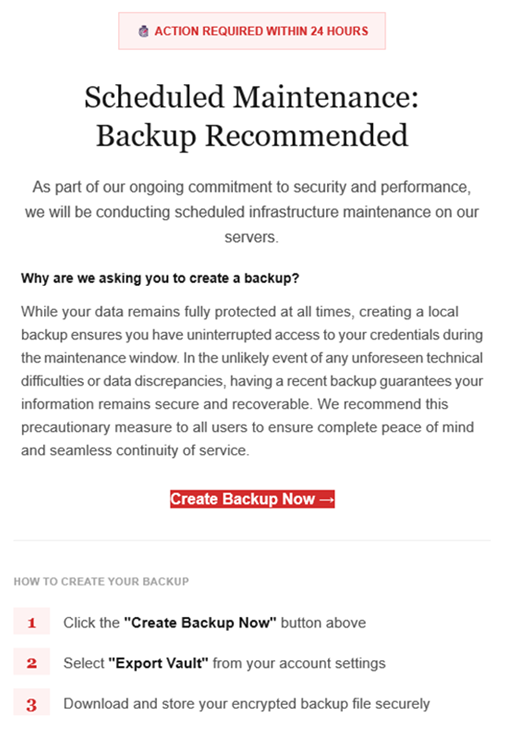
The LastPass Threat Intelligence, Mitigation, and Escalation (TIME) team has published a warning about an active phishing campaign in which fake “maintenance” emails pressure users to back up their vaults within 24 hours. The emails lead to credential-stealing phishing sites rather than any legitimate LastPass page.

The phishing campaign that started around January 19, 2026, uses emails that falsely claim upcoming infrastructure maintenance and urge users to “backup your vault in the next 24 hours.”

Example phishing email
Image courtesy of LastPass

“Scheduled Maintenance: Backup Recommended

As part of our ongoing commitment to security and performance, we will be conducting scheduled infrastructure maintenance on our servers.
Why are we asking you to create a backup?
While your data remains protected at all times, creating a local backup ensures you have access to your credentials during the maintenance window. In the unlikely event of any unforeseen technical difficulties or data discrepancies, having a recent backup guarantees your information remains secure and recoverable. We recommend this precautionary measure to all users to ensure complete peace of mind and seamless continuity of service.

Create Backup Now (link)

How to create your backup
1 Click the “Create Backup Now” button above
2 Select “Export Vault” from you account settings
3 Download and store your encrypted backup file securely”

The link in the email points to mail-lastpass[.]com, a domain that doesn’t belong to LastPass and has now been taken down.

Note that there are different subject lines in use. Here is a selection:

  • LastPass Infrastructure Update: Secure Your Vault Now
  • Your Data, Your Protection: Create a Backup Before Maintenance
  • Don’t Miss Out: Backup Your Vault Before Maintenance
  • Important: LastPass Maintenance & Your Vault Security
  • Protect Your Passwords: Backup Your Vault (24-Hour Window)

It is imperative for users to ignore instructions in emails like these. Giving away the login details for your password manager can be disastrous. For most users, it would provide access to enough information to carry out identity theft.

Stay safe

First and foremost, it’s important to understand that LastPass will never ask for your master password or demand immediate action under a tight deadline. Generally speaking, there are more guidelines that can help you stay safe.

  • Don’t click on links in unsolicited emails without verifying with the trusted sender that they’re legitimate.
  • Always log in directly on the platform that you are trying to access, rather than through a link.
  • Use a real-time, up-to-date anti-malware solution with a web protection module to block malicious sites.
  • Report phishing emails to the company that’s being impersonated, so they can alert other customers. In this case emails were forwarded to abuse@lastpass.com.

Pro tip: Malwarebytes Scam Guard  would have recognized this email as a scam and advised you how to proceed.


We don’t just report on threats—we help safeguard your entire digital identity

Cybersecurity risks should never spread beyond a headline. Protect your, and your family’s, personal information by using identity protection.

Key attack scenarios involving brand impersonation

16 January 2026 at 17:47

Brand, website, and corporate mailout impersonation is becoming an increasingly common technique used by cybercriminals. The World Intellectual Property Organization (WIPO) reported a spike in such incidents in 2025. While tech companies and consumer brands are the most frequent targets, every industry in every country is generally at risk. The only thing that changes is how the imposters exploit the fakes In practice, we typically see the following attack scenarios:

  • Luring clients and customers to a fake website to harvest login credentials for the real online store, or to steal payment details for direct theft.
  • Luring employees and business partners to a fake corporate login portal to acquire legitimate credentials for infiltrating the corporate network.
  • Prompting clients and customers to contact the scammers under various pretexts: getting tech support, processing a refund, entering a prize giveaway, or claiming compensation for public events involving the brand. The goal is to then swindle the victims out of as much money as possible.
  • Luring business partners and employees to specially crafted pages that mimic internal company systems, to get them to approve a payment or redirect a legitimate payment to the scammers.
  • Prompting clients, business partners, and employees to download malware — most often an infostealer — disguised as corporate software from a fake company website.

The words “luring” and “prompting” here imply a whole toolbox of tactics: email, messages in chat apps, social media posts that look like official ads, lookalike websites promoted through SEO tools, and even paid ads.

These schemes all share two common features. First, the attackers exploit the organization’s brand, and strive to mimic its official website, domain name, and corporate style of emails, ads, and social media posts. And the forgery doesn’t have to be flawless — just convincing enough for at least some of business partners and customers. Second, while the organization and its online resources aren’t targeted directly, the impact on them is still significant.

Business damage from brand impersonation

When fakes are crafted to target employees, an attack can lead to direct financial loss. An employee might be persuaded to transfer company funds, or their credentials could be used to steal confidential information or launch a ransomware attack.

Attacks on customers don’t typically imply direct damage to the company’s coffers, but they cause substantial indirect harm in the following areas:

  • Strain on customer support. Customers who “bought” a product on a fake site will likely bring their issues to the real customer support team. Convincing them that they never actually placed an order is tough, making each case a major time waster for multiple support agents.
  • Reputational damage. Defrauded customers often blame the brand for failing to protect them from the scam, and also expect compensation. According to a European survey, around half of affected buyers expect payouts and may stop using the company’s services — often sharing their negative experience on social media. This is especially damaging if the victims include public figures or anyone with a large following.
  • Unplanned response costs. Depending on the specifics and scale of an attack, an affected company might need digital forensics and incident response (DFIR) services, as well as consultants specializing in consumer law, intellectual property, cybersecurity, and crisis PR.
  • Increased insurance premiums. Companies that insure businesses against cyber-incidents factor in fallout from brand impersonation. An increased risk profile may be reflected in a higher premium for a business.
  • Degraded website performance and rising ad costs. If criminals run paid ads using a brand’s name, they siphon traffic away from its official site. Furthermore, if a company pays to advertise its site, the cost per click rises due to the increased competition. This is a particularly acute problem for IT companies selling online services, but it’s also relevant for retail brands.
  • Long-term metric decline. This includes drops in sales volume, market share, and market capitalization. These are all consequences of lost trust from customers and business partners following major incidents.

Does insurance cover the damage?

Popular cyber-risk insurance policies typically only cover costs directly tied to incidents explicitly defined in the policy — think data loss, business interruption, IT system compromise, and the like. Fake domains and web pages don’t directly damage a company’s IT systems, so they’re usually not covered by standard insurance. Reputational losses and the act of impersonation itself are separate insurance risks, requiring expanded coverage for this scenario specifically.

Of the indirect losses we’ve listed above, standard insurance might cover DFIR expenses and, in some cases, extra customer support costs (if the situation is recognized as an insured event). Voluntary customer reimbursements, lost sales, and reputational damage are almost certainly not covered.

What to do if your company is attacked by clones

If you find out someone is using your brand’s name for fraud, it makes sense to do the following:

  • Send clear, straightforward notifications to your customers explaining what happened, what measures are being taken, and how to verify the authenticity of official websites, emails, and other communications.
  • Create a simple “trust center” page listing your official domains, social media accounts, app store links, and support contacts. Make it easy to find and keep it updated.
  • Monitor new registrations of social media pages and domain names that contain your brand names to spot the clones before an attack kicks off.
  • Follow a takedown procedure. This involves gathering evidence, filing complaints with domain registrars, hosting providers, and social media administrators, then tracking the status until the fakes are fully removed. For a complete and accurate record of violations, preserve URLs, screenshots, metadata, and the date and time of discovery. Ideally, also examine the source code of fake pages, as it might contain clues pointing to other components of the criminal operation.
  • Add a simple customer reporting form for suspicious sites or messages to your official website and/or branded app. This helps you learn about problems early.
  • Coordinate activities between your legal, cybersecurity, and marketing teams. This ensures a consistent, unified, and effective response.

How to defend against brand impersonation attacks

While the open nature of the internet and the specifics of these attacks make preventing them outright impossible, a business can stay on top of new fakes and have the tools ready to fight back.

  • Continuously monitor for suspicious public activity using specialized monitoring services. The most obvious indicator is the registration of domains similar to your brand name, but there are others — like someone buying databases related to your organization on the dark web. Comprehensive monitoring of all platforms is best outsourced to a specialized service provider, such as Kaspersky Digital Footprint Intelligence (DFI).
  • The quickest and simplest way to take down a fake website or social media profile is to file a trademark infringement complaint. Make sure your portfolio of registered trademarks is robust enough to file complaints under UDRP procedures before you need it.
  • When you discover fakes, deploy UDRP procedures promptly to have the fake domains transferred or removed. For social media, follow the platform’s specific infringement procedure — easily found by searching for “[social media name] trademark infringement” (for example, “LinkedIn trademark infringement”). Transferring the domain to the legitimate owner is preferred over deletion, as it prevents scammers from simply re-registering it. Many continuous monitoring services, such as Kaspersky Digital Footprint Intelligence, also offer a rapid takedown service, filing complaints on the protected brand’s behalf.
  • Act quickly to block fake domains on your corporate systems. This won’t protect partners or customers, but it’ll throw a wrench into attacks targeting your own employees.
  • Consider proactively registering your company’s website name and common variations (for example, with and without hyphens) in all major top-level domains, such as .com, and local extensions. This helps protect partners and customers from common typos and simple copycat sites.

Activity-masking infostealer dropper | Kaspersky official blog

12 January 2026 at 21:00

Our experts have detected a new wave of malicious emails targeting Russian private-sector organizations. The goal of the attack is to infect victims’ computers with an infostealer. This campaign is particularly noteworthy because the attackers tried to disguise their activity as the operations of legitimate software and traffic to the ubiquitously-used state and municipal services website.

How the attack begins

The attackers distribute an email containing a malicious attachment disguised as a regular PDF document. In reality, the file is an executable hiding behind a PDF icon; double-clicking it triggers an infection chain on the victim’s computer. In the campaign we analyzed, the malicious files were named УВЕДОМЛЕНИЕ о возбуждении исполнительного производства (NOTICE of Initiation of Enforcement Proceedings) and Дополнительные выплаты (Additional Payouts), though these are probably not the only document names the attackers employ to trick victims into clicking the files.

Technically, the file disguised as a document is a downloader built with the help of the .NET framework. It downloads a secondary loader that installs itself as a service to establish persistence on the victim’s machine. This other loader then retrieves a JSON string containing encrypted files from the command-and-control server. It saves these files to the compromised computer in C:\ProgramData\Microsoft Diagnostic\Tasks, and executes them one by one.

Example of the server response

Example of the server response

The key feature of this delivery method is its flexibility: the attackers can provide any malicious payload from the command-and-control server for the malware to download and execute. Presently, the attackers are using an infostealer as the final payload, but this attack could potentially be used to deliver even more dangerous threats – such as ransomware, wipers, or tools for deeper lateral movement within the victim’s infrastructure.

Masking malicious activity

The command-and-control server used to download the malicious payload in this attack was hosted on the domain gossuslugi{.}com. The name is visually similar to Russia’s widely used state and municipal services portal. Furthermore, the second-stage loader has the filename NetworkDiagnostic.exe, which installs itself in the system as a Network Diagnostic Service.

Consequently, an analyst doing only a superficial review of network traffic logs or system events might overlook the server communication and malware execution. This can also complicate any subsequent incident investigation efforts.

What the infostealer collects

The attackers start by gathering information about the compromised system: the computer name, OS version, hardware specifications, and the victim’s IP address. Additionally, the malware is capable of capturing screenshots from the victim’s computer, and harvesting files in formats of interest to the attackers (primarily various documents and archives). Files smaller than 100MB, along with the rest of the collected data, are sent to a separate communication server: ants-queen-dev.azurewebsites{.}net.

File formats of interest to the attackers

File formats of interest to the attackers

The final malicious payload currently in use consists of four files: one executable and three DLL libraries. The executable enables screen capture capabilities. One of the libraries is used to add the executable to startup, another is responsible for data collection, while the third handles data exfiltration.

During network communication, the malware adds an AuthKey header to its requests, which contains the victim’s operating system identifier.

Code snippet: a function for sending messages to the attackers' server

Code snippet: a function for sending messages to the attackers’ server

How to stay safe

Our security solutions detect both the malicious code used in this attack and its communication with the attackers’ command-and-control servers. Therefore, we recommend using reliable security solutions on all devices used by your company to access the internet. And to prevent malicious emails from ever reaching your employees, we also advise deploying a security solution at the corporate email gateway level too.

ForumTroll targets political scientists | Kaspersky official blog

17 December 2025 at 11:58

Our experts from the Global Research and Analysis Team (GReAT) have investigated a new wave of targeted emails from the ForumTroll APT group. Whereas previously their malicious emails were sent to public addresses of organizations, this time the attackers have targeted specific individuals — scientists from Russian universities and other organizations specializing in political science, international relations, and global economics. The purpose of the campaign was to infect victims’ computers with malware to gain remote access thereto.

What the malicious email looks like

The attackers sent the emails from the address support@e-library{.}wiki, which imitates the address of the scientific electronic library eLibrary (its real domain is elibrary.ru). The emails contained personalized links to a report on the plagiarism check of some material, which, according to the attackers’ plan, was supposed to be of interest to scientists.

In reality, the link downloaded an archive from the same e-library{.}wiki domain. Inside was a malicious .lnk file and a .Thumbs directory with some images that were apparently needed to bypass security technologies. The victim’s full name was used in the filenames of the archive and the malicious link-file.

In case the victim had doubts about the legitimacy of the email and visited the e-library{.}wiki page, they were shown a slightly outdated copy of the real website.

What happens if the victim clicks on the malicious link

If the scientist who received the email clicked on the file with the .lnk extension, a malicious PowerShell script was executed on their computer, triggering a chain of infection. As a result, the attackers installed a commercial framework Tuoni for red teams on the attacked machine, providing the attackers with remote access and other opportunities for further compromising the system. In addition, the malware used COM Hijacking to achieve persistency, and downloaded and displayed a decoy PDF file, the name of which also included the victim’s full name. The file itself, however, was not personalized — it was a rather vague report in the format of one of the Russian plagiarism detection systems.

Interestingly, if the victim tried to open the malicious link from a device running on a system that didn’t support PowerShell, they were prompted to try again from a Windows computer. A more detailed technical analysis of the attack, along with indicators of compromise, can be found in a post on the Securelist website.

How to stay safe

The malware used in this attack is successfully detected and blocked by Kaspersky’s security products. We recommend installing a reliable security solution not only on all devices used by employees to access the internet, but also on the organization's mail gateway, which can stop most threats delivered via email before they reach an employee’s device.

Bypassing Two-Factor Authentication on OWA & Office365 Portals

By: BHIS
2 November 2016 at 16:00

Beau Bullock // Full Disclosure: Black Hills Information Security believes in responsible disclosure of vulnerabilities. This vulnerability was reported to Microsoft on September 28th, 2016. As of the publication date of […]

The post Bypassing Two-Factor Authentication on OWA & Office365 Portals appeared first on Black Hills Information Security, Inc..

❌