Login
Login
Google Detects First AI-Generated Zero-Day Exploit
The zero-day was designed to bypass 2FA and it was developed by a prominent cybercrime group.
The post Google Detects First AI-Generated Zero-Day Exploit appeared first on SecurityWeek.

The zero-day was designed to bypass 2FA and it was developed by a prominent cybercrime group.
The post Google Detects First AI-Generated Zero-Day Exploit appeared first on SecurityWeek.
The company topped revenue and earnings forecasts for the first quarter of 2026, but its shares plunged more than 20%.
The post Cloudflare Lays Off 1,100 Employees in AI-Driven Restructuring appeared first on SecurityWeek.
Last week on Malwarebytes Labs:
Stay safe!
Browse like no one’s watching.
Malwarebytes Privacy VPN encrypts your connection and never logs what you do, so the next story you read doesn’t have to feel personal. Try it free →
Last week on Malwarebytes Labs:
Stay safe!
Browse like no one’s watching.
Malwarebytes Privacy VPN encrypts your connection and never logs what you do, so the next story you read doesn’t have to feel personal. Try it free →
Researchers tracked a large AI‑themed investment scam campaign involving more than 15,000 domains. It uses cloaking and deepfakes to hide from security tools while targeting ordinary users.
Criminals abused the Keitaro ad-tracking platform as part of a cloaking system so real victims see scam content, while security scanners, ad reviewers, and some random visitors see harmless pages, making the operation hard to detect and shut down.
Keitaro is a commercial tracking platform originally meant for digital marketers to manage ad campaigns, test which ads work best, and route visitors to different landing pages.
Because it is feature rich, easy to spin up on regular hosting, and built to filter and route traffic, criminals found they can abuse those capabilities to run scams at scale.
Traffic starts in many places. The scammers used compromised websites, spam emails, social media posts, and online ads, all quietly routing through the same tracking infrastructure.
The scam sites typically promise “Smart AI Trading Technology” or “Intelligent Trading Solutions” and claim consistently high returns, often reinforced with deepfake images or fabricated media to look more credible.
Some parts of the campaign now use deepfake videos and fake interviews with well-known public figures, making it look like a celebrity, or finance expert personally endorses the platform.
Once you follow a link, the cloaking part of the operation kicks in. Cloaking is the trick that makes these scams so hard to see from the outside.
When you click an ad or link, your visit passes through a traffic distribution system (TDS), a kind of router for web visitors that decides which page you see. In these cases, the TDS is connected to the tracker.
The system checks things like:
You’re shown the real investment scam landing page only if you match the “ideal victim” profile (for example, a regular consumer in a target country coming from a social media ad).
Everyone else, like a security researcher, ad platform reviewer, or automated scanner, gets shown a benign page, like a generic blog or placeholder site.
The best way to stay safe is to stay informed about the tricks scammers use. Learn to spot the red flags that almost always give away scams and phishing emails, and remember:
Pro tip: Malwarebytes Scam Guard can help you recognize and analyze scams.
Stop threats before they can do any harm.
Malwarebytes Browser Guard blocks phishing pages and malicious sites automatically. Free, one click to install. Add it to your browser →
Researchers tracked a large AI‑themed investment scam campaign involving more than 15,000 domains. It uses cloaking and deepfakes to hide from security tools while targeting ordinary users.
Criminals abused the Keitaro ad-tracking platform as part of a cloaking system so real victims see scam content, while security scanners, ad reviewers, and some random visitors see harmless pages, making the operation hard to detect and shut down.
Keitaro is a commercial tracking platform originally meant for digital marketers to manage ad campaigns, test which ads work best, and route visitors to different landing pages.
Because it is feature rich, easy to spin up on regular hosting, and built to filter and route traffic, criminals found they can abuse those capabilities to run scams at scale.
Traffic starts in many places. The scammers used compromised websites, spam emails, social media posts, and online ads, all quietly routing through the same tracking infrastructure.
The scam sites typically promise “Smart AI Trading Technology” or “Intelligent Trading Solutions” and claim consistently high returns, often reinforced with deepfake images or fabricated media to look more credible.
Some parts of the campaign now use deepfake videos and fake interviews with well-known public figures, making it look like a celebrity, or finance expert personally endorses the platform.
Once you follow a link, the cloaking part of the operation kicks in. Cloaking is the trick that makes these scams so hard to see from the outside.
When you click an ad or link, your visit passes through a traffic distribution system (TDS), a kind of router for web visitors that decides which page you see. In these cases, the TDS is connected to the tracker.
The system checks things like:
You’re shown the real investment scam landing page only if you match the “ideal victim” profile (for example, a regular consumer in a target country coming from a social media ad).
Everyone else, like a security researcher, ad platform reviewer, or automated scanner, gets shown a benign page, like a generic blog or placeholder site.
The best way to stay safe is to stay informed about the tricks scammers use. Learn to spot the red flags that almost always give away scams and phishing emails, and remember:
Pro tip: Malwarebytes Scam Guard can help you recognize and analyze scams.
Stop threats before they can do any harm.
Malwarebytes Browser Guard blocks phishing pages and malicious sites automatically. Free, one click to install. Add it to your browser →
Today we published our latest Global AI Diffusion Report. The global adoption of artificial intelligence continued to rise in the first quarter of 2026. During the quarter, AI usage increased by 1.5 percentage points from 16.3% to 17.8% of the world’s working age population. Intensity of use among economies with the highest rates of AI diffusion also increased, with 26 economies now exceeding 30% of the working age population using AI.
At the top of Microsoft’s National AI Leaderboard, the UAE continued to lead global AI diffusion at 70.1%. The United States finally started to move up the national rankings, albeit only from 24th to 21st based on a 31.3% usage rate by the working age population.

Notable developments in the quarter included accelerating AI adoption in Asia driven in part by improving AI capabilities in Asian languages. South Korea, Thailand, and Japan saw the greatest movement. More broadly, the quarter brought continued widening of the AI gap between the Global North and South, with usage now at 27.5% in the North and 15.4% in the South. These trends are discussed below, including a deeper dive on the positive impact of enhanced multilingual AI capabilities in Japan.
To track all these trends, we continue to measure AI diffusion as the share of people worldwide between ages 15 and 64 who have used a generative AI product during the reported period. This measure is derived from aggregated and anonymized Microsoft telemetry and adjusted to reflect differences in OS and device-market share, internet penetration, and country population. Additional details on the methodology are available in our AI Diffusion technical paper.[1]

No single metric is perfect, and this one is no exception. Through the Microsoft AI Economy Institute, we continue to refine how we measure AI diffusion globally, including how adoption varies across countries in ways that best advance priorities such as scientific discovery and productivity gains. For this report, we rely on the strongest cross-country measure available today, and we expect to complement it over time with additional indicators as they emerge and mature.
Sectorally, the quarter saw strengthened AI coding capabilities leading to a dramatic increase in production of software code. This was reflected in production by Anthropic’s Claude Code, the OpenAI’s Codex, and Microsoft’s GitHub Copilot. Git pushes – through which software developers put coding changes online – increased 78% year over year globally. Interestingly, the quarter brought added evidence that, at least for now, AI coding capabilities may be increasing demand for the employment of software developers.
As discussed in more detail in the report, when developer productivity increases, the cost of building software declines. If demand for software is elastic, organizations can respond by building more software across a wider range of use cases. It is still too early to know the full labor-market impact of AI-assisted coding, but the available data shows that in 2025, total U.S. software developer employment reached approximately 2.2 million, rising 8.5% year over year and marking a record high for the profession. Early data for the first quarter of 2026 shows that software developer employment in March 2026 was about 4% higher than in March 2025.
Download the latest Global AI Diffusion report. and explore the data here.
[1] A. Misra, J. Wang, S. McCullers, K. White, and J., L. Ferres, “Measuring AI Diffusion: A Population Normalized Metric for Tracking Global AI Usage,” Nov. 04, 2025, arXiv: arXiv:2511.02781. doi: 10.48550/arXiv.2511.02781.
The post The state of global AI diffusion in 2026 appeared first on Microsoft On the Issues.

During Q1 2026, the exploit kits leveraged by threat actors to target user systems expanded once again, incorporating new exploits for the Microsoft Office platform, as well as Windows and Linux operating systems.
In this report, we dive into the statistics on published vulnerabilities and exploits, as well as the known vulnerabilities leveraged by popular C2 frameworks throughout Q1 2026.
This section provides statistical data on registered vulnerabilities. The data is sourced from cve.org.
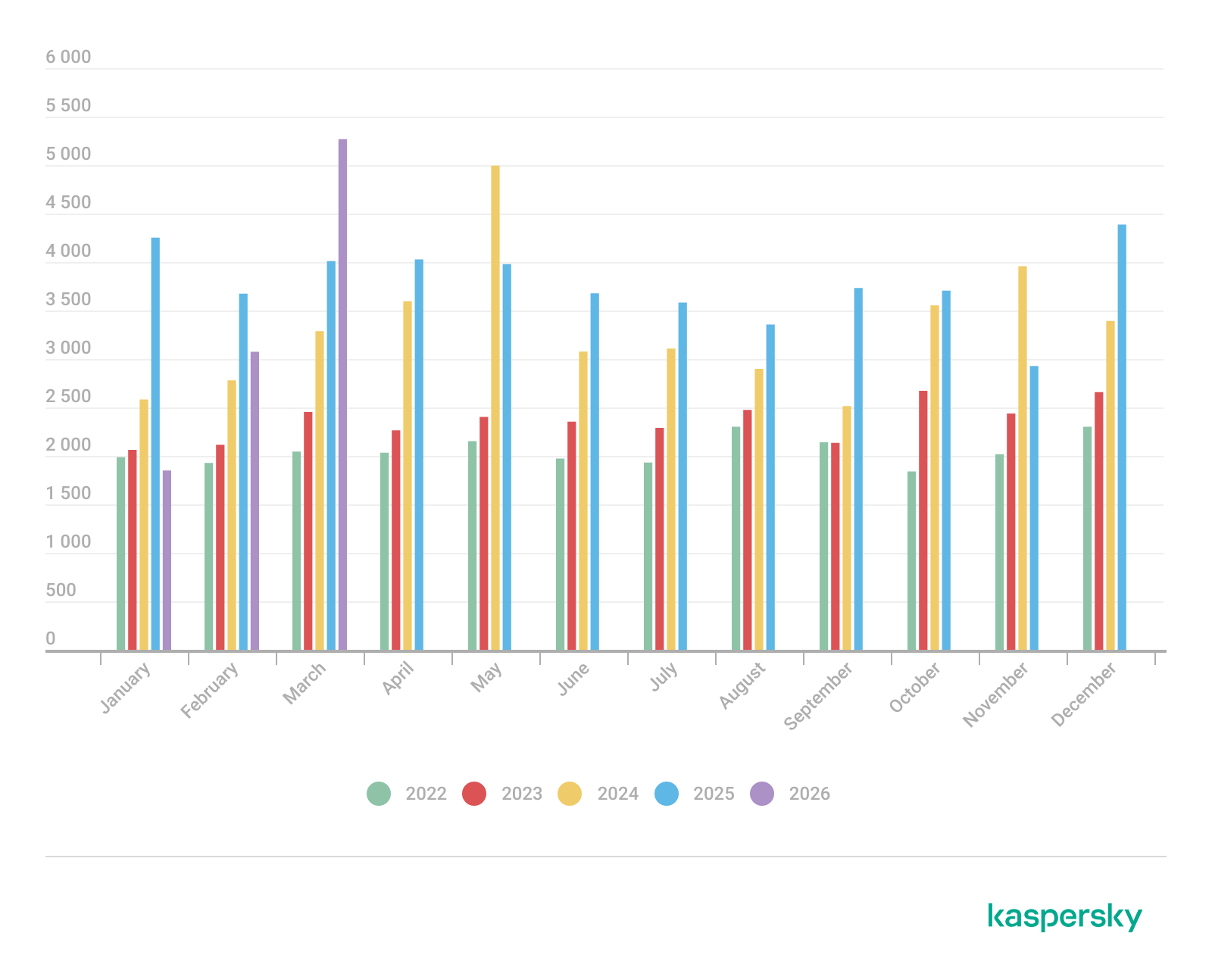
We examine the number of registered CVEs for each month starting from January 2022. The total volume of vulnerabilities continues rising and, according to current reports, the use of AI agents for discovering security issues is expected to further reinforce this upward trend.
Total published vulnerabilities per month from 2022 through 2026 (download)
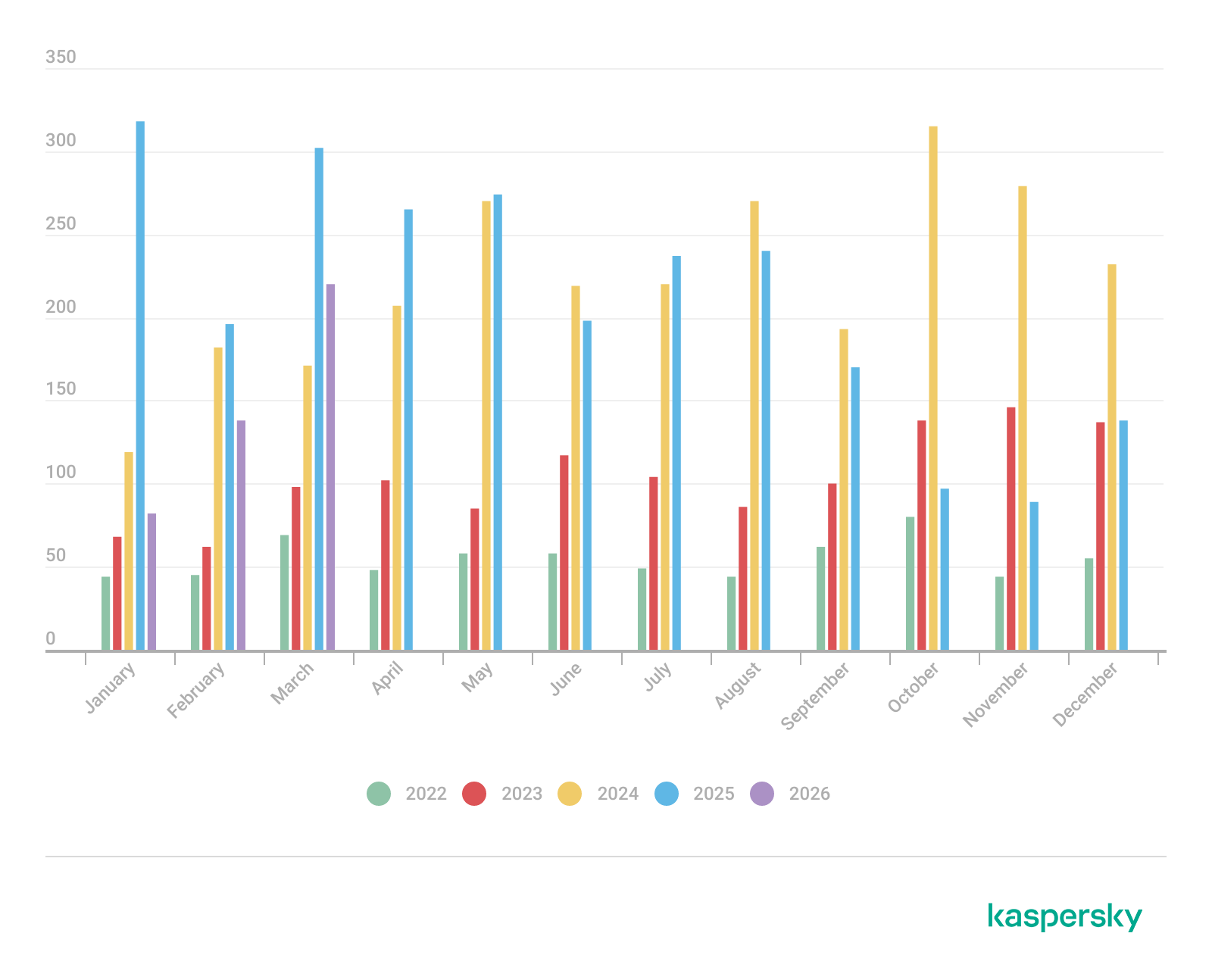
Next, we analyze the number of new critical vulnerabilities (CVSS > 8.9) over the same period.
Total critical vulnerabilities published per month from 2022 through 2026 (download)
The graph indicates that while the volume of critical vulnerabilities slightly decreased compared to previous years, an upward trend remained clearly visible. At present, we attribute this to the fact that the end of last year was marked by the disclosure of several severe vulnerabilities in web frameworks. The current growth is driven by high-profile issues like React2Shell, the release of exploit frameworks for mobile platforms, and the uncovering of secondary vulnerabilities during the remediation of previously discovered ones. We will be able to test this hypothesis in the next quarter; if correct, the second quarter will show a significant decline, similar to the pattern observed in the previous year.
This section presents statistics on vulnerability exploitation for Q1 2026. The data draws on open sources and our telemetry.
In Q1 2026, threat actor toolsets were updated with exploits for new, recently registered vulnerabilities. However, we first examine the list of veteran vulnerabilities that consistently account for the largest share of detections:
Among the newcomers, we have observed exploits targeting the Microsoft Office platform and Windows OS components. Notably, these new vulnerabilities exploit logic flaws arising from the interaction between multiple systems, making them technically difficult to isolate within a specific file or library. A list of these vulnerabilities is provided below:
These three vulnerabilities were utilized together in a single chain during attacks on Windows-based user systems. While this combination is noteworthy, we believe the widespread use of the entire chain as a unified exploit will likely decline due to its instability. We anticipate that these vulnerabilities will eventually be applied individually as initial entry vectors in phishing campaigns.
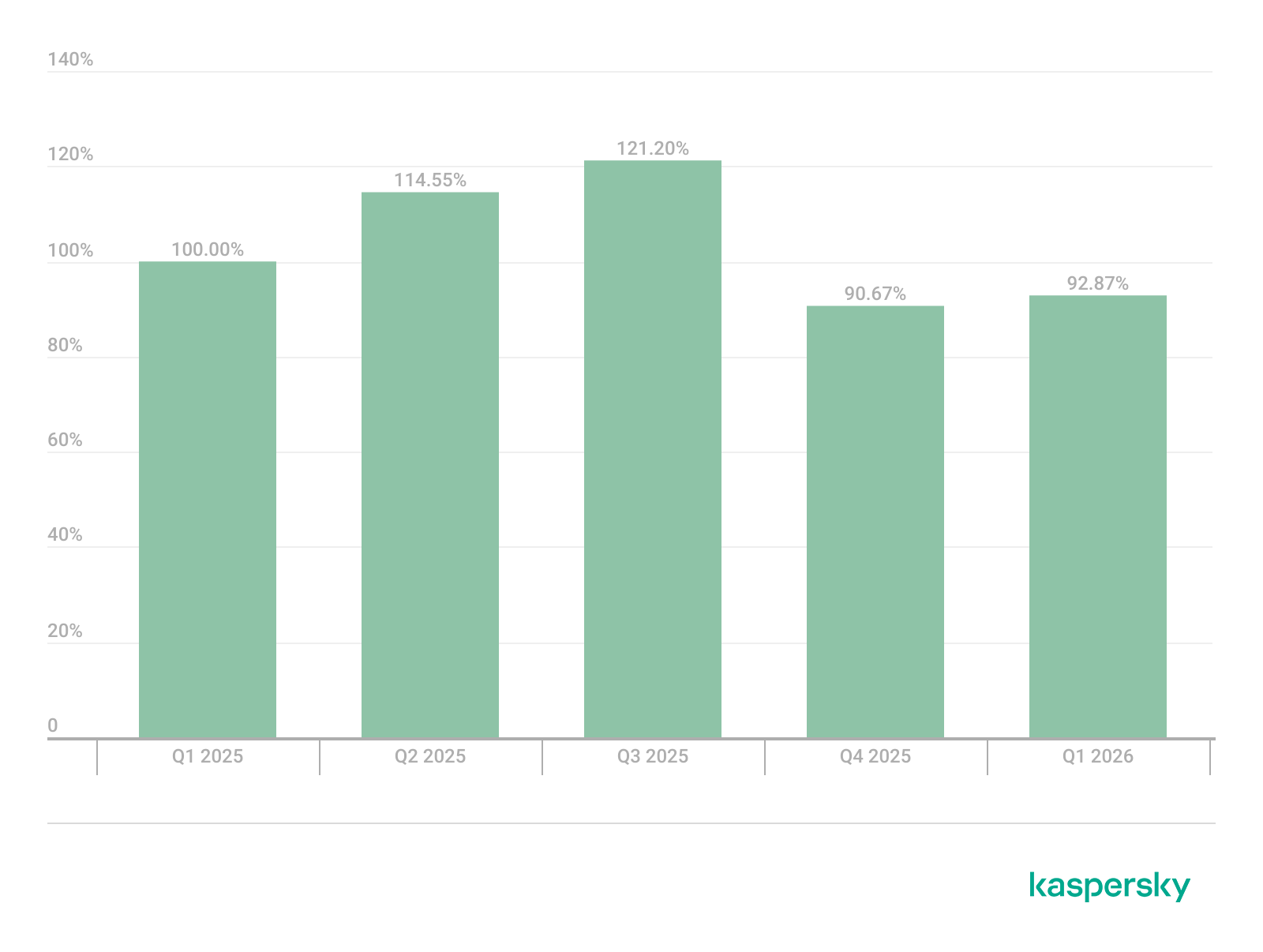
Below is the trend of exploit detections on user Windows systems starting from Q1 2025.
Dynamics of the number of Windows users encountering exploits, Q1 2025 – Q1 2026. The number of users who encountered exploits in Q1 2025 is taken as 100% (download)
The vulnerabilities listed here can be leveraged to gain initial access to a vulnerable system and for privilege escalation. This underscores the critical importance of timely software updates.
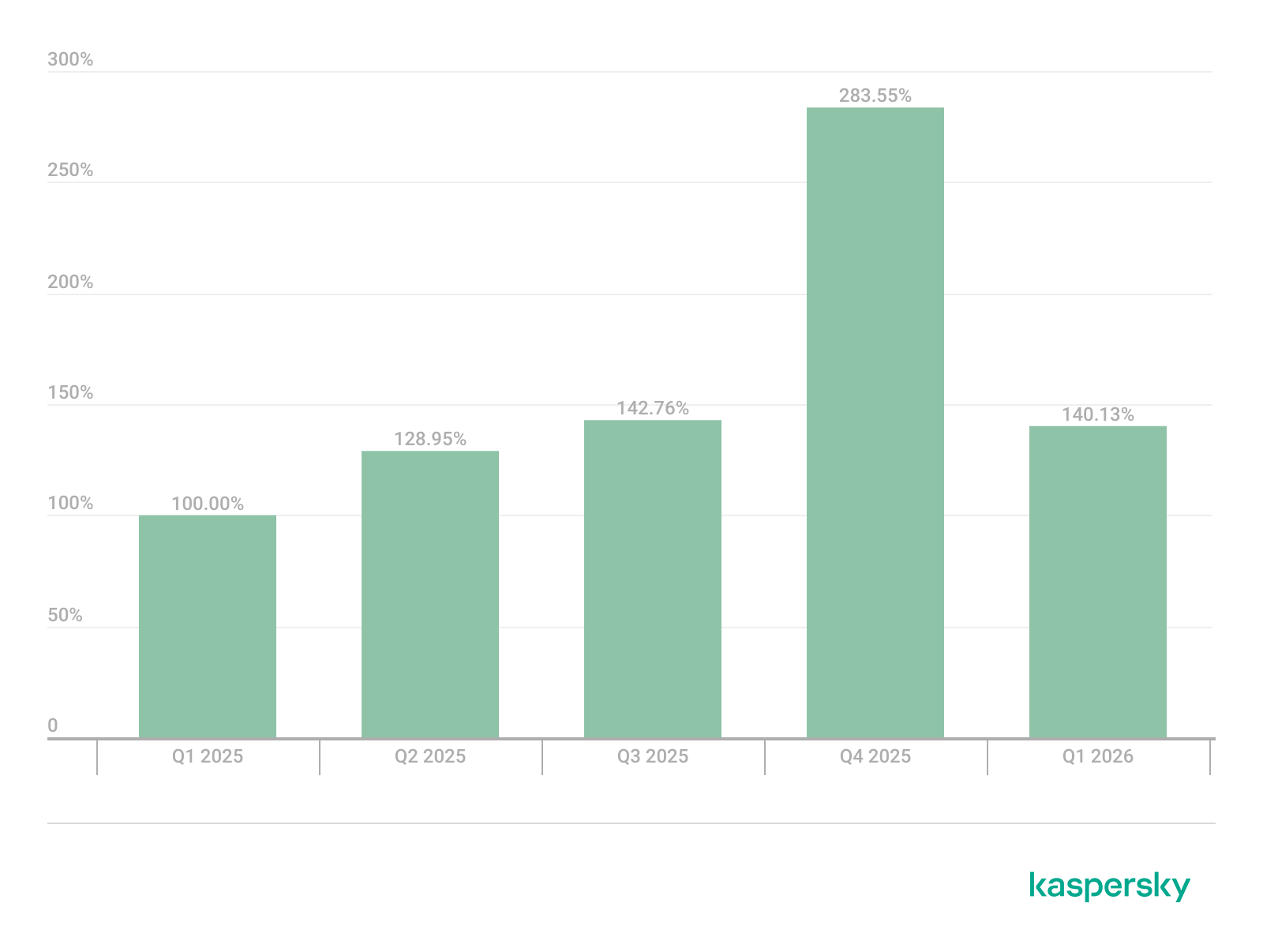
On Linux devices, exploits for the following vulnerabilities were detected most frequently:
Dynamics of the number of Linux users encountering exploits, Q1 2025 – Q1 2026. The number of users who encountered exploits in Q1 2025 is taken as 100% (download)
In the first quarter of 2026, we observed a decrease in the number of detected exploits; however, the detection rates are on the rise relative to the same period last year. For the Linux operating system, the installation of security patches remains critical.
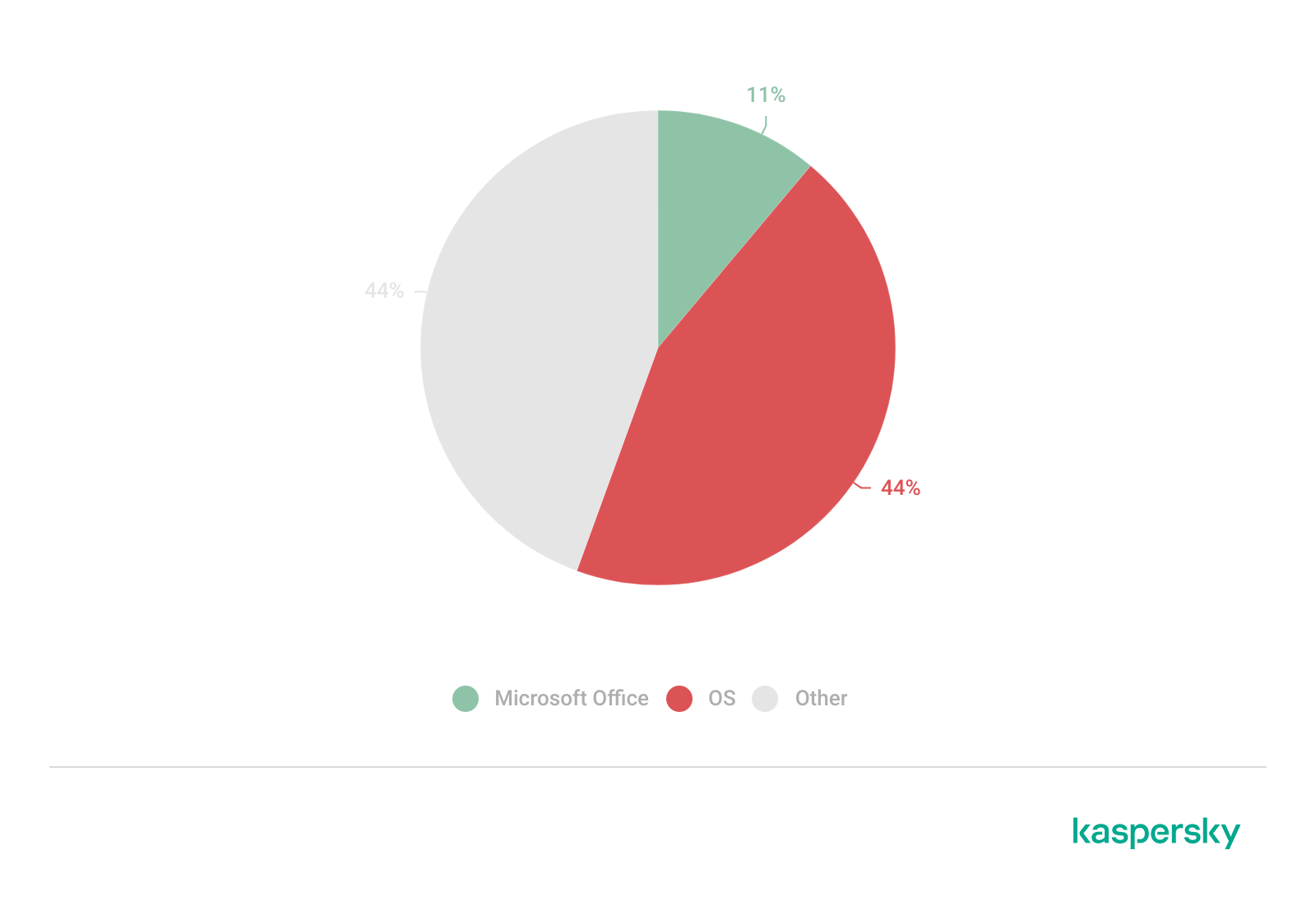
The distribution of published exploits by software type in Q1 2026 features an updated set of categories; once again, we see exploits targeting operating systems and Microsoft Office suites.
Distribution of published exploits by platform, Q1 2026 (download)
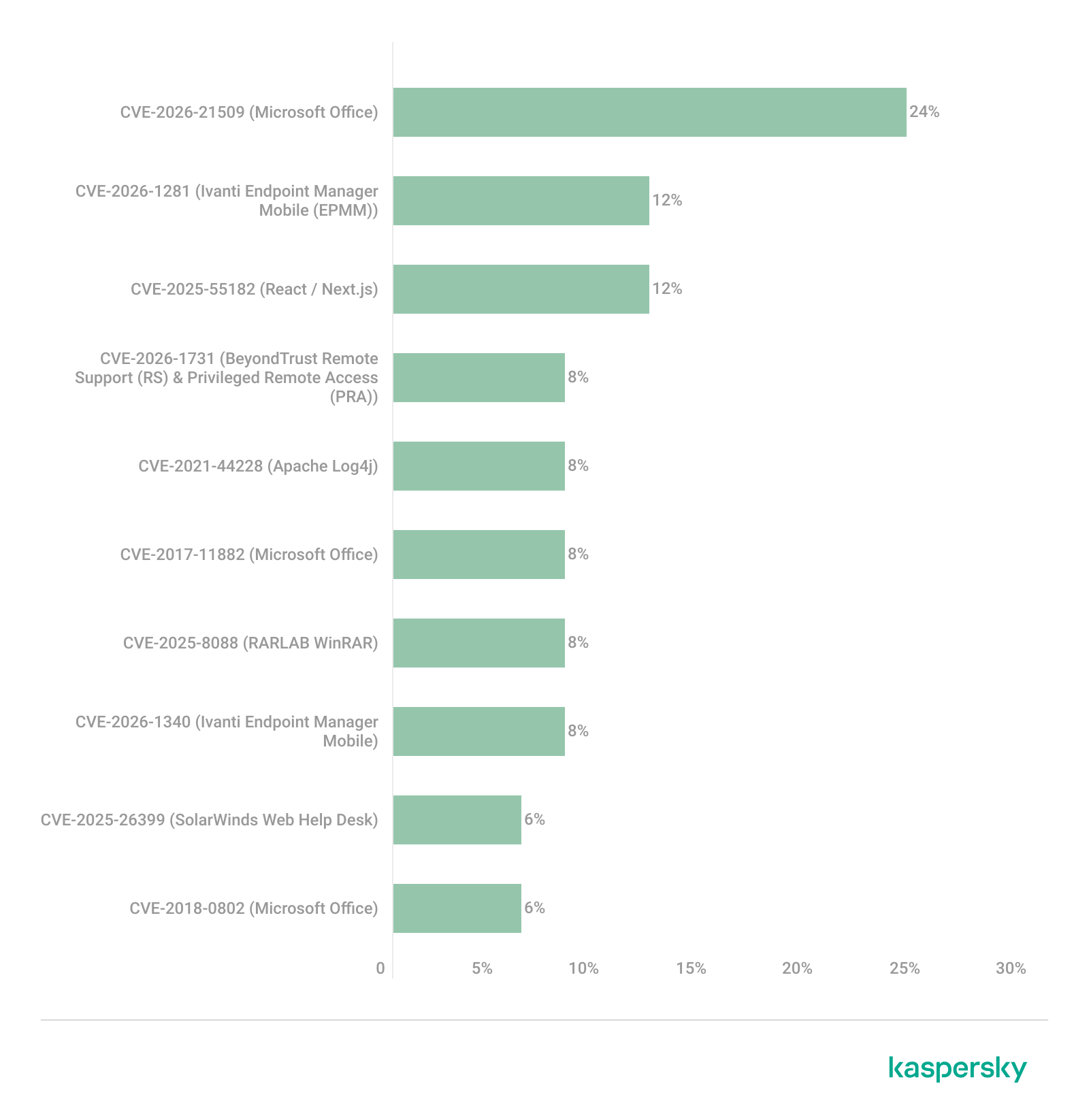
We analyzed which vulnerabilities were utilized in APT attacks during Q1 2026. The ranking provided below includes data based on our telemetry, research, and open sources.
TOP 10 vulnerabilities exploited in APT attacks, Q1 2026 (download)
In Q1 2026, threat actors continued to utilize high-profile vulnerabilities registered in the previous year for APT attacks. The hypothesis we previously proposed has been confirmed: security flaws affecting web applications remain heavily exploited in real-world attacks. However, we are also observing a partial refresh of attacker toolsets. Specifically, during the first quarter of the year, APT campaigns leveraged recently discovered vulnerabilities in Microsoft Office products, edge networking device software, and remote access management systems. Although the most recent vulnerabilities are being exploited most heavily, their general characteristics continue to reinforce established trends regarding the categories of vulnerable software. Consequently, we strongly recommend applying the security patches provided by vendors.
In this section, we examine the most popular C2 frameworks used by threat actors and analyze the vulnerabilities targeted by the exploits that interacted with C2 agents in APT attacks.
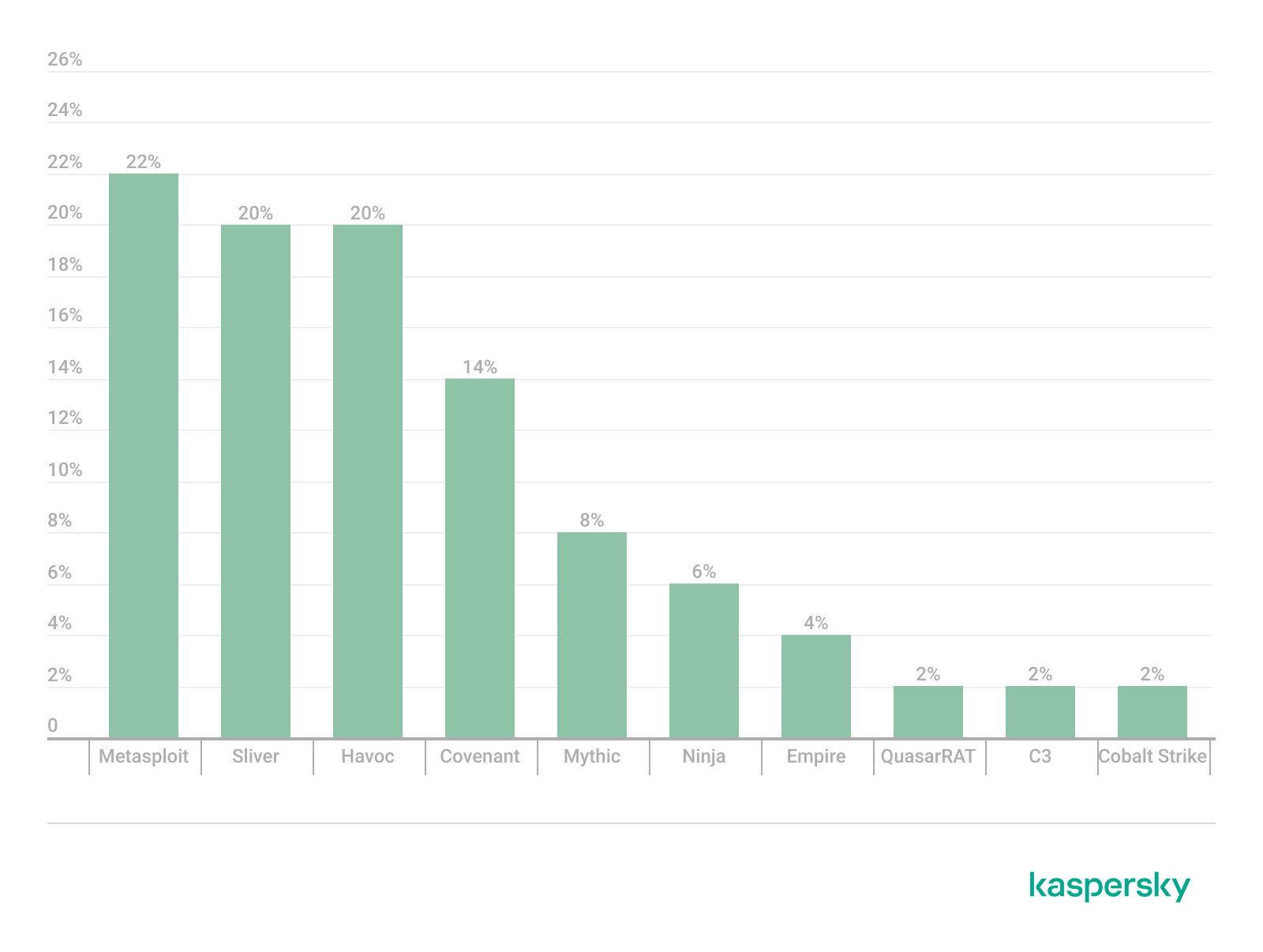
The chart below shows the frequency of known C2 framework usage in attacks against users during Q1 2026, according to open sources.
TOP 10 C2 frameworks used by APTs to compromise user systems, Q1 2026 (download)
Metasploit has returned to the top of the list of the most common C2 frameworks, displacing Sliver, which now shares the second position with Havoc. These are followed by Covenant and Mythic, the latter of which previously saw greater popularity. After studying open sources and analyzing samples of malicious C2 agents that contained exploits, we determined that the following vulnerabilities were utilized in APT attacks involving the C2 frameworks mentioned above:
The nature of the described vulnerabilities indicates that they were exploited to gain initial access to the system. Notably, the majority of these security issues are targeted to bypass authentication mechanisms. This is likely due to the fact that C2 agents are being detected effectively, prompting threat actors to reduce the probability of discovery by utilizing bypass exploits.
This section highlights the most significant vulnerabilities published in Q1 2026 that have publicly available descriptions.
At the core of this vulnerability is a Type Confusion flaw. By attempting to access a resource within the Desktop Window Manager subsystem, an attacker can achieve privilege escalation. A necessary condition for exploiting this issue is existing authorization on the system.
It is worth noting that the DWM subsystem has been under close scrutiny by threat actors for quite some time. Historically, the primary attack vector involves interacting with the NtDComposition* function set.
CVE-2026-21533 is essentially a logic vulnerability that enables privilege escalation. It stems from the improper handling of privileges within Remote Desktop Services (RDS) components. By modifying service parameters in the registry and replacing the configuration with a custom key, an attacker can elevate privileges to the SYSTEM level. This vulnerability is likely to remain a fixture in threat actor toolsets as a method for establishing persistence and gaining high-level privileges.
This vulnerability was discovered in the wild during attacks on user systems. Notably, an LNK file is used to initiate the exploitation process. CVE-2026-21514 is also a logic issue that allows for bypassing OLE technology restrictions on malicious code execution and the transmission of NetNTLM authentication requests when processing untrusted input.
This vulnerability in the AI agent leaks credentials (authentication tokens) when queried via the WebSocket protocol. It can lead to the compromise of the infrastructure where the agent is installed: researchers have confirmed the ability to access local system data and execute commands with elevated privileges. The danger of CVE-2026-25253 is further compounded by the fact that its exploitation has generated numerous attack scenarios, including the use of prompt injections and ClickFix techniques to install stealers on vulnerable systems.
LangChain is an open-source framework designed for building applications powered by large language models (LLMs). A directory traversal vulnerability allowed attackers to access arbitrary files within the infrastructure where the framework was deployed. The core of CVE-2026-34070 lies in the fact that certain functions within langchain_core/prompts/loading.py handled configuration files insecurely. This could potentially lead to the processing of files containing malicious data, which could be leveraged to execute commands and expose critical system information or other sensitive files.
CVE-2026-22812 is another vulnerability identified in AI-assisted coding software. By default, the OpenCode agent provided local access for launching authorized applications via an HTTP server that did not require authentication. Consequently, attackers could execute malicious commands on a vulnerable device with the privileges of the current user.
We observe that the registration of vulnerabilities is steadily gaining momentum in Q1 2026, a trend driven by the widespread development of AI tools designed to identify security flaws across various software types. This trajectory is likely to result not only in a higher volume of registered vulnerabilities but also in an increase in exploit-driven attacks, further reinforcing the critical necessity of timely security patch deployment. Additionally, organizations must prioritize vulnerability management and implement effective defensive technologies to mitigate the risks associated with potential exploitation.
To ensure the rapid detection of threats involving exploit utilization and to prevent their escalation, it is essential to deploy a reliable security solution. Key features of such a tool include continuous infrastructure monitoring, proactive protection, and vulnerability prioritization based on real-world relevance. These mechanisms are integrated into Kaspersky Next, which also provides endpoint security and protection against cyberattacks of any complexity.




During Q1 2026, the exploit kits leveraged by threat actors to target user systems expanded once again, incorporating new exploits for the Microsoft Office platform, as well as Windows and Linux operating systems.
In this report, we dive into the statistics on published vulnerabilities and exploits, as well as the known vulnerabilities leveraged by popular C2 frameworks throughout Q1 2026.
This section provides statistical data on registered vulnerabilities. The data is sourced from cve.org.
We examine the number of registered CVEs for each month starting from January 2022. The total volume of vulnerabilities continues rising and, according to current reports, the use of AI agents for discovering security issues is expected to further reinforce this upward trend.
Total published vulnerabilities per month from 2022 through 2026 (download)
Next, we analyze the number of new critical vulnerabilities (CVSS > 8.9) over the same period.
Total critical vulnerabilities published per month from 2022 through 2026 (download)
The graph indicates that while the volume of critical vulnerabilities slightly decreased compared to previous years, an upward trend remained clearly visible. At present, we attribute this to the fact that the end of last year was marked by the disclosure of several severe vulnerabilities in web frameworks. The current growth is driven by high-profile issues like React2Shell, the release of exploit frameworks for mobile platforms, and the uncovering of secondary vulnerabilities during the remediation of previously discovered ones. We will be able to test this hypothesis in the next quarter; if correct, the second quarter will show a significant decline, similar to the pattern observed in the previous year.
This section presents statistics on vulnerability exploitation for Q1 2026. The data draws on open sources and our telemetry.
In Q1 2026, threat actor toolsets were updated with exploits for new, recently registered vulnerabilities. However, we first examine the list of veteran vulnerabilities that consistently account for the largest share of detections:
Among the newcomers, we have observed exploits targeting the Microsoft Office platform and Windows OS components. Notably, these new vulnerabilities exploit logic flaws arising from the interaction between multiple systems, making them technically difficult to isolate within a specific file or library. A list of these vulnerabilities is provided below:
These three vulnerabilities were utilized together in a single chain during attacks on Windows-based user systems. While this combination is noteworthy, we believe the widespread use of the entire chain as a unified exploit will likely decline due to its instability. We anticipate that these vulnerabilities will eventually be applied individually as initial entry vectors in phishing campaigns.
Below is the trend of exploit detections on user Windows systems starting from Q1 2025.
Dynamics of the number of Windows users encountering exploits, Q1 2025 – Q1 2026. The number of users who encountered exploits in Q1 2025 is taken as 100% (download)
The vulnerabilities listed here can be leveraged to gain initial access to a vulnerable system and for privilege escalation. This underscores the critical importance of timely software updates.
On Linux devices, exploits for the following vulnerabilities were detected most frequently:
Dynamics of the number of Linux users encountering exploits, Q1 2025 – Q1 2026. The number of users who encountered exploits in Q1 2025 is taken as 100% (download)
In the first quarter of 2026, we observed a decrease in the number of detected exploits; however, the detection rates are on the rise relative to the same period last year. For the Linux operating system, the installation of security patches remains critical.
The distribution of published exploits by software type in Q1 2026 features an updated set of categories; once again, we see exploits targeting operating systems and Microsoft Office suites.
Distribution of published exploits by platform, Q1 2026 (download)
We analyzed which vulnerabilities were utilized in APT attacks during Q1 2026. The ranking provided below includes data based on our telemetry, research, and open sources.
TOP 10 vulnerabilities exploited in APT attacks, Q1 2026 (download)
In Q1 2026, threat actors continued to utilize high-profile vulnerabilities registered in the previous year for APT attacks. The hypothesis we previously proposed has been confirmed: security flaws affecting web applications remain heavily exploited in real-world attacks. However, we are also observing a partial refresh of attacker toolsets. Specifically, during the first quarter of the year, APT campaigns leveraged recently discovered vulnerabilities in Microsoft Office products, edge networking device software, and remote access management systems. Although the most recent vulnerabilities are being exploited most heavily, their general characteristics continue to reinforce established trends regarding the categories of vulnerable software. Consequently, we strongly recommend applying the security patches provided by vendors.
In this section, we examine the most popular C2 frameworks used by threat actors and analyze the vulnerabilities targeted by the exploits that interacted with C2 agents in APT attacks.
The chart below shows the frequency of known C2 framework usage in attacks against users during Q1 2026, according to open sources.
TOP 10 C2 frameworks used by APTs to compromise user systems, Q1 2026 (download)
Metasploit has returned to the top of the list of the most common C2 frameworks, displacing Sliver, which now shares the second position with Havoc. These are followed by Covenant and Mythic, the latter of which previously saw greater popularity. After studying open sources and analyzing samples of malicious C2 agents that contained exploits, we determined that the following vulnerabilities were utilized in APT attacks involving the C2 frameworks mentioned above:
The nature of the described vulnerabilities indicates that they were exploited to gain initial access to the system. Notably, the majority of these security issues are targeted to bypass authentication mechanisms. This is likely due to the fact that C2 agents are being detected effectively, prompting threat actors to reduce the probability of discovery by utilizing bypass exploits.
This section highlights the most significant vulnerabilities published in Q1 2026 that have publicly available descriptions.
At the core of this vulnerability is a Type Confusion flaw. By attempting to access a resource within the Desktop Window Manager subsystem, an attacker can achieve privilege escalation. A necessary condition for exploiting this issue is existing authorization on the system.
It is worth noting that the DWM subsystem has been under close scrutiny by threat actors for quite some time. Historically, the primary attack vector involves interacting with the NtDComposition* function set.
CVE-2026-21533 is essentially a logic vulnerability that enables privilege escalation. It stems from the improper handling of privileges within Remote Desktop Services (RDS) components. By modifying service parameters in the registry and replacing the configuration with a custom key, an attacker can elevate privileges to the SYSTEM level. This vulnerability is likely to remain a fixture in threat actor toolsets as a method for establishing persistence and gaining high-level privileges.
This vulnerability was discovered in the wild during attacks on user systems. Notably, an LNK file is used to initiate the exploitation process. CVE-2026-21514 is also a logic issue that allows for bypassing OLE technology restrictions on malicious code execution and the transmission of NetNTLM authentication requests when processing untrusted input.
This vulnerability in the AI agent leaks credentials (authentication tokens) when queried via the WebSocket protocol. It can lead to the compromise of the infrastructure where the agent is installed: researchers have confirmed the ability to access local system data and execute commands with elevated privileges. The danger of CVE-2026-25253 is further compounded by the fact that its exploitation has generated numerous attack scenarios, including the use of prompt injections and ClickFix techniques to install stealers on vulnerable systems.
LangChain is an open-source framework designed for building applications powered by large language models (LLMs). A directory traversal vulnerability allowed attackers to access arbitrary files within the infrastructure where the framework was deployed. The core of CVE-2026-34070 lies in the fact that certain functions within langchain_core/prompts/loading.py handled configuration files insecurely. This could potentially lead to the processing of files containing malicious data, which could be leveraged to execute commands and expose critical system information or other sensitive files.
CVE-2026-22812 is another vulnerability identified in AI-assisted coding software. By default, the OpenCode agent provided local access for launching authorized applications via an HTTP server that did not require authentication. Consequently, attackers could execute malicious commands on a vulnerable device with the privileges of the current user.
We observe that the registration of vulnerabilities is steadily gaining momentum in Q1 2026, a trend driven by the widespread development of AI tools designed to identify security flaws across various software types. This trajectory is likely to result not only in a higher volume of registered vulnerabilities but also in an increase in exploit-driven attacks, further reinforcing the critical necessity of timely security patch deployment. Additionally, organizations must prioritize vulnerability management and implement effective defensive technologies to mitigate the risks associated with potential exploitation.
To ensure the rapid detection of threats involving exploit utilization and to prevent their escalation, it is essential to deploy a reliable security solution. Key features of such a tool include continuous infrastructure monitoring, proactive protection, and vulnerability prioritization based on real-world relevance. These mechanisms are integrated into Kaspersky Next, which also provides endpoint security and protection against cyberattacks of any complexity.
We have released our latest compliance guide, ISO/IEC 42001:2023 on AWS, which provides practical guidance for organizations designing and operating an Artificial Intelligence Management System (AIMS) using AWS services.
As organizations deploy AI and generative AI workloads in the cloud, aligning with globally recognized standards such as ISO/IEC 42001:2023 becomes an important step toward strengthening AI governance, risk management, and responsible AI practices. This guide helps cloud architects, AI/ML engineers, security teams, compliance leaders, and DevOps practitioners understand how to implement and operate ISO 42001-aligned controls using AWS services while applying the AWS Shared Responsibility Model for AI.
The guide explains how organizations can integrate AWS services into their AIMS to support the requirements defined in ISO 42001:2023 clauses 4–10 and the Annex A control specific to AI systems. It also highlights how AWS AI services, security capabilities, monitoring, and automation can help customers maintain visibility over AI systems, improve operational consistency, and prepare audit-ready evidence.
While AWS provides a secure and compliant cloud infrastructure with built-in responsible AI capabilities, customers remain responsible for defining their AIMS scope, implementing controls, and demonstrating conformity during certification audits.
Use this guide to map ISO 42001 clauses and Annex A controls to your AWS environment, automate evidence collection, and reduce the effort involved in preparing for a certification audit.
Download: ISO/IEC 42001:2023 on AWS Compliance Guide
For further assistance, contact AWS Security Assurance Services
If you have feedback about this post, please submit comments in the Comments section below.
Google Chrome has been quietly downloading a 4GB AI model onto users’ devices without asking first.
Security researcher Alexander Hanff, aka ThatPrivacyGuy, reports that Chrome has been silently installing Gemini Nano, Google’s on-device AI model, as a file called weights.bin stored in the OptGuideOnDeviceModel directory within users’ Chrome profiles. This 4GB download happens automatically when Chrome determines your device meets the hardware requirements. It does not ask for consent, and sends no notification—not even one of those annoying cookie banners you’ve learned to dismiss without reading.
The Gemini Nano model powers features like “Help me write” text composition assistance, on-device scam detection, and a Summarizer API that websites can call directly. These features are enabled by default in some recent Chrome versions. And here’s the kicker: if you discover the file and delete it, Chrome simply downloads it again.
Let’s start with the obvious problem: a 4GB download isn’t trivial for everyone. If you’re lucky enough to have unlimited fiber internet, you might not notice. But for users on metered connections, mobile hotspots, or in developing countries where data is expensive, Google just cost them real money without permission. For rural users or those with bandwidth caps, this kind of silent transfer can blow through monthly limits in minutes.
Hanff focuses on the environmental angle. He calculated that if this model were pushed to just 1 billion Chrome users (roughly 30% of Chrome’s user base), the distribution alone would consume 240 gigawatt-hours of energy and generate 60,000 tons of CO2 equivalent. That’s not including actually using the model, just the downloads.
But to us, the most troubling aspect is the broader pattern this represents. Just a few weeks ago, we reported another unsolicited AI invasion on our personal computers discovered by Hanff. He documented how Anthropic’s Claude Desktop app, which silently installed browser integration files across multiple Chromium browsers, including five browsers he didn’t even have installed. The integration would reinstall itself if removed, and it also happened without any meaningful user disclosure.
Hanff argues that both cases likely violate EU privacy law, specifically the ePrivacy Directive’s rules about storing data on user devices and the GDPR’s requirements around transparency and lawful processing. While these claims haven’t been tested in court, they highlight a fundamental tension: can companies just install whatever they want on your computer as long as they say it’s a feature of an app you installed?
Google might argue that having an AI on your device provides better privacy than cloud-based alternatives. Which is generally true, but it does not apply here, since Chrome’s most prominent AI feature—the “AI Mode” pill in the address bar—doesn’t even use the local model. According to Hanff’s analysis, it routes queries to Google’s cloud servers anyway.
All in all, users see a 4GB local AI model and reasonably assume their data stays private, when in reality, the most visible AI feature sends everything to Google’s servers.
Tech companies need to stop treating silent deployment as acceptable practice. We see no valid excuse for this. Your device is yours. The storage is yours. The bandwidth is yours. And the electricity bill is yours.
What happened to asking for permission? And when I remove it, I want it gone permanently—not automatic reinstallation.
When are the tech giants going to learn that we don’t want to be left discovering after the fact that our devices have become deployment targets for features we never asked for.
%LOCALAPPDATA%\Google\Chrome\User Data
OptGuideOnDeviceModel
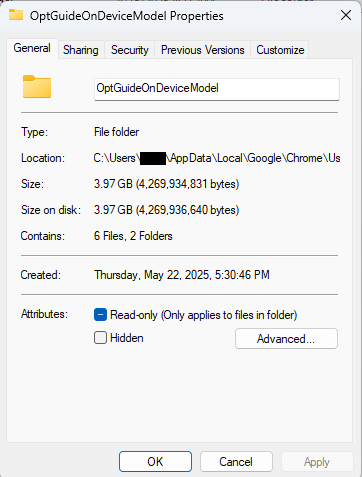
~/Library/Application Support/Google/Chrome/
OptGuideOnDeviceModel
Now, remember, this isn’t malware, and its presence doesn’t mean your computer is infected.
This part is relatively easy. You may find online instructions telling you to edit the Windows registry or use Chrome policies, but for most people the simplest and safest approach is to disable the features directly in Chrome.
We don’t recommend manually editing the registry unless you fully understand what you’re doing. Incorrect changes can cause system problems.
Instead, try this first:
chrome://settings/ai
The exact options may vary depending on your Chrome version and region.
This may stop Chrome from downloading or using the AI model, although some users report the files can return after browser updates.
There is probably no need to delete the files unless you specifically need the storage space.
If chrome://settings/ai does not work, the feature may not yet be available in your region, you may be using a managed work or school account, or your version of Chrome may not support these settings yet.
You can, but there is probably no need to.
If you disable Chrome’s AI features, the downloaded model should no longer be actively used for those features. Leaving the files in place may also prevent Chrome from downloading them again at a later point.
Browse like no one’s watching.
Malwarebytes Privacy VPN encrypts your connection and never logs what you do, so the next story you read doesn’t have to feel personal. Try it free →
Google Chrome has been quietly downloading a 4GB AI model onto users’ devices without asking first.
Security researcher Alexander Hanff, aka ThatPrivacyGuy, reports that Chrome has been silently installing Gemini Nano, Google’s on-device AI model, as a file called weights.bin stored in the OptGuideOnDeviceModel directory within users’ Chrome profiles. This 4GB download happens automatically when Chrome determines your device meets the hardware requirements. It does not ask for consent, and sends no notification—not even one of those annoying cookie banners you’ve learned to dismiss without reading.
The Gemini Nano model powers features like “Help me write” text composition assistance, on-device scam detection, and a Summarizer API that websites can call directly. These features are enabled by default in some recent Chrome versions. And here’s the kicker: if you discover the file and delete it, Chrome simply downloads it again.
Let’s start with the obvious problem: a 4GB download isn’t trivial for everyone. If you’re lucky enough to have unlimited fiber internet, you might not notice. But for users on metered connections, mobile hotspots, or in developing countries where data is expensive, Google just cost them real money without permission. For rural users or those with bandwidth caps, this kind of silent transfer can blow through monthly limits in minutes.
Hanff focuses on the environmental angle. He calculated that if this model were pushed to just 1 billion Chrome users (roughly 30% of Chrome’s user base), the distribution alone would consume 240 gigawatt-hours of energy and generate 60,000 tons of CO2 equivalent. That’s not including actually using the model, just the downloads.
But to us, the most troubling aspect is the broader pattern this represents. Just a few weeks ago, we reported another unsolicited AI invasion on our personal computers discovered by Hanff. He documented how Anthropic’s Claude Desktop app, which silently installed browser integration files across multiple Chromium browsers, including five browsers he didn’t even have installed. The integration would reinstall itself if removed, and it also happened without any meaningful user disclosure.
Hanff argues that both cases likely violate EU privacy law, specifically the ePrivacy Directive’s rules about storing data on user devices and the GDPR’s requirements around transparency and lawful processing. While these claims haven’t been tested in court, they highlight a fundamental tension: can companies just install whatever they want on your computer as long as they say it’s a feature of an app you installed?
Google might argue that having an AI on your device provides better privacy than cloud-based alternatives. Which is generally true, but it does not apply here, since Chrome’s most prominent AI feature—the “AI Mode” pill in the address bar—doesn’t even use the local model. According to Hanff’s analysis, it routes queries to Google’s cloud servers anyway.
All in all, users see a 4GB local AI model and reasonably assume their data stays private, when in reality, the most visible AI feature sends everything to Google’s servers.
Tech companies need to stop treating silent deployment as acceptable practice. We see no valid excuse for this. Your device is yours. The storage is yours. The bandwidth is yours. And the electricity bill is yours.
What happened to asking for permission? And when I remove it, I want it gone permanently—not automatic reinstallation.
When are the tech giants going to learn that we don’t want to be left discovering after the fact that our devices have become deployment targets for features we never asked for.
%LOCALAPPDATA%\Google\Chrome\User Data
OptGuideOnDeviceModel
~/Library/Application Support/Google/Chrome/
OptGuideOnDeviceModel
Now, remember, this isn’t malware, and its presence doesn’t mean your computer is infected.
This part is relatively easy. You may find online instructions telling you to edit the Windows registry or use Chrome policies, but for most people the simplest and safest approach is to disable the features directly in Chrome.
We don’t recommend manually editing the registry unless you fully understand what you’re doing. Incorrect changes can cause system problems.
Instead, try this first:
chrome://settings/ai
The exact options may vary depending on your Chrome version and region.
This may stop Chrome from downloading or using the AI model, although some users report the files can return after browser updates.
There is probably no need to delete the files unless you specifically need the storage space.
If chrome://settings/ai does not work, the feature may not yet be available in your region, you may be using a managed work or school account, or your version of Chrome may not support these settings yet.
You can, but there is probably no need to.
If you disable Chrome’s AI features, the downloaded model should no longer be actively used for those features. Leaving the files in place may also prevent Chrome from downloading them again at a later point.
Browse like no one’s watching.
Malwarebytes Privacy VPN encrypts your connection and never logs what you do, so the next story you read doesn’t have to feel personal. Try it free →
Many security leader are asking the same question right now. We already pay for Microsoft Copilot, ChatGPT Enterprise, or Claude. Why buy anything else?
It is a fair question. These are genuinely impressive platforms. And the honest answer is that they can help with some things. Just not the things that matter most for most SOC teams.
This post is a practical guide to where generalist AI earns its place in a SOC and where it runs out of road.
Let’s be direct about what generalist AI platforms do well in a security context.
They are good at drafting, incident summaries, policy documentation, communication templates, and post-mortems. If an analyst needs to translate a technical finding into plain language for an executive, a general-purpose LLM can accelerate that substantially.
They are useful for on-demand research. Asking a question about a CVE, looking up MITRE ATT&CK techniques, or getting a quick primer on an unfamiliar attack class. These are real productivity wins.
They can assist with simple scripting and query construction. Writing a KQL query for a Sentinel rule, generating a Python snippet to parse a log format. Useful, time-saving work.
The common thread is that these are assistance tasks. A human still needs to initiate the process while the AI is a capable co-pilot. And for these use cases, a general-purpose tool is perfectly appropriate.
The problem is that none of those use cases address the actual constraint facing most SOC teams.
Security teams are not failing because analysts lack knowledge or work too slowly. They are constrained by investigative capacity. Alert volumes are rising. Environments are growing. Attacks are moving faster. And the operating model still assumes humans will triage and investigate the majority of what comes in.
When that assumption breaks down, investigation becomes selective. High-severity alerts get attention. Medium alerts accumulate. Low-severity alerts are deferred or auto-closed. And the uncomfortable truth is that real attacks frequently begin as weak signals. Credential misuse, living-off-the-land techniques, early-stage lateral movement. They rarely present as critical alerts. They appear ordinary until someone actually investigates them.
Generic AI does not fix this. Here is why.
ChatGPT and Microsoft Copilot are built for general-purpose text generation. Forensic investigation of a suspicious process execution chain, or a cloud misconfiguration alert at 3am, requires domain-specific knowledge and structured reasoning those platforms were not designed to provide.
Even with a great prompt, a general-purpose AI is accelerating an analyst’s workflow, not replacing the need for one. The investigation still depends on human capacity. And human capacity does not scale as fast as the alert surface grows.
Microsoft’s KPI, for example, is token usage. More engagement equals more revenue, regardless of whether your security outcomes improved. That is not a subtle difference. It shapes every product decision, every definition of success. And this can result in very high costs for SOC teams heavily relying on these platforms. This is in stark contrast to Intezer AI SOC which selectively uses LLMs while primarily executing forensic investigations with highly scalable tools and processes.
Read more about how Intezer Forensic AI SOC follows Anthropic’s best practices.
Use generalist AI when:
Consider purpose-built AI when:
The line between these two categories comes down to one question. Do you need AI assistance, or do you need AI execution?
This distinction matters because it shapes what you need from a platform.
Assistance is achievable with a good LLM and a capable prompt. Execution requires something harder: accuracy and forensic depth at investigation time.
General-purpose AI tools and many first-generation AI SOC products rely primarily on LLM analysis and SIEM queries. That is not enough to produce verdicts you can trust without a human checking every one.
Intezer AI SOC is built for the execution side of that line. Automated evidence collection, threat intelligence correlation, network forensics, endpoint forensics, and reverse engineering. That additional depth is what generates the high-confidence verdicts that allow organizations to trust the outcome without a human reviewing every decision.
Below a certain threshold of accuracy and depth, AI assists humans. Above it, organizations can safely offload Tier 1 and Tier 2 work entirely. The threshold is not crossed through breadth. It is crossed through domain specialization and forensic rigor.
Intezer’s investigations produce evidence-based verdicts with 98% accuracy. Up to 2% of alerts are escalated as real incidents while the rest are resolved automatically. That is not a productivity improvement. That is a fundamentally different operating model.
There is one more dimension where general-purpose tools fall short and that is detection engineering.
When a generic AI tool helps an analyst triage an alert, that interaction is largely isolated. The outcome does not feed back into your SIEM rules. It does not surface coverage gaps. It does not help you get better at detecting the same class of threat next time.
Intezer’s investigation outcomes feed directly into detection engineering at the source, continuously identifying broken or noisy rules, flagging coverage gaps against the MITRE ATT&CK framework, and generating deployment-ready detection rules informed by real investigation results. The system improves with every alert it processes. Detection gets better based on evidence, not assumptions.
That closed loop is the difference between a productivity tool and an operating model.
There is also an important architectural point worth making. Generalist AI platforms are increasingly effective at consolidating workflows into a single interface, and in theory, you could extend them into security operations through plugins and MCPs. The building blocks exist.
But in practice, stitching together the specialist capabilities needed for real alert triage such as forensic evidence collection, threat intelligence correlation, reverse engineering, network analysis, etc. means sourcing, integrating, and maintaining a patchwork of plugins across multiple providers. Each one has its own update cycle, its own failure modes, and its own gaps. The integration burden falls on your team, and keeping it all working reliably over time is its own operational overhead.
At some point the question becomes whether the effort of assembling and maintaining a DIY investigation pipeline inside a generalist platform is worth it — or whether it makes more sense to use a purpose-built system where those capabilities are already unified, tested, and working together out of the box.
Generalist AI platforms have a real role to play in the SOC. Use them for drafting, research, and analyst-driven assistance tasks. It is good at those things and it is likely already paid for.
But do not confuse that with solving the capacity problem. When investigation still depends on human bandwidth, the alert backlog does not disappear. It just accumulates more slowly.
The future SOC is one where AI executes investigation and humans supervise outcomes. Getting there requires technology purpose-built for that job.
Learn more about Intezer AI SOC.
The post Generalist AI for your SOC: When and where to use it appeared first on Intezer.
Today, Microsoft is announcing new agreements with the Center for AI Standards and Innovation (CAISI) in the US and the AI Security Institute (AISI) in the UK to advance the science of AI testing and evaluation, including through collaborative work to test Microsoft’s frontier models, assess safeguards, and help mitigate national security and large-scale public safety risks. These agreements matter because ongoing, rigorous testing is essential to building trust and confidence in advanced AI systems. Well-constructed tests help us understand whether our systems are working as intended and delivering the benefits they are designed to provide. Testing also helps us stay ahead of risks, such as AI-driven cyberattacks and other criminal misuses of AI systems, that can emerge once advanced AI systems are deployed in the world.
While Microsoft regularly undertakes many types of AI testing on its own, testing for national security and large-scale public safety risks necessarily must be a collaborative endeavor with governments. This type of testing depends on deep technical, scientific, and national security expertise that is uniquely held by institutions like CAISI in the US and AISI in the UK and the government agencies they work with. By combining that government expertise with Microsoft’s experience building and deploying AI systems at global scale, together we are better positioned to anticipate and manage national security and public safety risks in ways that build public trust and confidence in advanced AI systems.
Advancing the science of AI evaluation requires more than isolated research or one-off testing. It depends on sustained collaboration between industry, government, and research institutions. Through our new and expanded partnerships with the US and UK governments—alongside national security–focused evaluations of model capabilities—Microsoft is bringing technical expertise and operational experience to strengthen AI evaluation methods and practical testing foundations.
These collaborations are designed to improve measurement science, evaluation methodologies, practical testing workflows, and real-world mitigation impact. They reflect a shared commitment to rigorous, practical approaches that can make safeguards stronger and evaluations more reliable.
No organization can address these challenges alone. Our partnerships with CAISI and AISI are a key part of a wider effort to build the institutions, research base, and shared methodologies needed for effective AI testing. This effort also includes:
As AI capabilities advance, so too must the rigor of the testing and safeguards that underpin them. We will apply what we learn from these partnerships directly into how we design, test, and deploy AI systems, ensuring that progress in evaluation science translates into safer, more secure products for our customers. As these partnerships progress, we will share what we learn and look for opportunities to apply insights and best practices to AI testing more broadly.
The post Advancing AI evaluation with the Center for AI Standards (US) and Innovation and the AI Security Institute (UK) appeared first on Microsoft On the Issues.
A Monday morning security alert flags unauthorized access attempts, security group misconfigurations, and AWS Identity and Access Management (IAM) policy violations. Your team needs answers fast.
Security teams are using Kiro and Amazon Q Developer to handle repetitive tasks—scanning resources, drafting policies, and researching Common Vulnerabilities and Exposures (CVEs)—so engineers can focus on risk decisions and complex scenarios that require human judgment, resulting in faster threat response and more consistent security coverage.
This post shows you five ways to use Kiro and Amazon Q Developer to strengthen your AWS security posture based on the AWS Well-Architected Framework Security Pillar. Each technique builds on a common foundation described after the tool overview below.
Amazon Web Services (AWS) gives customers choices when it comes to AI-assisted development and security automation. Whether you prefer Kiro’s agentic integrated development environment (IDE) experience or the deep integration of Amazon Q Developer into your existing AWS environment, both tools can help you implement the security practices described in this post. The right choice depends on your team’s workflow, and in many cases both tools are complementary and can be used together.
Kiro is an AI-powered, agentic, IDE designed by AWS for specification-driven development, combining natural language prompting with structured, intentional coding to generate, test, and deploy applications.
Amazon Q Developer is the generative AI assistant integrated into AWS development and cloud environments, designed to answer questions, generate code, troubleshoot issues, and automate operational tasks across AWS services.
For setup instructions and to learn more, see the Kiro documentation and Amazon Q Developer documentation.
Providing AI assistants with the right context helps them produce more consistent and relevant results. Each of the five techniques in this post becomes significantly more powerful when your AI assistant already understands your organization’s security standards. Setting up persistent context first means every subsequent interaction builds on that foundation, and the results you get from triage, remediation, reviews, and policy development will better reflect your specific environment rather than generic best practices.
Without persistent context, you need to repeat the same security requirements in every prompt such as "enable encryption, use least privilege IAM settings, and enable logging," which leads to inconsistent results and missed controls. Amazon Q Developer IDE Plugin rules and Kiro steering files (CLI and IDE) solve exactly this problem: you can use them to codify your organization’s security standards so AI automatically builds secure infrastructure consistently, without requiring you to repeat requirements in every prompt. Both tools support this capability independently, so you can configure whichever fits your workflow, or use both together for coverage across your full development environment. The following steps show you how to get started with each.
For Amazon Q Developer:
.amazonq/rules/ in your project root..amazonq/rules/security-standards.md.For Kiro (steering files):
In Kiro, persistent context documents are called steering files. They give the agent ongoing awareness of your architecture decisions, coding standards, and security requirements across every interaction and every session.
security-standards.md in your project root.Using security-standards.md as context, create....Pro tip: You can use Kiro itself to help you create steering files. Describe your security requirements in natural language and ask Kiro to generate a structured steering file for your review before saving and activating it. This means your AI assistant can help you build the very context it will later use, making the setup process faster and more thorough.
Example security standards context file:
# AWS Security Standards

## Identity and Access Management
- All IAM roles must use least privilege principles
- Require MFA for console access
- Enable IAM Access Analyzer for all accounts
- Rotate access keys every 90 days
- Use IAM roles for EC2 instances, never embed access keys

## Data Protection
- Enable encryption at rest for all storage services (S3, EBS, RDS)
- Use AWS KMS customer-managed keys for sensitive data
- Enable encryption in transit with TLS 1.2 minimum
- Implement S3 bucket policies denying unencrypted uploads
- Enable versioning and MFA delete for critical S3 buckets

## Infrastructure Protection
- Security groups must follow least privilege (no 0.0.0.0/0 on sensitive ports)
- Deploy resources in private subnets when possible
- Enable VPC Flow Logs for network monitoring
- Use AWS WAF for public-facing applications
- Implement Network ACLs as additional defense layer

## Detective Controls
- Enable CloudTrail in all regions with log file validation
- Configure CloudWatch alarms for security events
- Enable GuardDuty for threat detection
- Set up AWS Config rules for compliance monitoring
- Implement centralized logging with retention policies

## Incident Response
- Create SNS topics for security alerts
- Configure automated responses with AWS Lambda
- Maintain runbooks for common security incidents
- Enable AWS Systems Manager for secure instance access
- Implement automated backup and recovery procedure
What this unlocks:
Without persistent context, a prompt like Create a Lambda function to process customer data could produce a basic function with no encryption, logging, or IAM configuration. AI output is non-deterministic, meaning that without guidance it might or might not include those controls. Steering files and rules documents minimize those variables by providing stronger guidance as part of every prompt and inference input.
With your security standards embedded as in the example above, however, the same prompt generates a function with KMS-encrypted environment variables, a CloudWatch log group with 90-day retention, least-privilege IAM, VPC placement in private subnets, a dead-letter queue, and AWS X-Ray tracing—all automatically.
Where it works:
This persistent context approach applies across both tools and all infrastructure generation workflows:
.amazonq/rules/ apply automatically to every code generation and review interaction.The shift-left impact:
This approach isn’t a replacement for your existing continuous integration and delivery (CI/CD) security automation. It’s a powerful complement to it, and that distinction matters. By embedding security standards directly into the development workflow, you shift security validation further left than pipeline checks can reach. Developers across your organization, not just security specialists, can generate infrastructure that meets your security standards from the first line of code. This scales security expertise into non-security roles, empowers development teams to self-serve on compliance requirements, and reduces the volume of findings that ever reach your automated pipeline checks.
The result is security functioning as an enabler of faster development rather than a gate that slows it down, and security engineers spending their time on policy design and complex risk decisions rather than remediating avoidable misconfigurations.
Measurable impact:
Track these metrics to quantify the value of persistent context:
Implementation recommendation: Start by codifying your top 10 most frequently violated security policies as context. Measure the reduction in these specific findings over 30–60 days to quantify the impact on your team.
AWS Security Hub consolidates findings from services such as Amazon GuardDuty, AWS Config, Amazon Inspector, and third-party security tools into a single dashboard, providing centralized security finding visibility and built-in triage capabilities across your AWS environment. AWS Security Hub Extended will bring even more capabilities into this mix, giving customers expanded control and additional opportunities to leverage the AI-assisted workflows described in this post at greater scale and with deeper integration across your security toolchain.
Kiro can complement Security Hub by helping you correlate findings across accounts, understand CVE context, and develop remediation approaches, including:
How it works – Model Context Protocols:
To enable these capabilities, Kiro uses Model Context Protocols (MCPs)—a standardized way for AI assistants to securely connect with external tools, services, and data sources, enabling them to take actions, retrieve real-time information, and interact with APIs beyond their built-in capabilities.
Open source MCP servers for AWS are a suite of specialized MCP servers that enable Kiro to interact with AWS security services, providing real-time visibility into your security posture. To get started, configure security-focused MCP servers in your Kiro settings file (as shown in the following example). For full instructions on configuring MCP servers in Kiro, see the Kiro MCP documentation.
Note on authentication: Before querying Security Hub, verify you have configured valid AWS credentials for the target account. Set the AWS_PROFILE value to a named profile in your ~/.aws/credentials file that has the appropriate permissions, or configure credentials using the AWS Command Line Interface (AWS CLI) (aws configure). Without valid credentials for the target account, Kiro will not be able to retrieve findings.
{
    "mcpServers": {
        "awslabs.aws-api-mcp-server": {
            "command": "uvx",
            "args": ["awslabs.aws-api-mcp-server@latest"],
            "env": {
                "FASTMCP_LOG_LEVEL": "ERROR",
                "AWS_PROFILE": "<PROFILE>",
                "AWS_REGION": "us-east-1"
            },
            "timeout": 120000,
            "disabled": false
        },
        "awslabs.cloudtrail-mcp-server": {
            "command": "uvx",
            "args": ["awslabs.cloudtrail-mcp-server@latest"],
            "env": {
                "FASTMCP_LOG_LEVEL": "ERROR",
                "AWS_PROFILE": "<PROFILE>"
            },
            "disabled": false
        },
        "awslabs.iam-mcp-server": {
            "command": "uvx",
            "args": ["awslabs.iam-mcp-server@latest"],
            "env": {
                "FASTMCP_LOG_LEVEL": "ERROR",
                "AWS_PROFILE": "<PROFILE>"
            },
            "disabled": false
        }
    }
}
Configure the following security-focused MCP servers to get started:
For a full list of available MCP servers, see the awslabs/mcp GitHub repository.
Example: querying Security Hub with Kiro:
"Show me all critical security findings from Security Hub in my production account ID <ACCOUNT ID>"Example output:
> Found 4 critical security findings in account 123456789012:

## Configuration Issues (2)

1. SSM.7 - SSM documents block public sharing disabled
- Status: FAILED (since July 17, 2025)
- Impact: Systems Manager documents can be publicly shared
- Remediation: Enable block public sharing setting for SSM documents
- [Documentation](https://docs.aws.amazon.com/console/securityhub/SSM.7/remediation)

2. Config.1 - AWS Config not properly configured
- Status: FAILED (since March 4, 2025)
- Issue: Config isn't recording required IAM resource types (User, Role, Group, Policy)
- Standards affected: CIS, NIST 800-53, PCI DSS, AWS Foundational Security
- Remediation: Enable recording for IAM resources in AWS Config
- [Documentation](https://docs.aws.amazon.com/console/securityhub/Config.1/remediation)

## Vulnerabilities (2)

3. CVE-2020-36242 in Lambda function: MyLambdaOne
- Package: cryptography version 3.2.1
- CVSS Score: 9.1 (Critical)
- Issue: Integer/buffer overflow in Fernet encryption class
- Fix: Upgrade to cryptography 3.3.2
- Function: SPC-1233HH5R-MyLambdaOne-lUh3ESH0MdXF

4. CVE-2020-36242 in Lambda function: AutoUpdateMyLambdaOne
- Package: cryptography version 3.2.1
- CVSS Score: 9.1 (Critical)
- Same vulnerability as above
- Function: SPC-1233HH5R-AutoUpdateMyLambdaOne-d9HIBfxThbFW
Real-world impact:
Security finding triage that previously required navigating multiple consoles, correlating logs manually, and researching CVE databases can be accelerated significantly. Teams that have integrated AI-assisted triage into their Security Hub workflows report reducing mean time to triage for critical findings from hours to minutes, enabling faster containment and more consistent coverage across accounts.
AI assistants can scan your infrastructure code and flag security issues with specific fix recommendations. However, implementing these changes requires careful review, testing, and validation before any changes reach production.
Important: AI-generated remediation suggestions must be reviewed by a qualified security engineer before implementation. Automated application of AI-generated changes without human validation can introduce unintended misconfigurations or service disruptions. Treat AI output as a starting point, not a finished product.
The workflow:
You can execute this workflow in either Kiro or Amazon Q Developer, depending on which tool fits your existing development environment:
Example prompt:
"Scan my infrastructure at /path/to/templates, identify all S3 buckets without encryption, enable AES-256 encryption, add bucket policies to deny unencrypted uploads, and provide the deployment command"What happens:
The AI assistant analyzes your infrastructure files, whether written in AWS CloudFormation, Terraform , or AWS Cloud Development Kit (AWS CDK), and identifies resources that violate security best practices. It then implements controls such as encryption at rest using AWS Key Management Service (AWS KMS) or Amazon Simple Storage Service (Amazon S3)-managed keys, adds bucket policies enforcing encryption in transit, configures public access blocks, and generates the exact deployment command with a change preview so you can review what will be modified before anything is applied.
Based on the example security standards context file above, the following controls would be applied across all generated infrastructure: encryption at rest and in transit, least-privilege IAM policies, security group optimizations, VPC configurations, logging enablement, and backup and recovery settings.
Validation required:
AI-generated configurations deserve the same thoughtful review as other infrastructure code. Even a policy that looks correct on the surface might need tuning to match your organization’s least-privilege standards, or encryption settings might need adjusting to satisfy specific compliance requirements. Running those changes through a non-production environment and having a human confirm the results before anything reaches production are part of good infrastructure practices, whether the code was written by a person or generated by AI.
Real-world impact:
Identifying non-compliant resources across multiple accounts manually can take many hours and generating remediation templates for each resource can add significant time. Security teams that have adopted AI-assisted infrastructure scanning report spending less time on manual identification and template generation, and with AI assistance the same identification and drafting work can be completed in much less time. Customers report that a full remediation cycle that previously occupied their team for the better part of a day can be completed in under an hour when AI handles the scanning and template generation. It is worth noting that manual remediation time grows considerably at scale, as remediating dozens of non-compliant resources is not a linear exercise. Validation time in non-production environments remains essential regardless of how the remediation was generated, and should always be factored into your planning.
Amazon Q Developer and Kiro can analyze your infrastructure code and identify potential security issues across multiple categories aligned with the AWS Well-Architected Framework Security Pillar.
Using Amazon Q Developer:
Using Kiro:
Perform a comprehensive security review of this CloudFormation template and identify all deviations from our standards.Security categories evaluated: For the complete, up-to-date list of security categories and controls, see the AWS Well-Architected Framework Security Pillar documentation. Current categories include but are not limited to:
Example output:
Security Recommendations:
- Enable S3 bucket encryption with KMS: Critical
- Implement least privilege IAM policies: High
- Enable GuardDuty threat detection: High
- Configure VPC Flow Logs: Medium
- Add WAF rules for API Gateway: Medium
- Enable CloudTrail in all regions: Critical
- Implement automated backup policies: High

Total security improvements: 23 findings across 5 Well-Architected pillars
Keeping your configuration files current:
A security architect review remains valuable for keeping your steering files and rules documents complete and current. The goal is an AI assistant that already understands your environment, not one that needs correcting after every interaction. Treat your configuration files as living documents and update them when your security standards evolve, when new services are adopted, or when post-incident reviews reveal gaps. As this post notes, project rules reduce architectural drift and help maintain consistency as AI agents operate more autonomously.
Real-world impact:
Security reviews that previously required a security engineer to manually inspect infrastructure templates line by line can be completed in significantly less time with AI assistance. Teams using AI-assisted security reviews as a pre-commit gate—before code reaches CI/CD pipeline checks—report catching a meaningful portion of security findings earlier in the development cycle where they are faster and less costly to address. Integrating this review step into pull request workflows means security validation happens continuously rather than only at deployment gates.
You can use AWS Organizations Service Control Policies (SCPs) to apply preventive controls consistently across every account in your organization, enforcing security baselines without relying on individual account administrators. Kiro can generate initial SCP drafts from natural language security requirements, speeding up the drafting and iteration process considerably. Because SCPs are preventive controls that can’t be bypassed by administrators, misconfigurations can cause organization-wide service disruptions, making expert validation and staged testing essential before any SCP reaches production.
Step 1: Generate an SCP draft:
Describe your security requirements in natural language:
"Create an SCP with these security controls:
- Deny creation of S3 buckets without encryption
- Require MFA for IAM user console access
- Prevent public RDS snapshots
- Deny security group rules allowing 0.0.0.0/0 on sensitive ports
- Enforce encryption for all EBS volumes
- Require VPC Flow Logs on all VPCs
- Deny IAM policy creation without approval tags
- Restrict resource creation to approved regions only"
Kiro generates a complete SCP policy JSON with proper deny statements, condition keys for MFA and encryption enforcement, resource-level restrictions, and regional compliance requirements.
Step 2: Validate and lint the SCP:
Use Kiro or Amazon Q Developer to assist with policy linting and initial testing as a first layer of validation. IAM Policy Autopilot, available as a Kiro Power with one-click installation directly from the Kiro IDE, can analyze your application’s usage and generate necessary permissions based on the SDK calls it discovers. IAM Policy Autopilot also integrates as an MCP server with Kiro, Amazon Q Developer, and other MCP-compatible coding assistants, making it a natural part of your existing workflow rather than a separate tool.
"Review this SCP JSON for syntax errors, overly broad deny statements, and missing condition keys. Flag any statements that could unintentionally block legitimate operations."The IAM Policy Simulator then adds another layer of validation on top of the AI-assisted linting, so you can test policy behavior, verify condition keys are correctly applied, and confirm that no legitimate operations are unintentionally blocked. IAM Policy Autopilot complements existing IAM tools such as IAM Access Analyzer by providing functional policies as a starting point, which you can then validate using IAM Access Analyzer policy validation or refine over time with unused access analysis. Together, these tools form a layered validation approach where each one strengthens the output of the previous step.
Step 3: Test in a sandbox environment:
Create a test organizational unit (OU) with non-production accounts and apply the SCP to the test OU. Attempt operations that should be blocked and confirm that no legitimate operations are unintentionally blocked. Use Kiro to pre-validate your infrastructure code against the proposed SCP before sandbox testing:
"Analyze my current infrastructure against this proposed SCP and identify resources that would be non-compliant"This scan covers your infrastructure code files. For live account scanning across your organization, use the following AWS services:
Step 4: Security architect review:
Engage your security architects to identify potential risks and verify the policy aligns with your security framework. Check for conflicts with existing SCPs by reviewing all SCPs attached to parent OUs and the root in the AWS Organizations console. Use the IAM Policy Simulator to test interactions between policies and verify that emergency access procedures ( SEC03-BP03 Establish emergency access process – Security Pillar and SEC10-BP05 Pre-provision access – Security Pillar) remain functional before any production rollout.
Step 5: Staged rollout:
Deploy to development accounts first and monitor for policy violations and operational issues. Gradually expand to additional environments and maintain documented rollback procedures throughout the process.
Important: It’s strongly recommended not to deploy AI-generated SCPs directly to production without thorough expert review and staged testing. A misconfigured SCP can cause organization-wide service disruptions affecting every account in your organization.
Real-world impact:
SCP drafting that previously required security architects to write and iterate on complex JSON policy documents manually, often spanning multiple review cycles over several days, can be condensed when AI handles the initial drafting and linting. Your architects can then focus their time on policy design, edge case analysis, and organizational impact assessment rather than JSON syntax and structure.
Adopting AI-assisted security workflows is most effective when introduced gradually, with clear validation gates at each stage. The following two-phase approach gives your team time to build confidence, measure results, and establish the internal practices needed before expanding to production environments.
What distinguishes the approach in this post from general guidance on AI coding assistants is the specificity of the security integration. There’s no shortage of content about how AI assistants accelerate development. What this post focuses on is how to configure both Kiro and Amazon Q Developer to perform security-specific tasks: triaging findings from Security Hub, remediating infrastructure code vulnerabilities against your organization’s defined standards, conducting Well-Architected security reviews, drafting and validating SCPs, and generating secure-by-default infrastructure through persistent context that reflects your environment rather than generic defaults.
Kiro is an agentic IDE that helps you go from prototype to production with spec-driven development, and its steering files give the agent persistent awareness of your security standards across every session. Amazon Q Developer complements this by providing deep integration into your existing AWS environment and IDE workflows. Together, these tools extend your security team’s reach into every stage of the development lifecycle, scale security expertise into development teams, and reduce the gap between when vulnerabilities are introduced and when they are caught. As the AWS Well-Architected Framework Security Pillar establishes, embedding security early and consistently across the development process is foundational to a strong security posture.
These five techniques aren’t about replacing your security controls. They’re about making security a natural part of how your teams build on AWS, regardless of whether they’re security specialists or application developers. In addition to the five techniques covered in this post, the following AWS capabilities complement this approach and are worth exploring for a more complete picture:
If you’re new to AI-assisted security workflows, the following week-by-week approach gives your team a practical path forward without overextending before the foundation is in place.
Kiro and Amazon Q Developer give security teams practical tools to accelerate threat response and maintain consistent security coverage by handling the tasks that consume the most time with the least strategic value: scanning for known misconfigurations, drafting policy JSON, researching CVEs, and generating secure infrastructure. These AI assistants are most effective when paired with security engineers, as they accelerate assessments and code generation while human review, policy design, and risk judgment remain essential throughout.
By implementing the five techniques outlined in this post, starting with embedding security best practices through persistent context and then applying that foundation to Security Hub finding triage, infrastructure code remediation, in-depth Well-Architected security reviews, and SCP development, your team can strengthen your AWS security posture while maintaining the standards your organization requires.
AWS services such as Security Hub, IAM Access Analyzer, AWS Config, and CloudTrail provide the foundation for these AI-assisted workflows, enabling centralized visibility and automated validation of security controls across your environment. Emergency access procedures should be established and validated before deploying any preventive controls such as SCPs, following the break-glass guidance in the AWS Well-Architected Security Pillar and the AWS Prescriptive Guidance for break-glass access.
Start small with non-production environments, establish clear validation processes, measure results, and gradually expand your use of AI assistants as your team builds expertise and confidence. The result is faster threat response, more consistent security coverage, and security engineers focused on complex decisions rather than repetitive tasks.
If you have feedback about this post, submit comments in the Comments section below
This week on the Lock and Code podcast…
Your prices could be going up because of a little something that one group has started calling the “cyber tax.”
Not a “tax” in any regulatory sense of the word, this newly named “cyber tax” is instead a consequence of the growing number of cyberattacks on small businesses. According to the latest research from the Identity Theft Resource Center, 81% of small- and medium-sized businesses suffered a data breach, a security breach, or both, within the past year. And of those businesses, more than 50% of lost more than $250,000.
According to the most recent data from the US Federal Reserve, the median American family has just $8,000 in savings, meaning that a hit of $250,000 could bankrupt a family and turn their lives upside down. But there’s an interesting layer within this data—the median American family is quite similar to the median American business. In fact, they’re often the exact same person.
The local grocer, the nearby HVAC repair service, the avid cyclist who just opened a bike shop, and the tax professional, and physical therapist helping out neighbors are everyday individuals and family members. They do not have multimillion dollar corporations at their backs, supporting them with legal teams, insurance policies, and dedicated IT support teams.
A loss of $250,000, then, is a potential loss of their business. And to stay afloat, the Identity Theft Resource Center found, for the first time ever, that 38% decided to raise their prices.
“It was near 40% said ‘We actually had to raise prices—we had to pass this cost onto our customers,’” said Eva Velasquez, CEO of the Identity Theft Resource Center. “We’re now really seeing the long-term downstream effects of cyberattacks.”
As frustrating as the cyber tax can be, small businesses themselves are also facing a new wave of cyberattacks, from AI-powered phishing emails so convincing that small business owners can’t tell the legitimate from the illegitimate, to deepfake calls that impersonate the CEO of a three-person company, to supply-chain attacks that target small companies as a way to reach bigger ones.
Today, on the Lock and Code podcast with host David Ruiz, we speak with Velasquez about cybercrime’s impact on small businesses, the new threats being deployed because of AI, and what is necessary to protect business owners and their consumers.
“Great businesses with great protocols in place can still have a vulnerability exploited because this is what the cyber bad guys are doing all day long. They only have to be right once, whereas small business owners have to be right 100% of the time.”
Tune in today to listen to the full conversation.
Show notes and credits:
Intro Music: “Spellbound” by Kevin MacLeod (incompetech.com)
Licensed under Creative Commons: By Attribution 4.0 License
http://creativecommons.org/licenses/by/4.0/
Outro Music: “Good God” by Wowa (unminus.com)
Listen up—Malwarebytes doesn’t just talk cybersecurity, we provide it.
Protect yourself from online attacks that threaten your identity, your files, your system, and your financial well-being with our exclusive offer for Malwarebytes Premium Security for Lock and Code listeners.
This week on the Lock and Code podcast…
Your prices could be going up because of a little something that one group has started calling the “cyber tax.”
Not a “tax” in any regulatory sense of the word, this newly named “cyber tax” is instead a consequence of the growing number of cyberattacks on small businesses. According to the latest research from the Identity Theft Resource Center, 81% of small- and medium-sized businesses suffered a data breach, a security breach, or both, within the past year. And of those businesses, more than 50% of lost more than $250,000.
According to the most recent data from the US Federal Reserve, the median American family has just $8,000 in savings, meaning that a hit of $250,000 could bankrupt a family and turn their lives upside down. But there’s an interesting layer within this data—the median American family is quite similar to the median American business. In fact, they’re often the exact same person.
The local grocer, the nearby HVAC repair service, the avid cyclist who just opened a bike shop, and the tax professional, and physical therapist helping out neighbors are everyday individuals and family members. They do not have multimillion dollar corporations at their backs, supporting them with legal teams, insurance policies, and dedicated IT support teams.
A loss of $250,000, then, is a potential loss of their business. And to stay afloat, the Identity Theft Resource Center found, for the first time ever, that 38% decided to raise their prices.
“It was near 40% said ‘We actually had to raise prices—we had to pass this cost onto our customers,’” said Eva Velasquez, CEO of the Identity Theft Resource Center. “We’re now really seeing the long-term downstream effects of cyberattacks.”
As frustrating as the cyber tax can be, small businesses themselves are also facing a new wave of cyberattacks, from AI-powered phishing emails so convincing that small business owners can’t tell the legitimate from the illegitimate, to deepfake calls that impersonate the CEO of a three-person company, to supply-chain attacks that target small companies as a way to reach bigger ones.
Today, on the Lock and Code podcast with host David Ruiz, we speak with Velasquez about cybercrime’s impact on small businesses, the new threats being deployed because of AI, and what is necessary to protect business owners and their consumers.
“Great businesses with great protocols in place can still have a vulnerability exploited because this is what the cyber bad guys are doing all day long. They only have to be right once, whereas small business owners have to be right 100% of the time.”
Tune in today to listen to the full conversation.
Show notes and credits:
Intro Music: “Spellbound” by Kevin MacLeod (incompetech.com)
Licensed under Creative Commons: By Attribution 4.0 License
http://creativecommons.org/licenses/by/4.0/
Outro Music: “Good God” by Wowa (unminus.com)
Listen up—Malwarebytes doesn’t just talk cybersecurity, we provide it.
Protect yourself from online attacks that threaten your identity, your files, your system, and your financial well-being with our exclusive offer for Malwarebytes Premium Security for Lock and Code listeners.
It’s only been a few weeks since Anthropic announced the Claude Mythos Preview model and launched Project Glasswing with AWS and other leading organizations. This has generated a lot of discussion about the future of cybersecurity and what the ever-increasing capabilities of foundation models mean to organizations.
As AWS CISO Amy Herzog pointed out in the Project Glasswing announcement, “At AWS, we build defenses before threats emerge, from our custom silicon up through the technology stack. Security isn’t a phase for us; it’s continuous and embedded in everything we do.”
Read more from Amy about this in Building AI defenses at scale: Before the threats emerge.
While the discussion around the future of cybersecurity is important, the only thing we know for certain is that organizations need to be able to react quickly to the rapid changes AI is bringing to technology and business in general. And you can’t react quickly if your security fundamentals aren’t dialed in.
It’s easy to assume you have the foundational security elements covered, or to overlook some completely. Basic security use cases like identity management, threat detection, vulnerability management, data protection, and network security can be inconsistently implemented across cloud environments. While AI is reshaping the security landscape, strong security fundamentals continue to be essential for every organization, regardless of size or industry.
These are the security basics that matter whether or not you’re adopting AI: patching consistently, enforcing least-privilege access, enabling logging and monitoring, encrypting data at rest and in transit, and reviewing security configurations regularly. When these fundamentals are in place, you’re better positioned to take advantage of AI-driven tools and respond to newly discovered vulnerabilities, wherever they come from.
While the concepts that drive security fundamentals are universal, implementing them in your environment is best done with an understanding of the context unique to your organization. That’s why we have a multitude of freely available materials—like the AWS Well-Architected Framework—that you can use to help ask the right questions and implement changes in your environment. We also offer programs like the Security Health Improvement Program (SHIP) to help you improve your security posture through prescriptive guidance and continuous improvement.
SHIP is a no-cost program available to every AWS customer, regardless of support tier. SHIP provides a proven, data-driven methodology to:
The program is led by AWS Solutions Architects and Technical Account Managers who take you through a personalized report, contextualize findings for your environment, and help you build a prioritized action plan.
Project Glasswing highlights an important shift: AI-powered tools are accelerating the pace of vulnerability discovery, which means organizations need to be prepared to assess and respond to findings and changing situations faster than before. In addition to external factors, as organizations adopt AI—whether deploying foundation models, building agentic workflows, or using AI-powered services—how they implement their security controls must change as well. A strong security foundation is what makes confident AI adoption possible.
Here’s how SHIP helps:
SHIP uses a data-driven methodology to identify opportunities to improve and optimize across 10 core security use cases: threat detection, cloud security posture management, application security testing, configuration management, access governance, vulnerability management, application protection, network security, encryption, and secrets management. The program includes a SHIP assessment to identify critical security findings related to your current security posture, so your team can build a prioritized roadmap for improvement tailored to your environment.
Before you deploy your first model on Amazon Bedrock or build agentic workflows with Amazon Bedrock AgentCore, you need confidence that your underlying infrastructure follows security best practices. SHIP uses actual data from your environment to provide prescriptive, specific guidance rather than generic security recommendations. This is especially relevant as AI-driven vulnerability discovery tools become more widely available: organizations with strong baselines will be able to act on new findings quickly and effectively.
As AI capabilities evolve, organizations benefit from having a repeatable process to assess and strengthen their security posture over time. SHIP establishes the methodology and mechanisms for your team to continuously assess, prioritize, and improve. By building this operational capability, you’re strengthening your organization’s ability to adapt and contributing to broader industry resilience. As the cybersecurity community integrates AI into defense strategies, SHIP helps you maintain foundational best practices so you can adopt these innovations effectively and with confidence.
SHIP is available today, at no cost, to every AWS customer. Here’s how to get started:
AWS is committed to being the most secure cloud, from our participation in Project Glasswing to the security embedded in every layer of our infrastructure. Security is a shared responsibility, and programs like SHIP give customers the tools, guidance, and support to strengthen their security foundations so they can build confidently, no matter what comes next.
Ready to improve your security posture? Contact your AWS account team to schedule a SHIP engagement, or visit the SHIP resources page to learn more.
Cybersecurity is at a turning point. Advanced AI models are dramatically accelerating vulnerability discovery and creating conditions ripe for exploitation, underscored by the announcement of Claude Mythos Preview. This marks a shift, and whether this technology will favor defenders or attackers will depend on the choices we make now.
With the right safeguards, these capabilities can help trusted defenders identify and fix vulnerabilities across critical systems in hospitals, power grids, water, and telecommunications. Released irresponsibly or not properly secured, however, those same capabilities could be abused by malicious actors, threatening the foundations of our digital ecosystem.
Much of the discussion has rightly focused on risks. As advanced AI models speed up the discovery of vulnerabilities, the way we fix them must speed up too. That means stronger pre-deployment risk assessments and close collaboration between governments, frontier AI developers, software providers, and the broader ecosystem to ensure these tools reduce, rather than increase, cyber risk. This is particularly important as AI systems themselves have become high‑value targets, requiring stronger protection of models, systems, data, and underlying infrastructure.
This is ultimately an international challenge. Neither software supply chains nor threat actors stop at borders. Neither can our response. Meeting this moment will require shared approaches across countries, sectors, and systems—rooted in trust, shared standards, resilience, and responsible use.
This moment is also an opportunity. Security has been and remains the top priority at Microsoft. Over the last two years, through our Secure Future Initiative, we have strengthened our security foundations for this age of AI, in part by using AI to accelerate vulnerability discovery and remediation. We have also invested in fundamental AI for security research, including the development of open-source industry benchmarks that can be used to evaluate whether models are ready for real-world security work. We are accelerating that work through deeper public-private collaboration and in partnership with AI, including Anthropic’s Project Glasswing and OpenAI’s Trusted Access for Cyber program.
Securing our digital ecosystem with next‑generation AI is within reach but is not automatic.
Ensuring advanced AI technologies are used to strengthen cybersecurity requires deliberate and urgent action. We are sharing the following recommendations as practical steps governments, industry, and the broader ecosystem can take to ensure these tools, often referred to as “frontier AI”, reinforce the security foundations on which digital societies depend. And we hope to continue to partner with model providers, industry and government so we can work together to improve security outcomes for all.
1. Reinforce core cybersecurity practices
Advanced AI can strengthen cybersecurity only when strong, consistent cyber hygiene is already in place. As frontier AI accelerates vulnerability discovery and response, core practices such as rapid patching, access control, and system resilience become more critical, not less.
Security gains in the frontier AI era depend on close coordination between technology providers advancing new capabilities and the organizations responsible for operating, updating, and securing real‑world systems. Without this interdependence, advanced AI cannot deliver durable improvements in security. No organization can solve these cybersecurity problems alone.
That is why sustained investment in what we know works remains essential: secure‑by‑design product lifecycles, Zero Trust architectures, multi‑factor authentication, least‑privileged access, and ongoing security training. Broad adoption and harmonization of established cybersecurity frameworks to ensure consistent resilience across AI‑enabled systems. Trusted cloud environments that enable these practices at scale, supporting secure data handling, continuous patching, and the secure deployment of AI‑enabled tools for defenders.
2. Release advanced capabilities responsibly
As frontier AI systems gain reasoning, coding, and agentic capabilities, some of the most serious security risks arise before deployment, including realistic misuse involving multi‑step reasoning, tool use, and reconnaissance. Technical safety benchmarks remain important, but they are insufficient without rigorous, real‑world testing.
As a result, governments are increasingly establishing pre‑deployment evaluations that combine technical testing with threat modeling. These assessments are most effective when frontier developers work closely with organizations that track national‑security risks. Investing in secure evaluation environments and modern testing methods can help governments keep pace as capabilities advance.
Responsible release practices, including phased and controlled access, are a critical extension of this approach. Our work with Anthropic in Project Glasswing offers one practical model, enabling trusted defenders to evaluate advanced capabilities in constrained settings prior to broader release. Similarly, OpenAI and Microsoft work closely through Trusted Access for Cyber program, and we already support OpenAI’s use of scoped, early deployments for safety and security testing.
Responsibility does not end at release. Organizations that deploy frontier models are often best positioned to detect emerging misuse and should monitor, mitigate, and share threat information. Microsoft is working with peers through the Frontier Model Forum to advance best practices for evaluating and managing cyber risk and enable information sharing. Governments should encourage continued industry collaboration to restrict access for identified threat actors and counter adversarial or malicious use of advanced AI.
3. Modernize vulnerability management
AI is changing both the speed of vulnerability discovery and what constitutes meaningful security risk. Faster discovery only improves security if triage, validation, and remediation can keep up.
As AI accelerates discovery, vulnerability management must shift from tracking raw volume to reducing real‑world risk. That means prioritizing vulnerabilities that are genuinely exploitable, assigning clear responsibility for triage and remediation, and using phased, risk‑based disclosure when private coordination improves safety. Above all, systems must be designed around validation and realistic remediation capacity, not the assumption that more findings automatically lead to better security.
Developers of frontier AI models should embed vulnerability coordination and disclosure directly into responsible‑release frameworks. And work with governments and industry to ensure findings are routed to the right owners, acted on early, and supported by clear coordination pathways.
4. Fix faster: Strengthen and accelerate response and remediation
As AI accelerates vulnerability discovery, remediation must keep pace. Initiatives such as DARPA’s AI Cyber Challenge show how AI can help both find and fix flaws in open‑source software. Hardening defenses requires investment not just in detection tools but in the people, processes, and infrastructure responsible for fixing vulnerabilities, especially in critical sectors.
Much of the software underpinning critical infrastructure relies on open‑source components maintained by small teams or volunteers with limited security capacity. A surge in AI‑enabled discovery risks overwhelming existing triage and disclosure processes. Efforts such as the GitHub Secure Open Source Fund, alongside investments by Microsoft and others through the Linux Foundation, Alpha‑Omega, and OpenSSF, are helping maintainers adapt in ways that are practical and aligned with existing workflows.
Governments should treat remediation capacity as a core resilience priority, including sustained investment in and support for maintainers, surge capacity during large discovery events, and modernized disclosure pathways—recognizing that effective remediation still largely depends on human judgment, coordination, and time.
5. Advance AI security internationally
AI security is essential to deploy AI at scale. Because AI systems, supply chains, and the risks they introduce operate across borders, national approaches alone will not be sufficient.
Governments and industry should work together to build interoperable international foundations for AI security, including risk evaluation, coordinated vulnerability disclosure, and information sharing. Priorities should include strengthening the defensive use of AI, preventing misuse through shared norms and safeguards, and securing AI systems- and the AI technology stack.
Global participation is critical. Countries and organizations with limited cybersecurity resources or legacy infrastructure are often the most exposed. International cooperation should prioritize capacity‑building, ensuring that the security benefits of AI are realized broadly and equitably.
AI security is not just a safeguard; it is an enabler for innovation and growth. By acting collectively and moving quickly, governments and industry can strengthen global digital resilience and unlock the trusted adoption of AI across economies, critical infrastructure, and public services.
Meeting this moment is ultimately about trust: not in any single technology or provider, but in our collective ability to introduce advanced AI responsibly.
Used deliberately and built on strong security foundations, these capabilities can strengthen cybersecurity and reinforce confidence in the systems society depends on. The choice is not between innovation and security but whether we enable them to reinforce one another.
That outcome is within reach. With governments, industry, and infrastructure operators aligned, advanced AI can be deployed in ways that match real‑world defensive capacity and support trusted, lawful action. Done right and working together, frontier AI can help protect the digital infrastructure that underpins modern life and build lasting confidence in its resilience.
For more than a decade, the Microsoft Digital Crimes Unit (DCU) has persistently disrupted cybercrime and nation-state threats targeting people, organizations, and critical infrastructure. Explore major disruptions—and the ongoing cases and operations behind them here: Disrupting cyberthreats since 2008 | Microsoft
The post From capability to responsibility: Securing our global digital ecosystem with next‑generation AI appeared first on Microsoft On the Issues.
Unit 42 uncovers high-risk AI browser extensions. Disguised as productivity tools, they steal data, intercept prompts, and exfiltrate passwords. Protect your browser.
The post That AI Extension Helping You Write Emails? It’s Reading Them First appeared first on Unit 42.