Login
Login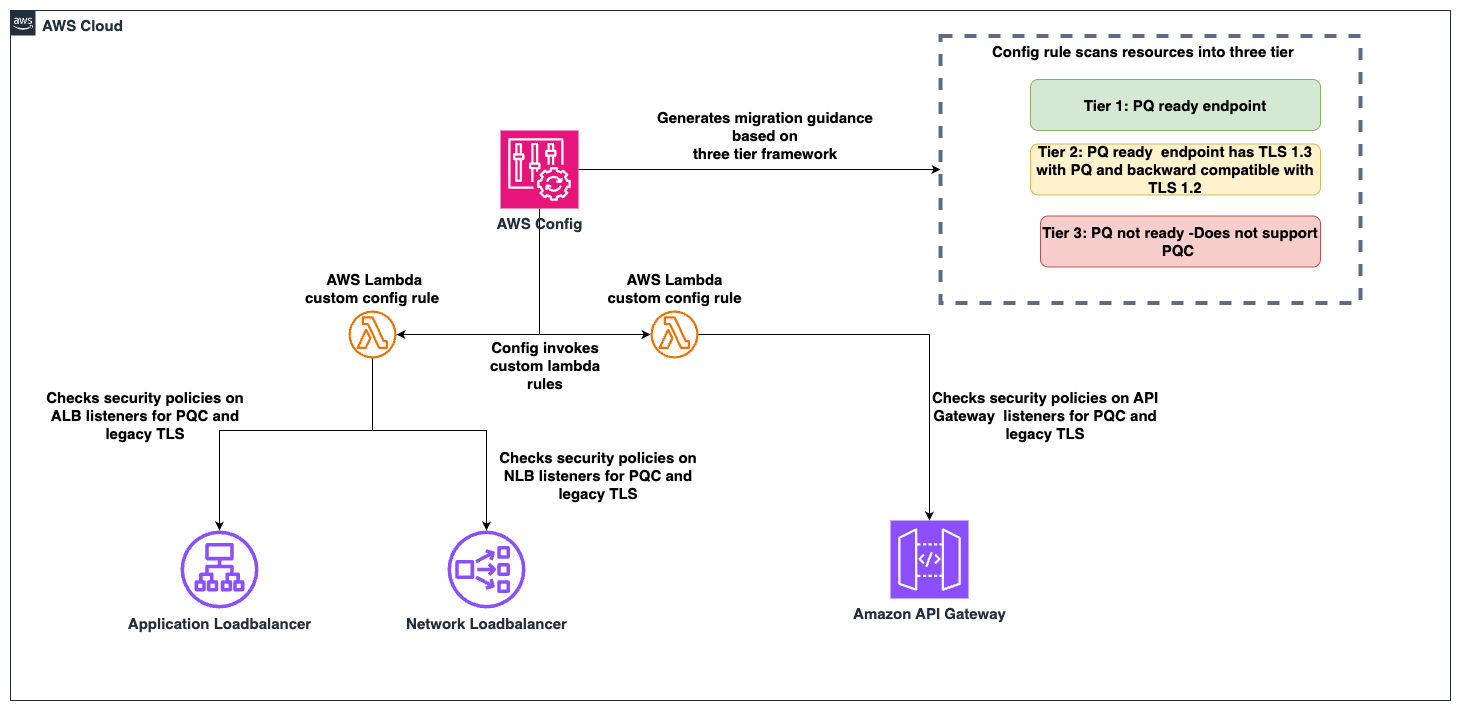


Automating post-quantum cryptography readiness using AWS Config
Migrating your TLS endpoints to Post-quantum cryptography (PQC) starts with understanding your current TLS endpoint inventory and posture. This post introduces the PQC Readiness Scanner — an automated tool that inventories your Application Load Balancer (ALB), Network Load Balancer (NLB), and Amazon API Gateway endpoints and continuously monitors their TLS configurations for PQC readiness. The scanner classifies each endpoint into a three-tier framework that helps prioritize and plan PQC migration.
As quantum computing advances, you need to migrate to quantum-resistant cryptography to protect your data long-term. The PQC Readiness Scanner helps you identify which endpoints to migrate first and tracks your progress across accounts. For web traffic, PQC key exchange algorithms are negotiated only within TLS 1.3. This means quantum-resistant connections require endpoints that support TLS 1.3 and PQC key exchange.
Under the AWS Shared Responsibility Model, AWS secures the infrastructure and enables PQC support across its services. Customers are responsible for configuring their resources to use PQC-capable TLS policies. For AWS-terminated TLS connections—such as those on Application Load Balancer (ALB), Network Load Balancer (NLB), Amazon API Gateway, and Amazon CloudFront—customers choose the security policy (an AWS-managed configuration defining supported TLS protocol versions and cipher suites for a listener) that determines TLS version and cipher suite, key exchange, and authentication algorithm support.
The automated PQC Readiness Scanner for AWS-terminated TLS endpoints is built using AWS Config conformance packs. A conformance pack is a collection of AWS Config rules and remediation actions that can be deployed as a single entity in an account and a Region or across an organization in AWS Organizations.
Solution overview
The PQC Readiness Scanner deploys AWS Config rules using a conformance pack to evaluate the security policy on each endpoint. Based on the evaluation, each resource is classified into a three-tier readiness framework that prioritizes migration actions needed to achieve PQ-ready TLS.
The PQC Readiness Scanner performs two checks per resource:
- Does the endpoint use a PQ-ready security policy?
- Does the endpoint support legacy TLS 1.0 or 1.1?
Each check returns COMPLIANT or NON_COMPLIANT status with specific policy recommendations.
PQC requires endpoints to support TLS 1.3 and use PQC key exchange algorithms. The three-tier framework helps you interpret findings and prioritize fixes. The goal is to have TLS 1.3 with PQC key exchange enabled on the endpoints. However, achieving this requires maintaining backward compatibility with clients.
| Tier |
Readiness level |
TLS protocols |
PQC status |
Migration priority |
| Tier 1 |
PQ-ready (strongest posture) |
TLS 1.3 only with PQC key exchange |
PQ-ready |
None |
| Tier 2 |
PQ-ready (backward compatible) |
TLS 1.2 and 1.3 with PQC key exchange |
PQ-ready |
Low |
| Tier 3 |
Not PQ-ready |
No PQC key exchange |
Not PQ-ready |
High |
How to prioritize your migrations
- Tier 1 represents the strongest security using only TLS 1.3 with PQC key exchange. These resources already meet the target state.
- Tier 2 represents a backward-compatible PQ-ready configuration. Endpoints support both TLS 1.2 and TLS 1.3, with PQC key exchange negotiated on TLS 1.3 connections. Migration priority is low because these resources already provide quantum-resistant protection for clients that support TLS 1.3, while maintaining TLS 1.2 compatibility for legacy clients. Migrate to Tier 1 when client-side analysis confirms that the connecting clients support TLS 1.3 with PQC key exchange.
- Tier 3 covers resources that aren’t PQ-ready. This includes endpoints without TLS 1.3 support, endpoints with TLS 1.3 but without PQC key exchange policies. These resources require immediate attention.
Assessment scope
The scanner evaluates the following AWS edge services that terminate TLS connections on behalf of your applications.
- Edge services:
- Application Load Balancer (ALB), Network Load Balancer (NLB) listeners with HTTPS, TLS, and TCP SSL protocols are evaluated.
- API Gateway REST APIs are evaluated for AWS Regional and private endpoints along with API Gateway HTTP APIs (v2) and WebSocket APIs (v2).
- Excluded edge services:
- CloudFront distributions are excluded from the PQC readiness scope because TLS 1.3 with hybrid post-quantum key exchange is automatically enabled across existing CloudFront TLS security policies for viewer-to-edge connections. No customer action is required for inbound (viewer-facing) PQC on CloudFront.
- Recommended approach for Classic load balancer:
- For Classic Load Balancers, AWS recommends migrating to ALB or NLB. Classic Load Balancers don’t support TLS 1.3 or PQC key exchange and can’t be made PQ-ready.
How the solution works
AWS Config enables continuous monitoring and evaluation. Conformance packs enable organization-wide deployment. AWS Lambda is a serverless compute service that runs code to perform security policy evaluation based on the AWS Config rules. AWS Serverless Application Model (AWS SAM) is an open source framework used for deploying the AWS Lambda functions.

Figure 1: PQC readiness solution architecture
The PQC Readiness Scanner conformance pack implements four custom AWS Config rules powered by two Lambda functions:
| Rule |
What it checks |
Non-compliant result |
| ELB PQ-ready |
Load balancer listeners use security policies that support TLS 1.3 with PQC key exchange algorithms |
Policy doesn’t include PQC support, the resource is marked with a recommended upgrade policy |
| ELB legacy TLS |
Load balancer listeners allow TLS 1.0 or 1.1 connections |
Legacy protocols are configured, the resource is flagged. |
| API Gateway PQ-ready |
API Gateway endpoints use security policies that support TLS 1.3 with PQC key exchange algorithms |
Policy doesn’t include PQC support, the resource is marked with a recommended upgrade policy |
| API Gateway legacy TLS |
API Gateway endpoints allow TLS 1.0 or 1.1 |
Legacy protocols are configured, the resource is flagged. |
Prerequisites
Before deploying the solution, you need:
- AWS Command Line Interface (AWS CLI) configured with appropriate permissions
aws configure aws sts get-caller-identity # Verify - Python 3.12 installed. The Lambda runtime requires this version.
python3 --version # Should show 3.12.x - AWS SAM CLI installed (Installation Guide)
pip install aws-sam-cli # Verify sam --version - AWS Config enabled in your target AWS Region.
- Configure it to record (This step is not needed if your accounts are recording all resources by default)
AWS::ElasticLoadBalancingV2::LoadBalancerAWS::ApiGateway::RestApiAWS::ApiGatewayV2::Apiresource types.
- Enable via AWS Config Console → Recorder → Recording Strategy → Select specific resource types (Follow the steps in manual setup for AWS Config recording strategy for specific resource types)
- Configure it to record (This step is not needed if your accounts are recording all resources by default)
Steps to deploy the PQC Readiness Scanner
Deploy the PQC Readiness Config Scanner in three phases. Complete deployment commands and configuration details are available in the GitHub repository. The Lambda functions must be deployed first because the conformance pack references their ARNs as parameters. See the GitHub repository for details.
Deploy to single account:
- Clone and Build:
git clone https://github.com/aws-samples/sample-PQC-Readiness-using-AWS-Config.git cd sample-PQC-Readiness-using-AWS-Config/installation sam build - Deploy to One or More Regions:
# Make script executable (first time only)
chmod +x deploy-per-regions.sh

# Deploy to a single region
./deploy-per-regions.sh us-east-1

# Deploy to multiple regions
./deploy-per-regions.sh us-east-1 us-west-2 eu-west-1
Figure 2: Type y and continue if you have enabled AWS Config recording for these resources or its by default recording all resources.
- The script automatically:
- Deploys Lambda functions via SAM
- Deploys conformance pack (creates Config rules)
- Verifies deployment success
- Provides clear status messages
The deployment creates two Lambda functions that perform PQ-ready and legacy TLS checks. It provisions IAM roles with least-privilege permissions for ELB, ALB, NLB, and API Gateway describe operations. Lambda permissions allow AWS Config to invoke the functions.
Figure 3: Example screen-print of what a successful deployment looks like.
Multi-account deployment (Organizations):
For organization-wide deployment across multiple AWS accounts, use CloudFormation StackSets to deploy Lambda functions to each account.
Important Constraint: AWS Config CUSTOM_LAMBDA rules require the Lambda function to exist in the same account as the Config rule. You cannot use a centralized Lambda in one account to evaluate resources in other accounts.
Prerequisite: Shared S3 Bucket
Before packaging, create an S3 bucket accessible by each target account in your organization. This bucket will host the Lambda deployment artifacts that CloudFormation StackSets pulls into each member account.
# Create the shared S3 bucket (run from management/central account)
aws s3 mb s3://<your-org-shared-bucket> --region us-east-1
Grant read access to the target accounts using one of the following options:
aws s3api put-bucket-policy \
  --bucket <your-org-shared-bucket> \
  --policy '{
    "Statement": [
      {
        "Sid": "BucketOwnerFullAccess",
        "Effect": "Allow",
        "Principal": {
          "AWS": "arn:aws:iam::<bucket-owner-account-id>:root"
        },
        "Action": "s3:*",
        "Resource": [
          "arn:aws:s3:::<your-org-shared-bucket>",
          "arn:aws:s3:::<your-org-shared-bucket>/*"
        ]
      },
      {
        "Sid": "CrossAccountReadAccess",
        "Effect": "Allow",
        "Principal": {
          "AWS": [
            "arn:aws:iam::<account-id-1>:root",
            "arn:aws:iam::<account-id-2>:root"
          ]
        },
        "Action": ["s3:GetObject", "s3:ListBucket"],
        "Resource": [
          "arn:aws:s3:::<your-org-shared-bucket>",
          "arn:aws:s3:::<your-org-shared-bucket>/*"
        ]
      }
    ]
  }'
Replace <account IDs> with the AWS account IDs where StackSets will deploy the Lambda functions.
Note: The bucket must be in the same region as the StackSet deployment regions. For multi-region deployments, create one bucket per region and run
sam packageseparately for each.
Step 1: Build and Upload Lambda Packages to S3
Run the packaging script from the installation/ directory:
cd installation

# Make script executable (first time only)
chmod +x deploy-stacksets.sh

# Build, package, upload to S3, and generate resolved template
./deploy-stacksets.sh <your-org-shared-bucket>
This script automatically:
- Builds Lambda functions using SAM
- Creates ZIP packages
- Uploads ZIPs to the shared S3 bucket
- Generates
packaged-template.yamlwith S3 values baked in (no parameters needed at deploy time)
Figure 4: Sample script output of successful upload of the lambda packages to S3 bucket
Step 2: Deploy Lambda Functions via StackSets
Run the following from the management account (or delegated admin account):
# Create StackSet (--region sets the StackSet "home region" where it is managed)
aws cloudformation create-stack-set \
  --stack-set-name pqc-readiness-lambda-functions \
  --template-body file://packaged-template.yaml \
  --capabilities CAPABILITY_IAM \
  --permission-model SERVICE_MANAGED \
  --auto-deployment Enabled=true,RetainStacksOnAccountRemoval=false \
  --region us-east-1

# Deploy stack instances to member accounts
# --regions = target regions where Lambda functions are deployed in member accounts
# --region  = must match the StackSet home region above
aws cloudformation create-stack-instances \
  --stack-set-name pqc-readiness-lambda-functions \
  --deployment-targets OrganizationalUnitIds=ou-xxxx-xxxxxxxx \
  --regions us-east-1 \
  --region us-east-1
Important — StackSet home region vs deployment regions:
--region(on each CLI command) = the StackSet home region where the StackSet resource lives. Subsequent operations (describe, update, delete) must specify this same region.--regions(oncreate-stack-instances) = the deployment target region(s) where stack instances are created in member accounts.- These are independent values. Specify
--regionexplicitly to avoid accidental deployment to your CLI’s default region.
Note:
SERVICE_MANAGEDStackSets must be created from the management or delegated admin account. The management account itself is excluded from stack instance deployments — usedeploy-per-regions.shseparately if you need the scanner in the management account.
Step 3: Deploy Organization Conformance Pack
aws configservice put-organization-conformance-pack \
  --organization-conformance-pack-name pqc-legacy-tls-compliance \
  --template-body file://conformance-packs/pqc-legacy-tls-conformance-pack.yaml
This creates Config rules in each member account that reference their local Lambda functions.
Migration guidance and prioritization
The three-tier system provides PQC migration priorities:
High priority – Tier 3 (not PQ-ready):
- Target: Resources without PQC support. This includes endpoints not using PQ-ready security policies, endpoints that still allow TLS 1.0 or 1.1.
- Action: Upgrade to a PQ-ready policy containing PQ in its name, such as those ending with
-PQ-2025-09(see Elastic Load Balancing security policies documentation for the full list). - Important: Before upgrading to a PQ-ready policy, audit your client TLS versions. PQ-ready policies require TLS 1.3 support; legacy clients that only support TLS 1.2 or earlier will fail to negotiate a connection. Start with a Tier 2 backward-compatible policy (which supports both TLS 1.2 and 1.3 with PQC), monitor connection logs for TLS negotiation failures, and only move to a Tier 1 TLS 1.3-only policy after confirming that your clients support TLS 1.3 with PQC key exchange.
- Risk: Endpoints don’t support post-quantum cryptography for data in transit. Legacy TLS protocols are vulnerable to current cryptographic attacks.
Low priority – Tier 2 (PQ-ready, backward compatible):
- Target: Resources using TLS 1.3 + PQ-ready policies that also support TLS 1.2 for backward compatibility.
- Action: Consider TLS 1.3-only policies when client compatibility analysis confirms connecting clients support TLS 1.3.
- Risk: Minimal. These resources already support PQ-TLS with TLS 1.3 connections. TLS 1.2 and earlier fallback maintains backward compatibility, which might indicate some clients aren’t negotiating in PQ-TLS. Remediation is to monitor logs, identify the volume of these connections and clients and plan migration for these clients to use TLS 1.3 with PQ-TLS.
No action – Tier 1 (PQ-ready, optimal):
- Target: Resources using TLS 1.3 only with PQC key exchange: These resources meet the target state. No migration needed.
Viewing the results
In each member account, navigate to AWS Config Console in the deployed region.
Conformance Pack View
Go to AWS Config → Conformance packs and look for:
OrgConformsPack-pqc-legacy-tls-compliance-
Note: Organization conformance packs are prefixed with OrgConformsPack- and have a random suffix appended (e.g., OrgConformsPack-pqc-legacy-tls-compliance-gyv22je0).
Figure 5: PQC Conformance Pack Compliance Score is the percentage of the number of compliant rule-resource
Click the conformance pack to see an overall compliance summary across all 4 rules.
Individual Rules View
Go to AWS Config → Rules and find 4 rules with prefix pqc-:
pqc-elb-pqc-compliance-conformance-pack-pqc-elb-legacy-tls-conformance-pack-pqc-apigateway-pqc-compliance-conformance-pack-pqc-apigateway-legacy-tls-conformance-pack-
Click any rule to view:
- Compliant vs non-compliant resource counts
- Detailed annotations for each resource
- Resource ARNs and current security policy configurations
Figure 6: Visibility into Config rules status inside the conformance pack
Figure 7: Sample image of the config rule findings and annotation describing the migration guidance based on 3-tier classification.
Conclusion
After deploying the PQC Readiness Scanner, you gain visibility into TLS posture across AWS edge services, which reduces manual configuration reviews. The tier system provides specific upgrade recommendations so teams can understand next steps without cryptographic expertise. The scanner automatically detects configuration changes to help new deployments maintain readiness standards. Built-in AWS Config reporting supports audit requirements and demonstrates measurable progress toward PQC readiness.
Deploy the PQC Readiness Scanner and review your results with PQC Readiness Scanner. Start migration with high priority Tier 3 resources and monitor progress across your accounts using AWS Config aggregators.
Additional resources
- GitHub repository: PQC Readiness Config Scanner
- AWS Config documentation: Custom Rules with Lambda
- AWS SAM documentation: Serverless Application Model
- PQC migration planning: NIST Post-Quantum Cryptography Standards
- PQC migration planning: AWS post-quantum cryptography migration plan
If you have feedback about this post, submit comments in the Comments section below. If you have questions about this post, start a new thread on AWS Config re:Post or contact AWS Support.