Reading view

Microsoft Office zero-day lets malicious documents slip past security checks

Microsoft issued an emergency patch for a high-severity zero-day vulnerability in Office that allows attackers to bypass document security checks and is being exploited in the wild via malicious files.

Microsoft pushed the emergency patch for the zero‑day, tracked as CVE-2026-21509, and classified it as a “Microsoft Office Security Feature Bypass Vulnerability” with a CVSS score of 7.8 out of 10.

The flaw allows attackers to bypass Object Linking and Embedding (OLE) mitigations that are designed to block unsafe COM/OLE controls inside Office documents. This means a malicious attachment could infect a PC despite built-in protections.

In a real-life scenario, an attacker creates a fake Word, Excel, or PowerPoint file containing hidden “mini‑programs” or special objects. They can run code and do other things on the affected computer. Normally, Office has safety checks that would block those mini-programs because they’re risky.

However, the vulnerability allows the attacker to tweak the file’s structure and hidden information in a way that tricks Office into thinking the dangerous mini‑program inside the document is harmless. As a result, Office skips the usual security checks and allows the hidden code to run.

As code to test the bypass is publicly available, increasing the risk of exploitation, users are under urgent advice to apply the patch.
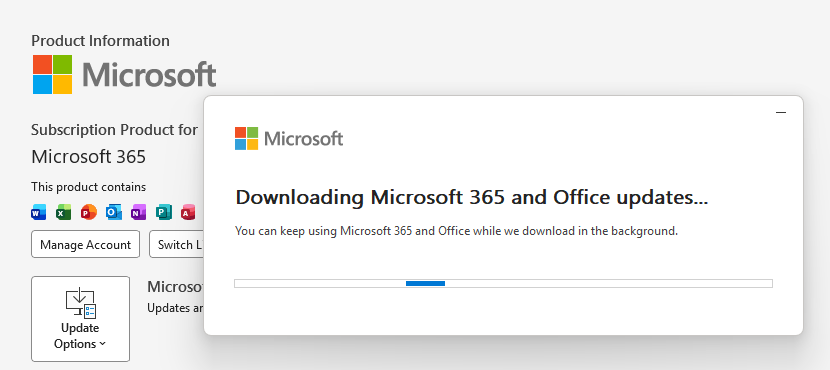
Updating Microsoft 365 and Office

How to protect your system

What you need to do depends on which version of Office you’re using.

The affected products include Microsoft Office 2016, 2019, LTSC 2021, LTSC 2024, and Microsoft 365 Apps (both 32‑bit and 64‑bit).

Office 2021 and later are protected via a server‑side change once Office is restarted. To apply it, close all Office apps and restart them.

Office 2016 and 2019 require a manual update. Run Windows Update with the option to update other Microsoft products turned on.

If you’re running build 16.0.10417.20095 or higher, no action is required. You can check your build number by opening any Office app, going to your account page, and selecting About for whichever application you have open. Make sure the build number at the top reads 16.0.10417.20095 or higher.

What always helps:

  • Don’t open unsolicited attachments without verifying them with a trusted sender.
  • Treat all unexpected documents, especially those asking to “enable content” or “enable editing,” as suspicious.
  • Keep macros disabled by default and only allow signed macros from trusted publishers.
  • Use an up-to-date real-time anti-malware solution.
  • Keep your operating system and software fully up to date.

We don’t just report on threats—we remove them

Cybersecurity risks should never spread beyond a headline. Keep threats off your devices by downloading Malwarebytes today.

  •  

Microsoft Office zero-day lets malicious documents slip past security checks

Microsoft issued an emergency patch for a high-severity zero-day vulnerability in Office that allows attackers to bypass document security checks and is being exploited in the wild via malicious files.

Microsoft pushed the emergency patch for the zero‑day, tracked as CVE-2026-21509, and classified it as a “Microsoft Office Security Feature Bypass Vulnerability” with a CVSS score of 7.8 out of 10.

The flaw allows attackers to bypass Object Linking and Embedding (OLE) mitigations that are designed to block unsafe COM/OLE controls inside Office documents. This means a malicious attachment could infect a PC despite built-in protections.

In a real-life scenario, an attacker creates a fake Word, Excel, or PowerPoint file containing hidden “mini‑programs” or special objects. They can run code and do other things on the affected computer. Normally, Office has safety checks that would block those mini-programs because they’re risky.

However, the vulnerability allows the attacker to tweak the file’s structure and hidden information in a way that tricks Office into thinking the dangerous mini‑program inside the document is harmless. As a result, Office skips the usual security checks and allows the hidden code to run.

As code to test the bypass is publicly available, increasing the risk of exploitation, users are under urgent advice to apply the patch.

Updating Microsoft 365 and Office

How to protect your system

What you need to do depends on which version of Office you’re using.

The affected products include Microsoft Office 2016, 2019, LTSC 2021, LTSC 2024, and Microsoft 365 Apps (both 32‑bit and 64‑bit).

Office 2021 and later are protected via a server‑side change once Office is restarted. To apply it, close all Office apps and restart them.

Office 2016 and 2019 require a manual update. Run Windows Update with the option to update other Microsoft products turned on.

If you’re running build 16.0.10417.20095 or higher, no action is required. You can check your build number by opening any Office app, going to your account page, and selecting About for whichever application you have open. Make sure the build number at the top reads 16.0.10417.20095 or higher.

What always helps:

  • Don’t open unsolicited attachments without verifying them with a trusted sender.
  • Treat all unexpected documents, especially those asking to “enable content” or “enable editing,” as suspicious.
  • Keep macros disabled by default and only allow signed macros from trusted publishers.
  • Use an up-to-date real-time anti-malware solution.
  • Keep your operating system and software fully up to date.

We don’t just report on threats—we remove them

Cybersecurity risks should never spread beyond a headline. Keep threats off your devices by downloading Malwarebytes today.
  •  

RedVDS Cybercrime Service Disrupted by Microsoft and Law Enforcement

RedVDS enables threat actors to set up servers that can be used for phishing, BEC attacks, account takeover, and fraud.

The post RedVDS Cybercrime Service Disrupted by Microsoft and Law Enforcement appeared first on SecurityWeek.

  •  

Deze gevaarlijke malware is ontdekt op 400.000 Windows-computers

Microsoft heeft het netwerk achter de gevreesde Lumma- malware ontmanteld. Dat gebeurde in samenwerking met autoriteiten in meerdere landen. Cybercriminelen gebruiken de malware om bijvoorbeeld wachtwoorden en cryptowallets van Windows -gebruikers te stelen.

  •  

Nieuwe AI-agents van Microsoft kunnen autonoom taken rond beveiliging uitvoeren

Microsoft heeft nieuwe beveiligingsfuncties aangekondigd van zijn AI -assistent Copilot. Elf zogeheten AI-agents kunnen helpen bij gegevensbeveiliging en het tegengaan van zaken als phishing , identiteitsdiefstal en datalekken.

  •  

Dynamic Device Code Phishing 

rvrsh3ll //  Introduction  This blog post is intended to give a light overview of device codes, access tokens, and refresh tokens. Here, I focus on the technical how-to for standing […]

The post Dynamic Device Code Phishing  appeared first on Black Hills Information Security, Inc..

  •  

Rainy Day Windows Command Research Results

Sally Vandeven // We have all heard people talk about how much cooler Linux is than Windows, so much easier to use, etc. Well, they are not necessarily wrong… but we […]

The post Rainy Day Windows Command Research Results appeared first on Black Hills Information Security, Inc..

  •  

PODCAST: Hacker Tools, Compliments of Microsoft

Sally Vandeven & David Fletcher // This is the podcast version of Sally & David’s webcast. For the whole webcast see our webcast post. Links that are mentioned in this […]

The post PODCAST: Hacker Tools, Compliments of Microsoft appeared first on Black Hills Information Security, Inc..

💾

  •  

WEBCAST: Hacker Tools, Compliments of Microsoft

David Fletcher & Sally Vandeven// Join David “Fletch” and Sally as they explore the cornucopia of wonderful, free tools in the SysInternals Suite that conveniently are signed by Microsoft and […]

The post WEBCAST: Hacker Tools, Compliments of Microsoft appeared first on Black Hills Information Security, Inc..

  •  

Hide Payload in MS Office Document Properties

Carrie Roberts* // Can you think of a reason why you might want to put a lengthy comment into the properties of an MS Office document? If you can, then […]

The post Hide Payload in MS Office Document Properties appeared first on Black Hills Information Security, Inc..

  •  

WEBCAST: Wrangling Internal Network Vulnerabilities

Jordan Drysdale & Kent Ickler // In this webcast, we demonstrate some standard methodologies utilized during an internal network review. We also discuss various tools used to test network defenses […]

The post WEBCAST: Wrangling Internal Network Vulnerabilities appeared first on Black Hills Information Security, Inc..

  •  

Abusing Exchange Mailbox Permissions with MailSniper

Beau Bullock // Overview Microsoft Exchange users have the power to grant other users various levels of access to their mailbox folders. For example, a user can grant other users […]

The post Abusing Exchange Mailbox Permissions with MailSniper appeared first on Black Hills Information Security, Inc..

  •  

Bugging Microsoft Files: Part 3 – Clearing Metadata

Ethan Robish // In my last two posts I showed how to insert tracking bugs in both .docx (Part 1) and .xlsx files (Part 2).  But don’t let all that effort go […]

The post Bugging Microsoft Files: Part 3 – Clearing Metadata appeared first on Black Hills Information Security, Inc..

  •  

Bugging Microsoft Files: Part 1 – Docx Files using Microsoft Word

Ethan Robish // If you’re familiar with ADHD and Web Word Bugs, you likely already know the method to create web tracking software using .html files renamed as .doc files. […]

The post Bugging Microsoft Files: Part 1 – Docx Files using Microsoft Word appeared first on Black Hills Information Security, Inc..

  •  

Bypassing Two-Factor Authentication on OWA & Office365 Portals

Beau Bullock // Full Disclosure: Black Hills Information Security believes in responsible disclosure of vulnerabilities. This vulnerability was reported to Microsoft on September 28th, 2016. As of the publication date of […]

The post Bypassing Two-Factor Authentication on OWA & Office365 Portals appeared first on Black Hills Information Security, Inc..

  •  

Lawrence’s List 081916

Lawrence Hoffman // So Microsoft is open sourcing PowerShell and putting it on Linux. Realistically Linux already has a full suite of administrative tools and some very powerful scripting languages […]

The post Lawrence’s List 081916 appeared first on Black Hills Information Security, Inc..

  •  
❌