
Normal view

March 2026 Patch Tuesday fixes two zero-day vulnerabilities

11 March 2026 at 11:47

Microsoft releases important security updates on the second Tuesday of every month, known as Patch Tuesday. This month’s update fixes 79 Microsoft CVEs including two zero-day vulnerabilities.

Microsoft defines a zero-day as “a flaw in software for which no official patch or security update is available yet.” So, since the patch is now available, those two are no longer zero-days. There is also no reason to believe they were ever actively exploited.

But let’s have a look at the possible consequences if you don’t install the update.

The vulnerability tracked as CVE-2026-21262 (CVSS score 8.8 out of 10) is a bug in Microsoft SQL Server that lets a logged-in user quietly climb the privilege ladder and potentially become a full database administrator (sysadmin). With that level of control, they can read, change, or delete data, create new accounts, and tamper with database configurations or jobs. Where SQL Server is supposed to check what each user is allowed to do, in this case it can be tricked into granting more power than intended.

There is no user interaction required once the attacker has that foothold: exploitation can happen over the network using crafted SQL requests that abuse the flawed permission checks. In a typical real‑world scenario, this bug would be the second act in an attack chain: first get in with low privileges, then use CVE-2026-21262 to quietly promote yourself to database king and start rewriting the script.

CVE-2026-26127 (CVSS score 7.5 out of 10) is a bug in Microsoft’s .NET platform that lets an attacker remotely crash .NET applications, effectively taking them offline for a while. The flaw lives in Microsoft .NET 9.0 and 10.0, across Windows, macOS, and Linux, in the .NET runtime or libraries, not in a specific app. In other words, it’s a bug in the engine that runs .NET code, so any app created with affected .NET versions could be at risk until patched.

The main outcome is denial of service: an attacker can cause targeted .NET processes to crash or become unstable, leading to downtime or degraded performance. For a public‑facing web API, a payment service, or any line‑of‑business app built on .NET, this can mean real‑world outages and angry users while services are repeatedly knocked over.

Vulnerabilities affecting Microsoft Office users are two remote code execution flaws in Microsoft Office (CVE-2026-26110 and CVE-2026-26113) which can both be exploited via the preview pane, and a Microsoft Excel information disclosure flaw (CVE-2026-26144), which could be used to exfiltrate data via Microsoft Copilot. Office vulnerabilities appear regularly in Patch Tuesday releases, and in this case none have been reported as actively exploited.

How to apply fixes and check if you’re protected

These updates fix security problems and keep your Windows PC protected. Here’s how to make sure you’re up to date:

1. Open Settings

  • Click the Start button (the Windows logo at the bottom left of your screen).
  • Click on Settings (it looks like a little gear).

2. Go to Windows Update

  • In the Settings window, select Windows Update (usually at the bottom of the menu on the left).

3. Check for updates

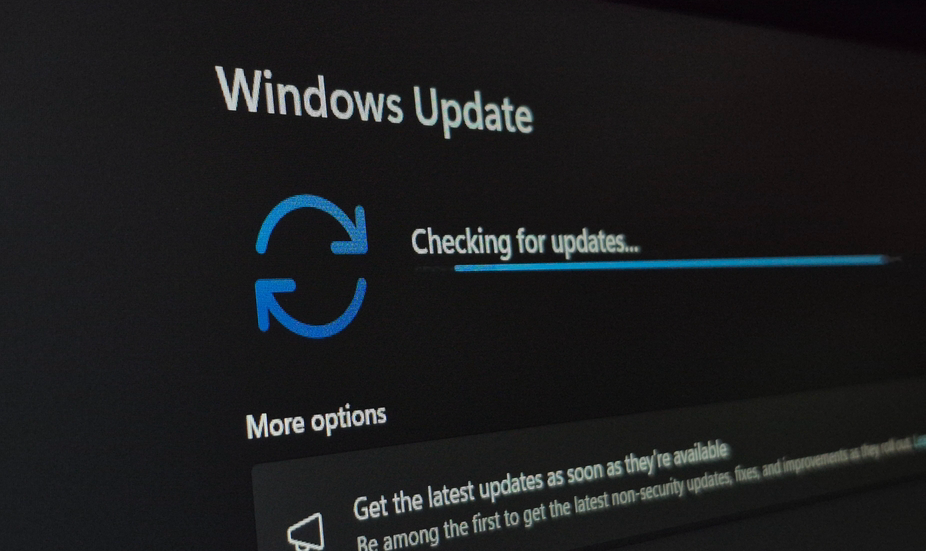
  • Click the button that says Check for updates.
  • Windows will search for the latest Patch Tuesday updates.
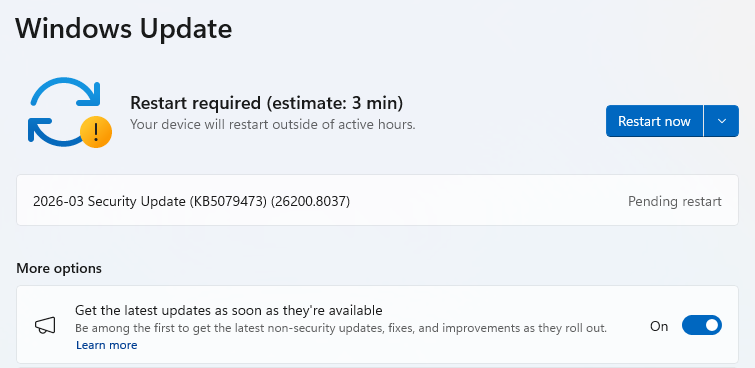
  • If you have selected to get the latest updates as soon as they’re available, you may see this under More options.
  • In which case you may see a Restart required message. Restart your system and the update will complete.
    Restart now to apply patches
  • If not, continue with the steps below.

4. Download and Install

  • If updates are found, they’ll start downloading right away. Once complete, you’ll see a button that says Install or Restart now.
  • Click Install if needed and follow any prompts. Your computer will usually need a restart to finish the update. If it does, click Restart now.
    Windows up to date

5. Double-check you’re up to date

  • After restarting, go back to Windows Update and check again. If it says You’re up to date, you’re all set!

We don’t just report on threats—we remove them

Cybersecurity risks should never spread beyond a headline. Keep threats off your devices by downloading Malwarebytes today.
March 2026 Patch Tuesday fixes two zero-day vulnerabilities

11 March 2026 at 11:47

Microsoft releases important security updates on the second Tuesday of every month, known as Patch Tuesday. This month’s update fixes 79 Microsoft CVEs including two zero-day vulnerabilities.

Microsoft defines a zero-day as “a flaw in software for which no official patch or security update is available yet.” So, since the patch is now available, those two are no longer zero-days. There is also no reason to believe they were ever actively exploited.

But let’s have a look at the possible consequences if you don’t install the update.

The vulnerability tracked as CVE-2026-21262 (CVSS score 8.8 out of 10) is a bug in Microsoft SQL Server that lets a logged-in user quietly climb the privilege ladder and potentially become a full database administrator (sysadmin). With that level of control, they can read, change, or delete data, create new accounts, and tamper with database configurations or jobs. Where SQL Server is supposed to check what each user is allowed to do, in this case it can be tricked into granting more power than intended.

There is no user interaction required once the attacker has that foothold: exploitation can happen over the network using crafted SQL requests that abuse the flawed permission checks. In a typical real‑world scenario, this bug would be the second act in an attack chain: first get in with low privileges, then use CVE-2026-21262 to quietly promote yourself to database king and start rewriting the script.

CVE-2026-26127 (CVSS score 7.5 out of 10) is a bug in Microsoft’s .NET platform that lets an attacker remotely crash .NET applications, effectively taking them offline for a while. The flaw lives in Microsoft .NET 9.0 and 10.0, across Windows, macOS, and Linux, in the .NET runtime or libraries, not in a specific app. In other words, it’s a bug in the engine that runs .NET code, so any app created with affected .NET versions could be at risk until patched.

The main outcome is denial of service: an attacker can cause targeted .NET processes to crash or become unstable, leading to downtime or degraded performance. For a public‑facing web API, a payment service, or any line‑of‑business app built on .NET, this can mean real‑world outages and angry users while services are repeatedly knocked over.

Vulnerabilities affecting Microsoft Office users are two remote code execution flaws in Microsoft Office (CVE-2026-26110 and CVE-2026-26113) which can both be exploited via the preview pane, and a Microsoft Excel information disclosure flaw (CVE-2026-26144), which could be used to exfiltrate data via Microsoft Copilot. Office vulnerabilities appear regularly in Patch Tuesday releases, and in this case none have been reported as actively exploited.

How to apply fixes and check if you’re protected

These updates fix security problems and keep your Windows PC protected. Here’s how to make sure you’re up to date:

1. Open Settings

  • Click the Start button (the Windows logo at the bottom left of your screen).
  • Click on Settings (it looks like a little gear).

2. Go to Windows Update

  • In the Settings window, select Windows Update (usually at the bottom of the menu on the left).

3. Check for updates

  • Click the button that says Check for updates.
  • Windows will search for the latest Patch Tuesday updates.
  • If you have selected to get the latest updates as soon as they’re available, you may see this under More options.
  • In which case you may see a Restart required message. Restart your system and the update will complete.
    Restart now to apply patches
  • If not, continue with the steps below.

4. Download and Install

  • If updates are found, they’ll start downloading right away. Once complete, you’ll see a button that says Install or Restart now.
  • Click Install if needed and follow any prompts. Your computer will usually need a restart to finish the update. If it does, click Restart now.
    Windows up to date

5. Double-check you’re up to date

  • After restarting, go back to Windows Update and check again. If it says You’re up to date, you’re all set!

We don’t just report on threats—we remove them

Cybersecurity risks should never spread beyond a headline. Keep threats off your devices by downloading Malwarebytes today.

Microsoft Patch Tuesday, March 2026 Edition

11 March 2026 at 01:32

Microsoft Corp. today pushed security updates to fix at least 77 vulnerabilities in its Windows operating systems and other software. There are no pressing “zero-day” flaws this month (compared to February’s five zero-day treat), but as usual some patches may deserve more rapid attention from organizations using Windows. Here are a few highlights from this month’s Patch Tuesday.

Image: Shutterstock, @nwz.

Two of the bugs Microsoft patched today were publicly disclosed previously. CVE-2026-21262 is a weakness that allows an attacker to elevate their privileges on SQL Server 2016 and later editions.

“This isn’t just any elevation of privilege vulnerability, either; the advisory notes that an authorized attacker can elevate privileges to sysadmin over a network,” Rapid7’s Adam Barnett said. “The CVSS v3 base score of 8.8 is just below the threshold for critical severity, since low-level privileges are required. It would be a courageous defender who shrugged and deferred the patches for this one.”

The other publicly disclosed flaw is CVE-2026-26127, a vulnerability in applications running on .NET. Barnett said the immediate impact of exploitation is likely limited to denial of service by triggering a crash, with the potential for other types of attacks during a service reboot.

It would hardly be a proper Patch Tuesday without at least one critical Microsoft Office exploit, and this month doesn’t disappoint. CVE-2026-26113 and CVE-2026-26110 are both remote code execution flaws that can be triggered just by viewing a booby-trapped message in the Preview Pane.

Satnam Narang at Tenable notes that just over half (55%) of all Patch Tuesday CVEs this month are privilege escalation bugs, and of those, a half dozen were rated “exploitation more likely” — across Windows Graphics Component, Windows Accessibility Infrastructure, Windows Kernel, Windows SMB Server and Winlogon. These include:

CVE-2026-24291: Incorrect permission assignments within the Windows Accessibility Infrastructure to reach SYSTEM (CVSS 7.8)
CVE-2026-24294: Improper authentication in the core SMB component (CVSS 7.8)
CVE-2026-24289: High-severity memory corruption and race condition flaw (CVSS 7.8)
CVE-2026-25187: Winlogon process weakness discovered by Google Project Zero (CVSS 7.8).

Ben McCarthy, lead cyber security engineer at Immersive, called attention to CVE-2026-21536, a critical remote code execution bug in a component called the Microsoft Devices Pricing Program. Microsoft has already resolved the issue on their end, and fixing it requires no action on the part of Windows users. But McCarthy says it’s notable as one of the first vulnerabilities identified by an AI agent and officially recognized with a CVE attributed to the Windows operating system. It was discovered by XBOW, a fully autonomous AI penetration testing agent.

XBOW has consistently ranked at or near the top of the Hacker One bug bounty leaderboard for the past year. McCarthy said CVE-2026-21536 demonstrates how AI agents can identify critical 9.8-rated vulnerabilities without access to source code.

“Although Microsoft has already patched and mitigated the vulnerability, it highlights a shift toward AI-driven discovery of complex vulnerabilities at increasing speed,” McCarthy said. “This development suggests AI-assisted vulnerability research will play a growing role in the security landscape.”

Microsoft earlier provided patches to address nine browser vulnerabilities, which are not included in the Patch Tuesday count above. In addition, Microsoft issued a crucial out-of-band (emergency) update on March 2 for Windows Server 2022 to address a certificate renewal issue with passwordless authentication technology Windows Hello for Business.

Separately, Adobe shipped updates to fix 80 vulnerabilities — some of them critical in severity — in a variety of products, including Acrobat and Adobe Commerce. Mozilla Firefox v. 148.0.2 resolves three high severity CVEs.

For a complete breakdown of all the patches Microsoft released today, check out the SANS Internet Storm Center’s Patch Tuesday post. Windows enterprise admins who wish to stay abreast of any news about problematic updates, AskWoody.com is always worth a visit. Please feel free to drop a comment below if you experience any issues apply this month’s patches.

❌