The University of New Mexico Health Sciences Center disclosed a cyberattack that caused system outages and disrupted patient care and academic activities. [...]
Launching the expanded AI Classroom Toolkit with Cyberlite during Global Media and Information Literacy Week
AI is opening new pathways to information, giving people faster access to answers, ideas, and knowledge. At the same time, it’s making it harder to know whether the content we see is authentic.
Companies that build AI have a responsibility to make it reliable and trustworthy, and that responsibility doesn’t shift to the people who use it. But AI is already shaping how people search, learn, and encounter information. Helping people navigate that reality means building media and AI literacy (MAIL): the judgment to decide whether and how to use AI and what information to trust. These skills are as foundational as AI safety, and educators are asking for help teaching them.
That’s why, during Global Media and Information Literacy Week, we’re launching the expanded AI Classroom Toolkit: Unlocking Generative AI Safely and Responsibly, created with the online safety organization Cyberlite. It’s part of Microsoft’s broader commitment to make sure AI strengthens human thinking rather than replaces it. It also reflects Microsoft’s focus on education and empowerment, a core pillar of our Safe Participation Framework.
What’s new in the AI Classroom Toolkit
The expanded toolkit adds a deeper focus on critical thinking, verification, and media and AI literacy, helping students judge AI outputs and make informed decisions about what to trust online. Together with the original modules, it’s now a single, classroom-ready resource that covers the core of AI safety and literacy. Realistic, scenario-based lessons and activities help students practice these skills in situations they may encounter online:
The Climate Campaign: Gina enters an online challenge to make a campaign for a cause she cares about and finds that some winning entries use AI to show events that never happened. Students sort a feed of real and AI-made posts and practice lateral reading. The lesson: whether a post was made with AI doesn’t decide whether it’s trustworthy. What it claims, and who is behind it, does.
The Helpful Bot: Alex creates an AI help bot inside his online game, then catches it inventing details and collecting players’ personal information. Students learn why AI can get things wrong, how to trace claims to reliable sources, and why they’re responsible for AI-generated content they act on or share.
What Kind of AI User Are You?: An interactive quiz, hosted by Cyberlite, helps students identify their AI habits, strengths, and potential blind spots, and gives them an AI Type to reflect on and discuss.
“When we created the first Classroom Toolkit: Unlocking Generative AI Safely and Responsibly with Microsoft in 2023, most of the conversation was about using AI safely. Today, the questions young people ask about AI have grown sharper and more personal, like what to believe online or how far to trust a chatbot’s answer,” said Michelle Yao, cofounder of Cyberlite.
The toolkit also reflects what young people in our co-design sessions with Cyberlite told us: they want to learn by doing, through games, real-life scenarios, and peer discussion. Teachers don’t need to be AI experts, and students don’t need an AI tool in hand to start.
That approach builds on the reach and results of the original toolkit. Since 2023, the first version has reached educators in 10 countries and 11 languages, including through government and partner learning platforms. In South Korea, 93% of participating educators reported improved knowledge and understanding of ethical issues, privacy, and bias related to AI.
“Our hope is that every student leaves a little surer of their own judgment, and that everyone feels more confident deciding how AI fits into their lives,” said Yao.
Literacy works alongside product design and policy
Education is one part of the equation. Our commitment to media and AI literacy also shows up in how we design products and the policies we support.
Last month, we set out five principles for AI in education, including “AI designed to support students’ learning, not replace their thinking.” We alsocommitted to enforceable privacy, safety, and transparency protections for qualifying educational AI products in US school districts. These protections help schools and families understand how these tools work and the controls available to them.
Media and AI literacy is now a global priority
The Organisation for Economic Co-operation and Development has released a framework for a MAIL assessment beginning in 2029. As part of its Programme for International Student Assessment (PISA), it will examine how students reflect on, analyze, and evaluate information, including AI-generated information. This week in New Delhi, UNESCO is also launching an AI extension of its “Think Critically, Click Wisely” global curriculum, which Microsoft advised on.
This growing global focus makes the need for support urgent—educators want help, and many aren’t getting it. In Microsoft’s 2026 AI in Education report, 53% of educators and 77% of students say they haven’t had AI training.
Closing this skills gap matters beyond the classroom. Healthy societies depend on a shared basis of facts, informed public debate, and confident civic participation. As authenticity gets harder to judge, there’s a risk that people start doubting everything, creating what the Digital Inquiry Group calls a “dangerous declaration of permanent uncertainty.” MAIL offers a way through. It builds the confidence to decide what to trust.
Media and AI literacy for every age
Across Microsoft, we’re helping people build these skills wherever they learn and find information:
In classrooms: Students debate whether to accept, question, or rework an AI tool’s answers in an AI and Critical Thinking lesson from The Economist Educational Foundation, supported by Microsoft. Available alongside other media literacy lessons in Microsoft Learning Zone, the lesson has reached students in 116 countries.
Through play: Millions of players have checked sources, spotted bias, and cracked cases of AI misuse in Minecraft Education’s The Investigators and Reed Smart: AI Detective.
For content creators: UNESCO, with Microsoft’s support, is developing resources to help creator associations train their members in MAIL and is testing them with creators in Nairobi this week.
For voters: Check. Recheck. Vote. helps people apply AI literacy to election information.
In our products: Search Progress, built with input from the Digital Inquiry Group, turns research assignments into source-checking practice in Microsoft Teams for Education.
What’s next
Through Microsoft Elevate for Educators and local partners, we’ll bring the AI Classroom Toolkit to new audiences, with more languages and localized content rolling out through 2027. We’ll keep evolving it as technology and educators’ needs change.
AI will keep changing how people find information and the content they encounter. Our goal is to help people meet that change with confident, informed judgment about the AI they use and the information they trust so they can fully take part in civic and democratic life.
Phishing is an attack in which someone impersonates a person or organization you trust, like your host, registrar, bank, or colleague, in order to steal information, redirect a payment, or talk you into an action that helps them. The message is the delivery vehicle, and the goal is always the next action you take.
If you run a website, you’re on both sides of this problem. Your hosting panel, domain registrar, WordPress admin, email, and payment accounts are all valuable targets, and if an attacker gets in through any of them, your site can quietly end up hosting phishing pages aimed at someone else’s customers.
The rapid diffusion of AI globally and the pace at which AI is developing put us at a societal crossroads. The choices we’re making now will determine who has access to AI and the opportunity it affords. There is perhaps no more important tool than our education systems for addressing the uneven diffusion of AI we’re seeing currently: national adoption runs above 70% in countries such as the United Arab Emirates and falls to low single digits across much of sub-Saharan Africa, close to a tenfold difference.
The way we teach AI and learn with it will have long-lasting impacts on jobs, the workforce, and our broader economy. Learning Curves: Rethinking Education from Classrooms to Careers in an AI-Driven World is a collection of research-driven essays that can help guide those choices. This book brings together the body of work from the second cohort of Senior Fellows from the Microsoft AI Economy Institute (AIEI), a flagship think tank that produces research and convenes experts to generate insights into how AI is reshaping work, education, and the broader economy.
In Learning Curves, researchers consider how AI is reshaping the earliest stages of learning and work, from K–12 classrooms and community and technical colleges to college‑to‑work transitions and entry‑level jobs, and what it will take for that transformation to widen opportunity rather than deepen divides across institutions, communities, and countries.
Below, I share a few of my own reflections that informed my contributions to Learning Curves, a collaborative effort that wouldn’t have been possible without the truly talented, diverse cohort of researchers who contributed to this book.
The good, the bad, and the ugly: Laying the foundation for AI in K–12 classrooms
Before delving into the specifics of how to incorporate AI in classrooms, we need to ask ourselves whether we’re teaching for knowledge, or for learning.
The book, the calculator, the personal computer, the internet, the search engine, and the smartphone all arrived in classrooms carrying real promise alongside the worry that they would hollow out young minds. Usually the truth landed somewhere in between, and where it landed depended less on the tool than on the choices the adults made about how to use it.
The fact is that the AI-native generation is already here, and its members are in classrooms around the world. More than half of US teenagers already use AI chatbots for schoolwork. I’ve personally seen the promise of AI as a force for good in education up close in my own classroom, where I teach a computer science class to elementary school students.
But of course, the good is only part of the story. We can’t shy away from the downsides of incorporating AI into classrooms. While AI can help with accessibility and individualized learning, it can also create over–reliance, contribute to student cheating, or prevent students from recognizing when information may be false.
The rapid deployment of AI in K–12 classrooms needs to come with a sober assessment of how that technology impacts all students. This assessment must go beyond the technology itself to encompass how students, teachers, parents, and society use AI.
AI literacy is only part of the solution
If classrooms are where students learn how to think, teachers are the conduit through which this learning happens. In Learning Curves, Joseph Orero, Senior Researcher in AI at Strathmore University’s School of Computing and Engineering Science, posits that teachers aren’t resistant to AI in classrooms; they just need proper training to help them adequately adapt and teach their students critical skills. His research contribution explores game-based learning with AI-enabled African languages.
AI usage and adoption worldwide are also dependent on accessibility. Another chapter of the book looks at barriers and opportunities in Arabic education and finds that the primary barrier teachers encountered when introducing AI writing assistants into classrooms was Arabic digital literacy, particularly students’ typing ability.
Researchers often circled around a similar theme: there is no one-size-fits-all approach to developing AI competency; instead, such an approach must be sensitive to local knowledge and contextualized teaching and learning practices. This means that teachers, in turn, must have training that makes sense for the unique contexts in which their students are learning.
Frank Nagle, now Microsoft’s Chief AI Economist, Sarah Rodriguez, Associate Professor of Engineering Education at Virginia Tech, and other researchers in Learning Curves make the case that, in many ways, nontraditional pathways such as apprenticeships and two-year-degree programs, particularly those that are virtual, are more nimble and thus better able to adapt their curricula to the rapidly changing field of AI.
AI Is taught in the classroom, but then what?
Education has never been about simply preparing people for the future of work so they can thrive in the labor market. When considered holistically, it is about teaching students not what to think but how to think. In our AI era, education is one of the core institutions through which the future of work will be built, distributed, and made more (or less) equitable. Successful AI integration remains human-centered by focusing on organizational change, durable human skills like empathy and judgment, strong employer partnerships, and learner needs.
As research from Laura Nuriski, Head of Program on the Future of Work at the Centre for European Policy Studies (CEPS), highlights, access to AI alone does not ensure successful integration. Technology transfer, data infrastructure, organizational readiness, and a human-centered approach to building and deploying AI are also key indicators of success.
Whether we’re talking about the classroom or the boardroom, it’s worth keeping in mind that AI tends to do the most good when it strengthens human capability and the most harm when it substitutes for it. That holds as true in a fourth-grade reading lesson as in a software team or a hospital ward.
The children in our schools deserve tools that serve their learning rather than stand in for it, and that is within our power to provide. Our most successful future with AI will be one that is human-centered, inclusive, and designed to help people thrive.
How 300 Academic Partnerships Are Helping Close the Cyber Skills Gap Check Point’s SecureAcademy has reached 300 academic partnerships across more than 80 countries, connecting educational institutions with industry-aligned cyber security training and resources. While the milestone reflects the program’s continued growth, it also highlights a broader shift: educational institutions are increasingly looking for ways to align cyber security education with the skills employers need today. Turning Classrooms into Career Pathways Organizations worldwide continue to face a shortage of cyber security professionals, while educational institutions are under pressure to keep pace with rapidly evolving technologies and threats. Through SecureAcademy, institutions […]
The internet is a vast and confusing place no matter your age. Trying to help youth engage with it safely and privately is a complicated topic that touches on many different skillsets and ideas. But just because it’s complicated doesn’t mean it’s impossible. We’ve launched our Online Privacy for Parents and Youth Surveillance Self-Defense guide in hopes to provide a framework for finding solutions that work for you.
EFF rolls out this crucial resource as state and local governments consider ill-advised laws that cut young people off from essential information and experiences. This particularly harms vulnerable youth and marginalized groups who often find safety in supportive online communities they can't access offline. Such laws also entail age gating, which compromises the privacy of all internet users and stifles young users’ ability to learn, grow, and express themselves.
Young people have unique needs and those needs change over time. Trying to protect from everything all the time is an exhausting process, but the security community has long had a solution for this: security planning (also called threat modeling). The idea is to provide a series of questions designed to help you focus on what’s truly important. When it comes to online privacy, this is as applicable for youth and parents as it is for anyone else.
We used a security plan as our foundation for this guide because deciding what is and isn’t important is the first step we should all take when assessing our privacy risks. But this isn’t a place for quick fixes, and every young person has their unique needs and considerations. There is no single tool or technology fix that can substitute for spending time learning, and then teaching a young person, how the internet works, how to use it, what sorts of harms exist, and how to navigate those harms.
Solutions are rarely about the tools or software you use. It’s about understanding the threats and concerns you have, and then determining what steps you can take to mitigate those risks. We hope our Online Privacy for Parents and Youth guide can help provide the outline to get the conversation started.
You load your site, or visit an API endpoint your app relies upon, and instead of a page you find a brief, unhelpful message: 401 Unauthorized. Sometimes a browser password box appears. Other times, a blank white page presents only that number. In either case, visitors are shut out, and if the error strikes your admin area, even you are left at the threshold.
The good news is that a 401 is one of the more honest HTTP responses.
You load your own site, and instead of your homepage you get a blank page with a line of text reading 500 Internal Server Error. No explanation, no stack trace, nothing to act on. For visitors, it looks like the site is simply gone, and for you it usually means the admin area is down too, so the one tool you’d normally reach for is unavailable.
The frustrating part is that a 500 is deliberately vague.
If you run a website, you’ve already met encryption even if you’ve never used the word. It’s the 🔒 padlock in the browser bar, the reason your host told you to stop using plain FTP, and the checkbox on your backup settings that says “encrypt archive.”
Encryption is one of the few security controls that works quietly and almost never needs your attention, which is exactly why it’s easy to misunderstand. Plenty of site owners install an SSL certificate, see the padlock appear, and assume the site is now “secure.” That’s the gap we want to close here.
The people and institutions closest to a community understand their needs best. Libraries, small businesses, nonprofits, and schools see firsthand where AI can create opportunity and where people need support to navigate change. At Microsoft, our role is to help these trusted institutions lead by providing practical resources, training, and clear safeguards that strengthen local capacity and put communities at the center of AI literacy and adoption.
Public libraries have served as trusted centers of community learning across the United States for generations. Today, we are announcing a new initiative with the Public Library Association, a division of the American Library Association, to expand resources and no-cost AI literacy and skills training for public library workers and their patrons.
This work delivers on the commitment we made earlier this year through our Community-First AI Infrastructure initiative: to expand access to AI learning and opportunity by investing directly in local training. We’re committed to neighborhood learning through libraries, free literacy training, and certification opportunities, age-appropriate learning in schools and colleges, and support for nonprofit and small-business workforces. This new library initiative is the latest example of our broader work to help trusted local institutions serve as entry points for AI learning, skills development, and opportunity. This program comes alongside small business accelerator programs in TechSpark, our new Elevate for Changemakers platform connecting nonprofits to resources, and our ongoing national and statewide work to bring safe and responsible AI to education.
Local libraries lead AI learning in their communities
The Public Library Association AI literacy initiative we are announcing today, Building AI Skills and Agency Through Libraries, is designed to build practical skills, critical awareness, and the judgment to use AI safely and appropriately. It will pair Microsoft’s AI skilling resources with PLA’s national network of expert practitioners to support library workers and community patrons as they navigate this rapidly evolving technology.
The initiative will expand practical resources and training for library workers, create opportunities to learn from one another through a Community of Practice, and offer free webinars and guidance to support their work with patrons.
Library workers help people navigate information, find learning resources, and make informed decisions for themselves and their families. Supporting those workers is a practical way to bring AI learning closer to people, while respecting the independence of the institutions they trust.
The approach reflects a broader view of AI literacy: people need more than instructions for using AI tools; they also need the knowledge and judgment to decide whether, when and how those tools should be used. The training will help library workers and patrons understand how AI works and expand their skills, while also evaluating potential risks, protecting personal and confidential information, critically evaluating AI-generated claims and sources, and better understanding considerations related to safety and bias.
Equipping trusted local institutions to lead responsible AI adoption
Last July, we launched Microsoft Elevate, a company-wide initiative that brings together our work to help people and institutions build the skills and capacity to navigate AI responsibly. Under the Elevate charter, each year, Microsoft supports nearly one million nonprofit organizations and education systems worldwide with technology, training, grants and discounts. Microsoft Elevate for Educators, our global community of over 100,000 teachers and school leaders, recently recognized our inaugural group of 20 Beacon Schools and School Systems that are leading examples of AI transformation in education, bringing together effective AI practices while keeping educators and students first. They are powerful examples of what happens when you combine committed educators, AI-powered technology, and intentional, no-cost staff training.
In Washington, our Elevate commitment has included a $3 million, two-year investment supporting 10 school districts and 10 community and technical colleges with grants, coaching, and communities of practice. To date, the initiative has reached 29,375 educators, with early pilots in Kennewick and Everett helping teachers explore practical uses of AI while keeping professional judgment at the center.
Skills and access must be matched by strong safeguards. In September, Microsoft joined the American Federation of Teachers to establish a national AI Safety & Privacy Standard for Schools, with enforceable protections for student and educator data, human oversight, and transparency for families. Beginning November 1, every US school district can request Microsoft to add these protections to a new or existing agreement, without waiting for renewal or renegotiation.
That same commitment extends to nonprofit staff and leaders. The Elevate for Changemakers program has already supported over 18,000 learners, helping them build practical AI skills, connect with peers, and earn recognition for turning learning into tangible outcomes for their organizations. And today we are expanding the program and introducing a new, connected experience that brings training, resources, and community together.
Together, these efforts reflect a simple principle: responsible adoption requires more than technology. Educators, nonprofit changemakers, and community leaders need time, training, trusted connections, practical support, and clear guardrails so they can decide when AI strengthens learning and, equally important, when it does not.
Investing in locally led economic opportunity across all 50 states
For nearly a decade, Microsoft has partnered with local nonprofits and small businesses across the U.S. through our TechSpark program.
Through Fellows grants, TechSpark pairs local expertise with Microsoft coaching and a national peer network to help nonprofits expand their impact in their local community and drive accelerated innovation for local small businesses. Today, Microsoft is announcing the new 2027 TechSpark Fellows across all 50 states and releasing the 2026 Fellows Impact Report showing what a locally led model can make possible.
YouTube Video
Over the last three years, the Fellows cumulatively report access to more than $298 million in community funding, 59,600 people trained and upskilled in AI literacy, and more than 1,500 nonprofit partners mobilized to advance their missions within their communities. These numbers tell an important story: no single organization can create lasting opportunity on its own, and local context matters.
In Virginia, Rosie Riveters Executive Director Brittany Greer is showing what it looks like to build the human capabilities that innovation requires. Through hands-on STEM experiences, students build, test, and troubleshoot to develop the critical thinking, persistence, and independent judgment they will need to use AI thoughtfully. Her work is the kind of learning these partnerships are designed to strengthen.
Community institutions know their neighbors, understand the barriers they face, and are best positioned to decide how new resources can serve them.
An ongoing journey
The thread connecting a library worker, a job seeker, a TechSpark Fellow, and a teacher is not a particular product. It is the ability to make informed decisions with support from people and institutions they trust. Our responsibility is to make that support more useful, accessible, and human-centered, while being candid about what we have yet to learn.
As we navigate the rapid pace of innovation in this AI era, our aim is not simply to bring AI into more places. It is to help people retain a stronger voice in what happens next, in their workplaces, their classrooms, and their communities.
You can find plenty of stories online from students in technical fields sharing their worries about school and their career path. One computer engineering student complained about the lack of hands-on experience, saying he was so used to learning theory that he had no idea how to apply it at work. Another student, a sophomore in mechanical engineering, worried that he hadn’t picked up any of the practical skills employers actually want, and joking that McDonald’s is the only place he’ll be able to get a job.
Students, especially those at technical universities, often don’t see the practical value in what they’re learning. As a result, many don’t know what to do next or how to find a job. Here’s a look at where that anxiety comes from, what steps can help overcome it, and why knowing the basics of cybersecurity can come in handy for anyone starting out in a technical field.
Where the anxiety comes from, and what to do about it
The most important thing to know about the fear of not living up to your potential is that it’s completely normal to feel it. American clinical psychologist, Meg Jay, in her book The Defining Decade: Why Your Twenties Matter — And How to Make the Most of Them Now, argues that the years between 20 and 30 are some of the toughest. A person not only runs into their first, often unsuccessful, work experiences and makes bad decisions (“many firsts and worsts”), but also feels unsure of themselves. Reasons may vary. For example, according to Harvard’s Making Caring Common project, 34% of young people aged 18–25 reported feeling lonely, while 58% said they felt their lives lacked “meaning or purpose”. Half of respondents said not knowing what to do with their lives was hurting their mental wellbeing.
That said, Meg Jay writes that this decade plays a key role, since it’s when people make 80% of their major life decisions. According to the psychologist, many young people believe they need to work out what to do with their lives before they can start taking action. Jay, however, disagrees with this approach. She offers the concept of identity capital: the combination of education, work experience, skills, and connections that makes young people valuable professionals. Even without full confidence in a career choice, taking small steps like applying for an internship or taking an extra course can help build a meaningful path for professional growth. On top of that, it’s important for young people to figure out what they enjoy doing, what they’re good at, what the world needs, and, of course, what people are willing to pay them for.
Which skills are sure to come in handy
The concept of identity capital is especially relevant for students in technical fields. According to the World Economic Forum, an average of 39% of workers’ current skills will be transformed or become outdated by 2030. That’s why one should not only stick to one’s chosen field of study, but also build skills in adjacent fields. The same report highlights fast-growing areas like AI, big data, computer literacy, and cybersecurity. Cybersecurity, among others, has its own advantages.
Experts note that the digital landscape is changing rapidly, and cybercriminals are taking advantage of this. Indeed, a recent study of ours found that more than half (56%) of internet users encountered scams or phishing over the past year, and the attacks themselves have become more frequent. In 2025, Kaspersky solutions detected an average of half-a-million new malicious filesper day, which is 7% more than the year before.
Human error remains a leading cause of security incidents. For this reason, employers want to make sure all their staff have at least a basic knowledge of cybersecurity: it lowers risk and reduces the cost of dealing with incidents. Knowing the basics of cybersecurity is becoming not just a competitive advantage, but also an integral part of training for professionals in every technical field.
For students, a basic understanding of cybersecurity opens the door to professional development in a wide range of consulting roles. Such professions are quite widespread — especially among young professionals with modest work experience. Against the backdrop of an acute shortage of cybersecurity professionals, these consulting services are in high demand, which is a good sign for graduates with some level of cybersecurity in their background.
The cybersecurity knowledge and practical skills of the specialists of the future are of great importance for their potential employers. For these businesses, a cyber-savvy workforce reduces the need for expensive third-party cybersecurity consultants. Even professionals who lack dedicated technical training but have reasonable digital literacy can significantly reduce the risks of security incidents — in particular in cases involving human error.
Pavel Laskov, Professor for Data and Application Security at the University of Liechtenstein
What’s more, the spread of digital resilience skills benefits not only employers, but also employees themselves: learning the basics of cybersecurity helps develop systems thinking and the ability to see the elements of a structure not as disconnected objects but as a unified whole. It also allows professionals to work across different roles and protect their personal and work data from scammers.
With that in mind, a logical step toward building your identity capital could be Kaspersky Academy’s free online course Cybersecurity. Entry Level. The course is designed for first and second-year students at colleges and universities. It helps them understand what cybersecurity is, what tools cybercriminals use, what fields and specialties information-security professionals work in, and what the future holds for the industry and those working in it.
The program was recently expanded with a new module, Security by Design, which covers information-security architecture and design of inherently secure systems.
Kaspersky’s leading experts cover every topic in the course in plain, easy-to-follow language with examples, so students get a comprehensive view of cybersecurity straight from practitioners. The course lasts one month, and students who pass the final test receive a Kaspersky Academy certificate.
The main goal of the course is to raise students’ awareness of cybersecurity, and teach them how to protect themselves against the most common types of cyber-incidents. During the course, students will gain knowledge and skills that will serve them well — no matter what field of study they choose.
The course is available as video lessons on the Kaspersky Academy learning platform. To get access to the course, submit a request on the program’s website providing your academic email address (with a university or college domain).
Educational institutions can easily integrate the course into their curriculum: it’s available in SCORM — a standard e-learning format — to institutions that join our Kaspersky Academy Alliance partner program.
Artificial intelligence has gone from a technological novelty to a tool so ordinary that kids in elementary school are already using it. Trying to ban children from using AI at this point makes about as much sense as it once did to ban search engines or Wikipedia.
Today we’re breaking down how chatbots actually work, and how to teach your kid to use AI as a study aid rather than a substitute for thinking for themselves
Explain to your child (and yourself) how AI works
Before explaining anything about artificial intelligence to your child, it helps to understand how it actually works and where its limits are.
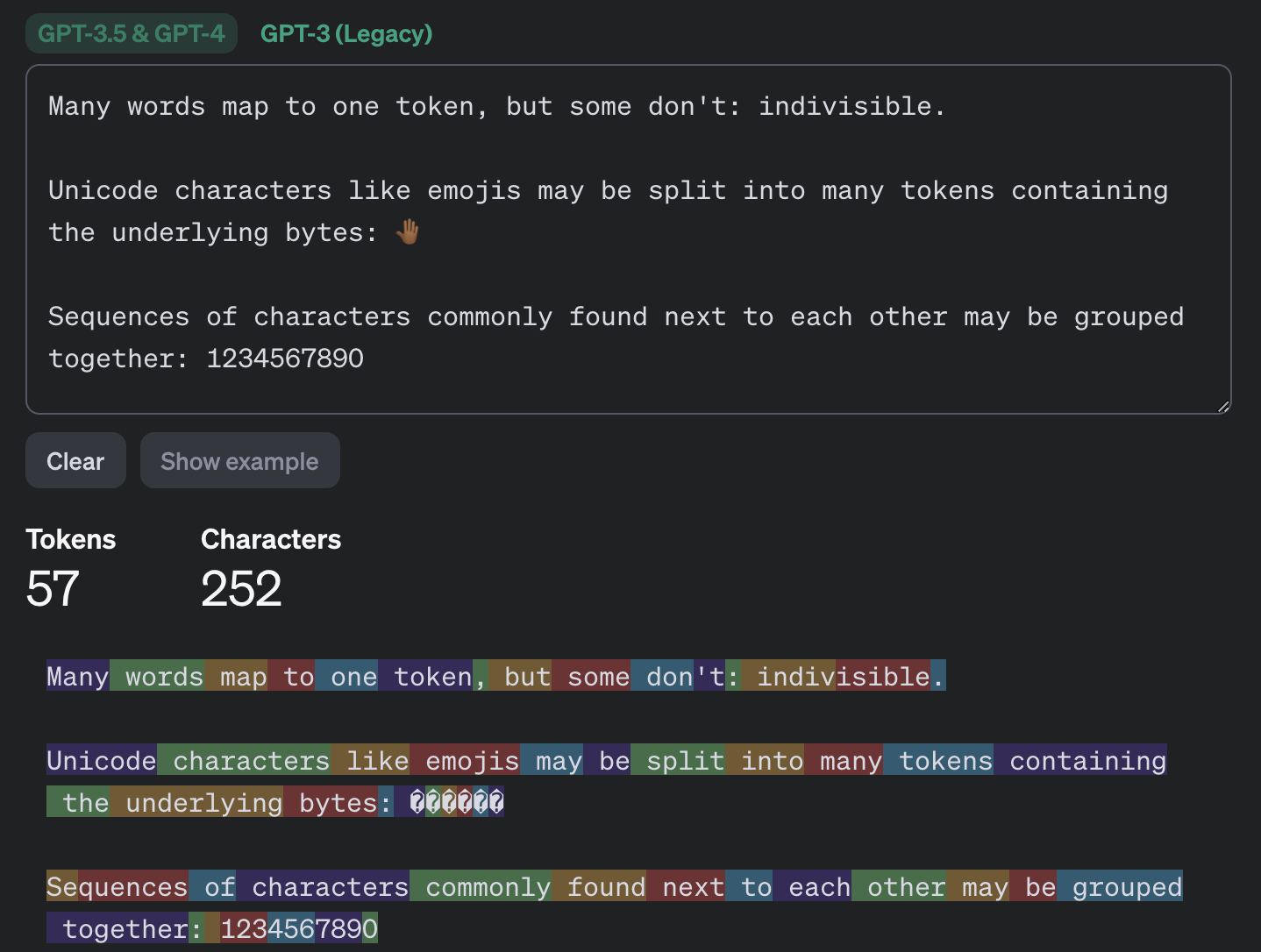
Most of the popular chatbots that kids (as well as adults) use are what’s known as large language models, or LLMs. To build such a model, researchers train it to spot patterns across huge amounts of text. The model breaks text down into small units called tokens (each token can be a sequence of words, a punctuation mark, a single word or character, or a whole sentence), then predicts which token is most likely to come next.
This example shows how the GPT-3.5 and GPT-4 models split messages into tokens. Source
The same thing happens when a chatbot converses with a person. A language model doesn’t actually reason on its own. It’s calculating which words and phrases are most likely to follow one another in order to produce a response that fits your query. That means chatbots will sometimes give incomplete or flat-out wrong answers, no matter how often they’re updated or retrained. A vivid example: just two years ago, popular chatbots confidently assured users that the word “strawberry” has two letters “r” instead of three. Mistakes like these are commonly known as hallucinations.
Many chatbots can also search the internet for information. In that case, the AI pulls in data from an outside source, but it still uses its own internal algorithms to put the answer together. And search results themselves can include outdated posts, advertising content, tabloids, and other questionable sources.
How to help your child use AI wisely
Talk to them about how AI can get things wrong
We’ve already seen that artificial intelligence isn’t immune to errors. Unfortunately, hallucinations aren’t the only issue. Even when a chatbot is working from accurate information, it can still present it in a misleading way by leaving something out, putting the emphasis in the wrong place, or drawing a questionable conclusion. Sometimes the result depends on factors a user would never think to consider when asking a question.
One surprising factor is simply what language you’re using. Most of the data that major models are trained on is in English, so these systems tend to perform better in English. The same AI model might answer a question correctly in English but get it wrong when asked the exact same thing in, say, Serbian. This gap shows up most in fields such as science, medicine, technology, and law, where there’s simply far more high-quality English-language material for the model to draw on.
Another quirk of chatbots is that they get worse as you feed them more information. Studies show that the more text and data a model has to work with, the harder it is for it to keep track of details, connect information from different parts of a conversation, and answer questions that require real depth of understanding. Therefore, uploading an entire book to a chatbot and asking detailed questions about it is a surefire way to trigger hallucinations.
It’s also worth questioning not just what the AI tells you, but the way you ask your questions in the first place. Chatbots often try to please the user, and will shape their answer to match the user’s apparent point of view. For example, the same chatbot might give opposite answers to “Why is the Earth overpopulated?” and “Why isn’t the Earth overpopulated?”, each time building its response around the assumption baked into the question. One recent study found that even the most advanced language models failed to challenge false premises in 26–42% of cases.
Let AI help with learning, not do the learning
Many a former student knows that copying others’ work is an art unto itself — one that takes exceptional skill and at least some engagement with the material (sometimes even a fair amount). These days, unfortunately, even that skill is at risk of disappearing: the temptation to copy an answer that took only a few seconds to generate is simply too strong. But chatbots are far from straight-A students themselves.
In one study, researchers had three popular chatbots sit a chemistry exam, and compared their scores to those of real students from 2009–2023. The students came out ahead. Chatbots will sometimes land on the correct answer, but arrive at it via a chain of flawed reasoning, so their answers could just as easily be wrong.
So it’s worth explaining to your child that having AI write essays from scratch, or solve equations without then double-checking them, is a dead end. On top of that, in a real job they’ll be judged on actual skills and knowledge, and chatbots won’t help them fake the expertise. What AI can genuinely help with, without getting in the way of learning, is explaining difficult topics and working through mistakes. Here are some examples:
If a topic is hard to make sense of
“Explain this topic in simple terms: {insert topic}”
“Explain this topic using a real-life example: {insert topic}“
“Here’s the part I don’t understand: {insert text}. Walk me through it step by step”
“Explain this topic in simple terms first, then in more technical terms: {insert topic}“
“Here’s a question: {insert question}. Don’t give me the answer. Ask me guiding questions so I can work it out myself”
Math and other exact sciences
“Give me a hint for the first step, but don’t solve the whole problem: {insert problem}“
“Look at my solution and tell me where I made a mistake, but don’t fix it for me: {insert problem and solution}“
“Come up with a similar problem for me to try: {insert problem}“
“Here’s my answer: {answer}. Ask me questions so I can check whether I solved it correctly”
“Explain why this formula applies here: {insert problem}“
Essays and written assignments
“Ask me five questions on this topic so I can come up with my own thesis and arguments: {insert topic}“
“Here’s a draft of my essay. Try to find gaps in my logic or places that need more detail: {insert draft text}“
“Look at my essay outline and tell me what’s missing: {insert essay outline}”
“Point out places in my writing where the idea isn’t clear, but don’t rewrite it for me: {insert text}“
“Pretend you’re an experienced teacher and try challenging my argument: {insert text}“
Language learning
“Have a conversation with me in {insert language} at an A2 level. After I respond, correct my mistakes”
“Give me five sentences to translate using this grammar structure: {insert grammar structure}“
“Explain this grammar rule and give me some examples: {insert grammar rule}“
“I’ll write a sentence, and you tell me if it has a mistake. Give me a hint first, and only show me the correct version after my second attempt. {insert sentence}“
“Write a short dialogue in {insert language} where I have to answer as one of the characters”
Knowledge testing
“Quiz me with 20 questions on this topic: {insert topic}. Ask one question at a time, and don’t show the answer right away”
“After each answer, only explain what I got wrong”
“Start with five easy questions, then ask five hard ones”
“Make the questions harder each time I answer correctly”
“Based on my mistakes, tell me which topics I should review”
Fact-check AI responses together
Make sure your child understands that they shouldn’t blindly trust what a chatbot tells them — even when it cites other sources. And asking the same chatbot to double-check its own work isn’t a great idea either; there’s a real chance it will make the same mistakes twice, or even pile up the errors.
Take any chatbot answer and go through it together, breaking it down into individual statements and asking questions about each one. Where did that date or number come from? Is the AI citing a specific person, publication, or study? Is the quote actually something that person said? If the chatbot includes a link, open it and check how accurately the AI actually represented it.
While you’re at it, take a look at the quality of the source itself. If something is written in an overly emotional tone or makes bold claims without backing them up, that’s a good sign to look for information somewhere else.
Protect your child and their accounts
Anything your child shares with a chatbot ends up on that company’s servers, and it’s used to further train the model by default. Over the past few years we’ve seen that even the biggest companies aren’t immune to bugs and data leaks. To lower the risk of your child’s information leaking and to keep their account secure, follow a few simple rules:
Make sure your child understands that AI isn’t a private diary. Tell them not to share their name, home address, school, or any other sensitive information with a chatbot.
Adjust the chatbot’s privacy settings. At the very least, turn off memory and any “improve the model” or training features. It’s also worth reading our detailed guides on setting up privacy and security in ChatGPT and DeepSeek.
Update the password. Most chatbots require an account, so to keep your child’s from being hacked, set a strong password that isn’t reused anywhere else. Whether your child’s password follows the classic “mother’s maiden name plus birth year” formula or uses popular meme words like “skibidi”, we have some bad news: passwords like these get cracked really fast. Instead of coming up with and memorizing passwords, it’s better to let an encrypted password manager generate and store them.
Turn on two-factor authentication. This adds an extra hurdle for anyone trying to break into your child’s account. Rather than using a phone number as the second factor, it’s better to use login codes generated and automatically refreshed in a password manager.
Use anti-phishing protection. Beyond fake websites that impersonate legitimate AI services, there’s another risk: chatbots sometimes hand users links to phishing sites (fake pages designed to steal personal information). Kaspersky Premium blocks access to suspicious sites and keeps scammers from stealing your family’s data and money.
Know what your child is doing online. Along with a password manager and protection from malware and phishing, Kaspersky Premium includes Kaspersky Safe Kids, which lets you set up parental controls, restrict unwanted content, and keep track of how much time your child spends online.
What else to read about keeping kids safe online and at school:
Doxxing, also known as the deliberate sharing of personal information to harass or endanger someone, is a tricky thing to protect against. It often happens by some ill-intentioned person accessing publicly available information, then sharing that information more widely in the hopes it will intimidate their target or worse.
This guide is a followup from a previous post that describes a methodology for you to clean up your digital footprint and get a firm entry into the art of open source intelligence. There's a slight bit of repetition here, but with a slant towards using those now-familiar tools and methods toward what to do in the context of incident response. The best thing you can do is familiarize yourself with this post and its tactics before something happens, then return back to it for reference when needed.
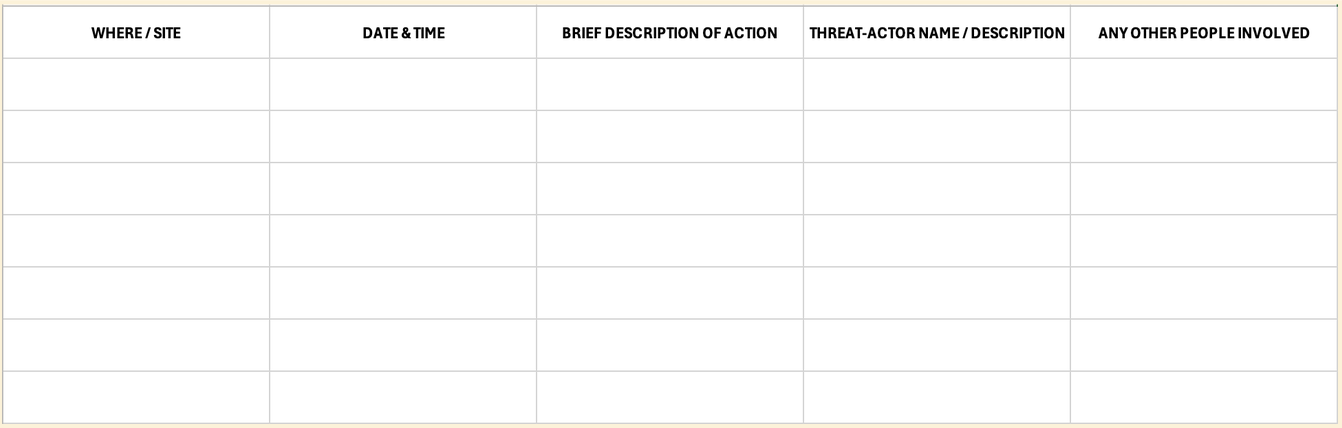
Incident Log
An incident log is a way to keep track of suspicious or harmful activity online. It doesn't need to be beautiful or complex, just a place where you can quickly note details around the different things you're seeing online. Noting times, places, people, and the general nature of what you see ought to be enough. In the event that law enforcement gets involved, this sort of record will be helpful.
The process of finding and noting hateful incidents online can be incredibly stressful, so now is a good time to revisit the team roles you might have already thought of in the previous blog post. If you haven't yet done that, here's a brief refresher:
Assign Team Roles
Remember, privacy–and responding to doxxing–is a team sport. Knowing who you trust is as important as identifying threat actors. Having trusted people ready to assist is invaluable in this type of situation. Refer them to this blog post or specific recommendations in it. If you've already plotted out a list of designated team roles, now is the time to remind everyone of their responsibilities. That might look like monitoring the hate forums where activity happens, keeping track of events in the incident log, setting up web alerts, locking down your social media accounts, or contacting law enforcement to reduce the likelihood of SWATing (a type of attack where bad actors call the police on their target, hoping to incite violence or disruption of peace by bringing law enforcement to their door).
Monitoring Hate Forums
So often the victims of doxxing and harassment campaigns are positioned that way because of bias or bigotry. If you're a part of a community who is the target of such abuse, you are likely already aware of the places where such bigots gather and the language they use. Safely and privately accessing those sites to check for organizing against you or those in your community is a crucial step to take. Take great care to do so privately. We recommend you use the Tor browser for such information-gathering missions. It’s also advisable that you don’t engage with anyone in those places.
Again, this step can be particularly stressful; asking a friend for help is a good idea, or you can thoughtfully apply some of the advice from the next section to automate the process.
Set Up Search Alerts
Google alerts is a free service that Google offers to alert you when a particular keyword—like your name—is freshly indexed by their search engine. Doxxing efforts done by anonymous trolls may not trigger an alert, but if you're the target of smear campaigns in the media, or the victim of abuse by very prominent media figures, those things are more likely to appear. Updates can come pretty frequently, so we advise leaving the monitoring of these alerts to a person that you trust.
For a more sophisticated approach, you could use a tool likeOpen Measures to automate the task of tracking coordinated campaigns. It's important to note that this type of tool is more likely to miss nuanced language or oblique references to you and your community.
Hardening Your Public Facing Accounts
For accounts that you can't or don't want to shut down, at the very least you must review the privacy and security settings on them and consider raising that bar. If two-factor authentication isn't already on, now is the time to do so. For social media accounts, consider switching the account to "private," where users have to request to have access to your page. For peace of mind, especially on accounts that you have to keep using, consider muting certain terms and blocking accounts so that you're less likely to encounter stressful content when on the app. Every app's options are different for this sort of thing, so be prepared to spend a few minutes figuring out what the menu is like and where the options are.
Shut Down Affected Accounts
If a particular account is being targeted with hate, or signs are pointing to an account of yours being the source of information people are using against you, shutting down that account may be the best decision for now. Depending on the app, account deletion may be temporary and you may be able to recover the account after you've done so and things have cooled off.
Revisit Your Data Broker Removal Strategies
Although this is more of a doxxing preventative measure, it's a good idea to get on top of removing the information that's available about you via data brokers. In case you're unaware, the data broker industry is an unregulated viper’s nest of privacy threats, often contributing to or directly supplying the sources of information that are used in doxxing campaigns. Although there are plenty of services that offer to file data broker opt-out requests on your behalf, a recent study revealed that doing it DIY is still more effective than relying on these paid services. That said, a paid service may still be worth its money if you'd rather have someone else take care of it.
Revisit Public Records
As covered in the previous blog post, your information may be made available through public records that you have little to no control over. You may be able to limit the convenience of that information being available by requesting to have it taken down from sites that republish it. Check through voter records, business registration records, court and property records, and the like. If you aren't able to limit that information from appearing on such mirroring sites, at least gaining awareness of where they are and the specific contours of what they contain will help you strategize against the harms they may cause.
Consider Contacting Law Enforcement
For many, talking to law enforcement will only make things worse. On the other hand, SWATing is a tactic often used in these types of coordinated attacks. If you think that's a possible outcome in your situation, it could be a good idea to get ahead of it and contact law enforcement to let them know what you're dealing with. It's in their best interest to be aware of fraudulent calls, and will make them less likely to show up at your door with guns drawn.
Revisit PACE Documents, Enact Those Steps
If you're involved in any kind of activism or community organizing you may be familiar with PACE documentation. It’s an acronym for coming up with contingency plan reactions if unwanted things come up: Primary, Alternate, Contingency, Escape/Emergency. Think of it like a panic button, a routine checklist of things to do if shit hits the fan. Maybe it involves some of the recommendations from this blog post. The point is to have something readymade, and some thoughts and strategies prepared, if the doxxing escalates to increased levels of harm and danger.
This is another step that's best done in a community with trusted people. The point is to keep your community organizing or community work moving, but with special contingency measures enacted to keep you and everyone else safe while remaining aware of this incident. This step is highly personalized and relies on a bit of prep work having already been done.
Put A Lock on Your Bank Accounts and Cell Subscriptions
One of the tactics those who are doxxing you might use is trying to get into your social media or other accounts through “SIM swapping,” an attack where they contact your cellular provider pretending to be you in order to hijack your phone number. They can then use that number and pivot to stealing other accounts you authenticate yourself to with your phone. Likewise, those targeting you might try to steal access to or disrupt your bank accounts through similar techniques.
Get ahead of them by placing security passwords or pin codes on these highly sensitive accounts, if your bank or cellular provider provides this extra security measure. Most cell providers offer some sort of SIM swapping prevention method, but they all use different names for this feature, so be sure to look up the process in your provider’s documentation (here are guides for the major U.S. providers: Verizon, AT&T, and T-Mobile).
Regulate Your Nervous System
It’s an understatement to say that being doxxed is scary and potentially very dysregulating. You're much more likely to make safe, smart decisions if you are able to maintain a sense of control around your mental state. Recognizing that capability, as well as having a strategy to keep calm in the face of a crisis is just as important as having good digital security hygiene. Do what you need to do, be it involving the help of friends, taking a break, or whatever else, to stay afloat during this process.
Flexibility and Resiliency
The reality is that the more you experience cultural marginalization, the higher the chances are that adversarial actors will resort to such tactics as doxxing and coordinated harassment campaigns. The fervor of those adversaries is often stoked by hateful public figures and politicians. And the plausible deniability of public records can limit the recourse you have to stop them. We hope that after reading this and the previous post, we’ve also brought to surface the idea that you can have great control over your digital footprint. Even more, that you can continue to share information online without unnecessarily compromising your safety and security.
Until we have digital privacy protections for everyone, it’s up to us to take matters into our own hands. Privacy, security, and dignity online are achievable. If you follow this guide, the previous one, and stay clued into the strategies laid out on Surveillance Self-Defense, you're well on your way.
Doxxing is the deliberate disclosure of personal information in order to bully, harass, intimidate, or instigate a chain of harms against someone. It's a tricky thing to protect against when the jerk doing it is often able to use legal and accessible means to do so. The odds are stacked against everyday internet folk when there's little to no comprehensive data privacy legislation keeping us safe. The responsibility is on each of us to protect ourselves, but the good news is that there's a lot you can do to reduce your digital footprint and take control of your data.
This post is part one of a two-part series discussing safety and response to doxxing. This first part focuses on prevention and ways to reduce your overall footprint. The second focuses on incident response, as in, steps to take if you're in the midst of being doxxed. There will be some crossover and redundancy between these two posts, so it's worth reading each and gaining familiarity with the steps well ahead of time.
OSINT
Open source intelligence (OSINT) is a broad term within information security. It focuses on the tools and means available to us for investigation and information retrieval. OSINT sits at the heart of doxxing campaigns but is also an important part of the process of preventing them. Typically it is a way of describing a methodology of piecing together scraps of information to form a dossier on a subject.
There are fancy multipurpose tools (like Maltego or Lampyre) that combine many datapoints into accessible graphs and datasets. As helpful as they can be for traditional penetration tests or corporate OSINT campaigns, they’re best used for investigations focused on organizations, mapping together details like employee email charts, LinkedIn profiles, and company network maps. They may not fit the needs of everyday people or liberation movement workers. Instead, we recommend referring to different OSINT resourcelists that index together a bunch of different tools, then using those resources to create a list for yourself of which tools may be most helpful.
Many, if not all, of the resources we cover below will be referenced in those guides, and themselves fall under the OSINT category. It’s important to note that the tools we reference in this particular blog post are only relevant at the time of publishing. The bigger ideas have a much longer shelf life than various tech tools. That said, in no particular order:
Breach Databases
When a company gets hacked and their customer data is leaked, that information often ends up in “breach databases,” that is, troves of peoples' data available for sale and reuse in illegal trades online. Because of the sensitivity of that type of information, it can potentially be used in doxxing campaigns. Some resources, like haveibeenpwned, note pieces of vulnerable identifying information in those databases and make it easy for people to see if their information is included. Others, like DeHashed, offer a similar sort of tracking, but for a fee.
You may not have control over a company's digital security that could put your own data at risk, but you can gain insight into whether your information is already out there. This gives you the opportunity to control the accuracy of that data (such as changing your email address or phone number). Doing so is extremely inconvenient, but unfortunately, it may be the only agency you have when another’s company’s digital insecurity puts your own safety at risk.
Open Records
Public records (such as voter records, property records, business registration, medical licensing information, and more) present a dilemma. It is in the public interest for there to be levels of transparency on such information. On the other hand, making such personally-identifiable information accessible to those with ill-intent can lead to serious consequences.
Instead of requiring a formal request through the courts, mirroring sites make this information easy to find online. Such sites often have forms where you can request your information be taken down. This doesn’t necessarily remove the records from existing, but it does remove a layer of convenience in accessing them.
Some states have programs called “Address Confidentiality Programs” that offer people the right to supplant address information with proxy addresses, keeping public records open but that specific piece of information potentially hidden.
Social Media
Going through and tightening the security and privacy settings of your various social media accounts is always a good idea, but it’s especially important if you are in the process of minimizing your digital footprint. Consider turning your discoverability to “private” or “hidden” (verbiage and details depend on the app) so that only users vetted by you are able to see your account.
To get a quick overview of the various accounts you have registered online, especially if you've been online for a long time, use a username search engine like What's My Name or Namechk to see where your usernames have been registered. They may not be entirely accurate, but they are effective and quick. These tools are also helpful if you are at risk of being impersonated online and want to get an overview of where that may be taking place.
Data Brokers and Removals
Data brokers are craven, pernicious companies that present an existential risk to everyone in the digital age. Until that industry is no more, it's up to us to protect ourselves and the ways that it endangers us by selling personal, sensitive information. The most effective way to get your information removed from their stores is to file requests manually. Yael Grauer's BADBOOL project compiles and prioritizes the worst offenders in this industry and the means you can use to request data removals from them. This process can be grueling and time-consuming, so it may be worth investing in a service that automates the process. Though they've been found to be less effective than the DIY approach, there are some services that have stood out amongst the others in terms of efficacy when tested by third-party reviewers. If you’re a resident of California, you can more easily opt out through the new and exciting DROP tool.
Reverse Image Searching and FR Services
Services like PimEyes and Lenso have jumped on the profit-driven opportunity to create facial recognition as a service. They contribute to law enforcement investigations and predictive policing systems, as well as providing commercial services to abusers and stalkers. The gist of their service: upload a picture of someone (in this case, yourself) and it will use facial recognition technology to determine where else online that person has appeared. If your image is being shared online without your consent, this service will find out.
Willfully participating in these services does mean having your image mapped, scanned, and stored by their systems. But if you believe you're under the type of targeted harassment that includes your image being shared online against your will, it may be worth that tradeoff.
Extra Monitoring, Automated
This section is less about data minimization, and more about laying extra protections down in the event that doxxing or other coordinated harassment seems imminent. If you're in the Google ecosystem of products, consider enrolling in their Advanced Protection Program, which offers a number of different features to keep you and your account safe.
If you're the focus of coordinated attacks that span from online communities to media outlets participating in the harassment, a service like Open Measures is worth looking into. It tracks, maps, and analyzes the spread of hateful information online. They provide free access to their open-source API, so with some technical fancy-footwork, you can automate this process.
Get Others Involved
Coordinated harassment is often a process of daisy-chaining targets and tactics together until there’s a meaningful process of harm being inflicted. This means that people in your community are also at risk. As we always say, privacy is a team sport. Get others involved in the process; there’s strength in numbers.
A great way to do this is think of the activities you and your group are up to. What roles do individual members take on? Figure out a way to tack on some of the responsibilities you’re coming up with here onto those team members. Find ways to talk about it and share strategies, preferably using secure technology like Signal. You can coordinate together which tasks each person could take on, perhaps pulled from this blog post.
It's a Process; Keep Yourself Apace for the Marathon, Not the Race
The process of data minimization and reclaiming agency over your digital footprint can be grueling and stressful. Don't underestimate the toll it can take on your mental health. Take breaks, employ the help of friends, and take the time to make sure you're first addressing the parts that are most relevant to your threat model. It may feel like there’s nothing to be done about protecting your digital privacy, but that’s just a symptom of surveillance capitalism’s psychological effect on its victims. There’s much you can do to stay safe, to protect yourself and others. Refer to this post and to the Surveillance Self-Defense project.
In short, WordPress security plugins are tools you add to your site to strengthen your settings, scan for malware, watch for file changes, and block suspicious activity from within WordPress. Most sites should use one, along with a firewall that filters traffic before WordPress even loads. Look for layered protection, good detection, clear handling of false alarms, minimal impact on performance, and real human support.
If you manage a WordPress site, you have probably searched for “best WordPress security plugin” at some point.
Third-party scripts are common on websites. They help with analytics, ads, live chat, social media, video, payments, and many other features. While not all are risky, every external tag, pixel, widget, or embed adds to your website’s vulnerability. These tools can read page content, collect visitor data, change what users see, and connect with outside services. If a vendor, account, or setup is compromised, it can impact every page that uses the script.
Website owners shouldn’t aim to get rid of useful integrations, but to understand which scripts run, why they are necessary, who controls them, and how to detect unexpected changes.
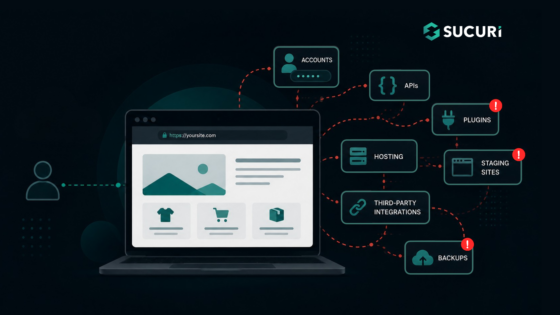
Each feature that you add to a website results in a new element that has to be managed.
The credentials are accepted by a login page, the data by a contact form, new code is introduced by a plugin, and an API is used to connect your website to another service. It is also possible that an old staging site or a forgotten backup may still be accessible from the internet.
The collection of these exposed components constitutes your website attack surface.
Updating WordPress directly on a live website can cause avoidable problems. A plugin update might break checkout, or a theme change could create layout issues visitors see immediately.
A WordPress staging site gives you a separate place to test changes before they reach your live website.
Staging reduces operational risk, but it also creates another website that needs protection. A copied site may contain administrator accounts, customer records, API keys, or vulnerable software.

 Login
Login