Reading view

Why iPhone users should update and restart their devices now

If you were still questioning whether iOS 26+ is for you, now is the time to make that call.

Why?

On December 12, 2025, Apple patched two WebKit zero‑day vulnerabilities linked to mercenary spyware and is now effectively pushing iPhone 11 and newer users toward iOS 26+, because that’s where the fixes and new memory protections live. These vulnerabilities were primarily used in highly targeted attacks, but such campaigns are likely to expand over time.

WebKit powers the Safari browser and many other iOS applications, so it’s a big attack surface to leave exposed and isn’t limited to “risky” behavior. These vulnerabilities allowed an attacker to execute arbitrary code on a device after exploitation via malicious web content.

Apple has confirmed that attackers are already exploiting these vulnerabilities in the wild, making installation of the update a high‑priority security task for every user. Campaigns that start with diplomats, journalists, or executives often lead to tooling and exploits leaking or being repurposed, so “I’m not a target” is not a viable safety strategy.

Due to public resistance to new features like Liquid Glass, many iPhone users have not yet upgraded to iOS 26.2. Reports suggest adoption of iOS 26 has been unusually slow. As of January 2026, only about 4.6% of active iPhones are on iOS 26.2, and roughly 16% are on any version of iOS 26, leaving the vast majority on older releases such as iOS 18.

However, Apple only ships these fixes and newer protections, such as Memory Integrity Enforcement, on iOS 26+ for supported devices. Users on older, unsupported devices won’t be able to access these protections at all.

Another important factor in the upgrade cycle is restarting the device. What many people don’t realize is that when you restart your device, any memory-resident malware is flushed—unless it has somehow gained persistence, in which case it will return. High-end spyware tools tend to avoid leaving traces needed for persistence and often rely on users not restarting their devices.

Upgrading requires a restart, which makes this a win-win: you get the latest protections, and any memory-resident malware is flushed at the same time.

For iOS and iPadOS users, you can check if you’re using the latest software version, go to Settings > General > Software Update. It’s also worth turning on Automatic Updates if you haven’t already. You can do that on the same screen.

How to stay safe

The most important fix—however painful you may find it—is to upgrade to iOS 26.2. Not doing means missing an accumulating list of security fixes, leaving your device vulnerable to more and more newly found vulnerabilities.

 But here are some other useful tips:

  • Make it a habit to restart your device on a regular basis. The NSA recommends doing this weekly.
  • Do not open unsolicited links and attachments without verifying with the trusted sender.
  • Remember, Apple threat notifications will never ask users to click links, open files, install apps or ask for account passwords or verification code.
  • For Apple Mail users specifically, these vulnerabilities create risk when viewing HTML-formatted emails containing malicious web content.
  • Malwarebytes for iOS can help keep your device secure, with Trusted Advisor alerting you when important updates are available.
  • If you are a high-value target, or you want the extra level of security, consider using Apple’s Lockdown Mode.

We don’t just report on phone security—we provide it

Cybersecurity risks should never spread beyond a headline. Keep threats off your mobile devices by downloading Malwarebytes for iOS, and Malwarebytes for Android today.

  •  

Why iPhone users should update and restart their devices now

If you were still questioning whether iOS 26+ is for you, now is the time to make that call.

Why?

On December 12, 2025, Apple patched two WebKit zero‑day vulnerabilities linked to mercenary spyware and is now effectively pushing iPhone 11 and newer users toward iOS 26+, because that’s where the fixes and new memory protections live. These vulnerabilities were primarily used in highly targeted attacks, but such campaigns are likely to expand over time.

WebKit powers the Safari browser and many other iOS applications, so it’s a big attack surface to leave exposed and isn’t limited to “risky” behavior. These vulnerabilities allowed an attacker to execute arbitrary code on a device after exploitation via malicious web content.

Apple has confirmed that attackers are already exploiting these vulnerabilities in the wild, making installation of the update a high‑priority security task for every user. Campaigns that start with diplomats, journalists, or executives often lead to tooling and exploits leaking or being repurposed, so “I’m not a target” is not a viable safety strategy.

Due to public resistance to new features like Liquid Glass, many iPhone users have not yet upgraded to iOS 26.2. Reports suggest adoption of iOS 26 has been unusually slow. As of January 2026, only about 4.6% of active iPhones are on iOS 26.2, and roughly 16% are on any version of iOS 26, leaving the vast majority on older releases such as iOS 18.

However, Apple only ships these fixes and newer protections, such as Memory Integrity Enforcement, on iOS 26+ for supported devices. Users on older, unsupported devices won’t be able to access these protections at all.

Another important factor in the upgrade cycle is restarting the device. What many people don’t realize is that when you restart your device, any memory-resident malware is flushed—unless it has somehow gained persistence, in which case it will return. High-end spyware tools tend to avoid leaving traces needed for persistence and often rely on users not restarting their devices.

Upgrading requires a restart, which makes this a win-win: you get the latest protections, and any memory-resident malware is flushed at the same time.

For iOS and iPadOS users, you can check if you’re using the latest software version, go to Settings > General > Software Update. It’s also worth turning on Automatic Updates if you haven’t already. You can do that on the same screen.

How to stay safe

The most important fix—however painful you may find it—is to upgrade to iOS 26.2. Not doing means missing an accumulating list of security fixes, leaving your device vulnerable to more and more newly found vulnerabilities.

 But here are some other useful tips:

  • Make it a habit to restart your device on a regular basis. The NSA recommends doing this weekly.
  • Do not open unsolicited links and attachments without verifying with the trusted sender.
  • Remember, Apple threat notifications will never ask users to click links, open files, install apps or ask for account passwords or verification code.
  • For Apple Mail users specifically, these vulnerabilities create risk when viewing HTML-formatted emails containing malicious web content.
  • Malwarebytes for iOS can help keep your device secure, with Trusted Advisor alerting you when important updates are available.
  • If you are a high-value target, or you want the extra level of security, consider using Apple’s Lockdown Mode.

We don’t just report on phone security—we provide it

Cybersecurity risks should never spread beyond a headline. Keep threats off your mobile devices by downloading Malwarebytes for iOS, and Malwarebytes for Android today.

  •  

Received an Instagram password reset email? Here’s what you need to know

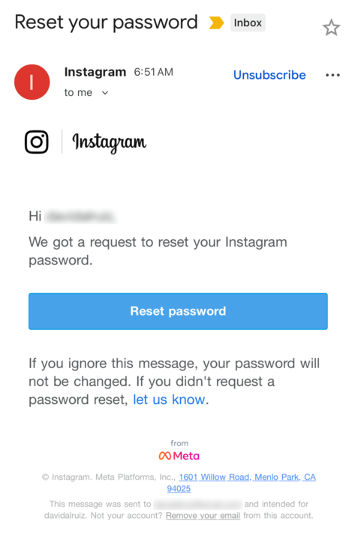
Last week, many Instagram users began receiving unsolicited emails from the platform that warned about a password reset request.

The message said:

“Hi {username},
We got a request to reset your Instagram password.
If you ignore this message, your password will not be changed. If you didn’t request a password reset, let us know.”

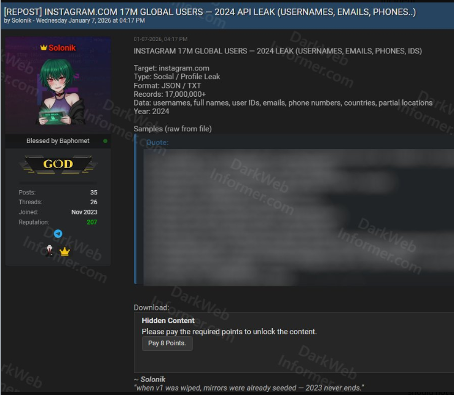
Around the same time that users began receiving these emails, a cybercriminal using the handle “Solonik” offered data that alleged contains information about 17 million Instagram users for sale on a Dark Web forum.

These 17 million or so records include:

  • Usernames
  • Full names
  • User IDs
  • Email addresses
  • Phone numbers
  • Countries
  • Partial locations

Please note that there are no passwords listed in the data.

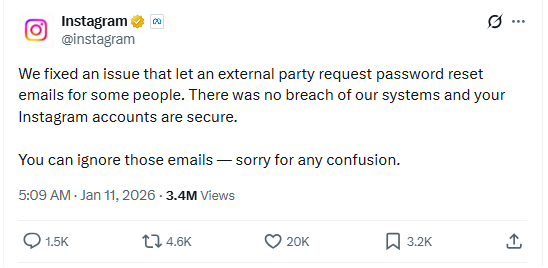
Despite the timing of the two events, Instagram denied this weekend that these events are related. On the platform X, the company stated they fixed an issue that allowed an external party to request password reset emails for “some people.”

So, what’s happening?

Regarding the data found on the dark web last week, Shahak Shalev, global head of scam and AI research at Malwarebytes, shared that “there are some indications that the Instagram data dump includes data from other, older, alleged Instagram breaches, and is a sort of compilation.” As Shalev’s team investigates the data, he also said that the earliest password reset requests reported by users came days before the data was first posted on the dark web, which might mean that “the data may have been circulating in more private groups before being made public.”

However, another possibility, Shalev said, is that “another vulnerability/data leak was happening as some bad actor tried spraying for [Instagram] accounts. Instagram’s announcement seems to reference that spraying. Besides the suspicious timing, there’s no clear connection between the two at this time.”

But, importantly, scammers will not care whether these incidents are related or not. They will try to take advantage of the situation by sending out fake emails.

“We felt it was important to alert people about the data availability so that everyone could reset their passwords, directly from the app, and be on alert for other phishing communications,” Shalev said.

If and when we find out more, we’ll keep you posted, so stay tuned.

How to stay safe

If you have enabled 2FA on your Instagram account, we think it is indeed safe to ignore the emails, as proposed by Meta.

Should you want to err on the safe side and decide to change your password, make sure to do so in the app and not click any links in the email, to avoid the risk that you have received a fake email. Or you might end up providing scammers with your password.

Another thing to keep in mind is that these are Meta-data. Which means some users may have reused or linked them to their Facebook or WhatsApp accounts. So, as a precaution, you can check recent logins and active sessions on Instagram, WhatsApp, and Facebook, and log out from any devices or locations you do not recognize.

If you want to find out whether your data was included in an Instagram data breach, or any other for that matter, try our free Digital Footprint scan.

  •  

Received an Instagram password reset email? Here’s what you need to know

Last week, many Instagram users began receiving unsolicited emails from the platform that warned about a password reset request.

The message said:

“Hi {username},
We got a request to reset your Instagram password.
If you ignore this message, your password will not be changed. If you didn’t request a password reset, let us know.”

Around the same time that users began receiving these emails, a cybercriminal using the handle “Solonik” offered data that alleged contains information about 17 million Instagram users for sale on a Dark Web forum.

These 17 million or so records include:

  • Usernames
  • Full names
  • User IDs
  • Email addresses
  • Phone numbers
  • Countries
  • Partial locations

Please note that there are no passwords listed in the data.

Despite the timing of the two events, Instagram denied this weekend that these events are related. On the platform X, the company stated they fixed an issue that allowed an external party to request password reset emails for “some people.”

So, what’s happening?

Regarding the data found on the dark web last week, Shahak Shalev, global head of scam and AI research at Malwarebytes, shared that “there are some indications that the Instagram data dump includes data from other, older, alleged Instagram breaches, and is a sort of compilation.” As Shalev’s team investigates the data, he also said that the earliest password reset requests reported by users came days before the data was first posted on the dark web, which might mean that “the data may have been circulating in more private groups before being made public.”

However, another possibility, Shalev said, is that “another vulnerability/data leak was happening as some bad actor tried spraying for [Instagram] accounts. Instagram’s announcement seems to reference that spraying. Besides the suspicious timing, there’s no clear connection between the two at this time.”

But, importantly, scammers will not care whether these incidents are related or not. They will try to take advantage of the situation by sending out fake emails.

“We felt it was important to alert people about the data availability so that everyone could reset their passwords, directly from the app, and be on alert for other phishing communications,” Shalev said.

If and when we find out more, we’ll keep you posted, so stay tuned.

How to stay safe

If you have enabled 2FA on your Instagram account, we think it is indeed safe to ignore the emails, as proposed by Meta.

Should you want to err on the safe side and decide to change your password, make sure to do so in the app and not click any links in the email, to avoid the risk that you have received a fake email. Or you might end up providing scammers with your password.

Another thing to keep in mind is that these are Meta-data. Which means some users may have reused or linked them to their Facebook or WhatsApp accounts. So, as a precaution, you can check recent logins and active sessions on Instagram, WhatsApp, and Facebook, and log out from any devices or locations you do not recognize.

If you want to find out whether your data was included in an Instagram data breach, or any other for that matter, try our free Digital Footprint scan.

  •  

Regulators around the world are scrutinizing Grok over sexual deepfakes

Grok’s failure to block sexualized images of minors has turned a single “isolated lapse” into a global regulatory stress test for xAI’s ambitions. The response from lawmakers and regulators suggests this will not be solved with a quick apology and a hotfix.

Last week we reported on Grok’s apology after it generated an image of young girls in “sexualized attire.”

The apology followed the introduction of Grok’s paid “Spicy Mode” in August 2025, which was marketed as edgy and less censored. In practice it enabled users to generate sexual deepfake images, including content that may cross into illegal child sexual abuse material (CSAM) under US and other jurisdictions’ laws.

A report from web-monitoring tool CopyLeaks highlighted “thousands” of incidents of Grok being used to create sexually suggestive images of non-consenting celebrities.

This is starting to backfire. Reportedly, three US senators are asking Google and Apple to remove Elon Musk’s Grok and X apps from their app stores, citing the spread of nonconsensual sexualized AI images of women and minors and arguing it violates the companies’ app store rules.

In their joint letter, the senators state:

“In recent days, X users have used the app’s Grok AI tool to generate nonconsensual sexual imagery of real, private citizens at scale. This trend has included Grok modifying images to depict women being sexually abused, humiliated, hurt, and even killed. In some cases, Grok has reportedly created sexualized images of children—the most heinous type of content imaginable.”

The UK government also threatens to take possible action against the platform. Government officials have said they would fully support any action taken by Ofcom, the independent media regulator, against X. Even if that meant UK regulators could block the platform.

Indonesia and Malaysia already blocked Grok after its “digital undressing” function flooded the internet with suggestive and obscene manipulated images of women and minors.

As it turns out, a user prompted Grok to generate its own “apology,” which it did. After backlash over sexualized images of women and minors, Grok/X announced limits on image generation and editing for paying subscribers only, effectively paywalling those capabilities on main X surfaces.

For lawmakers already worried about disinformation, election interference, deepfakes, and abuse imagery, Grok is fast becoming the textbook case for why “move fast and break things” doesn’t mix with AI that can sexualize real people on demand.

Hopefully, the next wave of rules, ranging from EU AI enforcement to platform-specific safety obligations, will treat this incident as the baseline risk that all large-scale visual models must withstand, not as an outlier.

Keep your children safe

If you ever wondered why parents post images of their children with a smiley across their face, this is the reason.

Don’t make it easy for strangers to copy, reuse, or manipulate your photos.

This incident is yet another compelling reason to reduce your digital footprint. Think carefully before posting photos of yourself, your children, or other sensitive information on public social media accounts.

And treat everything you see online—images, voices, text—as potentially AI-generated unless they can be independently verified. They’re not only used to sway opinions, but also to solicit money, extract personal information, or create abusive material.


We don’t just report on threats – we help protect your social media

Cybersecurity risks should never spread beyond a headline. Protect your social media accounts by using Malwarebytes Identity Theft Protection.

  •  

Regulators around the world are scrutinizing Grok over sexual deepfakes

Grok’s failure to block sexualized images of minors has turned a single “isolated lapse” into a global regulatory stress test for xAI’s ambitions. The response from lawmakers and regulators suggests this will not be solved with a quick apology and a hotfix.

Last week we reported on Grok’s apology after it generated an image of young girls in “sexualized attire.”

The apology followed the introduction of Grok’s paid “Spicy Mode” in August 2025, which was marketed as edgy and less censored. In practice it enabled users to generate sexual deepfake images, including content that may cross into illegal child sexual abuse material (CSAM) under US and other jurisdictions’ laws.

A report from web-monitoring tool CopyLeaks highlighted “thousands” of incidents of Grok being used to create sexually suggestive images of non-consenting celebrities.

This is starting to backfire. Reportedly, three US senators are asking Google and Apple to remove Elon Musk’s Grok and X apps from their app stores, citing the spread of nonconsensual sexualized AI images of women and minors and arguing it violates the companies’ app store rules.

In their joint letter, the senators state:

“In recent days, X users have used the app’s Grok AI tool to generate nonconsensual sexual imagery of real, private citizens at scale. This trend has included Grok modifying images to depict women being sexually abused, humiliated, hurt, and even killed. In some cases, Grok has reportedly created sexualized images of children—the most heinous type of content imaginable.”

The UK government also threatens to take possible action against the platform. Government officials have said they would fully support any action taken by Ofcom, the independent media regulator, against X. Even if that meant UK regulators could block the platform.

Indonesia and Malaysia already blocked Grok after its “digital undressing” function flooded the internet with suggestive and obscene manipulated images of women and minors.

As it turns out, a user prompted Grok to generate its own “apology,” which it did. After backlash over sexualized images of women and minors, Grok/X announced limits on image generation and editing for paying subscribers only, effectively paywalling those capabilities on main X surfaces.

For lawmakers already worried about disinformation, election interference, deepfakes, and abuse imagery, Grok is fast becoming the textbook case for why “move fast and break things” doesn’t mix with AI that can sexualize real people on demand.

Hopefully, the next wave of rules, ranging from EU AI enforcement to platform-specific safety obligations, will treat this incident as the baseline risk that all large-scale visual models must withstand, not as an outlier.

Keep your children safe

If you ever wondered why parents post images of their children with a smiley across their face, this is the reason.

Don’t make it easy for strangers to copy, reuse, or manipulate your photos.

This incident is yet another compelling reason to reduce your digital footprint. Think carefully before posting photos of yourself, your children, or other sensitive information on public social media accounts.

And treat everything you see online—images, voices, text—as potentially AI-generated unless they can be independently verified. They’re not only used to sway opinions, but also to solicit money, extract personal information, or create abusive material.


We don’t just report on threats – we help protect your social media

Cybersecurity risks should never spread beyond a headline. Protect your social media accounts by using Malwarebytes Identity Theft Protection.

  •  

In Other News: 8,000 Ransomware Attacks, China Hacked US Gov Emails, IDHS Breach Impacts 700k

Other noteworthy stories that might have slipped under the radar: Jaguar Land Rover sales crash, hundreds of gen-AI data policy violations, and Chinese cyberattacks against Taiwan intensified.

The post In Other News: 8,000 Ransomware Attacks, China Hacked US Gov Emails, IDHS Breach Impacts 700k appeared first on SecurityWeek.

  •  

pcTattletale founder pleads guilty as US cracks down on stalkerware

Reportedly, pcTattletale founder Bryan Fleming has pleaded guilty in US federal court to computer hacking, unlawfully selling and advertising spyware, and conspiracy.

This is good news not just because we despise stalkerware like pcTattletale, but because it is only the second US federal stalkerware prosecution in a decade. It could could open the door to further cases against people who develop, sell, or promote similar tools.

In 2021, we reported that “employee and child-monitoring” software vendor pcTattletale had not been very careful about securing the screenshots it secretly captured from victims’ phones. A security researcher testing a trial version discovered that the app uploaded screenshots to an unsecured online database, meaning anyone could view them without authentication, such as a username and password.

In 2024, we revisited the app after researchers found it was once again leaking a database containing victim screenshots. One researcher discovered that pcTattletale’s Application Programming Interface (API) allowed anyone to access the most recent screen capture recorded from any device on which the spyware is installed. Another researcher uncovered a separate vulnerability that granted full access to the app’s backend infrastructure. That access allowed them to deface the website and steal AWS credentials, which turned out to be shared across all devices. As a result, the researcher obtained data about both victims and the customers who were doing the tracking.

This is no longer possible. Not because the developers fixed the problems, but because Amazon locked pcTattletale’s entire AWS infrastructure. Fleming later abandoned the product and deleted the contents of its servers.

However, Homeland Security Investigations had already started investigating pcTattletale in June 2021 and did not stop. A few things made Fleming stand out among other stalkerware operators. While many hide behind overseas shell companies, Fleming appeared to be proud of his work. And while others market their products as parental control or employee monitoring tools, pcTattletale explicitly promoted spying on romantic partners and spouses, using phrases such as “catch a cheater” and “surreptitiously spying on spouses and partners.” This made it clear the software was designed for non-consensual surveillance of adults.

Fleming is expected to be sentenced later this year.

Removing stalkerware

Malwarebytes, as one of the founding members of the Coalition Against Stalkerware, makes it a priority to detect and remove stalkerware-type apps from your device.

It is important to keep in mind, however, that removing stalkerware may alert the person spying on you that the app has been discovered. The Coalition Against Stalkerware outlines additional steps and considerations to help you decide the safest next move.

Because the apps often install under different names and hide themselves from users, they can be difficult to find and remove. That is where Malwarebytes can help you.

To scan your device:

  1. Open your Malwarebytes dashboard
  2. Start a Scan

The scan may take a few minutes.

 If malware is detected, you can choose one of the following actions:

  • Uninstall. The threat will be deleted from your device.
  • Ignore Always. The file detection will be added to the Allow List, and excluded from future scans. Legitimate files are sometimes detected as malware. We recommend reviewing scan results and adding files to Ignore Always that you know are safe and want to keep.
  • Ignore Once: The detection is ignored for this scan only. It will be detected again during your next scan.

Malwarebytes detects pcTattleTale as PUP.Optional.PCTattletale.


We don’t just report on threats—we remove them

Cybersecurity risks should never spread beyond a headline. Keep threats off your devices by downloading Malwarebytes today.

  •  

pcTattletale founder pleads guilty as US cracks down on stalkerware

Reportedly, pcTattletale founder Bryan Fleming has pleaded guilty in US federal court to computer hacking, unlawfully selling and advertising spyware, and conspiracy.

This is good news not just because we despise stalkerware like pcTattletale, but because it is only the second US federal stalkerware prosecution in a decade. It could could open the door to further cases against people who develop, sell, or promote similar tools.

In 2021, we reported that “employee and child-monitoring” software vendor pcTattletale had not been very careful about securing the screenshots it secretly captured from victims’ phones. A security researcher testing a trial version discovered that the app uploaded screenshots to an unsecured online database, meaning anyone could view them without authentication, such as a username and password.

In 2024, we revisited the app after researchers found it was once again leaking a database containing victim screenshots. One researcher discovered that pcTattletale’s Application Programming Interface (API) allowed anyone to access the most recent screen capture recorded from any device on which the spyware is installed. Another researcher uncovered a separate vulnerability that granted full access to the app’s backend infrastructure. That access allowed them to deface the website and steal AWS credentials, which turned out to be shared across all devices. As a result, the researcher obtained data about both victims and the customers who were doing the tracking.

This is no longer possible. Not because the developers fixed the problems, but because Amazon locked pcTattletale’s entire AWS infrastructure. Fleming later abandoned the product and deleted the contents of its servers.

However, Homeland Security Investigations had already started investigating pcTattletale in June 2021 and did not stop. A few things made Fleming stand out among other stalkerware operators. While many hide behind overseas shell companies, Fleming appeared to be proud of his work. And while others market their products as parental control or employee monitoring tools, pcTattletale explicitly promoted spying on romantic partners and spouses, using phrases such as “catch a cheater” and “surreptitiously spying on spouses and partners.” This made it clear the software was designed for non-consensual surveillance of adults.

Fleming is expected to be sentenced later this year.

Removing stalkerware

Malwarebytes, as one of the founding members of the Coalition Against Stalkerware, makes it a priority to detect and remove stalkerware-type apps from your device.

It is important to keep in mind, however, that removing stalkerware may alert the person spying on you that the app has been discovered. The Coalition Against Stalkerware outlines additional steps and considerations to help you decide the safest next move.

Because the apps often install under different names and hide themselves from users, they can be difficult to find and remove. That is where Malwarebytes can help you.

To scan your device:

  1. Open your Malwarebytes dashboard
  2. Start a Scan

The scan may take a few minutes.

 If malware is detected, you can choose one of the following actions:

  • Uninstall. The threat will be deleted from your device.
  • Ignore Always. The file detection will be added to the Allow List, and excluded from future scans. Legitimate files are sometimes detected as malware. We recommend reviewing scan results and adding files to Ignore Always that you know are safe and want to keep.
  • Ignore Once: The detection is ignored for this scan only. It will be detected again during your next scan.

Malwarebytes detects pcTattleTale as PUP.Optional.PCTattletale.


We don’t just report on threats—we remove them

Cybersecurity risks should never spread beyond a headline. Keep threats off your devices by downloading Malwarebytes today.

  •  

Are we ready for ChatGPT Health?

How comfortable are you with sharing your medical history with an AI?

I’m certainly not.

OpenAI’s announcement about its new ChatGPT Health program prompted discussions about data privacy and how the company plans to keep the information users submit safe.

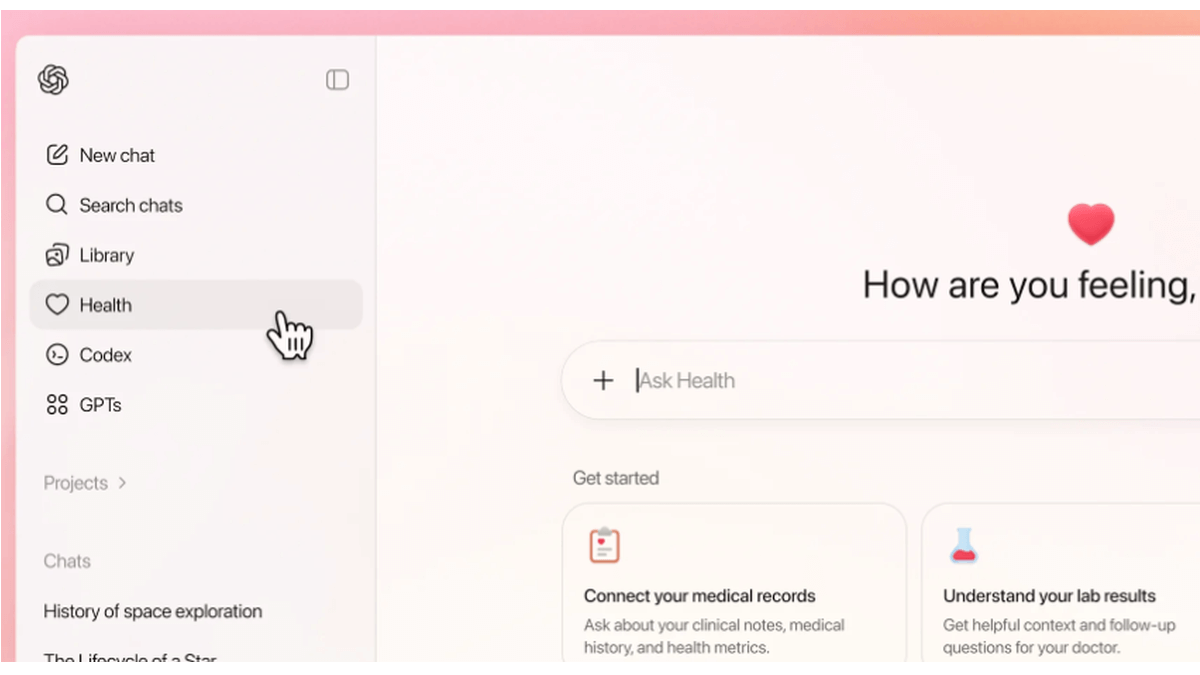
ChatGPT Health is a dedicated “health space” inside ChatGPT that lets users connect their medical records and wellness apps so the model can answer health and wellness questions in a more personalized way.

ChatGPT health

OpenAI promises additional, layered protections designed specifically for health, “to keep health conversations protected and compartmentalized.”

First off, it’s important to understand that this is not a diagnostic or treatment system. It’s framed as a support tool to help understand health information and prepare for care.

But this is the part that raised questions and concerns:

“You can securely connect medical records and wellness apps to ground conversations in your own health information, so responses are more relevant and useful to you.”

In other words, ChatGPT Health lets you link medical records and apps such as Apple Health, MyFitnessPal, and others so the system can explain lab results, track trends (e.g., cholesterol), and help you prepare questions for clinicians or compare insurance options based on your health data.

Given our reservations about the state of AI security in general and chatbots in particular, this is a line that I don’t dare cross. For now, however, I don’t even have the option, since only users with ChatGPT Free, Go, Plus, and Pro plans outside of the European Economic Area, Switzerland, and the United Kingdom can sign up for the waitlist.

OpenAI only uses partners and apps in ChatGPT Health that meet OpenAI’s privacy and security requirements, which, by design, shifts a great deal of trust onto ChatGPT Health itself.

Users should realize that health information is very sensitive and as Sara Geoghegan, senior counsel at the Electronic Privacy Information Center told The Record: by sharing their electronic medical records with ChatGPT Health, users in the US could effectively remove the HIPAA protection from those records, which is a serious consideration for anyone sharing medical data.

She added:

“ChatGPT is only bound by its own disclosures and promises, so without any meaningful limitation on that, like regulation or a law, ChatGPT can change the terms of its service at any time.”

Should you decide to try this new feature out, we would advise you to proceed with caution and take the advice to enable 2FA for ChatGPT to heart. OpenAI claims 230 million users already ask ChatGPT health and wellness questions each week. I’d encourage them to do the same.


We don’t just report on data privacy—we help you remove your personal information

Cybersecurity risks should never spread beyond a headline. With Malwarebytes Personal Data Remover, you can scan to find out which sites are exposing your personal information, and then delete that sensitive data from the internet.

  •  

Are we ready for ChatGPT Health?

How comfortable are you with sharing your medical history with an AI?

I’m certainly not.

OpenAI’s announcement about its new ChatGPT Health program prompted discussions about data privacy and how the company plans to keep the information users submit safe.

ChatGPT Health is a dedicated “health space” inside ChatGPT that lets users connect their medical records and wellness apps so the model can answer health and wellness questions in a more personalized way.

ChatGPT health

OpenAI promises additional, layered protections designed specifically for health, “to keep health conversations protected and compartmentalized.”

First off, it’s important to understand that this is not a diagnostic or treatment system. It’s framed as a support tool to help understand health information and prepare for care.

But this is the part that raised questions and concerns:

“You can securely connect medical records and wellness apps to ground conversations in your own health information, so responses are more relevant and useful to you.”

In other words, ChatGPT Health lets you link medical records and apps such as Apple Health, MyFitnessPal, and others so the system can explain lab results, track trends (e.g., cholesterol), and help you prepare questions for clinicians or compare insurance options based on your health data.

Given our reservations about the state of AI security in general and chatbots in particular, this is a line that I don’t dare cross. For now, however, I don’t even have the option, since only users with ChatGPT Free, Go, Plus, and Pro plans outside of the European Economic Area, Switzerland, and the United Kingdom can sign up for the waitlist.

OpenAI only uses partners and apps in ChatGPT Health that meet OpenAI’s privacy and security requirements, which, by design, shifts a great deal of trust onto ChatGPT Health itself.

Users should realize that health information is very sensitive and as Sara Geoghegan, senior counsel at the Electronic Privacy Information Center told The Record: by sharing their electronic medical records with ChatGPT Health, users in the US could effectively remove the HIPAA protection from those records, which is a serious consideration for anyone sharing medical data.

She added:

“ChatGPT is only bound by its own disclosures and promises, so without any meaningful limitation on that, like regulation or a law, ChatGPT can change the terms of its service at any time.”

Should you decide to try this new feature out, we would advise you to proceed with caution and take the advice to enable 2FA for ChatGPT to heart. OpenAI claims 230 million users already ask ChatGPT health and wellness questions each week. I’d encourage them to do the same.


We don’t just report on data privacy—we help you remove your personal information

Cybersecurity risks should never spread beyond a headline. With Malwarebytes Personal Data Remover, you can scan to find out which sites are exposing your personal information, and then delete that sensitive data from the internet.

  •  

Who Benefited from the Aisuru and Kimwolf Botnets?

Our first story of 2026 revealed how a destructive new botnet called Kimwolf has infected more than two million devices by mass-compromising a vast number of unofficial Android TV streaming boxes. Today, we’ll dig through digital clues left behind by the hackers, network operators and services that appear to have benefitted from Kimwolf’s spread.

On Dec. 17, 2025, the Chinese security firm XLab published a deep dive on Kimwolf, which forces infected devices to participate in distributed denial-of-service (DDoS) attacks and to relay abusive and malicious Internet traffic for so-called “residential proxy” services.

The software that turns one’s device into a residential proxy is often quietly bundled with mobile apps and games. Kimwolf specifically targeted residential proxy software that is factory installed on more than a thousand different models of unsanctioned Android TV streaming devices. Very quickly, the residential proxy’s Internet address starts funneling traffic that is linked to ad fraud, account takeover attempts and mass content scraping.

The XLab report explained its researchers found “definitive evidence” that the same cybercriminal actors and infrastructure were used to deploy both Kimwolf and the Aisuru botnet — an earlier version of Kimwolf that also enslaved devices for use in DDoS attacks and proxy services.

XLab said it suspected since October that Kimwolf and Aisuru had the same author(s) and operators, based in part on shared code changes over time. But it said those suspicions were confirmed on December 8 when it witnessed both botnet strains being distributed by the same Internet address at 93.95.112[.]59.
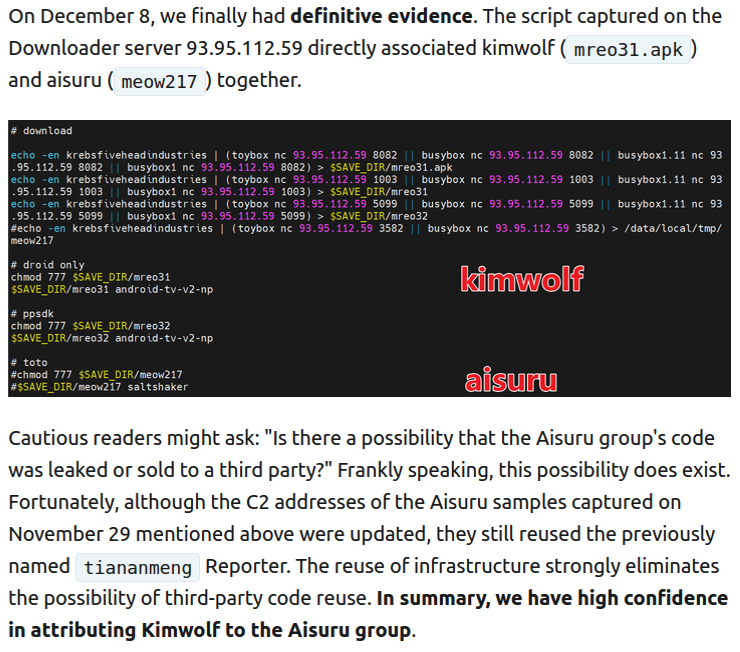
Image: XLab.

RESI RACK

Public records show the Internet address range flagged by XLab is assigned to Lehi, Utah-based Resi Rack LLC. Resi Rack’s website bills the company as a “Premium Game Server Hosting Provider.” Meanwhile, Resi Rack’s ads on the Internet moneymaking forum BlackHatWorld refer to it as a “Premium Residential Proxy Hosting and Proxy Software Solutions Company.”

Resi Rack co-founder Cassidy Hales told KrebsOnSecurity his company received a notification on December 10 about Kimwolf using their network “that detailed what was being done by one of our customers leasing our servers.”

“When we received this email we took care of this issue immediately,” Hales wrote in response to an email requesting comment. “This is something we are very disappointed is now associated with our name and this was not the intention of our company whatsoever.”

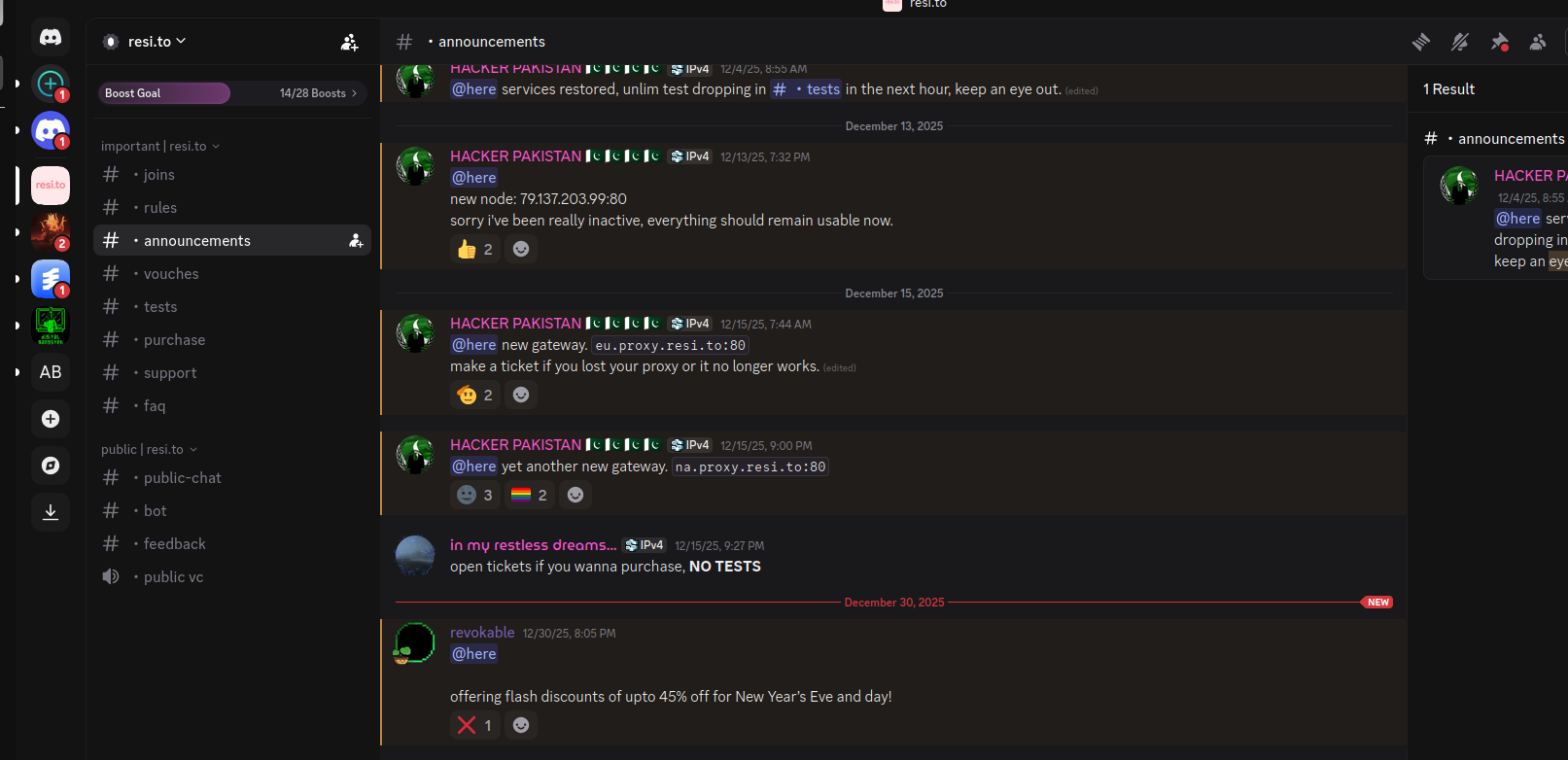
The Resi Rack Internet address cited by XLab on December 8 came onto KrebsOnSecurity’s radar more than two weeks before that. Benjamin Brundage is founder of Synthient, a startup that tracks proxy services. In late October 2025, Brundage shared that the people selling various proxy services which benefitted from the Aisuru and Kimwolf botnets were doing so at a new Discord server called resi[.]to.

On November 24, 2025, a member of the resi-dot-to Discord channel shares an IP address responsible for proxying traffic over Android TV streaming boxes infected by the Kimwolf botnet.

When KrebsOnSecurity joined the resi[.]to Discord channel in late October as a silent lurker, the server had fewer than 150 members, including “Shox” — the nickname used by Resi Rack’s co-founder Mr. Hales — and his business partner “Linus,” who did not respond to requests for comment.

Other members of the resi[.]to Discord channel would periodically post new IP addresses that were responsible for proxying traffic over the Kimwolf botnet. As the screenshot from resi[.]to above shows, that Resi Rack Internet address flagged by XLab was used by Kimwolf to direct proxy traffic as far back as November 24, if not earlier. All told, Synthient said it tracked at least seven static Resi Rack IP addresses connected to Kimwolf proxy infrastructure between October and December 2025.

Neither of Resi Rack’s co-owners responded to follow-up questions. Both have been active in selling proxy services via Discord for nearly two years. According to a review of Discord messages indexed by the cyber intelligence firm Flashpoint, Shox and Linus spent much of 2024 selling static “ISP proxies” by routing various Internet address blocks at major U.S. Internet service providers.

In February 2025, AT&T announced that effective July 31, 2025, it would no longer originate routes for network blocks that are not owned and managed by AT&T (other major ISPs have since made similar moves). Less than a month later, Shox and Linus told customers they would soon cease offering static ISP proxies as a result of these policy changes.
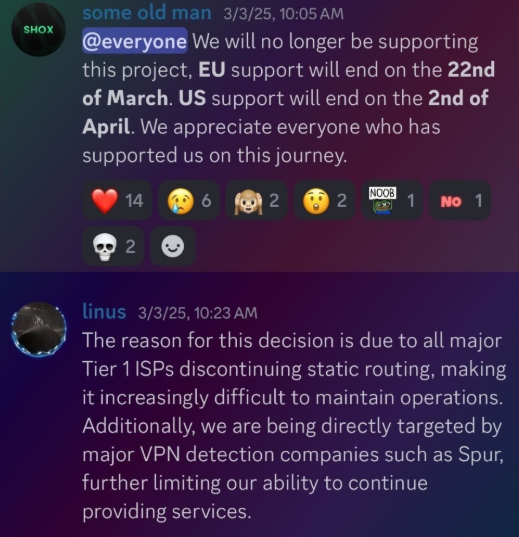
Shox and Linux, talking about their decision to stop selling ISP proxies.

DORT & SNOW

The stated owner of the resi[.]to Discord server went by the abbreviated username “D.” That initial appears to be short for the hacker handle “Dort,” a name that was invoked frequently throughout these Discord chats.
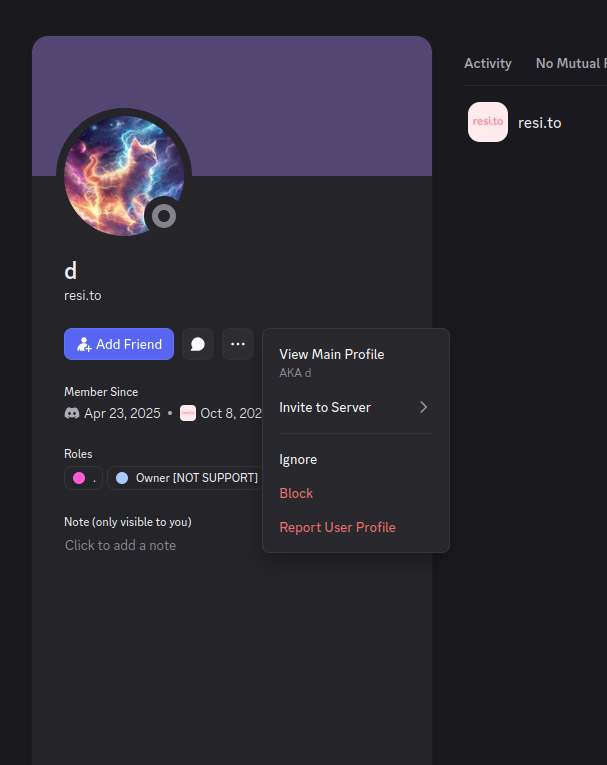
Dort’s profile on resi dot to.

This “Dort” nickname came up in KrebsOnSecurity’s recent conversations with “Forky,” a Brazilian man who acknowledged being involved in the marketing of the Aisuru botnet at its inception in late 2024. But Forky vehemently denied having anything to do with a series of massive and record-smashing DDoS attacks in the latter half of 2025 that were blamed on Aisuru, saying the botnet by that point had been taken over by rivals.

Forky asserts that Dort is a resident of Canada and one of at least two individuals currently in control of the Aisuru/Kimwolf botnet. The other individual Forky named as an Aisuru/Kimwolf botmaster goes by the nickname “Snow.”

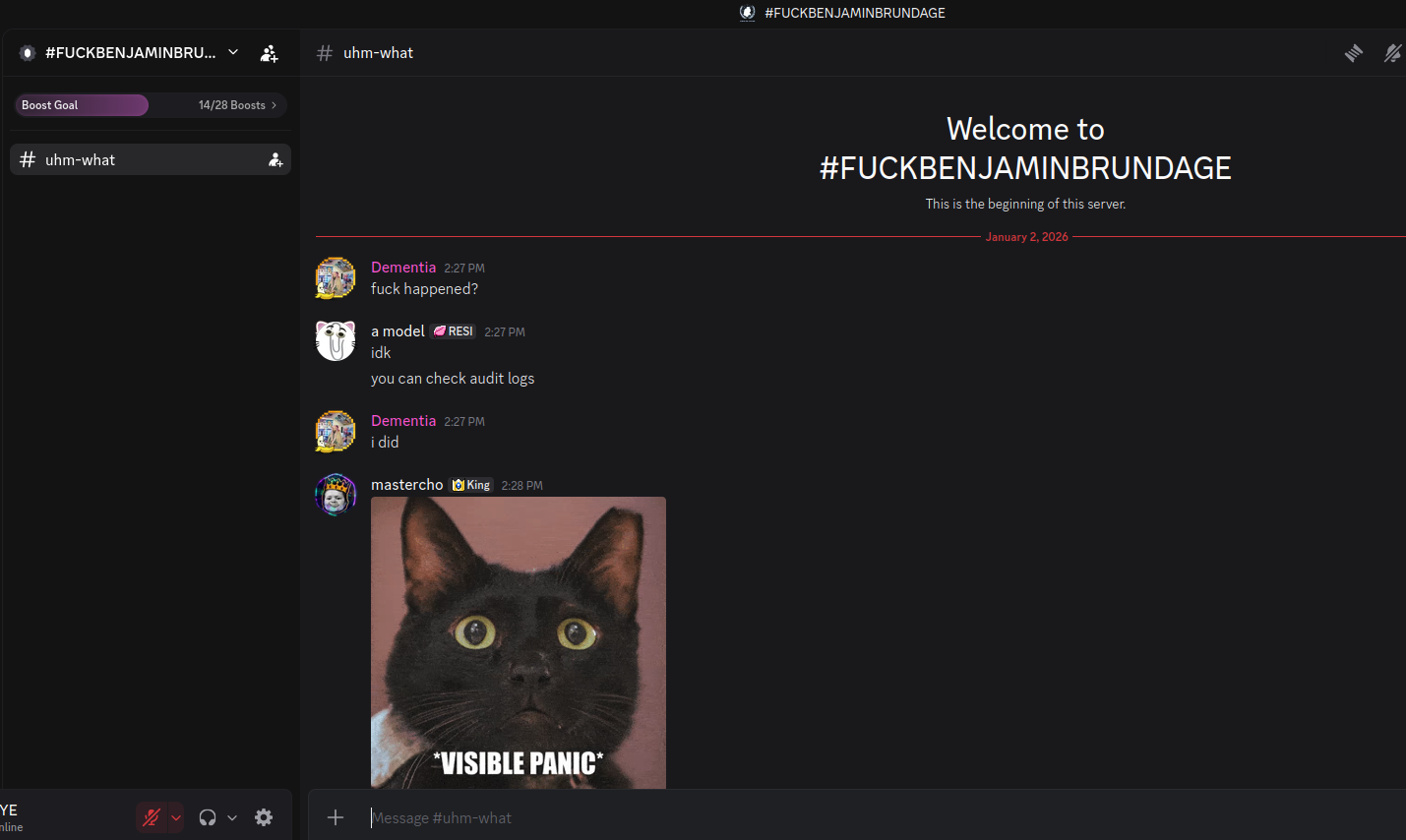
On January 2 — just hours after our story on Kimwolf was published — the historical chat records on resi[.]to were erased without warning and replaced by a profanity-laced message for Synthient’s founder. Minutes after that, the entire server disappeared.

Later that same day, several of the more active members of the now-defunct resi[.]to Discord server moved to a Telegram channel where they posted Brundage’s personal information, and generally complained about being unable to find reliable “bulletproof” hosting for their botnet.

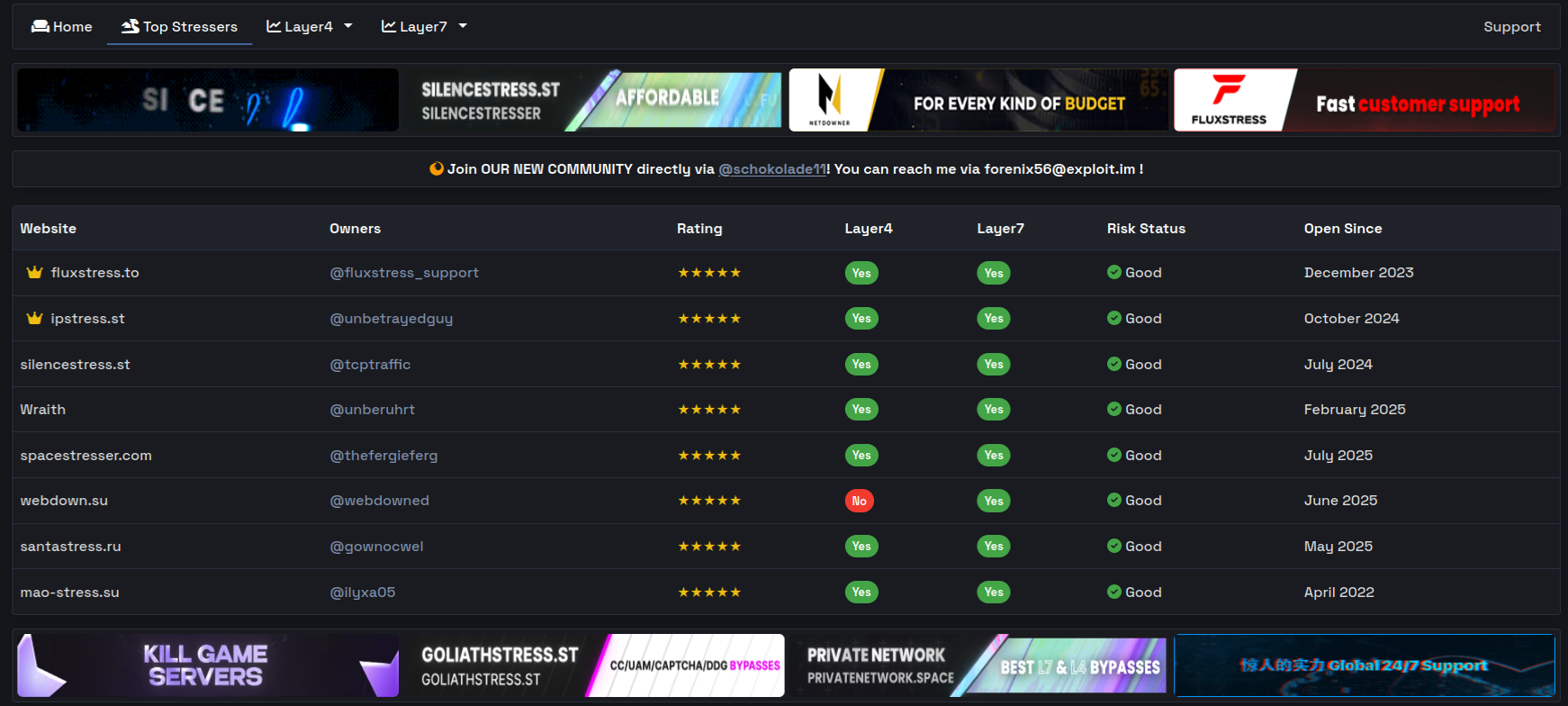
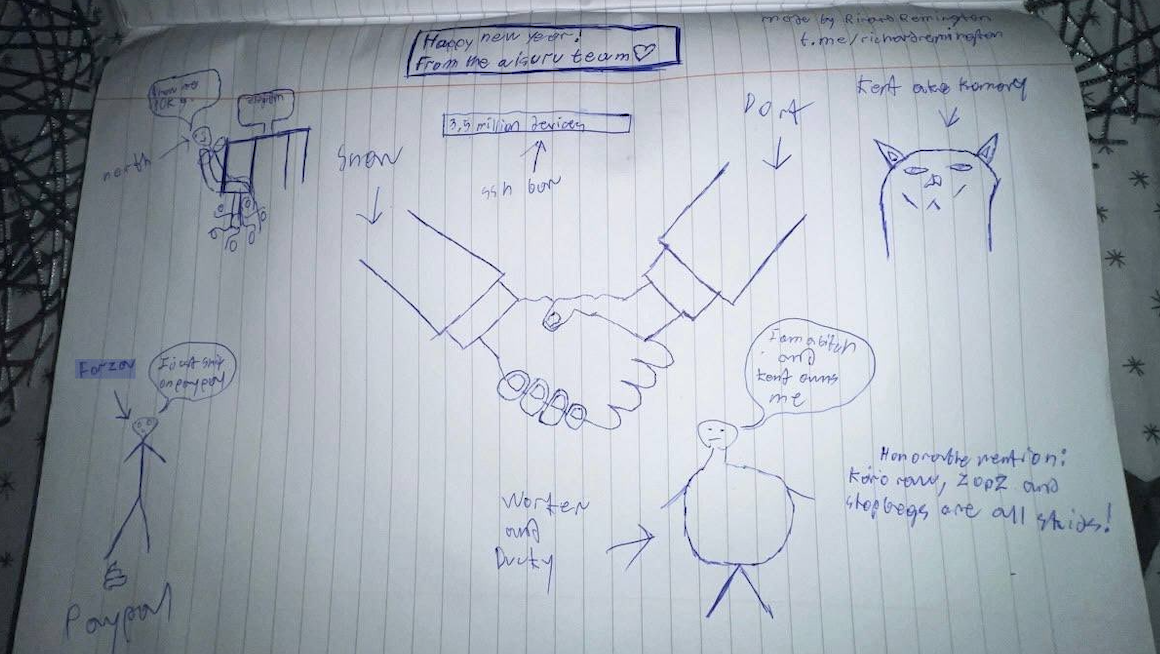
Hilariously, a user by the name “Richard Remington” briefly appeared in the group’s Telegram server to post a crude “Happy New Year” sketch that claims Dort and Snow are now in control of 3.5 million devices infected by Aisuru and/or Kimwolf. Richard Remington’s Telegram account has since been deleted, but it previously stated its owner operates a website that caters to DDoS-for-hire or “stresser” services seeking to test their firepower.
BYTECONNECT, PLAINPROXIES, AND 3XK TECH

Reports from both Synthient and XLab found that Kimwolf was used to deploy programs that turned infected systems into Internet traffic relays for multiple residential proxy services. Among those was a component that installed a software development kit (SDK) called ByteConnect, which is distributed by a provider known as Plainproxies.

ByteConnect says it specializes in “monetizing apps ethically and free,” while Plainproxies advertises the ability to provide content scraping companies with “unlimited” proxy pools. However, Synthient said that upon connecting to ByteConnect’s SDK they instead observed a mass influx of credential-stuffing attacks targeting email servers and popular online websites.

A search on LinkedIn finds the CEO of Plainproxies is Friedrich Kraft, whose resume says he is co-founder of ByteConnect Ltd. Public Internet routing records show Mr. Kraft also operates a hosting firm in Germany called 3XK Tech GmbH. Mr. Kraft did not respond to repeated requests for an interview.

In July 2025, Cloudflare reported that 3XK Tech (a.k.a. Drei-K-Tech) had become the Internet’s largest source of application-layer DDoS attacks. In November 2025, the security firm GreyNoise Intelligence found that Internet addresses on 3XK Tech were responsible for roughly three-quarters of the Internet scanning being done at the time for a newly discovered and critical vulnerability in security products made by Palo Alto Networks.
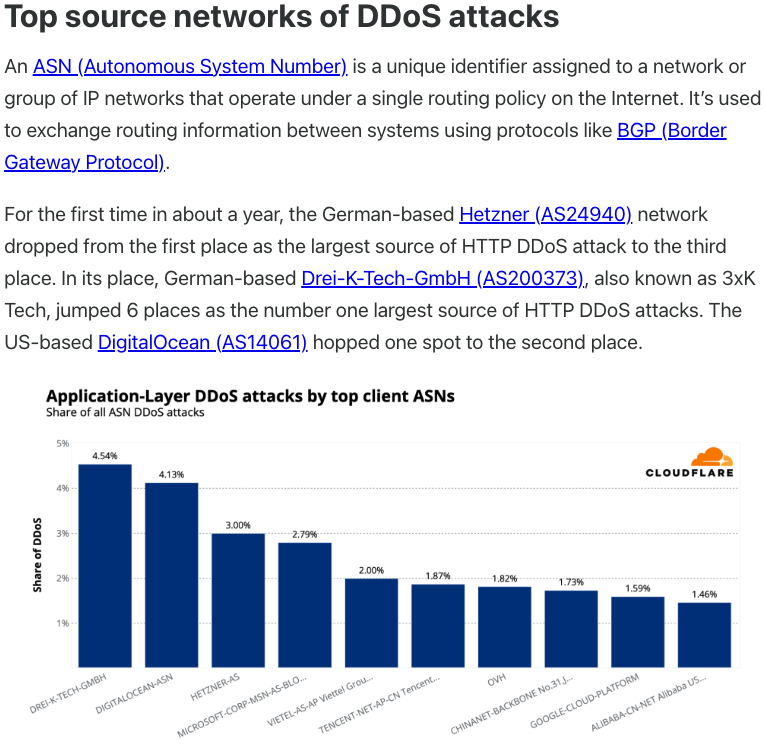
Source: Cloudflare’s Q2 2025 DDoS threat report.

LinkedIn has a profile for another Plainproxies employee, Julia Levi, who is listed as co-founder of ByteConnect. Ms. Levi did not respond to requests for comment. Her resume says she previously worked for two major proxy providers: Netnut Proxy Network, and Bright Data.

Synthient likewise said Plainproxies ignored their outreach, noting that the Byteconnect SDK continues to remain active on devices compromised by Kimwolf.
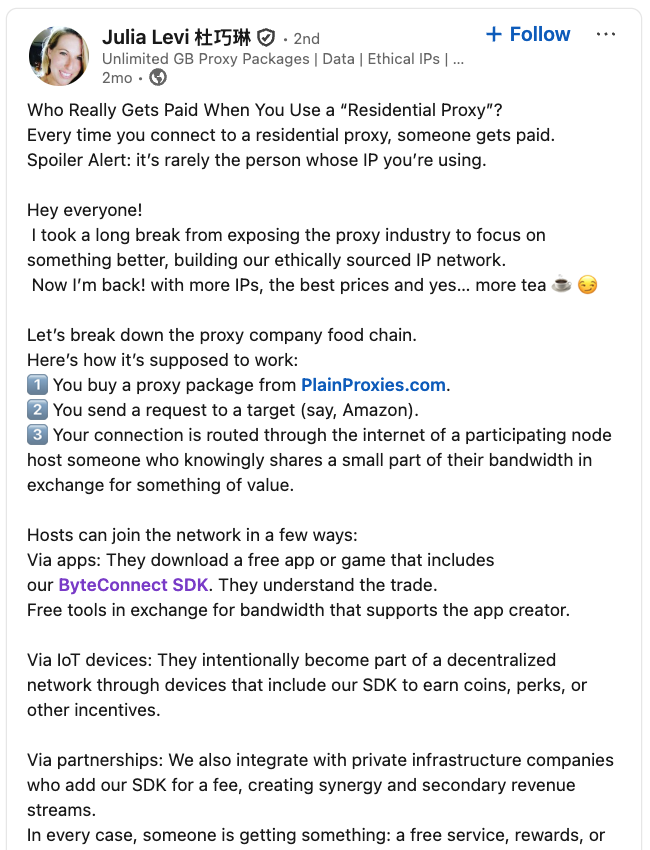
A post from the LinkedIn page of Plainproxies Chief Revenue Officer Julia Levi, explaining how the residential proxy business works.

MASKIFY

Synthient’s January 2 report said another proxy provider heavily involved in the sale of Kimwolf proxies was Maskify, which currently advertises on multiple cybercrime forums that it has more than six million residential Internet addresses for rent.

Maskify prices its service at a rate of 30 cents per gigabyte of data relayed through their proxies. According to Synthient, that price range is insanely low and is far cheaper than any other proxy provider in business today.

“Synthient’s Research Team received screenshots from other proxy providers showing key Kimwolf actors attempting to offload proxy bandwidth in exchange for upfront cash,” the Synthient report noted. “This approach likely helped fuel early development, with associated members spending earnings on infrastructure and outsourced development tasks. Please note that resellers know precisely what they are selling; proxies at these prices are not ethically sourced.”

Maskify did not respond to requests for comment.
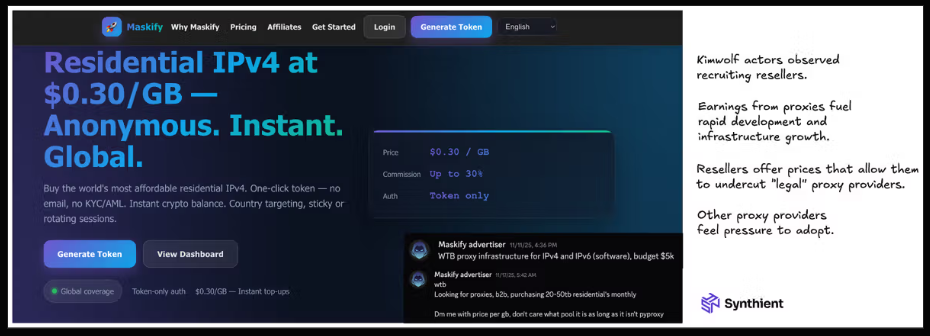
The Maskify website. Image: Synthient.

BOTMASTERS LASH OUT

Hours after our first Kimwolf story was published last week, the resi[.]to Discord server vanished, Synthient’s website was hit with a DDoS attack, and the Kimwolf botmasters took to doxing Brundage via their botnet.

The harassing messages appeared as text records uploaded to the Ethereum Name Service (ENS), a distributed system for supporting smart contracts deployed on the Ethereum blockchain. As documented by XLab, in mid-December the Kimwolf operators upgraded their infrastructure and began using ENS to better withstand the near-constant takedown efforts targeting the botnet’s control servers.
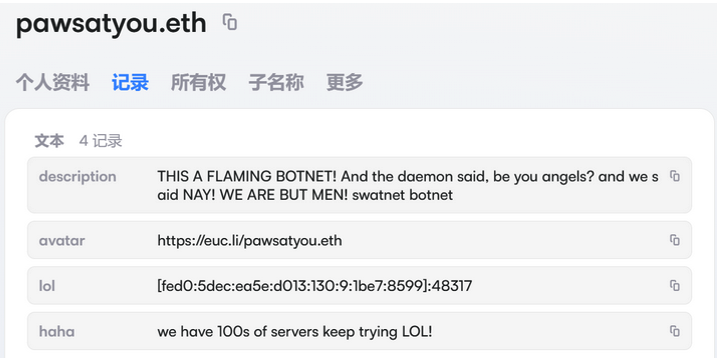
An ENS record used by the Kimwolf operators taunts security firms trying to take down the botnet’s control servers. Image: XLab.

By telling infected systems to seek out the Kimwolf control servers via ENS, even if the servers that the botmasters use to control the botnet are taken down the attacker only needs to update the ENS text record to reflect the new Internet address of the control server, and the infected devices will immediately know where to look for further instructions.

“This channel itself relies on the decentralized nature of blockchain, unregulated by Ethereum or other blockchain operators, and cannot be blocked,” XLab wrote.

The text records included in Kimwolf’s ENS instructions can also feature short messages, such as those that carried Brundage’s personal information. Other ENS text records associated with Kimwolf offered some sage advice: “If flagged, we encourage the TV box to be destroyed.”
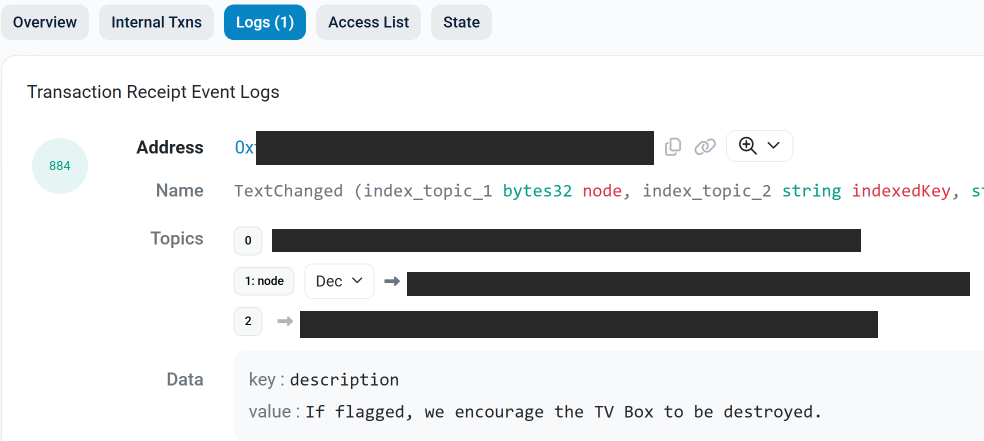
An ENS record tied to the Kimwolf botnet advises, “If flagged, we encourage the TV box to be destroyed.”

Both Synthient and XLabs say Kimwolf targets a vast number of Android TV streaming box models, all of which have zero security protections, and many of which ship with proxy malware built in. Generally speaking, if you can send a data packet to one of these devices you can also seize administrative control over it.

If you own a TV box that matches one of these model names and/or numbers, please just rip it out of your network. If you encounter one of these devices on the network of a family member or friend, send them a link to this story (or to our January 2 story on Kimwolf) and explain that it’s not worth the potential hassle and harm created by keeping them plugged in.

  •  

CISA warns of active attacks on HPE OneView and legacy PowerPoint

The US Cybersecurity and Infrastructure Security Agency (CISA) added both a newly discovered flaw and a much older one to its catalog of Known Exploited Vulnerabilities (KEV).

The KEV catalog gives Federal Civilian Executive Branch (FCEB) agencies a list of vulnerabilities that are known to be exploited in the wild, along with deadlines for when they must be patched. In both of these cases, the due date is January 28, 2026.

But CISA alerts are not just for government agencies. They also provide guidance to businesses and end users about which vulnerabilities should be patched first, based on real-world exploitation.

A critical flaw in HPE OneView

The recently found vulnerability, tracked as CVE-2025-37164, carries a CVSS score of 10 out of 10 and allows remote code execution. The flaw affects HPE OneView, a platform used to manage IT infrastructure, and a patch was released on December 17, 2025.

This critical vulnerability allows a remote, unauthenticated attacker to execute code and potentially gain large-scale control over servers, firmware, and lifecycle management. Management platforms like HPE OneView are often deployed deep inside enterprise networks, where they have extensive privileges and limited monitoring because they are trusted.

Proof of Concept (PoC) code, in the form of a Metasploit module, was made public just one day after the patch was released.

A PowerPoint vulnerability from 2009 resurfaces

The cybersecurity dinosaur here is a vulnerability in Microsoft PowerPoint, tracked as CVE-2009-0556, that dates back more than 15 years. It affects:

  • Microsoft Office PowerPoint 2000 SP3
  • PowerPoint 2002 SP3
  • PowerPoint 2003 SP3
  • PowerPoint in Microsoft Office 2004 for Mac

The flaw allows remote attackers to execute arbitrary code by tricking a victim into opening a specially crafted PowerPoint file that triggers memory corruption.

In the past, this vulnerability was exploited by malware known as Apptom. CISA rarely adds vulnerabilities to the KEV catalog based on ancient exploits, so the “sudden” re‑emergence of the 2009 PowerPoint vulnerability suggests attackers are targeting still‑deployed legacy Office installs.

Successful exploitation can allow attackers to run arbitrary code, deploy malware, and establish a foothold for lateral movement inside a network. Unlike the HPE OneView flaw, this attack requires user interaction—the target must open the malicious PowerPoint file.

Stay safe

When it comes to managing vulnerabilities, prioritizing which patches to apply is an important part of staying safe. So, to make sure you don’t fall victim to exploitation of known vulnerabilities:

  • Keep an eye on the CISA KEV catalog as a guide of what’s currently under active exploitation.
  • Update as fast as you can without interrupting daily routine.
  • Use a real-time up-to-date anti-malware solution to intercept exploits and malware attacks.
  • Don’t open unsolicited attachments without verifying with the—trusted—sender.

We don’t just report on threats—we remove them

Cybersecurity risks should never spread beyond a headline. Keep threats off your devices by downloading Malwarebytes today.

  •  

CISA warns of active attacks on HPE OneView and legacy PowerPoint

The US Cybersecurity and Infrastructure Security Agency (CISA) added both a newly discovered flaw and a much older one to its catalog of Known Exploited Vulnerabilities (KEV).

The KEV catalog gives Federal Civilian Executive Branch (FCEB) agencies a list of vulnerabilities that are known to be exploited in the wild, along with deadlines for when they must be patched. In both of these cases, the due date is January 28, 2026.

But CISA alerts are not just for government agencies. They also provide guidance to businesses and end users about which vulnerabilities should be patched first, based on real-world exploitation.

A critical flaw in HPE OneView

The recently found vulnerability, tracked as CVE-2025-37164, carries a CVSS score of 10 out of 10 and allows remote code execution. The flaw affects HPE OneView, a platform used to manage IT infrastructure, and a patch was released on December 17, 2025.

This critical vulnerability allows a remote, unauthenticated attacker to execute code and potentially gain large-scale control over servers, firmware, and lifecycle management. Management platforms like HPE OneView are often deployed deep inside enterprise networks, where they have extensive privileges and limited monitoring because they are trusted.

Proof of Concept (PoC) code, in the form of a Metasploit module, was made public just one day after the patch was released.

A PowerPoint vulnerability from 2009 resurfaces

The cybersecurity dinosaur here is a vulnerability in Microsoft PowerPoint, tracked as CVE-2009-0556, that dates back more than 15 years. It affects:

  • Microsoft Office PowerPoint 2000 SP3
  • PowerPoint 2002 SP3
  • PowerPoint 2003 SP3
  • PowerPoint in Microsoft Office 2004 for Mac

The flaw allows remote attackers to execute arbitrary code by tricking a victim into opening a specially crafted PowerPoint file that triggers memory corruption.

In the past, this vulnerability was exploited by malware known as Apptom. CISA rarely adds vulnerabilities to the KEV catalog based on ancient exploits, so the “sudden” re‑emergence of the 2009 PowerPoint vulnerability suggests attackers are targeting still‑deployed legacy Office installs.

Successful exploitation can allow attackers to run arbitrary code, deploy malware, and establish a foothold for lateral movement inside a network. Unlike the HPE OneView flaw, this attack requires user interaction—the target must open the malicious PowerPoint file.

Stay safe

When it comes to managing vulnerabilities, prioritizing which patches to apply is an important part of staying safe. So, to make sure you don’t fall victim to exploitation of known vulnerabilities:

  • Keep an eye on the CISA KEV catalog as a guide of what’s currently under active exploitation.
  • Update as fast as you can without interrupting daily routine.
  • Use a real-time up-to-date anti-malware solution to intercept exploits and malware attacks.
  • Don’t open unsolicited attachments without verifying with the—trusted—sender.

We don’t just report on threats—we remove them

Cybersecurity risks should never spread beyond a headline. Keep threats off your devices by downloading Malwarebytes today.

  •  

One million customers on alert as extortion group claims massive Brightspeed data haul

US fiber broadband company Brightspeed is investigating claims by the Crimson Collective extortion group that it stole sensitive data belonging to more than 1 million residential customers, including extensive personally identifiable information (PII), as well as account and billing details.

Brightspeed is one of the largest fiber broadband providers in the US and serves customers across 20 states.

On January 4, the Crimson Collective posted this message on its Telegram channel:

Telegram post Crimson Collective about Brightspeed

“If anyone has someone working at BrightSpeed, tell them to read their mails fast!

We have in our hands over 1m+ residential user PII’s, which contains the following:

  • Customer/account master records containing full PII such as names, emails, phone numbers, billing and service addresses, account status, network type, consent flags, billing system, service instance, network assignment, and site IDs.
  • Address qualification responses with address IDs, full postal addresses, latitude and longitude coordinates, qualification status (fiber/copper/4G), maximum bandwidth, drop length, wire center, marketing profile codes, and eligibility flags.
  • User-level account details keyed by session/user IDs, overlapping with PII including names, emails, phones, service addresses, account numbers, status, communication preferences, and suspend reasons.
  • Payment history per account, featuring payment IDs, dates, amounts, invoice numbers, card types and masked card numbers (last 4 digits), gateways, and status; some entries indicate null or empty histories.
  • Payment methods per account, including default payment method IDs, gateways, masked credit card numbers, expiry dates, BINs, holder names and addresses, status flags (Active/Declined), and created/updated timestamps.
  • Appointment/order records per billing account, with customer PII such as names, emails, phones, addresses, order numbers, status, appointment windows, dispatch and technician information, and install types.

Sample will be dropped on monday night time, letting them some time first to answer to us. (UTC+9, Japan is quite fun for new years while dumping company data)”

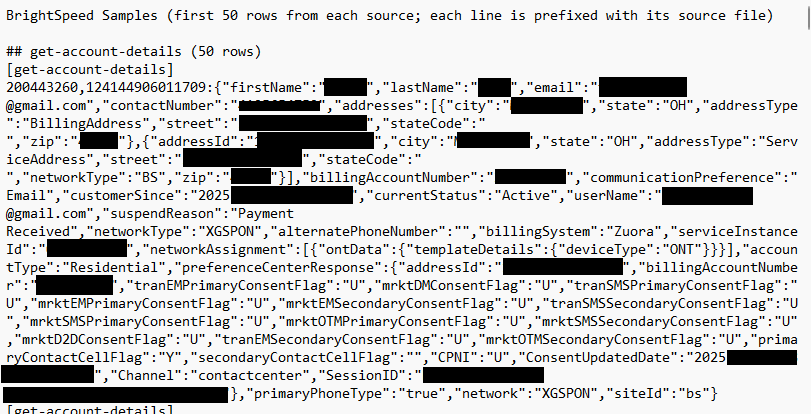
The promised sample was later made available and contains 50 entries from each of the following database tables:

  • [get-account-details]
    account details sample
  • [getAddressQualification]
  • [getUserAccountDetails]
  • [listPaymentHistory]
  • [listPaymentMethods]
    payment methods sample
  • [user-appointments]

In a separate Telegram message, the group also claimed it had disconnected a large number of Brightspeed customers. However, this allegation appears only in the group’s own messaging and has not been corroborated by any public reporting.

While there are some customer complaints circulating on social media, it remains unclear whether these issues are actually caused by any actions taken by the Crimson Collective.

StatusISDown update about Brightspeed

Brightspeed told BleepingComputer:

“We take the security of our networks and protection of our customers’ and employees’ information seriously and are rigorous in securing our networks and monitoring threats. We are currently investigating reports of a cybersecurity event. As we learn more, we will keep our customers, employees and authorities informed.”

Protecting yourself after a data breach

If you think you have been affected by a data breach, here are steps you can take to protect yourself:

  • Check the company’s advice. Every breach is different, so check with the company to find out what’s happened and follow any specific advice it offers.
  • Change your password. You can make a stolen password useless to thieves by changing it. Choose a strong password that you don’t use for anything else. Better yet, let a password manager choose one for you.
  • Enable two-factor authentication (2FA). If you can, use a FIDO2-compliant hardware key, laptop, or phone as your second factor. Some forms of 2FA can be phished just as easily as a password, but 2FA that relies on a FIDO2 device can’t be phished.
  • Watch out for impersonators. The thieves may contact you posing as the breached platform. Check the official website to see if it’s contacting victims and verify the identity of anyone who contacts you using a different communication channel.
  • Take your time. Phishing attacks often impersonate people or brands you know, and use themes that require urgent attention, such as missed deliveries, account suspensions, and security alerts.
  • Consider not storing your card details. It’s definitely more convenient to let sites remember your card details, but we highly recommend not storing that information on websites.
  • Set up identity monitoring, which alerts you if your personal information is found being traded illegally online and helps you recover after.

We don’t just report on threats—we help safeguard your entire digital identity

Cybersecurity risks should never spread beyond a headline. Protect your, and your family’s, personal information by using identity protection.

  •  

One million customers on alert as extortion group claims massive Brightspeed data haul

US fiber broadband company Brightspeed is investigating claims by the Crimson Collective extortion group that it stole sensitive data belonging to more than 1 million residential customers, including extensive personally identifiable information (PII), as well as account and billing details.

Brightspeed is one of the largest fiber broadband providers in the US and serves customers across 20 states.

On January 4, the Crimson Collective posted this message on its Telegram channel:

Telegram post Crimson Collective about Brightspeed

“If anyone has someone working at BrightSpeed, tell them to read their mails fast!

We have in our hands over 1m+ residential user PII’s, which contains the following:

  • Customer/account master records containing full PII such as names, emails, phone numbers, billing and service addresses, account status, network type, consent flags, billing system, service instance, network assignment, and site IDs.
  • Address qualification responses with address IDs, full postal addresses, latitude and longitude coordinates, qualification status (fiber/copper/4G), maximum bandwidth, drop length, wire center, marketing profile codes, and eligibility flags.
  • User-level account details keyed by session/user IDs, overlapping with PII including names, emails, phones, service addresses, account numbers, status, communication preferences, and suspend reasons.
  • Payment history per account, featuring payment IDs, dates, amounts, invoice numbers, card types and masked card numbers (last 4 digits), gateways, and status; some entries indicate null or empty histories.
  • Payment methods per account, including default payment method IDs, gateways, masked credit card numbers, expiry dates, BINs, holder names and addresses, status flags (Active/Declined), and created/updated timestamps.
  • Appointment/order records per billing account, with customer PII such as names, emails, phones, addresses, order numbers, status, appointment windows, dispatch and technician information, and install types.

Sample will be dropped on monday night time, letting them some time first to answer to us. (UTC+9, Japan is quite fun for new years while dumping company data)”

The promised sample was later made available and contains 50 entries from each of the following database tables:

  • [get-account-details]
    account details sample
  • [getAddressQualification]
  • [getUserAccountDetails]
  • [listPaymentHistory]
  • [listPaymentMethods]
    payment methods sample
  • [user-appointments]

In a separate Telegram message, the group also claimed it had disconnected a large number of Brightspeed customers. However, this allegation appears only in the group’s own messaging and has not been corroborated by any public reporting.

While there are some customer complaints circulating on social media, it remains unclear whether these issues are actually caused by any actions taken by the Crimson Collective.

StatusISDown update about Brightspeed

Brightspeed told BleepingComputer:

“We take the security of our networks and protection of our customers’ and employees’ information seriously and are rigorous in securing our networks and monitoring threats. We are currently investigating reports of a cybersecurity event. As we learn more, we will keep our customers, employees and authorities informed.”

Protecting yourself after a data breach

If you think you have been affected by a data breach, here are steps you can take to protect yourself:

  • Check the company’s advice. Every breach is different, so check with the company to find out what’s happened and follow any specific advice it offers.
  • Change your password. You can make a stolen password useless to thieves by changing it. Choose a strong password that you don’t use for anything else. Better yet, let a password manager choose one for you.
  • Enable two-factor authentication (2FA). If you can, use a FIDO2-compliant hardware key, laptop, or phone as your second factor. Some forms of 2FA can be phished just as easily as a password, but 2FA that relies on a FIDO2 device can’t be phished.
  • Watch out for impersonators. The thieves may contact you posing as the breached platform. Check the official website to see if it’s contacting victims and verify the identity of anyone who contacts you using a different communication channel.
  • Take your time. Phishing attacks often impersonate people or brands you know, and use themes that require urgent attention, such as missed deliveries, account suspensions, and security alerts.
  • Consider not storing your card details. It’s definitely more convenient to let sites remember your card details, but we highly recommend not storing that information on websites.
  • Set up identity monitoring, which alerts you if your personal information is found being traded illegally online and helps you recover after.

We don’t just report on threats—we help safeguard your entire digital identity

Cybersecurity risks should never spread beyond a headline. Protect your, and your family’s, personal information by using identity protection.

  •  

Phishing campaign abuses Google Cloud services to steal Microsoft 365 logins

Attackers are sending very convincing fake “Google” emails that slip past spam filters, route victims through several trusted Google-owned services, and ultimately lead to a look-alike Microsoft 365 sign-in page designed to harvest usernames and passwords.

Researchers found that cybercriminals used Google Cloud Application Integration’s Send Email feature to send phishing emails from a legitimate Google address: noreply-application-integration@google[.]com.

Google Cloud Application Integration allows users to automate business processes by connecting any application with point-and-click configurations. New customers currently receive free credits, which lowers the barrier to entry and may attract some cybercriminals.

The initial email arrives from what looks like a real Google address and references something routine and familiar, such as a voicemail notification, a task to complete, or permissions to access a document. The email includes a link that points to a genuine Google Cloud Storage URL, so the web address appears to belong to Google and doesn’t look like an obvious fake.

After the first click, you are redirected to another Google‑related domain (googleusercontent[.]com) showing a CAPTCHA or image check. Once you pass the “I’m not a robot check,” you land on what looks like a normal Microsoft 365 sign‑in page, but on close inspection, the web address is not an official Microsoft domain.

Any credentials provided on this site will be captured by the attackers.

The use of Google infrastructure provides the phishers with a higher level of trust from both email filters and the receiving users. This is not a vulnerability, just an abuse of cloud-based services that Google provides.

Google’s response

Google said it has taken action against the activity:

“We have blocked several phishing campaigns involving the misuse of an email notification feature within Google Cloud Application Integration. Importantly, this activity stemmed from the abuse of a workflow automation tool, not a compromise of Google’s infrastructure. While we have implemented protections to defend users against this specific attack, we encourage continued caution as malicious actors frequently attempt to spoof trusted brands. We are taking additional steps to prevent further misuse.”

We’ve seen several phishing campaigns that abuse trusted workflows from companies like Google, PayPal, DocuSign, and other cloud-based service providers to lend credibility to phishing emails and redirect targets to their credential-harvesting websites.

How to stay safe

Campaigns like these show that some responsibility for spotting phishing emails still rests with the recipient. Besides staying informed, here are some other tips you can follow to stay safe.

  • Always check the actual web address of any login page; if it’s not a genuine Microsoft domain, do not enter credentials.​ Using a password manager will help because they will not auto-fill your details on fake websites.
  • Be cautious of “urgent” emails about voicemails, document shares, or permissions, even if they appear to come from Google or Microsoft.​ Creating urgency is a common tactic by scammers and phishers.
  • Go directly to the service whenever possible. Instead of clicking links in emails, open OneDrive, Teams, or Outlook using your normal bookmark or app.
  • Use multi‑factor authentication (MFA) so that stolen passwords alone are not enough, and regularly review which apps have access to your account and remove anything you don’t recognize.

Pro tip: Malwarebytes Scam Guard can recognize emails like this as scams. You can upload suspicious text, emails, attachments and other files and ask for its opinion. It’s really very good at recognizing scams.


We don’t just report on scams—we help detect them

Cybersecurity risks should never spread beyond a headline. If something looks dodgy to you, check if it’s a scam using Malwarebytes Scam Guard, a feature of our mobile protection products. Submit a screenshot, paste suspicious content, or share a text or phone number, and we’ll tell you if it’s a scam or legit. Download Malwarebytes Mobile Security for iOS or Android and try it today!

  •  

Phishing campaign abuses Google Cloud services to steal Microsoft 365 logins

Attackers are sending very convincing fake “Google” emails that slip past spam filters, route victims through several trusted Google-owned services, and ultimately lead to a look-alike Microsoft 365 sign-in page designed to harvest usernames and passwords.

Researchers found that cybercriminals used Google Cloud Application Integration’s Send Email feature to send phishing emails from a legitimate Google address: noreply-application-integration@google[.]com.

Google Cloud Application Integration allows users to automate business processes by connecting any application with point-and-click configurations. New customers currently receive free credits, which lowers the barrier to entry and may attract some cybercriminals.

The initial email arrives from what looks like a real Google address and references something routine and familiar, such as a voicemail notification, a task to complete, or permissions to access a document. The email includes a link that points to a genuine Google Cloud Storage URL, so the web address appears to belong to Google and doesn’t look like an obvious fake.

After the first click, you are redirected to another Google‑related domain (googleusercontent[.]com) showing a CAPTCHA or image check. Once you pass the “I’m not a robot check,” you land on what looks like a normal Microsoft 365 sign‑in page, but on close inspection, the web address is not an official Microsoft domain.

Any credentials provided on this site will be captured by the attackers.

The use of Google infrastructure provides the phishers with a higher level of trust from both email filters and the receiving users. This is not a vulnerability, just an abuse of cloud-based services that Google provides.

Google’s response

Google said it has taken action against the activity:

“We have blocked several phishing campaigns involving the misuse of an email notification feature within Google Cloud Application Integration. Importantly, this activity stemmed from the abuse of a workflow automation tool, not a compromise of Google’s infrastructure. While we have implemented protections to defend users against this specific attack, we encourage continued caution as malicious actors frequently attempt to spoof trusted brands. We are taking additional steps to prevent further misuse.”

We’ve seen several phishing campaigns that abuse trusted workflows from companies like Google, PayPal, DocuSign, and other cloud-based service providers to lend credibility to phishing emails and redirect targets to their credential-harvesting websites.

How to stay safe

Campaigns like these show that some responsibility for spotting phishing emails still rests with the recipient. Besides staying informed, here are some other tips you can follow to stay safe.

  • Always check the actual web address of any login page; if it’s not a genuine Microsoft domain, do not enter credentials.​ Using a password manager will help because they will not auto-fill your details on fake websites.
  • Be cautious of “urgent” emails about voicemails, document shares, or permissions, even if they appear to come from Google or Microsoft.​ Creating urgency is a common tactic by scammers and phishers.
  • Go directly to the service whenever possible. Instead of clicking links in emails, open OneDrive, Teams, or Outlook using your normal bookmark or app.
  • Use multi‑factor authentication (MFA) so that stolen passwords alone are not enough, and regularly review which apps have access to your account and remove anything you don’t recognize.

Pro tip: Malwarebytes Scam Guard can recognize emails like this as scams. You can upload suspicious text, emails, attachments and other files and ask for its opinion. It’s really very good at recognizing scams.


We don’t just report on scams—we help detect them

Cybersecurity risks should never spread beyond a headline. If something looks dodgy to you, check if it’s a scam using Malwarebytes Scam Guard, a feature of our mobile protection products. Submit a screenshot, paste suspicious content, or share a text or phone number, and we’ll tell you if it’s a scam or legit. Download Malwarebytes Mobile Security for iOS or Android and try it today!

  •  
❌