Reading view

Get paid to scroll TikTok? The data trade behind Freecash ads

Loyal readers and other privacy-conscious people will be familiar with the expression, “If it’s too good to be true, it’s probably false.”

Getting paid handsomely to scroll social media definitely falls into that category. It sounds like an easy side hustle, which usually means there’s a catch.

In January 2026, an app called Freecash shot up to the number two spot on Apple’s free iOS chart in the US, helped along by TikTok ads that look a lot like job offers from TikTok itself. The ads promised up to $35 an hour to watch your “For You” page. According to reporting, the ads didn’t promote Freecash by name. Instead, they showed a young woman expressing excitement about seemingly being “hired by TikTok” to watch videos for money.
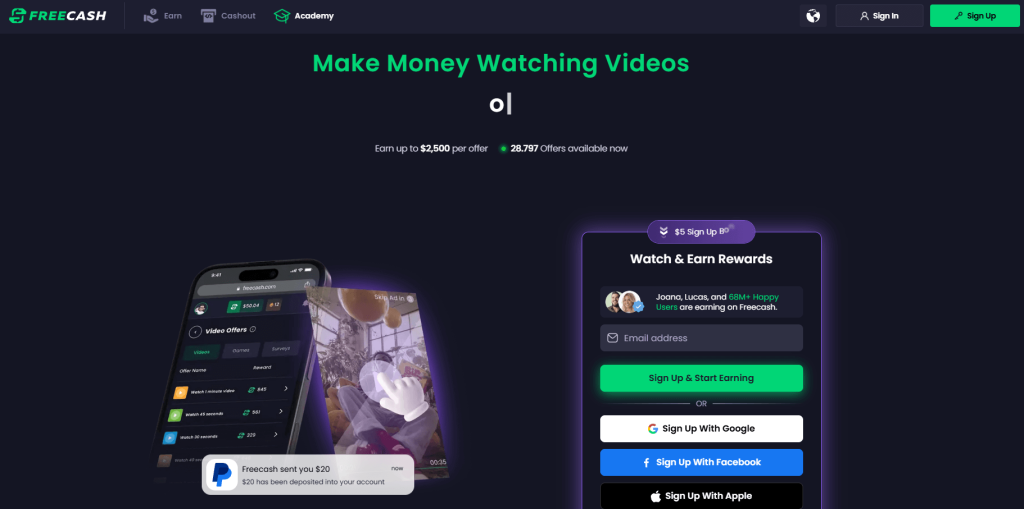
Freecash landing page

The landing pages featured TikTok and Freecash logos and invited users to “get paid to scroll” and “cash out instantly,” implying a simple exchange of time for money.

Those claims were misleading enough that TikTok said the ads violated its rules on financial misrepresentation and removed some of them.

Once you install the app, the promised TikTok paycheck vanishes. Instead, Freecash routes you to a rotating roster of mobile games—titles like Monopoly Go and Disney Solitaire—and offers cash rewards for completing time‑limited in‑game challenges. Payouts range from a single cent for a few minutes of daily play up to triple‑digit amounts if you reach high levels within a fixed period.

The whole setup is designed not to reward scrolling, as it claims, but to funnel you into games where you are likely to spend money or watch paid advertisements.

Freecash’s parent company, Berlin‑based Almedia, openly describes the platform as a way to match mobile game developers with users who are likely to install and spend. The company’s CEO has spoken publicly about using past spending data to steer users toward the genres where they’re most “valuable” to advertisers. 

Our concern, beyond the bait-and-switch, is the privacy issue. Freecash’s privacy policy allows the automatic collection of highly sensitive information, including data about race, religion, sex life, sexual orientation, health, and biometrics. Each additional mobile game you install to chase rewards adds its own privacy policy, tracking, and telemetry. Together, they greatly increase how much behavioral data these companies can harvest about a user.

Experts warn that data brokers already trade lists of people likely to be more susceptible to scams or compulsive online behavior—profiles that apps like this can help refine.

We’ve previously reported on data brokers that used games and apps to build massive databases, only to later suffer breaches exposing all that data.

When asked about the ads, Freecash said the most misleading TikTok promotions were created by third-party affiliates, not by the company itself. Which is quite possible because Freecash does offer an affiliate payout program to people who promote the app online. But they made promises to review and tighten partner monitoring.

For experienced users, the pattern should feel familiar: eye‑catching promises of easy money, a bait‑and‑switch into something that takes more time and effort than advertised, and a business model that suddenly makes sense when you realize your attention and data are the real products.

How to stay private

Free cash? Apparently, there is no such thing.

If you’re curious how intrusive schemes like this can be, consider using a separate email address created specifically for testing. Avoid sharing real personal details. Many users report that once they sign up, marketing emails quickly pile up.

Some of these schemes also appeal to people who are younger or under financial pressure, offering tiny payouts while generating far more value for advertisers and app developers.

So, what can you do?

  • Gather information about the company you’re about to give your data. Talk to friends and relatives about your plans. Shared common sense often helps make the right decisions.
  • Create a separate account if you want to test a service. Use a dedicated email address and avoid sharing real personal details.
  • Limit information you provide online to what makes sense for the purpose. Does a game publisher need your Social Security Number? I don’t think so.
  • Be cautious about app installs that are framed as required to make the money initially promised, and review permissions carefully.
  • Use an up-to-date real-time anti-malware solution on all your devices.

Work from the premise that free money does not exist. Try to work out the business model of those offering it, and then decide.


We don’t just report on threats – we help protect your social media

Cybersecurity risks should never spread beyond a headline. Protect your social media accounts by using Malwarebytes Identity Theft Protection.
  •  

Get paid to scroll TikTok? The data trade behind Freecash ads

Loyal readers and other privacy-conscious people will be familiar with the expression, “If it’s too good to be true, it’s probably false.”

Getting paid handsomely to scroll social media definitely falls into that category. It sounds like an easy side hustle, which usually means there’s a catch.

In January 2026, an app called Freecash shot up to the number two spot on Apple’s free iOS chart in the US, helped along by TikTok ads that look a lot like job offers from TikTok itself. The ads promised up to $35 an hour to watch your “For You” page. According to reporting, the ads didn’t promote Freecash by name. Instead, they showed a young woman expressing excitement about seemingly being “hired by TikTok” to watch videos for money.

Freecash landing page

The landing pages featured TikTok and Freecash logos and invited users to “get paid to scroll” and “cash out instantly,” implying a simple exchange of time for money.

Those claims were misleading enough that TikTok said the ads violated its rules on financial misrepresentation and removed some of them.

Once you install the app, the promised TikTok paycheck vanishes. Instead, Freecash routes you to a rotating roster of mobile games—titles like Monopoly Go and Disney Solitaire—and offers cash rewards for completing time‑limited in‑game challenges. Payouts range from a single cent for a few minutes of daily play up to triple‑digit amounts if you reach high levels within a fixed period.

The whole setup is designed not to reward scrolling, as it claims, but to funnel you into games where you are likely to spend money or watch paid advertisements.

Freecash’s parent company, Berlin‑based Almedia, openly describes the platform as a way to match mobile game developers with users who are likely to install and spend. The company’s CEO has spoken publicly about using past spending data to steer users toward the genres where they’re most “valuable” to advertisers. 

Our concern, beyond the bait-and-switch, is the privacy issue. Freecash’s privacy policy allows the automatic collection of highly sensitive information, including data about race, religion, sex life, sexual orientation, health, and biometrics. Each additional mobile game you install to chase rewards adds its own privacy policy, tracking, and telemetry. Together, they greatly increase how much behavioral data these companies can harvest about a user.

Experts warn that data brokers already trade lists of people likely to be more susceptible to scams or compulsive online behavior—profiles that apps like this can help refine.

We’ve previously reported on data brokers that used games and apps to build massive databases, only to later suffer breaches exposing all that data.

When asked about the ads, Freecash said the most misleading TikTok promotions were created by third-party affiliates, not by the company itself. Which is quite possible because Freecash does offer an affiliate payout program to people who promote the app online. But they made promises to review and tighten partner monitoring.

For experienced users, the pattern should feel familiar: eye‑catching promises of easy money, a bait‑and‑switch into something that takes more time and effort than advertised, and a business model that suddenly makes sense when you realize your attention and data are the real products.

How to stay private

Free cash? Apparently, there is no such thing.

If you’re curious how intrusive schemes like this can be, consider using a separate email address created specifically for testing. Avoid sharing real personal details. Many users report that once they sign up, marketing emails quickly pile up.

Some of these schemes also appeal to people who are younger or under financial pressure, offering tiny payouts while generating far more value for advertisers and app developers.

So, what can you do?

  • Gather information about the company you’re about to give your data. Talk to friends and relatives about your plans. Shared common sense often helps make the right decisions.
  • Create a separate account if you want to test a service. Use a dedicated email address and avoid sharing real personal details.
  • Limit information you provide online to what makes sense for the purpose. Does a game publisher need your Social Security Number? I don’t think so.
  • Be cautious about app installs that are framed as required to make the money initially promised, and review permissions carefully.
  • Use an up-to-date real-time anti-malware solution on all your devices.

Work from the premise that free money does not exist. Try to work out the business model of those offering it, and then decide.


We don’t just report on threats – we help protect your social media

Cybersecurity risks should never spread beyond a headline. Protect your social media accounts by using Malwarebytes Identity Theft Protection.

  •  

One privacy change I made for 2026 (Lock and Code S07E02)

This week on the Lock and Code podcast…

When you hear the words “data privacy,” what do you first imagine?

Maybe you picture going into your social media apps and setting your profile and posts to private. Maybe you think about who you’ve shared your location with and deciding to revoke some of that access. Maybe you want to remove a few apps entirely from your smartphone, maybe you want to try a new web browser, maybe you even want to skirt the type of street-level surveillance provided by Automated License Plate Readers, which can record your car model, license plate number, and location on your morning drive to work.

Importantly, all of these are “data privacy,” but trying to do all of these things at once can feel impossible.

That’s why, this year, for Data Privacy Day, Malwarebytes Senior Privacy Advocate (and Lock and Code host) David Ruiz is sharing the one thing he’s doing different to improve his privacy. And it’s this: He’s given up Google Search entirely.

When Ruiz requested the data that Google had collected about him last year, he saw that the company had recorded an eye-popping 8,000 searches in just the span of 18 months. And those 8,000 searches didn’t just reveal what he was thinking about on any given day—including his shopping interests, his home improvement projects, and his late-night medical concerns—they also revealed when he clicked on an ad based on the words he searched. This type of data, which connects a person’s searches to the likelihood of engaging with an online ad, is vital to Google’s revenue, and it’s the type of thing that Ruiz is seeking to finally cut off.

So, for 2026, he has switched to a new search engine, Brave Search.

Today, on the Lock and Code podcast, Ruiz explains why he made the switch, what he values about Brave Search, and why he also refused to switch to any of the major AI platforms in replacing Google.

Tune in today to listen to the full episode.

Show notes and credits:

Intro Music: “Spellbound” by Kevin MacLeod (incompetech.com)
Licensed under Creative Commons: By Attribution 4.0 License
http://creativecommons.org/licenses/by/4.0/
Outro Music: “Good God” by Wowa (unminus.com)


Listen up—Malwarebytes doesn’t just talk cybersecurity, we provide it.

Protect yourself from online attacks that threaten your identity, your files, your system, and your financial well-being with our exclusive offer for Malwarebytes Premium Security for Lock and Code listeners.

  •  

One privacy change I made for 2026 (Lock and Code S07E02)

This week on the Lock and Code podcast…

When you hear the words “data privacy,” what do you first imagine?

Maybe you picture going into your social media apps and setting your profile and posts to private. Maybe you think about who you’ve shared your location with and deciding to revoke some of that access. Maybe you want to remove a few apps entirely from your smartphone, maybe you want to try a new web browser, maybe you even want to skirt the type of street-level surveillance provided by Automated License Plate Readers, which can record your car model, license plate number, and location on your morning drive to work.

Importantly, all of these are “data privacy,” but trying to do all of these things at once can feel impossible.

That’s why, this year, for Data Privacy Day, Malwarebytes Senior Privacy Advocate (and Lock and Code host) David Ruiz is sharing the one thing he’s doing different to improve his privacy. And it’s this: He’s given up Google Search entirely.

When Ruiz requested the data that Google had collected about him last year, he saw that the company had recorded an eye-popping 8,000 searches in just the span of 18 months. And those 8,000 searches didn’t just reveal what he was thinking about on any given day—including his shopping interests, his home improvement projects, and his late-night medical concerns—they also revealed when he clicked on an ad based on the words he searched. This type of data, which connects a person’s searches to the likelihood of engaging with an online ad, is vital to Google’s revenue, and it’s the type of thing that Ruiz is seeking to finally cut off.

So, for 2026, he has switched to a new search engine, Brave Search.

Today, on the Lock and Code podcast, Ruiz explains why he made the switch, what he values about Brave Search, and why he also refused to switch to any of the major AI platforms in replacing Google.

Tune in today to listen to the full episode.

Show notes and credits:

Intro Music: “Spellbound” by Kevin MacLeod (incompetech.com)
Licensed under Creative Commons: By Attribution 4.0 License
http://creativecommons.org/licenses/by/4.0/
Outro Music: “Good God” by Wowa (unminus.com)


Listen up—Malwarebytes doesn’t just talk cybersecurity, we provide it.

Protect yourself from online attacks that threaten your identity, your files, your system, and your financial well-being with our exclusive offer for Malwarebytes Premium Security for Lock and Code listeners.

  •  

Fake LastPass maintenance emails target users

The LastPass Threat Intelligence, Mitigation, and Escalation (TIME) team has published a warning about an active phishing campaign in which fake “maintenance” emails pressure users to back up their vaults within 24 hours. The emails lead to credential-stealing phishing sites rather than any legitimate LastPass page.

The phishing campaign that started around January 19, 2026, uses emails that falsely claim upcoming infrastructure maintenance and urge users to “backup your vault in the next 24 hours.”

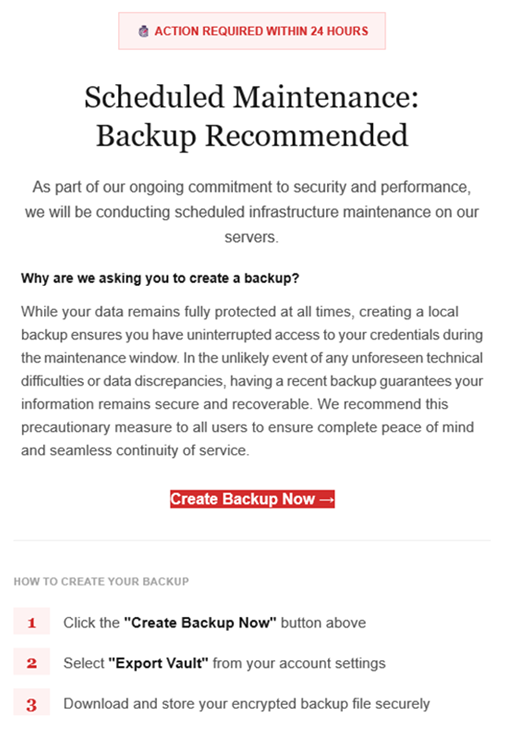
Example phishing email
Image courtesy of LastPass

“Scheduled Maintenance: Backup Recommended

As part of our ongoing commitment to security and performance, we will be conducting scheduled infrastructure maintenance on our servers.
Why are we asking you to create a backup?
While your data remains protected at all times, creating a local backup ensures you have access to your credentials during the maintenance window. In the unlikely event of any unforeseen technical difficulties or data discrepancies, having a recent backup guarantees your information remains secure and recoverable. We recommend this precautionary measure to all users to ensure complete peace of mind and seamless continuity of service.

Create Backup Now (link)

How to create your backup
1 Click the “Create Backup Now” button above
2 Select “Export Vault” from you account settings
3 Download and store your encrypted backup file securely”

The link in the email points to mail-lastpass[.]com, a domain that doesn’t belong to LastPass and has now been taken down.

Note that there are different subject lines in use. Here is a selection:

  • LastPass Infrastructure Update: Secure Your Vault Now
  • Your Data, Your Protection: Create a Backup Before Maintenance
  • Don’t Miss Out: Backup Your Vault Before Maintenance
  • Important: LastPass Maintenance & Your Vault Security
  • Protect Your Passwords: Backup Your Vault (24-Hour Window)

It is imperative for users to ignore instructions in emails like these. Giving away the login details for your password manager can be disastrous. For most users, it would provide access to enough information to carry out identity theft.

Stay safe

First and foremost, it’s important to understand that LastPass will never ask for your master password or demand immediate action under a tight deadline. Generally speaking, there are more guidelines that can help you stay safe.

  • Don’t click on links in unsolicited emails without verifying with the trusted sender that they’re legitimate.
  • Always log in directly on the platform that you are trying to access, rather than through a link.
  • Use a real-time, up-to-date anti-malware solution with a web protection module to block malicious sites.
  • Report phishing emails to the company that’s being impersonated, so they can alert other customers. In this case emails were forwarded to abuse@lastpass.com.

Pro tip: Malwarebytes Scam Guard  would have recognized this email as a scam and advised you how to proceed.


We don’t just report on threats—we help safeguard your entire digital identity

Cybersecurity risks should never spread beyond a headline. Protect your, and your family’s, personal information by using identity protection.

  •  

Fake LastPass maintenance emails target users

The LastPass Threat Intelligence, Mitigation, and Escalation (TIME) team has published a warning about an active phishing campaign in which fake “maintenance” emails pressure users to back up their vaults within 24 hours. The emails lead to credential-stealing phishing sites rather than any legitimate LastPass page.

The phishing campaign that started around January 19, 2026, uses emails that falsely claim upcoming infrastructure maintenance and urge users to “backup your vault in the next 24 hours.”

Example phishing email
Image courtesy of LastPass

“Scheduled Maintenance: Backup Recommended

As part of our ongoing commitment to security and performance, we will be conducting scheduled infrastructure maintenance on our servers.
Why are we asking you to create a backup?
While your data remains protected at all times, creating a local backup ensures you have access to your credentials during the maintenance window. In the unlikely event of any unforeseen technical difficulties or data discrepancies, having a recent backup guarantees your information remains secure and recoverable. We recommend this precautionary measure to all users to ensure complete peace of mind and seamless continuity of service.

Create Backup Now (link)

How to create your backup
1 Click the “Create Backup Now” button above
2 Select “Export Vault” from you account settings
3 Download and store your encrypted backup file securely”

The link in the email points to mail-lastpass[.]com, a domain that doesn’t belong to LastPass and has now been taken down.

Note that there are different subject lines in use. Here is a selection:

  • LastPass Infrastructure Update: Secure Your Vault Now
  • Your Data, Your Protection: Create a Backup Before Maintenance
  • Don’t Miss Out: Backup Your Vault Before Maintenance
  • Important: LastPass Maintenance & Your Vault Security
  • Protect Your Passwords: Backup Your Vault (24-Hour Window)

It is imperative for users to ignore instructions in emails like these. Giving away the login details for your password manager can be disastrous. For most users, it would provide access to enough information to carry out identity theft.

Stay safe

First and foremost, it’s important to understand that LastPass will never ask for your master password or demand immediate action under a tight deadline. Generally speaking, there are more guidelines that can help you stay safe.

  • Don’t click on links in unsolicited emails without verifying with the trusted sender that they’re legitimate.
  • Always log in directly on the platform that you are trying to access, rather than through a link.
  • Use a real-time, up-to-date anti-malware solution with a web protection module to block malicious sites.
  • Report phishing emails to the company that’s being impersonated, so they can alert other customers. In this case emails were forwarded to abuse@lastpass.com.

Pro tip: Malwarebytes Scam Guard  would have recognized this email as a scam and advised you how to proceed.


We don’t just report on threats—we help safeguard your entire digital identity

Cybersecurity risks should never spread beyond a headline. Protect your, and your family’s, personal information by using identity protection.

  •  

How to protect yourself from Bluetooth-headset tracking and the WhisperPair attack | Kaspersky official blog

A newly discovered vulnerability named WhisperPair can turn Bluetooth headphones and headsets from many well-known brands into personal tracking beacons — regardless of whether the accessories are currently connected to an iPhone, Android smartphone, or even a laptop. Even though the technology behind this flaw was originally developed by Google for Android devices, the tracking risks are actually much higher for those using vulnerable headsets with other operating systems — like iOS, macOS, Windows, or Linux. For iPhone owners, this is especially concerning.

Connecting Bluetooth headphones to Android smartphones became a whole lot faster when Google rolled out Fast Pair, a technology now used by dozens of accessory manufacturers. To pair a new headset, you just turn it on and hold it near your phone. If your device is relatively modern (produced after 2019), a pop-up appears inviting you to connect and download the accompanying app, if it exists. One tap, and you’re good to go.

Unfortunately, it seems quite a few manufacturers didn’t pay attention to the particulars of this tech when implementing it, and now their accessories can be hijacked by a stranger’s smartphone in seconds — even if the headset isn’t actually in pairing mode. This is the core of the WhisperPair vulnerability, recently discovered by researchers at KU Leuven and recorded as CVE-2025-36911.

The attacking device — which can be a standard smartphone, tablet or laptop — broadcasts Google Fast Pair requests to any Bluetooth devices within a 14-meter radius. As it turns out, a long list of headphones from Sony, JBL, Redmi, Anker, Marshall, Jabra, OnePlus, and even Google itself (the Pixel Buds 2) will respond to these pings even when they aren’t looking to pair. On average, the attack takes just 10 seconds.

Once the headphones are paired, the attacker can do pretty much anything the owner can: listen in through the microphone, blast music, or — in some cases — locate the headset on a map if it supports Google Find Hub. That latter feature, designed strictly for finding lost headphones, creates a perfect opening for stealthy remote tracking. And here’s the twist: it’s actually most dangerous for Apple users and anyone else rocking non-Android hardware.

Remote tracking and the risks for iPhones

When headphones or a headset first shake hands with an Android device via the Fast Pair protocol, an owner key tied to that smartphone’s Google account is tucked away in the accessory’s memory. This info allows the headphones to be found later by leveraging data collected from millions of Android devices. If any random smartphone spots the target device nearby via Bluetooth, it reports its location to the Google servers. This feature — Google Find Hub — is essentially the Android version of Apple’s Find My, and it introduces the same unauthorized tracking risks as a rogue AirTag.

When an attacker hijacks the pairing, their key can be saved as the headset owner’s key — but only if the headset targeted via WhisperPair hasn’t previously been linked to an Android device and has only been used with an iPhone, or other hardware like a laptop with a different OS. Once the headphones are paired, the attacker can stalk their location on a map at their leisure — crucially, anywhere at all (not just within the 14-meter range).

Android users who’ve already used Fast Pair to link their vulnerable headsets are safe from this specific move, since they’re already logged in as the official owners. Everyone else, however, should probably double-check their manufacturer’s documentation to see if they’re in the clear — thankfully, not every device vulnerable to the exploit actually supports Google Find Hub.

How to neutralize the WhisperPair threat

The only truly effective way to fix this bug is to update your headphones’ firmware, provided an update is actually available. You can typically check for and install updates through the headset’s official companion app. The researchers have compiled a list of vulnerable devices on their site, but it’s almost certainly not exhaustive.

After updating the firmware, you absolutely must perform a factory reset to wipe the list of paired devices — including any unwanted guests.

If no firmware update is available and you’re using your headset with iOS, macOS, Windows, or Linux, your only remaining option is to track down an Android smartphone (or find a trusted friend who has one) and use it to reserve the role of the original owner. This will prevent anyone else from adding your headphones to Google Find Hub behind your back.

The update from Google

In January 2026, Google pushed an Android update to patch the vulnerability on the OS side. Unfortunately, the specifics haven’t been made public, so we’re left guessing exactly what they tweaked under the hood. Most likely, updated smartphones will no longer report the location of accessories hijacked via WhisperPair to the Google Find Hub network. But given that not everyone is exactly speedy when it comes to installing Android updates, it’s a safe bet that this type of headset tracking will remain viable for at least another couple of years.

Want to find out how else your gadgets might be spying on you? Check out these posts:

  •  

Google will pay $8.25m to settle child data-tracking allegations

Google has settled yet another class-action lawsuit accusing it of collecting children’s data and using it to target them with advertising. The tech giant will pay $8.25 million to address allegations that it tracked data on apps specifically designated for kids.

AdMob’s mobile data collection

This settlement stems from accusations that apps provided under Google’s “Designed for Families” programme, which was meant to help parents find safe apps, tracked children. Under the terms of this programme, developers were supposed to self-certify COPPA compliance and use advertising SDKs that disabled behavioural tracking. However, some did not, instead using software embedded in the apps that was created by a Google-owned mobile advertising company called AdMob.

When kids used these apps, which included games, AdMob collected data from these apps, according to the class action lawsuit. This included IP addresses, device identifiers, usage data, and the child’s location to within five meters, transmitting it to Google without parental consent. The AdMob software could then use that information to display targeted ads to users.

This kind of activity is exactly what the Children’s Online Privacy Protection Act (COPPA) was created to stop. The law requires operators of child-directed services to obtain verifiable parental consent before collecting personal information from children under 13. That includes cookies and other identifiers, which are the core tools advertisers use to track and target people.

The families filing the lawsuit alleged that Google knew this was going on:

“Google and AdMob knew at the time that their actions were resulting in the exfiltration data from millions of children under thirteen but engaged in this illicit conduct to earn billions of dollars in advertising revenue.”

Security researchers had alerted Google to the issue in 2018, according to the filing.

YouTube settlement approved

What’s most disappointing is that these privacy issues keep happening. This news arrives at the same time that a judge approved a settlement on another child privacy case involving Google’s use of children’s data on YouTube. This case dates back to October 2019, the same year that Google and YouTube paid a whopping $170m fine for violating COPPA.

Families in this class action suit alleged that YouTube used cookies and persistent identifiers on child-directed channels, collecting data including IP addresses, geolocation data, and device serial numbers. This is the same thing that it does for adults across the web, but COPPA protects kids under 13 from such activities, as do some state laws.

According to the complaint, YouTube collected this information between 2013 and 2020 and used it for behavioural advertising. This form of advertising infers people’s interests from their identifiers, and it is more lucrative than contextual advertising, which focuses only on a channel’s content.

The case said that various channel owners opted into behavioural advertising, prompting Google to collect this personal information. No parental consent was obtained, the plaintiffs alleged. Channel owners named in the suit included Cartoon Network, Hasbro, Mattel, and DreamWorks Animation.

Under the YouTube settlement (which was agreed in August and recently approved by a judge), families can file claims through YouTubePrivacySettlement.com, although the deadline is this Wednesday. Eligible families are likely to get $20–$30 after attorneys’ fees and administration costs, if 1–2% of eligible families submit claims.

COPPA is evolving

Last year, the FTC amended its COPPA Rule to introduce mandatory opt-in consent for targeted advertising to children, separate from general data-collection consent.

The amendments expand the definition of personal information to include biometric data and government-issued ID information. It also lets the FTC use a site operator’s marketing materials to determine whether a site targets children.

Site owners must also now tell parents who they’ll share information with, and the amendments stop operators from keeping children’s personal information forever. If these all sounds like measures that should have been included to protect children online from the get-go, we agree with you. In any case, companies have until this April to comply with the new rules.

Will the COPPA rules make a difference? It’s difficult to say, given the stream of privacy cases involving Google LLC (which owns YouTube and AdMob, among others). When viewed against Alphabet’s overall earnings, an $8.25m penalty risks being seen as a routine business expense rather than a meaningful deterrent.


We don’t just report on data privacy—we help you remove your personal information

Cybersecurity risks should never spread beyond a headline. With Malwarebytes Personal Data Remover, you can scan to find out which sites are exposing your personal information, and then delete that sensitive data from the internet.

  •  

Google will pay $8.25m to settle child data-tracking allegations

Google has settled yet another class-action lawsuit accusing it of collecting children’s data and using it to target them with advertising. The tech giant will pay $8.25 million to address allegations that it tracked data on apps specifically designated for kids.

AdMob’s mobile data collection

This settlement stems from accusations that apps provided under Google’s “Designed for Families” programme, which was meant to help parents find safe apps, tracked children. Under the terms of this programme, developers were supposed to self-certify COPPA compliance and use advertising SDKs that disabled behavioural tracking. However, some did not, instead using software embedded in the apps that was created by a Google-owned mobile advertising company called AdMob.

When kids used these apps, which included games, AdMob collected data from these apps, according to the class action lawsuit. This included IP addresses, device identifiers, usage data, and the child’s location to within five meters, transmitting it to Google without parental consent. The AdMob software could then use that information to display targeted ads to users.

This kind of activity is exactly what the Children’s Online Privacy Protection Act (COPPA) was created to stop. The law requires operators of child-directed services to obtain verifiable parental consent before collecting personal information from children under 13. That includes cookies and other identifiers, which are the core tools advertisers use to track and target people.

The families filing the lawsuit alleged that Google knew this was going on:

“Google and AdMob knew at the time that their actions were resulting in the exfiltration data from millions of children under thirteen but engaged in this illicit conduct to earn billions of dollars in advertising revenue.”

Security researchers had alerted Google to the issue in 2018, according to the filing.

YouTube settlement approved

What’s most disappointing is that these privacy issues keep happening. This news arrives at the same time that a judge approved a settlement on another child privacy case involving Google’s use of children’s data on YouTube. This case dates back to October 2019, the same year that Google and YouTube paid a whopping $170m fine for violating COPPA.

Families in this class action suit alleged that YouTube used cookies and persistent identifiers on child-directed channels, collecting data including IP addresses, geolocation data, and device serial numbers. This is the same thing that it does for adults across the web, but COPPA protects kids under 13 from such activities, as do some state laws.

According to the complaint, YouTube collected this information between 2013 and 2020 and used it for behavioural advertising. This form of advertising infers people’s interests from their identifiers, and it is more lucrative than contextual advertising, which focuses only on a channel’s content.

The case said that various channel owners opted into behavioural advertising, prompting Google to collect this personal information. No parental consent was obtained, the plaintiffs alleged. Channel owners named in the suit included Cartoon Network, Hasbro, Mattel, and DreamWorks Animation.

Under the YouTube settlement (which was agreed in August and recently approved by a judge), families can file claims through YouTubePrivacySettlement.com, although the deadline is this Wednesday. Eligible families are likely to get $20–$30 after attorneys’ fees and administration costs, if 1–2% of eligible families submit claims.

COPPA is evolving

Last year, the FTC amended its COPPA Rule to introduce mandatory opt-in consent for targeted advertising to children, separate from general data-collection consent.

The amendments expand the definition of personal information to include biometric data and government-issued ID information. It also lets the FTC use a site operator’s marketing materials to determine whether a site targets children.

Site owners must also now tell parents who they’ll share information with, and the amendments stop operators from keeping children’s personal information forever. If these all sounds like measures that should have been included to protect children online from the get-go, we agree with you. In any case, companies have until this April to comply with the new rules.

Will the COPPA rules make a difference? It’s difficult to say, given the stream of privacy cases involving Google LLC (which owns YouTube and AdMob, among others). When viewed against Alphabet’s overall earnings, an $8.25m penalty risks being seen as a routine business expense rather than a meaningful deterrent.


We don’t just report on data privacy—we help you remove your personal information

Cybersecurity risks should never spread beyond a headline. With Malwarebytes Personal Data Remover, you can scan to find out which sites are exposing your personal information, and then delete that sensitive data from the internet.

  •  

Firefox joins Chrome and Edge as sleeper extensions spy on users

A group of cybercriminals called DarkSpectre is believed to be behind three campaigns spread by malicious browser extensions: ShadyPanda, GhostPoster, and Zoom Stealer.

We wrote about the ShadyPanda campaign in December 2025, warning users that extensions which had behaved normally for years suddenly went rogue. After a malicious update, these extensions were able to track browsing behavior and run malicious code inside the browser.

Also in December, researchers uncovered a new campaign, GhostPoster, and identified 17 compromised Firefox extensions. The campaign was found to hide JavaScript code inside the image logo of malicious Firefox extensions with more than 50,000 downloads, allowing attackers to to monitor browser activity and plant a backdoor.

The use of malicious code in images is a technique called steganography. Earlier GhostPoster extensions hid JavaScript loader code inside PNG icons such as logo.png for Firefox extensions like “Free VPN Forever,” using a marker (for example, three equals signs) in the raw bytes to separate image data from payload.

Newer variants moved to embedding payloads in arbitrary images inside the extension bundle, then decoding and decrypting them at runtime. This makes the malicious code much harder for researchers to detect.

Based on that research, other researchers found an additional 17 extensions associated with the same group, beyond the original Firefox set. These were downloaded more than 840,000 times in total, with some remaining active in the wild for up to five years.

GhostPoster first targeted Microsoft Edge users and later expanded to Chrome and Firefox as the attackers built out their infrastructure. The attackers published the extensions in each browser’s web store as seemingly useful tools with names like “Google Translate in Right Click,” “Ads Block Ultimate,” “Translate Selected Text with Google,” “Instagram Downloader,” and “Youtube Download.”

The extensions can see visited sites, search queries, and shopping behavior, allowing attackers to create detailed profiles of users’ habits and interests.

Combined with other malicious code, this visibility could be extended to credential theft, session hijacking, or attacks targeting online banking workflows, even if those are not the primary goal today.

How to stay safe

Although we always advise people to install extensions only from official web stores, this case proves once again that not all extensions available there are safe. That said, the risk involved in installing an extension from outside the web store is even greater.

Extensions listed in the web store undergo a review process before being approved. This process, which combines automated and manual checks, assesses the extension’s safety, policy compliance, and overall user experience. The goal is to protect users from scams, malware, and other malicious activity.

Mozilla and Microsoft have removed the identified add-ons from their stores, and Google has confirmed their removal from the Chrome Web Store. However, already installed extensions remain active in Chrome and Edge until users manually uninstall them. When Mozilla blocks an add-on it is also disabled, which prevents it from interacting with Firefox and accessing your browser and your data.

If you’re worried that you may have installed one of these extensions, Windows users can run a Malwarebytes Deep Scan with their browsers closed.

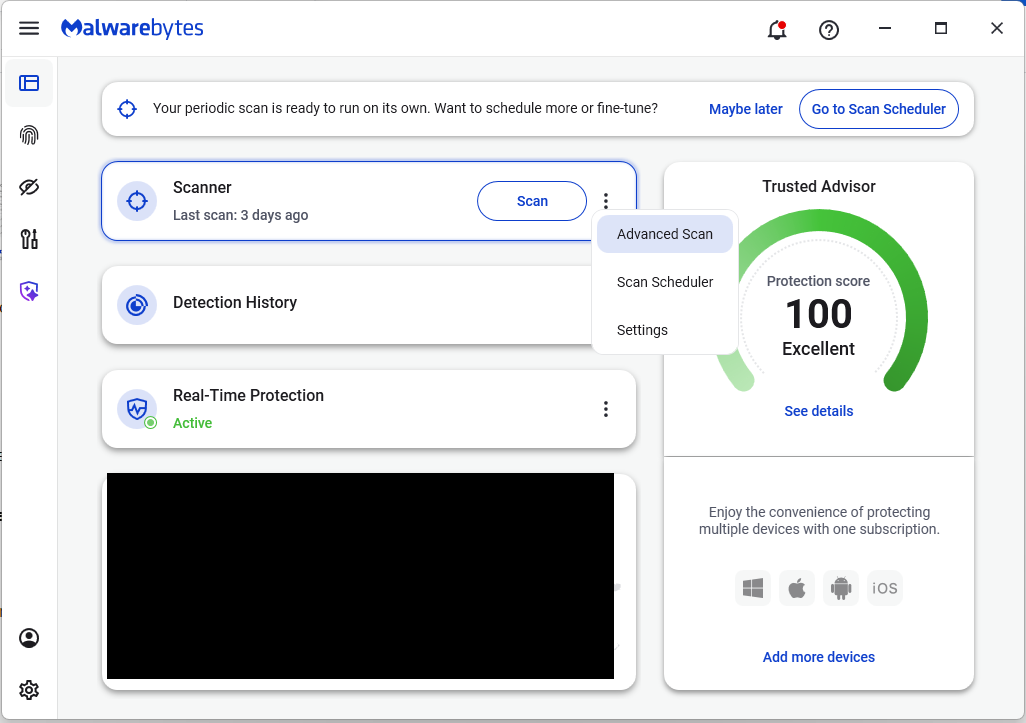
  • On the Malwarebytes Dashboard click on the three stacked dots to select the Advanced Scan option.
    Advanced Scan to find Sleep extensions
  • On the Advanced Scan tab, select Deep Scan. Note that this scan uses more system resources than usual.
  • After the scan, remove any found items, and then reopen your browser(s).

Manual check:

These are the names of the 17 additional extensions that were discovered:

  • AdBlocker
  • Ads Block Ultimate
  • Amazon Price History
  • Color Enhancer
  • Convert Everything
  • Cool Cursor
  • Floating Player – PiP Mode
  • Full Page Screenshot
  • Google Translate in Right Click
  • Instagram Downloader
  • One Key Translate
  • Page Screenshot Clipper
  • RSS Feed
  • Save Image to Pinterest on Right Click
  • Translate Selected Text with Google
  • Translate Selected Text with Right Click
  • Youtube Download

Note: There may be extensions with the same names that are not malicious.


We don’t just report on threats—we help safeguard your entire digital identity

Cybersecurity risks should never spread beyond a headline. Protect your, and your family’s, personal information by using identity protection.

  •  

Firefox joins Chrome and Edge as sleeper extensions spy on users

A group of cybercriminals called DarkSpectre is believed to be behind three campaigns spread by malicious browser extensions: ShadyPanda, GhostPoster, and Zoom Stealer.

We wrote about the ShadyPanda campaign in December 2025, warning users that extensions which had behaved normally for years suddenly went rogue. After a malicious update, these extensions were able to track browsing behavior and run malicious code inside the browser.

Also in December, researchers uncovered a new campaign, GhostPoster, and identified 17 compromised Firefox extensions. The campaign was found to hide JavaScript code inside the image logo of malicious Firefox extensions with more than 50,000 downloads, allowing attackers to to monitor browser activity and plant a backdoor.

The use of malicious code in images is a technique called steganography. Earlier GhostPoster extensions hid JavaScript loader code inside PNG icons such as logo.png for Firefox extensions like “Free VPN Forever,” using a marker (for example, three equals signs) in the raw bytes to separate image data from payload.

Newer variants moved to embedding payloads in arbitrary images inside the extension bundle, then decoding and decrypting them at runtime. This makes the malicious code much harder for researchers to detect.

Based on that research, other researchers found an additional 17 extensions associated with the same group, beyond the original Firefox set. These were downloaded more than 840,000 times in total, with some remaining active in the wild for up to five years.

GhostPoster first targeted Microsoft Edge users and later expanded to Chrome and Firefox as the attackers built out their infrastructure. The attackers published the extensions in each browser’s web store as seemingly useful tools with names like “Google Translate in Right Click,” “Ads Block Ultimate,” “Translate Selected Text with Google,” “Instagram Downloader,” and “Youtube Download.”

The extensions can see visited sites, search queries, and shopping behavior, allowing attackers to create detailed profiles of users’ habits and interests.

Combined with other malicious code, this visibility could be extended to credential theft, session hijacking, or attacks targeting online banking workflows, even if those are not the primary goal today.

How to stay safe

Although we always advise people to install extensions only from official web stores, this case proves once again that not all extensions available there are safe. That said, the risk involved in installing an extension from outside the web store is even greater.

Extensions listed in the web store undergo a review process before being approved. This process, which combines automated and manual checks, assesses the extension’s safety, policy compliance, and overall user experience. The goal is to protect users from scams, malware, and other malicious activity.

Mozilla and Microsoft have removed the identified add-ons from their stores, and Google has confirmed their removal from the Chrome Web Store. However, already installed extensions remain active in Chrome and Edge until users manually uninstall them. When Mozilla blocks an add-on it is also disabled, which prevents it from interacting with Firefox and accessing your browser and your data.

If you’re worried that you may have installed one of these extensions, Windows users can run a Malwarebytes Deep Scan with their browsers closed.

  • On the Malwarebytes Dashboard click on the three stacked dots to select the Advanced Scan option.
    Advanced Scan to find Sleep extensions
  • On the Advanced Scan tab, select Deep Scan. Note that this scan uses more system resources than usual.
  • After the scan, remove any found items, and then reopen your browser(s).

Manual check:

These are the names of the 17 additional extensions that were discovered:

  • AdBlocker
  • Ads Block Ultimate
  • Amazon Price History
  • Color Enhancer
  • Convert Everything
  • Cool Cursor
  • Floating Player – PiP Mode
  • Full Page Screenshot
  • Google Translate in Right Click
  • Instagram Downloader
  • One Key Translate
  • Page Screenshot Clipper
  • RSS Feed
  • Save Image to Pinterest on Right Click
  • Translate Selected Text with Google
  • Translate Selected Text with Right Click
  • Youtube Download

Note: There may be extensions with the same names that are not malicious.


We don’t just report on threats—we help safeguard your entire digital identity

Cybersecurity risks should never spread beyond a headline. Protect your, and your family’s, personal information by using identity protection.

  •  

AI-Powered Surveillance in Schools

It all sounds pretty dystopian:

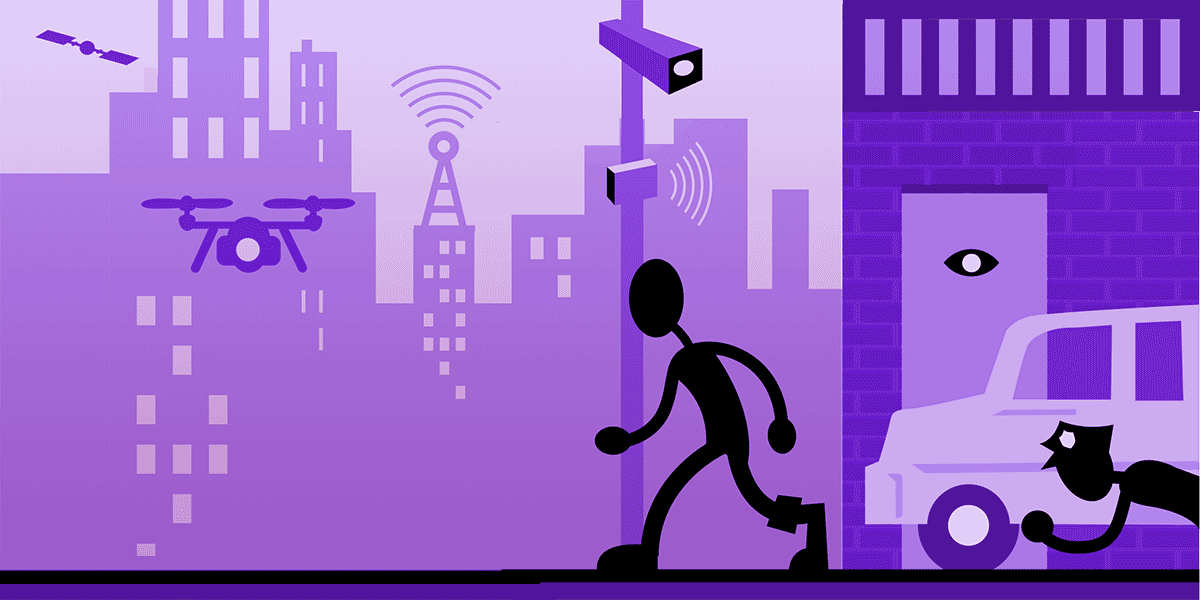
Inside a white stucco building in Southern California, video cameras compare faces of passersby against a facial recognition database. Behavioral analysis AI reviews the footage for signs of violent behavior. Behind a bathroom door, a smoke detector-shaped device captures audio, listening for sounds of distress. Outside, drones stand ready to be deployed and provide intel from above, and license plate readers from $8.5 billion surveillance behemoth Flock Safety ensure the cars entering and exiting the parking lot aren’t driven by criminals.

This isn’t a high-security government facility. It’s Beverly Hills High School.

  •  

Report: ICE Using Palantir Tool That Feeds On Medicaid Data

EFF last summer asked a federal judge to block the federal government from using Medicaid data to identify and deport immigrants.  

We also warned about the danger of the Trump administration consolidating all of the government’s information into a single searchable, AI-driven interface with help from Palantir, a company that has a shaky-at-best record on privacy and human rights. 

Now we have the first evidence that our concerns have become reality. 

“Palantir is working on a tool for Immigration and Customs Enforcement (ICE) that populates a map with potential deportation targets, brings up a dossier on each person, and provides a “confidence score” on the person’s current address,” 404 Media reports today. “ICE is using it to find locations where lots of people it might detain could be based.” 

The tool – dubbed Enhanced Leads Identification & Targeting for Enforcement (ELITE) – receives peoples’ addresses from the Department of Health and Human Services (which includes Medicaid) and other sources, 404 Media reports based on court testimony in Oregon by law enforcement agents, among other sources. 

This revelation comes as ICE – which has gone on a surveillance technology shopping spree – floods Minneapolis with agents, violently running roughshod over the civil rights of immigrants and U.S. citizens alike; President Trump has threatened to use the Insurrection Act of 1807 to deploy military troops against protestors there. Other localities are preparing for the possibility of similar surges. 

Different government agencies necessarily collect information to provide essential services or collect taxes, but the danger comes when the government begins pooling that data and using it for reasons unrelated to the purpose it was collected.

This kind of consolidation of government records provides enormous government power that can be abused. Different government agencies necessarily collect information to provide essential services or collect taxes, but the danger comes when the government begins pooling that data and using it for reasons unrelated to the purpose it was collected. 

As EFF Executive Director Cindy Cohn wrote in a Mercury News op-ed last August, “While couched in the benign language of eliminating government ‘data silos,’ this plan runs roughshod over your privacy and security. It’s a throwback to the rightly mocked ‘Total Information Awareness’ plans of the early 2000s that were, at least publicly, stopped after massive outcry from the public and from key members of Congress. It’s time to cry out again.” 

In addition to the amicus brief we co-authored challenging ICE’s grab for Medicaid data, EFF has successfully sued over DOGE agents grabbing personal data from the U.S. Office of Personnel Management, filed an amicus brief in a suit challenging ICE’s grab for taxpayer data, and sued the departments of State and Homeland Security to halt a mass surveillance program to monitor constitutionally protected speech by noncitizens lawfully present in the U.S. 

But litigation isn’t enough. People need to keep raising concerns via public discourse and Congress should act immediately to put brakes on this runaway train that threatens to crush the privacy and security of each and every person in America.  

  •  

“Reprompt” attack lets attackers steal data from Microsoft Copilot

Researchers found a method to steal data which bypasses Microsoft Copilot’s built-in safety mechanisms.  

The attack flow, called Reprompt, abuses how Microsoft Copilot handled URL parameters in order to hijack a user’s existing Copilot Personal session.

Copilot is an AI assistant which connects to a personal account and is integrated into Windows, the Edge browser, and various consumer applications.

The issue was fixed in Microsoft’s January Patch Tuesday update, and there is no evidence of in‑the‑wild exploitation so far. Still, it once again shows how risky it can be to trust AI assistants at this point in time.

Reprompt hides a malicious prompt in the q parameter of an otherwise legitimate Copilot URL. When the page loads, Copilot auto‑executes that prompt, allowing an attacker to run actions in the victim’s authenticated session after just a single click on a phishing link.

In other words, attackers can hide secret instructions inside the web address of a Copilot link, in a place most users never look. Copilot then runs those hidden instructions as if the users had typed them themselves.

Because Copilot accepts prompts via a q URL parameter and executes them automatically, a phishing email can lure a user into clicking a legitimate-looking Copilot link while silently injecting attacker-controlled instructions into a live Copilot session.

What makes Reprompt stand out from other, similar prompt injection attacks is that it requires no user-entered prompts, no installed plugins, and no enabled connectors.

The basis of the Reprompt attack is amazingly simple. Although Copilot enforces safeguards to prevent direct data leaks, these protections only apply to the initial request. The attackers were able to bypass these guardrails by simply instructing Copilot to repeat each action twice.

Working from there, the researchers noted:

“Once the first prompt is executed, the attacker’s server issues follow‑up instructions based on prior responses and forms an ongoing chain of requests. This approach hides the real intent from both the user and client-side monitoring tools, making detection extremely difficult.”

How to stay safe

You can stay safe from the Reprompt attack specifically by installing the January 2026 Patch Tuesday updates.

If available, use Microsoft 365 Copilot for work data, as it benefits from Purview auditing, tenant‑level data loss prevention (DLP), and admin restrictions that were not available to Copilot Personal in the research case. DLP rules look for sensitive data such as credit card numbers, ID numbers, health data, and can block, warn, or log when someone tries to send or store it in risky ways (email, OneDrive, Teams, Power Platform connectors, and more).

Don’t click on unsolicited links before verifying with the (trusted) source whether they are safe.

Reportedly, Microsoft is testing a new policy that allows IT administrators to uninstall the AI-powered Copilot digital assistant on managed devices.

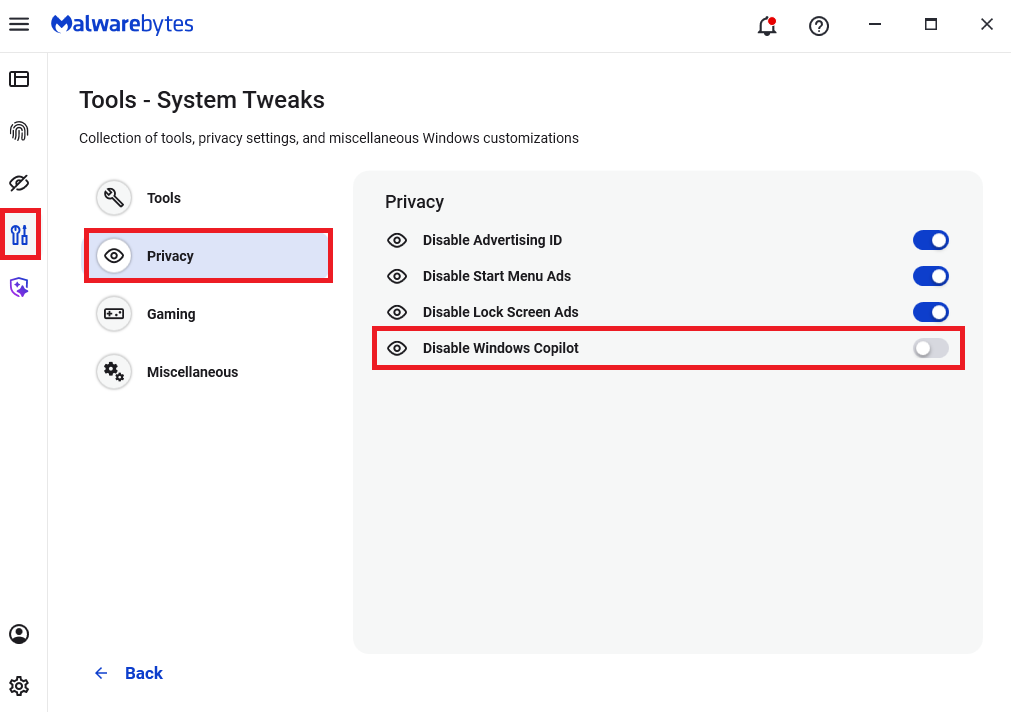
Malwarebytes users can disable Copilot for their personal machines under Tools > Privacy, where you can toggle Disable Windows Copilot to on (blue).

How to use Malwarebytes to disable Windows Copilot

In general, be aware that using AI assistants still pose privacy risks. As long as there are ways for assistants to automatically ingest untrusted input—such as URL parameters, page text, metadata, and comments—and merge it into hidden system prompts or instructions without strong separation or filtering, users remain at risk of leaking private information.

So when using any AI assistant that can be driven via links, browser automation, or external content, it is reasonable to assume “Reprompt‑style” issues are at least possible and should be taken into consideration.


We don’t just report on threats—we remove them

Cybersecurity risks should never spread beyond a headline. Keep threats off your devices by downloading Malwarebytes today.

  •  

“Reprompt” attack lets attackers steal data from Microsoft Copilot

Researchers found a method to steal data which bypasses Microsoft Copilot’s built-in safety mechanisms.  

The attack flow, called Reprompt, abuses how Microsoft Copilot handled URL parameters in order to hijack a user’s existing Copilot Personal session.

Copilot is an AI assistant which connects to a personal account and is integrated into Windows, the Edge browser, and various consumer applications.

The issue was fixed in Microsoft’s January Patch Tuesday update, and there is no evidence of in‑the‑wild exploitation so far. Still, it once again shows how risky it can be to trust AI assistants at this point in time.

Reprompt hides a malicious prompt in the q parameter of an otherwise legitimate Copilot URL. When the page loads, Copilot auto‑executes that prompt, allowing an attacker to run actions in the victim’s authenticated session after just a single click on a phishing link.

In other words, attackers can hide secret instructions inside the web address of a Copilot link, in a place most users never look. Copilot then runs those hidden instructions as if the users had typed them themselves.

Because Copilot accepts prompts via a q URL parameter and executes them automatically, a phishing email can lure a user into clicking a legitimate-looking Copilot link while silently injecting attacker-controlled instructions into a live Copilot session.

What makes Reprompt stand out from other, similar prompt injection attacks is that it requires no user-entered prompts, no installed plugins, and no enabled connectors.

The basis of the Reprompt attack is amazingly simple. Although Copilot enforces safeguards to prevent direct data leaks, these protections only apply to the initial request. The attackers were able to bypass these guardrails by simply instructing Copilot to repeat each action twice.

Working from there, the researchers noted:

“Once the first prompt is executed, the attacker’s server issues follow‑up instructions based on prior responses and forms an ongoing chain of requests. This approach hides the real intent from both the user and client-side monitoring tools, making detection extremely difficult.”

How to stay safe

You can stay safe from the Reprompt attack specifically by installing the January 2026 Patch Tuesday updates.

If available, use Microsoft 365 Copilot for work data, as it benefits from Purview auditing, tenant‑level data loss prevention (DLP), and admin restrictions that were not available to Copilot Personal in the research case. DLP rules look for sensitive data such as credit card numbers, ID numbers, health data, and can block, warn, or log when someone tries to send or store it in risky ways (email, OneDrive, Teams, Power Platform connectors, and more).

Don’t click on unsolicited links before verifying with the (trusted) source whether they are safe.

Reportedly, Microsoft is testing a new policy that allows IT administrators to uninstall the AI-powered Copilot digital assistant on managed devices.

Malwarebytes users can disable Copilot for their personal machines under Tools > Privacy, where you can toggle Disable Windows Copilot to on (blue).

How to use Malwarebytes to disable Windows Copilot

In general, be aware that using AI assistants still pose privacy risks. As long as there are ways for assistants to automatically ingest untrusted input—such as URL parameters, page text, metadata, and comments—and merge it into hidden system prompts or instructions without strong separation or filtering, users remain at risk of leaking private information.

So when using any AI assistant that can be driven via links, browser automation, or external content, it is reasonable to assume “Reprompt‑style” issues are at least possible and should be taken into consideration.


We don’t just report on threats—we remove them

Cybersecurity risks should never spread beyond a headline. Keep threats off your devices by downloading Malwarebytes today.

  •  

AI-powered sextortion: a new threat to privacy | Kaspersky official blog

In 2025, cybersecurity researchers discovered several open databases belonging to various AI image-generation tools. This fact alone makes you wonder just how much AI startups care about the privacy and security of their users’ data. But the nature of the content in these databases is far more alarming.

A large number of generated pictures in these databases were images of women in lingerie or fully nude. Some were clearly created from children’s photos, or intended to make adult women appear younger (and undressed). Finally, the most disturbing part: some pornographic images were generated from completely innocent photos of real people — likely taken from social media.

In this post, we’re talking about what sextortion is, and why AI tools mean anyone can become a victim. We detail the contents of these open databases, and give you advice on how to avoid becoming a victim of AI-era sextortion.

What is sextortion?

Online sexual extortion has become so common it’s earned its own global name: sextortion (a portmanteau of sex and extortion). We’ve already detailed its various types in our post, Fifty shades of sextortion. To recap, this form of blackmail involves threatening to publish intimate images or videos to coerce the victim into taking certain actions, or to extort money from them.

Previously, victims of sextortion were typically adult industry workers, or individuals who’d shared intimate content with an untrustworthy person.

However, the rapid advancement of artificial intelligence, particularly text-to-image technology, has fundamentally changed the game. Now, literally anyone who’s posted their most innocent photos publicly can become a victim of sextortion. This is because generative AI makes it possible to quickly, easily, and convincingly undress people in any digital image, or add a generated nude body to someone’s head in a matter of seconds.

Of course, this kind of fakery was possible before AI, but it required long hours of meticulous Photoshop work. Now, all you need is to describe the desired result in words.

To make matters worse, many generative AI services don’t bother much with protecting the content they’ve been used to create. As mentioned earlier, last year saw researchers discover at least three publicly accessible databases belonging to these services. This means the generated nudes within them were available not just to the user who’d created them, but to anyone on the internet.

How the AI image database leak was discovered

In October 2025, cybersecurity researcher Jeremiah Fowler uncovered an open database containing over a million AI-generated images and videos. According to the researcher, the overwhelming majority of this content was pornographic in nature. The database wasn’t encrypted or password-protected — meaning any internet user could access it.

The database’s name and watermarks on some images led Fowler to believe its source was the U.S.-based company SocialBook, which offers services for influencers and digital marketing services. The company’s website also provides access to tools for generating images and content using AI.

However, further analysis revealed that SocialBook itself wasn’t directly generating this content. Links within the service’s interface led to third-party products — the AI services MagicEdit and DreamPal — which were the tools used to create the images. These tools allowed users to generate pictures from text descriptions, edit uploaded photos, and perform various visual manipulations, including creating explicit content and face-swapping.

The leak was linked to these specific tools, and the database contained the product of their work, including AI-generated and AI-edited images. A portion of the images led the researcher to suspect they’d been uploaded to the AI as references for creating provocative imagery.

Fowler states that roughly 10,000 photos were being added to the database every single day. SocialBook denies any connection to the database. After the researcher informed the company of the leak, several pages on the SocialBook website that had previously mentioned MagicEdit and DreamPal became inaccessible and began returning errors.

Which services were the source of the leak?

Both services — MagicEdit and DreamPal — were initially marketed as tools for interactive, user-driven visual experimentation with images and art characters. Unfortunately, a significant portion of these capabilities were directly linked to creating sexualized content.

For example, MagicEdit offered a tool for AI-powered virtual clothing changes, as well as a set of styles that made images of women more revealing after processing — such as replacing everyday clothes with swimwear or lingerie. Its promotional materials promised to turn an ordinary look into a sexy one in seconds.

DreamPal, for its part, was initially positioned as an AI-powered role-playing chat, and was even more explicit about its adult-oriented positioning. The site offered to create an ideal AI girlfriend, with certain pages directly referencing erotic content. The FAQ also noted that filters for explicit content in chats were disabled so as not to limit users’ most intimate fantasies.

Both services have suspended operations. At the time of writing, the DreamPal website returned an error, while MagicEdit seemed available again. Their apps were removed from both the App Store and Google Play.

Jeremiah Fowler says earlier in 2025, he discovered two more open databases containing AI-generated images. One belonged to the South Korean site GenNomis, and contained 95,000 entries — a substantial portion of which being images of “undressed” people. Among other things, the database included images with child versions of celebrities: American singers Ariana Grande and Beyoncé, and reality TV star Kim Kardashian.

How to avoid becoming a victim

In light of incidents like these, it’s clear that the risks associated with sextortion are no longer confined to private messaging or the exchange of intimate content. In the era of generative AI, even ordinary photos, when posted publicly, can be used to create compromising content.

This problem is especially relevant for women, but men shouldn’t get too comfortable either: the popular blackmail scheme of “I hacked your computer and used the webcam to make videos of you browsing adult sites” could reach a whole new level of persuasion thanks to AI tools for generating photos and videos.

Therefore, protecting your privacy on social media and controlling what data about you is publicly available become key measures for safeguarding both your reputation and peace of mind. To prevent your photos from being used to create questionable AI-generated content, we recommend making all your social media profiles as private as possible — after all, they could be the source of images for AI-generated nudes.

We’ve already published multiple detailed guides on how to reduce your digital footprint online or even remove your data from the internet, how to stop data brokers from compiling dossiers on you, and protect yourself from intimate image abuse.

Additionally, we have a dedicated service, Privacy Checker — perfect for anyone who wants a quick but systematic approach to privacy settings everywhere possible. It compiles step-by-step guides for securing accounts on social media and online services across all major platforms.

And to ensure the safety and privacy of your child’s data, Kaspersky Safe Kids can help: it allows parents to monitor which social media their child spends time on. From there, you can help them adjust privacy settings on their accounts so their posted photos aren’t used to create inappropriate content. Explore our guide to children’s online safety together, and if your child dreams of becoming a popular blogger, discuss our step-by-step cybersecurity guide for wannabe bloggers with them.

  •  
❌