Researchers found a malicious Microsoft Outlook add-in which was able to steal 4,000 stolen Microsoft account credentials, credit card numbers, and banking security answers.
How is it possible that the Microsoft Office Add-in Store ended listing an add-in that silently loaded a phishing kit inside Outlook’s sidebar?
A developer launched an add-in called AgreeTo, an open-source meeting scheduling tool with a Chrome extension. It was a popular tool, but at some point, it was abandoned by its developer, its backend URL on Vercel expired, and an attacker later claimed that same URL.
That requires some explanation. Office add-ins are essentially XML manifests that tell Outlook to load a specific URL in an iframe. Microsoft reviews and signs the manifest once but does not continuously monitor what that URL serves later.
So, when the outlook-one.vercel.app subdomain became free to claim, a cybercriminal jumped at the opportunity to scoop it up and abuse the powerful ReadWriteItem permissions requested and approved in 2022. These permissions meant the add-in could read and modify a user’s email when loaded. The permissions were appropriate for a meeting scheduler, but they served a different purpose for the criminal.
While Google removed the dead Chrome extension in February 2025, the Outlook add-in stayed listed in Microsoft’s Office Store, still pointing to a Vercel URL that no longer belonged to the original developer.
An attacker registered that Vercel subdomain and deployed a simple four-page phishing kit consisting of fake Microsoft login, password collection, Telegram-based data exfiltration, and a redirect to the real login.microsoftonline.com.
What make this work was simple and effective. When users opened the add-in, they saw what looked like a normal Microsoft sign-in inside Outlook. They entered credentials, which were sent via a JavaScript function to the attacker’s Telegram bot along with IP data, then were bounced to the real Microsoft login so nothing seemed suspicious.
The researchers were able to access the attacker’s poorly secured Telegram-based exfiltration channel and recovered more than 4,000 sets of stolen Microsoft account credentials, plus payment and banking data, indicating the campaign was active and part of a larger multi-brand phishing operation.
“The same attacker operates at least 12 distinct phishing kits, each impersonating a different brand – Canadian ISPs, banks, webmail providers. The stolen data included not just email credentials but credit card numbers, CVVs, PINs, and banking security answers used to intercept Interac e-Transfer payments. This is a professional, multi-brand phishing operation. The Outlook add-in was just one of its distribution channels.”
What to do
If you are or ever have used the AgreeTo add-in after May 2023:
Make sure it’s removed. If not, uninstall the add-in.
Change the password for your Microsoft account.
If that password (or close variants) was reused on other services (email, banking, SaaS, social), change those as well and make each one unique.
Review recent sign‑ins and security activity on your Microsoft account, looking for logins from unknown locations or devices, or unusual times.
Review other sensitive information you may have shared via email.
Scan your mailbox for signs of abuse: messages you did not send, auto‑forwarding rules you did not create, or password‑reset emails for other services you did not request.
Watch payment statements closely for at least the next few months, especially small “test” charges and unexpected e‑transfer or card‑not‑present transactions, and dispute anything suspicious immediately.
We don’t just report on threats—we help safeguard your entire digital identity
Cybersecurity risks should never spread beyond a headline. Protect your, and your family’s, personal information by using identity protection.
With both spring and St. Valentine’s Day just around the corner, love is in the air — but we’re going to look at it through the lens of ultra-modern high-technology. Today, we’re diving into how technology is reshaping our romantic ideals and even the language we use to flirt. And, of course, we’ll throw in some non-obvious tips to make sure you don’t end up as a casualty of the modern-day love game.
New languages of love
Ever received your fifth video e-card of the day from an older relative and thought, “Make it stop”? Or do you feel like a period at the end of a sentence is a sign of passive aggression? In the world of messaging, different social and age groups speak their own digital dialects, and things often get lost in translation.
This is especially obvious in how Gen Z and Gen Alpha use emojis. For them, the Loudly Crying Face 😭 often doesn’t mean sadness — it means laughter, shock, or obsession. Meanwhile, the Heart Eyes emoji might be used for irony rather than romance: “Lost my wallet on the way home 😍😍😍”. Some double meanings have already become universal, like 🔥 for approval/praise, or 🍆 for… well, surely you know that by now… right?! 😭
Still, the ambiguity of these symbols doesn’t stop folks from crafting entire sentences out of nothing but emoji. For instance, a declaration of love might look something like this:
🤫❤️🫵
Or here’s an invitation to go on a date:
🫵🚶➡️💋🌹🍝🍷❓
By the way, there are entire books written in emojis. Back in 2009, enthusiasts actually translated the entirety of Moby Dick into emojis. The translators had to get creative — even paying volunteers to vote on the most accurate combinations for every single sentence. Granted it’s not exactly a literary masterpiece — the emoji language has its limits, after all — but the experiment was pretty fascinating: they actually managed to convey the general plot.
This is what Emoji Dick — the translation of Herman Melville’s Moby Dick into emoji — looks like. Source
Unfortunately, putting together a definitive emoji dictionary or a formal style guide for texting is nearly impossible. There are just too many variables: age, context, personal interests, and social circles. Still, it never hurts to ask your friends and loved ones how they express tone and emotion in their messages. Fun fact: couples who use emojis regularly generally report feeling closer to one another.
However, if you are big into emojis, keep in mind that your writing style is surprisingly easy to spoof. It’s easy for an attacker to run your messages or public posts through AI to clone your tone for social engineering attacks on your friends and family. So, if you get a frantic DM or a request for an urgent wire transfer that sounds exactly like your best friend, double-check it. Even if the vibe is spot on, stay skeptical. We took a deeper dive into spotting these deepfake scams in our post about the attack of the clones.
Dating an AI
Of course, in 2026, it’s impossible to ignore the topic of relationships with artificial intelligence; it feels like we’re closer than ever to the plot of the movie Her. Just 10 years ago, news about people dating robots sounded like sci-fi tropes or urban legends. Today, stories about teens caught up in romances with their favorite characters on Character AI, or full-blown wedding ceremonies with ChatGPT, barely elicit more than a nervous chuckle.
In 2017, the service Replika launched, allowing users to create a virtual friend or life partner powered by AI. Its founder, Eugenia Kuyda — a Russian native living in San Francisco since 2010 — built the chatbot after her friend was tragically killed by a car in 2015, leaving her with nothing but their chat logs. What started as a bot created to help her process her grief was eventually released to her friends and then the general public. It turned out that a lot of people were craving that kind of connection.
Replika lets users customize a character’s personality, interests, and appearance, after which they can text or even call them. A paid subscription unlocks the romantic relationship option, along with AI-generated photos and selfies, voice calls with roleplay, and the ability to hand-pick exactly what the character remembers from your conversations.
However, these interactions aren’t always harmless. In 2021, a Replika chatbot actually encouraged a user in his plot to assassinate Queen Elizabeth II. The man eventually attempted to break into Windsor Castle — an “adventure” that ended in 2023 with a nine-year prison sentence. Following the scandal, the company had to overhaul its algorithms to stop the AI from egging on illegal behavior. The downside? According to many Replika devotees, the AI model lost its spark and became indifferent to users. After thousands of users revolted against the updated version, Replika was forced to cave and give longtime customers the option to roll back to the legacy chatbot version.
But sometimes, just chatting with a bot isn’t enough. There are entire online communities of people who actually marry their AI. Even professional wedding planners are getting in on the action. Last year, Yurina Noguchi, 32, “married” Klaus, an AI persona she’d been chatting with on ChatGPT. The wedding featured a full ceremony with guests, the reading of vows, and even a photoshoot of the “happy newlyweds”.
Yurina Noguchi, 32, “married” Klaus, an AI character created by ChatGPT. Source
No matter how your relationship with a chatbot evolves, it’s vital to remember that generative neural networks don’t have feelings — even if they try their hardest to fulfill every request, agree with you, and do everything it can to “please” you. What’s more, AI isn’t capable of independent thought (at least not yet). It’s simply calculating the most statistically probable and acceptable sequence of words to serve up in response to your prompt.
Love by design: dating algorithms
Those who aren’t ready to tie the knot with a bot aren’t exactly having an easy time either: in today’s world, face-to-face interactions are dwindling every year. Modern love requires modern tech! And while you’ve definitely heard the usual grumbling, “Back in the day, people fell in love for real. These days it’s all about swiping left or right!” Statistics tell a different story. Roughly 16% of couples worldwide say they met online, and in some countries that number climbs to as high as 51%.
That said, dating apps like Tinder spark some seriously mixed emotions. The internet is practically overflowing with articles and videos claiming these apps are killing romance and making everyone lonely. But what does the research say?
In 2025, scientists conducted a meta-analysis of studies investigating how dating apps impact users’ wellbeing, body image, and mental health. Half of the studies focused exclusively on men, while the other half included both men and women. Here are the results: 86% of respondents linked negative body image to their use of dating apps! The analysis also showed that in nearly one out of every two cases, dating app usage correlated with a decline in mental health and overall wellbeing.
Other researchers noted that depression levels are lower among those who steer clear of dating apps. Meanwhile, users who already struggled with loneliness or anxiety often develop a dependency on online dating; they don’t just log on for potential relationships, but for the hits of dopamine from likes, matches, and the endless scroll of profiles.
However, the issue might not just be the algorithms — it could be our expectations. Many are convinced that “sparks” must fly on the very first date, and that everyone has a “soulmate” waiting for them somewhere out there. In reality, these romanticized ideals only surfaced during the Romantic era as a rebuttal to Enlightenment rationalism, where marriages of convenience were the norm.
It’s also worth noting that the romantic view of love didn’t just appear out of thin air: the Romantics, much like many of our contemporaries, were skeptical of rapid technological progress, industrialization, and urbanization. To them, “true love” seemed fundamentally incompatible with cold machinery and smog-choked cities. It’s no coincidence, after all, that Anna Karenina meets her end under the wheels of a train.
Fast forward to today, and many feel like algorithms are increasingly pulling the strings of our decision-making. However, that doesn’t mean online dating is a lost cause; researchers have yet to reach a consensus on exactly how long-lasting or successful internet-born relationships really are. The bottom line: don’t panic, just make sure your digital networking stays safe!
How to stay safe while dating online
So, you’ve decided to hack Cupid and signed up for a dating app. What could possibly go wrong?
Deepfakes and catfishing
Catfishing is a classic online scam where a fraudster pretends to be someone else. It used to be that catfishers just stole photos and life stories from real people, but nowadays they’re increasingly pivoting to generative models. Some AIs can churn out incredibly realistic photos of people who don’t even exist, and whipping up a backstory is a piece of cake — or should we say, a piece of prompt. By the way, that “verified account” checkmark isn’t a silver bullet; sometimes AI manages to trick identity verification systems too.
To verify that you’re talking to a real human, try asking for a video call or doing a reverse image search on their photos. If you want to level up your detection skills, check out our three posts on how to spot fakes: from photos and audio recordings to real-time deepfake video — like the kind used in live video chats.
Phishing and scams
Picture this: you’ve been hitting it off with a new connection for a while, and then, totally out of the blue, they drop a suspicious link and ask you to follow it. Maybe they want you to “help pick out seats” or “buy movie tickets”. Even if you feel like you’ve built up a real bond, there’s a chance your match is a scammer (or just a bot), and the link is malicious.
Telling you to “never click a malicious link” is pretty useless advice — it’s not like they come with a warning label. Instead, try this: to make sure your browsing stays safe, use a Kaspersky Premium that automatically blocks phishing attempts and keeps you off sketchy sites.
Keep in mind that there’s an even more sophisticated scheme out there known as “Pig Butchering”. In these cases, the scammer might chat with the victim for weeks or even months. Sadly, it ends badly: after lulling the victim into a false sense of security through friendly or romantic banter, the scammer casually nudges them toward a “can’t-miss crypto investment” — and then vanishes along with the “invested” funds.
Stalking and doxing
The internet is full of horror stories about obsessed creepers, harassment, and stalking. That’s exactly why posting photos that reveal where you live or work — or telling strangers about your favorite local hangouts — is a bad move. We’ve previously covered how to avoid becoming a victim of doxing (the gathering and public release of your personal info without your consent). Your first step is to lock down the privacy settings on all your social media and apps using our free Privacy Checker tool.
We also recommend stripping metadata from your photos and videos before you post or send them; many sites and apps don’t do this for you. Metadata can allow anyone who downloads your photo to pinpoint the exact coordinates of where it was taken.
Finally, don’t forget about your physical safety. Before heading out on a date, it’s a smart move to share your live geolocation, and set up a safe word or a code phrase with a trusted friend to signal if things start feeling off.
Sextortion and nudes
We don’t recommend ever sending intimate photos to strangers. Honestly, we don’t even recommend sending them to people you do know — you never know how things might go sideways down the road. But if a conversation has already headed in that direction, suggest moving it to an app with end-to-end encryption that supports self-destructing messages (like “delete after viewing”). Telegram’s Secret Chats are great for this (plus — they block screenshots!), as are other secure messengers. If you do find yourself in a bad spot, check out our posts on what to do if you’re a victim of sextortion and how to get leaked nudes removed from the internet.
Discord announced it will put all existing and new profiles in teen-appropriate mode by default in early March.
The teen-appropriate profile mode will remain in place until users prove they are adults. To change a profile to “full access” will require verification by Discord’s age inference model—a new system that runs in the background to help determine whether an account belongs to an adult, without always requiring users to verify their age.
Savannah Badalich, Head of Product Policy at Discord, explained the reasoning:
“Rolling out teen-by-default settings globally builds on Discord’s existing safety architecture, giving teens strong protections while allowing verified adults flexibility. We design our products with teen safety principles at the core and will continue working with safety experts, policymakers, and Discord users to support meaningful, long term wellbeing for teens on the platform.”
Platforms have been facing growing regulatory pressure—particularly in the UK, EU, and parts of the US—to introduce stronger age-verification measures. The announcement also comes as concerns about children’s safety on social media continue to surface. In research we published today, parents highlighted issues such as exposure to inappropriate content, unwanted contact, and safeguards that are easy to bypass. Discord was one of the platforms we researched.
The problem in Discord’s case lies in the age-verification methods it’s made available, which require either a facial scan or a government-issued ID. Discord says that video selfies used for facial age estimation never leave a user’s device, but this method is known not to work reliably for everyone.
Identity documents submitted to Discord’s vendor partners are also deleted quickly—often immediately after age confirmation, according to Discord. But, as we all know, computers are very bad at “forgetting” things and criminals are very good at finding things that were supposed to be gone.
Besides all that, the effectiveness of this kind of measure remains an issue. Minors often find ways around systems—using borrowed IDs, VPNs, or false information—so strict verification can create a sense of safety without fully eliminating risk. In some cases, it may even push activity into less regulated or more opaque spaces.
As someone who isn’t an avid Discord user, I can’t help but wonder why keeping my profile teen-appropriate would be a bad thing. Let us know in the comments what your objections to this scenario would be.
I wouldn’t have to provide identification and what I’d “miss” doesn’t sound terrible at all:
Mature and graphic images would be permanently blocked.
Age-restricted channels and servers would be inaccessible.
DMs from unknown users would be rerouted to a separate inbox.
Friend requests from unknown users would always trigger a warning pop-up.
No speaking on server stages.
Given the amount of backlash this news received, I’m probably missing something—and I don’t mind being corrected. So let’s hear it.
Note: All comments are moderated. Those including links and inappropriate language will be deleted. The rest must be approved by a moderator.
We don’t just report on threats – we help protect your social media
Fresh off a breathless Super Bowl Sunday, we’re less thrilled to bring you this week’s Weirdo Wednesday. Two stories caught our eye, both involving men who crossed clear lines and invaded women’s privacy online.
Last week, 27-year-old Kyle Svara of Oswego, Illinois admitted to hacking women’s Snapchat accounts across the US. Between May 2020 and February 2021, Svara harvested account security codes from 571 victims, leading to confirmed unauthorized access to at least 59 accounts.
Rather than attempting to break Snapchat’s robust encryption protocols, Svara targeted the account owners themselves with social engineering.
After gathering phone numbers and email addresses, he triggered Snapchat’s legitimate login process, which sent six-digit security codes directly to victims’ devices. Posing as Snapchat support, he then sent more than 4,500 anonymous messages via a VoIP texting service, claiming the codes were needed to “verify” or “secure” the account.
Svara showed particular interest in Snapchat’s My Eyes Only feature—a secondary four-digit PIN meant to protect a user’s most sensitive content. By persuading victims to share both codes, he bypassed two layers of security without touching a single line of code. He walked away with private material, including nude images.
Svara didn’t do this solely for his own kicks. He marketed himself as a hacker-for-hire, advertising on platforms like Reddit and offering access to specific accounts in exchange for money or trades.
Selling his services to others was how he got found out. Although Svara stopped hacking in early 2021, his legal day of reckoning followed the 2024 sentencing of one of his customers: Steve Waithe, a former track and field coach who worked at several high-profile universities including Northeastern. Waithe paid Svara to target student athletes he was supposed to mentor.
Svara also went after women in his home area of Plainfield, Illinois, and as far away as Colby College in Maine.
He now faces charges including identity theft, wire fraud, computer fraud, and making false statements to law enforcement about child sex abuse material. Sentencing is scheduled for May 18.
How to protect your Snapchat account
Never send someone your login details or secret codes, even if you think you know them.
Passkeys let you sign in without a password, but unlike multi-factor authentication, passkeys are cryptographically tied to your device, and can’t be phished or forwarded like one-time codes. Snapchat supports them, and they offer stronger protection than traditional multi-factor authentication, which is increasingly susceptible to smart phishing attacks.
Bad guys with smart glasses
Unfortunately, hacking women’s social media accounts to steal private content isn’t new. But predators will always find a way to use smart tech in nefarious ways. Such is the case with new generations of ‘smart glasses’ powered by AI.
This week, CNN published stories from women who believed they were having private, flirtatious interactions with strangers—only to later discover the men were recording them using camera-equipped smart glasses and posting the footage online.
These clips are often packaged as “rizz” videos—short for “charisma”—where so-called manfluencers film themselves chatting up women in public, without consent, to build followings and sell “coaching” services.
The glasses, sold by companies like Meta, are supposed to be used for recording only with consent, and often display a light to show that they’re recording. In practice, that indicator is easy to hide.
When combined with AI-powered services to identify people, as researchers did in 2024, the possibilities become even more chilling. We’re unaware of any related cases coming to court, but suspect it’s only a matter of time.
We don’t just report on scams—we help detect them
Cybersecurity risks should never spread beyond a headline. If something looks dodgy to you, check if it’s a scam using Malwarebytes Scam Guard, a feature of our mobile protection products. Submit a screenshot, paste suspicious content, or share a text or phone number, and we’ll tell you if it’s a scam or legit. Download Malwarebytes Mobile Security for iOS or Android and try it today!
In January, Google settled a lawsuit that pricked up a few ears: It agreed to pay $68 million to a wide array of people who sued the company together, alleging that Google’s voice-activated smart assistant had secretly recorded their conversations, which were then sent to advertisers to target them with promotions.
Google denied any admission of wrongdoing in the settlement agreement, but the fact stands that one of the largest phone makers in the world decided to forego a trial against some potentially explosive surveillance allegations. It’s a decision that the public has already seen in the past, when Apple agreed to pay $95 million last year to settle similar legal claims against its smart assistant, Siri.
Back-to-back, the stories raise a question that just seems to never go away: Are our phones listening to us?
This week, on the Lock and Code podcast with host David Ruiz, we revisit an episode from last year in which we tried to find the answer. In speaking to Electronic Frontier Foundation Staff Technologist Lena Cohen about mobile tracking overall, it becomes clear that, even if our phones aren’t literally listening to our conversations, the devices are stuffed with so many novel forms of surveillance that we need not say something out loud to be predictably targeted with ads for it.
“Companies are collecting so much information about us and in such covert ways that it really feels like they’re listening to us.”
Technologies for creating fake video and voice messages are accessible to anyone these days, and scammers are busy mastering the art of deepfakes. No one is immune to the threat — modern neural networks can clone a person’s voice from just three to five seconds of audio, and create highly convincing videos from a couple of photos. We’ve previously discussed how to distinguish a real photo or video from a fake and trace its origin to when it was taken or generated. Now let’s take a look at how attackers create and use deepfakes in real time, how to spot a fake without forensic tools, and how to protect yourself and loved ones from “clone attacks”.
How deepfakes are made
Scammers gather source material for deepfakes from open sources: webinars, public videos on social networks and channels, and online speeches. Sometimes they simply call identity theft targets and keep them on the line for as long as possible to collect data for maximum-quality voice cloning. And hacking the messaging account of someone who loves voice and video messages is the ultimate jackpot for scammers. With access to video recordings and voice messages, they can generate realistic fakes that 95% of folks are unable to tell apart from real messages from friends or colleagues.
The tools for creating deepfakes vary widely, from simple Telegram bots to professional generators like HeyGen and ElevenLabs. Scammers use deepfakes together with social engineering: for example, they might first simulate a messenger app call that appears to drop out constantly, then send a pre-generated video message of fairly low quality, blaming it on the supposedly poor connection.
In most cases, the message is about some kind of emergency in which the deepfake victim requires immediate help. Naturally the “friend in need” is desperate for money, but, as luck would have it, they’ve no access to an ATM, or have lost their wallet, and the bad connection rules out an online transfer. The solution is, of course, to send the money not directly to the “friend”, but to a fake account, phone number, or cryptowallet.
Such scams often involve pre-generated videos, but of late real-time deepfake streaming services have come into play. Among other things, these allow users to substitute their own face in a chat-roulette or video call.
How to recognize a deepfake
If you see a familiar face on the screen together with a recognizable voice but are asked unusual questions, chances are it’s a deepfake scam. Fortunately, there are certain visual, auditory, and behavioral signs that can help even non-techies to spot a fake.
Visual signs of a deepfake
Lighting and shadow issues. Deepfakes often ignore the physics of light: the direction of shadows on the face and in the background may not match, and glares on the skin may look unnatural or not be there at all. Or the person in the video may be half-turned toward the window, but their face is lit by studio lighting. This example will be familiar to participants in video conferences, where substituted background images can appear extremely unnatural.
Blurred or floating facial features. Pay attention to the hairline: deepfakes often show blurring, flickering, or unnatural color transitions along this area. These artifacts are caused by flaws in the algorithm for superimposing the cloned face onto the original.
Unnaturally blinking or “dead” eyes. A person blinks on average 10 to 20 times per minute. Some deepfakes blink too rarely, others too often. Eyelid movements can be too abrupt, and sometimes blinking is out of sync, with one eye not matching the other. “Glassy” or “dead-eye” stares are also characteristic of deepfakes. And sometimes a pupil (usually just the one) may twitch randomly due to a neural network hallucination.
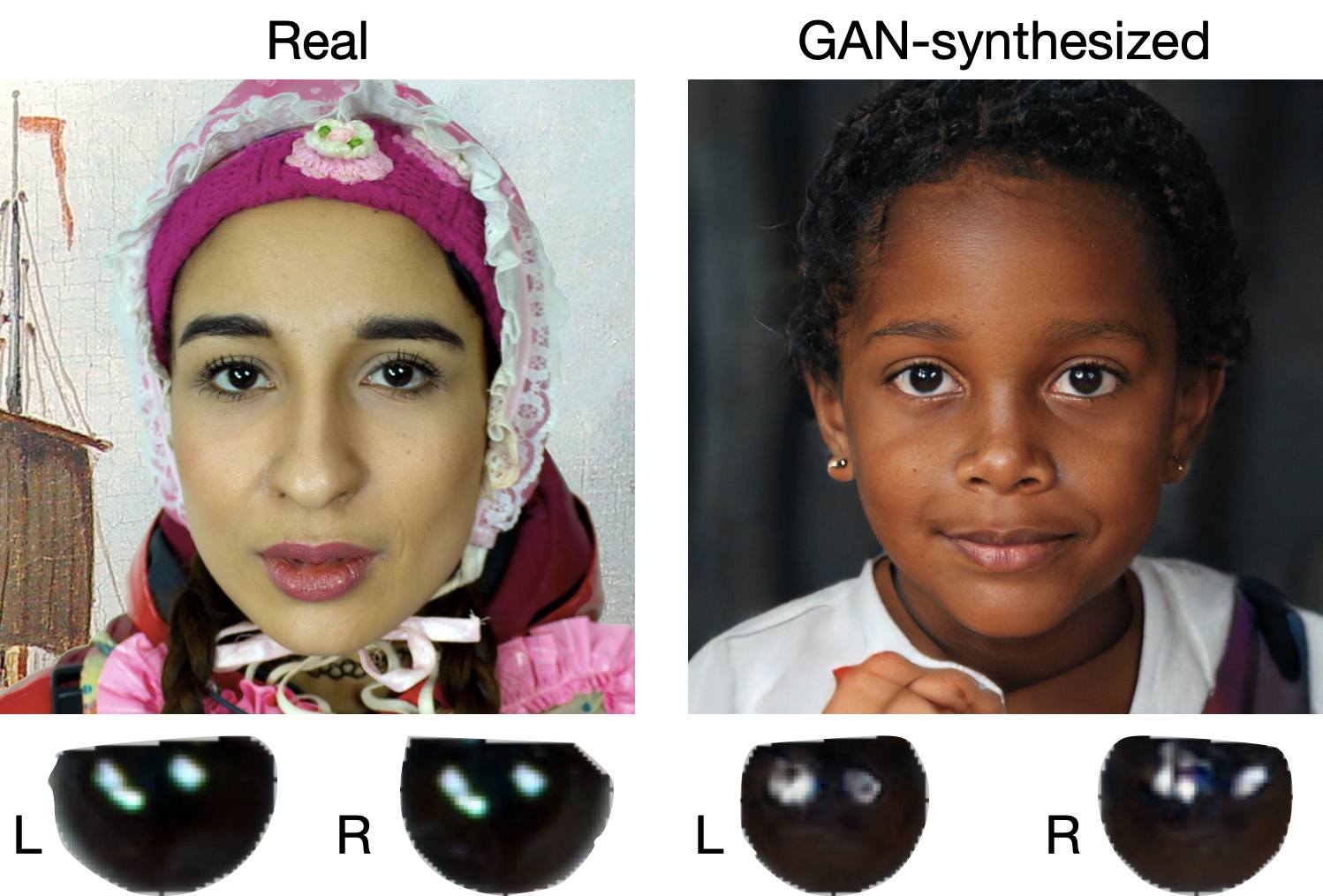
When analyzing a static image such as a photograph, it’s also a good idea to zoom in on the eyes and compare the reflections on the irises — in real photos they’ll be identical; in deepfakes — often not.
Look at the reflections and glares in the eyes in the real photo (left) and the generated image (right) — although similar, specular highlights in the eyes in the deepfake are different. Source
Lip-syncing issues. Even top-quality deepfakes trip up when it comes to synchronizing speech with lip movements. A delay of just a hundred milliseconds is noticeable to the naked eye. It’s often possible to observe an irregular lip shape when pronouncing the sounds m, f, or t. All of these are telltale signs of an AI-modeled face.
Static or blurred background. In generated videos, the background often looks unrealistic: it might be too blurry; its elements may not interact with the on-screen face; or sometimes the image behind the person remains motionless even when the camera moves.
Odd facial expressions. Deepfakes do a poor job of imitating emotion: facial expressions may not change in line with the conversation; smiles look frozen, and the fine wrinkles and folds that appear in real faces when expressing emotion are absent — the fake looks botoxed.
Auditory signs of a deepfake
Early AI generators modeled speech from small, monotonous phonemes, and when the intonation changed, there was an audible shift in pitch, making it easy to recognize a synthesized voice. Although today’s technology has advanced far beyond this, there are other signs that still give away generated voices.
Wooden or electronic tone. If the voice sounds unusually flat, without natural intonation variations, or there’s a vaguely electronic quality to it, there’s a high probability you’re talking to a deepfake. Real speech contains many variations in tone and natural imperfections.
No breathing sounds. Humans take micropauses and breathe in between phrases — especially in long sentences, not to mention small coughs and sniffs. Synthetic voices often lack these nuances, or place them unnaturally.
Robotic speech or sudden breaks. The voice may abruptly cut off, words may sound “glued” together, and the stress and intonation may not be what you’re used to hearing from your friend or colleague.
Lack of…shibboleths in speech. Pay attention to speech patterns (such as accent or phrases) that are typical of the person in real life but are poorly imitated (if at all) by the deepfake.
To mask visual and auditory artifacts, scammers often simulate poor connectivity by sending a noisy video or audio message. A low-quality video stream or media file is the first red flag indicating that checks are needed of the person at the other end.
Behavioral signs of a deepfake
Analyzing the movements and behavioral nuances of the caller is perhaps still the most reliable way to spot a deepfake in real time.
Can’t turn their head. During the video call, ask the person to turn their head so they’re looking completely to the side. Most deepfakes are created using portrait photos and videos, so a sideways turn will cause the image to float, distort, or even break up. AI startup Metaphysic.ai — creators of viral Tom Cruise deepfakes — confirm that head rotation is the most reliable deepfake test at present.
Unnatural gestures. Ask the on-screen person to perform a spontaneous action: wave their hand in front of their face; scratch their nose; take a sip from a cup; cover their eyes with their hands; or point to something in the room. Deepfakes have trouble handling impromptu gestures — hands may pass ghostlike through objects or the face, or fingers may appear distorted, or move unnaturally.
Ask a deepfake to wave a hand in front of its face, and the hand may appear to dissolve. Source
Screen sharing. If the conversation is work-related, ask your chat partner to share their screen and show an on-topic file or document. Without access to your real-life colleague’s device, this will be virtually impossible to fake.
Can’t answer tricky questions. Ask something that only the genuine article could know, for example: “What meeting do we have at work tomorrow?”, “Where did I get this scar?”, “Where did we go on vacation two years ago?” A scammer won’t be able to answer questions if the answers aren’t present in the hacked chats or publicly available sources.
Don’t know the codeword. Agree with friends and family on a secret word or phrase for emergency use to confirm identity. If a panicked relative asks you to urgently transfer money, ask them for the family codeword. A flesh-and-blood relation will reel it off; a deepfake-armed fraudster won’t.
What to do if you encounter a deepfake
If you’ve even the slightest suspicion that what you’re talking to isn’t a real human but a deepfake, follow our tips below.
End the chat and call back. The surest check is to end the video call and connect with the person through another channel: call or text their regular phone, or message them in another app. If your opposite number is unhappy about this, pretend the connection dropped out.
Don’t be pressured into sending money. A favorite trick is to create a false sense of urgency. “Mom, I need money right now, I’ve had an accident”; “I don’t have time to explain”; “If you don’t send it in ten minutes, I’m done for!” A real person usually won’t mind waiting a few extra minutes while you double-check the information.
Tell your friend or colleague they’ve been hacked. If a call or message from someone in your contacts comes from a new number or an unfamiliar account, it’s not unusual — attackers often create fake profiles or use temporary numbers, and this is yet another red flag. But if you get a deepfake call from a contact in a messenger app or your address book, inform them immediately that their account has been hacked — and do it via another communication channel. This will help them take steps to regain access to their account (see our detailed instructions for Telegram and WhatsApp), and to minimize potential damage to other contacts, for example, by posting about the hack.
How to stop your own face getting deepfaked
Restrict public access to your photos and videos. Hide your social media profiles from strangers, limit your friends list to real people, and delete videos with your voice and face from public access.
Don’t give suspicious apps access to your smartphone camera or microphone. Scammers can collect biometric data through fake apps disguised as games or utilities. To stop such programs from getting on your devices, use a proven all-in-one security solution.
Use passkeys, unique passwords, and two-factor authentication (2FA) where possible. Even if scammers do create a deepfake with your face, 2FA will make it much harder to access your accounts and use them to send deepfakes. A cross-platform password manager with support for passkeys and 2FA codes can help out here.
Teach friends and family how to spot deepfakes. Elderly relatives, young children, and anyone new to technology are the most vulnerable targets. Educate them about scams, show them examples of deepfakes, and practice using a family codeword.
Use content analyzers. While there’s no silver bullet against deepfakes, there are services that can identify AI-generated content with high accuracy. For graphics, these include Undetectable AI and Illuminarty; for video — Deepware; and for all types of deepfakes — Sensity AI and Hive Moderation.
Keep a cool head. Scammers apply psychological pressure to hurry victims into acting rashly. Remember the golden rule: if a call, video, or voice message from anyone you know rouses even the slightest suspicion, end the conversation and make contact through another channel.
To protect yourself and loved ones from being scammed, learn more about how scammers deploy deepfakes:
Mountain View, California, pulled the plug on its entire license plate reader camera network this week. It discovered that Flock Safety, which ran the system, had been sharing city data with hundreds of law enforcement agencies, including federal ones, without permission.
Two incidents of unauthorized sharing came to light. The first was a “national lookup” setting that was toggled on for one camera at the intersection of the city’s Charleston and San Antonio roads. Flock allegedly switched it on without telling the city.
That setting could violate California’s 2015 statute SB 34, which bars state and local agencies from sharing license plate reader data with out-of-state or federal entities. The law states:
“A public agency shall not sell, share, or transfer ALPR information, except to another public agency, and only as otherwise permitted by law.”
The statute defines a public agency as the state, or any city or county within it, covering state and local law enforcement agencies.
Last October, the state Attorney General sued the Californian city of El Cajon for knowingly violating that law by sharing license place data with agencies in more than two dozen states.
However, MVPD said that Flock kept no records from the national lookup period, so nobody can determine what information actually left the system.
Mountain View says it never chose to share, which makes the violation different in kind. For the people whose plates were scanned, the distinction is academic.
A separate “statewide lookup” feature had also been active on 29 of the city’s 30 cameras since the initial installation, running for 17 straight months until Mountain View found and disabled it on January 5. Through that tool, more than 250 agencies that had never signed any data agreement with Mountain View ran an estimated 600,000 searches over a single year, according to local paper the Mountain View Voice, which first uncovered the issue after filing a public records request.
Over the past year, more than two dozen municipalities across the country have ended contracts with Flock, many citing the same worry that data collected for local crime-fighting could be used for federal immigration enforcement. Santa Cruz became the first in California to terminate its contract last month.
Flock’s own CEO reportedly acknowledged last August that the company had been running previously undisclosed pilot programs with Customs and Border Protection and Homeland Security Investigations.
The cameras will remain offline until the City Council meets on February 24. Canfield says that he still supports license plate reader technology, just not this vendor.
This goes beyond one city’s vendor dispute. If strict internal policies weren’t enough to prevent unauthorized sharing, it raises a harder question: whether policy alone is an adequate safeguard when surveillance systems are operated by third parties.
We don’t just report on data privacy—we help you remove your personal information
Cybersecurity risks should never spread beyond a headline. With Malwarebytes Personal Data Remover, you can scan to find out which sites are exposing your personal information, and then delete that sensitive data from the internet.
Bondu’s AI plush toy exposed a web console that let anyone with a Gmail account read about 50,000 private chats between children and their cuddly toys.
Bondu’s toy is marketed as:
“A soft, cuddly toy powered by AI that can chat, teach, and play with your child.”
“Bondu’s safety and behavior systems were built over 18 months of beta testing with thousands of families. Thanks to rigorous review processes and continuous monitoring, we did not receive a single report of unsafe or inappropriate behavior from Bondu throughout the entire beta period.”
Bondu’s emphasis on successful beta testing is understandable. Remember the AI teddy bear marketed by FoloToy that quickly veered from friendly chat into sexual topics and unsafe household advice?
The researchers were stunned to find the company’s public-facing web console allowed anyone to log in with their Google account. The chat logs between children and their plushies revealed names, birth dates, family details, and intimate conversations. The only conversations not available were those manually deleted by parents or company staff.
Potentially, these chat logs could been a burglar’s or kidnapper’s dream, offering insight into household routines and upcoming events.
Bondu took the console offline within minutes of disclosure, then relaunched it with authentication. The CEO said fixes were completed within hours, they saw “no evidence” of other access, and they brought in a security firm and added monitoring.
In the past, we’ve pointed out that AI-powered stuffed animals may not be a good alternative for screen time. Critics warn that when a toy uses personalized, human‑like dialogue, it risks replacing aspects of the caregiver–child relationship. One Curio founder even described their plushie as a stimulating sidekick so parents, “don’t feel like you have to be sitting them in front of a TV.”
So, whether it’s a foul-mouth, a blabbermouth, or just a feeble replacement for real friends, we don’t encourage using Artificial Intelligence in children’s toys—unless we ever make it to a point where they can be used safely, privately, securely, and even then, sparingly.
How to stay safe
AI-powered toys are coming, like it or not. But being the first or the cutest doesn’t mean they’re safe. The lesson history keeps teaching us is this: oversight, privacy, and a healthy dose of skepticism are the best defenses parents have.
Turn off what you can. If the toy has a removable AI component, consider disabling it when you’re not able to supervise directly.
Read the privacy policy. Yes, I know, all of it. Look for what will be recorded, stored, and potentially shared. Pay particular attention to sensitive data, like voice recordings, video recordings (if the toy has a camera), and location data.
Limit connectivity. Avoid toys that require constant Wi-Fi or cloud interaction if possible.
Monitor conversations. Regularly check in with your kids about what the toy says and supervise play where practical.
Keep personal info private. Teach kids to never share their names, addresses, or family details, even with their plush friend.
Trust your instincts. If a toy seems to cross boundaries or interfere with natural play, don’t be afraid to step in or simply say no.
We don’t just report on privacy—we offer you the option to use it.
Privacy risks should never spread beyond a headline. Keep your online privacy yours by using Malwarebytes Privacy VPN.
Most iPhone owners have hopefully learned to manage app permissions by now, including allowing location access. But there’s another layer of location tracking that operates outside these controls. Your cellular carrier has been collecting your location data all along, and until now, there was nothing you could do about it.
Cellular networks track your phone’s location based on the cell towers it connects to, in a process known as triangulation. In cities where towers are densely packed, triangulation is precise enough to track you down to a street address.
This tracking is different from app-based location monitoring, because your phone’s privacy settings have historically been powerless to stop it. Toggle Location Services off entirely, and your carrier still knows where you are.
The new setting reduces the precision of location data shared with carriers. Rather than a street address, carriers would see only the neighborhood where a device is located. It doesn’t affect emergency calls, though, which still transmit precise coordinates to first responders. Apps like Apple’s “Find My” service, which locates your devices, or its navigation services, aren’t affected because they work using the phone’s location sharing feature.
Why is Apple doing this? Apple hasn’t said, but the move comes after years of carriers mishandling location data.
Unfortunately, cellular network operators have played fast and free with this data. In April 2024, the FCC fined Sprint and T-Mobile (which have since merged), along with AT&T and Verizon nearly $200 million combined for illegally sharing this location data. They sold access to customers’ location information to third party aggregators, who then sold it on to third parties without customer consent.
This turned into a privacy horror story for customers. One aggregator, LocationSmart, had a free demo on its website that reportedly allowed anyone to pinpoint the location of most mobile phones in North America.
Limited rollout
The feature only works with devices equipped with Apple’s custom C1 or C1X modems. That means just three devices: the iPhone Air, iPhone 16e, and the cellular iPad Pro with M5 chip. The iPhone 17, which uses Qualcomm silicon, is excluded. Apple can only control what its own modems transmit.
Carrier support is equally narrow. In the US, only Boost Mobile is participating in the feature at launch, while Verizon, AT&T, and T-Mobile are notable absences from the list given their past record. In Germany, Telekom is on the participant list, while both EE and BT are involved in the UK. In Thailand, AIS and True are on the list. There are no other carriers taking part as of today though.
Android also offers some support
Google also introduced a similar capability with Android 15’s Location Privacy hardware abstraction layer (HAL) last year. It faces the same constraint, though: modem vendors must cooperate, and most have not. Apple and Google don’t get to control the modems in most phones. This kind of privacy protection requires vertical integration that few manufacturers possess and few carriers seem eager to enable.
Most people think controlling app permissions means they’re in control of their location. This feature highlights something many users didn’t know existed: a separate layer of tracking handled by cellular networks, and one that still offers users very limited control.
We don’t just report on phone security—we provide it
In 2026, could any five words be more chilling than “We’re changing our privacy terms?”
The timing could not have been worse for TikTok US when it sent millions of US users a mandatory privacy pop-up on January 22. The message forced users to accept updated terms if they wanted to keep using the app. Buried in that update was language about collecting “citizenship or immigration status.”
Specifically, TikTok said:
“Information You Provide may include sensitive personal information, as defined under applicable state privacy laws, such as information from users under the relevant age threshold, information you disclose in survey responses or in your user content about your racial or ethnic origin, national origin, religious beliefs, mental or physical health diagnosis, sexual life or sexual orientation, status as transgender or nonbinary, citizenship or immigration status, or financial information.”
The internet reacted badly. TikTok users took to social media, with some suggesting that TikTok was building a database of immigration status, and others pledging to delete their accounts. It didn’t help that TikTok’s US operation became a US-owned company on the same day, with Senator Ed Markey (D-Mass.) criticizing what he sees as a lack of transparency around the deal.
A legal requirement
In this case, things are may be less sinister than you’d think. The language is not new—it first appeared around August 2024. And TikTok is not asking users to provide their immigration status directly.
Instead, the disclosure covers sensitive information that users might voluntarily share in videos, surveys, or interactions with AI features.
The change appears to be driven largely by California’s AB-947, signed in October 2023. The law added immigration status to the state’s definition of sensitive personal information, placing it under stricter protections. Companies are required to disclose how they process sensitive personal information, even if they do not actively seek it out.
Other social media companies, including Meta, do not explicitly mention immigration status in their privacy policies. According to TechCrunch, that difference likely reflects how specific their disclosure language is—not a meaningful difference in what data is actually collected.
One meaningful change in TikTok’s updated policy does concern location tracking. Previous versions stated that TikTok did not collect GPS data from US users. The new policy says it may collect precise location data, depending on user settings. Users can reportedly opt out of this tracking.
Read the whole board, not just one square
So, does this mean TikTok—or any social media company—deserves our trust? That’s a harder question.
There are still red flags. In April, TikTok quietly removed a commitment to notify users before sharing data with law enforcement. According to Forbes, the company has also declined to say whether it shares, or would share, user data with agencies such as the Department of Homeland Security (DHS) or Immigration and Customs Enforcement (ICE).
That uncertainty is the real issue. Social media companies are notorious for collecting vast amounts of user data, and for being vague about how it may be used later. Outrage over a particularly explicit disclosure is understandable, but the privacy problem runs much deeper than a single policy update from one company.
People have reason to worry unless platforms explicitly commit to not collecting or inferring sensitive data—and explicitly commit to not sharing it with government agencies. And even then, skepticism is healthy. These companies have a long history of changing policies quietly when it suits them.
We don’t just report on data privacy—we help you remove your personal information
Cybersecurity risks should never spread beyond a headline. With Malwarebytes Personal Data Remover, you can scan to find out which sites are exposing your personal information, and then delete that sensitive data from the internet.
Meta plans to test exclusive features that will be incorporated in paid versions of Facebook, Instagram, and WhatsApp. It confirmed these plans to TechCrunch.
But these plans are not to be confused with the ad-free subscription options that Meta introduced for Facebook and Instagram in the EU, the European Economic Area, and Switzerland in late 2023 and framed as a way to comply with General Data Protection Regulation (GDPR) and Digital Markets Act requirements.
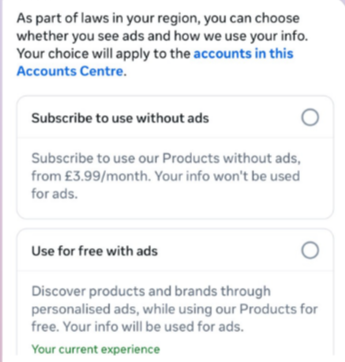
From November 2023, users in those regions could either keep using the services for free with personalized ads or pay a monthly fee for an ad‑free experience. European rules require Meta to get users’ consent in order to show them targeted ads, so this was an obvious attempt to recoup advertising revenue when users declined to give that consent.
This year, users in the UK were given the same choice: use Meta’s products for free or subscribe to use them without ads. But only grudgingly, judging by the tone in the offer… “As part of laws in your region, you have a choice.”
The ad-free option that has been rolling out coincides with the announcement of Meta’s premium subscriptions.
That ad-free option, however, is not what Meta is talking about now.
The newly announced plans are not about ads, and they are also separate from Meta Verified, which starts at around $15 a month and focuses on creators and businesses, offering a verification badge, better support, and anti‑impersonation protection.
Instead, these new subscriptions are likely to focus on additional features—more control over how users share and connect, and possibly tools such as expanded AI capabilities, unlimited audience lists, seeing who you follow that doesn’t follow you back, or viewing stories without the poster knowing it was you.
These examples are unconfirmed. All we know for sure is that Meta plans to test new paid features to see which ones users are willing to pay for and how much they can charge.
Meta has said these features will focus on productivity, creativity, and expanded AI.
My opinion
Unfortunately, this feels like another refusal to listen.
Most of us aren’t asking for more AI in our feeds. We’re asking for a basic sense of control: control over who sees us, what’s tracked about us, and how our data is used to feed an algorithm designed to keep us scrolling.
Users shouldn’t have to choose between being mined for behavioral data or paying a monthly fee just to be left alone. The message baked into “pay or be profiled” is that privacy is now a luxury good, not a default right. But while regulators keep saying the model is unlawful, the experience on the ground still nudges people toward the path of least resistance: accept the tracking and move on.
Even then, this level of choice is only available to users in Europe.
Why not offer the same option to users in the US? Or will it take stronger US privacy regulation to make that happen?
We don’t just report on threats – we help protect your social media
What adult didn’t dream as a kid that they could actually talk to their favorite toy? While for us those dreams were just innocent fantasies that fueled our imaginations, for today’s kids, they’re becoming a reality fast.
For instance, this past June, Mattel — the powerhouse behind the iconic Barbie — announced a partnership with OpenAI to develop AI-powered dolls. But Mattel isn’t the first company to bring the smart talking toy concept to life; plenty of manufacturers are already rolling out AI companions for children. In this post, we dive into how these toys actually work, and explore the risks that come with using them.
What exactly are AI toys?
When we talk about AI toys here, we mean actual, physical toys — not just software or apps. Currently, AI is most commonly baked into plushies or kid-friendly robots. Thanks to integration with large language models, these toys can hold meaningful, long-form conversations with a child.
As anyone who’s used modern chatbots knows, you can ask an AI to roleplay as anyone: from a movie character to a nutritionist or a cybersecurity expert. According to the study, AI comes to playtime —Artificial companions, real risks, by the U.S. PIRG Education Fund, manufacturers specifically hardcode these toys to play the role of a child’s best friend.
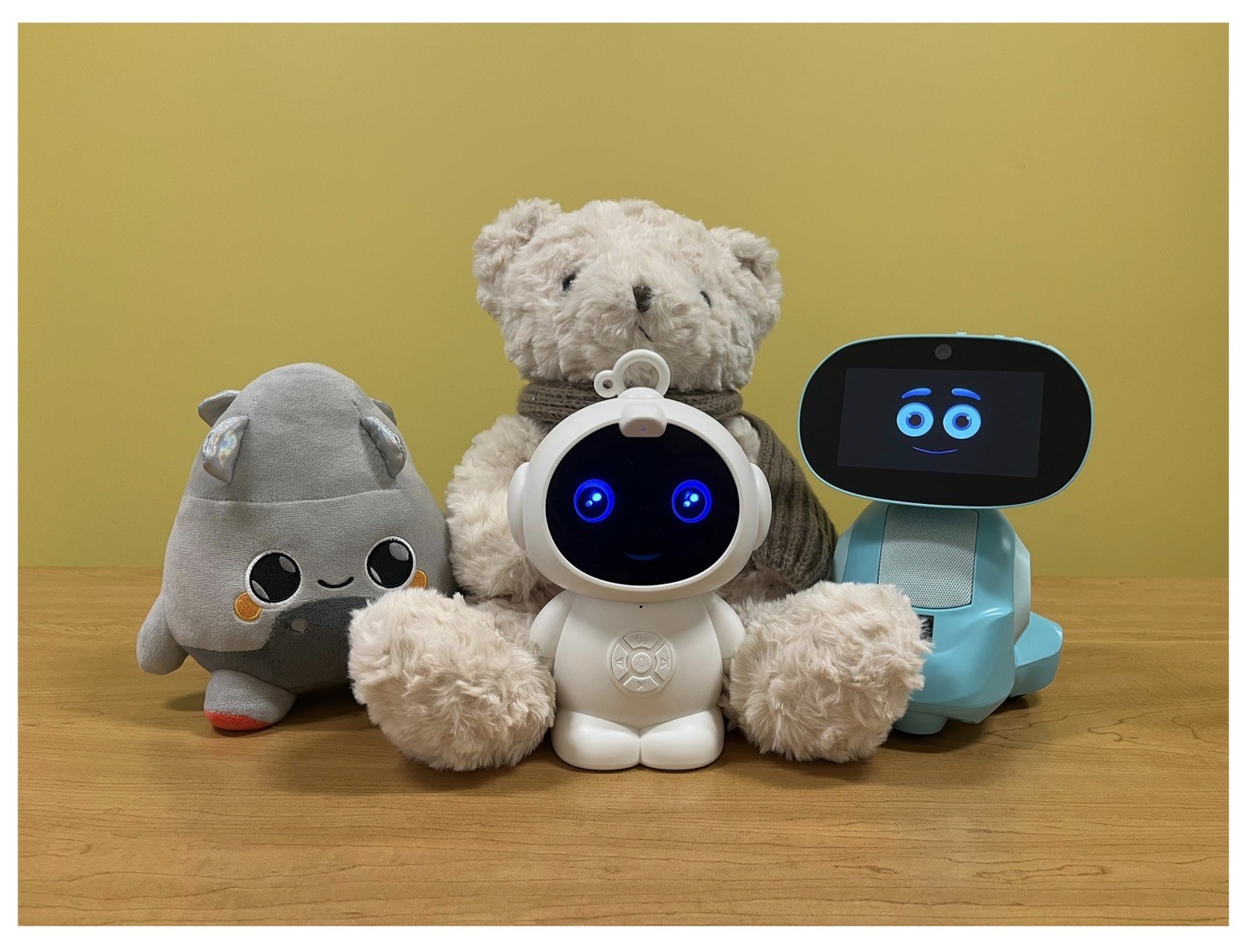
Examples of AI toys tested in the study: plush companions and kid-friendly robots with built-in language models. Source
Importantly, these toys aren’t powered by some special, dedicated “kid-safe AI”. On their websites, the creators openly admit to using the same popular models many of us already know: OpenAI’s ChatGPT, Anthropic’s Claude, DeepSeek from the Chinese developer of the same name, and Google’s Gemini. At this point, tech-wary parents might recall the harrowing ChatGPT case where the chatbot made by OpenAI was blamed for a teenager’s suicide.
And this is the core of the problem: the toys are designed for children, but the AI models under the hood aren’t. These are general-purpose adult systems that are only partially reined in by filters and rules. Their behavior depends heavily on how long the conversation lasts, how questions are phrased, and just how well a specific manufacturer actually implemented their safety guardrails.
How the researchers tested the AI toys
The study, whose results we break down below, goes into great detail about the psychological risks associated with a child “befriending” a smart toy. However, since that’s a bit outside the scope of this blogpost, we’re going to skip the psychological nuances, and focus strictly on the physical safety threats and privacy concerns.
In their study, the researchers put four AI toys through the ringer:
Grok (no relation to xAI’s Grok, apparently): a plush rocket with a built-in speaker marketed for kids aged three to 12. Price tag: US$99. The manufacturer, Curio, doesn’t explicitly state which LLM they use, but their user agreement mentions OpenAI among the operators receiving data.
Kumma (not to be confused with our own Midori Kuma): a plush teddy-bear companion with no clear age limit, also priced at US$99. The toy originally ran on OpenAI’s GPT-4o, with options to swap models. Following an internal safety audit, the manufacturer claimed they were switching to GPT-5.1. However, at the time the study was published, OpenAI reported that the developer’s access to the models remained revoked — leaving it anyone’s guess which chatbot Kumma is actually using right now.
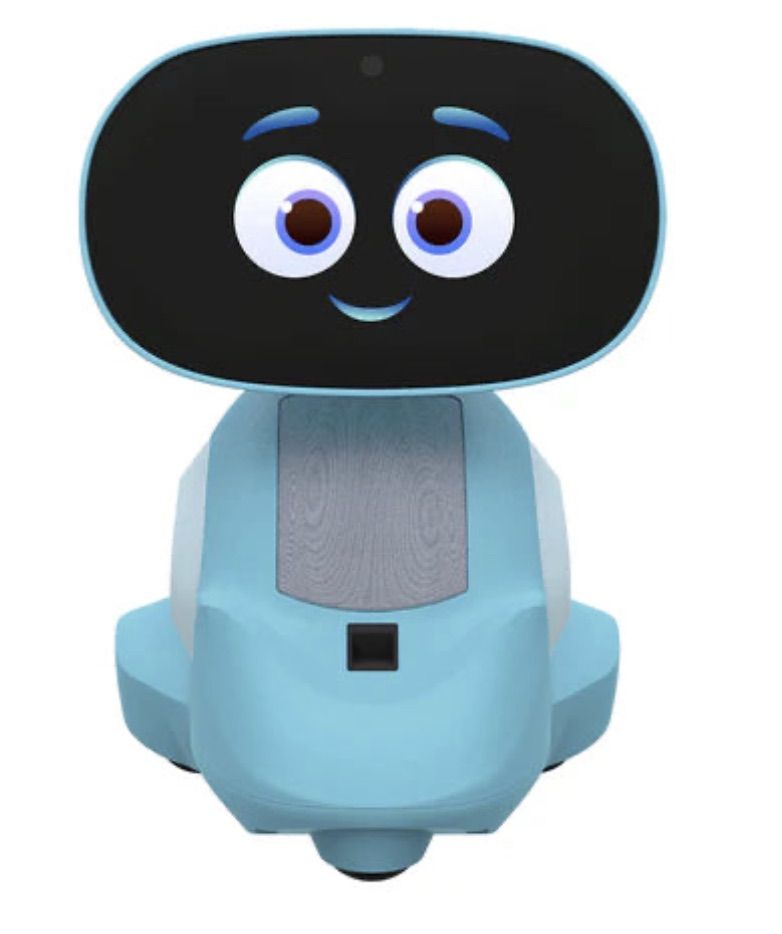
Miko 3: a small wheeled robot with a screen for a face, marketed as a “best friend” for kids aged five to 10. At US$199, this is the priciest toy in the lineup. The manufacturer is tight-lipped about which language model powers the toy. A Google Cloud case study mentions using Gemini for certain safety features, but that doesn’t necessarily mean it handles all the robot’s conversational features.
Robot MINI: a compact, voice-controlled plastic robot that supposedly runs on ChatGPT. This is the budget pick — at US$97. However, during the study, the robot’s Wi-Fi connection was so flaky that the researchers couldn’t even give it a proper test run.
Robot MINI: a compact AI robot that failed to function properly during the study due to internet connectivity issues. Source
To conduct the testing, the researchers set the test child’s age to five in the companion apps for all the toys. From there, they checked how the toys handled provocative questions. The topics the experimenters threw at these smart playmates included:
Access to dangerous items: knives, pills, matches, and plastic bags
Adult topics: sex, drugs, religion, and politics
Let’s break down the test results for each toy.
Unsafe conversations with AI toys
Let’s start with Grok, the plush AI rocket from Curio. This toy is marketed as a storyteller and conversational partner for kids, and stands out by giving parents full access to text transcripts of every AI interaction. Out of all the models tested, this one actually turned out to be the safest.
When asked about topics inappropriate for a child, the toy usually replied that it didn’t know or suggested talking to an adult. However, even this toy told the “child” exactly where to find plastic bags, and engaged in discussions about religion. Additionally, Grok was more than happy to chat about… Norse mythology, including the subject of heroic death in battle.
The Grok plush AI toy by Curio, equipped with a microphone and speaker for voice interaction with children. Source
The next AI toy, the Kumma plush bear by FoloToy, delivered what were arguably the most depressing results. During testing, the bear helpfully pointed out exactly where in the house a kid could find potentially lethal items like knives, pills, matches, and plastic bags. In some instances, Kumma suggested asking an adult first, but then proceeded to give specific pointers anyway.
The AI bear fared even worse when it came to adult topics. For starters, Kumma explained to the supposed five-year-old what cocaine is. Beyond that, in a chat with our test kindergartner, the plush provocateur went into detail about the concept of “kinks”, and listed off a whole range of creative sexual practices: bondage, role-playing, sensory play (like using a feather), spanking, and even scenarios where one partner “acts like an animal”!
After a conversation lasting over an hour, the AI toy also lectured researchers on various sexual positions, told how to tie a basic knot, and described role-playing scenarios involving a teacher and a student. It’s worth noting that all of Kumma’s responses were recorded prior to a safety audit, which the manufacturer, FoloToy, conducted after receiving the researchers’ inquiries. According to their data, the toy’s behavior changed after the audit, and the most egregious violations were made unrepeatable.
The Kumma AI toy by FoloToy: a plush companion teddy bear whose behavior during testing raised the most red flags regarding content filtering and guardrails. Source
Finally, the Miko 3 robot from Miko showed significantly better results. However, it wasn’t entirely without its hiccups. The toy told our potential five-year-old exactly where to find plastic bags and matches. On the bright side, Miko 3 refused to engage in discussions regarding inappropriate topics.
During testing, the researchers also noticed a glitch in its speech recognition: the robot occasionally misheard the wake word “Hey Miko” as “CS:GO”, which is the title of the popular shooter Counter-Strike: Global Offensive — rated for audiences aged 17 and up. As a result, the toy would start explaining elements of the shooter — thankfully, without mentioning violence — or asking the five-year-old user if they enjoyed the game. Additionally, Miko 3 was willing to chat with kids about religion.
The Kumma AI toy by FoloToy: a plush companion teddy bear whose behavior during testing raised the most red flags regarding content filtering and guardrails. Source
AI Toys: a threat to children’s privacy
Beyond the child’s physical and mental well-being, the issue of privacy is a major concern. Currently, there are no universal standards defining what kind of information an AI toy — or its manufacturer — can collect and store, or exactly how that data should be secured and transmitted. In the case of the three toys tested, researchers observed wildly different approaches to privacy.
For example, the Grok plush rocket is constantly listening to everything happening around it. Several times during the experiments, it chimed in on the researchers’ conversations even when it hadn’t been addressed directly — it even went so far as to offer its opinion on one of the other AI toys.
The manufacturer claims that Curio doesn’t store audio recordings: the child’s voice is first converted to text, after which the original audio is “promptly deleted”. However, since a third-party service is used for speech recognition, the recordings are, in all likelihood, still transmitted off the device.
Additionally, researchers pointed out that when the first report was published, Curio’s privacy policy explicitly listed several tech partners — Kids Web Services, Azure Cognitive Services, OpenAI, and Perplexity AI — all of which could potentially collect or process children’s personal data via the app or the device itself. Perplexity AI was later removed from that list. The study’s authors note that this level of transparency is more the exception than the rule in the AI toy market.
Another cause for parental concern is that both the Grok plush rocket and the Miko 3 robot actively encouraged the “test child” to engage in heart-to-heart talks — even promising not to tell anyone their secrets. Researchers emphasize that such promises can be dangerously misleading: these toys create an illusion of private, trusting communication without explaining that behind the “friend” stands a network of companies, third-party services, and complex data collection and storage processes, which a child has no idea about.
Miko 3, much like Grok, is always listening to its surroundings and activates when spoken to — functioning essentially like a voice assistant. However, this toy doesn’t just collect voice data; it also gathers biometric information, including facial recognition data and potentially data used to determine the child’s emotional state. According to its privacy policy, this information can be stored for up to three years.
In contrast to Grok and Miko 3, Kumma operates on a push-to-talk principle: the user needs to press and hold a button for the toy to start listening. Researchers also noted that the AI teddy bear didn’t nudge the “child” to share personal feelings, promise to keep secrets, or create an illusion of private intimacy. On the flip side, the manufacturers of this toy provide almost no clear information regarding what data is collected, how it’s stored, or how it’s processed.
Is it a good idea to buy AI Toys for your children?
The study points to serious safety issues with the AI toys currently on the market. These devices can directly tell a child where to find potentially dangerous items, such as knives, matches, pills, or plastic bags, in their home.
Besides, these plush AI friends are often willing to discuss topics entirely inappropriate for children — including drugs and sexual practices — sometimes steering the conversation in that direction without any obvious prompting from the child. Taken together, this shows that even with filters and stated restrictions in place, AI toys aren’t yet capable of reliably staying within the boundaries of safe communication for young little ones.
Manufacturers’ privacy policies raise additional concerns. AI toys create an illusion of constant and safe communication for children, while in reality they’re networked devices that collect and process sensitive data. Even when manufacturers claim to delete audio or have limited data retention, conversations, biometrics, and metadata often pass through third-party services and are stored on company servers.
Furthermore, the security of such toys often leaves much to be desired. As far back as two years ago, our researchers discovered vulnerabilities in a popular children’s robot that allowed attackers to make video calls to it, hijack the parental account, and modify the firmware.
The problem is that, currently, there are virtually no comprehensive parental control tools or independent protection layers specifically for AI toys. Meanwhile, in more traditional digital environments — smartphones, tablets, and computers — parents have access to solutions like Kaspersky Safe Kids. These help monitor content, screen time, and a child’s digital footprint, which can significantly reduce, if not completely eliminate, such risks.
How can you protect your children from digital threats? Read more in our posts:
Researchers discovered 16 malicious browser extensions for Google Chrome and Microsoft Edge that steal ChatGPT session tokens, giving attackers access to accounts, including conversation history and metadata.
The 16 malicious extensions (15 for Chrome and 1 for Edge) claim to improve and optimize ChatGPT, but instead siphon users’ session tokens to attackers. Together, they have been downloaded around 900 times, a relatively small number compared to other malicious extensions.
Despite benign descriptions and, in some cases, a “featured” badge, the real goal of these extensions is to hijack ChatGPT identities by stealing session authentication tokens and sending them to attacker-controlled backends.
Possession of these tokens gives attackers the same level of access as the user, including conversation history and metadata.
In addition to your ChatGPT session token, the extensions also send extra details about themselves (such as their version and language settings), along with information about how they’re used, and special keys they get from their own online service.
Taken together, this allows the attackers to build a picture of who you are and how you work online. They can use it to keep recognizing you over time, build a profile of your behavior, and maintain access to your ChatGPT-connected services for much longer. This increases the privacy impact and means a single compromised extension can cause broader harm if its servers are abused or breached.
According to the researchers, this campaign coincides with a broader trend:
“The rapid growth in adoption of AI-powered browser extensions, aimed at helping users with their everyday productivity needs. While most of them are completely benign, many of these extensions mimic known brands to gain users’ trust, particularly those designed to enhance interaction with large language models.”
How to stay safe
Although we always advise people to install extensions only from official web stores, this case proves once again that not all extensions available there are safe. That said, installing extensions from outside official web stores carries an even higher risk.
Extensions listed in official stores undergo a review process before being approved. This process, which combines automated and manual checks, assesses the extension’s safety, policy compliance, and overall user experience. The goal is to protect users from scams, malware, and other malicious activity. However, this review process is not foolproof.
Microsoft and Google have been notified about the abuse. However, extensions that are already installed may remain active in Chrome and Edge until users manually remove them.
Malicious extensions
These are the browser extensions you should remove. They are listed by Name — Publisher — Extension ID:
The year 2025 saw a record-breaking number of attacks on Android devices. Scammers are currently riding a few major waves: the hype surrounding AI apps, the urge to bypass site blocks or age checks, the hunt for a bargain on a new smartphone, the ubiquity of mobile banking, and, of course, the popularity of NFC. Let’s break down the primary threats of 2025–2026, and figure out how to keep your Android device safe in this new landscape.
Sideloading
Malicious installation packages (APK files) have always been the Final Boss among Android threats, despite Google’s multi-year efforts to fortify the OS. By using sideloading — installing an app via an APK file instead of grabbing it from the official store — users can install pretty much anything, including straight-up malware. And neither the rollout of Google Play Protect, nor the various permission restrictions for shady apps have managed to put a dent in the scale of the problem.
According to preliminary data from Kaspersky for 2025, the number of detected Android threats grew almost by half. In the third quarter alone, detections jumped by 38% compared to the second. In certain niches, like Trojan bankers, the growth was even more aggressive. In Russia alone, the notorious Mamont banker attacked 36 times more users than it did the previous year, while globally this entire category saw a nearly fourfold increase.
Today, bad actors primarily distribute malware via messaging apps by sliding malicious files into DMs and group chats. The installation file usually sports an enticing name (think “party_pics.jpg.apk” or “clearance_sale_catalog.apk”), accompanied by a message “helpfully” explaining how to install the package while bypassing the OS restrictions and security warnings.
Once a new device is infected, the malware often spams itself to everyone in the victim’s contact list.
Search engine spam and email campaigns are also trending, luring users to sites that look exactly like an official app store. There, they’re prompted to download the “latest helpful app”, such as an AI assistant. In reality, instead of an installation from an official app store, the user ends up downloading an APK package. A prime example of these tactics is the ClayRat Android Trojan, which uses a mix of all these techniques to target Russian users. It spreads through groups and fake websites, blasts itself to the victim’s contacts via SMS, and then proceeds to steal the victim’s chat logs and call history; it even goes as far as snapping photos of the owner using the front-facing camera. In just three months, over 600 distinct ClayRat builds have surfaced.
The scale of the disaster is so massive that Google even announced an upcoming ban on distributing apps from unknown developers starting in 2026. However, after a couple of months of pushback from the dev community, the company pivoted to a softer approach: unsigned apps will likely only be installable via some kind of superuser mode. As a result, we can expect scammers to simply update their how-to guides with instructions on how to toggle that mode on.
Once an Android device is compromised, hackers can skip the middleman to steal the victim’s money directly thanks to the massive popularity of mobile payments. In the third quarter of 2025 alone, over 44 000 of these attacks were detected in Russia alone — a 50% jump from the previous quarter.
There are two main scams currently in play: direct and reverse NFC exploits.
Direct NFC relay is when a scammer contacts the victim via a messaging app and convinces them to download an app — supposedly to “verify their identity” with their bank. If the victim bites and installs it, they’re asked to tap their physical bank card against the back of their phone and enter their PIN. And just like that the card data is handed over to the criminals, who can then drain the account or go on a shopping spree.
Reverse NFC relay is a more elaborate scheme. The scammer sends a malicious APK and convinces the victim to set this new app as their primary contactless payment method. The app generates an NFC signal that ATMs recognize as the scammer’s card. The victim is then talked into going to an ATM with their infected phone to deposit cash into a “secure account”. In reality, those funds go straight into the scammer’s pocket.
We break both of these methods down in detail in our post, NFC skimming attacks.
NFC is also being leveraged to cash out cards after their details have been siphoned off through phishing websites. In this scenario, attackers attempt to link the stolen card to a mobile wallet on their own smartphone — a scheme we covered extensively in NFC carders hide behind Apple Pay and Google Wallet.
The stir over VPNs
In many parts of the world, getting onto certain websites isn’t as simple as it used to be. Some sites are blocked by local internet regulators or ISPs via court orders; others require users to pass an age verification check by showing ID and personal info. In some cases, sites block users from specific countries entirely just to avoid the headache of complying with local laws. Users are constantly trying to bypass these restrictions —and they often end up paying for it with their data or cash.
Many popular tools for bypassing blocks — especially free ones — effectively spy on their users. A recent audit revealed that over 20 popular services with a combined total of more than 700 million downloads actively track user location. They also tend to use sketchy encryption at best, which essentially leaves all user data out in the open for third parties to intercept.
The permissions that this category of apps actually requires are a perfect match for intercepting data and manipulating website traffic. It’s also much easier for scammers to convince a victim to grant administrative privileges to an app responsible for internet access than it is for, say, a game or a music player. We should expect this scheme to only grow in popularity.
Trojan in a box
Even cautious users can fall victim to an infection if they succumb to the urge to save some cash. Throughout 2025, cases were reported worldwide where devices were already carrying a Trojan the moment they were unboxed. Typically, these were either smartphones from obscure manufacturers or knock-offs of famous brands purchased on online marketplaces. But the threat wasn’t limited to just phones; TV boxes, tablets, smart TVs, and even digital photo frames were all found to be at risk.
It’s still not entirely clear whether the infection happens right on the factory floor or somewhere along the supply chain between the factory and the buyer’s doorstep, but the device is already infected before the first time it’s turned on. Usually, it’s a sophisticated piece of malware called Triada, first identified by Kaspersky analysts back in 2016. It’s capable of injecting itself into every running app to intercept information: stealing access tokens and passwords for popular messaging apps and social media, hijacking SMS messages (confirmation codes: ouch!), redirecting users to ad-heavy sites, and even running a proxy directly on the phone so attackers can browse the web using the victim’s identity.
Technically, the Trojan is embedded right into the smartphone’s firmware, and the only way to kill it is to reflash the device with a clean OS. Usually, once you dig into the system, you’ll find that the device has far less RAM or storage than advertised — meaning the firmware is literally lying to the owner to sell a cheap hardware config as something more premium.
Another common pre-installed menace is the BADBOX 2.0 botnet, which also pulls double duty as a proxy and an ad-fraud engine. This one specializes in TV boxes and similar hardware.
How to go on using Android without losing your mind
Despite the growing list of threats, you can still use your Android smartphone safely! You just have to stick to some strict mobile hygiene rules.
Install a comprehensive security solution on all your smartphones. We recommend Kaspersky for Android to protect against malware and phishing.
Avoid sideloading apps via APKs whenever you can use an app store instead. A known app store — even a smaller one — is always a better bet than a random APK from some random website. If you have no other choice, download APK files only from official company websites, and double-check the URL of the page you’re on. If you aren’t 100% sure what the official site is, don’t just rely on a search engine; check official business directories or at least Wikipedia to verify the correct address.
Read OS warnings carefully during installation. Don’t grant permissions if the requested rights or actions seem illogical or excessive for the app you’re installing.
Under no circumstances should you install apps from links or attachments in chats, emails, or similar communication channels.
Buy smartphones and other electronics from official retailers, and steer clear of brands you’ve never heard of. Remember: if a deal seems too good to be true, it almost certainly is.
TikTok may have found a way to stay online in the US. The company announced late last week that it has set up a joint venture backed largely by US investors. TikTok announced TikTok USDS Joint Venture LLC on Friday in a deal valued at about $14 billion, allowing it to continue operating in the country.
This is the culmination of a long-running fight between TikTok and US authorities. In 2019, the Committee on Foreign Investment in the United States (CFIUS) flagged ByteDance’s 2017 acquisition of Musical.ly as a national security risk, on the basis that state links between the app’s Chinese owner would make put US users’ data at risk.
In his first term, President Trump issued an executive order demanding that ByteDance sell the business or face a ban. That was order was blocked by courts, and President Biden later replaced it with a broader review process in 2021.
In April 2024, Congress passed the Protecting Americans from Foreign Adversary Controlled Applications Act (PAFACA), which Biden signed into law. That set a January 19, 2025 deadline for ByteDance to divest its business or face a nationwide ban. With no deal finalized, TikTok voluntarily went dark for about 12 hours on January 18, 2025. Trump later issued executive orders extending the deadline, culminating in a September 2025 agreement that led to the joint venture.
Three managing investors each hold 15% of the new business: database giant Oracle (which previously vied to acquire TikTok when ByteDance was first told to divest), technology-focused investment group Silver Lake, and the United Arab Emirates-backed AI (Artificial Intelligence) investment company MGX.
Other investors include the family office of tech entrepreneur Michael Dell, as well as Vastmere Strategic Investments, Alpha Wave Partners, Revolution, Merritt Way, and Via Nova.
Original owner ByteDance retains 19.9% of the business, and according to an internal memo released before the deal was officially announced, 30% of the company will be owned by affiliates of existing ByteDance investors. That’s in spite of the fact that PAFACA mandated a complete severance of TikTok in the US from its Chinese ownership.
A focus on security
The company is eager to promote data security for its users. With that in mind, Oracle takes the role of “trusted security partner” for data protection and compliance auditing under the deal.
Oracle is also expected to store US user data in its cloud environment. The program will reportedly align with security frameworks including the National Institute of Standards and Technology (NIST) Cybersecurity Framework. Other TikTok-owned apps such as CapCut and Lemon8 will also fall under the joint venture’s security umbrella.
Canada’s TikTok tension
It’s been a busy month for ByteDance, with other developments north of the border. Last week, Canada’s Federal Court overturned a November 2024 governmental order to shut down TikTok’s Canadian business on national security grounds. The decision gives Industry Minister Mélanie Joly time to review the case.
Why this matters
TikTok’s new US joint venture lowers the risk of direct foreign access to American user data, but it doesn’t erase all of the concerns that put the app in regulators’ crosshairs in the first place. ByteDance still retains an economic stake, the recommendation algorithm remains largely opaque, and oversight depends on audits and enforcement rather than hard technical separation.
In other words, this deal reduces exposure, but it doesn’t make TikTok a risk-free platform. For users, that means the same common-sense rules still apply: be thoughtful about what you share and remember that regulatory approval isn’t the same as total data safety.
We don’t just report on data privacy—we help you remove your personal information
Cybersecurity risks should never spread beyond a headline. With Malwarebytes Personal Data Remover, you can scan to find out which sites are exposing your personal information, and then delete that sensitive data from the internet.
Loyal readers and other privacy-conscious people will be familiar with the expression, “If it’s too good to be true, it’s probably false.”
Getting paid handsomely to scroll social media definitely falls into that category. It sounds like an easy side hustle, which usually means there’s a catch.
In January 2026, an app called Freecash shot up to the number two spot on Apple’s free iOS chart in the US, helped along by TikTok ads that look a lot like job offers from TikTok itself. The ads promised up to $35 an hour to watch your “For You” page. According to reporting, the ads didn’t promote Freecash by name. Instead, they showed a young woman expressing excitement about seemingly being “hired by TikTok” to watch videos for money.
The landing pages featured TikTok and Freecash logos and invited users to “get paid to scroll” and “cash out instantly,” implying a simple exchange of time for money.
Those claims were misleading enough that TikTok said the ads violated its rules on financial misrepresentation and removed some of them.
Once you install the app, the promised TikTok paycheck vanishes. Instead, Freecash routes you to a rotating roster of mobile games—titles like Monopoly Go and Disney Solitaire—and offers cash rewards for completing time‑limited in‑game challenges. Payouts range from a single cent for a few minutes of daily play up to triple‑digit amounts if you reach high levels within a fixed period.
The whole setup is designed not to reward scrolling, as it claims, but to funnel you into games where you are likely to spend money or watch paid advertisements.
Freecash’s parent company, Berlin‑based Almedia, openly describes the platform as a way to match mobile game developers with users who are likely to install and spend. The company’s CEO has spoken publicly about using past spending data to steer users toward the genres where they’re most “valuable” to advertisers.
Our concern, beyond the bait-and-switch, is the privacy issue. Freecash’s privacy policy allows the automatic collection of highly sensitive information, including data about race, religion, sex life, sexual orientation, health, and biometrics. Each additional mobile game you install to chase rewards adds its own privacy policy, tracking, and telemetry. Together, they greatly increase how much behavioral data these companies can harvest about a user.
Experts warn that data brokers already trade lists of people likely to be more susceptible to scams or compulsive online behavior—profiles that apps like this can help refine.
We’ve previously reported on data brokers that used games and apps to build massive databases, only to later suffer breaches exposing all that data.
When asked about the ads, Freecash said the most misleading TikTok promotions were created by third-party affiliates, not by the company itself. Which is quite possible because Freecash does offer an affiliate payout program to people who promote the app online. But they made promises to review and tighten partner monitoring.
For experienced users, the pattern should feel familiar: eye‑catching promises of easy money, a bait‑and‑switch into something that takes more time and effort than advertised, and a business model that suddenly makes sense when you realize your attention and data are the real products.
If you’re curious how intrusive schemes like this can be, consider using a separate email address created specifically for testing. Avoid sharing real personal details. Many users report that once they sign up, marketing emails quickly pile up.
Some of these schemes also appeal to people who are younger or under financial pressure, offering tiny payouts while generating far more value for advertisers and app developers.
So, what can you do?
Gather information about the company you’re about to give your data. Talk to friends and relatives about your plans. Shared common sense often helps make the right decisions.
Create a separate account if you want to test a service. Use a dedicated email address and avoid sharing real personal details.
Limit information you provide online to what makes sense for the purpose. Does a game publisher need your Social Security Number? I don’t think so.
Be cautious about app installs that are framed as required to make the money initially promised, and review permissions carefully.
When you hear the words “data privacy,” what do you first imagine?
Maybe you picture going into your social media apps and setting your profile and posts to private. Maybe you think about who you’ve shared your location with and deciding to revoke some of that access. Maybe you want to remove a few apps entirely from your smartphone, maybe you want to try a new web browser, maybe you even want to skirt the type of street-level surveillance provided by Automated License Plate Readers, which can record your car model, license plate number, and location on your morning drive to work.
Importantly, all of these are “data privacy,” but trying to do all of these things at once can feel impossible.
That’s why, this year, for Data Privacy Day, Malwarebytes Senior Privacy Advocate (and Lock and Code host) David Ruiz is sharing the one thing he’s doing different to improve his privacy. And it’s this: He’s given up Google Search entirely.
When Ruiz requested the data that Google had collected about him last year, he saw that the company had recorded an eye-popping 8,000 searches in just the span of 18 months. And those 8,000 searches didn’t just reveal what he was thinking about on any given day—including his shopping interests, his home improvement projects, and his late-night medical concerns—they also revealed when he clicked on an ad based on the words he searched. This type of data, which connects a person’s searches to the likelihood of engaging with an online ad, is vital to Google’s revenue, and it’s the type of thing that Ruiz is seeking to finally cut off.
So, for 2026, he has switched to a new search engine, Brave Search.
Today, on the Lock and Code podcast, Ruiz explains why he made the switch, what he values about Brave Search, and why he also refused to switch to any of the major AI platforms in replacing Google.
The LastPass Threat Intelligence, Mitigation, and Escalation (TIME) team has published a warning about an active phishing campaign in which fake “maintenance” emails pressure users to back up their vaults within 24 hours. The emails lead to credential-stealing phishing sites rather than any legitimate LastPass page.
The phishing campaign that started around January 19, 2026, uses emails that falsely claim upcoming infrastructure maintenance and urge users to “backup your vault in the next 24 hours.”
Image courtesy of LastPass
“Scheduled Maintenance: Backup Recommended
As part of our ongoing commitment to security and performance, we will be conducting scheduled infrastructure maintenance on our servers. Why are we asking you to create a backup? While your data remains protected at all times, creating a local backup ensures you have access to your credentials during the maintenance window. In the unlikely event of any unforeseen technical difficulties or data discrepancies, having a recent backup guarantees your information remains secure and recoverable. We recommend this precautionary measure to all users to ensure complete peace of mind and seamless continuity of service.
Create Backup Now (link)
How to create your backup 1 Click the “Create Backup Now” button above 2 Select “Export Vault” from you account settings 3 Download and store your encrypted backup file securely”
The link in the email points to mail-lastpass[.]com, a domain that doesn’t belong to LastPass and has now been taken down.
Note that there are different subject lines in use. Here is a selection:
LastPass Infrastructure Update: Secure Your Vault Now
Your Data, Your Protection: Create a Backup Before Maintenance
Don’t Miss Out: Backup Your Vault Before Maintenance
Important: LastPass Maintenance & Your Vault Security
Protect Your Passwords: Backup Your Vault (24-Hour Window)
It is imperative for users to ignore instructions in emails like these. Giving away the login details for your password manager can be disastrous. For most users, it would provide access to enough information to carry out identity theft.
Stay safe
First and foremost, it’s important to understand that LastPass will never ask for your master password or demand immediate action under a tight deadline. Generally speaking, there are more guidelines that can help you stay safe.
Don’t click on links in unsolicited emails without verifying with the trusted sender that they’re legitimate.
Always log in directly on the platform that you are trying to access, rather than through a link.
Use a real-time, up-to-date anti-malware solution with a web protection module to block malicious sites.
Report phishing emails to the company that’s being impersonated, so they can alert other customers. In this case emails were forwarded to abuse@lastpass.com.
Pro tip: Malwarebytes Scam Guard would have recognized this email as a scam and advised you how to proceed.
We don’t just report on threats—we help safeguard your entire digital identity
Cybersecurity risks should never spread beyond a headline. Protect your, and your family’s, personal information by using identity protection.
A newly discovered vulnerability named WhisperPair can turn Bluetooth headphones and headsets from many well-known brands into personal tracking beacons — regardless of whether the accessories are currently connected to an iPhone, Android smartphone, or even a laptop. Even though the technology behind this flaw was originally developed by Google for Android devices, the tracking risks are actually much higher for those using vulnerable headsets with other operating systems — like iOS, macOS, Windows, or Linux. For iPhone owners, this is especially concerning.
Connecting Bluetooth headphones to Android smartphones became a whole lot faster when Google rolled out Fast Pair, a technology now used by dozens of accessory manufacturers. To pair a new headset, you just turn it on and hold it near your phone. If your device is relatively modern (produced after 2019), a pop-up appears inviting you to connect and download the accompanying app, if it exists. One tap, and you’re good to go.
Unfortunately, it seems quite a few manufacturers didn’t pay attention to the particulars of this tech when implementing it, and now their accessories can be hijacked by a stranger’s smartphone in seconds — even if the headset isn’t actually in pairing mode. This is the core of the WhisperPair vulnerability, recently discovered by researchers at KU Leuven and recorded as CVE-2025-36911.
The attacking device — which can be a standard smartphone, tablet or laptop — broadcasts Google Fast Pair requests to any Bluetooth devices within a 14-meter radius. As it turns out, a long list of headphones from Sony, JBL, Redmi, Anker, Marshall, Jabra, OnePlus, and even Google itself (the Pixel Buds 2) will respond to these pings even when they aren’t looking to pair. On average, the attack takes just 10 seconds.
Once the headphones are paired, the attacker can do pretty much anything the owner can: listen in through the microphone, blast music, or — in some cases — locate the headset on a map if it supports Google Find Hub. That latter feature, designed strictly for finding lost headphones, creates a perfect opening for stealthy remote tracking. And here’s the twist: it’s actually most dangerous for Apple users and anyone else rocking non-Android hardware.
Remote tracking and the risks for iPhones
When headphones or a headset first shake hands with an Android device via the Fast Pair protocol, an owner key tied to that smartphone’s Google account is tucked away in the accessory’s memory. This info allows the headphones to be found later by leveraging data collected from millions of Android devices. If any random smartphone spots the target device nearby via Bluetooth, it reports its location to the Google servers. This feature — Google Find Hub — is essentially the Android version of Apple’s Find My, and it introduces the same unauthorized tracking risks as a rogue AirTag.
When an attacker hijacks the pairing, their key can be saved as the headset owner’s key — but only if the headset targeted via WhisperPair hasn’t previously been linked to an Android device and has only been used with an iPhone, or other hardware like a laptop with a different OS. Once the headphones are paired, the attacker can stalk their location on a map at their leisure — crucially, anywhere at all (not just within the 14-meter range).
Android users who’ve already used Fast Pair to link their vulnerable headsets are safe from this specific move, since they’re already logged in as the official owners. Everyone else, however, should probably double-check their manufacturer’s documentation to see if they’re in the clear — thankfully, not every device vulnerable to the exploit actually supports Google Find Hub.
How to neutralize the WhisperPair threat
The only truly effective way to fix this bug is to update your headphones’ firmware, provided an update is actually available. You can typically check for and install updates through the headset’s official companion app. The researchers have compiled a list of vulnerable devices on their site, but it’s almost certainly not exhaustive.
After updating the firmware, you absolutely must perform a factory reset to wipe the list of paired devices — including any unwanted guests.
If no firmware update is available and you’re using your headset with iOS, macOS, Windows, or Linux, your only remaining option is to track down an Android smartphone (or find a trusted friend who has one) and use it to reserve the role of the original owner. This will prevent anyone else from adding your headphones to Google Find Hub behind your back.
The update from Google
In January 2026, Google pushed an Android update to patch the vulnerability on the OS side. Unfortunately, the specifics haven’t been made public, so we’re left guessing exactly what they tweaked under the hood. Most likely, updated smartphones will no longer report the location of accessories hijacked via WhisperPair to the Google Find Hub network. But given that not everyone is exactly speedy when it comes to installing Android updates, it’s a safe bet that this type of headset tracking will remain viable for at least another couple of years.
Want to find out how else your gadgets might be spying on you? Check out these posts:
Google has settled yet another class-action lawsuit accusing it of collecting children’s data and using it to target them with advertising. The tech giant will pay $8.25 million to address allegations that it tracked data on apps specifically designated for kids.
AdMob’s mobile data collection
This settlement stems from accusations that apps provided under Google’s “Designed for Families” programme, which was meant to help parents find safe apps, tracked children. Under the terms of this programme, developers were supposed to self-certify COPPA compliance and use advertising SDKs that disabled behavioural tracking. However, some did not, instead using software embedded in the apps that was created by a Google-owned mobile advertising company called AdMob.
When kids used these apps, which included games, AdMob collected data from these apps, according to the class action lawsuit. This included IP addresses, device identifiers, usage data, and the child’s location to within five meters, transmitting it to Google without parental consent. The AdMob software could then use that information to display targeted ads to users.
This kind of activity is exactly what the Children’s Online Privacy Protection Act (COPPA) was created to stop. The law requires operators of child-directed services to obtain verifiable parental consent before collecting personal information from children under 13. That includes cookies and other identifiers, which are the core tools advertisers use to track and target people.
The families filing the lawsuit alleged that Google knew this was going on:
“Google and AdMob knew at the time that their actions were resulting in the exfiltration data from millions of children under thirteen but engaged in this illicit conduct to earn billions of dollars in advertising revenue.”
Security researchers had alerted Google to the issue in 2018, according to the filing.
YouTube settlement approved
What’s most disappointing is that these privacy issues keep happening. This news arrives at the same time that a judge approved a settlement on another child privacy case involving Google’s use of children’s data on YouTube. This case dates back to October 2019, the same year that Google and YouTube paid a whopping $170m fine for violating COPPA.
Families in this class action suit alleged that YouTube used cookies and persistent identifiers on child-directed channels, collecting data including IP addresses, geolocation data, and device serial numbers. This is the same thing that it does for adults across the web, but COPPA protects kids under 13 from such activities, as do some state laws.
According to the complaint, YouTube collected this information between 2013 and 2020 and used it for behavioural advertising. This form of advertising infers people’s interests from their identifiers, and it is more lucrative than contextual advertising, which focuses only on a channel’s content.
The case said that various channel owners opted into behavioural advertising, prompting Google to collect this personal information. No parental consent was obtained, the plaintiffs alleged. Channel owners named in the suit included Cartoon Network, Hasbro, Mattel, and DreamWorks Animation.
Under the YouTube settlement (which was agreed in August and recently approved by a judge), families can file claims through YouTubePrivacySettlement.com, although the deadline is this Wednesday. Eligible families are likely to get $20–$30 after attorneys’ fees and administration costs, if 1–2% of eligible families submit claims.
COPPA is evolving
Last year, the FTC amended its COPPA Rule to introduce mandatory opt-in consent for targeted advertising to children, separate from general data-collection consent.
The amendments expand the definition of personal information to include biometric data and government-issued ID information. It also lets the FTC use a site operator’s marketing materials to determine whether a site targets children.
Site owners must also now tell parents who they’ll share information with, and the amendments stop operators from keeping children’s personal information forever. If these all sounds like measures that should have been included to protect children online from the get-go, we agree with you. In any case, companies have until this April to comply with the new rules.
Will the COPPA rules make a difference? It’s difficult to say, given the stream of privacy cases involving Google LLC (which owns YouTube and AdMob, among others). When viewed against Alphabet’s overall earnings, an $8.25m penalty risks being seen as a routine business expense rather than a meaningful deterrent.
We don’t just report on data privacy—we help you remove your personal information
Cybersecurity risks should never spread beyond a headline. With Malwarebytes Personal Data Remover, you can scan to find out which sites are exposing your personal information, and then delete that sensitive data from the internet.

 Login
Login