Meta plans to test exclusive features that will be incorporated in paid versions of Facebook, Instagram, and WhatsApp. It confirmed these plans to TechCrunch.
But these plans are not to be confused with the ad-free subscription options that Meta introduced for Facebook and Instagram in the EU, the European Economic Area, and Switzerland in late 2023 and framed as a way to comply with General Data Protection Regulation (GDPR) and Digital Markets Act requirements.
From November 2023, users in those regions could either keep using the services for free with personalized ads or pay a monthly fee for an ad‑free experience. European rules require Meta to get users’ consent in order to show them targeted ads, so this was an obvious attempt to recoup advertising revenue when users declined to give that consent.
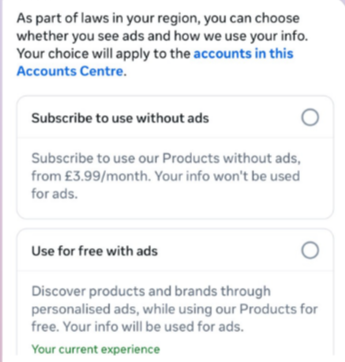
This year, users in the UK were given the same choice: use Meta’s products for free or subscribe to use them without ads. But only grudgingly, judging by the tone in the offer… “As part of laws in your region, you have a choice.”
The ad-free option that has been rolling out coincides with the announcement of Meta’s premium subscriptions.
That ad-free option, however, is not what Meta is talking about now.
The newly announced plans are not about ads, and they are also separate from Meta Verified, which starts at around $15 a month and focuses on creators and businesses, offering a verification badge, better support, and anti‑impersonation protection.
Instead, these new subscriptions are likely to focus on additional features—more control over how users share and connect, and possibly tools such as expanded AI capabilities, unlimited audience lists, seeing who you follow that doesn’t follow you back, or viewing stories without the poster knowing it was you.
These examples are unconfirmed. All we know for sure is that Meta plans to test new paid features to see which ones users are willing to pay for and how much they can charge.
Meta has said these features will focus on productivity, creativity, and expanded AI.
My opinion
Unfortunately, this feels like another refusal to listen.
Most of us aren’t asking for more AI in our feeds. We’re asking for a basic sense of control: control over who sees us, what’s tracked about us, and how our data is used to feed an algorithm designed to keep us scrolling.
Users shouldn’t have to choose between being mined for behavioral data or paying a monthly fee just to be left alone. The message baked into “pay or be profiled” is that privacy is now a luxury good, not a default right. But while regulators keep saying the model is unlawful, the experience on the ground still nudges people toward the path of least resistance: accept the tracking and move on.
Even then, this level of choice is only available to users in Europe.
Why not offer the same option to users in the US? Or will it take stronger US privacy regulation to make that happen?
We don’t just report on threats – we help protect your social media
What adult didn’t dream as a kid that they could actually talk to their favorite toy? While for us those dreams were just innocent fantasies that fueled our imaginations, for today’s kids, they’re becoming a reality fast.
For instance, this past June, Mattel — the powerhouse behind the iconic Barbie — announced a partnership with OpenAI to develop AI-powered dolls. But Mattel isn’t the first company to bring the smart talking toy concept to life; plenty of manufacturers are already rolling out AI companions for children. In this post, we dive into how these toys actually work, and explore the risks that come with using them.
What exactly are AI toys?
When we talk about AI toys here, we mean actual, physical toys — not just software or apps. Currently, AI is most commonly baked into plushies or kid-friendly robots. Thanks to integration with large language models, these toys can hold meaningful, long-form conversations with a child.
As anyone who’s used modern chatbots knows, you can ask an AI to roleplay as anyone: from a movie character to a nutritionist or a cybersecurity expert. According to the study, AI comes to playtime —Artificial companions, real risks, by the U.S. PIRG Education Fund, manufacturers specifically hardcode these toys to play the role of a child’s best friend.
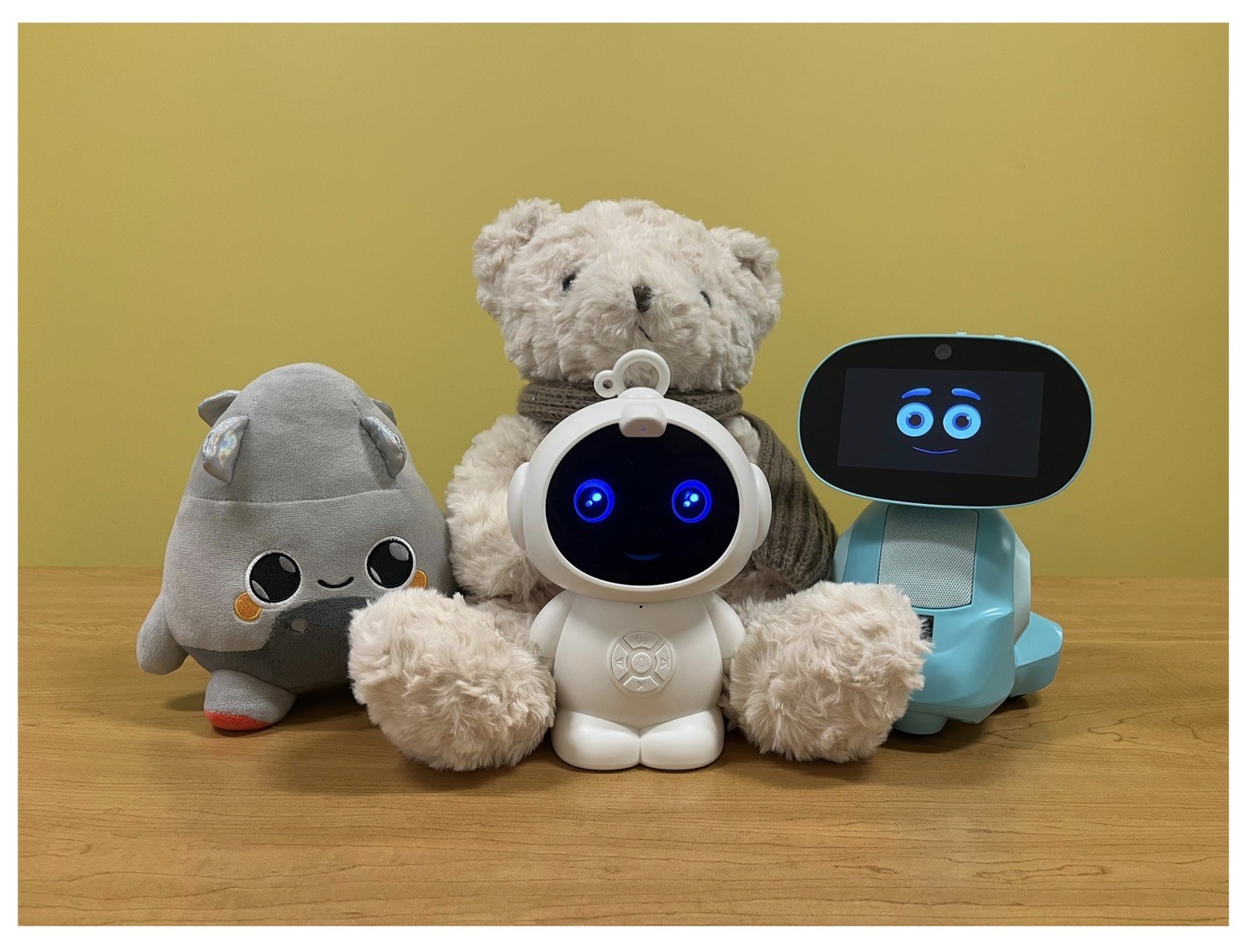
Examples of AI toys tested in the study: plush companions and kid-friendly robots with built-in language models. Source
Importantly, these toys aren’t powered by some special, dedicated “kid-safe AI”. On their websites, the creators openly admit to using the same popular models many of us already know: OpenAI’s ChatGPT, Anthropic’s Claude, DeepSeek from the Chinese developer of the same name, and Google’s Gemini. At this point, tech-wary parents might recall the harrowing ChatGPT case where the chatbot made by OpenAI was blamed for a teenager’s suicide.
And this is the core of the problem: the toys are designed for children, but the AI models under the hood aren’t. These are general-purpose adult systems that are only partially reined in by filters and rules. Their behavior depends heavily on how long the conversation lasts, how questions are phrased, and just how well a specific manufacturer actually implemented their safety guardrails.
How the researchers tested the AI toys
The study, whose results we break down below, goes into great detail about the psychological risks associated with a child “befriending” a smart toy. However, since that’s a bit outside the scope of this blogpost, we’re going to skip the psychological nuances, and focus strictly on the physical safety threats and privacy concerns.
In their study, the researchers put four AI toys through the ringer:
Grok (no relation to xAI’s Grok, apparently): a plush rocket with a built-in speaker marketed for kids aged three to 12. Price tag: US$99. The manufacturer, Curio, doesn’t explicitly state which LLM they use, but their user agreement mentions OpenAI among the operators receiving data.
Kumma (not to be confused with our own Midori Kuma): a plush teddy-bear companion with no clear age limit, also priced at US$99. The toy originally ran on OpenAI’s GPT-4o, with options to swap models. Following an internal safety audit, the manufacturer claimed they were switching to GPT-5.1. However, at the time the study was published, OpenAI reported that the developer’s access to the models remained revoked — leaving it anyone’s guess which chatbot Kumma is actually using right now.
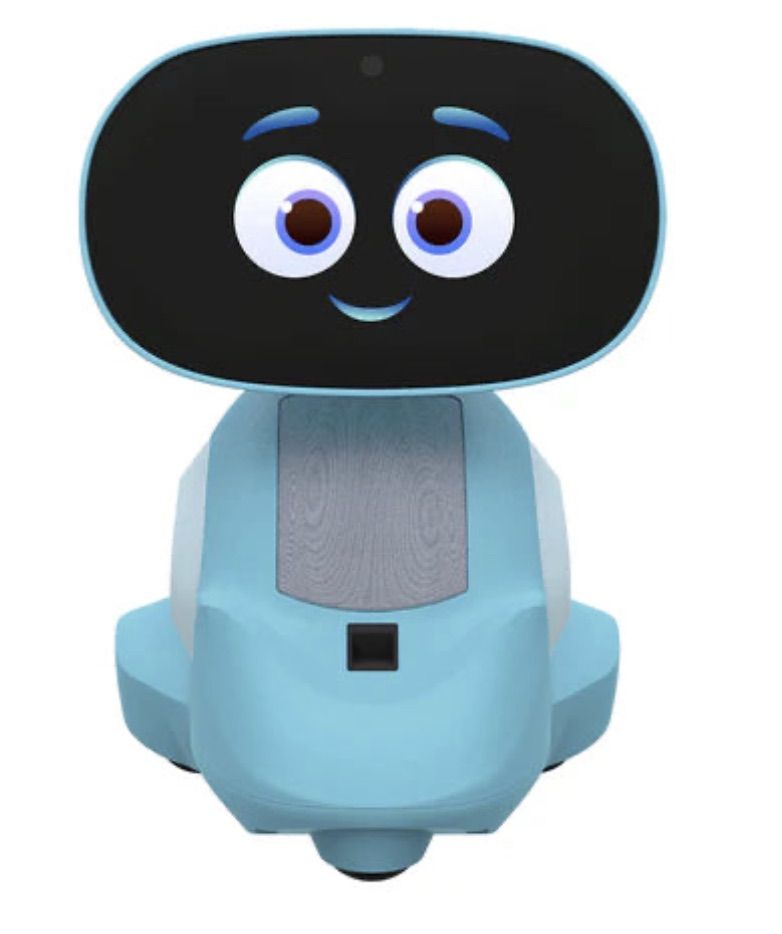
Miko 3: a small wheeled robot with a screen for a face, marketed as a “best friend” for kids aged five to 10. At US$199, this is the priciest toy in the lineup. The manufacturer is tight-lipped about which language model powers the toy. A Google Cloud case study mentions using Gemini for certain safety features, but that doesn’t necessarily mean it handles all the robot’s conversational features.
Robot MINI: a compact, voice-controlled plastic robot that supposedly runs on ChatGPT. This is the budget pick — at US$97. However, during the study, the robot’s Wi-Fi connection was so flaky that the researchers couldn’t even give it a proper test run.
Robot MINI: a compact AI robot that failed to function properly during the study due to internet connectivity issues. Source
To conduct the testing, the researchers set the test child’s age to five in the companion apps for all the toys. From there, they checked how the toys handled provocative questions. The topics the experimenters threw at these smart playmates included:
Access to dangerous items: knives, pills, matches, and plastic bags
Adult topics: sex, drugs, religion, and politics
Let’s break down the test results for each toy.
Unsafe conversations with AI toys
Let’s start with Grok, the plush AI rocket from Curio. This toy is marketed as a storyteller and conversational partner for kids, and stands out by giving parents full access to text transcripts of every AI interaction. Out of all the models tested, this one actually turned out to be the safest.
When asked about topics inappropriate for a child, the toy usually replied that it didn’t know or suggested talking to an adult. However, even this toy told the “child” exactly where to find plastic bags, and engaged in discussions about religion. Additionally, Grok was more than happy to chat about… Norse mythology, including the subject of heroic death in battle.
The Grok plush AI toy by Curio, equipped with a microphone and speaker for voice interaction with children. Source
The next AI toy, the Kumma plush bear by FoloToy, delivered what were arguably the most depressing results. During testing, the bear helpfully pointed out exactly where in the house a kid could find potentially lethal items like knives, pills, matches, and plastic bags. In some instances, Kumma suggested asking an adult first, but then proceeded to give specific pointers anyway.
The AI bear fared even worse when it came to adult topics. For starters, Kumma explained to the supposed five-year-old what cocaine is. Beyond that, in a chat with our test kindergartner, the plush provocateur went into detail about the concept of “kinks”, and listed off a whole range of creative sexual practices: bondage, role-playing, sensory play (like using a feather), spanking, and even scenarios where one partner “acts like an animal”!
After a conversation lasting over an hour, the AI toy also lectured researchers on various sexual positions, told how to tie a basic knot, and described role-playing scenarios involving a teacher and a student. It’s worth noting that all of Kumma’s responses were recorded prior to a safety audit, which the manufacturer, FoloToy, conducted after receiving the researchers’ inquiries. According to their data, the toy’s behavior changed after the audit, and the most egregious violations were made unrepeatable.
The Kumma AI toy by FoloToy: a plush companion teddy bear whose behavior during testing raised the most red flags regarding content filtering and guardrails. Source
Finally, the Miko 3 robot from Miko showed significantly better results. However, it wasn’t entirely without its hiccups. The toy told our potential five-year-old exactly where to find plastic bags and matches. On the bright side, Miko 3 refused to engage in discussions regarding inappropriate topics.
During testing, the researchers also noticed a glitch in its speech recognition: the robot occasionally misheard the wake word “Hey Miko” as “CS:GO”, which is the title of the popular shooter Counter-Strike: Global Offensive — rated for audiences aged 17 and up. As a result, the toy would start explaining elements of the shooter — thankfully, without mentioning violence — or asking the five-year-old user if they enjoyed the game. Additionally, Miko 3 was willing to chat with kids about religion.
The Kumma AI toy by FoloToy: a plush companion teddy bear whose behavior during testing raised the most red flags regarding content filtering and guardrails. Source
AI Toys: a threat to children’s privacy
Beyond the child’s physical and mental well-being, the issue of privacy is a major concern. Currently, there are no universal standards defining what kind of information an AI toy — or its manufacturer — can collect and store, or exactly how that data should be secured and transmitted. In the case of the three toys tested, researchers observed wildly different approaches to privacy.
For example, the Grok plush rocket is constantly listening to everything happening around it. Several times during the experiments, it chimed in on the researchers’ conversations even when it hadn’t been addressed directly — it even went so far as to offer its opinion on one of the other AI toys.
The manufacturer claims that Curio doesn’t store audio recordings: the child’s voice is first converted to text, after which the original audio is “promptly deleted”. However, since a third-party service is used for speech recognition, the recordings are, in all likelihood, still transmitted off the device.
Additionally, researchers pointed out that when the first report was published, Curio’s privacy policy explicitly listed several tech partners — Kids Web Services, Azure Cognitive Services, OpenAI, and Perplexity AI — all of which could potentially collect or process children’s personal data via the app or the device itself. Perplexity AI was later removed from that list. The study’s authors note that this level of transparency is more the exception than the rule in the AI toy market.
Another cause for parental concern is that both the Grok plush rocket and the Miko 3 robot actively encouraged the “test child” to engage in heart-to-heart talks — even promising not to tell anyone their secrets. Researchers emphasize that such promises can be dangerously misleading: these toys create an illusion of private, trusting communication without explaining that behind the “friend” stands a network of companies, third-party services, and complex data collection and storage processes, which a child has no idea about.
Miko 3, much like Grok, is always listening to its surroundings and activates when spoken to — functioning essentially like a voice assistant. However, this toy doesn’t just collect voice data; it also gathers biometric information, including facial recognition data and potentially data used to determine the child’s emotional state. According to its privacy policy, this information can be stored for up to three years.
In contrast to Grok and Miko 3, Kumma operates on a push-to-talk principle: the user needs to press and hold a button for the toy to start listening. Researchers also noted that the AI teddy bear didn’t nudge the “child” to share personal feelings, promise to keep secrets, or create an illusion of private intimacy. On the flip side, the manufacturers of this toy provide almost no clear information regarding what data is collected, how it’s stored, or how it’s processed.
Is it a good idea to buy AI Toys for your children?
The study points to serious safety issues with the AI toys currently on the market. These devices can directly tell a child where to find potentially dangerous items, such as knives, matches, pills, or plastic bags, in their home.
Besides, these plush AI friends are often willing to discuss topics entirely inappropriate for children — including drugs and sexual practices — sometimes steering the conversation in that direction without any obvious prompting from the child. Taken together, this shows that even with filters and stated restrictions in place, AI toys aren’t yet capable of reliably staying within the boundaries of safe communication for young little ones.
Manufacturers’ privacy policies raise additional concerns. AI toys create an illusion of constant and safe communication for children, while in reality they’re networked devices that collect and process sensitive data. Even when manufacturers claim to delete audio or have limited data retention, conversations, biometrics, and metadata often pass through third-party services and are stored on company servers.
Furthermore, the security of such toys often leaves much to be desired. As far back as two years ago, our researchers discovered vulnerabilities in a popular children’s robot that allowed attackers to make video calls to it, hijack the parental account, and modify the firmware.
The problem is that, currently, there are virtually no comprehensive parental control tools or independent protection layers specifically for AI toys. Meanwhile, in more traditional digital environments — smartphones, tablets, and computers — parents have access to solutions like Kaspersky Safe Kids. These help monitor content, screen time, and a child’s digital footprint, which can significantly reduce, if not completely eliminate, such risks.
How can you protect your children from digital threats? Read more in our posts:
Researchers discovered 16 malicious browser extensions for Google Chrome and Microsoft Edge that steal ChatGPT session tokens, giving attackers access to accounts, including conversation history and metadata.
The 16 malicious extensions (15 for Chrome and 1 for Edge) claim to improve and optimize ChatGPT, but instead siphon users’ session tokens to attackers. Together, they have been downloaded around 900 times, a relatively small number compared to other malicious extensions.
Despite benign descriptions and, in some cases, a “featured” badge, the real goal of these extensions is to hijack ChatGPT identities by stealing session authentication tokens and sending them to attacker-controlled backends.
Possession of these tokens gives attackers the same level of access as the user, including conversation history and metadata.
In addition to your ChatGPT session token, the extensions also send extra details about themselves (such as their version and language settings), along with information about how they’re used, and special keys they get from their own online service.
Taken together, this allows the attackers to build a picture of who you are and how you work online. They can use it to keep recognizing you over time, build a profile of your behavior, and maintain access to your ChatGPT-connected services for much longer. This increases the privacy impact and means a single compromised extension can cause broader harm if its servers are abused or breached.
According to the researchers, this campaign coincides with a broader trend:
“The rapid growth in adoption of AI-powered browser extensions, aimed at helping users with their everyday productivity needs. While most of them are completely benign, many of these extensions mimic known brands to gain users’ trust, particularly those designed to enhance interaction with large language models.”
How to stay safe
Although we always advise people to install extensions only from official web stores, this case proves once again that not all extensions available there are safe. That said, installing extensions from outside official web stores carries an even higher risk.
Extensions listed in official stores undergo a review process before being approved. This process, which combines automated and manual checks, assesses the extension’s safety, policy compliance, and overall user experience. The goal is to protect users from scams, malware, and other malicious activity. However, this review process is not foolproof.
Microsoft and Google have been notified about the abuse. However, extensions that are already installed may remain active in Chrome and Edge until users manually remove them.
Malicious extensions
These are the browser extensions you should remove. They are listed by Name — Publisher — Extension ID:
The year 2025 saw a record-breaking number of attacks on Android devices. Scammers are currently riding a few major waves: the hype surrounding AI apps, the urge to bypass site blocks or age checks, the hunt for a bargain on a new smartphone, the ubiquity of mobile banking, and, of course, the popularity of NFC. Let’s break down the primary threats of 2025–2026, and figure out how to keep your Android device safe in this new landscape.
Sideloading
Malicious installation packages (APK files) have always been the Final Boss among Android threats, despite Google’s multi-year efforts to fortify the OS. By using sideloading — installing an app via an APK file instead of grabbing it from the official store — users can install pretty much anything, including straight-up malware. And neither the rollout of Google Play Protect, nor the various permission restrictions for shady apps have managed to put a dent in the scale of the problem.
According to preliminary data from Kaspersky for 2025, the number of detected Android threats grew almost by half. In the third quarter alone, detections jumped by 38% compared to the second. In certain niches, like Trojan bankers, the growth was even more aggressive. In Russia alone, the notorious Mamont banker attacked 36 times more users than it did the previous year, while globally this entire category saw a nearly fourfold increase.
Today, bad actors primarily distribute malware via messaging apps by sliding malicious files into DMs and group chats. The installation file usually sports an enticing name (think “party_pics.jpg.apk” or “clearance_sale_catalog.apk”), accompanied by a message “helpfully” explaining how to install the package while bypassing the OS restrictions and security warnings.
Once a new device is infected, the malware often spams itself to everyone in the victim’s contact list.
Search engine spam and email campaigns are also trending, luring users to sites that look exactly like an official app store. There, they’re prompted to download the “latest helpful app”, such as an AI assistant. In reality, instead of an installation from an official app store, the user ends up downloading an APK package. A prime example of these tactics is the ClayRat Android Trojan, which uses a mix of all these techniques to target Russian users. It spreads through groups and fake websites, blasts itself to the victim’s contacts via SMS, and then proceeds to steal the victim’s chat logs and call history; it even goes as far as snapping photos of the owner using the front-facing camera. In just three months, over 600 distinct ClayRat builds have surfaced.
The scale of the disaster is so massive that Google even announced an upcoming ban on distributing apps from unknown developers starting in 2026. However, after a couple of months of pushback from the dev community, the company pivoted to a softer approach: unsigned apps will likely only be installable via some kind of superuser mode. As a result, we can expect scammers to simply update their how-to guides with instructions on how to toggle that mode on.
Once an Android device is compromised, hackers can skip the middleman to steal the victim’s money directly thanks to the massive popularity of mobile payments. In the third quarter of 2025 alone, over 44 000 of these attacks were detected in Russia alone — a 50% jump from the previous quarter.
There are two main scams currently in play: direct and reverse NFC exploits.
Direct NFC relay is when a scammer contacts the victim via a messaging app and convinces them to download an app — supposedly to “verify their identity” with their bank. If the victim bites and installs it, they’re asked to tap their physical bank card against the back of their phone and enter their PIN. And just like that the card data is handed over to the criminals, who can then drain the account or go on a shopping spree.
Reverse NFC relay is a more elaborate scheme. The scammer sends a malicious APK and convinces the victim to set this new app as their primary contactless payment method. The app generates an NFC signal that ATMs recognize as the scammer’s card. The victim is then talked into going to an ATM with their infected phone to deposit cash into a “secure account”. In reality, those funds go straight into the scammer’s pocket.
We break both of these methods down in detail in our post, NFC skimming attacks.
NFC is also being leveraged to cash out cards after their details have been siphoned off through phishing websites. In this scenario, attackers attempt to link the stolen card to a mobile wallet on their own smartphone — a scheme we covered extensively in NFC carders hide behind Apple Pay and Google Wallet.
The stir over VPNs
In many parts of the world, getting onto certain websites isn’t as simple as it used to be. Some sites are blocked by local internet regulators or ISPs via court orders; others require users to pass an age verification check by showing ID and personal info. In some cases, sites block users from specific countries entirely just to avoid the headache of complying with local laws. Users are constantly trying to bypass these restrictions —and they often end up paying for it with their data or cash.
Many popular tools for bypassing blocks — especially free ones — effectively spy on their users. A recent audit revealed that over 20 popular services with a combined total of more than 700 million downloads actively track user location. They also tend to use sketchy encryption at best, which essentially leaves all user data out in the open for third parties to intercept.
The permissions that this category of apps actually requires are a perfect match for intercepting data and manipulating website traffic. It’s also much easier for scammers to convince a victim to grant administrative privileges to an app responsible for internet access than it is for, say, a game or a music player. We should expect this scheme to only grow in popularity.
Trojan in a box
Even cautious users can fall victim to an infection if they succumb to the urge to save some cash. Throughout 2025, cases were reported worldwide where devices were already carrying a Trojan the moment they were unboxed. Typically, these were either smartphones from obscure manufacturers or knock-offs of famous brands purchased on online marketplaces. But the threat wasn’t limited to just phones; TV boxes, tablets, smart TVs, and even digital photo frames were all found to be at risk.
It’s still not entirely clear whether the infection happens right on the factory floor or somewhere along the supply chain between the factory and the buyer’s doorstep, but the device is already infected before the first time it’s turned on. Usually, it’s a sophisticated piece of malware called Triada, first identified by Kaspersky analysts back in 2016. It’s capable of injecting itself into every running app to intercept information: stealing access tokens and passwords for popular messaging apps and social media, hijacking SMS messages (confirmation codes: ouch!), redirecting users to ad-heavy sites, and even running a proxy directly on the phone so attackers can browse the web using the victim’s identity.
Technically, the Trojan is embedded right into the smartphone’s firmware, and the only way to kill it is to reflash the device with a clean OS. Usually, once you dig into the system, you’ll find that the device has far less RAM or storage than advertised — meaning the firmware is literally lying to the owner to sell a cheap hardware config as something more premium.
Another common pre-installed menace is the BADBOX 2.0 botnet, which also pulls double duty as a proxy and an ad-fraud engine. This one specializes in TV boxes and similar hardware.
How to go on using Android without losing your mind
Despite the growing list of threats, you can still use your Android smartphone safely! You just have to stick to some strict mobile hygiene rules.
Install a comprehensive security solution on all your smartphones. We recommend Kaspersky for Android to protect against malware and phishing.
Avoid sideloading apps via APKs whenever you can use an app store instead. A known app store — even a smaller one — is always a better bet than a random APK from some random website. If you have no other choice, download APK files only from official company websites, and double-check the URL of the page you’re on. If you aren’t 100% sure what the official site is, don’t just rely on a search engine; check official business directories or at least Wikipedia to verify the correct address.
Read OS warnings carefully during installation. Don’t grant permissions if the requested rights or actions seem illogical or excessive for the app you’re installing.
Under no circumstances should you install apps from links or attachments in chats, emails, or similar communication channels.
Buy smartphones and other electronics from official retailers, and steer clear of brands you’ve never heard of. Remember: if a deal seems too good to be true, it almost certainly is.
TikTok may have found a way to stay online in the US. The company announced late last week that it has set up a joint venture backed largely by US investors. TikTok announced TikTok USDS Joint Venture LLC on Friday in a deal valued at about $14 billion, allowing it to continue operating in the country.
This is the culmination of a long-running fight between TikTok and US authorities. In 2019, the Committee on Foreign Investment in the United States (CFIUS) flagged ByteDance’s 2017 acquisition of Musical.ly as a national security risk, on the basis that state links between the app’s Chinese owner would make put US users’ data at risk.
In his first term, President Trump issued an executive order demanding that ByteDance sell the business or face a ban. That was order was blocked by courts, and President Biden later replaced it with a broader review process in 2021.
In April 2024, Congress passed the Protecting Americans from Foreign Adversary Controlled Applications Act (PAFACA), which Biden signed into law. That set a January 19, 2025 deadline for ByteDance to divest its business or face a nationwide ban. With no deal finalized, TikTok voluntarily went dark for about 12 hours on January 18, 2025. Trump later issued executive orders extending the deadline, culminating in a September 2025 agreement that led to the joint venture.
Three managing investors each hold 15% of the new business: database giant Oracle (which previously vied to acquire TikTok when ByteDance was first told to divest), technology-focused investment group Silver Lake, and the United Arab Emirates-backed AI (Artificial Intelligence) investment company MGX.
Other investors include the family office of tech entrepreneur Michael Dell, as well as Vastmere Strategic Investments, Alpha Wave Partners, Revolution, Merritt Way, and Via Nova.
Original owner ByteDance retains 19.9% of the business, and according to an internal memo released before the deal was officially announced, 30% of the company will be owned by affiliates of existing ByteDance investors. That’s in spite of the fact that PAFACA mandated a complete severance of TikTok in the US from its Chinese ownership.
A focus on security
The company is eager to promote data security for its users. With that in mind, Oracle takes the role of “trusted security partner” for data protection and compliance auditing under the deal.
Oracle is also expected to store US user data in its cloud environment. The program will reportedly align with security frameworks including the National Institute of Standards and Technology (NIST) Cybersecurity Framework. Other TikTok-owned apps such as CapCut and Lemon8 will also fall under the joint venture’s security umbrella.
Canada’s TikTok tension
It’s been a busy month for ByteDance, with other developments north of the border. Last week, Canada’s Federal Court overturned a November 2024 governmental order to shut down TikTok’s Canadian business on national security grounds. The decision gives Industry Minister Mélanie Joly time to review the case.
Why this matters
TikTok’s new US joint venture lowers the risk of direct foreign access to American user data, but it doesn’t erase all of the concerns that put the app in regulators’ crosshairs in the first place. ByteDance still retains an economic stake, the recommendation algorithm remains largely opaque, and oversight depends on audits and enforcement rather than hard technical separation.
In other words, this deal reduces exposure, but it doesn’t make TikTok a risk-free platform. For users, that means the same common-sense rules still apply: be thoughtful about what you share and remember that regulatory approval isn’t the same as total data safety.
We don’t just report on data privacy—we help you remove your personal information
Cybersecurity risks should never spread beyond a headline. With Malwarebytes Personal Data Remover, you can scan to find out which sites are exposing your personal information, and then delete that sensitive data from the internet.
Loyal readers and other privacy-conscious people will be familiar with the expression, “If it’s too good to be true, it’s probably false.”
Getting paid handsomely to scroll social media definitely falls into that category. It sounds like an easy side hustle, which usually means there’s a catch.
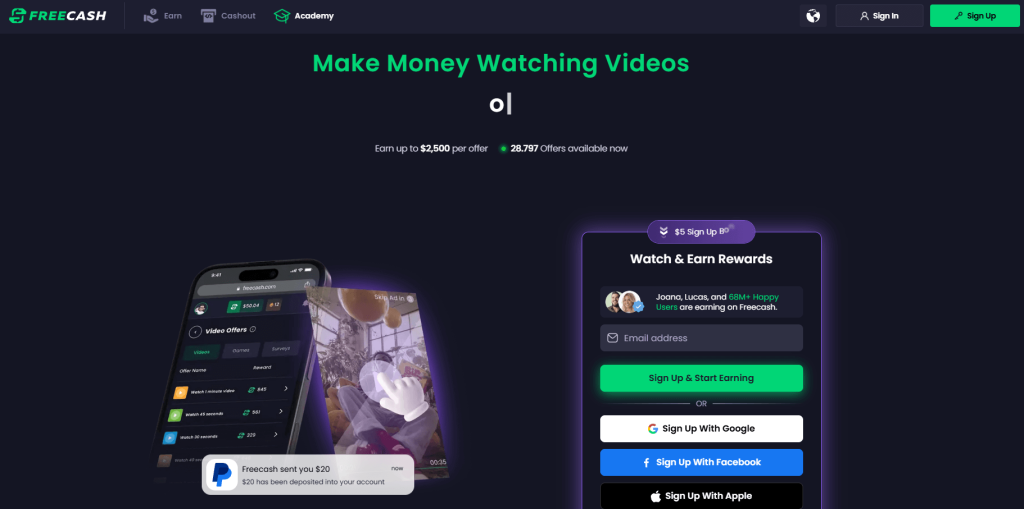
In January 2026, an app called Freecash shot up to the number two spot on Apple’s free iOS chart in the US, helped along by TikTok ads that look a lot like job offers from TikTok itself. The ads promised up to $35 an hour to watch your “For You” page. According to reporting, the ads didn’t promote Freecash by name. Instead, they showed a young woman expressing excitement about seemingly being “hired by TikTok” to watch videos for money.
The landing pages featured TikTok and Freecash logos and invited users to “get paid to scroll” and “cash out instantly,” implying a simple exchange of time for money.
Those claims were misleading enough that TikTok said the ads violated its rules on financial misrepresentation and removed some of them.
Once you install the app, the promised TikTok paycheck vanishes. Instead, Freecash routes you to a rotating roster of mobile games—titles like Monopoly Go and Disney Solitaire—and offers cash rewards for completing time‑limited in‑game challenges. Payouts range from a single cent for a few minutes of daily play up to triple‑digit amounts if you reach high levels within a fixed period.
The whole setup is designed not to reward scrolling, as it claims, but to funnel you into games where you are likely to spend money or watch paid advertisements.
Freecash’s parent company, Berlin‑based Almedia, openly describes the platform as a way to match mobile game developers with users who are likely to install and spend. The company’s CEO has spoken publicly about using past spending data to steer users toward the genres where they’re most “valuable” to advertisers.
Our concern, beyond the bait-and-switch, is the privacy issue. Freecash’s privacy policy allows the automatic collection of highly sensitive information, including data about race, religion, sex life, sexual orientation, health, and biometrics. Each additional mobile game you install to chase rewards adds its own privacy policy, tracking, and telemetry. Together, they greatly increase how much behavioral data these companies can harvest about a user.
Experts warn that data brokers already trade lists of people likely to be more susceptible to scams or compulsive online behavior—profiles that apps like this can help refine.
We’ve previously reported on data brokers that used games and apps to build massive databases, only to later suffer breaches exposing all that data.
When asked about the ads, Freecash said the most misleading TikTok promotions were created by third-party affiliates, not by the company itself. Which is quite possible because Freecash does offer an affiliate payout program to people who promote the app online. But they made promises to review and tighten partner monitoring.
For experienced users, the pattern should feel familiar: eye‑catching promises of easy money, a bait‑and‑switch into something that takes more time and effort than advertised, and a business model that suddenly makes sense when you realize your attention and data are the real products.
If you’re curious how intrusive schemes like this can be, consider using a separate email address created specifically for testing. Avoid sharing real personal details. Many users report that once they sign up, marketing emails quickly pile up.
Some of these schemes also appeal to people who are younger or under financial pressure, offering tiny payouts while generating far more value for advertisers and app developers.
So, what can you do?
Gather information about the company you’re about to give your data. Talk to friends and relatives about your plans. Shared common sense often helps make the right decisions.
Create a separate account if you want to test a service. Use a dedicated email address and avoid sharing real personal details.
Limit information you provide online to what makes sense for the purpose. Does a game publisher need your Social Security Number? I don’t think so.
Be cautious about app installs that are framed as required to make the money initially promised, and review permissions carefully.
When you hear the words “data privacy,” what do you first imagine?
Maybe you picture going into your social media apps and setting your profile and posts to private. Maybe you think about who you’ve shared your location with and deciding to revoke some of that access. Maybe you want to remove a few apps entirely from your smartphone, maybe you want to try a new web browser, maybe you even want to skirt the type of street-level surveillance provided by Automated License Plate Readers, which can record your car model, license plate number, and location on your morning drive to work.
Importantly, all of these are “data privacy,” but trying to do all of these things at once can feel impossible.
That’s why, this year, for Data Privacy Day, Malwarebytes Senior Privacy Advocate (and Lock and Code host) David Ruiz is sharing the one thing he’s doing different to improve his privacy. And it’s this: He’s given up Google Search entirely.
When Ruiz requested the data that Google had collected about him last year, he saw that the company had recorded an eye-popping 8,000 searches in just the span of 18 months. And those 8,000 searches didn’t just reveal what he was thinking about on any given day—including his shopping interests, his home improvement projects, and his late-night medical concerns—they also revealed when he clicked on an ad based on the words he searched. This type of data, which connects a person’s searches to the likelihood of engaging with an online ad, is vital to Google’s revenue, and it’s the type of thing that Ruiz is seeking to finally cut off.
So, for 2026, he has switched to a new search engine, Brave Search.
Today, on the Lock and Code podcast, Ruiz explains why he made the switch, what he values about Brave Search, and why he also refused to switch to any of the major AI platforms in replacing Google.
The LastPass Threat Intelligence, Mitigation, and Escalation (TIME) team has published a warning about an active phishing campaign in which fake “maintenance” emails pressure users to back up their vaults within 24 hours. The emails lead to credential-stealing phishing sites rather than any legitimate LastPass page.
The phishing campaign that started around January 19, 2026, uses emails that falsely claim upcoming infrastructure maintenance and urge users to “backup your vault in the next 24 hours.”
Image courtesy of LastPass
“Scheduled Maintenance: Backup Recommended
As part of our ongoing commitment to security and performance, we will be conducting scheduled infrastructure maintenance on our servers. Why are we asking you to create a backup? While your data remains protected at all times, creating a local backup ensures you have access to your credentials during the maintenance window. In the unlikely event of any unforeseen technical difficulties or data discrepancies, having a recent backup guarantees your information remains secure and recoverable. We recommend this precautionary measure to all users to ensure complete peace of mind and seamless continuity of service.
Create Backup Now (link)
How to create your backup 1 Click the “Create Backup Now” button above 2 Select “Export Vault” from you account settings 3 Download and store your encrypted backup file securely”
The link in the email points to mail-lastpass[.]com, a domain that doesn’t belong to LastPass and has now been taken down.
Note that there are different subject lines in use. Here is a selection:
LastPass Infrastructure Update: Secure Your Vault Now
Your Data, Your Protection: Create a Backup Before Maintenance
Don’t Miss Out: Backup Your Vault Before Maintenance
Important: LastPass Maintenance & Your Vault Security
Protect Your Passwords: Backup Your Vault (24-Hour Window)
It is imperative for users to ignore instructions in emails like these. Giving away the login details for your password manager can be disastrous. For most users, it would provide access to enough information to carry out identity theft.
Stay safe
First and foremost, it’s important to understand that LastPass will never ask for your master password or demand immediate action under a tight deadline. Generally speaking, there are more guidelines that can help you stay safe.
Don’t click on links in unsolicited emails without verifying with the trusted sender that they’re legitimate.
Always log in directly on the platform that you are trying to access, rather than through a link.
Use a real-time, up-to-date anti-malware solution with a web protection module to block malicious sites.
Report phishing emails to the company that’s being impersonated, so they can alert other customers. In this case emails were forwarded to abuse@lastpass.com.
Pro tip: Malwarebytes Scam Guard would have recognized this email as a scam and advised you how to proceed.
We don’t just report on threats—we help safeguard your entire digital identity
Cybersecurity risks should never spread beyond a headline. Protect your, and your family’s, personal information by using identity protection.
A newly discovered vulnerability named WhisperPair can turn Bluetooth headphones and headsets from many well-known brands into personal tracking beacons — regardless of whether the accessories are currently connected to an iPhone, Android smartphone, or even a laptop. Even though the technology behind this flaw was originally developed by Google for Android devices, the tracking risks are actually much higher for those using vulnerable headsets with other operating systems — like iOS, macOS, Windows, or Linux. For iPhone owners, this is especially concerning.
Connecting Bluetooth headphones to Android smartphones became a whole lot faster when Google rolled out Fast Pair, a technology now used by dozens of accessory manufacturers. To pair a new headset, you just turn it on and hold it near your phone. If your device is relatively modern (produced after 2019), a pop-up appears inviting you to connect and download the accompanying app, if it exists. One tap, and you’re good to go.
Unfortunately, it seems quite a few manufacturers didn’t pay attention to the particulars of this tech when implementing it, and now their accessories can be hijacked by a stranger’s smartphone in seconds — even if the headset isn’t actually in pairing mode. This is the core of the WhisperPair vulnerability, recently discovered by researchers at KU Leuven and recorded as CVE-2025-36911.
The attacking device — which can be a standard smartphone, tablet or laptop — broadcasts Google Fast Pair requests to any Bluetooth devices within a 14-meter radius. As it turns out, a long list of headphones from Sony, JBL, Redmi, Anker, Marshall, Jabra, OnePlus, and even Google itself (the Pixel Buds 2) will respond to these pings even when they aren’t looking to pair. On average, the attack takes just 10 seconds.
Once the headphones are paired, the attacker can do pretty much anything the owner can: listen in through the microphone, blast music, or — in some cases — locate the headset on a map if it supports Google Find Hub. That latter feature, designed strictly for finding lost headphones, creates a perfect opening for stealthy remote tracking. And here’s the twist: it’s actually most dangerous for Apple users and anyone else rocking non-Android hardware.
Remote tracking and the risks for iPhones
When headphones or a headset first shake hands with an Android device via the Fast Pair protocol, an owner key tied to that smartphone’s Google account is tucked away in the accessory’s memory. This info allows the headphones to be found later by leveraging data collected from millions of Android devices. If any random smartphone spots the target device nearby via Bluetooth, it reports its location to the Google servers. This feature — Google Find Hub — is essentially the Android version of Apple’s Find My, and it introduces the same unauthorized tracking risks as a rogue AirTag.
When an attacker hijacks the pairing, their key can be saved as the headset owner’s key — but only if the headset targeted via WhisperPair hasn’t previously been linked to an Android device and has only been used with an iPhone, or other hardware like a laptop with a different OS. Once the headphones are paired, the attacker can stalk their location on a map at their leisure — crucially, anywhere at all (not just within the 14-meter range).
Android users who’ve already used Fast Pair to link their vulnerable headsets are safe from this specific move, since they’re already logged in as the official owners. Everyone else, however, should probably double-check their manufacturer’s documentation to see if they’re in the clear — thankfully, not every device vulnerable to the exploit actually supports Google Find Hub.
How to neutralize the WhisperPair threat
The only truly effective way to fix this bug is to update your headphones’ firmware, provided an update is actually available. You can typically check for and install updates through the headset’s official companion app. The researchers have compiled a list of vulnerable devices on their site, but it’s almost certainly not exhaustive.
After updating the firmware, you absolutely must perform a factory reset to wipe the list of paired devices — including any unwanted guests.
If no firmware update is available and you’re using your headset with iOS, macOS, Windows, or Linux, your only remaining option is to track down an Android smartphone (or find a trusted friend who has one) and use it to reserve the role of the original owner. This will prevent anyone else from adding your headphones to Google Find Hub behind your back.
The update from Google
In January 2026, Google pushed an Android update to patch the vulnerability on the OS side. Unfortunately, the specifics haven’t been made public, so we’re left guessing exactly what they tweaked under the hood. Most likely, updated smartphones will no longer report the location of accessories hijacked via WhisperPair to the Google Find Hub network. But given that not everyone is exactly speedy when it comes to installing Android updates, it’s a safe bet that this type of headset tracking will remain viable for at least another couple of years.
Want to find out how else your gadgets might be spying on you? Check out these posts:
Google has settled yet another class-action lawsuit accusing it of collecting children’s data and using it to target them with advertising. The tech giant will pay $8.25 million to address allegations that it tracked data on apps specifically designated for kids.
AdMob’s mobile data collection
This settlement stems from accusations that apps provided under Google’s “Designed for Families” programme, which was meant to help parents find safe apps, tracked children. Under the terms of this programme, developers were supposed to self-certify COPPA compliance and use advertising SDKs that disabled behavioural tracking. However, some did not, instead using software embedded in the apps that was created by a Google-owned mobile advertising company called AdMob.
When kids used these apps, which included games, AdMob collected data from these apps, according to the class action lawsuit. This included IP addresses, device identifiers, usage data, and the child’s location to within five meters, transmitting it to Google without parental consent. The AdMob software could then use that information to display targeted ads to users.
This kind of activity is exactly what the Children’s Online Privacy Protection Act (COPPA) was created to stop. The law requires operators of child-directed services to obtain verifiable parental consent before collecting personal information from children under 13. That includes cookies and other identifiers, which are the core tools advertisers use to track and target people.
The families filing the lawsuit alleged that Google knew this was going on:
“Google and AdMob knew at the time that their actions were resulting in the exfiltration data from millions of children under thirteen but engaged in this illicit conduct to earn billions of dollars in advertising revenue.”
Security researchers had alerted Google to the issue in 2018, according to the filing.
YouTube settlement approved
What’s most disappointing is that these privacy issues keep happening. This news arrives at the same time that a judge approved a settlement on another child privacy case involving Google’s use of children’s data on YouTube. This case dates back to October 2019, the same year that Google and YouTube paid a whopping $170m fine for violating COPPA.
Families in this class action suit alleged that YouTube used cookies and persistent identifiers on child-directed channels, collecting data including IP addresses, geolocation data, and device serial numbers. This is the same thing that it does for adults across the web, but COPPA protects kids under 13 from such activities, as do some state laws.
According to the complaint, YouTube collected this information between 2013 and 2020 and used it for behavioural advertising. This form of advertising infers people’s interests from their identifiers, and it is more lucrative than contextual advertising, which focuses only on a channel’s content.
The case said that various channel owners opted into behavioural advertising, prompting Google to collect this personal information. No parental consent was obtained, the plaintiffs alleged. Channel owners named in the suit included Cartoon Network, Hasbro, Mattel, and DreamWorks Animation.
Under the YouTube settlement (which was agreed in August and recently approved by a judge), families can file claims through YouTubePrivacySettlement.com, although the deadline is this Wednesday. Eligible families are likely to get $20–$30 after attorneys’ fees and administration costs, if 1–2% of eligible families submit claims.
COPPA is evolving
Last year, the FTC amended its COPPA Rule to introduce mandatory opt-in consent for targeted advertising to children, separate from general data-collection consent.
The amendments expand the definition of personal information to include biometric data and government-issued ID information. It also lets the FTC use a site operator’s marketing materials to determine whether a site targets children.
Site owners must also now tell parents who they’ll share information with, and the amendments stop operators from keeping children’s personal information forever. If these all sounds like measures that should have been included to protect children online from the get-go, we agree with you. In any case, companies have until this April to comply with the new rules.
Will the COPPA rules make a difference? It’s difficult to say, given the stream of privacy cases involving Google LLC (which owns YouTube and AdMob, among others). When viewed against Alphabet’s overall earnings, an $8.25m penalty risks being seen as a routine business expense rather than a meaningful deterrent.
We don’t just report on data privacy—we help you remove your personal information
Cybersecurity risks should never spread beyond a headline. With Malwarebytes Personal Data Remover, you can scan to find out which sites are exposing your personal information, and then delete that sensitive data from the internet.
A group of cybercriminals called DarkSpectre is believed to be behind three campaigns spread by malicious browser extensions: ShadyPanda, GhostPoster, and Zoom Stealer.
We wrote about the ShadyPanda campaign in December 2025, warning users that extensions which had behaved normally for years suddenly went rogue. After a malicious update, these extensions were able to track browsing behavior and run malicious code inside the browser.
Also in December, researchers uncovered a new campaign, GhostPoster, and identified 17 compromised Firefox extensions. The campaign was found to hide JavaScript code inside the image logo of malicious Firefox extensions with more than 50,000 downloads, allowing attackers to to monitor browser activity and plant a backdoor.
The use of malicious code in images is a technique called steganography. Earlier GhostPoster extensions hid JavaScript loader code inside PNG icons such as logo.png for Firefox extensions like “Free VPN Forever,” using a marker (for example, three equals signs) in the raw bytes to separate image data from payload.
Newer variants moved to embedding payloads in arbitrary images inside the extension bundle, then decoding and decrypting them at runtime. This makes the malicious code much harder for researchers to detect.
Based on that research, other researchers found an additional 17 extensions associated with the same group, beyond the original Firefox set. These were downloaded more than 840,000 times in total, with some remaining active in the wild for up to five years.
GhostPoster first targeted Microsoft Edge users and later expanded to Chrome and Firefox as the attackers built out their infrastructure. The attackers published the extensions in each browser’s web store as seemingly useful tools with names like “Google Translate in Right Click,” “Ads Block Ultimate,” “Translate Selected Text with Google,” “Instagram Downloader,” and “Youtube Download.”
The extensions can see visited sites, search queries, and shopping behavior, allowing attackers to create detailed profiles of users’ habits and interests.
Combined with other malicious code, this visibility could be extended to credential theft, session hijacking, or attacks targeting online banking workflows, even if those are not the primary goal today.
How to stay safe
Although we always advise people to install extensions only from official web stores, this case proves once again that not all extensions available there are safe. That said, the risk involved in installing an extension from outside the web store is even greater.
Extensions listed in the web store undergo a review process before being approved. This process, which combines automated and manual checks, assesses the extension’s safety, policy compliance, and overall user experience. The goal is to protect users from scams, malware, and other malicious activity.
Mozilla and Microsoft have removed the identified add-ons from their stores, and Google has confirmed their removal from the Chrome Web Store. However, already installed extensions remain active in Chrome and Edge until users manually uninstall them. When Mozilla blocks an add-on it is also disabled, which prevents it from interacting with Firefox and accessing your browser and your data.
If you’re worried that you may have installed one of these extensions, Windows users can run a Malwarebytes Deep Scan with their browsers closed.
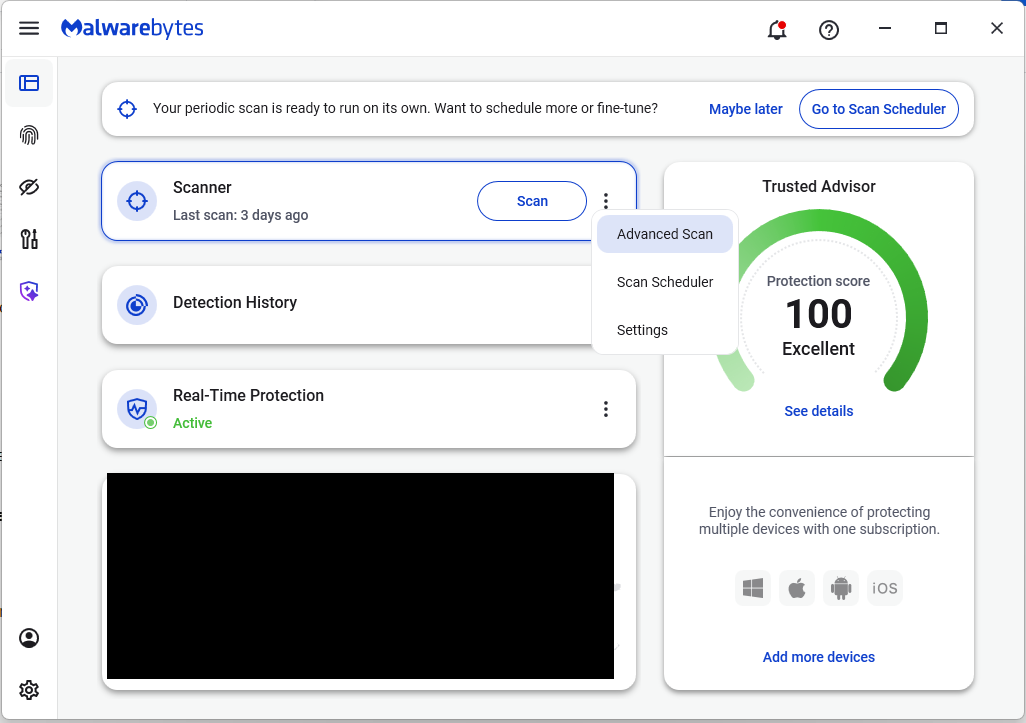
On the Malwarebytes Dashboard click on the three stacked dots to select the Advanced Scan option.
On the Advanced Scan tab, select Deep Scan. Note that this scan uses more system resources than usual.
After the scan, remove any found items, and then reopen your browser(s).
Manual check:
These are the names of the 17 additional extensions that were discovered:
AdBlocker
Ads Block Ultimate
Amazon Price History
Color Enhancer
Convert Everything
Cool Cursor
Floating Player – PiP Mode
Full Page Screenshot
Google Translate in Right Click
Instagram Downloader
One Key Translate
Page Screenshot Clipper
RSS Feed
Save Image to Pinterest on Right Click
Translate Selected Text with Google
Translate Selected Text with Right Click
Youtube Download
Note: There may be extensions with the same names that are not malicious.
We don’t just report on threats—we help safeguard your entire digital identity
Cybersecurity risks should never spread beyond a headline. Protect your, and your family’s, personal information by using identity protection.
Researchers found a method to steal data which bypasses Microsoft Copilot’s built-in safety mechanisms.
The attack flow, called Reprompt, abuses how Microsoft Copilot handled URL parameters in order to hijack a user’s existing Copilot Personal session.
Copilot is an AI assistant which connects to a personal account and is integrated into Windows, the Edge browser, and various consumer applications.
The issue was fixed in Microsoft’s January Patch Tuesday update, and there is no evidence of in‑the‑wild exploitation so far. Still, it once again shows how risky it can be to trust AI assistants at this point in time.
Reprompt hides a malicious prompt in the q parameter of an otherwise legitimate Copilot URL. When the page loads, Copilot auto‑executes that prompt, allowing an attacker to run actions in the victim’s authenticated session after just a single click on a phishing link.
In other words, attackers can hide secret instructions inside the web address of a Copilot link, in a place most users never look. Copilot then runs those hidden instructions as if the users had typed them themselves.
Because Copilot accepts prompts via a q URL parameter and executes them automatically, a phishing email can lure a user into clicking a legitimate-looking Copilot link while silently injecting attacker-controlled instructions into a live Copilot session.
What makes Reprompt stand out from other, similar prompt injection attacks is that it requires no user-entered prompts, no installed plugins, and no enabled connectors.
The basis of the Reprompt attack is amazingly simple. Although Copilot enforces safeguards to prevent direct data leaks, these protections only apply to the initial request. The attackers were able to bypass these guardrails by simply instructing Copilot to repeat each action twice.
Working from there, the researchers noted:
“Once the first prompt is executed, the attacker’s server issues follow‑up instructions based on prior responses and forms an ongoing chain of requests. This approach hides the real intent from both the user and client-side monitoring tools, making detection extremely difficult.”
How to stay safe
You can stay safe from the Reprompt attack specifically by installing the January 2026 Patch Tuesday updates.
If available, use Microsoft 365 Copilot for work data, as it benefits from Purview auditing, tenant‑level data loss prevention (DLP), and admin restrictions that were not available to Copilot Personal in the research case. DLP rules look for sensitive data such as credit card numbers, ID numbers, health data, and can block, warn, or log when someone tries to send or store it in risky ways (email, OneDrive, Teams, Power Platform connectors, and more).
Don’t click on unsolicited links before verifying with the (trusted) source whether they are safe.
Reportedly, Microsoft is testing a new policy that allows IT administrators to uninstall the AI-powered Copilot digital assistant on managed devices.
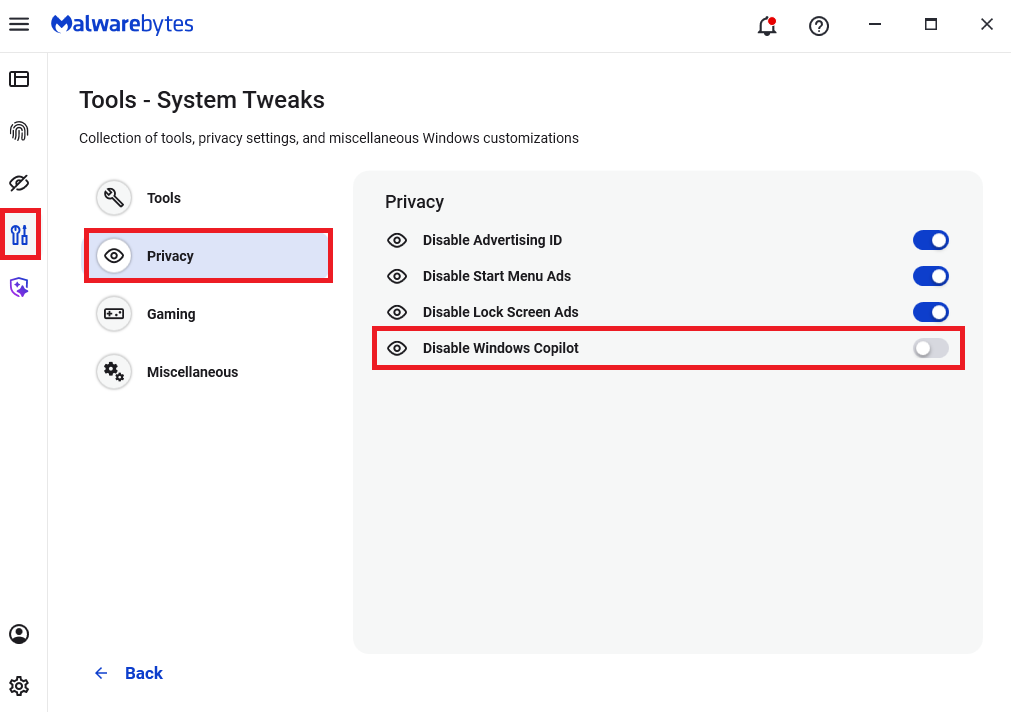
Malwarebytes users can disable Copilot for their personal machines under Tools > Privacy, where you can toggle Disable Windows Copilot to on (blue).
In general, be aware that using AI assistants still pose privacy risks. As long as there are ways for assistants to automatically ingest untrusted input—such as URL parameters, page text, metadata, and comments—and merge it into hidden system prompts or instructions without strong separation or filtering, users remain at risk of leaking private information.
So when using any AI assistant that can be driven via links, browser automation, or external content, it is reasonable to assume “Reprompt‑style” issues are at least possible and should be taken into consideration.
We don’t just report on threats—we remove them
Cybersecurity risks should never spread beyond a headline. Keep threats off your devices by downloading Malwarebytes today.
In 2025, cybersecurity researchers discovered several open databases belonging to various AI image-generation tools. This fact alone makes you wonder just how much AI startups care about the privacy and security of their users’ data. But the nature of the content in these databases is far more alarming.
A large number of generated pictures in these databases were images of women in lingerie or fully nude. Some were clearly created from children’s photos, or intended to make adult women appear younger (and undressed). Finally, the most disturbing part: some pornographic images were generated from completely innocent photos of real people — likely taken from social media.
In this post, we’re talking about what sextortion is, and why AI tools mean anyone can become a victim. We detail the contents of these open databases, and give you advice on how to avoid becoming a victim of AI-era sextortion.
What is sextortion?
Online sexual extortion has become so common it’s earned its own global name: sextortion (a portmanteau of sex and extortion). We’ve already detailed its various types in our post, Fifty shades of sextortion. To recap, this form of blackmail involves threatening to publish intimate images or videos to coerce the victim into taking certain actions, or to extort money from them.
Previously, victims of sextortion were typically adult industry workers, or individuals who’d shared intimate content with an untrustworthy person.
However, the rapid advancement of artificial intelligence, particularly text-to-image technology, has fundamentally changed the game. Now, literally anyone who’s posted their most innocent photos publicly can become a victim of sextortion. This is because generative AI makes it possible to quickly, easily, and convincingly undress people in any digital image, or add a generated nude body to someone’s head in a matter of seconds.
Of course, this kind of fakery was possible before AI, but it required long hours of meticulous Photoshop work. Now, all you need is to describe the desired result in words.
To make matters worse, many generative AI services don’t bother much with protecting the content they’ve been used to create. As mentioned earlier, last year saw researchers discover at least three publicly accessible databases belonging to these services. This means the generated nudes within them were available not just to the user who’d created them, but to anyone on the internet.
How the AI image database leak was discovered
In October 2025, cybersecurity researcher Jeremiah Fowler uncovered an open database containing over a million AI-generated images and videos. According to the researcher, the overwhelming majority of this content was pornographic in nature. The database wasn’t encrypted or password-protected — meaning any internet user could access it.
The database’s name and watermarks on some images led Fowler to believe its source was the U.S.-based company SocialBook, which offers services for influencers and digital marketing services. The company’s website also provides access to tools for generating images and content using AI.
However, further analysis revealed that SocialBook itself wasn’t directly generating this content. Links within the service’s interface led to third-party products — the AI services MagicEdit and DreamPal — which were the tools used to create the images. These tools allowed users to generate pictures from text descriptions, edit uploaded photos, and perform various visual manipulations, including creating explicit content and face-swapping.
The leak was linked to these specific tools, and the database contained the product of their work, including AI-generated and AI-edited images. A portion of the images led the researcher to suspect they’d been uploaded to the AI as references for creating provocative imagery.
Fowler states that roughly 10,000 photos were being added to the database every single day. SocialBook denies any connection to the database. After the researcher informed the company of the leak, several pages on the SocialBook website that had previously mentioned MagicEdit and DreamPal became inaccessible and began returning errors.
Which services were the source of the leak?
Both services — MagicEdit and DreamPal — were initially marketed as tools for interactive, user-driven visual experimentation with images and art characters. Unfortunately, a significant portion of these capabilities were directly linked to creating sexualized content.
For example, MagicEdit offered a tool for AI-powered virtual clothing changes, as well as a set of styles that made images of women more revealing after processing — such as replacing everyday clothes with swimwear or lingerie. Its promotional materials promised to turn an ordinary look into a sexy one in seconds.
DreamPal, for its part, was initially positioned as an AI-powered role-playing chat, and was even more explicit about its adult-oriented positioning. The site offered to create an ideal AI girlfriend, with certain pages directly referencing erotic content. The FAQ also noted that filters for explicit content in chats were disabled so as not to limit users’ most intimate fantasies.
Both services have suspended operations. At the time of writing, the DreamPal website returned an error, while MagicEdit seemed available again. Their apps were removed from both the App Store and Google Play.
Jeremiah Fowler says earlier in 2025, he discovered two more open databases containing AI-generated images. One belonged to the South Korean site GenNomis, and contained 95,000 entries — a substantial portion of which being images of “undressed” people. Among other things, the database included images with child versions of celebrities: American singers Ariana Grande and Beyoncé, and reality TV star Kim Kardashian.
How to avoid becoming a victim
In light of incidents like these, it’s clear that the risks associated with sextortion are no longer confined to private messaging or the exchange of intimate content. In the era of generative AI, even ordinary photos, when posted publicly, can be used to create compromising content.
This problem is especially relevant for women, but men shouldn’t get too comfortable either: the popular blackmail scheme of “I hacked your computer and used the webcam to make videos of you browsing adult sites” could reach a whole new level of persuasion thanks to AI tools for generating photos and videos.
Therefore, protecting your privacy on social media and controlling what data about you is publicly available become key measures for safeguarding both your reputation and peace of mind. To prevent your photos from being used to create questionable AI-generated content, we recommend making all your social media profiles as private as possible — after all, they could be the source of images for AI-generated nudes.
Additionally, we have a dedicated service, Privacy Checker — perfect for anyone who wants a quick but systematic approach to privacy settings everywhere possible. It compiles step-by-step guides for securing accounts on social media and online services across all major platforms.
And to ensure the safety and privacy of your child’s data, Kaspersky Safe Kids can help: it allows parents to monitor which social media their child spends time on. From there, you can help them adjust privacy settings on their accounts so their posted photos aren’t used to create inappropriate content. Explore our guide to children’s online safety together, and if your child dreams of becoming a popular blogger, discuss our step-by-step cybersecurity guide for wannabe bloggers with them.
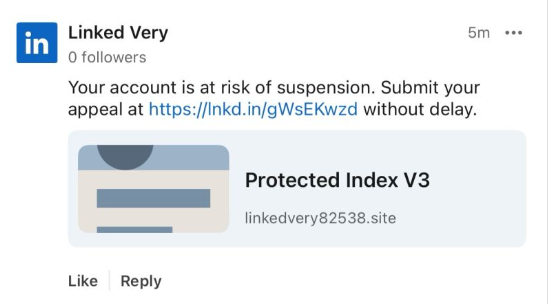
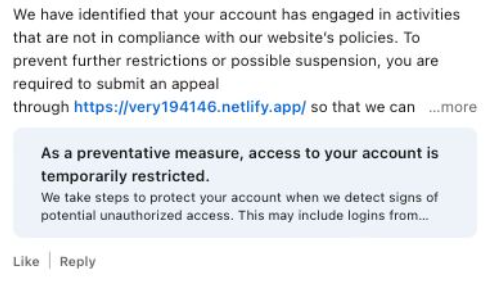
Recently, fake LinkedIn profiles have started posting comment replies claiming that a user has “engaged in activities that are not in compliance” with LinkedIn’s policies and that their account has been “temporarily restricted” until they submit an appeal through a specified link in the comment.
The comments come in different shapes and sizes, but here’s one example we found.
The accounts posting the comments all try to look like official LinkedIn bots and use various names. It’s likely they create new accounts when LinkedIn removes them. Either way, multiple accounts similar to the “Linked Very” one above were reported in a short period, suggesting automated creation and posting at scale.
The same pattern is true for the links. The shortened link used in the example above has already been disabled, while others point directly to phishing sites. Scammers often use shortened LinkedIn links to build trust, making targets believe the messages are legitimate. Because LinkedIn can quickly disable these links, attackers likely test different approaches to see which last the longest.
Here’s another example:
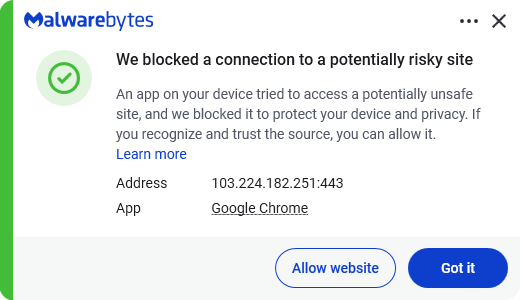
Malwarebytes blocks this last link based on the IP address:
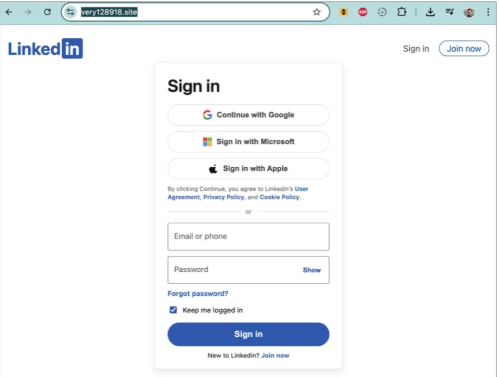
If users follow these links, they are taken to a phishing page designed to steal their LinkedIn login details:
Image courtesy of BleepingComputer
A LinkedIn spokesperson confirmed to BleepingComputer they are aware of the situation:
“I can confirm that we are aware of this activity and our teams are working to take action.”
Stay safe
In situations like this awareness is key—and now you know what to watch for. Some additional tips:
Don’t click on unsolicited links in private messages and comments without verifying with the trusted sender that they’re legitimate.
Always log in directly on the platform that you are trying to access, rather than through a link.
Use a password manager, which won’t auto-fill in credentials on fake websites.
Use a real-time, up-to-date anti-malware solution with a web protection module to block malicious sites.
Cybersecurity risks should never spread beyond a headline. If something looks dodgy to you, check if it’s a scam using Malwarebytes Scam Guard, a feature of our mobile protection products. Submit a screenshot, paste suspicious content, or share a text or phone number, and we’ll tell you if it’s a scam or legit. Download Malwarebytes Mobile Security for iOS or Android and try it today!
California’s privacy regulator has fined a Texas data broker $45,000 and banned it from selling Californians’ personal information after it sold Alzheimer patients’ data. Texan company Rickenbacher Data LLC, which does business as Datamasters, bought and resold the names, addresses, phone numbers, and email addresses of people that suffered from serious health conditions, according to the California Privacy Protection Agency (CPPA).
The CPPA’s final order against Datamasters says that the company maintained a database containing 435,245 postal addresses for Alzheimer’s patients. But it didn’t stop there. Also up for grabs were records for 2,317,141 blind or visually impaired people, and 133,142 addiction sufferers. It also sold records for 857,449 people with bladder control issues.
Health-related data wasn’t the only category Datamasters trafficked in. The company also sold information tied to ethnicity, including so-called “Hispanic lists” containing more than 20 million names, as well as age-based “senior lists” and indicators of financial vulnerability. For example, it sold records of people holding high-interest mortgages.
And if buyers wanted data on other likely customer characteristics and actions, such as who was likely a liberal vs a right-winger, it could give you that, too, thanks to 3,370 “Consumer Predictor Models” spanning automotive preferences, financial activity, media use, political affiliation, and nonprofit activity.
Datamasters offers outright purchase of records from its national consumer database, which it claims covers 114 million households and 231 million individuals. Customers can also buy subscription-based updates too.
California regulators began investigating Datamasters after discovering the company had failed to register as a data broker in the state, as required under California’s Delete Act. The law has required data brokers to register since January 31, 2025.
The company originally denied that it did business in California or had data on Californians. However, that claim collapsed when regulators found an Excel spreadsheet on the website listing 204,218 California student records.
Datamasters first said it had not screened its national database to remove Californians’ data. After getting a lawyer, it changed its story, asserting that it did in fact filter Californians out of the data set. That didn’t convince the CPPA though.
The regulator acknowledged that Datamasters did try to comply with Californian privacy laws, but that it
“lacked sufficient written policies and procedures to ensure compliance with the Delete Act.”
The fine imposed on Datamasters also takes into account that it hadn’t registered on the state’s data broker registry. Data brokers that don’t register are liable for $200 per day in fines, and failing to delete consumer data will incur $200 per consumer per day in fines.
Starting January 1, 2028, data brokers registered in California will also be required to undergo independent third-party compliance audits every three years.
Why selling extra-sensitive customer data is so dangerous
“History teaches us that certain types of lists can be dangerous,”
Michael Macko, the CPPA’s head of enforcement, pointed out.
Research has told us that Alzheimer’s patients are especially vulnerable to financial exploitation. If you think that scammers don’t seek out such lists, think again; criminals were found to have accessed data from at least three data brokers in the past. While there’s no suggestion that Datamasters knowingly sold data to scammers, it seems easy for people to buy data broker lists.
It also doesn’t take a PhD to see why many of these records (which, remember, the company holds about people nationwide) could be especially sensitive in the current US political climate.
There’s a broader privacy issue here, too. While many Americans might assume that the federal Health Insurance Portability and Accountability Act (HIPAA) protects their health data, it only applies to healthcare providers. Amazingly, data brokers sit outside its purview.
So what can you do to protect yourself?
Your first port of call should be your state’s data protection law. California introduced the Data Request and Opt-out Platform (DROP) system this year under the Delete Act. It’s an opt-out system for California residents to make all data brokers on the registry delete data held about them.
If you don’t live in a state that takes sensitive data seriously, your options are more limited. You could move—maybe to Europe, where privacy protections are considerably stronger.
We don’t just report on data privacy—we help you remove your personal information
Cybersecurity risks should never spread beyond a headline. With Malwarebytes Personal Data Remover, you can scan to find out which sites are exposing your personal information, and then delete that sensitive data from the internet.
Grok’s failure to block sexualized images of minors has turned a single “isolated lapse” into a global regulatory stress test for xAI’s ambitions. The response from lawmakers and regulators suggests this will not be solved with a quick apology and a hotfix.
Last week we reported on Grok’s apology after it generated an image of young girls in “sexualized attire.”
The apology followed the introduction of Grok’s paid “Spicy Mode” in August 2025, which was marketed as edgy and less censored. In practice it enabled users to generate sexual deepfake images, including content that may cross into illegal child sexual abuse material (CSAM) under US and other jurisdictions’ laws.
A report from web-monitoring tool CopyLeaks highlighted “thousands” of incidents of Grok being used to create sexually suggestive images of non-consenting celebrities.
This is starting to backfire. Reportedly, three US senators are asking Google and Apple to remove Elon Musk’s Grok and X apps from their app stores, citing the spread of nonconsensual sexualized AI images of women and minors and arguing it violates the companies’ app store rules.
“In recent days, X users have used the app’s Grok AI tool to generate nonconsensual sexual imagery of real, private citizens at scale. This trend has included Grok modifying images to depict women being sexually abused, humiliated, hurt, and even killed. In some cases, Grok has reportedly created sexualized images of children—the most heinous type of content imaginable.”
The UK government also threatens to take possible action against the platform. Government officials have said they would fully support any action taken by Ofcom, the independent media regulator, against X. Even if that meant UK regulators could block the platform.
Indonesia and Malaysia already blocked Grok after its “digital undressing” function flooded the internet with suggestive and obscene manipulated images of women and minors.
As it turns out, a user prompted Grok to generate its own “apology,” which it did. After backlash over sexualized images of women and minors, Grok/X announced limits on image generation and editing for paying subscribers only, effectively paywalling those capabilities on main X surfaces.
For lawmakers already worried about disinformation, election interference, deepfakes, and abuse imagery, Grok is fast becoming the textbook case for why “move fast and break things” doesn’t mix with AI that can sexualize real people on demand.
Hopefully, the next wave of rules, ranging from EU AI enforcement to platform-specific safety obligations, will treat this incident as the baseline risk that all large-scale visual models must withstand, not as an outlier.
Keep your children safe
If you ever wondered why parents post images of their children with a smiley across their face, this is the reason.
Don’t make it easy for strangers to copy, reuse, or manipulate your photos.
This incident is yet another compelling reason to reduce your digital footprint. Think carefully before posting photos of yourself, your children, or other sensitive information on public social media accounts.
And treat everything you see online—images, voices, text—as potentially AI-generated unless they can be independently verified. They’re not only used to sway opinions, but also to solicit money, extract personal information, or create abusive material.
We don’t just report on threats – we help protect your social media
Reportedly, pcTattletale founder Bryan Fleming has pleaded guilty in US federal court to computer hacking, unlawfully selling and advertising spyware, and conspiracy.
This is good news not just because we despise stalkerware like pcTattletale, but because it is only the second US federal stalkerware prosecution in a decade. It could could open the door to further cases against people who develop, sell, or promote similar tools.
In 2021, we reported that “employee and child-monitoring” software vendor pcTattletale had not been very careful about securing the screenshots it secretly captured from victims’ phones. A security researcher testing a trial version discovered that the app uploaded screenshots to an unsecured online database, meaning anyone could view them without authentication, such as a username and password.
In 2024, we revisited the app after researchers found it was once again leaking a database containing victim screenshots. One researcher discovered that pcTattletale’s Application Programming Interface (API) allowed anyone to access the most recent screen capture recorded from any device on which the spyware is installed. Another researcher uncovered a separate vulnerability that granted full access to the app’s backend infrastructure. That access allowed them to deface the website and steal AWS credentials, which turned out to be shared across all devices. As a result, the researcher obtained data about both victims and the customers who were doing the tracking.
This is no longer possible. Not because the developers fixed the problems, but because Amazon locked pcTattletale’s entire AWS infrastructure. Fleming later abandoned the product and deleted the contents of its servers.
However, Homeland Security Investigations had already started investigating pcTattletale in June 2021 and did not stop. A few things made Fleming stand out among other stalkerware operators. While many hide behind overseas shell companies, Fleming appeared to be proud of his work. And while others market their products as parental control or employee monitoring tools, pcTattletale explicitly promoted spying on romantic partners and spouses, using phrases such as “catch a cheater” and “surreptitiously spying on spouses and partners.” This made it clear the software was designed for non-consensual surveillance of adults.
Fleming is expected to be sentenced later this year.
Removing stalkerware
Malwarebytes, as one of the founding members of the Coalition Against Stalkerware, makes it a priority to detect and remove stalkerware-type apps from your device.
It is important to keep in mind, however, that removing stalkerware may alert the person spying on you that the app has been discovered. The Coalition Against Stalkerware outlines additional steps and considerations to help you decide the safest next move.
Because the apps often install under different names and hide themselves from users, they can be difficult to find and remove. That is where Malwarebytes can help you.
To scan your device:
Open your Malwarebytes dashboard
Start a Scan
The scan may take a few minutes.
If malware is detected, you can choose one of the following actions:
Uninstall. The threat will be deleted from your device.
Ignore Always. The file detection will be added to the Allow List, and excluded from future scans. Legitimate files are sometimes detected as malware. We recommend reviewing scan results and adding files to Ignore Always that you know are safe and want to keep.
Ignore Once: The detection is ignored for this scan only. It will be detected again during your next scan.
Malwarebytes detects pcTattleTale as PUP.Optional.PCTattletale.
We don’t just report on threats—we remove them
Cybersecurity risks should never spread beyond a headline. Keep threats off your devices by downloading Malwarebytes today.
How comfortable are you with sharing your medical history with an AI?
I’m certainly not.
OpenAI’s announcement about its new ChatGPT Health program prompted discussions about data privacy and how the company plans to keep the information users submit safe.
ChatGPT Health is a dedicated “health space” inside ChatGPT that lets users connect their medical records and wellness apps so the model can answer health and wellness questions in a more personalized way.
OpenAI promises additional, layered protections designed specifically for health, “to keep health conversations protected and compartmentalized.”
First off, it’s important to understand that this is not a diagnostic or treatment system. It’s framed as a support tool to help understand health information and prepare for care.
But this is the part that raised questions and concerns:
“You can securely connect medical records and wellness apps to ground conversations in your own health information, so responses are more relevant and useful to you.”
In other words, ChatGPT Health lets you link medical records and apps such as Apple Health, MyFitnessPal, and others so the system can explain lab results, track trends (e.g., cholesterol), and help you prepare questions for clinicians or compare insurance options based on your health data.
Given our reservations about the state of AI security in general and chatbots in particular, this is a line that I don’t dare cross. For now, however, I don’t even have the option, since only users with ChatGPT Free, Go, Plus, and Pro plans outside of the European Economic Area, Switzerland, and the United Kingdom can sign up for the waitlist.
OpenAI only uses partners and apps in ChatGPT Health that meet OpenAI’s privacy and security requirements, which, by design, shifts a great deal of trust onto ChatGPT Health itself.
Users should realize that health information is very sensitive and as Sara Geoghegan, senior counsel at the Electronic Privacy Information Center told The Record: by sharing their electronic medical records with ChatGPT Health, users in the US could effectively remove the HIPAA protection from those records, which is a serious consideration for anyone sharing medical data.
She added:
“ChatGPT is only bound by its own disclosures and promises, so without any meaningful limitation on that, like regulation or a law, ChatGPT can change the terms of its service at any time.”
Should you decide to try this new feature out, we would advise you to proceed with caution and take the advice to enable 2FA for ChatGPT to heart. OpenAI claims 230 million users already ask ChatGPT health and wellness questions each week. I’d encourage them to do the same.
We don’t just report on data privacy—we help you remove your personal information
Cybersecurity risks should never spread beyond a headline. With Malwarebytes Personal Data Remover, you can scan to find out which sites are exposing your personal information, and then delete that sensitive data from the internet.
Disney will pay a $10m settlement over allegations that it violated kids’ privacy rights, the Federal Trade Commission (FTC) said this week.
The agreement, first proposed in September 2025, resolves a dispute over Disney’s labeling of child-targeted content on YouTube. The thousands of YouTube videos it targets at kids makes it subject to a US law called the Children’s Online Privacy Protection Act (COPPA). Enacted in 1998, COPPA is designed to protect children under the age of 13 from having their data collected and used online.
That protection matters because children are far less able to understand data collection, advertising, or profiling, and cannot understandingfully consent to it. When COPPA safeguards fail, children may be tracked across videos, served targeted ads, or profiled based on viewing habits, all without parental knowledge or approval.
In 2019, YouTube introduced a policy to help creators comply with COPPA by labeling their content as made for kids (MFK) or not made for kids (NMFK). Content labeled MFK is automatically restricted. For example, it can’t autoplay into related content, appear in the miniplayer, or be added to playlists.
This policy came about after the YouTube’s own painful COPPA-related experience in 2019, when it settled for $170m with the FTC after failing to properly label content directed at children. That still ranks as the biggest ever COPPA settlement by far.
Perhaps the two most important restrictions for videos labeled MFK are these: MFK videos should only autoplay into other kid-appropriate content, preventing (at least in theory) kids from seeing inappropriate content. And advertisers are prohibited from collecting personal data from children watching those videos.
A chastened YouTube warned content creators, including Disney, that they could violate COPPA if they failed to label content correctly. They could do this in two ways: Creators could label entire channels (Disney has about 1,250 of these for its different content brands) or individual videos. So, a channel marked NMFK could still host MFK videos, but those individual videos needed to be labeled correctly.
According to the FTC, Disney’s efforts fell short and plenty of child-targeted videos were incorrectly labeled.
The court complaint stated that Disney applied blanket NMFK labels to entire YouTube channels instead of reviewing videos individually. As a result, some child-targeted videos were incorrectly labeled, allowing data collection and ad targeting that COPPA is meant to prevent. For example, the Pixar channel was labeled NMFK, but showed “very similar” videos from the Pixar Cars channel, which was labeled MFK.
The FTC said YouTube warned Disney in June 2020 that it had reclassified more than 300 of its videos as child-directed across channels including Pixar, Disney Movies, and Walt Disney Animation Studios.
This is not Disney’s first privacy rodeo
Disney has a history of tussles with child privacy laws. In 2011, its Playdom subsidiary paid $3 million (at that point the largest COPPA penalty ever) for collecting data from more than 1.2 million children across 20 virtual world websites. In 2021, Disney also settled a lawsuit that accused it and others of collecting and selling kids’ information via child-focused mobile apps.
In the current case, the FTC voted 3-0 to refer this current case to the Department of Justice, with Commissioners Ferguson, Holyoak, and Meador citing what they described as,
“Disney’s abuse of parents’ trust.”
Under the settlement, Disney must do more than pay up. It also has to notify parents before collecting personal information from children under 13 and obtain parents’ consent to use it. Disney must also review whether individual videos should be labeled as made for kids. However, the FTC provides a get-out clause: Disney won’t have to do this if YouTube implements age assurance technologies that determine a viewer’s age (or age category).
Age assurance is clearly something the FTC is pursuing, saying:
“This forward-looking provision reflects and anticipates the growing use of age assurance technologies to protect kids online.”
We don’t just report on privacy—we offer you the option to use it.
Privacy risks should never spread beyond a headline. Keep your online privacy yours by using Malwarebytes Privacy VPN.
If 2024 was the year lawmakers talked about online age verification, 2025 was the year they actually flipped the switch.
In 2025, across parts of Europe and the US, age checks for certain websites (especially pornography) turned long‑running child‑protection debates into real‑world access controls. Overnight, users found entire categories of sites locked behind ID checks, platforms geo‑blocking whole countries, and VPN traffic surging as people tried to get around the new walls.
From France’s hardline stance on adult sites to the UK’s Online Safety Act, to a patchwork of new rules across multiple US states, these “show me your ID before you browse” systems are reshaping the web. The stated goal is to “protect the children,” but in practice the outcome is frequently a blunt national block, followed by users voting with their VPN buttons.
The core tension: safety vs privacy
The fundamental challenge for websites and services is not checking age in principle, but how to do it without turning everyday browsing into an identity check. Almost every viable method asks users to hand over sensitive data, raising the stakes if (or more likely when) that data leaks in a breach.
For ordinary users, the result is a confusing mess of blocks, prompts, and workarounds. On paper, countries want better protection for minors. In practice, adults discover that entire platforms are unavailable unless they are prepared to disclose personal information or disguise where they connect from. No website wants to be the one blamed after an age‑verification database is compromised, yet regulators continue to push for stronger identity links.
How age checks actually work
Regulators such as Ofcom publish lists of acceptable age‑verification methods, each with its own privacy and usability trade‑offs. None are perfect, and many shift risk from governments and platforms onto users’ most sensitive personal data.
Facial age estimation: Users upload a selfie or short video so an algorithm can guess whether they look over 18, which avoids storing documents but relies on sensitive biometrics and imperfect accuracy.
Open banking: An age‑check service queries your bank for a simple “adult or not” answer. It may be convenient on paper but it’s a hard sell when the relying site is an adult platform.
Digital identity services: Digital ID wallets can assert “over 18” without exposing full credentials, but they add yet another app and infrastructure layer that must be trusted and widely adopted.
Credit card checks: Using a valid payment card as a proxy for adulthood is simple and familiar, but it excludes adults without cards and does not cover lower age thresholds like “over 13.”
Email‑based estimation: Systems infer age from where an email address has been used (such as banks or utilities), effectively encouraging cross‑service profiling and “digital snooping.”
Mobile network checks: Providers indicate whether an account has age‑related restrictions. This can be fast, but is unreliable for pay‑as‑you‑go accounts, burner SIMs, or poorly maintained records.
Photo‑ID matching: Users upload an ID document plus a selfie so systems can match faces and ages. This is effective, but concentrates highly sensitive identity data in yet another attractive target for attackers.
My personal preference would be double‑blind verification: a third‑party provider verifies your age, then issues a simple token like “18+” to sites without revealing your identity or learning which site you visit, offering stronger privacy than most current approaches.
In almost every case, users must surrender personal information or documents to prove their age, increasing the risk that identity data ends up in the wrong hands. This turns age gates into long‑lived security liabilities rather than temporary access checks.
Geoblocking, VPNs, and cross‑border frictions
Right now, most platforms comply by detecting user location via IP address and then either demanding age checks or denying access entirely to users in specific regions. France’s enforcement actions, for example, led several major adult sites to geo-block the entire country in 2025, while the UK’s Online Safety Act coincided with a sharp rise in VPN use rather than widespread cross-border blocking.
European regulators generally focus on domestic ISPs, Digital Services Act reporting, and large platform fines rather than on filtering traffic from other countries, partly because broad traffic blocking raises net‑neutrality and technical complexity concerns. In the US, some state proposals have explicitly targeted VPN circumventions, signalling a willingness to attack the workarounds rather than the underlying incentives.
Meanwhile, network‑level filtering vendors advertise “cross‑border” controls and VPN detection for governments, hinting at future scenarios where unregulated inbound flows or anonymity tools are aggressively throttled. If enforcement pressure grows, these capabilities could evolve from niche offerings into standard state infrastructure.
A future of less anonymity?
A common argument is that eroding online anonymity will also curb toxic behavior and abuse on social media, since people act differently when their real‑world identity is at stake. But tying everyday browsing to identity checks risks chilling legitimate speech and exploration long before it delivers any proven civility benefits.
A world where every connection requires ID is unlikely to arrive overnight. Still, the direction of travel is clear: more countries are normalizing age gates that double as identity checks, and more users are learning to route around them. Unless privacy‑preserving systems like robust double‑blind verification become the norm, age‑verification policies intended to protect children may end up undermining both privacy and open access to information.
We don’t just report on privacy—we offer you the option to use it.
Privacy risks should never spread beyond a headline. Keep your online privacy yours by using Malwarebytes Privacy VPN.

 Login
Login