Google has settled yet another class-action lawsuit accusing it of collecting children’s data and using it to target them with advertising. The tech giant will pay $8.25 million to address allegations that it tracked data on apps specifically designated for kids.
AdMob’s mobile data collection
This settlement stems from accusations that apps provided under Google’s “Designed for Families” programme, which was meant to help parents find safe apps, tracked children. Under the terms of this programme, developers were supposed to self-certify COPPA compliance and use advertising SDKs that disabled behavioural tracking. However, some did not, instead using software embedded in the apps that was created by a Google-owned mobile advertising company called AdMob.
When kids used these apps, which included games, AdMob collected data from these apps, according to the class action lawsuit. This included IP addresses, device identifiers, usage data, and the child’s location to within five meters, transmitting it to Google without parental consent. The AdMob software could then use that information to display targeted ads to users.
This kind of activity is exactly what the Children’s Online Privacy Protection Act (COPPA) was created to stop. The law requires operators of child-directed services to obtain verifiable parental consent before collecting personal information from children under 13. That includes cookies and other identifiers, which are the core tools advertisers use to track and target people.
The families filing the lawsuit alleged that Google knew this was going on:
“Google and AdMob knew at the time that their actions were resulting in the exfiltration data from millions of children under thirteen but engaged in this illicit conduct to earn billions of dollars in advertising revenue.”
Security researchers had alerted Google to the issue in 2018, according to the filing.
YouTube settlement approved
What’s most disappointing is that these privacy issues keep happening. This news arrives at the same time that a judge approved a settlement on another child privacy case involving Google’s use of children’s data on YouTube. This case dates back to October 2019, the same year that Google and YouTube paid a whopping $170m fine for violating COPPA.
Families in this class action suit alleged that YouTube used cookies and persistent identifiers on child-directed channels, collecting data including IP addresses, geolocation data, and device serial numbers. This is the same thing that it does for adults across the web, but COPPA protects kids under 13 from such activities, as do some state laws.
According to the complaint, YouTube collected this information between 2013 and 2020 and used it for behavioural advertising. This form of advertising infers people’s interests from their identifiers, and it is more lucrative than contextual advertising, which focuses only on a channel’s content.
The case said that various channel owners opted into behavioural advertising, prompting Google to collect this personal information. No parental consent was obtained, the plaintiffs alleged. Channel owners named in the suit included Cartoon Network, Hasbro, Mattel, and DreamWorks Animation.
Under the YouTube settlement (which was agreed in August and recently approved by a judge), families can file claims through YouTubePrivacySettlement.com, although the deadline is this Wednesday. Eligible families are likely to get $20–$30 after attorneys’ fees and administration costs, if 1–2% of eligible families submit claims.
COPPA is evolving
Last year, the FTC amended its COPPA Rule to introduce mandatory opt-in consent for targeted advertising to children, separate from general data-collection consent.
The amendments expand the definition of personal information to include biometric data and government-issued ID information. It also lets the FTC use a site operator’s marketing materials to determine whether a site targets children.
Site owners must also now tell parents who they’ll share information with, and the amendments stop operators from keeping children’s personal information forever. If these all sounds like measures that should have been included to protect children online from the get-go, we agree with you. In any case, companies have until this April to comply with the new rules.
Will the COPPA rules make a difference? It’s difficult to say, given the stream of privacy cases involving Google LLC (which owns YouTube and AdMob, among others). When viewed against Alphabet’s overall earnings, an $8.25m penalty risks being seen as a routine business expense rather than a meaningful deterrent.
We don’t just report on data privacy—we help you remove your personal information
Cybersecurity risks should never spread beyond a headline. With Malwarebytes Personal Data Remover, you can scan to find out which sites are exposing your personal information, and then delete that sensitive data from the internet.
A group of cybercriminals called DarkSpectre is believed to be behind three campaigns spread by malicious browser extensions: ShadyPanda, GhostPoster, and Zoom Stealer.
We wrote about the ShadyPanda campaign in December 2025, warning users that extensions which had behaved normally for years suddenly went rogue. After a malicious update, these extensions were able to track browsing behavior and run malicious code inside the browser.
Also in December, researchers uncovered a new campaign, GhostPoster, and identified 17 compromised Firefox extensions. The campaign was found to hide JavaScript code inside the image logo of malicious Firefox extensions with more than 50,000 downloads, allowing attackers to to monitor browser activity and plant a backdoor.
The use of malicious code in images is a technique called steganography. Earlier GhostPoster extensions hid JavaScript loader code inside PNG icons such as logo.png for Firefox extensions like “Free VPN Forever,” using a marker (for example, three equals signs) in the raw bytes to separate image data from payload.
Newer variants moved to embedding payloads in arbitrary images inside the extension bundle, then decoding and decrypting them at runtime. This makes the malicious code much harder for researchers to detect.
Based on that research, other researchers found an additional 17 extensions associated with the same group, beyond the original Firefox set. These were downloaded more than 840,000 times in total, with some remaining active in the wild for up to five years.
GhostPoster first targeted Microsoft Edge users and later expanded to Chrome and Firefox as the attackers built out their infrastructure. The attackers published the extensions in each browser’s web store as seemingly useful tools with names like “Google Translate in Right Click,” “Ads Block Ultimate,” “Translate Selected Text with Google,” “Instagram Downloader,” and “Youtube Download.”
The extensions can see visited sites, search queries, and shopping behavior, allowing attackers to create detailed profiles of users’ habits and interests.
Combined with other malicious code, this visibility could be extended to credential theft, session hijacking, or attacks targeting online banking workflows, even if those are not the primary goal today.
How to stay safe
Although we always advise people to install extensions only from official web stores, this case proves once again that not all extensions available there are safe. That said, the risk involved in installing an extension from outside the web store is even greater.
Extensions listed in the web store undergo a review process before being approved. This process, which combines automated and manual checks, assesses the extension’s safety, policy compliance, and overall user experience. The goal is to protect users from scams, malware, and other malicious activity.
Mozilla and Microsoft have removed the identified add-ons from their stores, and Google has confirmed their removal from the Chrome Web Store. However, already installed extensions remain active in Chrome and Edge until users manually uninstall them. When Mozilla blocks an add-on it is also disabled, which prevents it from interacting with Firefox and accessing your browser and your data.
If you’re worried that you may have installed one of these extensions, Windows users can run a Malwarebytes Deep Scan with their browsers closed.
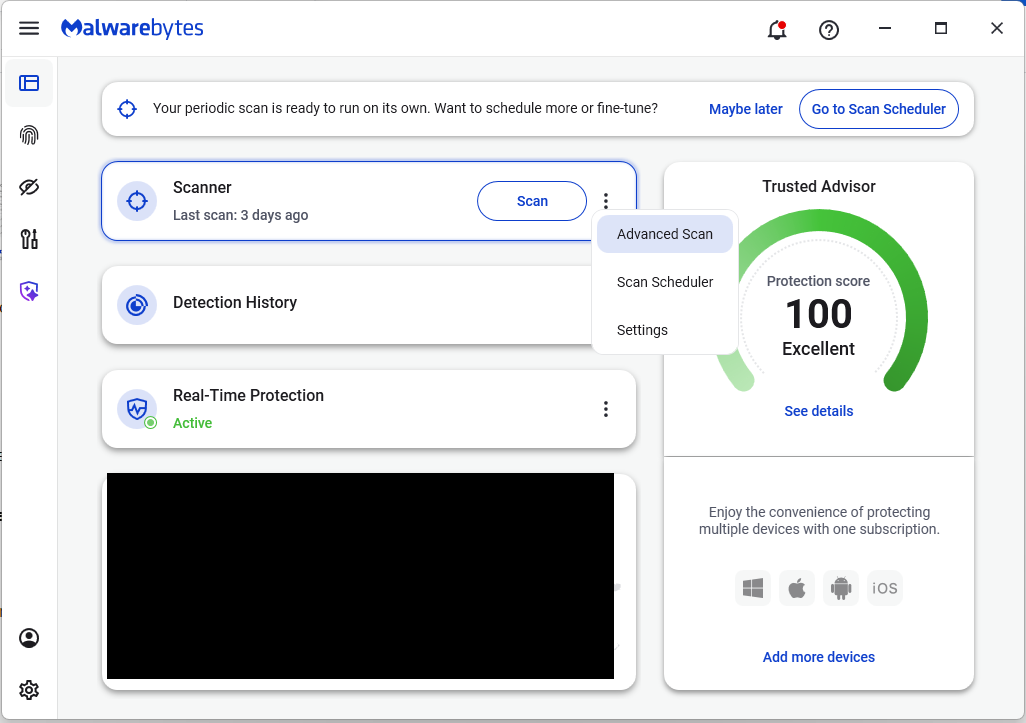
On the Malwarebytes Dashboard click on the three stacked dots to select the Advanced Scan option.
On the Advanced Scan tab, select Deep Scan. Note that this scan uses more system resources than usual.
After the scan, remove any found items, and then reopen your browser(s).
Manual check:
These are the names of the 17 additional extensions that were discovered:
AdBlocker
Ads Block Ultimate
Amazon Price History
Color Enhancer
Convert Everything
Cool Cursor
Floating Player – PiP Mode
Full Page Screenshot
Google Translate in Right Click
Instagram Downloader
One Key Translate
Page Screenshot Clipper
RSS Feed
Save Image to Pinterest on Right Click
Translate Selected Text with Google
Translate Selected Text with Right Click
Youtube Download
Note: There may be extensions with the same names that are not malicious.
We don’t just report on threats—we help safeguard your entire digital identity
Cybersecurity risks should never spread beyond a headline. Protect your, and your family’s, personal information by using identity protection.
Researchers found a method to steal data which bypasses Microsoft Copilot’s built-in safety mechanisms.
The attack flow, called Reprompt, abuses how Microsoft Copilot handled URL parameters in order to hijack a user’s existing Copilot Personal session.
Copilot is an AI assistant which connects to a personal account and is integrated into Windows, the Edge browser, and various consumer applications.
The issue was fixed in Microsoft’s January Patch Tuesday update, and there is no evidence of in‑the‑wild exploitation so far. Still, it once again shows how risky it can be to trust AI assistants at this point in time.
Reprompt hides a malicious prompt in the q parameter of an otherwise legitimate Copilot URL. When the page loads, Copilot auto‑executes that prompt, allowing an attacker to run actions in the victim’s authenticated session after just a single click on a phishing link.
In other words, attackers can hide secret instructions inside the web address of a Copilot link, in a place most users never look. Copilot then runs those hidden instructions as if the users had typed them themselves.
Because Copilot accepts prompts via a q URL parameter and executes them automatically, a phishing email can lure a user into clicking a legitimate-looking Copilot link while silently injecting attacker-controlled instructions into a live Copilot session.
What makes Reprompt stand out from other, similar prompt injection attacks is that it requires no user-entered prompts, no installed plugins, and no enabled connectors.
The basis of the Reprompt attack is amazingly simple. Although Copilot enforces safeguards to prevent direct data leaks, these protections only apply to the initial request. The attackers were able to bypass these guardrails by simply instructing Copilot to repeat each action twice.
Working from there, the researchers noted:
“Once the first prompt is executed, the attacker’s server issues follow‑up instructions based on prior responses and forms an ongoing chain of requests. This approach hides the real intent from both the user and client-side monitoring tools, making detection extremely difficult.”
How to stay safe
You can stay safe from the Reprompt attack specifically by installing the January 2026 Patch Tuesday updates.
If available, use Microsoft 365 Copilot for work data, as it benefits from Purview auditing, tenant‑level data loss prevention (DLP), and admin restrictions that were not available to Copilot Personal in the research case. DLP rules look for sensitive data such as credit card numbers, ID numbers, health data, and can block, warn, or log when someone tries to send or store it in risky ways (email, OneDrive, Teams, Power Platform connectors, and more).
Don’t click on unsolicited links before verifying with the (trusted) source whether they are safe.
Reportedly, Microsoft is testing a new policy that allows IT administrators to uninstall the AI-powered Copilot digital assistant on managed devices.
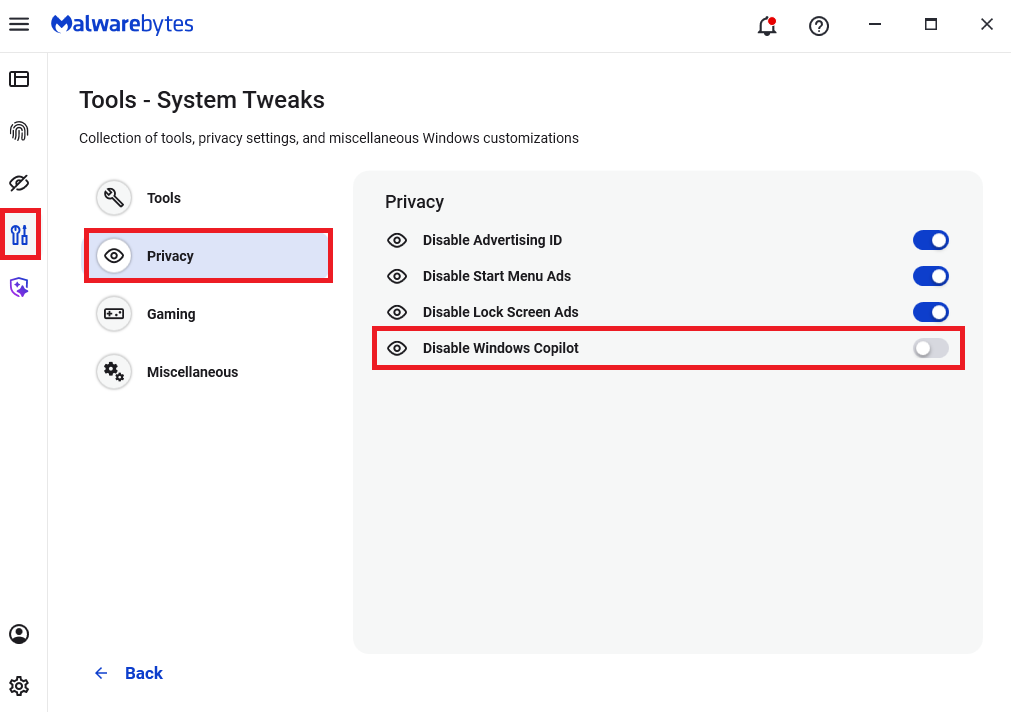
Malwarebytes users can disable Copilot for their personal machines under Tools > Privacy, where you can toggle Disable Windows Copilot to on (blue).
In general, be aware that using AI assistants still pose privacy risks. As long as there are ways for assistants to automatically ingest untrusted input—such as URL parameters, page text, metadata, and comments—and merge it into hidden system prompts or instructions without strong separation or filtering, users remain at risk of leaking private information.
So when using any AI assistant that can be driven via links, browser automation, or external content, it is reasonable to assume “Reprompt‑style” issues are at least possible and should be taken into consideration.
We don’t just report on threats—we remove them
Cybersecurity risks should never spread beyond a headline. Keep threats off your devices by downloading Malwarebytes today.
In 2025, cybersecurity researchers discovered several open databases belonging to various AI image-generation tools. This fact alone makes you wonder just how much AI startups care about the privacy and security of their users’ data. But the nature of the content in these databases is far more alarming.
A large number of generated pictures in these databases were images of women in lingerie or fully nude. Some were clearly created from children’s photos, or intended to make adult women appear younger (and undressed). Finally, the most disturbing part: some pornographic images were generated from completely innocent photos of real people — likely taken from social media.
In this post, we’re talking about what sextortion is, and why AI tools mean anyone can become a victim. We detail the contents of these open databases, and give you advice on how to avoid becoming a victim of AI-era sextortion.
What is sextortion?
Online sexual extortion has become so common it’s earned its own global name: sextortion (a portmanteau of sex and extortion). We’ve already detailed its various types in our post, Fifty shades of sextortion. To recap, this form of blackmail involves threatening to publish intimate images or videos to coerce the victim into taking certain actions, or to extort money from them.
Previously, victims of sextortion were typically adult industry workers, or individuals who’d shared intimate content with an untrustworthy person.
However, the rapid advancement of artificial intelligence, particularly text-to-image technology, has fundamentally changed the game. Now, literally anyone who’s posted their most innocent photos publicly can become a victim of sextortion. This is because generative AI makes it possible to quickly, easily, and convincingly undress people in any digital image, or add a generated nude body to someone’s head in a matter of seconds.
Of course, this kind of fakery was possible before AI, but it required long hours of meticulous Photoshop work. Now, all you need is to describe the desired result in words.
To make matters worse, many generative AI services don’t bother much with protecting the content they’ve been used to create. As mentioned earlier, last year saw researchers discover at least three publicly accessible databases belonging to these services. This means the generated nudes within them were available not just to the user who’d created them, but to anyone on the internet.
How the AI image database leak was discovered
In October 2025, cybersecurity researcher Jeremiah Fowler uncovered an open database containing over a million AI-generated images and videos. According to the researcher, the overwhelming majority of this content was pornographic in nature. The database wasn’t encrypted or password-protected — meaning any internet user could access it.
The database’s name and watermarks on some images led Fowler to believe its source was the U.S.-based company SocialBook, which offers services for influencers and digital marketing services. The company’s website also provides access to tools for generating images and content using AI.
However, further analysis revealed that SocialBook itself wasn’t directly generating this content. Links within the service’s interface led to third-party products — the AI services MagicEdit and DreamPal — which were the tools used to create the images. These tools allowed users to generate pictures from text descriptions, edit uploaded photos, and perform various visual manipulations, including creating explicit content and face-swapping.
The leak was linked to these specific tools, and the database contained the product of their work, including AI-generated and AI-edited images. A portion of the images led the researcher to suspect they’d been uploaded to the AI as references for creating provocative imagery.
Fowler states that roughly 10,000 photos were being added to the database every single day. SocialBook denies any connection to the database. After the researcher informed the company of the leak, several pages on the SocialBook website that had previously mentioned MagicEdit and DreamPal became inaccessible and began returning errors.
Which services were the source of the leak?
Both services — MagicEdit and DreamPal — were initially marketed as tools for interactive, user-driven visual experimentation with images and art characters. Unfortunately, a significant portion of these capabilities were directly linked to creating sexualized content.
For example, MagicEdit offered a tool for AI-powered virtual clothing changes, as well as a set of styles that made images of women more revealing after processing — such as replacing everyday clothes with swimwear or lingerie. Its promotional materials promised to turn an ordinary look into a sexy one in seconds.
DreamPal, for its part, was initially positioned as an AI-powered role-playing chat, and was even more explicit about its adult-oriented positioning. The site offered to create an ideal AI girlfriend, with certain pages directly referencing erotic content. The FAQ also noted that filters for explicit content in chats were disabled so as not to limit users’ most intimate fantasies.
Both services have suspended operations. At the time of writing, the DreamPal website returned an error, while MagicEdit seemed available again. Their apps were removed from both the App Store and Google Play.
Jeremiah Fowler says earlier in 2025, he discovered two more open databases containing AI-generated images. One belonged to the South Korean site GenNomis, and contained 95,000 entries — a substantial portion of which being images of “undressed” people. Among other things, the database included images with child versions of celebrities: American singers Ariana Grande and Beyoncé, and reality TV star Kim Kardashian.
How to avoid becoming a victim
In light of incidents like these, it’s clear that the risks associated with sextortion are no longer confined to private messaging or the exchange of intimate content. In the era of generative AI, even ordinary photos, when posted publicly, can be used to create compromising content.
This problem is especially relevant for women, but men shouldn’t get too comfortable either: the popular blackmail scheme of “I hacked your computer and used the webcam to make videos of you browsing adult sites” could reach a whole new level of persuasion thanks to AI tools for generating photos and videos.
Therefore, protecting your privacy on social media and controlling what data about you is publicly available become key measures for safeguarding both your reputation and peace of mind. To prevent your photos from being used to create questionable AI-generated content, we recommend making all your social media profiles as private as possible — after all, they could be the source of images for AI-generated nudes.
Additionally, we have a dedicated service, Privacy Checker — perfect for anyone who wants a quick but systematic approach to privacy settings everywhere possible. It compiles step-by-step guides for securing accounts on social media and online services across all major platforms.
And to ensure the safety and privacy of your child’s data, Kaspersky Safe Kids can help: it allows parents to monitor which social media their child spends time on. From there, you can help them adjust privacy settings on their accounts so their posted photos aren’t used to create inappropriate content. Explore our guide to children’s online safety together, and if your child dreams of becoming a popular blogger, discuss our step-by-step cybersecurity guide for wannabe bloggers with them.
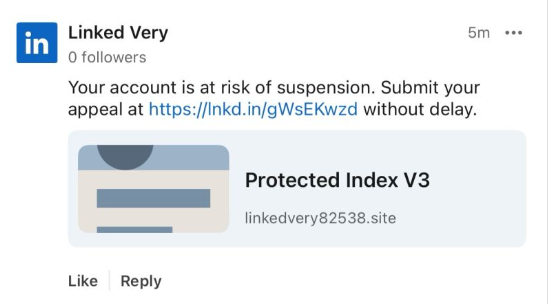
Recently, fake LinkedIn profiles have started posting comment replies claiming that a user has “engaged in activities that are not in compliance” with LinkedIn’s policies and that their account has been “temporarily restricted” until they submit an appeal through a specified link in the comment.
The comments come in different shapes and sizes, but here’s one example we found.
The accounts posting the comments all try to look like official LinkedIn bots and use various names. It’s likely they create new accounts when LinkedIn removes them. Either way, multiple accounts similar to the “Linked Very” one above were reported in a short period, suggesting automated creation and posting at scale.
The same pattern is true for the links. The shortened link used in the example above has already been disabled, while others point directly to phishing sites. Scammers often use shortened LinkedIn links to build trust, making targets believe the messages are legitimate. Because LinkedIn can quickly disable these links, attackers likely test different approaches to see which last the longest.
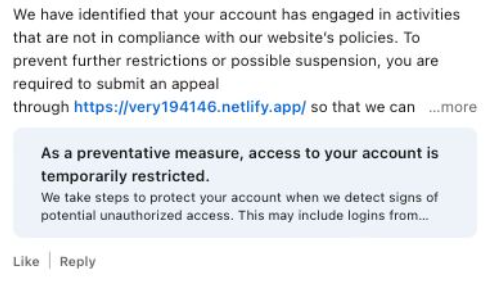
Here’s another example:
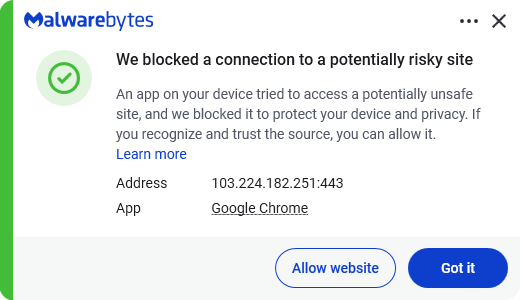
Malwarebytes blocks this last link based on the IP address:
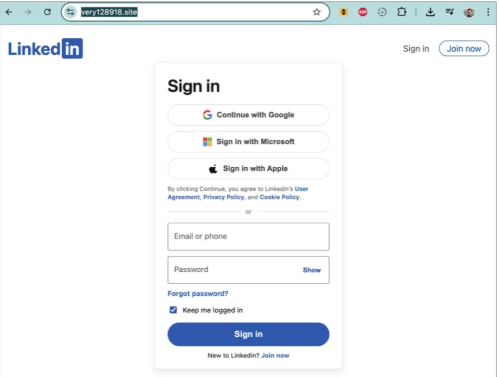
If users follow these links, they are taken to a phishing page designed to steal their LinkedIn login details:
Image courtesy of BleepingComputer
A LinkedIn spokesperson confirmed to BleepingComputer they are aware of the situation:
“I can confirm that we are aware of this activity and our teams are working to take action.”
Stay safe
In situations like this awareness is key—and now you know what to watch for. Some additional tips:
Don’t click on unsolicited links in private messages and comments without verifying with the trusted sender that they’re legitimate.
Always log in directly on the platform that you are trying to access, rather than through a link.
Use a password manager, which won’t auto-fill in credentials on fake websites.
Use a real-time, up-to-date anti-malware solution with a web protection module to block malicious sites.
Cybersecurity risks should never spread beyond a headline. If something looks dodgy to you, check if it’s a scam using Malwarebytes Scam Guard, a feature of our mobile protection products. Submit a screenshot, paste suspicious content, or share a text or phone number, and we’ll tell you if it’s a scam or legit. Download Malwarebytes Mobile Security for iOS or Android and try it today!
California’s privacy regulator has fined a Texas data broker $45,000 and banned it from selling Californians’ personal information after it sold Alzheimer patients’ data. Texan company Rickenbacher Data LLC, which does business as Datamasters, bought and resold the names, addresses, phone numbers, and email addresses of people that suffered from serious health conditions, according to the California Privacy Protection Agency (CPPA).
The CPPA’s final order against Datamasters says that the company maintained a database containing 435,245 postal addresses for Alzheimer’s patients. But it didn’t stop there. Also up for grabs were records for 2,317,141 blind or visually impaired people, and 133,142 addiction sufferers. It also sold records for 857,449 people with bladder control issues.
Health-related data wasn’t the only category Datamasters trafficked in. The company also sold information tied to ethnicity, including so-called “Hispanic lists” containing more than 20 million names, as well as age-based “senior lists” and indicators of financial vulnerability. For example, it sold records of people holding high-interest mortgages.
And if buyers wanted data on other likely customer characteristics and actions, such as who was likely a liberal vs a right-winger, it could give you that, too, thanks to 3,370 “Consumer Predictor Models” spanning automotive preferences, financial activity, media use, political affiliation, and nonprofit activity.
Datamasters offers outright purchase of records from its national consumer database, which it claims covers 114 million households and 231 million individuals. Customers can also buy subscription-based updates too.
California regulators began investigating Datamasters after discovering the company had failed to register as a data broker in the state, as required under California’s Delete Act. The law has required data brokers to register since January 31, 2025.
The company originally denied that it did business in California or had data on Californians. However, that claim collapsed when regulators found an Excel spreadsheet on the website listing 204,218 California student records.
Datamasters first said it had not screened its national database to remove Californians’ data. After getting a lawyer, it changed its story, asserting that it did in fact filter Californians out of the data set. That didn’t convince the CPPA though.
The regulator acknowledged that Datamasters did try to comply with Californian privacy laws, but that it
“lacked sufficient written policies and procedures to ensure compliance with the Delete Act.”
The fine imposed on Datamasters also takes into account that it hadn’t registered on the state’s data broker registry. Data brokers that don’t register are liable for $200 per day in fines, and failing to delete consumer data will incur $200 per consumer per day in fines.
Starting January 1, 2028, data brokers registered in California will also be required to undergo independent third-party compliance audits every three years.
Why selling extra-sensitive customer data is so dangerous
“History teaches us that certain types of lists can be dangerous,”
Michael Macko, the CPPA’s head of enforcement, pointed out.
Research has told us that Alzheimer’s patients are especially vulnerable to financial exploitation. If you think that scammers don’t seek out such lists, think again; criminals were found to have accessed data from at least three data brokers in the past. While there’s no suggestion that Datamasters knowingly sold data to scammers, it seems easy for people to buy data broker lists.
It also doesn’t take a PhD to see why many of these records (which, remember, the company holds about people nationwide) could be especially sensitive in the current US political climate.
There’s a broader privacy issue here, too. While many Americans might assume that the federal Health Insurance Portability and Accountability Act (HIPAA) protects their health data, it only applies to healthcare providers. Amazingly, data brokers sit outside its purview.
So what can you do to protect yourself?
Your first port of call should be your state’s data protection law. California introduced the Data Request and Opt-out Platform (DROP) system this year under the Delete Act. It’s an opt-out system for California residents to make all data brokers on the registry delete data held about them.
If you don’t live in a state that takes sensitive data seriously, your options are more limited. You could move—maybe to Europe, where privacy protections are considerably stronger.
We don’t just report on data privacy—we help you remove your personal information
Cybersecurity risks should never spread beyond a headline. With Malwarebytes Personal Data Remover, you can scan to find out which sites are exposing your personal information, and then delete that sensitive data from the internet.
Grok’s failure to block sexualized images of minors has turned a single “isolated lapse” into a global regulatory stress test for xAI’s ambitions. The response from lawmakers and regulators suggests this will not be solved with a quick apology and a hotfix.
Last week we reported on Grok’s apology after it generated an image of young girls in “sexualized attire.”
The apology followed the introduction of Grok’s paid “Spicy Mode” in August 2025, which was marketed as edgy and less censored. In practice it enabled users to generate sexual deepfake images, including content that may cross into illegal child sexual abuse material (CSAM) under US and other jurisdictions’ laws.
A report from web-monitoring tool CopyLeaks highlighted “thousands” of incidents of Grok being used to create sexually suggestive images of non-consenting celebrities.
This is starting to backfire. Reportedly, three US senators are asking Google and Apple to remove Elon Musk’s Grok and X apps from their app stores, citing the spread of nonconsensual sexualized AI images of women and minors and arguing it violates the companies’ app store rules.
“In recent days, X users have used the app’s Grok AI tool to generate nonconsensual sexual imagery of real, private citizens at scale. This trend has included Grok modifying images to depict women being sexually abused, humiliated, hurt, and even killed. In some cases, Grok has reportedly created sexualized images of children—the most heinous type of content imaginable.”
The UK government also threatens to take possible action against the platform. Government officials have said they would fully support any action taken by Ofcom, the independent media regulator, against X. Even if that meant UK regulators could block the platform.
Indonesia and Malaysia already blocked Grok after its “digital undressing” function flooded the internet with suggestive and obscene manipulated images of women and minors.
As it turns out, a user prompted Grok to generate its own “apology,” which it did. After backlash over sexualized images of women and minors, Grok/X announced limits on image generation and editing for paying subscribers only, effectively paywalling those capabilities on main X surfaces.
For lawmakers already worried about disinformation, election interference, deepfakes, and abuse imagery, Grok is fast becoming the textbook case for why “move fast and break things” doesn’t mix with AI that can sexualize real people on demand.
Hopefully, the next wave of rules, ranging from EU AI enforcement to platform-specific safety obligations, will treat this incident as the baseline risk that all large-scale visual models must withstand, not as an outlier.
Keep your children safe
If you ever wondered why parents post images of their children with a smiley across their face, this is the reason.
Don’t make it easy for strangers to copy, reuse, or manipulate your photos.
This incident is yet another compelling reason to reduce your digital footprint. Think carefully before posting photos of yourself, your children, or other sensitive information on public social media accounts.
And treat everything you see online—images, voices, text—as potentially AI-generated unless they can be independently verified. They’re not only used to sway opinions, but also to solicit money, extract personal information, or create abusive material.
We don’t just report on threats – we help protect your social media
Reportedly, pcTattletale founder Bryan Fleming has pleaded guilty in US federal court to computer hacking, unlawfully selling and advertising spyware, and conspiracy.
This is good news not just because we despise stalkerware like pcTattletale, but because it is only the second US federal stalkerware prosecution in a decade. It could could open the door to further cases against people who develop, sell, or promote similar tools.
In 2021, we reported that “employee and child-monitoring” software vendor pcTattletale had not been very careful about securing the screenshots it secretly captured from victims’ phones. A security researcher testing a trial version discovered that the app uploaded screenshots to an unsecured online database, meaning anyone could view them without authentication, such as a username and password.
In 2024, we revisited the app after researchers found it was once again leaking a database containing victim screenshots. One researcher discovered that pcTattletale’s Application Programming Interface (API) allowed anyone to access the most recent screen capture recorded from any device on which the spyware is installed. Another researcher uncovered a separate vulnerability that granted full access to the app’s backend infrastructure. That access allowed them to deface the website and steal AWS credentials, which turned out to be shared across all devices. As a result, the researcher obtained data about both victims and the customers who were doing the tracking.
This is no longer possible. Not because the developers fixed the problems, but because Amazon locked pcTattletale’s entire AWS infrastructure. Fleming later abandoned the product and deleted the contents of its servers.
However, Homeland Security Investigations had already started investigating pcTattletale in June 2021 and did not stop. A few things made Fleming stand out among other stalkerware operators. While many hide behind overseas shell companies, Fleming appeared to be proud of his work. And while others market their products as parental control or employee monitoring tools, pcTattletale explicitly promoted spying on romantic partners and spouses, using phrases such as “catch a cheater” and “surreptitiously spying on spouses and partners.” This made it clear the software was designed for non-consensual surveillance of adults.
Fleming is expected to be sentenced later this year.
Removing stalkerware
Malwarebytes, as one of the founding members of the Coalition Against Stalkerware, makes it a priority to detect and remove stalkerware-type apps from your device.
It is important to keep in mind, however, that removing stalkerware may alert the person spying on you that the app has been discovered. The Coalition Against Stalkerware outlines additional steps and considerations to help you decide the safest next move.
Because the apps often install under different names and hide themselves from users, they can be difficult to find and remove. That is where Malwarebytes can help you.
To scan your device:
Open your Malwarebytes dashboard
Start a Scan
The scan may take a few minutes.
If malware is detected, you can choose one of the following actions:
Uninstall. The threat will be deleted from your device.
Ignore Always. The file detection will be added to the Allow List, and excluded from future scans. Legitimate files are sometimes detected as malware. We recommend reviewing scan results and adding files to Ignore Always that you know are safe and want to keep.
Ignore Once: The detection is ignored for this scan only. It will be detected again during your next scan.
Malwarebytes detects pcTattleTale as PUP.Optional.PCTattletale.
We don’t just report on threats—we remove them
Cybersecurity risks should never spread beyond a headline. Keep threats off your devices by downloading Malwarebytes today.
How comfortable are you with sharing your medical history with an AI?
I’m certainly not.
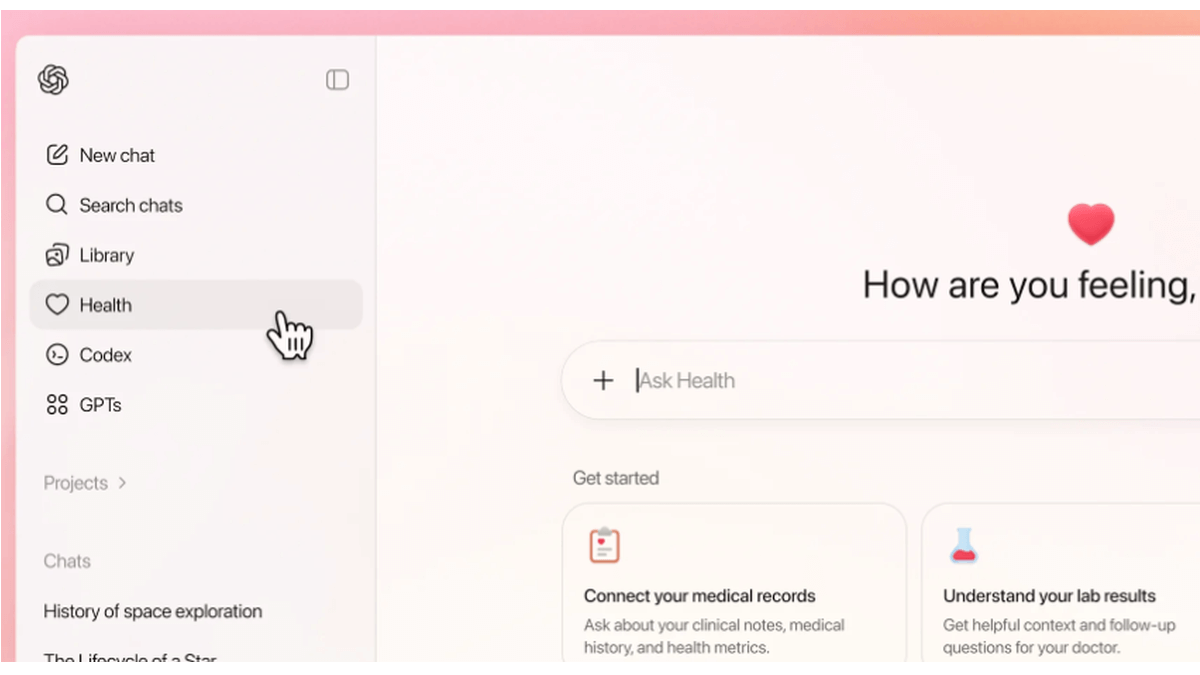
OpenAI’s announcement about its new ChatGPT Health program prompted discussions about data privacy and how the company plans to keep the information users submit safe.
ChatGPT Health is a dedicated “health space” inside ChatGPT that lets users connect their medical records and wellness apps so the model can answer health and wellness questions in a more personalized way.
OpenAI promises additional, layered protections designed specifically for health, “to keep health conversations protected and compartmentalized.”
First off, it’s important to understand that this is not a diagnostic or treatment system. It’s framed as a support tool to help understand health information and prepare for care.
But this is the part that raised questions and concerns:
“You can securely connect medical records and wellness apps to ground conversations in your own health information, so responses are more relevant and useful to you.”
In other words, ChatGPT Health lets you link medical records and apps such as Apple Health, MyFitnessPal, and others so the system can explain lab results, track trends (e.g., cholesterol), and help you prepare questions for clinicians or compare insurance options based on your health data.
Given our reservations about the state of AI security in general and chatbots in particular, this is a line that I don’t dare cross. For now, however, I don’t even have the option, since only users with ChatGPT Free, Go, Plus, and Pro plans outside of the European Economic Area, Switzerland, and the United Kingdom can sign up for the waitlist.
OpenAI only uses partners and apps in ChatGPT Health that meet OpenAI’s privacy and security requirements, which, by design, shifts a great deal of trust onto ChatGPT Health itself.
Users should realize that health information is very sensitive and as Sara Geoghegan, senior counsel at the Electronic Privacy Information Center told The Record: by sharing their electronic medical records with ChatGPT Health, users in the US could effectively remove the HIPAA protection from those records, which is a serious consideration for anyone sharing medical data.
She added:
“ChatGPT is only bound by its own disclosures and promises, so without any meaningful limitation on that, like regulation or a law, ChatGPT can change the terms of its service at any time.”
Should you decide to try this new feature out, we would advise you to proceed with caution and take the advice to enable 2FA for ChatGPT to heart. OpenAI claims 230 million users already ask ChatGPT health and wellness questions each week. I’d encourage them to do the same.
We don’t just report on data privacy—we help you remove your personal information
Cybersecurity risks should never spread beyond a headline. With Malwarebytes Personal Data Remover, you can scan to find out which sites are exposing your personal information, and then delete that sensitive data from the internet.
Disney will pay a $10m settlement over allegations that it violated kids’ privacy rights, the Federal Trade Commission (FTC) said this week.
The agreement, first proposed in September 2025, resolves a dispute over Disney’s labeling of child-targeted content on YouTube. The thousands of YouTube videos it targets at kids makes it subject to a US law called the Children’s Online Privacy Protection Act (COPPA). Enacted in 1998, COPPA is designed to protect children under the age of 13 from having their data collected and used online.
That protection matters because children are far less able to understand data collection, advertising, or profiling, and cannot understandingfully consent to it. When COPPA safeguards fail, children may be tracked across videos, served targeted ads, or profiled based on viewing habits, all without parental knowledge or approval.
In 2019, YouTube introduced a policy to help creators comply with COPPA by labeling their content as made for kids (MFK) or not made for kids (NMFK). Content labeled MFK is automatically restricted. For example, it can’t autoplay into related content, appear in the miniplayer, or be added to playlists.
This policy came about after the YouTube’s own painful COPPA-related experience in 2019, when it settled for $170m with the FTC after failing to properly label content directed at children. That still ranks as the biggest ever COPPA settlement by far.
Perhaps the two most important restrictions for videos labeled MFK are these: MFK videos should only autoplay into other kid-appropriate content, preventing (at least in theory) kids from seeing inappropriate content. And advertisers are prohibited from collecting personal data from children watching those videos.
A chastened YouTube warned content creators, including Disney, that they could violate COPPA if they failed to label content correctly. They could do this in two ways: Creators could label entire channels (Disney has about 1,250 of these for its different content brands) or individual videos. So, a channel marked NMFK could still host MFK videos, but those individual videos needed to be labeled correctly.
According to the FTC, Disney’s efforts fell short and plenty of child-targeted videos were incorrectly labeled.
The court complaint stated that Disney applied blanket NMFK labels to entire YouTube channels instead of reviewing videos individually. As a result, some child-targeted videos were incorrectly labeled, allowing data collection and ad targeting that COPPA is meant to prevent. For example, the Pixar channel was labeled NMFK, but showed “very similar” videos from the Pixar Cars channel, which was labeled MFK.
The FTC said YouTube warned Disney in June 2020 that it had reclassified more than 300 of its videos as child-directed across channels including Pixar, Disney Movies, and Walt Disney Animation Studios.
This is not Disney’s first privacy rodeo
Disney has a history of tussles with child privacy laws. In 2011, its Playdom subsidiary paid $3 million (at that point the largest COPPA penalty ever) for collecting data from more than 1.2 million children across 20 virtual world websites. In 2021, Disney also settled a lawsuit that accused it and others of collecting and selling kids’ information via child-focused mobile apps.
In the current case, the FTC voted 3-0 to refer this current case to the Department of Justice, with Commissioners Ferguson, Holyoak, and Meador citing what they described as,
“Disney’s abuse of parents’ trust.”
Under the settlement, Disney must do more than pay up. It also has to notify parents before collecting personal information from children under 13 and obtain parents’ consent to use it. Disney must also review whether individual videos should be labeled as made for kids. However, the FTC provides a get-out clause: Disney won’t have to do this if YouTube implements age assurance technologies that determine a viewer’s age (or age category).
Age assurance is clearly something the FTC is pursuing, saying:
“This forward-looking provision reflects and anticipates the growing use of age assurance technologies to protect kids online.”
We don’t just report on privacy—we offer you the option to use it.
Privacy risks should never spread beyond a headline. Keep your online privacy yours by using Malwarebytes Privacy VPN.
If 2024 was the year lawmakers talked about online age verification, 2025 was the year they actually flipped the switch.
In 2025, across parts of Europe and the US, age checks for certain websites (especially pornography) turned long‑running child‑protection debates into real‑world access controls. Overnight, users found entire categories of sites locked behind ID checks, platforms geo‑blocking whole countries, and VPN traffic surging as people tried to get around the new walls.
From France’s hardline stance on adult sites to the UK’s Online Safety Act, to a patchwork of new rules across multiple US states, these “show me your ID before you browse” systems are reshaping the web. The stated goal is to “protect the children,” but in practice the outcome is frequently a blunt national block, followed by users voting with their VPN buttons.
The core tension: safety vs privacy
The fundamental challenge for websites and services is not checking age in principle, but how to do it without turning everyday browsing into an identity check. Almost every viable method asks users to hand over sensitive data, raising the stakes if (or more likely when) that data leaks in a breach.
For ordinary users, the result is a confusing mess of blocks, prompts, and workarounds. On paper, countries want better protection for minors. In practice, adults discover that entire platforms are unavailable unless they are prepared to disclose personal information or disguise where they connect from. No website wants to be the one blamed after an age‑verification database is compromised, yet regulators continue to push for stronger identity links.
How age checks actually work
Regulators such as Ofcom publish lists of acceptable age‑verification methods, each with its own privacy and usability trade‑offs. None are perfect, and many shift risk from governments and platforms onto users’ most sensitive personal data.
Facial age estimation: Users upload a selfie or short video so an algorithm can guess whether they look over 18, which avoids storing documents but relies on sensitive biometrics and imperfect accuracy.
Open banking: An age‑check service queries your bank for a simple “adult or not” answer. It may be convenient on paper but it’s a hard sell when the relying site is an adult platform.
Digital identity services: Digital ID wallets can assert “over 18” without exposing full credentials, but they add yet another app and infrastructure layer that must be trusted and widely adopted.
Credit card checks: Using a valid payment card as a proxy for adulthood is simple and familiar, but it excludes adults without cards and does not cover lower age thresholds like “over 13.”
Email‑based estimation: Systems infer age from where an email address has been used (such as banks or utilities), effectively encouraging cross‑service profiling and “digital snooping.”
Mobile network checks: Providers indicate whether an account has age‑related restrictions. This can be fast, but is unreliable for pay‑as‑you‑go accounts, burner SIMs, or poorly maintained records.
Photo‑ID matching: Users upload an ID document plus a selfie so systems can match faces and ages. This is effective, but concentrates highly sensitive identity data in yet another attractive target for attackers.
My personal preference would be double‑blind verification: a third‑party provider verifies your age, then issues a simple token like “18+” to sites without revealing your identity or learning which site you visit, offering stronger privacy than most current approaches.
In almost every case, users must surrender personal information or documents to prove their age, increasing the risk that identity data ends up in the wrong hands. This turns age gates into long‑lived security liabilities rather than temporary access checks.
Geoblocking, VPNs, and cross‑border frictions
Right now, most platforms comply by detecting user location via IP address and then either demanding age checks or denying access entirely to users in specific regions. France’s enforcement actions, for example, led several major adult sites to geo-block the entire country in 2025, while the UK’s Online Safety Act coincided with a sharp rise in VPN use rather than widespread cross-border blocking.
European regulators generally focus on domestic ISPs, Digital Services Act reporting, and large platform fines rather than on filtering traffic from other countries, partly because broad traffic blocking raises net‑neutrality and technical complexity concerns. In the US, some state proposals have explicitly targeted VPN circumventions, signalling a willingness to attack the workarounds rather than the underlying incentives.
Meanwhile, network‑level filtering vendors advertise “cross‑border” controls and VPN detection for governments, hinting at future scenarios where unregulated inbound flows or anonymity tools are aggressively throttled. If enforcement pressure grows, these capabilities could evolve from niche offerings into standard state infrastructure.
A future of less anonymity?
A common argument is that eroding online anonymity will also curb toxic behavior and abuse on social media, since people act differently when their real‑world identity is at stake. But tying everyday browsing to identity checks risks chilling legitimate speech and exploration long before it delivers any proven civility benefits.
A world where every connection requires ID is unlikely to arrive overnight. Still, the direction of travel is clear: more countries are normalizing age gates that double as identity checks, and more users are learning to route around them. Unless privacy‑preserving systems like robust double‑blind verification become the norm, age‑verification policies intended to protect children may end up undermining both privacy and open access to information.
We don’t just report on privacy—we offer you the option to use it.
Privacy risks should never spread beyond a headline. Keep your online privacy yours by using Malwarebytes Privacy VPN.
This blog is part of a series where we highlight new or fast-evolving threats in the consumer security landscape. This one looks at how the rapid rise of Artificial Intelligence (AI) is putting users at risk.
In 2025 we saw an ever-accelerating race between AI providers to push out new features. We also saw manufacturers bolt AI onto products simply because it sounded exciting. In many cases, it really shouldn’t have.
Agentic browsers
Agentic or AI browsers that can act autonomously to execute tasks introduced a new set of vulnerabilities—especially to prompt injection attacks. With great AI power comes great responsibility, and risk. If you’re thinking about using an AI browser, it’s worth slowing down and considering the security and privacy implications first. Even experienced AI providers like OpenAI (the makers of ChatGPT) were unable to keep their agentic browser Atlas secure. By pasting a specially crafted link into the Omnibox, attackers were able to trick Atlas into treating a URL input as a trusted command.
Mimicry
The popularity of AI chatbots created the perfect opportunity for scammers to distribute malicious apps. Even if the AI engine itself worked perfectly, attackers have another way in: fake interfaces. According to BleepingComputer, scammers are already creating spoofed AI sidebars that look identical to real ones from browsers like OpenAI’s Atlas and Perplexity’s Comet. These fake sidebars mimic the real interface, making them almost impossible to spot.
Misconfiguration
And then there’s this special category of using AI in products because it sounds cooler with AI or you can ask for more money from buyers.
Toys
We saw a plush teddy bear promising “warmth, fun, and a little extra curiosity” that was taken off the market after researcher found its built-in AI responding with sexual content and advice about weapons. Conversations escalated from innocent to sexual within minutes. The bear didn’t just respond to explicit prompts, which would have been more or less understandable. Researchers said it introduced graphic sexual concepts on its own, including BDSM-related topics, explained “knots for beginners,” and referenced roleplay scenarios involving children and adults.
Misinterpretation
Sometimes we rely on AI systems too much and forget that they hallucinate. As in the case where a school’s AI system mistook a boy’s empty Doritos bag for a gun and triggered a full-blown police response. Multiple police cars arrived with officers drawing their weapons, all because of a false alarm.
Data breaches
Alongside all this comes a surge in privacy concerns. Some issues stem from the data used to train AI models; others come from mishandled chat logs. Two AI companion apps recently exposed private conversations because users weren’t clearly warned that certain settings would result in their conversations becoming searchable or result in targeted advertising.
So, what should we do?
We’ve said it before and we’ll probably say it again: We keep pushing the limits of what AI can do faster than we can make it safe. As long as we keep chasing the newest features, companies will keep releasing new integrations, whether they’re safe or not.
As consumers, the best thing we can do is stay informed about new developments and the risks that come with them. Ask yourself: Do I really need this? What am I trusting AI with? What’s the potential downside? Sometimes it’s worth doing things the slower, safer way.
We don’t just report on privacy—we offer you the option to use it.
Privacy risks should never spread beyond a headline. Keep your online privacy yours by using Malwarebytes Privacy VPN.
Hacktivist group Anna’s Archive claims to have scraped almost all of Spotify’s catalog and is now seeding it via BitTorrent, effectively turning a streaming platform into a roughly 300 TB pirate “preservation archive.”
“A while ago, we discovered a way to scrape Spotify at scale. We saw a role for us here to build a music archive primarily aimed at preservation.”
Spotify insists that the hacktivists obtained no user data. Still, the incident highlights how large‑scale scraping, digital rights management (DRM) circumvention, and weak abuse controls can turn major content platforms into high‑value targets.
Anna’s Archive claims it obtained metadata for around 256 million tracks and audio files for roughly 86 million songs, totaling close to 300 TB. Reportedly, this represents about 99.9% of Spotify’s catalog and roughly 99.6% of all streams.
Spotify says it has “identified and disabled the nefarious user accounts that engaged in unlawful scraping” and implemented new safeguards.
From a security perspective, this incident is a textbook example of how scraping can escalate beyond “just metadata” into industrial‑scale content theft. By combining public APIs, token abuse, rate‑limit evasion, and DRM bypass techniques, attackers can extract protected content at scale. If you can create or compromise enough accounts and make them appear legitimate, you can chip away at content protections over time.
The “Spotify scrape” will likely be framed as a copyright story. But from a security angle, it serves as a reminder: if a platform exposes content or metadata at scale, someone will eventually automate access to it, weaponize it, and redistribute it.
And hiding behind violations of terms and conditions—which have never stopped criminals—is not effective security control.
How does this affect you?
There is currently no indication that passwords, payment details, or private playlists were exposed. This incident is purely about content and metadata, not user databases. That said, scammers may still claim otherwise. Be cautious of messages alleging your account data was compromised and asking for your login details.
Some general Spotify security tips, to be on the safe side:
If you have reused your Spotify password elsewhere or shared your credentials, consider changing your password for peace of mind.
Regularly review active sessions on streaming services and revoke anything you do not recognize. Spotify does not offer per-device session management, but you can sign out of all devices via Account > Settings and privacy on the Spotify website.
Avoid unofficial downloaders, converters, or “Spotify mods” that ask for your login or broad OAuth permissions. These tools often rely on the same kind of scraping infrastructure—or worse, function as credential-stealing malware.
We don’t just report on threats – we help protect your social media
“We are aware that the individuals responsible for this incident have threatened to contact impacted Pornhub Premium users directly. You may therefore receive emails claiming they have your personal information. As a reminder, we will never ask for your password or payment information by email.”
Pornhub is one of the world’s most visited adult video-sharing websites, allowing users to view content anonymously or create accounts to upload and interact with videos.
Pornhub has reported that on November 8, 2025, a security breach at third-party analytics provider Mixpanel exposed “a limited set of analytics events for certain users.” Pornhub stressed that this was not a breach of Pornhub’s own systems, and said that passwords, payment details, and financial information were not exposed.
Mixpanel confirmed it experienced a security incident on November 8, 2025, but disputes that the Pornhub data originated from that breach. The company stated there is:
“No indication that this data was stolen from Mixpanel during our November 2025 security incident or otherwise.”
Regardless of the source, cybercriminals commonly attempt to monetize stolen user data through direct extortion. At the moment, it is unclear how many users are affected, although available information suggests that only Premium members had their data exposed.
In October, we reported that one in six mobile users are targeted by sextortion scams. Sextortion is a form of online blackmail where criminals threaten to share a person’s private, nude, or sexually explicit images or videos unless the victim complies with their demands—often for more sexual content, sexual favors, or money.
Having your email address included in a dataset of known Pornhub users makes you a likely target for this type of blackmail.
How to stay safe from sextortion
Unless you used a dedicated throwaway email address to sign up for Pornhub Premium, you should be prepared to receive a sextortion-type email. If one arrives:
Any message referencing your Pornhub use, searches, or payment should be treated as an attempt to exploit breached or previously leaked data.
Never provide passwords or payment information by email. Pornhub has stated it will not ask for these.
Do not respond to blackmail emails. Ignore demands, do not pay, and do not reply—responding confirms your address is actively monitored.
Save extortion emails, including headers, content, timestamps, and attachments, but do not open links or files. This information can support reports to your email provider, local law enforcement, or cybercrime units.
Change your Pornhub password (if your account is still active) and ensure it’s unique and not reused anywhere else.
Turn on multi-factor authentication (MFA) for your primary email account and any accounts that could be used for account recovery or identity verification.
Review your bank and card statements for unfamiliar charges and report any suspicious transactions at once.
If you used a real-name email address for Pornhub, consider moving sensitive subscriptions to a separate, pseudonymous email going forward.
Use STOP, our simple scam response framework to help protect against scams.
S—Slow down: Don’t let urgency or pressure push you into action. Take a breath before responding. Legitimate businesses like your bank or credit card don’t push immediate action.
T—Test them: If you answered the phone and are feeling panicked about the situation, likely involving a family member or friend, ask a question only the real person would know—something that can’t be found online.
O—Opt out: If it feels off, hang up or end the conversation. You can always say the connection dropped.
P—Prove it: Confirm the person is who they say they are by reaching out yourself through a trusted number, website or method you have used before.
Should you have doubts about the legitimacy of any communications, submit them to Malwarebytes Scam Guard. It will help you determine whether it’s a scam and provide advice on how to act.
We don’t just report on threats—we help safeguard your entire digital identity
Cybersecurity risks should never spread beyond a headline. Protect your, and your family’s, personal information by using identity protection.
The outgoing year of 2025 has significantly transformed our access to the Web and the ways we navigate it. Radical new laws, the rise of AI assistants, and websites scrambling to block AI bots are reshaping the internet right before our eyes. So what do you need to know about these changes, and what skills and habits should you bring with you into 2026? As is our tradition, we’re framing this as eight New Year’s resolutions. What are we pledging for 2026?…
Get to know your local laws
Last year was a bumper crop for legislation that seriously changed the rules of the internet for everyday users. Lawmakers around the world have been busy:
Applying pressure through blocks and lawsuits against platforms that wouldn’t comply with existing child protection laws — with Roblox finding itself in a particularly bright spotlight
Your best bet is to get news from sites that report calmly and without sensationalism, and to review legal experts’ commentaries. You need to understand what obligations fall on you, and, if you have underage children — what changes for them.
You might face difficult conversations with your kids about new rules for using social media or games. It’s crucial that teenage rebellion doesn’t lead to dangerous mistakes such as installing malware disguised as a “restriction-bypassing mod”, or migrating to small, unmoderated social networks. Safeguarding the younger generation requires reliable protection on their computers and smartphones, alongside parental control tools.
But it’s not just about simple compliance with laws. You’ll almost certainly encounter negative side effects that lawmakers didn’t anticipate.
Master new methods of securing access
Some websites choose to geoblock certain countries entirely to avoid the complexities of complying with regional regulations. If you’re certain your local laws allow access to the content, you can bypass these geoblocks by using a VPN. You need to select a server in a country where the site is accessible.
It’s important to choose a service that doesn’t just offer servers in the right locations, but actually enhances your privacy — as many free VPNs can effectively compromise it. We recommend Kaspersky VPN Secure Connection.
Brace for document leaks
While age verification can be implemented in different ways, it often involves websites using a third-party verification service. On your first login attempt, you’ll be redirected to a separate site to complete one of several checks: take a photo of your ID or driver’s license, use a bank card, or nod and smile for a video, and so on.
The mere idea of presenting a passport to access adult websites is deeply unpopular with many people on principle. But beyond that, there’s a serious risk of data leaks. These incidents are already a reality: data breaches have impacted a contractor used to verify Discord users, as well as service providers for TikTok and Uber. The more websites that require this verification, the higher the risk of a leak becomes.
So what can you do?
Prioritize services that don’t require document uploads. Instead, look for those utilizing alternative age verification methods such as a micro-transaction charge to a payment card, confirmation through your bank or another trusted external provider, or behavioral/biometric analysis.
Pick the least sensitive and easiest-to-replace document you have, and use only that one for all verifications. “Least sensitive” in this case means containing minimal personal data, and not referencing other primary identifiers like a national ID number.
Use a separate, dedicated email address and phone number in combination with that document. For the sites and services that don’t verify your identity, use completely different contact details. This makes it much harder for your data to be easily pieced together from different leaks.
Learn scammers’ new playbook
It’s highly likely that under the guise of “age verification”, scammers will begin phishing for personal and payment data, and pushing malware onto visitors. After all, it’s very tempting to simply copy and paste some text on your computer instead of uploading a photo of your passport. Currently, ClickFix attacks are mostly disguised as CAPTCHA checks, but age verification is the logical next step for these schemes. How to lower these risks?
Carefully check any websites that require verification. Do not complete the verification if you’ve already done it for that service before, or if you landed on the verification page via a link from a messaging app, search engine, or ad.
Never download apps or copy and paste text for verification. All legitimate services operate within the browser window, though sometimes desktop users are asked to switch to a smartphone to complete the check.
Analyze and be suspicious of any situation that requires entering a code received via a messaging app or SMS to access a website or confirm an action. This is often a scheme to hijack your messaging account or another critical service.
Even if you’re not a fan of AI, you’ll find it hard to avoid: it’s literally being shoved into each everyday service: Android, Chrome, MS Office, Windows, iOS, Creative Cloud… the list is endless. As with fast food, television, TikTok, and other easily accessible conveniences, the key is striking a balance between the healthy use of these assistants and developing an addiction.
Identify the areas where your mental sharpness and personal growth matter most to you. A person who doesn’t run regularly lowers their fitness level. Someone who always uses GPS navigation gets worse at reading paper maps. Wherever you value the work of your mind, offloading it to AI is a path to losing your edge. Maintain a balance: regularly do that mental work yourself — even if AI can do it well — from translating text to looking up info on Wikipedia. You don’t have to do it all the time, but remember to do it at least some of the time. For a more radical approach, you can also disable AI services wherever possible.
Know where the cost of a mistake is high. Despite developers’ best efforts, AI can sometimes deliver completely wrong answers with total confidence. These so-called hallucinations are unlikely to be fully eradicated anytime soon. Therefore, for important documents and critical decisions, either avoid using AI entirely, or scrutinize its output with extreme care. Check every number, every comma.
In other areas, feel free to experiment with AI. But even for seemingly harmless uses, remember that mistakes and hallucinations are a real possibility.
How to lower the risk of leaks. The more you use AI, the more of your information goes to the service provider. Whenever possible, prioritize AI features that run entirely on your device. This category includes things like the protection against fraudulent sites in Chrome, text translation in Firefox, the rewriting assistant in iOS, and so on. You can even run a full-fledged chatbot locally on your own computer.
AI agents need close supervision. The agentic capabilities of AI — where it doesn’t just suggest but actively does work for you — are especially risky. Thoroughly research the risks in this area before trusting an agent with online shopping or booking a vacation. And use modes where the assistant asks for your confirmation before entering personal data — let alone buying anything.
Audit your subscriptions and plans
The economics of the internet is shifting right before our eyes. The AI arms race is driving up the cost of components and computing power, tariffs and geopolitical conflicts are disrupting supply chains, and baking AI features into familiar products sometimes comes with a price hike. Practically any online service can get more expensive overnight — sometimes by double-digit percentages. Some providers are taking a different route, moving away from a fixed monthly fee to a pay-per-use model for things like songs downloaded or images generated.
To avoid nasty surprises when you check your bank statement, make it a habit to review the terms of all your paid subscriptions at least three or four times a year. You might find that a service has updated its plans and that you need to downgrade to a simpler one. Or a service might have quietly signed you up for an extra feature you’re not even aware of — and you need to disable it. Some services might be better switched to a free tier or canceled altogether. Financial literacy is becoming a must-have skill for managing your digital spending.
To get a complete picture of your subscriptions and truly understand how much you’re spending on digital services each month or year, it’s best to track them all in one place. A simple Excel or Google Docs spreadsheet works, but a dedicated app like SubsCrab is more convenient. It sends reminders for upcoming payments, shows all your spending month-by-month, and can even help you find better deals on the same or similar services.
Prioritize the longevity of your tech
The allure of powerful new processors, cameras, and AI features might tempt you to buy a new smartphone or laptop in 2026, but planning for making it last for several years should be a priority. There are a few reasons…
First, the pace of meaningful new features has slowed, and the urge to upgrade frequently has diminished for many. Second, gadget prices have risen significantly due to more expensive chips, labor, and shipping — making major purchases harder to justify. Furthermore, regulations like those in the EU now require easily replaceable batteries in new devices, meaning the part that wears out the fastest in a phone will be simpler and cheaper to swap out yourself.
So, what does it take to make sure your smartphone or laptop reliably lasts several years?
Physical protection. Use cases, screen protectors, and maybe even a waterproof pouch.
Proper storage. Avoid extreme temperatures, don’t leave it baking in direct sun or freezing overnight in a car at -15°C.
Battery care. Avoid regularly draining it to single-digit percentages.
Regular software updates. This is the trickiest part. Updates are essential for security to protect your phone or laptop from new types of attacks. However, updates can sometimes cause slowdowns, overheating, or battery drain. The prudent approach is to wait about a week after a major OS update, check feedback from users of your exact model, and only install it if the coast seems clear.
Secure your smart home
The smart home is giving way to a new concept: the intelligent home. The idea is that neural networks will help your home make its own decisions about what to do and when, all for your convenience — without needing pre-programmed routines. Thanks to the Matter 1.3 standard, a smart home can now manage not just lights, TVs, and locks, but also kitchen appliances, dryers, and even EV chargers! Even more importantly, we’re seeing a rise in devices where Matter over Thread is the native, primary communication protocol, like the new IKEA KAJPLATS lineup. Matter-powered devices from different vendors can see and communicate with each other. This means you can, say, buy an Apple HomePod as your smart home central hub and connect Philips Hue bulbs, Eve Energy plugs, and IKEA BILRESA switches to it.
All of this means that smart and intelligent homes will become more common — and so will the ways to attack them. We have a detailed article on smart home security, but here are a few key tips relevant in light of the transition to Matter.
Consolidate your devices into a single Matter fabric. Use the minimum number of controllers, for example, one Apple TV + one smartphone. If a TV or another device accessible to many household members acts as a controller, be sure to use password security and other available restrictions for critical functions.
Choose a hub and controller from major manufacturers with a serious commitment to security.
Minimize the number of devices connecting your Matter fabric to the internet. These devices — referred to as Border Routers — must be well-protected from external cyberattacks, for example, by restricting their access at the level of your home internet router.
Regularly audit your home network for any suspicious, unknown devices. In your Matter fabric, this is done via your controller or hub, and in your home network — via your primary router or a feature like Smart Home Monitor in Kaspersky Premium.
Admit it: you’ve been meaning to jump on the latest NFT reincarnation — Telegram Gifts — but just haven’t gotten around to it. It’s the hottest trend right now. Developers are churning out collectible images in partnership with celebs like Snoop Dogg. All your friends’ profiles are already decked out with these modish pictures, and you’re dying to hop on this hype train — but pay as little as possible for it.
And then it happens — a stranger messages you privately with a generous offer: a chance to snag a couple of these digital gifts — with no investment required. A bot that looks completely legit is running an airdrop. In the world of NFTs, an airdrop is a promotional stunt where a small number of new crypto assets are given away for free. The buzzword has been adopted on Telegram, thanks to the crypto nature of these gifts and the NFT mechanics running under the hood.
Limited time offer: a marketer’s favorite trick… and a scammer’s tool
They’re offering you these gift images for free — or so they say. You could later attach them to your profile or sell them for Telegram’s native currency, Toncoin. You don’t even have to tap an external link. Just hit a button in the message, launch a Mini App right inside Telegram itself, and enter your login credentials. And then… your account immediately gets hijacked. You won’t get any gifts, and overall, you’ll be left with anything but a celebratory feeling.
This is the first of the screens where, by filling in the fields, you receive a gift lose access to your Telegram account
Today, we break down a phishing scheme that exploits Telegram’s built-in Mini Apps, and share tips to help you avoid falling for these attacks.
How the new phishing scheme works
The principle of classic phishing is straightforward: the user gets a link to a fake website that mimics a legitimate sign-in form. When the victim enters their credentials, this data goes straight to the scammer. However, phishing tactics are constantly evolving, and this new attack method is far more insidious.
The bad actors create phishing Mini Apps directly inside Telegram. These appear as standard web pages but are embedded within the messaging app’s interface instead of opening in an external browser. To the user, these apps look completely legitimate. After all, they run within the official Telegram app itself.
To make it even more convincing, scammers often add a plausible-sounding limit on gifts per user
This leads the victim to think, “If this app runs inside Telegram, there must be some kind of vetting process for these apps. Surely they wouldn’t let an obvious scam through?” In practice, it turns out that’s not the case at all.
How is this scheme even a thing?
A core security issue with Telegram Mini Apps is that the platform does almost no vetting before an app goes live. This is a world apart from the strict review processes used by Google Play and the App Store — although even there, obvious malware occasionally slips through.
On Telegram, it’s far easier for bad actors. Essentially, anyone who wishes to create and launch a Mini App can do so. Telegram does not review the code, functionality, or the developer’s intent. This turns a security flaw within a messaging service boasting nearly a billion global users into a global-scale problem. To make matters worse, moderation of these Mini Apps within Telegram is entirely reactive — meaning action is only taken after users start complaining or law enforcement gets involved.
This is a global operation, with phishing lures being distributed simultaneously in both Russian and English. However, the Russian version gives away a tell-tale sign of the scammers’ haste and lack of polish. They forgot to remove a clarification question from the AI that generated the text: “Do you need bolder, more official, or humorous options?”
In this case, the bait was “gifts” from UFC fighters: a giveaway of “papakhas” — digital gift images of the traditional Dagestani hat released by Telegram in partnership with Khabib Nurmagomedov. An auction for these items did take place, with Pavel Durov even posting about it on his X and Telegram (Khabib reposted these announcements but later deleted them after the auction ended). However, there were only 29 000 of these “papakhas” released, which wasn’t enough to satisfy all the eager fans. Scammers seized on the opportunity, assuring fans they could get the exclusive items for free. The phishing campaign was a targeted one — focusing on users who’d been active on the athlete’s channel.
How the scammers lull their victims
The criminals leveraged the name of the popular Portals platform — a legitimate service for games, apps, and entertainment within Telegram. They created a series of Mini Apps that were visually almost indistinguishable from the real ones, and promoted them as free giveaways — airdrops.
To add a veneer of authenticity, the scammers even listed the official Telegram channel for Portals in the phishing Mini App’s profile. However, the legitimate Portals Market bot has a different username: @portals
That said, the scam campaigns themselves show signs of being rushed and cutting design and copywriting costs — with obvious signs of AI involvement. Some of the messages contain leftover text fragments clearly generated by a neural network, which the scammers either forgot or couldn’t be bothered to edit.
How to protect your Telegram account from being hacked
The golden security rules are simple: stay vigilant, and learn the key hallmarks of these attacks:
Verify the source. If you receive a link promising a giveaway from a celebrity or even Telegram itself but sent from an unfamiliar account or a dubious group, don’t click. Cross-check through the celebrity or company’s official channel to see if they’re actually running a promo like that.
Inspect the account verification badge. Ascertain that the blue checkmark is real and not just an emoji status or part of the profile name. You can verify this by simply tapping that checkmark icon in the profile. If it’s a Premium emoji status, Telegram will explicitly tell you so. If a checkmark emoji is simply added to the profile name, tapping it doesn’t do anything. But if the account is genuinely verified, tapping the blue checkmark will bring up an official confirmation message from Telegram.
Don’t be in a rush to authenticate in Mini Apps. Legitimate Telegram apps typically don’t require you to sign in again through a form inside the Mini App. If you’re prompted to enter your phone number or a verification code, it’s likely a phishing attempt.
Look for signs of AI-generated text or design. Weird grammar, unnatural phrasing, or leftover neural network prompts within a message are a red flag. Scammers frequently use AI-powered generation to churn out text quickly and cheaply.
Turn on two-step verification (your Telegram password). Do this right now in Settings → Privacy and Security → Two-Step Verification. Even if a scammer manages to get your phone number and SMS code, they won’t be able to access your account without this password. Obviously, never share your password with anyone — it’s meant only for you to sign in to your Telegram account.
Use a passkey to secure your account. A recent Telegram update added the ability to securely sign in with a passkey. We’ve covered using passkeys with popular services and the associated caveats in detail. A passkey makes it nearly impossible for a malicious actor to steal your account. You can set one up in Settings → Privacy and Security → Passkeys.
Store your password and passkey in a password manager. If you’ve secured your account with both a password and a passkey, remember that a weak, reused, or compromised password can still be the proverbial “spare key under the mat” for attackers — even if the “front door” is locked with a passkey. Therefore, we recommend creating a strong, unique password for Telegram and storing it — along with your passkey — in Kaspersky Password Manager. This keeps your credentials and keys available across all your devices.
What to do if your Telegram account was already stolen
The key is keeping calm and acting swiftly. You have just 24 hours to reclaim your account, or you risk losing it permanently. Follow the step-by-step guide to restoring access in our post What to do if your Telegram account is hacked.
Finally, a reminder that has become our classic mantra: if an offer looks too good to be true, it almost certainly is. Always verify information through official channels, and never enter your passwords or passkeys into unofficial apps or forms — even if they look legit. Stay vigilant and stay safe.
Want more tips on securing your messenger accounts and chats? Check out our related posts:
The email security landscape is increasingly shaped by robust protocols for authentication, data protection, and secure communication. Among these, MTA-STS is emerging as a critical standard, strengthening the enforcement of encrypted channels for email delivery.
Mike Felch// A Tale of Blue Destroying Red Let me start by sharing a story about a fairly recent red team engagement against a highly-secured technical customer that didn’t end […]
Jordan Drysdale // Let’s start this post at Walmart. Yes, the visit may be attributable against the purchaser via security camera footage retrieved by warrant, so hand your wife/husband/confidant/whomever a […]
Jordan Drysdale // The following content is loosely based on a presentation I gave at BSides Denver. After speaking at BSides Denver, one of the audience members spent some time […]

 Login
Login