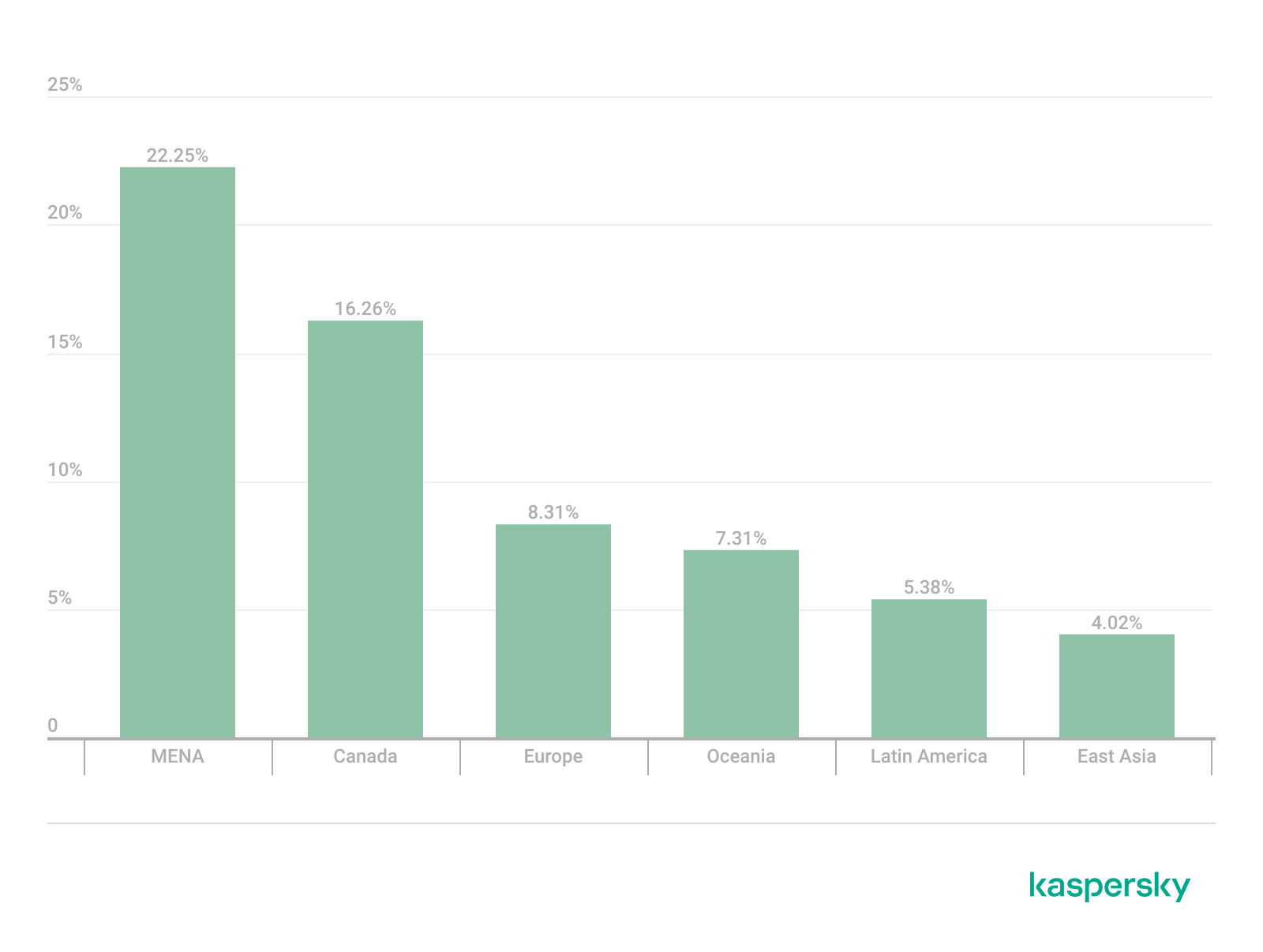
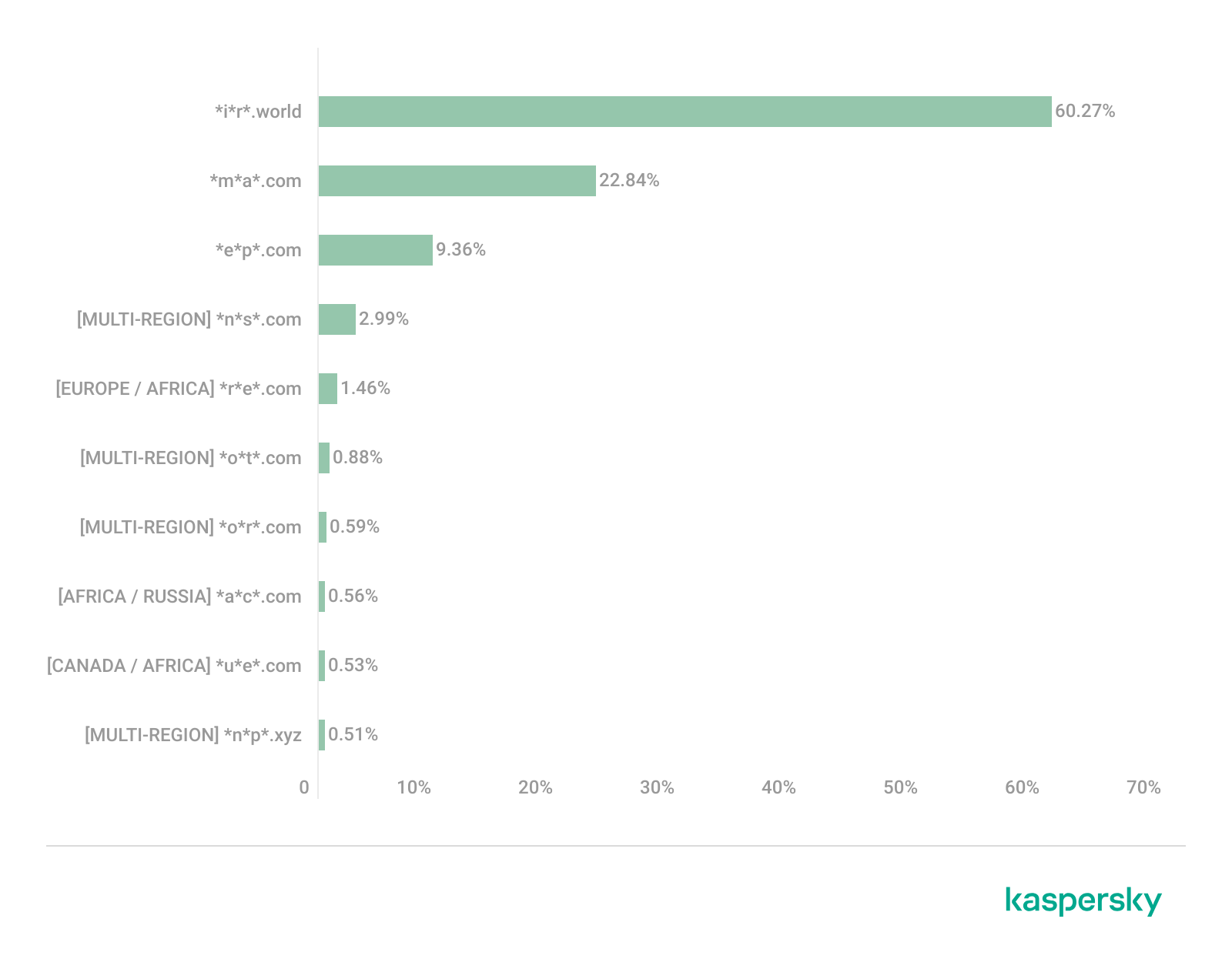
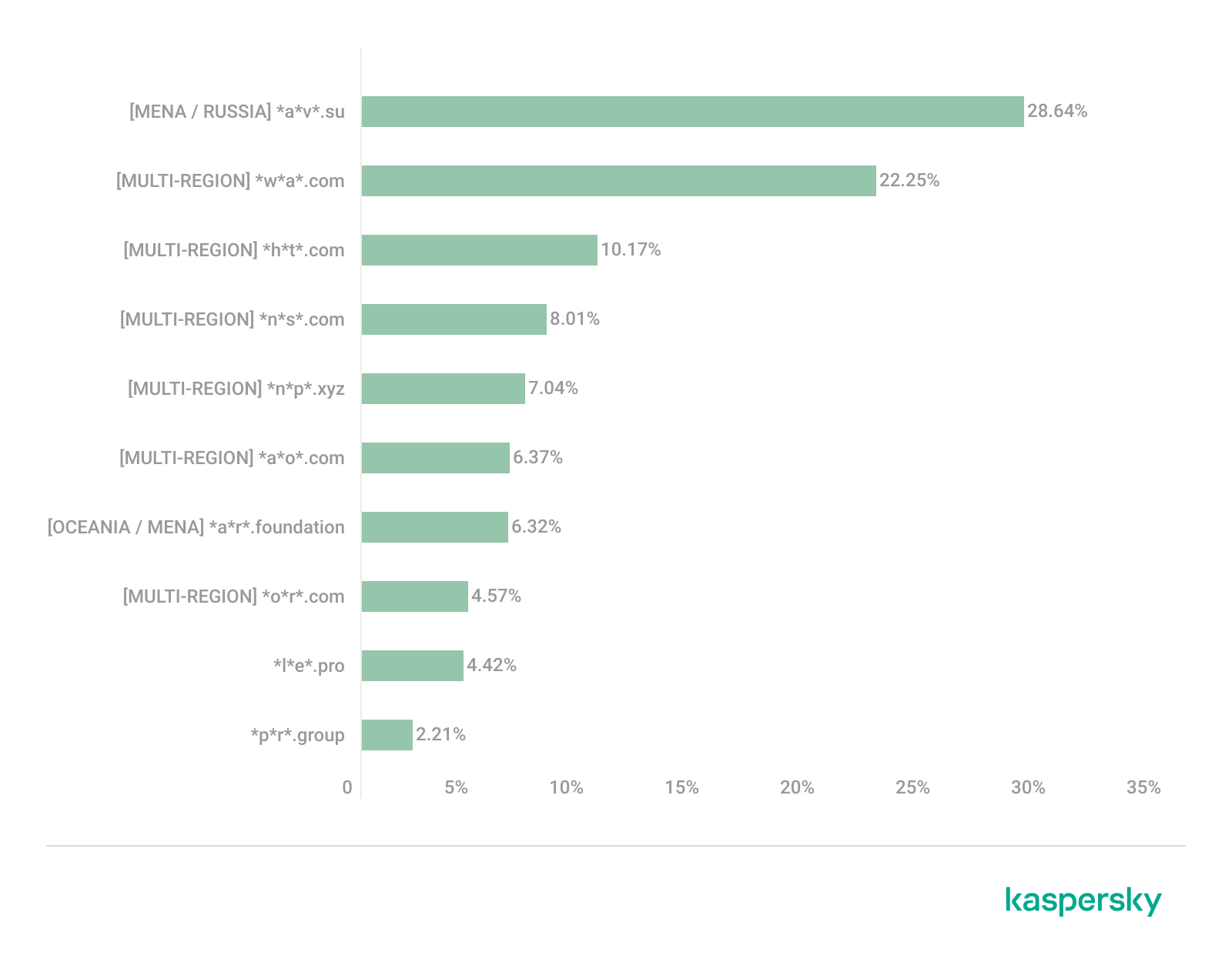
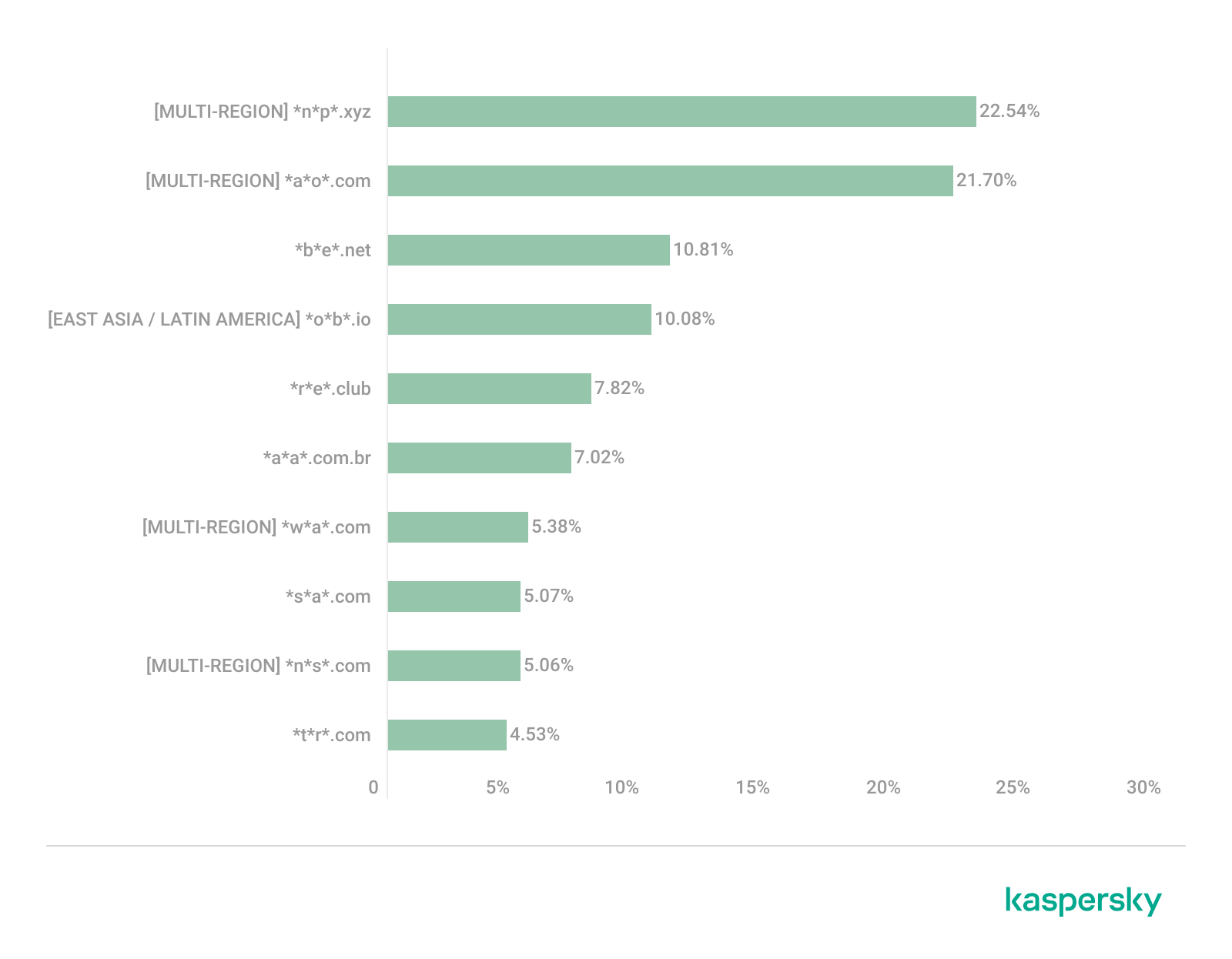
We’ve looked at information-security cases and technologies through the lens of famous movies, popular book series, and even fairy tales more than once before. Next up it’s the turn of Christopher Nolan’s adaptation of The Odyssey (based on the ancient Greek epic poem), which, incidentally, inspired the works of Tolkien, various movies and series in the Star Wars franchise, and much more.
Homer’s Odyssey doesn’t just describe classic plots and archetypes. It also covers key technologies and principles of digital hygiene — albeit in veiled form. The hero’s journey was a risky business — and so, for that matter, is watching The Odyssey itself, but we’ll get to that at the end of this post. For now, let’s see how to safely sail the vast internet Hellenic seas in search of Ithaca.
Administrator Penelope and 108 attackers
Nolan has reshaped the poem’s structure quite a bit, but the film still opens on the island of Ithaca. There, Penelope and Telemachus, the wife and son of Odysseus, king of Ithaca, wait for him to return from the Trojan War. Meanwhile, a mob of 108 suitors is running riot in Odysseus’ house. They’re all courting Penelope and dreaming of the throne, and the whole kingdom is on the brink of collapse.
In essence, this is an attack on digital infrastructure by a group of malicious actors. Penelope, an advanced user with admin rights, does everything she can to block attempts to hack the root account take Odysseus’ place. Her trick: she’s promised to choose a husband only after she finishes weaving a burial shroud for Odysseus’ father, Laertes. By day, she weaves in front of everyone. By night, she unravels everything she’s done: clearly a daily factory reset.
Nolan gives Penelope even more authority than Homer did. This helps highlight the coming-of-age story of Telemachus, who starts out as a beginner user. His storyline is about searching for his father and recognizing him: the ancient Greek version of multi-factor authentication. Following the tradition set by James Joyce, Nolan focuses on the tragedy of Telemachus, who can’t remember Odysseus, since his father last connected to the server left Ithaca so long ago.
Root account Odysseus, Trojan Horse, and Ram VPN
Meanwhile, Odysseus is on the island of the nymph Calypso. She feeds him lotus flowers that make him gradually lose his memory — clearly the classic playbook of ransomware. But in seven years, Calypso never manages to fully encrypt wipe his memory. Odysseus longs for home, and the hapless ransomware operator ends up helping him partly recover the encrypted data remember his story. Odysseus remembers how, after ten years of war outside the walls of Troy, he came up with a cunning scheme that became the basis for all Trojan horses ever since…
The Greeks left a malicious file huge wooden horse on the shore and sailed away. A spy who stayed behind convinced the Trojans that it was a very useful thing an offering to Athena, and they dragged the horse into the city. At night, once the people of Troy had gone into sleep mode, the malicious modules soldiers led by Odysseus hidden inside the horse added themselves to Defender’s exclusions opened the gates. The Greeks returned and captured Troy, then stole data and cryptocurrency burned and looted the city. Only after that did they finally head home.
But the road to Ithaca was long and dangerous. After landing on an unfamiliar island, Odysseus got overconfident. Instead of leaving the suspicious site stocking up and sailing away, he went off to explore the infrastructure, and ended up trapped with his men in the cave of a giant Cyclops, known online as Polyphemus. The Greeks managed to blind the Cyclops, though not without losses, and Odysseus figured out how to get out of the cave: by hiding under the bellies of the rams. The blinded Cyclops felt the rams’ wool but never noticed the Greeks — a textbook example of how a VPN works.
But once he’s out of the cave, Odysseus gets cocky and fires an arrow at Polyphemus. That gives away his real IP address location, and his crew has to flee in a hurry from the furious Cyclops. In the end, the ships are knocked off course and get lost at sea.
Interestingly, unlike in the film, Homer’s poem has a group of OLYMP experts constantly steering the course of events. For example, Odysseus’ ships lost their way because of the interference of Poseidon, OLYMP’s chief expert in maritime technology. As we know from the poem, Odysseus first logged in to Polyphemus’ place as “Nub_Oddy”, but later, in a fit of arrogance, changed his username to “Odysseus_Son_of_Laertes_King_of_Ithaca”. With Odysseus deanonymized, the Cyclops used the Pray messaging app to send Poseidon a voice request to launch targeted attacks on Odysseus’ crew. In Nolan’s version, though, Poseidon doesn’t appear as a character. Instead, he becomes a metaphor for an APT a destructive force of nature.
Expert Circe, APT group Sirena, Scylla, and Charybdis malware
Odysseus’ ships drift across the vast Web seas, and every so often they land on unsafe sites shores. First comes the bay of Lamos, where the giant Laestrygonians launch a DDoS attack, hurling requests rocks at the Greeks and wiping out nearly all of Odysseus’ infrastructure crew. Only he and a small group survive.
Next, the heroes land on the island of a lone cybersecurity professional known as Circe, who puts them through harsh cybersecurity training. She lures Odysseus’ warriors to dinner with a social engineering scheme known as pig butchering and turns them into… yes, you guessed it, pigs. But the protagonist doesn’t fall for her tricks, so Circe agrees to help him and gives his crew their human form back. She also advises Odysseus to run an analysis in an isolated environment descend into Hades’ underworld and find the blind Tiresias, whom the OLYMP experts promoted to threat intelligence analyst gifted with foresight.
Tiresias tells Odysseus that he is the only one with enough cybersecurity knowledge strength to reach Ithaca. But Odysseus is determined to save his crew. He learns that they’ll have to face a very dangerous APT group, the Sirens. They use advanced social engineering (singing) to lure sailors to their doom. So Odysseus orders his men to put in solid protection against voice spam: wax earplugs. The film never lets us hear what the Sirens actually sing. They may well be posing as bank employees, law enforcement, or government officials, but the anti-spam trick keeps the crew safe.
Then far more destructive malware hits the ship: Scylla and Charybdis. From Tiresias’ beginner course in infosec, Odysseus knows that Scylla has six heads, and can hit no more than six users at a time. But dodging her attack means running straight into Charybdis, who will deal critical damage drag the whole ship into a whirlpool. This is the first historical mention of an ethical thought experiment that would later become known as the “trolley problem” — and Odysseus picks Scylla.
Having passed these threats, the remaining crew members land on the island of Thrinacia. That cluster allows initial login with a standard access level for regular users, on one condition: don’t touch the island’s critical resource, the sacred bulls of Helios — chief expert in solar technology. But the warriors ignore Odysseus’ instructions, break the rule, and use that resource to mine food. This triggers a defense system built by OLYMP’s leader, nicknamed Zeus, which permanently blocks strikes down the ship and Odysseus’ crew. Odysseus himself barely survives and reaches Calypso’s island.
Return of root
Once his memory is back, Odysseus builds a raft and charts a course, thanks to Calypso. Athena, the wisest of the OLYMP experts, helps him reach the shores of Ithaca against all odds. He then slips into the city disguised as a beggar.
There, Odysseus passes several steps of multi-factor authentication:
His old dog Argus sees his master, wags his tail, and dies.
Telemachus sees this and realizes the poor wanderer is his father.
His elderly nurse Eurycleia recognizes the man she raised by a unique code the scar on his leg.
But that isn’t enough to restore his root access. So with Telemachus’ help, Odysseus has to enter the palace using the account of one of his former companions, where he meets the administrator, Penelope. Nolan added an important twist here. At this moment, Odysseus regrets creating the first Trojan, which destroyed the infrastructure of an entire city. He also realizes that the malicious suitors’ constant attempts to guess the root password put Ithaca’s infrastructure at risk of the same decline.
Penelope begins to guess who is standing in front of her from his digital footprint indirect signs. She then sets a condition for the would-be root account owners her suitors: she’ll marry the one who can shoot an arrow through the rings of 12 axes with Odysseus’ bow. The bow is essentially a passkey with biometrics, which nobody knew how to fake back in those ancient times. So the bad actors fail one after another. Only Odysseus draws the bowstring and sends an arrow through every axe’s ring. Thanks to the successful biometric authentication, everyone accepts him as the true root king of Ithaca.
The rest is simple: the malware villains are neutralized, the kingdom is saved, and peace and information security return to Ithaca.
Why watching The Odyssey can be dangerous
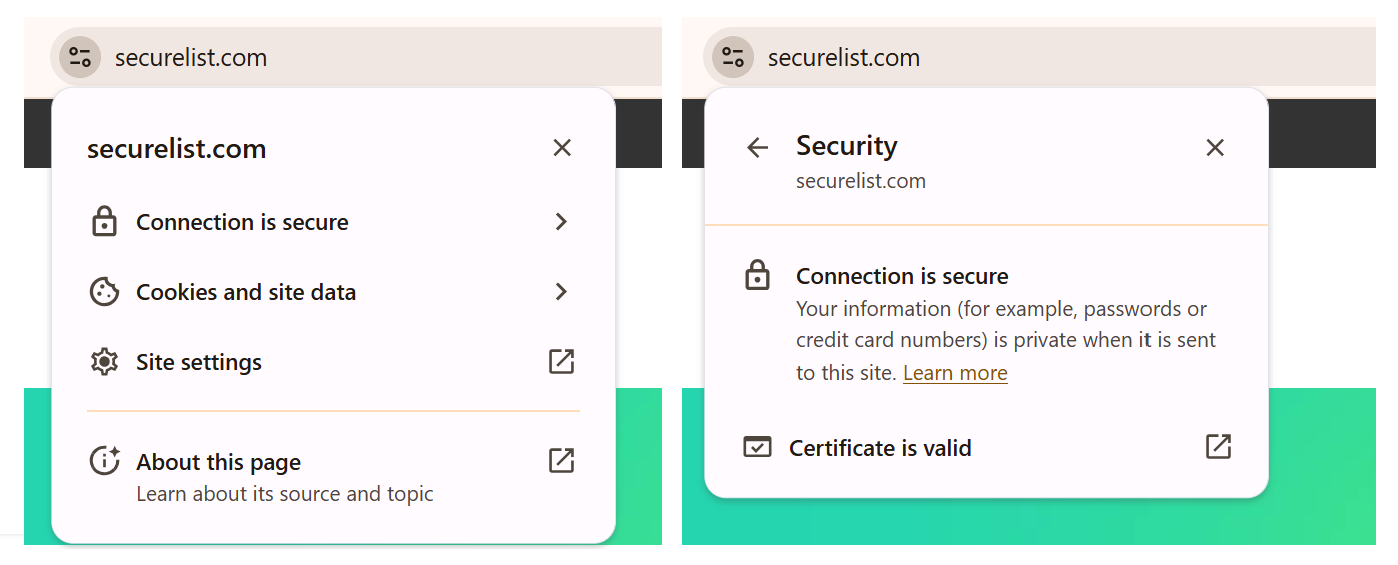
In the window between the movie stopping being shown in cinemas and its release on digital media, our experts discovered a new multi-stage malicious campaign that had been running since mid-August. Malicious actors are spreading a previously unknown piece of malware called MovieReaper through compromised torrent trackers. They disguise it as downloads of popular movies — first and foremost The Odyssey, one of the biggest premieres of the summer. Scammers use this irresistible bait to make people more likely to download their file. The malware itself is as treacherous as the Sirens. It can hide from detection, give attackers remote access to the victim’s device, and deploy extra modules to stay in the system even after it’s removed. Read the full technical breakdown of MovieReaper on our expert blog, Securelist. Victims of this attack have been found all over the world. This is one more reminder of how important it is to be careful online — especially when downloading files.
Practical lessons from The Odyssey
So what can we learn from the story of the cunning king of Ithaca?
A good offense isn’t the best defense. Instead of developing software to attack other users, focus on your own information security.
Keep an eye on your personal data. It can fall into the hands of bad actors, which can lead to targeted attacks.
Set up multi-factor authentication. It lowers the risk of being hacked, and helps you regain access to your accounts safely.
Set up reliable protection (and don’t ignore it), because you should beware Greeks bearing gifts!
We love watching movies and breaking them down from a cybersecurity perspective. Read our other top reviews and analyses:
Gamers around the world are holding their breath for November 19, 2026, the day Grand Theft Auto VI is expected to drop. Many of them have been waiting for the next installment in the hit series for over a decade. For die-hard fans, the final months before launch could prove especially agonizing. Sadly, scammers know all about this hotly anticipated release too, and they’ve decided to use it as a lure to launch all sorts of attacks on gamers. We’ve spotted a great many bait sites aimed at impatient GTA VI fans. Today, we walk you through exactly how these crooks try to trick gamers, and how you can avoid becoming their next target.
1. “GTA VI has already leaked, and all you have to do is pay”
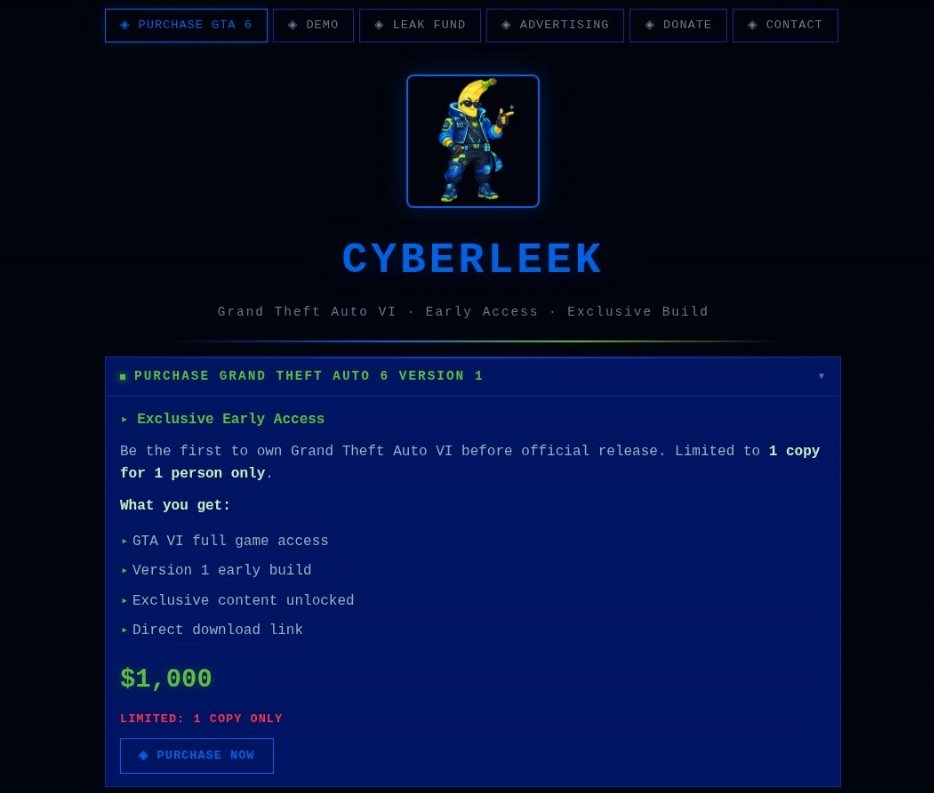
One site our experts found, called CyberLeek, claims to have an early build of GTA VI, and pretends to offer three different ways to get hold of the game before its official release. The first and priciest option is to buy the “full game” of GTA VI for US$1000. For that price, buyers are offered an early build of the game, exclusive content, and a direct download link. This is claimed to be a limited offer: only one copy per customer.
An alleged GTA VI leak advertised for US$1000
For those not ready to part with a thousand dollars, there’s a cheaper option: for a hundred dollars, users can get 24-hour access to the GTA VI demo.
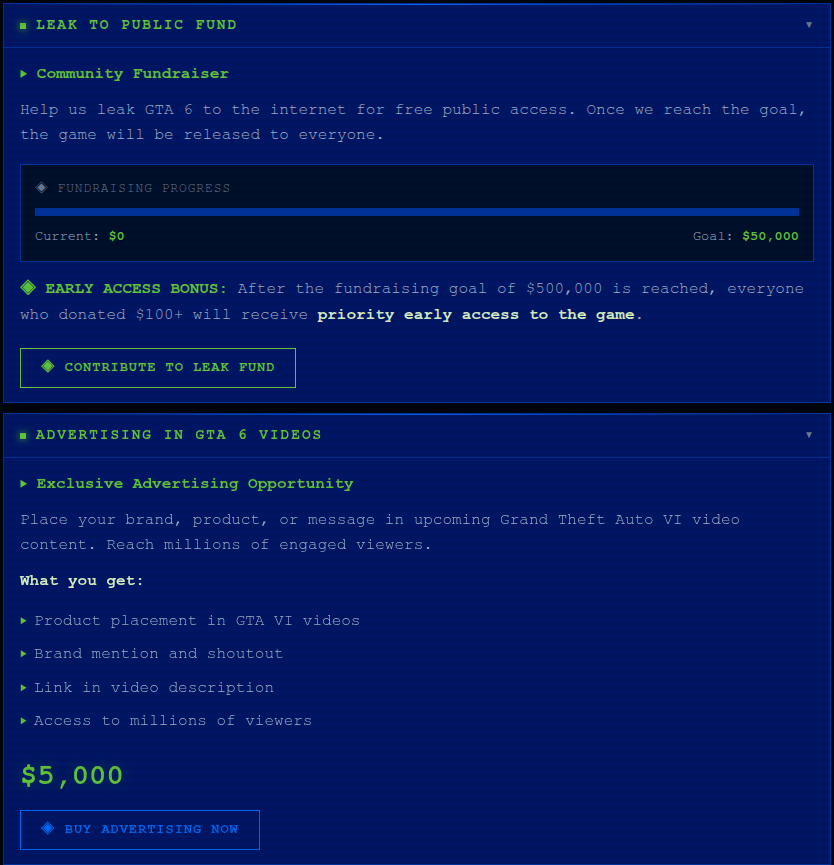
Finally, the third option relies on crowdfunding. Playing modern-day Robin Hoods, the site’s creators claim they’ll raise $50,000 and then release the game to the public for free, with everyone who donates at least $100 getting priority early access. But dig into the fine print, and the fundraising goal for that paid early access suddenly jumps from $50,000 to $500,000. Looks like one of the scammers sat on their keyboard hit an extra zero by accident.
An urgent fundraiser for US$50,000 — or is it US$500,000? — to release a leaked GTA VI build, plus advertising opportunities for businesses
But CyberLeek’s lineup of tempting “offers” doesn’t stop there; there are also services for businesses. For US$5000, the site’s creators offer to place an ad right inside Grand Theft Auto VI: a logo, a product, or a brand mention that will supposedly show up in some unspecified “upcoming Grand Theft Auto video content”. What exactly that means is unclear: in-game clips or cutscenes, trailers, or just some gameplay footage. And honestly, the price seems suspiciously low for product placement in one of the most anticipated games in recent years.
This offer looks especially amusing next to the supposedly complete early build of the game with full access available on the same website. So, apparently, the game is already finished enough to sell in full, but you can still somehow slap ads into it.
One can only pay for all these incredible services with cryptocurrency. CyberLeek accepts Bitcoin, Ethereum, USDT, and Litecoin, and the site’s creators make a point of saying that all payments are final and no refunds are possible. Well, we weren’t expecting refunds anyway.
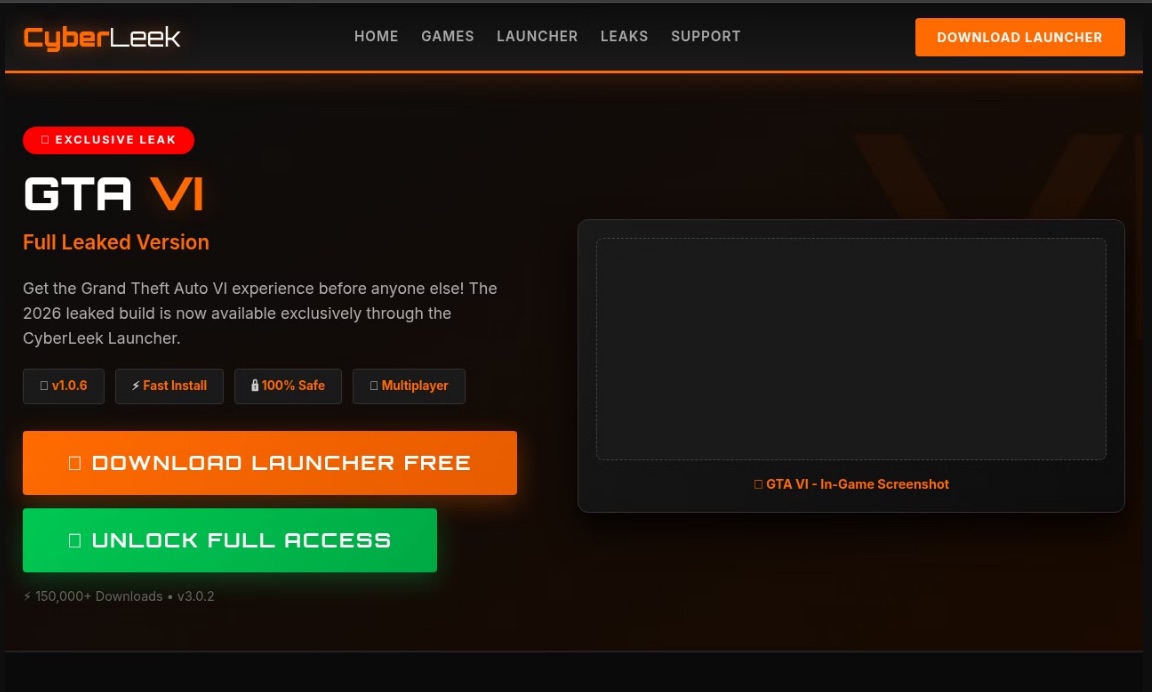
That said, this is just one example. CyberLeek started out as the nickname of the hacker behind both the recent Rockstar Games breach and GTA VI content leak. Later on, other cybercriminals began using that same name to build a whole bunch of fake sites. Despite having completely different designs, all of these sites attempt to project an association with CyberLeek, enticing users with (false) promises of access to “official” leaked versions of GTA VI. Whichever of these sites you come across, we’d strongly advise against using your own computer to check what’s actually hiding inside the archives and installers they hand out.
Another CyberLeek site offering access to a “leaked build” of GTA VI invites the user to download some unknown launcher, or “unlock” the full version of the game — whatever that means
2. Preordering Grand Theft Auto VI — with a catch
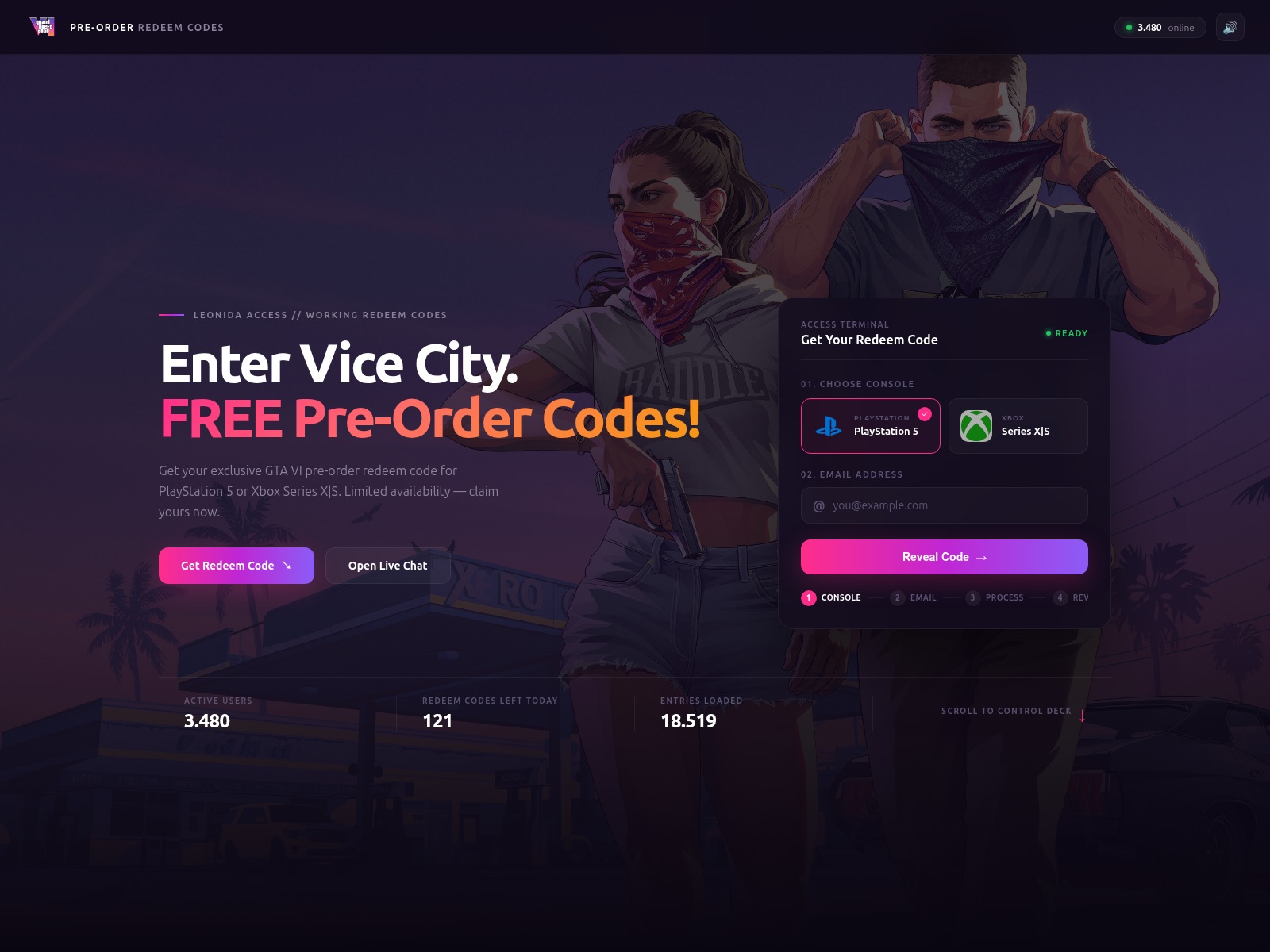
This bait targets slightly more sensible gamers — the kind who aren’t trying to download GTA VI right this second but wouldn’t say no to grabbing a free preorder code ahead of time. Our experts found a site that is claiming to hand out a redeem code for the PlayStation 5 or Xbox Series X|S. All one needs do is pick a platform and provide an email address.
To make it all look convincing, the site even shows off its own “statistics”: it supposedly has 3480 active users, and only 121 codes are still available as of today.
To get the “exclusive code”, the user is asked to pick a console and provide their email address
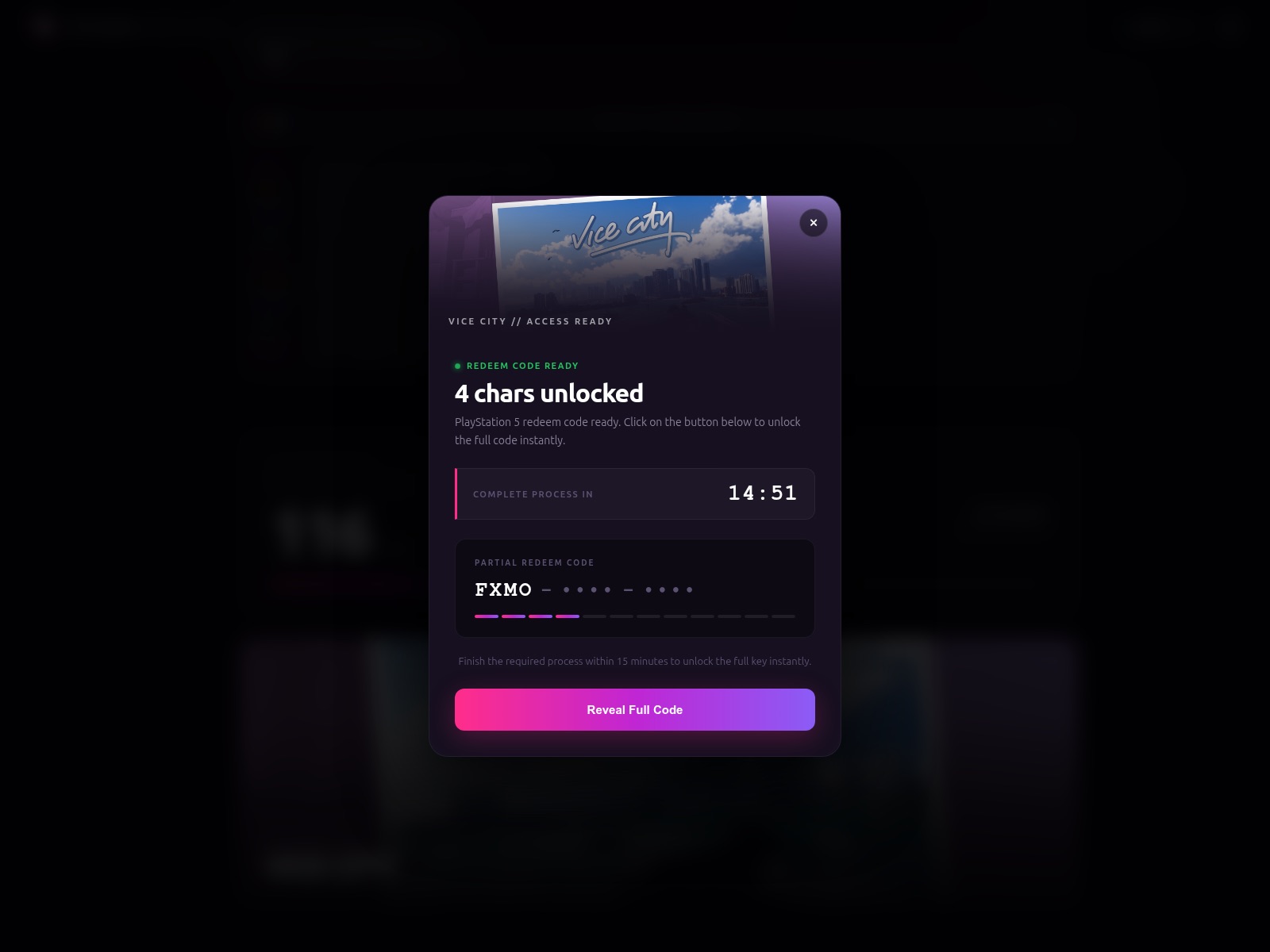
After picking a console, entering an email address, and clicking Reveal Code, the user lands on a new page. It shows the first four characters of a supposedly generated code, and to get the rest the user is asked to complete an additional check. They’re given 15 minutes to do so.
The site shows the first four characters of the coveted code, and promises to send the rest after an additional check, which the user has 15 minutes to complete
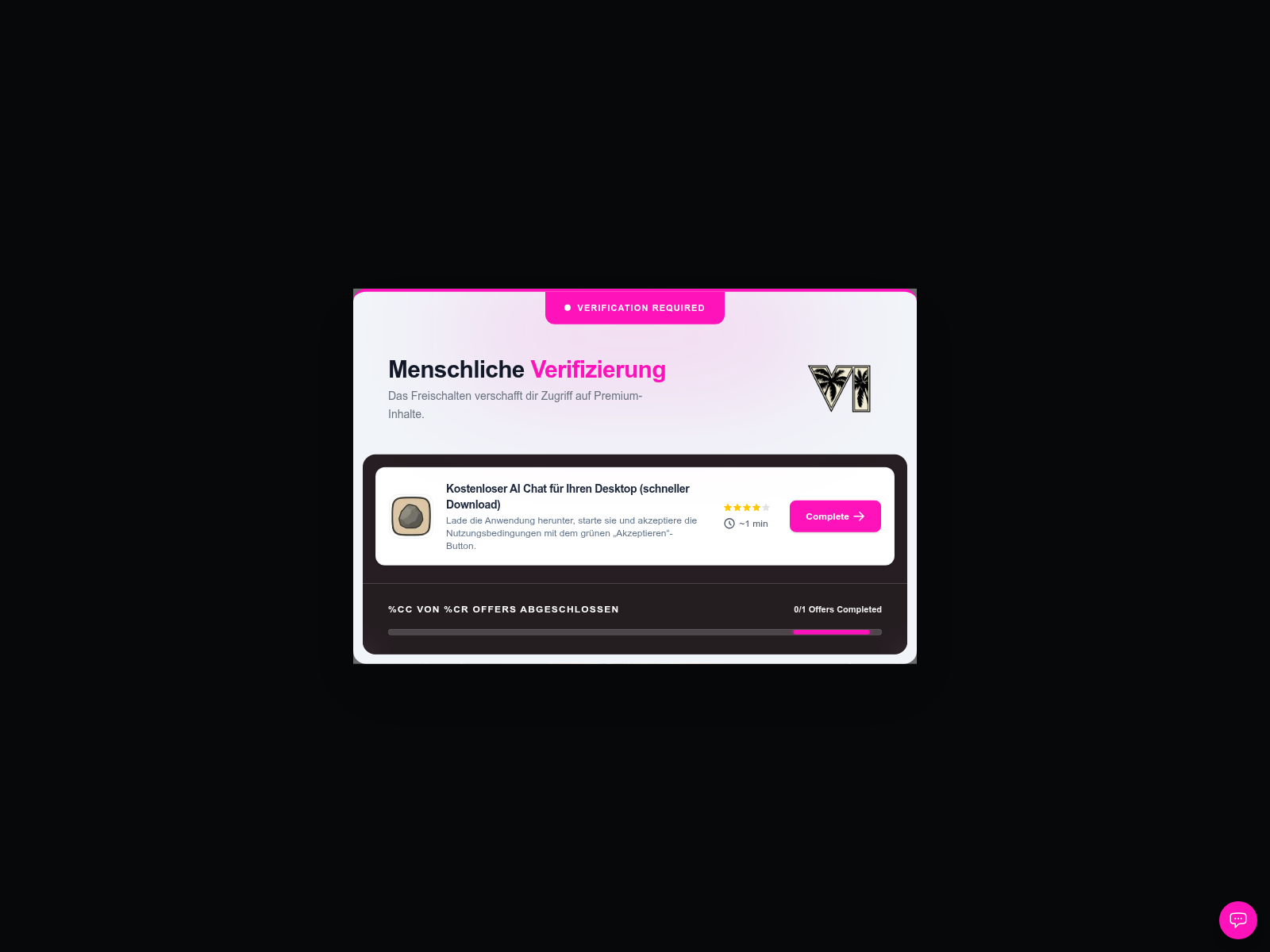
Nobody tells the gamer upfront what this check actually involves. But the next page, which opens after clicking Reveal Full Code, inexplicably turns out to be in German. Here, the user is asked to pass a “human verification”: download a free AI chat app for their computer, run it, and accept the terms of use.
The real point of this “verification” most likely boils down to driving traffic to third-party, often shady, or outright fraudulent sites, with GTA VI simply used as bait to pump up visitor numbers.
To get the rest of the “code”, the site demands that the user download and run an AI chat app and accept its terms of use
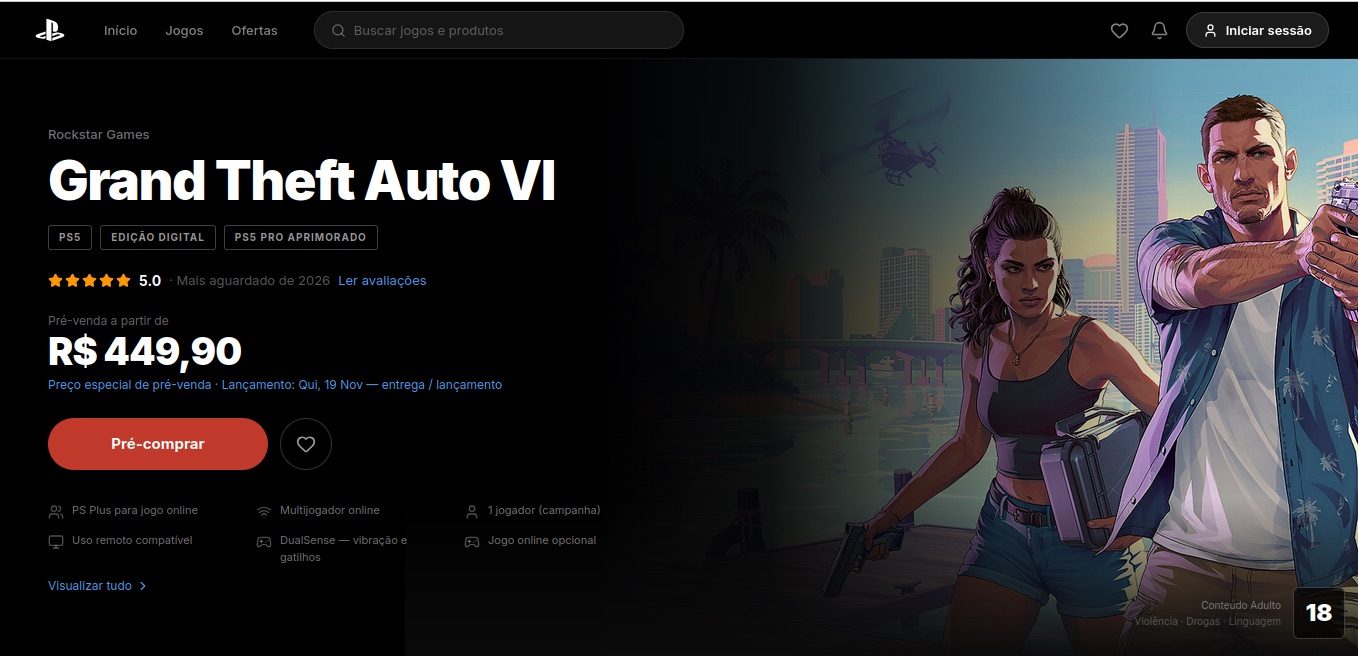
A simpler variation involves fake sites that simply collect money under the pretext of placing preorders for Grand Theft Auto VI. For example, a fake PlayStation Store site targeting Brazilian users offers preorders for R$449.9, which actually matches the official price in the real PS Store. The user can pay with a credit card or through Pix (Brazil’s instant payment system), but along with their money, they’d also have to hand over personal data, including their CPF — the Brazilian equivalent of a taxpayer identification number.
In Brazil, a fake PlayStation Store site collects money for GTA VI preorders at a price that looks legit
3. You’ve missed it: GTA VI is already out!
Some scammers don’t even bother with elaborate stories about leaks, beta tests, or preorder deals. They simply build websites that copy the look and feel of GTA, and invite users to start playing GTA VI right here, right now. We came across a few examples of these sites.
No leaks, no tests, no codes needed: visitors are simply invited to click Try GTA 6 and start playing
One of these sites tells users they can download GTA VI, as long as they first pick their platform. The range of options is surprisingly generous: a PC version as well as versions for PlayStation 5 and Xbox Series X|S.
Users are invited to pick a version of GTA VI for PlayStation 5, Xbox Series X|S, or PC
Just to be clear, GTA VI’s official release is still more than a month away, so there’s no way one can download and install the game right now. Nobody knows exactly what users would be getting on their devices instead of the game if they download from one of these sites, but it’s definitely nothing useful. And no matter how carefully scammers copy GTA’s signature style and slap on the Rockstar logo, the address bar usually gives the game away: check the domain and compare it with the official Rockstar Games website address.
4. The icing on the cake: GTA VI for tokens
And finally, what would 2026 be without cryptocurrency? We found a site whose creators were probably inspired by the CyberLeek story and decided to ride the wave of GTA VI’s popularity to promote a token with the refreshingly straightforward name $GTAVI. The whole site is styled after GTA VI and Vice City.
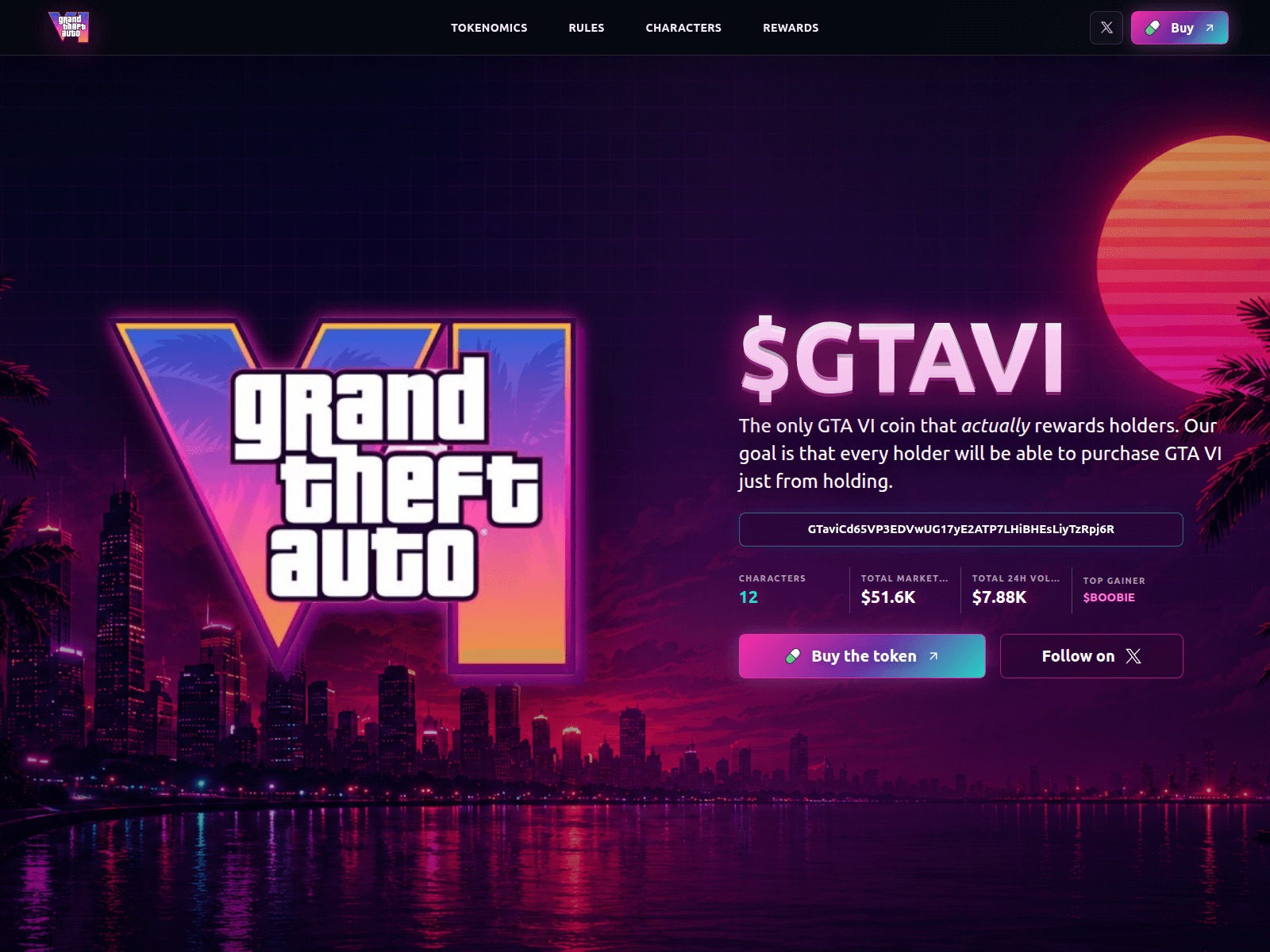
The creators of the project have gone out of their way to highlight the perks of holding the token. They call $GTAVI “the only GTA VI coin that actually rewards its holders”. Whatever the meaning of that tagline, the project’s declared ultimate goal sounds even more tempting: every token holder will get access to Grand Theft Auto VI just by virtue of owning $GTAVI. Think about that for a second: it’s not exactly a direct promise of a free copy of GTA VI, but more like an aspiration on the part of the crypto developers.
The token’s creators claim that they’re striving to eventually provide every $GTAVI holder with access to GTA VI
To add a bit of credibility, the page also throws in some crypto stats. The claimed market cap of $GTAVI is 51,600 dollars, with a 24-hour trading volume of 7880 dollars. There’s also a mysterious metric called “Characters” with a value of 12, and what exactly it means is anyone’s guess. There’s also a separate mention of a certain $BOOBIE as the Top Gainer — apparently, this is how the site’s creators labeled whoever supposedly made the most money off $GTAVI. The site doesn’t explain where any of these numbers come from or how accurate they actually are.
All in all, this looks like an attempt to hype up yet another meme coin by riding the wave of GTA VI’s popularity. Projects like this often end up following the classic pump-and-dump playbook: the token gets promoted for a while to drive its price up, and then the insiders and major holders cash out, leaving everyone else stuck with heavily devalued crypto. As for the stated goal behind $GTAVI — letting every token holder get a copy of GTA VI just for owning it — the site gives us no reason to believe that’s actually going to happen.
How to wait for GTA VI without falling for scammers
Unfortunately, we don’t know of a legitimate way to get early access to GTA VI, and honestly, we doubt anyone else does either. It looks like we’ll all just have to wait until November. To make sure you don’t fall for tempting scam offers in the meantime, here’s what we recommend:
Only install games from official sources.
Check the website address. Even if a page looks like the official Rockstar Games website or the PlayStation Store, carefully examine the domain in the address bar.
Never enter your payment details on sites promising GTA VI before its official release — especially if they ask you to pay in some unusual way like with cryptocurrency.
Don’t download unknown launchers, archives, or installation files, even if they’re billed as a “leaked build” or as software you need in order to be a beta tester.
Don’t hand over your personal information for a “beta test”, “key”, “early access”, or any other offer that sounds too good to be true.
Never disable security features just because a website tells you to. If a site asks you to ignore a Windows warning, run some mysterious command, or launch an unknown file as an administrator, treat it as a giant red flag.
Free Mobile, one of France’s main cellular providers, was fined €27 million by France’s data protection regulator, the CNIL, in January over failures to protect customer data. The October 2024 breach allowed an unauthorized party to access sensitive customer records, including bank account details and login information. Since the breach, we’ve seen many poorly written scam campaigns targeting Free Mobile customers.
However, over the past few weeks, a well-written scam has appeared, closely copying the design of the official Free Mobile website and email templates.
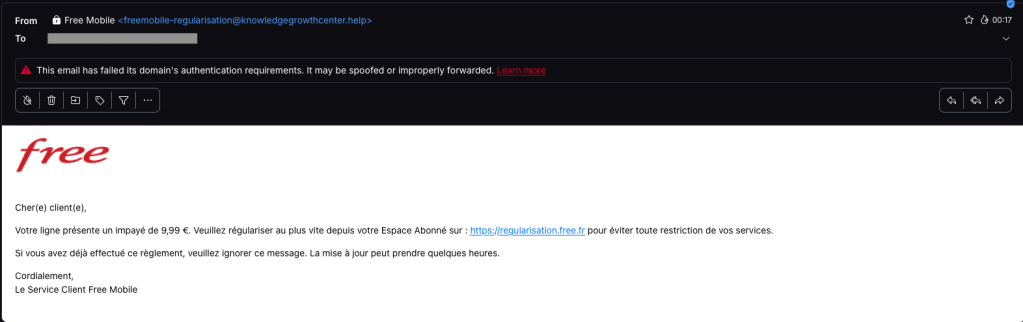
One of our employees, who is a Free Mobile customer, received this phishing email on Wednesday, September 30. The message used the same logo and template as legitimate emails from the company, but came from the suspicious email address freemobile-regularisation[@]knowledgegrowthcenter[.]help. It included a link that appeared to point to regularisation.free.fr :
The email tells the user that an invoice of €9.99 needs to be paid to avoid having the customer’s service suspended. Clicking the link opens a redirection chain:
Malwarebytes can help protect you from these threats, but treat unexpected messages about your accounts and invoices with caution:
Don’t follow links in unsolicited emails. If a message concerns your account, open the official Free Mobile app or website directly, or call the official help line at 3244.
Check the actual domain in your browser’s address bar to see if it matches what you expect—https://mobile.free.fr in this case.
Free Mobile, one of France’s main cellular providers, was fined €27 million by France’s data protection regulator, the CNIL, in January over failures to protect customer data. The October 2024 breach allowed an unauthorized party to access sensitive customer records, including bank account details and login information. Since the breach, we’ve seen many poorly written scam campaigns targeting Free Mobile customers.
However, over the past few weeks, a well-written scam has appeared, closely copying the design of the official Free Mobile website and email templates.
One of our employees, who is a Free Mobile customer, received this phishing email on Wednesday, September 30. The message used the same logo and template as legitimate emails from the company, but came from the suspicious email address freemobile-regularisation[@]knowledgegrowthcenter[.]help. It included a link that appeared to point to regularisation.free.fr :
The email tells the user that an invoice of €9.99 needs to be paid to avoid having the customer’s service suspended. Clicking the link opens a redirection chain:
Malwarebytes can help protect you from these threats, but treat unexpected messages about your accounts and invoices with caution:
Don’t follow links in unsolicited emails. If a message concerns your account, open the official Free Mobile app or website directly, or call the official help line at 3244.
Check the actual domain in your browser’s address bar to see if it matches what you expect—https://mobile.free.fr in this case.
Only days after Revolut acknowledged that it disclosed sensitive customer records to an unauthorized party, affected customers are receiving phishing texts. However, we don’t know yet if the phishing texts are linked to the breach.
Through this social engineering attack, rather than by gaining access to Revolut’s systems, the criminals obtained the following types of information about customers:
Identity and contact information such as dates of birth, postal addresses, email addresses, and phone numbers
Copies of IDs such as passports and driver’s licenses
Verification selfies
Account statements and transaction histories
Revolut has said only that a “limited” or “very limited” number of customers were affected, and that it contacted them directly.
One affected customer received a phishing text on Monday, September 14, two days after Revolut publicly acknowledged the data breach. The message appeared in the same conversation as other Revolut texts, making it look as though it had come from the bank.
Phishing text to a Revolut customer
According to VirusTotal, the phishing domain was first scanned that same day.
In a separate example, another customer said that opening the link took them to a web page that requested access to their device’s camera. If you tap Allow, the page reportedly imitates Revolut’s live-video “turn your head” identity check before prompting you to enter a password.
This makes the phishing page appear more authentic. It may also allow the scammers to collect a selfie or video that could be used for further social engineering, identity fraud, or to make subsequent scams more convincing.
A convincing fake liveness check followed by a password screen is a common way to lower suspicion and obtain the information attackers need to attempt a real login or account-recovery flow.
If the campaign is connected to the breach, the information obtained from Revolut, combined with login details entered by victims or their approval of a login request, could be enough to take over their accounts.
How to stay safe
We don’t yet know whether the phishing campaign is using data exposed in the breach or whether unrelated scammers are exploiting news of the incident to target Revolut customers more broadly.
Either way, treat unexpected messages about your account with caution:
Don’t follow links in unsolicited messages. If a message concerns your account, open the official Revolut app directly.
Check the actual domain in your browser’s address bar to see if it corresponds with what you expect.
Use an up-to-date, real-time anti-malware solution on your device, preferably with a web protection component.
Malwarebytes Scam Guard can help you determine whether a message is a scam and advise you on what to do next.
Stop threats before they can do any harm.
Malwarebytes Browser Guard blocks phishing pages and malicious sites automatically. Free, one click to install. Add it to your browser →
Only days after Revolut acknowledged that it disclosed sensitive customer records to an unauthorized party, affected customers are receiving phishing texts. However, we don’t know yet if the phishing texts are linked to the breach.
Through this social engineering attack, rather than by gaining access to Revolut’s systems, the criminals obtained the following types of information about customers:
Identity and contact information such as dates of birth, postal addresses, email addresses, and phone numbers
Copies of IDs such as passports and driver’s licenses
Verification selfies
Account statements and transaction histories
Revolut has said only that a “limited” or “very limited” number of customers were affected, and that it contacted them directly.
One affected customer received a phishing text on Monday, September 14, two days after Revolut publicly acknowledged the data breach. The message appeared in the same conversation as other Revolut texts, making it look as though it had come from the bank.
Phishing text to a Revolut customer
According to VirusTotal, the phishing domain was first scanned that same day.
In a separate example, another customer said that opening the link took them to a web page that requested access to their device’s camera. If you tap Allow, the page reportedly imitates Revolut’s live-video “turn your head” identity check before prompting you to enter a password.
This makes the phishing page appear more authentic. It may also allow the scammers to collect a selfie or video that could be used for further social engineering, identity fraud, or to make subsequent scams more convincing.
A convincing fake liveness check followed by a password screen is a common way to lower suspicion and obtain the information attackers need to attempt a real login or account-recovery flow.
If the campaign is connected to the breach, the information obtained from Revolut, combined with login details entered by victims or their approval of a login request, could be enough to take over their accounts.
How to stay safe
We don’t yet know whether the phishing campaign is using data exposed in the breach or whether unrelated scammers are exploiting news of the incident to target Revolut customers more broadly.
Either way, treat unexpected messages about your account with caution:
Don’t follow links in unsolicited messages. If a message concerns your account, open the official Revolut app directly.
Check the actual domain in your browser’s address bar to see if it corresponds with what you expect.
Use an up-to-date, real-time anti-malware solution on your device, preferably with a web protection component.
Malwarebytes Scam Guard can help you determine whether a message is a scam and advise you on what to do next.
Stop threats before they can do any harm.
Malwarebytes Browser Guard blocks phishing pages and malicious sites automatically. Free, one click to install. Add it to your browser →
Your phone rings, you pick up and say hello. On the other end: total silence. No one answers, and the call abruptly disconnects. If you don’t already use spam call blockers, you’ve almost certainly run into this situation before.
In most cases, these are scam calls. Today, we explain why these calls happen, what the callers want from you, and how to protect yourself. Most importantly, we’ll look at whether you even need to bother protecting yourself against them in the first place.
Who’s calling?
It’s not just scammers on the line — robots, legitimate call center operators, and ordinary folks make these calls too. Let’s break down each type of caller — ordered from best-case to worst-case scenario for your security.
Actual person
The most harmless scenario is that an actual person called you, but their microphone is acting up. Maybe they accidentally muted themselves with their ear, or their smartphone connected to a Bluetooth headset, speaker, or car system that isn’t capturing their voice. Carrier glitches can also mute one side of a call. The caller might have no idea there’s a problem — as far as they know, they are speaking, but no one can hear them. In cases like this, you usually recognize the incoming phone number.
If the call comes from an unknown number, there’s still no need to panic — though the list of those who might be calling gets much longer.
One legitimate possibility is a call center agent who simply didn’t pick up or connect their headset in time. Call center systems are designed to dial numbers faster than agents can wrap up their calls. The system tried to route the call to a human, but no reps were available. That’s why you sometimes have to wait a few seconds before hearing a single word, or why you might hear ringing tones as if you were the one making the call.
Robot or AI
Silence on the line is a common sign of robocalls. Robots test whether a phone number is active and, if it is, pass it along to a human — meaning a real sales rep (or scammer) will call you back in the next few days. It’s worth noting that scammers aren’t the only ones making these pinging calls. Legitimate call centers use the exact same tools to reduce the workload on their live agents.
An AI agent could also be behind the silent call. To the person answering, there’s no practical difference: the call looks identical to one made by a standard bot. However, AI can do more than just auto-dial numbers — it can analyze your response and use that data to decide whether your number is active and ready to be handed off to a live person for follow-up.
Unwanted caller
Now we get to the real threat. Perhaps one of the most dangerous and unpleasant sources of silent phone calls is a scammer. A quick, silent call like this can actually be the groundwork for a long, elaborate attack with cover stories about loans, government agencies, other fraudsters, even law enforcement.
Debt collectors might also be calling and staying quiet. Your number could end up on their radar if you, your family, or close contacts have outstanding debts. In these cases, a silent call is often used as a tactic for psychological pressure.
A similar technique is used in stalking. While silent calls cause no direct harm on their own, they can be leveraged to induce anxiety, create a feeling of being constantly watched, and cause ongoing emotional distress.
Why do they call and stay silent?
When you pick up, you likely respond out of habit with a quick “Hello?” or “Hi there.” That’s all it takes for the other party to gather a wealth of data. While this information used to be difficult to process, the rise of artificial intelligence has made the task significantly easier. Let’s look at what someone can learn about you from just one spoken word:
Region, accent, and location. Scammers are sophisticated and cunning. Their tactics are often tailored by region — targeting residents of specific countries or even regions within them. This is especially relevant in places like India or South Africa, which have 22 and 11 official languages, respectively.
Approximate age and gender. While a human listener might easily confuse a teenager’s voice with a young woman’s or misjudge someone’s age entirely, AI is far better at picking up on subtle vocal nuances. Knowing your age and gender helps scammers refine their playbook for future social engineering attacks.
Times you’re available. If you answer the phone in the morning, afternoon, or late at night, attackers can schedule their follow-up call during the exact time window when you’re most likely to pick up.
Likelihood of a successful attack. AI can automatically assess the potential value of a target. For instance, if someone answers quickly, speaks calmly, and doesn’t immediately hang up on unknown numbers, they’ll likely be assigned a higher priority for follow-up calls by live scam operators.
Back to the “why do they call and stay silent”, the main reason is to harvest biometric data. Just a few seconds of recorded audio can help cybercriminals create a voice deepfake. While one or two words might not yield a convincing clone on their own, attackers can stitch together recordings from multiple silent calls to build a believable replica.
This technology is already being used in real-world scams. Impersonating a relative, colleague, or boss, fraudsters can urgently ask you to send them money, to share a two-factor authentication code for government services, or to complete some other seemingly innocuous request. The more realistic the deepfake sounds, the harder it is to spot the scam — especially when backed by a convincing backstory.
What to do if you get a silent call?
If you answer a call, say a few words, and hang up, there’s no need to panic. However, that brief interaction can confirm to attackers that your number is active and that you’ll answer calls from unknown numbers. As a result, your phone number could end up on target lists for future spam or scam campaigns. That said, it’s important to remember that a single silent call poses no immediate security threat.
Here are a few tips to help you stay calm and avoid falling for scam tactics if those silent calls are becoming a problem:
Don’t answer calls from unknown or hidden numbers. Here’s a helpful tip: if someone genuinely needs to reach you, they’ll find another way to do so, or keep calling from the exact same number at various times. Scammers almost always dial from different numbers, while automated bots operate on a rigid schedule — like calling every day at precisely 8:05 AM.
Don’t rush to call back. Scammers often count on proactive victims who are curious enough to return calls from unfamiliar numbers. On top of that, calling back could end up costing you money if it’s a premium-rate number.
Don’t speak first. Wait for the caller to greet you before starting a conversation. If you hear muffled noise or complete silence on the line, hang up and save yourself the hassle — it’s likely a scam.
Block unknown numbers — even after the call. If you picked up and realized the call could be risky, it’s best to block the number right away. You can use the built-in features on most modern smartphones to do this.
Don’t share your number everywhere. Phishing sites, fly-by-night web pages, and sketchy giveaways often exist solely to collect your personal data. When filling out forms online, it doesn’t hurt to use a burner or secondary number.
Get a second phone number. Separate your daily life between two numbers. Use your main line strictly for family, friends, and work contacts, and reserve the secondary line for deliveries, online marketplaces, and general web sign-ups.
Twenty years ago, a British mathematician named Clive Humby popularized a phrase that came to describe data’s relationship with the entire global economy: “Data is the new oil.”
Pithy as the phrase sounds, it is undeniably true.
Data steers decisions at businesses of every size. Data created entirely new industries built around its capture. And, for a select number of companies, data has produced billions—if not trillions—of dollars in value.
So how is it that, on the dark web, your stolen identity can be purchased for just 95 cents?
That’s what a Malwarebytes researcher found last month after spending 48 hours inside the dark web to investigate cybercrime. Across a variety of forums and directories, he found subscription plans for malware that steals information once implanted on a device. He found guides for deploying social engineering scams. He found people selling their services to build fake websites that trick people into handing over their usernames and passwords. And he found one of the dark web’s most traded commodities—personal data, packaged together about individual people, to help a cybercriminal commit identity fraud.
These packages are called “fullz.” For victims in the United States, a fullz contains a full name, Social Security Number, date of birth, address, and other personal details. That is enough, on its own, for a cybercriminal to potentially open a bogus line of credit, file a fake tax return, access financial accounts, or obtain medical services under someone else’s name.
As we wrote on Malwarebytes Labs:
“For less than the cost of a cup of coffee, a cybercriminal can buy enough information to devastate someone’s financial life.”
It’s the kind of risk that could scare anyone, especially considering the scale behind it. In just the first six months of 2026, Malwarebytes found more than 7,500 compromised data sets on the dark web containing more than 8.4 billion records.
And yet, even today, cybersecurity professionals still get asked why anyone should bother protecting their data.
The public, understandably, are exhausted. With data breaches happening every week—if not every day—cybersecurity can start to feel pointless. With young people unable to build financial security, they start believing that they have nothing worth stealing. And with Big Tech already collecting our every movement, behavior, click, and concern, people understandably feel powerless to fight any kind of data abuse, be it corporate or criminal.
So today’s episode approaches the question from a different direction. This isn’t about why you should protect yourself—plenty of company websites will tell you that, and most of them rely on fear. This is about why hackers want your data in the first place.
Today, on the Lock and Code podcast, host David Ruiz explains how cybercriminals turn a single repeated password into account takeover, how a screenshot of your house from Google Maps became a tool in extortion emails, and why the most benign information about you—an address, an age, one public photo—is often the most useful data a stranger can buy.
Twenty years ago, a British mathematician named Clive Humby popularized a phrase that came to describe data’s relationship with the entire global economy: “Data is the new oil.”
Pithy as the phrase sounds, it is undeniably true.
Data steers decisions at businesses of every size. Data created entirely new industries built around its capture. And, for a select number of companies, data has produced billions—if not trillions—of dollars in value.
So how is it that, on the dark web, your stolen identity can be purchased for just 95 cents?
That’s what a Malwarebytes researcher found last month after spending 48 hours inside the dark web to investigate cybercrime. Across a variety of forums and directories, he found subscription plans for malware that steals information once implanted on a device. He found guides for deploying social engineering scams. He found people selling their services to build fake websites that trick people into handing over their usernames and passwords. And he found one of the dark web’s most traded commodities—personal data, packaged together about individual people, to help a cybercriminal commit identity fraud.
These packages are called “fullz.” For victims in the United States, a fullz contains a full name, Social Security Number, date of birth, address, and other personal details. That is enough, on its own, for a cybercriminal to potentially open a bogus line of credit, file a fake tax return, access financial accounts, or obtain medical services under someone else’s name.
As we wrote on Malwarebytes Labs:
“For less than the cost of a cup of coffee, a cybercriminal can buy enough information to devastate someone’s financial life.”
It’s the kind of risk that could scare anyone, especially considering the scale behind it. In just the first six months of 2026, Malwarebytes found more than 7,500 compromised data sets on the dark web containing more than 8.4 billion records.
And yet, even today, cybersecurity professionals still get asked why anyone should bother protecting their data.
The public, understandably, are exhausted. With data breaches happening every week—if not every day—cybersecurity can start to feel pointless. With young people unable to build financial security, they start believing that they have nothing worth stealing. And with Big Tech already collecting our every movement, behavior, click, and concern, people understandably feel powerless to fight any kind of data abuse, be it corporate or criminal.
So today’s episode approaches the question from a different direction. This isn’t about why you should protect yourself—plenty of company websites will tell you that, and most of them rely on fear. This is about why hackers want your data in the first place.
Today, on the Lock and Code podcast, host David Ruiz explains how cybercriminals turn a single repeated password into account takeover, how a screenshot of your house from Google Maps became a tool in extortion emails, and why the most benign information about you—an address, an age, one public photo—is often the most useful data a stranger can buy.
Resin art has become a popular corner of TikTok, with some videos attracting millions of views. But not every glossy, colorful post is what it claims to be. Scammers are using the look of handmade resin art to trick buyers, collectors, and even fellow artists into sending money for work that either doesn’t exist or wasn’t created by the person posting it.
There are plenty of genuine resin artists on TikTok. Unfortunately, the platform has also attracted scammers who steal videos and impersonate legitimate creators.
The scam is fairly straightforward. A TikTok account presents itself as a resin artist, posts satisfying videos, and invites people to “DM to order.” In some cases, the videos are stolen from other creators, the account has no real process footage, and the seller disappears after receiving payment.
One resin artist discovered that scammers were using their videos to impersonate them and scam TikTok users. They shared the following comment:
Ridiculous TikTok scammer…lol. Profile says they’re a resin artist and to DM them to order, but none of the videos are theirs. When I wrote to them asking them to take down the many videos of mine that they posted, passing them off as their own with no credit, their answer was that they aren’t a resin artist and are just sharing videos they like Literally about 1/4 of “their” videos are mine
These scams often rely on trust and urgency. The account may show polished clips of poured resin, finished coasters, trays, jewelry, or wall art, then push buyers to move the conversation into direct messages. Once the buyer moves to a different platform, the scammer typically requests a deposit, full payment, or personal details with little chance of being held accountable.
And real artists don’t just get their work ripped off. A scammer may contact a creator claiming to want to buy, feature, or license their work, but the real goal is to extract fees, banking information, or other sensitive data. Social media art scams are often repetitive because they are built from the same templates and scripts.
Different videos, same script
How to spot a TikTok resin art scam
The safest approach is the boring one: verify before you pay. If the artwork looks amazing but the seller’s identity is vague, the risk is real.
Check the TikTok account
Before ordering, look for signs that the artist is genuine:
The account didn’t appear overnight and has a history of original posts.
The same videos don’t appear under multiple creator names or belong to another artist.
The creator shows themselves making the artwork, with consistent process videos, a recognizable workspace, and works in progress.
The videos don’t contain obvious AI artifacts, such as impossible resin effects or objects moving after they’ve supposedly been sealed inside hardened resin.
Comments raising concerns haven’t been deleted or buried under generic praise.
The seller isn’t pushing you to order only through direct messages or asking for payment before you’ve verified who they are.
Check the website
If you do click through to a website, spend a few minutes checking it before you buy:
Look for a genuine returns and refunds policy, a physical business address, company or VAT details (where applicable), and consistent contact information.
Check how old the website is. Scam sites often use domains that were registered only weeks or months ago, especially when they claim to have been selling handmade products for years.
Search for recent independent reviews rather than relying on testimonials published on the site itself.
Run a reverse image search on the product photos to see whether they’ve been copied from another artist.
Only pay using a method that offers buyer protection, such as a credit card or PayPal. If a seller insists on a bank transfer, cryptocurrency, or another irreversible payment method, walk away.
Not every resin art account is a scam. Many belong to genuine artists, and that’s why impersonation scams can be so convincing.
If you’re unsure, paste the website address into Malwarebytes Scam Guard and ask whether it shows signs of being fraudulent. It can help identify suspiciously new domains and other common scam indicators.
Use real-time web protection to block known fraudulent and malicious websites, like Browser Guard did for this web shop:
Browser Guard blocks the fraudulent website
Both are free—making them much cheaper than sending money to a scammer.
Something feel off? Check it before you click.
Malwarebytes Scam Guard helps you analyze suspicious links, texts, and screenshots instantly.
Resin art has become a popular corner of TikTok, with some videos attracting millions of views. But not every glossy, colorful post is what it claims to be. Scammers are using the look of handmade resin art to trick buyers, collectors, and even fellow artists into sending money for work that either doesn’t exist or wasn’t created by the person posting it.
There are plenty of genuine resin artists on TikTok. Unfortunately, the platform has also attracted scammers who steal videos and impersonate legitimate creators.
The scam is fairly straightforward. A TikTok account presents itself as a resin artist, posts satisfying videos, and invites people to “DM to order.” In some cases, the videos are stolen from other creators, the account has no real process footage, and the seller disappears after receiving payment.
One resin artist discovered that scammers were using their videos to impersonate them and scam TikTok users. They shared the following comment:
Ridiculous TikTok scammer…lol. Profile says they’re a resin artist and to DM them to order, but none of the videos are theirs. When I wrote to them asking them to take down the many videos of mine that they posted, passing them off as their own with no credit, their answer was that they aren’t a resin artist and are just sharing videos they like Literally about 1/4 of “their” videos are mine
These scams often rely on trust and urgency. The account may show polished clips of poured resin, finished coasters, trays, jewelry, or wall art, then push buyers to move the conversation into direct messages. Once the buyer moves to a different platform, the scammer typically requests a deposit, full payment, or personal details with little chance of being held accountable.
And real artists don’t just get their work ripped off. A scammer may contact a creator claiming to want to buy, feature, or license their work, but the real goal is to extract fees, banking information, or other sensitive data. Social media art scams are often repetitive because they are built from the same templates and scripts.
Different videos, same script
How to spot a TikTok resin art scam
The safest approach is the boring one: verify before you pay. If the artwork looks amazing but the seller’s identity is vague, the risk is real.
Check the TikTok account
Before ordering, look for signs that the artist is genuine:
The account didn’t appear overnight and has a history of original posts.
The same videos don’t appear under multiple creator names or belong to another artist.
The creator shows themselves making the artwork, with consistent process videos, a recognizable workspace, and works in progress.
The videos don’t contain obvious AI artifacts, such as impossible resin effects or objects moving after they’ve supposedly been sealed inside hardened resin.
Comments raising concerns haven’t been deleted or buried under generic praise.
The seller isn’t pushing you to order only through direct messages or asking for payment before you’ve verified who they are.
Check the website
If you do click through to a website, spend a few minutes checking it before you buy:
Look for a genuine returns and refunds policy, a physical business address, company or VAT details (where applicable), and consistent contact information.
Check how old the website is. Scam sites often use domains that were registered only weeks or months ago, especially when they claim to have been selling handmade products for years.
Search for recent independent reviews rather than relying on testimonials published on the site itself.
Run a reverse image search on the product photos to see whether they’ve been copied from another artist.
Only pay using a method that offers buyer protection, such as a credit card or PayPal. If a seller insists on a bank transfer, cryptocurrency, or another irreversible payment method, walk away.
Not every resin art account is a scam. Many belong to genuine artists, and that’s why impersonation scams can be so convincing.
If you’re unsure, paste the website address into Malwarebytes Scam Guard and ask whether it shows signs of being fraudulent. It can help identify suspiciously new domains and other common scam indicators.
Use real-time web protection to block known fraudulent and malicious websites, like Browser Guard did for this web shop:
Browser Guard blocks the fraudulent website
Both are free—making them much cheaper than sending money to a scammer.
Something feel off? Check it before you click.
Malwarebytes Scam Guard helps you analyze suspicious links, texts, and screenshots instantly.
Starting last year, Android users have been seeing the “number is now verified” system notification more frequently. And in some cases people even find mysterious outgoing text messages in their history that they never sent.
These messages often cause confusion and even anxiety: has a virus infected the phone? Are tech giants spying on our phone numbers? Let’s break down how this feature works, and what potential risks it poses to your privacy.
Why all these phone number verifications?
The notification pops up whenever Google’s phone number verification feature is triggered on your device.
Its main job is to make sure that the SIM card tied to a specific phone number is physically inside the phone. Once verified, that phone number automatically links to all active Google accounts on the device.
There are several key services that rely on the verification. Most importantly, it drives Rich Communication Services (RCS) — the modern standard for “rich” messaging right inside your standard text messaging app. It feels like a popular chat app, but without the need to install anything extra. Unlike iMessage, which is locked to Apple’s ecosystem, RCS works across compatible smartphones on various platforms since it’s an industry standard set by carriers rather than tech giants. Since recently, both Apple and Android users have been able to exchange RCS messages. For this feature to work in the Google Messages app, Google needs ongoing confirmation that your SIM card is active. If you pull out your SIM card, RCS chats will keep working for about eight days before turning off automatically.
According to Google, phone number verification serves several other purposes as well:
Account security and recovery. A verified phone number enables quick sign-ins to your Google account, two-factor authentication, and easy password recovery.
Emergency services and device location. This includes Find My Device, remote phone lock, and sharing your location with emergency responders — including via satellite messaging on the Pixel 9 and certain other modern smartphones.
Better sharing on Google. This feature helps other people find you faster on Google Meet or Duo, use Quick Share to send you files, and see that the phone number is linked to your profile.
Google also recently confirmed that this data is used to counter scams. Verification helps block calls or text messages from spoofed numbers if both the real owner of the number and the recipient are using Android devices with verified phone numbers.
How does Google verify phone numbers?
Phone number verification technology has been around on Android for quite some time — Google was sending test SMS messages as far back as in 2019. However, it became widely visible to most users following a Google system update in September 2025. The process was baked deeper into the operating system, with number verification now running by default during initial phone setup, and re-running periodically in the background.
There are two main technical methods for the verification process. Which one your device uses depends on your mobile carrier and your version of Android.
The older method relies on hidden text messages. In the background, your smartphone sends a specialized technical text message to Google’s servers. The operating system intercepts this message before you ever see it, which is why it rarely appears in your standard text messaging app. However, due to software glitches or Android customization quirks, these texts occasionally surface in sent messages, startling users. They typically look like this: “(string of letters and numbers) Google is re-verifying the phone# of this device.” Google explicitly notes in its help documentation that standard messaging rates from your carrier may apply.
In recent years, direct carrier verification (via carrier APIs) has become the primary verification method. This approach is more modern and secure than previous ones. The smartphone sends an encrypted token containing device and SIM card identifiers to the mobile carrier, and the carrier responds with the confirmed phone number. The whole process takes just a couple of seconds and runs completely unnoticed by the user. Both global telecom giants and smaller providers have connected to this verification network. Notably, third-party apps can also tap into the results of this check through Firebase Phone Number Verification, getting confirmation from your mobile carrier about which phone number is active on the device.
“Other device data” and privacy concerns
In its official documentation, Google notes that device identifiers and SIM card data may be collected during verification. In practice, this refers to unique identifiers for the SIM card and its subscriber profile (ICCID and IMSI), as well as technical device identifiers needed to run mobile networks. Google also explicitly states that it does not sell your personal information, including your phone number, to anyone.
Naturally, sending additional unique identifiers to Google — especially given the scale of its advertising business — always raises concern among privacy-conscious users. Here’s what you should keep in mind:
Metadata collection. To run RCS, Google exchanges data with your mobile carrier. Even when the content of RCS messages is encrypted, metadata — such as who is messaging whom and when — can still be stored on your carrier’s servers, and in some cases, on Google’s servers. As cybersecurity experts at the Electronic Frontier Foundation point out, if privacy is your top priority, you’re better off sticking to dedicated encrypted messaging apps.
Linked accounts. If you have both a personal and a work Google account (or a personal and a family account) set up on the same phone, the verified number will automatically link to both profiles. The operating system does not offer built-in tools to separate numbers for different accounts on a single device.
Phone number leaks. Apps on your device can already access various user identifiers, including your phone number. However, this verification system makes it easier to link multiple phone numbers to a user who has multiple Google accounts. And while Google states that it never sells phone numbers, you cannot say the same with confidence about obscure third-party Android developers.
On by default. The feature is enabled out of the box, and most users have no idea their device is silently querying their carrier in the background. While you can opt out in your Google settings once you notice it, there’s no guarantee that any data already collected will actually be deleted.
Turning off verification — why and how
For most users, verification is genuinely helpful. It simplifies account recovery, makes finding a lost phone easier, powers modern text messaging features, and assists emergency services when every second counts.
However, if you want to minimize the amount of metadata sent to Google, mobile carriers, and other data brokers, you can manually disable the feature. Here’s how:
Open your Android smartphone’s settings.
Tap Google, select the account at the top, and switch to the All services tab.
Under Privacy and security, tap Phone number verification.
Turn off automatic phone number verification.
If you also want to disable Better sharing on Google, go to Settings → Google → Manage your Google Account → Personal info → Contact info → Phone, select your number, and turn off the setting.
If you have multiple Google accounts on your phone, you’ll need to repeat these steps for each one. Unfortunately, verification sometimes turns itself back on automatically, and there’s no reliable way to prevent this on standard consumer phones with stock software.
Keep in mind that disabling verification means losing access to RCS chats in Google Messages — forcing you to fall back on basic SMS, or switch to alternative secure messaging apps. You also won’t be able to use that number for quick account recovery should you forget your password.
To thoughtfully customize your privacy settings across all your devices — regardless of the operating system, browser, or app — check out our free online tool, Privacy Checker.
Curious about other privacy risks you might not even know exist? Check out our other deep dives, here:
The World Cup attracts a great many fans — but also a great many scammers. While millions of fans tune in to watch the matches, cybercriminals are hard at work trying to get at their money and personal data. In fact, we’ve already flagged more than 336 fake websites designed to look exactly like the official World Cup page! As the biggest sporting event of the year heats up, here are the top red flags you need to watch out for.
Totally Legit Free Streams (No Scam)
Scoring a seat at WC26 has turned into quite the mission. Soccer fans are furious over ticket prices, which have officially been dubbed the highest in World Cup history. On top of lodging and travel costs, the situation is made even worse by America’s stringent immigration policies — where referees, team staff, and even players have faced major visa and entry headaches. But fans still want to watch the games, and that’s exactly where fake streaming platforms step in to “help”.
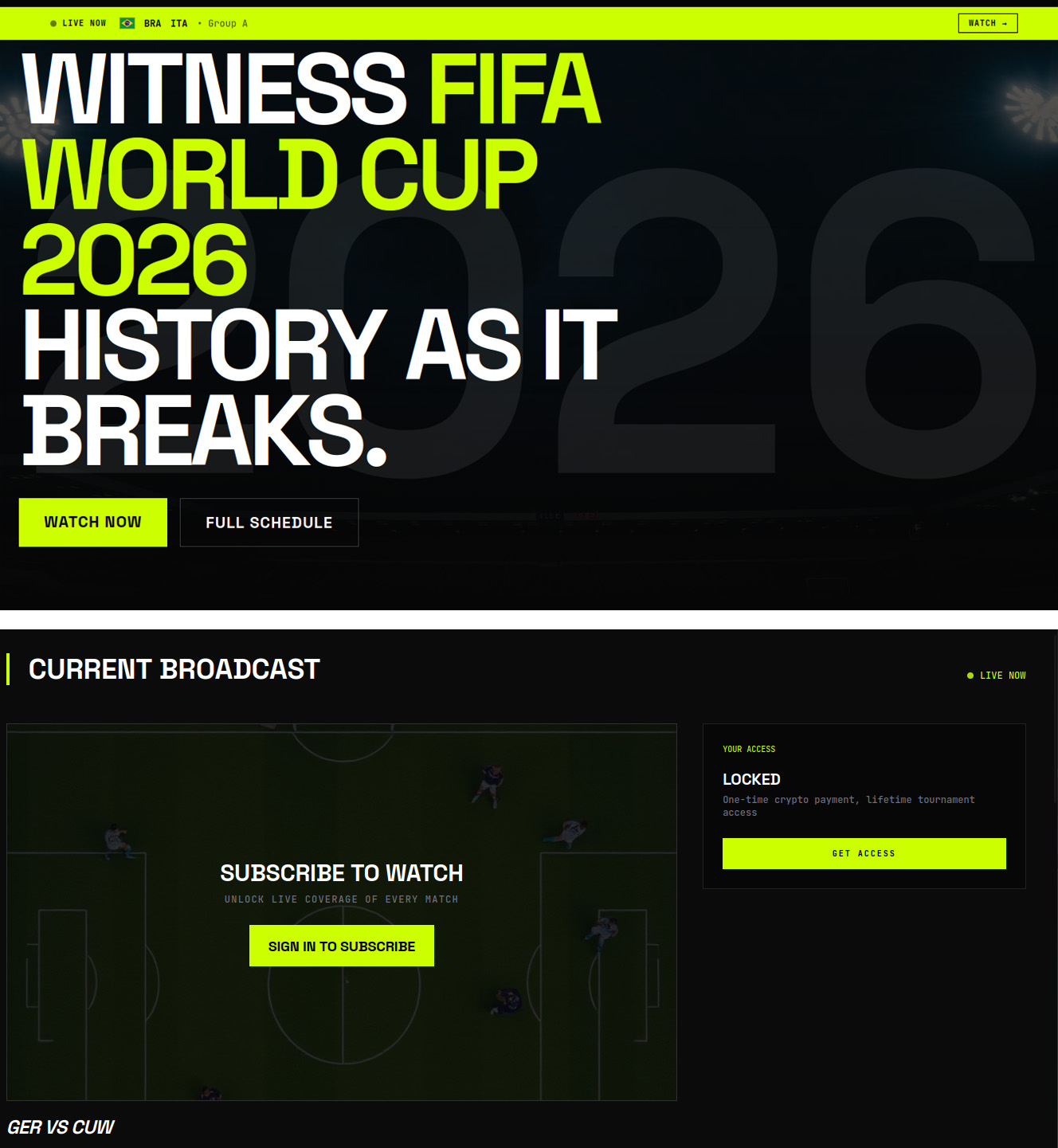
Here’s how the scam plays out: cybercriminals set up fake websites promising free access to World Cup match streams. But the moment you click Watch Now, you’re prompted to sign up and then pay for “lifetime access” to the entire tournament. In the example below, they’re asking for cryptocurrency — which is still a bit unusual, since scammers typically prefer good old-fashioned bank cards.
An example of a fake video streaming website requiring users to register and pay with cryptocurrency to watch all World Cup 2026 matches
Fans who are desperate to catch their favorite teams live risk losing not just their money, but also their personal data, which hackers can later weaponize in targeted phishing attacks.
A losing bet
Match result predictions and sports betting always skyrocket in popularity during the World Cup, and scammers waste no time cashing in on the trend. And behind the flashy slogans lie classic scam tactics.
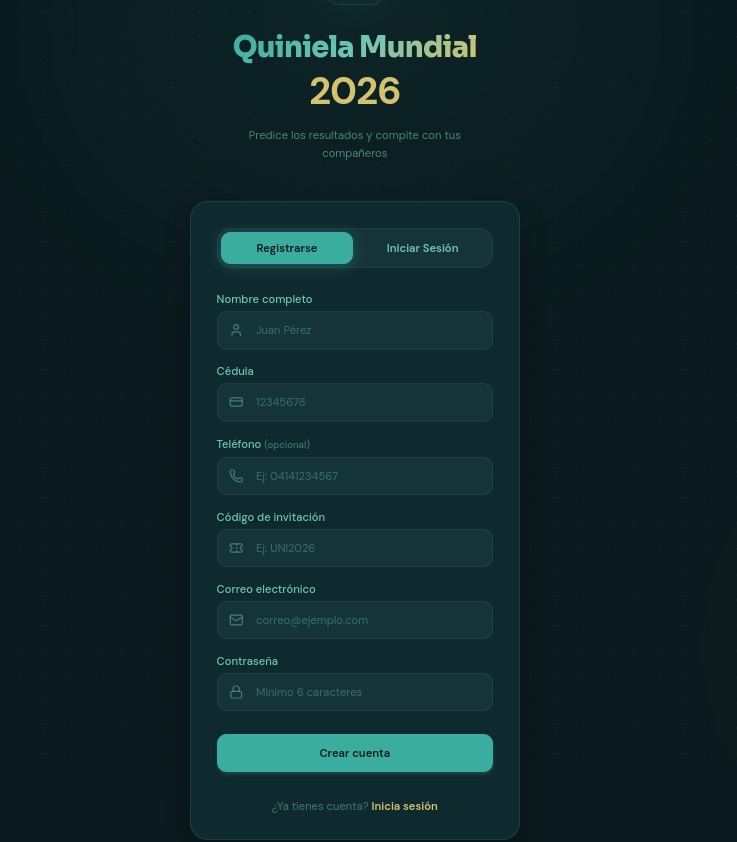
Take this beautifully designed Spanish-language website. To sign up, it demands a massive amount of personal information, including your full name, national ID number, email address, and phone number — and, of course, it asks you to create a password. If a victim uses the exact same password for multiple accounts, they’re essentially handing the keys to their digital life over to cybercriminals.
To guess match outcomes on this site, you have to hand over way too much personal info — everything short of biometrics
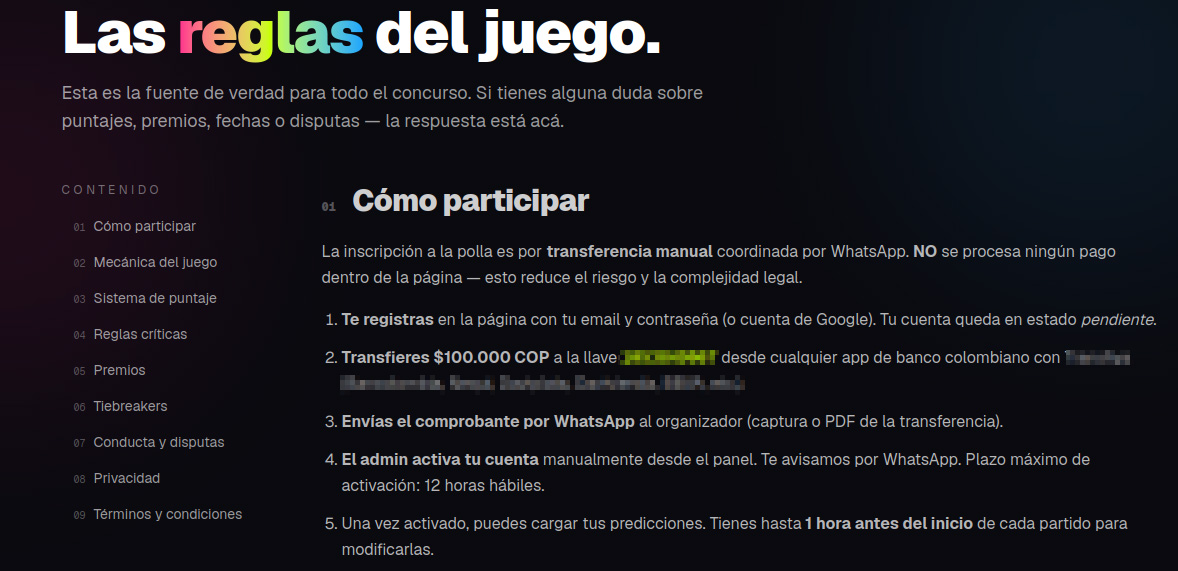
Another site, specifically targeting users in Colombia, turned the sign-up process into a paid ordeal — and it features every trick in the book.
To “verify” your profile, you’re forced to use WhatsApp under the guise of avoiding legal complications.
Before your account is activated, you must make a deposit. This means sending 100 000 Colombian pesos (about $29) to a specified account and texting the receipt to an “administrator” on WhatsApp.
Next, you’re told to wait 12 hours for the “administrator” to manually activate your profile.
Only after all of this do the scammers tell you can place unlimited bets (of course not true).
These scammers built a whole website, but they do all their business over WhatsApp. That’s a red flag!
In many countries — including Colombia — sports betting is strictly regulated. Only a handful of licensed operators are legally allowed to run these sites, and users are required by law to verify their identity. Because of this, these shady workarounds can look tempting to people who love to gamble but don’t want to — or can’t — go through the official verification process.
Unfortunately, the scammers always win in this scenario. They walk away with your initial deposit and every single bet you place on their site. At the end of the day, their only real goal is to drain their victims’ wallets for as much as they possibly can.
Discounts for collectors!
The World Cup isn’t just about the matches; it also drives record-breaking sales of collectible merchandise — stickers, scarves, team jerseys, official match balls, and more. Naturally, plenty of scammers are eager to get a piece of that action.
Take a look at this website offering “exclusive, limited-edition” stickers and albums. Notice anything suspicious?
Talk about a steal! Too bad the whole website is a scam
Check out those prices: everything is heavily discounted, even though the tournament is in full swing. All it takes is a quick price check against the real deal to spot the trap. In the screenshot above, the scammers are charging 67 euros for a sticker collection. On actual online marketplaces, that exact same set goes for at least twice as much, and on the official Panini website, it’s three times the price.
Fake websites mimicking popular sporting goods stores also offer to sell you shin guards, socks, jerseys, and any other gear. Of course, you’ll never see the merchandise, and you’ll lose both your money and your bank card details.
When they’ve absolutely no intention of delivering any products, they can easily offer massive discounts and free shipping
Deals that seem too good to be true are one of the biggest red flags. To make matters worse, with the help of AI, fake websites now look just as professional as the real ones, making them harder than ever to spot. That’s why we recommend installing our security suite before you start shopping online. It blocks phishing sites in real time and uses the Safe Money feature to keep your financial data secure.
Soccer by mail
Another attack strategy involves spam campaigns centered around the World Cup. In one email, our experts uncovered an ad for a soccer analytics and betting-tips service. It uses the classic high-pressure playbook: “ONLY 10 SPOTS AVAILABLE” — so hurry up before they run out! Naturally, access comes with a price tag: AU$200.
Spammers hurrying the victim to make a decision as quickly as possible
This scheme targets fans who are into sports betting, and paying for these types of services usually ends one of two ways for them: they either lose their money with zero guarantee of getting actual predictions, or get sucked into an even deeper, multi-step financial trap.
How to avoid falling for the scams
Across all these scenarios, the World Cup is just another convenient pretext for cybercriminals. Once the tournament wraps up, they’ll most certainly pivot back to their usual tricks — like fake job offers or Telegram phishing scams — until the next Olympics or soccer tournament rolls around and they switch right back to sport.
Our research consistently shows that online fraud has evolved into a massive illegal enterprise. You aren’t just up against lone scammers anymore; you’re dealing with large criminal networks. When it comes to defense, the best approach is a proactive one. By installing Kaspersky Premium, you can safeguard all your devices from malware, phishing, spam, and malicious or lookalike websites. Plus, the included Kaspersky Password Manager will generate unique complex passwords, securely store your sensitive data — like documents and bank cards — and stop you from auto-filling your credentials on fake sites.
Watch the games only on legitimate streaming platforms. Don’t trust fake reviews and never enter your bank card information on unverified sites. Keep an eye out not just for sketchy streaming websites, but also for fake IPTV apps. As we’ve covered in detail before, scammers frequently use these to infect your devices with Trojans.
Shop smart. The best way to avoid getting ripped off is to buy merchandise exclusively through official channels (where you won’t see suspiciously deep discounts), or simply buy your gear in person at official retail locations.
Don’t click suspicious links. If a deal that’s too good to be true lands in your inbox — whether it’s exclusive betting tips or anything else — just ignore it and hit delete.
Avoid logging in through Telegram bots. At the very least, this saves you from future headaches and annoying spam. At best, it keeps your account from being hijacked and your crypto from being stolen.
Switch to passkeys wherever possible. Unlike traditional passwords, which are easily stolen and can be typed into any fake login page, a passkey is cryptographically tied to a specific website and won’t work on a phishing page. Kaspersky Password Manager can easily store and sync your passkeys across all your devices.
What other ruses do scammers use to make a quick buck? Check out our other posts:
What would you trade for a technology that can do almost anything? For many people, the answer is clear: Everything they thought they could trust.
In a few, short years, Artificial Intelligence (AI) tools have granted people unfettered access to easier writing, faster image generation, quicker coding, and near-instantaneous answers, advice, and information—advantages they value and want. But the same tools that can spruce up a dating profile or reimagine an old photograph can also manipulate the broader world online, and people are noticing.
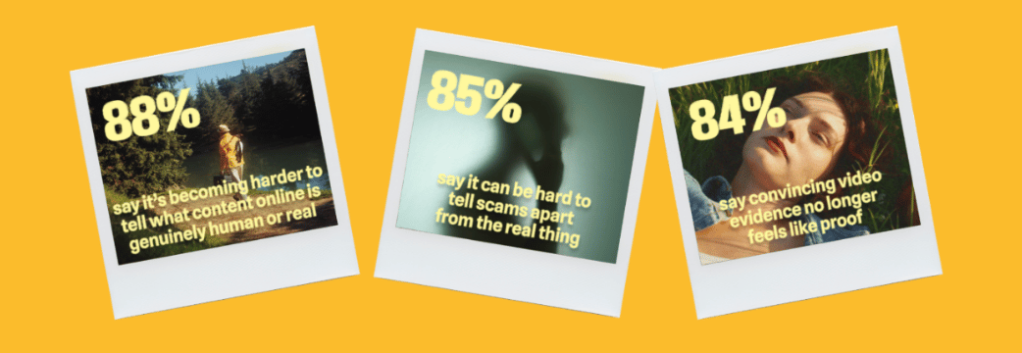
According to new research from Malwarebytes, 88% of people said it’s becoming harder to tell what content online is genuinely human or real, with 84% saying that “convincing video evidence” no longer feels like proof. Further, 85% said it can be hard to tell scams apart from the real thing—a major uptick from the 66% who said the same thing last year.
These are the first signs of AI’s counterfeit world. Replete with fake websites, fake products, fake videos, fake pictures, fake voices, and even fake people, it is threatening to swallow the web.
The damage arrives in large moments and small, from the US parent who said they “received a voicemail that sounded exactly like my son’s voice, saying he was in trouble and needed money for legal fees,” to the two entirely unrelated respondents fooled by the same AI-generated video of rabbits bouncing on a trampoline, to the individual worried about “my grandfather showing me AI slop and he thought it was real.”
For this research, Malwarebytes surveyed 1,500 adults aged 18 and older across the US, UK, Austria, Germany, and Switzerland about their uses, feelings, and concerns regarding AI. The sample was equally split for gender with a spread of ages, geographical regions, and race groups, and weighted to provide a balanced view.
The complete findings can be found in the full report:
88% said it’s becoming harder to tell what content online is genuinely human or real
84% said convincing video evidence no longer feels like proof
85% of people said it’s hard to tell a scam from the real thing (up from 66% last year)
50% have experienced some form of AI fraud or scam, such as being misled by AI-generated photos of products or receiving a highly personalized scam message
19% have specifically experienced some form of AI-driven identity harm, including the 10% who have had someone use AI to generate sexually explicit content of them without permission
81% fear someone stealing their family’s likeness, yet only 13% have created a family codeword to guard against it
67% worry about voice cloning, yet only 19% have turned off voicemail recordings to prevent it
45% say it’s okay to use AI for personal emotional tasks (like writing wedding vows or a eulogy)
34% say it’s okay to use AI to help create or improve a dating profile
One in three self-avowed daily users of AI said it’s okay to generate explicit images of someone without their consent
Defeat would be the wrong lesson to take from all this. It is true now that the internet requires assistance, but there are plenty of safe places to seek help.
While Malwarebytes works to provide new tools, we’d like to remind both the AI anxious and the eager about the first rule of the internet: Remember the human. People’s voices, bodies, choices, and agency belong to them and them alone.
As for every fake video, product, website, and image, understand that there’s help. No one needs to navigate an artificial internet alone. Whether through scam detection, identity protection, and simple awareness, people have more options than they may realize.
It starts with the familiar: a short message, a trusted name, a routine tone. Delivery updates, work pings, brand alerts hum in the background, rarely attracting scrutiny. You check, you answer… — until minutes later you’ve slipped into a trap built to lower your guard and hijack your trust.
That’s why messaging scams cut deep: they exploit everyday habits where instinct, not caution, leads. Communication once moved slowly, leaving room for doubt. Now it’s instant — and that speed is a weapon in criminal hands.
On our blog, we’ve already examined numerous scam schemes in messaging apps — from pig butchering, where the victim is groomed for a very long time, or catfishing, where the scammer creates a fake identity, to phishing via chatbots or through gift-giving campaigns in messaging apps.
Now, for the first time, Kaspersky has set out to capture the full end-to-end reality of messaging-based scams to understand how quickly harm occurs, how they impact trust and what remains after the interaction ends. What emerges is a highly organized and industrialized scam ecosystem embedded within everyday messaging channels such as SMS, WhatsApp, and email.
Kaspersky experts have prepared a report on targeted scams in messaging apps, detailing not only the financial but also the emotional damage caused by such attacks, as well as providing tips on how to protect yourself and avoid them. In this post, we explore the most interesting facts, but you can find more details in the full report.
The damage is underestimated
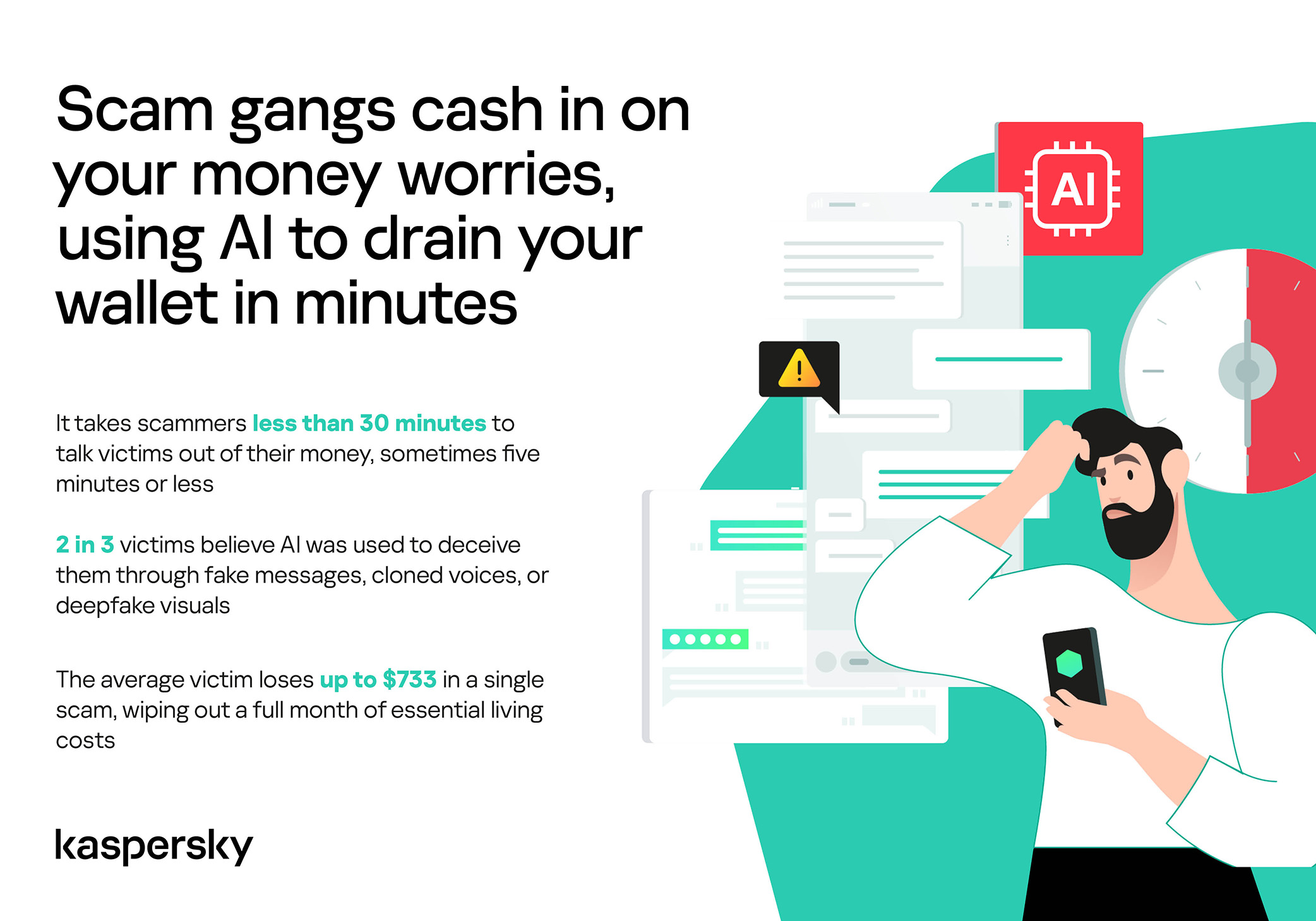
How much do you think a single successful attack via a messaging app costs the average victim? Ten dollars? Or maybe 50? You’re underestimating the scammers. Although more than a third (36%) of victims incur losses of less than $135, on average a victim loses… $733!
Country
Average loss per victim
Senegal
$392.94
Serbia
$493.32
Morocco
$504.28
Greece
$609.32
United Kingdom
$617.38
Côte d’Ivoire
$654.11
Spain
$672.67
United States
$724.73
Portugal
$868.20
Italy
$896.02
France
$1,193.58
Germany
$1,369.35
The average amount lost by a victim in a successful attack via a messaging app
On the one hand, the financial hit doesn’t look catastrophic in isolation. These are micro-losses by design. Small enough that some never report them to the police. Small enough that banks don’t always investigate. Small enough to be dismissed as bad luck rather than organized crime.
But $733 is not nothing. It’s enough to cover a month’s worth of groceries, school or daycare fees, or utility bills. Against the backdrop of the global cost-of-living crisis, a single such loss can seriously dent a family’s budget.
In 11% of cases, losses exceed $1,350, and more than a quarter of victims (28%) report having been scammed three or more times in the past six months. Once scammers discover that a phone number responds, that contact becomes an asset, circulating from one database to another.
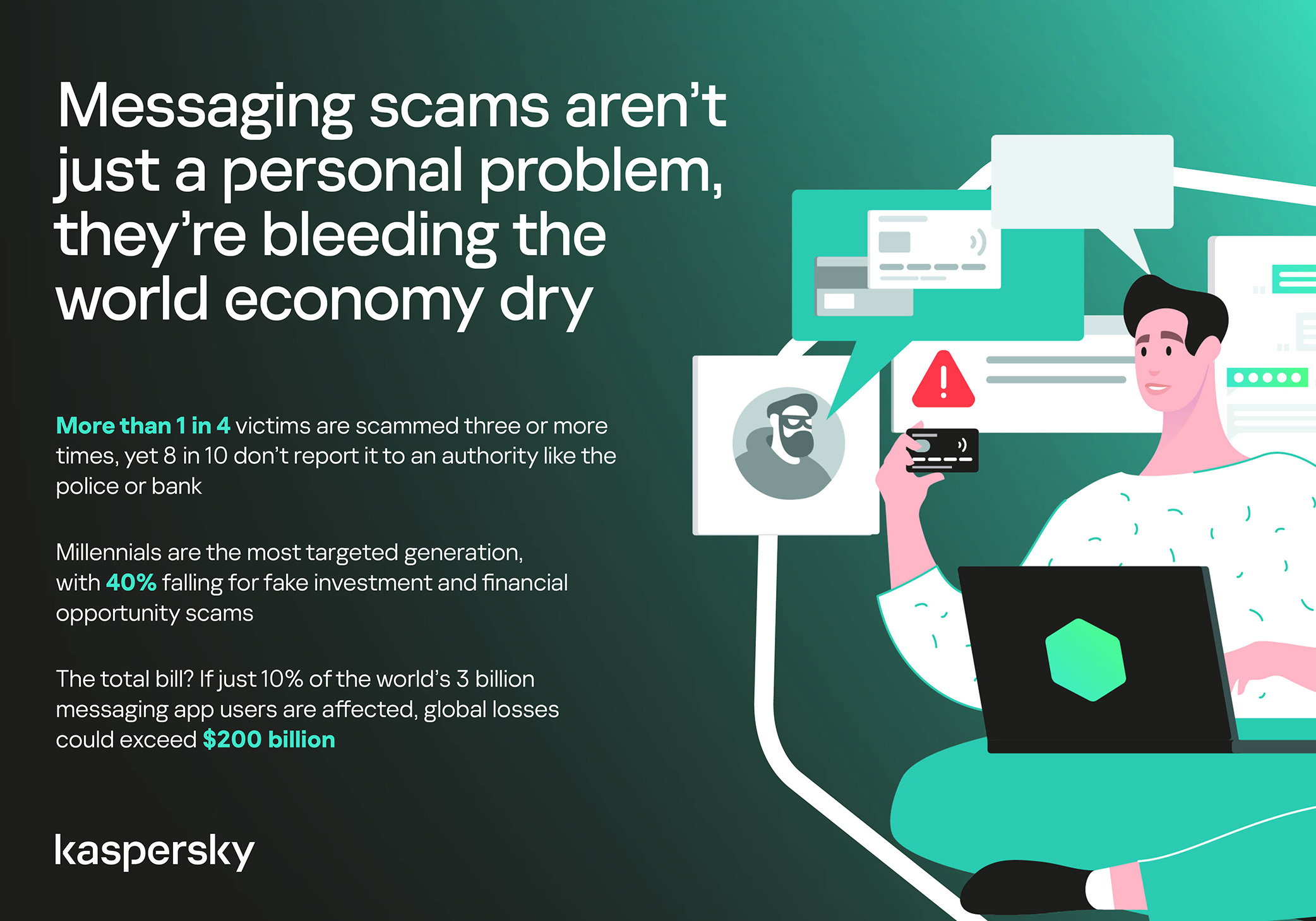
Now imagine the scale of the problem: if just 10% of the three billion messaging‑app users worldwide fell victim with the average loss, the total damage would amount to… nearly $220 billion! This is comparable to the GDP of Greece, and exceeds that of Morocco, Serbia, or Côte d’Ivoire.
It becomes clear that behind the daily flood of fraudulent schemes lie large scam cartels operating on an industrial scale, using AI to personalize messages that mimic those of family members, friends, and familiar brands. This, in essence, forms the basis of a full-fledged economy built on digital identity theft.
Speed beats scrutiny
More than half of successful messaging scams (52%) unfold in under 30 minutes — from first contact to the moment money or personal data changes hands — or even faster, before the victim begins to doubt the legitimacy of the sender. In fact, one in seven scams takes less than five minutes — quicker than boiling an egg!
The speed isn’t accidental. It’s the method. Scammers structure their schemes to deny the victim a chance to come to their senses. Every element is engineered to compress the decision-making window: the urgency of the scenario, the familiarity of the format, the plausibility of the request.
They rush you — faster, faster, don’t tell anyone, you only have a few minutes, solve the problem, don’t ask questions. Click the link, fill in the details, approve the transaction, or else… Or else what? The scammers’ imagination knows no bounds here, but if you don’t do something right now, you’ll definitely regret it.
Alas, the realization of what has happened usually comes when the damage is already irreversible. More than half of victims (51%) lose money; another 43% hand over their personal data — most commonly phone numbers, names, and email addresses — to scammers, and often the victim loses both.
Where and how attacks occur
A delivery notification, a bank alert, a message from a merchant you ordered from last week — messaging apps permeate every aspect of everyday life, making such interactions completely normal. An attack shouldn’t feel like an attack. It should feel like the same message you’ve received hundreds of times.
It’s no surprise that scammers focus their attention on this method of communication first and foremost. The most popular platforms for scams are predictable: WhatsApp (43%), SMS/iMessage (40%), Facebook (27%), Telegram (22%), and Instagram (19%) — these are the ones that people trust most.
A wide variety of schemes is used. Brand impersonation is now one of the three most common types of messaging scam worldwide — accounting for 31% of cases. Fake delivery notifications top the list at 38%, followed by investment scams at 37%.
At the same time, nearly two-thirds (63%) of fraudulent schemes span multiple platforms, moving from SMS to WhatsApp, from WhatsApp to Telegram, etc. In this way, scammers achieve two goals: they mimic organic messaging and evade moderation algorithms.
AI has taken scams to a new level
Just a couple of years ago, fraudulent messages gave themselves away with bad grammar, awkward phrasing, illogical requests, and an obsessive sense of urgency. Today, a phishing message looks, sounds, and reads just like the real thing.
Scam cartels want to catch people in motion — between meetings, on a commute, or during everyday tasks — when your attention is already fragmented. They mimic your mother’s turn of phrase. They match your bank’s tone of voice. They copy your courier’s format exactly. They mirror the rhythm, structure, and style of authentic brand communications across messaging platforms. And AI is accelerating all of it.
What this creates is overlap. Legitimate and fraudulent messages appear in the same environment, using the same formats, language, and triggers. The difference between them is no longer obvious.
The data shows that two-thirds of victims (66%) believe AI was used in the scam against them, 42% cite messages written by AI, 31% report generated or cloned voices, and 25% encountered deepfake images or videos.
That’s why mere awareness and “tech-savviness” may no longer be enough to protect oneself. From Gen Z to Gen X, messaging scams cut across every generation.
And what about the emotional toll?
But money is far from the only problem a victim is left with after an attack. After what they’ve been through, people develop distrust toward incoming messages, unfamiliar numbers, and any requests for action. As a result, 99% of fraud victims say they no longer trust incoming notifications in messaging apps.
This creates a crisis of trust in all digital channels in general. Every legitimate message can now be perceived as a scam. Brands, banks, and delivery services are forced to operate in an environment where the customer is, by default, in a state of distrust.
Dr. Elizabeth Carter, a forensic linguist and criminologist at Kingston University in London, notes that scammers use familiar contexts, common social settings and embedded linguistic norms to create the illusion for the victim that their decision-making is rational and reasonable in the moment. However, what is actually happening is that they construct false realities in which those decisions end up causing financial and psychological harm. She also notes that it is very hard to identify a false reality while you are in it.
After realizing they had been deceived, more than half of victims felt anger — the kind that comes from having trusted something and discovering it was used against you. 42% of victims report frustration, 38% — feeling upset. Moreover, several months later, these feelings haven’t gone away: nearly half of all victims (48%) are still angry, a third (33%) remain frustrated, and 30% are upset.
And nearly one in 10 victims don’t tell anyone what happened. They feel shame, a sense of having fallen for something so obvious. This leaves a significant portion of the actual damage unreported: only 24% of victims contact the police, and only 23% report it to their bank.
So what can be done?
The crisis of trust — and even a touch of paranoia — that has arisen due to widespread attacks on users can linger in victims’ minds for a long time, affecting their quality of life. To prevent this, follow these guidelines:
Pause before you act. The sense of urgency you feel is almost always artificial. A legitimate bank, retailer, or delivery service won’t penalize you for taking 30 seconds to verify before clicking a link or confirming details. It’s precisely this instinct to resolve the situation quickly that scammers are counting on.
Verify through another channel. If a message appears to be from a relative, colleague, or company you trust — contact them through another channel before taking any action. Use secure verification methods, and cross-check identities when something doesn’t feel right. For families, agreeing on a “safe word” in advance can defeat even the most convincing voice clones.
Use a password manager. It will not only help you generate strong, unique passwords for all your accounts and store them securely, syncing them across all your devices, but also protect you from spoofed sites. Even if you click a phishing link and land on such a site, our password manager will notify you about the domain mismatch and refuse to autofill your username and password.
Use protection that works in real time. Modern security solutions, such as Kaspersky Premium, provide real-time protection against malicious links and phishing attempts in the apps and websites you use every day. On Android devices, a dedicated layer of anti-phishing security scans and neutralizes suspicious links as they appear, even within notifications, before you even have a chance to click them.
We’ve covered other threats in messaging apps in similar articles:
A suspicious website is a web resource that cannot be definitively classified as phishing, but whose activities are unsafe. Such sites manipulate users, tricking them into voluntarily transferring money for non-existent services, signing up for hidden subscriptions, or disclosing personal data through carefully crafted terms of service. These include fake online stores, dubious crypto exchanges, investment platforms, and services with paid subscriptions.
Kaspersky has introduced a new web filtering category, “Sites with an undefined trust level,” into its security products (Kaspersky Premium, Android and iOS apps, etc.). The system analyzes the domain name and age, IP address reputation, DNS configuration, HTTP security headers, and SSL certificate to automatically detect suspicious resources.
According to Kaspersky data for January 2026, the most widespread global threat is fake browser extensions that mimic security products — they were detected in 9 out of 10 regions analyzed worldwide. Such extensions intercept browser data, track user activity, hijack search queries, and inject ads.
Kaspersky’s regional statistics reveal the specific nature of these threats: in Africa, over 90% of the top 10 suspicious websites are online trading scam platforms; in Latin America, fake betting services predominate; in Russia, fake binary options brokers and “educational platforms” with fraudulent subscriptions lead the way; in CIS countries — crypto scams and bots for inflating engagement.
Key indicators of a suspicious website to check: a strange domain name with numbers or random characters, cheap top-level domains (.xyz, .top, .shop), a recently registered domain (less than 6 months old according to WHOIS data), unrealistic promises (“100% guaranteed income,” “up to 300% profit”), lack of company contact information, and payments only via cryptocurrency or irreversible bank transfers.
Introduction
The online landscape is filled with various traps lying in wait for users. One such threat involves websites that can’t be strictly classified as phishing, yet whose activities are inherently unsafe. These sites often operate on the fringes of the law, even if they aren’t directly violating it. Sometimes they use a cleverly crafted Terms of Service document as a loophole. These agreements might include clauses such as no-refund policies or forced automatic subscription renewals.
Fake online stores, dubious financial platforms, and various online services that mimic legitimate business operations are all categorized as suspicious. Unlike actual phishing sites, which aim to steal sensitive data like banking credentials or passwords, these suspicious sites represent a far more cunning trap. Their goal is manipulation: tricking the victim into willingly paying for non-existent goods and services or signing them up for a subscription that’s nearly impossible to cancel. Beyond financial gain, these sketchy websites may also hunt for personal data to sell later on the dark web.
Our solutions categorize them as having an “undefined trust level”. This article explains what these sites look like, how to identify them, and what you can do to stay safe.
The dangers of shady websites
One of the biggest risks associated with making a purchase from an untrusted website that seems to be an online store is the financial loss and falling victim to fraud. Fake shops will entice you with attractive deals to get you hooked. After you pay, you may never receive what you paid for, or you may receive some cheap piece of unusable junk instead of the item you ordered. Investment or “guaranteed income” programs are another type of classic scam — they promise rapid returns, and once they take your deposits, they disappear without a trace.
Visiting or buying from untrusted suspicious websites can expose you to various risks that go beyond a single bad purchase. Fraudulent websites often collect your personal information even if you do not end up making a purchase. By completing a form or signing up for a “free offer”, you may be providing the scammer with access to your information.
Personal data collection can happen in a fairly straightforward and obvious way — for instance, through a standard order delivery form. In this scenario, attackers end up with sensitive information like the user’s full name, shipping and billing addresses, phone number, email address, and, of course, payment details. As we’ve previously discussed, fraudsters sell this kind of information, and there’re countless ways it can be used down the line. For example, this data might be leveraged for spam campaigns or more serious threats like stalking or targeted attacks.
Common types of suspicious sites
Let’s take a closer look at the different types of shady sites out there and how interacting with them can lead to financial loss, data leaks, the unauthorized use of personal information, and other consequences.
It’s worth noting that rogue websites can masquerade as legitimate ones in almost any industry. The first type of fraudulent site we’ll look at is fake online stores. These can appear as clones of real brand websites or as standalone stores. Usually, the scam follows one of two paths: the buyer either receives a counterfeit or poor-quality product, or they receive nothing at all. These sites lure victims in with suspiciously low prices and “exclusive” deals. Often, users are subjected to psychological pressure: the time to make a purchase decision is purposefully limited, provoking the victim, as with any other scam, into making an impulse purchase.
Another common type of shady site includes online exchanges and trading platforms. These primarily target cryptocurrency, as the lack of legislative regulation for digital currency in certain countries makes them a magnet for fraudsters. These suspicious sites often lure victims with supposedly favorable exchange rates or other enticing gimmicks. If the user attempts to exchange cryptocurrency, their tokens are gone for good. Beyond simple exchanges, rogue sites offer investment services and even display a fake balance growth to appear credible. However, withdrawing funds is impossible; when the victim tries to cash out, they’re prompted to pay some fee or fictional tax.
Subscription traps are also worth noting, offering everything from psychological tests to online video streaming platforms. The hallmark of these sites is that they deliberately withhold critical information, such as recurring charges, or hide the fact it even exists. Typically, the scheme works like this: a user is offered a subscription for a nominal fee, like $1. While that seems attractive, the next charge – perhaps only a week later – might be as much as $50. This information is intentionally obscured, buried in fine print or tucked away in the Terms of Service where it’s harder to find. Legitimate services always clearly disclose subscription terms and provide an easy way to cancel before a trial period ends. Scam services, on the other hand, do everything possible to distract the user from the actual terms of use and subscription.
Shady sites can also masquerade as providers of mediation services, such as legal or real estate assistance. In reality, the service is either never delivered or provided in a stripped-down, incomplete form. For example, a user might be prompted to pay for a service that’s normally provided for free. The danger here lies not only in losing money for non-existent services but also in the significant risk of exposing personal data, such as ID details, taxpayer identification numbers, social security numbers, or driver’s license information. Once in the hands of attackers, this data can become a tool for executing further scams or targeted attacks.
On the whole, suspicious sites are fairly difficult to distinguish from legitimate, trustworthy services. Masquerading as a legitimate business is the primary goal of these sites, and the fraudulent schemes they employ are not always obvious. Nevertheless, there are protective measures as well as certain indicators that can help you suspect a site is unsafe for purchases or financial transactions.
How to identify suspicious or fraudulent websites
Despite the increasingly convincing attempts to create fake shops, the majority of them still lack the quality of real online stores, and there are many signs that may give them away. Some of these signs can be caught by the eye while others require a bit of technical investigation. By combining visual inspection, technical checks, and trusted online tools, you can protect yourself from financial loss or data theft.
Visual and manual clues
You don’t need to be a cybersecurity expert to catch many red flags just by observing the site’s domain, visuals, language and behavior. For instance, scam sites often have strange or randomly generated names, filled with numbers, underscores, hyphens, or meaningless words, like best-shop43.com. In addition, such vague top-level domains as .xyz, .top, or .shop are also frequently used in scams because they’re cheap and easy to register.
Furthermore, most fake stores sites look unprofessional, with poor visuals, pixelated images, mismatched fonts, or copied templates. Many fraudulent websites borrow layouts or logos from other brands or free templates, which makes them appear generic and sketchy.
Another major giveaway lies in the content itself. Be aware of persuasive language, unrealistic promises, or emotional triggers such as No KYC, Risk-free returns, 100% guaranteed income, Up to 300% profit, or Passive income with zero effort. Unrealistic deals are another red flag. If the products are listed at extremely low prices, continuous countdown timers, and “limited time only” messages that are often used to pressure you into making a quick purchase, it’s a clear tell of a fraudulent website.
Legitimate businesses always provide verifiable contact details, such as a physical address, company name, and customer support. On the contrary, scam sites hide this information. You may also notice the non-functioning pages, broken or suspicious links leading to unrelated external sites which indicate poor maintenance or malicious intent.
Another important signal is the website’s social media presence. Legitimate online businesses usually maintain at least one active social media account to promote their products and communicate with customers. In most cases, these businesses have long-established social media accounts with harmonized posting history and engagement from real users, consistency between the brand website and social media profiles (same name, logo, and links). The links to social media profiles from the website are usually direct. In contrast, fraudulent or deceptive websites often lack any meaningful social media presence or display signs of superficial or artificial activity. This may include missing social media accounts altogether, social media icons that lead to non-existent, inactive, or unrelated pages, or recently created profiles with very few posts and minimal user engagement. In some cases, comment sections are disabled or dominated by spam and automated content, suggesting an attempt to avoid public interaction rather than engage with customers.
Lastly, the payment options offered by the site can also tell a lot about its legitimacy. Be extremely cautious if a website only accepts cryptocurrency, wire transfers, or third-party P2P payments. These payment methods are irreversible and are preferred by scammers. Legitimate e-commerce platforms typically offer secure and reversible payment options, such as credit cards or trusted payment gateways that include buyer protection policies.
However, the absence or existence of any of these factors alone does not necessarily indicate malicious intent. It should be evaluated in combination with technical, linguistic, and behavioral indicators, rather than treated as a standalone signal of legitimacy.
Technical indicators to check
Looking into technical signs can reveal whether a website is trustworthy or potentially fraudulent.
One of the first things to check is the domain age. Scam websites are often short-lived, appearing only for a few weeks or months before disappearing once users start reporting them. To check when the domain was created, use a WHOIS lookup. If it’s less than six months old, be cautious — especially for e-commerce or investment sites, where legitimacy and trust take time to build.
Let’s take a look at the registration details for the popular online marketplace Amazon. As we can see from the WHOIS information, it was registered in 1994.
Meanwhile, a reported suspicious online store was created a couple of months ago.
Legitimate websites usually operate on stable hosting platforms and remain on the same IP addresses or networks for long periods. In contrast, fraudulent websites often move between servers (in most cases using a cheap shared hosting service) or reuse infrastructure already associated with abuse. Checking the IP address reputation can reveal if the website or the hosting server has previously been linked to suspicious activities. Even if the website looks legitimate, a poor IP reputation can expose it.
In addition to that, looking at the infrastructure behavior over time can reveal patterns about its legitimacy. Websites associated with fraudulent activity often show short lifespans, sudden spikes in activity, or rapid appearance and disappearance, which indicates a coordinated campaign rather than a legitimate business.
Another important clue is hidden ownership. When the WHOIS details show “Redacted for Privacy” or leaves the organization name blank, it may indicate that the website owner is deliberately hiding their identity.
We should point out that while this can raise suspicion during investigations, hidden WHOIS data is not inherently malicious. Many legitimate businesses use privacy protection services for valid reasons. These may include protection from spam and phishing after public email addresses are taken from WHOIS databases, personal safety for small business owners, and brand protection to prevent competitors or malicious actors from targeting the registrant. This means that some businesses can use services like WHOIS Privacy Protection, Domains By Proxy, or PrivacyGuardian.org to remove the WHOIS data while still operating transparently on their websites through clear contact details, customer support channels, and legal pages (e.g. terms of use).
Therefore, hidden ownership should be treated as a contextual risk indicator, not a standalone proof of fraud. It becomes more suspicious when combined with other signals such as newly registered domains, and lack of legal information.
Next, you can check the security headers of the website. Legitimate websites are usually well maintained and include several key HTTP headers for protection. Some examples include:
Content-Security-Policy (CSP) provides strong defense against cross-site scripting (XSS) attacks by defining which scripts are allowed to run on the site and blocking any malicious JavaScript that could steal login data or inject fake forms.
HTTP Strict-Transport-Security (HSTS) forces browsers to connect to the site only over HTTPS. It ensures all communication is encrypted and prevents redirecting users to an insecure (HTTP) version of the site.
X-Frame-Options prevents clickjacking, which is a type of attack where a legitimate-looking button or link on a malicious page secretly performs another action in the background.
X-Content-Type-Options blocks MIME-type attacks by preventing browsers from misinterpreting file types.
Referrer-Policy controls how much information about your previous browsing (referrer URLs) is shared with other sites.
These headers form the “digital hygiene” of a website. Their absence doesn’t always mean a site is malicious, but it does suggest a lack of security awareness or professional maintenance — both strong reasons to be cautious.
You should also check the SSL certificate. Scam sites may use self-signed or short-lived SSL certificates. You can inspect this by clicking the padlock icon in your browser’s address bar — if it says “not secure” or the certificate authority seems unfamiliar, that’s a red flag.
You can check the security headers and the SSL certificate by sending an HTTP request programmatically or by using some online service.
Another indicator that provides insight into how well a website is done and managed is DNS configurations. Legitimate businesses typically use reliable DNS providers and maintain consistent DNS records. Missing the name server NS or mail exchange MX records may indicate poor DNS configuration. In addition to NS and MX, reputable sites also configure SPF and DMARC records to protect their brand from email spoofing and phishing. Something scam website developers won’t bother with because they don’t intend to build a long-standing reputation.
You can check the configurations of DNS records either programmatically or by using an online service.
Another recommendation is to pay attention to website behavior. If there are frequent redirects, pop-up ads, or background requests to unknown domains, this may indicate unsafe scripting or tracking.
How to protect yourself
Tools and databases for detecting suspicious websites
We at Kaspersky have built an intelligent system for detecting suspicious web resources and added this new type of protection into many of our products, including Kaspersky Premium, Kaspersky for Android and iOS, and others. Our detection model is based on many factors, including but not limited to the following:
domain name and age,
IP reputation,
stability of the infrastructure used,
DNS configurations,
HTTP security headers,
digital identity and popularity of the web resource.
When a user tries to visit a site flagged as having an undefined trust level, our solutions show a warning to stop the visitor from becoming a victim of personal data leaks, financial losses or a bad purchase:
This component is on by default.
Moreover, there are several online tools and databases that can help assess a website’s legitimacy:
ScamAdviser analyzes trust based on WHOIS, server location, and web reputation.
APIVoid provides risk scoring using DNS, IP, and domain reputation databases.
National government databases often maintain official lists of fraudulent or blacklisted domains.
Preventive measures
To protect yourself from such threats, it might a good idea to take some additional preventive measures. Always double-check the URL and domain name, especially when you are about to click a link or make a payment. Make sure the site uses HTTPS and has a trusted certificate.
You can use standard browser tools to verify site security. For example, in Google Chrome, clicking the site information button (the lock or settings icon in the address bar) displays details about the connection security and the site’s certificate.
In the Security section, you can check whether the site supports HTTPS – it should say “Connection is secure” – and view the site’s digital certificate.
Additionally, keep reliable security software with real-time protection running on your device to stop you from accessing dangerous websites. Do not download any files or enter your personal information on websites that look unprofessional or suspicious. And finally, remember the golden rule: if a deal seems too good to be true, it often is.
If you realize that you’re on a scam website, it’s important to perform certain post-incident actions immediately. First, contact your bank or payment provider as soon as possible to block the transaction or card. Then, change your passwords for the services which might have been compromised, and run a full antivirus scan on your device to detect and remove any potential threats. Lastly, consider reporting the website to the cybercrime agency in your country or to the consumer protection agency. Sharing your experience online by leaving a review or warning will give notice to potential customers alike.
By staying careful and taking quick actions, you can significantly reduce the chances of being a target and help make the internet a safer place for everyone.
An overview of detection statistics for sites with an undefined trust level
To illustrate the types of suspicious sites prevalent in various regions around the world, we analyzed anonymized detection data from Kaspersky solutions for the “websites with an undefined trust level” category in January 2026. For each region, we identified the 10 most frequently encountered sites and calculated the share of each within that list. To maintain privacy, specific domains are not listed directly; instead, they’re described based on their functionality and characteristics.
Most visited suspicious sites
First, let’s examine the sites that appear across multiple regions, indicating a high prevalence.
In 9 out of the 10 regions analyzed, we encountered a suspicious image processing platform (*a*o*.com). This site positions itself as a photo editing tool, but in reality, it serves as an intermediary server for uploading images used in phishing and other campaigns. By interacting with such a site, users risk exposing personal data under the guise of uploading images or falling victim to a phishing attack.
Percentage of the *a*o*.com domain detections by region, January 2026 (download)
This site has the largest share of detections in the Russian Federation, where it ranks first in the TOP 10 with a 40.80% share. It is also prevalent in Latin American countries (21.70%) and the CIS (14.64%), while it’s least common in Canada at 0.24%.
The next site appeared in 7 regions. It consists of a landing page for a fake antivirus solution presented as a browser extension (*n*s*.com). This extension redirects the user to a fake search engine page allowing it to collect data and track user activity, specifically search queries.
Percentage of the *n*s*.com domain detections by region, January 2026 (download)
This site is most frequently detected in South Asia, with a share of 33.31%. Its presence in Canada and Oceania is roughly equal (15.47% and 15.09%, respectively). We recorded the lowest number of detections in Africa, at 2.99%.
Another suspicious browser extension appeared in the TOP 10 in 6 out of the 10 regions. It’s a fake privacy-enhancing tool hosted at *w*a*.com. Instead of providing the advertised privacy features, this extension carries a high risk of intercepting browser data. It can modify browser settings, harvest user data, and swap the default search engine for a fake one. Furthermore, it maintains full control over all browser traffic.
Percentage of the *w*a*.com domain detections by region, January 2026 (download)
This “service” has its largest share, 22.25%, in the Middle East and North Africa, and is also quite common in Canada (16.26%). It’s least frequently encountered in Latin America (5.38%) and East Asia (4.02%).
The site *o*r*.com appeared in five regional rankings. It’s a fake security service promising to provide online safety by warning users about malicious sites and dangerous search queries. This extension has the potential to steal cookies (including session cookies), inject advertisements, spoof login forms, and harvest browser history and search queries. We noted that this site made the TOP 10 in Africa (0.59%), the MENA (Middle East and North Africa) region (4.57%), Europe (5.61%), Canada (7.21%), and Oceania (1.93%).
In 4 out of the 10 regions, we identified several other recurring sites. One of them (*n*p*.xyz) mimics a repository for creative AI image generation prompts while capturing browser data. The domain hosting this site exhibits several red flags: it was recently registered, and the owner’s information is hidden. This site reached the TOP 10 in Africa (0.51%), the MENA region (7.04%), Latin America (22.54%, ranking first in that region), and South Asia (5.91%).
The second service (*i*s*.com) positions itself as a tool for safe searching, protecting the browser from threats, and verifying extensions. However, this is a typical browser hijacker, much like the others mentioned above. It made the TOP 10 in South Asia (8.03%), Oceania (17.97%), Europe (3.90%), and Canada (14.35%).
The third site (*h*t*.com) poses as a private browsing extension. In reality, it’s another potentially unwanted application designed for browser hijacking: it modifies settings, steals sensitive data (cookies, browser history, and queries), and can redirect the user to phishing pages. Users have specifically noted the difficulty involved in removing the extension. This site appears in the TOP 10 for the MENA region (10.17%), Canada (7.06%), Europe (3.81%), and Oceania (2.81%).
Another domain (*o*t*.com) that reached the TOP 10 in four regions is a service mimicking a browser extension for safe searching and web browsing. It’s dangerous because it injects ads and steals user data. It’s important to note that such extensions can be installed without explicit user consent – for example, via links embedded in other software. This service holds the number one spot in two regions: Canada (25.72%) and Oceania (30.92%), while also appearing in the TOP 10 for East Asia (8.01%) and Africa (0.88%).
Consequently, we can see that the majority of suspicious sites detected by our solutions worldwide are browser hijackers masquerading as security products. Nevertheless, other categories of sites also appear in the TOP 10.
Next, we’ll examine each region individually, focusing on descriptions of domains not previously covered. For clarity, the sites mentioned above will be marked as [MULTI-REGION], while those appearing in only two or three regions will include the names of those specific areas. We’ll observe several regional overlaps and similarities, allowing us to determine which types of suspicious sites are popular both within specific regions and globally.
Africa
Distribution of the TOP 10 suspicious websites in Africa, January 2026 (download)
The three most prevalent domains in African countries are found exclusively in this region. All of them – *i*r*.world (60.27%), *m*a*.com (22.84%), and *e*p*.com (9.36%) – are potentially fraudulent online trading platforms suspected of using forged licenses. These sites employ classic scam schemes where it’s impossible to withdraw any alleged earnings. In fifth place is a domain we’ll also see in the European TOP 10, *r*e*.com (1.46%): a platform marketed as a tool for retail and semi-professional traders. It charges for services available elsewhere for free. Eighth place is held by a site that also appears in the Russian TOP 10: *a*c*.com (0.56%). This is a dubious AI tool that claims to offer free subscriptions to a premium graphics editor. In ninth place is a domain that also surfaces in the Canadian TOP 10: *u*e*.com (0.53%), a browser extension of the “web protection” variety that we’ve encountered previously.
In summary, the African region is dominated by financial scams within the online trading and brokerage sectors. These include fake platforms that make it impossible to withdraw funds and use fake licenses and classic schemes to steal users’ money. Additionally, Africa sees paid tools that duplicate free services and questionable AI-based subscriptions. The primary threat in this region is financial loss through fraudulent investment-themed sites.
MENA
Distribution of the TOP 10 suspicious websites in the Middle East and North Africa, January 2026 (download)
In the MENA region, the site *a*v*.su holds the top spot with a 28.64% share; notably, this site also appears in the TOP 10 for Russia. It markets itself as a tool for building custom VoIP-PBX systems. However, it has an extremely low trust rating and is frequently associated with phishing, and hidden redirects. Using this service carries significant risks, including data leaks, and financial loss.
Ranked seventh is *a*r*.foundation (6.32%), an AI bot allegedly designed for trading, which we also identified in the TOP 10 for Oceania. This service has been flagged as an investment scam operating as a pyramid scheme with the hallmarks of a Ponzi scheme.
The ranking is rounded out by two domains not found in any other region. The first one, *l*e*.pro (4.42%), is a spoof of a popular betting service. The second, *p*r*.group (2.21%), is a clone of a well-known broker. Both sites are scams.
In the MENA region, the landscape is dominated by fake VoIP services as well as counterfeits of financial and betting platforms, which attackers use to conduct phishing attacks, and perform hidden redirects. A significant portion of suspicious sites consists of fake online privacy tools and browser hijackers masquerading as security extensions. Ponzi schemes and cryptocurrency scams are also prominent. The primary risks for the region are data theft, and financial loss.
Latin America
Distribution of the TOP 10 suspicious websites in Latin America, January 2026 (download)
In Latin America, we identified five popular suspicious sites specific to this region, which is unusual compared to other areas where more overlaps are typically observed. Ranking third with a share of 10.81% is the fake betting platform *b*e*.net. In fifth place is *r*e*.club, an illegitimate clone of a well-known bookmaker, with a share of 7.82%.
Further down the list of local threats are *a*a*.com.br (7.02%), a Brazilian Ponzi scam; *s*a*.com (5.07%), which offers dubious investment programs; and *t*r*.com (4.53%), a potentially dangerous trading platform.
In Latin America, the most-visited suspicious sites are betting-themed scams, including both clones of legitimate sites and those built from scratch. Also prevalent are Ponzi schemes, fake investment programs, and dubious online brokers. A significant portion of these sites consists of browser hijackers posing as crypto platforms and AI bots. The primary threats in Latin American countries include financial loss through gambling and Ponzi schemes, as well as the theft of NFTs and other tokens.
East Asia
Distribution of the TOP 10 suspicious websites in East Asia, January 2026 (download)
In the East Asian TOP 10, we see the highest concentration of domains that are absent from other regional rankings.
In first place, with an 18.77% share, is the fake broker *r*x*.com, which can be used to steal personal data or funds. Second place is held by a crypto-gaming site (16.44%) that we previously encountered in the Latin American TOP 10. Visitors to this site risk losing NFTs and other tokens. In third place is the domain *u*h*.net (11.61%), used for redirects, which can hijack sessions. Following this is *s*m*.com (9.98%), a domain typically used as a browser-hijacking server and for phishing attacks, serving as a link in an infection chain.
Rounding out the local threats in East Asia are the following domains: *e*v*.com (9.37%), utilized in drive-by attacks; *a*k*.com (9.16%), an API-like domain associated with suspicious scripts and extensions; and *b*l*.com (4.38%), a domain potentially used for redirects.
East Asia has a high concentration of region-specific fake brokers, crypto gaming platforms, and NFT marketplaces. The primary threats for this region include the loss of financial data, NFTs, and other tokens, as well as session hijacking.
South Asia
Distribution of the TOP 10 suspicious websites in South Asia, January 2026 (download)
In South Asian countries, we also observe a concentration of local suspicious sites specific to the region.
The second most popular site in the region is *a*s*.com (12.01%), a poor-reputation, high-risk microloan service typical of South Asia. By interacting with these sites, users risk not only losing significant funds but also compromising their overall security. Following this are *v*n*.com with a 9.47% share and *l*f*.com with 8.65%. These domains are employed in various fraudulent schemes, ranging from phishing to spam.
The TOP 10 also includes *s*o*.com (4.80%), a free video downloading service associated with a high risk of infection. The final site we analyzed in the South Asia region is *c*o*.site (1.89%), a pseudo-tool for local SEO optimization that carries the danger of data loss and a high risk of financial fraud through subscription sign-ups.
In summary, the region is dominated by fake antivirus extensions, microloan services, dubious video downloaders, and counterfeit SEO tools. The primary risks for South Asia include financial fraud, phishing and spam distribution, and data theft.
CIS
When analyzing statistics for suspicious sites in CIS countries, we treat Russia as a separate region due to the unique characteristics of its online space which are not found in any other CIS member states. However, we’ve placed these two regions in the same section, as we’ve observed overlaps between them that are not seen in other parts of the world.
Distribution of the TOP 10 suspicious websites in the CIS, January 2026 (download)
The top two sites in the CIS TOP 10 also appear in the Russian TOP 10. The domain *r*a*.bar, which ranks first in the CIS (39.50%), holds the second spot in Russia (15.93%) and is a fake trading site. It’s worth noting that sites in the .bar domain zone are frequently used for scams. In second place in the CIS (15.29%) and sixth in Russia (3.75%) is the domain *p*o*.ru, which is often associated with bots for inflating follower counts and automating community management.
Domains from fourth to eighth place are specific only to the CIS region and don’t appear in the Russian TOP 10. These sites include:
*a*e*.online (8.42%): an online image editor that carries risks of data harvesting
*n*a*.io (6.51%): a high-risk cryptocurrency trading platform
*e*r*.com (3.72%): a site promising free cryptocurrency and posing the risk of compromising visitors’ private keys and digital wallets
*s*o*.ltd (3.70%): a domain with an extremely low trust rating
*s*.gg (3.49%): a scam site masquerading as a play-to-earn blockchain game
The ranking concludes with sites that overlap with the Russian region. *a*.consulting (2.42%) is a fake clone of a binary options site, and *a*.lol (2.32%) is a domain suspected of dubious activity.
The CIS landscape is dominated by fake trading platforms (particularly crypto exchanges), promises of easy profits, play-to-earn scams, and dubious investment projects. We also observe many bots for inflating social metrics and automation. The primary threat in the CIS is the theft of private keys, digital wallets, and funds through investment schemes and lures involving online promotion.
Distribution of the TOP 10 suspicious websites in Russia, January 2026 (download)
The Russian TOP 10 includes three unique domains not found in the rankings of other regions. The first, *n*m*.top (7.84%), is an imitator of a well-known binary options broker. This suspicious site was recently registered and has a tellingly low rating on domain verification services. The second, *t*e*.ru (3.25%), claims to be an educational platform and has a dubious subscription system with a high probability of fraud involving difficulties in canceling subscriptions. The third site, *e*e*.org (3.14%), positions itself as a tool for a popular media platform, but it’s actually a scam that fails to provide its stated services.
Overall, the Russian landscape is characterized by fake binary options brokers and sketchy sites with fraudulent subscriptions posing as e-learning platforms. There are also frequent instances of sites spoofing well-known legitimate services. The primary risks in Russia are scams related to the knowledge business sector, as well as the theft of money and personal data.
Europe
Distribution of the TOP 10 suspicious websites in Europe, January 2026 (download)
In the European region, we’ve found two unique domains. The first of these, *c*r*.org, has been identified as part of a chain for massive phishing and spam attacks. It accounts for a 16.08% share of the TOP 10. The second site, *o*n*.de, is an unofficial reseller with a poor reputation and a high likelihood of fraud. This domain ranks second to last in our statistics with a 5.95% share.
Among the sites not previously covered, the European TOP 10 includes one site that also appears in the Oceania TOP 10: *o*i*.com (6.61%). This is a classic cryptocurrency scam promising passive income.
A significant portion of suspicious sites in Europe consists of intermediary sites for phishing and spam, fake security extensions, and crypto scams. Unofficial sales services and paid trading tools are also on the list. The primary threats in the European region include session hijacking, data theft, spam, and investment fraud.
Canada
Distribution of the TOP 10 suspicious websites in Canada, January 2026 (download)
Canada has been designated as a separate region to illustrate prevailing trends within North America. The first four positions in the Canadian TOP 10 are held by multiregional domains discussed previously. In fifth place is *t*c*.com (10.88%), which also appears in the TOP 10 rankings for Oceania and South Asia. This is yet another browser extension masquerading as a security solution. Occupying the final spot is the domain *e*w*.com (0.17%), which is unique to the Canadian market. This site operates a dropshipping scam, offering products at prices significantly below market value. Customers typically either never receive their orders or get low-quality counterfeits.
The landscape of dubious websites in Canada is largely defined by fraudulent extensions capable of hijacking browser data, tracking user activity, spoofing search queries, harvesting cookies, and injecting ads. This is further compounded by dropshipping schemes involving counterfeit goods. The primary risks for users in Canada include data theft and financial loss from purchasing substandard products.
Oceania
Distribution of the TOP 10 suspicious websites in Oceania, January 2026 (download)
The final region under consideration is Oceania. Notably, we didn’t identify a single domain unique to this region. Every site appearing in the TOP 10 represents a global threat that’s already been detailed in previous sections. To summarize the findings for this region: the primary threats consist of fake security extensions and privacy products designed for browser hijacking, tracking user activity, displaying advertisements, and stealing data. There’s a minimal presence of crypto Ponzi schemes in this area. The main risk for users in Oceania is the loss of privacy and confidentiality through unwanted apps.
Conclusion
Suspicious websites are particularly dangerous because they often masquerade as legitimate sites with high levels of persuasiveness. They mimic online stores, subscription-based streaming platforms, repair firms, and various other services. Unlike standard phishing sites, they employ more sophisticated manipulations to deceive users, tricking them into voluntarily handing over their personal data and transferring funds.
By examining the TOP 10 suspicious sites across the world’s major regions, we can draw several conclusions. On average, the most prevalent threats globally are fraudulent extensions masquerading as security solutions and privacy services. Their true purpose is to hijack browser data, track user activity, and display ads. We also frequently encounter phishing platforms for image processing and financial scams involving trading, cryptocurrency, betting, and microloans. Our statistics demonstrate that these sites not only employ classic fraudulent schemes centered on easy money but also adapt to contemporary trends targeting younger audiences and specific regional characteristics. The primary risks for users interacting with these sites are a combination of privacy threats and financial loss.
To help protect users from these shady sites, we’ve introduced the category of “websites with an undefined trust level” as part of the web filtering features in our solutions. However, it’s important to note that user awareness and individual responsibility play a significant role in ensuring safe web browsing. It’s essential for users to be able to recognize suspicious sites and remain vigilant toward any that appear untrustworthy.
A suspicious website is a web resource that cannot be definitively classified as phishing, but whose activities are unsafe. Such sites manipulate users, tricking them into voluntarily transferring money for non-existent services, signing up for hidden subscriptions, or disclosing personal data through carefully crafted terms of service. These include fake online stores, dubious crypto exchanges, investment platforms, and services with paid subscriptions.
Kaspersky has introduced a new web filtering category, “Sites with an undefined trust level,” into its security products (Kaspersky Premium, Android and iOS apps, etc.). The system analyzes the domain name and age, IP address reputation, DNS configuration, HTTP security headers, and SSL certificate to automatically detect suspicious resources.
According to Kaspersky data for January 2026, the most widespread global threat is fake browser extensions that mimic security products — they were detected in 9 out of 10 regions analyzed worldwide. Such extensions intercept browser data, track user activity, hijack search queries, and inject ads.
Kaspersky’s regional statistics reveal the specific nature of these threats: in Africa, over 90% of the top 10 suspicious websites are online trading scam platforms; in Latin America, fake betting services predominate; in Russia, fake binary options brokers and “educational platforms” with fraudulent subscriptions lead the way; in CIS countries — crypto scams and bots for inflating engagement.
Key indicators of a suspicious website to check: a strange domain name with numbers or random characters, cheap top-level domains (.xyz, .top, .shop), a recently registered domain (less than 6 months old according to WHOIS data), unrealistic promises (“100% guaranteed income,” “up to 300% profit”), lack of company contact information, and payments only via cryptocurrency or irreversible bank transfers.
Introduction
The online landscape is filled with various traps lying in wait for users. One such threat involves websites that can’t be strictly classified as phishing, yet whose activities are inherently unsafe. These sites often operate on the fringes of the law, even if they aren’t directly violating it. Sometimes they use a cleverly crafted Terms of Service document as a loophole. These agreements might include clauses such as no-refund policies or forced automatic subscription renewals.
Fake online stores, dubious financial platforms, and various online services that mimic legitimate business operations are all categorized as suspicious. Unlike actual phishing sites, which aim to steal sensitive data like banking credentials or passwords, these suspicious sites represent a far more cunning trap. Their goal is manipulation: tricking the victim into willingly paying for non-existent goods and services or signing them up for a subscription that’s nearly impossible to cancel. Beyond financial gain, these sketchy websites may also hunt for personal data to sell later on the dark web.
Our solutions categorize them as having an “undefined trust level”. This article explains what these sites look like, how to identify them, and what you can do to stay safe.
The dangers of shady websites
One of the biggest risks associated with making a purchase from an untrusted website that seems to be an online store is the financial loss and falling victim to fraud. Fake shops will entice you with attractive deals to get you hooked. After you pay, you may never receive what you paid for, or you may receive some cheap piece of unusable junk instead of the item you ordered. Investment or “guaranteed income” programs are another type of classic scam — they promise rapid returns, and once they take your deposits, they disappear without a trace.
Visiting or buying from untrusted suspicious websites can expose you to various risks that go beyond a single bad purchase. Fraudulent websites often collect your personal information even if you do not end up making a purchase. By completing a form or signing up for a “free offer”, you may be providing the scammer with access to your information.
Personal data collection can happen in a fairly straightforward and obvious way — for instance, through a standard order delivery form. In this scenario, attackers end up with sensitive information like the user’s full name, shipping and billing addresses, phone number, email address, and, of course, payment details. As we’ve previously discussed, fraudsters sell this kind of information, and there’re countless ways it can be used down the line. For example, this data might be leveraged for spam campaigns or more serious threats like stalking or targeted attacks.
Common types of suspicious sites
Let’s take a closer look at the different types of shady sites out there and how interacting with them can lead to financial loss, data leaks, the unauthorized use of personal information, and other consequences.
It’s worth noting that rogue websites can masquerade as legitimate ones in almost any industry. The first type of fraudulent site we’ll look at is fake online stores. These can appear as clones of real brand websites or as standalone stores. Usually, the scam follows one of two paths: the buyer either receives a counterfeit or poor-quality product, or they receive nothing at all. These sites lure victims in with suspiciously low prices and “exclusive” deals. Often, users are subjected to psychological pressure: the time to make a purchase decision is purposefully limited, provoking the victim, as with any other scam, into making an impulse purchase.
Another common type of shady site includes online exchanges and trading platforms. These primarily target cryptocurrency, as the lack of legislative regulation for digital currency in certain countries makes them a magnet for fraudsters. These suspicious sites often lure victims with supposedly favorable exchange rates or other enticing gimmicks. If the user attempts to exchange cryptocurrency, their tokens are gone for good. Beyond simple exchanges, rogue sites offer investment services and even display a fake balance growth to appear credible. However, withdrawing funds is impossible; when the victim tries to cash out, they’re prompted to pay some fee or fictional tax.
Subscription traps are also worth noting, offering everything from psychological tests to online video streaming platforms. The hallmark of these sites is that they deliberately withhold critical information, such as recurring charges, or hide the fact it even exists. Typically, the scheme works like this: a user is offered a subscription for a nominal fee, like $1. While that seems attractive, the next charge – perhaps only a week later – might be as much as $50. This information is intentionally obscured, buried in fine print or tucked away in the Terms of Service where it’s harder to find. Legitimate services always clearly disclose subscription terms and provide an easy way to cancel before a trial period ends. Scam services, on the other hand, do everything possible to distract the user from the actual terms of use and subscription.
Shady sites can also masquerade as providers of mediation services, such as legal or real estate assistance. In reality, the service is either never delivered or provided in a stripped-down, incomplete form. For example, a user might be prompted to pay for a service that’s normally provided for free. The danger here lies not only in losing money for non-existent services but also in the significant risk of exposing personal data, such as ID details, taxpayer identification numbers, social security numbers, or driver’s license information. Once in the hands of attackers, this data can become a tool for executing further scams or targeted attacks.
On the whole, suspicious sites are fairly difficult to distinguish from legitimate, trustworthy services. Masquerading as a legitimate business is the primary goal of these sites, and the fraudulent schemes they employ are not always obvious. Nevertheless, there are protective measures as well as certain indicators that can help you suspect a site is unsafe for purchases or financial transactions.
How to identify suspicious or fraudulent websites
Despite the increasingly convincing attempts to create fake shops, the majority of them still lack the quality of real online stores, and there are many signs that may give them away. Some of these signs can be caught by the eye while others require a bit of technical investigation. By combining visual inspection, technical checks, and trusted online tools, you can protect yourself from financial loss or data theft.
Visual and manual clues
You don’t need to be a cybersecurity expert to catch many red flags just by observing the site’s domain, visuals, language and behavior. For instance, scam sites often have strange or randomly generated names, filled with numbers, underscores, hyphens, or meaningless words, like best-shop43.com. In addition, such vague top-level domains as .xyz, .top, or .shop are also frequently used in scams because they’re cheap and easy to register.
Furthermore, most fake stores sites look unprofessional, with poor visuals, pixelated images, mismatched fonts, or copied templates. Many fraudulent websites borrow layouts or logos from other brands or free templates, which makes them appear generic and sketchy.
Another major giveaway lies in the content itself. Be aware of persuasive language, unrealistic promises, or emotional triggers such as No KYC, Risk-free returns, 100% guaranteed income, Up to 300% profit, or Passive income with zero effort. Unrealistic deals are another red flag. If the products are listed at extremely low prices, continuous countdown timers, and “limited time only” messages that are often used to pressure you into making a quick purchase, it’s a clear tell of a fraudulent website.
Legitimate businesses always provide verifiable contact details, such as a physical address, company name, and customer support. On the contrary, scam sites hide this information. You may also notice the non-functioning pages, broken or suspicious links leading to unrelated external sites which indicate poor maintenance or malicious intent.
Another important signal is the website’s social media presence. Legitimate online businesses usually maintain at least one active social media account to promote their products and communicate with customers. In most cases, these businesses have long-established social media accounts with harmonized posting history and engagement from real users, consistency between the brand website and social media profiles (same name, logo, and links). The links to social media profiles from the website are usually direct. In contrast, fraudulent or deceptive websites often lack any meaningful social media presence or display signs of superficial or artificial activity. This may include missing social media accounts altogether, social media icons that lead to non-existent, inactive, or unrelated pages, or recently created profiles with very few posts and minimal user engagement. In some cases, comment sections are disabled or dominated by spam and automated content, suggesting an attempt to avoid public interaction rather than engage with customers.
Lastly, the payment options offered by the site can also tell a lot about its legitimacy. Be extremely cautious if a website only accepts cryptocurrency, wire transfers, or third-party P2P payments. These payment methods are irreversible and are preferred by scammers. Legitimate e-commerce platforms typically offer secure and reversible payment options, such as credit cards or trusted payment gateways that include buyer protection policies.
However, the absence or existence of any of these factors alone does not necessarily indicate malicious intent. It should be evaluated in combination with technical, linguistic, and behavioral indicators, rather than treated as a standalone signal of legitimacy.
Technical indicators to check
Looking into technical signs can reveal whether a website is trustworthy or potentially fraudulent.
One of the first things to check is the domain age. Scam websites are often short-lived, appearing only for a few weeks or months before disappearing once users start reporting them. To check when the domain was created, use a WHOIS lookup. If it’s less than six months old, be cautious — especially for e-commerce or investment sites, where legitimacy and trust take time to build.
Let’s take a look at the registration details for the popular online marketplace Amazon. As we can see from the WHOIS information, it was registered in 1994.
Meanwhile, a reported suspicious online store was created a couple of months ago.
Legitimate websites usually operate on stable hosting platforms and remain on the same IP addresses or networks for long periods. In contrast, fraudulent websites often move between servers (in most cases using a cheap shared hosting service) or reuse infrastructure already associated with abuse. Checking the IP address reputation can reveal if the website or the hosting server has previously been linked to suspicious activities. Even if the website looks legitimate, a poor IP reputation can expose it.
In addition to that, looking at the infrastructure behavior over time can reveal patterns about its legitimacy. Websites associated with fraudulent activity often show short lifespans, sudden spikes in activity, or rapid appearance and disappearance, which indicates a coordinated campaign rather than a legitimate business.
Another important clue is hidden ownership. When the WHOIS details show “Redacted for Privacy” or leaves the organization name blank, it may indicate that the website owner is deliberately hiding their identity.
We should point out that while this can raise suspicion during investigations, hidden WHOIS data is not inherently malicious. Many legitimate businesses use privacy protection services for valid reasons. These may include protection from spam and phishing after public email addresses are taken from WHOIS databases, personal safety for small business owners, and brand protection to prevent competitors or malicious actors from targeting the registrant. This means that some businesses can use services like WHOIS Privacy Protection, Domains By Proxy, or PrivacyGuardian.org to remove the WHOIS data while still operating transparently on their websites through clear contact details, customer support channels, and legal pages (e.g. terms of use).
Therefore, hidden ownership should be treated as a contextual risk indicator, not a standalone proof of fraud. It becomes more suspicious when combined with other signals such as newly registered domains, and lack of legal information.
Next, you can check the security headers of the website. Legitimate websites are usually well maintained and include several key HTTP headers for protection. Some examples include:
Content-Security-Policy (CSP) provides strong defense against cross-site scripting (XSS) attacks by defining which scripts are allowed to run on the site and blocking any malicious JavaScript that could steal login data or inject fake forms.
HTTP Strict-Transport-Security (HSTS) forces browsers to connect to the site only over HTTPS. It ensures all communication is encrypted and prevents redirecting users to an insecure (HTTP) version of the site.
X-Frame-Options prevents clickjacking, which is a type of attack where a legitimate-looking button or link on a malicious page secretly performs another action in the background.
X-Content-Type-Options blocks MIME-type attacks by preventing browsers from misinterpreting file types.
Referrer-Policy controls how much information about your previous browsing (referrer URLs) is shared with other sites.
These headers form the “digital hygiene” of a website. Their absence doesn’t always mean a site is malicious, but it does suggest a lack of security awareness or professional maintenance — both strong reasons to be cautious.
You should also check the SSL certificate. Scam sites may use self-signed or short-lived SSL certificates. You can inspect this by clicking the padlock icon in your browser’s address bar — if it says “not secure” or the certificate authority seems unfamiliar, that’s a red flag.
You can check the security headers and the SSL certificate by sending an HTTP request programmatically or by using some online service.
Another indicator that provides insight into how well a website is done and managed is DNS configurations. Legitimate businesses typically use reliable DNS providers and maintain consistent DNS records. Missing the name server NS or mail exchange MX records may indicate poor DNS configuration. In addition to NS and MX, reputable sites also configure SPF and DMARC records to protect their brand from email spoofing and phishing. Something scam website developers won’t bother with because they don’t intend to build a long-standing reputation.
You can check the configurations of DNS records either programmatically or by using an online service.
Another recommendation is to pay attention to website behavior. If there are frequent redirects, pop-up ads, or background requests to unknown domains, this may indicate unsafe scripting or tracking.
How to protect yourself
Tools and databases for detecting suspicious websites
We at Kaspersky have built an intelligent system for detecting suspicious web resources and added this new type of protection into many of our products, including Kaspersky Premium, Kaspersky for Android and iOS, and others. Our detection model is based on many factors, including but not limited to the following:
domain name and age,
IP reputation,
stability of the infrastructure used,
DNS configurations,
HTTP security headers,
digital identity and popularity of the web resource.
When a user tries to visit a site flagged as having an undefined trust level, our solutions show a warning to stop the visitor from becoming a victim of personal data leaks, financial losses or a bad purchase:
This component is on by default.
Moreover, there are several online tools and databases that can help assess a website’s legitimacy:
ScamAdviser analyzes trust based on WHOIS, server location, and web reputation.
APIVoid provides risk scoring using DNS, IP, and domain reputation databases.
National government databases often maintain official lists of fraudulent or blacklisted domains.
Preventive measures
To protect yourself from such threats, it might a good idea to take some additional preventive measures. Always double-check the URL and domain name, especially when you are about to click a link or make a payment. Make sure the site uses HTTPS and has a trusted certificate.
You can use standard browser tools to verify site security. For example, in Google Chrome, clicking the site information button (the lock or settings icon in the address bar) displays details about the connection security and the site’s certificate.
In the Security section, you can check whether the site supports HTTPS – it should say “Connection is secure” – and view the site’s digital certificate.
Additionally, keep reliable security software with real-time protection running on your device to stop you from accessing dangerous websites. Do not download any files or enter your personal information on websites that look unprofessional or suspicious. And finally, remember the golden rule: if a deal seems too good to be true, it often is.
If you realize that you’re on a scam website, it’s important to perform certain post-incident actions immediately. First, contact your bank or payment provider as soon as possible to block the transaction or card. Then, change your passwords for the services which might have been compromised, and run a full antivirus scan on your device to detect and remove any potential threats. Lastly, consider reporting the website to the cybercrime agency in your country or to the consumer protection agency. Sharing your experience online by leaving a review or warning will give notice to potential customers alike.
By staying careful and taking quick actions, you can significantly reduce the chances of being a target and help make the internet a safer place for everyone.
An overview of detection statistics for sites with an undefined trust level
To illustrate the types of suspicious sites prevalent in various regions around the world, we analyzed anonymized detection data from Kaspersky solutions for the “websites with an undefined trust level” category in January 2026. For each region, we identified the 10 most frequently encountered sites and calculated the share of each within that list. To maintain privacy, specific domains are not listed directly; instead, they’re described based on their functionality and characteristics.
Most visited suspicious sites
First, let’s examine the sites that appear across multiple regions, indicating a high prevalence.
In 9 out of the 10 regions analyzed, we encountered a suspicious image processing platform (*a*o*.com). This site positions itself as a photo editing tool, but in reality, it serves as an intermediary server for uploading images used in phishing and other campaigns. By interacting with such a site, users risk exposing personal data under the guise of uploading images or falling victim to a phishing attack.
Percentage of the *a*o*.com domain detections by region, January 2026 (download)
This site has the largest share of detections in the Russian Federation, where it ranks first in the TOP 10 with a 40.80% share. It is also prevalent in Latin American countries (21.70%) and the CIS (14.64%), while it’s least common in Canada at 0.24%.
The next site appeared in 7 regions. It consists of a landing page for a fake antivirus solution presented as a browser extension (*n*s*.com). This extension redirects the user to a fake search engine page allowing it to collect data and track user activity, specifically search queries.
Percentage of the *n*s*.com domain detections by region, January 2026 (download)
This site is most frequently detected in South Asia, with a share of 33.31%. Its presence in Canada and Oceania is roughly equal (15.47% and 15.09%, respectively). We recorded the lowest number of detections in Africa, at 2.99%.
Another suspicious browser extension appeared in the TOP 10 in 6 out of the 10 regions. It’s a fake privacy-enhancing tool hosted at *w*a*.com. Instead of providing the advertised privacy features, this extension carries a high risk of intercepting browser data. It can modify browser settings, harvest user data, and swap the default search engine for a fake one. Furthermore, it maintains full control over all browser traffic.
Percentage of the *w*a*.com domain detections by region, January 2026 (download)
This “service” has its largest share, 22.25%, in the Middle East and North Africa, and is also quite common in Canada (16.26%). It’s least frequently encountered in Latin America (5.38%) and East Asia (4.02%).
The site *o*r*.com appeared in five regional rankings. It’s a fake security service promising to provide online safety by warning users about malicious sites and dangerous search queries. This extension has the potential to steal cookies (including session cookies), inject advertisements, spoof login forms, and harvest browser history and search queries. We noted that this site made the TOP 10 in Africa (0.59%), the MENA (Middle East and North Africa) region (4.57%), Europe (5.61%), Canada (7.21%), and Oceania (1.93%).
In 4 out of the 10 regions, we identified several other recurring sites. One of them (*n*p*.xyz) mimics a repository for creative AI image generation prompts while capturing browser data. The domain hosting this site exhibits several red flags: it was recently registered, and the owner’s information is hidden. This site reached the TOP 10 in Africa (0.51%), the MENA region (7.04%), Latin America (22.54%, ranking first in that region), and South Asia (5.91%).
The second service (*i*s*.com) positions itself as a tool for safe searching, protecting the browser from threats, and verifying extensions. However, this is a typical browser hijacker, much like the others mentioned above. It made the TOP 10 in South Asia (8.03%), Oceania (17.97%), Europe (3.90%), and Canada (14.35%).
The third site (*h*t*.com) poses as a private browsing extension. In reality, it’s another potentially unwanted application designed for browser hijacking: it modifies settings, steals sensitive data (cookies, browser history, and queries), and can redirect the user to phishing pages. Users have specifically noted the difficulty involved in removing the extension. This site appears in the TOP 10 for the MENA region (10.17%), Canada (7.06%), Europe (3.81%), and Oceania (2.81%).
Another domain (*o*t*.com) that reached the TOP 10 in four regions is a service mimicking a browser extension for safe searching and web browsing. It’s dangerous because it injects ads and steals user data. It’s important to note that such extensions can be installed without explicit user consent – for example, via links embedded in other software. This service holds the number one spot in two regions: Canada (25.72%) and Oceania (30.92%), while also appearing in the TOP 10 for East Asia (8.01%) and Africa (0.88%).
Consequently, we can see that the majority of suspicious sites detected by our solutions worldwide are browser hijackers masquerading as security products. Nevertheless, other categories of sites also appear in the TOP 10.
Next, we’ll examine each region individually, focusing on descriptions of domains not previously covered. For clarity, the sites mentioned above will be marked as [MULTI-REGION], while those appearing in only two or three regions will include the names of those specific areas. We’ll observe several regional overlaps and similarities, allowing us to determine which types of suspicious sites are popular both within specific regions and globally.
Africa
Distribution of the TOP 10 suspicious websites in Africa, January 2026 (download)
The three most prevalent domains in African countries are found exclusively in this region. All of them – *i*r*.world (60.27%), *m*a*.com (22.84%), and *e*p*.com (9.36%) – are potentially fraudulent online trading platforms suspected of using forged licenses. These sites employ classic scam schemes where it’s impossible to withdraw any alleged earnings. In fifth place is a domain we’ll also see in the European TOP 10, *r*e*.com (1.46%): a platform marketed as a tool for retail and semi-professional traders. It charges for services available elsewhere for free. Eighth place is held by a site that also appears in the Russian TOP 10: *a*c*.com (0.56%). This is a dubious AI tool that claims to offer free subscriptions to a premium graphics editor. In ninth place is a domain that also surfaces in the Canadian TOP 10: *u*e*.com (0.53%), a browser extension of the “web protection” variety that we’ve encountered previously.
In summary, the African region is dominated by financial scams within the online trading and brokerage sectors. These include fake platforms that make it impossible to withdraw funds and use fake licenses and classic schemes to steal users’ money. Additionally, Africa sees paid tools that duplicate free services and questionable AI-based subscriptions. The primary threat in this region is financial loss through fraudulent investment-themed sites.
MENA
Distribution of the TOP 10 suspicious websites in the Middle East and North Africa, January 2026 (download)
In the MENA region, the site *a*v*.su holds the top spot with a 28.64% share; notably, this site also appears in the TOP 10 for Russia. It markets itself as a tool for building custom VoIP-PBX systems. However, it has an extremely low trust rating and is frequently associated with phishing, and hidden redirects. Using this service carries significant risks, including data leaks, and financial loss.
Ranked seventh is *a*r*.foundation (6.32%), an AI bot allegedly designed for trading, which we also identified in the TOP 10 for Oceania. This service has been flagged as an investment scam operating as a pyramid scheme with the hallmarks of a Ponzi scheme.
The ranking is rounded out by two domains not found in any other region. The first one, *l*e*.pro (4.42%), is a spoof of a popular betting service. The second, *p*r*.group (2.21%), is a clone of a well-known broker. Both sites are scams.
In the MENA region, the landscape is dominated by fake VoIP services as well as counterfeits of financial and betting platforms, which attackers use to conduct phishing attacks, and perform hidden redirects. A significant portion of suspicious sites consists of fake online privacy tools and browser hijackers masquerading as security extensions. Ponzi schemes and cryptocurrency scams are also prominent. The primary risks for the region are data theft, and financial loss.
Latin America
Distribution of the TOP 10 suspicious websites in Latin America, January 2026 (download)
In Latin America, we identified five popular suspicious sites specific to this region, which is unusual compared to other areas where more overlaps are typically observed. Ranking third with a share of 10.81% is the fake betting platform *b*e*.net. In fifth place is *r*e*.club, an illegitimate clone of a well-known bookmaker, with a share of 7.82%.
Further down the list of local threats are *a*a*.com.br (7.02%), a Brazilian Ponzi scam; *s*a*.com (5.07%), which offers dubious investment programs; and *t*r*.com (4.53%), a potentially dangerous trading platform.
In Latin America, the most-visited suspicious sites are betting-themed scams, including both clones of legitimate sites and those built from scratch. Also prevalent are Ponzi schemes, fake investment programs, and dubious online brokers. A significant portion of these sites consists of browser hijackers posing as crypto platforms and AI bots. The primary threats in Latin American countries include financial loss through gambling and Ponzi schemes, as well as the theft of NFTs and other tokens.
East Asia
Distribution of the TOP 10 suspicious websites in East Asia, January 2026 (download)
In the East Asian TOP 10, we see the highest concentration of domains that are absent from other regional rankings.
In first place, with an 18.77% share, is the fake broker *r*x*.com, which can be used to steal personal data or funds. Second place is held by a crypto-gaming site (16.44%) that we previously encountered in the Latin American TOP 10. Visitors to this site risk losing NFTs and other tokens. In third place is the domain *u*h*.net (11.61%), used for redirects, which can hijack sessions. Following this is *s*m*.com (9.98%), a domain typically used as a browser-hijacking server and for phishing attacks, serving as a link in an infection chain.
Rounding out the local threats in East Asia are the following domains: *e*v*.com (9.37%), utilized in drive-by attacks; *a*k*.com (9.16%), an API-like domain associated with suspicious scripts and extensions; and *b*l*.com (4.38%), a domain potentially used for redirects.
East Asia has a high concentration of region-specific fake brokers, crypto gaming platforms, and NFT marketplaces. The primary threats for this region include the loss of financial data, NFTs, and other tokens, as well as session hijacking.
South Asia
Distribution of the TOP 10 suspicious websites in South Asia, January 2026 (download)
In South Asian countries, we also observe a concentration of local suspicious sites specific to the region.
The second most popular site in the region is *a*s*.com (12.01%), a poor-reputation, high-risk microloan service typical of South Asia. By interacting with these sites, users risk not only losing significant funds but also compromising their overall security. Following this are *v*n*.com with a 9.47% share and *l*f*.com with 8.65%. These domains are employed in various fraudulent schemes, ranging from phishing to spam.
The TOP 10 also includes *s*o*.com (4.80%), a free video downloading service associated with a high risk of infection. The final site we analyzed in the South Asia region is *c*o*.site (1.89%), a pseudo-tool for local SEO optimization that carries the danger of data loss and a high risk of financial fraud through subscription sign-ups.
In summary, the region is dominated by fake antivirus extensions, microloan services, dubious video downloaders, and counterfeit SEO tools. The primary risks for South Asia include financial fraud, phishing and spam distribution, and data theft.
CIS
When analyzing statistics for suspicious sites in CIS countries, we treat Russia as a separate region due to the unique characteristics of its online space which are not found in any other CIS member states. However, we’ve placed these two regions in the same section, as we’ve observed overlaps between them that are not seen in other parts of the world.
Distribution of the TOP 10 suspicious websites in the CIS, January 2026 (download)
The top two sites in the CIS TOP 10 also appear in the Russian TOP 10. The domain *r*a*.bar, which ranks first in the CIS (39.50%), holds the second spot in Russia (15.93%) and is a fake trading site. It’s worth noting that sites in the .bar domain zone are frequently used for scams. In second place in the CIS (15.29%) and sixth in Russia (3.75%) is the domain *p*o*.ru, which is often associated with bots for inflating follower counts and automating community management.
Domains from fourth to eighth place are specific only to the CIS region and don’t appear in the Russian TOP 10. These sites include:
*a*e*.online (8.42%): an online image editor that carries risks of data harvesting
*n*a*.io (6.51%): a high-risk cryptocurrency trading platform
*e*r*.com (3.72%): a site promising free cryptocurrency and posing the risk of compromising visitors’ private keys and digital wallets
*s*o*.ltd (3.70%): a domain with an extremely low trust rating
*s*.gg (3.49%): a scam site masquerading as a play-to-earn blockchain game
The ranking concludes with sites that overlap with the Russian region. *a*.consulting (2.42%) is a fake clone of a binary options site, and *a*.lol (2.32%) is a domain suspected of dubious activity.
The CIS landscape is dominated by fake trading platforms (particularly crypto exchanges), promises of easy profits, play-to-earn scams, and dubious investment projects. We also observe many bots for inflating social metrics and automation. The primary threat in the CIS is the theft of private keys, digital wallets, and funds through investment schemes and lures involving online promotion.
Distribution of the TOP 10 suspicious websites in Russia, January 2026 (download)
The Russian TOP 10 includes three unique domains not found in the rankings of other regions. The first, *n*m*.top (7.84%), is an imitator of a well-known binary options broker. This suspicious site was recently registered and has a tellingly low rating on domain verification services. The second, *t*e*.ru (3.25%), claims to be an educational platform and has a dubious subscription system with a high probability of fraud involving difficulties in canceling subscriptions. The third site, *e*e*.org (3.14%), positions itself as a tool for a popular media platform, but it’s actually a scam that fails to provide its stated services.
Overall, the Russian landscape is characterized by fake binary options brokers and sketchy sites with fraudulent subscriptions posing as e-learning platforms. There are also frequent instances of sites spoofing well-known legitimate services. The primary risks in Russia are scams related to the knowledge business sector, as well as the theft of money and personal data.
Europe
Distribution of the TOP 10 suspicious websites in Europe, January 2026 (download)
In the European region, we’ve found two unique domains. The first of these, *c*r*.org, has been identified as part of a chain for massive phishing and spam attacks. It accounts for a 16.08% share of the TOP 10. The second site, *o*n*.de, is an unofficial reseller with a poor reputation and a high likelihood of fraud. This domain ranks second to last in our statistics with a 5.95% share.
Among the sites not previously covered, the European TOP 10 includes one site that also appears in the Oceania TOP 10: *o*i*.com (6.61%). This is a classic cryptocurrency scam promising passive income.
A significant portion of suspicious sites in Europe consists of intermediary sites for phishing and spam, fake security extensions, and crypto scams. Unofficial sales services and paid trading tools are also on the list. The primary threats in the European region include session hijacking, data theft, spam, and investment fraud.
Canada
Distribution of the TOP 10 suspicious websites in Canada, January 2026 (download)
Canada has been designated as a separate region to illustrate prevailing trends within North America. The first four positions in the Canadian TOP 10 are held by multiregional domains discussed previously. In fifth place is *t*c*.com (10.88%), which also appears in the TOP 10 rankings for Oceania and South Asia. This is yet another browser extension masquerading as a security solution. Occupying the final spot is the domain *e*w*.com (0.17%), which is unique to the Canadian market. This site operates a dropshipping scam, offering products at prices significantly below market value. Customers typically either never receive their orders or get low-quality counterfeits.
The landscape of dubious websites in Canada is largely defined by fraudulent extensions capable of hijacking browser data, tracking user activity, spoofing search queries, harvesting cookies, and injecting ads. This is further compounded by dropshipping schemes involving counterfeit goods. The primary risks for users in Canada include data theft and financial loss from purchasing substandard products.
Oceania
Distribution of the TOP 10 suspicious websites in Oceania, January 2026 (download)
The final region under consideration is Oceania. Notably, we didn’t identify a single domain unique to this region. Every site appearing in the TOP 10 represents a global threat that’s already been detailed in previous sections. To summarize the findings for this region: the primary threats consist of fake security extensions and privacy products designed for browser hijacking, tracking user activity, displaying advertisements, and stealing data. There’s a minimal presence of crypto Ponzi schemes in this area. The main risk for users in Oceania is the loss of privacy and confidentiality through unwanted apps.
Conclusion
Suspicious websites are particularly dangerous because they often masquerade as legitimate sites with high levels of persuasiveness. They mimic online stores, subscription-based streaming platforms, repair firms, and various other services. Unlike standard phishing sites, they employ more sophisticated manipulations to deceive users, tricking them into voluntarily handing over their personal data and transferring funds.
By examining the TOP 10 suspicious sites across the world’s major regions, we can draw several conclusions. On average, the most prevalent threats globally are fraudulent extensions masquerading as security solutions and privacy services. Their true purpose is to hijack browser data, track user activity, and display ads. We also frequently encounter phishing platforms for image processing and financial scams involving trading, cryptocurrency, betting, and microloans. Our statistics demonstrate that these sites not only employ classic fraudulent schemes centered on easy money but also adapt to contemporary trends targeting younger audiences and specific regional characteristics. The primary risks for users interacting with these sites are a combination of privacy threats and financial loss.
To help protect users from these shady sites, we’ve introduced the category of “websites with an undefined trust level” as part of the web filtering features in our solutions. However, it’s important to note that user awareness and individual responsibility play a significant role in ensuring safe web browsing. It’s essential for users to be able to recognize suspicious sites and remain vigilant toward any that appear untrustworthy.
The primary goal for attackers in a phishing campaign is to bypass email security and trick the potential victim into revealing their data. To achieve this, scammers employ a wide range of tactics, from redirect links to QR codes. Additionally, they heavily rely on legitimate sources for malicious email campaigns. Specifically, we’ve recently observed an uptick in phishing attacks leveraging Amazon SES.
The dangers of Amazon SES abuse
Amazon Simple Email Service (Amazon SES) is a cloud-based email platform designed for highly reliable transactional and marketing message delivery. It integrates seamlessly with other products in Amazon’s cloud ecosystem, AWS.
At first glance, it might seem like just another delivery channel for email phishing, but that isn’t the case. The insidious nature of Amazon SES attacks lies in the fact that attackers aren’t using suspicious or dangerous domains; instead, they are leveraging infrastructure that both users and security systems have grown to trust. These emails utilize SPF, DKIM, and DMARC authentication protocols, passing all standard provider checks, and almost always contain .amazonses.com in the Message-ID headers. Consequently, from a technical standpoint, every email sent via Amazon SES – even a phishing one – looks completely legitimate.
Phishing URLs can be masked with redirects: a user sees a link like amazonaws.com in the email and clicks it with confidence, only to be sent to a phishing site rather than a legitimate one. Amazon SES also allows for custom HTML templates, which attackers use to craft more convincing emails. Because this is legitimate infrastructure, the sender’s IP address won’t end up on reputation-based blocklists. Blocking it would restrict all incoming mail sent through Amazon SES. For major services, that kind of measure is ineffective, as it would significantly disrupt user workflows due to a massive number of false positives.
How compromise happens
In most cases, attackers gain access to Amazon SES through leaked IAM (AWS Identity and Access Management) access keys. Developers frequently leave these keys exposed in public GitHub repositories, ENV files, Docker images, configuration backups, or even in publicly accessible S3 buckets. To hunt for these IAM keys, phishers use various tools, such as automated bots based on the open-source utility TruffleHog, which is designed for detecting leaked secrets. After verifying the key’s permissions and email sending limits, attackers are equipped to spread a massive volume of phishing messages.
Examples of phishing with Amazon SES
In early 2026, one of the most common themes in phishing emails sent with Amazon SES was fake notifications from electronic signature services.
Phishing email imitating a Docusign notification
The email’s technical headers confirm that it was sent with Amazon SES. At first glance, it all looks legitimate enough.
Phishing email headers
In these emails, the victim is typically asked to click a link to review and sign a specific document.
Phishing email with a “document”
Upon clicking the link, the user is directed to a sign-in form hosted on amazonaws.com. This can easily mislead the victim, convincing them that what they’re doing is safe.
Phishing sign-in form
The resulting form is, of course, a phishing page, and any data entered into it goes directly to the attackers.
Amazon SES and BEC
However, Amazon SES is used for more than just standard phishing; it’s also a vehicle for a very sophisticated type of BEC campaigns. In one case we investigated, a fraudulent email appeared to contain a series of messages exchanged between an employee of the target organization and a service provider about an outstanding invoice. The email was sent as if from that employee to the company’s finance department, requesting urgent payment.
BEC email featuring a fake conversation between an employee and a vendor
The PDF attachments didn’t contain any malicious phishing URLs or QR codes, only payment details and supporting documentation.
Forged financial documents
Naturally, the email didn’t originate with the employee, but with an attacker impersonating them. The entire thread quoted within the email was actually fabricated, with the messages formatted to appear as a legitimate forwarded thread to a cursory glance. This type of attack aims to lower the user’s guard and trick them into transferring funds to the scammers’ account.
Takeaways
Phishing via Amazon SES experienced an uptick in January 2026 and has remained relatively steady through Q1. By weaponizing this service, attackers avoid the effort of building dubious domains and mail infrastructure from scratch. Instead, they hijack existing access keys to gain the ability to blast out thousands of phishing emails. These messages pass email authentication, originate from IP addresses that are unlikely to be blocklisted, and contain links to phishing forms that look entirely legitimate.
Since these Amazon SES phishing attacks stem from compromised or leaked AWS credentials, prioritizing the security of these accounts is critical. To mitigate these risks, we recommend following these guidelines:
Implement the principle of least privilege when configuring IAM access keys, granting elevated permissions only to users who require them for specific tasks.
Transition from IAM access keys to roles when configuring AWS; these are profiles with specific permissions that can be assigned to one or several users.
Enable multi-factor authentication, an ever-relevant step.
Configure IP-based access restrictions.
Set up automated key rotation and run regular security audits.
Use the AWS Key Management Service to encrypt data with unique cryptographic keys and manage them from a centralized location.
We recommend that users remain vigilant when handling email. Do not determine whether an email is safe based solely on the From field. If you receive unexpected documents via email, a prudent precaution is to verify the request with the sender through a different communication channel. Always carefully inspect where links in the body of an email actually lead. Additionally, robust email security solutions can provide an essential layer of protection for both corporate and personal correspondence.
The primary goal for attackers in a phishing campaign is to bypass email security and trick the potential victim into revealing their data. To achieve this, scammers employ a wide range of tactics, from redirect links to QR codes. Additionally, they heavily rely on legitimate sources for malicious email campaigns. Specifically, we’ve recently observed an uptick in phishing attacks leveraging Amazon SES.
The dangers of Amazon SES abuse
Amazon Simple Email Service (Amazon SES) is a cloud-based email platform designed for highly reliable transactional and marketing message delivery. It integrates seamlessly with other products in Amazon’s cloud ecosystem, AWS.
At first glance, it might seem like just another delivery channel for email phishing, but that isn’t the case. The insidious nature of Amazon SES attacks lies in the fact that attackers aren’t using suspicious or dangerous domains; instead, they are leveraging infrastructure that both users and security systems have grown to trust. These emails utilize SPF, DKIM, and DMARC authentication protocols, passing all standard provider checks, and almost always contain .amazonses.com in the Message-ID headers. Consequently, from a technical standpoint, every email sent via Amazon SES – even a phishing one – looks completely legitimate.
Phishing URLs can be masked with redirects: a user sees a link like amazonaws.com in the email and clicks it with confidence, only to be sent to a phishing site rather than a legitimate one. Amazon SES also allows for custom HTML templates, which attackers use to craft more convincing emails. Because this is legitimate infrastructure, the sender’s IP address won’t end up on reputation-based blocklists. Blocking it would restrict all incoming mail sent through Amazon SES. For major services, that kind of measure is ineffective, as it would significantly disrupt user workflows due to a massive number of false positives.
How compromise happens
In most cases, attackers gain access to Amazon SES through leaked IAM (AWS Identity and Access Management) access keys. Developers frequently leave these keys exposed in public GitHub repositories, ENV files, Docker images, configuration backups, or even in publicly accessible S3 buckets. To hunt for these IAM keys, phishers use various tools, such as automated bots based on the open-source utility TruffleHog, which is designed for detecting leaked secrets. After verifying the key’s permissions and email sending limits, attackers are equipped to spread a massive volume of phishing messages.
Examples of phishing with Amazon SES
In early 2026, one of the most common themes in phishing emails sent with Amazon SES was fake notifications from electronic signature services.
Phishing email imitating a Docusign notification
The email’s technical headers confirm that it was sent with Amazon SES. At first glance, it all looks legitimate enough.
Phishing email headers
In these emails, the victim is typically asked to click a link to review and sign a specific document.
Phishing email with a “document”
Upon clicking the link, the user is directed to a sign-in form hosted on amazonaws.com. This can easily mislead the victim, convincing them that what they’re doing is safe.
Phishing sign-in form
The resulting form is, of course, a phishing page, and any data entered into it goes directly to the attackers.
Amazon SES and BEC
However, Amazon SES is used for more than just standard phishing; it’s also a vehicle for a very sophisticated type of BEC campaigns. In one case we investigated, a fraudulent email appeared to contain a series of messages exchanged between an employee of the target organization and a service provider about an outstanding invoice. The email was sent as if from that employee to the company’s finance department, requesting urgent payment.
BEC email featuring a fake conversation between an employee and a vendor
The PDF attachments didn’t contain any malicious phishing URLs or QR codes, only payment details and supporting documentation.
Forged financial documents
Naturally, the email didn’t originate with the employee, but with an attacker impersonating them. The entire thread quoted within the email was actually fabricated, with the messages formatted to appear as a legitimate forwarded thread to a cursory glance. This type of attack aims to lower the user’s guard and trick them into transferring funds to the scammers’ account.
Takeaways
Phishing via Amazon SES experienced an uptick in January 2026 and has remained relatively steady through Q1. By weaponizing this service, attackers avoid the effort of building dubious domains and mail infrastructure from scratch. Instead, they hijack existing access keys to gain the ability to blast out thousands of phishing emails. These messages pass email authentication, originate from IP addresses that are unlikely to be blocklisted, and contain links to phishing forms that look entirely legitimate.
Since these Amazon SES phishing attacks stem from compromised or leaked AWS credentials, prioritizing the security of these accounts is critical. To mitigate these risks, we recommend following these guidelines:
Implement the principle of least privilege when configuring IAM access keys, granting elevated permissions only to users who require them for specific tasks.
Transition from IAM access keys to roles when configuring AWS; these are profiles with specific permissions that can be assigned to one or several users.
Enable multi-factor authentication, an ever-relevant step.
Configure IP-based access restrictions.
Set up automated key rotation and run regular security audits.
Use the AWS Key Management Service to encrypt data with unique cryptographic keys and manage them from a centralized location.
We recommend that users remain vigilant when handling email. Do not determine whether an email is safe based solely on the From field. If you receive unexpected documents via email, a prudent precaution is to verify the request with the sender through a different communication channel. Always carefully inspect where links in the body of an email actually lead. Additionally, robust email security solutions can provide an essential layer of protection for both corporate and personal correspondence.

 Login