A coalition of private-sector security firms working with Japan’s National Police Agency has disrupted XCPE, a backdoor used to build a massive botnet comprising more than 1.3 million Android devices across more than 200 countries. Google, Lumen, Human Security, Plume, Synthient, and TrendAI participated in the disruption. “We assess with high confidence that the backdoor and botnet were intentionally developed, deployed, and operated for financial gain by Videostrong Technology,” the Google Threat Intelligence Group (GTIG) said in a Monday blog. Videostrong Technology is a hardware manufacturer based in Shenzhen, China. It builds Android devices, including home TV boxes and projectors. According to Google, Videostrong deliberately embedded the XCPE backdoor in device firmware and sold access to criminal affiliates, allowing them to install additional malware modules on devices shipped to unsuspecting customers. When buyers connected these devices to their home networks, the preinstalled backdoor allowed operators to create proxy networks and hide malicious traffic using the customers' internet connections without their knowledge. The firmware’s pre-installed management agent purported to be a standard remote-management client, according to TrendAI. It pulled updates from a GitHub page, and connected to a Message Queuing Telemetry Transport (MQTT) server that gave the operator full remote control of each box, allowing them to install and remove apps, change settings, and push updates to the infected devices. Between June 3 and October 1, TrendAI documented more than 3.8 million distinct home and mobile IP addresses connected to the operation. The coalition also disrupted the command-and-control domains used to manage the affiliate modules. “Because these affiliates each have diversified distribution channels for their modules beyond XCPE, we assess that taking down their C2 domains will sever access to at least 10 million additional compromised devices,” according to GTIG. Google said it had since cut ties with Videostrong, and banned the OEM from making devices with preloaded Google apps. Videostrong did not immediately respond to The Register’s inquiries. This backdoor and botnet operation is part of the same ecosystem as BadBox 2.0, another notorious botnet that infected more than 10 million TV boxes and other devices before Human, Google, and TrendAI disrupted it in March 2025.®
The cyberattacks on commercial refrigerators and freezers in Europe continue, as a slew of grocery stores in Belgium, Ireland, Luxembourg, and Sweden report widespread food wastage as a result of miscreants raising the temperatures to highs of 50ºC (122°F). In Belgium, around 40 Delhaize stores were affected after the attackers reportedly switched fridges and freezers into defrost mode overnight, between Sunday and Monday, resulting in stock issues. Diego Louwers, a Proxy Delhaize store manager in Overijse, near Brussels, told RTL Info that the consequences of the cyberattacks were "catastrophic," forcing the store to throw out the entirety of its fresh and frozen products. "We can't have anything worse in our line of work," he said. "We have to throw away all of our merchandise, and it's both heartbreaking and very complicated operationally." A Delhaize spokesperson said it took steps to ensure stores remain stocked, although fresh and frozen products are "temporarily somewhat limited." "On Monday, 2 November, we identified an IT incident affecting the refrigeration systems in several dozen of our stores," they said. "We immediately took the necessary measures to keep our stores operational and ensure that our customers can continue to do their shopping as usual. "In the affected stores, the range of fresh and frozen products is temporarily somewhat limited. Our distribution centres are operating normally, and there has been no disruption to deliveries to our stores. "We are, of course, continuing to ensure that our products are stored and presented under optimal conditions, so that we can provide our customers with the quality and freshness they have come to expect from us." Around 15 Carrefour stores are also reportedly affected, as are sites operated by Intermarché, Spar, and Shop & Go stores located at Q8 service stations. Belgium’s De Laet & Van Haver chain of butcher shops reported temperature rises in its appliances too, but followed up with a statement on Monday saying there was no impact on its produce, and all stores remain open. Simultaneously, similar issues have affected Swedish grocery chain ICA, which confirmed attacks on a "small number of stores." "We can confirm that we have been informed of an incident overnight affecting a small number of ICA stores operating outside ICA’s central network," a company spokesperson said. "The incident impacted the stores’ refrigeration and freezer systems. ICA is currently supporting the affected stores in managing the situation." ICA did not respond to questions about the scale of food wastage nor when normal operations are expected to continue. One store, ICA Nära in Böda on Öland, said via social media that it is open today but has no fresh or frozen produce to sell. "Unfortunately, we are one of the stores whose refrigerators and freezers have been hacked," it said. "We are open as usual, but unfortunately we have no refrigerators and freezers to sell. "We have no status on when the refrigerators and freezers are expected to be up and running again." The store manager, Mats Olsson, told SVT that he arrived to work on Monday morning and was greeted by a puddle of water and freezers set to 55 degrees C – a tale echoed by other managers across the country. Coop stores are affected by similar attacks too, with six locations in central Sweden experiencing fridge-freezer issues, according to a company spokesperson. Likewise, at least 13 SuperValue stores in Ireland are also affected, with fresh and frozen food being thrown out, according to parent company Musgrave speaking to RTE. The news comes less than a month after various grocery chains in France resorted to discarding bucketfuls of produce after their appliances were remotely defrosted by cybercrooks. Carrefour, Coopérative U, Intermarché, Monoprix, and others were hit with cyberattacks in mid-October, and hundreds of stores across the chains were reportedly impacted. At least some of the affected stores were running outdated firmware on their Danfoss refrigeration controllers, and shortly after the attacks were confirmed, CERT-FR published an alert pertaining to numerous Danfoss AK-SM and AK-SC controller compromises. Other retailers, such as Coopérative U, confirmed they were not Danfoss customers. It remains unclear if the latest attacks across Europe used the same methods as those used for the disruption in France last month. None of the companies that spoke to The Register on Monday responded to questions about who was behind the intrusions. ®
Anthropic has denied allegations that a malicious version of the official Claude Code extension published to Cursor’s marketplace was linked to any kind of compromise of its own systems. The company was forced to issue a statement after prominent figures in the cybersecurity industry alleged that the extension, which infected up to 5,000 developers, was uploaded to Cursor’s marketplace following a breach at Claudemaker Towers. Felix Rieseberg, a member of Anthropic’s technical staff, Xeeted today: "We're working with Cursor on this incident, but it wasn’t a compromise of Anthropic's systems or employee laptops. "A malicious actor used access to Cursor's marketplace to publish a tampered copy of the Claude Code extension, which we didn't build or publish. The versions on our official channels are not affected, and this only impacts Cursor users." First spotted by EDR vendor Phorion, an unknown party pushed an update to Cursor's official Claude Code extension for Visual Studio Code that contained a persistent SSH backdoor written for Windows, macOS, and Linux. According to Cursor, the extension – version 2.1.313 – was available to download for around 11 hours between 0227 and 1335 PT (0927 and 2035 UTC) on Thursday. The vendors' analyses of the implant revealed that it collected information about the host machine and user, including usernames, configured Git emails, and public IP addresses, as well as attempting to open a reverse SSH tunnel. Crucially, Cursor echoed Phorion's assessment that the package contained a critical flaw. The script responsible for opening the SSH tunnel required admin rights on macOS and Windows to do so, and in the vast majority of cases it did not have these, resulting in failure. Regardless, the extension still forwards the collected host and user data to the attacker, as well as dropping the attacker's SSH key and installing the persistence mechanism, so developers must go threat hunting in case their instance allows for the SSH tunnel to be created successfully. Simply installing the latest version of the extension is not enough to clear the persistence mechanism, either. The full details of how to remediate the issue, and links to download scripts to wipe the infection, are laid out in Cursor's account of the situation. Aside from Rieseberg's statement today, neither Cursor nor Anthropic have commented on how the malicious package made its way to the official marketplace. Anthropic's position is that a malicious actor uploaded the tampered copy to Cursor, but the latter has not outlined how it reached the marketpplace. "[We] removed the malicious version from the marketplace immediately upon detection and blocked further distribution," Cursor said in the advisory. "We followed with a full shutdown of the VSCode Marketplace out of an abundance of caution." It also ran checks to confirm no other extensions were compromised in the same way, rotated its own keys before restoring the marketplace, and worked with a cloud hosting provider to block the connection to the attacker's server, it said. ®
Ukrainian ransomware crook Artem Stryzhak has been sentenced to 70 months in the slammer by a New York federal court for his role as an affiliate of the Nefilim and Hive ransomware gangs. Prosecutors believe the cybercriminal began working with Nefilim in or around June 2021, while living in Barcelona, Spain. The Nefilim ransomware-as-a-service (RaaS) operation was known for targeting wealthy companies, with its operators encouraging affiliates to pursue businesses capable of paying substantial ransom demands. One of Nefilim's most high-profile attacks was on Australian logistics giant Toll Group in 2020, encrypting its files roughly three months after it suffered a separate Mailto ransomware attack. Court documents [PDF] state that Stryzhak agreed with alleged Nefilim boss Volodymyr Tymoshchuk, who remains at large, to pay the ransomware crew a 20 percent cut of the ransom proceeds he collected. Tymoshchuk told Stryzhak that his preference was for attacks to target companies based in the US, Canada, and Australia that turn over more than $100 million annually. This guidance was soon tweaked to encourage targeting companies in the same regions with more than $200 million in annual revenue. Prosecutors claim that around the time Stryzhak joined forces with Nefilim, he also signed up to the Hive ransomware operation as "one of its earliest affiliates," and used its platform to attack approximately seven victims. Hive's operators claimed they targeted circa 1,500 victims worldwide between June 2021 and January 2023. According to separate court documents [PDF], Hive's victims included a law firm and an Ohio hospital, which paid approximately $1.7 million in Bitcoin after the gang initially demanded $2 million during the COVID-19 pandemic. Before its infrastructure was seized in an international law enforcement operation in January 2023, Hive was known for attacking healthcare facilities during the COVID-19 pandemic, as well as being one of the ransomware groups that battered Costa Rica in 2022. Brett Leatherman, assistant director at the FBI’s cyber branch, described Stryzhak as a “prolific cybercriminal” who played a role in groups that were responsible for more than $100 million in victim damages. “Today’s sentence reflects the seriousness of Stryzhak’s crimes and demonstrates the FBI’s global reach and extensive network of international partners,” he said. “Multiple field offices contributed to this investigation, and our work does not end here. We will continue to leverage every tool at our disposal to track down Stryzhak’s co-conspirators and hold them accountable, including Volodymyr Viktorovych Tymoshchuk.” Stryzhak was arrested by Spanish police in June 2024 before being extradited to the US in April 2025. In announcing Stryzhak's sentencing, the Justice Department took the opportunity to remind the public that rewards totaling up to $11 million are available for qualifying information about alleged Nefilim operator Volodymyr Tymoshchuk and other key ransomware suspects. ®
Hackers hebben maandag weer toeslagen door de vries- en koelsystemen van tal van Europese supermarktketens en kleinere slagerijen op de verwarmingsstand te zetten. Alles wat er in die koelingen lag, kan de vuilnisbak in. Maar waarom kunnen zulke koelsystemen eigenlijk zo hoog verwarmen? En waarom hebben grote koelkasten internetverbinding nodig?
Today, in most countries around the world, virtually every reasonably large city is packed with video cameras. On the one hand, the idea, of course, is to “keep us safe”: to monitor security in the streets, improve road safety and enforce traffic rules, and so on. But there’s the other side of the coin — ubiquitous video surveillance creates both privacy risks and opportunities for unauthorized surveillance We’ve repeatedly posted on our blog about how to protect yourself from surveillance involving IP cameras.
There’s another problem, too: relying too heavily on video surveillance systems can also be dangerous. If your cameras aren’t adequately cyber-secure, attackers may be able to disable them remotely to be able to then enter physical areas supposedly protected by video surveillance without being detected. This issue is especially relevant to home and privately managed surveillance systems — large companies generally do a better job of securing their devices (although there are exceptions there as well).
Disabling or replacing a camera feed is an almost obligatory plot device in heist movies. But unfortunately, this isn’t just a screenwriter’s invention: our recent research uncovered a vulnerability that makes it possible to remotely disable IP cameras made by Intelbras — a popular camera manufacturer. Read on to learn what the problem is, and how to protect your surveillance systems; a detailed technical analysis of the vulnerability is available on our expert blog, Securelist.
When an update does more harm than good
A surveillance camera is essentially a fully-fledged mini-computer, and its firmware needs to be updated regularly. In this case, however, the vulnerability was hidden in the firmware update procedure itself.
Intelbras provides firmware update files on its official website. The firmware can be updated manually from an SD card, or over the local network via the web interface or mobile app. However, during a firmware update, the camera neither required (past tense; a patch has since been issued – see below) authentication nor validated the firmware file before starting the update. As a result, anyone connected to the same Wi-Fi network as the camera could send it an update request. When an update is initiated, the camera reboots, taking it offline for about a minute before it becomes available again. But if the requests are sent repeatedly in a loop, the camera can be kept offline indefinitely.
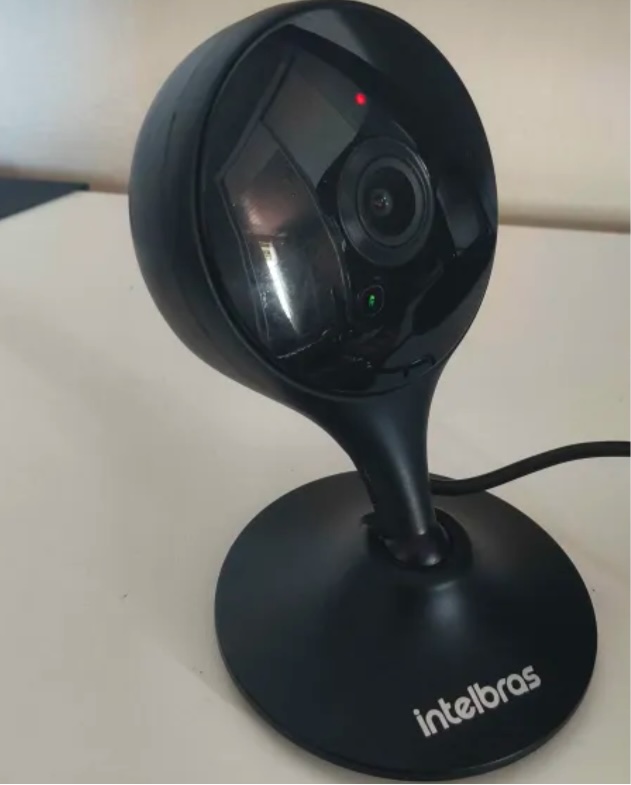
We investigated this vulnerability on an Intelbras iM3 C (iM3B-C) camera running firmware version v240927 — the latest available at the time of our research. The iM3 C is a smart Full-HD Wi-Fi camera designed for both home surveillance and as a baby monitor. According to Intelbras, the firmware for the iM3 C is also compatible with the iMX C, iM4 C, iM5 SC, iME 360 C, and iM7+ FC models.
Intelbras iM3 C smart Wi-Fi camera used for the investigation. Its firmware is also compatible with the iMX C, iM4 C, iM5 SC, iME 360 C, and iM7+ FC models. Source
This vulnerability has a medium severity rating. However, because of the large number of potentially affected users, the impact of successful exploitation could be significant. Intelbras Mibo Smart — Intelbras’s app for setting up and managing these camera models — has been downloaded more than four million times, with most of its users based in Brazil and elsewhere in Latin America.
How to secure your cameras and other smart devices
First and foremost, all Intelbras owners should update their camera firmware as soon as possible — and continue to do so regularly. More generally, it’s a good idea to secure your smart-home infrastructure in advance to reduce the risk posed by other potential vulnerabilities.
One of the simplest yet most important steps is to change the default settings on both your smart devices and your home network. Be sure to replace the factory-default passwords on all smart devices and on your router — default username/password combinations such as admin/admin or root/admin provide no meaningful protection.
Protect your home Wi-Fi with a strong password; otherwise, attackers could easily gain access to your local network.
Disable WPS on your router. WPS is designed to simplify network setup and authentication: you can connect by pressing dedicated buttons on the router and respective device, or by entering an eight-digit PIN. The problem is that this PIN can be brute-forced relatively easily, allowing an attacker to recover the key to your Wi-Fi network fairly quickly.
Use a strong, unique password for every account that can be used to manage your smart devices through official apps or websites. Where possible, enable two-factor authentication (2FA); the most secure option is generally to use one-time codes generated by authenticator apps. For generating and storing passwords, as well as creating one-time codes, it’s most convenient to use a password manager.
Put your IP cameras and other smart devices on a separate Wi-Fi network — isolating them from phones, laptops, tablets, NAS devices, and so on. Most modern routers can create at least two Wi-Fi networks (a primary and a guest network). Use the guest network for smart-home devices, but make sure it’s protected with a strong password. If your router supports multiple Wi-Fi networks, consider putting the cameras on a dedicated network of their own. That way, even if the cameras are compromised, attackers won’t be able to reach your other devices.
Use Smart Home Monitor, available in Kaspersky Plus and Kaspersky Premium. This feature shows all devices connected to your home network, lets you check their security status, and alerts you if an unknown device joins your home Wi-Fi.
More camera-security and smart-device tips and stories:
Certificates both protect TLS connections and digitally sign applications, and forged ones turn up in real-world attacks from time to time. We’ve seen forged or stolen certificates abused by the DarkHotel APT and the Flame malware, and in 2011 we saw attack attempts after the certificate authority Comodo was compromised. Pulling off this trick usually takes serious expertise. But attacking eMudhra certificates in 2026 doesn’t take much effort at all. An attacker just has to guess a number from 1 to 255. Private keys for intermediate certificate authorities are normally gigantic numbers. But in this case, eight of them were the following: 4, 56, 66, 115, 155, 156, 230, and 237. They could be guessed using the public keys (available in public certificates) in under a second. As a result, a hypothetical attacker could issue certificates for anything by signing them with one of the compromised private keys.
Six of these keys were meant for issuing TLS certificates, and the other two were for code signing. All eight intermediate certificate authorities (CAs) were also cross-signed by the Sectigo CA. This means clients with different trust chains could trust a forged certificate.
The major browsers have already blocked the dangerous certificate chains. But IT and security teams still need to assess and remediate the risk in many other systems across their organizations. Scripts for scheduled data-processing, corporate NGFWs, monitoring servers, applications with built-in certificate stores, and devices that don’t get regular updates may accept forged certificates and be vulnerable to man-in-the-middle (MitM) attacks. The keys needed for this are already built into publicly available interception tools.
Timeline of the eMudhra certificate authority incident
The problematic keys came from a batch of 24 intermediate CAs that eMudhra created on April 30, 2025. Instead of cryptographically random values for a 384-bit elliptic curve, eight of the keys turned out to be small numbers. According to eMudhra’s own description, a “key wrap/unwrap step” during key generation created a second, weak set of keys. Because keys are created and stored in a dedicated device called a hardware security module (HSM), a weak key is hard to notice on its own. It’s still unclear what error caused the keys to be generated twice and the weak set to be used; the investigation is ongoing.
In May 2025, the Sectigo CA signed all eight intermediate certificates. Then, on October 17, 2026, an independent researcher notified the security teams at Mozilla, Google, and Apple, as well as the CA itself, that the keys were recoverable. On October 20, Mozilla publicly disclosed the incident. This means that for almost a year and a half the keys could have been recovered and certificates forged.
Using the vulnerable intermediate CAs, an attacker can sign a forged certificate for someone else’s domain. Clients that still trust that chain and have no other safeguards will take the forgery for the real server.
A certificate alone isn’t enough to intercept HTTPS traffic. The attacker also needs a way to tamper with the victim’s traffic or redirect the connection. That’s possible, for example, in a compromised office network, on a Wi-Fi access point the attacker controls, or by interfering with routing and DNS. And all of this does happen in the wild, as the DarkHotel attacks, among others, have shown.
There’s one more danger: two of the keys can be used for code signing. In theory, that would let an attacker deliver malware that appears to come from a trusted vendor and doesn’t trigger scary OS warnings during installation.
Was it exploited?
Experts from various companies who analyzed the after-effects of the incident haven’t found any malicious attacks that used these certificates. eMudhra and CERT-In have also reported finding no abuse. The Chrome team found no certificates from the six CAs in public Certificate Transparency logs.
This means that systems where browsers check certificates through Certificate Transparency (CT) were most likely not attacked. But many devices and applications — especially servers and IoT devices, don’t check CT at all, so we can’t say anything about them. Today, malicious actors no longer need to write their own hacking tools to pull off an attack like this. Version 12.3 of mitmproxy — a popular tool among security researchers — already has built-in support for compromised keys.
Where the risk has been eliminated, and where that isn’t guaranteed
Major platforms quickly revoked the compromised certificates. As early as October 17, Chrome did so through CRLSets, and Firefox — through OneCRL. On October 18, eMudhra itself revoked the certificates, citing “CA Compromise”. Apple took action on October 19, and the Sectigo CA also revoked the cross-signed copies. Microsoft revoked the certificates on October 20. Depending on the settings of a specific application and OS, revocation may have taken effect even without an application update, since blocklists are often updated separately.
At the same time, a more radical measure is under way: withdrawing trust from the root CA. Chrome has announced the planned removal of “emSign ECC Root CA – G3” from the browser. Certificates issued under the “emSign Root CA – G1” root, and the root itself, aren’t affected. According to eMudhra’s estimate, about 30 000 certificates will need to be migrated.
But certificate revocation only works where the client can find out about the revocation to then be able to actually act upon it. Many applications check the signature, server name, and certificate validity period, but don’t retrieve or update blocklists. Here are the typical cases:
Outdated and LTS systems. LTS (long-term support) status alone doesn’t mean a system is vulnerable. By definition, a system with this status receives support. But old containers, frozen OS images, and systems that are no longer updated can keep trusting revoked CAs for a long time. It all depends on updates to ca-certificates and TLS libraries, and the settings of the specific application.
Automated systems and servers. On emudhra.we-have-a-problem.com — a site created by enthusiasts where you can check any client software for misplaced trust — curl and Zabbix dominate the list of the most vulnerable systems. For HTTP checks, Zabbix usually uses libcurl and the certificate store configured for it. Similar behavior is also documented in the built-in curl in macOS. At the OS level and in Safari, the certificate is revoked, but curl reads a plain /etc/ssl/cert.pem file, and that’s precisely where the fix has to be made. This is a good example: even when system-level trust and revocation mechanisms work, individual applications — including ones that ship with the OS by default — can remain vulnerable.
Python, Ruby, Go, Java, and containers. An application may use its own set of root CAs, which isn’t updated along with the OS. Endor Labs found more than 25 popular packages that contain the affected root.
Slack, GitHub Desktop, and other apps built on the Electron framework. These apps ship with their own Electron/Chromium, so updating a separately installed Chrome doesn’t update Slack. The certificate revocations are already in the new Electron version, but now every developer has to rebuild and distribute their app, and every user has to install the update. That said, not every Electron app is necessarily vulnerable. The outcome depends on the version, how the app updates its blocklists, and which network stack it uses.
Mobile browsers and IoT devices. Mobile Chrome, Firefox, and Safari get certificate revocation data as quickly as their desktop counterparts do. With the stock browsers from smartphone makers, this isn’t the case. In a published test, Samsung Browser 31.0.0.64 accepted all six test chains from emSign while rejecting the ones from Sectigo. For HarmonyOS 6 and 7, researchers found the affected CAs in Huawei’s published list of root CAs, and those CAs can’t be revoked manually.
For unsupported devices, home appliances, and old firmware, a certificate store update may never be released. In those cases, the problem could linger for years.
Impact on TLS inspection in a corporate network
When an NGFW or web gateway inspects encrypted traffic, it maintains two connections: one with the client and the other with the external server. The client receives a certificate signed by the corporate CA, while the gateway itself verifies the authenticity of the external server.
If the gateway accepts a forged eMudhra certificate, even an updated browser on an employee’s computer won’t see the dangerous chain. Instead, it will receive the familiar corporate certificate. In this scenario, the security tool itself hides the problem from the client. That said, carrying out such an attack would also require intercepting traffic.
To fix the validation policy and certificate lists on the inspection device itself, follow the vendor’s instructions — if the vendor has published any, that is.
At Cisco, the status of the issue is documented in detail for all products. Most of them are still listed as “under investigation”, but mitigation measures are recommended for vulnerable devices.
Sophos and Check Point promise device software updates and, in the meantime, advise removing the certificates manually. Neither company has published a security advisory, but employees of each posted recommendations on its support forum.
For Fortinet devices, instructions for checking and removing emSign certificates can be found here. Palo Alto offered only general advice instead of specifics for its own products.
Of course, a properly configured gateway can indeed temporarily protect outdated client devices that trust the dangerous certificates.
To check specific devices, services, containers, and virtual machines, you can use a dedicated website. One possible scenario for proactively hunting for threats that exploit or have previously exploited weak keys is described here.
UK domain registrar 123 Reg (no relation – Ed) says it was the victim of an “AI-driven cyberattack” that exposed customer data. Customers began receiving their notification emails this week, informing them that their contact information, "related customer relationship data," company VAT numbers, and "product information from an application programming interface (API)" were compromised. A company spokesperson elaborated, saying this means that names, phone numbers, countries, language and currency preferences, account creation dates, the products on the account, and marketing preferences were affected. 123 Reg described the September 18 intrusion as "the first known AI-driven cyberattack against our company," and told The Register that early signs point toward a China-nexus attacker. "Our investigation identified IP addresses that we assessed to be the core attacker infrastructure, which were hosted in China and Singapore, indicating a strong Chinese nexus," the spokesperson said. "Our investigation further identified AI cyberattack 'skills' hosted on Chinese infrastructure, including copies of skills open sourced by Anthropic and several other AI exploitation frameworks and scripts." They went on to say that many of the artefacts left behind led 123 Reg to suspect that a Chinese state-sponsored group, known for abusing Claude Code in attacks against at least 30 organizations, could be behind the break-in. There is also a suspicion that the same group that hit a number of South Korea’s financial institutions using open-source Chinese AI tool ARTEX, was behind the attack on 123 Reg too. "The TA's mirror of 'anthropic_skills,' and the account naming conventions found on the Chinese servers are consistent with preparation of this class of AI-augmented operation," the spokesperson told us. "In addition, on October 7, 2026, CrowdStrike published CSA-261162, describing an unknown, likely Chinese-speaking actor that targeted several South Korean financial organizations starting in late September 2026, which is the same period during which we were attacked. "That actor used ARTEX, an open-source Chinese-developed agentic penetration-testing tool released in July 2026, which was also observed to be used in the attack that targeted us." The GoDaddy-owned registrar reported the attack to law enforcement agencies, brought in outside cybersecurity support, and notified the FTC, as well as the data protection authorities in the UK and EU. The company spokesperson added that it worked with Singapore-based ISPs to shut down the attacker's servers in the region, which helped disrupt the attack, in addition to "other actions by us and industry partners." 123 Reg's email to customers stated the attacker's activity "was limited to reading" customer data, although the spokesperson told us "it's possible they created copies of the information," and that this is what prompted the notification. The registrar urged customers to stay alert to the potential misuse of their data, and to treat communications appearing to come from the company with caution. "If you receive a message or call and aren't sure it's from 123 Reg, go directly to our website and log in," the email said. "We will never contact you to request your password, payment details, or verification codes by email, text, or phone. "We also strongly recommend turning on two-step verification (2SV), which helps keep your account protected even if someone tricks you into sharing your password. You can find instructions for setting up 2SV in your 123 Reg account. "We apologize for any inconvenience this may have caused." ®
On October 27, Google issued a new Stable channel update for Chrome.
Most users are on Chrome’s Stable channel. The desktop update brings Chrome to versions 156.0.8078.73/.74 for Windows and Mac and 156.0.8078.73 for Linux. The update includes 52 security fixes, including four rated Critical.
On the same day, Mozilla issued Security Advisory 2026-118, which fixes 167 vulnerabilities. Firefox 159 also introduces several new features.
Both updates will roll out over the coming days and weeks.
How to update Chrome
The easiest option is to allow Chrome to update automatically. But you can end up lagging behind on updates if you never close your browser or if something goes wrong, such as an extension preventing the update.
If you don’t want to wait for the rollout to reach you, manually updating is easy. Open About Google Chrome from Chrome’s settings or Help menu. Chrome will check for updates. If one is available, click Relaunch to apply it.
To update Firefox, open the browser and click the menu button at the right side of the Firefox toolbar, then go to Help and select About Firefox. The About Mozilla Firefox window will open.
Firefox will automatically check for updates. If one is available, it will be downloaded. Once done, you’ll be prompted to click Relaunch. After Firefox restarts, it will be up to date.
After the update, the version should be 159.0 or later
Technical details
These Chrome and Firefox updates address a familiar problem: browser code mishandling memory while processing web content. Both releases fix use-after-free vulnerabilities, including flaws in page layout, JavaScript processing, and SVG graphics.
A use-after-free vulnerability occurs when a program attempts to access a memory location after it has been freed. That can cause crashes or, in some cases, allow an attacker to run their own code.
There’s another connection between these updates: both Google and Mozilla credit OpenAI Codex Security with finding bugs fixed in these releases. AI can help security teams examine browser code for weaknesses, alongside human code reviews and automated tests that check how software handles unexpected inputs.
Mozilla’s collaboration with Anthropic shows how AI-discovered findings can lead to fixes: researchers validated vulnerabilities before reporting them, giving Mozilla’s team reproducible bugs to investigate, repair, and deliver to users.
Browse like no one’s watching.
Malwarebytes Privacy VPN encrypts your connection and never logs what you do, so the next story you read doesn’t have to feel personal. Try it free →
On October 27, Google issued a new Stable channel update for Chrome.
Most users are on Chrome’s Stable channel. The desktop update brings Chrome to versions 156.0.8078.73/.74 for Windows and Mac and 156.0.8078.73 for Linux. The update includes 52 security fixes, including four rated Critical.
On the same day, Mozilla issued Security Advisory 2026-118, which fixes 167 vulnerabilities. Firefox 159 also introduces several new features.
Both updates will roll out over the coming days and weeks.
How to update Chrome
The easiest option is to allow Chrome to update automatically. But you can end up lagging behind on updates if you never close your browser or if something goes wrong, such as an extension preventing the update.
If you don’t want to wait for the rollout to reach you, manually updating is easy. Open About Google Chrome from Chrome’s settings or Help menu. Chrome will check for updates. If one is available, click Relaunch to apply it.
To update Firefox, open the browser and click the menu button at the right side of the Firefox toolbar, then go to Help and select About Firefox. The About Mozilla Firefox window will open.
Firefox will automatically check for updates. If one is available, it will be downloaded. Once done, you’ll be prompted to click Relaunch. After Firefox restarts, it will be up to date.
After the update, the version should be 159.0 or later
Technical details
These Chrome and Firefox updates address a familiar problem: browser code mishandling memory while processing web content. Both releases fix use-after-free vulnerabilities, including flaws in page layout, JavaScript processing, and SVG graphics.
A use-after-free vulnerability occurs when a program attempts to access a memory location after it has been freed. That can cause crashes or, in some cases, allow an attacker to run their own code.
There’s another connection between these updates: both Google and Mozilla credit OpenAI Codex Security with finding bugs fixed in these releases. AI can help security teams examine browser code for weaknesses, alongside human code reviews and automated tests that check how software handles unexpected inputs.
Mozilla’s collaboration with Anthropic shows how AI-discovered findings can lead to fixes: researchers validated vulnerabilities before reporting them, giving Mozilla’s team reproducible bugs to investigate, repair, and deliver to users.
Browse like no one’s watching.
Malwarebytes Privacy VPN encrypts your connection and never logs what you do, so the next story you read doesn’t have to feel personal. Try it free →
Network-connected surveillance cameras are now widespread in both home and enterprise environments, so securing them is essential to safeguarding physical spaces and sensitive assets. As these devices continue to gain new features and network connectivity capabilities, vulnerabilities in their implementation can have significant security implications.
During our research, we discovered a denial-of-service vulnerability that affects Intelbras IP cameras systems. The flaw resides in a firmware update endpoint that is accessible without authentication and allows anyone with access to the local Wi-Fi network to knock cameras offline. A single request disrupts the camera for only about a minute, but sending periodic requests keeps the device offline indefinitely. We reported the issue to Intelbras, monitored the remediation process, validated the fix in the new firmware, and will now demonstrate the exploitation procedure step-by-step.
Following our notification, Intelbras patched the vulnerability and released updated firmware (R.260804) along with update instructions. A candidate ID of CAN-2026-2035970 has been assigned by MITRE following submission, pending the final CVE assignment. Additionally, the Intelbras team recently informed us that MITRE has classified the vulnerability as Medium, assigning it a score of 5.1 under the CVSS 4.0 framework. The issue discussed in this article is no longer present in the latest firmware version.
Firmware
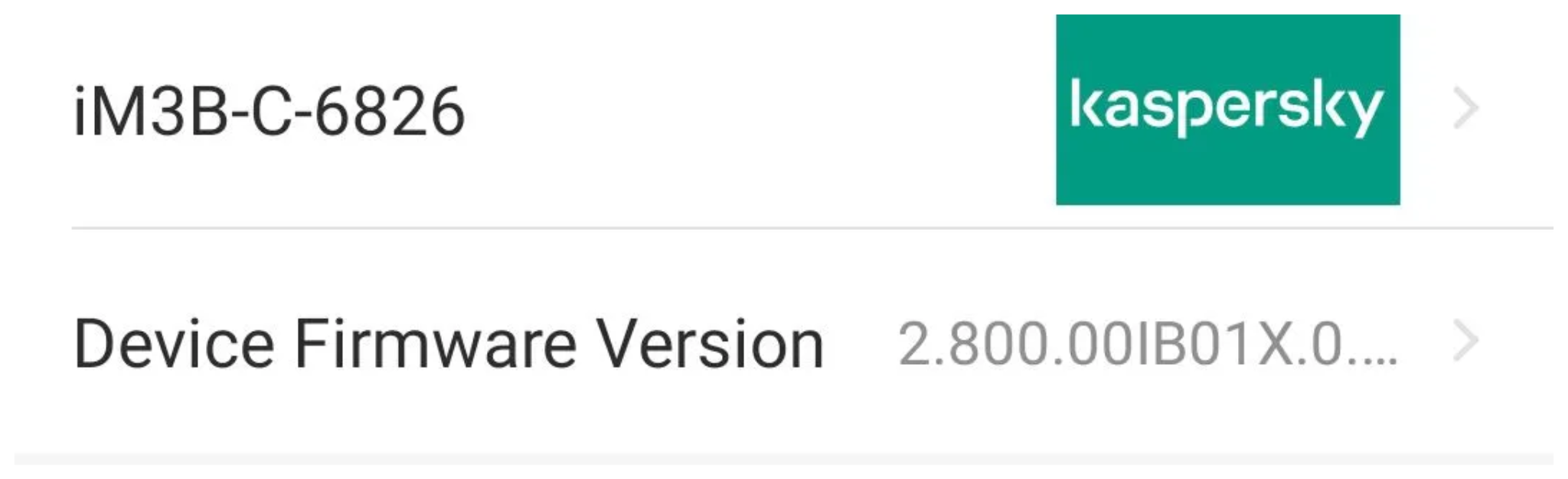
Intelbras provides firmware files on its official website. While users can manually install these updates via an SD card, the cameras also natively support firmware upgrades over the local network via their web interface and mobile app. We obtained the firmware version v240927 for the iM3B-C (IM3 C) camera, which was the latest available version at the time of our research. According to Intelbras, the same firmware is also compatible with the iMX C, iM4 C, iM5 SC, iME 360 C, and iM7+ FC models. Below, we can view the firmware version and the camera model used as an example.
To provide context, we will explain how the camera’s authentication mechanism works and why it is relevant to accessing the camera’s endpoints. The main firmware component is an ARM binary named sonia, responsible for controlling the kernel drivers used by the camera hardware, authentication, and livestream recording, among other things.
How authentication works
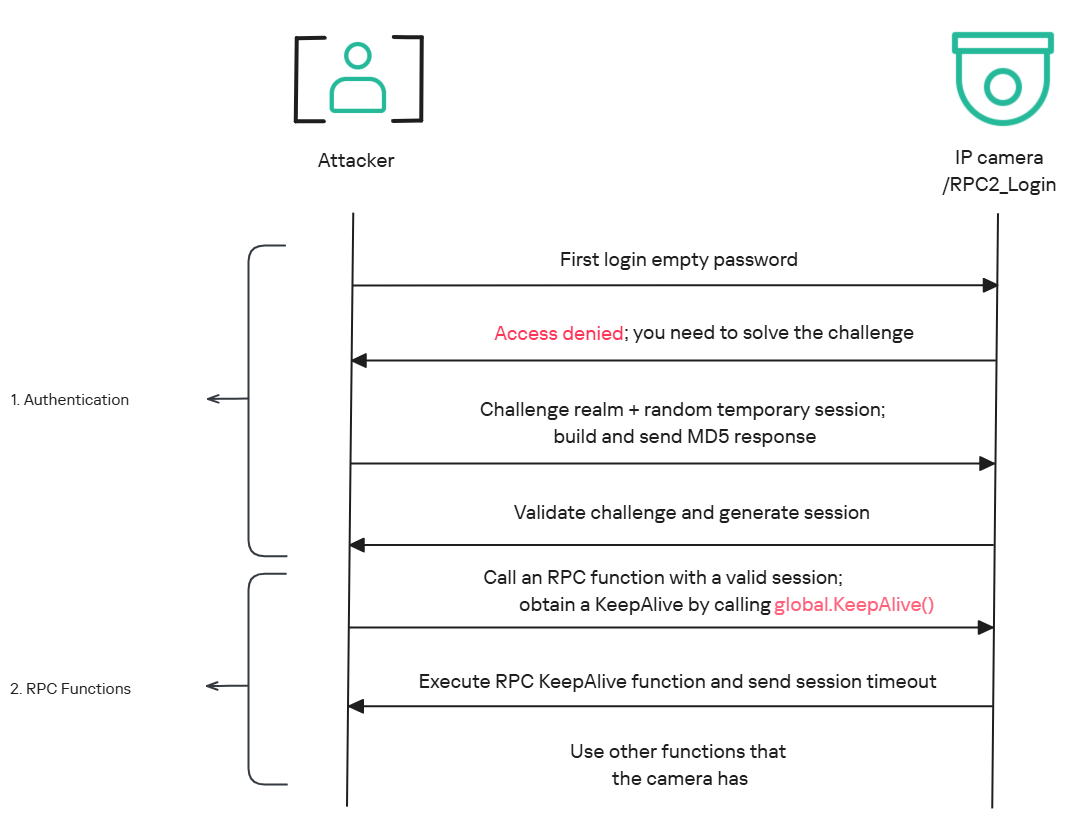
The global.login RPC method handles authentication at the /RPC2_Login endpoint. First, the client, such as the mobile app or a custom script, sends the username and an empty password. The camera responds with an authentication challenge (a set of values to verify the password without transmitting it). This response returns a temporary session, the encryption type in the encryption field, a random value, and a realm (authentication scope). At this stage, a false response is normal and does not indicate a failed login, as the authentication process is not yet complete.
Next, the client calculates the response password from the authentication challenge. It first generates an MD5 (username:realm:original_password) hash as the base. It then calculates a second MD5 (username:random:first_md5) hash, where first_md5 is the result of the previous step. To complete the authentication, the client sends this final result back to /RPC2_Login in a second global.login call, passing the username, calculated password, and temporary session ID.
If the login is accepted, the camera returns true and a new, authenticated session. This session must be used for all subsequent RPC calls, including the camera’s other endpoints, for example, the one that reboots the device or those that expose sensitive information.
Affected endpoint
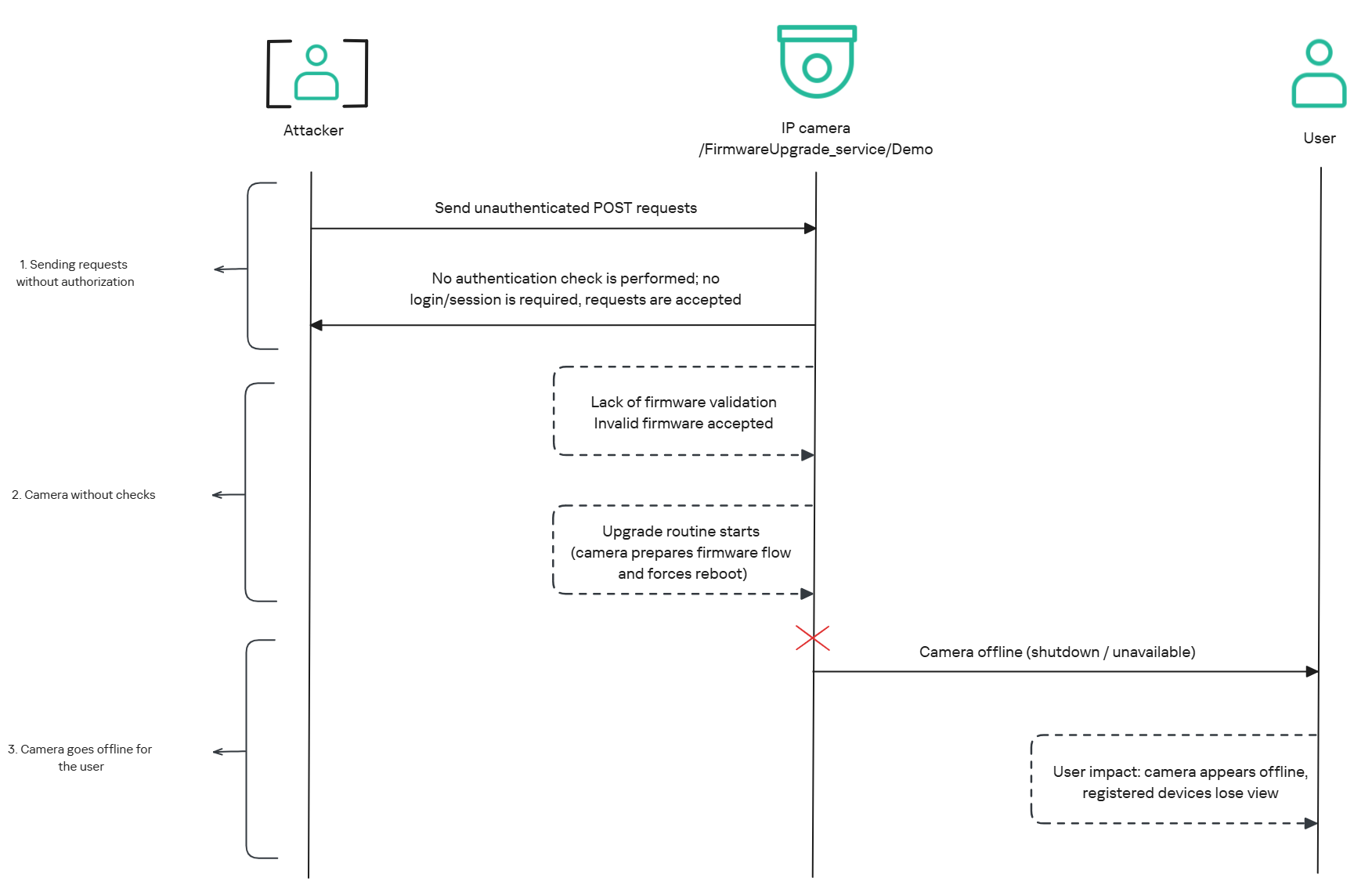
The affected endpoint is the firmware upgrade route http://<ip_address>/firmwareUpgrade_service/Demo, which lacks authentication checks; furthermore, it fails to verify whether the firmware is actually valid before initiating the upgrade process. This creates a serious issue because the upgrade requires the camera to reboot, and that is precisely when the problem occurs: the camera enters reboot mode and eventually shuts down, appearing offline to the user and anyone who has the camera registered on their device.
PoC: vulnerability exploitation
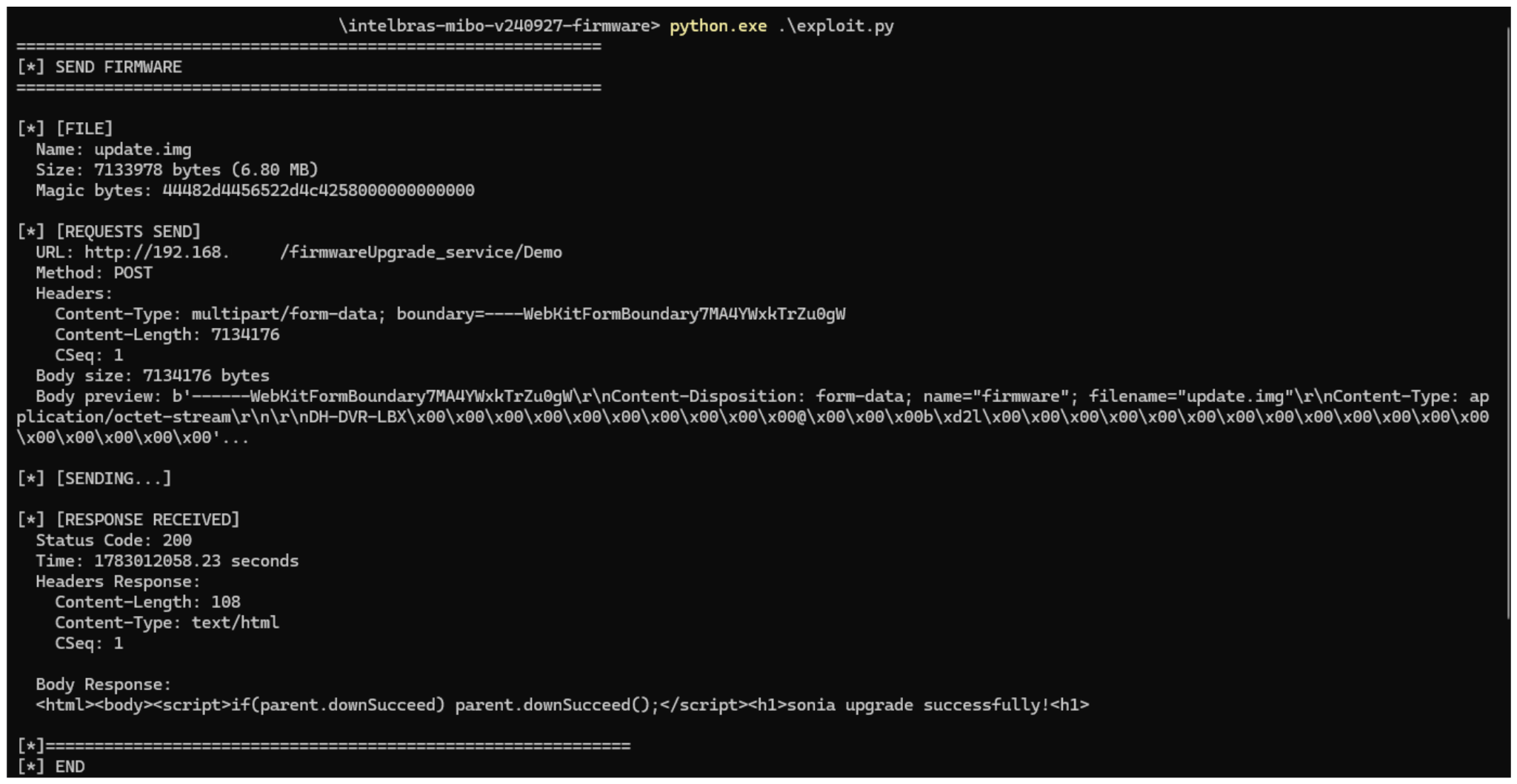
Now that we have outlined how the vulnerability works, we will use a Python script on an iM3B-C camera to exploit it for demonstration purposes. The exploit contacts the camera’s endpoint to upload firmware. Below, we can see sonia creating the endpoint responsible for the firmware upgrade.
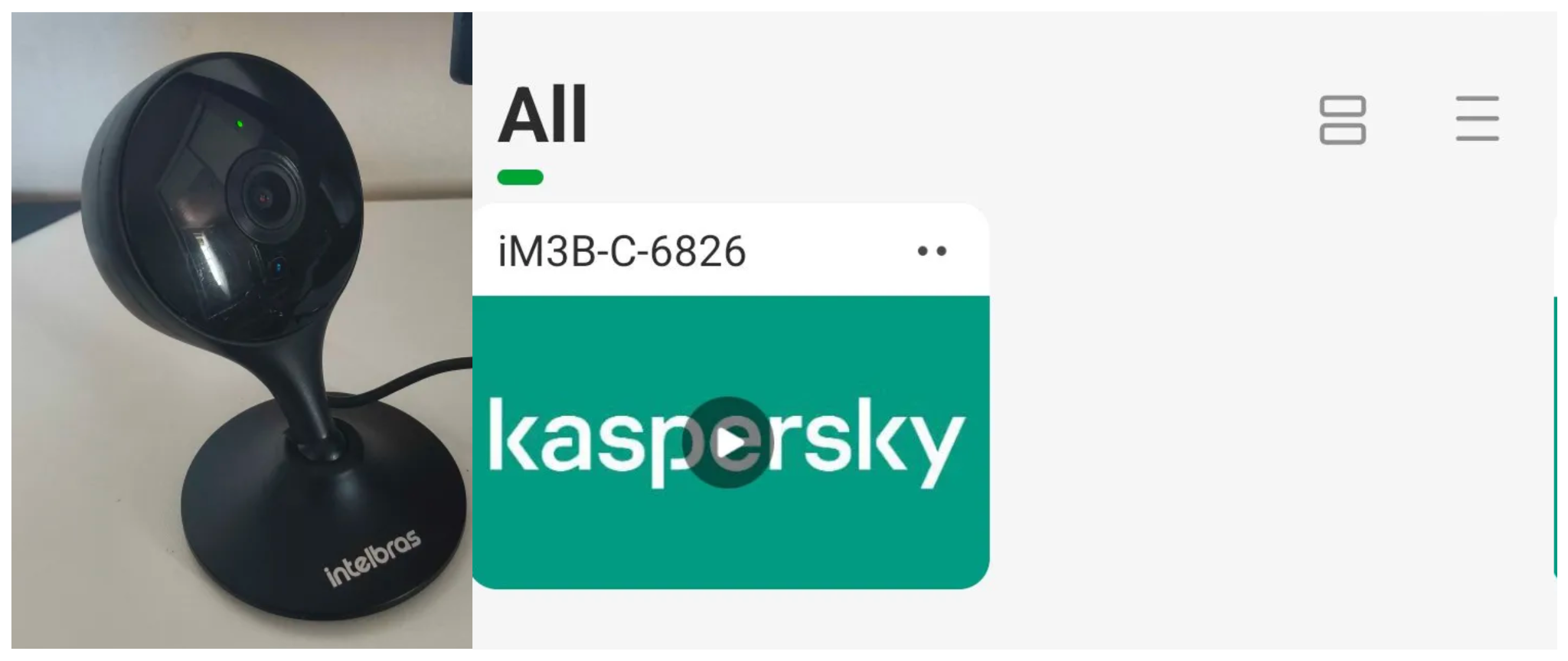
Next, the exploit will hit the endpoint and cause the camera to reboot. Consequently, mobile phones running the Intelbras app will lose connection with the registered device. Below, we can see the camera operating normally: the green light is on and the app is showing it is available for viewing.
The camera is online
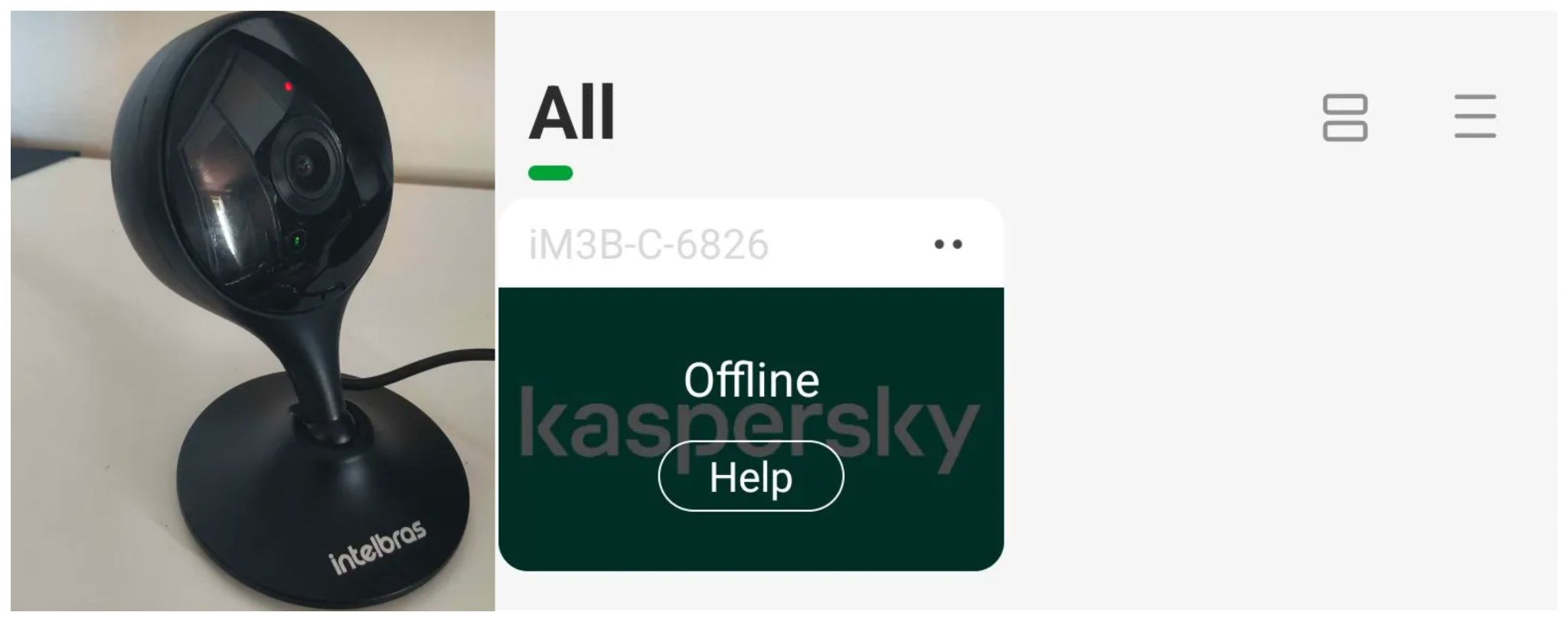
After the exploit executes, we can see the effects: the camera goes offline and loses connection to the registered devices.
The camera is offline
The exploit is quite simple: it sends an HTTP POST request with the firmware, which causes the camera to accept the request and initiate the reboot process. It does not matter whether the firmware is original; the reboot process will start regardless.
New firmware version
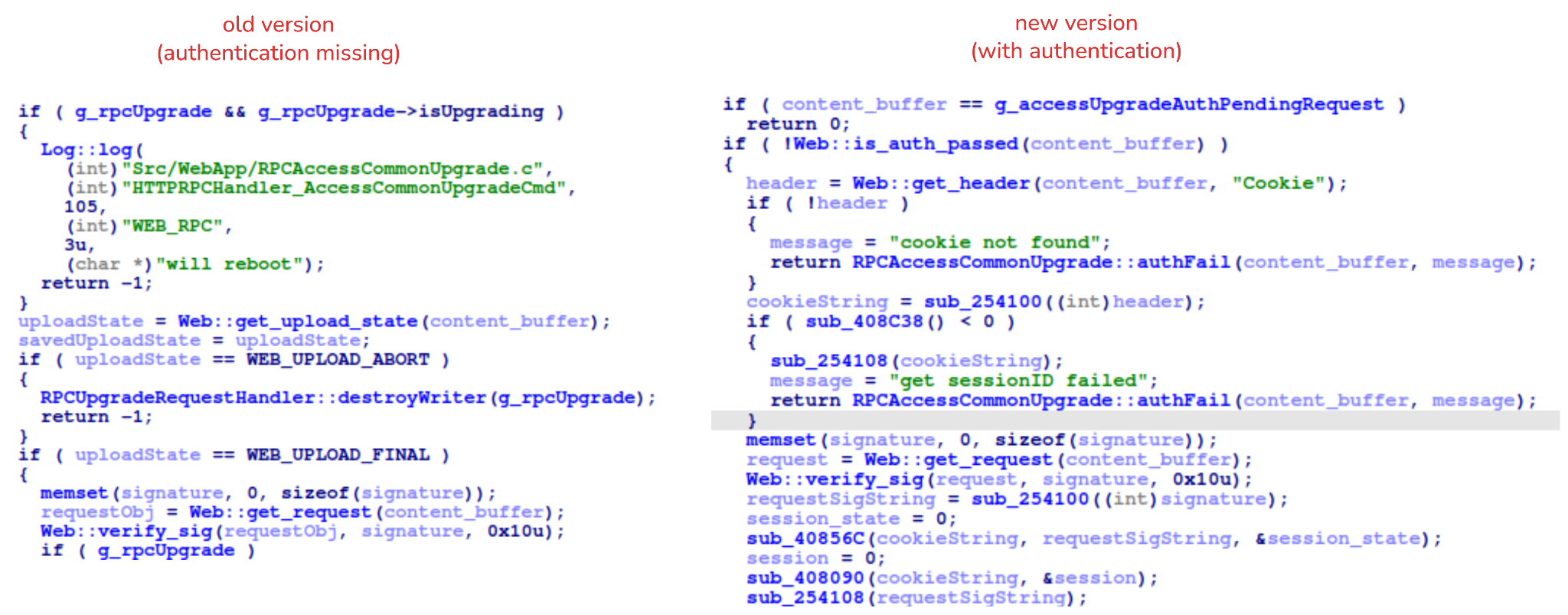
After we notified Intelbras about this flaw in the endpoint implementation, the company contacted the OEM vendor. As a result, a new firmware version was released that requires authentication to initiate an update through this endpoint.
Below, we can compare the new firmware, which validates cookies and session data, with the old firmware, which performed no authentication checks and proceeded directly to the update routine.
Real risk
An attacker can remotely trigger the camera firmware upgrade and reboot process without authenticating or supplying a valid firmware image. This may cause the device to go offline, which results in a denial-of-service condition preventing legitimate users from accessing live monitoring or managing the camera.
The potential impact is significant due to the number of affected users. The Intelbras Mibo Smart app, which the company provides to connect and manage the devices mentioned in this report, has over 4,000,000 downloads. Brazil represents the largest user base, followed by Paraguay, Ecuador, Colombia, Argentina, Chile, Peru, Bolivia, Uruguay, and Venezuela. As a result, exploitation of this issue affects a large number of users.
Takeaways
This is a medium-severity vulnerability that Intelbras is already aware of. The issue has been addressed in a newer firmware release (R.260804 along with update instructions), which mitigates this attack vector. Because the vulnerability directly affects the availability and normal operation of the affected cameras, it is highly recommended that users verify the firmware version currently installed on their devices and update to the latest available version as soon as possible. Keeping the firmware up to date is an essential security practice, especially for internet-connected surveillance devices, as outdated versions may remain exposed to known vulnerabilities.
Network-connected surveillance cameras are now widespread in both home and enterprise environments, so securing them is essential to safeguarding physical spaces and sensitive assets. As these devices continue to gain new features and network connectivity capabilities, vulnerabilities in their implementation can have significant security implications.
During our research, we discovered a denial-of-service vulnerability that affects Intelbras IP cameras systems. The flaw resides in a firmware update endpoint that is accessible without authentication and allows anyone with access to the local Wi-Fi network to knock cameras offline. A single request disrupts the camera for only about a minute, but sending periodic requests keeps the device offline indefinitely. We reported the issue to Intelbras, monitored the remediation process, validated the fix in the new firmware, and will now demonstrate the exploitation procedure step-by-step.
Following our notification, Intelbras patched the vulnerability and released updated firmware (R.260804) along with update instructions. A candidate ID of CAN-2026-2035970 has been assigned by MITRE following submission, pending the final CVE assignment. Additionally, the Intelbras team recently informed us that MITRE has classified the vulnerability as Medium, assigning it a score of 5.1 under the CVSS 4.0 framework. The issue discussed in this article is no longer present in the latest firmware version.
Firmware
Intelbras provides firmware files on its official website. While users can manually install these updates via an SD card, the cameras also natively support firmware upgrades over the local network via their web interface and mobile app. We obtained the firmware version v240927 for the iM3B-C camera, which was the latest available version at the time of our research. According to Intelbras, the same firmware is also compatible with the iMX C, iM4 C, iM5 SC, iME 360 C, and iM7+ FC models. Below, we can view the firmware version and the camera model used as an example.
To provide context, we will explain how the camera’s authentication mechanism works and why it is relevant to accessing the camera’s endpoints. The main firmware component is an ARM binary named sonia, responsible for controlling the kernel drivers used by the camera hardware, authentication, and livestream recording, among other things.
How authentication works
The global.login RPC method handles authentication at the /RPC2_Login endpoint. First, the client, such as the mobile app or a custom script, sends the username and an empty password. The camera responds with an authentication challenge (a set of values to verify the password without transmitting it). This response returns a temporary session, the encryption type in the encryption field, a random value, and a realm (authentication scope). At this stage, a false response is normal and does not indicate a failed login, as the authentication process is not yet complete.
Next, the client calculates the response password from the authentication challenge. It first generates an MD5 (username:realm:original_password) hash as the base. It then calculates a second MD5 (username:random:first_md5) hash, where first_md5 is the result of the previous step. To complete the authentication, the client sends this final result back to /RPC2_Login in a second global.login call, passing the username, calculated password, and temporary session ID.
If the login is accepted, the camera returns true and a new, authenticated session. This session must be used for all subsequent RPC calls, including the camera’s other endpoints, for example, the one that reboots the device or those that expose sensitive information.
Affected endpoint
The affected endpoint is the firmware upgrade route http://<ip_address>/firmwareUpgrade_service/Demo, which lacks authentication checks; furthermore, it fails to verify whether the firmware is actually valid before initiating the upgrade process. This creates a serious issue because the upgrade requires the camera to reboot, and that is precisely when the problem occurs: the camera enters reboot mode and eventually shuts down, appearing offline to the user and anyone who has the camera registered on their device.
PoC: vulnerability exploitation
Now that we have outlined how the vulnerability works, we will use a Python script on an iM3B-C camera to exploit it for demonstration purposes. The exploit contacts the camera’s endpoint to upload firmware. Below, we can see sonia creating the endpoint responsible for the firmware upgrade.
Next, the exploit will hit the endpoint and cause the camera to reboot. Consequently, mobile phones running the Intelbras app will lose connection with the registered device. Below, we can see the camera operating normally: the green light is on and the app is showing it is available for viewing.
The camera is online
After the exploit executes, we can see the effects: the camera goes offline and loses connection to the registered devices.
The camera is offline
The exploit is quite simple: it sends an HTTP POST request with the firmware, which causes the camera to accept the request and initiate the reboot process. It does not matter whether the firmware is original; the reboot process will start regardless.
New firmware version
After we notified Intelbras about this flaw in the endpoint implementation, the company contacted the OEM vendor. As a result, a new firmware version was released that requires authentication to initiate an update through this endpoint.
Below, we can compare the new firmware, which validates cookies and session data, with the old firmware, which performed no authentication checks and proceeded directly to the update routine.
Real risk
An attacker can remotely trigger the camera firmware upgrade and reboot process without authenticating or supplying a valid firmware image. This may cause the device to go offline, which results in a denial-of-service condition preventing legitimate users from accessing live monitoring or managing the camera.
The potential impact is significant due to the number of affected users. The Intelbras Mibo Smart app, which the company provides to connect and manage the devices mentioned in this report, has over 4,000,000 downloads. Brazil represents the largest user base, followed by Paraguay, Ecuador, Colombia, Argentina, Chile, Peru, Bolivia, Uruguay, and Venezuela. As a result, exploitation of this issue affects a large number of users.
Takeaways
This is a medium-severity vulnerability that Intelbras is already aware of. The issue has been addressed in a newer firmware release (R.260804 along with update instructions), which mitigates this attack vector. Because the vulnerability directly affects the availability and normal operation of the affected cameras, it is highly recommended that users verify the firmware version currently installed on their devices and update to the latest available version as soon as possible. Keeping the firmware up to date is an essential security practice, especially for internet-connected surveillance devices, as outdated versions may remain exposed to known vulnerabilities.
The University of New Mexico is canceling classes across the medicine, nursing, and pharmacy faculties for a second day amid continued efforts to recover from a "cybersecurity event." The attack targeted the Health Sciences Center on Monday, the Uni revealed, forcing it to shut down systems, cancel appointments and clinics at UNM Health hospitals, and divert ambulances to healthcare facilities in nearby Albuquerque and Santa Fe. Hospital appointments and clinics return to normal today, although nonessential UNM Health Sciences Center staff are being asked to remain at home. "The University of New Mexico Health Sciences Center (HSC), which includes the UNM Health clinical delivery system, experienced a cybersecurity event Monday, Oct. 26, 2026," the university said in a statement on Monday evening. "HSC information technology security teams immediately took steps to contain the event and protect the network. They also notified state and federal law enforcement and engaged external partners to assist with the investigation. "Leadership activated an Emergency Operations Center to coordinate the response and provide guidance to HSC employees, students, and UNM Health system frontline providers." The university announced the attack at 1430 local time, immediately cancelling all remaining clinics and classes, dismissing everyone other than critical and clinical staff, and urging patients not to attend HSC facilities. It has not commented on the nature of the cyberattack, although that hasn’t stopped researchers from speculating about ransomware’s involvement. Rumors were fuelled by the newly assembled BYOD ransomware group claiming responsibility for the attack on Monday afternoon. It's important to note that just because a purported ransomware group took credit for the attack, it does not mean they actually were responsible, nor does it mean they deployed a ransomware/locker payload as part of the attack. However, the group's take on the digital raid is that it compromised 36,000 machines, "both [Active Directory] forests," two Oracle databases, the personal data belonging to every student and employee, as well as internal emails and data from other systems. As Reg readers know, a cybercriminal's word is never one to be trusted. Yet BYOD's claims about breaching Trump Mobile's customer database appear to have held up It was a bold debut, even for a ransomware crew: BYOD’s first named victim was the US president's smartphone biz, with data allegedly leaked for all 3,615 customers. A rival group, EndZone, claimed a similar breach a week earlier, and some experts suggested the two could be one and the same. In May, the Trump Mobile was found leaking thousands of people's data via a poorly secured website. The Trump Organization did not respond to our requests for more information in either of these cases. A UNM spokesperson declined to answer our additional questions, directing us back to its public statement. ®
The US government's cybersecurity watchdog has confirmed attackers are exploiting both critical PHP2Shell vulnerabilities, giving federal agencies three days to patch the bugs that have wreaked havoc across the web over the past week. CISA added CVE-2026-109618 and CVE-2026-109619 to its Known Exploited Vulnerabilities (KEV) catalog on Monday, setting an October 29 deadline for federal civilian agencies to address the flaws. The move marks a shift from last week, when the agency warned of the danger posed by PHP2Shell but said it had not yet observed successful exploitation in the wild. Both bugs are rated 9.2 on the CVSS scale and can be exploited without authentication to run code on vulnerable PHP servers. That's bad news given how much of the web still relies on PHP, and just how many sites could be left exposed. Patches landed on October 21, but attackers had already beaten the maintainers to it. AWS spotted attempts to exploit the flaws as early as October 17, four days before the bugs were publicly disclosed. CISA's confirmation comes amid growing evidence that attackers are doing more than simply knocking on the door. On October 24, Perplexity security researcher Adel Karimi recorded 35 successful shell executions across three honeypots running PHP 8.4.26 under Apache mod_php. The attacks came from two IP addresses and used memory exhaustion and disclosure to achieve remote code execution. The attackers then tried to contact external servers using PHP, curl, and wget, although no additional malware was successfully downloaded. Karimi's findings were consistent with exploitation of CVE-2026-109618, but he found no evidence that the second PHP2Shell flaw was involved. He also warned that the honeypots used a favorable single-worker configuration, so the results don't necessarily reflect how reliably the exploit works against production servers. Still, attackers appear to be giving it a good go. Delft University's Threat Intelligence Lab has tracked more than 50,000 PHP2Shell exploitation requests from over 600 IP addresses across 70 countries. Of those, 171 addresses went beyond probing for vulnerable servers and started sending exploit code or malware droppers. CISA's confirmation also comes after some of the earlier reports of successful PHP2Shell attacks turned out to be rather premature. Sophos walked back its initial assessment after determining that the activity it observed amounted to scanning and failed attempts, while Palo Alto Networks withdrew claims linking the vulnerabilities to an intrusion at a European government agency. CISA has not disclosed which organizations have been compromised or provided details of the attacks behind its decision to add the flaws to KEV. The listing confirms that the agency considers both vulnerabilities actively exploited, but it does not confirm how many production systems have been successfully breached. For federal agencies, the clock is now ticking. CISA is also urging organizations outside the federal government to prioritize the fixes, although the deadline does not apply to them. Admins should update to PHP 8.5.12, 8.4.27, 8.3.36, or 8.2.35, depending on their release branch. Those running older, unsupported versions face the added headache of upgrading or obtaining vendor-supported fixes, while systems that cannot be secured should be taken offline until the risk is addressed. And with CISA now officially acknowledging exploitation, anyone still waiting for more proof before patching may be waiting a little too long. ®
The cyberattack on Alternative for Germany (AfD), the country’s most prominent far-right political party, exposed hundreds of thousands of confidential emails and attachments, as well as more than 345,000 unique email addresses. Have I Been Pwned confirmed the scale of the breach for the first time today, after AfD officially disclosed the September attack on its hosting provider last week. AfD said in its statement that “only a few email accounts were illegally copied,” but admitted a large amount of the data was taken from them, resulting in an extensive data breach. The emails were added to what the party described as “an activist website,” which summarised the email chains into searchable topics and has led to the publication of various revelations, such as a party co-leader’s opinions on colleagues’ “deeply problematic” racial discourse. Per a report from investigative journalist Lilith Wittmann, citing conversations with the cybercriminals responsible for the hack-and-leak job and party sources, the attack was first spotted on September 9 and started with a compromise of a poorly protected WordPress site. The same report claimed the criminals gained persistent access to the servers operated by the hosting provider, identified as AfD-owned Alternita Dienstleistungs GmbH, and exfiltrated more than a terabyte of data. No official sources have verified the hackers’ claims about how the attack unfolded. The Register contacted Alternita Dienstleistungs for its take. AfD said the owners of the affected email accounts have been notified, and that it reported the attack to security authorities. “We are deeply concerned by what has happened,” the party said in an October 20 statement. “Such a digital attack is illegal and a criminal offense. Furthermore, it is an attack on the German party system and thus on democracy. “We are extremely worried that, apparently, the content of the stolen documents was analyzed using a very rudimentary AI. This analysis focused on keywords, not the context. The alleged scandals published so far do not stand up to scrutiny – a fact that, thankfully, is being confirmed by a growing number of commentators on social media.” Among the AI-generated summaries compiled by the “activist site” are chains supposedly expressing views related to Holocaust denial, racist and antisemitic rants, the 9/11 disaster, forged documents, and more. Der Spiegel sifted through the raw files and reported that party leader Alice Weidel seemingly knew about illegal donations related to the 2017 federal elections weeks before she previously said she did. The AfD's position is that the AI summaries of the emails are not to be trusted, but it has not specifically commented on the veracity of the raw email files available for download via torrent. It did not immediately respond to our request for input, but has told reporters previously that it will not comment on whether the emails, or the stories that have been written based on them, are to be trusted. ®
You may have forgotten about Popcorn Time. Unfortunately, its updater didn’t forget about your device.
Security researchers have intervened to disable an abandoned update mechanism in Time4Popcorn, a version of the once-popular streaming app. If left running in the background, the updater could have allowed attackers to take control of Windows and Mac computers, even if their owners hadn’t opened the app in years.
Eye Security estimates that the vulnerable updater was present on millions of devices worldwide, including 2.5–3 million Windows computers and around 250,000–350,000 Macs.
Popcorn Time made watching movies and TV shows through BitTorrent look more like browsing Netflix. Rather than making users find torrent files and open them in a separate client, it wrapped the process in a familiar streaming-style interface.
Amid concerns about copyright infringement and its possible consequences, the original developers abandoned it shortly after its launch in 2014. But because its source code was publicly available, other developers could pick it up and create their own versions, known as forks.
One of those was Time4Popcorn, which was also distributed under the name “Popcorn Time.” That shared branding matters because people may have installed the affected software without ever seeing the Time4Popcorn name.
The problem at hand
Time4Popcorn was eventually abandoned too. But its update infrastructure was left behind, and at some point the domains associated with the software became available for others to register.
In other words, the people maintaining the software had gone away. The software’s ability to accept instructions had not. Time4Popcorn’s updater used unencrypted HTTP connections and accepted executable updates without checking digital signatures to verify their authenticity. So, someone who controlled an update domain or was able to tamper with the unencrypted traffic could supply their own program instead.
That combination created a remote code execution vulnerability, tracked as CVE-2026-30612, which could let an attacker run malicious software on a device. An attacker wouldn’t need to persuade someone to watch a movie or click a suspicious attachment. The forgotten updater could do the work for them.
Although Android was affected too, users had an extra layer of protection. Its updater checked for updates when the application was opened, but installing an attacker-supplied APK required the user to approve the installation. It was not the same silent, background takeover route researchers found on Windows and macOS.
What the researchers did
Eye Security registered an abandoned update domain and used the vulnerable mechanism to distribute an update that disabled the updater itself. On Windows, it stopped and disabled the service; on macOS, it prevented the update process from starting. The researchers say their intervention did not delete users’ files or collect host data.
By March 2026, Eye Security reported more than two million downloads of its updater-disabling fix, and update requests to its domains had fallen by 98%. Later that month, it transferred the 15 domains it controlled to the nonprofit Shadowserver Foundation.
Researchers could not remotely disable the Android updater in the same way. And the desktop application still contained other weaknesses, including an obsolete Chrome engine dating from 2014 and disabled sandbox protections, which normally help contain malicious code.
What users should do
If you used Popcorn Time years ago, check the devices on which you installed it. Don’t assume that no longer using an application means its background components have stopped running.
Check your list of installed applications for Popcorn Time or Time4Popcorn. Pay particular attention to older Windows PCs, Macs, and Android devices where you may have forgotten about installing it. The affected fork was distributed under both names.
Remove the old application. There is no vendor security update for the abandoned Time4Popcorn software. Disabling the updater addresses one vulnerability, not the application’s other security weaknesses.
On Windows and macOS, check that the background updater is no longer running. Eye Security identifies the Windows component as Updater.exe, normally inside a Popcorn Time folder under Program Files or Program Files (x86), running through a service called Update Service. On macOS, the component is /Library/PrivilegedHelperTools/PT.updd, with a launch daemon at /Library/LaunchDaemons/PT.updd.plist. Its advisory provides instructions for disabling these components if needed.
On Android, uninstall the affected app rather than accepting an update prompt from it.The updater is part of the main application and cannot easily be disabled separately.
Use an up-to-date, real-time anti-malware solution to detect and block any attempts to install malware on your devices.
As we saw recently, cybercriminals can use software updates to distribute malware. Remove abandoned apps and check for any background updaters they leave behind.
From reporting threats to removing them.
Cybersecurity risks should never spread beyond a headline. Keep threats off your devices by downloading Malwarebytes today.
You may have forgotten about Popcorn Time. Unfortunately, its updater didn’t forget about your device.
Security researchers have intervened to disable an abandoned update mechanism in Time4Popcorn, a version of the once-popular streaming app. If left running in the background, the updater could have allowed attackers to take control of Windows and Mac computers, even if their owners hadn’t opened the app in years.
Eye Security estimates that the vulnerable updater was present on millions of devices worldwide, including 2.5–3 million Windows computers and around 250,000–350,000 Macs.
Popcorn Time made watching movies and TV shows through BitTorrent look more like browsing Netflix. Rather than making users find torrent files and open them in a separate client, it wrapped the process in a familiar streaming-style interface.
Amid concerns about copyright infringement and its possible consequences, the original developers abandoned it shortly after its launch in 2014. But because its source code was publicly available, other developers could pick it up and create their own versions, known as forks.
One of those was Time4Popcorn, which was also distributed under the name “Popcorn Time.” That shared branding matters because people may have installed the affected software without ever seeing the Time4Popcorn name.
The problem at hand
Time4Popcorn was eventually abandoned too. But its update infrastructure was left behind, and at some point the domains associated with the software became available for others to register.
In other words, the people maintaining the software had gone away. The software’s ability to accept instructions had not. Time4Popcorn’s updater used unencrypted HTTP connections and accepted executable updates without checking digital signatures to verify their authenticity. So, someone who controlled an update domain or was able to tamper with the unencrypted traffic could supply their own program instead.
That combination created a remote code execution vulnerability, tracked as CVE-2026-30612, which could let an attacker run malicious software on a device. An attacker wouldn’t need to persuade someone to watch a movie or click a suspicious attachment. The forgotten updater could do the work for them.
Although Android was affected too, users had an extra layer of protection. Its updater checked for updates when the application was opened, but installing an attacker-supplied APK required the user to approve the installation. It was not the same silent, background takeover route researchers found on Windows and macOS.
What the researchers did
Eye Security registered an abandoned update domain and used the vulnerable mechanism to distribute an update that disabled the updater itself. On Windows, it stopped and disabled the service; on macOS, it prevented the update process from starting. The researchers say their intervention did not delete users’ files or collect host data.
By March 2026, Eye Security reported more than two million downloads of its updater-disabling fix, and update requests to its domains had fallen by 98%. Later that month, it transferred the 15 domains it controlled to the nonprofit Shadowserver Foundation.
Researchers could not remotely disable the Android updater in the same way. And the desktop application still contained other weaknesses, including an obsolete Chrome engine dating from 2014 and disabled sandbox protections, which normally help contain malicious code.
What users should do
If you used Popcorn Time years ago, check the devices on which you installed it. Don’t assume that no longer using an application means its background components have stopped running.
Check your list of installed applications for Popcorn Time or Time4Popcorn. Pay particular attention to older Windows PCs, Macs, and Android devices where you may have forgotten about installing it. The affected fork was distributed under both names.
Remove the old application. There is no vendor security update for the abandoned Time4Popcorn software. Disabling the updater addresses one vulnerability, not the application’s other security weaknesses.
On Windows and macOS, check that the background updater is no longer running. Eye Security identifies the Windows component as Updater.exe, normally inside a Popcorn Time folder under Program Files or Program Files (x86), running through a service called Update Service. On macOS, the component is /Library/PrivilegedHelperTools/PT.updd, with a launch daemon at /Library/LaunchDaemons/PT.updd.plist. Its advisory provides instructions for disabling these components if needed.
On Android, uninstall the affected app rather than accepting an update prompt from it.The updater is part of the main application and cannot easily be disabled separately.
Use an up-to-date, real-time anti-malware solution to detect and block any attempts to install malware on your devices.
As we saw recently, cybercriminals can use software updates to distribute malware. Remove abandoned apps and check for any background updaters they leave behind.
From reporting threats to removing them.
Cybersecurity risks should never spread beyond a headline. Keep threats off your devices by downloading Malwarebytes today.

 Login