Since January 2026, Microsoft has observed Russian state threat actor Star Blizzard evolve their detection evasion capabilities through large-scale phishing campaigns, the use of accounts on compromised websites, and a novel malware delivery technique that Microsoft tracks as “RedFlick”. These changes represent a notable shift in the actor’s operational tradecraft and support ongoing cyberespionage activity targeting Ukrainian individuals and institutions as well as international non-government organizations (NGOs), Western think tanks, governments, and other organizations associated with international policy—particularly those with a nexus in supporting Ukraine.
As part of this evolution, Star Blizzard adopted RedFlick, a malware delivery technique that helps evade detection by initiating a set of scheduled tasks to deploy the actor’s custom backdoor, CosmicPulse. This technique is a notable departure from the actor’s previous use of ClickFix-based infection chains which required victims to complete multiple actions before CosmicPulse could be installed. By contrast, the RedFlick infection flow only requires a single user interaction, reducing friction in the compromise process. Combined with the actor’s shift toward large-scale phishing operations during the same period, these changes likely improve Star Blizzard’s ability to reach more targets, evade detection, and increase the likelihood of successful compromise.
This blog provides updated technical analysis of Star Blizzard’s tactics, techniques, and procedures (TTPs) observed throughout 2026, building on our 2025 and 2023 blogs. It details the actor’s evolving phishing, persistence, and malware delivery techniques, and provides recommendations, indicators of compromise (IOCs), detections, and hunting guidance to help organizations identify and defend against RedFlick-related activity. As with any observed nation-state actor activity, Microsoft directly notifies customers that have been targeted or compromised, providing them with recommendations and mitigations to secure their accounts.
Star Blizzard TTPs observed in 2026
Star Blizzard is attributed by the United States Cybersecurity and Infrastructure Agency (CISA) as subordinate to the Russian Federal Security Service Centre (FSB) Centre 18. Star Blizzard periodically overhauls their TTPs to avoid detection, often in response to public exposure of the actor’s campaigns that have involved targeted social engineering through messaging apps and credential theft. Since Google Threat Intelligence Group published its report on Star Blizzard’s COLDCOPY malware in October 2025, Microsoft observed the actor refine their initial access and evasive techniques to include:
Moving away from targeted spear phishing to large-scale initial contact phishing campaigns
Using compromised websites to create accounts to send phishing emails
Updating malware deployment to facilitate the installation of a CosmicPulse downloader
As of the writing of this blog, the RedFlick campaigns have targeted Ukrainian individuals and institutions, as well as international NGOs, think tanks, governments, and financial institutions that have supported Ukraine politically or financially. Microsoft has observed this activity affect over 100 organizations primarily in the United States and United Kingdom, consistent with Star Blizzard’s longstanding targeting priorities.
Microsoft continues to observe some previously reported Star Blizzard phishing techniques throughout 2026; however, the TTPs discussed in this blog have been associated primarily with the actor’s new larger-scale phishing campaigns.
Larger-scale initial contact phishing
Microsoft previously reported on Star Blizzard’s spear-phishing campaigns observed during 2023-2024. During these operations, the actor continued to rely on their conventional TTPs such as initiating email contact with targets before sending a follow-up containing a malicious link, to actor-controlled/compromised infrastructure purposed for credential theft, while impersonating known political or diplomatic figures to lure victims into responding.
In 2026, Microsoft observed Star Blizzard shift from exclusively targeted spear-phishing operations to also conducting larger-scale phishing campaigns. The larger-scale phishing operations were observed at a scale not previously seen from the actor, ranging from tens to hundreds of email messages per campaign. This change likely reflects the actor’s adoption of a mass-mailing phishing platform to automate campaign execution and increase the likelihood of successful compromises by significantly expanding the initial targeting pool. The progression of these campaigns is summarized in the following timeline, including examples of Star Blizzard’s phishing subject lines, targeting details, and the malware delivery methods observed across each campaign:
January
“Повідомлення про результати податкової перевірки” (Notice of tax audit results) – Campaign targeting unidentified Ukraine persons with an attached RedFlick lure.
February
“списання з Вашого рахунку за оплату штрафу” (Debiting from your account for payment of a fine) – Campaign targeting unidentified Ukraine persons with an attached RedFlick lure.
March
“Invitation to an IISS [Private Roundtable/Closed-Door Discussion] on European Security” – Initial contact campaign targeting government officials, security researchers, academia, media, and NGOs. Respondents received a RedFlick lure attachment.
“Invitation to a Closed CES Roundtable Discussion” – Initial contact campaign targeting US and Europe technology-sector organizations. Respondents received a RedFlick lure attachment.
“Atlantic Council Closed-Door Strategic Discussion” – Initial contact campaign targeting government officials, foreign policy practitioners, security researchers, academia, media, and NGOs. Respondents received a link to DarkSword iOS backdoor installation.
April
“Closed-Door Online Session on Global Capital Allocation & M&A” – Initial contact campaign targeting international financial organizations and researchers. Respondents received a RedFlick lure attachment.
May
“Future of Peace Operations Forum – A Closed Strategic Dialogue” – Initial contact campaign targeting diplomatic and multilateral organizations. Respondents received a RedFlick lure attachment.
“Future of Liberty Forum” – Initial contact campaign targeting employees of a US-based think tank. Respondents received a RedFlick lure attachment.
June
“Invitation to the MAMA Summit on the Current Situation Surrounding the Ukrainian Crisis” – Initial contact campaign targeting incumbent/former diplomatic staff. Respondents received a RedFlick lure attachment.
“Invitation to the Chatham House London Conference 2026 – 9 July 2026” – Initial contact campaign targeting think tanks, NGOs, and national parliamentary. Respondents received a RedFlick lure attachment.
July
“Thought you might find this USUBC roundtable of interest” – Initial contact campaign targeting think tanks, NGOs, and Ukraine civil society. Respondents received a RedFlick lure attachment.
“Інформація щодо тимчасового відключення водопостачання” (Information about temporary water supply shutdown) – Targeted Kyiv-based hotels with an attached RedFlick lure.
August
“Payment Advice Note from 06.08.2026” – Targeted employees of an international financial organization with an attached RedFlick lure.
Once a recipient responds to the initial phishing email, Star Blizzard typically sends a follow-up message containing a password-protected RAR or ZIP archive. The archive contains files that initiate the RedFlick infection flow. The password is included as an image in the follow-up email shown in Figure 1, along with additional examples of Star Blizzard follow-up emails below:
Figure 1. July 2026 RedFlick campaign follow-up email regarding an “omitted” attachmentFigure 2. June 2026 RedFlick campaign follow-up email with the subject line “Invitation to the Chatham House London Conference 2026”Figure 3. August 2026 RedFlick campaign follow-up email with a payment notice subject line sent to all targets
Since January 2026, Microsoft observed at least 13 distinct large-scale phishing campaigns targeting primarily NGOs, think tanks, and government organizations worldwide. The earliest campaigns, observed between January and February, targeted unspecified users of the Ukraine email provider Ukr.net. These emails impersonated Ukrainian authorities and were themed as notifications of a tax audit or outstanding fine.
Beginning in March 2026, Star Blizzard expanded targeting outside of Ukraine. Subsequent campaigns frequently used lures themed as invitations to conferences or events purportedly organized by a reputable think tank or NGO. Microsoft also observed the actor target multiple individuals within the same organization, with phishing emails often crafted to appear as internal communications originating from the targeted organization itself. The actor’s shift from Ukraine-focused operations to global targets could indicate Star Blizzard initially targeted Ukraine to test their new capabilities.
The large-scale campaigns have demonstrated capabilities previously unassociated with Star Blizzard. For example, a campaign observed in mid-August 2026 employed steganography to conceal identifiers. Throughout 2026, Star Blizzard has also continued to develop additional operational capabilities. Notably, ProofPoint reported in March that the actor had targeted vulnerable Apple iOS devices to deploy the DarkSword backdoor.
Creating accounts on compromised websites
Since March 2026, Star Blizzard has made another notable change to their TTPs to support the higher-volume phishing operations, using accounts created on compromised websites to send phishing emails to targets. This change coincided with the actor’s shift to larger-scale phishing campaigns and has been observed almost exclusively in support of these operations. Previously, the actor would create accounts on free email services (predominantly using Protonmail and Microsoft consumer accounts) to impersonate an individual that would be well known to the prospective target, whether it was a political figure, academic, or former diplomat. In the large-scale campaigns, Star Blizzard has used accounts created on websites hosted on CPanel and WordPress, using the same account name across multiple website domains. Microsoft Threat Intelligence assesses with high confidence that these websites have been compromised by Star Blizzard for this purpose.
Updating malware delivery and installation TTPs
Between January and August 2026, Microsoft observed multiple waves of Star Blizzard phishing campaigns alongside notable changes in the actor’s initial access TTPs, particularly the use of RedFlick scheduled tasks. During this period, Microsoft observed three significant shifts in the threat actor’s delivery techniques.
From ClickFix to VHDX
Figure 4. VHDX lure execution chain
In mid-January 2026, Microsoft observed the use of a malicious Virtual Hard Disk v2 (VHDX), delivered through a phishing email containing a password-protected ZIP file. The VHDX file ships a malicious LNK file disguised as a PDF document, alongside a hidden directory containing a BAT script and a legitimate decoy PDF.
When the victim opens the LNK file, conhost.exe is launched in a hidden window and cmd.exe is subsequently spawned to execute the embedded BAT script:
The BAT file opens the decoy PDF and invokes SSH.exe with PermitLocalCommand enabled, ultimately downloading and executing a remotely hosted MSI installer:
In multiple campaigns, Microsoft observed an MSI installer creating a scheduled task that uses control.exe to download and execute a remotely hosted CosmicPulse downloader masquerading as a Control Panel applet (CPL). Unlike earlier campaigns that relied on ClickFix lures and user interaction, this approach relies on compiling the CosmicPulse downloader as a Control Panel applet DLL.
The shift from interactive user execution to remote execution and masquerading as a CPL item highlights an evolution in both persistence and defense evasion techniques.
CosmicPulse downloader
The Control Panel applet DLL is a downloader with the sole purpose of downloading and installing a version of CosmicPulse, a malicious Python backdoor, on the target device. The downloader is also known publically as NOROBOT or BAITSWITCH.
Similar to previous versions, this downloader downloads, persists, and executes a version of CosmicPulse on the infected device. Upon execution, it downloads two ZIP files and stores them on disk. It then writes an encrypted AES key to the HKEY_CURRENT_USER\Software\Classes\.mollis registry key. One ZIP file contains a Python 3.8 64-bit package and a Python file that serves as the CosmicPulse bootstrapper. The bootstrapper reads the encrypted key from the registry, recovers it using an embedded key in AES-ECB mode, and then uses the recovered key to decode the CosmicPulse payload (also known as YESROBOT) contained in the second ZIP file. The below image shows the process of the CosmicPulse installation.
Since January 2026, Microsoft has observed the CosmicPulse backdoor going through various little changes to circumvent existing signatures. However, the capabilities and purpose of this backdoor remain the same as described in previous articles.
Persistence through multiple scheduled tasks
In April 2026, Microsoft observed Star Blizzard changing persistence tactics to include RedFlick scheduled tasks. Whereas a malicious MSI file installed a single scheduled task in January—by April, the actor’s MSI installer created three scheduled tasks masquerading as legitimate network components, each with their own purpose. The TTPs have overlaps with the spear-phishing campaigns reported by the Digital Security Lab Ukraine (DLUA) in June 2026. In at least one incident, Microsoft has observed either the first or third task deploying an instance of CosmicPulse on the infected machine.
Figure 6. Scheduled task installed through MSI installer observed in April 2026
Task 1 – Registration beaconing and dynamic DLL execution task
The first task masquerades as a legitimate Internet Quality Test Connection task. The scheduled command serves two purposes. First, it sends a UTF-16 and Base64-encoded string containing the network or computer name and the username of the infected device to the C2 server. Thereby, it exfiltrates basic information about the infected host.
Second, an attacker-controlled DLL can be executed remotely through invoking Control_RunDLL from Shell32.dll. Microsoft was unable to obtain a variant of this payload. The task uses a WebDAV UNC path to access the remote payload, allowing the resource to be retrieved over HTTP rather than through a conventional SMB network share.
Task 2 – Supporting task
The second installed task, named Network Configuration Manager, supports the WebDAV-based execution used by the other tasks. The invoked command causes Windows to treat the UNC-style path as a WebDAV resource and process it through the WebDAV redirector and associated WebClient functionality.
Through WebDAV, Windows applications can interact with a remote web resource as though it is a file or folder path while the underlying communication is performed using HTTP/HTTPS rather than conventional SMB. The task therefore prepares the WebDAV client functionality required by the other scheduled tasks.
Task 3 – CosmicPulse downloader execution
The third installed task, named System Health Monitor, uses control.exe to access a remote path hosted on the hardcoded C2 server and execute the next stage.
Hiding payloads in PDF files
In July 2026, Microsoft observed another change in Star Blizzard’s delivery techniques, this time involving a multistage execution chain.
Figure 7. Overview of attack chain from July 2026
The phishing email contains a password-protected RAR archive nested inside a ZIP file. After the archive is opened, it exposes an LNK file.
When executed, the LNK file uses conhost.exe and curl to download a PDF from an actor-controlled server:
After downloading the PDF, the command runs a second PowerShell payload. This payload searches the PDF for the magic header cAB, extracts the subsequent 208 bytes of Base64-encoded data, and executes the decoded command through PowerShell. The resulting conhost command, shown below, attempts to download and install another MSI file:
As in previous campaigns, the Python installer contains obfuscated PowerShell code. When executed, the code attempts to create two additional scheduled tasks. The first scheduled task again serves as a helper task, consistent with the supporting tasks observed in previous campaigns. The second scheduled task attempts to download and execute a CPL applet again.
Star Blizzard’s shift from ClickFix-based delivery chains to VHDX files, expanded use of scheduled tasks for persistence, and concealment of payloads within PDF files demonstrate the actor’s continued ability to adapt their delivery methods in response to evolving defenses. The actor’s recent use of PDFs to conceal payloads further illustrates efforts to bypass layered defenses through increasingly complex execution chains. Taken together, these changes demonstrate Star Blizzard’s continued efforts to streamline malware deployment, reduce required user interaction, and improve operational scalability while maintaining its longstanding espionage objectives.
Defending against Star Blizzard and RedFlick-related activity
Microsoft Threat Intelligence advises organizations that are most likely at risk—primarily those in government, NGOs, or think tanks adjacent to Ukraine policy or support—to implement the following recommendations to mitigate against Star Blizzard activity.
Protecting against Star Blizzard phishing
As previously reported, Star Blizzard’s success relies on sophisticated, targeted phishing lures that trick users into engaging with the actor by impersonating trusted contacts. While Star Blizzard has changed their overall TTPs, the actor continues to employ the same phishing patterns against users:
Star Blizzard continues to impersonate trusted contacts that users or organizations would expect an email from. Star Blizzard also continues using email from free providers such as Proton @proton[.]me, particularly in Evilginx spear-phishing operations observed throughout 2026. However, despite the actor’s recent shift toward leveraging compromised legitimate websites that impersonate real individuals associated with a target’s organization, users can still remain vigilant for other Star Blizzard TTPs, several of which have been observed in previous campaigns:
Star Blizzard continues to make initial contact with a target by sending an email, usually without an attachment.
If a user engages, Star Blizzard will follow up with an email with an attachment. In this particular campaign, it has been an archive file such as a RAR or ZIP.
The email sender contains names of actual persons and organizations they belong to—however, the organization is not within the root or registered domain itself but in the username or local part of the email address. This should draw a red flag to the email’s authenticity. When in doubt, directly contact the person you think sent the email using a previously established and trusted contact method such as known email address or phone number.
The emails in these RedFlick campaigns are often sent in bulk.
To best mitigate against this activity, Microsoft suggests the following policies to strengthen network environments against Star Blizzard phishing operations:
Microsoft also recommends the following mitigations to reduce the impact of this threat
Run endpoint detection and response (EDR) in block mode so that Microsoft Defender for Endpoint can block malicious artifacts, even when your non-Microsoft antivirus does not detect the threat, or when Microsoft Defender Antivirus is running in passive mode. EDR in block mode works behind the scenes to remediate malicious artifacts that are detected post-compromise.
Encourage users to use Microsoft Edge and other web browsers that support Microsoft Defender SmartScreen, which identifies and blocks malicious websites, including phishing sites, scam sites, and sites that host malware.
Configure investigation and remediation in full automated mode to allow Microsoft Defender for Endpoint to take immediate action on alerts to resolve breaches, significantly reducing alert volume.
Turn on cloud-delivered protection and automatic sample submission in Microsoft Defender Antivirus to cover rapidly evolving attacker tools, techniques, and behaviors. These capabilities use artificial intelligence and machine learning to quickly identify and stop new and unknown threats.
Use security defaults as a baseline set of policies to improve identity security posture. For more granular control, enable Conditional Access policies. Conditional Access policies evaluate sign-in requests using additional identity driven signals like user or group membership, IP location information, and device status, among others, and are enforced for suspicious sign-ins. Organizations can protect themselves from attacks that leverage stolen credentials by enabling policies such as compliant devices or trusted IP address requirements.
Continuously monitor suspicious or anomalous activities. Investigate sign-in attempts with suspicious characteristics (for example, location, ISP, user agent, and use of anonymizer services).
Turn on Zero-hour auto purge (ZAP) in Defender for Office 365 to quarantine sent mail in response to newly-acquired threat intelligence and retroactively neutralize malicious phishing, spam, or malware messages that have already been delivered to mailboxes.
Enable network protection to prevent applications or users from accessing malicious domains and other malicious content on the internet.
Configure Microsoft Defender for Office 365 to recheck links on click. Safe Links provides URL scanning and rewriting of inbound email messages in mail flow, and time-of-click verification of URLs and links in email messages, other Office 365 applications such as Teams, and other locations such as SharePoint Online. Safe Links scanning occurs in addition to the regular anti-spam and anti-malware protection in inbound email messages in Exchange Online Protection (EOP). Safe Links scanning can help protect your organization from malicious links that are used in phishing and other attacks.
Use the Attack Simulator in Microsoft Defender for Office 365 to organize realistic, yet safe, simulated phishing and password attack campaigns in your organization by training end users against clicking URLs in unsolicited messages and disclosing their credentials. Training should include checking for poor spelling and grammar in phishing emails or the application’s consent screen as well as spoofed app names, logos, and domain URLs appearing to originate from legitimate applications or companies. Note that Attack Simulator testing only supports phishing emails containing links at this time.
Utilize Windows Firewall, Windows Firewall with Advanced Security, or an enterprise firewall/filtering solution to help prevent or restrict outbound SSH connection attempts to external or public networks that are not essential for business.
Microsoft Defender detections
Microsoft Defender customers can refer to the list of applicable detections below. Microsoft Defender coordinates detection, prevention, investigation, and response across endpoints, identities, email, apps to provide integrated protection against attacks like the threat discussed in this blog.
Tactic
Observed activity
Microsoft Defender coverage
Initial access
– Phishing emails with attached archive files or PDFs throughout the campaign – VHDX file executes malicious LNK disguised as a PDF; use of LNK to hide malicious payload across all campaigns – LNK file uses curl to download a PDF from an actor-controlled server
Microsoft Defender for Endpoint – Star Blizzard Activity Group – Suspected PDF phishing detected – Suspicious phishing activity detected – Suspicious LNK execution from container – Suspicious file download via curl
Execution
– Execution of RedFlick scheduled task and CosmicPulse backdoor – MSI file installs scheduled tasks across all campaigns
Microsoft Defender Antivirus – Trojan:Script/RedFlick – Backdoor:Script/CosmicPulse – Backdoor:Python/CosmicPulse
Microsoft Security Copilot is embedded in Microsoft Defender and provides security teams with AI-powered capabilities to summarize incidents, analyze files and scripts, summarize identities, use guided responses, and generate device summaries, hunting queries, and incident reports.
Security Copilot is also available as a standalone experience where customers can perform specific security-related tasks, such as incident investigation, user analysis, and vulnerability impact assessment. In addition, Security Copilot offers developer scenarios that allow customers to build, test, publish, and integrate AI agents and plugins to meet unique security needs.
Threat intelligence reports
Microsoft Defender XDR customers can use the following threat analytics reports in the Defender portal (requires license for at least one Defender XDR product) to get the most up-to-date information about the threat actor, malicious activity, and techniques discussed in this blog. These reports provide the intelligence, protection information, and recommended actions to prevent, mitigate, or respond to associated threats found in customer environments.
Microsoft Security Copilot customers can also use the Microsoft Security Copilot integration in Microsoft Defender Threat Intelligence, either in the Security Copilot standalone portal or in the embedded experience in the Microsoft Defender portal to get more information about this threat actor.
Hunting queries
Microsoft Defender XDR
Microsoft Defender XDR customers can run the following advanced hunting queries to find related activity in their networks:
Conhost.exe invokes curl
The following query will detect the use of conhost.exe to launch curl to download a decoy PDF from an actor-controlled server, which Star Blizzard used in July 2026. (Note that this query may detect activity not related to Star Blizzard or necessarily malicious. Please investigate findings to determine if the activity is legitimate.)
DeviceProcessEvents
| where Timestamp > ago(7d)
| where FileName == "conhost.exe"
| where ProcessCommandLine has "curl"
| project Timestamp, DeviceName, AccountName, ProcessCommandLine, InitiatingProcessCommandLine, InitiatingProcessFileName, DeviceId, ProcessId, ProcessUniqueId, InitiatingProcessUniqueId
Invoke SSH to launch local command line
The following query will detect the invocation of SSH to initiate a local command prompt, which Star Blizzard used in January 2026 to download and execute a remotely hosted MSI installer. (Note that this query may detect activity not related to Star Blizzard or necessarily malicious. Please investigate findings to determine if the activity is legitimate.)
DeviceProcessEvents
| where Timestamp > ago(7d)
| where ProcessCommandLine has "ssh.exe"
| where ProcessCommandLine has "PermitLocalCommand=yes"
| where ProcessCommandLine has "LocalCommand=cmd.exe"
| project Timestamp, DeviceName, AccountName, ProcessCommandLine, InitiatingProcessCommandLine, InitiatingProcessParentFileName, DeviceId, ProcessId, InitiatingProcessId, ReportId
Persistence through scheduled tasks
The following query will detect Star Blizzard’s uniquely named scheduled tasks that attempt to masquerade as legitimately-named tasks, used for persistence by Star Blizzard in April 2026.
union isfuzzy=true
(
DeviceProcessEvents
| where Timestamp > ago(7d)
| where ProcessCommandLine has_any ("Internet Quality Test Connection","Network Configuration Manager","System Health Monitor") or AdditionalFields has_any ("Internet Quality Test Connection","Network Configuration Manager","System Health Monitor")
| project Timestamp, DeviceName, ActionType, ProcessCommandLine, AdditionalFields
, RegistryKey = tostring(dynamic(null)), RegistryValueName = tostring(dynamic(null))
, SourceTable = "DeviceProcessEvents"
, ProcessId, AccountName, AccountDomain, AccountSid
)
,
(
DeviceEvents
| where Timestamp > ago(7d)
| where ProcessCommandLine has_any ("Internet Quality Test Connection","Network Configuration Manager","System Health Monitor") or AdditionalFields has_any ("Internet Quality Test Connection","Network Configuration Manager","System Health Monitor") or RegistryKey has_any ("Internet Quality Test Connection","Network Configuration Manager","System Health Monitor") or RegistryValueName has_any ("Internet Quality Test Connection","Network Configuration Manager","System Health Monitor")
| project Timestamp, DeviceName, ActionType, ProcessCommandLine, AdditionalFields, RegistryKey, RegistryValueName
, SourceTable = "DeviceEvents"
, ProcessId = long(null), AccountName = "", AccountDomain = "", AccountSid = ""
)
,
(
DeviceRegistryEvents
| where Timestamp > ago(7d)
| where RegistryKey has_any ("Internet Quality Test Connection","Network Configuration Manager","System Health Monitor") or RegistryValueName has_any ("Internet Quality Test Connection","Network Configuration Manager","System Health Monitor") or RegistryValueData has_any ("Internet Quality Test Connection","Network Configuration Manager","System Health Monitor") or InitiatingProcessCommandLine has_any ("Internet Quality Test Connection","Network Configuration Manager","System Health Monitor")
| project Timestamp, DeviceName, ActionType
, ProcessCommandLine = InitiatingProcessCommandLine, AdditionalFields = ""
, RegistryKey, RegistryValueName
, SourceTable = "DeviceRegistryEvents"
, ProcessId = long(null), AccountName = "", AccountDomain = "", AccountSid = ""
)
Microsoft Sentinel
Microsoft Sentinel customers can use the TI Mapping analytics (a series of analytics all prefixed with ‘TI map’) to automatically match the malicious domain indicators mentioned in this blog post with data in their workspace. If the TI Map analytics are not currently deployed, customers can install the Threat Intelligence solution from the Microsoft Sentinel Content Hub to have the analytics rule deployed in their Sentinel workspace.
Detect network IP and domain indicators of compromise using ASIM
The following query checks IP addresses and domain IOCs across data sources supported by ASIM network session parser.
let lookback = 30d;
let ioc_ip_addr = dynamic(["103.245.231.248", "2.57.241.246", "89.125.209.168", "103.245.231.79", "45.84.59.66", "103.160.59.97"]);
let ioc_domains = dynamic(["etia.ca", "groy.cc", "gliderrompercycl.com", "muvb.net", "divekickspolic.org", "matjk.click", "bpdaersa.click", "stuseamandesilt.org", "Itechx.tel", "guach.net", "ruten.observer", "byveo.org", "secure-dns-hub.com", "qumel.link", "cyrna.top", "drasw.club"]);
_Im_NetworkSession(starttime=todatetime(ago(lookback)), endtime=now())
| where DstIpAddr in (ioc_ip_addr) or DstDomain has_any (ioc_domains)
| summarize FirstSeen=min(TimeGenerated), LastSeen=max(TimeGenerated), EventCount=count()
    by SrcIpAddr, DstIpAddr, DstDomain, Dvc, EventProduct, EventVendor
Detect Web Sessions IP and file hash indicators of compromise using ASIM
The following query checks IP addresses, domains, and file hash IOCs across data sources supported by ASIM web session parser.
let lookback = 30d;
let ioc_ip_addr = dynamic(["103.245.231.248", "2.57.241.246", "89.125.209.168", "103.245.231.79", "45.84.59.66", "103.160.59.97"]);
let ioc_domains = dynamic(["etia.ca", "groy.cc", "gliderrompercycl.com", "muvb.net", "divekickspolic.org", "matjk.click", "bpdaersa.click", "stuseamandesilt.org", "Itechx.tel", "guach.net", "ruten.observer", "byveo.org", "secure-dns-hub.com", "qumel.link", "cyrna.top", "drasw.club"]);
_Im_WebSession(starttime=todatetime(ago(lookback)), endtime=now())
| where DstIpAddr in (ioc_ip_addr)
    or DstDomain has_any (ioc_domains)
    or Url has_any (ioc_domains)
| summarize FirstSeen=min(TimeGenerated), LastSeen=max(TimeGenerated), EventCount=count()
    by SrcIpAddr, DstIpAddr, DstDomain, Url, Dvc, EventProduct, EventVendor
Virtual Disk Image file with file name Documents.vhdx; observed in January campaign against Ukraine; contained in 9707a8694e954e9ee13e839d6e5905ce626c0837c7c90da6d1025bfbe152866b
Password protected email attachment with file name Payment Advice Note.zip; used in August campaign in which the actor introduces a new TTP of sending unique ZIP files to each target; Password: BirdMouseCrab
etia[.]ca
Domain
Host for RedFlick MSI installer in January 2026 campaign
103.245.231[.]248
IPv4
Host for CosmicPulse downloader DLL in January 2026 campaign
groy[.]cc
Domain
Host for RedFlick MSI installer in February 2026 campaign
2.57.241[.]246
IPv4
Host for CosmicPulse downloader DLL in February 2026 campaign
gliderrompercycl[.]com
Domain
Host for CosmicPulse backdoor download
muvb[.]net
Domain
Host for RedFlick MSI installer in February 2026 campaign
89.125.209[.]168
IPv4
Host for CosmicPulse downloader DLL in February 2026 campaign
divekickspolic[.]org
Domain
Host for CosmicPulse backdoor download
matjk[.]click
Domain
Host for RedFlick MSI installer in March 2026 campaign
bpdaersa[.]click
Domain
Host for RedFlick MSI installer in March 2026 campaign
103.245.231[.]79
IPv4
Host for CosmicPulse downloader DLL in March 2026 campaign
stuseamandesilt[.]org
Domain
Host for CosmicPulse backdoor download
Itechx[.]tel
Domain
Host for RedFlick MSI installer in April 2026 campaign
45.84.59[.]66
IPv4
Host for CosmicPulse downloader DLL in April 2026 campaign
guach[.]net
Domain
Host for RedFlick PowerShell code installer in June 2026 campaign
ruten[.]observer
Domain
Host for CosmicPulse downloader DLL in June-July 2026 campaigns
byveo[.]org
Domain
Host for RedFlick PowerShell code installer in July 2026 campaign
secure-dns-hub[.]com
Domain
Host for CosmicPulse downloader DLL in July 2026-current campaigns
103.160.59[.]97
IPv4
Host for CosmicPulse downloader DLL in July 2026 campaign
qumel[.]link
Domain
Host for CosmicPulse downloader DLL in July 2026 campaign
cyrna[.]top
Domain
Host for RedFlick MSI installer in August 2026 campaign
drasw[.]club
Domain
Host for CosmicPulse downloader DLL in August 2026 campaign
To hear stories and insights from the Microsoft Threat Intelligence community about the ever-evolving threat landscape, listen to the Microsoft Threat Intelligence podcast.
Since early May 2026, Microsoft Threat Intelligence has observed Storm-2945, a sub-cluster of Midnight Blizzard, conducting widespread but targeted traffic manipulation attacks involving hospitality sector networks served by captive portals worldwide. Despite some tactic, technique, and procedure (TTP) similarities to the Forest Blizzard DNS hijacking operation that we publicly disclosed in April 2026, we attribute this campaign, which we call CaptiveCrunch, to Storm-2945. As reported by ReliaQuest on July 23, a portion of this activity leverages doppelganger domains mimicking Microsoft online services to conduct follow-on adversary-in-the-middle (AitM) phishing operations that abuse the device code authentication flow in Microsoft Entra ID. Microsoft Threat Intelligence has also identified active traffic manipulation attacks leading to the delivery of malware on impacted systems. Microsoft has observed Storm-2945 leveraging AI to support a significant portion of these operations.
Today, we are sharing our findings on these ongoing intrusions to raise awareness of this threat and enable customers to protect their devices, especially while traveling. We provide our assessment of Storm-2945’s relationship to Midnight Blizzard and analysis of the CaptiveCrunch campaign, detailing the malware and tradecraft used in these operations. We also provide mitigation, detection, and hunting guidance to help organizations identify and defend against Storm-2945 and related activity.
Microsoft Threat Intelligence would like to thank our partners at Anthropic and OpenAI for their collaboration and support during this investigation.
The CaptiveCrunch campaign
Since February 2026, Storm-2945 has conducted AI-augmented operations including targeted device code and OAuth code phishing campaigns leading to Entra device registration and subsequent data collection from Microsoft 365. Since early May 2026, Microsoft Threat Intelligence has observed Storm-2945 manipulating DNS and HTTP traffic from networks served by captive portals to redirect user traffic through actor-controlled infrastructure. Although our investigation into the initial compromise vector for the captive portal networks is ongoing, we have observed notable commonalities in the equipment and management systems used across multiple affected networks. These similarities suggest that the activity might not be limited to isolated compromises of individual venues and could reflect access to shared services within portions of the captive portal ecosystem.
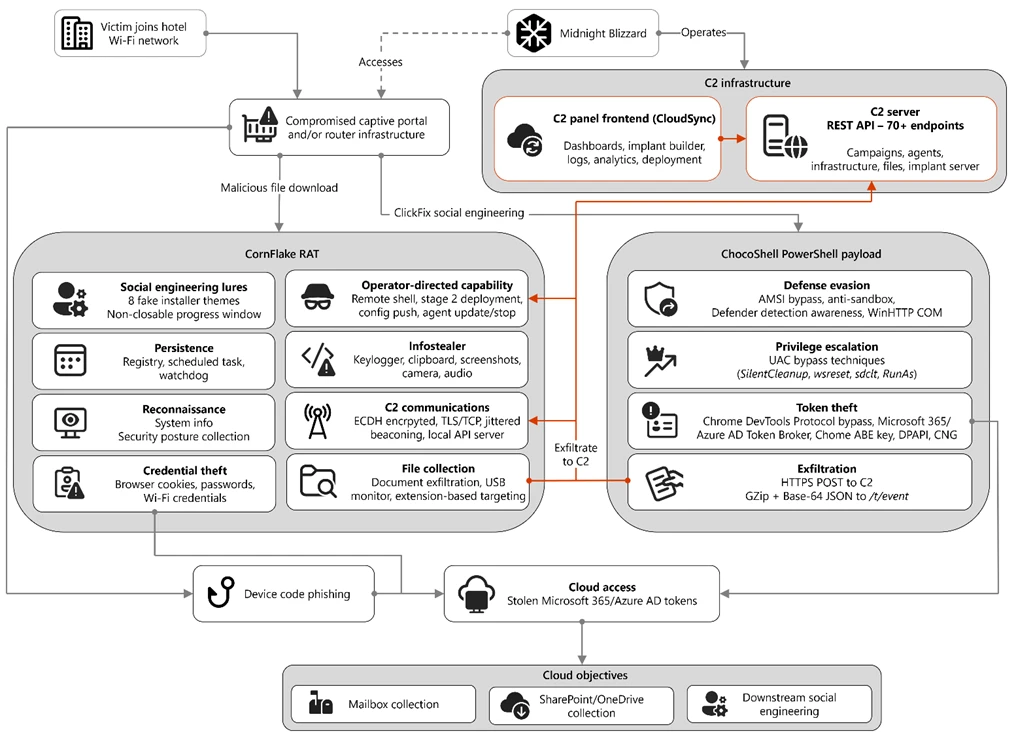
Figure 1. Overview of the CaptiveCrunch attack flow
As part of the CaptiveCrunch campaign, Storm-2945 has leveraged their AitM position to redirect users through actor-controlled phishing infrastructure and has also delivered malware purporting to be browser or operating system updates in response to automated connectivity checks issued by users’ browsers. Multiple variants have been delivered, including fully-featured Windows remote access trojans (RAT) in compiled Golang, with functionality to conduct system enumeration, collect files and keystrokes, steal credentials and session tokens, conduct audio and video surveillance, monitor for removable media, and provide the threat actor a remote shell on infected systems.
The threat actor infrastructure leverages a variety of ClickFix techniques to elicit the user into downloading and executing the malware:
Figure 2. ClickFix prompt with manual user instructionsFigure 3. ClickFix prompt with additional user instructions after verification failure
In addition to variants of malware targeting Windows systems, Microsoft Threat Intelligence is also aware of indications that the threat actor might be targeting Android devices with similar techniques as the ClickFix landings also include instructions for Android devices to download and install an APK file.
To date, Microsoft has identified widespread compromise of Wi-Fi networks at hospitality-related organizations and other networks serviced by captive portal equipment in several countries. ReliaQuest has identified this activity not only at hotels, but also conference centers and other shared venues, and assesses that the goal of this activity is to access the accounts of corporate travelers.
Storm-2945 and Midnight Blizzard
Microsoft Threat Intelligence assesses that Storm-2945 is an operational sub-cluster of Midnight Blizzard based on distinctive technical and operational overlaps. These include technical similarities to Storm-2372, a Midnight Blizzard initial access operations sub-cluster, also notable for their device code and OAuth code phishing operations tracked throughout 2025, Microsoft Graph-based email exfiltration, social engineering delivered via commercial messaging apps, and significant similarities in victimology.
Midnight Blizzard is a Russia-based threat actor attributed by the US and UK governments to the Foreign Intelligence Service of the Russian Federation, also known as the SVR. This threat actor is known to primarily target governments, diplomatic entities, non-governmental organizations (NGOs), and information technology (IT) service providers, primarily in the US and Europe. Midnight Blizzard is consistent and persistent in their operational targeting, and their objectives rarely change. Their focus is to collect intelligence through longstanding and dedicated espionage in support of Russian foreign policy interests.
Midnight Blizzard operations often involve compromise of valid accounts and, in some highly targeted cases, advanced techniques to compromise authentication mechanisms within an organization to expand access and evade detection. They utilize diverse initial access methods, and Midnight Blizzard is also adept at identifying and abusing OAuth applications to move laterally across cloud environments and for post-compromise activity, such as email collection.
CaptiveCrunch tradecraft and tooling
CornFlake: Remote access and infostealer implant
CornFlake is a full-featured Windows RAT written in Go that serves as Storm-2945’s primary persistent implant. Microsoft has observed the threat actor rapidly iterating on this malware layer, which features customizable capabilities from the social engineering user interface and data collection capabilities to anti-detection and evasion techniques.
On initial execution, CornFlake operates in dropper mode: it displays a convincing fake progress window designed to occupy the victim’s attention while the binary copies itself to %APPDATA%\svchost32\svchost32.exe and establishes persistence.
Fake window options configurable by the threat actor at build time:
winupdate — A Windows Update screen displaying “Working on updates… Don’t turn off your computer”
defender — A Windows Security virus scan
directx — A DirectX End-User Runtime Web Installer
vcredist — A Microsoft Visual C++ 2015-2022 Redistributable installer
sysopt — A disk optimization utility
netfix — A Windows Network Diagnostics tool
browser — A browser update prompt
pdfview — A document viewer installer
Figure 4. False update window
CornFlake registers as a Windows service named svchost32 with the display name “Cloud Sync Service” and description “Synchronizes files with the cloud storage provider”, deliberately mimicking the legitimate svchost.exe process. It establishes redundant persistence mechanisms: Windows service registrations, Registry Run keys, named scheduled tasks, and a persistence watchdog routine that runs continuously to restore any persistence mechanism that is removed by defenders or endpoint protection.
For command and control (C2), CornFlake performs an Elliptic Curve Diffie-Hellman (ECDH) P-256 ephemeral key exchange with the C2 server, derives a session key via SHA-256, and communicates over a custom JSON protocol framed within the encrypted channel. This provides an encrypted channel to the C2 server, with each C2 session using a unique ephemeral key, making decryption of captured traffic impossible without the session-specific private key. The runtime configuration file sync.dat supports hot reconfiguration of C2 servers, watched directories, file targeting patterns, and Transport Layer Security (TLS) settings without requiring redeployment.
Once established on a victim system, CornFlake provides the operator with a comprehensive collection toolkit, gated by configuration flags that allow selective activation post-deployment:
Capability
Description
Keylogging
Raw input API-based keylogger capturing all keystrokes, including password fields
Clipboard monitoring
Captures clipboard changes with SHA-256 deduplication and records the active window title at time of capture
Screenshot capture
Idle-triggered and on-demand screenshots with configurable idle threshold
Audio surveillance
Windows Audio Session API (WASAPI)-based microphone capture, encoded as WAV files
Video surveillance
Media Foundation-based webcam capture, encoded as JPEG
Browser credential theft
ChromeKatz-derived module supporting live cookie extraction from process memory (Chromium browsers) and stored password extraction from on-disk databases, including Chrome App-Bound Encryption (ABE) bypass and Firefox NSS/SDR decryption
File exfiltration
Targets files based on file extensions with real-time file system monitoring and an upload throttle (1,000 files or 500 MB per cycle). File extensions are categorized as Documents, Archives, Images, Code, Data, Emails, and Keys
USB drive monitoring
Detects and scans removable media when inserted
Security posture sweep
Collects 18 categories of host intelligence including installed software, antivirus (AV)/endpoint detection and response (EDR) products, Defender exclusions, User Account Control (UAC) level, Remote Desktop Protocol (RDP) history, Office most recently used (MRU) files, and credential hints
Remote shell
Arbitrary command execution via cmd.exe or PowerShell (with -NoP flag to suppress profile-based detection)
CornFlake also exposes a localhost HTTP API server (/upload, /reload, /status) that transforms the RAT into a modular platform: companion or next-stage payloads such as ChocoShell could task file exfiltration, trigger configuration hot reloads or check C2 connectivity using the pre-established secure C2 channel for communication.
ChocoShell: PowerShell infostealer
ChocoShell is the campaign’s Powershell-based infostealer, delivered and executed entirely in-memory. Its primary objective is the high-volume theft of browser session cookies, saved passwords, Microsoft 365 Single Sign-On (SSO) tokens, and Wi-Fi credentials from compromised systems. Where CornFlake provides the operator with a persistent, long-running foothold on the device, ChocoShell is designed to extract the most operationally valuable credentials, giving the operator access to victim cloud environments.
The ChocoShell script was authored with full developer comments that reveal the operator’s intent behind each code decision, including explicit references to Microsoft detection signatures and the reasoning behind specific evasion choices. The consistent coding standard and descriptive commentary suggest the author might have leveraged AI-assisted code generation.
Defense evasion. Upon execution, ChocoShell beacons to a hardcoded C2 server at 213.145.86[.]112 and implements several evasion techniques in sequence. It disables the Antimalware Scan Interface (AMSI) via .NET reflection to prevent ScriptBlock scanning and evades Microsoft behavioral detection that triggers on suspicious PowerShell web request cmdlets. A timing-based sandbox detection check is also employed as a virtual machine (VM) detection mechanism, silently exiting without performing any collection if detected.
C2 communication. ChocoShell communicates with its C2 server using HTTPS with URI paths designed to blend in with legitimate web traffic. Beacons use /t/pixel.gif?m=<status>, mimicking an image tracking pixel. Additional tooling is fetched from /cdn/chunks/polyfill-7e2b.min.js, disguised as a JavaScript polyfill file. This downloaded module is Base64-decoded and executed in memory via [ScriptBlock]::Create(), providing browser encryption key extraction capabilities, SYSTEM token impersonation, and Defender signature locking. Exfiltrated data is sent by POST to /t/event as GZip-compressed, Base64-wrapped JSON.
Privilege escalation. ChocoShell requires administrative privileges for its most impactful capabilities: SYSTEM token impersonation for Chrome ABE decryption, Volume Shadow Copy Service (VSS) shadow copy creation, Defender signature locking. It implements three silent UAC bypass techniques with ordered fallback:
SilentCleanup task hijack: Writes a malicious command to HKCU\Environment\windir, then triggers the built-in SilentCleanup scheduled task, which resolves %windir% from the user’s environment, executing the threat actor’s command at elevated privilege. The registry value is cleaned up after two seconds to avoid cloud detection.
wsreset.exe COM hijack: Creates a COM handler key in HKCU\Software\Classes and launches the auto-elevating Windows Store reset tool.
sdclt.exe folder hijack: Hijacks HKCU\Software\Classes\Folder\shell\open\command and launches the Windows Backup utility with the /KickOffElev flag.
If none of the silent bypasses succeed (for example, the user is not a local administrator), ChocoShell falls back to a visible UAC prompt via Start-Process -Verb RunAs. Notably, the script also contains a variant designed to execute within the WinGet Desired State Configuration (DSC) host process (ConfigurationRemotingServer), suggesting an attack vector through malicious WinGet DSC configuration used in Windows machine provisioning.
Credential and session theft. Once running with elevated permissions, ChocoShell locks Defender signature updates and systematically harvests data from multiple sources. For Chromium-based browsers (Chrome, Edge, Brave, Opera, Opera GX, Vivaldi), it extracts the master encryption key from the browser’s Local State file, handling both the modern ABE scheme (Chrome v127+) and the legacy data protection API (DPAPI)-only scheme. ABE decryption requires SYSTEM-level DPAPI access, which the malware obtains by impersonating a SYSTEM process token borrowed from winlogon.exe, wininit.exe, or services.exe. Locked browser SQLite databases are accessed through three strategies: shared file access, Volume Shadow Service snapshots, and direct copy as a fallback.
As a parallel collection path, ChocoShell launches Chrome, Edge, and Brave with the –remote-debugging-port flag and issues Network.getAllCookies through the Chrome DevTools Protocol (CDP). This completely bypasses ABE, enabling the browser to perform its own internal decryption and returns plaintext cookie values. To handle privilege issues (SYSTEM-launched browsers inherit the wrong token), the malware creates transient scheduled tasks with TASK_LOGON_INTERACTIVE_TOKEN to launch the browser under the signed-in user’s session. After extraction, the browser is stopped and relaunched with –restore-last-session to avoid alerting the user.
For Firefox family browsers (Firefox, Waterfox, LibreWolf, Floorp, Zen), the malware copies unencrypted cookies.sqlite databases from each profile. Additionally, ChocoShell collects Microsoft 365 and Azure Active Directory (AD) access tokens, refresh tokens, and Web Account Manager (WAM) tokens from .tbres files in the Token Broker cache. Collection of these tokens represents a significant threat to enterprise environments, as threat actors could replay SSO sessions without browser cookies. Additionally, Wi-Fi credentials are harvested via netsh wlan show profile with key=clear.
Exfiltration and cleanup. All collected data is aggregated into a JSON structure, GZip-compressed, Base64-encoded, and sent by POST to the C2’s /t/event endpoint. After exfiltration, all collected data variables are nulled, garbage collection is forced, VSS shadow copies are deleted via Windows Management Instrumentation (WMI), temporary elevation scripts are removed, and all UAC bypass registry keys (already cleaned during escalation) are verified removed.
FruitStone: Operator C2 panel
FruitStone is the web-based C2 panel that Storm-2945 operators use to manage the entire CaptiveCrunch campaign infrastructure. Implemented as a single-page application (HTML and JavaScript) serving as the front-end of the C2 server with all functionality exposed without authentication, FruitStone provides a centralized dashboard for managing compromised endpoints, building and deploying new campaign payloads, and reviewing all collected data (such as screenshots, keystrokes, browser credentials).
Operational cover. The panel is branded as “CloudSync Console” with a footer reading “Acuity Systems, Inc. — Cloud Infrastructure Portal v3.2.1,” designed to appear as legitimate enterprise cloud management software if the panel URL is discovered by defenders or hosting providers. This masquerading extends to the CornFlake agent’s service name (Cloud Sync Service) and description (“Synchronizes files with the cloud storage provider”), creating a consistent cover story across the toolchain.
Figure 5. CloudSync Console panel masquerade
Session management and multi-operator support. FruitStone uses JSON Web Token (JWT)-based authentication, session revocation, and rate limiting with IP blocking to prevent brute force attacks against the panel sign in. Multiple operators could be provisioned with individual accounts, and all active sessions are visible with IP address, user-agent, and creation time to enable operational security awareness across the operators.
Agent management. The panel displays all registered CornFlake agents in a dashboard with real-time status updates via Server-Sent Events (SSE). Each agent card shows comprehensive system information including hostname, username, OS version, CPU, RAM, disk usage, screen resolution, timezone, domain membership, and camera/microphone presence, all collected during the CornFlake posture sweep. Agents are grouped by country and subnet, with geographic distribution visualized on a map.
Operators could interact with individual agents through:
Remote shell — Interactive cmd.exe or PowerShell command execution with command history
File system browser — Live directory traversal and arbitrary file download from compromised hosts
Collection tasking — On-demand screenshot, process list, keylog buffer flush, clipboard dump, security posture survey, ChromeKatz cookie/password extraction, camera capture, and audio recording
Configuration push — Live runtime reconfiguration of C2 servers, watch paths, and C2 beacon timing
Agent update — In-place implant update by pushing a new CornFlake build to a running agent
Agent kill — Remote termination of the CornFlake implant
Campaign builder. A step-by-step wizard enables operators to configure and build new CornFlake payloads directly from the panel:
Identity — Campaign ID, C2 host and port, HTTP base URL, executable file name (svchost32.exe by default), and dropper type (C dropper at ~19 KB, Go stub at ~8 MB, or standalone self-installer)
File Paths — Configure targeted directories and file extensions by category (documents, archives, images, code, data, emails, encryption keys)
Figure 8. File paths tab
Evasion — Enable garble symbol randomization (for GoLang payloads), XOR string encoding, GZip upload compression, and debug mode
Figure 9. Evasion tab
Infrastructure management. FruitStone provides management interfaces for three layers of supporting infrastructure:
Proxy relays — Multi-proxy C2 relay architecture with TLS certificate tracking (fingerprint, expiry), health checks, connection counts, bytes forwarded, and rotation capabilities that push updated server lists to all online agents
Beacon profiles — Configurable timing profiles controlling agent sleep intervals, reconnection delays, TLS Server Name Indication (SNI) spoofing (like teams.microsoft.com), and DNS fallback domains
Staging servers — External payload hosting infrastructure with push-to-deploy, file listing, and health monitoring
Figure 10. View of the CloudSync staging servers interface
Device code abuse for cloud access
Since July 16, Microsoft has observed a portion of CaptiveCrunch landing pages redirecting users to device code authentication flow experiences. In these cases, users served these landings might be instructed to enter a device code into a legitimate Microsoft sign-in page, a technique commonly referred to as device code phishing.
Device code authentication is a legitimate OAuth workflow designed for devices that cannot support a traditional sign-in experience. However, threat actors could abuse this flow by initiating an authentication request on behalf of a user then convincing the user to enter an actor-controlled device code into a legitimate Microsoft authentication page. When successful, the victim authenticates the threat actor’s session rather than their own.
This activity is consistent with previously reported device code phishing operations conducted by Midnight Blizzard since August 2024. The observed technique does not appear fundamentally novel; however, integrating device code phishing into captive portal and traffic manipulation operations might increase the likelihood that users perceive the authentication request as legitimate. For additional details on Midnight Blizzard-related device code phishing techniques, see: Storm-2372 conducts device code phishing campaign. To understand other threat actors’ use of device code phishing and associated mitigations, see Inside an AI‑enabled device code phishing campaign.
How to protect against CaptiveCrunch activity
Minimize trust in hospitality and guest networks
When traveling, users should treat hotel, conference, airport, and other guest wireless networks as untrustworthy.
Prefer private connectivity (including mobile hotspots, satellite, and eSIM-based cellular data connections) over public Wi‑Fi whenever practical.
Consider using enterprise-managed travel routers or hotspot devices that establish encrypted tunnels back to trusted corporate infrastructure before accessing sensitive resources.
Avoid downloading software updates, certificates, browser updates, network troubleshooting tools, or security utilities presented through captive portals or other unexpected web prompts.
Verify update requests through trusted operating system mechanisms rather than pop-up messages or website prompts.
Strengthen identity and access controls
Organizations should assume that public and hospitality network infrastructure might not be trustworthy and should adopt controls that limit exposure to traffic manipulation, credential theft, and device code phishing.
Educate users to recognize ClickFix-style prompts, fake verification checks, and paste-and-run instructions as malicious, especially when they invoke command interpreters or script hosts such as cmd.exe, PowerShell, rundll32.exe, or mshta.exe.
Use passwordless solutions like passkeys and implement multifactor authentication (MFA).
Only allow device code flow where necessary. Microsoft recommends blocking device code flow wherever possible. Where necessary, configure Microsoft Entra ID’s device code flow in your Conditional Access policies.
Implement a sign-in risk policy to automate response to risky sign-ins. A sign-in risk represents the probability that a given authentication request is not authorized by the identity owner. A sign-in risk-based policy can be implemented by adding a sign-in risk condition to Conditional Access policies that evaluates the risk level of a specific user or group. Based on the risk level (high/medium/low), a policy can be configured to block access or force MFA.
When a user is a high risk and Conditional access evaluation is enabled, the user’s access is revoked, and they are forced to re-authenticate.
For regular activity monitoring, use Risky sign-in reports, which surface attempted and successful user access activities where the legitimate owner might not have performed the sign-in.
Use a Security Service Edge (SSE) solution like Global Secure Access to secure access to any app or resource using network, identity, and endpoint access controls.
Reduce exposure during captive portal registration
Organizations should review what information employees provide to hospitality providers when connecting to guest networks.
Do not reuse corporate credentials on hotel, conference, or guest-network registration pages.
Where possible, organizations should evaluate whether venue-provided wireless is required for corporate events and conferences.
Organizations should minimize unnecessary disclosure of employee identities, organizational affiliations, and travel details when booking accommodations or registering for guest network access, consistent with corporate policy and applicable local requirements.
Microsoft Defender detections and hunting guidance
Microsoft Defender customers can refer to the list of applicable detections below. Microsoft Defender coordinates detection, prevention, investigation, and response across endpoints, identities, email, apps to provide integrated protection against attacks like the threat discussed in this blog.
Microsoft Defender for Endpoint detects Storm-2945 activity under the detection Suspicious activity linked to a Russian state-sponsored threat actor has been detected. However, these alerts might be triggered by unrelated threat actor activity. The following chart lists Microsoft Defender detections specific to the TTPs utilized by Storm-2945 in this attack.
CornFlake registers a Windows service, a Registry Run key, a scheduled task
Microsoft Defender for Endpoint – Suspicious Scheduled Task Process Launched – Suspicious scheduled task – Suspicious file added to run key – Suspicious service registration
Microsoft Defender XDR – User account compromise via OAuth device code phishing – Malicious sign in from an IP address associated with recognized attacker infrastructure – Suspicious Azure authentication through possible device code phishing
Microsoft Security Copilot is embedded in Microsoft Defender and provides security teams with AI-powered capabilities to summarize incidents, analyze files and scripts, summarize identities, use guided responses, and generate device summaries, hunting queries, and incident reports.
Security Copilot is also available as a standalone experience where customers can perform specific security-related tasks, such as incident investigation, user analysis, and vulnerability impact assessment. In addition, Security Copilot offers developer scenarios that allow customers to build, test, publish, and integrate AI agents and plugins to meet unique security needs.
Threat intelligence reports
Microsoft Defender XDR customers can use the following threat analytics reports in the Defender portal (requires license for at least one Defender XDR product) to get the most up-to-date information about the threat actor, malicious activity, and techniques discussed in this blog. These reports provide the intelligence, protection information, and recommended actions to prevent, mitigate, or respond to associated threats found in customer environments.
Microsoft Security Copilot customers can also use the Microsoft Security Copilot integration in Microsoft Defender Threat Intelligence, either in the Security Copilot standalone portal or in the embedded experience in the Microsoft Defender portal to get more information about this threat actor.
Hunting queries
Microsoft Defender XDR
Microsoft Defender XDR customers can run the following advanced hunting queries to find related activity in their networks:
Detect file creation after Wi-Fi connectivity test on devices
The following query checks for a file creation on a device within two minutes of the device performing built‑in Network Connectivity Status Indicator (NCSI) test, which occurs when network connectivity is established to a Wi-Fi network with a captive portal. This activity might indicate an attacker’s initial access file presence on a device.
Please note that not all files discovered through this query might be malicious or related to this threat activity.
let ncsi_endpoints = dynamic(["msftconnecttest.com","edge-http.microsoft.com","msftncsi.com","captive.apple.com","clients1.google.com",
    "clients3.google.com","clients4.google.com","clients6.google.com","connectivitycheck.gstatic.com","connectivitycheck.android.com",
    "android.clients.google.com","www.gstatic.com","detectportal.firefox.com","detectportal.brave-http-only.com","cloudflareportal.com",
    "cloudflarecp.com","cloudflareok.com","connectivity-check.warp-svc","connectivity.cloudflareclient.com","spectrum.s3.amazonaws.com",
    "nmcheck.gnome.org"]);
let NCSIEvents = DeviceNetworkEvents
    | where Timestamp > ago(7d)
    | where RemoteUrl has_any (ncsi_endpoints)
    | project NCSI_Timestamp = Timestamp, DeviceId, DeviceName, RemoteUrl, NCSI_ReportId = ReportId, NCSI_InitiatingProcessFileName = InitiatingProcessFileName, NCSI_InitiatingProcessCommandLine = InitiatingProcessCommandLine, NCSI_AccountName = InitiatingProcessAccountName;
let FileDownloadEvents = DeviceFileEvents
    | where Timestamp > ago(7d)
    | where ActionType == "FileCreated"
    | where FileName has_any (".exe",".msi",".zip",".rar",".7z")
    | project Download_Timestamp = Timestamp, DeviceId, FileName, FolderPath, Download_ReportId = ReportId, Download_InitiatingProcessFileName = InitiatingProcessFileName, Download_InitiatingProcessCommandLine = InitiatingProcessCommandLine, Download_AccountName = InitiatingProcessAccountName;
NCSIEvents
| join kind=inner (
    FileDownloadEvents
) on DeviceId
| where Download_Timestamp >= NCSI_Timestamp and Download_Timestamp
Detect connectivity to Storm-2945 infrastructure
The following query checks for connectivity to Storm-2945 infrastructure observed in this attack activity.
let target_domains = dynamic(["ms365-device.com", "ms365-live.com", "m365-owa.com", "owa-ms365.com"]);
let target_ips = dynamic(["31.57.243.154", "38.146.28.75", "38.146.28.132", "104.194.159.150", "107.189.26.194", "213.145.86.112"]);
DeviceNetworkEvents
| where RemoteUrl has_any(target_domains) or RemoteIP in (target_ips)
| project
    Timestamp,
    DeviceName,
    DeviceId,
    RemoteUrl,
    RemoteIP,
    LocalIP,
    InitiatingProcessFileName,
    InitiatingProcessCommandLine,
    AccountName = InitiatingProcessAccountName,
    ReportId
Detect CornFlake RAT presence on affected systems
The following query checks for the presence of the CornFlake RAT binary.
The following query checks for the CornFlake RAT Windows service registration.
DeviceRegistryEvents
| where RegistryKey has @"\SYSTEM\CurrentControlSet\Services\svchost32"
| where ActionType == "RegistryValueSet"
| where (RegistryValueName == "DisplayName" and RegistryValueData == "Cloud Sync Service")
    or (RegistryValueName == "Description" and RegistryValueData == "Synchronizes files with the cloud storage provider")
| project
    Timestamp,
    DeviceName,
    DeviceId,
    RegistryKey,
    RegistryValueName,
    RegistryValueData,
    ActionType,
    InitiatingProcessFileName,
    InitiatingProcessCommandLine,
    InitiatingProcessAccountName,
    ReportId
Microsoft Sentinel
Microsoft Sentinel customers can use the TI Mapping analytics (a series of analytics all prefixed with ‘TI map’) to automatically match the malicious domain indicators mentioned in this blog post with data in their workspace. If the TI Map analytics are not currently deployed, customers can install the Threat Intelligence solution from the Microsoft Sentinel Content Hub to have the analytics rule deployed in their Sentinel workspace.
Detect network IP and domain indicators of compromise using ASIM
The following query checks IP addresses and domain IOCs across data sources supported by ASIM network session parser:
//IP list and domain list- _Im_NetworkSession
let lookback = 30d;
let ioc_ip_addr = dynamic(["213.145.86.112"]);
let ioc_domains = dynamic(["213.145.86.112/t/pixel.gif", "213.145.86.112/cdn/chunks/polyfill-7e2b.min.js", "213.145.86.112/t/event"]);
_Im_NetworkSession(starttime=todatetime(ago(lookback)), endtime=now())
| where DstIpAddr in (ioc_ip_addr) or DstDomain has_any (ioc_domains)
| summarize imNWS_mintime=min(TimeGenerated), imNWS_maxtime=max(TimeGenerated),
  EventCount=count() by SrcIpAddr, DstIpAddr, DstDomain, Dvc, EventProduct, EventVendor
Detect web sessions IP and file hash indicators of compromise using ASIM
The following query checks IP addresses, domains, and file hash IOCs across data sources supported by ASIM web session parser:
//IP list - _Im_WebSession
let lookback = 30d;
let ioc_ip_addr = dynamic(["213.145.86.112"]);
let ioc_sha_hashes =dynamic([“918fa52ae45ed60ba7cc8bdc99c3cbe9ab92e0375ec31fc05d0d4513be11c593”, “be99857449d2856dd5a84e21c8a3d5e0e01456adb44062ddec5a6b4970d8d42c”]);
_Im_WebSession(starttime=todatetime(ago(lookback)), endtime=now())
| where DstIpAddr in (ioc_ip_addr) or FileSHA256 in (ioc_sha_hashes)
| summarize imWS_mintime=min(TimeGenerated), imWS_maxtime=max(TimeGenerated),
  EventCount=count() by SrcIpAddr, DstIpAddr, Url, Dvc, EventProduct, EventVendor
Detect domain and URL indicators of compromise using ASIM
The following query checks domain and URL IOCs across data sources supported by ASIM web session parser:
// file hash list - imFileEvent
// Domain list - _Im_WebSession
let ioc_domains = dynamic(["https://213.145.86.112/t/pixel.gif", "https://213.145.86.112/cdn/chunks/polyfill-7e2b.min.js", "https://213.145.86.112/t/event"]);
_Im_WebSession (url_has_any = ioc_domains)
ChocoShell C2 communications
The following query detects ChocoShell communications with its C2 server using HTTPS with URI paths designed to blend in with legitimate web traffic. Beacons use /t/pixel.gif?m=<status>, mimicking an image tracking pixel.
let lookback = 30d;
let ioc_url_artifacts = dynamic(["/t/pixel.gif?m="]);
_Im_WebSession(starttime=todatetime(ago(lookback)), endtime=now())
| where DstDomain  in (ioc_url_artifacts)
| summarize imWS_mintime=min(TimeGenerated), imWS_maxtime=max(TimeGenerated),
  EventCount=count() by SrcIpAddr, DstIpAddr, Url, Dvc, EventProduct, EventVendor
To hear stories and insights from the Microsoft Threat Intelligence community about the ever-evolving threat landscape, listen to the Microsoft Threat Intelligence podcast.
Tech company says it ‘caught and disrupted’ NSO Group’s attempts to access accounts in Jordan and Lebanon
A spyware firm has been targeting WhatsApp users with malicious links in contravention of a US court order forbidding it from doing so, Meta has said.
In a post, Meta said WhatsApp had “caught and disrupted spear phishing attempts” by NSO Group, which a spokesperson said targeted a handful of users in Jordan and Lebanon. It had also caught the group creating “test accounts and groups” on WhatsApp.
Kazuar, a sophisticated malware family attributed to the Russian state actor Secret Blizzard, has been under constant development for years and continues to evolve in support of espionage-focused operations. Over time, Kazuar has expanded from a relatively traditional backdoor into a highly modular peer-to-peer (P2P) botnet ecosystem designed to enable persistent, covert access to target environments.
This upgrade aligns with Secret Blizzard’s broader objective of gaining long-term access to systems for intelligence collection. The threat actor has historically targeted organizations in the government and diplomatic sector in Europe and Central Asia, as well as systems in Ukraine previously compromised by Aqua Blizzard, very likely for the purpose of obtaining information supporting Russia’s foreign policy and military objectives.
While many threat actors rely on increasing usage of native tools (living-off-the-land binaries (LOLBins)) to avoid detection, Kazuar’s progression into a modular bot highlights how Secret Blizzard is engineering resilience and stealth directly into their tooling. By separating responsibilities across Kernel, Bridge, and Worker modules and restricting external communications to a single elected leader, Kazuar reduces its observable footprint. It also maintains flexible tasking, data staging, and multiple fallback channels for command and control (C2). Understanding this architecture helps defenders move beyond single sample analysis and instead focus on the behaviors that keep the botnet operational: leader election, inter-process communication (IPC) message routing, working directory staging, and periodic exfiltration.
Kazuar’s capabilities and tradecraft have been widely documented by the security research community, and prior reporting, including Unit 42’s write-up and a recent deep dive into its loader capabilities, remains relevant today. This blog is an in-depth analysis of Kazuar’s progression from a single, monolithic framework into a modular bot ecosystem composed of three distinct module types, each with clearly defined roles. Together, these components distribute functionality across the P2P botnet, enabling flexible configuration, lower observability, and broad tasking while minimizing opportunities for detection.
Delivery
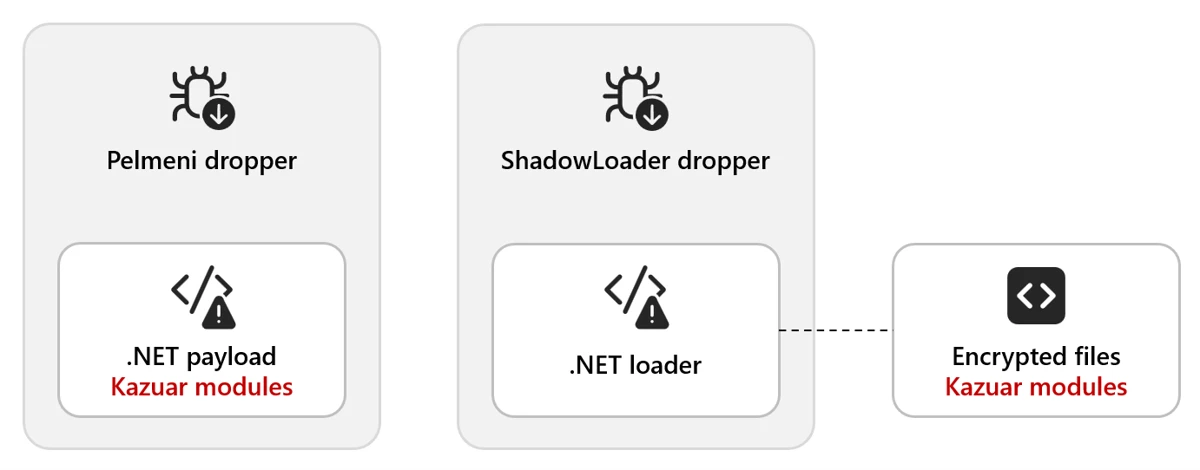
Kazuar is delivered through multiple dropper variants. In one observed method, the Pelmeni dropper embeds the encrypted second-stage payload directly within the dropper as an encrypted byte array. The payload is often bound to the target environment (for example, encrypted using the target hostname) so it only decrypts and executes on the intended host.
In another method, the dropper deploys a small .NET loader alongside the final payload. The dropper then invokes the loader (often configured as a COM object) and supplies the decrypted payload, allowing it to load and execute the Kazuar modules.
Figure 1. Example delivery chain: a dropper deploys a lightweight .NET loader and supplies the decrypted Kazuar payload for in-memory execution.
Module types
There are three distinct types of modules: Kernel, Bridge, and Worker. The next sections explain the functionality contained in each type and how they interact with each other.
This diagram shows the general interactions between a set of modules on a single host. Each infected host needs to have all three modules to create the full P2P network:
Figure 2. Overview of Kernel, Bridge, and Worker module interactions on a single host, showing internal IPC and external C2 routing through the Bridge.
Note: We use ALL CAPS when referencing identifiers taken verbatim from the malware (for example, internal module and thread names, message types, configuration keys, or mode/flag values).
Type: Kernel
The Kernel module serves as the central coordinator for the botnet. It issues tasks to Worker modules, manages communication with the Bridge module, and maintains logs of actions and collected data. Early in execution, the Kernel module performs extensive anti-analysis and sandbox checks. These behaviors are well documented in the Unit 42 write-up and include standard checks such as:
Checking for running processes containing analysis tools
Checking for canary files on the desktop
Checking the loaded process for sandbox-related DLLs
Module configuration
Once these checks are passed, the Kernel module sets up the environment based on numerous configuration options. Previous versions of Kazuar have used separate files containing the configuration information, but these are now embedded in the samples and have significantly increased the number of configurations available to the malware family.
The configuration set can vary across 150 different configuration types, C2 communication infrastructures, or tasking options generally defined by eight functional categories. Any operational configuration in use can be updated at any time from the C2 server. The following table contains some examples and descriptions of the categories.
Controls how the malware communicates with C2 infrastructure, including HTTP and WebSocket transports, Exchange Web Services (EWS) email-based C2, heartbeat intervals, and connection parameters
Defines how the malware executes and persists in memory, including process injection techniques (inject/remote/zombify/combined/single), module loading, and process hosting strategies
Configures evasion techniques to avoid detection by security tools, including bypasses for Antimalware Scan Interface (AMSI), Windows Lockdown Policy (WLDP), Event Tracing for Windows (ETW), and anti-debugging/anti-dump protections
Controls when and how collected data is exfiltrated, including working hours restrictions (8:00 AM – 8:00 PM default), weekend behavior, chunk sizes, retry limits, and rate limiting to blend with normal network traffic
Manages execution of received tasks/commands, including timeouts, thread pool sizing, retry logic, deadlock detection, and task queuing/storage parameters
Maintains agent identity and operational state, including unique identifiers, working directories, startup tracking, shutdown flags, and initial reconnaissance behavior
Controls active surveillance capabilities, including keylogging (buffer size, flush intervals), screenshot capture, credential theft, Messaging Application Programming Interface (MAPI) email monitoring, and configurable monitoring rules/intervals.
Table 1. Configuration options
This configuration exposes three internal communication mechanisms:
Window Messaging
Mailslot
Named pipes
There are also three different communication protocols for external communication:
Exchange Web Services (EWS)
HTTP
WebSockets (WSS)
They typically contain redundant or fallback communications to maintain access in the event of the failure of a single point of contact.
Leadership election
One of the methods that Kazuar uses to limit external communication is to use a single Kernel leader per botnet. In this architecture, the Kernel leader is the one elected Kernel module that communicates with the Bridge module on behalf of the other Kernel modules, reducing visibility by avoiding large volumes of external traffic from multiple infected hosts.
There are several conditions that determine whether a new leader needs to be elected among participating Kernel modules:
There currently is no leader.
The leader announces it is shutting down.
The leader announces it is logging off.
If an election does not result in a leader due to an error, a new election will be called.
Elections occur over Mailslot, and the leader is elected based on the amount of work (length of time the Kernel module has been running) divided by interrupts (reboots, logoffs, process terminated). Once a leader is elected, it announces itself as the leader and tells all other Kernel modules to set SILENT.
Figure 3. Kernel leadership election overview showing a single active leader and multiple client Kernel modules operating in SILENT mode
Only the elected leader is not SILENT, which allows the leader Kernel module to log activity and request tasks through the Bridge module. Client Kernel modules still participate in internal IPC (for elections, status, and delegated work), but they don’t independently request tasks from the Bridge module. Before entering SILENT mode, each client Kernel module sends a CLIENT announcement, which causes the leader to add it to the maintained agent list.
With the hierarchy established, the work can be done. Several threads and communication types are initialized to perform the work and communicate between modules.
REMO thread
The REMO thread sets up a named pipe channel between Kernel modules so the leader can exchange messages with other Kernels. By default, the pipe name is the MD5 hash of pipename-kernel-<Bot version>, which results in a pipe path such as \\.\pipe\82760B84F1D703D596C79B88BA4FAC1E. The name could be modified through additional strings passed into the name-building function, but this pattern is the default. This channel lets the leader target specific client Kernel modules when delegating work.
Messages over this pipe are AES-encrypted and begin with a PING/PONG handshake. After that, the leader could:
Request another Kernel module’s logs
Assign tasks to a client Kernel module
Because only the Kernel leader is allowed to request tasks through the Bridge module, it distributes work to the other Kernel clients over named pipes. If the leader receives a task destined for a different bot, it forwards the task to the appropriate client Kernel module through this channel.
MSGW thread
For Kernel-to-Worker and Kernel-to-Bridge communication, Kazuar uses one of two IPC mechanisms:
Window Messaging [default selection]
Registers a hidden window
Mailslot
Registers a Mailslot
Based on its initial configuration, Kazuar selects one of these communication types to listen for incoming communication, with the default being Windows Messaging.
Window Messaging setup
This technique involves creating a hidden window and registering a ClassName and WindProc. The ClassName is simply the module name (for example, Bridge), and the WindProc is the general-purpose message handler.
This allows other processes to look up the window by ClassName and use several different APIs to send a message to that window. When the window receives a message, the WindProc is executed to parse it and carry out the requested action.
Mailslot setup
The Mailslot name is derived by hashing the string “mailslot-” plus the module name (Bridge/Kernel/Worker). The configuration can optionally append an additional identifier (empty by default), which allows deployments to create distinct Mailslot namespaces when needed.
Figure 4. Example IPC message type identifiers used for inter-module communication within the botnet.
The string is hashed and used as the name to create the Mailslot: \\.\mailslot\<generated hash>.
A thread is created that checks every three seconds for new messages using the API GetMailslotInfo, and when it finds one, it parses the incoming message.
Message types
Regardless of what message delivery system is selected, the message is parsed by the same handler function. For the Kernel module, this message parsing function has numerous expected communication messages, since it controls all the modules execution flows.
The following message table describes the incoming and outgoing messages for the Kernel, what actions precipitate a message, and what the Kernel does when it receives each message:
Kernel outgoing MsgType
MsgType reason
Module(s)
Kernel incoming MsgType
Kernel actions
TASK
– Issue task to worker
Worker
TASK_RESULT
– Response message is logged by the Kernel – Result file is created with results of the task
CHECK
– Only the leader can send this – Request new tasks from remote C2
Bridge
CHECK_RESULT
– If the C2 has tasks, the Kernel creates a task file – Can also receive alternate C2 URLs that are added to the stored configuration
SYN
– Target module needs to request a new config
Bridge, Worker
GET_CONFIG
– Kernel sends its configuration to the requesting module
(Worker thread – PEEP)
– Configuration-based
Worker
PEEP
– PEEP result file is written unless it has reached its configured max PEEP number
SEND
– Send result file to be forwarded to C2
Bridge
SEND_RESULT
– Result file is deleted
(Worker thread – KEYL)
– Configuration-based
Worker
KEYLOG
– Writes keylog data to keylog output file
(Multiple Filesystem Worker threads)
– Configuration-based
Worker
AUTOS
– Writes AUTO data to AUTOS output files
Table 2. Message types
SEND thread
The configuration specifies an external communication method from the available communication modes
HTTP [default selection]
Web Socket Server (WSS)
Exchange Web Server (EWS)
These configurations can be changed at any point when the C2 sends a new configuration, or a change communication task is issued to it. It also contains a heartbeat timer that is defined in the configuration for the SEND actions to occur with the default timer being every hour. There are also working timers that can install a blackout period on communications to blend in with the target environment.
Figure 5. External communication (SEND) configuration, including transport selection, timers, and blackout/heartbeat controls.
Note: Only the elected Kernel leader can perform the following actions:
If the Kernel has task results
Read in the task file
Send SEND message to Bridge with the task result file
Get new tasks from Bridge
Send CHECK message to Bridge
Table 2 describes what the Kernel expects in return for these messages. The messages are sent asynchronously and recorded as tasks by the Kernel.
There is also a failsafe communication method that allows the Kernel to directly contact the remote C2 if the Kernel is unable to communicate with the Bridge module. Essentially, if all communication attempts fail and a certain amount of time has elapsed, the Kernel module requests tasks directly from the remote C2.
SOLV thread
This thread executes when the heartbeat timer expires to handle any tasks that the Kernel is tracking. This thread performs several functions related to the current task list:
Loop through the list of current tasks
Check if aborted flag is true
Issue TaskKill message to the worker (Window Messaging)
Remove task from task list
Check if task has exceeded the configured max working time for task
Issue TaskKill message to the worker (Window Messaging)
Set aborted flag for task to true
Remove task from task list
Read in all task files from the working directory
If the task is new
Add task to task list
Type: Bridge
The Bridge module provides the botnet’s external communications layer, acting as the proxy between the leader Kernel module and the C2 server regardless of the transport method selected. Since each Kernel module has its own Worker and Bridge module, if a new leader is elected, then that new leader Kernel module uses its Bridge module for communication. It typically has the same default configuration as the Kernel module but does contain a few different operations that set up the initial infection.
The Bridge module initializes its core object with basic metadata and instantiates two supporting components that provide the module’s primary functionality:
Server Communication module
Task Handling module
The module registers handlers for two system-level events. These handlers define how the module should respond when specific system events occur:
SystemEvents.SessionEnded
SystemEvents.PowerModeChanged
When an event is triggered, the corresponding handler function is invoked, allowing the module to determine the appropriate action for that event. Events are typically ignored unless they require explicit handling.
The module only terminates when the system is shutting down; all other events do not affect its lifetime. Based on its initial configuration, which should match the Kernel module configuration, it selects either Mailslot or Windows Messaging as the IPC mechanism used for communication between modules. Once the setup steps is completed, the module is ready to proxy communication between the leader Kernel module and the C2 server.
Type: Worker
The initial Worker configuration mirrors the structure of other module configurations and follows the same overall layout. Based on its initial configuration, the Worker module selects either Mailslot or Windows Messaging as the IPC mechanism used to communicate between modules. The default configuration for this botnet uses Windows Messaging; further details on the window setup are described below.
During initialization, the Worker configuration instantiates several objects responsible for the module’s primary functionality. Each object is executed within its own named thread. These components include:
Task Solver
Handles task tracking
Peep
Hooks windows events
Has a max number of windows to hook set by the configuration
Keylogger
Filesystem
GINFO – Gather system info
GFIL – Gather file listings
Recent files
Desktop
Malware working directory
GHOO – Window information
GMAP – Gather MAPI info
Email information
Data collected by these components is aggregated, encrypted, and written to the malware’s working directory, where it is staged for subsequent exfiltration to the C2 server.
Botnet operations
With the botnet setup complete, configurations instantiated, and a leader elected, Kazuar transitions into its steady state operational phase. In this state, the elected Kernel leader centrally coordinates tasking and data collection across participating modules while maintaining a deliberately low observable footprint. Worker modules execute tasks asynchronously based on configuration and assignments received from the Kernel, collecting system, file, window, and user activity data according to defined schedules and limits.
Module-to-module messaging
When one module needs to communicate with another, all required information is assembled into a structured message packet. Multiple packet formats are defined, with the specific format determined by the message type and intended action.
These message packets are constructed using Google Protocol Buffers (Protobuf), which provides a structured, schema‑based format similar in concept to JSON. Using Protobuf allows the malware to efficiently serialize, transmit, and parse messages through standard library functions.
Messages destined for the Bridge module include additional fields that describe how the request should be forwarded to the remote C2 infrastructure. These fields specify transport level details, including the external communication mechanism to be used.
Figure 6. Protobuf-based message structure used to route requests between modules and describe how the Bridge should forward traffic to C2.Figure 7. Additional message fields and transport parameters that influence delivery method (e.g., HTTP vs. EWS) and destination module.
The TransportType field can specify one of three supported communication methods. The default transport is typically HTTP, using the C2 URLs in the default configuration.
When sending a message, the dispatch function examines the contents of the message packet to determine the appropriate delivery mechanism, resolves the corresponding Mailslot name or window class identifier, and routes the packet to the intended module.
For example, if the TransportType is set to EWS, the packet is delivered to the Bridge module, which then uses its Exchange communication component to encapsulate the data and deliver it to the remote C2 server via email.
Figure 8. Example routing flow when TransportType is set to EWS, where the Bridge encapsulates data and delivers it to C2 via email-based communication.
Messages originate from the Kernel leader, except for a couple of worker tasks that send messages to the Kernel module based on their configuration.
Figure 9. High-level module messaging map showing how the Kernel leader coordinates Worker tasking and uses the Bridge module for external C2 communications.
Working directory
Kazuar uses a dedicated working directory as a centralized on‑disk staging area to support its internal operations across modules. This directory is defined through configuration and is consistently referenced using fully qualified paths to avoid ambiguity across execution contexts. Within the working directory, Kazuar organizes data by function, isolating tasking, collection output, logs, and configuration material into distinct locations. This design allows the malware to decouple task execution from data storage and exfiltration, maintain operational state across restarts, and coordinate asynchronous activity between modules while minimizing direct interaction with external infrastructure. Collected artifacts are typically written incrementally, encrypted before staging, and retained locally until explicitly forwarded to the C2 infrastructure through the Bridge module.
Within this working directory, Kazuar maintains separate storage locations for the following functional data types:
Peeps
Autos
Files
Hashes
Result files
Task files
Config files
Common wordlist
Common exe
Logs
Keylogger
This structured use of the filesystem enables Kazuar to operate modularly, maintain persistence state across leadership changes or reboots, and blend malicious activity into routine file system usage.
Module tasks
The list of commands available for the Worker modules to perform is extensive and has many features, from arbitrary command/script execution to preformatted forensic data collection functions, as described in the Unit 42 blog.
The Kernel module task handler has a few additional functions that handle commands issued from the leader Kernel module.
Task
Description
kernel
A list of commands to be executed by the Kernel module
delegate
Send command via Named pipe to targeted Kernel module
modules
Handles the list of agents maintained by the Kernel module list – List modules in the agents list clear – Clear list of agents add – Add an agent to the list by ID remove – Remove an agent from the list by ID
autoslist
Gets list of hashes and files collected by autos
autosget
Sends all of the autos files to requesting module and deletes autos files
autosdel
Deletes all autos files
Table 3. Module tasks
System info gathering
System info gathering is often enabled by default in the configuration. This causes an initial collection of system information when the agent starts up. This task collects an extensive amount of information about the system and its user.
Optional OS features Installed AV AMSI provider Security packages AppLocker setting Logical drives USB devices Network adapters ARP tables Network connections Network shares RDP hints Running processes Loaded modules (current process)
Pipe list Active windows Recent documents Outlook downloads Recent items OS info System Boot events Hardware info User info Local users Logon sessions User profiles Special folders Explorer Run command history
Explorer typed paths Explorer search history Environment variables UAC settings Internet settings DNS cache Network PowerShell versions WSUS settings Installed software Hot patches Update history Services Drivers
Table 4. List of system info gathered
Screenshots are also taken through various methods and saved for exfiltration both automatically through the configuration or when a task is issued.
Who is Secret Blizzard?
The United States Cybersecurity and Infrastructure Security Agency (CISA) has attributed Secret Blizzard to Center 16 of Russia’s Federal Security Service (FSB), which is one of Russia’s Signals Intelligence and Computer Network Operations (CNO) services responsible for intercepting and decrypting electronic data as well as the technical penetration of foreign intelligence targets. Secret Blizzard overlaps with activity tracked by other security vendors as VENOMOUS BEAR, Uroburos, Snake, Blue Python, Turla, WRAITH, and ATG26.
Secret Blizzard is known for targeting a wide array of verticals, but most prominently ministries of foreign affairs, embassies, government offices, defense departments, and defense-related companies worldwide. Secret Blizzard focuses on gaining long-term access to systems for intelligence collection using extensive resources such as multiple backdoors, including some with peer-to-peer functionality and C2 communication channels. During intrusions, the threat actor collects and exfiltrates documents, PDFs, and email content. In general, Secret Blizzard seeks out information of political importance with a particular interest in advanced research that might impact international political issues.
Mitigation and protection guidance
To harden networks against the Secret Blizzard activity listed above, defenders can implement the following:
Strengthen Microsoft Defender for Endpoint configuration
Microsoft Defender XDR customers can implement attack surface reduction rules to harden an environment against techniques used by threat actors.
Ensure that tamper protection is enabled in Microsoft Defender for Endpoint.
Run endpoint detection and response (EDR) in block mode so that Microsoft Defender for Endpoint can block malicious artifacts, even when your non-Microsoft antivirus does not detect the threat or when Microsoft Defender Antivirus is running in passive mode.
Configure investigation and remediation in full automated mode to let Microsoft Defender for Endpoint take immediate action on alerts to resolve breaches, significantly reducing alert volume.
Strengthen Microsoft Defender Antivirus configuration
Turn on cloud-delivered protection in Microsoft Defender Antivirus or the equivalent for your antivirus product to cover rapidly evolving threat actor tools and techniques.
Encourage users to use Microsoft Edge and other web browsers that support SmartScreen, which identifies and blocks malicious websites, including phishing sites, scam sites, and sites that host malware.
Implement PowerShell execution policies to control conditions under which PowerShell can load configuration files and run scripts.
Microsoft Defender customers can refer to the list of applicable detections below. Microsoft Defender coordinates detection, prevention, investigation, and response across endpoints, identities, email, apps to provide integrated protection against attacks like the threat discussed in this blog.
Microsoft Defender for Endpoint – Secret Blizzard actor activity detected
Microsoft Security Copilot
Microsoft Security Copilot is embedded in Microsoft Defender and provides security teams with AI-powered capabilities to summarize incidents, analyze files and scripts, summarize identities, use guided responses, and generate device summaries, hunting queries, and incident reports.
Security Copilot is also available as a standalone experience where customers can perform specific security-related tasks, such as incident investigation, user analysis, and vulnerability impact assessment. In addition, Security Copilot offers developer scenarios that allow customers to build, test, publish, and integrate AI agents and plugins to meet unique security needs.
Threat intelligence reports
Microsoft Defender XDR customers can use the following threat analytics reports in the Defender portal (requires license for at least one Defender XDR product) to get the most up-to-date information about the threat actor, malicious activity, and techniques discussed in this blog. These reports provide the intelligence, protection information, and recommended actions to prevent, mitigate, or respond to associated threats found in customer environments.
Microsoft Security Copilot customers can also use the Microsoft Security Copilot integration in Microsoft Defender Threat Intelligence, either in the Security Copilot standalone portal or in the embedded experience in the Microsoft Defender portal to get more information about this threat actor.
To hear stories and insights from the Microsoft Threat Intelligence community about the ever-evolving threat landscape, listen to the Microsoft Threat Intelligence podcast.
…iPhone and iPad are the first and only consumer devices in compliance with the information assurance requirements of NATO nations. This enables iPhone and iPad to be used with classified information up to the NATO restricted level without requiring special software or settings—a level of government certification no other consumer mobile device has met.
This is out of the box, no modifications required.
Starmer’s team is wary of spies but such fears are not new – with Theresa May once warned to get dressed under a duvet
When prime ministers travel to China, heightened security arrangements are a given – as is the quiet game of cat and mouse that takes place behind the scenes as each country tests out each other’s tradecraft and capabilities.
Keir Starmer’s team has been issued with burner phones and fresh sim cards, and is using temporary email addresses, to prevent devices being loaded with spyware or UK government servers being hacked into.
Hamas-affiliated threat actor Ashen Lepus (aka WIRTE) is conducting espionage with its new AshTag malware suite against Middle Eastern government entities.
CSRI finds China and Russia may be coordinating ‘grey zone’ tactics against vulnerable western infrastructure
China and Russia are stepping up sabotage operations targeting undersea cables and the UK is unprepared to meet the mounting threat, according to new analysis.
A report by the China Strategic Risks Institute (CSRI) analysed 12 incidents in which national authorities had investigated alleged undersea cable sabotage between January 2021 and April 2025. Of the 10 cases in which a suspect vessel was identified, eight were directly linked to China or Russia through flag-state registration or company ownership.
Citizen Lab says it found ‘digital fingerprints’ of military-grade spyware that Italy has admitted using against activists
The hacking mystery roiling the Italian prime minister Giorgia Meloni’s rightwing government is deepening after researchers said they had found new evidence that two more journalists were targeted using the same military-grade spyware that Italy has admitted to using against activists.
A parliamentary committee overseeing intelligence confirmed earlier this month that Italy had used mercenary spyware made by Israel-based Paragon Solutions against two Italian activists.

 Login