❌

Normal view

GTA 6 before release: fake leaks, “early access”, and other scams | Kaspersky official blog

Gamers around the world are holding their breath for November 19, 2026, the day Grand Theft Auto VI is expected to drop. Many of them have been waiting for the next installment in the hit series for over a decade. For die-hard fans, the final months before launch could prove especially agonizing. Sadly, scammers know all about this hotly anticipated release too, and they’ve decided to use it as a lure to launch all sorts of attacks on gamers. We’ve spotted a great many bait sites aimed at impatient GTA VI fans. Today, we walk you through exactly how these crooks try to trick gamers, and how you can avoid becoming their next target.

1. “GTA VI has already leaked, and all you have to do is pay”

One site our experts found, called CyberLeek, claims to have an early build of GTA VI, and pretends to offer three different ways to get hold of the game before its official release. The first and priciest option is to buy the “full game” of GTA VI for US$1000. For that price, buyers are offered an early build of the game, exclusive content, and a direct download link. This is claimed to be a limited offer: only one copy per customer.
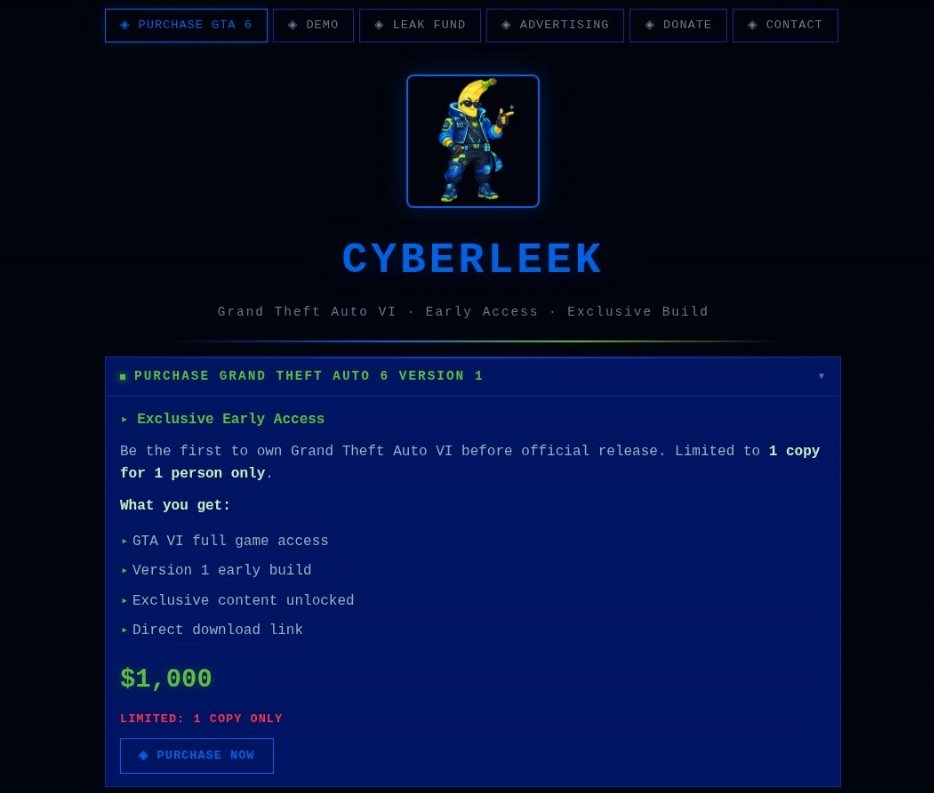
CyberLeek offers buyers a full early build of the game, exclusive content, and a direct download link

An alleged GTA VI leak advertised for US$1000

For those not ready to part with a thousand dollars, there’s a cheaper option: for a hundred dollars, users can get 24-hour access to the GTA VI demo.

Finally, the third option relies on crowdfunding. Playing modern-day Robin Hoods, the site’s creators claim they’ll raise $50,000 and then release the game to the public for free, with everyone who donates at least $100 getting priority early access. But dig into the fine print, and the fundraising goal for that paid early access suddenly jumps from $50,000 to $500,000. Looks like one of the scammers sat on their keyboard hit an extra zero by accident.
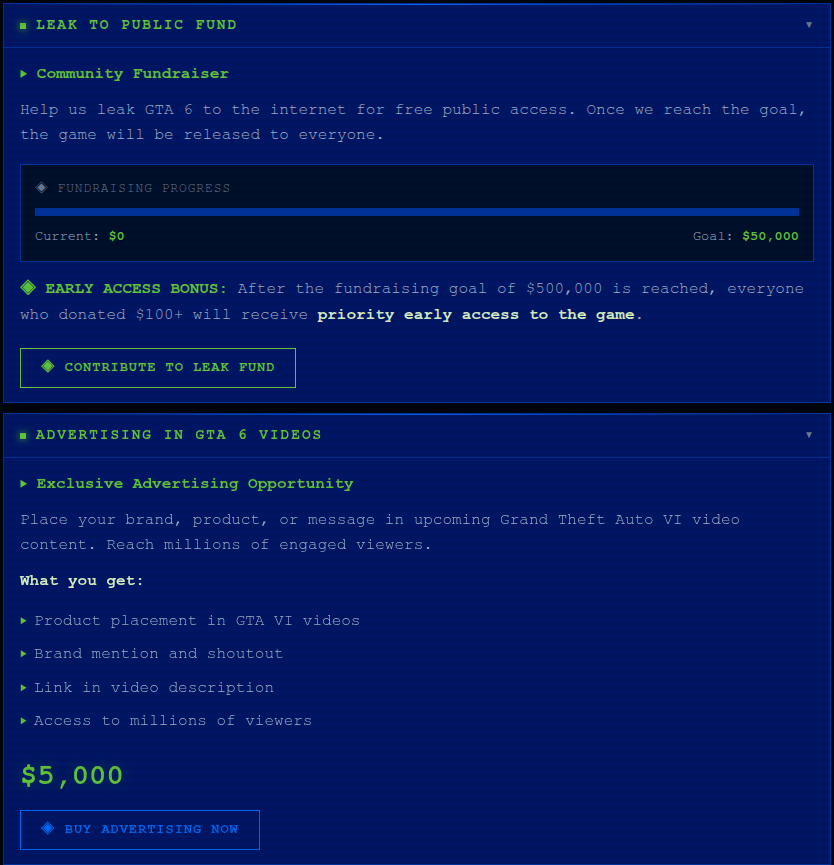
Raising money to release GTA VI

An urgent fundraiser for US$50,000 — or is it US$500,000? — to release a leaked GTA VI build, plus advertising opportunities for businesses

But CyberLeek’s lineup of tempting “offers” doesn’t stop there; there are also services for businesses. For US$5000, the site’s creators offer to place an ad right inside Grand Theft Auto VI: a logo, a product, or a brand mention that will supposedly show up in some unspecified “upcoming Grand Theft Auto video content”. What exactly that means is unclear: in-game clips or cutscenes, trailers, or just some gameplay footage. And honestly, the price seems suspiciously low for product placement in one of the most anticipated games in recent years.

This offer looks especially amusing next to the supposedly complete early build of the game with full access available on the same website. So, apparently, the game is already finished enough to sell in full, but you can still somehow slap ads into it.

One can only pay for all these incredible services with cryptocurrency. CyberLeek accepts Bitcoin, Ethereum, USDT, and Litecoin, and the site’s creators make a point of saying that all payments are final and no refunds are possible. Well, we weren’t expecting refunds anyway.

That said, this is just one example. CyberLeek started out as the nickname of the hacker behind both the recent Rockstar Games breach and GTA VI content leak. Later on, other cybercriminals began using that same name to build a whole bunch of fake sites. Despite having completely different designs, all of these sites attempt to project an association with CyberLeek, enticing users with (false) promises of access to “official” leaked versions of GTA VI. Whichever of these sites you come across, we’d strongly advise against using your own computer to check what’s actually hiding inside the archives and installers they hand out.

Yet another CyberLeek site advertising an

Another CyberLeek site offering access to a “leaked build” of GTA VI invites the user to download some unknown launcher, or “unlock” the full version of the game — whatever that means

2. Preordering Grand Theft Auto VI — with a catch

This bait targets slightly more sensible gamers — the kind who aren’t trying to download GTA VI right this second but wouldn’t say no to grabbing a free preorder code ahead of time. Our experts found a site that is claiming to hand out a redeem code for the PlayStation 5 or Xbox Series X|S. All one needs do is pick a platform and provide an email address.

To make it all look convincing, the site even shows off its own “statistics”: it supposedly has 3480 active users, and only 121 codes are still available as of today.

Free GTA VI preorder codes

To get the “exclusive code”, the user is asked to pick a console and provide their email address

After picking a console, entering an email address, and clicking Reveal Code, the user lands on a new page. It shows the first four characters of a supposedly generated code, and to get the rest the user is asked to complete an additional check. They’re given 15 minutes to do so.

Four characters from the promised code

The site shows the first four characters of the coveted code, and promises to send the rest after an additional check, which the user has 15 minutes to complete

Nobody tells the gamer upfront what this check actually involves. But the next page, which opens after clicking Reveal Full Code, inexplicably turns out to be in German. Here, the user is asked to pass a “human verification”: download a free AI chat app for their computer, run it, and accept the terms of use.

The real point of this “verification” most likely boils down to driving traffic to third-party, often shady, or outright fraudulent sites, with GTA VI simply used as bait to pump up visitor numbers.

Unknown app instead of a GTA VI code

To get the rest of the “code”, the site demands that the user download and run an AI chat app and accept its terms of use

A simpler variation involves fake sites that simply collect money under the pretext of placing preorders for Grand Theft Auto VI. For example, a fake PlayStation Store site targeting Brazilian users offers preorders for R$449.9, which actually matches the official price in the real PS Store. The user can pay with a credit card or through Pix (Brazil’s instant payment system), but along with their money, they’d also have to hand over personal data, including their CPF — the Brazilian equivalent of a taxpayer identification number.

Fake GTA VI preorder at the official price

In Brazil, a fake PlayStation Store site collects money for GTA VI preorders at a price that looks legit

3. You’ve missed it: GTA VI is already out!

Some scammers don’t even bother with elaborate stories about leaks, beta tests, or preorder deals. They simply build websites that copy the look and feel of GTA, and invite users to start playing GTA VI right here, right now. We came across a few examples of these sites.

GTA VI — right here, right now

No leaks, no tests, no codes needed: visitors are simply invited to click Try GTA 6 and start playing

One of these sites tells users they can download GTA VI, as long as they first pick their platform. The range of options is surprisingly generous: a PC version as well as versions for PlayStation 5 and Xbox Series X|S.

GTA VI on any platform

Users are invited to pick a version of GTA VI for PlayStation 5, Xbox Series X|S, or PC

Just to be clear, GTA VI’s official release is still more than a month away, so there’s no way one can download and install the game right now. Nobody knows exactly what users would be getting on their devices instead of the game if they download from one of these sites, but it’s definitely nothing useful. And no matter how carefully scammers copy GTA’s signature style and slap on the Rockstar logo, the address bar usually gives the game away: check the domain and compare it with the official Rockstar Games website address.

4. The icing on the cake: GTA VI for tokens

And finally, what would 2026 be without cryptocurrency? We found a site whose creators were probably inspired by the CyberLeek story and decided to ride the wave of GTA VI’s popularity to promote a token with the refreshingly straightforward name $GTAVI. The whole site is styled after GTA VI and Vice City.

The creators of the project have gone out of their way to highlight the perks of holding the token. They call $GTAVI “the only GTA VI coin that actually rewards its holders”. Whatever the meaning of that tagline, the project’s declared ultimate goal sounds even more tempting: every token holder will get access to Grand Theft Auto VI just by virtue of owning $GTAVI. Think about that for a second: it’s not exactly a direct promise of a free copy of GTA VI, but more like an aspiration on the part of the crypto developers.

GTA VI as a reward for holding $GTAVI

The token’s creators claim that they’re striving to eventually provide every $GTAVI holder with access to GTA VI

To add a bit of credibility, the page also throws in some crypto stats. The claimed market cap of $GTAVI is 51,600 dollars, with a 24-hour trading volume of 7880 dollars. There’s also a mysterious metric called “Characters” with a value of 12, and what exactly it means is anyone’s guess. There’s also a separate mention of a certain $BOOBIE as the Top Gainer — apparently, this is how the site’s creators labeled whoever supposedly made the most money off $GTAVI. The site doesn’t explain where any of these numbers come from or how accurate they actually are.

All in all, this looks like an attempt to hype up yet another meme coin by riding the wave of GTA VI’s popularity. Projects like this often end up following the classic pump-and-dump playbook: the token gets promoted for a while to drive its price up, and then the insiders and major holders cash out, leaving everyone else stuck with heavily devalued crypto. As for the stated goal behind $GTAVI — letting every token holder get a copy of GTA VI just for owning it — the site gives us no reason to believe that’s actually going to happen.

How to wait for GTA VI without falling for scammers

Unfortunately, we don’t know of a legitimate way to get early access to GTA VI, and honestly, we doubt anyone else does either. It looks like we’ll all just have to wait until November. To make sure you don’t fall for tempting scam offers in the meantime, here’s what we recommend:

  • Only install games from official sources.
  • Check the website address. Even if a page looks like the official Rockstar Games website or the PlayStation Store, carefully examine the domain in the address bar.
  • Never enter your payment details on sites promising GTA VI before its official release — especially if they ask you to pay in some unusual way like with cryptocurrency.
  • Don’t download unknown launchers, archives, or installation files, even if they’re billed as a “leaked build” or as software you need in order to be a beta tester.
  • Don’t hand over your personal information for a “beta test”, “key”, “early access”, or any other offer that sounds too good to be true.
  • Never disable security features just because a website tells you to. If a site asks you to ignore a Windows warning, run some mysterious command, or launch an unknown file as an administrator, treat it as a giant red flag.
  • Install a reliable security solution built for gamers, one that warns you before you land on a scam site and blocks malicious files, but won’t slow your games down.

What other tricks do scammers pull to fool even the tech-savviest gamers? Find out in our other posts:


Linux Backdoor Abuses STUN Protocol, Exploits Dozens of Flaws

5 October 2026 at 15:00

ClingSTUN operates as a back-connect proxy backdoor, sets up persistence, and contains exploits for self-propagation.

The post Linux Backdoor Abuses STUN Protocol, Exploits Dozens of Flaws appeared first on SecurityWeek.

Insider Threat Report: Dark Web Recruitment & Access Trends

Blogs

Blog

Insider Threat Report: Dark Web Recruitment & Access Trends

Flashpoint’s monthly analysis of insider threat recruitment, illicit access advertising, and threat actor activity targeting enterprise environments.

SHARE THIS:
Default Author Image
October 15, 2026

Unknowingly, a member of key personnel is living two separate lives. On the clock, they are a highly-trusted systems administrator, but in their personal time, they moonlight on the deep and dark web, advertising their trust and access to the highest bidder. One day, they get a simple offer: $15,000 in the crypto of their choice to approve a single push notification at 2 AM. They accept. By morning, the attacker walks away  with active domain admin credentials without the need for malware or cracking firewalls.

This is just one example of how insider threats lead to modern enterprise breaches. As perimeter security, EDR coverage, and other security tools mature, threat actors continue to target the human element, seeking employees and contractors willing to provide access to corporate systems or facilitate fraudulent activity.

In a threat landscape where identity is becoming the primary attack surface, monitoring illicit marketplaces and recruitment efforts is critical. This new monthly report leverages Flashpoint’s Primary Source Collection (PSC) to analyze insider threat tactics, tracking active recruitment and advertising on dark web forums and encrypted networks.

The Insider Threat Landscape: September 2026

In September 2026, Flashpoint analysts identified a total of 9,787 insider-related posts across 1,216 channels and 1,778 authors. While the volume of observed activity decreased, threat actors continued to actively seek and advertise insider access, particularly within industries where legitimate employee privileges can be exploited to facilitate fraud. These communications included threat actors attempting to recruit insiders at target organizations, insiders advertising their services, and general discussions involving insider-related threat activity.

Of these communications, Flashpoint observed 857 unique posts between September 1 and September 30, 2026.

The number of unique insider posts collected over the past 12 months. (Source: Flashpoint)

The majority of these posts appeared in mid-tier English-language Telegram channels, where threat actors sought or advertised insider access to organizations across several industries. Much of the observed activity focused on recruiting insiders to facilitate fraud operations.

Where Insider Threat Activity is Concentrated

Retail, telecommunications, and financial services remained prominent targets for insider threat activity in September 2026. However, a significant portion of the observed activity could not be attributed to a specific industry.

Flashpoint found that 45.7% of unique insider posts fell into the “Unknown” category, meaning analysts could not determine the targeted organization or industry. Among posts with an identifiable industry, retail accounted for the largest share, followed by telecommunications, financial services, and technology.

Together, these four industries accounted for 419 unique posts, or nearly 49% of all unique insider-related activity observed during the month.

The concentration of activity in retail, telecommunications, and financial services reflects continued threat actor interest in insiders who may be positioned to facilitate fraud, provide access to customer accounts, or exploit legitimate organizational privileges.

Unique insider posts broken down by industry in September. (Source: Flashpoint)

The following table shows a breakdown of unique insider posts by industry in September 2026:

IndustryPosts
Other392
Retail135
Telecom116
Financial85
Technology83
Public Sector41
Healthcare3
Media2
Total857

Insider Threats: Recruiting vs. Advertising

Active insider threats generally involve two types of activity: an insider is recruited by a malicious outside party, or an insider advertises their access and services to interested threat actors. These arrangements can enable adversaries to exfiltrate sensitive data, install malware, compromise accounts, or carry out fraudulent activities such as SIM swaps.

In September 2026, Flashpoint analysts identified 15 notable insider recruitment and advertising posts across underground communities and chat forums. Of these, nine involved threat actors attempting to recruit insiders, while six involved actors advertising insider services.

Telecommunications accounted for the largest number of notable posts, with five instances of recruitment or advertising. Retail and technology followed with three each, while financial services and the public sector accounted for two each.

These examples illustrate how threat actors continue to seek access across industries, with particular interest in employees and contractors who can facilitate fraud or provide privileged access to organizational systems.

Flashpoint also observed numerous insider solicitations repeated across multiple discussion threads, often with limited details about the access or services being offered. Analysts could not independently verify the legitimacy of the recruitment and advertising claims.

Unique insider posts broken down by industry and whether the insider was recruited or advertised in September. (Source: Flashpoint)

Protect Against Insider Threats Using Flashpoint

Insider threats are inherently difficult to detect using internal security controls alone because the malicious activity relies on valid credentials and legitimate access privileges. Relying solely on internal logs means security teams often only detect an insider threat after data exfiltration or system sabotage has already occurred.

Flashpoint protects organizations against insider threats through our Primary Source Collection (PSC) and specialized intelligence platforms:

  • External Threat Intelligence & Early Warning: Flashpoint monitors deep and dark web forums, invite-only threat communities, and encrypted chat platforms to identify employee solicitations, stolen corporate domain mentions, and active recruitment attempts before an intrusion develops.
  • Identity Protection & Infostealer Tracking: By tracking illicit marketplaces and infostealer activity, Flashpoint identifies compromised corporate credentials and active session tokens, preventing threat actors from utilizing purchased access.
  • User & Entity Behavior Context: Flashpoint’s intelligence equips SOC, Security Operations, and Risk Management teams with adversary TTPs, enabling security operations to look for anomalous data downloads, off-hours access, or unauthorized software installation.

To learn more about how Flashpoint can help protect your enterprise from insider risk and monitor illicit underground communities, Request a Demo Today.

Frequently Asked Questions (FAQs)

What is the Flashpoint Insider Threat Report?

The Flashpoint Insider Threat Report is a monthly intelligence brief that analyzes trends, volume, targeted industries, and tactics surrounding insider threat recruitment and illicit access advertising on the deep web, dark web, and encrypted chat channels.

How does Flashpoint collect insider threat data?

Flashpoint collects data using its Primary Source Collection (PSC) engine, which actively monitors thousands of dark web forums, illicit marketplaces, and underground chat networks where threat actors and malicious insiders communicate.

What is the difference between insider recruitment and insider advertising?

Insider recruitment occurs when an external cybercriminal attempts to entice a corporate employee into assisting with a cyberattack. Insider advertising occurs when an employee or contractor proactively lists their legitimate access or services for sale on illicit marketplaces.

See Flashpoint in Action

The post Insider Threat Report: Dark Web Recruitment & Access Trends appeared first on Flashpoint.

In Other News: $15K iCloud Spoofing Bugs, AI Policy Experts Phished, Adblocker Spies on AI Chats

2 October 2026 at 16:30

Noteworthy stories that might have slipped under the radar: Kiteworks patches over 100 vulnerabilities, Microsoft publishes 2026 Digital Defense Report, AI finds 24 Android app flaws.

The post In Other News: $15K iCloud Spoofing Bugs, AI Policy Experts Phished, Adblocker Spies on AI Chats appeared first on SecurityWeek.

110 vulnerabilities fixed in Google Pixel devices | Kaspersky official blog

2 October 2026 at 14:44

On September 15 this year, Google published details of patches for 110 vulnerabilities in its own Google Pixel smartphones. Among all the disclosed flaws, CVE-2026-58704 stands out the most, for it appears that this zero-day is being exploited in targeted attacks.

In today’s post, we talk about what’s so special about the Google Pixel, and why these devices get security updates all of their own – separate from regular Android updates. We also cover the vulnerabilities addressed in this latest update, with a special focus on the mentioned, most dangerous one – CVE-2026-58704 – and wrap up with tips on how to both protect your device and avoid becoming a victim of cyberattack on it.

Why do Google Pixel phones get security updates separate from Android?

The reader might reasonably wonder: I’ve already installed this month’s Android security updates on my Google Pixel. Isn’t that the same thing? Google Pixel does run on Android and receives those security updates, which are detailed in the monthly Android Security Bulletin. However, manufacturers of Android-based devices use different sets of hardware and software components. That’s why, alongside vulnerabilities common to all Android devices, there are security issues specific to individual manufacturers’ devices.

For its own smartphones, Google publishes separate security updates, covered by a dedicated Pixel Update Bulletin. Rather than replacing the Android Security Bulletin, this document complements it by detailing vulnerabilities specific to devices manufactured by Google. Other Android smartphones also receive similar updates from their manufacturers.

The Pixel Update Bulletin for September 2026 clearly shows why Google needs separate updates for its smartphones in the first place. Many of the vulnerabilities it fixes affect specific Pixel hardware (or hardware-related) components: the modem, bootloader, GPU, fingerprint scanner components, and other parts of the device. On smartphones from other manufacturers, these features might rely on entirely different hardware and software components, so the fixes listed in the Pixel Update Bulletin don’t apply to those phones.

That said, these vulnerabilities could still be relevant for Pixel owners who’ve flashed their devices with custom ROMs. Switching to a different OS doesn’t alter the device’s hardware components, and may not replace the firmware. Therefore, the vulnerabilities themselves may persist, but whether patches are available, and how they’re installed, depends on the specific OS.

CVE-2026-58704: a zero-day vulnerability being actively exploited in the wild

Now let’s look closer at the specific vulnerabilities Google fixed in September. The most significant one is the above-mentioned CVE-2026-58704.

This vulnerability affects the Cellular Modem component, which handles the smartphone’s communication with cellular networks. It stems from a logic error in the code, which, under certain conditions, allows bypassing the intended permission check.

Successful exploitation of CVE-2026-58704 lets attackers escalate privileges on the smartphone to gain broader access to its functions and data. Note that the attack takes place over a cellular network and the threat actors need low-level privileges on the targeted device to start with.

In practice, this means attackers can’t exploit CVE-2026-58704 to attack a Pixel from just anywhere over the internet, as they’d apparently need to either compromise the cellular network the target smartphone is already connected to or, more likely, force it to connect to a malicious base station under their control.

Google hasn’t disclosed all the details of this vulnerability yet, and the related report is not publicly accessible. As a result, the technical details that would show how easy it is for attackers to exploit CVE-2026-58704 remain unknown pending installation of the patches on all devices.

Nevertheless, Google claims that there are signs of limited exploitation of CVE-2026-58704.

What we know about the other 109 vulnerabilities

Of the remaining 109 vulnerabilities found in Google Pixel devices, only one is rated moderate; the others are either high (62) or outright critical (46). Nine of these flaws fall into the RCE (remote code execution) category. This means that if an attacker successfully exploits one of these vulnerabilities, they can remotely force the device to run malicious code. The exact conditions for the attack depend on the specific vulnerability.

Another 88 vulnerabilities fall into the elevation of privilege (EoP) category. These let an attacker who’s already gained a certain level of access to the device expand their privileges. The CVE-2026-58704 vulnerability discussed above falls into this same category, which is why the September bulletin lists 89 EoP vulnerabilities in total.

Finally, 10 vulnerabilities can lead to information disclosure (ID), and two more to denial of service (DoS). In short, that’s a hefty list of flaws, so Google Pixel owners shouldn’t wait around to install the patches.

How to avoid becoming a victim

Google Pixel owners can install the update that fixes the vulnerabilities covered in this post by following this path: Settings → Security & privacy → System & updates → Security update → Install. Keep in mind that the phone will automatically restart to finish installing the update.

To keep your phone secure we recommend the following general measures:

  • Install security updates on your phone regularly and promptly – whether it’s a Google Pixel, an Android smartphone from a different manufacturer, or even an iPhone.
  • Avoid installing apps from questionable sources.
  • Read reviews before installing apps from official stores, since malware isn’t uncommon there too. Users who have already been burned will often sound the alarm in the reviews long before store moderators get around to removing the dangerous app.
  • Install a reliable security solution to keep you from downloading malware, and warn you about suspicious activity on your device.

MPS: Email Hijacking Detection Using NLP and IOCs

Email hijacking remains one of the most effective techniques used by cybercriminals to conduct fraud, steal sensitive information, and impersonate trusted individuals.With new AI functionalities (dubbed "Anubis.AI") in our Mail Protection Service, we can stop such threats!

Hackers Use ChatGPT Custom GPTs in ClickFix Attacks

29 September 2026 at 15:03

The personalized versions of ChatGPT were used to impersonate legitimate products and trick users into executing PowerShell commands.

The post Hackers Use ChatGPT Custom GPTs in ClickFix Attacks appeared first on SecurityWeek.

Malicious Chrome and Edge add-ons: how to spot them and why they’re dangerous | Kaspersky official blog

17 September 2026 at 22:18

Malicious extensions and ClickFix attacks are two hugely popular topics on our blog, and for a good reason: they’re both very common. In this post, we bring them together. Here’s the thing: in our posts about malicious ClickFix instructions, we don’t always explain exactly how users end up on the attackers’ pages in the first place. A recent study gives us a chance to fill that gap and talk about one of those methods: malicious extensions.

Readers who are not deep into cybersecurity may already have a bunch of questions at this point: how can extensions be malicious? where do they come from? and what exactly is ClickFix, anyway? Fret not: this post answers all these questions.

The danger of browser extensions

Let’s start with the basics. Browser extensions or add-ons are lightweight tools installed in your browser to give it extra capabilities or change how it works with web pages. For example, extensions can block ads, translate pages, download audio and video, save passwords, or take screenshots.

Most browser developers offer users an official extension store. For instance, for the most popular browser, Chrome, that store is the Chrome Web Store. There are also alternative platforms for distributing extensions, though browser developers have recently made it much harder to install and use extensions that don’t come from an official source.

Just like any other software, extensions can be useful, but they can also be malicious. In fact, cybercriminals often spread malicious extensions through those very same official stores, and we’ve covered plenty of such cases on our blog before.

It’s no accident that criminals love spreading malicious plug-ins. To work properly, most extensions need permission to read and modify the content of every web page the user visits. Without that permission, add-ons would be basically useless. For instance, a translation extension needs to read all the text on a page before it can swap the original for the translation.

Cybercriminals take advantage of these capabilities for their own purposes: for example, they intercept logins, passwords and other data entered on websites, swap out payment details, or show victims fake forms and messages. And all of this happens on legitimate sites that users have come to trust without a second thought.

Now let’s move on to a fresh piece of research about a campaign that spread 19 malicious add-ons through the Chrome and Edge extension stores. We’ll use it as an example to look at what these tools can actually do.

Almost twenty malicious extensions for Chrome and Edge

In late August, cybersecurity researchers reported finding 18 malicious extensions for Chrome and one for Edge. They said all 19 add-ons were probably linked to the same campaign. They base this on the similarity of the malicious code and the methods the attackers used. You’ll find the full list of malicious extensions at the end of this post.

Most of the extensions discovered, 14 in total, were built by the attackers themselves. Their first versions weren’t malicious at all and did exactly what users downloaded them for. But after a while, once users had come to trust the add-on, the attackers pushed an update that slipped in malicious functionality.

As for the remaining five extensions, their creators had nothing to do with the cybercriminals at all. They simply sold their creations to them. This way of getting hold of extensions is also popular among cybercrooks. There are plenty of reasons for that: ready-made add-ons can be bought for relatively little money, and criminals don’t have to build or promote them from scratch. And most importantly, along with the extension, they also inherit its existing user base. Upon buying the add-on, all the attackers need to do is add malicious functions and push an update that installs automatically for users. Users are never told that the extension’s real owner has changed.

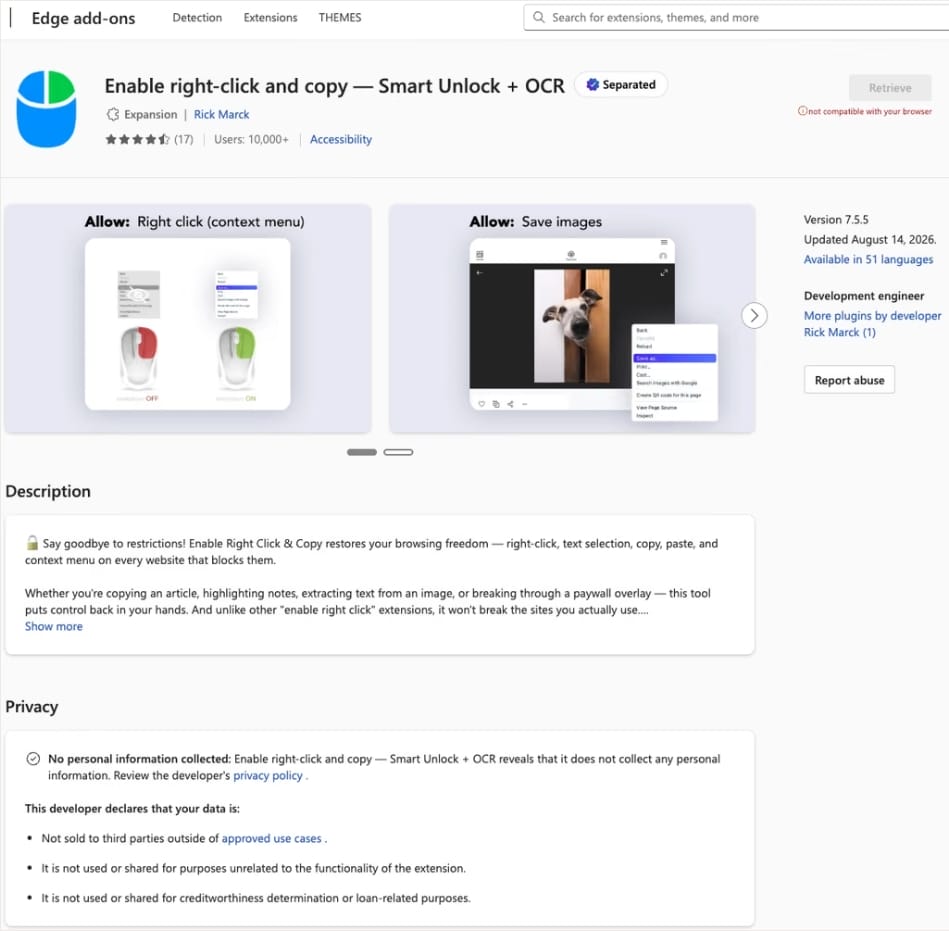
In this case, the add-on cybercriminals bought most often was Enable Right Click & Copy — Smart Unlock + OCR. It had 70 000 users in Chrome and 10 000 in Edge. This purchase is exactly why there’s a single Edge extension among all its Chrome relatives. The add-on itself originally served a perfectly benign purpose: it let users select and copy text on sites where that’s normally blocked, and it could also pull text out of images with optical character recognition (OCR).

The Enable Right Click & Copy: Smart Unlock + OCR extension in the Microsoft Edge Add-ons store

At the time of the research, the Edge version of the extension had more than 10 000 users. Source

The malicious functionality introduced into the extension makes it reach out to the attackers’ command-and-control (C2) server to download additional modules of nefarious code. These modules can change over time. Since Chrome automatically updates all installed extensions by default, the malicious version lands on the device without users having to do anything at all.

For the downloaded code to run on the websites the user visits, the extension disables one of their defenses — Content Security Policy (CSP). This mechanism allows website owners to declare which scripts and other resources are allowed to load and run on a page. Once this protection is turned off, the extension can inject code it gets from the C2 server right into the pages open in the browser. The website itself isn’t hacked, and it looks the same to everyone else, but for that one infected user, the legitimate page quietly turns malicious.

What these 19 extensions can do

Now let’s take a closer look at what the malicious modules loaded by the extension are actually capable of. Researchers found 16 such modules, built for all sorts of tasks: from stealing data and hijacking cryptocurrency to the ClickFix attacks we’re focusing on here.

Some of the modules simply collect user data. They intercept logins, passwords, email addresses, and other valuable information the user enters into web forms, including payment details. On top of that, the add-ons steal data from Facebook and LinkedIn accounts and collect browsing history. Criminals can use this information to take over accounts, steal money, and launch further attacks against the victim.

A few other modules focus specifically on stealing cryptocurrency and related data directly. One of them is a crypto drainer, a tool that empties crypto wallets. It works with Ethereum and compatible blockchains as well as Solana and Tron. It replaces the real Connect Wallet and Swap buttons on websites with its own fake ones. When a user clicks one of these buttons, the drainer takes over all further interaction with the wallet and walks the victim through confirming the actions needed to steal their cryptocurrency.

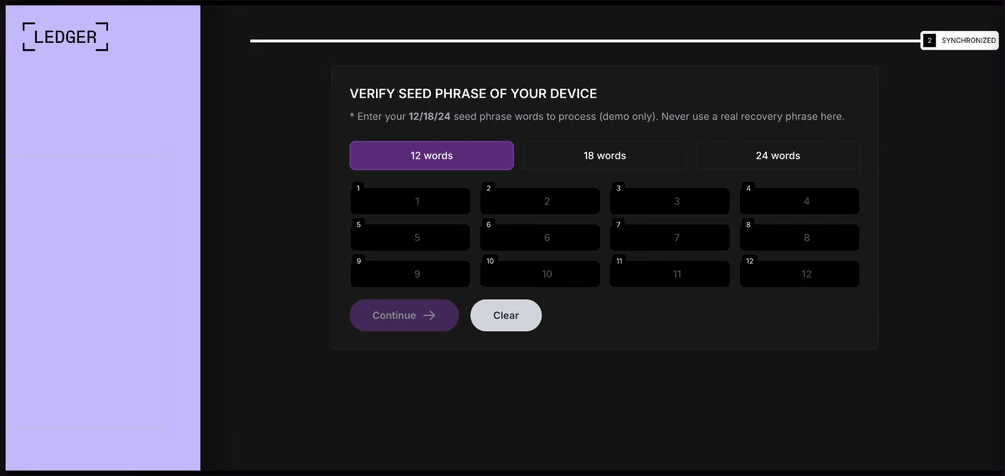
Other modules target users of Ledger and Trezor hardware wallets. Right on the official websites of these services, the malicious extension displays a fake wallet update-and-restore page that asks for a seed phrase of 12, 18, or 24 words. The seed phrase the user enters is forwarded straight to the attackers, giving them full control over the wallet.

Fake form for entering a Ledger seed phrase

The fake form asks the user to enter a seed phrase of 12, 18, or 24 words, which then ends up in the attackers’ hands. Source

Finally, some modules gather information from crypto service pages open in the browser, such as OKX, MEXC, Kraken, KuCoin, Coinbase, Binance, Bybit, and MetaMask, including balance details and active session data that can be used to hijack accounts.

And now we’ve finally reached the module that matters most for this post: the one used for ClickFix attacks. We’ll talk about it in the next part.

How malicious extensions are used in ClickFix attacks

The ClickFix attack technique has become extremely popular among cybercriminals lately. It relies on social engineering: the victim is shown fake instructions supposedly needed to complete some action, such as passing a CAPTCHA check, fixing an error, or updating a program. Following these instructions, the user copies the command suggested by the attackers, pastes it into a system tool built for running these commands, and runs it, all by themselves.

We’ve written about attacks like this and their consequences more than once on our blog. But we rarely dig into exactly how a victim ends up on a page with fake instructions in the first place. A campaign that spread malicious extensions through the Chrome Web Store shows us one way this can happen.

Add-ons turn out to be a very handy tool for ClickFix attacks. As we mentioned earlier, when a user visits a page, extensions are allowed reading and changing its content in order to work. That gives attackers the chance to swap in a fake ClickFix instruction at just the right moment, replacing the content of the page the person actually wanted to open.

What’s more, the ClickFix technique itself lets attackers break out of the browser and gain a foothold directly in the system. That means removing the malicious extension won’t necessarily undo the damage: after the user has run the ClickFix command, malware may already be installed outside the browser.

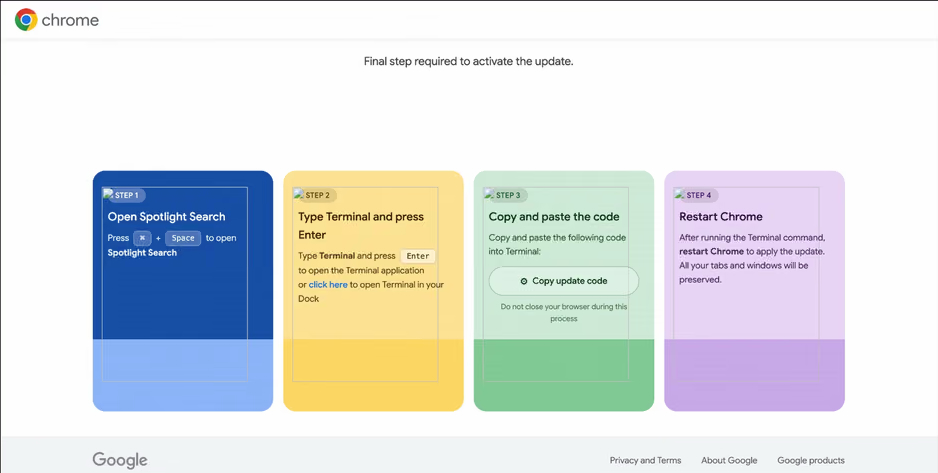
In the specific attack example the researchers describe, the user sees a fake notification saying their browser needs to be updated, along with instructions on how to do it. The instructions change depending on the operating system, and the extension picks up that information automatically too.

Fake Chrome update guide

In the macOS version of this attack, the user is told to open Terminal, copy a command, paste it there and run it, then restart Chrome to supposedly finish the update. Source

How to avoid falling victim to infected extensions

First off, we recommend checking whether any of the following malicious extensions are already installed in your browser:

  • Enable Right Click & Copy — Smart Unlock + OCR
  • RapidLens – Google Lens for Screen Search & Images
  • QuickLens – Search Screen with Google Lens
  • Password Protect PDF
  • Allow Copy – Select & Enable Right Click
  • PixelCheck
  • Creative Library – Ad Spy Tool
  • Website Traffic Checker: MirrorSphere SEO Stats
  • Site Signal – Website Traffic & SEO Checker
  • SEO Pulse Pro – Website Traffic & SEO Analyzer
  • Private Crypto News Reader
  • Blockfolio: Address Monitor
  • Crypto Rates & Fiat Converter
  • Crypto Alerter: Price Alarms & Volatility Warnings
  • DeFi Pulse Tracker
  • Crypto Price Badge: Quick Glance
  • Multi-Chain Explorer
  • LedgerLook: Wallet Checker
  • Meta & Facebook Ad Library Spy — Save Ads, Finder, Downloader | FeedX-Ray

If you find any of these extensions on your device, we recommend removing it as soon as you can and running a full system scan with a reliable antivirus. As we mentioned above, simply deleting the add-on might not be enough. You can use a free trial version to detect and remove the infection.

How to avoid falling victim to malicious extensions and ClickFix attacks in the future?

  • Don’t install too many extensions and regularly check the list of those you have.
  • Remove extensions you don’t use.
  • Trust the warnings from your operating system and security software, rather than the instructions — or even the demands — of websites and apps.
  • Install a trusted security solution on all your devices.

What else makes browser extensions and the ClickFix technique dangerous? Find out in our other posts:
Protecting your smart TV and set-top box from being hacked | Kaspersky official blog

14 September 2026 at 17:59

In 2026, the owner of an ordinary home router, smart TV, or TV box is a prime target for cybercriminals. These devices are readily recruited into botnets and residential proxy networks, which we’ve covered before.

Criminals “sublease” the infected device by letting outsiders pay to visit any website from the victim’s IP address, so it looks like the device’s owner is doing it. The service is in demand across all kinds of shady schemes: from ad fraud and spam campaigns to password bruteforcing and account hacking. In our previous post, we described how home routers get recruited into these proxy networks; today we take a look at an even more vulnerable, and equally ubiquitous category of devices: smart TVs and TV boxes.

These appeal to criminals for two reasons. First, unlike computers and smartphones, TVs are almost always plugged into the power and have a fast internet connection. A dark screen doesn’t mean the device is switched off. On top of that, the limited user interface and monitoring tools mean suspicious background processes can easily slip unnoticed past users.

The threat is evolving and growing more aggressive. A recent study found that once proxyware turns up on a set-top box, the risks to its owner go well beyond having their traffic siphoned off.

Anatomy of the infection

The researchers focused on a popular TV box by SuperBox, which we already covered earlier in the post Is your TV box renting out your network?

SuperBox’s marketing leans heavily on the promise of providing thousands of TV channels, with no subscription or monthly fees. But out of the box, the device can’t actually do anything of the sort. To get access to pirated content, you need to install the brand’s proprietary app store.

When you launch it and install additional apps, the thousands of TV channels do appear. Meanwhile behind the scenes, with no warnings or permission prompts, the device floods external sites with unauthorized requests, and network traffic spikes sharply.

The researchers uncovered several alarming facts. First, the victim gets enrolled into as many as five botnets at once. The SuperBox runs clients for several proxyware networks simultaneously, which even try to compete with one another by blocking rival software from being installed.

But the real shock was the attacks on the internal network. The TV box’s proxyware places no limits on what its paying clients can actually do on the network. They can reach not only external sites but also devices inside your home network.

Normally, your home router and ISP settings protect you from outside attacks. But proxyware bypasses these barriers because it operates from inside the network. During an experiment, the researchers confirmed that an attacker on the internet can easily leverage the infected set-top box to open the admin panel of a home router, such as a Linksys, which is supposed to be accessible only to its owner when connected to the home Wi-Fi network. This means hackers can try to steal data from other devices in the same household, or even encrypt home network storage (NAS).

At the same time, flaws in SuperBox’s factory firmware let hackers remotely install and run any application with superuser privileges, and the threat is anything but hypothetical. Over three weeks of monitoring, the test set-top box was hit by more than 1300 attacks through the home proxy network. Attackers installed three different types of malware, including a module for launching DDoS attacks.

The malware uses several methods to gain a foothold in the system, and it survives reboots and power failures alike.

How to tell if your set-top box is working for hackers

If you have a cheap TV set-top box or Android TV from a little-known brand, it’s worth checking it for anomalies.

The most reliable method is to review the network traffic. Use the statistics in your router’s control panel, but note that some budget models may lack this feature. This feature is called Traffic Analyzer on Asus routers, Traffic Usage on TP-Link, and Traffic Monitor on Keenetic. Find your TV or set-top box in the device list and check the ratio of downloaded to uploaded data. They should consume a lot of traffic to download video while sending very little. If your box is quietly pushing gigabytes of data out or staying chatty on the network even while idle, that’s a telltale sign it’s infected.

If traffic statistics aren’t available, look for indirect signs:

  • The network and memory activity LEDs won’t stop blinking even though no one’s using the device.
  • The set-top box’s casing is constantly warm or hot.
  • The interface lags behind the remote, and the box freezes at random moments that have nothing to do with heavy video playback.
  • Your other devices (computers or phones) are seeing a real drop in internet speed.
  • When trying to visit familiar sites over your home Wi-Fi, you’re constantly hit with a CAPTCHA — a sign your network may be compromised and flagged as a spam source.
  • Your ISP’s tech support calls you asking about suspicious network loads.

What to do with an infected device

The best solution is to disconnect the device from the internet and dispose of it. If you have to keep using it, follow these steps to minimize the risks:

  1. Do a factory (hard) reset. Restore the set-top box to its original state.
  2. Take it offline before setting up again. The first time you turn it on after a reset, skip the Wi-Fi setup step and don’t plug in the Ethernet cable.
  3. Block app installation. Go to Android settings and disable installation of apps from unknown sources. Be sure to turn off any debugging features if enabled: USB debugging, Wireless debugging, and ADB. Menu item names may differ depending on your Android version and device manufacturer.
  4. Isolate it on the network. Set up a guest Wi-Fi network on your router and connect the TV box to it. Enable Client Isolation in your router’s settings, if it has it. This will stop the box from seeing other devices on your home network, which protects your computers and network storage.
  5. Check for updates. Once the box is connected to the guest network, check for official firmware updates: manufacturers sometimes patch known vulnerabilities, though with lesser-known brands, you shouldn’t count on it.

Your most reliable safeguards

Buying cheap devices with pirate streaming features and installing software from shady sources is a surefire way to compromise your home network. Your IP address will become a source of malicious activity, which at best gets you blocked by your ISP and at worst puts you on law enforcement’s radar. What’s more, hackers can use the box as a launchpad to attack your home computers and NAS, which can lead to personal data theft or a ransomware attack.

The best protection is to buy devices from trusted brands and pay for legal content. And to rule out someone hijacking control of your network, make sure your router’s admin panel and other home devices are protected with unique, strong passwords. To avoid having to remember them all, use a reliable password manager such as Kaspersky Password Manager. Additionally, the Smart Home Monitor feature included in Kaspersky Premium lets you keep all your devices fully under control.

There may be more things you don’t know about your smart home devices:

Hacking the Boeing 737: inside the Bus Driver attack | Kaspersky official blog

4 September 2026 at 16:24

Security researchers have found a way to hack a Boeing 737 with a device no bigger than a coin. The 737 is one of the most widely used airliners in the world, so chances are you’ve flown on one yourself at least once.

The attack requires installing a small device in a port that’s accessible through a hatch on the outside of the plane. According to the researchers, this port is regularly within reach not just of maintenance crews, but of other airport and airline staff too. And installing the device takes less than 60 seconds. So let’s talk about what this mysterious little device actually is, what it can do, and whether it’s still safe to fly on a Boeing 737.

Why hacking a plane is harder than hacking a car

Most of us have gotten used to the idea that our computers and phones can be hacked. It’s probably the most common topic on this blog. But we’ve also covered attacks on less common targets: cars, robot lawnmowers, automated card shufflers, bikes, and even mattresses. In today’s world, all of these (and many other) devices contain tiny (or not-so-tiny) computers.

Airplanes are no exception. A modern airliner is packed with computers — some of which handle critical functions: from calculating takeoff parameters to controlling the flight itself. But there’s one key difference: airliner manufacturers, unlike the makers of most smart home gadgets, take security very seriously, which makes it far harder to reach these systems from the outside.

Maybe that’s precisely why the idea of hacking a real plane has been tempting the most inquisitive security researchers for years. A team at the University of California San Diego and Oberlin College — the researchers who finally pulled it off — spent more than a decade wrestling with the problem. As mentioned above, the main challenge in hacking a plane is that its critical systems aren’t connected to the external internet. Because of that, studying plane-related attack vectors wasn’t seen as especially promising within the cybersecurity research community: reaching isolated systems remotely is extremely difficult, and the odds of an attacker gaining physical access were considered very low.

Two other successful projects changed that assumption for UC San Diego researchers Kirill Levchenko and Aaron Schulman: a hack of the Chevrolet Impala, and research into payment card skimmers. The car hack led their team to buy secondhand Boeing 737 computer components and build their own test rig. The skimmer research gave them the idea for a small physical device that could plug directly into the plane’s internal systems.

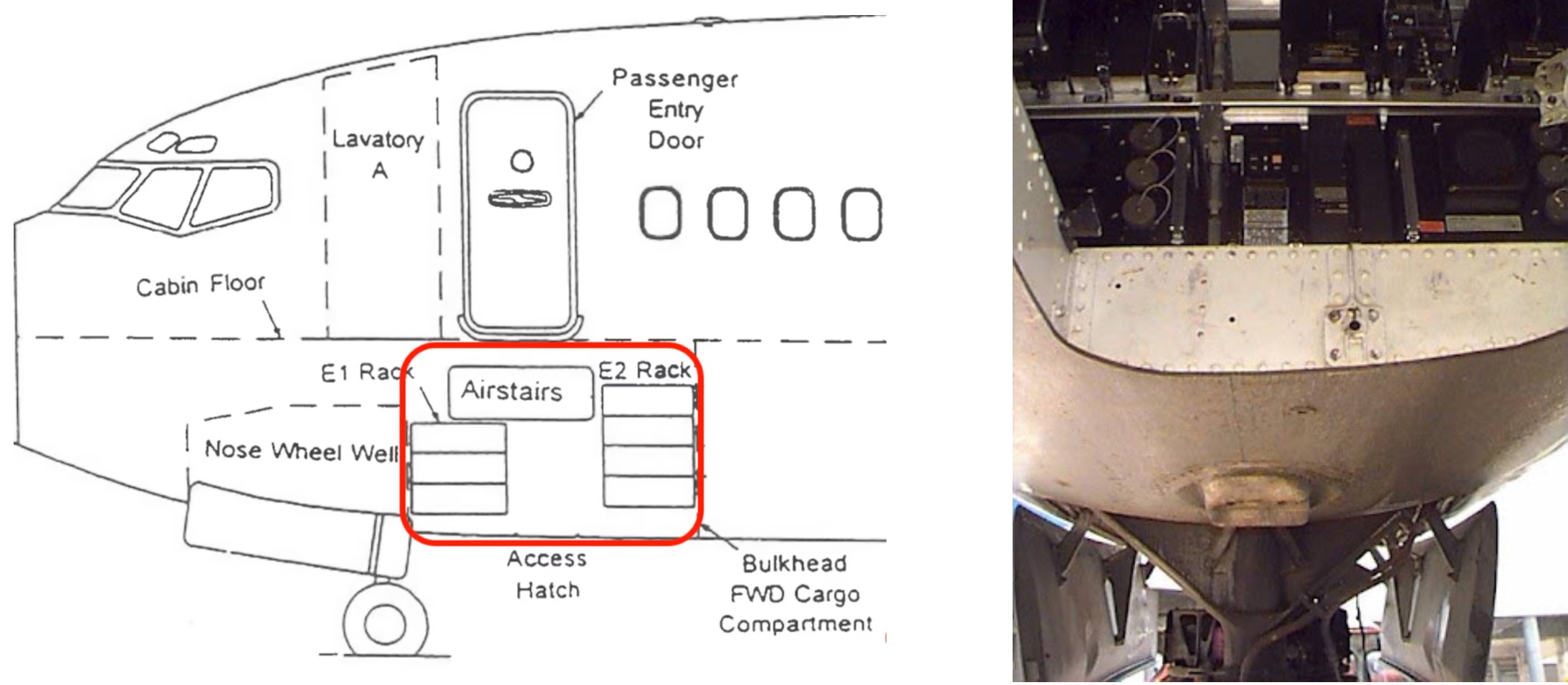
After studying the Boeing 737’s circuit diagrams, the researchers found a port accessible from outside the plane — protected only by an unlocked hatch. That port connects to a data channel called the ARINC 429 bus, which links the plane’s flight management computer (FMC) to its multifunction control and display unit (MCDU).

How to reach the Boeing 737's port

The port sits in the electronics bay beneath the cockpit. From outside the plane, it’s covered only by an unlocked hatch. Source

 A “bus driver” at the controls

On their test rig, the researchers checked what would happen if they connected to the ARINC 429 bus through this port and sent electrical signals more powerful than the ones the Boeing’s components normally exchange with one another. It turned out that doing so let them override legitimate commands with their own. From there, all that was left was building a device small enough to fit into the port they’d found.

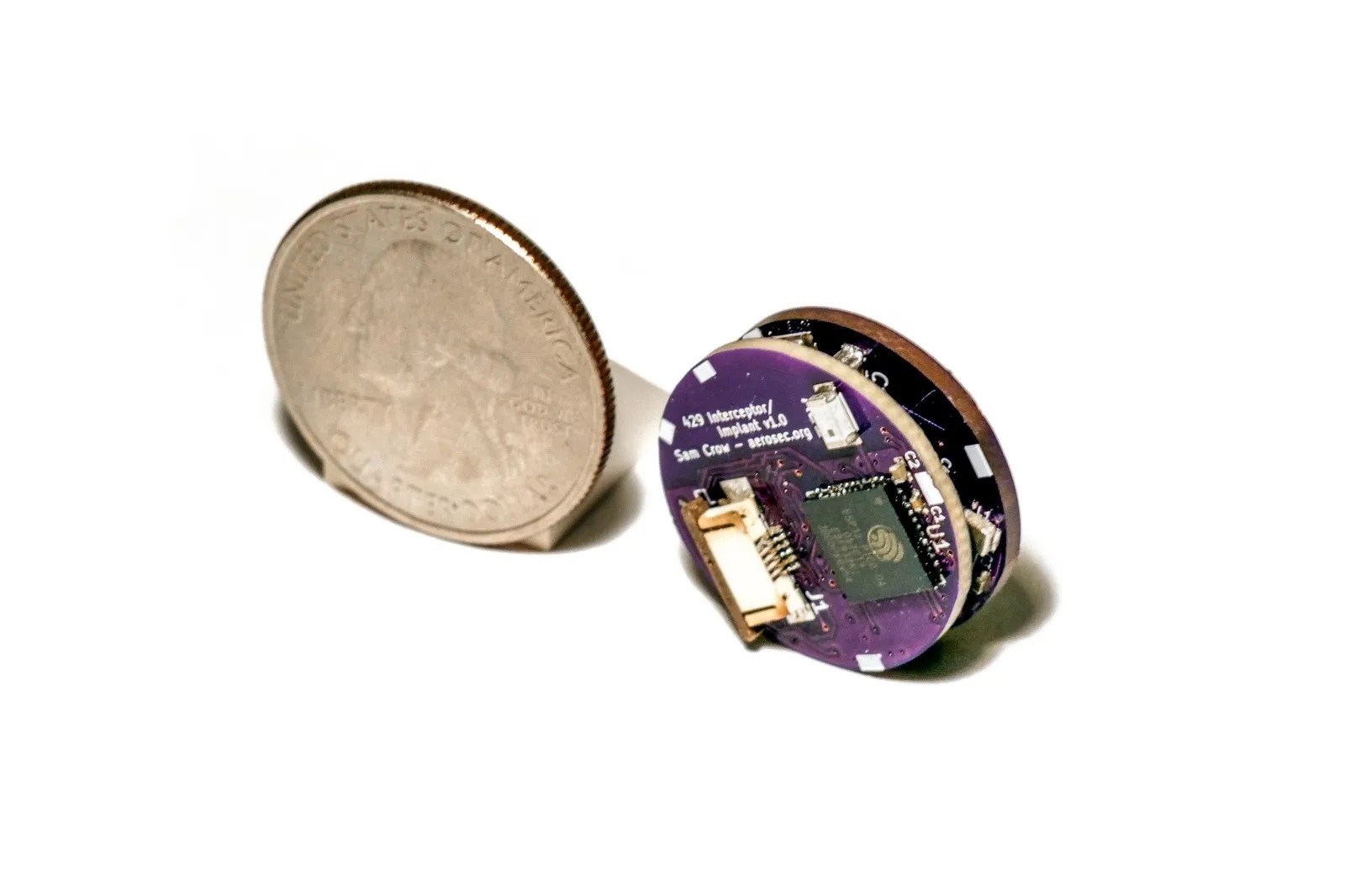
Step by step, the team built a device compact enough to slot into the unprotected port. The finished version set them back less than US$100, and appears to have been built largely from off-the-shelf parts: a small microcontroller, electronics for communicating with the bus, and a Wi-Fi module. That last part could potentially help the device connect to the plane’s public in-flight Wi-Fi network, giving the attacker access over the internet, and eventually letting them control the device remotely. And the whole thing takes less than a minute to install into the port.

A prototype of the Bus Driver device

The device the researchers built to connect to Boeing 737 systems. A coin sits next to it for scale. Source

The researchers dubbed their attack “Bus Driver”, apparently a play on words: “bus” refers to both a passenger vehicle and the data channel that lets a system’s components talk to each other. The attack lets someone step into that channel and swap out the commands being sent — effectively controlling the bus.

What the improvised Boeing 737 hacking device can actually do

An unprotected port, a coin-sized device, access to the bus: that’s all and well and good, but what did the researchers actually manage to pull off? What kind of damage can this tiny implant do? As it turns out, quite a lot — potentially even fatal. By gaining the ability to tamper with the data flowing between the flight management computer and the control and display unit, the researchers found they could interfere with several critical aspects of how the plane operates.

Testing the Bus Driver attack

Researchers testing Bus Driver on real Boeing 737 avionics hardware. Their attack interface is running on the MCDU screen. Source

First, the implant can alter the data used to calculate takeoff and landing parameters. For example, it can change the plane’s recorded zero-fuel weight, which throws off the calculation of the speeds needed for a safe takeoff.

The device can also manipulate the assumed temperature value pilots use to determine how much engine thrust is needed at takeoff. Feed the system the wrong numbers, and under certain conditions the plane could end up with insufficient thrust to take off safely — potentially even going off the end of the runway. Faulty calculations during landing carry similarly serious risks.

The implant can also change the route the autopilot is following. On a long flight, a deviation of just a few degrees — subtle enough to go unnoticed — could be enough to send the plane badly off course so it runs out of fuel somewhere over open ocean.

Beyond that, an attacker could use the device to steer the plane into the airspace of a country that isn’t part of its approved flight path. That kind of deviation can also have deadly consequences: the history of civil aviation has seen more than one case of a passenger plane being mistakenly shot down by the military after straying into restricted airspace.

Of course, the odds of a deviation like this slipping past both pilots and air traffic control are very low, but disasters tend to happen exactly when several human errors line up.

The Boeing 737 implant installed

Once installed, the implant is nearly invisible inside the port and very hard to spot unless you know to look for it. Source

Finally, the device doesn’t just let someone change flight parameters, it lets them hide those changes from the pilots. For instance, an attacker could load a new route into the flight computer while simultaneously altering what’s shown on the MCDU display, so the pilots keep seeing the original route.

That said, the researchers note that in most cases an attentive crew would catch the discrepancy. The correct data still shows up on other cockpit displays, and switching to manual control lets pilots disengage the autopilot and take back control of the plane.

So, should we all switch to trains?

To wrap up, I’ll try to put the longtime aerophobes (and anyone this article has just turned into one) at ease. The researchers themselves say that despite everything they’ve learned, they still fly on Boeing 737s. And to avoid causing any real-world trouble, they deliberately left out exactly which port they used in their experiments.

The researchers also reached out to Boeing back in 2020 to share their findings. Boeing took the information seriously and worked on addressing the issue.

Specifically, the researchers suggested Boeing either remove the vulnerable port or seal it with epoxy resin to physically rule out the possibility of someone plugging in an unauthorized device. There are more involved options too, like redesigning the internal bus’s electrical protections so a rogue device can’t override the real signals, and adding systems that can detect this kind of attack in the first place.

Longer term, the researchers recommend that Boeing, along with other aircraft manufacturers, adopt cryptographic authentication for the messages passed between avionics components.

Whether Boeing acted on this specific advice or came up with its own fixes isn’t publicly known. When Wired reporters asked the company about it, the response was fairly vague:

“Our technical experts are confident that the layers of protection in place on the airplane, including within the system design and the operating environment, provide sufficient mitigation to significantly limit the feasibility and risk of real-world attacks.”

So no, there’s apparently no need to swear off Boeing 737 flights just yet. That said, I happen to have a lot of respect for trains, so I won’t try to talk you out of traveling by rail or using other ways of getting around either. I’ve actually written about train hacking on this blog before, though in that case the goal was constructive, not destructive.

Cars, lawnmowers, card shufflers, bikes, smart mattresses — it’s not even an exhaustive list of the devices that hackers have successfully tampered with. What else was hacked? Find out in our other posts:

Getting AI for schoolwork right: 25 helpful prompts + usage tips | Kaspersky official blog

2 September 2026 at 15:40

Artificial intelligence has gone from a technological novelty to a tool so ordinary that kids in elementary school are already using it. Trying to ban children from using AI at this point makes about as much sense as it once did to ban search engines or Wikipedia.

Today we’re breaking down how chatbots actually work, and how to teach your kid to use AI as a study aid rather than a substitute for thinking for themselves

Explain to your child (and yourself) how AI works

Before explaining anything about artificial intelligence to your child, it helps to understand how it actually works and where its limits are.

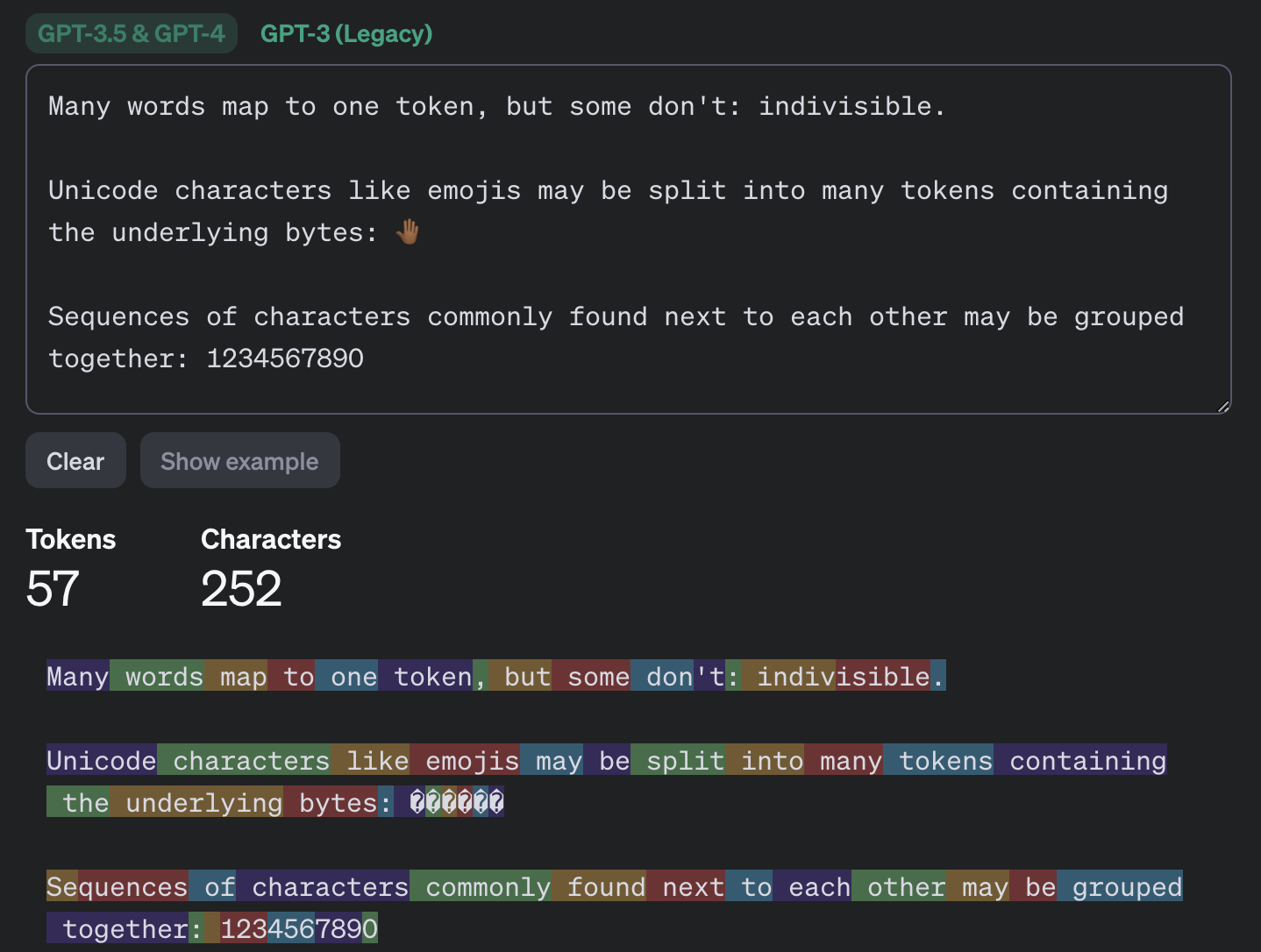
Most of the popular chatbots that kids (as well as adults) use are what’s known as large language models, or LLMs. To build such a model, researchers train it to spot patterns across huge amounts of text. The model breaks text down into small units called tokens (each token can be a sequence of words, a punctuation mark, a single word or character, or a whole sentence), then predicts which token is most likely to come next.

An example of how GPT-3.5 and GPT-4 break text into tokens

This example shows how the GPT-3.5 and GPT-4 models split messages into tokens. Source

The same thing happens when a chatbot converses with a person. A language model doesn’t actually reason on its own. It’s calculating which words and phrases are most likely to follow one another in order to produce a response that fits your query. That means chatbots will sometimes give incomplete or flat-out wrong answers, no matter how often they’re updated or retrained. A vivid example: just two years ago, popular chatbots confidently assured users that the word “strawberry” has two letters “r” instead of three. Mistakes like these are commonly known as hallucinations.

Many chatbots can also search the internet for information. In that case, the AI pulls in data from an outside source, but it still uses its own internal algorithms to put the answer together. And search results themselves can include outdated posts, advertising content, tabloids, and other questionable sources.

How to help your child use AI wisely

Talk to them about how AI can get things wrong

We’ve already seen that artificial intelligence isn’t immune to errors. Unfortunately, hallucinations aren’t the only issue. Even when a chatbot is working from accurate information, it can still present it in a misleading way by leaving something out, putting the emphasis in the wrong place, or drawing a questionable conclusion. Sometimes the result depends on factors a user would never think to consider when asking a question.

One surprising factor is simply what language you’re using. Most of the data that major models are trained on is in English, so these systems tend to perform better in English. The same AI model might answer a question correctly in English but get it wrong when asked the exact same thing in, say, Serbian. This gap shows up most in fields such as science, medicine, technology, and law, where there’s simply far more high-quality English-language material for the model to draw on.

Another quirk of chatbots is that they get worse as you feed them more information. Studies show that the more text and data a model has to work with, the harder it is for it to keep track of details, connect information from different parts of a conversation, and answer questions that require real depth of understanding. Therefore, uploading an entire book to a chatbot and asking detailed questions about it is a surefire way to trigger hallucinations.

It’s also worth questioning not just what the AI tells you, but the way you ask your questions in the first place. Chatbots often try to please the user, and will shape their answer to match the user’s apparent point of view. For example, the same chatbot might give opposite answers to “Why is the Earth overpopulated?” and “Why isn’t the Earth overpopulated?”, each time building its response around the assumption baked into the question. One recent study found that even the most advanced language models failed to challenge false premises in 26–42% of cases.

Let AI help with learning, not do the learning

Many a former student knows that copying others’ work is an art unto itself — one that takes exceptional skill and at least some engagement with the material (sometimes even a fair amount). These days, unfortunately, even that skill is at risk of disappearing: the temptation to copy an answer that took only a few seconds to generate is simply too strong. But chatbots are far from straight-A students themselves.

In one study, researchers had three popular chatbots sit a chemistry exam, and compared their scores to those of real students from 2009–2023. The students came out ahead. Chatbots will sometimes land on the correct answer, but arrive at it via a chain of flawed reasoning, so their answers could just as easily be wrong.

So it’s worth explaining to your child that having AI write essays from scratch, or solve equations without then double-checking them, is a dead end. On top of that, in a real job they’ll be judged on actual skills and knowledge, and chatbots won’t help them fake the expertise. What AI can genuinely help with, without getting in the way of learning, is explaining difficult topics and working through mistakes. Here are some examples:

If a topic is hard to make sense of

  • “Explain this topic in simple terms: {insert topic}”
  • “Explain this topic using a real-life example: {insert topic}“
  • “Here’s the part I don’t understand: {insert text}. Walk me through it step by step”
  • “Explain this topic in simple terms first, then in more technical terms: {insert topic}“
  • “Here’s a question: {insert question}. Don’t give me the answer. Ask me guiding questions so I can work it out myself”

Math and other exact sciences

  • “Give me a hint for the first step, but don’t solve the whole problem: {insert problem}“
  • “Look at my solution and tell me where I made a mistake, but don’t fix it for me: {insert problem and solution}“
  • “Come up with a similar problem for me to try: {insert problem}“
  • “Here’s my answer: {answer}. Ask me questions so I can check whether I solved it correctly”
  • “Explain why this formula applies here: {insert problem}“

Essays and written assignments

  • “Ask me five questions on this topic so I can come up with my own thesis and arguments: {insert topic}“
  • “Here’s a draft of my essay. Try to find gaps in my logic or places that need more detail: {insert draft text}“
  • “Look at my essay outline and tell me what’s missing: {insert essay outline}”
  • “Point out places in my writing where the idea isn’t clear, but don’t rewrite it for me: {insert text}“
  • “Pretend you’re an experienced teacher and try challenging my argument: {insert text}“

Language learning

  • “Have a conversation with me in {insert language} at an A2 level. After I respond, correct my mistakes”
  • “Give me five sentences to translate using this grammar structure: {insert grammar structure}“
  • “Explain this grammar rule and give me some examples: {insert grammar rule}“
  • “I’ll write a sentence, and you tell me if it has a mistake. Give me a hint first, and only show me the correct version after my second attempt. {insert sentence}“
  • “Write a short dialogue in {insert language} where I have to answer as one of the characters”

Knowledge testing

  • “Quiz me with 20 questions on this topic: {insert topic}. Ask one question at a time, and don’t show the answer right away”
  • “After each answer, only explain what I got wrong”
  • “Start with five easy questions, then ask five hard ones”
  • “Make the questions harder each time I answer correctly”
  • “Based on my mistakes, tell me which topics I should review”

Fact-check AI responses together

Make sure your child understands that they shouldn’t blindly trust what a chatbot tells them — even when it cites other sources. And asking the same chatbot to double-check its own work isn’t a great idea either; there’s a real chance it will make the same mistakes twice, or even pile up the errors.

Take any chatbot answer and go through it together, breaking it down into individual statements and asking questions about each one. Where did that date or number come from? Is the AI citing a specific person, publication, or study? Is the quote actually something that person said? If the chatbot includes a link, open it and check how accurately the AI actually represented it.

While you’re at it, take a look at the quality of the source itself. If something is written in an overly emotional tone or makes bold claims without backing them up, that’s a good sign to look for information somewhere else.

Protect your child and their accounts

Anything your child shares with a chatbot ends up on that company’s servers, and it’s used to further train the model by default. Over the past few years we’ve seen that even the biggest companies aren’t immune to bugs and data leaks. To lower the risk of your child’s information leaking and to keep their account secure, follow a few simple rules:

  • Make sure your child understands that AI isn’t a private diary. Tell them not to share their name, home address, school, or any other sensitive information with a chatbot.
  • Adjust the chatbot’s privacy settings. At the very least, turn off memory and any “improve the model” or training features. It’s also worth reading our detailed guides on setting up privacy and security in ChatGPT and DeepSeek.
  • Update the password. Most chatbots require an account, so to keep your child’s from being hacked, set a strong password that isn’t reused anywhere else. Whether your child’s password follows the classic “mother’s maiden name plus birth year” formula or uses popular meme words like “skibidi”, we have some bad news: passwords like these get cracked really fast. Instead of coming up with and memorizing passwords, it’s better to let an encrypted password manager generate and store them.
  • Turn on two-factor authentication. This adds an extra hurdle for anyone trying to break into your child’s account. Rather than using a phone number as the second factor, it’s better to use login codes generated and automatically refreshed in a password manager.
  • Use anti-phishing protection. Beyond fake websites that impersonate legitimate AI services, there’s another risk: chatbots sometimes hand users links to phishing sites (fake pages designed to steal personal information). Kaspersky Premium blocks access to suspicious sites and keeps scammers from stealing your family’s data and money.
  • Know what your child is doing online. Along with a password manager and protection from malware and phishing, Kaspersky Premium includes Kaspersky Safe Kids, which lets you set up parental controls, restrict unwanted content, and keep track of how much time your child spends online.

What else to read about keeping kids safe online and at school:

This Android malware steals banking credentials even without an internet connection | Kaspersky official blog

31 August 2026 at 19:18

Cybersecurity researchers have discovered a new family of Android malware, and it goes by the name of Manic. It lets criminals spy on their victims, steal banking credentials, and take remote control of infected devices.

But its most unusual trick is this: Manic can send stolen data back to attackers even when the given device has no internet connection. Apparently, random mobile internet outages seem to get in cybercriminals’ way just as much as anyone else’s, so the actors behind Manic came up with an unusual workaround.

People across a wide range of European countries are at risk, from Russia to the United Kingdom. In this post, we walk through what this Trojan can actually do, how it smuggles stolen data out to attackers, and how you can protect your Android device from Manic and other similar threats.

How Manic spreads, and who’s at risk

Researchers haven’t yet pinned down exactly how attackers are getting Manic onto people’s devices. Typically, malware like this spreads through channels like:

  • Infected apps on legitimate app stores
  • Malicious APK files shared on pirate websites
  • Download links sent through messaging apps and email
  • Scam sites

Google has told journalists it hasn’t found any trace of Manic spreading through apps on the Google Play Store. That suggests people are most likely installing infected apps from unofficial sources.

Experts have traced the beginnings of the attackers’ infrastructure for this campaign to February 2026. The earliest samples of the malware itself turned up in late May of this year. Since then, the criminals behind the Trojan have refined the ways it hides from detection on a victim’s device.

Manic currently combines the powers of a banking Trojan, spyware, and a remote-access tool that lets an attacker control the device. Attackers are especially interested in data from sources like:

  • Banking apps and payment services
  • Official government apps
  • Crypto wallets and cryptocurrency exchanges
  • Two-factor authentication apps
  • Text messages and notifications: mainly the one-time codes used to verify logins or approve transactions

By looking at which banking apps Manic targets, researchers have been able to work out which countries it has in its sights. It turns out its reach is broad, covering Austria, the Czech Republic, Estonia, France, Germany, Lithuania, the Netherlands, Poland, Russia, Slovakia, Spain, Ukraine, and the United Kingdom.

Stolen passwords, intercepted codes, remote control: what Manic can actually do

Let’s look at exactly what information Manic steals, and how it manages to get it. The malware’s main trick relies on abusing Android’s Accessibility services, a set of built-in features designed to help users with visual impairments. Used as intended, these features are genuinely helpful for people with vision loss. But criminals have long been quietly exploiting the very same tools for their own purposes.

Once a user grants an app permission to use Accessibility services, that app can “see” the text and buttons on the screen, interact with them, scroll through pages, and carry out actions automatically — all as if a user were doing it themselves. Attackers use this to read messages on screen, quietly grant the malware extra permissions, interfere with attempts to uninstall it, switch off security protections, or control other apps without the victim ever noticing.

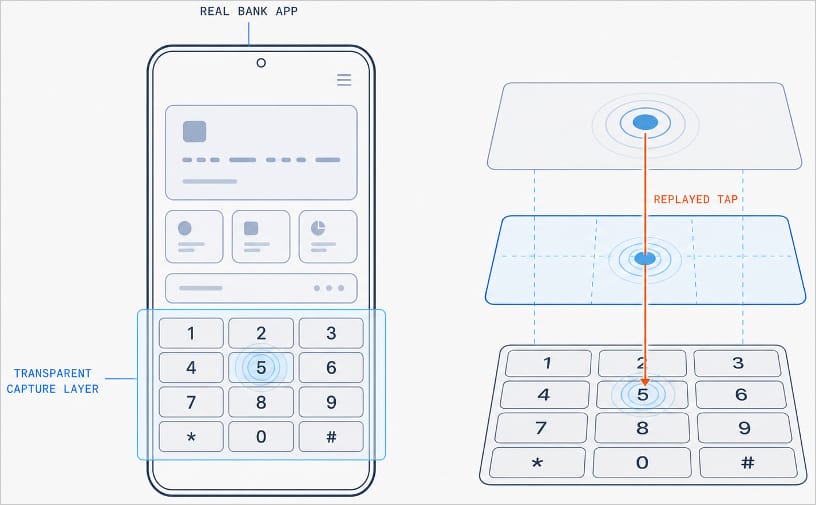
With Manic, this abuse of Accessibility services is paired with the Trojan’s own advanced capabilities. It can generate an invisible keyboard that overlays the phone’s real one. When a user types their password to log in to a banking app, Manic records exactly which keys they pressed. Then it uses Accessibility services to instantly replay that same keystroke on the actual app keyboard.

Manic generates a transparent capture layer that covers the phone's keyboard

Manic generates a transparent capture layer that covers the phone’s keyboard, recording each tap and relaying it to the real keyboard. Source

This means attackers don’t have to build a fake login screen for every single app they want to target. Because Manic works as an invisible layer sitting on top of the genuine app, everything looks and behaves as usual, so a phone owner has no reason to suspect they’re handing over their PIN or password to a criminal.

Manic doesn’t simply log everything a user types, either. It automatically recognizes what kind of information it has just captured and sorts it into categories: passwords, email logins, four-to-six-digit SMS codes, strings of characters that look like crypto wallet seed phrases, and phone unlock codes or pattern locks. Alongside the captured text itself, Manic also records which app it came from, when it was entered, whether the user typed it manually or used autofill, and whether that app is on its hit list.

Manic’s abilities don’t stop at collecting information. Using Accessibility services once again, it also lets attackers take remote control of an infected device. To conceal this activity, Manic can show a black screen or fake a system update.

On top of Accessibility services, the malware also asks for permission to read text messages and notifications. That lets attackers intercept two-factor authentication codes and one-time verification codes before a victim even has a chance to type them into the app.

Put together, this hands attackers not just passwords, banking credentials, and verification codes, but the ability to remotely control the victim’s phone as well.

Even being offline won’t save you from data theft

Manic’s original method for relaying stolen data off the device and back to the attackers deserves a separate mention. Even today, devices get knocked offline more often than people might expect, and Manic’s creators built a workaround specifically for such situations.

Normally, malware like this collects information on the device and sends it straight to a server controlled by the attackers. But what happens when the infected device has no direct internet access, or can’t reach the command-and-control server for some other reason?

In that case, Manic simply stores the stolen data on the device and starts scanning nearby for other infected phones it can reach over Wi-Fi or Bluetooth. If it finds one with internet access, it hands over the encrypted data to that phone, which then forwards it on to the attackers’ server.

But it doesn’t stop there. Data can hop across a chain of infected devices. By default, Manic allows up to four of these relay devices in the chain. If no suitable device is nearby, the data simply stays on the original phone, and Manic tries again later.

How to protect your phone from Manic and other banking Trojans

Android malware keeps getting more sophisticated. That makes it worth remembering — and actually following — a few basic digital hygiene habits for Android phone and tablet users:

  • Avoid installing apps from unofficial sources.
  • Don’t grant apps permission to use Accessibility services unless this is absolutely necessary and you understand exactly why they need it.
  • Install reliable security software on all your devices, run scans regularly, and take its warnings and recommendations seriously. We recommend Kaspersky for Android. Our Android security apps are temporarily unavailable on the Google Play Store, so to install them on an Android device we recommend using an alternative app store or installing the APK file manually from our website. A full step-by-step guide is available in our post, How to install or update Kaspersky apps for Android in 2026.

Malware doesn’t just target smartphones; it feels at home on other Android-powered devices too — from streaming boxes to… cars. Check out the details in our related posts:

Detection blind spots: non-standard file formats in malicious email campaigns | Kaspersky official blog

28 August 2026 at 19:12

Threat actors are constantly developing new attack schemes — from OAuth token theft to attacks on AI agents — but the classics never quite leave their playbook. On any given day, an employee may receive malware attached directly to an email, or lying in wait behind a link embedded in an email. Making these attacks succeed still requires a degree of creativity, and in recent years attackers have increasingly adopted exotic file formats. Users don’t perceive these formats as dangerous; more importantly, many EDR and email security solutions skip scanning them entirely. Yet they’ve proven highly effective for deploying malware or harvesting credentials.

Below are the file types that may be blind spots in your organization’s detection strategy — despite being observed as used in real-world attacks.

Disk images

This is the broadest and most dangerous attachment category. A disk image can contain a fully prepared, correctly structured set of files tailored to a wide range of attack scenarios. It mounts as a separate volume (standalone virtual disk), and when doing so often uses tools built into the operating system. The victim doesn’t need to extract anything or create suspicious folders on disk.

The most versatile format is ISO, which dates back to the heyday of multimedia CDs. ISO images mount natively on every major OS without additional utilities, whether through simple tools like File Explorer or via the command line interface. This is precisely why threat actors have no hesitation in sending ISO files as email attachments.

Somewhat less common are IMG containers, which also mount without additional tooling on macOS or Linux, but require installing a small, free utility such as OSFMount on Windows, or using WSL2 (Windows Subsystem for Linux), which is built into recent Windows versions. A file with identical content may also carry a DD extension.

Threat actors also make use of VHD, a virtual disk format native to Windows, which generally works on Linux machines as well (via qemu-nbd or guestmount). On macOS, an additional utility — again, qemu-nbd is a common choice — is required to mount it. Note that on unpatched Windows systems, the victim doesn’t need to take any further action after the disk mounts: CVE-2025-24993 — a vulnerability actively exploited in real-world attacks — triggers attacker code execution immediately upon mounting the image.

For completeness’ sake, VMDK, the disk image format used by VMware, is also worth detecting, though it’s largely ineffective in attacks on regular users since every popular OS requires additional software to mount it.

All of these image formats can be viewed and unpacked not only with specialized tools, but with standard archive utilities like 7-Zip or RAR. As a result, the odds that the user will fall for the bait are higher than one might hope.

In addition to not being a well-known potentially dangerous format, image files give attackers one further advantage: files extracted from disk images on Windows frequently lack the Mark of the Web flag, and therefore can be launched without triggering additional system warnings.

There’s one more reason why EPP/EDR solutions must scan virtual machines and disk images: these formats are also used during later stages of an attack. To mask active file-system activity from monitoring tools, ransomware gangs sometimes run the entire encryption process inside a virtual machine deployed on the victim’s computer. The RagnarLocker ransomware strain has used VirtualBox for this purpose, while the CRON#TRAP campaign relied on a QEMU environment.

MS Office files

No, this isn’t about macro-laced DOC files. Microsoft has grown weary enough of this classic attack vector that macros in downloaded documents are now blocked outright, and enabling them requires considerable effort from the user. But Office relies on dozens of file formats, and some of the less common ones still occasionally give attackers an edge.

Less familiar to both users and security solutions are OneNote files (.one). These are essentially simple notes, but they can carry embedded attachments, including not just images and links, but VBS/WSF/BAT scripts as well. Within the note, an attachment normally displays as an icon, but attackers overlay it with a picture showing a message with a “View” button.

Another Office format popular with attackers is the Excel add-in. These files use the .xll extension but are, in effect, full-fledged Windows dynamic-link libraries (DLLs), and therefore may have extensive functionality. Victims receive a malicious email with what looks like an invoice; the icon suggests that the file will open in Excel. Ignoring the security warning may result in an infostealer infection.

SVG “graphics”

The description of the SVG (Scalable Vector Graphics) format sounds entirely innocuous. Indeed, 99% of SVG files are logos and interface icons. But unlike PNG or JPG, SVG files are fundamentally XML documents, and beyond points, lines and fills they can contain JavaScript. In terms of malicious potential, SVG is not far behind a full web page. In real-world attacks, SVG files can redirect a user to a phishing page immediately upon opening, or render the phishing page directly by unpacking a Base64-encoded block into full HTML.

SVG files pose a distinct risk to corporate portals that accept user file uploads. If a portal’s Content Security Policy (CSP) isn’t sufficiently restrictive, and lets someone upload a malicious SVG file, the embedded JavaScript can steal cookies from the page, inject unauthorized content, and carry out similar attacks.

Polyglot files

Polyglot file formats are less exotic in and of themselves, but the files carry more than meets the eye. They’re called polyglots because attackers construct a file that can be validly interpreted in multiple ways: for example, it can be a valid ZIP archive and a valid executable at the same time. The purpose is purely to evade detection by security solutions and deceive the user. We’ve covered polyglots in detail in a separate blog post.

The clear standout in our roundup is a malicious campaign distributing the IcedID infostealer. Victims receive emails with a ZIP attachment, which unpacks into an ISO disk image. That further unpacks into a CHM file (the Windows Help format) that’s also correctly processed as an mshta (Microsoft HTML Application host) application, which then downloads the primary malware payload.

Defending against exotic files

These attacks rely on the assumption that security solutions either don’t scan unusual file formats, or scan them only superficially. Preventing the threat starts with not operating on that assumption with regard to your own infrastructure:

  • Configure EDR, web, and email filters to scan all of the file formats described above.
  • Process archives and disk images with the same rigor as you would apply to executables.
  • Detonate potentially dangerous file types in a sandbox, and configure recursive unpacking of nested formats through to the end of the chain: ZIP → ISO → CHM.
  • Where feasible, quarantine all file formats anomalous for email — disk images in particular.
  • Build detection rules for anomalous usage patterns that involve exotic files. For example, unusually small disk images are rare and are therefore worth investigating.
  • Review the technical documentation of your security solutions to confirm that complex formats are detected through deep structural parsing rather than magic-byte checks alone.
  • Deploy behavioral detection capable of flagging anomalous execution patterns and legitimate utilities launched from unexpected contexts. The usual suspects here include mshta, git, wscript, hh, and rundll32.
  • SVG files warrant a dedicated policy. Treat SVGs as active content at the email and web perimeter. On corporate portals, enforce a strict CSP, and serve user-uploaded files from a separate subdomain so that a malicious script embedded in an SVG can’t access the session on the main portal.

What to do if you find someone else’s bank card | Kaspersky official blog

27 August 2026 at 18:17

Neighborhood chats regularly light up with posts about lost bank cards being found. People mean well and want to help a neighbor out, so they post a photo of the card with the number and other details fully visible. Others mention in the chat that they’ve left the card with, say, a security guard, cashier, or manager at whatever store or business it was found, or which happens to be the closest. Today we’re going to explain why none of that is a good idea, and what you should really do if you find someone else’s bank card.

What NOT to do if you find a lost card, and why

Let’s start with why you shouldn’t post a photo of the card with its details visible in a group chat, keep the card, or hand it to a stranger. The first reason is the most obvious, but worth spelling out anyway: card details are private information that shouldn’t be shared with people who have no business seeing them. A photo posted in a group chat can end up in the hands of criminals, who may try to use those details to make fraudulent purchases online. The worst-case scenario is a photo showing both sides of the card that also exposes the three-digit security code (known as the CVC, CVV, or CVP) on the back.

Now to a less obvious point: why you shouldn’t post about finding a card, even with a photo of it with the number blurred out, and then hold on to it, planning to return it once the owner turns up. Since there’s no guarantee you were the first person to have the card in your hands, doing this puts you at risk of coming under suspicion if money disappears from that account. Even if you had absolutely nothing to do with any theft, the mere fact that the card was in your possession for a while could still land you in an uncomfortable conversation with its owner or the police.

The same logic applies to handing the card over to a third party. A security guard, cashier, or manager is just as much a stranger as anyone else, and none of them have any special authority to take charge of a found bank card. Handing it to them gives them the opportunity to use someone else’s money themselves, and if that happens, you could end up as a person of interest.

An “out of sight — out of mind” approach, that is, leaving the card where you found it, or moving it somewhere more visible, is safer for you personally, but it’s still not really the right call. If you do that, someone else will find it, and there’s no guarantee that they’ll be a decent person. They might try to drain money from the rightful owner’s account. So this isn’t a good option either.

What you SHOULD do with a found bank card

Now let’s talk about what you should do instead. The right approach might surprise you: call the bank that issued the card, report that you’ve found it, and then… destroy the card. It’s entirely possible the owner hasn’t even noticed it’s missing yet: with contactless payments now so widespread, a physical card can sit untouched in a wallet for quite a while. The bank will block the card, notify the owner that it’s gone, and issue a new one.

That last step — destroying the card — may come as a surprise and even attract some push-back among readers, but we stand by it: a found card really should be destroyed. That way, no one can possibly use it, and you won’t have to hold onto someone else’s property or risk coming under suspicion if money goes missing from the account. The simplest and most reliable way to destroy a card is to carefully cut it into small pieces with kitchen scissors and throw it in the trash or recycle it.

Here’s something worth keeping in mind: these days, a physical card isn’t actually worth all that much to its rightful owner. For one thing, banks reissue cards quickly and easily. With most banks, you won’t even need to visit a branch since the new card gets delivered straight to your door.

For another, getting a new card issued usually doesn’t leave the owner unable to pay for things in the meantime: in many cases, they can just switch to a virtual card or another payment method. So a destroyed card is a much smaller headache for its owner than the risk of its ending up in the wrong hands and being used to drain their account.

And if the card’s disgruntled owner does somehow track you down with questions, just show them this article so they can appreciate the trouble they avoided, thanks to you.

When you shouldn’t destroy a found card

Beyond bank cards, there are also multi-purpose cards, such as ones issued to schoolchildren and students that combine a few functions, like a school or university access pass and a public transit pass. Kids, especially younger ones, lose these kinds of cards fairly often. Restoring full functionality on cards like these can take much longer than reissuing a bank card, and the amounts stored on them are usually small, so if you find one, your best move is to take it to the school or university named on the card and hand it to security or reception / front office.

In short: what to do if you find someone else’s card

To sum it up, if a lost bank card ends up in your hands:

  1. Look for the bank’s phone number on the card. It’s usually printed there; if not, you can easily find it on the bank’s official website. Then give them a call. Let them know you’ve found someone else’s card.
  2. After the call, destroy the card: cut it into small pieces with scissors and throw it away.

And one more reminder of what not to do: don’t post photos of the card or its details in chats or on social media, don’t hold on to the card hoping to track down the owner, and don’t hand it over to strangers.

We’d also recommend following our blog to stay on top of the latest online threats. And feel free to share this article in that neighborhood chat so your neighbors know exactly what to do if they ever find someone else’s bank card.

As for protecting your own money, it’s worth using a robust, multi-layered security solution that safeguards your money, cards, wallets, and payments. Read more in Five Kaspersky technologies to protect your finances.

What other hidden risks do bank cards carry? Find out in our other posts:

❌