Normal view

Introducing OAuth Support for AWS MCP Server

10 July 2026 at 01:43

You can now connect your agents to the AWS MCP Server using the same credentials and sign-in methods that you already use for connecting to the AWS Management Console or AWS Command Line Interface (AWS CLI) through a familiar browser-based experience powered by industry-standard OAuth. This new sign-in path supports AWS Identity and Access Management (IAM) federation, AWS IAM Identity Center, and root or IAM users.

In addition, AWS is introducing several new security and governance tools, including: new global condition keys for OAuth, token introspection and revocation, dynamic client registration, new AWS CloudTrail elements, and a new API for headless OAuth connectivity. All of this is compatible with your existing IAM configuration including permissions, roles, and federated access.

In this post, you’ll learn how to connect your agents to the AWS MCP Server, understand how AWS Sign-In authorizes agent access, and manage access using new security and governance capabilities.

How to connect an agent to the AWS MCP Server

This walkthrough uses Claude Code, but the same steps apply to any agent that supports Model Context Protocol (MCP) such as Kiro, Codex, and Gemini. See Setting up the AWS MCP Server for how to connect the AWS MCP Server to an agent.

Prerequisite permissions

To connect an agent to the AWS MCP Server, you’ll need the IAM permissions required for OAuth-based sign-in. The following AWS CLI command adds a managed policy with required permissions to your IAM role (remember to replace <MyRole> with your IAM role):

aws iam attach-role-policy \
  --role-name <MyRole> \
  --policy-arn arn:aws:iam::aws:policy/AWSMCPSignInOAuthAccessPolicy

Step 1: Configure the AWS MCP Server on your agent

Run the following command to add the AWS MCP Server endpoint to your agent’s configuration as shown in Figure 1:

claude mcp add --transport http aws-mcp https://aws-mcp.us-east-1.api.aws/mcp

Figure 1: Adding the AWS MCP Server endpoint to Claude Code

Figure 1: Adding the AWS MCP Server endpoint to Claude Code

Step 2: Review the authorization request

The first time your agent needs to access the AWS MCP Server, it opens a browser and redirects you to an AWS Sign-In page, shown in Figure 2. Authenticate as you would on AWS console or AWS CLI, review the authorization request, and approve access. You should receive an Authorization successful message.

Figure 2: Review authorization request

Figure 2: Review authorization request

Note that if you already have an active AWS Sign-In session (e.g., because you previously signed in to the console earlier in the day), you can reuse that session without needing to sign in again.

Step 3: Start using AWS tools

After connecting your agent to the AWS MCP Server, you can begin invoking tools provided by the server. To verify that Claude Code is connected to the AWS MCP Server, start Claude Code and run the following command:

/mcp

The command displays the configured MCP servers and confirms that the AWS MCP Server is connected and ready to use with your AWS credentials.

Figure 3 shows an example of a successful connection to the AWS MCP Server.

Figure 3: Verifying the AWS MCP Server connection in Claude Code

Figure 3: Verifying the AWS MCP Server connection in Claude Code

After the connection is established, you can ask Claude Code to invoke tools provided by the AWS MCP Server. For example, enter the following prompt:

Deploy a sample serverless web application into my development AWS account

Claude Code uses the AWS MCP Server to identify the active AWS account, confirm the target account, and describe the deployment it plans to perform before invoking AWS services on your behalf.

Figure 4 shows Claude Code confirming the active AWS account and outlining the resources that will be deployed.

Figure 4: Using Claude Code to deploy a sample serverless application through the AWS MCP Server

Figure 4: Using Claude Code to deploy a sample serverless application through the AWS MCP Server

Authorization models and how they work

AWS Sign-In supports two authorization models for connecting agents to the AWS MCP Server:

  • Interactive authorization for developers’ AI agents using browser based authentication
  • Non-interactive (headless) authorization for applications and AI agents that already have AWS credentials and don’t have access to a browser

Note that authorizing an agent allows it to access the AWS MCP Server on your behalf. It doesn’t grant the agent additional AWS permissions. Every request is still evaluated using your existing IAM policies, SCPs, RCPs, permission boundaries, and other organizational controls.

Interactive access

In the interactive case, the agent first discovers the AWS Sign-In OAuth server and then registers itself as an OAuth client using Dynamic Client Registration (DCR). It then redirects you to an AWS Sign-In page where you authenticate and authorize access (step 2 in the preceding section). After successful authorization, AWS Sign-In then issues short-lived access tokens and refresh tokens that authorize the agent to access the AWS MCP Server on your behalf. AWS Sign-In automatically manages token issuance and token refresh, enabling authorized agents to continue accessing the AWS MCP Server without requiring you to repeatedly sign in.

The interactive authorization model supports three distinct sign-in methods: native AWS IAM credentials for individual developers, managed access through AWS IAM Identity Center for enterprises, and seamless federated access via third-party providers like Okta and Ping Identity for larger organizations.

OAuth server metadata and DCR

Before an agent can request authorization, it must discover the AWS Sign-In OAuth endpoints and register itself as an OAuth client. AWS Sign-In supports OAuth metadata discovery and DCR, allowing supported agents to configure themselves automatically without requiring developers to manually provision OAuth client IDs and client secrets. When an agent connects to the AWS MCP Server for the first time, it retrieves the AWS MCP Server’s protected resource metadata (RFC 9728) and the AWS Sign-In OAuth metadata (RFC 8414). The agent then uses (RFC 7591) to register with AWS Sign-In, obtain a client ID, and initiate the standard OAuth authorization code flow.

AWS Sign-In supports OAuth discovery and DCR for agents running on local workstations and supported hosted environments. For the current list of supported agents and environments, see Supported redirect URIs for the AWS MCP Server.

Non-interactive access to the AWS MCP Server

Non-interactive (headless) authorization is for agents and applications that run without a browser or human in the loop, and thus don’t require interactive sign-in. This allows agents that already have AWS credentials to obtain OAuth access tokens and connect to the AWS MCP Server. The following is an example of how to obtain an access token.

aws signin create-oauth2-token-with-iam \ 
--grant-type client_credentials \ 
--resource aws-mcp.amazonaws.com \  
--region us-east-1 
{ 
"accessToken": "ASOA****************************************...", 
"tokenType": "Bearer", 
"expiresIn": 3600 
}

In the non-interactive case, AWS Sign-In implements the OAuth client credentials grant using AWS security credentials instead of a static client secret. Applications authenticate to the AWS Sign-In token endpoint using SigV4 creds, and AWS Sign-In returns a short-lived OAuth access token that can be used to access the AWS MCP Server.

Please note you may have to update the SDK and AWS CLI, please refer to CLI guide.

Managing OAuth access

AWS Sign-In extends the existing IAM authorization model with capabilities for governing OAuth access to the AWS MCP Server. Administrators can use familiar IAM policies together with new OAuth-specific controls.

Granting OAuth permissions

OAuth access is governed using IAM policies and requires the following IAM actions:

  • signin:AuthorizeOAuth2Access – Allows users to sign in interactively using the OAuth authorization code flow
  • signin:CreateOAuth2Token – Allows applications to obtain OAuth access tokens by exchanging authorization codes, refresh tokens, or using client credentials

When an application requests access, AWS Sign-In creates an OAuth authorization grant between the agent and the AWS MCP Server. This grant is represented as an IAM resource, which the preceding AWS Sign-In actions are authorized against.

arn:aws:signin:us-east-1:012345678910:service-principal/aws-mcp.amazonaws.com

OAuth authorization grants are represented as an IAM resource enabling administrators to use standard IAM policy constructs, including global condition keys, together with OAuth-specific condition keys to control how authorization grants are created and used.

Governing OAuth access

AWS Sign-In introduces OAuth-specific condition keys that allow administrators to govern how agents obtain OAuth authorization. The following examples demonstrate common governance patterns.

To restrict OAuth authorization to localhost:

In addition to accessing the AWS MCP Server with agents on your local workstation, AWS supports signing into the AWS MCP Server on select hosted providers through dynamic client registration. Click here to view the list of supported remote providers. Many organizations want to allow developers to authorize agents running on their local workstations while preventing OAuth tokens from being delivered to untrusted redirect URIs or using unsupported authorization flows. The following policy allows only the OAuth authorization code and refresh token flows for the AWS MCP server and restricts token delivery tolocalhost.

{
  "Version": "2012-10-17",
  "Statement": [
    {
      "Effect": "Allow",
      "Action": [
        "signin:AuthorizeOAuth2Access",
        "signin:CreateOAuth2Token"
      ],
      "Resource": "arn:aws:signin:*:*:service-principal/aws-mcp.amazonaws.com",
      "Condition": {
        "StringLike": {
          "signin:OAuthRedirectUri": "http://localhost:*"
        },
        "StringEquals": {
          "signin:OAuthGrantType": [
            "authorization_code",
            "refresh_token"
          ]
        }
      }
    }
  ]
}

To deny access for a specific OAuth session

Use the aws:SignInSessionArn global condition key to deny authorization associated with a specific sign-in session. This allows administrators to contain a suspicious or compromised authorization session without affecting other active sessions.

{
  "Version": "2012-10-17",
  "Statement": [
    {
      "Effect": "Deny",
      "Action": [
        "*"
      ],
      "Resource": "*",
      "Condition": {
        "ArnEquals": {
          "aws:SignInSessionArn": "arn:aws:signin:us-east-1:111122223333:session/abc123-example-session-id"
        }
      }
    }
  ]
}

These examples demonstrate common governance patterns. Additional IAM and SCP examples are available in the AWS Sign-In condition keys reference.

Revoking OAuth tokens

AWS Sign-In provides OAuth token introspection and token revocation APIs that allow administrators to build custom tools for token validation and revocation. Access to these APIs is controlled through the signin:IntrospectOAuth2Token and signin:RevokeOAuth2Token permissions. IAM principals with permissions are allowed to introspect and revoke tokens for the same account.

The introspection API can be used to determine whether a token is active and obtain information about the associated authorization. The revocation API allows administrators and security tools to revoke individual refresh tokens without affecting other active sessions. For example, if an organization needs to invalidate access for a specific OAuth authorization, account admins can revoke the associated refresh token without affecting other active sessions.

Monitoring OAuth activity

OAuth-related activities are recorded in AWS CloudTrail, including authorization requests, token issuance, token revocation, and token introspection events. CloudTrail logs also capture details such as the OAuth client, target the AWS MCP Server, redirect URI, authorization flow, and associated sign-in session. In addition, AWS API calls made using OAuth access tokens include the associated aws:SignInSessionArn context, allowing organizations to correlate API activity with the originating OAuth sign-in session.

This allows security teams to monitor OAuth usage, investigate authorization activity, detect anomalous behavior, and integrate OAuth events into existing auditing, compliance, and incident response workflows alongside other AWS activity.

Here’s a CloudTrail sample for an AuthorizeOAuth2Access event:

{
    "eventVersion": "1.11",
    "userIdentity": {
        "type": "AssumedRole",
        "principalId": "AROATJHQDX737YZP****:testuser",
        "arn": "arn:aws:sts::111111111111:assumed-role/Admin/testuser",
        "accountId": "111111111111",
        "sessionContext": {
            "sessionIssuer": {
                "type": "Role",
                "principalId": "AROA2IRT4N5U4RDHM2LG4",
                "arn": "arn:aws:iam::111111111111:role/Admin",
                "accountId": "111111111111",
                "userName": "Admin"
            },
            "attributes": {
                "creationDate": "2026-06-09T05:06:39Z",
                "mfaAuthenticated": "false"
            }
        }
    },
    "eventTime": "2026-06-09T05:09:00Z",
    "eventSource": "signin.amazonaws.com",
    "eventName": "AuthorizeOAuth2Access",
    "awsRegion": "us-west-2",
    "sourceIPAddress": "192.0.0.2",
    "userAgent": "Mozilla/5.0 (Macintosh; Intel Mac OS X 10_15_7) AppleWebKit/537.36 (KHTML, like Gecko) Chrome/149.0.0.0 Safari/537.36",
    "requestParameters": {
        "resource": "https://aws-mcp.us-west-2.api.aws/mcp",
        "redirect_uri": "http://127.0.0.1:60432/oauth/callback",
        "code_challenge_method": "S256",
        "client_id": "arn:aws:signin:us-west-2::external-client/dcr/609544da-aasa-49a4-ab11-c2r457fa999"
    },
    "responseElements": null,
    "additionalEventData": {
        "success": "true"
    },
    "requestID": "4fb4ff7b-6yu7-9090-78i9-9c0088a65134",
    "eventID": "bb05b222-31ec-4237-b8e7-8eb26d4fd48b",
    "readOnly": true,
    "eventType": "AwsApiCall",
    "managementEvent": true,
    "recipientAccountId": "111111111111",
    "eventCategory": "Management",
    "tlsDetails": {
        "tlsVersion": "TLSv1.3",
        "cipherSuite": "TLS_AES_128_GCM_SHA256",
        "clientProvidedHostHeader": "us-west-2.oauth.signin.aws"
    }
}

Here’s a CloudTrail sample for a CreateOAuth2Token event:

{
    "eventVersion": "1.11",
    "userIdentity": {
        "type": "AssumedRole",
        "principalId": "AROATJHQDX737YZP7****:testuser",
        "arn": "arn:aws:sts::111111111111:assumed-role/Admin/testuser",
        "accountId": "111111111111",
        "sessionContext": {
            "sessionIssuer": {
                "type": "Role",
                "principalId": "AROA2IRT4N5U4RDHM****",
                "arn": "arn:aws:iam::111111111111:role/Admin",
                "accountId": "111111111111",
                "userName": "Admin"
            },
            "attributes": {
                "creationDate": "2026-06-09T05:06:39Z",
                "mfaAuthenticated": "false"
            },
            "signInSessionArn":"arn:aws:signin:us-west-2:111111111111:session/daff060f-7871-5tg6-67yu-a07bbdabe61a"
            
        }
    },
    "eventTime": "2026-06-09T05:10:04Z",
    "eventSource": "signin.amazonaws.com",
    "eventName": "CreateOAuth2Token",
    "awsRegion": "us-west-2",
    "sourceIPAddress": "192.0.0.2",
    "userAgent": "curl/8.7.1",
    "requestParameters": {
        "resource": "https://aws-mcp.us-west-2.api.aws/mcp",
        "client_id": "arn:aws:signin:us-west-2::external-client/dcr/609544da-b3dd-49a4-ab11-c2e98d7fa999"
    },
    "responseElements": null,
    "additionalEventData": {
        "signInSessionArn": "arn:aws:signin:us-west-2:111111111111:session/daff060f-7871-5tg6-67yu-a07bbdabe61a",
        "grant_type": "refresh_token",
        "success": "true"
    },
    "requestID": "44d6d7ce-e4r5-4cbf-0909-bfb8a8295a76",
    "eventID": "f79cc63f-b383-4e3c-a1e5-97c7db1ab833",
    "readOnly": true,
    "eventType": "AwsApiCall",
    "managementEvent": true,
    "recipientAccountId": "111111111111",
    "eventCategory": "Management",
    "tlsDetails": {
        "tlsVersion": "TLSv1.3",
        "cipherSuite": "TLS_AES_128_GCM_SHA256",
        "clientProvidedHostHeader": "us-west-2.oauth.signin.aws"
    }
}

Additional audit events and logging details for calls made using OAuth access tokens to the AWS MCP Server can be found in Logging AWS MCP Server API calls using AWS CloudTrail.

Conclusion

AWS Sign-In support for OAuth enables you to securely connect to the AWS MCP Server using industry-standard authorization. This release simplifies application and agent integration with AWS while supporting your existing IAM setup, governance, and auditing capabilities.

To learn more, see Sign-In with OAuth 2.0 in the AWS Sign-In User Guide and Setting up the AWS MCP Server in the Agent Toolkit for AWS User Guide.

If you have feedback about this post, submit comments in the Comments section below.


Vaibhav Chowla

Vaibhav Chowla

Vaibhav is a Senior Technical Product Manager at AWS, specializing in AWS Identity products. He focuses on enhancing user authentication and security, helping customers of all sizes solve complex identity and access management (IAM) challenges. Outside of technology, Vaibhav enjoys traveling and exploring new cultures and cuisines.

Jaimin Bhatt

Jaimin Bhatt

Jaimin is a Principal Software Engineer at AWS. He works on AWS Identity and Access Management (IAM) across sign-in, threat detection, and the authentication and authorization that secures access to AWS. Jaimin is an active participant in multiple industry standards bodies. Previously, he led work on data perimeter controls for AWS Management Console sign-in, multi-session support for the console, a simplified AWS CLI sign-in experience, and the internal Amazon identity provider.

Ankur Joshi

Ankur Joshi

Ankur is a Software Development Manager on the AWS Identity Sign-In team. His team focuses on delivering secure and resilient authentication mechanisms and access controls for AWS customers.

Everyone’s Selling AI That Kills Pentesting. We Built One That Doesn’t.

What we built, Fusion AI, runs at about a third the cost of a traditional external pentest, a human tester still signs off on every finding, and it is not here to replace anybody.
We have been hearing that one a lot. So when Melisa from our Business Capture team sat down with Brian Fehrman and me for this episode of AI Security Ops, she started with, “What is this thing you built, and is it the same hype everyone else is selling?”

The post Everyone’s Selling AI That Kills Pentesting. We Built One That Doesn’t. appeared first on Black Hills Information Security, Inc..

SpaceX verklapt in beursdocument miljardenovername van Cursor-maker Anysphere

16 June 2026 at 13:31
SpaceX gaat AI-programmeertool Cursor overnemen, voor een bedrag van 60 miljard dollar. Dit staat in documenten die het nu beursgenoteerde ruimtevaartbedrijf indiende bij beurswaakhond SEC. Eerder sloten de twee bedrijven een samenwerking met koopoptie voor SpaceX.

A Record-Breaking Patch Tuesday for June 2026

10 June 2026 at 00:07

Microsoft today released software updates to plug nearly 200 security holes across its Windows operating systems and supported software, a record number of fixes for the company’s monthly Patch Tuesday cycle. Nearly three dozen of those bugs earned Microsoft’s most dire “critical” rating, and exploit code for at least three of the weaknesses is now publicly available.

The software giant said in a blog post last month that both its engineers and the security community are increasing using artificial intelligence tools to find bugs, meaning this month’s heavy Patch Tuesday may start to become the norm, said Satnam Narang, senior staff research engineer at Tenable.

“Some surveys put AI usage among security professionals generally at 90%, so it’s unsurprising that this volume of patches may be the norm,” Narang said. “Pandora’s proverbial box has been opened, and as more advanced AI models become available, we expect the norm to continue upward across the board, not just for Patch Tuesday.”

June’s zero-day bugs include CVE-2026-49160, a denial of service vulnerability affecting a range of web servers, including Microsoft Internet Information Services (IIS). Microsoft says the flaw was reported by OpenAI’s Codex.

Two of the zero-days addressed this month appear to stem from recent vulnerability disclosures by Nightmare Eclipse, the nickname chosen by a security researcher who has been dropping exploits for various Windows flaws. One of those, dubbed “GreenPlasma,” leverages an elevation of privilege weakness in the Windows Collaborative Translation Framework, the same framework patched today in CVE-2026-45586.

Nightmare Eclipse also last month released “YellowKey,” an exploit for a Windows BitLocker vulnerability that allows an attacker with physical access to view encrypted data, and CVE-2026-50507 is a patch for an elevation of privilege bug in BitLocker.

Microsoft received heavy blowback on social media last month after it said in a blog post that it was considering taking legal action against the security researcher. The company later clarified on Twitter/X that while it has no intention of pursuing legal actions against researchers, it would report them to authorities if they break the law. The advisories for CVE-2026-49160 and CVE-2026-50507 do not credit any researchers in the acknowledgement section, saying only that “Microsoft recognizes the efforts of those in the security community who help us protect customers through coordinated vulnerability disclosure.”

Nightmare Eclipse claims to be a former employee of Microsoft, although Microsoft has not responded to questions about this claim. Rapid7 notes that a recent blog post by Nightmare Eclipse included an image of Albert Wesker, a character from the Resident Evil video game series who formerly worked as a researcher for a technology company before going rogue.

Nightmare Eclipse has pledged to release even more zero-day exploits for Windows in what they called a “bone shattering” drop planned for July 14 (the same day as next month’s Patch Tuesday). Immediately following the release of Microsoft patches today, the researcher published an exploit for what they claimed was a zero-day bug in Windows Defender.

While 200 vulnerabilities may be a record for Patch Tuesday, the actual number of security flaws Microsoft addressed this month is far higher, said Rapid7’s Adam Barnett.

“So far this month, Microsoft has provided patches to address 360 browser vulnerabilities, which is an order of magnitude more than has been typical in any given month over the past few years,” Barnett wrote. “As usual, browser [flaws] are not included in the Patch Tuesday count above. Indeed, the vast, and presumably sustained, uptick in the number of browser vulnerabilities has led to Microsoft no longer enumerating Chromium CVEs in the Security Update Guide.”

Microsoft also patched a zero-day vulnerability in Visual Studio Code that allows attackers to steal GitHub tokens with a single click. The company was forced to push a stopgap fix for the flaw on June 3, after a researcher published instructions showing how to exploit it. The researcher said they opted not to work with Microsoft because of a recent experience wherein Redmond silently patched a flaw they reported without offering credit or recognition.

Microsoft battled its own internal zero-day emergencies last week, after at least 72 of the company’s public code repositories were infected with a variant of the Shai-Hulud worm. Researchers found that all of the affected packages were connected to Microsoft official Azure Durable Task SDK, which got hit by the same Shai-Hulud worm in May.

Other major software makers are also shipping outsized update bundles this month. Adobe has released updates to fix a massive number of critical vulnerabilities across a range of products, including Adobe Experience Manager, Acrobat Reader and Cold Fusion. On June 3, Google resolved a whopping 429 vulnerabilities in its latest Chrome browser update (Chrome automatically downloads updates but installing them usually requires a complete restart of the browser).

As ever, please consider backing up your data before applying operating system updates, and drop a note in the comments if you run into any problems with this month’s patches.

Further reading:

Microsoft’s Security Update Guide

Action1’s Patch Tuesday breakdown

SANS Internet Storm Center notes on Patch Tuesday

What to Do When a Third-Party Data Breach Puts Your Website at Risk

By: Sucuri
18 May 2026 at 22:04
What to Do When a Third-Party Data Breach Puts Your Website at Risk

Data breach notification letters have become a familiar routine. They usually start with “We value your privacy” and offer a year of free credit monitoring. But the most important part is often hidden in the middle:

A list of what actually got out.

A leaked email address is not a leaked admin password. A hashed credential is not a session token. There is no universal post-breach checklist. The right response depends on the data exposed, so read the notice carefully and match your response to the level of exposure.

Continue reading What to Do When a Third-Party Data Breach Puts Your Website at Risk at Sucuri Blog.

How to Identify and Exploit New Vulnerabilities

In the ever-evolving world of cybersecurity, staying ahead of the curve is not just a goal—it’s a necessity. As new vulnerabilities emerge, the race to identify and mitigate them begins. But how do we, the guardians of the digital realm, rapidly pinpoint these threats as they become public? Let’s dive into the fascinating world of vulnerability identification and see how the magic happens.

The post How to Identify and Exploit New Vulnerabilities appeared first on Black Hills Information Security, Inc..

Why 2FA SMS is a Bad Idea in 2026

By: Sucuri
9 April 2026 at 21:00
Why 2FA SMS is a Bad Idea in 2026

What is 2FA?

Two-factor authentication (2FA) offers a second layer of security to help protect an account from brute force, phishing, and social engineering attacks.

2FA requires an extra step for a user to prove their identity, which reduces the chance of a bad actor gaining access to their account or data. And since notifications are sent to verify the initial authentication via username and passwords, it also gives users and business the ability to monitor for potential indicators of a compromise.

Continue reading Why 2FA SMS is a Bad Idea in 2026 at Sucuri Blog.

Microsoft Patch Tuesday, March 2026 Edition

11 March 2026 at 01:32

Microsoft Corp. today pushed security updates to fix at least 77 vulnerabilities in its Windows operating systems and other software. There are no pressing “zero-day” flaws this month (compared to February’s five zero-day treat), but as usual some patches may deserve more rapid attention from organizations using Windows. Here are a few highlights from this month’s Patch Tuesday.

Image: Shutterstock, @nwz.

Two of the bugs Microsoft patched today were publicly disclosed previously. CVE-2026-21262 is a weakness that allows an attacker to elevate their privileges on SQL Server 2016 and later editions.

“This isn’t just any elevation of privilege vulnerability, either; the advisory notes that an authorized attacker can elevate privileges to sysadmin over a network,” Rapid7’s Adam Barnett said. “The CVSS v3 base score of 8.8 is just below the threshold for critical severity, since low-level privileges are required. It would be a courageous defender who shrugged and deferred the patches for this one.”

The other publicly disclosed flaw is CVE-2026-26127, a vulnerability in applications running on .NET. Barnett said the immediate impact of exploitation is likely limited to denial of service by triggering a crash, with the potential for other types of attacks during a service reboot.

It would hardly be a proper Patch Tuesday without at least one critical Microsoft Office exploit, and this month doesn’t disappoint. CVE-2026-26113 and CVE-2026-26110 are both remote code execution flaws that can be triggered just by viewing a booby-trapped message in the Preview Pane.

Satnam Narang at Tenable notes that just over half (55%) of all Patch Tuesday CVEs this month are privilege escalation bugs, and of those, a half dozen were rated “exploitation more likely” — across Windows Graphics Component, Windows Accessibility Infrastructure, Windows Kernel, Windows SMB Server and Winlogon. These include:

CVE-2026-24291: Incorrect permission assignments within the Windows Accessibility Infrastructure to reach SYSTEM (CVSS 7.8)
CVE-2026-24294: Improper authentication in the core SMB component (CVSS 7.8)
CVE-2026-24289: High-severity memory corruption and race condition flaw (CVSS 7.8)
CVE-2026-25187: Winlogon process weakness discovered by Google Project Zero (CVSS 7.8).

Ben McCarthy, lead cyber security engineer at Immersive, called attention to CVE-2026-21536, a critical remote code execution bug in a component called the Microsoft Devices Pricing Program. Microsoft has already resolved the issue on their end, and fixing it requires no action on the part of Windows users. But McCarthy says it’s notable as one of the first vulnerabilities identified by an AI agent and officially recognized with a CVE attributed to the Windows operating system. It was discovered by XBOW, a fully autonomous AI penetration testing agent.

XBOW has consistently ranked at or near the top of the Hacker One bug bounty leaderboard for the past year. McCarthy said CVE-2026-21536 demonstrates how AI agents can identify critical 9.8-rated vulnerabilities without access to source code.

“Although Microsoft has already patched and mitigated the vulnerability, it highlights a shift toward AI-driven discovery of complex vulnerabilities at increasing speed,” McCarthy said. “This development suggests AI-assisted vulnerability research will play a growing role in the security landscape.”

Microsoft earlier provided patches to address nine browser vulnerabilities, which are not included in the Patch Tuesday count above. In addition, Microsoft issued a crucial out-of-band (emergency) update on March 2 for Windows Server 2022 to address a certificate renewal issue with passwordless authentication technology Windows Hello for Business.

Separately, Adobe shipped updates to fix 80 vulnerabilities — some of them critical in severity — in a variety of products, including Acrobat and Adobe Commerce. Mozilla Firefox v. 148.0.2 resolves three high severity CVEs.

For a complete breakdown of all the patches Microsoft released today, check out the SANS Internet Storm Center’s Patch Tuesday post. Windows enterprise admins who wish to stay abreast of any news about problematic updates, AskWoody.com is always worth a visit. Please feel free to drop a comment below if you experience any issues apply this month’s patches.

Who is the Kimwolf Botmaster “Dort”?

28 February 2026 at 13:01

In early January 2026, KrebsOnSecurity revealed how a security researcher disclosed a vulnerability that was used to build Kimwolf, the world’s largest and most disruptive botnet. Since then, the person in control of Kimwolf — who goes by the handle “Dort” — has coordinated a barrage of distributed denial-of-service (DDoS), doxing and email flooding attacks against the researcher and this author, and more recently caused a SWAT team to be sent to the researcher’s home. This post examines what is knowable about Dort based on public information.

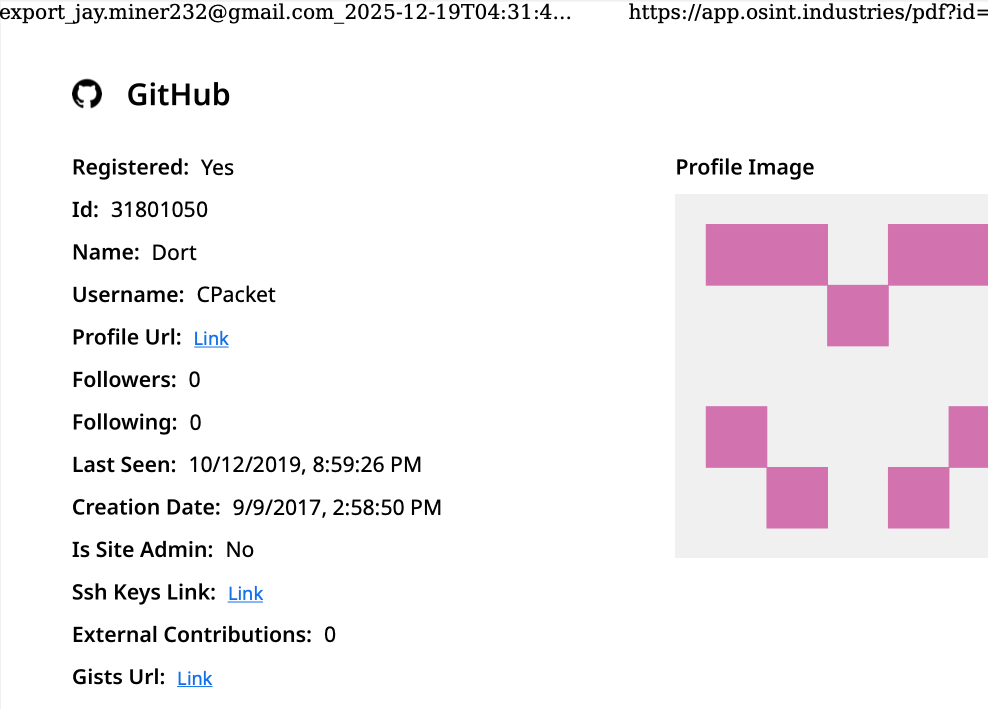
A public “dox” created in 2020 asserted Dort was a teenager from Canada (DOB August 2003) who used the aliases “CPacket” and “M1ce.” A search on the username CPacket at the open source intelligence platform OSINT Industries finds a GitHub account under the names Dort and CPacket that was created in 2017 using the email address jay.miner232@gmail.com.

Image: osint.industries.

The cyber intelligence firm Intel 471 says jay.miner232@gmail.com was used between 2015 and 2019 to create accounts at multiple cybercrime forums, including Nulled (username “Uubuntuu”) and Cracked (user “Dorted”); Intel 471 reports that both of these accounts were created from the same Internet address at Rogers Canada (99.241.112.24).

Dort was an extremely active player in the Microsoft game Minecraft who gained notoriety for their “Dortware” software that helped players cheat. But somewhere along the way, Dort graduated from hacking Minecraft games to enabling far more serious crimes.

Dort also used the nickname DortDev, an identity that was active in March 2022 on the chat server for the prolific cybercrime group known as LAPSUS$. Dort peddled a service for registering temporary email addresses, as well as “Dortsolver,” code that could bypass various CAPTCHA services designed to prevent automated account abuse. Both of these offerings were advertised in 2022 on SIM Land, a Telegram channel dedicated to SIM-swapping and account takeover activity.

The cyber intelligence firm Flashpoint indexed 2022 posts on SIM Land by Dort that show this person developed the disposable email and CAPTCHA bypass services with the help of another hacker who went by the handle “Qoft.”

“I legit just work with Jacob,” Qoft said in 2022 in reply to another user, referring to their exclusive business partner Dort. In the same conversation, Qoft bragged that the two had stolen more than $250,000 worth of Microsoft Xbox Game Pass accounts by developing a program that mass-created Game Pass identities using stolen payment card data.

Who is the Jacob that Qoft referred to as their business partner? The breach tracking service Constella Intelligence finds the password used by jay.miner232@gmail.com was reused by just one other email address: jacobbutler803@gmail.com. Recall that the 2020 dox of Dort said their date of birth was August 2003 (8/03).

Searching this email address at DomainTools.com reveals it was used in 2015 to register several Minecraft-themed domains, all assigned to a Jacob Butler in Ottawa, Canada and to the Ottawa phone number 613-909-9727.

Constella Intelligence finds jacobbutler803@gmail.com was used to register an account on the hacker forum Nulled in 2016, as well as the account name “M1CE” on Minecraft. Pivoting off the password used by their Nulled account shows it was shared by the email addresses j.a.y.m.iner232@gmail.com and jbutl3@ocdsb.ca, the latter being an address at a domain for the Ottawa-Carelton District School Board.

Data indexed by the breach tracking service Spycloud suggests that at one point Jacob Butler shared a computer with his mother and a sibling, which might explain why their email accounts were connected to the password “jacobsplugs.” Neither Jacob nor any of the other Butler household members responded to requests for comment.

The open source intelligence service Epieos finds jacobbutler803@gmail.com created the GitHub account “MemeClient.” Meanwhile, Flashpoint indexed a deleted anonymous Pastebin.com post from 2017 declaring that MemeClient was the creation of a user named CPacket — one of Dort’s early monikers.

Why is Dort so mad? On January 2, KrebsOnSecurity published The Kimwolf Botnet is Stalking Your Local Network, which explored research into the botnet by Benjamin Brundage, founder of the proxy tracking service Synthient. Brundage figured out that the Kimwolf botmasters were exploiting a little-known weakness in residential proxy services to infect poorly-defended devices — like TV boxes and digital photo frames — plugged into the internal, private networks of proxy endpoints.

By the time that story went live, most of the vulnerable proxy providers had been notified by Brundage and had fixed the weaknesses in their systems. That vulnerability remediation process massively slowed Kimwolf’s ability to spread, and within hours of the story’s publication Dort created a Discord server in my name that began publishing personal information about and violent threats against Brundage, Yours Truly, and others.

Dort and friends incriminating themselves by planning swatting attacks in a public Discord server.

Last week, Dort and friends used that same Discord server (then named “Krebs’s Koinbase Kallers”) to threaten a swatting attack against Brundage, again posting his home address and personal information. Brundage told KrebsOnSecurity that local police officers subsequently visited his home in response to a swatting hoax which occurred around the same time that another member of the server posted a door emoji and taunted Brundage further.

Dort, using the alias “Meow,” taunts Synthient founder Ben Brundage with a picture of a door.

Someone on the server then linked to a cringeworthy (and NSFW) new Soundcloud diss track recorded by the user DortDev that included a stickied message from Dort saying, “Ur dead nigga. u better watch ur fucking back. sleep with one eye open. bitch.”

“It’s a pretty hefty penny for a new front door,” the diss track intoned. “If his head doesn’t get blown off by SWAT officers. What’s it like not having a front door?”

With any luck, Dort will soon be able to tell us all exactly what it’s like.

Update, 10:29 a.m.: Jacob Butler responded to requests for comment, speaking with KrebsOnSecurity briefly via telephone. Butler said he didn’t notice earlier requests for comment because he hasn’t really been online since 2021, after his home was swatted multiple times. He acknowledged making and distributing a Minecraft cheat long ago, but said he hasn’t played the game in years and was not involved in Dortsolver or any other activity attributed to the Dort nickname after 2021.

“It was a really old cheat and I don’t remember the name of it,” Butler said of his Minecraft modification. “I’m very stressed, man. I don’t know if people are going to swat me again or what. After that, I pretty much walked away from everything, logged off and said fuck that. I don’t go online anymore. I don’t know why people would still be going after me, to be completely honest.”

When asked what he does for a living, Butler said he mostly stays home and helps his mom around the house because he struggles with autism and social interaction. He maintains that someone must have compromised one or more of his old accounts and is impersonating him online as Dort.

“Someone is actually probably impersonating me, and now I’m really worried,” Butler said. “This is making me relive everything.”

But there are issues with Butler’s timeline. For example, Jacob’s voice in our phone conversation was remarkably similar to the Jacob/Dort whose voice can be heard in this Sept. 2022 Clash of Code competition between Dort and another coder (Dort lost). At around 6 minutes and 10 seconds into the recording, Dort launches into a cursing tirade that mirrors the stream of profanity in the diss rap that Dortdev posted threatening Brundage. Dort can be heard again at around 16 minutes; at around 26:00, Dort threatens to swat his opponent.

Butler said the voice of Dort is not his, exactly, but rather that of an impersonator who had likely cloned his voice.

“I would like to clarify that was absolutely not me,” Butler said. “There must be someone using a voice changer. Or something of the sorts. Because people were cloning my voice before and sending audio clips of ‘me’ saying outrageous stuff.”

Further reading:

Jan. 8, 2026: Who Benefited from the Aisuru and Kimwolf Botnets?

Jan. 20, 2026: Kimwolf Botnet Lurking in Corporate, Govt. Networks

Jan. 26, 2026: Who Operates the Badbox 2.0 Botnet?

Feb. 11, 2026: Kimwolf Botnet Swamps Anonymity Network I2P

Mar. 19, 2026: Feds Disrupt IoT Botnets Behind Huge DDoS Attacks

Gentoo Linux ruilt Microsofts GitHub in voor Codeberg vanwege Copilot

17 February 2026 at 20:24
Gentoo Linux verlaat Microsofts ontwikkelplatform GitHub en stapt over naar Codeberg. Deze migratie is vanwege het opdringen van Copilot en het gebruik van code op GitHub voor de training van die AI-toepassing. Codeberg is een non-profitorganisatie en gevestigd in Duitsland.

Patch Tuesday, February 2026 Edition

10 February 2026 at 22:49

Microsoft today released updates to fix more than 50 security holes in its Windows operating systems and other software, including patches for a whopping six “zero-day” vulnerabilities that attackers are already exploiting in the wild.

Zero-day #1 this month is CVE-2026-21510, a security feature bypass vulnerability in Windows Shell wherein a single click on a malicious link can quietly bypass Windows protections and run attacker-controlled content without warning or consent dialogs. CVE-2026-21510 affects all currently supported versions of Windows.

The zero-day flaw CVE-2026-21513 is a security bypass bug targeting MSHTML, the proprietary engine of the default Web browser in Windows. CVE-2026-21514 is a related security feature bypass in Microsoft Word.

The zero-day CVE-2026-21533 allows local attackers to elevate their user privileges to “SYSTEM” level access in Windows Remote Desktop Services. CVE-2026-21519 is a zero-day elevation of privilege flaw in the Desktop Window Manager (DWM), a key component of Windows that organizes windows on a user’s screen. Microsoft fixed a different zero-day in DWM just last month.

The sixth zero-day is CVE-2026-21525, a potentially disruptive denial-of-service vulnerability in the Windows Remote Access Connection Manager, the service responsible for maintaining VPN connections to corporate networks.

Chris Goettl at Ivanti reminds us Microsoft has issued several out-of-band security updates since January’s Patch Tuesday. On January 17, Microsoft pushed a fix that resolved a credential prompt failure when attempting remote desktop or remote application connections. On January 26, Microsoft patched a zero-day security feature bypass vulnerability (CVE-2026-21509) in Microsoft Office.

Kev Breen at Immersive notes that this month’s Patch Tuesday includes several fixes for remote code execution vulnerabilities affecting GitHub Copilot and multiple integrated development environments (IDEs), including VS Code, Visual Studio, and JetBrains products. The relevant CVEs are CVE-2026-21516, CVE-2026-21523, and CVE-2026-21256.

Breen said the AI vulnerabilities Microsoft patched this month stem from a command injection flaw that can be triggered through prompt injection, or tricking the AI agent into doing something it shouldn’t — like executing malicious code or commands.

“Developers are high-value targets for threat actors, as they often have access to sensitive data such as API keys and secrets that function as keys to critical infrastructure, including privileged AWS or Azure API keys,” Breen said. “When organizations enable developers and automation pipelines to use LLMs and agentic AI, a malicious prompt can have significant impact. This does not mean organizations should stop using AI. It does mean developers should understand the risks, teams should clearly identify which systems and workflows have access to AI agents, and least-privilege principles should be applied to limit the blast radius if developer secrets are compromised.”

The SANS Internet Storm Center has a clickable breakdown of each individual fix this month from Microsoft, indexed by severity and CVSS score. Enterprise Windows admins involved in testing patches before rolling them out should keep an eye on askwoody.com, which often has the skinny on wonky updates. Please don’t neglect to back up your data if it has been a while since you’ve done that, and feel free to sound off in the comments if you experience problems installing any of these fixes.

How fake party invitations are being used to install remote access tools

2 February 2026 at 11:18

“You’re invited!” 

It sounds friendly, familiar and quite harmless. But in a scam we recently spotted, that simple phrase is being used to trick victims into installing a full remote access tool on their Windows computers—giving attackers complete control of the system. 

What appears to be a casual party or event invitation leads to the silent installation of ScreenConnect, a legitimate remote support tool quietly installed in the background and abused by attackers. 

Here’s how the scam works, why it’s effective, and how to protect yourself. 

The email: A party invitation 

Victims receive an email framed as a personal invitation—often written to look like it came from a friend or acquaintance. The message is deliberately informal and social, lowering suspicion and encouraging quick action. 

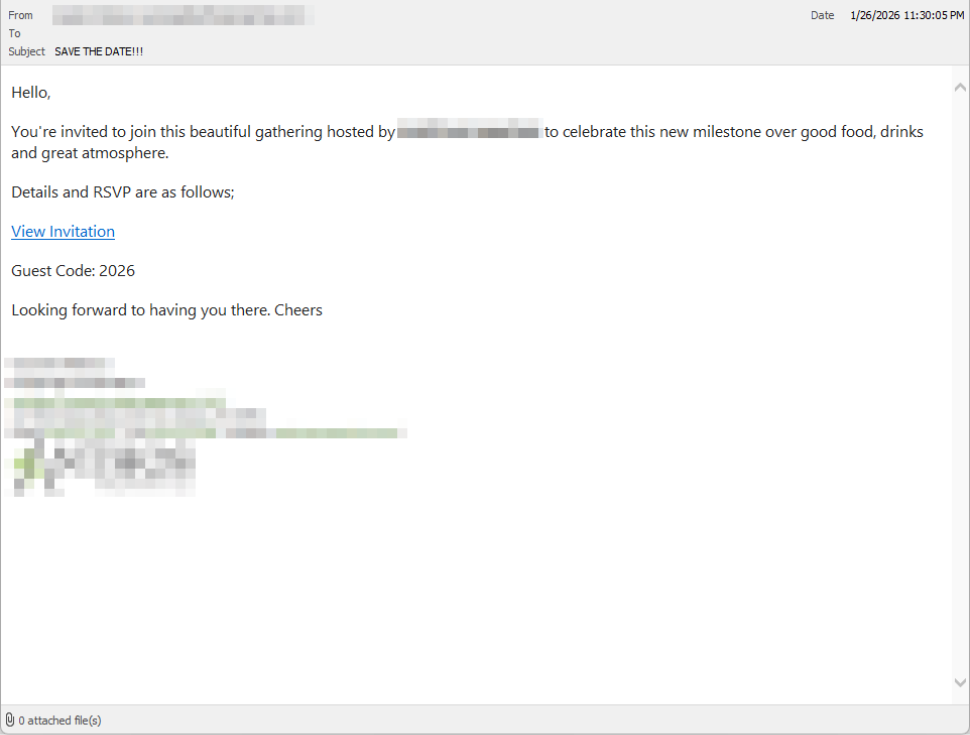
In the screenshot below, the email arrived from a friend whose email account had been hacked, but it could just as easily come from a sender you don’t know.

So far, we’ve only seen this campaign targeting people in the UK, but there’s nothing stopping it from expanding elsewhere. 

Clicking the link in the email leads to a polished invitation page hosted on an attacker-controlled domain. 

Party invitation email from a contact

The invite: The landing page that leads to an installer 

The landing page leans heavily into the party theme, but instead of showing event details, the page nudges the user toward opening a file. None of them look dangerous on their own, but together they keep the user focused on the “invitation” file: 

  • A bold “You’re Invited!” headline 
  • The suggestion that a friend had sent the invitation 
  • A message saying the invitation is best viewed on a Windows laptop or desktop
  • A countdown suggesting your invitation is already “downloading” 
  • A message implying urgency and social proof (“I opened mine and it was so easy!”

Within seconds, the browser is redirected to download RSVPPartyInvitationCard.msi 

The page even triggers the download automatically to keep the victim moving forward without stopping to think. 

This MSI file isn’t an invitation. It’s an installer. 

The landing page

The guest: What the MSI actually does 

When the user opens the MSI file, it launches msiexec.exe and silently installs ScreenConnect Client, a legitimate remote access tool often used by IT support teams.  

There’s no invitation, RSVP form, or calendar entry. 

What happens instead: 

  • ScreenConnect binaries are installed under C:\Program Files (x86)\ScreenConnect Client\ 
  • A persistent Windows service is created (for example, ScreenConnect Client 18d1648b87bb3023) 
  • ScreenConnect installs multiple .NET-based components 
  • There is no clear user-facing indication that a remote access tool is being installed 

From the victim’s perspective, very little seems to happen. But at this point, the attacker can now remotely access their computer. 

The after-party: Remote access is established 

Once installed, the ScreenConnect client initiates encrypted outbound connections to ScreenConnect’s relay servers, including a uniquely assigned instance domain.

That connection gives the attacker the same level of access as a remote IT technician, including the ability to: 

  • See the victim’s screen in real time
  • Control the mouse and keyboard 
  • Upload or download files 
  • Keep access even after the computer is restarted 

Because ScreenConnect is legitimate software commonly used for remote support, its presence isn’t always obvious. On a personal computer, the first signs are often behavioral, such as unexplained cursor movement, windows opening on their own, or a ScreenConnect process the user doesn’t remember installing. 

Why this scam works 

This campaign is effective because it targets normal, predictable human behavior. From a behavioral security standpoint, it exploits our natural curiosity and appears to be a low risk. 

Most people don’t think of invitations as dangerous. Opening one feels passive, like glancing at a flyer or checking a message, not installing software. 

Even security-aware users are trained to watch out for warnings and pressure. A friendly “you’re invited” message doesn’t trigger those alarms. 

By the time something feels off, the software is already installed. 

Signs your computer may be affected 

Watch for: 

  • A download or executed file named RSVPPartyInvitationCard.msi 
  • An unexpected installation of ScreenConnect Client 
  • A Windows service named ScreenConnect Client with random characters  
  • Your computer makes outbound HTTPS connections to ScreenConnect relay domains 
  • Your system resolves the invitation-hosting domain used in this campaign, xnyr[.]digital 

How to stay safe  

This campaign is a reminder that modern attacks often don’t break in—they’re invited in. Remote access tools give attackers deep control over a system. Acting quickly can limit the damage.  

For individuals 

If you receive an email like this: 

  • Be suspicious of invitations that ask you to download or open software 
  • Never run MSI files from unsolicited emails 
  • Verify invitations through another channel before opening anything 

If you already clicked or ran the file:  

  • Disconnect from the internet immediately 
  • Check for ScreenConnect and uninstall it if present 
  • Run a full security scan 
  • Change important passwords from a clean, unaffected device 

For organisations (especially in the UK) 

  • Alert on unauthorized ScreenConnect installations
  • Restrict MSI execution where feasible 
  • Treat “remote support tools” as high-risk software
  • Educate users: invitations don’t come as installers 

This scam works by installing a legitimate remote access tool without clear user intent. That’s exactly the gap Malwarebytes is designed to catch.

Malwarebytes now detects newly installed remote access tools and alerts you when one appears on your system. You’re then given a choice: confirm that the tool is expected and trusted, or remove it if it isn’t.


We don’t just report on threats—we remove them

Cybersecurity risks should never spread beyond a headline. Keep threats off your devices by downloading Malwarebytes today.

How fake party invitations are being used to install remote access tools

2 February 2026 at 11:18

“You’re invited!” 

It sounds friendly, familiar and quite harmless. But in a scam we recently spotted, that simple phrase is being used to trick victims into installing a full remote access tool on their Windows computers—giving attackers complete control of the system. 

What appears to be a casual party or event invitation leads to the silent installation of ScreenConnect, a legitimate remote support tool quietly installed in the background and abused by attackers. 

Here’s how the scam works, why it’s effective, and how to protect yourself. 

The email: A party invitation 

Victims receive an email framed as a personal invitation—often written to look like it came from a friend or acquaintance. The message is deliberately informal and social, lowering suspicion and encouraging quick action. 

In the screenshot below, the email arrived from a friend whose email account had been hacked, but it could just as easily come from a sender you don’t know.

So far, we’ve only seen this campaign targeting people in the UK, but there’s nothing stopping it from expanding elsewhere. 

Clicking the link in the email leads to a polished invitation page hosted on an attacker-controlled domain. 

Party invitation email from a contact

The invite: The landing page that leads to an installer 

The landing page leans heavily into the party theme, but instead of showing event details, the page nudges the user toward opening a file. None of them look dangerous on their own, but together they keep the user focused on the “invitation” file: 

  • A bold “You’re Invited!” headline 
  • The suggestion that a friend had sent the invitation 
  • A message saying the invitation is best viewed on a Windows laptop or desktop
  • A countdown suggesting your invitation is already “downloading” 
  • A message implying urgency and social proof (“I opened mine and it was so easy!”

Within seconds, the browser is redirected to download RSVPPartyInvitationCard.msi 

The page even triggers the download automatically to keep the victim moving forward without stopping to think. 

This MSI file isn’t an invitation. It’s an installer. 

The landing page

The guest: What the MSI actually does 

When the user opens the MSI file, it launches msiexec.exe and silently installs ScreenConnect Client, a legitimate remote access tool often used by IT support teams.  

There’s no invitation, RSVP form, or calendar entry. 

What happens instead: 

  • ScreenConnect binaries are installed under C:\Program Files (x86)\ScreenConnect Client\ 
  • A persistent Windows service is created (for example, ScreenConnect Client 18d1648b87bb3023) 
  • ScreenConnect installs multiple .NET-based components 
  • There is no clear user-facing indication that a remote access tool is being installed 

From the victim’s perspective, very little seems to happen. But at this point, the attacker can now remotely access their computer. 

The after-party: Remote access is established 

Once installed, the ScreenConnect client initiates encrypted outbound connections to ScreenConnect’s relay servers, including a uniquely assigned instance domain.

That connection gives the attacker the same level of access as a remote IT technician, including the ability to: 

  • See the victim’s screen in real time
  • Control the mouse and keyboard 
  • Upload or download files 
  • Keep access even after the computer is restarted 

Because ScreenConnect is legitimate software commonly used for remote support, its presence isn’t always obvious. On a personal computer, the first signs are often behavioral, such as unexplained cursor movement, windows opening on their own, or a ScreenConnect process the user doesn’t remember installing. 

Why this scam works 

This campaign is effective because it targets normal, predictable human behavior. From a behavioral security standpoint, it exploits our natural curiosity and appears to be a low risk. 

Most people don’t think of invitations as dangerous. Opening one feels passive, like glancing at a flyer or checking a message, not installing software. 

Even security-aware users are trained to watch out for warnings and pressure. A friendly “you’re invited” message doesn’t trigger those alarms. 

By the time something feels off, the software is already installed. 

Signs your computer may be affected 

Watch for: 

  • A download or executed file named RSVPPartyInvitationCard.msi 
  • An unexpected installation of ScreenConnect Client 
  • A Windows service named ScreenConnect Client with random characters  
  • Your computer makes outbound HTTPS connections to ScreenConnect relay domains 
  • Your system resolves the invitation-hosting domain used in this campaign, xnyr[.]digital 

How to stay safe  

This campaign is a reminder that modern attacks often don’t break in—they’re invited in. Remote access tools give attackers deep control over a system. Acting quickly can limit the damage.  

For individuals 

If you receive an email like this: 

  • Be suspicious of invitations that ask you to download or open software 
  • Never run MSI files from unsolicited emails 
  • Verify invitations through another channel before opening anything 

If you already clicked or ran the file:  

  • Disconnect from the internet immediately 
  • Check for ScreenConnect and uninstall it if present 
  • Run a full security scan 
  • Change important passwords from a clean, unaffected device 

For organisations (especially in the UK) 

  • Alert on unauthorized ScreenConnect installations
  • Restrict MSI execution where feasible 
  • Treat “remote support tools” as high-risk software
  • Educate users: invitations don’t come as installers 

This scam works by installing a legitimate remote access tool without clear user intent. That’s exactly the gap Malwarebytes is designed to catch.

Malwarebytes now detects newly installed remote access tools and alerts you when one appears on your system. You’re then given a choice: confirm that the tool is expected and trusted, or remove it if it isn’t.


We don’t just report on threats—we remove them

Cybersecurity risks should never spread beyond a headline. Keep threats off your devices by downloading Malwarebytes today.

❌