Cybercriminelen misbruiken grote nieuwswebsites in het Verenigd Koninkrijk om mensen op te lichten. Aan de hand van artikelen op AI-klonen van o.a. The Guardian en de BBC lokken ze de lezers naar investeringsplatforms met als doel om hun rekening te plunderen.
De politie heeft sterke aanwijzingen dat cybercriminelen uit ons eigen land een rol speelden bij de Odido-hack van eerder dit jaar. Begin februari kwamen de privégegevens van miljoenen Nederlanders op straat te liggen.
Hackers zetten AI in om cyberaanvallen uit te voeren. Cloudbeveiligingsbureau Sysdig deelt dat zij een hack hebben onderschept, die waarschijnlijk volledig door AI werd gedaan. De AI blijkt hardnekkiger en effectiever dan menselijke hackers, waardoor dit moment als keerpunt voor cyberveiligheid kan worden gezien.
Gebruikers van LastPass hebben wederom slecht nieuws gekregen. Het bedrijf achter de populaire wachtwoordmanager heeft laten weten dat er op 23 juni wederom een datalek is geweest, waarbij de gegevens van klanten zijn gestolen.
Not sure this will have any effect, but I support the effort:
According to Google’s legal filing, Outsider Enterprise operates through Telegram. The group offers phishing-as-a-service to individuals who may not be technically savvy enough to set up fraudulent websites and text campaigns on their own. In its Telegram channels, Outsider Enterprise reportedly provided instructions on how to use Google’s Gemini AI to create websites that imitate those of Google, YouTube, and government agencies such as New York’s E-ZPass. The group offered nearly 300 scam templates.
[…]
Google worked with AT&T, Verizon, and T-Mobile to block many of these malicious text messages, and Google notes that its on-device scam detection in Google Messages probably helped reduce the number of successful phishing attempts, too. This AI-powered feature apparently stops 10 billion scam texts every month, so it’s fair to expect it caught at least some Outsider Enterprise activity.
Matter-gebruikers kunnen inbouwapparaten makkelijker koppelen met NFC. Dit vervangt bluetooth, waardoor het apparaat bij de set-up geen stroomvoorziening nodig heeft. De functie zit in Matter 1.6, dat woensdag is uitgekomen voor fabrikanten.
Sometimes it happens. You’re happily playing a game on your phone or laptop when suddenly alarms pop up out of nowhere:
“Your device is infected!”
“Your iCloud is full!”
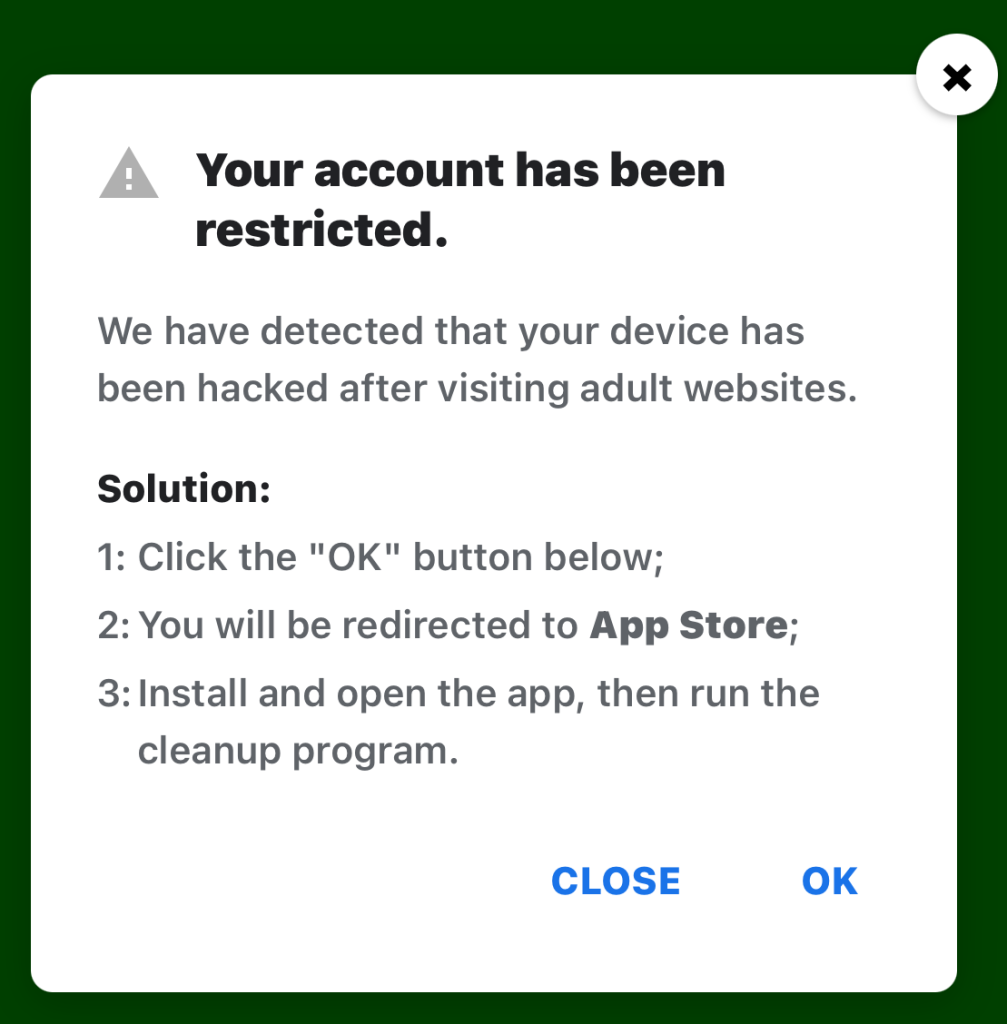
“Your account is restricted for watching porn!”
Some games can be played for free if you agree to watch ads, and in others you can get extra lives, perks, or boosters by watching ads. That’s fine, as long as you’re given a choice and the ads are legitimate.
Unfortunately, cybercriminals sometimes manage to buy advertising space and use it to defraud gamers.
Let’s look at some examples.
The iCloud storage scam, or its OneDrive equivalent, is a well-known and long-running scam that claims you need to expand your storage or all your files will be deleted. The websites these messages link to come in many forms, but they all ask for personal and payment details to complete the upgrade.
“Your account has been restricted. We have detected that your device has been hacked after visiting adult websites. Solution: 1:Click the “OK” button below;
2:You will be redirected to App Store;
3:Install and open the app, then run the cleanup program.”
This ad is a scam and uses a classic scare tactic. It falsely claims your device has been hacked and tries to pressure you into clicking “OK” and installing a cleanup app.
Messages like this sometimes claim to be from your ISP, a “Security Department,” or a generic “Safety Center.”
“Apple Security Alert 8 viruses have been detected on your iPhone. Now iOS is damaged by 72%. Further damage to the system will result in device lockup and loss of all data within two minutes. Please click the button below to remove all viruses.”
This is another fake warning, commonly used by scammers to trick users into clicking links or downloading unnecessary or harmful software. Apple doesn’t send alerts like this, and these messages use vague threats to get your attention.
What kind of app you’re really installing if you follow the instructions depends on your device and your location. If you’re “lucky,” it’s just adware, but you might just as easily end up with an infostealer.
In many cases, you’ll end up with fleeceware, a type of deceptive mobile app where developers lure users in with short free trials that quickly convert into hidden subscription fees, sometimes costing hundreds of dollars per month. These apps often offer some functionality to stay on the barely legal side of things, but at wildly inflated prices.
How to stay safe
The best response to these messages is simply to ignore them.
Real system alerts come from the OS, not from inside a game window or browser tab. Here’s a simple test: If you can switch apps and the “warning” disappears with the browser/game, it was not a system‑level alert.
Check the destination URLs before proceeding. Apple, Google, and major ISPs use predictable domains. A familiar-looking URL is not proof that a message is legitimate, but if the URL looks suspicious, it should definitely be treated as a scam.
You may arrive at something that looks like the official App Store or Google Play Store. Be wary of lookalike app stores and unofficial download sites, but if you are on the real store, the app is generally safer to install. However, it’s still worth checking reviews, permissions, and the developer before proceeding.
Visit the official website of the organization the message claims to be from and log in there. If there’s a genuine problem with your account, storage, or device, you’ll find information about it through official channels.
Use an up-to-date, real-time anti-malware solution on your devices that can detect and block malicious apps.
Scammers know more about you than you think.
Malwarebytes Mobile Security protects you from phishing, scam texts, malicious sites, and more. With real-time AI-powered Scam Guard built right in.
Threat actors are already gearing up for this year’s biggest football (soccer) event, the World Cup 2026. With millions of fans looking for ways to stream matches online, many will turn to IPTV apps to watch live TV broadcasts over the internet. It’s no surprise, then, that cybersecurity researchers have discovered multiple campaigns over the past few months where malware was disguised as fake Android IPTV apps.
In this post, we discuss what IPTV apps are, how criminals use fake versions to spread malware, what this malware is capable of, and, most importantly, how to avoid becoming a victim.
What are IPTV apps?
IPTV stands for Internet Protocol Television. This technology delivers TV content over the internet instead of through cable, over-the-air antennas, or satellites. Naturally, the simplest and most common examples of IPTV are the official platforms of TV networks, which can include both websites and dedicated apps.
However, alongside official options, pirate IPTV services also exist. They usually lure users with free or dirt-cheap access to content that can otherwise be hard to find without expensive subscriptions — most notably broadcasts of various sporting events; football matches in particular.
As is typically the case with pirated content, these apps are blocked from official app stores, forcing users to download them from third-party sites. Consequently, the risk of using these services isn’t tied to IPTV technology itself, but rather to the fake apps and modified APK files distributed under the guise of well-known platforms — both official and pirated.
Massiv banking Trojan disguised as IPTV apps
For instance, in February researchers found the Massiv banking Trojan distributed under the guise of fake IPTV apps. Even then, experts noted that this wasn’t the only malware leveraging this tactic — several others were also spotted in the wild. The primary targets of these IPTV-mimicking malicious fakes have mostly been users in Portugal, Spain, France, and Türkiye.
In most cases, the discovered fake IPTV apps lacked the advertised functionality, so users didn’t get access to any content after installing the apps. Instead, the fake app would open the website of a legitimate IPTV service in a built-in browser to mimic normal functioning and avoid raising user suspicion.
Of course, the most interesting activity happened out of the user’s sight. These are some of the features the malware did have:
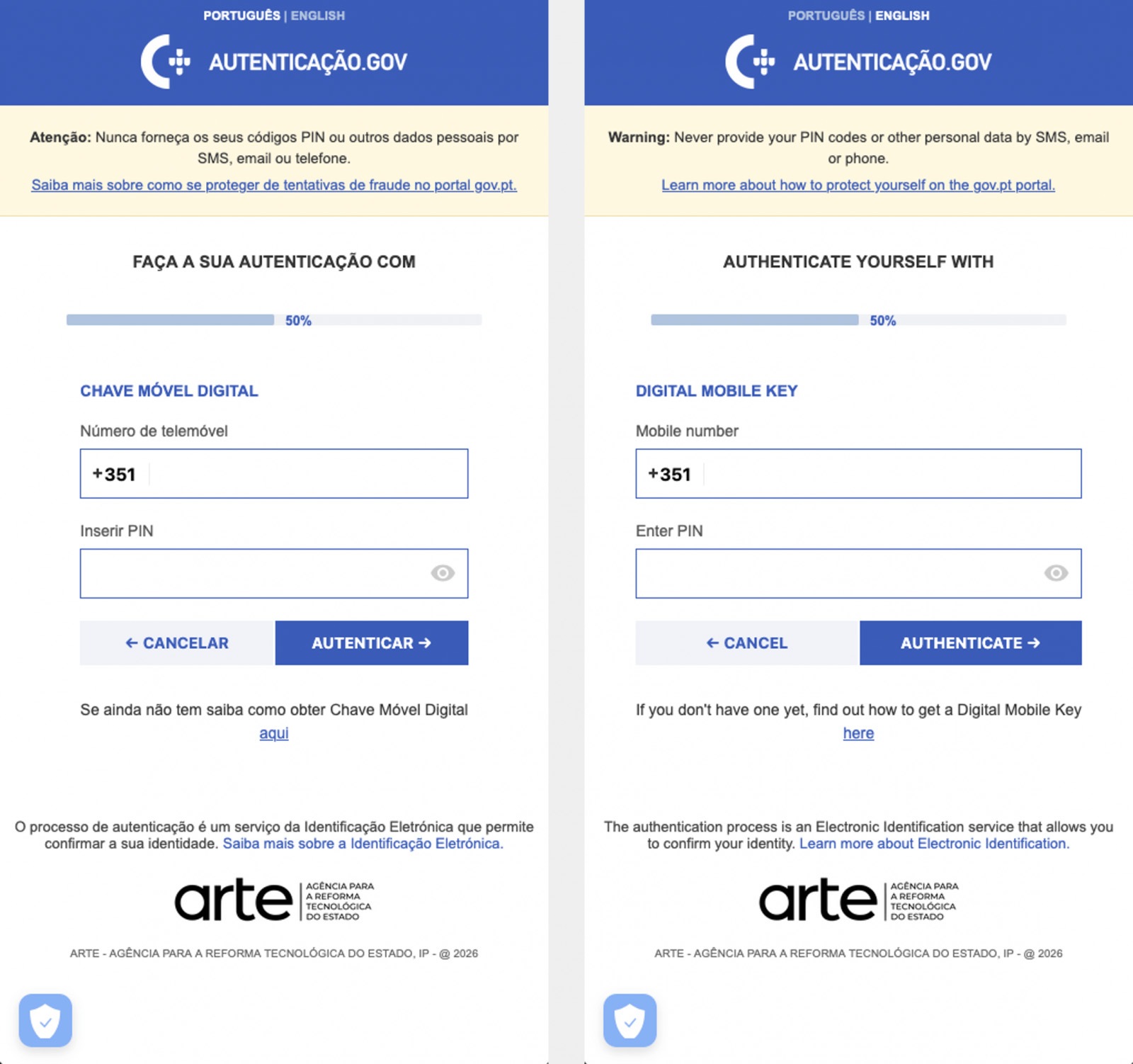
Displaying fake windows on top of legitimate ones: fake forms for entering bank details or signing in to official services, as shown in the screenshot below.
Activating a keylogger: recording and transmitting screen keyboard taps to the attackers.
Hijacking control of the compromised device.
The Massiv banking Trojan mimics the interface of the Portuguese government app Chave Móvel Digital in a fake pop-up window, looking even more convincing than the official version from Google Play. Source
Perseus steals valuable information from users’ notes
In March, researchers reported on a new campaign where several fake IPTV apps were used to distribute an even more advanced and feature-rich malware strain: Perseus.
Research into Perseus shows that the malware is based on the source code of an Android banking Trojan called Cerberus, which leaked nearly six years ago. Perseus comes in two different versions: Turkish and English. The English-language version is more advanced and shows clear signs of AI-driven refinement.
Perseus abuses Accessibility Services, a set of Android features originally designed to make life easier for users with severe visual impairments. Fraudsters learned long ago how to leverage this tool to steal data from Android devices — a topic we’ve covered in detail across several of our posts.
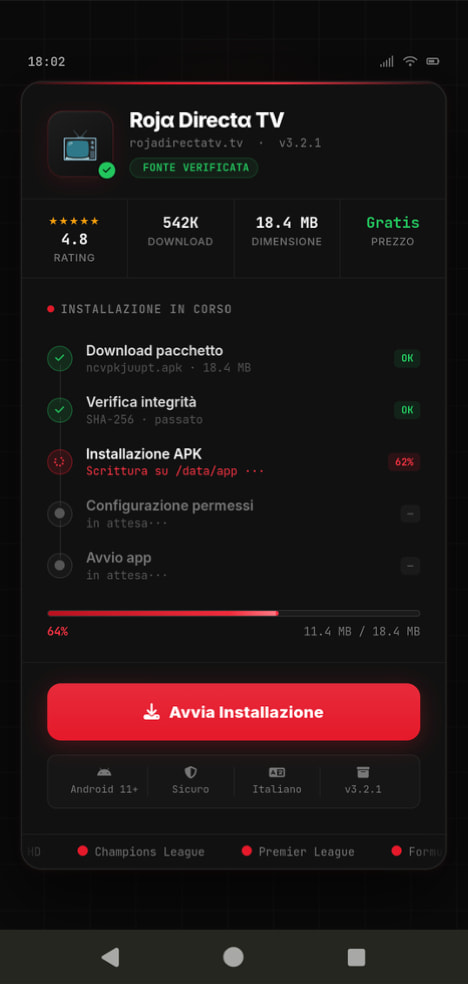
An example of a malicious APK disguised as Roja Directa TV, another IPTV app. Source
By abusing Accessibility Services, Perseus gains remote control over the victim’s device. Here’s what it can do:
Continuously capture and exfiltrate screenshots.
Send a structured map of the device’s UI for remote manipulation.
Mimic taps, swipes, text input, long presses, and other UI interactions.
Turn on the screen, launch apps, and block them from running.
Trigger a pitch-black screen overlay to hide its activities.
Log keystrokes.
On top of that, the English-language version of Perseus boasts another notable feature. The malware can hunt for sensitive information like passwords, recovery phrases, and financial data across an entire range of note-taking apps: Google Keep, Xiaomi Notes, Samsung Notes, ColorNote, Evernote, Microsoft OneNote, and Simple Notes.
All of these capabilities help criminals drain football fans’ money not just from various banking services, but from cryptocurrency apps as well.
How not to let cybercrooks ruin your World Cup
The World Cup is just around the corner, and millions of fans worldwide will definitely want to tune in to this year’s premier football event. Past experience shows that cybercriminals frequently cash in on major spectacles like this. So, how can you watch the matches safely?
Don’t download apps from unofficial stores.
Even when downloading an app from an official store — since malware occasionally slips through the cracks there, too— read the reviews carefully. Users who have been burned by fakes and malware often leave comments to warn others.
Avoid storing passwords or other sensitive information in note-taking apps. To ensure your data and finances stay secure, use a reliable password manager. By the way, Kaspersky Password Manager includes an encrypted note-taking feature, allowing you to store your valuable information safely.
You can’t even watch TV safely anymore these days! Check out other threats facing TV lovers:
The 2026 World Cup presents major cyber risks from ransomware groups, state-aligned actors, and other groups targeting critical infrastructure. Learn more here.
In May of last year, a warning about AI came from somewhere unexpected: The Auschwitz-Birkenau State Museum.
Posting publicly on social media, the museum warned about a Facebook account using generative AI to create fake images of people who died in the Holocaust. Despite using AI to generate fake images, the people in said images were sometimes real. They had real names, birthplaces, and stories of deportation that the Auschwitz-Birkenau State Museum itself had shared before. They had real faces captured in real surviving photographs, which were likely abused to generate the false images.
In other words, someone, or some team of people online, was deepfaking the Holocaust.
“These are not real photos of the victims. They are digital inventions, often stylized or sanitized, that risk turning remembrance into fictionalized performance. The history of Auschwitz is a well-documented story. Altering its visual record with AI imagery introduces distortion, no matter the intent.”
Months later, the public found out what that intent was: money.
A BBC investigation found an international network of Facebook accounts posting AI-generated images to earn money from those images’ potential virality. It’s a problem sometimes referred to as “AI slop” but it comes with a major incentive. When accounts that make these kinds of images are invited to Facebook’s content monetization program, they can make $1,000 a month for posting anything that gets clicks.
And on Facebook, the BBC found, that means several accounts posting AI-generated images about the Holocaust. As the BBC reported:
“AI spammers have posted fake images purporting to be from inside [Auschwitz], such as a prisoner playing a violin or lovers meeting at the boundaries of fences—attracting tens of thousands of likes and shares.”
The economics of lying are concrete today. People can use AI to make fake images that make people feel good about terrible things or feel scared about untrue things, and they can make money until shut down by the Big Tech platforms themselves, which, in this case, only happened because of the BBC’s investigation. In fact, it’s that type of inaction from social media platforms that compelled the German government and multiple Holocaust memorial institutions to send an open letter earlier this year that asked for better controls and restrictions against this type of content.
As the signatories warned in their letter, the economic appeal for these accounts to distort history is too high a risk to allow. You can read the full letter here.
Today, on the Lock and Code podcast with host David Ruiz, we speak with Clara Mansfeld, a historian working on digital communications at one of the institutions signed onto the open letter—the Foundation of Hamburg Memorials and Learning Centers Commemorating the Victims of Nazi Crimes. In their conversation, Mansfeld discusses digital access to history, the manipulation of factual records through AI-generated imagery, and the threat that society faces when it becomes harder to evaluate the truth.
“What happens when the first thought we have with every historical image is, ‘Is that even real or is that AI?’ I don’t think we have really grasped what that means for us as a society.”
Businesses are advised against paying – but many are prepared to deal to protect users’ privacy
After a week of outages, hundreds of millions of students’ data stolen, delayed assignment due dates and school login pages being defaced by hackers, the US tech firm Instructure – which operates the education platform Canvas, used by education providers worldwide – announced it had “reached an agreement with the unauthorised actor” behind the ransomware attack.
Experts read the careful language as a sign that a ransom has been paid. The company has not confirmed this.
Google’s Threat Intelligence Group (GTIG) heeft onlangs de eerste aanwijzing gevonden van een zero-day exploit die vermoedelijk door AI is ontwikkeld . Omdat zero-days kwetsbaarheden zijn waarvoor nog geen patch bestaat, hebben doelwitten geen tijd om zich voor te bereiden.

 Login