A newly discovered vulnerability named WhisperPair can turn Bluetooth headphones and headsets from many well-known brands into personal tracking beacons — regardless of whether the accessories are currently connected to an iPhone, Android smartphone, or even a laptop. Even though the technology behind this flaw was originally developed by Google for Android devices, the tracking risks are actually much higher for those using vulnerable headsets with other operating systems — like iOS, macOS, Windows, or Linux. For iPhone owners, this is especially concerning.
Connecting Bluetooth headphones to Android smartphones became a whole lot faster when Google rolled out Fast Pair, a technology now used by dozens of accessory manufacturers. To pair a new headset, you just turn it on and hold it near your phone. If your device is relatively modern (produced after 2019), a pop-up appears inviting you to connect and download the accompanying app, if it exists. One tap, and you’re good to go.
Unfortunately, it seems quite a few manufacturers didn’t pay attention to the particulars of this tech when implementing it, and now their accessories can be hijacked by a stranger’s smartphone in seconds — even if the headset isn’t actually in pairing mode. This is the core of the WhisperPair vulnerability, recently discovered by researchers at KU Leuven and recorded as CVE-2025-36911.
The attacking device — which can be a standard smartphone, tablet or laptop — broadcasts Google Fast Pair requests to any Bluetooth devices within a 14-meter radius. As it turns out, a long list of headphones from Sony, JBL, Redmi, Anker, Marshall, Jabra, OnePlus, and even Google itself (the Pixel Buds 2) will respond to these pings even when they aren’t looking to pair. On average, the attack takes just 10 seconds.
Once the headphones are paired, the attacker can do pretty much anything the owner can: listen in through the microphone, blast music, or — in some cases — locate the headset on a map if it supports Google Find Hub. That latter feature, designed strictly for finding lost headphones, creates a perfect opening for stealthy remote tracking. And here’s the twist: it’s actually most dangerous for Apple users and anyone else rocking non-Android hardware.
Remote tracking and the risks for iPhones
When headphones or a headset first shake hands with an Android device via the Fast Pair protocol, an owner key tied to that smartphone’s Google account is tucked away in the accessory’s memory. This info allows the headphones to be found later by leveraging data collected from millions of Android devices. If any random smartphone spots the target device nearby via Bluetooth, it reports its location to the Google servers. This feature — Google Find Hub — is essentially the Android version of Apple’s Find My, and it introduces the same unauthorized tracking risks as a rogue AirTag.
When an attacker hijacks the pairing, their key can be saved as the headset owner’s key — but only if the headset targeted via WhisperPair hasn’t previously been linked to an Android device and has only been used with an iPhone, or other hardware like a laptop with a different OS. Once the headphones are paired, the attacker can stalk their location on a map at their leisure — crucially, anywhere at all (not just within the 14-meter range).
Android users who’ve already used Fast Pair to link their vulnerable headsets are safe from this specific move, since they’re already logged in as the official owners. Everyone else, however, should probably double-check their manufacturer’s documentation to see if they’re in the clear — thankfully, not every device vulnerable to the exploit actually supports Google Find Hub.
How to neutralize the WhisperPair threat
The only truly effective way to fix this bug is to update your headphones’ firmware, provided an update is actually available. You can typically check for and install updates through the headset’s official companion app. The researchers have compiled a list of vulnerable devices on their site, but it’s almost certainly not exhaustive.
After updating the firmware, you absolutely must perform a factory reset to wipe the list of paired devices — including any unwanted guests.
If no firmware update is available and you’re using your headset with iOS, macOS, Windows, or Linux, your only remaining option is to track down an Android smartphone (or find a trusted friend who has one) and use it to reserve the role of the original owner. This will prevent anyone else from adding your headphones to Google Find Hub behind your back.
The update from Google
In January 2026, Google pushed an Android update to patch the vulnerability on the OS side. Unfortunately, the specifics haven’t been made public, so we’re left guessing exactly what they tweaked under the hood. Most likely, updated smartphones will no longer report the location of accessories hijacked via WhisperPair to the Google Find Hub network. But given that not everyone is exactly speedy when it comes to installing Android updates, it’s a safe bet that this type of headset tracking will remain viable for at least another couple of years.
Want to find out how else your gadgets might be spying on you? Check out these posts:
Eighteen months ago, it was plausible that artificial intelligence might take a different path than social media. Back then, AI’s development hadn’t consolidated under a small number of big tech firms. Nor had it capitalized on consumer attention, surveilling users and delivering ads.
Unfortunately, the AI industry is now taking a page from the social media playbook and has set its sights on monetizing consumer attention. When OpenAI launched its ChatGPT Search feature in late 2024 and its browser, ChatGPT Atlas, in October 2025, it kicked off a race to capture online behavioral data to power advertising. It’s part of a yearslong turnabout by OpenAI, whose CEO Sam Altman once called the combination of ads and AI “unsettling” and now promises that ads can be deployed in AI apps while preserving trust. The rampant speculation among OpenAI users who believe they see paid placements in ChatGPT responses suggests they are not convinced.
As a security expert and data scientist, we see these examples as harbingers of a future where AI companies profit from manipulating their users’ behavior for the benefit of their advertisers and investors. It’s also a reminder that time to steer the direction of AI development away from private exploitation and toward public benefit is quickly running out.
The functionality of ChatGPT Search and its Atlas browser is not really new. Meta, commercial AI competitor Perplexity and even ChatGPT itself have had similar AI search features for years, and both Google and Microsoft beat OpenAI to the punch by integrating AI with their browsers. But OpenAI’s business positioning signals a shift.
We believe the ChatGPT Search and Atlas announcements are worrisome because there is really only one way to make money on search: the advertising model pioneered ruthlessly by Google.
Advertising model
Ruled a monopolist in U.S. federal court, Google has earned more than US$1.6 trillion in advertising revenue since 2001. You may think of Google as a web search company, or a streaming video company (YouTube), or an email company (Gmail), or a mobile phone company (Android, Pixel), or maybe even an AI company (Gemini). But those products are ancillary to Google’s bottom line. The advertising segment typically accounts for 80% to 90% of its total revenue. Everything else is there to collect users’ data and direct users’ attention to its advertising revenue stream.
After two decades in this monopoly position, Google’s search product is much more tuned to the company’s needs than those of its users. When Google Search first arrived decades ago, it was revelatory in its ability to instantly find useful information across the still-nascent web. In 2025, its search result pages are dominated by low-quality and often AI-generated content, spam sites that exist solely to drive traffic to Amazon sales—a tactic known as affiliate marketing—and paid ad placements, which at times are indistinguishable from organic results.
Plenty of advertisers and observers seem to think AI-powered advertising is the future of the ad business.
Highly persuasive
Paid advertising in AI search, and AI models generally, could look very different from traditional web search. It has the potential to influence your thinking, spending patterns and even personal beliefs in much more subtle ways. Because AI can engage in active dialogue, addressing your specific questions, concerns and ideas rather than just filtering static content, its potential for influence is much greater. It’s like the difference between reading a textbook and having a conversation with its author.
Imagine you’re conversing with your AI agent about an upcoming vacation. Did it recommend a particular airline or hotel chain because they really are best for you, or does the company get a kickback for every mention? If you ask about a political issue, does the model bias its answer based on which political party has paid the company a fee, or based on the bias of the model’s corporate owners?
There is mounting evidence that AI models are at least as effective as people at persuading users to do things. A December 2023 meta-analysis of 121 randomized trials reported that AI models are as good as humans at shifting people’s perceptions, attitudes and behaviors. A more recent meta-analysis of eight studies similarly concluded there was “no significant overall difference in persuasive performance between (large language models) and humans.”
This influence may go well beyond shaping what products you buy or who you vote for. As with the field of search engine optimization, the incentive for humans to perform for AI models might shape the way people write and communicate with each other. How we express ourselves online is likely to be increasingly directed to win the attention of AIs and earn placement in the responses they return to users.
A different way forward
Much of this is discouraging, but there is much that can be done to change it.
First, it’s important to recognize that today’s AI is fundamentally untrustworthy, for the same reasons that search engines and social media platforms are.
The problem is not the technology itself; fast ways to find information and communicate with friends and family can be wonderful capabilities. The problem is the priorities of the corporations who own these platforms and for whose benefit they are operated. Recognize that you don’t have control over what data is fed to the AI, who it is shared with and how it is used. It’s important to keep that in mind when you connect devices and services to AI platforms, ask them questions, or consider buying or doing the things they suggest.
There is also a lot that people can demand of governments to restrain harmful corporate uses of AI. In the U.S., Congress could enshrine consumers’ rights to control their own personal data, as the EU already has. It could also create a data protection enforcement agency, as essentially every other developed nation has.
Governments worldwide could invest in Public AI—models built by public agencies offered universally for public benefit and transparently under public oversight. They could also restrict how corporations can collude to exploit people using AI, for example by barring advertisements for dangerous products such as cigarettes and requiring disclosure of paid endorsements.
Every technology company seeks to differentiate itself from competitors, particularly in an era when yesterday’s groundbreaking AI quickly becomes a commodity that will run on any kid’s phone. One differentiator is in building a trustworthy service. It remains to be seen whether companies such as OpenAI and Anthropic can sustain profitable businesses on the back of subscription AI services like the premium editions of ChatGPT, Plus and Pro, and Claude Pro. If they are going to continue convincing consumers and businesses to pay for these premium services, they will need to build trust.
That will require making real commitments to consumers on transparency, privacy, reliability and security that are followed through consistently and verifiably.
And while no one knows what the future business models for AI will be, we can be certain that consumers do not want to be exploited by AI, secretly or otherwise.
This essay was written with Nathan E. Sanders, and originally appeared in The Conversation.
Google has settled yet another class-action lawsuit accusing it of collecting children’s data and using it to target them with advertising. The tech giant will pay $8.25 million to address allegations that it tracked data on apps specifically designated for kids.
AdMob’s mobile data collection
This settlement stems from accusations that apps provided under Google’s “Designed for Families” programme, which was meant to help parents find safe apps, tracked children. Under the terms of this programme, developers were supposed to self-certify COPPA compliance and use advertising SDKs that disabled behavioural tracking. However, some did not, instead using software embedded in the apps that was created by a Google-owned mobile advertising company called AdMob.
When kids used these apps, which included games, AdMob collected data from these apps, according to the class action lawsuit. This included IP addresses, device identifiers, usage data, and the child’s location to within five meters, transmitting it to Google without parental consent. The AdMob software could then use that information to display targeted ads to users.
This kind of activity is exactly what the Children’s Online Privacy Protection Act (COPPA) was created to stop. The law requires operators of child-directed services to obtain verifiable parental consent before collecting personal information from children under 13. That includes cookies and other identifiers, which are the core tools advertisers use to track and target people.
The families filing the lawsuit alleged that Google knew this was going on:
“Google and AdMob knew at the time that their actions were resulting in the exfiltration data from millions of children under thirteen but engaged in this illicit conduct to earn billions of dollars in advertising revenue.”
Security researchers had alerted Google to the issue in 2018, according to the filing.
YouTube settlement approved
What’s most disappointing is that these privacy issues keep happening. This news arrives at the same time that a judge approved a settlement on another child privacy case involving Google’s use of children’s data on YouTube. This case dates back to October 2019, the same year that Google and YouTube paid a whopping $170m fine for violating COPPA.
Families in this class action suit alleged that YouTube used cookies and persistent identifiers on child-directed channels, collecting data including IP addresses, geolocation data, and device serial numbers. This is the same thing that it does for adults across the web, but COPPA protects kids under 13 from such activities, as do some state laws.
According to the complaint, YouTube collected this information between 2013 and 2020 and used it for behavioural advertising. This form of advertising infers people’s interests from their identifiers, and it is more lucrative than contextual advertising, which focuses only on a channel’s content.
The case said that various channel owners opted into behavioural advertising, prompting Google to collect this personal information. No parental consent was obtained, the plaintiffs alleged. Channel owners named in the suit included Cartoon Network, Hasbro, Mattel, and DreamWorks Animation.
Under the YouTube settlement (which was agreed in August and recently approved by a judge), families can file claims through YouTubePrivacySettlement.com, although the deadline is this Wednesday. Eligible families are likely to get $20–$30 after attorneys’ fees and administration costs, if 1–2% of eligible families submit claims.
COPPA is evolving
Last year, the FTC amended its COPPA Rule to introduce mandatory opt-in consent for targeted advertising to children, separate from general data-collection consent.
The amendments expand the definition of personal information to include biometric data and government-issued ID information. It also lets the FTC use a site operator’s marketing materials to determine whether a site targets children.
Site owners must also now tell parents who they’ll share information with, and the amendments stop operators from keeping children’s personal information forever. If these all sounds like measures that should have been included to protect children online from the get-go, we agree with you. In any case, companies have until this April to comply with the new rules.
Will the COPPA rules make a difference? It’s difficult to say, given the stream of privacy cases involving Google LLC (which owns YouTube and AdMob, among others). When viewed against Alphabet’s overall earnings, an $8.25m penalty risks being seen as a routine business expense rather than a meaningful deterrent.
We don’t just report on data privacy—we help you remove your personal information
Cybersecurity risks should never spread beyond a headline. With Malwarebytes Personal Data Remover, you can scan to find out which sites are exposing your personal information, and then delete that sensitive data from the internet.
Google has settled yet another class-action lawsuit accusing it of collecting children’s data and using it to target them with advertising. The tech giant will pay $8.25 million to address allegations that it tracked data on apps specifically designated for kids.
AdMob’s mobile data collection
This settlement stems from accusations that apps provided under Google’s “Designed for Families” programme, which was meant to help parents find safe apps, tracked children. Under the terms of this programme, developers were supposed to self-certify COPPA compliance and use advertising SDKs that disabled behavioural tracking. However, some did not, instead using software embedded in the apps that was created by a Google-owned mobile advertising company called AdMob.
When kids used these apps, which included games, AdMob collected data from these apps, according to the class action lawsuit. This included IP addresses, device identifiers, usage data, and the child’s location to within five meters, transmitting it to Google without parental consent. The AdMob software could then use that information to display targeted ads to users.
This kind of activity is exactly what the Children’s Online Privacy Protection Act (COPPA) was created to stop. The law requires operators of child-directed services to obtain verifiable parental consent before collecting personal information from children under 13. That includes cookies and other identifiers, which are the core tools advertisers use to track and target people.
The families filing the lawsuit alleged that Google knew this was going on:
“Google and AdMob knew at the time that their actions were resulting in the exfiltration data from millions of children under thirteen but engaged in this illicit conduct to earn billions of dollars in advertising revenue.”
Security researchers had alerted Google to the issue in 2018, according to the filing.
YouTube settlement approved
What’s most disappointing is that these privacy issues keep happening. This news arrives at the same time that a judge approved a settlement on another child privacy case involving Google’s use of children’s data on YouTube. This case dates back to October 2019, the same year that Google and YouTube paid a whopping $170m fine for violating COPPA.
Families in this class action suit alleged that YouTube used cookies and persistent identifiers on child-directed channels, collecting data including IP addresses, geolocation data, and device serial numbers. This is the same thing that it does for adults across the web, but COPPA protects kids under 13 from such activities, as do some state laws.
According to the complaint, YouTube collected this information between 2013 and 2020 and used it for behavioural advertising. This form of advertising infers people’s interests from their identifiers, and it is more lucrative than contextual advertising, which focuses only on a channel’s content.
The case said that various channel owners opted into behavioural advertising, prompting Google to collect this personal information. No parental consent was obtained, the plaintiffs alleged. Channel owners named in the suit included Cartoon Network, Hasbro, Mattel, and DreamWorks Animation.
Under the YouTube settlement (which was agreed in August and recently approved by a judge), families can file claims through YouTubePrivacySettlement.com, although the deadline is this Wednesday. Eligible families are likely to get $20–$30 after attorneys’ fees and administration costs, if 1–2% of eligible families submit claims.
COPPA is evolving
Last year, the FTC amended its COPPA Rule to introduce mandatory opt-in consent for targeted advertising to children, separate from general data-collection consent.
The amendments expand the definition of personal information to include biometric data and government-issued ID information. It also lets the FTC use a site operator’s marketing materials to determine whether a site targets children.
Site owners must also now tell parents who they’ll share information with, and the amendments stop operators from keeping children’s personal information forever. If these all sounds like measures that should have been included to protect children online from the get-go, we agree with you. In any case, companies have until this April to comply with the new rules.
Will the COPPA rules make a difference? It’s difficult to say, given the stream of privacy cases involving Google LLC (which owns YouTube and AdMob, among others). When viewed against Alphabet’s overall earnings, an $8.25m penalty risks being seen as a routine business expense rather than a meaningful deterrent.
We don’t just report on data privacy—we help you remove your personal information
Cybersecurity risks should never spread beyond a headline. With Malwarebytes Personal Data Remover, you can scan to find out which sites are exposing your personal information, and then delete that sensitive data from the internet.
Thanks to the convenience of NFC and smartphone payments, many people no longer carry wallets or remember their bank card PINs. All their cards reside in a payment app, and using that is quicker than fumbling for a physical card. Mobile payments are also secure — the technology was developed relatively recently and includes numerous anti-fraud protections. Still, criminals have invented several ways to abuse NFC and steal your money. Fortunately, protecting your funds is straightforward: just know about these tricks and avoid risky NFC usage scenarios.
What are NFC relay and NFCGate?
NFC relay is a technique where data wirelessly transmitted between a source (like a bank card) and a receiver (like a payment terminal) is intercepted by one intermediate device, and relayed in real time to another. Imagine you have two smartphones connected via the internet, each with a relay app installed. If you tap a physical bank card against the first smartphone and hold the second smartphone near a terminal or ATM, the relay app on the first smartphone will read the card’s signal using NFC, and relay it in real time to the second smartphone, which will then transmit this signal to the terminal. From the terminal’s perspective, it all looks like a real card is tapped on it — even though the card itself might physically be in another city or country.
This technology wasn’t originally created for crime. The NFCGate app appeared in 2015 as a research tool after it was developed by students at the Technical University of Darmstadt in Germany. It was intended for analyzing and debugging NFC traffic, as well as for education purposes and experiments with contactless technology. NFCGate was distributed as an open-source solution and used in academic and enthusiast circles.
Five years later, cybercriminals caught on to the potential of NFC relay and began modifying NFCGate by adding mods that allowed it to run through a malicious server, disguise itself as legitimate software, and perform social engineering scenarios.
What began as a research project morphed into the foundation for an entire class of attacks aimed at draining bank accounts without physical access to bank cards.
A history of misuse
The first documented attacks using a modified NFCGate occurred in late 2023 in the Czech Republic. By early 2025, the problem had become large scale and noticeable: cybersecurity analysts uncovered more than 80 unique malware samples built on the NFCGate framework. The attacks evolved rapidly, with NFC relay capabilities being integrated into other malware components.
By February 2025, malware bundles combining CraxsRAT and NFCGate emerged, allowing attackers to install and configure the relay with minimal victim interaction. A new scheme, a so-called “reverse” version of NFCGate, appeared in spring 2025, fundamentally changing the attack’s execution.
Particularly noteworthy is the RatOn Trojan, first detected in the Czech Republic. It combines remote smartphone control with NFC relay capabilities, letting attackers target victims’ banking apps and cards through various technique combinations. Features like screen capture, clipboard data manipulation, SMS sending, and stealing info from crypto wallets and banking apps give criminals an extensive arsenal.
Cybercriminals have also packaged NFC relay technology into malware-as-a-service (MaaS) offerings, and reselling them to other threat actors through subscription. In early 2025, analysts uncovered a new and sophisticated Android malware campaign in Italy, dubbed SuperCard X. Attempts to deploy SuperCard X were recorded in Russia in May 2025, and in Brazil in August of the same year.
The direct NFCGate attack
The direct attack is the original criminal scheme exploiting NFCGate. In this scenario, the victim’s smartphone plays the role of the reader, while the attacker’s phone acts as the card emulator.
First, the fraudsters trick the user into installing a malicious app disguised as a banking service, a system update, an “account security” app, or even a popular app like TikTok. Once installed, the app gains access to both NFC and the internet — often without requesting dangerous permissions or root access. Some versions also ask for access to Android accessibility features.
Then, under the guise of identity verification, the victim is prompted to tap their bank card to their phone. When they do, the malware reads the card data via NFC and immediately sends it to the criminals’ server. From there, the information is relayed to a second smartphone held by a money mule, who helps extract the money. This phone then emulates the victim’s card to make payments at a terminal or withdraw cash from an ATM.
The fake app on the victim’s smartphone also asks for the card PIN — just like at a payment terminal or ATM — and sends it to the attackers.
In early versions of the attack, criminals would simply stand ready at an ATM with a phone to use the duped user’s card in real time. Later, the malware was refined so the stolen data could be used for in-store purchases in a delayed, offline mode, rather than in a live relay.
For the victim, the theft is hard to notice: the card never left their possession, they didn’t have to manually enter or recite its details, and the bank alerts about the withdrawals can be delayed or even intercepted by the malicious app itself.
Among the red flags that should make you suspect a direct NFC attack are:
prompts to install apps not from official stores;
requests to tap your bank card on your phone.
The reverse NFCGate attack
The reverse attack is a newer, more sophisticated scheme. The victim’s smartphone no longer reads their card — it emulates the attacker’s card. To the victim, everything appears completely safe: there’s no need to recite card details, share codes, or tap a card to the phone.
Just like with the direct scheme, it all starts with social engineering. The user gets a call or message convincing them to install an app for “contactless payments”, “card security”, or even “using central bank digital currency”. Once installed, the new app asks to be set as the default contactless payment method — and this step is critically important. Thanks to this, the malware requires no root access — just user consent.
The malicious app then silently connects to the attackers’ server in the background, and the NFC data from a card belonging to one of the criminals is transmitted to the victim’s device. This step is completely invisible to the victim.
Next, the victim is directed to an ATM. Under the pretext of “transferring money to a secure account” or “sending money to themselves”, they are instructed to tap their phone on the ATM’s NFC reader. At this moment, the ATM is actually interacting with the attacker’s card. The PIN is dictated to the victim beforehand — presented as “new” or “temporary”.
The result is that all the money deposited or transferred by the victim ends up in the criminals’ account.
The hallmarks of this attack are:
requests to change your default NFC payment method;
a “new” PIN;
any scenario where you’re told to go to an ATM and perform actions there under someone else’s instructions.
How to protect yourself from NFC relay attacks
NFC relay attacks rely not so much on technical vulnerabilities as on user trust. Defending against them comes down to some simple precautions.
Make sure you keep your trusted contactless payment method (like Google Pay or Samsung Pay) as the default.
Never tap your bank card on your phone at someone else’s request, or because an app tells you to. Legitimate apps might use your camera to scan a card number, but they’ll never ask you to use the NFC reader for your own card.
Never follow instructions from strangers at an ATM — no matter who they claim to be.
Avoid installing apps from unofficial sources. This includes links sent via messaging apps, social media, SMS, or recommended during a phone call — even if they come from someone claiming to be customer support or the police.
Stick to official app stores only. When downloading from a store, check the app’s reviews, number of downloads, publication date, and rating.
When using an ATM, rely on your physical card instead of your smartphone for the transaction.
Make it a habit to regularly check the “Payment default” setting in your phone’s NFC menu. If you see any suspicious apps listed, remove them immediately and run a full security scan on your device.
Review the list of apps with accessibility permissions — this is a feature commonly abused by malware. Either revoke these permissions for any suspicious apps, or uninstall the apps completely.
Save the official customer service numbers for your banks in your phone’s contacts. At the slightest hint of foul play, call your bank’s hotline directly without delay.
If you suspect your card details may have been compromised, block the card immediately.
There’s a bizarre thing happening online right now where everything is getting worse.
Your Google results have become so bad that you’ve likely typed what you’re looking for, plus the word “Reddit,” so you can find discussion from actual humans. If you didn’t take this route, you might get served AI results from Google Gemini, which once recommended that every person should eat “at least one small rock per day.” Your Amazon results are a slog, filled with products that have surreptitiously paid reviews. Your Facebook feed could be entirely irrelevant because the company decided years ago that you didn’t want to see what your friends posted, you wanted to see what brands posted, because brands pay Facebook, and you don’t, so brands are more important than your friends.
But, according to digital rights activist and award-winning author Cory Doctorow, this wave of online deterioration isn’t an accident—it’s a business strategy, and it can be summed up in a word he coined a couple of years ago: Enshittification.
Enshittification is the process by which an online platform—like Facebook, Google, or Amazon—harms its own services and products for short-term gain while managing to avoid any meaningful consequences, like the loss of customers or the impact of meaningful government regulation. It begins with an online platform treating new users with care, offering services, products, or connectivity that they may not find elsewhere. Then, the platform invites businesses on board that want to sell things to those users. This means businesses become the priority and the everyday user experience is hindered. But then, in the final stage, the platform also makes things worse for its business customers, making things better only for itself.
This is how a company like Amazon went from helping you find nearly anything you wanted to buy online to helping businesses sell you anything you wanted to buy online to making those businesses pay increasingly high fees to even be discovered online. Everyone, from buyers to sellers, is pretty much entrenched in the platform, so Amazon gets to dictate the terms.
Today, on the Lock and Code podcast with host David Ruiz, we speak with Doctorow about enshittification’s fast damage across the internet, how to fight back, and where it all started.
”Once these laws were established, the tech companies were able to take advantage of them. And today we have a bunch of companies that aren’t tech companies that are nevertheless using technology to rig the game in ways that the tech companies pioneered.”
Gebruikers van Gmail worden gewaarschuwd door Google voor een nieuwe golf aan phishingaanvallen. Met behulp van een waarschuwing en een perfect nagemaakt ondersteuningswebsite, kunnen kwaadwillende vrij gemakkelijk je account uit handen nemen.
Meer dan dertig Google Chrome-extensies kunnen worden gebruikt om internetgebruikers te spioneren of om privégegevens weg te sluizen, zo ontdekte een beveiligingsonderzoeker. De extensies zijn nog te vinden in de Chrome Web Store, maar alleen via een directe link.
Google meldt dat het twee zero-day beveiligingsekken in Android gaat dichten. Telefoonfabrikanten brengen binnenkort de updates uit om deze kwetsbaarheden te verhelpen.
Google klaagt een oplichter aan die tienduizend nep-bedrijfsprofielen op Google Maps gebruikte. Het bedrijf heeft ook gezegd waar je als gebruiker op moet letten om te voorkomen dat je slachtoffer wordt van deze vorm van oplichting .
Cybercriminelen hebben het gemunt op Gmail -gebruikers. Uit recent onderzoek is gebleken dat kunstmatige intelligentie ervoor zorgt dat steeds meer mensen worden opgelicht.
Attackers are sending very convincing fake “Google” emails that slip past spam filters, route victims through several trusted Google-owned services, and ultimately lead to a look-alike Microsoft 365 sign-in page designed to harvest usernames and passwords.
Researchers found that cybercriminals used Google Cloud Application Integration’s Send Email feature to send phishing emails from a legitimate Google address: noreply-application-integration@google[.]com.
Google Cloud Application Integration allows users to automate business processes by connecting any application with point-and-click configurations. New customers currently receive free credits, which lowers the barrier to entry and may attract some cybercriminals.
The initial email arrives from what looks like a real Google address and references something routine and familiar, such as a voicemail notification, a task to complete, or permissions to access a document. The email includes a link that points to a genuine Google Cloud Storage URL, so the web address appears to belong to Google and doesn’t look like an obvious fake.
After the first click, you are redirected to another Google‑related domain (googleusercontent[.]com) showing a CAPTCHA or image check. Once you pass the “I’m not a robot check,” you land on what looks like a normal Microsoft 365 sign‑in page, but on close inspection, the web address is not an official Microsoft domain.
Any credentials provided on this site will be captured by the attackers.
The use of Google infrastructure provides the phishers with a higher level of trust from both email filters and the receiving users. This is not a vulnerability, just an abuse of cloud-based services that Google provides.
Google’s response
Google said it has taken action against the activity:
“We have blocked several phishing campaigns involving the misuse of an email notification feature within Google Cloud Application Integration. Importantly, this activity stemmed from the abuse of a workflow automation tool, not a compromise of Google’s infrastructure. While we have implemented protections to defend users against this specific attack, we encourage continued caution as malicious actors frequently attempt to spoof trusted brands. We are taking additional steps to prevent further misuse.”
We’ve seen several phishing campaigns that abuse trusted workflows from companies like Google, PayPal, DocuSign, and other cloud-based service providers to lend credibility to phishing emails and redirect targets to their credential-harvesting websites.
How to stay safe
Campaigns like these show that some responsibility for spotting phishing emails still rests with the recipient. Besides staying informed, here are some other tips you can follow to stay safe.
Always check the actual web address of any login page; if it’s not a genuine Microsoft domain, do not enter credentials. Using a password manager will help because they will not auto-fill your details on fake websites.
Be cautious of “urgent” emails about voicemails, document shares, or permissions, even if they appear to come from Google or Microsoft. Creating urgency is a common tactic by scammers and phishers.
Go directly to the service whenever possible. Instead of clicking links in emails, open OneDrive, Teams, or Outlook using your normal bookmark or app.
Use multi‑factor authentication (MFA) so that stolen passwords alone are not enough, and regularly review which apps have access to your account and remove anything you don’t recognize.
Pro tip: Malwarebytes Scam Guard can recognize emails like this as scams. You can upload suspicious text, emails, attachments and other files and ask for its opinion. It’s really very good at recognizing scams.
We don’t just report on scams—we help detect them
Cybersecurity risks should never spread beyond a headline. If something looks dodgy to you, check if it’s a scam using Malwarebytes Scam Guard, a feature of our mobile protection products. Submit a screenshot, paste suspicious content, or share a text or phone number, and we’ll tell you if it’s a scam or legit. Download Malwarebytes Mobile Security for iOS or Android and try it today!
Direct navigation — the act of visiting a website by manually typing a domain name in a web browser — has never been riskier: A new study finds the vast majority of “parked” domains — mostly expired or dormant domain names, or common misspellings of popular websites — are now configured to redirect visitors to sites that foist scams and malware.
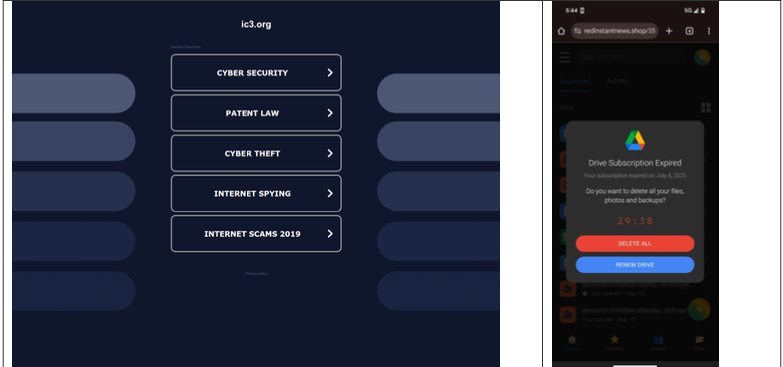
A lookalike domain to the FBI Internet Crime Complaint Center website, returned a non-threatening parking page (left) whereas a mobile user was instantly directed to deceptive content in October 2025 (right). Image: Infoblox.
When Internet users try to visit expired domain names or accidentally navigate to a lookalike “typosquatting” domain, they are typically brought to a placeholder page at a domain parking company that tries to monetize the wayward traffic by displaying links to a number of third-party websites that have paid to have their links shown.
A decade ago, ending up at one of these parked domains came with a relatively small chance of being redirected to a malicious destination: In 2014, researchers found (PDF) that parked domains redirected users to malicious sites less than five percent of the time — regardless of whether the visitor clicked on any links at the parked page.
But in a series of experiments over the past few months, researchers at the security firm Infoblox say they discovered the situation is now reversed, and that malicious content is by far the norm now for parked websites.
“In large scale experiments, we found that over 90% of the time, visitors to a parked domain would be directed to illegal content, scams, scareware and anti-virus software subscriptions, or malware, as the ‘click’ was sold from the parking company to advertisers, who often resold that traffic to yet another party,” Infoblox researchers wrote in a paper published today.
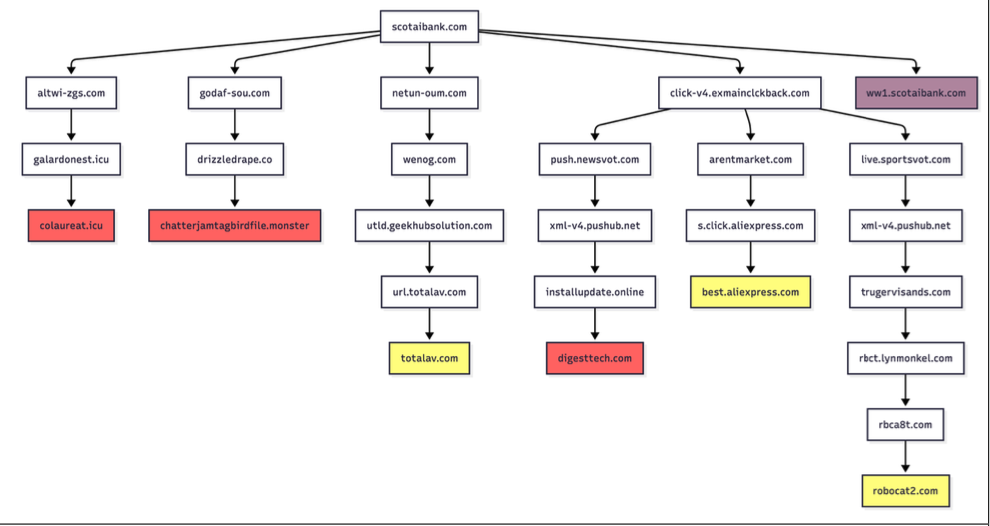
Infoblox found parked websites are benign if the visitor arrives at the site using a virtual private network (VPN), or else via a non-residential Internet address. For example, Scotiabank.com customers who accidentally mistype the domain as scotaibank[.]com will see a normal parking page if they’re using a VPN, but will be redirected to a site that tries to foist scams, malware or other unwanted content if coming from a residential IP address. Again, this redirect happens just by visiting the misspelled domain with a mobile device or desktop computer that is using a residential IP address.
According to Infoblox, the person or entity that owns scotaibank[.]com has a portfolio of nearly 3,000 lookalike domains, including gmai[.]com, which demonstrably has been configured with its own mail server for accepting incoming email messages. Meaning, if you send an email to a Gmail user and accidentally omit the “l” from “gmail.com,” that missive doesn’t just disappear into the ether or produce a bounce reply: It goes straight to these scammers. The report notices this domain also has been leveraged in multiple recent business email compromise campaigns, using a lure indicating a failed payment with trojan malware attached.
Infoblox found this particular domain holder (betrayed by a common DNS server — torresdns[.]com) has set up typosquatting domains targeting dozens of top Internet destinations, including Craigslist, YouTube, Google, Wikipedia, Netflix, TripAdvisor, Yahoo, eBay, and Microsoft. A defanged list of these typosquatting domains is available here (the dots in the listed domains have been replaced with commas).
David Brunsdon, a threat researcher at Infoblox, said the parked pages send visitors through a chain of redirects, all while profiling the visitor’s system using IP geolocation, device fingerprinting, and cookies to determine where to redirect domain visitors.
“It was often a chain of redirects — one or two domains outside the parking company — before threat arrives,” Brunsdon said. “Each time in the handoff the device is profiled again and again, before being passed off to a malicious domain or else a decoy page like Amazon.com or Alibaba.com if they decide it’s not worth targeting.”
Brunsdon said domain parking services claim the search results they return on parked pages are designed to be relevant to their parked domains, but that almost none of this displayed content was related to the lookalike domain names they tested.
Samples of redirection paths when visiting scotaibank dot com. Each branch includes a series of domains observed, including the color-coded landing page. Image: Infoblox.
Infoblox said a different threat actor who owns domaincntrol[.]com — a domain that differs from GoDaddy’s name servers by a single character — has long taken advantage of typos in DNS configurations to drive users to malicious websites. In recent months, however, Infoblox discovered the malicious redirect only happens when the query for the misconfigured domain comes from a visitor who is using Cloudflare’s DNS resolvers (1.1.1.1), and that all other visitors will get a page that refuses to load.
The researchers found that even variations on well-known government domains are being targeted by malicious ad networks.
“When one of our researchers tried to report a crime to the FBI’s Internet Crime Complaint Center (IC3), they accidentally visited ic3[.]org instead of ic3[.]gov,” the report notes. “Their phone was quickly redirected to a false ‘Drive Subscription Expired’ page. They were lucky to receive a scam; based on what we’ve learnt, they could just as easily receive an information stealer or trojan malware.”
The Infoblox report emphasizes that the malicious activity they tracked is not attributed to any known party, noting that the domain parking or advertising platforms named in the study were not implicated in the malvertising they documented.
However, the report concludes that while the parking companies claim to only work with top advertisers, the traffic to these domains was frequently sold to affiliate networks, who often resold the traffic to the point where the final advertiser had no business relationship with the parking companies.
Infoblox also pointed out that recent policy changes by Google may have inadvertently increased the risk to users from direct search abuse. Brunsdon said Google Adsense previously defaulted to allowing their ads to be placed on parked pages, but that in early 2025 Google implemented a default setting that had their customers opt-out by default on presenting ads on parked domains — requiring the person running the ad to voluntarily go into their settings and turn on parking as a location.
When I joined Chronicle in the summer of 2019 — a name now rolled into the broader Google SecOps product (with SOAR by Siemplify and threat intel by Mandiant) — it was very much a startup. Yes, we were part of Alphabet, but the spirit, the frantic energy, the drive — it was a startup to its core.
And here’s the kicker (and a side rant!): I’m fundamentally allergic to large companies. Those who know me have heard me utter this countless times. So, in a matter of weeks after joining a small company, I found myself working for a very large one indeed.
To me, that pivot, that blending of startup momentum and big company scale, is, in many ways, the secret sauce behind our success today. It turns out, you need both the wild ambition of a young vendor and the solid foundation of a massive enterprise to truly move the needle (and the dots on the MQ … but these usually reflect customer realities).
The MQ and the Price of Poker
Now, as a reformed analyst who spent eight years in the Gartner trenches, I’ll clear up a misconception right away: the Magic Quadrant placement has precisely zero to do with how much a vendor pays Gartner. Trust me, there are vendors in highly visible SIEM MQ positions who’ve probably never sent Gartner a dime over the years.
Conversely, there are large organizations that have paid a fortune and have been completely excluded from the report. The MQ placement reflects customer traction and market reality (usually — there are sad yet very rare exceptions to this, and I will NOT talk about them; there is not enough whiskey in the world to make me). MQ placement is a measure of genuine success, not a destination achieved by writing a big check.
The Evolution of SIEM: Where Did the Brothers Go?
Reflecting on the last few years in SIEM (not 20 years!) and looking at the current MQ, a few things that were once controversial are now conventional wisdom:
SIEM must be SaaS and Cloud-Native. I’m old enough to remember when the idea of trusting your security data to the cloud was an existential debate. Today, with the relentless attack surface expansion, perhaps more people are realizing that the biggest risk is actually running a vulnerable, constantly-compromised on-prem SIEM stack. Data gravity shifted.
SIEM and SOAR are fully merged. They are, in essence, two inseparable brothers forming the core of modern SIEM — detection and response. SIEM is really SIEM/SOAR in 2025. Standalone SOAR vendors do exist and some “AI SOC” vendors are really “SOAR 3.0”, but these are — IMHO — outliers compared to the mainstream SIEM.
The UEBA brother got absorbed, but … Remember the mid-2010s, when User and Entity Behavior Analytics (UEBA) was the new shiny toy, all driven by cool machine learning? While it was an equal brother to SOAR for a moment, it has now largely been absorbed into the detection stack of the main SIEM product. Machine learning’s importance for basic threat detection has subtly decreased (odd…isn’t it?). UEBA has become a single, albeit important, feature within the engine, not a standalone platform.
Some XDR vendors graduated to real SIEM. EDR-centric SIEM vendors (XDR, if you have to go there), have landed. IMHO, these guys will do some heavy damage in the market in the next 1–2 years.
The Most Powerful Force in the Universe: IT Inertia
When I left Gartner, I famously outlined one key lesson from my analyst time: IT inertia is the most powerful force in the universe.
When you look at the MQ, you might see what looks like “same old, same old,” with certain large, established vendors still floating around. This is NOT about who pays, really! You might not believe it, but this placement absolutely reflects enterprise reality. Large vendors don’t die immediately.
Case in point: it took one particularly prominent legacy SIEM vendor (OK, I will name this one as it is finally dead for real, ArcSight) almost ten years to truly disappear from the minds of practitioners. Most companies were abandoning that technology around 2017–2018), but the vendor only truly died off in the market narrative in 2025. The installed base hangs on, dragging the demise out over a decade.
AI, Agents, and the Missing Tsunami
Finally, a quick note on the current darling: Generative AI and AI Agents.
While some vendors (and observers) expected a massive, dramatic impact from Generative AI on this year’s MQ, it simply hasn’t materialized — yet. As other Gartner papers will tell you, AI does not drive SIEM purchasing behavior today.
Why? Gartner’s assessment is based on customer reports. Vendors can yell all they want about how AI is dramatically impacting their customers, but until those customers report observable, dramatic improvements and efficiencies to Gartner, the impact is considered non-existent in the MQ reality.
The AI tsunami is coming, but for now, the market is still focused on the fundamentals: cloud-native scale, effective detection, and fast/good (AND, not OR) response. Getting those right is what puts you in the Leaders Quadrant. The rest is just noise…
Other SIEM MQ 2025 comments can be found here (more to be added as they surface…)
Phishing attacks, which trick users into revealing sensitive information or installing malware, have grown more sophisticated and localized. Putting it simple: the frauds you'll get in Portugal are completely different from US, Singapore or any other place.
Hello and welcome. My name is John Strand and in this video, we’re going to be talking about some very basic Google searches. Now we’ve got to take a couple […]
Mike Felch// How to Purge Google and Start Over – Part 1 Brief Recap In part 1, we discussed a red team engagement that went south when the Google SOC […]

 Login
Login