Contrary to a common misconception, people haven’t stopped enjoying books in the digital age. The truth is that for a while now, reading on paper hasn’t been the only way to enjoy the written word.
At first glance, what cybersecurity risks could there possibly be? But then, since there are more than a billion e-book readers in the world, cybercriminals are bound to try to cash in. We spoke with Andrey Sidenko, Head of Child Online Safety at Kaspersky, to learn how criminals exploit interest in e-books, and what to look out for so you don’t become a victim yourself.
Malware instead of a book
Most often, scammers target computer and smartphone users who try to download an e-book from a pirate site. For example, our experts recently discovered a miner spreading this way: it was tapping the processing power of infected computers to generate various cryptocurrency tokens. Several of these sites let visitors read e-book excerpts for free. In reality, the attackers were stealing passwords and using a malicious script to swap links: users got an archive with malware named the same as the book they wanted. What’s more, links to these sites sat at the top of search results, so the risk of taking the bait was very high.
A year ago, we also wrote about fake e-books in Turkish or Arabic. These files were actually malicious executables disguised as ordinary PDFs. Once launched, they installed infostealers on the victim’s device: malware that sent chat-app session tokens, browser files, saved passwords, and crypto wallet data to the cybercriminals.
Traps in search results
Sites that engage in search spam pose a danger of their own. Picture this: you search for “The Lord of the Rings free download” — and land on a page that repeats your search phrase word for word and supposedly offers that very book for download. But instead of the book you were hoping for, you may be redirected to yet another sketchy site and treated to a malicious file.
By the way, this scam can work even if you search for a made-up author and a made-up book. Such sites can automatically generate plausible download pages for just about any query.
Book phishing
There are also phishing scams aimed squarely at book lovers. For example, one group of scammers sent out fake emails to users pretending to be from the popular book community Goodreads, offering various bogus (paid) services, which, alas, some recipients fell for: becoming a moderator, taking part in book events, or buying a paid promotion.
Here’s another example: ads supposedly from Orell Füssli, a well-known Swiss bookstore chain, circulated on social media. The ads offered books at hefty discounts. To place an order, users had to follow a link and enter their bank card details. Our regular readers will have no doubt guessed that the link led to a fake site, which in this case simply set up a paid subscription billed to the victim’s card.
Finally, scammers often create phishing sites that pose as pirate libraries. These libraries no longer cater only to fiction readers: readers go there for textbooks, academic papers, studies, rare editions, and other material that’s hard to find publicly. Because such libraries get blocked regularly and have to keep changing domains, it can be hard for users to tell the real site from a fake one.
Attackers take advantage of precisely this by promoting their own sites as official mirrors. These fake sites are often fully functional: you can search for and download books just like on the real thing, and the design is almost indistinguishable from the original. In 2024, for example, data on almost 10 million users of a phishing site mimicking Z-Library, a platform providing free downloads of access-restricted books and publications, was leaked online.
The leak included names, email addresses, countries of residence, password hashes, purchase details, and even crypto wallet addresses. With data this detailed, it’s easy to plan a follow-up attack: say, posing as a police officer to accuse the person of visiting an illegal site and demand money to drop the criminal case.
Can an e-reader get infected?
For attackers, e-readers aren’t the juiciest target: it’s hard to predict what device someone uses, or whether that person even has internet access. Besides, most e-readers are basic models — essentially a flash drive with a screen.
But there are more advanced devices — with internet access, browsers, and the ability to download third-party apps and use cloud storage. These are more likely targets, but let’s be honest: most of the time, it’s cybersecurity researchers who hack them — not criminals. For example, in 2025, researchers discovered a vulnerability in the Kindle that could let an attacker hijack the linked Amazon account.
Data leaks and other less obvious risks
Some e-readers let you highlight quotes, take notes on books you like, and share either with other users. Attackers can use this data for doxing, especially if a person wants to keep quiet about reading a particular book — something like, say, Fifty Shades of Grey, or anything personal that isn’t meant for the public.
In 2020, a Guardian journalist requested a copy of her personal data from Amazon, and received more than 20 000 records regarding how she’d used her e-reader. These included which books she read and when, how long she spent reading them, which passages she highlighted or copied, and which words she looked up in the dictionary.
So it’s worth treating your reading history as personal data too. If a book service leaks data, or your account gets hacked, a bad actor could learn not just your email address but far more personal details.
So how do you read e-books safely?
One of the simplest tips is to use official bookstores — and not just for copyright reasons. Since these platforms value their reputation, their content is vetted — meaning the files are more trustworthy.
Another essential tip is to update all your devices regularly — even the most basic e-reader: if it runs an operating system and any software — keep those updated. Timely updates close vulnerabilities that attackers could exploit, which lowers the risk of being hacked. The same goes for apps for reading and cataloging e-books: this year, researchers found serious vulnerabilities in both Calibre and Koodo Reader.
Note that installing unofficial firmware on your devices — for example, closed-ecosystem e-readers like Kindle — may not be the best idea. Risks include bricking the device and losing your warranty. The device may die or lock up during flashing or later on — when an automatic over-the-air update installs official firmware. The manufacturer may also block your account if it detects the modified firmware when the device goes online. And, naturally, the firmware itself may carry malware, such as stealers that siphon off your personal data and passwords. The fact that there’s no way to install an antivirus on your e-reader only exaggerates the potential problem.
It’s also a good idea to back up your digital library from time to time. Buying a book doesn’t guarantee you’ll keep access to it in your account forever. A title may become unavailable because of changes to licensing terms, platform policies, or other restrictions. What’s more, some formats can only be bought and read inside the e-reader’s closed ecosystem. So we recommend keeping a backup copy on your computer or another device, where you can get to it quickly offline. That way, you’ll keep access to your content even if something goes wrong with either the book service or your device.
Every time you download an e-book, be sure to check the file extension. A regular e-book filename should certainly not end in .exe or .bat. You can read more about the most common extensions of malicious files here.
With scammers, alas, getting better and better at disguising malware, perhaps the best all-around advice is this: don’t visit dubious websites, and don’t download unknown files. This is where Kaspersky Premium comes in: one of its main features is protection against phishing and malware. The application warns you if you try to visit an untrustworthy site, or download a potentially dangerous file. This keeps your data and money safe, and you can download and read your favorite books with peace of mind.
Love the written word? Check out our other posts about books:
Phishing is an attack in which someone impersonates a person or organization you trust, like your host, registrar, bank, or colleague, in order to steal information, redirect a payment, or talk you into an action that helps them. The message is the delivery vehicle, and the goal is always the next action you take.
If you run a website, you’re on both sides of this problem. Your hosting panel, domain registrar, WordPress admin, email, and payment accounts are all valuable targets, and if an attacker gets in through any of them, your site can quietly end up hosting phishing pages aimed at someone else’s customers.
Over the past year, Microsoft uncovered a Chinese-language cybercriminal ecosystem, an interconnected network of phishing kit operators, developers, and an illicit marketplace selling tools and infrastructure for large-scale phishing, enabling cybercriminal operations worldwide.
Threat actors purchased and used these tools and infrastructure, including phishing kits and access to compromised or fraudulent Microsoft or Google cloud environments and related credentials, to target organizations across the healthcare, financial services, wholesale distribution, and information technology (IT) sectors in Japan, the United States, Australia, and India. In collaboration with law enforcement agencies and other partners worldwide, Microsoft’s Digital Crimes Unit (DCU) facilitated a disruption of the ecosystem’s primary developers and infrastructure.
Microsoft’s research into one phishing kit unraveled a larger ecosystem, including the phishing kit developers, an infrastructure dealer, and the threat actors who buy from both. In this blog, we examine several phishing kits marketed and sold through YAM Store, an underground marketplace tracked by Microsoft as Storm-3119. We share our analysis of the technical aspects of this Chinese-language phishing kit ecosystem, the shared infrastructure, provisioning methods, and downstream activity by threat actors using these tools.
Figure 1: Heat map of most impacted countries by combined Storm-3119 and Storm-2990-related activity.
Uncovering the shadow world of a phishing kit ecosystem
Microsoft, alongside industry partner Resecurity, identified three phishing kits sold through the YAM Store that make up this Chinese-language cybercriminal network: CoGUI (also known as NX or FA), Haozi (also known as Phoenix), and Iron Man System. Microsoft tracks the cluster of activity and the developers behind all three phishing kits as Storm-2990. Since January 2026, the threat actors behind these kits have been responsible for facilitating the sending of over one billion phishing emails and SMS messages to over 75 thousand organizations worldwide.
Microsoft assesses with high confidence that these phishing kits were developed by Chinese-speaking threat actors, and, despite their distinct branding and separate Telegram-based sales channels, exhibit highly similar capabilities and functionality. The phishing kits provide phishing templates impersonating legitimate brands and organizations (including government, financial, and logistics) worldwide, and enable criminal actors to facilitate high-volume phishing and credential stealing operations. The similarity in their infrastructure and overlap in activity suggest either shared development origins, code reuse, or close collaboration among their developers.
These phishing kits have been advertised through YAM Store, first CoGUI and Haozi, followed by Iron Man System starting in June 2026. YAM Store and affiliated phishing kit companies accepted payments through cryptocurrency, including USDT and Ethereum, adding another layer to conceal illicit activity. The scale and proliferation of this ecosystem demonstrate how readily available criminal infrastructure can lower the barrier to entry, enabling less skilled cybercriminals to target organizations at scale and contribute to fraud losses.
By mapping the relationship between YAM Store and these phishing kits, we provide insight into the commercial infrastructure that supports modern phishing operations.
Figure 2. YAM Store (Storm-3119) sells fraudulently acquired infrastructure to CoGUI, Haozi, and Iron Man System, all interconnected phishing kit operators, who then provide these services to other threat actors.
Storm-3119: YAM Store, the power broker
YAM Store is an initial access broker (IAB) that sells infrastructure using compromised or fraudulently obtained environments in providers like Microsoft and Google. The marketplace offers a variety of infrastructure based on age, subscription type, and environment types such as education (.edu) or non-profit (.org).
Figure 3: YAM Store procurement and downstream activity chain
The YAM Store marketplace provides cybercriminals with a platform to purchase fraudulently acquired Microsoft and Google domains associated with legitimate, expired, or previously used organization numbers, allowing actors to use seemingly legitimate infrastructure and obtain workspaces at relatively low cost. Storm-3119 uses automation to identify expired environment or organization names and leverages legitimate customer information associated with them to help circumvent existing detections.
Figure 4. YAM Store interface and Telegram contact
Anatomy of YAM Store operations: How Storm-3119 acquires, controls, and monetizes infrastructure
During this investigation, Microsoft uncovered a five-stage attack pipeline often used in Storm-3119’s operations. YAM Store functions as an access broker, an intermediary that hijacks Microsoft 365 and Azure for Education tenants and resells the stolen accounts, licenses, and storage as a service to downstream operations, including the phishing kits tracked as Storm-2990. The pipeline below describes the supply side of that business: how the actor acquires, controls, and monetizes compromised environments.
Stage 1 – Reconnaissance: Storm-3119 conducts automated reconnaissance of target environments. The actor uses Flask, a lightweight Python web framework, to covertly identify and profile cloud-enabled organizations. The tooling is designed to discover Microsoft 365 tenants, assess enrollment opportunities, gather licensing and Azure cloud information, and perform these activities anonymously through Tor infrastructure.
Stage 2 – Environment takeover and app-only admin panels: Once a viable environment is identified, the threat actor centralizes associated information in an actor-controlled platform used to administer compromised Microsoft 365 environments. This platform is a separate set of administrative panels (implemented in PHP, Java/Spring, and Cloudflare Workers) that lets the operator maintain, monetize, and expand access using stolen application credentials. Leveraging the compromised environment’s client secret through an application-only authentication flow, the panel performs full directory control: it resets passwords silently (without forcing a change at next sign-in), assigns education licenses, and grants privileged attributes that the actor can later monetize. Because this access is application-level rather than tied to a single user session, the resulting persistence is more durable, more scalable, and harder to detect.
Stage 3 – Storage and resource abuse: With the stolen privileged credentials, the threat actor signs in to a compromised Global Administrator account and self-provisions the PnP Management Shell service principal, which represents the actor’s application inside the compromised tenant. Through this service principal, the threat actor grants themselves broad Microsoft Graph permissions, including read and write access to directory data and AppCatalog.ReadWrite.All, along with full control over the SharePoint API. The actor then abuses the compromised tenant’s SharePoint and OneDrive as bulk hosting and converts the hijacked storage into a sellable product.
Stage 4 – Phishing and DNS infrastructure support: The threat actor maintains dedicated infrastructure to support and manage phishing operations on behalf of their customers. A custom DNS management platform enables centralized control of phishing domains, SSL certificates, and domain-routing configurations through Cloudflare.
Stage 5 – Storefront and monetization: Storm-3119 resells the hijacked accounts, licenses, and storage through an automated storefront, operating as the access broker that supplies these resources to downstream operations. Payment is accepted through Alipay, WeChat Pay, and USDT (TRC20), and the storefront supports a sub-reseller tier. Telegram is used for order notifications and buyer contact rather than as the primary sales channel.
In addition to targeting existing tenants, Storm-3119 also separately creates fraudulent organizations and supporting web presence to establish tenants on Microsoft’s platform, likely using AI-generated content and forged documentation to make the fabricated entities appear legitimate. In one case, the actor created an environment, likely using AI, named “Jewish Choice” under the guise of a nonprofit organization and associated it with jewishchoice[.]org, a domain registered only within the past several months that did not appear to represent a legitimate organization. This activity indicates that Storm-3119 likely established the website and associated domain to lend credibility to the fabricated nonprofit identity and facilitate tenant creation.
Figure 5: YAM Store created the fake non-profit “Jewish Choice” to sell to criminal actors with a [.]org top-level domain to appear as a legitimate organization in phishing emails.
Storm-2990: The Iron Man System phishing kit
YAM Store sells its illicitly acquired infrastructure, as well as the prominent phishing kits tracked as Storm-2990, to other threat actors. The platforms are commercially licensed phishing-as-a-service (PaaS) products. They are designed to impersonate organizations across several industry verticals to steal information, including sign-in credentials (usernames, passwords) and financial data (credit card information), used to gain access to network environments.
Iron Man System’s customers purchase a subscription that provides access to the kit’s license server, with the domain hard-coded into the kit. This restriction adds a layer of obfuscation by limiting site access to paying customers. The kits allow attackers to steal money by abusing the stolen credit card information.
Figure 6. Iron Man System admin sign-in
The Iron Man System phishing kit contains over 2,335 templates tailored to over 139 countries including Australia, Japan, India, and the United States, with the United States accounting for the most phishing templates. The phishing lures used by Iron Man System mimic various trusted brands and organizations, such as local government including authorities associated with traffic and parking fees, law enforcement, healthcare, finance, transportation, and retail. These lures are designed to trick targets into providing sensitive information. Most phishing lures used in the United States are transportation or government-related.
Figure 7. Phishing lure impersonating traffic authorities in the Philippines Figure 8. Phishing lure impersonating Amazon shipping servicesFigure 9. Phishing lure impersonating a Japanese financial service provider. It warns the target that a routine security check determined that the target’s account requires re-authentication. The email provides instructions for the target to visit the ‘official’ website and follow instructions to authenticate to the portalFigure 10. Sample lure impersonating Australia PostFigure 11. Sample lure impersonating Medicare
The phishing kits are capable of the following advanced evasion techniques to varying degrees:
Geofencing, a technique used to restrict access to configured countries only, so only users from specific countries can access the phishing content from their web browser
Fake CAPTCHA gates, used to prevent or block automated browsing from threat research tools by making the user click a box or execute an action
IP address block list and allow list, used to block or allow IP addresses to prevent threat researcher interaction
Anti-detection configuration related tosettings to evade security researcher detection
Telegram bot configuration,including bot tokens and chat IDs for real-time phishing that enables credential exfiltration. It allows the kit operator to receive automatic notifications on their Telegram account when a target takes action on a phishing lure, including entering credentials, credit card data submission, and verification codes.
After the target provides the sensitive information (sign-in details, credit card info), the phishing kit collects it using a WebSocket, offering customers real-time victim interaction through Telegram notifications during credential harvesting. This confirms that the kit supports live, interactive phishing where the operator monitors each victim’s progress and manually controls what the victim sees next, a hallmark of sophisticated PaaS platforms. The attacker then harvests the information to use in follow-on fraudulent financial activities.
The Iron Man System phishing kit panel is predominately hosted on China-based hosting providers, with a smaller number of panels found on hosting providers in other countries. The fully featured, multi-tenant phishing kit uses the GoFrame application development framework, an open-source Go framework with roots in the Chinese developer ecosystem.
Downstream activity from Storm-2990 phishing kits
Microsoft observed downstream activity by threat actors using infrastructure affiliated with the Storm-2990 phishing kits. In analyzed cases, the actors used similar common phishing techniques, such as urgency in the message and attaching malicious links that redirect to actor-controlled infrastructure that allows these downstream threat actors to perform the following activities:
Credential stealing: The actors use phishing pages that impersonate legitimate services to trick targets into providing credentials or other authentication information, enabling downstream actors to access compromised accounts.
Device code phishing: In some cases, the actors abuse the device code authentication flow to trick victims into authenticating to legitimate applications, allowing downstream actors to obtain authentication tokens and access compromised accounts.
Financial fraud: The end goal for the downstream actors is to use stolen payment data to make fraudulent purchases of high-end goods or fraudulent transactions on legitimate financial platforms.
The threat actors using the phishing kits conduct phishing campaigns at scale whether it is a missing toll payment or a traffic citation. The following screenshots show email or SMS phishing lures used in Storm-2990 phishing kits.
Figure 12: Sample of landing pages impersonating mainstream tech, streaming and brokerage services around the world. The templates are tailored to specific countries using trusted local or international brand names and local language.
Mitigation and protection guidance
This interconnected network of Chinese-language phishing kit operators and developers operates as an enabling ecosystem, providing infrastructure and services that facilitate criminal activity rather than functioning as a standalone malware tool. Microsoft assesses that the ecosystem is not limited to the abuse of Microsoft services and extends to other providers.
While Microsoft notes that the identified organizations impacted by attacks stemming from Storm-3119 or Storm-2990 operations include financial, healthcare, and IT companies, the activity conducted by threat actors using these tools are common attacks that could affect any organization.
Most of the activity that stems from this phishing kit ecosystem consists of social engineering, phishing operations, and account and storage takeovers. Microsoft recommends the following to mitigate the impact of Storm-3119 and Storm-2990-related threats.
In nearly all the cases observed by Microsoft, the phishing lures used by the Storm-2990 operators followed prescriptive scam red flags, including urgency, time-sensitive tasks such as clicking a provided link with official branding. Users should verify with the purported sender of the message or email, even when the task involves signing in to a known, secure account not provided by the link or calling the purported organization or company directly.
Educate users about protecting personal and business information in social media, filtering unsolicited communication, identifying lures in spear-phishing emails and watering holes, and reporting reconnaissance attempts and other suspicious activities.
Educate users about common phishing techniques. Sign-in prompts should clearly identify the application being authenticated to. As of 2021, Microsoft Azure interactions prompt the user to confirm (Cancel or Continue) that they are signing in to the app they expect, which is an option frequently missing from phishing sign-ins.
Review our recommended settings for Exchange Online Protection and Microsoft Defender for Office 365 to ensure your organization has established essential defenses and knows how to monitor and respond to threat activity.
Configure the Microsoft Defender for Office 365 Safe Links policy to apply to internal recipients.
Hardening credentials and cloud identities is also necessary to defend against phishing attacks, which seek to gain valid credentials and access tokens. As an initial step, use passwordless solutions like passkeys and implement multifactor authentication (MFA) throughout your environment:
Invoke the principles of least privilege and Zero Trust to significantly slow down threat actors who might have been able to gain initial access and buy time for defenders to respond. Since Storm-3119 operators have been observed obtaining Global Administrator access, implementing these principles can help lock down Global Administrator roles and who has access to specific resources.
Enable network protection to prevent applications or users from accessing malicious domains and other malicious content on the internet.
Microsoft Defender detections
Microsoft Defender customers can refer to the list of applicable detections below. Microsoft Defender coordinates detection, prevention, investigation, and response across endpoints, identities, email, and apps to provide integrated protection against attacks like the threat discussed in this blog.
The coverage below applies to the downstream activity detected by Microsoft that was identified using Storm-2990 infrastructure.
Tactic
Observed activity
Microsoft Defender coverage
Initial access
Storm-2990-affiliated threat actors sign in to compromised accounts. Phishing campaigns use emails with malicious links.
Microsoft Entra ID Protection – Atypical travel – Malicious IP address – Unfamiliar sign-in properties
Microsoft Defender for Office 365 – A potentially malicious URL click was detected – Email messages containing malicious URL removed after delivery – Email reported by user as malware or phish
Microsoft Defender for Cloud – Communication with suspicious domain identified by threat intel
Credential access
Storm-2990 facilitates high-volume phishing and credential stealing operations.
Microsoft Entra ID Protection – Password Spray
Microsoft Defender for Endpoint – Potential phishing web site – Suspicious activity linked to an emerging threat actor detected – Suspicious connection blocked by network protection
Microsoft Defender for Identity – User identity risk elevated based on defender risk assessment – User exhibiting spike in distinct application resource access combinations – User sign-in from shared client infrastructure exhibiting anomalous activity
Microsoft Defender XDR – Account compromise through anomalous password spray or credential compromise – Authentication from password-spraying infrastructure – Potential user account compromise identified through attack analysis
Microsoft Security Copilot
Microsoft Security Copilot is embedded in Microsoft Defender and provides security teams with AI-powered capabilities to summarize incidents, analyze files and scripts, summarize identities, use guided responses, and generate device summaries, hunting queries, and incident reports.
Security Copilot is also available as a standalone experience where customers can perform specific security-related tasks, such as incident investigation, user analysis, and vulnerability impact assessment. In addition, Security Copilot offers developer scenarios that allow customers to build, test, publish, and integrate AI agents and plugins to meet unique security needs.
Threat intelligence reports
Microsoft Defender XDR customers can use the following threat analytics reports in the Defender portal (requires license for at least one Defender XDR product) to get the most up-to-date information about the activity and techniques discussed in this blog. These reports provide intelligence, protection information, and recommended actions to prevent, mitigate, or respond to associated threats found in customer environments.
Microsoft Security Copilot customers can also use the Microsoft Security Copilot integration in Microsoft Defender Threat Intelligence, either in the Security Copilot standalone portal or in the embedded experience in the Microsoft Defender portal to get more information about the activity discussed in this blog.
Hunting queries
Microsoft Defender XDR
Microsoft Defender XDR customers can run the following advanced hunting queries to find generic activity that may have some overlap with Storm-2990-related activity. Note that these queries are not specific to Storm-2990:
Hunt for suspicious device code authentication
The following query identifies risky sign-ins using the device-code authentication flow that could indicate device-code phishing and subsequent unauthorized account access.
EntraIdSignInEvents
| where Timestamp > ago(30d)
| where AuthenticationProtocol =~ "deviceCode"
| where RiskLevelDuringSignIn in~ ("medium", "high")
or RiskLevelAggregated in~ ("medium", "high")
or RiskEventTypes_V2 != "[]"
| project Timestamp, AccountUpn, IPAddress, Country, Application, ResourceDisplayName,
AuthenticationProtocol, RiskLevelDuringSignIn, RiskLevelAggregated,
RiskEventTypes_V2, SessionId
| order by Timestamp desc
Hunt for potentially compromised accounts using multiple risk signals
The following query identifies accounts exhibiting risky authentication activity across multiple IP addresses or countries that may indicate credential compromise following phishing.
EntraIdSignInEvents
| where Timestamp > ago(30d)
| where RiskLevelDuringSignIn in~ ("medium", "high")
    or RiskLevelAggregated in~ ("medium", "high")
    or RiskEventTypes_V2 != "[]"
| summarize FirstSeen = min(Timestamp), LastSeen = max(Timestamp),
            IPAddresses = make_set(IPAddress, 20), Countries = make_set(Country, 20),
            Applications = make_set(Application, 20), RiskEvents = make_set(RiskEventTypes_V2, 20),
            SignInCount = count() by AccountUpn
| where array_length(IPAddresses) > 1 or array_length(Countries) > 1
| order by LastSeen desc
Hunt for phishing clicks followed by Defender alerts
The following query correlates email URL clicks with subsequent Defender alerts for the same user to identify potential phishing-related account compromise.
let Lookback = 30d;
let PhishClicks =
    UrlClickEvents
    | where Timestamp > ago(Lookback)
    | project ClickTime = Timestamp, AccountUpn, Url, ClickAction = ActionType;
let IdentityAlerts =
    AlertEvidence
    | where Timestamp > ago(Lookback)
    | where EntityType =~ "User"
    | project AlertTime = Timestamp, AccountUpn, AlertId, Title, Severity, DetectionSource;
PhishClicks
| join kind=inner IdentityAlerts on AccountUpn
| where AlertTime between (ClickTime .. ClickTime + 24h)
| project ClickTime, AlertTime, AccountUpn, Url, ClickAction, AlertId, Title, Severity, DetectionSource
| order by ClickTime desc
Hunt for phishing URL clicks followed by suspicious sign-ins
The following query identifies users who clicked URLs in email and subsequently generated risky sign-in activity, which may help identify credential compromise following phishing.
let Lookback = 30d;
let PhishClicks =
    UrlClickEvents
    | where Timestamp > ago(Lookback)
    | where ActionType in~ ("ClickAllowed", "ClickBlocked")
    | project ClickTime = Timestamp, AccountUpn, Url, Workload, ClickAction = ActionType;
let SuspiciousSignins =
    EntraIdSignInEvents
    | where Timestamp > ago(Lookback)
    | where RiskLevelDuringSignIn =~ "high"
        or RiskLevelAggregated =~ "high"
        or RiskEventTypes_V2 != "[]"
    | project SignInTime = Timestamp, AccountUpn, IPAddress, Country, Application,
              RiskLevelDuringSignIn, RiskLevelAggregated, RiskEventTypes_V2;
PhishClicks
| join kind=inner SuspiciousSignins on AccountUpn
| where SignInTime between (ClickTime .. ClickTime + 24h)
| project ClickTime, SignInTime, AccountUpn, Url, IPAddress, Country, Application,
          RiskLevelDuringSignIn, RiskEventTypes_V2
| order by ClickTime desc
Microsoft Sentinel
Microsoft Sentinel customers can use the TI Mapping analytics (a series of analytics all prefixed with ‘TI map’) to automatically match the malicious activity mentioned in this blog post with data in their workspace. If the TI Map analytics are not currently deployed, customers can install the Threat Intelligence solution from the Microsoft Sentinel Content Hub to have the analytics rule deployed in their Sentinel workspace.
To hear stories and insights from the Microsoft Threat Intelligence community about the ever-evolving threat landscape, listen to the Microsoft Threat Intelligence podcast.
Not every risky email should be blocked outright. Some messages may be legitimate but still deserve extra scrutiny. Until now, email security has largely followed a simple model: a message is either delivered or blocked. While this works well for clearly malicious emails, many modern attacks operate in a gray area where the risk is real, but not high enough to justify rejecting the message.
Cybercriminals have been relying on the same trick for years: hide malicious content where traditional email security tools cannot easily inspect it. Password-protected attachments, QR-coded URLs, and redirector-wrapped links have often acted as convenient hiding places for attackers. But it's possible to stop these threats.
Free Mobile, one of France’s main cellular providers, was fined €27 million by France’s data protection regulator, the CNIL, in January over failures to protect customer data. The October 2024 breach allowed an unauthorized party to access sensitive customer records, including bank account details and login information. Since the breach, we’ve seen many poorly written scam campaigns targeting Free Mobile customers.
However, over the past few weeks, a well-written scam has appeared, closely copying the design of the official Free Mobile website and email templates.
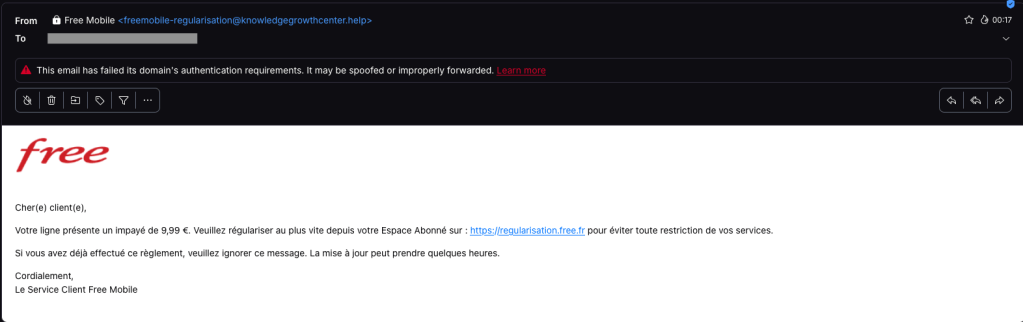
One of our employees, who is a Free Mobile customer, received this phishing email on Wednesday, September 30. The message used the same logo and template as legitimate emails from the company, but came from the suspicious email address freemobile-regularisation[@]knowledgegrowthcenter[.]help. It included a link that appeared to point to regularisation.free.fr :
The email tells the user that an invoice of €9.99 needs to be paid to avoid having the customer’s service suspended. Clicking the link opens a redirection chain:
Malwarebytes can help protect you from these threats, but treat unexpected messages about your accounts and invoices with caution:
Don’t follow links in unsolicited emails. If a message concerns your account, open the official Free Mobile app or website directly, or call the official help line at 3244.
Check the actual domain in your browser’s address bar to see if it matches what you expect—https://mobile.free.fr in this case.
Free Mobile, one of France’s main cellular providers, was fined €27 million by France’s data protection regulator, the CNIL, in January over failures to protect customer data. The October 2024 breach allowed an unauthorized party to access sensitive customer records, including bank account details and login information. Since the breach, we’ve seen many poorly written scam campaigns targeting Free Mobile customers.
However, over the past few weeks, a well-written scam has appeared, closely copying the design of the official Free Mobile website and email templates.
One of our employees, who is a Free Mobile customer, received this phishing email on Wednesday, September 30. The message used the same logo and template as legitimate emails from the company, but came from the suspicious email address freemobile-regularisation[@]knowledgegrowthcenter[.]help. It included a link that appeared to point to regularisation.free.fr :
The email tells the user that an invoice of €9.99 needs to be paid to avoid having the customer’s service suspended. Clicking the link opens a redirection chain:
Malwarebytes can help protect you from these threats, but treat unexpected messages about your accounts and invoices with caution:
Don’t follow links in unsolicited emails. If a message concerns your account, open the official Free Mobile app or website directly, or call the official help line at 3244.
Check the actual domain in your browser’s address bar to see if it matches what you expect—https://mobile.free.fr in this case.
Email hijacking remains one of the most effective techniques used by cybercriminals to conduct fraud, steal sensitive information, and impersonate trusted individuals.With new AI functionalities (dubbed "Anubis.AI") in our Mail Protection Service, we can stop such threats!
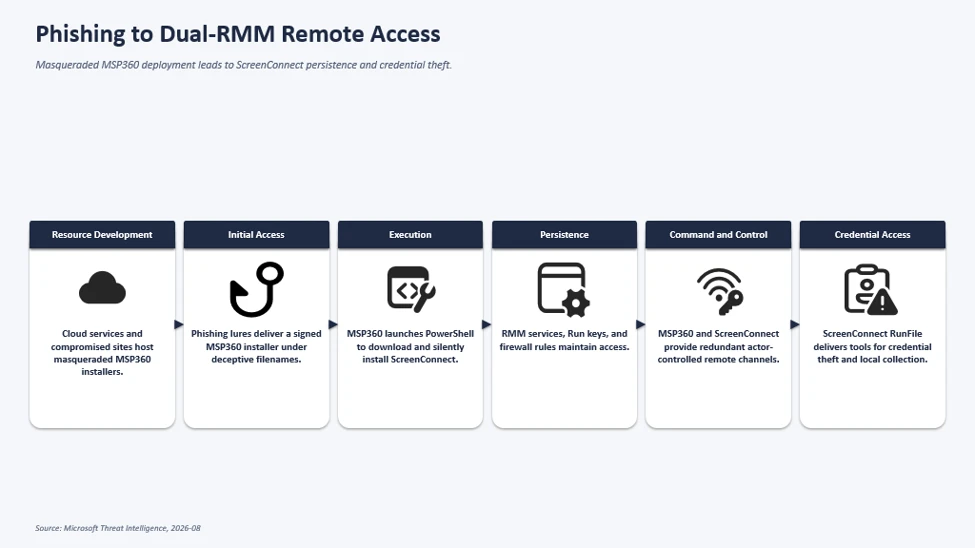
In July 2026, Microsoft Defender Experts observed phishing campaigns targeting organizations across multiple industries that distributed a masqueraded MSP360 Remote Monitoring and Management (RMM) installer through meeting invitations, PDF-themed lures, software update prompts, and other social-engineering content. Once executed, the legitimate MSP360 installer, distributed under a deceptive file name established remote management access on affected devices and enabled threat actors to gain an initial foothold using trusted administrative software.
Microsoft observed the MSP360 deployment being used to download and install a ConnectWise ScreenConnect client, creating a secondary remote-access channel that provided redundant access to compromised systems. Microsoft did not observe exploitation of ScreenConnect software itself; rather, threat actors abused legitimately obtained remote administration software to establish and maintain access. After access was established, threat actors used these remote administration channels to deploy additional tools and conduct post-compromise activity, including information collection and credential-access operations.
This activity highlights how threat actors continue to abuse legitimate remote administration software to blend into normal IT operations while maintaining persistent access and reducing detection opportunities. Microsoft Defender for Endpoint detects suspicious and uncommon remote-management activity, while the hunting queries and mitigations in this post can help organizations identify and restrict unapproved RMM use.
Attack chain overview
The observed multi-stage intrusion chain began when phishing lures delivered a legitimate, digitally signed MSP360 RMM v2.5.0.67 installer under deceptive filenames. Following successful User Account Control (UAC) elevation, the installer established MSP360 services for persistent access and leveraged the RMM agent to invoke PowerShell, download, and silently install ConnectWise ScreenConnect.
This effectively introduced a second remote administration channel on the compromised device, which the threat actor subsequently used to transfer and execute additional tooling supporting credential access, local data collection, and other post-compromise activity.
Figure 1. Attack chain showing phishing delivering a masqueraded MSP360 RMM installer that deploys ScreenConnect for persistent remote access and follow-on activity.
Microsoft observed multiple phishing campaigns that used a multi-stage delivery chain to distribute legitimate, digitally signed MSP360 RMM software (v2.5.0.67). Phishing emails directed users to actor-controlled landing pages that impersonated document-sharing portals, invitation workflows, Adobe Reader download pages, Zoom installation pages, and business collaboration platforms.
Upon user interaction, victims were redirected to download locations hosted on both attacker-controlled infrastructure and legitimate cloud services including Amazon S3, Cloudflare R2, Dropbox, GitLab, and Supabase. The downloaded executables used filenames crafted to resemble legitimate business content, meeting invitations, PDF documents, and software installers. Analysis of downloaded samples showed that many ultimately contained the same MSP360 RMM installer package despite appearing as different files to the victim.
Figure 2. Actor-controlled tax-document lure prompting download of a masqueraded MSP360 installer.Figure 3. Image displaying the execution of downloaded MSP360 RMM.
The campaign relied on a diverse set of payload-hosting mechanisms. Microsoft observed the actor distributing the payload through attacker-controlled domains, websites assessed to be compromised, and legitimate cloud-hosted services. Cloud-hosted services used for payload distribution included Amazon S3, Cloudflare R2, Dropbox, GitLab, and Supabase.
This approach enabled the actor to rapidly rotate delivery infrastructure while continuing to distribute the same MSP360 installer using different lure themes and filenames.
RMM platforms are attractive to threat actors because they are designed to provide administrators with broad remote management capabilities across managed endpoints, including remote command execution, software deployment, file transfer, and persistent service-based access. When abused, these same capabilities can give threat actors a flexible post-compromise channel for maintaining access, deploying additional tooling, and conducting follow-on activity while blending in with legitimate remote administration workflows.
MSP360 RMM installation and foothold establishment
After victims downloaded and executed the masqueraded MSP360 installer, the binary launched from the user’s Downloads directory under a filename designed to resemble a legitimate business document.
The installer subsequently dropped multiple installation components, including System.dll, nsExec.dll, and UAC.dll, to the following folder paths before relaunching itself through an elevation workflow generated by the installer framework. Next, the installer invoked a Windows User Account Control (UAC) elevation workflow. In observed successful installations, the process continued with elevated privileges, allowing deployment of MSP360 components and services. In unsuccessful installations, the elevation did not complete, and deployment terminated before the software was fully installed.
Following elevation, the installer initiated the MSP360 installation workflow and recorded installation status messages using Windows eventcreate.exe. The installer generated “Begin installation” and “End installation. MSP360 de Success.” events under the event source: MSP360 RMM Agent installer. The installer dropped multiple MSP360 plugins and binaries within the installation directory: C:\Program Files\RMM Agent\.
The installer also performed prerequisite discovery by enumerating installed .NET runtimes using: dotnet –list-runtimes. To establish long-term access on the affected device, the installer registered two Windows services: RMM.Agent.exe & RMM.Agent.Launcher.exe. Microsoft observed events indicating stopping any existing MSP360 services and installing new MSP360 services.
In addition to service-based persistence, the installer created registry-based autorun entries for MSP360 user interface components, ensuring the tray applications would automatically launch when users signed in.
The installation routine also modified the Windows Firewall configuration by creating an inbound allow rule for the MSP360 agent. The rule allowed inbound UDP traffic to C:\Program Files\RMM Agent\RMM.Agent.exe on port 48678. This configuration enabled network communications required by the remote management platform.
Figure 4. Process execution flow of the MSP360 RMM installation.
Not every execution of the installer resulted in a successful deployment. In some instances, the installer was launched by the user and began its installation routine but subsequently attempted to obtain elevated privileges through User Account Control (UAC). When elevation was denied or aborted, the installation terminated before completing deployment of the MSP360 RMM components. The process execution flow showed installation initialization activity followed by events indicating that administrative privileges were required, with no subsequent evidence of the persistence mechanisms, services, or remote management functionality observed during successful installations.
Figure 5. Unsuccessful installation of MSP360 RMM.
Remote command execution from MSP360 Agent and ScreenConnect deployment
Following successful installation of MSP360 RMM, the newly installed RMM.Agent.exe service launched PowerShell. The PowerShell process modified the execution policy for the current session and executed Invoke-WebRequest commands to download an MSI package named ClientSetup.msi from actor-controlled infrastructure. The downloaded package was then installed silently through msiexec.exe using the /qn switch, eliminating visible user interaction. This installation activity resulted in the deployment of a ConnectWise ScreenConnect client on the compromised endpoint, including ScreenConnect.ClientService.exe, ScreenConnect.WindowsClient.exe, and supporting components.
The installer additionally created Windows service registrations, application uninstall entries, and authentication-related registry modifications associated with the newly deployed ScreenConnect client.
Figure 6. The process execution flow of the remote command execution and ScreenConnect deployment.
Following deployment, the ScreenConnect client service launched with configuration parameters referencing actor-controlled infrastructure and subsequently established successful outbound communications. The service then spawned ScreenConnect.WindowsClient.exe, providing an additional remote access channel independent of MSP360. Following establishment of the ScreenConnect session, the threat actor used ScreenConnect to transfer and stage additional executables in the following directories:
These files were among the most frequently observed utilities delivered by the threat actor following establishment of a ScreenConnect session. Several filenames were intentionally chosen to resemble legitimate Windows, Microsoft Defender, Phone Link, and security-related components, likely to reduce user suspicion and blend into normal operating system activity. These utilities were observed during post-compromise activity and were used to support subsequent operations on affected systems. Several of the observed tools are commonly associated with credential access, information collection, execution of additional payloads, and efforts to reduce defender visibility.
The execution of these files occurred through ScreenConnect’s built-in RunFile functionality, which allows files to be transferred to and executed on managed endpoints. This activity demonstrates how the threat actor leveraged a legitimate MSP360 RMM deployment to establish an initial foothold before deploying ConnectWise ScreenConnect as a secondary remote access platform. The combination of MSP360 and ScreenConnect provided the threat actor with redundant remote administration channels and enabled the transfer, execution, and management of additional tooling during subsequent stages of the intrusion.
The threat actor subsequently used these remote access platforms to facilitate follow-on activities including information collection, credential access, and the deployment of additional utilities on compromised systems.
Microsoft also observed separate activity during July in which FaronicsDeployAgent.exe, a legitimate deployment and remote access application, was used in a similar manner to MSP360 RMM. In this activity, the threat actor leveraged FaronicsDeployAgent.exe as the initial remote management platform and subsequently used it to download and install ScreenConnect. This observation demonstrates that the deployment of ScreenConnect was not limited to MSP360-based intrusions, with additional legitimate remote administration software also being leveraged to establish remote access and facilitate ScreenConnect installation.
Attribution
Microsoft has not attributed this activity to a named threat actor. The campaigns are tracked as unattributed activity.
Mitigation and protection guidance
Microsoft recommends the following actions to help organizations reduce their exposure to this activity. Check the recommendations card for the deployment status of monitored mitigations.
Govern approved RMM tools: For approved RMM systems used in your environment, enforce security settings where possible to implement multi-factor authentication (MFA).
Restrict unauthorized software: Use Application Control for Windows to create policies to block unapproved IT management tools. Both solutions include functionality to block specific software publisher certificates:
Application Control for Windows file rule levels allow administrators to specify the level at which they want to trust their applications, including listing certificates as untrusted.
AppLocker’s publisher rule condition is available for files that are digitally signed, which can enable organizations to block non-approved RMM instances that include publisher information.
Block specific signed applications: Microsoft Defender for Endpoint also provides functionality to block specific signed applications using the block certificate action.
Consider searching for unapproved RMM software installations (see the Advanced hunting section). If an unapproved installation is discovered, reset passwords for accounts used to install the RMM services. If a system-level account was used to install the software, further investigation may be warranted.
Strengthen endpoint protection: Turn on cloud-delivered protection in Microsoft Defender Antivirus or the equivalent for your antivirus product to cover rapidly evolving attacker tools and techniques. Cloud-based machine learning protections provide near-instant, automated protection against new and emerging threats.
Investigate unauthorized installations: Turn on the following attack surface reduction rule to block or audit activity associated with this threat:
Block process creations originating from PsExec and WMI commands. Some organizations may experience compatibility issues with this rule on certain server systems but should deploy it to other systems to prevent lateral movement originating from PsExec and WMI
Microsoft Defender XDR detections
Microsoft Defender XDR customers can refer to the list of applicable detections below. Microsoft Defender XDR coordinates detection, prevention, investigation, and response across endpoints, identities, email, and apps to provide integrated protection against attacks like the threat discussed in this blog.
Tactic
Observed activity
Microsoft Defender coverage
Initial access
Delivery of masqueraded MSP360 application v2.5.0.67
Microsoft Defender Antivirus – SupportScam:Win32/RogueMSP.MU!MTB
Execution
Execution of the RMM software
Microsoft Defender for Endpoint – Suspicious usage of remote management software – Uncommon remote access software
Persistence
Persistence established by RMM software
Microsoft Defender for Endpoint – Anomaly detected in ASEP registry – Suspicious file registered as a service
Credential Access
Potential credential-access activity following RMM deployment
Microsoft Defender for Endpoint – Possible theft of passwords and other sensitive web browser information
Threat intelligence reports
Microsoft customers can use Microsoft Defender XDR Threat Analytics and related Microsoft threat intelligence reporting to stay current on the malicious activity, indicators, detection coverage, and recommended response actions associated with this campaign. These reports provide investigation context, protection guidance, and updated intelligence that security teams can use to prevent, mitigate, or respond to related activity in their environments.
Advanced hunting
// Run this query to identify the presence of MSP360 RMM agent
let MSP360RMM = "108ef7e628d7a20bd6241a5b57149e27a6061f467123eb64061975559f8f73dc";
DeviceFileEvents
| where Timestamp >= ago(30d)
| where SHA256 =~ MSP360RMM
// Run this query to identify the remote command execution from MSP360 RMM Agent
DeviceProcessEvents
| where Timestamp >= ago(30d)
| where (InitiatingProcessVersionInfoCompanyName == "MSP360" and ProcessCommandLine == "\"powershell.exe\"") or ( InitiatingProcessCommandLine == "\"powershell.exe\"" and ProcessCommandLine has_all ("msiexec.exe","\\Temp\\",".msi") and InitiatingProcessParentFileName == "RMM.Agent.exe")
// Run this query to identify the suspicious network connections from the threat actor’s use of ScreenConnect
let MaliciousURLs =  DeviceNetworkEvents
| where Timestamp >= ago(30d)
| where InitiatingProcessCommandLine == "\"powershell.exe\""
| where InitiatingProcessParentFileName == "RMM.Agent.exe"
| where isnotempty(RemoteUrl)
| distinct  RemoteUrl;
DeviceNetworkEvents
| where Timestamp >= ago(30d)
| where InitiatingProcessFileName has_any ( "ScreenConnect.ClientService.exe","ScreenConnect.WindowsClient.exe","ScreenConnect.Client.exe")
| where isnotempty(RemoteUrl)
| where RemoteUrl in (MaliciousURLs)
// Run this query to identify the suspicious payloads dropped and launched by the threat actor’s use of ScreenConnect
DeviceProcessEvents
| where Timestamp >= ago(30d)
| where InitiatingProcessCommandLine  has_all ("ScreenConnect.WindowsClient.exe", "RunFile","\\Documents\\","\\Temp\\")
MITRE ATT&CK Techniques observed
This campaign has exhibited use of the following attack techniques. For standard industry documentation about these techniques, refer to the MITRE ATT&CK framework.
Resource Development
T1583.001 Acquire Infrastructure: Domains | Domains were used to host phishing landing pages, payload delivery infrastructure, and ScreenConnect services associated with the campaign.
T1583.006 Acquire Infrastructure: Web Services | The threat actor leveraged legitimate cloud-hosting providers including Amazon S3, Cloudflare R2, Dropbox, GitLab, and Supabase for payload distribution.
Initial Access
T1566.002 Phishing: Spearphishing Link | Victims received workplace meeting, Zoom, Google Meet, invitation, RSVP, PDF, and Adobe-themed phishing emails containing links that redirected to malicious payload download locations.
T1204 User Execution | Victims downloaded and executed a masqueraded MSP360 installer distributed under deceptive filenames designed to resemble legitimate business documents and software.
T1036 Masquerading | The actor distributed legitimate MSP360 software under filenames designed to resemble meeting applications, invitations, PDFs, and business documents.
T1036.005 Match Legitimate Name or Location | Follow-on tooling used filenames that closely resembled legitimate Windows, Microsoft Defender, security, and Phone Link applications.
T1112 Modify Registry | MSP360 and ScreenConnect modified registry locations associated with services, persistence, credential provider components, protocol handlers, and uninstall entries.
Command and Control
T1219 Remote Access Software | The threat actor abused legitimate remote administration software including MSP360 RMM and ConnectWise ScreenConnect to maintain access to victim systems.
T1105 Ingress Tool Transfer | MSP360 downloaded ScreenConnect, while the threat actor’s use of ScreenConnect was subsequently used to transfer and execute additional tooling on compromised endpoints.
T1573 Encrypted Channel | Payload retrieval and remote access communications occurred over encrypted network channels.
T1102 Web Service | Multiple cloud-hosted web services were used throughout the delivery and command-and-control infrastructure.
Discovery
T1082 System Information Discovery | The installer enumerated installed .NET runtimes using dotnet –list-runtimes during the installation workflow.
Collection
T1005 Data from Local System | Additional tooling delivered through ScreenConnect was observed in post-compromise activity and used to collect information from victim devices.
Indicators of compromise (IOCs)
Observed indicators associated with this campaign are listed below.
Legitimate MSP360 RMM v2.5.0.67 installer observed being distributed under deceptive filenames during the campaign. The observed sample was signed using a certificate that has since been revoked.
Utilities transferred or executed through ScreenConnect sessions and observed during post-compromise activity. Several of the identified tools are commonly associated with credential access, information collection, and efforts to reduce defender visibility.
To hear stories and insights from the Microsoft Threat Intelligence community about the ever-evolving threat landscape, listen to the Microsoft Threat Intelligence podcast.
Review our documentation to learn more about our real-time protection capabilities and see how to enable them within your organization.
Since January 2026, Microsoft has observed Russian state threat actor Star Blizzard evolve their detection evasion capabilities through large-scale phishing campaigns, the use of accounts on compromised websites, and a novel malware delivery technique that Microsoft tracks as “RedFlick”. These changes represent a notable shift in the actor’s operational tradecraft and support ongoing cyberespionage activity targeting Ukrainian individuals and institutions as well as international non-government organizations (NGOs), Western think tanks, governments, and other organizations associated with international policy—particularly those with a nexus in supporting Ukraine.
As part of this evolution, Star Blizzard adopted RedFlick, a malware delivery technique that helps evade detection by initiating a set of scheduled tasks to deploy the actor’s custom backdoor, CosmicPulse. This technique is a notable departure from the actor’s previous use of ClickFix-based infection chains which required victims to complete multiple actions before CosmicPulse could be installed. By contrast, the RedFlick infection flow only requires a single user interaction, reducing friction in the compromise process. Combined with the actor’s shift toward large-scale phishing operations during the same period, these changes likely improve Star Blizzard’s ability to reach more targets, evade detection, and increase the likelihood of successful compromise.
This blog provides updated technical analysis of Star Blizzard’s tactics, techniques, and procedures (TTPs) observed throughout 2026, building on our 2025 and 2023 blogs. It details the actor’s evolving phishing, persistence, and malware delivery techniques, and provides recommendations, indicators of compromise (IOCs), detections, and hunting guidance to help organizations identify and defend against RedFlick-related activity. As with any observed nation-state actor activity, Microsoft directly notifies customers that have been targeted or compromised, providing them with recommendations and mitigations to secure their accounts.
Star Blizzard TTPs observed in 2026
Star Blizzard is attributed by the United States Cybersecurity and Infrastructure Agency (CISA) as subordinate to the Russian Federal Security Service Centre (FSB) Centre 18. Star Blizzard periodically overhauls their TTPs to avoid detection, often in response to public exposure of the actor’s campaigns that have involved targeted social engineering through messaging apps and credential theft. Since Google Threat Intelligence Group published its report on Star Blizzard’s COLDCOPY malware in October 2025, Microsoft observed the actor refine their initial access and evasive techniques to include:
Moving away from targeted spear phishing to large-scale initial contact phishing campaigns
Using compromised websites to create accounts to send phishing emails
Updating malware deployment to facilitate the installation of a CosmicPulse downloader
As of the writing of this blog, the RedFlick campaigns have targeted Ukrainian individuals and institutions, as well as international NGOs, think tanks, governments, and financial institutions that have supported Ukraine politically or financially. Microsoft has observed this activity affect over 100 organizations primarily in the United States and United Kingdom, consistent with Star Blizzard’s longstanding targeting priorities.
Microsoft continues to observe some previously reported Star Blizzard phishing techniques throughout 2026; however, the TTPs discussed in this blog have been associated primarily with the actor’s new larger-scale phishing campaigns.
Larger-scale initial contact phishing
Microsoft previously reported on Star Blizzard’s spear-phishing campaigns observed during 2023-2024. During these operations, the actor continued to rely on their conventional TTPs such as initiating email contact with targets before sending a follow-up containing a malicious link, to actor-controlled/compromised infrastructure purposed for credential theft, while impersonating known political or diplomatic figures to lure victims into responding.
In 2026, Microsoft observed Star Blizzard shift from exclusively targeted spear-phishing operations to also conducting larger-scale phishing campaigns. The larger-scale phishing operations were observed at a scale not previously seen from the actor, ranging from tens to hundreds of email messages per campaign. This change likely reflects the actor’s adoption of a mass-mailing phishing platform to automate campaign execution and increase the likelihood of successful compromises by significantly expanding the initial targeting pool. The progression of these campaigns is summarized in the following timeline, including examples of Star Blizzard’s phishing subject lines, targeting details, and the malware delivery methods observed across each campaign:
January
“Повідомлення про результати податкової перевірки” (Notice of tax audit results) – Campaign targeting unidentified Ukraine persons with an attached RedFlick lure.
February
“списання з Вашого рахунку за оплату штрафу” (Debiting from your account for payment of a fine) – Campaign targeting unidentified Ukraine persons with an attached RedFlick lure.
March
“Invitation to an IISS [Private Roundtable/Closed-Door Discussion] on European Security” – Initial contact campaign targeting government officials, security researchers, academia, media, and NGOs. Respondents received a RedFlick lure attachment.
“Invitation to a Closed CES Roundtable Discussion” – Initial contact campaign targeting US and Europe technology-sector organizations. Respondents received a RedFlick lure attachment.
“Atlantic Council Closed-Door Strategic Discussion” – Initial contact campaign targeting government officials, foreign policy practitioners, security researchers, academia, media, and NGOs. Respondents received a link to DarkSword iOS backdoor installation.
April
“Closed-Door Online Session on Global Capital Allocation & M&A” – Initial contact campaign targeting international financial organizations and researchers. Respondents received a RedFlick lure attachment.
May
“Future of Peace Operations Forum – A Closed Strategic Dialogue” – Initial contact campaign targeting diplomatic and multilateral organizations. Respondents received a RedFlick lure attachment.
“Future of Liberty Forum” – Initial contact campaign targeting employees of a US-based think tank. Respondents received a RedFlick lure attachment.
June
“Invitation to the MAMA Summit on the Current Situation Surrounding the Ukrainian Crisis” – Initial contact campaign targeting incumbent/former diplomatic staff. Respondents received a RedFlick lure attachment.
“Invitation to the Chatham House London Conference 2026 – 9 July 2026” – Initial contact campaign targeting think tanks, NGOs, and national parliamentary. Respondents received a RedFlick lure attachment.
July
“Thought you might find this USUBC roundtable of interest” – Initial contact campaign targeting think tanks, NGOs, and Ukraine civil society. Respondents received a RedFlick lure attachment.
“Інформація щодо тимчасового відключення водопостачання” (Information about temporary water supply shutdown) – Targeted Kyiv-based hotels with an attached RedFlick lure.
August
“Payment Advice Note from 06.08.2026” – Targeted employees of an international financial organization with an attached RedFlick lure.
Once a recipient responds to the initial phishing email, Star Blizzard typically sends a follow-up message containing a password-protected RAR or ZIP archive. The archive contains files that initiate the RedFlick infection flow. The password is included as an image in the follow-up email shown in Figure 1, along with additional examples of Star Blizzard follow-up emails below:
Figure 1. July 2026 RedFlick campaign follow-up email regarding an “omitted” attachmentFigure 2. June 2026 RedFlick campaign follow-up email with the subject line “Invitation to the Chatham House London Conference 2026”Figure 3. August 2026 RedFlick campaign follow-up email with a payment notice subject line sent to all targets
Since January 2026, Microsoft observed at least 13 distinct large-scale phishing campaigns targeting primarily NGOs, think tanks, and government organizations worldwide. The earliest campaigns, observed between January and February, targeted unspecified users of the Ukraine email provider Ukr.net. These emails impersonated Ukrainian authorities and were themed as notifications of a tax audit or outstanding fine.
Beginning in March 2026, Star Blizzard expanded targeting outside of Ukraine. Subsequent campaigns frequently used lures themed as invitations to conferences or events purportedly organized by a reputable think tank or NGO. Microsoft also observed the actor target multiple individuals within the same organization, with phishing emails often crafted to appear as internal communications originating from the targeted organization itself. The actor’s shift from Ukraine-focused operations to global targets could indicate Star Blizzard initially targeted Ukraine to test their new capabilities.
The large-scale campaigns have demonstrated capabilities previously unassociated with Star Blizzard. For example, a campaign observed in mid-August 2026 employed steganography to conceal identifiers. Throughout 2026, Star Blizzard has also continued to develop additional operational capabilities. Notably, ProofPoint reported in March that the actor had targeted vulnerable Apple iOS devices to deploy the DarkSword backdoor.
Creating accounts on compromised websites
Since March 2026, Star Blizzard has made another notable change to their TTPs to support the higher-volume phishing operations, using accounts created on compromised websites to send phishing emails to targets. This change coincided with the actor’s shift to larger-scale phishing campaigns and has been observed almost exclusively in support of these operations. Previously, the actor would create accounts on free email services (predominantly using Protonmail and Microsoft consumer accounts) to impersonate an individual that would be well known to the prospective target, whether it was a political figure, academic, or former diplomat. In the large-scale campaigns, Star Blizzard has used accounts created on websites hosted on CPanel and WordPress, using the same account name across multiple website domains. Microsoft Threat Intelligence assesses with high confidence that these websites have been compromised by Star Blizzard for this purpose.
Updating malware delivery and installation TTPs
Between January and August 2026, Microsoft observed multiple waves of Star Blizzard phishing campaigns alongside notable changes in the actor’s initial access TTPs, particularly the use of RedFlick scheduled tasks. During this period, Microsoft observed three significant shifts in the threat actor’s delivery techniques.
From ClickFix to VHDX
Figure 4. VHDX lure execution chain
In mid-January 2026, Microsoft observed the use of a malicious Virtual Hard Disk v2 (VHDX), delivered through a phishing email containing a password-protected ZIP file. The VHDX file ships a malicious LNK file disguised as a PDF document, alongside a hidden directory containing a BAT script and a legitimate decoy PDF.
When the victim opens the LNK file, conhost.exe is launched in a hidden window and cmd.exe is subsequently spawned to execute the embedded BAT script:
The BAT file opens the decoy PDF and invokes SSH.exe with PermitLocalCommand enabled, ultimately downloading and executing a remotely hosted MSI installer:
In multiple campaigns, Microsoft observed an MSI installer creating a scheduled task that uses control.exe to download and execute a remotely hosted CosmicPulse downloader masquerading as a Control Panel applet (CPL). Unlike earlier campaigns that relied on ClickFix lures and user interaction, this approach relies on compiling the CosmicPulse downloader as a Control Panel applet DLL.
The shift from interactive user execution to remote execution and masquerading as a CPL item highlights an evolution in both persistence and defense evasion techniques.
CosmicPulse downloader
The Control Panel applet DLL is a downloader with the sole purpose of downloading and installing a version of CosmicPulse, a malicious Python backdoor, on the target device. The downloader is also known publically as NOROBOT or BAITSWITCH.
Similar to previous versions, this downloader downloads, persists, and executes a version of CosmicPulse on the infected device. Upon execution, it downloads two ZIP files and stores them on disk. It then writes an encrypted AES key to the HKEY_CURRENT_USER\Software\Classes\.mollis registry key. One ZIP file contains a Python 3.8 64-bit package and a Python file that serves as the CosmicPulse bootstrapper. The bootstrapper reads the encrypted key from the registry, recovers it using an embedded key in AES-ECB mode, and then uses the recovered key to decode the CosmicPulse payload (also known as YESROBOT) contained in the second ZIP file. The below image shows the process of the CosmicPulse installation.
Since January 2026, Microsoft has observed the CosmicPulse backdoor going through various little changes to circumvent existing signatures. However, the capabilities and purpose of this backdoor remain the same as described in previous articles.
Persistence through multiple scheduled tasks
In April 2026, Microsoft observed Star Blizzard changing persistence tactics to include RedFlick scheduled tasks. Whereas a malicious MSI file installed a single scheduled task in January—by April, the actor’s MSI installer created three scheduled tasks masquerading as legitimate network components, each with their own purpose. The TTPs have overlaps with the spear-phishing campaigns reported by the Digital Security Lab Ukraine (DLUA) in June 2026. In at least one incident, Microsoft has observed either the first or third task deploying an instance of CosmicPulse on the infected machine.
Figure 6. Scheduled task installed through MSI installer observed in April 2026
Task 1 – Registration beaconing and dynamic DLL execution task
The first task masquerades as a legitimate Internet Quality Test Connection task. The scheduled command serves two purposes. First, it sends a UTF-16 and Base64-encoded string containing the network or computer name and the username of the infected device to the C2 server. Thereby, it exfiltrates basic information about the infected host.
Second, an attacker-controlled DLL can be executed remotely through invoking Control_RunDLL from Shell32.dll. Microsoft was unable to obtain a variant of this payload. The task uses a WebDAV UNC path to access the remote payload, allowing the resource to be retrieved over HTTP rather than through a conventional SMB network share.
Task 2 – Supporting task
The second installed task, named Network Configuration Manager, supports the WebDAV-based execution used by the other tasks. The invoked command causes Windows to treat the UNC-style path as a WebDAV resource and process it through the WebDAV redirector and associated WebClient functionality.
Through WebDAV, Windows applications can interact with a remote web resource as though it is a file or folder path while the underlying communication is performed using HTTP/HTTPS rather than conventional SMB. The task therefore prepares the WebDAV client functionality required by the other scheduled tasks.
Task 3 – CosmicPulse downloader execution
The third installed task, named System Health Monitor, uses control.exe to access a remote path hosted on the hardcoded C2 server and execute the next stage.
Hiding payloads in PDF files
In July 2026, Microsoft observed another change in Star Blizzard’s delivery techniques, this time involving a multistage execution chain.
Figure 7. Overview of attack chain from July 2026
The phishing email contains a password-protected RAR archive nested inside a ZIP file. After the archive is opened, it exposes an LNK file.
When executed, the LNK file uses conhost.exe and curl to download a PDF from an actor-controlled server:
After downloading the PDF, the command runs a second PowerShell payload. This payload searches the PDF for the magic header cAB, extracts the subsequent 208 bytes of Base64-encoded data, and executes the decoded command through PowerShell. The resulting conhost command, shown below, attempts to download and install another MSI file:
As in previous campaigns, the Python installer contains obfuscated PowerShell code. When executed, the code attempts to create two additional scheduled tasks. The first scheduled task again serves as a helper task, consistent with the supporting tasks observed in previous campaigns. The second scheduled task attempts to download and execute a CPL applet again.
Star Blizzard’s shift from ClickFix-based delivery chains to VHDX files, expanded use of scheduled tasks for persistence, and concealment of payloads within PDF files demonstrate the actor’s continued ability to adapt their delivery methods in response to evolving defenses. The actor’s recent use of PDFs to conceal payloads further illustrates efforts to bypass layered defenses through increasingly complex execution chains. Taken together, these changes demonstrate Star Blizzard’s continued efforts to streamline malware deployment, reduce required user interaction, and improve operational scalability while maintaining its longstanding espionage objectives.
Defending against Star Blizzard and RedFlick-related activity
Microsoft Threat Intelligence advises organizations that are most likely at risk—primarily those in government, NGOs, or think tanks adjacent to Ukraine policy or support—to implement the following recommendations to mitigate against Star Blizzard activity.
Protecting against Star Blizzard phishing
As previously reported, Star Blizzard’s success relies on sophisticated, targeted phishing lures that trick users into engaging with the actor by impersonating trusted contacts. While Star Blizzard has changed their overall TTPs, the actor continues to employ the same phishing patterns against users:
Star Blizzard continues to impersonate trusted contacts that users or organizations would expect an email from. Star Blizzard also continues using email from free providers such as Proton @proton[.]me, particularly in Evilginx spear-phishing operations observed throughout 2026. However, despite the actor’s recent shift toward leveraging compromised legitimate websites that impersonate real individuals associated with a target’s organization, users can still remain vigilant for other Star Blizzard TTPs, several of which have been observed in previous campaigns:
Star Blizzard continues to make initial contact with a target by sending an email, usually without an attachment.
If a user engages, Star Blizzard will follow up with an email with an attachment. In this particular campaign, it has been an archive file such as a RAR or ZIP.
The email sender contains names of actual persons and organizations they belong to—however, the organization is not within the root or registered domain itself but in the username or local part of the email address. This should draw a red flag to the email’s authenticity. When in doubt, directly contact the person you think sent the email using a previously established and trusted contact method such as known email address or phone number.
The emails in these RedFlick campaigns are often sent in bulk.
To best mitigate against this activity, Microsoft suggests the following policies to strengthen network environments against Star Blizzard phishing operations:
Microsoft also recommends the following mitigations to reduce the impact of this threat
Run endpoint detection and response (EDR) in block mode so that Microsoft Defender for Endpoint can block malicious artifacts, even when your non-Microsoft antivirus does not detect the threat, or when Microsoft Defender Antivirus is running in passive mode. EDR in block mode works behind the scenes to remediate malicious artifacts that are detected post-compromise.
Encourage users to use Microsoft Edge and other web browsers that support Microsoft Defender SmartScreen, which identifies and blocks malicious websites, including phishing sites, scam sites, and sites that host malware.
Configure investigation and remediation in full automated mode to allow Microsoft Defender for Endpoint to take immediate action on alerts to resolve breaches, significantly reducing alert volume.
Turn on cloud-delivered protection and automatic sample submission in Microsoft Defender Antivirus to cover rapidly evolving attacker tools, techniques, and behaviors. These capabilities use artificial intelligence and machine learning to quickly identify and stop new and unknown threats.
Use security defaults as a baseline set of policies to improve identity security posture. For more granular control, enable Conditional Access policies. Conditional Access policies evaluate sign-in requests using additional identity driven signals like user or group membership, IP location information, and device status, among others, and are enforced for suspicious sign-ins. Organizations can protect themselves from attacks that leverage stolen credentials by enabling policies such as compliant devices or trusted IP address requirements.
Continuously monitor suspicious or anomalous activities. Investigate sign-in attempts with suspicious characteristics (for example, location, ISP, user agent, and use of anonymizer services).
Turn on Zero-hour auto purge (ZAP) in Defender for Office 365 to quarantine sent mail in response to newly-acquired threat intelligence and retroactively neutralize malicious phishing, spam, or malware messages that have already been delivered to mailboxes.
Enable network protection to prevent applications or users from accessing malicious domains and other malicious content on the internet.
Configure Microsoft Defender for Office 365 to recheck links on click. Safe Links provides URL scanning and rewriting of inbound email messages in mail flow, and time-of-click verification of URLs and links in email messages, other Office 365 applications such as Teams, and other locations such as SharePoint Online. Safe Links scanning occurs in addition to the regular anti-spam and anti-malware protection in inbound email messages in Exchange Online Protection (EOP). Safe Links scanning can help protect your organization from malicious links that are used in phishing and other attacks.
Use the Attack Simulator in Microsoft Defender for Office 365 to organize realistic, yet safe, simulated phishing and password attack campaigns in your organization by training end users against clicking URLs in unsolicited messages and disclosing their credentials. Training should include checking for poor spelling and grammar in phishing emails or the application’s consent screen as well as spoofed app names, logos, and domain URLs appearing to originate from legitimate applications or companies. Note that Attack Simulator testing only supports phishing emails containing links at this time.
Utilize Windows Firewall, Windows Firewall with Advanced Security, or an enterprise firewall/filtering solution to help prevent or restrict outbound SSH connection attempts to external or public networks that are not essential for business.
Microsoft Defender detections
Microsoft Defender customers can refer to the list of applicable detections below. Microsoft Defender coordinates detection, prevention, investigation, and response across endpoints, identities, email, apps to provide integrated protection against attacks like the threat discussed in this blog.
Tactic
Observed activity
Microsoft Defender coverage
Initial access
– Phishing emails with attached archive files or PDFs throughout the campaign – VHDX file executes malicious LNK disguised as a PDF; use of LNK to hide malicious payload across all campaigns – LNK file uses curl to download a PDF from an actor-controlled server
Microsoft Defender for Endpoint – Star Blizzard Activity Group – Suspected PDF phishing detected – Suspicious phishing activity detected – Suspicious LNK execution from container – Suspicious file download via curl
Execution
– Execution of RedFlick scheduled task and CosmicPulse backdoor – MSI file installs scheduled tasks across all campaigns
Microsoft Defender Antivirus – Trojan:Script/RedFlick – Backdoor:Script/CosmicPulse – Backdoor:Python/CosmicPulse
Microsoft Security Copilot is embedded in Microsoft Defender and provides security teams with AI-powered capabilities to summarize incidents, analyze files and scripts, summarize identities, use guided responses, and generate device summaries, hunting queries, and incident reports.
Security Copilot is also available as a standalone experience where customers can perform specific security-related tasks, such as incident investigation, user analysis, and vulnerability impact assessment. In addition, Security Copilot offers developer scenarios that allow customers to build, test, publish, and integrate AI agents and plugins to meet unique security needs.
Threat intelligence reports
Microsoft Defender XDR customers can use the following threat analytics reports in the Defender portal (requires license for at least one Defender XDR product) to get the most up-to-date information about the threat actor, malicious activity, and techniques discussed in this blog. These reports provide the intelligence, protection information, and recommended actions to prevent, mitigate, or respond to associated threats found in customer environments.
Microsoft Security Copilot customers can also use the Microsoft Security Copilot integration in Microsoft Defender Threat Intelligence, either in the Security Copilot standalone portal or in the embedded experience in the Microsoft Defender portal to get more information about this threat actor.
Hunting queries
Microsoft Defender XDR
Microsoft Defender XDR customers can run the following advanced hunting queries to find related activity in their networks:
Conhost.exe invokes curl
The following query will detect the use of conhost.exe to launch curl to download a decoy PDF from an actor-controlled server, which Star Blizzard used in July 2026. (Note that this query may detect activity not related to Star Blizzard or necessarily malicious. Please investigate findings to determine if the activity is legitimate.)
DeviceProcessEvents
| where Timestamp > ago(7d)
| where FileName == "conhost.exe"
| where ProcessCommandLine has "curl"
| project Timestamp, DeviceName, AccountName, ProcessCommandLine, InitiatingProcessCommandLine, InitiatingProcessFileName, DeviceId, ProcessId, ProcessUniqueId, InitiatingProcessUniqueId
Invoke SSH to launch local command line
The following query will detect the invocation of SSH to initiate a local command prompt, which Star Blizzard used in January 2026 to download and execute a remotely hosted MSI installer. (Note that this query may detect activity not related to Star Blizzard or necessarily malicious. Please investigate findings to determine if the activity is legitimate.)
DeviceProcessEvents
| where Timestamp > ago(7d)
| where ProcessCommandLine has "ssh.exe"
| where ProcessCommandLine has "PermitLocalCommand=yes"
| where ProcessCommandLine has "LocalCommand=cmd.exe"
| project Timestamp, DeviceName, AccountName, ProcessCommandLine, InitiatingProcessCommandLine, InitiatingProcessParentFileName, DeviceId, ProcessId, InitiatingProcessId, ReportId
Persistence through scheduled tasks
The following query will detect Star Blizzard’s uniquely named scheduled tasks that attempt to masquerade as legitimately-named tasks, used for persistence by Star Blizzard in April 2026.
union isfuzzy=true
(
DeviceProcessEvents
| where Timestamp > ago(7d)
| where ProcessCommandLine has_any ("Internet Quality Test Connection","Network Configuration Manager","System Health Monitor") or AdditionalFields has_any ("Internet Quality Test Connection","Network Configuration Manager","System Health Monitor")
| project Timestamp, DeviceName, ActionType, ProcessCommandLine, AdditionalFields
, RegistryKey = tostring(dynamic(null)), RegistryValueName = tostring(dynamic(null))
, SourceTable = "DeviceProcessEvents"
, ProcessId, AccountName, AccountDomain, AccountSid
)
,
(
DeviceEvents
| where Timestamp > ago(7d)
| where ProcessCommandLine has_any ("Internet Quality Test Connection","Network Configuration Manager","System Health Monitor") or AdditionalFields has_any ("Internet Quality Test Connection","Network Configuration Manager","System Health Monitor") or RegistryKey has_any ("Internet Quality Test Connection","Network Configuration Manager","System Health Monitor") or RegistryValueName has_any ("Internet Quality Test Connection","Network Configuration Manager","System Health Monitor")
| project Timestamp, DeviceName, ActionType, ProcessCommandLine, AdditionalFields, RegistryKey, RegistryValueName
, SourceTable = "DeviceEvents"
, ProcessId = long(null), AccountName = "", AccountDomain = "", AccountSid = ""
)
,
(
DeviceRegistryEvents
| where Timestamp > ago(7d)
| where RegistryKey has_any ("Internet Quality Test Connection","Network Configuration Manager","System Health Monitor") or RegistryValueName has_any ("Internet Quality Test Connection","Network Configuration Manager","System Health Monitor") or RegistryValueData has_any ("Internet Quality Test Connection","Network Configuration Manager","System Health Monitor") or InitiatingProcessCommandLine has_any ("Internet Quality Test Connection","Network Configuration Manager","System Health Monitor")
| project Timestamp, DeviceName, ActionType
, ProcessCommandLine = InitiatingProcessCommandLine, AdditionalFields = ""
, RegistryKey, RegistryValueName
, SourceTable = "DeviceRegistryEvents"
, ProcessId = long(null), AccountName = "", AccountDomain = "", AccountSid = ""
)
Microsoft Sentinel
Microsoft Sentinel customers can use the TI Mapping analytics (a series of analytics all prefixed with ‘TI map’) to automatically match the malicious domain indicators mentioned in this blog post with data in their workspace. If the TI Map analytics are not currently deployed, customers can install the Threat Intelligence solution from the Microsoft Sentinel Content Hub to have the analytics rule deployed in their Sentinel workspace.
Detect network IP and domain indicators of compromise using ASIM
The following query checks IP addresses and domain IOCs across data sources supported by ASIM network session parser.
let lookback = 30d;
let ioc_ip_addr = dynamic(["103.245.231.248", "2.57.241.246", "89.125.209.168", "103.245.231.79", "45.84.59.66", "103.160.59.97"]);
let ioc_domains = dynamic(["etia.ca", "groy.cc", "gliderrompercycl.com", "muvb.net", "divekickspolic.org", "matjk.click", "bpdaersa.click", "stuseamandesilt.org", "Itechx.tel", "guach.net", "ruten.observer", "byveo.org", "secure-dns-hub.com", "qumel.link", "cyrna.top", "drasw.club"]);
_Im_NetworkSession(starttime=todatetime(ago(lookback)), endtime=now())
| where DstIpAddr in (ioc_ip_addr) or DstDomain has_any (ioc_domains)
| summarize FirstSeen=min(TimeGenerated), LastSeen=max(TimeGenerated), EventCount=count()
    by SrcIpAddr, DstIpAddr, DstDomain, Dvc, EventProduct, EventVendor
Detect Web Sessions IP and file hash indicators of compromise using ASIM
The following query checks IP addresses, domains, and file hash IOCs across data sources supported by ASIM web session parser.
let lookback = 30d;
let ioc_ip_addr = dynamic(["103.245.231.248", "2.57.241.246", "89.125.209.168", "103.245.231.79", "45.84.59.66", "103.160.59.97"]);
let ioc_domains = dynamic(["etia.ca", "groy.cc", "gliderrompercycl.com", "muvb.net", "divekickspolic.org", "matjk.click", "bpdaersa.click", "stuseamandesilt.org", "Itechx.tel", "guach.net", "ruten.observer", "byveo.org", "secure-dns-hub.com", "qumel.link", "cyrna.top", "drasw.club"]);
_Im_WebSession(starttime=todatetime(ago(lookback)), endtime=now())
| where DstIpAddr in (ioc_ip_addr)
    or DstDomain has_any (ioc_domains)
    or Url has_any (ioc_domains)
| summarize FirstSeen=min(TimeGenerated), LastSeen=max(TimeGenerated), EventCount=count()
    by SrcIpAddr, DstIpAddr, DstDomain, Url, Dvc, EventProduct, EventVendor
Virtual Disk Image file with file name Documents.vhdx; observed in January campaign against Ukraine; contained in 9707a8694e954e9ee13e839d6e5905ce626c0837c7c90da6d1025bfbe152866b
Password protected email attachment with file name Payment Advice Note.zip; used in August campaign in which the actor introduces a new TTP of sending unique ZIP files to each target; Password: BirdMouseCrab
etia[.]ca
Domain
Host for RedFlick MSI installer in January 2026 campaign
103.245.231[.]248
IPv4
Host for CosmicPulse downloader DLL in January 2026 campaign
groy[.]cc
Domain
Host for RedFlick MSI installer in February 2026 campaign
2.57.241[.]246
IPv4
Host for CosmicPulse downloader DLL in February 2026 campaign
gliderrompercycl[.]com
Domain
Host for CosmicPulse backdoor download
muvb[.]net
Domain
Host for RedFlick MSI installer in February 2026 campaign
89.125.209[.]168
IPv4
Host for CosmicPulse downloader DLL in February 2026 campaign
divekickspolic[.]org
Domain
Host for CosmicPulse backdoor download
matjk[.]click
Domain
Host for RedFlick MSI installer in March 2026 campaign
bpdaersa[.]click
Domain
Host for RedFlick MSI installer in March 2026 campaign
103.245.231[.]79
IPv4
Host for CosmicPulse downloader DLL in March 2026 campaign
stuseamandesilt[.]org
Domain
Host for CosmicPulse backdoor download
Itechx[.]tel
Domain
Host for RedFlick MSI installer in April 2026 campaign
45.84.59[.]66
IPv4
Host for CosmicPulse downloader DLL in April 2026 campaign
guach[.]net
Domain
Host for RedFlick PowerShell code installer in June 2026 campaign
ruten[.]observer
Domain
Host for CosmicPulse downloader DLL in June-July 2026 campaigns
byveo[.]org
Domain
Host for RedFlick PowerShell code installer in July 2026 campaign
secure-dns-hub[.]com
Domain
Host for CosmicPulse downloader DLL in July 2026-current campaigns
103.160.59[.]97
IPv4
Host for CosmicPulse downloader DLL in July 2026 campaign
qumel[.]link
Domain
Host for CosmicPulse downloader DLL in July 2026 campaign
cyrna[.]top
Domain
Host for RedFlick MSI installer in August 2026 campaign
drasw[.]club
Domain
Host for CosmicPulse downloader DLL in August 2026 campaign
To hear stories and insights from the Microsoft Threat Intelligence community about the ever-evolving threat landscape, listen to the Microsoft Threat Intelligence podcast.
Following its emergence in February 2026, EvilTokens quickly became one of the most widely used phishing-as-a-service (PhaaS) platforms, providing cybercriminals with AI capabilities for tailoring phishing lures and analyzing compromised inboxes to identify high-value targets. This AI-powered cybercrime platform facilitated sophisticated business email compromise (BEC) campaigns that compromised more than 12,000 inboxes in over 10,000 organizations worldwide.
EvilTokens enabled threat actors to abuse the device code authentication flow, steal tokens, and compromise organizational accounts at scale using an AI-driven infrastructure and automating multiple parts of the attack chain. The toolkit offered a plethora of prebuilt phishing templates and landing pages with an AI-powered assistant to aid in structuring target-specific emails.
Stolen tokens are used for email exfiltration and persistence, often through the creation of malicious inbox rules that conceal communications. In some cases, tokens can also be used to grant new devices access to a victim’s inbox, a particularly durable method to maintain persistence. Microsoft Threat Intelligence tracks the threat actor behind the development and support of the EvilTokens phish kit as Storm-2992.
Post-compromise, EvilTokens enabled threat actors to utilize AI assistants to sift through victim mailbox activity and engineer a phishing message based on the accessible email content. EvilTokens also allowed threat actors to conduct Microsoft Graph reconnaissance to map organizational structure and permissions, enabling continued access and potential lateral movement while tokens remain valid. While token-targeting phishing is not new, it has become far more common and industrialized over the last several years as organizations adopted multifactor authentication (MFA).
To evade detection, EvilTokens uses a multi-stage delivery pipeline designed to bypass traditional email gateways and endpoint security. Targets are lured through deceptive emails that use 44 different themes, including invoices and request for proposals (RFPs), or shared files. These emails contained malicious URLs, PDF attachments, and HTML files.
This blog provides a comprehensive, up-to-date analysis of the EvilTokens platform and operations. We share specific examples of the EvilTokens service panel and a detailed analysis of EvilTokens infrastructure. Defending against EvilTokens and similar adversary-in-the-middle (AiTM) phishing threats requires a layered approach that blends technical controls with user awareness. This blog also provides Microsoft Defender detection and hunting guidance, as well as resources on how to set up mail flow rules, enforce spoof protections, and configure third-party connectors to prevent spoofed phishing messages from reaching user inboxes.
What is device code phishing?
One of the primary capabilities of EvilTokens is its device code phishing flow, which abuses device code authentication, a legitimate OAuth flow designed for devices with limited interfaces, such as smart TVs, printers, Teams devices, and conferencing devices, that cannot support a standard interactive sign-in. In this model, a user is presented with a short code on the device they are trying to sign in from and is instructed to enter that code into a browser on a separate device to complete authentication.
While this flow is useful for these scenarios, it introduces a security tradeoff. Because authentication is completed on a separate device, the session initiating the request is not strongly bound to the user’s original context. Threat actors have abused this characteristic as a way to circumvent traditional MFA protections by decoupling authentication from the originating session. Threat actors also use social engineering layouts and other tricks to disguise the legitimate device code flow approval as something else required.
Device code phishing occurs when threat actors insert themselves into this process. Instead of a legitimate device requesting access, the threat actor initiates the flow and provides the user with a code through a phishing lure. When the user enters the code, they unknowingly authorize the threat actor’s session, granting access to the account without exposing credentials. Microsoft recommends blocking device code flow wherever possible. If your organization uses Teams devices that require device code flow, scope the exception to specific Teams device resource accounts and exclude the Device Registration Service resource from your Conditional Access policy.
In April 2026, Microsoft tracked a phishing campaign aligned with EvilTokens that used automation platforms to spin up thousands of unique, short-lived polling nodes. This approach allowed the threat actors to deploy complex backend logic (Node.js) that bypassed traditional signature-based or pattern-based detection. This infrastructure was leveraged in the attack end-to-end, from generating dynamic device codes to post-compromise activities.
The following sections examine how EvilTokens operated, the capabilities available through its customer panel, and infrastructure supporting phishing campaigns. We also trace the EvilTokens attack chain, from lure delivery and device code generation through defense evasion, token theft, and post-compromise activity.
EvilTokens platform and operations
Distribution and affiliate support
The threat actor tracked as Storm-2992 advertised and sold EvilTokens services to cybercriminals on the actor’s Telegram channels. Cybercriminals continue to gravitate towards apps like Telegram that provide anonymity, cross-platform access, file sharing, and channels for broadcasting announcements to large groups of followers. The threat actor uses Telegram to advertise their phish kit, announce updates, coordinate with their subscribers, and provide customer support.
Figure 1. EvilTokens Telegram bot
EvilTokens phish kits are sold at $1,500 USD for initial purchase, with a monthly subscription fee of $500 for continued access to the kit and control panel. The kit provides additional products, including Antibot redirector, B2B Sender, Office 365 Capture Link, and a Simple Mail Transfer Protocol (SMTP) Sender. Each of these products has additional fees for 30 days of access.
Figure 2. EvilTokens Telegram store bot
Customer panel and campaign configuration
The EvilTokens panel provides the core components needed to support phishing campaigns, including pre‑built templates, attachment files for common lure formats, domain and hosting configuration, redirect logic, and victim tracking.
After signing in, EvilTokens subscribers are presented a dashboard with various options to choose from. First, subscribers are asked to choose a deployment method (Cloudflare Workers/Bunny or PHP Hosting) and then are asked to choose from a list of deploy options, including Capture Mode, Layout & Template, Code Display Style, Page Language, CAPTCHA, AI Mode, and Captured Text. These options allow subscribers to highly customize their deployment methods.
Figure 3. EvilTokens platform welcome page
Subscribers are provided with multiple settings and additional guidance for managing captured tokens. Once tokens have been captured, EvilTokens offers its subscribers full access to the victim email account, as well as admin detection, token auto-refresh, and an auto-scan of inboxes using keyword alerts through Telegram.
Figure 4. EvilTokens platform options for managing captured tokens
The toolkit offers additional products, which are detailed under Essential Tools. Here, subscribers are given product information and are provided with a link to download or get the product as well as a video tutorial. Subscribers are even given the opportunity to receive cryptocurrency as a reward for referring the service to others.
Figure 5. EvilTokens Essential Tools page
The platform offers 44 different themes for customizing email templates and landing pages, including text and colors.
Figure 6. EvilTokens template themes
EvilTokens phishing emails
EvilTokens offers subscribers personalized lures, using AI to create targeted phishing emails aligned to the target’s role, including the use of various themes to increase the likelihood of user interaction. Themes used include document signing services, Microsoft cloud services, third-party services (cloud identity, file hosting, payment/invoicing), and other miscellaneous services like voicemail and eFax.
Additionally, researchers at Huntress noted email content like construction bid proposals, business partnership agreements, employee compensation/benefits, and password expiring notices in EvilTokens emails.
EvilTokens phishing sequence
The attack chain begins when a user interacts with a malicious attachment or URL embedded within a high-pressure lure (for example, “Action Required: Password Expiration”).
Figure 7. Example of an EvilTokens phishing email
When a user clicks the malicious link or attachment, they are directed to a web page running a background automation script. This script interacts with the Microsoft identity provider in real time to generate a live device code. This code is then displayed on the user’s screen with a “Copy Code” button along with a “Continue” or “Continue with Microsoft” button that, when clicked, redirects to the official microsoft.com/devicelogin portal.
Figure 8. Example of generated device code
After presenting the code to the user and opening the legitimate microsoft.com/devicelogin URL, the script enters a polling state using the checkStatus() function to monitor the 15-minute window in real time. Every three to five seconds (setInterval), the script pings the threat actor’s /state endpoint. It sends the secret session identifier code to validate if the user has authenticated yet. While the targeted user is entering the code on the real Microsoft site, the loop returns a “pending” status.
Figure 9. Example of Microsoft device code sign-in portal
To minimize user effort and maximize the success rate, the threat actor’s script often automatically copies the generated device code to the user’s clipboard. Once the user reaches the official sign-in page, they paste the code. If the user does not have an active session, they are prompted to provide their password and MFA. If they are already signed in, simply pasting the code and confirming the request instantly authenticates the threat actor’s session in the backend.
The final stage varies depending on the threat actor’s specific objectives. In some instances, within 10 minutes of the breach, threat actors registered new devices to generate a Primary Refresh Token (PRT) for long-term persistence. In other scenarios, they waited several hours before creating malicious inbox rules or exfiltrating sensitive email data to avoid immediate detection.
EvilTokens adds the capability for threat actors to phish and take actions that they would not be capable of performing without EvilTokens tools assisting them, giving threat actors the ability to mass-phish users and perform other operations at their leisure.
Defense evasion
EvilTokens uses a multi-stage delivery pipeline designed to bypass traditional email gateways and endpoint security. Phishing pages delivered to the user vary in complexity and evasion techniques, adding a customization layer by the operator and which tools they use. Popular techniques include but are not limited to image links (images that link to URLs), multi-stage redirection schemes, and attachments containing multi-stage delivery.
Landing page evasions include fake CAPTCHA checks/verification services that require user interaction before displaying the phishing content. To further evade automated URL scanners and sandboxes, the threat actors will at times not link directly to the final phishing site. Instead, they use a series of redirects through compromised legitimate domains and high-reputation “serverless” platforms. We observed heavy reliance on abuse of Vercel (.vercel.app), Cloudflare Workers (.workers.dev), and AWS Lambda for hosting the redirect logic. By using these domains, the phishing traffic blends in with legitimate enterprise cloud traffic, evading simple domain-blocklist triggers.
Post-compromise account access
Once authentication tokens are obtained, threat actors can focus on post-compromise activity designed to maintain and expand access and extract data. This access can be used to send further emails internally to the organization and to external contacts, allowing the actor to send phishing emails for seemingly trusted contacts. In one observed incident, the attack progressed to email exfiltration and account persistence through inbox rules created using Microsoft Office. This involved filtering the compromised users and selecting targets:
High-value target identification: Using the EvilTokens AI capability, the threat actor reviewed and filtered for high-value targets—specifically those in financial, executive, or administrative roles—within the pool of compromised users.
Accelerated reconnaissance: After gaining access to Microsoft Graph for reconnaissance, the threat actor programmatically mapped internal organizational structures and identified sensitive permissions the moment a token was secured.
Targeted financial exfiltration: The most invasive activity was reserved for users with financial authority. For these specific profiles, the threat actors performed deep-dive reconnaissance into email communications, searching for high-value targets and sensitive information like wire transfer details, pending invoices, and executive correspondence.
Mitigation and protection guidance
To harden networks against the device code phishing activity described above, defenders can implement the following:
Educate users about common phishing techniques. Sign-in prompts should clearly identify the application being authenticated to. As of 2021, Microsoft Azure interactions prompt the user to confirm (“Cancel” or “Continue”) that they are signing in to the app they expect, which is an option frequently missing from phishing sign-ins. Be cautious of any “[EXTERNAL]” messages containing suspicious links. Do not sign in to resources from unfamiliar senders. Learn how to protect yourself from phishing.
Configure anti-phishing policies. Anti-phishing policies protect against phishing attacks by detecting spoofed senders, impersonation attempts, and other deceptive email techniques.
Configure Safe Links in Defender for Office 365. Safe Links scanning protects your organization from malicious links that are used in phishing and other attacks. Safe Links can also enable high-confidence device code phishing alerts from Defender.
If suspected device code phishing activity is identified, follow the guidance on responding to a compromised email account. Additionally, revoke the user’s refresh tokens by calling revokeSign-inSessions. Consider setting a Conditional Access Policy to force re-authentication for users. (Observations from recent campaigns indicate that standard session revocation often only invalidates refresh tokens, leaving existing access tokens active for up to an hour. Given the hands-on nature of this threat, they frequently exploit this window of opportunity; consequently, we recommend temporarily disabling the compromised account to ensure immediate containment, despite the potential for brief business disruption).
Enable Zero-hour auto purge (ZAP) in Microsoft Defender for Office 365 to quarantine sent mail in response to newly acquired threat intelligence and retroactively neutralize malicious phishing, spam, or malware messages that have already been delivered to mailboxes.
Encourage users to use Microsoft Edge and other web browsers that support Microsoft Defender SmartScreen, which identifies and blocks malicious websites, including phishing sites, scam sites, and sites that host malware.
Create alerting of suspicious inbox-rule creation to quickly identify and triage evidence of business email compromise (BEC) and phishing campaigns. This playbook helps defenders investigate any incident related to suspicious inbox manipulation rules configured by threat actors and take recommended actions to remediate the attack and protect networks.
Microsoft recommends the following best practices to further help improve organizational defenses against phishing and other credential theft attacks:
Implement a sign-in risk policy to automate response to risky sign-ins. A sign-in risk represents the probability that a given authentication request is not authorized by the identity owner. A sign-in risk-based policy can be implemented by adding a sign-in risk condition to Conditional Access policies that evaluates the risk level of a specific user or group. Based on the risk level (high/medium/low), a policy can be configured to block access or force multifactor authentication.
For regular activity monitoring, use Risky sign-in reports, which surface attempted and successful user access activities where the legitimate owner might not have performed the sign-in.
Require multifactor authentication (MFA). Implementation of MFA remains an essential pillar in identity security and is highly effective at stopping a variety of threats.
Centralize your organization’s identity management into a single platform. If your organization is a hybrid environment, integrate your on-premises directories with your cloud directories. If your organization is using a third-party for identity management, ensure this data is being logged in a SIEM or connected to Microsoft Entra to fully monitor for malicious identity access from a centralized location. The added benefit of centralizing all identity data is to facilitate implementation of Single Sign On (SSO) and provide users with a more seamless authentication process, as well as configure Entra ID’s machine learning models to operate on all identity data, thus learning the difference between legitimate access and malicious access quicker and easier. It is recommended to synchronize all user accounts except administrative and high privileged ones when doing this to maintain a boundary between the on-premises environment and the cloud environment, in case of a breach.
If there are indications such as alerts that a user’s refresh token is compromised, disable the device and revoke all existing refresh tokens. Disabling the device stops PRTs from working, and revoking the refresh tokens stops any refresh tokens that were issued using the PRT from working. Follow steps from Microsoft’s token theft playbook when responding to alerts related to compromised identities.
Enable network protection and web protection to prevent applications or users from accessing malicious domains and other malicious content on the internet.
Microsoft Defender XDR detections
Microsoft Defender customers can refer to the list of applicable detections below. Microsoft Defender coordinates detection, prevention, investigation, and response across endpoints, identities, email, and apps to provide integrated protection against attacks like the threat discussed in this blog.
Customers with provisioned access can also use Microsoft Security Copilot in Microsoft Defender to investigate and respond to incidents, hunt for threats, and protect their organization with relevant threat intelligence.
Using Safe Links and Microsoft Entra ID Protection raises high-confidence device code phishing alerts from Defender.
Tactic
Observed activity
Microsoft Defender coverage
Initial access
Device code authentication
Microsoft Defender for Identity – Anomalous OAuth device code authentication activity
Credential access
Token theft following device code authentication
Microsoft Defender for Identity – Anomalous token exchange following device code authentication
Microsoft Defender XDR – User account compromise via OAuth device code phishing – Suspicious Azure authentication through possible device code phishing
Persistence
Device registration following anomalous device code authentication
Microsoft Defender for Identity – Suspicious Entra device join or registration
Microsoft Defender XDR – Device registration after potential device code phishing
Discovery
Anomalous volume of Microsoft Graph API requests following device code flow authentication
Microsoft Defender XDR – Anomalous Microsoft Graph API activity after potential device code phishing – Anomalous Microsoft Graph API POST activity after potential device code phishing
Defense evasion
Malicious inbox rule created after anomalous device code authentication
Microsoft Defender XDR – Suspicious inbox rule created after potential device code phishing sign-in
Microsoft Security Copilot
Microsoft Security Copilot is embedded in Microsoft Defender and provides security teams with AI-powered capabilities to summarize incidents, analyze files and scripts, summarize identities, use guided responses, and generate device summaries, hunting queries, and incident reports.
Security Copilot is also available as a standalone experience where customers can perform specific security-related tasks, such as incident investigation, user analysis, and vulnerability impact assessment. In addition, Security Copilot offers developer scenarios that allow customers to build, test, publish, and integrate AI agents and plugins to meet unique security needs.
Threat intelligence reports
Microsoft Defender XDR customers can use the following threat analytics reports in the Defender portal (requires license for at least one Defender XDR product) to get the most up-to-date information about the malicious activity and techniques discussed in this blog. These reports provide intelligence, protection information, and recommended actions to prevent, mitigate, or respond to associated threats found in customer environments.
Microsoft Security Copilot customers can also use either the Security Copilot standalone portal or in the embedded experience in the Microsoft Defender portal to get more information about this threat.
Hunting queries
Microsoft Defender XDR customers can use the following queries to detect possible phishing attempts. To explore up to 30 days’ worth of raw data to inspect events in your network and locate potential EvilTokens-related indicators for more than a week, go to the Advanced hunting page > Query tab, select the calendar dropdown menu to update your query to hunt for the Last 30 days.
If a query provides high value insights into possible malicious or otherwise anomalous behavior, you can create a custom detection rule based on that query and surface those insights as custom alerts. To do this, run the query in the Advanced hunting page and select Create detection rule.
Suspicious URL clicked
This query correlates Microsoft Defender for Office 365 signals and Microsoft Entra ID identity data to find the relevant endpoint event BrowerLaunchedToOpen in Microsoft Defender XDR. This event reflects relevant clicks on the malicious URL in the spear-phishing email recognized by Microsoft Defender for Office 365.
AlertInfo
| where ServiceSource =~ "Microsoft Defender for Office 365"
| join (
AlertEvidence
| where EntityType =="Url"
| project AlertId, RemoteUrl
)
on AlertId
| join (
AlertEvidence
| where EntityType =="MailMessage"
| project AlertId, NetworkMessageId
)
on AlertId
// Get the unique NetworkMessageId for the email containing the Url
| distinct RemoteUrl, NetworkMessageId
| join EmailEvents on NetworkMessageId
// Get the email RecipientEmailAddress and ObjectId from the email
| distinct RemoteUrl, NetworkMessageId, RecipientEmailAddress , RecipientObjectId
| join kind = inner IdentityInfo on $left.RecipientObjectId == $right.AccountObjectId
| distinct RemoteUrl, NetworkMessageId, RecipientEmailAddress , RecipientObjectId, OnPremSid
// Get the Url click event on the recipient device.
| join kind = inner
(DeviceEvents
| where ActionType == "BrowserLaunchedToOpenUrl"| where isnotempty(RemoteUrl)
| project UrlDeviceClickTime = Timestamp , UrlClickedByUserSid = RemoteUrl,
InitiatingProcessAccountSid, DeviceName, DeviceId, InitiatingProcessFileName
)
on $left.OnPremSid == $right.InitiatingProcessAccountSid and $left.RemoteUrl == $right.UrlClickedByUserSid
| distinct UrlDeviceClickTime, RemoteUrl, NetworkMessageId, RecipientEmailAddress, RecipientObjectId,
OnPremSid, UrlClickedByUserSid, DeviceName, DeviceId, InitiatingProcessFileName
| sort by UrlDeviceClickTime desc
Determine successfully delivered phishing emails to Inbox/Junk folder.
This query identifies threats that were successfully delivered to Inbox/Junk folder.
Microsoft Sentinel customers can use the following queries to detect phishing attempts. These queries can help customers remain vigilant and safeguard their organization from phishing attacks:
To hear stories and insights from the Microsoft Threat Intelligence community about the ever-evolving threat landscape, listen to the Microsoft Threat Intelligence podcast.
Following its emergence in February 2026, EvilTokens quickly became one of the most widely used phishing-as-a-service (PhaaS) platforms, providing cybercriminals with AI capabilities for tailoring phishing lures and analyzing compromised inboxes to identify high-value targets. This AI-powered cybercrime platform facilitated sophisticated business email compromise (BEC) campaigns that compromised more than 12,000 inboxes in over 10,000 organizations worldwide.
EvilTokens enabled threat actors to abuse the device code authentication flow, steal tokens, and compromise organizational accounts at scale using an AI-driven infrastructure and automating multiple parts of the attack chain. The toolkit offered a plethora of prebuilt phishing templates and landing pages with an AI-powered assistant to aid in structuring target-specific emails.
Stolen tokens are used for email exfiltration and persistence, often through the creation of malicious inbox rules that conceal communications. In some cases, tokens can also be used to grant new devices access to a victim’s inbox, a particularly durable method to maintain persistence. Microsoft Threat Intelligence tracks the threat actor behind the development and support of the EvilTokens phish kit as Storm-2992.
Post-compromise, EvilTokens enabled threat actors to utilize AI assistants to sift through victim mailbox activity and engineer a phishing message based on the accessible email content. EvilTokens also allowed threat actors to conduct Microsoft Graph reconnaissance to map organizational structure and permissions, enabling continued access and potential lateral movement while tokens remain valid. While token-targeting phishing is not new, it has become far more common and industrialized over the last several years as organizations adopted multifactor authentication (MFA).
To evade detection, EvilTokens uses a multi-stage delivery pipeline designed to bypass traditional email gateways and endpoint security. Targets are lured through deceptive emails that use 44 different themes, including invoices and request for proposals (RFPs), or shared files. These emails contained malicious URLs, PDF attachments, and HTML files.
This blog provides a comprehensive, up-to-date analysis of the EvilTokens platform and operations. We share specific examples of the EvilTokens service panel and a detailed analysis of EvilTokens infrastructure. Defending against EvilTokens and similar adversary-in-the-middle (AiTM) phishing threats requires a layered approach that blends technical controls with user awareness. This blog also provides Microsoft Defender detection and hunting guidance, as well as resources on how to set up mail flow rules, enforce spoof protections, and configure third-party connectors to prevent spoofed phishing messages from reaching user inboxes.
What is device code phishing?
One of the primary capabilities of EvilTokens is its device code phishing flow, which abuses device code authentication, a legitimate OAuth flow designed for devices with limited interfaces, such as smart TVs, printers, Teams devices, and conferencing devices, that cannot support a standard interactive sign-in. In this model, a user is presented with a short code on the device they are trying to sign in from and is instructed to enter that code into a browser on a separate device to complete authentication.
While this flow is useful for these scenarios, it introduces a security tradeoff. Because authentication is completed on a separate device, the session initiating the request is not strongly bound to the user’s original context. Threat actors have abused this characteristic as a way to circumvent traditional MFA protections by decoupling authentication from the originating session. Threat actors also use social engineering layouts and other tricks to disguise the legitimate device code flow approval as something else required.
Device code phishing occurs when threat actors insert themselves into this process. Instead of a legitimate device requesting access, the threat actor initiates the flow and provides the user with a code through a phishing lure. When the user enters the code, they unknowingly authorize the threat actor’s session, granting access to the account without exposing credentials. Microsoft recommends blocking device code flow wherever possible. If your organization uses Teams devices that require device code flow, scope the exception to specific Teams device resource accounts and exclude the Device Registration Service resource from your Conditional Access policy.
In April 2026, Microsoft tracked a phishing campaign aligned with EvilTokens that used automation platforms to spin up thousands of unique, short-lived polling nodes. This approach allowed the threat actors to deploy complex backend logic (Node.js) that bypassed traditional signature-based or pattern-based detection. This infrastructure was leveraged in the attack end-to-end, from generating dynamic device codes to post-compromise activities.
The following sections examine how EvilTokens operated, the capabilities available through its customer panel, and infrastructure supporting phishing campaigns. We also trace the EvilTokens attack chain, from lure delivery and device code generation through defense evasion, token theft, and post-compromise activity.
EvilTokens platform and operations
Distribution and affiliate support
The threat actor tracked as Storm-2992 advertised and sold EvilTokens services to cybercriminals on the actor’s Telegram channels. Cybercriminals continue to gravitate towards apps like Telegram that provide anonymity, cross-platform access, file sharing, and channels for broadcasting announcements to large groups of followers. The threat actor uses Telegram to advertise their phish kit, announce updates, coordinate with their subscribers, and provide customer support.
Figure 1. EvilTokens Telegram bot
EvilTokens phish kits are sold at $1,500 USD for initial purchase, with a monthly subscription fee of $500 for continued access to the kit and control panel. The kit provides additional products, including Antibot redirector, B2B Sender, Office 365 Capture Link, and a Simple Mail Transfer Protocol (SMTP) Sender. Each of these products has additional fees for 30 days of access.
Figure 2. EvilTokens Telegram store bot
Customer panel and campaign configuration
The EvilTokens panel provides the core components needed to support phishing campaigns, including pre‑built templates, attachment files for common lure formats, domain and hosting configuration, redirect logic, and victim tracking.
After signing in, EvilTokens subscribers are presented a dashboard with various options to choose from. First, subscribers are asked to choose a deployment method (Cloudflare Workers/Bunny or PHP Hosting) and then are asked to choose from a list of deploy options, including Capture Mode, Layout & Template, Code Display Style, Page Language, CAPTCHA, AI Mode, and Captured Text. These options allow subscribers to highly customize their deployment methods.
Figure 3. EvilTokens platform welcome page
Subscribers are provided with multiple settings and additional guidance for managing captured tokens. Once tokens have been captured, EvilTokens offers its subscribers full access to the victim email account, as well as admin detection, token auto-refresh, and an auto-scan of inboxes using keyword alerts through Telegram.
Figure 4. EvilTokens platform options for managing captured tokens
The toolkit offers additional products, which are detailed under Essential Tools. Here, subscribers are given product information and are provided with a link to download or get the product as well as a video tutorial. Subscribers are even given the opportunity to receive cryptocurrency as a reward for referring the service to others.
Figure 5. EvilTokens Essential Tools page
The platform offers 44 different themes for customizing email templates and landing pages, including text and colors.
Figure 6. EvilTokens template themes
EvilTokens phishing emails
EvilTokens offers subscribers personalized lures, using AI to create targeted phishing emails aligned to the target’s role, including the use of various themes to increase the likelihood of user interaction. Themes used include document signing services, Microsoft cloud services, third-party services (cloud identity, file hosting, payment/invoicing), and other miscellaneous services like voicemail and eFax.
Additionally, researchers at Huntress noted email content like construction bid proposals, business partnership agreements, employee compensation/benefits, and password expiring notices in EvilTokens emails.
EvilTokens phishing sequence
The attack chain begins when a user interacts with a malicious attachment or URL embedded within a high-pressure lure (for example, “Action Required: Password Expiration”).
Figure 7. Example of an EvilTokens phishing email
When a user clicks the malicious link or attachment, they are directed to a web page running a background automation script. This script interacts with the Microsoft identity provider in real time to generate a live device code. This code is then displayed on the user’s screen with a “Copy Code” button along with a “Continue” or “Continue with Microsoft” button that, when clicked, redirects to the official microsoft.com/devicelogin portal.
Figure 8. Example of generated device code
After presenting the code to the user and opening the legitimate microsoft.com/devicelogin URL, the script enters a polling state using the checkStatus() function to monitor the 15-minute window in real time. Every three to five seconds (setInterval), the script pings the threat actor’s /state endpoint. It sends the secret session identifier code to validate if the user has authenticated yet. While the targeted user is entering the code on the real Microsoft site, the loop returns a “pending” status.
Figure 9. Example of Microsoft device code sign-in portal
To minimize user effort and maximize the success rate, the threat actor’s script often automatically copies the generated device code to the user’s clipboard. Once the user reaches the official sign-in page, they paste the code. If the user does not have an active session, they are prompted to provide their password and MFA. If they are already signed in, simply pasting the code and confirming the request instantly authenticates the threat actor’s session in the backend.
The final stage varies depending on the threat actor’s specific objectives. In some instances, within 10 minutes of the breach, threat actors registered new devices to generate a Primary Refresh Token (PRT) for long-term persistence. In other scenarios, they waited several hours before creating malicious inbox rules or exfiltrating sensitive email data to avoid immediate detection.
EvilTokens adds the capability for threat actors to phish and take actions that they would not be capable of performing without EvilTokens tools assisting them, giving threat actors the ability to mass-phish users and perform other operations at their leisure.
Defense evasion
EvilTokens uses a multi-stage delivery pipeline designed to bypass traditional email gateways and endpoint security. Phishing pages delivered to the user vary in complexity and evasion techniques, adding a customization layer by the operator and which tools they use. Popular techniques include but are not limited to image links (images that link to URLs), multi-stage redirection schemes, and attachments containing multi-stage delivery.
Landing page evasions include fake CAPTCHA checks/verification services that require user interaction before displaying the phishing content. To further evade automated URL scanners and sandboxes, the threat actors will at times not link directly to the final phishing site. Instead, they use a series of redirects through compromised legitimate domains and high-reputation “serverless” platforms. We observed heavy reliance on abuse of Vercel (.vercel.app), Cloudflare Workers (.workers.dev), and AWS Lambda for hosting the redirect logic. By using these domains, the phishing traffic blends in with legitimate enterprise cloud traffic, evading simple domain-blocklist triggers.
Post-compromise account access
Once authentication tokens are obtained, threat actors can focus on post-compromise activity designed to maintain and expand access and extract data. This access can be used to send further emails internally to the organization and to external contacts, allowing the actor to send phishing emails for seemingly trusted contacts. In one observed incident, the attack progressed to email exfiltration and account persistence through inbox rules created using Microsoft Office. This involved filtering the compromised users and selecting targets:
High-value target identification: Using the EvilTokens AI capability, the threat actor reviewed and filtered for high-value targets—specifically those in financial, executive, or administrative roles—within the pool of compromised users.
Accelerated reconnaissance: After gaining access to Microsoft Graph for reconnaissance, the threat actor programmatically mapped internal organizational structures and identified sensitive permissions the moment a token was secured.
Targeted financial exfiltration: The most invasive activity was reserved for users with financial authority. For these specific profiles, the threat actors performed deep-dive reconnaissance into email communications, searching for high-value targets and sensitive information like wire transfer details, pending invoices, and executive correspondence.
Mitigation and protection guidance
To harden networks against the device code phishing activity described above, defenders can implement the following:
Educate users about common phishing techniques. Sign-in prompts should clearly identify the application being authenticated to. As of 2021, Microsoft Azure interactions prompt the user to confirm (“Cancel” or “Continue”) that they are signing in to the app they expect, which is an option frequently missing from phishing sign-ins. Be cautious of any “[EXTERNAL]” messages containing suspicious links. Do not sign in to resources from unfamiliar senders. Learn how to protect yourself from phishing.
Configure anti-phishing policies. Anti-phishing policies protect against phishing attacks by detecting spoofed senders, impersonation attempts, and other deceptive email techniques.
Configure Safe Links in Defender for Office 365. Safe Links scanning protects your organization from malicious links that are used in phishing and other attacks. Safe Links can also enable high-confidence device code phishing alerts from Defender.
If suspected device code phishing activity is identified, follow the guidance on responding to a compromised email account. Additionally, revoke the user’s refresh tokens by calling revokeSign-inSessions. Consider setting a Conditional Access Policy to force re-authentication for users. (Observations from recent campaigns indicate that standard session revocation often only invalidates refresh tokens, leaving existing access tokens active for up to an hour. Given the hands-on nature of this threat, they frequently exploit this window of opportunity; consequently, we recommend temporarily disabling the compromised account to ensure immediate containment, despite the potential for brief business disruption).
Enable Zero-hour auto purge (ZAP) in Microsoft Defender for Office 365 to quarantine sent mail in response to newly acquired threat intelligence and retroactively neutralize malicious phishing, spam, or malware messages that have already been delivered to mailboxes.
Encourage users to use Microsoft Edge and other web browsers that support Microsoft Defender SmartScreen, which identifies and blocks malicious websites, including phishing sites, scam sites, and sites that host malware.
Create alerting of suspicious inbox-rule creation to quickly identify and triage evidence of business email compromise (BEC) and phishing campaigns. This playbook helps defenders investigate any incident related to suspicious inbox manipulation rules configured by threat actors and take recommended actions to remediate the attack and protect networks.
Microsoft recommends the following best practices to further help improve organizational defenses against phishing and other credential theft attacks:
Implement a sign-in risk policy to automate response to risky sign-ins. A sign-in risk represents the probability that a given authentication request is not authorized by the identity owner. A sign-in risk-based policy can be implemented by adding a sign-in risk condition to Conditional Access policies that evaluates the risk level of a specific user or group. Based on the risk level (high/medium/low), a policy can be configured to block access or force multifactor authentication.
For regular activity monitoring, use Risky sign-in reports, which surface attempted and successful user access activities where the legitimate owner might not have performed the sign-in.
Require multifactor authentication (MFA). Implementation of MFA remains an essential pillar in identity security and is highly effective at stopping a variety of threats.
Centralize your organization’s identity management into a single platform. If your organization is a hybrid environment, integrate your on-premises directories with your cloud directories. If your organization is using a third-party for identity management, ensure this data is being logged in a SIEM or connected to Microsoft Entra to fully monitor for malicious identity access from a centralized location. The added benefit of centralizing all identity data is to facilitate implementation of Single Sign On (SSO) and provide users with a more seamless authentication process, as well as configure Entra ID’s machine learning models to operate on all identity data, thus learning the difference between legitimate access and malicious access quicker and easier. It is recommended to synchronize all user accounts except administrative and high privileged ones when doing this to maintain a boundary between the on-premises environment and the cloud environment, in case of a breach.
If there are indications such as alerts that a user’s refresh token is compromised, disable the device and revoke all existing refresh tokens. Disabling the device stops PRTs from working, and revoking the refresh tokens stops any refresh tokens that were issued using the PRT from working. Follow steps from Microsoft’s token theft playbook when responding to alerts related to compromised identities.
Enable network protection and web protection to prevent applications or users from accessing malicious domains and other malicious content on the internet.
Microsoft Defender XDR detections
Microsoft Defender customers can refer to the list of applicable detections below. Microsoft Defender coordinates detection, prevention, investigation, and response across endpoints, identities, email, and apps to provide integrated protection against attacks like the threat discussed in this blog.
Customers with provisioned access can also use Microsoft Security Copilot in Microsoft Defender to investigate and respond to incidents, hunt for threats, and protect their organization with relevant threat intelligence.
Using Safe Links and Microsoft Entra ID Protection raises high-confidence device code phishing alerts from Defender.
Tactic
Observed activity
Microsoft Defender coverage
Initial access
Device code authentication
Microsoft Defender for Identity – Anomalous OAuth device code authentication activity
Credential access
Token theft following device code authentication
Microsoft Defender for Identity – Anomalous token exchange following device code authentication
Microsoft Defender XDR – User account compromise via OAuth device code phishing – Suspicious Azure authentication through possible device code phishing
Persistence
Device registration following anomalous device code authentication
Microsoft Defender for Identity – Suspicious Entra device join or registration
Microsoft Defender XDR – Device registration after potential device code phishing
Discovery
Anomalous volume of Microsoft Graph API requests following device code flow authentication
Microsoft Defender XDR – Anomalous Microsoft Graph API activity after potential device code phishing – Anomalous Microsoft Graph API POST activity after potential device code phishing
Defense evasion
Malicious inbox rule created after anomalous device code authentication
Microsoft Defender XDR – Suspicious inbox rule created after potential device code phishing sign-in
Microsoft Security Copilot
Microsoft Security Copilot is embedded in Microsoft Defender and provides security teams with AI-powered capabilities to summarize incidents, analyze files and scripts, summarize identities, use guided responses, and generate device summaries, hunting queries, and incident reports.
Security Copilot is also available as a standalone experience where customers can perform specific security-related tasks, such as incident investigation, user analysis, and vulnerability impact assessment. In addition, Security Copilot offers developer scenarios that allow customers to build, test, publish, and integrate AI agents and plugins to meet unique security needs.
Threat intelligence reports
Microsoft Defender XDR customers can use the following threat analytics reports in the Defender portal (requires license for at least one Defender XDR product) to get the most up-to-date information about the malicious activity and techniques discussed in this blog. These reports provide intelligence, protection information, and recommended actions to prevent, mitigate, or respond to associated threats found in customer environments.
Microsoft Security Copilot customers can also use either the Security Copilot standalone portal or in the embedded experience in the Microsoft Defender portal to get more information about this threat.
Hunting queries
Microsoft Defender XDR customers can use the following queries to detect possible phishing attempts. To explore up to 30 days’ worth of raw data to inspect events in your network and locate potential EvilTokens-related indicators for more than a week, go to the Advanced hunting page > Query tab, select the calendar dropdown menu to update your query to hunt for the Last 30 days.
If a query provides high value insights into possible malicious or otherwise anomalous behavior, you can create a custom detection rule based on that query and surface those insights as custom alerts. To do this, run the query in the Advanced hunting page and select Create detection rule.
Suspicious URL clicked
This query correlates Microsoft Defender for Office 365 signals and Microsoft Entra ID identity data to find the relevant endpoint event BrowerLaunchedToOpen in Microsoft Defender XDR. This event reflects relevant clicks on the malicious URL in the spear-phishing email recognized by Microsoft Defender for Office 365.
AlertInfo
| where ServiceSource =~ "Microsoft Defender for Office 365"
| join (
AlertEvidence
| where EntityType =="Url"
| project AlertId, RemoteUrl
)
on AlertId
| join (
AlertEvidence
| where EntityType =="MailMessage"
| project AlertId, NetworkMessageId
)
on AlertId
// Get the unique NetworkMessageId for the email containing the Url
| distinct RemoteUrl, NetworkMessageId
| join EmailEvents on NetworkMessageId
// Get the email RecipientEmailAddress and ObjectId from the email
| distinct RemoteUrl, NetworkMessageId, RecipientEmailAddress , RecipientObjectId
| join kind = inner IdentityInfo on $left.RecipientObjectId == $right.AccountObjectId
| distinct RemoteUrl, NetworkMessageId, RecipientEmailAddress , RecipientObjectId, OnPremSid
// Get the Url click event on the recipient device.
| join kind = inner
(DeviceEvents
| where ActionType == "BrowserLaunchedToOpenUrl"| where isnotempty(RemoteUrl)
| project UrlDeviceClickTime = Timestamp , UrlClickedByUserSid = RemoteUrl,
InitiatingProcessAccountSid, DeviceName, DeviceId, InitiatingProcessFileName
)
on $left.OnPremSid == $right.InitiatingProcessAccountSid and $left.RemoteUrl == $right.UrlClickedByUserSid
| distinct UrlDeviceClickTime, RemoteUrl, NetworkMessageId, RecipientEmailAddress, RecipientObjectId,
OnPremSid, UrlClickedByUserSid, DeviceName, DeviceId, InitiatingProcessFileName
| sort by UrlDeviceClickTime desc
Determine successfully delivered phishing emails to Inbox/Junk folder.
This query identifies threats that were successfully delivered to Inbox/Junk folder.
Microsoft Sentinel customers can use the following queries to detect phishing attempts. These queries can help customers remain vigilant and safeguard their organization from phishing attacks:
To hear stories and insights from the Microsoft Threat Intelligence community about the ever-evolving threat landscape, listen to the Microsoft Threat Intelligence podcast.
Threat actors are constantly developing new attack schemes — from OAuth token theft to attacks on AI agents — but the classics never quite leave their playbook. On any given day, an employee may receive malware attached directly to an email, or lying in wait behind a link embedded in an email. Making these attacks succeed still requires a degree of creativity, and in recent years attackers have increasingly adopted exotic file formats. Users don’t perceive these formats as dangerous; more importantly, many EDR and email security solutions skip scanning them entirely. Yet they’ve proven highly effective for deploying malware or harvesting credentials.
Below are the file types that may be blind spots in your organization’s detection strategy — despite being observed as used in real-world attacks.
Disk images
This is the broadest and most dangerous attachment category. A disk image can contain a fully prepared, correctly structured set of files tailored to a wide range of attack scenarios. It mounts as a separate volume (standalone virtual disk), and when doing so often uses tools built into the operating system. The victim doesn’t need to extract anything or create suspicious folders on disk.
The most versatile format is ISO, which dates back to the heyday of multimedia CDs. ISO images mount natively on every major OS without additional utilities, whether through simple tools like File Explorer or via the command line interface. This is precisely why threat actors have no hesitation in sending ISO files as email attachments.
Somewhat less common are IMG containers, which also mount without additional tooling on macOS or Linux, but require installing a small, free utility such as OSFMount on Windows, or using WSL2 (Windows Subsystem for Linux), which is built into recent Windows versions. A file with identical content may also carry a DD extension.
Threat actors also make use of VHD, a virtual disk format native to Windows, which generally works on Linux machines as well (via qemu-nbd or guestmount). On macOS, an additional utility — again, qemu-nbd is a common choice — is required to mount it. Note that on unpatched Windows systems, the victim doesn’t need to take any further action after the disk mounts: CVE-2025-24993 — a vulnerability actively exploited in real-world attacks — triggers attacker code execution immediately upon mounting the image.
For completeness’ sake, VMDK, the disk image format used by VMware, is also worth detecting, though it’s largely ineffective in attacks on regular users since every popular OS requires additional software to mount it.
All of these image formats can be viewed and unpacked not only with specialized tools, but with standard archive utilities like 7-Zip or RAR. As a result, the odds that the user will fall for the bait are higher than one might hope.
In addition to not being a well-known potentially dangerous format, image files give attackers one further advantage: files extracted from disk images on Windows frequently lack the Mark of the Web flag, and therefore can be launched without triggering additional system warnings.
There’s one more reason why EPP/EDR solutions must scan virtual machines and disk images: these formats are also used during later stages of an attack. To mask active file-system activity from monitoring tools, ransomware gangs sometimes run the entire encryption process inside a virtual machine deployed on the victim’s computer. The RagnarLocker ransomware strain has used VirtualBox for this purpose, while the CRON#TRAP campaign relied on a QEMU environment.
MS Office files
No, this isn’t about macro-laced DOC files. Microsoft has grown weary enough of this classic attack vector that macros in downloaded documents are now blocked outright, and enabling them requires considerable effort from the user. But Office relies on dozens of file formats, and some of the less common ones still occasionally give attackers an edge.
Less familiar to both users and security solutions are OneNote files (.one). These are essentially simple notes, but they can carry embedded attachments, including not just images and links, but VBS/WSF/BAT scripts as well. Within the note, an attachment normally displays as an icon, but attackers overlay it with a picture showing a message with a “View” button.
Another Office format popular with attackers is the Excel add-in. These files use the .xll extension but are, in effect, full-fledged Windows dynamic-link libraries (DLLs), and therefore may have extensive functionality. Victims receive a malicious email with what looks like an invoice; the icon suggests that the file will open in Excel. Ignoring the security warning may result in an infostealer infection.
SVG “graphics”
The description of the SVG (Scalable Vector Graphics) format sounds entirely innocuous. Indeed, 99% of SVG files are logos and interface icons. But unlike PNG or JPG, SVG files are fundamentally XML documents, and beyond points, lines and fills they can contain JavaScript. In terms of malicious potential, SVG is not far behind a full web page. In real-world attacks, SVG files can redirect a user to a phishing page immediately upon opening, or render the phishing page directly by unpacking a Base64-encoded block into full HTML.
SVG files pose a distinct risk to corporate portals that accept user file uploads. If a portal’s Content Security Policy (CSP) isn’t sufficiently restrictive, and lets someone upload a malicious SVG file, the embedded JavaScript can steal cookies from the page, inject unauthorized content, and carry out similar attacks.
Polyglot files
Polyglot file formats are less exotic in and of themselves, but the files carry more than meets the eye. They’re called polyglots because attackers construct a file that can be validly interpreted in multiple ways: for example, it can be a valid ZIP archive and a valid executable at the same time. The purpose is purely to evade detection by security solutions and deceive the user. We’ve covered polyglots in detail in a separate blog post.
The clear standout in our roundup is a malicious campaign distributing the IcedID infostealer. Victims receive emails with a ZIP attachment, which unpacks into an ISO disk image. That further unpacks into a CHM file (the Windows Help format) that’s also correctly processed as an mshta (Microsoft HTML Application host) application, which then downloads the primary malware payload.
Defending against exotic files
These attacks rely on the assumption that security solutions either don’t scan unusual file formats, or scan them only superficially. Preventing the threat starts with not operating on that assumption with regard to your own infrastructure:
Configure EDR, web, and email filters to scan all of the file formats described above.
Process archives and disk images with the same rigor as you would apply to executables.
Detonate potentially dangerous file types in a sandbox, and configure recursive unpacking of nested formats through to the end of the chain: ZIP → ISO → CHM.
Where feasible, quarantine all file formats anomalous for email — disk images in particular.
Build detection rules for anomalous usage patterns that involve exotic files. For example, unusually small disk images are rare and are therefore worth investigating.
Review the technical documentation of your security solutions to confirm that complex formats are detected through deep structural parsing rather than magic-byte checks alone.
Deploy behavioral detection capable of flagging anomalous execution patterns and legitimate utilities launched from unexpected contexts. The usual suspects here include mshta, git, wscript, hh, and rundll32.
SVG files warrant a dedicated policy. Treat SVGs as active content at the email and web perimeter. On corporate portals, enforce a strict CSP, and serve user-uploaded files from a separate subdomain so that a malicious script embedded in an SVG can’t access the session on the main portal.
In Q2 2026, the percentage of ICS computers on which malicious objects were blocked continued to decrease, falling to 19.15%, its lowest level since 2022.
Percentage of ICS computers on which malicious objects were blocked, Q3 2023–Q2 2026
Regionally, the percentages ranged from 8.1% in Northern Europe to 27.9% in Africa.
Regions ranked by percentage of attacked ICS computers
The figures increased in five regions over the quarter, most notably in East Asia (by 2.0 pp) and Africa (by 0.5 pp).
East Asia saw increases in percentages for all threats except miners. The region ranked first in terms of growth for malicious scripts and phishing pages, spyware, and viruses. East Asia also led in terms of growth in threats from the internet. The percentage of ICS computers on which email threats were blocked also increased.
Selected industries
The biometrics sector (26.44%) has traditionally led the rankings of industries and OT infrastructures surveyed in this report in terms of the percentage of ICS computers on which malicious objects were blocked. Biometric systems are characterized by the availability of internet access, extensive email use for data exchange and approvals (e.g. access granting), and, in many cases, minimal cybersecurity controls within the organizations that use them.
Industries ranked by percentage of ICS computers on which malicious objects were blocked
The biometrics sector ranked first among industries in terms of the following threat categories: malicious scripts and phishing pages, malicious documents, spyware, ransomware, and worms. The sector is also leading among industries in terms of email threats. At the same time, unlike other industries, the percentage of affected ICS computers for email threats in biometrics exceeds that for internet threats.
In all selected industries, the global average follows a downward trend.
Threat categories
In Q2 2026, Kaspersky security solutions blocked malware from 10,904 different malware families of various categories on industrial automation systems.
Over the quarter, the percentage of ICS computers on which malicious objects of the following categories were blocked increased: denylisted internet resources, malicious documents, worms, ransomware, and malware for AutoCAD.
Percentage of ICS computers on which the activity of malicious objects from various categories was blocked
Malicious scripts and phishing pages (JS and HTML)
Malicious scripts and phishing pages remained in first place in the threat category rankings based on the percentage of ICS computers on which the respective threats were blocked. In Q2 2026, the global average dropped to 5.42%.
Over the quarter, the figure for this category only increased in East Asia, rising by 0.93 pp to 4.86%. This is the second-highest figure in the region in the last three years.
In East Asia, the percentage of ICS computers affected by malicious scripts and phishing pages increased in all the industries surveyed, except construction. The highest figures were recorded for biometrics (9.01%) and building automation (6.49%).
Denylisted internet resources
In Q2 2026, denylisted internet resources rose in the threat category rankings from third to second place, displacing spyware. Globally, the percentage of ICS computers on which denylisted internet resources were blocked has been increasing for two quarters in row and reached 4.31%.
The figures increased in all regions over the quarter, most notably in Russia (by 1.33 pp). Moreover, Russia ranked first (5.17%) among the regions in terms of denylisted internet resources. Since 2022, the region has topped these rankings twice before, both times in Q2: in 2022 and 2024.
Among the selected industries in Russia, the highest figures for the denylisted internet resources were in the electric power (6.61%) and engineering and ICS integration (5.62%) industries.
Malicious documents (MSOffice + PDF)
Malicious documents ranked fourth in the threat category rankings by the percentage of ICS computers on which they were blocked. The percentage for this category decreased over the previous three quarters, reaching its lowest level in three years. However, in Q2 2026, it increased to 1.77%.
Over the quarter, the figures for malicious documents increased in seven regions, most notably in South America (by 1.35 pp) and Southern Europe (by 0.48 pp). These two regions are among the top three in terms of malicious documents, malicious scripts and phishing pages, as well as threats from email clients.
South America ranked second in the rankings of regions in terms of malicious documents. In Q2 2026, the percentage of ICS computers in the region on which this threat was blocked was 3.56%, which was the fourth highest in three years.
Among the selected industries in South America, the highest percentage of ICS computers on which malicious documents were blocked was in biometrics (6.67%).
Southern Europe ranked first in the rankings of regions in terms of malicious documents. In the previous quarter, the percentage of ICS computers in the region on which this threat was blocked was the lowest in three years, but in Q2 2026 it increased to 3.63%.
Among the selected industries in Southern Europe, the highest percentage of ICS computers on which malicious documents were blocked was once again in biometrics (11.48%).
Spyware
Spyware ranked third in the threat category rankings based on the percentage of ICS computers on which it was blocked. The percentage for this category (3.30%) is the lowest since 2022.
Over the quarter, the figures increased in three regions, most notably in East Asia (by 0.53 pp) and Southeast Asia (by 0.42 pp).
East Asia ranked third based on the figures for spyware (4.77%), behind Africa and Southeast Asia. This is the region’s highest rate since Q2 2025. Among the countries and territories in the region, the highest percentage of ICS computers on which spyware was blocked was in mainland China (6.61%). Among the selected industries in East Asia, the highest figures for spyware were in the electric power (11.75%) and manufacturing (5.87%) industries. In all the industries surveyed, the figures are higher than the regional average.
Southeast Asia ranked second after Africa in the ranking of regions in terms of spyware, with 5.32%. Among the selected industries in Southeast Asia, the highest figures for spyware were in biometrics (8.93%) and manufacturing (7.32%). The figures increased in all industries over the quarter.
Ransomware
The percentage of ICS computers on which ransomware was blocked decreased in the previous three quarters but increased to 0.16% in Q2 2026.
During the quarter, the percentage increased in all regions, except Western and Southern Europe and North America (Canada). Africa led the ranking in terms of growth for this metric.
In Q2 2026, Africa ranked first among the regions in terms of the percentage of ICS computers on which ransomware was blocked (0.29%). The only time the figure in the region was higher in the past three years was Q2 2025 (0.31%).
Among the selected industries in Africa, the highest figures for ransomware were in the electric power industry (0.72%) and biometrics (0.52%). Over the quarter, the figures increased in all industries, except manufacturing and construction. The biggest increase was recorded in the electric power industry.
In Russia, the percentage of ICS computers on which ransomware was blocked in biometric systems has increased for three consecutive quarters, reaching 1.22%. This is the highest level of ransomware across all industries in all regions.
Miners
In Q2 2026, the percentage of ICS computers on which miners were blocked was the lowest since 2021, for both miners in the form of executable files for Windows (0.48%) and web miners running in browsers (0.14%).
The figures for both categories decreased in all regions, except for Africa where figures for miners in the form of executable files for Windows increased slightly.
On average, the oil and gas industry led the rankings among the selected industries both in terms of miners in the form of executable files for the Windows OS (0.66%) and in terms of web miners (0.34%).
Worms
In Q2 2026, the percentage of ICS computers on which worms were blocked increased to 1.43%.
In Q2 2026, the Middle East (2.11%) was second (after Africa) in the rankings of regions in terms of worms, displacing Central Asia and the South Caucasus.
Among the selected industries in the Middle East, the highest percentage of ICS computers on which worms were blocked was in building automation (2.90%). Over the quarter, the figures increased in all industries.
Australia and New Zealand ranked 12th among the regions in terms of the percentage of ICS computers on which worms were blocked (0.41%). Over the past three years, the figure in this region was only higher in Q2 2024 (0.42%). The figures increased in all the surveyed industries in the region, most notably in manufacturing and electric power. As a result, for these industries they exceeded the regional average by 2.9 and 2.3 times, respectively.
Viruses
In Q2 2026, the percentage of ICS computers on which viruses were blocked decreased to 1.29%.
The top three regions for this metric remain unchanged: Southeast Asia (6.03%), Africa (4.22%), and East Asia (3.14%). These same regions lead the rankings in terms of malware for AutoCAD.
The figures increased in three regions: East Asia, Australia and New Zealand, and Africa, where it has been growing for four consecutive quarters and reached its highest value since 2022.
Among the selected industries in Africa, the highest percentage of ICS computers on which viruses were blocked was in construction (5.47%).
East Asia ranked third among the regions in terms of viruses, reaching the highest level in the region for the past three years. Among the countries and administrative regions of East Asia, mainland China is the clear leader in terms of viruses (5.07%).
Among the selected industries in East Asia, the highest percentage of ICS computers on which viruses were blocked was in construction (5.93%).
In Australia and New Zealand, the increase in the percentage of ICS computers on which viruses were blocked was primarily due to a 4.3-fold increase in the figure for the electric power industry: from 0.29% to 1.24%. For a region where the percentage of attacked ICS computers for all threats is 0.12%, this is a very high value.
Malware for AutoCAD
In Q2 2026, the percentage of ICS computers on which malware for AutoCAD was blocked increased to 0.31%.
The most notable increase over the quarter was observed in Africa. After more than doubling in the previous quarter, the figure for the region continued to rise (although not so dramatically), reaching 1.02%.
Among the selected industries across all regions, the highest percentage of ICS computers on which malware for AutoCAD was blocked was in construction in East Asia (6.38%) and in Southeast Asia (4.05%).
Main threat sources
In Q2 2026, of all the threat sources, the percentage increased only for email.
Percentage of ICS computers on which malicious objects from various sources were blocked
Internet
The percentage of ICS computers on which threats from the internet were blocked decreased to 7.61%, reaching its lowest level since 2021.
Over the quarter, the percentage increased in three regions: East Asia by 0.8 pp (to 6.3%), South Asia by 0.3 pp (to 10.4%), and Russia by 0.3 pp (to 6.4%).
Among the selected industries across all regions, the highest percentage of ICS computers on which threats from the internet were blocked was in biometrics (13.03%) and engineering and ICS integration (12.16%) in South Asia.
Email
The percentage of ICS computers on which email threats were blocked increased to 2.84%.
In Q2 2026, the percentage of ICS computers on which email threats were blocked increased in South America by 1.0 pp (to 5.2%) and in Africa by 0.7 pp (to 4.3%).
Among the selected industries across all regions, the highest percentage of ICS computers on which email threats were blocked was in biometrics (19.14%) and building automation (12.49%) in Southern Europe.
Removable media
The percentage of ICS computers on which threats from removable media were blocked continued to decrease, reaching 0.24%, the lowest value for the period under review.
Among the selected industries across all regions, the highest percentage of ICS computers on which threats from removable media were blocked was in the electric power industry in East Asia (1.34%) and biometrics in Africa (1.29%).
Network folders
The percentage of ICS computers on which threats from network folders were blocked continued to decrease. In Q2 2026, it was the lowest for the period under review, at 0.023%.
The only region to see an increase in the percentage of ICS computers on which threats from network folders were blocked during the quarter was Africa. This was mainly due to an increase in the building automation figure to 0.05%.
Among the selected industries across all regions, the highest percentage of ICS computers on which threats from network folders were blocked was in biometrics (0.23%), building automation (0.17%), and engineering and ICS integration (0.13%) in East Asia.
Microsoft researchers observed a high-volume phishing campaign using invisible Unicode tag characters, a technique popularized in AI prompt injection research as ASCII Smuggling. Instead of using these characters to hide instructions from people while exposing them to AI models, the attacker used them to split financial lure words such as ‘funding’ to prevent email filters from parsing them.
The finding emerged from Microsoft Defender for Office 365 prompt injection protection research, showing how AI-era evasion techniques can surface in traditional phishing campaigns. In Microsoft telemetry, hits on a hunting signature designed to detect ASCII-smuggling increased sharply beginning February 9, 2026, and remained elevated on weekdays for approximately three months. Microsoft Defender for Office 365 telemetry showed that the majority of messages were flagged by layered protections rather than by reliance on a single Unicode-specific signal.
What is ASCII smuggling?
“ASCII smuggling” refers to the use of invisible or non-rendering Unicode characters to hide content inside text that looks normal. The most abused range is the Unicode Tags block, U+E0000 to U+E007F. This block contains a shadow copy of the printable ASCII characters (for example, U+E0041 mirrors ‘A’, U+E0061 mirrors ‘a’). The block was originally intended for language tagging and is now largely deprecated.
The important property for an attacker is this: most of these code points are not rendered by typical fonts and user interfaces. A string can therefore carry a message that is not readable to a human but will be processed by any language model or other software that receives a copy of the email content.
Why the AI-security world made it famous
Over the past year, ASCII smuggling became a recurring technique in the prompt injection and cross-prompt injection (XPIA) literature. The attack pattern is straightforward:
An attacker hides instructions inside invisible tag characters embedded in a web page, document, email, or other content.
A human (and many user interfaces) sees nothing unusual.
An AI assistant that ingests the raw text does “see” the hidden characters, decodes them as text, and may be induced to follow threat actor-controlled instructions, potentially including data exposure or unauthorized actions depending on the assistant’s permissions and safeguards.
Because this technique cleanly demonstrates the gap between what the human sees and what the model reads, it appeared frequently in AI red-teaming write-ups, conference talks, and tooling throughout 2025. That attention put a spotlight on the U+E0000-U+E007F range.
Because tag characters are invisible to humans but exist at the text-processing level, the same property that makes them useful for smuggling instructions into a model also makes them useful for obfuscating keywords before a detector evaluates them. The intent is inverted, but the mechanism is similar and a user’s suspicions are not raised.
Writing a practical ASCII-smuggling signature
As part of work on Microsoft Defender for Office 365 prompt injection protection, we built hunting logic for email-borne XPIA and prompt obfuscation patterns: content that looks harmless to users but may carry hidden instructions for an AI system that ingests the raw message. The same hunt designed to identify prompt injection risk in email became the starting point for this phishing-evasion discovery.
One practical way to hunt for ASCII smuggling is to look for messages carrying characters from the Unicode tags block (U+E0000-U+E007F), the hallmark of attempts to hide instructions from, or for, an AI model. That broad signature is a useful starting point, but it needs enough Unicode context to avoid mistaking legitimate tag-character sequences for abuse.
The first version simply flagged any code point in that range, which proved too blunt. It kept firing on a small subset of perfectly legitimate messages – which, on inspection, all contained one of three subdivision flag emojis: the flags of England, Scotland, and Wales – because those emojis are encoded using tag characters.
After those exclusions, remaining hits were mostly benign artifacts from email-security gateways, mailbox providers, and security or AI researchers forwarding or testing messages that contained tag characters. This provided a good baseline where any spikes would indicate abuse of this technique by attackers.
Figure 1. The three subdivision flag emojis – England, Scotland, and Wales – that tripped the naive signature. Each is encoded as a sequence of invisible Unicode tag characters (U+E0000-U+E007F).
Figure 2. The Wales flag emoji pasted into the ASCII Smuggler tool from Embrace The Red. What renders as a single flag is actually a base flag code point (U+1F3F4) followed by an invisible tag-character sequence spelling gbwls (U+E0067 U+E0062 U+E0077 U+E006C U+E0073) and a terminating tag (U+E007F) – the same U+E0000-U+E007F range the signature watches for.
What we observed: ASCII smuggling repurposed for phishing
New activity emerges in telemetry
The tuned ASCII-smuggling signature began as an AI-security hunt for hidden prompt injection content in email. Instead, it surfaced finance-themed phishing messages using the same Unicode range for filter evasion.
On February 9, 2026, signature hits increased sharply. The following chart reflects Microsoft Defender for Office 365 telemetry for the hunting signature over the measured period:
Figure 3. Daily hits on the ASCII smuggling signature, a week before and after onset. Volume holds at a low-thousands baseline through February 8, jumps roughly two orders of magnitude on February 9, peaks at over 2.3 million messages on February 11, and dips sharply on Sunday February 15 before rebounding.
The day before onset (February 8) the signature fired on roughly 21,000 messages; the next day it fired on more than 1.3 million. Most of the emails can be formed into a cluster of roughly 150 finance-themed sender domains.
Observed over three months with a weekly rhythm
Continuing to track the clustered sender domains forward in time, we measured messages matching the activity described every day. The high-volume phase persisted for roughly three months after February 9 and dropped sharply after May 15, 2026. These dates bound the observed use of the specific technique in our telemetry, not the broader campaign, which started earlier without it and continued without it.
Figure 4. Daily Unicode-tag signature hits on finance-themed sender domains, log scale, measured every day from February 9 through June 18, 2026. The deep recurring drops are weekend pauses in the observed signature matches; the decline after May 15 marks the end of the high-volume phase matching this exact activity, followed by a low residual.
Two characteristics stand out:
A strict weekly cadence. The campaign ran hard on weekdays and went almost completely silent every weekend. Sundays’ volume collapsed to a near-zero and then back to full volume the next day. This on/off pattern is typical of scheduled bulk-sending infrastructure.
A long, gradual decline. After an intense first phase, with weekday volumes of 1 to 2.37 million messages, peaking on February 26, the numbers stepped down slowly to roughly 80% less per weekday by late March. The high-volume usage of the technique dropped sharply after May 15, with lower residual activity through mid-June and occasional smaller spikes.
After identifying the activity through this technique-specific signal, we connected it to a broader ActiveCampaign-delivered SBA-themed phishing campaign that Fortra had documented earlier. That earlier reporting indicates the campaign predated the adoption of Unicode tag characters; our analysis focuses on the period and messages in which this method was present, not the full lifetime of the broader campaign.
Not instruction smuggling, but filter evasion
Observed obfuscation pattern
When we looked at a sampling of the flagged messages, the surprise was there were no smuggled instructions to an AI assistant. Instead, the invisible tag characters were inserted inside common financial keywords, splitting them apart so that a literal signature or keyword match would fail.
Figure 5. Example of a finance-themed phishing email promoting business funding and credit-line offers.Figure 6. A second example of a finance-themed phishing email advertising business funding and line-of-credit offers. Similar messages in the campaign inserted invisible Unicode tag characters into financial lure terms to help evade detection.
For example, a finance lure term that appeared normal to the recipient could be transmitted with an invisible tag character in the middle:
funding
became:
fun⟨U+E0020⟩ding
Figure 7. Example of the HTML source of a phishing email from the observed campaign. The yellow rectangles highlight invisible Unicode tag characters.
Here, ⟨U+E0020⟩ represents the invisible Unicode TAG SPACE inserted between letters. In the messages we examined, the campaign did not encode a hidden ASCII message in the tag block; it used a single invisible tag character as a separator sprinkled inside high-signal words. Strictly speaking, this is invisible-character insertion using a code point from the ASCII-smuggling tag block, rather than full message smuggling.
Why it can affect detection
To a recipient, and to parsing pipelines that drop or normalize these characters, the word still reads as funding. To a detector matching the literal string funding, or a regex that does not account for interleaved invisible code points, the byte sequence no longer contains the contiguous keyword. Whether real-world detectors behave that way depends on their normalization step, which is examined below.
The bigger prize for the attacker, though, is not preventing the literal string matches; it is the ML- and NLP-based models that increasingly drive modern spam and phishing classification. Unless a filtering system takes a picture of a message and does OCR extraction over the visual image, it may miss this type of attack. A standard email classifier may not reason over whole words exactly as a human sees them; for efficiency, they can first split text into tokens or sub-word pieces. A clean lure term such as funding may be represented as a familiar token or a familiar sequence of sub-tokens. Insert an invisible U+E0020 into the middle, however, and the tokenizer may no longer see that same familiar unit. It might split the text into fun, an unexpected tag character, and ding; it might emit rare or unknown sub-tokens; or, if normalization runs first, it simply removes the U+E0020 character, leaving funding.
Why it can help defenders
There is also a defensive opportunity. Since this kind of manipulation appears so seldom in normal traffic, its presence becomes a high-confidence signal. A technique meant to make messages look more benign to ML models can instead give defenders a low-false-positive indicator to detect on.
What is known and what is new
Inserting invisible or look-alike characters to break keyword and signature matching is a long-standing evasion technique used in spam and phishing: defenders have for years seen zero-width spaces (U+200B), zero-width non-joiners, the no-break space (U+00A0), soft hyphens, and homoglyph substitutions used to fracture words so naive string matchers fail.
What is new is the specific characters and scale of the campaign:
The character choice. Instead of the usual zero-width space or NBSP, this campaign reached for the Unicode Tags block. That block went from forgotten to famous over the past year because of AI security research into ASCII smuggling and prompt injections.
The scale and discipline. At its peak in Microsoft telemetry, the campaign generated multi-million message daily volume.
A possible detection blind spot. Because the Unicode Tags block is less commonly abused than zero-width spaces or NBSP, defenders should verify that normalization and tokenization pipelines handle tag characters consistently.
Financially themed sending domains
The campaign ran on hundreds of disposable, finance-themed sender domains with lures that resembled business loan, line-of-credit, and advance-funding phishing patterns often associated with fraud or credential-harvesting funnels. This pattern accounted for roughly 96% of the volume flagged by the hunting signature. The signature also fired on other domains, but those were unrelated senders – chiefly email-security gateways and personal mailbox providers – not part of the campaign.
A partial sample of sender domains counts from February 9, 2026 alone illustrates both the naming pattern and the per-domain volume:
Sender domain
Hits (Feb 9, 2026)
guardiangrowthfunding[.]com
30,442
digitalcapitalboost[.]com
27,021
thebusinessloanexpress[.]com
25,048
yourlocfunding[.]com
24,482
advancefundingboost[.]com
24,053
guardiancapitalway[.]com
23,921
harboradvancefunding[.]com
23,595
unitedfundingwave[.]com
23,269
directcapitalboost[.]com
22,875
onlinedirectfinance[.]com
21,195
catalystcapitalharbor[.]com
21,130
rocketboostfunding[.]com
20,908
digitalrushcapital[.]com
20,796
guardianloccapital[.]com
20,781
guardianlocchoice[.]com
20,553
ourbusinessloans[.]com
20,444
directcapitalpulse[.]com
19,767
catalystboostfunding[.]com
19,519
elevatecapitalrush[.]com
19,395
fundingexpresscapital[.]com
18,695
Table 1. Top 20 (by signature hits) of the 148 finance-themed campaign sender domains seen on February 9, 2026, illustrating the naming convention and per-domain volume.
Every domain is just a recombination of the same small vocabulary. The 20 domains above are built from only 28 word-tokens:
advance · boost · business · capital · catalyst · choice · digital · direct · elevate · express · finance · funding · growth · guardian · harbor · loan · loans · loc · online · our · pulse · rocket · rush · the · united · wave · way · your
Sent through a legitimate email-marketing platform
The finance-themed domains in Table 1 are the brand (header / P2) domains the recipient sees, but the actual mail was relayed through infrastructure associated with the legitimate email-marketing platform ActiveCampaign. The platform, which is used widely for marketing, rewrites every outbound link in the message body to route through its own click-tracking domains (acemlnd[.]com and activehosted[.]com), so the URLs the recipient clicks do not point at the brand domain at all – they look like:
Most of the flagged messages carried links associated with the platform’s tracking domains rather than direct links that point directly to the sender-branded domains. The envelope (P1) senders were platform subdomains of the form em-<id>.<brand-domain>.
ActiveCampaign response
Before we published this information, we shared our findings with ActiveCampaign to help them with this abuse, and they wanted us to share the following statement on their work to detect it:
“We appreciate Microsoft’s research and welcome collaboration with the security community to combat this activity. We take abuse, fraud, and security extremely seriously. We tested the specific technique described in this research against our content-moderation systems: messages containing invisible Unicode characters receive the same moderation verdicts as their unobfuscated equivalents, and heavy use of the technique is itself treated as a suspicious signal. We continually invest in improving our detection and prevention capabilities, including expanding our use of AI and machine learning to identify abusive sending behavior earlier in the account lifecycle.”— ActiveCampaign spokesperson
As with any shared sending service, attacker abuse of customer accounts or workflows can complicate reputation-based filtering. By originating from a reputable marketing platform with established IP reputation and authentication, the activity may appear more similar to legitimate marketing traffic and can complicate reputation-based filtering.
Most observed volume also originated from cloud-hosting ranges consistent with the platform’s outbound infrastructure, with the vast majority coming froma single network block, 173.236.20[.]0/24. This indicator helped us cluster the campaign more precisely but note that this is a legitimate segment that belongs to the abused service, and not an IOC on its own.
Identifying the campaign
Content and infrastructure remained consistent for a long time span, providing an effective way to easily fingerprint this phase of the campaign:
Unicode content (primary). Invisible Unicode tag characters in the range U+E0000-U+E007F – specifically U+E0020 – spliced inside keywords. Legitimate mail rarely ever carries these code points: the one routine exception, the England/Scotland/Wales flag emojis, is easily excluded.
Lure and brand pattern. Sender (header / P2) domains assembled from a small finance vocabulary – capital, fund/funding, loan, loc, lend, finance, business, express, growth, solutions, choice, hedge, pillar – recombined into fresh, disposable domains and rotated.
Envelope (P1) pattern. The bulk of mail is relayed through a single email-marketing platform, recognizable by envelope shape rather than any one name:
per-account subdomains shaped em-<digits>.<brand-domain> (regex em-\d+\.), where a small set of reused account numbers fans out across hundreds of brand domains; and
the platform’s shared sending pool, shaped acems<N>[.]com and emsd<N>[.]com (e.g. emsd4[.]com, s9.acems10[.]com). Across the measured activity, ~98.5% of messages matched this envelope pattern, and ~99.8% matched the envelope pattern or the platform’s tracking-URL pattern (below).
Tracking-URL pattern. Click/tracking links on the platform’s domains activehosted[.]com and acemlnd[.]com.
Sending-origin pattern. The bulk of daily volume – about 92% across two measured weeks – originated from a single /24 network block, 173.236.20[.]0/24.
For a high-precision rule, look for the Unicode content pattern combined with the finance-brand pattern, using the sender infrastructure patterns as corroboration.
However, this is just a phase in a long-running broader campaign, that keeps adapting and evolving. The campaign was observed months earlier following a different set of behaviors and continued even after the usage of the specific technique was dropped. During these shifts in behavior, one signature may no longer describe the campaign, while another still matches.
Is there a detection gap?
The potential gap for mail-defense pipelines is whether Unicode tag characters are normalized or flagged before content detections run. In Defender, our filter stack can take a picture of message contents, extract visible text through OCR, and run analysis over that extracted text to avoid these types of tricks. Implementations vary, so defenders should test how these characters are handled in their own pipelines. For MDO protection, over 99% of messages were flagged by layers that did not depend on catching the tag characters directly, including sender, IP, URL and domain reputations, ML spam/phishing classification, brand-impersonation detection, authentication checks and more.
Emerging techniques don’t stay in one domain
ASCII smuggling earned its reputation as an AI attack, hiding instructions from people while leaving them visible to models. This campaign shows the same technique being repurposed for a different objective: obscuring phishing content from detection systems while remaining readable to the intended target.
The broader lesson is that security techniques rarely stay confined to a single domain. As AI-era attack methods become better understood, threat actors may adapt them for use in more traditional threats such as phishing and spam. This case illustrates how techniques that emerge in AI security research can quickly cross over into established attack ecosystems, reinforcing the need for defenders to view emerging threats through a cross-domain lens.
Mitigation and protection guidance
The core defensive principle is simple: normalize before you match. Any content that will be evaluated by keyword, signature, or regex logic should first have invisible and non-rendering Unicode code points stripped or folded, so that splicing them into a word no longer defeats the match.
Recommended controls
Strip or normalize Unicode tag characters (U+E0000-U+E007F) – and other zero-width / invisible code points – from email subject and body text before applying spam and phishing content signatures.
Treat the presence of tag-block characters as a strong anomaly signal. Outside known legitimate tag-sequence uses such as certain subdivision flag emojis, these code points are rare in ordinary mail and can be a high-value anomaly signal.
Look for the behavioral fingerprint. The observed activity had a distinctive shape: bulk volume from churning, finance-themed disposable domains, on a strict weekday-on / weekend-off schedule. A sudden spike of tag-block characters concentrated on finance-themed senders, switching on and off weekly, is a high-confidence campaign indicator.
Apply the same normalization upstream of AI ingestion. The same control that defeats this evasion also reduces XPIA / ASCII-smuggling exposure for AI assistants that ingest email content.
Microsoft protections
Microsoft Defender for Office 365 has heuristic detections in place to flag these the tactics employed in this type of campaign. The detection that first surfaced the spike continues to flag messages carrying Unicode tag-block characters, and the financially themed sending domains are being tracked and blocked as they rotate. Microsoft uses layered email protections, including standard and OCR content analysis, sender and domain reputation, URL detonation and reputation, bulk-mail detection, and anti-phishing models, to reduce reliance on any single signal that an attacker can try to evade.
Microsoft Defender for Office 365 prompt injection protection further helps protect against emails that contain prompt injection attempts, including cases where invisible characters are used to hide instructions from users while exposing them to AI systems. The same normalization and detection principles that reduce ASCII-smuggling-based prompt injection risk also help blunt this email-borne reuse of the technique for phishing evasion. Investments in AI security and traditional email security increasingly reinforce one another.
Coverage depends on product licensing, configuration, and telemetry.
Advanced hunting
These queries run against the EmailEvents Advanced Hunting table (and EmailUrlInfo for URL joins). They hunt the campaign by its infrastructure fingerprint – the finance-vocabulary brand senders and the marketing-platform envelope shape – rather than by the invisible tag characters, as the mail body is not exposed through the table’s columns. These queries are starting points and may require environment-specific tuning. The proactive defense is implemented with multiple layers of the enterprise mail-filtering pipeline.
1. Infrastructure pattern – finance-vocabulary senders relayed with the campaign’s envelope shape. Combines the brand-domain pattern (a header sender built from three or more adjacent finance/brand keywords, e.g. digital+capital+boost) with the envelope (MAIL FROM) shape em-<digits> / acems<digits> / emsd<digits> – the durable fingerprint that held across the entire period we measured.
// Finance/brand vocabulary the operator recombines into disposable domains.
let kwds = @"(capital|fund|hedge|express|solutions|choice|lend|growth|loan|loc|finance|business|pillar|advance|boost|catalyst|digital|direct|elevate|guardian|harbor|online|pulse|rocket|rush|united|wave|way|surge|swift|elite)";
EmailEvents
| where Timestamp > ago(30d)
| where EmailDirection == "Inbound"
// Header sender domain made of 3 or more adjacent finance/brand tokens.
| where SenderFromDomain matches regex strcat("(?i)", kwds, kwds, kwds)
// Envelope (MAIL FROM) shape: em-[digits] | acems[digits] | emsd[digits].
| where SenderMailFromDomain matches regex @"(?i)(em-|acems|emsd)\d"
| sort by Timestamp desc
For extra corroboration you can scope to the single dominant /24 that carried the bulk of this campaign’s volume, 173.236.20[.]0/24, by adding | where ipv4_is_in_range(SenderIPv4, “173.236.20.0/24”). Like the tracking URLs, that network block is shared platform space (it also carries unrelated legitimate newsletters), so use it to scope, never as a standalone filter.
2. Pivot on the platform tracking URLs. Start from the click/tracking links and join back to the mail events. Useful for scoping, but treat it as corroboration, not a verdict: the tracking domains activehosted[.]com and acemlnd[.]com are shared by every legitimate customer of the same marketing platform, so the URL on its own is not a malicious indicator. The finance-brand filter is what keeps this on the campaign; drop it only if you deliberately want a wider search.
let kwds = @"(capital|fund|hedge|express|solutions|choice|lend|growth|loan|loc|finance|business|pillar|advance|boost|catalyst|digital|direct|elevate|guardian|harbor|online|pulse|rocket|rush|united|wave|way|surge|swift|elite)";
EmailEvents
| where Timestamp > ago(30d)
| where EmailDirection == "Inbound"
| where SenderFromDomain matches regex strcat("(?i)", kwds, kwds, kwds)
| join kind=inner (
    EmailUrlInfo
    | where Timestamp > ago(30d)
    | where UrlDomain endswith "activehosted.com" or UrlDomain endswith "acemlnd.com"
    | distinct NetworkMessageId
  ) on NetworkMessageId
| sort by Timestamp desc
3. Filter for prompt injection detection in emails
The feature used in the query below is available for Microsoft Defender for Office 365 Plan 2 or Microsoft 365 E5 customers.
EmailEvents
| where DetectionMethods has "Prompt Injection Protection"
MITRE ATT&CK techniques observed
This campaign exhibits the following MITRE ATT&CK® techniques. The table includes MITRE ATT&CK for phishing/evasion behavior and MITRE ATLAS for the AI-security technique class related to prompt obfuscation.
Invisible Unicode tag characters (U+E0000-U+E007F) spliced into high-signal keywords to break signature and keyword matching and alter downstream tokenization.
Bulk-registered, rotating sender domains used by the campaign. See representative sample in Table 1.
Envelope (P1) sender shaped em-<digits>.<brand> or shared pool acems<N>[.]com / emsd<N>[.]com
Infrastructure pattern
Reputation-laundering relay through a legitimate email-marketing platform
Sending IPv4 block 173.236.20[.]0/24
Infrastructure (IPv4)
Single /24 that carried ~92% of the measured activity volume; legitimate shared email-marketing-platform egress space – a strong scoping/corroboration signal, not a standalone block indicator
To hear stories and insights from the Microsoft Threat Intelligence community about the ever-evolving threat landscape, listen to the Microsoft Threat Intelligence podcast.
Review our documentation to learn more about our real-time protection capabilities and see how to enable them within your organization.
In Q2 2026, the percentage of ICS computers on which malicious objects were blocked continued to decrease, falling to 19.15%, its lowest level since 2022.
Percentage of ICS computers on which malicious objects were blocked, Q3 2023–Q2 2026
Regionally, the percentages ranged from 8.1% in Northern Europe to 27.9% in Africa.
Regions ranked by percentage of attacked ICS computers
The figures increased in five regions over the quarter, most notably in East Asia (by 2.0 pp) and Africa (by 0.5 pp).
East Asia saw increases in percentages for all threats except miners. The region ranked first in terms of growth for malicious scripts and phishing pages, spyware, and viruses. East Asia also led in terms of growth in threats from the internet. The percentage of ICS computers on which email threats were blocked also increased.
Selected industries
The biometrics sector (26.44%) has traditionally led the rankings of industries and OT infrastructures surveyed in this report in terms of the percentage of ICS computers on which malicious objects were blocked. Biometric systems are characterized by the availability of internet access, extensive email use for data exchange and approvals (e.g. access granting), and, in many cases, minimal cybersecurity controls within the organizations that use them.
Industries ranked by percentage of ICS computers on which malicious objects were blocked
The biometrics sector ranked first among industries in terms of the following threat categories: malicious scripts and phishing pages, malicious documents, spyware, ransomware, and worms. The sector is also leading among industries in terms of email threats. At the same time, unlike other industries, the percentage of affected ICS computers for email threats in biometrics exceeds that for internet threats.
In all selected industries, the global average follows a downward trend.
Threat categories
In Q2 2026, Kaspersky security solutions blocked malware from 10,904 different malware families of various categories on industrial automation systems.
Over the quarter, the percentage of ICS computers on which malicious objects of the following categories were blocked increased: denylisted internet resources, malicious documents, worms, ransomware, and malware for AutoCAD.
Percentage of ICS computers on which the activity of malicious objects from various categories was blocked
Malicious scripts and phishing pages (JS and HTML)
Malicious scripts and phishing pages remained in first place in the threat category rankings based on the percentage of ICS computers on which the respective threats were blocked. In Q2 2026, the global average dropped to 5.42%.
Over the quarter, the figure for this category only increased in East Asia, rising by 0.93 pp to 4.86%. This is the second-highest figure in the region in the last three years.
In East Asia, the percentage of ICS computers affected by malicious scripts and phishing pages increased in all the industries surveyed, except construction. The highest figures were recorded for biometrics (9.01%) and building automation (6.49%).
Denylisted internet resources
In Q2 2026, denylisted internet resources rose in the threat category rankings from third to second place, displacing spyware. Globally, the percentage of ICS computers on which denylisted internet resources were blocked has been increasing for two quarters in row and reached 4.31%.
The figures increased in all regions over the quarter, most notably in Russia (by 1.33 pp). Moreover, Russia ranked first (5.17%) among the regions in terms of denylisted internet resources. Since 2022, the region has topped these rankings twice before, both times in Q2: in 2022 and 2024.
Among the selected industries in Russia, the highest figures for the denylisted internet resources were in the electric power (6.61%) and engineering and ICS integration (5.62%) industries.
Malicious documents (MSOffice + PDF)
Malicious documents ranked fourth in the threat category rankings by the percentage of ICS computers on which they were blocked. The percentage for this category decreased over the previous three quarters, reaching its lowest level in three years. However, in Q2 2026, it increased to 1.77%.
Over the quarter, the figures for malicious documents increased in seven regions, most notably in South America (by 1.35 pp) and Southern Europe (by 0.48 pp). These two regions are among the top three in terms of malicious documents, malicious scripts and phishing pages, as well as threats from email clients.
South America ranked second in the rankings of regions in terms of malicious documents. In Q2 2026, the percentage of ICS computers in the region on which this threat was blocked was 3.56%, which was the fourth highest in three years.
Among the selected industries in South America, the highest percentage of ICS computers on which malicious documents were blocked was in biometrics (6.67%).
Southern Europe ranked first in the rankings of regions in terms of malicious documents. In the previous quarter, the percentage of ICS computers in the region on which this threat was blocked was the lowest in three years, but in Q2 2026 it increased to 3.63%.
Among the selected industries in Southern Europe, the highest percentage of ICS computers on which malicious documents were blocked was once again in biometrics (11.48%).
Spyware
Spyware ranked third in the threat category rankings based on the percentage of ICS computers on which it was blocked. The percentage for this category (3.30%) is the lowest since 2022.
Over the quarter, the figures increased in three regions, most notably in East Asia (by 0.53 pp) and Southeast Asia (by 0.42 pp).
East Asia ranked third based on the figures for spyware (4.77%), behind Africa and Southeast Asia. This is the region’s highest rate since Q2 2025. Among the countries and territories in the region, the highest percentage of ICS computers on which spyware was blocked was in mainland China (6.61%). Among the selected industries in East Asia, the highest figures for spyware were in the electric power (11.75%) and manufacturing (5.87%) industries. In all the industries surveyed, the figures are higher than the regional average.
Southeast Asia ranked second after Africa in the ranking of regions in terms of spyware, with 5.32%. Among the selected industries in Southeast Asia, the highest figures for spyware were in biometrics (8.93%) and manufacturing (7.32%). The figures increased in all industries over the quarter.
Ransomware
The percentage of ICS computers on which ransomware was blocked decreased in the previous three quarters but increased to 0.16% in Q2 2026.
During the quarter, the percentage increased in all regions, except Western and Southern Europe and North America (Canada). Africa led the ranking in terms of growth for this metric.
In Q2 2026, Africa ranked first among the regions in terms of the percentage of ICS computers on which ransomware was blocked (0.29%). The only time the figure in the region was higher in the past three years was Q2 2025 (0.31%).
Among the selected industries in Africa, the highest figures for ransomware were in the electric power industry (0.72%) and biometrics (0.52%). Over the quarter, the figures increased in all industries, except manufacturing and construction. The biggest increase was recorded in the electric power industry.
In Russia, the percentage of ICS computers on which ransomware was blocked in biometric systems has increased for three consecutive quarters, reaching 1.22%. This is the highest level of ransomware across all industries in all regions.
Miners
In Q2 2026, the percentage of ICS computers on which miners were blocked was the lowest since 2021, for both miners in the form of executable files for Windows (0.48%) and web miners running in browsers (0.14%).
The figures for both categories decreased in all regions, except for Africa where figures for miners in the form of executable files for Windows increased slightly.
On average, the oil and gas industry led the rankings among the selected industries both in terms of miners in the form of executable files for the Windows OS (0.66%) and in terms of web miners (0.34%).
Worms
In Q2 2026, the percentage of ICS computers on which worms were blocked increased to 1.43%.
In Q2 2026, the Middle East (2.11%) was second (after Africa) in the rankings of regions in terms of worms, displacing Central Asia and the South Caucasus.
Among the selected industries in the Middle East, the highest percentage of ICS computers on which worms were blocked was in building automation (2.90%). Over the quarter, the figures increased in all industries.
Australia and New Zealand ranked 12th among the regions in terms of the percentage of ICS computers on which worms were blocked (0.41%). Over the past three years, the figure in this region was only higher in Q2 2024 (0.42%). The figures increased in all the surveyed industries in the region, most notably in manufacturing and electric power. As a result, for these industries they exceeded the regional average by 2.9 and 2.3 times, respectively.
Viruses
In Q2 2026, the percentage of ICS computers on which viruses were blocked decreased to 1.29%.
The top three regions for this metric remain unchanged: Southeast Asia (6.03%), Africa (4.22%), and East Asia (3.14%). These same regions lead the rankings in terms of malware for AutoCAD.
The figures increased in three regions: East Asia, Australia and New Zealand, and Africa, where it has been growing for four consecutive quarters and reached its highest value since 2022.
Among the selected industries in Africa, the highest percentage of ICS computers on which viruses were blocked was in construction (5.47%).
East Asia ranked third among the regions in terms of viruses, reaching the highest level in the region for the past three years. Among the countries and administrative regions of East Asia, mainland China is the clear leader in terms of viruses (5.07%).
Among the selected industries in East Asia, the highest percentage of ICS computers on which viruses were blocked was in construction (5.93%).
In Australia and New Zealand, the increase in the percentage of ICS computers on which viruses were blocked was primarily due to a 4.3-fold increase in the figure for the electric power industry: from 0.29% to 1.24%. For a region where the percentage of attacked ICS computers for all threats is 0.12%, this is a very high value.
Malware for AutoCAD
In Q2 2026, the percentage of ICS computers on which malware for AutoCAD was blocked increased to 0.31%.
The most notable increase over the quarter was observed in Africa. After more than doubling in the previous quarter, the figure for the region continued to rise (although not so dramatically), reaching 1.02%.
Among the selected industries across all regions, the highest percentage of ICS computers on which malware for AutoCAD was blocked was in construction in East Asia (6.38%) and in Southeast Asia (4.05%).
Main threat sources
In Q2 2026, of all the threat sources, the percentage increased only for email.
Percentage of ICS computers on which malicious objects from various sources were blocked
Internet
The percentage of ICS computers on which threats from the internet were blocked decreased to 7.61%, reaching its lowest level since 2021.
Over the quarter, the percentage increased in three regions: East Asia by 0.8 pp (to 6.3%), South Asia by 0.3 pp (to 10.4%), and Russia by 0.3 pp (to 6.4%).
Among the selected industries across all regions, the highest percentage of ICS computers on which threats from the internet were blocked was in biometrics (13.03%) and engineering and ICS integration (12.16%) in South Asia.
Email
The percentage of ICS computers on which email threats were blocked increased to 2.84%.
In Q2 2026, the percentage of ICS computers on which email threats were blocked increased in South America by 1.0 pp (to 5.2%) and in Africa by 0.7 pp (to 4.3%).
Among the selected industries across all regions, the highest percentage of ICS computers on which email threats were blocked was in biometrics (19.14%) and building automation (12.49%) in Southern Europe.
Removable media
The percentage of ICS computers on which threats from removable media were blocked continued to decrease, reaching 0.24%, the lowest value for the period under review.
Among the selected industries across all regions, the highest percentage of ICS computers on which threats from removable media were blocked was in the electric power industry in East Asia (1.34%) and biometrics in Africa (1.29%).
Network folders
The percentage of ICS computers on which threats from network folders were blocked continued to decrease. In Q2 2026, it was the lowest for the period under review, at 0.023%.
The only region to see an increase in the percentage of ICS computers on which threats from network folders were blocked during the quarter was Africa. This was mainly due to an increase in the building automation figure to 0.05%.
Among the selected industries across all regions, the highest percentage of ICS computers on which threats from network folders were blocked was in biometrics (0.23%), building automation (0.17%), and engineering and ICS integration (0.13%) in East Asia.
In today's fast-moving cybersecurity landscape, threat analysts must move beyond basic, binary reputation scores to successfully defend against modern, highly adaptive web threats. Traditional URL analysis has been redefined by the launch of URL Scanning 2.0, an update that significantly expands VirusTotal's URL analysis capabilities by introducing automated visits with a full browser instance and deeper historical visibility.
Instead of relying on static reputation scores alone, URL Scanning 2.0 enriches reports with "under-the-hood" headless browser telemetry, including the DOM, full-page screenshots, web technologies, and network request logs. Crucially, it introduces historical analysis pivoting, giving analysts the ability to track how a page has changed over time.
URL Scanning 2.0
To successfully defend against modern, highly adaptive web threats, threat analysts must move beyond basic, binary reputation scores. With the debut of URL Scanning 2.0, VirusTotal introduces robust headless browser integration that captures how a page behaves dynamically in a clean sandbox environment.
Every scan now generates rich, granular telemetry that provides a blueprint of the target page's execution:
- Headless Browser Data: Full-page visual screenshots, full DOM (Document Object Model) trees, and web technologies (e.g., Cloudflare, PHP, HTTP/3).
- Page and Network Statistics: Highly detailed counters of individual network requests, encrypted HTTPS transactions, unique contacted domains/subdomains, and serving IP address mappings with geographic tracking.
- Anti-Phishing Fingerprints: Automatic identification of brands, cloned-website tags, password input fields, tracker IDs, and favicon dhashes.
- Historical Pivoting: A timeline containing historical analyses of a URL with its corresponding risk score, allowing analysts to track exactly how its metadata and content have shifted over time.
Access Levels in VirusTotal
Public Access (Free for VirusTotal Users) The core enhancements of the URL Scanning 2.0 engine are available to everyone. For the latest scan, analysts can access rich telemetry generated by headless browser execution, including visual screenshots, extracted JavaScript globals, console messages, and a list of all loaded network resources.
VirusTotal Premium Customers For paid VirusTotal customers, the platform unlocks deeper retrospective capabilities and exclusive data fields. Analysts have the ability to pivot to and review the full historical analyses of a URL as it was observed at specific points in time, and access advanced telemetry like the full DOM captures of the execution. Furthermore, premium access unlocks advanced infrastructure relationships, allowing users to pivot on contacted domains, IPs, and downloaded files.
Note: The aforementioned Google Threat Intelligence and Automatic Brand Identification features are exclusively available to Google Threat Intelligence customers.
Investigating a Phishing Case
Initially, when an analyst navigates to the mentioned URL to view the report generated by VirusTotal, they would see something similar to the following with the new URL Scanning features:
At the top of the interface, we can see that the URL has been scanned three times. This means there are three distinct reports for the same URL, each potentially containing different information that could be highly useful for an analyst. In the top right corner, we can view these past analyses by clicking on "History".
This is where the new historical analysis pivoting comes into play: it allows analysts to travel back through a URL's timeline with point-in-time snapshots.
By clicking on "History", we can view all the historical analyses for that URL, including response codes, detections, screenshots, and other metadata. You can also apply filters to narrow down the timeline and view only the historical records you are interested in, based on specific response codes, URL actions, and other criteria.
In this case, if we click on the initial historical analysis performed on July 6, 2026 (as shown in the screenshot above), we can examine its specific information across the "Summary", "Details", and "Detection" tabs. A key feature of URL Scanning 2.0 is that the information within these report tabs will dynamically re-render to match the exact historical state of the snapshot you select.
As observed in the history timeline, after clicking on this specific analysis included a live screenshot and other relevant metadata, indicating the scan occurred while the website was fully operational and actively distributed. The previous screenshot gives us a clear view of how the phishing page was visually structured.
Furthermore, diving into the "Details" tab reveals other interesting technical artifacts from the campaign. These details are incredibly useful for pivoting and identifying new malicious URLs that share similar characteristics.
Among the wealth of information generated by URL Scanning 2.0, analysts will find HTTP transactions, detected JavaScript variables, console messages, external outbound links, and other critical metadata. These key technical markers serve as pivotable and searchable attributes, allowing teams to conduct advanced footprint hunting and instantly find other malicious URLs exhibiting the exact same technical fingerprint.
Furthermore, every snapshot taken during each analysis provides the complete Document Object Model (DOM) tree captured by the full browser instances. It allows you to inspect the exact structure of the page as it was dynamically rendered to the victim, exposing elements that static scans might miss. As can be seen in the following image, having direct access to this point-in-time DOM data empowers analysts to dig deep into the page's architecture.
Advanced Threat Hunting: Scaling the Investigation
Let's scale our investigation using VirusTotal Intelligence queries based on the artifacts discovered via URL Scanning 2.0.
During the analysis of the financial phishing site, we discovered that the page relied on static assets hosted on a third-party domain: jiaoyisuo.thai2570[.]com. We can pivot on this finding using an advanced query:
VT Query
entity:url (outgoing_link:jiaoyisuo.thai2570.com OR content:jiaoyisuo.thai2570.com)
The results demonstrate a multi-brand operation, including fake cryptocurrency exchange portals and typosquatting domains for other financial services. By further pivoting on the hosting domain with entity:domain "thai2570.com", analysts can map out a highly segmented subdomain tree used for hosting assets, capturing payments, and backend control panels.
Conclusion
URL Scanning 2.0 represents a paradigm shift in how security analysts investigate web-based threats. Investigations are no longer limited to static verdicts. By surfacing powerful metadata directly inside the workflow—such as historical DOM captures, live screenshots, and pivotable technical identifiers—analysts can now turn a single indicator into a comprehensive infrastructure map.
Log in to VirusTotal to explore the new URL Scanning 2.0 features today, and consider upgrading to VirusTotal Premium to unlock the full power of historical pivoting and advanced threat hunting.
Have you ever tried to open an “encrypted” email or an urgent document, only to realize with horror that your usual DOCX attachment is actually a file with the extension .docx.exe? Or maybe you received an email supposedly with an invoice, contract, or internal memo attached — only for the file to prove something entirely different from what it claimed to be? If so, you were likely targeted in a malware infection attempt.
Cybercriminals routinely disguise malicious files as harmless documents and archives, banking on recipients blindly clicking without checking the extension. Kaspersky experts analyzed the file formats most frequently deployed in malicious email blasts to reveal what really lurks behind these extensions — and how attackers weaponize them in their campaigns.
Important note: the extensions we’ll be discussing here are routinely used for completely legitimate files. For example, Windows executables normally end in .exe. However, we’re focusing specifically on scenarios where attackers disguise or spoof a file’s extension to pass it off as a totally different type of file.
What extensions are most commonly found in malware?
Our experts analyzed malicious email blasts from the beginning of 2026 to pinpoint the 15 most common dangerous file extensions.
.exe
.js
.html
.dll
.bat
.vbs
.xls
.pdf
.jse
.au3
.docx
.htm
.wsf
.scr
.lnk
The top 15 file extensions used in malicious email blasts
Let’s take a look at what files with these extensions actually do under the hood.
Executable files
An executable file is a compiled computer program that’s ready to run. Once launched, a malicious executable can download additional payloads, alter system settings, steal user data, connect your device to external attacker-controlled servers, and much more. These are the most common executable extensions found in malicious email campaigns:
.exe
.dll
.com
.scr
.exe
The classic Windows executable extension. It powers every program you use daily, from web browsers and games to office suites and software installers.
By the way, attackers often wrap EXE malware in double extensions: invoice.docx.exe, report.pdf.exe, or even photo.jpg.exe. They take advantage of a default Windows setting: hiding extensions for known file types. Because this setting is turned on by default, users only see the first part of the file name — invoice.docx, report.pdf, or photo.jpg — and assume it’s just a normal document or image. But the second you open this trap file, the malware fires up.
.dll
Another common extension abused in malicious campaigns is .dll (dynamic-link library). These libraries hold functions that Windows programs frequently require while running, such as printing a document. This modular architecture prevents redundant code by letting multiple applications call on the exact same library for specific tasks. However, if an attacker replaces a legitimate library with an infected one, running any normal program that calls on it can trigger malicious code.
.com
While files with the .com extension have absolutely nothing to do with the web domain of the same name, cybercriminals likely count on victims mistaking these files for links in an unusual format. In reality, it’s a legacy Windows executable format.
While modern versions of Windows no longer rely on this file type, the operating system can still run and execute it, which makes opening one a very bad idea.
.scr
SCR files are screensavers — those idle Windows screen animations featuring abstract patterns, the iconic bouncing logo, or whatever else. Despite their harmless reputation, screensavers are essentially executables just like EXE files: once opened, they can install extra components or alter system settings all the same. In malicious campaigns, these files routinely masquerade as images, screenshots, or documents.
Scripts
Scripts are text files containing a sequence of commands that a computer runs automatically in order. They can download files, install and launch programs, modify security settings, and plenty more. Email attackers rely on the following script types most often:
.js and .jse
.bat
.cmd
.vbs
.wsf
.vbe
.au3
.js and .jse
The .js and .jse extensions are used by JavaScript files. Most users associate JavaScript strictly with websites and don’t realize these files can run locally on their computer as standalone programs.
We recently wrote about CrystalX RAT, a remote access Trojan that logs keystrokes, steals clipboard contents, and injects malicious components into web browsers upon installation. Its JS scripts monitored cryptocurrency wallet addresses and silently swapped them with the attacker’s own to hijack transactions in real time.
.cmd and .bat
BAT and CMD files are designed to automate tasks in Windows and can execute virtually any command in the operating system. Launching a file like this can infect your computer with malware.
.vbs
Visual Basic Script files with the .vbs extension are a long-time favorite among cybercriminals. Attackers frequently use double extensions to disguise .vbs files as plain text documents, such as invoices, app installation guides, or emails. For example, in the early 2000s, the iconic ILOVEYOU worm spread via a VBS script, infecting millions of computers worldwide. Victims received an email with the subject line “ILOVEYOU”, but instead of a sweet confession, the attachment contained a malicious script. At its peak, this “romantic” worm had infected up to 10% of all internet-connected computers.
Web files
This category mainly includes .html, .htm, .hta and .svg files. Often these are phishing pages in disguise, designed to mimic login forms for email, cloud services, banking apps, and other platforms. Naturally, any credentials entered on these fake pages go straight to the attackers hunting for your accounts and money. Web files can also trigger malicious scripts and download additional payloads onto your system.
Archives
Cybercriminals routinely package malicious files inside archives (most commonly having .zip, .rar, and .7z extensions). These archives are often password-protected or encrypted to hinder content scanning. Additionally, attackers sometimes create intentionally corrupted archives with damaged data structures: basic security filters often stumble over broken files and skip scanning them altogether, whereas archive managers can automatically repair and unpack the contents anyway.
That’s why we recommend using advanced security solutions that can spot phishing emails and prevent you from launching dangerous files hidden inside archives.
PDF files (.pdf)
To many, PDF feels like a completely harmless file format — after all, what could go wrong with flight tickets, documents, and slide decks? But beyond static text and images, PDFs can host clickable links, forms, and even scripts.
Malicious code in a PDF is usually tucked away behind visual elements or embedded as hidden text. What’s more, the risk comes not just from the file itself, but also from the software you use to view it: for instance, attackers spent months exploiting a vulnerability in Adobe Acrobat that allowed them to execute malicious PDF files remotely. If you regularly work on PDF documents, make sure the JavaScript feature is disabled in your Adobe Acrobat. To do this, go to Preferences → JavaScript in the menu.
By the way, heavy users of AI agents and chatbots should keep in mind that AI frequently falls for prompt injections: hidden commands buried inside images, text, and web pages that the AI interprets as legitimate instructions, and executes without your knowledge.
LNK shortcuts (.lnk)
Files with the .lnk extension are standard Windows shortcuts that we use every day for quick access to apps and folders. By themselves, shortcuts don’t contain any software — they simply tell Windows what file to open or what command to run.
However, an attacker can give a shortcut any icon and any name they want, completely hiding its real destination. The moment a victim clicks the shortcut, the infection chain kicks off. The malicious code usually executes silently in the background, leaving virtually no visual clues that anything went wrong.
Cybercriminals also like to hide LNK files behind double extensions — betting that users won’t look close enough to see what kind of file they’re actually opening. Here’s a classic example:
Windows File Explorer displays only the first part of the extension, .docx. The file type is clearly listed as a shortcut, but very few people notice that detail
Your best bet is to avoid clicking incoming LNK files altogether: no one in their right mind has a reason to email you a desktop shortcut.
By the way, if you haven’t updated Windows in a while, we’ve bad news for you: malicious code can automatically execute without you ever clicking the LNK — simply opening the folder where it lives is enough to trigger it. Microsoft finally released a patch for this long-abused vulnerability in December 2025. So don’t put off system updates — install them regularly to patch up the security holes attackers rely on.
Microsoft Office documents
.xls and .xlsx
The file extension .xls is used by older versions of Microsoft Excel. Millions of people use Excel spreadsheets every day, and many are still running outdated software, which makes XLS files a favorite bait for cybercriminals. Budgets, employee rosters, financial records, urgent reports, and other spreadsheets stop being harmless the moment a user clicks Enable Content, allowing the program to run macros — custom Microsoft Office scripts and commands built into the files. Once allowed, the malicious macro gets free rein to download files, launch programs, harvest system data, and alter settings.
Unlike XLS, XLSX is the modern Excel format, which doesn’t support embedded macros by default. Unfortunately, that doesn’t guarantee complete safety: the spreadsheet can still pull live data from external sources and automatically connect to web destinations in the background.
.docx
Although modern DOCX files don’t support macros by default, attackers have long figured out other ways to weaponize these documents. Typically, malicious DOCX files contain embedded links or instructions that force Word to contact external servers and pull down malicious payloads. Back in 2023, for instance, researchers uncovered a Microsoft Office vulnerability that allowed attackers to trigger built-in Windows system tools and download malware straight from the web.
Macros are sequences of commands that automate complex, repetitive tasks in Excel, Outlook, Word, and PowerPoint. In modern versions of Microsoft Office, documents containing embedded macros are saved in specialized file formats with extensions like .xlsm, .xltm, .xlsb, .docm, and .pptm. While Microsoft Office includes built-in security controls — such as blocking files downloaded from the web and warning you about potentially dangerous macros — if you don’t actually use macros and have no specific reason to run them, treat files with these extensions with caution.
How to check if a file is safe
Use a comprehensive security suite that automatically scans files for malware, prevents infections, blocks visits to suspicious sites, and completely removes malicious files from your devices. You can take advantage of a 30-day trial of Kaspersky Premium if you urgently need to disinfect your computer or scan a file for viruses.
Never open attachments from unknown senders. Curiosity can cost you dearly, since many malware strains specifically hunt for credit card and crypto wallet data. Let the Mail Anti-Virus feature included in our security solutions do the heavy lifting: it automatically filters out malicious or suspicious emails and protects you from phishing attacks.
Examine incoming emails carefully: cybercriminals have become adept at disguising malicious messages. Always verify email addresses against official ones and make sure you know the signs of phishing and spam. Attackers might try to scare you with claims of a hacked account, lure you to shady sites with “unbeatable deals”, or urge you to review a work document attached to the email. Any attempt to manipulate your emotions is a major red flag that someone is trying to trick you.
Never open files with double extensions. It’s almost always a trap.
If you run into a file with an unfamiliar extension, take a moment to look it up online. Remember: a photo or plain text document will never have an .lnk or .vbs extension.
Check out our other posts on email and file security:
Twenty years ago, a British mathematician named Clive Humby popularized a phrase that came to describe data’s relationship with the entire global economy: “Data is the new oil.”
Pithy as the phrase sounds, it is undeniably true.
Data steers decisions at businesses of every size. Data created entirely new industries built around its capture. And, for a select number of companies, data has produced billions—if not trillions—of dollars in value.
So how is it that, on the dark web, your stolen identity can be purchased for just 95 cents?
That’s what a Malwarebytes researcher found last month after spending 48 hours inside the dark web to investigate cybercrime. Across a variety of forums and directories, he found subscription plans for malware that steals information once implanted on a device. He found guides for deploying social engineering scams. He found people selling their services to build fake websites that trick people into handing over their usernames and passwords. And he found one of the dark web’s most traded commodities—personal data, packaged together about individual people, to help a cybercriminal commit identity fraud.
These packages are called “fullz.” For victims in the United States, a fullz contains a full name, Social Security Number, date of birth, address, and other personal details. That is enough, on its own, for a cybercriminal to potentially open a bogus line of credit, file a fake tax return, access financial accounts, or obtain medical services under someone else’s name.
As we wrote on Malwarebytes Labs:
“For less than the cost of a cup of coffee, a cybercriminal can buy enough information to devastate someone’s financial life.”
It’s the kind of risk that could scare anyone, especially considering the scale behind it. In just the first six months of 2026, Malwarebytes found more than 7,500 compromised data sets on the dark web containing more than 8.4 billion records.
And yet, even today, cybersecurity professionals still get asked why anyone should bother protecting their data.
The public, understandably, are exhausted. With data breaches happening every week—if not every day—cybersecurity can start to feel pointless. With young people unable to build financial security, they start believing that they have nothing worth stealing. And with Big Tech already collecting our every movement, behavior, click, and concern, people understandably feel powerless to fight any kind of data abuse, be it corporate or criminal.
So today’s episode approaches the question from a different direction. This isn’t about why you should protect yourself—plenty of company websites will tell you that, and most of them rely on fear. This is about why hackers want your data in the first place.
Today, on the Lock and Code podcast, host David Ruiz explains how cybercriminals turn a single repeated password into account takeover, how a screenshot of your house from Google Maps became a tool in extortion emails, and why the most benign information about you—an address, an age, one public photo—is often the most useful data a stranger can buy.

 Login
Login