We continue to expand the scope of our assurance programs at Amazon Web Services (AWS) and are pleased to announce the successful completion of our first ever Cloud High (PBHH) security assessment with 172 assessed services and features. Completion of this assessment, effective September 18, 2026, makes AWS the first cloud service provider (CSP) in Canada to meet this high security bar and provide assurance to our valued customers. This assessment also reaffirms our commitment to helping public and commercial customers achieve and maintain the highest-grade security standard for workloads with increased sensitivity.
What is the Cloud High assessment and why is it important?
The Cloud High security profile (that is, PBHH) seeks to enhance the integrity and availability of customer organizational workloads that are considered to have an increased level of sensitivity. These are systems that the Government of Canada (GC) and its service providers use to support delivery of services at a national scale or that are determined to be significant for handling sensitive information. The profile is based on the Security and privacy controls and assurance activities catalogue (ITSP.10.033). The Cloud High (PBHH) profile includes all controls and enhancements contained within the Cloud Medium profile (PBMM), with additional controls and enhancements to address higher integrity and availability requirements. The Cloud Medium and Cloud High profiles establish baseline security requirements for cloud services. These services support GC workloads and information processing up to the Protected B level.
As of September 18, 2026, there are a total of 172 AWS services and features that were assessed by the Canadian Centre for Cyber Security (CCCS) under Cloud High security assessment. The assessment covers services and features that are available in both the Canada (Central) and Canada West (Calgary) AWS Regions.
How can you access the assessment?
The summary assessment is available through AWS Artifact. You can also learn more about the Cloud High and Medium assessment on the AWS CCCS assessment compliance webpage.
AWS strives to continually bring services into scope of its compliance programs to help you meet your architectural and regulatory needs. Please reach out to your AWS account team if you have questions or feedback about the Cloud High and Medium assessments.
To learn more about our compliance and security programs, refer to AWS Compliance Programs. As always, we value your feedback and questions; reach out to the AWS Compliance team through the Contact Us page.
Security teams investigating possible AI-related security events need guardrail intervention data alongside their existing security telemetry. When a guardrail identifies or blocks a prompt injection attempt or redacts sensitive data, that intervention carries additional investigative value comparable to a failed sign-in or a network intrusion alert. AWS Bedrock publishes this telemetry to AWS CloudWatch metrics and model invocation logs for operational monitoring.
Consider an organization deploying AWS Bedrock across many applications, with guardrails applied as a governance control. The guardrails detect and block several categories of activity: harmful content, off-topic queries, sensitive information such as personally identifiable information (PII), and prompt injection attempts. Each time a guardrail intervenes, it produces a signal the security team wants to investigate alongside the rest of its telemetry.
Without a consolidation layer, guardrail interventions stay siloed as per-AWS Region CloudWatch metrics and entries in raw model invocation logs, separate from the identity, network, and audit data the security team already relies on. The CloudWatch unified data store is built to remove this kind of silo: it consolidates operational and security data across accounts and Regions into one store. Routing normalized guardrail records into it is what makes them correlatable with the rest of your security telemetry. To investigate effectively, the team needs to answer questions that span multiple data sources:
Identify which user accounts trigger the most guardrail interventions, and whether those same accounts also show unusual AWS Identity and Access Management (IAM) activity such as failed API calls or privilege changes. A spike in prompt injection blocks from a role that’s also generating access-denied events is a stronger signal than either on its own.
Determine whether prompt injection attempts correlate with specific source IP addresses that also appear in VPC Flow Logs, which helps distinguish a single misbehaving client from a coordinated pattern across the environment.
Track the trend of guardrail violations across the organization and compare it against a baseline from 30 days ago, so the team can tell routine policy noise apart from an emerging change in attacker behavior or a misconfigured application.
AWS GuardDuty already helps here: its AI Protection feature analyzes CloudTrail data events from AWS Bedrock and produces managed threat findings, including a direct prompt injection finding and anomalous model invocation findings. GuardDuty AI Protection is a complementary managed detection layer for AWS Bedrock activity. The pipeline in this post works alongside it: it captures the raw guardrail intervention records themselves, normalizes them to OCSF, and lands them in the unified data store so you can run your own cross-source correlation and long-term trend analysis alongside GuardDuty findings, CloudTrail, and VPC Flow Logs.
Guardrail traces arrive as JSON embedded in the AWS Bedrock model invocation logs, in an AWS Bedrock-specific shape rather than a normalized security schema. After the pipeline transforms them to OCSF and ingests them into the CloudWatch unified data store, a single Athena query answers all three questions, because guardrail findings then share the same field structure as other security sources and sit in the same catalog as AWS CloudTrail events and VPC Flow Logs.
Solution overview
At a high level, the solution captures guardrail intervention events from AWS Bedrock model invocation logs, transforms them into OCSF Detection Finding records with an AWS Lambda function, and lands them in the CloudWatch unified data store, where SOC analysts query them with Athena or CloudWatch Logs Insights. The CloudWatch unified data store provides Apache Iceberg-compatible access through AWS S3 Tables, CloudWatch Logs Insights queries, and, for supported sources, built-in OCSF normalization at ingestion.
Why a custom transform step
CloudWatch offers native OCSF conversion through the ParseToOCSF log transformation processor for specific AWS log sources. As of this writing, that processor supports five AWS log sources: CloudTrail, AWS Route 53 Resolver, VPC Flow Logs, AWS EKS audit logs, and AWS WAF. AWS Bedrock Guardrails isn’t one of the sources that ParseToOCSF supports, so guardrail traces aren’t converted to OCSF automatically.
Guardrail traces also need transformation logic that ingestion-time processors don’t provide. A single model invocation log can contain multiple guardrail assessments (for example, a content policy filter and a sensitive information policy match in one request), and the transform step splits that one log entry into one OCSF Detection Finding per assessment rather than a single combined record. This one-to-many expansion, combined with conditional severity assignment based on policy type, is application logic rather than field normalization. For these two reasons, this solution uses a dedicated transform step to produce OCSF records, then uses built-in CloudWatch mechanisms for enrichment, storage, centralization, and query.
This solution captures AWS Bedrock model invocation logs containing guardrail trace data, filters for intervention events, transforms them into OCSF Detection Finding records (class_uid 2004), and writes the structured records to a CloudWatch Logs log group that is associated with AWS S3 Tables through the CloudWatch unified data store managed integration. Guardrail interventions are detection events: the guardrail detected and blocked prohibited content, so OCSF class 2004 (Detection Finding) under the Findings category is the appropriate classification.
How a source’s records are stored depends on whether it’s a vended source or a custom source. For the five vended sources that ParseToOCSF supports, the unified data store produces individual typed OCSF columns. For any custom source, including AWS Bedrock Guardrails in this solution, records land in the associated S3 Tables table as OCSF JSON in a single managed cwl__message column rather than as typed columns. This is a property of custom sources in general, not specific to AWS Bedrock. You read the OCSF fields at query time with Athena json_extract functions, and you can correlate them with the vended sources that share the same catalog. This post shows that query pattern.
The pipeline supports multiple AWS Bedrock event types by changing the filter pattern and OCSF mapping. This post demonstrates the guardrail interventions row:
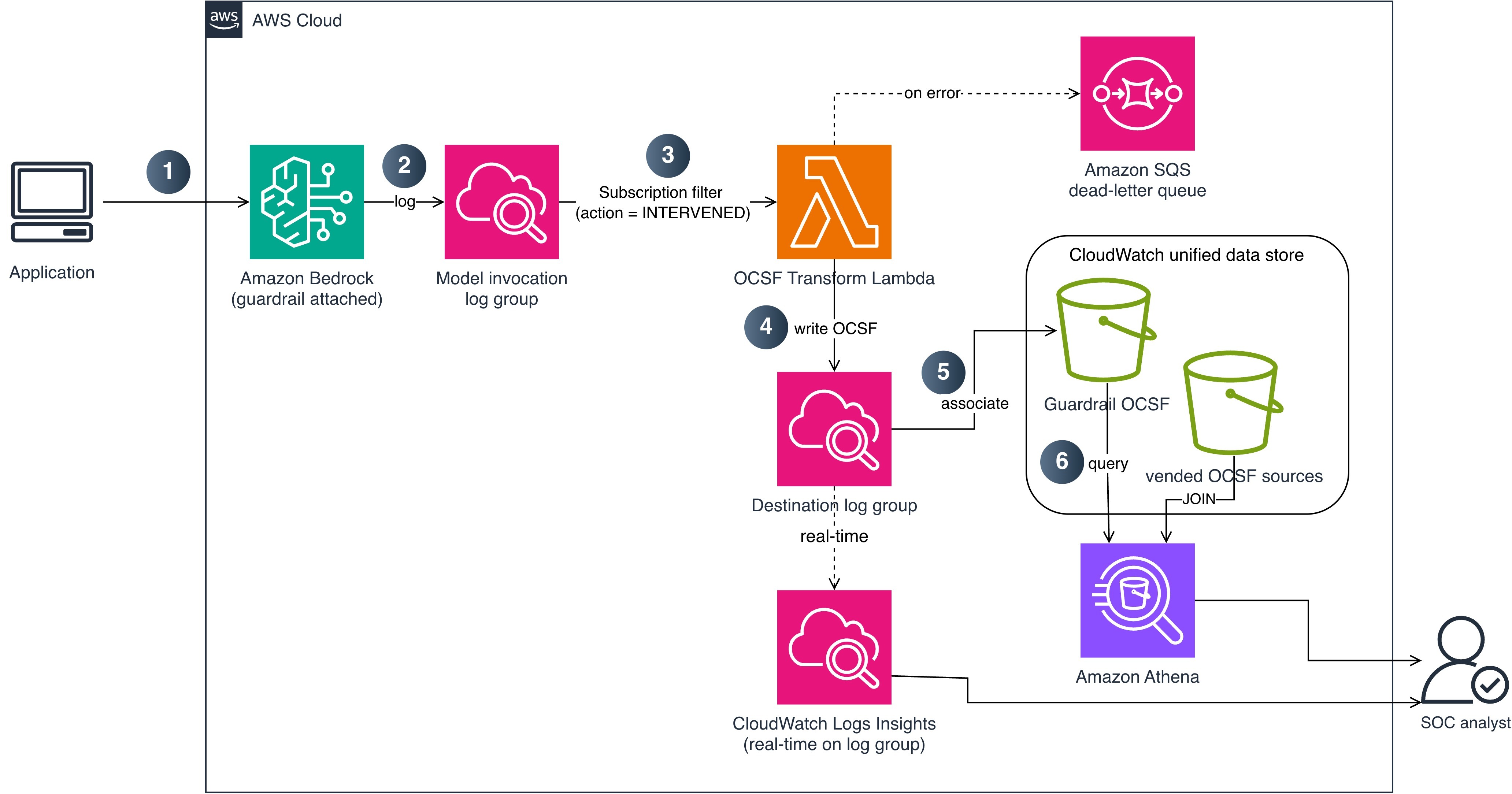
The following diagram shows the end-to-end pipeline from guardrail intervention to CloudWatch unified data store ingestion. It shows the flow within a single account for clarity. In an organization, you deploy this transform pipeline in each workload account and use CloudWatch Logs centralization to bring the OCSF output into one central account, so you query organization-wide without standing up the query layer per account or per Region. The Multi-account deployment section later in this post covers this pattern.
Figure 1: End-to-end pipeline from guardrail intervention to CloudWatch unified data store ingestion
The data flow consists of the following steps:
An application calls AWS Bedrock (InvokeModel or Converse API) with a guardrail attached.
AWS Bedrock evaluates the guardrail and logs the invocation, including guardrail trace data, to a CloudWatch Logs log group using model invocation logging. A subscription filter matches log entries where the guardrail action is INTERVENED (blocked or masked content).
The subscription filter delivers matching records to a Lambda function (OCSF Transform). This step performs the custom transformation that native OCSF conversion doesn’t cover for AWS Bedrock, expanding each guardrail assessment into its own OCSF Detection Finding.
The Lambda function writes the OCSF JSON records to a dedicated CloudWatch Logs log group and sets contextual fields (account ID and Region) on each record during transformation. If the Lambda function fails to process a record, the message routes to an AWS Simple Queue Service (AWS SQS) dead-letter queue for later analysis and redrive.
The destination log group is associated with AWS S3 Tables through the CloudWatch unified data store managed integration, so the unified data store stores the OCSF records as an Apache Iceberg table. Because AWS Bedrock Guardrails is a custom source, each record is stored as OCSF JSON in a managed cwl__message column.
SOC analysts query guardrail intervention data with Athena, using json_extract to read the OCSF fields, and correlate it with vended security sources (CloudTrail, VPC Flow Logs) that share the same catalog. For real-time operational queries, analysts can also query the destination log group directly with CloudWatch Logs Insights.
OCSF mapping
The following table shows how AWS Bedrock Guardrails intervention fields map to OCSF Detection Finding (class_uid 2004) attributes.
OCSF field
Source
Example value
class_uid
Static
2004 (Detection Finding)
category_uid
Static
2 (Findings)
severity_id
Derived from policy type
3 (Medium) for content/topic; 4 (High) for prompt injection
The reference implementation deploys two CloudFormation stacks: TransformPipelineStack and MonitoringStack. The following commands deploy the stacks in dependency order:
Model invocation logging captures the guardrail trace data you need. Turn on full request and response logging to a CloudWatch Logs log group and configure textDataDeliveryEnabled to capture the text bodies that include the guardrail trace output when a guardrail is attached to the invocation. The following AWS Command Line Interface (AWS CLI) command enables it:
Because logging is an account-level prerequisite rather than part of the pipeline, the CDK stacks don’t manage it. Enable it once for each account before deploying.
Deploying the transform pipeline
The TransformPipelineStack deploys the Lambda function, subscription filter, destination log group, and dead-letter queue.
Create the subscription filter: The stack creates a CloudWatch Logs subscription filter on your model invocation log group with a filter pattern that matches guardrail interventions. This captures only the events where a guardrail blocked or modified content, not the successful pass-through events, which reduces Lambda invocations and cost.
Transform to OCSF: The Lambda function parses each CloudWatch Logs event and produces one OCSF Detection Finding record (class_uid 2004) per guardrail assessment in the trace. The transformation maps guardrail trace fields to OCSF attributes as described in the OCSF mapping table and sets contextual fields such as account ID and Region. Severity is set to High for prompt injection interventions and Medium for content, topic, or sensitive information interventions. The records contain structural metadata only; no prompt or response content is included.
Dead-letter queue: If the Lambda function fails to process a record, the message routes to an AWS SQS dead-letter queue with error metadata (error type, message, timestamp) for investigation and redrive.
Configure S3 Tables integration
To make the OCSF records queryable through Athena, associate the destination log group with AWS S3 Tables. This is a two-step managed setup: create an S3 Tables integration, then associate the log group as a data source. The integration delivers to the managed aws-cloudwatch table bucket at no additional storage charge.
Tag the destination log group so the unified data store recognizes it as a data source. Use the tags cw:datasource:name (for example, bedrock_guardrails) and cw:datasource:type (for example, ocsf). The generated table name joins the two tag values with a double underscore, so these example tags produce a table named bedrock_guardrails__ocsf.
Associate the data source with AssociateSourceToS3TableIntegration (CloudWatch Logs), passing the integration ARN and the dataSource name and type from step 1.
The reference implementation performs steps 2 and 3 with the CloudFormation resource AWS::ObservabilityAdmin::S3TableIntegration and a custom resource that calls AssociateSourceToS3TableIntegration, so cdk deploy sets up the association for you.
After association, the OCSF records become available as an Apache Iceberg table in the managed catalog, at the path "s3tablescatalog/aws-cloudwatch"."logs"."bedrock_guardrails__ocsf". You can query it with Athena, AWS Redshift, or any Iceberg-compatible tool.
As noted in the solution overview, AWS Bedrock Guardrails is a custom source, so each record is stored as OCSF JSON in a managed cwl__message column. You read the fields at query time with the Athena json_extract_scalar function, as shown in the next section, and correlate against vended sources such as CloudTrail in the same catalog.
Enable analytics access
The association delivers records to the managed table, but analytics engines can’t read them until you enable the AWS S3 Tables analytics integration and grant read permissions. Complete these steps once in each Region:
In the AWS S3 console, choose Table buckets, then choose Enable integration. The first time you do this in a Region, AWS S3 creates a service role that lets AWS Lake Formation federate access to your tables in the AWS Glue Data Catalog. This is what makes the s3tablescatalog catalog visible to Athena.
In the Lake Formation console, under Data lake permissions, choose Grant, and grant Select and Describe on the aws-cloudwatch table bucket (and the bedrock_guardrails__ocsf table) to each IAM principal that runs queries, such as your SOC analyst roles. Without this grant, Athena queries return an access denied error even when the IAM policy allows Athena.
In the Athena query editor, choose the AWS S3 Tables catalog from the data source list, and select the logs database.
Deploy the monitoring stack
The MonitoringStack creates a CloudWatch dashboard and alarms for pipeline health. The dashboard includes widgets for intervention count by policy type, transform errors, Lambda duration, and dead-letter queue depth. Alarms notify your team when the error rate exceeds 5 percent, the dead-letter queue depth exceeds 0, or p99 Lambda duration exceeds 10 seconds. Notifications are sent through AWS Simple Notification Service (AWS SNS).
Query interventions
After deployment, guardrail interventions are available through two query paths. Use the one that matches your investigation:
Athena (through AWS S3 Tables) for cross-source correlation and historical analysis. Athena joins the OCSF guardrail records with vended OCSF sources in the unified data store (such as CloudTrail and VPC Flow Logs) over long time ranges. Because AWS Bedrock Guardrails is a custom source, its OCSF fields live inside the cwl__message column, so you read them with json_extract_scalar. Use Athena when you need to join guardrail findings against other security data or run trend analysis across weeks or months.
CloudWatch Logs Insights for real-time, operational queries against the destination log group. Use Logs Insights when you need results in seconds on recent data, without a table join, such as during an active investigation.
The Athena queries in this section run against the managed table "s3tablescatalog/aws-cloudwatch"."logs"."bedrock_guardrails__ocsf". For readability, the examples reference it as bedrock_guardrails_ocsf after selecting the s3tablescatalog/aws-cloudwatch catalog and logs database in the Athena query editor.
Correlate with IAM activity in Athena
The following example identifies users who trigger both prompt injection interventions and failed CloudTrail activity. The guardrail side extracts fields from cwl__message; the CloudTrail side is a vended source with typed OCSF columns.
WITH guardrail_violators AS (
    SELECT json_extract_scalar(cwl__message, '$.actor.user.uid') AS user_arn,
           COUNT(*) AS violation_count
    FROM bedrock_guardrails_ocsf
    WHERE json_extract_scalar(cwl__message, '$.unmapped.guardrail_policy_type') = 'PromptAttack'
    GROUP BY json_extract_scalar(cwl__message, '$.actor.user.uid')
),
iam_failures AS (
    SELECT "actor.user.uid" AS user_arn, COUNT(*) AS failure_count
    FROM aws_cloudtrail__management
    WHERE "status_id" = 2
    GROUP BY "actor.user.uid"
)
SELECT g.user_arn, g.violation_count, i.failure_count
FROM guardrail_violators g
JOIN iam_failures i ON g.user_arn = i.user_arn
ORDER BY g.violation_count DESC;
You can also track violation trends by policy type over time to establish baselines and detect spikes:
SELECT date_trunc('day', from_unixtime(
         cast(json_extract_scalar(cwl__message, '$.time') as bigint) / 1000)) AS event_day,
       json_extract_scalar(cwl__message, '$.unmapped.guardrail_policy_type') AS policy_type,
       COUNT(*) AS violation_count
FROM bedrock_guardrails_ocsf
GROUP BY 1, 2
ORDER BY event_day, violation_count DESC;
If you run these correlation queries frequently, you can materialize the extracted OCSF fields into a typed table with CREATE TABLE AS SELECT (CTAS) and refresh it on a schedule. Queries against the materialized table use plain column names instead of json_extract_scalar, which keeps recurring dashboards and joins concise.
Real-time queries in CloudWatch Logs Insights
For operational queries on recent data without a table join, query the destination log group directly in CloudWatch Logs Insights:
This query returns results in seconds on recently ingested records.
Multi-account deployment
For organizations running AWS Bedrock across multiple accounts, the recommended pattern is to transform locally and centralize the OCSF output, rather than replicating raw invocation logs and transforming centrally.
Deploy the subscription filter and transform pipeline in each workload account where model invocation logging is enabled. Each account produces OCSF records in its own destination log group. Then use CloudWatch Logs centralization to replicate those OCSF records into a central logging account automatically. Centralization integrates with AWS Organizations and picks up new accounts as they join, and you create the AWS S3 Tables integration one time in the central account (rather than in every workload account) for organization-wide querying.
Transforming in each workload account keeps the guardrail trace parsing close to the source, avoids moving raw invocation logs (which might contain prompt and response text) across account boundaries, and centralizes only the sanitized OCSF findings. If your organization prefers to keep transformation logic in one place, an alternative is to centralize the raw invocation logs first and run a single transform pipeline in the logging account; this concentrates the parsing logic but moves more data, including request and response content, between accounts.
Clean up
To avoid ongoing charges, destroy the stacks in reverse dependency order:
In this post, you learned how to transform AWS Bedrock Guardrails intervention events into OCSF Detection Finding records and ingest them into the CloudWatch unified data store. This integration gives SOC teams structured guardrail telemetry that correlates with CloudTrail, VPC Flow Logs, and the other security sources already available in CloudWatch. Because guardrail interventions are a custom source, their OCSF fields are stored as JSON and read with Athena json_extract functions, so you can join them with the vended OCSF sources that share the same catalog.
The pipeline filters for intervention events only, which keeps costs low while capturing the security-relevant signals. Athena over AWS S3 Tables provides cross-source correlation and historical analysis, and CloudWatch Logs Insights provides real-time operational queries.
Clone the reference implementation and adapt the OCSF mapping and subscription filter to your guardrail configuration. To extend the pipeline, apply the same transform pattern to agent guardrail traces, which map to the same OCSF Detection Finding class.
Amazon Inspector is an automated vulnerability management service that continually scans Amazon Web Services (AWS) workloads for software vulnerabilities. The vulnerability management capabilities of Amazon Inspector are powered by an asset inventory engine known as the Amazon Inspector SBOM Generator (inspector-sbomgen), a standalone command-line tool that produces a software bill of materials (SBOM) from container images, directories, archives, local systems, compiled binaries, and more. Over the past two years, we’ve expanded inspector-sbomgen’s coverage across dozens of programming language ecosystems, operating systems, and widely deployed applications.
We’re pleased to announce a new capability for builders using inspector-sbomgen: a plugin system for writing your own custom package collectors that you can use right away, without requiring source code compilation nor waiting for an official release.
In this post, we walk you through what the inspector-sbomgen plugin system does, why we built it, and how you can write your first plugin in a few minutes. Along the way, we also cover how plugin-generated package components integrate with Amazon Inspector for vulnerability scanning, and we explore the plugin safety model, which helps ensure security-hardened and predictable plugin behavior.
Why we built a plugin system
Software ecosystems are dynamic. New language package managers, lockfile formats, and end user applications ship constantly, and many are adopted quickly, in some cases with little security scrutiny. That leaves security teams with a visibility gap: production workloads running software that their SBOM tooling doesn’t yet recognize. Customers have asked us to inventory many of these ecosystems directly, and until recently, the only path to support was to open a feature request and wait for the inspector-sbomgen team to onboard the ecosystem and deploy a new release.
The inspector-sbomgen plugin system changes that. With plugins, you can:
Onboard ecosystems that inspector-sbomgen doesn’t support out of the box. New open source ecosystems, niche or fast-moving package formats, and internal or proprietary tooling can all be inventoried without modifying inspector-sbomgen.
Prototype detection for an ecosystem quickly. We designed a plugin system that is friendly to developers and AI coding assistants alike. Plugins are written in Lua, loaded at runtime, and require no Go toolchain nor compilation. You can use the built in test harness to iterate on a plugin and see results immediately.
Build on a stable foundation. The plugin API abstracts away artifact-type differences, so you write your detection logic once and it works seamlessly across container images, archives, local systems, and more. And because plugins stay decoupled from the internals of sbomgen, the core tool’s regression surface stays small.
Internally, we’ve used the plugin system to ship new ecosystem coverage faster than before. In our 1.13 release, more than 20 ecosystems that were previously implemented in Go, including Apache Tomcat, NGINX, MySQL, Redis, WordPress, and the OpenSSH toolchain, are now embedded as plugins inside the sbomgen binary. The same release also added more than ten brand-new ecosystems as plugins, including Apache Cassandra, Apache Struts, Conda, Swift packages, and AI-agent collectors (Amazon Q Developer, Kiro CLI, Claude Code, GitHub Copilot, and Ollama).
How inspector-sbomgen plugins work
Sbomgen plugins follow a two-step pipeline:
Discovery – Scan the artifact’s file system to identify files that contain installed package metadata.
Collection –Open each discovered file, parse file contents, and publish findings into the SBOM.
Under the hood, an event bus connects discovery and collection plugins. Discovery plugins publish events listing discovered files, and one or more collection plugins subscribe to these events, triggering package collection. Developers might recognize this behavior as the observer pattern.
This decoupling lets a single discovery plugin feed multiple collectors, for example, one extracting package metadata, another scanning for secrets, and another checking policy. Each collection plugin works from the same file list without re-walking the artifact filesystem, a computationally expensive operation.
Write your first plugin in 5 minutes
Inspector-sbomgen makes it straightforward to bootstrap a plugin environment. The plugin new command tells sbomgen to create a new plugin workspace, and the —-with-example flag populates the workspace with a discovery-collection plugin pair, that you can run immediately.
inspector-sbomgen plugin new --with-example
After invoking the preceding command, you will be prompted to provide a plugin name and a directory that will contain your plugin workspace. You can provide custom values or use the default values:
Plugin name (identifies the software ecosystem your plugin will inventory, e.g. debian-dpkg, rhel-rpm, python-pip, cmake) [my-custom-ecosystem]: <enter>
Project directory [my-sbomgen-plugins]: <enter>

Created plugin "my-custom-ecosystem" in my-sbomgen-plugins/
Note that you can skip interactive prompts by specifying the plugin name and directory using the corresponding command line interface (CLI) arguments:
After creating your plugin workspace, inspector-sbomgen will display a next steps screen, which guides developers and AI code assistants to the source files they need to change and to supporting documentation:
Next steps:

  Get started:
    1. Open plugin folder in a code editor (VS Code recommended)
    2. Add test files that your plugin will discover and parse
       (e.g., config files, lockfiles, binaries, etc.):
       my-sbomgen-plugins/discovery/cross-platform/extra-ecosystems/my-custom-ecosystem/_testdata/

  Develop:
    3. Edit discovery:    my-sbomgen-plugins/discovery/cross-platform/extra-ecosystems/my-custom-ecosystem/init.lua
    4. Edit collection:   my-sbomgen-plugins/collection/cross-platform/extra-ecosystems/my-custom-ecosystem/init.lua

  Test:
    5. Write unit tests:  my-sbomgen-plugins/discovery/cross-platform/extra-ecosystems/my-custom-ecosystem/init_test.lua
    6. Run unit tests:    inspector-sbomgen plugin test --path my-sbomgen-plugins

  Deploy:
    7. Distribute your plugin directory wherever you run inspector-sbomgen:
       inspector-sbomgen <arguments> --plugin-dir /path/to/my-sbomgen-plugins

       Example:
       inspector-sbomgen container --image alpine:latest -o /tmp/sbom.json --plugin-dir /path/to/my-sbomgen-plugins

For code completion, install the VS Code Lua language server extension:
  https://luals.github.io/#vscode-install

For more information:
  - Plugin guide:    my-sbomgen-plugins/docs/sbomgen-plugin-developer-guide.md
  - Testing guide:   my-sbomgen-plugins/docs/sbomgen-plugin-testing-guide.md
  - API reference:   my-sbomgen-plugins/docs/sbomgen-plugin-api-reference.md
  - Documentation:   https://docs.aws.amazon.com/inspector/latest/user/sbom-generator.html
Now that you have a plugin workspace, let’s explore its contents in greater detail:
The scaffolded project includes a working discovery and collection plugin pair, passing unit tests with test fixtures under _testdata/, a .vscode/settings.json for integrated development environment (IDE) integration, and a local copy of the developer documentation.
The scaffolding is deliberately succinct and complete, so it reads well for both humans and AI coding assistants. Every file has clear comments that explain what each function does and what the plugin author needs to fill in.
To test a plugin, you first need something to scan, such as a package lock file or a compiled binary. The example plugin inventories a fictional example.lock with the following contents:
The provided discovery plugin knows how to look for instances of example.lock within the artifact file system:
-- my-custom-ecosystem discovery plugin
-- Discovers example.lock files in the artifact file list.

function discover()
    return sbomgen.find_files_by_name({"example.lock"})
end
And the provided collection plugin knows how to parse the contents of example.lock and publish package findings to the output SBOM.
-- my-custom-ecosystem collection plugin
-- Parses example.lock files and extracts package name and version.

function collect(file_path)
    local content = sbomgen.read_file(file_path)
    if content == nil then
        return
    end

    for line in content:gmatch("[^\n]+") do
        local name, ver = line:match("^(.+)==(.+)$")
        if name and ver then
            sbomgen.push_package({
                name = name,
                version = ver,
                purl_type = "generic",
                namespace = "my-custom-ecosystem",
                component_type = sbomgen.component_types.APPLICATION,
            })
        end
    end
end
Run the tests
Plugins ship with a built-in test framework so you can validate your logic before scanning a real artifact. Tests are written in Lua, live next to the plugin in init_test.lua, and reference fixture data in _testdata/:
function test_discovers_packages()
    local result = testing.scan_directory("_testdata")
    testing.assert_equals(3, #result.findings)
    testing.assert_equals("my-package-alpha", result.findings[1].name)
    testing.assert_equals("1.0.0", result.findings[1].version)
end

function test_no_findings_for_empty_directory()
    local result = testing.scan_directory("_testdata/empty")
    testing.assert_equals(0, #result.findings)
end
Run the tests with the following command:
inspector-sbomgen plugin test --path my-sbomgen-plugins -v

=== RUN   my-custom-ecosystem/discovery/init_test/test_discovers_packages
--- PASS: my-custom-ecosystem/discovery/init_test/test_discovers_packages (0.04s)
=== RUN   my-custom-ecosystem/discovery/init_test/test_no_findings_for_empty_directory
--- PASS: my-custom-ecosystem/discovery/init_test/test_no_findings_for_empty_directory (0.04s)
ok    2 tests passed
This is the tightest development loop we could design: no Go toolchain, no rebuild, no container spin-up. Write a test, run it, iterate.
Scan a real artifact
For plugins to produce findings, inspector-sbomgen needs an artifact that contains the files your plugin looks for. For the example plugin, any directory with an example.lock file works. The fixture we generated earlier is a good stand-in:
The --plugin-dir flag tells inspector-sbomgen where to load your Lua plugins from. The resulting SBOM contains a CycloneDX component for each of the three packages in example.lock, for example:
Every plugin-generated component carries an amazon:inspector:sbom_generator:source_path property that records the file the component was collected from, so you can always trace a component back to the artifact that produced it.
Vulnerability scanning with Amazon Inspector
Plugin-generated findings are first-class SBOM components. They work with every downstream consumer that reads CycloneDX SBOMs, including Amazon Inspector. To send an SBOM to Amazon Inspector for vulnerability analysis, add the --scan-sbom flag (this requires an active AWS account):
An important caveat when you onboard a brand-new ecosystem: Plugin authors can inventory arbitrary ecosystems, but Amazon Inspector can only report vulnerabilities for components it has advisories for. When you point Amazon Inspector at a component whose ecosystem isn’t in its advisory feeds yet, Inspector will return the component with a property, Component skipped: no supported rules found. For example:
This is expected behavior, not an error. The SBOM is still generated correctly, the component is still tracked, and the source_path tells you exactly which file produced it. If and when Amazon Inspector adds advisory coverage for the ecosystem, the same SBOM will start producing vulnerability findings without any change to your plugin. For ecosystems Inspector already supports, plugin-generated components are indistinguishable from components produced by built-in scanners.
First class IDE support
We care about productivity and efficiency when writing plugins. Writing Lua without modern conveniences such as autocomplete isn’t fun, so every plugin project scaffolded with the plugin new command ships with a library/sbomgen.lua definition file and a .vscode/settings.json that automatically wires it up to the Lua Language Server extension for VS Code.
For code completion and IDE support, first install the sumneko.lua extension, open your plugin project in VS Code, and every sbomgen.* function will get:
Parameter hints with types.
Hover documentation.
Autocomplete for constants (sbomgen.component_types.*, sbomgen.groups.*, sbomgen.platform.*).
Type checking on function calls.
Inline warnings when required fields are missing from push_package().
The same definition file makes plugin development work well with AI coding assistants. The types and documentation are embedded in a form that tools can read, so assistants can generate correct plugin code with far less monitoring than writing against a raw language would require.
A safe foundation
Plugins run real code inside the same process as inspector-sbomgen, so we designed the execution environment to keep that code stable and security-hardened. Every Lua plugin runs in an isolated sandbox. Every Lua virtual machine (VM) has access to a restricted subset of the Lua standard library to ensure only safe operations are permitted:
No direct filesystem access. The Lua io library isn’t loaded. All file operations go through sbomgen.* functions, which route through sbomgen’s internals so your plugin behaves identically whether it’s scanning a directory on disk, a container image, a compressed archive, or a mounted volume.
No subprocess execution or environment mutation. The Lua os library is blocked, so plugins can’t spawn processes, modify environment variables, or touch files outside the artifact.
No VM introspection. The Lua debug library is blocked.
No unbounded code loading.dofile, loadfile, and loadstring are removed. require() is available but restricted to the plugin’s own directory tree, so plugins can share helper modules with themselves but cannot load code from other plugins or system paths.
If a plugin raises an unhandled Lua error, inspector-sbomgen logs a warning and continues with the next file or plugin; one faulty plugin does not prevent other plugins from running. Plugins never override inspector-sbomgen’s built-in package collectors. Every plugin must declare a unique name. If a custom plugin uses a name that’s already claimed by an official built-in plugin, the custom plugin is skipped with a warning. Built-in plugins always take precedence, so a custom plugin can never silently replace or shadow the tool’s own detection behavior.
Whether you’re adding support for an internal lockfile format, prototyping detection for a new open source ecosystem, or replacing a home-grown scanner with something your whole organization can run at scale, the plugin system is designed to make the path from idea to working SBOM as short as possible. We can’t wait to see what you build with it. If you have feedback about this post, submit comments in the Comments section below. If you have questions about this post, contact AWS Support.
When an administrator introduces a rule change in AWS Network Firewall and network connectivity is disrupted, pinpointing the cause requires inspecting multiple points in the traffic path. The firewall gives you stateless and stateful rule engines, domain rules, and routing to the firewall endpoint inside your Amazon Virtual Private Cloud (Amazon VPC). A network drop looks the same from the workload no matter where it started. Isolating the cause means correlating the alert and flow logs with the firewall configuration, route tables, and recent API calls in AWS CloudTrail that might have changed them. That manual correlation is exactly where AWS DevOps Agent helps, accelerating root cause analysis so you can restore connectivity in minutes instead of hours.
AWS DevOps Agent does that correlation for you. As your always-available operations teammate, it resolves and proactively prevents operational issues across AWS, multicloud, and on-premises environments. When an Amazon CloudWatch alarm triggers, it reaches the agent through a webhook. The agent then reads the firewall configuration and logs through AWS APIs, ties the drop to recent API activity, and returns a root cause with a mitigation plan you review before you apply it.
This post connects CloudWatch monitoring to DevOps Agent. It walks through three Network Firewall failures from end to end. The first is a domain deny list blocking a legitimate endpoint. The second is a stateless rule priority misconfiguration. The third is an asymmetric cross Availability Zone (AZ) routing drop. Each maps to a different layer, so each leads down a different investigation path. An AWS Cloud Development Kit (AWS CDK) app deploys the whole environment in your own account so you can reproduce each failure and follow along.
The sample workload
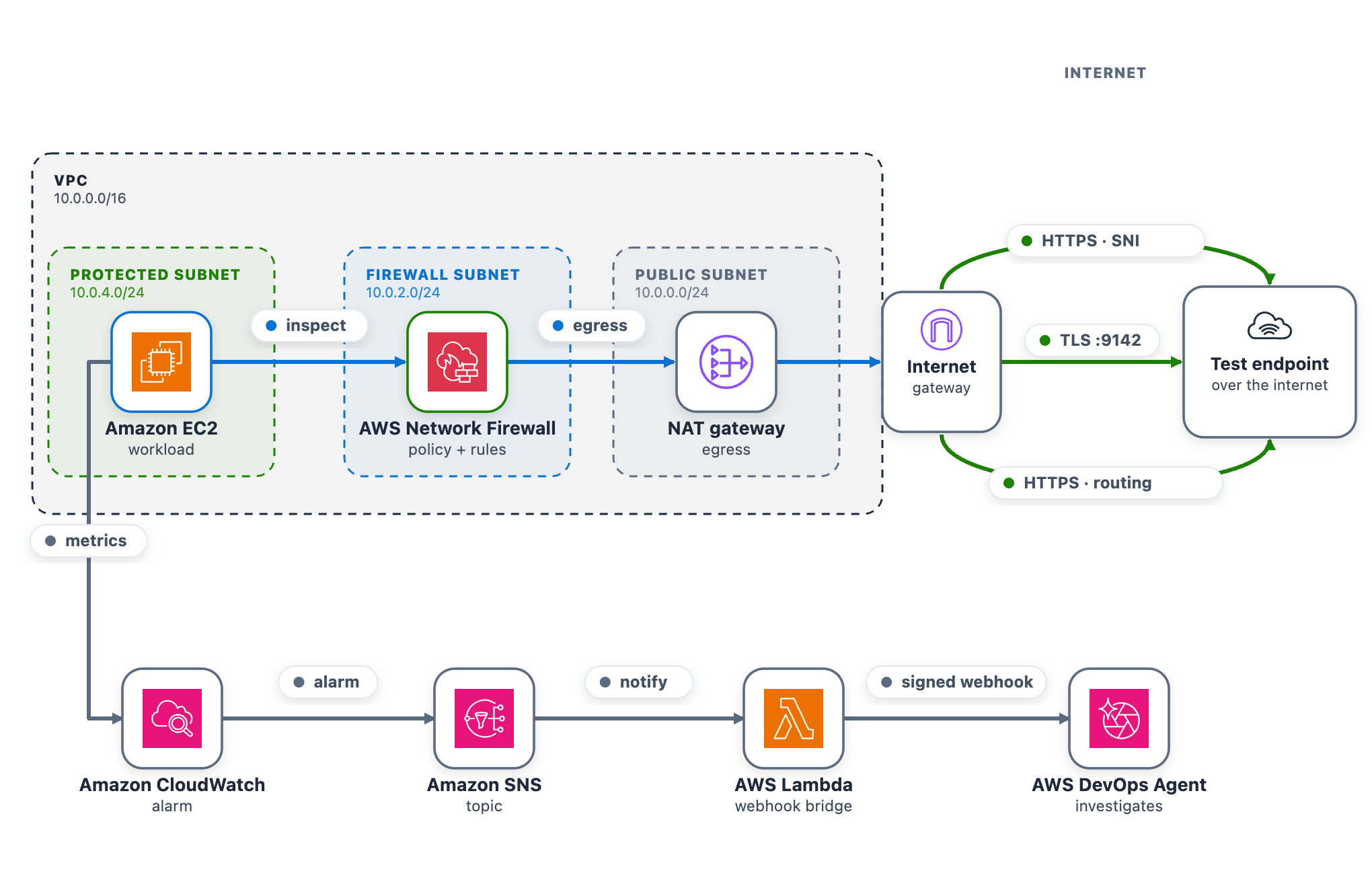
As part of this blog post, we provide a CDK stack that deploys both the AWS DevOps Agent Space and a sample workload used to walk through three separate troubleshooting scenarios. A single t3.micro instance in a protected subnet checks its connectivity to a test endpoint on a continuous loop and publishes results to CloudWatch. Traffic takes the internet egress path through Network Firewall, the NAT gateway, and the internet gateway, so the firewall can intercept or drop it. After completing the walkthrough, you can apply the same troubleshooting techniques with DevOps Agent against your own Network Firewall deployments.
The test endpoint runs in a separate VPC deployed by the same CDK app. It serves HTTPS on port 443 and TCP on port 9142, giving each scenario a different protocol layer to exercise: Scenario 1 targets a TLS connection on 443 (matched by Server Name Indication), Scenario 2 targets a TCP connection on 9142, and Scenario 3 exercises the whole egress path.
A live status page shows one card per scenario plus the network topology. The whole stack deploys from a single CDK app across two Availability Zones, each with a firewall endpoint and NAT gateway, which is what makes Scenario 3 possible.
As shown in the following figure, the egress data path runs from the workload through Network Firewall and the NAT and internet gateways to the test endpoint. The alarm pipeline runs from CloudWatch through Amazon Simple Notification Service (Amazon SNS) and the webhook AWS Lambda function to DevOps Agent.
Figure 1: The sample workload
To use this with your own workload, you need a CloudWatch alarm that detects the connectivity problem and the webhook pipeline (SNS topic and Lambda function) that delivers it to DevOps Agent. The agent reads your firewall configuration, logs, and CloudTrail through AWS APIs, so no additional instrumentation is needed on the firewall side.
AWS CDK 2.x is required. You can use it through the project’s npx dependency, or install it globally:
npm install -g aws-cdk
Deploy the sample workload
Clone the project and deploy it into us-east-1 with one command (set awsRegion to use another AWS Region).
git clone https://github.com/aws-samples/sample-accelerating-aws-network-firewall-troubleshooting-with-aws-devops-agent.git
cd sample-accelerating-aws-network-firewall-troubleshooting-with-aws-devops-agent
bash scripts/deploy.sh
The script checks prerequisites, installs dependencies, compiles and tests, and bootstraps the CDK if needed. It then deploys all the stacks from a clean baseline and prints the outputs, including the status-page URL and sign-in details.
Open the status-page link (an https://<random-id>.cloudfront.net address).
Sign in using the username and password provided from the CDK output and confirm all three cards show the green Healthy status.
Keep the page open while you run the scenarios.
Connect AWS DevOps Agent
To connect AWS DevOps Agent to the alarm pipeline
In the AWS DevOps Agent console, open the nf-devops-agent-space Agent Space created by the CDK deployment.
On the status page, choose Configure webhook, paste the URL and signing secret, and save. The page writes them to the nf-devops-agent-webhook-credentialsAWS Secrets Manager secret, so there is no AWS CLI or console step. Until you set it, the bridge Lambda function sees a placeholder and skips delivery.
Verify the path before you run a scenario. In the Lambda console, open nf-devops-agent-webhook and use the Test tab with this event.
{
  "Records": [
    {
      "Sns": {
        "Message": "{\"AlarmName\":\"TEST-webhook-verification\",\"AlarmDescription\":\"[TEST] Webhook integration test - not a real alarm.\",\"NewStateValue\":\"ALARM\",\"NewStateReason\":\"[TEST] Manual webhook connectivity test. Safe to ignore.\",\"Region\":\"us-east-1\"}"
      }
    }
  ]
}
A 200 response confirms the path, and a test investigation appears in the DevOps Agent Operator Web App view.
How the alarm pipeline works
Every scenario reaches DevOps Agent the same way. A CloudWatch alarm moves to ALARM and notifies the SNS topic. Amazon SNS invokes a Lambda function. The function reads the webhook URL and signing secret from Secrets Manager, signs an alarm payload, and POSTs it to the DevOps Agent webhook (as shown in Figure 1). Amazon SNS also provides delivery retries, fan-out to other subscribers, and cross-account publishing.
Prebuilt Network Firewall metric (Scenario 1) – Alarm-1 watches the DroppedPackets metric, summed across the stateful streams, and triggers when drops rise above a baseline threshold. This requires no workload or custom metric and works on an already-deployed firewall. However, it only tells you that the firewall is dropping packets, not which rule is responsible.
Application health metric (Scenarios 2 and 3) – Alarm-2 and Alarm-3 watch a custom metric from a connectivity check. Use this for an alarm tied to user-facing impact or to tell one traffic path from another, which requires running a component that emits the metric.
Alarm
Source
Triggers when
Alarm-1
Native AWS/NetworkFirewall DroppedPackets
The firewall’s dropped-packet count rises above the baseline
Alarm-2
Custom application health metric
The port 9142 (TCP) connectivity check to the test endpoint is being dropped
Alarm-3
Custom application health metric
The cross Availability Zone connectivity check is being dropped
Run the scenarios
Work through each of the scenarios one at a time, following the same cycle. Interrupt network connectivity, watch the alarm trigger, let DevOps Agent investigate, apply the recommended fix, and confirm recovery before moving on.
The status-page cards follow the live CloudWatch alarm state. A card shows a green dot and the word Healthy when its alarm is clear, and a red dot and the word DROPPED when its alarm triggers. In the DROPPED state the card also adds a Condition: line describing what’s being dropped, which isn’t shown when the card is healthy. Network Firewall applies changes to new flows, so a change shows within a minute or two. Recovery comes from the mitigation DevOps Agent recommends, which you review and apply.
Scenario 1. Domain deny list blocking a legitimate endpoint
At baseline, the rg-domain Suricata domain rule group denies only an unused placeholder, so the test endpoint stays reachable. The rule group inspects the TLS Server Name Indication (SNI) on each outbound connection and drops any that matches a denied domain. The exact rule syntax and console steps follow.
In the navigation pane, under Network Firewall, choose Network Firewall rule groups.
Choose the rg-domain rule group to open its details page.
In the Rules section, choose Edit.
The rules box already contains two baseline placeholder rules (they match blocked.placeholder.invalid, so nothing real is denied). Leave those in place. Find the <app-endpoint-dns> value for Scenario 1 in the deployment script output (a Nework Load Balancer (NLB) DNS name such as NfTest-AppNl-a1b2C3dEf4G5-1234abcd5678efgh.elb.us-east-1.amazonaws.com). On a new line below the existing rules, add a drop rule that matches that DNS name on the TLS SNI, then choose Save.
drop tls $HOME_NET any -> $EXTERNAL_NET any (ssl_state:client_hello; tls.sni; content:"<app-endpoint-dns>"; startswith; nocase; endswith; msg:"S1 domain denylist"; flow:to_server, established; sid:2000002; rev:1;)
After saving, the rules box holds all three lines. The two placeholders remain, plus the new drop rule for the endpoint DNS name (note the distinct sid 2000002).
What happens. The workload’s HTTPS check to the test endpoint times out, the “AWS/NetworkFirewall DroppedPackets metric climbs above baseline, and Alarm-1 moves to ALARM. The Scenario 1 card reads DROPPED (with the condition Firewall dropping the monitored domain on its allow/deny rules), while the Scenario 2 and Scenario 3 cards stay Healthy (Figure 3). On the topology, the alarm pipeline from CloudWatch through Amazon SNS and Lambda to DevOps Agent and the workload-to-firewall inspect lines both turn amber, which the legend defines as collateral / alarm active, because the packets are now dropped at the firewall. To demonstrate the resulting failure, the HTTPS · SNI line from the internet gateway to the test endpoint is shown in red, which the legend defines as dropped (root cause).
Figure 3: Scenario 1 active – Traffic blocked at the firewall
Let DevOps Agent investigate. The agent runs several lines of investigation in parallel and correlates them:
Reads the DroppedPackets metric and correlates the spike with a simultaneous drop in passed packets, confirming the firewall is actively blocking traffic.
Reads the ALERT log and finds the workload’s TLS connections to the test endpoint blocked by the S1 domain denylist rule.
Compares the current state against a baseline window, where the same endpoint was reachable with no alerts, which shows the block is new.
Searches CloudTrail and surfaces the UpdateRuleGroup call that added the deny rule, identifying the user, role, and timestamp approximately one minute before the drops began.
Reports the root cause as that manual rule-group change. Recommends removing the deny entry or adding an allow exception and enabling FirewallPolicyChangeProtection to prevent unauthorized changes.
Presents this as a plan you review and apply, not an automatic change.
In the DevOps Agent Operator Web App view, the agent first restates the Alarm-1 trigger and confirms the firewall is dropping packets above the threshold (Figure 4).
Figure 4: Scenario 1 – The symptom
Next, the agent identifies the root cause: a manual update to the rg-domain rule group that added a domain deny rule (SID 2000002) shortly before the alarm fired, blocking TLS connections to the ELB endpoint (Figure 5).
Figure 5: Scenario 1 – The root cause
Finally, the agent presents a mitigation plan, recommending you remove the problematic deny rule (SID 2000002) to restore connectivity (Figure 6).
Figure 6: Scenario 1 – The mitigation plan
Note: In a real-world environment, this type of rule typically exists for a reason. Before removing it, verify whether it was intentional but scoped too broadly. If so, refine the rule to block only unauthorized endpoints rather than removing it entirely.
Confirm recovery. Apply the change the agent recommends. After the deny entry is gone, DroppedPackets falls back to baseline, Alarm-1 clears, and the card returns to green. Move on to Scenario 2.
At baseline, the rg-stateless-priority stateless rule group keeps the allow rule at priority 100 and the drop rule at 200 for the test class, TCP destination port 9142. The workload opens a TCP connection to the test endpoint on this port. Lower priority numbers evaluate first, so the allow rule wins. This scenario uses port 9142 instead of 443 to demonstrate a stateless rule, which matches on the packet’s 5-tuple (protocol, ports, addresses) rather than application content.
Introduce the change. Invert the two rule priorities so the drop rule evaluates before the allow rule. This is the kind of change a rushed rule edit can introduce.
In the navigation pane, under Network Firewall, choose Network Firewall rule groups.
Choose the rg-stateless-priority rule group to open its details page.
In the Rules section, choose Edit.
Raise the (Action: Pass) rule’s priority number so it sits after the (Action: Drop) rule, then choose Save. For example, change the (Action: Pass) rule from 100 to 300 (any number higher than the drop rule’s 200 works). You only need to move one rule, and using 300 avoids a clash with the drop rule that already sits at 200. Network Firewall evaluates the lowest priority number first, so the (Action: Drop) rule at 200 now wins for this traffic class, ahead of the (Action: Pass) rule at 300.
Figure 7: Scenario 2 – Rule priority change blocking the traffic class
What happens. The drop rule now wins, the TCP connection to the test endpoint on port 9142 times out, the StatelessRuleFailures metric climbs above baseline, and Alarm-2 moves to ALARM. The Scenario 2 card reads DROPPED (with the condition Stateless rules dropping the monitored traffic class), while the Scenario 1 and Scenario 3 cards stay Healthy (Figure 8). On the topology, the alarm pipeline from CloudWatch through Amazon SNS and Lambda to DevOps Agent and the workload-to-firewall inspect lines both turn amber, which the legend defines as collateral / alarm active, because the packets are now dropped at the firewall. To demonstrate the resulting failure, the TLS :9142 line from the internet gateway to the test endpoint is shown in red, which the legend defines as dropped (root cause).
Figure 8: Scenario 2 active
Let DevOps Agent investigate. A stateless drop happens before traffic reaches the stateful inspection engine, so it produces no ALERT log entries. The agent turns to configuration and flow logs instead:
Reads the stateless rule group state and finds the drop rule at the lower priority number, ahead of the pass rule, so the drop evaluates first.
Reads the flow logs and sees passed packets drop to zero within a minute of the change.
Searches CloudTrail and surfaces the UpdateRuleGroup call that inverted the priorities, identifying the user, role, and timestamp about a minute before the alarm.
Reports the root cause as that priority inversion. Recommends removing the redundant drop rule and managing the rule group through infrastructure-as-code (IaC) to prevent manual misconfigurations.
Presents this as a plan you review and apply, not an automatic change.
In the DevOps Agent Operator Web App view, the agent first restates the Alarm-2 trigger and confirms that a workload connectivity health check is failing because the firewall’s stateless rules are dropping egress (Figure 9).
Figure 9: Scenario 2 – The symptom
Next, the agent identifies the root cause, using the rule-group state and CloudTrail to pinpoint the conflicting DROP/PASS rules, where the new DROP rule’s lower priority number makes it match first (Figure 10).
Figure 10: Scenario 2 – The root cause
Finally, the agent presents a mitigation plan, recommending you remove the conflicting DROP rule at priority 200 to restore traffic flow (Figure 11).
Figure 11: Scenario 2 – The mitigation plan
Confirm recovery. Apply the change the agent recommends. After the allow rule is ahead of the drop rule again, Alarm-2 clears and the card returns to green. Move on to Scenario 3.
Scenario 3. Asymmetric cross Availability Zone routing drop
At baseline, the protected subnet in each Availability Zone routes its egress through the firewall endpoint in that same Availability Zone , and the matching return route uses that same endpoint. One endpoint sees both directions of the flow, so the stateful engine completes the handshake. The workload runs in the protected subnet in us-east-1a (CIDR 10.0.4.0/24), so at baseline its egress and its return both use the us-east-1a firewall endpoint.
Introduce the change. Make the flow asymmetric by sending egress out one Availability Zone endpoint while the return comes back through the other. This takes two route edits, and both are required. With only the first edit the flow can still complete, so the alarm will not trigger until both are saved. It makes no firewall-policy change, mirroring a real multi-Availability-Zone routing mistake.
To create asymmetric cross Availability Zone routing
Go to the Amazon VPC console and choose Route tables in the navigation pane.
Flip the egress. Select the NfNetworkStack/SampleVpc/protectedSubnet1 route table (the us-east-1a protected subnet, where the workload runs). On the Routes tab, choose Edit routes. Its 0.0.0.0/0 route currently targets the us-east-1a firewall endpoint. For the target, choose Gateway Load Balancer Endpoint and select the us-east-1b firewall endpoint, then choose Save changes.
Move the return. Select the NfNetworkStack/SampleVpc/publicSubnet2 route table (the us-east-1b public subnet, where egress now exits). Choose Edit routes, then Add route. For the destination enter the workload CIDR 10.0.4.0/24. For the target, choose Gateway Load Balancer Endpoint and select the us-east-1a firewall endpoint. Choose Save changes.
After both edits, a flow’s egress leaves through the us-east-1b endpoint while its return is directed to the us-east-1a endpoint. Neither endpoint sees the whole flow.
Figure 12: Scenario 3 routing change breaking the flow’s symmetry
What happens. A new connection leaves through one endpoint. Its return arrives at the other endpoint, which never saw the connection open, so the handshake fails. Unlike Scenarios 1 and 2, this affects the whole subnet, so all egress stops and Alarm-2 and Alarm-3 both move to ALARM. The AWS/NetworkFirewall DroppedPackets alarm (Alarm-1) stays quiet because no endpoint is making a drop decision. The flow is lost to asymmetric routing rather than counted as a firewall drop. This is why monitoring application connectivity matters. A routing fault is invisible to the firewall’s own drop counter. On the status page, the Scenario 2 card reads DROPPED (with the condition “Stateless rules dropping the monitored traffic class”) and the Scenario 3 card reads DROPPED (with the condition Return traffic dropped by asymmetric cross-Availability-Zone routing), while the Scenario 1 card stays Healthy (Figure 13). On the topology, the alarm pipeline from CloudWatch through Amazon SNS and Lambda to DevOps Agent and the workload-to-firewall inspect lines both turn amber, which the legend defines as collateral / alarm active, while the egress path from the firewall through the NAT gateway and the TLS :9142 and HTTPS · routing lines to the test endpoint turn red, which the legend defines as dropped (root cause).
Figure 13: Scenario 3 – The status page during a path-wide outage
Let DevOps Agent investigate. Both Alarm-2 and Alarm-3 fire in the same datapoint. DevOps Agent recognizes them as linked and merges them into a single investigation:
Reads the flow logs and sees bidirectional TLS connections stop abruptly, with only one-way traffic remaining and no flows reaching the established state.
Reads the firewall metrics and sees received and passed packets shift from one Availability Zone to the other at the moment of the change.
Calls DescribeRouteTables and finds the egress route pointing at one Availability Zone firewall endpoint while the return route points at the other.
Searches CloudTrail and surfaces the ReplaceRoute and CreateRoute calls by the same user, about a minute before both alarms fired.
Reports the root cause as that asymmetric routing change. Recommends restoring symmetric same-Availability-Zone routing so egress and return traverse the same endpoint.
Presents this as a plan you review and apply, not an automatic change.
A mitigation plan is a recommendation you review, not an automatic change, and the right fix depends on the intended design. Restoring symmetric routing can mean sending the workload subnet’s egress back through its own-Availability-Zone firewall endpoint (this sample’s architecture) or, in a design that doesn’t inspect this path, back through a NAT gateway. The agent infers a plausible target from what it can observe, so review the specific route it proposes against your intended topology before you apply it. (Connecting your pipeline or infrastructure-as-code, covered in the next section, lets the agent recommend the target that matches your design.)
In the DevOps Agent Operator Web App view, the agent restates the Alarm-3 (AsymmetricFlowFailures) trigger and confirms the workload’s egress to a monitored endpoint is being blocked by the Network Firewall (Figure 14).
Figure 14: Scenario 3 – The symptom
Next, the agent identifies the root cause: manual route table changes that created cross-AZ asymmetric routing through the network firewall, breaking its symmetric routing requirement (Figure 15)
Figure 15: Scenario 3 – The root cause
Finally, the agent presents a mitigation plan, recommending you restore symmetric routing by pointing protectedSubnet1‘s default route back to the same Availability Zone firewall endpoint, so one endpoint sees both directions of the flow again (Figure 16).
Figure 16: Scenario 3 – The mitigation plan
Confirm recovery. Apply the change the agent recommends, after checking the route target matches your intended design. After the workload subnet’s egress and return use the same Availability Zone firewall endpoint again, the control probe recovers, the alarms clear, and every card returns to green.
Further considerations
In production a single change can trigger several alarms at the same time, as Scenario 3 shows. DevOps Agent links related investigations and works them as one, so you review a single root cause. You can validate the linked findings or unlink an alarm to investigate it independently. If you would rather collapse alarms before they reach the agent, you can add correlation logic in the bridge Lambda function, buffering and grouping by firewall. You can also add email, Amazon Simple Queue Service (Amazon SQS), or HTTP subscribers to the SNS topic, or add the webhook Lambda function to a topic you already run. DevOps Agent produces a mitigation plan but does not change your environment on its own.
You can also give the agent more to work with. DevOps Agent connects to source repositories and CI/CD pipelines, integrating with GitHub (including GitHub Enterprise Server and GitLab Self-Managed through a private connection). It can associate AWS resources with deployments of AWS CloudFormation, AWS CDK, Amazon Elastic Container Registry (Amazon ECR) images, and Terraform. With deployed configuration and recent deployment events in view, the agent correlates the disruption against the change that introduced it and recommends a fix matching your intended design. For this sample, that means recommending the workload subnet’s own Availability Zone firewall endpoint rather than a generic symmetric path.
DevOps Agent also supports proactive incident prevention. It analyzes patterns across past investigations and delivers recommendations to prevent similar issues from recurring, including governance recommendations that strengthen deployment processes and pipeline controls. For Network Firewall rule changes, this means the agent can recommend guardrails for your CI/CD pipeline based on the classes of misconfigurations it has already resolved. You can access these recommendations through the Improvements page in the DevOps Agent Operator Web App.
Clean up
Clean up the environment with one command.
bash scripts/destroy.sh
It reverts any active scenario, runs cdk destroy for all stacks, and sweeps for stragglers by the Project = nf-devops-agent tag. The main cost drivers are the two Network Firewall endpoints, the NAT gateways (one in the main VPC for each Availability Zone, one in the test-endpoint VPC), and the test endpoint’s load balancers. Each of these bills at an hourly rate for as long as it’s provisioned, whether or not traffic is flowing, so a stack left running continues to accrue charges around the clock even while idle. Running the scenarios and tearing the stack down the same day limits the cost to a few active hours rather than days of idle hourly charges.
Conclusion
In this post, we showed you how AWS DevOps Agent accelerates troubleshooting for three common network firewall connectivity issues. The first was a domain deny list. The second was a stateless priority inversion. The third was an asymmetric cross-AZ routing drop. For each one, DevOps Agent investigated the drop and returned a root cause with a mitigation plan you approve before applying. The first scenario triggered on a prebuilt Network Firewall metric, and the other two on application health metrics. That shows both ways to alarm on a firewall problem through one pipeline.
Signal agencies in Australia, the US, the UK, New Zealand and Canada sound alarm after Trump blocks foreign nationals from Anthropic’s Fable AI model
Powerful AI models capable of devastating new cyber attacks on governments and businesses are mere months away, intelligence agencies for the Five Eyes have warned in a rare joint statement, urging leaders to “act now”.
If you’re building multi-agent AI systems, you need to prevent authorization scope from silently expanding as agents delegate tasks through multi-hop chains. Without proper controls, an agent can potentially act beyond what the originating user authorized, even when role-based access control (RBAC) policies are in place. The OWASP Top 10 for Agentic Applications classifies this risk as ASI03: Identity & Privilege Abuse.
This post shows you how to address the potential risk using a three-layer policy model built with Cedar, an open source authorization policy language, deployed on Amazon Web Services (AWS). The reference implementation uses OAuth 2.0 for authentication and Cedar for authorization. A trusted identity provider authenticates the originating user, then Cedar policies enforce authorization across three layers using verified token claims.
Reference implementation overview
To enforce authorization at each hop in a multi-agent delegation chain, the reference implementation uses two AWS Lambda functions in sequence. A Model Context Protocol (MCP) adapter Lambda function normalizes inbound requests and cryptographically signs the originating user context. This prevents downstream tampering. A Cedar evaluator Lambda function evaluates three independent policy layers sequentially, halting on the first deny.
Table 1: Three-layer Cedar policy evaluation model
Layer
What it checks
Principal to resource
L1 – Agent-to-tool
Whether the invoking agent has a sufficient trust score (1–5), belongs to the correct namespace (for example, payments), and is in the production lifecycle stage
Agent to tool
L2 – Agent-to-agent delegation
Whether the delegation hop count is within the hard limit of five, and whether requested tasks are a subset of the target agent’s registered capabilities
Agent to agent
L3 – Originating user authorization
Whether the human who initiated the chain has the required role (for example, admin), has completed MFA, and is within the allowed delegation depth
Agent to tool (user in context)
Architecture
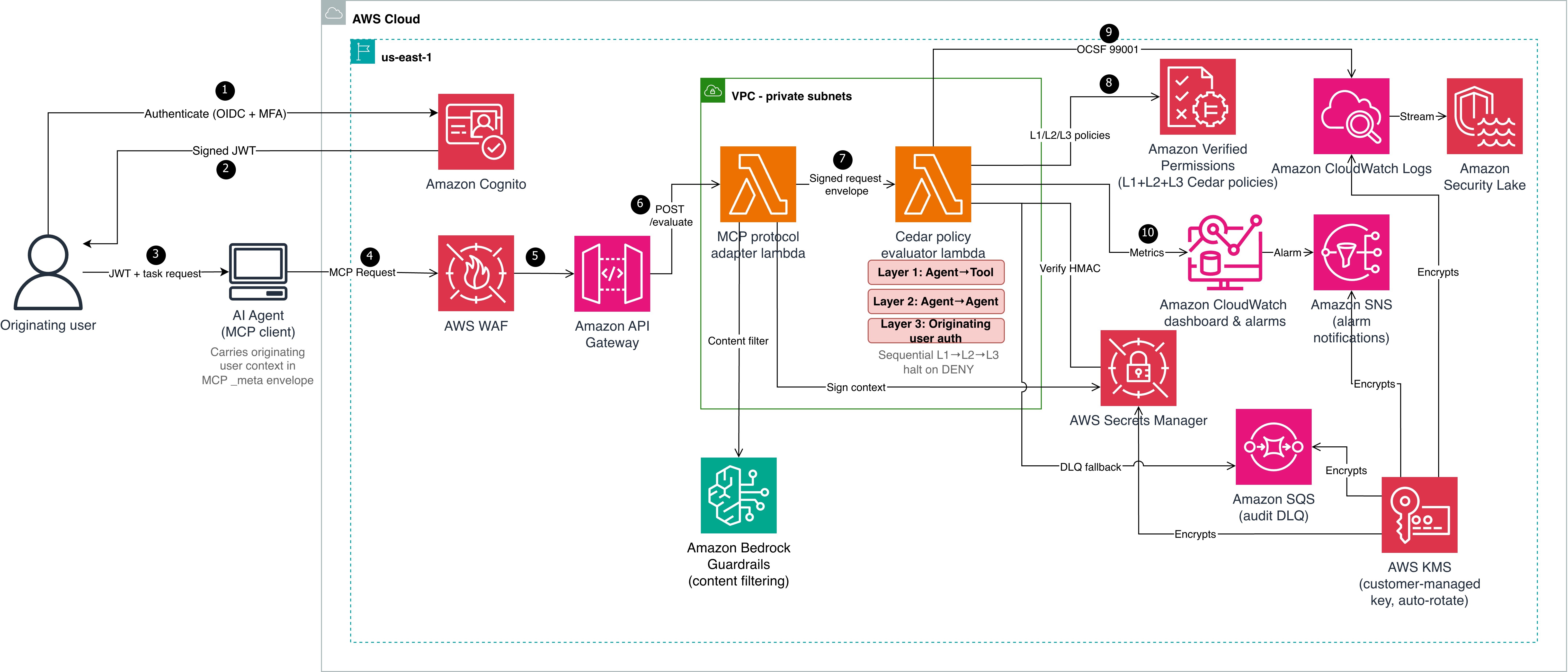
Cedar evaluates authorization but doesn’t establish identity. Before Cedar can evaluate context.originating_user.role or context.originating_user.mfa_verified, a trusted authentication layer must establish the user’s identity and produce verifiable claims. Steps 1–3 handle authentication; steps 4–10 handle authorization. The architecture shown in Figure 1 is described in the following lists:
Authentication (steps 1–3)
The originating user authenticates with an OIDC-compliant identity provider (in this reference implementation, Amazon Cognito with TOTP multi-factor authentication (MFA)). The identity provider (IdP) issues a signed JSON Web Token (JWT) containing claims such as sub, role, amr (authentication methods), and session_id.
Amazon Cognito returns the signed JWT to the user.
The user passes the JWT and task request to the AI agent (MCP client). The agent carries the originating user context in the MCP _meta envelope.
Authorization pipeline (steps 4–10)
The AI agent sends a Model Context Protocol (MCP) request to AWS WAF, which filters using CommonRuleSet, SQLiRuleSet, rate limiting, and body size constraints.
Amazon API Gateway (with Amazon Cognito authorizer) verifies the JWT signature against the user pool’s public keys and rejects invalid or expired tokens. Valid requests are forwarded to the MCP protocol adapter Lambda function, which applies Amazon Bedrock Guardrails content filtering.
The adapter extracts verified claims from the token and maps them to Cedar context attributes:
JWT role claim : context.originating_user.role
JWT amr includes MFA method: context.originating_user.mfa_verified = true
JWT sub: context.originating_user.user_id
JWT sid: context.originating_user.session_id
JWT amr claim: context.originating_user.authentication_method
The adapter then computes an HMAC-SHA256 signature over the user context (user_id, role, mfa_verified, authentication_method, and session_id in canonical order) using a key from AWS Secrets Manager.
The adapter constructs a signed request envelope and invokes the Cedar evaluator Lambda function.
The evaluator verifies the HMAC-SHA256 signature, retrieves L2 and L3 Cedar policies from Amazon Verified Permissions, and evaluates all three layers (L1, L2, and L3), halting on the first deny.
Two mechanisms work together to protect identity across hops:
Hash-based Message Authentication Code (HMAC-SHA256) ensures integrity and authenticity. Every downstream evaluator verifies this signature before trusting the context.
OAuth 2.0 Token Exchange (RFC 8693) sets delegation scope using the on-behalf-of (OBO) pattern. When the orchestrator delegates to a downstream agent (data-bot), it exchanges the original token for a scoped OBO token that records who’s acting on behalf of whom and with what authority. The Cedar policies (detailed in Step 2: Three-layer policies) then check whether that scoped delegation is permitted and verify the originating user claims carried in the OBO token. Token exchange limits each downstream agent to only the delegated task’s scope instead of passing through the full original token. For enterprise deployments, use token exchange alongside HMAC. OAuth tracks who is acting on behalf of whom and with what scope. HMAC verifies that the context hasn’t been tampered with and came from a trusted source.
Prerequisites
The following prerequisites are needed to deploy the reference implementation. Before you begin, clone the repository:
git clone https://github.com/aws-samples/sample-cedar-agentic-ai-authorization.git
cd sample-cedar-agentic-ai-authorization
In this walkthrough, you define the Cedar entity schema and policies, deploy the infrastructure with AWS CDK, and integrate your identity provider.
To define the Cedar entity schema
In this step, you define a schema with two entity types (Agent and Tool) and two actions (invoke_tool and delegate_task) in the AgentAuthz namespace. Notice that there is no User entity. Instead, you carry the originating user’s identity in the evaluation context record, which is a structured data object passed alongside each authorization request.
This schema is deployed to an Amazon Verified Permissions policy store by the VerifiedPermissionsStack CDK stack. In the reference implementation, the schema file is located at cedar-entity-schema.json.
Agent topology and attributes
The following tables show the agents and tools registered in this reference implementation, along with the attributes the Cedar evaluator function retrieves from the entity store. The test scenarios that follow trace requests through this topology.
Table 2: Agent attributes
Entity
Type
trust_level
namespace
lifecycle_stage
registered_capabilities
orchestrator
Agent
5
orchestration
production
delegate_task
route_request
finance-agent
Agent
3
payments
production
process_payment
refund
data-bot
Agent
4
data
production
query_records
delete_records
Table 3: Tool attributes
Tool
namespace
risk_level
process_payment
payments
medium
delete_records
data
high
query_records
data
low
The orchestrator can delegate to both data-bot and finance-agent. Each agent can only invoke tools within its registered capabilities. The test scenarios below trace requests through these delegation paths.
To create three-layer Cedar policies
The following policies are deployed to the same Verified Permissions policy store. In the reference implementation, policy files are located under cedar/policies/ organized by layer: layer1-agent-to-tool/, layer2-agent-to-agent/, and layer3-originating-user-auth/.
Layer 1 (agent-to-tool): This policy permits the finance-agent to invoke the process_payment tool only when three conditions are met: the agent’s trust score is at least 3, it belongs to the payments namespace, and it’s deployed in the production lifecycle stage. If any condition fails, the request is denied. The agent’s trust_level, namespace, and lifecycle_stage aren’t self-reported in a production deployment. Instead, the evaluator retrieves these attributes from the Verified Permissions entity store using the agent_id as a lookup key.
Important: The reference implementation accepts these values from the request payload for simplicity. Production deployments must validate agent attributes against an authoritative source to prevent a compromised agent from escalating its own trust.
The trust_level attribute uses a 1–5 integer scale that represents an agent’s verified maturity: 1 for newly registered and untested agents, 3 for agents that have passed integration testing and security review, and 5 for agents with a proven production track record. Organizations assign trust levels through their agent promotion pipeline, not through self-declaration. The lifecycle_stage attribute (development, staging, production) prevents pre-production agents from invoking production tools, even if they have the correct namespace and trust score.
Layer 2 (agent-to-agent delegation) enforces depth limits and capability constraints. The orchestrator agent delegates tasks to data-bot only when the delegation chain is three hops or fewer and the requested capabilities are a subset of data-bot’s registered capabilities. A separate forbid policy (L2-004) enforces a hard system-wide limit of five hops regardless of which agents are involved.
// L2-002: Orchestrator can delegate to data agent
permit(
  principal == AgentAuthz::Agent::"orchestrator",
  action == AgentAuthz::Action::"delegate_task",
  resource == AgentAuthz::Agent::"data-bot"
) when {
  context.delegation_depth <= 3 &&
  context.target_capabilities.containsAll(context.requested_capabilities)
};
Layer 3 (originating user authorization) keeps the agent as the principal, but the policy evaluates context.originating_user to validate the human who initiated the request. data-bot invokes the delete_records tool only when the originating user has the admin role, has verified MFA, and the delegation chain is at most two hops deep. Without this layer, an agent with the right capabilities could invoke destructive tools regardless of who initiated the request.
Key design point: The principal remains the agent, not a user entity. The user’s role and MFA status are checked through context attributes, keeping the schema to two entity types and two actions.
Integrate your IdP
The reference implementation uses Amazon Cognito with TOTP MFA, but most OIDC-compliant providers (Okta, Microsoft Entra ID, Auth0, or AWS IAM Identity Center) work with this pattern. The authentication-to-signing flow is described in the preceding Authentication before authorization section. To use a different IdP, replace the Cognito authorizer on API Gateway with a Lambda or JWT authorizer for your IdP’s issuer URL. Cedar policies remain unchanged.
Deploy the infrastructure with AWS CDK
The reference implementation deploys five CloudFormation stacks: KmsStack, VerifiedPermissionsStack, LambdaStack, SecurityLakeStack, and MonitoringStack. The following commands deploy the stacks in dependency order:
The end-to-end tests cover the three scenarios described in the following sections. Each test sends a request through the deployed API and validates the per-layer authorization decisions.
Scenario A: Layer 3 enforcement
A support-role user (no MFA) requests record deletion through orchestrator and data-bot.
Layer
Decision
Reason
L1: Agent-to-tool
PERMIT
data-bot has trust level 4, namespace data, and lifecycle production
L2: Agent-to-agent
PERMIT
orchestrator is authorized to delegate to data-bot, depth within limits
L3: Originating user
DENY
User role is support, not admin; MFA not verified
Overall
DENY
Denying layer: L3
Without Layer 3, this request would have been permitted based on agent capabilities alone, demonstrating why originating user authorization is essential.
Scenario B: Authorized admin request
An admin user with MFA requests the same operation through the same chain.
Layer
Decision
Reason
L1
PERMIT
Agent attributes match
L2
PERMIT
Delegation path authorized
L3
PERMIT
Role is admin, MFA verified, depth is less than or equal to 2
Overall
PERMIT
All three layers permit
Scenario C: Delegation depth limit
An admin with MFA requests the same operation, but the delegation chain has six hops. This scenario tests the Layer 2 depth constraint independently of user authorization.
Layer
Decision
Reason
L1
PERMIT
Agent attributes match
L2
DENY
Depth of six exceeds the hard limit of five
Overall
DENY
Denying layer: L2 (L3 not evaluated – halt)
Even an authorized admin can’t bypass the delegation depth constraint.
Alignment with the security principles for agentic AI
Property-based testing (Hypothesis) for adversarial input fuzzing, Cedar policy formal verification with strict schema validation, end-to-end scenarios testing policy bypass and privilege escalation paths, and infrastructure-as-code (IaC) with AWS CDK.
Traditional security controls remain applicable
AWS WAF, Amazon VPC isolation, AWS Key Management Service (AWS KMS) encryption, Amazon Cognito MFA, and Secrets Manager; NIST SP 800-53 control mapping.
Deterministic external controls (security box)
Three-layer Cedar evaluation runs outside the agent’s reasoning loop in a separate Lambda function. HMAC-signed context prevents tampering. Verified Permissions (the managed Cedar evaluation service) enforces L2 and L3 at the infrastructure level.
Greater autonomy earned through evaluation
trust_level and lifecycle_stage policy attributes calibrate agent capabilities; OCSF 99001 audit events and Amazon CloudWatch dashboards provide the evidence base for expanding autonomy.
Monitoring and audit compliance
Each evaluation produces an OCSF 99001 audit event with request ID, user identity, delegation chain, per-layer decisions, and latency.
The following table maps this implementation to NIST SP 800-53 Rev. 5 controls. Customers are responsible for evaluating whether it meets their compliance requirements.
NIST control
Control name
How the reference implementation addresses it
AC-4
Information Flow Enforcement
User context flows immutably through HMAC-signed envelopes
AC-6
Least Privilege
Three-layer evaluation requires both agent capability and user role
AC-6(1)
Authorize Access to Security Functions
MFA required for high-risk tools in Layer 3
AC-6(5)
Privileged Accounts
Destructive operations restricted to admin with MFA verified
AU-2
Event Logging
Each evaluation is logged as OCSF 99001
AU-3
Content of Audit Records
Events include identity, chain, action, resource, decisions, and latency
SI-10
Information Input Validation
HMAC verified before evaluation; Amazon Bedrock Guardrails on inbound
IA-2(1)
Multi-factor Authentication
Layer 3 enforces MFA for high-risk operations
SC-12
Cryptographic Key Management
Signing key in Secrets Manager with rotation
SC-28
Protection of Information at Rest
Policies in Verified Permissions with STRICT validation
Scaling to multi-account environments
Deploy the Cedar policy store in a central security account and use cross-account IAM roles for workload accounts to call verifiedpermissions:IsAuthorized. Use AWS Organizations service control policies (SCPs) to prevent workload accounts from creating their own policy stores. For standardizing user identity attributes across the organization, consider IAM Identity Center or a centralized OIDC provider that issues consistent claims to your workload accounts. This helps ensure that the context.originating_user attributes are uniform across accounts and agents.
Multi-agent AI systems need authorization boundaries at every delegation hop. The three-layer Cedar policy model with OAuth 2.0 authentication provides that protection while maintaining least-privilege access. Combining a trusted IdP (AuthN) with Cedar policy evaluation (AuthZ) creates an authorization boundary around each tool invocation, verifying agent capability (L1), delegation path (L2), and originating user authority (L3). The pattern works with an OIDC-compliant IdP and a compute platform that can call Amazon Verified Permissions. Clone the reference implementation and adapt the Cedar policies to your organization’s requirements. For more information, see the Cedar policy language documentation and the Amazon Verified Permissions User Guide.
In this blog post you’ll learn how to detect and prevent subdomain takeover – a tactic where threat actors exploit dangling DNS records to redirect traffic to attacker-controlled resources. We’ll explain the issue, how the situation arises, and how you can use various AWS features and services to help mitigate the impact of this tactic.
Under the shared responsibility model, securing configurations in the cloud is your responsibility. AWS supports you through strong defaults, guidance in the Security Pillar of the Well-Architected Framework, and security services to help you meet that responsibility. The AWS Customer Incident Response Team (AWS CIRT) also monitors for new and trending tactics that threat actors use to exploit specific customer configurations, so that you can make informed design decisions and improve your response plans.
AWS CIRT has observed threat actors actively scanning for public DNS CNAME records that point to resources that no longer exist, looking for subdomain takeover opportunities.
Note: The subdomain takeover tactic does not leverage vulnerabilities of AWS services. It exploits a dangling DNS record to redirect traffic to an attacker-controlled resource.
Quick DNS Primer
CNAME Records: A CNAME (Canonical Name) record is a DNS entry that points one domain name to another. For example, api.example.com can be configured to point to api.example.s3-website-us-east-1.amazonaws.com. This feature of DNS enables users to configure a memorable, human-friendly domain name while the actual resource lives at a longer, machine-generated AWS hostname. A security issue emerges when the target resource is deleted but the CNAME record pointing to it remains – creating a “dangling” record.
Dangling Records: When a resource (like an S3 bucket) is deleted but the DNS record pointing to it is left behind, that DNS record becomes “dangling”, pointing to a resource that no longer exists. For resources in globally shared namespaces, threat actors can potentially reclaim the name of your deleted resource and serve malicious content through your DNS record.
What is subdomain takeover?
A subdomain is a prefix added to a domain that allows you to organize access to your resources. A subdomain takeover occurs when you delete the underlying resource and a threat actor creates a new resource with the same name to take advantage of the DNS records still pointing to it.
A subdomain takeover is possible when a CNAME record points to an AWS resource that uses a globally shared DNS namespace where the resource name can be chosen by any AWS customer. The following AWS resources meet these criteria:
Amazon S3 (global namespace): Bucket names like mybucket.s3.amazonaws.com are globally unique and can be claimed by any account if the bucket is deleted. Note: S3 buckets created with account regional namespaces (launched March 2026) are scoped to your account and are not subject to this issue.
Amazon CloudFront: Distribution domain names like d111111abcdef8.cloudfront.net are assigned by AWS and cannot be chosen by an attacker. However, if you delete a distribution and another customer creates one that happens to receive the same domain name, a dangling CNAME could resolve to their content.
AWS Elastic Beanstalk: Environment names like myapp.elasticbeanstalk.com are globally unique and can be claimed by any account if the environment is terminated.
Resources like Amazon VPC, Amazon EC2 instances, or private hosted zones are not subject to this tactic because they do not expose globally claimable DNS namespaces.
You create a DNS CNAME record pointing to your S3 website endpoint. The subdomain subdomain.example.com now resolves to subdomain.example.s3-website-us-east-1.amazonaws.com, which serves content from the S3 bucket named subdomain.example. If your team deletes the bucket and forgets to delete the DNS record, users that navigate to the site will see an error stating that the bucket doesn’t exist. However, at this point, if a threat actor sees this error and moves in to claim the bucket name, they will be able to set up their own site that users will see when they navigate to the subdomain.example.com site.
Figure 1 shows an S3 bucket named subdomain.example (a globally unique bucket name) configured to host a static website, with the S3 website endpoint subdomain.example.s3-website-us-east-1.amazonaws.com.
Figure 1: S3 bucket configured as a static website
As shown in Figure 2, we use Amazon Route 53 to create a CNAME record to resolve to our Amazon domain name; to give users a friendly name and so they do not have to remember the long S3 website name in URLs.
Figure 2: DNS Resolver configured with CNAME record pointing to origin bucket
The customer’s AWS administrator decides to stop serving content from the S3 bucket and deletes it, as shown in Figure 3.
Figure 3: Resource deleted without removing the CNAME record
With the S3 bucket deleted and the CNAME record still in place, the DNS record is now dangling. A threat actor identifies this situation and creates a new S3 bucket with the same global name subdomain.example in an AWS account that the threat actor controls, as shown in Figure 4. The threat actor can now serve content from this new bucket, including potentially malicious content. End users remain unaware of this switch and continue to access subdomain.example.com, trusting the content because it appears to originate from a URL they recognize.
Figure 4: Subdomain takeover happens
Potential impacts of a sub-domain takeover
Consider these potential impacts:
Reputation risk: There is a potential risk to your organization’s reputation, because you don’t control the content being served from the threat actor’s site that your DNS record points to.
Potential exposure to phishing campaigns: Users within your organization might have the subdomain bookmarked in their browser, not knowing the resource is no longer available, then unsuspectingly navigate to the site that now hosts malware or is used to phish user credentials.
Blocking: If the subdomain is flagged by security vendors for malicious activity, it could impact your business operations.
Financial loss: Subdomain takeover incidents can result in a financial impact due to the potential disruption to service delivery as you deal with the event.
Proactive detection
AWS Config for proactive detection
For proactive detection, you can use AWS Config to continuously monitor your Route 53 CNAME records and verify that the target resources exist in your account.
Prerequisite: This approach requires AWS Config recorder to be enabled for the resource types you want to monitor (S3 buckets, CloudFront distributions, Elastic Beanstalk environments). If Config isn’t recording a resource type, it won’t appear in the inventory check. For more information, see Setting up AWS Config with the console.
Why use AWS Config inventory instead of DNS resolution checks?
A common approach is to check whether a CNAME resolves to a valid endpoint. However, this method has a critical flaw: if an attacker has already claimed the resource, DNS resolution will succeed – to their resource, not yours. You would have no indication that you don’t own what’s responding.
By querying AWS Config’s recorded configuration items, you’re checking whether the resource exists in your account inventory, not just whether something responds at that DNS name. This approach correctly identifies dangling CNAMEs even after a takeover has occurred.
Implementation approach:
Account-level vs. organization-level scope
The reference implementation queries AWS Config inventory within a single account. This means that if a CNAME record in Account A points to a resource that legitimately exists in Account B within the same AWS organization, the rule will flag it as NON_COMPLIANT.
For organizations that share resources across accounts, you can modify the solution to use an AWS Config Aggregator, which queries resource inventory across all accounts in your organization. This is similar to how IAM Access Analyzer supports both account-level and organization-level scopes. To use this approach, you need an organization-level Config Aggregator already configured, and the Lambda function’s IAM role needs the config:SelectAggregateResourceConfig permission.
We recommend starting with account-level scope for simplicity, then expanding to organization-level if your environment includes cross-account resource sharing.
The main idea is to create a custom AWS Config rule that queries your Route 53 hosted zones for CNAME records, then parses each CNAME target to determine whether it points to a known AWS resource pattern such as S3, CloudFront, or Elastic Beanstalk. For each match, the rule cross-references the target against your AWS Config inventory to verify that the resource actually exists in your account. If the resource isn’t found, the rule marks the CNAME record as NON_COMPLIANT, surfacing it for review.
The Config rule should focus on known AWS resource patterns:
Note: CNAME records pointing to external third-party services are outside the scope of this detection mechanism, as those resources won’t appear in your AWS Config inventory.
NON_COMPLIANT findings from your Config rule can be routed to AWS Security Hub for centralized visibility, or trigger SNS notifications to alert your security team.
Figure 5: Dangling DNS Detection Solution
Reference implementation:
We’ve published a complete implementation of this detection approach as an open-source solution. The solution deploys a Lambda function that discovers CNAME records across all your Route 53 hosted zones and uses pattern matching to identify targets pointing to S3, CloudFront, and Elastic Beanstalk. It then queries your AWS Config inventory to verify whether each target resource still exists in your account. When a dangling record is detected, the solution generates a HIGH severity finding in Security Hub and can optionally send SNS notifications to alert your security team. A CloudWatch metrics dashboard is also included for ongoing compliance tracking.
Deployment:
# Clone the repository
git clone https://github.com/aws-samples/sample-dangling-dns-detection
cd sample-dangling-dns-detection

# Build the Lambda deployment package
./scripts/package.sh

# Upload to S3
aws s3 cp dist/dangling-dns-detection.zip s3://YOUR_BUCKET/

# Deploy the CloudFormation stack
aws cloudformation deploy \
  --template-file infrastructure/template.yaml \
  --stack-name dangling-dns-detection \
  --parameter-overrides \
      LambdaCodeS3Bucket=YOUR_BUCKET \
      EvaluationFrequency=TwentyFour_Hours \
  --capabilities CAPABILITY_NAMED_IAM
The stack creates an AWS Config custom rule that runs on your specified schedule (default: every 24 hours), evaluating all CNAME records and reporting compliance status.
Mitigating the effects
Mitigating subdomain takeover requires both preventive procedures and responsive capabilities.
Prevention: Standard operating procedure
The most effective mitigation is a standard operating procedure for resource deprovisioning that ensures DNS records are removed before the underlying resource:
Within your DNS zone, delete the CNAME record that points to the fully qualified domain name (FQDN) of the resource that you plan to deprovision.
Wait for the DNS TTL to expire before deleting the resource. DNS resolvers cache records for the duration of the TTL (for example, a TTL of 3600 means resolvers may serve the old record for up to one hour). If you delete the resource before the TTL expires, a threat actor could claim the resource name while cached CNAME entries are still directing traffic to it.
Deprovision the resource that you no longer want to use.
Run a DNS check of the CNAME record that you removed to verify that the resource is no longer resolving.
Key principle: Always delete DNS first, wait for the TTL to expire, then delete the resource. This order eliminates the window where a dangling record could be exploited.
Prevention: S3 account regional namespaces
As mentioned earlier, AWS introduced account regional namespaces for Amazon S3 general purpose buckets in March 2026. While this is a meaningful step toward mitigating the S3-specific takeover vector, there are important operational limitations to be aware of:
Existing buckets are unaffected. Buckets already created in the global namespace cannot be migrated to an account regional namespace. The bucket names remain globally unique and claimable by anyone if the bucket is deleted.
Global namespace is still the default. When creating a new bucket through the console, CLI, or SDK, the global namespace remains the default selection. Users who aren’t aware of the new option will continue creating globally-scoped buckets.
Existing IaC templates require updates. Existing infrastructure-as-code templates (CloudFormation, CDK, Terraform) that don’t explicitly opt in to the account regional namespace will continue provisioning buckets in the global namespace. For CloudFormation, this means setting the BucketNamespace property to account-regional. For other IaC tools, consult their documentation for the equivalent configuration. Organizations need to audit and update their templates to opt in.
For these reasons, the dangling DNS detection approach described in this post remains critical – particularly for organizations with existing S3 infrastructure, and for CloudFront, and Elastic Beanstalk resources where no equivalent namespace scoping exists.
Response: Notification and remediation
When a dangling DNS record is detected, the reference solution described in the Detection section automatically creates a HIGH severity finding in AWS Security Hub and reports the CNAME record as NON_COMPLIANT in AWS Config. If you provide an SNS topic ARN during deployment, the solution also sends notifications to alert your security or operations team via email, Slack, or other channels. For production environments, consider a human-in-the-loop workflow where these notifications are reviewed by a team member who approves the DNS record deletion before it’s executed. This prevents accidental deletion of legitimate records during transient issues.
The reference solution also includes a CloudWatch dashboard for tracking compliance status and evaluation metrics over time, giving your team ongoing visibility into DNS health across your hosted zones.
Note: Fully automated remediation (auto-deleting DNS records) carries risk – a false positive could disrupt legitimate services. We recommend starting with detection and notification, then evaluating automation based on your detection accuracy and operational maturity.
Conclusion
Subdomain takeover is a preventable misconfiguration that can have significant impact on your organization. A layered defense approach provides the best protection:
Prevention: Implement a standard operating procedure that deletes DNS records before deprovisioning the underlying resource.
Detection: Use AWS Config custom rules to proactively identify CNAME records pointing to resources that no longer exist in your account.
Response: Configure notifications through SNS or Security Hub so your team can respond quickly when dangling records are detected.
Monitoring: Maintain ongoing visibility through CloudWatch dashboards to track DNS health and compliance status.
The key insight is that good DNS hygiene – knowing when your CNAME records point to a nonexistent resource – is your first line of defense. Automated detection through AWS Config provides a safety net when operational procedures fail. And if you detect an issue, having a playbook ready to enact your response can lower the impact and your mean time to recovery.
If you have feedback about this post, submit comments in the Comments section below.
You can use Amazon Cognito user pools to add sign-up and sign-in functionality to your web and mobile applications. You can authenticate users directly with Amazon Cognito managed accounts using passwords, passwordless flows, or custom authentication flows, or let users federate in through external identity providers (IdP) using SAML, OpenID Connect, or social providers such as Google, Facebook, Sign in with Apple, or Login with Amazon. For consumers, identity federation means fewer passwords to remember and a smoother sign-in experience. For business-to-business (B2B) software as a service (SaaS) providers, it means your tenants’ organizations keep control of their own identities rather than managing credentials on their behalf. But federation can also introduce challenges for enterprises and application developers. What happens when your enterprise customer’s SAML provider sends hundreds of group memberships that exceed attribute size limits? Or when your ecommerce customer forgets they already have an account and tries to sign in with a different social provider, creating duplicate records?
In this blog post, I introduce the inbound federation Lambda trigger for Amazon Cognito, a new feature that gives you programmatic control over federated authentication flows. This AWS Lambda trigger intercepts the federated authentication response immediately after your external identity provider responds to Cognito, so you can transform, filter, and enrich user attributes before the user profile is created and user attributes are mapped in your user pool.
Understanding the inbound federation Lambda trigger
The inbound federation Lambda trigger is invoked after your Amazon Cognito user pool has received and verified the response from the external IdP. The request payload for the federated IdP response is then sent from Cognito to your Lambda function and you will receive the following information:
The common parameters of Amazon Cognito Lambda triggers (including userPoolId and clientId)
Which external IdP was used (for example, providerName)
The providerType (SAML, OIDC, Login with Amazon, and so on)
Attribute data from the external IdP specific to the user signing in
The specific format of this attribute data depends on the provider type, view the Inbound federation Lambda trigger parameters section in the docs to learn more. If the external IdP is a SAML provider, you will receive a JSON key-pair listing of the user’s attributes from the IdP assertion. If the external IdP is an OIDC provider (or social provider), you will receive the access token and attribute data from the /userinfo endpoint, along with an ID token if one was provided. See Figure 1 for a detailed flow of a federated sign-in with an Amazon Cognito user pool configured to use the inbound federation Lambda trigger.
Figure 1: Sequence flow of a federated login configured with the inbound federation Lambda trigger
The user begins using the application but is required to sign in first.
The managed login is rendered, and the user can select which IdP they want to sign in with. If identifiers are used with SAML or OIDC providers, the user enters their email address and Amazon Cognito looks up the domain of their provided email and routes them to the appropriate IdP.
Alternatively, the managed login can be bypassed by the client providing the identity_provider request parameter.
Amazon Cognito sends the authentication request to the appropriate IdP.
The external IdP challenges the user to sign in.
The user completes the sign-in process required by the external identity provider.
The challenge response is sent to the external IdP.
The IdP verifies that the sign-in is successful. If there are any subsequent challenges, such as multi-factor authentication (MFA), additional rounds of authentication challenges and responses take place. This is determined by the configuration and settings of the external IdP.
The external IdP sends a response to the Amazon Cognito user pool, and Cognito validates the cryptographic signature and that it hasn’t been tampered with.
Amazon Cognito sends attribute data from the IdP to the inbound federation Lambda function
Attribute data for the authenticated user and the common parameters for Amazon Cognito are available for the Lambda function to add, modify, or suppress according to your requirements.
Your added, modified, or suppressed attributes are returned to Amazon Cognito. These are attribute values that map to the user’s profile in Cognito—whether the user profile was just created or is being updated for a returning user.
Continuing the OAuth 2.0 authorization code grant, Amazon Cognito sends an authorization code to the client.
The client then calls the /token endpoint with the authorization code. Note: It’s a security best practice to use confidential clients and to use OAuth 2.0 Proof Key for Code Exchange (PKCE) extension whenever possible.
An access, ID, and refresh token is returned to the client.
The user has signed into the application. ID tokens can be used to identify who the user is (authentication), and access tokens can be used to determine what the user can do (authorization).
Common federation challenges and use cases
Federation introduces complexity that varies depending on your use case. For B2B and SaaS applications, you’re often not in control of your customers’ IdPs, including what attributes they send or how they format them. As an example, an enterprise customer will configure their SAML response to include every group a user belongs to. This could be hundreds of groups or long group identifiers, and if the group membership of the user is mapped to an Amazon Cognito attribute, this can lead to a scenario where the Cognito attribute size limit is exceeded, causing federated sign-ins to fail.
Challenges for business-to-customer (B2C) applications can differ from B2B use cases. For B2C applications, organizations shouldn’t be required to think about identity providers. The ability to sign-up and sign-in should be seamless for consumer-facing applications. Customers visiting a consumer-facing application might create an account with email and password, forget they created created it, and then later try signing in with Facebook (or other social provider). Without proper account linking in Amazon Cognito, you then have multiple user records for the same user, which could lead to fragmented purchase history and a frustrating customer experience.
Both B2B and B2C use cases might need to look up external data just prior to completing the sign-in process, such as additional roles and access for B2B users or looking up active orders for B2C users. Another example could be the need to normalize data just prior to storing it in the user profile within the Amazon Cognito user pool or even discarding personally identifiable information (PII) prior to storing it in your Cognito user pool.
With the inbound federation Lambda trigger, you can handle these B2B and B2C use cases programmatically, and do so without requiring modification of your applications or coordinating IdP-specific changes with external IdPs. In this section, I dive deeper into two common use cases: oversized group attributes, common with B2B customers, and automated account linking, common with B2C customers.
Use case 1: Filtering oversized group attributes
If you have B2B and SaaS use cases, it’s a common practice to use group membership from the IdP to determine the level of access you have within the SaaS service. This is a great way to still provide some access control back to the enterprise customers themselves. The groups can be used to represent the roles a user will have or for some form of coarse-grained authorization. However, your customers might inadvertently send a large number of groups a user is a member of, thus leading to an oversized attribute payload.
Another common scenario is where the syntax and format of group name a user belongs to can arrive in various formats across different IdPs; such as a canonical name (for example, example.com/groups/myApp-readOnly), a distinguished name (common with LDAP based systems and such as cn=myApp-readOnly,OU=groups,DC=example,DC=com), or a plain text string (such as myApp-readOnly). Instead of having downstream authorization logic to accommodate different variations of a group name, you can now normalize how groups are represented prior to storing the user’s attribute data using the inbound federation Lambda trigger.
To expand this, imagine your enterprise customer uses a SAML IdP, such as Active Directory Federation Services (AD FS), in front of Active Directory (AD). When their users authenticate, AD FS sends a groups attribute containing every AD group the user belongs to. For users in large organizations, this can be hundreds of groups, and the attribute is mapped to an Amazon Cognito attribute, this could result in a string that exceeds 2,048-character limit per attribute of Cognito. Authentication would fail in this scenario, ultimately leading to support tickets because enterprise customers would be unable to sign in. Even if certain users didn’t exceed this limit, because of a smaller number of group memberships, this would result in the collection and storing of unnecessary data in your Cognito user pool.
Previously, you would need to work with your customer’s IT department to modify their SAML configuration to filter groups at the source—a process that could take weeks and require multiple approval cycles because it involves a change to the federation configuration. Especially for SaaS customers, this isn’t a scalable approach because you could integrate with hundreds of external IdPs. With the inbound federation Lambda trigger, you can solve this by filtering the groups to only those relevant to your application and normalizing the nomenclature of these groups. The following Lambda function filters the groups attribute to include only groups relevant to your application and normalizes the names of groups.
// Configure the group prefix to filter on (e.g. "App1-", "myApp-", etc.)
// Change this to match the prefix your IdP uses for relevant group names.
const GROUP_PREFIX = process.env.GROUP_PREFIX || 'myApp-';

// The SAML attribute/claim name that contains group membership.
// Common values: "groups", "memberOf", "http://schemas.xmlsoap.org/claims/Group", etc.
const GROUP_ATTRIBUTE = process.env.GROUP_ATTRIBUTE || 'groups';

/**
 * Extracts the short group name from common IdP formats:
 *   - Plain text:       "myApp-readOnly"
 *   - Leading slash:    "/myApp-readOnly"
 *   - Canonical/URL:    "example.com/groups/myApp-readOnly"
 *   - Distinguished name (DN): "cn=myApp-readOnly,OU=groups,DC=example,DC=com"
 * Returns the last meaningful segment so all formats normalize to "myApp-readOnly".
 */

function extractGroupName(raw) {
  let name = raw.trim();

  // Some IdPs prefix group names with "/" to indicate a top level group — strip it before format detection
  if (name.startsWith('/')) {
    name = name.substring(1);
  }

  // DN format — extract the CN (common name) value
  if (/^cn=/i.test(name) || /,\s*(ou|dc)=/i.test(name)) {
    const cnMatch = name.match(/^cn=([^,]+)/i);
    return cnMatch ? cnMatch[1].trim() : name;
  }

  // URL / path format — take the last segment after the final "/"
  if (name.includes('/')) {
    const segments = name.split('/').filter(Boolean);
    return segments[segments.length - 1];
  }

  return name;
}
export const handler = async (event) => {
  try {
    console.log('Full event:', JSON.stringify(event, null, 2));
    console.log('Provider type:', event.request?.providerType);

    // Initialize the response structure
    event.response = event.response || {};

    if (event.request?.providerType?.toLowerCase() === "saml") {
      const samlResponse = event.request.attributes?.samlResponse;

      if (samlResponse) {
        console.log('Original SAML Attributes:', JSON.stringify(samlResponse, null, 2));

        // Build the attribute map — you MUST include every attribute you want Cognito to retain. Anything omitted from userAttributesToMap is dropped.
        const mappedAttributes = {};

        Object.keys(samlResponse).forEach(key => {
          if (key === GROUP_ATTRIBUTE) {
            // Parse the groups JSON string from the SAML assertion
            let groupsArray = [];
            try {
              groupsArray = JSON.parse(samlResponse[GROUP_ATTRIBUTE]);
            } catch (error) {
              console.error(`Error parsing ${GROUP_ATTRIBUTE}:`, error);
            }

            // Normalize each group name, then filter to the configured prefix
            const normalizedGroups = groupsArray.map(extractGroupName);
            const filteredGroups = normalizedGroups.filter(group =>
              group.startsWith(GROUP_PREFIX)
            );

            console.log(`Original ${GROUP_ATTRIBUTE}:`, groupsArray);
            console.log(`Normalized ${GROUP_ATTRIBUTE}:`, normalizedGroups);
            console.log(`Filtered ${GROUP_ATTRIBUTE}:`, filteredGroups);

            // Only include the groups attribute if there are matching groups
            if (filteredGroups.length > 0) {
              mappedAttributes[GROUP_ATTRIBUTE] = filteredGroups.map(group => `'${group}'`).join(', ');
            }
          } else {
            // Pass all other SAML attributes through unchanged
            mappedAttributes[key] = samlResponse[key];
          }
        });

        event.response.userAttributesToMap = mappedAttributes;
        console.log('Response to Cognito:', JSON.stringify(event.response, null, 2));
      }
    }

    // For any unhandled provider type (or missing samlResponse), this intentionally does NOT set userAttributesToMap and tells Cognito to keep all original IdP attributes unchanged (no-op).

    // To handle OIDC or social providers, add additional logic here using event.request.attributes.idToken, .userInfo, and/or .tokenResponse.

    return event;
  } catch (error) {
    console.error('Error in Lambda:', error);
    throw error;
  }
};
This approach reduces a large group list to only what is applicable to your application. Authentication succeeds, and you maintain control over your user pool’s data without depending on external configuration changes.
Use case 2: Automatic account linking
The second use case addresses a challenge that’s particularly common in B2C facing ecommerce or any consumer-facing applications; although it can also be applicable to B2B scenarios. Imagine you’re running an online retail store. A customer creates an account with their email and password to make a purchase. A few months later, they return to your site but forgot they already created an account and they see the Login with Amazon button and decide to sign in this way. Without account linking, Amazon Cognito creates a new federated user because these are technically distinct accounts, and now this customer has two separate accounts with different purchase histories and saved preferences.
This fragmentation creates a poor customer experience and complicates your business operations. You can’t see the customer’s complete purchase history, loyalty points are split across accounts, and your analytics show two distinct customers instead of one.
The inbound federation Lambda trigger can be used to solve this by automatically linking federated identities to existing local accounts based on email address. While account linking can also be implemented in a pre-sign-up Lambda trigger, the inbound federation trigger runs on every federated sign-in, not just the first, giving you access to the latest IdP attributes and the ability to apply linking logic continuously rather than only at initial account creation. If no local Amazon Cognito account exists, you can create one and then link the social provider account to it. The local account can serve as the primary identity, ensuring consistent JSON Web Tokens (JWTs) regardless of how the user signs in. The following is an example of an inbound federation Lambda trigger that can help address this use case.
import {
  CognitoIdentityProviderClient,
  ListUsersCommand,
  AdminCreateUserCommand,
  AdminLinkProviderForUserCommand
} from "@aws-sdk/client-cognito-identity-provider";

const client = new CognitoIdentityProviderClient();

export const handler = async (event) => {
  try {
    console.log('Full event:', JSON.stringify(event, null, 2));

    const { userPoolId, request, userName } = event;
    const { providerName, providerType, attributes } = request;

    // Extract email and profile attributes based on provider type
    const { email, givenName, surname } = extractAttributes(providerType, attributes);

    if (!email) {
      console.error('No email found in federated response');
      return event;
    }

    console.log(`Processing federated login for email: ${email}, provider: ${providerName} (${providerType})`);

    // Check if a local user exists with this email
    const existingUser = await findLocalUserByEmail(userPoolId, email);

    if (existingUser) {
      console.log(`Found existing local user: ${existingUser.Username}`);
      if (isAlreadyLinked(existingUser, providerName, userName)) {
        console.log(`Federated identity ${providerName}:${userName} is already linked to ${existingUser.Username}, skipping link`);
      } else {
        await linkFederatedUser(userPoolId, existingUser.Username, providerName, userName);
      }
    } else {
      console.log('No existing local user found, creating new one');
      const newUsername = await createLocalUser(userPoolId, email, givenName, surname);
      await linkFederatedUser(userPoolId, newUsername, providerName, userName);
    }

    return event;

  } catch (error) {
    console.error('Error in account linking Lambda:', error);
    throw error;
  }
};


/**
 * Check if the federated identity is already linked to the local user by inspecting the identities attribute from the ListUsers response.
 */
function isAlreadyLinked(user, providerName, federatedUsername) {
  const identities = user.Attributes?.find(a => a.Name === 'identities');
  if (!identities?.Value) return false;

  try {
    const parsed = JSON.parse(identities.Value);
    return parsed.some(id => id.providerName === providerName && id.userId === federatedUsername);
  } catch {
    return false;
  }
}

/**
 * Extract email and profile attributes based on provider type.
 * - SAML: attributes come from samlResponse
 * - OIDC/Social: attributes come from userInfo, falling back to idToken (if one exists)
 */
function extractAttributes(providerType, attributes) {
  if (providerType?.toLowerCase() === 'saml') {
    const saml = attributes?.samlResponse;
    return {
      email: saml?.email || null,
      givenName: saml?.givenName || '',
      surname: saml?.surname || ''
    };
  }

  // OIDC and social providers: prefer userInfo, fall back to idToken
  const userInfo = attributes?.userInfo;
  const idToken = attributes?.idToken;

  const source = userInfo?.email ? userInfo : idToken;

  return {
    email: source?.email || null,
    givenName: source?.given_name || '',
    surname: source?.family_name || ''
  };
}

/**
 * Find a local Cognito user (not EXTERNAL_PROVIDER) by email address.
 */
async function findLocalUserByEmail(userPoolId, email) {
  try {
    const command = new ListUsersCommand({
      UserPoolId: userPoolId,
      Filter: `email = "${email}"`
    });

    const response = await client.send(command);
    console.log('ListUsers response:', JSON.stringify(response, null, 2));

    if (!response.Users || response.Users.length === 0) {
      return null;
    }

    // Find the first user that is a true local account (not a federated-only profile)
    const localUser = response.Users.find(u => u.UserStatus !== 'EXTERNAL_PROVIDER');
    return localUser || null;
  } catch (error) {
    console.error('Error finding user by email:', error);
    throw error;
  }
}

/**
 * Create a new local Cognito user without a password.
 * With passwordless (email OTP) enabled on the user pool, the user is created with UserStatus=CONFIRMED and no FORCE_CHANGE_PASSWORD state.
 */
async function createLocalUser(userPoolId, email, givenName, surname) {
  try {
    const userAttributes = [
      { Name: 'email', Value: email }
    ];

    if (givenName) userAttributes.push({ Name: 'given_name', Value: givenName });
    if (surname) userAttributes.push({ Name: 'family_name', Value: surname });

    const command = new AdminCreateUserCommand({
      UserPoolId: userPoolId,
      Username: email,
      UserAttributes: userAttributes,
      MessageAction: 'SUPPRESS'
    });

    const response = await client.send(command);
    console.log(`Created local user: ${email}`, JSON.stringify(response, null, 2));

    return email;
  } catch (error) {
    console.error('Error creating local user:', error);
    throw error;
  }
}

/**
 * Link a federated user identity to a local Cognito user.
 * The local user becomes the primary profile — all future JWTs will represent this local user regardless of sign-in method.
 */
async function linkFederatedUser(userPoolId, localUsername, providerName, federatedUsername) {
  try {
    const command = new AdminLinkProviderForUserCommand({
      UserPoolId: userPoolId,
      DestinationUser: {
        ProviderName: 'Cognito',
        ProviderAttributeValue: localUsername
      },
      SourceUser: {
        ProviderName: providerName,
        ProviderAttributeName: 'Cognito_Subject',
        ProviderAttributeValue: federatedUsername
      }
    });

    const response = await client.send(command);
    console.log(`Linked federated user ${federatedUsername} to local user ${localUsername}`);
    console.log('Link response:', JSON.stringify(response, null, 2));

    return response;
  } catch (error) {
    if (error.name === 'AliasExistsException' || error.message?.includes('already linked')) {
      console.log(`User already linked: ${error.message}`);
      return;
    }
    console.error('Error linking federated user:', error);
    throw error;
  }
}
Every federated sign-in will invoke the inbound federation Lambda trigger, and the logic is straightforward. When a user authenticates with an external identity provider, the trigger extracts their email from the federated response and searches the user pool for a local Cognito account with that same email. If one exists—such as if the user originally signed up with email and password—the Lambda function links the federated identity to that existing local account. If no local account exists, the trigger creates one on the fly as a passwordless account (confirmed, suppressing any emails, and ready for passwordless email one-time passcode (OTP) sign-in), then links the federated identity to it. In both cases, the local account is set as the primary profile. This means the user’s JWTs always carry the same sub-claim regardless of how they sign in—directly, or through Google, Facebook, or SAML—your application sees one consistent identity. The preceding Lambda trigger is also smart enough to check whether a linked account already exists before making the call, so returning users who’ve already been linked don’t generate unnecessary API calls. And because the local account supports passwordless authentication, a user who first arrived through federation can later sign in directly with an emailed OTP—or even add a password later through your applications account settings. The local account is always the anchor.
Best practices
As you implement these patterns, keep a few best practices in mind. Your Lambda function must be completed within 5 seconds, so optimize for speed to help ensure the federated sign-in process is able to successfully complete. If you’re making external calls within the inbound federation Lambda function, like Amazon DynamoDB queries or API requests, implement caching where possible. Handle errors gracefully—if your Lambda function throws an exception or an error, authentication could fail for the user. Consider logging the error and returning the original event back to Amazon Cognito rather than failing authentication for a legitimate user attempting to sign in. Here are some additional best practices for working with Lambda functions.
For the account linking use case, automatic linking relies on matching the email from the federated identity to a local account. However, there are scenarios where this match won’t exist. For example, Apple’s Hide My Email feature generates a unique alias for each app, so the federated email won’t match any existing local account. This is an effective privacy feature but it also blocks the ability to automatically link accounts. In cases like these, your application will need to implement a user-initiated account linking flow, such as prompting the user to verify ownership of both email addresses before calling the AdminLinkProviderForUser API to complete the link.
Monitor your Lambda function performance using Amazon CloudWatch metrics. Set up alarms for errors, timeouts, and throttling so you can respond quickly if issues arise. I also recommend capturing sample event payloads from a CloudWatch log group during your initial development and deployment—these will be valuable for local testing and debugging which can lead to quicker resolution if issues arise in your production environment. This is especially important as different IdPs (namely SAML and OIDC providers) may respond with varying attribute and value syntaxes. Consider implementing CloudWatch alarms to alert your security and operational teams if authentication failures spike, which could indicate an attempted attack, misconfiguration, or provide insight into further optimization of your inbound federation Lambda trigger.
Conclusion
In this post, you learned about the new inbound federation Lambda trigger for Amazon Cognito and how it can solve various use cases. You walked through two common federation challenges and reviewed some sample code to help resolve those challenges. For B2B and SaaS applications, the inbound federation Lambda trigger gives you control when dealing with oversized attributes from external identity providers (such as group membership) without requiring coordination with enterprise IT teams. For B2C and consumer-facing applications, it enables seamless account linking across multiple authentication methods, creating a unified customer experience.
The new Lambda trigger works with SAML, OIDC, and supported social providers, and is available now in AWS Regions where Amazon Cognito is available. To learn more about the new Lambda trigger and others, see the Amazon Cognito Developer Guide.
What federation challenges are you facing in your applications? I’d love to hear about your use cases in the comments below and over at AWS re:Post.
In the third quarter of 2025, we updated the methodology for calculating statistical indicators based on the Kaspersky Security Network. These changes affected all sections of the report except for the statistics on installation packages, which remained unchanged.
To illustrate the differences between the reporting periods, we have also recalculated data for the previous quarters. Consequently, these figures may significantly differ from the previously published ones. However, subsequent reports will employ this new methodology, enabling precise comparisons with the data presented in this post.
The Kaspersky Security Network (KSN) is a global network for analyzing anonymized threat information, voluntarily shared by users of Kaspersky solutions. The statistics in this report are based on KSN data unless explicitly stated otherwise.
The quarter in numbers
According to Kaspersky Security Network, in Q1 2026:
More than 2.67 million attacks utilizing malware, adware, or unwanted mobile software were prevented.
The Trojan-Banker category was the prevalent mobile malware threat with a 52.96% share of total detected applications.
More than 306,000 malicious installation packages were discovered, including:
162,275 packages related to mobile banking Trojans;
439 packages related to mobile ransomware Trojans.
Quarterly highlights
The number of malware, adware, or unwanted software attacks on mobile devices decreased to 2,676,328 in Q1, down from 3,239,244 in the previous quarter.
Attacks on users of Kaspersky mobile solutions, Q3 2024 — Q1 2026 (download)
The overall drop in attack volume stems primarily from a reduction in adware and RiskTool detections. Nonetheless, this trend does not equate to a lower risk for mobile users. As shown later in this report, the number of unique users targeted by these threats remained relatively stable.
In Q1, Synthient researchers identified a link between the notorious Kimwolf botnet and the IPIDEA proxy network. This network was later taken down in cooperation with GTIG.
In early 2026, we discovered several apps on Google Play and the App Store that contained a new version of the SparkCat crypto stealer.
The Trojan code, meticulously concealed, was embedded into the infected Android apps. The obfuscated malicious Rust library was decrypted using a Dalvik-like virtual machine custom-built by the attackers. The iOS version of the malware also underwent several changes; specifically, the attackers began leveraging Apple’s proprietary Vision framework for optical character recognition (OCR).
Mobile threat statistics
The number of Android malware samples saw a slight increase compared to Q4 2025, reaching a total of 306,070.
The detected installation packages were distributed by type as follows:
Detected mobile apps by type, Q4 2025* — Q1 2026 (download)
* Data for the previous quarter may differ slightly from previously published figures due to certain verdicts being retrospectively revised.
Threat actors once again ramped up the production of new banking Trojans; as a result, this category overtook all others in volume, accounting for more than half of all installation packages.
Share* of users attacked by the given type of malicious or potentially unwanted app out of all targeted users of Kaspersky mobile products, Q4 2025 — Q1 2026 (download)
* The total percentage may exceed 100% if the same users encountered multiple attack types.
Following the surge in banking Trojan installation packages, the number of associated attacks also rose, causing Trojan-Banker apps to climb one spot in terms of their share of targeted users. Mamont variants emerged as the most prevalent banking Trojans, accounting for 73.5% of detections, with the rest of the users encountering Faketoken, Rewardsteal, Creduz, and other families.
Yet banking Trojans were still outpaced by adware and RiskTool-type unwanted apps when measured by the total number of affected users. Despite a decrease in their share of installation packages, these two app types retained their positions as the top two threats by attack volume. The most common adware detections involved HiddenAd (44.9%) and MobiDash (38.1%), while most frequently seen RiskTool apps were Revpn (67%) and SpyLoan (20.5%).
TOP 20 most frequently detected types of mobile malware
Note that the malware rankings below exclude riskware or potentially unwanted software, such as RiskTool or adware.
Verdict
%* Q4 2025
%* Q1 2026
Difference in p.p.
Change in ranking
Backdoor.AndroidOS.Triada.ag
2.62
7.09
+4.48
+10
DangerousObject.Multi.Generic.
6.75
5.84
-0.92
-1
DangerousObject.AndroidOS.GenericML.
3.52
5.51
+1.99
+6
Trojan-Banker.AndroidOS.Mamont.jo
0.00
5.28
+5.28
Trojan.AndroidOS.Fakemoney.v
5.40
3.44
-1.96
-1
Trojan-Downloader.AndroidOS.Keenadu.l
0.00
3.35
+3.35
Trojan-Banker.AndroidOS.Mamont.jx
0.00
3.09
+3.09
Backdoor.AndroidOS.Triada.z
4.87
3.08
-1.79
-2
Trojan.AndroidOS.Triada.fe
5.01
2.98
-2.02
-4
Backdoor.AndroidOS.Keenadu.a
2.07
2.73
+0.66
+6
Trojan-Banker.AndroidOS.Mamont.jg
0.34
2.37
+2.03
Trojan.AndroidOS.Triada.hf
2.15
2.23
+0.07
+3
Trojan.AndroidOS.Boogr.gsh
2.35
2.15
-0.20
0
Trojan.AndroidOS.Triada.ii
5.68
2.07
-3.60
-11
Backdoor.AndroidOS.Triada.ae
1.91
1.76
-0.16
+3
Backdoor.AndroidOS.Triada.ab
1.79
1.72
-0.08
+3
Trojan.AndroidOS.Triada.gn
2.38
1.58
-0.80
-5
Trojan-Banker.AndroidOS.Mamont.gg
1.56
1.50
-0.06
+2
Trojan.AndroidOS.Triada.ga
1.48
1.50
+0.01
+4
Backdoor.AndroidOS.Triada.ad
0.53
1.40
+0.87
+44
* Unique users who encountered this malware as a percentage of all attacked users of Kaspersky mobile solutions.
The pre-installed Triada.ag backdoor rose to the top spot; it is similar to the older Triada.z version we documented previously. Because the same variant was pre-installed across a wide range of devices, the total number of affected users is aggregated. Consequently, Triada outpaced even Mamont, as users encountered a variety of Mamont variants, causing the share of that banking Trojan to spread across multiple rows. Other pre-installed Triada variants (Triada.z, Triada.ae, Triada.ab, and Triada.ad) also made the rankings. Furthermore, we observed increasing activity from the Keenadu.a backdoor, while diverse variants of the embedded Triada Trojan remained in the rankings.
Mobile banking Trojans
Q1 2026 saw a characteristic rise in mobile banking Trojan activity, with the number of packages totaling 162,275, a 50% increase compared to the prior quarter.
Number of installation packages for mobile banking Trojans detected by Kaspersky, Q1 2025 — Q1 2026 (download)
We saw a similar growth in the previous quarter, with banking Trojan volumes rising by 50% during that period as well. Various Mamont variants accounted for the absolute majority of packages and represented nearly every entry in the rankings of most frequent banking Trojans by affected user count.
TOP 10 mobile bankers
Verdict
%* Q4 2025
%* Q1 2026
Difference in p.p.
Change in ranking
Trojan-Banker.AndroidOS.Mamont.jo
0.00
15.75
+15.75
Trojan-Banker.AndroidOS.Mamont.jx
0.00
9.22
+9.22
Trojan-Banker.AndroidOS.Mamont.jg
1.47
7.08
+5.61
+24
Trojan-Banker.AndroidOS.Mamont.gg
6.79
4.48
-2.32
-3
Trojan-Banker.AndroidOS.Mamont.ks
0.00
3.98
+3.98
Trojan-Banker.AndroidOS.Agent.ws
6.03
3.78
-2.25
-2
Trojan-Banker.AndroidOS.Mamont.hl
4.30
3.27
-1.03
+1
Trojan-Banker.AndroidOS.Mamont.iv
6.00
3.08
-2.92
-3
Trojan-Banker.AndroidOS.Mamont.jb
3.93
3.07
-0.86
+1
Trojan-Banker.AndroidOS.Mamont.jv
0.00
2.79
+2.79
* Unique users who encountered this malware as a percentage of all users of Kaspersky mobile security solutions who encountered banking threats.
In the third quarter of 2025, we updated the methodology for calculating statistical indicators based on the Kaspersky Security Network. These changes affected all sections of the report except for the statistics on installation packages, which remained unchanged.
To illustrate the differences between the reporting periods, we have also recalculated data for the previous quarters. Consequently, these figures may significantly differ from the previously published ones. However, subsequent reports will employ this new methodology, enabling precise comparisons with the data presented in this post.
The Kaspersky Security Network (KSN) is a global network for analyzing anonymized threat information, voluntarily shared by users of Kaspersky solutions. The statistics in this report are based on KSN data unless explicitly stated otherwise.
The quarter in numbers
According to Kaspersky Security Network, in Q1 2026:
More than 2.67 million attacks utilizing malware, adware, or unwanted mobile software were prevented.
The Trojan-Banker category was the prevalent mobile malware threat with a 52.96% share of total detected applications.
More than 306,000 malicious installation packages were discovered, including:
162,275 packages related to mobile banking Trojans;
439 packages related to mobile ransomware Trojans.
Quarterly highlights
The number of malware, adware, or unwanted software attacks on mobile devices decreased to 2,676,328 in Q1, down from 3,239,244 in the previous quarter.
Attacks on users of Kaspersky mobile solutions, Q3 2024 — Q1 2026 (download)
The overall drop in attack volume stems primarily from a reduction in adware and RiskTool detections. Nonetheless, this trend does not equate to a lower risk for mobile users. As shown later in this report, the number of unique users targeted by these threats remained relatively stable.
In Q1, Synthient researchers identified a link between the notorious Kimwolf botnet and the IPIDEA proxy network. This network was later taken down in cooperation with GTIG.
In early 2026, we discovered several apps on Google Play and the App Store that contained a new version of the SparkCat crypto stealer.
The Trojan code, meticulously concealed, was embedded into the infected Android apps. The obfuscated malicious Rust library was decrypted using a Dalvik-like virtual machine custom-built by the attackers. The iOS version of the malware also underwent several changes; specifically, the attackers began leveraging Apple’s proprietary Vision framework for optical character recognition (OCR).
Mobile threat statistics
The number of Android malware samples saw a slight increase compared to Q4 2025, reaching a total of 306,070.
The detected installation packages were distributed by type as follows:
Detected mobile apps by type, Q4 2025* — Q1 2026 (download)
* Data for the previous quarter may differ slightly from previously published figures due to certain verdicts being retrospectively revised.
Threat actors once again ramped up the production of new banking Trojans; as a result, this category overtook all others in volume, accounting for more than half of all installation packages.
Share* of users attacked by the given type of malicious or potentially unwanted app out of all targeted users of Kaspersky mobile products, Q4 2025 — Q1 2026 (download)
* The total percentage may exceed 100% if the same users encountered multiple attack types.
Following the surge in banking Trojan installation packages, the number of associated attacks also rose, causing Trojan-Banker apps to climb one spot in terms of their share of targeted users. Mamont variants emerged as the most prevalent banking Trojans, accounting for 73.5% of detections, with the rest of the users encountering Faketoken, Rewardsteal, Creduz, and other families.
Yet banking Trojans were still outpaced by adware and RiskTool-type unwanted apps when measured by the total number of affected users. Despite a decrease in their share of installation packages, these two app types retained their positions as the top two threats by attack volume. The most common adware detections involved HiddenAd (44.9%) and MobiDash (38.1%), while most frequently seen RiskTool apps were Revpn (67%) and SpyLoan (20.5%).
TOP 20 most frequently detected types of mobile malware
Note that the malware rankings below exclude riskware or potentially unwanted software, such as RiskTool or adware.
Verdict
%* Q4 2025
%* Q1 2026
Difference in p.p.
Change in ranking
Backdoor.AndroidOS.Triada.ag
2.62
7.09
+4.48
+10
DangerousObject.Multi.Generic.
6.75
5.84
-0.92
-1
DangerousObject.AndroidOS.GenericML.
3.52
5.51
+1.99
+6
Trojan-Banker.AndroidOS.Mamont.jo
0.00
5.28
+5.28
Trojan.AndroidOS.Fakemoney.v
5.40
3.44
-1.96
-1
Trojan-Downloader.AndroidOS.Keenadu.l
0.00
3.35
+3.35
Trojan-Banker.AndroidOS.Mamont.jx
0.00
3.09
+3.09
Backdoor.AndroidOS.Triada.z
4.87
3.08
-1.79
-2
Trojan.AndroidOS.Triada.fe
5.01
2.98
-2.02
-4
Backdoor.AndroidOS.Keenadu.a
2.07
2.73
+0.66
+6
Trojan-Banker.AndroidOS.Mamont.jg
0.34
2.37
+2.03
Trojan.AndroidOS.Triada.hf
2.15
2.23
+0.07
+3
Trojan.AndroidOS.Boogr.gsh
2.35
2.15
-0.20
0
Trojan.AndroidOS.Triada.ii
5.68
2.07
-3.60
-11
Backdoor.AndroidOS.Triada.ae
1.91
1.76
-0.16
+3
Backdoor.AndroidOS.Triada.ab
1.79
1.72
-0.08
+3
Trojan.AndroidOS.Triada.gn
2.38
1.58
-0.80
-5
Trojan-Banker.AndroidOS.Mamont.gg
1.56
1.50
-0.06
+2
Trojan.AndroidOS.Triada.ga
1.48
1.50
+0.01
+4
Backdoor.AndroidOS.Triada.ad
0.53
1.40
+0.87
+44
* Unique users who encountered this malware as a percentage of all attacked users of Kaspersky mobile solutions.
The pre-installed Triada.ag backdoor rose to the top spot; it is similar to the older Triada.z version we documented previously. Because the same variant was pre-installed across a wide range of devices, the total number of affected users is aggregated. Consequently, Triada outpaced even Mamont, as users encountered a variety of Mamont variants, causing the share of that banking Trojan to spread across multiple rows. Other pre-installed Triada variants (Triada.z, Triada.ae, Triada.ab, and Triada.ad) also made the rankings. Furthermore, we observed increasing activity from the Keenadu.a backdoor, while diverse variants of the embedded Triada Trojan remained in the rankings.
Mobile banking Trojans
Q1 2026 saw a characteristic rise in mobile banking Trojan activity, with the number of packages totaling 162,275, a 50% increase compared to the prior quarter.
Number of installation packages for mobile banking Trojans detected by Kaspersky, Q1 2025 — Q1 2026 (download)
We saw a similar growth in the previous quarter, with banking Trojan volumes rising by 50% during that period as well. Various Mamont variants accounted for the absolute majority of packages and represented nearly every entry in the rankings of most frequent banking Trojans by affected user count.
TOP 10 mobile bankers
Verdict
%* Q4 2025
%* Q1 2026
Difference in p.p.
Change in ranking
Trojan-Banker.AndroidOS.Mamont.jo
0.00
15.75
+15.75
Trojan-Banker.AndroidOS.Mamont.jx
0.00
9.22
+9.22
Trojan-Banker.AndroidOS.Mamont.jg
1.47
7.08
+5.61
+24
Trojan-Banker.AndroidOS.Mamont.gg
6.79
4.48
-2.32
-3
Trojan-Banker.AndroidOS.Mamont.ks
0.00
3.98
+3.98
Trojan-Banker.AndroidOS.Agent.ws
6.03
3.78
-2.25
-2
Trojan-Banker.AndroidOS.Mamont.hl
4.30
3.27
-1.03
+1
Trojan-Banker.AndroidOS.Mamont.iv
6.00
3.08
-2.92
-3
Trojan-Banker.AndroidOS.Mamont.jb
3.93
3.07
-0.86
+1
Trojan-Banker.AndroidOS.Mamont.jv
0.00
2.79
+2.79
* Unique users who encountered this malware as a percentage of all users of Kaspersky mobile security solutions who encountered banking threats.
Pushpaganda is the name researchers have given to an AI-assisted ad fraud, social engineering, and scareware operation targeting mobile users.
For most people, Pushpaganda starts as something that looks completely normal. For example, a recommended article in your Google Discover feed (the personalized news stream on your phone) or one of the suggested stories you see when you open a new Chrome tab. The operators behind this campaign use AI‑generated articles and images, plus aggressive SEO or paid placement, to get their content surfaced in those feeds so it feels like any other story about money, tech, or politics.
The topics are classic clickbait. You might see a card about a new tax refund, a government payout, a bank deposit, or some too‑good‑to‑be‑true gadget like a $100 phone with a “300MP camera.” On a small mobile screen, with a matching thumbnail and a headline tailored to your region, that’s exactly the kind of thing many people would reasonably tap.
Having tapped, you land on an attacker-controlled site that looks like a regular article page but wastes no time throwing up a browser prompt asking to send you notifications. Many users have been trained by years of pop-ups to click “Allow” just to get it out of the way, especially if the page claims you need to click “Allow” to continue reading or see the offer.
Some pages will falsely claim you have to click Allow to continue reading
Unfortunately, with that single tap, the site now has permission to push messages straight to your Android or desktop, where they sit alongside emails, chats, and real alerts from banks or government apps. Because the notifications don’t behave like traditional pop‑ups and can bypass normal ad‑blocking, many people don’t realize they’ve effectively subscribed to a scam channel.
The result is a stream of alarming notifications that seem to come out of nowhere and have little to do with the original site you visited, so the link between the site and the notifications is usually lost on the victims. Clicking those notifications rarely leads to what they promise. Instead, you’re pushed to another domain in the same network, which may ask for even more permissions, personal data, or try to funnel you into financial scams. Over time, this can expose you to fake investment schemes, fraudulent “tech support” numbers, or pages pushing questionable subscriptions.
All of this costs you time and attention, and sometimes money. At best, you end up with a polluted notification tray full of fake alerts that make it harder to spot something genuinely important. At worst, you follow one scare message too far, hand over personal details or payment information, and become the victim of fraud, identity theft, or aggressive subscription traps. And even if you never click again, your browser is still quietly loading pages and ads you never asked for.
How to stay safe from Pushpaganda
Treat “Allow notifications” prompts as potential traps, especially on sites you’ve never heard of that you reached via a feed or a search result. And even more so if they come with additional, misleading, instructions.
Besides that you should:
Be skeptical of sensational cards in your Discover feed that promise sudden cash, miracle devices, or dramatic political revelations.
Don’t trust buttons that scream “Apply now,” “Claim now,” or “Join WhatsApp” on pages that already feel pushy or poorly written.
Keep your browser, operating system (OS), and other important software up to date.
Use a security app that can block malicious websites and scam pages before they load.
Scammers know more about you than you think.
Malwarebytes Mobile Security protects you from phishing, scam texts, malicious sites, and more. With real-time AI-powered Scam Guard built right in.
Canada has a choice to make about its artificial intelligence future. The Carney administration is investing $2-billion over five years in its Sovereign AI Compute Strategy. Will any value generated by “sovereign AI” be captured in Canada, making a difference in the lives of Canadians, or is this just a passthrough to investment in American Big Tech?
Forcing the question is OpenAI, the company behind ChatGPT, which has been pushing an “OpenAI for Countries” initiative. It is not the only one eyeing its share of the $2-billion, but it appears to be the most aggressive. OpenAI’s top lobbyist in the region has met with Ottawa officials, including Artificial Intelligence Minister Evan Solomon.
All the while, OpenAI was less than open. The company had flagged the Tumbler Ridge, B.C., shooter’s ChatGPT interactions, which included gun-violence chats. Employees wanted to alert law enforcement but were rebuffed. Maybe there is a discussion to be had about users’ privacy. But even after the shooting, the OpenAI representative who met with the B.C. government said nothing.
When tech billionaires and corporations steer AI development, the resultant AI reflects their interests rather than those of the general public or ordinary consumers. Only after the meeting with the B.C. government did OpenAI alert law enforcement. Had it not been for the Wall Street Journal’s reporting, the public would not have known about this at all.
Moreover, OpenAI for Countries is explicitly described by the company as an initiative “in co-ordination with the U.S. government.” And it’s not just OpenAI: all the AI giants are for-profit American companies, operating in their private interests, and subject to United States law and increasingly bowing to U.S. President Donald Trump. Moving data centres into Canada under a proposal like OpenAI’s doesn’t change that. The current geopolitical reality means Canada should not be dependent on U.S. tech firms for essential services such as cloud computing and AI.
While there are Canadian AI companies, they remain for-profit enterprises, their interests not necessarily aligned with our collective good. The only real alternative is to be bold and invest in a wholly Canadian public AI: an AI model built and funded by Canada for Canadians, as public infrastructure. This would give Canadians access to the myriad of benefits from AI without having to depend on the U.S. or other countries. It would mean Canadian universities and public agencies building and operating AI models optimized not for global scale and corporate profit, but for practical use by Canadians.
Imagine AI embedded into health care, triaging radiology scans, flagging early cancer risks and assisting doctors with paperwork. Imagine an AI tutor trained on provincial curriculums, giving personalized coaching. Imagine systems that analyze job vacancies and sectoral and wage trends, then automatically match job seekers to government programs. Imagine using AI to optimize transit schedules, energy grids and zoning analysis. Imagine court processes, corporate decisions and customer service all sped up by AI.
We are already on our way to having AI become an inextricable part of society. To ensure stability and prosperity for this country, Canadian users and developers must be able to turn to AI models built, controlled, and operated publicly in Canada instead of building on corporate platforms, American or otherwise.
Switzerland has shown this to be possible. With funding from the federal government, a consortium of academic institutions—ETH Zurich, EPFL, and the Swiss National Supercomputing Centre—released the world’s most powerful and fully realized public AI model, Apertus, last September. Apertus leveraged renewable hydropower and existing Swiss scientific computing infrastructure. It also used no illegally pirated copyrighted material or poorly paid labour extracted from the Global South during training. The model’s performance stands at roughly a year or two behind the major corporate offerings, but that is more than adequate for the vast majority of applications. And it’s free for anyone to use and build on.
The significance of Apertus is more than technical. It demonstrates an alternative ownership structure for AI technology, one that allocates both decision-making authority and value to national public institutions rather than foreign corporations. This vision represents precisely the paradigm shift Canada should embrace: AI as public infrastructure, like systems for transportation, water, or electricity, rather than private commodity.
Apertus also demonstrates a far more sustainable economic framework for AI. Switzerland spent a tiny fraction of the billions of dollars that corporate AI labs invest annually, demonstrating that the frequent training runs with astronomical price tags pursued by tech companies are not actually necessary for practical AI development. They focused on making something broadly useful rather than bleeding edge—trying dubiously to create “superintelligence,” as with Silicon Valley—so they created a smaller model at much lower cost. Apertus’s training was at a scale (70 billion parameters) perhaps two orders of magnitude lower than the largest Big Tech offerings.
An ecosystem is now being developed on top of Apertus, using the model as a public good to power chatbots for free consumer use and to provide a development platform for companies prioritizing responsible AI use, and rigorous compliance with laws like the EU AI Act. Instead of routing queries from those users to Big Tech infrastructure, Apertus is deployed to data centres across national AI and computing initiatives of Switzerland, Australia, Germany, and Singapore and other partners.
The case for public AI rests on both democratic principles and practical benefits. Public AI systems can incorporate mechanisms for genuine public input and democratic oversight on critical ethical questions: how to handle copyrighted works in training data, how to mitigate bias, how to distribute access when demand outstrips capacity, and how to license use for sensitive applications like policing or medicine. Or how to handle a situation such as that of the Tumbler Ridge shooter. These decisions will profoundly shape society as AI becomes more pervasive, yet corporate AI makes them in secret.
By contrast, public AI developed by transparent, accountable agencies would allow democratic processes and political oversight to govern how these powerful systems function.
Canada already has many of the building blocks for public AI. The country has world-class AI research institutions, including the Vector Institute, Mila, and CIFAR, which pioneered much of the deep learning revolution. Canada’s $2-billion Sovereign AI Compute Strategy provides substantial funding.
What’s needed now is a reorientation away from viewing this as an opportunity to attract private capital, and toward a fully open public AI model.
This essay was written with Nathan E. Sanders, and originally appeared in The Globe and Mail.
Shortly after the first set of explosions, Iranians received bursts of notifications on their phones. They came not from the government advising caution, but from an apparently hacked prayer-timing app called BadeSaba Calendar that has been downloaded more than 5 million times from the Google Play Store.
The messages arrived in quick succession over a period of 30 minutes, starting with the phrase ‘Help has arrived’ at 9:52 am Tehran time, shortly after the first set of explosions. No party has claimed responsibility for the hacks.
It happened so fast that this is most likely a government operation. I can easily envision both the US and Israel having hacked the app previously, and then deciding that this is a good use of that access.
Palo Alto Networks, ServiceNow, and Bell Canada have come together in a strategic collaboration to build an innovative ServiceNow application that creates an automated bridge between world-class security operations and industry-leading service management.
Large enterprises need robust security at cloud speed, but operational complexity keeps getting in the way. Here’s what that looks like in practice:
Operations teams juggle multiple dashboards. When an issue surfaces, they are bouncing between the Prisma® SASE (secure access service edge) console to identify the incident, ServiceNow to log the case, and a customer support portal to escalate the issue. Every handoff inflates MTTR (mean time to resolution) and introduces room for error.
Customers are stuck in a deployment purgatory. Manual infrastructure configuration, connector setup, and mobile user onboarding can stretch on for weeks or months. Every day spent wrestling with configuration files is a day that value isn’t delivered.
Multi-tenant management doesn’t scale. If operational overhead grows linearly with each new tenant, the business model ultimately caps itself.
Bell Canada, through its innovative and security-first approach in the Canadian market, is a lighthouse partner that helped pioneer this innovation through its deep engagement with ServiceNow and a strategic partnership with Palo Alto Networks. With a strong focus on delivering exceptional customer value, Bell helped drive the vision for a simplified, scalable approach to SASE management.
Driven by their commitment to service excellence and customer outcomes, Bell worked closely with Palo Alto Networks and ServiceNow on this solution, accelerating customer time to value and simplifying operational complexity. Bell was among the first to champion this vision, acting as a market thought leader and helping shape a new standard for integrated SASE and service management outcomes in Canada.
Large Enterprises and Managed Service Providers can accelerate time to value by automating the entire lifecycle of Prisma SASE, from deployment to ongoing incident response through a newly launched Prisma SASE app on the ServiceNow store. The Prisma SASE app can accelerate MSP service delivery and management, significantly shrinking time to value and thereby positively impacting both top-line revenue and bottom-line EBITDA.
The Prisma SASE Platform Is Accelerating Value through Unified Automation and Platformization
Time to value (TTV) is one of the most critical metrics for IT teams helping customers move forward. With the Prisma SASE app, customers can go from implementation to go-live in just hours. There’s no need to build custom API integrations or take on technical debt for Day 0 to Day N operations. The app automates infrastructure setup, including ZTNA connectors and mobile user workflows, so providers can get their SASE offerings to market faster.
Optimizing Service Delivery through Unified Incident Lifecycle Management.
The joint solution eliminates swivel chair operations. Security and network administrators no longer need to toggle between the Prisma SASE console, ServiceNow and support portals. Incident ingestion and management now happen in one place. Incidents stay in sync, manual overhead drops, and mean time to resolution improves. For MSPs, there’s the added benefit: they can create Palo Alto Networks CSP (Customer Support Portal) tickets directly from the ServiceNow SASE app, making incident correlation and troubleshooting straightforward.
Drive Scalable Growth by Automating Cross-Instance Support with Service Exchange
ServiceNow’s Service Bridge is a major unlock for Managed Service Providers scaling their SASE offerings. It automates cross-instance support so critical security incidents and status updates flow between the MSP’s ServiceNow instance and the customer’s ServiceNow instance without manual sync work. This creates operational transparency and a better service experience for customers while MSPs can deliver faster without adding headcount or complexity.
Key Takeaways:
Rapid Time to Value: Shift from months of manual configuration to hours of automated deployment by leveraging out-of-the-box integrations that eliminate custom R&D and technical debt.
Unified Operational Excellence: Eliminate "swivel chair" management by unifying incident ingestion, ticket syncing and support portal escalation into a single ServiceNow interface, significantly reducing MTTR.
SASE at Scale: The Prisma SASE app provides a unified architecture that scales across tenants automatically, ensuring security keeps pace with business growth.
Take the Next Step
As you adopt SASE, take out the complexity of implementation with the Prisma SASE app.
Download the App: Visit the ServiceNow Store today and download the Prisma SASE app to start automating your deployment.
Meet Us at MWC: Are you heading to Barcelona forMobile World Congress (MWC)? Come see these integrations in action. Stop by the Palo Alto Networks booth (Hall 4, Stand D55) for a live demo and to chat with our experts about simplifying your SASE implementation.
Contact our sales team for any additional questions.
Starting from the third quarter of 2025, we have updated our statistical methodology based on the Kaspersky Security Network. These changes affect all sections of the report except for the installation package statistics, which remain unchanged.
To illustrate trends between reporting periods, we have recalculated the previous year’s data; consequently, these figures may differ significantly from previously published numbers. All subsequent reports will be generated using this new methodology, ensuring accurate data comparisons with the findings presented in this article.
Kaspersky Security Network (KSN) is a global network for analyzing anonymized threat intelligence, voluntarily shared by Kaspersky users. The statistics in this report are based on KSN data unless explicitly stated otherwise.
The year in figures
According to Kaspersky Security Network, in 2025:
Over 14 million attacks involving malware, adware or unwanted mobile software were blocked.
Adware remained the most prevalent mobile threat, accounting for 62% of all detections.
Over 815 thousand malicious installation packages were detected, including 255 thousand mobile banking Trojans.
The year’s highlights
In 2025, cybercriminals launched an average of approximately 1.17 million attacks per month against mobile devices using malicious, advertising, or unwanted software. In total, Kaspersky solutions blocked 14,059,465 attacks throughout the year.
Attacks on Kaspersky mobile users in 2025 (download)
Beyond the malware mentioned in previous quarterly reports, 2025 saw the discovery of several other notable Trojans. Among these, in Q4 we uncovered the Keenadu preinstalled backdoor. This malware is integrated into device firmware during the manufacturing stage. The malicious code is injected into libandroid_runtime.so – a core library for the Android Java runtime environment – allowing a copy of the backdoor to enter the address space of every app running on the device. Depending on the specific app, the malware can then perform actions such as inflating ad views, displaying banners on behalf of other apps, or hijacking search queries. The functionality of Keenadu is virtually unlimited, as its malicious modules are downloaded dynamically and can be updated remotely.
Cybersecurity researchers also identified the Kimwolf IoT botnet, which specifically targets Android TV boxes. Infected devices are capable of launching DDoS attacks, operating as reverse proxies, and executing malicious commands via a reverse shell. Subsequent analysis revealed that Kimwolf’s reverse proxy functionality was being leveraged by proxy providers to use compromised home devices as residential proxies.
Another notable discovery in 2025 was the LunaSpy Trojan.
LunaSpy Trojan, distributed under the guise of an antivirus app
Disguised as antivirus software, this spyware exfiltrates browser passwords, messaging app credentials, SMS messages, and call logs. Furthermore, it is capable of recording audio via the device’s microphone and capturing video through the camera. This threat primarily targeted users in Russia.
Mobile threat statistics
815,735 new unique installation packages were observed in 2025, showing a decrease compared to the previous year. While the decline in 2024 was less pronounced, this past year saw the figure drop by nearly one-third.
Detected Android-specific malware and unwanted software installation packages in 2022–2025 (download)
The overall decrease in detected packages is primarily due to a reduction in apps categorized as not-a-virus. Conversely, the number of Trojans has increased significantly, a trend clearly reflected in the distribution data below.
Detected packages by type
Distribution* of detected mobile software by type, 2024–2025 (download)
* The data for the previous year may differ from previously published data due to some verdicts being retrospectively revised.
A significant increase in Trojan-Banker and Trojan-Spy apps was accompanied by a decline in AdWare and RiskTool files. The most prevalent banking Trojans were Mamont (accounting for 49.8% of apps) and Creduz (22.5%). Leading the persistent adware category were MobiDash (39%), Adlo (27%), and HiddenAd (20%).
Share* of users attacked by each type of malware or unwanted software out of all users of Kaspersky mobile solutions attacked in 2024–2025 (download)
* The total may exceed 100% if the same users encountered multiple attack types.
Trojan-Banker malware saw a significant surge in 2025, not only in terms of unique file counts but also in the total number of attacks. Nevertheless, this category ranked fourth overall, trailing far behind the Trojan file category, which was dominated by various modifications of Triada and Fakemoney.
TOP 20 types of mobile malware
Note that the malware rankings below exclude riskware and potentially unwanted apps, such as RiskTool and adware.
Verdict
% 2024*
% 2025*
Difference in p.p.
Change in ranking
Trojan.AndroidOS.Triada.fe
0.04
9.84
+9.80
Trojan.AndroidOS.Triada.gn
2.94
8.14
+5.21
+6
Trojan.AndroidOS.Fakemoney.v
7.46
7.97
+0.51
+1
DangerousObject.Multi.Generic
7.73
5.83
–1.91
–2
Trojan.AndroidOS.Triada.ii
0.00
5.25
+5.25
Trojan-Banker.AndroidOS.Mamont.da
0.10
4.12
+4.02
Trojan.AndroidOS.Triada.ga
10.56
3.75
–6.81
–6
Trojan-Banker.AndroidOS.Mamont.db
0.01
3.53
+3.51
Backdoor.AndroidOS.Triada.z
0.00
2.79
+2.79
Trojan-Banker.AndroidOS.Coper.c
0.81
2.54
+1.72
+35
Trojan-Clicker.AndroidOS.Agent.bh
0.34
2.48
+2.14
+74
Trojan-Dropper.Linux.Agent.gen
1.82
2.37
+0.55
+4
Trojan.AndroidOS.Boogr.gsh
5.41
2.06
–3.35
–8
DangerousObject.AndroidOS.GenericML
2.42
1.97
–0.45
–3
Trojan.AndroidOS.Triada.gs
3.69
1.93
–1.76
–9
Trojan-Downloader.AndroidOS.Agent.no
0.00
1.87
+1.87
Trojan.AndroidOS.Triada.hf
0.00
1.75
+1.75
Trojan-Banker.AndroidOS.Mamont.bc
1.13
1.65
+0.51
+8
Trojan.AndroidOS.Generic.
2.13
1.47
–0.66
–6
Trojan.AndroidOS.Triada.hy
0.00
1.44
+1.44
* Unique users who encountered this malware as a percentage of all attacked users of Kaspersky mobile solutions.
The list is largely dominated by the Triada family, which is distributed via malicious modifications of popular messaging apps. Another infection vector involves tricking victims into installing an official messaging app within a “customized virtual environment” that supposedly offers enhanced configuration options. Fakemoney scam applications, which promise fraudulent investment opportunities or fake payouts, continue to target users frequently, ranking third in our statistics. Meanwhile, the Mamont banking Trojan variants occupy the 6th, 8th, and 18th positions by number of attacks. The Triada backdoor preinstalled in the firmware of certain devices reached the 9th spot.
Region-specific malware
This section describes malware families whose attack campaigns are concentrated within specific countries.
Verdict
Country*
%**
Trojan-Banker.AndroidOS.Coper.a
Türkiye
95.74
Trojan-Dropper.AndroidOS.Hqwar.bj
Türkiye
94.96
Trojan.AndroidOS.Thamera.bb
India
94.71
Trojan-Proxy.AndroidOS.Agent.q
Germany
93.70
Trojan-Banker.AndroidOS.Coper.c
Türkiye
93.42
Trojan-Banker.AndroidOS.Rewardsteal.lv
India
92.44
Trojan-Banker.AndroidOS.Rewardsteal.jp
India
92.31
Trojan-Banker.AndroidOS.Rewardsteal.ib
India
91.91
Trojan-Dropper.AndroidOS.Rewardsteal.h
India
91.45
Trojan-Banker.AndroidOS.Rewardsteal.nk
India
90.98
Trojan-Dropper.AndroidOS.Agent.sm
Türkiye
90.34
Trojan-Dropper.AndroidOS.Rewardsteal.ac
India
89.38
Trojan-Banker.AndroidOS.Rewardsteal.oa
India
89.18
Trojan-Banker.AndroidOS.Rewardsteal.ma
India
88.58
Trojan-Spy.AndroidOS.SmForw.ko
India
88.48
Trojan-Dropper.AndroidOS.Pylcasa.c
Brazil
88.25
Trojan-Dropper.AndroidOS.Hqwar.bf
Türkiye
88.15
Trojan-Banker.AndroidOS.Agent.pp
India
87.85
* Country where the malware was most active. ** Unique users who encountered the malware in the indicated country as a percentage of all users of Kaspersky mobile solutions who were attacked by the same malware.
Türkiye saw the highest concentration of attacks from Coper banking Trojans and their associated Hqwar droppers. In India, Rewardsteal Trojans continued to proliferate, exfiltrating victims’ payment data under the guise of monetary giveaways. Additionally, India saw a resurgence of the Thamera Trojan, which we previously observed frequently attacking users in 2023. This malware hijacks the victim’s device to illicitly register social media accounts.
The Trojan-Proxy.AndroidOS.Agent.q campaign, concentrated in Germany, utilized a compromised third-party application designed for tracking discounts at a major German retail chain. Attackers monetized these infections through unauthorized use of the victims’ devices as residential proxies.
In Brazil, 2025 saw a concentration of Pylcasa Trojan attacks. This malware is primarily used to redirect users to phishing pages or illicit online casino sites.
Mobile banking Trojans
The number of new banking Trojan installation packages surged to 255,090, representing a several-fold increase over previous years.
Mobile banking Trojan installation packages detected by Kaspersky in 2022–2025 (download)
Notably, the total number of attacks involving bankers grew by 1.5 times, maintaining the same growth rate seen in the previous year. Given the sharp spike in the number of unique malicious packages, we can conclude that these attacks yield significant profit for cybercriminals. This is further evidenced by the fact that threat actors continue to diversify their delivery channels and accelerate the production of new variants in an effort to evade detection by security solutions.
TOP 10 mobile bankers
Verdict
% 2024*
% 2025*
Difference in p.p.
Change in ranking
Trojan-Banker.AndroidOS.Mamont.da
0.86
15.65
+14.79
+28
Trojan-Banker.AndroidOS.Mamont.db
0.12
13.41
+13.29
Trojan-Banker.AndroidOS.Coper.c
7.19
9.65
+2.46
+2
Trojan-Banker.AndroidOS.Mamont.bc
10.03
6.26
–3.77
–3
Trojan-Banker.AndroidOS.Mamont.ev
0.00
4.10
+4.10
Trojan-Banker.AndroidOS.Coper.a
9.04
4.00
–5.04
–4
Trojan-Banker.AndroidOS.Mamont.ek
0.00
3.73
+3.73
Trojan-Banker.AndroidOS.Mamont.cb
0.64
3.04
+2.40
+26
Trojan-Banker.AndroidOS.Faketoken.pac
2.17
2.95
+0.77
+5
Trojan-Banker.AndroidOS.Mamont.hi
0.00
2.75
+2.75
* Unique users who encountered this malware as a percentage of all users of Kaspersky mobile solutions who encountered banking threats.
In 2025, we observed a massive surge in activity from Mamont banking Trojans. They accounted for approximately half of all new apps in their category and also were utilized in half of all banking Trojan attacks.
Conclusion
The year 2025 saw a continuing trend toward a decline in total unique unwanted software installation packages. However, we noted a significant year-over-year increase in specific threats – most notably mobile banking Trojans and spyware – even though adware remained the most frequently detected threat overall.
Among the mobile threats detected, we have seen an increased prevalence of preinstalled backdoors, such as Triada and Keenadu. Consistent with last year’s findings, certain mobile malware families continue to proliferate via official app stores. Finally, we have observed a growing interest among threat actors in leveraging compromised devices as proxies.
Starting from the third quarter of 2025, we have updated our statistical methodology based on the Kaspersky Security Network. These changes affect all sections of the report except for the installation package statistics, which remain unchanged.
To illustrate trends between reporting periods, we have recalculated the previous year’s data; consequently, these figures may differ significantly from previously published numbers. All subsequent reports will be generated using this new methodology, ensuring accurate data comparisons with the findings presented in this article.
Kaspersky Security Network (KSN) is a global network for analyzing anonymized threat intelligence, voluntarily shared by Kaspersky users. The statistics in this report are based on KSN data unless explicitly stated otherwise.
The year in figures
According to Kaspersky Security Network, in 2025:
Over 14 million attacks involving malware, adware or unwanted mobile software were blocked.
Adware remained the most prevalent mobile threat, accounting for 62% of all detections.
Over 815 thousand malicious installation packages were detected, including 255 thousand mobile banking Trojans.
The year’s highlights
In 2025, cybercriminals launched an average of approximately 1.17 million attacks per month against mobile devices using malicious, advertising, or unwanted software. In total, Kaspersky solutions blocked 14,059,465 attacks throughout the year.
Attacks on Kaspersky mobile users in 2025 (download)
Beyond the malware mentioned in previous quarterly reports, 2025 saw the discovery of several other notable Trojans. Among these, in Q4 we uncovered the Keenadu preinstalled backdoor. This malware is integrated into device firmware during the manufacturing stage. The malicious code is injected into libandroid_runtime.so – a core library for the Android Java runtime environment – allowing a copy of the backdoor to enter the address space of every app running on the device. Depending on the specific app, the malware can then perform actions such as inflating ad views, displaying banners on behalf of other apps, or hijacking search queries. The functionality of Keenadu is virtually unlimited, as its malicious modules are downloaded dynamically and can be updated remotely.
Cybersecurity researchers also identified the Kimwolf IoT botnet, which specifically targets Android TV boxes. Infected devices are capable of launching DDoS attacks, operating as reverse proxies, and executing malicious commands via a reverse shell. Subsequent analysis revealed that Kimwolf’s reverse proxy functionality was being leveraged by proxy providers to use compromised home devices as residential proxies.
Another notable discovery in 2025 was the LunaSpy Trojan.
LunaSpy Trojan, distributed under the guise of an antivirus app
Disguised as antivirus software, this spyware exfiltrates browser passwords, messaging app credentials, SMS messages, and call logs. Furthermore, it is capable of recording audio via the device’s microphone and capturing video through the camera. This threat primarily targeted users in Russia.
Mobile threat statistics
815,735 new unique installation packages were observed in 2025, showing a decrease compared to the previous year. While the decline in 2024 was less pronounced, this past year saw the figure drop by nearly one-third.
Detected Android-specific malware and unwanted software installation packages in 2022–2025 (download)
The overall decrease in detected packages is primarily due to a reduction in apps categorized as not-a-virus. Conversely, the number of Trojans has increased significantly, a trend clearly reflected in the distribution data below.
Detected packages by type
Distribution* of detected mobile software by type, 2024–2025 (download)
* The data for the previous year may differ from previously published data due to some verdicts being retrospectively revised.
A significant increase in Trojan-Banker and Trojan-Spy apps was accompanied by a decline in AdWare and RiskTool files. The most prevalent banking Trojans were Mamont (accounting for 49.8% of apps) and Creduz (22.5%). Leading the persistent adware category were MobiDash (39%), Adlo (27%), and HiddenAd (20%).
Share* of users attacked by each type of malware or unwanted software out of all users of Kaspersky mobile solutions attacked in 2024–2025 (download)
* The total may exceed 100% if the same users encountered multiple attack types.
Trojan-Banker malware saw a significant surge in 2025, not only in terms of unique file counts but also in the total number of attacks. Nevertheless, this category ranked fourth overall, trailing far behind the Trojan file category, which was dominated by various modifications of Triada and Fakemoney.
TOP 20 types of mobile malware
Note that the malware rankings below exclude riskware and potentially unwanted apps, such as RiskTool and adware.
Verdict
% 2024*
% 2025*
Difference in p.p.
Change in ranking
Trojan.AndroidOS.Triada.fe
0.04
9.84
+9.80
Trojan.AndroidOS.Triada.gn
2.94
8.14
+5.21
+6
Trojan.AndroidOS.Fakemoney.v
7.46
7.97
+0.51
+1
DangerousObject.Multi.Generic
7.73
5.83
–1.91
–2
Trojan.AndroidOS.Triada.ii
0.00
5.25
+5.25
Trojan-Banker.AndroidOS.Mamont.da
0.10
4.12
+4.02
Trojan.AndroidOS.Triada.ga
10.56
3.75
–6.81
–6
Trojan-Banker.AndroidOS.Mamont.db
0.01
3.53
+3.51
Backdoor.AndroidOS.Triada.z
0.00
2.79
+2.79
Trojan-Banker.AndroidOS.Coper.c
0.81
2.54
+1.72
+35
Trojan-Clicker.AndroidOS.Agent.bh
0.34
2.48
+2.14
+74
Trojan-Dropper.Linux.Agent.gen
1.82
2.37
+0.55
+4
Trojan.AndroidOS.Boogr.gsh
5.41
2.06
–3.35
–8
DangerousObject.AndroidOS.GenericML
2.42
1.97
–0.45
–3
Trojan.AndroidOS.Triada.gs
3.69
1.93
–1.76
–9
Trojan-Downloader.AndroidOS.Agent.no
0.00
1.87
+1.87
Trojan.AndroidOS.Triada.hf
0.00
1.75
+1.75
Trojan-Banker.AndroidOS.Mamont.bc
1.13
1.65
+0.51
+8
Trojan.AndroidOS.Generic.
2.13
1.47
–0.66
–6
Trojan.AndroidOS.Triada.hy
0.00
1.44
+1.44
* Unique users who encountered this malware as a percentage of all attacked users of Kaspersky mobile solutions.
The list is largely dominated by the Triada family, which is distributed via malicious modifications of popular messaging apps. Another infection vector involves tricking victims into installing an official messaging app within a “customized virtual environment” that supposedly offers enhanced configuration options. Fakemoney scam applications, which promise fraudulent investment opportunities or fake payouts, continue to target users frequently, ranking third in our statistics. Meanwhile, the Mamont banking Trojan variants occupy the 6th, 8th, and 18th positions by number of attacks. The Triada backdoor preinstalled in the firmware of certain devices reached the 9th spot.
Region-specific malware
This section describes malware families whose attack campaigns are concentrated within specific countries.
Verdict
Country*
%**
Trojan-Banker.AndroidOS.Coper.a
Türkiye
95.74
Trojan-Dropper.AndroidOS.Hqwar.bj
Türkiye
94.96
Trojan.AndroidOS.Thamera.bb
India
94.71
Trojan-Proxy.AndroidOS.Agent.q
Germany
93.70
Trojan-Banker.AndroidOS.Coper.c
Türkiye
93.42
Trojan-Banker.AndroidOS.Rewardsteal.lv
India
92.44
Trojan-Banker.AndroidOS.Rewardsteal.jp
India
92.31
Trojan-Banker.AndroidOS.Rewardsteal.ib
India
91.91
Trojan-Dropper.AndroidOS.Rewardsteal.h
India
91.45
Trojan-Banker.AndroidOS.Rewardsteal.nk
India
90.98
Trojan-Dropper.AndroidOS.Agent.sm
Türkiye
90.34
Trojan-Dropper.AndroidOS.Rewardsteal.ac
India
89.38
Trojan-Banker.AndroidOS.Rewardsteal.oa
India
89.18
Trojan-Banker.AndroidOS.Rewardsteal.ma
India
88.58
Trojan-Spy.AndroidOS.SmForw.ko
India
88.48
Trojan-Dropper.AndroidOS.Pylcasa.c
Brazil
88.25
Trojan-Dropper.AndroidOS.Hqwar.bf
Türkiye
88.15
Trojan-Banker.AndroidOS.Agent.pp
India
87.85
* Country where the malware was most active. ** Unique users who encountered the malware in the indicated country as a percentage of all users of Kaspersky mobile solutions who were attacked by the same malware.
Türkiye saw the highest concentration of attacks from Coper banking Trojans and their associated Hqwar droppers. In India, Rewardsteal Trojans continued to proliferate, exfiltrating victims’ payment data under the guise of monetary giveaways. Additionally, India saw a resurgence of the Thamera Trojan, which we previously observed frequently attacking users in 2023. This malware hijacks the victim’s device to illicitly register social media accounts.
The Trojan-Proxy.AndroidOS.Agent.q campaign, concentrated in Germany, utilized a compromised third-party application designed for tracking discounts at a major German retail chain. Attackers monetized these infections through unauthorized use of the victims’ devices as residential proxies.
In Brazil, 2025 saw a concentration of Pylcasa Trojan attacks. This malware is primarily used to redirect users to phishing pages or illicit online casino sites.
Mobile banking Trojans
The number of new banking Trojan installation packages surged to 255,090, representing a several-fold increase over previous years.
Mobile banking Trojan installation packages detected by Kaspersky in 2022–2025 (download)
Notably, the total number of attacks involving bankers grew by 1.5 times, maintaining the same growth rate seen in the previous year. Given the sharp spike in the number of unique malicious packages, we can conclude that these attacks yield significant profit for cybercriminals. This is further evidenced by the fact that threat actors continue to diversify their delivery channels and accelerate the production of new variants in an effort to evade detection by security solutions.
TOP 10 mobile bankers
Verdict
% 2024*
% 2025*
Difference in p.p.
Change in ranking
Trojan-Banker.AndroidOS.Mamont.da
0.86
15.65
+14.79
+28
Trojan-Banker.AndroidOS.Mamont.db
0.12
13.41
+13.29
Trojan-Banker.AndroidOS.Coper.c
7.19
9.65
+2.46
+2
Trojan-Banker.AndroidOS.Mamont.bc
10.03
6.26
–3.77
–3
Trojan-Banker.AndroidOS.Mamont.ev
0.00
4.10
+4.10
Trojan-Banker.AndroidOS.Coper.a
9.04
4.00
–5.04
–4
Trojan-Banker.AndroidOS.Mamont.ek
0.00
3.73
+3.73
Trojan-Banker.AndroidOS.Mamont.cb
0.64
3.04
+2.40
+26
Trojan-Banker.AndroidOS.Faketoken.pac
2.17
2.95
+0.77
+5
Trojan-Banker.AndroidOS.Mamont.hi
0.00
2.75
+2.75
* Unique users who encountered this malware as a percentage of all users of Kaspersky mobile solutions who encountered banking threats.
In 2025, we observed a massive surge in activity from Mamont banking Trojans. They accounted for approximately half of all new apps in their category and also were utilized in half of all banking Trojan attacks.
Conclusion
The year 2025 saw a continuing trend toward a decline in total unique unwanted software installation packages. However, we noted a significant year-over-year increase in specific threats – most notably mobile banking Trojans and spyware – even though adware remained the most frequently detected threat overall.
Among the mobile threats detected, we have seen an increased prevalence of preinstalled backdoors, such as Triada and Keenadu. Consistent with last year’s findings, certain mobile malware families continue to proliferate via official app stores. Finally, we have observed a growing interest among threat actors in leveraging compromised devices as proxies.
In April 2025, we reported on a then-new iteration of the Triada backdoor that had compromised the firmware of counterfeit Android devices sold across major marketplaces. The malware was deployed to the system partitions and hooked into Zygote – the parent process for all Android apps – to infect any app on the device. This allowed the Trojan to exfiltrate credentials from messaging apps and social media platforms, among other things.
This discovery prompted us to dive deeper, looking for other Android firmware-level threats. Our investigation uncovered a new backdoor, dubbed Keenadu, which mirrored Triada’s behavior by embedding itself into the firmware to compromise every app launched on the device. Keenadu proved to have a significant footprint; following its initial detection, we saw a surge in support requests from our users seeking further information about the threat. This report aims to address most of the questions and provide details on this new threat.
Our findings can be summarized as follows:
We discovered a new backdoor, which we dubbed Keenadu, in the firmware of devices belonging to several brands. The infection occurred during the firmware build phase, where a malicious static library was linked with libandroid_runtime.so. Once active on the device, the malware injected itself into the Zygote process, similarly to Triada. In several instances, the compromised firmware was delivered with an OTA update.
A copy of the backdoor is loaded into the address space of every app upon launch. The malware is a multi-stage loader granting its operators the unrestricted ability to control the victim’s device remotely.
We successfully intercepted the payloads retrieved by Keenadu. Depending on the targeted app, these modules hijack the search engine in the browser, monetize new app installs, and stealthily interact with ad elements.
One specific payload identified during our research was also found embedded in numerous standalone apps distributed via third-party repositories, as well as official storefronts like Google Play and Xiaomi GetApps.
In certain firmware builds, Keenadu was integrated directly into critical system utilities, including the facial recognition service, the launcher app, and others.
Our investigation established a link between some of the most prolific Android botnets: Triada, BADBOX, Vo1d, and Keenadu.
The complete Keenadu infection chain looks like this:
Full infection diagram
Kaspersky solutions detect the threats described below with the following verdicts:
At the very beginning of the investigation, our attention was drawn to suspicious libraries located at /system/lib/libandroid_runtime.so and /system/lib64/libandroid_runtime.so – we will use the shorthand /system/lib[64]/ to denote these two directories. The library exists in the original Android source. Specifically, it defines the println_native native method for the android.util.Log class. Apps utilize this method to write to the logcat system log. In the suspicious libraries, the implementation of println_native differed from the legitimate version by the call of a single function:
Call to the suspicious function
The suspicious function decrypted data from the library body using RC4 and wrote it to /data/dalvik-cache/arm[64]/system@framework@vndx_10x.jar@classes.jar. The data represents a payload that is loaded via DexClassLoader. The entry point within it is the main method of the com.ak.test.Main class, where “ak” likely refers to the author’s internal name for the malware; this letter combination is also used in other locations throughout the code. In particular, the developers left behind a significant amount of code that writes error messages to the logcat log during the malware’s execution. These messages have the AK_CPP tag.
Payload decryption
The payload checks whether it is running within system apps belonging either to Google services or to Sprint or T-Mobile carriers. The latter apps are typically found in specialized device versions that carriers sell at a discount, provided the buyer signs a service contract. The malware aborts its execution if it finds that it’s running within these processes. It also implements a kill switch that terminates its execution if it finds files with specific names in system directories.
Next, the Trojan checks if it is running within the system_server process. This process controls the entire system and possesses maximum privileges; it is launched by the Zygote process when it starts. If the check returns positive, the Trojan creates an instance of the AKServer class; if the code is running in any other process, it creates an instance of the AKClient class instead. It then calls the new object’s virtual method, passing the app process name to it. The class names suggest that the Trojan is built upon a client-server architecture.
Launching system_server in Zygote
The system_server process creates and launches various system services with the help of the SystemServiceManager class. These services are based on a client-server architecture, and clients for them are requested within app code by calling the Context.getSystemService method. Communication with the server-side component uses the Android inter-process communication (IPC) primitive, binder. This approach offers numerous security and other benefits. These include, among other things, the ability to restrict certain apps from accessing various system services and their functionality, as well as the presence of abstractions that simplify the use of this access for developers while simultaneously protecting the system from potential vulnerabilities in apps.
The authors of Keenadu designed it in a similar fashion. The core logic is located in the AKServer class, which operates within the system_server process. AKServer essentially represents a malicious system service, while AKClient acts as the interface for accessing AKServer via binder. For convenience, we provide a diagram of the backdoor’s architecture below:
Keenadu backdoor execution flow
It is important to highlight Keenadu as yet another case where we find key Android security principles being compromised. First, because the malware is embedded in libandroid_runtime.so, it operates within the context of every app on the device, thereby gaining access to all their data and rendering the system’s intended app sandboxing meaningless. Second, it provides interfaces for bypassing permissions (discussed below) that are used to control app privileges within the system. Consequently, it represents a full-fledged backdoor that allows attackers to gain virtually unrestricted control over the victim’s device.
AKClient architecture
AKClient is relatively straightforward in its design. It is injected into every app launched on the device and retrieves an interface instance for server communication via a protected broadcast (com.action.SystemOptimizeService). Using binder, this interface sends an attach transaction to the malicious AKServer, passing an IPC wrapper that facilitates the loading of arbitrary DEX files within the context of the compromised app. This allows AKServer to execute custom malicious payloads tailored to the specific app it has targeted.
AKServer architecture
At the start of its execution, AKServer sends two protected broadcasts: com.action.SystemOptimizeService and com.action.SystemProtectService. As previously described, the first broadcast delivers an interface instance to other AKClient-infected processes for interacting with AKServer. Along with the com.action.SystemProtectService message, an instance of another interface for interacting with AKServer is transmitted. Malicious modules downloaded within the contexts of other apps can use this interface to:
Grant any permission to an arbitrary app on the device.
Revoke any permission from an arbitrary app on the device.
Retrieve the device’s geolocation.
Exfiltrate device information.
Malicious interface for permission management and device data collection
Once interaction between the server and client components is established, AKServer launches its primary malicious task, titled MainWorker. Upon its initial launch, MainWorker logs the current system time. Following this, the malware checks the device’s language settings and time zone. If the interface language is a Chinese dialect and the device is located within a Chinese time zone, the malware terminates. It also remains inactive if either the Google Play Store or Google Play Services are absent from the device. If the device passes these checks, the Trojan initiates the PluginTask task. At the start of its routine, PluginTask decrypts the command-and-control server addresses from the code as follows:
The encrypted address string is decoded using Base64.
The resulting data, a gzip-compressed buffer, is then decompressed.
The decompressed data is decrypted using AES-128 in CFB mode. The decryption key is the MD5 hash of the string "ota.host.ba60d29da7fd4794b5c5f732916f7d5c", and the initialization vector is the string "0102030405060708".
After decrypting the C2 server addresses, the Trojan collects victim device metadata, such as the model, IMEI, MAC address, and OS version, and encrypts it using the same method as the server addresses, but this time it utilizes the MD5 hash of the string "ota.api.bbf6e0a947a5f41d7f5226affcfd858c" as the AES key. The encrypted data is sent to the C2 server via a POST request to the path /ak/api/pts/v4. The request parameters include two values:
m: the MD5 hash of the device IMEI
n: the network connection type (“w” for Wi-Fi, and “m” for mobile data)
The response from the C2 server contains a code field, which may hold an error code returned by the server. If this field has a zero value, no error has occurred. In this case, the response will include a data field: a JSON object encrypted in the same manner as the request data and containing information about the payloads.
How Keenadu compromised libandroid_runtime.so
After analyzing the initial infection stages, we set out to determine exactly how the backdoor was being integrated into Android device firmware. Almost immediately, we discovered public reports from Alldocube tablet users regarding suspicious DNS queries originating from their devices. This vendor had previously acknowledged the presence of malware in one of its tablet models. However, the company’s statement contained no specifics regarding which malware had compromised the devices or how the breach occurred. We will attempt to answer these questions.
User complaints regarding suspicious DNS queries
The DNS queries described by the original complainant also appeared suspicious to us. According to our telemetry, the Keenadu C2 domains obtained at that time resolved to the IP addresses listed below:
67.198.232[.]4
67.198.232[.]187
The domains keepgo123[.]com and gsonx[.]com mentioned in the complaint resolved to these same addresses, which may indicate that the complainant’s tablet was also infected with Keenadu. However, matching IP addresses alone is insufficient for a definitive attribution. To test this hypothesis, it was necessary to examine the device itself. We considered purchasing the same tablet model, but this proved unnecessary: as it turns out, Alldocube publishes firmware archives for its devices publicly, allowing anyone to audit them for malware.
To analyze the firmware, one must first determine the storage format of its contents. Alldocube firmware packages are RAR archives containing various image files, other types of files, and a Windows-based flashing utility. From an analytical standpoint, the Android file system holds the most value. Its primary partitions, including the system partition, are contained within the image file super.img. This is an Android Sparse Image. For the sake of brevity, we will omit a technical breakdown of this format (which can be reconstructed from the libsparsecode); it is sufficient to note that there are open-source utilities to extract partitions from these files in the form of standard file system images.
We extracted libandroid_runtime.so from the Alldocube iPlay 50 mini Pro (T811M) firmware dated August 18, 2023. Upon examining the library, we discovered the Keenadu backdoor. Furthermore, we decrypted the payload and extracted C2 server addresses hosted on the keepgo123[.]com and gsonx[.]com domains, confirming the user’s suspicions: their devices were indeed infected with this backdoor. Notably, all subsequent firmware versions for this model also proved to be infected, including those released after the vendor’s public statement.
Special attention should be paid to the firmware for the Alldocube iPlay 50 mini Pro NFE model. The “NFE” (Netflix Enabled) part of the name indicates that these devices include an additional DRM module to support high-quality streaming. To achieve this, they must meet the Widevine L1 standard under the Google Widevine DRM premium media protection system. Consequently, they process media within a TEE (Trusted Execution Environment), which mitigates the risk of untrusted code accessing content and thus prevents unauthorized media copying. While Widevine certification failed to protect these devices from infection, the initial Alldocube iPlay 50 mini Pro NFE firmware (released November 7, 2023) was clean – unlike other models’ initial firmware. However, every subsequent version, including the latest release from May 20, 2024, contained Keenadu.
During our analysis of the Alldocube device firmware, we discovered that all images carried valid digital signatures. This implies that simply compromising an OTA update server would have been insufficient for an attacker to inject the backdoor into libandroid_runtime.so. They would also need to gain possession of the private signing keys, which normally should not be accessible from an OTA server. Consequently, it is highly probable that the Trojan was integrated into the firmware during the build phase.
Furthermore, we have found a static library, libVndxUtils.a (MD5: ca98ae7ab25ce144927a46b7fee6bd21), containing the Keenadu code, which further supports our hypothesis. This malicious library is written in C++ and was compiled using the CMake build system. Interestingly, the library retained absolute file paths to the source code on the developer’s machine:
D:\work\git\zh\os\ak-client\ak-client\loader\src\main\cpp\__log_native_load.cpp: this file contains the dropper code.
D:\work\git\zh\os\ak-client\ak-client\loader\src\main\cpp\__log_native_data.cpp: this file contains the RC4-encrypted payload along with its size metadata.
The dropper’s entry point is the function __log_check_tag_count. The attacker inserted a call to this function directly into the implementation of the println_native method.
Code snippet where the attacker inserted the malicious call
According to our data, the malicious dependency was located within the firmware source code repository at the following paths:
Interestingly, the Trojan within libandroid_runtime.so decrypts and writes the payload to disk at /data/dalvik-cache/arm[64]/system@framework@vndx_10x.jar@classes.jar. The attacker most likely attempted to disguise the malicious libandroid_runtime.so dependency as a supposedly legitimate “vndx” component containing proprietary code from MediaTek. In reality, no such component exists in MediaTek products.
Finally, according to our telemetry, the Trojan is found not only in Alldocube devices but also in hardware from other manufacturers. In all instances, the backdoor is embedded within tablet firmware. We have notified these vendors about the compromise.
Based on the evidence presented above, we believe that Keenadu was integrated into Android device firmware as the result of a supply chain attack. One stage of the firmware supply chain was compromised, leading to the inclusion of a malicious dependency within the source code. Consequently, the vendors may have been unaware that their devices were infected prior to reaching the market.
Keenadu backdoor modules
As previously noted, the inherent architecture of Keenadu allows attackers to gain virtually unrestricted control over the victim’s device. To understand exactly how they leveraged this capability, we analyzed the payloads downloaded by the backdoor. To achieve this, we crafted a request to the C2 server, masquerading as an infected device. Initially, the C2 server did not deliver any files; instead, it returned a timestamp for the next check-in, scheduled 2.5 months after the initial request. Through black-box analysis of the C2 server, we determined that the request includes the backdoor’s activation time; if 2.5 months have not elapsed since that moment, the C2 will not serve any payloads. This is likely a technique designed to complicate analysis and minimize the probability of these payloads being detected. Once we modified the activation time in our request to a sufficiently distant date in the past, the C2 server returned the list of payloads for analysis.
The attacker’s server delivers information about the payloads as an object array. Each object contains a download link for the payload, its MD5 hash, target app package names, target process names, and other metadata. An example of such an object is provided below. Notably, the attackers chose Alibaba Cloud as their CDN provider.
Example of payload metadata
Files downloaded by Keenadu utilize a proprietary format to store the encrypted payload and its configuration. A pseudocode description of this format is presented below (struct KeenaduPayload):
After downloading, Keenadu verifies the file integrity using MD5. The Trojan’s creators also implemented a code-signing mechanism using the DSA algorithm. The signature is verified before the payload is decrypted and executed. This ensures that only an attacker in possession of the private key can generate malicious payloads. Upon successful verification, the configuration and the malicious module are decrypted using AES-128 in CFB mode. The decryption key is the MD5 hash of the string that is a concatenation of "37d9a33df833c0d6f11f1b8079aaa2dc" and a salt, while the initialization vector is the string "0102030405060708".
The configuration contains information regarding the module’s entry and exit points, its name, and its version. An example configuration for one of the modules is provided below.
Having outlined the backdoor’s algorithm for loading malicious modules, we will now proceed to their analysis.
Keenadu loader
This module (MD5: 4c4ca7a2a25dbe15a4a39c11cfef2fb2) targets popular online storefronts with the following package names:
com.amazon.mShop.android.shopping (Amazon)
com.zzkko (SHEIN)
com.einnovation.temu (Temu)
The entry point is the start method of the com.ak.p.d.MainApi class. This class initiates a malicious task named HsTask, which serves as a loader conceptually similar to AKServer. Upon execution, the loader collects victim device metadata (model, IMEI, MAC address, OS version, and so on) as well as information regarding the specific app within which it is running. The collected data is encoded using the same method as the AKServerrequests sent to /ak/api/pts/v4. Once encoded, the loader exfiltrates the data via a POST request to the C2 server at /ota/api/tasks/v3.
Data collection via the plugin
In response, the attackers’ server returns a list of modules for download and execution, as well as a list of APK files to install on the victim’s device. Interestingly, in newer Android versions, the delivery of these APKs is implemented via installation sessions. This is likely an attempt by the malware to bypass restrictions introduced in recent OS versions, which prevent sideloaded apps from accessing sensitive permissions – specifically accessibility services.
Use of an installation session
Unfortunately, during our research, we were unable to obtain samples of the specific modules and APK files downloaded by this loader. However, users online have reported that infected tablets were adding items to marketplace shopping carts without the user’s knowledge.
User complaint on Reddit
Clicker loader
These modules (such as ad60f46e724d88af6bcacb8c269ac3c1) are injected into the following apps:
Wallpaper (com.android.wallpaper)
YouTube (com.google.android.youtube)
Facebook (com.facebook.katana)
Digital Wellbeing (com.google.android.apps.wellbeing)
System launcher (com.android.launcher3)
Upon execution, the malicious module retrieves the device’s location and IP address using a GeoIP service deployed on the attackers’ C2 server. This data, along with the network connection type and OS version, is exfiltrated to the C2. In response, the server returns a specially formatted file containing an encrypted JSON object with payload information, as well as a XOR key for decryption. The structure of this file is described below using pseudocode:
The decrypted JSON consists of an array of objects containing download links for the payloads and their respective entry points. An example of such an object is provided below. The payloads themselves are encrypted using the same logic as the JSON.
Example of payload metadata
In the course of our research, we obtained several payloads whose primary objective was to interact with advertising elements on various themed websites: gaming, recipes, and news. Each specific module interacts with one particular website whose address is hardcoded into its source.
Google Chrome module
This module (MD5: 912bc4f756f18049b241934f62bfb06c) targets the Google Chrome browser (com.android.chrome). At the start of its execution, it registers an Activity Lifecycle Callback handler. Whenever an activity is launched within the target app, this handler checks its name. If the name matches the string "ChromeTabbedActivity", the Trojan searches for a text input field (used for search queries and URLs) named url_bar.
Searching for the url_bar text element
If the element is found, the malware monitors text changes within it. All search queries entered by the user into the url_bar field are exfiltrated to the attackers’ server. Furthermore, once the user finishes typing a query, the Trojan can hijack the search request and redirect it to a different search engine, depending on the configuration received from the C2 server.
Search engine hijacking
It is worth noting that the hijacking attempt may fail if the user selects a query from the autocomplete suggestions; in this scenario, the user does not hit Enter or tap the search button in the url_bar, which would signal the malware to trigger the redirect. However, the attackers anticipated this too. The Trojan attempts to locate the omnibox_suggestions_dropdown element within the current activity, a ViewGroup containing the search suggestions. The malware monitors taps on these suggestions and proceeds to redirect the search engine regardless.
Search engine hijacking upon selecting a browser-suggested option
The Nova (Phantom) clicker
The initial version of this module (MD5: f0184f6955479d631ea4b1ea0f38a35d) was a clicker embedded within the system wallpaper picker (com.android.wallpaper). Researchers at Dr. Web discovered it concurrently with our investigation; however, their report did not mention the clicker’s distribution vector via the Keenadu backdoor. The module utilizes machine learning and WebRTC to interact with advertising elements. While our colleagues at Dr. Web named it Phantom, the C2 server refers to it as Nova. Furthermore, the task executed within the code is named NovaTask. Based on this, we believe the original name of the clicker is Nova.
Nova as the plugin name
It is also worth noting that shortly after the publication of the report on this clicker, the Keenadu C2 server began deleting it from infected devices. This is likely a strategic move by the attackers to evade further detection.
Request to unload the Nova module
Interestingly, in the unload request, the Nova module appeared under a slightly different name. We believe this new name disguises the latest version of the module, which functions as a loader capable of downloading the following components:
The Nova clicker.
A Spyware module which exfiltrates various types of victim device information to the attackers’ server.
The Gegu SDK dropper. According to our data, this is a multi-stage dropper that launches two additional clickers.
Install monetization
A module with the MD5 hash 3dae1f297098fa9d9d4ee0335f0aeed3 is embedded into the system launcher (com.android.launcher3). Upon initialization, it runs an environment check for virtual machine artifacts. If none are detected, the malware registers an event handler for session-based app installations.
Handler registration
Simultaneously, the module requests a configuration file from the C2 server. An example of this configuration is provided below.
Example of a monetization module configuration
When an app installation is initiated on the device, the Trojan transmits data on this app to the C2 server. In response, the server provides information regarding the specific ad used to promote it.
App ad source information
For every successfully completed installation session, the Trojan executes GET requests to the URL provided in the tracking_link field in the response, as well as the first link within the click array. Based on the source code, the links in the click array serve as templates into which various advertising identifiers are injected. The attackers most likely use this method to monetize app installations. By simulating traffic from the victim’s device, the Trojan deceives advertising platforms into believing that the app was installed from a legitimate ad tap.
Google Play module
Even though AKClient shuts down if it is injected into Google Play process, the C2 server have provided us with a payload for it. This module (MD5: 529632abf8246dfe555153de6ae2a9df) retrieves the Google Ads advertising ID and stores it via a global instance of the Settings class under the key S_GA_ID3. Subsequently, other modules may utilize this value as a victim identifier.
Retrieving the advertising ID
Other Keenadu distribution vectors
During our investigation, we decided to look for alternative sources of Keenadu infections. We discovered that several of the modules described above appeared in attacks that were not linked to the compromise of libandroid_runtime.so. Below are the details of these alternative vectors.
System apps
According to our telemetry, the Keenadu loader was found within various system apps in the firmware of several devices. One such app (MD5: d840a70f2610b78493c41b1a344b6893) was a face recognition service with the package name com.aiworks.faceidservice. It contains a set of trained machine-learning models used for facial recognition – specifically for authorizing users via Face ID. To facilitate this, the app defines a service named com.aiworks.lock.face.service.FaceLockService, which the system UI (com.android.systemui) utilizes to unlock the device.
Using the face recognition service in the System UI
Within the onCreate method of the com.aiworks.lock.face.service.FaceLockService, triggered upon that service’s creation, three receivers are registered. These receivers monitor screen on/off events, the start of charging, and the availability of network access. Each of these receivers calls the startMars method whose primary purpose is to initialize the malicious loader by calling the init method of the com.hs.client.TEUtils class.
Malicious call
The loader is a slightly modified version of the Keenadu loader. This specific variant utilizes a native library libhshelper.so to load modules and facilitate APK installs. To accomplish this, the library defines corresponding native methods within the com.hs.helper.NativeMain class.
Native methods defined by the library
This specific attack vector – embedding a loader within system apps – is not inherently new. We have previously documented similar cases, such as the Dwphon loader, which was integrated into system apps responsible for OTA updates. However, this marks the first time we have encountered a Trojan embedded within a facial recognition service.
In addition to the face recognition service, we identified other system apps infected with the Keenadu loader. These included the launcher app on certain devices (MD5: 382764921919868d810a5cf0391ea193). A malicious service, com.pri.appcenter.service.RemoteService, was embedded into these apps to trigger the Trojan’s execution.
We also discovered the Keenadu loader within the app with package name com.tct.contentcenter (MD5: d07eb2db2621c425bda0f046b736e372). This app contains the advertising SDK fwtec, which retrieved its configuration via an HTTP GET request to hxxps://trends.search-hub[.]cn/vuGs8 with default redirection disabled. In response, the Trojan expected a 302 redirect code where the Location header provided an URL containing the SDK configuration within its parameters. One specific parameter, hsby_search_switch, controlled the activation of the Keenadu loader: if its value was set to 1, the loader would initialize within the app.
Retrieving the configuration from the C2
Loading via other backdoors
While analyzing our telemetry, we discovered an unusual version of the Keenadu loader (MD5: f53c6ee141df2083e0200a514ba19e32) located in the directories of various apps within external storage, specifically at paths following the pattern: /storage/emulated/0/Android/data/%PACKAGE%/files/.dx/. Based on the code analysis, this loader was designed to operate within a system where the system_server process had already been compromised. Notably, the binder interface names used in this version differed from those used by AKServer. The loader utilized the following interfaces:
com.androidextlib.sloth.api.IPServiceM
com.androidextlib.sloth.api.IPermissionsM
These same binder interfaces are defined by another backdoor that is structured similarly and was also discovered within libandroid_runtime.so. The execution of this other backdoor on infected devices proceeds as follows: libandroid_runtime.so imports a malicious function __android_log_check_loggable from the liblog.so library (MD5: 3d185f30b00270e7e30fc4e29a68237f). This function is called within the implementation of the println_native native method of the android.util.Log class. It decrypts a payload embedded in the library’s body using a single-byte XOR and executes it within the context of all apps on the device.
Payload decryption
The payload shares many similarities with BADBOX, a comprehensive malware platform first described by researchers at HUMAN Security. Specifically, the C2 server paths used for the Trojan’s HTTP requests are a match. This leads us to believe that this is a specific variant of BADBOX.
The path /terminal/client/register was previously documented in a HUMAN Security report
Within this backdoor, we also discovered the binder interfaces utilized by the aforementioned Keenadu loader. This suggests that those specific instances of Keenadu were deployed directly by BADBOX.
One of the binder interfaces used by Keenadu is defined in the payload
Modifications of popular apps
Unfortunately, even if your firmware does not contain Keenadu or another pre-installed backdoor, the Trojan still poses a threat to you. The Nova (Phantom) clicker was discovered by researchers at Dr. Web around the same time as we held our investigation. Their findings highlight a different distribution vector: modified versions of popular software distributed primarily through unofficial sources, as well as various apps found in the GetApps store.
Google Play
Infected apps have managed to infiltrate Google Play too. During our research, we identified trojanized software for smart cameras published on the official Android app store. Collectively, these apps had been downloaded more than 300,000 times.
Examples of infected apps in Google Play
Each of these apps contained an embedded service named com.arcsoft.closeli.service.KucopdInitService, which launched the aforementioned Nova clicker. We alerted Google to the presence of the infected apps in its store, and they removed the malware. Curiously, while the malicious service was present in all identified apps, it was configured to execute only in one specific package: com.taismart.global.
The malicious service was launched only under specific conditions
The Fantastic Four: how Triada, BADBOX, Vo1d, and Keenadu are connected
After discovering that BADBOX downloads one of the Keenadu modules, we decided to conduct further research to determine if there were any other signs of a connection between these Trojans. As a result, we found that BADBOX and Keenadu shared similarities in the payload code that was decrypted and executed by the malicious code in libandroid_runtime.so. We also identified similarities between the Keenadu loader and the BB2DOOR module of the BADBOX Trojan. Given that there are also distinct differences in the code, and considering that BADBOX was downloading the Keenadu loader, we believe these are separate botnets, and the developers of Keenadu likely found inspiration in the BADBOX source code. Furthermore, the authors of Keenadu appear to target Android tablets primarily.
In our recent report on the Triada backdoor, we mentioned that the C2 server for one of its downloaded modules was hosted on the same domain as one of the Vo1d botnet’s servers, which could suggest a link between those two Trojans. However, during the current investigation, we managed to uncover a connection between Triada and the BADBOX botnet as well. As it turns out, the directories where BADBOX downloaded the Keenadu loader also contained other payloads for various apps. Their description warrants a separate report; for the sake of brevity, we will not delve into the details here, limiting ourselves to the analysis of a payload for the Telegram and Instagram clients (MD5: 8900f5737e92a69712481d7a809fcfaa). The entry point for this payload is the com.extlib.apps.InsTGEnter class. The payload is designed to steal victims’ account credentials in the infected services. Interestingly, it also contains code for stealing credentials from the WhatsApp client, though it is currently not utilized.
BADBOX payload code used for stealing credentials from WhatsApp clients
The C2 server addresses used by the Trojan to exfiltrate device data are stored in the code in an encrypted format. They are first decoded using Base64 and then decrypted via a XOR operation with the string "xiwljfowkgs".
Decrypted payload C2 addresses
After decrypting the C2 addresses, we discovered the domain zcnewy[.]com, which we had previously identified in 2022 during our investigation of malicious WhatsApp mods containing Triada. At that time, we assumed that the code segment responsible for stealing WhatsApp credentials and the malicious dropper both belonged to Triada. However, since we have now established that zcnewy[.]com is linked to BADBOX, we believe that the infected WhatsApp modifications we described in 2022 actually contained two distinct Trojans: Triada and BADBOX. To verify this hypothesis, we re-examined one of those modifications (MD5: caa640824b0e216fab86402b14447953) and confirmed that it contained the code for both the Triada dropper and a BADBOX module functionally similar to the one described above. Although the Trojans were launched from the same entry point, they did not interact with each other and were structured in entirely different ways. Based on this, we conclude that what we observed in 2022 was a joint attack by the BADBOX and Triada operators.
BADBOX and Triada launched from the same entry point
These findings show that several of the largest Android botnets are interacting with one another. Currently, we have confirmed links between Triada, Vo1d, and BADBOX, as well as the connection between Keenadu and BADBOX. Researchers at HUMAN Security have also previously reported a connection between Vo1d and BADBOX. It is important to emphasize that these connections are not necessarily transitive. For example, the fact that both Triada and Keenadu are linked to BADBOX does not automatically imply that Triada and Keenadu are directly connected; such a claim would require separate evidence. However, given the current landscape, we would not be surprised if future reports provide the evidence needed to prove the transitivity of these relationships.
Victims
According to our telemetry, 13,715 users worldwide have encountered Keenadu or its modules. Our security solutions recorded the highest number of users attacked by the malware in Russia, Japan, Germany, Brazil and the Netherlands.
Recommendations
Our technical support team is often asked what steps should be taken if a security solution detects Keenadu on a device. In this section, we examine all possible scenarios for combating this Trojan.
If the libandroid_runtime.so library is infected
Modern versions of Android mount the system partition, which contains libandroid_runtime.so, as read-only. Even if one were to theoretically assume the possibility of editing this partition, the infected libandroid_runtime.so library cannot be removed without damaging the firmware: the device would simply cease to boot. Therefore, it is impossible to eliminate the threat using standard Android OS tools. Operating a device infected with the Keenadu backdoor can involve significant inconveniences. Reviews of infected devices complain about intrusive ads and various mysterious sounds whose source cannot be identified.
Review of an infected tablet complaining about noise
If you encounter the Keenadu backdoor, we recommend the following:
Check for software updates. It is possible that a clean firmware version has already been released for your device. After updating, use a reliable security solution to verify that the issue has been resolved.
If a clean firmware update from the manufacturer does not exist for your device, you can attempt to install a clean firmware yourself. However, it is important to remember that manually flashing a device can brick it.
Until the firmware is replaced or updated, we recommend that you stop using the infected device.
If one of the system apps is infected
Unfortunately, as in the previous case, it is not possible to remove such an app from the device because it is located in the system partition. If you encounter the Keenadu loader in a system app, our recommendations are:
Find a replacement for the app, if applicable. For example, if the launcher app is infected, you can download any alternative that does not contain malware. If no alternatives exist for the app – for example, if the face recognition service is infected – we recommend avoiding the use of that specific functionality whenever possible.
Disable the infected app using ADB if an alternative has been found or you don’t really need it. This can be done with the command adb shell pm disable --user 0 %PACKAGE%.
If an infected app has been installed on the device
This is one of the simplest cases of infection. If a security solution has detected an app infected with Keenadu on your device, simply uninstall it following the instructions the solution provides.
Conclusion
Developers of pre-installed backdoors in Android device firmware have always stood out for their high level of expertise. This is still true for Keenadu: the creators of the malware have a deep understanding of the Android architecture, the app startup process, and the core security principles of the operating system. During the investigation, we were surprised by the scope of the Keenadu campaigns: beyond the primary backdoor in firmware, its modules were found in system apps and even in apps from Google Play. This places the Trojan on the same scale as threats like Triada or BADBOX. The emergence of a new pre-installed backdoor of this magnitude indicates that this category of malware is a distinct market with significant competition.
Keenadu is a large-scale, complex malware platform that provides attackers with unrestricted control over the victim’s device. Although we have currently shown that the backdoor is used primarily for various types of ad fraud, we do not rule out that in the future, the malware may follow in Triada’s footsteps and begin stealing credentials.
In April 2025, we reported on a then-new iteration of the Triada backdoor that had compromised the firmware of counterfeit Android devices sold across major marketplaces. The malware was deployed to the system partitions and hooked into Zygote – the parent process for all Android apps – to infect any app on the device. This allowed the Trojan to exfiltrate credentials from messaging apps and social media platforms, among other things.
This discovery prompted us to dive deeper, looking for other Android firmware-level threats. Our investigation uncovered a new backdoor, dubbed Keenadu, which mirrored Triada’s behavior by embedding itself into the firmware to compromise every app launched on the device. Keenadu proved to have a significant footprint; following its initial detection, we saw a surge in support requests from our users seeking further information about the threat. This report aims to address most of the questions and provide details on this new threat.
Our findings can be summarized as follows:
We discovered a new backdoor, which we dubbed Keenadu, in the firmware of devices belonging to several brands. The infection occurred during the firmware build phase, where a malicious static library was linked with libandroid_runtime.so. Once active on the device, the malware injected itself into the Zygote process, similarly to Triada. In several instances, the compromised firmware was delivered with an OTA update.
A copy of the backdoor is loaded into the address space of every app upon launch. The malware is a multi-stage loader granting its operators the unrestricted ability to control the victim’s device remotely.
We successfully intercepted the payloads retrieved by Keenadu. Depending on the targeted app, these modules hijack the search engine in the browser, monetize new app installs, and stealthily interact with ad elements.
One specific payload identified during our research was also found embedded in numerous standalone apps distributed via third-party repositories, as well as official storefronts like Google Play and Xiaomi GetApps.
In certain firmware builds, Keenadu was integrated directly into critical system utilities, including the facial recognition service, the launcher app, and others.
Our investigation established a link between some of the most prolific Android botnets: Triada, BADBOX, Vo1d, and Keenadu.
The complete Keenadu infection chain looks like this:
Full infection diagram
Kaspersky solutions detect the threats described below with the following verdicts:
At the very beginning of the investigation, our attention was drawn to suspicious libraries located at /system/lib/libandroid_runtime.so and /system/lib64/libandroid_runtime.so – we will use the shorthand /system/lib[64]/ to denote these two directories. The library exists in the original Android source. Specifically, it defines the println_native native method for the android.util.Log class. Apps utilize this method to write to the logcat system log. In the suspicious libraries, the implementation of println_native differed from the legitimate version by the call of a single function:
Call to the suspicious function
The suspicious function decrypted data from the library body using RC4 and wrote it to /data/dalvik-cache/arm[64]/system@framework@vndx_10x.jar@classes.jar. The data represents a payload that is loaded via DexClassLoader. The entry point within it is the main method of the com.ak.test.Main class, where “ak” likely refers to the author’s internal name for the malware; this letter combination is also used in other locations throughout the code. In particular, the developers left behind a significant amount of code that writes error messages to the logcat log during the malware’s execution. These messages have the AK_CPP tag.
Payload decryption
The payload checks whether it is running within system apps belonging either to Google services or to Sprint or T-Mobile carriers. The latter apps are typically found in specialized device versions that carriers sell at a discount, provided the buyer signs a service contract. The malware aborts its execution if it finds that it’s running within these processes. It also implements a kill switch that terminates its execution if it finds files with specific names in system directories.
Next, the Trojan checks if it is running within the system_server process. This process controls the entire system and possesses maximum privileges; it is launched by the Zygote process when it starts. If the check returns positive, the Trojan creates an instance of the AKServer class; if the code is running in any other process, it creates an instance of the AKClient class instead. It then calls the new object’s virtual method, passing the app process name to it. The class names suggest that the Trojan is built upon a client-server architecture.
Launching system_server in Zygote
The system_server process creates and launches various system services with the help of the SystemServiceManager class. These services are based on a client-server architecture, and clients for them are requested within app code by calling the Context.getSystemService method. Communication with the server-side component uses the Android inter-process communication (IPC) primitive, binder. This approach offers numerous security and other benefits. These include, among other things, the ability to restrict certain apps from accessing various system services and their functionality, as well as the presence of abstractions that simplify the use of this access for developers while simultaneously protecting the system from potential vulnerabilities in apps.
The authors of Keenadu designed it in a similar fashion. The core logic is located in the AKServer class, which operates within the system_server process. AKServer essentially represents a malicious system service, while AKClient acts as the interface for accessing AKServer via binder. For convenience, we provide a diagram of the backdoor’s architecture below:
Keenadu backdoor execution flow
It is important to highlight Keenadu as yet another case where we find key Android security principles being compromised. First, because the malware is embedded in libandroid_runtime.so, it operates within the context of every app on the device, thereby gaining access to all their data and rendering the system’s intended app sandboxing meaningless. Second, it provides interfaces for bypassing permissions (discussed below) that are used to control app privileges within the system. Consequently, it represents a full-fledged backdoor that allows attackers to gain virtually unrestricted control over the victim’s device.
AKClient architecture
AKClient is relatively straightforward in its design. It is injected into every app launched on the device and retrieves an interface instance for server communication via a protected broadcast (com.action.SystemOptimizeService). Using binder, this interface sends an attach transaction to the malicious AKServer, passing an IPC wrapper that facilitates the loading of arbitrary DEX files within the context of the compromised app. This allows AKServer to execute custom malicious payloads tailored to the specific app it has targeted.
AKServer architecture
At the start of its execution, AKServer sends two protected broadcasts: com.action.SystemOptimizeService and com.action.SystemProtectService. As previously described, the first broadcast delivers an interface instance to other AKClient-infected processes for interacting with AKServer. Along with the com.action.SystemProtectService message, an instance of another interface for interacting with AKServer is transmitted. Malicious modules downloaded within the contexts of other apps can use this interface to:
Grant any permission to an arbitrary app on the device.
Revoke any permission from an arbitrary app on the device.
Retrieve the device’s geolocation.
Exfiltrate device information.
Malicious interface for permission management and device data collection
Once interaction between the server and client components is established, AKServer launches its primary malicious task, titled MainWorker. Upon its initial launch, MainWorker logs the current system time. Following this, the malware checks the device’s language settings and time zone. If the interface language is a Chinese dialect and the device is located within a Chinese time zone, the malware terminates. It also remains inactive if either the Google Play Store or Google Play Services are absent from the device. If the device passes these checks, the Trojan initiates the PluginTask task. At the start of its routine, PluginTask decrypts the command-and-control server addresses from the code as follows:
The encrypted address string is decoded using Base64.
The resulting data, a gzip-compressed buffer, is then decompressed.
The decompressed data is decrypted using AES-128 in CFB mode. The decryption key is the MD5 hash of the string "ota.host.ba60d29da7fd4794b5c5f732916f7d5c", and the initialization vector is the string "0102030405060708".
After decrypting the C2 server addresses, the Trojan collects victim device metadata, such as the model, IMEI, MAC address, and OS version, and encrypts it using the same method as the server addresses, but this time it utilizes the MD5 hash of the string "ota.api.bbf6e0a947a5f41d7f5226affcfd858c" as the AES key. The encrypted data is sent to the C2 server via a POST request to the path /ak/api/pts/v4. The request parameters include two values:
m: the MD5 hash of the device IMEI
n: the network connection type (“w” for Wi-Fi, and “m” for mobile data)
The response from the C2 server contains a code field, which may hold an error code returned by the server. If this field has a zero value, no error has occurred. In this case, the response will include a data field: a JSON object encrypted in the same manner as the request data and containing information about the payloads.
How Keenadu compromised libandroid_runtime.so
After analyzing the initial infection stages, we set out to determine exactly how the backdoor was being integrated into Android device firmware. Almost immediately, we discovered public reports from Alldocube tablet users regarding suspicious DNS queries originating from their devices. This vendor had previously acknowledged the presence of malware in one of its tablet models. However, the company’s statement contained no specifics regarding which malware had compromised the devices or how the breach occurred. We will attempt to answer these questions.
User complaints regarding suspicious DNS queries
The DNS queries described by the original complainant also appeared suspicious to us. According to our telemetry, the Keenadu C2 domains obtained at that time resolved to the IP addresses listed below:
67.198.232[.]4
67.198.232[.]187
The domains keepgo123[.]com and gsonx[.]com mentioned in the complaint resolved to these same addresses, which may indicate that the complainant’s tablet was also infected with Keenadu. However, matching IP addresses alone is insufficient for a definitive attribution. To test this hypothesis, it was necessary to examine the device itself. We considered purchasing the same tablet model, but this proved unnecessary: as it turns out, Alldocube publishes firmware archives for its devices publicly, allowing anyone to audit them for malware.
To analyze the firmware, one must first determine the storage format of its contents. Alldocube firmware packages are RAR archives containing various image files, other types of files, and a Windows-based flashing utility. From an analytical standpoint, the Android file system holds the most value. Its primary partitions, including the system partition, are contained within the image file super.img. This is an Android Sparse Image. For the sake of brevity, we will omit a technical breakdown of this format (which can be reconstructed from the libsparsecode); it is sufficient to note that there are open-source utilities to extract partitions from these files in the form of standard file system images.
We extracted libandroid_runtime.so from the Alldocube iPlay 50 mini Pro (T811M) firmware dated August 18, 2023. Upon examining the library, we discovered the Keenadu backdoor. Furthermore, we decrypted the payload and extracted C2 server addresses hosted on the keepgo123[.]com and gsonx[.]com domains, confirming the user’s suspicions: their devices were indeed infected with this backdoor. Notably, all subsequent firmware versions for this model also proved to be infected, including those released after the vendor’s public statement.
Special attention should be paid to the firmware for the Alldocube iPlay 50 mini Pro NFE model. The “NFE” (Netflix Enabled) part of the name indicates that these devices include an additional DRM module to support high-quality streaming. To achieve this, they must meet the Widevine L1 standard under the Google Widevine DRM premium media protection system. Consequently, they process media within a TEE (Trusted Execution Environment), which mitigates the risk of untrusted code accessing content and thus prevents unauthorized media copying. While Widevine certification failed to protect these devices from infection, the initial Alldocube iPlay 50 mini Pro NFE firmware (released November 7, 2023) was clean – unlike other models’ initial firmware. However, every subsequent version, including the latest release from May 20, 2024, contained Keenadu.
During our analysis of the Alldocube device firmware, we discovered that all images carried valid digital signatures. This implies that simply compromising an OTA update server would have been insufficient for an attacker to inject the backdoor into libandroid_runtime.so. They would also need to gain possession of the private signing keys, which normally should not be accessible from an OTA server. Consequently, it is highly probable that the Trojan was integrated into the firmware during the build phase.
Furthermore, we have found a static library, libVndxUtils.a (MD5: ca98ae7ab25ce144927a46b7fee6bd21), containing the Keenadu code, which further supports our hypothesis. This malicious library is written in C++ and was compiled using the CMake build system. Interestingly, the library retained absolute file paths to the source code on the developer’s machine:
D:\work\git\zh\os\ak-client\ak-client\loader\src\main\cpp\__log_native_load.cpp: this file contains the dropper code.
D:\work\git\zh\os\ak-client\ak-client\loader\src\main\cpp\__log_native_data.cpp: this file contains the RC4-encrypted payload along with its size metadata.
The dropper’s entry point is the function __log_check_tag_count. The attacker inserted a call to this function directly into the implementation of the println_native method.
Code snippet where the attacker inserted the malicious call
According to our data, the malicious dependency was located within the firmware source code repository at the following paths:
Interestingly, the Trojan within libandroid_runtime.so decrypts and writes the payload to disk at /data/dalvik-cache/arm[64]/system@framework@vndx_10x.jar@classes.jar. The attacker most likely attempted to disguise the malicious libandroid_runtime.so dependency as a supposedly legitimate “vndx” component containing proprietary code from MediaTek. In reality, no such component exists in MediaTek products.
Finally, according to our telemetry, the Trojan is found not only in Alldocube devices but also in hardware from other manufacturers. In all instances, the backdoor is embedded within tablet firmware. We have notified these vendors about the compromise.
Based on the evidence presented above, we believe that Keenadu was integrated into Android device firmware as the result of a supply chain attack. One stage of the firmware supply chain was compromised, leading to the inclusion of a malicious dependency within the source code. Consequently, the vendors may have been unaware that their devices were infected prior to reaching the market.
Keenadu backdoor modules
As previously noted, the inherent architecture of Keenadu allows attackers to gain virtually unrestricted control over the victim’s device. To understand exactly how they leveraged this capability, we analyzed the payloads downloaded by the backdoor. To achieve this, we crafted a request to the C2 server, masquerading as an infected device. Initially, the C2 server did not deliver any files; instead, it returned a timestamp for the next check-in, scheduled 2.5 months after the initial request. Through black-box analysis of the C2 server, we determined that the request includes the backdoor’s activation time; if 2.5 months have not elapsed since that moment, the C2 will not serve any payloads. This is likely a technique designed to complicate analysis and minimize the probability of these payloads being detected. Once we modified the activation time in our request to a sufficiently distant date in the past, the C2 server returned the list of payloads for analysis.
The attacker’s server delivers information about the payloads as an object array. Each object contains a download link for the payload, its MD5 hash, target app package names, target process names, and other metadata. An example of such an object is provided below. Notably, the attackers chose Alibaba Cloud as their CDN provider.
Example of payload metadata
Files downloaded by Keenadu utilize a proprietary format to store the encrypted payload and its configuration. A pseudocode description of this format is presented below (struct KeenaduPayload):
After downloading, Keenadu verifies the file integrity using MD5. The Trojan’s creators also implemented a code-signing mechanism using the DSA algorithm. The signature is verified before the payload is decrypted and executed. This ensures that only an attacker in possession of the private key can generate malicious payloads. Upon successful verification, the configuration and the malicious module are decrypted using AES-128 in CFB mode. The decryption key is the MD5 hash of the string that is a concatenation of "37d9a33df833c0d6f11f1b8079aaa2dc" and a salt, while the initialization vector is the string "0102030405060708".
The configuration contains information regarding the module’s entry and exit points, its name, and its version. An example configuration for one of the modules is provided below.
Having outlined the backdoor’s algorithm for loading malicious modules, we will now proceed to their analysis.
Keenadu loader
This module (MD5: 4c4ca7a2a25dbe15a4a39c11cfef2fb2) targets popular online storefronts with the following package names:
com.amazon.mShop.android.shopping (Amazon)
com.zzkko (SHEIN)
com.einnovation.temu (Temu)
The entry point is the start method of the com.ak.p.d.MainApi class. This class initiates a malicious task named HsTask, which serves as a loader conceptually similar to AKServer. Upon execution, the loader collects victim device metadata (model, IMEI, MAC address, OS version, and so on) as well as information regarding the specific app within which it is running. The collected data is encoded using the same method as the AKServerrequests sent to /ak/api/pts/v4. Once encoded, the loader exfiltrates the data via a POST request to the C2 server at /ota/api/tasks/v3.
Data collection via the plugin
In response, the attackers’ server returns a list of modules for download and execution, as well as a list of APK files to install on the victim’s device. Interestingly, in newer Android versions, the delivery of these APKs is implemented via installation sessions. This is likely an attempt by the malware to bypass restrictions introduced in recent OS versions, which prevent sideloaded apps from accessing sensitive permissions – specifically accessibility services.
Use of an installation session
Unfortunately, during our research, we were unable to obtain samples of the specific modules and APK files downloaded by this loader. However, users online have reported that infected tablets were adding items to marketplace shopping carts without the user’s knowledge.
User complaint on Reddit
Clicker loader
These modules (such as ad60f46e724d88af6bcacb8c269ac3c1) are injected into the following apps:
Wallpaper (com.android.wallpaper)
YouTube (com.google.android.youtube)
Facebook (com.facebook.katana)
Digital Wellbeing (com.google.android.apps.wellbeing)
System launcher (com.android.launcher3)
Upon execution, the malicious module retrieves the device’s location and IP address using a GeoIP service deployed on the attackers’ C2 server. This data, along with the network connection type and OS version, is exfiltrated to the C2. In response, the server returns a specially formatted file containing an encrypted JSON object with payload information, as well as a XOR key for decryption. The structure of this file is described below using pseudocode:
The decrypted JSON consists of an array of objects containing download links for the payloads and their respective entry points. An example of such an object is provided below. The payloads themselves are encrypted using the same logic as the JSON.
Example of payload metadata
In the course of our research, we obtained several payloads whose primary objective was to interact with advertising elements on various themed websites: gaming, recipes, and news. Each specific module interacts with one particular website whose address is hardcoded into its source.
Google Chrome module
This module (MD5: 912bc4f756f18049b241934f62bfb06c) targets the Google Chrome browser (com.android.chrome). At the start of its execution, it registers an Activity Lifecycle Callback handler. Whenever an activity is launched within the target app, this handler checks its name. If the name matches the string "ChromeTabbedActivity", the Trojan searches for a text input field (used for search queries and URLs) named url_bar.
Searching for the url_bar text element
If the element is found, the malware monitors text changes within it. All search queries entered by the user into the url_bar field are exfiltrated to the attackers’ server. Furthermore, once the user finishes typing a query, the Trojan can hijack the search request and redirect it to a different search engine, depending on the configuration received from the C2 server.
Search engine hijacking
It is worth noting that the hijacking attempt may fail if the user selects a query from the autocomplete suggestions; in this scenario, the user does not hit Enter or tap the search button in the url_bar, which would signal the malware to trigger the redirect. However, the attackers anticipated this too. The Trojan attempts to locate the omnibox_suggestions_dropdown element within the current activity, a ViewGroup containing the search suggestions. The malware monitors taps on these suggestions and proceeds to redirect the search engine regardless.
Search engine hijacking upon selecting a browser-suggested option
The Nova (Phantom) clicker
The initial version of this module (MD5: f0184f6955479d631ea4b1ea0f38a35d) was a clicker embedded within the system wallpaper picker (com.android.wallpaper). Researchers at Dr. Web discovered it concurrently with our investigation; however, their report did not mention the clicker’s distribution vector via the Keenadu backdoor. The module utilizes machine learning and WebRTC to interact with advertising elements. While our colleagues at Dr. Web named it Phantom, the C2 server refers to it as Nova. Furthermore, the task executed within the code is named NovaTask. Based on this, we believe the original name of the clicker is Nova.
Nova as the plugin name
It is also worth noting that shortly after the publication of the report on this clicker, the Keenadu C2 server began deleting it from infected devices. This is likely a strategic move by the attackers to evade further detection.
Request to unload the Nova module
Interestingly, in the unload request, the Nova module appeared under a slightly different name. We believe this new name disguises the latest version of the module, which functions as a loader capable of downloading the following components:
The Nova clicker.
A Spyware module which exfiltrates various types of victim device information to the attackers’ server.
The Gegu SDK dropper. According to our data, this is a multi-stage dropper that launches two additional clickers.
Install monetization
A module with the MD5 hash 3dae1f297098fa9d9d4ee0335f0aeed3 is embedded into the system launcher (com.android.launcher3). Upon initialization, it runs an environment check for virtual machine artifacts. If none are detected, the malware registers an event handler for session-based app installations.
Handler registration
Simultaneously, the module requests a configuration file from the C2 server. An example of this configuration is provided below.
Example of a monetization module configuration
When an app installation is initiated on the device, the Trojan transmits data on this app to the C2 server. In response, the server provides information regarding the specific ad used to promote it.
App ad source information
For every successfully completed installation session, the Trojan executes GET requests to the URL provided in the tracking_link field in the response, as well as the first link within the click array. Based on the source code, the links in the click array serve as templates into which various advertising identifiers are injected. The attackers most likely use this method to monetize app installations. By simulating traffic from the victim’s device, the Trojan deceives advertising platforms into believing that the app was installed from a legitimate ad tap.
Google Play module
Even though AKClient shuts down if it is injected into Google Play process, the C2 server have provided us with a payload for it. This module (MD5: 529632abf8246dfe555153de6ae2a9df) retrieves the Google Ads advertising ID and stores it via a global instance of the Settings class under the key S_GA_ID3. Subsequently, other modules may utilize this value as a victim identifier.
Retrieving the advertising ID
Other Keenadu distribution vectors
During our investigation, we decided to look for alternative sources of Keenadu infections. We discovered that several of the modules described above appeared in attacks that were not linked to the compromise of libandroid_runtime.so. Below are the details of these alternative vectors.
System apps
According to our telemetry, the Keenadu loader was found within various system apps in the firmware of several devices. One such app (MD5: d840a70f2610b78493c41b1a344b6893) was a face recognition service with the package name com.aiworks.faceidservice. It contains a set of trained machine-learning models used for facial recognition – specifically for authorizing users via Face ID. To facilitate this, the app defines a service named com.aiworks.lock.face.service.FaceLockService, which the system UI (com.android.systemui) utilizes to unlock the device.
Using the face recognition service in the System UI
Within the onCreate method of the com.aiworks.lock.face.service.FaceLockService, triggered upon that service’s creation, three receivers are registered. These receivers monitor screen on/off events, the start of charging, and the availability of network access. Each of these receivers calls the startMars method whose primary purpose is to initialize the malicious loader by calling the init method of the com.hs.client.TEUtils class.
Malicious call
The loader is a slightly modified version of the Keenadu loader. This specific variant utilizes a native library libhshelper.so to load modules and facilitate APK installs. To accomplish this, the library defines corresponding native methods within the com.hs.helper.NativeMain class.
Native methods defined by the library
This specific attack vector – embedding a loader within system apps – is not inherently new. We have previously documented similar cases, such as the Dwphon loader, which was integrated into system apps responsible for OTA updates. However, this marks the first time we have encountered a Trojan embedded within a facial recognition service.
In addition to the face recognition service, we identified other system apps infected with the Keenadu loader. These included the launcher app on certain devices (MD5: 382764921919868d810a5cf0391ea193). A malicious service, com.pri.appcenter.service.RemoteService, was embedded into these apps to trigger the Trojan’s execution.
We also discovered the Keenadu loader within the app with package name com.tct.contentcenter (MD5: d07eb2db2621c425bda0f046b736e372). This app contains the advertising SDK fwtec, which retrieved its configuration via an HTTP GET request to hxxps://trends.search-hub[.]cn/vuGs8 with default redirection disabled. In response, the Trojan expected a 302 redirect code where the Location header provided an URL containing the SDK configuration within its parameters. One specific parameter, hsby_search_switch, controlled the activation of the Keenadu loader: if its value was set to 1, the loader would initialize within the app.
Retrieving the configuration from the C2
Loading via other backdoors
While analyzing our telemetry, we discovered an unusual version of the Keenadu loader (MD5: f53c6ee141df2083e0200a514ba19e32) located in the directories of various apps within external storage, specifically at paths following the pattern: /storage/emulated/0/Android/data/%PACKAGE%/files/.dx/. Based on the code analysis, this loader was designed to operate within a system where the system_server process had already been compromised. Notably, the binder interface names used in this version differed from those used by AKServer. The loader utilized the following interfaces:
com.androidextlib.sloth.api.IPServiceM
com.androidextlib.sloth.api.IPermissionsM
These same binder interfaces are defined by another backdoor that is structured similarly and was also discovered within libandroid_runtime.so. The execution of this other backdoor on infected devices proceeds as follows: libandroid_runtime.so imports a malicious function __android_log_check_loggable from the liblog.so library (MD5: 3d185f30b00270e7e30fc4e29a68237f). This function is called within the implementation of the println_native native method of the android.util.Log class. It decrypts a payload embedded in the library’s body using a single-byte XOR and executes it within the context of all apps on the device.
Payload decryption
The payload shares many similarities with BADBOX, a comprehensive malware platform first described by researchers at HUMAN Security. Specifically, the C2 server paths used for the Trojan’s HTTP requests are a match. This leads us to believe that this is a specific variant of BADBOX.
The path /terminal/client/register was previously documented in a HUMAN Security report
Within this backdoor, we also discovered the binder interfaces utilized by the aforementioned Keenadu loader. This suggests that those specific instances of Keenadu were deployed directly by BADBOX.
One of the binder interfaces used by Keenadu is defined in the payload
Modifications of popular apps
Unfortunately, even if your firmware does not contain Keenadu or another pre-installed backdoor, the Trojan still poses a threat to you. The Nova (Phantom) clicker was discovered by researchers at Dr. Web around the same time as we held our investigation. Their findings highlight a different distribution vector: modified versions of popular software distributed primarily through unofficial sources, as well as various apps found in the GetApps store.
Google Play
Infected apps have managed to infiltrate Google Play too. During our research, we identified trojanized software for smart cameras published on the official Android app store. Collectively, these apps had been downloaded more than 300,000 times.
Examples of infected apps in Google Play
Each of these apps contained an embedded service named com.arcsoft.closeli.service.KucopdInitService, which launched the aforementioned Nova clicker. We alerted Google to the presence of the infected apps in its store, and they removed the malware. Curiously, while the malicious service was present in all identified apps, it was configured to execute only in one specific package: com.taismart.global.
The malicious service was launched only under specific conditions
The Fantastic Four: how Triada, BADBOX, Vo1d, and Keenadu are connected
After discovering that BADBOX downloads one of the Keenadu modules, we decided to conduct further research to determine if there were any other signs of a connection between these Trojans. As a result, we found that BADBOX and Keenadu shared similarities in the payload code that was decrypted and executed by the malicious code in libandroid_runtime.so. We also identified similarities between the Keenadu loader and the BB2DOOR module of the BADBOX Trojan. Given that there are also distinct differences in the code, and considering that BADBOX was downloading the Keenadu loader, we believe these are separate botnets, and the developers of Keenadu likely found inspiration in the BADBOX source code. Furthermore, the authors of Keenadu appear to target Android tablets primarily.
In our recent report on the Triada backdoor, we mentioned that the C2 server for one of its downloaded modules was hosted on the same domain as one of the Vo1d botnet’s servers, which could suggest a link between those two Trojans. However, during the current investigation, we managed to uncover a connection between Triada and the BADBOX botnet as well. As it turns out, the directories where BADBOX downloaded the Keenadu loader also contained other payloads for various apps. Their description warrants a separate report; for the sake of brevity, we will not delve into the details here, limiting ourselves to the analysis of a payload for the Telegram and Instagram clients (MD5: 8900f5737e92a69712481d7a809fcfaa). The entry point for this payload is the com.extlib.apps.InsTGEnter class. The payload is designed to steal victims’ account credentials in the infected services. Interestingly, it also contains code for stealing credentials from the WhatsApp client, though it is currently not utilized.
BADBOX payload code used for stealing credentials from WhatsApp clients
The C2 server addresses used by the Trojan to exfiltrate device data are stored in the code in an encrypted format. They are first decoded using Base64 and then decrypted via a XOR operation with the string "xiwljfowkgs".
Decrypted payload C2 addresses
After decrypting the C2 addresses, we discovered the domain zcnewy[.]com, which we had previously identified in 2022 during our investigation of malicious WhatsApp mods containing Triada. At that time, we assumed that the code segment responsible for stealing WhatsApp credentials and the malicious dropper both belonged to Triada. However, since we have now established that zcnewy[.]com is linked to BADBOX, we believe that the infected WhatsApp modifications we described in 2022 actually contained two distinct Trojans: Triada and BADBOX. To verify this hypothesis, we re-examined one of those modifications (MD5: caa640824b0e216fab86402b14447953) and confirmed that it contained the code for both the Triada dropper and a BADBOX module functionally similar to the one described above. Although the Trojans were launched from the same entry point, they did not interact with each other and were structured in entirely different ways. Based on this, we conclude that what we observed in 2022 was a joint attack by the BADBOX and Triada operators.
BADBOX and Triada launched from the same entry point
These findings show that several of the largest Android botnets are interacting with one another. Currently, we have confirmed links between Triada, Vo1d, and BADBOX, as well as the connection between Keenadu and BADBOX. Researchers at HUMAN Security have also previously reported a connection between Vo1d and BADBOX. It is important to emphasize that these connections are not necessarily transitive. For example, the fact that both Triada and Keenadu are linked to BADBOX does not automatically imply that Triada and Keenadu are directly connected; such a claim would require separate evidence. However, given the current landscape, we would not be surprised if future reports provide the evidence needed to prove the transitivity of these relationships.
Victims
According to our telemetry, 13,715 users worldwide have encountered Keenadu or its modules. Our security solutions recorded the highest number of users attacked by the malware in Russia, Japan, Germany, Brazil and the Netherlands.
Recommendations
Our technical support team is often asked what steps should be taken if a security solution detects Keenadu on a device. In this section, we examine all possible scenarios for combating this Trojan.
If the libandroid_runtime.so library is infected
Modern versions of Android mount the system partition, which contains libandroid_runtime.so, as read-only. Even if one were to theoretically assume the possibility of editing this partition, the infected libandroid_runtime.so library cannot be removed without damaging the firmware: the device would simply cease to boot. Therefore, it is impossible to eliminate the threat using standard Android OS tools. Operating a device infected with the Keenadu backdoor can involve significant inconveniences. Reviews of infected devices complain about intrusive ads and various mysterious sounds whose source cannot be identified.
Review of an infected tablet complaining about noise
If you encounter the Keenadu backdoor, we recommend the following:
Check for software updates. It is possible that a clean firmware version has already been released for your device. After updating, use a reliable security solution to verify that the issue has been resolved.
If a clean firmware update from the manufacturer does not exist for your device, you can attempt to install a clean firmware yourself. However, it is important to remember that manually flashing a device can brick it.
Until the firmware is replaced or updated, we recommend that you stop using the infected device.
If one of the system apps is infected
Unfortunately, as in the previous case, it is not possible to remove such an app from the device because it is located in the system partition. If you encounter the Keenadu loader in a system app, our recommendations are:
Find a replacement for the app, if applicable. For example, if the launcher app is infected, you can download any alternative that does not contain malware. If no alternatives exist for the app – for example, if the face recognition service is infected – we recommend avoiding the use of that specific functionality whenever possible.
Disable the infected app using ADB if an alternative has been found or you don’t really need it. This can be done with the command adb shell pm disable --user 0 %PACKAGE%.
If an infected app has been installed on the device
This is one of the simplest cases of infection. If a security solution has detected an app infected with Keenadu on your device, simply uninstall it following the instructions the solution provides.
Conclusion
Developers of pre-installed backdoors in Android device firmware have always stood out for their high level of expertise. This is still true for Keenadu: the creators of the malware have a deep understanding of the Android architecture, the app startup process, and the core security principles of the operating system. During the investigation, we were surprised by the scope of the Keenadu campaigns: beyond the primary backdoor in firmware, its modules were found in system apps and even in apps from Google Play. This places the Trojan on the same scale as threats like Triada or BADBOX. The emergence of a new pre-installed backdoor of this magnitude indicates that this category of malware is a distinct market with significant competition.
Keenadu is a large-scale, complex malware platform that provides attackers with unrestricted control over the victim’s device. Although we have currently shown that the backdoor is used primarily for various types of ad fraud, we do not rule out that in the future, the malware may follow in Triada’s footsteps and begin stealing credentials.

 Login
Login