Normal view

TikTok narrowly avoids a US ban by spinning up a new American joint venture

27 January 2026 at 12:09

TikTok may have found a way to stay online in the US. The company announced late last week that it has set up a joint venture backed largely by US investors. TikTok announced TikTok USDS Joint Venture LLC on Friday in a deal valued at about $14 billion, allowing it to continue operating in the country.

This is the culmination of a long-running fight between TikTok and US authorities. In 2019, the Committee on Foreign Investment in the United States (CFIUS) flagged ByteDance’s 2017 acquisition of Musical.ly as a national security risk, on the basis that state links between the app’s Chinese owner would make put US users’ data at risk.

In his first term, President Trump issued an executive order demanding that ByteDance sell the business or face a ban. That was order was blocked by courts, and President Biden later replaced it with a broader review process in 2021.

In April 2024, Congress passed the Protecting Americans from Foreign Adversary Controlled Applications Act (PAFACA), which Biden signed into law. That set a January 19, 2025 deadline for ByteDance to divest its business or face a nationwide ban. With no deal finalized, TikTok voluntarily went dark for about 12 hours on January 18, 2025. Trump later issued executive orders extending the deadline, culminating in a September 2025 agreement that led to the joint venture.

Three managing investors each hold 15% of the new business: database giant Oracle (which previously vied to acquire TikTok when ByteDance was first told to divest), technology-focused investment group Silver Lake, and the United Arab Emirates-backed AI (Artificial Intelligence) investment company MGX.

Other investors include the family office of tech entrepreneur Michael Dell, as well as Vastmere Strategic Investments, Alpha Wave Partners, Revolution, Merritt Way, and Via Nova.

Original owner ByteDance retains 19.9% of the business, and according to an internal memo released before the deal was officially announced, 30% of the company will be owned by affiliates of existing ByteDance investors. That’s in spite of the fact that PAFACA mandated a complete severance of TikTok in the US from its Chinese ownership.

A focus on security

The company is eager to promote data security for its users. With that in mind, Oracle takes the role of “trusted security partner” for data protection and compliance auditing under the deal.

Oracle is also expected to store US user data in its cloud environment. The program will reportedly align with security frameworks including the National Institute of Standards and Technology (NIST) Cybersecurity Framework. Other TikTok-owned apps such as CapCut and Lemon8 will also fall under the joint venture’s security umbrella.

Canada’s TikTok tension

It’s been a busy month for ByteDance, with other developments north of the border. Last week, Canada’s Federal Court overturned a November 2024 governmental order to shut down TikTok’s Canadian business on national security grounds. The decision gives Industry Minister Mélanie Joly time to review the case.

Why this matters

TikTok’s new US joint venture lowers the risk of direct foreign access to American user data, but it doesn’t erase all of the concerns that put the app in regulators’ crosshairs in the first place. ByteDance still retains an economic stake, the recommendation algorithm remains largely opaque, and oversight depends on audits and enforcement rather than hard technical separation.

In other words, this deal reduces exposure, but it doesn’t make TikTok a risk-free platform. For users, that means the same common-sense rules still apply: be thoughtful about what you share and remember that regulatory approval isn’t the same as total data safety.


We don’t just report on data privacy—we help you remove your personal information

Cybersecurity risks should never spread beyond a headline. With Malwarebytes Personal Data Remover, you can scan to find out which sites are exposing your personal information, and then delete that sensitive data from the internet.
Get paid to scroll TikTok? The data trade behind Freecash ads

26 January 2026 at 15:28

Loyal readers and other privacy-conscious people will be familiar with the expression, “If it’s too good to be true, it’s probably false.”

Getting paid handsomely to scroll social media definitely falls into that category. It sounds like an easy side hustle, which usually means there’s a catch.

In January 2026, an app called Freecash shot up to the number two spot on Apple’s free iOS chart in the US, helped along by TikTok ads that look a lot like job offers from TikTok itself. The ads promised up to $35 an hour to watch your “For You” page. According to reporting, the ads didn’t promote Freecash by name. Instead, they showed a young woman expressing excitement about seemingly being “hired by TikTok” to watch videos for money.

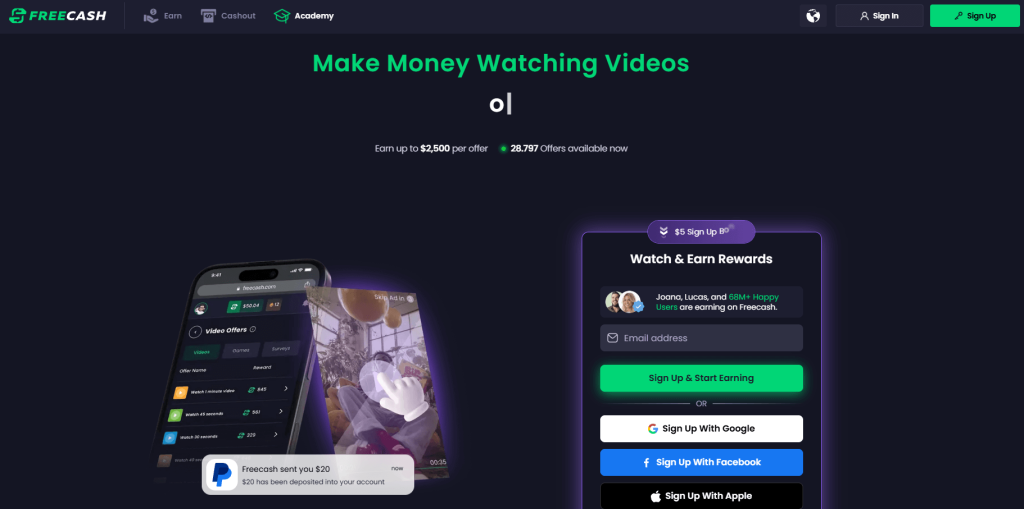
Freecash landing page

The landing pages featured TikTok and Freecash logos and invited users to “get paid to scroll” and “cash out instantly,” implying a simple exchange of time for money.

Those claims were misleading enough that TikTok said the ads violated its rules on financial misrepresentation and removed some of them.

Once you install the app, the promised TikTok paycheck vanishes. Instead, Freecash routes you to a rotating roster of mobile games—titles like Monopoly Go and Disney Solitaire—and offers cash rewards for completing time‑limited in‑game challenges. Payouts range from a single cent for a few minutes of daily play up to triple‑digit amounts if you reach high levels within a fixed period.

The whole setup is designed not to reward scrolling, as it claims, but to funnel you into games where you are likely to spend money or watch paid advertisements.

Freecash’s parent company, Berlin‑based Almedia, openly describes the platform as a way to match mobile game developers with users who are likely to install and spend. The company’s CEO has spoken publicly about using past spending data to steer users toward the genres where they’re most “valuable” to advertisers. 

Our concern, beyond the bait-and-switch, is the privacy issue. Freecash’s privacy policy allows the automatic collection of highly sensitive information, including data about race, religion, sex life, sexual orientation, health, and biometrics. Each additional mobile game you install to chase rewards adds its own privacy policy, tracking, and telemetry. Together, they greatly increase how much behavioral data these companies can harvest about a user.

Experts warn that data brokers already trade lists of people likely to be more susceptible to scams or compulsive online behavior—profiles that apps like this can help refine.

We’ve previously reported on data brokers that used games and apps to build massive databases, only to later suffer breaches exposing all that data.

When asked about the ads, Freecash said the most misleading TikTok promotions were created by third-party affiliates, not by the company itself. Which is quite possible because Freecash does offer an affiliate payout program to people who promote the app online. But they made promises to review and tighten partner monitoring.

For experienced users, the pattern should feel familiar: eye‑catching promises of easy money, a bait‑and‑switch into something that takes more time and effort than advertised, and a business model that suddenly makes sense when you realize your attention and data are the real products.

How to stay private

Free cash? Apparently, there is no such thing.

If you’re curious how intrusive schemes like this can be, consider using a separate email address created specifically for testing. Avoid sharing real personal details. Many users report that once they sign up, marketing emails quickly pile up.

Some of these schemes also appeal to people who are younger or under financial pressure, offering tiny payouts while generating far more value for advertisers and app developers.

So, what can you do?

  • Gather information about the company you’re about to give your data. Talk to friends and relatives about your plans. Shared common sense often helps make the right decisions.
  • Create a separate account if you want to test a service. Use a dedicated email address and avoid sharing real personal details.
  • Limit information you provide online to what makes sense for the purpose. Does a game publisher need your Social Security Number? I don’t think so.
  • Be cautious about app installs that are framed as required to make the money initially promised, and review permissions carefully.
  • Use an up-to-date real-time anti-malware solution on all your devices.

Work from the premise that free money does not exist. Try to work out the business model of those offering it, and then decide.


We don’t just report on threats – we help protect your social media

Cybersecurity risks should never spread beyond a headline. Protect your social media accounts by using Malwarebytes Identity Theft Protection.

One privacy change I made for 2026 (Lock and Code S07E02)

26 January 2026 at 14:31

This week on the Lock and Code podcast…

When you hear the words “data privacy,” what do you first imagine?

Maybe you picture going into your social media apps and setting your profile and posts to private. Maybe you think about who you’ve shared your location with and deciding to revoke some of that access. Maybe you want to remove a few apps entirely from your smartphone, maybe you want to try a new web browser, maybe you even want to skirt the type of street-level surveillance provided by Automated License Plate Readers, which can record your car model, license plate number, and location on your morning drive to work.

Importantly, all of these are “data privacy,” but trying to do all of these things at once can feel impossible.

That’s why, this year, for Data Privacy Day, Malwarebytes Senior Privacy Advocate (and Lock and Code host) David Ruiz is sharing the one thing he’s doing different to improve his privacy. And it’s this: He’s given up Google Search entirely.

When Ruiz requested the data that Google had collected about him last year, he saw that the company had recorded an eye-popping 8,000 searches in just the span of 18 months. And those 8,000 searches didn’t just reveal what he was thinking about on any given day—including his shopping interests, his home improvement projects, and his late-night medical concerns—they also revealed when he clicked on an ad based on the words he searched. This type of data, which connects a person’s searches to the likelihood of engaging with an online ad, is vital to Google’s revenue, and it’s the type of thing that Ruiz is seeking to finally cut off.

So, for 2026, he has switched to a new search engine, Brave Search.

Today, on the Lock and Code podcast, Ruiz explains why he made the switch, what he values about Brave Search, and why he also refused to switch to any of the major AI platforms in replacing Google.

Tune in today to listen to the full episode.

Show notes and credits:

Intro Music: “Spellbound” by Kevin MacLeod (incompetech.com)
Licensed under Creative Commons: By Attribution 4.0 License
http://creativecommons.org/licenses/by/4.0/
Outro Music: “Good God” by Wowa (unminus.com)


Listen up—Malwarebytes doesn’t just talk cybersecurity, we provide it.

Protect yourself from online attacks that threaten your identity, your files, your system, and your financial well-being with our exclusive offer for Malwarebytes Premium Security for Lock and Code listeners.

Fake LastPass maintenance emails target users

22 January 2026 at 14:53

The LastPass Threat Intelligence, Mitigation, and Escalation (TIME) team has published a warning about an active phishing campaign in which fake “maintenance” emails pressure users to back up their vaults within 24 hours. The emails lead to credential-stealing phishing sites rather than any legitimate LastPass page.

The phishing campaign that started around January 19, 2026, uses emails that falsely claim upcoming infrastructure maintenance and urge users to “backup your vault in the next 24 hours.”

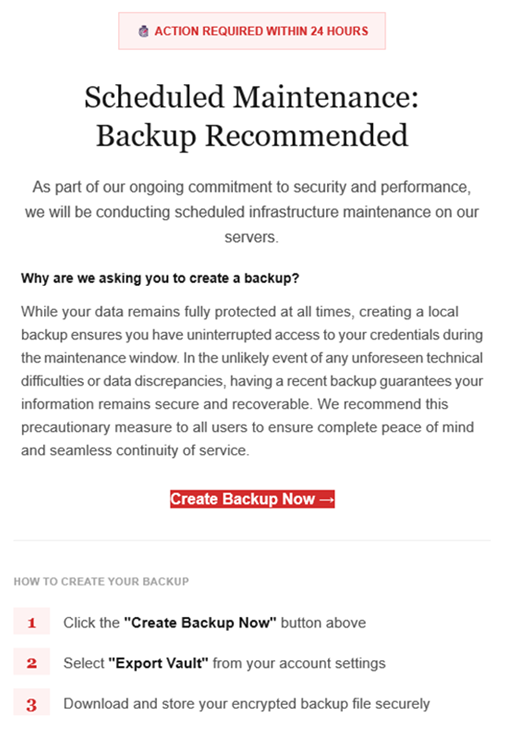
Example phishing email
Image courtesy of LastPass

“Scheduled Maintenance: Backup Recommended

As part of our ongoing commitment to security and performance, we will be conducting scheduled infrastructure maintenance on our servers.
Why are we asking you to create a backup?
While your data remains protected at all times, creating a local backup ensures you have access to your credentials during the maintenance window. In the unlikely event of any unforeseen technical difficulties or data discrepancies, having a recent backup guarantees your information remains secure and recoverable. We recommend this precautionary measure to all users to ensure complete peace of mind and seamless continuity of service.

Create Backup Now (link)

How to create your backup
1 Click the “Create Backup Now” button above
2 Select “Export Vault” from you account settings
3 Download and store your encrypted backup file securely”

The link in the email points to mail-lastpass[.]com, a domain that doesn’t belong to LastPass and has now been taken down.

Note that there are different subject lines in use. Here is a selection:

  • LastPass Infrastructure Update: Secure Your Vault Now
  • Your Data, Your Protection: Create a Backup Before Maintenance
  • Don’t Miss Out: Backup Your Vault Before Maintenance
  • Important: LastPass Maintenance & Your Vault Security
  • Protect Your Passwords: Backup Your Vault (24-Hour Window)

It is imperative for users to ignore instructions in emails like these. Giving away the login details for your password manager can be disastrous. For most users, it would provide access to enough information to carry out identity theft.

Stay safe

First and foremost, it’s important to understand that LastPass will never ask for your master password or demand immediate action under a tight deadline. Generally speaking, there are more guidelines that can help you stay safe.

  • Don’t click on links in unsolicited emails without verifying with the trusted sender that they’re legitimate.
  • Always log in directly on the platform that you are trying to access, rather than through a link.
  • Use a real-time, up-to-date anti-malware solution with a web protection module to block malicious sites.
  • Report phishing emails to the company that’s being impersonated, so they can alert other customers. In this case emails were forwarded to abuse@lastpass.com.

Pro tip: Malwarebytes Scam Guard  would have recognized this email as a scam and advised you how to proceed.


We don’t just report on threats—we help safeguard your entire digital identity

Cybersecurity risks should never spread beyond a headline. Protect your, and your family’s, personal information by using identity protection.

Google will pay $8.25m to settle child data-tracking allegations

20 January 2026 at 12:40

Google has settled yet another class-action lawsuit accusing it of collecting children’s data and using it to target them with advertising. The tech giant will pay $8.25 million to address allegations that it tracked data on apps specifically designated for kids.

AdMob’s mobile data collection

This settlement stems from accusations that apps provided under Google’s “Designed for Families” programme, which was meant to help parents find safe apps, tracked children. Under the terms of this programme, developers were supposed to self-certify COPPA compliance and use advertising SDKs that disabled behavioural tracking. However, some did not, instead using software embedded in the apps that was created by a Google-owned mobile advertising company called AdMob.

When kids used these apps, which included games, AdMob collected data from these apps, according to the class action lawsuit. This included IP addresses, device identifiers, usage data, and the child’s location to within five meters, transmitting it to Google without parental consent. The AdMob software could then use that information to display targeted ads to users.

This kind of activity is exactly what the Children’s Online Privacy Protection Act (COPPA) was created to stop. The law requires operators of child-directed services to obtain verifiable parental consent before collecting personal information from children under 13. That includes cookies and other identifiers, which are the core tools advertisers use to track and target people.

The families filing the lawsuit alleged that Google knew this was going on:

“Google and AdMob knew at the time that their actions were resulting in the exfiltration data from millions of children under thirteen but engaged in this illicit conduct to earn billions of dollars in advertising revenue.”

Security researchers had alerted Google to the issue in 2018, according to the filing.

YouTube settlement approved

What’s most disappointing is that these privacy issues keep happening. This news arrives at the same time that a judge approved a settlement on another child privacy case involving Google’s use of children’s data on YouTube. This case dates back to October 2019, the same year that Google and YouTube paid a whopping $170m fine for violating COPPA.

Families in this class action suit alleged that YouTube used cookies and persistent identifiers on child-directed channels, collecting data including IP addresses, geolocation data, and device serial numbers. This is the same thing that it does for adults across the web, but COPPA protects kids under 13 from such activities, as do some state laws.

According to the complaint, YouTube collected this information between 2013 and 2020 and used it for behavioural advertising. This form of advertising infers people’s interests from their identifiers, and it is more lucrative than contextual advertising, which focuses only on a channel’s content.

The case said that various channel owners opted into behavioural advertising, prompting Google to collect this personal information. No parental consent was obtained, the plaintiffs alleged. Channel owners named in the suit included Cartoon Network, Hasbro, Mattel, and DreamWorks Animation.

Under the YouTube settlement (which was agreed in August and recently approved by a judge), families can file claims through YouTubePrivacySettlement.com, although the deadline is this Wednesday. Eligible families are likely to get $20–$30 after attorneys’ fees and administration costs, if 1–2% of eligible families submit claims.

COPPA is evolving

Last year, the FTC amended its COPPA Rule to introduce mandatory opt-in consent for targeted advertising to children, separate from general data-collection consent.

The amendments expand the definition of personal information to include biometric data and government-issued ID information. It also lets the FTC use a site operator’s marketing materials to determine whether a site targets children.

Site owners must also now tell parents who they’ll share information with, and the amendments stop operators from keeping children’s personal information forever. If these all sounds like measures that should have been included to protect children online from the get-go, we agree with you. In any case, companies have until this April to comply with the new rules.

Will the COPPA rules make a difference? It’s difficult to say, given the stream of privacy cases involving Google LLC (which owns YouTube and AdMob, among others). When viewed against Alphabet’s overall earnings, an $8.25m penalty risks being seen as a routine business expense rather than a meaningful deterrent.


We don’t just report on data privacy—we help you remove your personal information

Cybersecurity risks should never spread beyond a headline. With Malwarebytes Personal Data Remover, you can scan to find out which sites are exposing your personal information, and then delete that sensitive data from the internet.
Firefox joins Chrome and Edge as sleeper extensions spy on users

19 January 2026 at 13:47

A group of cybercriminals called DarkSpectre is believed to be behind three campaigns spread by malicious browser extensions: ShadyPanda, GhostPoster, and Zoom Stealer.

We wrote about the ShadyPanda campaign in December 2025, warning users that extensions which had behaved normally for years suddenly went rogue. After a malicious update, these extensions were able to track browsing behavior and run malicious code inside the browser.

Also in December, researchers uncovered a new campaign, GhostPoster, and identified 17 compromised Firefox extensions. The campaign was found to hide JavaScript code inside the image logo of malicious Firefox extensions with more than 50,000 downloads, allowing attackers to to monitor browser activity and plant a backdoor.

The use of malicious code in images is a technique called steganography. Earlier GhostPoster extensions hid JavaScript loader code inside PNG icons such as logo.png for Firefox extensions like “Free VPN Forever,” using a marker (for example, three equals signs) in the raw bytes to separate image data from payload.

Newer variants moved to embedding payloads in arbitrary images inside the extension bundle, then decoding and decrypting them at runtime. This makes the malicious code much harder for researchers to detect.

Based on that research, other researchers found an additional 17 extensions associated with the same group, beyond the original Firefox set. These were downloaded more than 840,000 times in total, with some remaining active in the wild for up to five years.

GhostPoster first targeted Microsoft Edge users and later expanded to Chrome and Firefox as the attackers built out their infrastructure. The attackers published the extensions in each browser’s web store as seemingly useful tools with names like “Google Translate in Right Click,” “Ads Block Ultimate,” “Translate Selected Text with Google,” “Instagram Downloader,” and “Youtube Download.”

The extensions can see visited sites, search queries, and shopping behavior, allowing attackers to create detailed profiles of users’ habits and interests.

Combined with other malicious code, this visibility could be extended to credential theft, session hijacking, or attacks targeting online banking workflows, even if those are not the primary goal today.

How to stay safe

Although we always advise people to install extensions only from official web stores, this case proves once again that not all extensions available there are safe. That said, the risk involved in installing an extension from outside the web store is even greater.

Extensions listed in the web store undergo a review process before being approved. This process, which combines automated and manual checks, assesses the extension’s safety, policy compliance, and overall user experience. The goal is to protect users from scams, malware, and other malicious activity.

Mozilla and Microsoft have removed the identified add-ons from their stores, and Google has confirmed their removal from the Chrome Web Store. However, already installed extensions remain active in Chrome and Edge until users manually uninstall them. When Mozilla blocks an add-on it is also disabled, which prevents it from interacting with Firefox and accessing your browser and your data.

If you’re worried that you may have installed one of these extensions, Windows users can run a Malwarebytes Deep Scan with their browsers closed.

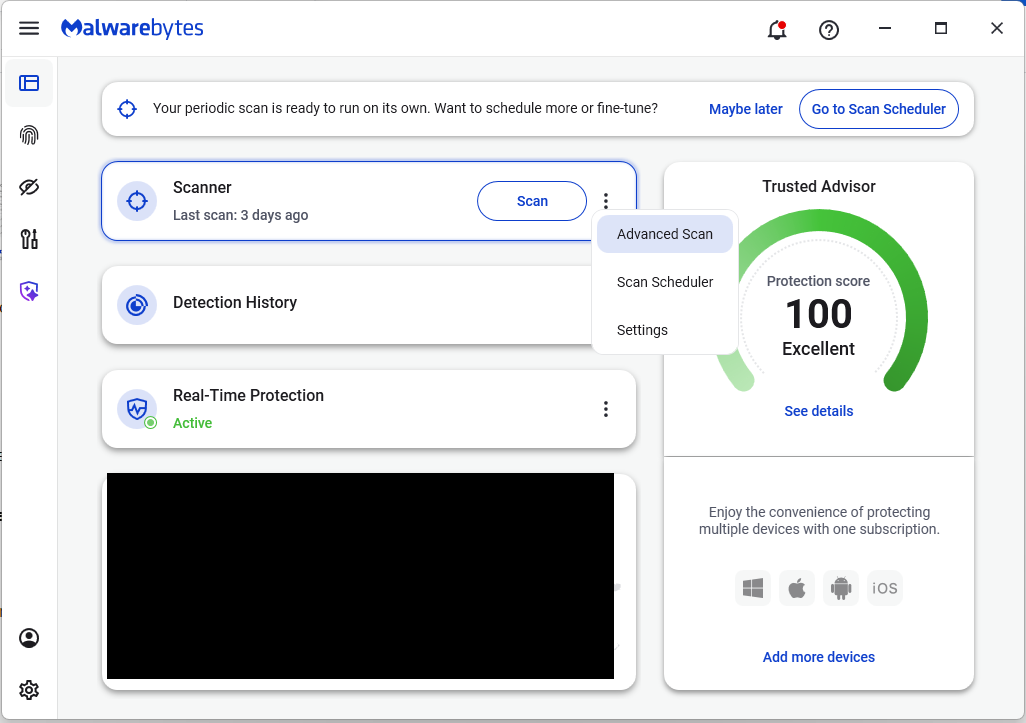
  • On the Malwarebytes Dashboard click on the three stacked dots to select the Advanced Scan option.
    Advanced Scan to find Sleep extensions
  • On the Advanced Scan tab, select Deep Scan. Note that this scan uses more system resources than usual.
  • After the scan, remove any found items, and then reopen your browser(s).

Manual check:

These are the names of the 17 additional extensions that were discovered:

  • AdBlocker
  • Ads Block Ultimate
  • Amazon Price History
  • Color Enhancer
  • Convert Everything
  • Cool Cursor
  • Floating Player – PiP Mode
  • Full Page Screenshot
  • Google Translate in Right Click
  • Instagram Downloader
  • One Key Translate
  • Page Screenshot Clipper
  • RSS Feed
  • Save Image to Pinterest on Right Click
  • Translate Selected Text with Google
  • Translate Selected Text with Right Click
  • Youtube Download

Note: There may be extensions with the same names that are not malicious.


We don’t just report on threats—we help safeguard your entire digital identity

Cybersecurity risks should never spread beyond a headline. Protect your, and your family’s, personal information by using identity protection.

“Reprompt” attack lets attackers steal data from Microsoft Copilot

15 January 2026 at 14:16

Researchers found a method to steal data which bypasses Microsoft Copilot’s built-in safety mechanisms.  

The attack flow, called Reprompt, abuses how Microsoft Copilot handled URL parameters in order to hijack a user’s existing Copilot Personal session.

Copilot is an AI assistant which connects to a personal account and is integrated into Windows, the Edge browser, and various consumer applications.

The issue was fixed in Microsoft’s January Patch Tuesday update, and there is no evidence of in‑the‑wild exploitation so far. Still, it once again shows how risky it can be to trust AI assistants at this point in time.

Reprompt hides a malicious prompt in the q parameter of an otherwise legitimate Copilot URL. When the page loads, Copilot auto‑executes that prompt, allowing an attacker to run actions in the victim’s authenticated session after just a single click on a phishing link.

In other words, attackers can hide secret instructions inside the web address of a Copilot link, in a place most users never look. Copilot then runs those hidden instructions as if the users had typed them themselves.

Because Copilot accepts prompts via a q URL parameter and executes them automatically, a phishing email can lure a user into clicking a legitimate-looking Copilot link while silently injecting attacker-controlled instructions into a live Copilot session.

What makes Reprompt stand out from other, similar prompt injection attacks is that it requires no user-entered prompts, no installed plugins, and no enabled connectors.

The basis of the Reprompt attack is amazingly simple. Although Copilot enforces safeguards to prevent direct data leaks, these protections only apply to the initial request. The attackers were able to bypass these guardrails by simply instructing Copilot to repeat each action twice.

Working from there, the researchers noted:

“Once the first prompt is executed, the attacker’s server issues follow‑up instructions based on prior responses and forms an ongoing chain of requests. This approach hides the real intent from both the user and client-side monitoring tools, making detection extremely difficult.”

How to stay safe

You can stay safe from the Reprompt attack specifically by installing the January 2026 Patch Tuesday updates.

If available, use Microsoft 365 Copilot for work data, as it benefits from Purview auditing, tenant‑level data loss prevention (DLP), and admin restrictions that were not available to Copilot Personal in the research case. DLP rules look for sensitive data such as credit card numbers, ID numbers, health data, and can block, warn, or log when someone tries to send or store it in risky ways (email, OneDrive, Teams, Power Platform connectors, and more).

Don’t click on unsolicited links before verifying with the (trusted) source whether they are safe.

Reportedly, Microsoft is testing a new policy that allows IT administrators to uninstall the AI-powered Copilot digital assistant on managed devices.

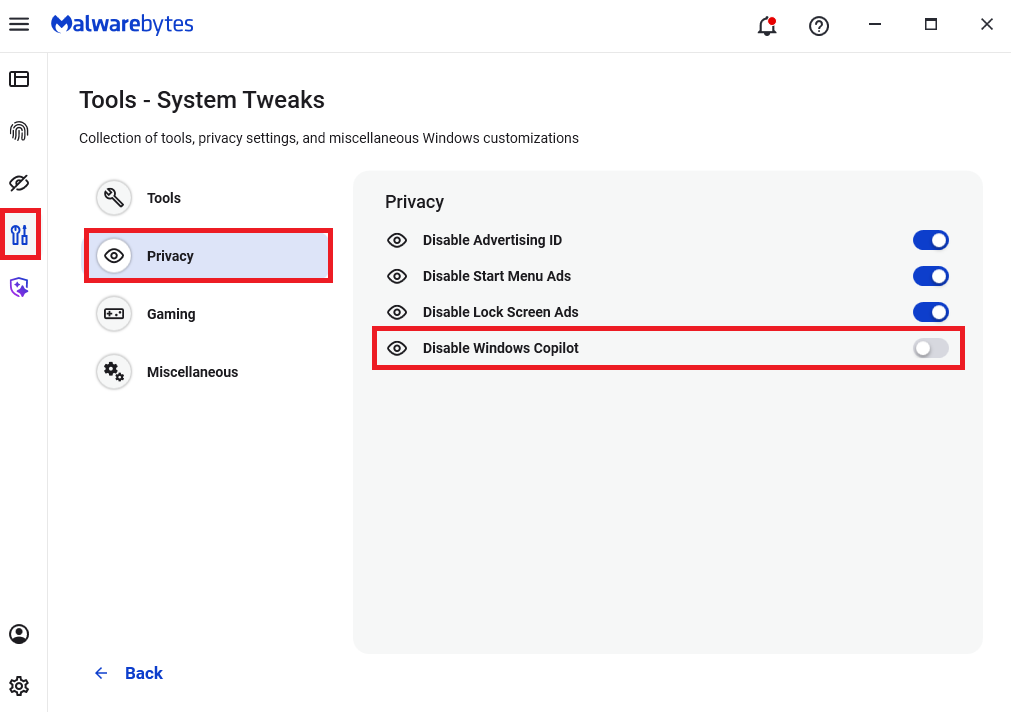
Malwarebytes users can disable Copilot for their personal machines under Tools > Privacy, where you can toggle Disable Windows Copilot to on (blue).

How to use Malwarebytes to disable Windows Copilot

In general, be aware that using AI assistants still pose privacy risks. As long as there are ways for assistants to automatically ingest untrusted input—such as URL parameters, page text, metadata, and comments—and merge it into hidden system prompts or instructions without strong separation or filtering, users remain at risk of leaking private information.

So when using any AI assistant that can be driven via links, browser automation, or external content, it is reasonable to assume “Reprompt‑style” issues are at least possible and should be taken into consideration.


We don’t just report on threats—we remove them

Cybersecurity risks should never spread beyond a headline. Keep threats off your devices by downloading Malwarebytes today.

Phishing scammers are posting fake “account restricted” comments on LinkedIn

14 January 2026 at 16:55

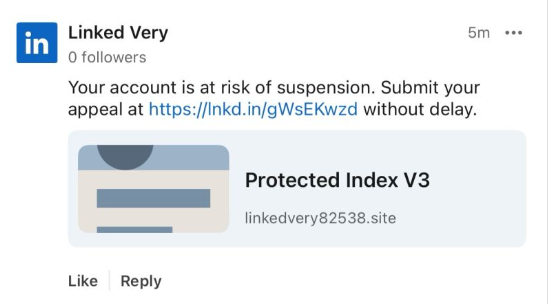
Recently, fake LinkedIn profiles have started posting comment replies claiming that a user has “engaged in activities that are not in compliance” with LinkedIn’s policies and that their account has been “temporarily restricted” until they submit an appeal through a specified link in the comment.

The comments come in different shapes and sizes, but here’s one example we found.

Your account is at risk of suspension

The accounts posting the comments all try to look like official LinkedIn bots and use various names. It’s likely they create new accounts when LinkedIn removes them. Either way, multiple accounts similar to the “Linked Very” one above were reported in a short period, suggesting automated creation and posting at scale.

The same pattern is true for the links. The shortened link used in the example above has already been disabled, while others point directly to phishing sites. Scammers often use shortened LinkedIn links to build trust, making targets believe the messages are legitimate. Because LinkedIn can quickly disable these links, attackers likely test different approaches to see which last the longest.

Here’s another example:

As a preventive measure, access to your account is temporarily restricted

Malwarebytes blocks this last link based on the IP address:

Malwarebytes blocks 103.224.182.251

If users follow these links, they are taken to a phishing page designed to steal their LinkedIn login details:

fake LinkedIn log in site
Image courtesy of BleepingComputer

A LinkedIn spokesperson confirmed to BleepingComputer they are aware of the situation:

“I can confirm that we are aware of this activity and our teams are working to take action.”

Stay safe

In situations like this awareness is key—and now you know what to watch for. Some additional tips:

  • Don’t click on unsolicited links in private messages and comments without verifying with the trusted sender that they’re legitimate.
  • Always log in directly on the platform that you are trying to access, rather than through a link.
  • Use a password manager, which won’t auto-fill in credentials on fake websites.
  • Use a real-time, up-to-date anti-malware solution with a web protection module to block malicious sites.

Pro tip: The free Malwarebytes Browser Guard extension blocks known malicious websites and scripts.


We don’t just report on scams—we help detect them

Cybersecurity risks should never spread beyond a headline. If something looks dodgy to you, check if it’s a scam using Malwarebytes Scam Guard, a feature of our mobile protection products. Submit a screenshot, paste suspicious content, or share a text or phone number, and we’ll tell you if it’s a scam or legit. Download Malwarebytes Mobile Security for iOS or Android and try it today!

❌