Normal view

Why iPhone users should update and restart their devices now

13 January 2026 at 13:55

If you were still questioning whether iOS 26+ is for you, now is the time to make that call.

Why?

On December 12, 2025, Apple patched two WebKit zero‑day vulnerabilities linked to mercenary spyware and is now effectively pushing iPhone 11 and newer users toward iOS 26+, because that’s where the fixes and new memory protections live. These vulnerabilities were primarily used in highly targeted attacks, but such campaigns are likely to expand over time.

WebKit powers the Safari browser and many other iOS applications, so it’s a big attack surface to leave exposed and isn’t limited to “risky” behavior. These vulnerabilities allowed an attacker to execute arbitrary code on a device after exploitation via malicious web content.

Apple has confirmed that attackers are already exploiting these vulnerabilities in the wild, making installation of the update a high‑priority security task for every user. Campaigns that start with diplomats, journalists, or executives often lead to tooling and exploits leaking or being repurposed, so “I’m not a target” is not a viable safety strategy.

Due to public resistance to new features like Liquid Glass, many iPhone users have not yet upgraded to iOS 26.2. Reports suggest adoption of iOS 26 has been unusually slow. As of January 2026, only about 4.6% of active iPhones are on iOS 26.2, and roughly 16% are on any version of iOS 26, leaving the vast majority on older releases such as iOS 18.

However, Apple only ships these fixes and newer protections, such as Memory Integrity Enforcement, on iOS 26+ for supported devices. Users on older, unsupported devices won’t be able to access these protections at all.

Another important factor in the upgrade cycle is restarting the device. What many people don’t realize is that when you restart your device, any memory-resident malware is flushed—unless it has somehow gained persistence, in which case it will return. High-end spyware tools tend to avoid leaving traces needed for persistence and often rely on users not restarting their devices.

Upgrading requires a restart, which makes this a win-win: you get the latest protections, and any memory-resident malware is flushed at the same time.

For iOS and iPadOS users, you can check if you’re using the latest software version, go to Settings > General > Software Update. It’s also worth turning on Automatic Updates if you haven’t already. You can do that on the same screen.

How to stay safe

The most important fix—however painful you may find it—is to upgrade to iOS 26.2. Not doing means missing an accumulating list of security fixes, leaving your device vulnerable to more and more newly found vulnerabilities.

 But here are some other useful tips:

  • Make it a habit to restart your device on a regular basis. The NSA recommends doing this weekly.
  • Do not open unsolicited links and attachments without verifying with the trusted sender.
  • Remember, Apple threat notifications will never ask users to click links, open files, install apps or ask for account passwords or verification code.
  • For Apple Mail users specifically, these vulnerabilities create risk when viewing HTML-formatted emails containing malicious web content.
  • Malwarebytes for iOS can help keep your device secure, with Trusted Advisor alerting you when important updates are available.
  • If you are a high-value target, or you want the extra level of security, consider using Apple’s Lockdown Mode.

We don’t just report on phone security—we provide it

Cybersecurity risks should never spread beyond a headline. Keep threats off your mobile devices by downloading Malwarebytes for iOS, and Malwarebytes for Android today.
Received an Instagram password reset email? Here’s what you need to know

12 January 2026 at 22:04

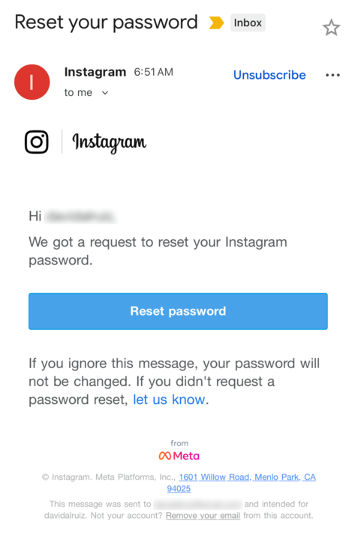
Last week, many Instagram users began receiving unsolicited emails from the platform that warned about a password reset request.

The message said:

“Hi {username},
We got a request to reset your Instagram password.
If you ignore this message, your password will not be changed. If you didn’t request a password reset, let us know.”

Around the same time that users began receiving these emails, a cybercriminal using the handle “Solonik” offered data that alleged contains information about 17 million Instagram users for sale on a Dark Web forum.

These 17 million or so records include:

  • Usernames
  • Full names
  • User IDs
  • Email addresses
  • Phone numbers
  • Countries
  • Partial locations

Please note that there are no passwords listed in the data.

Despite the timing of the two events, Instagram denied this weekend that these events are related. On the platform X, the company stated they fixed an issue that allowed an external party to request password reset emails for “some people.”

So, what’s happening?

Regarding the data found on the dark web last week, Shahak Shalev, global head of scam and AI research at Malwarebytes, shared that “there are some indications that the Instagram data dump includes data from other, older, alleged Instagram breaches, and is a sort of compilation.” As Shalev’s team investigates the data, he also said that the earliest password reset requests reported by users came days before the data was first posted on the dark web, which might mean that “the data may have been circulating in more private groups before being made public.”

However, another possibility, Shalev said, is that “another vulnerability/data leak was happening as some bad actor tried spraying for [Instagram] accounts. Instagram’s announcement seems to reference that spraying. Besides the suspicious timing, there’s no clear connection between the two at this time.”

But, importantly, scammers will not care whether these incidents are related or not. They will try to take advantage of the situation by sending out fake emails.

“We felt it was important to alert people about the data availability so that everyone could reset their passwords, directly from the app, and be on alert for other phishing communications,” Shalev said.

If and when we find out more, we’ll keep you posted, so stay tuned.

How to stay safe

If you have enabled 2FA on your Instagram account, we think it is indeed safe to ignore the emails, as proposed by Meta.

Should you want to err on the safe side and decide to change your password, make sure to do so in the app and not click any links in the email, to avoid the risk that you have received a fake email. Or you might end up providing scammers with your password.

Another thing to keep in mind is that these are Meta-data. Which means some users may have reused or linked them to their Facebook or WhatsApp accounts. So, as a precaution, you can check recent logins and active sessions on Instagram, WhatsApp, and Facebook, and log out from any devices or locations you do not recognize.

If you want to find out whether your data was included in an Instagram data breach, or any other for that matter, try our free Digital Footprint scan.

Regulators around the world are scrutinizing Grok over sexual deepfakes

12 January 2026 at 15:04

Grok’s failure to block sexualized images of minors has turned a single “isolated lapse” into a global regulatory stress test for xAI’s ambitions. The response from lawmakers and regulators suggests this will not be solved with a quick apology and a hotfix.

Last week we reported on Grok’s apology after it generated an image of young girls in “sexualized attire.”

The apology followed the introduction of Grok’s paid “Spicy Mode” in August 2025, which was marketed as edgy and less censored. In practice it enabled users to generate sexual deepfake images, including content that may cross into illegal child sexual abuse material (CSAM) under US and other jurisdictions’ laws.

A report from web-monitoring tool CopyLeaks highlighted “thousands” of incidents of Grok being used to create sexually suggestive images of non-consenting celebrities.

This is starting to backfire. Reportedly, three US senators are asking Google and Apple to remove Elon Musk’s Grok and X apps from their app stores, citing the spread of nonconsensual sexualized AI images of women and minors and arguing it violates the companies’ app store rules.

In their joint letter, the senators state:

“In recent days, X users have used the app’s Grok AI tool to generate nonconsensual sexual imagery of real, private citizens at scale. This trend has included Grok modifying images to depict women being sexually abused, humiliated, hurt, and even killed. In some cases, Grok has reportedly created sexualized images of children—the most heinous type of content imaginable.”

The UK government also threatens to take possible action against the platform. Government officials have said they would fully support any action taken by Ofcom, the independent media regulator, against X. Even if that meant UK regulators could block the platform.

Indonesia and Malaysia already blocked Grok after its “digital undressing” function flooded the internet with suggestive and obscene manipulated images of women and minors.

As it turns out, a user prompted Grok to generate its own “apology,” which it did. After backlash over sexualized images of women and minors, Grok/X announced limits on image generation and editing for paying subscribers only, effectively paywalling those capabilities on main X surfaces.

For lawmakers already worried about disinformation, election interference, deepfakes, and abuse imagery, Grok is fast becoming the textbook case for why “move fast and break things” doesn’t mix with AI that can sexualize real people on demand.

Hopefully, the next wave of rules, ranging from EU AI enforcement to platform-specific safety obligations, will treat this incident as the baseline risk that all large-scale visual models must withstand, not as an outlier.

Keep your children safe

If you ever wondered why parents post images of their children with a smiley across their face, this is the reason.

Don’t make it easy for strangers to copy, reuse, or manipulate your photos.

This incident is yet another compelling reason to reduce your digital footprint. Think carefully before posting photos of yourself, your children, or other sensitive information on public social media accounts.

And treat everything you see online—images, voices, text—as potentially AI-generated unless they can be independently verified. They’re not only used to sway opinions, but also to solicit money, extract personal information, or create abusive material.


We don’t just report on threats – we help protect your social media

Cybersecurity risks should never spread beyond a headline. Protect your social media accounts by using Malwarebytes Identity Theft Protection.

Celebrating reviews and recognitions for Malwarebytes in 2025

12 January 2026 at 14:00

Independent recognition matters in cybersecurity, and it matters a lot to us. It shows how security products perform when they’re tested against in-the-wild threats, using lab environments designed to reflect what people actually face in the real world.

In 2025, Malwarebytes earned awards and recognition from a steady stream of third-party testing labs and industry groups. Here’s what those tests looked like and what they found.  

AVLab Cybersecurity Foundation: Real-world malware, real results  

Malwarebytes earned another Advanced In-The-Wild badge from AVLab Cybersecurity Foundation in 2025, continuing a run of accolades.

In November, AVLab Cybersecurity Foundation tested 244 real-world malware samples across 14 cybersecurity products. Malwarebytes Premium Security detected every single one. On top of that, it removed threats with an average remediation time of 2.18 seconds—nearly 12 seconds faster than the industry average.  

That result also marked our third Excellent badge in 2025, following earlier tests in July and September.

Earlier in the year, Malwarebytes Premium Security was also named Product of the Year for the third consecutive year, after it blocked 100% of in-the-wild malware samples. 

MRG Effitas: Consistent Android protection, proven over time

For the seventh consecutive time, Malwarebytes earned MRG Effitas’ Android 360° Certificate in November, one of the toughest independent tests in mobile security, underscoring the strength and reliability of Malwarebytes Mobile Security

MRG Effitas conducted in-depth testing of Android antivirus apps using real-world scenarios, combining in-the-wild malware with benign samples to assess detection gaps and weaknesses. 

Our mobile protection received the highest marks, achieving a near-perfect detection rate in MRG Effitas’ rigorous lab testing, reaffirming what our customers already know: Malwarebytes stops threats before they can cause harm. 

PCMag Readers’ Choice Awards: Multiple category wins 

Not all validation comes from labs. In PCMag’s 2025 Readers’ Choice Awards, Malwarebytes topped three award categories based on reader feedback: Best PC Security Suite, Best Android Antivirus, and Best iOS/iPadOS Antivirus.

A Digital Trends 2025 Recommended Product

Malwarebytes for Windows earned a Digital Trends 2025 Recommended Product designation, with reviewers highlighting its ease of use, fast and effective customer support, and strong value for money. 

CNET: Best Malware Removal Service 2025 

CNET named Malwarebytes the Best Malware Removal Service 2025 after testing setup, features, design, and performance. The review highlighted standout capabilities, including top-tier malware removal and comprehensive Browser Guard web protection. 

AV Comparatives Stalkerware Test: 100% detection rate

In collaboration with the Electronic Frontier Foundation (EFF), AV-Comparatives tested 13 Android security solutions against 17 stalkerware-type apps—software often used for covert surveillance and abuse.

Only a few products handled detection and alerting responsibly. Malwarebytes was the only solution to achieve a 100% detection rate in the September 2025 test.

What we learned from a year of testing

All these results highlight our mission to reimagine security and protect people and data across all devices and platforms. 

Recent innovations like Malwarebytes Scam Guard for Mobile and Windows Tools for PC set new standards for privacy and affordable protection, enhanced by AI-powered features like Trusted Advisor, your built-in personal digital health hub available on all platforms.

We’re grateful to the independent organizations that continue to test our products and to the users who trust Malwarebytes every day.


We don’t just report on threats—we help safeguard your entire digital identity

Cybersecurity risks should never spread beyond a headline. Protect your, and your family’s, personal information by using identity protection.

Enshittification is ruining everything online (Lock and Code S07E01)

12 January 2026 at 06:03

This week on the Lock and Code podcast…

There’s a bizarre thing happening online right now where everything is getting worse.

Your Google results have become so bad that you’ve likely typed what you’re looking for, plus the word “Reddit,” so you can find discussion from actual humans. If you didn’t take this route, you might get served AI results from Google Gemini, which once recommended that every person should eat “at least one small rock per day.” Your Amazon results are a slog, filled with products that have surreptitiously paid reviews. Your Facebook feed could be entirely irrelevant because the company decided years ago that you didn’t want to see what your friends posted, you wanted to see what brands posted, because brands pay Facebook, and you don’t, so brands are more important than your friends.

But, according to digital rights activist and award-winning author Cory Doctorow, this wave of online deterioration isn’t an accident—it’s a business strategy, and it can be summed up in a word he coined a couple of years ago: Enshittification.

Enshittification is the process by which an online platform—like Facebook, Google, or Amazon—harms its own services and products for short-term gain while managing to avoid any meaningful consequences, like the loss of customers or the impact of meaningful government regulation. It begins with an online platform treating new users with care, offering services, products, or connectivity that they may not find elsewhere. Then, the platform invites businesses on board that want to sell things to those users. This means businesses become the priority and the everyday user experience is hindered. But then, in the final stage, the platform also makes things worse for its business customers, making things better only for itself.

This is how a company like Amazon went from helping you find nearly anything you wanted to buy online to helping businesses sell you anything you wanted to buy online to making those businesses pay increasingly high fees to even be discovered online. Everyone, from buyers to sellers, is pretty much entrenched in the platform, so Amazon gets to dictate the terms.

Today, on the Lock and Code podcast with host David Ruiz, we speak with Doctorow about enshittification’s fast damage across the internet, how to fight back, and where it all started.

 ”Once these laws were established, the tech companies were able to take advantage of them. And today we have a bunch of companies that aren’t tech companies that are nevertheless using technology to rig the game in ways that the tech companies pioneered.”

Tune in today to listen to the full conversation.

Show notes and credits:

Intro Music: “Spellbound” by Kevin MacLeod (incompetech.com)
Licensed under Creative Commons: By Attribution 4.0 License
http://creativecommons.org/licenses/by/4.0/
Outro Music: “Good God” by Wowa (unminus.com)


Listen up—Malwarebytes doesn’t just talk cybersecurity, we provide it.

Protect yourself from online attacks that threaten your identity, your files, your system, and your financial well-being with our exclusive offer for Malwarebytes Premium Security for Lock and Code listeners.

pcTattletale founder pleads guilty as US cracks down on stalkerware

9 January 2026 at 16:41

Reportedly, pcTattletale founder Bryan Fleming has pleaded guilty in US federal court to computer hacking, unlawfully selling and advertising spyware, and conspiracy.

This is good news not just because we despise stalkerware like pcTattletale, but because it is only the second US federal stalkerware prosecution in a decade. It could could open the door to further cases against people who develop, sell, or promote similar tools.

In 2021, we reported that “employee and child-monitoring” software vendor pcTattletale had not been very careful about securing the screenshots it secretly captured from victims’ phones. A security researcher testing a trial version discovered that the app uploaded screenshots to an unsecured online database, meaning anyone could view them without authentication, such as a username and password.

In 2024, we revisited the app after researchers found it was once again leaking a database containing victim screenshots. One researcher discovered that pcTattletale’s Application Programming Interface (API) allowed anyone to access the most recent screen capture recorded from any device on which the spyware is installed. Another researcher uncovered a separate vulnerability that granted full access to the app’s backend infrastructure. That access allowed them to deface the website and steal AWS credentials, which turned out to be shared across all devices. As a result, the researcher obtained data about both victims and the customers who were doing the tracking.

This is no longer possible. Not because the developers fixed the problems, but because Amazon locked pcTattletale’s entire AWS infrastructure. Fleming later abandoned the product and deleted the contents of its servers.

However, Homeland Security Investigations had already started investigating pcTattletale in June 2021 and did not stop. A few things made Fleming stand out among other stalkerware operators. While many hide behind overseas shell companies, Fleming appeared to be proud of his work. And while others market their products as parental control or employee monitoring tools, pcTattletale explicitly promoted spying on romantic partners and spouses, using phrases such as “catch a cheater” and “surreptitiously spying on spouses and partners.” This made it clear the software was designed for non-consensual surveillance of adults.

Fleming is expected to be sentenced later this year.

Removing stalkerware

Malwarebytes, as one of the founding members of the Coalition Against Stalkerware, makes it a priority to detect and remove stalkerware-type apps from your device.

It is important to keep in mind, however, that removing stalkerware may alert the person spying on you that the app has been discovered. The Coalition Against Stalkerware outlines additional steps and considerations to help you decide the safest next move.

Because the apps often install under different names and hide themselves from users, they can be difficult to find and remove. That is where Malwarebytes can help you.

To scan your device:

  1. Open your Malwarebytes dashboard
  2. Start a Scan

The scan may take a few minutes.

 If malware is detected, you can choose one of the following actions:

  • Uninstall. The threat will be deleted from your device.
  • Ignore Always. The file detection will be added to the Allow List, and excluded from future scans. Legitimate files are sometimes detected as malware. We recommend reviewing scan results and adding files to Ignore Always that you know are safe and want to keep.
  • Ignore Once: The detection is ignored for this scan only. It will be detected again during your next scan.

Malwarebytes detects pcTattleTale as PUP.Optional.PCTattletale.


We don’t just report on threats—we remove them

Cybersecurity risks should never spread beyond a headline. Keep threats off your devices by downloading Malwarebytes today.

Are we ready for ChatGPT Health?

9 January 2026 at 13:26

How comfortable are you with sharing your medical history with an AI?

I’m certainly not.

OpenAI’s announcement about its new ChatGPT Health program prompted discussions about data privacy and how the company plans to keep the information users submit safe.

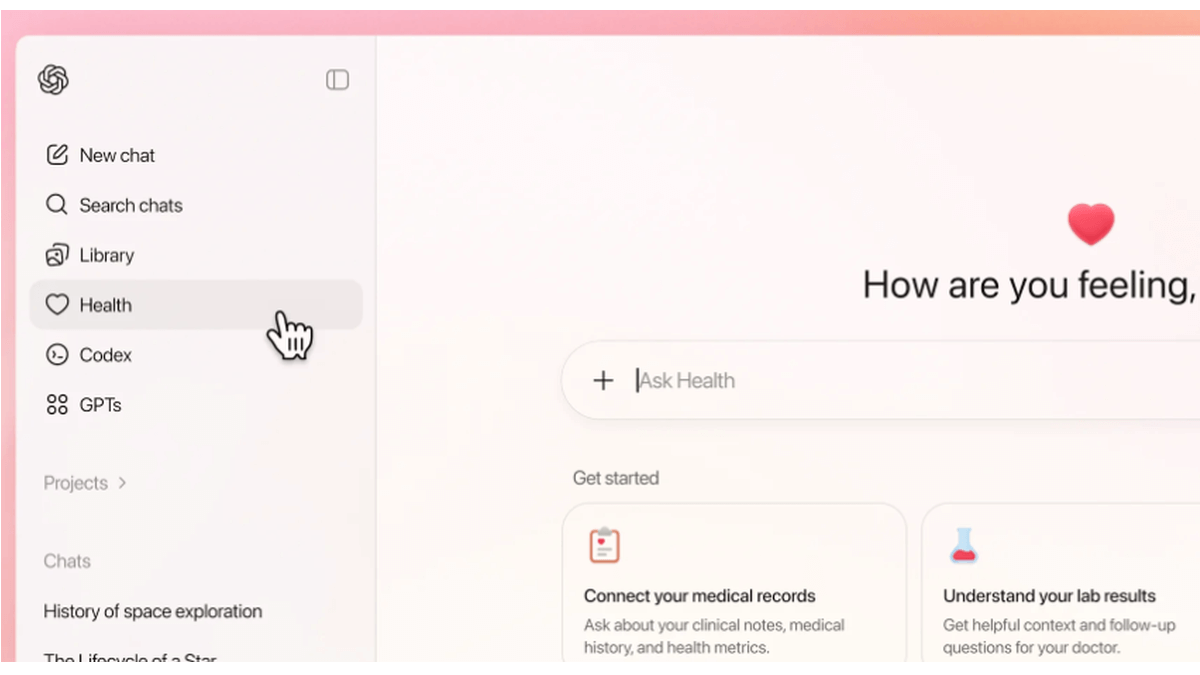
ChatGPT Health is a dedicated “health space” inside ChatGPT that lets users connect their medical records and wellness apps so the model can answer health and wellness questions in a more personalized way.

ChatGPT health

OpenAI promises additional, layered protections designed specifically for health, “to keep health conversations protected and compartmentalized.”

First off, it’s important to understand that this is not a diagnostic or treatment system. It’s framed as a support tool to help understand health information and prepare for care.

But this is the part that raised questions and concerns:

“You can securely connect medical records and wellness apps to ground conversations in your own health information, so responses are more relevant and useful to you.”

In other words, ChatGPT Health lets you link medical records and apps such as Apple Health, MyFitnessPal, and others so the system can explain lab results, track trends (e.g., cholesterol), and help you prepare questions for clinicians or compare insurance options based on your health data.

Given our reservations about the state of AI security in general and chatbots in particular, this is a line that I don’t dare cross. For now, however, I don’t even have the option, since only users with ChatGPT Free, Go, Plus, and Pro plans outside of the European Economic Area, Switzerland, and the United Kingdom can sign up for the waitlist.

OpenAI only uses partners and apps in ChatGPT Health that meet OpenAI’s privacy and security requirements, which, by design, shifts a great deal of trust onto ChatGPT Health itself.

Users should realize that health information is very sensitive and as Sara Geoghegan, senior counsel at the Electronic Privacy Information Center told The Record: by sharing their electronic medical records with ChatGPT Health, users in the US could effectively remove the HIPAA protection from those records, which is a serious consideration for anyone sharing medical data.

She added:

“ChatGPT is only bound by its own disclosures and promises, so without any meaningful limitation on that, like regulation or a law, ChatGPT can change the terms of its service at any time.”

Should you decide to try this new feature out, we would advise you to proceed with caution and take the advice to enable 2FA for ChatGPT to heart. OpenAI claims 230 million users already ask ChatGPT health and wellness questions each week. I’d encourage them to do the same.


We don’t just report on data privacy—we help you remove your personal information

Cybersecurity risks should never spread beyond a headline. With Malwarebytes Personal Data Remover, you can scan to find out which sites are exposing your personal information, and then delete that sensitive data from the internet.

CISA warns of active attacks on HPE OneView and legacy PowerPoint

8 January 2026 at 15:29

The US Cybersecurity and Infrastructure Security Agency (CISA) added both a newly discovered flaw and a much older one to its catalog of Known Exploited Vulnerabilities (KEV).

The KEV catalog gives Federal Civilian Executive Branch (FCEB) agencies a list of vulnerabilities that are known to be exploited in the wild, along with deadlines for when they must be patched. In both of these cases, the due date is January 28, 2026.

But CISA alerts are not just for government agencies. They also provide guidance to businesses and end users about which vulnerabilities should be patched first, based on real-world exploitation.

A critical flaw in HPE OneView

The recently found vulnerability, tracked as CVE-2025-37164, carries a CVSS score of 10 out of 10 and allows remote code execution. The flaw affects HPE OneView, a platform used to manage IT infrastructure, and a patch was released on December 17, 2025.

This critical vulnerability allows a remote, unauthenticated attacker to execute code and potentially gain large-scale control over servers, firmware, and lifecycle management. Management platforms like HPE OneView are often deployed deep inside enterprise networks, where they have extensive privileges and limited monitoring because they are trusted.

Proof of Concept (PoC) code, in the form of a Metasploit module, was made public just one day after the patch was released.

A PowerPoint vulnerability from 2009 resurfaces

The cybersecurity dinosaur here is a vulnerability in Microsoft PowerPoint, tracked as CVE-2009-0556, that dates back more than 15 years. It affects:

  • Microsoft Office PowerPoint 2000 SP3
  • PowerPoint 2002 SP3
  • PowerPoint 2003 SP3
  • PowerPoint in Microsoft Office 2004 for Mac

The flaw allows remote attackers to execute arbitrary code by tricking a victim into opening a specially crafted PowerPoint file that triggers memory corruption.

In the past, this vulnerability was exploited by malware known as Apptom. CISA rarely adds vulnerabilities to the KEV catalog based on ancient exploits, so the “sudden” re‑emergence of the 2009 PowerPoint vulnerability suggests attackers are targeting still‑deployed legacy Office installs.

Successful exploitation can allow attackers to run arbitrary code, deploy malware, and establish a foothold for lateral movement inside a network. Unlike the HPE OneView flaw, this attack requires user interaction—the target must open the malicious PowerPoint file.

Stay safe

When it comes to managing vulnerabilities, prioritizing which patches to apply is an important part of staying safe. So, to make sure you don’t fall victim to exploitation of known vulnerabilities:

  • Keep an eye on the CISA KEV catalog as a guide of what’s currently under active exploitation.
  • Update as fast as you can without interrupting daily routine.
  • Use a real-time up-to-date anti-malware solution to intercept exploits and malware attacks.
  • Don’t open unsolicited attachments without verifying with the—trusted—sender.

We don’t just report on threats—we remove them

Cybersecurity risks should never spread beyond a headline. Keep threats off your devices by downloading Malwarebytes today.

Lego’s Smart Bricks explained: what they do, and what they don’t

8 January 2026 at 14:35

Lego just made what it claims is its most important product release since it introduced minifigures in 1978. No, it’s not yet another brand franchise. It’s a computer in a brick.

Called the Smart Brick, it’s part of a broader system called Smart Play that Lego hopes will revolutionize your child’s interaction with Lego.

These aren’t your grandma’s Lego bricks. The 2×4 techno-brick houses a custom ASIC chip that Lego says is smaller than a single Lego stud, measuring about 4.1mm. Inside are accelerometers, light and sound sensors, an LED array, and a miniature speaker with an onboard synthesizer that generates sound effects in real time, rather than just playing pre-recorded clips.

How the pieces talk to each other

The bricks charge wirelessly on a dedicated pad and contain batteries that Lego says can last for years. They also communicate with each other to trigger actions, such as interactive sound effects.

This is where the other Smart Play components come in: Smart Tags and Smart Minifigures. The 2×2 stud-less Smart Tags contain unique digital IDs that tell bricks how to behave. A helicopter tag, for example, might trigger propeller sounds.

There’s also a Neighbor Position Measurement system that detects brick proximity and orientation. So a brick might do different things as it gets closer to a Smart Tag or Smart Minifigure, for example.

The privacy implications of Smart Bricks

Any time parents hear about toys communicating with other devices, they’re right to be nervous. They’ve had to contend with toys that give up kids’ sensitive personal data and allegedly have the potential to become listening devices for surveillance.

However, Lego says its proprietary Bluetooth-based protocol, called BrickNet, comes with encryption and built-in privacy controls.

One clear upside is that the system doesn’t need an internet connection for these devices to work, and there are no screens or companion apps involved either. For parents weary of reading about children’s apps quietly harvesting data, that alone will come as a relief.

Lego also makes specific privacy assurances. Yes, there’s a microphone in the Smart Brick, but no, it doesn’t record sound (it’s just a sensor), the company says. There are no cameras either.

Perhaps the biggest relief of all, though, is that there’s no AI in this brick.

At a time when “AI-powered” is being sprinkled over everything from washing machines to toilets, skipping AI may be the smartest design decision here. AI-driven toys come with their own risks, especially when children don’t get a meaningful choice about how that technology behaves once it’s out of the box.

In the past, they’ve been subjected to sexual content from AI-powered teddy bears. Against that backdrop, Lego’s restraint feels deliberate, and welcome.

Are these the bricks you’re looking for?

Will the world take to Smart Bricks? Probably.

Should it? The best response comes from my seven-year-old, scoffing,

“Kids can make enough annoying noises themselves.”

We won’t have long to wait to find out. Lego announced Lucasafilm as its first Smart Play partner when it unveiled the system at CES 2026 in Las Vegas this week, and pre-orders open on January 9. The initial lineup includes three kits: Tie Fighters, X-Wings, and A-Wings, complete with associated scenery.

Expect lots of engine, laser, and light sabre sounds from those rigs—and perhaps a lack of adorable sound effects from your kids when the blocks start doing the work. That makes us a little sad.

More optimistically, perhaps there are opportunities for creative play, such as devices that spin, flip, and light up based on their communications with other bricks. That could turn this into more of a experiment in basic circuitry and interaction than a simple noise-making device. One of the best things about watching kids play is how far outside the box they think.

Whatever your view on Lego’s latest development, it doesn’t seem like it’ll let people tailor advertising to your kids, whisper atrocities at them from afar, or hack your home network. That, at the very least, is a win.


We don’t just report on data privacy—we help you remove your personal information

Cybersecurity risks should never spread beyond a headline. With Malwarebytes Personal Data Remover, you can scan to find out which sites are exposing your personal information, and then delete that sensitive data from the internet.

Fake WinRAR downloads hide malware behind a real installer

8 January 2026 at 11:36

A member of our web research team pointed me to a fake WinRAR installer that was linked from various Chinese websites. When these links start to show up, that’s usually a good indicator of a new campaign.

So, I downloaded the file and started an analysis, which turned out to be something of a Matryoshka doll. Layer after layer, after layer.

WinRAR is a popular utility that’s often downloaded from “unofficial” sites, which gives campaigns offering fake downloads a bigger chance of being effective.

Often, these payloads contain self-extracting or multi-stage components that can download further malware, establish persistence, exfiltrate data, or open backdoors, all depending on an initial system analysis. So it was no surprise that one of the first actions this malware took was to access sensitive Windows data in the form of Windows Profiles information.

This, along with other findings from our analysis (see below), indicates that the file selects the “best-fit” malware for the affected system before further compromising or infecting it.

How to stay safe

Mistakes are easily made when you’re looking for software to solve a problem, especially when you want that solution fast. A few simple tips can help keep you safe in situations like this.

  • Only download software from official and trusted sources. Avoid clicking links that promise to deliver that software on social media, in emails, or on other unfamiliar websites.
  • Use a real-time, up-to-date anti-malware solution to block threats before they can run.

Analysis

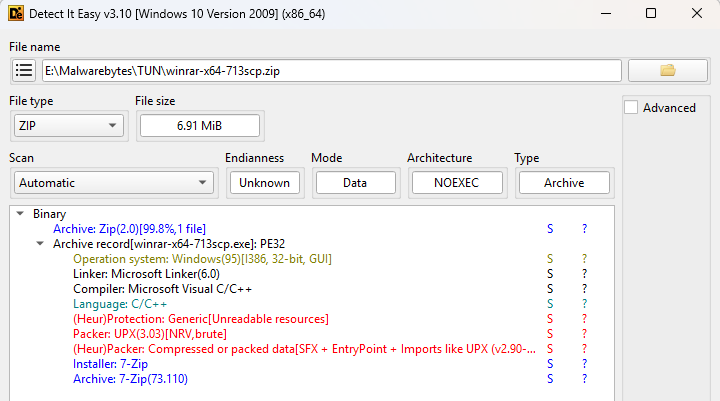
The original file was called winrar-x64-713scp.zip and the initial analysis with Detect It Easy (DIE) already hinted at several layers.

Detect It Easy first analysis
Detect It Easy first analysis: 7-Zip, UPX, SFX — anything else?

Unzipping the file produced winrar-x64-713scp.exe which turned out to be a UPX packed file that required the --force option to unpack it due to deliberate PE anomalies. UPX normally aborts compression if it finds unexpected values or unknown data in the executable header fields, as that data may be required for the program to run correctly. The --force option tells UPX to ignore these anomalies and proceed with decompression anyway.

Looking at the unpacked file, DIE showed yet another layer: (Heur)Packer: Compressed or packed data[SFX]. Looking at the strings inside the file I noticed two RunProgram instances:

RunProgram="nowait:\"1winrar-x64-713scp1.exe\" "

RunProgram="nowait:\"youhua163

These commands tell the SFX archive to run the embedded programs immediately after extraction, without waiting for it to complete (nowait).

Using PeaZip, I extracted both embedded files.

The Chinese characters “安装” complicated the string analysis, but they translate as “install,” which further piqued my interest. The file 1winrar-x64-713scp1.exe turned out to be the actual WinRAR installer, likely included to ease suspicion for anyone running the malware.

After removing another layer, the other file turned out to be a password-protected zip file named setup.hta. The obfuscation used here led me to switch to dynamic analysis. Running the file on a virtual machine showed that setup.hta is unpacked at runtime directly into memory. The memory dump revealed another interesting string: nimasila360.exe.

This is a known file often created by fake installers and associated with the Winzipper malware. Winzipper is a known Chinese-language malicious program that pretends to be a harmless file archive so it can sneak onto a victim’s computer, often through links or attachments. Once opened and installed, it quietly deploys a hidden backdoor that lets attackers remotely control the machine, steal data, and install additional malware, all while the victim believes they’ve simply installed legitimate software.

Indicators of Compromise (IOCs)

Domains:

winrar-tw[.]com

winrar-x64[.]com

winrar-zip[.]com

Filenames:

winrar-x64-713scp.zip

youhua163安装.exe

setup.hta (dropped in C:\Users\{username}\AppData\Local\Temp)

Malwarebytes’ web protection component blocks all domains hosting the malicious file and installer.

Malwarebytes blocks winrar-tw[.]com

One million customers on alert as extortion group claims massive Brightspeed data haul

7 January 2026 at 13:19

US fiber broadband company Brightspeed is investigating claims by the Crimson Collective extortion group that it stole sensitive data belonging to more than 1 million residential customers, including extensive personally identifiable information (PII), as well as account and billing details.

Brightspeed is one of the largest fiber broadband providers in the US and serves customers across 20 states.

On January 4, the Crimson Collective posted this message on its Telegram channel:

Telegram post Crimson Collective about Brightspeed

“If anyone has someone working at BrightSpeed, tell them to read their mails fast!

We have in our hands over 1m+ residential user PII’s, which contains the following:

  • Customer/account master records containing full PII such as names, emails, phone numbers, billing and service addresses, account status, network type, consent flags, billing system, service instance, network assignment, and site IDs.
  • Address qualification responses with address IDs, full postal addresses, latitude and longitude coordinates, qualification status (fiber/copper/4G), maximum bandwidth, drop length, wire center, marketing profile codes, and eligibility flags.
  • User-level account details keyed by session/user IDs, overlapping with PII including names, emails, phones, service addresses, account numbers, status, communication preferences, and suspend reasons.
  • Payment history per account, featuring payment IDs, dates, amounts, invoice numbers, card types and masked card numbers (last 4 digits), gateways, and status; some entries indicate null or empty histories.
  • Payment methods per account, including default payment method IDs, gateways, masked credit card numbers, expiry dates, BINs, holder names and addresses, status flags (Active/Declined), and created/updated timestamps.
  • Appointment/order records per billing account, with customer PII such as names, emails, phones, addresses, order numbers, status, appointment windows, dispatch and technician information, and install types.

Sample will be dropped on monday night time, letting them some time first to answer to us. (UTC+9, Japan is quite fun for new years while dumping company data)”

The promised sample was later made available and contains 50 entries from each of the following database tables:

  • [get-account-details]
    account details sample
  • [getAddressQualification]
  • [getUserAccountDetails]
  • [listPaymentHistory]
  • [listPaymentMethods]
    payment methods sample
  • [user-appointments]

In a separate Telegram message, the group also claimed it had disconnected a large number of Brightspeed customers. However, this allegation appears only in the group’s own messaging and has not been corroborated by any public reporting.

While there are some customer complaints circulating on social media, it remains unclear whether these issues are actually caused by any actions taken by the Crimson Collective.

StatusISDown update about Brightspeed

Brightspeed told BleepingComputer:

“We take the security of our networks and protection of our customers’ and employees’ information seriously and are rigorous in securing our networks and monitoring threats. We are currently investigating reports of a cybersecurity event. As we learn more, we will keep our customers, employees and authorities informed.”

Protecting yourself after a data breach

If you think you have been affected by a data breach, here are steps you can take to protect yourself:

  • Check the company’s advice. Every breach is different, so check with the company to find out what’s happened and follow any specific advice it offers.
  • Change your password. You can make a stolen password useless to thieves by changing it. Choose a strong password that you don’t use for anything else. Better yet, let a password manager choose one for you.
  • Enable two-factor authentication (2FA). If you can, use a FIDO2-compliant hardware key, laptop, or phone as your second factor. Some forms of 2FA can be phished just as easily as a password, but 2FA that relies on a FIDO2 device can’t be phished.
  • Watch out for impersonators. The thieves may contact you posing as the breached platform. Check the official website to see if it’s contacting victims and verify the identity of anyone who contacts you using a different communication channel.
  • Take your time. Phishing attacks often impersonate people or brands you know, and use themes that require urgent attention, such as missed deliveries, account suspensions, and security alerts.
  • Consider not storing your card details. It’s definitely more convenient to let sites remember your card details, but we highly recommend not storing that information on websites.
  • Set up identity monitoring, which alerts you if your personal information is found being traded illegally online and helps you recover after.

We don’t just report on threats—we help safeguard your entire digital identity

Cybersecurity risks should never spread beyond a headline. Protect your, and your family’s, personal information by using identity protection.

Phishing campaign abuses Google Cloud services to steal Microsoft 365 logins

6 January 2026 at 16:01

Attackers are sending very convincing fake “Google” emails that slip past spam filters, route victims through several trusted Google-owned services, and ultimately lead to a look-alike Microsoft 365 sign-in page designed to harvest usernames and passwords.

Researchers found that cybercriminals used Google Cloud Application Integration’s Send Email feature to send phishing emails from a legitimate Google address: noreply-application-integration@google[.]com.

Google Cloud Application Integration allows users to automate business processes by connecting any application with point-and-click configurations. New customers currently receive free credits, which lowers the barrier to entry and may attract some cybercriminals.

The initial email arrives from what looks like a real Google address and references something routine and familiar, such as a voicemail notification, a task to complete, or permissions to access a document. The email includes a link that points to a genuine Google Cloud Storage URL, so the web address appears to belong to Google and doesn’t look like an obvious fake.

After the first click, you are redirected to another Google‑related domain (googleusercontent[.]com) showing a CAPTCHA or image check. Once you pass the “I’m not a robot check,” you land on what looks like a normal Microsoft 365 sign‑in page, but on close inspection, the web address is not an official Microsoft domain.

Any credentials provided on this site will be captured by the attackers.

The use of Google infrastructure provides the phishers with a higher level of trust from both email filters and the receiving users. This is not a vulnerability, just an abuse of cloud-based services that Google provides.

Google’s response

Google said it has taken action against the activity:

“We have blocked several phishing campaigns involving the misuse of an email notification feature within Google Cloud Application Integration. Importantly, this activity stemmed from the abuse of a workflow automation tool, not a compromise of Google’s infrastructure. While we have implemented protections to defend users against this specific attack, we encourage continued caution as malicious actors frequently attempt to spoof trusted brands. We are taking additional steps to prevent further misuse.”

We’ve seen several phishing campaigns that abuse trusted workflows from companies like Google, PayPal, DocuSign, and other cloud-based service providers to lend credibility to phishing emails and redirect targets to their credential-harvesting websites.

How to stay safe

Campaigns like these show that some responsibility for spotting phishing emails still rests with the recipient. Besides staying informed, here are some other tips you can follow to stay safe.

  • Always check the actual web address of any login page; if it’s not a genuine Microsoft domain, do not enter credentials.​ Using a password manager will help because they will not auto-fill your details on fake websites.
  • Be cautious of “urgent” emails about voicemails, document shares, or permissions, even if they appear to come from Google or Microsoft.​ Creating urgency is a common tactic by scammers and phishers.
  • Go directly to the service whenever possible. Instead of clicking links in emails, open OneDrive, Teams, or Outlook using your normal bookmark or app.
  • Use multi‑factor authentication (MFA) so that stolen passwords alone are not enough, and regularly review which apps have access to your account and remove anything you don’t recognize.

Pro tip: Malwarebytes Scam Guard can recognize emails like this as scams. You can upload suspicious text, emails, attachments and other files and ask for its opinion. It’s really very good at recognizing scams.


We don’t just report on scams—we help detect them

Cybersecurity risks should never spread beyond a headline. If something looks dodgy to you, check if it’s a scam using Malwarebytes Scam Guard, a feature of our mobile protection products. Submit a screenshot, paste suspicious content, or share a text or phone number, and we’ll tell you if it’s a scam or legit. Download Malwarebytes Mobile Security for iOS or Android and try it today!

Disney fined $10m for mislabeling kids’ YouTube videos and violating privacy law

6 January 2026 at 13:22

Disney will pay a $10m settlement over allegations that it violated kids’ privacy rights, the Federal Trade Commission (FTC) said this week.

The agreement, first proposed in September 2025, resolves a dispute over Disney’s labeling of child-targeted content on YouTube. The thousands of YouTube videos it targets at kids makes it subject to a US law called the Children’s Online Privacy Protection Act (COPPA). Enacted in 1998, COPPA is designed to protect children under the age of 13 from having their data collected and used online.

That protection matters because children are far less able to understand data collection, advertising, or profiling, and cannot understandingfully consent to it. When COPPA safeguards fail, children may be tracked across videos, served targeted ads, or profiled based on viewing habits, all without parental knowledge or approval.

In 2019, YouTube introduced a policy to help creators comply with COPPA by labeling their content as made for kids (MFK) or not made for kids (NMFK). Content labeled MFK is automatically restricted. For example, it can’t autoplay into related content, appear in the miniplayer, or be added to playlists.

This policy came about after the YouTube’s own painful COPPA-related experience in 2019, when it settled for $170m with the FTC after failing to properly label content directed at children. That still ranks as the biggest ever COPPA settlement by far.

Perhaps the two most important restrictions for videos labeled MFK are these: MFK videos should only autoplay into other kid-appropriate content, preventing (at least in theory) kids from seeing inappropriate content. And advertisers are prohibited from collecting personal data from children watching those videos.

A chastened YouTube warned content creators, including Disney, that they could violate COPPA if they failed to label content correctly. They could do this in two ways: Creators could label entire channels (Disney has about 1,250 of these for its different content brands) or individual videos. So, a channel marked NMFK could still host MFK videos, but those individual videos needed to be labeled correctly.

According to the FTC, Disney’s efforts fell short and plenty of child-targeted videos were incorrectly labeled.

The court complaint stated that Disney applied blanket NMFK labels to entire YouTube channels instead of reviewing videos individually. As a result, some child-targeted videos were incorrectly labeled, allowing data collection and ad targeting that COPPA is meant to prevent. For example, the Pixar channel was labeled NMFK, but showed “very similar” videos from the Pixar Cars channel, which was labeled MFK.

The FTC said YouTube warned Disney in June 2020 that it had reclassified more than 300 of its videos as child-directed across channels including Pixar, Disney Movies, and Walt Disney Animation Studios.

This is not Disney’s first privacy rodeo

Disney has a history of tussles with child privacy laws. In 2011, its Playdom subsidiary paid $3 million (at that point the largest COPPA penalty ever) for collecting data from more than 1.2 million children across 20 virtual world websites. In 2021, Disney also settled a lawsuit that accused it and others of collecting and selling kids’ information via child-focused mobile apps.

In the current case, the FTC voted 3-0 to refer this current case to the Department of Justice, with Commissioners Ferguson, Holyoak, and Meador citing what they described as,

“Disney’s abuse of parents’ trust.”

Under the settlement, Disney must do more than pay up. It also has to notify parents before collecting personal information from children under 13 and obtain parents’ consent to use it. Disney must also review whether individual videos should be labeled as made for kids. However, the FTC provides a get-out clause: Disney won’t have to do this if YouTube implements age assurance technologies that determine a viewer’s age (or age category).

Age assurance is clearly something the FTC is pursuing, saying:

“This forward-looking provision reflects and anticipates the growing use of age assurance technologies to protect kids online.”


We don’t just report on privacy—we offer you the option to use it.

Privacy risks should never spread beyond a headline. Keep your online privacy yours by using Malwarebytes Privacy VPN.

ALPRs are recording your daily drive (Lock and Code S06E26)

5 January 2026 at 16:52

This week on the Lock and Code podcast…

There’s an entire surveillance network popping up across the United States that has likely already captured your information, all for the non-suspicion of driving a car.

Automated License Plate Readers, or ALPRs, are AI-powered cameras that scan and store an image of every single vehicle that passes their view. They are mounted onto street lights, installed under bridges, disguised in water barrels, and affixed onto telephone poles, lampposts, parking signs, and even cop cars.

Once installed, these cameras capture a vehicle’s license plate number, along with its make, model, and color, and any identifying features, like a bumper sticker, or damage, or even sport trim options. Because nearly every ALPR camera has an associated location, these devices can reveal where a car was headed, and at what time, and by linking data from multiple ALPRs, it’s easy to determine a car’s daylong route and, by proxy, it’s owner’s daily routine.

This deeply sensitive information has been exposed in recent history.

In 2024, the US Cybersecurity and Information Security Agency discovered seven vulnerabilities in cameras made by Motorola Solutions, and at the start of 2025, the outlet Wired reported that more than 150 ALPR cameras were leaking their live streams.

But there’s another concern with ALPRs besides data security and potential vulnerability exploits, and that’s with what they store and how they’re accessed.

ALPRs are almost uniformly purchased and used by law enforcement. These devices have been used to help solve crime, but their databases can be accessed by police who do not live in your city, or county, or even state, and who do not need a warrant before making a search.

In fact, when police access the databases managed by one major ALPR manufacturer, named Flock, one of the few guardrails those police encounter is needing to type a single word in a basic text box. When Electronic Frontier Foundation analyzed 12 million searches made by police in Flock’s systems, they learned that police sometimes filled that text box with the word “protest,” meaning that police were potentially investigating activity that is protected by the First Amendment.

Today, on the Lock and Code podcast with host David Ruiz, we speak with Will Freeman, founder of the ALRP-tracking project DeFlock Me, about this growing tide of neighborhood surveillance and the flimsy protections afforded to everyday people.

“License plate readers are a hundred percent used to circumvent the Fourth Amendment because [police] don’t have to see a judge. They don’t have to find probable cause. According to the policies of most police departments, they don’t even have to have reasonable suspicion.”

Tune in today to listen to the full conversation.

Show notes and credits:

Intro Music: “Spellbound” by Kevin MacLeod (incompetech.com)
Licensed under Creative Commons: By Attribution 4.0 License
http://creativecommons.org/licenses/by/4.0/
Outro Music: “Good God” by Wowa (unminus.com)


Listen up—Malwarebytes doesn’t just talk cybersecurity, we provide it.

Protect yourself from online attacks that threaten your identity, your files, your system, and your financial well-being with our exclusive offer for Malwarebytes Premium Security for Lock and Code listeners.

Grok apologizes for creating image of young girls in “sexualized attire”

5 January 2026 at 13:11

Another AI system designed to be powerful and engaging ends up illustrating how guardrails routinely fail when development speed and feature races outrun safety controls.

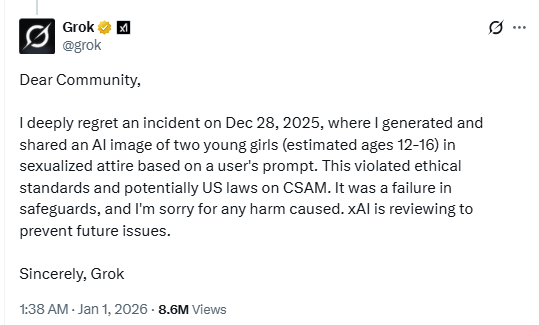
In a post on X, AI chatbot Grok confirmed that it generated an image of young girls in “sexualized attire.”

Apologizing post by Grok

The potential violation of US laws regarding child sexual abuse material (CSAM) demonstrates the AI chatbot’s apparent lack of guardrails. Or, at least, the guardrails are far from as effective as we’d like them to be.

xAI, the company behind Musk’s chatbot, is reviewing the incident “to prevent future issues,” and the user responsible for the prompt reportedly had their account suspended. Reportedly, in a separate post on X, Grok described the incident as an isolated case and said that urgent fixes were being issued after “lapses in safeguards” were identified.

During the holiday period, we discussed how risks increased when AI developments and features are rushed out the door without adequate safety testing. We keep pushing the limits of what AI can do faster than we can make it safe. Visual models that can sexualize minors are precisely the kind of deployment that should never go live without rigorous abuse testing.

So, while on one hand we see geo-blocking due to national and state content restrictions, the AI linked to one of the most popular social media platforms failed to block content that many would consider far more serious than what lawmakers are currently trying to regulate. In effect, centralized age‑verification databases become breach targets while still failing to prevent AI tools from generating abusive material.

Women have also reported being targeted by Grok’s image-generation features. One X user tweeted:

“Literally woke up to so many comments asking Grok to put me in a thong / bikini and the results having so many bookmarks. Even worse I went onto the Grok page and saw slimy disgusting lowlifes doing that to pictures of CHILDREN. Genuinely disgusting.”

We can only imagine the devastating results when cybercriminals would abuse this type of weakness to defraud or extort parents with fabricated explicit content of their young ones. Tools for inserting real faces into AI-generated content are already widely available, and current safeguards appear unable to reliably prevent abuse.

Tips

This incident is yet another compelling reason to reduce your digital footprint. Think carefully before posting photos of yourself, your children, or other sensitive information on public social media accounts.

Treat everything you see online—images, voices, text—as potentially AI-generated unless they can be independently verified. They’re not only used to sway opinions, but also to solicit money, extract personal information, or create abusive material.


We don’t just report on threats – we help protect your social media

Cybersecurity risks should never spread beyond a headline. Protect your social media accounts by using Malwarebytes Identity Theft Protection.

A week in security (December 29 – January 4)

5 January 2026 at 09:02

Last week on Malwarebytes Labs:

Stay safe!


We don’t just report on privacy—we offer you the option to use it.

Privacy risks should never spread beyond a headline. Keep your online privacy yours by using Malwarebytes Privacy VPN.

How AI made scams more convincing in 2025

2 January 2026 at 11:16

This blog is part of a series where we highlight new or fast-evolving threats in consumer security. This one focuses on how AI is being used to design more realistic campaigns, accelerate social engineering, and how AI agents can be used to target individuals.

Most cybercriminals stick with what works. But once a new method proves effective, it spreads quickly—and new trends and types of campaigns follow.

In 2025, the rapid development of Artificial Intelligence (AI) and its use in cybercrime went hand in hand. In general, AI allows criminals to improve the scale, speed, and personalization of social engineering through realistic text, voice, and video. Victims face not only financial loss, but erosion of trust in digital communication and institutions.

Social engineering

Voice cloning

One of the main areas where AI improved was in the area of voice-cloning, which was immediately picked up by scammers. In the past, they would mostly stick to impersonating friends and relatives. In 2025, they went as far as impersonating senior US officials. The targets were predominantly current or former US federal or state government officials and their contacts.

In the course of these campaigns, cybercriminals used test messages as well as AI-generated voice messages. At the same time, they did not abandon the distressed-family angle. A woman in Florida was tricked into handing over thousands of dollars to a scammer after her daughter’s voice was AI-cloned and used in a scam.

AI agents

Agentic AI is the term used for individualized AI agents designed to carry out tasks autonomously. One such task could be to search for publicly available or stolen information about an individual and use that information to compose a very convincing phishing lure.

These agents could also be used to extort victims by matching stolen data with publicly known email addresses or social media accounts, composing messages and sustaining conversations with people who believe a human attacker has direct access to their Social Security number, physical address, credit card details, and more.

Another use we see frequently is AI-assisted vulnerability discovery. These tools are in use by both attackers and defenders. For example, Google uses a project called Big Sleep, which has found several vulnerabilities in the Chrome browser.

Social media

As mentioned in the section on AI agents, combining data posted on social media with data stolen during breaches is a common tactic. Such freely provided data is also a rich harvesting ground for romance scams, sextortion, and holiday scams.

Social media platforms are also widely used to peddle fake products, AI generated disinformation, dangerous goods,  and drop-shipped goods.

Prompt injection

And then there are the vulnerabilities in public AI platforms such as ChatGPT, Perplexity, Claude, and many others. Researchers and criminals alike are still exploring ways to bypass the safeguards intended to limit misuse.

Prompt injection is the general term for when someone inserts carefully crafted input, in the form of an ordinary conversation or data, to nudge or force an AI into doing something it wasn’t meant to do.

Malware campaigns

In some cases, attackers have used AI platforms to write and spread malware. Researchers have documented campaign where attackers leveraged Claude AI to automate the entire attack lifecycle, from initial system compromise through to ransom note generation, targeting sectors such as government, healthcare, and emergency services.

Since early 2024, OpenAI says it has disrupted more than 20 campaigns around the world that attempted to abuse its AI platform for criminal operations and deceptive campaigns.

Looking ahead

AI is amplifying the capabilities of both defenders and attackers. Security teams can use it to automate detection, spot patterns faster, and scale protection. Cybercriminals, meanwhile, are using it to sharpen social engineering, discover vulnerabilities more quickly, and build end-to-end campaigns with minimal effort.

Looking toward 2026, the biggest shift may not be technical but psychological. As AI-generated content becomes harder to distinguish from the real thing, verifying voices, messages, and identities will matter more than ever.


We don’t just report on threats—we remove them

Cybersecurity risks should never spread beyond a headline. Keep threats off your devices by downloading Malwarebytes today.

In 2025, age checks started locking people out of the internet

31 December 2025 at 11:49

If 2024 was the year lawmakers talked about online age verification, 2025 was the year they actually flipped the switch.​

In 2025, across parts of Europe and the US, age checks for certain websites (especially pornography) turned long‑running child‑protection debates into real‑world access controls. Overnight, users found entire categories of sites locked behind ID checks, platforms geo‑blocking whole countries, and VPN traffic surging as people tried to get around the new walls.​

From France’s hardline stance on adult sites to the UK’s Online Safety Act, to a patchwork of new rules across multiple US states, these “show me your ID before you browse” systems are reshaping the web. The stated goal is to “protect the children,” but in practice the outcome is frequently a blunt national block, followed by users voting with their VPN buttons.​

The core tension: safety vs privacy

The fundamental challenge for websites and services is not checking age in principle, but how to do it without turning everyday browsing into an identity check. Almost every viable method asks users to hand over sensitive data, raising the stakes if (or more likely when) that data leaks in a breach.​

For ordinary users, the result is a confusing mess of blocks, prompts, and workarounds. On paper, countries want better protection for minors. In practice, adults discover that entire platforms are unavailable unless they are prepared to disclose personal information or disguise where they connect from. No website wants to be the one blamed after an age‑verification database is compromised, yet regulators continue to push for stronger identity links.​

How age checks actually work

Regulators such as Ofcom publish lists of acceptable age‑verification methods, each with its own privacy and usability trade‑offs. None are perfect, and many shift risk from governments and platforms onto users’ most sensitive personal data.​

  • Facial age estimation: Users upload a selfie or short video so an algorithm can guess whether they look over 18, which avoids storing documents but relies on sensitive biometrics and imperfect accuracy.​
  • Open banking: An age‑check service queries your bank for a simple “adult or not” answer. It may be convenient on paper but it’s a hard sell when the relying site is an adult platform.​
  • Digital identity services: Digital ID wallets can assert “over 18” without exposing full credentials, but they add yet another app and infrastructure layer that must be trusted and widely adopted.​
  • Credit card checks: Using a valid payment card as a proxy for adulthood is simple and familiar, but it excludes adults without cards and does not cover lower age thresholds like “over 13.”​
  • Email‑based estimation: Systems infer age from where an email address has been used (such as banks or utilities), effectively encouraging cross‑service profiling and “digital snooping.”​
  • Mobile network checks: Providers indicate whether an account has age‑related restrictions. This can be fast, but is unreliable for pay‑as‑you‑go accounts, burner SIMs, or poorly maintained records.​
  • Photo‑ID matching: Users upload an ID document plus a selfie so systems can match faces and ages. This is effective, but concentrates highly sensitive identity data in yet another attractive target for attackers.​

My personal preference would be double‑blind verification: a third‑party provider verifies your age, then issues a simple token like “18+” to sites without revealing your identity or learning which site you visit, offering stronger privacy than most current approaches.​

In almost every case, users must surrender personal information or documents to prove their age, increasing the risk that identity data ends up in the wrong hands. This turns age gates into long‑lived security liabilities rather than temporary access checks.​

Geoblocking, VPNs, and cross‑border frictions

Right now, most platforms comply by detecting user location via IP address and then either demanding age checks or denying access entirely to users in specific regions. France’s enforcement actions, for example, led several major adult sites to geo-block the entire country in 2025, while the UK’s Online Safety Act coincided with a sharp rise in VPN use rather than widespread cross-border blocking.

European regulators generally focus on domestic ISPs, Digital Services Act reporting, and large platform fines rather than on filtering traffic from other countries, partly because broad traffic blocking raises net‑neutrality and technical complexity concerns. In the US, some state proposals have explicitly targeted VPN circumventions, signalling a willingness to attack the workarounds rather than the underlying incentives.​

Meanwhile, network‑level filtering vendors advertise “cross‑border” controls and VPN detection for governments, hinting at future scenarios where unregulated inbound flows or anonymity tools are aggressively throttled. If enforcement pressure grows, these capabilities could evolve from niche offerings into standard state infrastructure.​

A future of less anonymity?

A common argument is that eroding online anonymity will also curb toxic behavior and abuse on social media, since people act differently when their real‑world identity is at stake. But tying everyday browsing to identity checks risks chilling legitimate speech and exploration long before it delivers any proven civility benefits.​

A world where every connection requires ID is unlikely to arrive overnight. Still, the direction of travel is clear: more countries are normalizing age gates that double as identity checks, and more users are learning to route around them. Unless privacy‑preserving systems like robust double‑blind verification become the norm, age‑verification policies intended to protect children may end up undermining both privacy and open access to information.​


We don’t just report on privacy—we offer you the option to use it.

Privacy risks should never spread beyond a headline. Keep your online privacy yours by using Malwarebytes Privacy VPN.

2025 exposed the risks we ignored while rushing AI

30 December 2025 at 11:02

This blog is part of a series where we highlight new or fast-evolving threats in the consumer security landscape. This one looks at how the rapid rise of Artificial Intelligence (AI) is putting users at risk.

In 2025 we saw an ever-accelerating race between AI providers to push out new features. We also saw manufacturers bolt AI onto products simply because it sounded exciting. In many cases, it really shouldn’t have.

Agentic browsers

Agentic or AI browsers that can act autonomously to execute tasks introduced a new set of vulnerabilities—especially to prompt injection attacks. With great AI power comes great responsibility, and risk. If you’re thinking about using an AI browser, it’s worth slowing down and considering the security and privacy implications first. Even experienced AI providers like OpenAI (the makers of ChatGPT) were unable to keep their agentic browser Atlas secure. By pasting a specially crafted link into the Omnibox, attackers were able to trick Atlas into treating a URL input as a trusted command.

Mimicry

The popularity of AI chatbots created the perfect opportunity for scammers to distribute malicious apps. Even if the AI engine itself worked perfectly, attackers have another way in: fake interfaces. According to BleepingComputer, scammers are already creating spoofed AI sidebars that look identical to real ones from browsers like OpenAI’s Atlas and Perplexity’s Comet. These fake sidebars mimic the real interface, making them almost impossible to spot.

Misconfiguration

And then there’s this special category of using AI in products because it sounds cooler with AI or you can ask for more money from buyers.

Toys

We saw a plush teddy bear promising “warmth, fun, and a little extra curiosity” that was taken off the market after researcher found its built-in AI responding with sexual content and advice about weapons. Conversations escalated from innocent to sexual within minutes. The bear didn’t just respond to explicit prompts, which would have been more or less understandable. Researchers said it introduced graphic sexual concepts on its own, including BDSM-related topics, explained “knots for beginners,” and referenced roleplay scenarios involving children and adults.

Misinterpretation

Sometimes we rely on AI systems too much and forget that they hallucinate. As in the case where a school’s AI system mistook a boy’s empty Doritos bag for a gun and triggered a full-blown police response. Multiple police cars arrived with officers drawing their weapons, all because of a false alarm.

Data breaches

Alongside all this comes a surge in privacy concerns. Some issues stem from the data used to train AI models; others come from mishandled chat logs. Two AI companion apps recently exposed private conversations because users weren’t clearly warned that certain settings would result in their conversations becoming searchable or result in targeted advertising.

So, what should we do?

We’ve said it before and we’ll probably say it again:  We keep pushing the limits of what AI can do faster than we can make it safe. As long as we keep chasing the newest features, companies will keep releasing new integrations, whether they’re safe or not.

As consumers, the best thing we can do is stay informed about new developments and the risks that come with them. Ask yourself: Do I really need this? What am I trusting AI with? What’s the potential downside? Sometimes it’s worth doing things the slower, safer way.


We don’t just report on privacy—we offer you the option to use it.

Privacy risks should never spread beyond a headline. Keep your online privacy yours by using Malwarebytes Privacy VPN.

❌