Login
Login2026-02-02: KongTuke ClickFix activity leads to Async RAT
2 February 2026 at 20:51



ICE-reporting service StopICE has blamed a US Customs and Border Protection (CBP) agent for attacking its app and website and sending users text messages warning them that their information had been "sent to the authorities."…
Russia-linked attackers are already exploiting Microsoft's latest Office zero-day, with Ukraine's national cyber defense team warning that the same bug is being used to target government agencies inside the country and organizations across the EU.…
As a Browser Guard user, you might not have noticed much difference lately. Browser Guard still blocks scams and phishing attempts just like always, and, in many cases, even better.
But behind the scenes, almost everything changed. The rules that govern how browser extensions work went through a major overhaul, and we had to completely rebuild how Browser Guard protects you.
Browser extensions include a configuration file called a “manifest”. Think of it as an instruction manual that tells your browser what an extension can do and how it’s allowed to do it.
Manifest v3 is the latest version of that system, and it’s now the only option allowed in major browsers like Chrome and Edge.
In Manifest v2, Browser Guard could use highly customized logic to analyze and block suspicious activity as it happened, protecting you as you browsed the web.
With Manifest v3, that flexibility is mostly gone. Extensions can no longer run deeply complex, custom logic in the same way. Instead, we can only pass static rule lists to the browser, called Declarative Net Request (DNR) rules.
But those DNR rules come with strict constraints.
Rule sets are size-limited by the browser to save space. Because rules are stored as raw JSON files, developers can’t use other data types to make them smaller. And updating those DNR rules can only be done by updating the extension entirely.
This is less of a problem on Chrome, which allows developers to push updates quickly, but other browsers don’t currently support this fast-track process. Dynamic rule updates exist, but they’re limited, and nowhere near large enough to hold the full set of rules.
In short, we couldn’t simply port Browser Guard from Manifest v2 to v3. The old approach wouldn’t keep our users protected.
Firefox and Brave chose a different path and continue to support the more flexible Manifest v2 method of blocking requests.
However, since Brave doesn’t have its own extension store, users can only install extensions they already had before Google removed Manifest v2 extensions from the Chrome Web Store. Though Brave also has strong out-of-the-box ad protection.
For Browser Guard users on Firefox, rest assured the same great blocking techniques will continue to work.
Given all of this, we had to get creative.
Many ad blockers already support pattern-based matching to stop ads and trackers. We asked a different question: what if we could use similar techniques to catch scam and phishing attempts before we know the specific URL is malicious?
Better yet, what if we did it without relying on the new DNR APIs?
So, we built a new pattern-matching system focused specifically on scam and phishing behavior, supporting:
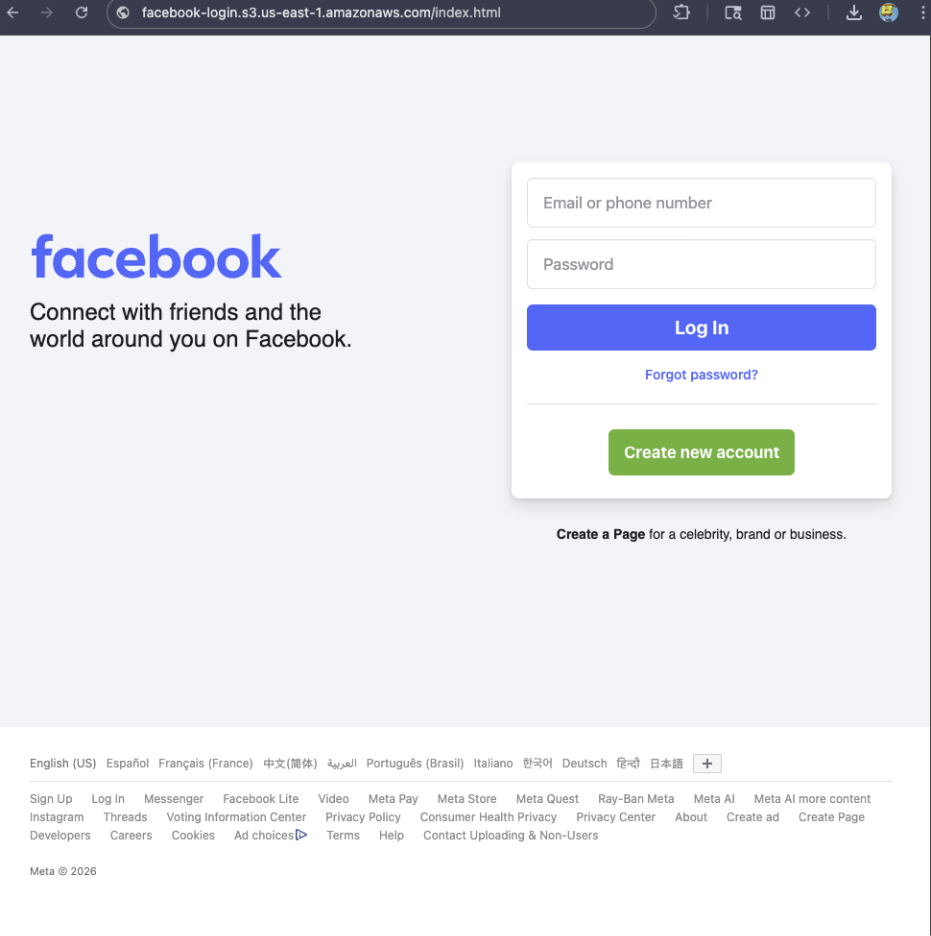
For example, if a site is hosted on Amazon S3, contains a password-input field, and uses a homoglyph in the URL to trick users into thinking they were logging into Facebook, Browser Guard can detect that combination—even if we’ve never seen the URL before.

With AI, attackers can create near-perfect duplicates of websites easier than ever. And did you spot the homoglyph in the URL? Nope, neither did I!
That’s why we designed this system so we can update its rules every 30 minutes, instead of waiting for full extension updates.
That’s true—for now.
We’ve found a temporary workaround that lets us support all the rules that we had before. However, we had to remove some of the more advanced logic that used to sit on top of them.
For example, we can’t use these large datasets to block subframe requests, only main frame requests. Nor can we stack multiple logic layers together; blocking is limited to simple matches (regex, domains and URLs).
Those limits are a big reason we’re investing more heavily in pattern-based and heuristic protection.
From day one, Browser Guard has used heuristics (behavior) to detect scams and phishing, monitoring behavior on the page to match suspicious activity.
For example, some scam pages deliberately break your browser’s back button by abusing window.replaceState, then trick you into calling that scammer’s “computer helpline.” Others try to convince you to run malicious commands on your computer.
Browser Guard can detect these behaviors and warn you before you fall for them.
Did someone say AI?
You’ve probably seen Scam Guard in other Malwarebytes products. We’re currently working on a version tailored specifically for Browser Guard. More soon!
While Manifest v3 introduced meaningful improvements to browser security, it also created real challenges for security tools like Browser Guard.
Rather than scaling back, the Browser Guard team rebuilt our approach from the ground up, focusing on behavior, patterns, and faster response times. The result is protection that’s different under the hood, but just as committed to keeping you safe online.
We don’t just report on scams—we help detect them
Cybersecurity risks should never spread beyond a headline. If something looks dodgy to you, check if it’s a scam using Malwarebytes Scam Guard, a feature of our mobile protection products. Submit a screenshot, paste suspicious content, or share a text or phone number, and we’ll tell you if it’s a scam or legit. Download Malwarebytes Mobile Security for iOS or Android and try it today!
Change Your Password Day took place over the weekend, and in case you doubt the need to improve this most basic element of cybersecurity hygiene, even McDonald's – yes, the fast food chain – is urging people to get more creative when it comes to passwords. …
A prolific data ransom gang that calls itself Scattered Lapsus ShinyHunters (SLSH) has a distinctive playbook when it seeks to extort payment from victim firms: Harassing, threatening and even swatting executives and their families, all while notifying journalists and regulators about the extent of the intrusion. Some victims reportedly are paying — perhaps as much to contain the stolen data as to stop the escalating personal attacks. But a top SLSH expert warns that engaging at all beyond a “We’re not paying” response only encourages further harassment, noting that the group’s fractious and unreliable history means the only winning move is not to pay.
Image: Shutterstock.com, @Mungujakisa
Unlike traditional, highly regimented Russia-based ransomware affiliate groups, SLSH is an unruly and somewhat fluid English-language extortion gang that appears uninterested in building a reputation of consistent behavior whereby victims might have some measure of confidence that the criminals will keep their word if paid.
That’s according to Allison Nixon, director of research at the New York City based security consultancy Unit 221B. Nixon has been closely tracking the criminal group and individual members as they bounce between various Telegram channels used to extort and harass victims, and she said SLSH differs from traditional data ransom groups in other important ways that argue against trusting them to do anything they say they’ll do — such as destroying stolen data.
Like SLSH, many traditional Russian ransomware groups have employed high-pressure tactics to force payment in exchange for a decryption key and/or a promise to delete stolen data, such as publishing a dark web shaming blog with samples of stolen data next to a countdown clock, or notifying journalists and board members of the victim company. But Nixon said the extortion from SLSH quickly escalates way beyond that — to threats of physical violence against executives and their families, DDoS attacks on the victim’s website, and repeated email-flooding campaigns.
SLSH is known for breaking into companies by phishing employees over the phone, and using the purloined access to steal sensitive internal data. In a January 30 blog post, Google’s security forensics firm Mandiant said SLSH’s most recent extortion attacks stem from incidents spanning early to mid-January 2026, when SLSH members pretended to be IT staff and called employees at targeted victim organizations claiming that the company was updating MFA settings.
“The threat actor directed the employees to victim-branded credential harvesting sites to capture their SSO credentials and MFA codes, and then registered their own device for MFA,” the blog post explained.
Victims often first learn of the breach when their brand name is uttered on whatever ephemeral new public Telegram group chat SLSH is using to threaten, extort and harass their prey. According to Nixon, the coordinated harassment on the SLSH Telegram channels is part of a well-orchestrated strategy to overwhelm the victim organization by manufacturing humiliation that pushes them over the threshold to pay.
Nixon said multiple executives at targeted organizations have been subject to “swatting” attacks, wherein SLSH communicated a phony bomb threat or hostage situation at the target’s address in the hopes of eliciting a heavily armed police response at their home or place of work.
“A big part of what they’re doing to victims is the psychological aspect of it, like harassing executives’ kids and threatening the board of the company,” Nixon told KrebsOnSecurity. “And while these victims are getting extortion demands, they’re simultaneously getting outreach from media outlets saying, ‘Hey, do you have any comments on the bad things we’re going to write about you.”
In a blog post today, Unit 221B argues that no one should negotiate with SLSH because the group has demonstrated a willingness to extort victims based on promises that it has no intention to keep. Nixon points out that all of SLSH’s known members hail from The Com, shorthand for a constellation of cybercrime-focused Discord and Telegram communities which serve as a kind of distributed social network that facilitates instant collaboration.
Nixon said Com-based extortion groups tend to instigate feuds and drama between group members, leading to lying, betrayals, credibility destroying behavior, backstabbing, and sabotaging each other.
“With this type of ongoing dysfunction, often compounding by substance abuse, these threat actors often aren’t able to act with the core goal in mind of completing a successful, strategic ransom operation,” Nixon wrote. “They continually lose control with outbursts that put their strategy and operational security at risk, which severely limits their ability to build a professional, scalable, and sophisticated criminal organization network for continued successful ransoms – unlike other, more tenured and professional criminal organizations focused on ransomware alone.”
Intrusions from established ransomware groups typically center around encryption/decryption malware that mostly stays on the affected machine. In contrast, Nixon said, ransom from a Com group is often structured the same as violent sextortion schemes against minors, wherein members of The Com will steal damaging information, threaten to release it, and “promise” to delete it if the victim complies without any guarantee or technical proof point that they will keep their word. She writes:
A key component of SLSH’s efforts to convince victims to pay, Nixon said, involves manipulating the media into hyping the threat posed by this group. This approach also borrows a page from the playbook of sextortion attacks, she said, which encourages predators to keep targets continuously engaged and worrying about the consequences of non-compliance.
“On days where SLSH had no substantial criminal ‘win’ to announce, they focused on announcing death threats and harassment to keep law enforcement, journalists, and cybercrime industry professionals focused on this group,” she said.

An excerpt from a sextortion tutorial from a Com-based Telegram channel. Image: Unit 221B.
Nixon knows a thing or two about being threatened by SLSH: For the past several months, the group’s Telegram channels have been replete with threats of physical violence against her, against Yours Truly, and against other security researchers. These threats, she said, are just another way the group seeks to generate media attention and achieve a veneer of credibility, but they are useful as indicators of compromise because SLSH members tend to name drop and malign security researchers even in their communications with victims.
“Watch for the following behaviors in their communications to you or their public statements,” Unit 221B’s advisory reads. “Repeated abusive mentions of Allison Nixon (or “A.N”), Unit 221B, or cybersecurity journalists—especially Brian Krebs—or any other cybersecurity employee, or cybersecurity company. Any threats to kill, or commit terrorism, or violence against internal employees, cybersecurity employees, investigators, and journalists.”
Unit 221B says that while the pressure campaign during an extortion attempt may be traumatizing to employees, executives, and their family members, entering into drawn-out negotiations with SLSH incentivizes the group to increase the level of harm and risk, which could include the physical safety of employees and their families.
“The breached data will never go back to the way it was, but we can assure you that the harassment will end,” Nixon said. “So, your decision to pay should be a separate issue from the harassment. We believe that when you separate these issues, you will objectively see that the best course of action to protect your interests, in both the short and long term, is to refuse payment.”
Hackers rely on evolved vishing and login harvesting to compromise SSO credentials for unauthorized MFA enrollment.
The post ShinyHunters-Branded Extortion Activity Expands, Escalates appeared first on SecurityWeek.
A hacker published malicious versions of four established VS Code extensions to distribute a GlassWorm malware loader.
The post Open VSX Publisher Account Hijacked in Fresh GlassWorm Attack appeared first on SecurityWeek.
Security issues continue to pervade the OpenClaw ecosystem, formerly known as ClawdBot then Moltbot, as multiple projects patch bot takeover and remote code execution (RCE) exploits.…
Poland’s CERT has published a report on the recent attack, providing new details on targeted ICS and attribution.
The post Default ICS Credentials Exploited in Destructive Attack on Polish Energy Facilities appeared first on SecurityWeek.
If you’ve ever stared at a suspicious text, email, or link and thought “Is this a scam… or am I overthinking it?” Well, you’re not alone.
Scams are getting harder to spot, and even savvy internet users get caught off guard. That’s why Malwarebytes is the first cybersecurity provider available directly inside ChatGPT, bringing trusted threat intelligence to millions of people right where these questions happen.
Simply ask: “Malwarebytes, is this a scam?” and you’ll get a clear, informed answer—super fast.
To access Malwarebytes inside ChatGPT:
Malwarebytes in ChatGPT lets you tap into our cybersecurity expertise without ever leaving the conversation. Whether something feels off or you want a second opinion, you can get trusted guidance in no time at all.
Here’s what you can do:
Spot scams faster
Paste in a suspicious text message, email, or DM and get:
You won’t get any jargon or guessing from us. What you will get is 100% peace of mind.
Check links, domains, and phone numbers
Not sure if a URL, website, or phone number is legit? Ask for a risk assessment informed by Malwarebytes threat intelligence, including:
The verdicts you get aren’t based on vibes or generic advice. They’re powered by Malwarebytes’ continuously updated threat intelligence—the same real-world data that helps protect millions of devices and people worldwide every day.
If you spot something suspicious, you can submit it directly to Malwarebytes through ChatGPT. Those reports help strengthen threat intelligence, making the internet safer not just for you, but for everyone.
Malwarebytes in ChatGPT is available wherever ChatGPT apps are available.
To get started, just ask ChatGPT:
“Malwarebytes, is this a scam?”
For deeper insights, proactive protection, and human support, download the Malwarebytes app—our security solutions are designed to stop threats before they reach you, and the damage is done.
A state-sponsored cyber criminal compromised Notepad++'s update service in 2025, according to the project's author.…
There’s a new report about two AI coding assistants, used by 1.5 million developers, that are surreptitiously sending a copy of everything they ingest to China.
Maybe avoid using them.
Security leaders share how artificial intelligence is changing malware, ransomware, and identity-led intrusions, and how defenses must evolve.
The post Cyber Insights 2026: Malware and Cyberattacks in the Age of AI appeared first on SecurityWeek.
Of 3,100 unprotected MongoDB instances, half remain compromised, most of them by a single threat actor.
The post Over 1,400 MongoDB Databases Ransacked by Threat Actor appeared first on SecurityWeek.
The next major Windows Server and Windows releases will have the deprecated authentication protocol disabled by default.
The post Microsoft Moves Closer to Disabling NTLM appeared first on SecurityWeek.
Japan and Britain agree to accelerate cooperation on cybersecurity and the supply of critical minerals, as China’s influence grows in the region.
The post Japan, Britain to Boost Cybersecurity and Critical Minerals Cooperation as China’s Influence Grows appeared first on SecurityWeek.
“You’re invited!”
It sounds friendly, familiar and quite harmless. But in a scam we recently spotted, that simple phrase is being used to trick victims into installing a full remote access tool on their Windows computers—giving attackers complete control of the system.
What appears to be a casual party or event invitation leads to the silent installation of ScreenConnect, a legitimate remote support tool quietly installed in the background and abused by attackers.
Here’s how the scam works, why it’s effective, and how to protect yourself.
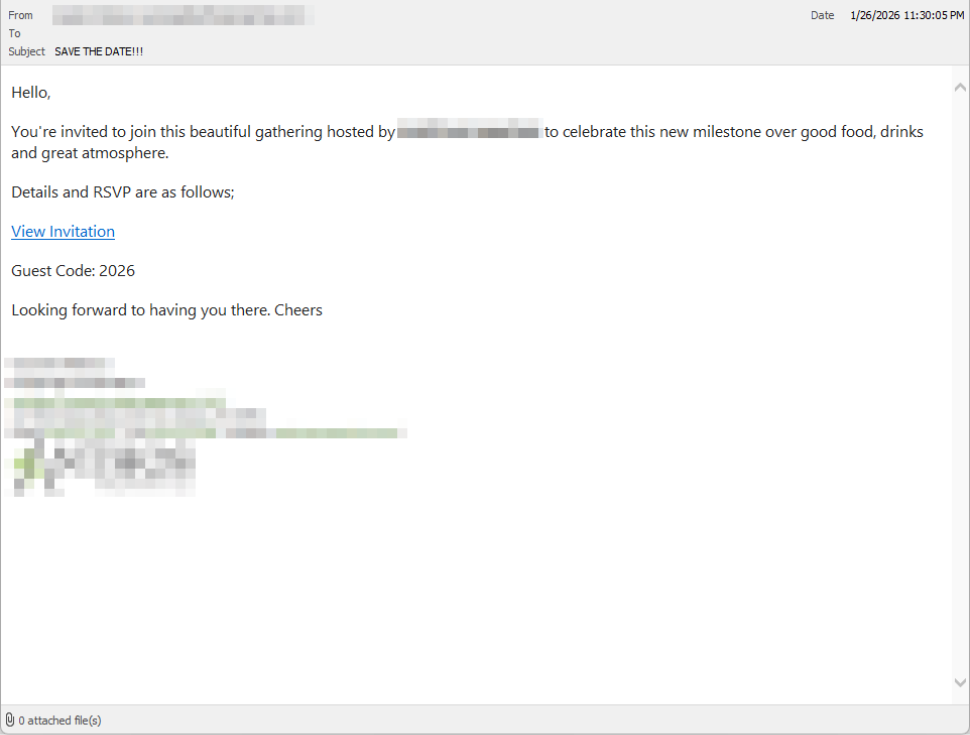
Victims receive an email framed as a personal invitation—often written to look like it came from a friend or acquaintance. The message is deliberately informal and social, lowering suspicion and encouraging quick action.
In the screenshot below, the email arrived from a friend whose email account had been hacked, but it could just as easily come from a sender you don’t know.
So far, we’ve only seen this campaign targeting people in the UK, but there’s nothing stopping it from expanding elsewhere.
Clicking the link in the email leads to a polished invitation page hosted on an attacker-controlled domain.
The landing page leans heavily into the party theme, but instead of showing event details, the page nudges the user toward opening a file. None of them look dangerous on their own, but together they keep the user focused on the “invitation” file:
Within seconds, the browser is redirected to download RSVPPartyInvitationCard.msi
The page even triggers the download automatically to keep the victim moving forward without stopping to think.
This MSI file isn’t an invitation. It’s an installer.
When the user opens the MSI file, it launches msiexec.exe and silently installs ScreenConnect Client, a legitimate remote access tool often used by IT support teams.
There’s no invitation, RSVP form, or calendar entry.
What happens instead:
C:\Program Files (x86)\ScreenConnect Client\ From the victim’s perspective, very little seems to happen. But at this point, the attacker can now remotely access their computer.
Once installed, the ScreenConnect client initiates encrypted outbound connections to ScreenConnect’s relay servers, including a uniquely assigned instance domain.
That connection gives the attacker the same level of access as a remote IT technician, including the ability to:
Because ScreenConnect is legitimate software commonly used for remote support, its presence isn’t always obvious. On a personal computer, the first signs are often behavioral, such as unexplained cursor movement, windows opening on their own, or a ScreenConnect process the user doesn’t remember installing.
This campaign is effective because it targets normal, predictable human behavior. From a behavioral security standpoint, it exploits our natural curiosity and appears to be a low risk.
Most people don’t think of invitations as dangerous. Opening one feels passive, like glancing at a flyer or checking a message, not installing software.
Even security-aware users are trained to watch out for warnings and pressure. A friendly “you’re invited” message doesn’t trigger those alarms.
By the time something feels off, the software is already installed.
Watch for:
RSVPPartyInvitationCard.msi This campaign is a reminder that modern attacks often don’t break in—they’re invited in. Remote access tools give attackers deep control over a system. Acting quickly can limit the damage.
For individuals
If you receive an email like this:
If you already clicked or ran the file:
For organisations (especially in the UK)
This scam works by installing a legitimate remote access tool without clear user intent. That’s exactly the gap Malwarebytes is designed to catch.
Malwarebytes now detects newly installed remote access tools and alerts you when one appears on your system. You’re then given a choice: confirm that the tool is expected and trusted, or remove it if it isn’t.
We don’t just report on threats—we remove them
Cybersecurity risks should never spread beyond a headline. Keep threats off your devices by downloading Malwarebytes today.
Opinion Barely a month into 2026, electrical power infrastructure on two continents has tested positive for cyberattacks. One fell flat as attempts to infiltrate and disrupt the Polish distribution grid were rebuffed and reported. The other, earlier attack was part of Operation Absolute Resolve, the US abduction of Venezuela's President Maduro from Caracas on January 3.…
The likely state-sponsored threat actor had access to the hosting provider for months and targeted only certain Notepad++ customers.
The post Notepad++ Supply Chain Hack Conducted by China via Hosting Provider appeared first on SecurityWeek.